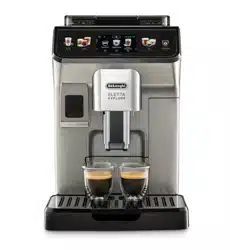
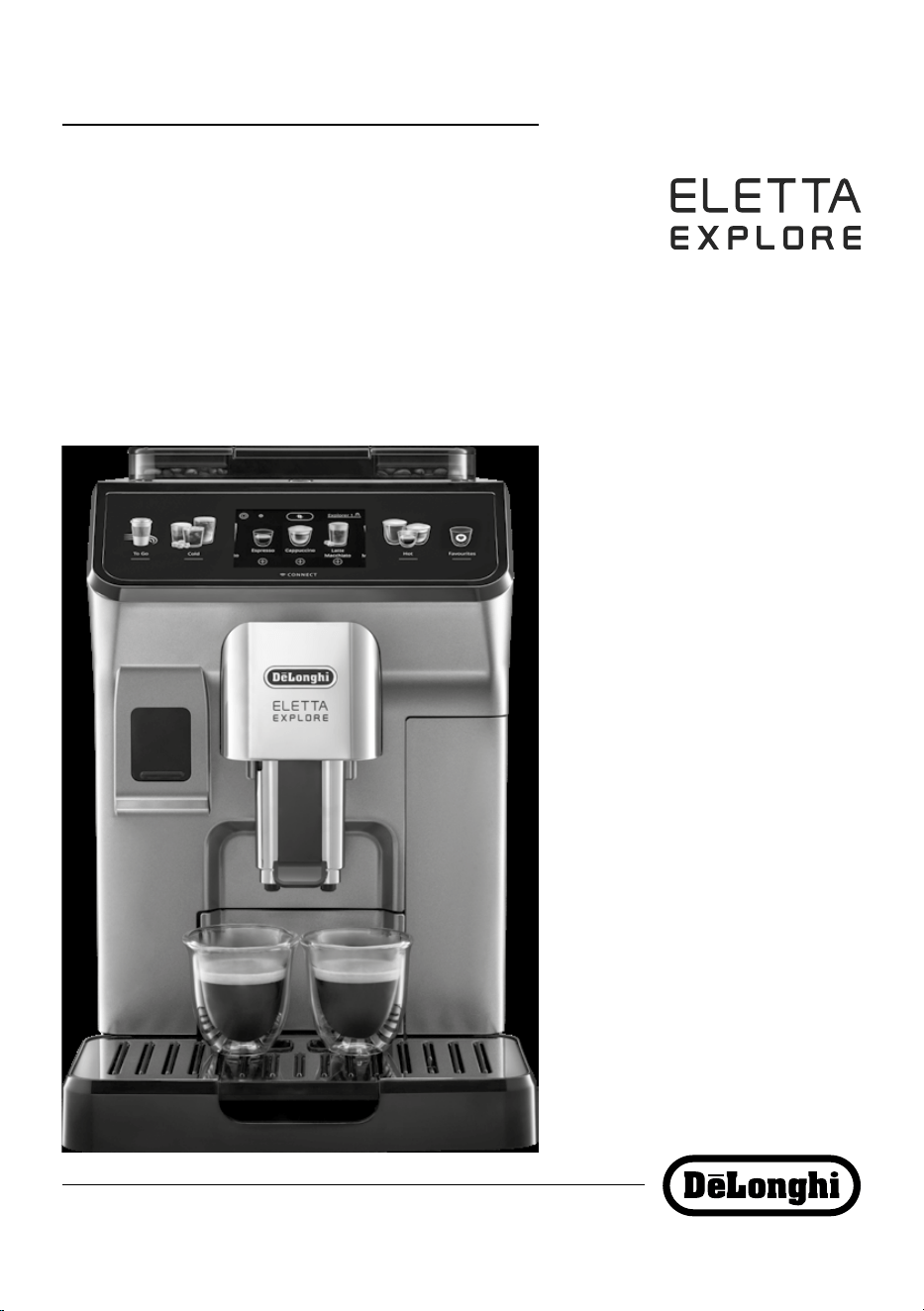
BEAN TO CUP ESPRESSO AND
CAPPUCCINO MACHINE
Instruction for Use
Instructions videos available at:
https://eletta-explore.delonghi.com
ECAM45X.6Y - 45X.8Y
2
A4 A3
A2
A5
A6
A9
A8
A7
A1
A
A10
A12
A13
A14
A15
A21
A19
A22
A17
A16
A18
A20
A11
3
D*
E F
D8
D5
D4
D3
De’Longhi Appliances s.r.l.
Via L. Seitz, 47 31100 Treviso - ITALY
Tel. +39 0422 4131
5413218631/04.15
Decalcicante per macchine da caè
Descaler for coee machines
Détartrant pour machines à café
Entkalker für Kaeemaschinen
E1
E3
E2 F2
F3
E4 F4
E6
F5
F6
F1
D9
D6
D2
D1
D7
E5 E7
Espresso Cappuccino Cold Brew
Explorer 1
B C
B2
C3
C5* C6C4
C2C1
B3
B4
B1

4
CONTENTS
1. INTRODUCTION ..........................................5
1.1 Letters in brackets .........................................5
1.2 Troubleshooting and repairs ..........................5
1.3 Download the App! .......................................5
2. DESCRIPTION.............................................5
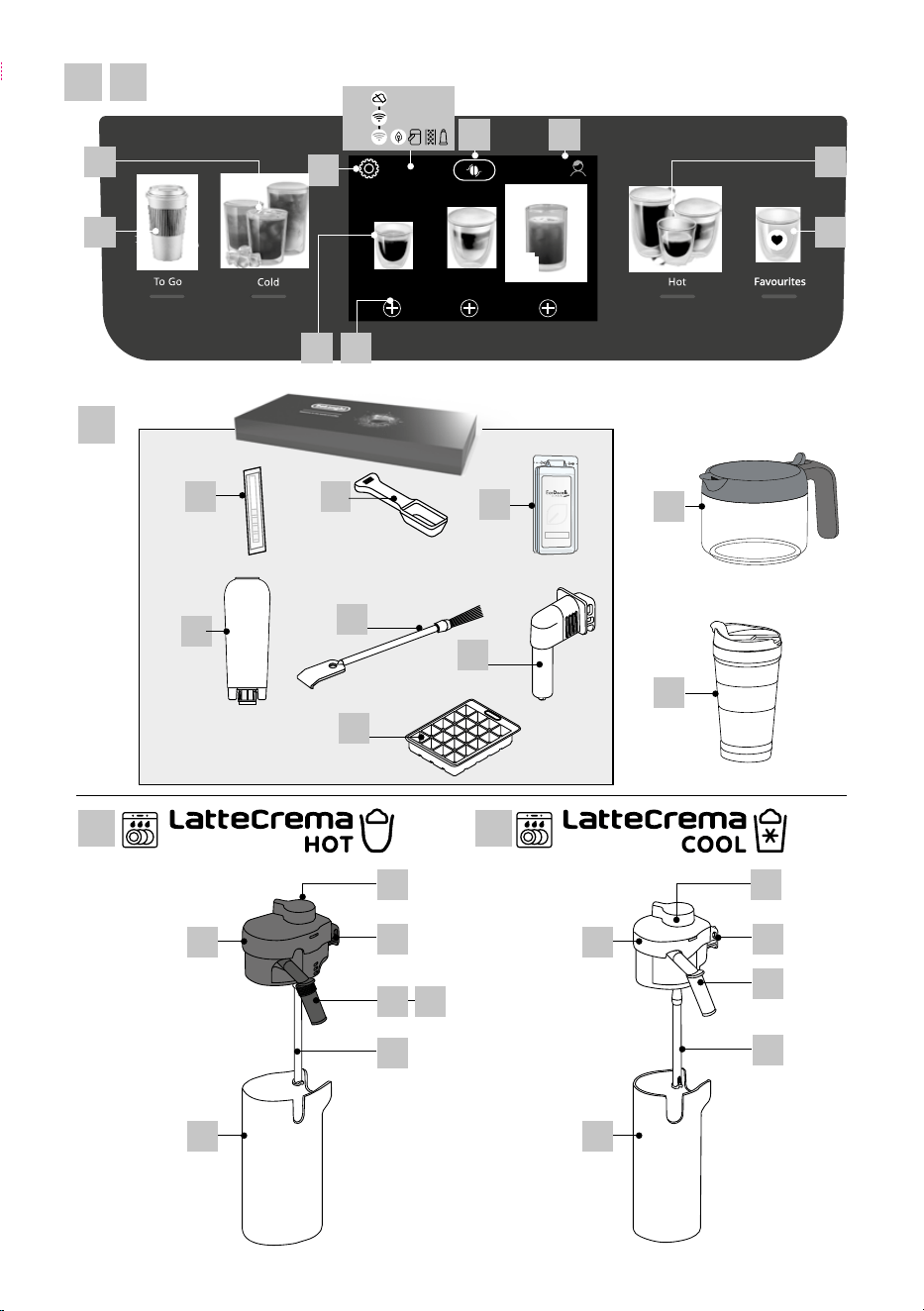
2.1 Description of the appliance (A) ....................5
2.2 Description of the control panel (B) ...............5
2.3 Description of the homepage (main screen)
(C) .................................................................5
2.4 Description of the accessories (D) (*varies
according to model) ......................................6
2.5 Description of milk carafe (hot) (E) ................6
2.6 Description of milk carafe (cold) (F)...............6
3. SETTING UP THE APPLIANCE U .................6
4. TURNING THE APPLIANCE ON U ................7
5. TURNING THE APPLIANCE OFF ....................7
6. MENU SETTINGS U ...................................7
6.1 Rinsing .........................................................7
6.2 Descaling ......................................................8
6.3 Connectivity ..................................................8
6.4 Adjust grinder ...............................................8
6.5 Coee temperature .......................................8
6.6 Languages.....................................................8
6.7 Create and edit proles .................................8
6.8 Set auto-o ..................................................9
6.9 General .........................................................9
6.10 Water lter ..................................................9
6.11 Water hardness ............................................9
6.12 Default values ..............................................9
6.13 Drain water ..................................................9
6.14 Statistics ......................................................10
7. DRINK SELECTION .................................... 10
8. MAKING COFFEE DRINKS U ..................... 10
8.1 Prepare the machine to make coee drinks .10
8.2 Directly selected drinks ...............................11
8.3 Customising the drinks ................................11
8.4 Making coee using pre-ground coee .......12
8.5 Bean Adapt Technology & Espresso SOUL ...12
8.6 General indications for making coee drinks...
..................................................................12
8.7 Tips for a hotter coee.................................13
8.8 Coee / Cold Brew pot .................................13
8.9 Cleaning the coee pot
..............................13
9. MAKING MILK DRINKS U ........................ 14
9.1 Preparing the milk carafes (E and F) ............14
9.2 Which milk to use? ......................................14
9.4 Adjusting the amount of froth .....................14
9.5 Making milk drinks......................................15
9.6 Cleaning the milk carafe after use ..............15
10. PREPARING HOT WATER AND HOT TEA U .. 15
10.1 Preparing the appliance ..............................15
10.2 Making hot tea ............................................15
10.3 Preparing hot water ....................................16
11. FAVOURITE DRINKS U .............................16
12. MAKING “TO GO” DRINKS U ..................... 16
12.1 Cleaning the travel mug after use ...............17
13. “MY” FUNCTION (“HOT” DRINKS ONLY) U . 17
14. SELECTING YOUR PERSONAL PROFILE U .. 17
15. CLEANING U ......................................... 17
15.1 Cleaning the machine .................................17
15.2 Cleaning the internal circuit ........................18
15.3 Cleaning the coee grounds container ........18
15.4 Cleaning the drip tray and drip tray grille ....18
15.5 Cleaning the inside of the machine ............19
15.6 Cleaning the water tank ..............................19
15.7 Cleaning the coee spouts ..........................19
15.8 Cleaning the pre-ground coee funnel .......19
15.9 Cleaning the brewing unit ...........................19
15.10 Cleaning the milk carafes (E) and (F) ...........20
16. DESCALING U ........................................ 21
17. SETTING WATER HARDNESS ..................... 22
17.1 Measuring water hardness ..........................22
17.2 Setting water hardness ...............................22
18. WATER SOFTENER FILTER ......................... 22
18.1 Installing the lter ......................................22
18.2 Replacing or removing the lter ..................23
19. TECHNICAL DATA ...................................... 23
19.1 Tips for Energy Saving .................................23
20. DISPLAYED MESSAGES ..............................24
21. TROUBLESHOOTING ................................ 27
5
1. INTRODUCTION
Thank you for choosing this bean to cup espresso and cappuc-
cino machine.
Take a few minutes to read this Instruction for Use. This will
avoid all risks and damage to the appliance.
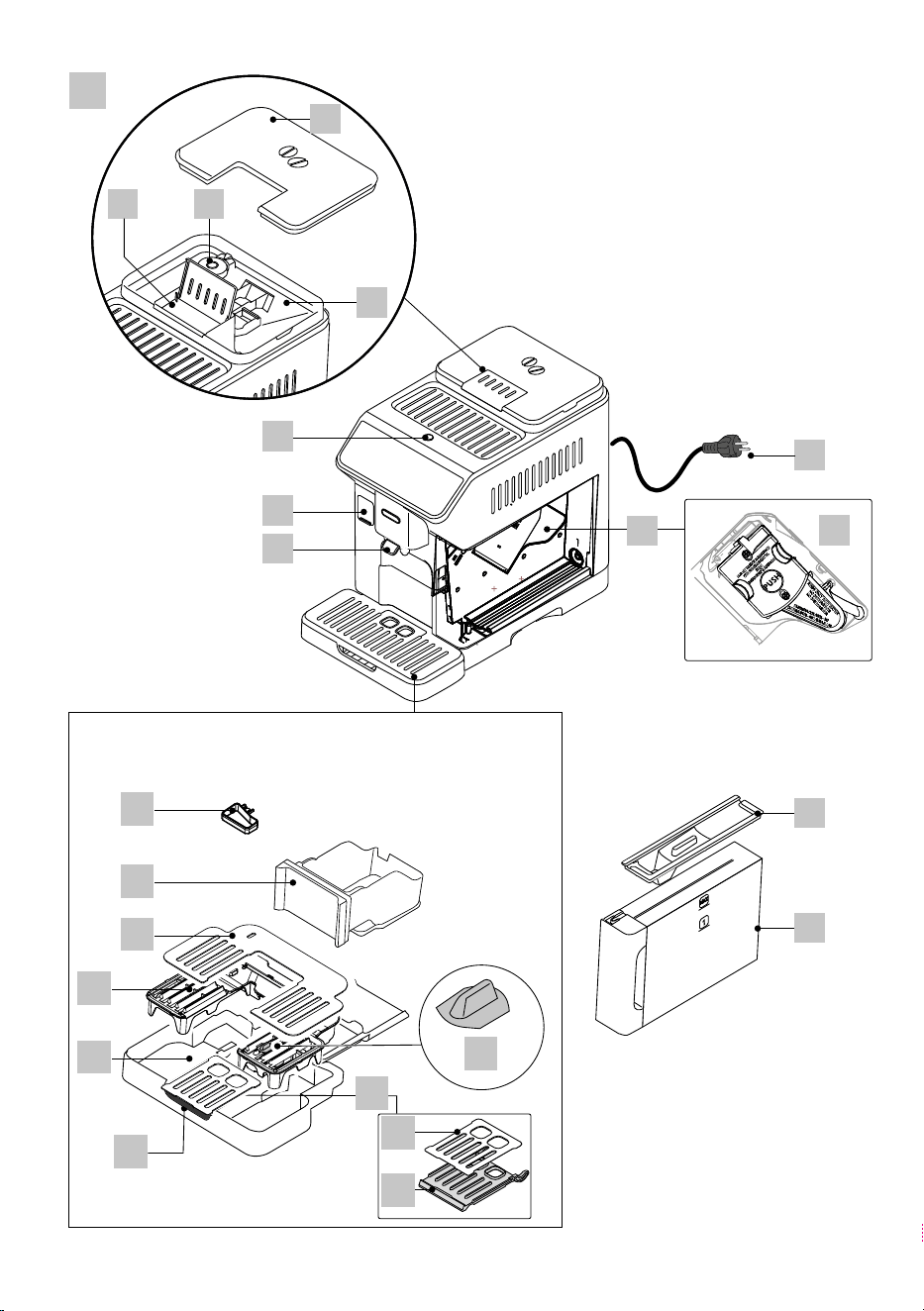
1.1 Letters in brackets
The letters in brackets refer to the description of the appliance
on pages 2- 3.
1.2 Troubleshooting and repairs
In the event of problems, rst try and resolve them by reading
the information given in sections “20. Displayed messages” and
“21. Troubleshooting”.
If this does not resolve the problem or further information is
required, consult the customer services department at the num-
bers indicated on the website www.delonghi.com.
If repairs are required, contact De’Longhi customer services only.
Addresses can be found on the website www.delonghi.com.
1.3 Download the App!
Download the App then follow the instructions in the App to
create your account.
In the App, you can nd creative recipes, information, tips and
curious facts about the world of coee, together with informa-
tion on your machine at your ngertips.
MAKE SURE THAT THE APP IS AVAILABLE IN YOUR COUNTRY:
app-availability.delonghi.com
In connected models, you can manage a number of functions
remotely from the Coee Link App.
U
This symbol highlights the functions you can control or
consult using the App.
You can also create new drinks and save them in your appliance.
Please note:
• To access the functions from the App, enable connec-
tivity from the appliance’s settings menu (see “6.3
Connectivity”).
• Check compatible devices on “compatibledevices.delonghi.
c o m ”.
2. DESCRIPTION
2.1 Description of the appliance (A)
A1. Beans container lid
A2. Beans container
A3. Grinding coarseness regulator
A4. Pre-ground coee funnel
A5. Brewing unit ap
A6. Removable brewing unit
A7. Coee spouts (adjustable height)
A8. Accessories connector
A9. button: turns the appliance on and o (standby)
A10. Coee grounds container
A11. Condensate tray
A12. Cup tray
A13. Tray grille
A14. Drip tray
A15. Travel mug compartment
A16. Travel mug compartment ap assembly
A17. Flap grille
A18. Flap grille support
A19. Drip tray water level indicator
A20. Power cord
A21. Water tank lid
A22. Water tank
2.2 Description of the control panel (B)
B1. “Cold” drinks menu
B2. “To go” drinks menu
B3. “Hot” drinks menu
B4. “Favourites” drinks menu
2.3 Description of the homepage (main screen)
(C)
C1. Selectable drinks (direct selection)
C2. To display and customise the drink settings
C3. Appliance settings menu
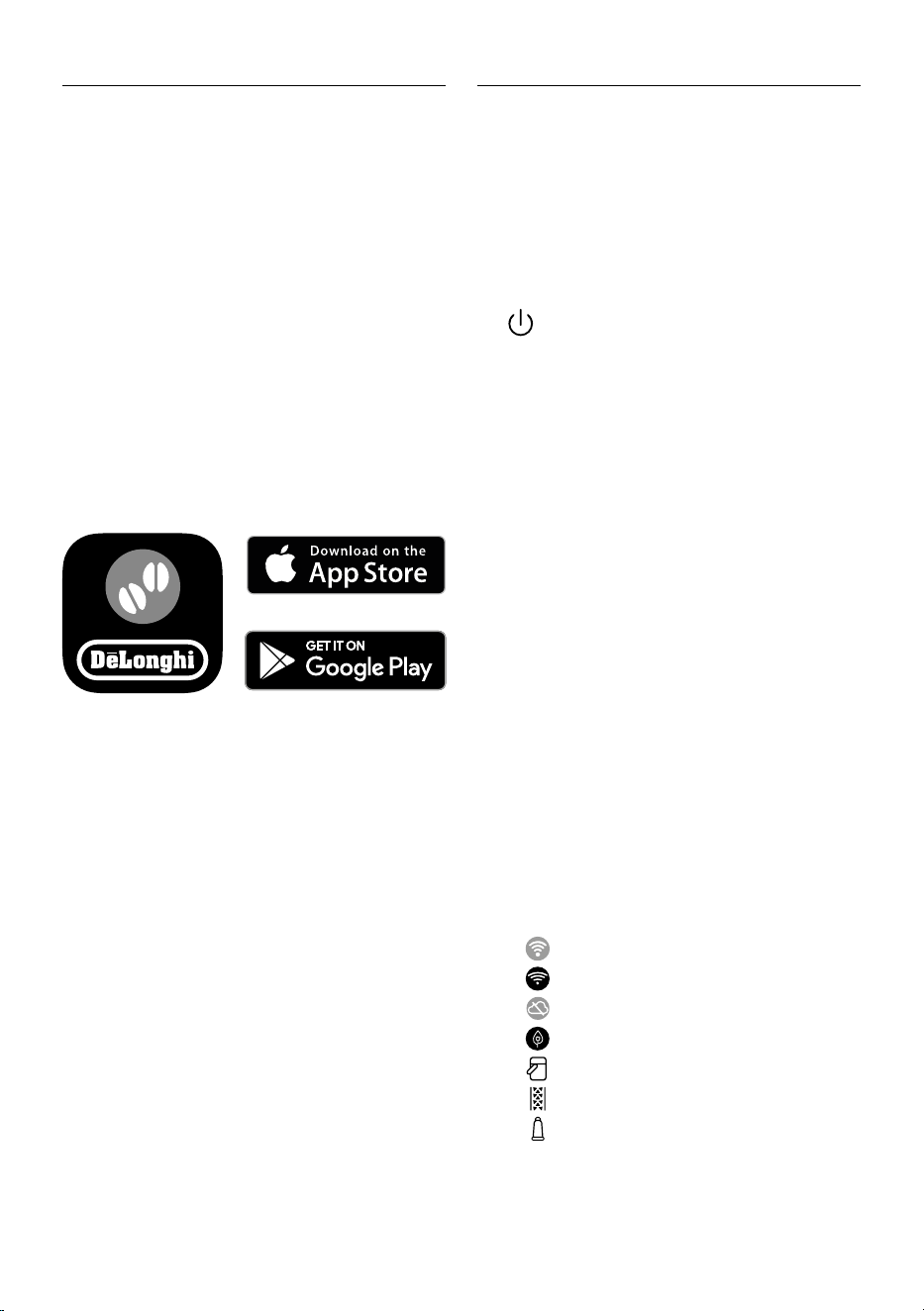
C4. Indicator lights:
•
Machine waiting for rst connection
•
Wi-Fi active light
•
No network light
•
Energy saving active light
•
Milk carafe cleaning required light
•
Descaling required light
•
Filter exhausted light
C5. Bean Adapt Technology (enable from App): see “8.5 Bean
Adapt Technology & Espresso SOUL”
C6. Customisable proles (see “14. Selecting your personal
prole”)
6
2.4 Description of the accessories (D) (*varies
according to model)
Accessories in the Starter pack:
D1. “Total Hardness Test” indicator paper
D2. Pre-ground coee measure
D3. Descaler
D4. Water softener lter
D5. Cleaning brush
D6. Hot water spout
D7. Ice cube tray
D8. Coee pot
D9. Travel mug
2.5 Description of milk carafe (hot) (E)
E1. Milk carafe lid
E2. Milk carafe
E3. Froth adjustment/Clean dial
E4. Milk carafe connector (removable for cleaning)
E5. Milk spout (adjustable height)
E6. Milk intake tube (silicone)
E7. Milk spout extension
2.6 Description of milk carafe (cold) (F)
F1. Milk carafe lid
F2. Milk carafe
F3. Froth adjustment/Clean dial
F4. Milk carafe connector (removable for cleaning)
F5. Milk spout
F6. Milk intake tube (rigid plastic)
3. SETTING UP THE APPLIANCE U
Please note:
• Possible traces of coee in the grinder are the result of
settings tests performed on the appliance before sale,
proof of the meticulous care and attention we invest in our
products.
• The rst time you use the appliance, all removable accesso-
ries (milk carafe (E) and (F), travel mug* (D9), coee pot*
(D8), water tank (A21) and (A22)) destined to come into
contact with water or milk should be rinsed with hot water.
We recommend washing the milk carafes in a dishwasher.
• You should customise water hardness as soon as possible
following the instructions in section “17. Setting water
hardness”.
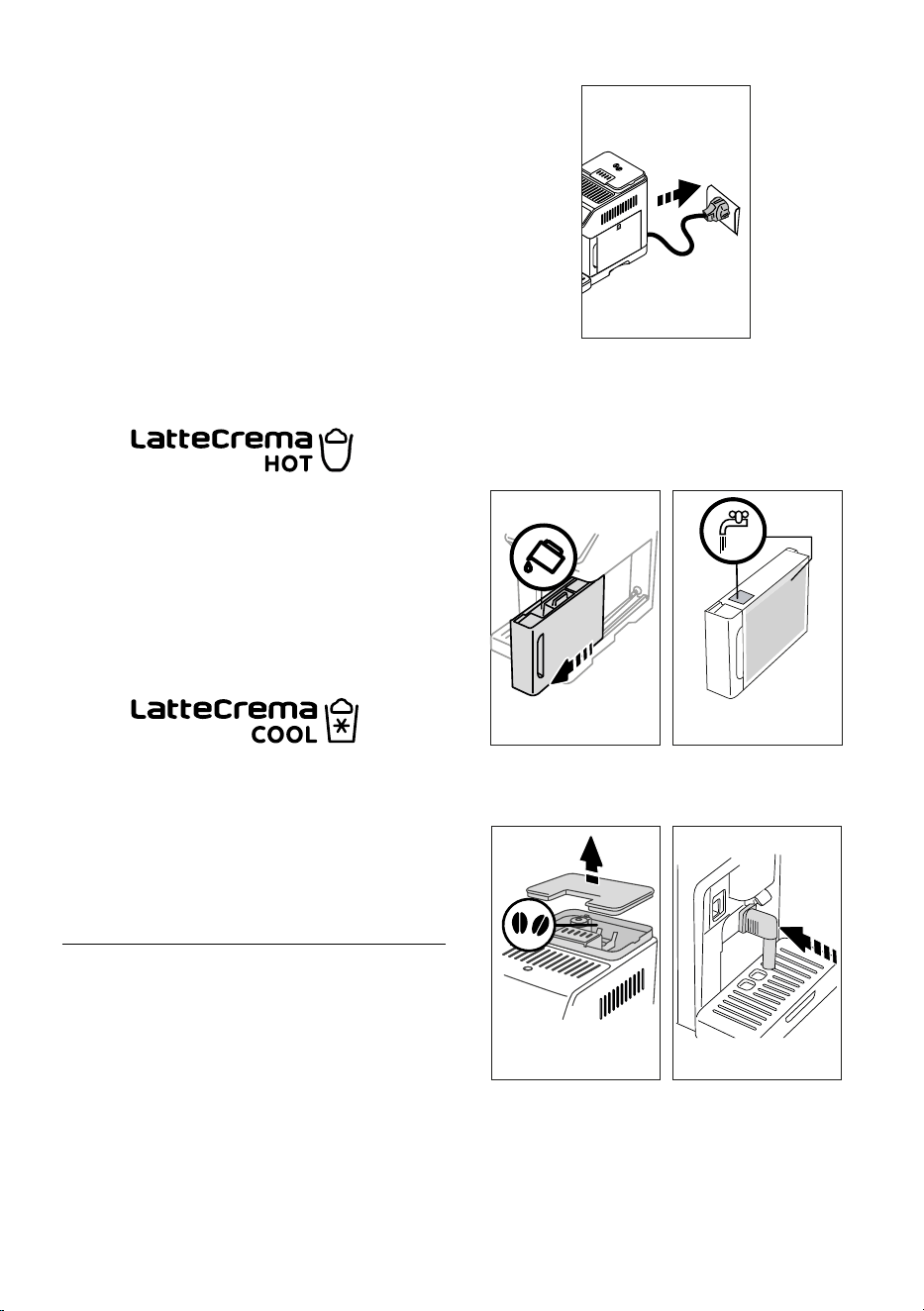
1. Connect the power cord (A20) to the mains supply (g. 1).
1
2. Press the ag corresponding to the desired language and
conrm the selection by pressing “Done”.
Now follow the instructions indicated on the display of the
appliance:
3. Remove the water tank (A22) (g. 2) and ll to the MAX
line with fresh potable water (g. 3);
2 32 3
MAX
4. Then put the tank back and conrm by pressing “Next”;
5. Fill the beans container (A2) (g. 4), then conrm by press-
ing “Next”.
4 5
6. Insert the hot water spout (D6) on the accessories con-
nector (A8) (g. 5) and place a container with a minimum
capacity of 200 ml under the coee spouts (A7) and hot
water spout (g. 6);
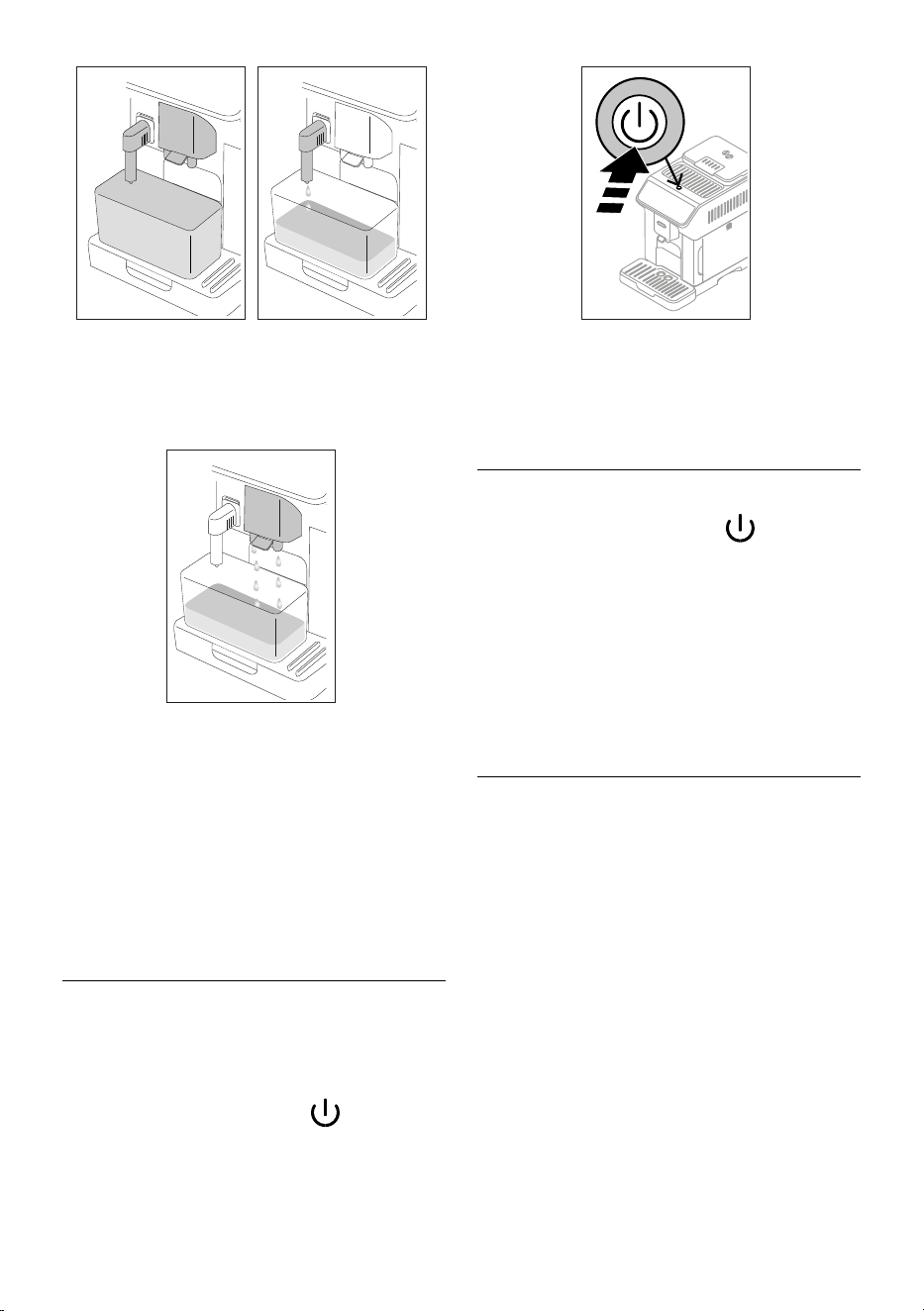
7
6 7
7. Press “OK” to ll the water circuit. The appliance delivers
water from the hot water spout (g. 7);
8. At the end of delivery, the appliance proceeds to warm up
by performing a rinse cycle, delivering hot water from the
coee spouts (g. 8).
8
When at temperature, the appliance proposes a tutorial on how
to use the machine.
Please note:
• The rst time you use the appliance, you need to make
4-5 cappuccinos before the results in the cup will be
satisfactory.
• The rst time you use the machine, the water circuit is
empty and the appliance could be very noisy.The noise
becomes less as the circuit lls.
4. TURNING THE APPLIANCE ON U
Please note:
• Each time the appliance is turned on, it performs an auto-
matic preheat and rinse cycle which cannot be interrupted.
The appliance is not ready for use until the cycle has been
completed.
1. To turn the appliance on, press the
button (A9) (g.
9): the appliance comes on.
9
2. When at temperature, the appliance performs a rinse cycle
delivering hot water from the coee spouts(A7); as well as
heating the boiler, this also heats the internal circuits by
circulating hot water.
5. TURNING THE APPLIANCE OFF
Whenever the coee machine is turned o after being used to
make coee, it performs an automatic rinse cycle.
1. To turn the appliance o, press the button (A9) (g.
9).
2. I
f envisaged, the appliance rinses the coee spouts
(A7)
with hot water, then goes o (stand-by).
Please note:
If you will not be using the appliance for some time, turn o,
then unplug from the mains socket.
Important!
Never unplug while the appliance is on.
6. MENU SETTINGS U
6.1 Rinsing
Use this function to deliver hot water from the coee spouts
(A7) (and, if inserted, the hot water spout (D6)), to clean and
heat the appliance’s internal circuit.
Place a container with a minimum capacity of 100 ml under the
spouts (g. 6).
To enable the function, proceed as follows:
1. Press the settings menu (C3);
2. Display “Rinsing”;
3. Press “OK” to start delivery. After a few seconds, hot water
is delivered to clean and heat the appliance’s internal cir-
cuit (g. 7- 8);
4. To stop rinsing, press “Stop” or wait for rinsing to stop
automatically.
Please note:
• If the appliance is not used for more than 3-4 days, when
you turn it on again, we strongly recommend performing
2-3 rinses before use;
• After cleaning, it is normal for the grounds container (A10)
to contain water.
8
6.2 Descaling
For instructions on descaling, see section “16. Descaling”.
6.3 Connectivity
Use this function to enable or disable connectivity. Proceed as
follows:
1. Press the settings menu (C3);
2. Scroll through the pages until “Connectivity” is displayed;
3. Press “Next”;
4. Enable the Wi-Fi connection and remote control (via the
De’Longhi Coee Link App);
5. The appliance PIN, needed to connect to the App, is dis-
played on the screen;
6. Press “<” to save the new selection and go back to the
settings menu;
7. Press “X” to go back to the homepage (C).
On the homepage, the symbol (C4) indicating the connection
status alternates with the other symbols (e.g. descaling, etc.)
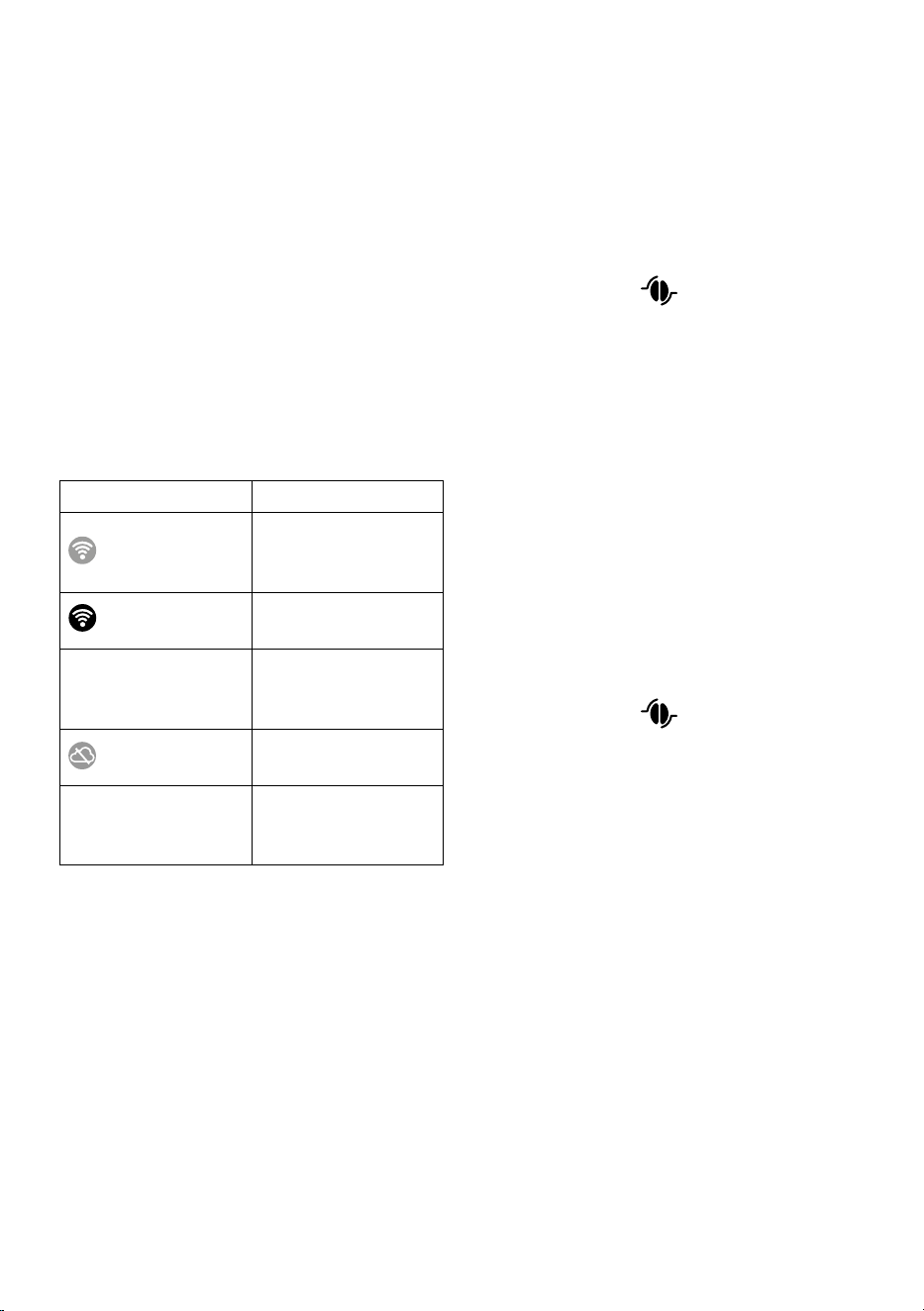
Symbol on homepage Meaning
White symbol on grey
background
Connectivity enabled: the
machine is waiting for the
rst connection
White symbol on blue
background
The appliance is connected
Red symbol on blue
background
The appliance is connected
to the home Wi-Fi, but there
is no network
White symbol on grey
background
The cloud is not reachable
No symbol
The connection is deactivat-
ed. To activate it, enter the
Settings menu (C3)
Please note:
• If the remote connection is o, a number of the App’s func-
tions will not be available (e.g. drink preparation).
• If you change the name or password of the Wi-Fi network,
or if you connect to a new Wi-Fi network, you will need to
perform the reset procedure as described below:
1. Proceed as described above from point 1 to point 3;
2. Press “Reset”;
3. Press “OK” to conrm cancellation of the network settings;
4. Connect with the App again and select the new credentials.
6.4 Adjust grinder
The appliance proposes a tutorial on how to adjust grinding cor-
rectly for best results:
1. Press the settings menu (C3);
2. Scroll through the pages until “Adjust grinder” is displayed;
3. Press “Read more” to consult the tutorial on how to adjust
the grinding coarseness.
Please note:
• After carrying out the above procedure, we recommend
making at least 3 coees before adjusting again. If the
coee is still not brewed correctly, repeat the procedure.
• The grinding coarseness regulator (A3) must only be
turned when the coee grinder is in operation during the
initial phase of coee preparation.
Bean Adapt Technology
:
We suggest you access Bean Adapt Technology in the Coee
Link App to adjust this parameter to an appropriate setting for
the coee beans used.
6.5 Coee temperature
To change the temperature of the water used to make the cof-
fee, proceed as follows:
1. Press the settings menu (C3);
2. Scroll through the pages until “Coee temperature” is
displayed;
3. Press “Set”;
4. Select the required temperature from those proposed;
5. Press “<” to save the new selection and go back to the
settings menu.
6. Press “X” to go back to the homepage (C).
Please note:
Varying the temperature has most eect for long drinks.
Bean Adapt Technology
:
We suggest you access Bean Adapt Technology in the Coee
Link App to adjust this parameter to an appropriate setting for
the coee beans used.
6.6 Languages
To change the language on the homepage, proceed as follows:
1. Press the settings menu (C3);
2. Scroll through the pages until “Languages” is displayed;
3. Press “Next”;
4. Press the ag corresponding to the language you want
to set (press “Next” or “Back” to display all the languages
available). The display is immediately updated with the
selected language;
5. Press “<” to save the new selection and go back to the set-
tings menu;
6. Press “X” to go back to the homepage (C).
6.7 Create and edit proles
You can use this function to modify the image and colour of the
icon for each prole. To customise the icon, proceed as follows:
1. Press the settings menu (C3);
2. Scroll through the pages until “Create and edit proles” is
displayed;
9
3. Press “Next”;
4. To create a new prole, press “Add new”;
To edit an existing prole, select the prole and press
“Edit”;
5. Customise as you wish, then press “Save” to conrm.
6. Press “X” to go back to the homepage (C).
6.8 Set auto-o
Auto-o can be set so that the appliance goes o after 15 or 30
minutes, or 1 or 3 hours of inactivity.
To programme auto-o, proceed as follows:
1. Press the settings menu (C3);
2. Scroll through the pages until “Set auto-o” is displayed;
3. Select the desired time interval (15 or 30 minutes, or 1 or
3 hours).
4. Press “X” to save the new selection and go back to the
homepage (C).
6.9 General
1. Press the settings menu (C3);
2. Scroll through the pages until “General” is displayed;
Here you can enable or disable the following functions with a
simple touch:
- “Beep sound”: when enabled, the appliance beeps when-
ever an operation is performed.
- “Energy saving”: use this function to enable or disable en-
ergy saving. When enabled, the function reduces energy
consumption in compliance with European regulations.
is displayed on the homepage to show it is active.
3. Press “X” to save the new selection and go back to the
homepage (C).
6.10 Water lter
For instructions on the lter (D4), see section “18. Water soften-
er lter””.
6.11 Water hardness
For instructions on setting water hardness, see section “17. Set-
ting water hardness”.
6.12 Default values
This resets all menu settings and user customisation back to
the default values (with the exception of the language, which
remains as set, and the statistics).
Proceed as follows:
1. Press the settings menu (C3);
2. Scroll through the pages until “Default values” is displayed;
3. Press “Next”:
4. Select whether you want to reset the entire appliance or a
single prole, then press “Next”;
5. Follow the instructions, then conrm the reset by pressing
“OK”.
6. Press “X” to go back to the homepage (C).
Please note:
When the appliance (not the individual prole) has been reset
to the default values, the machine proposes the introductory
tutorial again.
6.13 Drain water
To avoid the water in the circuit freezing if the appliance is to be
left idle for a long period of time, or before taking it to customer
services, we recommend emptying the water circuit.
Proceed as follows:
1. Press the settings menu (C3);
2. Scroll through the pages until “Drain water” is displayed;
3. Press “OK” to start the guided procedure;
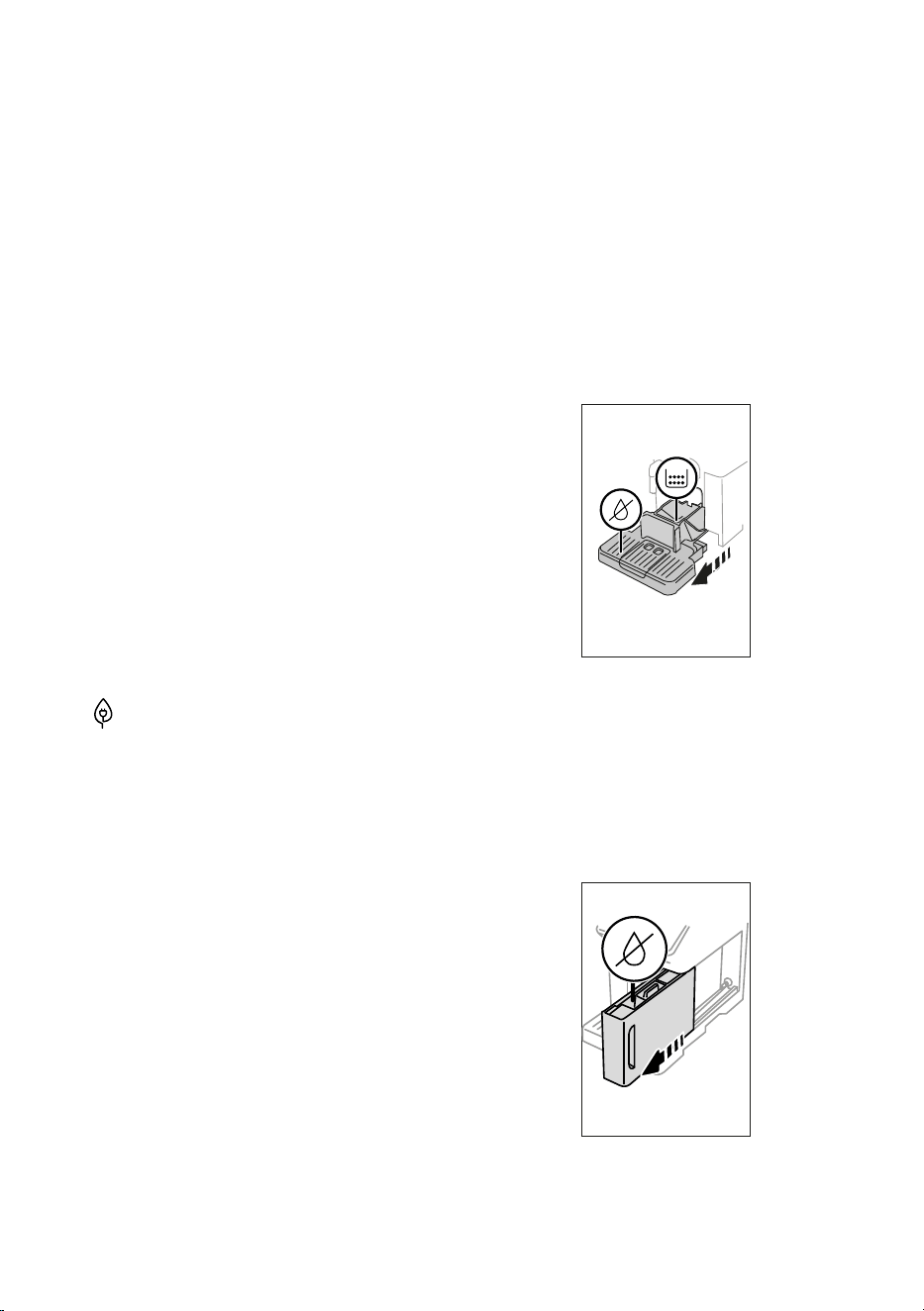
4. Extract, empty and replace the grounds container (A10)
and drip tray (A14) (g. 10), then press “Next”;
10
5. Insert the spout (D6) on the connector (A8) (g. 5);
6. Position a 100 ml container under the spouts (g. 6). Press
“Next”;
7. The appliance performs a rinse cycle with hot water from the
spouts;
8. At the end of rinsing, extract the water tank (A22) (g. 11)
and empty;
9. If present, remove the water softener lter (D4) from the
water tank and press “Next”;
11
10. Put the empty water tank back in the appliance and press
“Next”;
11. Wait for the appliance to empty the circuit; (Important:
hot water from the spouts!). As the water circuit empties,
10
the appliance could become noisier. This is part of normal
operation.
12. When the circuit is empty, extract and empty the drip tray,
put back in the appliance and press “Next”;
13. Press “OK”. The appliance goes o (standby).
The next time the appliance is turned on, follow the instructions in
section “3. Setting up the appliance”.
6.14 Statistics
This displays statistics relating to the machine. To view the sta-
tistics, proceed as follows:
1. Press the settings menu (C3);
2. Scroll through the pages until “Statistics” and the principal
statistics are displayed. To view more information, press
“Read more”;
3. Press “<” to go back to the settings menu.
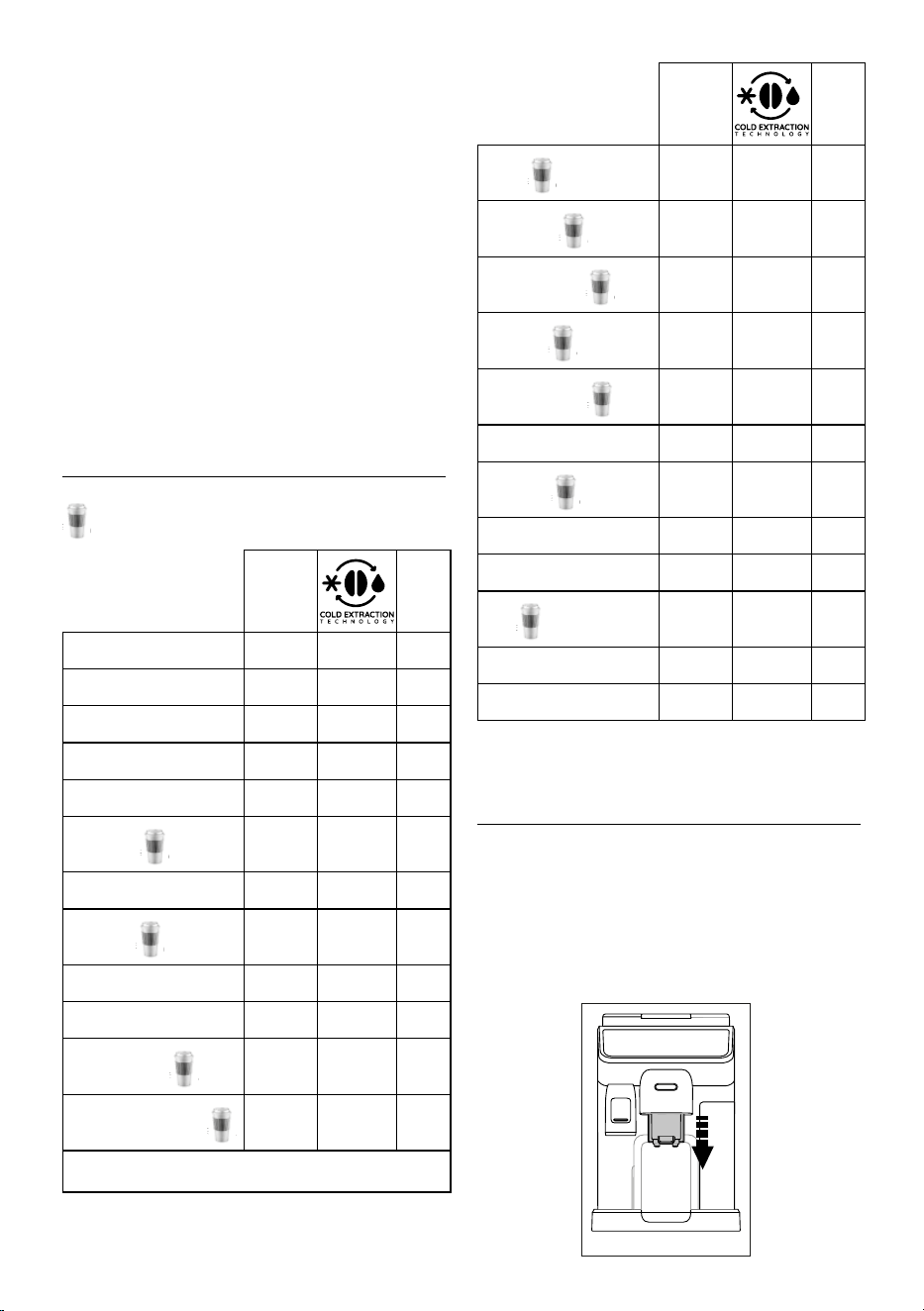
7. DRINK SELECTION
You can use your machine to make a great variety of drinks.
the drinks indicated by this symbol are also available in
the “To Go” menu.
Hot Cold
Espresso
✓
✕
✓
2X Espresso
✓
✕ ✕
Coee
✓
✕ ✕
Doppio+
✓
✕ ✕
Long
✓
✕ ✕
Americano
✓
✕
✓
Coee pot
✓
✕ ✕
Cold Brew
✕
✓
✕
Cold Brew Pot
✕
✓
✕
Cold Brew to Mix
✕
✓
✕
Cold Brew Latte
✕
✓
✕
Cold Brew Cappuccino
✕
✓
✕
→
Hot Cold
Coee
✕ ✕
✓
Cappuccino
✓
✕
✓
Latte Macchiato
✓
✕
✓
Caelatte
✓
✕
✓
Cappuccino Mix
✓
✕
✓
Espresso Macchiato
✓
✕ ✕
Flat White
✓
✕
✓
Cappuccino +
✓
✕ ✕
Cortado
✓
✕ ✕
Milk
✓
✕
✓
Tea function
✓
✕ ✕
Hot water
✓
✕ ✕
From the panel, access the type of drink you want to make (Hot,
Cold, To Go-In Travel Mug) and t the necessary accessories.
8. MAKING COFFEE DRINKS U
8.1 Prepare the machine to make coee drinks
Important!
Do not use green, caramelised or candied coee beans as they
could stick to the coee grinder and make it unusable.
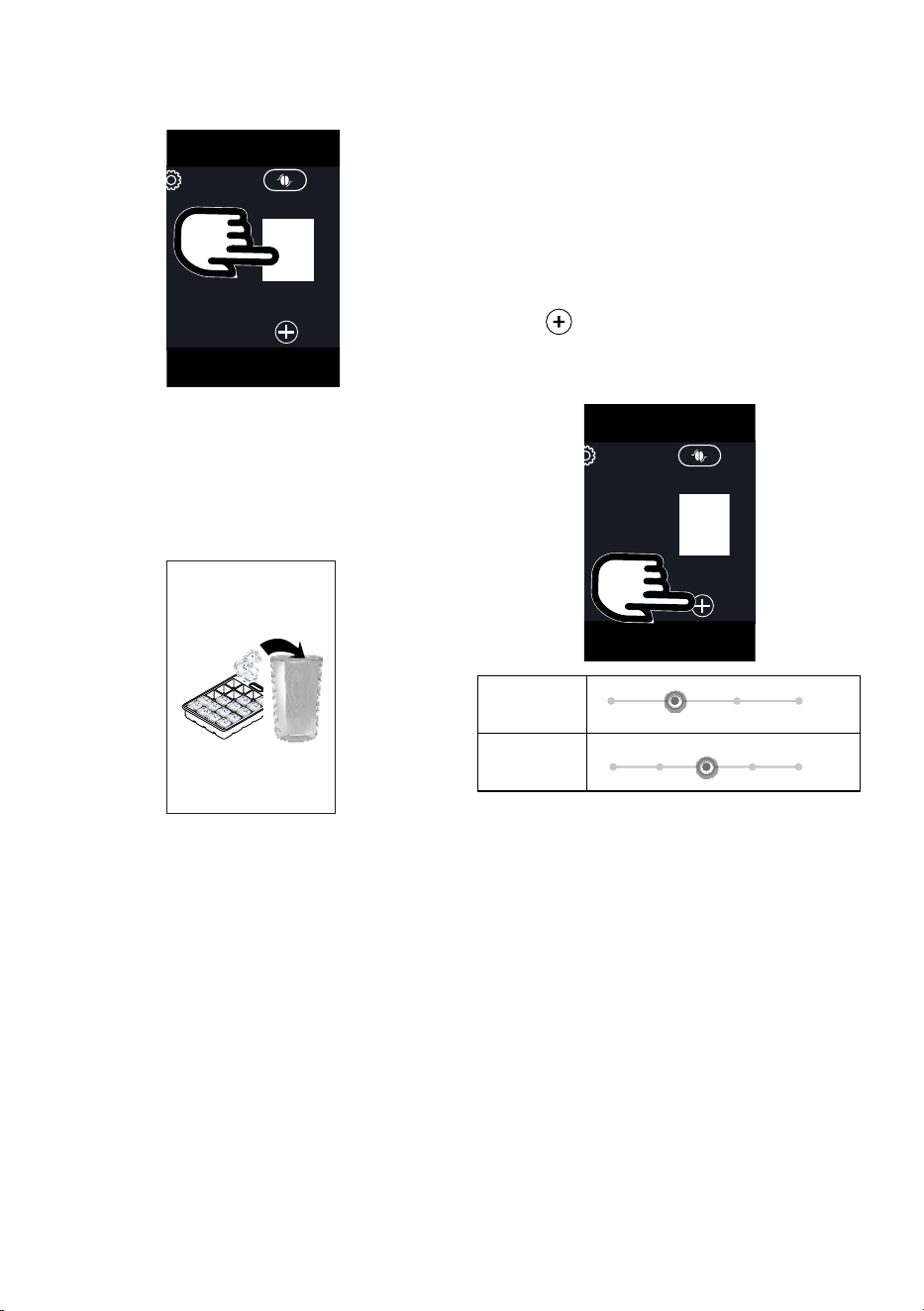
1. Place 1
or 2 cups under the coee spouts (A7)
;
2. Lower the spouts as near as possible to the cup (g. 12).
This makes a creamier coee.
12
11
8.2 Directly selected drinks
1. Press the image on the homepage (C) corresponding to the
coee you want to make (C1) (e.g. espresso, g. 13);
Espresso
13
2. Hot coee drink: the appliance starts preparation.
Cold Extraction Technology:
• Select the desired intensity: “Original” or “Intense”, then
press “Next”;
• Before delivery, the appliance suggests the quantity of
ice cubes. Add the quantity of ice cubes indicated to the
glass (g. 14), then press “Brew”.
14
• The appliance starts making the drink and a description
of each individual phase (grinding, preparing and brew-
ing coee) appears on the display.
Please note:
• Coee Extraction Technology is a slow extraction: there-
fore it will take some minutes.
• Before serving Cold Brew beverages, empty out the
water tank, rinse thoroughly and rell with fresh pota-
ble water.
• When making Cold Brew drinks after hot preparations,
the machine recommends a cold rinse to optimise the
temperature of the drink. In this case, proceed making
the rinse in a container or skip the tip.
Other cold coee drinks:
• Select to make an “Ice” or “Extra Ice” drink: press “Next”;
• Depending on the previous selection, before delivery,
the appliance suggests the quantity of ice cubes. Add
the quantity of ice cubes indicated to the glass (g. 14),
then press “Brew”.
• The appliance starts preparation.
A description of each individual phase (grinding, brewing cof-
fee) appears on the display.
At the end of preparation, the appliance is ready to make the
next drink.
8.3 Customising the drinks
To make coee drinks with customised parameters, proceed as
follows:
1. Press
(C2) at the bottom of the image corresponding
to the coee you want to make (e.g. espresso, g. 15). The
parameters that can be customised according to taste ap-
pear on the display:
Espresso
15
Size
Intensity
2. Hot coee drink: After setting the parameters, press
“Brew”. The appliance starts making the drink and a de-
scription of each individual phase (grinding, brewing cof-
fee) appears on the display;
Cold Extraction Technology: Set the size, then press
“Start” and proceed as follows:
• Select the desired intensity: “Original” or “Intense”, then
press “Next”;
• Before delivery, the appliance suggests the quantity of
ice cubes. Add the quantity of ice cubes indicated to the
glass (g. 14), then press “Brew”.
• The appliance starts making the drink and a description
of each individual phase (grinding, preparing and brew-
ing coee) appears on the display.
Please note:
• Coee Extraction Technology is a slow extraction: there-
fore it will take some minutes.
12
• Before serving Cold Brew beverages, empty out the
water tank, rinse thoroughly and rell with fresh pota-
ble water.
• When making Cold Brew drinks after hot preparations,
the machine recommends a cold rinse to optimise the
temperature of the drink. In this case, proceed making
the rinse in a container or skip the tip.
Other cold coee drinks: Set the parameters, then press
“Start” and proceed as follows:
• Select whether to make an “Ice” or “Extra Ice” drink, then
press “Next”;
• Depending on the previous selection, before delivery,
the appliance suggests the quantity of ice cubes. Add
the quantity of ice cubes indicated to the glass (g. 14),
then press “Brew”.
• The appliance starts making the drink and a description
of each individual phase (grinding, brewing coee) ap-
pears on the display.
3. At the end of delivery, press “Save” to save the new set-
tings, or “Cancel” to retain the previous parameters.
Please note:
If you save the new settings, they are memorised ONLY in the
selected prole.
4. Press “X” to go back to the homepage (C).
The appliance is ready to be used again.
8.4 Making coee using pre-ground coee
Important!
• Never add pre-ground coee when the machine is o or it
could spread through the inside of the machine and dirty
it. This could damage the machine.
• Never use more than 1 level measure (D2) as it could soil
the inside of the coee machine or block the funnel (A4).
When using pre-ground coee, only one cup can be made at a
time.
• Making Long coee: halfway through preparation, when
requested by the appliance, add one level measure of pre-
ground coee and press “OK”.
• You cannot make Doppio+, 2x Espresso, Coee Pot, Cap-
puccino+ and Cold Brew drinks using pre-ground coee.
1. Press (C2) at the bottom of the image corresponding
to the coee you want to make (e.g. espresso, g. 15). The
parameters that can be customised according to taste ap-
pear on the display;
2. Select the quantity and pre-ground coee
;
3. Press “Brew”;
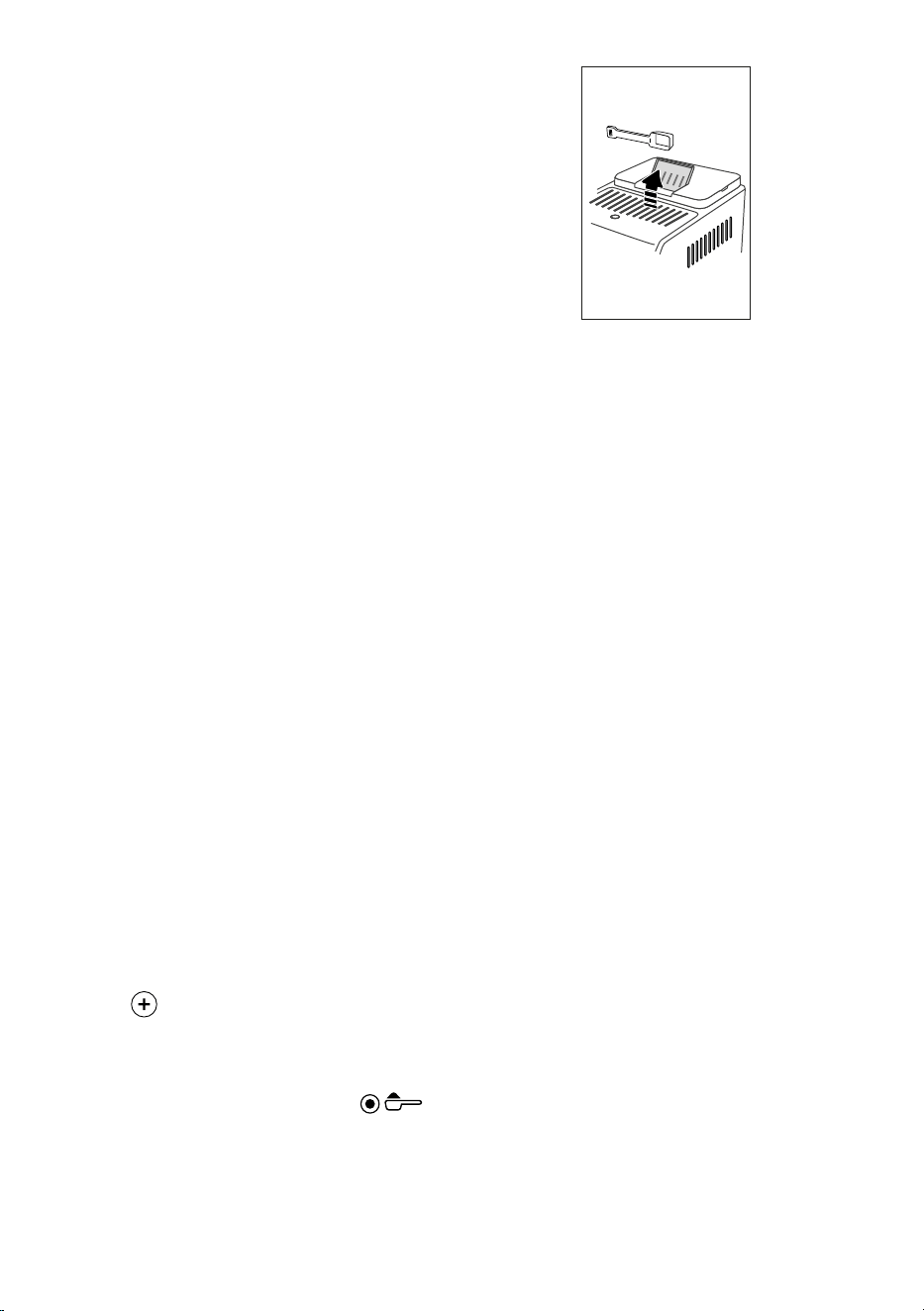
4. Lift the pre-ground coee funnel lid, make sure the funnel
(A4) is not blocked, then add one level measure (D2) of
pre-ground coee (g. 16). Press “OK” to make the drink;
16
5. The appliance starts making the drink and a description of
each individual phase (grinding, brewing coee) appears
on the display.
At the end of preparation, the appliance is ready to make the
next drink.
8.5 Bean Adapt Technology & Espresso SOUL
A coee expert at your ngertips to help you optimise coee
brewing and the result in your cup in just a few steps.
The smart technology guides you to adjust the machine accord-
ing to the coee beans used - from grinding coarseness to brew-
ing, each phase will be regulated to get the best results from
the coee bean.
Download and open the Coee Link App to nd out more.
Once the settings have been saved in the “Bean Adapt Technol-
ogy” section of the App, you can use the “Espresso SOUL” (C1)
drink on the homepage (C).
To make espresso coee, follow the instructions in section “8.2
Directly selected drinks”.
Please note:
You can modify the quantity of the “Espresso SOUL” drink as de-
scribed in section “8.3 Customising the drinks”.
8.6 General indications for making coee drinks
• A quantity of water above level 1 is sucient to complete
most drinks. Always lling above level 1 allows the appli-
ance to estimate the amount of water available to make
the drinks.
• While the machine is making the coee, preparation can be
interrupted at any moment by pressing “Stop” or “Cancel”.
• As soon as delivery has ended, to increase the quantity
of coee, just press “Extra”. When the required quantity is
reached, press “Stop” or “Cancel”.
• Various alarm messages could be displayed while using
the appliance (“Please ll the tank with fresh water up to
MAX level” etc.). Their meaning is explained in section “20.
Displayed messages”.
• Cold Extraction Technology: for best results when pre-
paring Cold Brew beverages, ll the water tank with fresh
potable water.
13
• If the coee is delivered a drop at a time, too weak and not
creamy enough, or too cold, consult the tutorial on how to
adjust grinding (see section “6.4 Adjust grinder”) and sec-
tion “21. Troubleshooting”.
• If “Energy Saving” mode is activated, there may be a few
seconds delay before the rst coee is delivered.
8.7 Tips for a hotter coee
To make a hotter coee, proceed as follows:
• perform a hot rinse cycle before making hot drinks (section
“6.1 Rinsing”);
• warm the cups with hot water using the hot water function
(see section “10. Preparing hot water and hot tea”);
• increase the coee temperature (section “6.5 Coee
temperature”).
8.8 Coee / Cold Brew pot
Coee Pot and Cold Brew Pot are two coee drinks to enjoy in
company; Coee Pot is based on Espresso, light and balanced,
with a ne layer of crema; Cold Brew Pot is based on the Cold
Brew drink, for a refreshing moment to share.
Optional accessory in certain models:
Pot
(capacity 1 litre)
Type: DLSC021
EAN: 8004399333642
To make the drink, proceed as follows:
1. On the homepage (C), press the image corresponding to
the “Pot” drink you desire (C1);
2. Selection the number of cups to make and the desired
intensity;
Number
of cups
Number of
grindings
Total quantity (ml)*
Coee Pot Cold Brew Pot
2 2 250 240
3 3 375 360
4 4 500 480
5 5 625 600
6 6 750 720
* The quantities indicated are approximate and may vary ac-
cording to the type of coee.
3. Press “Start” to move on to the next step;
4. Hot Coee Pot:
• Fill the tank (A22) with water and ll the beans contain-
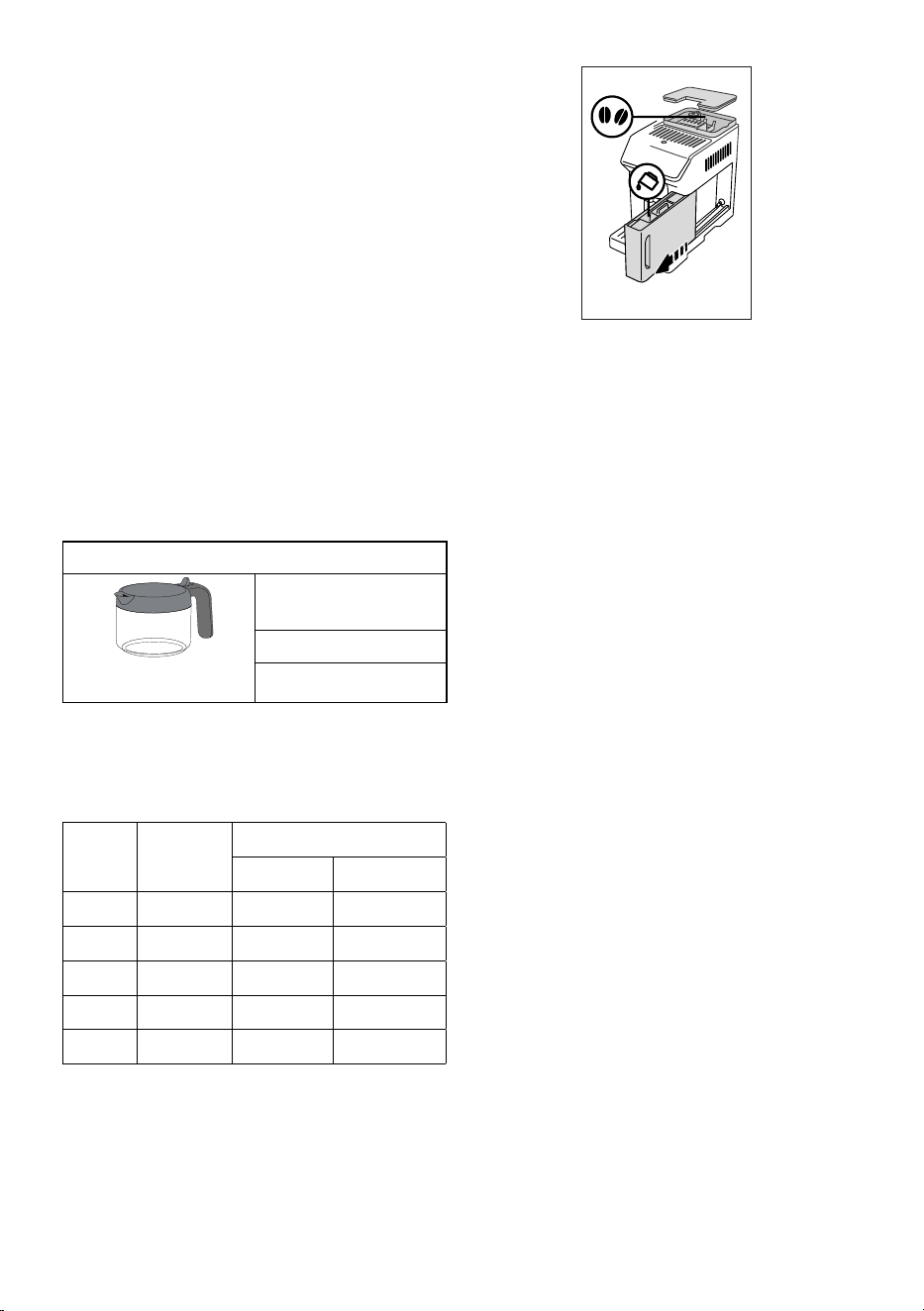
er (A2) as instructed on the display (g. 17).
17
• Once you have made sure there is sucient water and
coee for the drinks you want to prepare, press “Next”;
Cold Brew Pot:
Please note:
Before serving Cold Brew beverages, empty out the water
tank, rinse thoroughly and rell with fresh potable water.
• Select the desired intensity: “Original” or “Intense”, then
press “Next”;
• Fill the tank (A22) with water and ll the beans contain-
er (A2) as instructed on the display (g. 17).
• Once you have made sure there is sucient water and
coee for the drinks you want to prepare, press “Next”;
5. Place the coee pot (D8) under the coee spouts (A7).
Press “Brew”;
6. The appliance starts making the drink with an appropriate
number of grindings for the number of cups to be prepared
and a description of each individual phase (grinding, brew-
ing coee) appears on the display.
Please note:
“Cancel” or “Stop”: press to stop preparation completely and go
back to the homepage.
7. When delivery has ended, press “Save” to save the new set-
tings, or “Cancel” to retain the previous parameters.
8. Press “X” to go back to the homepage (C).
The appliance is ready to be used again.
Please note:
If you save the new settings, they are memorised ONLY in the
selected prole.
SAFETY WARNING:
After making a pot of hot coee, leave the
appliance to cool for 5 minutes before mak-
ing another drink. Risk of overheating!
8.9 Cleaning the coee pot
After each use, you should clean the coee pot (D8) with hot
water and mild washing up liquid.
14
Rinse thoroughly with hot water to eliminate all detergent resi-
dues. The coee pot is dishwasher safe.
9. MAKING MILK DRINKS U
9.1 Preparing the milk carafes (E and F)
Please note:
To avoid milk with poor froth or large bubbles, always clean the
milk carafes as described in sections “9.6 Cleaning the milk ca-
rafe after use” and “15.10 Cleaning the milk carafes (E) and (F)”.
9.2 Which milk to use?
The quality of the froth will vary depending on:
• the temperature of the milk or plant-based drink (for
best results, always use milk or plant-based drinks at
refrigerator temperature (5°C);
• type of milk or plant-based drink;
• brand used;
• ingredients and nutritional value.
Cow’s milk
Whole
(fat content >3.5%)
✓
✕
Partially skimmed
(fat content between
1.5 and 1.8%)
✕
Skimmed
(fat content < 0.5%)
✓
Plant-based drinks
Soy
✓ ✓
Almond
✓ ✓
Oat
✓ ✓
9.3 Filling and attaching the milk carafes
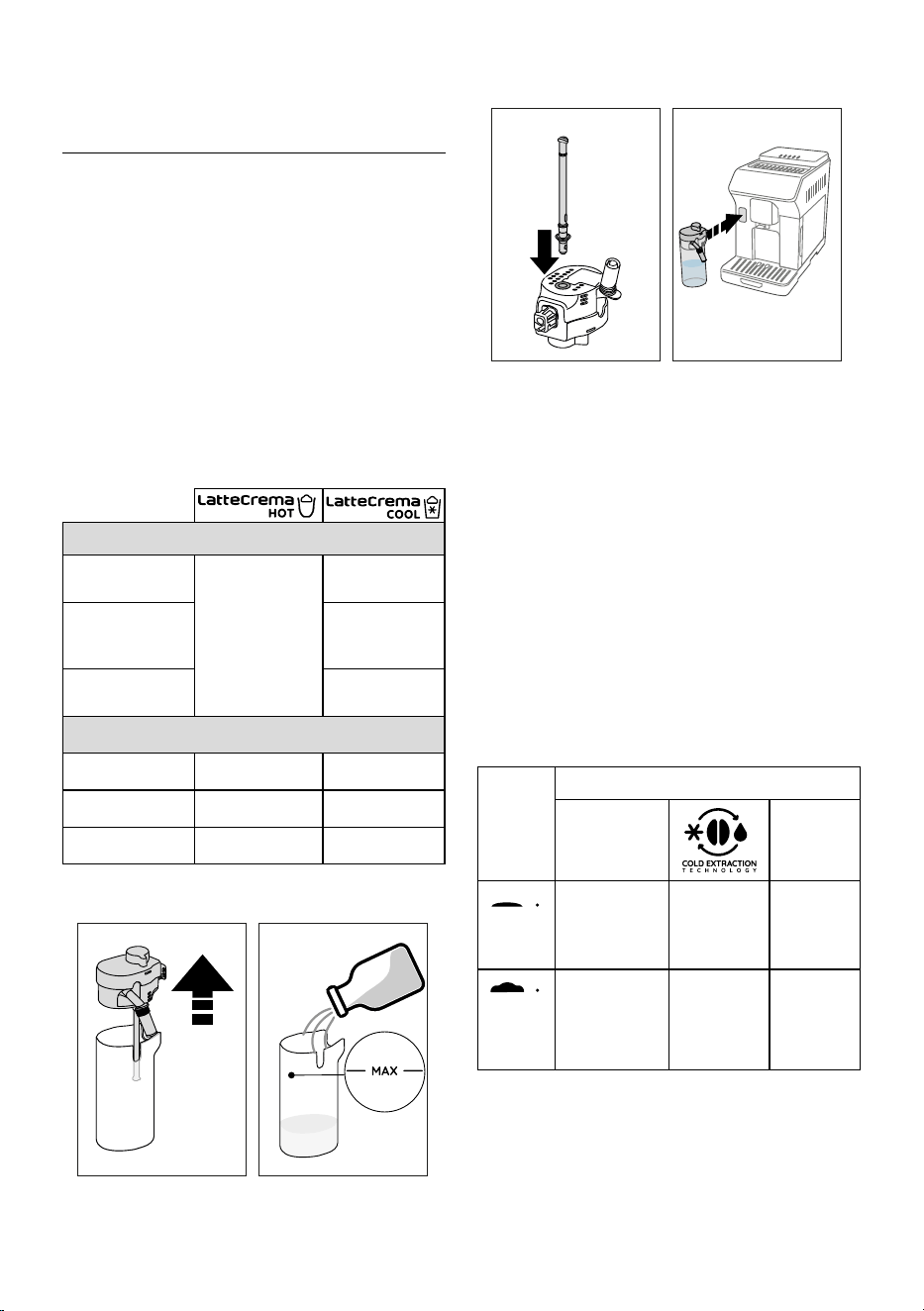
1. Lift the lid (E1) or (F1) (g. 18);
18 19
2. Fill the milk carafe (E2) or (F2) with a sucient quantity
of milk, not exceeding the MAX level marked on the carafe
(g. 19);
3. Make sure the milk intake tube (E6) or (F6) is correctly in-
serted on the bottom of the milk carafe lid (g. 20);
20 21
4. Put the lid back on the milk carafe;
5. Attach the carafe to the connector (A8) and push as far as it
will go (g. 21). The machine emits a beep (if the function
is enabled);
6. Place a suciently large cup under the coee spouts (A7)
and milk spout (E5) or (F5). Only the milk spout (E5) can be
lengthened by adjusting the extension;
7. Select the drink you want to make as described in the fol-
lowing paragraphs.
Please note:
If “Energy Saving” mode is enabled (see section “6.9 General”),
you may have to wait a few seconds before the appliance makes
the drink.
9.4 Adjusting the amount of froth
Turn the froth adjustment dial (E3) or (F3) to adjust the amount
of froth on the milk delivered while making milk drinks.
Dial
position
Recommended for…
Hot
Cold
MIN
froth
• Caelatte
• Hot milk (not
frothed)
-- • Caelatte
MED
froth
• Latte
Macchiato
• Flat White
• Cortado
• Cold Brew
Latte
• Latte
Macchiato
• Flat White
15
MAX
froth
• Cappuccino
• Cappuccino
Mix
• Espresso
Macchiato
• Cappuccino +
• Hot milk
(frothed)
• Cold Brew
Cappuccino
• Cappuccino
• Cappucci-
no Mix
• Cold milk
(frothed)
9.5 Making milk drinks
On the homepage (C), press the image corresponding to the
drink you want to make (C1).
As for coee drinks, you can make a customised drink by press-
ing the
(C2) symbol at the bottom of the image on the
homepage.
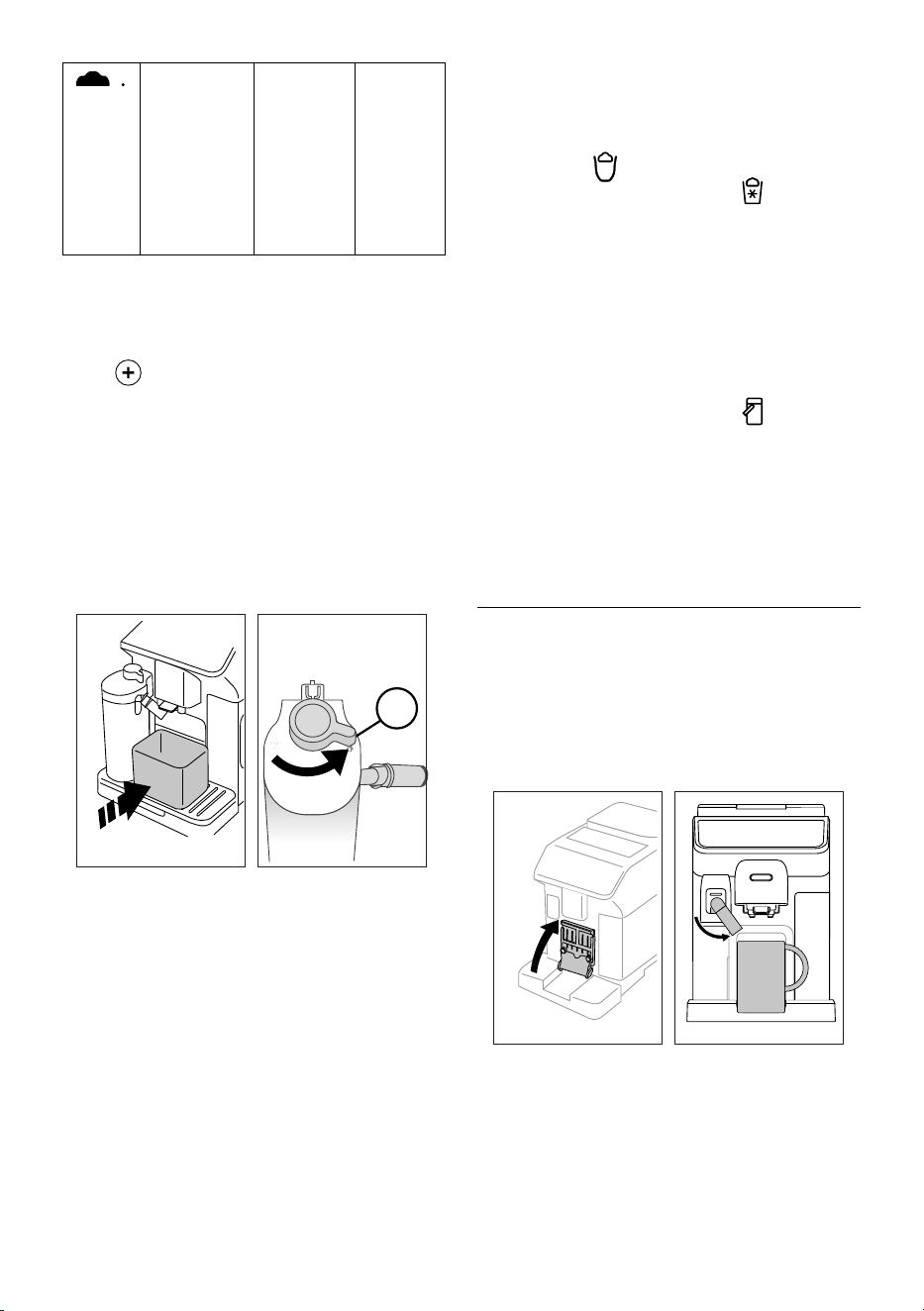
9.6 Cleaning the milk carafe after use
Each time you deliver a milk drink, the appliance asks you to
perform the CLEAN function to clean the milk carafe lid (E1) or
(F1). To start cleaning, proceed as follows:
1. Leave the milk carafe in the machine (you do not need to
empty it);
2. Place a cup or other recipient under the milk spout (E5) or
(F5) (g. 22);
Clean
22 23
3. Turn the froth adjustment/clean dial (E3) or (F3) to “Clean”
(g. 23). Hot water and steam are delivered from the milk
spout. Cleaning stops automatically;
4. Turn the dial back to one of the froth selections;
If you want to make a number of drinks in succession:
• To proceed with making the next drinks, when the “Clean”
message is displayed, press “Cancel”. Clean the milk carafe
after making the last drink.
At the end of preparation, the milk carafe is empty, or
there is not enough milk for other drinks
• After cleaning using the “Clean” function, extract the milk
carafe and clean all the components as described in section
“15.10 Cleaning the milk carafes (E) and (F)”
At the end of preparation, there is enough milk left in
the carafe for other drinks
• After cleaning using the “Clean” function, extract the milk
carafe and place it immediately in the refrigerator. The
“HOT” carafe
can be kept in the refrigerator for no
more than 2 days; the “COOL” carafe
can be kept in
the refrigerator for no more than 1 day: then all the com-
ponents should be cleaned as described in section “15.10
Cleaning the milk carafes (E) and (F)”.
Important:
If the milk carafe has been left out of the refrigerator for more
than 30 minutes, disassemble and clean all the components as
described in section “15.10 Cleaning the milk carafes (E) and (F)”.
General notes after making milk drinks:
• If you do not clean the milk carafe, the
symbol appears
on the homepage to remind you that it needs cleaning.
• In certain cases, the appliance will need to warm up before
the carafe can be cleaned.
• To ensure correct cleaning, wait for the CLEAN function to
end. The function is automatic. It must not be interrupted
while underway.
10. PREPARING HOT WATER AND HOT TEA U
10.1 Preparing the appliance
1. Insert the hot water spout (D6) in the machine (g. 5);
2. Place a cup under the spout;
To use tall glasses:
• lift the ap (A16) (g. 24) and place the glass in the com-
partment (A15);
• turn the water spout (g. 25).
24 25
10.2 Making hot tea
1. On the homepage (C), press the image corresponding to
tea (C1);
2. Adjust the quantity and temperature;
3. Press “Brew”. Preparation begins and stops automatically.
Please note:
• To stop brewing, press “Stop” or “Cancel”.
16
• As soon as delivery has ended, to increase the quantity
of water, just press “Extra”. When the required quantity is
reached, press “Stop” or “Cancel”.
10.3 Preparing hot water
Direct selection:
1. On the homepage (C), press the image corresponding to
hot water (C1). Preparation begins and stops automatically.
Customising the quantity:
1. Press
(C2) at the bottom of the image corresponding
to hot water: the quantity to select appears on the display;
2. Press “Brew”. Preparation begins and stops automatically.
Please note:
• To stop brewing, press “Stop” or “Cancel”.
• As soon as delivery has ended, to increase the quantity
of water, just press “Extra”. When the required quantity is
reached, press “Stop” or “Cancel”.
11. FAVOURITE DRINKS U
A collection of favourite drinks can be created for each prole.
Proceed as follows:
1. Press
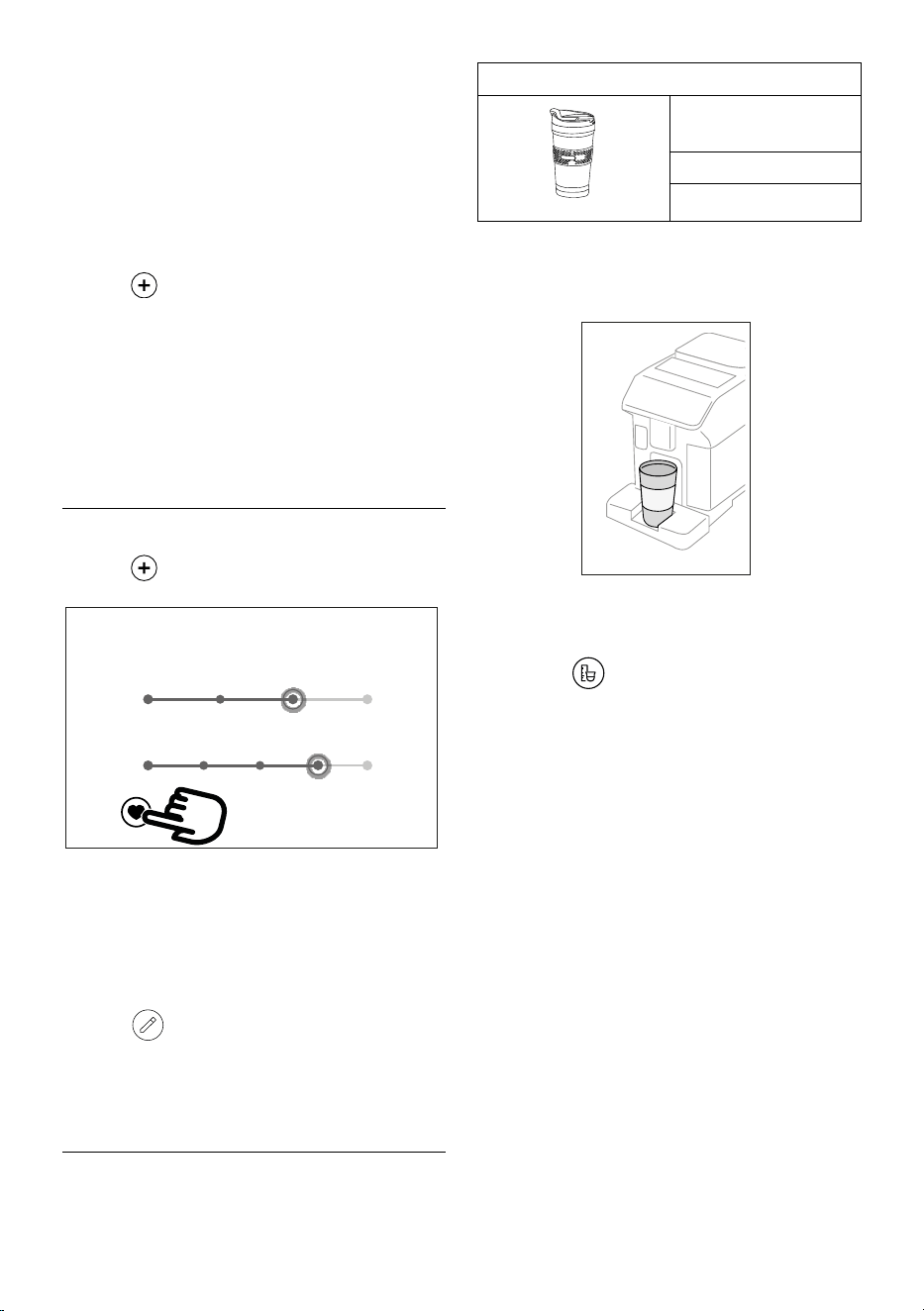
(C2) at the bottom of the image corresponding
to the drink you want to include in the collection;
Size L
Intensity 4
26
Espresso
2. Select the heart (g. 26):
3. Press “X” to go back to the homepage (C).
The drink is now included in the collection and can be accessed
by pressing Favourites (B4) from the control panel (B).
Please note:
The order of drinks in the collection can be changed:
1. Press
;
2. Select the drink to be moved;
3. Use the arrows to change the order of the drinks;
4. Press “X” to go back to the homepage (C).
12. MAKING “TO GO” DRINKS U
The “To Go” function is perfect for all those wanting to create a
customised drink to take away with them.
Optional accessory in certain models:
Travel mug
(capacity 473 ml/160 mm H)
Type: DLSC073
EAN: 8004399024083
1. Prepare the machine with the accessories needed to pre-
pare the drink you want to make (E, F);
2. Raise the ap (A16) (g. 24) and place the travel mug in
the compartment (A15) (g. 27);
27
3. Press “To Go” (B2);
The rst time you use the function:
• Press “Start”;
• Pressing
displays information on the quantities
corresponding to the size of the travel mug;
• Select the size of travel mug you are using (Piccolo, Medio,
Grande) and press “Next”;
• The appliance informs you that at the end of preparation,
you can adjust the quantity to save the exact capacity of
your mug. Press “Next”.
4. Select the type of drink you want to make (Hot (B3) or Cold
(B1));
5. Scroll through the drinks on the homepage (C) until the
one you want to make is displayed. Select the drink and
customise the parameters proposed by the appliance. Pro-
ceed with preparation;
6. At the end of preparation, you can correct the quantity de-
livered so the next time the machine will make the right
amount of drink for the travel mug you are using.
Please note:
• Each time you use a mug dierent from the one used pre-
viously, we recommend you remain nearby to check the
quantity of drink delivered.
• If you save the new settings, they are memorised ONLY in
the selected prole.
• To maintain the temperature of hot drinks, preheat the
travel mug with hot water.
17
• You should only use the travel mug for the drinks present
on the homepage.
• To use a travel mug other than the one supplied, make sure
it is no taller than 16 cm.
Important
• Before screwing on the lid, open the closing cap to release
the pressure;
• Drinks with milk: at the end of preparation, clean the milk
carafe (see section “9.6 Cleaning the milk carafe after use”).
• You should use the contents within a maximum of 2 hours.
After that time, empty and clean as described in the fol-
lowing section.
• For more information, see the leaet attached to the travel
mug.
12.1 Cleaning the travel mug after use
For hygiene reasons, the travel mug (D9) should always be
cleaned after use. Do not use abrasive materials that could dam-
age the surface of the container.
Proceed as follows:
1. Unscrew the lid and rinse the container and lid with hot
drinking water (40°C).
2. Soak the components in hot water (40°C) with wash-
ing up liquid for at least 30 minutes. Do not use scented
detergents.
3. Clean the inside of the container and the lid with a clean
sponge and washing up liquid, removing any visible dirt.
4. Rinse all components with hot drinking water (40°C).
5. Dry all components with a clean, dry cloth or paper towels,
then reassemble.
6. Wash the lid in the dishwasher once a week. The metal
container is not dishwasher safe
13. “MY” FUNCTION (“Hot” drinks only) U
With the “my function”, you can customise the drink as follows:
1. Make sure the prole (C6) whose drink you want to cus-
tomise is active;
2. Press
(C2) at the bottom of the image corresponding
to the drink you want to make;
3. Press ;
4. Press “Start” to follow the guided procedure;
5. If envisaged by the drink, select the desired Intensity and
press “Next”;
6. Press “Brew” to begin preparation;
7. When the required quantity has been delivered into the
cup, press “Stop”.
8. If you are satised with the result in the cup, press “Save”
to save the settings, or “Cancel” to retain the previous
parameters.
9. Press “X” to go back to the homepage.
The appliance goes back to the homepage (C).
Please note:
• If you save the new settings, they are memorised ONLY in
the selected prole.
• When you customise a single drink, the respective double
version is also customised and the appliance displays the
message “Settings saved on both double and single drink”;
• Press “X” to exit programming at any moment. The values
will not be saved.
• When a drink has been customised, “Reset” (under the
image) and “my” (among the quantity selections) appear
in the settings. Press “Reset” to reset the default values for
the drink.
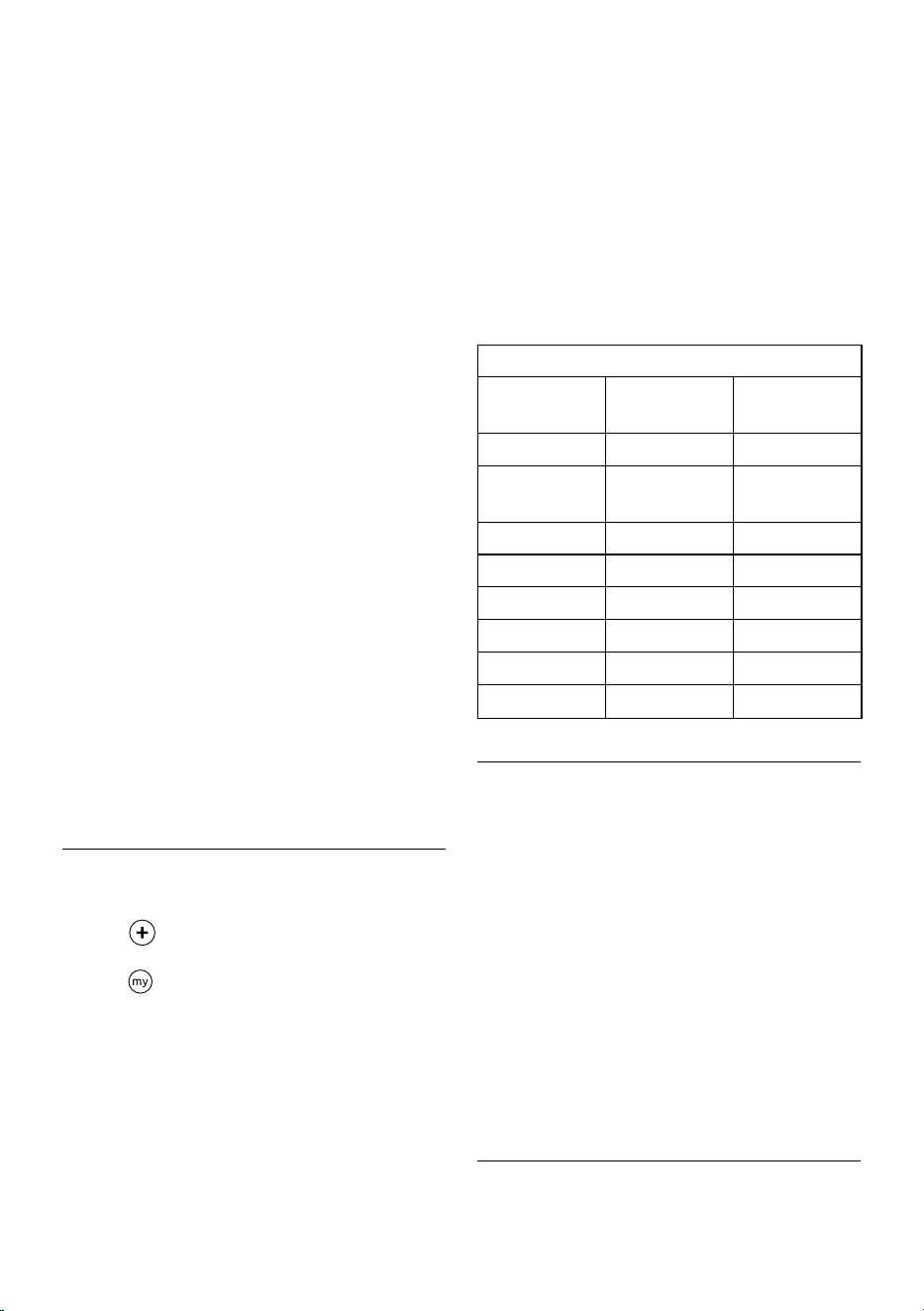
Drink quantity table
Drink Standard
quantity
Programmable
quantity
ESPRESSO 40 ml 20-180 ml
2X ESPRESSO 40 ml + 40 ml 20-180 ml +
20-180 ml
COFFEE 180 ml 100-270 ml
LONG 160 ml 115-250 ml
DOPPIO+ 120 ml 80-180 ml
AMERICANO 150 ml 70-480 ml
TEA 150 ml 20-420 ml
HOT WATER 250 ml 20-420 ml
14. SELECTING YOUR PERSONAL PROFILE U
You can memorise a number of dierent proles, each associat-
ed with a dierent icon.
The customised drink settings are saved in each prole. The
order in which all the drinks are displayed is based on the fre-
quency of selection.
To select a prole, proceed as follows:
1. From the homepage (C), press the prole currently in use
(C6). A list of selectable proles appears;
2. Then select the required prole.
Please note:
• After making your selection, the drink settings bars will all
appear in the same colour as the prole;
• You can rename your prole;
• To customise the prole icon, see section “6.7 Create and
edit proles”.
15. CLEANING U
15.1 Cleaning the machine
The following parts of the machine must be cleaned regularly:
- the appliance’s internal circuit;
18
- coee grounds container (A10);
- drip tray (A14) and drip tray grille(A13);
- water tank (A22);
- coee spouts(A7);
- pre-ground coee funnel (A4);
- brewing unit (A6), extractable after opening the brewing
unit ap (A5);
- milk carafes (E) and (F)
- coee pot (D8) (see section “8.9 Cleaning the coee pot”);
- travel mug (D9) (see section “12.1 Cleaning the travel mug
after use”).
Important!
• Do not use solvents, abrasive detergents or alcohol to clean
the coee machine. With De’Longhi superautomatic coee
machines, no chemical products are required for cleaning
purposes.
• Do not use metal objects to remove encrustations or coee
deposits as they could scratch metal or plastic surfaces.
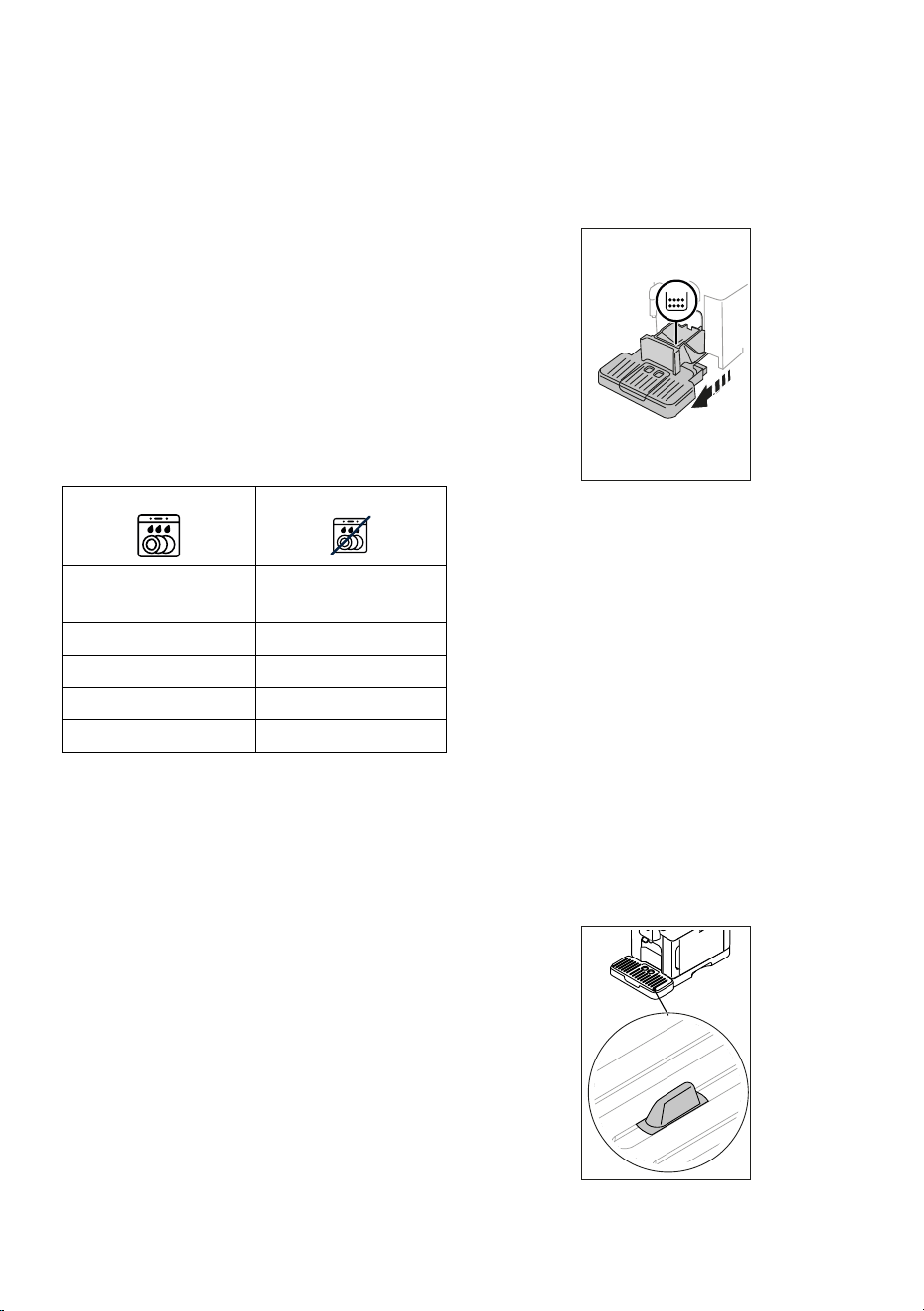
dishwasher safe hand wash only
drip tray (A14) coee grounds container
(A10)
door grille support (A17) cup tray (A12)
drip tray grille (A13) ap grille (A17)
“Hot” milk carafe (E) water tank (A22)
“Cool” milk carafe (F) removable brewing unit (A6)
15.2 Cleaning the internal circuit
If the appliance is not used for more than 3/4 days, before using
it again, we strongly recommend switching it on and perform-
ing 2/3 rinse cycles by selecting the “Rinse” function (section
“6.1 Rinsing”).
Please note:
After cleaning, it is normal for the grounds container (A10) to
contain water.
15.3 Cleaning the coee grounds container
When “Please empty grounds container” appears on the display,
the grounds container must be emptied and cleaned. The ap-
pliance cannot be used to make coee until you have cleaned
the grounds container (A10). Even if not full, the empty grounds
container message is displayed 72 hours after the rst coee
has been prepared. For the 72 hours to be calculated correctly,
the machine must never be disconnected from the mains power
supply.
Important! Danger of scalding
If you make a number of milk-based drinks one after the other,
the metal cup tray (A12) becomes hot. Wait for it to cool down
before touching it and handle it from the front only.
To clean (with the machine on):
1. Remove the drip tray (A14) and grounds container (A10)
(g. 28);
28
2. Empty the drip tray and grounds container and clean thor-
oughly to remove all residues left on the bottom. This can
be done using the spatula on the brush (D5) provided.
3. Put the drip tray complete with grille and grounds contain-
er back in the appliance.
Important!
• When removing the drip tray, the grounds container must
be emptied, even if it contains only a few grounds. If this
is not done, when you make the next coees, the grounds
container will ll up more than expected and clog the
machine.
• The grounds container on certain models is made up of two
distinct parts: after cleaning, reassemble the parts before
returning the container to the machine.
15.4 Cleaning the drip tray and drip tray grille
Important!
The drip tray (A14) is tted with a level indicator (A19) (red)
showing the amount of water it contains (g. 29).
29
Before the indicator protrudes from the cup tray (A12), the drip
tray must be emptied and cleaned, otherwise the water may
overow the edge and damage the appliance, the surface it
19
rests on or the surrounding area. To remove the drip tray, pro-
ceed as follows:
1. Remove the drip tray and coee grounds container (A10)
(g. 28);
2. Check the red condensate tray (A11) and empty if full;
3. Remove the cup tray (A12) and drip tray grille (A13), then
empty the drip tray and grounds container and wash all
components;
4. Put the drip tray complete with grille and grounds contain-
er back in the appliance.
Important!
When removing the drip tray, the grounds container must be
emptied, even if it contains few grounds. If this is not done,
when you make the next coees, the grounds container will ll
up more than expected and clog the machine.
15.5 Cleaning the inside of the machine
Danger of electric shock!
Before cleaning internal parts, the machine must be turned o
(see section “5. Turning the appliance o”) and unplugged from
the mains power supply. Never immerse the machine in water.
1. Check regularly (about once a month) that the inside of the
appliance (accessible after removing the drip tray (A14))
is not dirty. If necessary, remove coee deposits with the
brush (D5) supplied and a sponge.
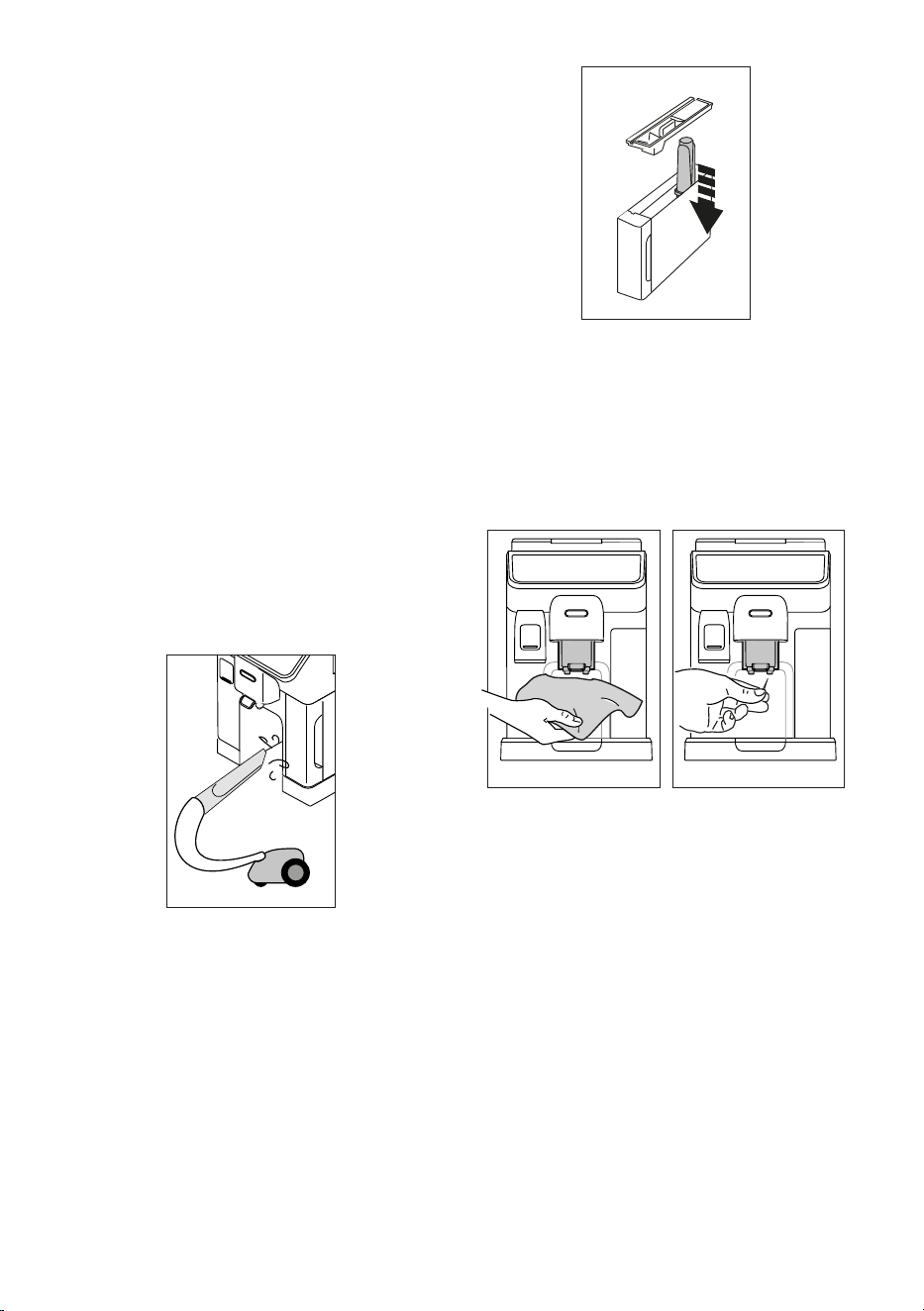
2. Remove all residues with a vacuum cleaner (g. 30).
30
15.6 Cleaning the water tank
Clean the water tank periodically (about once a month) and
whenever the softener lter (D4) in the water tank (A22) is
replaced.
1. Take out the water tank (g. 2), remove the water softener
lter (if installed) and rinse with running water;
2. Empty the water tank and clean with hot water, if nec-
essary with the aid of a clean, non-abrasive cloth. Rinse
thoroughly with water;
3. Reinstate the lter (g. 31), ll the tank with fresh potable
water up to the MAX level (g. 3) and reposition the tank
in the machine;
31
4. (models with water softener lter only) — deliver 100ml of
hot water to reactivate the lter.
Please note:
If the appliance is not used for more than 3-4 days, you should
clean the tank as described above.
15.7 Cleaning the coee spouts
1. Clean the coee spouts (A7) regularly with a sponge or
cloth (g. 32);
32 33
2. Check the holes in the coee spouts are not blocked. If nec-
essary, remove coee deposits with a toothpick (g. 33).
15.8 Cleaning the pre-ground coee funnel
Clean the pre-ground coee funnel (A4) regularly (about once a
month) with a damp cloth. Proceed as follows:
1. Turn the machine o (see chapter “5. Turning the appliance
o”;
2. Open the funnel ap;
3. Clean the funnel with the brush provided (D5);
4. Close the ap.
Important!
After cleaning, make sure there are no accessories left in the
funnel. The presence of foreign objects in the funnel while the
machine is in operation could damage the appliance.
15.9 Cleaning the brewing unit
The brewing unit (A6) must be cleaned at least once a month.
Important!
The brewing unit cannot be extracted while the machine is on.
20
1. Make sure the machine is correctly turned o (see section
“5. Turning the appliance o”);
2. Remove the water tank (A22) (g. 2);
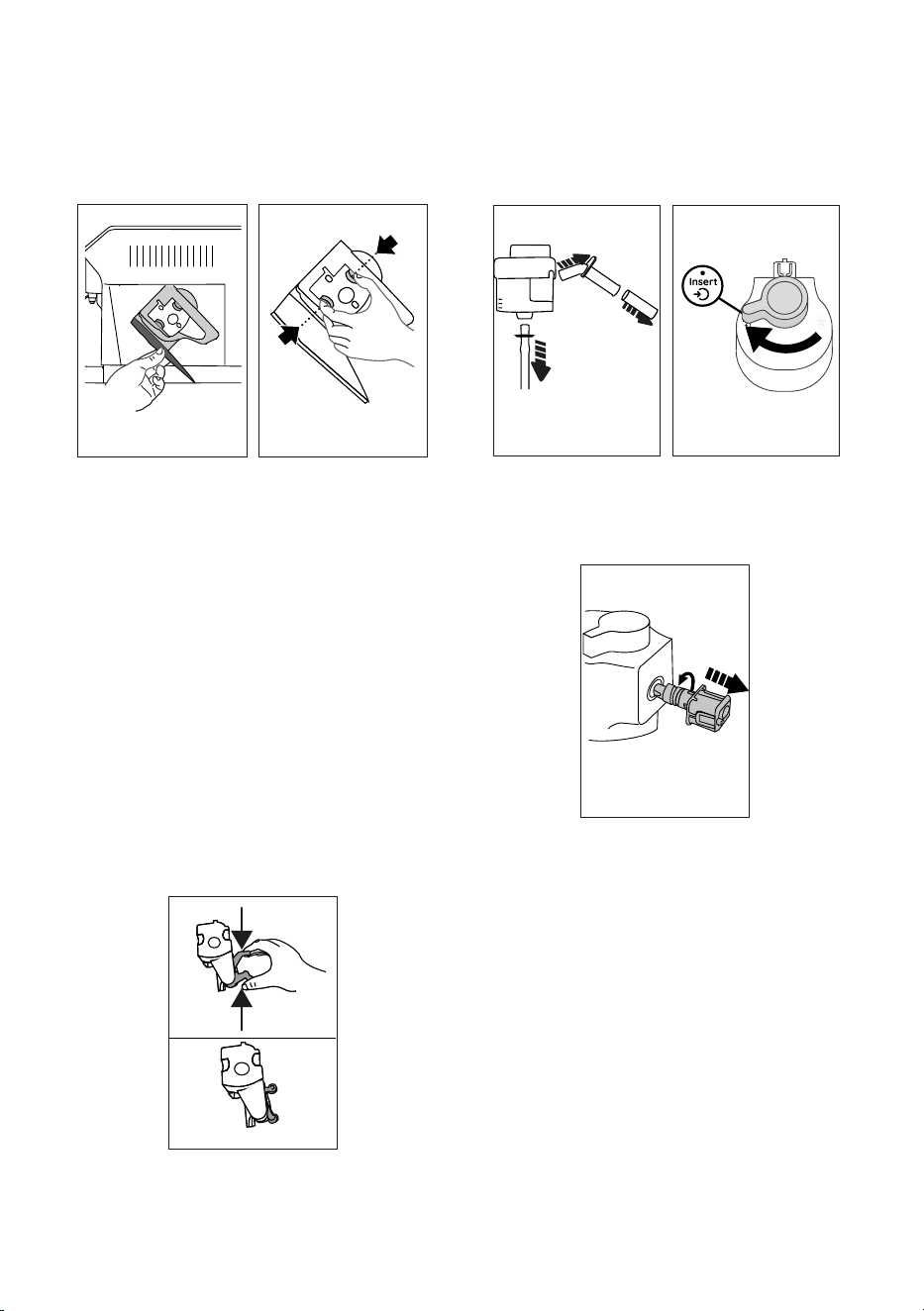
3. Open the brewing unit ap (A5) (g. 34) on the right side
of the appliance;
34 35
PUSH
PUSH
4. Press the two coloured release buttons inwards and at the
same time pull the brewing unit outwards (g. 35);
5. Soak the brewing unit in water for about 5 minutes, then
rinse under the tap;
Important!
RINSE WITH WATER ONLY
NO DETERGENTS - NO DISHWASHER
6. Do not use detergents when cleaning the brewing unit, as
they could damage it.
7. Use the brush (D5) to remove any coee residues left in
the brewing unit housing, visible through the brewing unit
ap;
8. After cleaning, replace the brewing unit by sliding it onto
the internal support, then push the PUSH symbol fully in
until it clicks into place;
Please note:
If the brewing unit is dicult to insert, before insertion, adapt it
to the right size by pressing the two levers (g. 36).
36
9. Once inserted, make sure the two coloured buttons have
snapped out;
10. Close the brewing unit ap;
11. Put the water tank back.
15.10 Cleaning the milk carafes (E) and (F)
Each time you use the milk carafe, clean as described below:
1. Extract the lid of the milk carafe (E1) or (F1) (g. 18);
2. Extract the milk spout (E5) or (F5), milk spout extension
(E7) (“Hot” carafe only) and milk intake tube (E6) or (F6)
(g. 37);
37 38
3. Turn the froth adjustment dial (E3) or (F3) clockwise to the
“Insert” position (g. 38) and pull to extract;
4. Turn anticlockwise and remove the milk carafe connector
(E4) or (F4) (g. 39).
39
5. Wash in a dishwasher (recommended) or by hand as indi-
cated below:
• In a dishwasher: Rinse all the above components and the
milk carafe with hot running drinking water (at least 40°C),
then place them in the top basket of the dishwasher and
run a programme at 50°C, e.g. standard ECO.
• By hand: Thoroughly rinse all the components and the milk
carafe with hot running drinking water (at least 40°C) to
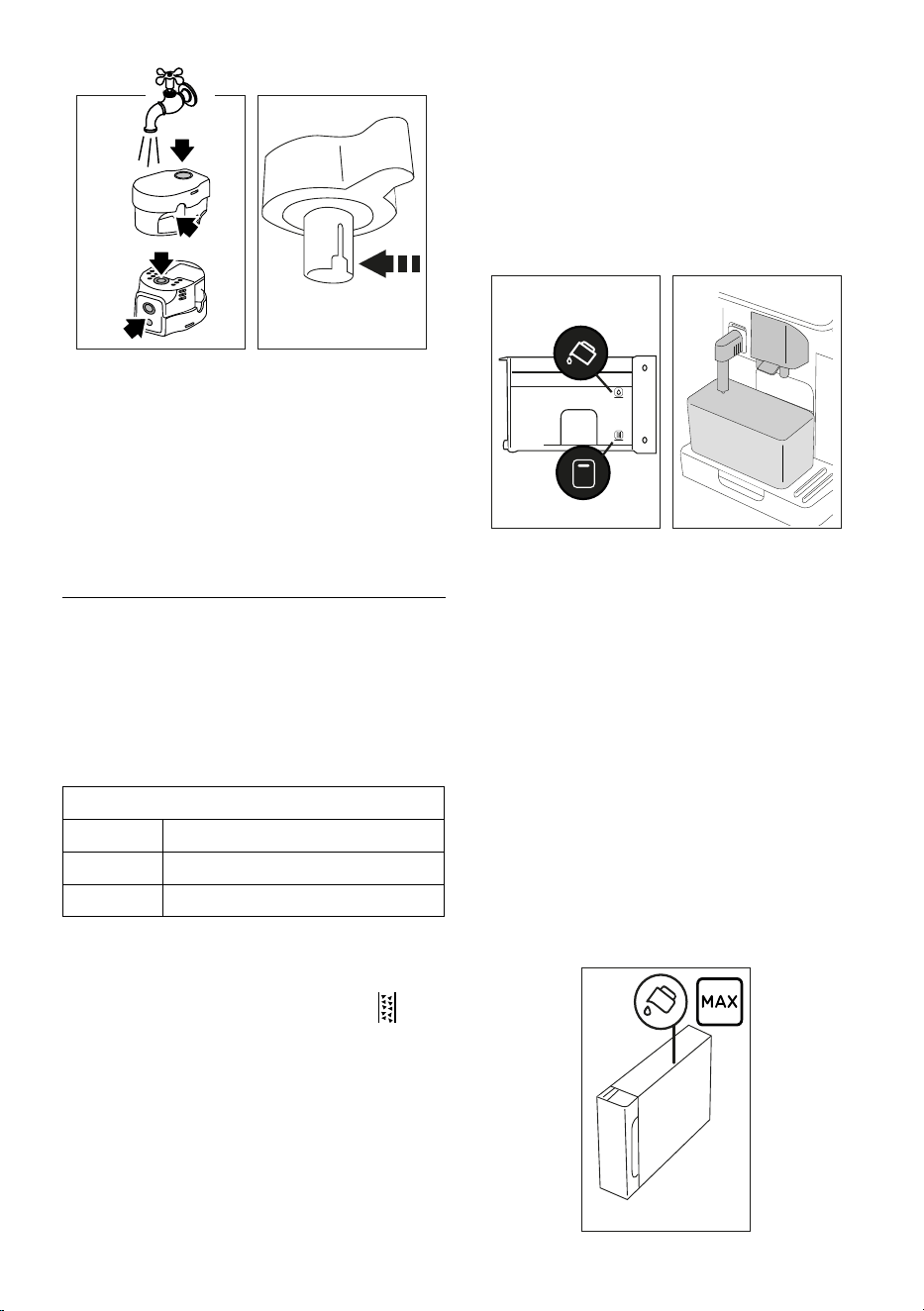
remove all visible milk residues; make sure to run the water
through the holes in the lid (g. 40). Then immerse all the
components in hot drinking water (at least 40°C) and wash
-
ing up liquid for at least 30 minutes. Rinse all the above com-
ponents thoroughly under hot drinking water, rubbing them
one at a time with your hands.
6. Make sure there are no milk residues on the hollow and
groove under the dial (g. 41).
If necessary,
scrape the
groove with a toothpick;
21
4140
7. Check that the intake tube and spout are not clogged with
milk residues;
8. Dry all the components with a clean dry cloth;
9. Reassemble all the lid components;
10. Attach the lid back on the milk carafe.
Please note:
Each week the appliance reminds you to clean the milk carafe
thoroughly and proposes the correct cleaning sequence again.
16. DESCALING U
Important!
• Before use, read the instructions and labelling on the des-
caler pack.
• Use De’Longhi descaler only. Using unsuitable descaler
and/or performing descaling incorrectly may result in
faults not covered by the manufacturer’s guarantee.
• Descaler could damage delicate surfaces. If the product is
accidentally spilt, dry immediately.
To descale
Descaler De’Longhi descaler
Container Recommended capacity: 2 l
Time ~50min
Descale the appliance when the corresponding message ap-
pears on the homepage (C). To descale immediately, press “OK”
and follow the instructions from point (5).
To descale the appliance later, press “Cancel”. The
symbol
(C4) appears on the homepage to remind you the appliance
needs descaling. (The message appears each time you turn the
appliance on).
To access the descaling menu:
1. Press the settings menu icon
(C3) on the homepage;
2. Scroll through the menu items until “Descaling” is
displayed;
3. Press “Start” to enter the guided descaling procedure;
4. Press “Start” to begin;
5. Insert the water spout (D6) (g. 5);
6. Remove and empty the drip tray (A14) and coee grounds
container (A10) (g. 10), then put both back in the appli-
ance and press “Next”;
7. Remove the water tank (A22), lift the lid (A21) and (if in-
serted) remove the lter (D4). Empty the tank completely.
8. Pour the descaler into the tank up to the level A marked in-
side the tank (equal to one 100ml pack), then add water (one
litre) up to level B (g. 42). Put the water tank (with lid) back
in the appliance and press “Next”
;
4342
2L
B
A
9. Place an empty 2 litre container under the spouts (g. 43).
Press “Next” to start descaling (“Back” to go back to the
previous screen or “X” to exit the procedure, remembering
to remove the descaling solution from the tank)
Important! Danger of scalding
Hot water containing acid ows out of the spouts. Take care to
avoid contact with splashes of this solution.
10. The descale programme starts and the descaler liquid
comes out of the hot water and coee spouts. A series of
rinses is performed automatically to remove all the scale
residues inside the coee machine;
After about 40 minutes, the descaling action ceases;
11. The appliance is now ready to be rinsed through with clean
water. Empty the container used to collect the descaler
solution. Remove the water tank, empty, rinse under run-
ning water, ll with fresh water up to the MAX level and
put back in the appliance (g. 44). Press “Next”;
44
22
12. Place the container used to collect the descaler solution
empty under the spouts and press “Next” to start rinsing;
13. Hot water is delivered from both the hot water spout and
coee spouts;
14. When the water in the tank has run out, empty the con
-
tainer used to collect the rinsing water;
15. Extract the water tank and put back the water softener l
-
ter if removed previously. Press “Next” to continue;
16. Fill the tank with fresh water up to the MAX level, put back
in the appliance and press “Next” to continue;
17. Place the container used to collect the descaler solution
empty under the spouts
and press “Next” to start another
rinsing cycle;
18. When the water in the tank has run out, empty the con
-
tainer used to collect the rinsing water, remove and empty
the drip tray (A14) and grounds container
(A10), then put
back in the appliance;
19. Extract the water tank, top up to the max level, put back in
the appliance and press “Next”
20. The descaling process is now complete”. Press “OK”. The ap
-
pliance performs a rapid preheat cycle and then goes back
to the homepage.
Please note:
• If the descaling cycle is not completed correctly (e.g. elec
-
trical power failure) the appliance will request to complete
it next time you switch it on;
• After descaling, it is normal for the grounds container
(A10) to contain water.
• If the water tank has not been lled to the MAX level after
descaling, the appliance prompts for a third rinse to ensure
that the descaler solution has been completely eliminated
from the machine’s internal circuits. Before starting rins
-
ing, remember to empty the drip tray.
17. SETTING WATER HARDNESS
The descaling alarm is displayed after a period of time estab-
lished according to water hardness. The machine can also be
programmed according to the actual hardness of the local water
supply, so that the descaling procedure will be required less
frequently.
17.1 Measuring water hardness
1. Remove the “Total hardness test” indicator paper (D1) from
its pack (in the welcome box).
2. Immerse the paper completely in a glass of water for about
one second.
3. Remove the strip from the water and shake lightly. After
about a minute, 1, 2, 3, or 4 red squares appear, depending
on the hardness of the water. Each square corresponds to
1 level.
17.2 Setting water hardness
1. Press the settings menu icon (C3) on the homepage (C);
2. Scroll the pages and select “Water hardness”;
3. Press “Set”;
4. Carry out the procedure described in the previous section
and measure water hardness;
5. Press the dot corresponding to the water hardness meas-
ured previously as indicated in the following table:
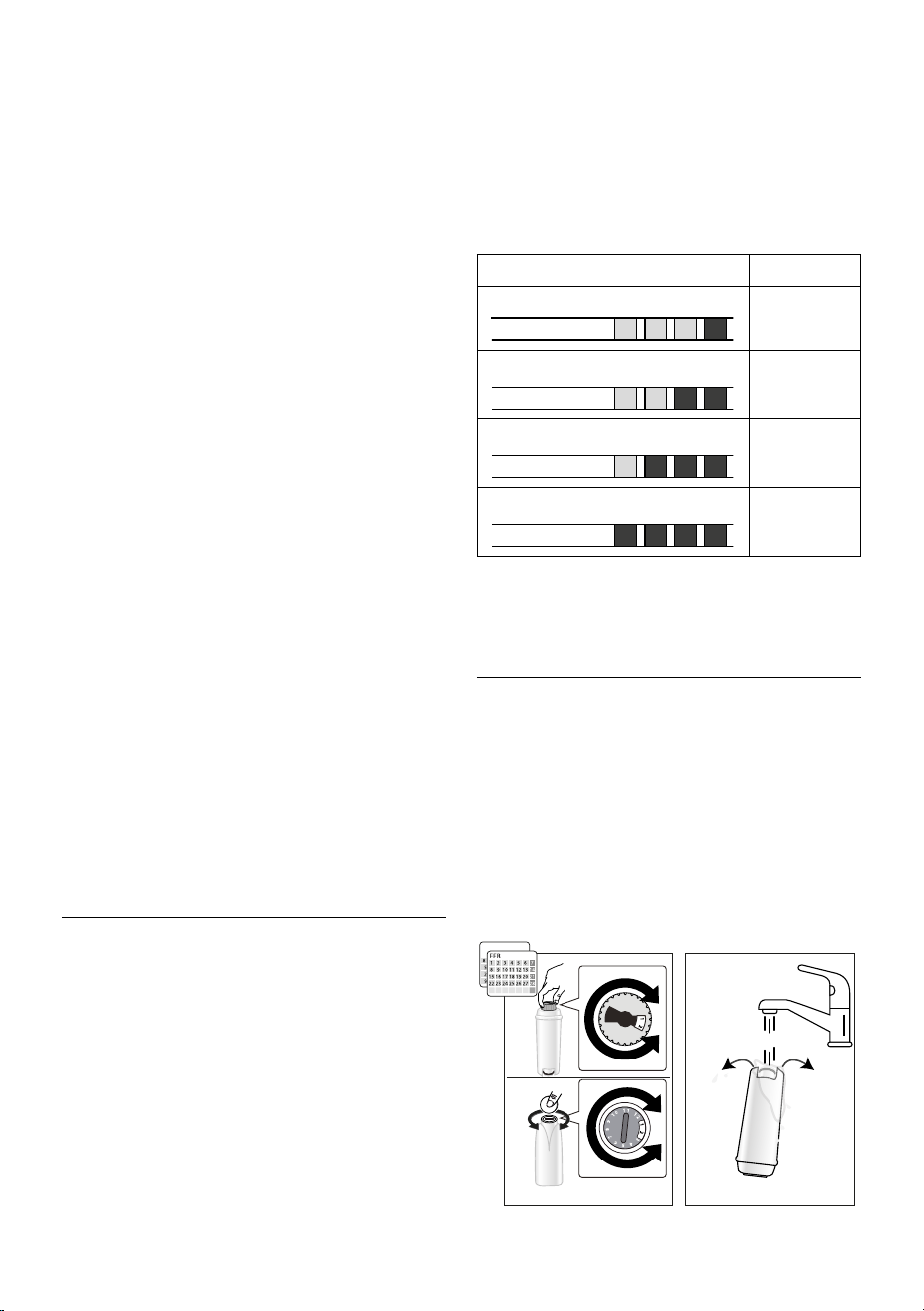
Total Hardness Test (D1) Water hardness
Green Red
Level 1
Green Red
Level 2
Green Red
Level 3
Red
Level 4
6. The machine is now reprogrammed with the new water
hardness setting.
7. Press “<” to go back to the settings menu.
18. WATER SOFTENER FILTER
Certain models are tted with a water softener lter (D4). If this
is not the case with your model, you are recommended to pur-
chase one from De’Longhi Customer Services.
To use the lter correctly, follow the instructions below.
18.1 Installing the lter
1. Press the settings menu (C3);
2. Scroll through the pages and select “Water lter”;
3. Press “OK” to enter the guided procedure
4. Remove the lter from the packaging and turn the date indi-
cator to view the next 2 months (g. 45);
45 46
2
0,5 L
23
Please note:
The lter lasts about two months if the appliance is used normally.
If the machine is left unused with the lter installed, it will last a
maximum of 3 weeks.
5. Press “Next” to continue (“Back” to go back to the previous
screen; “X” to cancel the operation);
6. To activate the lter, run tap water through the hole in the
centre of the lter until water comes out of the openings at
the side for more than a minute (g. 46). Press “Next”;
47 48
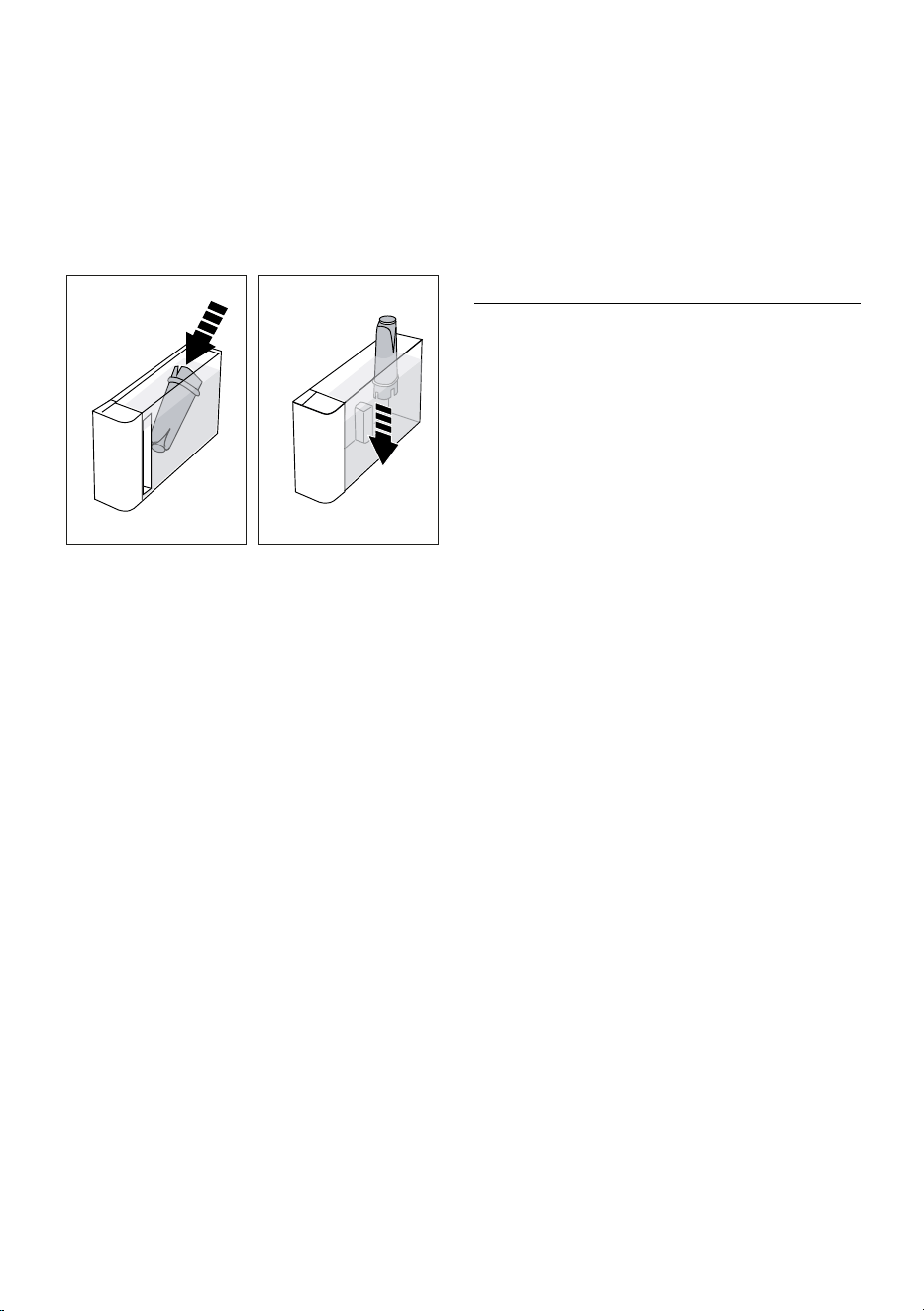
7. Extract
the water tank
(A22) (g. 2) and ll with water; in-
sert the lter in the water tank and immerse it completely for
about ten seconds, sloping it and pressing it lightly to enable
the air bubbles to escape (g. 47). Press “Next”;
8. Insert the lter in the lter housing
(g. 48) and press as far as
it will go;
press “Next”;
9. C
lose the tank with the lid (A21), then put the tank back in
the machine.
10. Insert the hot water spout (D6). Press “Next”;
11. Position an empty container with a minimum capacity of 0.5
litres under the hot water spout (g. 6) and press “Next” to
activate the lter;
12. The appliance delivers hot water, then stops automatically.
Press “OK” to go back to the homepage;
13. The lter is now active and you can use the coee machine.
18.2 Replacing or removing the lter
Replace the lter
(D4)
when the replace lter message appears
on the homepage (C). To replace the lter immediately, press “OK”
and follow the instructions from point 3 of the previous section. To
replace the lter later, press “Cancel”. The lter symbol appears on
the display to remind you the
lter needs replacing.
To replace, proceed as follows:
1. Press the settings menu (C3);
2. Scroll through the pages until “Water lter“ is displayed, then
press “OK”;
3. Press “OK” to enter the guided procedure;
4. Extract the water tank (A22) and exhausted lter.
5. To remove the lter, press “OK” (“Back” to go back to the pre-
vious screen; “Cancel” to cancel the operation);
6. To replace the lter, press “Next” and follow the operations
described in the previous section from point (4).
Please note:
After two months (see date indicator) or when the appliance has
not been used for 3 weeks, you should replace the lter even if the
message has not yet been displayed.
19. TECHNICAL DATA
Voltage: 220-240 V~ 50-60 Hz max. 10 A
Power: 1450 W
Pressure: 1.9 MPa (19 bars)
Water tank capacity: 1.8 l
Size LxDxH: 260x450x385 mm
Cord length: 1200 mm
Weight (varies according to model): 11.2 kg
Beans container capacity: 300 g
Frequency: 2400/2500 MHz
Maximum transmission power 20 mW
De’Longhi reserves the right to modify the technical specication
and styling of its products at any moment, without compromising
their functionality and quality.
19.1 Tips for Energy Saving
• To reduce energy consumption, after delivering one or more
drinks, remove the milk carafes or accessories.
• Set auto-o to 15 minutes (see section
“6.8 Set auto-o”);
• Enable Energy Saving (see paragraph “6.9 General”);
• Always carry out the descaling cycle when prompted by the
machine.

24
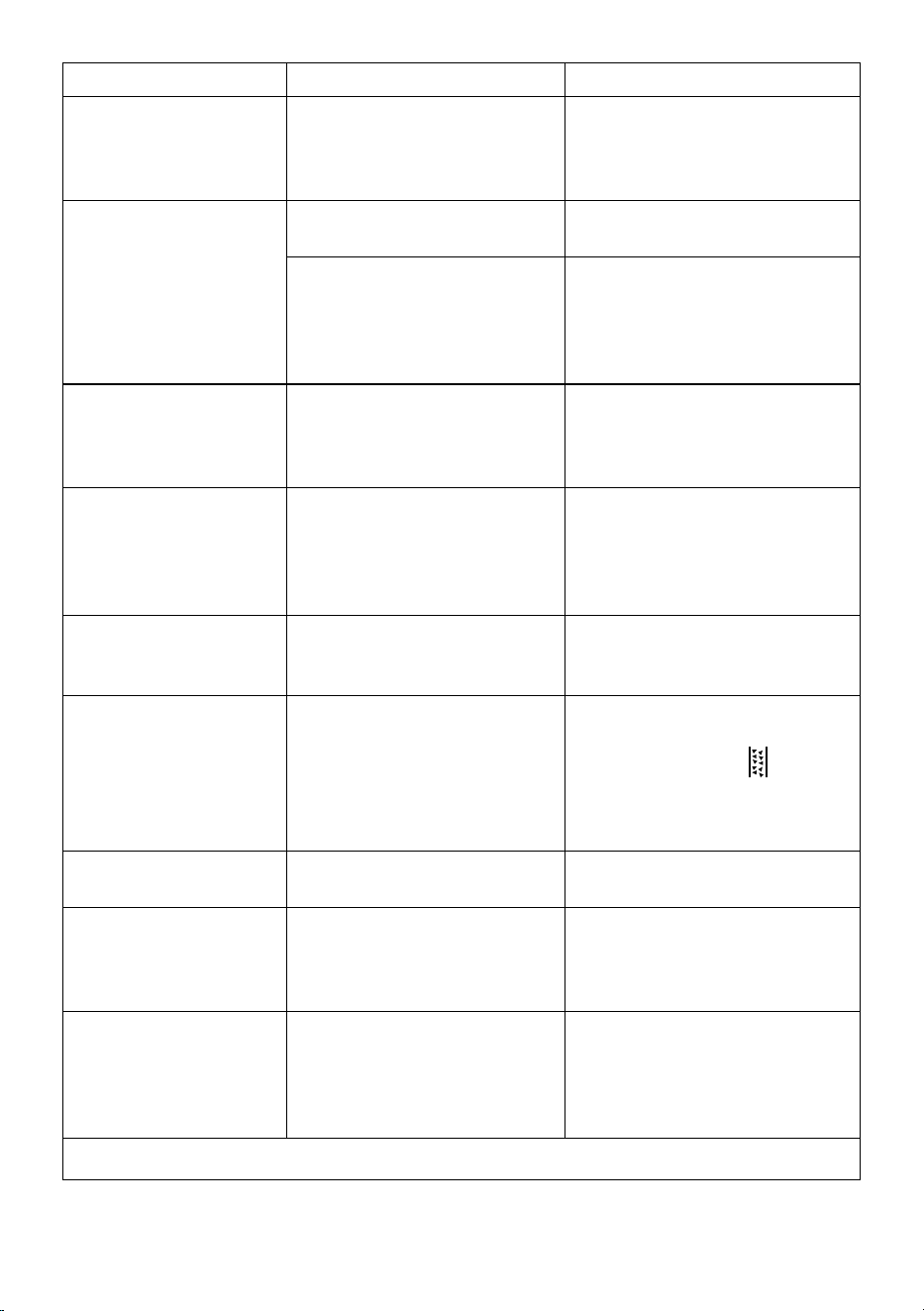
20. DISPLAYED MESSAGES
DISPLAYED MESSAGE MEANING SOLUTION
Please ll the tank with fresh
water up to MAX level. Be sure to
ll above Level 1
Insucient water in the tank
(A22)
. Take out the tank, ll with fresh potable
water to above Level 1, and reposition in the
machine.
I don’t have enough water for
your drink. Please ll the tank
with fresh water up to MAX level.
Be sure to ll above Level 1
Please insert the water tank
The tank
(A22)
is not correctly in place. Insert the tank correctly and press as far as it
will go.
Fill the tank with fresh water.
Please empty drip tray and
grounds container
The amount of water in the tank is not
enough to make the drink and the mes-
sage to empty the grounds container will
be displayed shortly.
The appliance asks for both operations to be
performed so that no further intervention will
be necessary and more drinks can be made one
after the other without interruption.
Please insert the brewing unit
The brewing unit (A6) has not been re-
placed after cleaning.
Insert the brewing unit as described in section
“15.9 Cleaning the brewing unit”
Please empty grounds container
The grounds container (A10) is full. Clean as described in section “15.3 Cleaning
the coee grounds container”
Please insert grounds container
and drip tray
The grounds container (A10) and/or drip
tray (A14) is not correctly in place or is
missing.
Insert the drip tray complete with grounds
container and press as far as it will go.
Please add your preferred
pre-ground coee. - max: one
measure!
Preparation with pre-ground coee has
been selected.
Make sure the funnel (A4) is not blocked, then
add one level measure (D2) of pre-ground
coee, press “Next” on the display and follow
the instructions in section “8.4 Making coee
using pre-ground coee”.
Fill the beans container and press
“OK” to resume brewing
The coee beans have run out. Fill the beans container (A2) and press “OK” to
resume brewing
Please insert the water spout The spout (D6) is not correctly in place or
is missing.
Insert the spout and push as far as it will go
(g. 5). The appliance emits a beep (if the
beep function is enabled).
Please insert the cold/hot milk
carafe
The milk carafe (E) or (F) is not inserted
correctly or is missing.
Insert the milk carafe and push as far as it will
go. The machine emits a beep (if the beep
function is enabled).
Just doing a little cleaning. I’ll be
back in a few seconds
The appliance has detected impurities in its
internal circuits.
Wait for the appliance to be ready again and
reselect the required drink. Contact customer
services if the problem persists.
→
25
DISPLAYED MESSAGE MEANING SOLUTION
The new settings have not been
saved
While customising the drinks (see section “13.
“My” function (“Hot” drinks only)”), preparation
has been deliberately interrupted by pressing “X”
or an alarm has been triggered.
Press “X” to go back to the homepage (C) to view the
alarm causing the interruption. Follow the instruc-
tions corresponding to the alarm displayed (see
section “20. Displayed messages”)
I am unable to complete your
drink. Reduce the intensity and
try again
The grinding is too ne and the coee is
delivered too slowly or not at all.
Select a milder “Intensity” (see “8.3 Customis-
ing the drinks”)
If the water softener lter (D4) is present,
an air bubble may have been released in-
side the circuit, obstructing delivery.
Press “OK” and deliver a little water (see section
“10. Preparing hot water and hot tea”) until the
ow is regular. If the problem continues, remove
the lter (see section “18.2 Replacing or remov-
ing the lter”)
I am unable to complete your
drink. Adjust the coee grinder,
increasing the dial position one
unit at a time
The grinding is too ne and the coee is
delivered too slowly or not at all.
Press “OK” and adjust the coee grinder (see
“6.4 Adjust grinder”).
Please select a lighter intensity
or reduce pre-ground coee
quantity
Too much coee has been used. Select a milder “Intensity” (see “8.3 Customis-
ing the drinks”) or reduce the quantity of pre-
ground coee (maximum 1 measure). Press
“OK to go back to the homepage or wait until
the message disappears.
Please store the milk carafe in
the fridge
A milk-based drink has been prepared
and the milk carafe is still inserted in the
appliance
Remove the carafe and place in the refrigerator.
The machine needs to be des-
caled. Press OK to start (~50min)
The machine must be descaled. To proceed with descaling, press “OK” and
follow the guided procedure, otherwise press
“Cancel”. In this case, the
symbol (C4)
appears on the homepage (C) to remind you
that descaling is needed (see section “16.
Descaling”).
The process has been interrupted.
Please press Ok to continue
Descaling process interrupted or not cor-
rectly completed
Press Ok to continue (see section “16.
Descaling”).
Please replace the water lter.
Press OK to start
The water softener lter (D4) is exhausted. Press “OK” to replace or remove the lter,
or “Cancel” to carry out the procedure later.
Follow the instructions in section “18. Water
softener lter”.
General alarm: Please refer to
user manual / Coee Link App
The inside of the appliance is very dirty. Clean the inside of the appliance thoroughly,
as described in section “15. Cleaning”. If the
message is still displayed after cleaning, con-
tact De’Longhi Customer Services and/or an
approved Service Centre
→
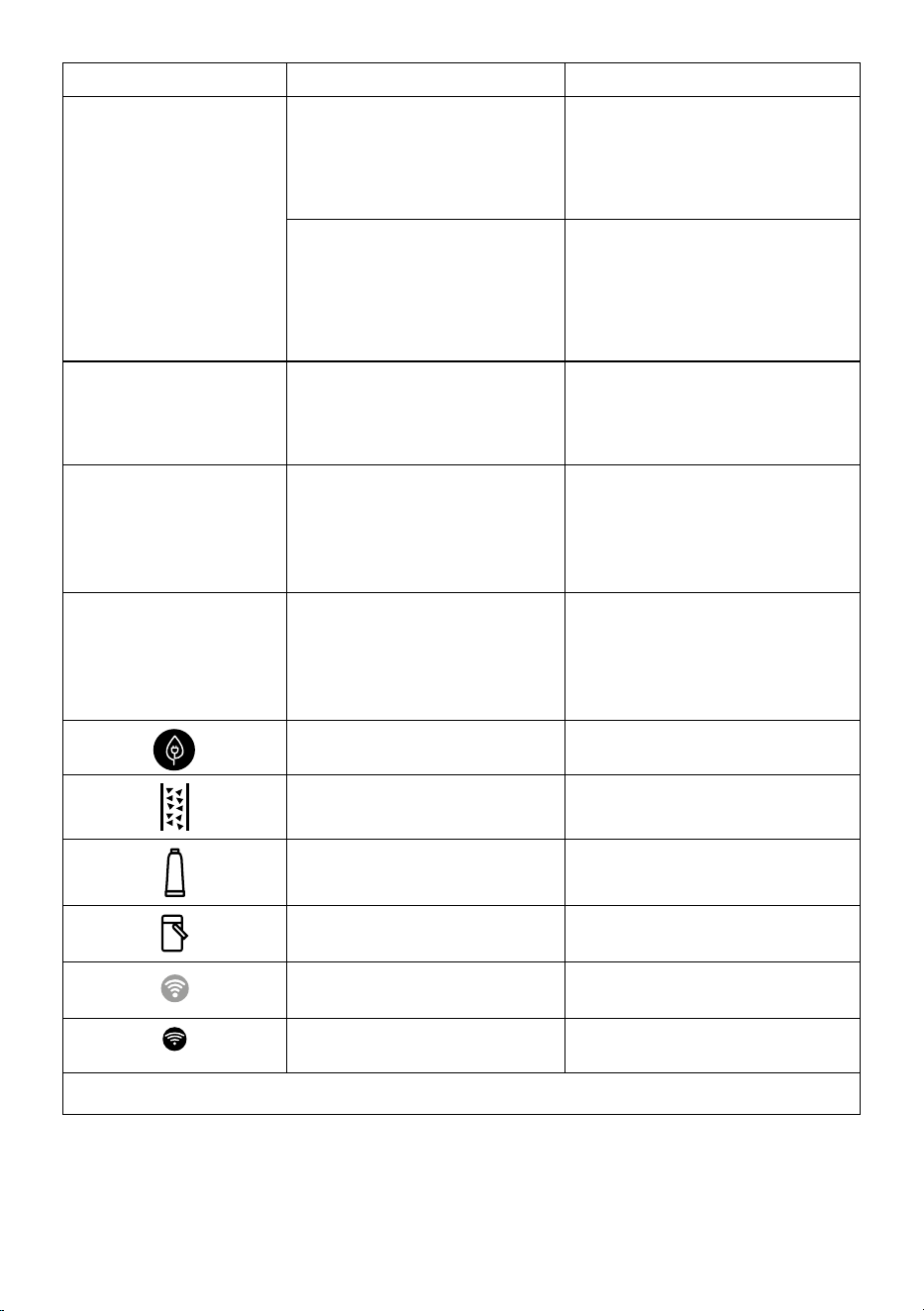
26
DISPLAYED MESSAGE MEANING SOLUTION
Water circuit empty. Press OK to
start lling process
The water circuit is empty Press “OK” to ll the circuit. Delivery stops au-
tomatically. It is normal for there to be water
in the drip tray (A14) after lling.
If the problem persists, make sure the water
tank (A22) is fully inserted.
A new water softener lter has been
inserted (D4)
Make sure you have followed the instructions
for inserting the new lter (sections “18.1
Installing the lter” and “18.2 Replacing or
removing the lter”). If the problem continues,
remove the lter (section “18.2 Replacing or
removing the lter”).
The coee beans prole has
changed! Remember to brew at
least 3 coees before changing
the coee beans prole
The appliance needs to brew at least 3 cof-
fees before Bean Adapt can be adjusted
Brew at least 3 coees with the new coee
before changing the Bean Adapt
For an optimal temperature
Please start a quick rinse to cool
me down a bit. Place a 0,2L
container under the spouts and
press Start
You want to prepare a “cold brew technolo-
gy” drink after preparing several hot drinks.
Put a container under the coee spouts and
press “Start” for a quick cold rinse to cool the
coee circuit or press “Skip” to directly brew
the desired drink.
For an optimal temperature
Please start a quick rinse to heat
me up a bit. Place a 0,2L
container under the spouts and
press Start
You want to prepare a hot drink after pre-
paring “cold brew technology” drinks.
Put a container under the coee spouts and
press “Start” for a quick hot rinse to heat the
coee circuit up or press “Skip” to directly brew
the desired drink.
Energy saving is enabled. To disable energy saving, proceed as described
in section “6.9 General”.
The machine must be descaled. The descaling procedure described in section
“16. Descaling” needs to be performed.
The lter must be replaced (D4) Replace the lter or remove it as described in
section “18. Water softener lter”.
Remember to clean the milk carafe (E) or
(F).
Turn the froth adjustment dial (E3) or (F3) to
CLEAN
.
The connection is congured in the appli-
ance settings menu (C3).
Connect to the Coee Link App.
Indicates that the appliance is connected. To disable the connection, proceed as de-
scribed in section “6.3 Connectivity”.
→
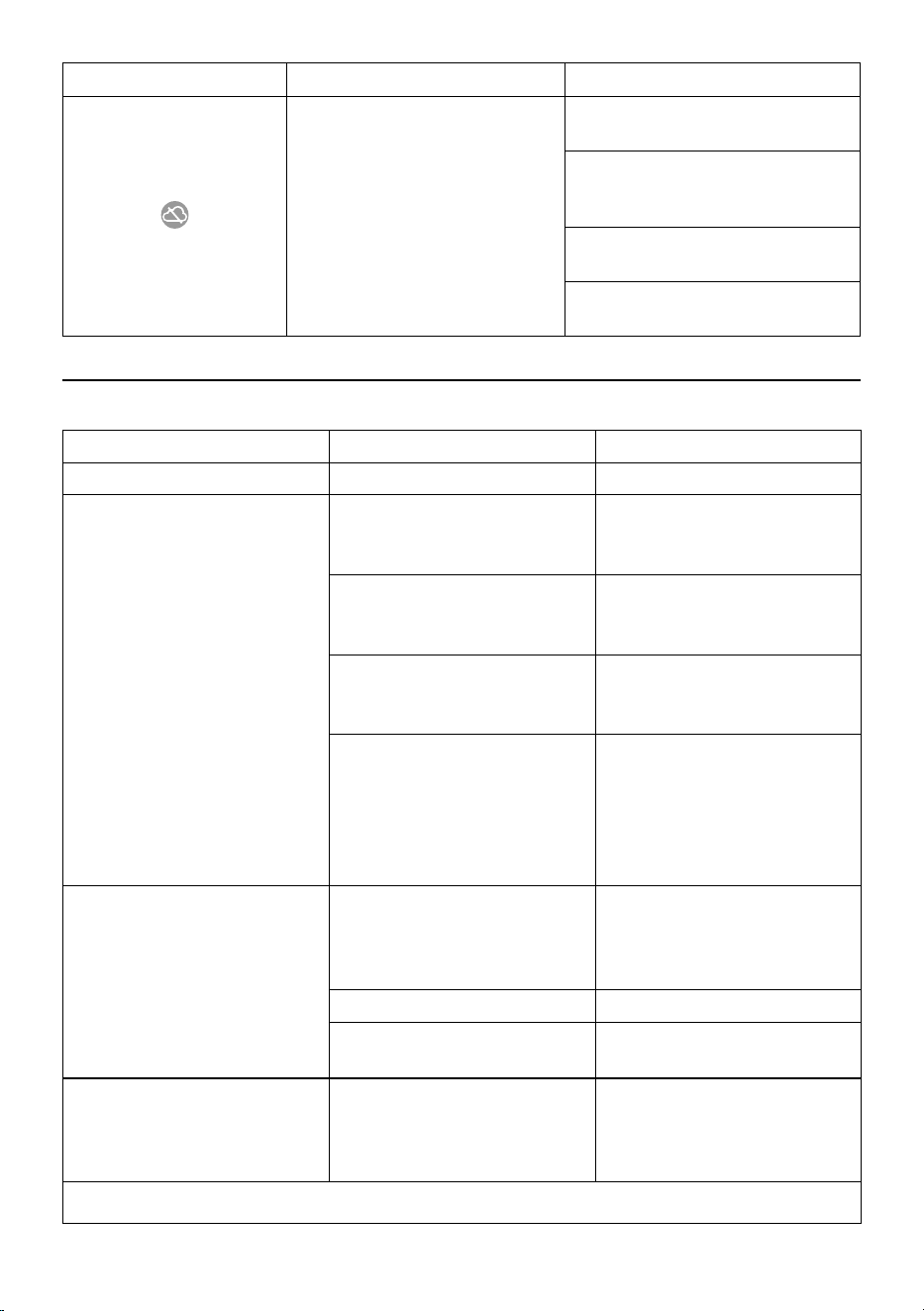
27
DISPLAYED MESSAGE MEANING SOLUTION
Connectivity is active, but the cloud cannot
be reached.
If just turned on, wait for the appliance to
complete the start up procedure.
If the problem continues, disable the connec-
tion then enable again as described in section
“6.3 Connectivity”.
Make sure the lights on the router indicate
that the network is active.
If the problem continues, turn the appliance
and home router o then on again.
21. TROUBLESHOOTING
Below is a list of some of the possible malfunctions.
If the problem cannot be resolved as described, contact customer services.
PROBLEM POSSIBLE CAUSE SOLUTION
The appliance does not come on It is not plugged into the mains socket. Plug into the mains socket (g. 1).
The coee is not hot. The internal circuits of the appliance have
cooled down because 2-3 minutes have
elapsed since the last coee was made.
Before making the coee, heat the in-
ternal circuits by rinsing using the rinse
function
(see section “6.1 Rinsing”).
Coee temperature setting too low.
Set a hotter coee temperature in the
settings menu (C3) (see section “6.5 Coee
temperature”).
The cups were not preheated. Warm the cups by rinsing them with hot
water (Please note: you can use the hot
water function).
The machine must be descaled
Proceed as described in section “16. Des-
caling”. Next, check the water hardness
(“17.1 Measuring water hardness”) and
make certain the machine setting match-
es the local water supply hardness (“17.2
Setting water hardness”).
The coee is weak or not creamy enough. The coee is ground too coarsely. Access the settings menu (C3) and follow
the instructions to adjust grinding. The
eect is only visible after delivering 3
coees (see section “6.4 Adjust grinder”).
The coee is unsuitable. Use coee for espresso machines.
Coee not fresh. The coee pack has been opened for too
long and has lost its taste.
The coee is delivered too slowly or a
drop at a time.
The coee is ground too nely. Access the settings menu (C3) and follow
the instructions to adjust grinding. The
eect is only visible after delivering 3
coees (see section “6.4 Adjust grinder”).
→
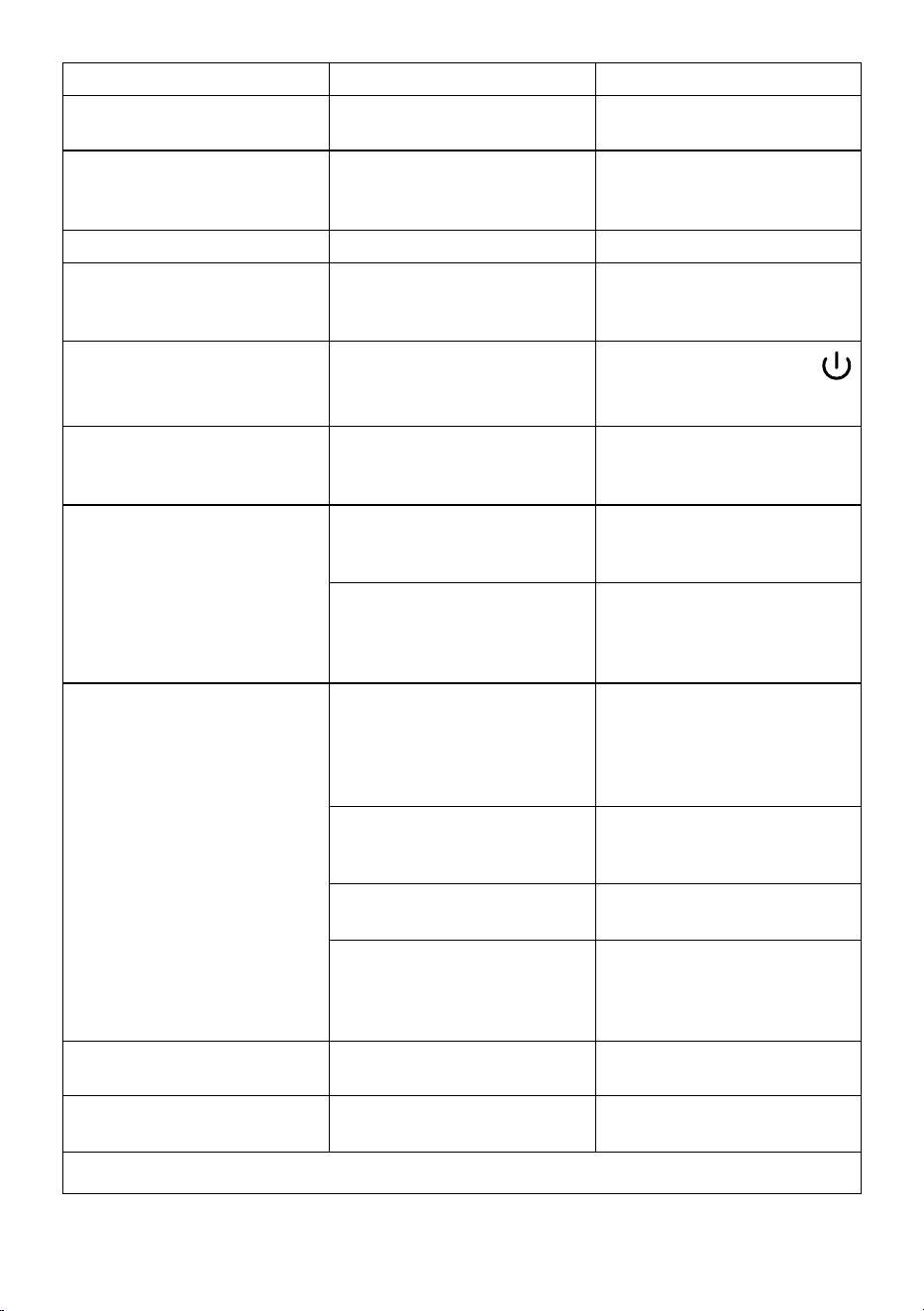
28
PROBLEM POSSIBLE CAUSE SOLUTION
Coee does not come out of one or both
spouts.
The coee spouts (A7) are blocked. Clean the coee spouts with a sponge or
toothpick.
The coee delivered is watery. The funnel (A4) is clogged. Clean the funnel with the help of the
brush (D5) as described in section “15.8
Cleaning the pre-ground coee funnel”.
Too little drink is delivered Insucient water in tank Always ll the tank above Level 1.
The appliance does not make coee. The appliance has detected impurities
in its internal circuits. “Just doing a little
cleaning...” is displayed.
Wait for the appliance to be ready again
and reselect the required drink. Contact
customer services if the problem persists.
The brewing unit (A6) cannot be
extracted.
The appliance has not been turned o
correctly
Turn the appliance o by pressing the
button (A9)
(see section “5. Turning the
appliance o”).
At the end of descaling, the appliance
requests a third rinse.
During the two rinse cycles, the water
tank (A22) has not been lled to the MAX
level
Follow the instructions displayed by the ap-
pliance, but rst empty the drip tray
(A14)
to
avoid the water overowing.
Milk does not ow from the milk spout
(E5) or (F5).
The milk carafe lid (E1) or (F1) is dirty Clean the milk carafe lid as described in
section “15.10 Cleaning the milk carafes
(E) and (F)”.
The lid (E1) or (F1) is not assembled
correctly.
Assemble all the components correctly as
described in sections “9.1 Preparing the
milk carafes (E and F)” and “9.4 Adjusting
the amount of froth”.
The milk contains large bubbles and
squirts out of the milk spout (E5) or (F5)
there is little froth.
The milk is not cold enough or not suita-
ble for the drink requested
For best results, make sure to use the
right type of milk to prepare hot or cold
drinks (see section “9.2 Which milk to
use?”). Use drinks at refrigerator temper-
ature (about 5° C).
The milk carafe lid (E1) or (F1) is dirty Clean the milk carafe as described in sec-
tion “9.6 Cleaning the milk carafe after
use”
There is water in the groove under the
froth adjustment dial (E3) or (F3)
Extract the dial and dry thoroughly.
Plant-based drinks have been used. For best results, use drinks at refrigera-
tor temperature (about 5° C). Adjust the
amount of froth as described in section
“9.4 Adjusting the amount of froth”
The cup shelf (A12) is hot. A number of drinks have been prepared
in rapid succession
After cleaning, you can’t put the drip tray
back in the machine
The condensate tray(A11) is not in the
correct position
Make sure the condensate tray is inserted
correctly
→
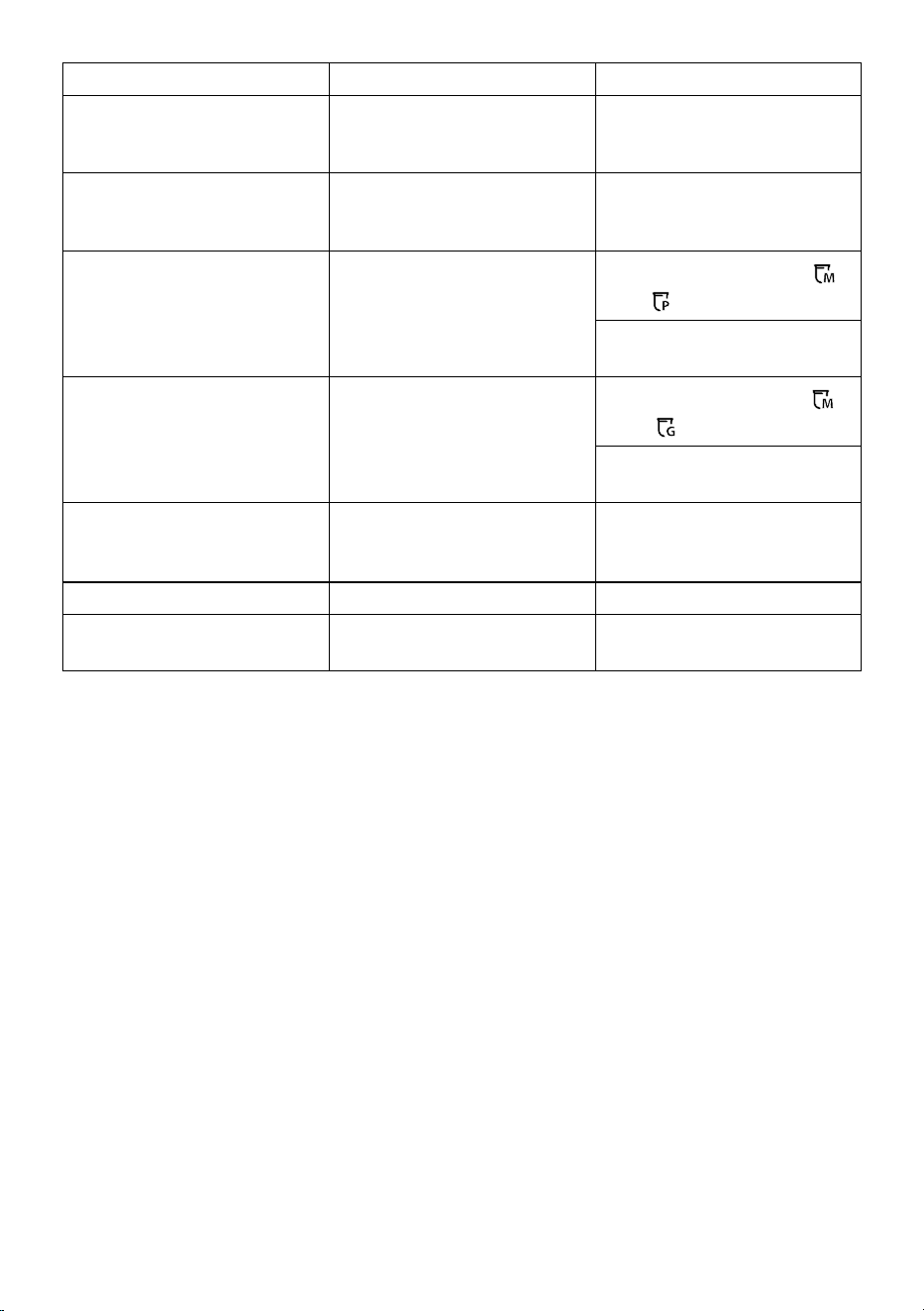
29
PROBLEM POSSIBLE CAUSE SOLUTION
The machine emits noises or small pus
of steam while not in use
The machine is ready for use, or has re-
cently been turned o, and condensate is
dripping into the hot vaporiser
This is part of normal operation. To limit
the phenomenon, empty the drip tray.
The appliance emits pus of steam from
the drip tray (A14) and/or there is water
on the surface the appliance rests on.
The drip tray grille (A13)has not been put
back after cleaning.
Put the drip tray grille back in the drip
tray.
The To Go drink is too much or has spilled
out of the travel mug
An unsuitable quantity has been selected
Choose a smaller quantity (Medio
or
Piccolo
)
Adjust the quantity in the mug so that
the next drink is prepared correctly
Too little To Go drink is prepared An unsuitable quantity has been selected
Choose a larger quantity (Medio
or
Grande
)
Adjust the quantity in the mug so that
the next drink is prepared correctly
The travel mug cannot be inserted in the
appliance
The travel mug compartment ap (A16)
is closed and/or the coee spouts (A7)
are lowered
Open the ap and/or raise the coee
spouts
The App is not working App malfunction Close the App, then run it again
The App indicates a problem, but there is
no problem with the appliance
The data between the appliance and App
are not synchronised
Disable and re-enable connectivity (sec-
tion “6.3 Connectivity”
De’Longhi Appliances via Seitz, 47 31100 Treviso, Italy delonghi.com
57132C8814_00_1023