4
5
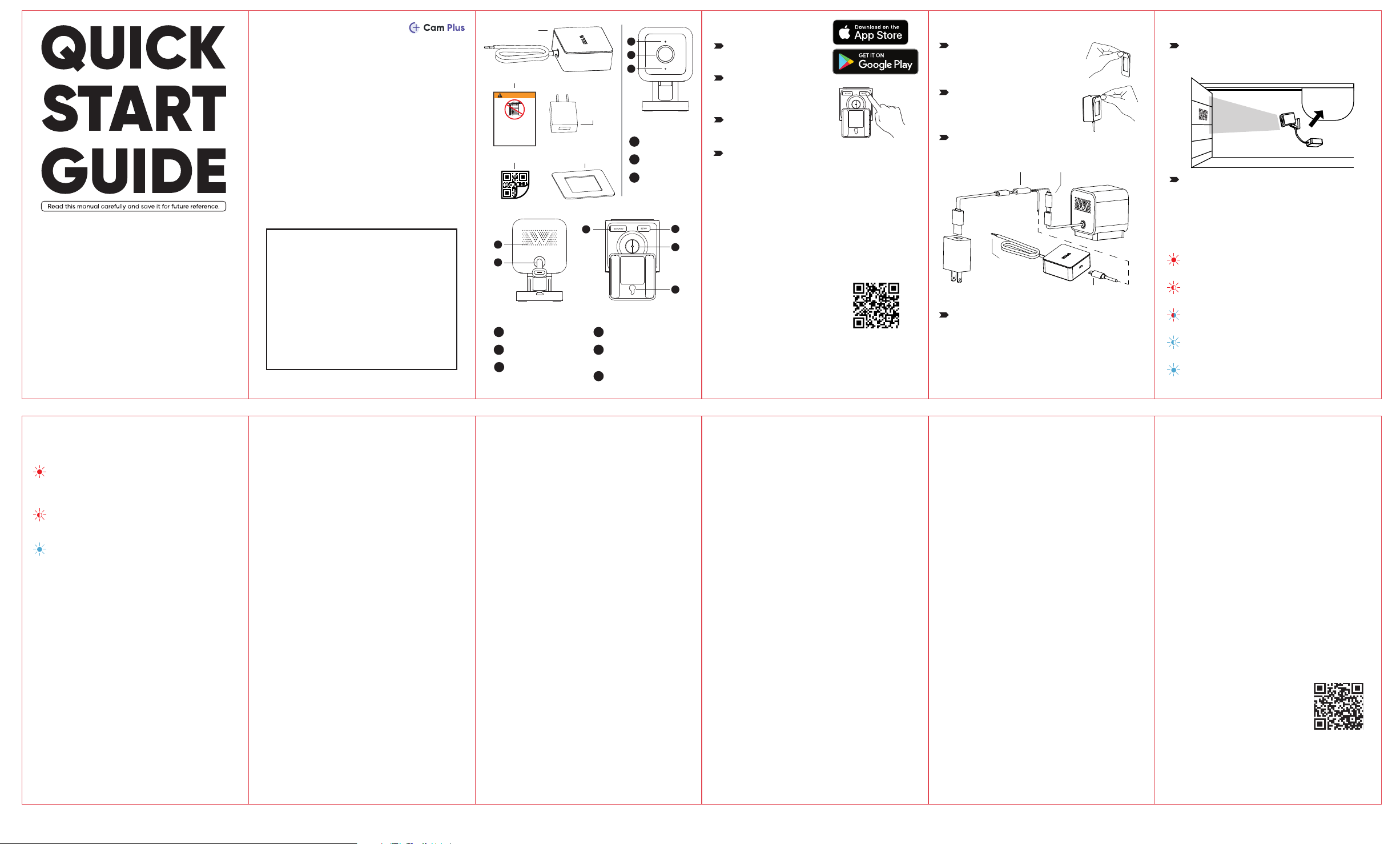
Speaker
Power Cable
4
5
MicroSD Card Slot
(Card not included)
6
Mounting Hole
9
SETUP Button
7
1/4" Mount
(Unscrew to access)
8
6
7
9
8
Garage Door
Controller
Status Light
Lens
Microphone
1
2
3
1
2
3
FRONT
BACK
BOTTOM
2
Connect the camera to a
power outlet and wait for
20 seconds or until the
status light flashes red.
1
Download the Wyze app
and sign in or create an
account.
1
Remove the double-sided tape
from the mounting sticker and
stick it to the back cover of the
controller.
2
Remove the double-sided tape
from the mounting sticker and
stick it to your preferred
mounting location.
3
Connect the cables as shown below.
3
Press the SETUP button
for 3 seconds or until
there is a voice prompt.
SETUP
CONTROLLER INSTALLATION
COMPATIBILITY
4
Record Full-Length Videos
Get unlimited full-length video recordings.
Smart AI Detection
Detect people, packages, vehicles, and more.
Back-to-Back Event Recording
Capture everything without 5-minute gaps.
Exclusive Discounts
Get exclusive discounts on Wyze products.
Subscribe or learn more at services.wyze.com.
GET BETTER SECURITY WITH
IN THE BOX
Wyze Garage Door Controller × 1
Wyze Cam v3 × 1
QR Code Sticker × 1
Adhesive Mounting Sticker × 1
Warning Placard × 1
5V 2A Power Adapter × 1
Wyze Cam v3 Parts × 1
Micro USB Split Cable × 1
Cable Clips × 3
Quick Start Guide × 1
Disclaimer: The products, accessories, user interfaces,
etc. illustrated in this guide are intended for reference
only. Due to product updates, the actual product and
the illustrations in this guide may vary.
QR Code Sticker
5V 2A
Power
Adapter
Adhesive
Mounting Sticker
Warning Placard
Adapter
Input
Connect
to camera
Connect to
controller
Connect to the
garage door
wall button
terminals
Check that your garage door opener is compatible
before continuing with the installation process.
- Make sure you have a strong Wi-Fi signal in your
garage area for best performance.
Scan the QR code to use our
Compatibility Checker to
confirm that your garage door
opener is compatible.
Or visit our website at
https://wyze.com/garage-controller-compatibility
*Wyze Garage Door Controller is not compatible with
Round Yellow Learn Buttons / Security+ 2.0 openers.
NEED HELP?
Contact our Support Team:
https://wyze.com/support
Join the Community:
https://wyze.com/community
Scan the QR code
to learn more
Wyze and Wyze Garage Door Controller
are trademarks of Wyze Labs, Inc.
STATUS LIGHT GUIDE
DURING INSTALLATION
Solid red light
The device is powered on and initializing
The device is working properly
Solid blue light
Flashing red light
The device is ready to connect
Flashing red and blue lights
Connection is in progress
Flashing blue light
The device is connected and finishing setup
STATUS LIGHT GUIDE
AFTER SETUP
Solid red light
Live stream is being viewed or a recording is
in progress
The device is working properly and no
operations are running
Solid blue light
Quickly flashing red light
Siren is in use
INSTALLATION INSTRUCTIONS
FOR DOOR CONTROLLER OF
RESIDENTIAL GARAGE DOOR
OPERATORS AND SYSTEMS
IMPORTANT INSTALLATION INSTRUCTIONS
WARNING – To reduce the risk of severe injury or death:
1. READ AND FOLLOW ALL INSTALLATION INSTRUCTIONS.
2. Do not connect the door operator and Garage door
controller to source of power until instructed to do so.
3. Locate the Garage door controller: (a) within sight of
the door, (b) at a minimum height of 1.53 m (5 ft) above
floors, landings, steps or any other adjacent walking
surface so small children are not able to reach it, and (c)
away from all moving parts of the door.
USER INSTRUCTIONS FOR DOOR
CONTROLLER OF RESIDENTIAL
GARAGE DOOR OPERATORS
AND SYSTEMS
IMPORTANT SAFETY INSTRUCTIONS
WARNING – To reduce the risk of severe injury or death:
1. READ AND FOLLOW ALL INSTRUCTIONS.
2. Never let children operate or play with door controls.
Keep the remote control away from children.
3. Always keep the moving door in sight and away from
people and objects until it is completely closed. NO ONE
SHOULD CROSS THE PATH OF THE MOVING DOOR.
4. NEVER GO UNDER A STOPPED, PARTIALLY OPEN DOOR.
5. For operator systems equipped with an unattended
operation feature, the following statement shall be
included: "This operator system is equipped with an
unattended operation feature. The door could move
unexpectedly. NO ONE SHOULD CROSS THE PATH OF THE
MOVING DOOR.".
6. For products having an emergency release, when
possible, use the emergency release only when the door
is closed. Use caution when using this release with the
door open. Weak or broken springs are capable of
increasing the rate of door closure and increasing the
risk of severe injury or death. Never connect the Garage
door controller to any circuits for emergency release.
7. To reduce the risk of electric shock, this equipment has
a polarized plug (one blade is wider than the other). This
plug will fit in a polarized outlet only one way. If the plug
does not fit fully in the outlet, reverse the plug. If it still
does not fit, contact a qualified electrician to install the
proper outlet. Do not change the plug in any way.
8. For use only with garage door operators complying
with UL 325, manufactured after 1993.
9. For residential and indoor use only
10. SAVE THESE INSTRUCTIONS.
FCC WARNING
Any changes or modifications not expressly approved
by the party responsible for compliance could void the
user's authority to operate this equipment. This device
complies with part 15 of the FCC Rules. Operation is
subject to the following two conditions: (1) This device
may not cause harmful interference, and (2) This device
must accept any interference received, including
interference that may cause undesired operation. This
equipment has been tested and found to comply with
the limits for a Class B digital device, pursuant to Part 15
of the FCC Rules. These limits are designed to provide
reasonable protection against harmful interference in a
residential installation. This equipment generates, uses,
and can radiate radio frequency energy and, if not
installed and used in accordance with the instructions,
may cause harmful interference to radio
communications. However, there is no guarantee that
interference will not occur in a particular installation. If
this equipment does cause harmful interference to radio
or television reception, which can be determined by
turning the equipment off and on, the user is
encouraged to try to correct the interference by one or
more of the following measures:
- Reorient or relocate the receiving antenna.
- Increase the separation between the equipment and
receiver.
ISED RADIATION
EXPOSURE STATEMENT
This equipment complies with ISED RF radiation exposure
limits set forth for an uncontrolled environment. This
transmitter must not be co-located or operating in
conjunction with any other antenna or transmitter. This
equipment should be installed and operated with a
minimum distance of 20 cm between the radiator and
your body. Only use the power supply provided.
ISED établies pour un environement non contrôlé. Cet
émetteur ne doit pas être co-implanté ou fonctionner en
conjonction avec toute autre antenne ou transmetteur.
Cet émetteur ne doit pas être co-implanté ou
fonctionner en conjonction avec toute autre antenne ou
transmetteur. Industrial cellular router doit être installé et
utiliséavec une distance minimale de 20 cm entre
leradiateur & votre corps.
WARRANTY INFORMATION
Your Wyze product is covered by a one-year limited
warranty. You can view the limited warranty terms at
https://wyze.com/return-warranty-policy or request a
copy by contacting Wyze at +1 (206) 339-9646.
Apple logo and App Store are trademarks of Apple Inc.,
registered in the U.S. and other countries and regions.
Google Assistant, Google Home, Google Play, and the
Google Play logo are trademarks of Google LLC.
ISED RSS WARNING
This device complies with ISED licence-exempt RSS
standard(s). Operation is subject to the following two
conditions: (1) This device may not cause interference,
and (2) this device must accept any interference,
including interference that may cause undesired
operation of the device.
Le présent appareil est conforme aux CNR d'ISED
applicables aux appareils radio exempts de licence.
L'exploitation est autorisée aux deux conditions
suivantes: (1) l'appareil ne doit pas produire de
brouillage, et (2) I 'utilisateur de l'appareil doit accepter
tout brouillage radioélectrique subi, même si le
brouillage est susceptible d'en compromettre le
fonctionnement.
4
Adhere the QR Code Sticker to the inside of your
garage door. Please make sure the QR Code Sticker
is on a flat surface on the door and has a clear view
from the camera.
Note: The camera uses the QR Code Sticker to
detect the open/closed status of the garage door
to provide features such as notifications, door event
history, scheduling, etc.
Open the Wyze app and tap the + sign in the top
left corner of the Home tab. Tap Add Device >
Cameras > Wyze Garage Door Controller and
then follow the instructions.
WARNING
There is a risk of a child becoming trapped under an automatic
garage door resulting in severe injury or death:
• Never let children use or play with the garage door controls, including through
the Wyze app on your mobile device.
• Always keep people (including children) and objects away from the garage door.
NO ONE SHOULD CROSS THE PATH OF THE MOVING GARAGE DOOR.
• This garage door controller is equipped with an unattended operation feature.
The door could move unexpectedly. Keep the moving garage door in sight at all
times (either in person or through the Wyze app on your mobile device).
• If a person becomes trapped, push the control button in your Wyze app, push the
garage door opener wall button, or use the emergency release.
• Test Door Operator Monthly:
(1) Use a 38-mm (1-1/2-inch) high object (or a 2 by 4 board laid flat) on the floor
under the closing door. In the event the door does not reverse upon contact,
adjust, repair, or replace the operator.
2) not removing or paint over the label.
• SAVE THESE INSTRUCTIONS.
Version 1.0Copyright 2022 Wyze Labs, Inc.
FCC RADIATION
EXPOSURE STATEMENT
In order to comply with FCC radiation exposure limits this
equipment must be installed and operated to provide at
least 20 cm separation from the body at all times. This
transmitter must not be co-located or operated in
conjunction with any other antenna or transmitter.
- Connect the equipment into an outlet on a circuit
different from that to which the receiver is connected.
Consult the dealer or an experienced radio/TV
technician for help.
SPECIFICATIONS
Wyze Garage Door Controller Bundle
Model: WCGDCB
Power Input: 5V DC, 2A
Garage Door Controller
Model: WYZEGDC
Wyze Cam v3
Model: WYZEC3
Wi-Fi: 802.11 b/g/n, 2.4GHz
5
Mount your Wyze Cam v3 and Wyze Garage Door
Controller so that the camera points towards the
QR Code Sticker.
6
Follow the in-app calibration steps to finish setup.