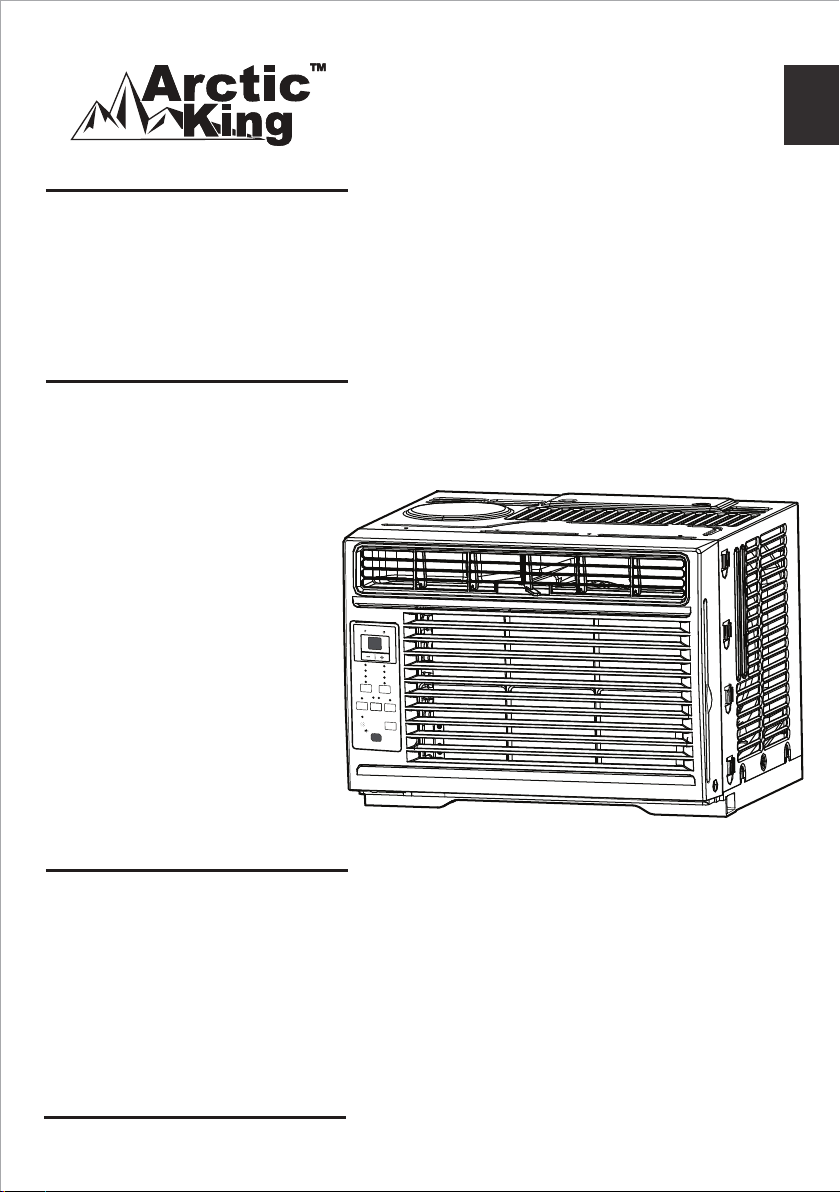
Window Type
version A - 10 - 2018
WWK05CR01N-B
www.midea.com
USER MANUAL
en
WWK
Warning notices: Before using
this product, please read this
manual carefully and keep it
for future reference.
The design and specifications
are subject to change without
prior notice for product
improvement. Consult with
your dealer or the manufacturer
for details.
Frequency: 60Hz
Capacity: 5000BTU/h
Energy
Saver
Timer
Sleep
ON
|
O
On
O
Check
Filter
Temp
|
Timer
Low
Med
High
Cool
Dry
Fan
Fan
Mode
Auto
Auto
version B - 10 - 2018 (PREVIEW01)

Page 2
Read This Manual
Inside you’ll find many helpful hints on how to use and maintain your air conditioner
properly. Just a little preventive care on your part can save you a great deal of time
and money over the life of your air conditioner. You’ll find many answers to common
problems in the troubleshooting tips - you should be able to fix most of them quickly
before calling service. These instructions may not cover every possible condition of
use, so common sense and attention to safety is required when installing, operating
and maintaining this product.
• Contact an authorized service technician for repair or maintenance of this unit.
• Contact the installer for installation of this unit.
• The air conditioner is not intended for use by young children or infirm persons
without supervision.
• Young children should be supervised to ensure that they do not play with the air
conditioner.
• If the power cord needs to be replaced, please contact our consumer service and
look for an authorized technician.
• Electrical installation must be performed in accordance to national regulation
standards by qualified personnel only.
Safety Precautions ........................................................................................ 3
Operating Instructions ................................................................................. 8
Installation Instructions .............................................................................. 13
Care and Cleaning ....................................................................................... 18
Troubleshooting Tips .................................................................................. 19
Remote Control Instructions ..................................................................... 21
CAUTION
Owner’s Manual
Warranty ................................................................... 28 and Return Policy ...

Page 3
Safety Precautions
CAUTION
WARNING
Safety
Precautions
To prevent injury to the user or other people and property damage, the instructions
shown here must be followed. Incorrect operation due to ignoring of instructions may
cause harm or damage. The level of risk is shown by the following indications.
• Plug in power cord plug properly.
Otherwise, it may cause electric shock or fire due to excess heat generation.
• Do not modify power cord length or share the outlet with other appliances as it may
cause electric shock or fire due to overheating.
• Always ensure effective grounding.
Incorrect grounding may cause electric shock.
• Unplug the unit if you notice unusual sounds or smells, or smoke comes from it.
A damaged product may cause fire and electric shock.
• Ventilate room before operating the air conditioner if there is a gas leakage from
another appliance.
• Do not operate or stop the unit by inserting or pulling out the power cord plug.
• Do not operate with wet hands or in very humid enviroments.
It may cause electric shock.
• Do not allow water to come into contact with any electric parts.
It may cause failure or electric shock.
This symbol indicates the possibility of death or serious injury.
This symbol shows that a service personnel should be handling
this equipment with reference to the installation manual.
This symbol shows that information is available such as the
operating manual or installation manual.
This symbol indicates the possibility of injury or damage to property.
WARNING
This symbol shows that this appliance uses a flammable refrigerant.
If the refrigerant is leaked and exposed to an external ignition
source, there is a risk of fire.
WARNING
CAUTION
CAUTION
CAUTION
This symbol shows that the operation manual should be read
carefully.
Page 4
Safety
Precautions
WARNING
• Do not use the socket if it is loose or damaged.
It may cause fire and electric shock.
• Do not place the power cord close to heating appliances.
It may cause fire and electric shock
• Do not disassemble or modify unit.
It may cause failure and electric shock.
• Do not damage or use an alternate power cord.
It may cause fire and electric shock.
If the power cord is damaged, it must be replaced by the manufacturer or an
authorized service center or a similarly qualified person in order to avoid a hazard.
• Do not direct airflow straight into persons to avoid possible health hazard.
• Always install a circuit breaker and a dedicated power circuit.
Incorrect installation may cause fire and electric shock.
• Do not open the unit during operation.
It may cause electric shock.
• Do not use the power cord near flammable gas or combustibles, such as gasoline,
benzene, thinner, etc.
It may cause an explosion or fire.
CAUTION
• When the air filter is to be removed, do not touch the metal parts of the unit.
It may cause injury.
• When the unit needs cleaning, switch off, and turn off the circuit breaker.
Do not clean unit when power is on as it may cause fire, electric shock or injury.
• Stop operation and close the window during a storm or hurricane.
Operation with windows open may cause water leakage into the room.
• Do not place obstacles around air inlets or inside of air outlet.
It may cause failure or accident.
• Do not use detergents that contain wax or thinners as it may damage the product.
Clean with a soft cloth only.
• Use caution when unpacking and installing. Sharp edges could cause injury.
• Do not clean the air conditioner with water.
Water may enter the unit and degrade the insulation which could lead to electric shock.
• Do not put a pet or house plant where it will be exposed to direct air flow.
This could injure the pet or harm the plant.
• Hold the plug by the head of the power plug when taking it out.
Otherwise, it may cause electric shock and damage.
• Ensure that the installation is properly secured to prevent the product from
potentially falling.
• Do not place heavy objects on the power cord and ensure that the cord is not
compressed.
Otherwise, there is danger of fire or electric shock.
• If water enters the unit, turn off the unit and switch off the circuit breaker. Isolate
supply by taking the power-plug out and contact a qualified service technician.

Page 5
Safety
Precautions
CAUTION
• When used near a stove or other gas burning device, be sure the room is properly
ventilated.
Otherwise an oxygen shortage may occur.
• Do not use for any purpose other than room comfort.
Do not use this air conditioner to preserve precision devices, food, pets, plants, and
art objects. It may cause deterioration.
• Turn off the main power switch if the unit is not to be used for an extended time.
• Always insert the filters securely. Clean filter once every two weeks.
Operation without filters may cause failure.
• Do not drink water drained from the air conditioner.
WARNINGS (for using R32 refrigerant only)
• Do not use any means to accelerate the defrosting process or to clean the unit,
other than those recommended by the manufacturer.
• The appliance shall be stored in a room without continuously operating ignition sources
(for example: open flames, an operating gas appliance or an operating electric heater).
• Do not pierce or burn refrigerant tubing. Be aware that refrigerants may not contain
an odor.
• Keep ventilation openings clear of obstruction.
• Store the appliance in a way that will prevent mechanical damage from occurring.
• Store the appliance in a well-ventilated area where the room size corresponds to the
room area as specified for operation.
• Any person who is involved with working on or breaking into a refrigerant circuit
should hold a current valid certificate from an industry-accredited assessment
authority, which authorizes their competence to handle refrigerants safely in
accordance with an industry recognized assessment specification.
• Servicing shall only be performed as recommended by the equipment manufacturer.
Maintenance and repair requiring the assistance of other skilled personnel shall be carried
out under the supervision of the person competent in the use of flammable refrigerants.
• Flammable refrigerant (R32) is used within the air conditioner. When maintaining or
disposing of the air conditioner, the refrigerant (R32) shall be recovered properly, do
not discharge to air directly.
CAUTION: Risk of fire/
flammable materials
(Required for R32/R290 units only)
IMPORTANT NOTE: Read this manual
carefully before installing or operating
your new air conditioning unit. Make sure
to save this manual for future reference.

Page 6
NOTE
The power supply cord with this
air conditioner contains a current
detection device designed to reduce
the risk of fire.
Please refer to the section Operation of
Current Device for details.
In the event that the power supply cord
is damaged, it can not be repaired. It
must be replaced with a cord from the
manufacturer.
WARNING - For your safety
• Do not store or use gasoline or other
flammable vapors and liquids in the
vicinity of this or any other appliance.
• Avoid fire hazard or electric shock.
Do not use an extension cord or an
adaptor plug. Do not remove any
prongs from the power cord.
WARNING - Electrical Information
The complete electrical rating of
your new room air conditioner is
stated on the serial plate. Refer to the
rating when checking the electrical
requirements.
• Be sure the air conditioner is
properly grounded. To minimize
shock and fire hazards, proper
grounding is important. The power
cord is equipped with a three-prong
grounding plug for protection against
shock hazards.
• Your air conditioner must be
connected to a properly grounded
wall receptacle. If the wall receptacle
you intend to use is not adequately
grounded or protected by a time
delay fuse or circuit breaker, have a
qualified electrician install the proper
receptacle.
• Ensure the receptacle is accessible
after the unit installation.
• Do not run air conditioner without
outside protective cover in place.
This could result in mechanical
damage within the air conditioner.
Safety
Precautions
Grounding type wall receptacle
Do not, under any
circumstances, cut,
remove or bypass
the grounding prong.
Power supply cord with 3-prong grounding
plug and current detection device.

Page 7
Safety
Precautions
The power supply cord contains a current
device that senses damage to the power
cord. Test your power supply cord as
follows:
1. Plug in the air conditioner.
2. The power supply cord will have TWO
buttons on the plug head. Press the
TEST button. You will notice a click as
the RESET button pops out.
3. Press the RESET Button. You will notice
a click as the button engages.
4. The power supply cord is now supplying
electricity to the unit. (On some
products this is also indicated by a light
on the plug head.)
Operation of Current Device
NOTES
• Do not use this device to turn the unit on or off.
• Always make sure the RESET button is pushed in for correct operation.
• The power supply must be replaced if it fails to reset when either the TEST button
is pushed, or it can not be reset. Please contact Customer Service.
• If power supply cord is damaged, it can not be repaired. It MUST be replaced with
a new cord. Please contact Customer Service.
WARNING - Prevent Accidents
To reduce the risk of fire, electrical shock, or injury to persons when using your air
conditioner, follow basic precautions, including the following:
• Be sure the electrical service is adequate for the model you have chosen. This
information can be found on the serial plate, which is located on the side of the
cabinet and behind the grille.
• If the air conditioner is to be installed in a window, you will probably want to clean
both sides of the glass first. If the window is a triple-track type with a screen panel
included, remove the screen completely before installation.
• Be sure the air conditioner has been securely and correctly installed according to
the installation instructions in this manual. Save this manual for possible future use
in removing or installing this unit.
• When handling the air conditioner, be careful to avoid cuts from sharp metal fins
on front and rear coils.
RESET
TEST
Plug in &
press RESET

Page 8
Normal Sounds
Operating Instructions
Operating
Instructions
Air Conditioner Operation
NOTE
All the pictures in this manual are for illustrative purposes only. The actual
appearance of the air conditioner you purchased may vary slightly, but its operation
and functions will be similar.
WARNING
To reduce the risk of fire, electrical shock, personal injury or property, read the
SAFETY PRECAUTIONS before operating this appliance.
NOTE
The cooling mode has an automatic 3 minutes time delayed start if the unit is turned
off and on quickly. This prevents overheating of the compressor and possible tripping.
Gurgle/Hiss
Gurgling or hissing
noises may be heard
due to refrigerant
µRZLQJWKURXJK
evaporator during
normal operation.
Sound of Rushing Air
In front of the unit, you
may hear the sound of
rushing air being
moved by the fan.
High Pitched Chatter
+LJKHI´FLHQF\FRPSUHVVRUV
PD\KDYHDKLJKSLWFKHG
VRXQGGXULQJFRROLQJF\FOH
Vibration
Unit may vibrate and
PDNHQRLVHEHFDXVH
RISRRUZDOORUZLQGRZ
FRQVWUXFWLRQRU
LQFRUUHFWLQVWDOODWLRQ
Trickling Sound
'URSOHWVRIZDWHU
KLWWLQJFRQGHQVHU
during normal
RSHUDWLRQPD\FDXVH
DWULFNOLQJVRXQG
Energy
Saver
Timer
Sleep
ON
|
O
On
O
Check
Filter
Temp
|
Timer
Low
Med
High
Cool
Dry
Fan
Fan
Mode
Auto
Auto

Page 9
Operating
Instructions
TO BEGIN OPERATING THE AIR CONDITIONER, FOLLOW THESE STEPS:
1. Set the lowest number (coldest setting).
2. Set the selector control to the highest COOL setting.
3. Adjust the louver for comfortable air flow (see Air Directional Louvers).
4. Once the room feels colder, adjust the setting you find most comfortable.
5. Make sure that the air flow inside and outside are not obstructed by anything.
6. This air conditioner is designed to be operated under the following conditions:
Cooling Operation
Outdoor temp.: 64-109°F/18-43°C (64-125°F/18-52°C
for special tropical models)
Indoor temp.: 62-90°F/17-32°C
Heating Operation
Outdoor temp.: 23-76°F/-5-24°C
Indoor temp.: 32-80°F/0-27°C
Before you begin, thoroughly familiarize yourself with the control panel as shown
below and all its functions, then follow the symbol for the functions you desire. The
unit can be controlled by the unit control panel alone or with the remote controller.
NOTES
• The relative humidity of room should be less than 80%. If the unit is used in a
condition with a relative humidity over 80%, there will be condensed water on the
surface of the unit.
• Performance may be reduced outside of these operating temperatures.

Page 10
Operating
Instructions
ELECTRONIC CONTROL OPERATING INSTRUCTIONS
Before you begin, thoroughly familiarize yourself with the control panel as shown below
and all its functions, then follow the symbol for the functions you desire. The unit can be
controlled by the unit control alone or with the remote controller.
TO TURN UNIT ON OR OFF:
Press
ON | O
ON/OFF button to turn
unit on or off.
TO CHANGE TEMPERATURE
SETTING:
Press
UP ( )/DOWN ( ) button
to change temperature setting.
NOTE
The unit will automatically
initiate the Energy Saver function
under Cool, Dry, Auto (only
Auto-Cooling and Auto-Fan)
modes.
NOTE
Press or hold either UP ( )/
DOWN (
) button until the
desired temperature is seen on
the display.
This temperature will be
automatically maintained
anywhere between 62°F (17°C)
and 86°F (30°C). If you want
to display the actual room
temperature, see To Operate on
Fan Only section.
TO ADJUST FAN SPEEDS:
Press
Fan
to select the Fan Speed
in four steps-Auto, Low, Med or High.
Each time the button is pressed,
the fan speed mode is changed. On
Dry mode, the fan operates on Low
speed automatically.
Air Conditioner Features
UNIT CONTROL
Energy
Saver
Sleep
ON | O
On O
Check
Filter
Temp | Timer
Low
Med
High
Cool
Dry
Fan
Fan
Mode
Auto
Auto
Timer
DISPLAYS
TEMPERATURE
OR TIME OR
ERROR CODES
ADJUSTS
TEMPERATURE
OR TIME
ADJUSTS
TEMPERATURE
OR TIME
REMOTE
SIGNAL
RECEPTOR
CHECK FILTER
RESET
BUTTON
ENERGY
SAVER MODE
SLEEP MODE
SETS FAN
SPEED
SETS MODE
ACTIVATES
TIMER
TURNS UNIT
ON OR OFF

Page 11
Operating
Instructions
SLEEP FEATURE:
Press
Sleep
Sleep button to initiate the
sleep mode. In this mode the selected
temperature will increase by 2°F/1
(or 2)°C 30 minutes after the mode
is selected. The temperature will then
increase by another 2°F/1 (or 2)°C after
an additional 30 minutes. This new
temperature will be maintained for 7
hours before it returns to the originally
selected temperature. This ends the
Sleep mode and the unit will continue to
operate as originally programmed. The
Sleep mode program can be cancelled at
any time during operation by pressing the
Sleep button again.
CHECK FILTER FEATURE:
Press
Check
Filter
Check Filter button to initiate
this feature. This feature is a reminder
to clean the Air Filter for more efficient
operation. The light will illuminate after
250 hours of operation. To reset after
cleaning the filter, press the Check Filter
button and the light will go off.
ENERGY SAVER FEATURE:
Press
Energy
Saver
Energy Saver button to
initiate this function. This function is
available on COOL, DRY, AUTO (only
AUTO-COOLING and AUTO-FAN) modes.
The fan will continue to run for 3 minutes
after the compressor shuts off. The fan
then cycles on for 2 minutes at 10 minute
intervals until the room temperature
is above the set temperature, at which
time the compressor turns back on and
Cooling resumes.
TO SELECT THE OPERATING MODE:
To choose operating mode, press
Mode
Mode button. Each time you press the
button the unit cycles through the modes,
Auto, Cool, Dry, and Fan. The adjacent
indicator light will remain on once the
mode is selected.
The unit will automatically initiate the Energy
Saver function under Cool, Dry, Auto (only
Auto-Cooling and Auto-Fan) modes.
To operate on Auto feature:
• When you set the air conditioner to
AUTO mode, it will automatically select
cooling or fan only operation depending
on what temperature you have selected
and the current room temperature.
• The air conditioner will control room
temperature automatically according
to the temperature you’ve set.
• In this mode, the fan speed cannot be
adjusted, as it’s automatically controlled
according to the temperature setting
and room temperature.
To operate on Fan Only:
• Use this function only when cooling is not
desired, such as for room air circulation
or to exhaust stale air (on some models).
(Remember to open the vent during
this function, but keep it closed during
cooling for maximum cooling efficiency.)
You can choose any fan speed you prefer.
• During this function, the display will
show the actual room temperature,
not the set temperature as in the
cooling mode.
• In Fan Only mode, the temperature is
not adjusted.
To operate on Dry mode:
In this mode, the air conditioner will
generally function as a dehumidifier. Since
the conditioned space is a closed or sealed
area, some degree of cooling will occur.

Page 12
Operating
Instructions
Displays:
TIMER: AUTO START/STOP FEATURE:
• When the unit is on or off, first press
Timer
the Timer button. The TIMER ON
indicator light illuminates indicating the
Auto Start program has initiated.
• When the time of TIMER ON is
displayed, press the Timer button
again. The TIMER OFF indicator light
illuminates. It indicates the Auto Stop
program has initiated.
• Press or hold the UP (
) or DOWN
( ) button to change the Auto time
by 0.5 hour increments, up to 10 hours,
then at 1 hour increments up to 24
hours. The control will count down the
time remaining until start.
• The selected time will register in
5 seconds, and the system will
automatically revert back to display the
previous temperature setting or room
temperature when the unit is on. (when
the unit is off, there is no display.)
• Turning the unit ON or OFF at any time
or adjusting the timer setting to 0.0
will cancel the Auto Start/Stop timed
program.
• If setting ON 0.5 and OFF 1 at the same
time, the unit will be activated in 0.5 hour,
operates for 0.5 hour and then stops.
Displays
Shows the set temperature in “°C” or “°F”
and the Auto-timer settings. While on Fan
Only mode, it shows the room temperature.
Error codes:
AS - Room temperature sensor error -
Unplug the unit and plug it back in.
If error repeats, call for service.
NOTE: In Fan Only mode, it will
display “LO” or “HI.”
Additional Information
Now that you understand the operating
procedure, here are more features in
your control that you should become
familiar with.
• The Cool circuit has an automatic 3
minute time delayed start if the unit is
turned off and on quickly. This prevents
overheating of the compressor and
possible circuit breaker tripping. The fan
will continue to run during this time.
• The control can display temperature in
Fahrenheit or Celsius. To convert from
one to the other, press and hold the
UP ( )/DOWN ( ) Temp/Timer
buttons at the same time, for 3 seconds.
AIR DIRECTIONAL LOUVERS
The louvers will allow you to direct the
air flow up or down (on some models)
and lefft or right throughout the room as
needed. Pivot horizontal louvers until the
desired up/down direction is obtained.
Move the levers from side to side until the
desired left/right direction is obtained.
Air Direction
Levers
ES - Evaporator temperature sensor error
- Unplug the unit and plug it back in. If
error repeats, call for service.
NOTE
If the unit shuts off unexpectedly due
to the power outage, it will restart
with the previous function setting
automatically when the power resumes.

Page 13
Installation
Instructions
Your air conditioner is designed to install
in standard double hung windows with
opening widths of 23 to 36 inches (584mm
to 914mm) (See Fig. D).
Model 5000 BTU/h
H 13” (330mm)
H
Wooden Windows
INTERIOR
WALL
OFFSET
WINDOW
SILL
INNER
EXTERIOR
WALL
Fig. D
Table 1
Installation Instructions
WARNING - Before You Begin
Read these instructions completely and
carefully.
• IMPORTANT - Save these
instructions for local inspector’s use.
• IMPORTANT - Observe all governing
codes and ordinances.
• Note to Installer - Be sure to
leave these instructions with the
consumer.
• Note to Consumer - Keep these
instructions for future reference.
• Skill level - Installation of
this appliance requires basic
mechanical skills.
• Completion time - Approximately 1
hour.
We recommend that two people install
this product.
Proper installation is the responsibility
of the installer.
Product failure due to improper
installation is not covered under the
Warranty.
You MUST use all supplied parts and
use proper installation procedures as
described in these instructions when
installing this air conditioner.
Do not, under any circumstances, cut or
remove the third (ground) prong from
the power cord.
Do not change the plug on the power
cord of the air conditioner.
Aluminum house wiring may present
special problems - consult a qualified
electrician.
When handling unit, be careful to
avoid cuts from sharp metal edges and
aluminum fins on front and rear coils.
Tools You Will Need
Phillips
Screwdriver
Level
Tools You May Use
Flathead
Screwdriver
Pencil
Ruler or tape measure
Scissors or knife

Page 14
2. PREPARE AIR CONDITIONER
Before installing the unit, the top rail must be assembled on the unit for models with a
capacity of less than 10,000Btu/h.
1. PREPARE THE WINDOW
Lower sash must open sufficiently to allow a clear vertical opening (see dimension
H in Table 1). Side louvers and the rear of the AC must have clear air space to allow
enough airflow through the condenser for heat removal. The rear of the unit must be
outdoors, not inside a building or garage.
NOTE
Save carton and these Installation Instructions for future reference. The carton is the
best way to store unit during winter, or when not in use.
A: Remove the air conditioner from
the carton and place on a flat
surface.
B: Remove top rail from the
packaging material as shown in
Fig. E.
Installation
Instructions
Packaging
Top Rail
Fig. E
CAUTION
When handling unit, be careful
to avoid cuts from sharp metal
edges and aluminum fins on front
and rear coils.
Mounting Hardware
3/4’’ (or 1/2”) Screws
(7)
Lock Frame
(For Wooden windows)
(2)
Sash Lock
(1)
Lock Frame
(For Vinyl-Clad windows)
(2)
Window sash
seal foam
(1)
3/8” Screws
(4)
Top Rail
(1)
Top Rail Hardware

Page 15
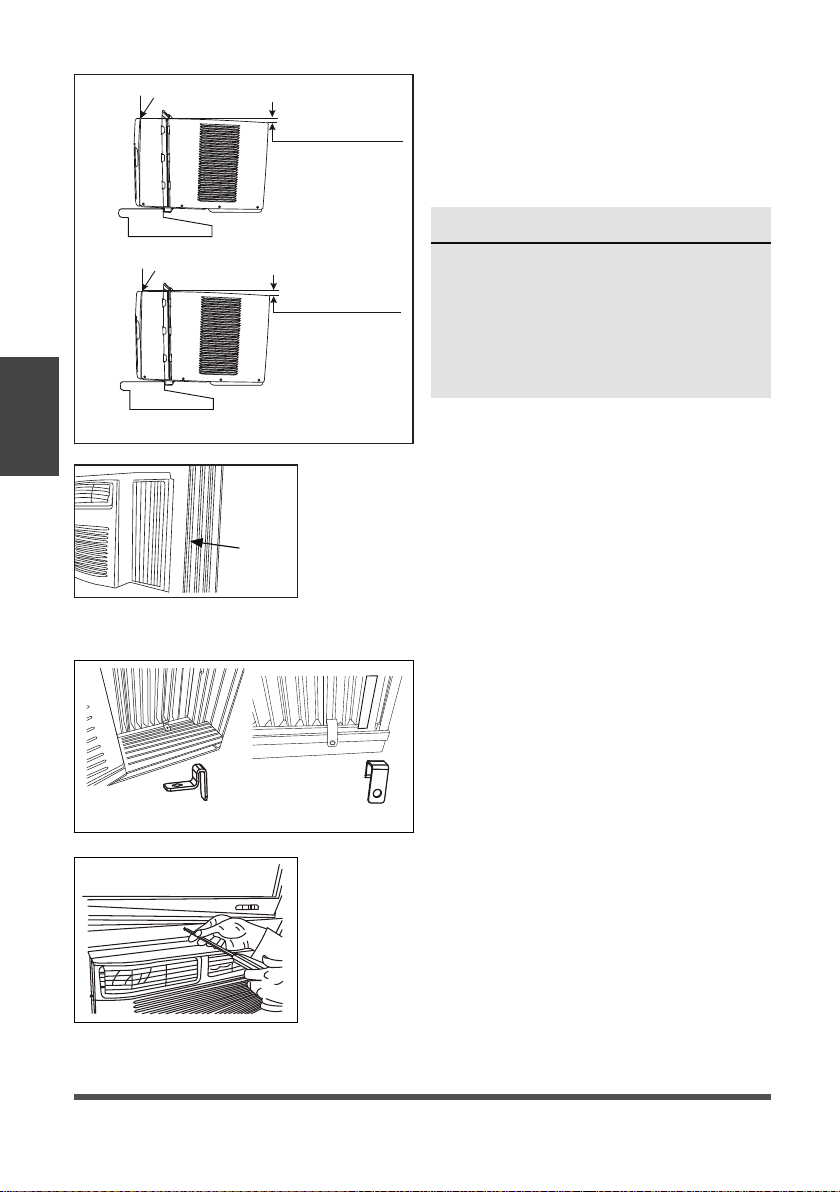
1. Place unit on floor, a bench or a table. There is a left and right side accordion panel; be
sure to use the proper panel for each side. When installed, the flange for securing the
panel in place to the window sill will be facing into the room.
A. Hold the side panel in one hand and gently pull back the center to free the open
end. See Fig. 1.
B. Slide the free and “
I” section of the panel directly into the cabinet as shown in Fig. 2.
Slide the panel down. Be sure to leave enough space to slip the top and bottom of
the frame into the rails on the cabinet.
C. Once the panel has been installed on the side of the cabinet, make sure it sits
securely inside the frame channel by making slight adjustments. Slide the top and
bottom ends of the frame into the top and bottom rails of the cabinet. Fig. 3.
NOTE
Top rail and side panels at each side are offset to provide the proper pitch to the rear of
5/16” (8mm). This is necessary for proper condensed water management and drainage. If
you are not using the side panels for any reason, this pitch to the rear must be maintained.
NOTE
For safety reasons, all
four (4) screws MUST be
securely fastened.
C: Align the hole in the top rail with those in the top of the unit as shown in Fig. F.
D: Secure the top rail to the unit with the 3/8” (9.5mm) screws as shown in Fig. G.
3. INSTALL THE ACCORDION PANELS
Fig .B
Fig. F
Fig.C
Fig. G
NOTE
If storm window blocks AC, see Fig. 11.
Top Rail
Bottom Rail
Top left
Top right
Fig. 4
D. Slide the panel all the way in and repeat
on the other side.
Fig. 1
Top Rail
Bottom Rail
Fig. 3
“I” section
Fig. 2
“I” section
Installation
Instructions
Page 16
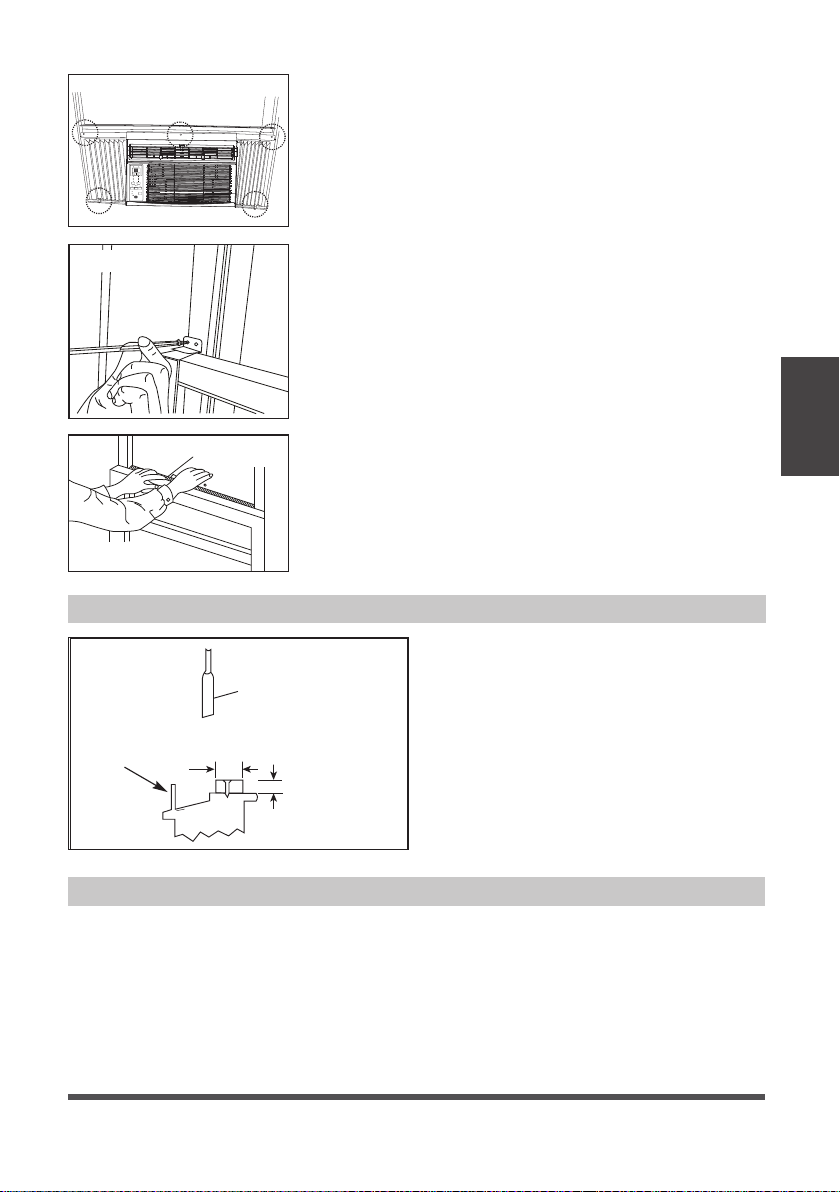
2. While keeping a firm grip on the air
conditioner, carefully place the unit into
the window opening so the bottom of
the air conditioner frame is against the
window sill (Fig. 5). Carefully close the
window behind the top rail of the unit.
NOTE
Check that air conditioner is tilted
back per dimension H (Fig. 5) (tilted
about 3° to 4° downward to the
outside). After proper installation,
condensate should not drain from the
overflow drain hole during normal use.
Adjust the slope if otherwise.
3. Extend the side panels out against the window
frame (Fig. 6).
window
frame
Fig. 6
Fig. 5
Wooden Windows
INSIDE
OUTSIDE
Measure from the cabinet edge
H: About
5/8” to 3/4”
Vinyl-Clad Windows
INSIDE
OUTSIDE
H: About 3/4” to 1”
Measure from the cabinet edge
Fig. 7A Fig. 7B
Fig. 8A
4. INSTALL SUPPORT BRACKET
A. Place the frame lock between the
frame extensions and the window
sill as shown (Fig. 7A for Wooden
windows), (Fig. 7B for Vinyl-Clad
windows).
Drive 3/4” (19 mm) or 1/2” (12.7 mm)
locking screws through the frame lock
and into the sill.
B1: For wooden windows:
Drive 1/2” (12.7 mm) locking screws through the
frame lock and into the sill (Fig. 8A).
NOTE: To prevent window sill from splitting, drill 1/8”
(3mm) pilot holes before driving screws. Drive 1/2”
(12.7mm) locking screws through frame holes into
window sash (Fig. 8B).
Installation
Instructions
Page 17
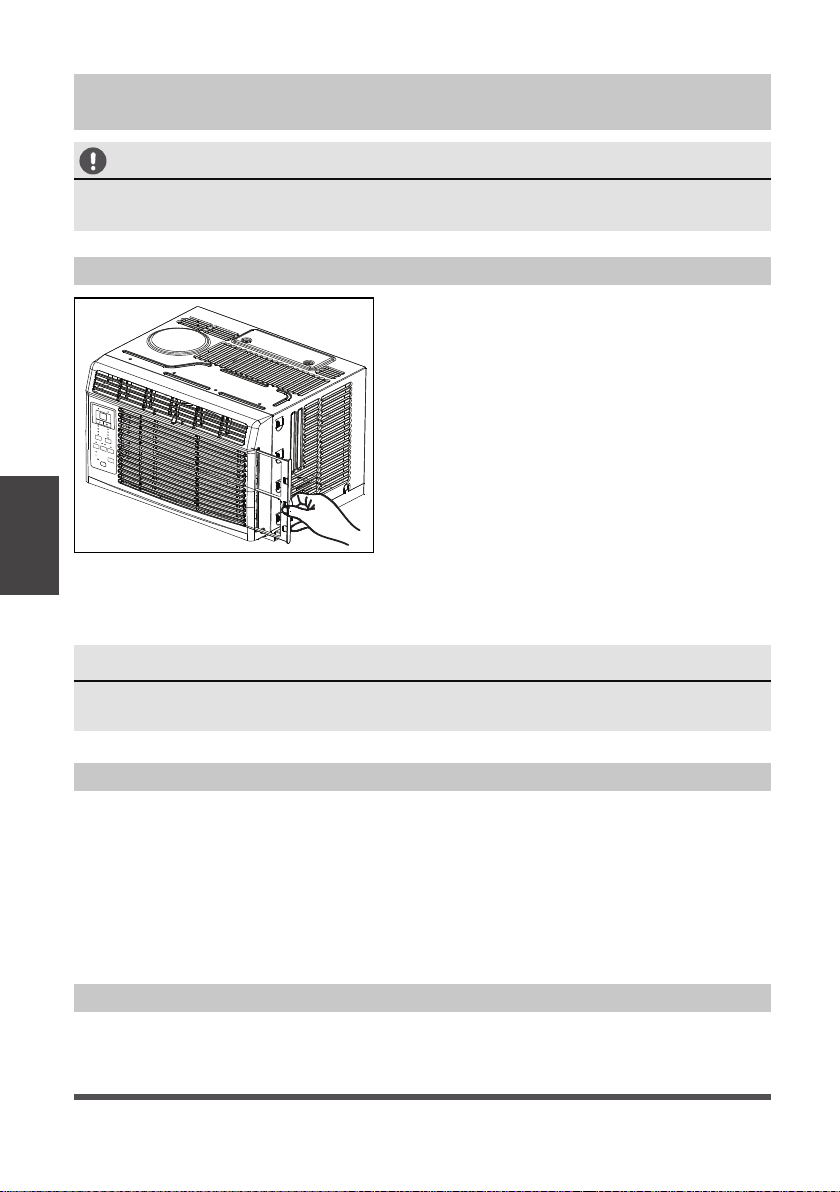
Fig. 9
FOAM SEAL
Fig. 10
If AC is Blocked by Storm Window
Add wood as shown in Fig. 11, or remove
storm window before air conditioner is
installed.
If storm window frame must remain,
be sure the drain holes or slots are not
caulked or painted shut. Accumulated
rain water or condensation must be
allowed to drain out.
Fig. 11
SASH
1-1/2"min
(38 mm)
Board thickness
as required, for
proper pitch to rear,
along entire
sill. Fasten with nails
or screws.
Storm window
frame or other
obstruction.
Removing AC From Window
• Turn AC off, and disconnect power cord.
• Remove sash seal from between windows, and unscrew safety lock.
• Remove screws installed through frame and frame lock.
• Close (slide) side panels into frame.
• Keeping a firm grip on air conditioner, raise sash and carefully remove.
• Be careful not to spill any standing water while lifting unit form window. Store parts
WITH air conditioner.
Energy
Saver
Timer
Sleep
ON | O
On O
Check
Filter
Temp | Timer
Low
Med
High
Cool
Dry
Fan
Fan
Mode
Auto
Auto
Fig. 8B
B2: For Vinyl-Clad windows:
Drive 1/2” (12.7 mm) locking screws through the frame
lock and into the window sash (Fig. 8B).
NOTE: Before driving the screws, use a drill to drill 5
holes through the holes in the frame lock and frame
extensions into the windows sash as shown (Fig. 8B).
C. To secure lower sash in place, attach right angle sash
lock with 3/4” (19 mm) or 1/2” (12.7 mm) screw as
shown (Fig. 9).
D. Cut Window sash seal foam and insert it in the space
between the upper and lower sashes (Fig. 10).
Installation
Instructions
Page 18
Air Filter Cleaning
Cabinet Cleaning
Winter Storage
• Be sure to unplug the air conditioner to prevent shock or fire hazard. The cabinet and
front may be dusted with an oil-free cloth or washed with a cloth dampened in a solution
of warm water and mild liquid dishwashing detergent. Rinse thoroughly and wipe dry.
• Never use harsh cleansers, wax or polish on the cabinet front.
• Be sure to wring excess water from the cloth before wiping around the controls.
Excess water in or around the controls may cause damage to the air conditioner.
• Plug in air conditioner.
Care and
Cleaning
CAUTION
Clean your air conditioner occasionally to keep it looking new. Be sure to unplug the
unit before cleaning to prevent shock or fire hazards.
NOTE
Never use hot water over 104°F (40°C) to clean the air filter. Never attempt to
operate the unit without the air filter.
If you plan to store the air conditioner during the winter, remove it carefully from the
window according to the installation instructions. Cover it with plastic or return it to
the original carton.
Care and Cleaning
The air filter should be checked at least once a
month to see if cleaning is necessary. Trapped
particles in the filter can build up and cause an
accumulation of frost on the cooling coils.
• Push the vent handle to the closed position
(where applicable). Open the front panel.
• Take the filter by the center and pull up and
out.
• Wash the filter using liquid dishwashing
detergent and warm water. Rinse filter
thoroughly.
• Gently shake excess water from the filter.
Be sure the filter is thoroughly dry before
replacing.
• You may also vacuum the filter clean rather
than washing.
Energy
Saver
Sleep
ON
|
O
On
O
Check
Filter
Temp
|
Timer
Low
Med
High
Cool
Dry
Fan
Fan
Mode
Auto
Auto
Timer

Page 19
Troubleshooting
Tips
Before calling for service, review this list. It may save you time and expense. This list
includes common occurrences that are not the result of defective workmanship or
materials in this appliance.
Problem Solution
Air conditioner
does not start
Wall plug disconnected. Push plug firmly into wall outlet.
House fuse blown or circuit breaker tripped. Replace fuse with time
delay type or reset circuit breaker.
Plug current device tripped. Press the RESET button.
Power is Off. Turn Power On and set to desired setting.
Unit turned off and then on quickly. Turn unit off and wait 3 minutes
before restarting.
Air from unit
does not feel
cold enough
Room temperature below 62°F (17°C). Cooling may not occur until
room temperature rises above 62°F (17°C).
Temperature sensing element touching cold coil, located behind air
filter. Straighten tube away from coil.
Reset to a lower temperature.
Compressor shut-off by changing modes. Wait approximately 3 minutes
and listen for compressor to restart when set in the COOL mode.
Air conditioner
cooling, but
room is too
warm- ice
forming
on cooling
coil behind
decorative
front.
Outdoor temperature below 64°F (18°C). To defrost the coil, set to
FAN ONLY mode.
Air filter may be dirty. Clean filter. Refer to Care and Cleaning
section. To defrost, set to FAN ONLY mode.
Thermostat set too cold for night-time cooling. To defrost the coil,
set to FAN ONLY mode. Then, set temperature to a higher setting.
Air conditioner
cooling, but
room is too
warm- NO
ice forming
on cooling
coil behind
decorative
front
Air filter may be dirty. Clean filter. Refer to Care and Cleaning
section. To defrost, set to FAN ONLY mode.
Temperature is set too high, set temperature to a lower setting.
Air directional louvers positioned improperly. Position louvers for
better air distribution.
Front of unit is blocked by drapes, blinds, furniture, etc. - restricts air
distribution. Clear obstruction in front of unit.
Doors, windows, registers, etc. open - cold air escapes. Close doors,
windows, registers.
Unit recently turned on in hot room. Allow additional time to remove
“stored heat” from walls, ceiling, floor and furniture.
Air conditioner
turns on and
off rapidly
Dirty air filter- air restricted. Clean air filter.
Outside temperature extremely hot. Set FAN speed to a higher
setting to bring air past cooling coils more frequently.
Troubleshooting Tips

Page 20
Troubleshooting
Tips
Problem Solution
Noise when
unit is cooling
Air movement sound. This is normal. If too loud, set to a slower FAN
setting.
Window vibration - poor installation. Refer to installation instructions
or check with installer.
Water dripping
INSIDE when
unit is cooling
Improper installation. Tilt air conditioner slightly to the outside to
allow water drainage.
Refer to installation instructions - check with installer.
Water dripping
OUTSIDE when
unit is cooling
Unit removing large quantity of moisture from humid room. This is
normal during excessively humid days.
Remote
sensing
deactivating
prematurely
(some models)
Remote control not located within range. Place remote control within
20 feet & 180°, radius of the front of the unit.
Remote control signal obstructed. Remove obstruction.
Room too cold
Temperature setting too low. Increase temperature setting.
If your product displays error code as follows, please call our toll free service number:
1-866-646-4332 for assistance.

Page 21
Remote Control Instructions
Operating
Instructions
(With Remote)
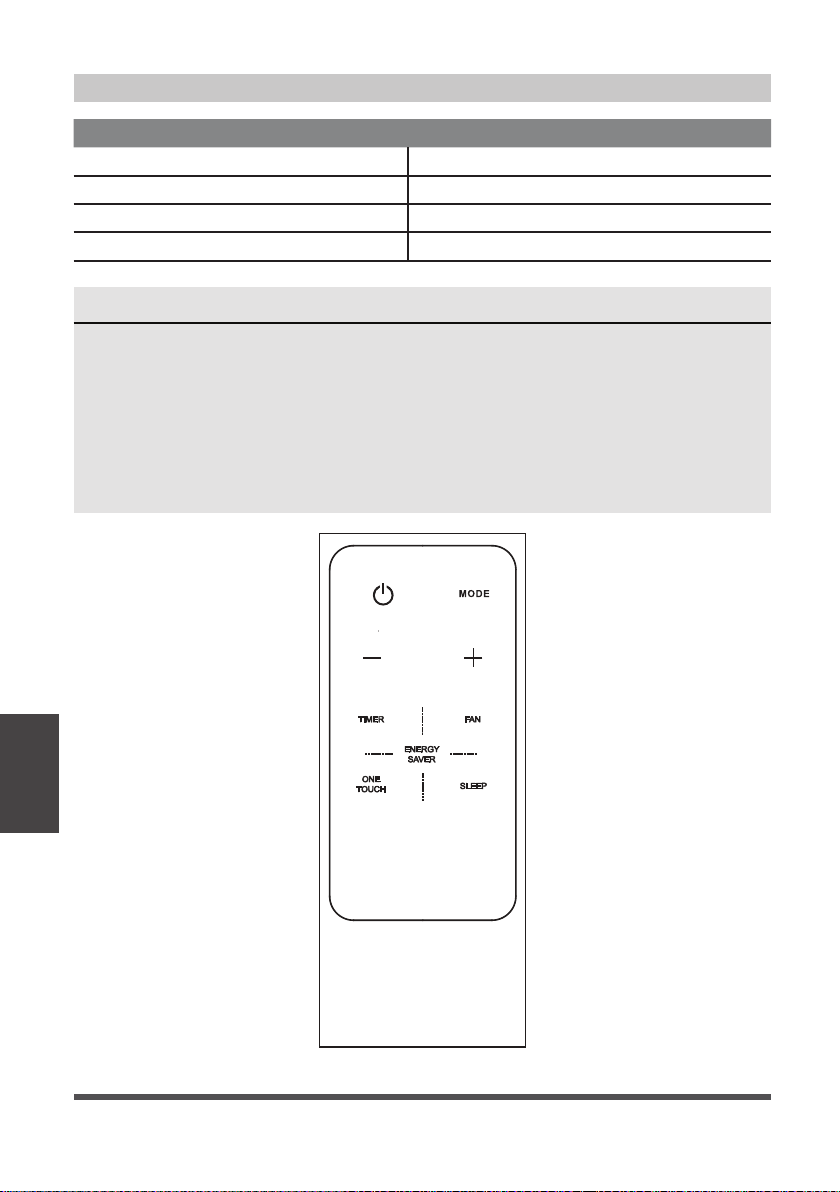
LOCATION OF THE REMOTE CONTROLLER
Use the remote controller within a distance of 16.4 ft
(5 meters) from the air conditioner, pointing it towards
the receiver. Reception is confirmed by a beep.
Handling the Remote Controller
Installing the Battery
CAUTION
• The air conditioner will not operate if curtains,
doors or other materials block the signals from the
remote controller to the unit.
• Prevent any liquid from spilling onto the remote
controller. Do not expose the remote controller to
direct sunlight or heat.
• If the infrared signal receiver on the indoor unit is
exposed to direct sunlight, the air conditioner may
not function properly. Use curtains to prevent the
sunlight from falling on the receiver.
• If other electrical appliances react to the remote
controller, either move these appliances or consult
your local dealer.
WARNING
• Battery must be disposed of properly. Do
not short circuit or dispose of in a fi re.
• Keep batteries out of the reach of
children.
• Do not ingest.
• Non-rechargeable batteries are not to
be recharged.
• Exhausted batteries are to be removed
from the product.
Energy
Saver
Timer
Sleep
ON
|
O
On O
Check
Filter
Temp
|
Timer
Low
Med
High
Cool
Dry
Fan
Fan
Mode
Auto
Auto
16.4 ft (5 meters)
Step 1: Insert a coin vertically in the
groove on the battery cover, and turn 45°
clockwise, making sure that the groove is
aligned with the “unlock” sign as shown
below and remove the battery cover.
Step 3: Replace the battery cover, making
sure the battery cover groove is aligned with
the “unlock” sign. Insert a coin vertically in the
groove and press it gently, then rotate 45°
counter clockwise, making sure the groove is
aligned with the “lock” sign as shown below.
Step 2: Install battery inside the remote
controller, the positive (+) side up.
Coin
Battery
cover
Battery
cover
Groove
Lock
sign
Unlock
sign
Unlock
sign
Groove
Lock sign
Coin
Battery
Positive (+) side up
Coin
Groove
Battery cover
Unlock sign
Lock sign
Coin
Groove
Battery cover
Unlock sign
Lock sign
Page 22
Operating
Instructions
(With Remote)
Remote Control Specifications
Model RG15A4(B)/E
Rated Voltage 3.0V (Lithium battery CR2025)
Lowest Voltage of CPU Emitting Signal 2.4 V
Signal Receiving Range 16.4 ft (5 m)
Environment -5 °C ~ 60 °C (23°F ~ 140°F)
NOTES
• Button design is based on typical model and may vary slightly from the actual
one you purchased.
• All the functions described are accomplished by the unit. If the unit is without
a feature, the unit will not respond if the corresponding button on the remote
is pressed.
• When there are significant differences between features or operation implied
by the remote control illustration and the actual functions described in the
USER’S MANUAL, the descriptions in the USER’S MANUAL shall prevail.
Page 23
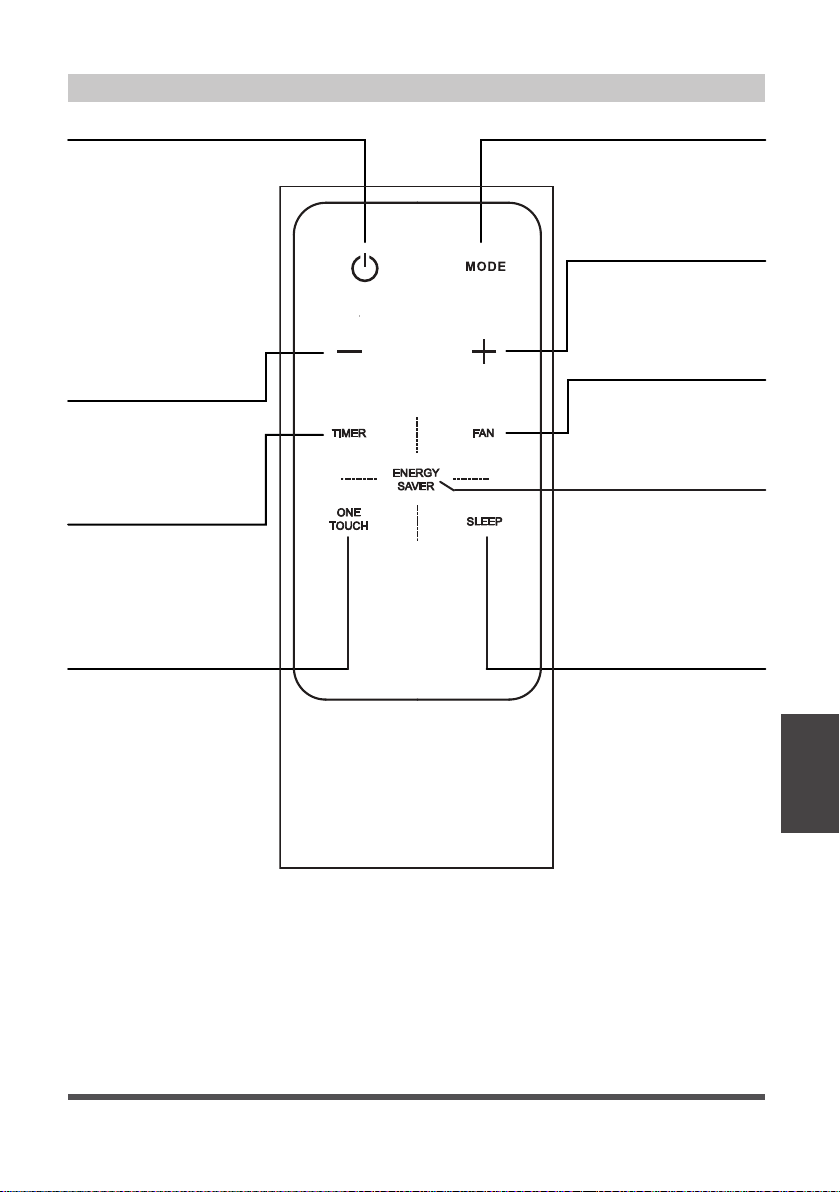
Function Buttons
MODE Button
Press this button to
select the desired
operation mode.
TEMP UP Button
Press this button to
increase the indoor
temperature setting.
FAN Button
Used to select the
desired fan speed.
SLEEP Button
Press this button to
activate the Sleep
mode. This function
is available on COOL
or AUTO mode only
and will maintain the
most comfortable
temperature for you
while saving energy.
For more details, see
“sleep operation” in
“USER’S MANUAL.”
ENERGY SAVER Button
Press this button to
activate the Energy
saving mode. Press
it again to stop the
function (on some
models).
TEMP DOWN Button
Press this button to
decrease the indoor
temperature setting.
TIMER Button
Press this button to
activate the “Auto
Start” or “Auto Stop”
program.
ON/OFF Button
Operation starts when
this button is pressed
and stops when the
button is pressed again.
NOTE: The unit will
automatically initiate
Energy Saver mode
under Cool, Dry, and
Auto modes.
ONE TOUCH Button
Push this button
and the system will
automatically shift to
COOL operation with
auto fan speed and a
temperature setting of
26°C/80°F. Any timer
setting program will be
cancelled.
Operating
Instructions
(With Remote)

Page 24
How to Use the Buttons
AUTO OPERATION
Ensure the unit is plugged in and power is available.
1. Press the ON/OFF button to start the air
conditioner.
2. Press the MODE button to select Auto.
3. Press the TEMP UP (+)/DOWN (-) button to set
the desired temperature.
COOLING / FAN OPERATION
Ensure the unit is plugged in and power is available.
1. Press the ON/OFF button to start the air
conditioner.
2. Press the MODE button to select Cool or Fan
mode.
3. Press the TEMP UP (+)/DOWN (-) button to set
the desired temperature.
4. Press the FAN button to select the fan speed.
NOTES
1. In the Auto mode, the air conditioner can
logically choose the mode (Cooling or Fan)
and by sensing the difference between the
actual ambient room temperature and the set
temperature on the remote controller.
2. In Auto mode, you cannot adjust the fan speed.
As it is controlled automatically.
3. If the Auto mode is not comfortable for you,
the desired mode can be selected manually.
NOTES
Temperature cannot be changed in Fan mode.
1
3
2
3
4
33
1 2
Operating
Instructions
(With Remote)

Page 25
DEHUMIDIFYING OPERATION
Ensure the unit is plugged in and power is available.
1. Press the ON/OFF button to start the air
conditioner.
2. Press the MODE button to select Dry.
3. Press the TEMP UP (+)/DOWN (-) button to set
the desired temperature.
TIMER OPERATION
Press the TIMER button to initiate the Auto-start
and Auto-stop setting program of the unit.
To set the Auto-start/stop time.
1. Press the TIMER button, when the TIMER ON
indicator is displayed on the LED window of
the air conditioner, it indicates the Auto Start
setting program is initiated. When the TIMER
OFF indicator is displayed on the LED window
of the air conditioner, it indicates the Auto
Stop setting program is initiated.
2. Press or hold the TEMP UP (+)/DOWN (-) to
change the Auto time. The control will count
down the time remaining until start/stop.
3. The selected time will register in 5 seconds and
the air conditioner will automatically revert back
to display the previous temperature setting.
4. Turning the unit ON or OFF at any time will
cancel the Auto Start/stop function.
NOTES
To cancel the TIMER setting, push the TIMER
button and press or hold the TEMP UP (+)/
DOWN (-) until 0 hour is displayed on the LCD
window of the air conditioner.
NOTES
In the Dehumidifying mode, you cannot adjust
the fan speed, as it is controlled automatically.
1
3
2
3
1
22
Operating
Instructions
(With Remote)

Page 26
COMBINED TIMER
(Setting both ON and OFF timers simultaneously)
AUTO STOP >AUTO START
(On > Stop > Start operation)
This feature is useful when you want to stop the
air conditioner after you go to bed, and start it
again in the morning when you wake up or when
you return home.
Example:
To stop the air conditioner 2 hours after setting
and start it again 10 hours after setting.
1. Press the TIMER button until the TIMER OFF
indicator is displayed on the LED display of the
air conditioner.
2. Use the TEMP UP (+)/DOWN (-) button to
display “2.0” on the LED display of the air
conditioner.
3. Press the TIMER button again to display the
TIMER OFF on the LED display of the unit.
4. Use the TEMP UP (+)/DOWN (-) button to
display “10” on the LED display of the unit.
5. Wait for 5 seconds until the previous display
appears in LED window.
AUTO START > AUTO STOP
(Off > Start > Stop operation)
This feature is useful when you want to start the
air conditioner before you wake up and stop it
after you leave the house.
Example:
To start the air conditioner 5 hours after setting,
and stop it 8 hours after setting.
1. Press the TIMER button until the TIMER ON
indicator is displayed on the LED display of the
air conditioner.
2. Use the TEMP UP (+)/DOWN (-) button to
display “5.0” on the LED display of the air
conditioner.
3. Press the TIMER button again to display the
TIMER OFF on the LED display of the unit.
4. Use the TEMP UP (+)/DOWN (-) button to
display “8.0” on the LED display of the unit.
5. Wait for 5 seconds until the previous display
appears in LED window.
1
22
Operating
Instructions
(With Remote)

Page 27
ENERGY SAVER OPERATION
In this mode, the fan will continue to run for 3
minutes after the compressor shuts off. The fan
then cycles on for 2 minutes at 10 minute intervals
until the room temperature is above the set
temperature, at which time the compressor turns
back on and cooling resumes.
NOTES
• Button design is based on a typical model and may slightly vary from the actual one
you purchased.
• All the functions described can also be accomplished using the unit’s control panel. If
the unit is without this feature, there will be no corresponding operation when pressing
the relevant button on the remote controller.
• When there are significant differences between features or operation implied by
the remote control illustration and the actual functions described in the USER’S
MANUAL, the descriptions in the USER’S MANUAL shall prevail.
• The device may comply with local national regulations. In Canada, it should comply
with CAN ICES-3(B)/NMB-3(B). In USA, this device complies with part 15 of the
FCC Rules. Operation is subject to the following two conditions: (1) This device may
not cause harmful interference, and (2) this device must accept any interference
received, including interference that may cause undesired operation.
• This equipment has been tested and found to comply with the limits for a Class B digital
device, pursuant to part 15 of the FCC Rules. These limits are designed to provide reasonable
protection against harmful interference in a residential installation. This equipment
generates, uses and can radiate radio frequency energy and, if not installed and used in
accordance with the instructions, may cause harmful interference to radio communications.
However, there is no guarantee that interference will not occur in a particular installation. If
this equipment does cause harmful interference to radio or television reception, which can
be determined by turning the equipment off and on, the user is encouraged to try to correct
the interference by one or more of the following measures:
- Reorient or relocate the receiving antenna.
- Increase the separation between the equipment and receiver.
- Connect the equipment to an outlet on a circuit different from that to which the
receiver is connected.
- Consult the dealer or an experienced radio/TV technician for help.
- Changes or modifications not approved by the party responsible for compliance
could void users authority to operate the equipment.
1
Operating
Instructions
(With Remote)

Page 28
Air Conditioner Limited Warranty
Your product is protected by this Limited Warranty:
Warranty service must be obtained from Midea Consumer Services or an authorized Midea servicer.
Warranty
• One year full warranty from original purchase date.
Midea, through its authorized servicers will:
• Pay all costs for reparing or replacing parts of this appliance which prove to be defective in materials or workmanship.
Consumer will be responsible for:
• Diagnostics, removal, transportation and reinstallation cost required because of service.
• Costs of service calls that are a result of items listed under NORMAL RESPONSIBILITIES OF THE CONSUMER**
Midea replacement parts shall be used and will be warranted only for the original warranty.
NORMAL RESPONSIBILITIES OF THE CONSUMER**
This warranty applies only to products in ordinary household use, and the consumer is responsible for the items
listed below:
1. Proper use of the appliance in acordance with instructions provided with the product.
2. Routine maintenance and cleaning necessary to keep the good working condition.
3. Proper installation by an authorized service professional in accordance with instructions provided with the
appliance and in accordance with all local plumbing, electrical and/or gas codes.
4. Proper connection to a grounded power supply of sufficient voltage, replacement of blown fuses, repair of loose
connections or defects in house wiring.
5. Expenses for making the appliance accessible for servicing.
6. Damages to finish after installation.
EXCLUSIONS
This warranty does not cover the following:
1) Failure caused by damage to the unit while in your possession (other than damage caused by defect or
malfunction), by its improper installation, or by unreasonable use of the unit, including without limitation, failure to
provide reasonable and necessary maintenance or to follow the written installation and Operating Instructions.
2) Damages caused by services performed by persons other than authorized Midea costumer service; or external
causes such as abuse, misuse, inadequate power supply or acts of God.
3) If the unit is put to commercial, business, rental, or other use or application other than for consumer use, we make
no warranties, express or implied, including but not limited to, any implied warranty of merchantability or fitness
for use or purpose.
4) Products without original serial numbers or products that have serial numbers which have been altered or cannot
be readily determined.
NOTE: Some states do not allow the exclusions or limitation of incidental or consequential damages. So this
limitation or exclusion may not apply to you.
IF YOU NEED SERVICE
Keep your bill of sale, delivery slip, or some other appropriate payment Record.
The date on the bill establishes the warranty period, should service be required.
If service is performed, its your best interest to obtain and keep all receipts.
This written warranty gives you specific legal rights. You may also have other rights that vary from state to state.
Service under this warranty must be obtained by following these steps, in order:
1) Contact Midea Consumer Services or an authorized Midea services at 1 866 646 4332.
2) If there is a question as to where to obtain service, contact our consumer relations Departament.
Warranty
Warranty

RETURN POLICY
Questions about installing or operating your
Arctic King product?
If you still need assistance, please call Customer
Service at 1-866-646-4332.
Have your sales receipt, serial number and product model
mumber available when you call.
The product may be returned within 90 days of purchase
with receipt, After 90 days, the product is covered under
limited warranty. Please refer to the warranty section
in the User Manual for details.
Return policy
save your
receipt

TIPO DE VENTANA/PARED
AIRE ACONDICIONADO DEL CUARTO
WWK
version A - 10 - 2018
MANUAL DEL USUARIO
esp
Avisos de advertencia: antes de
usar este producto, lea
atentamente este manual y
consérvelo para futuras referencias.
El diseño y las especificaciones
están sujetos a cambios sin previo
aviso para la mejora del producto.
Consulte con su distribuidor o
fabricante para obtener más
detalles.
Frecuencia: 60Hz
Capacidad: 5000BTU/h
WWK05CR01N-B
www.midea.com
Energy
Saver
Timer
Sleep
ON
|
O
On
O
Check
Filter
Temp
|
Timer
Low
Med
High
Cool
Dry
Fan
Fan
Mode
Auto
Auto
version B - 10 - 2018 (PREVIEW01)

Page 30
Lea este manual
Dentro de este manual podría encontrar muchos consejos ayudables diciendo cómo
usar y mantener su aire acondicionado correctamente. Le cuesta un poco cuidado
antes, le ahorrará mucho tiempo y dinero en su aire acondicionado. Puede encontrar
muchas respuestas a los problemas communes en el cuadro de las soluciones de
problemas. Si lea nuestro cuadro de soluciones de problemas primero, quizá no será
necesario llamar por servicio.
• Contacte con un técnico de servicio autorizado para reparación o mantenimiento
de esta unidad.
• Contacte con un instalador para instalación de esta unidad.
• El acondicionador de aire no está diseñado para ser usado por niños pequeños o
personas físicamente enfermas sin supervisión.
• Los niños pequeños deben ser supervisados para asegurarse de que no jueguen
con el aire acondicionado.
• Si necesita reemplazar el cable de alimentación, comuníquese con nuestro servicio
al consumidor y busque un técnico autorizado.
• La instalación eléctrica debe realizarse de acuerdo con las normas de regulación
nacionales solo por personal cualificado.
Instrucciones Importantes de Seguridad ............................................... 31
Instrucciones de Operación ..................................................................... 36
Instrucción de Instalación .......................................................................... 41
Mantenimento Y Limpieza ........................................................................ 46
Soluciones de Problemas ......................................................................... 47
Instrucciones del Control Remoto .......................................................... 49
Garantía y Política de Devoluciones ....................................................... 56
CAUTION
Lista de Contenidos

Page 31
Instrucciones Importantes de Seguridad
Para evitar los daños a los usuarios u otra persona, deben seguir las instrucciones
siguientes. Las operaciones incorrectas por la ignora de las instrucciones puede causar
lesiones o daños. El grado de seriedad está clasificado por lo que indica siguiente.
• Enchúfalo en el enchufe adecuadamente.
Si no, podría causar una descarga eléctrica o incendio por la generación del calor.
• No la enciende o apaga la unidad con la manera de meter o tirar su cable en el enchufe.
Podría causar una descarga eléctrica por la generación del calor.
• No lo hace daño o usar un cable eléctrico sospechoso.
Podría causar descarga eléctrica o incendio.
Si el cable eléctrico está dañado, para evitar el peligro, debe reemplazarlo por un
fabricante o un servicio autorizado o unidad con cualificación similar.
• Siempre instala el interruptor y un circuito de potencia dedicado.
La instalación incorrecta podría causar incendio o descarga eléctrica.
• No lo maneje con las manos mojados o en un ambiente húmedo.
Podría causar una descarga eléctrica.
• No dirije el flujo del aire solamente a un ocupante de la habitación.
Podría hacer daños a su salud.
• Siempre asegúrese que está puesto a una tierra eficaz.
La tierra incorrecto podría causar una descarga eléctrica.
• No permite entrar el agua en las piezas eléctricas.
Podría causar un fallo de esta máquina o una descarga eléctrica.
WARNING
Instrucciones
Importantes de
Seguridad
Este símbolo indica la posibilidad de lesiones o daños a la propiedad.
CAUTION
Este símbolo indica la posibilidad de muerto o lesiones graves.
WARNING
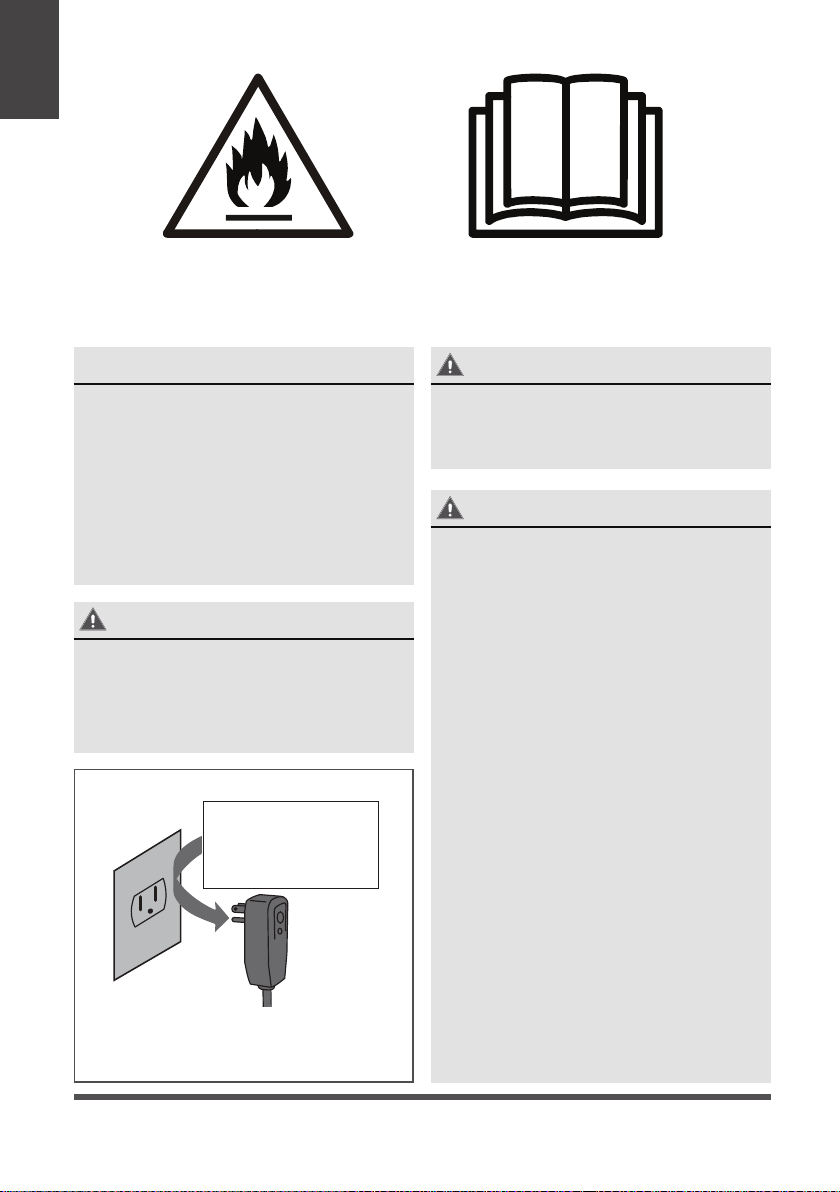
Este símbolo muestra que este aparato utiliza un refrigerante inflamable.
Si el refrigerante se fuga y se expone a una fuente de ignición externa,
existe riesgo de incendio.
WARNING
Este símbolo muestra que la información está disponible en el
manual de operación y manual de instalación.
CAUTION
Este símbolo muestra que el personal de servicio debe manejar este
equipo con referencia al manual de instalación.
CAUTION
CAUTION
Este símbolo muestra que el manual de operación debe ser
cuidadosamente leido.

Page 32
• No modifique la longitud del cable eléctrico ni compartir el enchufe con otros aparatos.
Podría causar una descarga eléctrica o incendio por la generación del calor.
• Si emite sonido, olor o humo extraño, desenchúfelo.
Podría causar incendio u descarga eléctrica.
• No lo usa el enchufe si está suelto o dañado.
Podría causar incendio u descarga eléctrica.
• No la abre la unidad durante su operación.
Podría causar descarga eléctrica.
• No lo use el cable eléctrico que está cerca de los aparatos de calefacciones.
Podría causar incendio y una descarga eléctrica.
• No lo usa el cable eléctrico cerca de gas inflamable o combustibles, como gasolina,
benceno, disolvente, etc.
Podría causar una explosión o incendio.
• Ventile la habitación antes de operar el aire acondicionado si hay una fuga de gas desde
otros aparatos.
Podría causar una explosión, incendio y quemaduras.
• No desmonte ni modifique la unidad.
Podría causar fallo y descarga eléctrica.
WARNING
CAUTION
• Cuando el filtro del aire está eliminado, no la toca las partes metálicas de la unidad.
Podría causar una lesion.
• No lo guarda una mascot o planta donde sera expuesto al flujo del aire directo.
Podría hacer daño a su mascot o planta.
• Ventile bien la habitación cuando se utilize junto con una estufa, etc.
Podría ocurrir la escasez de oxígeno.
• No utilice detergente fuerte como cera o algo más delgado, sino usa un paño suave.
La apariencia podría deteriorarse por el cambio del color del producto u arañazos en su
superficie.
• No lo limpie el aire acondicionado con agua.
El agua podría entrar en la unidad y disminuir la aislación. Podría causar una descarga eléctrica.
• No lo usa para fines especiales.
No lo use este aire acondicionado a conservar dispositivos de precisión, alimentos,
mascotas, plantas y objectos artístas. Podría causar deterioro de su calidad, etc.
• Detenga el funcionamiento y cierre la ventana en la tormenta o huracán.
La operación con la ventana abierta podría causar humedecimiento y remojo de muebles
dentro de la casa.
• Cuando la unidad se va a limpiar, apague y desconecte el disyuntor.
No la limpie la unidad cuando está encendido porque podría causar incendio y una
descarga eléctrica, lo cual produciría lesiones.
• Asegúrese de que el soporte de la instalación del aparato al aire libre no está dañado por
una exposición prolongada.
Si el soporte está dañado, podría producir daños por el fallo de la unidad.
• Siempres inserte el filtro correctamente. Limpie el filtro una vez cada dos semanas.
La operación sin filtro podría causar fallo.
• Sujete la clavija por la cabeza de la clavija de alimentación cuando la saque.
Podría causar descarga eléctrica y daños.
Instrucciones
Importantes de
Seguridad
Page 33
CAUTION
• Apaque el interruptor principal de la alimentación cuando la unidad ni hace ruido un largo tiempo.
Podría causar fallo del producto o incendio.
• No coloque obstáculos alrededor de la entrada de aire o dentro de la salida del aire.
Podría causar fallos de aplicación o accidente.
• Tenga cuidado al desembalar e instalarlo. Su bordes afilados podrían provocar lesiones.
• No coloque objetos pesados sobre el cable eléctrico y asegúrese que el cable no está comprimido.
Hay peligro de incendio o descarga eléctrica.
• No beba el agua drenada del aire acondicionado.
Contiene producer contaminación y podría hacerle enfermo.
• Si entra agua en la unidad, apágue la energía fuera y apague el disyuntor. Aisla el suministro
mediante la tira de su cable de energía y contactelo a un servicio técnico cualificado.
• Este aparato no está diseñado para ser utilizado por las personas (incluso los niños)
con capacidad reducida o falta de experiencia o los conocimientos físicos, sensoriales
o mentales, a menos que sean enseñado o instruidos el uso del aparato por la gente
responsible de su seguridad.
• Los niños deben ser supervisados para asegurar que no lo jueguen con el aparato.
• Si el cable eléctrico está dañado, debe ser reemplazado por un fabricante, agente de
servicio o personas cualificados para evitar peligro.
• El aparato debe ser instalado de acuerdo con reglas escritas nacionales.
• No lo utilice el aire acondicionado en una habitación mojada como el baño o lavandería.
• Este aparato con su calentador eléctrico deben tener al menos 1 metro lejos a los
materiales combustibles.
• Póngase en contacto con el servicio técnico autorizado para la reparación o
mantenimiento de esta unidad.
• Póngase en contacto con el instalador autorizado para la instalación de esta unidad.
Instrucciones
Importantes de
Seguridad
WARNINGS (para usar solo refrigerante R32)
• No utilice ningún medio para acelerar el proceso de descongelación o para limpiar la
unidad, que no sean los recomendados por el fabricante.
• No use ni almacene el artefacto en espacios con posibles fuentes de ignición (por ejemplo:
llamas abiertas, un artefacto de gas que funcione o un calentador eléctrico que funcione).
• No perfore ni queme tubos refrigerantes. Tenga en cuenta que los refrigerantes pueden
no contener olor.
• Mantenga las aberturas de ventilación libres de obstrucciones.
• Guarde el aparato de manera que evite daños mecánicos.
• Guarde el aparato en un área bien ventilada donde el tamaño de la habitación
corresponda al área de la habitación según lo especificado para la operación.
• Cualquier persona involucrada en trabajar o entrar en un circuito de refrigerante debe
tener un certificado válido actual de una autoridad de evaluación acreditada por la
industria, que autoriza su competencia para manejar refrigerantes de manera segura de
acuerdo con una especificación de evaluación reconocida por la industria.
• El servicio solo se debe realizar según lo recomendado por el fabricante del equipo. El
mantenimiento y la reparación que requieren la asistencia de otro personal calificado se
llevarán a cabo bajo la supervisión de la persona competente en el uso de refrigerantes
inflamables.
• El refrigerante inflamable (R32) se usa dentro del acondicionador de aire. Al mantener
o desechar el acondicionador de aire, el refrigerante (R32) debe recuperarse
adecuadamente, no descargar directamente al aire.
Page 34
NOTA
El cable de energía con el aire
acondicionado contienen un dispositivo
de detección de corriente, lo cual está
diseñado para reducir el riesgo de incendio.
Por favor consulte en la sección de
Operación del dispositivo de corriente
los detalles. En el caso que el cable
de energía está dañado, no puede ser
reparado, debe reemplazarlo por un
cable del Fabricante del Producto.
WARNING - Para su seguridad
No guarda o usar gasolina u otros
vapors y líquidos inflamables en la
proximidad de este o cualquier otro
electrodoméstico.
WARNING - Información Eléctrica
Las especificaciones eléctricas
completas de su nuevo aire
acondicionado de la habitación está
indicada en la placa de serie. Consulte a
las especificaciones cuando comproba
los requisitos eléctricos.
• Asegúrese de que al aire
acondiconado está puesto bien. Para
minimizar los riesgos de choque
eléctrico e incendio, es muy important
ponerlo bien. El cable de energía está
equipado con un enchufe de 3 clavijas
conectado a la tierra para protección
contra posibles descargas eléctricas.
• Su aire acondicionado debe ser
utilizado en una manera correcta
puesta en la tierra. Si el tomacorriente
que pretende usar no está
adecuadamente conectado a tierra o
protegido por un fusible de retardo o
un interruptor de circuito, pida a un
electricista calificado que instale el
tomacorriente adecuado.Asegúrese
de que el recipiente sea accessible
despúes de la instalación de la unidad.
• No funciona el aire acondicionado sin
cubierta protectora lateral. Este podría
resultar daño mecánico dentro del aire
acondicionado.
WARNING
• Evita el incendio o descarga eléctrica.
• No utilice cable de extensión ni
enchufe adaptado.
• No remueve ninguna clavija del cable
de energía.
Instrucciones
Importantes de
Seguridad
Do not, under any
circumstances, cut,
remove or bypass
the grounding prong.
Toma de Tierra Tipo Pared Receptáculo
Nunca, en ningún
caso, corte, remueve
ni pasar por la
conexión a la tierra.
El cable de energía con conexión a
tierra de 3 clavijas y un dispositivo
de detección de corriente
Riesgo de incendio/
materiales inflamables
(Requerido para unidades
R32 / R290 solamente)
NOTA IMPORTANTE: Lea este manual
detenidamente antes de instalar o utilizar
su nueva unidad de aire acondicionado.
Asegúrese de guardar este manual para
futuras consultas.

Page 35
(Sólo applicable a la unidad que adopta
dispositivo de detección de corriente)
El cable de energía contiene un dispositivo
que detecta daños en el cable eléctrico.
Para comprobar su cable eléctrico sigue los
siguientes:
1. Enchufe el aire acondicionado.
2. El cable de suministro de corriente tiene
dos botones en el enchufe. Pulse el
botón de TEST, le darás cuenta de un clic
cuando el botón TEST salta.
3. Pulse el botón RESET, vuelve a ver un clic
cuando
el
el botón activa.
4. El cable de suministro de corriente
ahora suministra la electricidad a la
unidad. (En algunos productos este
también está indicado por una luz en la
cabeza del enchufe)
Operación de Dispositivos de Corriente
WARNING - Evitar accidentes
Para reducer el riesgo de incendio, descarga eléctrica o lesiones a la gente cuando
usted usa el aire acondicionado, siga las precauciones básicas, incluyendo las
siguientes:
• Asegúrese de que sel servicio eléctrico sea adecuado para el modelo elegido. Esta
información podría ser encontrado en la placa de serie, los cuales están situado en
un lado del gabinete y detrás de la rejilla.
• Si el aire acondicionado va a ser instalado en una ventana, quizá quiere limpiar ambos
lados de los vidrios primero. Si la ventana es un tipo de triple pista con un panel de
pantalla incluído, remueva la pantalla completamente antes de la instalación.
• Asegúrese de que el aire acondicionado está instalado a una manera segura y
correcta según las instrucciones de intalación en este manual. Guarda este manual
para quitarlo o instalarlo en el future.
• Al manipular el aire acondicionado, tenga cuidado para evitar cortes de las aletas
metálicas afiladas en los serpentines frontales y traseros.
NOTES
• No utilice este dispositivo para encender o apagar la unidad.
• Siempre asegúrese de que el botón RESET está presionado bajo una operación
correcta.
• La fuente de corriente debe ser reemplazado si falle a restablecerlo ni con el botón
TEST o RESET. Se puede obtener un nuevo del fabricante del producto. Si el cable
de energía está dañado, no puede ser reparado.
• DEBE ser reemplazado por uno obtenido del fabricante del producto.
Instrucciones
Importantes de
Seguridad
RESET
TEST
Enchufe el &
prensa RESET
Page 36
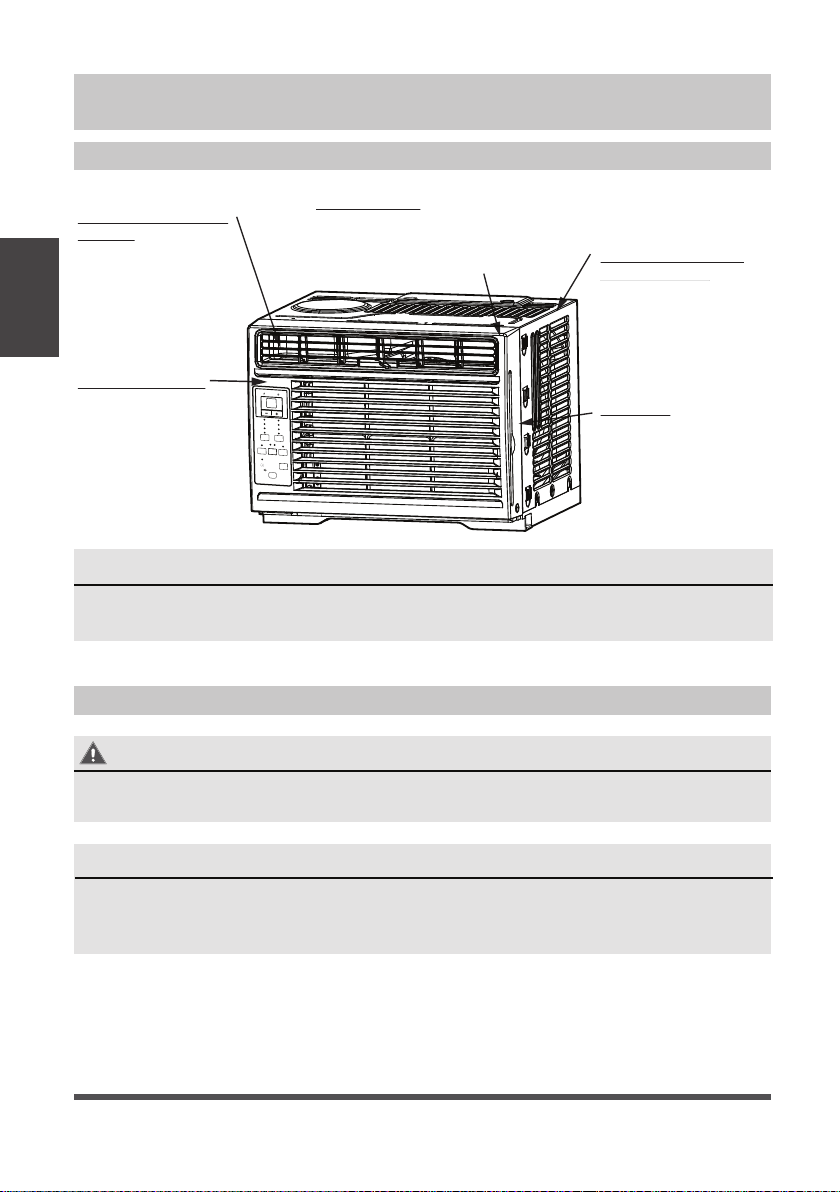
Sonidos Normales
Instrucciones de Operación
Gorgoteo/Silbido
El sonido de
gorgoteo/silbido
podría ser la
consecuencia de que
el refrigerante pasa
por el evaporador
durante su operación
normal.
Sonido del Corriente
del Aire
En la frontera de la
unidad, podría oir un
sonido del corriente
del aire debido al
movimiento del
ventilador.
Sonido Agudo
Un compresor con alta
H´FLHQFLDSRGUiWHQHUXQ
sonido agudo durante su
ciclo de refrigeración.
Vibración
/DXQLGDGSRGUi
vibrar y hacer ruido
por una débil pared o
construcción de
ventana o una
instalación incorrecta.
El Sonido de Ping o
el Conmutador
Las gotas del agua
cayendo sobre el
condensador podría
causar el sonido de
ping o el conmutador.
Energy
Saver
Timer
Sleep
ON
|
O
On
O
Check
Filter
Temp
|
Timer
Low
Med
High
Cool
Dry
Fan
Fan
Mode
Auto
Auto
NOTA
Todas las ilustraciones en esta manual son para explicar sólo. Su aire acondicionado
podría ser un poco diferente. Prevalezca a la forma real.
Instrucciones
de Operación
NOTE
El circuito frío tiene un inicio automático de 3 minutos retrasado si la unidad se
apaga y enciende rápidamente. Esto evita el sobrecalentamiento del compresor y
el posible disparo del disyuntor.
Operación del aire acondicionado
WARNING
Para reducir el riesgo de incendio, descarga eléctrica o lesiones a personas o
propiedades, lea las INSTRUCCIONES DE SEGURIDAD antes de operar este aparato.

Page 37
PARA COMENZAR A OPERAR RÁPIDAMENTE EL ACONDICIONADOR DE AIRE, SIGA
ESTOS PASOS:
1. Ajuste una configuración de temperatura más fría.
2. Ajuste el control del selector en la configuración más alta de COOL.
3. Ajuste la rejilla para un flujo de aire cómodo (consulte rejillas direccionales de aire).
4. Una vez que la habitación se siente más fría, ajuste a la configuración que
encuentre más cómoda.
5. Asegúrese de que el flujo de aire dentro y fuera no esté obstruido por nada.
6. Este aire acondicionado es diseñado para funcionar bajo las siguientes condiciones:
Antes de comenzar, familiarícese completamente con el panel de control como
se muestra a continuación y con todas sus funciones, luego siga el símbolo de las
funciones que desee. La unidad puede controlarse solo con el panel de control de la
unidad o con el control remoto.
NOTAS
• La humedad relativa de la habitación debe ser inferior al 80%. Si la unidad se
utiliza en un estado con una humedad relativa superior al 80%, habrá agua
condensada en la superficie de la unidad.
• El rendimiento podría reducir fuera de estas temperaturas operativas.
Funcionamiento
de enfriamiento
Te mperatura exterior
64-109°F/18-43°C (64-125°F/18-52°C
para los modelos tropicales especiales)
Te mperatura interior 62-90°F/17-32°C
Funcionamiento
de calefacción
Te mperatura exterior 23-76°F/-5-24°C
Te mperatura interior 32-80°F/0-27°C
Instrucciones
de Operación
Page 38
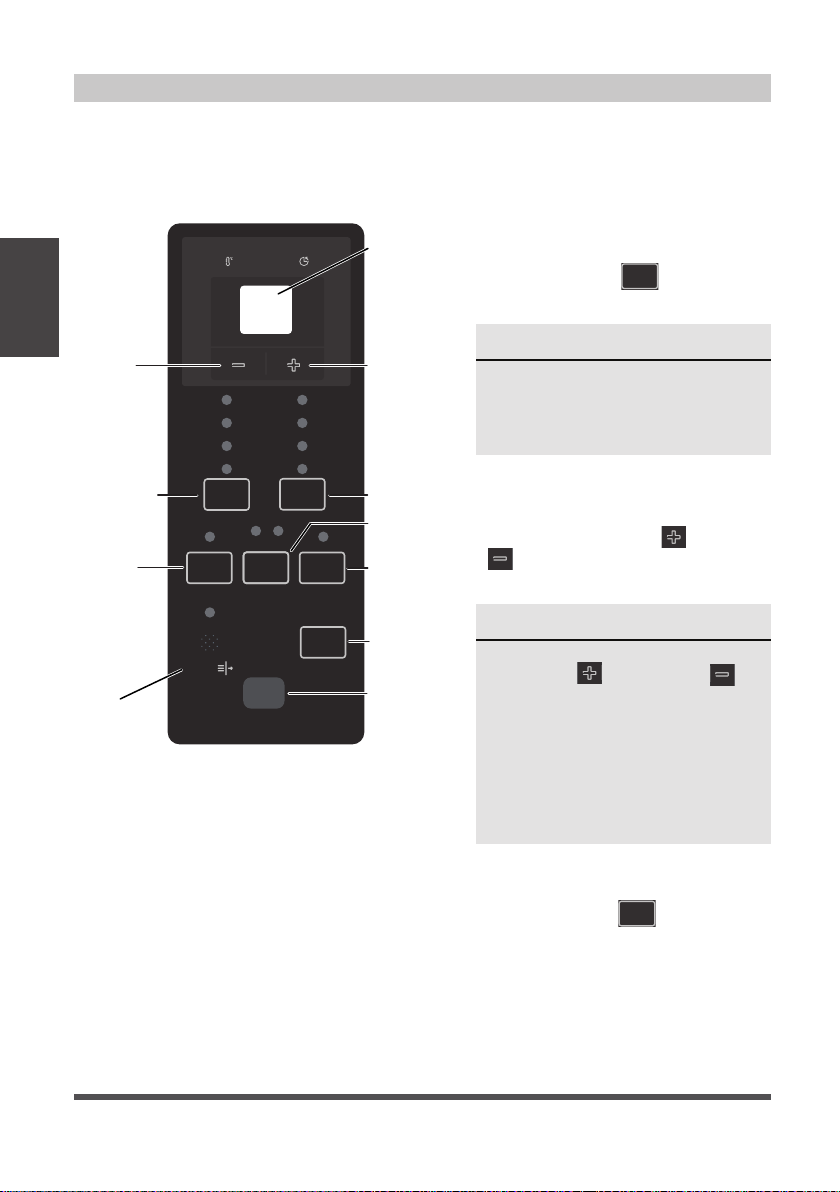
Instrucciones
de Operación
INSTRUCCIONES DE LA OPERACIÓN DEL CONTROL ELECTRÓNICO
Antes de empezar, debe familiarizarse completamente con el panel de control y todas
sus funciones como se muestra abajo, despúes sigue los símbolos para las funciones que
desea. La unidad podría ser controlado por el control sólo o con el remoto.
Características del Aire Acondicionado
PARA ENCENDER O APAGAR LA
UNIDAD:
Presiona el botón
ON | O
ON/OFF
para encender o apagar.
A CAMBIAR LAS OPCIONES DE LA
TEMPERATURA:
Presiona el botón UP (
)/DOWN
( ) para cambiar las opciones de
la temperatura.
PARA MODIFICAR LA VELOCIDAD
DEL VENTILADOR:
Presiona el botón
Fan
a elegir la
velocidad del ventilador en cuatro
grados - Auto, Bajo, Med o Alto.
Cada vez presiona el botón, se
modifica el modo de la velocidad
del ventilador. Bajo el Modo Seco, la
velocidad está controlado en Bajo
automáticamente.
NOTE
La unidad iniciará automáticamente
la función de Ahorro de Energía
bajo los modos de Frío, Seco, Auto
(Sólo Auto-Frio y Auto-Ventilador).
NOTE
Pulse o mantenga presionando el
botón UP (
) or DOWN ( )
hasta se muestra la temperatura
que quiere.
La mantiene automáticamente esta
temperatura en cualquier lugar
entre 62° F (17°C) y 86°F (30°C). Si
quiere saber la temperatura actual
de la habitación, elige la Operación
de sección Fan Only.
CONTROL DE LA UNIDAD
Muestra la
temperatura o
tiempo o
códigos de
error
Ajuste la
temperatura
o reloj
Receptor del
signo del
remoto
Compruebe el
filtro botón
RESET
Modo de
ahorro de
energia
Modo de
sueño
Establece la
velocidad del
ventilador
Establece el
modo
Activa el
temporizador
Ajuste la
temperatura
o reloj
Encende
o apaga la
unidad
Energy
Saver
Sleep
ON | O
On O
Check
Filter
Temp | Timer
Low
Med
High
Cool
Dry
Fan
Fan
Mode
Auto
Auto
Timer

Page 39
Instrucciones
de Operación
A ELEGIR EL MODO OPERATIVO:
A elegir el modo operativo, presiona el
botón Modo
Mode
. Cada vez presiona
el botón, selecciona un modo siguiendo
orden como Auto, Frío, Seco y Ventilador.
FUNCIÓN DE INSPECCIÓN:
Presiona el botón
Check
Filter
comprueba
de filtro para iniciar esta función. Esta
función es un recordatorio para limpiar
el filtro de aire para su funcionamiento
eficaz. El LED (luz) ilumina despúes de
250 horas de función. Para encenderla
despúes de la limpieza, presiona el botón
Check Filter y la luz va a apagar.
FUNCIÓN DE AHORRAR LA ENERGÍA:
Presiona
Energy
Saver
botón de ahorrar la energía
para iniciar esta función. Esta función es
diponible bajo los modos Frío, Seco, Auto
(Sólo Auto-Frío y Auto-Ventilador). El
ventilador continua funcionar 3 minutos
despúes de que el compresor apaga.
Entonces el ventilador gira 2 minutos a
cada 10 minutos de intervalo hasta que
la temperatura interior llega a la puesta,
cuando el compresor vuelve a funcionar
y empieza a enfriar.
FUNCIÓN DURMIENTA:
Presiona el botón durmiento
Sleep
a iniciar
el modo durmiento. Bajo este modo la
temperatura selecciona incrementará a
2°F/1 (o 2)°C 30 minutos despúes de elegir
el modo. La temperatura va a incrementar
un otro 2°F/1 (o 2)°C despúes de 30
minutos adicional. Esta temperatura va
a mantener 7 horas antes de volver a
su temperatura elegida originalmente.
Esto termina el modo durmiento y la
unidad continuará a funcionar según
lo programado originalmente. El modo
durmiento puede ser cancelado en
cualquier momento durante su función con
presionando el botón durmiento otra vez.
La luz del indicador ilumina y mantiene
una vez que selecciona el modo. La
unidad empieza la función de ahorrar la
energía bajo los modos de Frío, Seco,
Auto (Sólo Auto-Frío y Auto-Ventilador).
PARA OPERAR BAJO LA FUNCIÓN AUTO:
• Cuando elige el modo AUTO
del aire acondicionado, elegirá
automáticamente operación como
enfriamiento, calefacción (fuera
el modo de sólo-frío), o modo de
ventilador sólo según la temperatura
elegida y la actual de la habitación.
• El aire acondicionado controlará
la temperatura de la habitación
automáticamente alrededor de la
temperatura elegida por usted.
• En este modo, la velocidad del
ventilador no puede ser modificado,
empieza automáticamente con una
velocidad según la temperatura de la
habitación.
PARA OPERAR BAJO EL MODO
VENTILADOR SÓLO:
• Utilice esta función solamente cuando
no quiere enfriar, sirve como una
circulación de aire de la habitación
o para extraer el aire viciado (bajo
algunos modos). (Recuerde abrir el
respiradero durante esta función, pero
mantengalo cerrado durante la función
de enfriar para una eficiencia máxima
de enfriamiento.) Puede elegir cualquier
velocidad del ventilador que prefiere.
• Durante esta función, la pantalla
mostrará la temperatura actual de la
habitación, no la temperatura elegida,
como el modo frío.
• Bajo el modo de ventilador sólo, la
temperatura no será ajustado.
PARA OPERAR BAJO EL MODO SECO:
• Bajo este modo, el aire acondicionado
poco a poco funciona en una manera
de deshumidificador. Como el espacio
condicionado es cerrado o sellado, un
cierto grado de enfriamiento continuará.

Page 40
Instrucciones
de Operación
RELOJ: FUNCIÓN DE AUTO EMPEZAR O
TERMINAR
• Cuando enciende la unidad, primero
presiona el botón reloj
Timer
, el indicador
TIMER ON ilumina. Este indica que el
programa de Auto Empezar está iniciado.
• Cuando el tiempo del TIMER ON muestra,
Presiona el botón otra vez, el indicador
TIMER OFF ilumina, indicando que el
programa de Auto Terminar está iniciado.
• Pulse o mantenga pulsando el botón
UP (
) or DOWN ( ) button
para cambiar el tiempo de Auto por
incrementos de 0.5 horas hasta 10 horas,
entonces una hora incrementos hasta 24
horas. El controlo contará regresiva del
tiempo restante hasta el inicio.
• El tiempo elegido registrará en
5 segundos, y la sistema volverá
automáticamente mostrar la
temperatura anterior elegida o actual
de la habitación una vez la unidad está
encendida. (Cuando apaga la unidad,
no muestra nada.)
• Enciende la unidad o apagala en
cualquier tiempo o modificar el reloj a
0.0, va a cancelar el programa de Auto
Empezar o Termimar el reloj.
NOTA
Si la unidad falla inesperadamente por
el corte de suministro eléctrico, volverá
a encender con la opción de la función
previa automáticamente cuando el
suministro reanuda.
PANTALLAS:
Muestra la temperatura en “°C” o “°F” y
las opciones del Auto-reloj. Cuando bajo
el modo de ventilador sólo, muestra la
temperatura actual de la habitación.
Los códigos de error:
AS - Sensor de error de la temperatura de
la habitación desenchufe la unidad
y conéctala otra vez. Si repite este
error, llama al servicio.
PANTALLAS
REJILLAS DE LA DIRECCIÓN DEL AIRE
Las rejillas le permitan a dirigir el flujo de
aire arriba o abajo (bajo algunos modos) y a
la izquierda o derecha en toda la habitación
según la necesidad. Se puede obtener las
direcciones izquierda y derecha.
Mueva las palancas de lado a lado hasta
que se obtenga la dirección izquierda/
derecha deseada.
Información Adicional
Ahora es dueño del producto operativo,
hay más funciones bajo su controlo que
debe familizarse con:
• El circuito de Frío tiene un retraso
de 3 minutos si la unidad enciende
y apaga rápidamente. Este evita el
sobrecalentamiento del compresor y
la posiblidad del disparo del disyuntor.
El ventilador continuará funcionando
durante este tiempo.
• El control es capaz de mostrar la
temperatura en grados Fahrenheit o
grados Celsius. Para cambiar uno a
otro, presiona y mantenga pulsando los
botones UP (
)/DOWN ( ) de
Temp/Timer al mismo tiempo durante
3 segundos.
Dirección del Aire
Palancas
ES - Sensor de error del evaporador de la
temperatura. Desenchufe la unidad y
conéctala otra vez. Si el error repite,
llama al servicio.

Page 41
Su aire acondicionado es diseñado para
instalar en ventanas estandar de doble
panel con un ancho de apertura de 23 a 36
pulgadas (584mm a 914mm).
Acodo
VENTANA DE MADERA
INTERIOR
PARED
EXTERIOR
PARED
DENTRO CERCA
VENTANA umbral
Tabla 1
Herramientas que Necesite
Requisitos de la Ventana
Herramientas Quizä Necesite
Destornillador
Rango
Destornillador
Lápiz
Regla o cinta métrica
Tijera o cuchillo
Instrucciones de Instalación
WARNING - Antes de Empezar
Lea esta instrucción completamente y
con mucho cuidado.
• IMPORTANTE - Guarda esta
instrucción para uso del inspector
local.
• IMPORTANTE - Consulte todos los
códigos y ordenanzas vigentes.
• Nota para instalar - Asegúrese de
dejar las instrucciones al cliente.
• Nota para el cliente - Guarda la
instrucción para el uso futuro.
• Nivel de habilidad - Para instalarla
require una habilidad básica
mecánica.
• Plazo de ejecución -
Approximadamente 1 hora.
Le recomendamos que dos personas lo
instalen.
Una instalación correcta es la
responsabilidad del instalador.
El fallo del producto por una instalación
incorrect no está incluído en la garantía.
DEBE usar todas las partes
suministradas y los productos de
instalación correctamente según la
descripción en la instrucción cuando
instala esta aire acondicionado.
Nunca, en ningún caso corta o remueve
la tercera (tierra) clavija del cable de
energía.
No lo cambie el enchufe en el cable de
energía del aire acondicionado.
Cableado domestico de aluminio podría
causar problemas especiales - consulte
a un electricista calificado.
Al manipular la unidad, tenga cuidado
de evitar cortes de los bordes metálicos
afilados y aletas de aluminio en las
serpentinas frontales y posteriores.
Instrucciones
de Instalción
Modelo 5000 BTU/h
H 13” (330mm)

Page 42
1. PREPARE LA VENTANA
El marco inferior debe poder abrirse un
espacio suficiente para la limpieza con una
apertura (H) de los siguientes tamaños
(consulte la Tabla 1).
Rejillas laterales y la parte trasera de la AC
debe tener un espacio libre de aire que
permite suficiente flujo de aire através del
condensador, para la eliminación del calor.
La parte trasera de la unidad debe estar
fuera, no dentro de un edificio ni garaje.
NOTE
Guarde los cartones y estas instrucciones
de instalación para el uso futuro. El
carton es la major manera a almacenar la
unidad en el invierno o cuando no lo use.
2. PREPARA EL AIRE ACONDICIONADO
A: Remueva el aire acondicionado desde
la caja y coloquelo sobre una superficie
plana.
B: Retire el carril superior de la parte
posterior del material de envase como se
muestra en Fig. A.
C: Alinee el agujero en la barra superior
con los de la parte superior de la
unidad, como se muestra en la Fig. B.
D: Instala el carril superior a la unidad
con un tornillo de 3/8” (9.5mm)
como se muestra en la Fig. C.
Embalaje Carril superior
Fig. A
Fig. B
Fig. C
Instrucciones
de Instalción
Mounting Hardware
3/4’’ (or 1/2”) Screws
(7)
Lock Frame
(For Wooden windows)
(2)
Sash Lock
(1)
Lock Frame
(For Vinyl-Clad windows)
(2)
Window sash
seal foam
(1)
Accesorios de montaje
Sello de espuma
guillotina de
ventana (1)
3/4” (o 1/2”)
Tornillos
(7)
Bloqueo de marco
(para ventanas de
madera) (2)
Bloqueo de
la ventana
(1)
Bloqueo de marco
(para ventanas de vinil
revestido) (2)
3/8” Screws
(4)
Top Rail
(1)
Top Rail Hardware
Carril superior
(1)
3/8” Tornillos
(4)
Hardware del carril superior

Page 43
NOTAS
Para su seguridad, todos los cuatro (4) tornillos DEBEN estar bien sujetos.
El hardware del carril superior y la Fig. A, Fig. B y Fig. C no son aplicables para
la unidad más que 10000 Btu/h. Antes de instalarla, el carril superior debe ser
montado en la unidad (Sólo para el modelo de <10000 Btu/h).
A. Ponga la unidad en el suelo, un
banco o una mesa. Sujete el panel de
acordeón en una mano y suavemente
tire hacia atrás el centro para sacarla
fuera. Consulte Fig. 1.
NOTA
El carril superior y los paneles deslizantes en cada lado se sirve para ofrecer
un paso adecuado a la parte trasera de 5/16” (8mm). Es necesario para la
utilización del agua condensada y el drenaje adecuado. Si no use los paneles
laterales por ningún razón, debe mantener este paso hacia la parte trasera.
3. INSTALAR LOS PANELES DEL AIRE ACONDICIONADO
NOTA
Si la ventana de la tormenta bloquea
AC, consulte Fig. 11.
C. Una vez el panel está instalado en un
lado del gabinete, asegúrese de que
esté correctamente dentro del canal del
marco con ajustes suaves. Deslice los
extremos superior y inferior del marco
en el carril del gabinete. Fig. 3.
B. Deslice la sección ”I” del lado libre del
panel directamente entre el gabinete
como se muestra en Fig. 2. Deslice
el panel abajo. Asegúrese de dejar
suficiente espacio para deslizar el parte
superior y inferior del marco entre el
carril del gabinete.
D. Deslice el panel hasta el fondo y repítalo
al otro lado.
Carril superior
Carril inferior
Fig. 3
Carril superior
Carril inferior
Izquierda
superior
Derecha superior
Fig. 4
Fig. 1
"I"sección
Fig. 2
Sección ”I”
Instrucciones
de Instalción

Page 44
4. INSTALA LOS PANELES DE ACORDEÓN
NOTA
Comprueba que el aire acondicionado
está inclinada hacia atrás casi H (Fig. 5)
(inclinado unos 3° a 4° desde el fondo
hacia la fuera) despúes de la instalación,
correcta, el condensado no debe
bajar desde el orificio de drenaje de
desbordamiento durante su uso normal,
corrige la pendiente de otro modo.
2. Agarre firme al aire acondicionado, ponga
la unidad en la apertura de la ventana con
mucho cuidado para que el fondo del
marco del aire acondicionado está contra
el umbral de la ventana (Fig. 5). Acerque
la ventana detrás el carril superior de la
unidad con mucho cuidado..
3. Extienda los paneles laterales en contra del marco de
la ventana (Fig. 6).
window
frame
Fig. 6
Fig. 7A Fig. 7B
Fig. 8A
5. INSTALAR EL SOPORTE
A. Ponga el bloqueo del marco entre la
extensión de los marcos y el umbral de
la ventana como se muestra (Fig. 7A
para ventana de madera), (Fig. 7B para
ventana de vinil revestido).
Pase los tornillos de bloqueo 3/4“
(19mm) o 1/2” (12.7mm) a través de la
cerradura de marco y en el alféizar.
B1: Para ventanas de madera:
Pase los tornillos de bloqueo de 1/2” (12.7mm) entre los
agujeros del marco en la hoja de la ventana (Fig. 8A).
NOTE: Para evitar la división del umbral de la ventana,
taladre un agujero piloto de 1/8¨ (3mm) antes de
conducer los tornillos. Pase los tornillos de bloqueo
1/2” (12.7mm) a través de la cerradura de marco y en
el alféizar (Fig. 8B).
Marco de
ventana
Fig. 5
Ventana de madera
DENTRO
FUERA
H:Aproxima 3/4” a 1”
para 6K to 8K)
Mida desde el borde del gabinete
para 10K to 12K)
3
H:Aproxima 1” a 1
/
8”
H
H:Aproxima 5/8” a 3/4”
para 5K)
Ventana de vinil revestido
DENTRO
FUERA
H:Aproxima 3/4” a 1”
para 5K to 8K)
Mida desde el borde del gabinete
para 10K to 12K)
3
H:Aproxima 1” a 1
/
8”
H
Instrucciones
de Instalción
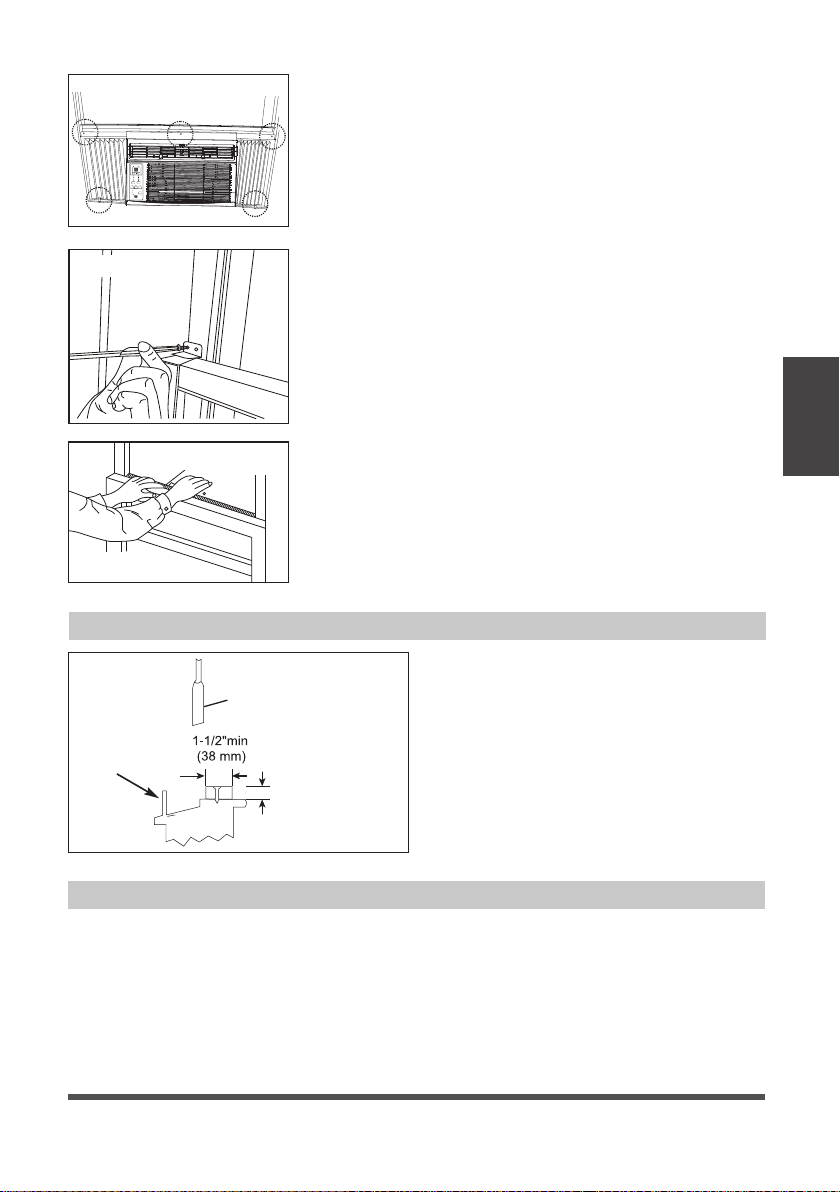
Page 45
Hoja
Ventana de
tormenta,
marco u otra
obstrucción.
Aborda el grueso
según necesidad
para un paso
adecuado a alzar
y un largo umbral
entero. Sujetalo con
clavos o tornillos.
Fig. 11
Si AC esté bloqueado por la Ventana de Tormenta
Añada maderas como se muestra en
Fig. 11, o elimine la ventana de tormenta
antes del aire acondicionado.
Si el marco de la Ventana de Tormenta
debe permanecer, asegúrese de que
los agujeros de drenaje o ranuras no se
calafatea o se pinta cerrada.
El agua de lluvia acumulada o condensada
debe puede drenar.
Eliminar AC de la Ventana
• Apaga el AC y separalo con el suministro de energía.
• Retire el sello de lahoja de ventana y desenrosque el bloqueo seguro de la hoja.
• Retire los tornillos instalados a través el marco y bloqueo del marco.
• Cierre (deslice) los paneles laterales entre los marcos.
• Garre firme al aire acondicionado, levanta la hoja y eliminala con cuidado.
• Tenga cuidado no derramar el agua restante mientras levante la unidad desde la
ventana. Guarda las partes CON el aire acondicionado.
B2: Para ventanas de vinil-revestido:
Pase los tornillos de bloqueo de 1/2“ (12.7mm) a
través del cierre del marco y en el marco de la
ventana (Fig. 8B).
NOTE: Antes de conducir los tornillos, utilice un
taladro para perforar 5 orificios a través de los orificios
del cierre del marco y las extensiones del marco en la
hoja de la ventana como se muestra (Fig. 8B).
C. Para instalar la baja hoja inferior en un lugar correcto,
coloque bien el bloqueo de la hoja ángulo con
tornillos de 3/4” (19mm) o 1 /2” (12.7mm ) como se
muestra (Fig. 9).
FOAM SEAL
Fig. 10
Sello de espuma
Fig. 9
Energy
Saver
Timer
Sleep
ON | O
On O
Check
Filter
Temp | Timer
Low
Med
High
Cool
Dry
Fan
Fan
Mode
Auto
Auto
Fig. 8B
D. Corte el sello de espuma de la hoja de la ventana
y pongala en el lugar entre las hojas superiores y
inferiores. (Fig. 10).
Instrucciones
de Instalción

Page 46
Limpieza del Filtro de Aire
Limpieza del Gabinete
Almacenamiento en el Invierno
El filtro de aire debe ser revisado al menos una
vez al mes para ver si es necesario a limpiarlo.
Las atrapadas partículas en el filtro podrán
acumularse y causar una acumulación de
escarchas en las serpentinas de enfriamiento.
• Empuje la palanca de ventilación en la
posición de Cerrada Vent (en su caso). Abra
el panel frontal.
• Tomar el filtro por el centro y tire hacia arriba
y hacia fuera.
• Lave el filtro con un liquido detergente para
lavar platos, en agua caliente. Enjuague el
filtro. Suavemente sacuda el exceso de agua
del filtro. Asegúrese de que el filtro está
seco antes de volver. Si no, en lugar de lavar,
podría aspirar el filtro.
• Asegúrese de desconectar el AC para protegerlo de descarga eléctrica o incendio.
El gabinete y su frontera pueden ser limpiado por un paño libre de aceite o un
paño humedecido en agua caliente con liquido detergente para limpiar platos.
Enjuaquelo bien y séquelo.
• Nunca use limpiadores abrasives, ceras ni pulimento en el frente del gabinete.
• Asegúrese de quitar el agua en el paño antes de limpiar los controles. El exceso de
agua dentro o alrededor del control podría causar daños al AC.
• Enchufe el aparato.
CAUTION
Limpie su aire acondicionado de vez en cuando para mantenerlo en buen aspecto.
Asegúrese de desenchufar la unidad antes de limpiarla para evitar el riesgo de
cuña o incendio.
NOTA
Nunca usar el agua más caliente que 104°F (40°C) a limpiar el filtro de aire. Nunca
trata de operar la unidad sin el filtro.
Si va a almacenar el aire acondicionado durante el invierno, eliminelo de la ventana con mucho
cuidado según las instrucciones de instalación. Cubralo con plástico o vuelvalo en la caja.
Mantenimiento y Limpieza
Mantenimiento
y Limpieza
Energy
Saver
Sleep
ON
|
O
On
O
Check
Filter
Temp
|
Timer
Low
Med
High
Cool
Dry
Fan
Fan
Mode
Auto
Auto
Timer
Page 47
Antes de llamar al servicio, revisa esta lista. Le podría ahorrar tiempo y molestia. Esta
lista incluye las ocurrencias communes, los cuales no son resultado por un defecto del
hechura o los materiales de la fábrica.
Problema Solución
El aire
acondicionado
no funciona
Enchufe de pared desconectado. Presione el enchufe con mucha esfuerza en la toma
de corriente.
El fusible domestico estropeado o disyuntor abierto. Reemplace fusible por un
retardante o volver a encender el disyuntor.
Se desconecta el dispositivo de corriente. Presiona el botón RESET.
Se apague. Enciendalo.
El aire de la unidad
no es tan fría
La temperatura de la habitación está bajo 62°F (17°C). No empieza a enfriar hasta la
temperatura llega más que 62°F (17°C).
Los elementos del sensor de la temperatura detrás del filtro toca la serpentina fría.
Déjalo lejos de la serpentina fría.
Ajuste a una temperatura más baja.
El compresor para cuando cambia el modo. Espere 3 minutos despúes de elegir el
modo Frío.
El aire
acondicionado
enfria, pero la
habitación hace
calor – forma hielo
en la serpentina
fría detrás el frente
decorativo
La temperatura fuera está bajo 64°F (18°C). Para descongelar la serpentina, cambie al
modo FAN ONLY.
El filtro de aire podría ser sucio. Limpie el filtro. Consulte la sección del
Mantenimiento y Limpieza. Para descongelarlo, cambie al modo FAN ONLY.
El termostato ha ajustado demasiado frío durante su funcionamiento de la noche.
Para descongelarla, cambie al modo FAN ONLY. Despúes, elige la una temperatura
más alta.
El aire
acondicionado
enfria, pero la
habitación hace
mucho calor – no
forma hielo en la
serpentina fría
detrás
el frente decorativo
El filtro de aire podría ser sucio - aire limitado. Limpie el filtro. Consulte a la sección
del Mantenimiento y Limpieza.
Ha elegido una temperatura tan alta, elige una temperatura baja.
Ha puesto la rejillas direccionales incorrectamente. Ponga la rejilla en un lugar con
mejor distribución del aire.
La frontera de la unidad está cubierta con cortinas, persianas, muebles, etc. –
distribución de aire limitado. Elimine la obstrucción en la frontera de la unidad.
Se escape el aire frío por las puertas, ventanas, rejillas, etc. Cierre la puerta, ventana
o rejilla.
La uniadad funciona en una habitación caliente recientemente. Permitalo un plazo
de tiempo adicional para eliminar los calores guardados por las paredes, el techo,
el suelo o los muebles.
El aire
acondicionado
se enciende y
apaga rápidamente
Filtro de aire sucio - aire limitado. Limpie el filtro.
La temperatura fuera es demasiado alto. Elige la velocidad del FAN a una opción
más alto para traer más aires pasando por la serpentina fría.
Hace ruido cuando
la unidad enfria
El sonido del movimiento del aire es normal. Si hace tanto ruido, cambie a una
opción de FAN más baja.
La vibración de la ventana – mala instalación. Consulte las instrucciones de
instalación o consulte al instalador.
Soluciones de Problemas
Soluciones de
Problemas

Page 48
Problema Solución
El agua que gotea
INTERIOR cuando
unidad está
enfriando
La instalación incorrecta. Inclina acondicionador de aire ligeramente hacia el
exterior para permitir el drenaje del agua. Consulte las instrucciones de instalación -
consulte con el instalador.
El agua que gotea
EXTERIOR cuando
unidad está
enfriando
Unidad eliminar gran cantidad de humedad del ambiente húmedo. Esto es normal
durante días excesivamente húmedos.
Teledetección
desactivación
Antes de tiempo
(algunos modelos)
El control remoto no encuentra dentro del alcance. Coloque el control remoto dentro
de 20 pies & 180°, radio de la parte frontal de la unidad.
Señal de control remoto obstruido. Retire la obstrucción.
Habitación
demasiado fría
Ajuste la temperatura demasiado baja. Aumente la temperatura de la unidad.
Si su producto muestra el código de error como lo siguiente, por favor, llame a
nuestro numero gratuito de servicio: 1-866-646-4332 para obtener asistencia.
Soluciones de
Problemas

Page 49
Instrucciones del Control Remoto
Instrucciones
del Control
Remoto
UBICACIÓN DEL CONTROL REMOTO
Use el control remoto a una distancia de 16.4 pies (5 metros)
del acondicionador de aire, apuntándolo hacia el receptor.
La recepción se confirma con un pitido.
Manejo del Control Remoto
Reemplazando la Batería
CAUTION
• El acondicionador de aire no funcionará si cortinas,
puertas u otros materiales bloquean las señales del
control remoto a la unidad.
• Evite que el líquido se derrame en el control remoto. No
exponga el control remoto a la luz solar directa o al calor.
• Si el receptor de señal infrarroja de la unidad interior
está expuesto a la luz solar directa, es posible que el
acondicionador de aire no funcione correctamente.
Use cortinas para evitar que la luz del sol caiga sobre
el receptor.
• Si otros aparatos eléctricos reaccionan al control remoto,
mueva estos dispositivos o consulte a su distribuidor local.
WARNING
• La batería debe desecharse
adecuadamente. No cortocircuite ni
elimine en un incendio.
• Mantenga las baterías fuera del
alcance de los niños.
• No ingerir.
• Las baterías no recargables no deben
recargarse.
• Las baterías agotadas deben
eliminarse del producto.
16.4 ft (5 metros)
Energy
Saver
Timer
Sleep
ON
|
O
On
O
Check
Filter
Temp
|
Timer
Low
Med
High
Cool
Dry
Fan
Fan
Mode
Auto
Auto
Paso 1: Inserte una moneda verticalmente
en la ranura de la tapa de la batería y
gírela 45° en el sentido de las agujas del
reloj, asegurándose de que la ranura esté
alineada con el signo de “desbloqueo”
como se muestra a continuación y retire
la tapa de la batería.
Paso 3: Vuelva a colocar la tapa de la
batería, asegurándose de que la ranura de
la tapa de la batería esté alineada con el
signo de “desbloqueo”.
Paso 2: Instale la batería dentro del
control remoto, con el lado positivo (+)
hacia arriba.
Moneda
Tapa de
la Batería
Tapa de la Batería
Ranura
Ranura
Señal de bloqueo
Señal de
desbloqueo
Señal de
desbloqueo
Moneda
Señal de bloqueo
Batería
Positivo (+)
hacia arriba
Moneda
Moneda
Tapa de
la Batería
Tapa de
la BateríaRanura Ranura
Señal de bloqueo Señal de bloqueo
Señal de
desbloqueo
Señal de
desbloqueo
Inserte una moneda verticalmente en
la ranura y presiónela suavemente,
luego gire 45 ° en sentido antihorario,
asegurándose de que la ranura esté
alineada con el signo de “bloqueo” como
se muestra a continuación.

Page 50
Instrucciones
del Control
Remoto
Especificaciones de Control Remoto
Modelo RG15A4(B)/E
Voltaje nominal 3.0V (Batería de Litio CR2025)
El voltaje más bajo de la CPU que emite
la señal
2.4 V
Alcance de recepción de señal 16.4 ft (5 m)
Ambiente -5 °C ~ 60 °C (23°F ~ 140°F)
NOTES
• El diseño de los botones se basa en el modelo típico y puede variar ligeramente
del que usted compró.
• Todas las funciones descritas se realiza en la unidad. Si la unidad no tiene una
función, la unidad no responderá, si se presiona el botón correspondiente en el
control remoto.
• Cuando existan diferencias significativas entre las funciones u operaciones implícitas
en la ilustración del control remoto y las funciones reales descritas en el MANUAL
DEL USUARIO, prevalecerán las descripciones en el MANUAL DEL USUARIO.

Page 51
Botones de Función
Botón MODE
Presione este botón
para seleccionar el
modo de operación
deseado.
Botón TEMP UP
Presione este botón
para aumentar la
configuración de
temperatura interior.
Botón SPEED
Se usa para seleccionar
la velocidad del
ventilador deseada.
Botón SLEEP Button
Presione este botón
para activar el modo
Sleep. Esta función
solo está disponible
en modo FRÍO
o AUTOMÁTICO
y mantendrá la
temperatura más
cómoda para usted
mientras ahorra
energía. Para obtener
más información,
consulte “Operación
en modo SLEEP”
en “MANUAL DEL
USUARIO”.
Botón ENERGY SAVER
Presione este botón
para activar el modo
de ahorro de energía.
Presiónelo nuevamente
para detener la función
(en algunos modelos).
Botón TEMP DOWN
Presione este botón
para disminuir la
configuración de
temperatura interior.
Botón TIMER
Presione este botón
para activar el
programa “Auto Start”
o “Auto Stop”.
Botón ON/OFF
La operación se inicia
cuando se presiona
este botón y se detiene
cuando se presiona el
botón nuevamente.
NOTE: La
unidad iniciará
automáticamente
el modo de Ahorro
de Energía en los
modos Enfriamiento,
Deshumidificación y
Automático.
Botón ONE TOUCH
Presione este botón
y el sistema cambiará
automáticamente a
funcionamiento FRÍO
con la velocidad
del ventilador
automático y un
ajuste de temperatura
de 26°C / 80°F.
Cualquier programa
de configuración
del temporizador se
cancelará.
Instrucciones
del Control
Remoto

Page 52
Cómo usar los Botones
OPERACIÓN EN MODO AUTO
Asegúrese de que la unidad esté enchufada y de
que haya energía disponible.
1. Presione el botón ON / OFF para encender el
aire acondicionado.
2. Presione el botón MODE para seleccionar Auto.
3. Presione el botón TEMP UP (+) / DOWN (-)
para establecer la temperatura deseada.
OPERACIÓN EN MODO ENFRIAMIENTO /
VENTILACIÓN
Asegúrese de que la unidad esté enchufada y de
que haya energía disponible.
1. Presione el botón ON / OFF para encender el
aire acondicionado.
2. Presione el botón MODE para seleccionar el
modo Cool (enfriamiento) o Fan (ventilación).
3. Presione el botón TEMP UP (+) / DOWN (-)
para establecer la temperatura deseada.
4. Presione el botón FAN para seleccionar la
velocidad del ventilador.
NOTES
1. En el modo Automático, el aire acondicionado
puede elegir lógicamente el modo (Enfriamiento
o Ventilación) y detectando la diferencia entre la
temperatura ambiente real de la habitación y la
temperatura establecida en el control remoto.
2. En el modo automático, no puede ajustar la
velocidad del ventilador. Como se controla
automáticamente.
3. Si el modo automático no es cómodo para
usted, el modo deseado puede seleccionarse
manualmente.
NOTES
La temperatura no se puede cambiar en el modo
Ventilación.
1
3
2
3
4
33
1 2
Instrucciones
del Control
Remoto

Page 53
OPERACIÓN EN MODO DESHUMIDIFICACIÓN
Asegúrese de que la unidad esté enchufada y de
que haya energía disponible.
1. Presione el botón ON / OFF para encender el
aire acondicionado.
2. Presione el botón MODE para seleccionar
Deshumidificación.
3. Presione el botón TEMP UP (+) / DOWN (-)
para establecer la temperatura deseada.
OPERACIÓN DEL TIMER
Presione el botón TIMER para iniciar el programa de
configuración Auto-start y Auto-stop de la unidad.
Para establecer el tiempo de inicio / parada
automática.
1. Presione el botón TIMER, cuando el indicador
TIMER ON se muestre en el LED del
acondicionador de aire, indica que se inició el
programa de configuración Auto Start. Cuando
el indicador TIMER OFF se visualiza en el LED
del acondicionador de aire, indica que se inició
el programa de ajuste Auto Stop.
2. Presione o mantenga presionada la tecla TEMP
ARRIBA (+) / ABAJO (-) para cambiar la hora
automática. El control contará hacia atrás el
tiempo restante hasta el inicio / parada.
3. El tiempo seleccionado se registrará en
5 segundos y el acondicionador de aire
retrocederá automáticamente para mostrar la
configuración de temperatura anterior.
4. ENCENDER o APAGAR la unidad en cualquier
momento cancelará la función del Timer.
NOTES
Para cancelar la configuración del TIMER, presione
el botón del TIMER y presione o mantenga
presionado TEMP UP (+) / DOWN (-) hasta que se
muestre 0 horas en el LED del aire acondicionado.
NOTES
En el modo Deshumidificación, no puede ajustar
la velocidad del ventilador, ya que se controla
automáticamente.
1
3
2
3
1
22
Instrucciones
del Control
Remoto

Page 54
OPERACIÓN COMBINADA DEL TIMER
(Configuración del Timer ON y OFF simultáneamente)
AUTO STOP >AUTO START
(Encendido > Apagado > Iniciar la operación)
Esta función es útil cuando desea detener el aire
acondicionado después de acostarse y volver a
encenderlo por la mañana cuando se despierta o
cuando regresa a casa.
Ejemplo:
Para detener el aire acondicionado 2 horas
después de la configuración y volver a encenderlo
10 horas después de la configuración.
1. Presione el botón TIMER hasta que aparezca
el indicador TIMER OFF en el LED del
acondicionador de aire.
2. Use el botón TEMP UP (+) / DOWN (-) para
mostrar “2.0” en el LED del acondicionador de
aire.
3. Presione el botón TIMER nuevamente para
mostrar el TEMPORIZADOR APAGADO en el
LED de la unidad.
4. Use el botón TEMP UP (+) / DOWN (-) para
mostrar “10” en el LED de la unidad.
5. Espere 5 segundos hasta que aparezca la
visualización anterior en el LED.
AUTO START > AUTO STOP
(Apagado > Iniciar > Parar la operación)
Esta función es útil cuando desea encender el aire
acondicionado antes de despertarse y detenerlo
después de que sale de la casa.
Ejemplo:
Para encender el aire acondicionado 5 horas
después de la configuración, y detenerlo 8 horas
después de la configuración.
1. Presione el botón TIMER hasta que se
muestre el indicador TIMER ON en el LED del
acondicionador de aire.
2. Use el botón TEMP UP (+) / DOWN (-) para
visualizar “5.0” en el LED del acondicionador de
aire.
3. Presione el botón TIMER nuevamente para
mostrar el TEMPORIZADOR APAGADO en el
LED de la unidad.
4. Utilice el botón TEMP UP (+) / DOWN (-) para
visualizar “8.0” en el LED de la unidad.
5. Espere 5 segundos hasta que aparezca la
visualización anterior en el LED.
1
22
Instrucciones
del Control
Remoto

Page 55
OPERACIÓN DEL ENERGY SAVER
En este modo, el ventilador continuará
funcionando durante 3 minutos después de que
el compresor se apague. Luego, el ventilador
enciende en ciclos durante 2 minutos a intervalos
de 10 minutos hasta que la temperatura de la
habitación está por encima de la temperatura
establecida, en ese momento el compresor se
vuelve a encender y se reanuda el enfriamiento.
NOTES
• El diseño del botón se basa en un modelo típico y puede variar ligeramente del real que compró.
• Todas las funciones descritas también se pueden lograr usando el panel de control de
la unidad. Si la unidad no tiene esta función, no habrá una operación correspondiente al
presionar el botón correspondiente en el control remoto.
• Cuando existan diferencias significativas entre las funciones u operaciones implícitas en la
ilustración del control remoto y las funciones reales descritas en el MANUAL DEL USUARIO,
prevalecerán las descripciones en el MANUAL DEL USUARIO.
• El dispositivo puede cumplir con las regulaciones nacionales locales. En Canadá, debe
cumplir con CAN ICES-3 (B) / NMB-3 (B). En EE. UU., Este dispositivo cumple con la parte
15 de las Reglas de la FCC. El funcionamiento está sujeto a las dos condiciones siguientes:
(1) Este dispositivo no puede causar interferencias perjudiciales, y (2) este dispositivo debe
aceptar cualquier interferencia recibida, incluidas las interferencias que puedan causar un
funcionamiento no deseado.
• Este equipo ha sido probado y se encontró que cumple con los límites para un dispositivo digital
de Clase B, de acuerdo con la parte 15 de las Reglas de la FCC. Estos límites están diseñados
para proporcionar una protección razonable contra interferencias dañinas en una instalación
residencial. Este equipo genera, usa y puede irradiar energía de radiofrecuencia y, si no se instala
y usa de acuerdo con las instrucciones, puede causar interferencia dañina a las comunicaciones
de radio. Sin embargo, no hay garantía de que la interferencia no ocurra en una instalación en
particular. Si este equipo causa interferencias perjudiciales para la recepción de radio o televisión,
lo cual puede determinarse encendiendo y apagando el equipo, se recomienda al usuario que
intente corregir la interferencia mediante una o más de las siguientes medidas:
- Reorientar o reubicar la antena receptora.
- Aumente la separación entre el equipo y el receptor.
- Conecte el equipo a una toma de corriente en un circuito diferente al que está conectado
el receptor.
- Consulte con el distribuidor o un técnico experimentado en radio/TV para obtener ayuda.
- Los cambios o modificaciones no aprobados por la parte responsable del cumplimiento
pueden anular la autoridad de los usuarios para operar el equipo.
1
Instrucciones
del Control
Remoto

Page 56
Garantía de Acondicionador de Aire
Su producto está protegido por esta garantía:
El servicio de garantía debe ser obtenido de Servicios al Consumidor de Midea o prestador de servicio autorizado Midea.
Garantía
• Garantía limitada de uno año a partir de la fecha de compra original.
Midea, a través de sus servicios autorizados, deberá:
• Pagar todos los costos de reparación o sustitución de las piezas de este aparato que demuestren que estén
defectuosas en materiales o hechura.
El consumidor será responsable de:
• Costos de diagnóstico, remoción, transporte y reinstalación requeridos por el servicio.
• Los costos de las llamadas de servicio que son el resultado de ítems indicados en el RESPONSABILIDADES
NORMALES DEL CONSUMIDOR **
Las piezas de reemplazo Midea se utilizarán y garantizarán sólo por el período restante de la garantía original.
RESPONSABILIDADES NORMALES DEL CONSUMIDOR **
Esta garantía sólo se aplica a los productos de uso doméstico normal, y el consumidor es responsable de los ítems
listados siguientes:
1. Uso correcto del aparato de acuerdo con las instrucciones proporcionadas con el producto.
2. Mantenimiento rutinario y limpieza necesaria para mantener el buen estado de funcionamiento.
3. Instalación correcta por un profesional de servicio autorizado de acuerdo con las instrucciones proporcionadas
con el aparato y de acuerdo con todos los códigos locales de plomería, electricidad y/o gas.
4. Conexión adecuada a una fuente de alimentación conectada a tierra de suficiente voltaje, reemplazo de fusibles
quemados, reparación de conexiones aflojadas o defectos en el cableado doméstico.
5. Gastos para facilitar el acceso al aparato para el servicio.
6. Daños después de la instalación.
EXCLUSIONES
Esta garantía no cubre lo siguiente:
1) Fallo causado por daño a la unidad mientras en su posesión (diferente de los daños causados por defecto o mal
funcionamiento), mediante su instalación inadecuada, o por uso irracional de la unidad, incluyendo, pero no limitado
a, la falta de mantenimiento razonable y necesario o de seguir las instalaciones escritas y el manual de instrucciones.
2) Daños causados por servicios realizados por personas que no sean prestadores de servicio autorizados Midea,
por uso de piezas que no sean piezas de repuesto Midea, obtenidos desde personas que no sean de servicios al
Consumidor Midea, o por causas externas como abuso, mal uso, suministro eléctrico inadecuado o casos fortuitos.
3) Si la unidad se pone a usos comerciales, de negocios, de alquiler u otro uso o aplicación que no sea para uso del
consumidor, no hacemos ninguna garantía, expresa o implícita, incluyendo, pero sin limitado a, cualquier garantía
implícita de comerciabilidad o idoneidad para un uso o propósito particular.
4) Productos sin números de serie originales o productos que tengan números de serie que se han alterado o no se
puede determinar fácilmente.
Nota: Algunos estados no permiten la exclusión o limitación de daños incidentales o consecuentes. Así que esta
limitación o exclusión no se aplique a usted.
SI USTED NECESITA SERVICIO
Conserve la factura de compra, la boleta de entrega o cualquier otro registro de pago apropiado.
La fecha en la factura estableció el período de garantía si requerir servicio.
Si el servicio se lleva a cabo, es su mejor interés para obtener y conservar todos los recibos.
Esta garantía escrita le otorga derechos legales específicos. Usted también puede tener otros derechos que varían de
estado a estado.
El servicio bajo esta garantía debe ser obtenido mediante los siguientes pasos, en orden:
1) Póngase en contacto con Servicios al Consumidor Midea o un prestador de servicio autorizado Midea a 1 866 646 4332.
2) Si hay una pregunta sobre dónde obtener servicio, póngase en contacto con nuestro departamento de relaciones
de consumidor.
Garantía y Politica de Devolución
Garantía

POLITICA DE DEVOLUCION
Preguntas sobre la instalación o el funcionamiento
producto Arctic King?
Sitodavía necesita asistencia, por favor llame al Atención
al Cliente en 1-866-646-4332.
Tenga disponible su recibo de compra número de serie
y el múmero de modelo del producto cuando llame.
El producto podrá devolverse dentro de lo 90 días de
la compra con el recibo. Luego de los 90 días, el producto
está cubierto por la garantía limitada. Consulte la sección
de garantía en el manual de usuario para información.
Política de devolución
guarde su
comprobante
?