
TV Ears Dual Digital
User Manual
Voice Clarifying Circuitry
®

v1.10.2017.6.DDD
TV Ears logos, pictures, design, and content © TV Ears, Inc. All rights reserved.
Keep these instructions in a safe place for future reference.

Table of Contents
Important Safety Information................................
Introduction........................................................
Product Diagram..................................................
Package Contents................................................
Ideal TV Ears Placement.......................................
Installation
Step 1 - Place & Power the Transmitter....................
Step 2 - Optical Digital Installation.........................
Alternative Installation Method 1 - RCA Analog
Installation.........................................................
Alternative Installation Method 2 - 3.5mm Cord
Analog Installation...............................................
Alternative Installation Method 3 - Coaxial Digital
Installation.........................................................
Step 3 - Charge the Headset..................................
Custom Fit the Headset.........................................
Using the System & Features.................................
Caring for your Product.........................................
Troubleshooting...................................................
Before You Call....................................................
Appendix
Warranty and Return Information...........................
Manufacturer Declarations.....................................
Technical Specications.........................................
Other Products.....................................................
Accessories.........................................................
Contact Information........
......................................
2
3
4
6
7
9
10
11
12
13
14
16
18
20
21
23
24
25
26
27
28
Rear Cover

TV Ears, Inc. asks that you read all instructions completely and heed
all warnings to ensure proper handling and prevent any injuries.
Failure to act in accordance with TV Ears, Inc.’s instructions can lead to
physical harm or injury.
For safety purposes, do not deface the prongs on the AC adapters. If
the provided plug does not t into your outlet, purchase the correct
adapter or consult an electrician for further assistance.
Only use attachments and accessories specied by TV Ears, Inc. with
your TV Ears system.
Warning: To prevent possible hearing loss, do not listen at high
volume levels for long periods of time.
Warning: To reduce the risk of re or electric shock, do not expose
the TV Ears product to rain or moisture. The TV Ears product should
not be exposed to dripping or splashing liquids. Do not place objects
lled with liquid such as vases on or near the TV Ears product.
Warning: Keep batteries out of reach of children. Discard the batteries
appropriately and carefully. If swallowed, call The National Button
Battery Ingestion Hotline at 1-202-625-3333.
Warning: The magnetic eld emitted by the TV Ears speakers is
minimal. When used as indicated, TV Ears headsets should not cause
magnetic interference with pacemakers or internal debrillators. The
magnetic eld strength of the speakers is less than 1 Gauss when
within 1 inch (3 cm) of the pacemaker or internal debrillator. It is
recommended that the user keep the ear tips at least 1 inch away
from any pacemaker or internal debrillator. If you have concerns, we
recommend you contact your physician.
! Important Safety Information
2
For assistance, call 866-611-9934. See Page 21

3
Introduction
Thank you for purchasing from TV Ears and welcome to the
family! This User Manual is designed to give you the most
information possible and answer all the questions you might
have when installing and using your new product.
In this manual, we will demonstrate the ideal set up as well
as show you how to successfully install your product with
illustrated step-by-step instructions. You will learn what each
piece is used for, how to use all of the features available to
you, and how to troubleshoot the issues most commonly
experienced by other users. We aim to cover any pitfalls you
might experience, and give you tips for best practices.
Towards the back of the manual, you will nd information
on our warranty, technical specications of your product,
and support contact information just in case you have any
questions.
Again, we welcome you to the TV Ears family and wish you
happy TV listening!
For assistance, call 866-611-9934. See Page 21
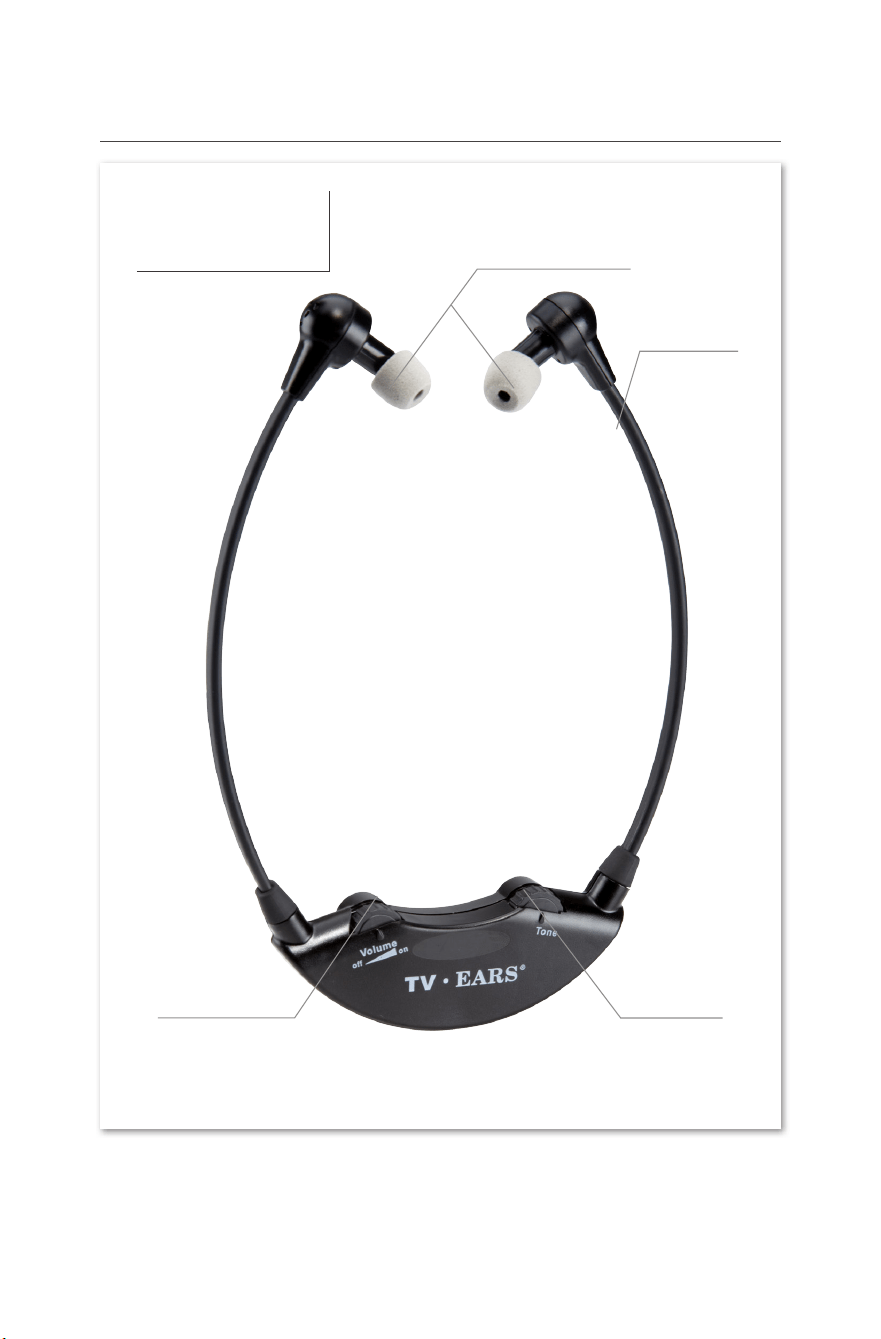
Product Diagram
Headset
Bow Arm
Tone Dial
On/Off &
Volume Dial
Foam Ear Tips
4
For assistance, call 866-611-9934. See Page 21
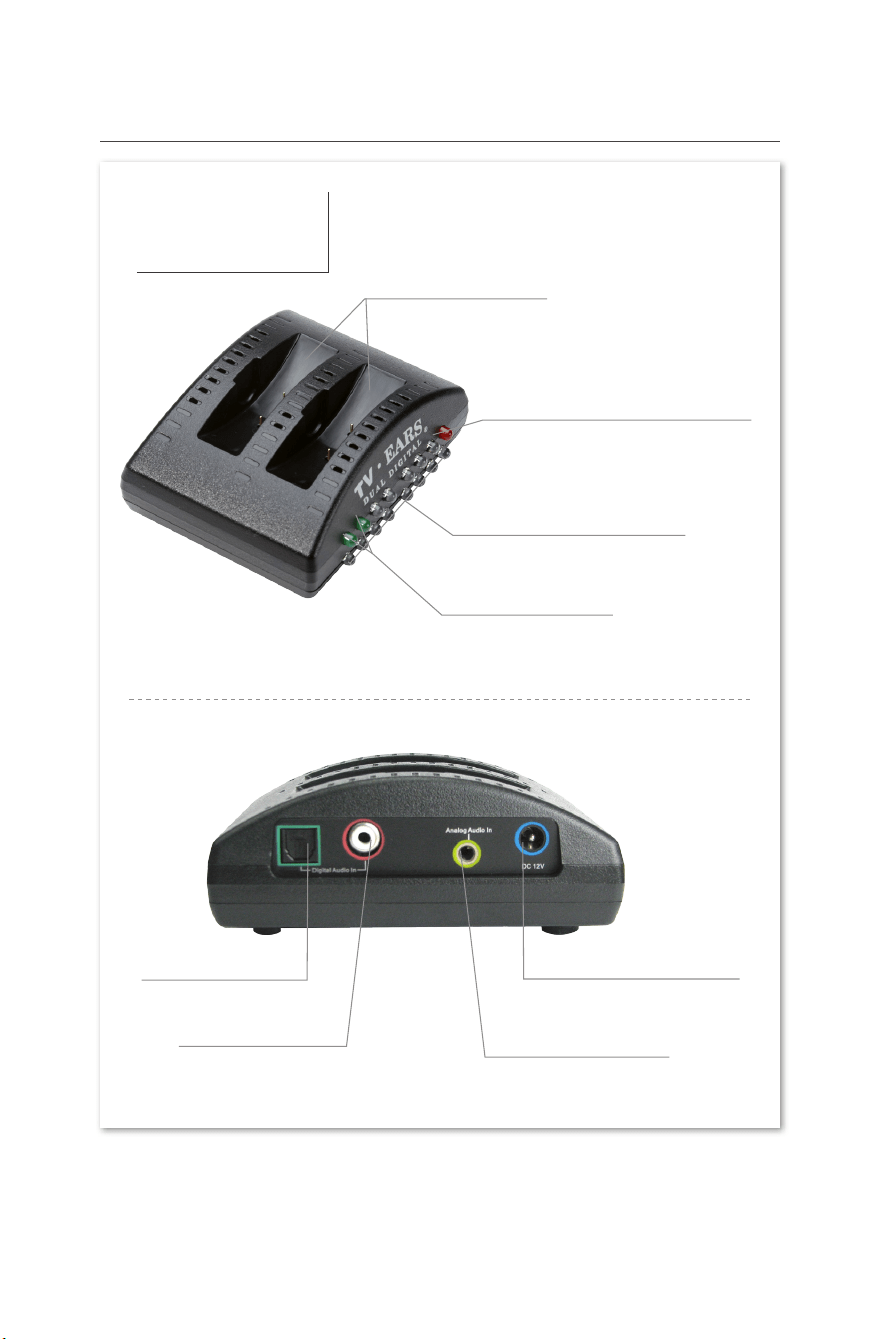
Transmitter
Top/Front
Back
Product Diagram continued...
5
Charging Cradles
Infrared Signal Lights
Charging Lights
Digital Connectivity Light
DC 12V Power Port
Analog Audio In
Optical Digital
Coaxial Digital
For assistance, call 866-611-9934. See Page 21
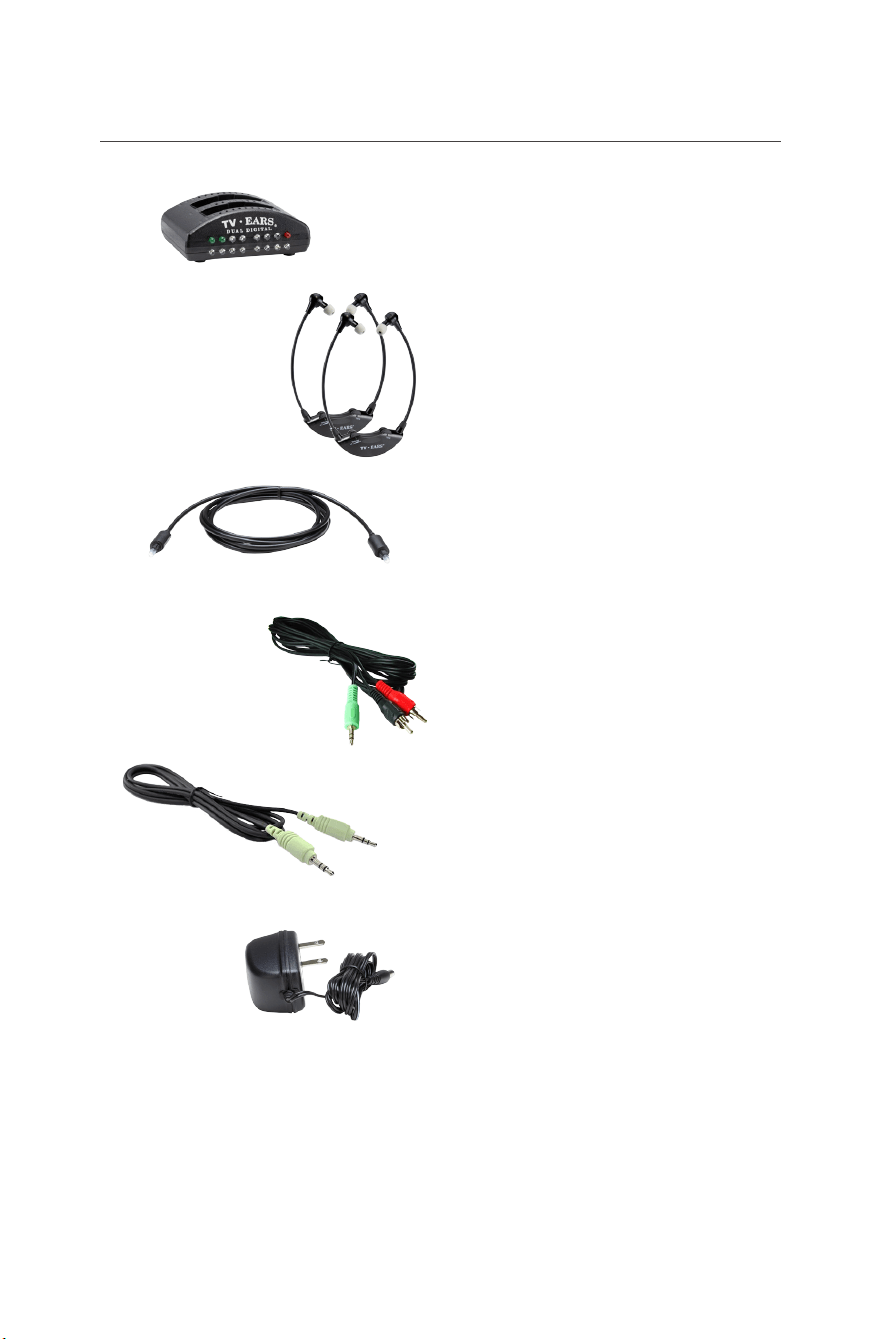
Package Contents
5.0 Dual Digital Transmitter
Two 5.0 Wireless Headsets
Opt
ical Digital Audio Cord
RCA Analog Audio Cord
3.5mm Analog Audio Cord
AC Power Adapter
6
For assistance, call 866-611-9934. See Page 21
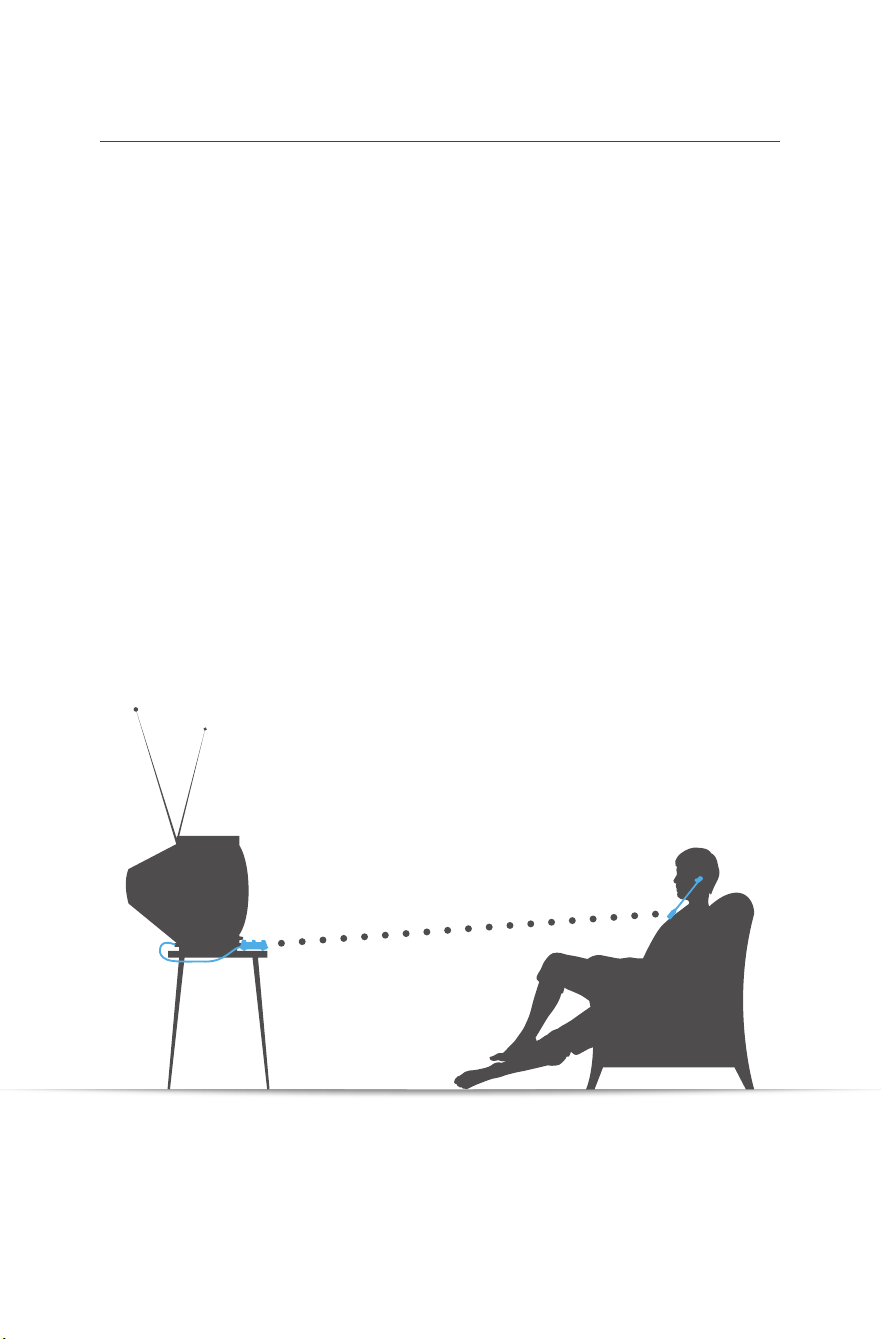
Ideal TV Ears Placement
Every wireless TV Ears system utilizes infrared technology to
send audio signals from the transmitter to the headset.
Infrared technology requires a direct line-of-sight from the
transmitter to the receiver (or headset) to successfully transmit
audio signals. Therefore, when installing any wireless TV Ears
system, you will have to be sure the transmitter has a direct
line-of-sight with the headset when the headset is in use.
For the best results, the transmitter should be placed on a at
surface that is three to ve feet from the ground and should be
facing directly towards the seating area where the headset will
be used. Make sure that nothing is blocking the signal between
the transmitter and headset (ie. books, newspapers, etc.).
7
For assistance, call 866-611-9934. See Page 21

Installation
pgs. 9-14
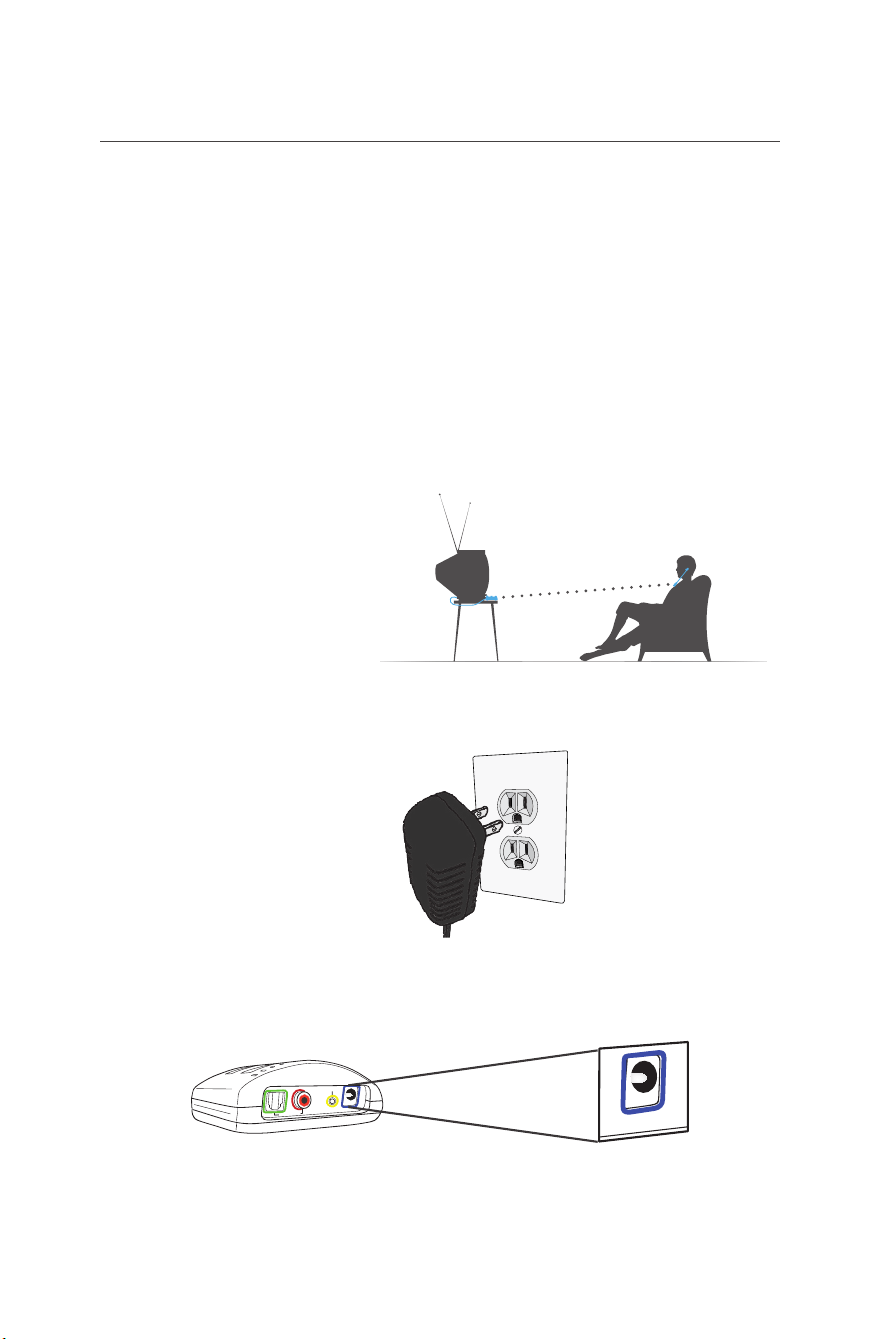
Step 1 - Place & Power the Transmitter
This step explains where to place the transmitter for the best
performance as well as how to power the transmitter.
The infrared diodes on the transmitter must be in direct line-
of-sight with the headset when using the system for best
performance. There cannot be anything blocking the direct signal,
otherwise there will be no audio received and no sound heard.
Place the transmitter on a at surface that is 3 to 5 feet
above the ground. Be sure it is pointed to the seating
area where the headset will be used.
Plug the AC adapter into a standard electrical outlet or
surge protector (a surge protector is recommended to
protect against power surges).
Plug the end of the AC adapter into the port labeled
“12V” on the back of the transmitter. The correct port has
a blue border around it.
1
2
3
Digital Audio In
Analog Audio In
12V
12v
Power Port
9
For assistance, call 866-611-9934. See Page 21
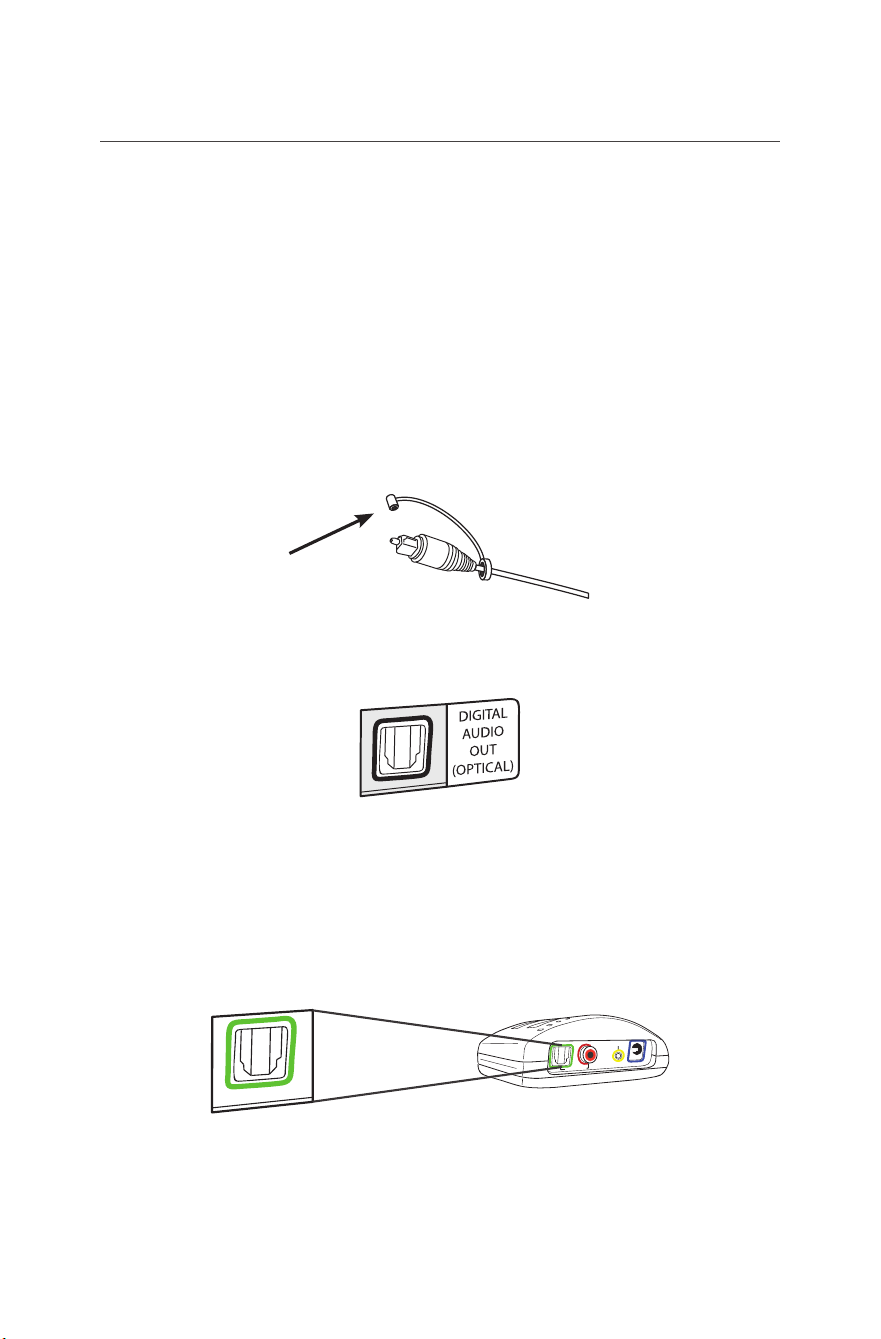
Step 2 - Optical Digital Installation
This step will instruct you on how to connect the TV Ears
transmitter to your television, satellite, or cable box using an
optical digital audio cord.
• If you cannot get to the back of your TV, you can also use these
instructions to install the system to your cable or satellite box.
• Be aware that the “Audio” ports on the front of your television are
typically “Audio In” ports and will not send audio to your headset.
Remove the plastic caps from both ends of the optical
digital audio cord.
Plug either end of the optical audio cord into the “Digital
Audio Out (Optical)” port on the back of the TV.
Plug the other end of the optical digital audio cord into
the port on the back of the transmitter labeled “Digital
Audio In”. The correct port has a green border around it. You
should hear and feel a ‘click’ when it has been pushed in all the
way.
Optical
Digital Audio
Digital Audio In
Analog Audio In
12
V
1
2
3
10
For assistance, call 866-611-9934. See Page 21
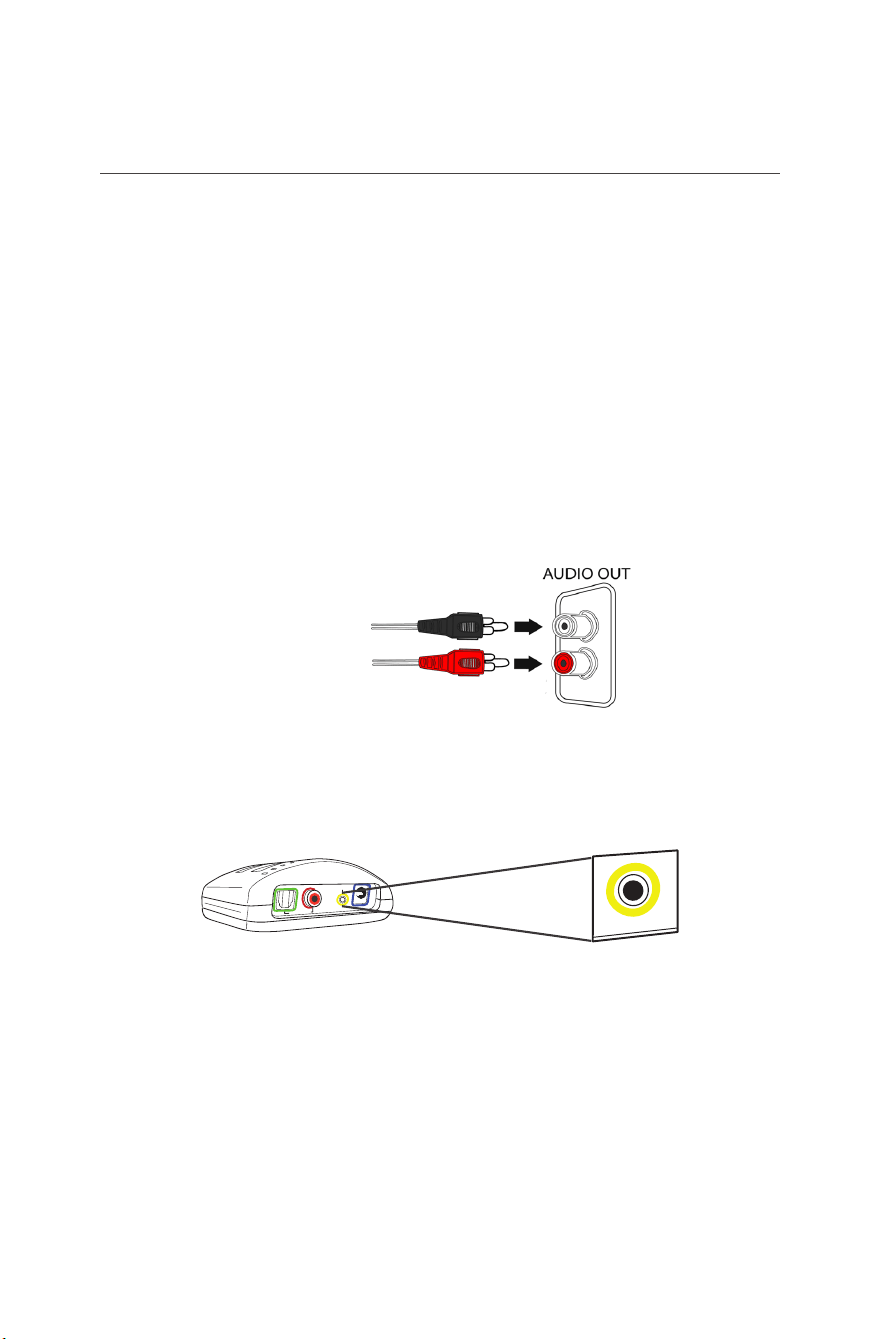
This step is an alternative to Step 2 on page 10.
This step will explain how to connect the TV Ears transmitter
to your television, satellite, or cable box using an RCA analog
audio cord.
• If you cannot get to the back of your TV, you can also use these
instructions to install the system to your cable or satellite box.
• Be aware that the “Audio” ports on the front of your television are
typically “Audio In” ports and will not send audio to the headset.
• Audio ports labeled “L” & “R” will also not send audio to the
headset.
Plug the dual end of the audio cord (red and black ends)
into the analog “Audio Out” ports on the back of the
television, satellite, or cable box.
Plug the single end of the audio cord into the port labeled
“Analog Audio In” on the back of the transmitter. The
correct port has a yellow border around it.
• TV Ears systems are mono systems. This means that you will still
hear sound through both the left and right earpieces even if you
only have the left or right audio connected.
• Your TV’s audio settings may be set to “variable” or “xed”. If you
want to be able to control your TV volume level separate from
your TV Ears volume level, you will need to make sure your TV is
set to “xed”. Contact your TV manufacturer for assistance.
1
2
Digital Audio In
Analog Audio In
12
V
3.5mm
Analog Audio
11
For assistance, call 866-611-9934. See Page 21
ALTERNATIVE INSTALLATION METHOD 1
RCA Analog Installation
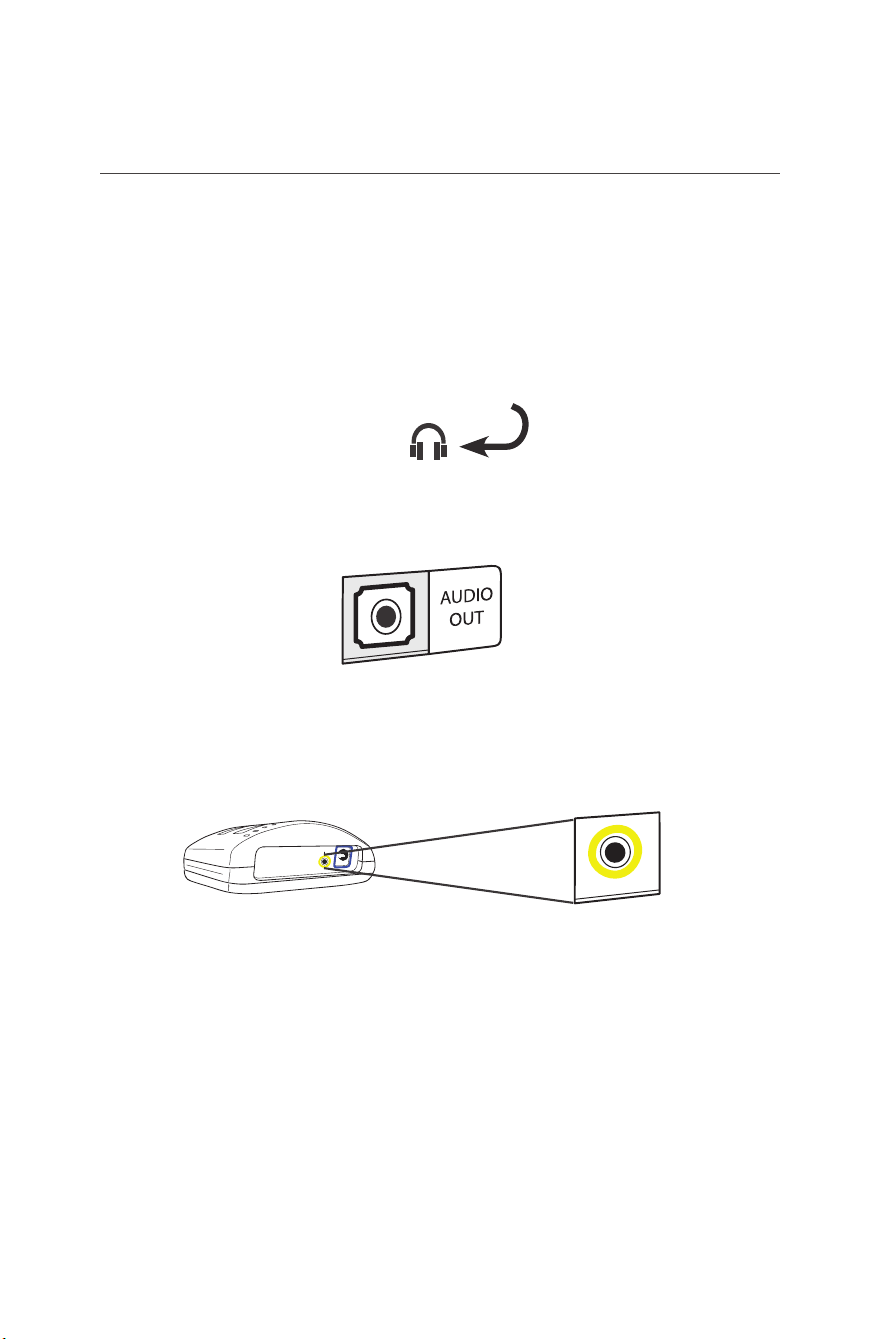
This step is an alternative to Step 2 on page 9. This step
will explain how to connect the TV Ears transmitter to your
television, satellite, or cable box using a 3.5mm analog audio
cord.
• If you connect the 3.5mm audio cord to the Headphone port on
your TV, your TV Ears will still function properly, but the sound to
your television speakers will be muted. The port is usually labeled
with an icon that looks like the following:
Plug one end of the 3.5mm audio cord into the “Audio
Out” port on the back of the television, satellite box, or
cable box.
Plug the other end of the audio cord into the port labeled
“Analog Audio In” on the back of the transmitter. The
correct port has a yellow border around it.
• Your TV’s audio settings may be set to “variable” or “xed”. We
recommend that you set your audio settings to “xed” for better
audio quality when using this installation option. If you want to be
able to control your TV volume level separate from your TV Ears
volume level, you will need to make sure your TV is set to “xed”.
Contact your TV manufacturer for assistance.
1
2
Analog Audio In
12
V
3.5mm
Analog Audio
12
For assistance, call 866-611-9934. See Page 21
ALTERNATIVE INSTALLATION METHOD 2
3.5mm Cord Analog Installation
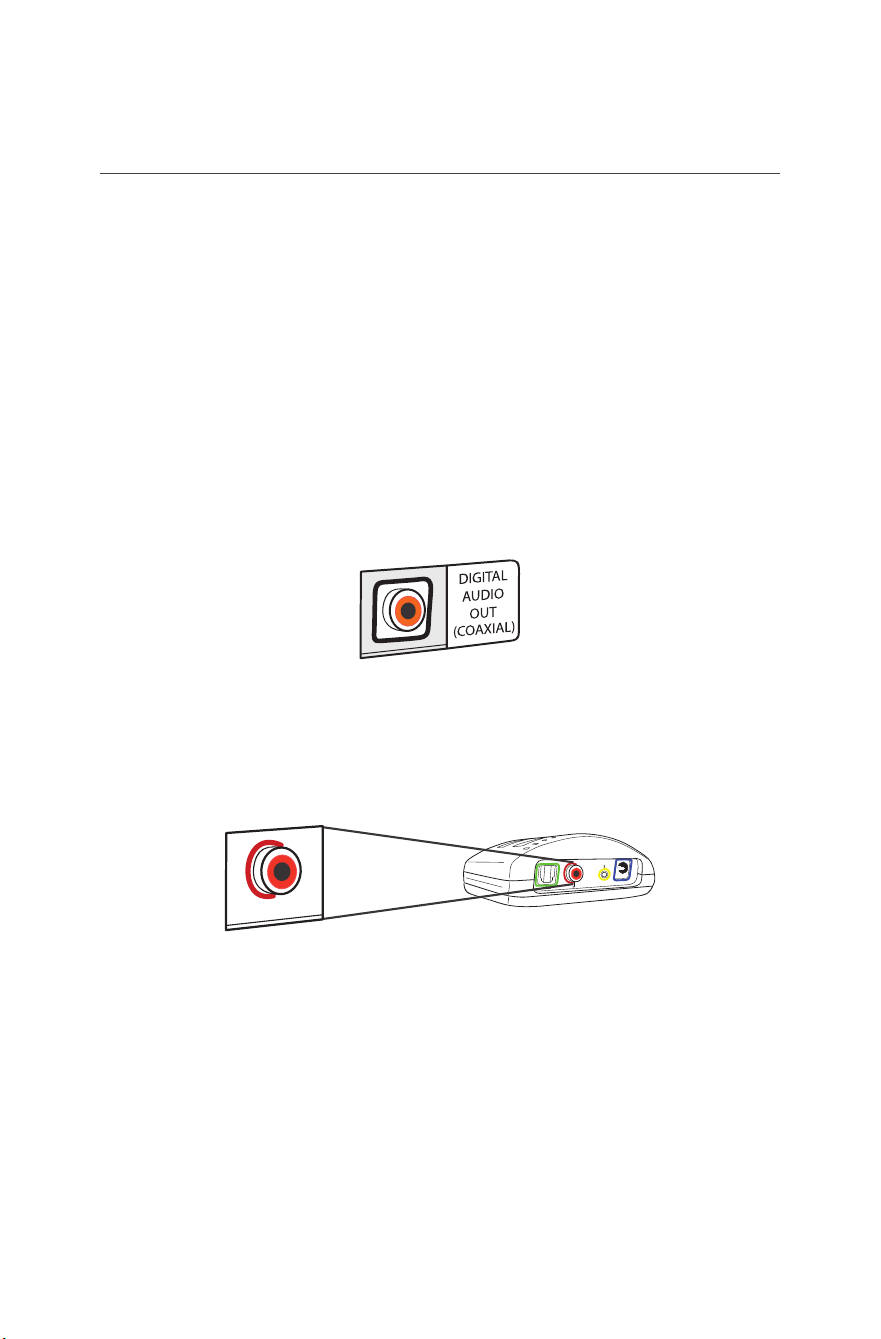
This step is an alternative to Step 2 on page 9. This step
will explain how to connect the TV Ears transmitter to your
television, satellite, or cable box using a coaxial digital audio
cord (coaxial cord is NOT included).
• If you cannot get to the back of your TV, you can also use these
instructions to install the system to your cable or satellite box.
• Be aware that the “Audio” ports on the front of your television are
typically “Audio In” ports and will not send audio to your headset.
Plug one end of the coaxial digital audio cord into the
“Digital Audio Out (Coaxial)” port on the back of the TV.
Plug the other end of the coaxial digital audio cord into
the port on the back of the transmitter labeled “Digital
Audio In”. The correct port has a red border around it.
• Your TV’s audio settings may be set to “variable” or “xed”. If you
want to be able to control your TV volume level separate from
your TV Ears volume level, you will need to make sure your TV is
set to “xed”. Contact your TV manufacturer for assistance.
Digital Audio In
Analog Audio In
12
V
Coaxial
Digital Audio
1
2
13
For assistance, call 866-611-9934. See Page 21
ALTERNATIVE INSTALLATION METHOD 3
Coaxial Digital Installation
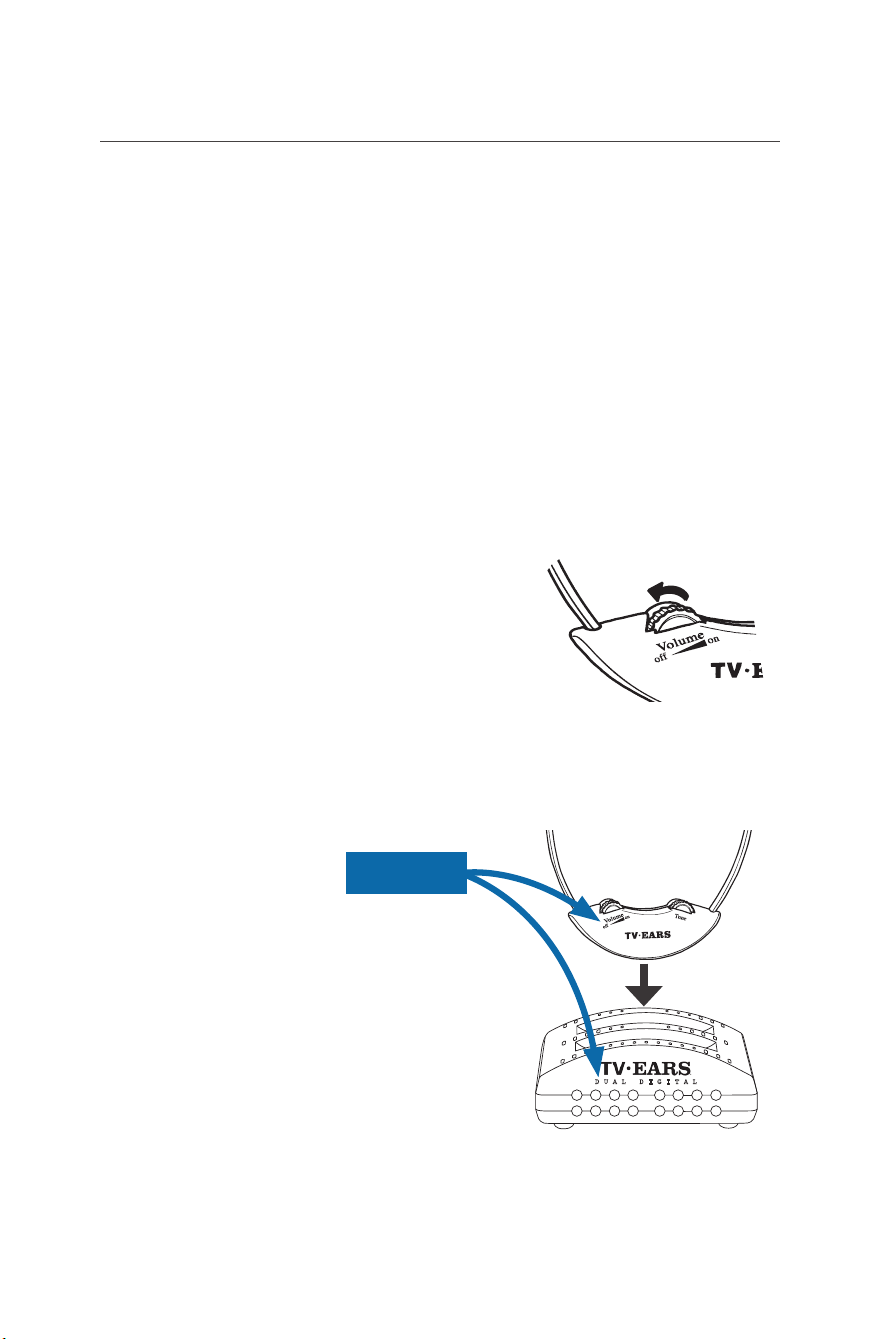
Step 3 - Charge the Headset
This step will instruct you on how to appropriately charge the
headset to make sure you’re getting the best use possible.
• Although every TV Ears headset comes with enough of a battery
charge to perform an initial test of the system upon installation, a
FULL CHARGE OF AT LEAST 14 HOURS BEFORE FIRST USE is
recommended to help prolong the lifespan of the battery.
• The TV Ears headset will last around 6 hours on a full charge,
but will last a lesser or greater amount of time depending on the
average volume level of the headset.
Turn the volume knob of the headset to the “off” position.
You should hear and feel a ‘click’ when the knob has been
turned all the way to the “off” position.
Place the headset into the transmitter’s charging cradle
and be sure the front of the headset is facing towards the
front of the transmitter. The TV Ears logo is visible on both the
front of the headset and the front of the transmitter.
Firmly press down on the
headset when it is in the cradle
until it is secure. The headset should
slightly stick in the cradle when you
try to remove it. The charging light
will illuminate when it is in the correct
position.
1
2
3
DUAL DIGITAL
FRONT
14
For assistance, call 866-611-9934. See Page 21

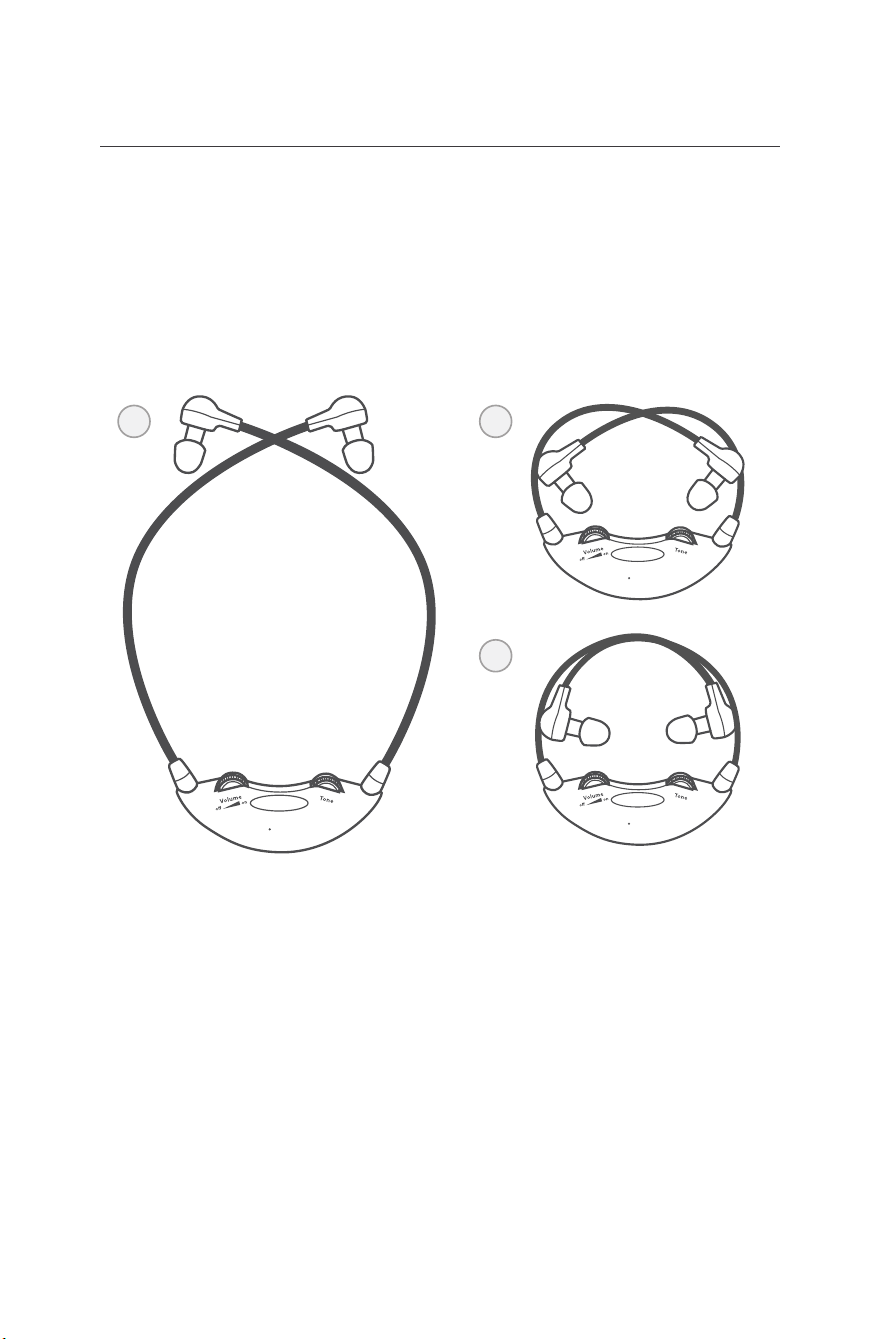
All TV Ears headsets should be adjusted prior to rst use
to t the user comfortably.
Follow these directions to adjust the width of the headset
for your comfort.
CUSTOM FIT YOUR HEADSET
1. Hold the ear tip of each side with your rst two ngers
and thumb and then “crisscross” the arms.
2.
Gently pull the arms toward the body of the headset so
that the ear tips are touching the volume and tone knobs.
3.
Wrap one are under the other like an overhand knot.
Allow headset to charge overnight in this position.
Repeat this process as often as necessary to achieve
the desired t.
TV EARS
®
TV EARS
®
TV EARS
®
1 2
3
16
For assistance, call 866-611-9934. See Page 21
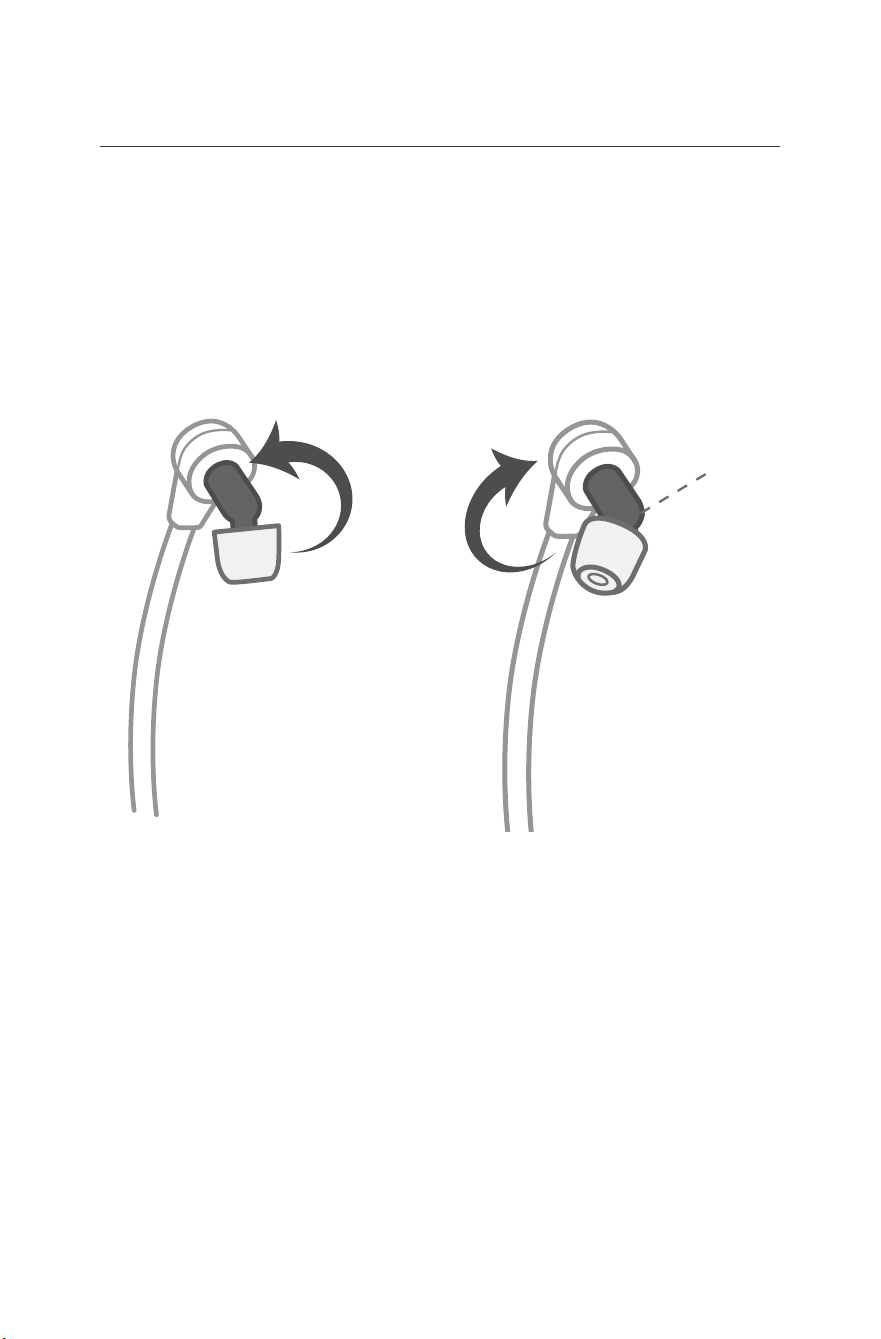
For best audio quality, we recommend rotating the ear tips into
different positions to align them with your ear canals.
Follow these directions to adjust the angle of the ear tips for your
comfort.
1.
Grasp the elbow (pictured above) with your thumb
and forenger.
2.
Rotate each elbow individually.
3. Repeat with small rotations in either direction if
receiving low or mufed sound.
CUSTOM FIT YOUR EAR TIPS
Elbow
17
For assistance, call 866-611-9934. See Page 21

Using the System & Features
The Headset
Putting the Headset On
Using both hands, gently separate the arms at the top by the
ear tips and place the earpieces into each ear.
Removing the Headset
Make sure the headset is completely turned off. Using both
hands, gently separate the arms at the top by the ear tips
removing the earpieces from your ears.
On/Off and Volume Control
To turn the headset on, rotate the volume dial towards the “on”
position and set the volume to your comfort level. To turn the
headset off, rotate the volume dial towards the “off” position
until you feel and hear a ‘click’. When you feel the ‘click’, this
means the headset is completely turned off and is ready to be
charged.
Tone Control
The tone dial allows you to control the amount of bass and
treble that is output by the headset. To adjust the tone, simply
turn the dial back and forth until you nd the balance that suits
your preference.
18
For assistance, call 866-611-9934. See Page 21

Using the System & Features continued...
The Transmitter
Charging Lights
There are two charging lights on the transmitter. They are the
two leftmost green lights on the front of the transmitter. When
a headset is charging in the front cradle, the left of the two
charging lights will illuminate. When charging a headset in the
back cradle, the right of the two charging lights will illuminate.
Digital Connectivity Light
The Digital Connectivity light is the rightmost light on the
front of the transmitter. This light will illuminate red when the
transmitter is correctly connected using the digital optical or
digital coaxial cords. The television station you are watching
must also be broadcasting a digital signal.
Infrared Lights
There are thirteen infrared lights located on the front of
the transmitter between the charging lights and the Digital
Connectivity light. These lights provide the transmission of
the audio signal from the transmitter to the headset. When
the transmitter is connected to power, these thirteen lights
will illuminate a dim red color. If one or more of these lights
is not illuminated, the bulbs may be burnt out and may cause
decreased transmission power, which can affect the range and
the quality of the audio signal. If one or more of these lights
are not illuminated, call our support line for assistance.
Refer to page 4 for a diagram of the product.
19
For assistance, call 866-611-9934. See Page 21

Caring for your Product
Do not use or submerge TV Ears products near water,
moisture, or other liquids.
Clean with a dry cloth.
Do not install near any heat sources such as radiators, heat
registers, stoves, or any other apparatus (including ampliers)
that produce heat.
Protect the power cord from being walked on or pinched
particularly at plugs, convenience receptacles, and the point
where the cord exits from the transmitter.
TV Ears recommends using a surge protector to protect your
product from power surges.
Refer all servicing to qualied service personnel. Servicing is
required when the TV Ears product has been damaged in any
way, such as when the power-supply cord is damaged, liquid
has been spilled on the product, objects have fallen into the
product, the product has been exposed to rain or moisture,
does not operate normally, has been dropped, cracked, or has
been broken.
20
For assistance, call 866-611-9934. See Page 21

FAQs & Troubleshooting
System Reset
If anything out of the ordinary is happening, we recommend
that you rst perform a system reset.
1) Unplug everything from the transmitter (Audio & Power).
2) Wait about 10 seconds then rmly reconnect all cords.
4) Place the transmitter 3 to 5 feet off the ground and away from
any obstructions.
5) Conrm the transmitter is receiving power by placing a headset
in the charging cradle and making sure the charging light
illuminates.
6) If you do not receive clear sound after the reset, please contact
our technical support department for further troubleshooting.
Why does my TV Ears mute when I mute the TV?
Fixed audio out will allow the television volume and TV Ears
volume to work independently from one another. Some
televisions have to be manually switched from the “Variable”
audio setting to the “Fixed” audio setting by using your TV
menu. Not all TVs have the ability to switch from a variable
to a xed audio out (consult your television manual or
manufacturer). When the TV is set to a “Variable” audio out
setting, the volume of the TV Ears headset will be the same
volume as the TV.
How do I charge the headset?
Turn the headset off (rotate the volume dial towards the “off”
position until you feel and hear a ‘click’) then rmly press it
into the charging cradle of the transmitter. Be sure the charging
light on the front of the transmitter illuminates. See Step 3 of
Installation.
What is the lifetime of the batteries?
The rechargeable battery is designed to last between 1 - 2
years depending on usage.
21
For assistance, call 866-611-9934. See Page 21

FAQs & Troubleshooting continued...
How can I connect my TV Ears to both my cable/satellite box
and DVD/VCR player at the same time?
You must install the system with the RCA analog audio cord
and split the cord to connect to both devices. To split the RCA
analog audio cord follow these steps:
1) Hold the red tip of the RCA Audio cord in one hand and the
black tip in the other then pull them apart to split the cord
down the middle like string cheese.
2) Connect the red end of the RCA Cord into the red audio out
port on the back of the rst device.
3) Connect the black end of the RCA cord into the white audio out
port on the back of the second device.
Be sure to turn off whichever device is not in use otherwise you
will hear both at the same time.
How do I know the headset is charging?
The leftmost light on the front of the transmitter will illuminate
green if there is a headset in the front cradle. The light right
next to it (the second leftmost light) will illuminate green if a
headset is in the rear charging cradle. If you own two headsets
and both are charging at the same time, both charging lights
should illuminate a green color.
Will the lights change colors once the headset is fully charged?
No, the charging light will remain a constant color as long as
a headset is placed in the charging cradle. We recommend
keeping the headset in the charging cradle when not in use. The
headset cannot be overcharged, so leaving it in the charging
cradle when you are not using it will not damage the headset.
What does 2.3MHz mean?
2.3MHz is the frequency of the infrared signal that is sent by
the transmitter to the headset. Infrared signals are invisible
light signals and are not disturbed by electrical storms.
22
For assistance, call 866-611-9934. See Page 21

Before You Call
Please prepare the following before calling TV Ears Technical
Support to ensure the most expedient resolution.
1. Read through the Warranty information in this manual and
on our website (www.tvears.com/warranty).
2. Have the make and model number of your TV or cable/
satellite box ready.
3. Know which TV Ears product you have (e.g. 2.3 or 5.0
Digital etc..)
4. Please be near your system. We cannot troubleshoot your
system if you do not have access to it.
Call TV Ears Technical Support at 1-866-611-9934
23
For assistance, call 866-611-9934. See Page 21

24
Warranty and Return Information
6 Month Full Warranty
The TV Ears warranty covers product failures due to manufacturer’s
defects. The Warranty is only valid if the product is purchased from TV
Ears directly or one of TV Ears Authorized Sellers. If the product fails
within the first 6 months of the original purchase it will be replaced
at no charge with the same or newer model of equal value. The
following items are NOT covered under this warranty: ear tips,
batteries, bow arms, and shipping charges.
5 Year Limited Warranty
The TV Ears warranty covers product failures due to manufacturer’s
defects. The Warranty is only valid if the product is purchased from TV
Ears directly or one of TV Ears Authorized Sellers. If the product fails
within a 5-year period of the original purchase it will be replaced for
50% off MSRP with the same or newer model of equal value. The
following items are NOT covered under this warranty: ear tips,
batteries, bow arms, and shipping charges.
Repairs or alterations performed by non-authorized TV Ears
representatives will void the warranty and may damage the
equipment. Also, if the TV Ears product is taken outside of the US the
warranty becomes void.
This warranty is provided at the discretion of TV Ears, Inc. and does
not cover cosmetic damage or damage due to acts of nature, accident,
misuse, abuse, negligence, commercial use, or modification of or to
any part of the product.
Returns
To receive warranty service or to return a product, simply call us
at 1-888-883-3277, Monday through Friday 6am to 6pm PST, to speak
with one of our friendly American based customer service
representatives. If items need to be returned, you will receive an RMA
number. No returns will be accepted without an RMA number clearly
and legibly written on the outside of the package or shipping label.
Return shipping charges are not covered by TV Ears.
For assistance, call 866-611-9934. See Page 21
Manufacturer Declarations
TV Ears Declaration
All content, marks, and brand logos are property of TV Ears,
Inc. TV Ears, Inc. reserves the right to change product content
and product specications without notice.
CE Declaration of Conformity
TV Ears is in compliance with the essential safety requirements
and other relevant provisions of Standard IEC 60065:2001 +
Ammd 1:2005 / EN 60065:2002 and Directive 2004/108/EC;
2006/95/EC, 89/336/EEC, 92/31/ EC, 93/68/
EEC. Before putting the device into operation,
please observe the respective country specic
regulations.
Rechargeable Batteries
The supplied rechargeable batteries can be recycled. In
order to protect the environment, only dispose of exhausted
rechargeable batteries at a proper recycling facility. Do not
dispose of batteries in trash.
WEEE Declaration
TV Ears products are developed and manufactured with high
quality materials and components that can be recycled and/or
reused. This symbol indicates that electrical
and electronic equipment must be disposed
of separately from normal waste at the end of
its operational lifetime. Please dispose of this
product by bringing it to your local collection
point or recycling center for such equipment.
This will help protect the environment.
25
For assistance, call 866-611-9934. See Page 21

Technical Specifications
Headset Specications
Operating Time - Up to 6 hours on a full charge
Power Supply - NiMH (Nickel Metal Hydride) rechargeable
Max SPL - 125 dB
Weight - 2 oz (57g)
Height - 8 in (20.32 cm)
Transmitter Specications
Audio Microphone Connection - Optical Digital/Coaxial
Digital/RCA Analog/Mini Headphone Analog
Dimensions (H x W x D) - 1.75” x 4.4” x 3.625” (4.5cm x
11.18cm x 9.2cm)
Power Supply - DC Switching Power Supply 12v, 400mA
Weight - 4.6 oz (131g)
Overall System Specications
Audio Frequency Response - 20-20,000 Hz
Digital Connectivity - Dolby, SRS, and PCM product
compatibility
Carrier Frequencies - 2.3 MHz
Modulation - Infrared Mono
THD - <1%
26
For assistance, call 866-611-9934. See Page 21
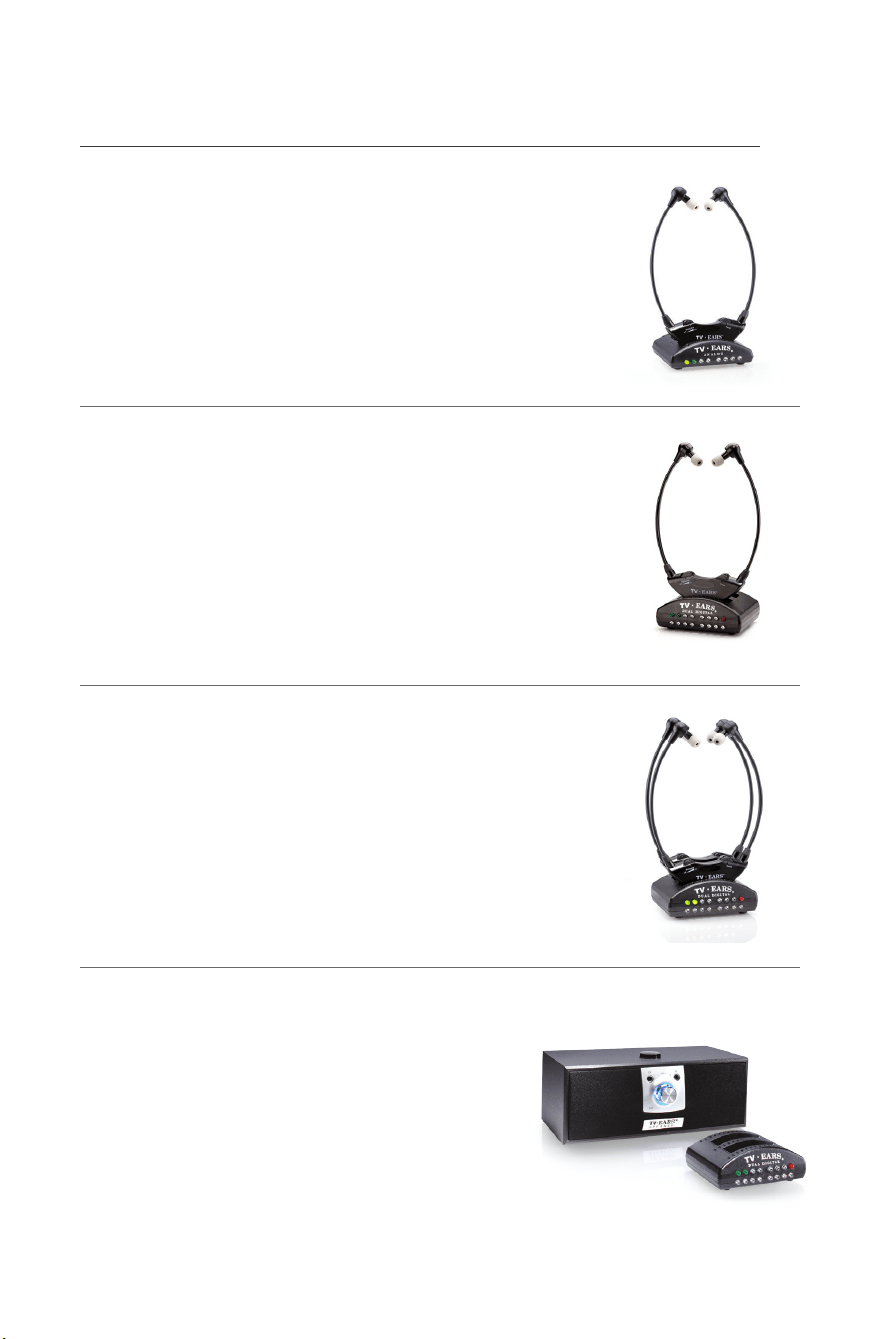
TV EARS PRODUCTS
TV Ears Original
Item Number — 11641 | MSRP $129.95
This is our basic television listening system with
analog connectivity. Includes one 5.0 Headset and
one Analog transmitter.
TV Ears Digital
Item Number — 11741 | MSRP $229.95
This is our mid-level television listening system
with analog and digital connectivity. Includes one
5.0 Headset, one Dual Digital transmitterr, and
accessories.
TV Ears Dual Digital
Item Number — 11841 | MSRP $299.95
This is our advanced television listening system
with analog and digital connectivity. Includes
two 5.0 Headsets, one Dual Digital Transmitter,
and accessories.
TV Ears Speaker
Item Number — 11290 | MSRP $249.95
This is our advanced wireless speaker system
with analog and digital connectivity. Includes
one Wireless TV Speaker, one Dual Digital
Transmitter, and accessories.
For assistance, call 866-611-9934. See Page 21
27
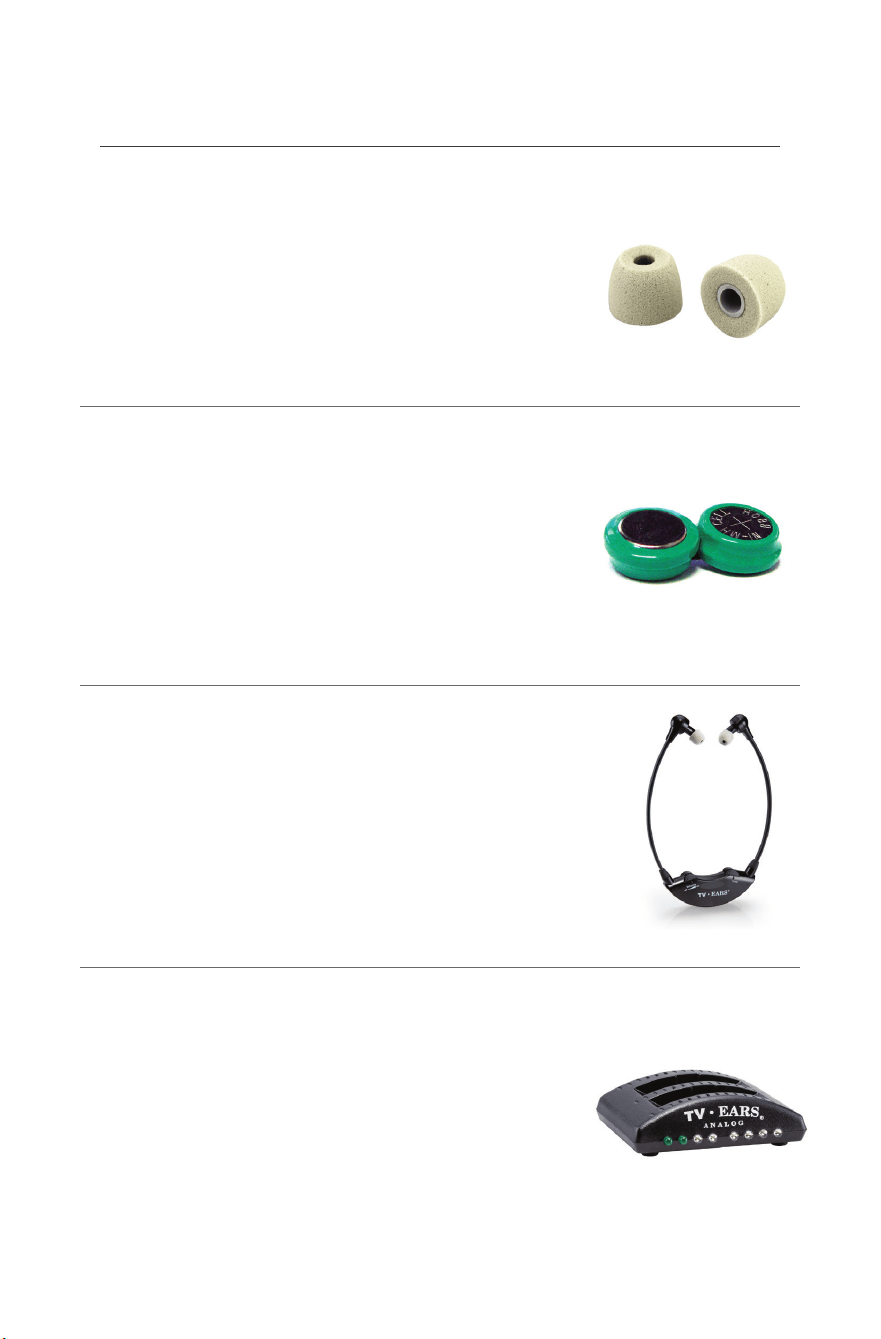
ACCESSORIES
TV Ears Slide Tips
Item Number — 40725 | MSRP $24.95
Six month supply (3 pairs) of replacement foam
ear tips for the TV Ears 5.0 Headset. Ear tips are
only available through TV Ears.
TV Ears Battery Replacement
Item Number — 40810 | MSRP $24.95
Replacement batteries for the TV Ears 5.0 Headset
last 1-2 years and should only be replaced after
speaking with a technician. Batteries are only
available through TV Ears.
TV Ears Headset
Item Number — 11621 | MSRP $99.95
This TV Ears Headset is an accessory for a full
TV Ears system and should only be purchased
if you already own a TV Ears headset system.
TV Ears Analog Transmitter
Item Number — 11611 | MSRP $69.95
This replacement transmitter kit comes with the
transmitter, power cord, RCA Analog Audio cord
and the 3.5mm Analog Audio cord.
For assistance, call 866-611-9934. See Page 21
28

Hearing Better, Looking
Great and Saving Money…
You Win with UltraVia!
UltraVia is a new kind of hearing solution that
proves that you can have exceptional HD hearing
performance at 70% o traditional hearing aid
prices. Gone are the days when $5,000 or more
was the price of better hearing. Now you can hear
better without breaking the bank with UltraVia.
Call today for better heading tomorrow.
(888) 883-3277

Contact Information
Register your product over the phone at:
1-866-611-9934
www.tvears.com/warranty
www.tvears.com
www.facebook.com/tvearsinc
twitter: @tvears
1-888-883-3277 - Sales Main Line
1-866-611-9934 - Support
1-888-958-7899 - Fax
[email protected] - Email
TV Ears, Inc.
2701 Via Orange Way, Suite 1
Spring Valley, CA 91978