E
ect c Range
user manua
the possibilities
Thank youforpurchasing this Samsung product.
To receivemorecompleteservice, please register
your product at
www.samsung.com/global/register
Enhanced convenience. Better cooking. Easy maintenance. Your new electric range has been designed to
bring you these benefits and more.
The latest in heat-distribution technology
Other ranges with just one fan tend to make a swirl of heat that fails to cover the whole inside of
the oven. This means uneven heat distribution and uneven cooking. Your new range has Surround
Airvection TM, which Samsung innovated by adding athird heating element and a multi-fan system
that circulates the heat evenly in all directions. You get more efficient energy consumption and
more even cooking.
Steam Quick cleaning
Thanks to Steam Quick TM, Samsung's unique technology for light-duty cleaning jobs, keeping
your oven spick-and-span is a snap -- no hassle, no odor, no chemicals. Steam Quick TM cleans
the inside ofyour range with high-temperature steam injust 20 minutes.
Bigger is better
With a capacity of 5.9 cubic feet, your new range isequipped with more space than any of its
competitors in the U.S. market. This means greater convenience for you when cooking for the
holidays or when entertaining.
A cooktop with 5 burners
Four main burners with two that dial heat up to different pot sizes.
A smaller warming burner in the center of the range top.
S
Read and follow all instructions before using your oven to prevent the risk of fire, electric shock,
personal injury, or damage when using the range. This guide does not cover allpossible conditions
that may occur. Always contact your service agent or manufacturer about problems that you do not
understand.
SAFETY SYMBOLS
WARNING: This symbol alerts you to hazards or unsafe practices that could cause
serious bodily harm or death.
CAUTION: This symbol alerts you to hazards or unsafe practices that could cause
bodily injury or property damage.
_ o not attempt or use.
[_ Do not disassemble.
Do not touch.
_ ollow directions explicity.
[_ Unplug the power plug from the wall socket.
Make sure the machine isgrounded to prevent electric shock.
[_ Callthe service center for help.
_ Note
ANTI-TIP DEVICE
[_ ARNING= To reduce the risk of tipping the range, the range must be secured by aproperly
installed Anti-Tip device. Refer to the installation manual for instructions.
A WARNING
ALL RANGES CAN TIP AND CAUSE iNJURiES TO PERSONS
_) iNSTALL THE ANTI-TIP DEVICE PACKED WiTH RANGE
FOLLOW ALL iNSTALLATiON iNSTRUCTiONS
[_ o not step, lean, or sit on the doors of the range. These can cause the range to tip,
resulting in burns or serious injuries.
[_ heck to see that the Anti-Tip device is installed properly. Then grasp the top rear edge of the
range and carefully attempt to tilt it forward. Verify that the Anti-Tip device isengaged.
If you pull the range out from the wall for any reason, make sure the device is properly engaged
when you push the range back against the wall. If it isnot, there isa possible risk of the range
tipping over and causing injury ifyou or achild stand, sit or lean on an open door.
Important safety instructions 3
FOR YOUR SAFETY
When using electrical appliances, basic safety precautions should be followed, including the
following:
®
@
Use this appliance only for its intended purpose as described in this Owner's Manual.
Potentially hot surfaces include the cooktop, areas facing the cooktop, oven vent opening,
surfaces near the opening, crevices around the oven door.
Besure your appliance isproperly installed and grounded by a qualified technician.
User servicing= Do not repair or replace any part of the appliance unless specifically
recommended in the manual. All other servicing should be referred to a qualified technician.
Always disconnect power to appliance before servicing by removing the fuse or switching off the
circuit breaker.
Do not enter inside the oven.
Do not store items of interest to children in cabinets above a range or on the back guard
of a range. Children climbing on the range to reach items could be seriously injured.
Do not leave children alone. Children should not be left alone or unattended in an area where
appliance is in use. They should never be allowed to sit or stand on any part of the appliance.
Never use your appliance for warming or heating the room.
Do not use water on grease fires. Turn off the oven to avoid spreading the flame. Smother the
fire or flame by closing the door or use dry chemical, baking soda, or foam-type extinguisher.
Storage in or on appliance. Flammable materials should not be stored in an oven or near
surface units. Be sure allpacking materials are removed from the appliance before operating it.
Keep plastics, clothes, and paper away from parts of the appliance that may become hot.
Wear proper apparel. Loose-fitting or hanging garments should never be worn while using the
appliance.
Use only dry potholders. Moist or damp potholders on hot surfaces may result in burns from
steam. Do not let the potholder touch hot heating elements. Do not use a towel or other bulky
cloth.
Teach children not to play with the controls or any other part of the range.
4 Hmportant safety instructions
SURFACE COOKING UNITS
[_ ever leave surface units unattended at high heat settings. Boilovers cause smoking and
greasy spillovers that may ignite.
Do not lift the cooktop. Lifting the cooktop can lead to damage and improper operation of the
range.
Do not operate the cooktop when there isno cookware. If the cooktop operates without a
cookware, the control knob will become hot.
Never use the glass cooktop surface as acutting board.
Use care when touching the cooktop. The glass surface ofthe cooktop will retain heat after
the controls have been turned off.
Be careful when placing spoons or other stirring utensils on the glass cooktop surface
when it isin use. They may become hot and could cause burns.
Use proper pan sizes. This appliance isequipped with surface units of different sizes. Select
utensils having flat bottoms large enough to cover the surface unit heating element. The use of
undersized utensils will expose a portion of the heating element to direct contact and may result in
ignition of clothing. Proper relationship of utensil to burner will also improve efficiency.
Glazed cooking utensils. Only certain types of glass, glass/ceramic, ceramic,earthenware,
or other glazed utensils are suitable for range-top service without breaking due to the sudden
change in temperature.
Utensil handles should be turned outward and not extend over adjacent surface units. To
reduce the risk of burns, ignition offlammable materials, and spillage due to unintentional contact
with the utensil, the handle of a utensil should be positioned so that it isturned outward, and does
not extend over adjacent surface units.
Read and follow all instructions and warnings on the cleaning cream labels.
Besure you know which control knob operates each surface unit. Make sure you turned on the
correct surface unit.
Always turn the surface units off before removing cookware.
When preparing flaming foods under the hood, turn the fan on.
Keep an eye on foods being fried at high or medium high heat settings.
Hmportant safety instructions 5
OVEN
DO NOT TOUCH HEATING ELEMENTS OR INTERIOR SURFACES OF THE OVEN. Heating
elements may be hot even though they are dark in color. Interior surfaces of an oven become
hot enough to cause burns. During and after use, do not touch or let clothing or other flammable
materials contact heating elements or interior surfaces of the oven until they have had sufficient
time to cool. Other surfaces of the appliance may become hot enough to cause burns. Among
these surfaces are oven vent openings and surfaces near these openings, oven doors, and the
oven door window.
Do not heat unopened food containers. Build-up of pressure may cause the container to burst
and result in injury.
Do not use the oven to dry newspapers. If overheated, they can catch on fire.
Do not use the oven for a storage area. Items stored in an oven can ignite.
Use care when opening door. Let hot air or steam escape before you remove or replace food in
the oven.
Protective liners. Do not use aluminum foil to line the oven bottoms, except as suggested in the
manual. Improper installation of these liners may result in a risk of electric shock or fire.
Keep oven vent ducts unobstructed. The oven vent islocated above the right rear surface
unit. This area could become hot during oven use. Never block this vent or place plastic or heat-
sensitive items on it.
Racernent of oven racks. Always place oven racks in the desired location while the oven is
cool. If the rack must be moved while oven ishot, do not let the potholder come in contact with
the hot heating element in the oven.
Do not allow aluminum foil or meat probe to contact heating elements.
WARMING DRAWER
DO NOT TOUCH THE HEATING ELEMENT OR THE INTERIOR SURFACE OF THE
DRAWER. These surfaces may be hot enough to burn.
REMEMBER: The inside surface of the drawer may be hot when the drawer isopened.
The purpose of the warming drawer is to hold hot cooked foods at serving temperature.
Always start with hot food; cold food cannot be heated or cooked in the warming drawer.
Use care when opening the drawer. Open the drawer a crack and let hot airor steam escape
before removing or replacing food. Hot air or steam which escapes can cause burns to hands,
face and/or eyes.
6)Do not use the drawer to dry newspapers. If overheated, they can catch on fire.
Do not use alurnninurn foil to line the drawer. Foil isan excellent heat insulator and will trap
heat beneath it. This will upset the performance of the drawer and it could damage the interior
finish.
Do not leave paper products, plastics, canned food or combustible materials in the drawer.
Never leavejars or cans of fat drippings in or near your drawer.
Do not warm food in the drawer for more than three hours.
6 Hmportant safety instructions
SELF-CLEANING OVENS
[_ o not clean the door gasket. The door gasket is essential for a good seal. Care should be
taken not to rub, damage, or move the gasket.
[_ ever keep pet birds in the kitchen. The health of birds isextremely sensitive to the fumes
released during an oven self-clean cycle. Fumes may be harmful or fatal to birds. Move birds to a
well-ventilated room.
Clean only parts listed this manual in the self-clean cycle. Before self-cleaning the oven,
remove the broil pan, rack, utensils, and food.
No commercial oven cleaner or oven liner protective coating of any kind should be used in or
on the outside of the oven. Use only a ceramic cooktop cleaner or the cleaner supplied with this
appliance on the glass cooktop.
Nickel oven shelves should be removed from the oven before beginning the self-cleaning cycle, or
they may discolor.
If the self-clean mode malfunctions, turn the oven off and disconnect the power supply. Have it
serviced by a qualified technician.
VENTILATING HOOD
_ lean ventilating hoods frequently. Grease should not be allowed to accumulate on the hood
or filter.
When flaming foods under the hood, turn the fan on.
GLASS/CERAMIC COOKING SURFACES
DO NOT TOUCH SURFACE UNITS OR AREAS NEAR UNITS. Surface units may be hot even
though they are dark in color. Areas near surface units may become hot enough to cause burns.
During and after use, do not touch, or let clothing or other flammable materials contact surface
units or areas near units until they have had sufficient time to cool. Among these areas are the
cook-top and facing the cook-top.
Do not cook on broken cooktop. If cooktop should break, cleaning solutions and spillovers
may penetrate the broken cook-top and create a risk ofelectric shock. Contact a qualified
technician immediately.
Clean cooktop with caution. If a wet sponge or cloth isused to wipe spills on a hot cooking
area, be careful to avoid steam burn. Some cleaners can produce noxious fumes ifapplied to a
hot surface.
BEFORE YOU BEGIN
_ Clean the oven thoroughly before using for the first time. Remove accessories and operate
the oven atthe bake setting at 400°F for 1hour before using. There will be a distinctive odor; this
is normal, but ensure your kitchen iswell ventilated during this conditioning period.
Hmportant safety instructions 7
content
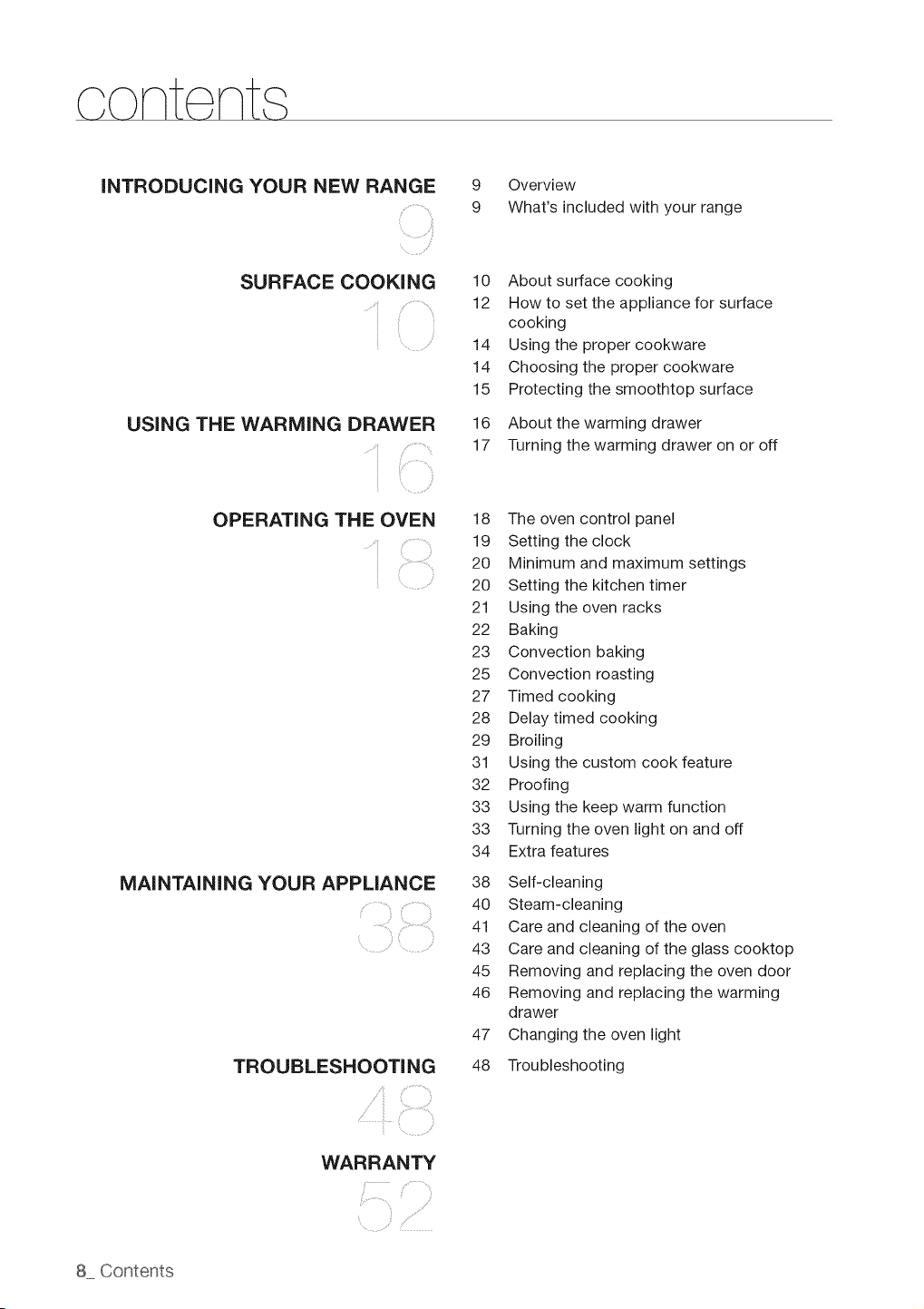
INTRODUCING YOUR NEW RANGE
SURFACE COOKING
'i
USING THE WARMING DRAWER
s _
OPERATING THE OVEN
MAINTAiNiNG YOUR APPLIANCE
TROUBLESHOOTING
WARRANTY
9 Overview
9 What's included with your range
10 About surface cooking
12 How to set the appliance for surface
cooking
14 Using the proper cookware
14 Choosing the proper cookware
15 Protecting the smoothtop surface
16 About the warming drawer
17 Turning the warming drawer on or off
18 The oven control panel
19 Setting the clock
20 Minimum and maximum settings
20 Setting the kitchen timer
21 Using the oven racks
22 Baking
23 Convection baking
25 Convection roasting
27 Timed cooking
28 Delay timed cooking
29 Broiling
31 Using the custom cook feature
32 Proofing
33 Using the keep warm function
33 Turning the oven light on and off
34 Extra features
38
4O
41
43
45
46
47
48 Troubleshooting
Self-cleaning
Steam-cleaning
Care and cleaning of the oven
Care and cleaning of the glass cooktop
Removing and replacing the oven door
Removing and replacing the warming
drawer
Changing the oven light
OVERVIEW
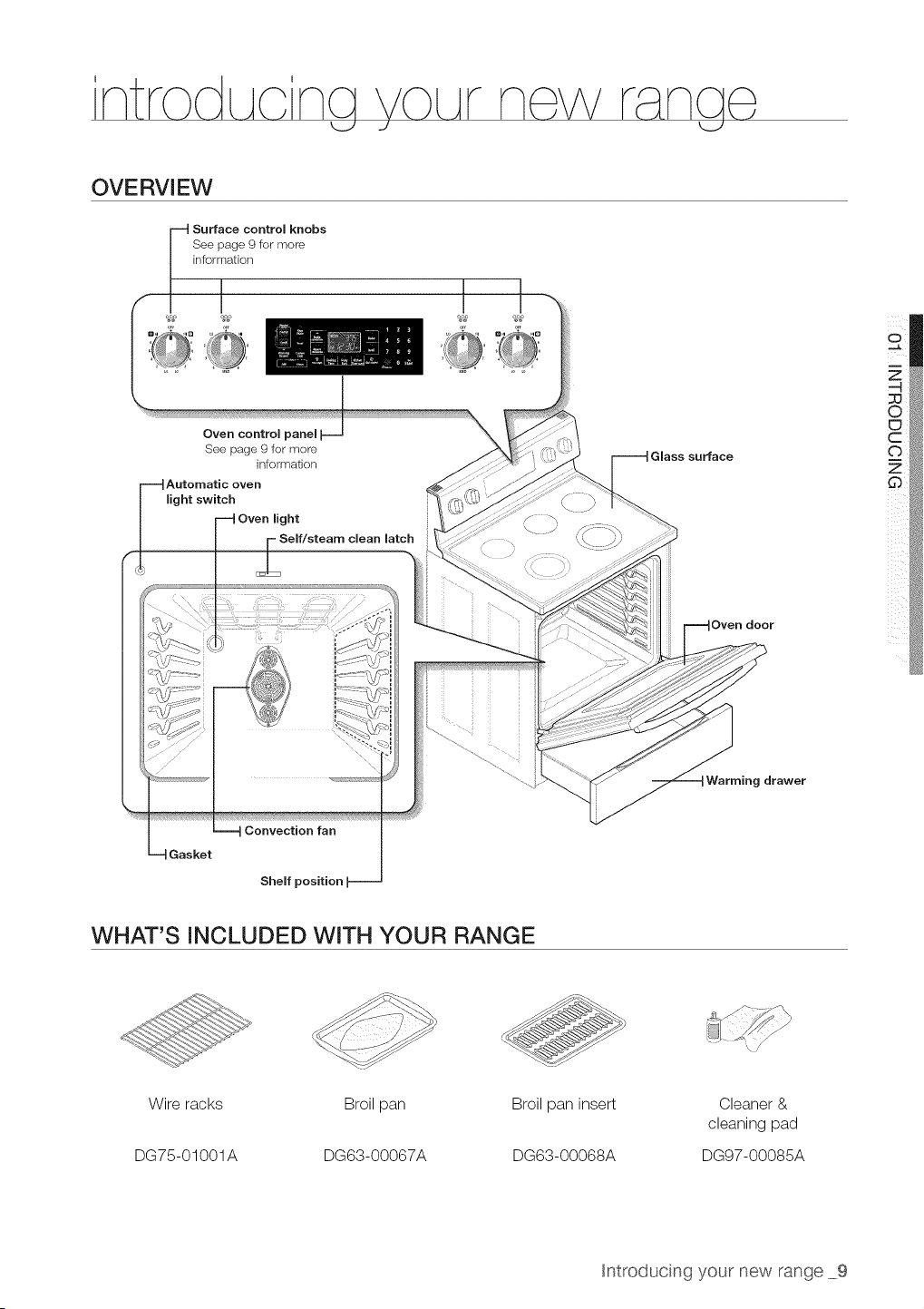
Surface control knobs
See page 9for more
information
Oven control
See page 9 for more
information
Automatic oven
light switch
light
Self/steam clean latch
Glass surface
Oven door
g drawer
Gasket
Convection fan
Shelf position
I
i
WHAT'S INCLUDED WITH YOUR RANGE
Wire racks
DG75-01001A
Broil pan
DG63-00067A
Broil pan insert
DG63-00068A
Cleaner &
cleaning pad
DG97-00085A
htroducing your new range 9
ABOUT SURFACE COOKING
(Z)
CAUTION
BEFORE COOKING
- Do not use the glass cooktop surface as a cutting Doara.
• Do not bRaceor store items that can melt or catcn fire on the glass COOKIOD.even
wnen t s not being usea.
Turn the surface units on on y after placing the cookware on them.
• Do not store heavy terns above the cooktop surface. They could fall and damage it.
©
CAUTIOi_
DURING COOKING
• Do not place aluminum foil or olast'c items sucn assalt ana pepper snaKers, spoon
nolaers, or plastic wrappings on the range wnen it isin use. The hot air from the vent
could melt olastics or ignite flammable items.
• Make sure the correct surface unit's turned on
- Never COOKa_rectlyon the glass. Aiways use COOKware.
- Always place the Dan nthe center of the surface unityou are COOKingon.
- Never eave surface units unattenaea wnue using an_gn heat setting. Boilovers cause
smoKing and greasy spillovers that mat catch on fire.
- Turn the surface units off before removing cookware.
• Do not use DlaStlCwrap to cover food. Plastic may melt onto the surface and be vet',
difficult to remove.
AFTER COOKING
CAUTION
- Do not touch the surface units until they have coolea aown.
, The surface may be still be hot an_ burns ma_ occur ifthe jlass surface istoucnea
before it nas coo_ea aown suffciently.
• Immed_at÷y c_ean sp_ s on the cook_ng area to prevent a tougn c_ean_ngcnore ater.
- f cabinet storage is provided directly above the cooking surface, make sure that the
terns are infreauently usea ana can be safely stored _nan area sup ÷cted to heat
Temperatures ma,' be unsafe for items such as volatile I_cu_as c_eanersor aeroso
sprays.
About the radiant surface elements
The temperature rises gradually and evenly. As the temperature rises, the radiant element will glow
red. To maintain the selected setting, the element will cycle on and off. The heating element retains
enough heat to provide a uniform and consistent heat during the off cycle. Forefficient cooking,
turn off the element several minutes before cooking iscomplete. This will allow residual heat to
complete the cooking process.
®
Radiant elements have a limiter that allows the element to cycle ON and OFF,even at the HI
setting. This helps to prevent damage to the ceramic cooktop. Cycling at the HI setting is
normal and can occur ifthe cookware istoo small for the radiant element or ifthe cookware
bottom isnot flat.
10 Surface cookng
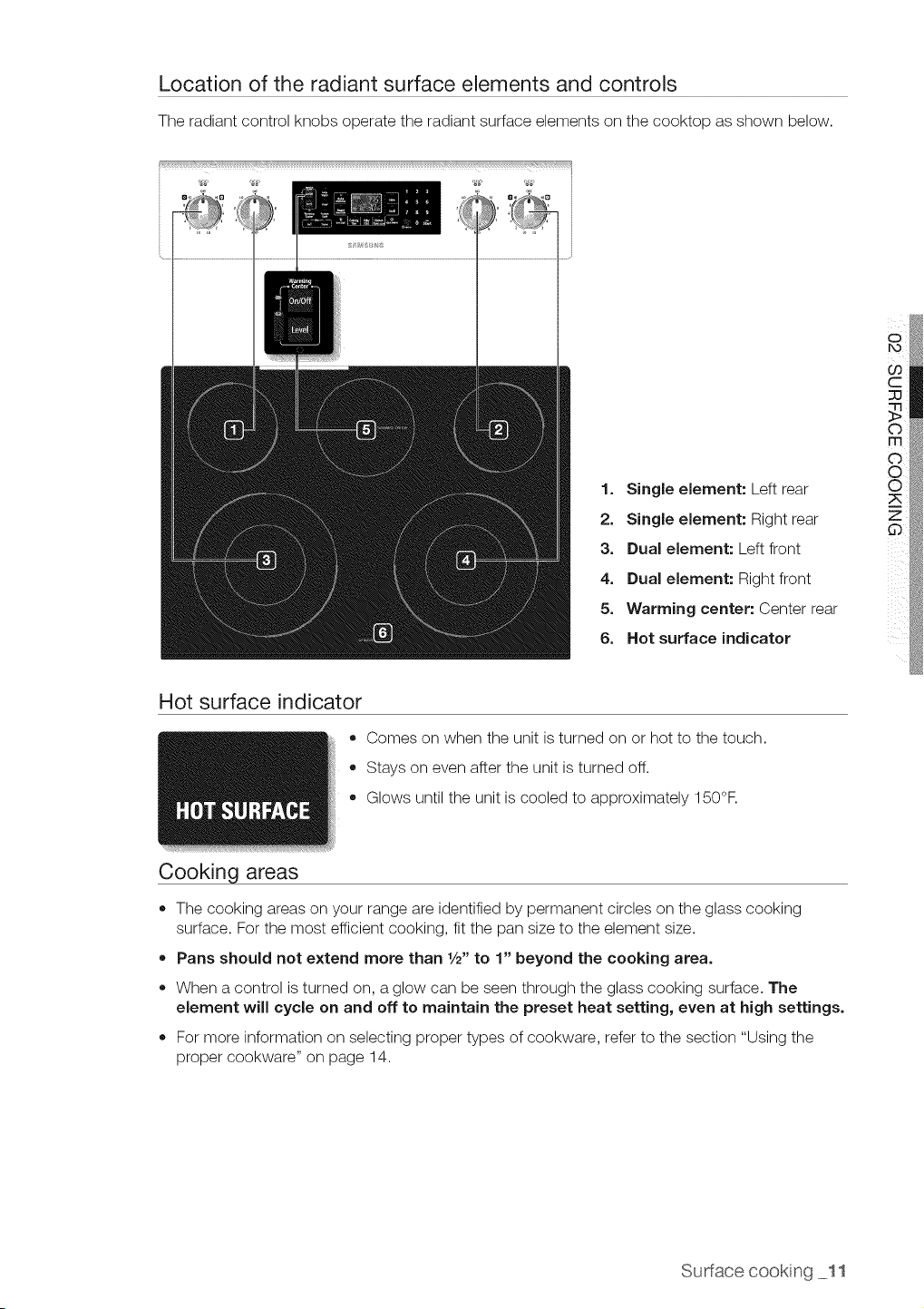
Location of the radiant surface elements and controls
The radiant control knobs operate the radiant surface elements on the cooktop as shown below.
1. Single element: Left rear
2. Single element: Right rear
3. Dual element: Left front
4. Dual element: Right front
5. Warming center: Center rear
6. Hot surface indicator
Hot surface indicator
o
®
Cooking areas
Comes on when the unit isturned on or hot to the touch.
Stays on even after the unit isturned off.
Glows until the unit iscooled to approximately 150°F.
• The cooking areas on your range areidentified by permanent circles on the glass cooking
surface. Forthe most efficient cooking, fit the pan size to the element size.
• Pans should not extend more than 1/2"to 1" beyond the cooking area.
• When a control isturned on, aglow can be seen through the glass cooking surface. The
element will cycle on and off to maintain the preset heat setting, even at high settings.
= For more information on selecting proper types of cookware, refer to the section "Using the
proper cookware" on page 14.
Sudacecooking 11
HOW TO SET THE APPLIANCE FOR SURFACE COOKING
o,_,o, • The surface elements may be hot and burns mat occur. Do not touch the surface
elements until they have cooled down sufficiently.
• At hign or mealum-nlgh settings, never leave food unattended. Boilovers cause
smoKing and greasy splllovers may catch on fire.
e Besure you turn the 3ontrol knob to OFF when yObfinish COOKing.
• The area between the hign and off settings are not aDorooriate for cooking.
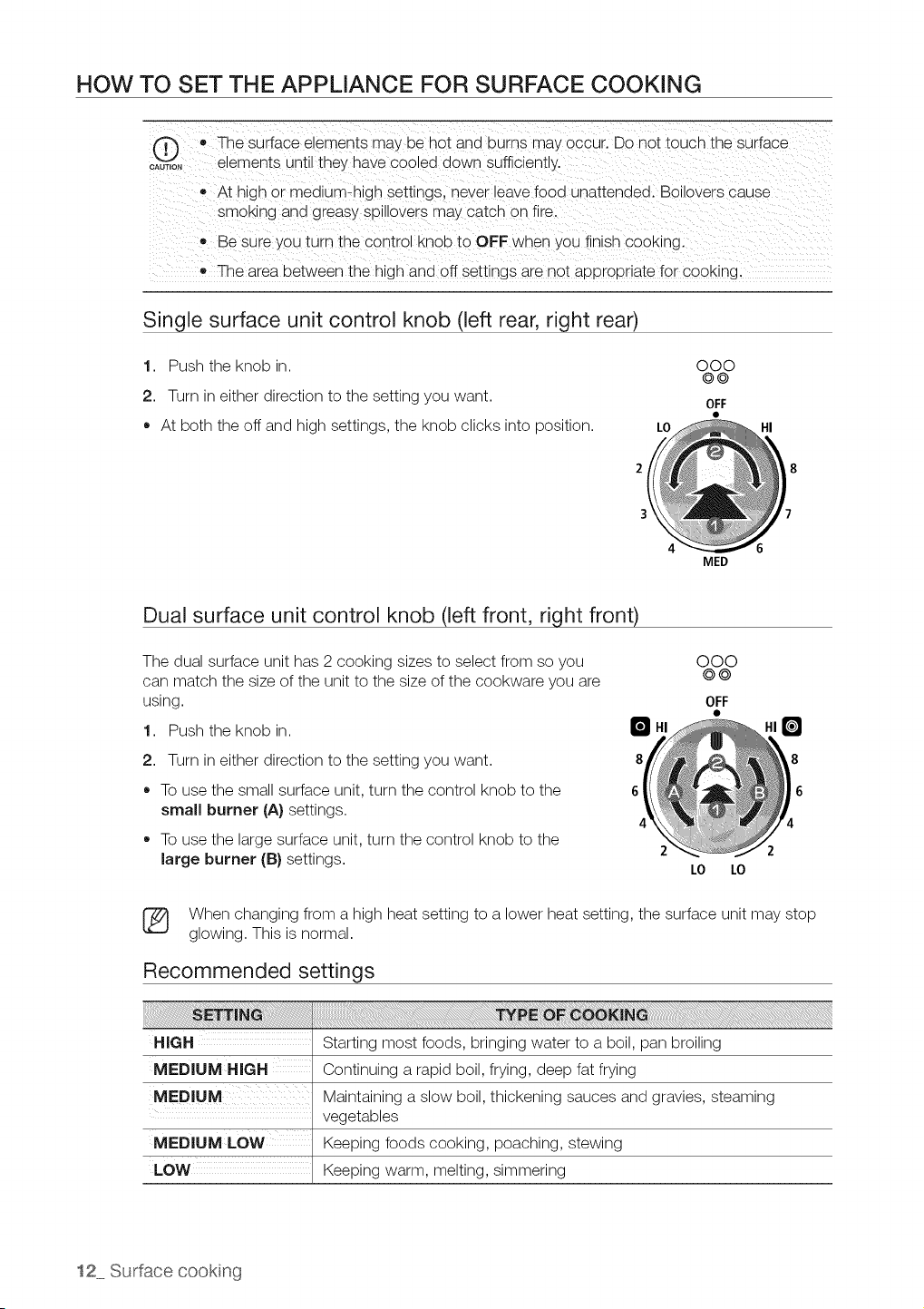
Single surface unit control knob (left rear, right rear)
1. Push the knob in.
2. Turn in either direction to the setting you want.
* At both the off and high settings, the knob clicks into position.
2
3
000
©@
OFF
LO HI
4 6
Dual surface unit control knob (left front, right front)
The dual surface unit has 2 cooking sizes to select from so you
can match the size of the unit to the size of the cookware you are
using.
MED
000
0@
OFF
1. Push the knob in. B
8 8
6 6
2 2
2. Turn in either direction to the setting you want.
To use the small surface unit, turn the control knob to the
small burner (A) settings.
To use the large surface unit, turn the control knob to the
large burner (B)settings.
LO LO
(_ When changing from a high heat setting to a lower heat setting, the surface unit may stop
glowing. This is normal.
Recommended settings
Starting most foods, bringing water to a boil, pan broiling
MEDIUM HIGH Continuing a rapid boil, frying, deep fat frying
MEDIUM Maintaining a slow boil, thickening sauces and gravies, steaming
vegetables
MEDIUM LOW Keeping foods cooking, poaching, stewing
LOW Keeping warm, melting, simmering
12 Surface cookng
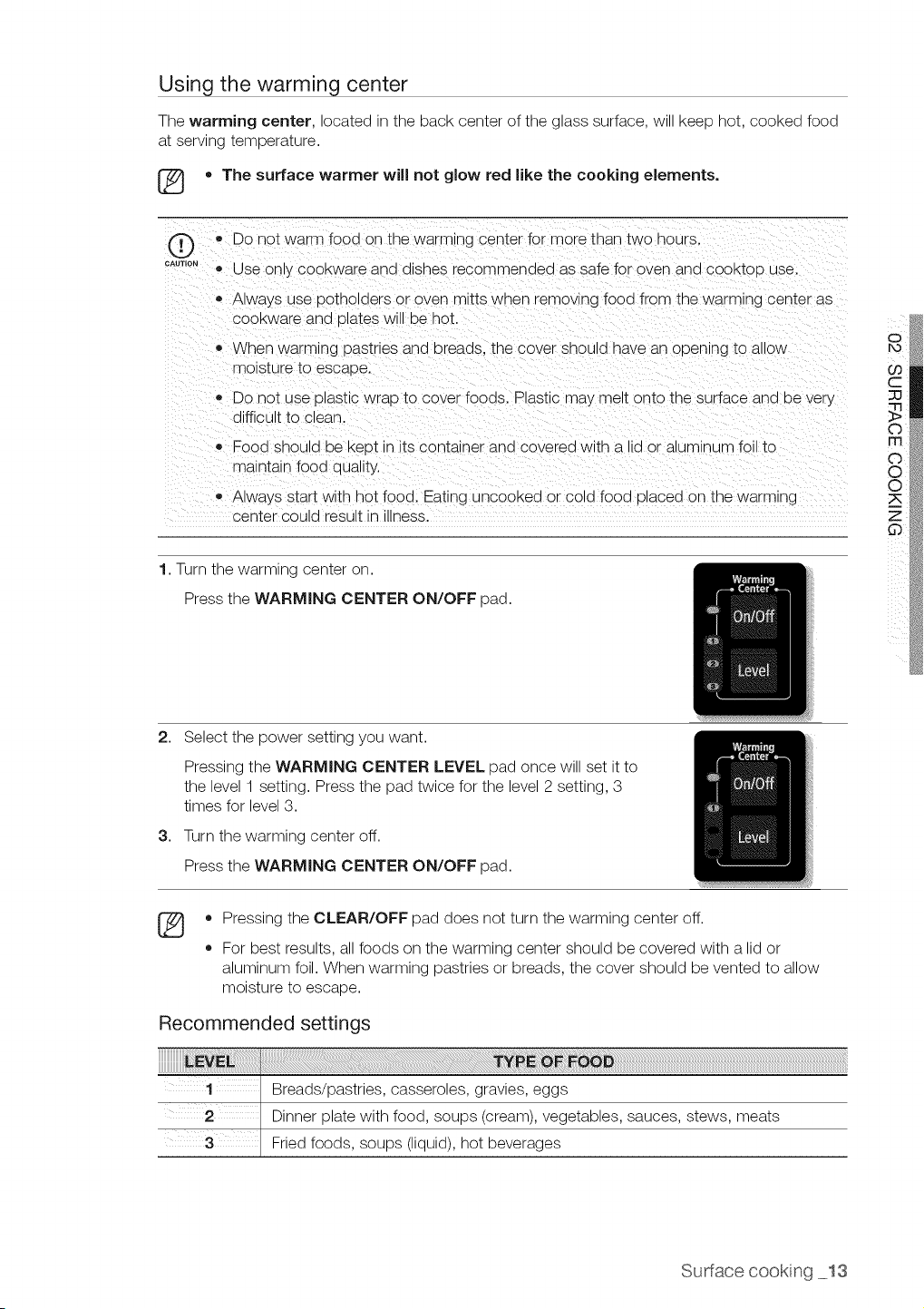
Using the warming center
The warming center, located in the back center of the glass surface, will keep hot, cooked food
at serving temperature.
[_ • The surface warmer will not glow red like the cooking elements.
®
CAUTION
,,Do not warm food on the warming center for more than two nours.
® Use only COOKwareana alsnes recommended as safe for oven and cooktoD use.
Always use potholders or oven mitts wnen removing food from the warming center as
COOKwarearia Dlates Wl oe hot
When warming pastries ana Dreaas. tne cover snoula nave ar opening to allOW
moisture to escape.
• Do not use plastic wrao to cover foods. Plastic may melt onto the surface and be very
difficult to clean.
• Food snoula De Keot in itscontainer and covered with a lid or aluminum foil to
maintain fooa qua ty.
• Always start with hot food. Eating uncooked or cold food olaced on the warming
center could result Jnu_ness.
1.Turn [ne warming center on.
Press tne WARMING CENTER ON/OFF oaa.
2. Select the power setting you want.
3,
Pressing the WARMING CENTER LEVEL pad once will set itto
the level 1 setting. Press the pad twice for the level 2 setting, 3
times for level 3.
Turn the warming center off.
Press the WARMING CENTER ON/OFF pad.
®
o
o
Pressing the CLEAR/OFF pad does not turn the warming center off.
For best results, all foods on the warming center should be covered with a lid or
aluminum foil. When warming pastries or breads, the cover should bevented to allow
moisture to escape.
Recommended settings
Breads/pastries, casseroles, gravies, eggs
Dinner plate with food, soups (cream), vegetables, sauces, stews, meats
Fried foods, soups (liquid), hot beverages
Sudacecookng 13
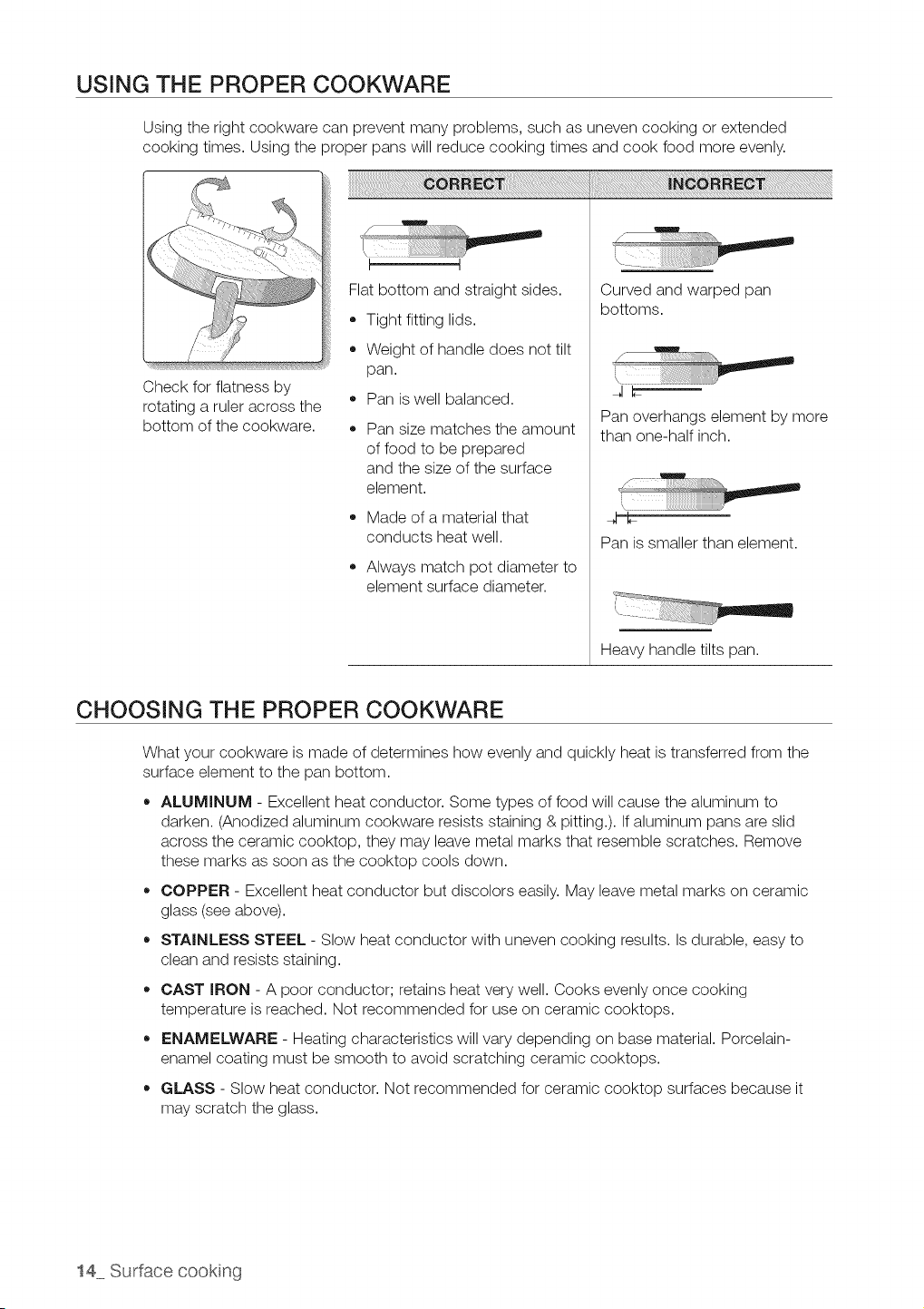
USING THE PROPER COOKWARE
Using the right cookware can prevent many problems, such as uneven cooking or extended
cooking times. Using the proper pans will reduce cooking times and cook food more evenly.
Check for flatness by
rotating a ruler across the
bottom of the cookware.
Flat bottom and straight sides.
• Tight fitting lids.
Weight of handle does not tilt
pan.
Pan iswell balanced.
Pan size matches the amount
offood to be prepared
and the size of the surface
element.
,, Made of a material that
conducts heat well.
Always match pot diameter to
element surface diameter.
¸i
!
/
Curved and warped pan
bottoms.
w
/
JC
Pan overhangs element by more
than one-half inch.
h
Pan is smaller than element.
Heavy handle tilts pan.
CHOOSING THE PROPER COOKWARE
What your cookware is made of determines how evenly and quickly heat istransferred from the
surface element to the pan bottom.
ALUMINUM - Excellent heat conductor. Some types of food will cause the aluminum to
darken. (Anodized aluminum cookware resists staining & pitting.). If aluminum pans are slid
across the ceramic cooktop, they may leave metal marks that resemble scratches. Remove
these marks as soon as the cooktop cools down.
COPPER - Excellent heat conductor but discolors easily. May leave metal marks on ceramic
glass (seeabove).
STAINLESS STEEL - Slow heat conductor with uneven cooking results. Is durable, easy to
clean and resists staining.
CAST IRON - A poor conductor; retains heat very well. Cooks evenly once cooking
temperature isreached. Not recommended for use on ceramic cooktops.
,, ENAMELWARE - Heating characteristics will vary depending on base material. Porcelain-
enamel coating must be smooth to avoid scratching ceramic cooktops.
GLASS - Slow heat conductor. Not recommended for ceramic cooktop surfaces because it
may scratch the glass.
14 Surface cookng
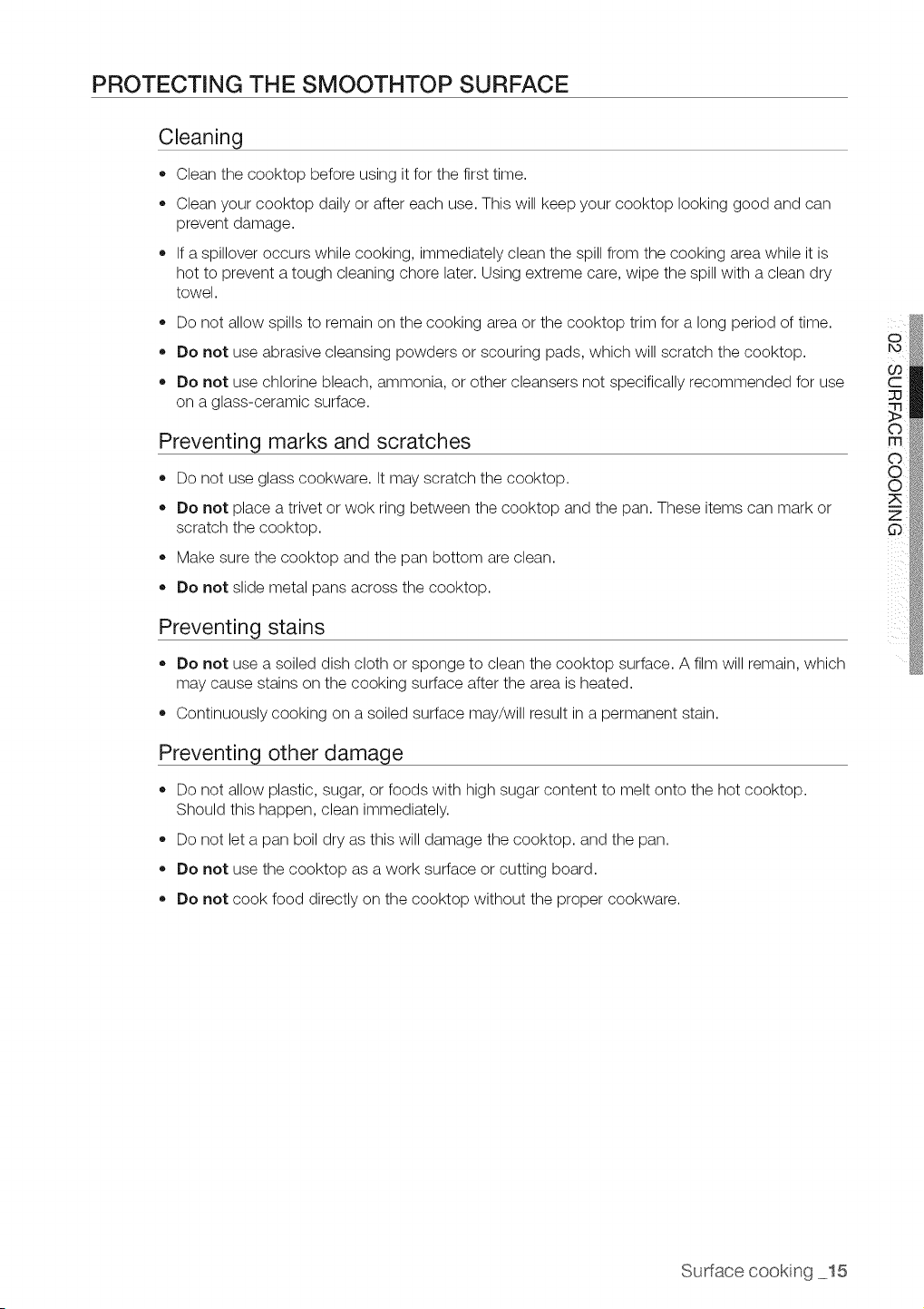
PROTECTING THE SMOOTHTOP SURFACE
Cleaning
• Clean the cooktop before using it for the first time.
Clean your cooktop daily or after each use. This will keep your cooktop looking good and can
prevent damage.
If a spillover occurs while cooking, immediately clean the spill from the cooking area while itis
hot to prevent a tough cleaning chore later. Using extreme care, wipe the spill with a clean dry
towel.
Do not allow spills to remain on the cooking area or the cooktop trim for a long period oftime.
• Do not use abrasive cleansing powders or scouring pads, which will scratch the cooktop.
Do not use chlorine bleach, ammonia, or other cleansers not specifically recommended for use
on a glass-ceramic surface.
Preventing marks and scratches
Do not use glass cookware. It may scratch the cooktop.
Do not place atrivet or wok ring between the cooktop and the pan. These items can mark or
scratch the cooktop.
Make sure the cooktop and the pan bottom are clean.
Do not slide metal pans across the cooktop.
Preventing stains
Do not use a soiled dish cloth or sponge to clean the cooktop surface. A film will remain, which
may cause stains on the cooking surface after the area isheated.
,, Continuously cooking on a soiled surface may/will result in a permanent stain.
Preventing other damage
Do not allow plastic, sugar, or foods with high sugar content to melt onto the hot cooktop.
Should this happen, clean immediately.
Do not let a pan boil dry as this will damage the cooktop, and the pan.
,, Do not use the cooktop as a work surface or cutting board.
Do not cook food directly on the cooktop without the proper cookware.
Sudacecookng 15
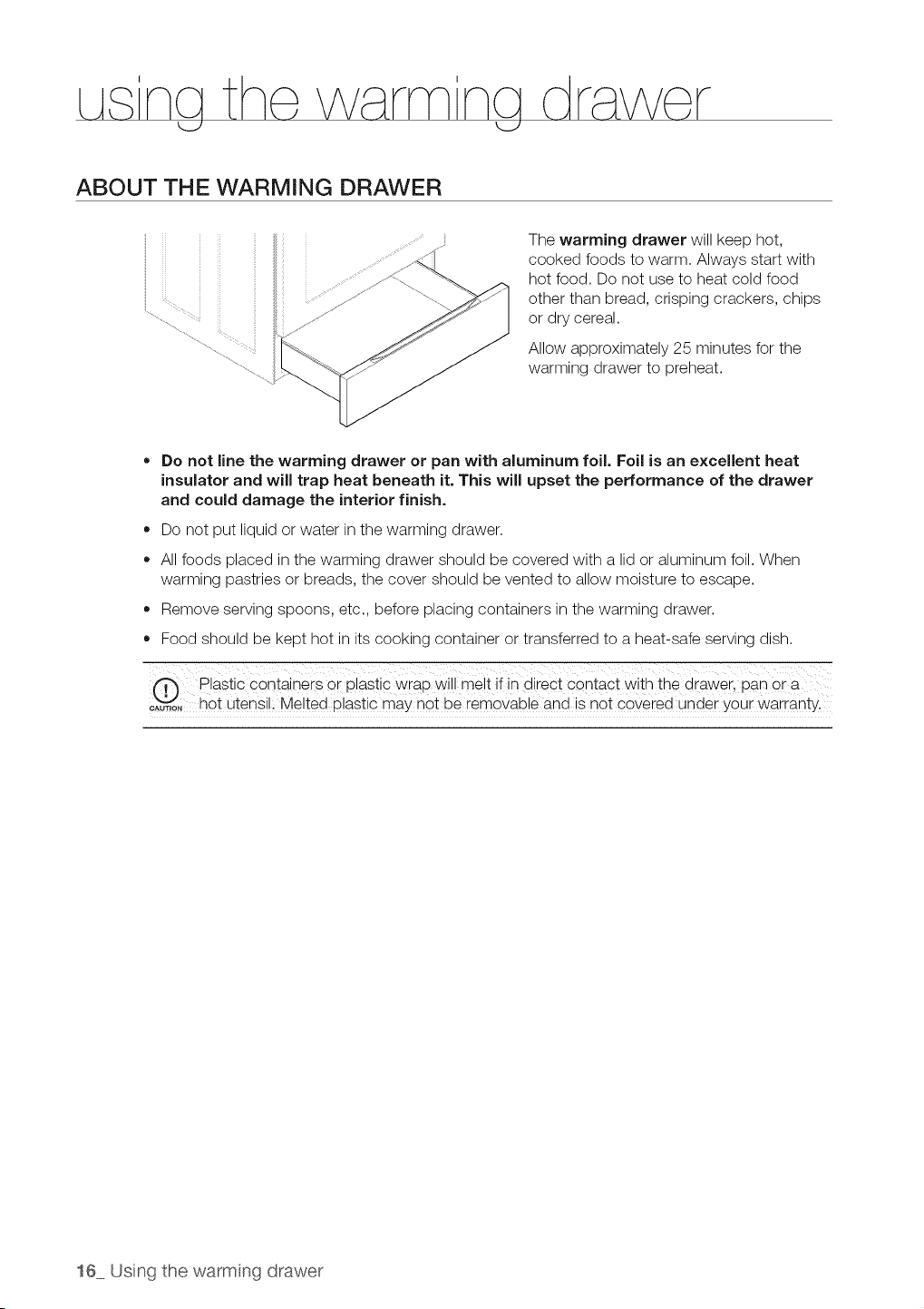
ABOUT THE WARMING DRAWER
The warming drawer will keep hot,
cooked foods to warm. Always start with
hot food. Do not use to heat cold food
other than bread, crisping crackers, chips
or dry cereal.
Allow approximately 25 minutes for the
warming drawer to preheat.
• Do not line the warming drawer or pan with aluminum foil, Foil is an excellent heat
insulator and will trap heat beneath it, This will upset the performance of the drawer
and could damage the interior finish.
• Do not put liquid or water in the warming drawer.
All foods placed in the warming drawer should be covered with a lid or aluminum foil. When
warming pastries or breads, the cover should be vented to allow moisture to escape.
Remove serving spoons, etc., before placing containers in the warming drawer.
Food should be kept hot in its cooking container or transferred to a heat-safe serving dish.
Plastic containers or plastic wrap will me!t ifin direct contact with the drawer, loan ora
o%_i_,o,hot utensil, Melted P!astic may not be removable and isnot covered under your warranty.
16 Usng thewarmng drawer
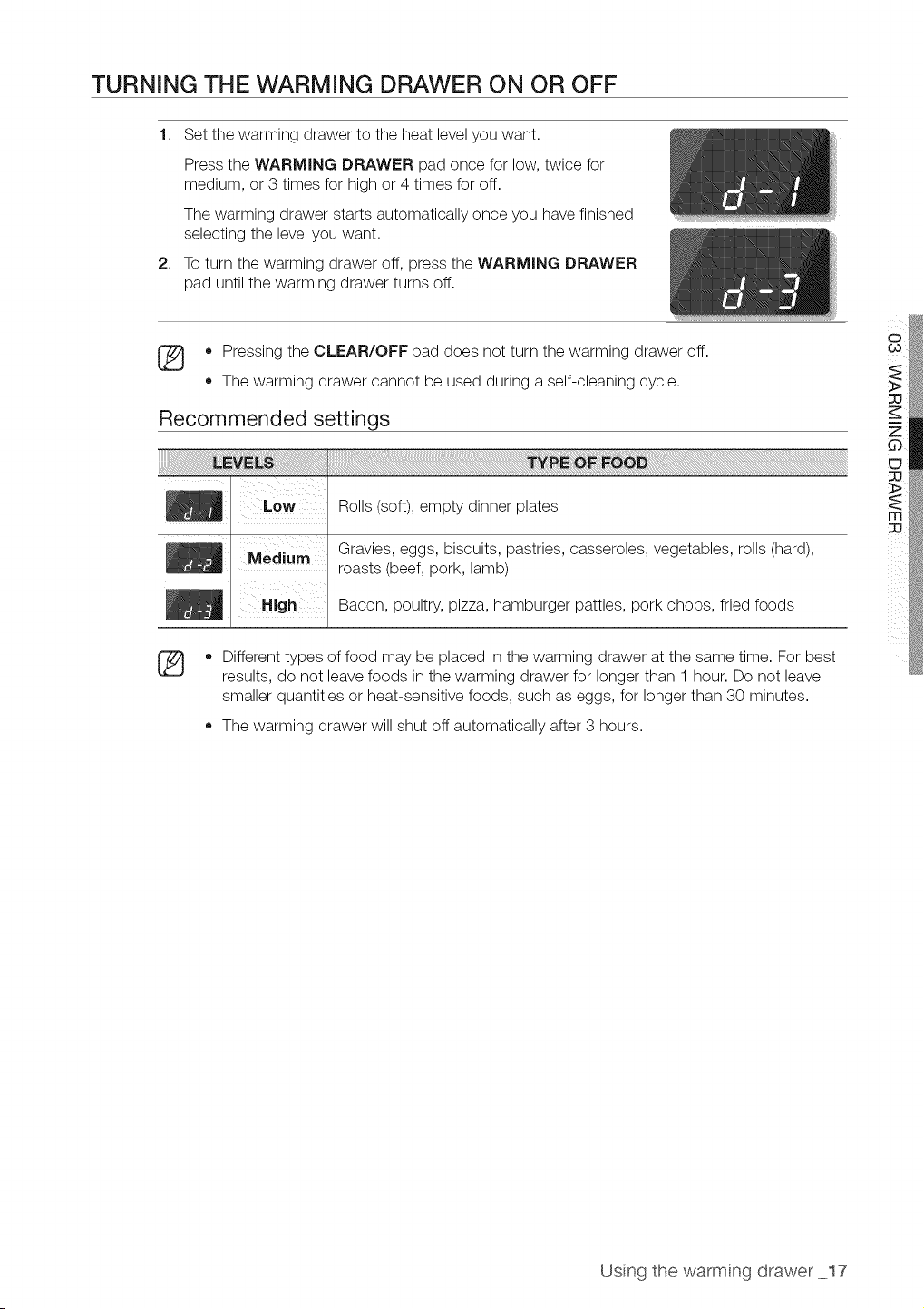
TURNING THE WARMING DRAWER ON OR OFF
1. Set the warming drawer to the heat level you want.
Press the WARMING DRAWER pad once for low, twice for
medium, or 3times for high or 4 times for off.
The warming drawer starts automatically once you have finished
selecting the level you want.
2. To turn the warming drawer off, press the WARMING DRAWER
pad until the warming drawer turns off.
• Pressing the CLEAR/OFF pad does not turn the warming drawer off.
,, The warming drawer cannot be used during aself-cleaning cycle.
Recommended settings
Rolls (soft), empty dinner plates
Gravies, eggs, biscuits, pastries, casseroles, vegetables, rolls (hard),
roasts (beef, pork, lamb)
Bacon, poultry, pizza, hamburger patties, pork chops, fried foods
®
• Different types of food may be placed in the warming drawer at the same time. For best
results, do not leave foods in the warming drawer for longer than 1 hour. Do not leave
smaller quantities or heat-sensitive foods, such as eggs, for longer than 30 minutes.
The warming drawer will shut off automatically after 3 hours.
Usng the warmng drawer 17
na the oven
I
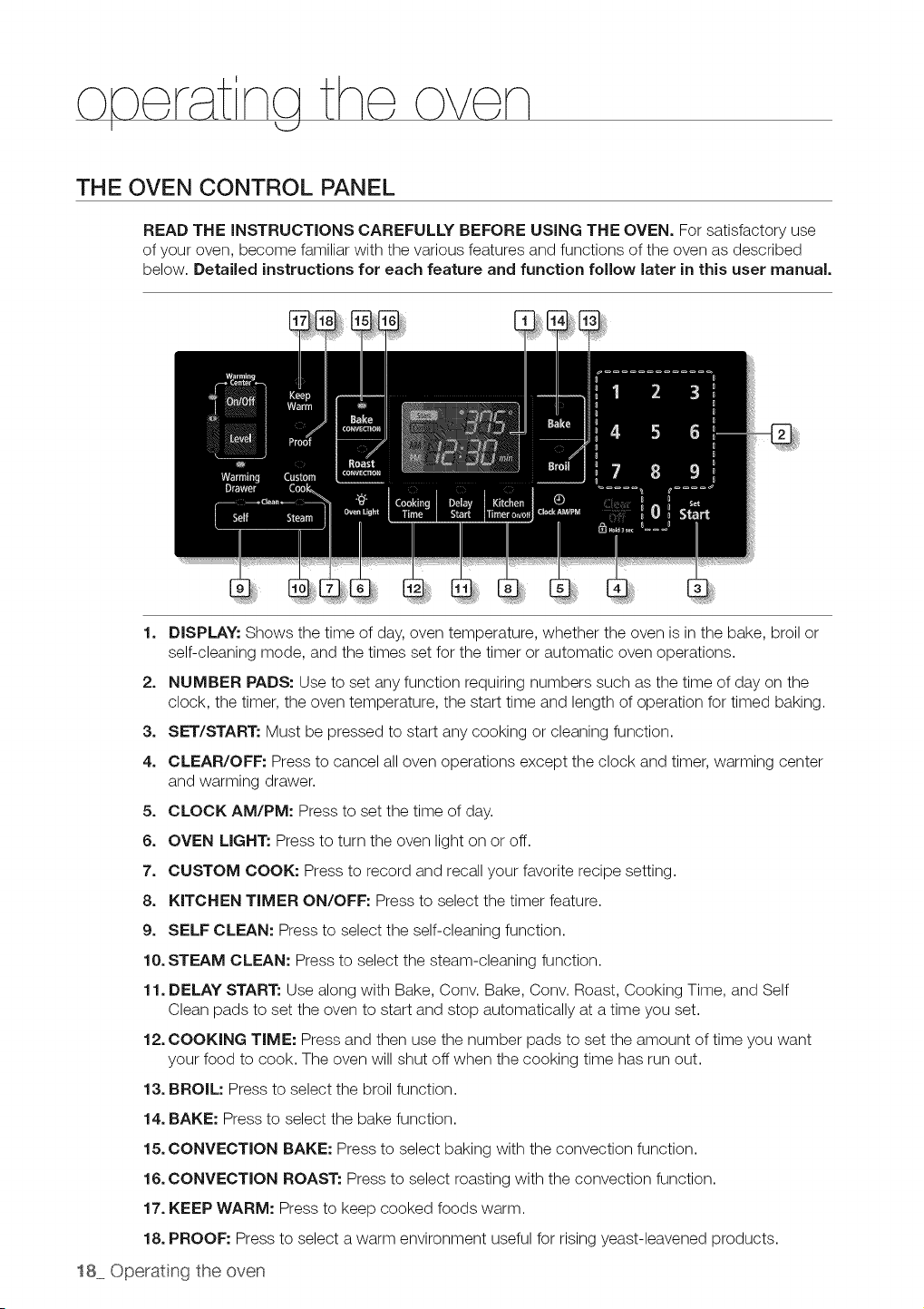
THE OVEN CONTROL PANEL
READ THE INSTRUCTIONS CAREFULLY BEFORE USING THE OVEN. For satisfactory use
of your oven, become familiar with the various features and functions of the oven as described
below. Detailed instructions for each feature and function follow later in this user manual.
1. DISPLAY: Shows the time of day,oven temperature, whether the oven is in the bake, broil or
self-cleaning mode, and the times set for the timer or automatic oven operations.
2. NUMBER PADS: Use to set any function requiring numbers such as the time of day on the
clock, the timer, the oven temperature, the start time and length of operation for timed baking.
3. SET/START: Must be pressed to start any cooking or cleaning function.
4. CLEAR/OFF: Pressto cancel all oven operations except the clock and timer, warming center
and warming drawer.
5. CLOCK AM/PM: Press to set the time of day.
6. OVEN LIGHT: Press to turn the oven light on or off.
7. CUSTOM COOK: Press to record and recall your favorite recipe setting.
8. KITCHEN TIMER ON/OFF: Press to select the timer feature.
9. SELF CLEAN: Press to select the self-cleaning function.
10. STEAM CLEAN: Press to select the steam-cleaning function.
11. DELAY START: Use along with Bake, Conv. Bake, Conv. Roast, Cooking Time, and Self
Clean pads to set the oven to start and stop automatically at a time you set.
12. COOKING TIME: Press and then use the number pads to set the amount oftime you want
your food to cook. The oven will shut offwhen the cooking time has run out.
13. BROIL: Press to select the broil function.
14. BAKE: Press to select the bake function.
15. CONVECTION BAKE: Press to select baking with the convection function.
16. CONVECTION ROAST: Press to select roasting with the convection function.
17. KEEP WARM: Press to keep cooked foods warm.
18. PROOF: Press to select awarm environment useful for rising yeast-leavened products.
18 Operating the oven
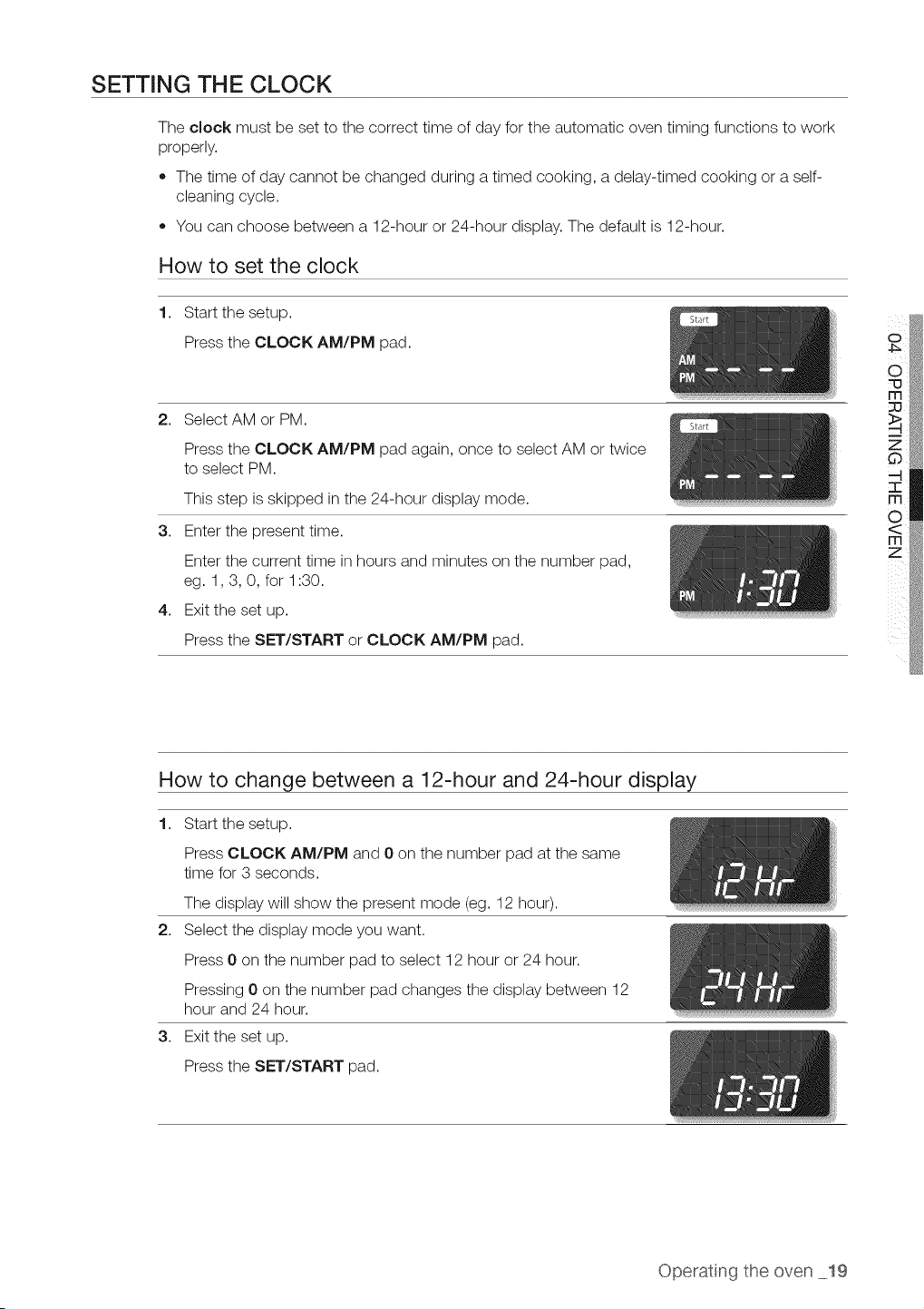
SETTING THE CLOCK
The clock must be set to the correct time of day for the automatic oven timing functions to work
properly.
,, The time of day cannot be changed during a timed cooking, a delay-timed cooking or a self-
cleaning cycle.
• You can choose between a 12-hour or 24-hour display. The default is 12-hour.
How to set the clock
1,
Start the setup.
Press the CLOCK AM/PM pad.
2. Select AM or PM.
Press the CLOCK AM/PM pad again, once to select AM or twice
to select PM.
This step isskipped in the 24-hour display mode.
3. Enter the present time.
Enter the current time in hours and minutes on the number pad,
eg. 1,3, 0, for 1:30.
4. Exit the set up.
Press the SET/START or CLOCK AM/PM pad.
How to change between a 12-hour and 24-hour display
1. Start the setup.
Press CLOCK AM/PM and 0 on the number pad at the same
time for 3 seconds.
The display will show the present mode (eg. 12 hour).
2. Select the display mode you want.
Press 0 on the number pad to select 12 hour or 24 hour.
Pressing 0on the number pad changes the display between 12
hour and 24 hour.
3. Exit the set up.
Press the SET/START pad.
Operat ng the oven 19
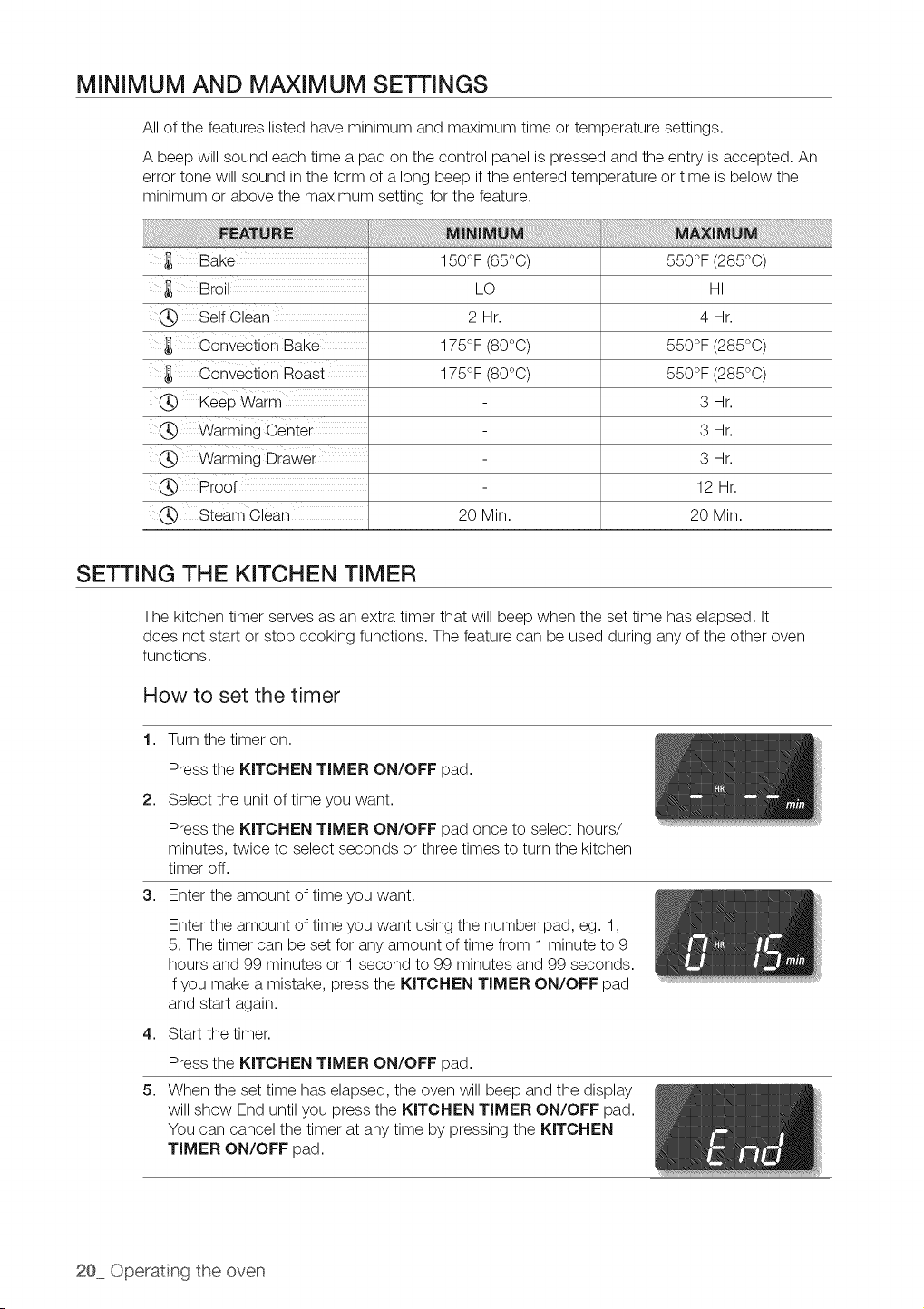
MINIMUM AND MAXIMUM SETTINGS
All of the features listed have minimum and maximum time or temperature settings.
A beep will sound each time a pad on the control panel is pressed and the entry isaccepted. An
error tone will sound in the form of a long beep if the entered temperature or time isbelow the
minimum or above the maximum setting for the feature.
Bake
Bro
._ Self Clear"
Convection Bake
Convection Roast
150°F (65°C)
LO
2 Hr.
175°F (80°0)
175°F (80°0)
550°F (285°C)
HI
4Hr.
550°F (285°0)
550°F (285°0)
._ Keep Warm
(_ Warming Center
Warming Drawer
(_ Proof
,_ Steam Clean
20 Min.
SETTING THE KITCHEN TIMER
3Hr.
3Hr.
3Hr.
12 Hr.
20 Min.
The kitchen timer serves as an extra timer that will beep when the set time has elapsed. It
does not start or stop cooking functions. The feature can be used during any ofthe other oven
functions.
How to set the timer
1. Turn the timer on.
Press the KITCHEN TIMER ON/OFF pad.
2. Select the unit of time you want.
Press the KITCHEN TIMER ON/OFF pad once to select hours/
minutes, twice to select seconds or three times to turn the kitchen
timer off.
3. Enter the amount of time you want.
4,
5,
Enter the amount of time you want using the number pad, eg. 1,
5.The timer can be set for any amount of time from 1 minute to 9
hours and 99 minutes or 1 second to 99 minutes and 99 seconds.
If you make a mistake, press the KITCHEN TIMER ON/OFF pad
and start again.
Start the timer.
Press the KITCHEN TIMER ON/OFF pad.
When the set time has elapsed, the oven will beep and the display
will show End until you press the KITCHEN TIMER ON/OFF pad.
You can cancel the timer at any time by pressing the KITCHEN
TIMER ON/OFF pad.
20 Operat(ng the oven
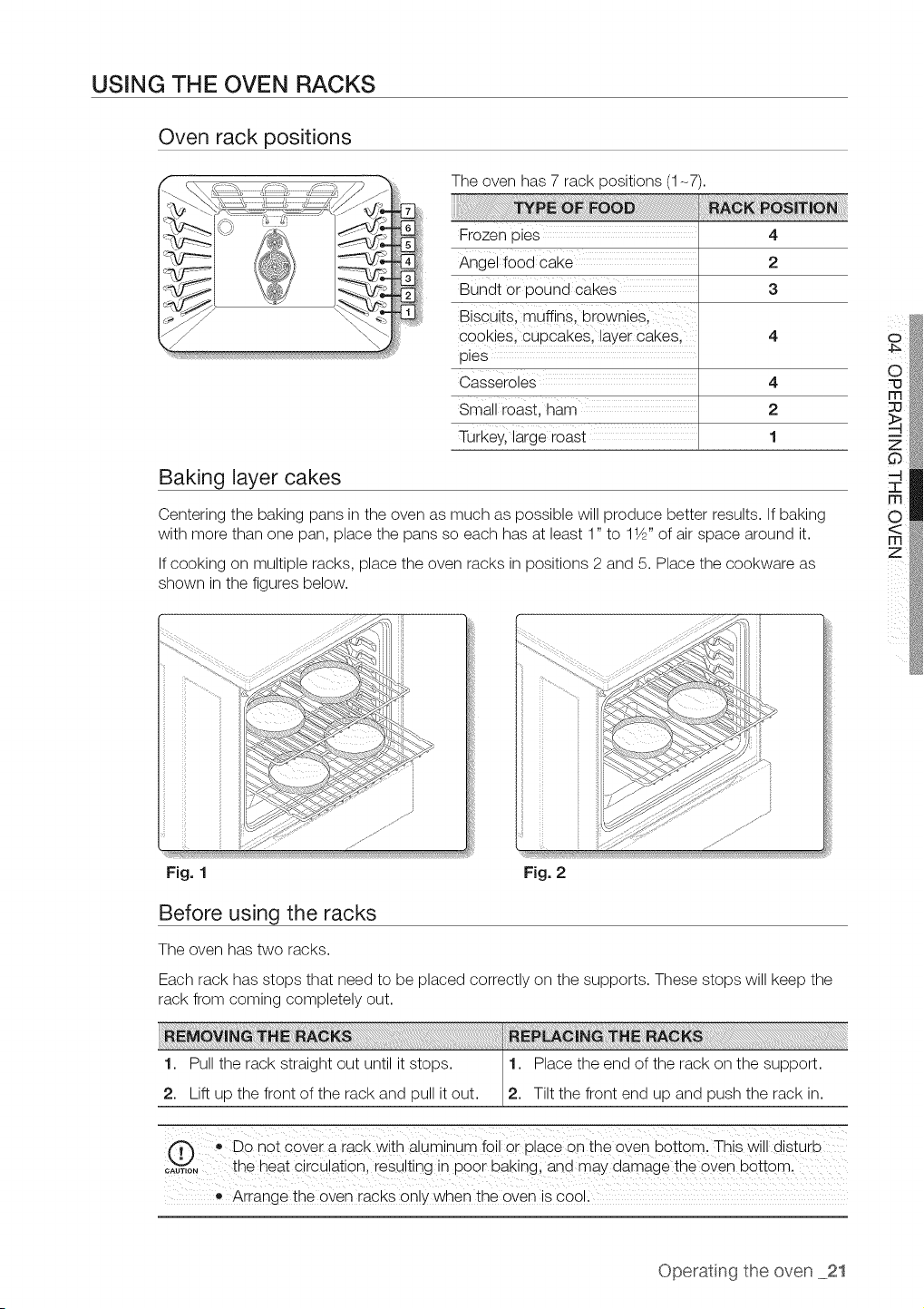
USING THE OVEN RACKS
Oven rack positions
The oven has 7 rack positions (1-7).
Frozen pies
Angel food cake
Bundt 0r p0Und cakes
Biscuits, muffins, brownies,
cookies, cupcakes, layer Cakes,
pies
Casseroles 4
Small roast, ham 2
Turkeyl large roast 1
4
2
3
Baking layer cakes
Centering the baking pans in the oven as much as possible will produce better results. If baking
with more than one pan, place the pans so each has at least 1" to 11/Z'of air space around it.
If cooking on multiple racks, place the oven racks in positions 2 and 5. Place the cookware as
shown in the figures below.
....fJ
Fig. 1 Fig. 2
Before using the racks
The oven has two racks.
Each rack has stops that need to be placed correctly on the supports. These stops will keep the
rack from coming completely out.
1. Pull the rack straight out until it stops. 1. Place the end of the rack on the support.
/
2. Lift up the front of the rack and pull itout. 2. Tiltthe front end up and push the rack in.
.,Do not cover a rack with aluminum foil or place on the oven bottom. This will disturb
_A,,,oN_ the heat CircUationl iesuiting in p00r baking and may clamage the 0_e_ bottoml
• Arrange the oven racks on!y when the oven is coo!i
o
Operatng the oven 21
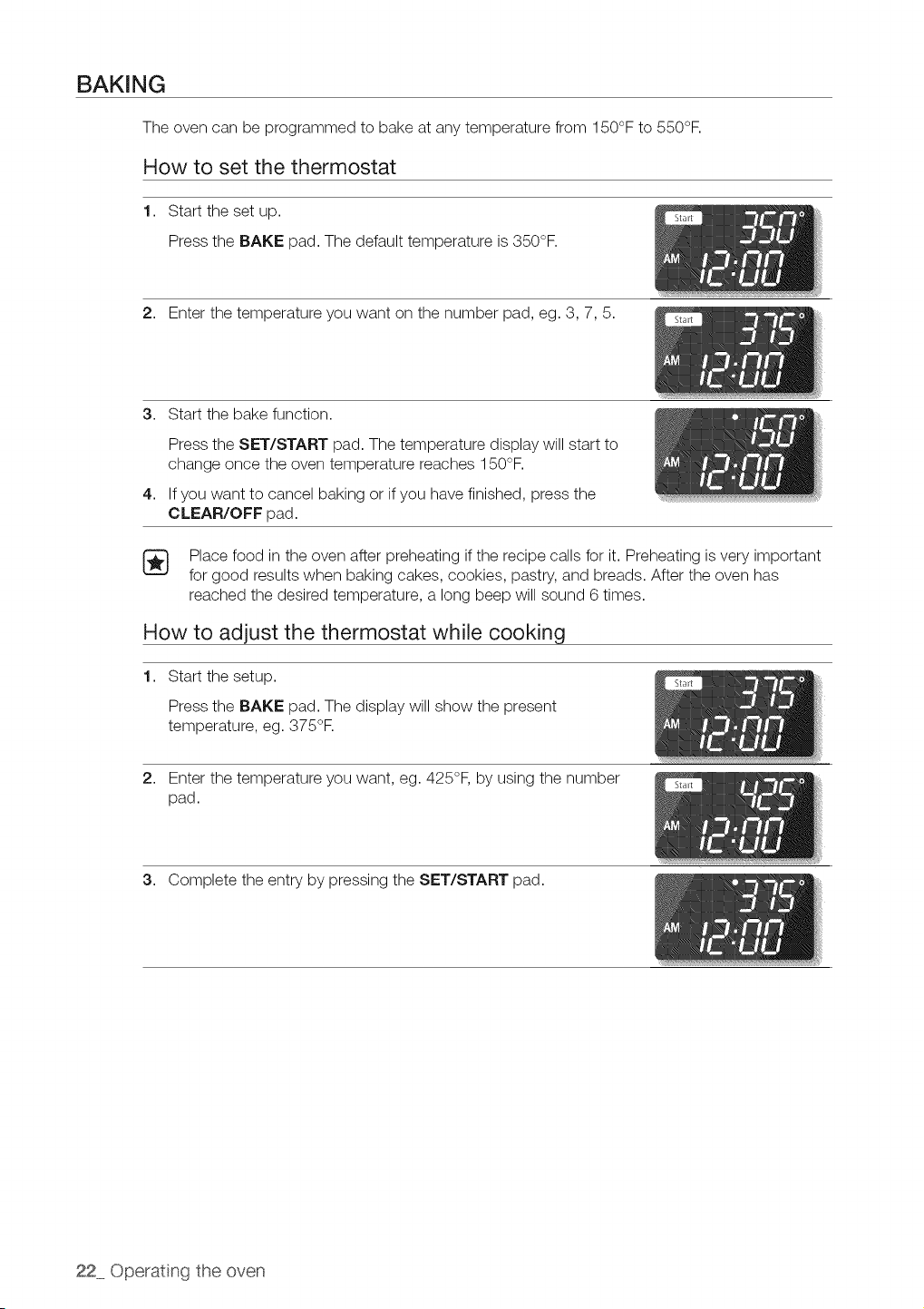
BAKING
The oven can be programmed to bake at any temperature from 150°F to 550°F.
How to set the thermostat
1. Start the set up.
Press the BAKE pad. The default temperature is350°F.
2. Enter the temperature you want on the number pad, eg. 3, 7, 5.
3. Start the bake function.
4,
Press the SET/START pad. The temperature display will start to
change once the oven temperature reaches 150°F.
If you want to cancel baking or if you have finished, press the
CLEAR/OFF pad.
[_ Place food in the oven after preheating ifthe recipe calls for it. Preheating isvery important
for good results when baking cakes, cookies, pastry, and breads. After the oven has
reached the desired temperature, a long beep will sound 6times.
How to adjust the thermostat while cooking
1. Start the setup.
Press the BAKE pad. The display will show the present
temperature, eg. 375°R
2. Enter the temperature you want, eg. 425°F, by using the number
pad.
3. Complete the entry by pressing the SET/START pad.
22 Operating the oven
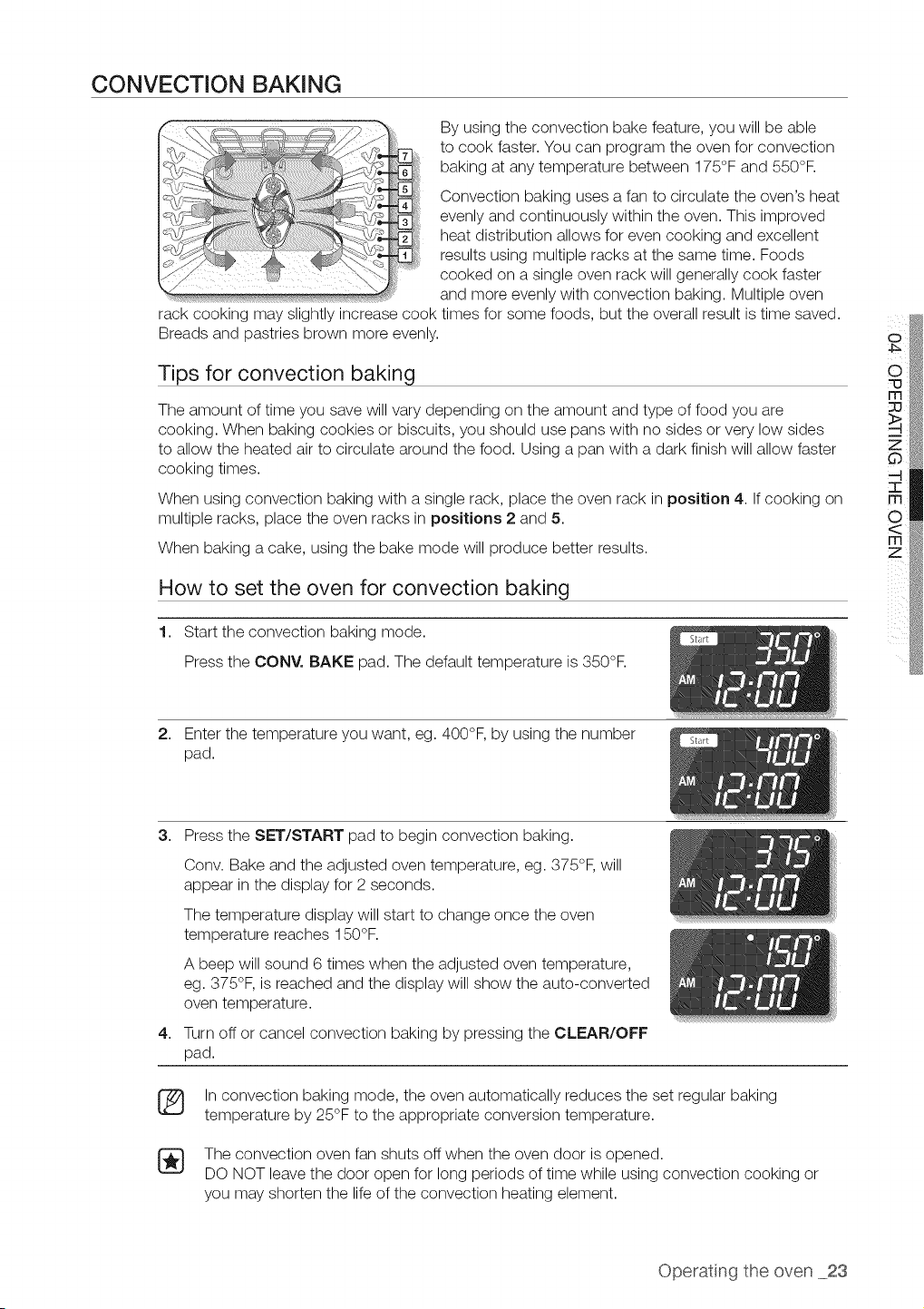
CONVECTION BAKING
By using the convection bake feature, you will be able
to cook faster. You can program the oven for convection
baking at any temperature between 175°F and 550°F.
Convection baking uses a fan to circulate the oven's heat
evenly and continuously within the oven. This improved
heat distribution allows for evencooking and excellent
results using multiple racks at the same time. Foods
cooked on a single oven rack will generally cook faster
and more evenly with convection baking. Multiple oven
rack cooking may slightly increase cook times for some foods, but the overall result is time saved.
Breads and pastries brown more evenly.
Tips for convection baking
The amount of time you save will vary depending on the amount and type of food you are
cooking. When baking cookies or biscuits, you should use pans with no sides or very low sides
to allow the heated air to circulate around the food. Using apan with a dark finish will allow faster
cooking times.
When using convection baking with a single rack, place the oven rack in position 4. If cooking on
multiple racks, place the oven racks in positions 2 and 5.
When baking a cake, using the bake mode will produce better results.
How to set the oven for convection baking
1. Start the convection baking mode.
Press the CONY. BAKE pad. The default temperature is 350°F.
o
2. Enter the temperature you want, eg. 400°F, by using the number
pad.
3. Press the SET/START pad to begin convection baking.
4,
®
Conv. Bake and the adjusted oven temperature, eg. 375°F, will
appear in the display for 2 seconds.
The temperature display will start to change once the oven
temperature reaches 150°F.
A beep will sound 6 times when the adjusted oven temperature,
eg. 375°F, is reached and the display will show the auto-converted
oven temperature.
Turn off or cancel convection baking by pressing the CLEAR/OFF
pad.
Inconvection baking mode, the oven automatically reduces the set regular bakin¢
temperature by 25°F to the appropriate conversion temperature.
The convection oven fan shuts off when the oven door isopened.
DO NOT leave the door open for long periods of time while using convection cooking or
you may shorten the life of the convection heating element.
Operatng the oven 23
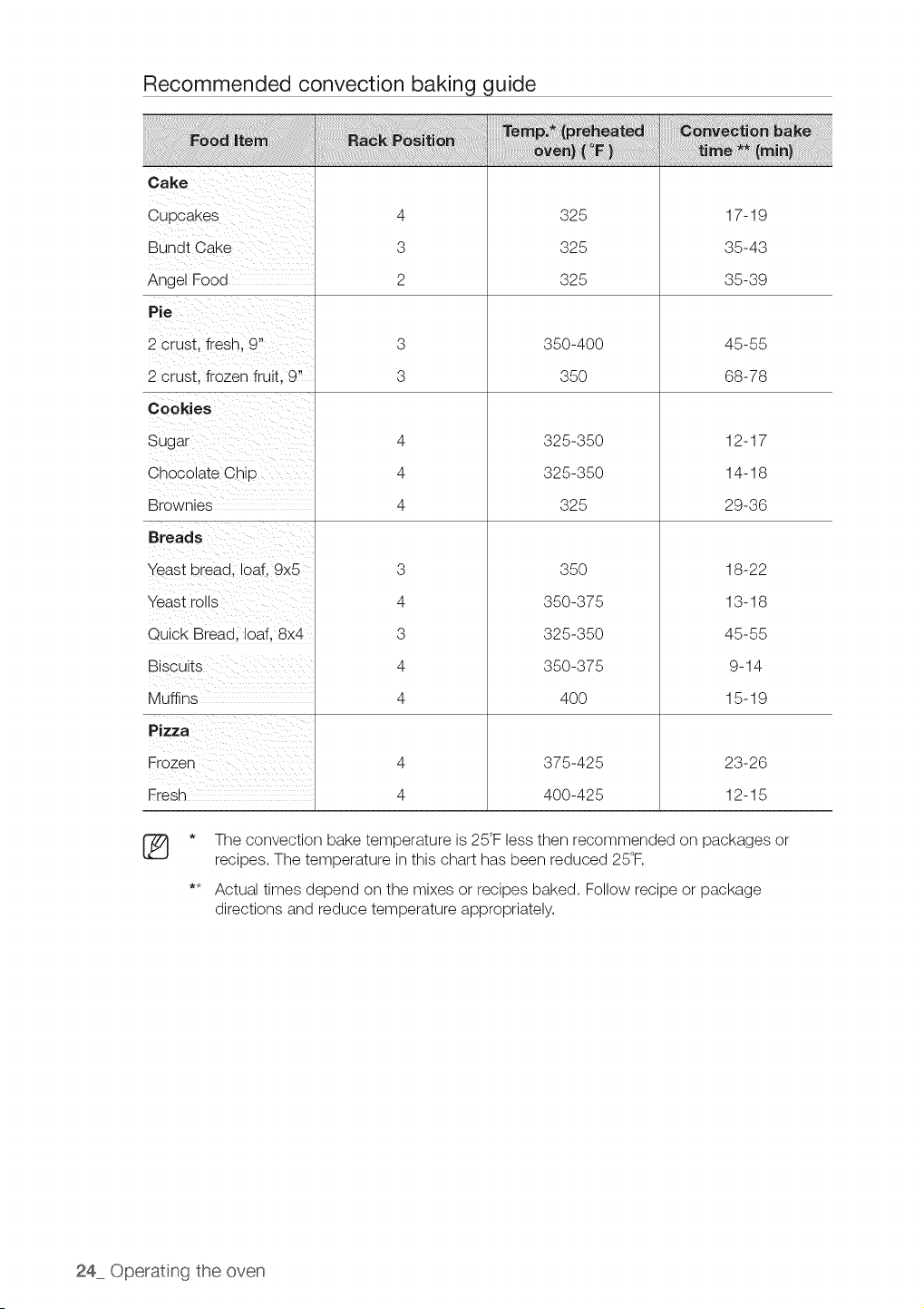
Recommended convection baking guide
Bundt Cake
Angel Food
2 crust, fresh, 9"
2 crust, frozen fruit, 9"
Chocolate Chip
Brownies
Breads
Yeast bread, loaf, 9x5
Yeast rolls
Quick Bread, loaf, 8x4
Muffins
Pizza
Fresh
4
3
2
3
3
4
4
4
3
4
3
4
4
4
4
325
325
325
350-400
35O
325-350
325-350
325
35O
350-375
325-350
350-375
4OO
375-425
400-425
17-19
35-43
35-39
45-55
68-78
12-17
14-18
29-36
18-22
13-18
45-55
9-14
15-19
23-26
12-15
®
The convection bake temperature is25°Fless then recommended on packages or
recipes. The temperature inthis chart has been reduced 25°F.
Actual times depend on the mixes or recipes baked. Follow recipe or package
directions and reduce temperature appropriately.
24 Operating the oven
CONVECTION ROASTING
Convection roasting isgood for cooking large tender cuts of meat, uncovered.
Heat comes from the top heating element. The convection fan circulates the heated airevenly
over and around the food. Meat and poultry are browned on allsides as if they were cooked on a
rotisserie. The heated airseals in juices quickly for a moist and tender product while, at the same
time, creating a rich golden brown exterior.
How to set the oven for convection roasting
1. Start the convection roasting mode.
Press the CONY. ROAST pad. The default temperature is 350°F.
2. Enter the temperature you want, eg. 400°F, by using the number
pads.
3. Press the SET/START pad to begin convection roasting.
4,
Conv. Roast and the adjusted oven temperature, eg. 375°F, will
appear in the display for 2 seconds.
The temperature display will start to change once the oven
temperature reaches 150°F.
A beep will sound 6 times when the adjusted oven temperature,
eg. 375°F, is reached and the display will show the auto-converted
oven temperature.
Turn off or cancel convection roasting by pressing the CLEAR/
OFF pad.
Inthe convection roasting mode, the oven will automatically reduce the set regular baking
temperature by 25°F to the appropriate conversion temperature.
The convection oven fan shuts off when the oven door isopened.
DO NOT leave the door open for long periods of time while using convection cooking or
you may shorten the life of the convection heating element.
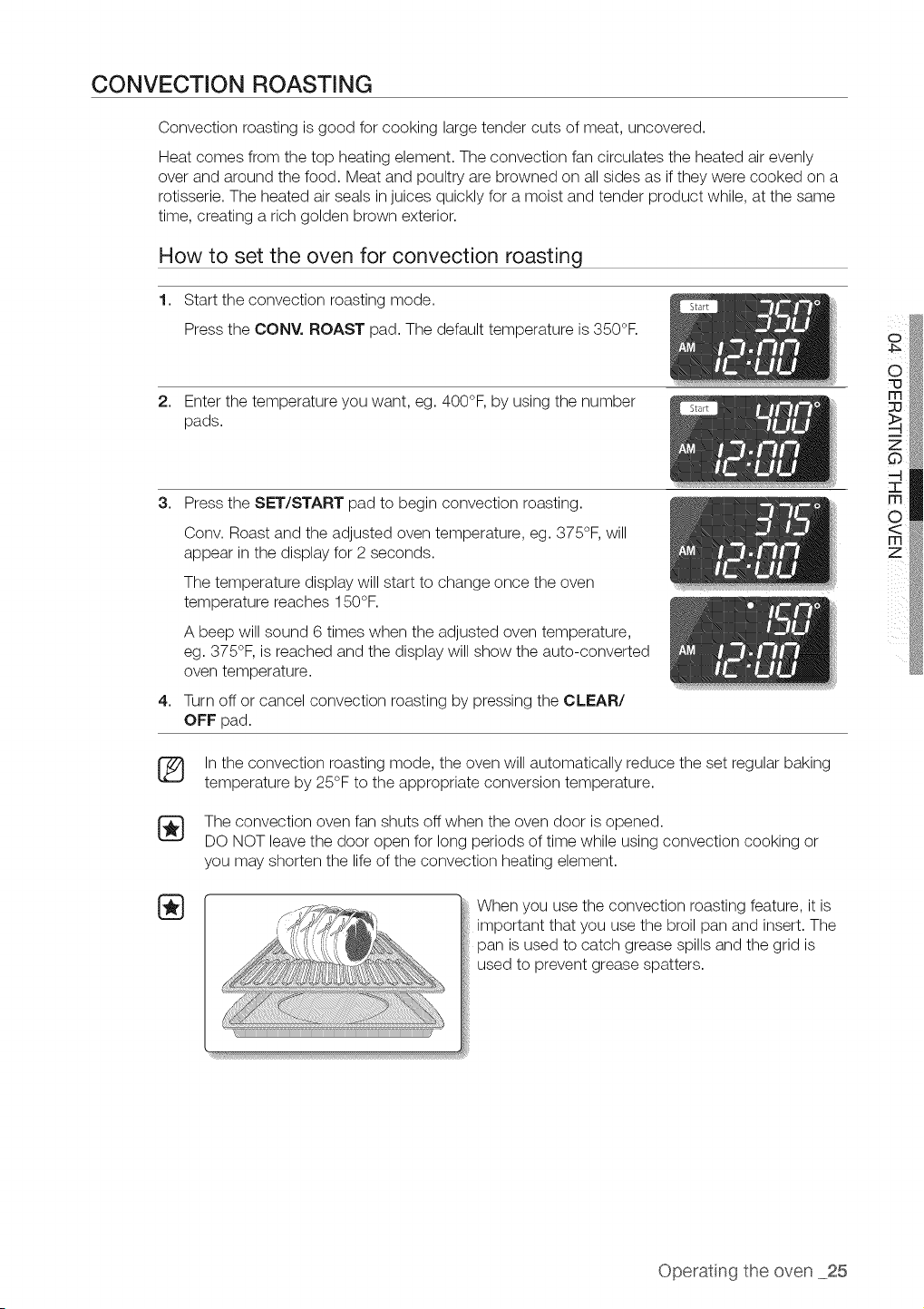
When you use the convection roasting feature, it is
important that you use the broil pan and insert. The
pan isused to catch grease spills and the grid is
used to prevent grease spatters.
Operatng the oven 25
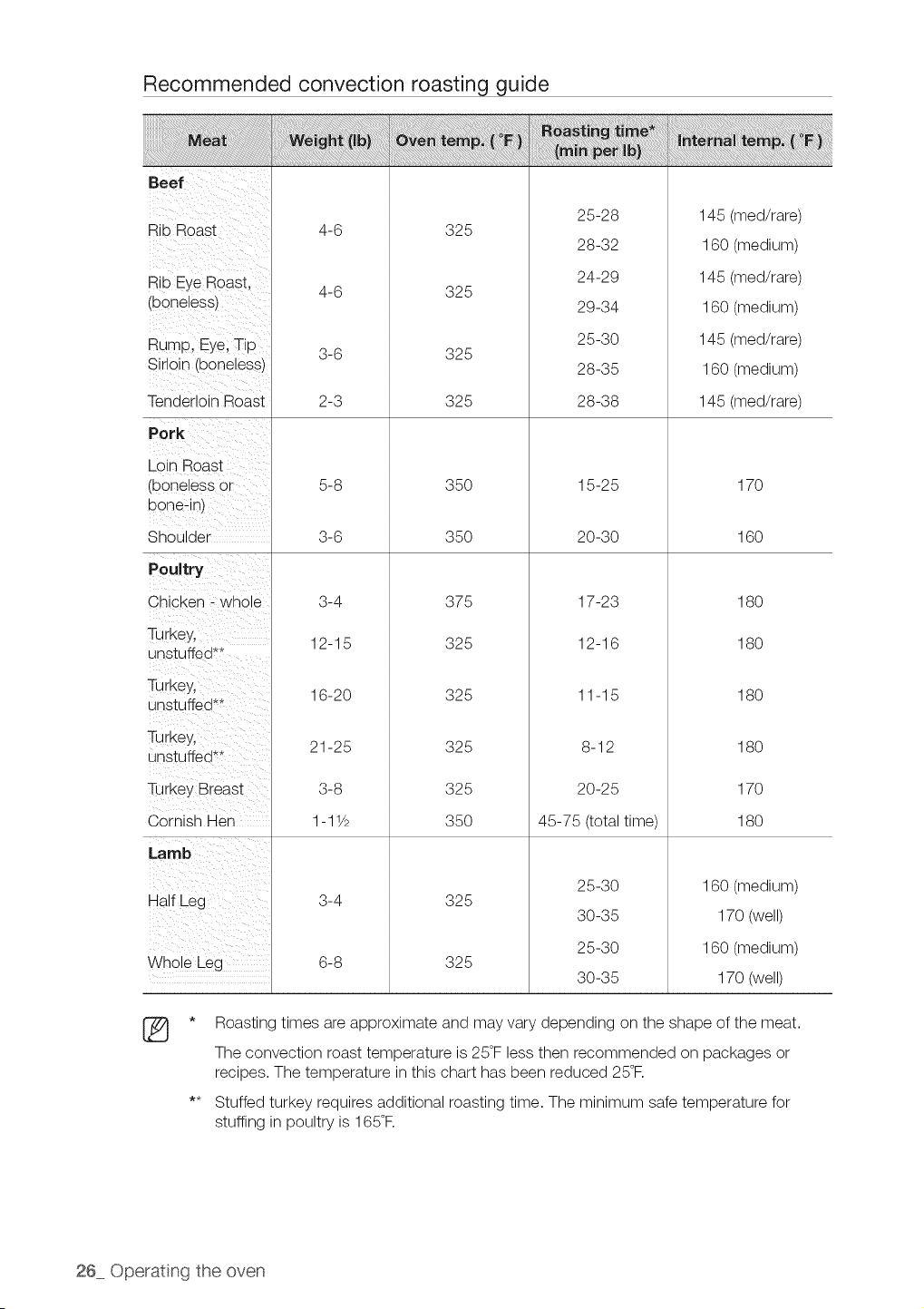
Recommended convection roasting guide
Rib Roast
Rib EyeRoas t,
(boneless)
Rump, Eye;Tip
Sirloin (boneless)
Tenderloin Roast
Pork
Loin Boast
(boneless Or
bone:in)
Shoulder
Poultry
Chicken _ whole
Turkey,
unstuffed**
TurkeYl
unstuffed**
Turkey,
unstuffed**
i
Turkey Breast
Cornish Hen
Half Leg
Whole Leg
®
4-6
4-6
325
325
325
325
25-28
28-32
24-29
29-34
25-30
28-35
28-38
145 (med/rare)
160 (medium)
145 (med/rare)
160 (medium)
145 (med/rare)
160 (medium)
145 (med/rare)
5-8
3-6
3-4
12-15
16-20
21-25
3-8
1-11/2
3-4
6-8
35O
35O
375
325
325
325
325
35O
15-25
20-30
17-23
12-16
11-15
8-12
20-25
45-75 (total time)
170
16O
18O
18O
18O
18O
17O
18O
325
325
25-30
30-35
25-30
30-35
160 (medium)
170 (well)
160 (medium)
170 (well)
* Roasting times areapproximate and may vary depending on the shape of the meat.
The convection roast temperature is 25°Fless then recommended on packages or
recipes. The temperature inthis chart has been reduced 25°R
** Stuffed turkey requires additional roasting time. The minimum safe temperature for
stuffing inpoultry is 165°R
26 Operating the oven
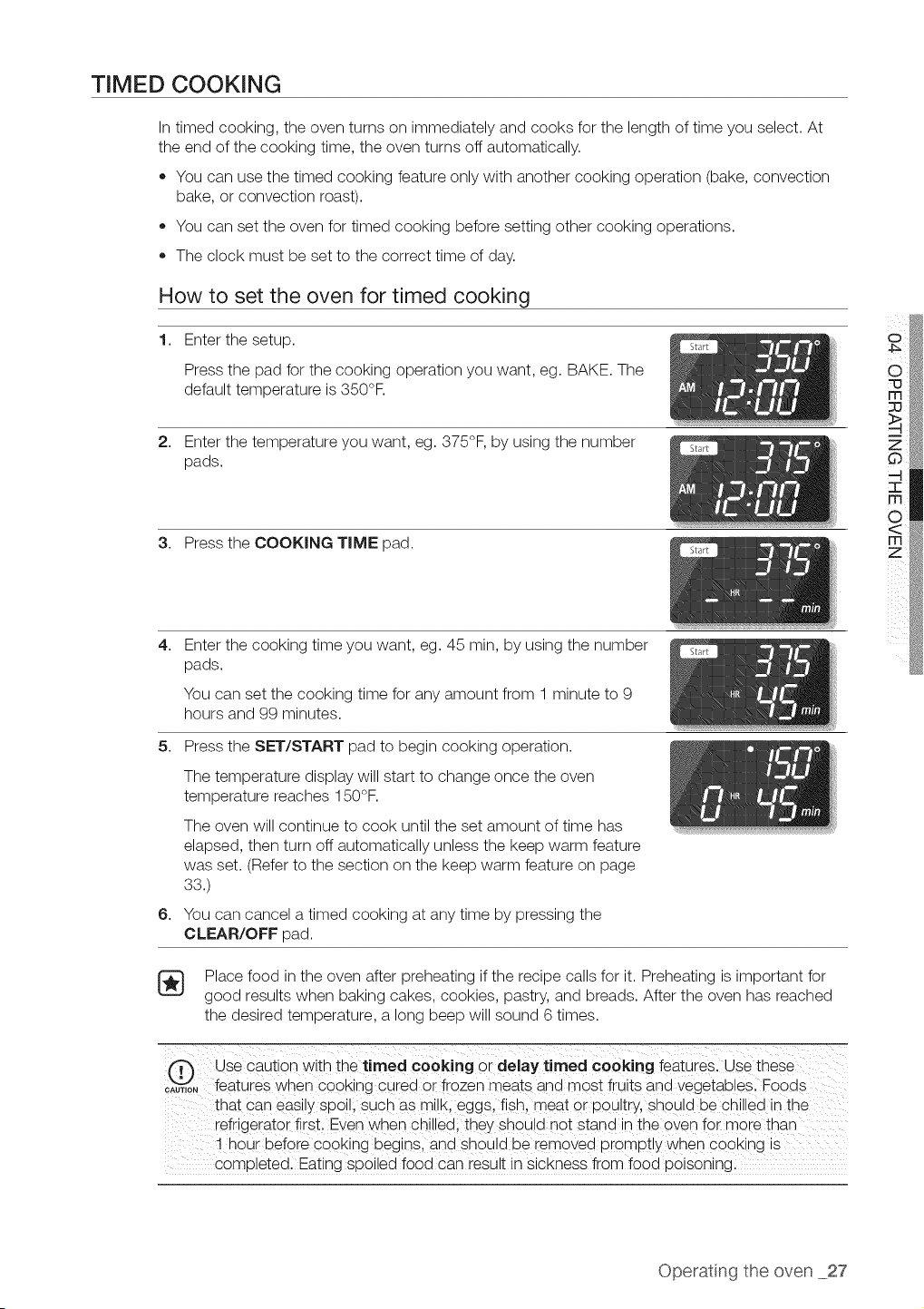
TIMED COOKING
Intimed cooking, the oven turns on immediately and cooks for the length oftime you select. At
the end ofthe cooking time, the oven turns off automatically.
• You can use the timed cooking feature only with another cooking operation (bake, convection
bake, or convection roast).
You can set the oven for timed cooking before setting other cooking operations.
The clock must be set to the correct time of day.
How to set the oven for timed cooking
1. Enter the setup.
Press the pad for the cooking operation you want, eg. BAKE. The
default temperature is350°F.
2. Enter the temperature you want, eg. 375°F, by using the number
pads.
3. Press the COOKING TIME pad.
4,
Enter the cooking time you want, eg. 45 rain, by using the number
pads.
You can set the cooking time for any amount from 1 minute to 9
hours and 99 minutes.
5. Press the SET/START pad to begin cooking operation.
6,
The temperature display will start to change once the oven
temperature reaches 150°F.
The oven will continue to cook until the set amount of time has
elapsed, then turn off automatically unless the keep warm feature
was set. (Refer to the section on the keep warm feature on page
33.)
You can cancel atimed cooking at any time by pressing the
CLEAR/OFF pad.
Place food in the oven after preheating ifthe recipe calls for it. Preheating isimportant for
good results when baking cakes, cookies, pastry, and breads. After the oven has reached
the desired temperature, a long beep will sound 6times.
fT"_ Use caution with the timed cooking or delaytimed cooking features. Use these
CAU,,0"_features when C00king cured or frozen meats and most iruits and vegetab!eSl Foods
that Caneasily spoill such as milk, eggs,fish, meat or poultry, should be chilled in the
refrigerator first, Even when chilledi they should not stand in the oven for more than
! h0ur before cooking begins, and sh0uld be removed promptly when cooking is ..............
completed. Eating spoiled food can result in sickness from food poisoning.
Operatng the oven 27
DELAY TIMED COOKING
Ina delay timed cooking, the oven's timer turns the oven on and off attimes you select in
advance.
,, You can use the delay timed cooking feature only with another cooking operation (bake,
convection bake, or convection roast).
• You can set the oven for adelay timed cooking before setting other cooking operations.
The clock must be set to the current time of day.
How to set the oven for delay timed cooking
1. Position the oven rack(s) and place the food in the oven.
2. Enter the setup.
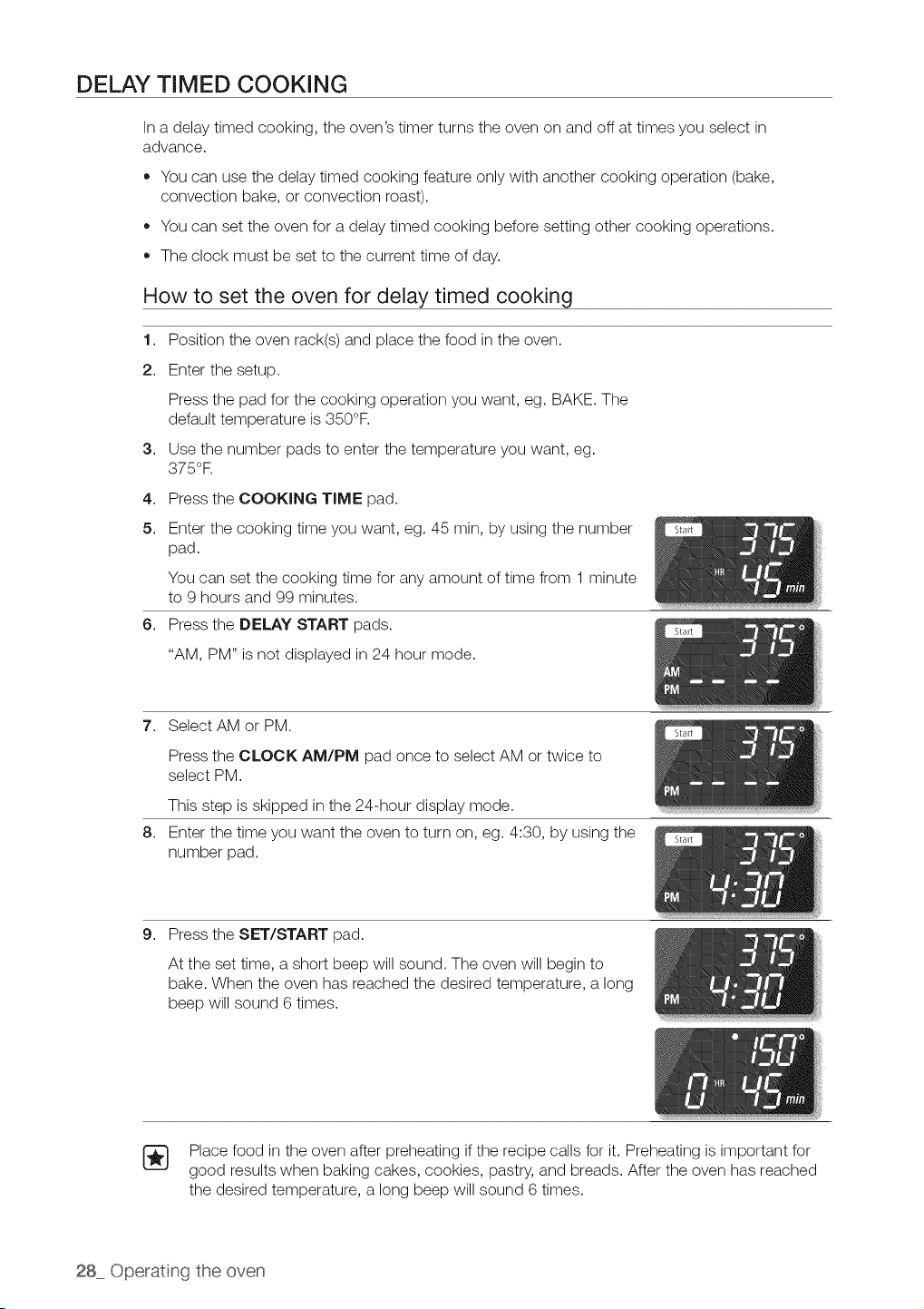
Press the pad for the cooking operation you want, eg. BAKE. The
default temperature is350°F.
3. Use the number pads to enter the temperature you want, eg.
375°R
4. Press the COOKING TIME pad.
5. Enter the cooking time you want, eg. 45 rain, by using the number
pad.
You can set the cooking time for any amount of time from 1 minute
to 9 hours and 99 minutes.
6. Press the DELAY START pads.
"AM, PM" is not displayed in 24 hour mode.
7. Select AM or PM.
Press the CLOCK AM/PM pad once to select AM or twice to
select PM.
This step is skipped in the 24-hour display mode.
8. Enter the time you want the oven to turn on, eg. 4:30, by using the
number pad.
9. Press the SET/START pad.
At the set time, a short beep will sound. The oven will begin to
bake. When the oven has reached the desired temperature, a long
beep will sound 6 times.
Place food in the oven after preheating ifthe recipe calls for it. Preheating is important for
good results when baking cakes, cookies, pastry, and breads. After the oven has reached
the desired temperature, a long beep will sound 6times.
28 Operating the oven
BROILING
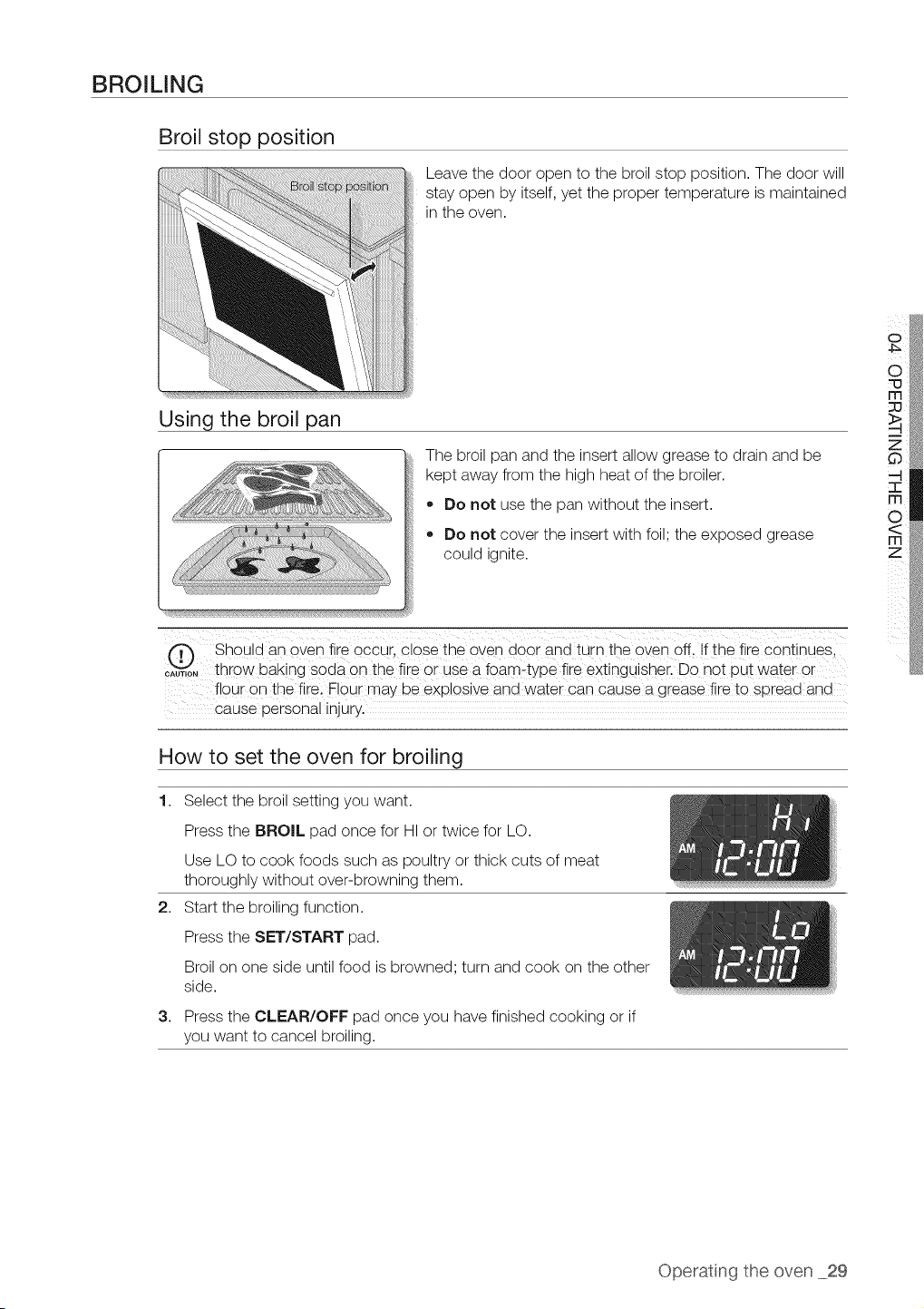
Broil stop position
Using the broil pan
Leave the door open to the broil stop position. The door will
stay open by itself, yet the proper temperature is maintained
in the oven.
The broil pan and the insert allow grease to drain and be
kept away from the high heat of the broiler.
,, Do not use the pan without the insert.
,, Do not cover the insert with foil; the exposed grease
?,OUlO Ignite,
Should an or÷q fire occur, close the oven door ana turn the oven off. If the fire continues.
....... throw baking soda on the fire or use a foam-type fire exting aisher. Do not uut water or
flour on the fire. Flour may De explosive and water can cause a grease fire to soreaa ana
cause oersonal Injury.
o
How to set the oven for broiling
1.
2,
3,
Select the broil setting you want.
Press the BROIL pad once for HI or twice for LO.
Use LO to cook foods such as poultry or thick cuts of meat
thoroughly without over-browning them.
Start the broiling function.
Press the SET/START pad.
Broilon one side until food isbrowned; turn and cook on the other
side.
Press the CLEAR/OFF pad once you have finished cooking or if
you want to cancel broiling.
Operatng the oven 29
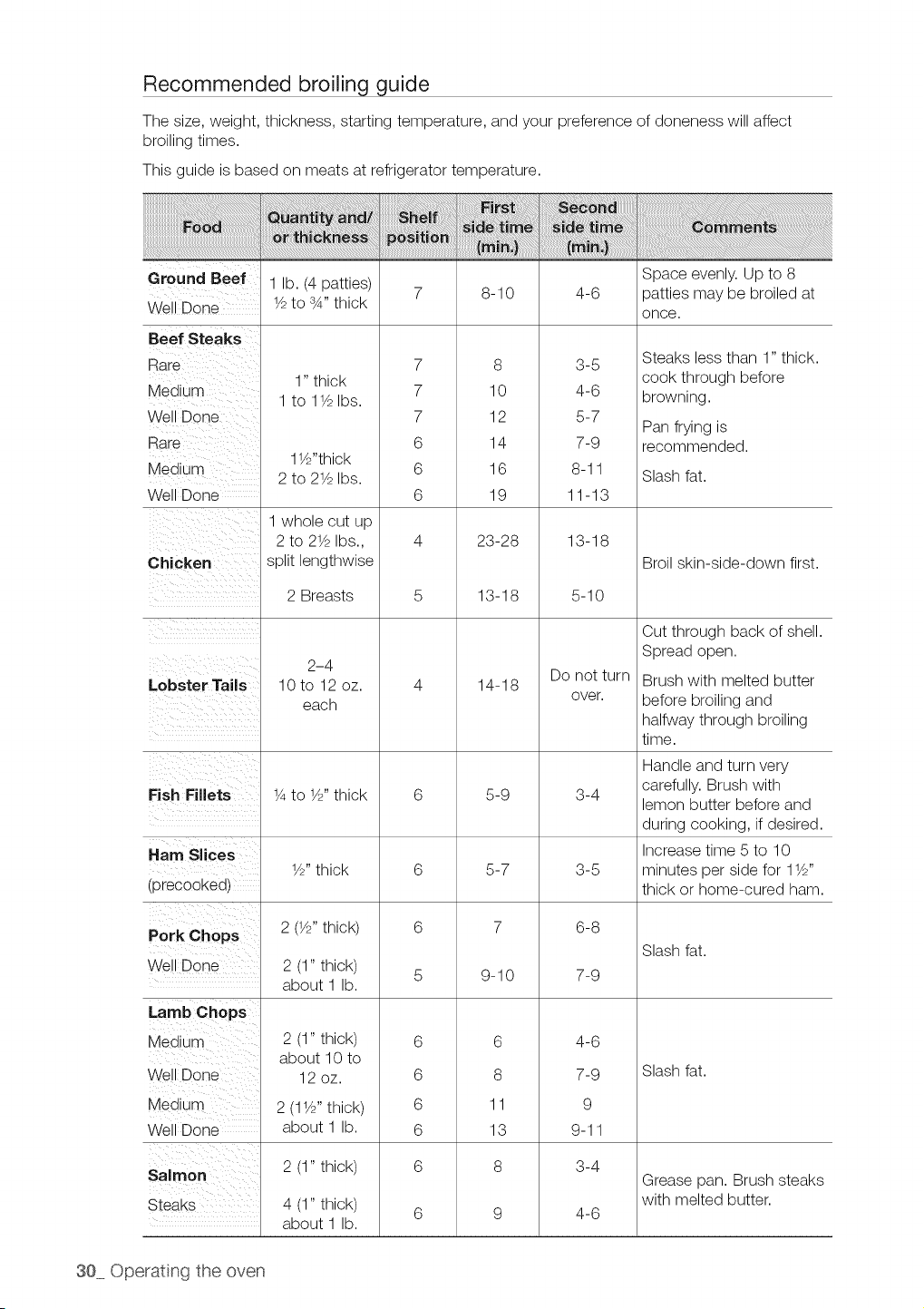
Recommended broiling guide
The size, weight, thickness, starting temperature, and your preference of doneness will affect
broiling times.
This guide isbased on meats at refrigerator temperature.
Ground Beef 1 lb. (4 patties) Space evenly. Up to 8
7 8-10 4-6 patties may be broiled at
Well Done 1/2to sA" thick
once.
1" thick
1 to 11/2Ibs.
11//'thick
2 to 21/2Ibs.
1 whole cut up
2 to 21/2Ibs.,
Beef Steaks
Rare
Medium
Well Done
Rare
Medium
Well Done
Chicken split lengthwise
7
7
7
6
6
6
8
10
12
14
16
19
23-28
3-5
4-6
5-7
7-9
8-11
11-13
13-18
Steaks less than 1" thick.
cook through before
browning.
Pan frying is
recommended.
Slash fat.
Broil skin-side-down first.
Lobster Tails
2 Breasts
2-4
10 to 12 oz.
each
13-18
14-18
5-10
Do not turn
over.
Cut through back of shell.
Spread open.
Brush with melted butter
before broiling and
halfway through broiling
time.
Handle and turn very
carefully. Brush with
Fish Fillets 1/4to 1/2"thick 6 5-9 3-4 lemon butter before and
during cooking, if desired.
Ham SIces Increase time 5 to 10
1//' thick 6 5-7 3-5 minutes per side for 11//'
(precooked) thick or home-cured ham.
Pork Chops 2(1//, thick) 6 7 6-8
Slash fat.
Well Done 2 (1" thick) 5 9-10 7-9
about 1 lb.
2 (1" thick)
about 10 to
12oz.
6
8
11
13
8
2 (11/2"thick)
about 1 lb.
2 (1" thick)
4 (1" thick)
about 1 lb.
4-6
7-9
9
9-11
3-4
4-6
6
6
6
6
6
Lamb Chops
Medium
Well Done
Medium
Well Done
Salmon
Steaks
Slash fat.
Grease pan. Brush steaks
with melted butter.
30 Operating the oven
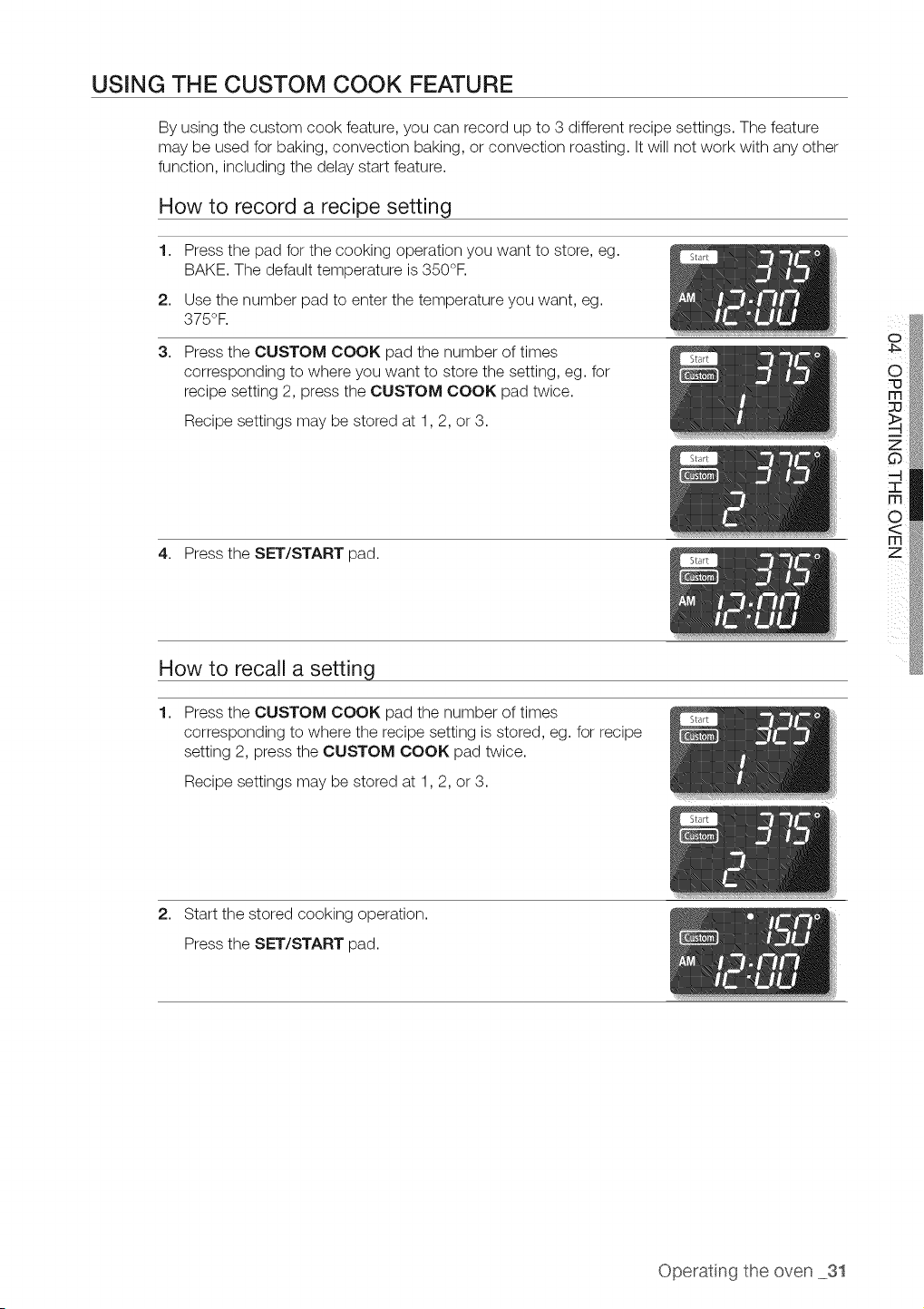
USING THE CUSTOM COOK FEATURE
By using the custom cook feature, you can record up to 3 different recipe settings. The feature
may be used for baking, convection baking, or convection roasting. It will not work with any other
function, including the delay start feature.
How to record a recipe setting
1,
2,
3,
Press the pad for the cooking operation you want to store, eg.
BAKE. The default temperature is350°F.
Use the number pad to enter the temperature you want, eg.
375°F.
Press the CUSTOM COOK pad the number of times
corresponding to where you want to store the setting, eg. for
recipe setting 2, press the CUSTOM COOK pad twice.
Recipe settings may be stored at 1,2, or 3.
4. Press the SET/START pad.
How to recall a setting
1.
Press the CUSTOM COOK pad the number of times
corresponding to where the recipe setting isstored, eg. for recipe
setting 2, press the CUSTOM COOK pad twice.
Recipe settings may be stored at 1,2, or 3.
o
2. Start the stored cooking operation.
Press the SET/START pad.
Operatng the oven 31
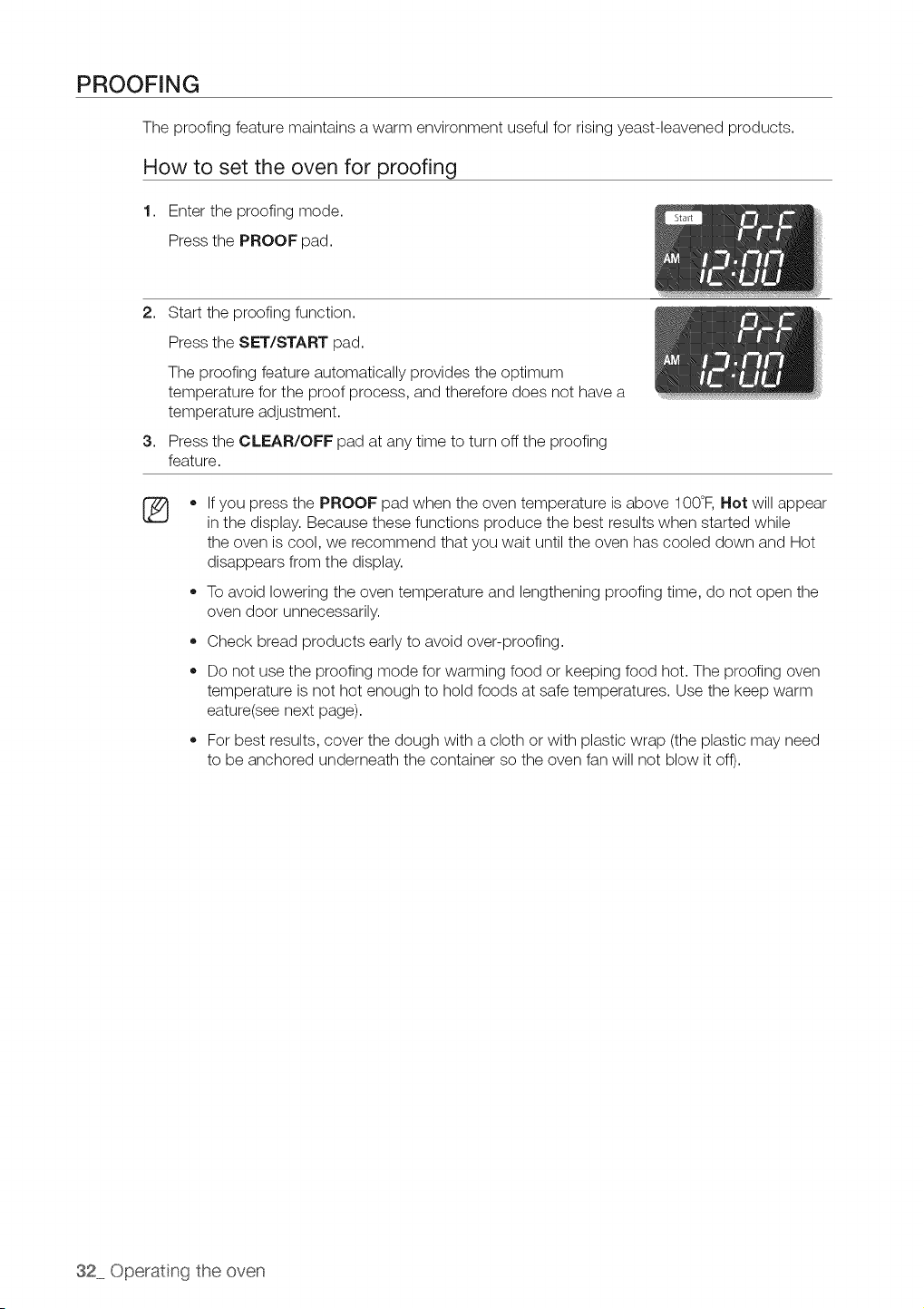
PROOFING
The proofing feature maintains a warm environment useful for rising yeast-leavened products.
How to set the oven for proofing
1. Enter the proofing mode.
Press the PROOF pad.
2. Start the proofing function.
Press the SET/START pad.
The proofing feature automatically provides the optimum
temperature for the proof process, and therefore does not have a
temperature adjustment.
3. Press the CLEAR/OFF pad at any time to turn off the proofing
feature.
®
o
o
If you press the PROOF pad when the oven temperature is above 100°F, Hot will appear
in the display. Because these functions produce the best results when started while
the oven iscool, we recommend that you wait until the oven has cooled down and Hot
disappears from the display.
To avoid lowering the oven temperature and lengthening proofing time, do not open the
oven door unnecessarily.
Check bread products early to avoid over-proofing.
Do not use the proofing mode for warming food or keeping food hot. The proofing oven
temperature is not hot enough to hold foods at safe temperatures. Use the keep warm
eature(see next page).
For best results, cover the dough with a cloth or with plastic wrap (the plastic may need
to be anchored underneath the container so the oven fan will not blow it off).
32 Operating the oven
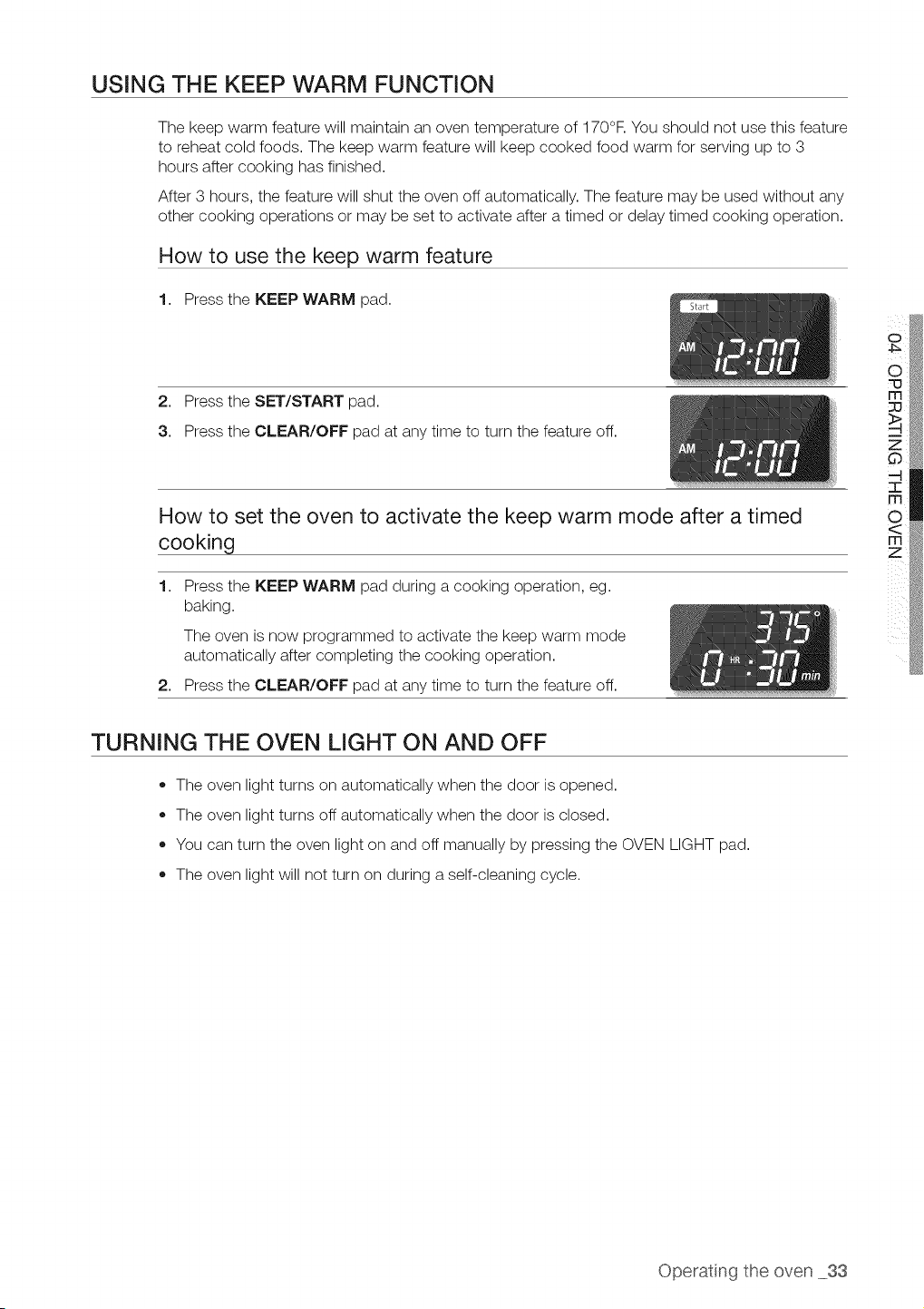
USING THE KEEP WARM FUNCTION
The keep warm feature will maintain an oven temperature of 170°F.You should not use this feature
to reheat cold foods. The keep warm feature will keep cooked food warm for serving up to 3
hours after cooking has finished.
After 3 hours, the feature will shut the oven off automatically. The feature may be used without any
other cooking operations or may be set to activate after a timed or delay timed cooking operation.
How to use the keep warm feature
1. Press the KEEP WARM pad.
2. Press the SET/START pad.
3. Press the CLEAR/OFF pad at any time to turn the feature off.
How to set the oven to activate the keep warm mode after a timed
cooking
1. Press the KEEP WARM pad during a cooking operation, eg.
baking.
The oven is now programmed to activate the keep warm mode
automatically after completing the cooking operation.
2. Press the CLEAR/OFF pad at any time to turn the feature off.
TURNING THE OVEN LIGHT ON AND OFF
• The oven light turns on automatically when the door isopened.
The oven light turns off automatically when the door is closed.
You can turn the oven light on and off manually by pressing the OVEN LIGHT pad.
The oven light will not turn on during a self-cleaning cycle.
Operatng the oven 33
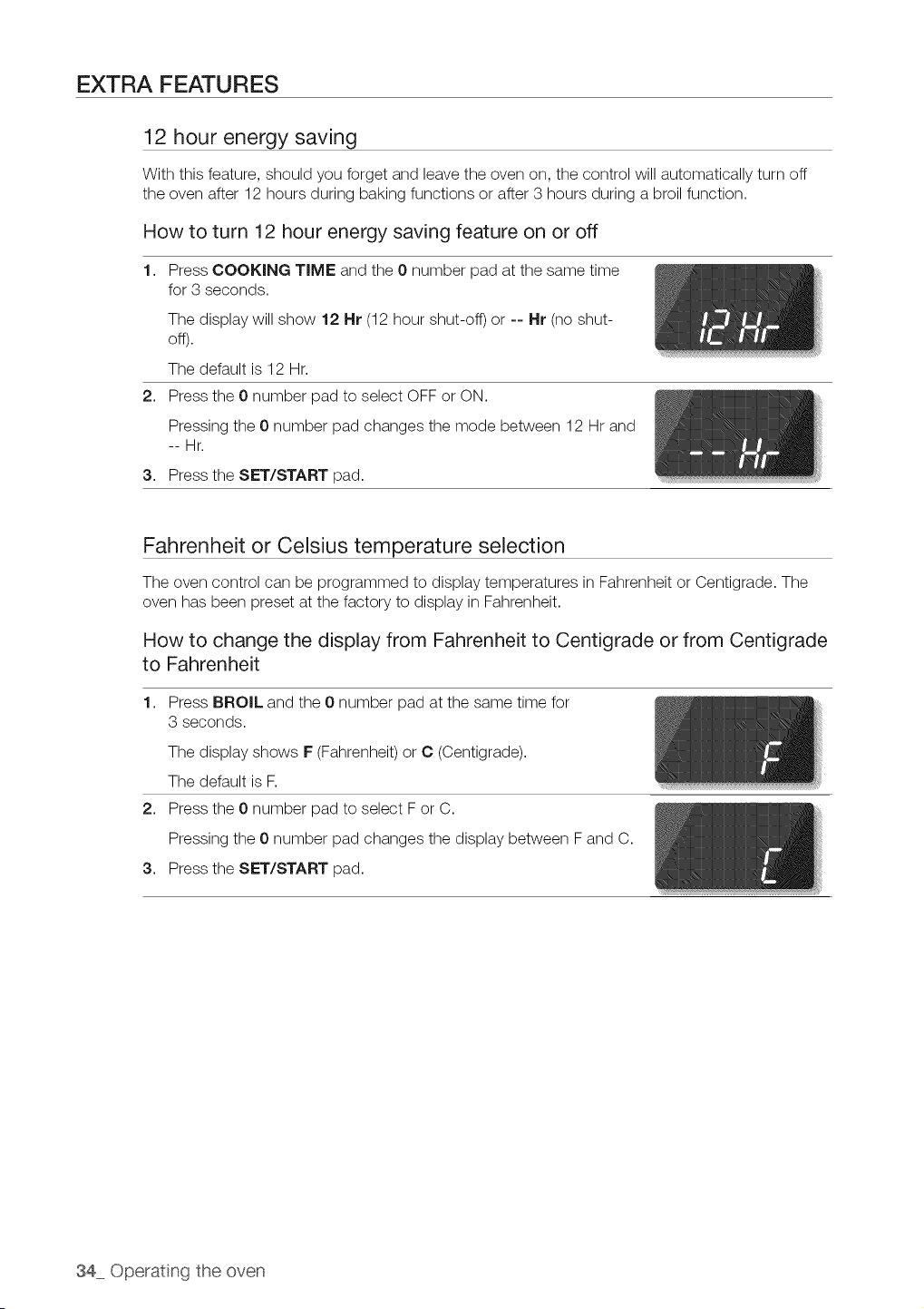
EXTRA FEATURES
12 hour energy saving
With this feature, should you forget and leave the oven on, the control will automatically turn off
the oven after 12 hours during baking functions or after 3 hours during a broil function.
How to turn 12 hour energy saving feature on or off
1. Press COOKING TIME and the 0 number pad at the same time
for 3 seconds.
The display will show 12 Hr (12hour shut-off) or -- Hr (no shut-
off).
The default is 12 Hr.
2. Press the 0 number pad to select OFF or ON.
Pressing the 0number pad changes the mode between 12 Hr and
--Hr.
3. Press the SET/START pad.
Fahrenheit or Celsius temperature selection
The oven control can be programmed to display temperatures in Fahrenheit or Centigrade. The
oven has been preset at the factory to display in Fahrenheit.
How to change the display from Fahrenheit to Centigrade or from Centigrade
to Fahrenheit
1. Press BROIL and the 0 number pad at the same time for
3 seconds.
The display shows F(Fahrenheit) or C (Centigrade).
The default is F.
2. Press the 0 number pad to select For C.
Pressing the 0number pad changes the display between Fand C.
3. Press the SET/START pad.
34 Operating the oven
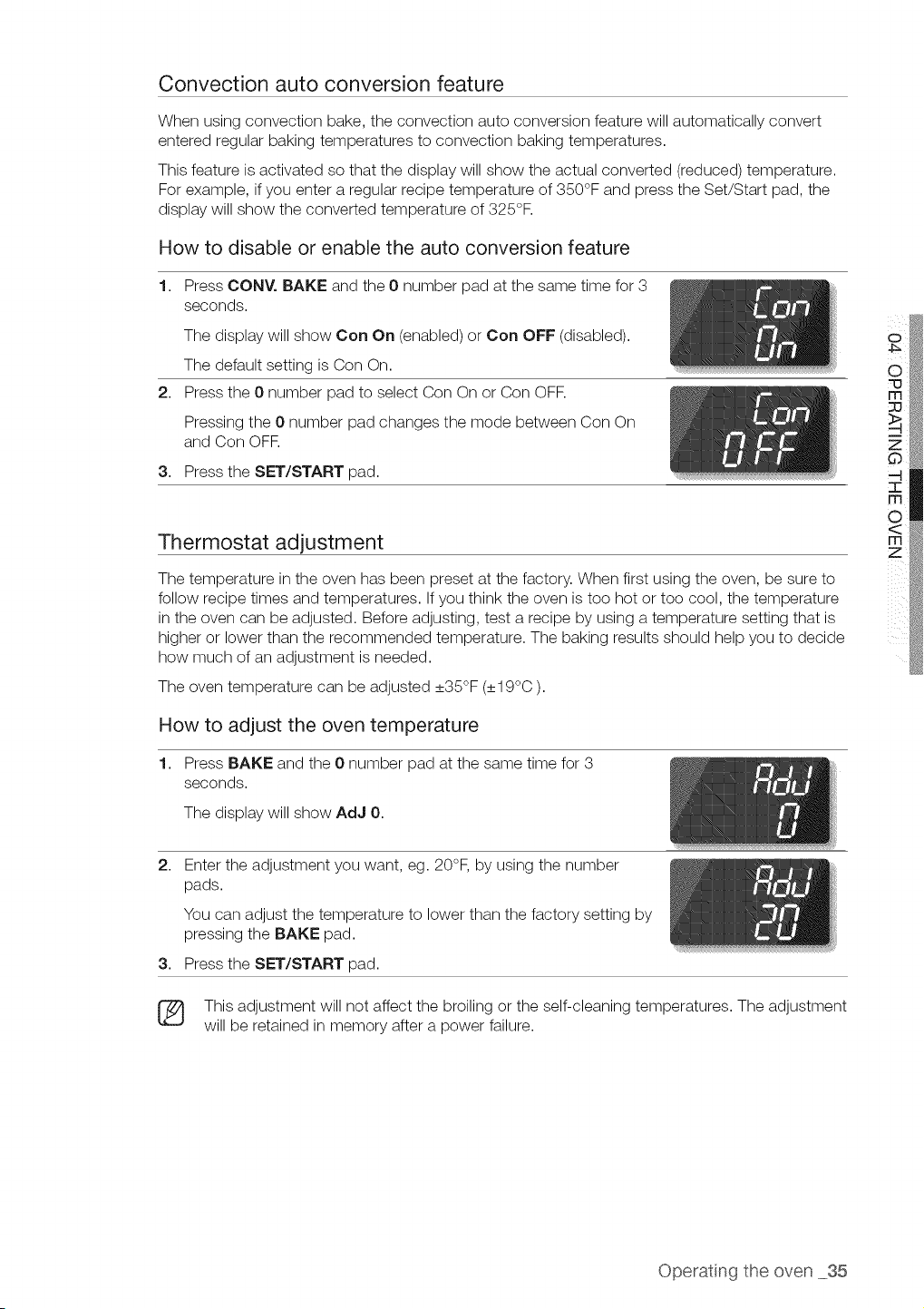
Convection auto conversion feature
When using convection bake, the convection auto conversion feature will automatically convert
entered regular baking temperatures to convection baking temperatures.
This feature is activated so that the display will show the actual converted (reduced) temperature.
For example, ifyou enter aregular recipe temperature of 350°F and press the Set/Start pad, the
display will show the converted temperature of 325°F.
How to disable or enable the auto conversion feature
1. Press CONY. BAKE and the 0 number pad at the same time for 3
seconds.
The display will show Con On (enabled) or Con OFF (disabled).
The default setting is Con On.
2. Press the 0 number pad to select Con Onor Con OFR
Pressing the 0 number pad changes the mode between Con On
and Con OFF.
3. Press the SET/START pad.
Thermostat adjustment
The temperature in the oven has been preset at the factory. When first using the oven, be sure to
follow recipe times and temperatures. If you think the oven istoo hot or too cool, the temperature
in the oven can be adjusted. Before adjusting, test a recipe by using a temperature setting that is
higher or lower than the recommended temperature. The baking results should help you to decide
how much of an adjustment isneeded.
The oven temperature can be adjusted _+35°F(_+19°C).
How to adjust the oven temperature
1. Press BAKE and the 0 number pad at the same time for 3
seconds.
The display will show AdJ 0.
2,
Enter the adjustment you want, eg. 20°F, by using the number
pads.
You can adjust the temperature to lower than the factory setting by
pressing the BAKE pad.
3. Press the SET/START pad.
This adjustment will not affect the broiling or the self-cleaning temperatures. The adjustment
will be retained in memory after a power failure.
Operatng the oven 35
Sound on/off
By using this feature, you can set the oven controls to operate silently.
How to turn the sound on or off
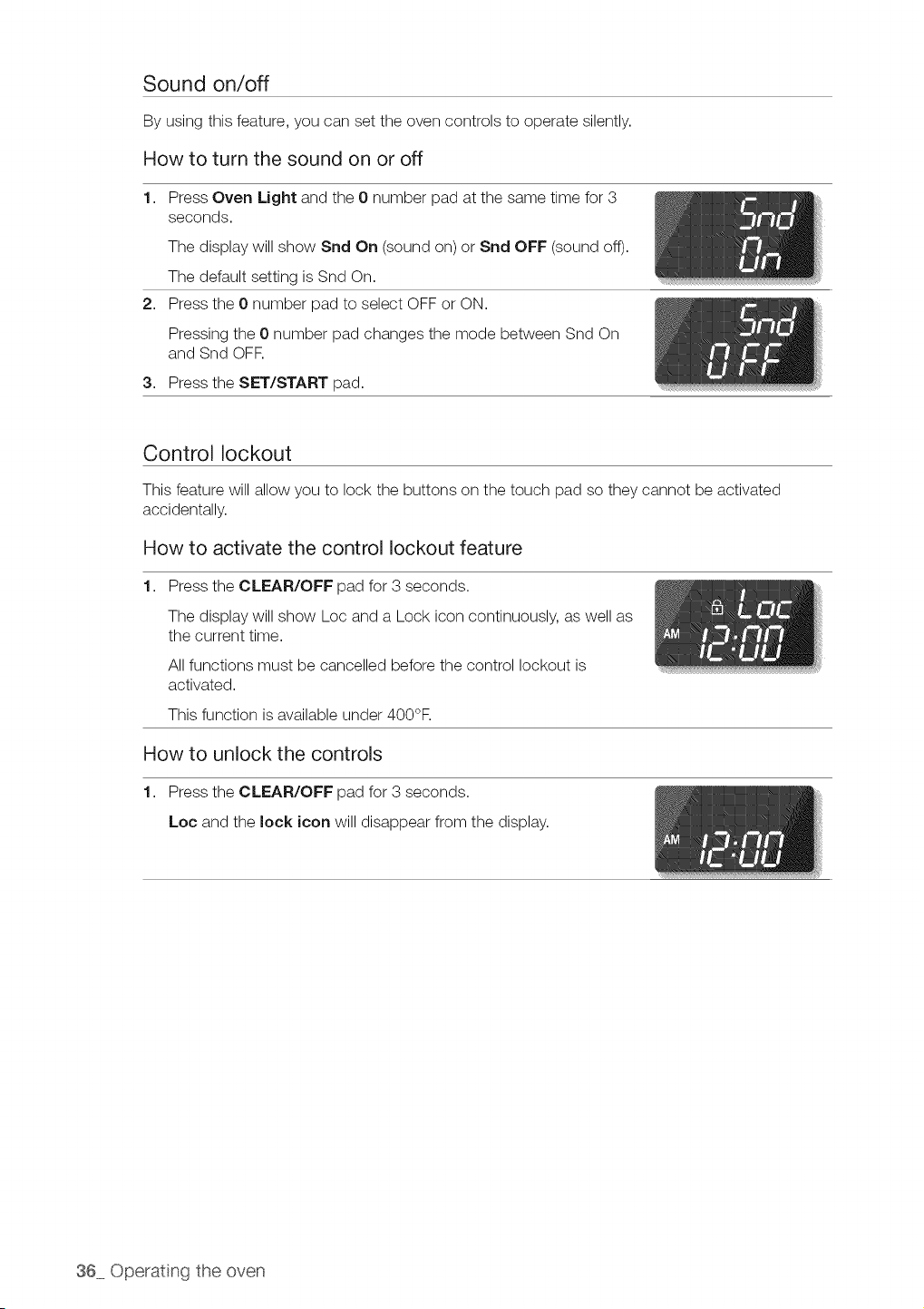
1. Press Oven Light and the 0 number pad atthe same time for 3
seconds.
The display will show Snd On (sound on) or Snd OFF (sound off).
The default setting isSnd On.
2. Press the 0 number pad to select OFF or ON.
Pressing the 0number pad changes the mode between Snd On
and Snd OFF.
3. Press the SET/START pad.
Control lockout
This feature will allow you to lock the buttons on the touch pad so they cannot be activated
accidentally.
How to activate the control lockout feature
1. Press the CLEAR/OFF pad for 3 seconds.
The display will show Loc and a Lock icon continuously, as well as
the current time.
All functions must be cancelled before the control lockout is
activated.
This function is available under 400°F.
How to unlock the controls
1. Press the CLEAR/OFF pad for 3 seconds.
Loc and the lock icon will disappear from the display.
36 Operating the oven
Setting the Sabbath
(For use on the Jewish Sabbath & Holidays}
The Sabbath feature can be used with baking only. The oven temperature may be set higher
or lower after setting the Sabbath feature (theoven temperature adjustment feature should be
used only during Jewish holidays). The display, however, will not change and tones will not sound
when a change occurs. Once the oven isproperly set for baking with the Sabbath feature active,
the oven will remain continuously on until cancelled. This will override the factory preset 12 hour
energy saving feature. If the oven light is needed during the Sabbath, press the OVEN LIGHT pad
before activating the Sabbath feature. Once the oven light is turned on and the Sabbath feature is
active, the oven light will remain on until the Sabbath feature isturned off. If the oven light needs to
be off, be sure to turn the oven light off before activating the Sabbath feature.
How to use the Sabbath feature
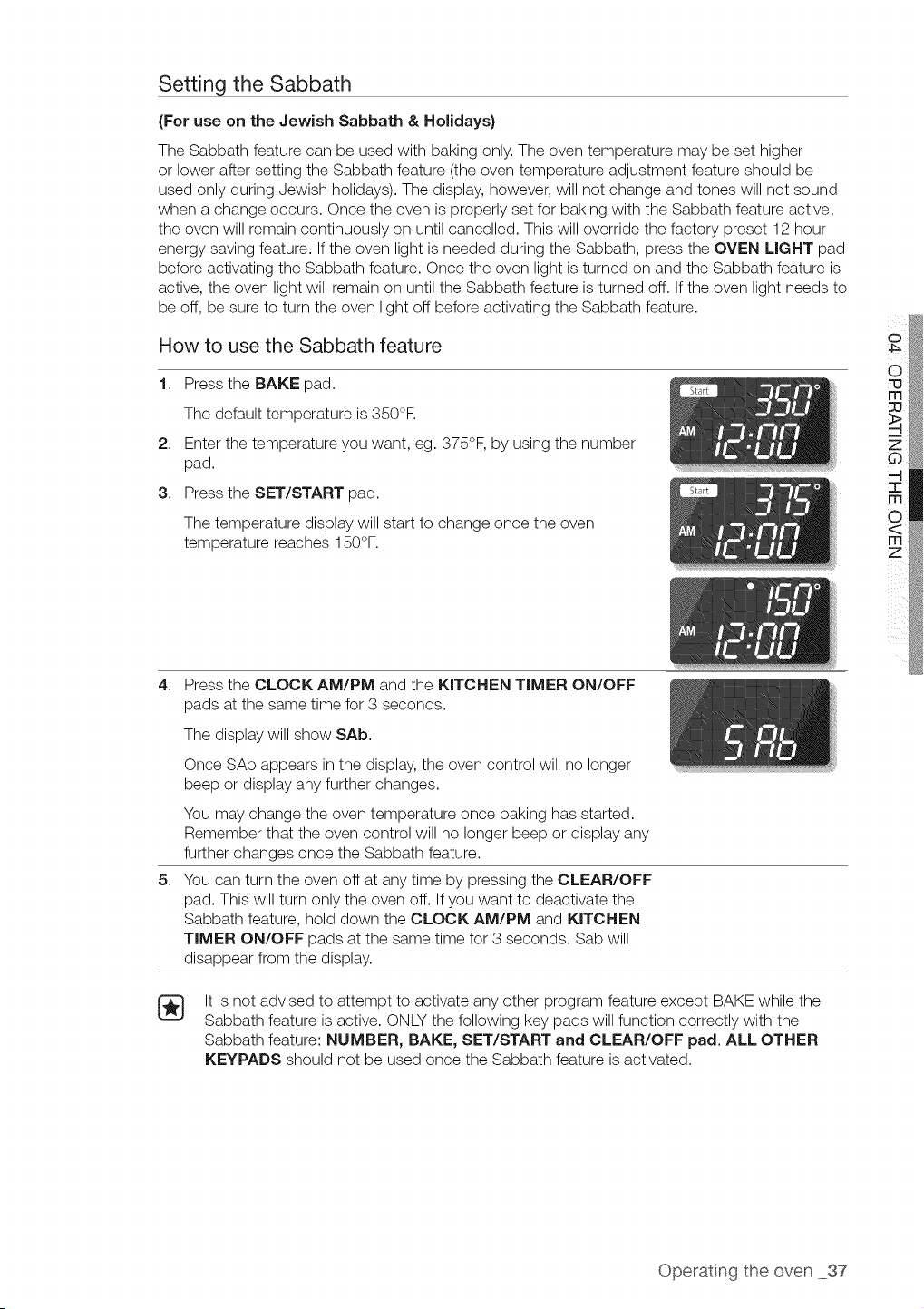
1. Press the BAKE pad.
The default temperature is350°R
2. Enter the temperature you want, eg. 375°F, by using the number
pad.
3. Press the SET/START pad.
The temperature display will start to change once the oven
temperature reaches 150°F.
o
O
=0
4,
5,
Press the CLOCK AM/PM and the KITCHEN TIMER ON/OFF
pads at the same time for 3 seconds.
The display will show SAb.
Once SAb appears in the display, the oven control will no longer
beep or display any further changes.
You may change the oven temperature once baking has started.
Remember that the oven control will no longer beep or display any
further changes once the Sabbath feature.
You can turn the oven off at any time by pressing the CLEAR/OFF
pad. This will turn only the oven off. If you want to deactivate the
Sabbath feature, hold down the CLOCK AM/PM and KITCHEN
TIMER ON/OFF pads at the same time for 3 seconds. Sab will
disappear from the display.
It isnot advised to attempt to activate any other program feature except BAKE while the
Sabbath feature isactive. ONLY the following key pads will function correctly with the
Sabbath feature: NUMBER, BAKE, SET/START and CLEAR/OFF pad. ALL OTHER
KEYPADS should not be used once the Sabbath feature isactivated.
Operatng the oven 37
SELF-CLEANING
A self-cleaning oven uses high temperatures (well above cooking temperatures) to burn off leftover
grease and residue completely or reduce them to a finely powdered ash that you can wipe away
with a damp cloth.
• During the self-cleaning cycle, the outside of the range can become very not to toucn.
oAuT,o, DOnot leave small Cnllaren unattended near the aDDilance.
The health of some ulras s extremely sensitive to the fumes given off during the self-
c_ean_ngc} cle of any range. Move birds to another well-ventilated room.
Do not line the oven waus. racKs, bottom or any other Dart of the range with
alumlrum foil. Doing so will result in Door heatdistribution, uroauce poor UaKIng
results ana cause permanent damage to the oven _ntenor auminum foil will melt to
the _ntenor sJrface ofthe oven,.
,, Do not force the oven dOOr open. Th_scan aamage the automatic door locking
system. Use care when opening the oven door after the self-cleaning cycle _s
comE, ete. Stand to the side of the oven when opening the door to allow hot ar or
steam to escaoe. The oven _na}still be VERY HOT.
Before a self-cleaning cycle
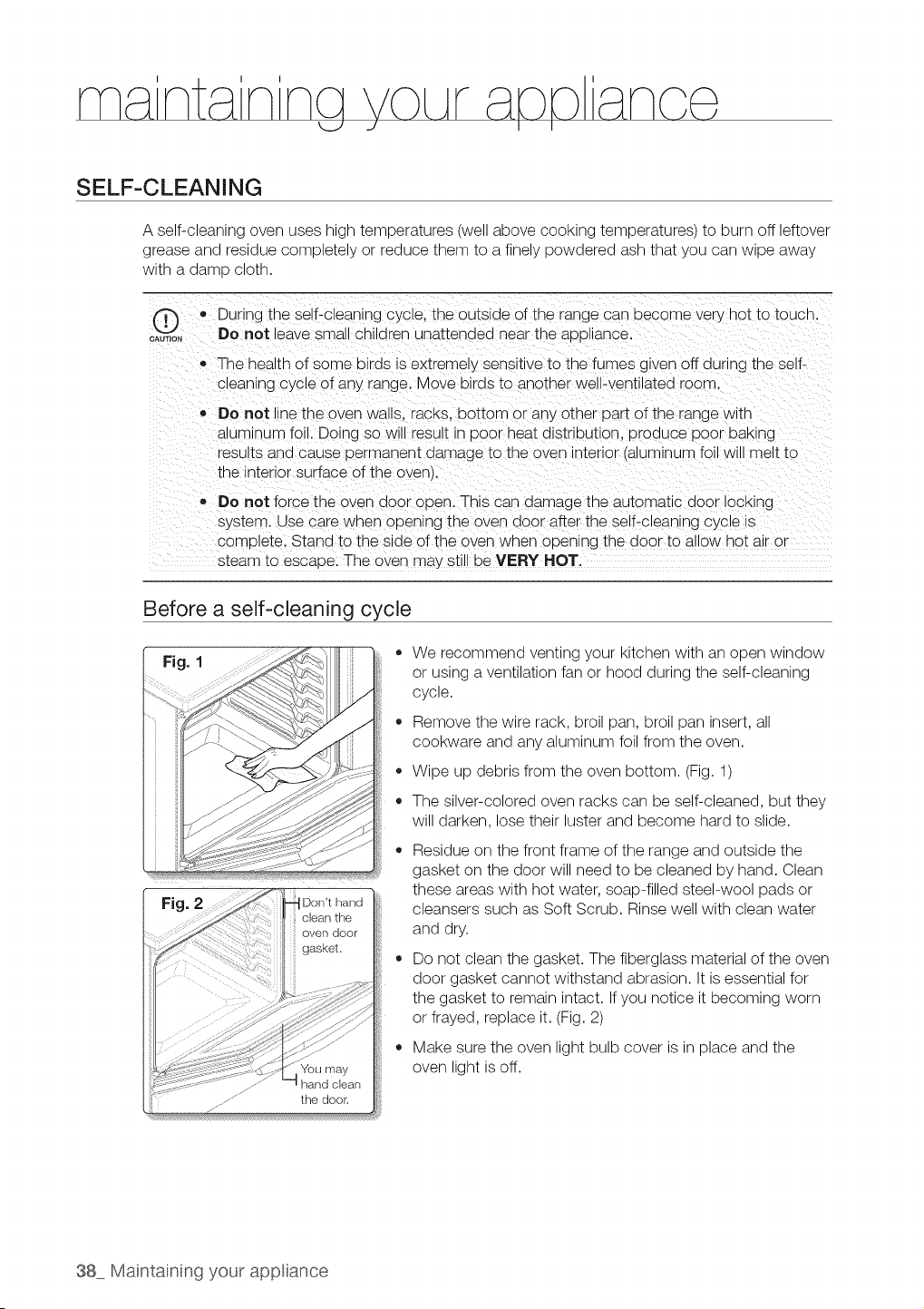
Fig. I
Fig.
Dorft hand
clean the
oven door
gasket.
......... the door.
o
o
We recommend venting your kitchen with an open window
or using aventilation fan or hood during the self-cleaning
cycle.
Remove the wire rack, broil pan, broil pan insert, all
cookware and any aluminum foil from the oven.
Wipe up debris from the oven bottom. (Fig.1)
The silver-colored oven racks can be self-cleaned, but they
will darken, lose their luster and become hard to slide.
Residue on the front frame of the range and outside the
gasket on the door will need to be cleaned by hand. Clean
these areas with hot water, soap-filled steel-wool pads or
cleansers such as Soft Scrub. Rinse well with clean water
and dry.
Do not clean the gasket. The fiberglass material of the oven
door gasket cannot withstand abrasion. It isessential for
the gasket to remain intact. If you notice it becoming worn
or frayed, replace it. (Fig. 2)
Make sure the oven light bulb cover isin place and the
oven light isoff.
38 Maintaining your app ance
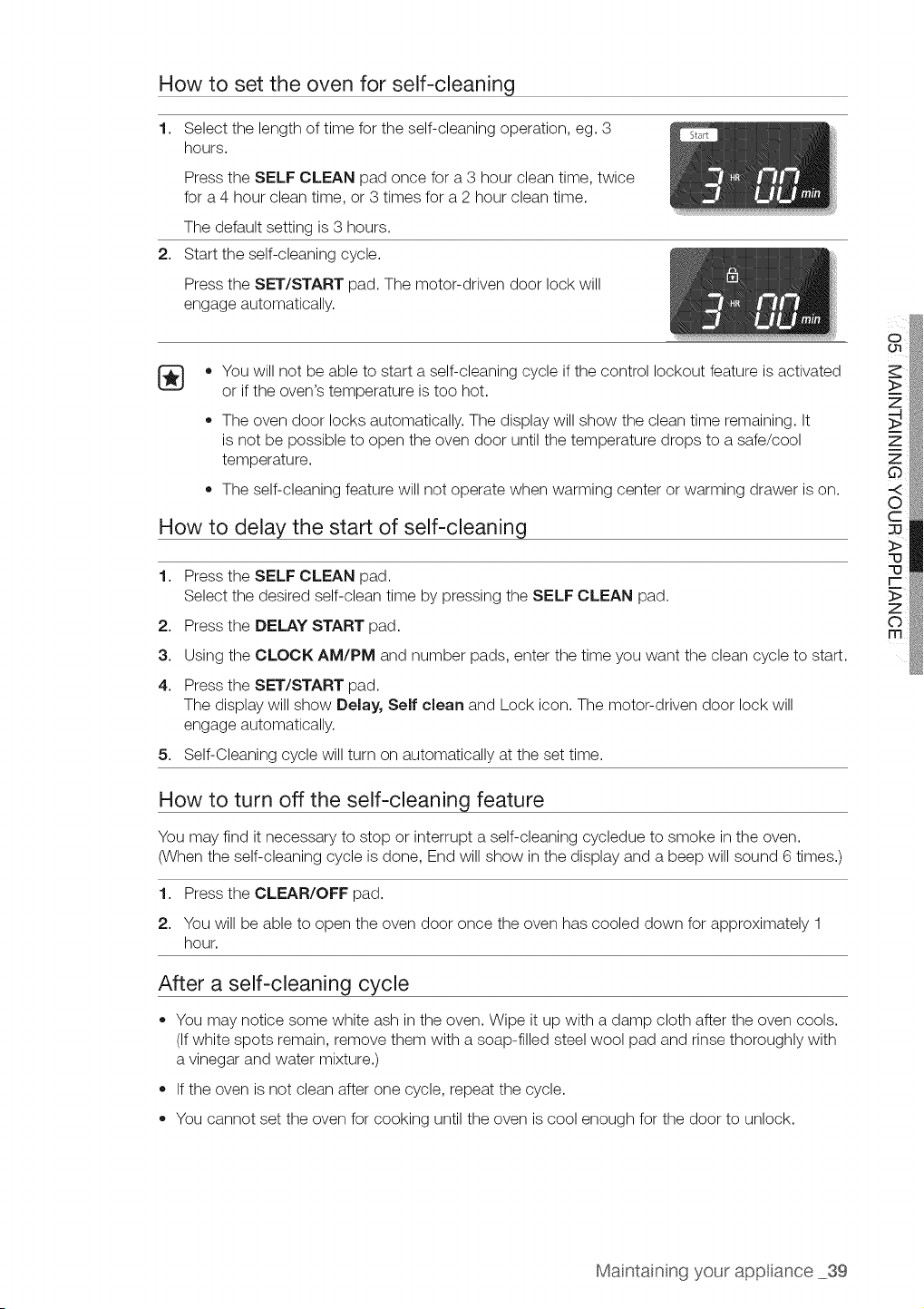
How to set the oven for self-cleaning
1,
2,
Select the length of time for the self-cleaning operation, eg. 3
hours.
Press the SELF CLEAN pad once for a 3 hour clean time, twice
for a 4 hour clean time, or 3 times for a 2 hour clean time.
The default setting is3 hours.
Start the self-cleaning cycle.
Press the SET/START pad. The motor-driven door lock will
engage automatically.
[_ • You will not be able to start a self-cleaning cycle if the control lockout feature isactivated
or if the oven's temperature is too hot.
The oven door locks automatically. The display will show the clean time remaining. It
is not be possible to open the oven door until the temperature drops to a safe/cool
temperature.
The self-cleaning feature will not operate when warming center or warming drawer ison.
How to delay the start of self-cleaning
1. Press the SELF CLEAN pad.
Select the desired self-clean time by pressing the SELF CLEAN pad.
2. Press the DELAY START pad.
3. Using the CLOCK AM/PM and number pads, enter the time you want the clean cycle to start.
4. Press the SET/START pad.
The display will show Delay, Self clean and Lock icon. The motor-driven door lock will
engage automatically.
5. Self-Cleaning cycle will turn on automatically atthe set time.
How to turn off the self-cleaning feature
You may find it necessary to stop or interrupt a self-cleaning cycledue to smoke in the oven.
(When the self-cleaning cycle isdone, End will show in the display and a beep will sound 6 times.)
1. Press the CLEAR/OFF pad.
2. You will be able to open the oven door once the oven has cooled down for approximately 1
hour.
After a self-cleaning cycle
You may notice some white ash in the oven. Wipe it up with a damp cloth after the oven cools.
(If white spots remain, remove them with a soap-filled steel wool pad and rinse thoroughly with
a vinegar and water mixture.)
If the oven isnot clean after one cycle, repeat the cycle.
You cannot set the oven for cooking until the oven iscool enough for the door to unlock.
Maintainng your app ance 39
STEAM-CLEANING
How to set the oven for steam-cleaning
Steam-cleaning saves time and energy for light cleaning. For heavier-duty cleaning of debris and
grease, use the self-cleaning function.
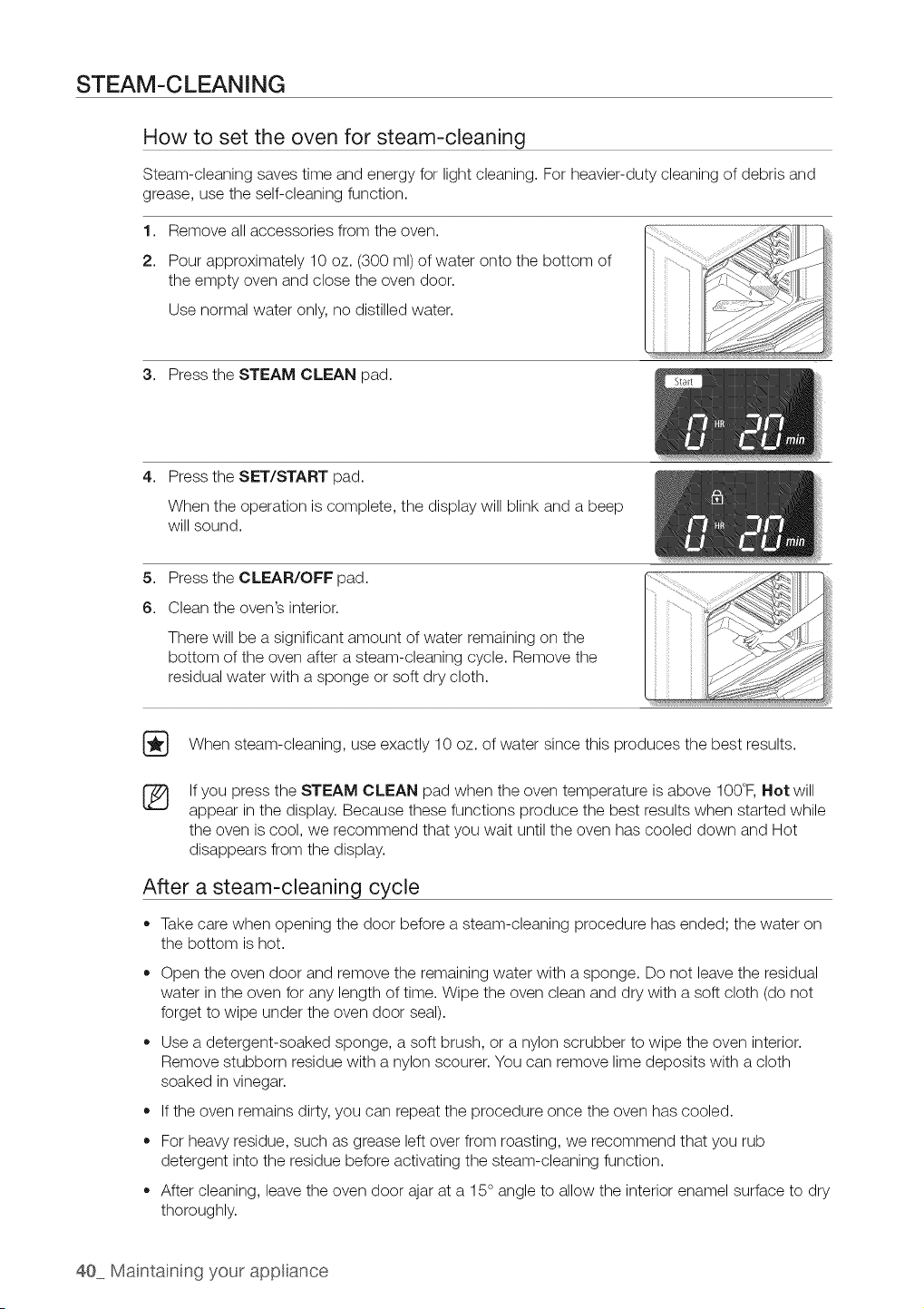
1. Remove all accessories from the oven.
2. Pour approximately 10oz. (300 ml) of water onto the bottom of
the empty oven and close the oven door.
Use normal water only, no distilled water.
3. Press the STEAM CLEAN pad.
4,
Press the SET/START pad.
When the operation is complete, the display will blink and a beep
will sound.
5. Press the CLEAR/OFF pad.
6. Clean the oven's interior.
There will be a significant amount of water remaining on the
bottom of the oven after a steam-cleaning cycle. Remove the
residual water with a sponge or soft dry cloth.
[_ When steam-cleaning, use exactly 10 oz. of water since this produces the best results.
8S
If you press the STEAM CLEAN pad when the oven temperature isabove 100°F, Not will
appear in the display. Because these functions produce the best results when started while
the oven iscool, we recommend that you wait until the oven has cooled down and Hot
disappears from the display.
After a steam-cleaning cycle
• Takecare when opening the door before a steam-cleaning procedure has ended; the water on
the bottom ishot.
o
o
Open the oven door and remove the remaining water with a sponge. Do not leave the residual
water in the oven for any length of time. Wipe the oven clean and dry with a soft cloth (do not
forget to wipe under the oven door seal).
Use a detergent-soaked sponge, a soft brush, or a nylon scrubber to wipe the oven interior.
Remove stubborn residue with anylon scourer. You can remove lime deposits with a cloth
soaked in vinegar.
If the oven remains dirty, you can repeat the procedure once the oven has cooled.
For heaw residue, such asgrease leftover from roasting, we recommend that you rub
detergent into the residue before activating the steam-cleaning function.
After cleaning, leave the oven door ajar at a 15° angle to allow the interior enamel surface to dry
thoroughly.
40 Maintaining your app ance
CARE AND CLEANING OF THE OVEN
w_ _ Be sure all controls are OFF and all surfaces are COOL before cleaning any
part of the range.
if your range is removed for cleaning, servicing or
any reason, be sure the Anti-Tip device is re-engaged _
properly when the range is replaced. Failure to take _ _ J _ _ ,J
this precaution could result in tipping of the range and _
cause injury.
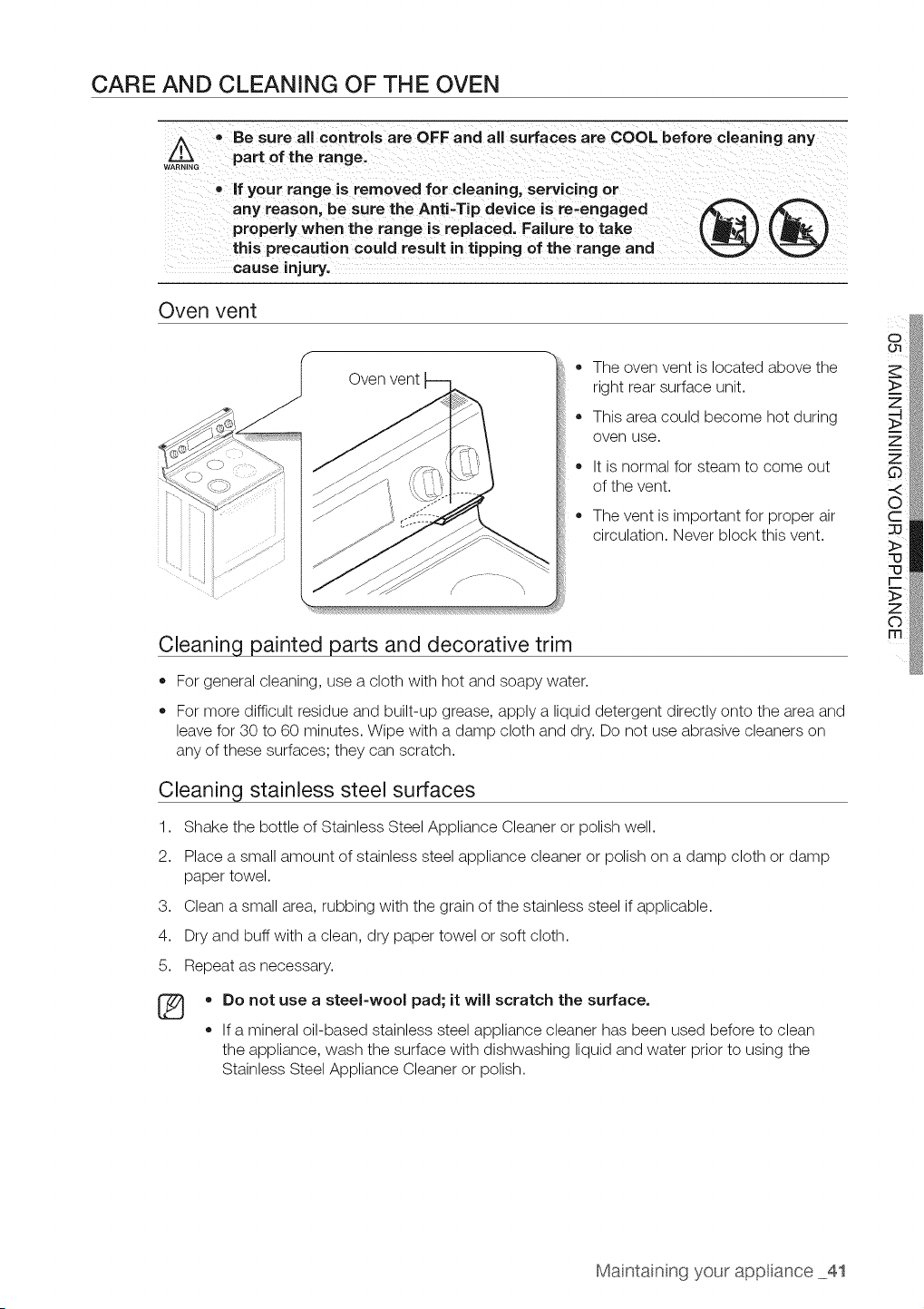
Oven vent
ii ii ii i
• The oven vent islocated above the
right rear surface unit.
• This area could become hot during
oven use.
It isnormal for steam to come out
of the vent.
The vent is important for proper air
circulation. Never block this vent.
Cleaning painted parts and decorative trim
• For general cleaning, use a cloth with hot and soapy water.
For more difficult residue and built-up grease, apply a liquid detergent directly onto the area and
leave for 30 to 60 minutes. Wipe with a damp cloth and dry. Do not use abrasive cleaners on
any of these surfaces; they can scratch.
Cleaning stainless steel surfaces
1. Shake the bottle of Stainless Steel Appliance Cleaner or polish well.
2. Place a small amount of stainless steel appliance cleaner or polish on a damp cloth or damp
paper towel.
3. Clean a small area, rubbing with the grain of the stainless steel if applicable.
4. Dry and buffwith a clean, dry paper towel or soft cloth.
5. Repeat as necessary.
®
o
o
Do not use a steel-wool pad; itwill scratch the surface.
If a mineral oil-based stainless steel appliance cleaner has been used before to clean
the appliance, wash the surface with dishwashing liquid and water prior to using the
Stainless Steel Appliance Cleaner or polish.
Maintainng your app ance 41
Cleaning the broil pan and insert
o
o
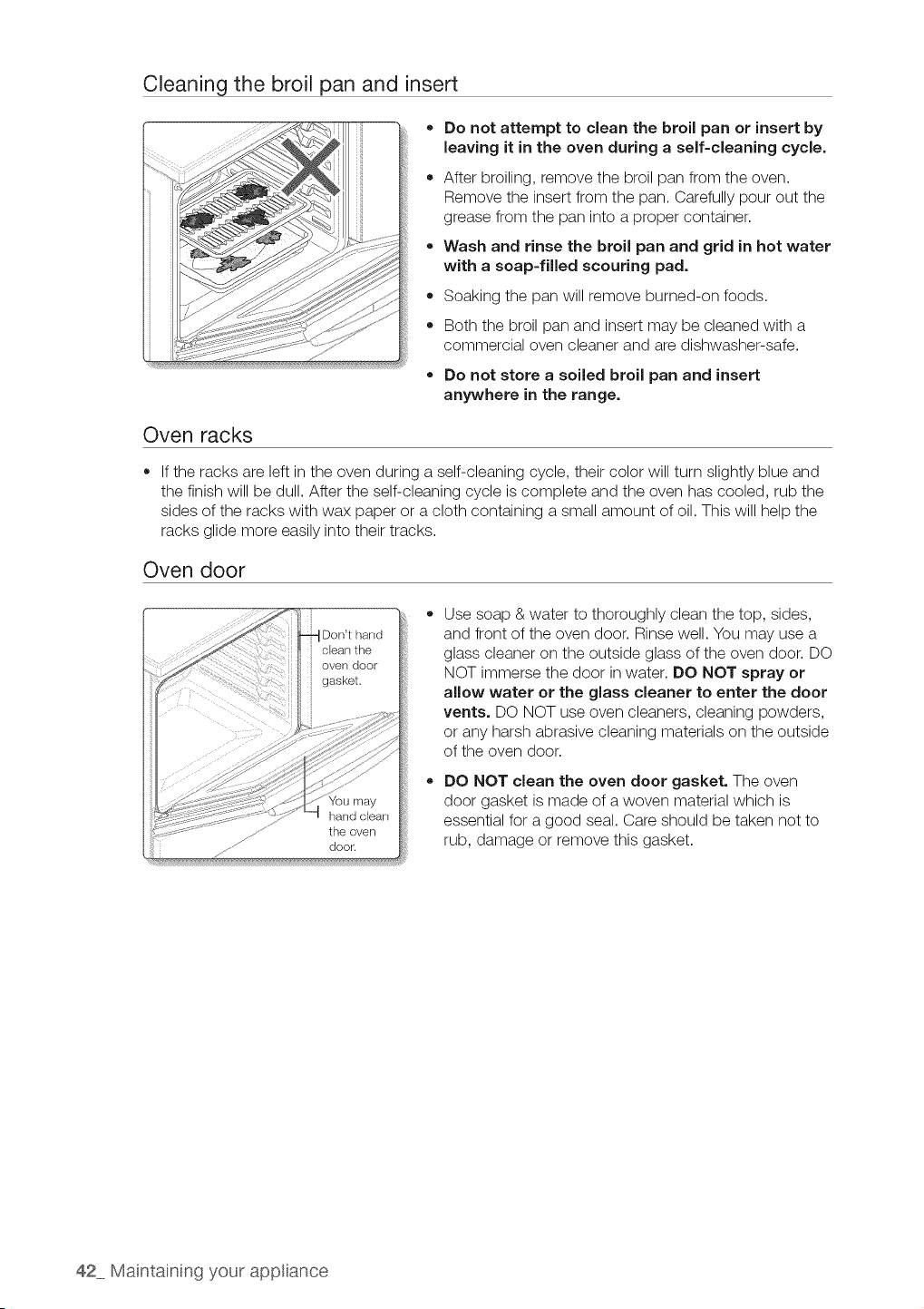
Do not attempt to clean the broil pan or insert by
leaving it in the oven during a self-cleaning cycle,
After broiling, remove the broil pan from the oven.
Remove the insert from the pan. Carefully pour out the
grease from the pan into a proper container.
Wash and rinse the broil pan and grid in hot water
with a soap-filled scouring pad.
Soaking the pan will remove burned-on foods.
Both the broil pan and insert may be cleaned with a
commercial oven cleaner and are dishwasher-safe.
Do not store a soiled broil pan and insert
anywhere in the range.
Oven racks
If the racks are left in the oven during a self-cleaning cycle, their color will turn slightly blue and
the finish will be dull. After the self-cleaning cycle iscomplete and the oven has cooled, rub the
sides of the racks with wax paper or a cloth containing a small amount of oil. This will help the
racks glide more easily into their tracks.
Oven door
Don't hand
door.
Use soap & water to thoroughly clean the top, sides,
and front of the oven door. Rinse well. You may use a
glass cleaner on the outside glass of the oven door. DO
NOT immerse the door in water. DO NOT spray or
allow water or the glass cleaner to enter the door
vents. DO NOT use oven cleaners, cleaning powders,
or any harsh abrasive cleaning materials on the outside
of the oven door.
DO NOT clean the oven door gasket. The oven
door gasket is made of a woven material which is
essential for a good seal. Care should be taken not to
rub, damage or remove this gasket.
42 Maintaining your app ance
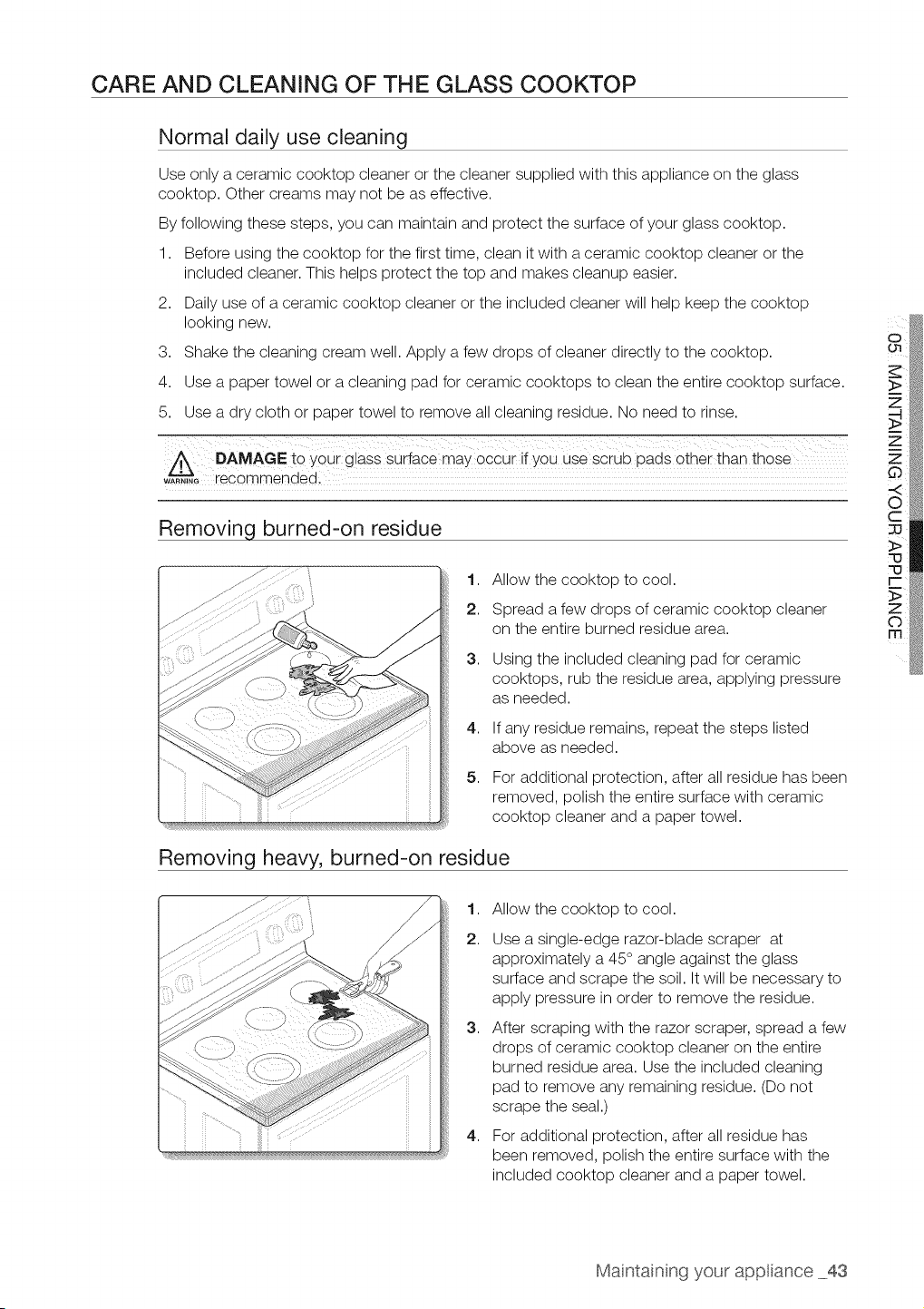
CARE AND CLEANING OF THE GLASS COOKTOP
Normal daily use cleaning
Use only a ceramic cooktop cleaner or the cleaner supplied with this appliance on the glass
cooktop. Other creams may not be as effective.
By following these steps, you can maintain and protect the surface ofyour glass cooktop.
1. Before using the cooktop for the first time, clean itwith a ceramic cooktop cleaner or the
included cleaner. This helps protect the top and makes cleanup easier.
2. Dailyuse of a ceramic cooktop cleaner or the included cleaner will help keep the cooktop
looking new.
3. Shake the cleaning cream well. Apply a few drops of cleaner directly to the cooktop.
4. Use a paper towel or a cleaning pad for ceramic cooktops to clean the entire cooktop surface.
5. Use a dry cloth or paper towel to remove all cleaning residue. No need to rinse.
A DAMAGE to your glass suriace may 0cCuiif YoU use scrub pads other than those
w_G recommendedi
Removing burned-on residue
1. Allow the cooktop to cool.
2. Spread a few drops of ceramic cooktop cleaner
on the entire burned residue area.
3,
4,
5,
Using the included cleaning pad for ceramic
cooktops, rub the residue area, applying pressure
as needed.
If any residue remains, repeat the steps listed
above as needed.
For additional protection, after allresidue has been
removed, polish the entire surface with ceramic
cooktop cleaner and a paper towel.
Removing heavy, burned-on residue
1,
2.
3,
4,
Allow the cooktop to cool.
Use asingle-edge razor-blade scraper at
approximately a 45 ° angle against the glass
surface and scrape the soil. It will be necessary to
apply pressure in order to remove the residue.
After scraping with the razor scraper, spread a few
drops of ceramic cooktop cleaner on the entire
burned residue area. Use the included cleaning
pad to remove any remaining residue. (Do not
scrape the seal.)
For additional protection, after allresidue has
been removed, polish the entire surface with the
included cooktop cleaner and a paper towel.
Maintainng your app ance 43
Removing metal marks and scratches
1,
2,
Be careful not to slide pots and pans across your cooktop. It will leave marks on the cooktop
surface. You can remove these marks by applying ceramic cooktop cleaner or the included
cleaner with a cleaning pad for ceramic cooktops.
If pots with athin overlay of aluminum or copper are allowed to boil dry, the overlay may leave
black discoloration on the cooktop. You should remove this discoloration immediately or it may
become permanent.
carefully check the bottoms 0f pans f0i roughness that may Scratch the O00ktopl
WARNING
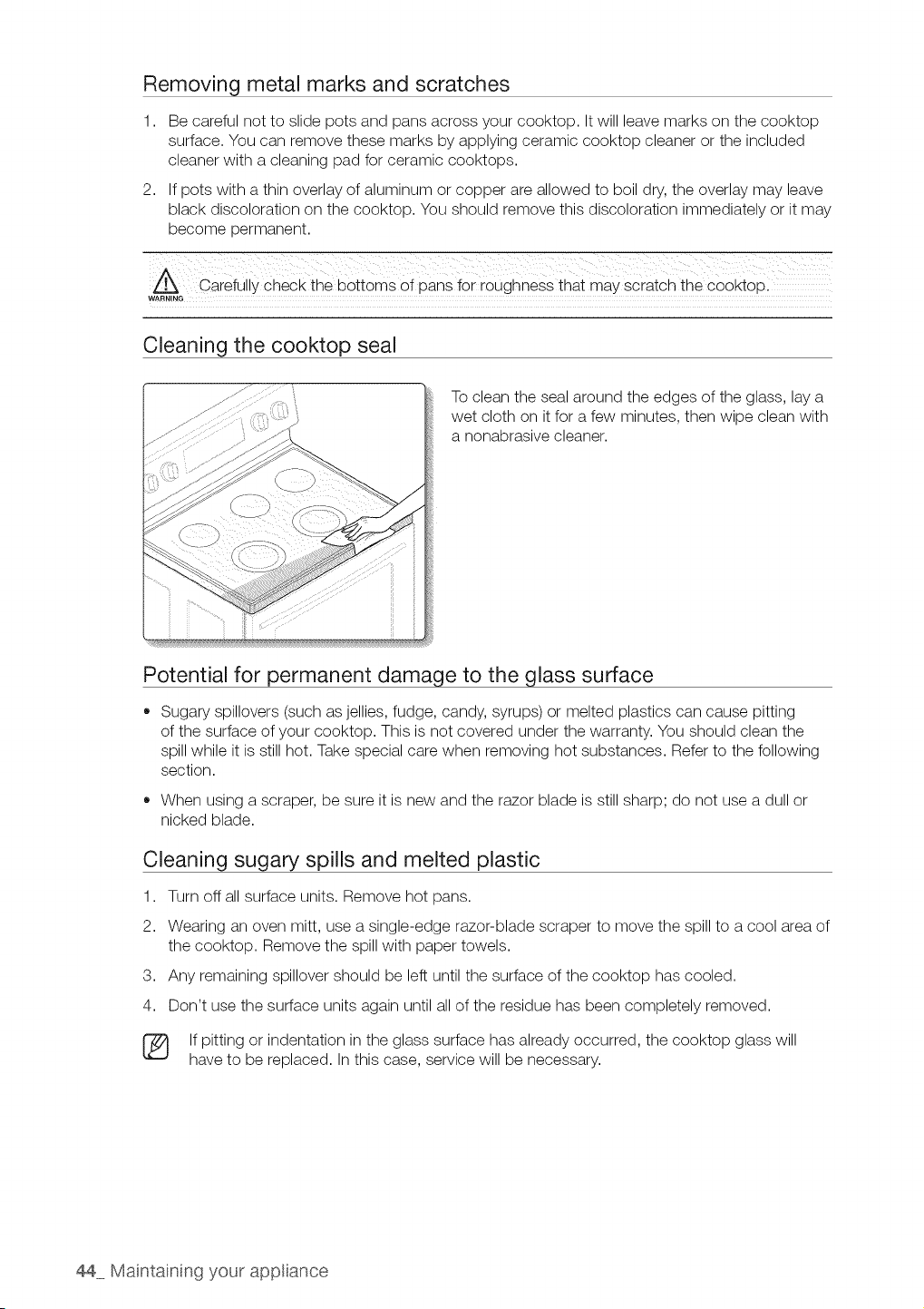
Cleaning the cooktop seal
To clean the sealaround the edges of the glass, lay a
wet cloth on itfor a few minutes, then wipe clean with
a nonabrasive cleaner.
Potential for permanent damage to the glass surface
Sugary spillovers (such as jellies, fudge, candy, syrups) or melted plastics can cause pitting
of the surface ofyour cooktop. This is not covered under the warranty. You should clean the
spill while it is still hot. Take special care when removing hot substances. Refer to the following
section.
• When using a scraper, be sure itis new and the razor blade is still sharp; do not use a dull or
nicked blade.
Cleaning sugary spills and melted plastic
1. Turn off allsurface units. Remove hot pans.
2. Wearing an oven mitt, use a single-edge razor-blade scraper to move the spill to a cool area of
the cooktop. Remove the spill with paper towels.
3. Any remaining spillover should be left until the surface of the cooktop has cooled.
4. Don't use the surface units again until all of the residue has been completely removed.
[_ If pitting or indentation in the glass surface has already occurred, the cooktop glass will
have to be replaced. Inthis case, service will be necessary.
44 Maintaining your app ance
REMOVING AND REPLACING THE OVEN DOOR
How to remove the door
• The door isvery heavy. Be careful when removing and lifting the door, Do not !ift the
r.-, d00r bythe hand e;
CAUTION
Turn the powe[ OFF befo[e removing the door.
1. Open the door completely.
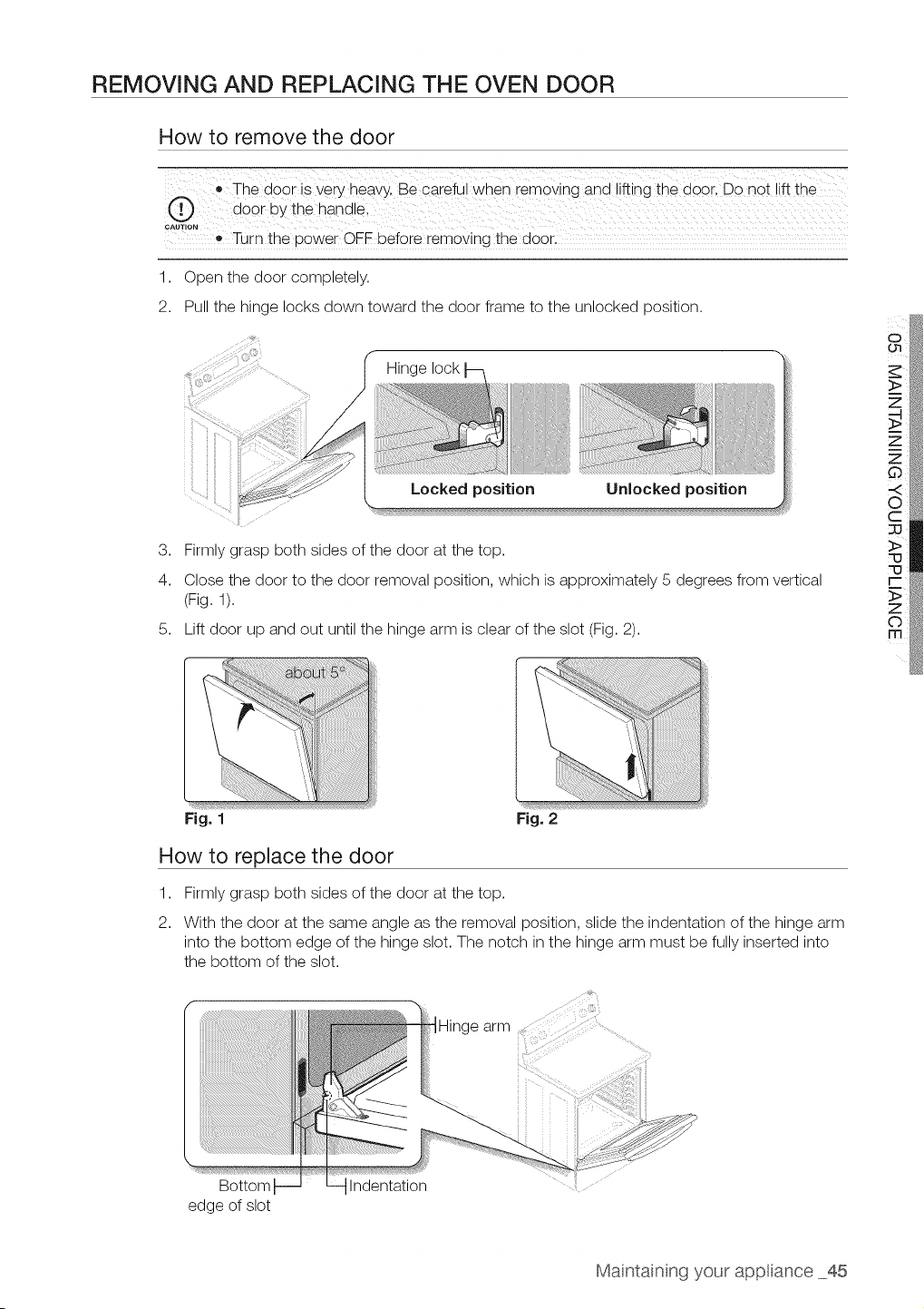
2. Pull the hinge locks down toward the door frame to the unlocked position.
_ Hinge lock
Locked position Unlocked position
3. Firmlygrasp both sides of the door atthe top.
4. Close the door to the door removal position, which isapproximately 5 degrees from vertical
(Fig. 1).
5. Lift door up and out until the hinge arm is clear of the slot (Fig. 2).
Fig. 1 Fig. 2
How to replace the door
1,
2.
Firmlygrasp both sides of the door at the top.
With the door at the same angle as the removal position, slide the indentation of the hinge arm
into the bottom edge of the hinge slot. The notch in the hinge arm must be fully inserted into
the bottom of the slot.
Bottom
edge of slot
Indentation
Maintainng your app ance 45
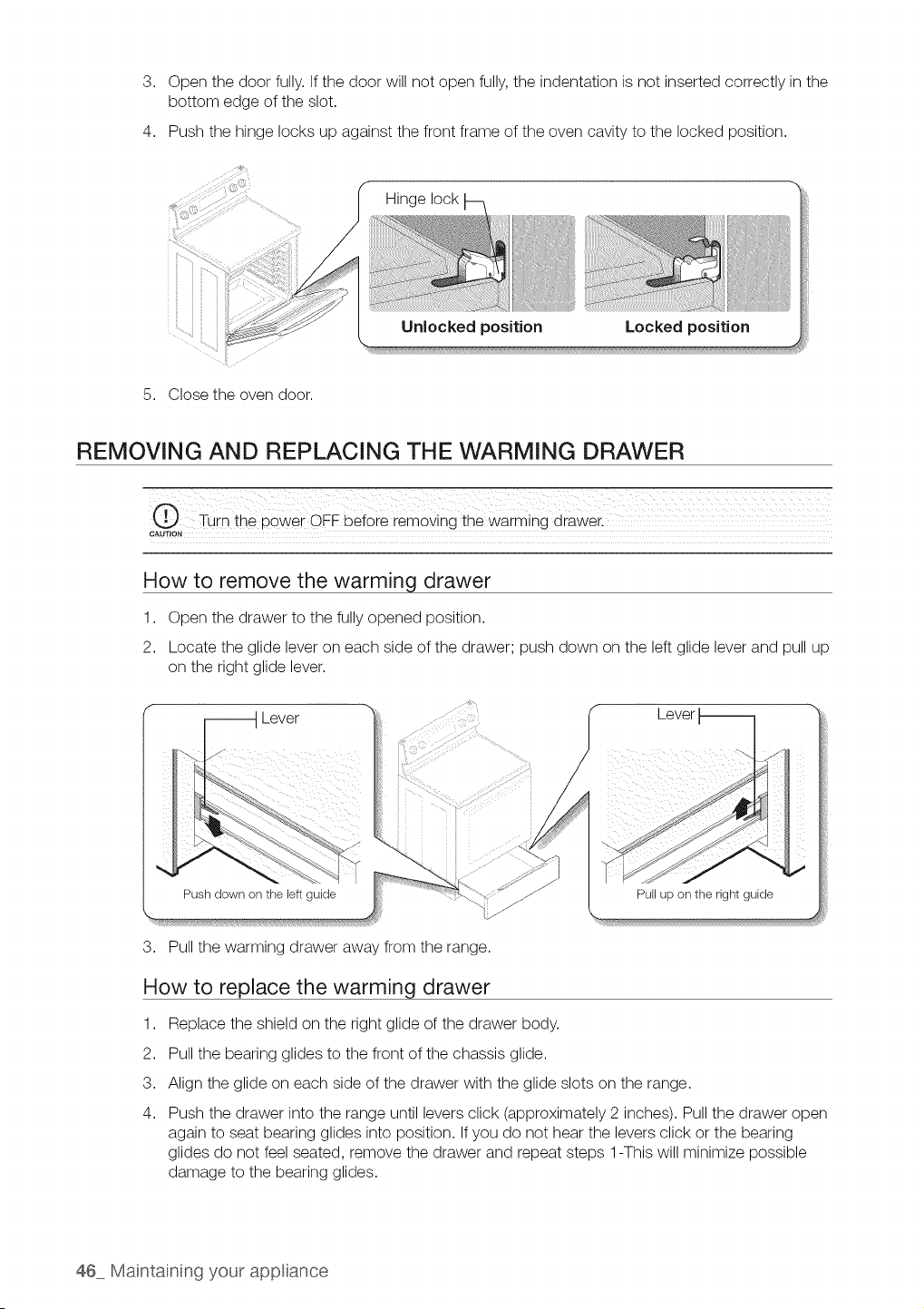
3. Open the door fully. If the door will not open fully, the indentation isnot inserted correctly in the
bottom edge of the slot.
4. Push the hinge locks up against the front frame of the oven cavity to the locked position.
iii ii
5. Close the oven door.
Hinge lock
Locked positionUnlocked position
REMOVING AND REPLACING THE WARMING DRAWER
CAUTION
How to remove the warming drawer
1. Open the drawer to the fully opened position.
2. Locate the glide lever on each side of the drawer; push down on the leftglide lever and pull up
on the right glide lever.
_ Lever
Lever
Push down on the leftguide
3. Pull the warming drawer away from the range.
Pull up on the right guide
How to replace the warming drawer
1. Replace the shield on the right glide of the drawer body.
2. Pull the bearing glides to the front ofthe chassis glide.
3. Align the glide on each side of the drawer with the glide slots on the range.
4. Push the drawer into the range until levers click (approximately 2 inches). Pull the drawer open
again to seat bearing glides into position. If you do not hear the levers click or the bearing
glides do not feel seated, remove the drawer and repeat steps 1-This will minimize possible
damage to the bearing glides.
46 Maintaining your app ance
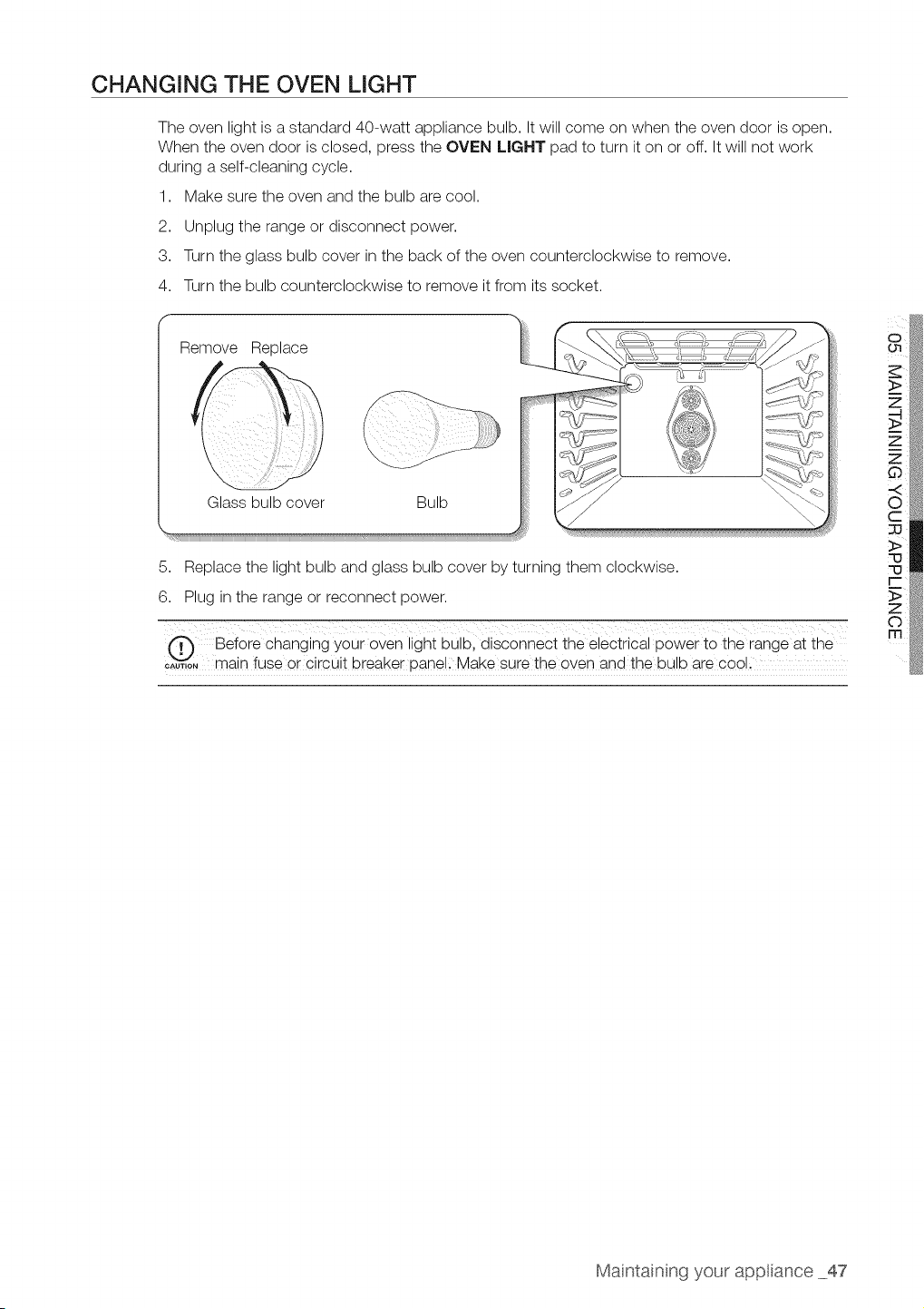
CHANGING THE OVEN LIGHT
The oven light isastandard 40-watt appliance bulb. It will come on when the oven door isopen.
When the oven door is closed, press the OVEN LIGHT pad to turn it on or off. It will not work
during a self-cleaning cycle.
1. Make sure the oven and the bulb are cool.
2. Unplug the range or disconnect power.
3. Turn the glass bulb cover in the back of the oven counterclockwise to remove.
4. Turn the bulb counterclockwise to remove itfrom itssocket.
f
Remove Replace
Glass bulb cover Bulb
!iii!i!
5. Replace the light bulb and glass bulb cover by turning them clockwise.
6. Plug in the range or reconnect power.
@ Before changing your oven light bulb, disconnec t the electrical power to the range at the
c;uT,oNmain fuse or circuit breaker panell Make sure the even and the bulb are cool l
o i
>
Maintainng your app ance 47
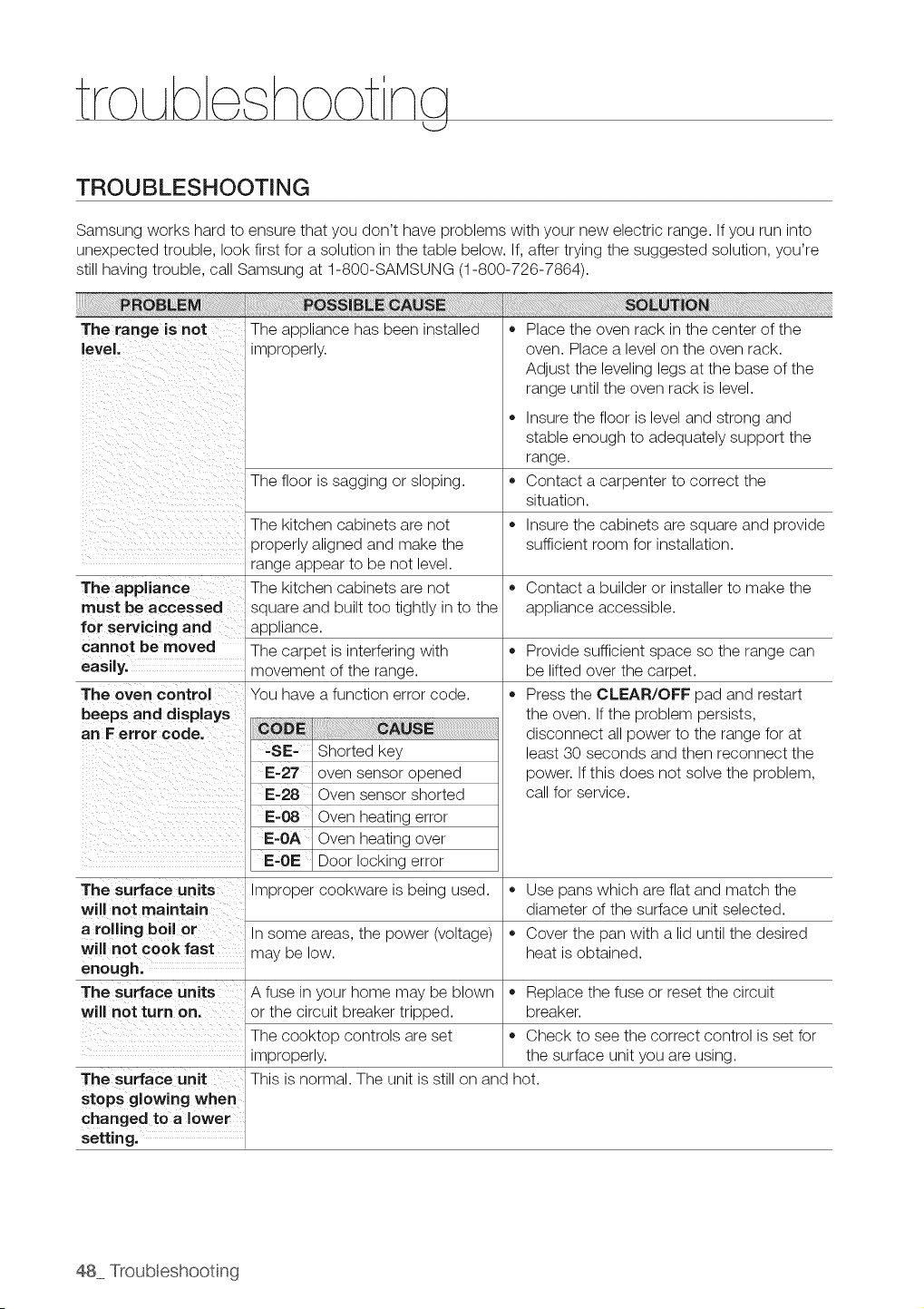
TROUBLESHOOTING
Samsung works hard to ensure that you don't have problems with your new electric range. If you run into
unexpected trouble, look first for asolution in the table below. If,after trying the suggested solution, you're
stillhaving trouble, call Samsung at 1-800-SAMSUNG (1-800-726-7864).
The range is not The appliance has been installed
eve. mproper y
The floor is sagging or sloping.
The kitchen cabinets are not
properly aligned and make the
range appear to be not level.
The appliance The kitchen cabinets are not
must be accessed square and built too tightly in to the
for servicing and appliance.
cannot be moved The carpet is interfering with
easily, movement of the range.
The oven control You have afunction error code.
beeps and displays
an Ferror code.
' -SE- Shorted key
i
,, Place the oven rack in the center of the
oven. Place a level on the oven rack.
Adjust the leveling legs at the base of the
range until the oven rack is level.
• Insure the floor islevel and strong and
stable enough to adequately support the
range.
Contact a carpenter to correct the
situation.
Insure the cabinets are square and provide
sufficient room for installation.
o
o
Contact a builder or installer to make the
appliance accessible.
Provide sufficient space so the range can
be lifted over the carpet.
Press the CLEAR/OFF pad and restart
the oven. If the problem persists,
disconnect allpower to the range for at
least 30 seconds and then reconnect the
power. If this does not solve the problem,
call for service.
oven sensor opened
E-28 Oven sensor shorted
E-g8 Oven heating error
Oven heating over
E-OE Door locking error
The surface units Improper cookware isbeing used. ,, Use pans which are flat and match the
will not maintain diameter of the surface unit selected.
a rolling boil or Insome areas, the power (voltage) • Cover the pan with a lid until the desired
will not cook fast may be low. heat isobtained.
enough.
The surface units A fuse in your home may be blown ,, Replace the fuse or reset the circuit
will not turn on. or the circuit breaker tripped, breaker.
The cooktop controls are set • Check to see the correct control isset for
improperly, the surface unit you are using.
The surface unit This is normal. The unit isstill on and hot.
stops glowing when
hanged to a lower
setting.
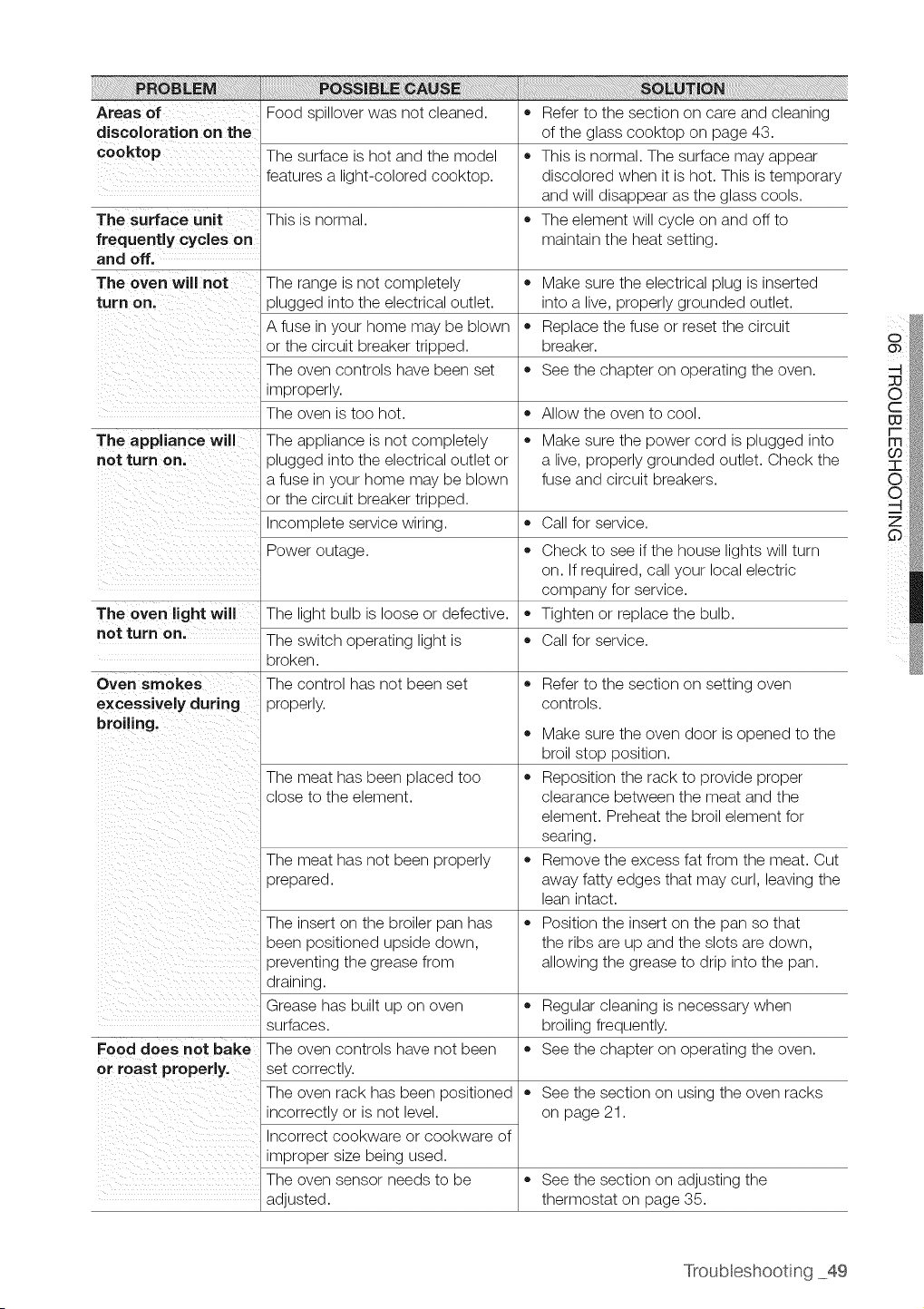
Areas of
discoloration on the
cooktop
The surface unit =
frequently cycles on
and off.
The oven will not = Make sure the electrical plug isinserted
turn on. into a live, properly grounded outlet.
• Replace the fuse or reset the circuit
breaker.
See the chapter on operating the oven.
Allow the oven to cool.
The appliance will • Make sure the power cord isplugged into
not turn on, a live, properly grounded outlet. Check the
fuse and circuit breakers.
Call for service.
o
The oven light will
not turn on.
Food spillover was not cleaned.
The surface is hot and the model
features a light-colored cooktop.
This is normal.
The range is not completely
plugged into the electrical outlet.
A fuse in your home may be blown
or the circuit breaker tripped.
The oven controls have been set
improperly.
The oven istoo hot.
The appliance is not completely
plugged into the electrical outlet or
a fuse in your home may be blown
or the circuit breaker tripped.
Incomplete service wiring.
Power outage.
The light bulb is loose or defective.
The switch operating light is
broken.
Oven smokes The control has not been set
excessively during properly.
broiling.
o
The meat has been placed too =
close to the element.
The meat has not been properly
prepared.
The insert on the broiler pan has
been positioned upside down,
preventing the grease from
draining.
Grease has built up on oven
surfaces.
Food does not bake The oven controls have not been
or roast properly, set correctly.
The oven rack has been positioned
incorrectly or isnot level.
Incorrect cookware or cookware of
improper size being used.
The oven sensor needs to be
adjusted.
Referto the section on care and cleaning
of the glass cooktop on page 43.
This isnormal. The surface may appear
discolored when it is hot. This is temporary
and will disappear as the glass cools.
The element will cycle on and off to
maintain the heat setting.
Check to see ifthe house lights will turn
on. Ifrequired, call your local electric
company for service.
Tighten or replace the bulb.
Call for service.
Referto the section on setting oven
controls.
Make sure the oven door is opened to the
broil stop position.
Reposition the rack to provide proper
clearance between the meat and the
element. Preheat the broil element for
searing.
Remove the excess fat from the meat. Cut
away fatty edges that may curl, leaving the
lean intact.
Position the insert on the pan so that
the ribs are up and the slots are down,
allowing the grease to drip into the pan.
Regular cleaning isnecessary when
broiling frequently.
See the chapter on operating the oven.
See the section on using the oven racks
on page 21.
See the section on adjusting the
thermostat on page 35.
Troubleshooting 49
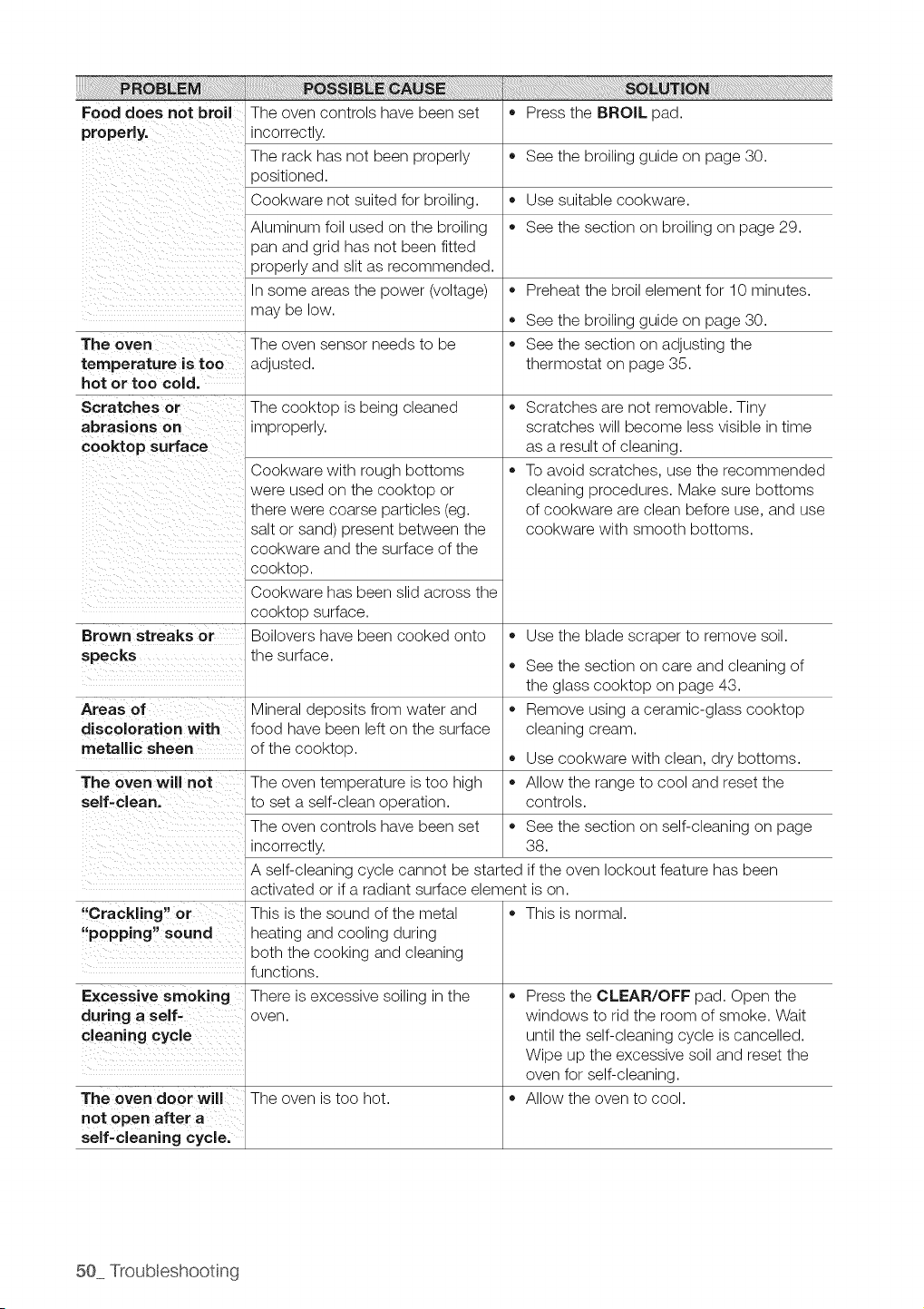
Food does not broil The oven controls have been set • Press the BROIL pad.
properly, incorrectly.
The rack has not been properly • See the broiling guide on page 30.
_ositioned.
Cookware not suited for broiling. • Use suitable cookware.
Aluminum foil used on the broiling • See the section on broiling on page 29.
pan and grid has not been fitted
properly and slit as recommended.
Insome areas the power (voltage) • Preheat the broil element for 10 minutes.
may be low.
,, See the broiling guide on page 30.
The oven The oven sensor needs to be ,, See the section on adjusting the
temperature istoo adjusted, thermostat on page 35.
hot or too cold.
Scratches or The cooktop isbeing cleaned ,,
abrasions on improperly.
cooktop surface
o
Brown streaks or
specks
Areas of
discoloration with
metallic sheen
The oven will not
self-clean.
"Crackling" or
"popping" sound
Excessive smoking
during a self-
cleaning cycle
Cookware with rough bottoms
were used on the cooktop or
there were coarse particles (eg.
salt or sand) present between the
cookware and the surface of the
cooktop.
Cookware has been slid across the
cooktop surface.
Boilovers have been cooked onto
the surface.
Mineral deposits from water and
food have been lefton the surface
of the cooktop.
The oven temperature istoo high
to set a self-clean operation.
The oven controls have been set
incorrectly.
o
o
Scratches are not removable. Tiny
scratches will become less visible in time
as a result of cleaning.
To avoid scratches, use the recommended
cleaning procedures. Make sure bottoms
of cookware areclean before use, and use
cookware with smooth bottoms.
Use the blade scraper to remove soil.
See the section on care and cleaning of
the glass cooktop on page 43.
Remove using a ceramic-glass cooktop
cleaning cream.
Use cookware with clean, dry bottoms.
Allow the range to cool and reset the
controls.
,, See the section on self-cleaning on page
38.
A self-cleaning cycle cannot be started if the oven lockout feature has been
activated or if a radiant surface element ison.
This is the sound of the metal
heating and cooling during
both the cooking and cleaning
functions.
There is excessive soiling in the
oven.
The oven door will The oven is too hot.
not open after a
self-cleaning cycle.
This is normal.
Press the CLEAR/OFF pad. Open the
windows to rid the room of smoke. Wait
until the self-cleaning cycle iscancelled.
Wipe up the excessive soil and reset the
oven for self-cleaning.
Allow the oven to cool.
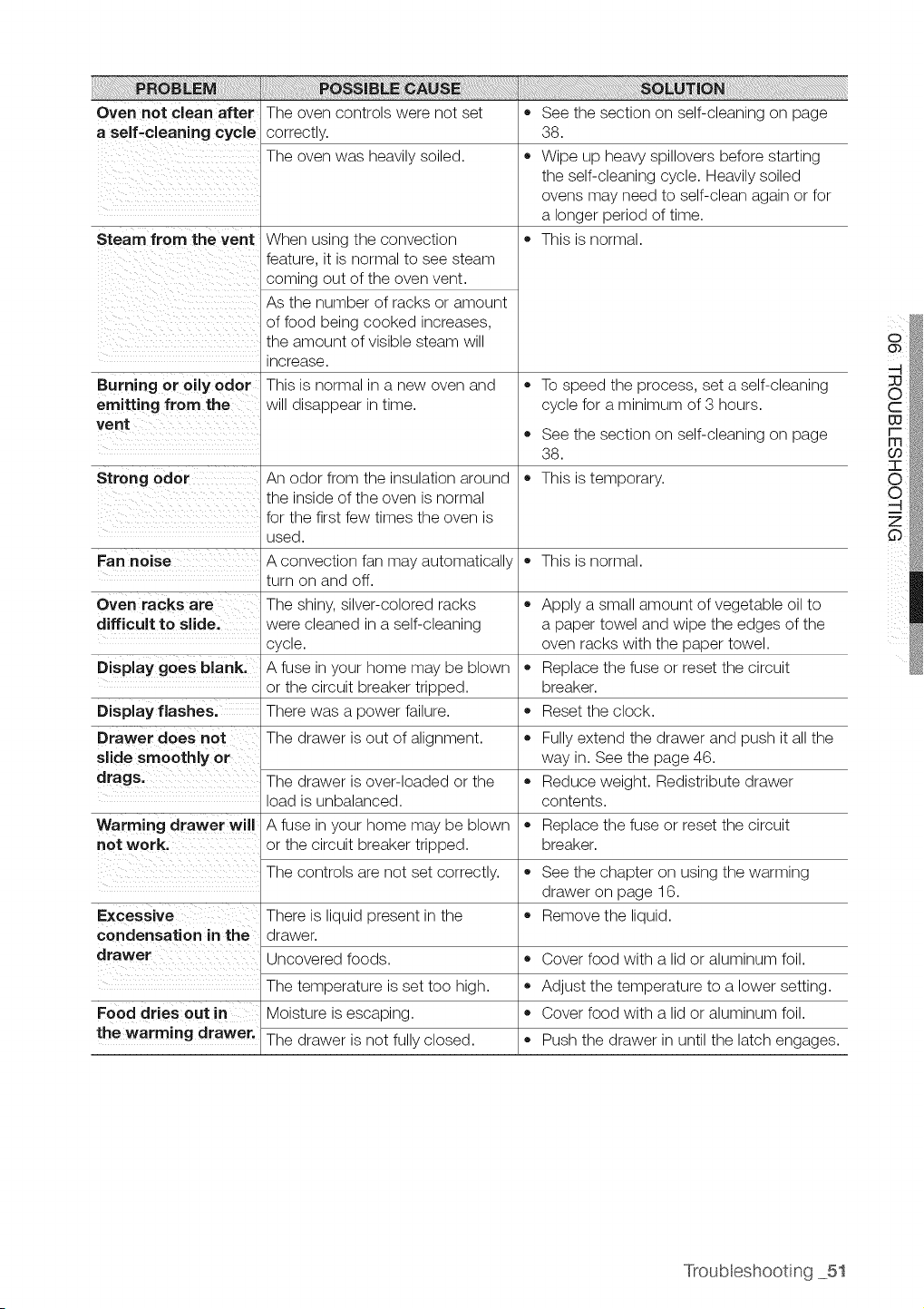
Oven not clean after
a self-cleaning cycle
Steam from the vent
Burning or oily odor
emitting from the
vent
The oven controls were not set
correctly.
The oven was heavily soiled.
When using the convection
feature, it isnormal to see steam
coming out of the oven vent.
As the number of racks or amount
of food being cooked increases,
the amount of visible steam will
increase.
This is normal in a new oven and
will disappear in time.
,, See the section on self-cleaning on page
38.
,, Wipe up heavy spillovers before starting
the self-cleaning cycle. Heavily soiled
ovens may need to self-clean again or for
a longer period of time.
• This isnormal.
,, To speed the process, set a self-cleaning
cycle for a minimum of 3 hours.
An odor from the insulation around
the inside of the oven isnormal
for the first few times the oven is
used.
A convection fan may automatically
turn on and off.
The shiny, silver-colored racks
were cleaned in aself-cleaning
cycle.
A fuse in your home may be blown
or the circuit breaker tripped.
There was a power failure.
The drawer isout of alignment.
,, See the section on self-cleaning on page
38.
Strong odor ,, This istemporary.
Fan noise ,, This isnormal.
Oven racks are
difficult to slide.
Display goes blank.
Apply a small amount ofvegetable oil to
a paper towel and wipe the edges of the
oven racks with the paper towel.
Replace the fuse or reset the circuit
breaker.
Reset the clock.
Display flashes.
Drawer does not ,, Fullyextend the drawer and push itall the
slide smoothly or way in. See the page 46.
drags. The drawer isover-loaded or the • Reduce weight. Redistribute drawer
load isunbalanced, contents.
Warming drawer will A fuse in your home may be blown = Replace the fuse or reset the circuit
not work. or the circuit breaker tripped, breaker.
The controls arenot set correctly.
There is liquid present in the
drawer.
Uncovered foods.
Excessive
condensation in the
drawer
The temperature isset too high.
Food dries out in Moisture is escaping.
the warming drawer. The drawer isnot fully closed.
,, See the chapter on using the warming
drawer on page 16.
Remove the liquid.
,, Cover food with a lid or aluminum foil.
Adjust the temperature to a lower setting.
Cover food with a lid or aluminum foil.
Push the drawer in until the latch engages.
Troubleshooting 51
PLEASE DO NOT DISCARD THiS REPLACES THE WARRANTY PAGE iN THE USE & CARE GUIDE
SAMSUNG ELECTRIC RANGE
ThisSAMSUNG brand product, as supplied and distributedby SAMSUNG ELECTRONICSAMERICA,INC.(SAMSUNG)and delivered
new, intheoriginal carton to the original consumer purchaser,iswarranted by SAMSUNGagainst manufacturing defects in materials
and workmanship foralimitedwarrantyperiodof:
One (1) Year Parts and Labor, Five (5} Years Parts Warranty
For GlassCooktop and Radiant Surface Unit
During this limited additional four-year warranty, you will responsible for any labor or in-home service.
Thislimited warranty begins onthe original dateof purchase, and isvalidonlyon products purchased and usedinthe UnitedStates,To
receivewarranty service,the purchasermust contact SAMSUNGfor problemdetermination and serviceprocedures, Warranty service
can only be performed by a SAMSUNG authorized servicecenter. Theoriginal dated bill of sale mustbe presentedupon requestas
proofof purchaseto SAMSUNGor SAMSUNG'sauthorized servicecenter. Samsung will providein-home serviceduring thewarranty
period at no charge subjecttoavailabilitywithinthe contiguous UnitedStates, In home serviceisnot available in allareas. Toreceive in
home serviceproduct mustbeunobstructed and accessibleto theserviceagent, if serviceisnot availableSamsung mayelectto provide
transportation of the product toand from an authorized servicecenter.
SAMSUNG will repair or replacethis product, atour option andat no charge as stipulated herein,with new or reconditioned parts
or products iffound to be defective during the limitedwarranty period specified above. All replaced parts and products becomethe
property ofSAMSUNG and mustbe returnedtoSAMSUNG. Replacementparts and productsassumetheremaining original warranty,
or ninety (90) days, whichever islonger.
This limitedwarrantycovers manufacturing defects in materialsandworkmanship encountered in normal,noncommercial useofthis
product and shallnotapply to the following: damagewhichoccurs inshipment; deliveryand installation;applicationsand usesforwhich
this product was not intended;altered product or serial numbers;cosmetic damage or exterior finish;accidents, abuse, neglect, fire,
water,lightningorotheracts of nature; use of products,equipment, systems, utilities, services,parts, supplies, accessories,applications,
installations,repairs, external wiring or connectors not supplied or authorized by SAMSUNG which damage this product or result
inservice problems; incorrectelectrical line voltage, fluctuations and surges; customer adjustments and failureto follow operating
instructions,maintenance and environmental instructionsthat are covered and prescribed in the instruction book; product removal
and reinstallation;problemscaused bypest infestations,and overheating orovercooking by user. Thislimitedwarrantyshall not cover
casesofincorrectelectriccurrent, voltage orsupply,lightbulbs, housefuses, housewiring,costof aservicecall forinstructions,or fixing
installationerrors, Furthermore, damagetothe glasscooktop caused bythe useof cleaners otherthan the recommended cleanersand
pads,damagetothe glasscook top caused byhardened spillsof sugarymaterials ormeltedplasticthat arenot cleanedaccordingtothe
directionsinthe useand care guideare not covered. SAMSUNG doesnotwarrant uninterrupted orerror-freeoperationof the product,
EXCEPTAS SET FORTH HEREIN THERE ARE NO WARRANTIES ON THiS PRODUCT EITHER EXPRESSOR IMPLIED AND
SAMSUNGDISCLAIMSALL WARRANTIESINCLUDING,BUTNOT LIMITEDTO, ANYIMPLIEDWARRANTIESOF MERCHANTABILITY,
INFRINGEMENTOR FITNESSFOR A PARTICULARPURPOSE.NOWARRANTYOR GUARANW GIVEN BYANY PERSON, FiRM OR
CORPORATIONWITHRESPECTTO THISPRODUCT SHALLBE BINDINGON SAMSUNG, SAMSUNG SHALL NOT BE LIABLEFOR
LOSS OFREVENUEOR PROFITS,FAILURETOREALIZESAVINGSOR OTHER BENEFITS,OR ANY OTHER SPECIAL, iNCIDENTAL
OR CONSEQUENTIAL DAMAGESCAUSED BY THE USE, MISUSE OR INABILITYTO USE THiS PRODUCT, REGARDLESSOF
THE LEGALTHEORYON WHICH THE CLAIM IS BASED, AND EVENIFSAMSUNG HAS BEENADVISED OF THEPOSSIBILITYOF
SUCHDAMAGES, NOR SHALLRECOVERYOFANY KIND AGAINST SAMSUNGBE GREATERINAMOUNTTHANTHEPURCHASE
PRICEOF THEPRODUCT SOLDBYSAMSUNG AND CAUSINGTHEALLEGEDDAMAGE, WITHOUT LiMITiNG THE FOREGOING,
PURCHASERASSUMES ALL RISKAND LIABILITYFOR LOSS, DAMAGE OR INJURY TO PURCHASERAND PURCHASER'S
PROPERTYAND TO OTHERSAND THEIR PROPERWARISING OUT OF THEUSE,MISUSEOR INABILIW TO USETHISPRODUCT.
THIS LIMITEDWARRANTYSHALL NOT EXTENDTO ANYONE OTHERTHANTHE ORIGINAL PURCHASEROF THIS PRODUCT,IS
NONTRANSFERABLEAND STATESYOUR EXCLUSIVEREMEDY_
Somestatesdo not allowlimitationson how longanimpliedwarrantylasts,or the exclusionor limitation of incidentalorconsequential
damages, so the abovelimitationsor exclusions maynot applyto you, Thiswarrantygivesyou specific legal rights,and you mayalso
haveother rightswhichvaryfromstatetostate,
Toobtainwarrantyservice,please contact SAMSUNGat:
QUESTIONS OR COMMENTS?
IN THE US 1-800-SAMSUNG(726-7864) www.samsung,com/us
IN CANADA 1-800-SAMSUNG(726-7864) www,samsung,com/ca
DG68-00199A
E
ect c Range
user manua
the possibilities
Thank youforpurchasing this Samsung product.
To receivemorecompleteservice, please register
your product at
www.samsung.com/global/register
Enhanced convenience. Better cooking. Easy maintenance. Your new electric range has been designed to
bring you these benefits and more.
The latest in heat-distribution technology
Other ranges with just one fan tend to make a swirl of heat that fails to cover the whole inside of
the oven. This means uneven heat distribution and uneven cooking. Your new range has Surround
Airvection TM, which Samsung innovated by adding a third heating element and a multi-fan system
that circulates the heat evenly in all directions. You get more efficient energy consumption and
more even cooking.
Steam Quick cleaning
Thanks to Steam Quick TM, Samsung's unique technology for light-duty cleaning jobs, keeping
your oven spick-and-span is a snap -- no hassle, no odor, no chemicals. Steam Quick TM cleans
the inside ofyour range with high-temperature steam injust 20 minutes.
Bigger is better
With a capacity of 5.9 cubic feet, your new range isequipped with more space than any of its
competitors in the U.S. market. This means greater convenience for you when cooking for the
holidays or when entertaining.
A cooktop with 5 burners
Four main burners with two that dial heat up to different pot sizes.
A smaller warming burner in the center of the range top.
S
Read and follow all instructions before using your oven to prevent the risk of fire, electric shock,
personal injury, or damage when using the range. This guide does not cover allpossible conditions
that may occur. Always contact your service agent or manufacturer about problems that you do not
understand.
SAFETY SYMBOLS
WARNING: This symbol alerts you to hazards or unsafe practices that could cause
serious bodily harm or death.
CAUTION: This symbol alerts you to hazards or unsafe practices that could cause
bodily injury or property damage.
_ o not attempt or use.
[_ Do not disassemble.
Do not touch.
_ ollow directions explicity.
[_ Unplug the power plug from the wall socket.
Make sure the machine isgrounded to prevent electric shock.
[_ Callthe service center for help.
_ Note
ANTI-TIP DEVICE
[_ ARNING= To reduce the risk of tipping the range, the range must be secured by aproperly
installed Anti-Tip device. Refer to the installation manual for instructions.
A WARNING
ALL RANGES CAN TIP AND CAUSE iNJURiES TO PERSONS
_) iNSTALL THE ANTI-TIP DEVICE PACKED WiTH RANGE
FOLLOW ALL iNSTALLATiON iNSTRUCTiONS
[_ o not step, lean, or sit on the doors of the range. These can cause the range to tip,
resulting in burns or serious injuries.
[_ heck to see that the Anti-Tip device is installed properly. Then grasp the top rear edge of the
range and carefully attempt to tilt it forward. Verify that the Anti-Tip device isengaged.
If you pull the range out from the wall for any reason, make sure the device is properly engaged
when you push the range back against the wall. If it isnot, there isa possible risk ofthe range
tipping over and causing injury ifyou or achild stand, sit or lean on an open door.
Important safety instructions 3
FOR YOUR SAFETY
When using electrical appliances, basic safety precautions should be followed, including the
following:
®
@
Use this appliance only for its intended purpose as described in this Owner's Manual.
Potentially hot surfaces include the cooktop, areas facing the cooktop, oven vent opening,
surfaces near the opening, crevices around the oven door.
Besure your appliance isproperly installed and grounded by a qualified technician.
User servicing= Do not repair or replace any part of the appliance unless specifically
recommended in the manual. All other servicing should be referred to a qualified technician.
Always disconnect power to appliance before servicing by removing the fuse or switching off the
circuit breaker.
Do not enter inside the oven.
Do not store items of interest to children in cabinets above a range or on the back guard
of a range. Children climbing on the range to reach items could be seriously injured.
Do not leave children alone. Children should not be left alone or unattended in an area where
appliance is in use. They should never be allowed to sit or stand on any part of the appliance.
Never use your appliance for warming or heating the room.
Do not use water on grease fires. Turn off the oven to avoid spreading the flame. Smother the
fire or flame by closing the door or use dry chemical, baking soda, or foam-type extinguisher.
Storage in or on appliance. Flammable materials should not be stored in an oven or near
surface units. Be sure allpacking materials are removed from the appliance before operating it.
Keep plastics, clothes, and paper away from parts of the appliance that may become hot.
Wear proper apparel. Loose-fitting or hanging garments should never be worn while using the
appliance.
Use only dry potholders. Moist or damp potholders on hot surfaces may result in burns from
steam. Do not let the potholder touch hot heating elements. Do not use a towel or other bulky
cloth.
Teach children not to play with the controls or any other part of the range.
4 Hmportant safety instructions
SURFACE COOKING UNITS
[_ ever leave surface units unattended at high heat settings. Boilovers cause smoking and
greasy spillovers that may ignite.
Do not lift the cooktop. Lifting the cooktop can lead to damage and improper operation of the
range.
Do not operate the cooktop when there isno cookware. If the cooktop operates without a
cookware, the control knob will become hot.
Never use the glass cooktop surface as acutting board.
Use care when touching the cooktop. The glass surface ofthe cooktop will retain heat after
the controls have been turned off.
Be careful when placing spoons or other stirring utensils on the glass cooktop surface
when it isin use. They may become hot and could cause burns.
Use proper pan sizes. This appliance isequipped with surface units of different sizes. Select
utensils having flat bottoms large enough to cover the surface unit heating element. The use of
undersized utensils will expose a portion of the heating element to direct contact and may result in
ignition of clothing. Proper relationship of utensil to burner will also improve efficiency.
Glazed cooking utensils. Only certain types of glass, glass/ceramic, ceramic,earthenware,
or other glazed utensils are suitable for range-top service without breaking due to the sudden
change in temperature.
Utensil handles should be turned outward and not extend over adjacent surface units. To
reduce the risk of burns, ignition offlammable materials, and spillage due to unintentional contact
with the utensil, the handle of a utensil should be positioned so that it isturned outward, and does
not extend over adjacent surface units.
Read and follow all instructions and warnings on the cleaning cream labels.
Besure you know which control knob operates each surface unit. Make sure you turned on the
correct surface unit.
Always turn the surface units off before removing cookware.
When preparing flaming foods under the hood, turn the fan on.
Keep an eye on foods being fried at high or medium high heat settings.
Hmportant safety instructions 5
OVEN
DO NOT TOUCH HEATING ELEMENTS OR INTERIOR SURFACES OF THE OVEN. Heating
elements may be hot even though they are dark in color. Interior surfaces of an oven become
hot enough to cause burns. During and after use, do not touch or let clothing or other flammable
materials contact heating elements or interior surfaces of the oven until they have had sufficient
time to cool. Other surfaces of the appliance may become hot enough to cause burns. Among
these surfaces are oven vent openings and surfaces near these openings, oven doors, and the
oven door window.
Do not heat unopened food containers. Build-up of pressure may cause the container to burst
and result in injury.
Do not use the oven to dry newspapers. If overheated, they can catch on fire.
Do not use the oven for a storage area. Items stored in an oven can ignite.
Use care when opening door. Let hot air or steam escape before you remove or replace food in
the oven.
Protective liners. Do not use aluminum foil to line the oven bottoms, except as suggested in the
manual. Improper installation of these liners may result in a risk of electric shock or fire.
Keep oven vent ducts unobstructed. The oven vent islocated above the right rear surface
unit. This area could become hot during oven use. Never block this vent or place plastic or heat-
sensitive items on it.
Racernent of oven racks. Always place oven racks in the desired location while the oven is
cool. If the rack must be moved while oven ishot, do not let the potholder come in contact with
the hot heating element in the oven.
Do not allow aluminum foil or meat probe to contact heating elements.
WARMING DRAWER
DO NOT TOUCH THE HEATING ELEMENT OR THE INTERIOR SURFACE OF THE
DRAWER. These surfaces may be hot enough to burn.
REMEMBER: The inside surface of the drawer may be hot when the drawer isopened.
The purpose of the warming drawer is to hold hot cooked foods at serving temperature.
Always start with hot food; cold food cannot be heated or cooked in the warming drawer.
Use care when opening the drawer. Open the drawer a crack and let hot airor steam escape
before removing or replacing food. Hot air or steam which escapes can cause burns to hands,
face and/or eyes.
6)Do not use the drawer to dry newspapers. If overheated, they can catch on fire.
Do not use alurnninurn foil to line the drawer. Foil isan excellent heat insulator and will trap
heat beneath it. This will upset the performance of the drawer and it could damage the interior
finish.
Do not leave paper products, plastics, canned food or combustible materials in the drawer.
Never leavejars or cans of fat drippings in or near your drawer.
Do not warm food in the drawer for more than three hours.
6 Hmportant safety instructions
SELF-CLEANING OVENS
[_ o not clean the door gasket. The door gasket is essential for a good seal. Care should be
taken not to rub, damage, or move the gasket.
[_ ever keep pet birds in the kitchen. The health of birds isextremely sensitive to the fumes
released during an oven self-clean cycle. Fumes may be harmful or fatal to birds. Move birds to a
well-ventilated room.
Clean only parts listed this manual in the self-clean cycle. Before self-cleaning the oven,
remove the broil pan, rack, utensils, and food.
No commercial oven cleaner or oven liner protective coating of any kind should be used in or
on the outside of the oven. Use only a ceramic cooktop cleaner or the cleaner supplied with this
appliance on the glass cooktop.
Nickel oven shelves should be removed from the oven before beginning the self-cleaning cycle, or
they may discolor.
If the self-clean mode malfunctions, turn the oven off and disconnect the power supply. Have it
serviced by a qualified technician.
VENTILATING HOOD
_ lean ventilating hoods frequently. Grease should not be allowed to accumulate on the hood
or filter.
When flaming foods under the hood, turn the fan on.
GLASS/CERAMIC COOKING SURFACES
DO NOT TOUCH SURFACE UNITS OR AREAS NEAR UNITS. Surface units may be hot even
though they are dark in color. Areas near surface units may become hot enough to cause burns.
During and after use, do not touch, or let clothing or other flammable materials contact surface
units or areas near units until they have had sufficient time to cool. Among these areas are the
cook-top and facing the cook-top.
Do not cook on broken cooktop. If cooktop should break, cleaning solutions and spillovers
may penetrate the broken cook-top and create a risk ofelectric shock. Contact a qualified
technician immediately.
Clean cooktop with caution. If a wet sponge or cloth isused to wipe spills on a hot cooking
area, be careful to avoid steam burn. Some cleaners can produce noxious fumes ifapplied to a
hot surface.
BEFORE YOU BEGIN
_ Clean the oven thoroughly before using for the first time. Remove accessories and operate
the oven atthe bake setting at 400°F for 1hour before using. There will be a distinctive odor; this
is normal, but ensure your kitchen iswell ventilated during this conditioning period.
Hmportant safety instructions 7
content
INTRODUCING YOUR NEW RANGE
SURFACE COOKING
'i
USING THE WARMING DRAWER
s _
OPERATING THE OVEN
MAINTAiNiNG YOUR APPLIANCE
TROUBLESHOOTING
WARRANTY
9 Overview
9 What's included with your range
10 About surface cooking
12 How to set the appliance for surface
cooking
14 Using the proper cookware
14 Choosing the proper cookware
15 Protecting the smoothtop surface
16 About the warming drawer
17 Turning the warming drawer on or off
18 The oven control panel
19 Setting the clock
20 Minimum and maximum settings
20 Setting the kitchen timer
21 Using the oven racks
22 Baking
23 Convection baking
25 Convection roasting
27 Timed cooking
28 Delay timed cooking
29 Broiling
31 Using the custom cook feature
32 Proofing
33 Using the keep warm function
33 Turning the oven light on and off
34 Extra features
38
4O
41
43
45
46
47
48 Troubleshooting
Self-cleaning
Steam-cleaning
Care and cleaning of the oven
Care and cleaning of the glass cooktop
Removing and replacing the oven door
Removing and replacing the warming
drawer
Changing the oven light
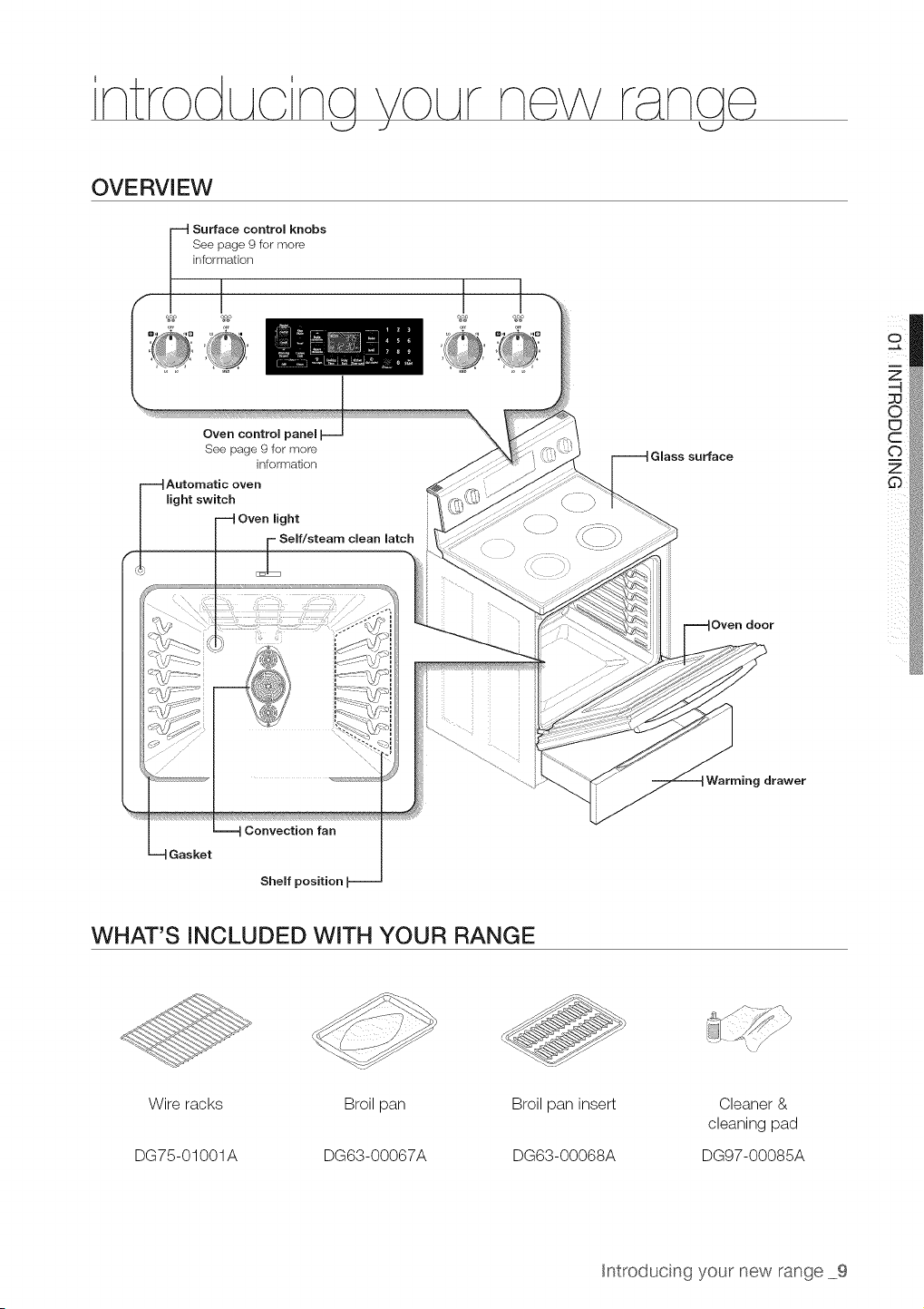
OVERVIEW
Surface control knobs
See page 9for more
information
Oven control
See page 9 for more
information
Automatic oven
light switch
light
Self/steam clean latch
Glass surface
Oven door
g drawer
Gasket
Convection fan
Shelf position
I
i
WHAT'S INCLUDED WITH YOUR RANGE
Wire racks
DG75-01001A
Broil pan
DG63-00067A
Broil pan insert
DG63-00068A
Cleaner &
cleaning pad
DG97-00085A
htroducing your new range 9
ABOUT SURFACE COOKING
(Z)
CAUTION
BEFORE COOKING
- Do not use the glass cooktop surface as a cutting Doara.
• Do not bRaceor store items that can melt or catcn fire on the glass COOKIOD.even
wnen t s not being usea.
Turn the surface units on on y after placing the cookware on them.
• Do not store heavy terns above the cooktop surface. They could fall and damage it.
©
CAUTIOi_
DURING COOKING
• Do not place aluminum foil or olast'c items sucn assalt ana pepper snaKers, spoon
nolaers, or plastic wrappings on the range wnen it isin use. The hot air from the vent
could melt olastics or ignite flammable items.
• Make sure the correct surface unit's turned on
- Never COOKa_rectlyon the glass. Aiways use COOKware.
- Always place the Dan nthe center of the surface unityou are COOKingon.
- Never eave surface units unattenaea wnue using an_gn heat setting. Boilovers cause
smoKing and greasy spillovers that mat catch on fire.
- Turn the surface units off before removing cookware.
• Do not use DlaStlCwrap to cover food. Plastic may melt onto the surface and be vet',
difficult to remove.
AFTER COOKING
CAUTION
- Do not touch the surface units until they have coolea aown.
, The surface may be still be hot an_ burns ma_ occur ifthe jlass surface istoucnea
before it nas coo_ea aown suffciently.
• Immed_at÷y c_ean sp_s on the cook_ng area to prevent a tougn c_ean_ngcnore ater.
- f cabinet storage is provided directly above the cooking surface, make sure that the
terns are infreauently usea ana can be safely stored _nan area sup ÷cted to heat
Temperatures ma,' be unsafe for items such as volatile I_cu_as c_eanersor aeroso
sprays.
About the radiant surface elements
The temperature rises gradually and evenly. As the temperature rises, the radiant element will glow
red. To maintain the selected setting, the element will cycle on and off. The heating element retains
enough heat to provide a uniform and consistent heat during the off cycle. Forefficient cooking,
turn off the element several minutes before cooking iscomplete. This will allow residual heat to
complete the cooking process.
®
Radiant elements have a limiter that allows the element to cycle ON and OFF,even at the HI
setting. This helps to prevent damage to the ceramic cooktop. Cycling at the HI setting is
normal and can occur ifthe cookware istoo small for the radiant element or ifthe cookware
bottom isnot flat.
10 Surface cookng
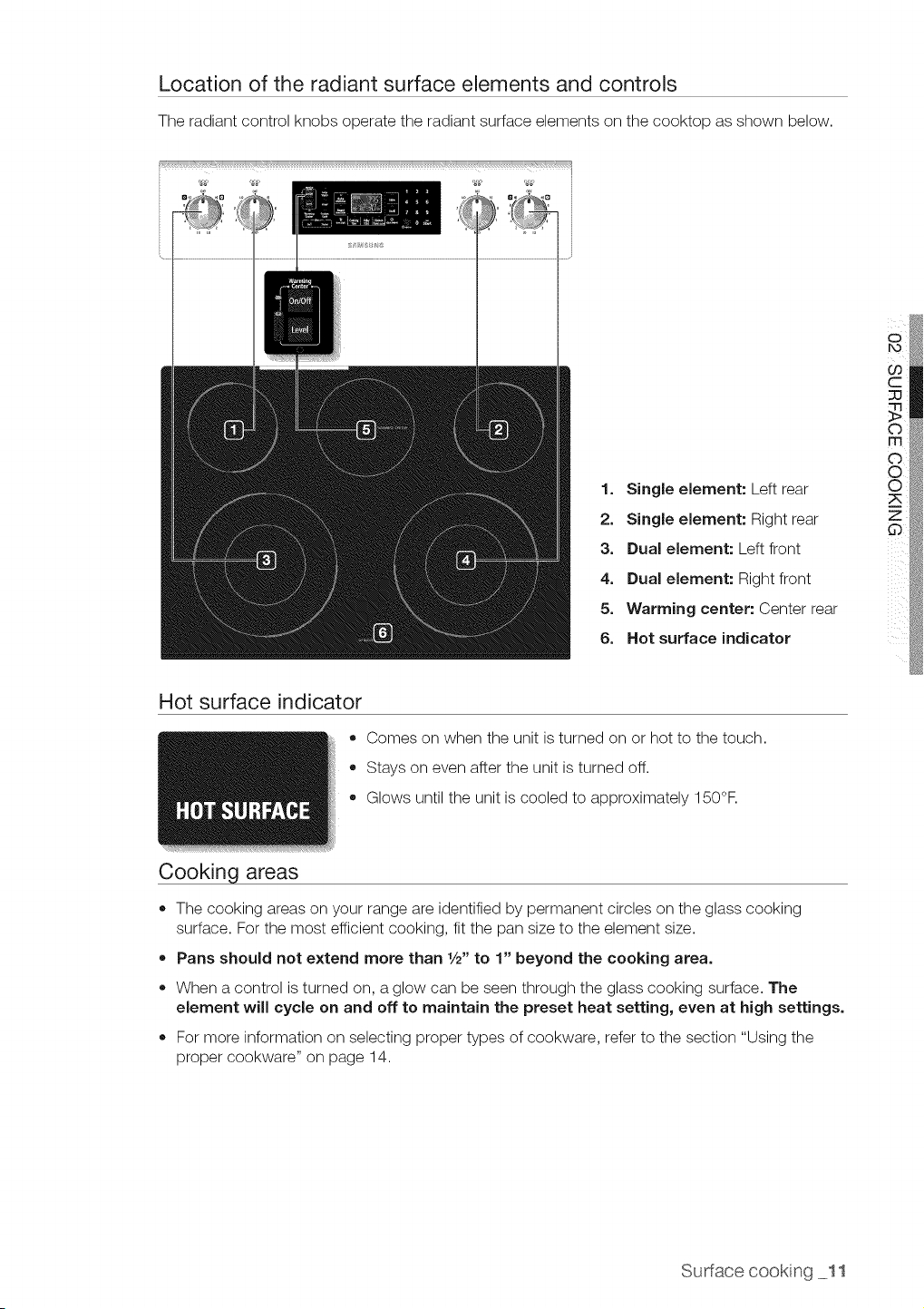
Location of the radiant surface elements and controls
The radiant control knobs operate the radiant surface elements on the cooktop as shown below.
1. Single element: Left rear
2. Single element: Right rear
3. Dual element: Left front
4. Dual element: Right front
5. Warming center: Center rear
6. Hot surface indicator
Hot surface indicator
o
®
Cooking areas
Comes on when the unit isturned on or hot to the touch.
Stays on even after the unit isturned off.
Glows until the unit iscooled to approximately 150°F.
• The cooking areas on your range areidentified by permanent circles on the glass cooking
surface. Forthe most efficient cooking, fit the pan size to the element size.
• Pans should not extend more than 1/2"to 1" beyond the cooking area.
• When a control isturned on, aglow can be seen through the glass cooking surface. The
element will cycle on and off to maintain the preset heat setting, even at high settings.
= For more information on selecting proper types of cookware, refer to the section "Using the
proper cookware" on page 14.
Sudacecooking 11
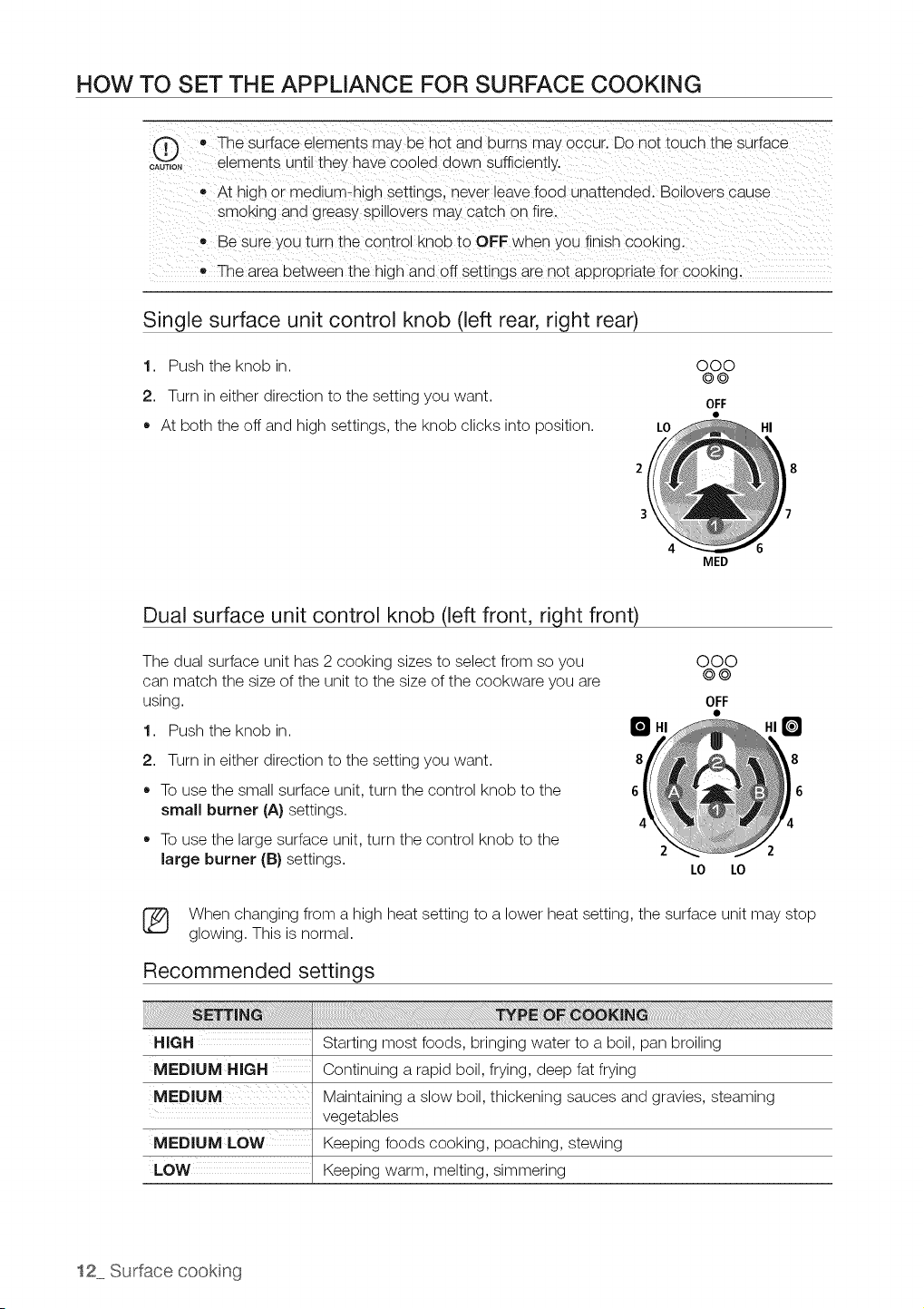
HOW TO SET THE APPLIANCE FOR SURFACE COOKING
o,_,o, • The surface elements may be hot and burns mat occur. Do not touch the surface
elements until they have cooled down sufficiently.
• At hign or mealum-nlgh settings, never leave food unattended. Boilovers cause
smoKing and greasy splllovers may catch on fire.
e Besure you turn the 3ontrol knob to OFF when yObfinish COOKing.
• The area between the hign and off settings are not aDorooriate for cooking.
Single surface unit control knob (left rear, right rear)
1. Push the knob in.
2. Turn in either direction to the setting you want.
* At both the off and high settings, the knob clicks into position.
2
3
000
©@
OFF
LO HI
4 6
Dual surface unit control knob (left front, right front)
The dual surface unit has 2 cooking sizes to select from so you
can match the size of the unit to the size of the cookware you are
using.
MED
000
0@
OFF
1. Push the knob in. B
8 8
6 6
2 2
2. Turn in either direction to the setting you want.
To use the small surface unit, turn the control knob to the
small burner (A) settings.
To use the large surface unit, turn the control knob to the
large burner (B)settings.
LO LO
(_ When changing from a high heat setting to a lower heat setting, the surface unit may stop
glowing. This is normal.
Recommended settings
Starting most foods, bringing water to a boil, pan broiling
MEDIUM HIGH Continuing a rapid boil, frying, deep fat frying
MEDIUM Maintaining a slow boil, thickening sauces and gravies, steaming
vegetables
MEDIUM LOW Keeping foods cooking, poaching, stewing
LOW Keeping warm, melting, simmering
12 Surface cookng
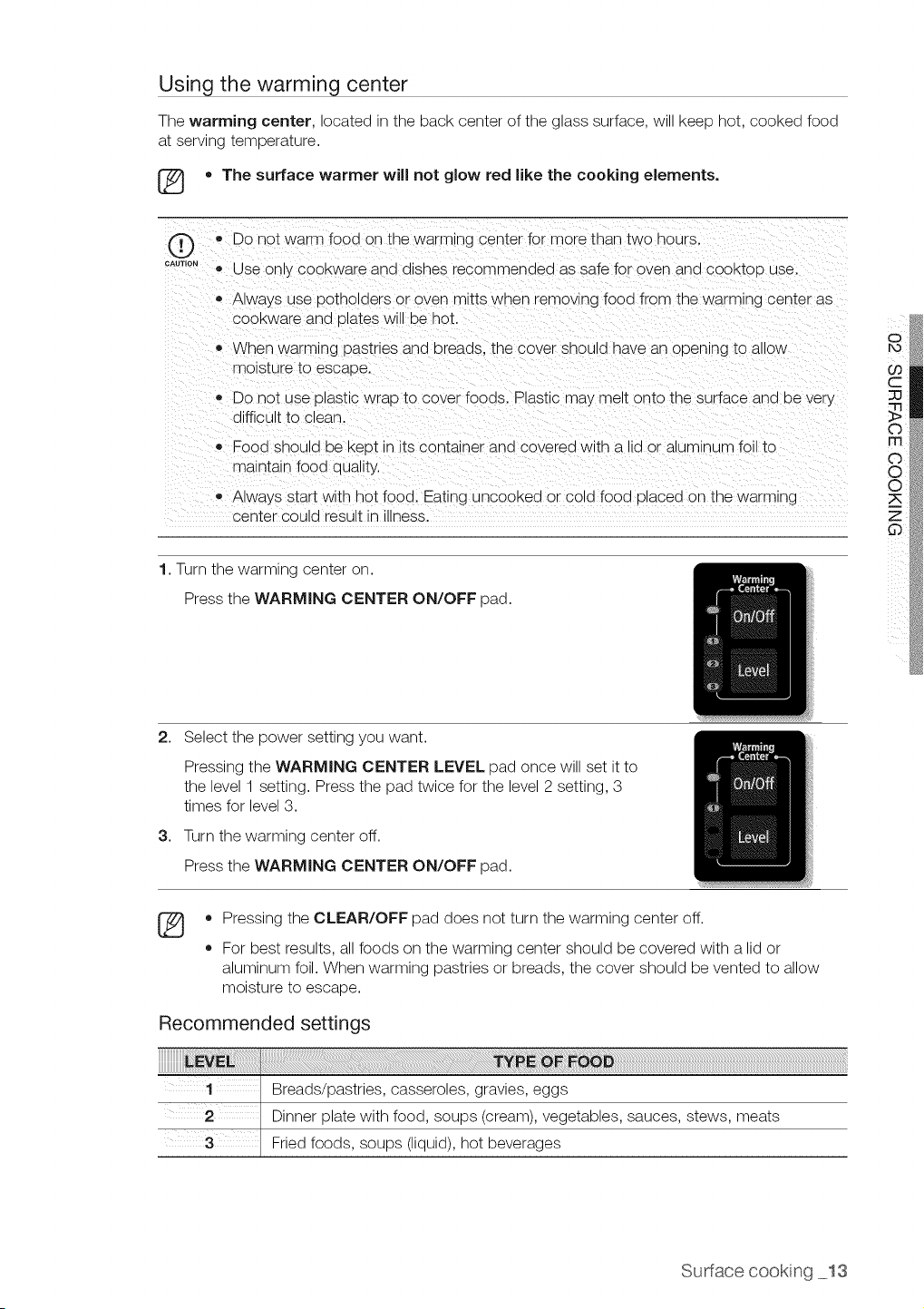
Using the warming center
The warming center, located in the back center of the glass surface, will keep hot, cooked food
at serving temperature.
[_ • The surface warmer will not glow red like the cooking elements.
®
CAUTION
,,Do not warm food on the warming center for more than two nours.
® Use only COOKwareana alsnes recommended as safe for oven and cooktoD use.
Always use potholders or oven mitts wnen removing food from the warming center as
COOKwarearia Dlates Wl oe hot
When warming pastries ana Dreaas. tne cover snoula nave ar opening to allOW
moisture to escape.
• Do not use plastic wrao to cover foods. Plastic may melt onto the surface and be very
difficult to clean.
• Food snoula De Keot in itscontainer and covered with a lid or aluminum foil to
maintain fooa qua ty.
• Always start with hot food. Eating uncooked or cold food olaced on the warming
center could result Jnu_ness.
1.Turn [ne warming center on.
Press tne WARMING CENTER ON/OFF oaa.
2. Select the power setting you want.
3,
Pressing the WARMING CENTER LEVEL pad once will set itto
the level 1 setting. Press the pad twice for the level 2 setting, 3
times for level 3.
Turn the warming center off.
Press the WARMING CENTER ON/OFF pad.
®
o
o
Pressing the CLEAR/OFF pad does not turn the warming center off.
For best results, all foods on the warming center should be covered with a lid or
aluminum foil. When warming pastries or breads, the cover should bevented to allow
moisture to escape.
Recommended settings
Breads/pastries, casseroles, gravies, eggs
Dinner plate with food, soups (cream), vegetables, sauces, stews, meats
Fried foods, soups (liquid), hot beverages
Sudacecookng 13
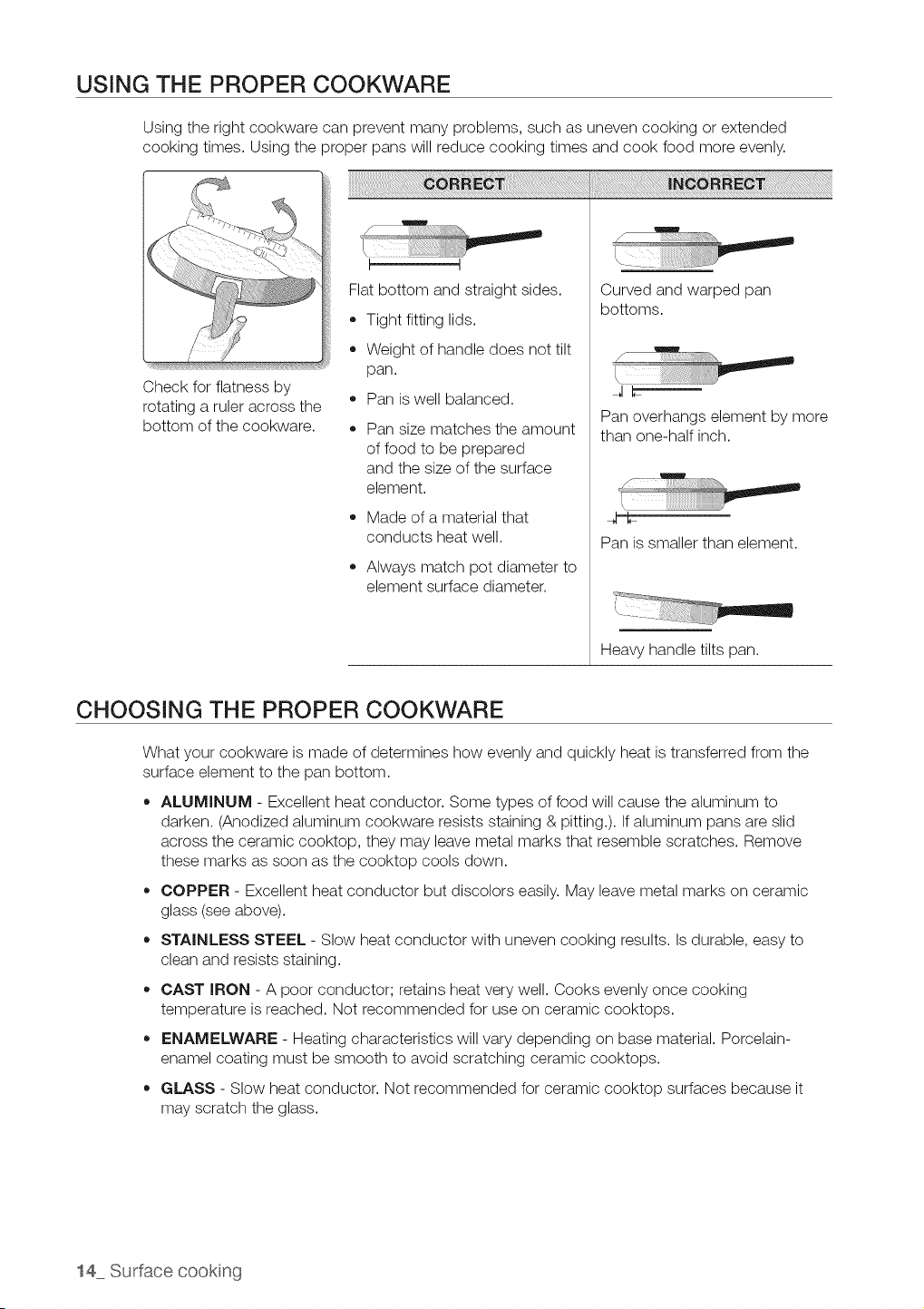
USING THE PROPER COOKWARE
Using the right cookware can prevent many problems, such as uneven cooking or extended
cooking times. Using the proper pans will reduce cooking times and cook food more evenly.
Check for flatness by
rotating a ruler across the
bottom of the cookware.
Flat bottom and straight sides.
• Tight fitting lids.
Weight of handle does not tilt
pan.
Pan iswell balanced.
Pan size matches the amount
offood to be prepared
and the size of the surface
element.
,, Made of a material that
conducts heat well.
Always match pot diameter to
element surface diameter.
¸i
!
/
Curved and warped pan
bottoms.
w
/
JC
Pan overhangs element by more
than one-half inch.
h
Pan is smaller than element.
Heavy handle tilts pan.
CHOOSING THE PROPER COOKWARE
What your cookware is made of determines how evenly and quickly heat istransferred from the
surface element to the pan bottom.
ALUMINUM - Excellent heat conductor. Some types of food will cause the aluminum to
darken. (Anodized aluminum cookware resists staining & pitting.). If aluminum pans are slid
across the ceramic cooktop, they may leave metal marks that resemble scratches. Remove
these marks as soon as the cooktop cools down.
COPPER - Excellent heat conductor but discolors easily. May leave metal marks on ceramic
glass (seeabove).
STAINLESS STEEL - Slow heat conductor with uneven cooking results. Is durable, easy to
clean and resists staining.
CAST IRON - A poor conductor; retains heat very well. Cooks evenly once cooking
temperature isreached. Not recommended for use on ceramic cooktops.
,, ENAMELWARE - Heating characteristics will vary depending on base material. Porcelain-
enamel coating must be smooth to avoid scratching ceramic cooktops.
GLASS - Slow heat conductor. Not recommended for ceramic cooktop surfaces because it
may scratch the glass.
14 Surface cookng
PROTECTING THE SMOOTHTOP SURFACE
Cleaning
• Clean the cooktop before using it for the first time.
Clean your cooktop daily or after each use. This will keep your cooktop looking good and can
prevent damage.
If a spillover occurs while cooking, immediately clean the spill from the cooking area while itis
hot to prevent a tough cleaning chore later. Using extreme care, wipe the spill with a clean dry
towel.
Do not allow spills to remain on the cooking area or the cooktop trim for a long period oftime.
• Do not use abrasive cleansing powders or scouring pads, which will scratch the cooktop.
Do not use chlorine bleach, ammonia, or other cleansers not specifically recommended for use
on a glass-ceramic surface.
Preventing marks and scratches
Do not use glass cookware. It may scratch the cooktop.
Do not place atrivet or wok ring between the cooktop and the pan. These items can mark or
scratch the cooktop.
Make sure the cooktop and the pan bottom are clean.
Do not slide metal pans across the cooktop.
Preventing stains
Do not use a soiled dish cloth or sponge to clean the cooktop surface. A film will remain, which
may cause stains on the cooking surface after the area isheated.
,, Continuously cooking on a soiled surface may/will result in a permanent stain.
Preventing other damage
Do not allow plastic, sugar, or foods with high sugar content to melt onto the hot cooktop.
Should this happen, clean immediately.
Do not let a pan boil dry as this will damage the cooktop, and the pan.
,, Do not use the cooktop as a work surface or cutting board.
Do not cook food directly on the cooktop without the proper cookware.
Sudacecookng 15
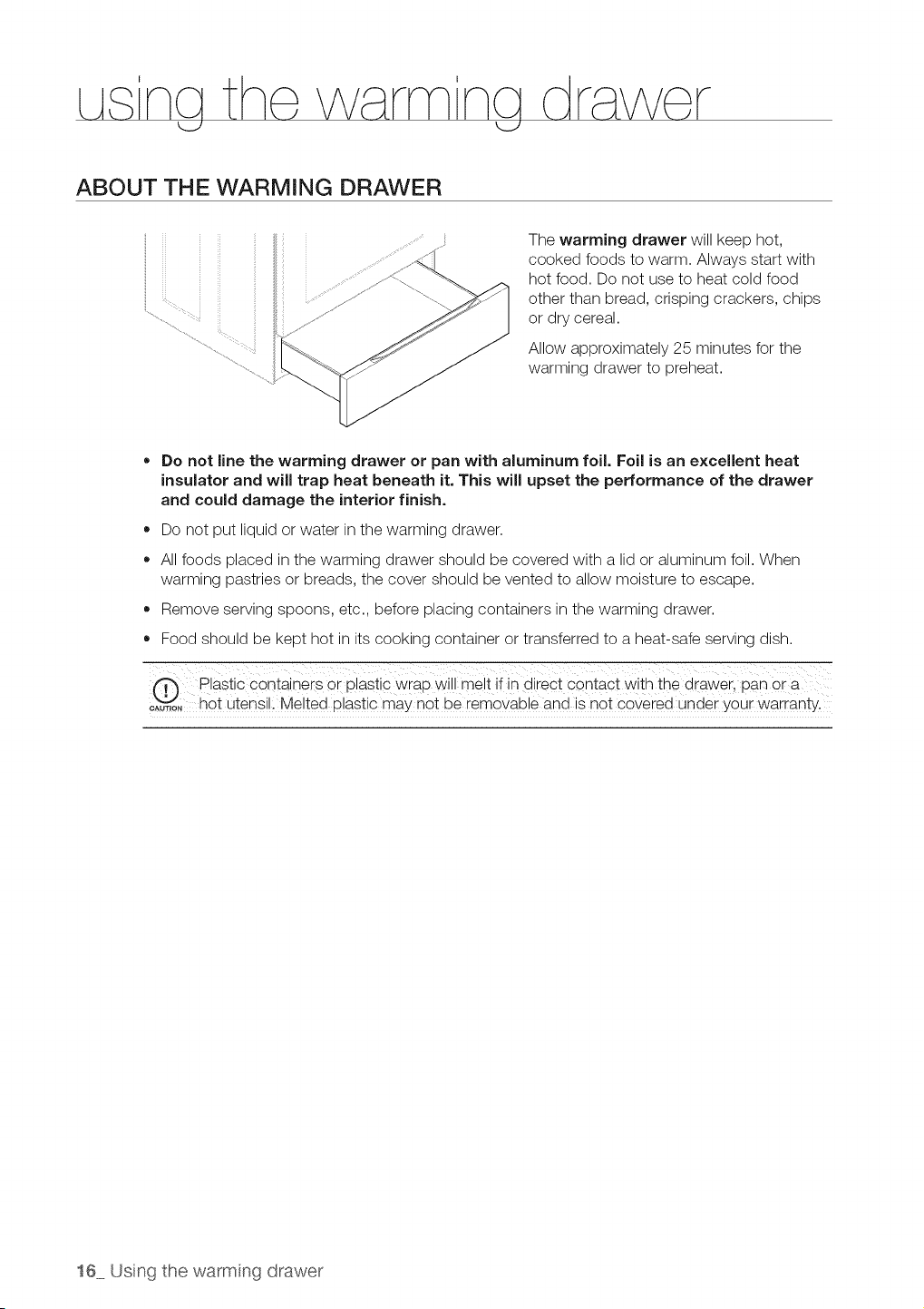
ABOUT THE WARMING DRAWER
The warming drawer will keep hot,
cooked foods to warm. Always start with
hot food. Do not use to heat cold food
other than bread, crisping crackers, chips
or dry cereal.
Allow approximately 25 minutes for the
warming drawer to preheat.
• Do not line the warming drawer or pan with aluminum foil, Foil is an excellent heat
insulator and will trap heat beneath it, This will upset the performance of the drawer
and could damage the interior finish.
• Do not put liquid or water in the warming drawer.
All foods placed in the warming drawer should be covered with a lid or aluminum foil. When
warming pastries or breads, the cover should be vented to allow moisture to escape.
Remove serving spoons, etc., before placing containers in the warming drawer.
Food should be kept hot in its cooking container or transferred to a heat-safe serving dish.
Plastic containers or plastic wrap will me!t ifin direct contact with the drawer, loan ora
o%_i_,o,hot utensil, Melted P!astic may not be removable and isnot covered under your warranty.
16 Usng thewarmng drawer
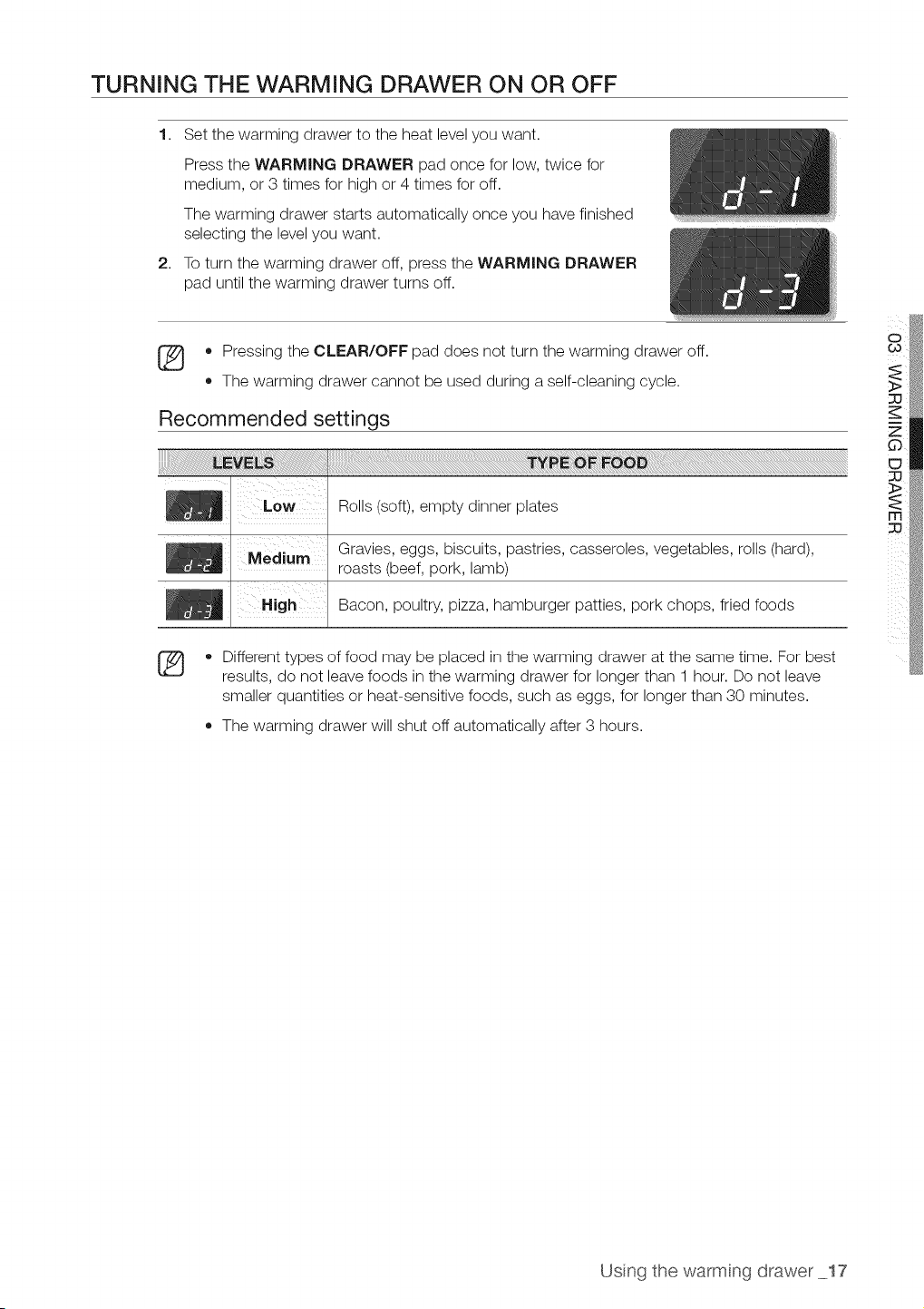
TURNING THE WARMING DRAWER ON OR OFF
1. Set the warming drawer to the heat level you want.
Press the WARMING DRAWER pad once for low, twice for
medium, or 3times for high or 4 times for off.
The warming drawer starts automatically once you have finished
selecting the level you want.
2. To turn the warming drawer off, press the WARMING DRAWER
pad until the warming drawer turns off.
• Pressing the CLEAR/OFF pad does not turn the warming drawer off.
,, The warming drawer cannot be used during aself-cleaning cycle.
Recommended settings
Rolls (soft), empty dinner plates
Gravies, eggs, biscuits, pastries, casseroles, vegetables, rolls (hard),
roasts (beef, pork, lamb)
Bacon, poultry, pizza, hamburger patties, pork chops, fried foods
®
• Different types of food may be placed in the warming drawer at the same time. For best
results, do not leave foods in the warming drawer for longer than 1 hour. Do not leave
smaller quantities or heat-sensitive foods, such as eggs, for longer than 30 minutes.
The warming drawer will shut off automatically after 3 hours.
Usng the warmng drawer 17
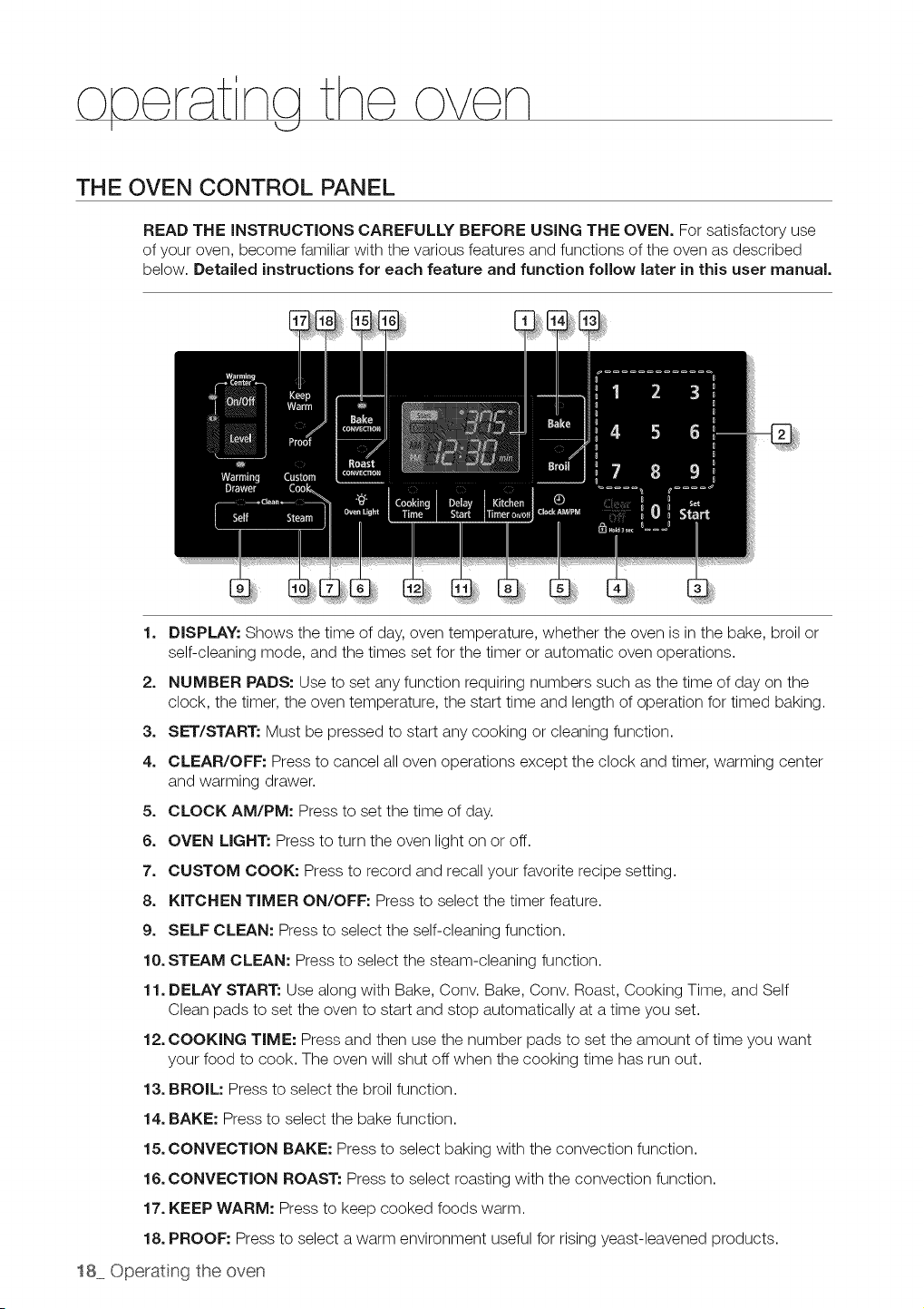
na the oven
I
THE OVEN CONTROL PANEL
READ THE INSTRUCTIONS CAREFULLY BEFORE USING THE OVEN. For satisfactory use
of your oven, become familiar with the various features and functions of the oven as described
below. Detailed instructions for each feature and function follow later in this user manual.
1. DISPLAY: Shows the time of day,oven temperature, whether the oven is in the bake, broil or
self-cleaning mode, and the times set for the timer or automatic oven operations.
2. NUMBER PADS: Use to set any function requiring numbers such as the time of day on the
clock, the timer, the oven temperature, the start time and length of operation for timed baking.
3. SET/START: Must be pressed to start any cooking or cleaning function.
4. CLEAR/OFF: Pressto cancel all oven operations except the clock and timer, warming center
and warming drawer.
5. CLOCK AM/PM: Press to set the time of day.
6. OVEN LIGHT: Press to turn the oven light on or off.
7. CUSTOM COOK: Press to record and recall your favorite recipe setting.
8. KITCHEN TIMER ON/OFF: Press to select the timer feature.
9. SELF CLEAN: Press to select the self-cleaning function.
10. STEAM CLEAN: Press to select the steam-cleaning function.
11. DELAY START: Use along with Bake, Conv. Bake, Conv. Roast, Cooking Time, and Self
Clean pads to set the oven to start and stop automatically at a time you set.
12. COOKING TIME: Press and then use the number pads to set the amount oftime you want
your food to cook. The oven will shut offwhen the cooking time has run out.
13. BROIL: Press to select the broil function.
14. BAKE: Press to select the bake function.
15. CONVECTION BAKE: Press to select baking with the convection function.
16. CONVECTION ROAST: Press to select roasting with the convection function.
17. KEEP WARM: Press to keep cooked foods warm.
18. PROOF: Press to select awarm environment useful for rising yeast-leavened products.
18 Operating the oven
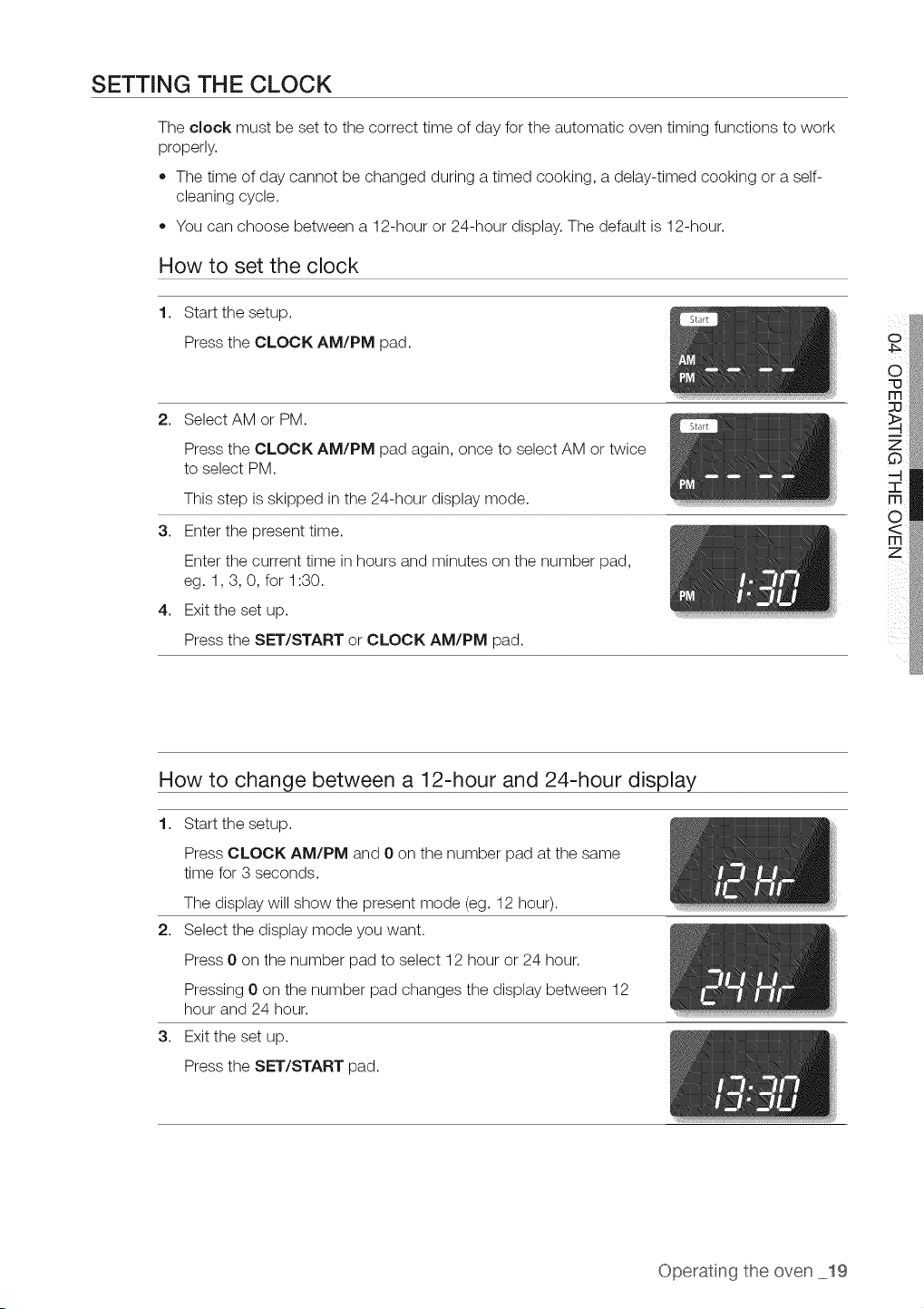
SETTING THE CLOCK
The clock must be set to the correct time of day for the automatic oven timing functions to work
properly.
,, The time of day cannot be changed during a timed cooking, a delay-timed cooking or a self-
cleaning cycle.
• You can choose between a 12-hour or 24-hour display. The default is 12-hour.
How to set the clock
1,
Start the setup.
Press the CLOCK AM/PM pad.
2. Select AM or PM.
Press the CLOCK AM/PM pad again, once to select AM or twice
to select PM.
This step isskipped in the 24-hour display mode.
3. Enter the present time.
Enter the current time in hours and minutes on the number pad,
eg. 1,3, 0, for 1:30.
4. Exit the set up.
Press the SET/START or CLOCK AM/PM pad.
How to change between a 12-hour and 24-hour display
1. Start the setup.
Press CLOCK AM/PM and 0 on the number pad at the same
time for 3 seconds.
The display will show the present mode (eg. 12 hour).
2. Select the display mode you want.
Press 0 on the number pad to select 12 hour or 24 hour.
Pressing 0on the number pad changes the display between 12
hour and 24 hour.
3. Exit the set up.
Press the SET/START pad.
Operat ng the oven 19
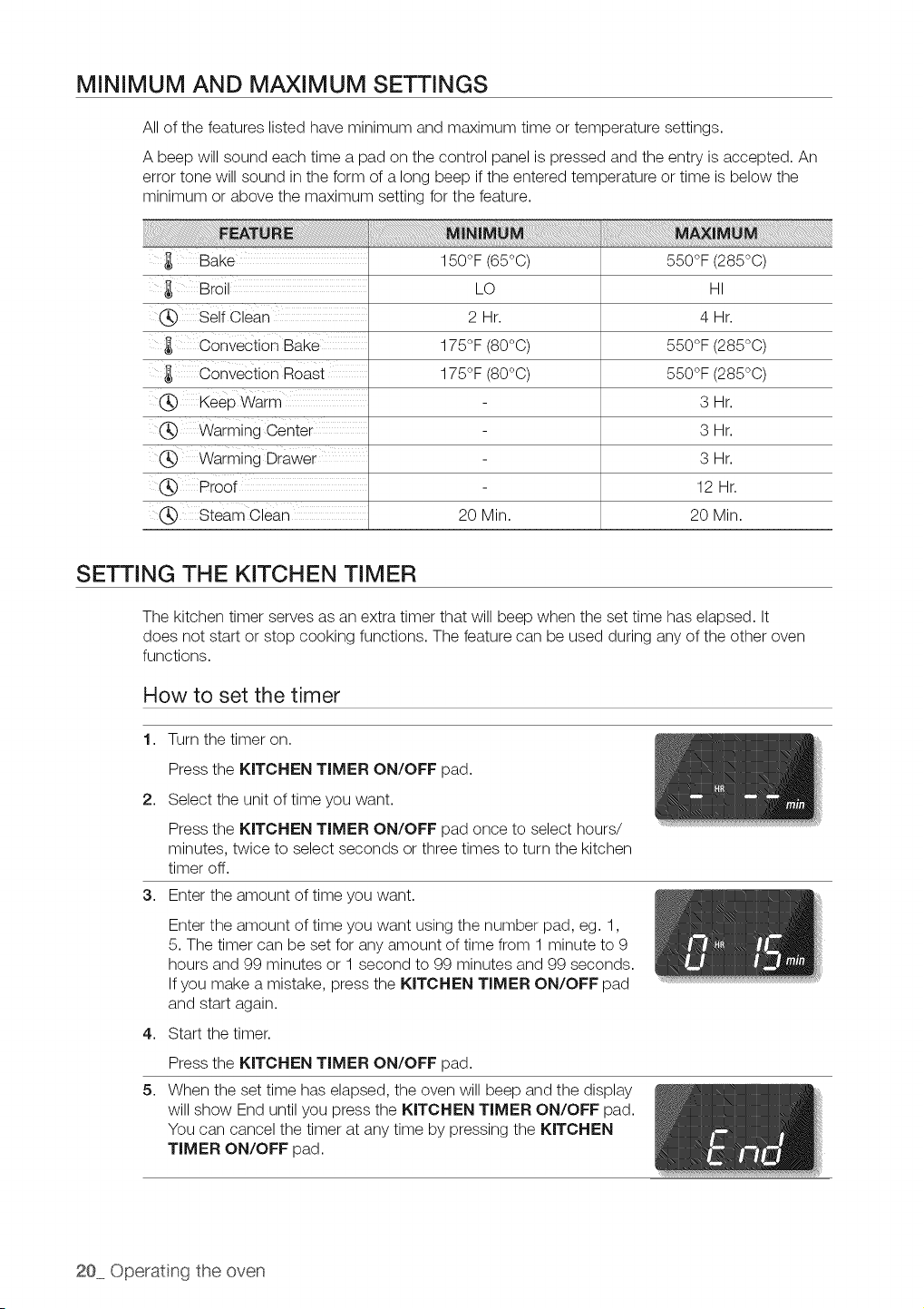
MINIMUM AND MAXIMUM SETTINGS
All of the features listed have minimum and maximum time or temperature settings.
A beep will sound each time a pad on the control panel is pressed and the entry isaccepted. An
error tone will sound in the form of a long beep if the entered temperature or time isbelow the
minimum or above the maximum setting for the feature.
Bake
Bro
._ Self Clear"
Convection Bake
Convection Roast
150°F (65°C)
LO
2 Hr.
175°F (80°0)
175°F (80°0)
550°F (285°C)
HI
4Hr.
550°F (285°0)
550°F (285°0)
._ Keep Warm
(_ Warming Center
Warming Drawer
(_ Proof
,_ Steam Clean
20 Min.
SETTING THE KITCHEN TIMER
3Hr.
3Hr.
3Hr.
12 Hr.
20 Min.
The kitchen timer serves as an extra timer that will beep when the set time has elapsed. It
does not start or stop cooking functions. The feature can be used during any ofthe other oven
functions.
How to set the timer
1. Turn the timer on.
Press the KITCHEN TIMER ON/OFF pad.
2. Select the unit of time you want.
Press the KITCHEN TIMER ON/OFF pad once to select hours/
minutes, twice to select seconds or three times to turn the kitchen
timer off.
3. Enter the amount of time you want.
4,
5,
Enter the amount of time you want using the number pad, eg. 1,
5.The timer can be set for any amount of time from 1 minute to 9
hours and 99 minutes or 1 second to 99 minutes and 99 seconds.
If you make a mistake, press the KITCHEN TIMER ON/OFF pad
and start again.
Start the timer.
Press the KITCHEN TIMER ON/OFF pad.
When the set time has elapsed, the oven will beep and the display
will show End until you press the KITCHEN TIMER ON/OFF pad.
You can cancel the timer at any time by pressing the KITCHEN
TIMER ON/OFF pad.
20 Operat(ng the oven
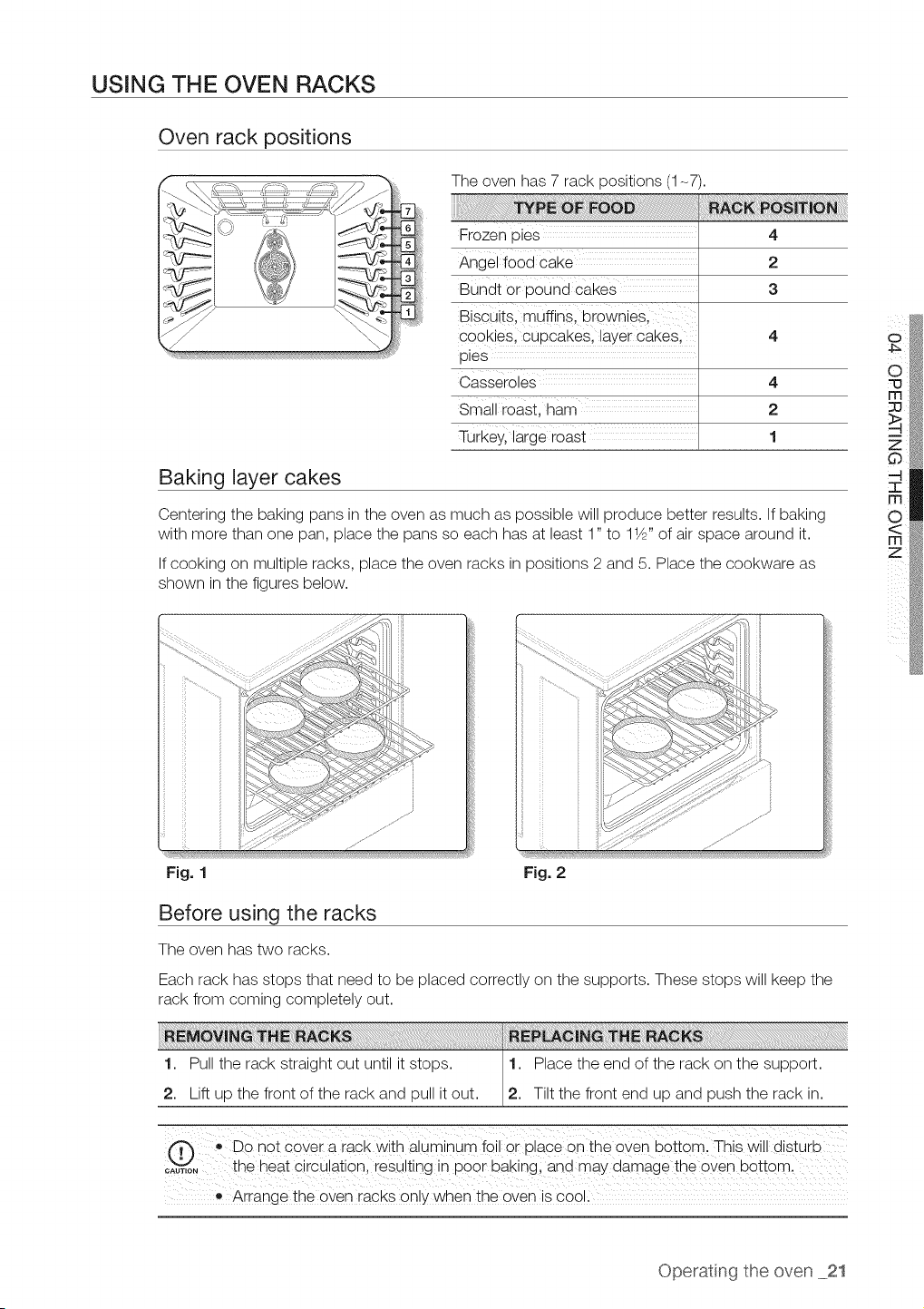
USING THE OVEN RACKS
Oven rack positions
The oven has 7 rack positions (1-7).
Frozen pies
Angel food cake
Bundt 0r p0Und cakes
Biscuits, muffins, brownies,
cookies, cupcakes, layer Cakes,
pies
Casseroles 4
Small roast, ham 2
Turkeyl large roast 1
4
2
3
Baking layer cakes
Centering the baking pans in the oven as much as possible will produce better results. If baking
with more than one pan, place the pans so each has at least 1" to 11/Z'of air space around it.
If cooking on multiple racks, place the oven racks in positions 2 and 5. Place the cookware as
shown in the figures below.
....fJ
Fig. 1 Fig. 2
Before using the racks
The oven has two racks.
Each rack has stops that need to be placed correctly on the supports. These stops will keep the
rack from coming completely out.
1. Pull the rack straight out until it stops. 1. Place the end of the rack on the support.
/
2. Lift up the front of the rack and pull itout. 2. Tiltthe front end up and push the rack in.
.,Do not cover a rack with aluminum foil or place on the oven bottom. This will disturb
_A,,,oN_ the heat CircUationl iesuiting in p00r baking and may clamage the 0_e_ bottoml
• Arrange the oven racks on!y when the oven is coo!i
o
Operatng the oven 21
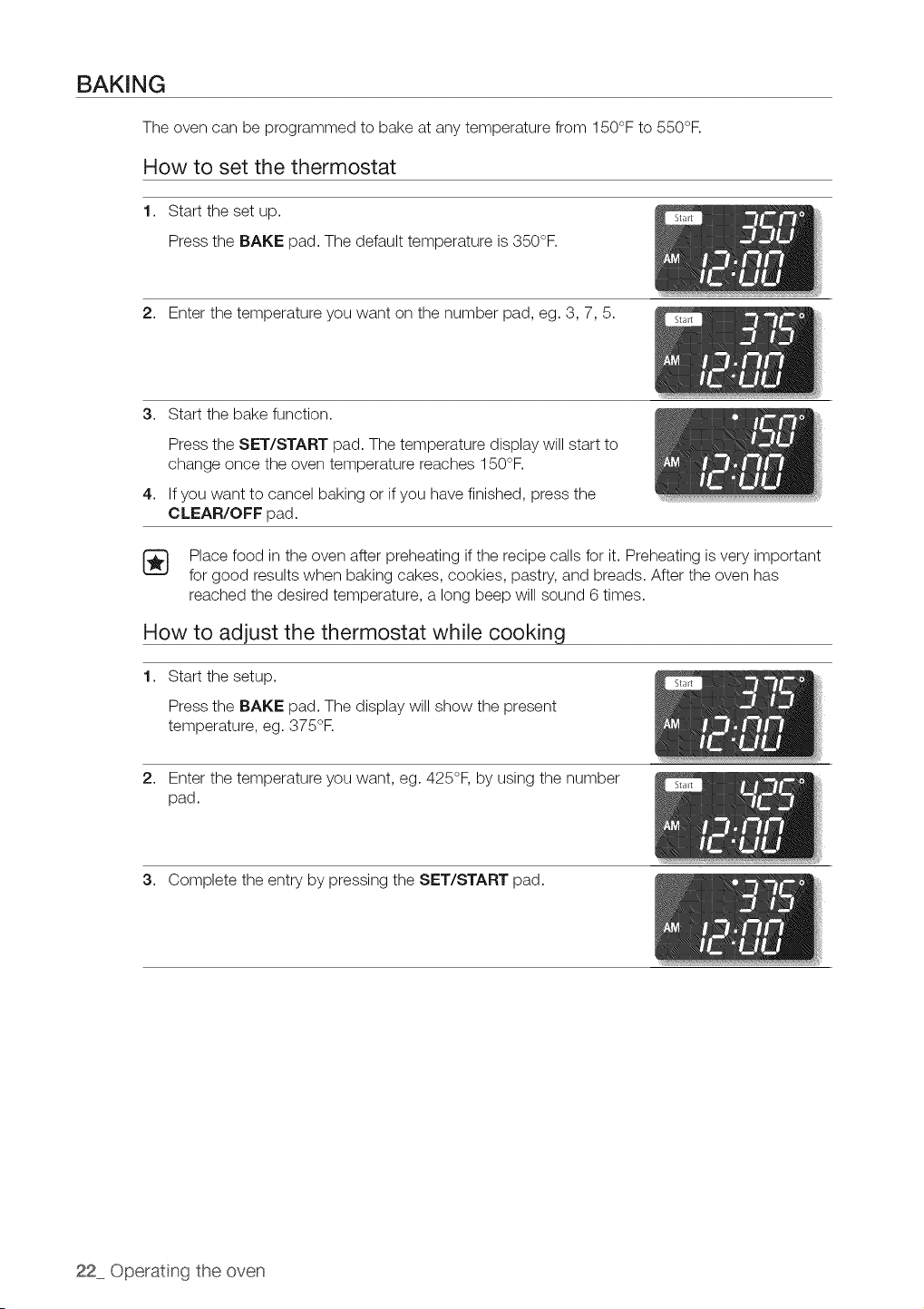
BAKING
The oven can be programmed to bake at any temperature from 150°F to 550°F.
How to set the thermostat
1. Start the set up.
Press the BAKE pad. The default temperature is350°F.
2. Enter the temperature you want on the number pad, eg. 3, 7, 5.
3. Start the bake function.
4,
Press the SET/START pad. The temperature display will start to
change once the oven temperature reaches 150°F.
If you want to cancel baking or if you have finished, press the
CLEAR/OFF pad.
[_ Place food in the oven after preheating ifthe recipe calls for it. Preheating isvery important
for good results when baking cakes, cookies, pastry, and breads. After the oven has
reached the desired temperature, a long beep will sound 6times.
How to adjust the thermostat while cooking
1. Start the setup.
Press the BAKE pad. The display will show the present
temperature, eg. 375°R
2. Enter the temperature you want, eg. 425°F, by using the number
pad.
3. Complete the entry by pressing the SET/START pad.
22 Operating the oven
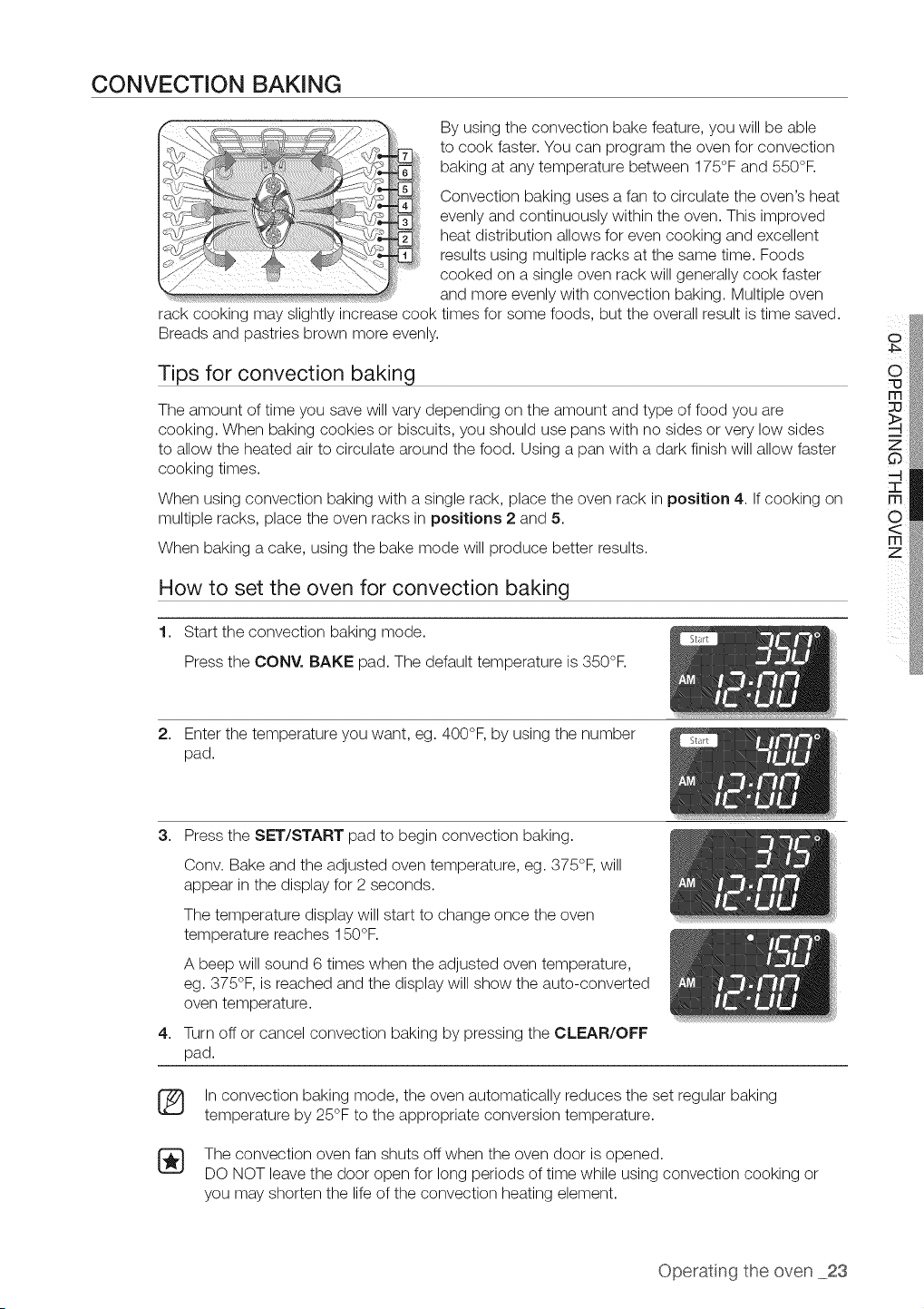
CONVECTION BAKING
By using the convection bake feature, you will be able
to cook faster. You can program the oven for convection
baking at any temperature between 175°F and 550°F.
Convection baking uses a fan to circulate the oven's heat
evenly and continuously within the oven. This improved
heat distribution allows for evencooking and excellent
results using multiple racks at the same time. Foods
cooked on a single oven rack will generally cook faster
and more evenly with convection baking. Multiple oven
rack cooking may slightly increase cook times for some foods, but the overall result is time saved.
Breads and pastries brown more evenly.
Tips for convection baking
The amount of time you save will vary depending on the amount and type of food you are
cooking. When baking cookies or biscuits, you should use pans with no sides or very low sides
to allow the heated air to circulate around the food. Using apan with a dark finish will allow faster
cooking times.
When using convection baking with a single rack, place the oven rack in position 4. If cooking on
multiple racks, place the oven racks in positions 2 and 5.
When baking a cake, using the bake mode will produce better results.
How to set the oven for convection baking
1. Start the convection baking mode.
Press the CONY. BAKE pad. The default temperature is 350°F.
o
2. Enter the temperature you want, eg. 400°F, by using the number
pad.
3. Press the SET/START pad to begin convection baking.
4,
®
Conv. Bake and the adjusted oven temperature, eg. 375°F, will
appear in the display for 2 seconds.
The temperature display will start to change once the oven
temperature reaches 150°F.
A beep will sound 6 times when the adjusted oven temperature,
eg. 375°F, is reached and the display will show the auto-converted
oven temperature.
Turn off or cancel convection baking by pressing the CLEAR/OFF
pad.
Inconvection baking mode, the oven automatically reduces the set regular bakin¢
temperature by 25°F to the appropriate conversion temperature.
The convection oven fan shuts off when the oven door isopened.
DO NOT leave the door open for long periods of time while using convection cooking or
you may shorten the life of the convection heating element.
Operatng the oven 23
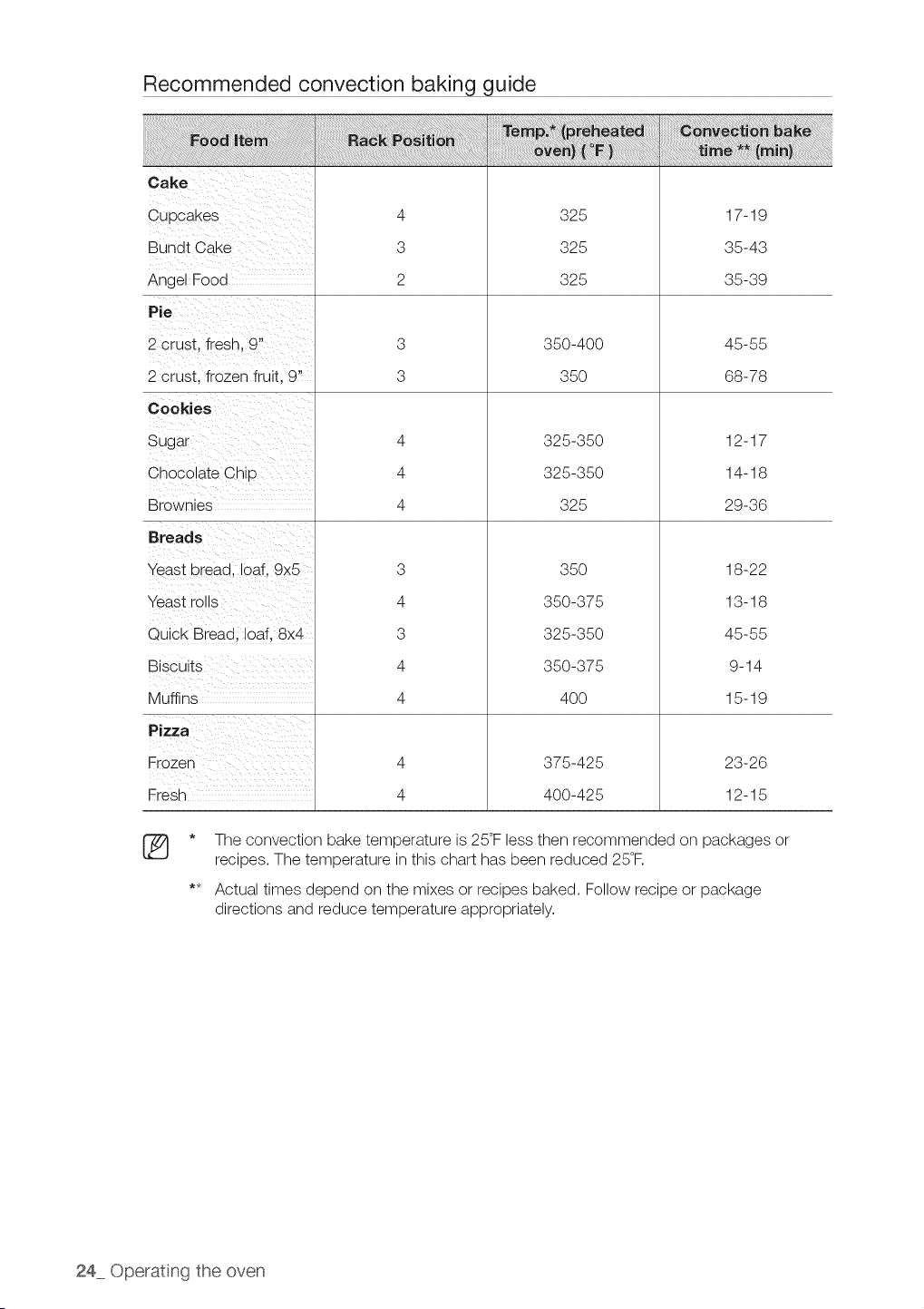
Recommended convection baking guide
Bundt Cake
Angel Food
2 crust, fresh, 9"
2 crust, frozen fruit, 9"
Chocolate Chip
Brownies
Breads
Yeast bread, loaf, 9x5
Yeast rolls
Quick Bread, loaf, 8x4
Muffins
Pizza
Fresh
4
3
2
3
3
4
4
4
3
4
3
4
4
4
4
325
325
325
350-400
35O
325-350
325-350
325
35O
350-375
325-350
350-375
4OO
375-425
400-425
17-19
35-43
35-39
45-55
68-78
12-17
14-18
29-36
18-22
13-18
45-55
9-14
15-19
23-26
12-15
®
The convection bake temperature is25°Fless then recommended on packages or
recipes. The temperature inthis chart has been reduced 25°F.
Actual times depend on the mixes or recipes baked. Follow recipe or package
directions and reduce temperature appropriately.
24 Operating the oven
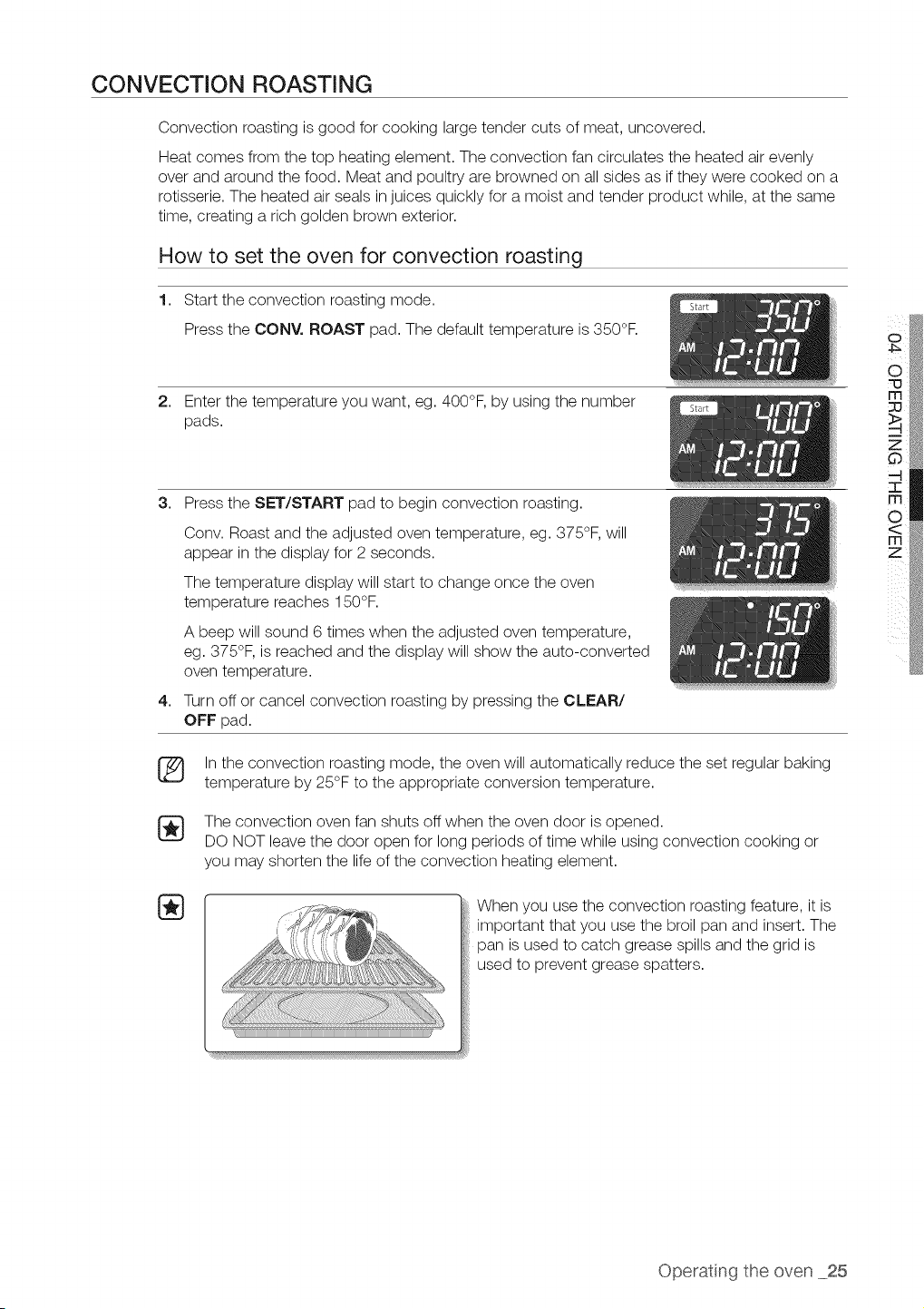
CONVECTION ROASTING
Convection roasting isgood for cooking large tender cuts of meat, uncovered.
Heat comes from the top heating element. The convection fan circulates the heated airevenly
over and around the food. Meat and poultry are browned on allsides as if they were cooked on a
rotisserie. The heated airseals in juices quickly for a moist and tender product while, at the same
time, creating a rich golden brown exterior.
How to set the oven for convection roasting
1. Start the convection roasting mode.
Press the CONY. ROAST pad. The default temperature is 350°F.
2. Enter the temperature you want, eg. 400°F, by using the number
pads.
3. Press the SET/START pad to begin convection roasting.
4,
Conv. Roast and the adjusted oven temperature, eg. 375°F, will
appear in the display for 2 seconds.
The temperature display will start to change once the oven
temperature reaches 150°F.
A beep will sound 6 times when the adjusted oven temperature,
eg. 375°F, is reached and the display will show the auto-converted
oven temperature.
Turn off or cancel convection roasting by pressing the CLEAR/
OFF pad.
Inthe convection roasting mode, the oven will automatically reduce the set regular baking
temperature by 25°F to the appropriate conversion temperature.
The convection oven fan shuts off when the oven door isopened.
DO NOT leave the door open for long periods of time while using convection cooking or
you may shorten the life of the convection heating element.
When you use the convection roasting feature, it is
important that you use the broil pan and insert. The
pan isused to catch grease spills and the grid is
used to prevent grease spatters.
Operatng the oven 25
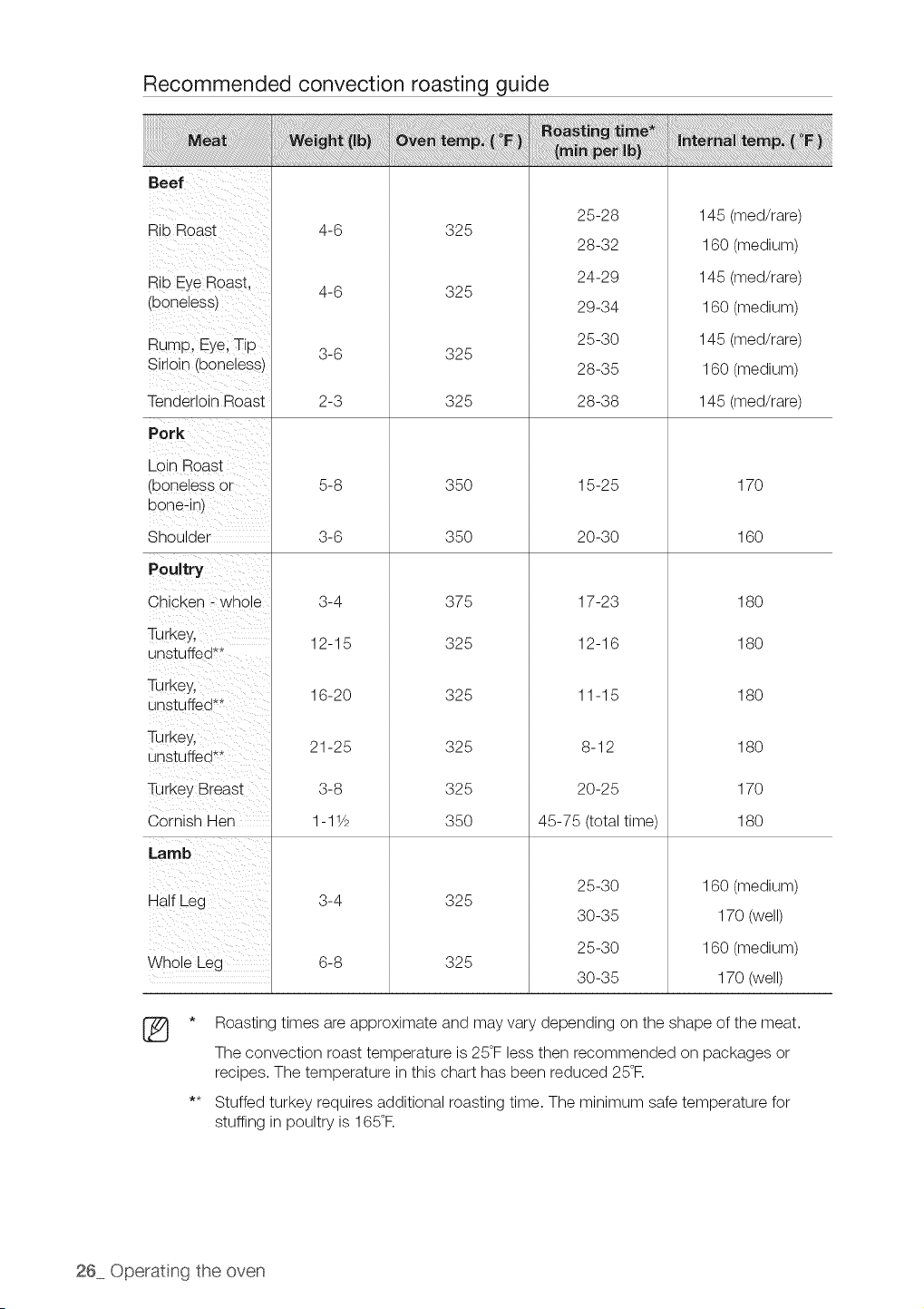
Recommended convection roasting guide
Rib Roast
Rib EyeRoas t,
(boneless)
Rump, Eye;Tip
Sirloin (boneless)
Tenderloin Roast
Pork
Loin Boast
(boneless Or
bone:in)
Shoulder
Poultry
Chicken _ whole
Turkey,
unstuffed**
TurkeYl
unstuffed**
Turkey,
unstuffed**
i
Turkey Breast
Cornish Hen
Half Leg
Whole Leg
®
4-6
4-6
325
325
325
325
25-28
28-32
24-29
29-34
25-30
28-35
28-38
145 (med/rare)
160 (medium)
145 (med/rare)
160 (medium)
145 (med/rare)
160 (medium)
145 (med/rare)
5-8
3-6
3-4
12-15
16-20
21-25
3-8
1-11/2
3-4
6-8
35O
35O
375
325
325
325
325
35O
15-25
20-30
17-23
12-16
11-15
8-12
20-25
45-75 (total time)
170
16O
18O
18O
18O
18O
17O
18O
325
325
25-30
30-35
25-30
30-35
160 (medium)
170 (well)
160 (medium)
170 (well)
* Roasting times areapproximate and may vary depending on the shape of the meat.
The convection roast temperature is 25°Fless then recommended on packages or
recipes. The temperature inthis chart has been reduced 25°R
** Stuffed turkey requires additional roasting time. The minimum safe temperature for
stuffing inpoultry is 165°R
26 Operating the oven
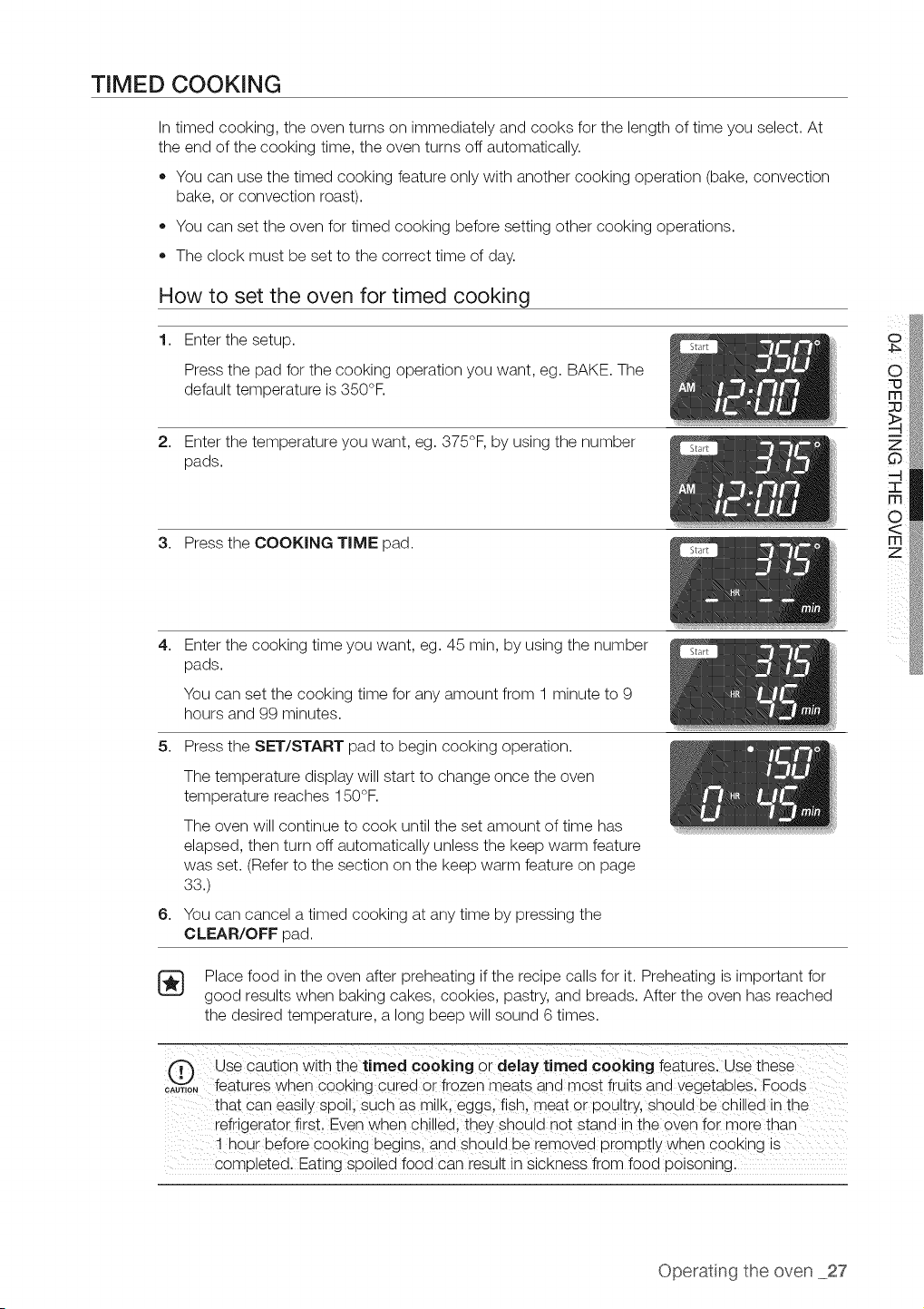
TIMED COOKING
Intimed cooking, the oven turns on immediately and cooks for the length oftime you select. At
the end ofthe cooking time, the oven turns off automatically.
• You can use the timed cooking feature only with another cooking operation (bake, convection
bake, or convection roast).
You can set the oven for timed cooking before setting other cooking operations.
The clock must be set to the correct time of day.
How to set the oven for timed cooking
1. Enter the setup.
Press the pad for the cooking operation you want, eg. BAKE. The
default temperature is350°F.
2. Enter the temperature you want, eg. 375°F, by using the number
pads.
3. Press the COOKING TIME pad.
4,
Enter the cooking time you want, eg. 45 rain, by using the number
pads.
You can set the cooking time for any amount from 1 minute to 9
hours and 99 minutes.
5. Press the SET/START pad to begin cooking operation.
6,
The temperature display will start to change once the oven
temperature reaches 150°F.
The oven will continue to cook until the set amount of time has
elapsed, then turn off automatically unless the keep warm feature
was set. (Refer to the section on the keep warm feature on page
33.)
You can cancel atimed cooking at any time by pressing the
CLEAR/OFF pad.
Place food in the oven after preheating ifthe recipe calls for it. Preheating isimportant for
good results when baking cakes, cookies, pastry, and breads. After the oven has reached
the desired temperature, a long beep will sound 6times.
fT"_ Use caution with the timed cooking or delaytimed cooking features. Use these
CAU,,0"_features when C00king cured or frozen meats and most iruits and vegetab!eSl Foods
that Caneasily spoill such as milk, eggs,fish, meat or poultry, should be chilled in the
refrigerator first, Even when chilledi they should not stand in the oven for more than
! h0ur before cooking begins, and sh0uld be removed promptly when cooking is ..............
completed. Eating spoiled food can result in sickness from food poisoning.
Operatng the oven 27
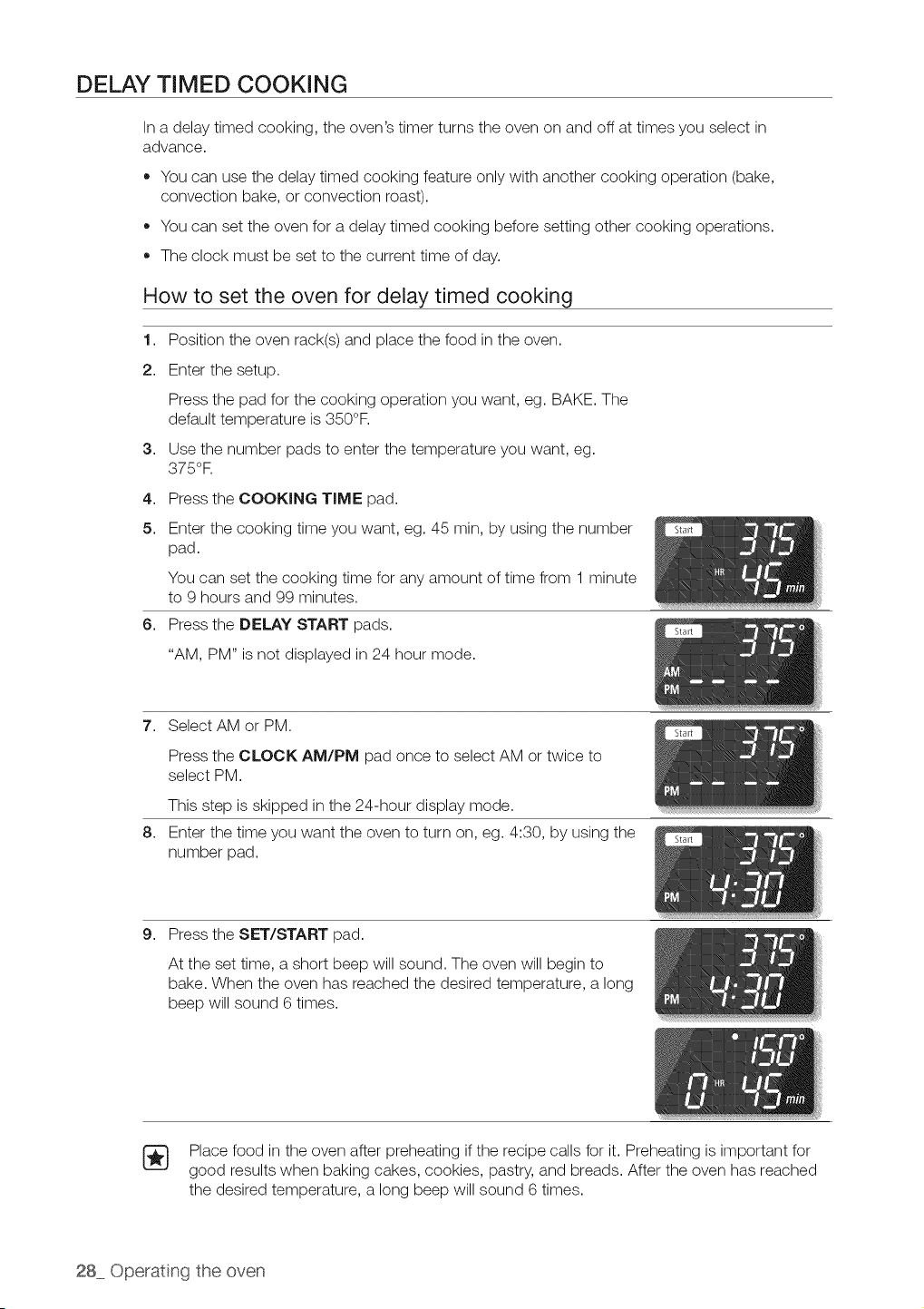
DELAY TIMED COOKING
Ina delay timed cooking, the oven's timer turns the oven on and off attimes you select in
advance.
,, You can use the delay timed cooking feature only with another cooking operation (bake,
convection bake, or convection roast).
• You can set the oven for adelay timed cooking before setting other cooking operations.
The clock must be set to the current time of day.
How to set the oven for delay timed cooking
1. Position the oven rack(s) and place the food in the oven.
2. Enter the setup.
Press the pad for the cooking operation you want, eg. BAKE. The
default temperature is350°F.
3. Use the number pads to enter the temperature you want, eg.
375°R
4. Press the COOKING TIME pad.
5. Enter the cooking time you want, eg. 45 rain, by using the number
pad.
You can set the cooking time for any amount of time from 1 minute
to 9 hours and 99 minutes.
6. Press the DELAY START pads.
"AM, PM" is not displayed in 24 hour mode.
7. Select AM or PM.
Press the CLOCK AM/PM pad once to select AM or twice to
select PM.
This step is skipped in the 24-hour display mode.
8. Enter the time you want the oven to turn on, eg. 4:30, by using the
number pad.
9. Press the SET/START pad.
At the set time, a short beep will sound. The oven will begin to
bake. When the oven has reached the desired temperature, a long
beep will sound 6 times.
Place food in the oven after preheating ifthe recipe calls for it. Preheating is important for
good results when baking cakes, cookies, pastry, and breads. After the oven has reached
the desired temperature, a long beep will sound 6times.
28 Operating the oven
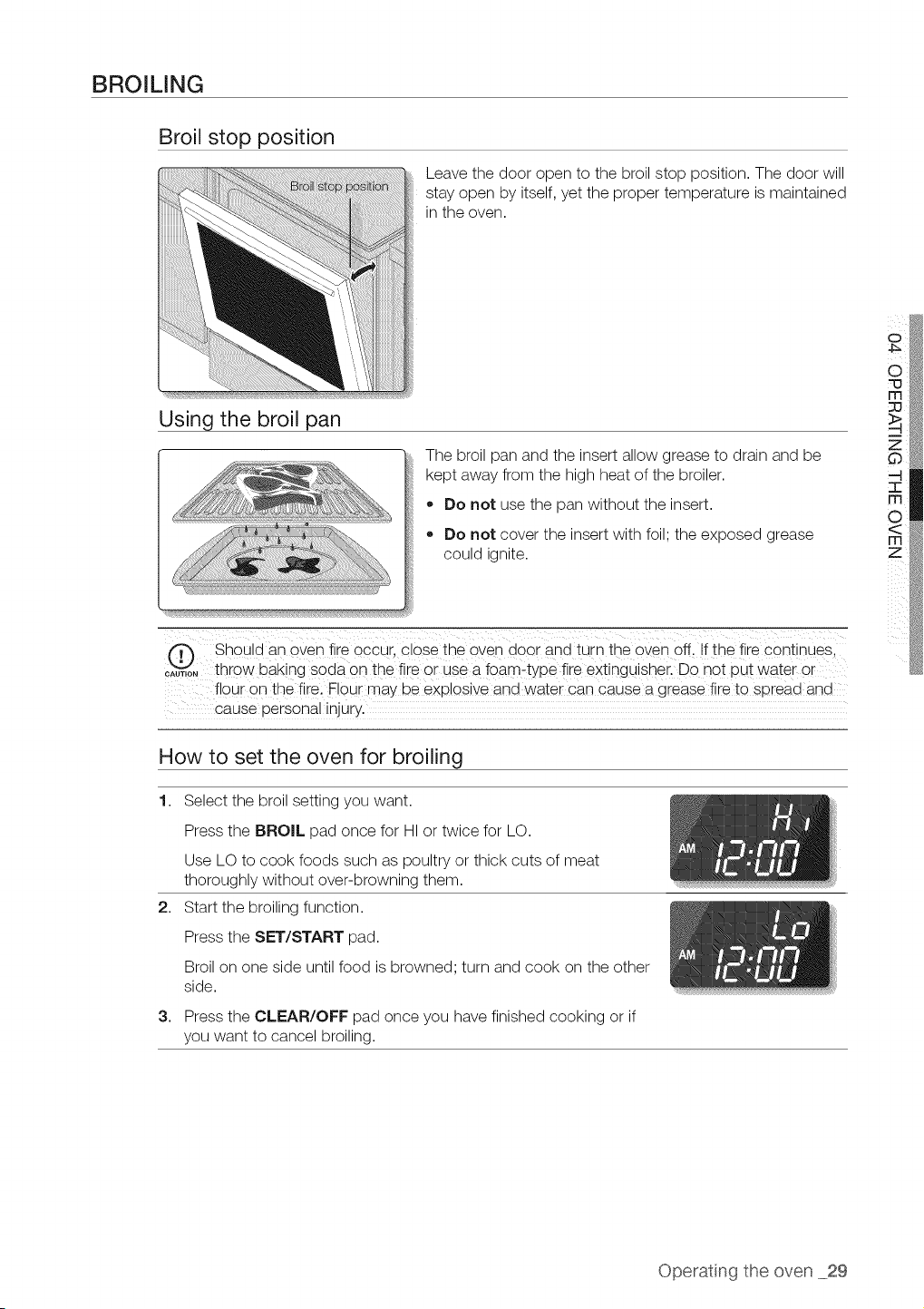
BROILING
Broil stop position
Using the broil pan
Leave the door open to the broil stop position. The door will
stay open by itself, yet the proper temperature is maintained
in the oven.
The broil pan and the insert allow grease to drain and be
kept away from the high heat of the broiler.
,, Do not use the pan without the insert.
,, Do not cover the insert with foil; the exposed grease
?,OUlO Ignite,
Should an or÷q fire occur, close the oven door ana turn the oven off. If the fire continues.
....... throw baking soda on the fire or use a foam-type fire exting aisher. Do not uut water or
flour on the fire. Flour may De explosive and water can cause a grease fire to soreaa ana
cause oersonal Injury.
o
How to set the oven for broiling
1.
2,
3,
Select the broil setting you want.
Press the BROIL pad once for HI or twice for LO.
Use LO to cook foods such as poultry or thick cuts of meat
thoroughly without over-browning them.
Start the broiling function.
Press the SET/START pad.
Broilon one side until food isbrowned; turn and cook on the other
side.
Press the CLEAR/OFF pad once you have finished cooking or if
you want to cancel broiling.
Operatng the oven 29
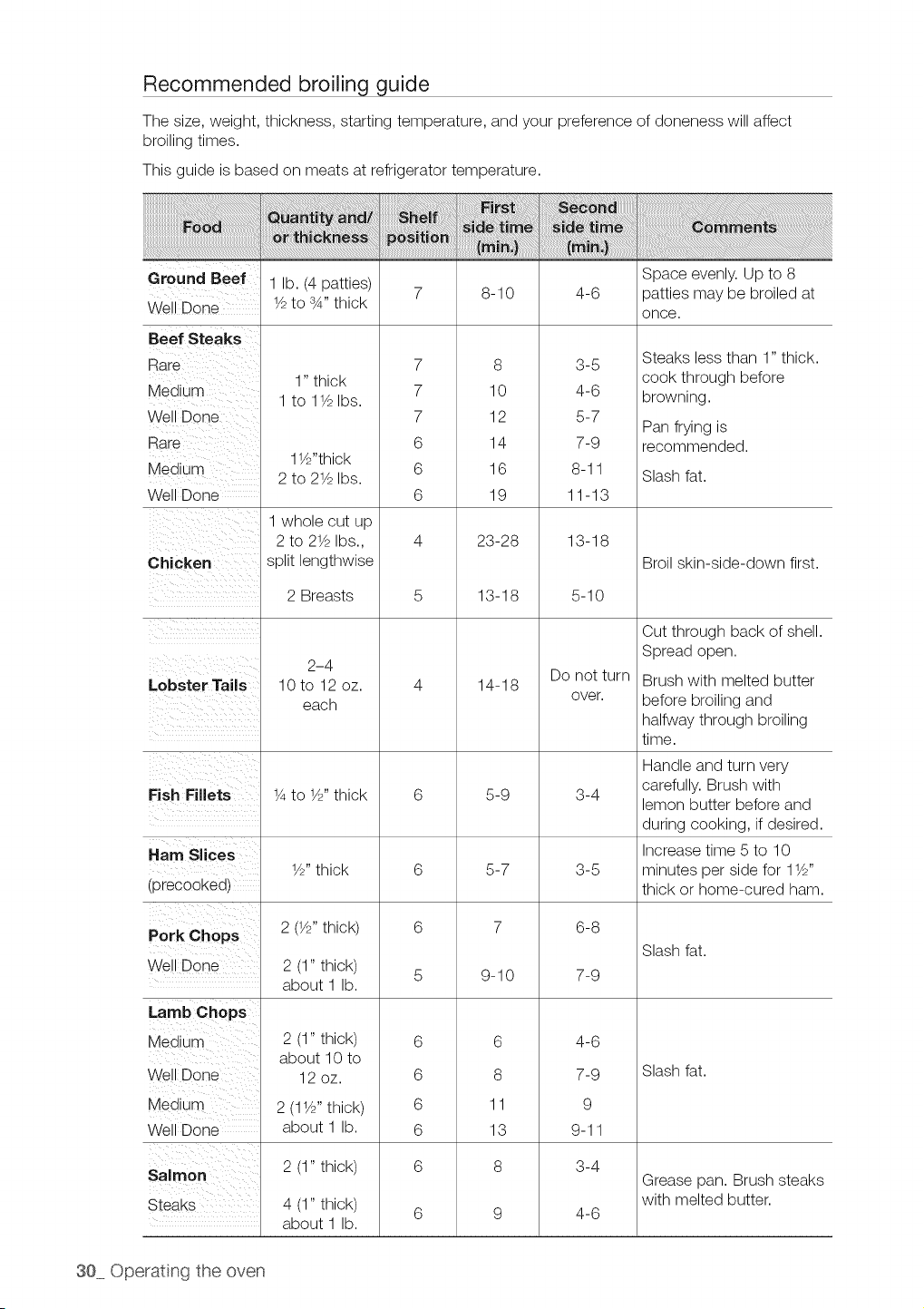
Recommended broiling guide
The size, weight, thickness, starting temperature, and your preference of doneness will affect
broiling times.
This guide isbased on meats at refrigerator temperature.
Ground Beef 1 lb. (4 patties) Space evenly. Up to 8
7 8-10 4-6 patties may be broiled at
Well Done 1/2to sA" thick
once.
1" thick
1 to 11/2Ibs.
11//'thick
2 to 21/2Ibs.
1 whole cut up
2 to 21/2Ibs.,
Beef Steaks
Rare
Medium
Well Done
Rare
Medium
Well Done
Chicken split lengthwise
7
7
7
6
6
6
8
10
12
14
16
19
23-28
3-5
4-6
5-7
7-9
8-11
11-13
13-18
Steaks less than 1" thick.
cook through before
browning.
Pan frying is
recommended.
Slash fat.
Broil skin-side-down first.
Lobster Tails
2 Breasts
2-4
10 to 12 oz.
each
13-18
14-18
5-10
Do not turn
over.
Cut through back of shell.
Spread open.
Brush with melted butter
before broiling and
halfway through broiling
time.
Handle and turn very
carefully. Brush with
Fish Fillets 1/4to 1/2"thick 6 5-9 3-4 lemon butter before and
during cooking, if desired.
Ham SIces Increase time 5 to 10
1//' thick 6 5-7 3-5 minutes per side for 11//'
(precooked) thick or home-cured ham.
Pork Chops 2(1//, thick) 6 7 6-8
Slash fat.
Well Done 2 (1" thick) 5 9-10 7-9
about 1 lb.
2 (1" thick)
about 10 to
12oz.
6
8
11
13
8
2 (11/2"thick)
about 1 lb.
2 (1" thick)
4 (1" thick)
about 1 lb.
4-6
7-9
9
9-11
3-4
4-6
6
6
6
6
6
Lamb Chops
Medium
Well Done
Medium
Well Done
Salmon
Steaks
Slash fat.
Grease pan. Brush steaks
with melted butter.
30 Operating the oven
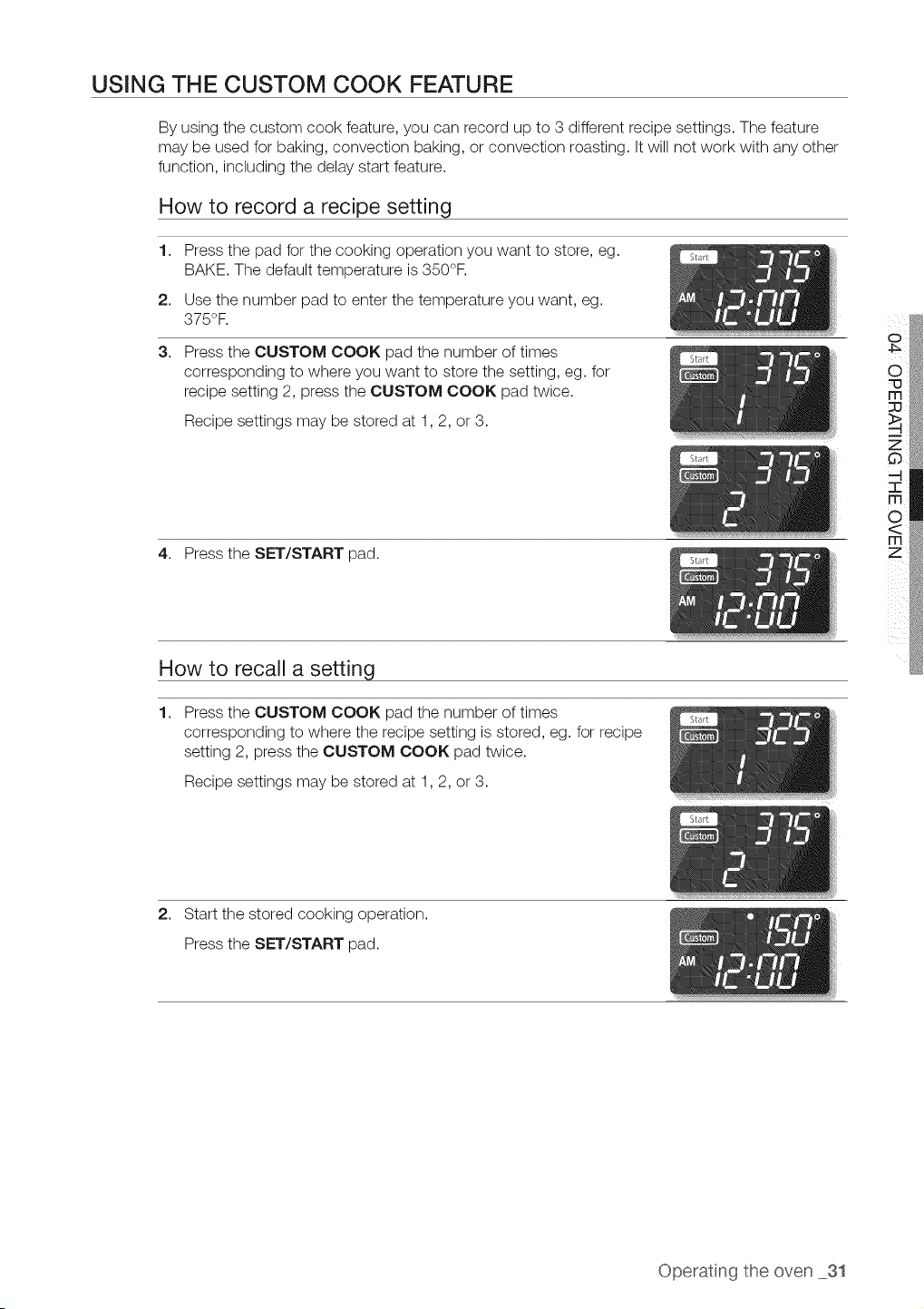
USING THE CUSTOM COOK FEATURE
By using the custom cook feature, you can record up to 3 different recipe settings. The feature
may be used for baking, convection baking, or convection roasting. It will not work with any other
function, including the delay start feature.
How to record a recipe setting
1,
2,
3,
Press the pad for the cooking operation you want to store, eg.
BAKE. The default temperature is350°F.
Use the number pad to enter the temperature you want, eg.
375°F.
Press the CUSTOM COOK pad the number of times
corresponding to where you want to store the setting, eg. for
recipe setting 2, press the CUSTOM COOK pad twice.
Recipe settings may be stored at 1,2, or 3.
4. Press the SET/START pad.
How to recall a setting
1.
Press the CUSTOM COOK pad the number of times
corresponding to where the recipe setting isstored, eg. for recipe
setting 2, press the CUSTOM COOK pad twice.
Recipe settings may be stored at 1,2, or 3.
o
2. Start the stored cooking operation.
Press the SET/START pad.
Operatng the oven 31
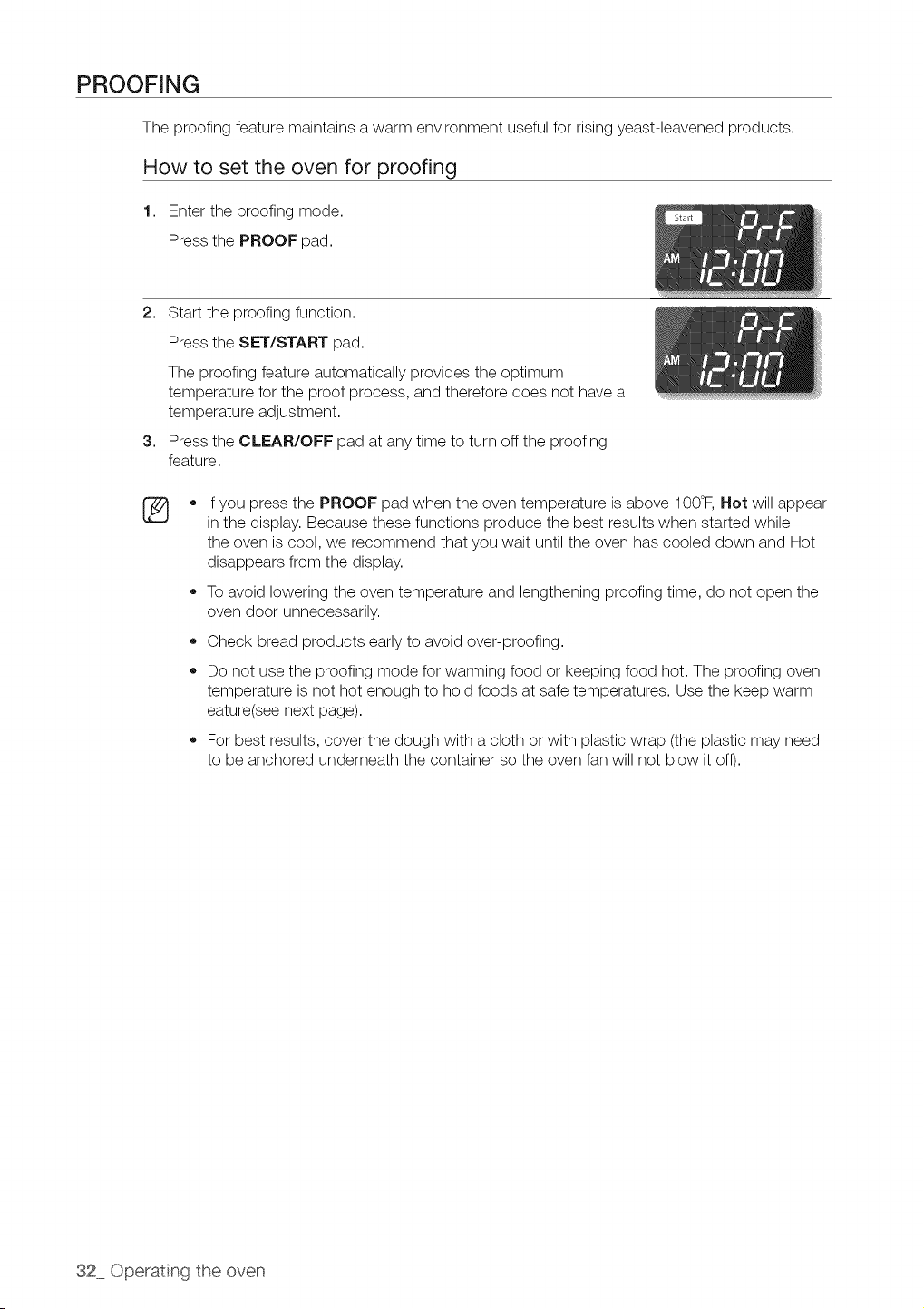
PROOFING
The proofing feature maintains a warm environment useful for rising yeast-leavened products.
How to set the oven for proofing
1. Enter the proofing mode.
Press the PROOF pad.
2. Start the proofing function.
Press the SET/START pad.
The proofing feature automatically provides the optimum
temperature for the proof process, and therefore does not have a
temperature adjustment.
3. Press the CLEAR/OFF pad at any time to turn off the proofing
feature.
®
o
o
If you press the PROOF pad when the oven temperature is above 100°F, Hot will appear
in the display. Because these functions produce the best results when started while
the oven iscool, we recommend that you wait until the oven has cooled down and Hot
disappears from the display.
To avoid lowering the oven temperature and lengthening proofing time, do not open the
oven door unnecessarily.
Check bread products early to avoid over-proofing.
Do not use the proofing mode for warming food or keeping food hot. The proofing oven
temperature is not hot enough to hold foods at safe temperatures. Use the keep warm
eature(see next page).
For best results, cover the dough with a cloth or with plastic wrap (the plastic may need
to be anchored underneath the container so the oven fan will not blow it off).
32 Operating the oven
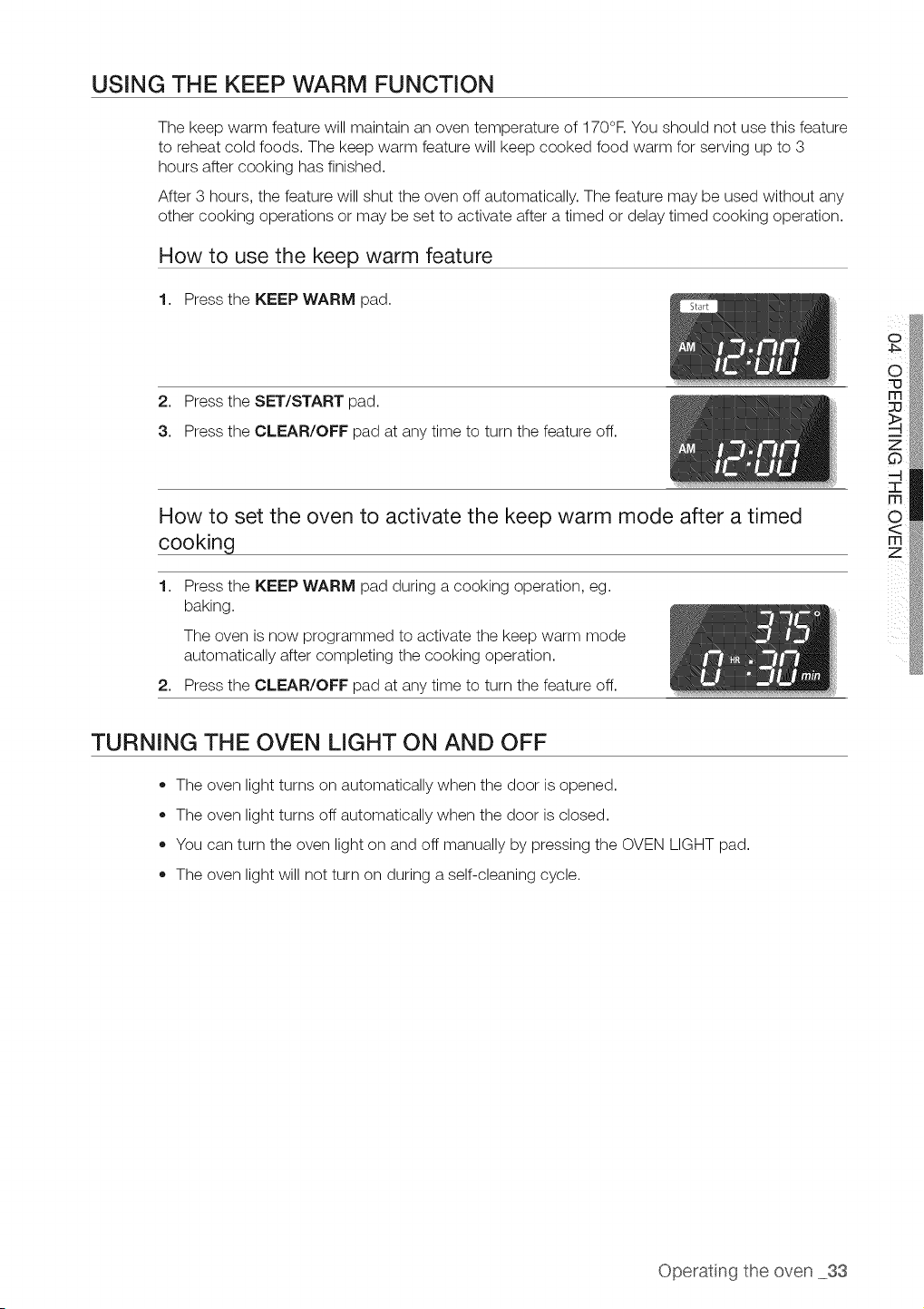
USING THE KEEP WARM FUNCTION
The keep warm feature will maintain an oven temperature of 170°F.You should not use this feature
to reheat cold foods. The keep warm feature will keep cooked food warm for serving up to 3
hours after cooking has finished.
After 3 hours, the feature will shut the oven off automatically. The feature may be used without any
other cooking operations or may be set to activate after a timed or delay timed cooking operation.
How to use the keep warm feature
1. Press the KEEP WARM pad.
2. Press the SET/START pad.
3. Press the CLEAR/OFF pad at any time to turn the feature off.
How to set the oven to activate the keep warm mode after a timed
cooking
1. Press the KEEP WARM pad during a cooking operation, eg.
baking.
The oven is now programmed to activate the keep warm mode
automatically after completing the cooking operation.
2. Press the CLEAR/OFF pad at any time to turn the feature off.
TURNING THE OVEN LIGHT ON AND OFF
• The oven light turns on automatically when the door isopened.
The oven light turns off automatically when the door is closed.
You can turn the oven light on and off manually by pressing the OVEN LIGHT pad.
The oven light will not turn on during a self-cleaning cycle.
Operatng the oven 33
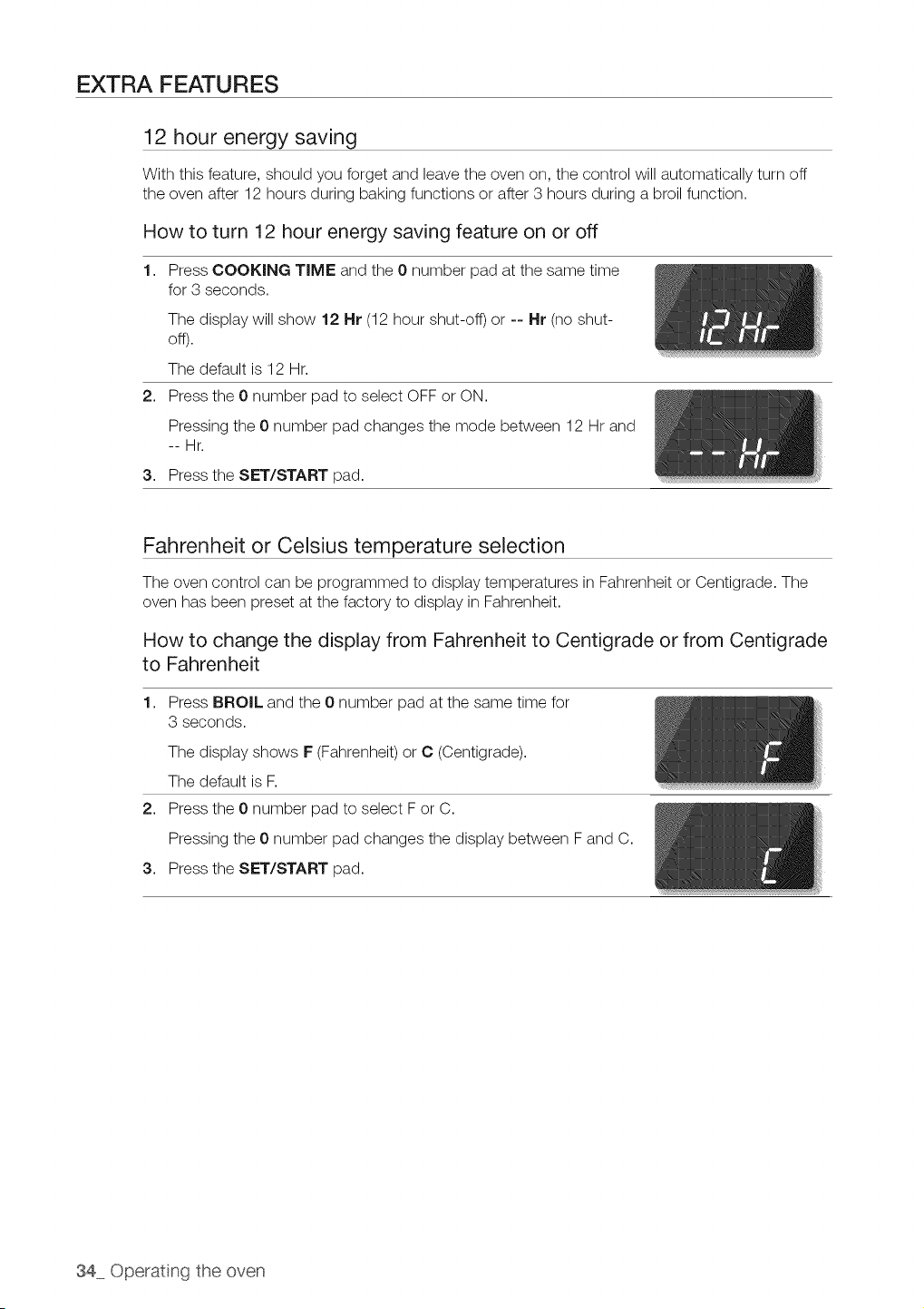
EXTRA FEATURES
12 hour energy saving
With this feature, should you forget and leave the oven on, the control will automatically turn off
the oven after 12 hours during baking functions or after 3 hours during a broil function.
How to turn 12 hour energy saving feature on or off
1. Press COOKING TIME and the 0 number pad at the same time
for 3 seconds.
The display will show 12 Hr (12hour shut-off) or -- Hr (no shut-
off).
The default is 12 Hr.
2. Press the 0 number pad to select OFF or ON.
Pressing the 0number pad changes the mode between 12 Hr and
--Hr.
3. Press the SET/START pad.
Fahrenheit or Celsius temperature selection
The oven control can be programmed to display temperatures in Fahrenheit or Centigrade. The
oven has been preset at the factory to display in Fahrenheit.
How to change the display from Fahrenheit to Centigrade or from Centigrade
to Fahrenheit
1. Press BROIL and the 0 number pad at the same time for
3 seconds.
The display shows F(Fahrenheit) or C (Centigrade).
The default is F.
2. Press the 0 number pad to select For C.
Pressing the 0number pad changes the display between Fand C.
3. Press the SET/START pad.
34 Operating the oven
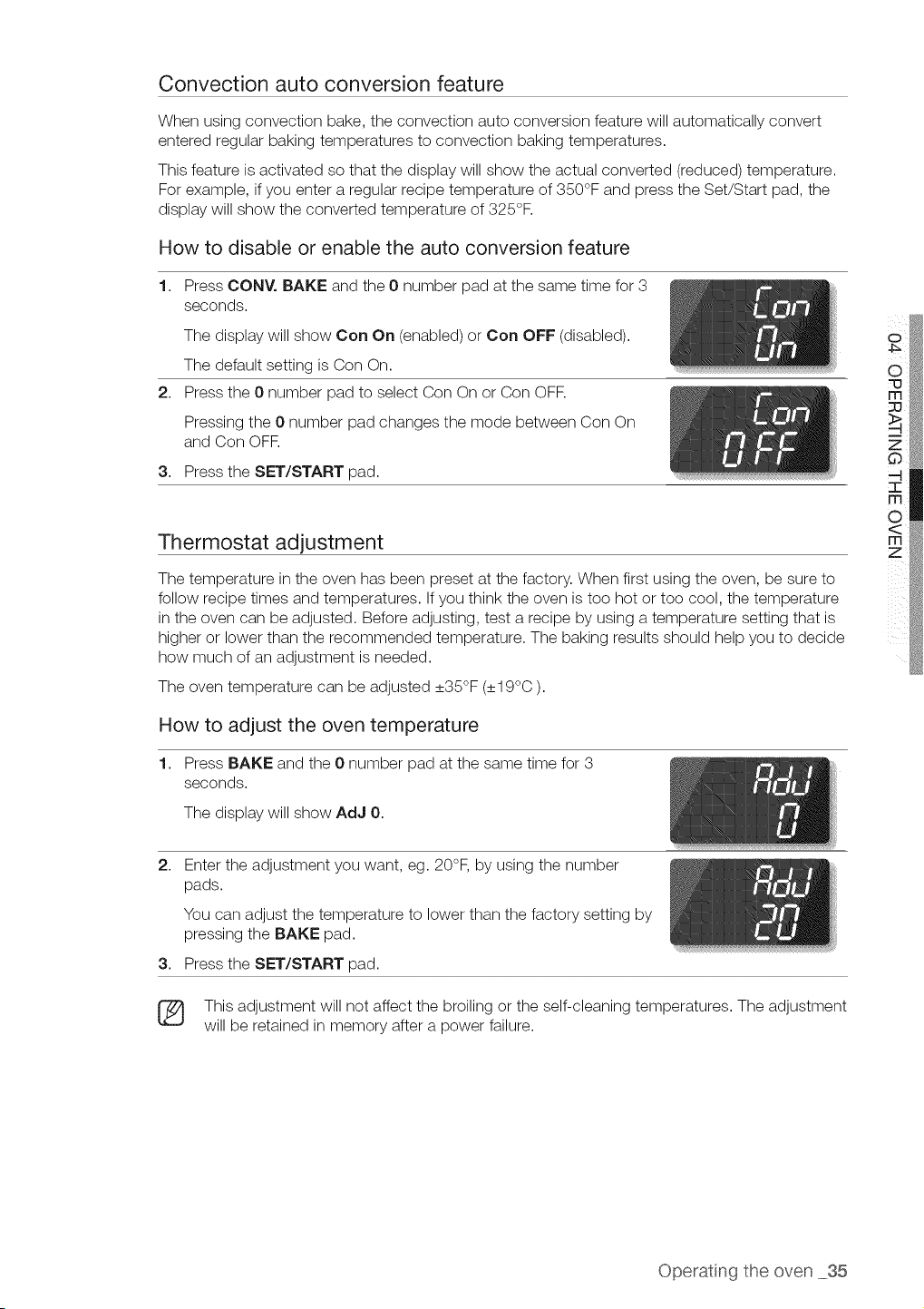
Convection auto conversion feature
When using convection bake, the convection auto conversion feature will automatically convert
entered regular baking temperatures to convection baking temperatures.
This feature is activated so that the display will show the actual converted (reduced) temperature.
For example, ifyou enter aregular recipe temperature of 350°F and press the Set/Start pad, the
display will show the converted temperature of 325°F.
How to disable or enable the auto conversion feature
1. Press CONY. BAKE and the 0 number pad at the same time for 3
seconds.
The display will show Con On (enabled) or Con OFF (disabled).
The default setting is Con On.
2. Press the 0 number pad to select Con Onor Con OFR
Pressing the 0 number pad changes the mode between Con On
and Con OFF.
3. Press the SET/START pad.
Thermostat adjustment
The temperature in the oven has been preset at the factory. When first using the oven, be sure to
follow recipe times and temperatures. If you think the oven istoo hot or too cool, the temperature
in the oven can be adjusted. Before adjusting, test a recipe by using a temperature setting that is
higher or lower than the recommended temperature. The baking results should help you to decide
how much of an adjustment isneeded.
The oven temperature can be adjusted _+35°F(_+19°C).
How to adjust the oven temperature
1. Press BAKE and the 0 number pad at the same time for 3
seconds.
The display will show AdJ 0.
2,
Enter the adjustment you want, eg. 20°F, by using the number
pads.
You can adjust the temperature to lower than the factory setting by
pressing the BAKE pad.
3. Press the SET/START pad.
This adjustment will not affect the broiling or the self-cleaning temperatures. The adjustment
will be retained in memory after a power failure.
Operatng the oven 35
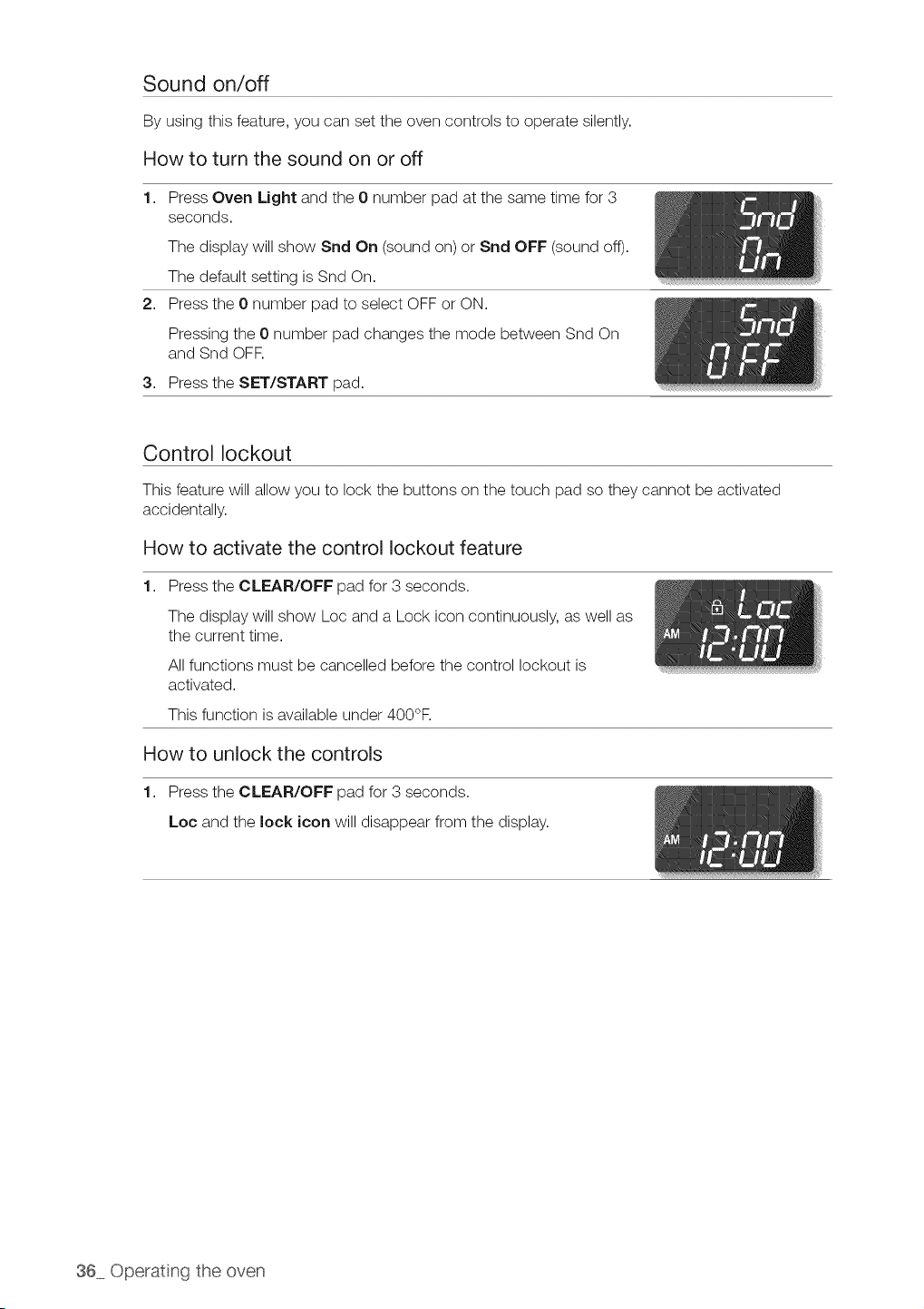
Sound on/off
By using this feature, you can set the oven controls to operate silently.
How to turn the sound on or off
1. Press Oven Light and the 0 number pad atthe same time for 3
seconds.
The display will show Snd On (sound on) or Snd OFF (sound off).
The default setting isSnd On.
2. Press the 0 number pad to select OFF or ON.
Pressing the 0number pad changes the mode between Snd On
and Snd OFF.
3. Press the SET/START pad.
Control lockout
This feature will allow you to lock the buttons on the touch pad so they cannot be activated
accidentally.
How to activate the control lockout feature
1. Press the CLEAR/OFF pad for 3 seconds.
The display will show Loc and a Lock icon continuously, as well as
the current time.
All functions must be cancelled before the control lockout is
activated.
This function is available under 400°F.
How to unlock the controls
1. Press the CLEAR/OFF pad for 3 seconds.
Loc and the lock icon will disappear from the display.
36 Operating the oven
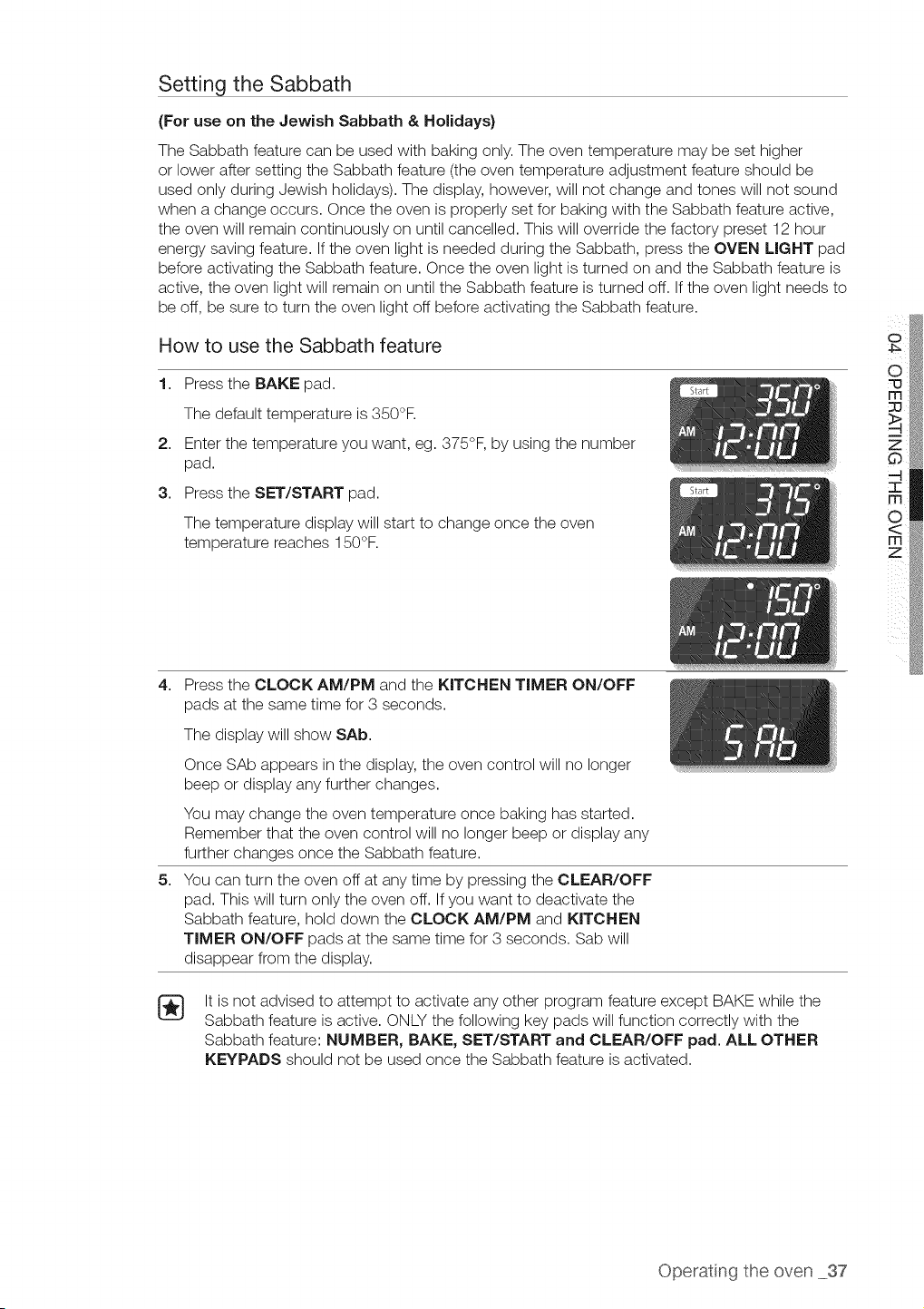
Setting the Sabbath
(For use on the Jewish Sabbath & Holidays}
The Sabbath feature can be used with baking only. The oven temperature may be set higher
or lower after setting the Sabbath feature (theoven temperature adjustment feature should be
used only during Jewish holidays). The display, however, will not change and tones will not sound
when a change occurs. Once the oven isproperly set for baking with the Sabbath feature active,
the oven will remain continuously on until cancelled. This will override the factory preset 12 hour
energy saving feature. If the oven light is needed during the Sabbath, press the OVEN LIGHT pad
before activating the Sabbath feature. Once the oven light is turned on and the Sabbath feature is
active, the oven light will remain on until the Sabbath feature isturned off. If the oven light needs to
be off, be sure to turn the oven light off before activating the Sabbath feature.
How to use the Sabbath feature
1. Press the BAKE pad.
The default temperature is350°R
2. Enter the temperature you want, eg. 375°F, by using the number
pad.
3. Press the SET/START pad.
The temperature display will start to change once the oven
temperature reaches 150°F.
o
O
=0
4,
5,
Press the CLOCK AM/PM and the KITCHEN TIMER ON/OFF
pads at the same time for 3 seconds.
The display will show SAb.
Once SAb appears in the display, the oven control will no longer
beep or display any further changes.
You may change the oven temperature once baking has started.
Remember that the oven control will no longer beep or display any
further changes once the Sabbath feature.
You can turn the oven off at any time by pressing the CLEAR/OFF
pad. This will turn only the oven off. If you want to deactivate the
Sabbath feature, hold down the CLOCK AM/PM and KITCHEN
TIMER ON/OFF pads at the same time for 3 seconds. Sab will
disappear from the display.
It isnot advised to attempt to activate any other program feature except BAKE while the
Sabbath feature isactive. ONLY the following key pads will function correctly with the
Sabbath feature: NUMBER, BAKE, SET/START and CLEAR/OFF pad. ALL OTHER
KEYPADS should not be used once the Sabbath feature isactivated.
Operatng the oven 37
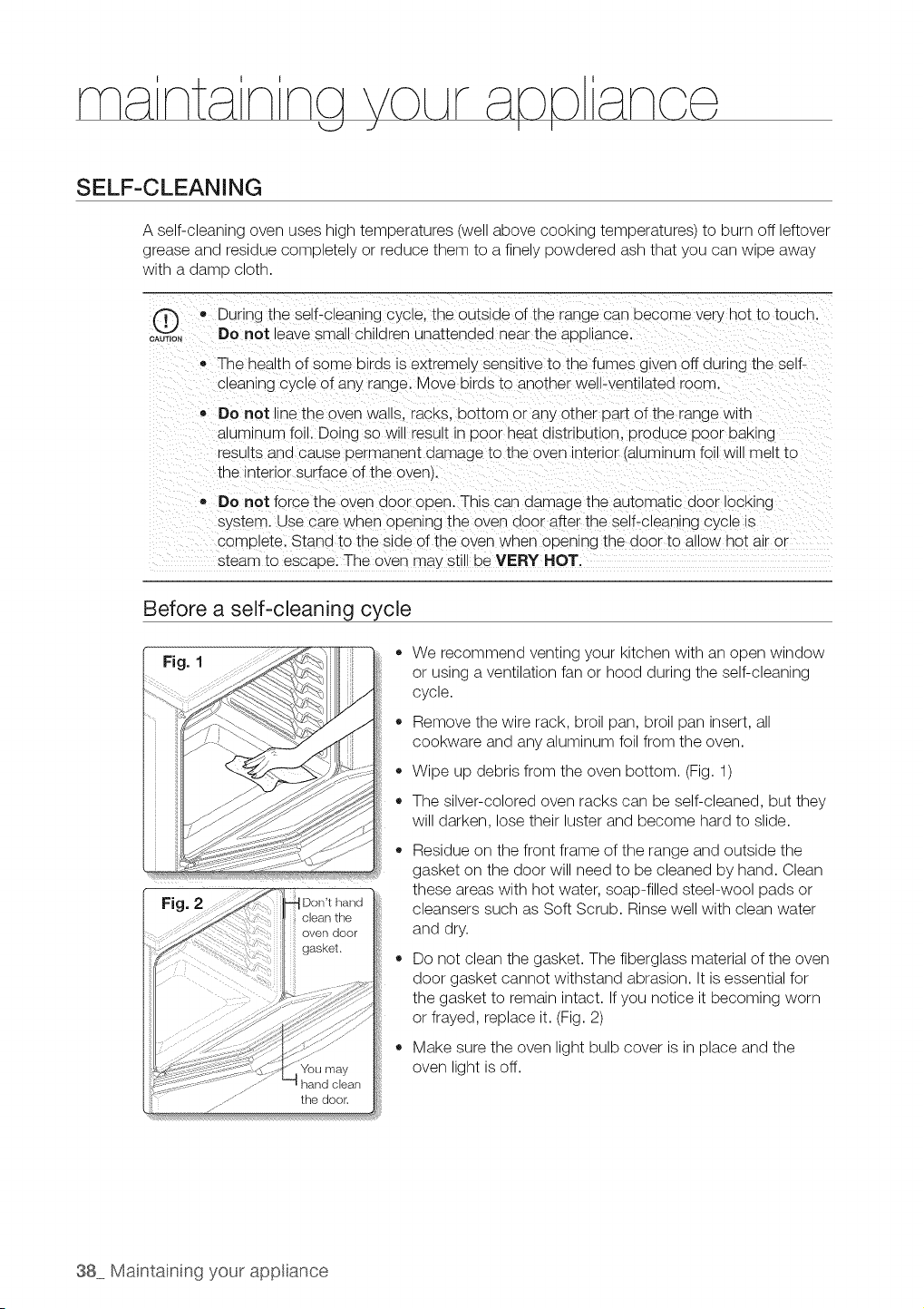
SELF-CLEANING
A self-cleaning oven uses high temperatures (well above cooking temperatures) to burn off leftover
grease and residue completely or reduce them to a finely powdered ash that you can wipe away
with a damp cloth.
• During the self-cleaning cycle, the outside of the range can become very not to toucn.
oAuT,o, DOnot leave small Cnllaren unattended near the aDDilance.
The health of some ulras s extremely sensitive to the fumes given off during the self-
c_ean_ngc} cle of any range. Move birds to another well-ventilated room.
Do not line the oven waus. racKs, bottom or any other Dart of the range with
alumlrum foil. Doing so will result in Door heatdistribution, uroauce poor UaKIng
results ana cause permanent damage to the oven _ntenor auminum foil will melt to
the _ntenor sJrface ofthe oven,.
,, Do not force the oven dOOr open. Th_scan aamage the automatic door locking
system. Use care when opening the oven door after the self-cleaning cycle _s
comE, ete. Stand to the side of the oven when opening the door to allow hot ar or
steam to escaoe. The oven _na}still be VERY HOT.
Before a self-cleaning cycle
Fig. I
Fig.
Dorft hand
clean the
oven door
gasket.
......... the door.
o
o
We recommend venting your kitchen with an open window
or using aventilation fan or hood during the self-cleaning
cycle.
Remove the wire rack, broil pan, broil pan insert, all
cookware and any aluminum foil from the oven.
Wipe up debris from the oven bottom. (Fig.1)
The silver-colored oven racks can be self-cleaned, but they
will darken, lose their luster and become hard to slide.
Residue on the front frame of the range and outside the
gasket on the door will need to be cleaned by hand. Clean
these areas with hot water, soap-filled steel-wool pads or
cleansers such as Soft Scrub. Rinse well with clean water
and dry.
Do not clean the gasket. The fiberglass material of the oven
door gasket cannot withstand abrasion. It isessential for
the gasket to remain intact. If you notice it becoming worn
or frayed, replace it. (Fig. 2)
Make sure the oven light bulb cover isin place and the
oven light isoff.
38 Maintaining your app ance
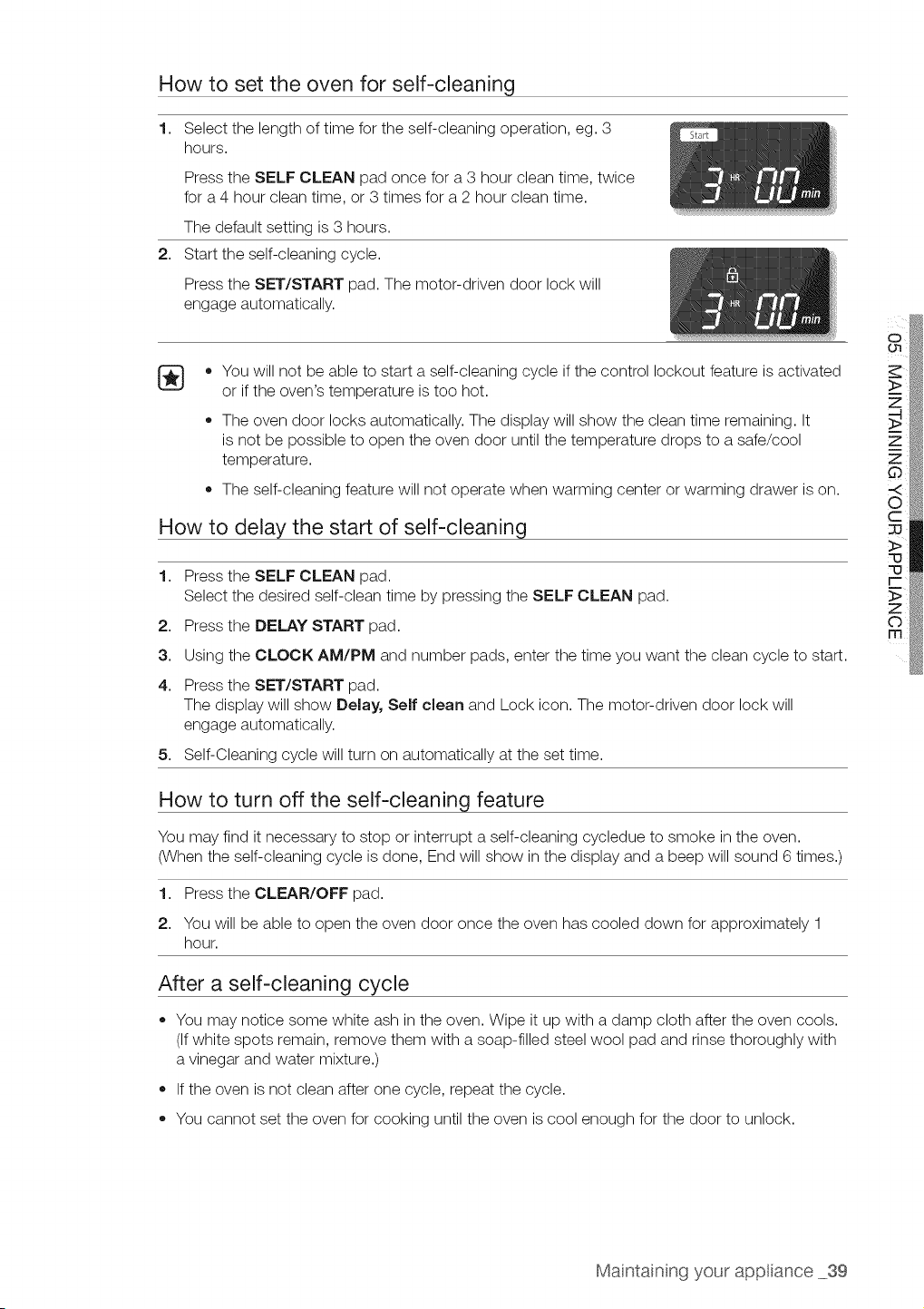
How to set the oven for self-cleaning
1,
2,
Select the length of time for the self-cleaning operation, eg. 3
hours.
Press the SELF CLEAN pad once for a 3 hour clean time, twice
for a 4 hour clean time, or 3 times for a 2 hour clean time.
The default setting is3 hours.
Start the self-cleaning cycle.
Press the SET/START pad. The motor-driven door lock will
engage automatically.
[_ • You will not be able to start a self-cleaning cycle if the control lockout feature isactivated
or if the oven's temperature is too hot.
The oven door locks automatically. The display will show the clean time remaining. It
is not be possible to open the oven door until the temperature drops to a safe/cool
temperature.
The self-cleaning feature will not operate when warming center or warming drawer ison.
How to delay the start of self-cleaning
1. Press the SELF CLEAN pad.
Select the desired self-clean time by pressing the SELF CLEAN pad.
2. Press the DELAY START pad.
3. Using the CLOCK AM/PM and number pads, enter the time you want the clean cycle to start.
4. Press the SET/START pad.
The display will show Delay, Self clean and Lock icon. The motor-driven door lock will
engage automatically.
5. Self-Cleaning cycle will turn on automatically atthe set time.
How to turn off the self-cleaning feature
You may find it necessary to stop or interrupt a self-cleaning cycledue to smoke in the oven.
(When the self-cleaning cycle isdone, End will show in the display and a beep will sound 6 times.)
1. Press the CLEAR/OFF pad.
2. You will be able to open the oven door once the oven has cooled down for approximately 1
hour.
After a self-cleaning cycle
You may notice some white ash in the oven. Wipe it up with a damp cloth after the oven cools.
(If white spots remain, remove them with a soap-filled steel wool pad and rinse thoroughly with
a vinegar and water mixture.)
If the oven isnot clean after one cycle, repeat the cycle.
You cannot set the oven for cooking until the oven iscool enough for the door to unlock.
Maintainng your app ance 39
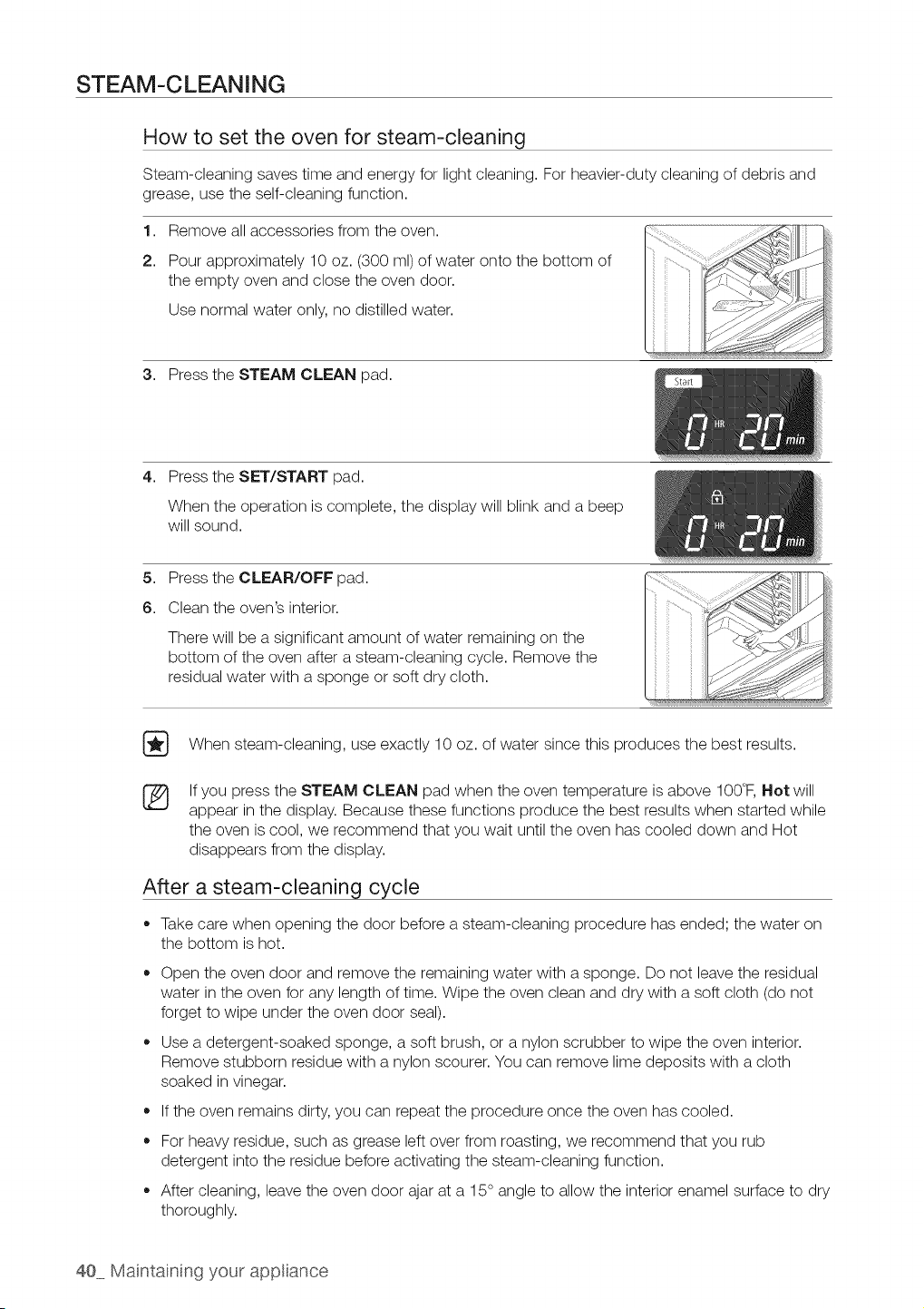
STEAM-CLEANING
How to set the oven for steam-cleaning
Steam-cleaning saves time and energy for light cleaning. For heavier-duty cleaning of debris and
grease, use the self-cleaning function.
1. Remove all accessories from the oven.
2. Pour approximately 10oz. (300 ml) of water onto the bottom of
the empty oven and close the oven door.
Use normal water only, no distilled water.
3. Press the STEAM CLEAN pad.
4,
Press the SET/START pad.
When the operation is complete, the display will blink and a beep
will sound.
5. Press the CLEAR/OFF pad.
6. Clean the oven's interior.
There will be a significant amount of water remaining on the
bottom of the oven after a steam-cleaning cycle. Remove the
residual water with a sponge or soft dry cloth.
[_ When steam-cleaning, use exactly 10 oz. of water since this produces the best results.
8S
If you press the STEAM CLEAN pad when the oven temperature isabove 100°F, Not will
appear in the display. Because these functions produce the best results when started while
the oven iscool, we recommend that you wait until the oven has cooled down and Hot
disappears from the display.
After a steam-cleaning cycle
• Takecare when opening the door before a steam-cleaning procedure has ended; the water on
the bottom ishot.
o
o
Open the oven door and remove the remaining water with a sponge. Do not leave the residual
water in the oven for any length of time. Wipe the oven clean and dry with a soft cloth (do not
forget to wipe under the oven door seal).
Use a detergent-soaked sponge, a soft brush, or a nylon scrubber to wipe the oven interior.
Remove stubborn residue with anylon scourer. You can remove lime deposits with a cloth
soaked in vinegar.
If the oven remains dirty, you can repeat the procedure once the oven has cooled.
For heaw residue, such asgrease leftover from roasting, we recommend that you rub
detergent into the residue before activating the steam-cleaning function.
After cleaning, leave the oven door ajar at a 15° angle to allow the interior enamel surface to dry
thoroughly.
40 Maintaining your app ance
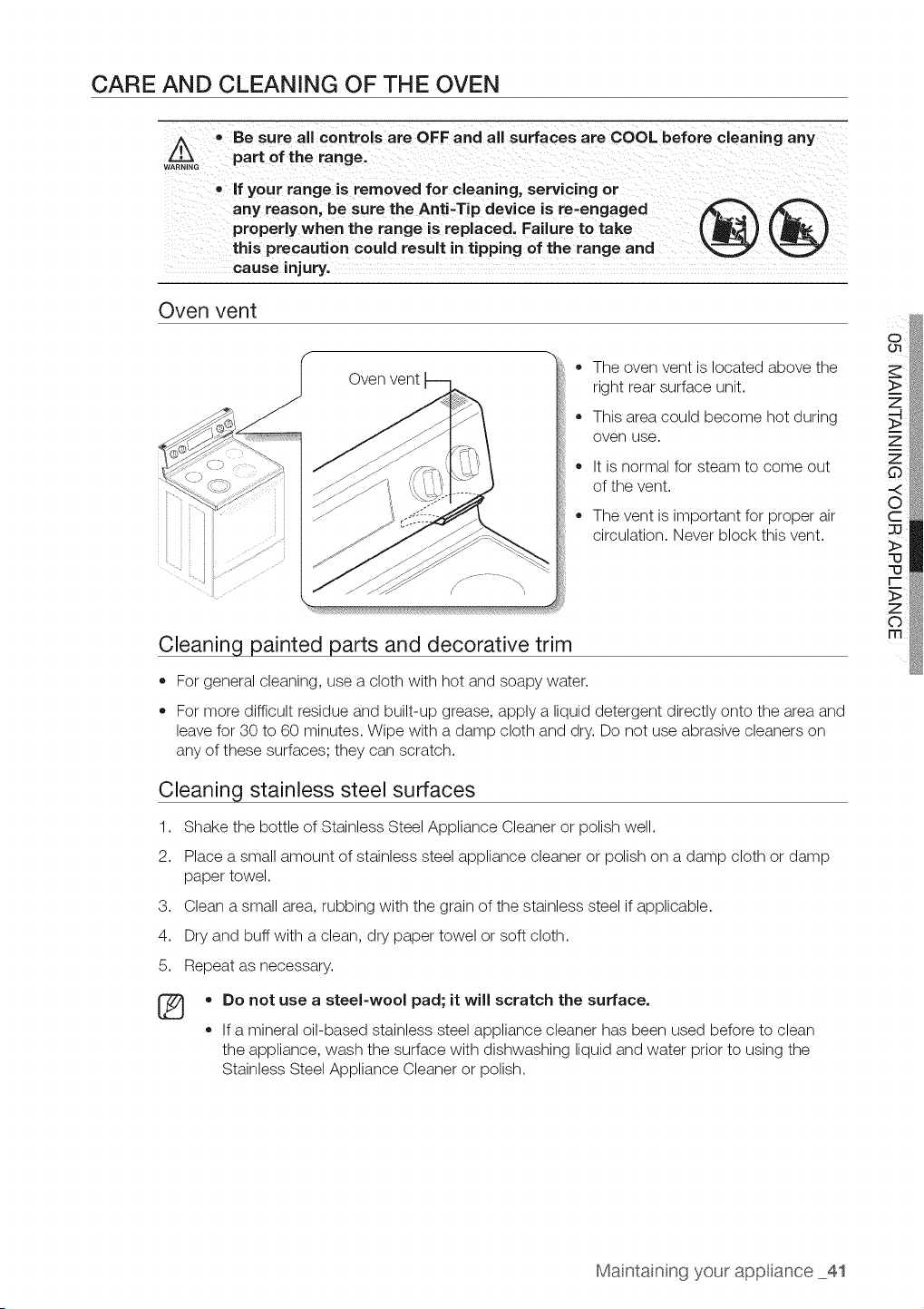
CARE AND CLEANING OF THE OVEN
w_ _ Be sure all controls are OFF and all surfaces are COOL before cleaning any
part of the range.
if your range is removed for cleaning, servicing or
any reason, be sure the Anti-Tip device is re-engaged _
properly when the range is replaced. Failure to take _ _ J _ _ ,J
this precaution could result in tipping of the range and _
cause injury.
Oven vent
ii ii ii i
• The oven vent islocated above the
right rear surface unit.
• This area could become hot during
oven use.
It isnormal for steam to come out
of the vent.
The vent is important for proper air
circulation. Never block this vent.
Cleaning painted parts and decorative trim
• For general cleaning, use a cloth with hot and soapy water.
For more difficult residue and built-up grease, apply a liquid detergent directly onto the area and
leave for 30 to 60 minutes. Wipe with a damp cloth and dry. Do not use abrasive cleaners on
any of these surfaces; they can scratch.
Cleaning stainless steel surfaces
1. Shake the bottle of Stainless Steel Appliance Cleaner or polish well.
2. Place a small amount of stainless steel appliance cleaner or polish on a damp cloth or damp
paper towel.
3. Clean a small area, rubbing with the grain of the stainless steel if applicable.
4. Dry and buffwith a clean, dry paper towel or soft cloth.
5. Repeat as necessary.
®
o
o
Do not use a steel-wool pad; itwill scratch the surface.
If a mineral oil-based stainless steel appliance cleaner has been used before to clean
the appliance, wash the surface with dishwashing liquid and water prior to using the
Stainless Steel Appliance Cleaner or polish.
Maintainng your app ance 41
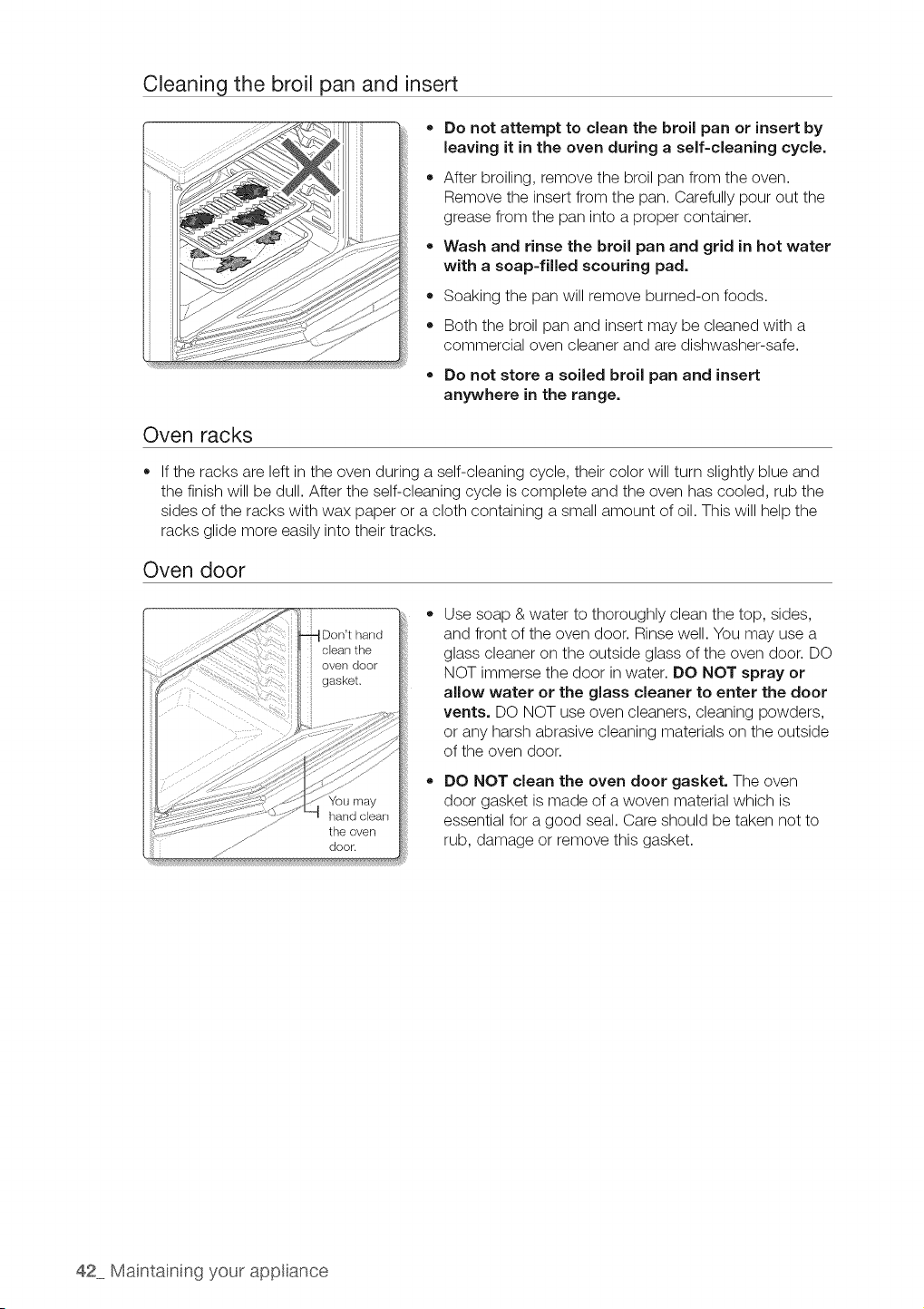
Cleaning the broil pan and insert
o
o
Do not attempt to clean the broil pan or insert by
leaving it in the oven during a self-cleaning cycle,
After broiling, remove the broil pan from the oven.
Remove the insert from the pan. Carefully pour out the
grease from the pan into a proper container.
Wash and rinse the broil pan and grid in hot water
with a soap-filled scouring pad.
Soaking the pan will remove burned-on foods.
Both the broil pan and insert may be cleaned with a
commercial oven cleaner and are dishwasher-safe.
Do not store a soiled broil pan and insert
anywhere in the range.
Oven racks
If the racks are left in the oven during a self-cleaning cycle, their color will turn slightly blue and
the finish will be dull. After the self-cleaning cycle iscomplete and the oven has cooled, rub the
sides of the racks with wax paper or a cloth containing a small amount of oil. This will help the
racks glide more easily into their tracks.
Oven door
Don't hand
door.
Use soap & water to thoroughly clean the top, sides,
and front of the oven door. Rinse well. You may use a
glass cleaner on the outside glass of the oven door. DO
NOT immerse the door in water. DO NOT spray or
allow water or the glass cleaner to enter the door
vents. DO NOT use oven cleaners, cleaning powders,
or any harsh abrasive cleaning materials on the outside
of the oven door.
DO NOT clean the oven door gasket. The oven
door gasket is made of a woven material which is
essential for a good seal. Care should be taken not to
rub, damage or remove this gasket.
42 Maintaining your app ance
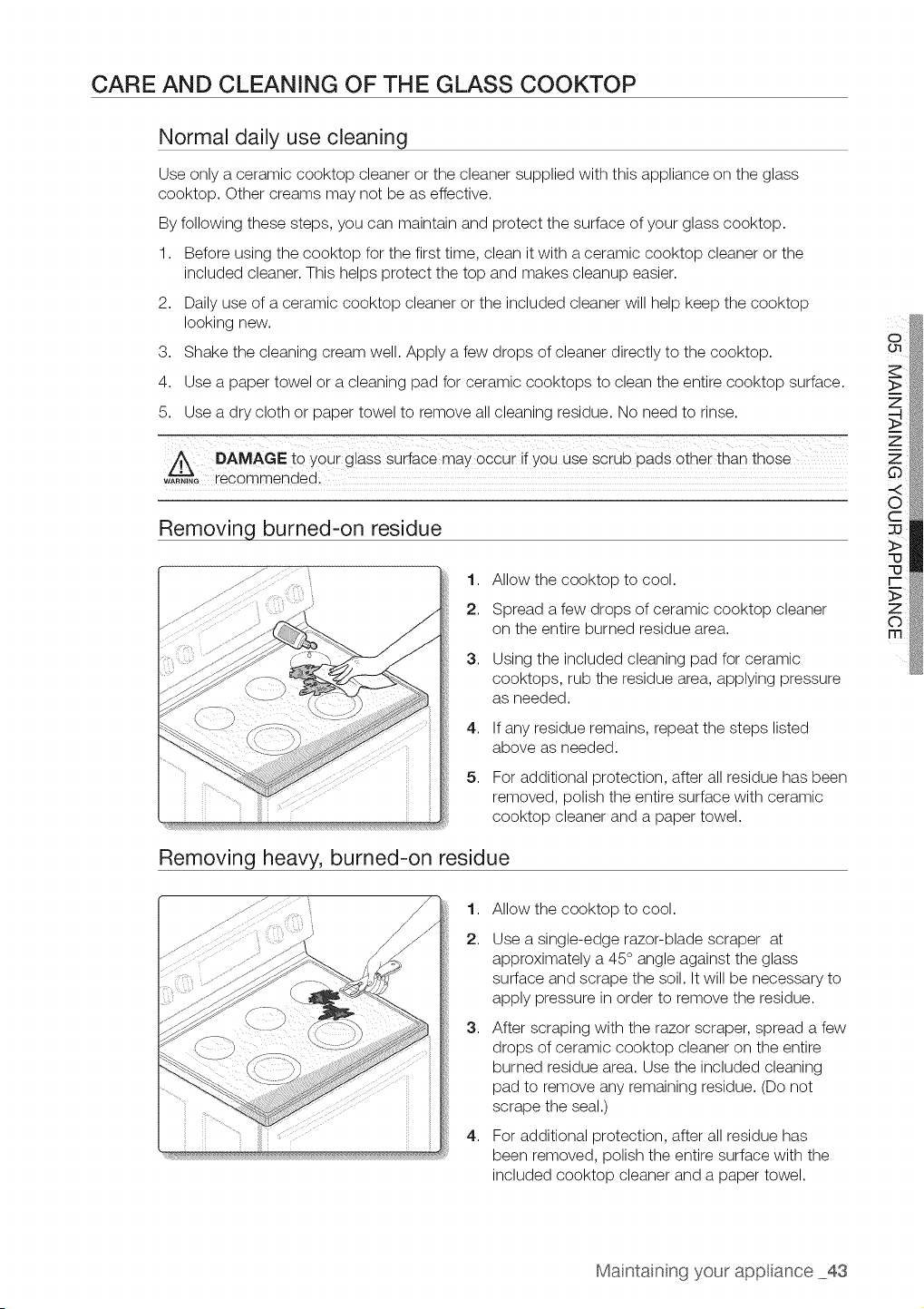
CARE AND CLEANING OF THE GLASS COOKTOP
Normal daily use cleaning
Use only a ceramic cooktop cleaner or the cleaner supplied with this appliance on the glass
cooktop. Other creams may not be as effective.
By following these steps, you can maintain and protect the surface ofyour glass cooktop.
1. Before using the cooktop for the first time, clean itwith a ceramic cooktop cleaner or the
included cleaner. This helps protect the top and makes cleanup easier.
2. Dailyuse of a ceramic cooktop cleaner or the included cleaner will help keep the cooktop
looking new.
3. Shake the cleaning cream well. Apply a few drops of cleaner directly to the cooktop.
4. Use a paper towel or a cleaning pad for ceramic cooktops to clean the entire cooktop surface.
5. Use a dry cloth or paper towel to remove all cleaning residue. No need to rinse.
A DAMAGE to your glass suriace may 0cCuiif YoU use scrub pads other than those
w_G recommendedi
Removing burned-on residue
1. Allow the cooktop to cool.
2. Spread a few drops of ceramic cooktop cleaner
on the entire burned residue area.
3,
4,
5,
Using the included cleaning pad for ceramic
cooktops, rub the residue area, applying pressure
as needed.
If any residue remains, repeat the steps listed
above as needed.
For additional protection, after allresidue has been
removed, polish the entire surface with ceramic
cooktop cleaner and a paper towel.
Removing heavy, burned-on residue
1,
2.
3,
4,
Allow the cooktop to cool.
Use asingle-edge razor-blade scraper at
approximately a 45 ° angle against the glass
surface and scrape the soil. It will be necessary to
apply pressure in order to remove the residue.
After scraping with the razor scraper, spread a few
drops of ceramic cooktop cleaner on the entire
burned residue area. Use the included cleaning
pad to remove any remaining residue. (Do not
scrape the seal.)
For additional protection, after allresidue has
been removed, polish the entire surface with the
included cooktop cleaner and a paper towel.
Maintainng your app ance 43
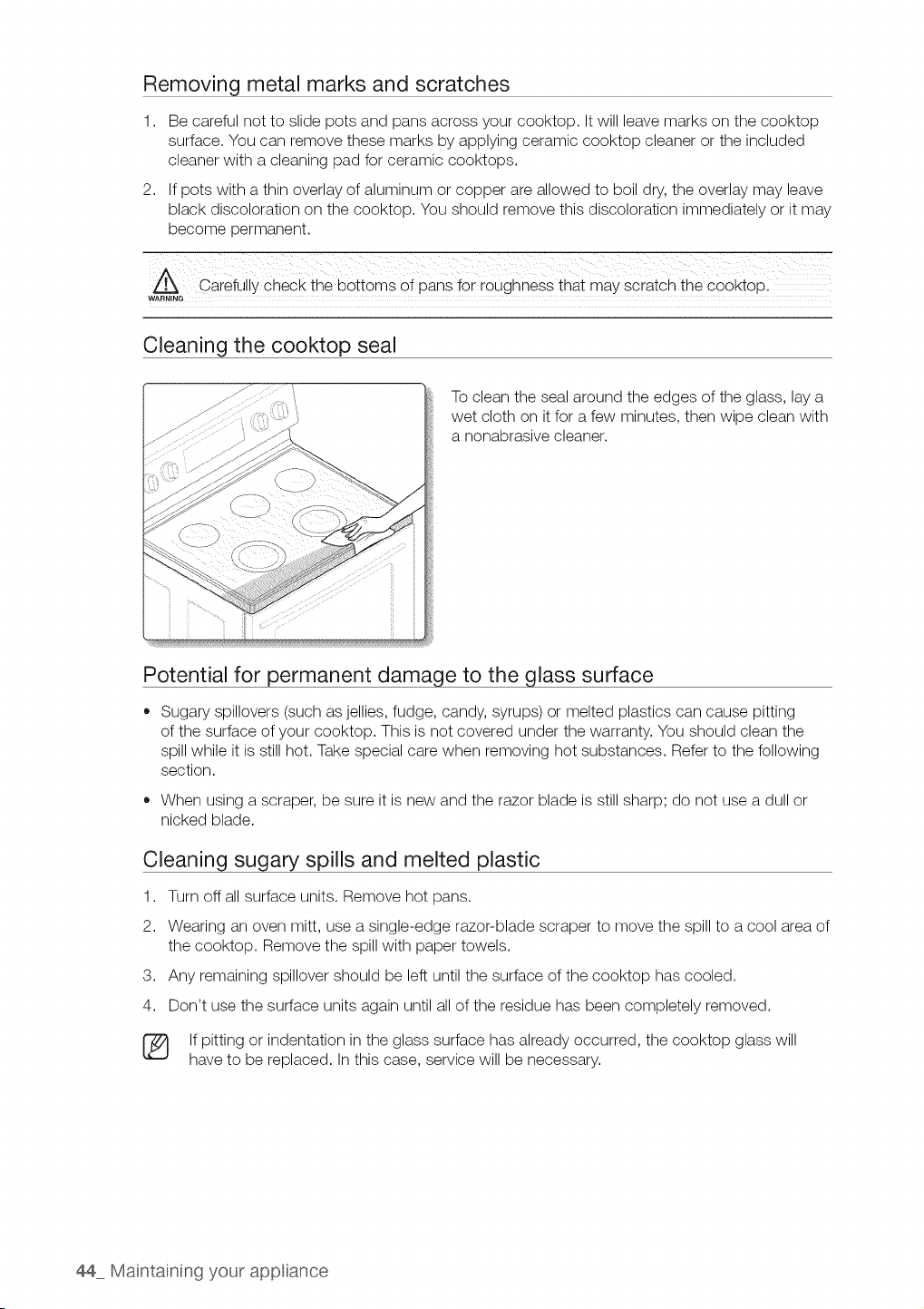
Removing metal marks and scratches
1,
2,
Be careful not to slide pots and pans across your cooktop. It will leave marks on the cooktop
surface. You can remove these marks by applying ceramic cooktop cleaner or the included
cleaner with a cleaning pad for ceramic cooktops.
If pots with athin overlay of aluminum or copper are allowed to boil dry, the overlay may leave
black discoloration on the cooktop. You should remove this discoloration immediately or it may
become permanent.
carefully check the bottoms 0f pans f0i roughness that may Scratch the O00ktopl
WARNING
Cleaning the cooktop seal
To clean the sealaround the edges of the glass, lay a
wet cloth on itfor a few minutes, then wipe clean with
a nonabrasive cleaner.
Potential for permanent damage to the glass surface
Sugary spillovers (such as jellies, fudge, candy, syrups) or melted plastics can cause pitting
of the surface ofyour cooktop. This is not covered under the warranty. You should clean the
spill while it is still hot. Take special care when removing hot substances. Refer to the following
section.
• When using a scraper, be sure itis new and the razor blade is still sharp; do not use a dull or
nicked blade.
Cleaning sugary spills and melted plastic
1. Turn off allsurface units. Remove hot pans.
2. Wearing an oven mitt, use a single-edge razor-blade scraper to move the spill to a cool area of
the cooktop. Remove the spill with paper towels.
3. Any remaining spillover should be left until the surface of the cooktop has cooled.
4. Don't use the surface units again until all of the residue has been completely removed.
[_ If pitting or indentation in the glass surface has already occurred, the cooktop glass will
have to be replaced. Inthis case, service will be necessary.
44 Maintaining your app ance
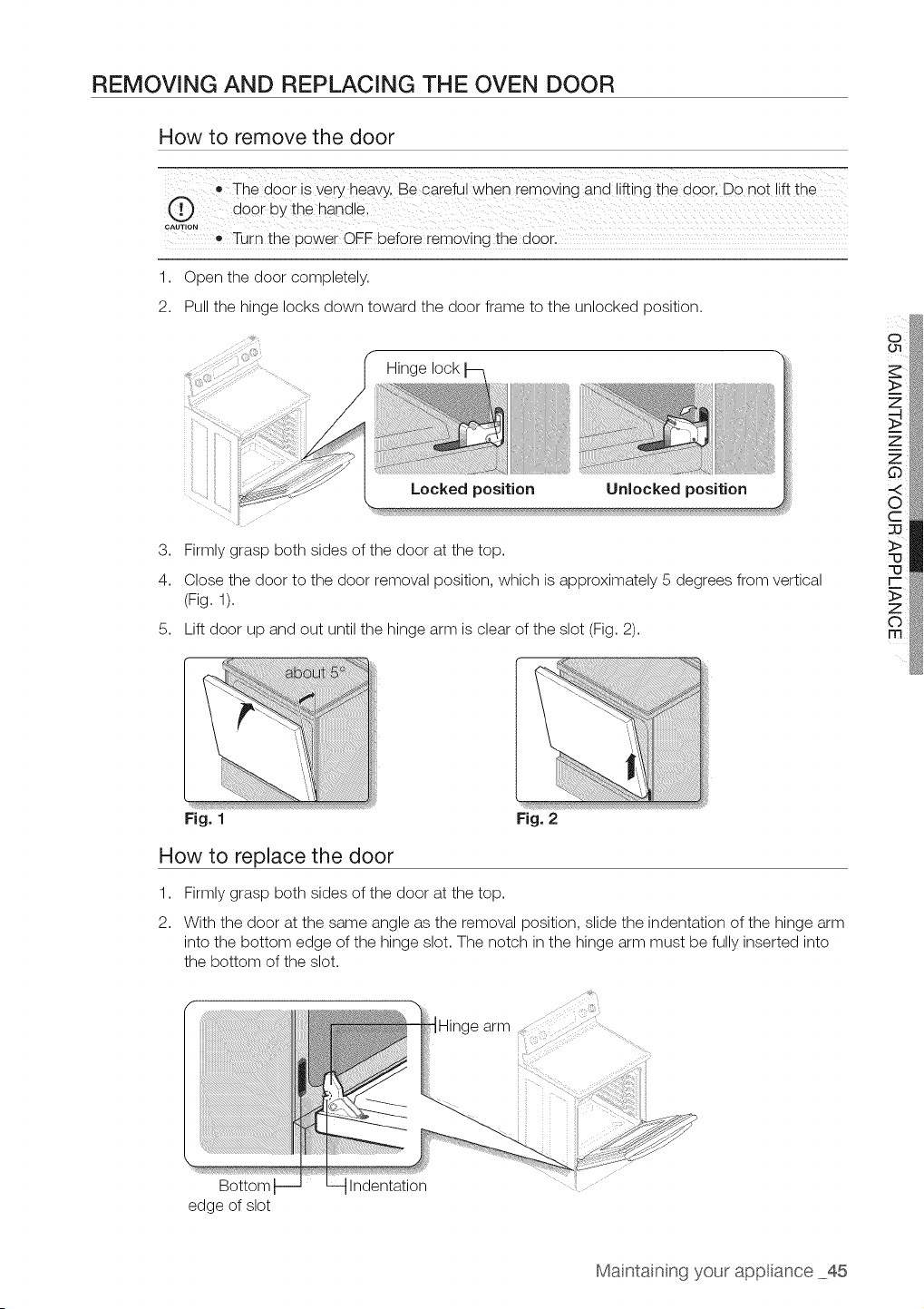
REMOVING AND REPLACING THE OVEN DOOR
How to remove the door
• The door isvery heavy. Be careful when removing and lifting the door, Do not !ift the
r.-, d00r bythe hand e;
CAUTION
Turn the powe[ OFF befo[e removing the door.
1. Open the door completely.
2. Pull the hinge locks down toward the door frame to the unlocked position.
_ Hinge lock
Locked position Unlocked position
3. Firmlygrasp both sides of the door atthe top.
4. Close the door to the door removal position, which isapproximately 5 degrees from vertical
(Fig. 1).
5. Lift door up and out until the hinge arm is clear of the slot (Fig. 2).
Fig. 1 Fig. 2
How to replace the door
1,
2.
Firmlygrasp both sides of the door at the top.
With the door at the same angle as the removal position, slide the indentation of the hinge arm
into the bottom edge of the hinge slot. The notch in the hinge arm must be fully inserted into
the bottom of the slot.
Bottom
edge of slot
Indentation
Maintainng your app ance 45
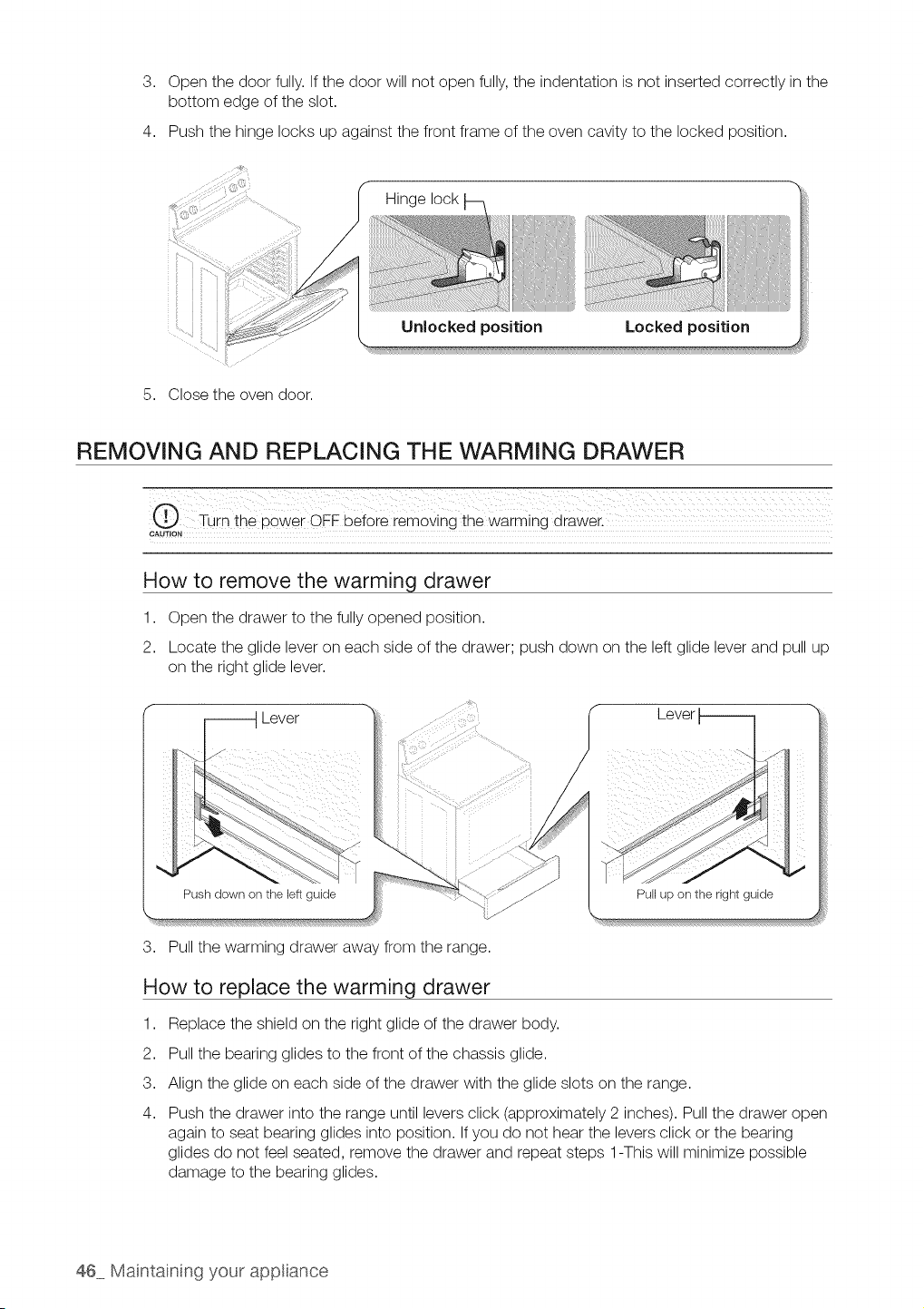
3. Open the door fully. If the door will not open fully, the indentation isnot inserted correctly in the
bottom edge of the slot.
4. Push the hinge locks up against the front frame of the oven cavity to the locked position.
iii ii
5. Close the oven door.
Hinge lock
Locked positionUnlocked position
REMOVING AND REPLACING THE WARMING DRAWER
CAUTION
How to remove the warming drawer
1. Open the drawer to the fully opened position.
2. Locate the glide lever on each side of the drawer; push down on the leftglide lever and pull up
on the right glide lever.
_ Lever
Lever
Push down on the leftguide
3. Pull the warming drawer away from the range.
Pull up on the right guide
How to replace the warming drawer
1. Replace the shield on the right glide of the drawer body.
2. Pull the bearing glides to the front ofthe chassis glide.
3. Align the glide on each side of the drawer with the glide slots on the range.
4. Push the drawer into the range until levers click (approximately 2 inches). Pull the drawer open
again to seat bearing glides into position. If you do not hear the levers click or the bearing
glides do not feel seated, remove the drawer and repeat steps 1-This will minimize possible
damage to the bearing glides.
46 Maintaining your app ance
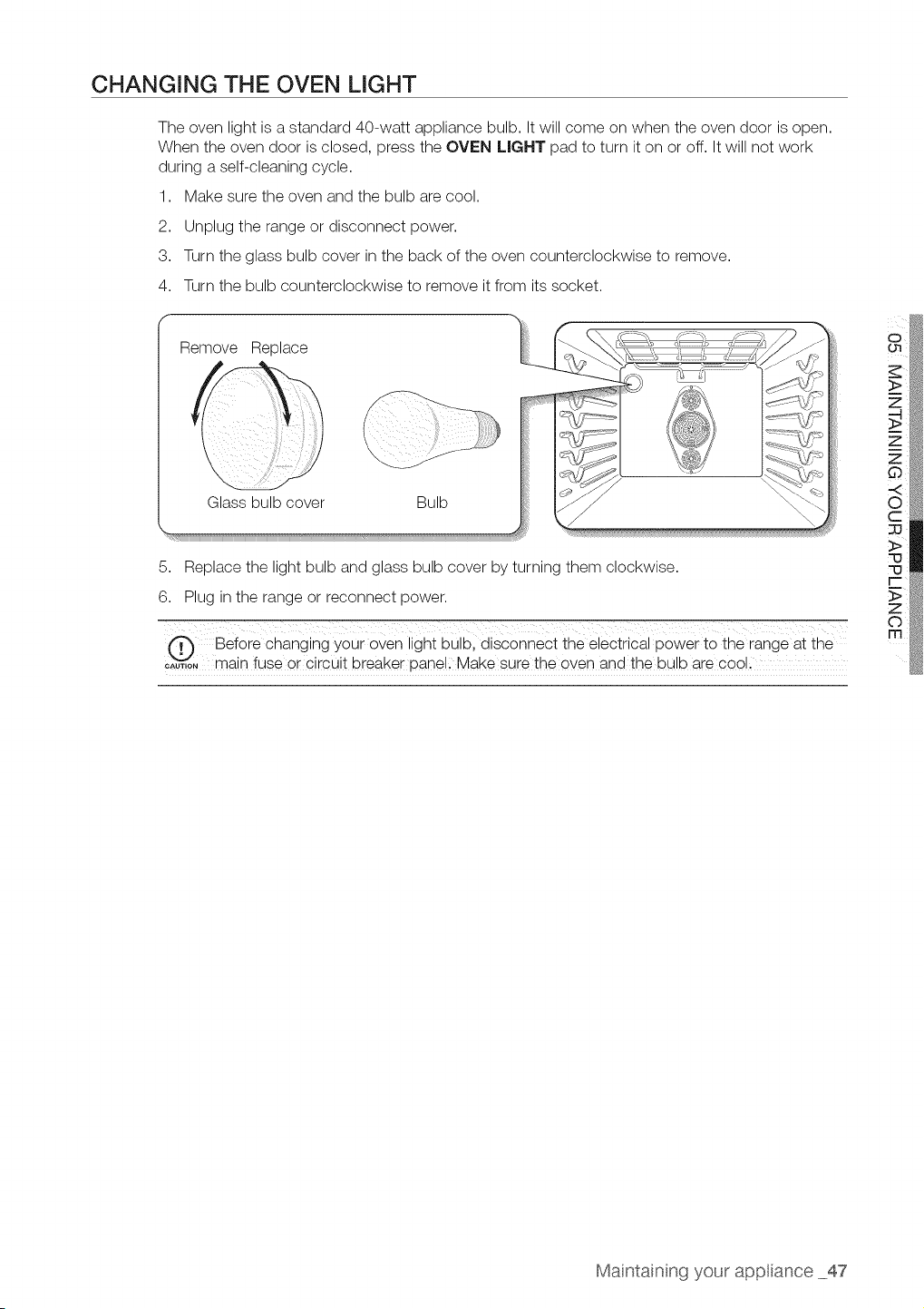
CHANGING THE OVEN LIGHT
The oven light isastandard 40-watt appliance bulb. It will come on when the oven door isopen.
When the oven door is closed, press the OVEN LIGHT pad to turn it on or off. It will not work
during a self-cleaning cycle.
1. Make sure the oven and the bulb are cool.
2. Unplug the range or disconnect power.
3. Turn the glass bulb cover in the back of the oven counterclockwise to remove.
4. Turn the bulb counterclockwise to remove itfrom itssocket.
f
Remove Replace
Glass bulb cover Bulb
!iii!i!
5. Replace the light bulb and glass bulb cover by turning them clockwise.
6. Plug in the range or reconnect power.
@ Before changing your oven light bulb, disconnec t the electrical power to the range at the
c;uT,oNmain fuse or circuit breaker panell Make sure the even and the bulb are cool l
o i
>
Maintainng your app ance 47
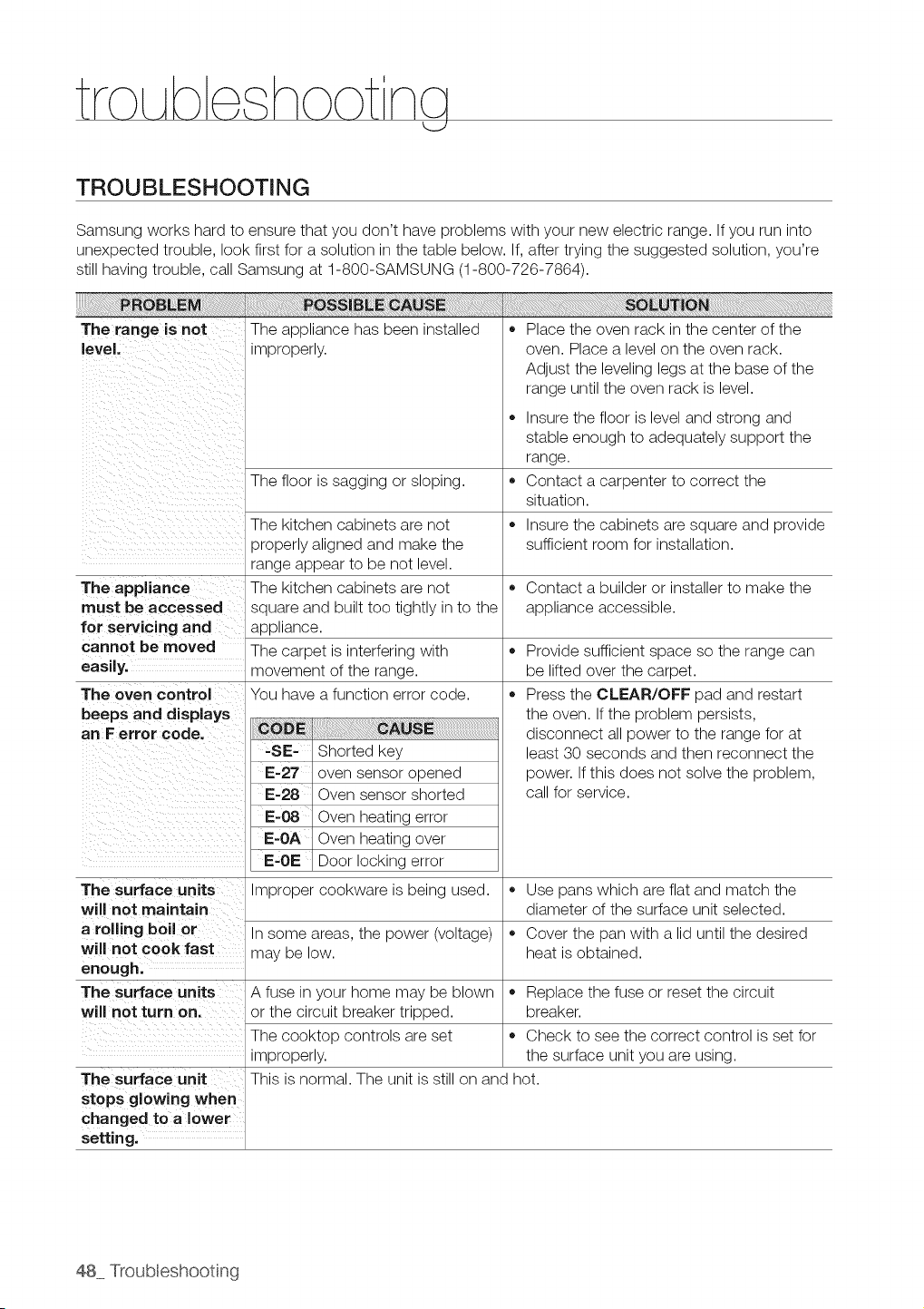
TROUBLESHOOTING
Samsung works hard to ensure that you don't have problems with your new electric range. If you run into
unexpected trouble, look first for asolution in the table below. If,after trying the suggested solution, you're
stillhaving trouble, call Samsung at 1-800-SAMSUNG (1-800-726-7864).
The range is not The appliance has been installed
eve. mproper y
The floor is sagging or sloping.
The kitchen cabinets are not
properly aligned and make the
range appear to be not level.
The appliance The kitchen cabinets are not
must be accessed square and built too tightly in to the
for servicing and appliance.
cannot be moved The carpet is interfering with
easily, movement of the range.
The oven control You have afunction error code.
beeps and displays
an Ferror code.
' -SE- Shorted key
i
,, Place the oven rack in the center of the
oven. Place a level on the oven rack.
Adjust the leveling legs at the base of the
range until the oven rack is level.
• Insure the floor islevel and strong and
stable enough to adequately support the
range.
Contact a carpenter to correct the
situation.
Insure the cabinets are square and provide
sufficient room for installation.
o
o
Contact a builder or installer to make the
appliance accessible.
Provide sufficient space so the range can
be lifted over the carpet.
Press the CLEAR/OFF pad and restart
the oven. If the problem persists,
disconnect allpower to the range for at
least 30 seconds and then reconnect the
power. If this does not solve the problem,
call for service.
oven sensor opened
E-28 Oven sensor shorted
E-g8 Oven heating error
Oven heating over
E-OE Door locking error
The surface units Improper cookware isbeing used. ,, Use pans which are flat and match the
will not maintain diameter of the surface unit selected.
a rolling boil or Insome areas, the power (voltage) • Cover the pan with a lid until the desired
will not cook fast may be low. heat isobtained.
enough.
The surface units A fuse in your home may be blown ,, Replace the fuse or reset the circuit
will not turn on. or the circuit breaker tripped, breaker.
The cooktop controls are set • Check to see the correct control isset for
improperly, the surface unit you are using.
The surface unit This is normal. The unit isstill on and hot.
stops glowing when
hanged to a lower
setting.
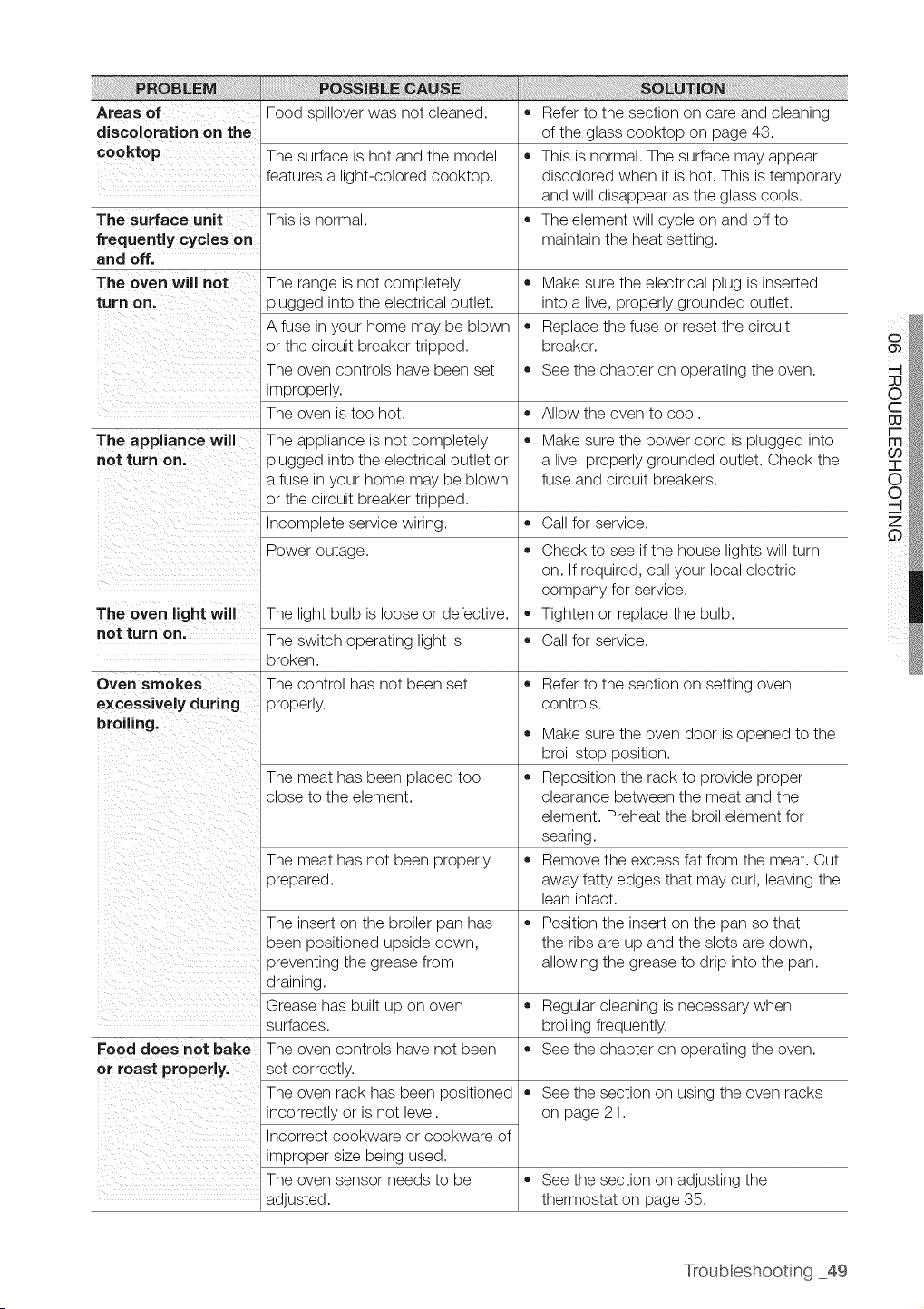
Areas of
discoloration on the
cooktop
The surface unit =
frequently cycles on
and off.
The oven will not = Make sure the electrical plug isinserted
turn on. into a live, properly grounded outlet.
• Replace the fuse or reset the circuit
breaker.
See the chapter on operating the oven.
Allow the oven to cool.
The appliance will • Make sure the power cord isplugged into
not turn on, a live, properly grounded outlet. Check the
fuse and circuit breakers.
Call for service.
o
The oven light will
not turn on.
Food spillover was not cleaned.
The surface is hot and the model
features a light-colored cooktop.
This is normal.
The range is not completely
plugged into the electrical outlet.
A fuse in your home may be blown
or the circuit breaker tripped.
The oven controls have been set
improperly.
The oven istoo hot.
The appliance is not completely
plugged into the electrical outlet or
a fuse in your home may be blown
or the circuit breaker tripped.
Incomplete service wiring.
Power outage.
The light bulb is loose or defective.
The switch operating light is
broken.
Oven smokes The control has not been set
excessively during properly.
broiling.
o
The meat has been placed too =
close to the element.
The meat has not been properly
prepared.
The insert on the broiler pan has
been positioned upside down,
preventing the grease from
draining.
Grease has built up on oven
surfaces.
Food does not bake The oven controls have not been
or roast properly, set correctly.
The oven rack has been positioned
incorrectly or isnot level.
Incorrect cookware or cookware of
improper size being used.
The oven sensor needs to be
adjusted.
Referto the section on care and cleaning
of the glass cooktop on page 43.
This isnormal. The surface may appear
discolored when it is hot. This is temporary
and will disappear as the glass cools.
The element will cycle on and off to
maintain the heat setting.
Check to see ifthe house lights will turn
on. Ifrequired, call your local electric
company for service.
Tighten or replace the bulb.
Call for service.
Referto the section on setting oven
controls.
Make sure the oven door is opened to the
broil stop position.
Reposition the rack to provide proper
clearance between the meat and the
element. Preheat the broil element for
searing.
Remove the excess fat from the meat. Cut
away fatty edges that may curl, leaving the
lean intact.
Position the insert on the pan so that
the ribs are up and the slots are down,
allowing the grease to drip into the pan.
Regular cleaning isnecessary when
broiling frequently.
See the chapter on operating the oven.
See the section on using the oven racks
on page 21.
See the section on adjusting the
thermostat on page 35.
Troubleshooting 49
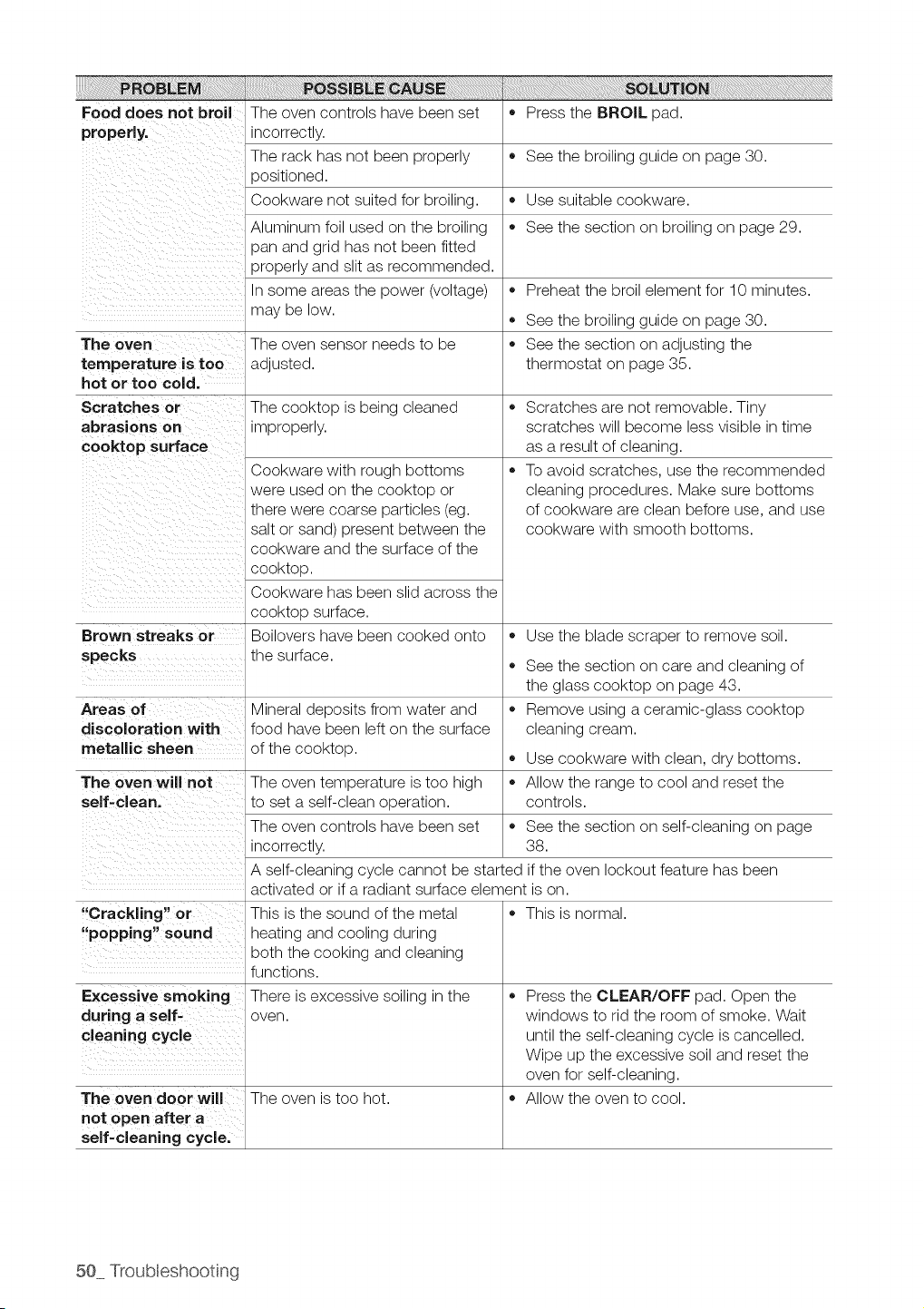
Food does not broil The oven controls have been set • Press the BROIL pad.
properly, incorrectly.
The rack has not been properly • See the broiling guide on page 30.
_ositioned.
Cookware not suited for broiling. • Use suitable cookware.
Aluminum foil used on the broiling • See the section on broiling on page 29.
pan and grid has not been fitted
properly and slit as recommended.
Insome areas the power (voltage) • Preheat the broil element for 10 minutes.
may be low.
,, See the broiling guide on page 30.
The oven The oven sensor needs to be ,, See the section on adjusting the
temperature istoo adjusted, thermostat on page 35.
hot or too cold.
Scratches or The cooktop isbeing cleaned ,,
abrasions on improperly.
cooktop surface
o
Brown streaks or
specks
Areas of
discoloration with
metallic sheen
The oven will not
self-clean.
"Crackling" or
"popping" sound
Excessive smoking
during a self-
cleaning cycle
Cookware with rough bottoms
were used on the cooktop or
there were coarse particles (eg.
salt or sand) present between the
cookware and the surface of the
cooktop.
Cookware has been slid across the
cooktop surface.
Boilovers have been cooked onto
the surface.
Mineral deposits from water and
food have been lefton the surface
of the cooktop.
The oven temperature istoo high
to set a self-clean operation.
The oven controls have been set
incorrectly.
o
o
Scratches are not removable. Tiny
scratches will become less visible in time
as a result of cleaning.
To avoid scratches, use the recommended
cleaning procedures. Make sure bottoms
of cookware areclean before use, and use
cookware with smooth bottoms.
Use the blade scraper to remove soil.
See the section on care and cleaning of
the glass cooktop on page 43.
Remove using a ceramic-glass cooktop
cleaning cream.
Use cookware with clean, dry bottoms.
Allow the range to cool and reset the
controls.
,, See the section on self-cleaning on page
38.
A self-cleaning cycle cannot be started if the oven lockout feature has been
activated or if a radiant surface element ison.
This is the sound of the metal
heating and cooling during
both the cooking and cleaning
functions.
There is excessive soiling in the
oven.
The oven door will The oven is too hot.
not open after a
self-cleaning cycle.
This is normal.
Press the CLEAR/OFF pad. Open the
windows to rid the room of smoke. Wait
until the self-cleaning cycle iscancelled.
Wipe up the excessive soil and reset the
oven for self-cleaning.
Allow the oven to cool.
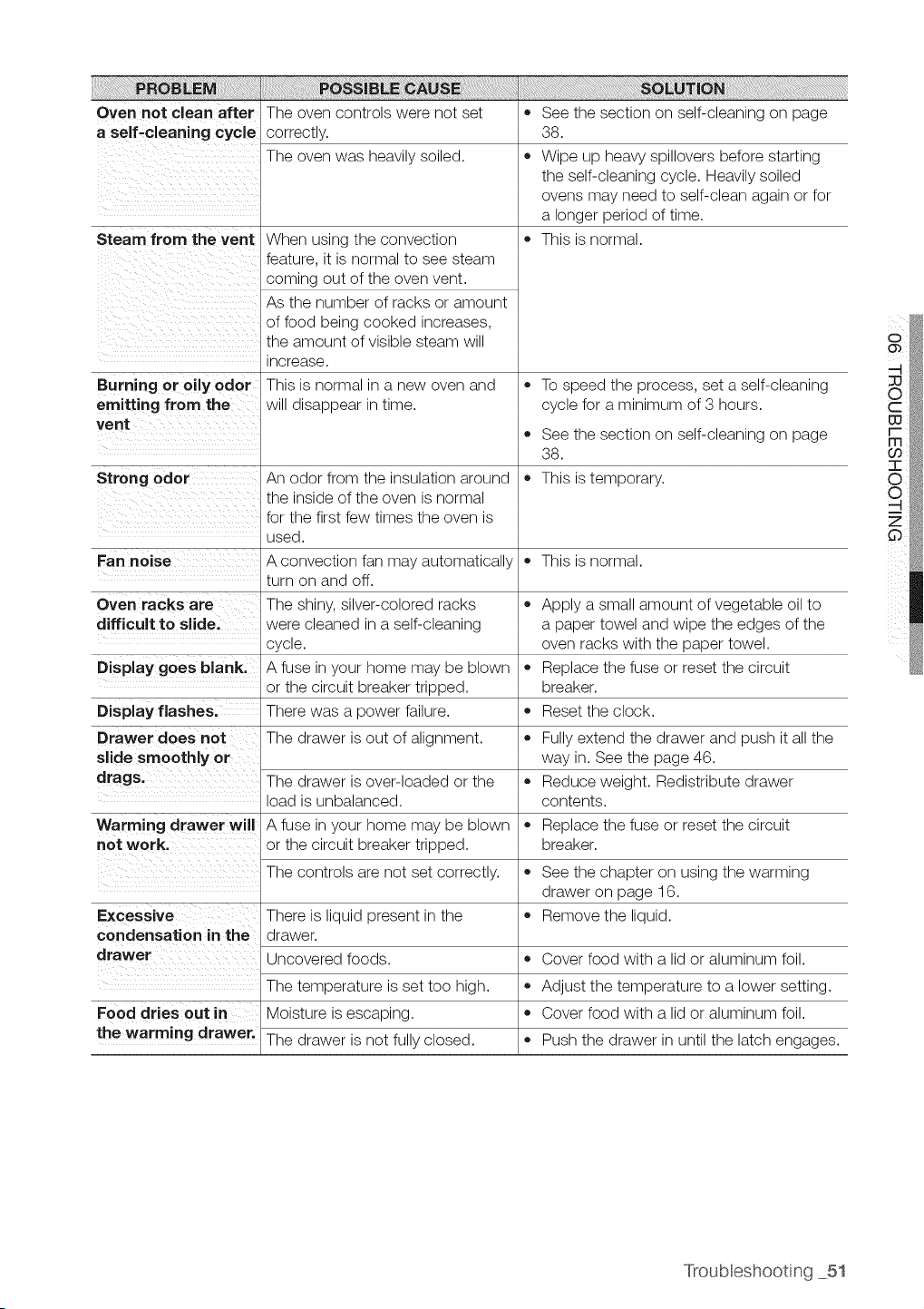
Oven not clean after
a self-cleaning cycle
Steam from the vent
Burning or oily odor
emitting from the
vent
The oven controls were not set
correctly.
The oven was heavily soiled.
When using the convection
feature, it isnormal to see steam
coming out of the oven vent.
As the number of racks or amount
of food being cooked increases,
the amount of visible steam will
increase.
This is normal in a new oven and
will disappear in time.
,, See the section on self-cleaning on page
38.
,, Wipe up heavy spillovers before starting
the self-cleaning cycle. Heavily soiled
ovens may need to self-clean again or for
a longer period of time.
• This isnormal.
,, To speed the process, set a self-cleaning
cycle for a minimum of 3 hours.
An odor from the insulation around
the inside of the oven isnormal
for the first few times the oven is
used.
A convection fan may automatically
turn on and off.
The shiny, silver-colored racks
were cleaned in aself-cleaning
cycle.
A fuse in your home may be blown
or the circuit breaker tripped.
There was a power failure.
The drawer isout of alignment.
,, See the section on self-cleaning on page
38.
Strong odor ,, This istemporary.
Fan noise ,, This isnormal.
Oven racks are
difficult to slide.
Display goes blank.
Apply a small amount ofvegetable oil to
a paper towel and wipe the edges of the
oven racks with the paper towel.
Replace the fuse or reset the circuit
breaker.
Reset the clock.
Display flashes.
Drawer does not ,, Fullyextend the drawer and push itall the
slide smoothly or way in. See the page 46.
drags. The drawer isover-loaded or the • Reduce weight. Redistribute drawer
load isunbalanced, contents.
Warming drawer will A fuse in your home may be blown = Replace the fuse or reset the circuit
not work. or the circuit breaker tripped, breaker.
The controls arenot set correctly.
There is liquid present in the
drawer.
Uncovered foods.
Excessive
condensation in the
drawer
The temperature isset too high.
Food dries out in Moisture is escaping.
the warming drawer. The drawer isnot fully closed.
,, See the chapter on using the warming
drawer on page 16.
Remove the liquid.
,, Cover food with a lid or aluminum foil.
Adjust the temperature to a lower setting.
Cover food with a lid or aluminum foil.
Push the drawer in until the latch engages.
Troubleshooting 51
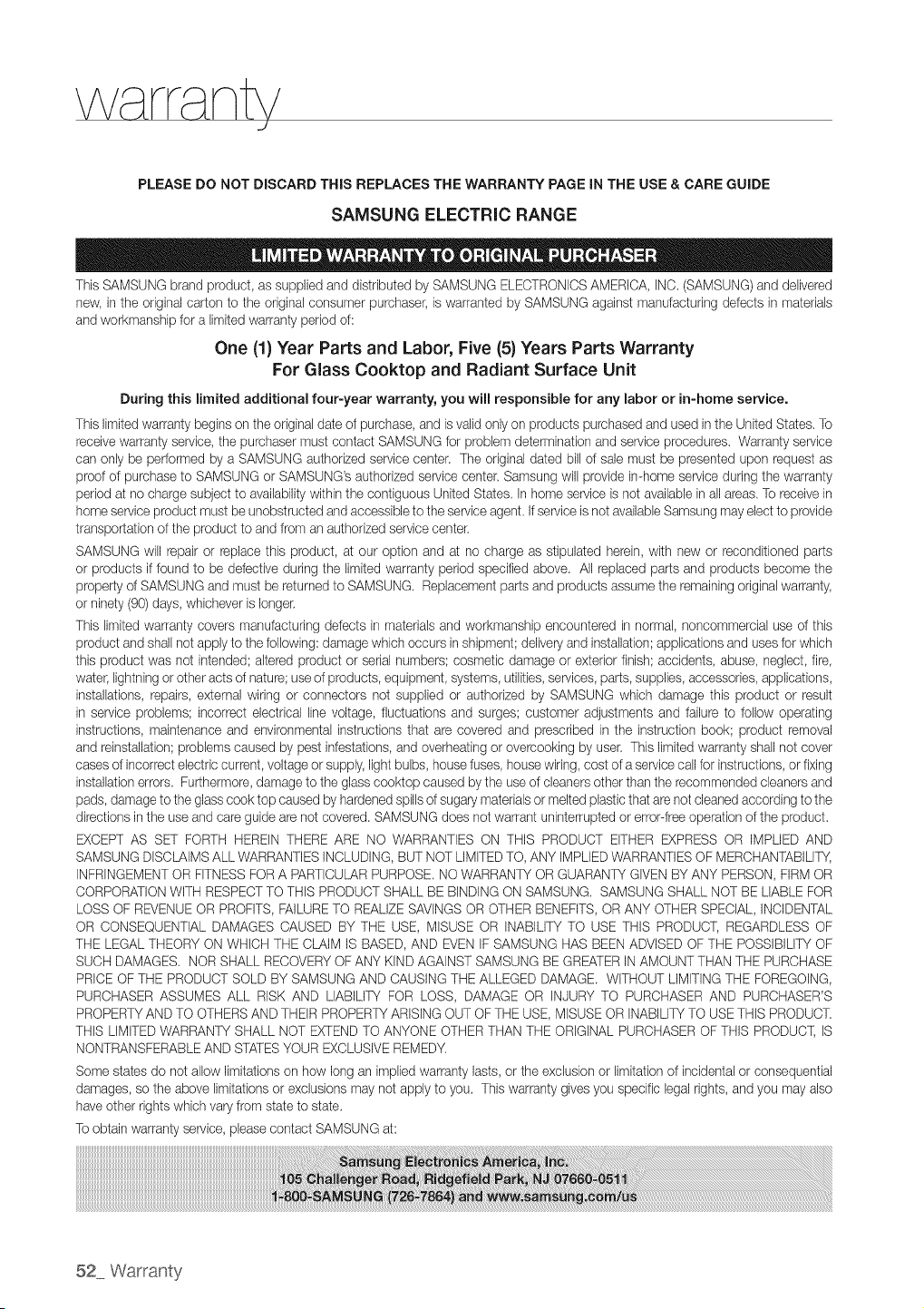
PLEASE DO NOT DISCARD THiS REPLACES THE WARRANTY PAGE iN THE USE & CARE GUIDE
SAMSUNG ELECTRIC RANGE
ThisSAMSUNG brand product, as supplied and distributedby SAMSUNG ELECTRONICSAMERICA,INC.(SAMSUNG)and delivered
new, intheoriginal carton to the original consumer purchaser,iswarranted by SAMSUNGagainst manufacturing defects in materials
and workmanship foralimitedwarrantyperiodof:
One (1) Year Parts and Labor, Five (5} Years Parts Warranty
For GlassCooktop and Radiant Surface Unit
During this limited additional four-year warranty, you will responsible for any labor or in-home service.
Thislimited warranty begins on theoriginal date of purchase, and isvalidonlyon products purchased and usedintheUnitedStates, To
receivewarranty service,the purchasermust contact SAMSUNGfor problemdetermination and serviceprocedures, Warranty service
can only be performed by a SAMSUNG authorized servicecenter. Theoriginal dated bill of sale mustbe presentedupon requestas
proofof purchaseto SAMSUNGor SAMSUNG'sauthorized servicecenter. Samsung will providein-home serviceduring the warranty
period at no charge subjecttoavailabilitywithinthe contiguous UnitedStates, In home serviceisnot available inallareas. Toreceive in
home serviceproduct mustbe unobstructed and accessible tothe serviceagent, if serviceisnot availableSamsung mayelectto provide
transportation of the product toand from an authorized servicecenter.
SAMSUNG will repair or replacethis product, atour option andat no charge as stipulated herein,with new or reconditioned parts
or products iffound to be defective during the limitedwarranty period specified above. All replaced parts and products becomethe
property of SAMSUNG and mustbereturnedto SAMSUNG. Replacementparts and productsassume the remaining original warranty,
or ninety (90)days,whichever islonger.
This limitedwarrantycovers manufacturing defects in materialsandworkmanship encountered in normal,noncommercial useofthis
product and shallnotapply to the following:damage which occurs inshipment; deliveryand installation;applicationsand uses forwhich
this product was not intended;altered product or serial numbers;cosmetic damage or exterior finish;accidents, abuse, neglect, fire,
water,lightningorotheracts of nature; useofproducts, equipment, systems, utilities,services,parts, supplies, accessories,applications,
installations,repairs, external wiring or connectors not supplied or authorized by SAMSUNG which damage this product or result
inservice problems; incorrectelectrical line voltage, fluctuations and surges; customer adjustments and failureto follow operating
instructions,maintenance and environmental instructionsthat are covered and prescribed in the instruction book; product removal
and reinstallation;problemscaused bypest infestations,and overheating orovercooking by user. Thislimitedwarrantyshall not cover
casesofincorrectelectriccurrent, voltage orsupply,lightbulbs, housefuses, housewiring,costof aservicecall forinstructions,orfixing
installationerrors, Furthermore, damagetothe glasscooktop caused bythe useof cleaners otherthan the recommended cleanersand
pads,damagetothe glasscook top caused byhardened spillsof sugarymaterials ormeltedplasticthat arenotcleanedaccording to the
directionsinthe useand care guidearenot covered. SAMSUNG doesnot warrant uninterruptedor error-freeoperationofthe product,
EXCEPTAS SET FORTH HEREIN THERE ARE NO WARRANTIES ON THiS PRODUCT EITHER EXPRESSOR IMPLIED AND
SAMSUNGDISCLAIMSALL WARRANTIESINCLUDING,BUTNOT LIMITEDTO, ANYIMPLIEDWARRANTIESOF MERCHANTABILITY,
INFRINGEMENTOR FITNESSFOR A PARTICULARPURPOSE. NOWARRANTYOR GUARANW GIVENBYANY PERSON, FiRM OR
CORPORATIONWITHRESPECTTO THISPRODUCT SHALLBEBINDING ON SAMSUNG, SAMSUNG SHALL NOT BE LIABLE FOR
LOSS OF REVENUEOR PROFITS,FAILURETO REALIZESAVINGSOR OTHERBENEFITS,OR ANY OTHER SPECIAL, iNCIDENTAL
OR CONSEQUENTIAL DAMAGESCAUSED BY THE USE, MISUSE OR INABILITYTO USE THiS PRODUCT, REGARDLESSOF
THE LEGALTHEORYON WHICH THE CLAIM IS BASED, AND EVENIFSAMSUNG HAS BEENADVISED OF THEPOSSIBILITYOF
SUCHDAMAGES, NOR SHALLRECOVERYOFANY KIND AGAINST SAMSUNGBE GREATERINAMOUNTTHANTHEPURCHASE
PRICEOF THEPRODUCT SOLDBYSAMSUNG AND CAUSINGTHEALLEGEDDAMAGE, WITHOUT LiMITiNG THE FOREGOING,
PURCHASERASSUMES ALL RISKAND LIABILITYFOR LOSS, DAMAGE OR INJURY TO PURCHASERAND PURCHASER'S
PROPERTYAND TO OTHERSAND THEIR PROPERWARISING OUT OF THEUSE,MISUSEOR INABILIW TO USETHISPRODUCT.
THIS LIMITEDWARRANTYSHALL NOT EXTENDTO ANYONE OTHERTHANTHE ORIGINAL PURCHASEROF THIS PRODUCT,IS
NONTRANSFERABLEAND STATESYOUR EXCLUSIVEREMEDY_
Somestatesdo not allowlimitationson how longanimpliedwarrantylasts,or the exclusionor limitation of incidentalorconsequential
damages, so the abovelimitationsor exclusions maynot applyto you, Thiswarrantygivesyou specific legal rights,and you mayalso
haveother rightswhichvaryfromstatetostate,
Toobtainwarrantyservice,please contact SAMSUNGat:
QUESTIONS OR COMMENTS?
IN THE US 1-800-SAMSUNG(726-7864) www.samsung,com/us
IN CANADA 1-800-SAMSUNG(726-7864) www,samsung,com/ca
DG68-00199A