SUBARU CORPORATION, TOKYO, JAPAN
“SUBARU” and the six–star cluster design are registered trademarks of SUBARU CORPORATION.
© Copyright 2023 SUBARU CORPORATION
1
Owner’s Manual Supplement for 20-22 Year Models Legacy/Outback/Outback Wilderness
and 22-23 Year Models WRX
Please refer to the separate Owner’s Manual for information not covered in this supplement.
Please keep this supplement with your Owner’s Manual and leave it in the vehicle at the time of resale. The next owner will need
the information it contains.
Various functions have changed due to a Center Information Display software update.
The following sections of the Owner’s Manual have been modied as a result of the update.
Item Number Description
1 Changed the touch screen layout of the Center Information Display (CID)
2 Added the Auto Vehicle Hold (AVH) ON/OFF icon
3 Added the Auto Start Stop ON/OFF icon
4 Changed the Climate Control Screen layout
5 Added “SYNC” to “Customize Climate Button”
6 Changed the Climate Control Panel layout
7 Changed the Automatic Climate Control operation method
8 Changed the Manual Climate Control operation method
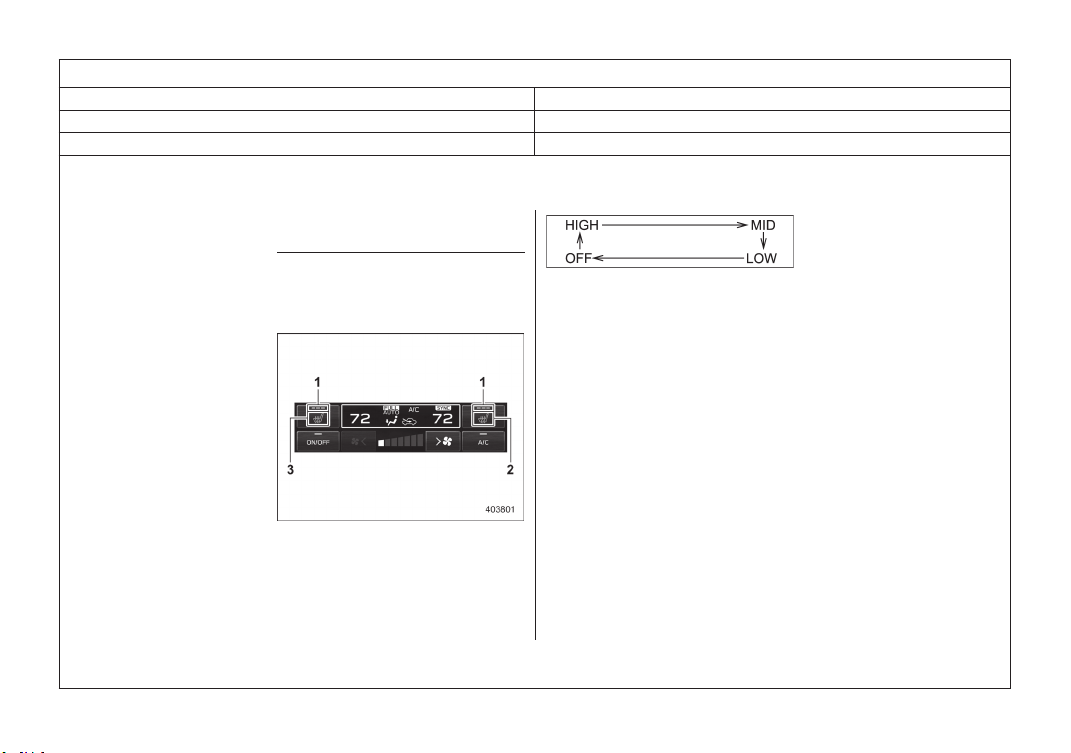
9 Changed the Front Seat Heater operation method
10 Added the Auto Vehicle Hold (AVH) ON/OFF icon
11 Added the Auto Start Stop ON/OFF icon

2
Item Number 1
Chapter Chapter 3
Main Title Center Information Display (CID)
Sub Title 11.6-Inch Display Models
(189,1)
北米Model "A9040BE-B" EDITED: 2023/ 1/ 16
& Touch Screen Operations
! Touch screen
1 HOME icon
2 Status bar
3 Information bar
4 Main screen
5 Driver profiles icon
6 Climate control screen
7 Auto Start Stop ON/OFF icon*
8 Car settings icon
9 Auto Vehicle Hold (AVH) ON/OFF icon*
*: If equipped
– CONTINUED –
Center Information Display (CID)
187
3
Instruments and Controls
3
Item Number 2
Chapter Chapter 3
Main Title Center Information Display (CID)
Sub Title 11.6-Inch Display Models
(193,1)
北米Model "A9040BE-B" EDITED: 2023/ 1/ 16
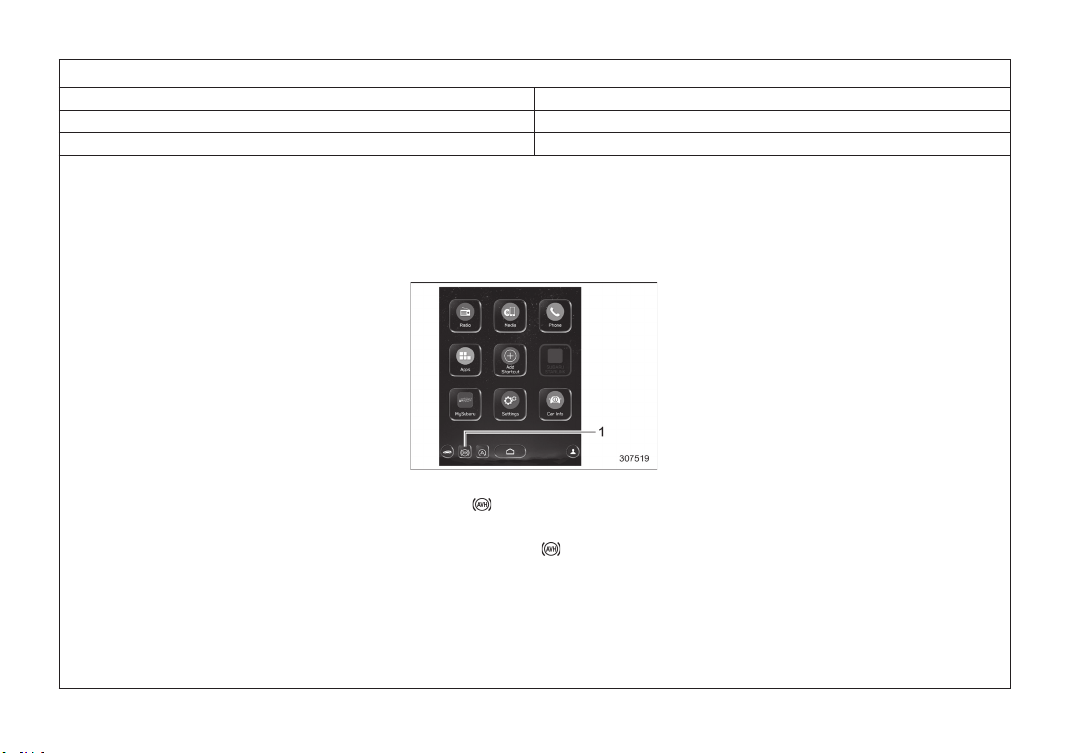
! Auto Vehicle Hold (AVH) ON/OFF
icon (if equipped)
1 Auto Vehicle Hold (AVH) indicator (green)
Touching “ ” deactivates the Auto Vehi-
cle Hold (AVH) and turns off the Auto
Vehicle Hold (AVH) indicator (green) on
the screen. Touching “
” again activates
the Auto Vehicle Hold (AVH) and turns on
the Auto Vehicle Hold (AVH) indicator
(green).
– CONTINUED –
Center Information Display (CID)
191
3
Instruments and Controls
4
Item Number 3
Chapter Chapter 3
Main Title Center Information Display (CID)
Sub Title 11.6-Inch Display Models
(220,1)
北米Model "A2620BE-C" EDITED: 2023/ 1/ 16
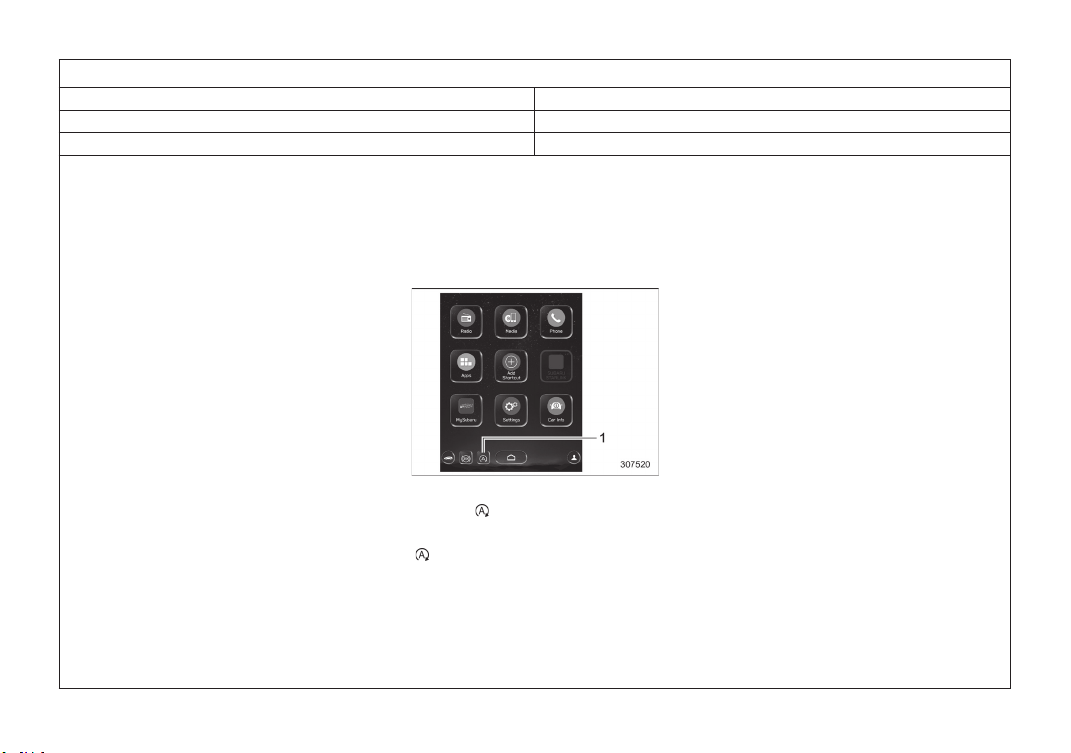
! Auto Start Stop ON/OFF icon (if
equipped)
1 Auto Start Stop indicator (green)
Touching “ ” deactivates the Auto Start
Stop and turns off the Auto Start Stop
indicator (green) on the screen. Touching
“
” again activates the Auto Start Stop
and turns on the Auto Start Stop indicator
(green).
Center Information Display (CID)
218
5
Item Number 4
Chapter Chapter 3
Main Title Center Information Display (CID)
Sub Title 11.6-Inch Display Models
(197,1)
北米Model "A9040BE-B" EDITED: 2023/ 1/ 16
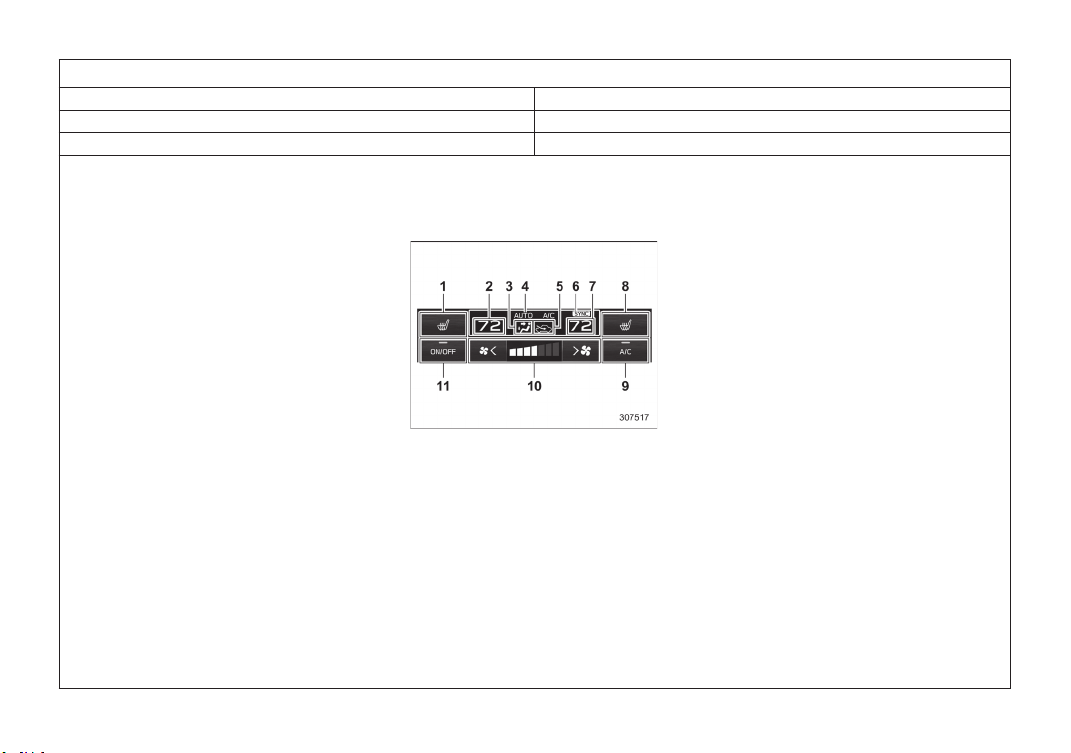
! Climate control screen
1 Seat heater indicator*
1
(driver’s side)
2 Set temperature indicator (driver’s side)
3 Airflow mode
4 Climate control mode
5 Air inlet selection
6 SYNC mode indicator
7 Set temperature indicator (front passen-
ger’s side)
8 Seat heater indicator*
1
(front passen-
ger’s side)
9 Customizable icon
10 Fan speed control
11 Climate control ON/OFF icon
*1: If equipped
– CONTINUED –
Center Information Display (CID)
195
3
Instruments and Controls

6
Item Number 5
Chapter Chapter 3
Main Title Center Information Display (CID)
Sub Title 11.6-Inch Display Models
(198,1)
北米Model "A9040BE-B" EDITED: 2023/ 1/ 19
! Main screen
! General settings
Item
Available settings
1st menu 2nd menu 3rd menu
General Climate Control Customize Climate Button
A/C/MAX A/C/AUTO/Recirculation/SYNC
Center Information Display (CID)
196
7
Item Number 6-1
Chapter Chapter 4
Main Title Climate Control Panel
Sub Title -
(253,1)
北米Model "A9040BE-B" EDITED: 2023/ 1/ 16
4-2. Climate Control Panel
WARNING
. The cooling function operates
only when the engine is running.
. Do not leave children or adults
who would normally require the
support of others alone in your
vehicle. Pets should not be left
alone either. On hot, sunny days,
temperatures in a closed vehicle
could quickly become high en-
ough to cause severe or possibly
fatal injuries to people or ani-
mals.
NOTE
The images displayed in this Owner’s
Manual are sample images. The actual
image may vary depending on the
region, vehicle specifications and soft-
ware version.
– CONTINUED –
Climate Control Panel
251
4
Climate Control
8
Item Number 6-2
Chapter Chapter 4
Main Title Climate Control Panel
Sub Title 11.6-Inch Display Models
(257,1)
北米Model "A9040BE-B" EDITED: 2023/ 1/ 16
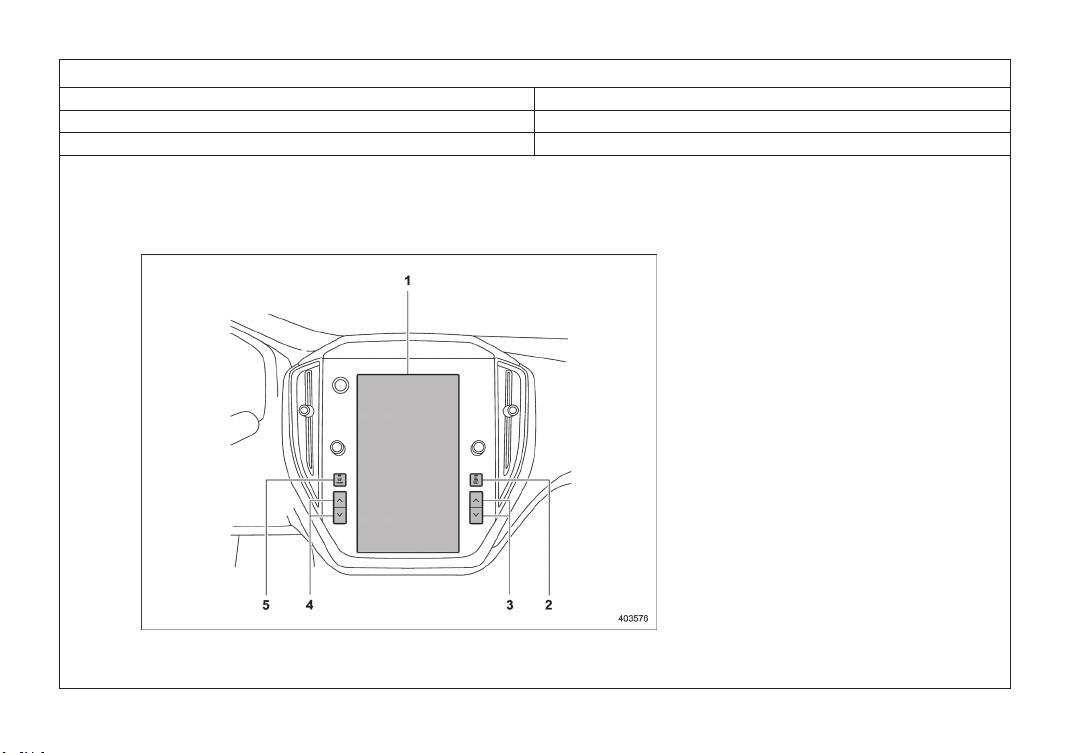
& 11.6-Inch Display Models
1 Climate control screen
2 Rear window and outside mirror defogger
button
3 Passenger’s side temperature control
button
4 Driver’s side temperature control button
5 Defroster button
– CONTINUED –
Climate Control Panel
255
4
Climate Control
9
Item Number 6-3
Chapter Chapter 4
Main Title Climate Control Panel
Sub Title 11.6-Inch Display Models
(258,1)
北米Model "A9040BE-B" EDITED: 2023/ 1/ 16
!
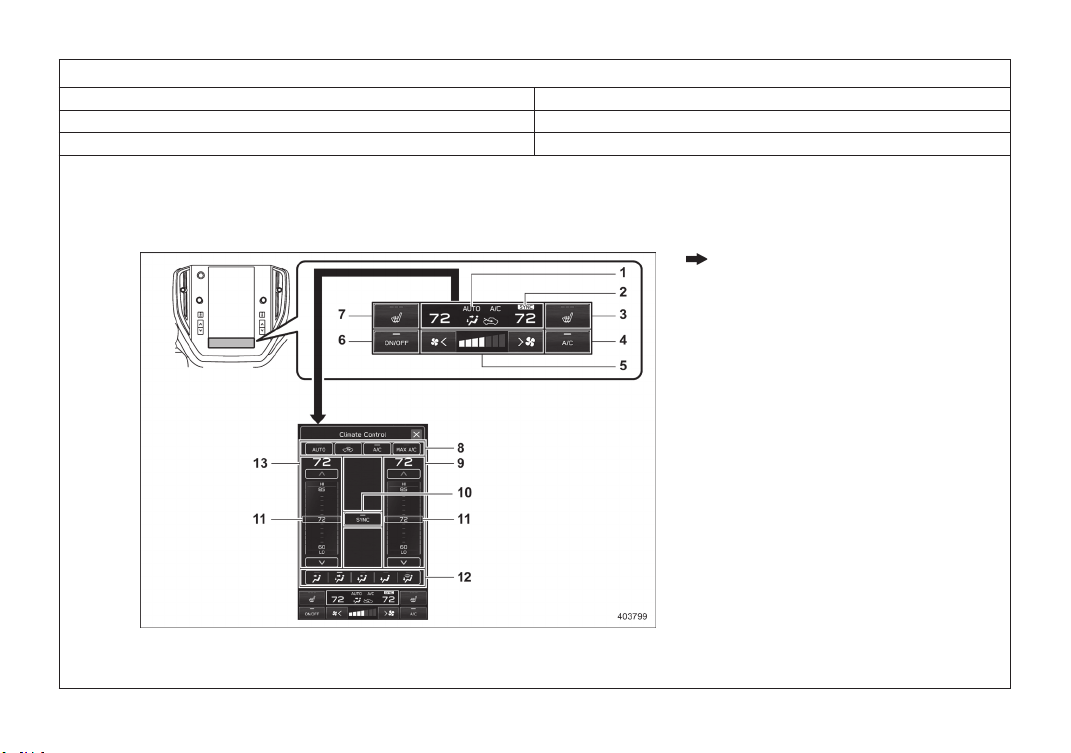
Climate control screen
: Touch the climate control mode indicator
1 Climate control mode indicator
2 SYNC mode indicator
3 Front passenger’s seat heater icon (if
equipped)
4 Customizable icon*
5 Fan speed control
6 Climate control ON/OFF icon
7 Driver’s seat heater icon (if equipped)
8 Climate control mode select icon
9 Temperature control screen (passen-
ger’s side)
10 SYNC icon
11 Temperature control bar
12 Airflow mode selection screen
13 Temperature control screen (driver’s
side)
*: The customizable icon can be changed to
the favorite icon.
NOTE
The layout and the available functions
for operating the climate control screen
may vary depending on the number of
items shown on the Center Information
Display.
Climate Control Panel
256
10
Item Number 7-1
Chapter Chapter 4
Main Title Automatic Climate Control Operation
Sub Title -
(260,1)
北米Model "A9040BE-B" EDITED: 2023/ 1/ 16
4-3. Automatic Climate Con-
trol Operation
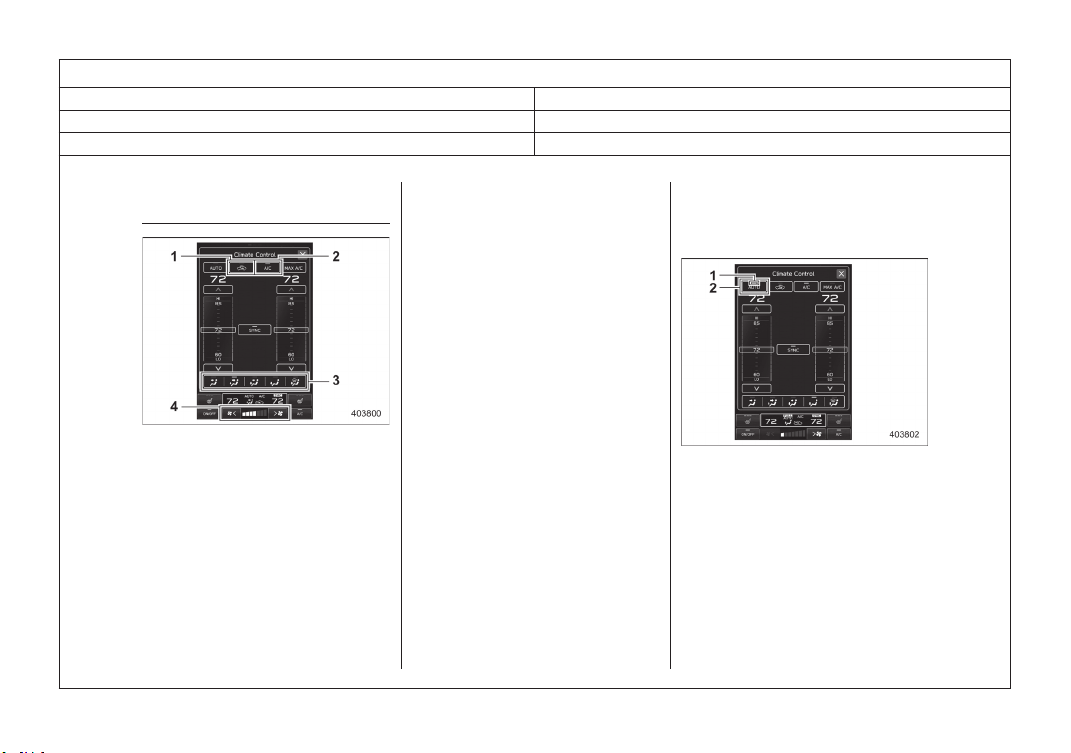
Climate control screen
1 Air inlet selection
2 Air conditioner
3 Airflow mode
4 Fan speed
When the auto mode is selected, the
following functions are automatically con-
trolled.
. Fan speed
. Airflow mode
. Air inlet selection
. Air conditioner operation
To activate this mode, perform the follow-
ing.
“AUTO” is displayed on the customiz-
able icon:
1. Touch “AUTO”.
2. Set the preferred temperature.
“AUTO” is not displayed on the custo-
mizable icon:
1. Touch the climate control mode indi-
cator.
2. Touch “AUTO”.
3. Set the preferred temperature.
NOTE
. Operate the automatic climate con-
trol system when the engine is
running.
. Even when cooling is not necessary,
the air conditioner will automatically
turn on if the temperature is set
much lower than the current outlet
air temperature. Even in this case,
the “A/C” indicator light on the
climate control screen illuminates.
. The air conditioner may not operate
in the following cases:
– When the cabin temperature is
low
– When the ambient temperature
decreases close to 328F (08C)
. The controllable temperature range
may vary depending on the regional
specifications of the vehicle.
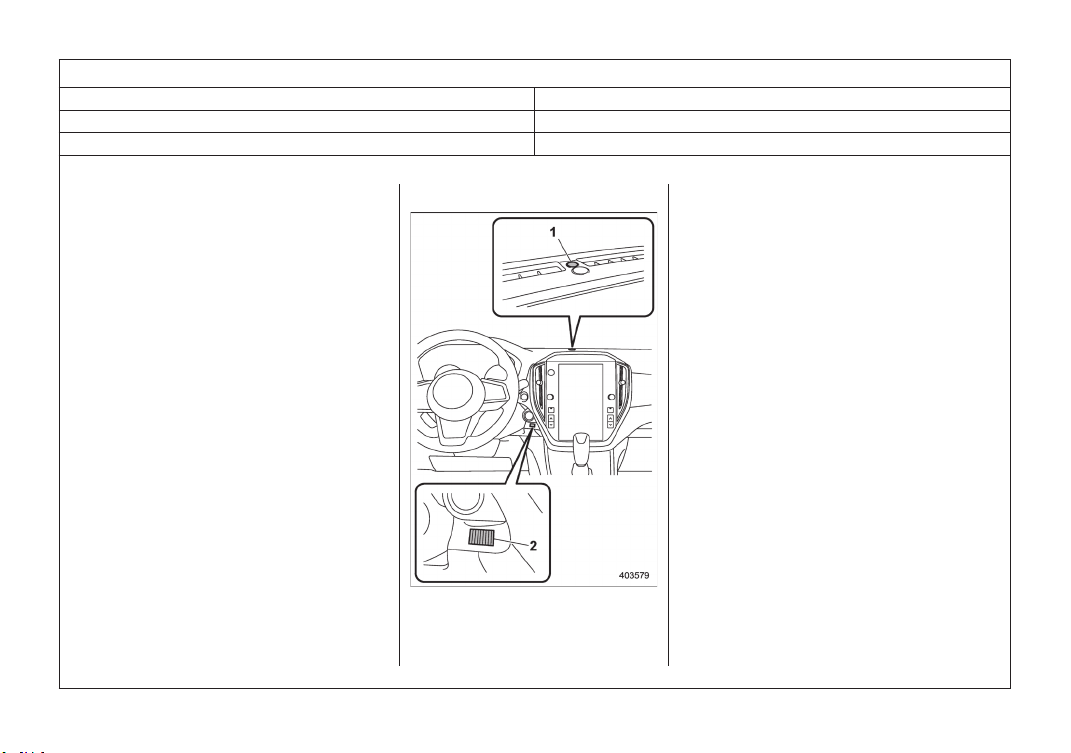
1 FULL AUTO indicator
2 AUTO mode
NOTE
If something other than temperature
control is operated while full auto mode
is activated, the FULL AUTO indicator
will turn off. You can then manually
control the system as desired using the
climate control screen. To change the
system back to full auto mode, touch
“AUTO”.
Automatic Climate Control Operation
258
11
Item Number 7-2
Chapter Chapter 4
Main Title Automatic Climate Control Operation
Sub Title -
(261,1)
北米Model "A9040BE-B" EDITED: 2023/ 1/ 16
To turn off the climate control system,
touch “ON/OFF”.
At this time, the air inlet selection mode will
differ depending on the auto mode and
manual mode.
. When the air inlet selection is set to
auto mode: Outside air circulation
. When the air inlet selection is set to
manual mode: No change
When the ignition switch is changed to the
“OFF”/“LOCK” or “ACC” position from
“ON”, the air inlet mode will automatically
change to the outside air mode regardless
of whether it is the auto mode or manual
mode.
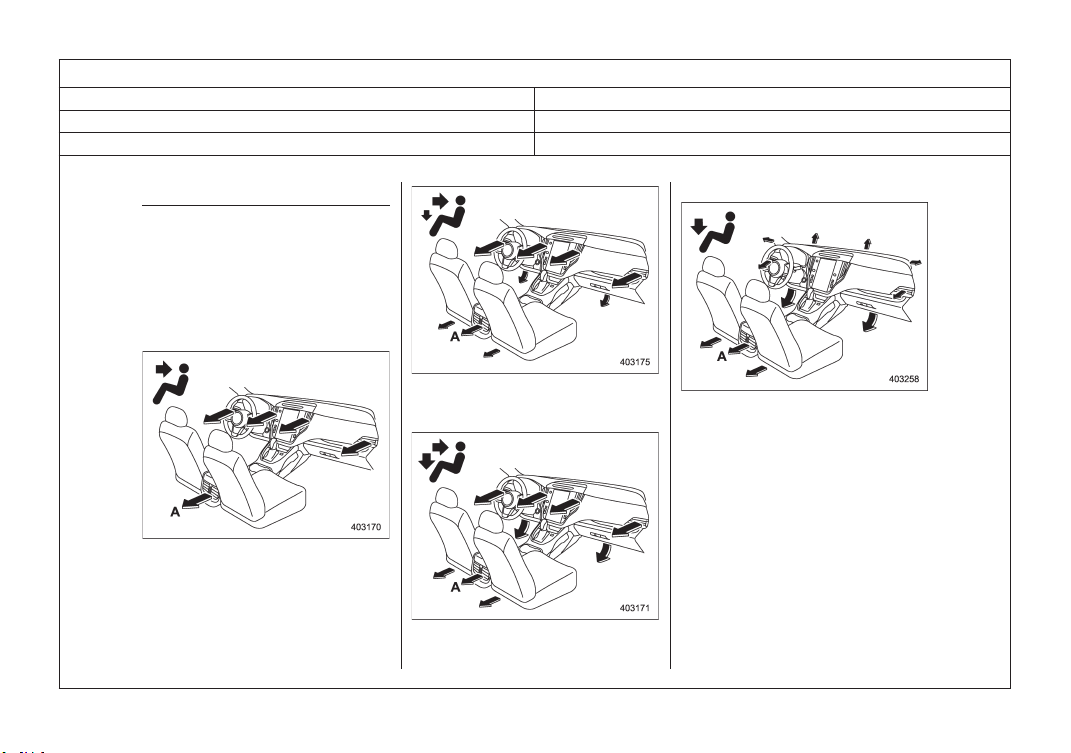
& Sensors
1 Solar sensor
2 Interior air temperature sensor*
*: Some models are equipped with a humidity
sensor and an air temperature sensor.
The automatic climate control system
employs several sensors. These sensors
are delicate. If they are treated incorrectly
and become damaged, the system may
not be able to control the interior tempera-
ture correctly. To avoid damaging the
sensors, observe the following precau-
tions:
– Do not subject the sensors to impact.
– Keep water away from the sensors.
– Do not cover the sensors.
Automatic Climate Control Operation
259
4
Climate Control
12
Item Number 8-1
Chapter Chapter 4
Main Title Manual Climate Control
Sub Title -
(314,1)
北米Model "A2620BE-C" EDITED: 2023/ 1/ 16
4-4. Manual Climate Control
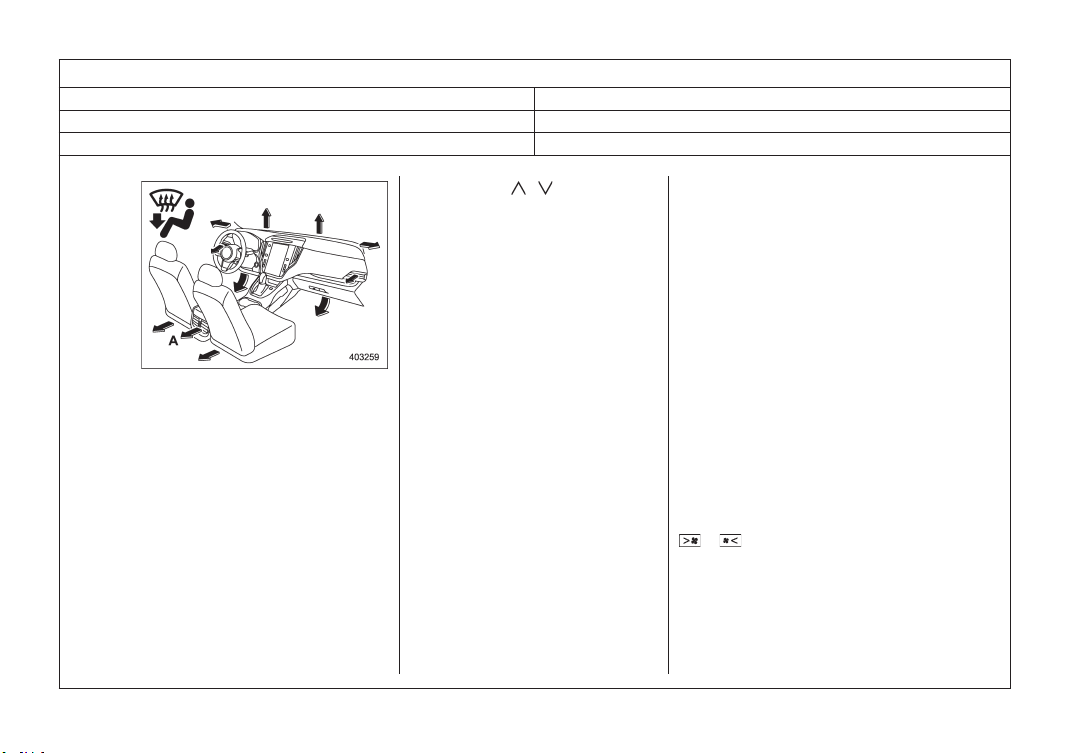
& Airflow Mode Selection
Select the preferred airflow mode by the
following operation.
1. Touch the climate control mode indi-
cator.
2. Touch the preferred airflow mode.
Airflow modes are as follows.
A Models with rear ventilators
Ventilation: Instrument panel outlets
A Models with rear ventilators
Ventilation 2: Instrument panel outlets and
foot outlets
A Models with rear ventilators
Bi-level: Instrument panel outlets and the
foot outlets
A Models with rear ventilators
Heat: Foot outlets, both side outlets of the
instrument panel and some through wind-
shield defroster outlets (A small amount of
air flows to the windshield and both side
windows to prevent fogging.)
Manual Climate Control
312
13
Item Number 8-2
Chapter Chapter 4
Main Title Manual Climate Control
Sub Title -
(315,1)
北米Model "A2620BE-C" EDITED: 2023/ 1/ 16
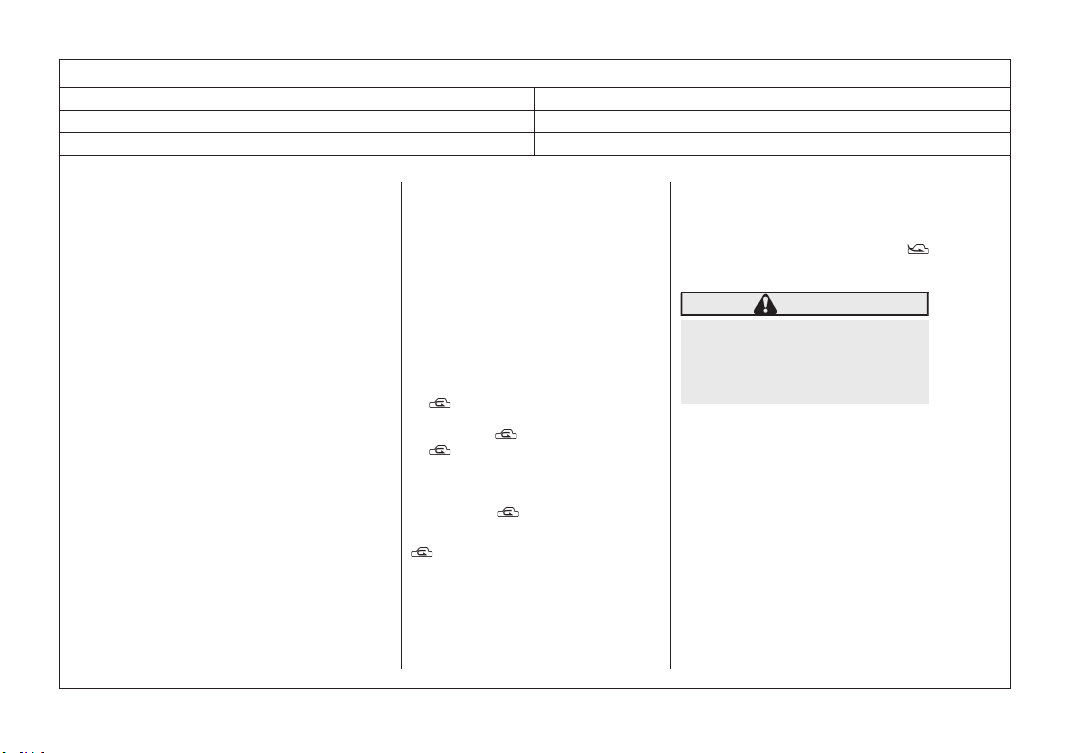
A Models with rear ventilators
Heat-def: Windshield defroster outlets,
foot outlets and both side outlets of the
instrument panel
& Temperature Control
Perform the following operation to regulate
the temperature of airflow from the air
outlets.
Temperature control buttons:
Press the temperature control button to the
blue side (cool) or the red side (warm).
Temperature control screen:
1. Touch the set temperature indicator.
2. Select the preferred temperature by
the following operation.
. Touch and move the temperature
control bar.
. Touch the “
”/“ ”.
. Touch the preferred temperature in
the temperature control screen.
! Max A/C mode
For quicker cooling, touch “MAX A/C” on
the climate control mode select icon or
customizable icon.
When the Max A/C mode is on, the
following settings will be changed auto-
matically.
. The air conditioner will turn on.
. The temperature will be set on the
lowest.
. The fan speed will be set on the
maximum speed.
. The air inlet will be set to the recircula-
tion mode.
. The airflow mode setting will be set to
the ventilation mode.
To turn off the Max A/C mode and return to
the previous setting, touch “MAX A/C”
again.
! SYNC mode
When the SYNC mode is turned on, both
the driver’s and passenger’s side tem-
peratures are synchronized using the
driver’s side temperature control button
and temperature control screen.
. If “SYNC” is displayed on the customiz-
able icon, touch “SYNC” to turn the
SYNC mode on or off.
. If a customizable icon other than
“SYNC” is displayed, touch the climate
control mode indicator. Then touch
“SYNC” to turn the SYNC mode on or
off.
The SYNC mode indicator will turn white.
Touch “SYNC” again, press the passen-
ger’s side temperature control button or
operate the passenger’s side temperature
control bar to cancel the SYNC mode. The
SYNC mode indicator will be grayed out. In
this case, temperature control on the
driver’s side and passenger’s side will be
separated. The temperature will be con-
trolled individually using the driver’s and
passenger’s temperature control button
and the driver’s and passenger’s tempera-
ture control bar.
& Fan Speed Control
Select the preferred fan speed by touching
or on the climate control screen.
& Air Conditioner Control
The air conditioner operates only when the
engine is running.
Perform the following operation while the
fan is in operation to turn on the air
conditioner.
– CONTINUED –
Manual Climate Control
313
4
Climate Control
14
Item Number 8-3
Chapter Chapter 4
Main Title Manual Climate Control
Sub Title -
(316,1)
北米Model "A2620BE-C" EDITED: 2023/ 1/ 16
. If “A/C” is displayed on the customiz-
able icon, touch “A/C”. When the air
conditioner is on, the “A/C” indicator
illuminates. And an A/C icon will be
displayed on the climate control mode
indicator.
. If a customizable icon other than “A/C”
is displayed, touch the climate control
mode indicator. Then touch “A/C” on
the climate control mode select icon.
When the air conditioner is on, “A/C”
indicator illuminates. And an A/C icon
will be displayed on the climate control
mode indicator.
To turn off the air conditioner, touch
“A/C” again. The indicator light will turn
off.
NOTE
For efficient defogging or dehumidify-
ing in cold weather, turn on the air
conditioner. However, if the ambient
temperature decreases to approxi-
mately 328F (08C), the air conditioner
and dehumidification system may not
work properly.
& Air Inlet Selection
Select the air inlet by touching the air inlet
selection icon.
Recirculation mode: Interior air is recir-
culated inside the vehicle. This mode is
used for the following cases.
. When driving on a dusty road
. When you want cooling performance to
increase (for example, in particularly
hot weather)
Perform the following operation to select
this mode.
.
is displayed on the customizable
icon:
(1) Touch
.
.
is not displayed on the customiz-
able icon:
(1) Touch the climate control mode
indicator.
(2) Touch
on the climate control
mode select icon.
will be displayed on the climate control
mode indicator.
Outside air circulation mode: Outside
air is drawn into the passenger compart-
ment. This mode is used for the following
cases.
. When the road is no longer dusty
. When the interior has cooled to a
comfortable temperature
Perform the same operation as the recir-
culation mode to change the mode.
will be displayed on the climate control
mode indicator.
WARNING
Continued operation in the recircu-
lation mode may fog up the win-
dows. Switch to the outside air
circulation mode as soon as the
outside dusty condition clears.
NOTE
When outside air circulation is se-
lected, the system may automatically
adjust the air inlet setting depending on
such factors as the temperature
setting, the temperature inside the
vehicle, or conditions outside the ve-
hicle.
& To Turn Off the Climate Con-
trol System
To turn off the climate control system,
touch “ON/OFF”.
Manual Climate Control
314
15
Item Number 9
Chapter Chapter 4
Main Title Front Seat Heater
Sub Title -
(271,1)
北米Model "A9040BE-B" EDITED: 2023/ 1/ 16
4-7. Front Seat Heater (If
Equipped)
The seat heater operates when the ignition
switch is in the “ON” position.
Select the seat heater temperature using
the following operation.
1 Seat heater indicator
2 Front passenger’s seat heater icon
3 Driver’s seat heater icon
Touch the driver’s/passenger’s seat hea-
ter icon on the climate control screen.
Each time you touch the icon, the mode
will change as follows.
HIGH:
3 indicator lights are illuminated.
MID:
2 indicator lights are illuminated.
LOW:
1 indicator light is illuminated.
OFF:
All indicator lights turn off.
Selecting HIGH mode will cause the
seat
to heat up quicker.
Holding and releasing the seat heater
icon
turns the seat heater off in any mode.
Front Seat Heater
269
4
Climate Control
16
Item Number 10
Chapter Chapter 7
Main Title Parking Your Vehicle
Sub Title Electronic Parking Brake (CVT Models)
(339,1)
北米Model "A9040BE-B" EDITED: 2023/ 1/ 16
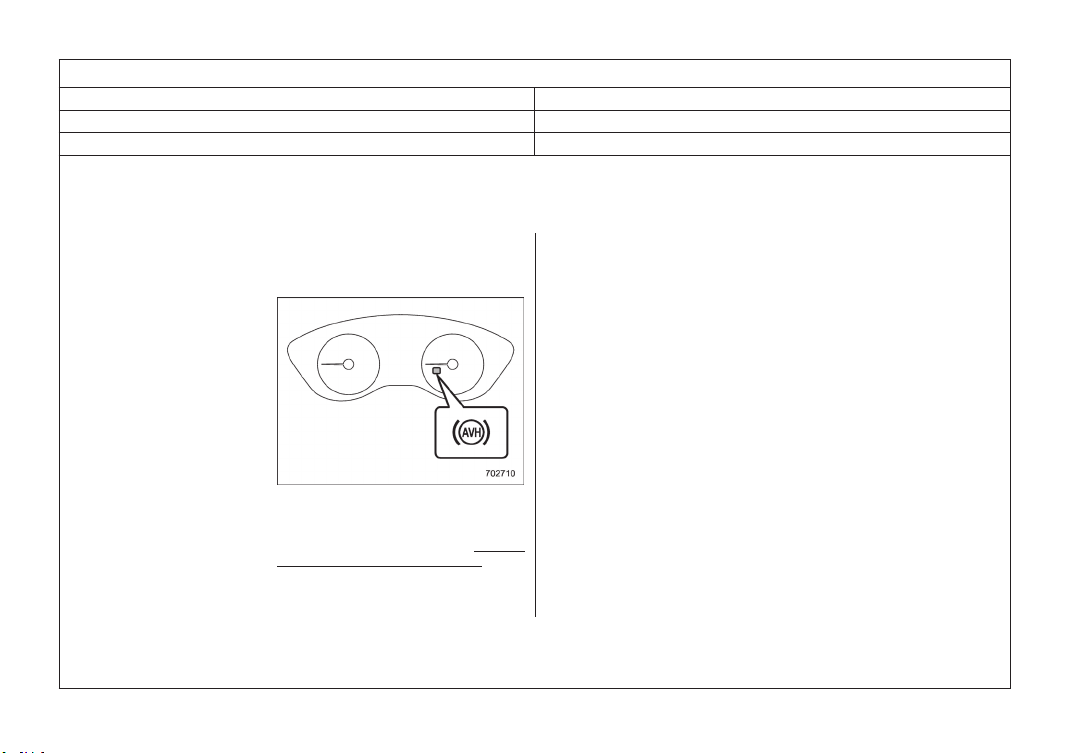
! Auto Vehicle Hold function
! To turn on/off the Auto Vehicle
Hold function
Auto Vehicle Hold indicator light
To turn the Auto Vehicle Hold function on
and off, operate the center information
display. Refer to “Car settings” or “Auto
Vehicle Hold (AVH) ON/OFF icon”.
When the Auto Vehicle Hold function is
turned ON, the Auto Vehicle Hold indicator
light will turn on.
NOTE
. When the electronic parking
brake
system has a malfunction while
the
Auto Vehicle Hold function is
turned
on, a chirp will sound, the
Auto
Vehicle Hold indicator light will
turn
off and the brake system
warning
light will turn on.
. Every time when starting the
engine,
the Auto Vehicle Hold function
will
be set to “OFF”.
– CONTINUED –
Parking Your Vehicle
337
7
Starting and Operating
17
Item Number 11
Chapter Chapter 7
Main Title Auto Start Stop System
Sub Title System Operation
(401,1)
北米Model "A2620BE-C" EDITED: 2023/ 1/ 16
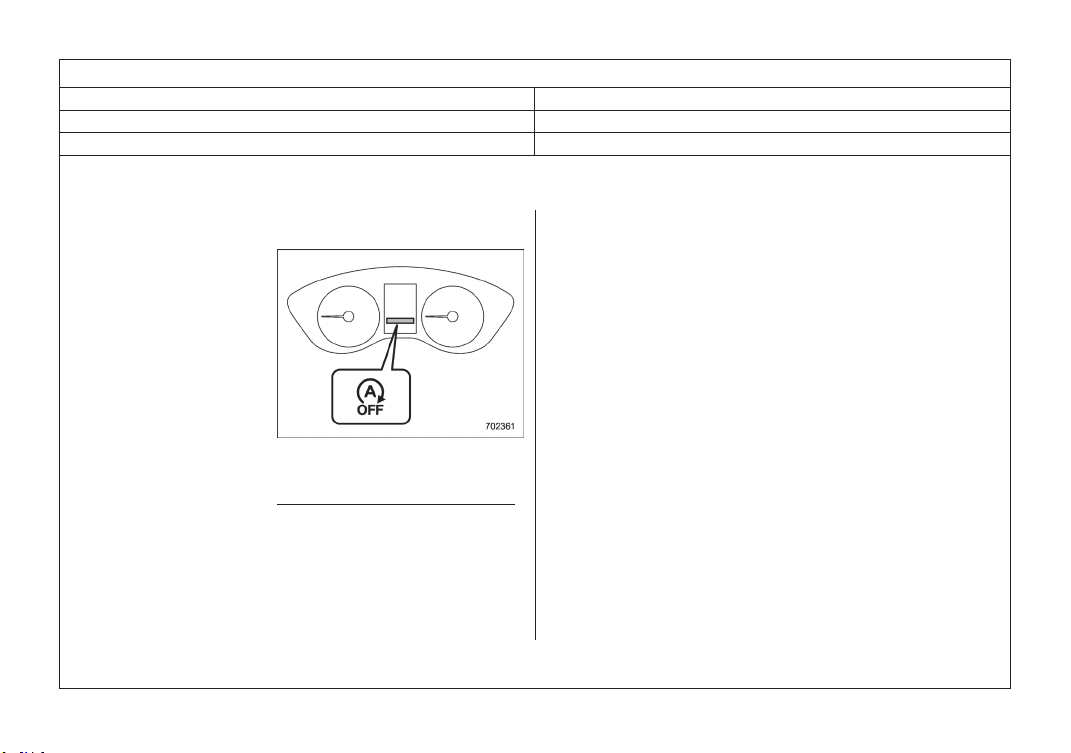
! To turn on/off the Auto Start Stop
system
Auto Start Stop OFF indicator light
To turn the Auto Start Stop system on and
off, operate the center information display.
Refer to “Auto Start Stop ON/OFF icon”.
When the Auto Start Stop system is turned
OFF, the Auto Start Stop OFF indicator
light on the combination meter display
(color LCD) will illuminate.
While the engine is temporarily stopped by
the system, if the Auto Start Stop system
turns off, the engine will be restarted even
if you do not release the brake pedal.
NOTE
. If the engine is restarted when
the
Auto Start Stop system is not
opera-
tional and the ignition switch
has
been turned to the
“LOCK”/“OFF”
position, the Auto Start Stop
system
will turn on again.
. Be sure to turn the ignition switch
to
the “LOCK”/“OFF” position
when
leaving the vehicle. Failure to do
so
could result in the battery
dischar-
ging.
– CONTINUED –
Auto Start Stop System
399
7
Starting and Operating