USER MANUAL
RIFF使用手冊
RIFF사용설명서

What’s in the box
•RIFF Bluetooth speaker
•USB C cable
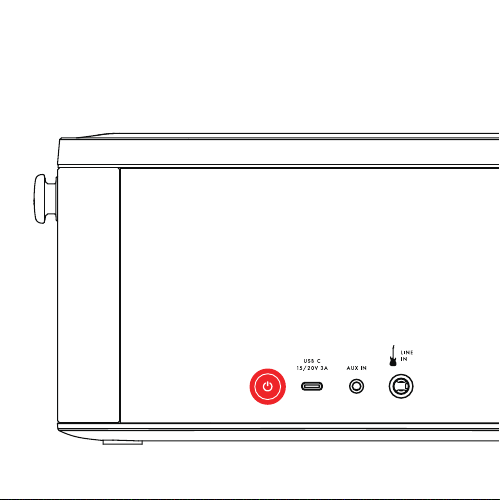
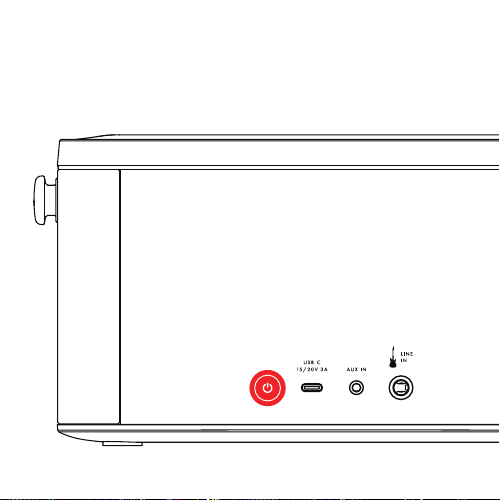
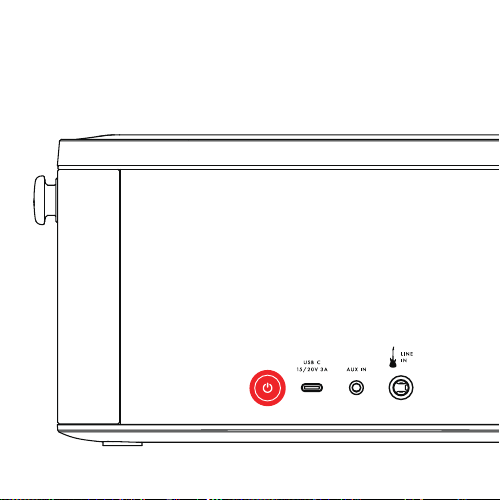
TURNING ON/OFF
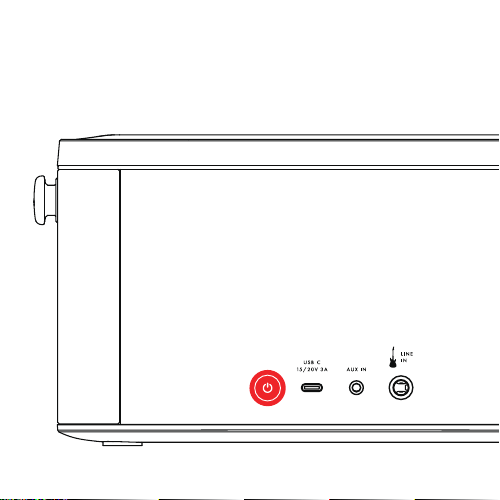
Press the power button on the back of the unit to turn on and off.
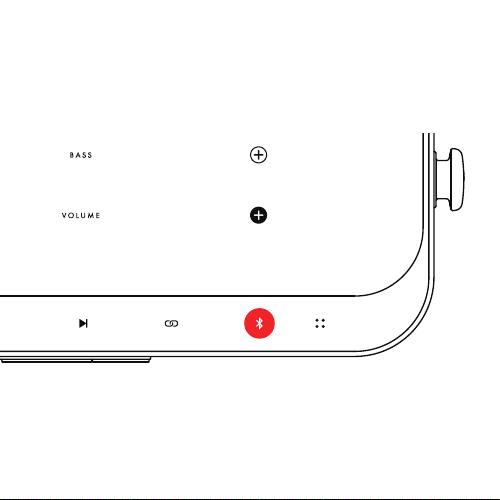
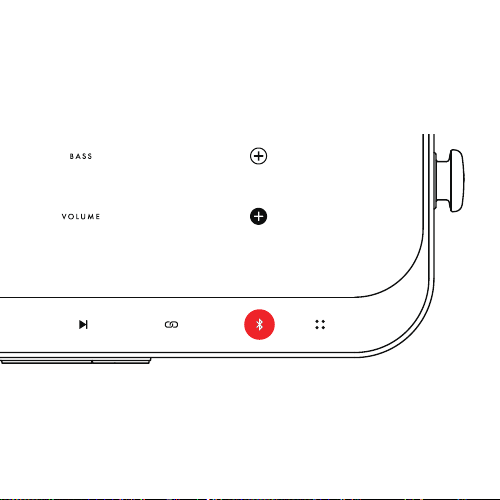
BLUETOOTH PAIRING
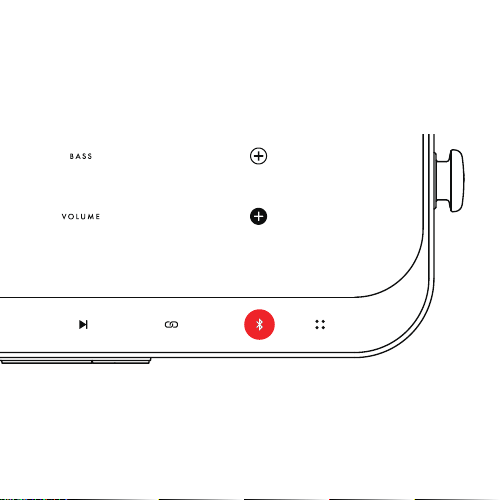
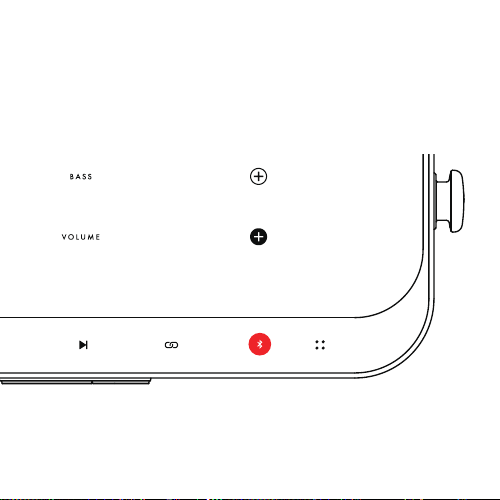
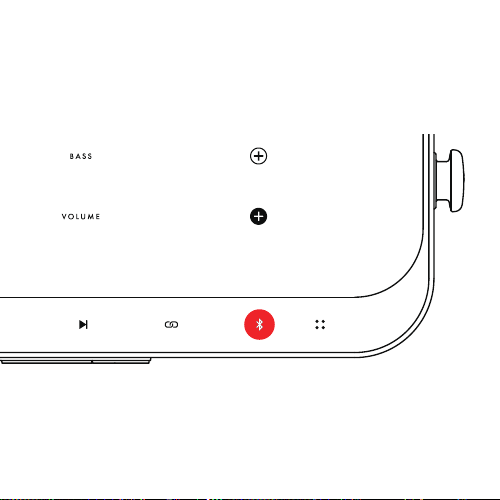
Tap the Bluetooth button on the top panel to activate pairing.
Bluetooth symbol will blink blue.
On your Bluetooth audio device, go to Bluetooth settings and select
“Fender RIFF”. Once connected, the Bluetooth LED will turn remain
solid blue.
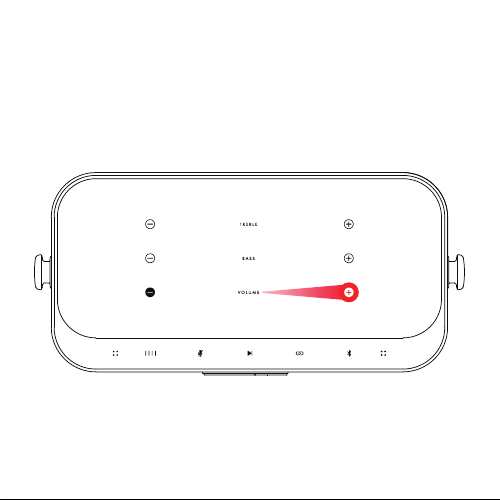
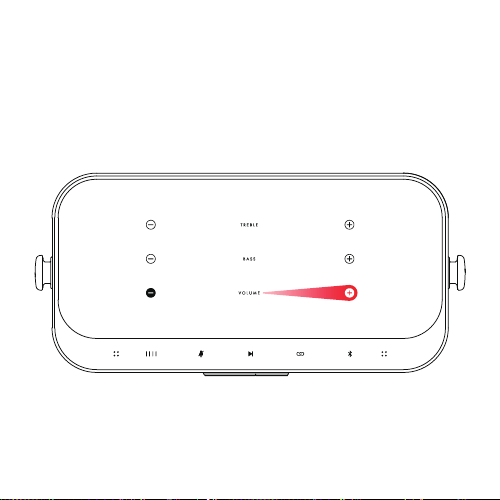
VOLUME CONTROL
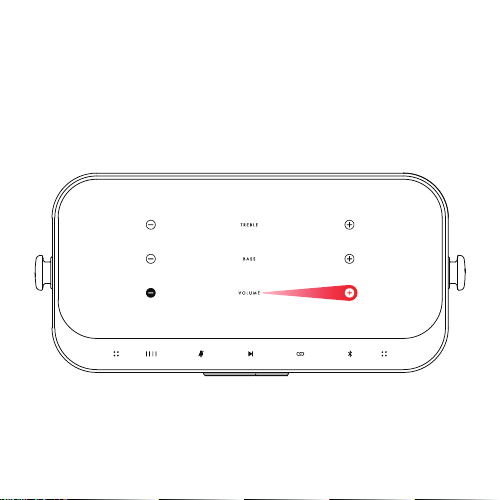
To increase or decrease volume, slide finger across touch panel. To
fine tune, tap the “ + ” or “–” symbol. An audio cue will be played
when the maximum or minimum level is reached.
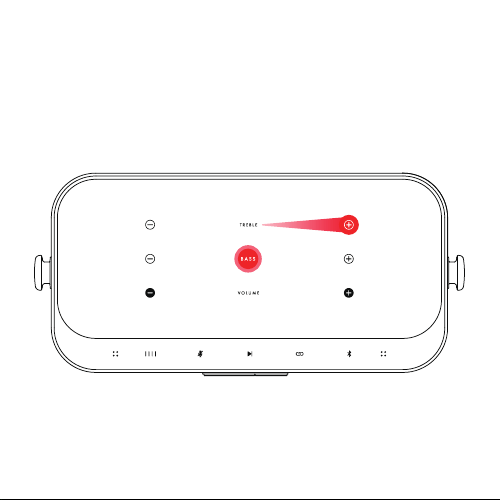
EQ CONTROL
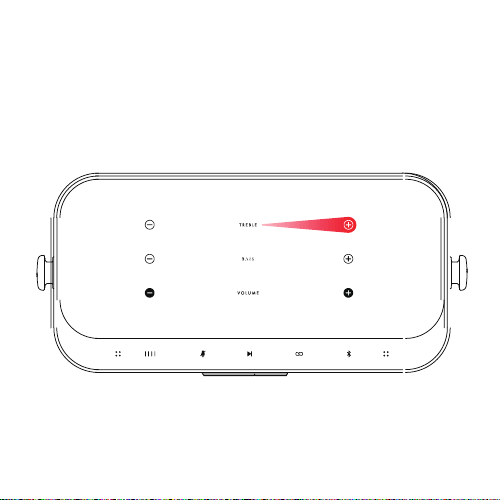
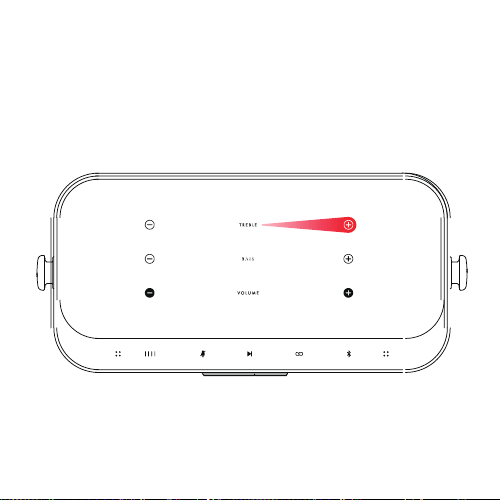
To increase or decrease Bass / Treble EQ, slide finger across touch
panel. To fine tune, tap the “ + ” or “–” symbol. An audio cue will be
played when the maximum or minimum level is reached.
To reset Bass / Treble to middle, touch and hold the Treble or Bass
words for 3 seconds. An audio cue will be played when successful.
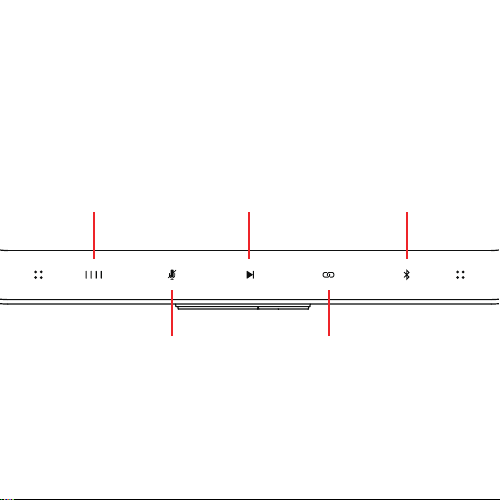
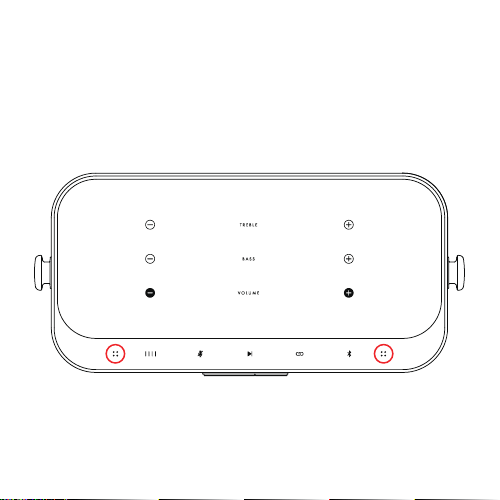
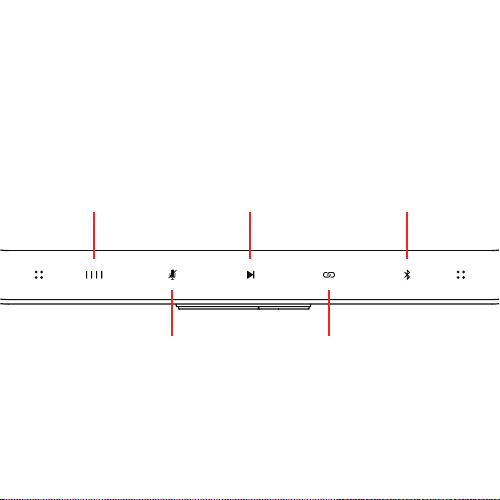
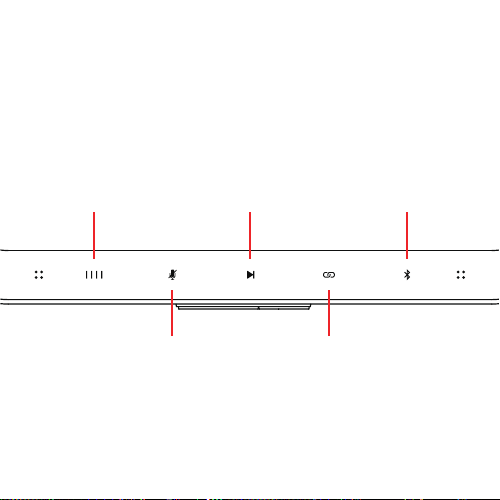
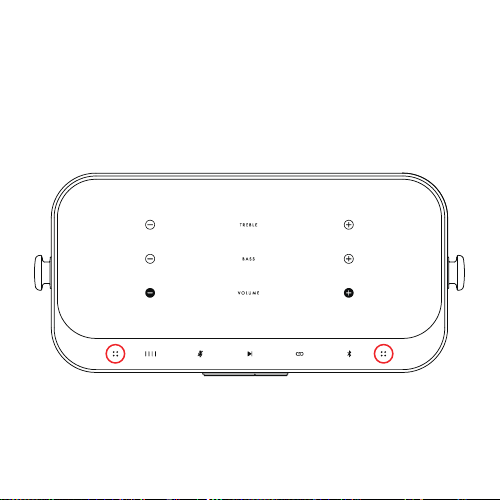
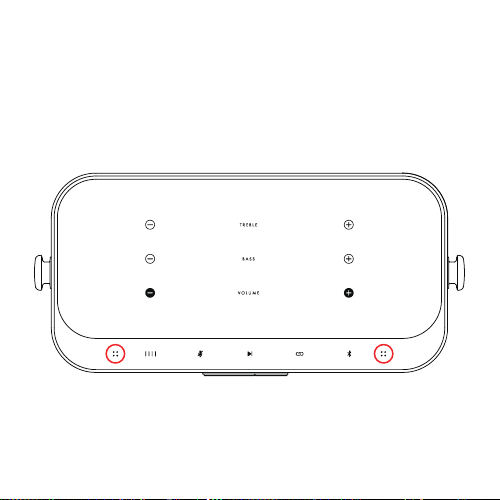
CONTROL INTERFACE
LED BATTERY
LEVEL INDICATOR
4 bars will be lit when
unit is fully charged. The
LED indicator will pulse
gently during charging.
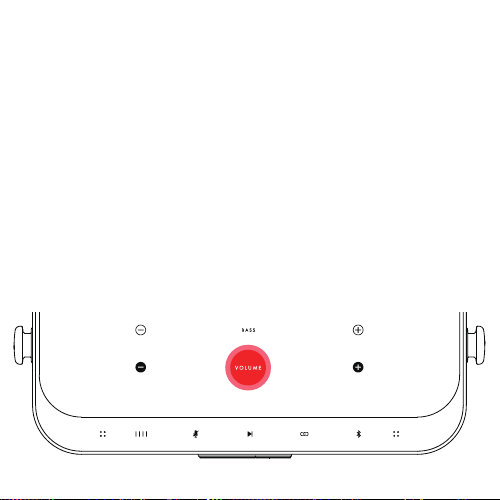
MUTE
Tap to mute when using
RIFF as a speakerphone
PLAY/PAUSE
Tap to pause audio,
tap again to play
PARTY MODE
Tap to sync other RIFF
speakers together.
(see Party Mode section for details).
BLUETOOTH
Tap to pair Fender RIFF
with Bluetooth streaming
source. (see Bluetooth pairing
for details).
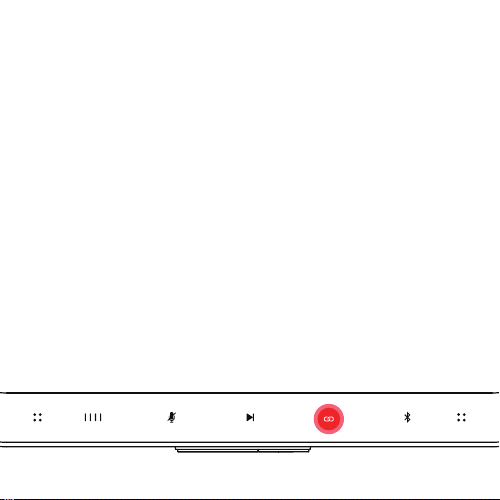
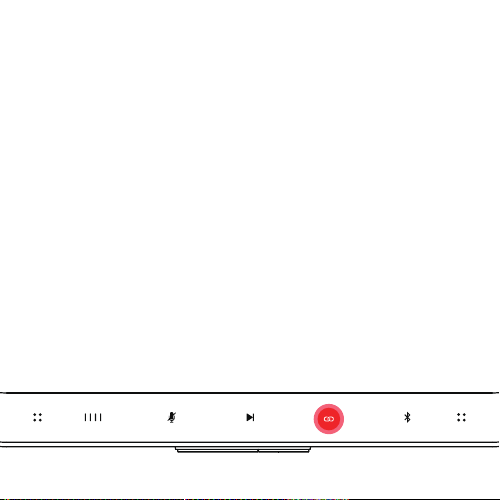
PARTY MODE
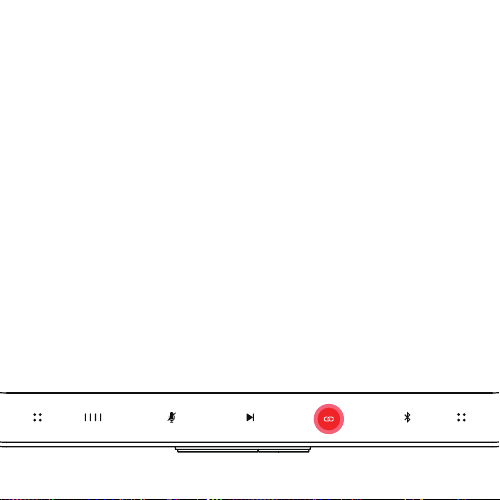
Broadcast Unit: Tap the Link symbol on the top panel to activate
party mode.
Receiver Unit: Turn on the unit, then touch and hold the link symbol
on the top panel for 3 seconds.
If pairing more than 1 Receiver unit, repeat the process to connect to
Broadcast unit before starting audio streaming to Receiver units.
An audio cue will play when unit(s) are successfully connected.
To exit party mode:
• Unlink all - Touch and hold the Link symbol on Broadcast unit for
3 seconds.
• Unlink Receiver – Touch and hold the Link symbol on the
receiver unit for 3 seconds.
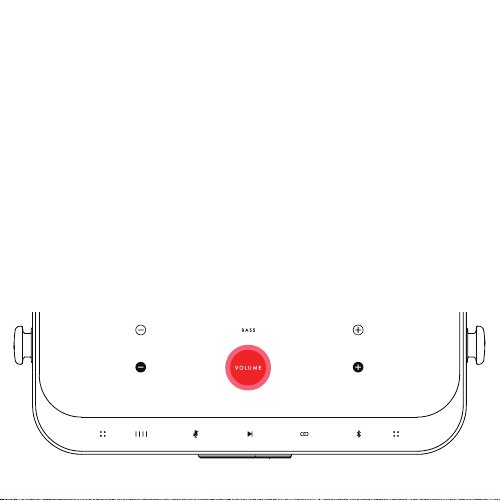
GUITAR MODE
Standard: You can play your guitar through the RIFF with a standard
guitar cable (1/4” plug).
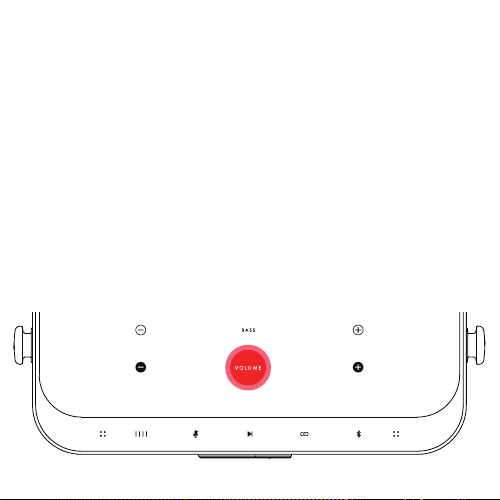
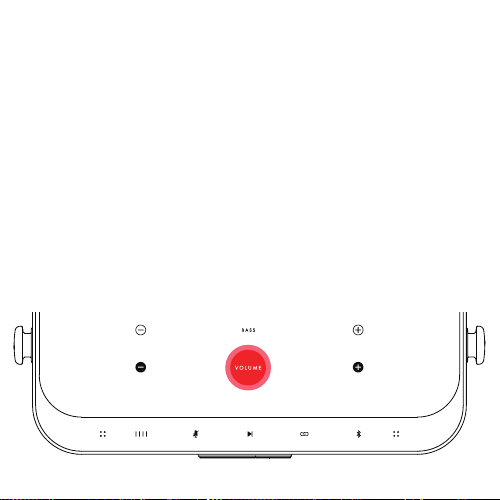
High Gain: If your guitar volume is too low (i.e. if your guitar is
passive), touch and hold “Volume” for 3 seconds to activate high
gain mode. Touch and hold “Volume” for 3 seconds to exit high gain
mode.
Playing along with music: Jam along with your tunes easily; with
your guitar plugged in, you can pair with your Bluetooth device as
per normal. Volume of the Bluetooth signal (e.g. music) is controlled
via the Bluetooth device. Guitar volume is controlled via the RIFF
touch panel.

AUTO-EQ (ROOM CORRECTION)
To begin the Auto-EQ, please launch the Riff app and select the
Auto-EQ function.
Step 1: Hold your device with the mic pointing directly at the speaker,
about 12 in (30 cm) from the front of the speaker and tap the “Start
Tuning” button.
Step 2: Once step 1 is complete, go to your usual listening position,
hold the device with the mic pointing to the speaker and tap the “Start
Tuning” button again.
Step 3: Tuning is now complete and the app will ask you to select
your preferred Bass and Treble EQ profile. Once selected, the Auto-
EQ process is complete.
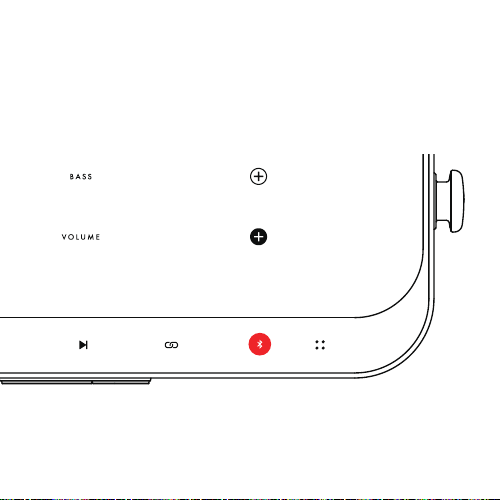
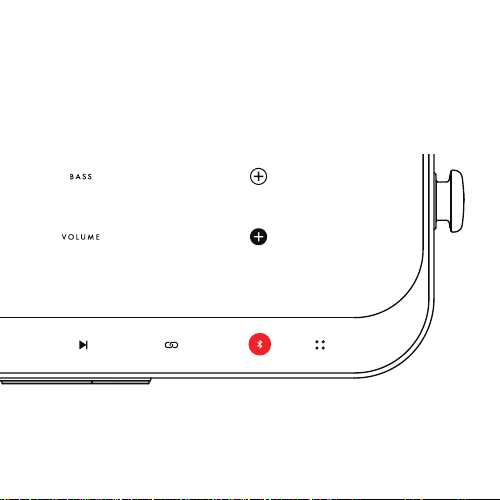
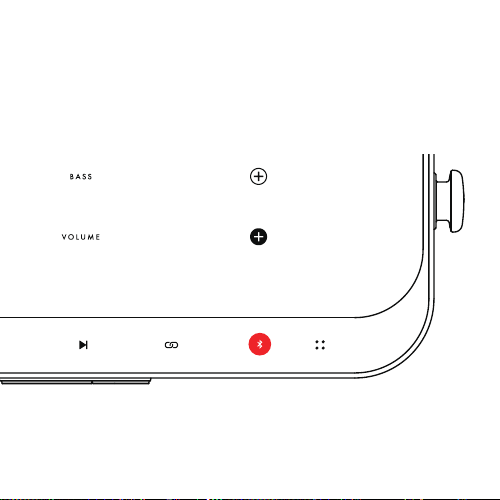
MULTI-POINT
Tap the Bluetooth button to connect with first source. Tap the Bluetooth
button again to connect with the second source. Both sources are now
connect to the RIFF.
VOICE CALLS
RIFF has 2 microphones that allows it to function as a speakerphone.

RIFF APP
The RIFF app has these functions:
1. Tone adjustment - slide to adjust Volume, Treble and Bass levels.
2. Guitar mix adjustment - slide to adjust balance of volume
between Guitar and Bluetooth signals.
3. Auto-EQ – Auto adjusts the overall EQ of the RIFF to suit the
acoustics of the room that it is placed in.
4. Firmware update – Allows for “Over The Air” (OTA) update of
RIFF firmware

同梱品
•RIFF Bluetooth スピーカー
•USB-C ケーブル
本機の電源をオン/オフ
本体後部の電源ボタンを押して本機の電源をオン/オフします。
Bluetoothペアリング
トップパネルのBluetoothボタンを タップすると、本体のインジケーターが青く
点滅します。お使いのスマートデバイスのBluetooth設定を起動させ、「Fender RIFF」
を選択してください。ペアリングが完了すると、本体のインジケーターが 青く点
灯します。
ボリュームコントロール
音量を上げるには、ボリュームの「+」ボタンをタップするか、タッチパネルの上に
指をかざし右方向へスライドしてください。最大音量レベに達すると、トーン音が
鳴ります。
音量を下げるには、ボリュームの「-」ボタンをタップするか、タッチパネルの上に
指をかざし左方向へスライドしてください。最小音量レベルに達すると、トーン音が
鳴ります。
EQコントロール
Bass / Treble EQレベルを上げるには、EQの「+」ボタンをタップするか、タッチパ
ネルの上に指をかざし右方向へスライドしてください。最大EQレベルに達すると、
トーン音が鳴ります。
Bass / Treble EQレベルを下げるには、EQの「-」ボタンをタップするか、タッチパ
ネルの上に指をかざし右方向へスライドしてください。最大EQレベルに達すると、
トーン音が鳴ります。
Bass / Treble EQレベルをリセットする場合は、Treble と Bassボタンを3秒間押してく
ださい。リセットが成功した場合はトーン音が鳴ります。
CONTROL INTERFACE
LED バッテリー レベル インジケーター –
ユニットが完全に充電されると、4 つ全て点灯します。
充電中は LED インジケータがゆっくり点滅します。
MUTE
ミュート – RIFF をスピーカーフォンとして
使用している場合、タップしてミュートします。
再生/一時停止
タップして一時停止し、
もう一度タップして再生
します。
パーティーモード
タップして他の RIFF スピーカーを
同期します (詳細については、パー
ティー モードのセクションを
参照ください)。
BLUETOOTH
タップして、RIFFとお使
いのスマートデバイスを
ペアリングします
(詳細については、Bluetooth
ペアリングセクションを参照
ください)。
パーティモード
Agent unit:(1台目)お使いのスマートデバイスと既にペアリングされた製品のトップ
パネルのパーティモードボタンを タップするとパーティモードになります。
Client unit: 2台目は電源ボタンを押してパーティモードボタンを約3秒間押してく
ださい。パーティモード接続が完了すると、トーン音が鳴ります。
2台目以降のClient UnitをAgent Unitにペアリングする場合は、同様に電源ボタンを押
してパーティモードボタンを約3秒間押してください。パーティモード接続が完了すると、
トーン音が鳴ります。
パーティモードを解除する場合
全台数を解除 - Agent unit(1台目)のLinkボタンを約3秒間長押ししてください。
1台だけ解除-Client unit(2台目以降)のLinkボタンを約3秒間長押ししてください。
※Agent unitだけの解除は出来ません。
Standard: ギターケーブルを繋げるとギターアンプとしてお使いいただけます。
ギターモード
High Gain: ギターのボリュームが小さい場合は、Volume ボタンを3秒間長押し
High gainモードにしてください。High gainモードをキャンセルする際も、
Volume ボタンを3秒間長押してください。
セッションモード: 曲に合わせて簡単にギターの演奏を楽しめます。Bluetooth
デバイスの音量は、お使いのスマートデバイスでコントロールし、ギターのボ
リュームはスピーカーのタッチパネルでコントロールします。

AUTO-EQ (ROOM CORRECTION)
Fender Audioアプリを立ち上げAuto-EQを選択してください。
Step 1: お手持ちのスマートデバイス(マイク機能をONにして)を持って、
スピーカーから30cm程度正面でStart Tuningボタンをタップください。
Step 2: Step1完了後、通常のリスニングポジションでお手持ちのスマート
デバイス(マイク機能をONにして)を持って、Start Tuningボタンを再度タ
ップください。
Step 3: あなたのお好みのBass/Treble EQレベルをFender Audioアプリに登録
して設定完了です。
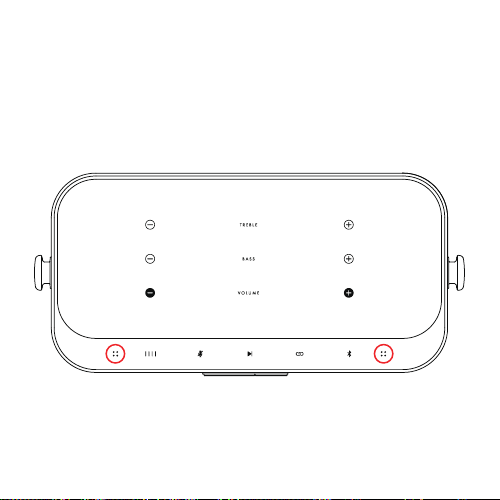
マルチポイント
最大2台が同時に接続可能です。
2台目も1台目と同様、トップパネルのBluetoothボタンを タップしペ
アリングしてください。
ボイスコール
RIFFはスピーカーフォンとしてもお使いいただけます。

RIFF APP
RIFFアプリには下記機能があります。
1.トーン設定:ボリューム、Treble、Bassレベルを設定できます。
2. Guitar MIX:ギターとRIFFのサウンドのバランスを調整できます。
3. Auto-EQ:RIFFが設置されている部屋の環境に準じて最適なサウ
ンドを設定します。
4. Firmware update:ファームウェアアップデートを設定できます。

구성품
•RIFF 블루투스 스피커
•USB C 케이블
전원 켜기/끄기
스피커 뒤에 위치한 전원버튼을 눌러 전원을 켜거나 끄실 수 있습니다.
블루투스 페어링
윗면부에 위치한 블루투스 버튼을 눌러 페어링을 시작하세요.페어링 시작 시
블루투스 표시가 파란색으로 깜빡입니다..
블루투스 페어링을 할 장치의 블루투스 세팅에 접근 후 “Fender RIFF”를 선택합니
다. 페어링 완료 후 블루투스 LED가 파란색을 유지합니다.
볼륨컨트롤
볼륨을 높이려면 터치 패널을 오른쪽으로 손가락으로 밀어주세요. 미세 조절하려
면, “+” 기호를 누릅니다. 최대 레벨에 도달하면 오디오 신호가 재생됩니다.
볼륨을 줄이려면 터치 패널을 손가락으로 왼쪽으로 밀어주세요. 미세 조절하려면,
“-“ 기호를 누릅니다. 최소 레벨에 도달하면 오디오 신호가 재생됩니다.
이퀼라이져 컨트롤(베이스/트레블)
Bass/Treble EQ를 높이려면 터치 패널을 오른쪽으로 손가락으로 밀어주세요. 미세 조
절하려면, “+” 기호를 누릅니다. 최대 레벨에 도달하면 오디오 신호가 재생됩니다.
Bass/Treble EQ를 낮추려면 터치 패널에서 손가락을 왼쪽으로 밀어주세요. 미세 조절
하려면, “-“ 기호를 누릅니다. 최소 레벨에 도달하면 오디오 신호가 재생됩니다.
Bass/Treble을 중간으로 재설정하려면 Treble 또는 Bass 글씨를 3초 동안 길게 누릅니
다. 리셋이 진행되면 오디오 신호가 재생됩니다.
컨트롤 인터페이스
LED 배터리 수명 표시
장치가 완전히 충전되면 4
개의 막대가 켜집니다.
충전 중에는 LED 표시등
이 깜박입니다.
뮤트
RIFF를 스피커폰으로
사용할 때 탭하여 음소거
모드로 전환합니다.
재생/일시 정지
오디오를 일시 중지하려면
탭하고 재생하려면 다시
탭하십시오.
파티모드
탭하여 다른 RIFF 스피커를
함께 동기화합니다(자세한
내용은 아래 파티 모드 섹션 참조).
블루투스
Fender RIFF를
블루투스 스트리밍
소스와 페어링하려면
탭하세요(자세한 내용은
블루투스 페어링 참조).
파티모드
에이전트(송신)유닛 : 상단패널의 링크 기호를 눌러 파티모드를 활성화합니다.
클라이언트(수신)유닛 : 장치를 킨 다음 상단 패널에 있는 링크 기호를3초간 길게
누릅니다.
둘 이상의 클라이언트(수신)유닛를 에이전트(송신)장치에 페어링하는 경우 에이전트
(송신)유닛에 오디오 스트리밍을 시작하기 전에 더 많은 클라이언트(수신)유닛을
에이전트(송신)장치에 연결하는 프로세스를 반복하십시오.
에이전트와 클라이언트 유닛이 성공적으로 연결되면 오디오 신호가 재생됩니다
파티모드 종료
연결된 모든 기기 해제 – 에이전트 유닛의 링크 기호를3초간 길게 누릅니다.
클라이언트 해제 – 클리아언트 유닛의 링크 기호를3초간 길게 눌러 연결을 해제합
니다.
스탠다드: 표준 기타 케이블(1/4" 플러그)로RIFF를 통해 기타를 연주할 수 있습
니다.
기타모드
하이 게인: 기타 볼륨이 너무 낮은 경우(기타가 패시브인 경우) "볼륨"을3초 동안
길게 터치하여 하이 게인 모드를 활성화하십시오. 하이 게인 모드를 종료하려면
"볼륨"을3초 동안 길게 누릅니다.
음악에 맞춰 연주하기: 음악에 맞춰 쉽게 잼하세요. 기타를 연결한 상태에서 평소
처럼 블루투스 장치와 페어링할 수 있습니다. Bluetooth 신호(예: 음악)의 볼륨은
Bluetooth 장치를 통해 제어됩니다. 기타 볼륨은 RIFF 터치 패널을 통해 제어됩니다.

오토 이퀄라이저(룸 보정)
Auto-EQ를 시작하려면 Riff 앱을 실행하고 Auto-EQ 기능을 선택하십시오.
1단계: 마이크가 스피커 전면에서 약 30cm(12인치) 떨어진 스피커를 직
접 가리키도록 기기를 잡고 튜닝 시작 버튼을 탭합니다.
2단계: 1단계가 완료되면 일반적인 청취 위치로 이동하여 마이크가 스
피커를 향하도록 장치를 잡고 튜닝 시작 버튼을 다시 누릅니다.
3단계: 이제 튜닝이 완료되고 앱에서 선호하는 Bass 및 Treble EQ 프로필
을 선택하라는 메시지가 표시됩니다. 선택하면 Auto-EQ 프로세스가 완
료됩니다.
멀티포인트
블루투스 버튼을 눌러 첫 번째 소스에 연결합니다. 두 번째 소스
에 연결하려면 블루투스 버튼을 다시 누릅니다. 이제 두 소스가
모두 RIFF에 연결됩니다.
음성통화
RIFF에는 2개의 마이크가 내장되어 스피커폰으로 통화할 수 있습니다.

RIFF 애플리케이션
RIFF 앱에는 다음과 같은 기능이 있습니다.
1. 톤 조정 - 슬라이드하여 볼륨, 고음 및 저음 레벨을 조정합니다.
2. 기타 믹스 조정 - 슬라이드하여 기타와 블루투스 신호 간의 볼륨
밸런스를 조정합니다.
3. Auto-EQ - RIFF의 전체 EQ를 배치된 방의 음향에 맞게 자동으로
조정합니다.
4. 펌웨어 업데이트 - RIFF 펌웨어의 "OTA(Over The Air)" 업데이트를
허용합니다.

包裝內含
•Riff藍芽喇叭
•USB-C
充電線
開啟/關閉
請按機體後方的電源開關以開啟/關閉您的RIFF
藍芽配對
請按下上方面板的”BLUETOOTH”按鍵,以開始藍芽配對,藍芽圖示會開始閃爍藍燈。
在您的藍芽音訊裝置上,進入藍芽設定,並選擇“Fender RIFF”。當配對成功後,藍芽
圖示會變成恆亮的藍燈。
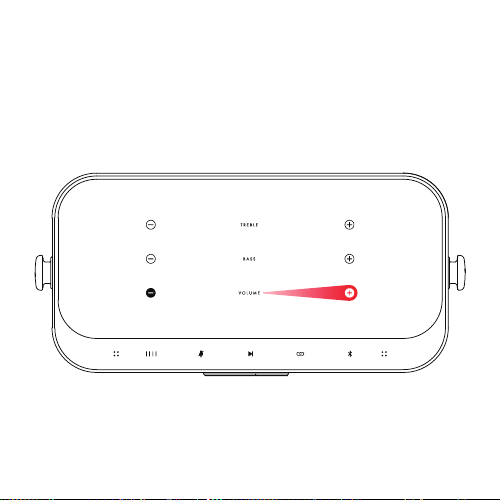
音量控制
提高音量 – 請將您的手指在觸控面板上往右方滑動,或按下面板上的”+”圖示。當音量
提到最高時,RIFF會發出提示音。
降低音量 – 請將您的手指在觸控面板上往左方滑動,或按下面板上的”-”圖示。當音量
降到最低時,RIFF會發出提示音。
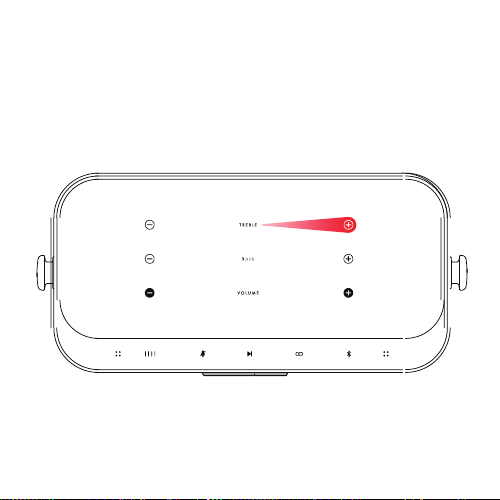
EQ控制(低頻/高頻)
增加低頻/高頻–請將您的手指在觸控面板上往右方滑動,或按下面板上的”+”圖示。
當增加到最高時,RIFF會發出提示音。
降低低頻/高頻–請將您的手指在觸控面板上往左方滑動,或按下面板上的”-”圖示。
當降到最低時,RIFF會發出提示音。
重設低頻/高頻–按住Treble 或Bass文字3秒鐘,當成功時,RIFF會發出提示音。
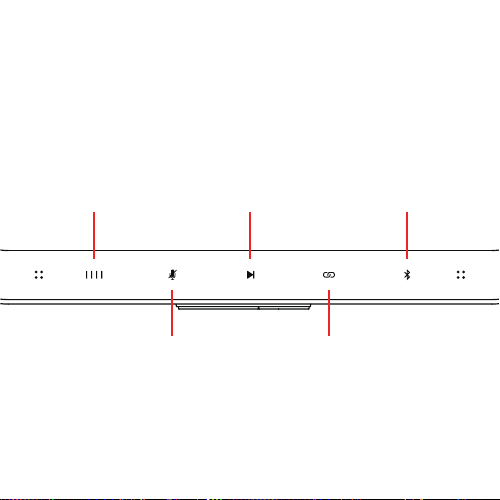
控制介面
LED電池餘量指示燈
當電池充滿時,
4個指示燈會全部亮起。
在充電時,
電池指示燈會輕微的閃滅。
MUTE
當使用RIFF作為電話免持揚聲器時,
請按下Mute開關
PLAY/PAUSE
按下以暫停音樂撥放,
再按一次可繼續撥放
PARTY MODE
按下以將您的RIFF同步
連結到另一台的RIFF
(詳細使用說明請見派對模式操作說明)
BLUETOOTH
按下以將您的RIFF與
藍芽音訊撥放設備配對
(詳細使用說明請見藍芽配對操作說明)
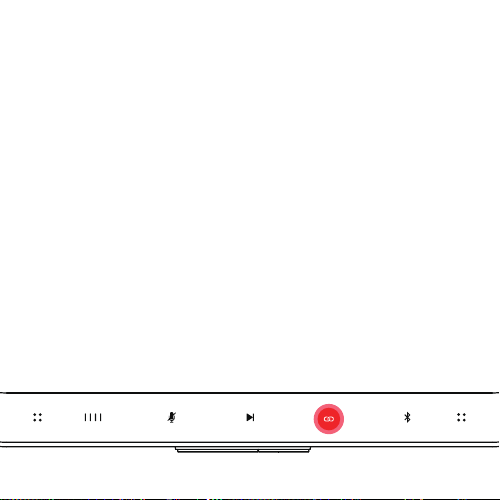
派對模式:
Broadcast Unit: 先於Agent Unit,也就是與藍芽音訊設備配對的RIFF之上方面板,按下
”LINK”的圖示,以啟動派對模式連結。
Receiver Unit: 開啟您要連結的Client Unit,也就是接收訊號的另一台RIFF,再持續按住
LINK圖示約3秒鐘。
若您要連結超過1台的Client Unit,請於撥放音樂之前,重複上述操作以連接更多的
Client Units到Agent Unit。
當Agent Unit和Client Unit成功連結後,Riff會發出提示音。
停止派對模式:
• 全部停止–請按住Agent Unit上的Link圖示3秒鐘。
• 停止其中一台Client Unit的連結–請按住欲斷開連結的Client Unit上的Link圖示3
秒鐘。
吉他模式
標準模式: 您可以將您的吉他透過吉他導線(1/4”連接頭)連接至RIFF。
高增益模式: 若您發現吉他音量太低(如: 使用的吉他是被動式等),按住
”Volume”3秒鐘以啟動高增益模式。請再按住”Volume”3秒鐘以結束高增
益模式。
隨著音樂一起彈奏: 使用RIFF跟著音樂一起彈奏是一件很簡單的事。連
接您的吉他至RIFF後,正常地將RIFF和您的藍芽音訊設備配對既可。在
此連接方式下,音樂的音量將透過您的音訊設備來控制,而吉他的音
量會透過RIFF的觸控面板來調整。

自動EQ功能 (音場校正)
欲使用音場校正功能,請打開RIFF APP,選擇 Auto-EQ。
步驟1: 請將您的藍芽音訊設備麥克風,對準您的RIFF正面約30
公分處,然後按下APP中的Start Tuning按鍵。
步驟2: 完成步驟1後,請移動至您平常聆聽音樂的位置,將您
的藍芽音訊設備麥克風,對準您的RIFF正面,然後再次按下
APP中的Start Tuning按鍵。
步驟3: RIFF APP中會請您選擇喜歡的低頻和高頻設定,當選擇
完成後,音場校正設定完成。
多重音訊連接
按下Bluetooth圖示以配對您的第1組藍芽音訊設備,再按一次以配對您的
第2組藍芽音訊設備,現在2組藍芽音訊設備都已連結至您的RIFF了。
接聽電話
RIFF內建了2組麥克風,可做為免持揚聲器,供您接聽電話時使用。

RIFF APP
RIFF APP擁有以下的功能:
1. 音量/音色調整-滑動以調整RIFF的音量,高頻以及低頻。
2. 吉他/音樂音量調整-滑動以調整吉他及撥放音樂的音量平衡。
3. 音場校正-自動調整RIFF的音場以配合您的聆聽環境。
4. 韌體更新-透過“Over The Air” (OTA)以更新RIFF的韌體。

Important safety instructions
1. The equipment markings are located at the bottom of the product.
2. The internal battery is non-user replaceable. Attempting to replace the internal battery
may result in damage to the internal Battery protection system, creating unsafe system
conditions, and will void the warranty.
3: Throwing the battery into a fire or heating furnace, or mechanically squeezing or
cutting the battery may result in an explosion.
4: Explosion or leakage of flammable liquids or gases may result from exposing the
battery pack to extremely high temperatures.
5: Subjecting the battery pack to extremely low air pressure may result in an explosion or
leakage of flammable liquids or gases.
1: 用错误型号的电池组替换,可能会使安全防护失效。
2: 将电池组投人火中或加热炉中,或对电池组进行机械挤压或切制的处理可能
导致爆炸。
3: 将电池组放置在极高温度环境中,可能导致爆炸或泄漏可燃液体或气体。
4: 电池组承受极低气压,可能导致爆炸或泄漏可燃液体或气体。
5: 消费者若使用电源适配器供电,则应该购买配套使用获得CCC认证并满足标
准要求的电源适配器。
FCC
Any changes or modifications not expressly approved by the party responsible for
compliance could void the user's authority to operate the equipment. this equipment has
been tested and found to comply with the limits for a Class B digital device, pursuant to
part 15 of the FCC rules. these limits are designed to provide reasonable protection
against harmful interference in a residential installation. this equipment generates uses
and can radiate radio frequency energy and, if not installed and used in accordance
with the instructions, may cause harmful interference to radio communications. However,

Important safety instructions
there is no guarantee that interference will not occur in a particular installation. If this
equipment does cause harmful interference to radio or television reception, which can
be determined by turning the equipment off and on,the user is encouraged to try to
correct the interference by one or more of the following.
measures:
-Reorient or relocate the receiving antenna.
-Increase the separation between the equipment and receiver.
-Connect the equipment into an outlet on a circuit different from that to which the
receiveris connected.
-Consult the dealer or an experienced radio/TV technician for help. This equipment
complies with FCC radiation exposure limits set forth for an uncontrolled environment.
IC
This device contains licence-exempt transmitter(s)/receiver(s) that comply with
Innovation, science and economic development canada’s licence-exempt RSS(s).
Operation is subject to the following two conditions:
(1) This device may not cause interference.
(2) This device must accept any interference, including interference that may cause
undesired operation of the device.
Le présent appareil est conforme aux CNR d'Industrie Canada applicables aux
appareils radio exempts de licence. L'exploitation est autorisée aux deux conditions
suivantes:
(1) l'appareil ne doit pas produire de brouillage, et
(2) l'utilisateur de l'appareil doit accepter tout brouillage radioélectrique subi, mêmesi
lebrouillage est susceptible d'en compromettre le fonctionnemen.
This Class B digital apparatus complies with Canadian ICES-003.

Important safety instructions
Cet appareil numérique de la classe B est conforme à la norme NMB-003 du Canada.
CAN ICES-003 (B)/NMB-003(B)
This equipment complies with IC RSS-102 radiation exposure limits set forth for an
uncontrolled environment.
Cet équipement est conforme aux limites d’IC RSS-102 sur l’exposition aux radiations
qui sont déterminées pour un environnement non contrôlé.
This symbol means the product must not be discarded as household
waste, and should be delivered to an appropriate collection facility for
recycling. Proper disposal and recycling helps protect natural resources,
human health, and the environment. For more information on disposal and
recycling of this product, contact your local municipality, disposal service,
or the shop where you bought this product.
取得審驗證明之低功率射頻器材,非經核准,公司、商號或使用者均不得擅
自變更頻率、加大功率或變更原設計之特性及功能。低功率射頻器材之使用
不得影響飛航安全及干擾合法通信;經發現有干擾現象時,應立即停用,並
改善至無干擾時方得繼續使用。前述合法通信,指依電信管理法規定作業之
無線電通信。低功率射頻器材須忍受合法通信或工業、科學及醫療用電波輻
射性電機設備之干擾。
BSMI&ROHS
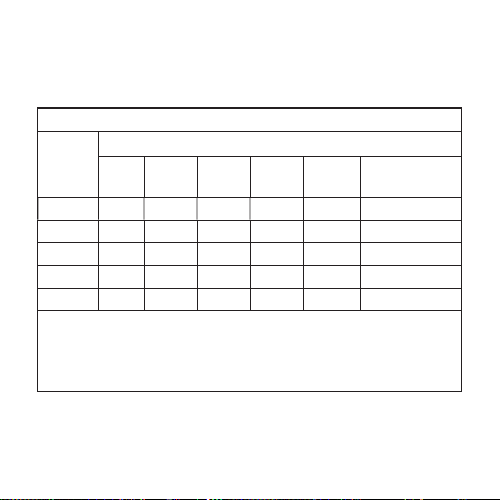
設備名稱:藍芽喇叭, 型號(型式): RIFF
單元Unit
限用物質及其化學符號
鉛Lead
(Pb)
汞Mercury
(Hg)
鎘Cadmium
(Cd)
六價鉻
Hexavalent
chromium
(Cr
+6
)
多溴聯苯
Polybrominated
biphenyls
(PBB)
多溴二苯醚
Polybrominated diphenyl
ethers
(PBDE)
喇叭 ○ ○ ○ ○ ○ ○
印製電路板 - ○ ○ ○ ○ ○
箱體 ○ ○ ○ ○ ○ ○
線材 ○ ○ ○ ○ ○ ○
提带 - ○ ○ ○ ○ ○
備考1.〝超出0.1 wt %〞及〝超出0.01 wt %〞係指限用物質之百分比含量超出百分比含量基準值。
Note 1:“Exceeding 0.1 wt %” and “exceeding 0.01 wt %” indicate that the percentage content of the restricted substanceexceeds the reference
percentage value of presence condition.
備考2.〝○〞係指該項限用物質之百分比含量未超出百分比含量基準值。
Note 2:“○” indicates that the percentage content of the restricted substancedoes not exceed the percentage of reference value of presence.
備考3.〝-〞係指該項限用物質為排除項目。
Note 3:The “−” indicates that the restricted substance corresponds to the exemption.
Equipment name
Type designa�on (Type)
Restricted substances and its chemical symbols
Bluetooth
Frequency Range Max. RF PowerType
2402 MHz ~ 2480 MHz 12.41dBm

Produced under license from Fender Musical Instruments
Corporation by Generation-S Private Limited.
EU importer
Pocketmedia AG
Address: Grindelstrasse 17 8303 Bassersdorf Switzerland
T305001158000