I N
R U C T I 0 N S
ZIG- ZAG SEWING MACHINE
52880
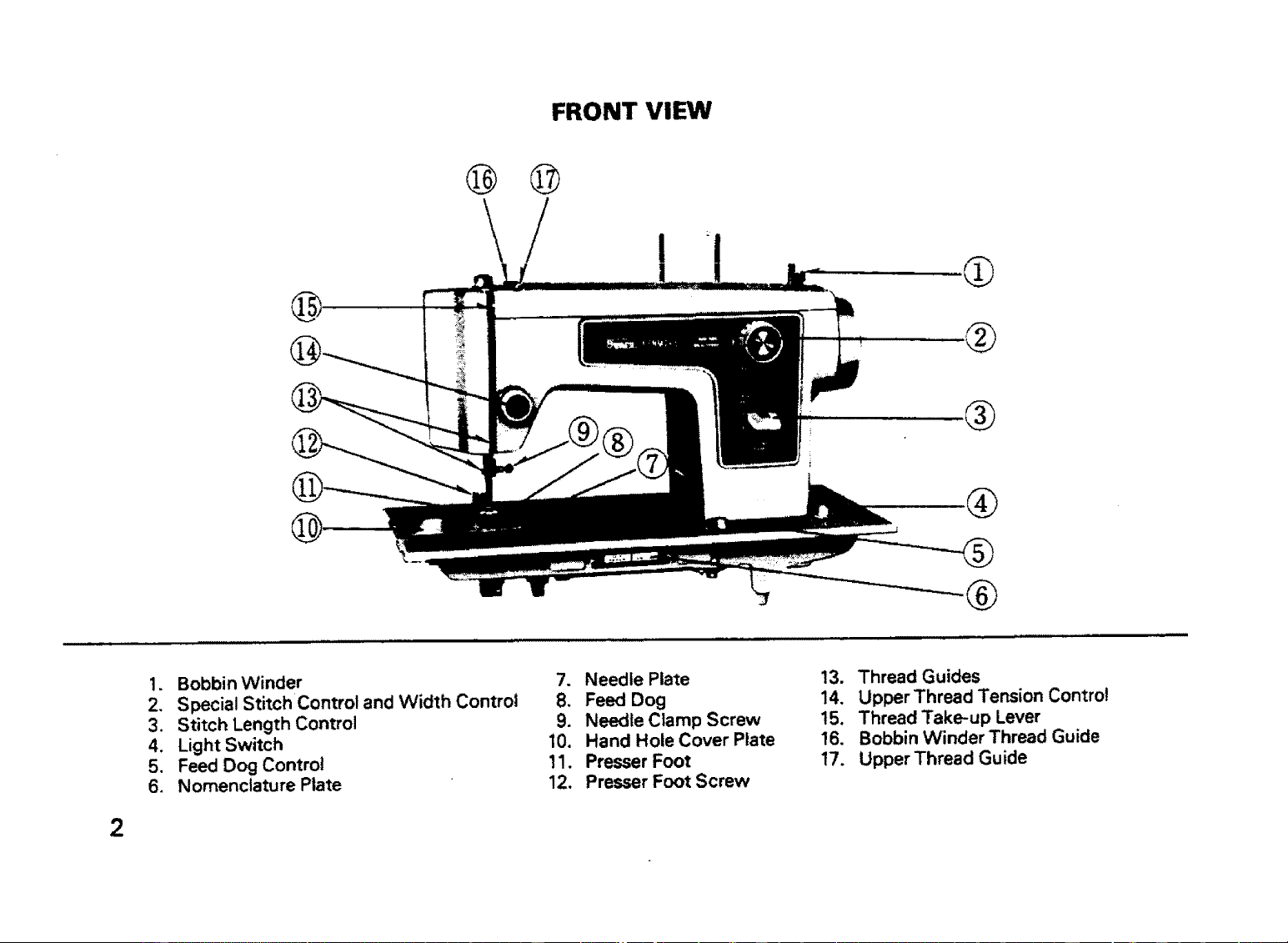
FRONT VIEW
@
@ ©
!
I
®
®
-®
1. Bobbin Winder
2. Special Stitch Control and Width Control
3. Stitch Length Control
4. Light Switch
5. Feed Dog Control
6. Nomenclature Plate
7. Needle Plate
8. Feed Dog
9. Needle Clamp Screw
10. Hand Hole Cover Plate
11. Presser Foot
12, Presser Foot Screw
13. Thread Guides
14. Upper Thread Tension Control
15. Thread Take-up Lever
16. Bobbin Winder Thread Guide
17. Upper Thread Guide
2
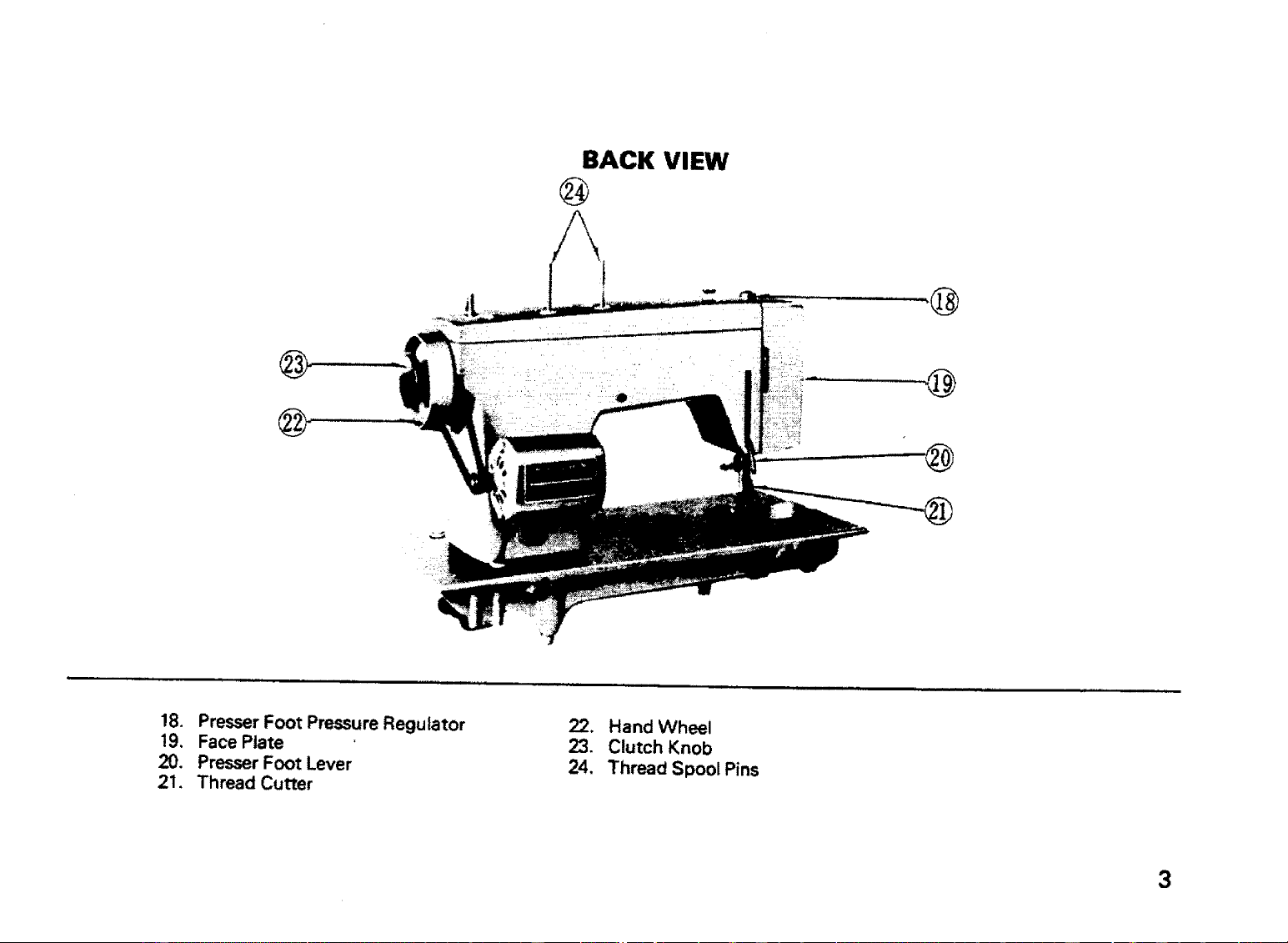
BACK VIEW
@
@
@
18. Presser Foot Pressure Regulator
19. Face Plate
20. Presser Foot Lever
21, Thread Cutter
22. Hand Wheel
23. Clutch Knob
24, Thread Spool Pins
3
e
o
4
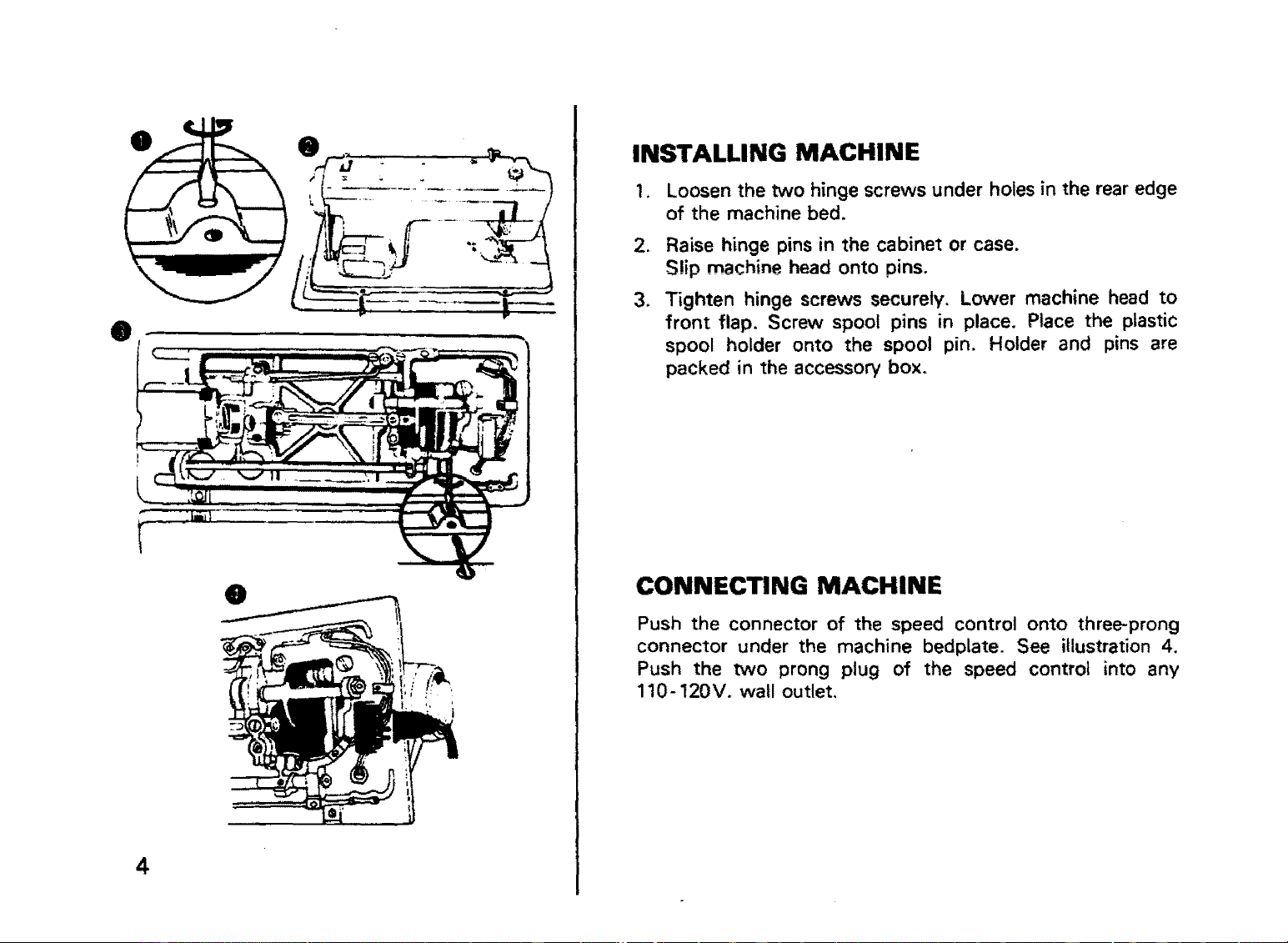
INSTALLING MACHINE
1, Loosen the two hinge screws under holes in the rear edge
of the machine bed.
2, Raise hinge pins in the cabinet or case.
S!ip machine head onto pins.
3. Tighten hinge screws securely. Lower machine head to
front flap. Screw spool pins in place. Place the plastic
spool holder onto the spool pin. Holder and pins are
packed in the accessory box.
CONNECTING MACHINE
Push the connector of the speed control onto three-prong
connector under the machine bedplate. See illustration 4.
Push the two prong plug of the speed control into any
110-120V. wall outlet,
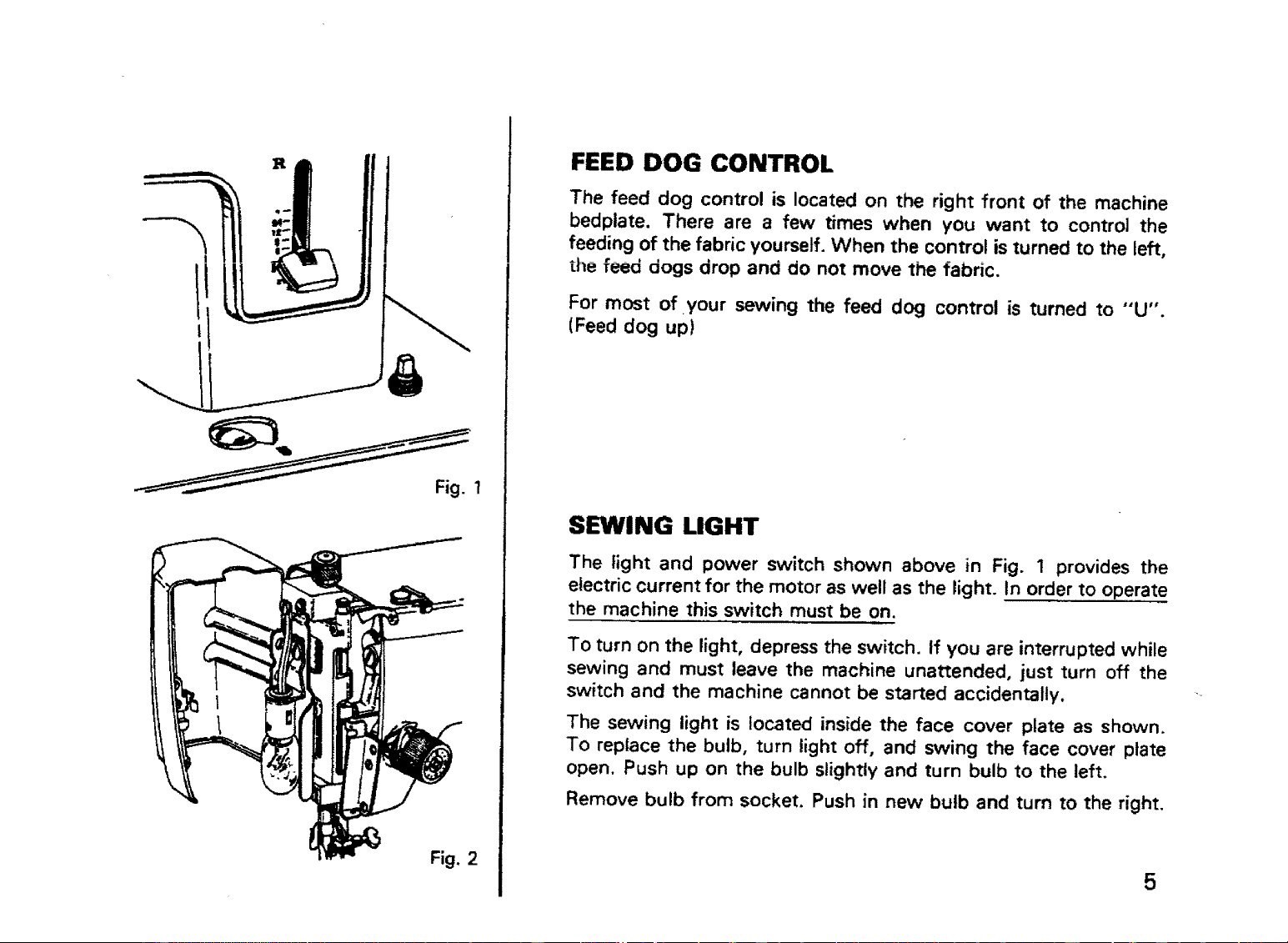
Fig.1
FEED DOG CONTROL
The feed dog control is located on the right front of the machine
bedplate. There are a few times when you want to control the
feeding of the fabric yourself. When the control is turned to the left,
the feed dogs drop and do not move the fabric.
For most of your sewing the feed dog control is turned to "'U".
(Feed dog up)
SEWING LIGHT
The light and power switch shown above in Fig. 1 provides the
electric current for the motor as well as the light. In order to operate
the machine this switch must be on.
To turn on the light, depress the switch. If you are interrupted while
sewing and must leave the machine unattended, just turn off the
switch and the machine cannot be started accidentally.
The sewing light is located inside the face cover plate as shown.
To replace the bulb, turn light off, and swing the face cover plate
open. Push up on the bulb slightly and turn bulb to the left.
Remove bulb from socket. Push in new bulb and turn to the right.
Fig. 2
5
NEEDLES
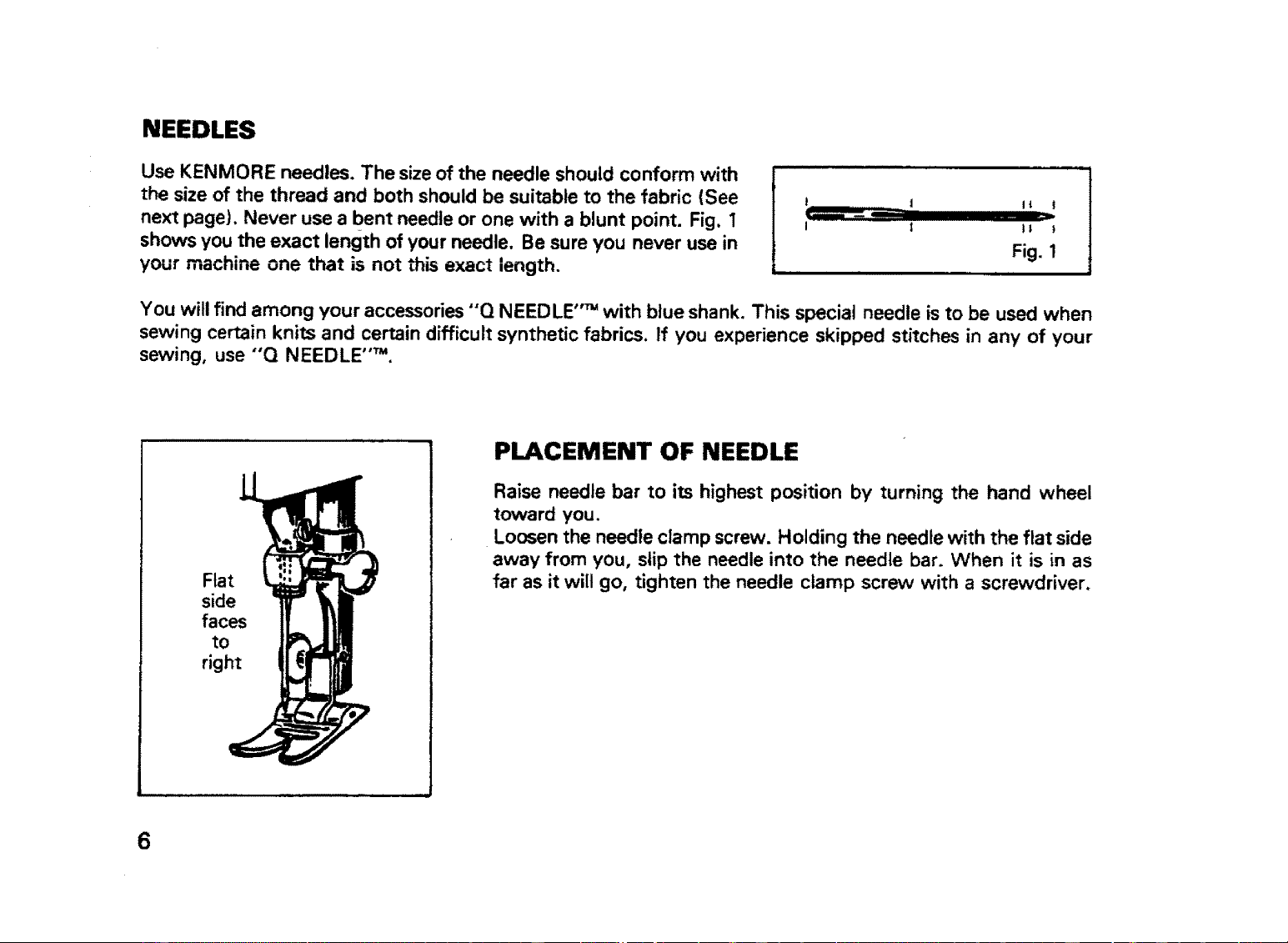
Use KENMORE needles. The size of the needle should conform with
the size of the thread and both should be suitable to the fabric (See
next page). Never use a bent needle or one with a blunt point. Fig. 1
shows you the exact length of your needle. Be sure you never use in
your machine one that is not this exact length.
t | It |
I l It I
Fig. 1
You will find among your accessories "'Q NEEDLE ''_ with blue shank. This special needle is to be used when
sewing certain knits and certain difficult synthetic fabrics. If you experience skipped stitches in any of your
sewing, use "'Q NEEDLE ''T".
Flat
side
faces
to
right
PLACEMENT OF NEEDLE
Raise needle bar to its highest position by turning the hand wheel
toward you.
Loosen the needle clamp screw. Holding the needle with the flat side
away from you, slip the needle into the needle bar. When it is in as
far as it will go, tighten the needle clamp screw with a screwdriver.
6
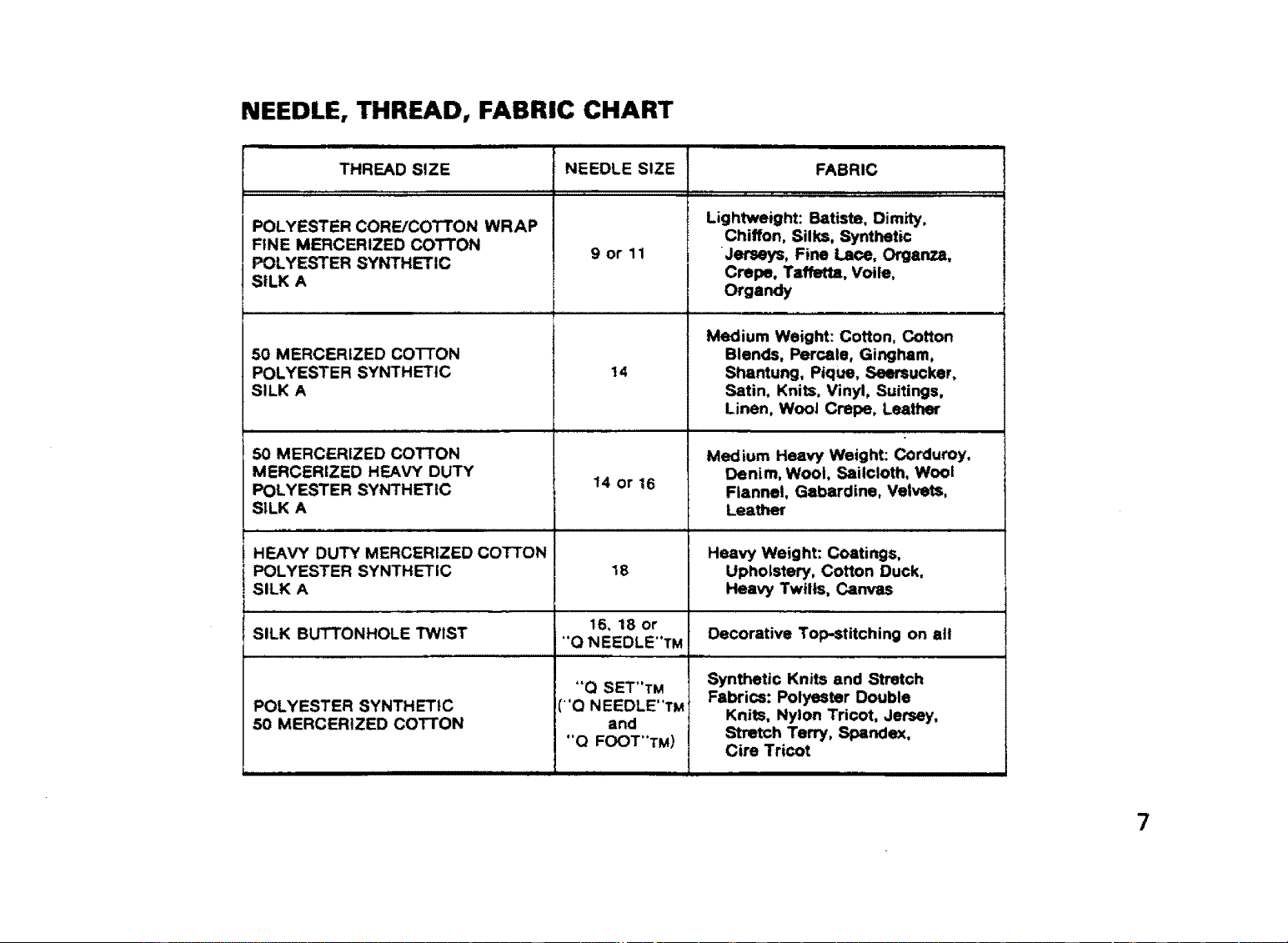
NEEDLE, THREAD, FABRIC CHART
THREAD SIZE
POLYESTER CORE/COTTON WRAP
FINE MERCERIZED COTTON
POLYESTER SYNTHETIC
SILK A
50 MERCERIZED COTTON
POLYESTER SYNTHETIC
SILK A
50 MERCERIZED COTTON
MERCERIZED HEAVY DUTY
POLYESTER sYhrTHETIC
SILK A
NEEDLE SIZE
,, ,,,,, ,,,,,,
9or 1!
t4
14 or 16
FABRIC
Lightweight: Batiste, Dimity,
Chiffon, Silks, Synthetic
Jerseys, Fine Lace, Organza,
Crepe. Taffetta, Voile,
Organdy
Medium Weight: Cotton, Cotton
Blends, Percale, Gingham,
Shantung, Pique, Seersucker,
Satin, Knits. Vinyl, Suitings,
Linen, Wool Crepe, Leather
Medium Heavy Weight: Corduroy,
Denim, Wool, Sailcloth, Wool
Flannel, Gabardine, Velvets,
Leather
HF_AVY DUTY MERCERIZED COTTON Heavy Weight: Coatings,
POLYESTER SYNTHETIC 18 Upholstery, Cotton Duck.
SILK A Heavy Twills, Canvas
16, 18 or
SILK BUTTONHOLE TWIST "Q NEEDLE"TM Decorative Top-stitching on all
ilUll lUUllllll i
POLYESTER SYNTHETIC
50 MERCERIZED COTTON
"Q SET"TM
("Q NEEDLE'TM
and
"Q FOOT"TM)
Synthetic Knits and Stretch
Fabrics: Polyester Double
Knits, Nylon Tricot, Jersey,
Stretch Terry, Sl_ndex,
Cire Tricot
7
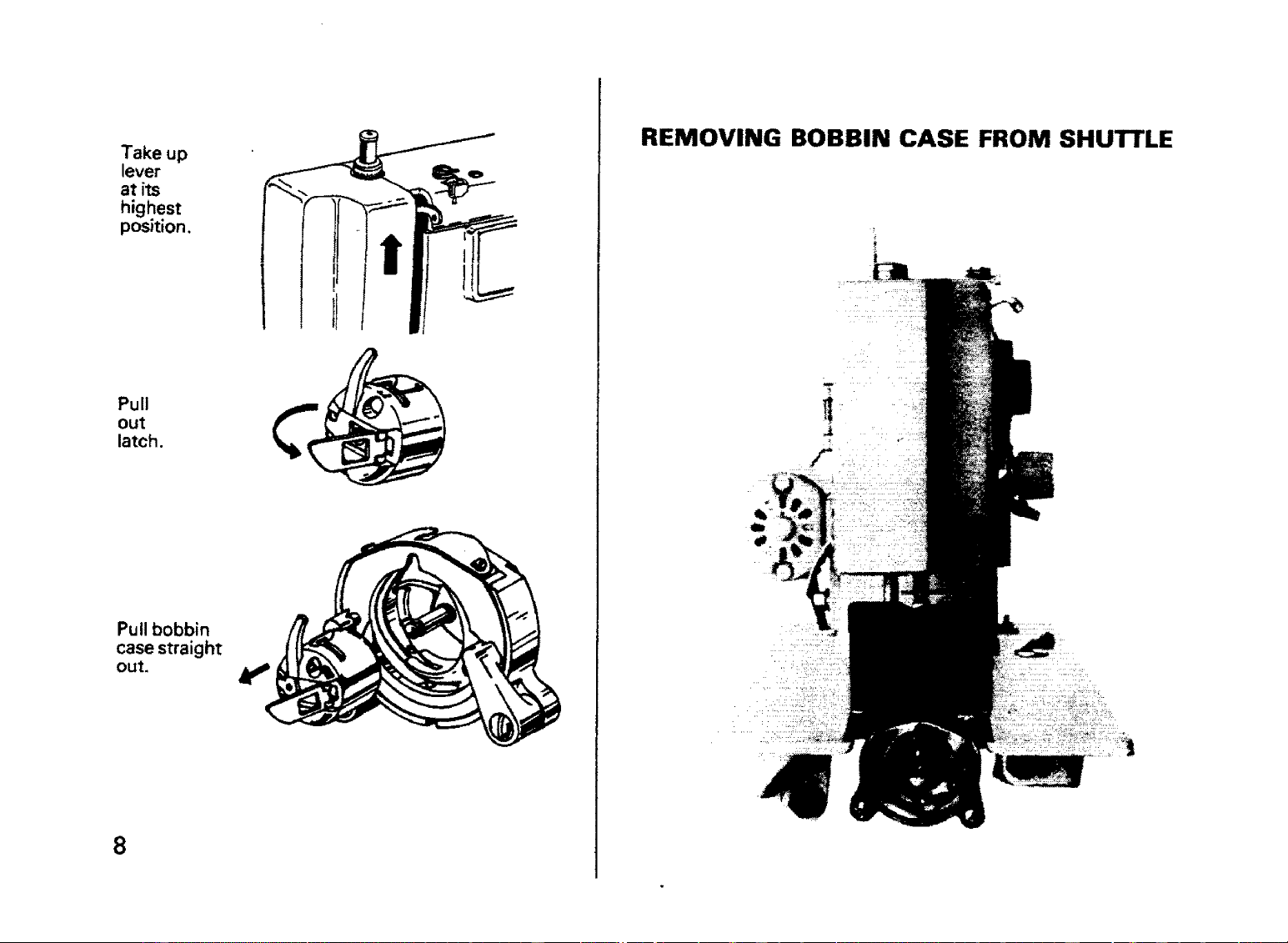
Take up
lever
at its
highest
position.
Pull
out
latch.
Pullbobbin
case straight
out.
8
_J
I I l! tt'_r _
I l't
REMOVING BOBBIN CASE FROM SHUTTLE
O
O
@
@
@
O
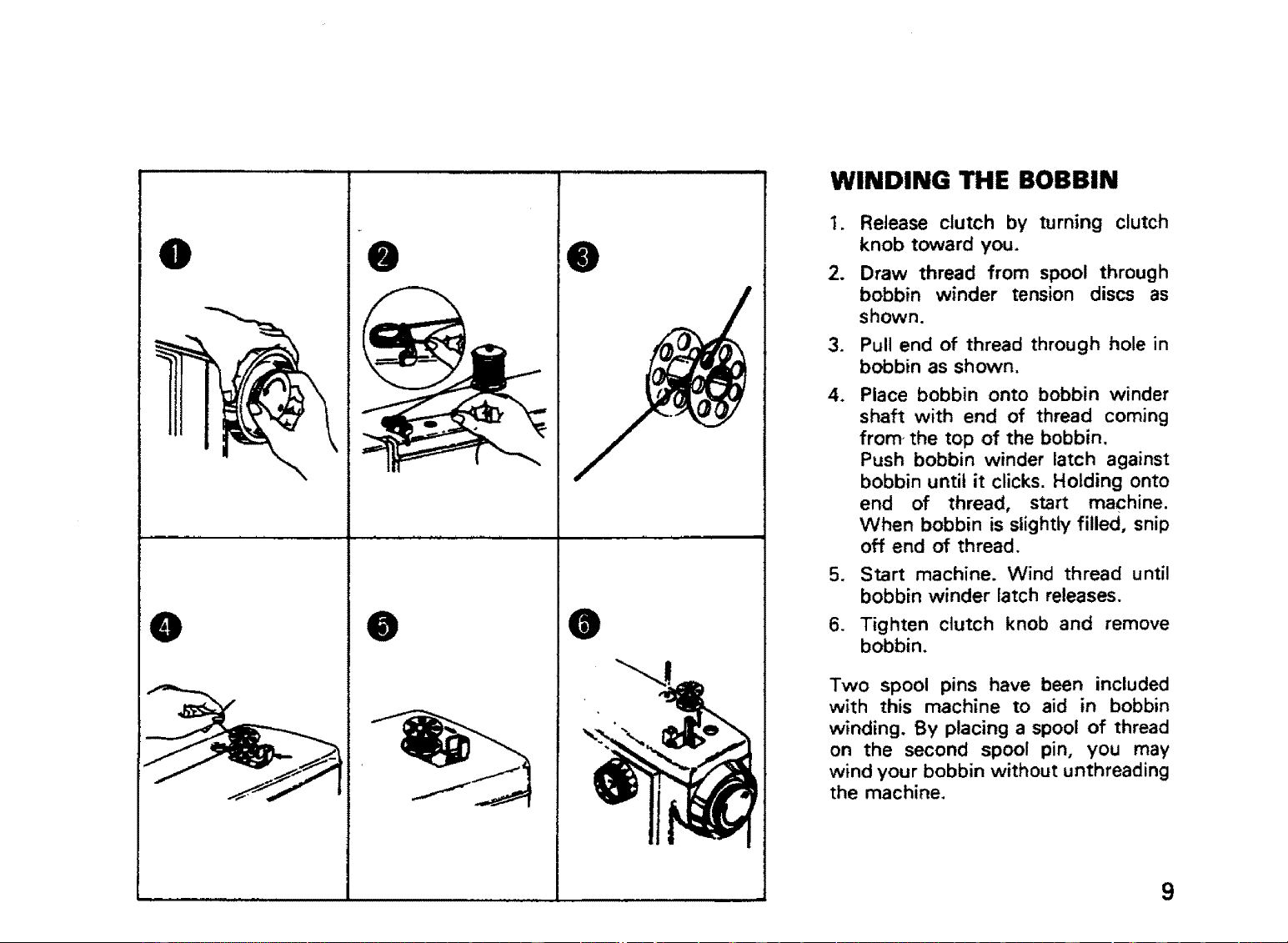
WINDING THE BOBBIN
1. Release clutch by turning clutch
knob toward you.
2. Draw thread from spool through
bobbin winder tension discs as
shown.
3. Pull end of thread through hole in
bobbin as shown.
4. Place bobbin onto bobbin winder
shaft with end of thread coming
from-the top of the bobbin.
Push bobbin winder latch against
bobbin until it clicks. Holding onto
end of thread, start machine.
When bobbin is slightly filled, snip
off end of thread.
5. Start machine. Wind thread until
bobbin winder latch releases.
6. Tighten clutch knob and remove
bobbin.
Two spool pins have been included
with this machine to aid in bobbin
winding, By placing a spool of thread
on the second spool pin, you may
wind your bobbin without unthreading
the machine.
9
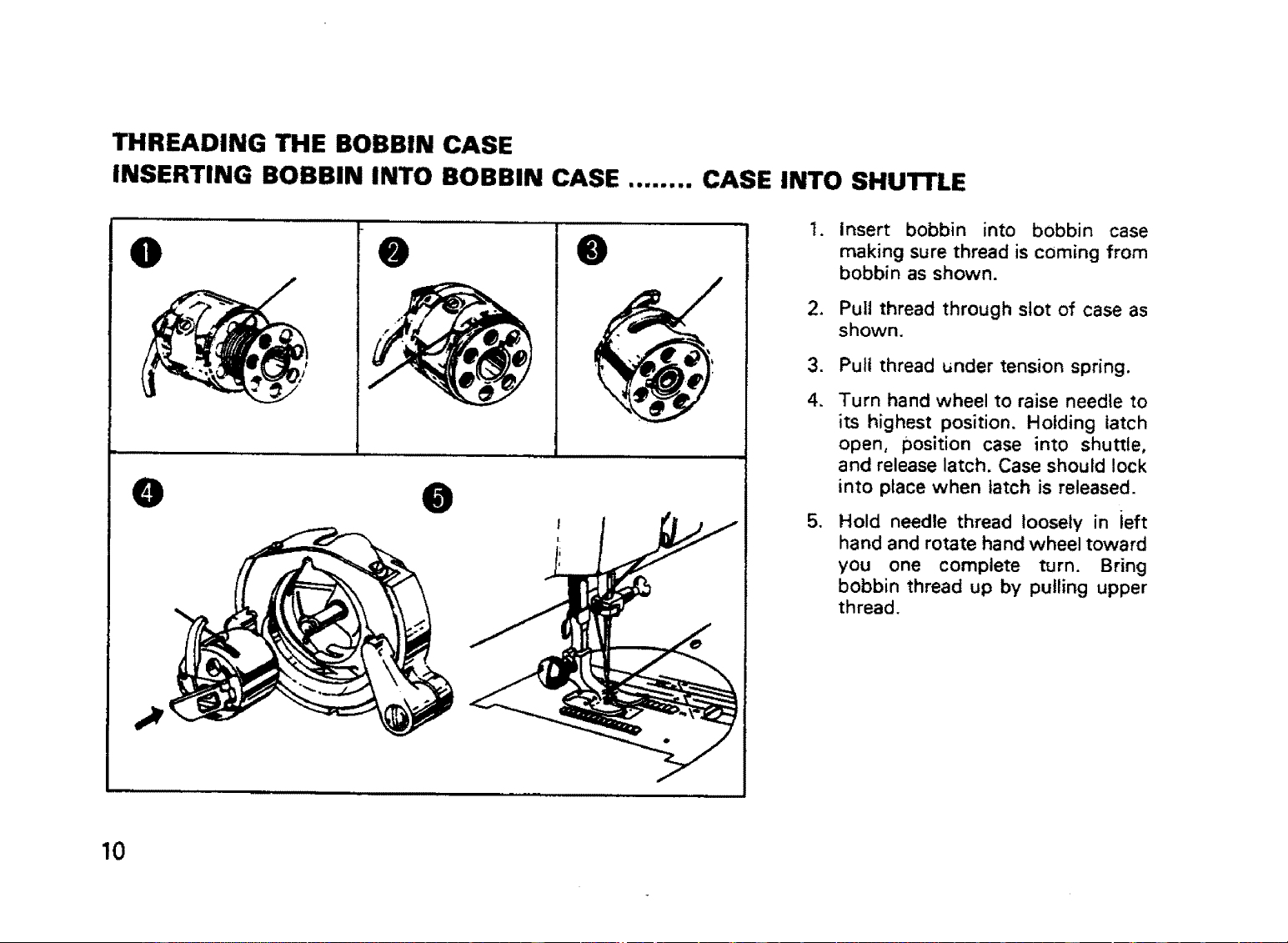
THREADING THE BOBBIN CASE
INSERTING BOBBIN INTO BOBBIN CASE ........ CASE INTO SHUI"rLE
O
L
@
@
O @
i
t.
.
.
4.
,
Insert bobbin into bobbin case
making sure thread is coming from
bobbin as shown.
Pull thread through slot of case as
shown.
Pull thread under tension spring.
Turn hand wheel to raise needle to
its highest position. Holding latch
open, position case into shuttle,
and release latch. Case should lock
into place when latch is released.
Hold needle thread loosely in ieft
hand and rotate hand wheel toward
you one complete turn. Bring
bobbin thread up by pulling upper
thread.
10
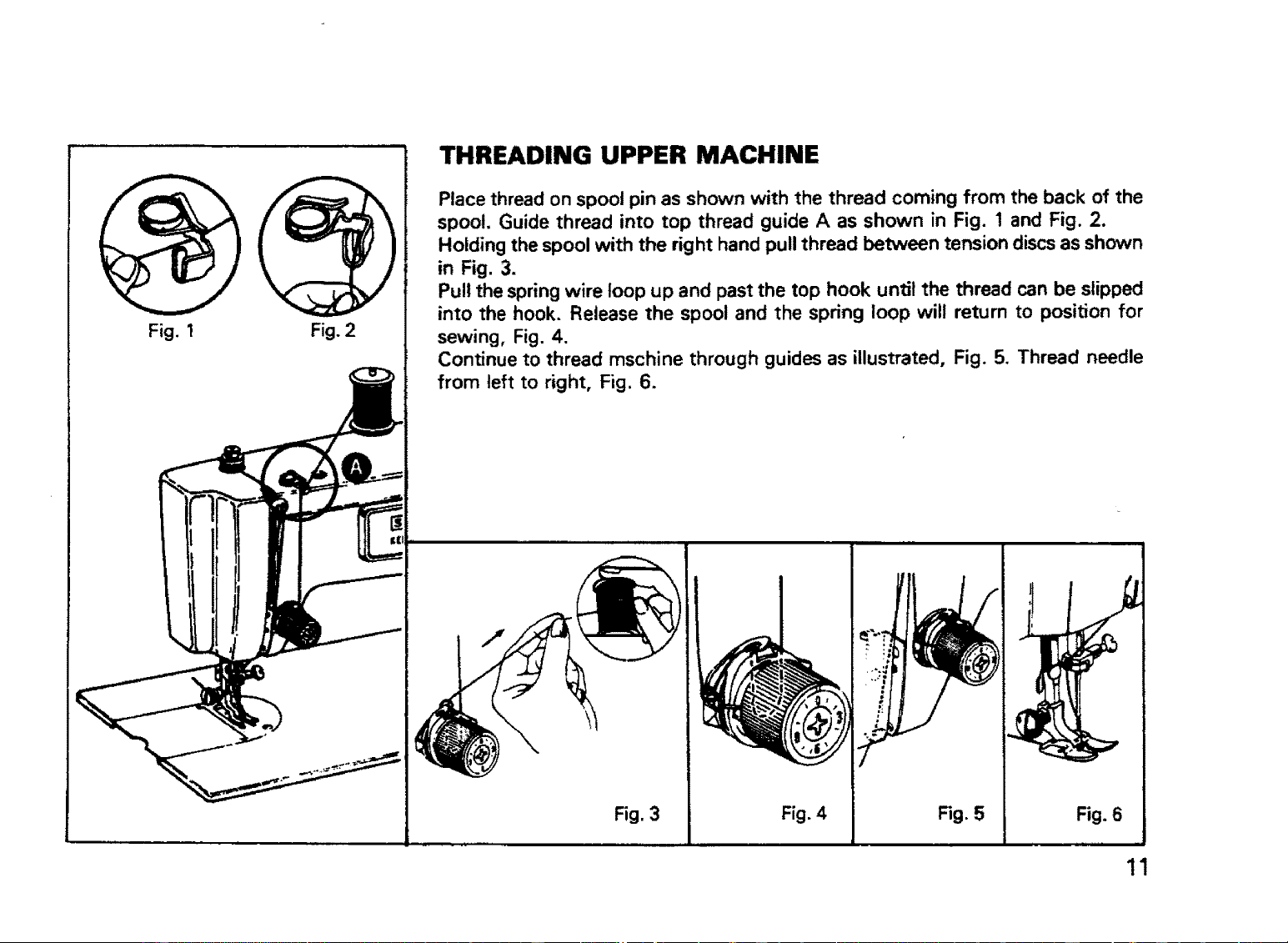
Fig.I Fig. 2
THREADING UPPER MACHINE
Place thread on spool pin as shown with the thread coming from the back of the
spool. Guide thread into top thread guide A as shown in Fig. 1 and Fig. 2.
Holding the spool with the right hand pull thread between tension discs as shc_wn
in Fig. 3.
Pull the spring wire loop up and past the top hook until the thread can be slipped
into the hook. Release the spool and the spring loop will return to position for
sewing, Fig. 4.
Continue to thread mschine through guides as illustrated, Fig. 5. Thread needle
from left to right, Fig. 6.
Fig. 3 Fig. 4 Fig. 5 Fig. 6
11
ADJUSTING THE PRESSURE OF THE
PRESSER FOOT
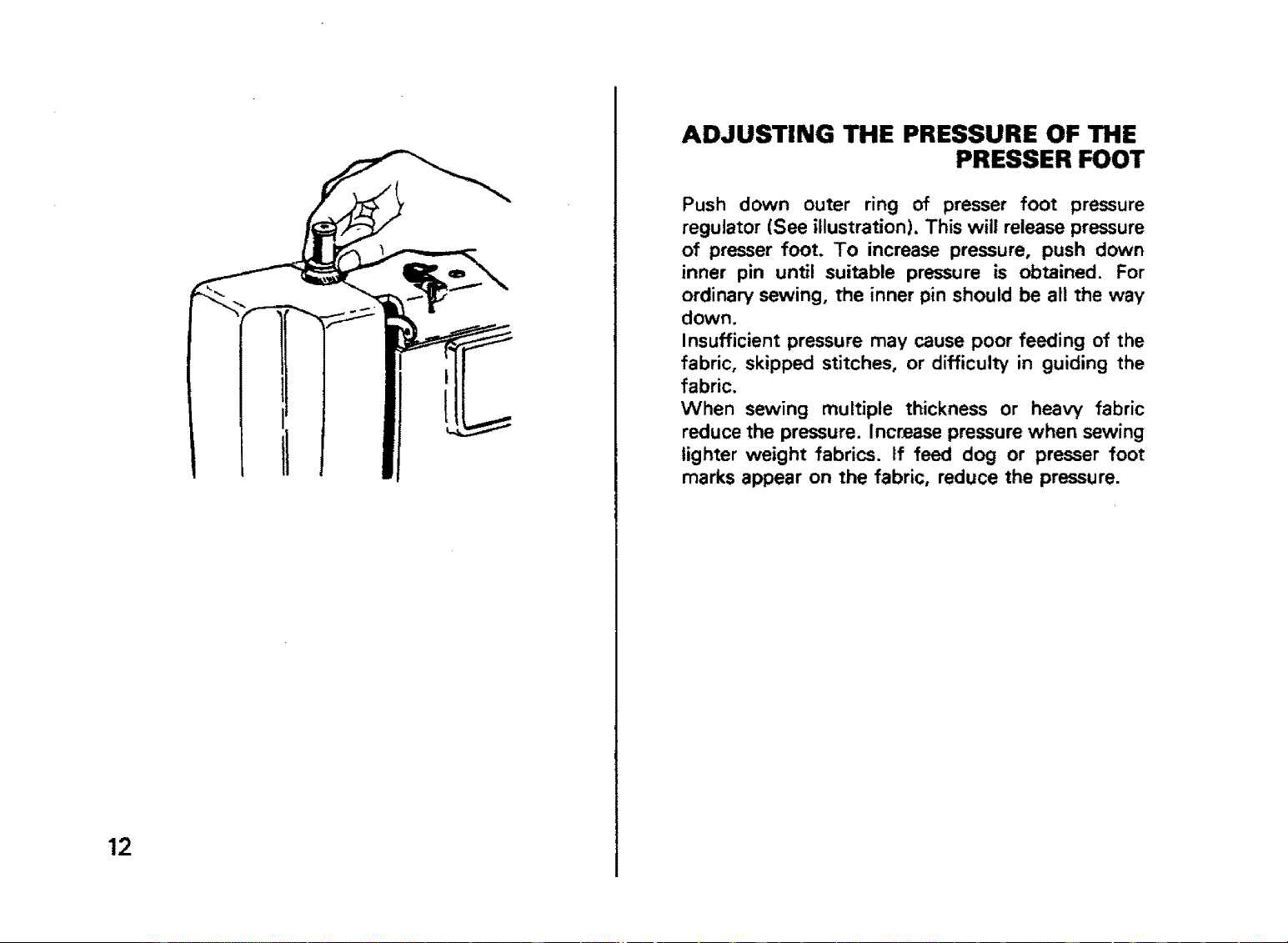
Push down outer ring of presser foot pressure
regulator (See illustration), This will release pressure
of presser foot. To increase pressure, push down
inner pin until suitable pressure is obtained. For
ordinary sewing, the inner pin should be all the way
down.
Insufficient pressure may cause poor feeding of the
fabric, skipped stitches, or difficulty in guiding the
fabric.
When sewing multiple thickness or heavy fabric
reduce the pressure. Increase pressure when sewing
lighter weight fabrics. If feed dog or presser foot
marks appear on the fabric, reduce the pressure.
12
STITCH LENGTH CONTROL
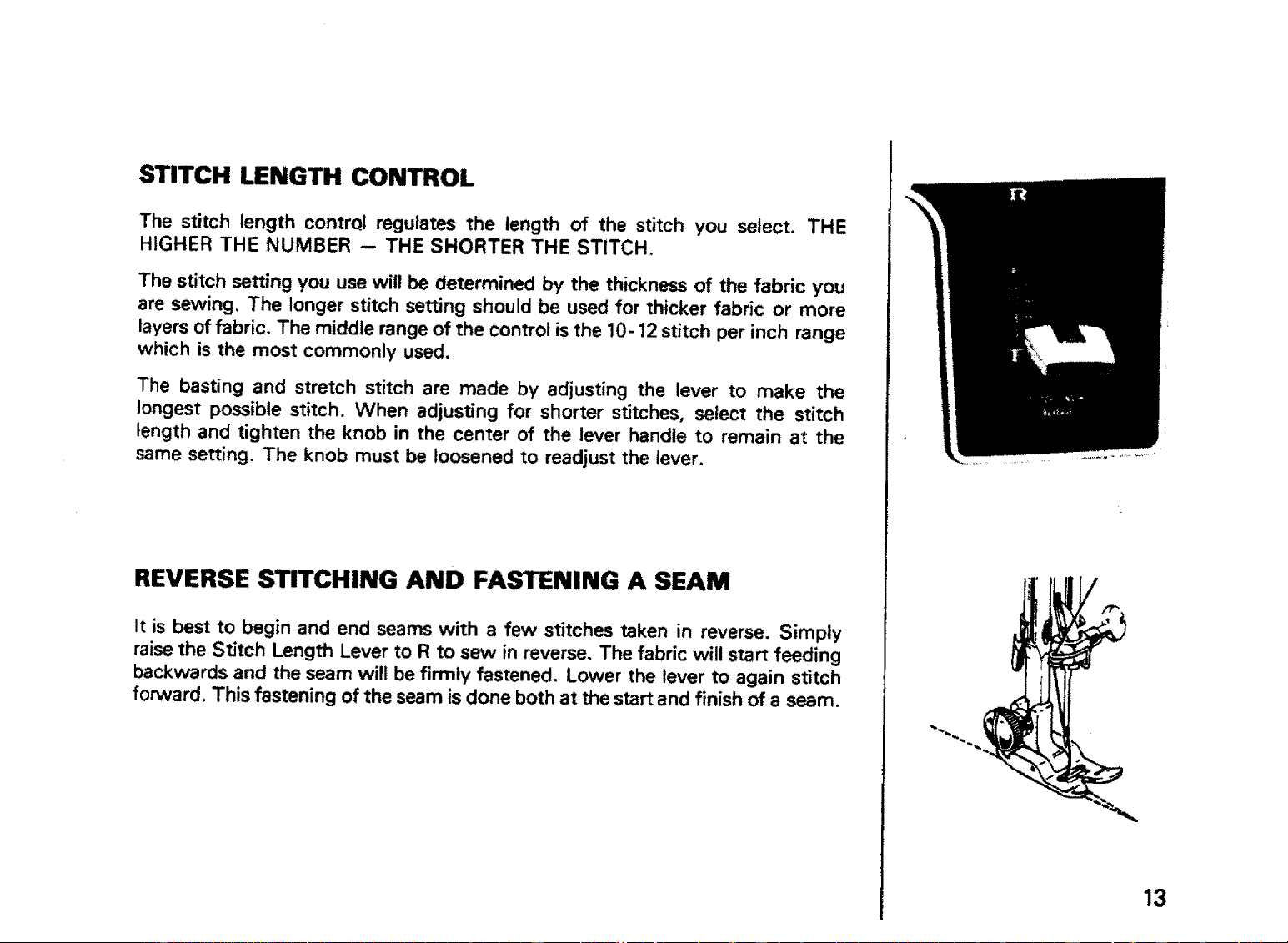
The stitch length contrql regulates the length of the stitch you select. THE
HIGHER THE NUMBER -- THE SHORTER THE STITCH,
The stitch setting you use will be determined by the thickness of the fabric you
are sewing, The longer stitch setting should be used for thicker fabric or more
layers of fabric. The middle range of the control is the 10-12 stitch per inch range
which is the most commonly used,
The basting and stretch stitch are made by adjusting the lever to make the
longest possible stitch. When adjusting for shorter stitches, select the stitch
length and tighten the knob in the center of the lever handle to remain at the
same setting. The knob must be loosened to readjust the lever.
REVERSE STITCHING AND FASTENING A SEAM
tt is best to begin and end seams with a few stitches taken in reverse, Simply
raise the Stitch Length Lever to R to sew in reverse. The fabric will start feeding
backwards and the seam will be firmly fastened, Lower the lever to again stitch
forward, This fastening of the seam is done both at the start and finish of a seam.
13
O
ADJUSTING TENSIONS
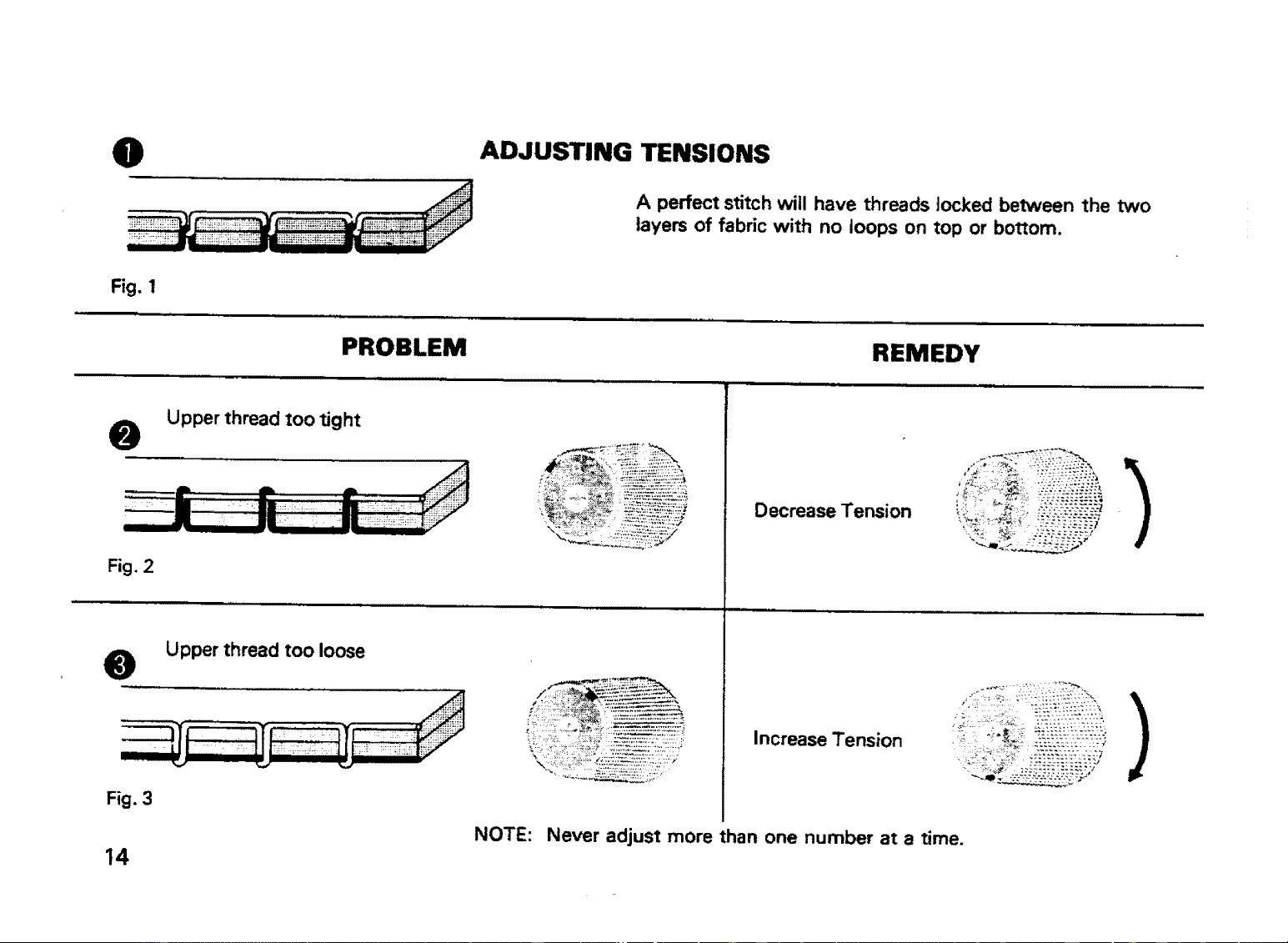
A perfect stitch will have threads Jocked between the two
layers of fabric with no loops on top or bottom.
Fig. 1
PROBLEM REMEDY
@
Fig. 2
@
Fig, 3
14
Upper thread too tight
Upper thread too loose
Decrease Tension
Increase Tension
!
NOTE: Never adjust more than one number at a time.
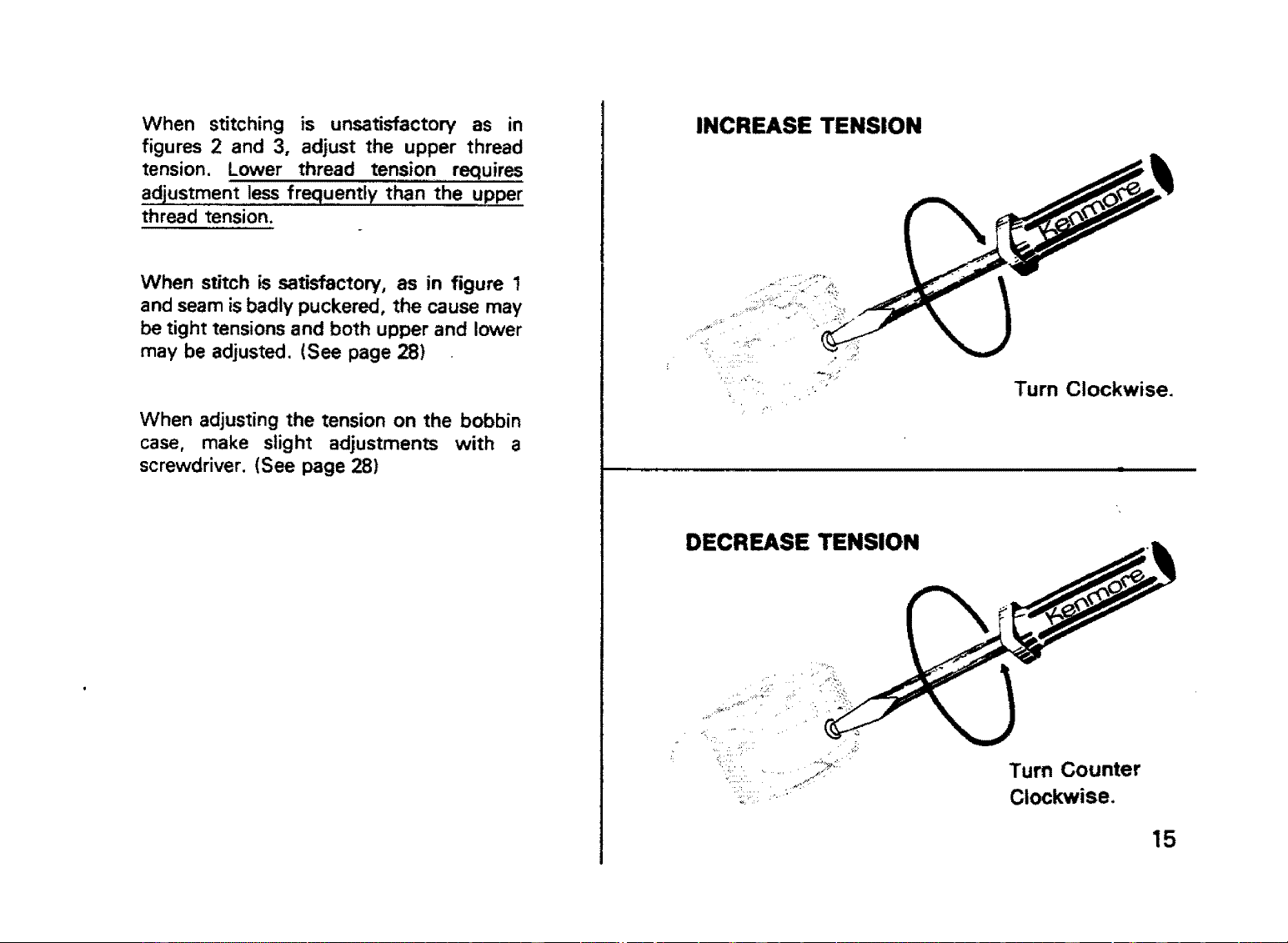
When stitching is unsatisfactory as in
figures 2 and 3, adjust the upper thread
tension. Lower thread tension requires
adjustment less frequently than the upper
thread tension.
When stitch is satisfactory, as in figure 1
and seam isbadly puckered, the cause may
be tight tensions and both upper and lower
may be adjusted. (See page 28)
When adjusting the tension on the bobbin
case, make slight adjustments with a
screwdriver. (See page 28)
INCREASE TENSION
'" Turn Clockwise.
DECREASE TENSION
Turn Counter
Clockwise.
15
INSERTING AND REMOVING THE MATERIAL
For all kinds of sewing, consult chart page 7.
Before placing the material on the machine see
that:
• The presser foot and needle clamp screws are
both tight.
• The sizes of needle and thread suit the kind of
work to be done.
• The needle and the thread take-up lever are at
their highest position.
a The ends of threads have been drawn about 4
inches to the rear of the machine.
• The feed dogs are up.
• Stitch length and width controls are set at desired
settings.
Experiment by sewing on the fabric to be used to
determine tension adjustments and correct stitch
settings.
Place material under the presser foot, insert the
needle into the material by turning the hand wheel
toward you, lower presser foot and start sewing.
To facilitate placement of heavy fabrics under the
presser foot, the presser foot lever can be raised
beyond the normal "up" position.
To remove the work, first turn the hand wheel
toward you until the needle is at its highest
position, then raise the presser foot, draw material
to the rear and cut ° off excess thread with the
thread cutter located on the presser bar.
IMPORTANT:Always turn the hand wheel toward
you ! When the machine is not being used, place a
piece of material over the feed dog and lower the
presser foot. Always have fabric under the presser
foot when operating the machine. Operating
threaded machine without fabric will cause it to jam
by forcing _int into the shuttle.
16
TURNING A CORNER
Stop your sewing machine and make sure needle is in fabric.
Raise presser foot. Turn fabric to desired direction. Lower
presser foot and go on with your stitching.
CHANGING THE PRESSER FEET
The various presser feet available for certain kinds of work are
to be fastened to the presser bar.
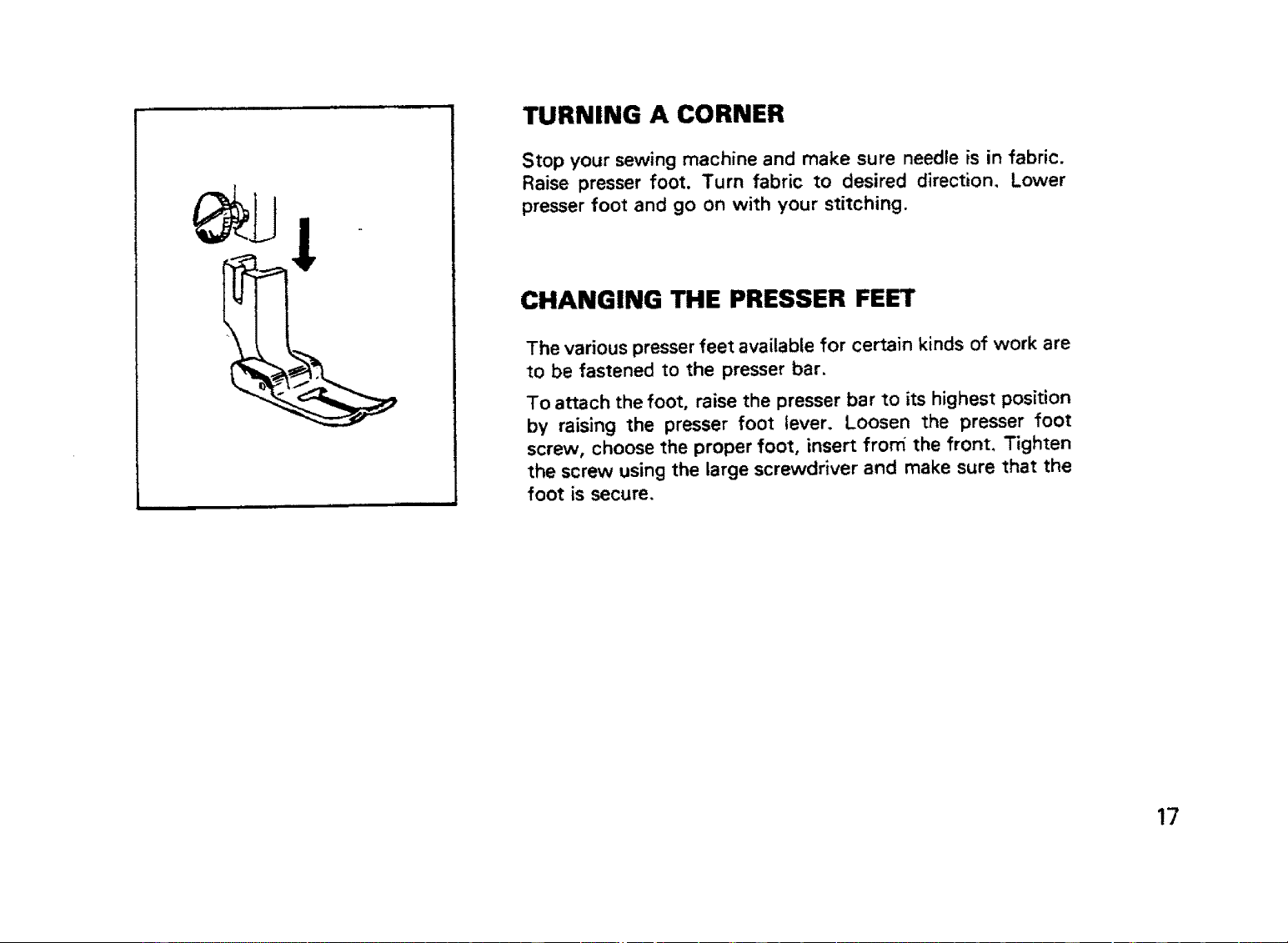
To attach the foot, raise the presser bar to its highest position
by raising the presser foot lever, Loosen the presser foot
screw, choose the proper foot, insert frorfi the front. Tighten
the screw using the large screwdriver and make sure that the
foot is secure.
17
STITCH WIDTH CONTROL
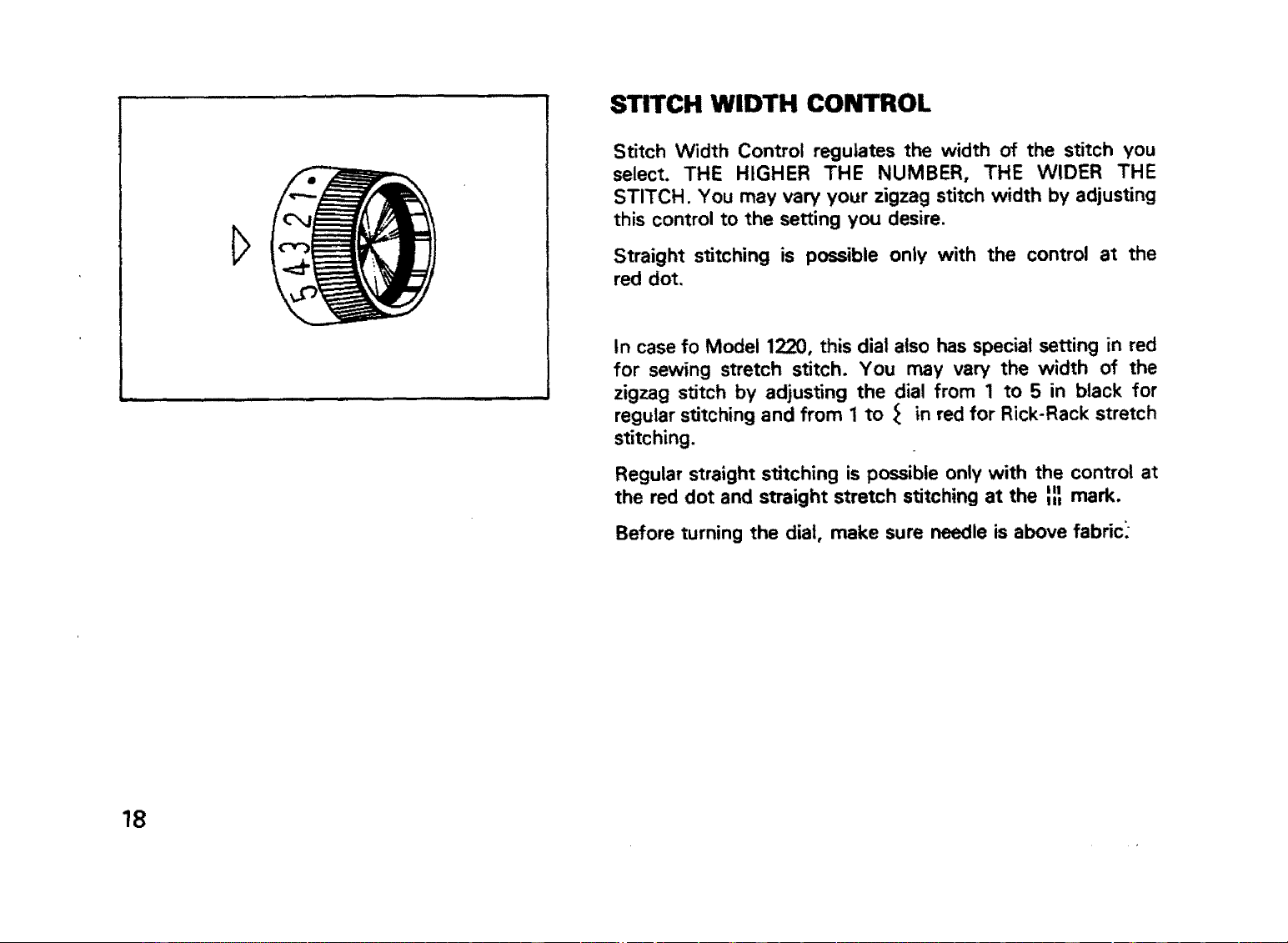
Stitch Width Control regulates the width of the stitch you
select. THE HIGHER THE NUMBER, THE WIDER THE
STITCH. You may vary your zigzag stitch width by adjusting
this control to the setting you desire.
Straight stitching is possible only with the control at the
red dot.
In case fo Model 1220, this dial also has special setting in red
for sewing stretch stitch. You may vary the width of the
zigzag stitch by adjusting the dial from 1 to 5 in black for
regular stitching and from 1 to _ in red for Rick-Rack stretch
stitching.
Regular straight stitching is possible only with the control at
the red dot and straight stretch stitching at the _ mark.
Before turning the dial, make sure needle is above fabric_
18
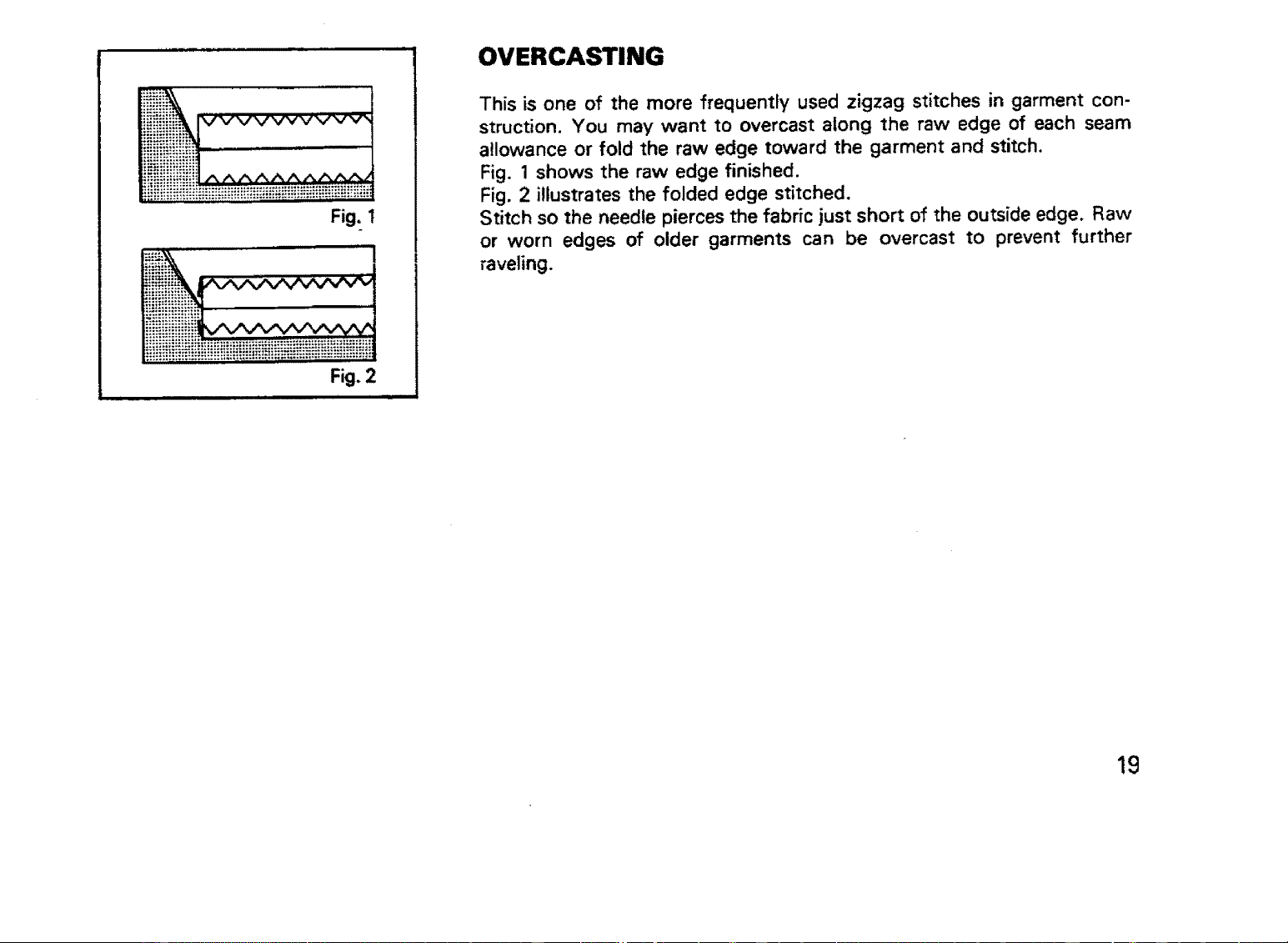
Fig.
Fig. 2
i i i i,,,u
OVERCASTING
This is one of the more frequently used zigzag stitches in garment con-
struction. You may want to overcast along the raw edge of each seam
allowance or fold the raw edge toward the garment and stitch.
Fig. 1 shows the raw edge finished.
Fig. 2 illustrates the folded edge stitched.
Stitch so the needle pierces the fabric just short of the outside edge. Raw
or worn edges of older garments can be overcast to prevent further
raveling.
19
20
R
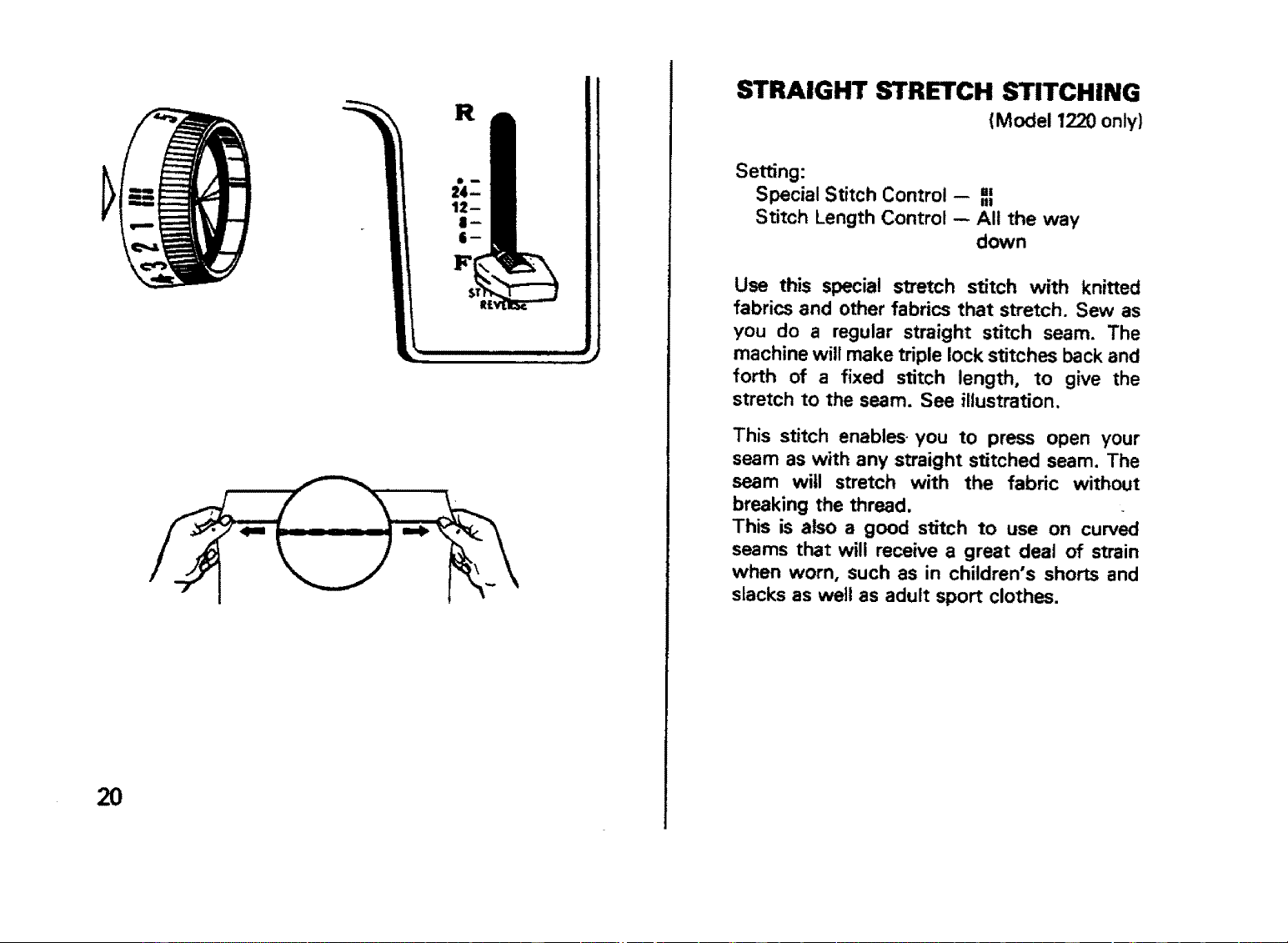
STRAIGHT STRETCH STITCHING
(Model 1220 only)
Setting:
Special Stitch Control -- ,,
III
Stitch Length Control -- All the way
down
Use this specia! stretch stitch with knitted
fabrics and other fabrics that stretch. Sew as
you do a regular straight stitch seam. The
machine will make triple lock stitches back and
forth of a fixed stitch length, to give the
stretch to the seam. See illustration.
This stitch enables you to press open your
seam as with any straight stitched seam. The
seam will stretch with the fabric without
breaking the thread.
This is also a good stitch to use on curved
seams that will receive a great deal of strain
when worn, such as in children's shorts and
slacks as well as adult sport clothes.
1
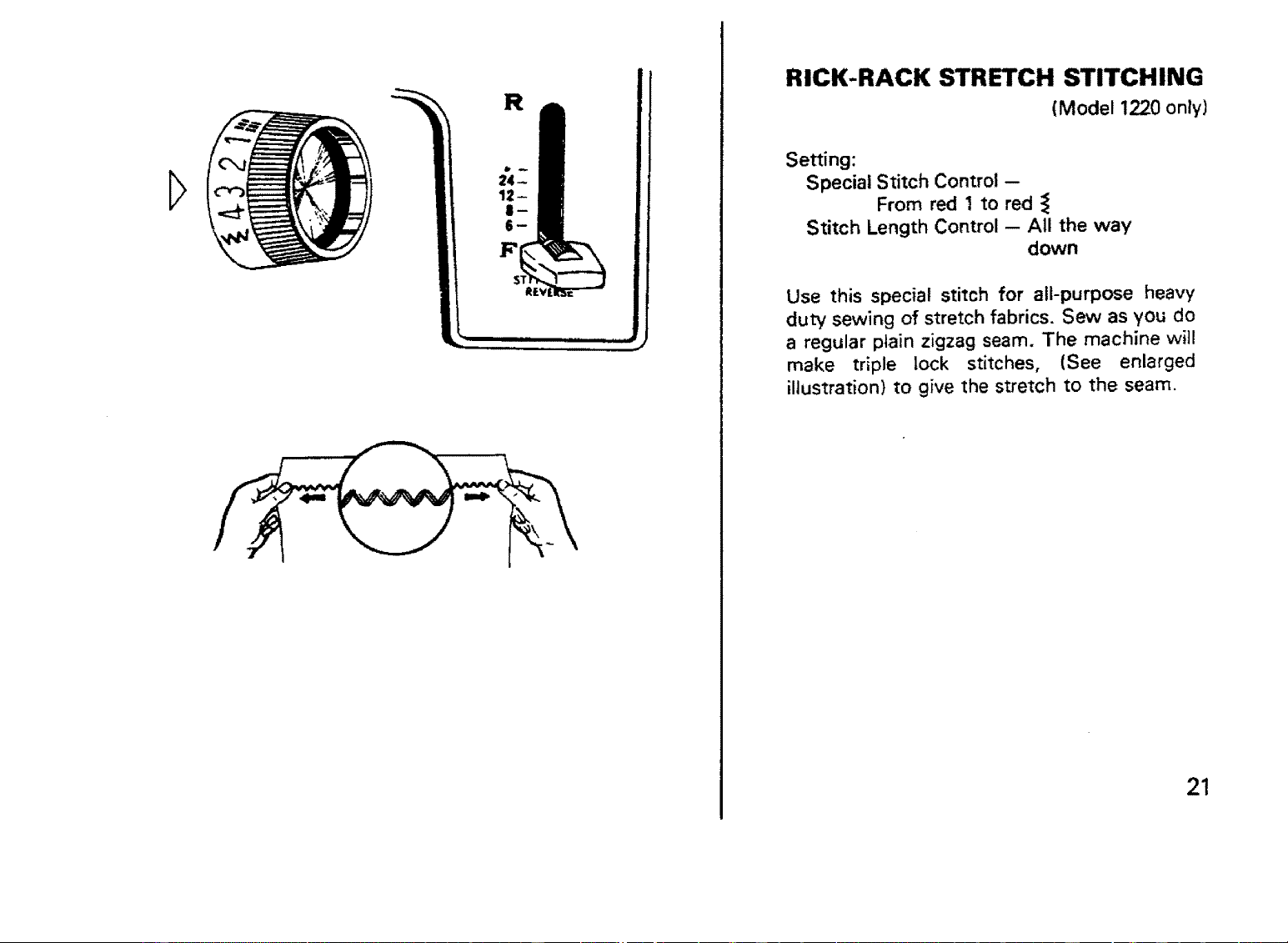
RICK-RACK STRETCH STITCHING
(Model 1220 only)
Setting:
Special Stitch Control --
From red 1 to red
Stitch Length Control -- All the way
down
Use this special stitch for all-purpose heavy
duty sewing of stretch fabrics. Sew as you do
a regular plain zigzag seam. The machine will
make triple lock stitches, (See enlarged
illustration) to give the stretch to the seam.
21
22
.'--E
l-
I-
F
Stitch Stitch Feed Dog
Width Length Control
I
Fig. 1
Fig. 3
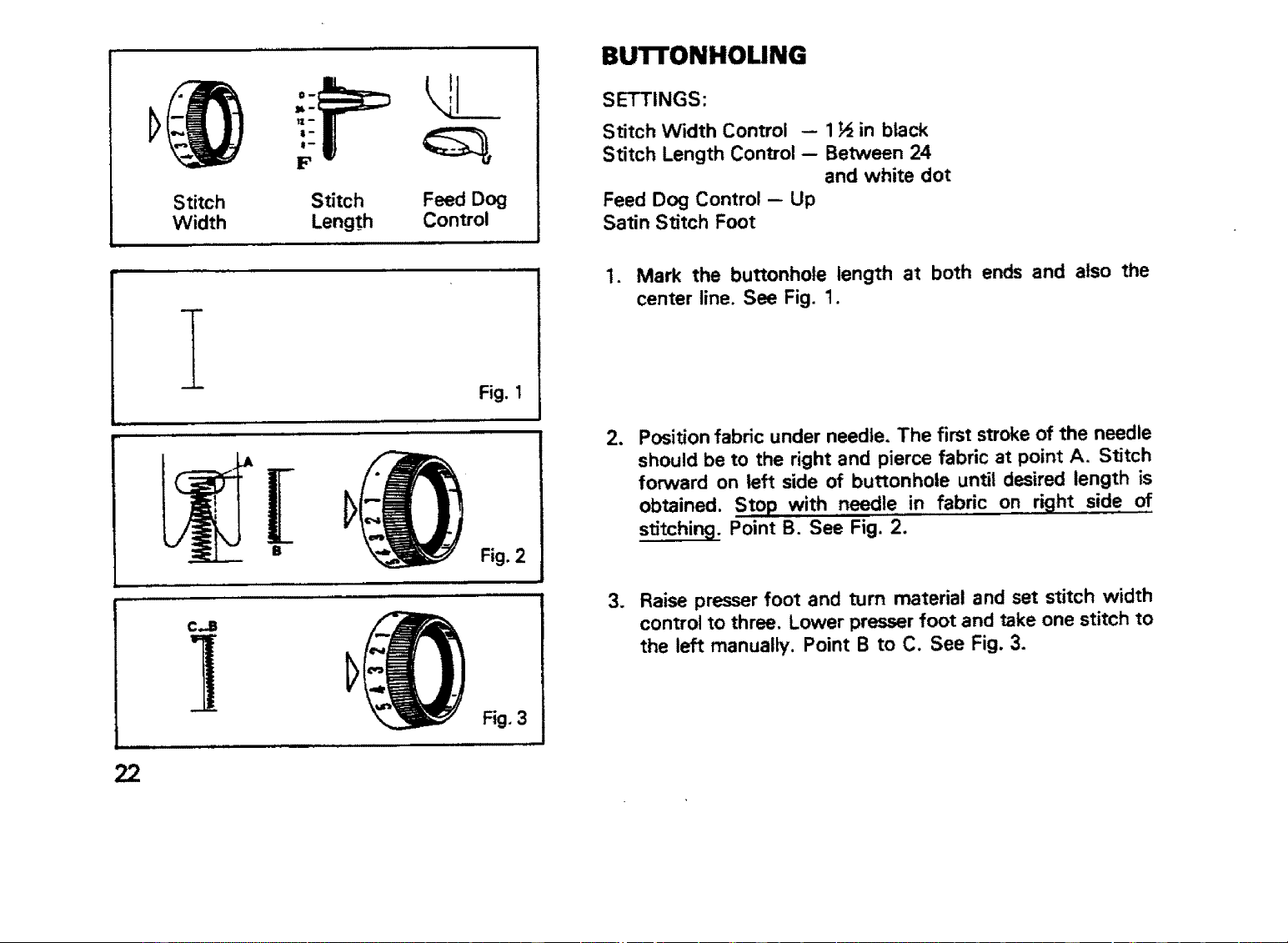
BUTFONHOUNG
SETTINGS:
Stitch Width Control -- 1H in black
Stitch Length Control -- Between 24
and white dot
Feed Dog Control - Up
Satin Stitch Foot
1. Mark the buttonhole length at both ends and also the
center line. See Fig. 1.
2_ Position fabric under needle. The first stroke of the needle
should be to the right and pierce fabric at point A. Stitch
forward on left side of buttonhole until desired length is
obtained. Sto p with needle in fabric on right side of
stitching. Point B. See Fig. 2.
3. Raise presser foot and turn material and set stitch width
control to three. Lower presser foot and take one stitch to
the left manually. Point B to C. See Fig. 3.
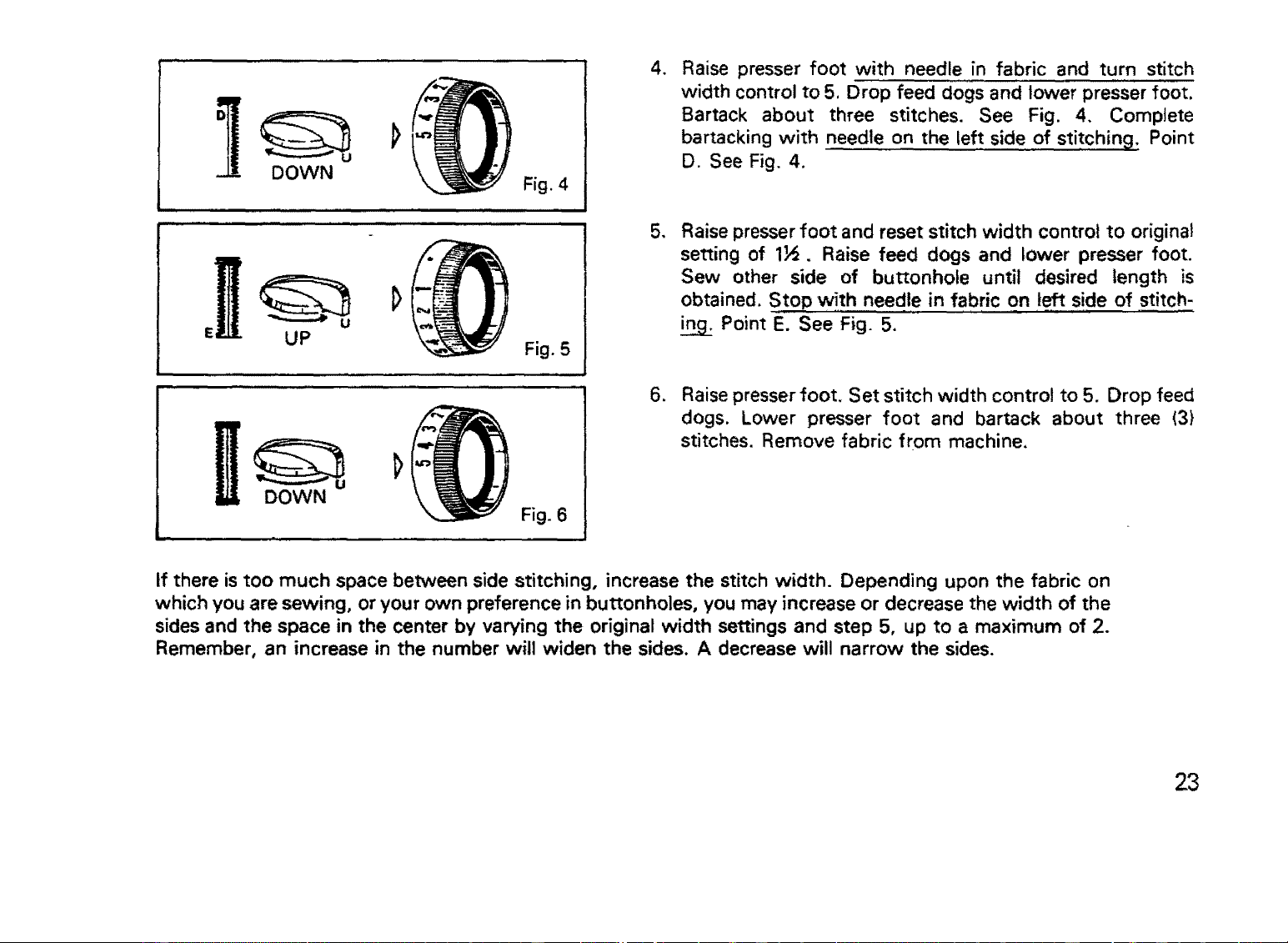
Fig. 4
Fig. 5
DOWN
Fig. 6
4_
Raise presser foot with needle in fabric and turn stitch
width control to 5, Drop feed dogs and lower presser foot.
Barrack about three stitches. See Fig. 4. Complete
barracking with needle on the left side of stitching: Point
D. See Fig. 4.
5,
Raise presser foot and reset stitch width control to original
setting of 1_. Raise feed dogs and lower presser foot.
Sew other side of buttonhole until desired length is
obtained. Stop with needle in fabric on left side of stitch-
Point E. See Fig. 5.
6. Raise presser foot, Set stitch width control to 5. Drop feed
dogs. Lower presser foot and barrack about three (3)
stitches. Remove fabric from machine,
if there is too much space between side stitching, increase the stitch width. Depending upon the fabric on
which you are sewing, or your own preference in buttonholes, you may increase or decrease the width of the
sides and the space in the center by varying the original width settings and step 5, up to a maximum of 2.
Remember, an increase in the number will widen the sides. A decrease will narrow the sides.
23
DARNING
WITH PRESSER FOOT:
1. Turn feed dog control to left.
2. Press down outer ring of presser foot pressure regulator, see page 12. With regulator in this position
mending, monogram work, etc. may be done.
3. Stretch fabric tightly between two spring embroidery hoops and place under needle.
The presser bar can be raised to accommodate the embroidery hoops by pulling up on the presser
foot lever.
4. Lower presser bar so thread will have some tension. When you start to darn, move fabric back and
forth to cover darning area. Then turn fabric and continue sewing at right-angles to the previous
stitching. Always use medium machine speed. You can make any length stitches desired. Slow
movement of fabric will make short darning stitches. Fast movement will make long stitches.
5. When you finish darning, raise presser foot and remove fabric. Increase pressure for general sewing
by pressing center pin of presser foot pressure regulator.
Turn feed dog control to right.
WITHOUT PRESSER FOOT:
1. Turn feed dog control to left.
2. Remove presser foot.
Proceed as directed under steps 3 and 4 above.
3. When you finish darning, raise the presser bar and remove fabric. Replace presser foot.
Turn feed dog control to right.
24
O
0
0
0
BLIND HEMMING
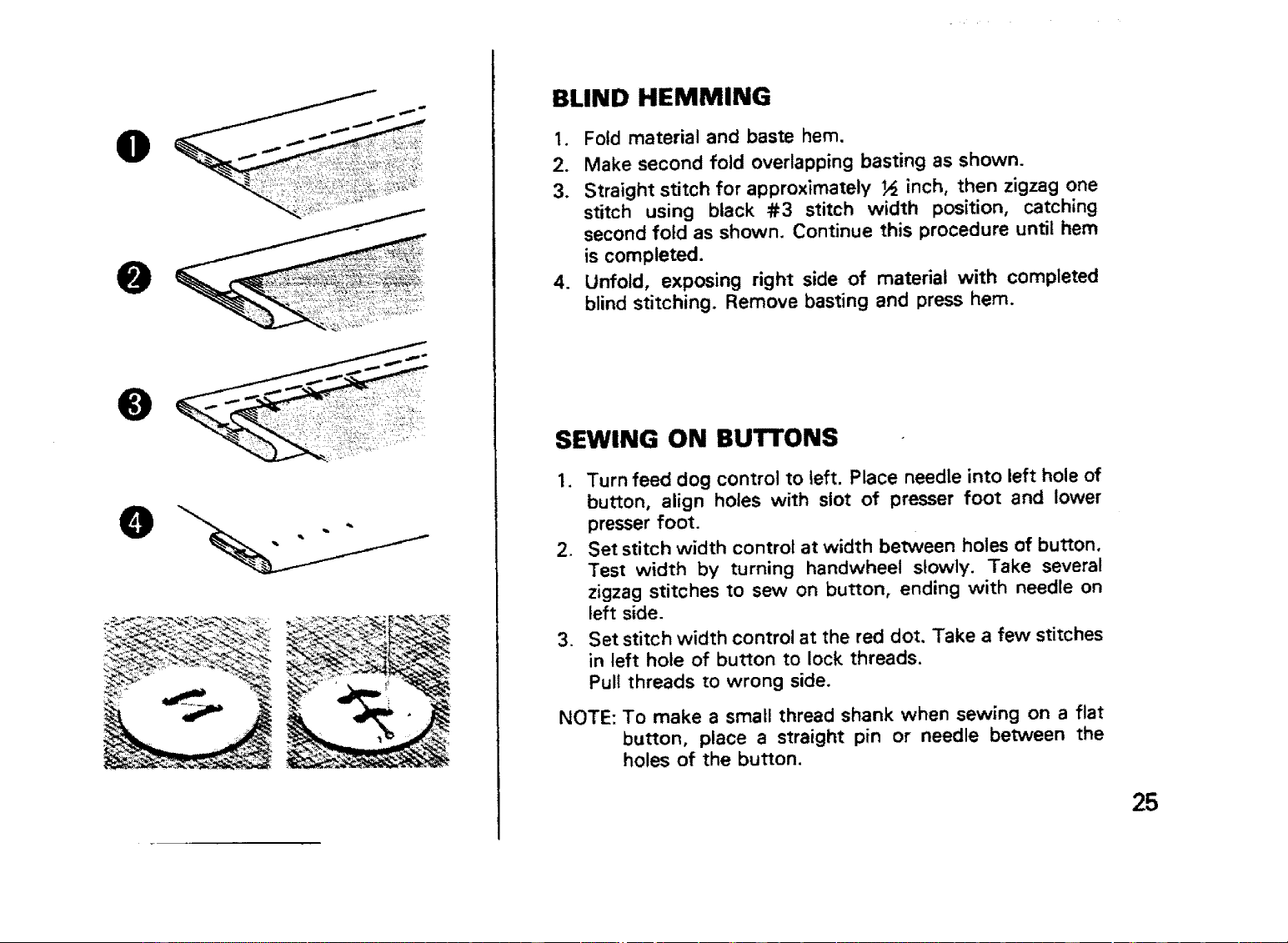
1. Fold material and baste hem.
2. Make second fold overlapping basting as shown.
3. Straight stitch for approximately _ inch, then zigzag one
stitch using black #3 stitch width position, catching
second fold as shown. Continue this procedure until hem
is completed.
4. Unfold, exposing right side of material with completed
blind stitching. Remove basting and press hem.
SEWING ON BUTTONS
I, Turn feed dog control to left. Place needle into left hole of
button, align holes with slot of presser foot and lower
presser foot.
2. Set stitch width control at width between holes of button.
Test width by turning handwheel slowly. Take several
zigzag stitches to sew on button, ending with needle on
left side.
. Set stitch width control at the red dot. Take a few stitches
in left hole of button to lock threads.
Pull threads to wrong side,
NOTE: To make a small thread shank when sewing on a flat
button, place a straight pin or needle between the
holes of the button.
25
CLEANING AND OILING
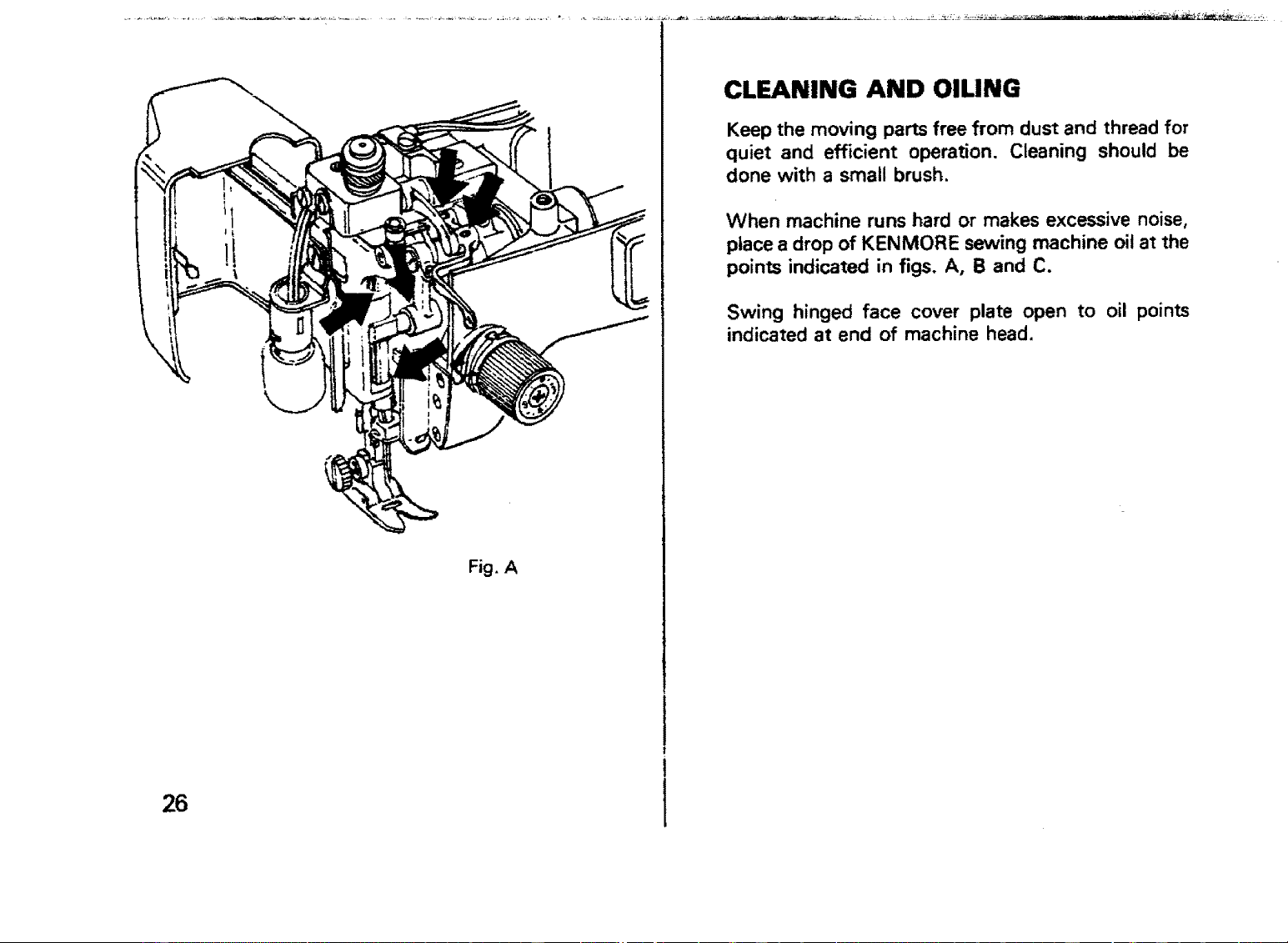
Keep the moving parts free from dust and thread for
quiet and efficient operation. Cleaning should be
done with a small brush.
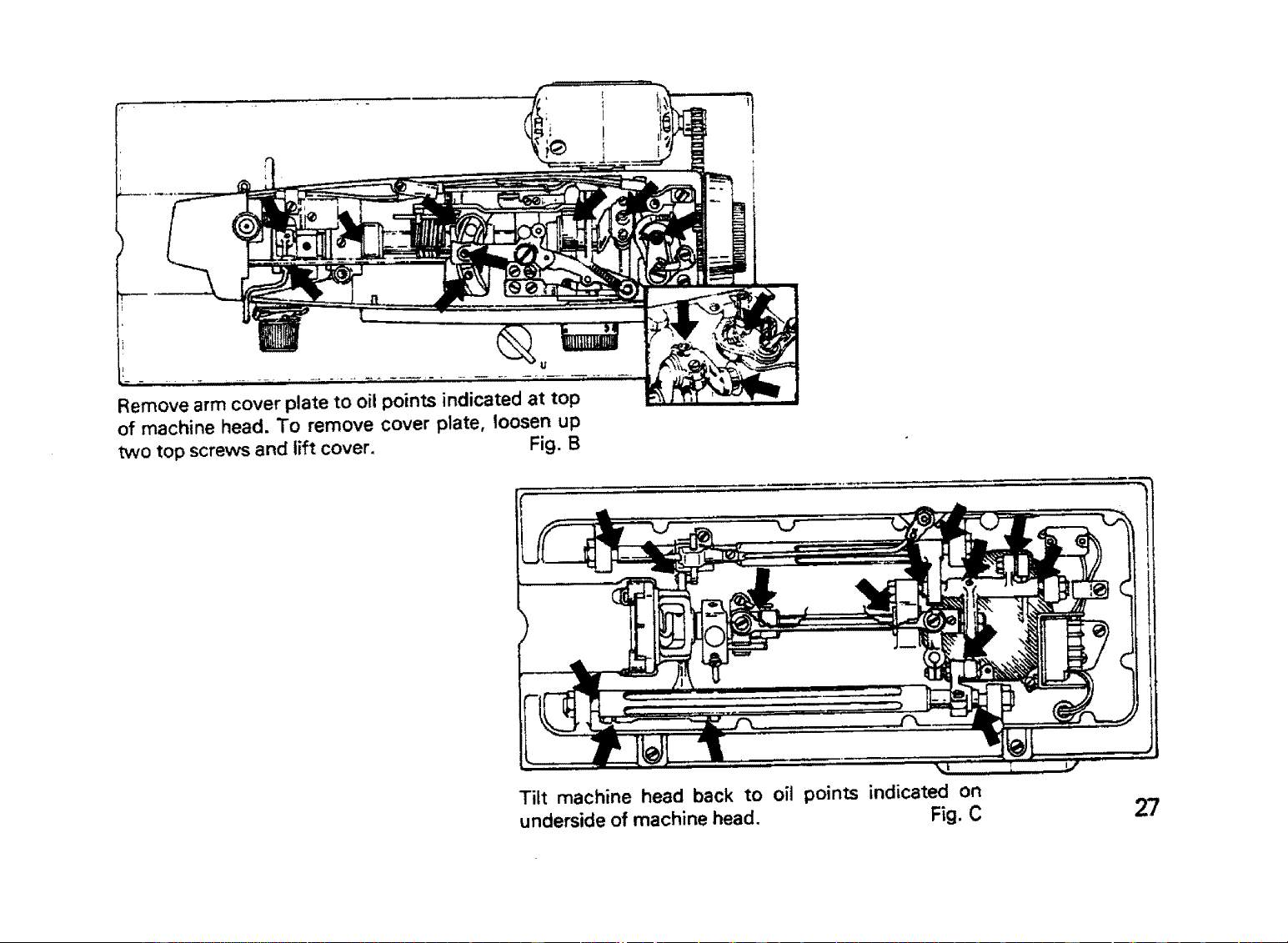
When machine runs hard or makes excessive noise,
place a drop of KENMORE sewing machine oil at the
points indicated in figs. A, B and C.
Swing hinged face cover plate open to oil points
indicated at end of machine head.
Fig. A
26
i u
Remove arm cover plate to oil points indicated at top
of machine head. To remove cover plate, loosen up
wvo top screws and lift cover. Fig. B
Tilt machine head back to oil points indicated on
underside of machine head. Fig. C
27
i_er
lever
Shutt_
hook
Shuffle Race Cover Shuttle
shuttle driver
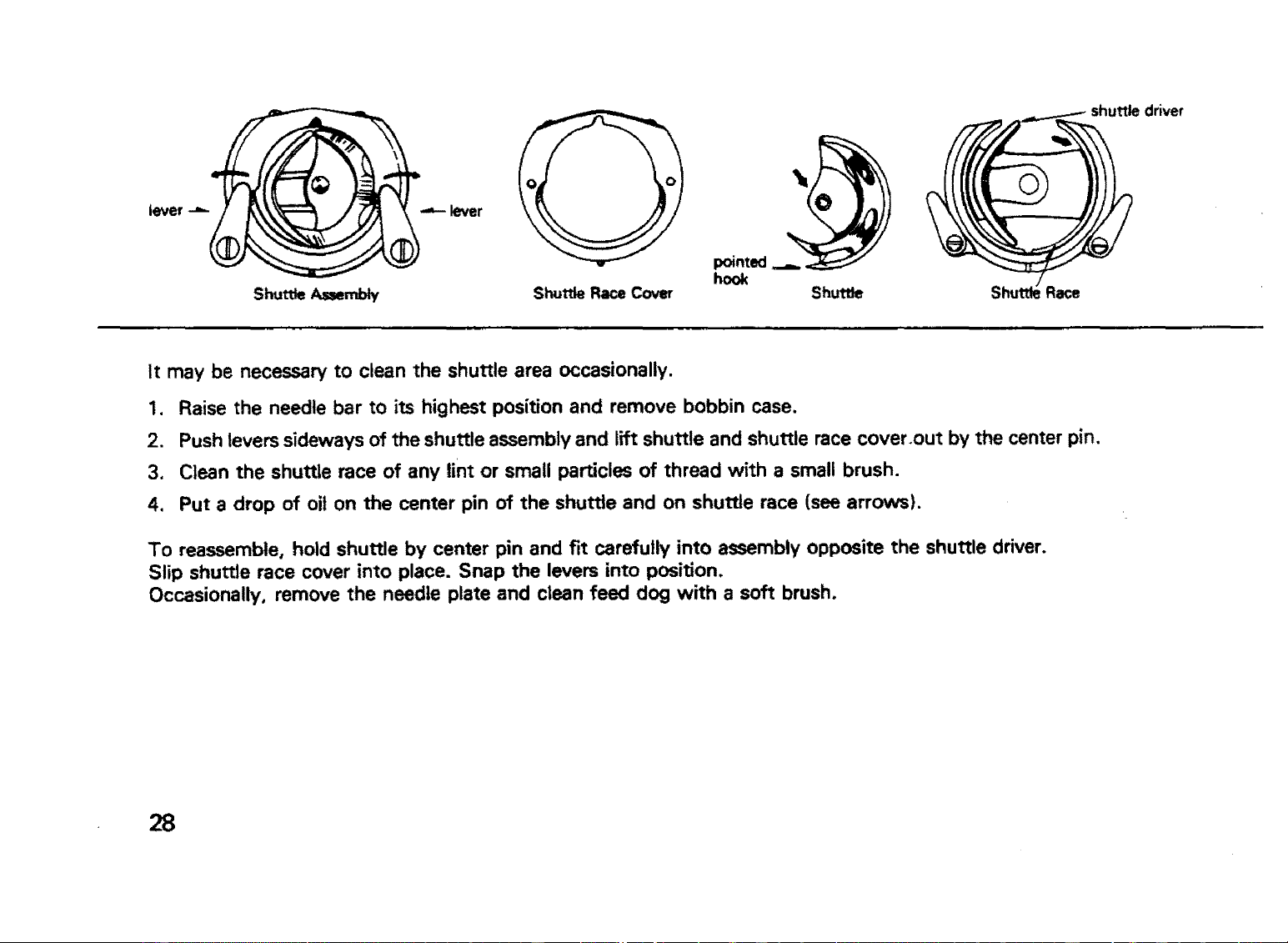
It may be necessary to clean the shuttle area occasionally.
1. Raise the needle bar to its highest position and remove bobbin case.
2. Push levers sideways of the shuttle assembly and lift shuttle and shuttle race cover.out by the center pin.
3. Clean the shuttle race of any lint or small particles of thread with a small brush.
4. Put a drop of oit on the center pin of the shuttle and on shuttle race (see arrows).
To reassemble, hold shuttle by center pin and fit carefully into assembly opposite the shuttle driver.
Slip shuttle race cover into place. Snap the levers into position.
Occasionally, remove the needle plate and clean feed dog with a soft brush.
28
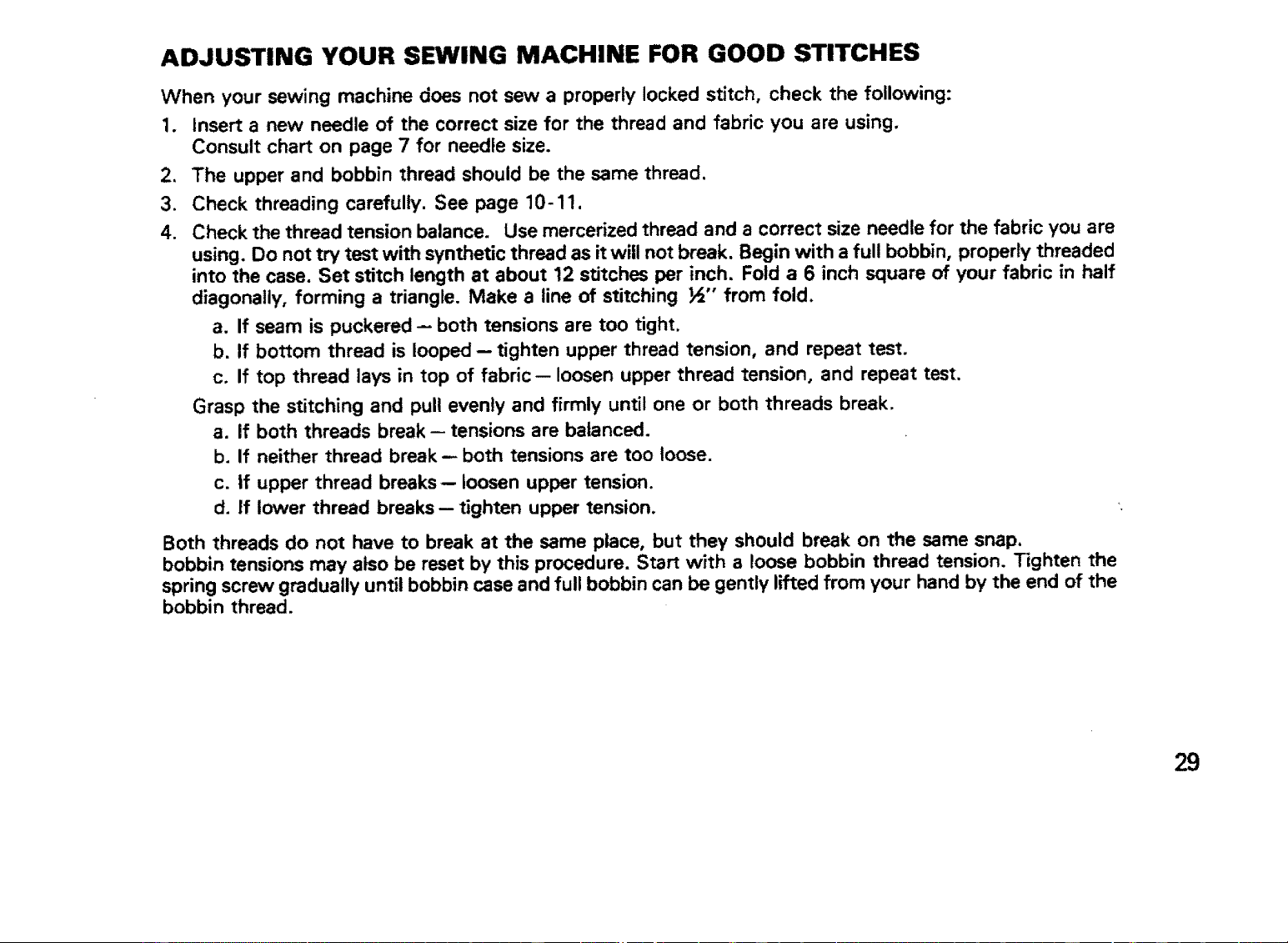
ADJUSTING YOUR SEWING MACHINE FOR GOOD STITCHES
When your sewing machine does not sew a properly locked stitch, check the following:
1. Insert a new needle of the correct size for the thread and fabric you are using.
Consult chart on page 7 for needle size.
2. The upper and bobbin thread should be the same thread.
3. Check threading carefully. See page 10-11.
4. Check the thread tension balance. Use mercerized thread and a correct size needle for the fabric you are
using. Do not try test with synthetic thread as it will not break. Begin with a full bobbin, properly threaded
into the case. Set stitch length at about 12 stitches per inch. Fold a 6 inch square of your fabric in half
diagonally, forming a triangle. Make a line of stitching _" from fold.
a. If seam is puckered -- both tensions are too tight.
b. If bottom thread is looped -- tighten upper thread tension, and repeat test.
c. If top thread lays in top of fabric-- loosen upper thread tension, and repeat test.
Grasp the stitching and pull evenly and firmly until one or both threads break.
a. If both threads break -- tensions are balanced.
b. If neither thread break- both tensions are too loose.
c. If upper thread breaks-- loosen upper tension.
d. if lower thread breaks- tighten upper tension.
Both threads do not have to break at the same place, but they should break on the same snap.
bobbin tensions may also be reset by this procedure. Start with a loose bobbin thread tension. Tighten the
spring screw gradually until bobbin case and full bobbin can be gently lifted from your hand by the end of the
bobbin thread.
29
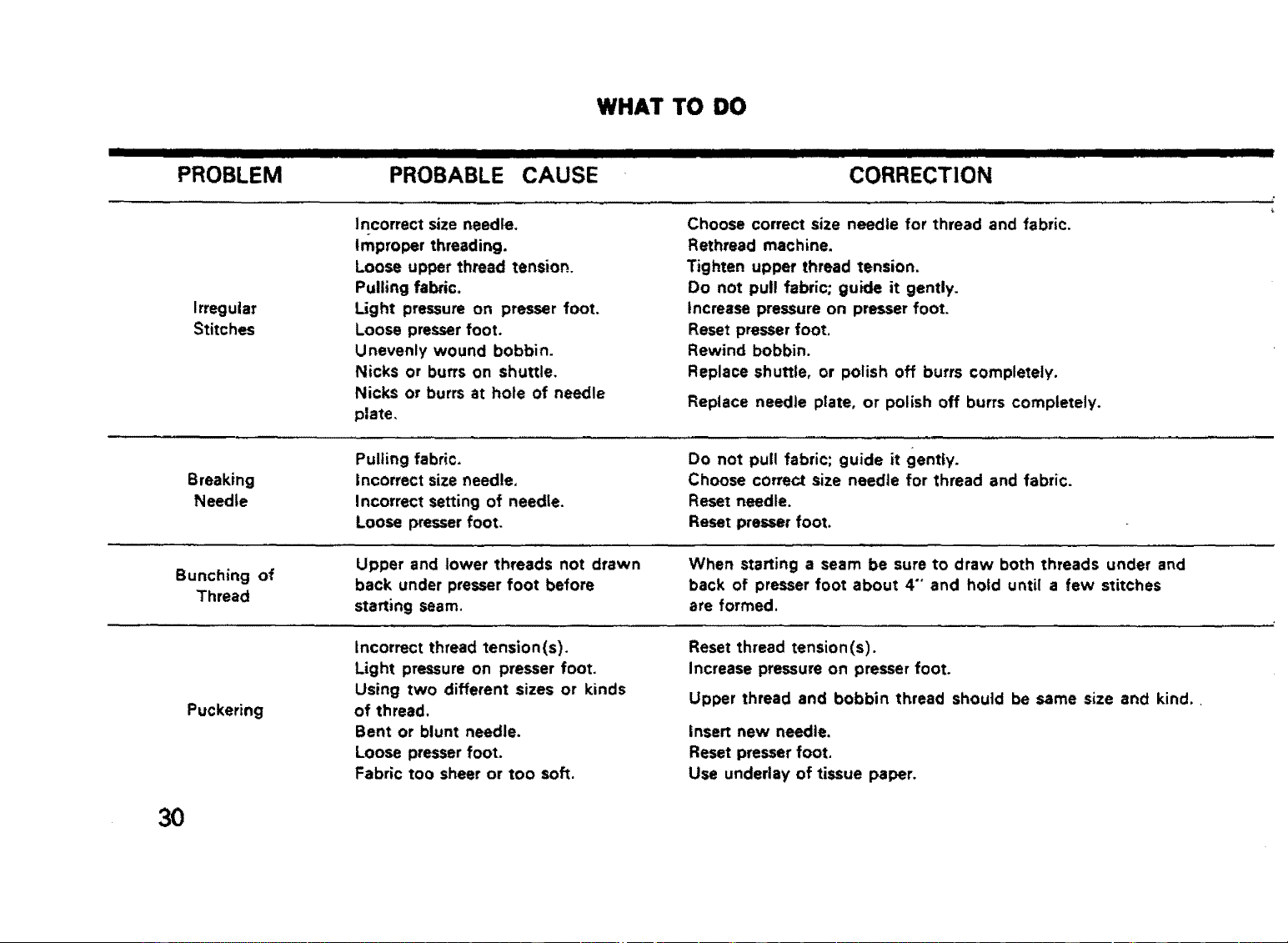
WHAT TO DO
I III I IIHIII IIH IIII I II IIIIIIIIIIIIIIIIIIIm II III II / IIIIIIIIIIIIII I! I, ,ll,,,,,,,,, . i
PROBLEM PROBABLE CAUSE CORRECTION
Irregular
Stitches
Breaking
Needle
Bunching of
Thread
Puckering
Incorrect size needle,
Improper threading.
Loose upper thread tension.
Pulling fabric,
Light pressure on presser foot,
Loose presser foot,
Unevenly wound bobbin.
Nicks or burrs on shuttle,
Nicks or burrs at hole of needle
plate,
Choose correct size needle for thread and fabric.
Rethread machine.
Tighten upper thread tension,
Do not pull fabric; guide it gently.
Increase pressure on presser foot.
Reset presser foot.
Rewind bobbin.
Replace shuttle, or polish off burrs completely.
Replace needle plate, or polish off burrs completely,
Pulling fabric,
Incorrect size needle,
Incorrect setting of needle,
Loose presser foot,
Do not pull fabric; guide it gently.
Choose correct size needle for thread and fabric,
Reset needle.
Reset presser foot.
Upper and lower threads not drawn
back under presser foot before
starting seam,
When starting a seam be sure to draw both threads under and
back of presser foot about 4""and hold until a few stitches
are formed,
Incorrect thread tension(s).
Light pressure on presser foot.
Using two different sizes or kinds
of thread,
Bent or blunt needle.
Loose presser foot.
Fabric too sheer or too soft.
Reset thread tension(s).
Increase pressure on presser foot,
Upper thread and bobbin thread should be same size and kind,,
insert new needle,
Reset presser foot,
Use undeday of tissue paper.
3O
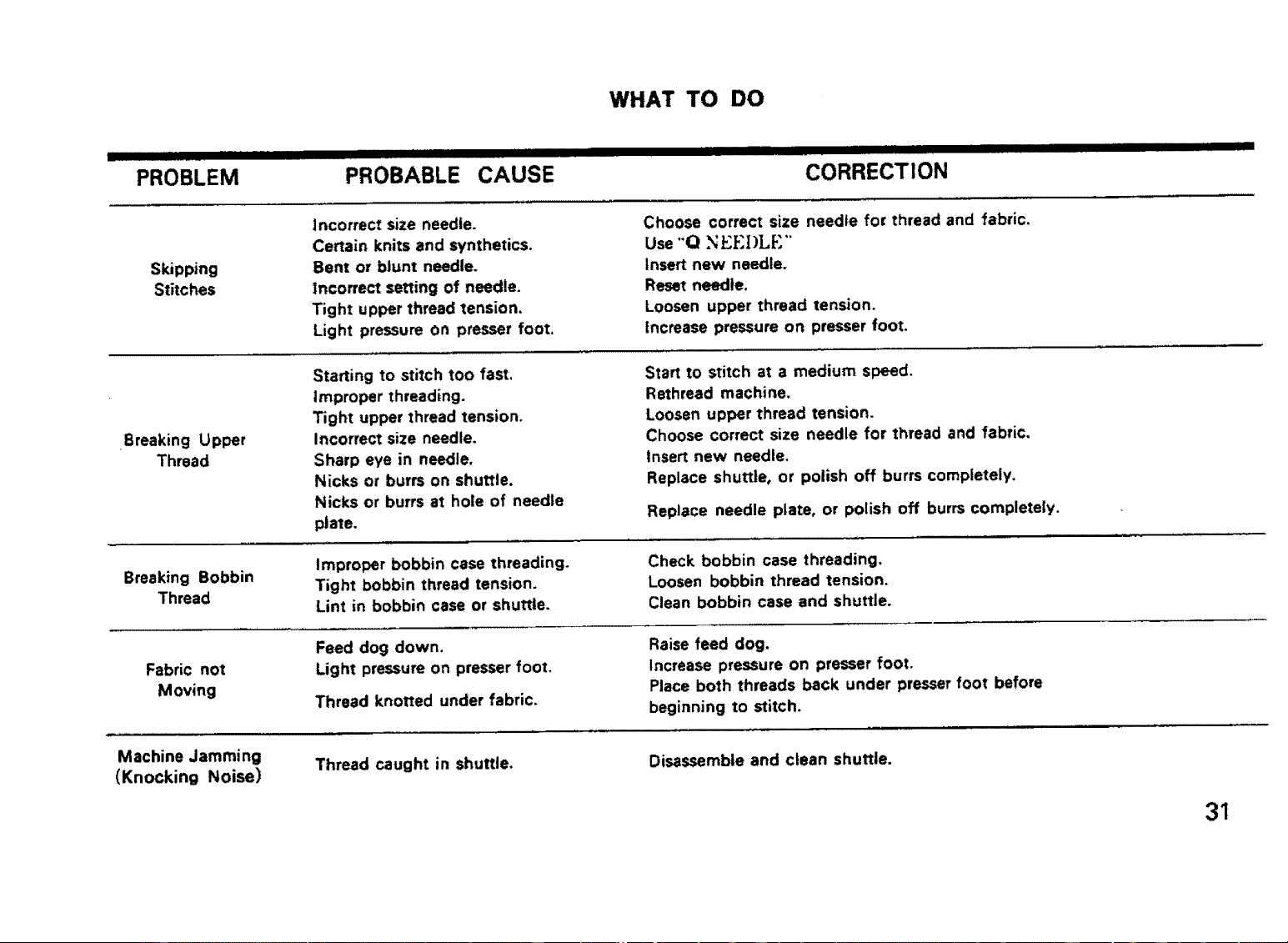
WHAT TO DO
lal IIIIIIIIIIIIII IIIIIIIIIIIIIIIIIIIIIIIIIII II IIII III IIIIIIIIIIII IIIIIII II I IIIIIIIIIIIIII I I II III
PROBLEM PROBABLE CAUSE CORRECTION
Skipping
Stitches
Breaking Upper
Thread
Breaking Bobbin
Thread
Fabric not
Moving
Machine Jamming
(Knocking Noise)
incorrect size needle.
Certain knits and synthetics.
Bent or blunt needle,
Incorrect setting of needle.
Tight upper thread tension.
Light pressure on presser foot.
Choose correct size needte for thread and fabric,
Use "Q N 1".I:'I)LF'."
Insert new needle.
Reset needle.
Loosen upper thread tension.
Increase pressure on presser foot.
Starting to stitch too fast,
Improper threading.
Tight upper thread tension.
Incorrect size needle.
Sharp eye in needle,
Nicks or burrs on shuttle.
Nicks or burrs at hole of needle
plate,
Start to stitch at a medium speed,
Rethread machine.
Loosen upper thread tension.
Choose correct size needle for thread and fabric.
Insert new needle.
Replace shuttle, or polish off burrs completely.
Replace needle plate, or polish off burrs completely,
Improper bobbin case threading.
Tight bobbin thread tension.
Lint in bobbin case or shuttle.
Check bobbin case threading.
Loosen bobbin thread tension.
Clean bobbin case and shuttle.
Feed dog down.
Light pressure on presser foot.
Thread knotted underfabric.
Raise feed dog.
increase pressure on presser foot,
Place both threads back under presser foot before
beginning to stitch.
Thread caught in shuttle.
Disassemble and clean shuttle.
31
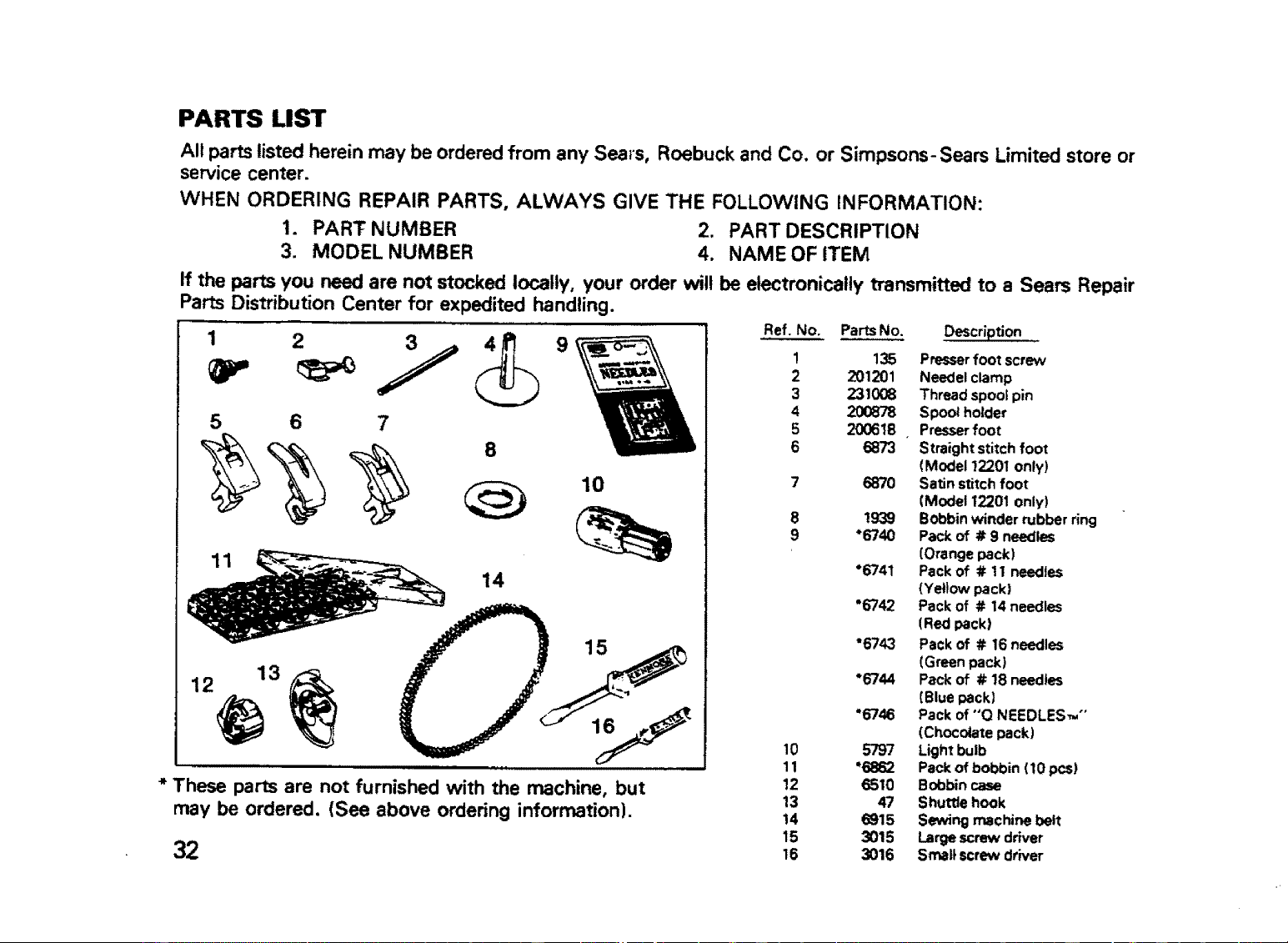
PARTS LIST
2
All parts listed herein may be ordered from any Sears, Roebuck and Co. or Simpsons- Sears Limited store or
service center.
WHEN ORDERING REPAIR PARTS, ALWAYS GIVE THE FOLLOWING INFORMATION:
1. PART NUMBER 2. PART DESCRIPTION
3. MODEL NUMBER 4. NAME OF ITEM
If the parts you need are not stocked locally, your order will be electronically transmitted to a Sears Repair
Parts Distribution Center for expedited handling.
Ref. No. Parts No. Description
5 6 7
14
10
15
11
12 13
* These parts are not furnished with the machine, but
may be ordered. (See above ordering information).
32
10
11
12
13
14
15
16
1
2
3
4
5
6
8
9
135 Presser foot screw
201201 Needel clamp
231008 Thread spool pin
200878 Spool holder
200618 Presser foot
6873 Straight stitch foot
(Model 12201 only)
6870 Satin stitch foot
(Model 12201 only)
1939 Bobbin winder rubber ring
*6740 Pack of # 9 needles
(Orange pack)
"6741 Pack of # ! 1 needles
(Yellow pack)
"6742 Pack of # 14 needles
(Red pack)
"6743 Pack of # 16 needles
(Green pack}
*6744 Pack of # 18 needles
(Blue pack)
"6746 Pack of "O NEEDLES_ °'
(Chocolate pack)
5797 Light bulb
*6862 Pack of bobbin (10 pcs)
6510 Bobbin case
47 Shuffle hook
6915 S_ng machine belt
3015 Large screw driver
3016 Small screw driver

SEWING MACHINE
SEARS, ROEBUCK AND CO., Chicago, IL 60684 U.S.A. and
SIMPSONS-SEARS LIMITED, Toronto, Ontario, Canada
Pa_ No. 52880 _[_