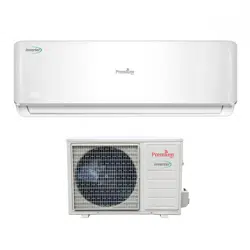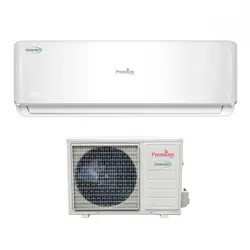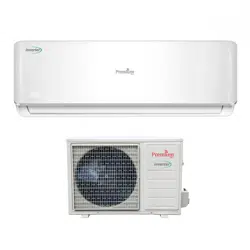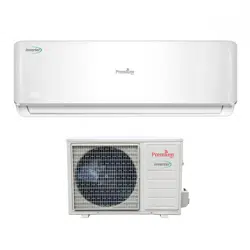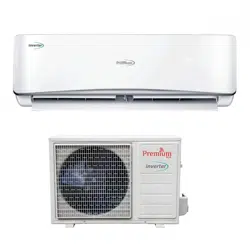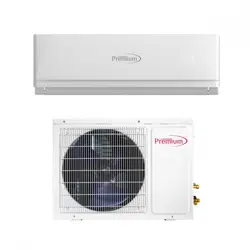
PIA12061
PIA18061
PIA24061
PIA9061A/PIA9061B
PIA12061A/PIA12061B
PIA90615A/PIA90615B
PIA120615A/PIA120615B
INSTALLATION MANUAL
Safety Precautions
3
Safety Instructions
1
Indoor Unit
4
Outdoor Unit
4
Display Introduction
5
Preset
2
Safeguarding the Environment
2
Identification of Parts
4
Care and Maintenance
6
Protection
7
Energy Saving Tips
8
Site Instructions
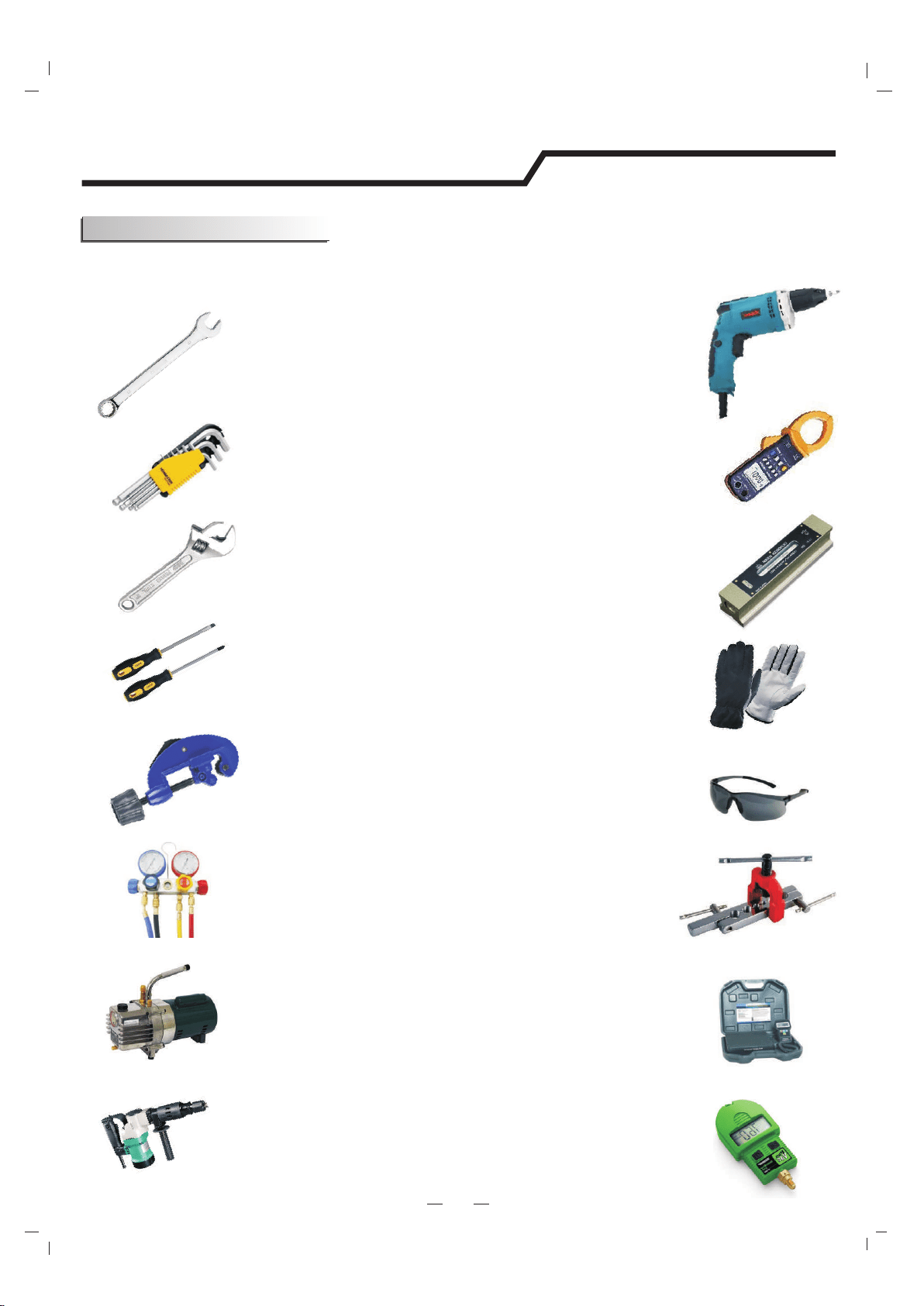
Suggested Tools
12
11
Indoor Unit Installation
13
Power and Wiring
19
Installation Diagram
10
Vacuum Testing and Charging
Start-up
Troubleshooting
21
22
9
Outdoor Unit Installation
17
Installation Instructions
10
Contents
2
Preparation before Use
Remote controller operating instructions.See"remote controller
instructions".
1
Safety Instructions
To guarantee the unit work normally, please read the manual carefully before installation,
and try to install strictly according to this manual.
Do not let air enter the refrigeration system or discharge refrigerant when moving the
air conditioner.
After installing, the consumer must operate the air conditioner correctly according
to this manual,keep a suitable storage for maintenance and moving of the air
conditioner in the future.
There must be an air-break switch.
Check the connecting cables and pipes carefully, make sure they are correct and firm
before connecting the power of the air conditioner.
T 3.15A 250V
T 20A 250V
Properly ground the air conditioner into the earth.
Warning: Risk of electric shock can cause injury or death: Disconnect all remote
electric power supplies before servicing .
A residual current device(RCD)with the rating of above 10mA shall be incorporated
in the fixed wiring according to the national rule
The best length of the connecting pipe between the indoor unit and outdoor unit
is less than 7.5 meters(24.6ft). It will affect the efficiency of the air conditioner if
the distance longer than that length.
This appliance can be used by children aged from 8 years and above and persons
with reduced physical, sensory or mental capabilities or lack of experience and
knowledge if they have been given supervision or instruction concerning use of the
appliance in a safe way and understand the hazards involved. Children shall not
play with the appliance. Cleaning and user maintenance shall not be made by
children without supervision.
If the supply cord is damaged, it must be replaced by the manufacturer, its service
agent or similarly qualified persons in order to avoid a hazard.
The batteries in remote controller must be recycled or disposed of properly.
Disposal of Scrap Batteries --- Please discard the batteries as sorted municipal
waste at the accessible collection point.
If the appliance is fixed wiring, the appliance must be fitted with means for
disconnection from the supply mains having a contact separation in all poles that
provide full disconnection under overvoltage category III conditions, and these
means must be incorporated in the fixed wiring in accordance with the wiring rules.
The appliance shall not be installed in the laundry.
The appliance shall be installed in accordance with local electrical safety
regulations and National Electrical Codes(NEC).
The air conditioner must be installed by professional or qualified persons.
Model
9K-12K
Fuse of Indoor unit
18K
24K-36K
Fuse ot outdoor unit
T 3.15A 250V
T 3.15A 250V
The Fuse of the unit:
T 15A 250V
T 30A 250V
2
Preparation before Use
The air conditioner has an Auto-Restart function.
Each time after the remote control is replaced with new batteries or is energized, auto presetting
heat pump.If the air conditioner you purchased is a Cooling Only one, heat pump remote controller can also be used.
remote control
Remote Control Presetting
Before using the air conditioner, be sure to check and preset the following.
Auto Restart Presetting
Hold down any button on remote control to activate the back light. It automatically shuts off 10 seconds later.
Note: Back-light is an optional function.
Back-light Function (optional)
of Remote Control
This appliance is made of recyclable or re-usable material. Scrapping must be carried out in
compliance with local waste disposal regulations. Before scrapping it, make sure to cut off the
mains cord so that the appliance cannot be re-used.
For more detailed information on handling and recycling this product, contact your local authorities
who deal with the separate collection of rubbish or the shop where you bought the appliance.
SCRAPPING OF APPLIANCE
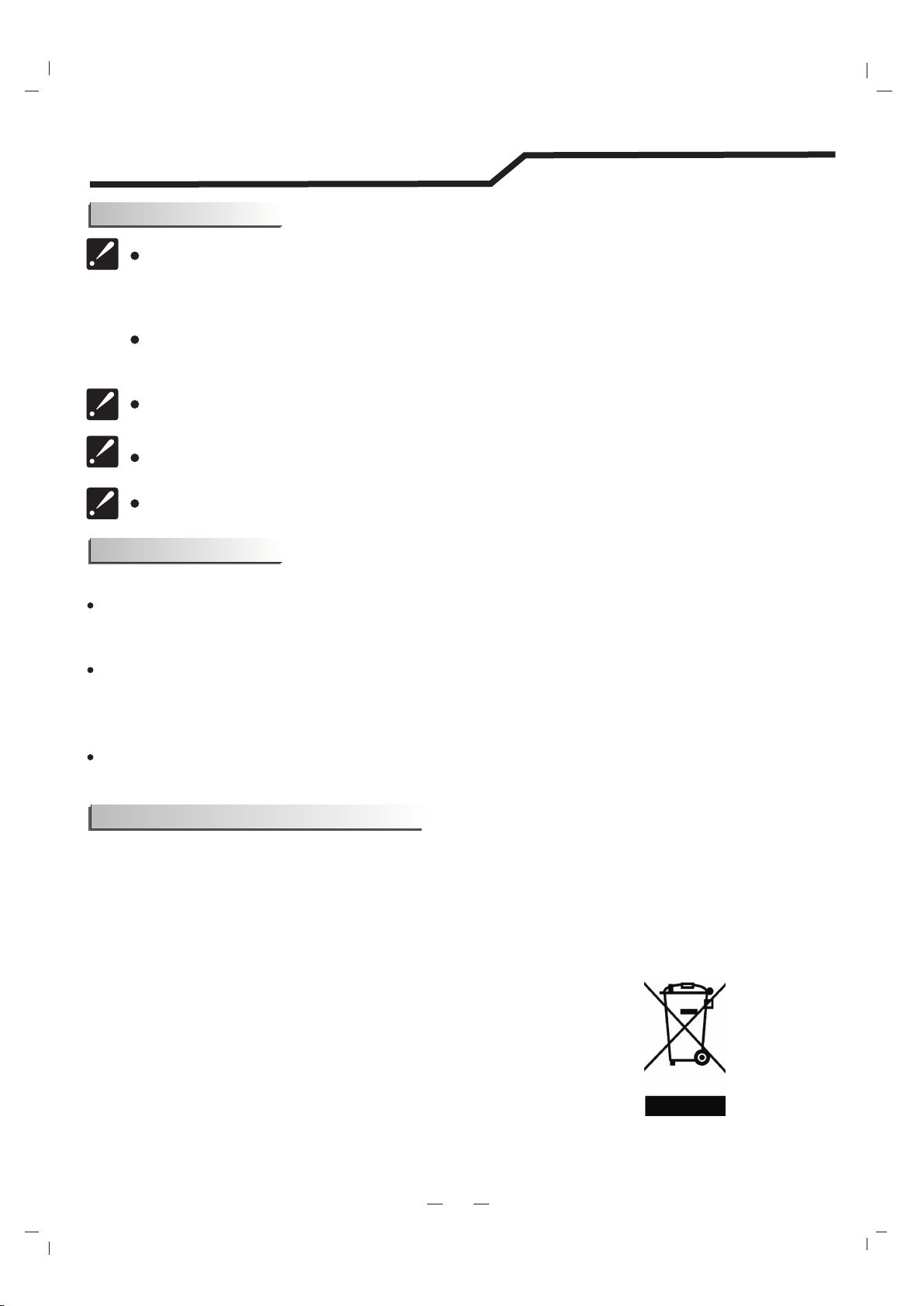
This marking indicates that this product should not be disposed
with other household wastes throughout the North America. To
prevent possible harm to the environment or human health from
uncontrolled waste disposal, recycle it responsibly to promote
the sustainable reuse of material resources. To return your
used device, please use the return and collection systems or
contact the retailer where the product was purchased.
They can take this product for environmental safe recycling.
Note
Preset
Safeguarding the environment
When charging refrigerant into the system, make sure to charge in liquid state,if the
refrigerant of the appliance is R410A.Otherwise, chemical composition of
refrigerant (R410A) inside the system may change and thus affect performance of
the air conditioner.
According to the character of
pressure of the tube is very high, so be sure to be careful when you install and repair
the appliance.
refrigerant (R410A,the value of GWP is 2088), the
If the supply cord is damaged, it must be replaced by the manufacturer, its
service agent or similarly qualified persons in order to avoid a hazard.
The air conditioner must be installed by trained, qualified installers
and service mechanics.
The temperature of refrigerant circuit will be high, please keep the
interconnection cable away from the copper tube.
Safety Precautions
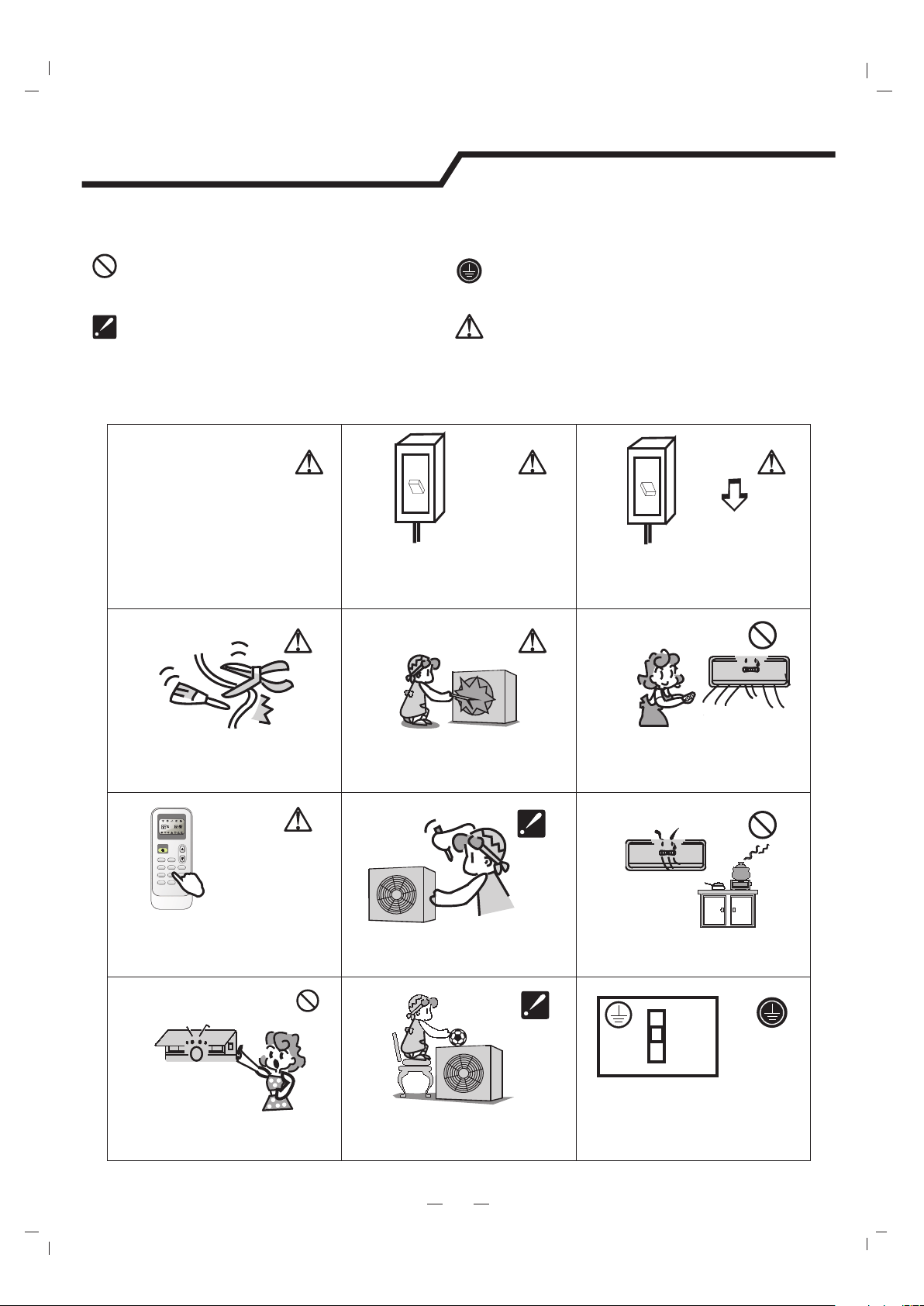
Symbols in this Use and Care Manual are interpreted as shown below.
Be sure not to do.
Pay attention to such a situation.
Grounding is essential.
Warning: Incorrect handling could
cause a serious hazard, such as death,
serious injury, etc.
3
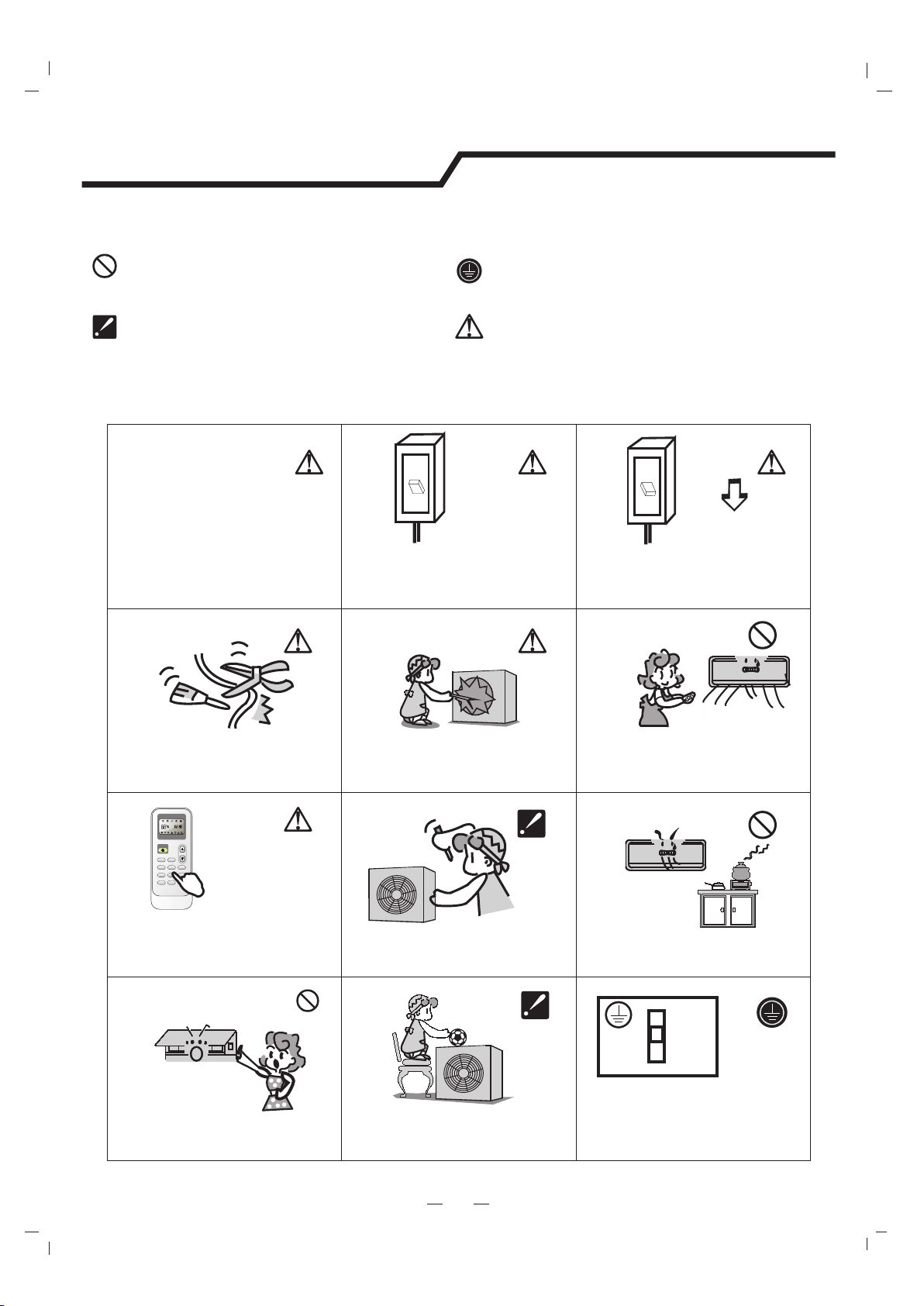
Do not use the power supply circuit
breaker or pull off the plug to turn it off
during operation. This may cause a fire
due to spark, etc.
Keep the power supply circuit breaker
or plug from dirt. Connect the power
supply cord to it firmly and correctly,
lest an electric shock or a fire break out
due to insufficient contact.
Use correct power supply in
accordance with the rating plate
requirement. Otherwise, serious
faults or hazard may occur or a
fire maybe break out.
Do not knit, pull or press the power supply
cord, lest the power supply cord be broken.
An electric shock or fire is probably caused
by a broken power supply cord.
Never insert a stick or similar obstacle
to the unit. Since the fan rotates at high
speed, this may cause an injury.
Do not repair the appliance by yourself.
If this is done incorrectly, it may cause an
electric shock, etc.
Turn off the appliance by remote control
firstly before cutting off power supply if
malfunction occurs.
It is harmful to your health if the cool air
reaches you for a long time. It is advisable
to let the air flow be deflected to all the room.
Prevent the air flow from reaching the gas
burners and stove.
Do not touch the operation buttons
when your hands are wet.
Do not put any objects on the outdoor
unit.
It is the user's responsibility to make the
appliance be grounded according to
local codes or ordinances by a licenced
technician.
OFF
OFF
ON
ON
ON/OF F
MODEFAN
SWING
SLEEP
SUPER
SMART
IFEELDIMME R
TIMER O NTIMER OFFCLOCK
ON
OFF
ON
OFF
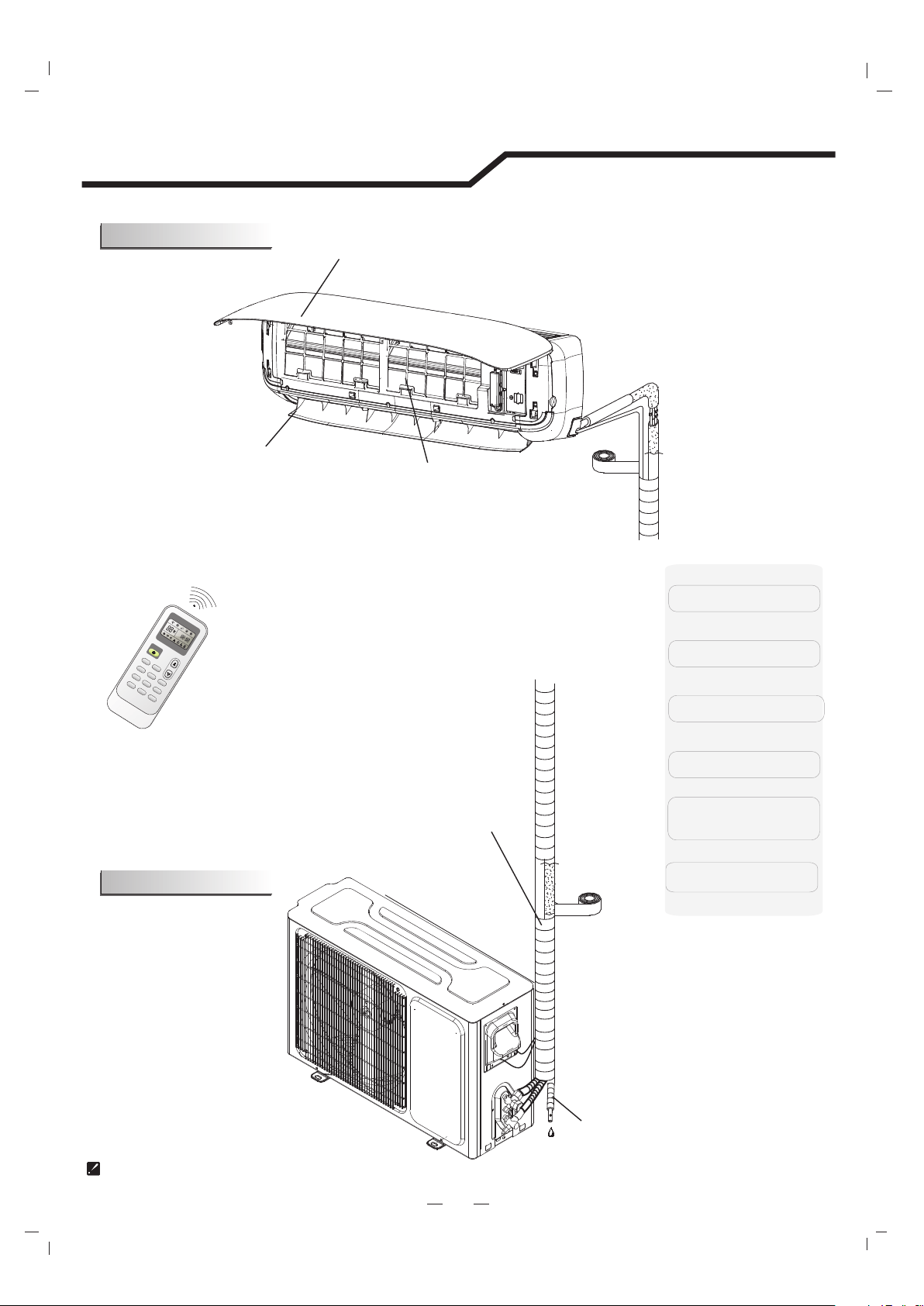
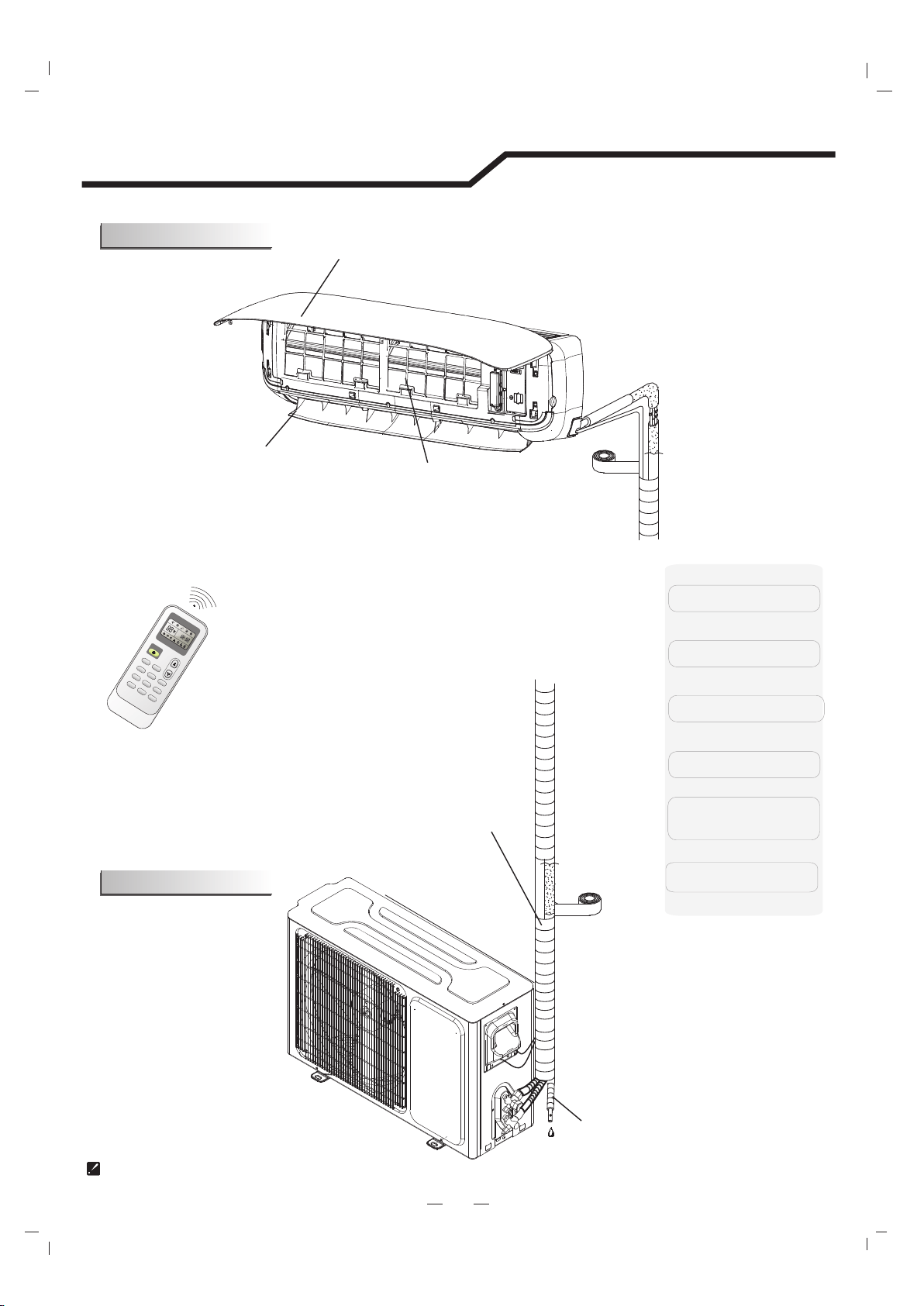
The figures in this manual are based on the external view of a standard model.
Consequently, the shape may differ from that of the air conditioner you have selected.
5. Pipes and Power
Connection Cord
6. Drain Hose
4. Front Panel
3. Horizontal Louvers
Identification of Parts
4
Indoor unit
Outdoor unit
2. Air Filter
1. Remote Controller
ON/O FF
MODEFAN
SWIN G
SLEE P
SUPE R
SMART
IFEE LDIMM ER
TIME R ONTIME R O
FFCLOC K
O
N
O
F
F
O
N
O
F
F
1
5
6
2
3
4
Part Name
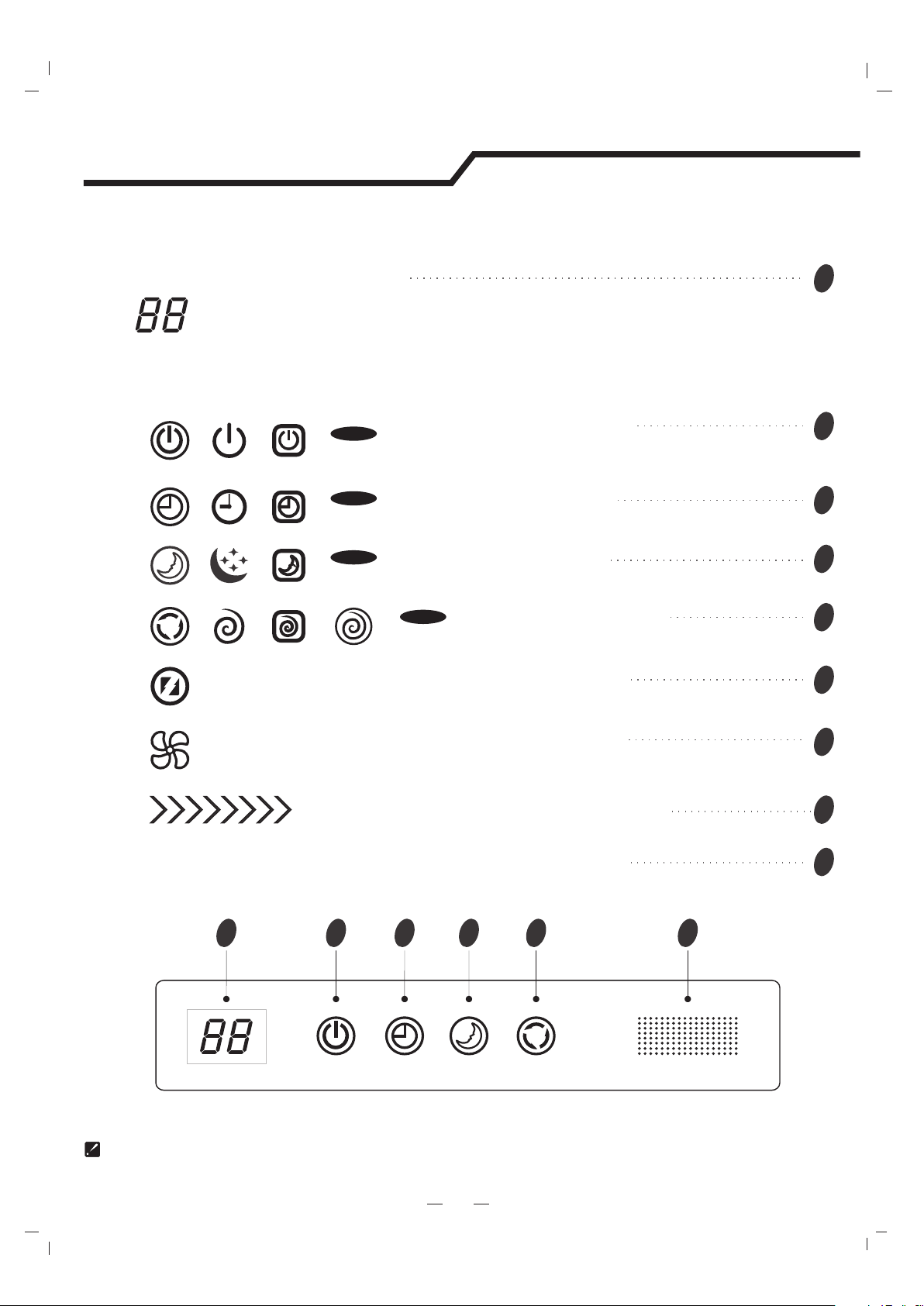
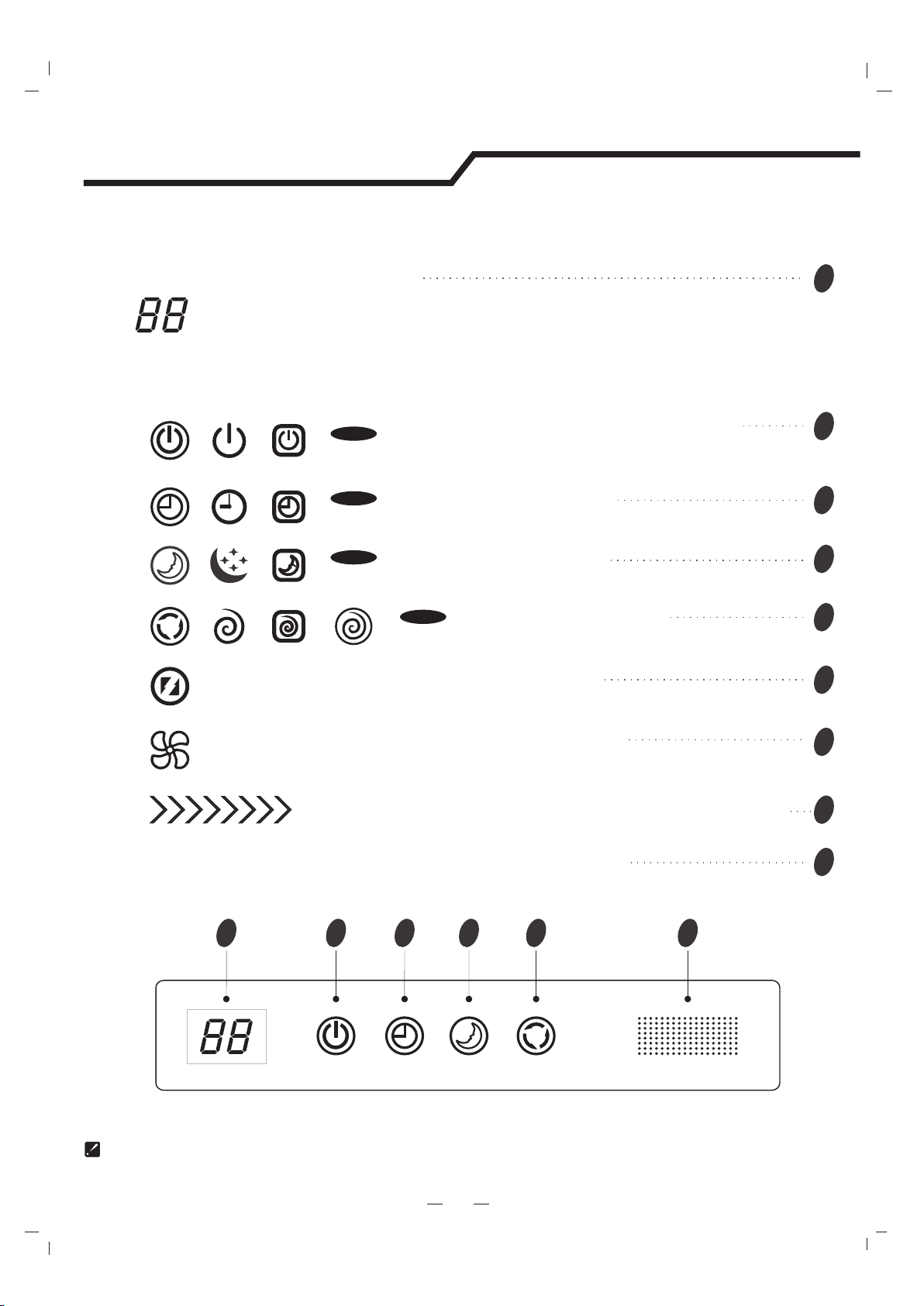
The symbols may be different from these models, but the functions are similar.
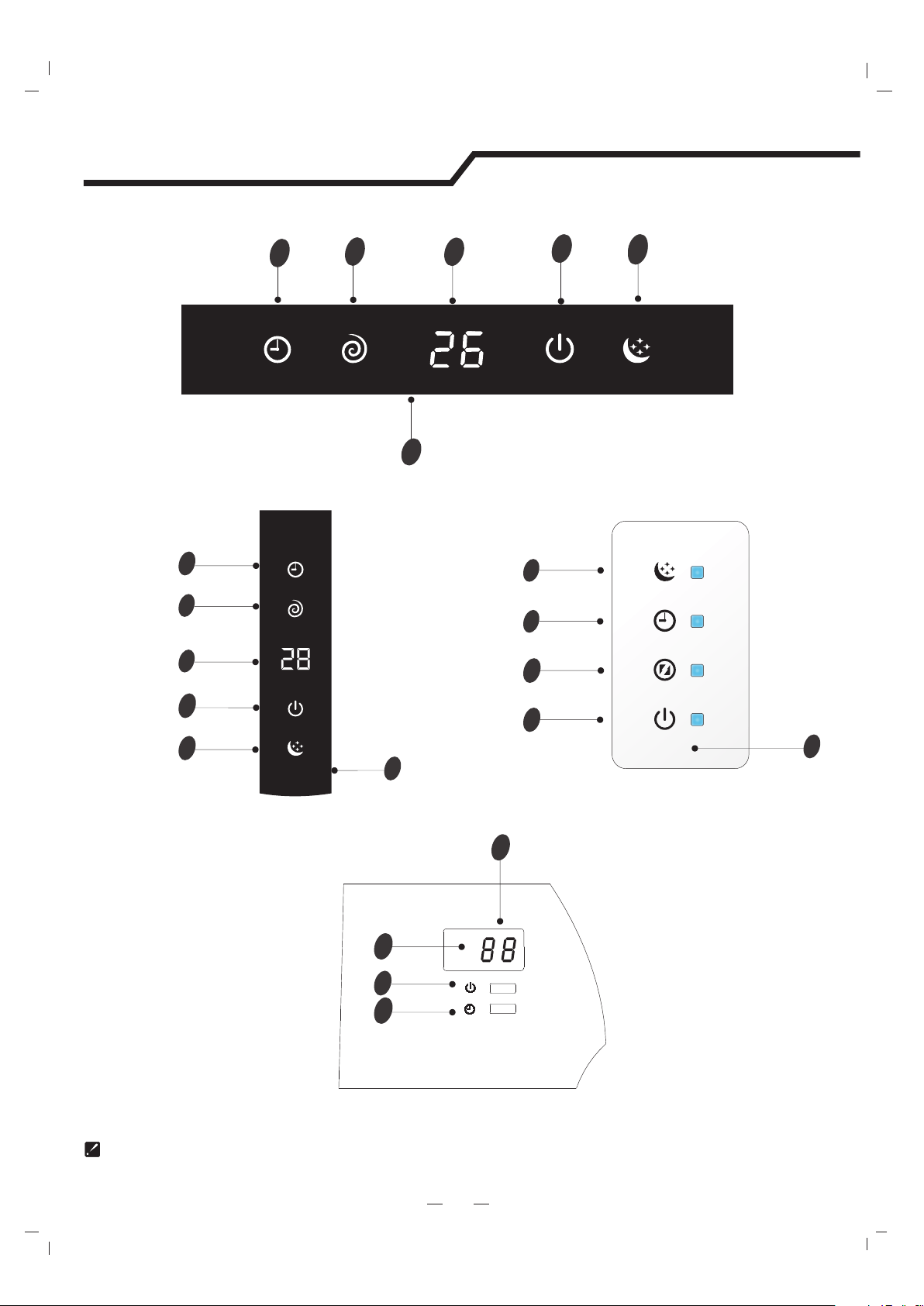
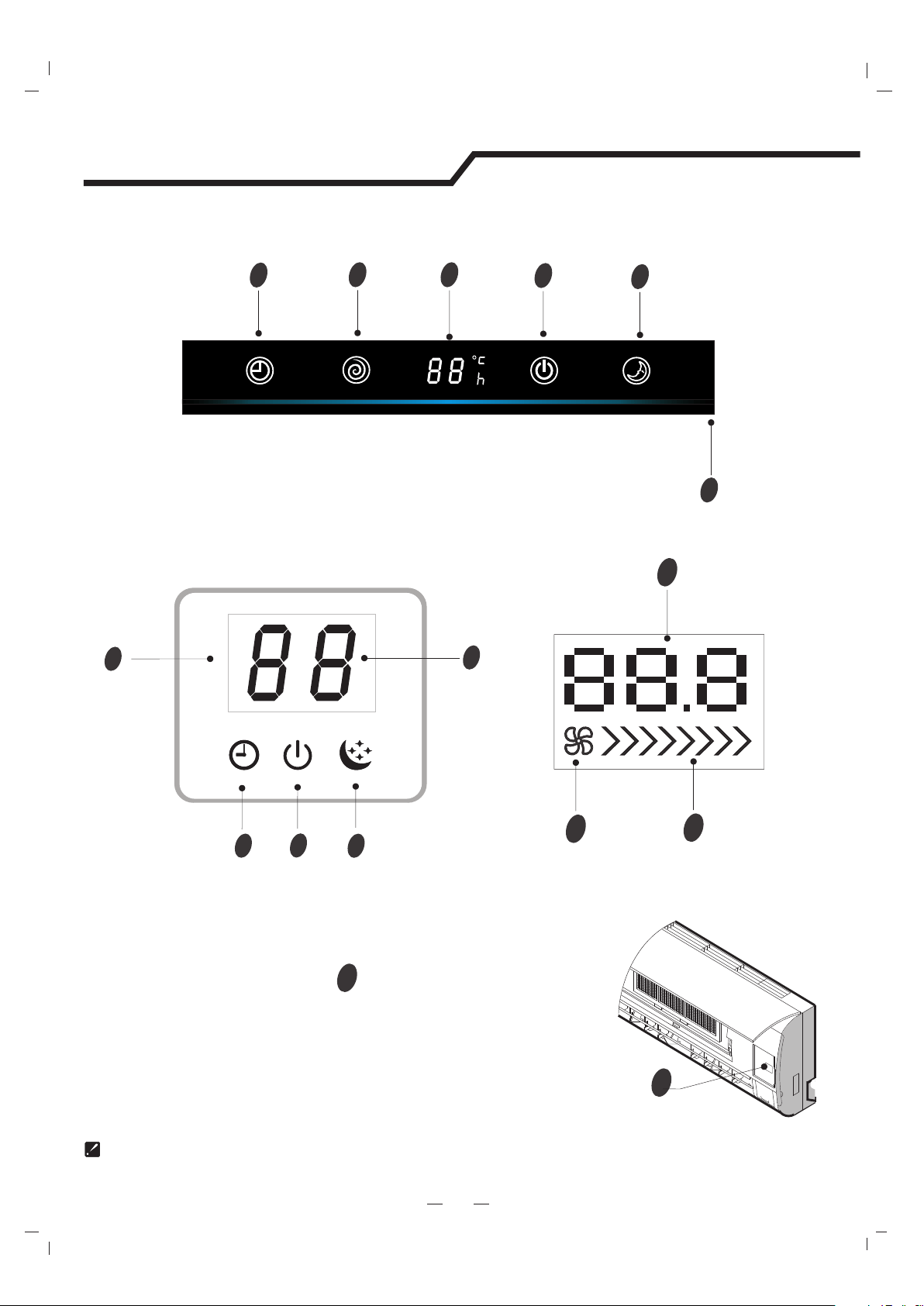
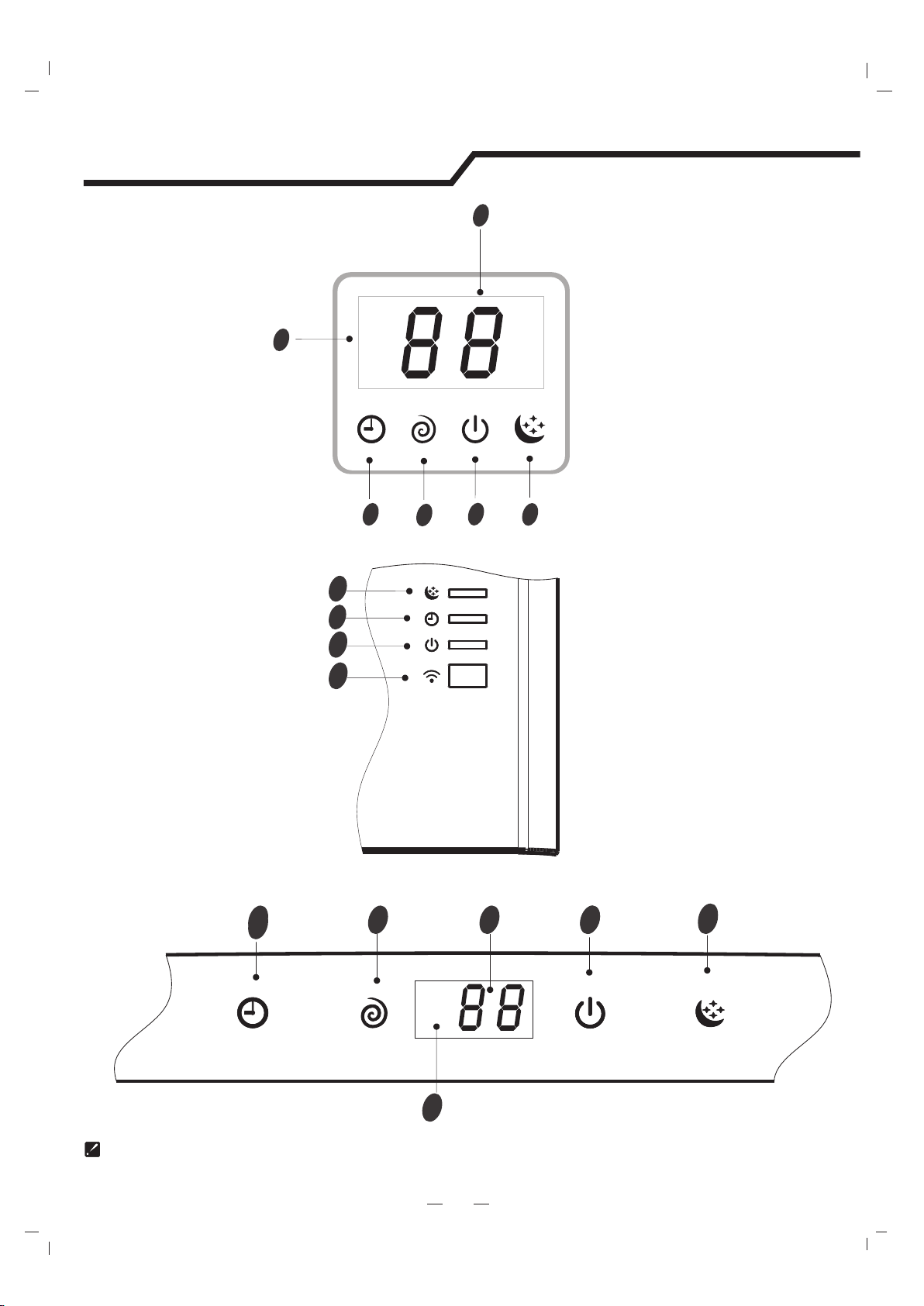
Display Introduction
5
Running indicator
It lights up when the AC is running.
It flashes during defrosting.
Timer indicator
It lights up during set time.
Sleep indicator
It lights up in sleep mode.
Compressor indicator
It lights up when the compressor is on.
Display set temperature.
It shows FC after 200 hours of usage as reminder to clean the filter.
After filter cleaning press the filter reset button located on the indoor unit behind the front
panel in order to reset the display.(optional)
Temperature indicator
123459
VG/VL series
Signal Receptor
Timer
Comp.
Run
Sleep
Super indicator
It lights up in super mode.
2
3
4
5
1
9
6
Mode indicator
Heating displays orange,others display white
7
Fan speed indicator
8
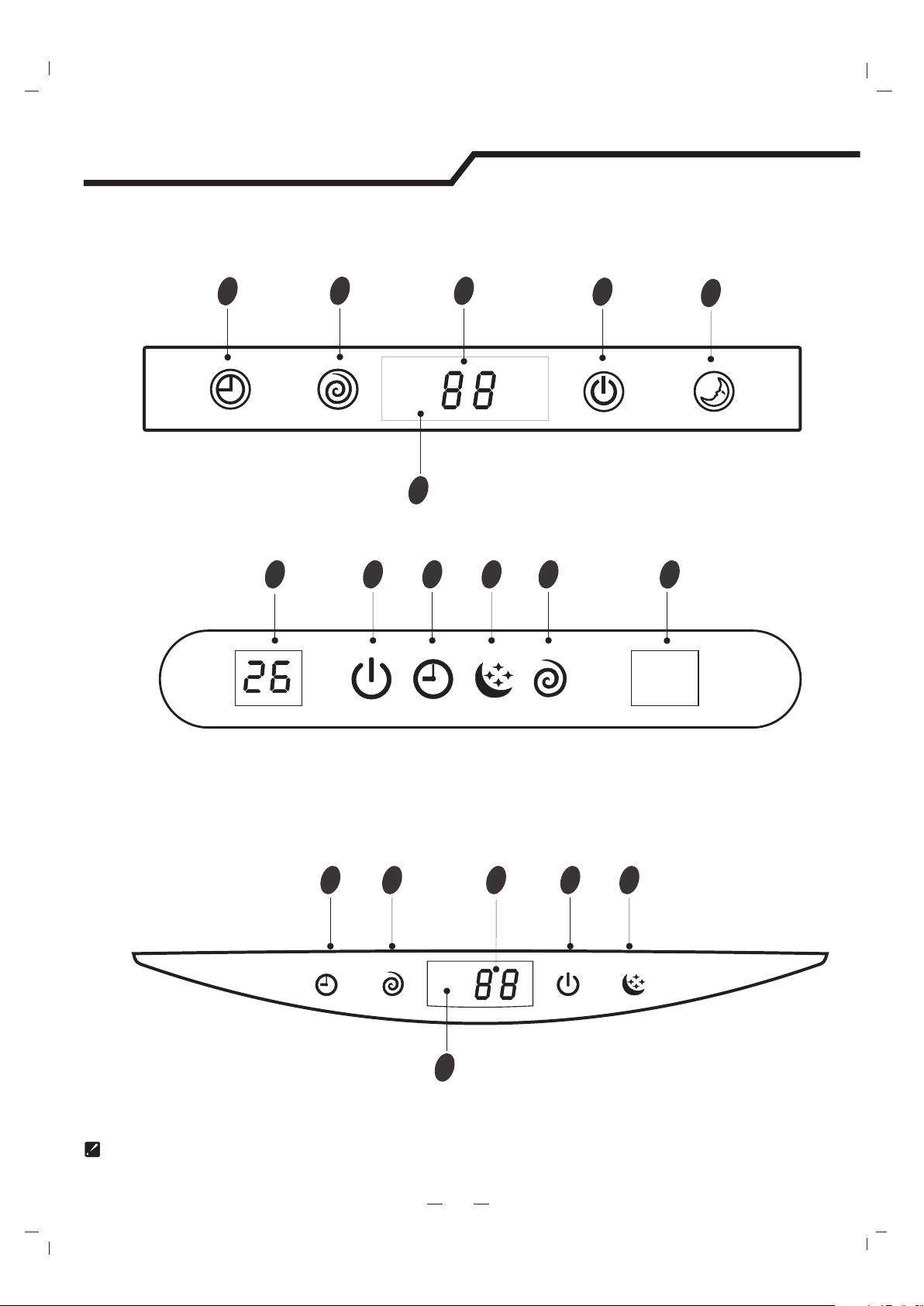
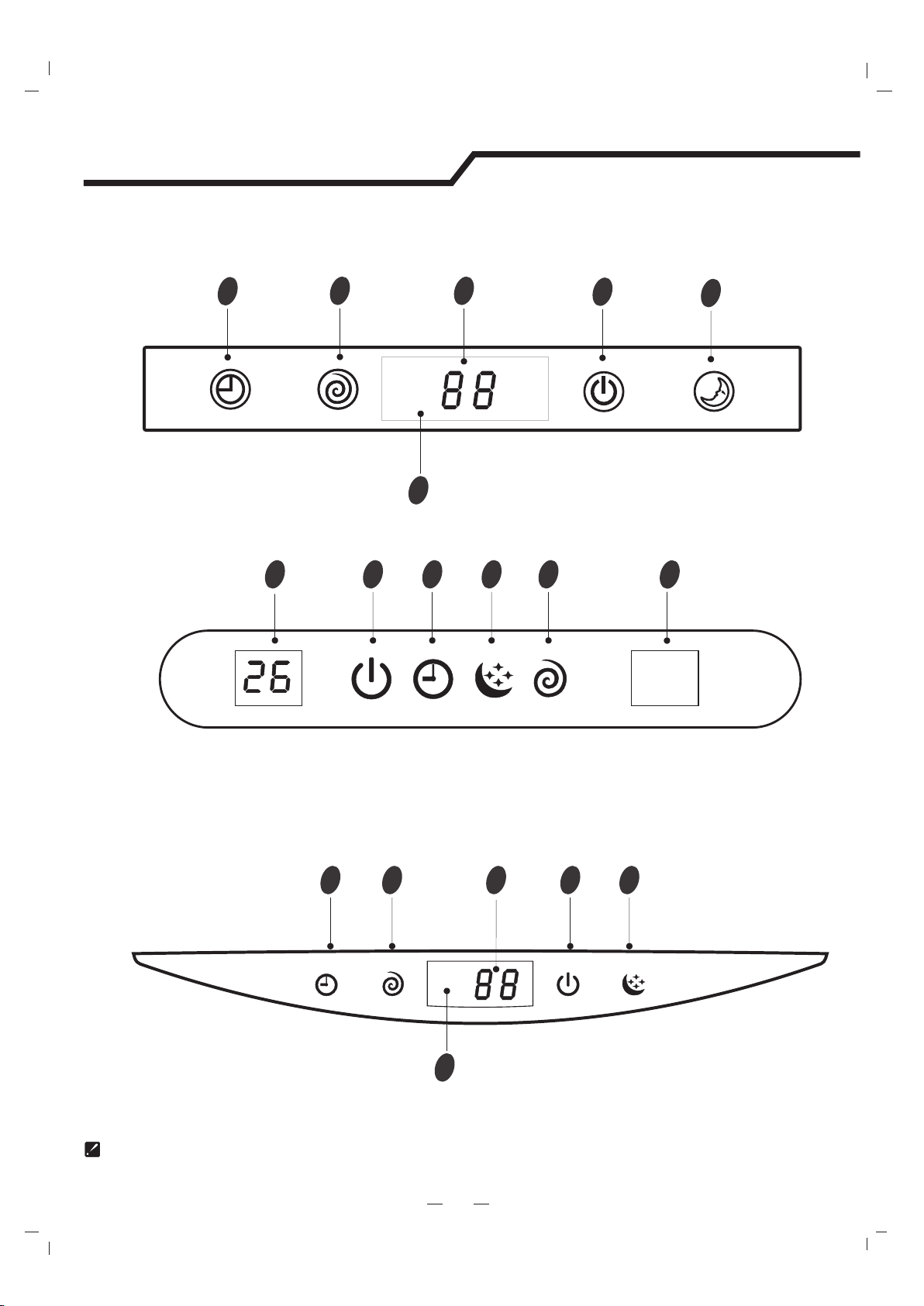
The symbols may be different from these models, but the functions are similar.
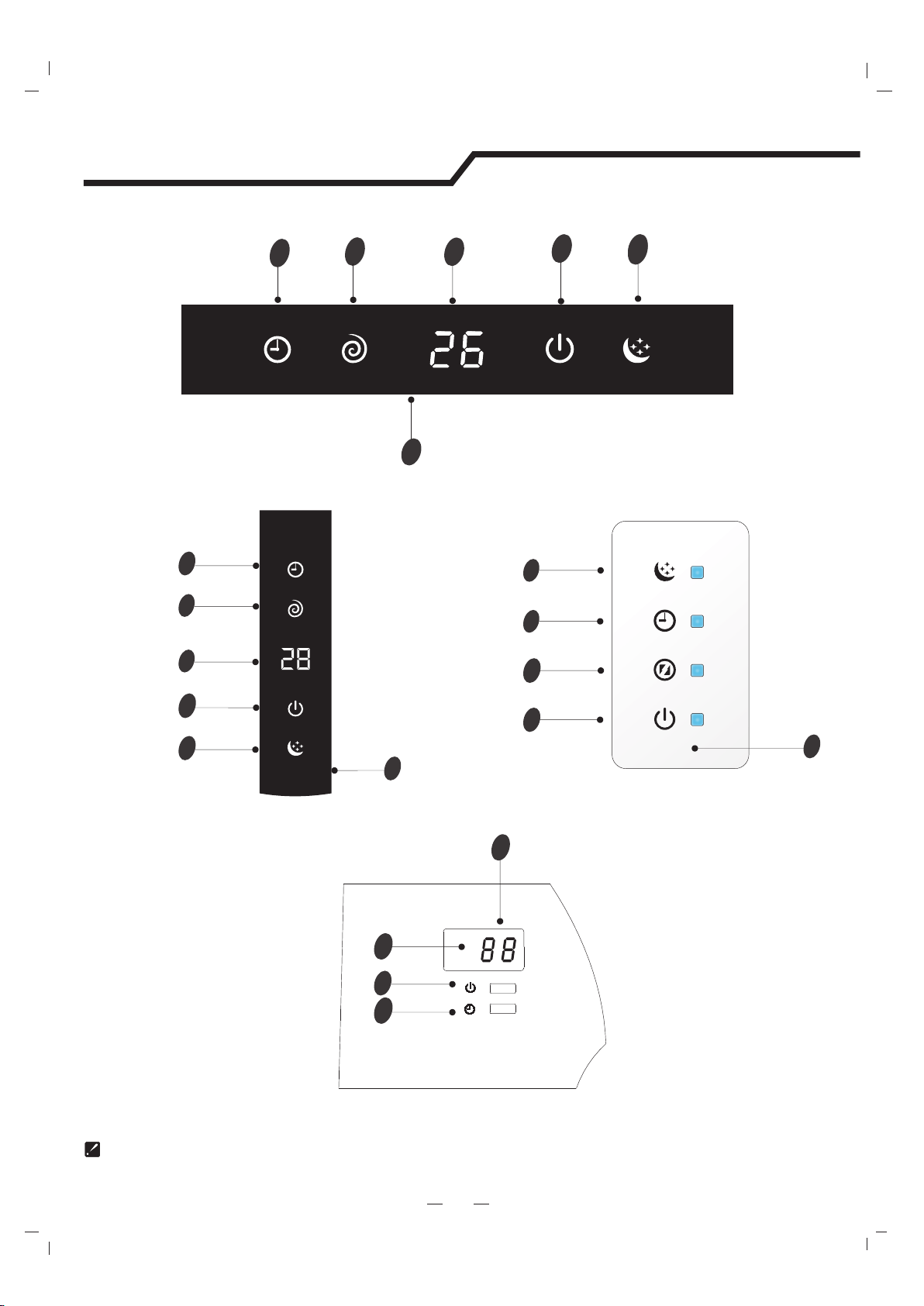
Display Introduction
5
1
2
3
4
5
9
VT series
SE series
12345
9
SF series/DG(Right side)
12345
9
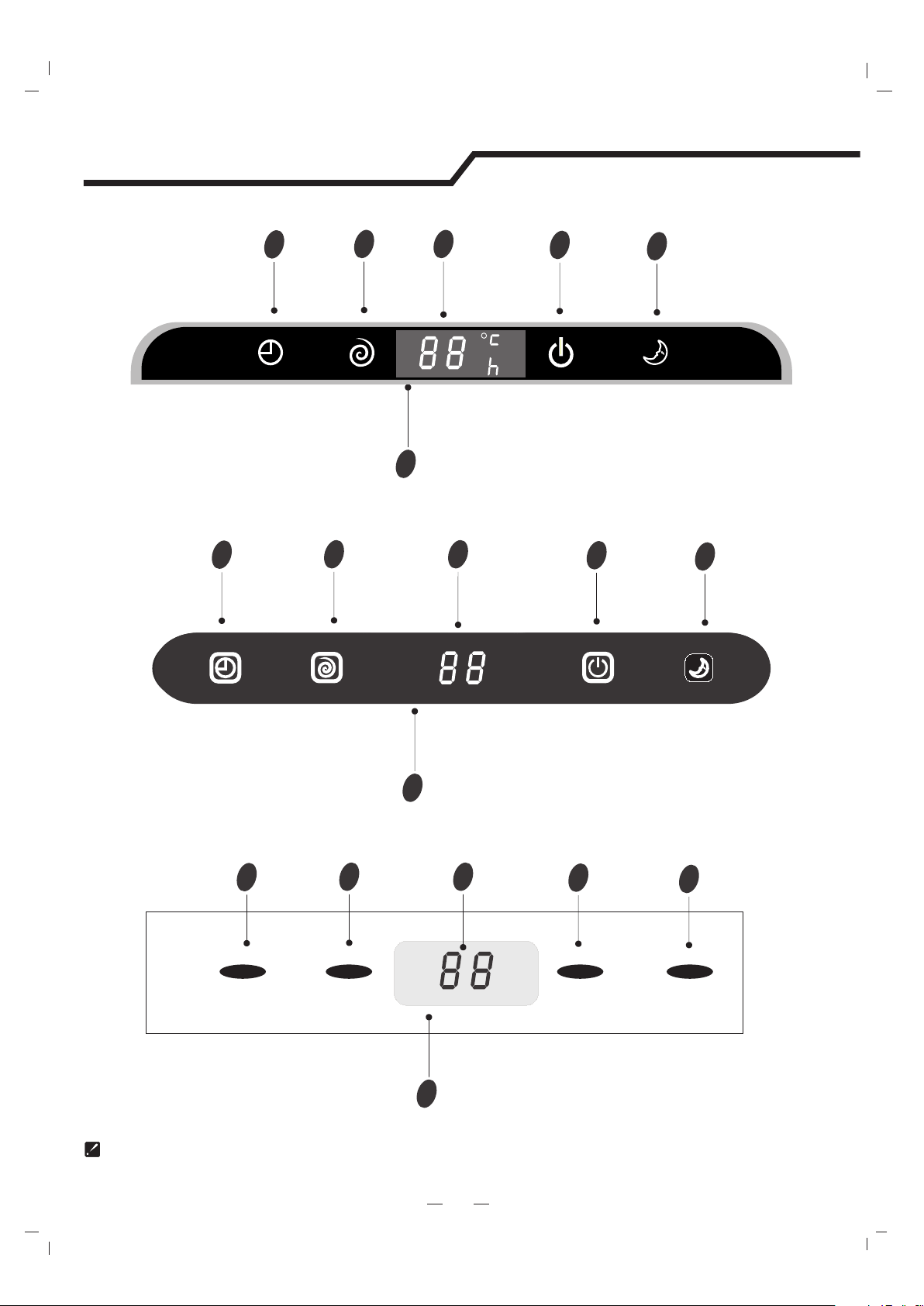
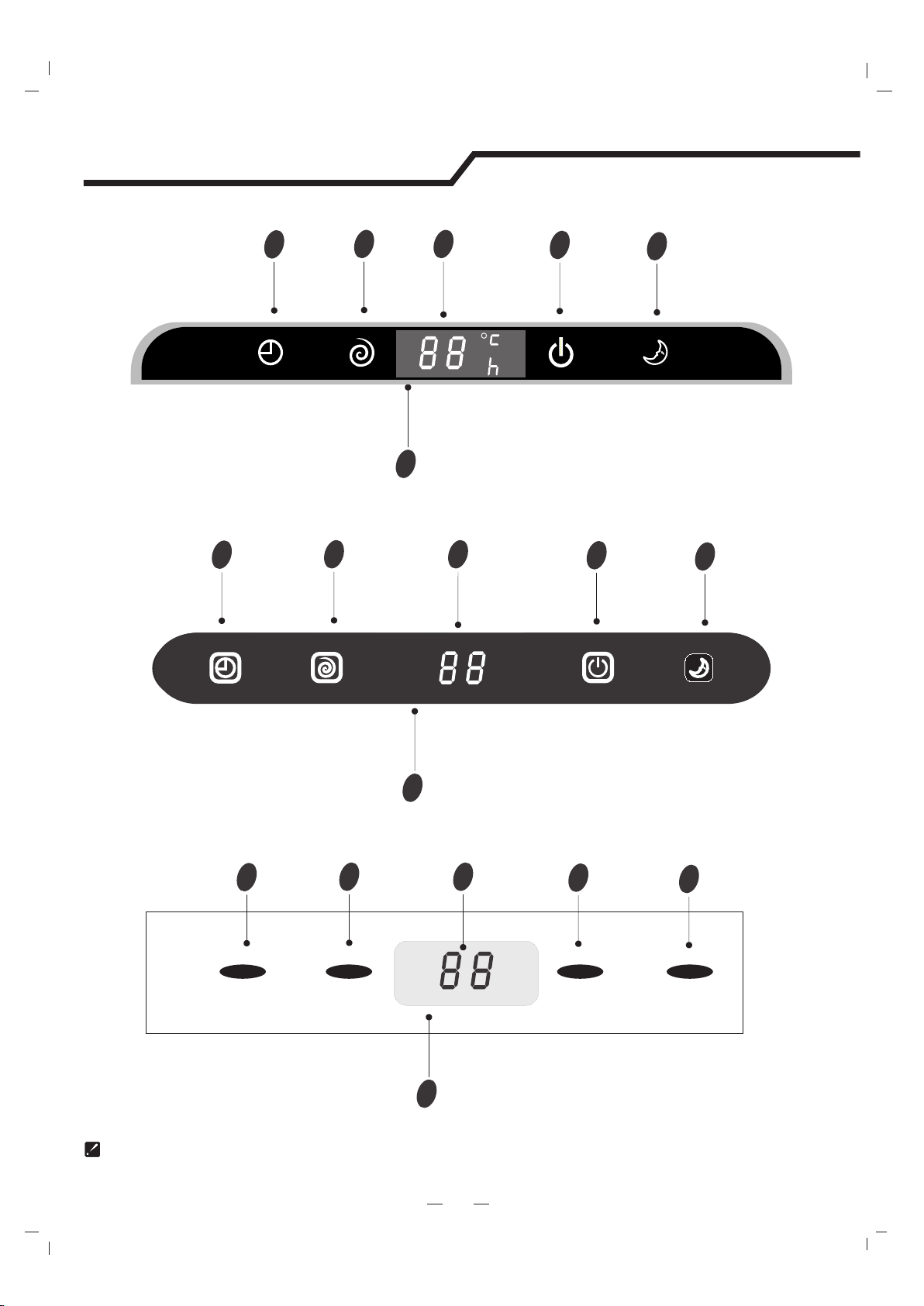
The symbols may be different from these models, but the functions are similar.
Display Introduction
5
1
2
3
4
5
9
Timer
Comp.
Run
Sleep
1
2
3
4
5
9
UL series
UQ series
UP series
9
Timer
Comp.
Run
Sleep
1
2
3
4
5
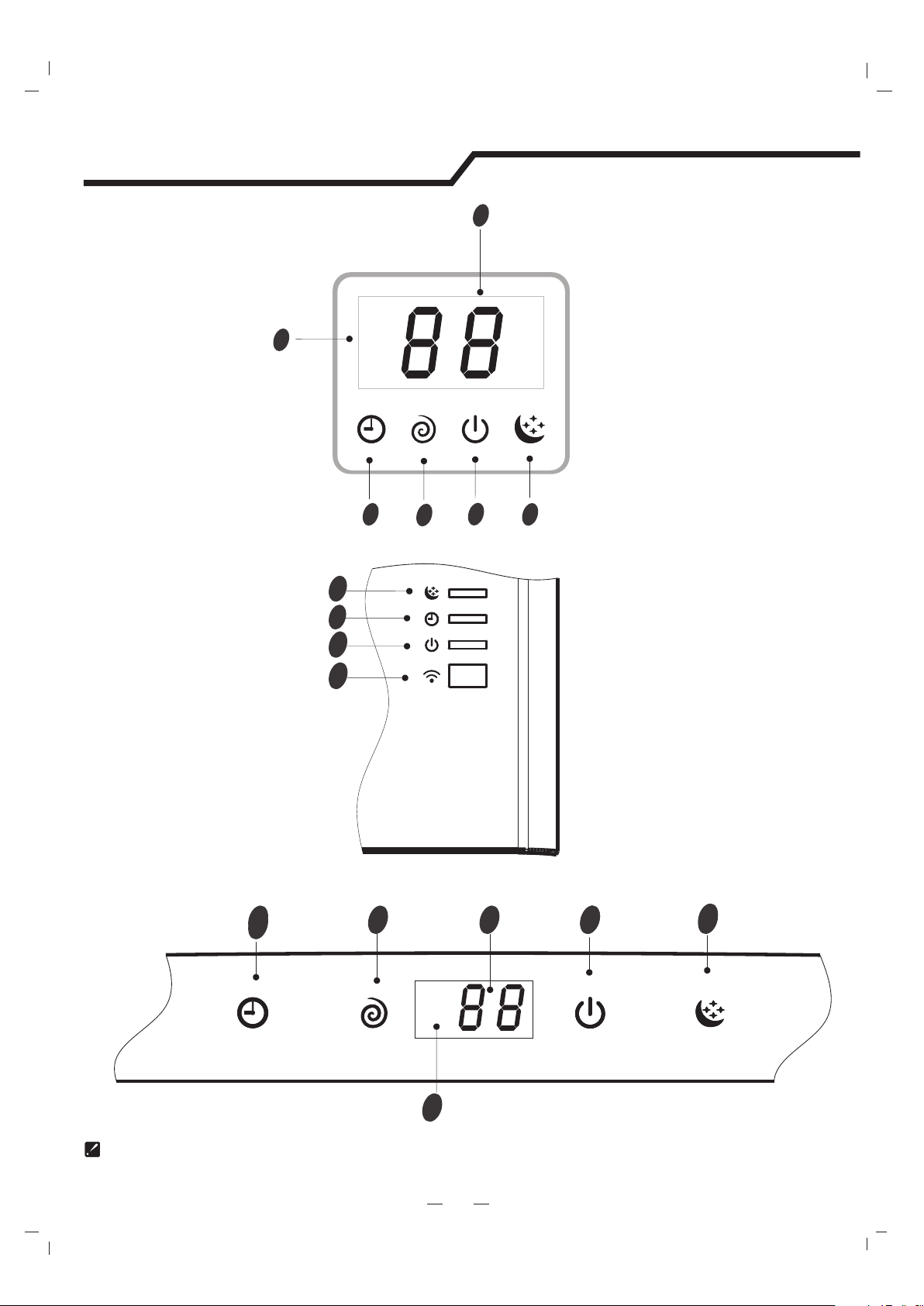
The symbols may be different from these models, but the functions are similar.
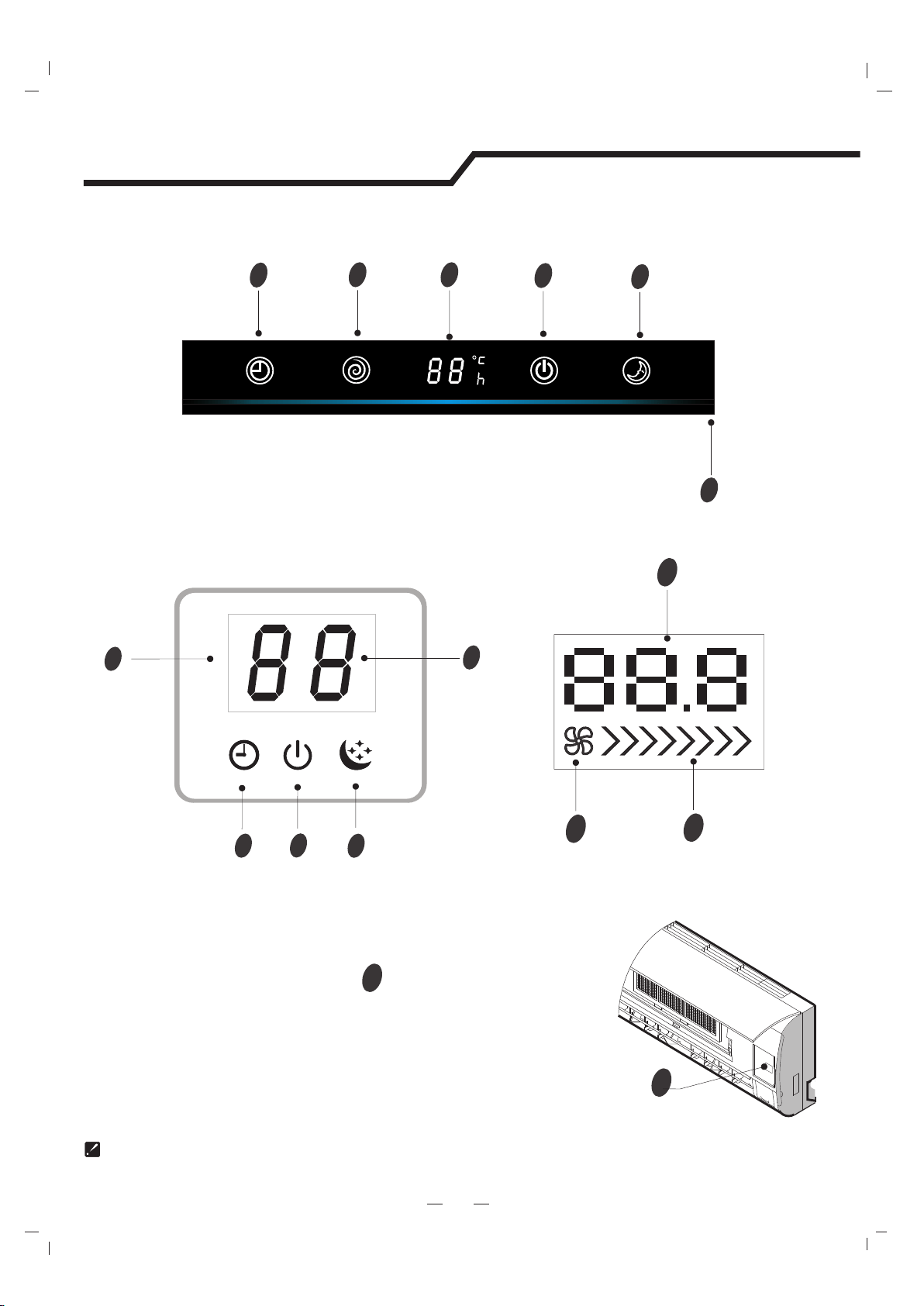
Display Introduction
5
NT series
VQ/TE/TF/DA/DG(Middle)/DH series
2
3
4
9
12345
9
4
3
2
1
2
3
4
5
9
NS/DE series
The symbols may be different from these models, but the functions are similar.
Display Introduction
5
VM series
NK seriesNM/DF series
9
22
3
4
4
1
5
2
3
5
4
1
9
6
4
2
3
9
TA/TC series
2
3
9
1
The symbols may be different from these models, but the functions are similar.
Display Introduction
5
Emergency button
10
10
ON/OFF
To let the AC run or stop by pressing the button.
VC series
1
2
3
4
5
Timer
Comp.
Run
Sleep
9
SA/TD/TG/DB/DC/DJ/DK series
9
1
2
3
4
SC series
7
28
1
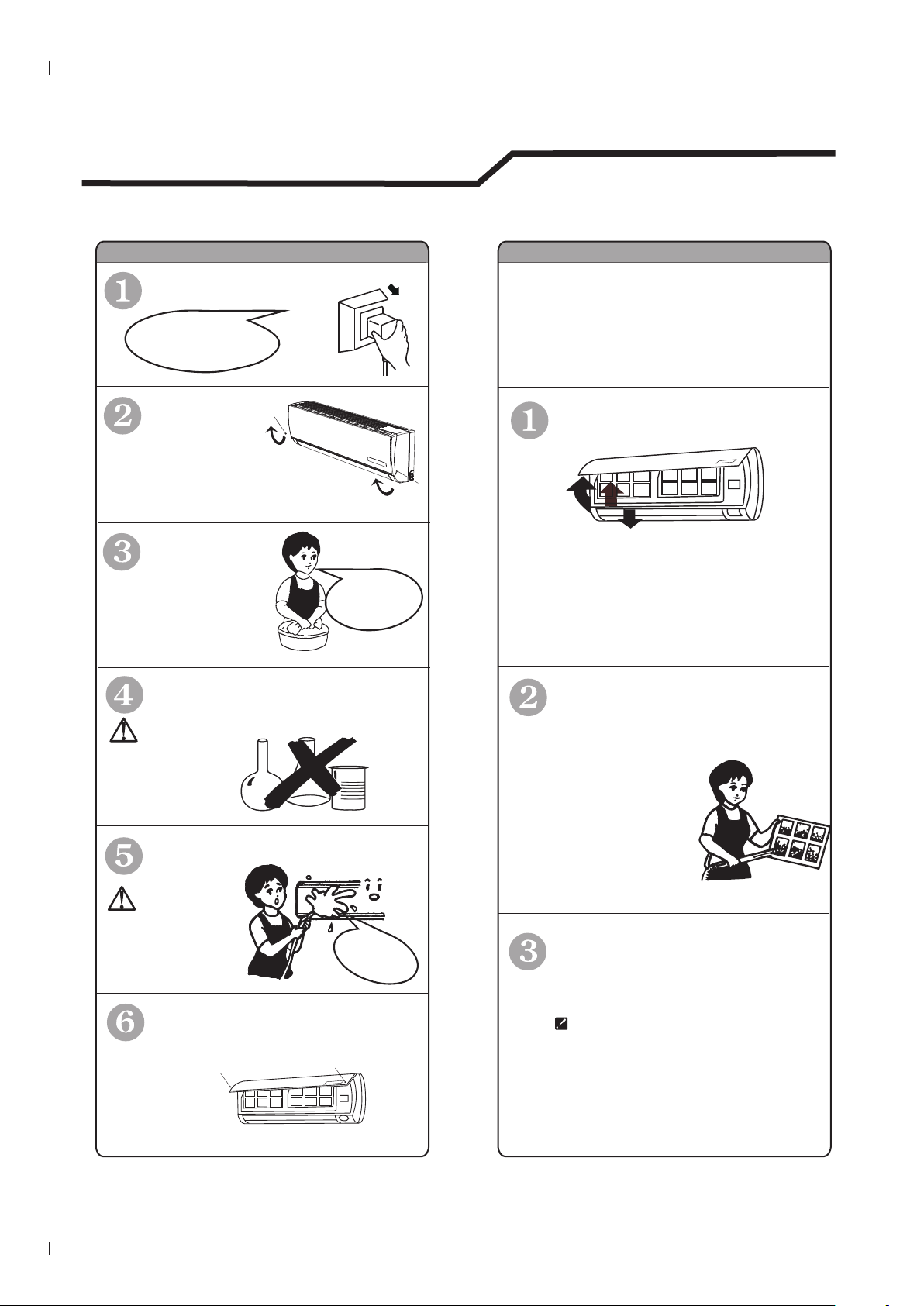
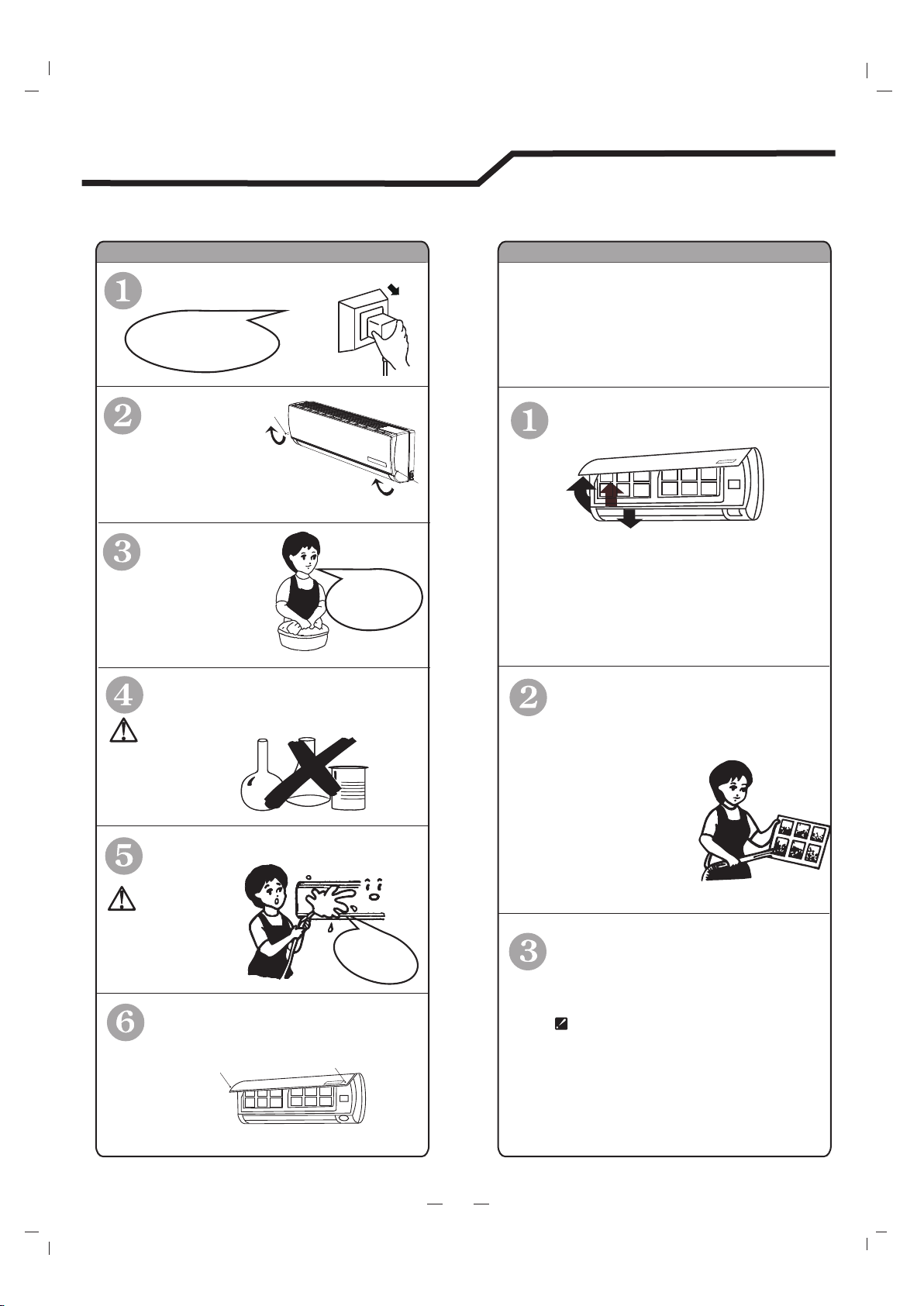
Turn off the appliance
first before disconnecting
from power supply.
It is necessary to clean the air filter
after using it for about 200 hours.
Clean it as follows:
Front panel maintenanceAir filter maintenance
Cut off the power supply
Never use volatile substance
such as gasoline or polishing
powder to clean the appliance.
Clean and reinstall the air filter.
Close the front panel again.
shock!
Electric
Dangerous!
Wipe with a soft
and dry cloth.
Use soft moisture cloth
to clean if the front panel
is very dirty.
Never sprinkle water onto the
indoor unit
Reinstall and shut the front panel.
Reinstall and shut the front panel by
pressing position "b" downward.
If the dirt is conspicuous,
wash it with a solution of
detergent in lukewarm water.
After cleaning, dry well in
shade.
Clean the air filter every two weeks
if the air conditioner operates in an
extremely dusty environment.
Stop the appliance and remove
the air filter.
1
2
3
1.Open the front panel.
2.Press the handle of the filter gently
from the front.
3. Grasp the handle and slide out the filter.
soft cloth to
clean it.
Use a dry and
Grasp position "a" and
pull outward to remove the
front panel.
a
a
b
b
6
Care and Maintenance
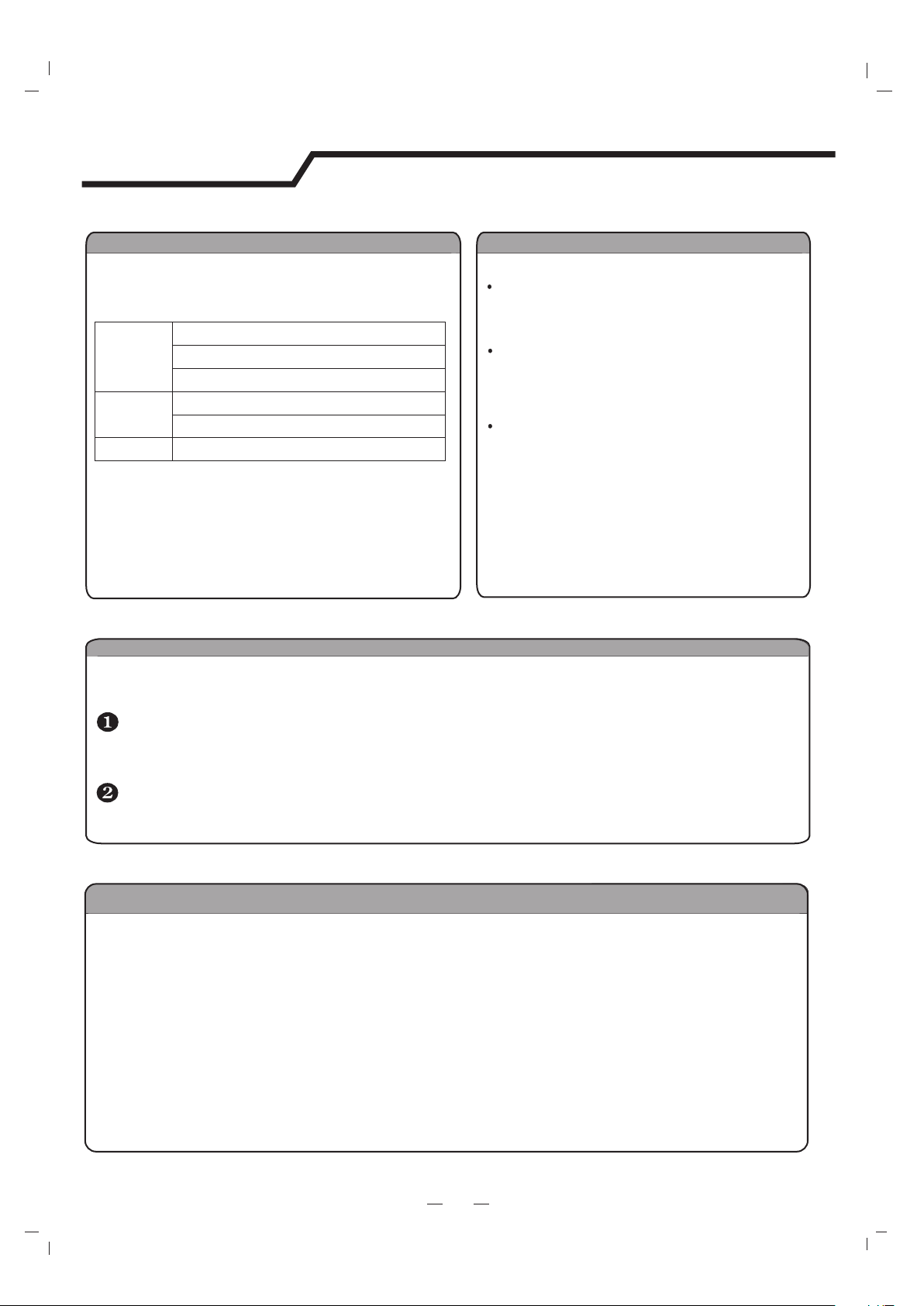
Features of HEATING mode
Preheat
Defrost
At the beginning of the HEATING operation, the airflow from the indoor unit is discharged
2-5 minutes later.
In HEATING operation the appliance will defrost (de-ice) automatically to raise efficiency.
This procedure usually lasts 2-10 minutes. During defrosting, fans stop operation.
After defrosting completes, it returns to HEATING mode automatically.
Note: Heating is NOT available for cooling only air conditioner models.
Noise pollution
Operating condition
The protective device maybe trip and stop
the appliance in the cases listed below.
HEATING
Outdoor air temperature is over 75℉(24℃)
COOLING
DRY
Outdoor air temperature is below 5℉(-15℃)
Room temperature is over 80.6℉(27℃)
Outdoor air temperature is over *115℉(46℃)
*For Tropical (T3) Climate condition models, the
temperature point is 131℉(55℃)℉(43℃) instead of 109.
The temperature of some products is allowed beyond the
range. In specific situation, please consult the merchant.
Room temperature is below 70℉(21℃)
Room temperature is below 64.5℉(18℃)
If all operation has stopped, press ON/OFFbutton again to restart, Timer should be set again
if it has been canceled.
Install the air conditioner at a place that
can bear its weight in order to operate
more quietly.
Install the outdoor unit at a place where
the air discharged and the operation noise
would not annoy your neighbors.
Do not place any obstacles in front of the
air outlet of the outdoor unit lest it increases
the noise level.
7
Protection
Features of protector
The protective device will work at following cases.
Restarting the unit at once after operation stops or changing mode during operation, you need to
wait 3 minutes.
If the air conditioner runs in COOLING or DRY mode with
door or window opened for a long time when relative
humidity is above 80%,dew may drip down from the outlet.
8
Energy Saving Tips
1.Relaxing room temperature at night is OK: During the nighttime hours you
don't require the same level of conscious cooling or heating. Try using Sleep
mode to gradually relax room temperature and allow the unit to run less and save
energy.
2.Curtains and shades: In the summer, you need to block the effects of the sun.
Close window curtains and shades on the south and west side of your home to
help block solar heat. In winter, the sun is your friend. Open curtains and shades
to allow solar heat into your room.
3.Close doors: If you don't need to heat and cool your whole home, confine the
heating and cooling to one room by closing doors. Limit the space you're heating
and cooling to specified capability of the unit.
4.Service the unit: Some basic maintenance might be all you need. The outdoor
unit will greatly benefit from a good hosing out, especially in treed areas where
seeds and other debris can stick to coil fins and make the unit work harder!
5.Rearrange the room: Furniture that obstructs airflow means you could be
heating and cooling the back of a chair or the front of a sofa instead of the actual
living space. Use the swing louvers to help direct the air in the right direction for
the room; remove or rearrange obstacles blocking airflow.
6.Try 75 degrees: 75℉(24) is a good point for an air conditioner to run at its
optimal performance level. Even a 1-degree change in temperature can make
your unit use more energy!
7.Lighting: Turning lights off can help reduce your heat. Each light bulb is a tiny
heater. Your air conditioner must waste energy overcoming the heat from your
lights to reach and hold your desired room temperature.
8.Is anyone home? If possible, while you're away turn your unit to Auto mode and
make sure windows and drapes are closed. Although the room temperature will be
uncomfortable for a few minutes when you come home, the unit will have the room
back to your desired temperature in no time.
9.Don't forget the fan: The fan is much like a car. The faster it runs, the more
energy is consumed. Sometimes we need the car to go fast, but slow is good
enough most of the time. Try saving money by using the comfortable quiet low fan
speed as much as possible.
℃
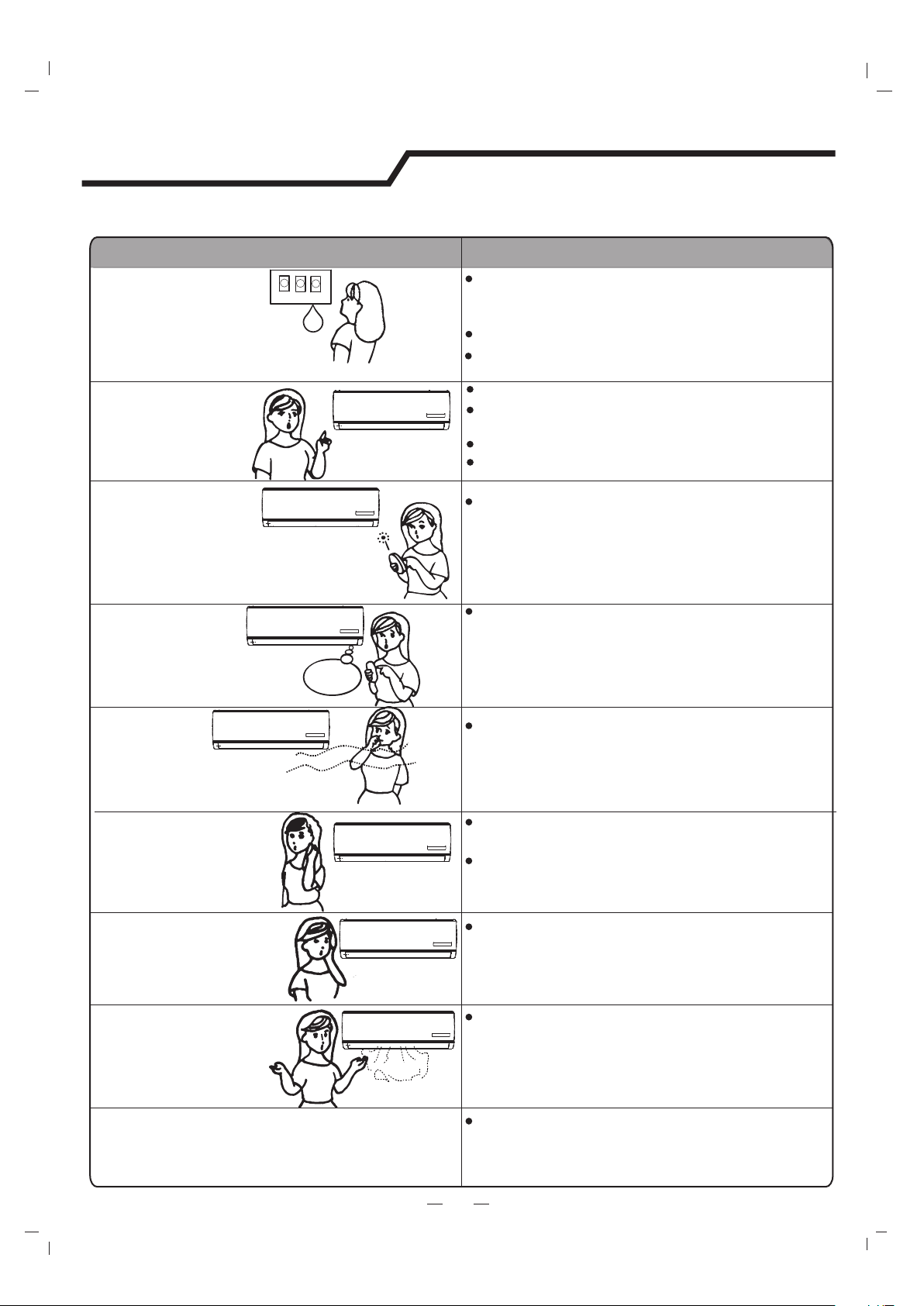
TroubleAnalysis
Does not run
No cooling or
heating air
Ineffective control
Does not operate
immediately
Peculiar odor
A sound of
flowing water
Cracking sound is
heard
Spraying mist from
the outlet
The compressor indicator lights on constantly,
running indicator flashes and indoor fan stops.
The unit is shifting from heating mode to defrost.
The indicator will light off and return to heating
mode.
Is the air filter dirty?
Are the intakes and outlets of the air conditioner
blocked?
Is the temperature set properly?
don't run
If the protector trip or fuse is blown,please wait
Check to see if the appliance is properly plugged in.
The batteries in the remote control may be dead
3 minutes and start again.The
may be preventing unit from working.
protector device
The following cases may not always be a malfunction, please check it before asking for service.
If there is strong interference (from excessive
static electricity discharge or power supply voltage
abnormality), the appliance may operate
abnormally. Disconnect the power supply and
connect back 2-3 seconds later.
Changing mode during operation,3 minutes will
delay.
This odor may come from another source
such as furniture, cigarette etc, which is
sucked in the unit and blows out with the air.
Caused by the flow of refrigerant in the air
conditioner.Not a cause for concern.
Sound of defrosting during heating mode.
The sound may be generated by the expansion
or contraction of the front panel due to change
of temperature.
Mist appears when the air in the room becomes
very cold. This is because of the cool air
discharged from the indoor unit during COOLING
or DRY modes.
9
Troubleshooting
Are doors or windows open?
10
Installation Instructions
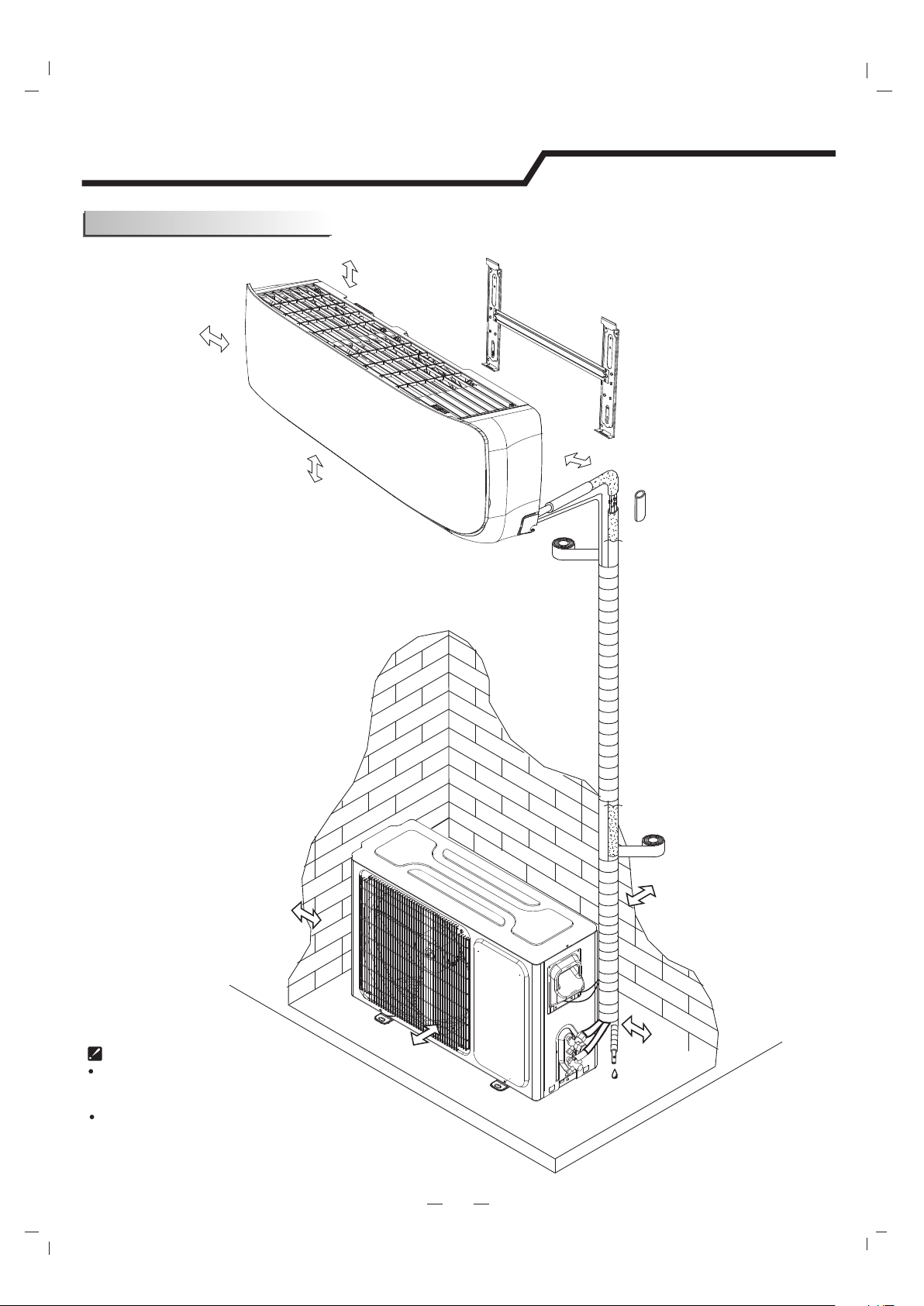
Installation must be performed in accordance with
the national wiring standards by authorized personnel only.
Above figure is only a simple presentation
of the unit, it may not match the external
appearance of the unit you purchased.
Distance from ceiling
Distance from wall
should be over 50mm/2in
Distance from the wall
Air intake distance from
the wall should be
over 250mm/10in
Air intake distance from the wall
over 250mm/10in
air outlet distance from the wall
should be over 500mm/20in
should be over
200 mm/7.9in
should be over 50mm/2in
Distance from floor
over 2.4m/8ft.
should be
should be over 250mm/10in
Installation diagram
11
Installation Instructions
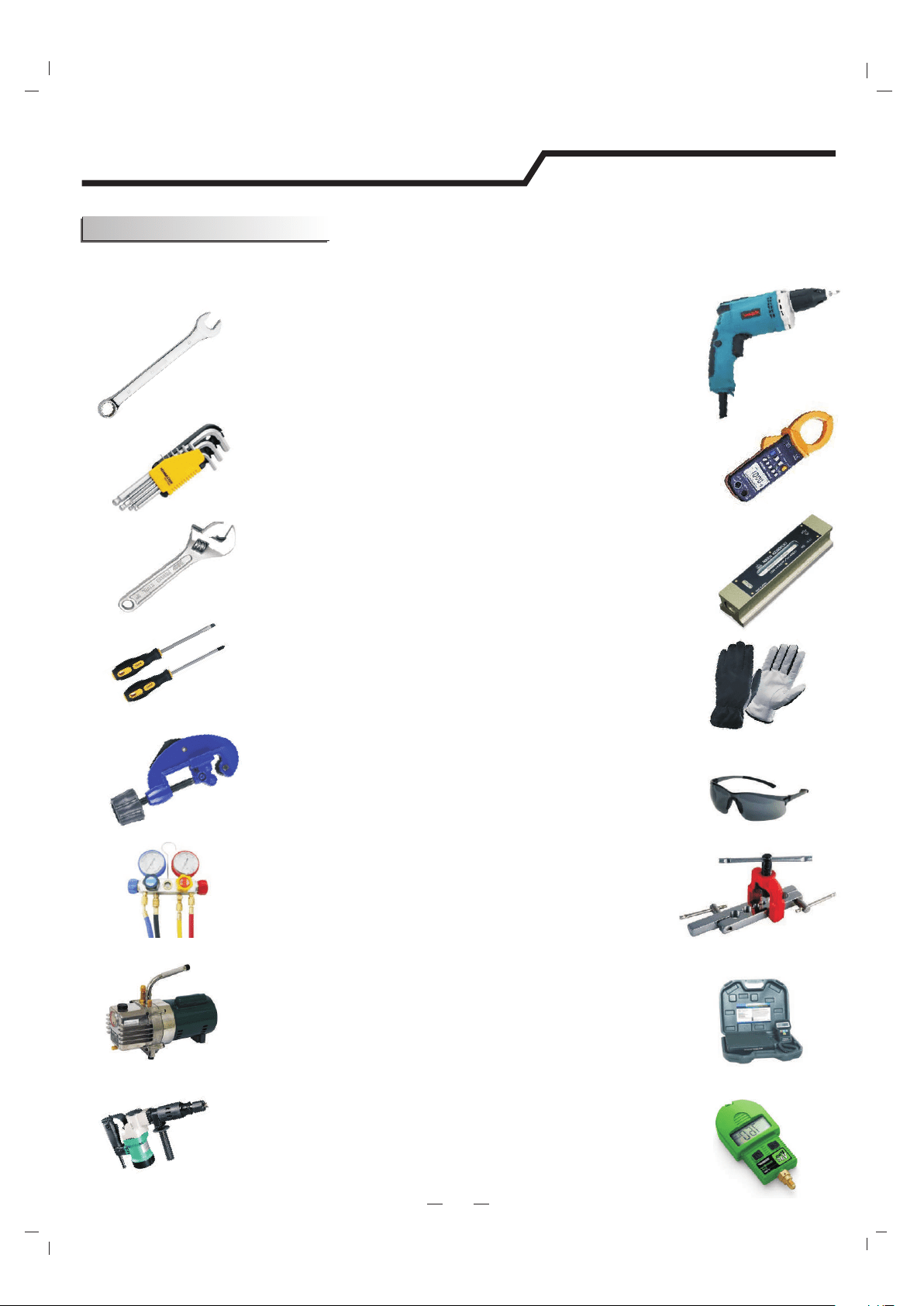
Suggested Tools
In order to install your air-conditioner more conveniently and safely, you might use
those special tools listed below.
Standard Wrench
Screw Driver
Hex Keys or Allen Wrenches
Adjustable/Crescent Wrench
Torque wrench
Drill & Drill Bits
Manifold and Gauges
Vacuum Pump
Clamp on Amp Meter
Level
Work Gloves
Safety Glasses
Pipe Cutter
Refrigerant Scale
R410A Flaring Tool
Micron Gauge
Hole Saw
12
Installation Instructions
Site Instructions
Site for Installing Outdoor Unit
Where it is convenient to install and well ventilated.
Avoid installing it where flammable gas could leak.
Keep the required distance apart from the wall.
Keep the outdoor unit away from greasy dirt,
vulcanization gas exit.
Avoid installing it by the roadside where there is a risk of muddy
water.
A fixed base where it is not subject to increased operation noise.
Where there is not any blockage of the air outlet.
Site for Installing Indoor Unit
Where there is no obstacle near the air outlet and air can be
easily blown to every corner.
Where piping and wall hole can be easily arranged.
Keep the required space from the unit to the ceiling and wall
according to the installation diagram on previous page.
Where the air filter can be easily removed.
Keep the unit and remote controller 1m(3.28ft) or more apart from
television, radio etc.
keep as far as possible from fluorescent lamps.
Do not put anything near the air inlet to obstruct it from air
absorption.
Install on a wall that is strong enough to bear the weight of the unit.
Install in a place that will not increase operation noise and vibration.
Keep away from direct sunlight and heating sources. Do not place
flammable materials or combustion apparatuses on top of the unit.
Avoid installing under direct sunlight, in an aisle or sideway,
or near heat sources and ventilation fans. Keep away from
flammable materials, thick oil fog, and wet or uneven places.
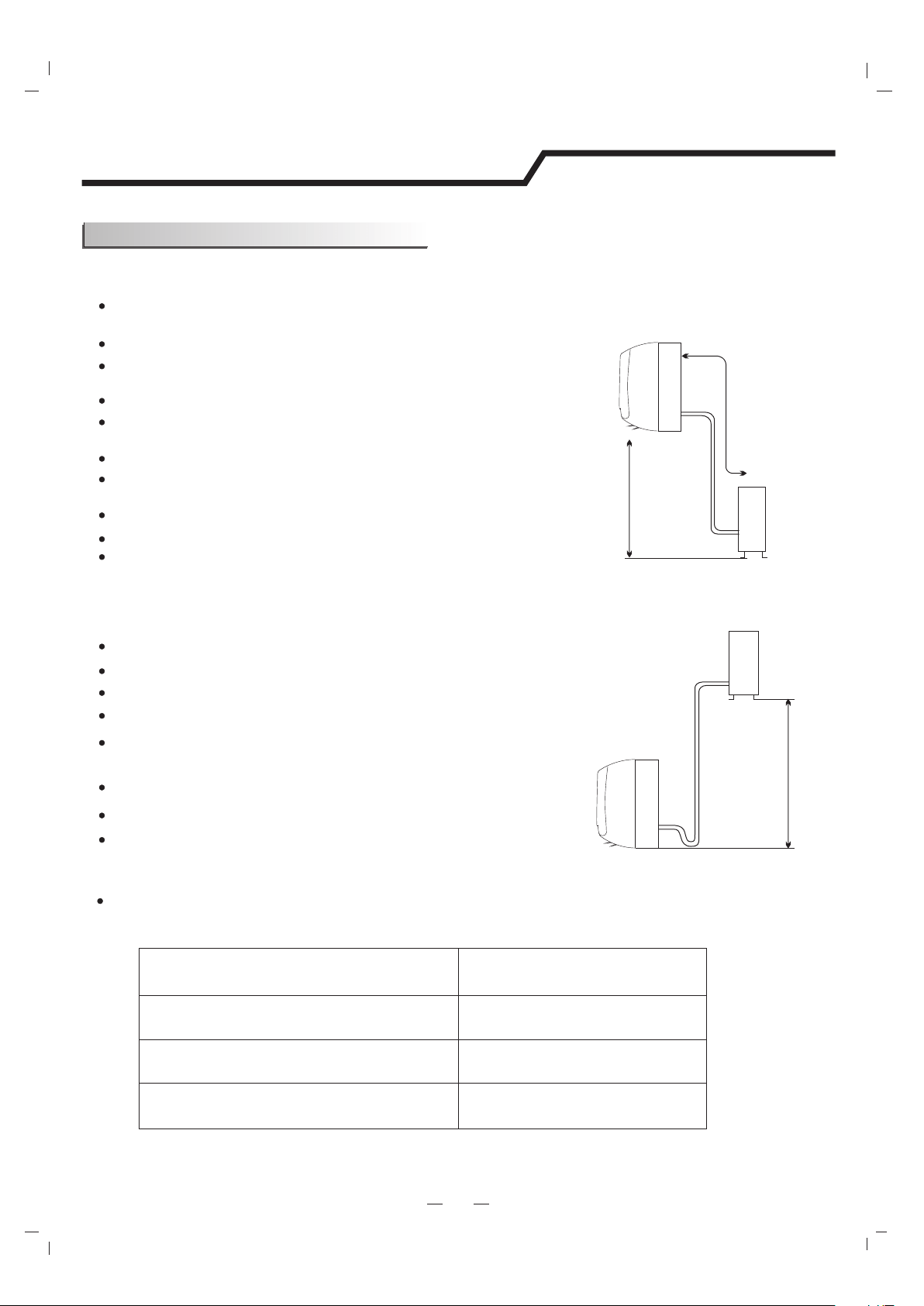
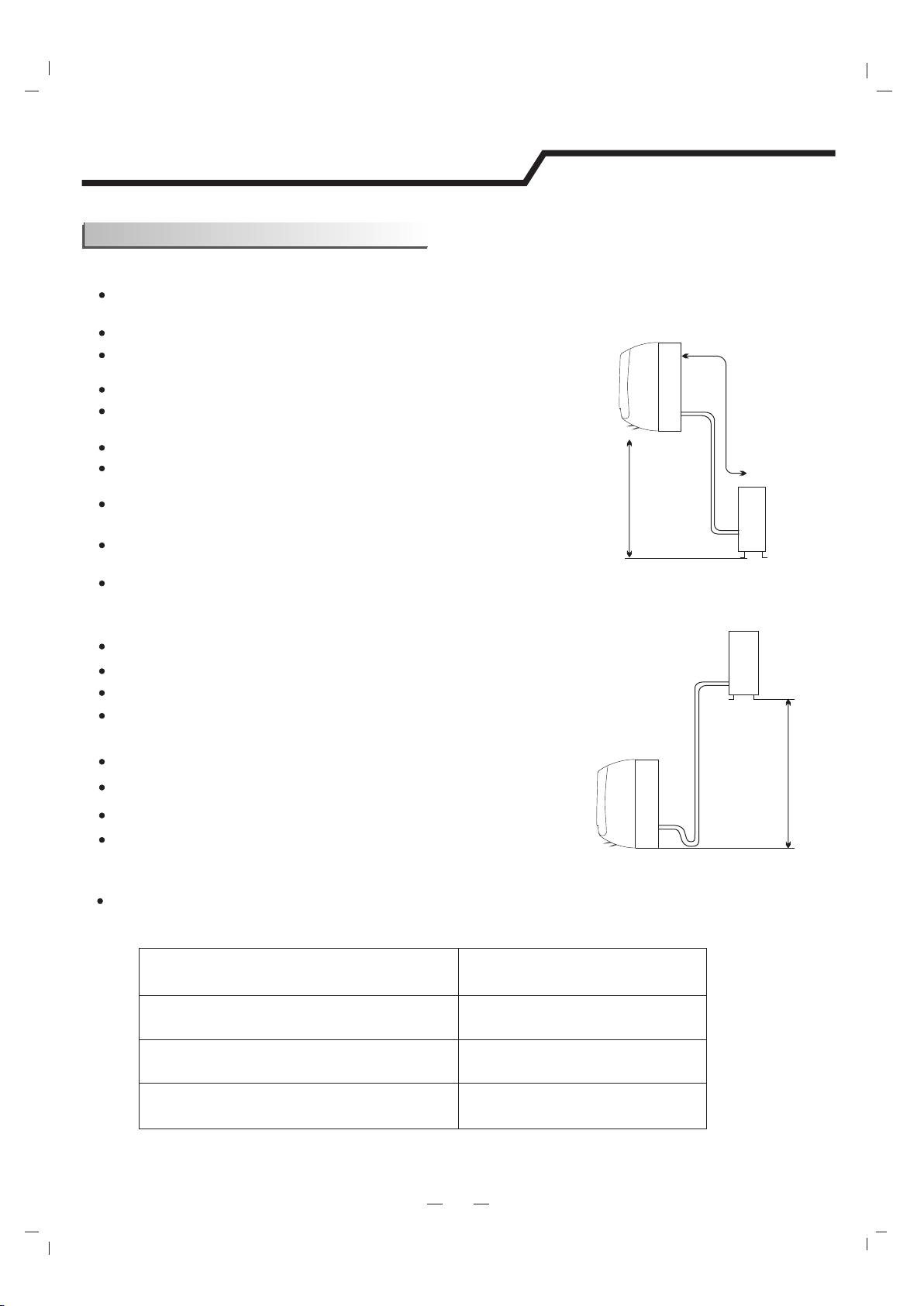
If the height or pipe length is out of the scope of the table, please consult the merchant.
Model
9K-18K
20
Required amount of
additional refrigerant (g/m)
24K
30K-36K
30
40
In case the pipe length is more than 7.5m(24.6ft), the refrigerant should be charged additionally, according
to below table.
Outdoor unit
Indoor unit
Pipe length is
20 meters(65.4ft) Max.
be less than 5m (16.4ft)
Height should
Outdoor unit is higher than indoor unit
Outdoor unit
Indoor unit
Pipe length is
20 meters(65.4ft) Max.
be less than 10m (32.8ft)
Height should
Indoor unit is higher than outdoor unit
13
Installation Instructions
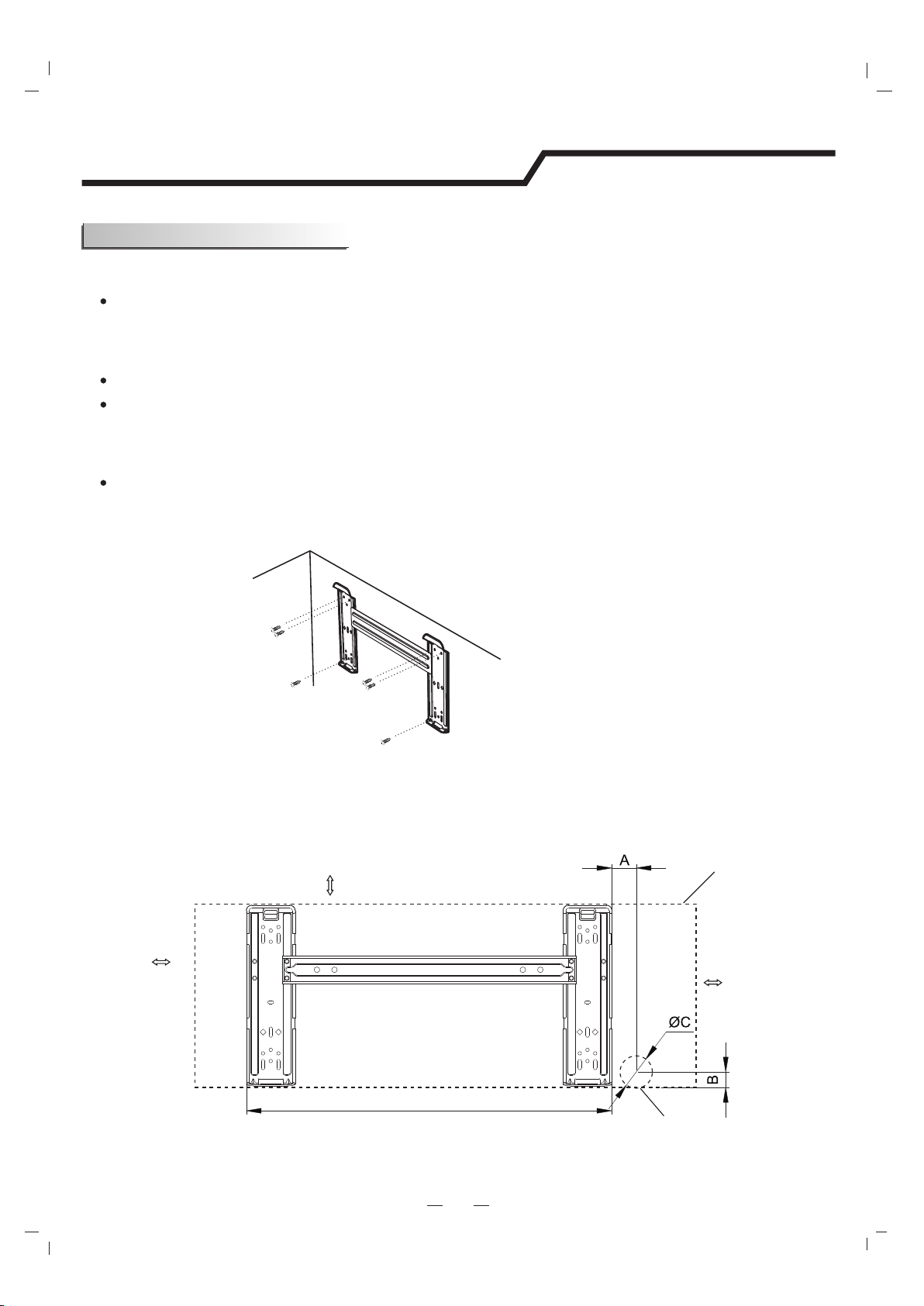
Indoor unit installation
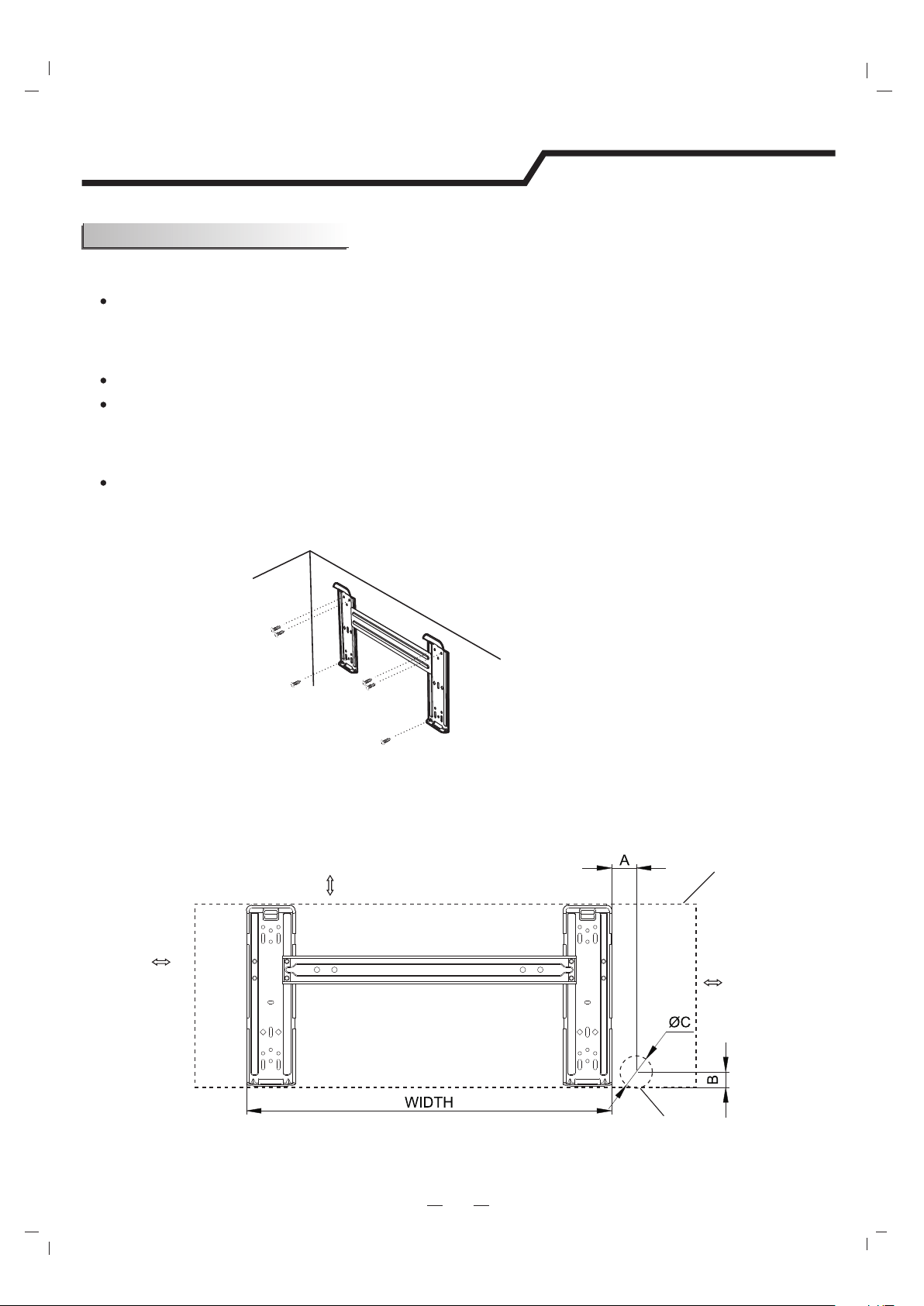
. Keep the mounting plate horizontal with a horizontal level or dropping line.
Mark the center of the indoor unit on mounting plate for future reference.
Tapping mounting plate to the wall with a minimum of five screws, evenly spaced to properly support
indoor unit weight.
1. Installing the Mounting Plate
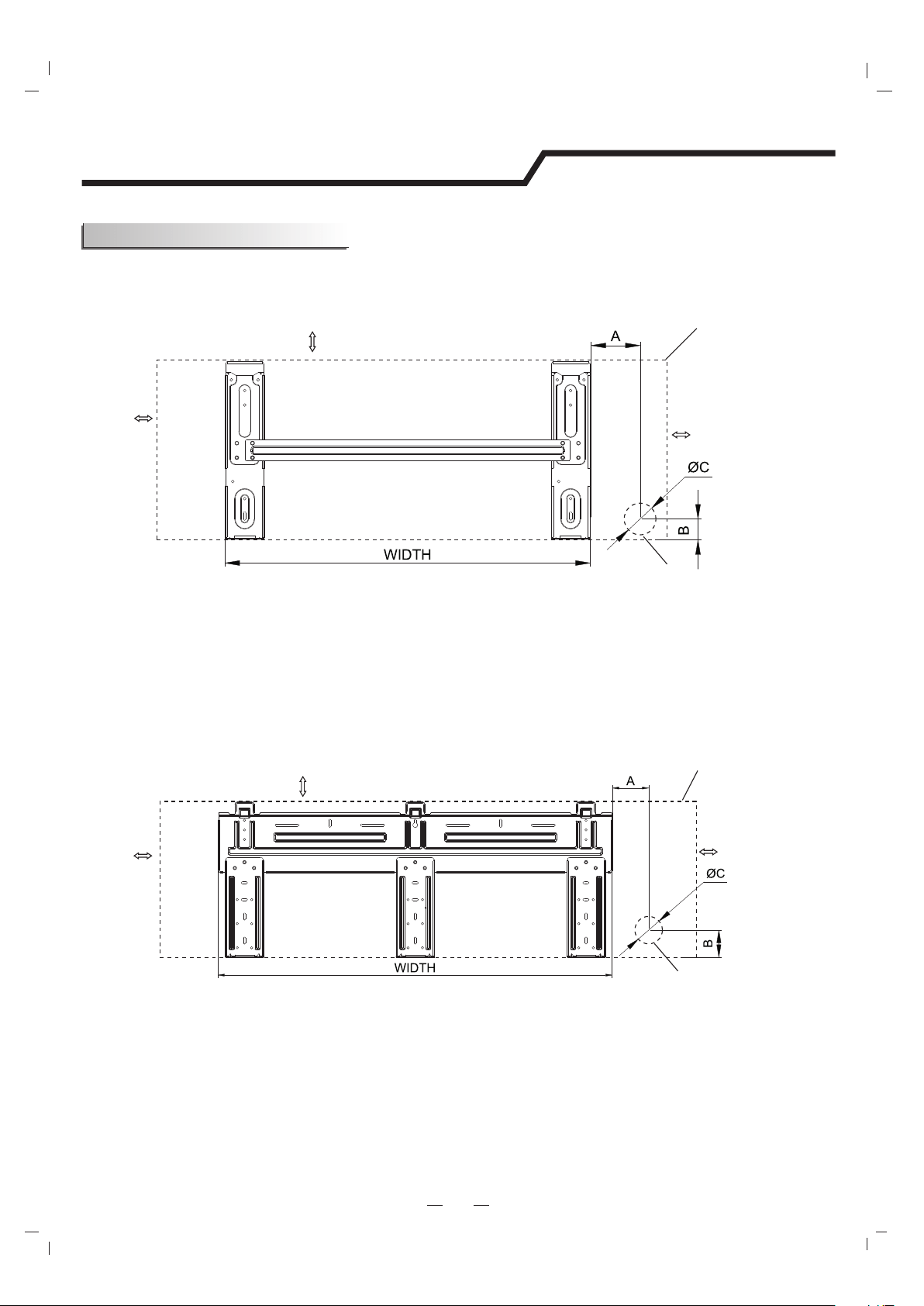
MOUNTING BRACKET DIAGRAMS AND DIMENSIONS (Recommended)
Decide an installing location for the mounting plate according to the indoor unit location and piping direction.
Mounting plate
Tapping screw
Note: The shape of your mounting plate may be different from the one above, but the installation method is similar.
Note: it is recommended to install screw anchors for sheet rock, concrete block, brick and such type of wall.
Note: the center of the mounting bracket may be not the center of the indoor unit.
Note: As the above figure shown, the six holes matched with tapping screw on the mounting plate must be used to
fix the mounting plate, the others are prepared.
For 738 Series Model, WIDTH:522mm/20.6in
For 808 Series Model, WIDTH:592mm/23.3in
200mm/7.9in or more to ceiling
50mm/2in
or more to wall
50mm/2in
or more to wall
Indoor unit outline
Pipe hole
14
Installation Instructions
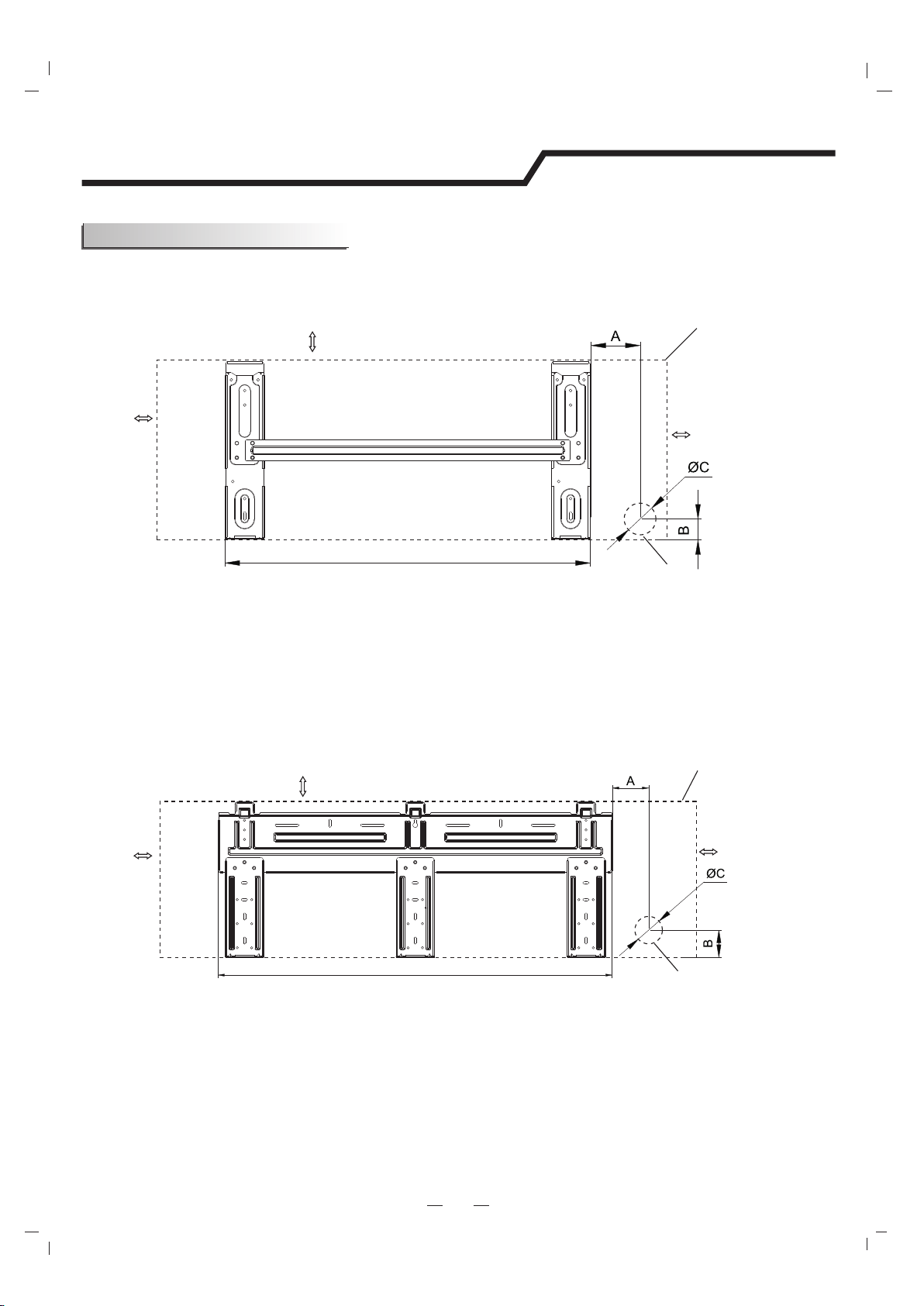
Indoor unit installation
MOUNTING BRACKET DIAGRAMS AND DIMENSIONS (Recommended)
For 908/1080 Series Model, WIDTH: 629mm/24.8in
For 1280 Series Model, WIDTH:820mm/32.3in
200mm/7.9in or more to ceiling
200mm/7.9in or more to ceiling
50mm/2in
or more to wall
50mm/2in
or more to wall
50mm/2in
or more to wall
50mm/2in
or more to wall
Indoor unit outline
Indoor unit outline
Pipe hole
Pipe hole
15
Installation Instructions
Indoor unit installation
Unit Model
Size A
Size B
Size C
mm/inmm/inmm/in
738 Series
68/2.6833/1.370/2.7
808 Series
70/2.7535/1.3870/2.7
908 Series
137/5.440/1.5770/2.7
1080 Series
170/6.740/1.5770/2.7
1280 Series
64/2.5241.2/1.6270/2.7
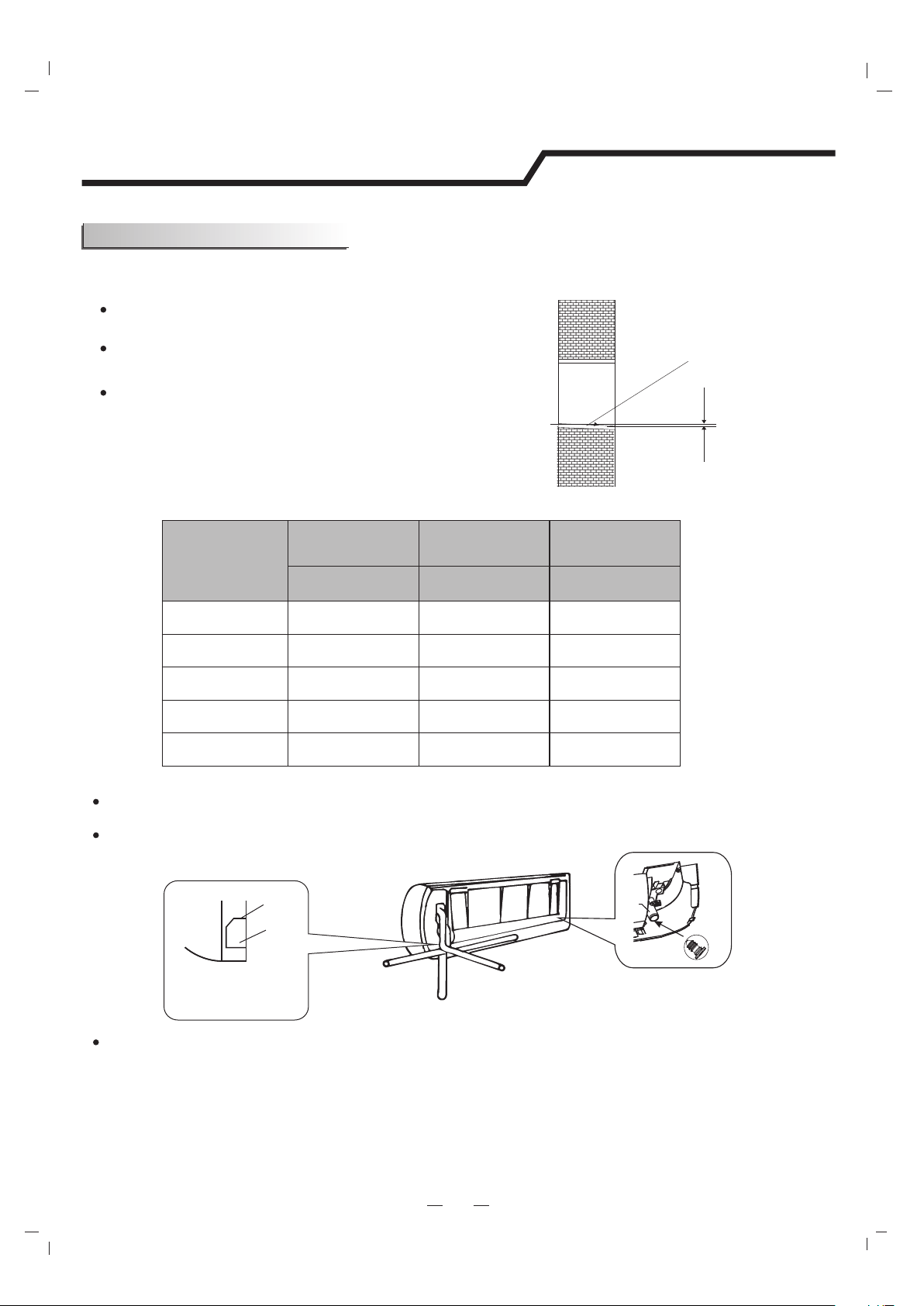
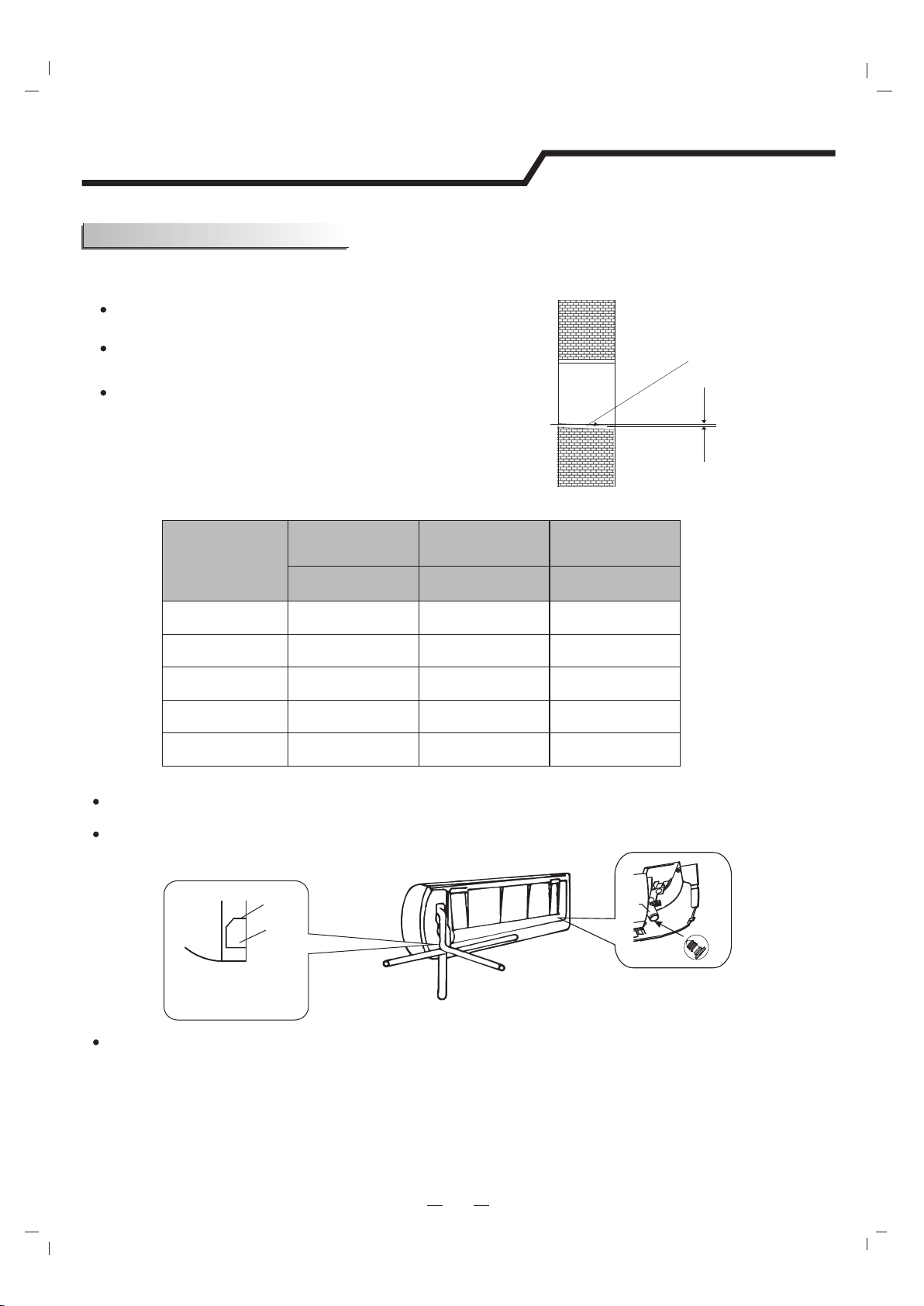
Install a sleeve through the wall hole to keep the wall
tidy and clean.
Drill a hole in the wall. The hole should tilt a little
downward toward outside.
Decide the position of the hole for piping according to the
location of mounting plate.
2. Drill a Hole in wall for interconnecting Piping, Drain & Wiring
Table of Wall Hole Mounting size per Unit Size
Indoor
Outdoor
Wall hole sleeve
( hard polythene tube
prepared by user)
5mm
0.2in
(tilt downward)
Piping direction
1
2
3
4
Trough
Rubber plug
Drain
hole
Drainage
structure
Note: When installing the pipe at the directions
1,2 or 4, saw the corresponding unloading piece
off the indoor unit base.
Note: Both sides drainage structure is standard. For both sides drainage structure, it can be chosen for right, left or both
sides drainage connection. If choosing both sides drainage connection, another proper drain hose is needed as there is only
one drain hose offered by factory. If choosing one side drainage connection, make sure the drain hole on the other side is well
plugged.
Unloading
piece
Saw the unloading piece
off along the trough
After connecting the piping , install the drain hose. Then connect the power cords. After connecting,
wrap the piping, cords and drain hose together with thermal insulation materials.
Put the piping (liquid and gas pipe) and cables through the wall hole from outside or put them through
from inside after indoor piping and cables connection is complete to connect to the outdoor unit.
Decide whether to saw the unloading piece off in accordance with the piping direction.(as shown below)
3. Piping and Drain Hose Connections to Indoor Unit
16
Installation Instructions
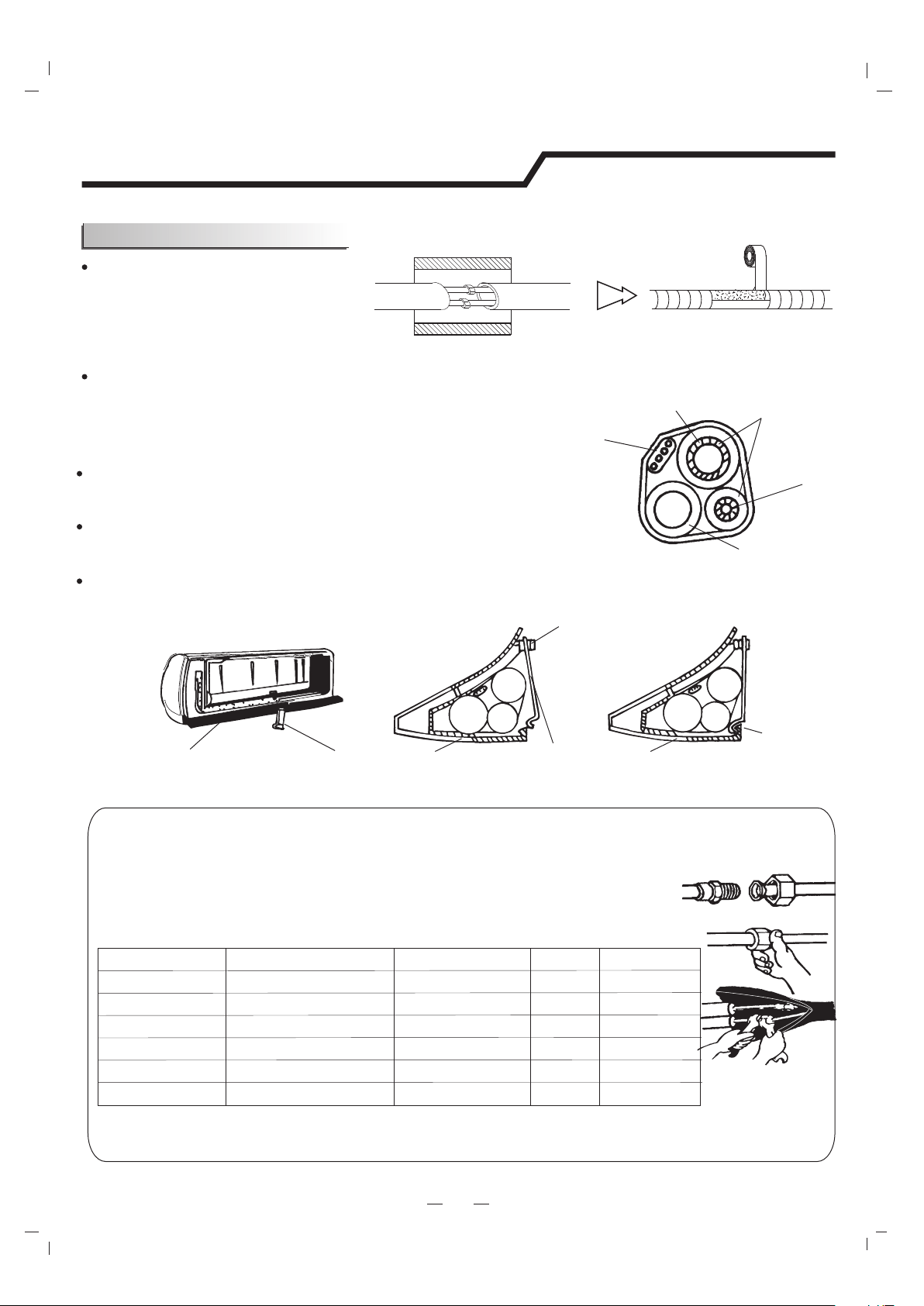
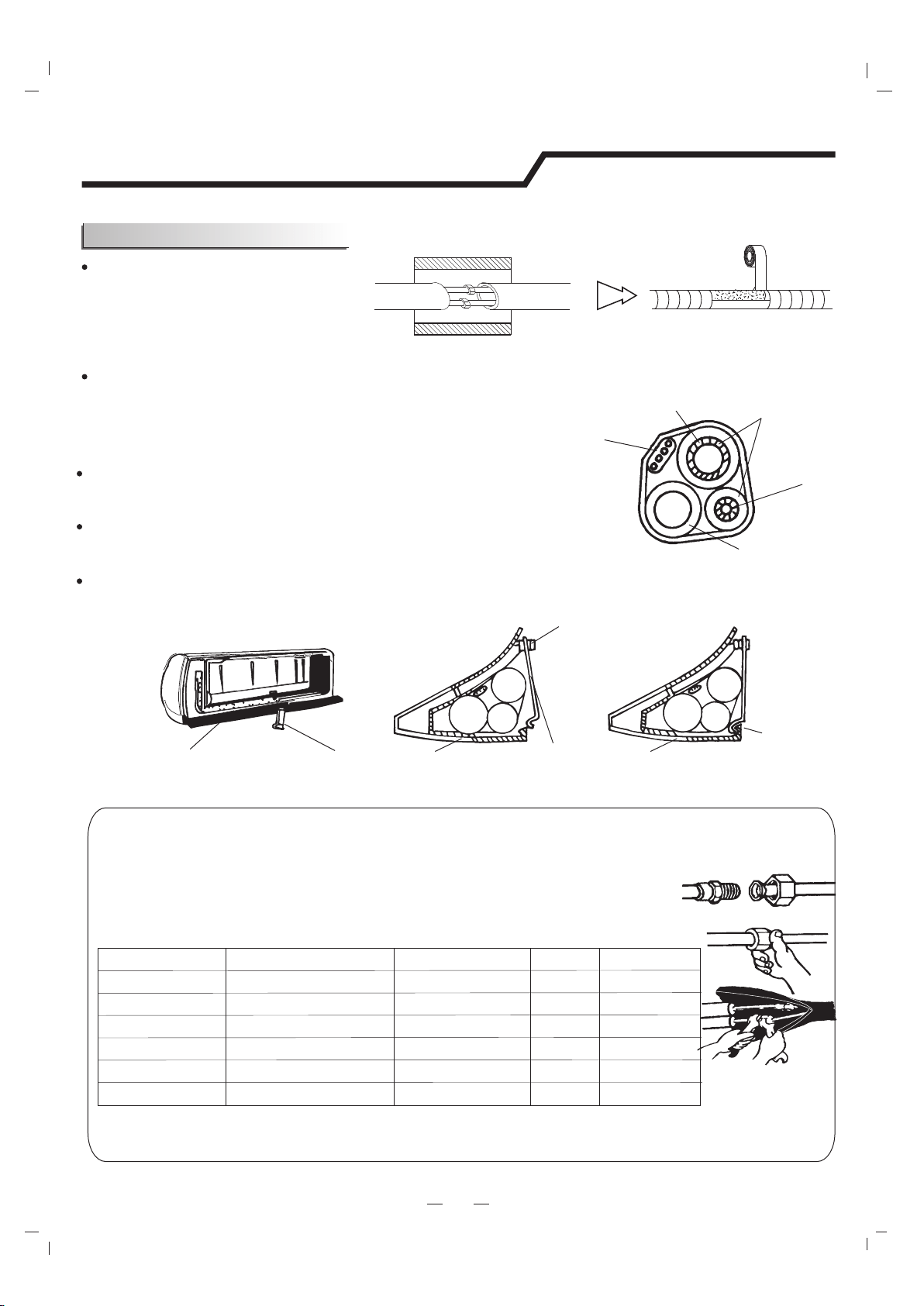
Piping Joints Thermal Insulation:
Wrap the piping joints with thermal
insulation materials and then wrap
with a vinyl tape.
Piping Thermal Insulation:
a. Place the drain hose under the piping.
b. Insulation material uses polythene foam over 6mm in thickness.
Note: Drain hose is prepared by user.
Do not arrange the drain pipe in a way that leaves it twisted, sticking
out or waving around. Do not immerse the end of it in water.
If an extension drain hose is connected to the drain pipe, make sure
to insulated when passing along the indoor unit.
When the piping is directed to the right, piping, power
Cord and drain pipe should be thermal insulated and
fixed onto the back of the unit with a piping fixer.
Thermal insulation
wrapped with vinyl type
A. Insert the pipe fixer to the slot.
B. Press to hook the pipe fixer onto the base.
Base
Base
Base
Piping fixer
Piping fixer
Hook here
Insert here
drain
hose
drain
hose
large
pipe
large
pipe
small
pipe
small
pipe
Small
pipe
Large pipe
Thermal insulation
tube
Power cord
Drain hose
(prepared by user)
b. Pre-tighten them with fingers at first, then use the wrenches.
NOTE:
Dimensions are in “mm or inch” unless otherwise stated in the table.
a. Connect indoor unit pipes with two wrenches. Pay special attention
to the allowed torque as shown below to prevent the pipes, connectors
and flare nuts from being deformed and damaged.
Piping Connection:
Pipe size
Model
Liquid Side (1/4) φ6 or
9K-18K
18K
24K-36K
24K-36K
9K-12K
15~20N·m or 11~15ft-lbs
17 or 5/8
0.5 or 0.02
0.6 or 0.024
0.6 or 0.024
0.6 or 0.024
0.6 or 0.024
22 or 7/8
24 or 0.94
22 or 7/8
27 or 1.1
30~35N·m or 22~26ft-lbs
30~35N·m or 22~26ft-lbs
50~55N·m or 37~41ft-lbs
60~65N·m or 44~48ft-lbs
Liquid Side (3/8)φ9.53 or
Gas Side ( )φ12 or 1/2
Gas Side (3/8 )φ9.53 or
Gas Side (5/8)φ16 or
Torque
Nut widthMin.thickness
Indoor unit installation
17
Installation Instructions
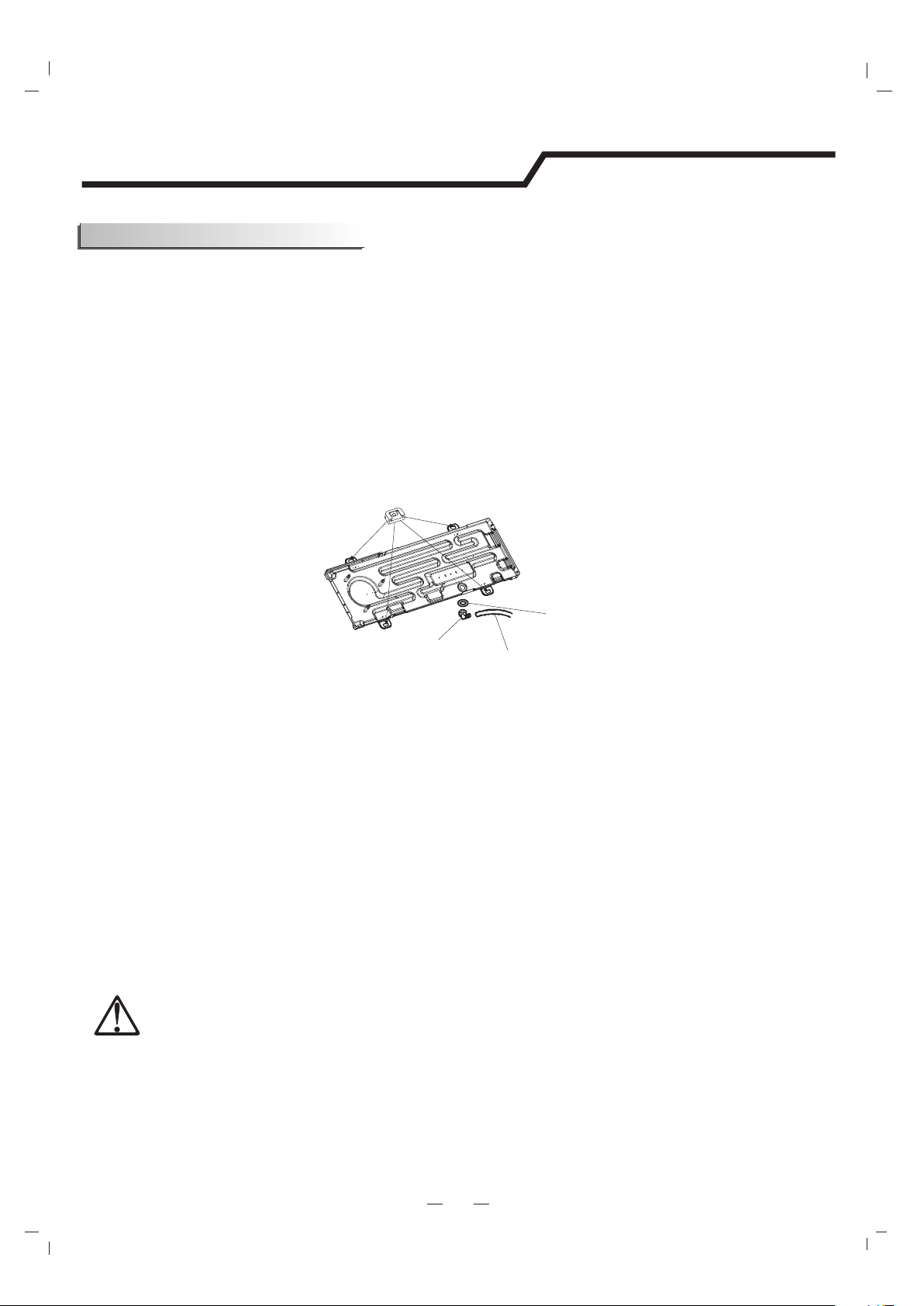
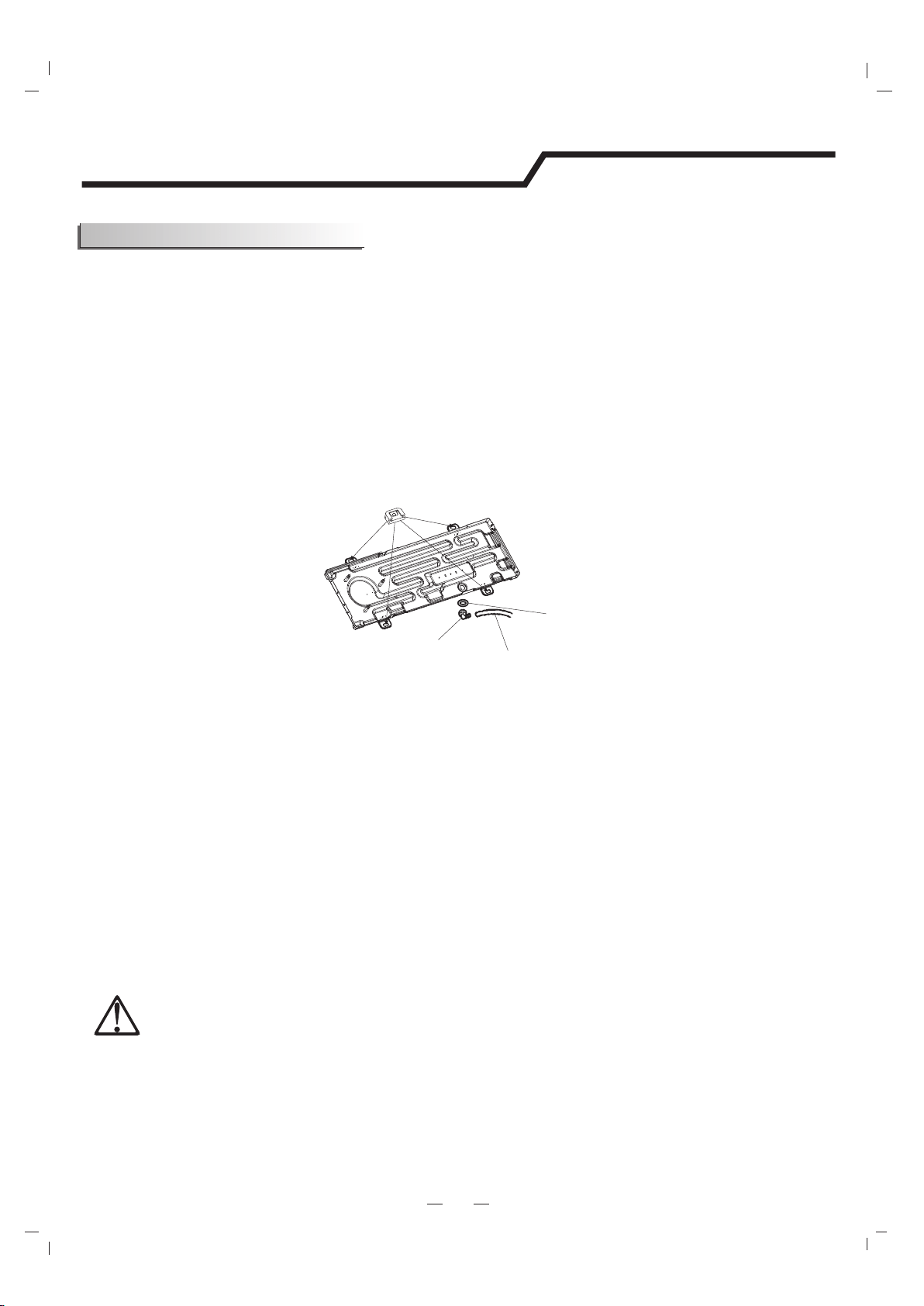
The condensate drains from the outdoor unit when the unit operates in heating mode. In
order not to disturb your neighbor and protect the environment, install a drain port and
a drain hose to direct the condensate water. Just install the drain port and rubber washer
to the chassis of the outdoor unit, then connect a drain hose to the port as the right figure
demonstrates.
Outdoor Unit Installation
Drain hose
(prepared by user)
Washer
Drain port
Rubber pad (optional)
Place under the leg pedestal
2. Install Ground Pad or Wall Hangers
1. Install Condensate Drain for Outdoor Unit
1.Determine proper location for outdoor unit.
2.Follow all instructions provided by manufacturer for installing wall hangers
rubber pad.
3.Verify the wall hangers or rubber pad can safely support the weight of the
outdoor unit.
4.Verify the wall hangers or rubber pad is level and meets all outdoor
dimensional clearance.
5.Fix with bolts and nuts tightly on a flat and strong floor.
If installed on the wall or roof, make sure to fix the supporter well to prevent it
from shaking due to serious vibration or strong wind.
WARNING
Florida wind load requirements state that outdoor unit must be anchored to
concrete pad using four 3/8-in diameter power wedge bolt plus(or equivalent)
with 1-in diameter fender washers. Anchor bolts must be embedded into
3000 PSI minimum concrete at a distance of 4 1/2- in from any concrete edge.
The concrete thickness must exceed 1.5 times the anchor depth.
18
Installation Instructions
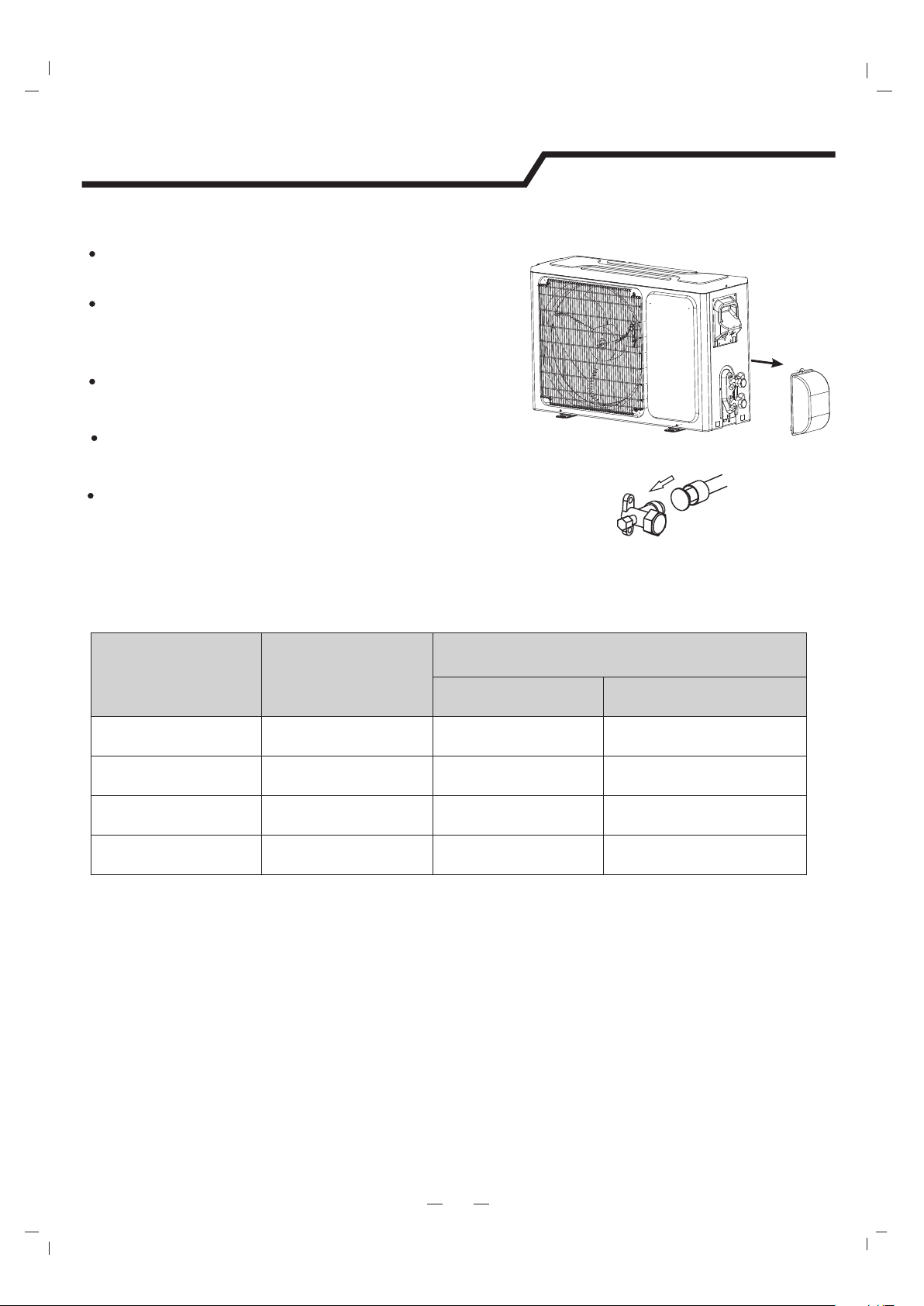
3. Piping Connections to Outdoor Unit
Service
Valve Cover
Apply a small amount of refrigerant oil to the flare connection
on the refrigerant pipe.
Properly align piping and tighten flare nut using a standard
wrench and a torque wrench as shown in the indoor piping section.
Carefully tighten flare nuts to correct torque level referring to the
following Torque Table:
Carefully bend and adjust length of refrigerant pipes to meet
outdoor unit service valves connection with proper tools to
avoid kinks.
Remove service valve cover( if provided) to access the service
valves and refrigerant ports.
Pipe diameter
/inch(mm)
Nut Size
/inch(mm)
Tightening Torque
ft-lbsN-m
1/4(6.35)1/4(17)11 to 1515 to 20
3/8(9.5)3/8(22)22 to 2630 to 35
1/2(12.7)1/2(25)37 to 4150 to 55
5/8(15.9)5/8(29)44 to 4860 to 65
Torque Table
Note: Over tightening may damage flare connections and cause leaks.
19
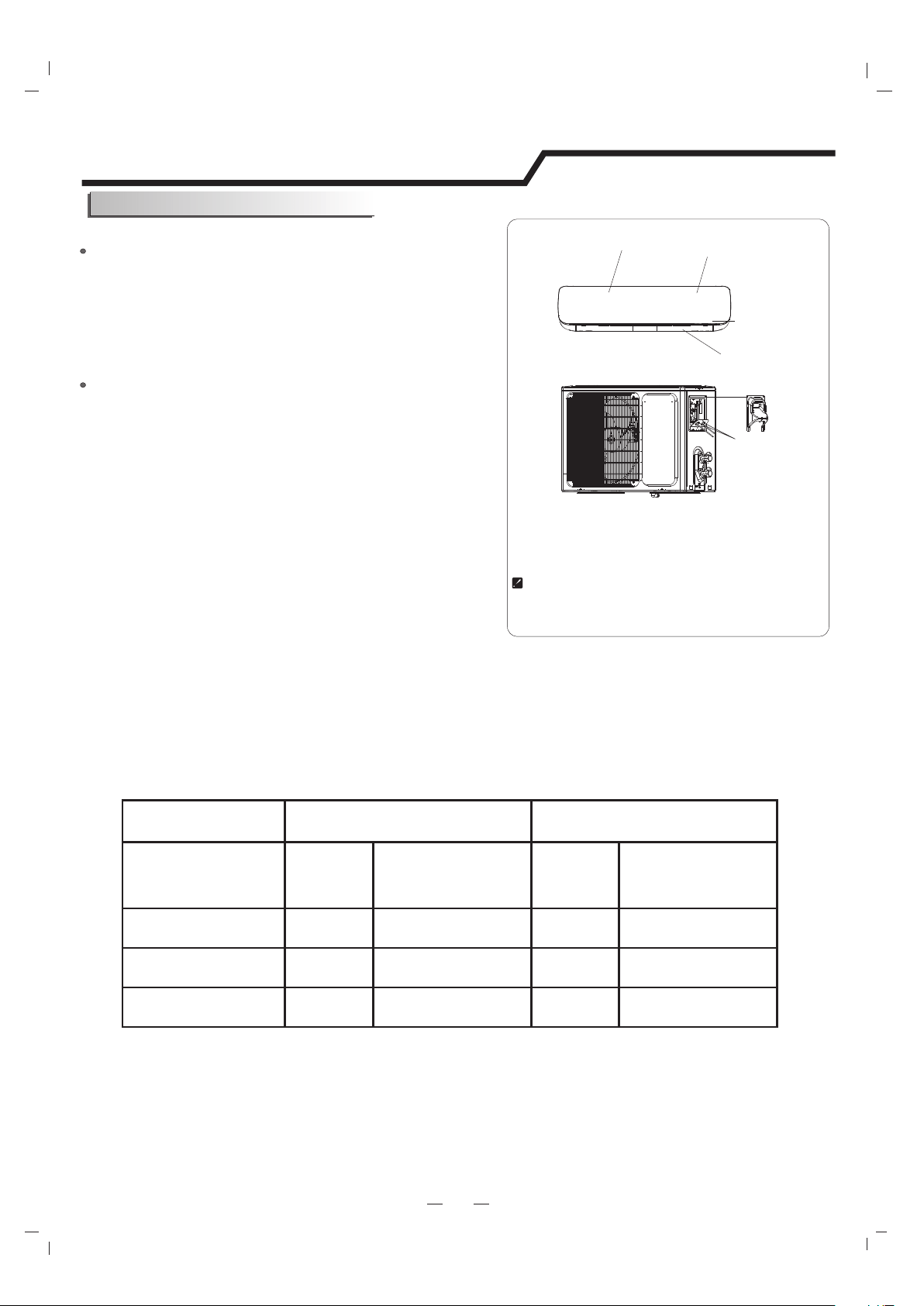
Connecting of the Cable
Outdoor Unit
Indoor Unit
1) Remove the from the unit by loosening cable cross board
Connect the power cord to the indoor unit by connecting
the wires to the terminals on the control board individually
in accordance with the outdoor unit connection.
the screw. Connect the wires to the terminals on the
control board individually as follows.
2) Secure the power cord onto the control
board with cable clamp.
3) Reinstall the to the original position cable cross board
with the screw.
4) Use a recognized circuit breaker for 24K model between
the power source and the unit. A disconnecting device to
adequately disconnect all supply lines must be fitted.
Note: For some models, it is necessary to remove the cabinet to
connect to the indoor unit terminal.
Outdoor unit
Installation Instructions
Caution:
1. Never fail to have an individual power circuit specifically for the air conditioner. As for the method of
wiring, refer to the circuit diagram posted on the inside of the access door .
2. Comfirm that the cable thickness is as specified in the power source specification.
3. Check the wires and make sure that they are all tightly fastened after cable connection.
4. Be sure to install an earth leakage circuit breaker in wet or moist areas.
The figures in this manual are based on the external
view of a standard model. Consequently, the shape
may differ from that of the air conditioner you have
selected.
Chassis
Cabinet
Front panel
Terminal (inside)
Indoor unit
Cable Specifications
Attention:
The plug must be accessible even after the installation of the appliance in case there is a need to
disconnect it. If not possible, connect appliance to a double-pole switching device with contact
2
separation of at least 3 mm placed in an accessible position even after installation.
Wire Hole
Cable Cross Board
Power and Wiring
capacity(Btuh)Power cord
Power connecting cord
Type
Normal cross-
sectional areas
Type
Normal cross-
sectional areas
9K-12KSJ TW3X16 AWGSJ TW4X18 AWG
18K-24KSJ TW3X14 AWGSJ TW4X18 AWG
30K-36KSJ TW3X12 AWGSJ TW4X18 AWG
20
Installation Instructions
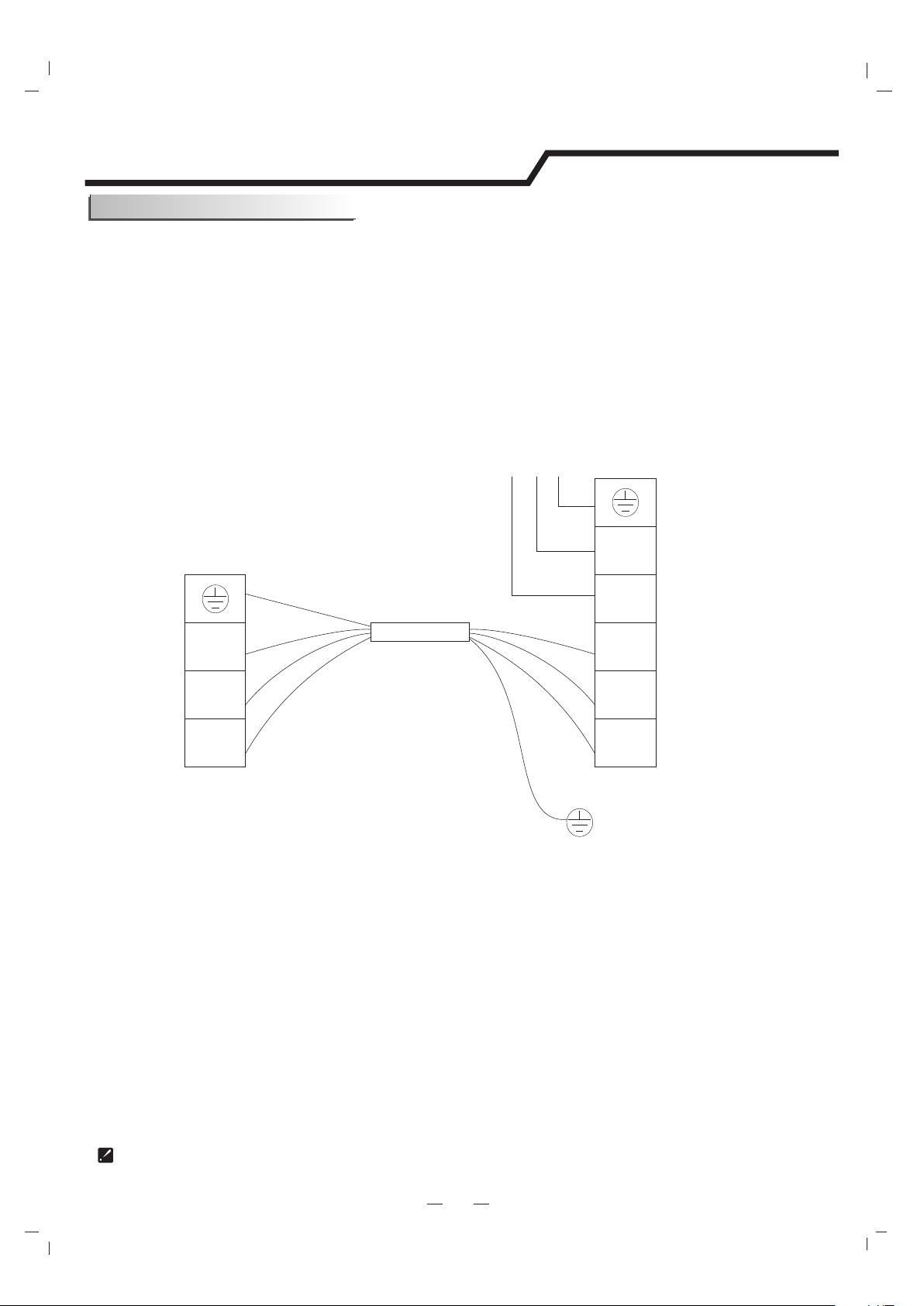
Make sure that the color of the wires in the outdoor unit and terminal No. are the same as those
of the indoor unit.
Wiring diagram
The diagram is reference only, and the actual terminal shall prevail.
Terminal
Indoor unit
Terminal
Outdoor unit
Power connecting cord
Green
White
Red
Black
1(N)
2(L)
3(SI)
Green
White
Red
Black
1(N)
2(L)
3(SI)
Power supply
L1
L2
GN
WHT
BLK
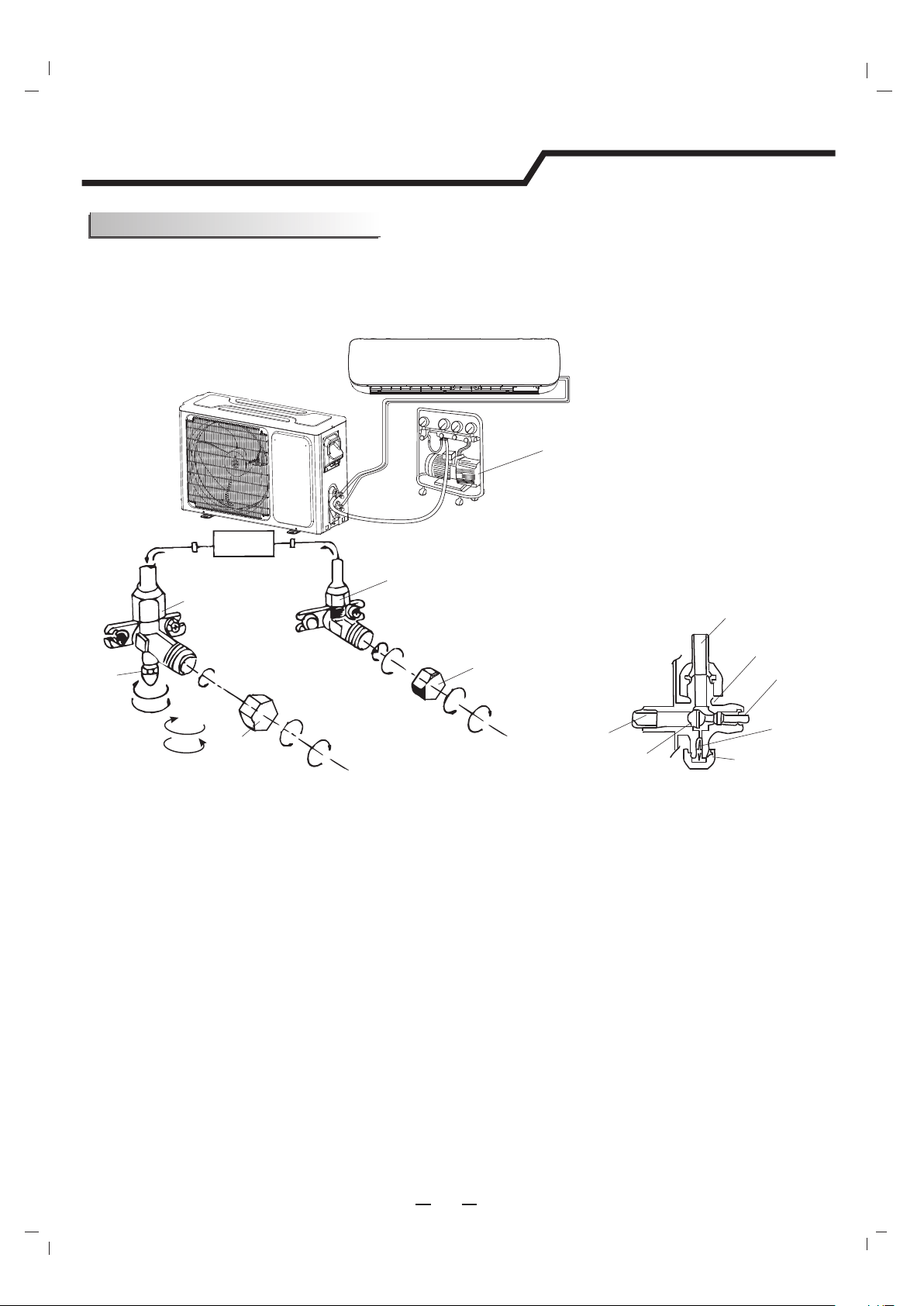
The air which contains moisture remaining in the refrigeration cycle may cause a malfunction on the
compressor. After connecting the indoor and outdoor units, release air and moisture from the refrigerant
cycle using a vacuum pump, as shown below.
21
Installation Instructions
Vacuum Testing and Charging
Note: To protect the environment, be sure not to discharge the refrigerant to the air directly.
See next page for air purging steps.
Vacuum pump
Refrigerant flow direction
2-way valve
(6) Open 1/4 turn
valve cap
(1) Turn
(8) Tighten
(2) Turn
3-way valve
(8) Tighten
(1) Turn
(7) Turn to fully open the
valve
(7) Turn to fully open the valve
(8) Tighten
3-way valve diagram
connect to indoor unit
open position
spindle
service port cap
Service
port
Connect to outdoor unit
Valve core
needle
indoor unit
Valve cap
(1) Unscrew and remove caps from 2 and 3-way valves.
(4) Start vacuum pump for 10-15 minutes until reaching a vacuum of 10 mm Hg absolutes.
(6) Open 2-way valve ,1/4 turn, then close it after 10 seconds. Check tightness of all joints using liquid
soap or an electronic leak detector.
(7) Turn 2 and 3-way valves stem to fully close the valves. Disconnect the flexible vacuum pump hose.
(8) Replace and tighten all valve caps.
(5) With vacuum pump still running close the low pressure knob on vacuum pump manifold. Then stop
the vacuum pump.
(2) Unscrew and remove cap from service valve.
(3) Connect vacuum pump flexible hose to the service valve.
How to Vacuum Air Tubes:
22
Installation Instructions
Start-up
Test Operation
System Checks
Indoor Unit
Outdoor Unit
Perform test operation after completing gas leak and electrical safety check.
1.Turn on electrical disconnect to outdoor unit.
2.Push the “ON/OFF” button on Remote Controller to begin testing.
3.Push MODE button, select COOLING, HEATING, FAN mode to confirm all functions.
1.Conceal refrigerant pipes where possible.
2.Make sure drain hose slopes downward along entire length.
3.Ensure all refrigerant pipes and connections are properly insulated.
4.Fasten pipes to outside wall, when possible.
5.Seal and weatherproof wall hole which the interconnecting wires and refrigerant pipes pass through.
1.Do all Remote controller’s buttons function properly?
2.Do the display panel lights work properly?
3.Does the swing louver function properly?
4.Does the drain work?
1.Push the mode button to COOL and adjust the room setting to 61 deg. wait up to 3 minutes from
compressor time guard. Does compressor and outdoor fan turn on in cooling mode?
2.Push the mode button to HEAT and adjust the room setting to 85 ℉(30℃) deg. wait up to 3 minutes for
compressor time guard. Does compressor and outdoor fan turn on in heat mode?
℉(16℃)
★
★★
★:
::
:
:
::
:
×
××
×
:
::
:
!" #
×
×
×
★
×
★
$
$
$
!
★
× ×
$!
$!
$
×
×
$
$
$
$
$
$"#
$
$$
%
★
×
$
$
%
$
&!
★
★
$
$%
$
%
×
★
★
$
$%
"'&
★
★
★
$"'&
$"'&
$"'&
!
×
★
$!
$
★
★
×
$
$
$
×
★
$!
$
()*
%
×
$
$
$
$$
%
×
$%
$
$
+
★
$
$+
$
$
)%
×
★
×
$
$
$
+
$
$
,"&
×
×
$-,"&
$-+
$-
$-+
$-
$-
$
"#
× ×
$"#
$%
★
★
×
$.%
$.$
( %
★
★
$%
$%
×
$%
$
★
$
!" #
"
%
Ο × ×
$'
$
"
Ο Ο ×
$-
$-
$-%
!
%
&+ ★: Ο:# ×:/0
$
& '
/
Ο Ο Ο
1
× ×
★
#
%)
2
×
★ ★
#
)*
)%
3
★
×
★
#
4 !
%
5
★ ★ ★
!6
!7
8
Ο × ×
"%
%6%%%
% )%7
9
★
× ×
#
:
×
★
Ο
#
%
/;
×
★
×
#
)%
$(
1$/$
-
8)
"
-
'
0
'+:★
★★
★ )
/ 1 2 3 '+
(
$-
$-
$
$-
$
1$1$
38)
$,3
$
'+36
7+++/;
3$
,8)
$
'
-
0
"
'+:★
★★
★ )
/ 1 2 3
* &"
;
/ ! ! !
#
$-
$-
$-
1
× Ο
★
×
!
$!
$!
$
4
★
Ο × ×
,"&
$-,"&
$-+
$-
$-
+
$-
$-
$
5
★
Ο ×
★
( %
$%
$%
8
★
Ο
★
×
$
$
$
$
$
$"#
$
$
$
9
★
Ο
★ ★
%
$
$
%
$
:
× × Ο ×
&!
$
$%
$%
/;
× × Ο
★
%
$
$%
//
×
★
Ο ×
"'&
$"'&
$"'&
$"'&
/1
×
★
Ο
★
/2
★
× Ο ×
!
$!
$
/3
★
× Ο
★
$
$
$
/4
★ ★
Ο ×
$!
$
/5
()*
%
$
$
$
$
$
/8 "#
$"#
$%
/9
$%
$
/:
× × × Ο
%
$%
$
$
1;
★
× × Ο
+
$
$+
$
$
1/
)%
$
$
$+
$
$
11
13
$.%
$.$
15
%
$'
$
18
"
$-
$-
$-%
!
22 ! ! ★
#
$-
$-
$-$
23 ! ★ !
#
$-
$-
$-$
25
Ο
★
×
★
$
$
$
$
$
$"#
$
$
$
29 ★ ★ ★
,
"'&
$-"'&
$-
2: ! ★ ★
,
$-+
$-
$-
$-
3/ ★ ★ ★
*)
-
-+%4$
-!+%4$
-""&)+$
-$
Contenido
Instrucciones del funcionamiento del control remoto.
Ver "Instrucciones del control remoto".
Precauciones de seguridad
3
Instrucciones de seguridad
1
Unidad interna
4
Unidad externa
4
Introducción de la pantalla
5
Programación
2
Protección del medio ambiente
2
Identificación de las partes
4
Cuidado y mantenimiento
6
Protección
7
Consejos para el ahorro de energía
8
Instrucciones del sitio
Herramientas sugeridas
12
11
Instalación de la unidad interna
13
Energía y cableado
19
Diagrama de instalación
10
Prueba de vacío y carga
Puesta en marcha
Solución de problemas
21
22
9
Instalación de la unidad externa
17
Instrucciones para la instalación
10
2
Preparación antes del uso
1
Instrucciones de seguridad
Para garantizar que la unidad funcione con normalidad, leer cuidadosamente el manual
antes de la instalación y realizar la instalación siguiendo este manual.
Al mover el aire acondicionado, no dejar que el aire ingrese al sistema de refrigeración
o a la descarga del refrigerante.
Luego de la instalación, el usuario debe operar el aire acondicionado de manera
correcta según el manual. Tener un lugar de almacenamiento correcto para el
mantenimiento y traslado del aire acondicionado en el futuro.
Debe haber un interruptor de aire.
Verificar cuidadosamente los cables y la tubería. Asegurar de que estén correctos y
firmes antes de conectar la electricidad.
T 3.15A 250V
T 20A 250V
Conectar el aire acondicionado a tierra de manera correcta.
Advertencia: Riesgo de descarga eléctrica: puede causar lesiones o la muerte.
Desconectar todos los suministros eléctricos remotos antes de realizar el servicio.
Se debe incorporar en el cableado fijo un Dispositivo de Corriente Residual (RCD por sus
siglas en inglés) con un rango superior a 10mA según las normas nacionales.
La mejor longitud de la tubería de conexión entre la unidad interna y la externa es menos
que 7,5 metros (24,6 pies). Si la distancia es mayor que la longitud afectará la eficiencia
del aire acondicionado.
Este electrodoméstico puede ser utilizado por menores de 8 años en adelante y por
personas con capacidades físicas, sensoriales o mentales reducidas o falta de
experiencia o conocimiento sólo si han sido supervisados o instruidos sobre el uso del
electrodoméstico en una forma segura y hayan entendido los peligros que incluye. Los
niños no deben jugar con el electrodoméstico. La limpieza y el mantenimiento no debe
realizarse por los niños sin supervisión.
Para evitar peligros, si el cable de suministro está dañado, lo debe reemplazar el
fabricante, el agente de servicio o una persona similar calificada.
Las pilas del control remoto se deben reciclar o desechar de manera correcta.
Eliminación de las pilas --- Desechar las pilas como desechos municipales en el punto
de recolección.
Si el electrodoméstico es de instalación fija, debe estar equipado con medios de
desconexión desde el suministro y una separación de contacto en todos los polos que
brindan una desconexión completa bajo una sobretensión de categoría III; estos medios
se deben incorporar en la instalación fija según las normas de instalación eléctrica.
No se debe instalar el electrodoméstico en la sala de lavandería.
Se debe instalar el electrodoméstico según las normas de seguridad eléctrica local y el
Código Nacional de Electricidad (NEC, por sus siglas en inglés).
El aire acondicionado debe ser instalado por un profesional o personas calificadas.
Modelo
9K-12K
Fusible de la unidad interna
18K
24K-36K
Fusible de la unidad externa
T 3.15A 250V
T 3.15A 250V
El fusible de la unidad:
T 15A 250V
T 30A 250V
2
Preparación antes del uso
El aire acondicionado tiene la función de Auto-Restart (Reinicio automático).
Cada vez que se reemplazan las pilas del control remoto con pilas nuevas o que se energiza, la configuración
automática del control remoto es bomba de calor. Si el aire acondicionado que compró es Cooling Only (Solo frío),
también se puede utilizar el control remoto para bomba de calor.
Programación del control remoto
Antes de utilizar el aire acondicionado, verificar y programar lo siguiente.
Programación Auto Restart
Mantener presionado cualquier botón del control remoto para activar la luz de fondo. Se apaga
automáticamente después de 10 segundos.
Nota: La luz de fondo es una función opcional.
Función de luz de fondo el control remoto (opcional)
Este electrodoméstico está hecho de materiales reciclables o reutilizables. El descarte debe
llevarse a cabo de acuerdo a las normas locales de desecho. Antes de realizar el descarte, cortar el
cable principal para que el electrodoméstico no se pueda reutilizar.
Para una información más detallada sobre el manejo y reciclaje del producto, contactar a las
autoridades locales que se encargan de la separación de basura o a la tienda donde compró el
electrodoméstico.
DESARME DEL ELECTRODOMÉSTICO
Esta marca indica que el producto no puede desecharse con otros
desperdicios del hogar en todo Norte América. Para evitar posibles
daños al ambiente o a la salud humana debido a la eliminación de
desechos sin control, reciclar responsablemente para promover la
reutilización sustentable de los recursos materiales. Para devolver
el dispositivo usado, utilizar los sistemas de devolución y colección
o contactar al distribuidor donde compró el producto.
Ellos pueden tomar este producto para reciclar y cuidar el ambiente.
Nota
Programación
Protección del medio ambiente
Cuando se carga el refrigerante en el sistema, asegurar que la carga esté en
estado líquido si se trata del refrigerante R410A. De lo contrario, la composición
química del refrigerante (R410A) dentro del sistema puede cambiar y afectar el
rendimiento del equipo.
Según la naturaleza del refrigerante (R410A, el valor de GWP es 2088), la presión
del tubo es muy alta; se debe ser cuidadoso cuando se instala y repara el
electrodoméstico.
Para evitar riesgos, si el cable de suministro está dañado, lo debe reemplazar
el fabricante, el agente de servicio o una persona similar calificada.
El aire acondicionado debe ser instalado por personas capacitadas y
calificadas o por el servicio mecánico.
La temperatura del circuito refrigerante será alta, mantener el cable de
interconexión lejos del tubo de cobre.
Precauciones de seguridad
Los símbolos en este Manual de Uso y Cuidado se especifican a continuación.
No hacerlo.
Prestar atención a la situación.
La conexión a tierra es esencial.
Advertencia: El manejo incorrecto
puede causar serios peligros como
la muerte, lesiones graves, etc.
3
No utilizar un disyuntor del suministro de
energía o tirar del enchufe durante el
funcionamiento. Esto puede causar un
incendio debido a las chispas, etc.
Evitar que el disyuntor del circuito de suministro
de energía o el enchufe tenga polvo. Conectar
el cable de suministro de energía de manera
firme y correcta para que no haya descargas
eléctricas o incendios debido al mal contacto.
Utilizar un suministro de energía
correcto según el requisito de rango
de la placa. De lo contrario, pueden
ocurrir fallas graves, peligros o hasta
un incendio.
No unir, tirar o presionar el cable de suministro
de energía para que no se rompa el cable.
Puede ocurrir una descarga eléctrica o
incendios si se rompe el cable.
Nunca se debe colocar un palo o un
artículo similar en la unidad. Ya que el
ventilador rota a gran velocidad, esto
puede causar daños.
No debe reparar el electrodoméstico
usted mismo. Si se hace de manera
incorrecta, puede causar descargas
eléctricas, etc.
Apagar el electrodoméstico con el control
remoto primero antes de cortar el
suministro de energía en caso de que
ocurra un mal funcionamiento.
El aire fresco en contacto con Ud. durante
un largo tiempo es perjudicial para su salud.
Se aconseja que el flujo de aire se desvíe
por toda la habitación.
Evitar que el flujo de aire esté en
contacto con quemadores de gas y
hornos.
No tocar los botones cuando sus
manos estén húmedas.
No colocar ningún objeto en la
unidad interna.
Es responsabilidad del usuario que el
electrodoméstico esté conectado a tierra
por un técnico con licencia. según los
códigos locales u ordenanzas.
OFF
OFF
ON
ON
ON/O FF
MODEFAN
SWIN G
SLEE P
SUPE R
SMAR T
IFEE LD IMMER
TIME R ON TI MER OFFCLOC K
ON
OFF
ON
OFF
Las imágenes de este manual están basadas en la vista externa de un modelo estándar.
Por lo tanto, la forma puede diferir un poco del aire acondicionado que usted eligió.
5. Tubería y cable de
alimentación
6. Manguera de drenaje
4. Panel delantero
3. Rejillas horizontales
Identificación de las partes
4
Unidad interna
Unidad externa
2. Filtro de aire
1. Control remoto
ON/ OFF
MODEFAN
SWIN G
SLEE P
SUPE R
SMAR T
IFEE LDIMM ER
TIME R ON T IMER OF F
CLOC K
O
N
O
F
F
O
N
O
F
F
1
5
6
2
3
4
Nombre de la pieza
Los símbolos pueden ser diferentes al de estos modelos pero las funciones son similares.
Introducción de la pantalla
5
Indicador de funcionamiento Run
Se ilumina cuando AC está funcionando.
Parpadea durante la descongelación.
Indicador Timer
Se ilumina durante el tiempo determinado.
Indicador Sleep
Se ilumina en el modo Sleep.
Indicador del compresor
Se ilumina cuando el compresor está encendido.
Pantalla de ajuste de temperatura.
Muestra FC después de 200 horas de uso como recordatorio para limpiar el filtro.
Luego de la limpieza del filtro, presionar el botón reset del filtro en la unidad interna
detrás del panel delantero para reiniciar la pantalla. (opcional)
Indicador de temperatura
123459
Series VG/VL
Receptor de señal
Timer
Comp.
Run
Sleep
Indicador Super
Se ilumina en el modo Super.
2
3
4
5
1
9
6
Indicador de Modo
Heating se muestra en naranja, los otros
modos se muestran en blanco
7
Indicador de la velocidad del ventilador
8
Los símbolos pueden ser diferentes al de estos modelos pero las funciones son similares.
Introducción de la pantalla
5
1
2
3
4
5
9
Series VT
Series SE
12345
9
Series SF/DG (lado derecho)
12345
9
Los símbolos pueden ser diferentes al de estos modelos pero las funciones son similares.
5
1
2
3
4
5
9
Timer
Comp.
Run
Sleep
1
2
3
4
5
9
Series UL
Series UQ
Series UP
9
Timer
Comp.
Run
Sleep
1
2
3
4
5
Introducción de la pantalla
Los símbolos pueden ser diferentes al de estos modelos pero las funciones son similares.
5
Series NT
Series VQ/TE/TF/DA/DG(Medio)/DH
2
3
4
9
12345
9
4
3
2
1
2
3
4
5
9
Series NS/DE
Introducción de la pantalla
Los símbolos pueden ser diferentes al de estos modelos pero las funciones son similares.
5
Series VM
Series NK Series NM/DF
9
22
3
4
4
1
5
2
3
5
4
1
9
6
4
2
3
9
Series TA/TC
2
3
9
1
Introducción de la pantalla
Los símbolos pueden ser diferentes al de estos modelos pero las funciones son similares.
5
Botón de emergencia
10
10
ON/OFF
Presionar el botón para que el aire acondicionado
funcione o se detenga.
Series VC
1
2
3
4
5
Timer
Comp.
Run
Sleep
9
Series SA/TD/TG/DB/DC/DJ/DK
9
1
2
3
4
Series SC
7
28
1
Introducción de la pantalla
Primero, apagar el electrodoméstico
antes de desconectarlo del suministro
de energía.
Es necesario limpiar el filtro de aire
después de utilizarlo por 200 horas.
Se debe limpiar como se indica a
continuación:
Mantenimiento del panel delantero
Mantenimiento del filtro de aire
Cortar el suministro de energía.
Para limpiar el electrodoméstico,
nunca se deben utilizar sustancias
volátiles como gasolina o polvo de
pulir.
Limpiar y reinstalar el filtro de aire.
Cerrar el panel delantero
nuevamente.
eléctrica!
¡Descarga
¡Peligro!
Limpiar con un
paño suave y
seco.
Si está muy sucio, usar
un paño suave y húmedo
para limpiar el panel
delantero.
Nunca se debe rociar agua en la
unidad interna
Reinstalar y cerrar el panel delantero.
Reinstalar y cerrar el panel delantero
presionando desde la posición "b" hacia
abajo.
Si la suciedad es visible,
lavar con una solución de
detergente en agua tibia.
Luego de la limpieza,
dejar secar en la sombra.
Limpiar el filtro de aire cada dos semanas
si el aire acondicionado funciona en un
ambiente con mucha suciedad.
Parar el electrodoméstico y quitar
el filtro de aire.
1
2
3
1. Abrir el panel delantero.
2. Presionar suavemente la manija del filtro
desde la parte delantera.
3. Agarrar la manija y deslizar el filtro.
suave y seco
para limpiarlo.
Utilizar un paño
Agarrar desde la posición
"a" y tirar hasta sacar el
panel delantero.
a
a
b
b
6
Cuidado y mantenimiento
Características del modo HEATING
Precalentamiento
Descongelación
Al principio del funcionamiento HEATING, el flujo de aire de la unidad interna se descarga 2-5
minutos más tardes.
En el funcionamiento HEATING, el electrodoméstico se descongelará automáticamente para
aumentar la eficiencia.
Este procedimiento tarda 2-10 minutos. Durante el descongelamiento, el ventilador se detiene.
Luego de finalizar el descongelamiento, vuelve a modo HEATING automáticamente.
Nota: El modo Heating NO está disponible para los aires acondicionados
de sólo frío.
Contaminación sonoraCondiciones de funcionamiento
El dispositivo de protección puede activarse y
pararse en los siguientes casos.
HEATING
La temperatura del aire exterior es más de 75 (24ºC)
COOLING
DRY
La temperatura del aire exterior es menor de 5 (-15ºC)
La temperatura ambiente es más de 80,6 (27ºC)
La temperatura del aire exterior es más de *115 (46ºC)
* Para los modelos de condiciones de climas tropicales (T3),
el punto de temperatura es 131 (55ºC) en lugar de 109 (43ºC).
Está permitido llevar la temperatura de algunos productos
más allá del rango. En situaciones específicas, consultar
con el comerciante.
La temperatura ambiente es menor de 70 (21ºC)
La temperatura ambiente es menor de 64,5 (18ºC)
Si se detienen todas las operaciones, presionar el botón ON/OFF para reiniciar. El reloj debería
establecerse nuevamente si se canceló.
Instalar el aire acondicionado en un lugar
que soporte el peso para que funcione en
silencio.
Instalar la unidad externa en un lugar donde
la descarga de aire y el ruido del
funcionamiento no moleste a los vecinos.
No colocar ningún obstáculo en frente de la
salida del aire de la unidad interna para no
incrementar el nivel de ruidos.
7
Protección
Características de protección
El dispositivo de protección funcionará en los siguientes casos.
Reiniciar la unidad una vez que el funcionamiento pare o se cambie el modo durante el
funcionamiento; se necesita esperar 3 minutos.
Si el aire acondicionado funciona en modo COOLING o DRY
con la ventana o puerta abierta por mucho tiempo cuando la
humedad relativa es más del 80%, la condensación puede
gotear de la salida.
8
Consejos para el ahorro de energía
1. La temperatura ambiente relajante de la noche está OK: Durante las horas
nocturnas no se requiere el mismo nivel de enfriamiento o calor. Tratar de usar el
modo Sleep gradualmente para relajar la temperatura de la habitación y dejar que
la unidad funcione menos y ahorre energía.
2. Cortinas y persianas: En el verano, se necesita bloquear los efectos del sol.
Cerrar las cortinas de las ventanas y persianas del lado sur y oeste de su casa
para bloquear el calor del sol. En inverno, el sol es su amigo. Abrir las cortinas y
persianas para dejar que el calor del sol entre a la habitación.
3. Cerrar las puertas: Si no necesita calentar o enfriar todo el hogar, limitar el
calor y el frío en una habitación al cerrar las puertas. Limitar el espacio que está
enfriando y calentando para especificar la capacidad de la unidad.
4. Mantenimiento de la unidad: Algunos mantenimientos básicos pueden ser
todo lo que necesite. ¡La unidad externa se beneficiará de una buena manguera,
en especial en zonas arboladas donde las semillas y otros restos pueden pegarse
en las aletas y hacer que la unidad trabaje más fuerte!
5. Reorganización de la habitación: Los muebles que obstruyen el flujo de aire
pueden calentar o enfriar el respaldo de la silla o el frente del sofá en lugar de
todo el living. Utilizar las rejillas oscilantes para dirigir el aire en la dirección
correcta de la habitación. Eliminar o reacomodar los obstáculos que bloquean el
flujo de aire.
6. Probar 75 grados: 75 (24ºC) es un buen punto para que un aire acondicionado
funcione en un nivel óptimo. ¡Aún al cambiar 1 grado de temperatura puede hacer
que la unidad ahorre más energía!
7. Iluminación: Al apagar las luces puede ayudar a reducir el calor. Cada
bombilla es un pequeño calentador. El aire acondicionado pierde energía en
superar el calor de las luces para alcanzar y mantener la temperatura deseada.
8. ¿Hay alguien en casa? Si es posible, mientras usted no esté, ponga la unidad
en modo Auto y asegurar que las ventanas y cortinas estén cerradas. Aunque la
temperatura de la habitación no sea confortable por unos minutos cuando vuelve
al hogar, la unidad tendrá la habitación en la temperatura deseada a tiempo.
9. No se debe olvidar el ventilador: El ventilador es como un auto. Cuanto más
rápido funcione, más energía consume. A veces necesitamos que el auto vaya
rápido pero, la mayoría de las veces, es mejor que vaya lento. Trate de ahorrar
dinero mediante el uso lento de la velocidad del ventilador el mayor tiempo
posible.
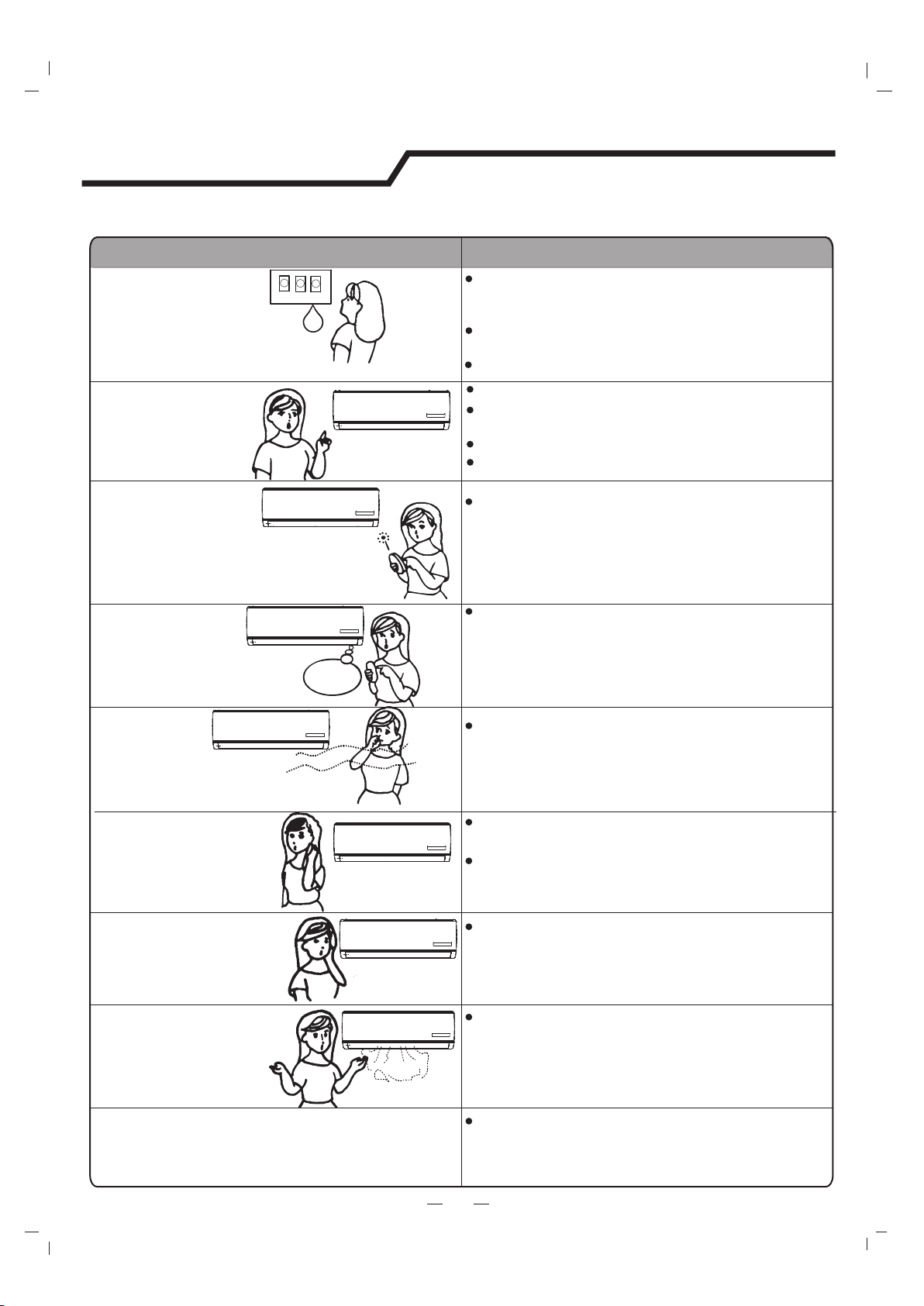
ProblemaAnálisis
No funciona
No hay aire frío
o caliente
Control no efectivo
No funciona
inmediatamente
Olor extraño
Sonido de agua
que fluye
Se escucha un crujido
Pulverización de niebla
desde la salida
El indicador del compresor se ilumina
constantemente, el indicador de funcionamiento
parpadea y los ventiladores internos se detienen.
La unidad está cambiando del modo Heating al
Defrost. El indicador se apagará y volverá al
modo Heating.
¿Está sucio el filtro de aire?
¿La entrada y salida de aire del aire
acondicionado están bloqueadas?
¿La temperatura está configurada correctamente?
no funciona
Si el protector o el fusible están fundidos, esperar
3 minutos y encender otra vez. El dispositivo
protector puede evitar que la unidad funcione.
Verificar si el electrodoméstico está enchufado.
Las pilas en el control remoto pueden estar
agotadas.
Puede que los siguientes casos no siempre sean un malfuncionamiento, verificar antes de
preguntar al servicio.
Si hay una fuerte interferencia (desde la descarga
de electricidad excesiva o anomalía del voltaje del
suministro de energía), el electrodoméstico puede
no funcionar de manera normal. Desconectar el
suministro de energía y conectarla 2-3 horas
después.
Cambio de modo durante el funcionamiento, 3
minutos de retraso.
Este olor puede provenir de otras fuentes como
muebles, cigarrillos, etc., que es succionado por
la unidad y lo expulsa con el aire.
Se produce por el flujo del refrigerante en el aire
acondicionado. No es un tema para preocuparse.
Sonido de descongelación durante el modo
Heating.
El sonido se puede producir por la expansión y
contracción del panel delantero debido al cambio
de temperatura.
Aparece niebla cuando el aire de la habitación se
enfría mucho. Esto es por el aire frío descargado
de la unidad interna durante los modos COOLING
o DRY.
9
Solución de problemas
¿Están las ventanas y puertas abiertas?
10
Instrucciones para la instalación
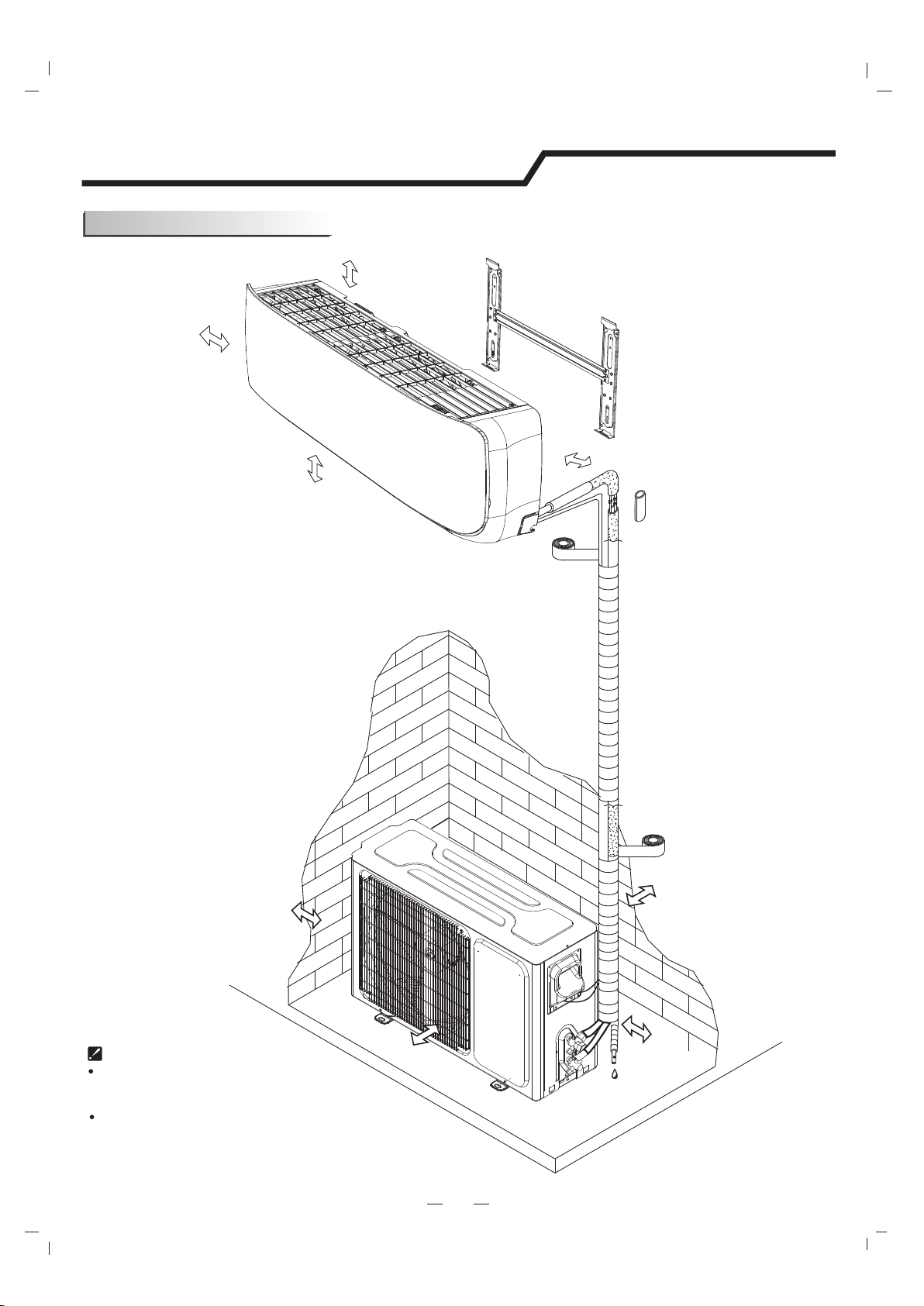
La instalación debe ser realizada según los estándares
de instalación eléctrica nacional y por personal autorizado.
La imagen de arriba es solo una simple
presentación de la unidad. Puede que no coincida
con la apariencia externa de la unidad que compró.
La distancia del techo
debería ser más de
200mm/7,9pulgadas
La distancia de la
pared debería ser
más de 50mm/2pulgadas
La distancia de la pared debería
ser más de 50mm/2pulgadas
La distancia entre la
entrada de aire y la pared
debería ser más de
250mm/10pulgadas
La distancia entre la
entrada de aire y la pared
debería ser más de
250mm/10pulgadas
más de 250mm/10in
La distancia entre la salida del aire y la
pared debería ser más de 500mm/20pulgadas
La distancia del suelo debería ser
más de 2,4m/8 pies.
Diagrama de instalación
11
Instrucciones para la instalación
Herramientas sugeridas
Para instalar el aire acondicionado de manera convencional y segura debería
utilizar las herramientas especiales que se mencionan a continuación.
Llave inglesa estándar
Destornillador
Lleve hexagonal o llave Allen
Llave ajustable/creciente
Llave de torsión
Taladro y brocas
Colector y medidores
Bomba de vacío
Abrazadera y amperímetro
Nivelador
Guantes de trabajo
Guantes de seguridad
Cortatubos
Escala de refrigerante
Abocardador R410A
Medidor de micrones
Sierra de perforación
12
Instrucciones para la instalación
Instrucciones del sitio
Sitio para instalar la unidad externa
Donde sea conveniente instalar y muy ventilado.
Evite instalar donde haya fugas de gas inflamable.
Mantenga la distancia requerida desde la pared.
Mantenga la unidad externa lejos de polvos, salidas de gas de
vulcanización.
Evite instalar cerca de la calle donde hay riesgo de agua fangosa.
Una base fija para que no incremente el ruido del funcionamiento.
Donde nada bloquee la salida de aire.
Sitio para instalar la unidad interna
Donde no haya obstáculos cerca de la salida del aire y el aire pueda
salir fácilmente a cada rincón.
Donde la tubería y el orificio de la pared pueden organizarse fácilmente.
Mantenga el espacio requerido desde la unidad hasta el techo y la
pared según el diagrama de instalación de la página anterior.
Donde el filtro de aire se pueda sacar fácilmente.
Mantenga la unidad y el control remoto a 1m (3,2 pies) o más del
televisor, radio, etc.
Lo más lejos posible de lámparas fluorescentes.
No coloque nada cerca de la entrada de aire para no obstruir la
absorción de aire.
Instálelo en una pared lo suficientemente fuerte para soportar el
peso de la unidad.
Instálelo en un lugar donde no aumente el sonido y la vibración del
funcionamiento.
Manténgalo alejado de la luz directa del sol y de fuentes de calor. No
coloque materiales inflamables o aparatos de combustión sobre la unidad.
Evite instalarla bajo la luz directa del sol, en un pasillo o cerca de
fuentes de calor y ventiladores. Manténgala lejos de materiales
inflamables, niebla espesa de aceite y lugares húmedos o irregulares.
Si la altura o la longitud de la tubería está fuera del alcance de la tabla, consultar al comerciante.
Modelo
9K-18K
20
Cantidad requerida para
refrigerante adicional (g/m)
24K
30K-36K
30
40
En caso de que la longitud de la tubería sea más que 7,5m (24,6pies), el refrigerante debería
ser cargado adicionalmente según la siguiente tabla.
Unidad externa
Unidad interna
La longitud de la tubería
es 20 metros (65,4 pies) Máx.
La altura debería ser
menos que 5m, (16,4 pies)
Outdoor unit is higher than indoor unit
Unidad externa
Unidad interna
La longitud de la
tubería es 20
metros (65,4 pies)
Máx.
La altura debería ser
menos que 10m, (32,8 pies)
Indoor unit is higher than outdoor unit
13
Instrucciones para la instalación
Instalación de la unidad interna
. Mantener la placa de montaje de forma horizontal utilizando un nivel horizontal o un nivelador.
Marcar el centro de la unidad interna en la placa de montaje para futuras referencias.
Atornillar la placa de montaje en la pared con un mínimo de cinco tornillos de manera separada para
que soporte el peso de la unidad interna de manera correcta.
1. Instalación de la placa de montaje
DIAGRAMAS Y DEMENSIONES DEL SOPORTE DE MONTAJE (Recomendado)
Decidir un lugar para instalar la placa de montaje según la ubicación de la unidad interna y la dirección
de la tubería.
Placa de montaje
Tornillo de rosca
Nota: La forma de la placa de montaje puede diferir de la de arriba pero el método de instalación es similar.
Nota: Como se muestra en la figura de arriba, los seis orificios coinciden con los tornillos roscados en la placa de
montaje que se deben usar para fijar la placa, los otros están preparados.
Nota: se recomienda instalar tarugos para las placas de yeso, bloques de concreto, ladrillo y estos tipos de paredes.
Nota: el centro del soporte de montaje no debe ser el centro de la unidad interna.
Para el modelo Serie 738, ANCHO: 522mm/20,6pulgadas
Para el modelo Serie 808, ANCHO: 592mm/23,3pulgadas
200mm/7,9pulgadas o más al techo
50mm/2pulgadas
o más a la pared
50mm/2pulgadas
o más a la pared
Esquema de la unidad interna
Orificio de la tubería
ANCHO
14
Instrucciones para la instalación
Instalación de la unidad interna
DIAGRAMAS Y DEMENSIONES DEL SOPORTE DE MONTAJE (Recomendado)
Para el modelo Serie 908/1080, ANCHO: 629 mm/24,8pulgadas
Para el modelo Serie 1280, ANCHO: 820 mm/32,3pulgadas
200mm/7,9pulgadas o más al techo
200mm/7,9pulgadas o más al techo
50mm/2pulgadas
o más a la pared
50mm/2pulgadas
o más a la pared
50mm/2pulgadas
o más a la pared
50mm/2pulgadas
o más a la pared
Esquema de la unidad interna
Esquema de la unidad interna
Orificio de la tubería
Orificio de la tubería
ANCHO
ANCHO
15
Instrucciones para la instalación
Instalación de la unidad interna
Modelo de la
unidad
Tamaño A
Tamaño B
Tamaño C
mm/inmm/inmm/in
Series 738
68/2.6833/1.370/2.7
Series 808
70/2.7535/1.3870/2.7
Series 908
137/5.440/1.5770/2.7
Series 1080
170/6.740/1.5770/2.7
Series 1280
64/2.5241.2/1.6270/2.7
Instalar el casquillo a través del orificio de la pared para
mantener la pared ordenada y limpia.
Perforar un orificio en la pared. El orificio debería estar
inclinado un poco hacia abajo y hacia el exterior.
Decidir la posición del orificio para la tubería según la
ubicación de la placa de montaje.
2. Perforar un orificio en la pared para interconectar la tubería, el drenaje y cableado.
Tabla del orificio de la pared- tamaño de montaje por tamaño de la unidad
Interior
Exterior
Casquillo para la pared
(tubo de polietileno duro
elaborado por el usuario)
5mm
0,2pulgadas
(inclinación hacia
abajo)
Dirección de la tubería
1
2
3
4
A través
Tapón de goma
Orificio
de drenaje
Estructura de
drenaje
Nota: Cuando instale la tubería en la dirección
1, 2 o 4, ver la pieza de descarga correspondiente
fuera de la base de la unidad interna.
Nota: Ambos lados de la estructura de drenaje son estándar. Para ambos lados de la estructura, se pueden elegir derecha,
izquierda o ambos lados para la conexión del drenaje. Si se eligen ambos lados, se necesita otra manguera de drenaje y sólo
se ofrece una manguera de fábrica. Si elige un lado, asegurar que el orificio de la manguera en el otro lado esté bien
conectado.
Pieza de
descarga
Pieza de descarga fuera
del canal
Luego de conectar la tubería, instalar la manguera de drenaje y conectar el cable de alimentación. Luego de la
conexión, envolver la tubería, los cables y la manguera de drenaje juntos con materiales de aislamiento térmico.
Colocar la tubería (líquido y gas) y los cables a través del orificio de la pared desde el exterior o colocarlos a
través del interior después de completar la conexión de tuberías y cables para conectar a la unidad externa.
Decidir si desea ver la pieza de descarga de acuerdo con la dirección de la tubería (como se muestra a
continuación)
3. Conexiones de la tubería y manguera de drenaje a la unidad interna
16
Instrucciones para la instalación
Juntas de la tubería de aislamiento térmico:
Envolver las juntas de la tubería con
material de aislamiento térmico y luego
con cinta aisladora.
Tubería de aislamiento térmico:
a. Colocar la manguera de drenaje bajo la tubería.
b. Los materiales de aislamiento usan espuma de polietileno de
6mm de espesor.
Nota: La manguera de drenaje se prepara por el usuario.
No acomodar la tubería de drenaje de forma que se enrosque,
sobresalga o agite. No sumergir el extremo en el agua.
Si una extensión de la manguera de drenaje se conecta con la tubería
de drenaje, se debe aislar cuando pasa por la unidad interna.
Cuando la tubería es dirigida a la derecha, la tubería, el cable de
alimentación y la tubería de drenaje deberían estar aisladas térmicamente
y fijadas al fondo de la unidad con un fijador.
Aislamiento térmico
Envuelto con cinta aisladora
A. Insertar el fijador de tubería en la ranura.
B. Presionar para enganchar el fijador en la base.
Base
Base
Base
Fijador de tubería
Fijador de tubería
Enganchar aquí
Insertar aquí
Manguera
de drenaje
Manguera
de drenaje
Tubo
largo
Tubo
largo
Tubo
pequeño
Tubo
pequeño
Tubo pequeño
Tubo largo
Tubo aislante
térmico
Cable de
alimentación
Manguera de
drenaje (prepara
por el usuario)
b. Primero, pre ajustar con los dedos y luego con las llaves.
NOTA:
Las dimensiones están en "mm o pulgadas" al menos que se mencione en la tabla.
a. Conectar los tubos de la unidad interna con dos llaves inglesas. Poner atención para
dejar un torque como se muestra a continuación para evitar que los tubos, los conectores
y las tuercas cónicas se deformen o se dañen.
Conexión de la tubería:
Tamaño de tubería
Modelo
Lado líquido (1/4) φ6 o
9K-18K
18K
24K-36K
24K-36K
9K-12K
15~20N·m o 11~15ft-lbs
17 o 5/8
0.5 o 0.02
0.6 o 0.024
0.6 o 0.024
0.6 o 0.024
0.6 o 0.024
22 o 7/8
24 o 0.94
22 o 7/8
27 o 1.1
30~35N·m o 22~26ft-lbs
30~35N·m o 22~26ft-lbs
50~55N·m o 37~41ft-lbs
60~65N·m o 44~48ft-lbs
Lado líquido (3/8)φ9.53 o
Lado gas ( )φ12 o 1/2
Lado gas (3/8 )φ9.53 o
Lado gas (5/8)φ16 o
Torque
Ancho de la
tuerca
Espesor min.
Instalación de la unidad interna
17
Instrucciones para la instalación
La condensación se drena desde la unidad externa cuando la unidad funciona en modo
Heating. Para no molestar al vecino y proteger el medio ambiente, instalar un puerto de
drenaje y una manguera de drenaje para dirigir el agua condensada. Instalar el puerto de
drenaje y la arandela de goma en el chasis de la unidad externa. Luego, conectar una
manguera de drenaje al puerto como se muestra en la figura de la derecha.
Instalación de la unidad externa
Manguera de drenaje
(preparada por el usuario)
Arandela
Puerto de drenaje
Almohadilla de goma (opcional)
Colocar bajo el pedestal
2. Instalar la placa a tierra o los ganchos de la pared.
1. Instalar el drenaje condensado para la unidad externa.
1. Determinar la ubicación adecuada para la unidad externa.
2. Seguir las instrucciones brindadas por el fabricante para instalar los ganchos
de la almohadilla de goma en la pared.
3. Verificar que los ganchos o la almohadilla de goma puedan soportar el peso
de la unidad externa.
4. Verificar que los ganchos o la almohadilla de goma estén a nivel y cumplan
con las dimensiones de la unidad externa.
5. Fijar con pernos y tuercas sobre un piso plano y fuerte.
Si se instala en la pared o en el techo, fijar bien el soporte para evitar sacudidas
debido a las vibraciones o vientos fuertes.
ADVERTENCIA
Los requerimientos de carga de viento de Florida establecen que la unidad
externa debe estar asegurada a una base concreto de 3/8 pulgadas de
diámetro, perno, cuña (o equivalente) con arandelas de 1 pulgada. Los pernos
de anclaje deben estar incrustados al concreto de 3000 PSI mínimo a una
distancia de 4 1/2 pulgadas desde el borde del concreto. El espesor del
concreto debe exceder 1,5 veces la profundidad del perno.
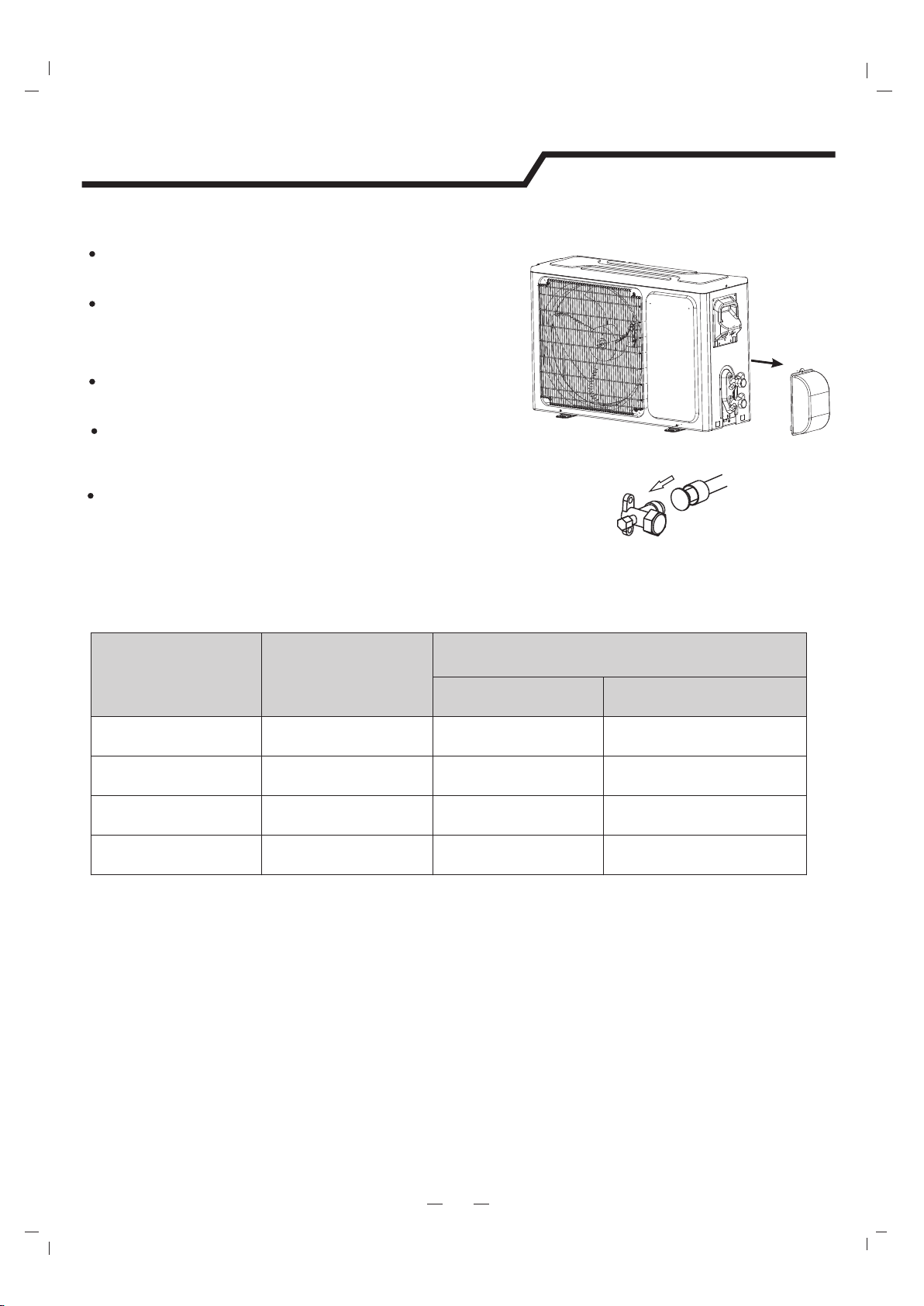
18
Instrucciones para la instalación
3. Conexión de la tubería a la unidad externa
Cobertor de
válvula de servicio
Aplicar una cantidad pequeña de aceita refrigerante en la
conexión de tubería refrigerante.
Alinear adecuadamente la tubería y ajustar la tuerca utilizando
una llave estándar o una llave de torsión como se muestra en la
sección de tubería interna.
Ajustar cuidadosamente la tuerca para corregir el nivel de torque
como en la siguiente tabla de torque:
Doblar cuidadosamente y ajustar el largo de la tubería
refrigerante para cubrir la conexión de las válvulas de servicio
de la unidad externa con las herramientas adecuadas para
evitar torceduras.
Quitar el cobertor de la válvula de servicio (si se proporciona) para
acceder a los puertos de las válvulas de servicio y refrigerantes.
Diámetro de la
tubería/pulgada
(mm)
Tamaño de la
tuerca/pulgada
(mm)
Par de torsión
ft-lbsN-m
1/4(6.35)1/4(17)11 hasta 15
15 hasta 20
3/8(9.5)3/8(22)22 hasta 2630 hasta 35
1/2(12.7)1/2(25)37 hasta 4150 hasta 55
5/8(15.9)5/8(29)44 hasta 4860 hasta 65
Tabla de torque
Nota: Si se aprieta demasiado se puede dañar la tuerca de conexión y causar fugas.
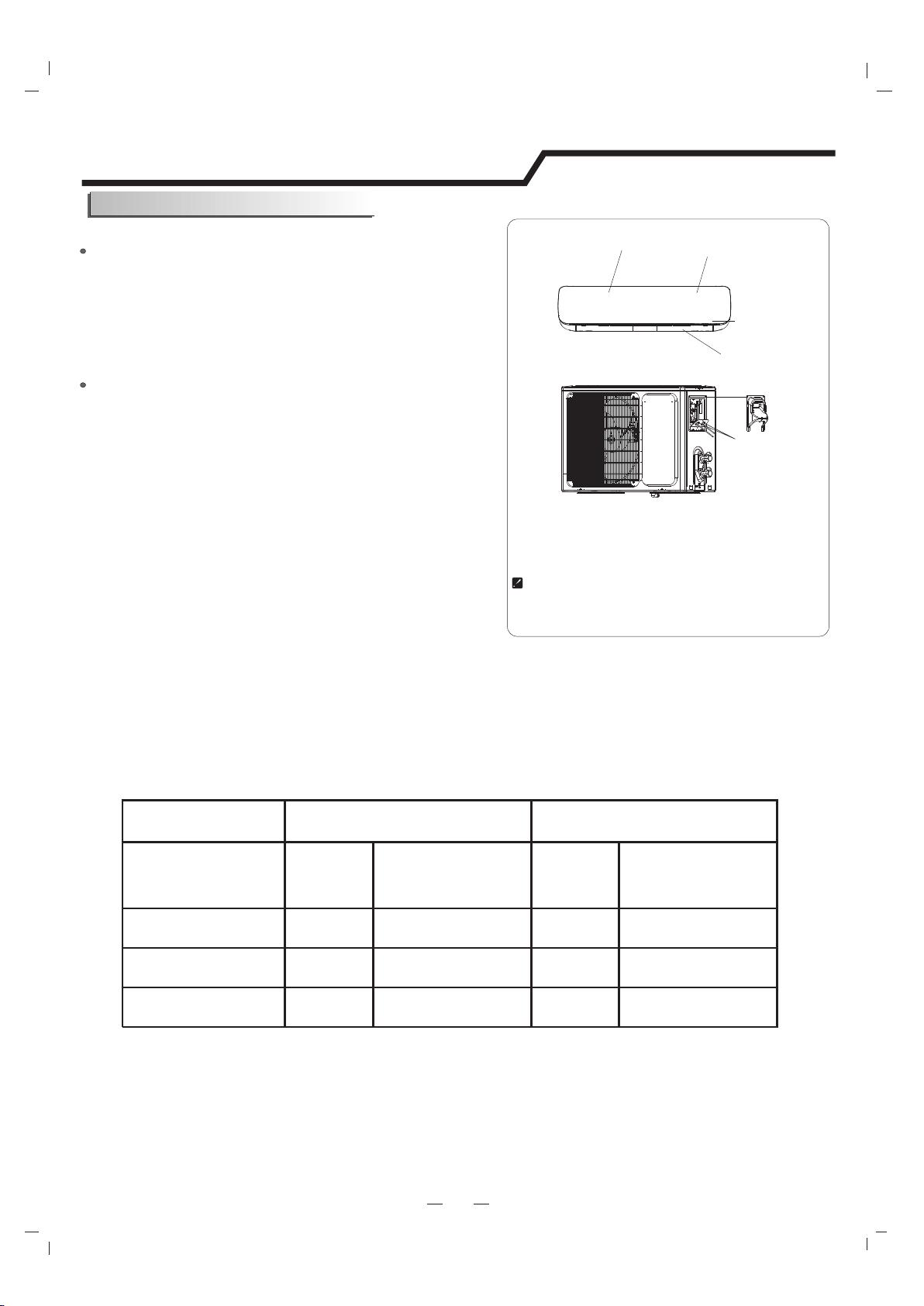
19
Conexión del cable
Unidad externa
Unidad interna
1) Quitar el tablero de la unidad desajustando el tornillo.
Conectar el cable de alimentación a la unidad interna
mediante la conexión de cables a las terminales del tablero
de control de forma individual de acuerdo con la conexión
de la unidad externa.
Conectar los cables a la terminal del tablero de manera
individual de la siguiente manera.
2) Asegurar el cable de alimentación en el tablero de
control con una abrazadera.
3) Volver a instalar el tablero de la unidad a su posición
original con un tornillo.
4) Utilizar un disyuntor para el modelo 24K entre la fuente
de alimentación y la unidad. Se debe proporcionar un
dispositivo de desconexión para desconectar todas las
líneas de suministro.
Nota: Para algunos modelos, se necesita el gabinete para conectar
con la terminal de la unidad interna.
Unidad externa
Instrucciones para la instalación
Precaución:
1. Nunca se debe dejar de tener un circuito de energía individual específico para el aire acondicionado.
Para los métodos del cableado, ver el diagrama del circuito publicado dentro del acceso de la puerta.
2. Confirmar que el espesor del cable sea tan específico como en las especificaciones de la fuente
de energía.
3. Verificar los cables y asegurar que estén bien sujetos después de la conexión.
4. Instalar un disyuntor de fugas a tierra en áreas húmedas o mojadas.
Las imágenes de este manual están basadas en la vista
externa de un modelo estándar. Por consiguiente, la
forma puede diferir un poco del aire acondicionado
que usted eligió.
Chasis
Gabinete
Panel delantero
Terminal (dentro)
Unidad interna
Cable Specifications
Atención:
El enchufe debe estar accesible aún después de la instalación del electrodoméstico en caso de
necesitar desconectarlo. Si no es posible, conectar el electrodoméstico a un interruptor bipolar con
una separación de contacto de al menos 3mm colocado en una posición accesible después de la
instalación.
Orificio para el
cableado
Tablero de cableado
Energía y cableado
Capacidad (Btuh)
Cable de alimentación
Cable de conexión de energía
Tipo
Área de sección
transversal normal
Tipo
Área de sección
transversal normal
9K-12KSJ TW3X16 AWGSJ TW4X18 AWG
18K-24KSJ TW
3X14 AWG
SJ TW4X18 AWG
SJ TW3X12 AWGSJ TW4X18 AWG30K-36K
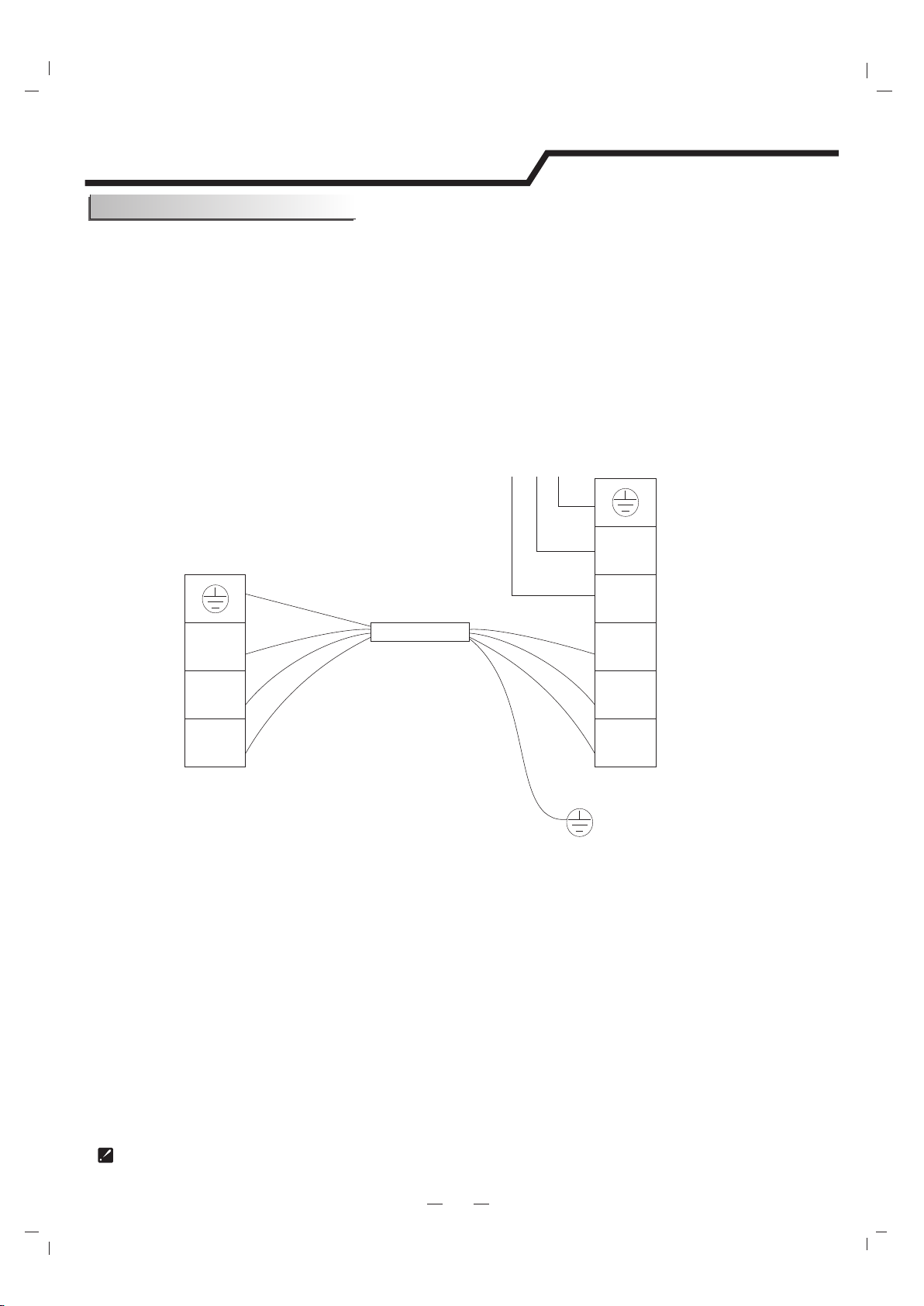
20
Instrucciones para la instalación
Asegurar que el color de los cables de la unidad interna y el nº de la terminal sean los mismos
que aquellos de la unidad interna.
Diagrama del cableado
El diagrama es sólo de referencia y la terminal real prevalecerá.
Fuente de alimentación
Cable de conexión de energía
Blanco
Blanco
Rojo
Rojo
Negro
Negro
Verde
Verde
Terminal
Unidad externa
Terminal
Unidad interna
1(N)
2(L)
3(SI)
1(N)
2(L)
3(SI)
L1
L2
GN
WHT
BLK
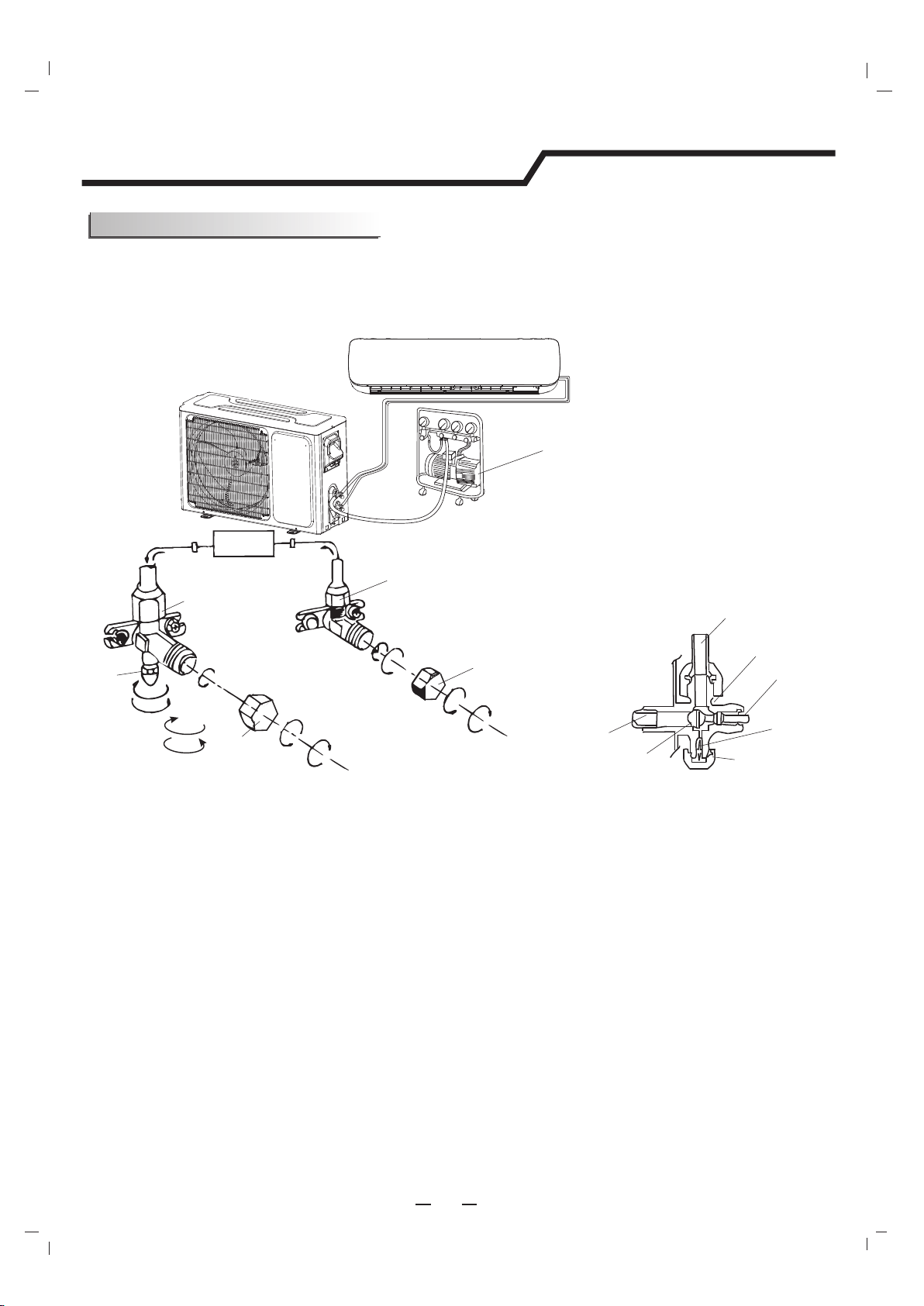
El aire que contiene humedad en el ciclo de refrigeración puede causar un mal funcionamiento en el
compresor. Luego de conectar las unidades internas y externas, liberar el aire y la humedad del ciclo
refrigerante utilizando una bomba de vacío como se muestra a continuación.
21
Instrucciones para la instalación
Prueba de vacío y carga
Nota: Para proteger el ambiente, no descargar el refrigerante en el aire directamente. Ver la siguiente página para los pasos
de purga de aire.
Bomba de vacío
Dirección del flujo de refrigeración
Válvula de 2 vías
(6) Abertura 1/4 giro
Tapa de la válvula
(1) Girar
(8) Ajustar
(2) Girar
Válvula de 3 vías
(8) Ajustar
(1) Girar
(7) Girar para abrir
completamente la válvula
(7) Girar para abrir completamente la válvula
(8) Ajustar
Diagrama de válvula de 3 vías
Conectar a la unidad interna
Posición abierta
Eje
Tapa del puerto
de servicio
Puerto
de
servicio
Conectar a la unidad externa
Núcleo de la válvula
Aguja
Unidad
interna
Tapa de la
válvula
(1) Desatornillar y quitar las tapas de las válvulas de 2 y 3 vías.
(2) Desatornillar y quitar la tapa de la válvula de servicio.
(3) Conectar la manguera flexible de la bomba de vacío a la válvula de servicio.
(4) Comenzar el bombeo por 10-15 minutos hasta alcanzar 100mm HG absolutos.
(5) Con la bomba de vacío aún funcionando, cerrar la perilla de presión baja del colector de la bomba de
vacío. Luego, parar el bombeo de vacío.
(6) Abrir la válvula de 2 vías 1/4 giro y 10 segundos después cerrarla. Verificar el ajuste de las juntas
utilizando jabón líquido o un detector electrónico de fugas.
(7) Girar el vástago de las válvulas de 2 y 3 vías para cerrar completamente las válvulas. Desconectar la
manguera flexible de la bomba de vacío.
(8) Reemplazar y ajustar las tapas de todas las válvulas.
Cómo aspirar los tubos de aire:
22
Instrucciones para la instalación
Puesta en marcha
Operación de prueba
Verificación del sistema
Unidad interna
Unidad externa
Realizar la operación de prueba después de completar la verificación de fugas de gas y seguridad eléctrica.
1. Encender la desconexión eléctrica a la unidad externa.
2. Presionar el botón "ON/OFF" del control remoto para comenzar las pruebas.
3. Presionar el botón MODE, seleccionar el modo COOLING, HEATING, FAN para confirmar todas
las funciones.
1. Ocultar las tuberías refrigerantes cuando sea posible.
2.Asegurar que las pendientes de la manguera de drenaje estén hacia abajo en toda la extensión.
3.Asegurar que todas las tuberías refrigerantes y conexiones estén aisladas.
4.Ajustar la tubería fuera de la pared cuando sea posible.
5. Sellar el orificio de la pared que interconecta el cableado y la tubería refrigerante para que sea
aprueba de agua.
1. ¿Funcionan bien todos los botones del control remoto?
2. ¿Las luces del panel funcionan bien?
3. ¿Las rejillas oscilantes funcionan correctamente?
4. ¿Funciona el drenaje?
1. Presionar el botón mode hasta COOL y ajustar la configuración de la habitación a 61º (16ºC),
esperar 3 minutos para darle tiempo al compresor. ¿El compresor y los ventiladores externos están
encendidos en el modo COOL?
2. Presionar el botón mode hasta HEAT y ajustar la configuración de la habitación a 85º (30ºC),
esperar 3 minutos para darle tiempo al compresor. ¿El compresor y los ventiladores externos están
encendidos en el modo HEAT?
★
★★
★
:
::
:
:
::
:
×
××
×
:
::
:
×
×
×
★
×
★
★
×
×
!
"
×
×
#
"
"
"
"
$!
"
%
$"
★
#
×
&
&
$"
★
#
★
%
"%
%
$
"
×
★
★
"
$'#(
★
★
★
%$'#(
%$'#("
%$'#(
$"
×
#
★
!
★
★
×
$"
×
★
#
$"
"
"
×
# #
)"
#
×
#
(
&
*
"
# #
★
"&
+**&
&
$"
,
"
×
★
×
&
&
$"
()$(
×
#
×
)$(
&
&
&%*
%
$"$! #
×
×
$!
!
$
#
★
# -
%
★
×
#
.*&
.
$"
&
★
★
#
""
""
!
#
#
×
/
$"
★
# #
/
$"
Ο × ×
"
$"
"
Ο Ο ×
"
""
&"
-
!
" ★: Ο:) ×:01
"
1
Ο Ο Ο
0"
"
2
× ×
★
'"%"
3
×
★ ★
'"%"
""
,"
4
★ × ★
"%"
5 -
"
"
6
★ ★ ★
!7
""
8
9
Ο × ×
!"*
7
&"*
"&8
:
★ × ×
"
"
;
×
★ Ο
'"%"
"
-
1<
×
★ ×
'"%"
%
-=
#$
219&=""
"
$ /=
!
'
:★
★★
★ $
1 2 3 4
0
"
"
"
22"
"784&=9
"
""4&&"
*"4
"7&8=""
"1<&1<4&
"9"
"
"
!
/=
'
$
:★
★★
★ %
1 2 3 4
<
1
!
2
× Ο
★
×
"
!
5
★
Ο × ×
$"
")$(
)$(
&
&
&%
*
%
6
★
Ο ×
★
$"
&
"
"
"
"
9
★
Ο
★
×
"
"
"
"
"
$!
"
%
:
★
Ο
★
★
$"
&
&
;
× × Ο ×
(
"
"
1<
× × Ο
★
$
"
"
11
×
★
Ο ×
$'#(
%$'#(
%$'#(
"
%$'#(
12
×
★
Ο
★
$"
/
13
★
× Ο ×
$"
!
14
★
× Ο
★
15
★
★
Ο ×
$"
16
$"
"
"
19 $"$!
$!
!
1:
"
1;
× × × Ο
)"
2<
★
× × Ο
(
&
*
"
&
+**
"
&
&
21
$"
,
"
&
&
22
$
-
24
%
.
*&
>.
26
'
"
29
$"
"
"
""
&
"
-
33
★
!
%"
%
%
34
★
!
36
Ο
★
×
★
"
"
"
"
"
$!
"
%
3:
★
★
★
$'#(
%$'#(
>
3;
★
★
&
+**
&
&
&
41
★
★
★
"
5
5
?*$$#(
&
@?