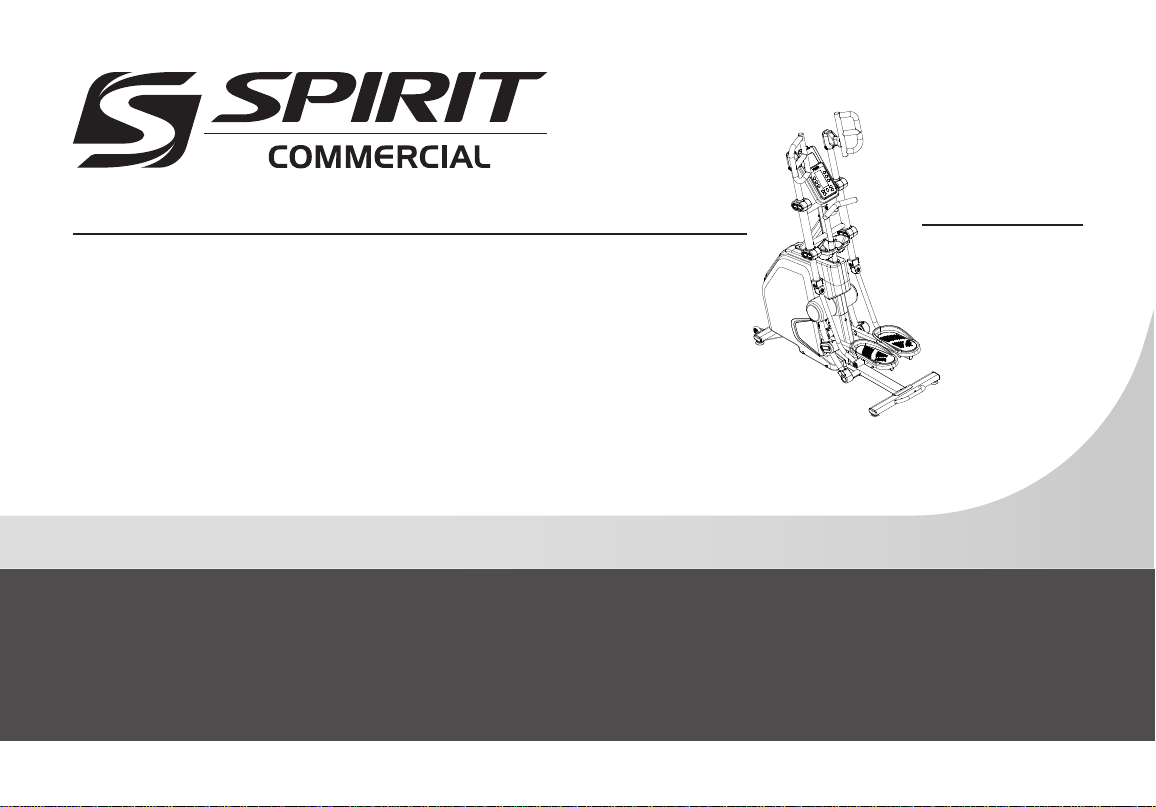
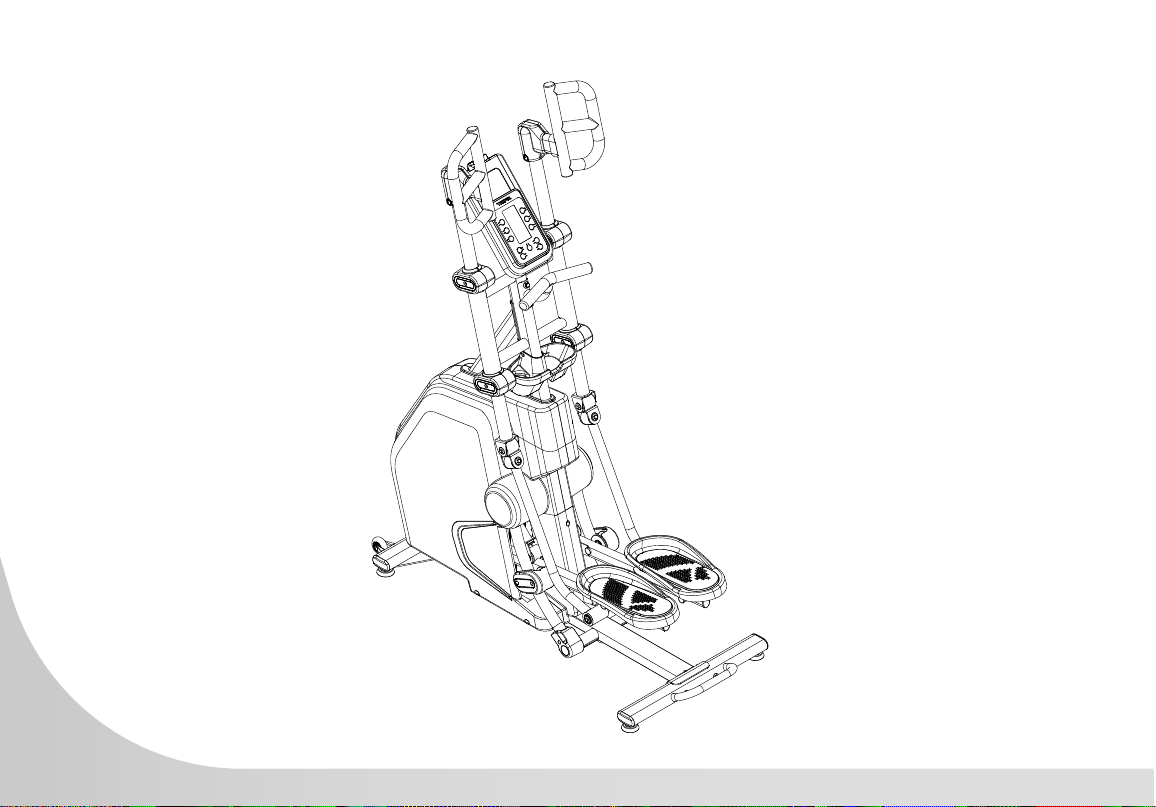
CVC800 Vertical Climber
OWNER’S MANUAL
Spirit Fitness

www.spirittness.com
2
Spirit Fitness
Congratulations on your new Vertical Climber and welcome to the Spirit Fitness family!
Thank you for your purchase of this quality Vertical Climber from Spirit Fitness. Your new Vertical
Climber was manufactured by one of the leading tness manufacturers in the world and is backed
by one of the most comprehensive warranties available. Through your dealer, Spirit Fitness will do all
we can to make your ownership experience as pleasant as possible for many years to come. If not
purchased direct from Spirit Fitness, the local dealership where you purchased this Vertical Climber is
your administrator for all Spirit Fitness warranty and service needs. Their responsibility is to provide
you with the technical knowledge and service personnel to make your experience more informed and
any difculties easier to remedy.
Please take a moment at this time to record the name of the dealer, their telephone number, and the
date of purchase below to make any future, needed contact easy. We appreciate your support and
we will always remember that you are the reason that we are in business.
Yours in Health,
Spirit Fitness
3
www.spirittness.com
RECORD YOUR SERIAL NUMBER
Please record the serial number of this tness product in the space provided below.
Serial Number:
REGISTER YOUR PURCHASE
The self-addressed product registration card must be completed in full and returned to Spirit Fitness. You can
also go to http://www.spirittness.com/warranty under the Support tab to register online.

4
Spirit Fitness
IMPORTANT SAFETY
INSTRUCTIONS
WARNING
When using an electrical appliance, basic
precautions should always be followed, including
the following: read all instructions before using this
appliance.
DANGER – To reduce the risk of electric shock:
always unplug this appliance from the electrical
outlet immediately after using and before cleaning.
WARNING – To reduce the risk of burns, re,
electric shock, or injury to persons, install the
Vertical Climber on a at level surface with access
to a 110-volt, 1.5-amp grounded outlet with only
the Vertical Climber plugged into the circuit.
DO NOT USE AN EXTENSION CORD UNLESS
IT IS A 14AWG OR BETTER, WITH ONLY ONE
OUTLET ON THE END:
• Do not operate Vertical Climber on deeply padded,
plush or shag carpet. Damage to both carpet and
Vertical Climber may result.
• Keep children away from the Vertical Climber. There
are obvious pinch points and other caution areas that
can cause harm.
• Keep hands away from all moving parts.
• Never operate the Vertical Climber if it has a
damaged cord or plug. If the Vertical Climber is not
working properly, call your dealer.
• Keep the cord away from heated surfaces.
• Do not operate where aerosol spray products are
being used or where oxygen is being administered.
Sparks from the motor may ignite a highly gaseous
environment.
• Never drop or insert any object into any openings.
• Do not use outdoors.
• To disconnect, turn all controls to the off position,
then remove the plug from the outlet.
• Do not attempt to use your Vertical Climber for any
purpose other than for the purpose it is intended.
• The hand pulse sensors are not medical devices.
Their purpose is to provide you with an approximate
measurement in relation to your target heart rate. Use
of a chest transmitter strap (sold separately) is a much
more accurate method of heart rate analysis. Various
factors, including the user’s movement, may affect the
accuracy of heart rate readings. The pulse sensors

5
www.spirittness.com
be affected. Such conditions are not covered under
your warranty. If you suspect the voltage is low,
contact your local power company or a licensed
electrician for proper testing. NEVER expose this
Vertical Climber to rain or moisture. This product
is NOT designed for use outdoors, near a pool
or spa, or in any other high humidity environment.
The operating temperature specication is 40 to
120 degrees Fahrenheit, and humidity is 95% non-
condensing (no water drops forming on surfaces).
Circuit Breakers: some circuit breakers used in
homes are not rated for high inrush currents that
can occur when a Vertical Climber is rst turned
on or even during use. If your Vertical Climber is
tripping the house circuit breaker (even though it
is the proper current rating) but the circuit breaker
on the Vertical Climber itself does not trip, you will
need to replace the home breaker with a high
inrush type. This is not a warranty defect. This is a
condition we as a manufacture have no ability to
control. This part is available through most electrical
supply stores. Examples: Grainger part # 1D237,
or available online at www.squared.com part
#QO120HM. The electrical outlet used should
have a dedicated 5-amp circuit breaker.
are intended only as exercise aids in determining
heart rate trends in general.
• Wear proper shoes. High heels, dress shoes, sandals
or bare feet are not suitable for use on your Vertical
Climber. Quality athletic shoes are recommended to
avoid leg fatigue.
• This appliance is not intended for use by persons with
reduced physical, sensory or mental capabilities, or
lack of experience and knowledge, unless they have
been given supervision or instruction concerning use
of the appliance by a person responsible for their
safety.
• Keep children under the age of 13 away from
this machine.
• User Weight Limit: 400 lb
SAVE THESE INSTRUCTIONS - THINK SAFETY!
IMPORTANT ELECTRICAL
INSTRUCTIONS
WARNING
NEVER remove any cover without rst disconnecting
AC power. If voltage varies by ten percent (10%) or
more, the performance of your Vertical Climber may
6
Spirit Fitness
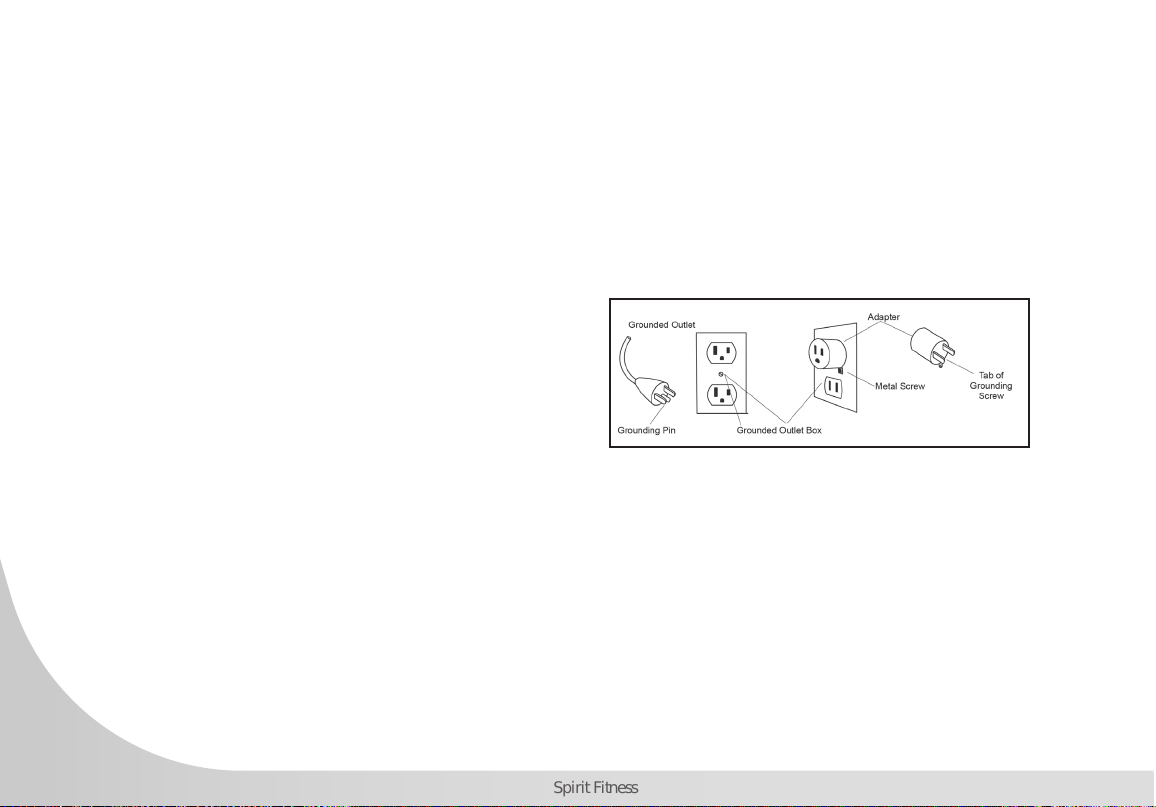
GROUNDING INSTRUCTIONS
This product must be grounded. If the Vertical
Climber should malfunction or breakdown,
grounding provides a path of least resistance for
electric current, reducing the risk of electric shock.
This product is equipped with a cord having an
equipment-grounding plug. The plug must be
plugged into an appropriate outlet that is properly
installed and grounded in accordance with all local
codes and ordinances.
DANGER - Improper connection of the equipment-
grounding conductor can result in a risk of electric
shock. Check with a qualied electrician or
serviceman if you are in doubt as to whether the
product is properly grounded. Do not modify the
plug provided with the product if it will not t the
outlet; have a proper outlet installed by a qualied
electrician.
This product is for use on a nominal 110-volt/5-
amp dedicated circuit, and has a grounding
plug that looks like the plug illustrated below. A
temporary adapter that looks like the adapter
illustrated below may be used to connect this plug
to a 2-pole receptacle as shown below if a properly
grounded outlet is not available. The temporary
adapter should be used only until a properly
grounded outlet, (shown below) can be installed by
a qualied electrician. The green colored rigid ear-
lug, or the like, extending from the adapter, must be
connected to a permanent ground such as a properly
grounded outlet box cover. Whenever the adapter is
used, it must be held in place by a metal screw.
IMPORTANT OPERATION
INSTRUCTIONS
• NEVER operate this Vertical Climber without reading
and completely understanding the results of any
operational change you request from the computer.
• Understand that changes in resistance do not occur

7
www.spirittness.com
immediately. Set your desired resistance level on the computer console and release the adjustment button. The
computer will obey the command gradually.
• Use caution while participating in other activities while pedaling on your Vertical Climber; such as watching
television, reading, etc. These distractions may cause you to lose balance which may result in serious injury.
• Do not use excessive pressure on console control buttons. They are precision set to function properly with little
nger pressure.
WARNING
This product can expose you to chemicals including Toluene and Acrylamide which are known to the State
of California to cause Cancer and birth defects or other reproductive harm. For more information, go to
www.P65Warnings.ca.gov
8
Spirit Fitness
PRE-ASSEMBLY
UNPACKING
1. Cut the straps, then lift the box over the unit and unpack.
2. Carefully remove all parts from the carton and inspect for any
damage or missing parts. If parts are damaged or missing, contact
your dealer immediately.
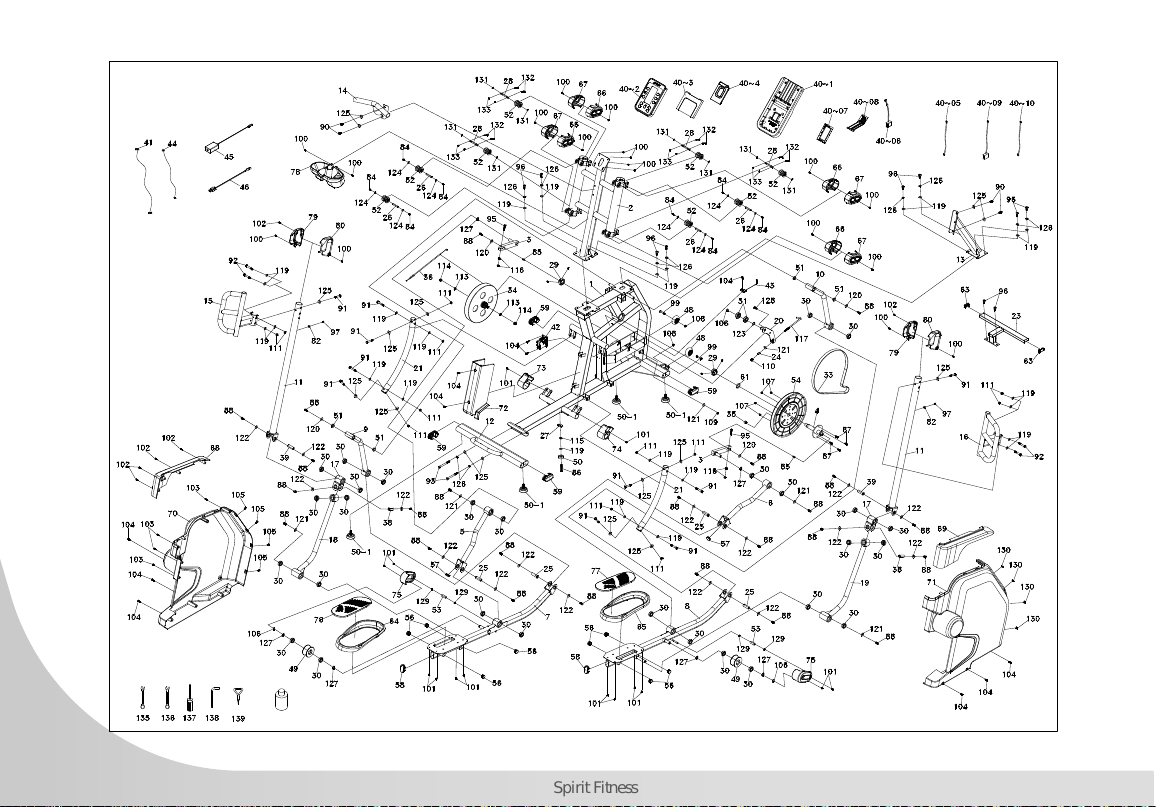
3. Locate the hardware package. Remove the tools rst. Remove the
hardware for each step as needed to avoid confusion. The numbers
in the instructions that are in parenthesis (#) are the item number from
the assembly drawing for reference.
TOOLS INCLUDED:
13/14m/m_Wrench
12/14m/m_Wrench
Phillips Head Screw Driver
L Allen Wrench-M8
PARTS INCLUDED:
1 Main Frame
1 Console Mast
2 Console Mast Cover (Left and Right)
4 Handlebar Tubing
4 Levelers
1 Rear Stabilizer
1 Console
2 Foot Pedals
1 Power Cord
2 Transport Wheels
1 Water Bottle Holder
1 Hardware Kit
9
www.spirittness.com
STEP ZERO
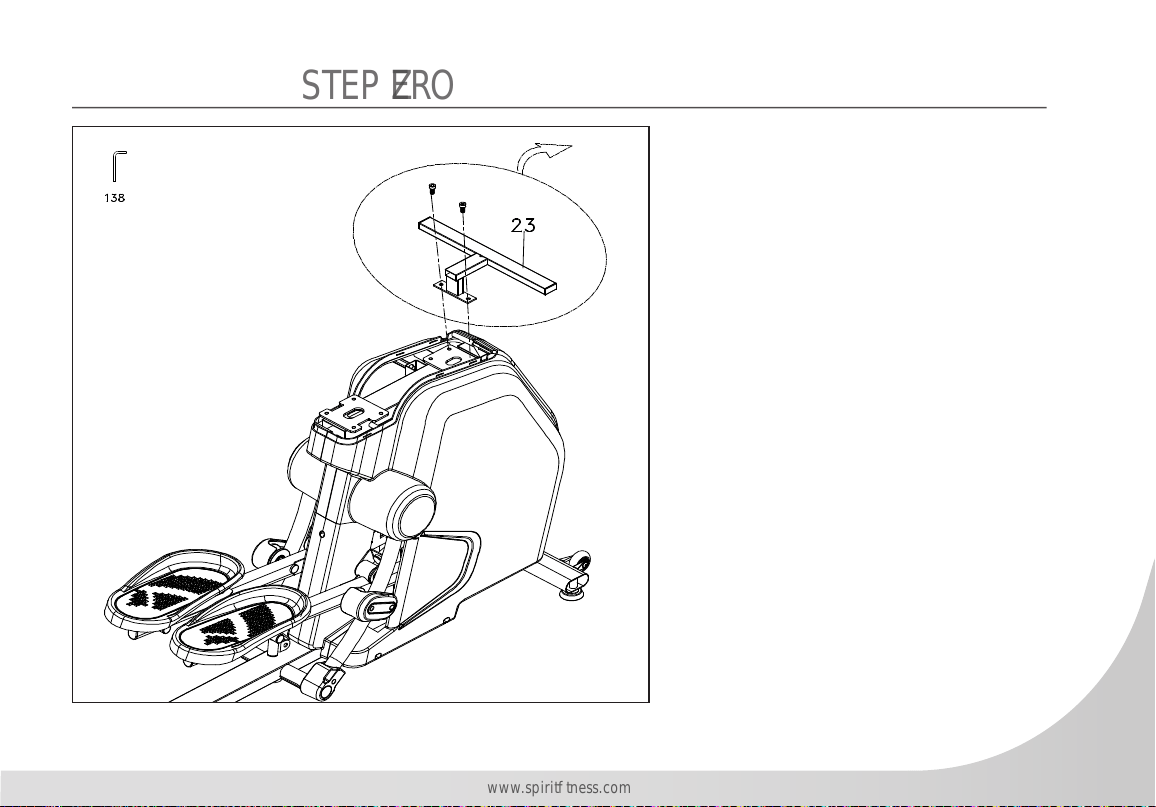
1. Use L Allen Wrench (No.138) to
remove two 3/8”x3/4” Socket Head
Cap Bolts that hold the protective Side
Back (No.23) onto the mounting plate
on the Main Frame. Discard the bolts
and set the Side Back (No.23) aside.
10
Spirit Fitness
STEP ONE
HARDWARE FOR STEP 1
PART TYPE DESCRIPTION QTY
90 HEX HEAD BOLT
3/8” x 3/4”
2
93 HEX HEAD BOLT
3/8” x 3-3/4”
2
96 SOCKET HEAD CAP BOLT
3/8” x 3/4”
8
119 FLAT WASHER
3/8” x ø19 x 1.5T
8
125 CURVED WASHER
3/8” x 23 x 2.0T
4
126 SPLIT WASHER
ø10 x 2T”
10
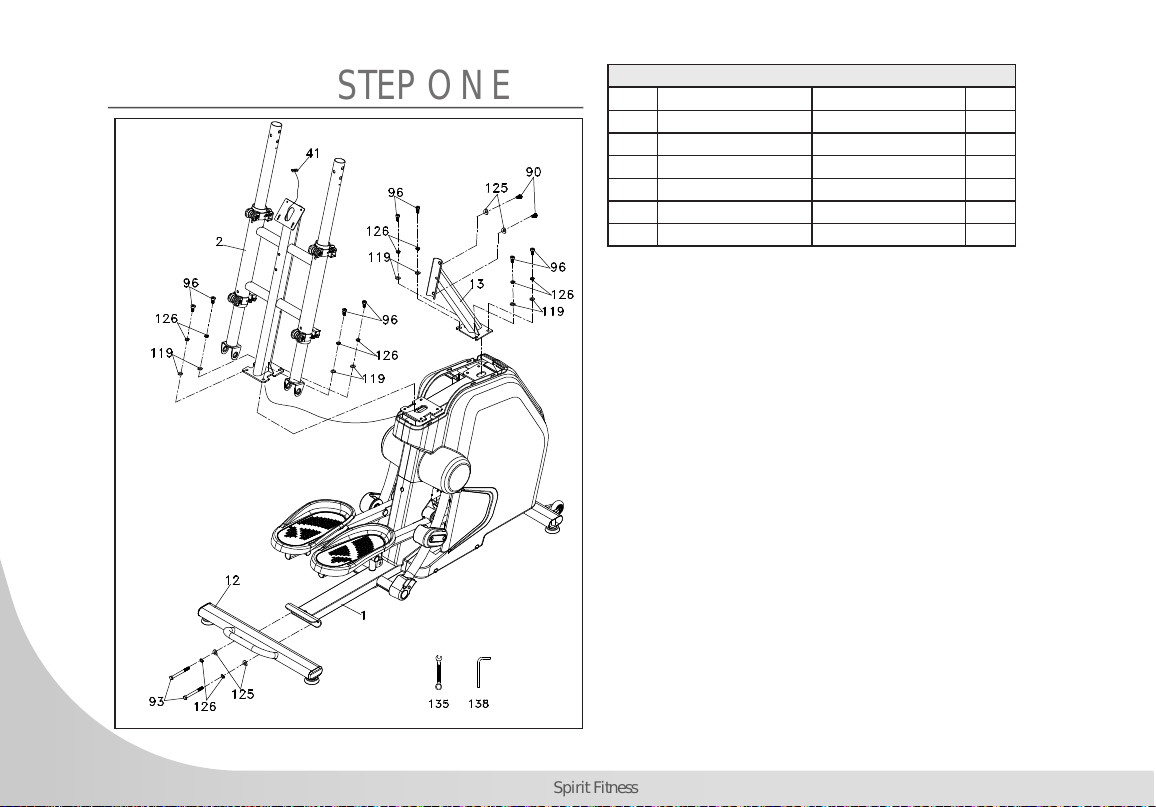
1. Attach Rear Stabilizer with Handle (No.12) to
mounting plate on the Main Frame (No.1) and secure
with 2 Hex Head Bolts (No.93), 2 Spring Washers
(No.126) and Curved Washers (No.125) by using
Wrench (No.135).
2. Pull the tie on the Console Mast (No.2) to have
Computer Cable (No.41) go through the mast from
bottom and out of the mast on top. Secure the Console
Mast (No.2) on the mounting plate on the Main Frame
(No.1) with four Socket Head Cap Bolts (No.96), 4
Split Washers (No.126) and 4 Flat Washers (No.119)
by using L Allen Wrench (No.138).
3. Secure the Console Mast Bracket (No.13) to the Main
Frame (No.1) using 4 Socket Head Cap Bolts (No.96),
4 Split Washers (No.126), and 4 Flat Washers
(No.119). Use 2 Hex Head Bolts (No.90) and 2
Curved Washers (No.125) to secure the Strap Hold
Down (No.2) to the Console Mast Bracket (No.13).
11
www.spirittness.com
STEP TWO
HARDWARE FOR STEP 2
PART TYPE DESCRIPTION QTY
88 HEX HEAD BOLT
5/16” x 15mm
2
121 FLAT WASHER
5/16” x 23 x 1.5T
2
90 HEX HEAD BOLT
3/8” x 3/4”
2
125 CURVED WASHER
Ø3/8” x 23 x 2.0T
2
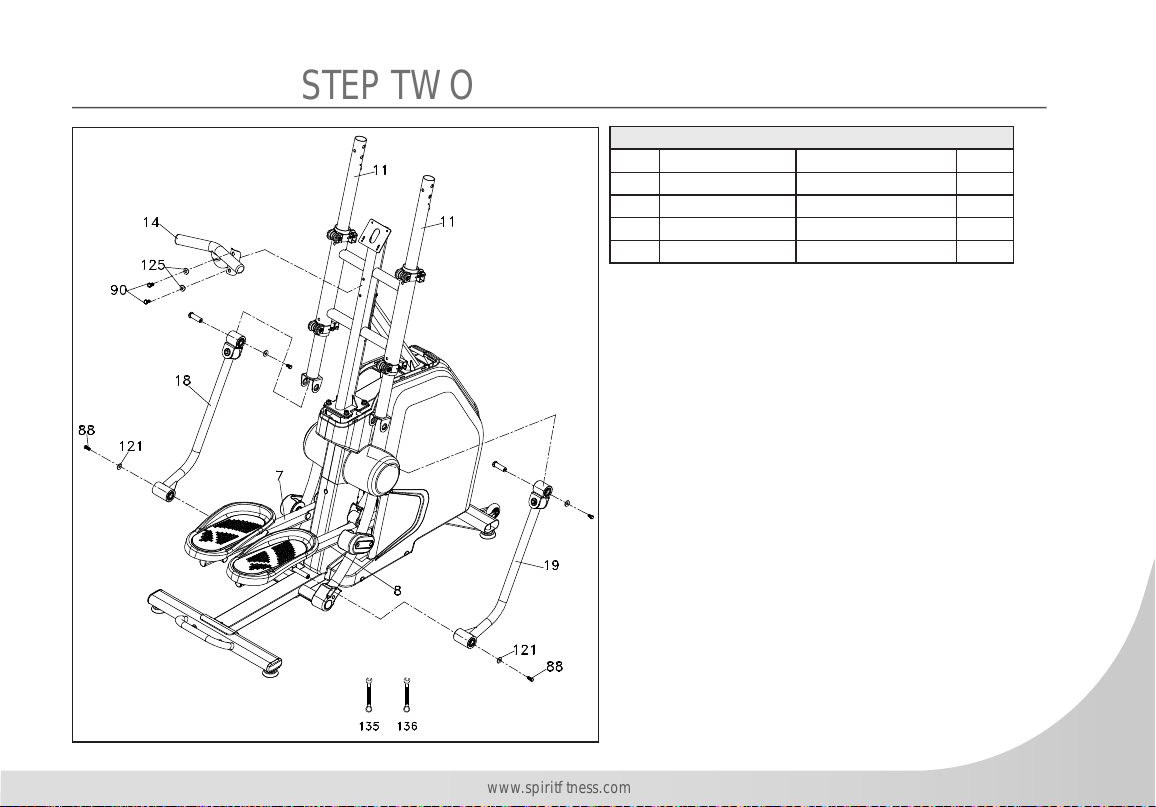
1. Take off the axle & screw from the Right Driving
Assembly (No.19), install lower hole of Right Driving
Assembly to axle of Connecting Arm (R)(#8) to
connect together, then rmly fasten one Hex Head Bolt
(No.88) through one Flat Washer (No.121) using the
Wrench (No.136).
2. Install into the upper hole of the Right Driving
Assembly to lower U shaped plate of Handgrip
Stabilizer Assembly (No.11), then insert the Axle into
upper hole through the lower U shaped plate, rmly
fasten with the previously removed screw using the
Wrench (No.136). Repeat for the left side.
3. Install the Mast Handlebar Assembly (No.14) onto
the Console Mast (No.2). Secure with 2 Hex Head
Bolts (No.90), 2 Curved Washers (No.125) using the
Wrench (No.135).
12
Spirit Fitness
STEP THREE
HARDWARE FOR STEP 3
PART TYPE DESCRIPTION QTY
91 HEX HEAD BOLT
3/8” X 2-1/4”
2
125 CURVED WASHER
3/8” X 23 X 2.0T
2
92 HEX HEAD BOLT
3/8” X UNC16 X 2-1/2
4
119 FLAT WASHER
3/8” x 19 x 1.5T
8
111 NYLON NUT
3/8” x 7T
4
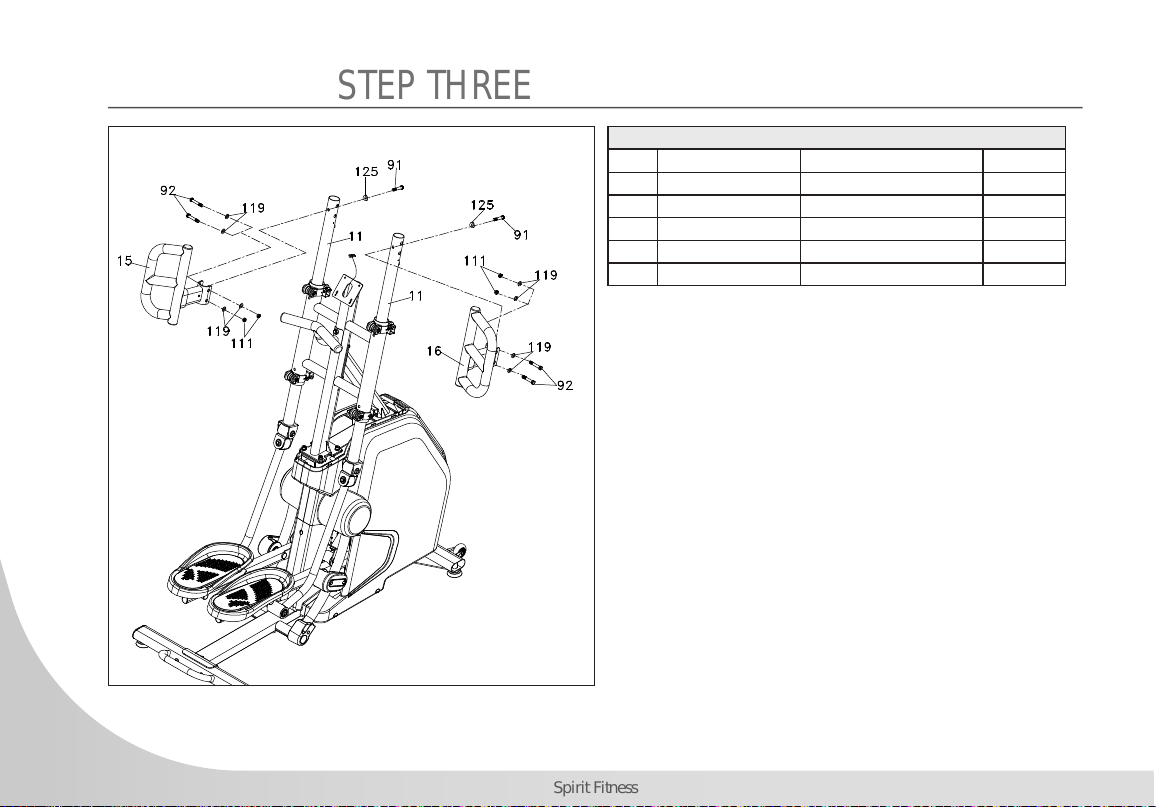
1. Install the Seat Handle Bar (No.15L) onto upper
Handgrip Stabilizer Assembly (No.11), rmly fasten
one Hex Head Bolts (No.91) through one Curved
Washer (No.125) using the Wrench (No.135), and
rmly fasten 2 Hex Head Bolts (No.92) through 4 Flat
Washers (No.119), 2 Nylon Nuts (No.111) using the
Wrench (No.136). Repeat on the right side.
13
www.spirittness.com
STEP FOUR
HARDWARE FOR STEP 4
PART TYPE DESCRIPTION QTY
100 PHILIPS HEAD SCREW
M5 X 10MM
18
102 SHEET METAL SCREW
3.5 x 12mm
6
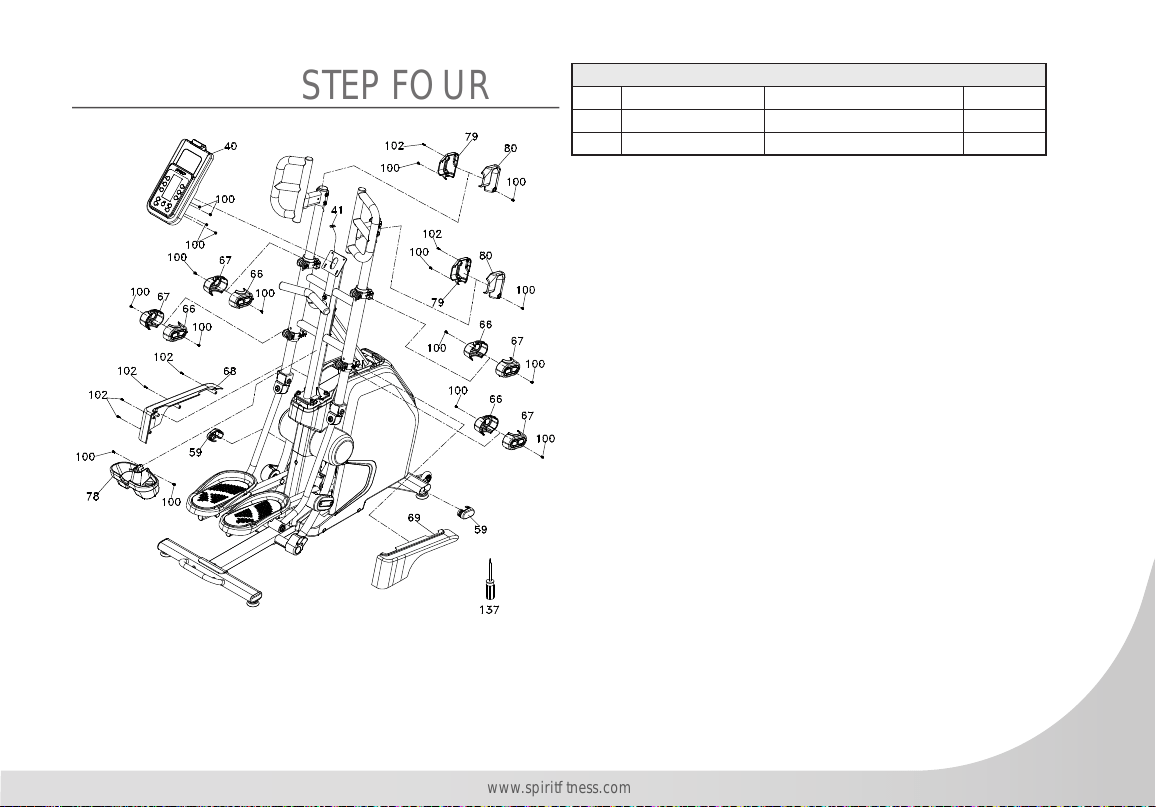
1. Plug the Computer Cable (No.41) into Console
Assembly (No.40). Install the Console Assembly on top
of the mast of the Console Mast (No.2) (stuff rest cables
into the mast tube), then rmly fasten 4 Tapping Screw
(No.100) using the Screw Driver (No.137).
2. Install the Console Mast Cover (No.68L) & Console
Mast Cover (No.69R) to Chain Cover (No.70L) &
Chain Cover (No.71R), rmly fasten 4 Sheet Metal
Screw (No.102) using the Screw Driver (No.137).
3. Install one Handlebar Cover (No.79L) & one
Handlebar Cover (No.80R) onto upper left Handgrip
Stabilizer Assembly (No.11), rmly fasten 2 Tapping
Screw (No.100) & one Sheet Metal Screw (No.102)
using the Screw Driver (No.137). Repeat with the
Handlebar Cover (No.79L) & Handlebar Cover
(No.80R) & upper right Handgrip Stabilizer Assembly
(No.11).
4. Plug in the Oval End Caps (No.59) onto ends front
stabilizer tube of Main Frame (No.1).
5. Install the Track Slide Wheel Cover A (No.66) & the Track Slide Wheel Cover B (No.67) onto the upper left
Strap Hold Down (No.2) fastening with two Tapping Screws (No.100) using the Screw Driver (No.139). Repeat
with the other 3 sets to the lower left, upper right, and lower right of the Strap Hold Down (No.2).
6. Install the Beverage Holder (No.78) onto Strap Hold Down (No.2) using 2 Tapping Screws (No.100).
14
Spirit Fitness
CVC800 CONSOLE OPERATION
15
www.spirittness.com
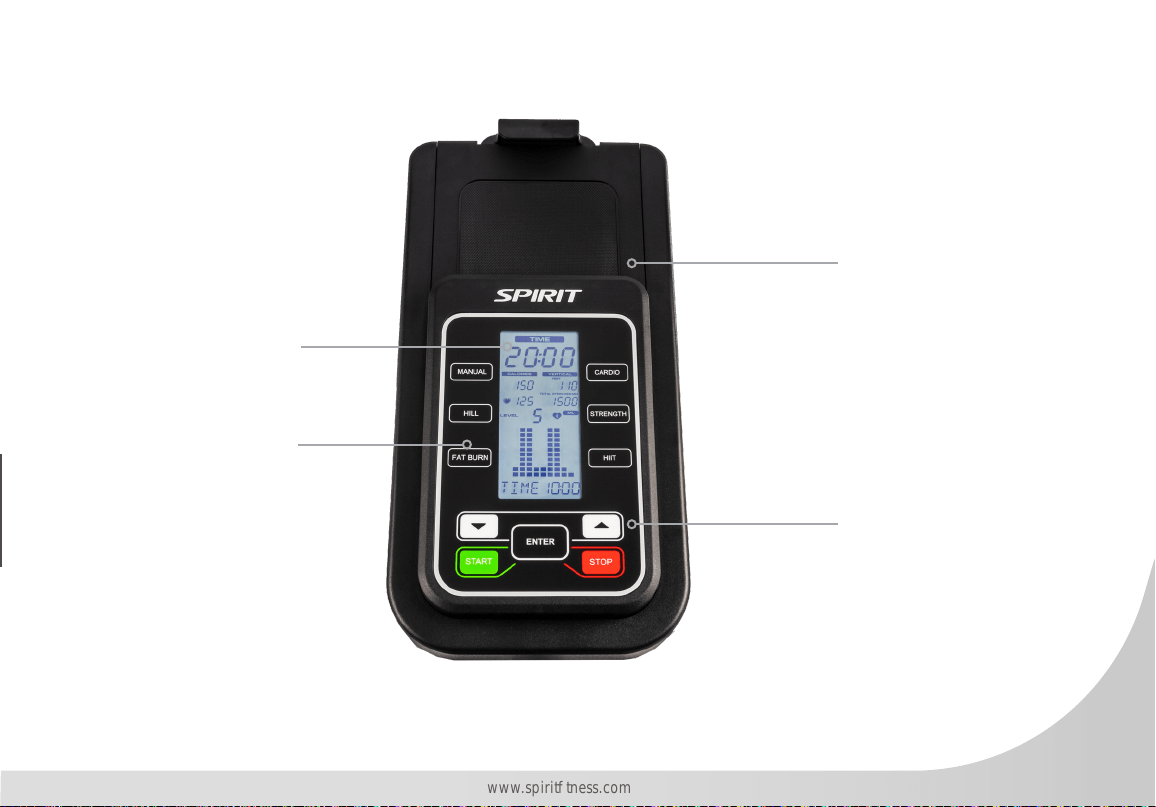
Tablet Holder
Program Buttons
Start, Stop, Level
Up, Level Down,
and Enter
LCD Data Display
Window

16
Spirit Fitness
POWER
When the display is powered up, the all characters on the console will light up. The LCD Data Display
Window will show the software version and the total time the climber has been used since it was new.
After 3 seconds the console will go to the start-up display and your climber will be ready to use.
QUICK START
To begin working out in QUICK START mode, simply press the START key after the console has powered
up. In QUICK START mode, the TIME will count up from zero, and the workload/resistance may be
adjusted manually by pressing the UP/DOWN keys. Pressing the STOP key once will PAUSE the workout.
Press START to resume the workout. Press the STOP key twice to end the workout.
NOTE: FLS (Total Floors Climbed), FPM (Floors Per Minute)
CONNECTING BLUETOOTH
The Bluetooth connection can be used for either pairing with your phone/tablet (APP) or with a wireless
Bluetooth chest strap (BLECHESTSTRAP). Please note that the default setting is for connection with APP. To
change the setting to pair with a Bluetooth chest strap, please follow the steps below.
• During the IDLE MODE, press the “ENTER” button for 2 seconds – you are now in SETTING MODE.
• Message in window will show “APP” – press either LEVEL UP or LEVEL DOWN to change between
“APP” and “BLECHESTSTRAP” – then press STOP/ENTER to return to IDLE MODE.
• The Bluetooth connection will now pair with a Bluetooth chest strap.
NOTE: If machine is powered off/on, the console will automatically revert to the default setting of
connecting to “APP” – to change to connect to “BLECHESTSTRAP” repeat steps above.

17
www.spirittness.com
MANUAL
The Manual program works as the name implies, manually. This means that you control the program
yourself and not the computer. To start the Manual program follow the instructions below.
1. Press the Manual key, then press the ENTER key.
2. Enter your age using the UP/DOWN keys, then press the ENTER key to accept the new number and
proceed.
3. Enter your weight using the UP/DOWN keys, then press ENTER to continue. This information is used to
help generate a more accurate caloric reading.
4. Enter the desired length of Time using the UP/DOWN keys, then press ENTER to continue.
5. You may now begin your workout by pressing the START key. To modify any of the settings, press the
STOP key to go back one step and repeat the steps above.
6. The program will start at level 1 to warm up. If you want to increase/decrease the workload simply
press the UP/DOWN keys.
7. During the Manual program you will be able to adjust the level manually by pressing the UP/DOWN
keys.
8. During the Manual program you may press the STOP key once to enter the PAUSE mode and press the
START key to resume the workout. Press the STOP key twice to exit the program.
9. When the program ends the display will show a summary of your workout. The summary will be
displayed for a short time, then the console will return to the start-up display.
18
Spirit Fitness
PRESET PROGRAMS
The climber has ve different programs that have been designed for
a variety of workouts. These ve programs have factory preset work
level proles for achieving different goals.
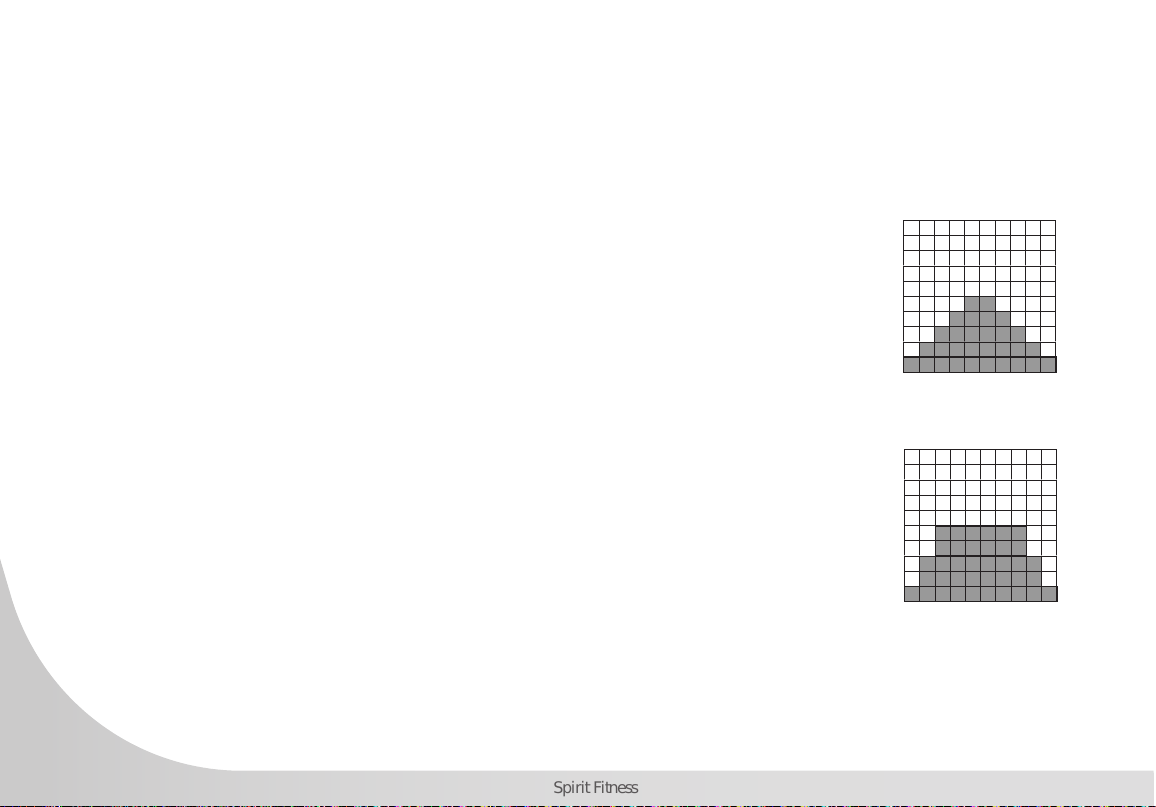
HILL
The Hill program simulates going up and down a hill. The resistance
in the pedals will steadily increase and then decrease during the
program.
FAT BURN
The Fat Burn program is designed, as the name implies, to maximize
the burning of fat. There are many schools of thought on the best
way to burn fat but most experts agree that a lower exertion level
that stays at a steady workload is the best. The absolute best way
to burn fat is to keep your heart rate at around 60% to 70% of
its maximum potential. This program does not use heart rate but
simulates a lower, steady exertion workout.

19
www.spirittness.com
CARDIO
The Cardio program is designed to increase your cardiovascular
function and endurance. This is exercise for your heart and lungs.
It will build up your heart muscle and increase blood ow and
lung capacity. This is achieved by incorporating a higher level of
exertion with slight uctuations in work.
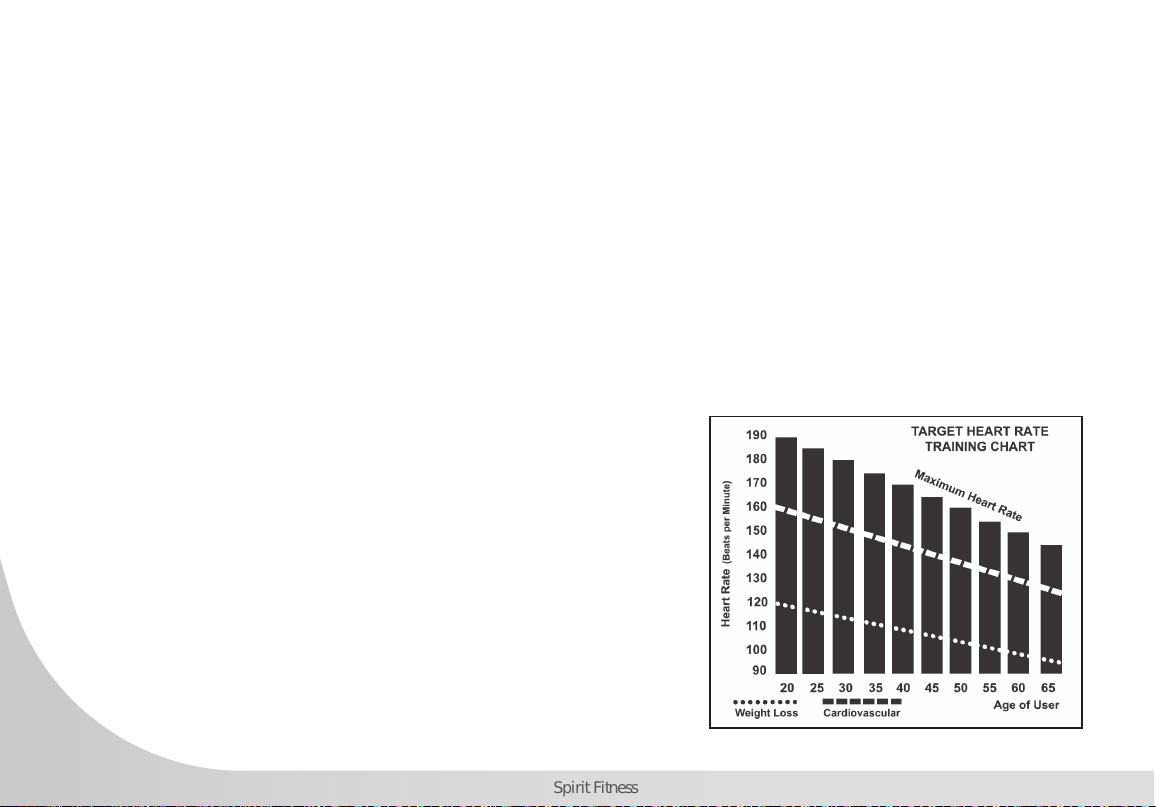
STRENGTH
TThe Strength program is designed to increase muscular strength in
your lower body. This program will steadily increase in resistance
to a high level and forces you to sustain it. This is designed to
strengthen and tone your legs and glutes.
HIIT
The HIIT program takes you through high levels of intensity followed
by periods of low intensity. This program increases your endurance
by depleting your oxygen level followed by periods of recovery to
replenish oxygen. Your cardiovascular system gets programmed to
use oxygen more efciently this way. This program also forces your
body to become more efcient due to spikes in heart rate, between
recovery periods. This aids in heart rate recovery from intense
activities.
20
Spirit Fitness
HEART RATE PROGRAMS
The old motto, “no pain, no gain”, is a myth that has been overpowered by the benets of exercising
comfortably. A great deal of this success has been promoted by the use of heart rate monitors. With the
proper use of a heart rate monitor, many people nd that their usual choice of exercise intensity was either
too high or too low and exercise is much more enjoyable by maintaining their heart rate in the desired
benet range.
To determine the benet range in which you wish to train, you must rst determine your Maximum Heart
Rate. This can be accomplished by using the following formula: 220 minus your age. This will give you the
Maximum Heart Rate (MHR) for someone of your age. To determine the effective heart rate range for specic
goals you simply calculate a percentage of your MHR. Your heart rate training zone is 50% to 90% of your
maximum heart rate. 60% of your MHR is the recommended for burning fat while 85% is recommended for
strengthening the cardio vascular system. This 60% to 85% is the zone to stay in for maximum benet.
For someone who is 40 years old their
target heart rate zone is calculated:
220 – 40 = 180 (maximum heart rate)
180 x .6 = 108 beats per minute (60% of maximum)
180 X .85 = 153 beats per minute (85% of maximum)
So for a 40 year old the training zone would
be 108 to 153 beats per minute.

21
www.spirittness.com
If you enter your age during programming the console will perform this calculation automatically. Entering
your age is used for the Heart Rate programs. After calculating your MHR you can decide upon which
goal you would like to pursue.
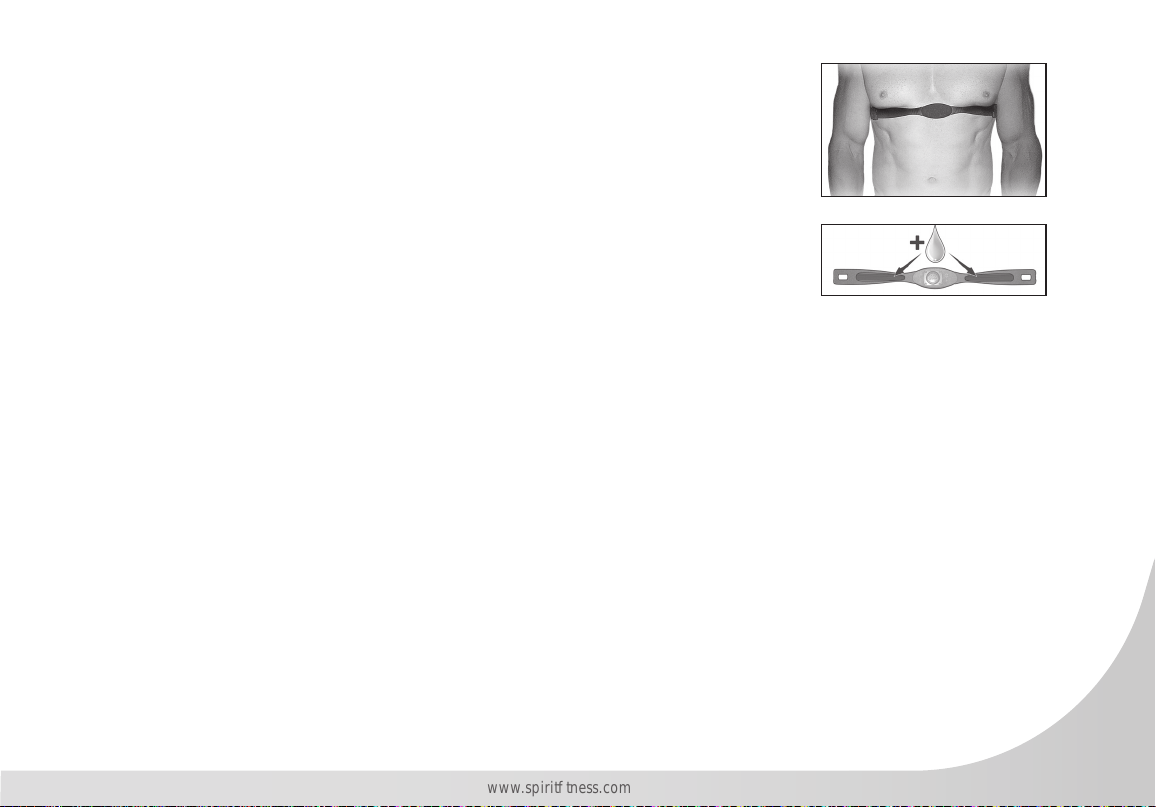
The two most popular reasons for, or goals, of exercise are cardiovascular tness (training for the heart and
lungs) and weight control. The black columns on the chart represent the MHR for a person whose age is
listed at the bottom of each column. The training heart rate, for either cardiovascular tness or weight loss,
is represented by two different lines that cut diagonally through the chart. A denition of the lines’ goal
is in the bottom left-hand corner of the chart. If your goal is cardiovascular tness or if it is weight loss, it
can be achieved by training at 85% or 60%, respectively, of your MHR on a schedule approved by your
physician. Consult your physician before participating in any exercise program.
With all Spirit Fitness machines you may use the heart rate monitor feature without using the Heart Rate
program. However, when using the heart rate monitor feature in conjunction with the Heart Rate programs,
the machine will automatically adjust speed or incline to maintain the desired heart rate.

22
Spirit Fitness
RATE OF PERCEIVED EXERTION
There are more variables involved in how hard you should workout than just heart rate. Your stress level,
physical health, emotional health, temperature, humidity, the time of day, the last time you ate and what
you ate, all contribute to the intensity at which you should workout.
The rate of perceived exertion (RPE), also know as the Borg scale, was developed by Swedish physiologist
G.A.V. Borg. The scale helps users determine an approximate heart rate level when a heart rate monitor
was not in use. Using the scale below, rate the level of intensity of your workout, or the perception of your
effort during your workout. Once the rating has been determined, simply add a “0” to the rating to get
your approximate heart rate. For example, if your workout felt comfortable, you would rate it a “12”. Then
add a “0” to get an approximate heart rate during your workout of 120 beats per minute. The scale is as
follows:
Rating Perception of Effort:
6 Minimal
7 Very, very light
8 Very, very light +
9 Very light
10 Very light +
11 Fairly light
12 Comfortable
13 Somewhat hard
14 Somewhat hard +
15 Hard
16 Hard +
17 Very hard
18 Very hard +
19 Very, very hard
20 Maximal
23
www.spirittness.com
WEARING THE CHEST STRAP (SOLD SEPARTELY)
1. Attach the transmitter to the elastic strap using the interlocking button.
2. Adjust the strap as tightly as possible while ensuring it is still comfortable.
3. Position the transmitter with the logo centered in the middle of your torso facing
away from your chest (some people must position the transmitter slightly left of
center). Attach the nal end of the elastic strap by inserting the round end and,
using the locking parts, secure the transmitter and strap around your chest.
4. Position the transmitter directly below the pectoral muscles.
5. Sweat is the best conductor to measure very minute heart beat electrical signals.
However, plain water can also be used to pre-wet the electrodes (2 ribbed oval areas on the reverse side of the
belt and both sides of the transmitter). It’s also recommended that you wear the transmitter strap a few minutes
before your work out. Some users, because of body chemistry, have a more difcult time in achieving a strong,
steady signal at the beginning. After “warming up”, this problem lessens.
6. Your workout must be within range - distance between transmitter/receiver – to achieve a strong steady signal.
The length of range may vary somewhat but generally stay close enough to the console to maintain good, strong,
reliable readings. Wearing the transmitter directly on bare skin assures you of proper operation. If you wish, you
may wear the transmitter over a shirt. To do so, wet the areas of the shirt that the electrodes will rest upon.
Note: The transmitter is automatically activated when it detects activity from the user’s heart. Additionally, it
automatically deactivates when it does not receive any activity. Although the transmitter is water resistant,
moisture can have the effect of creating false signals, so you should take precautions to completely dry the
transmitter after use to prolong battery life (estimated transmitter battery life is 2500 hours). The replacement
battery is CR2032. The chest strap is sold separately. Chest straps that operate using Bluetooth should also
work with this machine.

24
Spirit Fitness
ERRATIC OPERATION
Caution! Do not use this Vertical Climber for Heart Rate programs unless a steady, solid Actual Heart Rate
value is being displayed. High, wild, random numbers being displayed indicate a problem. Areas to look
for interference which may cause erratic heart rate:
1. Microwave ovens, TV’s, small appliances, etc.
2. Fluorescent lights.
3. Some household security systems.
4. Electric fence for a pet.
5. Some people have problems with the transmitter picking up a signal from their skin. If you have problems try
wearing the transmitter upside down. Normally the transmitter will be oriented so the Spirit Fitness logo is right
side up.
6. The antenna that picks up your heart rate is very sensitive. If there is an outside noise source, turning the whole
machine 90 degrees may de-tune the interference.
7. Another Individual wearing a transmitter within 3’ of your machine’s console.
If you continue to experience problems contact your dealer.

25
www.spirittness.com
GENERAL MAINTENANCE
Wipe down all areas in the sweat path with a damp cloth after each workout. If a squeak, thump, clicking
or rough feeling develops the main cause is most likely one of two reasons:
1. The hardware was not sufciently tightened during assembly. All bolts that were installed during assembly need to
be tightened as much as possible. It may be necessary to use a larger wrench than the one provided if you cannot
tighten the bolts sufciently. It is important to note that 90% of calls to the service department for noise issues can be
traced to loose hardware.
2. The crank arm nut needs to be retightened. If squeaks or other noises persist, check that the unit is properly leveled.
There are 2 leveling pads on the bottom of the rear stabilizer, use a 14mm wrench (or adjustable wrench) to adjust
the levelers.
SANITIZING YOUR SPIRIT FITNESS EQUIPMENT
• Unupholstered high-contact surfaces (hard plastics) can be sanitized using a 75% isopropyl alcohol solution and a
clean, dry cloth.Spray surfaces to be sanitized, and use the dry cloth to wipe clean. Allow surfaces to dry before
using.
• For upholstered or soft-plastic surfaces, use a conditioner after sanitizing.Be sure to follow the instructions provided
by the conditioner manufacturer to ensure proper use of the conditioner.
• Alternatively, you can make your own spray by mixing the proper ratio of isopropyl alcohol and distilled water to
reach a 75% solution.
• For more details on sanitization, or to learn how to make your own spray solution, please visit https://support.
spirittness.com/hc/en-us/articles/4406787148564 .

26
Spirit Fitness
ENGINEERING MODE
TThe console has built in maintenance/diagnostic software. The software will allow you to change the
console settings from English to Metric and turn off the beeping of the speaker when a key is pressed for
example. To enter the Maintenance Menu (may be called Engineering Mode, depending on version) press
and hold down the Start, Stop and Enter keys keep holding the keys down for about 2 seconds and the
Message Window will display “Engineering Mode”. Press the Enter button to access the menu below.
Press the Up/Down keys to navigate the menu, then press the Enter key to select functions (Key Test,
Display Test, Functions , Factory Set and Exit).
A. Key Test- Will allow you to test all the keys to make sure they are functioning
B. Display Test- Automatically tests all LCD’s
C. Functions- Press Enter to access settings, use Up/Down keys to scroll
i. ODO Reset- Resets the odometer
ii. Units - Sets the display to read out in Imperial (miles, pounds, feet, etc.) or Metric (kilometers,
kilograms, meters, etc.) display measurements
iii. Sleep Mode- Turn on to have the console power down automatically after 30 minutes of inactivity
iv. Motor Test- Continually runs the tensioning gear motor
v. Manual- Allows stepping of the gear motor
vi. Pause Mode- Turn on to allow 5 minutes of pause, turn off to have console pause indenitely
vii. Key Tone- Turn on or off the beep sound when a key is pressed
D. Factory Set
E. Exit- Select to exit Maintenance Mode

27
www.spirittness.com
NORMAL RESPONSIBILITIES OF THE CONSUMER
The non-dues paying facility is responsible for the items listed below:
1. The warranty registration card must be completed and returned to the address listed on the card within 10 days of the
original purchase, or completed online to validate the manufacturer’s limited warranty.
2. Proper use of the tness equipment in accordance with the instructions provided in this manual
3. Proper installation in accordance with instructions provided with the tness equipment and with all local electric codes.
4. Proper connection to a grounded power supply of sufcient voltage, replacement of blown fuses, repair of loose
connections or defects in house or facility wiring.
5. Expenses for making the tness equipment accessible for servicing, including any item that was not part of the tness
equipment at the time it was shipped from the factory.
6. Damages to the tness equipment nish during shipping, installation or following installation.
7. Routine maintenance of this unit as specied in this manual.
VERTICAL CLIMBER WARRANTY EFFECTIVE NOVEMBER 19, 2021
Spirit Fitness warrants all its Vertical Climber parts for a period of time listed below from the date of retail sale,
as determined by sale receipt, or in the absence of a sales receipt eighteen (18) months from the original factory
shipping date. Spirit Fitness’ responsibilities include providing new or remanufactured parts, at Spirit Fitness’
option, and technical support to our independent dealers and servicing organizations. In the absence of a
dealer or service organization, these warranties will be administered by Spirit Fitness directly to a facility.
The warranty period applies to the following components:
WARRANTY
Commercial (Non-Dues Paying Facilities)
Residential
FRAME
Lifetime
Lifetime
PARTS
5 Years
10 Years
LABOR
2 Years
2 Years
BRAKE
5 Years
10 Years
*Prisons and correctional facilities are excluded from warranty coverage.

28
Spirit Fitness
EXCLUSIONS
This warranty does not cover the following:
1. CONSEQUENTIAL, COLLATERAL, OR INCIDENTAL DAMAGES SUCH AS PROPERTY DAMAGE AND
INCIDENTAL EXPENSES RESULTING FROM ANY BREACH OF THIS WRITTEN OR ANY IMPLIED WARRANTY.
NOTE: Some states do not allow the exclusion or limitation of incidental or consequential damages, so this
limitation or exclusion may not apply to you.
2. Service call reimbursement to the consumer. Service call reimbursement to the dealer that does not involve
malfunction or defects in workmanship or material, for units that are beyond the warranty period, for units that
are beyond the service call reimbursement period, for Vertical Climber not requiring component replacement, or
Vertical Climber not in ordinary household or light commercial use.
3. Damages caused by services performed by persons other than authorized Spirit Fitness service companies; use of
parts other than original Spirit Fitness parts; or external causes such as corrosion, discoloration of paint or plastic,
alterations, modications, abuse, misuse, accident, improper maintenance, inadequate power supply, or acts of
God.
4. Products with original serial numbers that have been removed or altered.
5. Products that have been: sold, transferred, bartered, or given to a third party.
6. Products that do not have a warranty registration card on le at Spirit Fitness. Spirit Fitness reserves the right to
request proof of purchase if no warranty record exists for the product.
7. THIS WARRANTY IS EXPRESSLY IN LIEU OF ALL OTHER WARRANTIES EXPRESSED OR IMPLIED, INCLUDING
THE WARRANTIES OF MERCHANTABILITY AND/OR FITNESS FOR A PARTICULAR PURPOSE.
8. Product use in any environment other than a residential setting or non-dues paying facility with 5 hours use or
less per day.
9. Prisons and correctional facilities are excluded from warranty coverage.
10. Warranties outside of the United States may vary. Please contact your local dealer for details.

29
www.spirittness.com
SERVICE
Keep your bill of sale. Twelve (12) months from the date on the bill of sale or eighteen (18) months from the date of
factory shipping as determined by the serial number establishes the labor warranty period should service be required.
If service is performed, it is in your best interest to obtain and keep all receipts. This written warranty gives you specic
legal rights. You may also have other rights that vary from state to state. Service under this warranty must be obtained by
following these steps, in order:
1. Contact your selling authorized Spirit Fitness dealer. OR
2. Contact your local authorized Spirit Fitness service organization.
3. If there is a question as to where to obtain service, contact our service department at (870) 935-1107.
4. Spirit Fitness’ obligation under this warranty is limited to repairing or replacing, at Spirit Fitness’ option, the product
through one of our authorized service centers. All repairs must be preauthorized by Spirit Fitness. If the product
is shipped to a service center freight charges to and from the service center will be the customer’s responsibility.
For replacement parts shipped while the product is under warranty, the customer will be responsible for shipping
and handling charges. For in-home service, the customer will be responsible for a trip charge. There will be an
additional trip charge if the customer is located over 100 miles from the nearest service center.
5. The owner is responsible for adequate packaging upon return to Spirit Fitness. Spirit Fitness is not responsible for
damages in shipping. Make all freight damage claims with the appropriate freight carrier. DO NOT SHIP ANY
UNIT TO OUR FACTORY WITHOUT A RETURN AUTHORIZATION NUMBER. All units arriving without a return
authorization number will be refused.
6. For any further information, or to contact our service department by mail, send your correspondence to:
SPIRIT FITNESS, INC.
P.O. Box 2037
Jonesboro, AR 72402-2037
Product features or specications as described or illustrated are subject to change without notice. All warranties are made by Spirit Manufacturing, Inc.
This warranty applies only in the 48 contiguous United States. NOTE: This does not apply to Alaska or Hawaii.
30
Spirit Fitness
31
www.spirittness.com
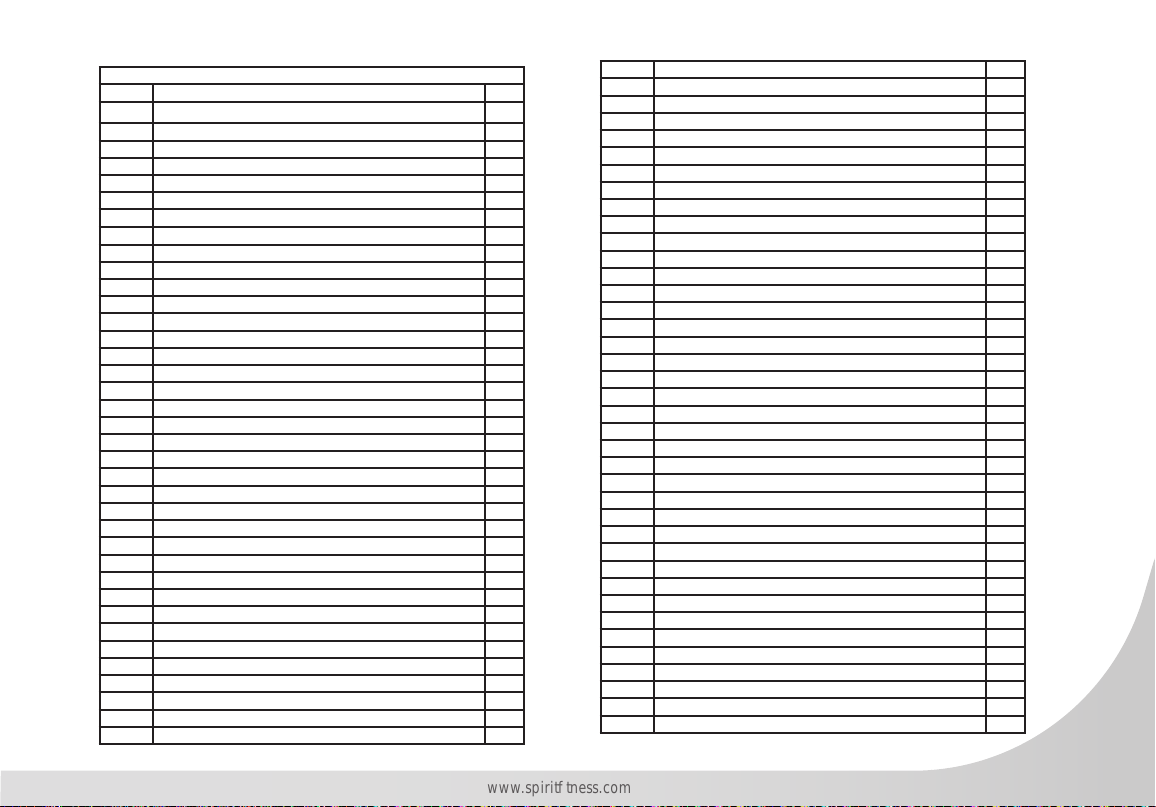
CVC800 Parts List
1 Main Frame 1
2 Strap Hold Down 1
3 Crank Arm 2
4 Crank Axle 1
5 Linked Assembly (L) 1
6 Linked Assembly (R) 1
7 Connecting Arm (L) 1
8 Connecting Arm (R) 1
9 Left Swing Assembly 1
10 Right Swing Assembly 1
11 Handgrip Stabilizer Assembly 2
12 Rear Stabilizer 1
13 Connection Welding Group 1
14 Mast Handle bar Assembly 1
15 Seat Handle Bar (L) 1
16 Seat Handle Bar (R) 1
17 Driving Assembly 2
18 Left Driving Assembly 1
19 Right Driving Assembly 1
20 Idler Wheel Assembly 1
21 Rail Tube 2
23 Side Back 1
24 Rod End Sleeve 1
25 Axle 4
26 Slide Wheel Fixing Axle 4
27 Foot Pad Adjusting Plate 1
28 Slide Wheel adjustment Axle 4
29 6005_Bearing 2
30 6003_Bearing 28
31 6203_Bearing 2
33 Drive Belt 1
34 Flywheel 1
35 Magnet 1
36 Steel Cable 1
38 Axle for Slide Wheel 2
39 Axle 2
40 Console Assembly 1
40-01 Console Outer Cover 1
40-02 Console Inner Cover 1
40-03 IPAD Plate 1
40-04 IPAD Front Cover 1
40-05 150m/m_Receiver, HR 1
40-06 W/Receiver, HR 1
40-07 Console Display Board 1
40-08 Interface Board 1
40-09 Bluetooth 1
40-10 250m/m_Connecting Wire 1
41 1350m/m_Computer Cable 1
42 Gear Motor 1
43 300m/m_Sensor W/Cable 1
44 970m/m_DC Power Cable 1
45 Power Adaptor 1
46 Transformer Power Cord 1
48 Transportation Wheel 2
49 Slide Wheel , Urethane 2
50 Ø35 × 10m/m_Rubber Foot 1
50-1 Adjustment Foot 4
51 Bushing 4
52 Track Wheel 8
53 Sleeve 2
54 Drive Pulley 1
56 25.4 × 2.0T_Round Cap 8
57 Ø32 × 1.8T_Round Cap 2
58 Oval End Cap(30×60×2.5T) 2
59 Oval End Cap(Ø40×Ø80) 4
61 Spacer Bushing 1
63 20mm × 40mm_Square End Cap 2
64 Pedal (L) 1
65 Pedal (R) 1
66 Track Slide Wheel Cover A 4
67 Track Slide Wheel Cover B 4
68 Console Mast Cover (L) 1
69 Console Mast Cover (R) 1
70 Chain Cover (L) 1
71 Chain Cover(R) 1
72 Rear Shroud 1
73 Left Slider Cover 1
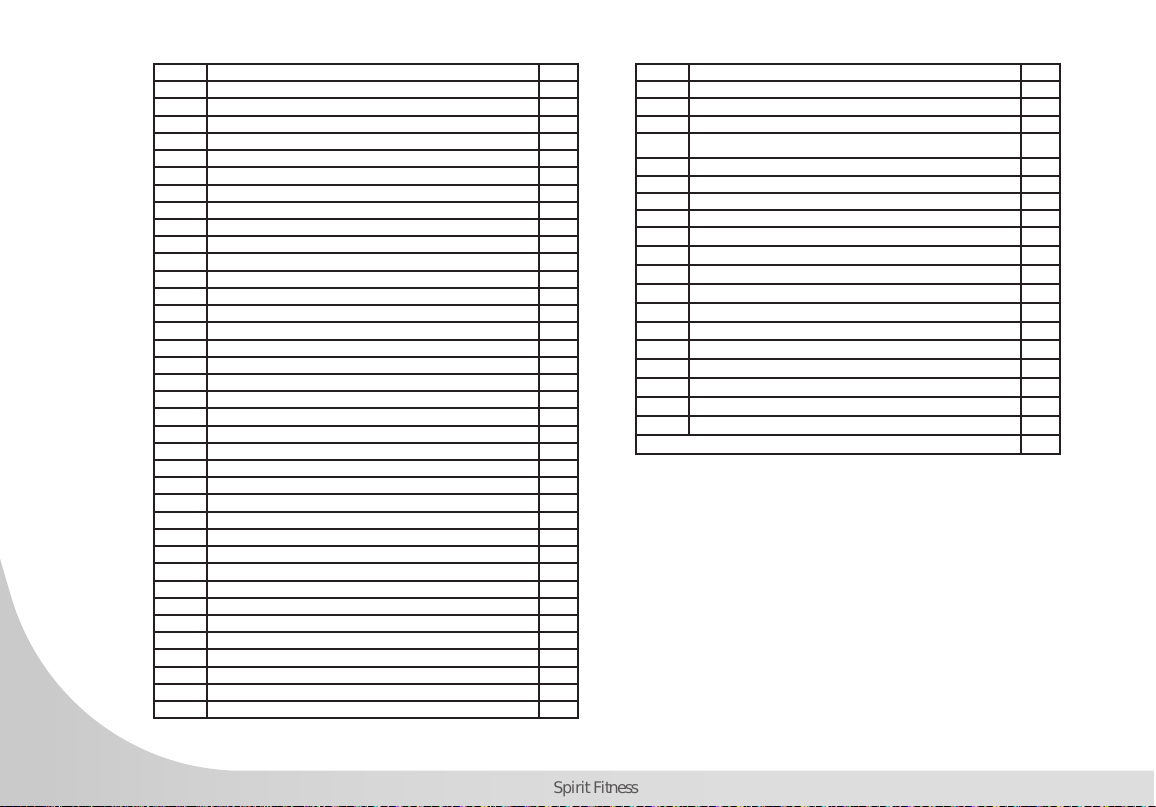
32
Spirit Fitness
74 Right Slider Cover 1
75 Slide Wheel Cover 2
76 Pedal Foam (L) 1
77 Pedal Foam (R) 1
78 Beverage Holder 1
79 Handlebar Cover (L) 2
80 Handlebar Cover (R) 2
82 Fixing Piece 2
84 M5 × P0.8 × 10L_Hex Head Bolt 8
85 7 × 7 × 19m/m_Woodruff Key 2
86 3/8" × 2"_Flat Head Socket Bolt 1
87 1/4" × UNC20 × 3/4"_Hex Head Bolt 4
88 5/16" × 15m/m_Hex Head Bolt 24
90 3/8" × 3/4"_Hex Head Bolt 4
91 3/8" × 2-1/4"_Hex Head Bolt 10
92 3/8" × UNC16 × 2-1/2"_Hex Head Bolt 4
93 3/8" × 3-3/4"_Hex Head Bolt 2
95 M8 × 35m/m_Socket Head Cap Bolt 2
96 3/8" × 3/4"_Socket Head Cap Bolt 10
97 M5 × P0.8 × 6L_Socket Head Cap Bolt 2
99 5/16" × UNC18 × 1-3/4"_Button Head Socket Bolt 2
100 M5 × 10m/m_Tapping Screw 18
101 M5 × 10m/m_Phillips Head Screw 14
102 3.5 × 12m/m_Sheet Metal Screw 6
103 3.5 × 16m/m_Sheet Metal Screw 4
104 5 × 19m/m_Tapping Screw 11
105 5 × 16m/m_Tapping Screw 4
106 Ø17_C Ring 3
107 1/4" × 8T_Nylon Nut 4
108 5/16" × 7T_Nylon Nut 2
109 M8 × 7T_Nylon Nut 1
110 M8 × 9T_Nylon Nut(Blacking) 1
111 3/8" × 7T_Nylon Nut 12
113 3/8" × UNF26 × 4T_Nut 2
114 3/8" × UNF26 × 11T_Nut 2
115 3/8" × 7T_Nut 1
116 M8 × 6.3T_Nut 4
117 M8 × P1.25 × 155L_J Bolt 1
119 Ø3/8" × Ø19 × 1.5T_Flat Washer 25
120 Ø8.5 × Ø26 × 2.0T_Flat Washer 4
121 Ø5/16" × Ø23 × 1.5T_Flat Washer 6
122 Ø5/16" × Ø23 × 3T_Flat Washer 16
123 Ø17 × Ø23.5 × 1.0T_Flat Washer 1
124 Ø5 × Ø15 × 1.5T_Flat Washer 8
125 Ø3/8" × 23 × 2.0T_Curved Washer 16
126 Ø10 × 2T_Split Washer 10
127 Ø17_Wave Washer 6
128 M8 x 20m/m_Carriage Bolt 1
129 7 × 14 × 0.8T_E-Clip 4
130 M5_Speed Nut Clip 4
131 Ø10_C Ring 8
132 M5 × 35m/m_Socket Head Cap Bolt 8
133 M5 × 5T_Nylon Nut 8
135 13/14m/m_Wrench 1
136 12/14m/m_Wrench 1
137 Phillips Head Screw Driver 1
138 8mm L Allen Wrench 1
139 Short Phillips Head Screw Driver 1
200416

33
www.spirittness.com

800.258.4555
spiritservice@spirittness.com
www.spirittness.com
Spirit Fitness
3000 Nestle Road
Jonesboro, AR 72401
CVC800 Owners Manual
© 2021 All Rights Reserved
Revision 9: 11.19.2021