N S T R U C T R O N S
I
ZIG-ZAG SEWING MACHINE
P/N 52882
INDEX
Adjusting for Good Stitching ........................... 26
Blind Stitching ........................................... 18, 19
Bobbin:
Inserting & Threading .................................. 8
Picking up Bobbin Thread ........................... 10
Removing ................................................... 6
Winding ...................................................... 7
Buttonholes ................................................... 17
Buttons, Sewing on ........................................ 21
Connecting Machine ......................................... 4
Corner, Turning ............................................ 15
Darning ......................................................... 20
Fastening a Seam ........................................... 11
Feed Dog Control ......................................... 15
Identification, Head Parts ............................. 2, 3
Installing Machine Head in Cabinet .................. 4
Inserting & Removing Material ....................... 14
Needle:
Needle Size ................................................... 5
Needle & Thread Chart ................................ 5
Placement .................................................... 5
Oiling Instructions ............................................. 23
Overcasting ........................................................ 16
Parts List ............................................................ 27
Presser Foot, Changing ...................................... 15
Presser Foot Pressure, Adjusting ....................... 10
Removing Lint .................................................. 22
Sewing Light ...................................................... 4
Stitch Length ..................................................... 11
Stitch Width ...................................................... 16
Stitching:
Reverse ........................................................... 11
Straight ..................................................... 11, 16
Zigzag ............................................................. 16
Tension : 16
Upper Thread ................................................. 12
Lower Thread ................................................. 13
Threading:
Bobbin Case ..................................................... 8
Upper Thread ................................................... 9
Thread Chart ...................................................... 5
What To Do .................................................. 24, 25
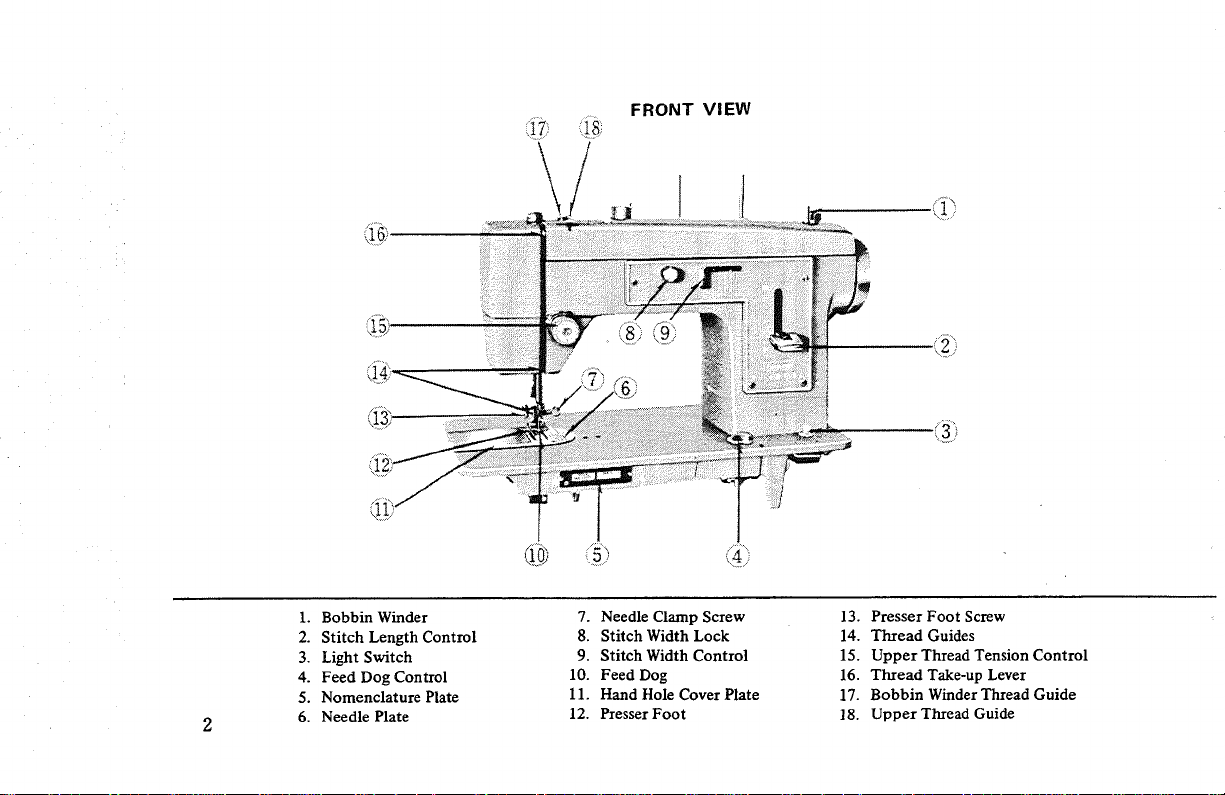
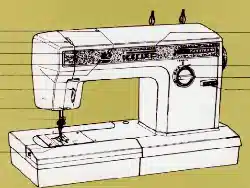
FRONT VIEW
_.o
®
1. Bobbin Winder
2. Stitch Length Control
3. Light Switch
4. Feed Dog Control
5. Nomenclature Plate
6. Needle Plate
7. Needle Clamp Screw
8. Stitch Width Lock
9. Stitch Width Control
10. Feed Dog
11. Hand Hole Cover Plate
12. Presser Foot
13. Presser Foot Screw
14. Thread Guides
15. Upper Thread Tension Control
16. Thread Take-up Lever
17. Bobbin Winder Thread Guide
18. Upper Thread Guide
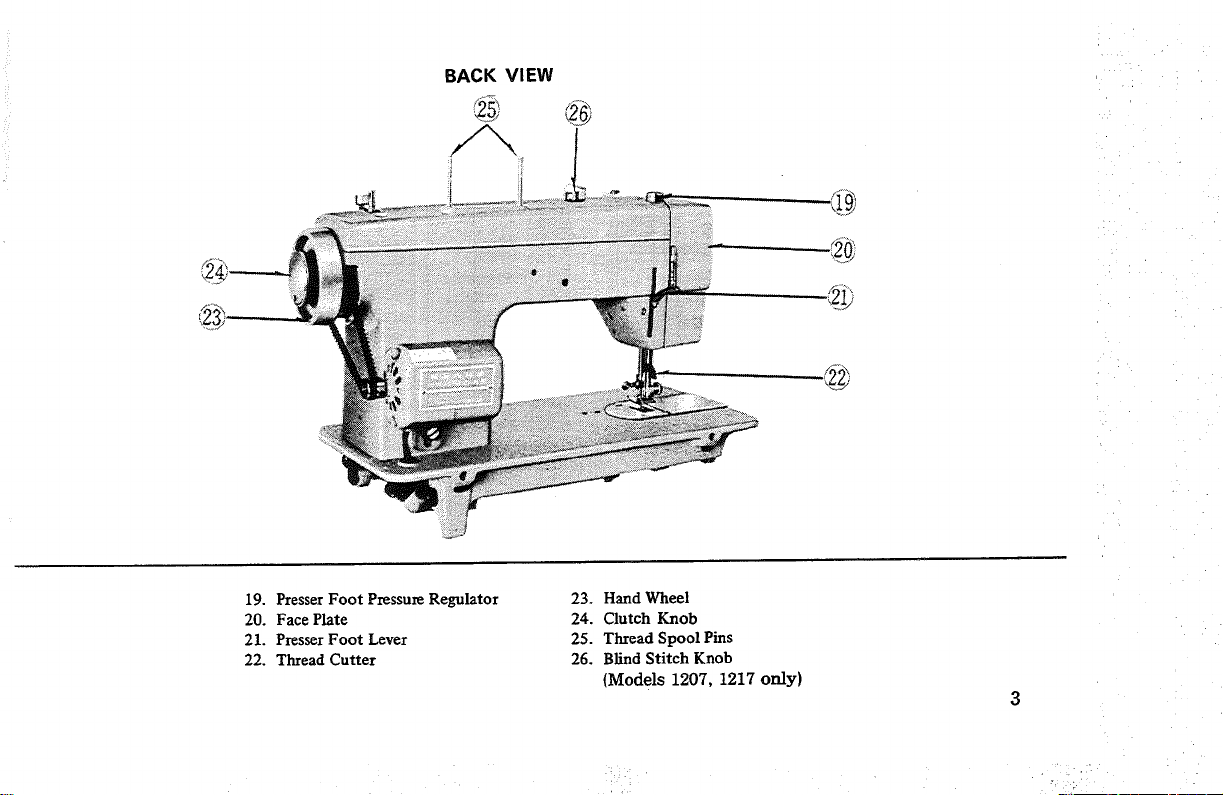
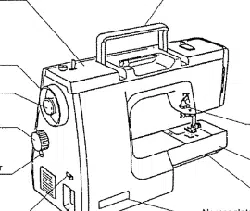
BACK VIEW
i1 i!!
19. Presser Foot Pressure Regulator
20. Face Plate
21. Presser Foot Lever
22. Thread Cutter
23. Hand Wheel
24. Clutch Knob
25. Thread Spool Pins
26. Blind Stitch Knob
{Models 1207, 1217 only)
O
O
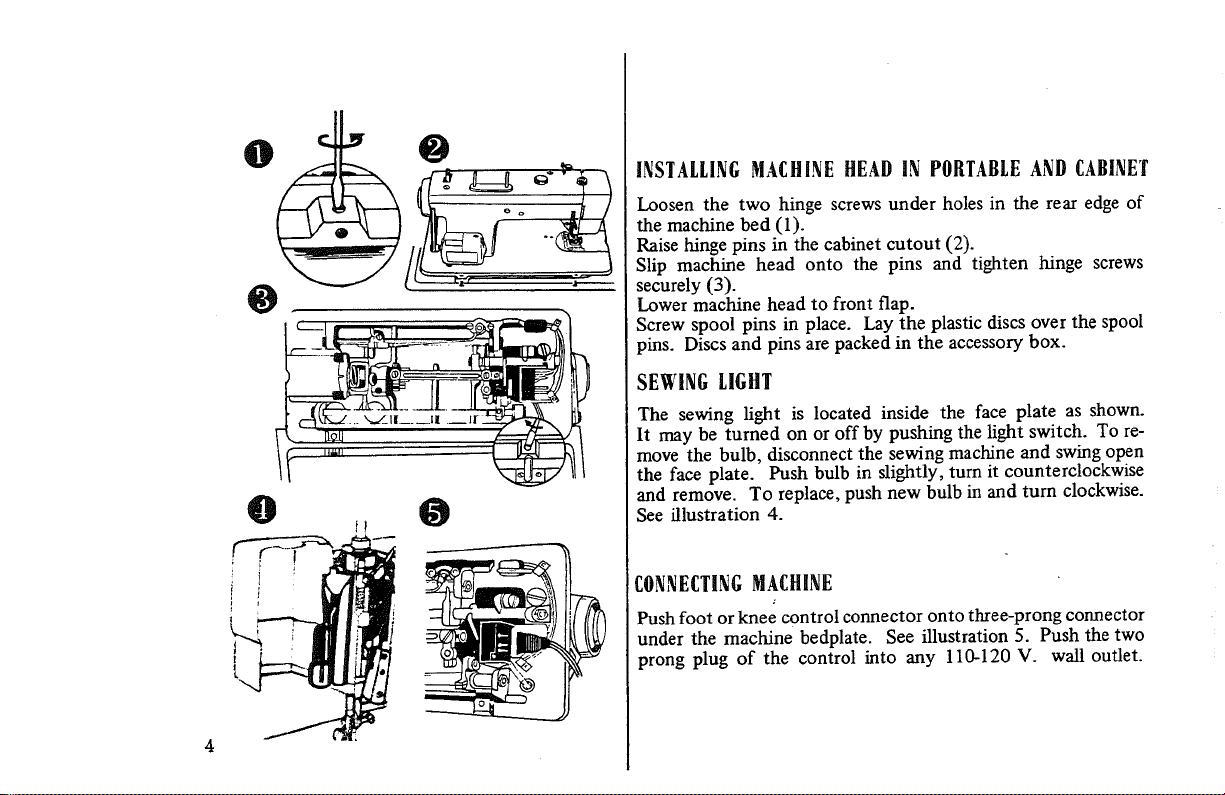
INSTALLINGMACHINE HEAD IN PORTABLEAND CABINET
Loosen the two hinge screws under holes in the rear edge of
the machine bed (1).
Raise hinge pins in the cabinet cutout (2).
Slip machine head onto the pins and tighten hinge screws
securely (3).
Lower machine head to front flap.
Screw spool pins in place. Lay the plastic discs over the spool
pins. Discs and pins are packed in the accessory box.
SEWING LIGHT
The sewing light is located inside the face plate as shown.
It may be turned on or off by pushing the light switch. To re-
move the bulb, disconnect the sewing machine and swing open
the face plate. Push bulb in slightly, turn it counterclockwise
and remove. To replace, push new bulb in and turn clockwise.
See illustration 4.
CONNECTINGMACHINE
Push foot or knee control connector onto three-prong connector
under the machine bedplate. See illustration 5. Push the two
prong plug of the control into any 110-120 V. wall outlet.
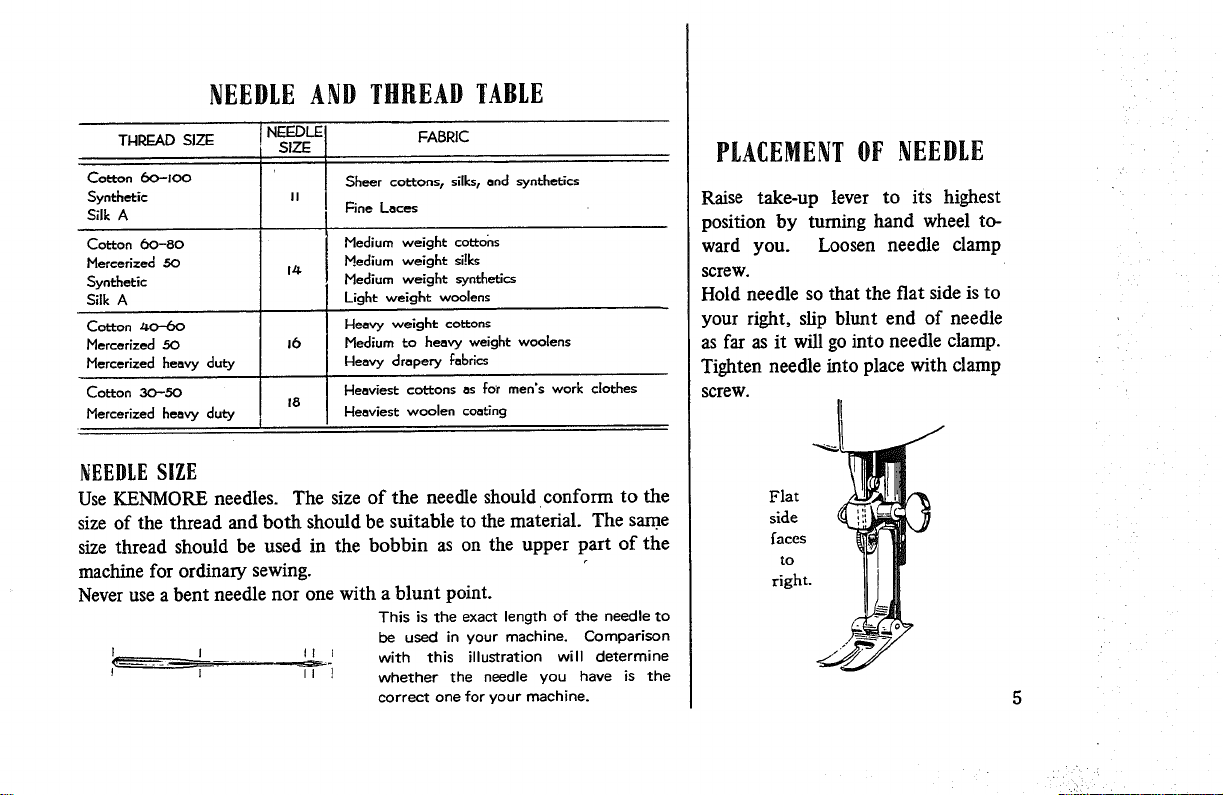
NEEDLEAND THREADTABLE
THRF_AD SIZE
CoL'ton (3o"-100
Synthetic
Silk A
Cotton 6o-8o
Mercerized 50
Synthetic
Silk A
Cotton z_o-bo
Mercerized 50
Mercerized beovy duty
Cotton 30-50
Mercerized heavy duty
18
FABRIC
Sheer coLd:ons t silks, and synthetics
Fine Laces
Medium weight cottons
Medium weight si!ks
Medium weight _ynthetics
Light weight woolens
Heavy weight coL_ons
Medium to heavy weight woolens
bleavy drapery fabrics
Heaviest colons as for men's work clothes
Heaviest woolen coating
NEEDLESiZE
Use KENMORE needles. The size of the needle should conform to the
size of the thread and both should be suitable to the material. The same
size thread should be used in the bobbin as on the upper part of the
machine for ordinary sewing.
Never use a bent needle nor one with a blunt point.
This is the exact length of the needle to
be used in your machine. Comparison
I I I1 t with this illustration will determine
I II ] whether the needle you have is the
correct one for your machine.
PLACEMENTOF NEEDLE
Raise take-up lever to its highest
position by turning hand wheel to-
ward you. Loosen needle clamp
screw.
Hold needle so that the fiat side is to
your right, slip blunt end of needle
as far as it will go into needle damp.
Tighten needle into place with clamp
SCreW.
Flat "_!side
/aces
to
right.
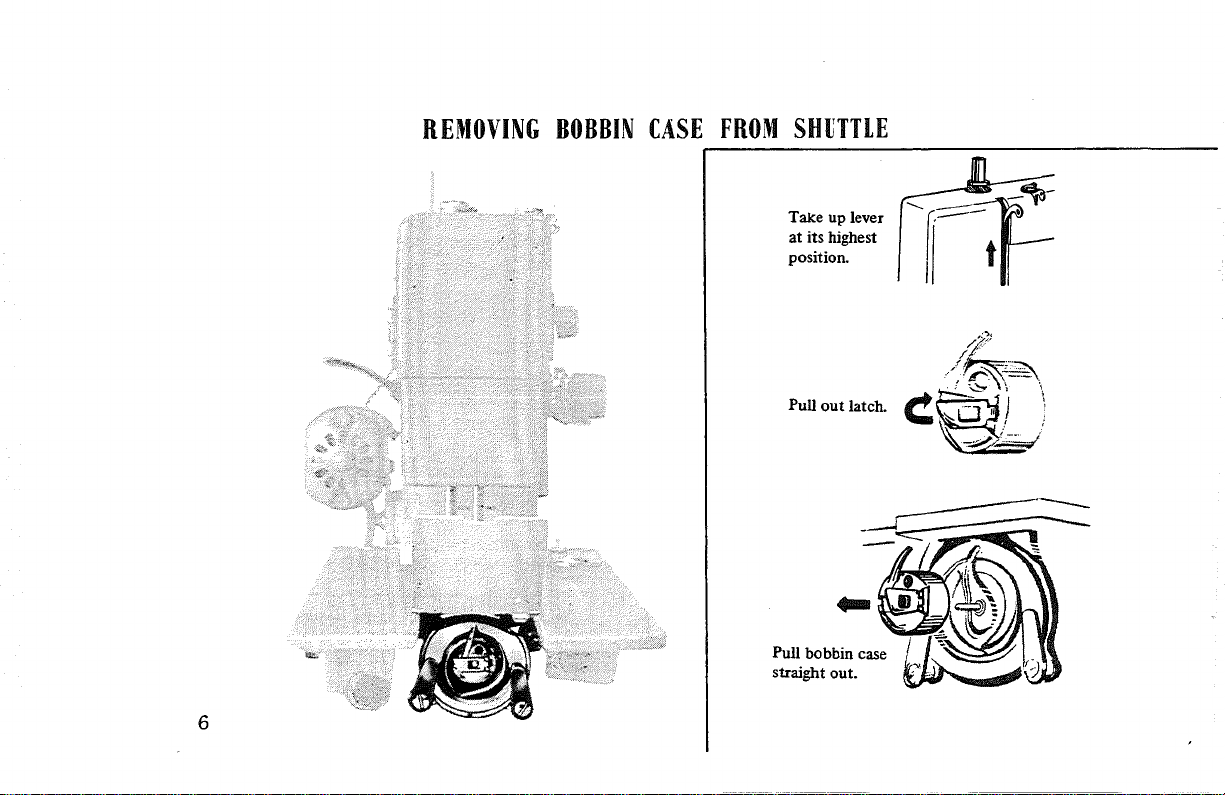
REMOVINGBOBBINCASE FROMSHUTTLE
6
Take up lever
at its highest
position.
Pull out latch.
Pull bobbin case
straight out.
€_J i
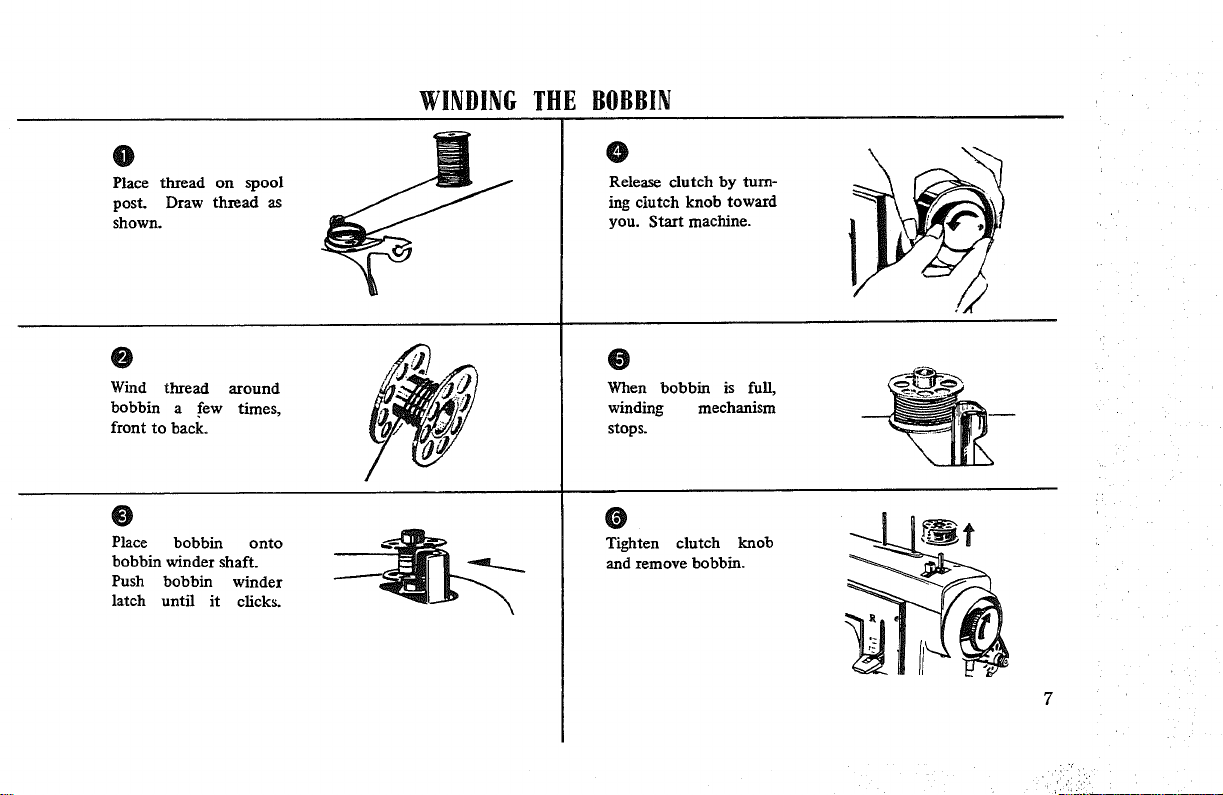
WINDINGTHE BOBBIN
0
Place thread on spool
post. Draw thread as
shown.
0
Wind thread around
bobbin a few times,
front to back.
0
Release clutch by turn-
ing clutch knob toward
you. Start machine.
0
When bobbin is full,
winding mechanism
stops.
0
Place bobbin onto
bobbin winder shaft.
Push bobbin winder
latch until it clicks.
0
Tighten clutch knob
and remove bobbin.
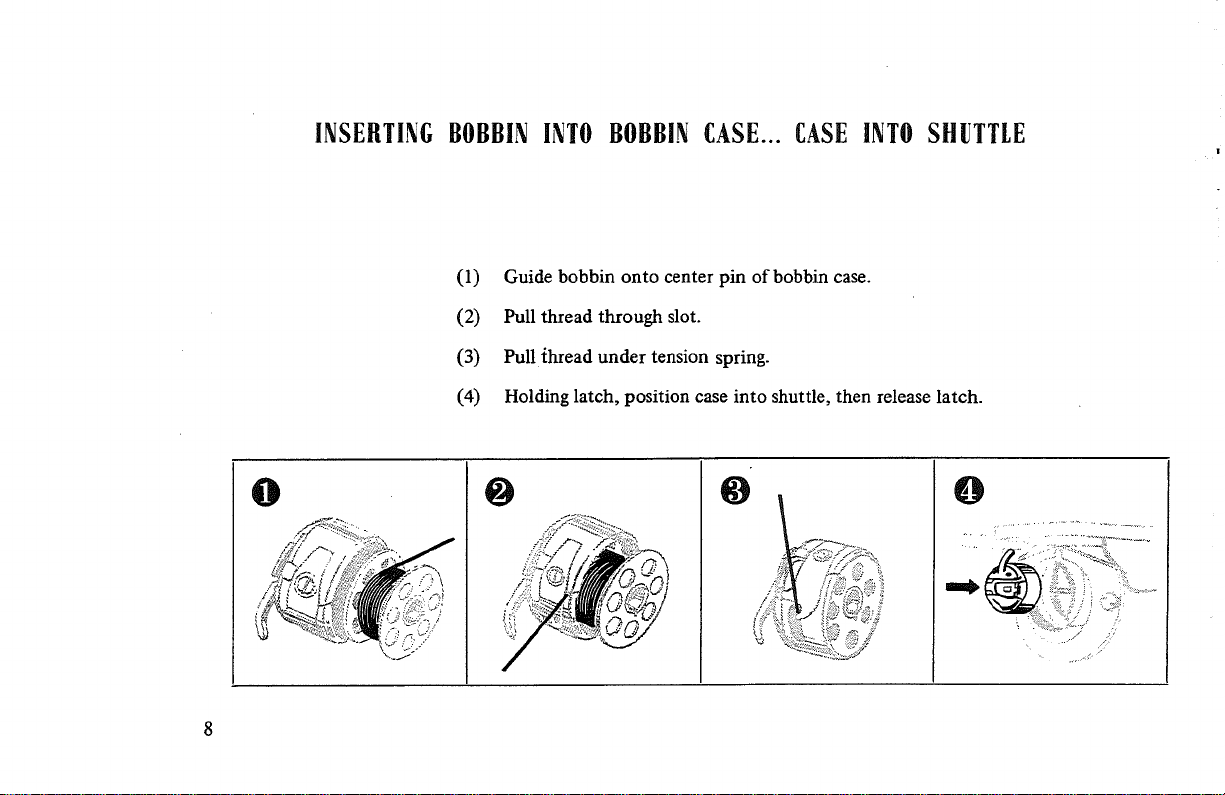
INSERTINGBOBBININTOBOBBINCASE... CASEINTOSHUTTLE
(1) Guide bobbin onto center pin of bobbin case.
(2) Pull thread through slot.
(3) Pull ihread under tension spring.
(4) Holding latch, position case into shuttle, then release latch.
O O
O
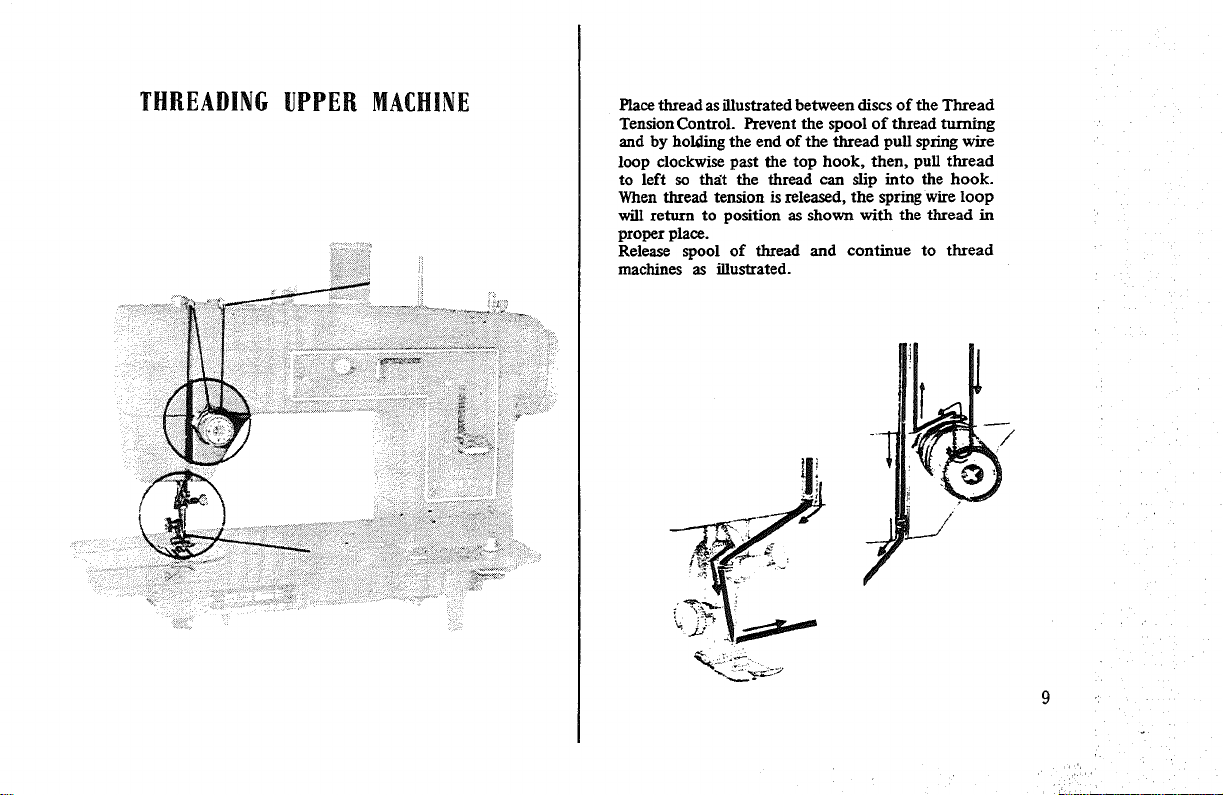
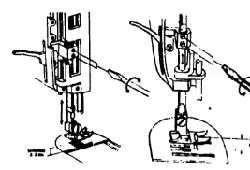
THREADING UPPER MACHINE
Place thread as illustrated between discs of the Thread
Tension Control. Prevent the spool of thread turning
and by holding the end of the thread pull spl_ng wire
loop clockwise past the top hook, then, pull thread
to left so that the thread can slip into the hook.
When thread tension is released, the spring wire loop
will return to position as shown with the thread in
proper place.
Release spool of thread and continue to thread
machines as illustrated.
: _i:!i!!i:!_:i!i_¸:
10
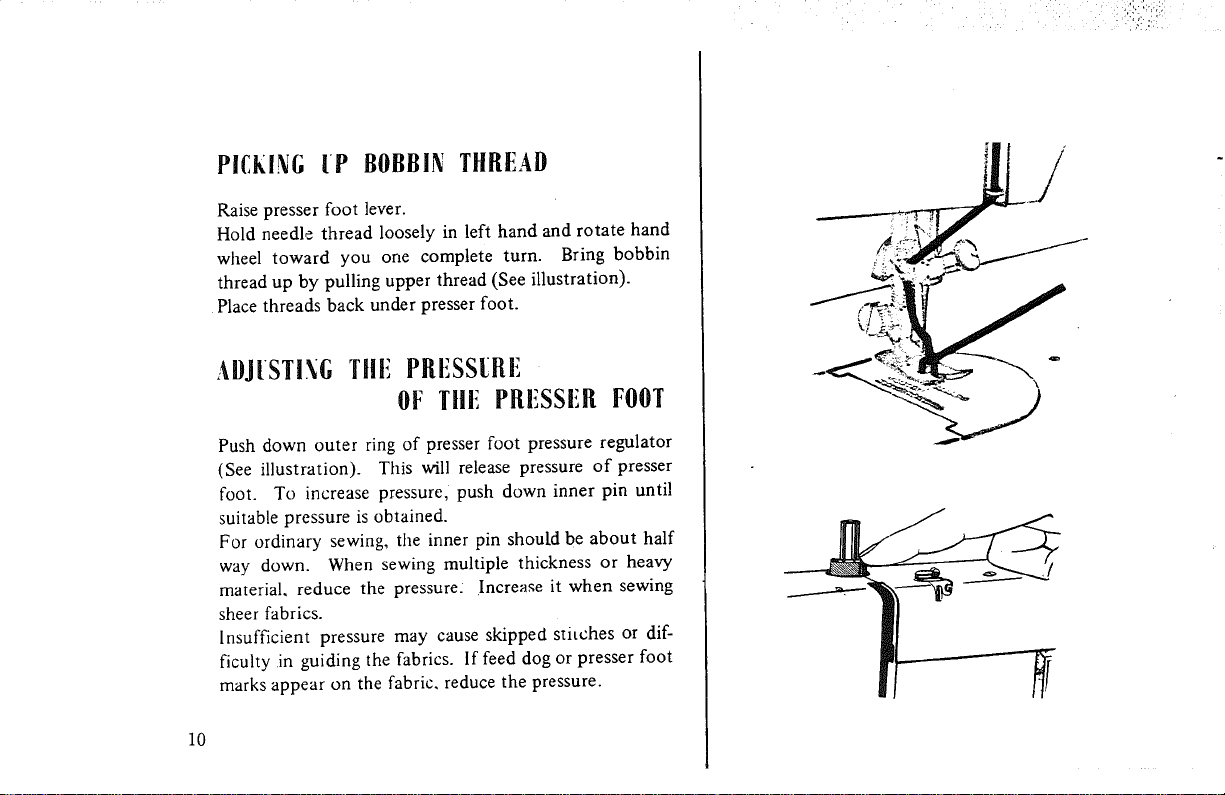
PICklinG IP BOBBII_! TIIREAI)
Raise presser foot lever.
Hold needle thread loosely in left hand and rotate hand
wheel toward you one complete turn. Bring bobbin
thread up by pulling upper thread (See illustration).
Place threads back under presser foot.
ADJISTI.\G Tile PRESS[Rii
O__ Tlli_ PllliSSiill FOOT
Push down outer ring of presser foot pressure regulator
(See illustration). This will release pressure of presser
foot. To increase pressure, push down inner pin until
suitable pressure is obtained.
For ordinary sewing, the inner pin should be about half
way down. When sewing multiple thickness or heavy
material, reduce the pressure: Increase it when sewing
sheer fabrics.
Insufficient pressure may cause skipped stitches or dif-
ficulty in guiding the fabrics. If feed dog or presser foot
marks appear on the fabric, reduce the pressure.
SETTING
STITCH
LENGTH
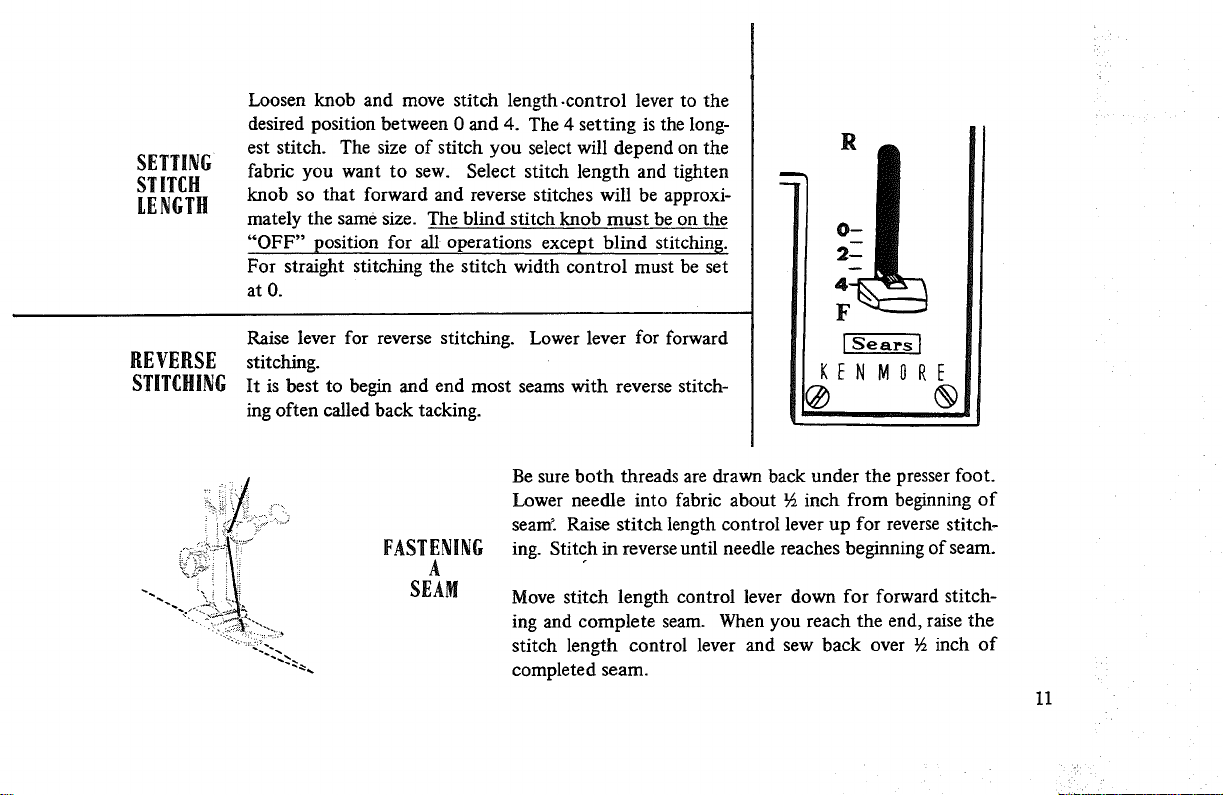
Loosen knob and move stitch length-control lever to the
desired position between 0 and 4. The 4 setting is the long-
est stitch. The size of stitch you select will depend on the
fabric you want to sew. Select stitch length and tighten
knob so that forward and reverse stitches will be approxi-
mately the same size. The blind stitch knob must be on the
"OFF" position for all operations except blind stitching.
For straight stitching the stitch width control must be set
atO.
REVERSE
STITCHING
Raise lever for reverse stitching. Lower lever for forward
stitching.
It is best to begin and end most seams with reverse stitch-
ing often called back tacking.
11
F
FASTENING
A
SEAM
Be sure both threads are drawn back under the presser foot.
Lower needle into fabric about ½ inch from beginning of
seam'. Raise stitch length control lever up for reverse stitch-
ing. Stitch in reverse until needle reaches beginning of seam.
Move stitch length control lever down for forward stitch-
ing and complete seam. When you reach the end, raise the
stitch length control lever and sew back over % inch of
completed seam.
11
O
Fig. 1
ADJ[STI._G TE._SIO_S
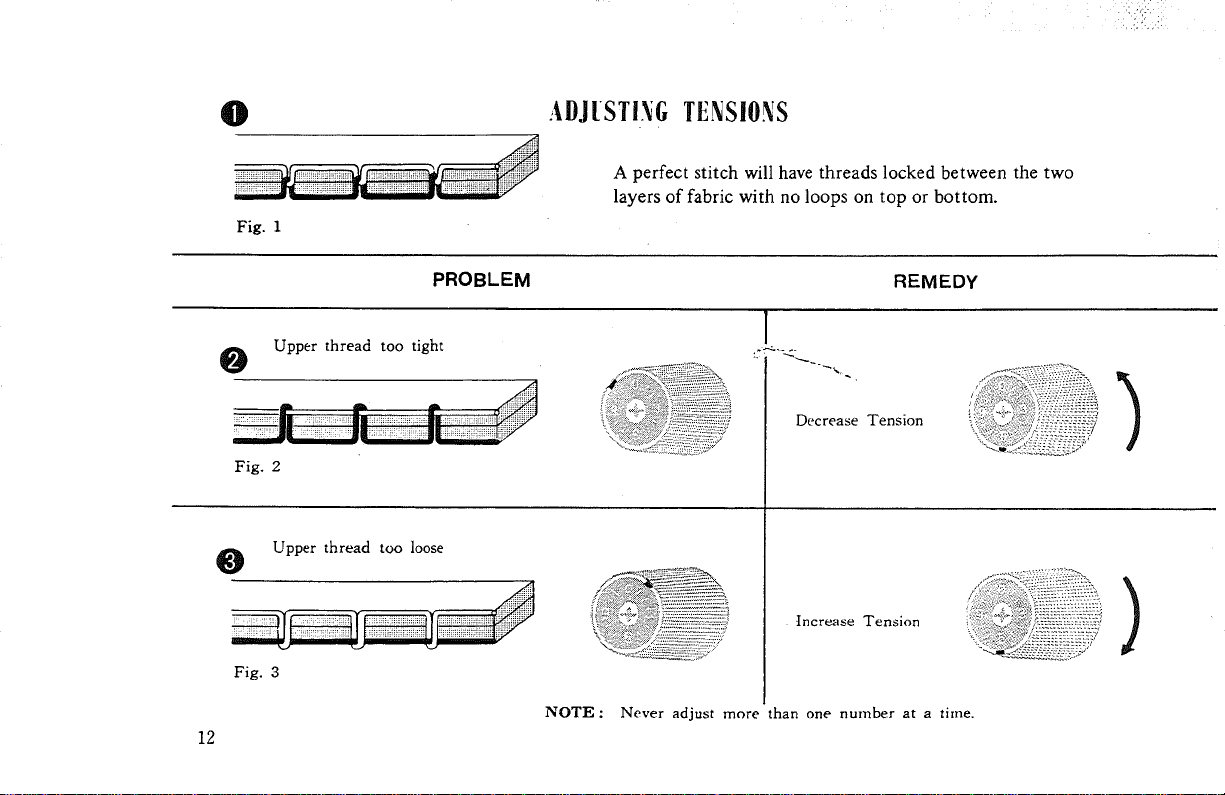
A perfect stitch will have threads locked between the two
layers of fabric with no loops on top or bottom.
PROBLEM
REMEDY
Upper thread too tight
Fig. 2
Upper thread too loose
Fig. 3
Decrease Tension
tncrease Tension
NOTE : Never adjust more than one number at a time.
12
)
When stitching is unsatisfactory as in figures
2 and 3, adjust the upper thread tension. Lower
thread tension requires adjustment less frequently
than the upper thread tension.
When stitch is satisfactory, as in figure 1 and seam
is badly puckered, the cause may be tight tensions
and both upper and lower may be adjusted.
(See page 26)
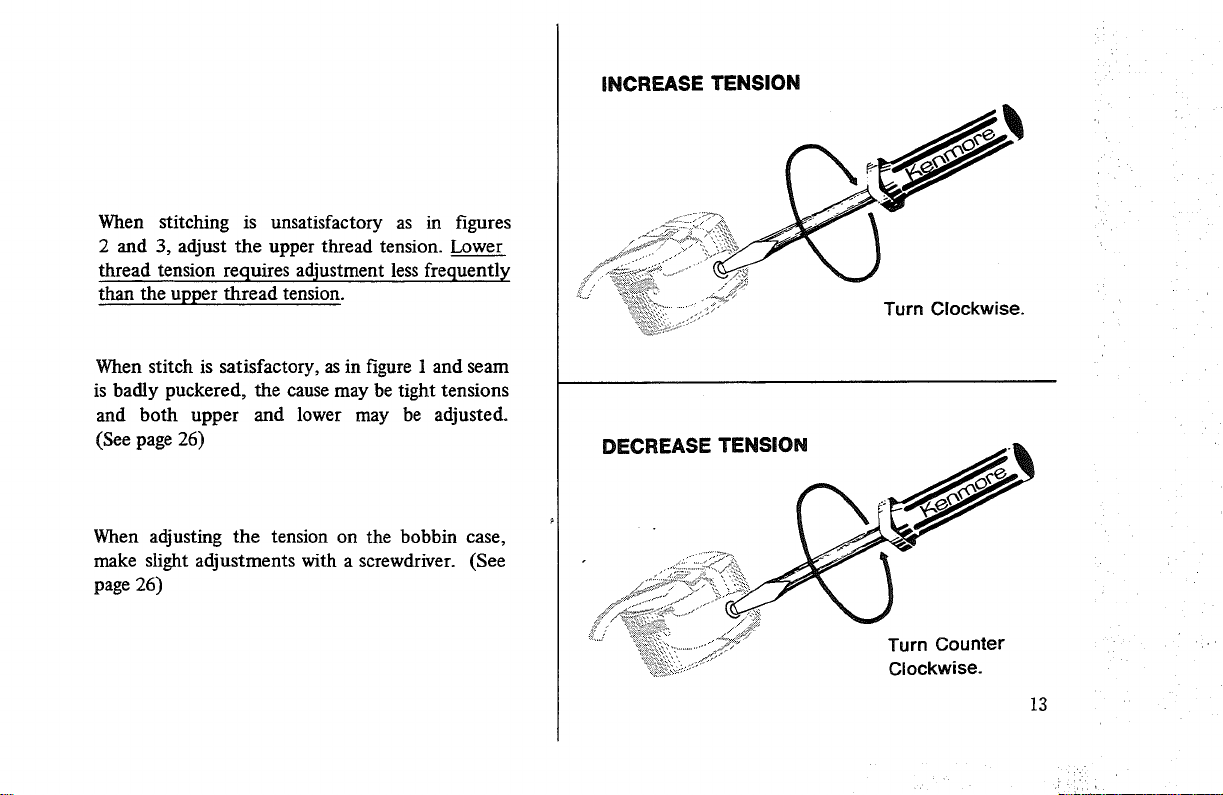
When adjusting the tension on the bobbin case,
make slight adjustments with a screwdriver. (See
page 26)
INCREASE TENSION
Turn Clockwise.
DECREASE TENSION
Turn Counter
Clockwise.
13
INSERTINGAND REMOVINGTHE MATERIAL
14
For all kinds of sewing, consult chart page 5.
Before placing the material on the machine see
that:
n The presser foot and needle clamp screws are
both tight.
m The sizes of needle and thread suit the kind of
work to be done.
m The needle and the thread take-up lever are at
their highest position.
" The ends of threads have been drawn about
4 inches to the rear of the machine.
m The feed dogs are up.
n Stitch length and width controls are set at
desired settings.
Experiment by sewing on the fabric to be used
to determine tension adjustments and correct
stitch settings.
Place material under the presser foot, insert the
needle into the material by turning the hand
wheel toward you, lower presser foot and start
sewing.
To facilitate placement of heavy fabrics under the
presser foot, the presser foot lever can be raised
beyond the normal "up" position.
To remove the work, first turn the hand wheel
toward you until the needle is at its highest posi-
tion, then raise the presser foot, draw material to
the rear and cut off excess thread with the thread
cutter located on the presser bar.
IMPORTANT: Always turn the hand wheel toward
you! When the machine is not being used, place a
piece of material over the feed dog and lower the
presser foot. Always have fabric under the presser
foot when operating the machine. Operating
threaded machine without fabric will cause it to
jam by forcing lint into the shuttle.
TURNINGA CORNER
Stop your sewing machine and make sure needle is in
fabric. Raise presser foot. Turn fabric to desired direc-
tion. Lower presser foot and go on with your stitching.
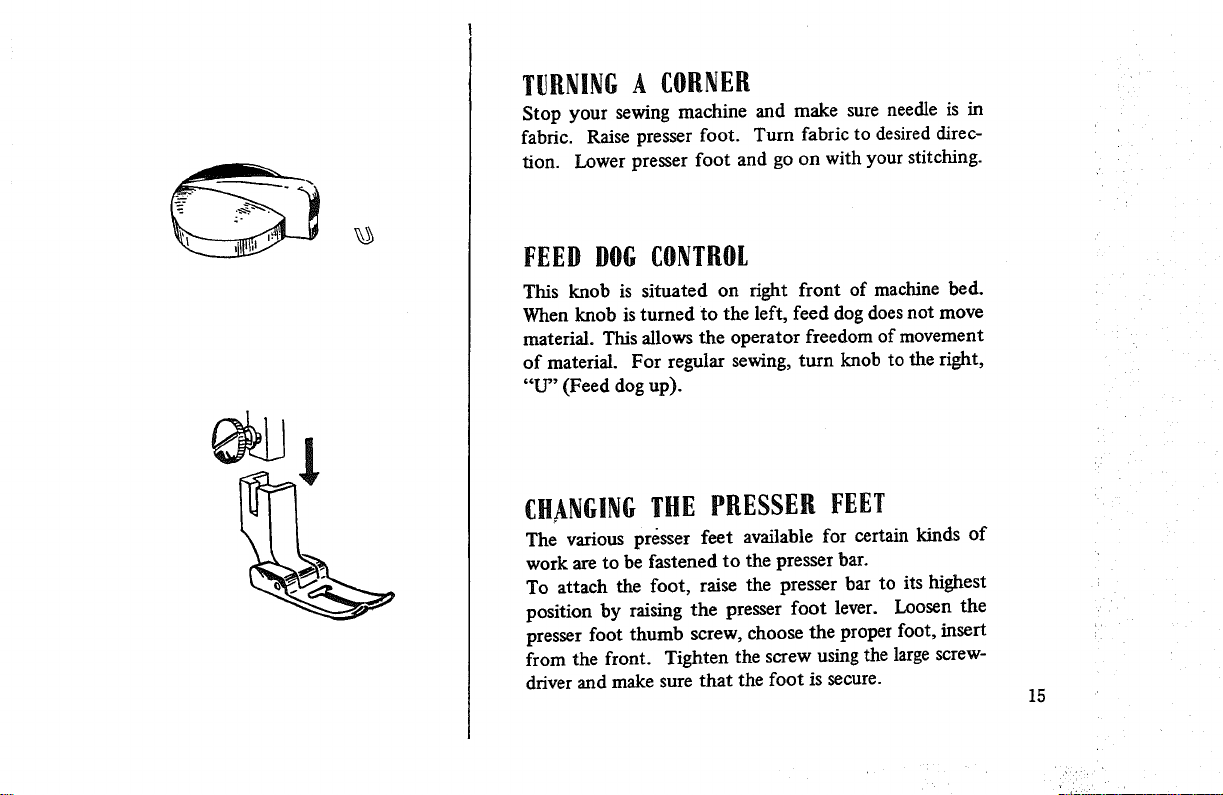
FEED DOGCONTROL
This knob is situated on fight front of machine bed.
When knob is turned to the left, feed dog does not move
material. This allows the operator freedom of movement
of material. For regular sewing, turn knob to the right,
"U" (Feed dog up).
CHANGINGTHE PRESSER FEET
The various presser feet available for certain kinds of
work are to be fastened to the presser bar.
To attach the foot, raise the presser bar to its highest
position by raising the presser foot lever. Loosen the
presser foot thumb screw, choose the proper foot, insert
from the front. Tighten the screw using the large screw-
driver and make sure that the foot is secure.
15
16
Jiiii
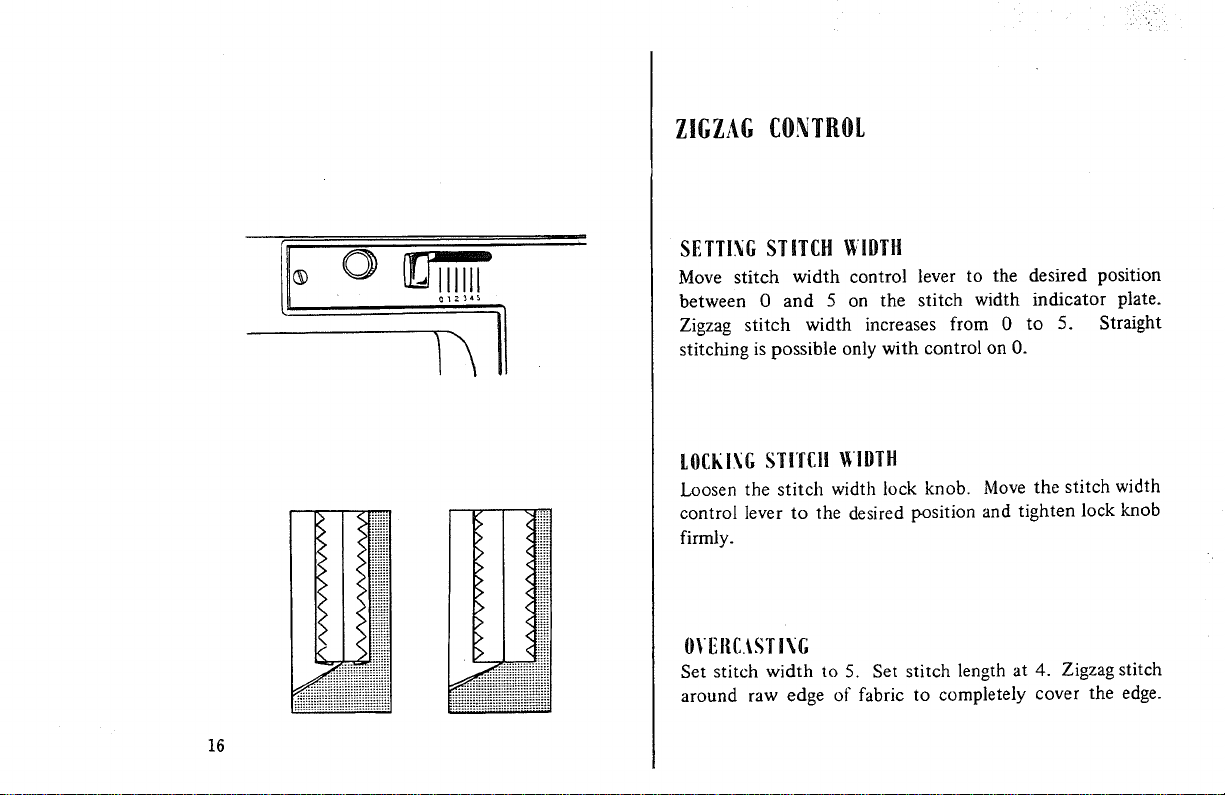
ZIGZAGCONTROL
SETTING STITCH WIDTH
Move stitch width control lever to the desired position
between 0 and 5 on the stitch width indicator plate.
Zigzag stitch width increases from 0 to 5. Straight
stitching is possible only with control on O.
LOCKINGSTITCH glDTH
Loosen the stitch width lock knob. Move the stitch width
control lever to the desired position and tighten lock knob
firmly.
OVEIIC._STING
Set stitch width to 5. Set stitch length at 4. Zigzag stitch
around raw edge of fabric to completely cover the edge.
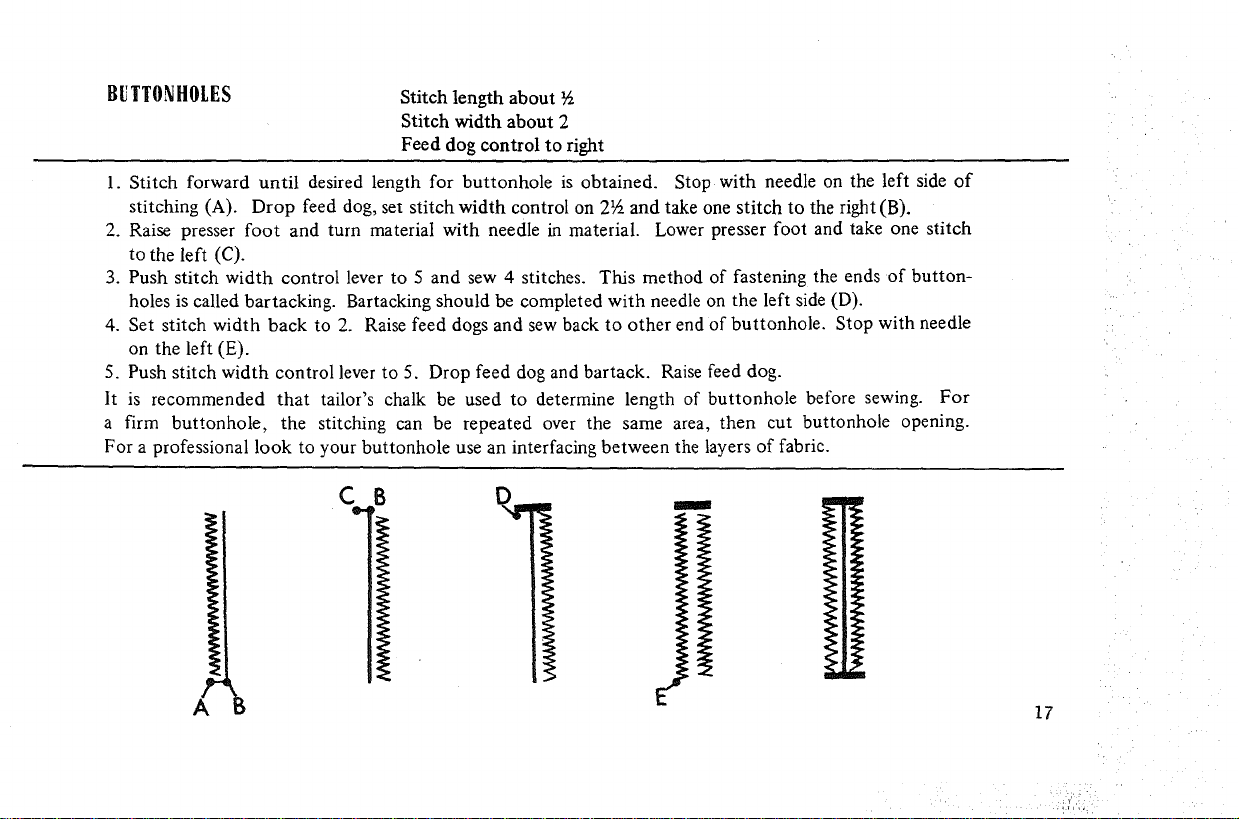
BUTTONHOLES
Stitch length about
Stitch width about 2
Feed dog control to right
1. Stitch forward until desired length for buttonhole is obtained. Stop with needle on the left side of
stitching (A). Drop feed dog, set stitch width control on 2½ and take one stitch to the right (B).
2. Raise presser foot and turn material with needle in material. Lower presser foot and take one stitch
to the left (C).
3. Push stitch width control lever to 5 and sew 4 stitches. This method of fastening the ends of button-
holes is called bartacking. Bartacking should be completed with needle on the left side (D).
4. Set stitch width back to 2. Raise feed dogs and sew back to other end of buttonhole. Stop with needle
on the left (E).
5. Push stitch width control lever to 5. Drop feed dog and barrack. Raise feed dog.
It is recommended that tailor's chalk be used to determine length of buttonhole before sewing. For
a firm buttonhole, the stitching can be repeated over the same area, then cut buttonhole opening.
For a professional look to your buttonhole use an interfacing between the layers of fabric.
A
17
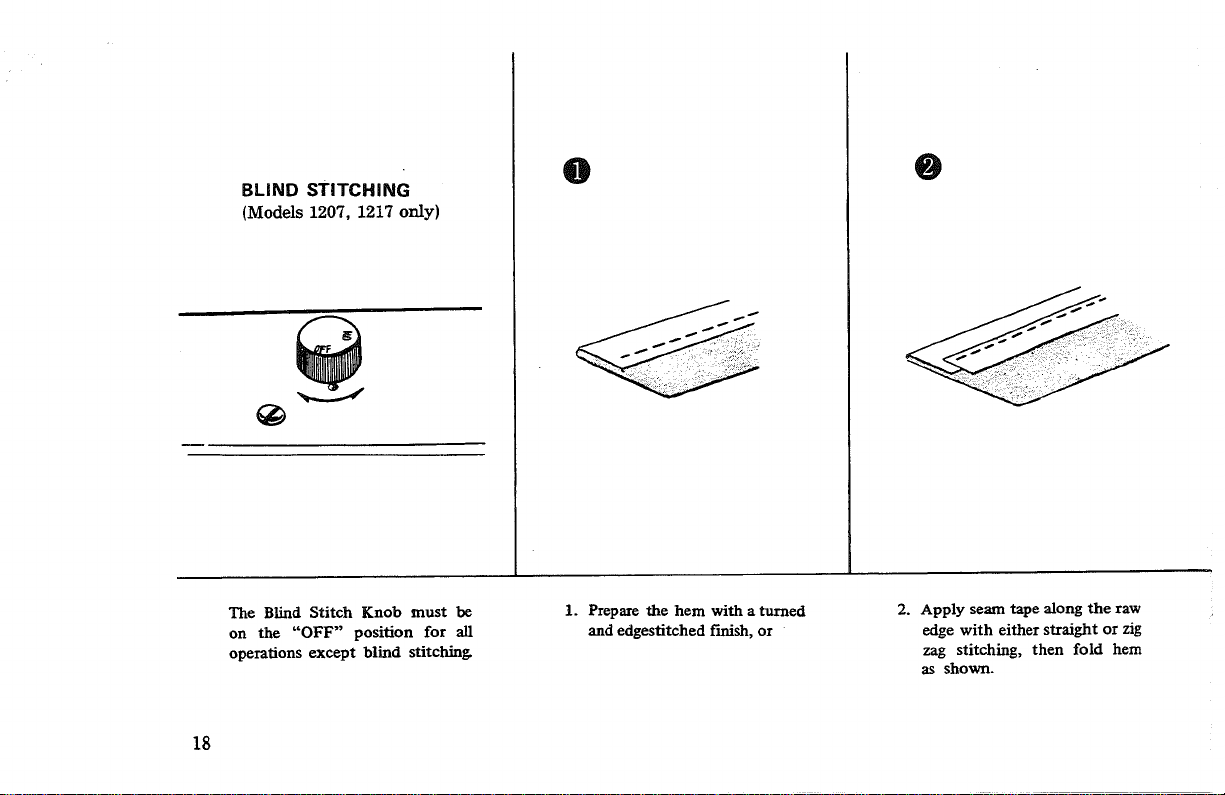
BLIND STITCHING
(Models 1207, 1217 only)
@
O
The Blind Stitch Knob must be
on the "OFF" position for all
operations except blind stitching
1. Prepare the hem with a turned
and edgestitched finish, or
2. Apply seam tape along the raw
edge with either straight or zig
zag stitching, then fold hem
as shown.
18
O
O O
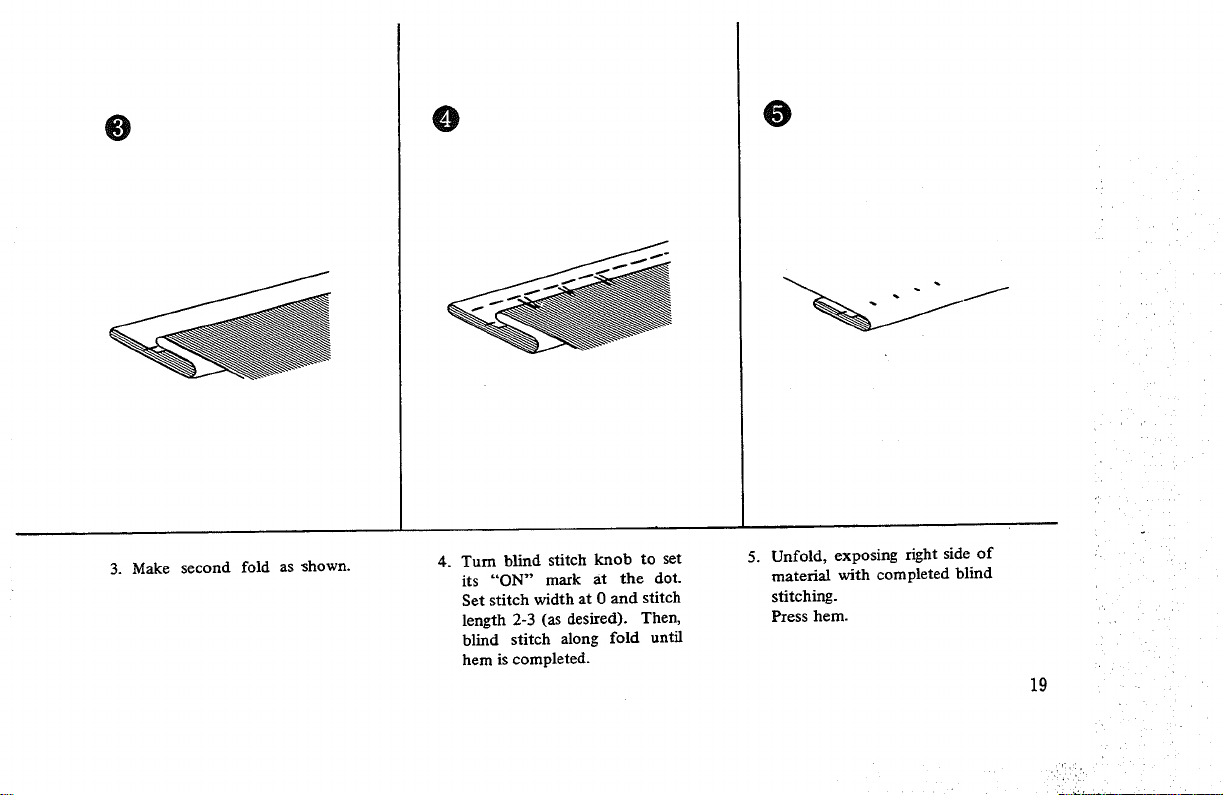
3. Make second fold as _hown.
4. Turn blind stitch knob to set
its "'ON" mark at the dot.
Set stitch width at 0 and stitch
length 2-3 (as desired). Then,
blind stitch along fold until
hem is completed.
5. Unfold, exposing right side of
material with completed blind
stitching.
Press hem.
19
WITH
1.
2.
DARNING
PRESSER FOOT:
Turn feed dog control to left.
Pressdown outer ring of presser foot pressure regulator, see page 10. With regulator in this posi-
tion mending, monogram work, etc. may be done.
3. Stretch fabric tightly between two spring embroidery hoops and place under needle. The presser
bar can be raised to accommodate the embroidery hoop by pulling up on the presser foot lever.
4. Lower presser bar so thread will have some tension. When you start to darn, move fabric back
and forth to cover darning area. Then turn fabric and continue sewing at right-angels to the pre-
vious stitching. Always use medium machine speed. You can make any length stitches desired.
_low movement of fabric will make short darning stitches. Fast movement will make long
stitches.
5. When you Finish darning, raise presserfoot and remove fabric. Increase pressure of presser foot
for general sewing by pressing center pin of presser foot pressure regulator. Turn feed dog
control to right.
WITHOUTPRESSER FOOT:
1. Turn feed dog control to left.
2. Remove presser foot.
Proceed as directed under steps 3 and 4 above.
3. when you finish darning, raise the presser bar and remove fabric. Replace presser foot.
Turn feed dog control to right.
20
SEWING ON BUTTONS
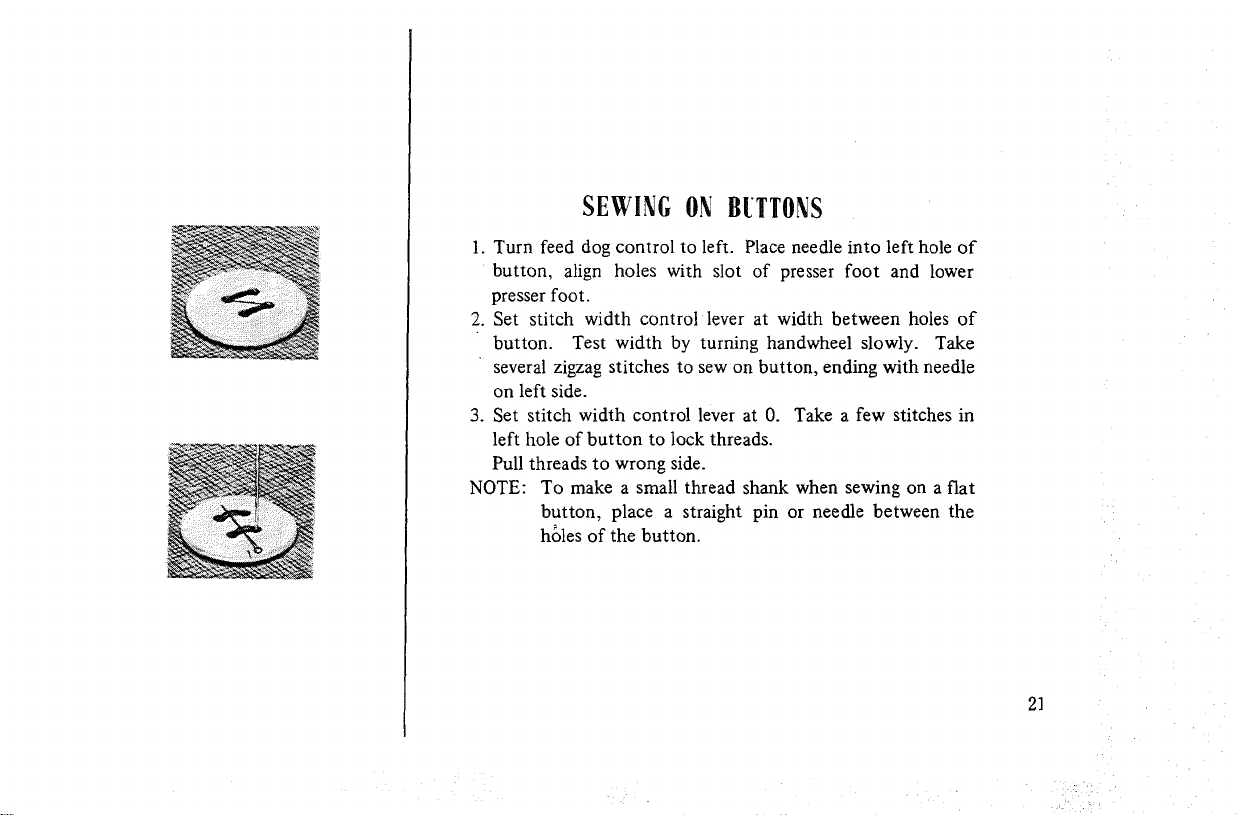
1. Turn feed dog control to left. Place needle into left hole of
button, align holes with slot of presser foot and lower
presser foot.
2. Set stitch width control lever at width between holes of
button. Test width by turning handwheel slowly. Take
several zigzag stitches to sew on button, ending with needle
on left side.
3. Set stitch width control lever at 0. Take a few stitches in
left hole of button to lock threads.
Pull threads to wrong side.
NOTE: To make a small thread shank when sewing on a fiat
button, place a straight pin or needle between the
h_les of the button.
2]
REMOVINGLINT
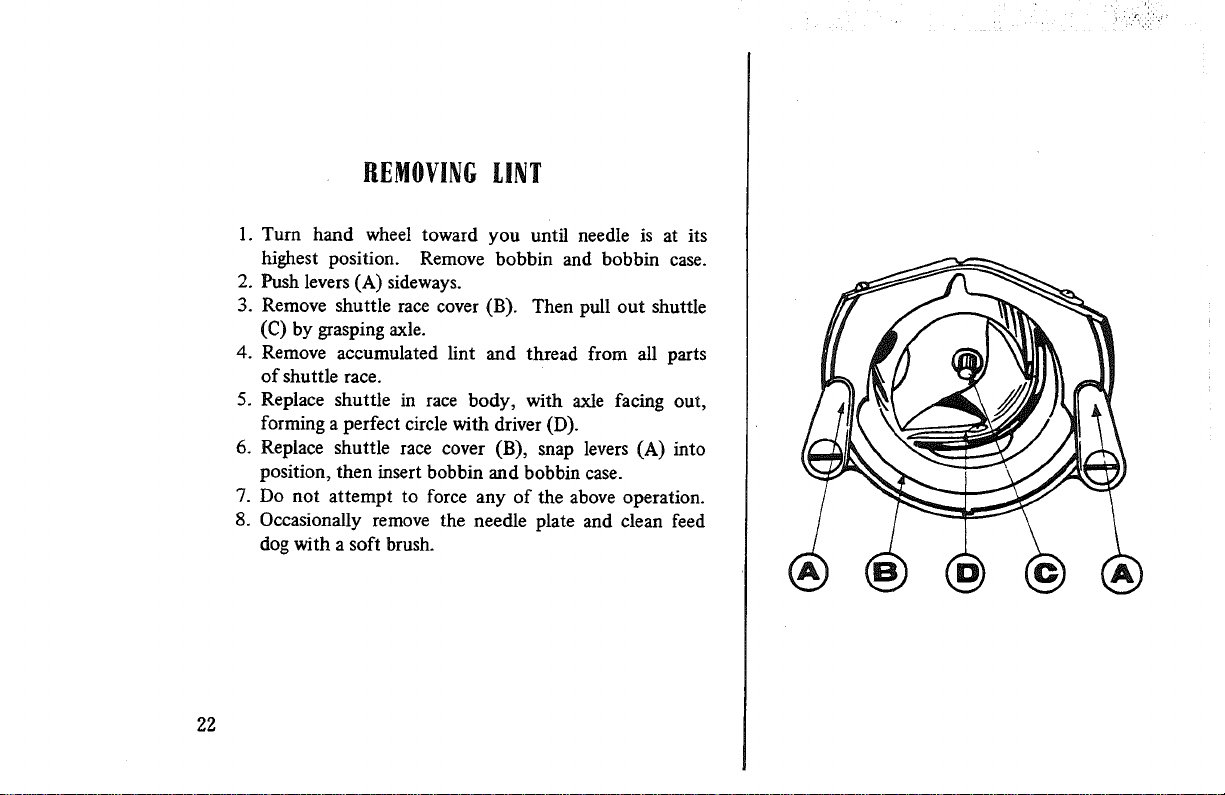
1. Turn hand wheel toward you until needle is at its
highest position. Remove bobbin and bobbin case.
2. Push levers (A) sideways.
3. Remove shuttle race cover (B). Then pull out shuttle
(C) by grasping axle.
4. Remove accumulated lint and thread from all parts
of shuttle race.
5. Replace shuttle in race body, with axle facing out,
forming a perfect circle with driver (D).
6. Replace shuttle race cover (B), snap levers (A) into
position, then insert bobbin and bobbin case.
7. Do not attempt to force any of the above operation.
8. Occasionally remove the needle plate and clean feed
dog with a soft brush.
22
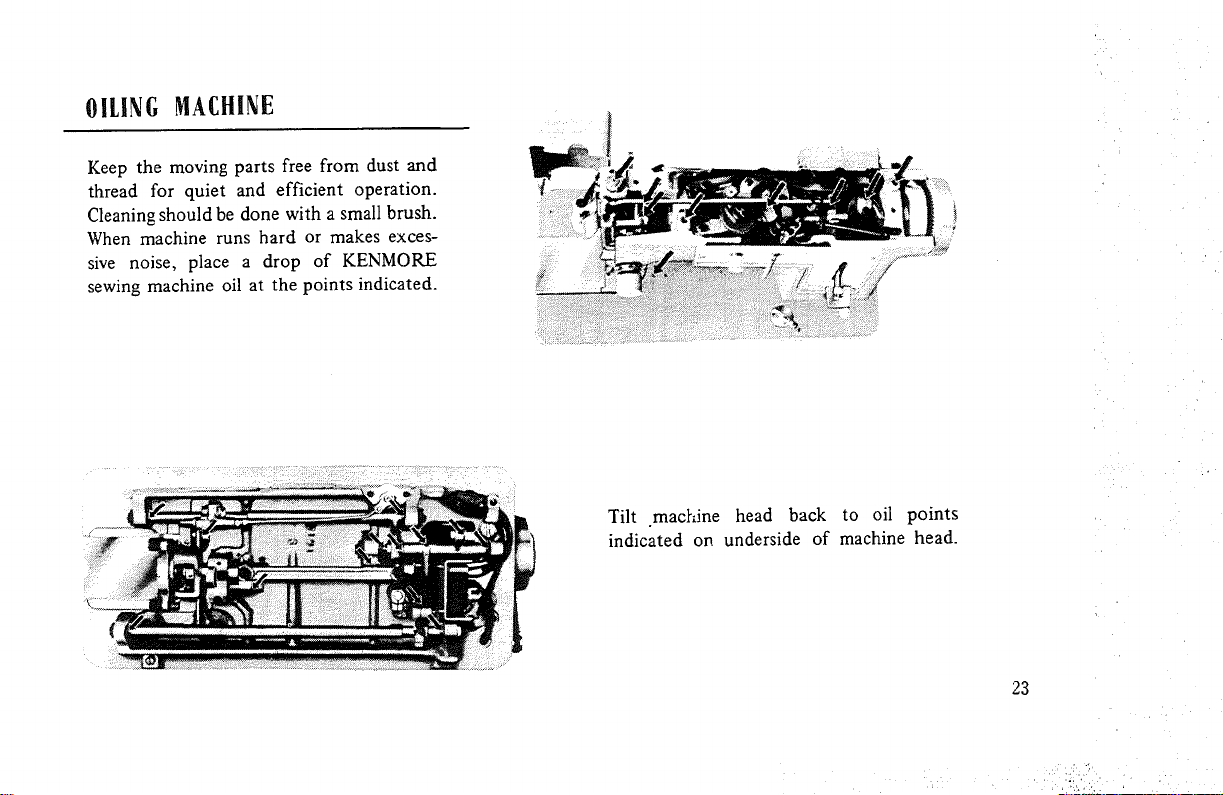
OILING MACHINE
Keep the moving parts free from dust and
thread for quiet and efficient operation.
Cleaning should be done with a small brush.
When machine runs hard or makes exces-
sive noise, place a drop of KENMORE
sewing machine oil at the points indicated.
Tilt machine head back to oil points
indicated on underside of machine head.
23
,. i ,_,;'i _
_ _i ¸
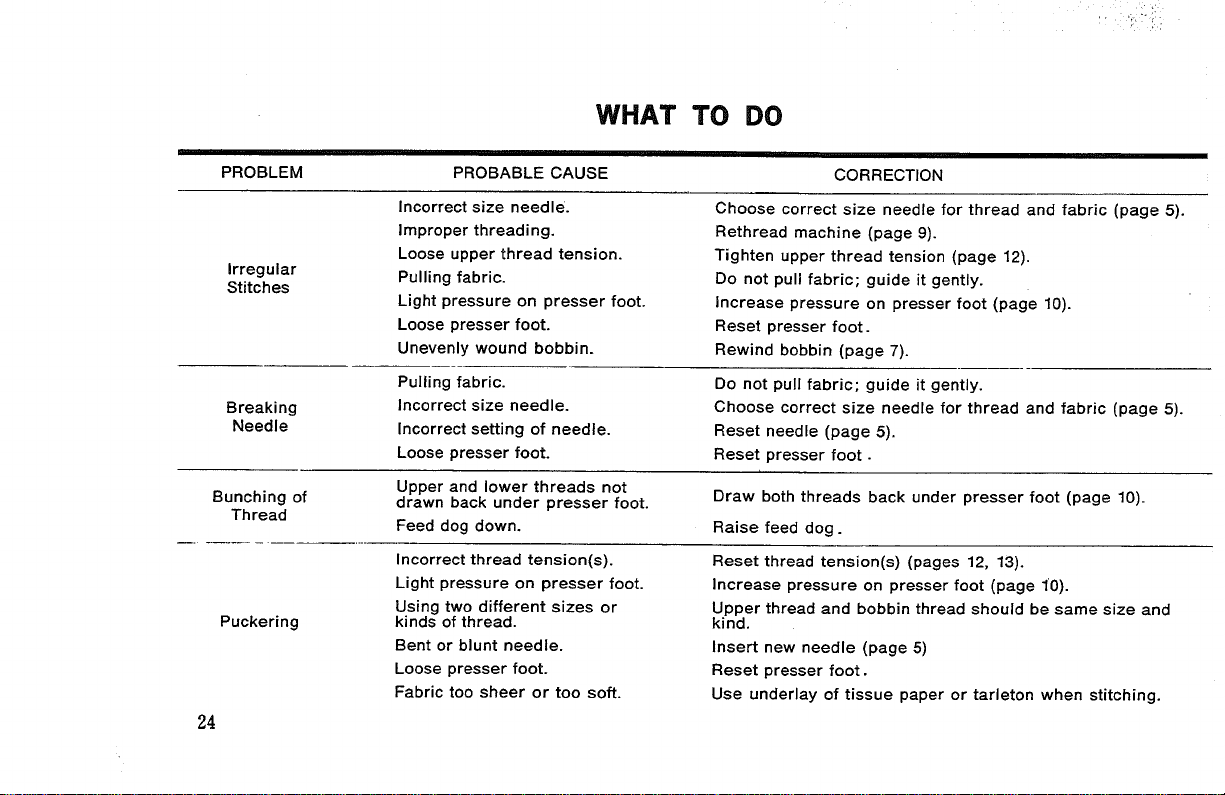
WHAT TO DO
PROBLEM PROBABLE CAUSE CORRECTION
Irregular
Stitches
Breaking
Needle
Bunching of
Thread
Puckering
24
Incorrect size needle.
Improper threading.
Loose upper thread tension.
Pulling fabric.
Light pressure on presser foot.
Loose presser foot.
Unevenly wound bobbin.
Pulling fabric.
Incorrect size needle.
Incorrect setting of needle.
Loose presser foot.
Upper and lower threads not
drawn back under presser foot.
Feed dog down.
Incorrect thread tension(s).
Light pressure on presser foot.
Using two different sizes or
kinds of thread.
Bent or blunt needle.
Loose presser foot.
Fabric too sheer or too soft.
Choose correct size needle for thread and fabric (page 5).
Rethread machine (page 9).
Tighten upper thread tension (page 12).
Do not pull fabric; guide it gently.
Increase pressure on presser foot (page 10).
Reset presser foot.
Rewind bobbin (page 7).
Do not pull fabric; guide it gently.
Choose correct size needle for thread and fabric (page 5).
Reset needle (page 5).
Reset presser foot.
Draw both threads back under presser foot (page 10).
Raise feed dog.
Reset thread tension(s) (pages 12, 13).
Increase pressure on presser foot (page 10).
Upper thread and bobbin thread should be same size and
kind.
Insert new needle (page 5)
Reset presser foot.
Use underlay of tissue paper or tarleton when stitching.
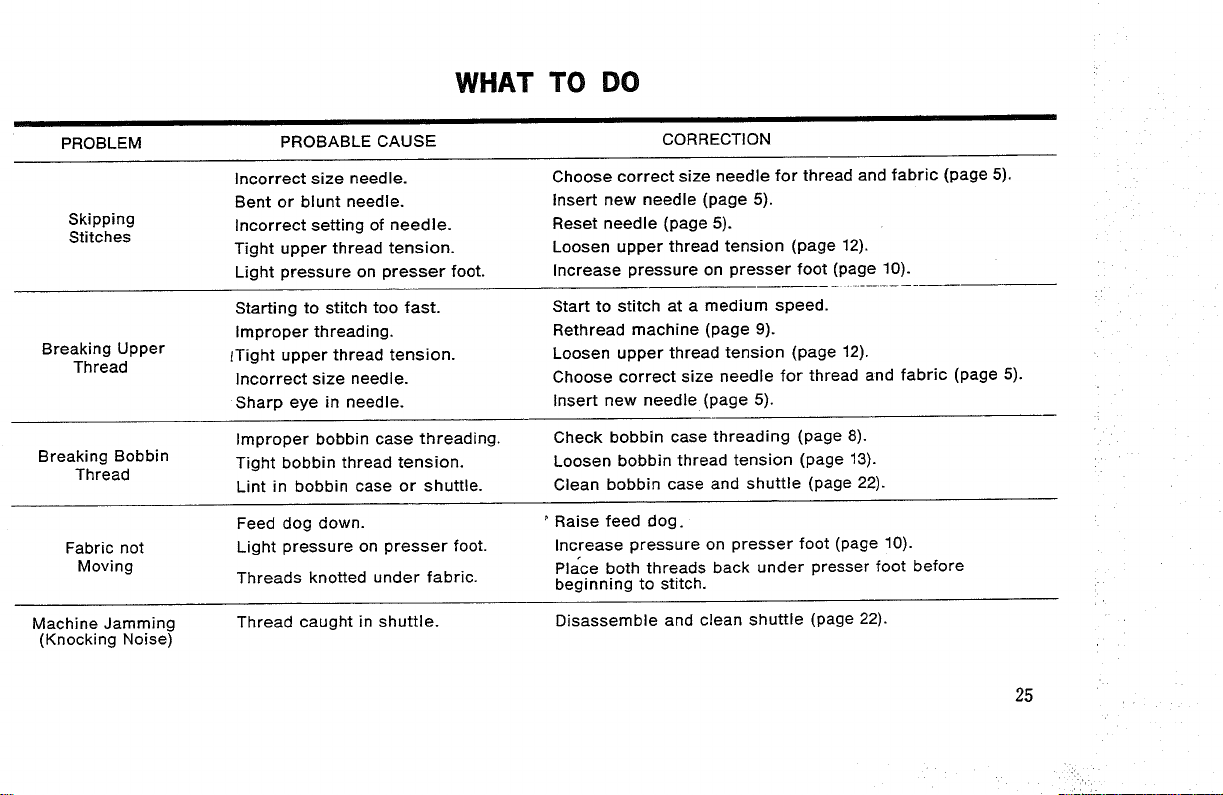
WHAT TO DO
i
PROBLEM PROBABLE CAUSE CORRECTION
Skipping
Stitches
Breaking Upper
Thread
Breaking Bobbin
Thread
Fabric not
Moving
Machine Jamming
(Knocking Noise)
Incorrect size needle.
Bent or blunt needle.
Incorrect setting of needle.
Tight upper thread tension.
Light pressure on presser foot.
Starting to stitch too fast.
Improper threading.
lTight upper thread tension.
Incorrect size needle.
Sharp eye in needle.
Improper bobbin case threading.
Tight bobbin thread tension.
Lint in bobbin case or shuttle.
Feed dog down.
Light pressure on presser foot.
Threads knotted under fabric.
Thread caught in shuttle.
Choose correct size needle for thread and fabric (page 5).
Insert new needle (page 5).
Reset needle (page 5).
Loosen upper thread tension (page 12).
Increase pressure on presser foot (page 10).
Start to stitch at a medium speed.
Rethread machine (page 9).
Loosen upper thread tension (page 12).
Choose correct size needle for thread and fabric (page 5).
Insert new needle (page 5).
Check bobbin case threading (page 8).
Loosen bobbin thread tension (page 13).
Clean bobbin case and shuttle (page 22).
Raise feed dog.
Increase pressure on presser foot (page 10).
Place both threads back under presser foot before
beginning to stitch.
Disassemble and clean shuttle (page 22).
25
i:¸!:i_ii¸_
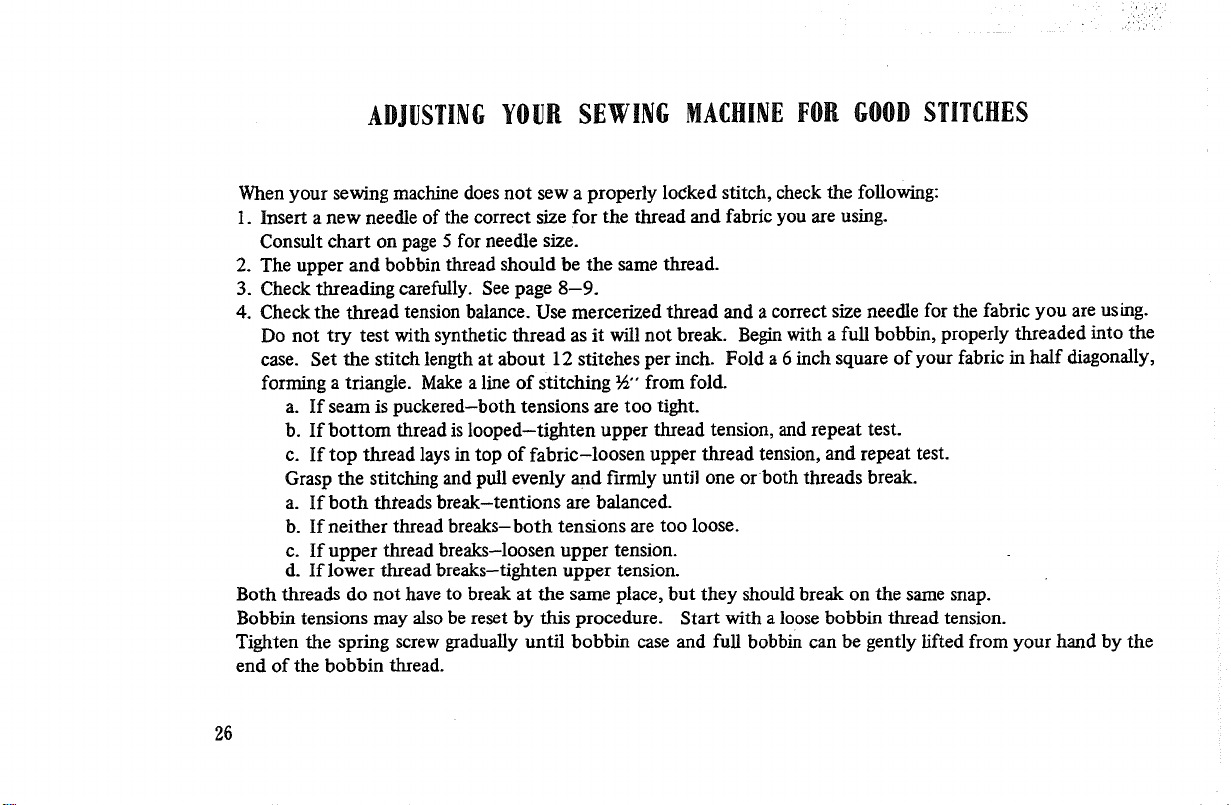
ADJUSTINGYOUR SEWING MACHINEFOR GOODSTITCHES
When your sewing machine does not sew a properly locked stitch, check the following:
1. Insert a new needle of the correct size for the thread and fabric you are using.
Consult chart on page 5 for needle size.
2. The upper and bobbin thread should be the same thread.
3. Check threading carefully. See page 8-9.
4. Check the thread tension balance. Use mercerized thread and a correct size needle for the fabric you are using.
Do not try test with synthetic thread as it will not break. Begin with a full bobbin, properly threaded into the
case. Set the stitch length at about 12 stitches per inch. Fold a 6 inch square of your fabric in half diagonally,
forming a triangle. Make a line of stitching %" from fold.
a. If seam is puckered-both tensions are too tight.
b. If bottom thread is looped-tighten upper thread tension, and repeat test.
c. If top thread lays in top of fabric-loosen upper thread tension, and repeat test.
Grasp the stitching and pull evenly and firmly until one or both threads break.
a. If both threads break-tentions are balanced.
b. If neither thread breaks-both tensions are too loose.
c. If upper thread breaks-loosen upper tension.
d. If lower thread breaks-tighten upper tension.
Both threads do not have to break at the same place, but they should break on the same snap.
Bobbin tensions may also be reset by this procedure. Start with a loose bobbin thread tension.
Tighten the spring screw gradually until bobbin case and full bobbin can be gently lifted from your hand by the
end of the bobbin thread.
26
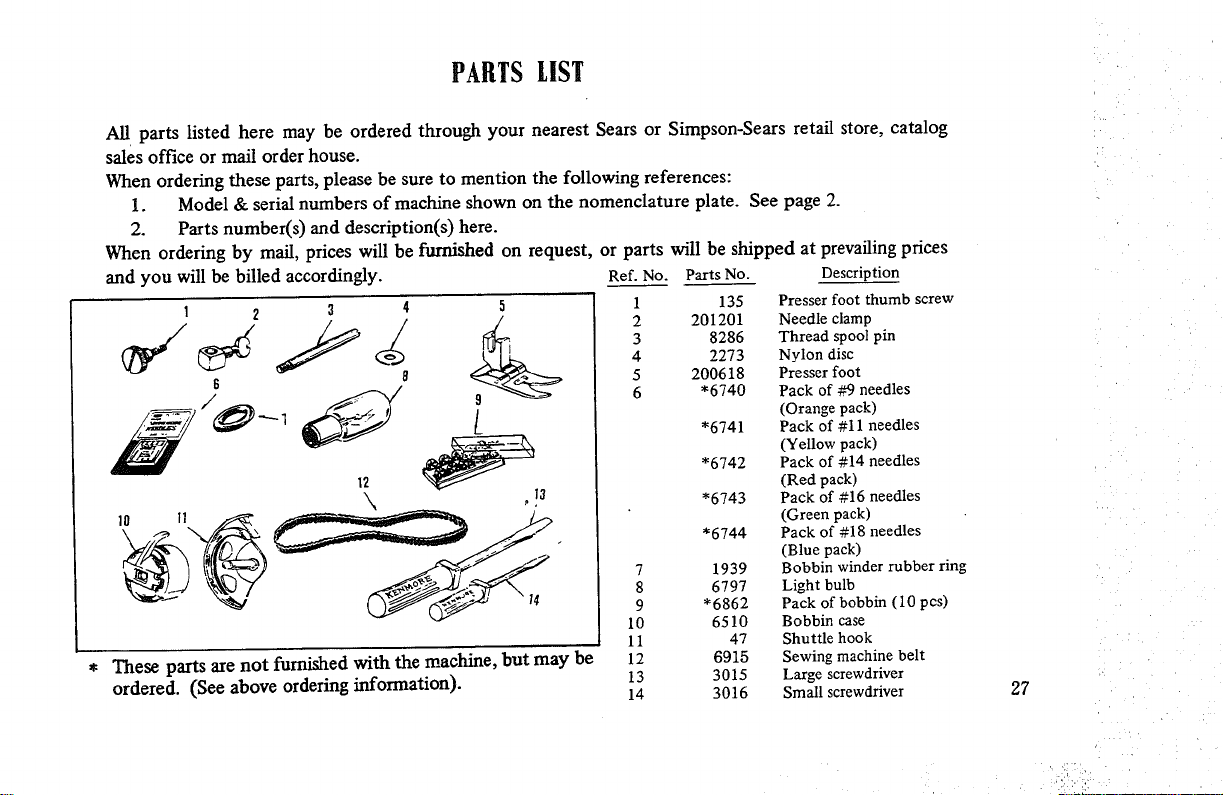
PARTS LIST
All parts listed here may be ordered through your nearest Sears or Simpson-Sears retail store, catalog
sales office or mail order house.
When ordering these parts, please be sure to mention the following references:
1. Model & serial numbers of machine shown on the nomenclature plate. See page 2.
2. Parts number(s) and description(s) here.
When ordering by mail, prices will be furnished on request, or parts will be shipped at prevailing prices
and you will be billed accordingly. Ref. No. Parts No. Description
These parts are not furnished with the machine, but may be
ordered. (See above ordering information).
1
2
3
4
5
6
7
8
9
10
11
12
13
14
135 Presser foot thumb screw
201201 Needle clamp
8286 Thread spool pin
2273 Nylon disc
200618 Presser foot
*6740 Pack of #9 needles
(Orange pack)
*6741 Pack of #11 needles
(Yellow pack)
*6742 Pack of #14 needles
(Red pack)
*6743 Pack of #16 needles
(Green pack)
*6744 Pack of #18 needles
(Blue pack)
1939 Bobbin winder rubber ring
6797 Light bulb
*6862 Pack of bobbin (10 pcs)
6510 Bobbin case
47 Shuttle hook
6915 Sewing machine belt
3015 Large screwdriver
3016 Small screwdriver 27
MEMO
MEMO
MEMO
MEMO
MEMO
SEWING MACHINE
SEARS, ROEBUCK AND CO., Chicago' |L 00014 U.S.A. and
SiMPSONS-SEARS LiMiTED, Toronto, Ontario, Canada
Pa_ No. 52882@Z)