1
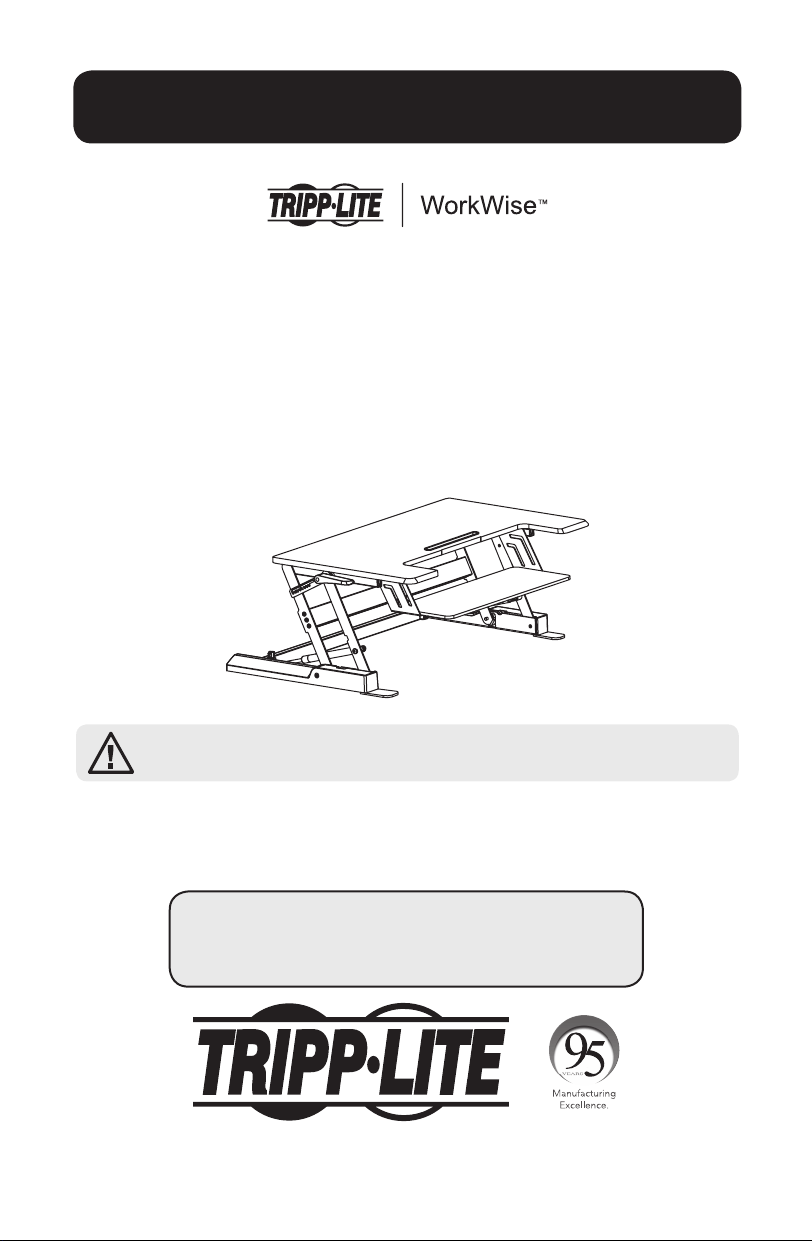
Owner’s Manual
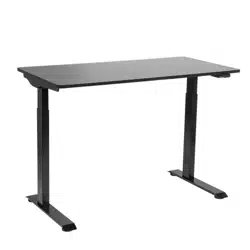
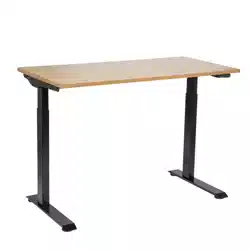
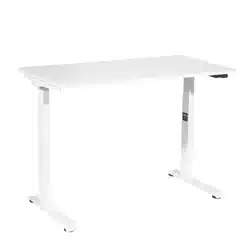
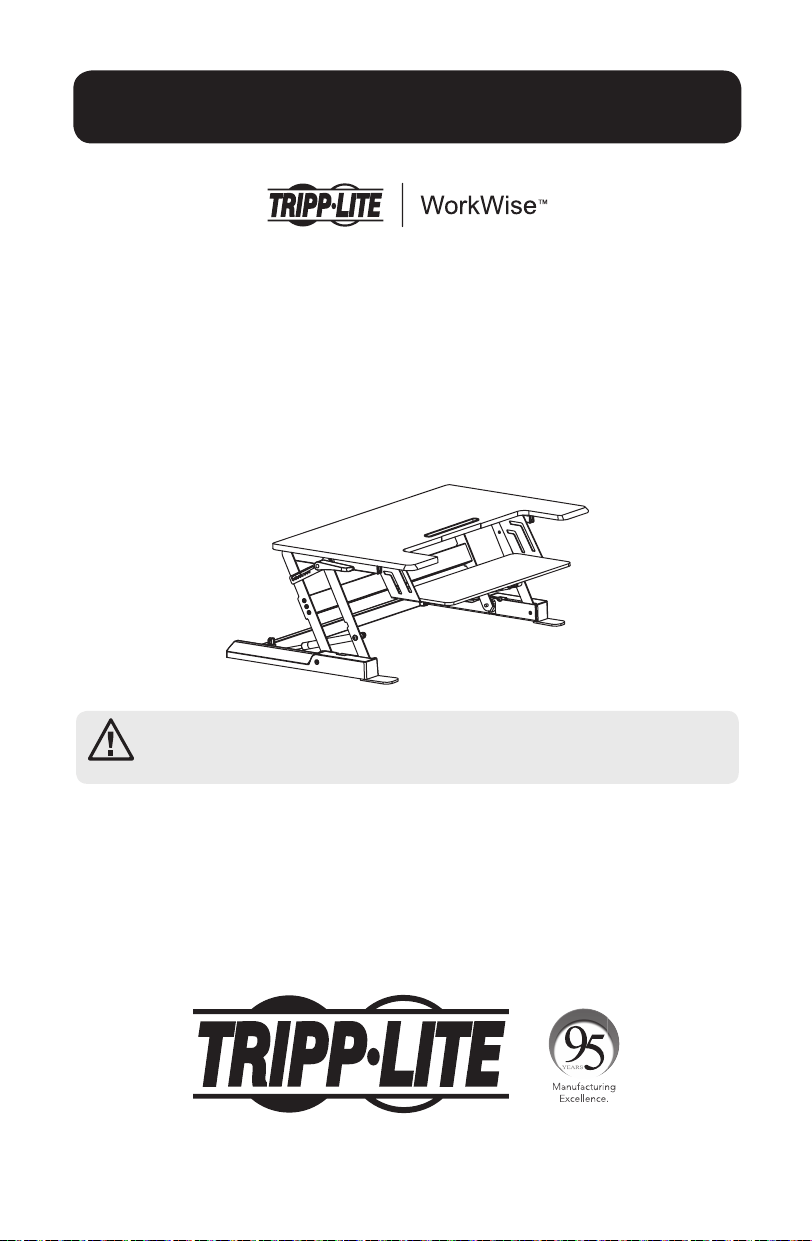
Height Adjustable
Sit-Stand Desktop
Model: WWSSD3622
Español 9 • Français 17 • Русский 25 • Deutsch 33
CAUTION: DO NOT EXCEED MAXIMUM LISTED WEIGHT CAPACITY
(33 lb. / 15 kg). SERIOUS INJURY OR PROPERTY DAMAGE MAY OCCUR!
1111 W. 35th Street, Chicago, IL 60609 USA • www.tripplite.com/support
Copyright © 2017 Tripp Lite. All rights reserved.
PROTECT YOUR INVESTMENT!
Register your product for quicker service and ultimate peace of mind.
You could also win an ISOBAR6ULTRA surge protector—a $100 value!
www.tripplite.com/warranty
17-06-252-933703.indb 1 7/3/2017 12:16:37 PM
2
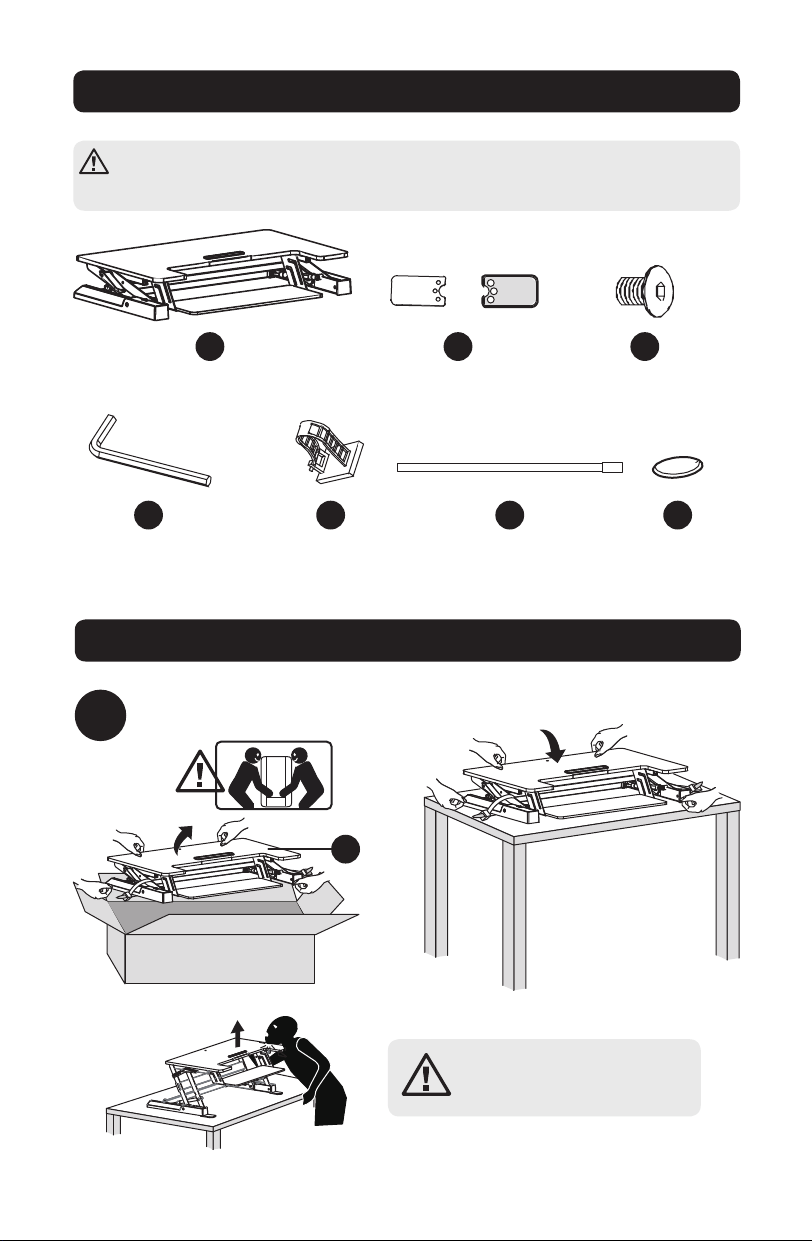
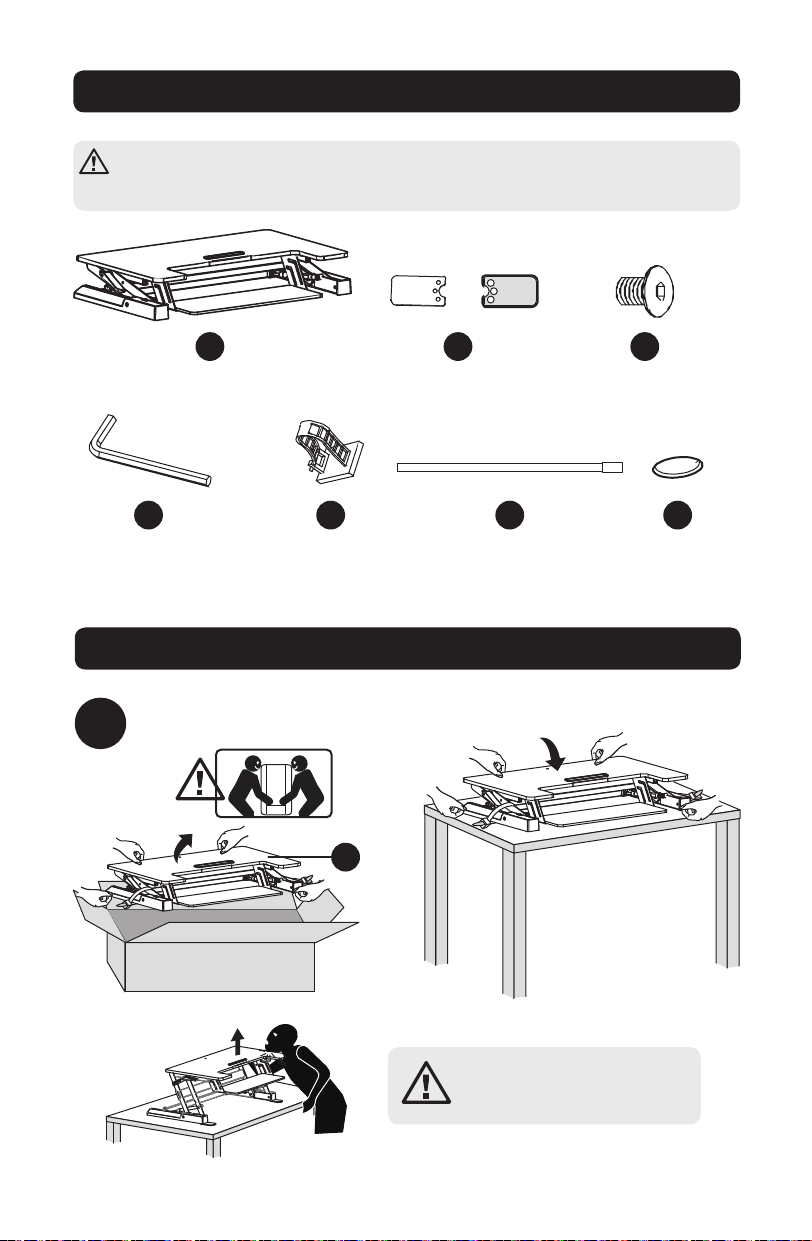
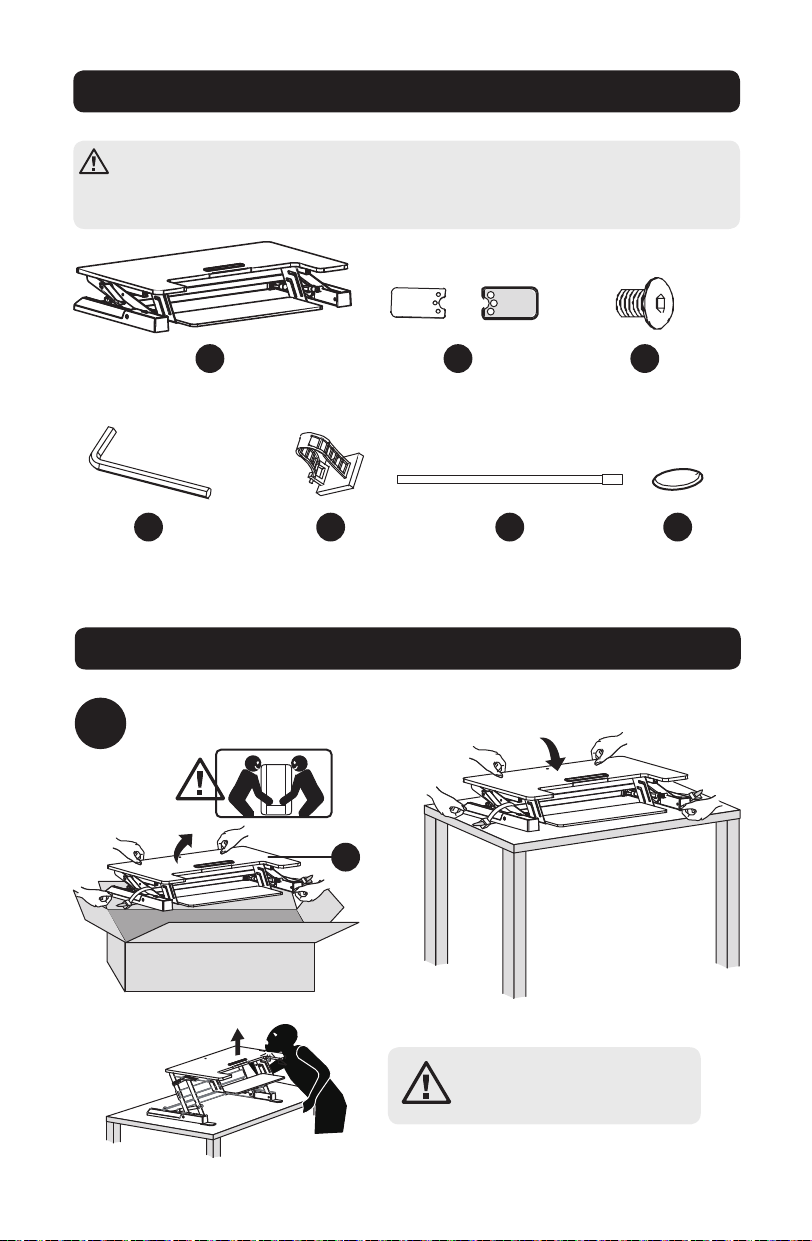
Component Checklist
IMPORTANT: Ensure all parts according to the component checklist have been
received prior to installation. If any parts are missing or faulty, visit
www.tripplite.com/support for service.
WARNING: Impact hazard!
Moving part can crush and cut.
Assembly
1
Workstation
x1
4 mm Hex Key
x1
Cable Management Clamp
x1
Zip Tie
x2
Felt Pads
x4
Mounting Feet
x2
4 mm Hex Screw
x6
Remove contents from package.
A
D E F G
B C
A
17-06-252-933703.indb 2 7/3/2017 12:16:38 PM
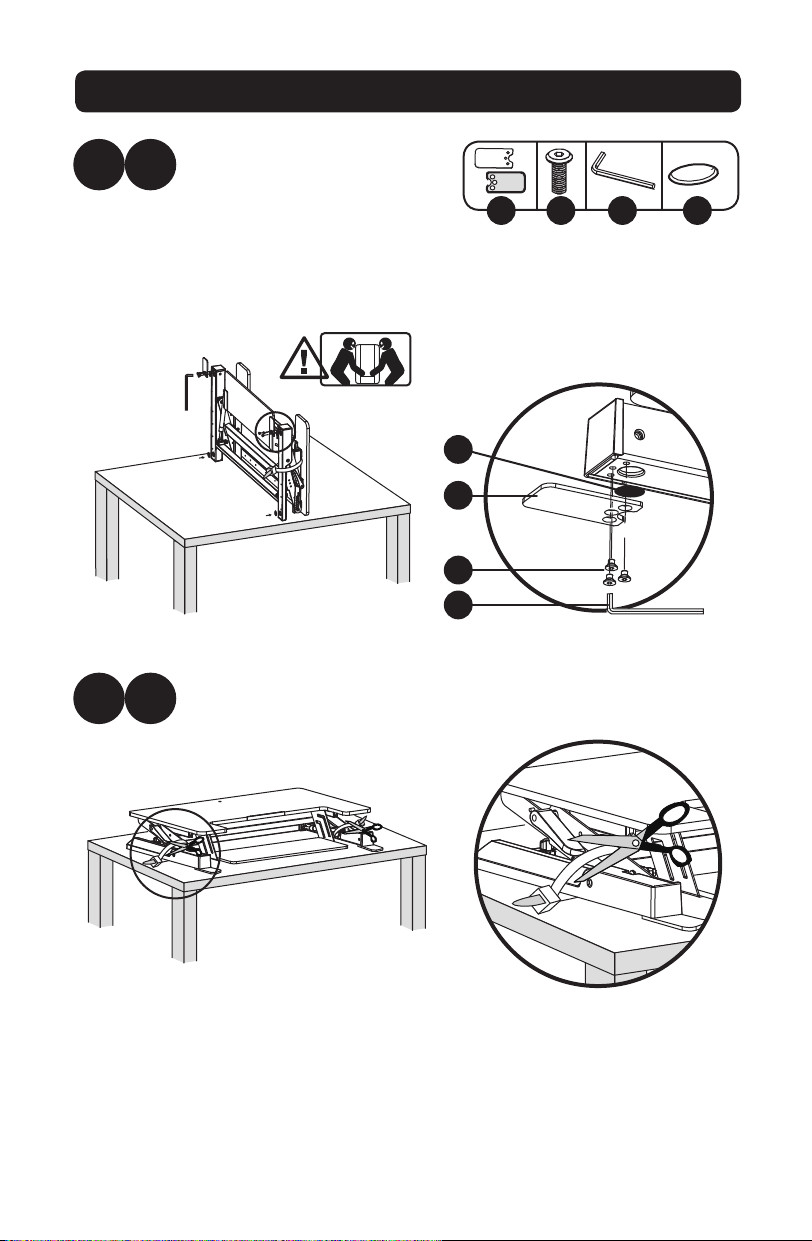
3
Assembly
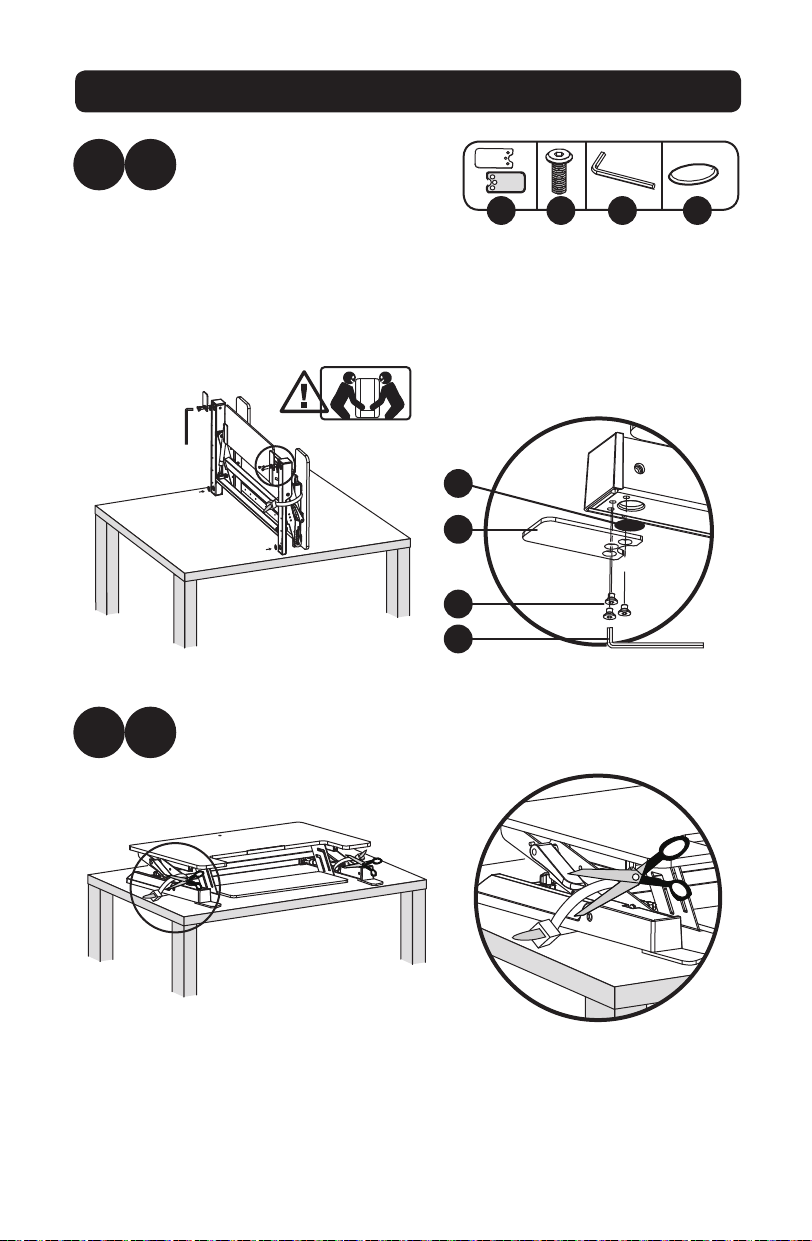
2
2
A
B
x6x2 x4
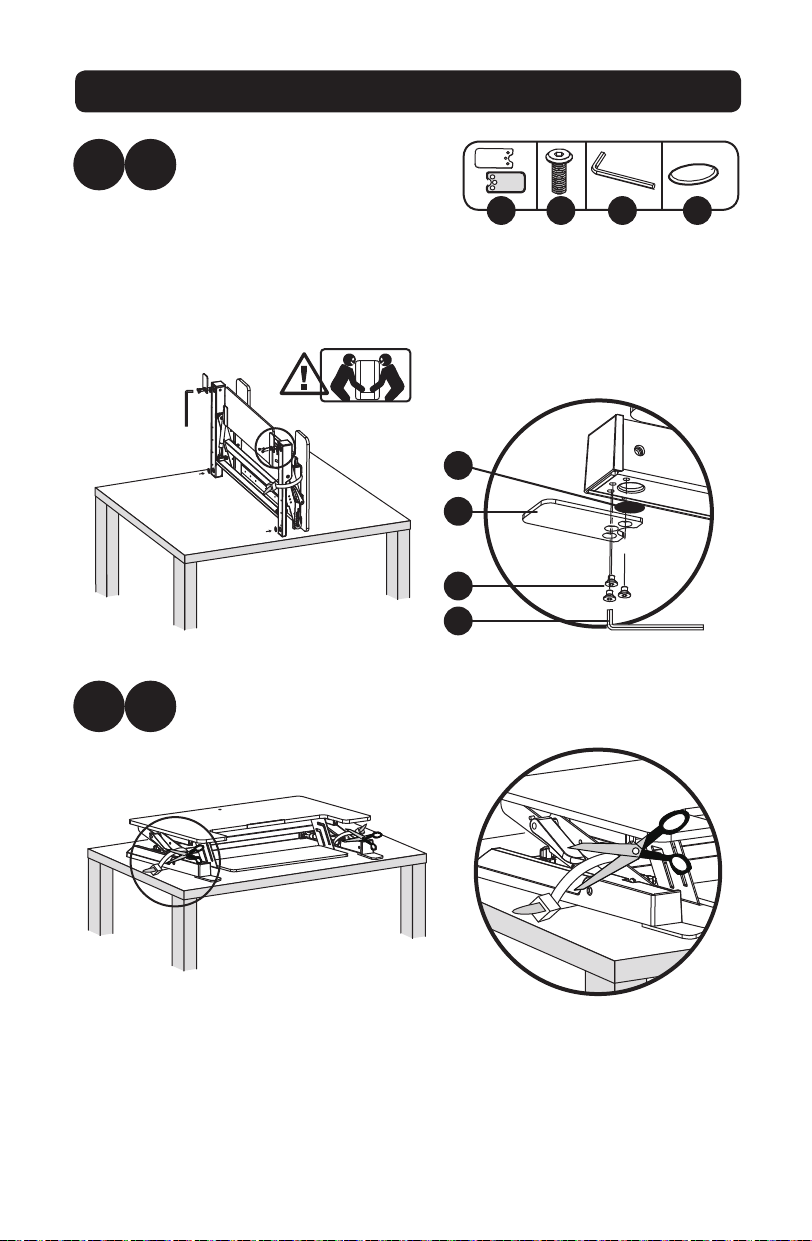
Using scissors or other sharp tool, cut the zip ties securing the
workstation.
Flip the workstation onto its
rear side so it stands upright.
For improved stability and
traction, attach the washers,
mounting feet and hex
screws. Secure hardware with
the included 4 mm hex key.
B C D G
B
C
D
G
17-06-252-933703.indb 3 7/3/2017 12:16:40 PM
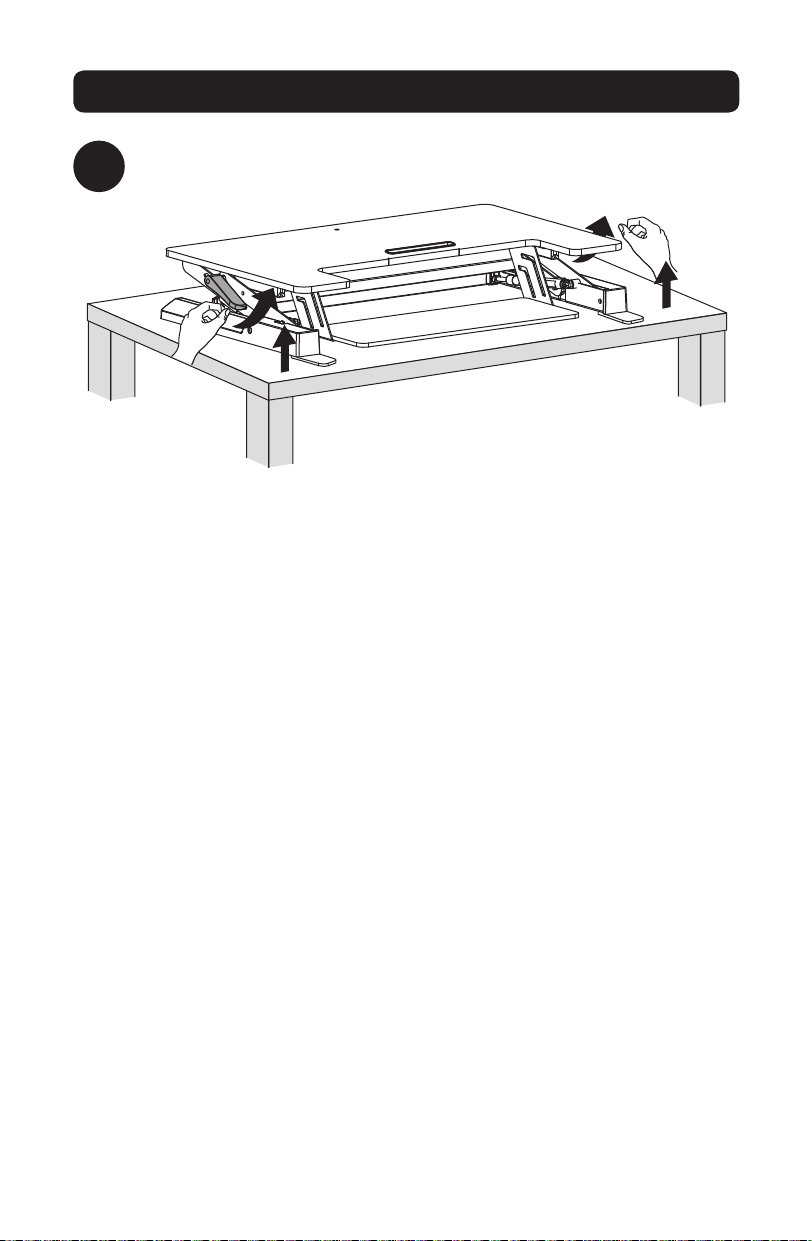
4
Assembly
3
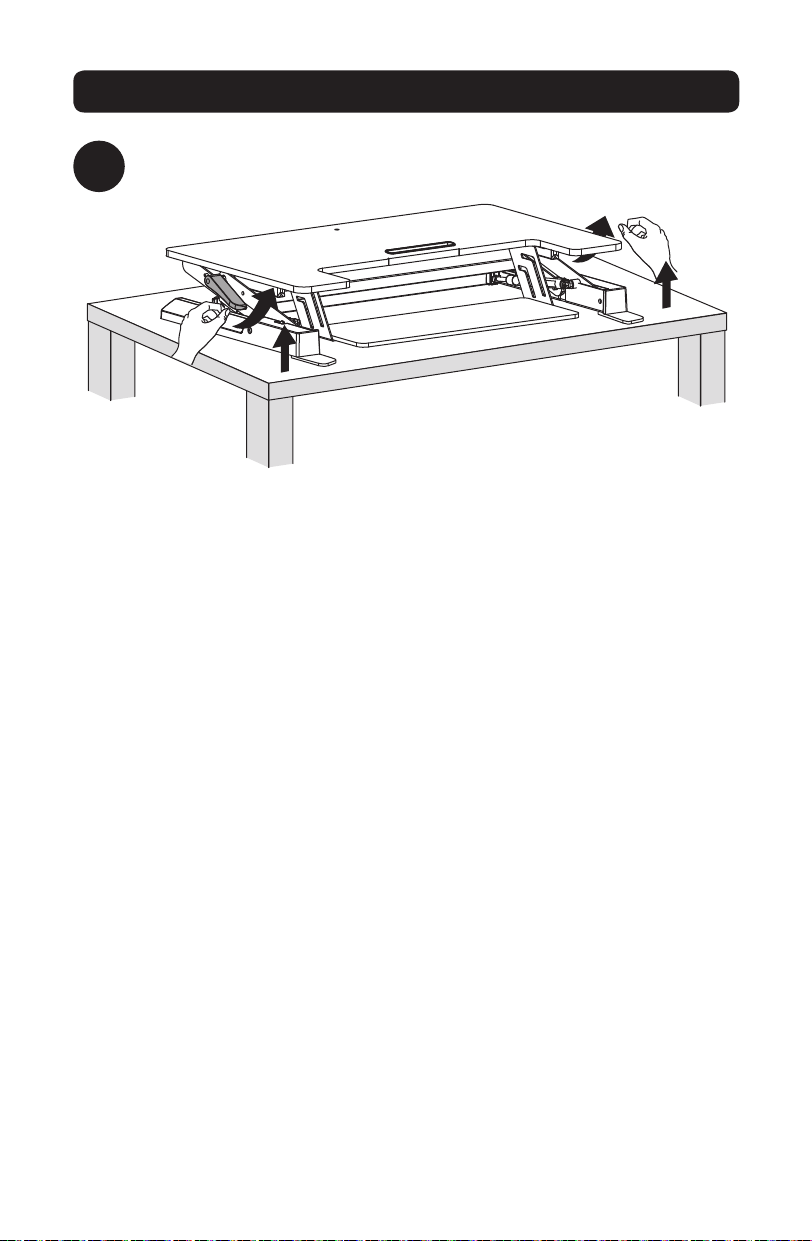
Press both workstation handles to raise or lower the unit.
17-06-252-933703.indb 4 7/3/2017 12:16:41 PM
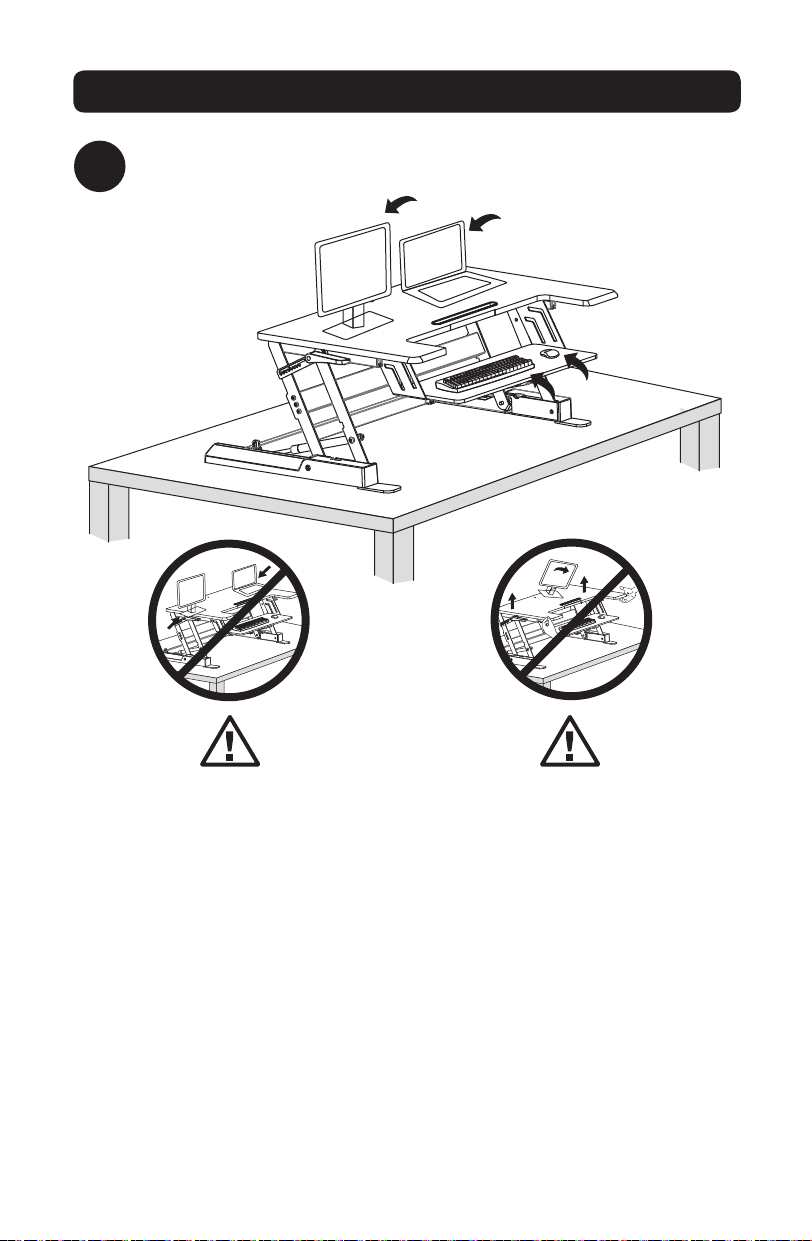
5
Assembly
4
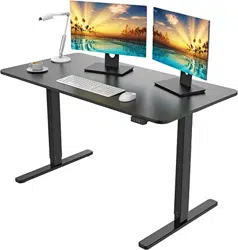
Place monitors, keyboard and/or laptops onto the workstation.
Keep monitors and laptops
placed firmly in the center of the
top surface. Allowing any part
of the equipment to hang off
the edge may result in property
damage and/or personal injury.
Make sure to raise the unit
slowly. Raising the workstation
too quickly may create an
unstable situation resulting in
property damage and/or personal
injury.
17-06-252-933703.indb 5 7/3/2017 12:16:43 PM
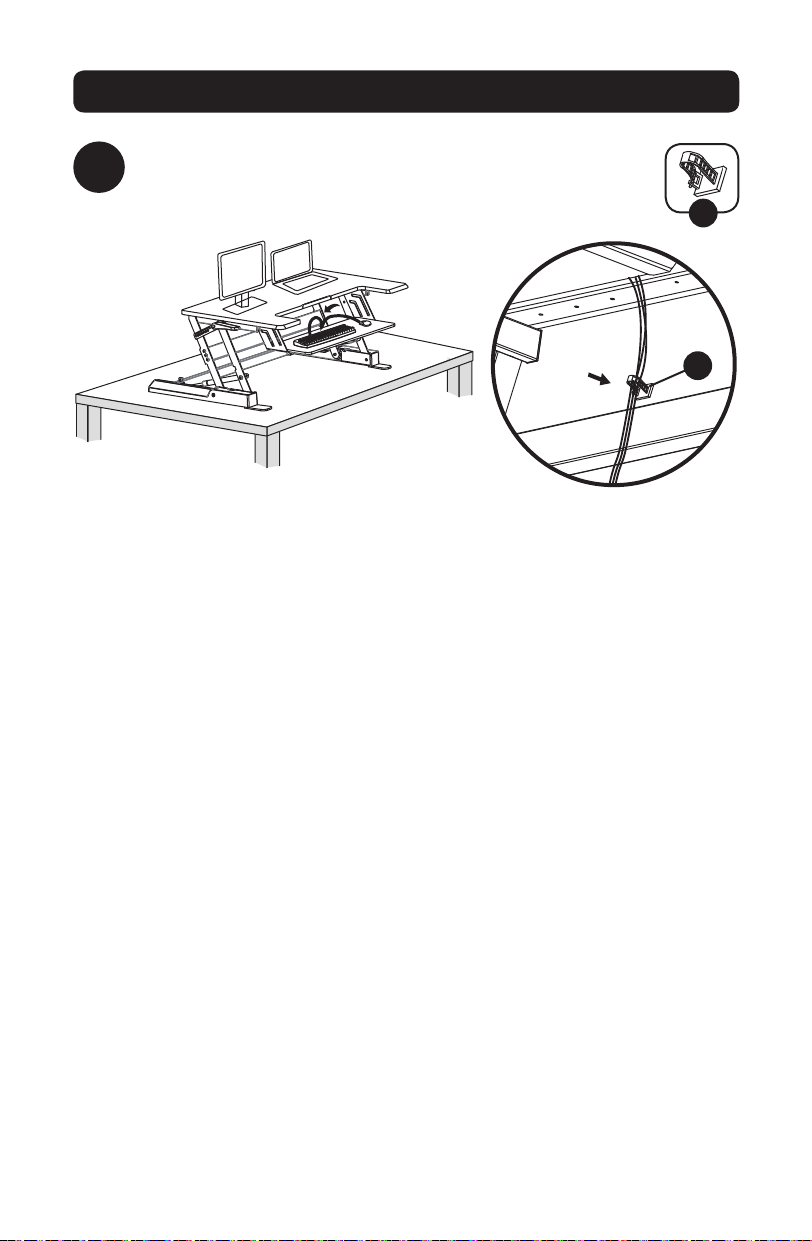
6
Assembly
5
Attach the cable management clamp to the rear side of the
keyboard tray. Route keyboard and mouse cables through
the clamp, as needed.
E
E
17-06-252-933703.indb 6 7/3/2017 12:16:44 PM
7
Assembly
6
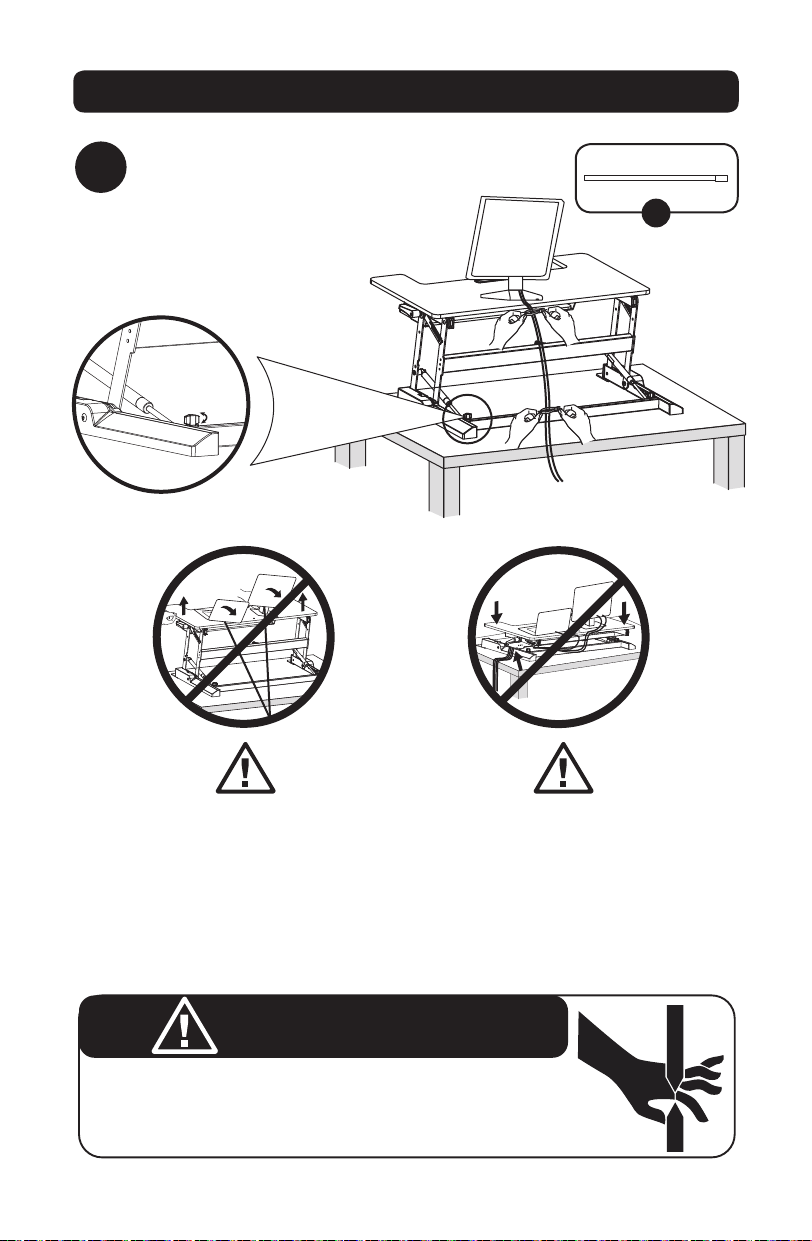
Use the included zip ties to bundle and organize
equipment cables
F
Leave enough cable slack to
allow for full range of vertical
motion (15” / 38 cm). Failure to
heed this warning may result in
property damage and/or personal
injury.
PINCH POINT
DO NOT place hands on or near support bars. Pinch points are
created during lifting and lowering the worksurface. Failure to
follow these instructions may result in serious personal injury.
Turn side knob clockwise
or counter-clockwise if
the latch cannot lock
into the notch properly.
To avoid the potential to pinch
cables, it is important to follow
the cable routing instructions
in this manual. Failure to follow
these instructions may result
in equipment damage and/or
personal injury.
WARNING
17-06-252-933703.indb 7 7/3/2017 12:16:45 PM

8
Warranty and Product Registration
5-Year Limited Warranty
Seller warrants this product, if used in accordance with all applicable instructions, to be free from original defects in material
and workmanship for a period of 5 years from the date of initial purchase. If the product should prove defective in material or
workmanship within that period, Seller will repair or replace the product, in its sole discretion.
THIS WARRANTY DOES NOT APPLY TO NORMAL WEAR OR TO DAMAGE RESULTING FROM ACCIDENT, MISUSE, ABUSE OR
NEGLECT. SELLER MAKES NO EXPRESS WARRANTIES OTHER THAN THE WARRANTY EXPRESSLY SET FORTH HEREIN. EXCEPT TO
THE EXTENT PROHIBITED BY APPLICABLE LAW, ALL IMPLIED WARRANTIES, INCLUDING ALL WARRANTIES OF MERCHANTABILITY
OR FITNESS, ARE LIMITED IN DURATION TO THE WARRANTY PERIOD SET FORTH ABOVE; AND THIS WARRANTY EXPRESSLY
EXCLUDES ALL INCIDENTAL AND CONSEQUENTIAL DAMAGES. (Some states do not allow limitations on how long an implied
warranty lasts, and some states do not allow the exclusion or limitation of incidental or consequential damages, so the above
limitations or exclusions may not apply to you. This warranty gives you specific legal rights, and you may have other rights which
vary from jurisdiction to jurisdiction).
WARNING: The individual user should take care to determine prior to use whether this device is suitable, adequate or safe for the
use intended. Since individual applications are subject to great variation, the manufacturer makes no representation or warranty
as to the suitability or fitness of these devices for any specific application.
PRODUCT REGISTRATION
Visit www.tripplite.com/warranty today to register your new Tripp Lite product. You’ll be automatically entered into a drawing for a
chance to win a FREE Tripp Lite product!*
* No purchase necessary. Void where prohibited. Some restrictions apply. See website for details.
Tripp Lite has a policy of continuous improvement. Specifications are subject to change without notice.
1111 W. 35th Street, Chicago, IL 60609 USA • www.tripplite.com/support
17-06-252-933703.indb 8 7/3/2017 12:16:45 PM
9
Manual del Propietario
Escritorio de Altura
Ajustable para Estar
Sentado o de Pie
Modelo: WWSSD3622
English 1 • Français 17 • Русский 25 • Deutsch 33
PRECAUCIÓN: NO EXCEDA LA CAPACIDAD MÁXIMA DE CARGA INDICADA 15 kg
[33 lb]. ¡PUEDEN OCURRIR LESIONES SEVERAS O DAÑOS A LA PROPIEDAD!
1111 W. 35th Street, Chicago, IL 60609 USA • www.tripplite.com/support
Copyright © 2017 Tripp Lite. Todos los derechos reservados.
17-06-252-933703.indb 9 7/3/2017 12:16:46 PM
10
ADVERTENCIA: ¡Riesgo de
impacto! Las partes móviles
pueden aplastar y cortar.
Accesorios y Partes Incluidas en el Empaque
IMPORTANTE: Antes de instalar, asegúrese de haber recibido todas las partes
de acuerdo a la lista de comprobación de componentes. Si faltan piezas o están
defectuosas, visite www.tripplite.com/support for service.
Ensamble
1
Estación de Trabajo
x1
Llave Hexagonal
de 4 mm
x1
Abrazadera para
Administración de Cables
x1
Amarre
x2
Almohadillas de
Fieltro
x4
Patas de Instalación
x2
Tornillo Hexagonal
de 4 mm
x6
Retire el contenido del empaque.
A
D E F G
B C
A
17-06-252-933703.indb 10 7/3/2017 12:16:46 PM
11
Ensamble
2
2
A
B
x6x2 x4
Utilizando tijeras u otro instrumento afilado, corte los amarres
que sujetan la estación de trabajo.
Voltee la estación de trabajo
sobre su lado posterior de
modo que esté vertical. Para
mayor estabilidad y tracción,
coloque las arandelas, patas
de instalación y tornillos
hexagonales. Asegure
el hardware con la llave
hexagonal de 4 mm incluida.
B C D G
B
C
D
G
17-06-252-933703.indb 11 7/3/2017 12:16:46 PM
12
Ensamble
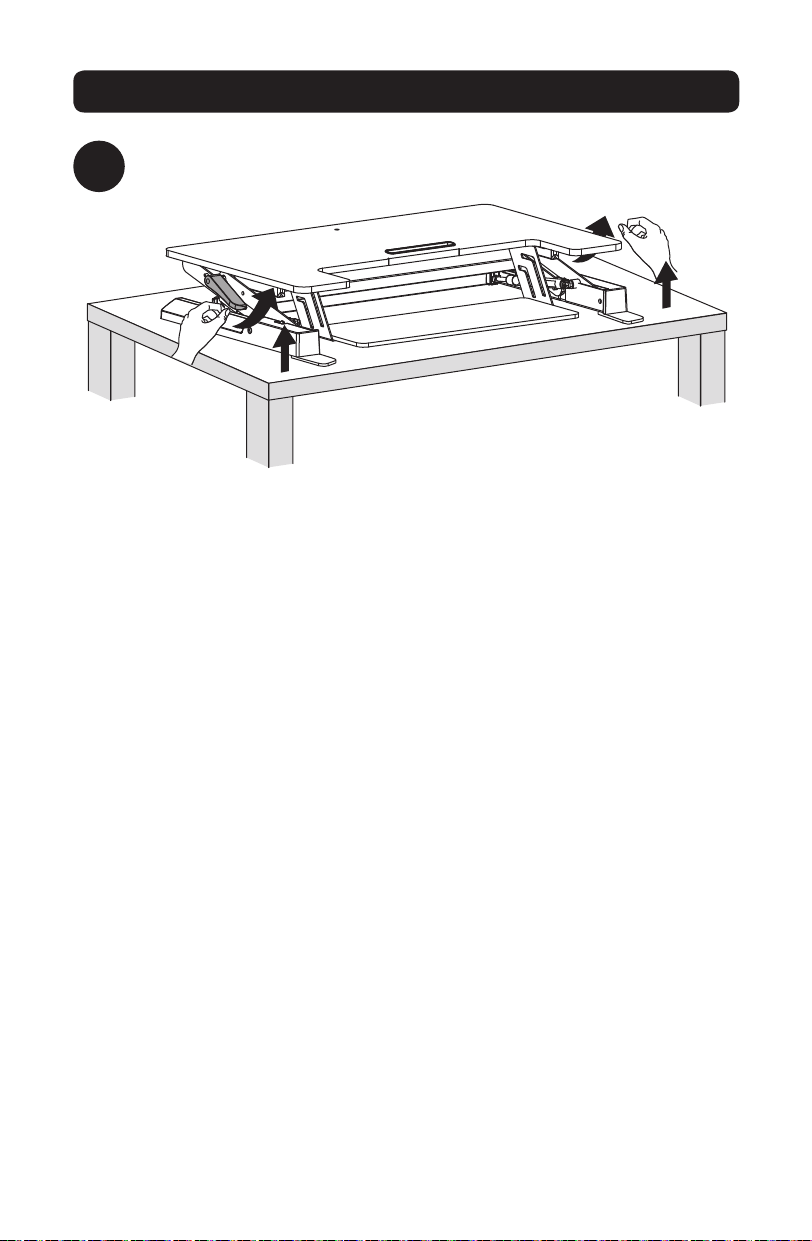
3
Presione ambas manijas de la estación de trabajo para elevar o bajar
la unidad.
17-06-252-933703.indb 12 7/3/2017 12:16:47 PM
13
Ensamble
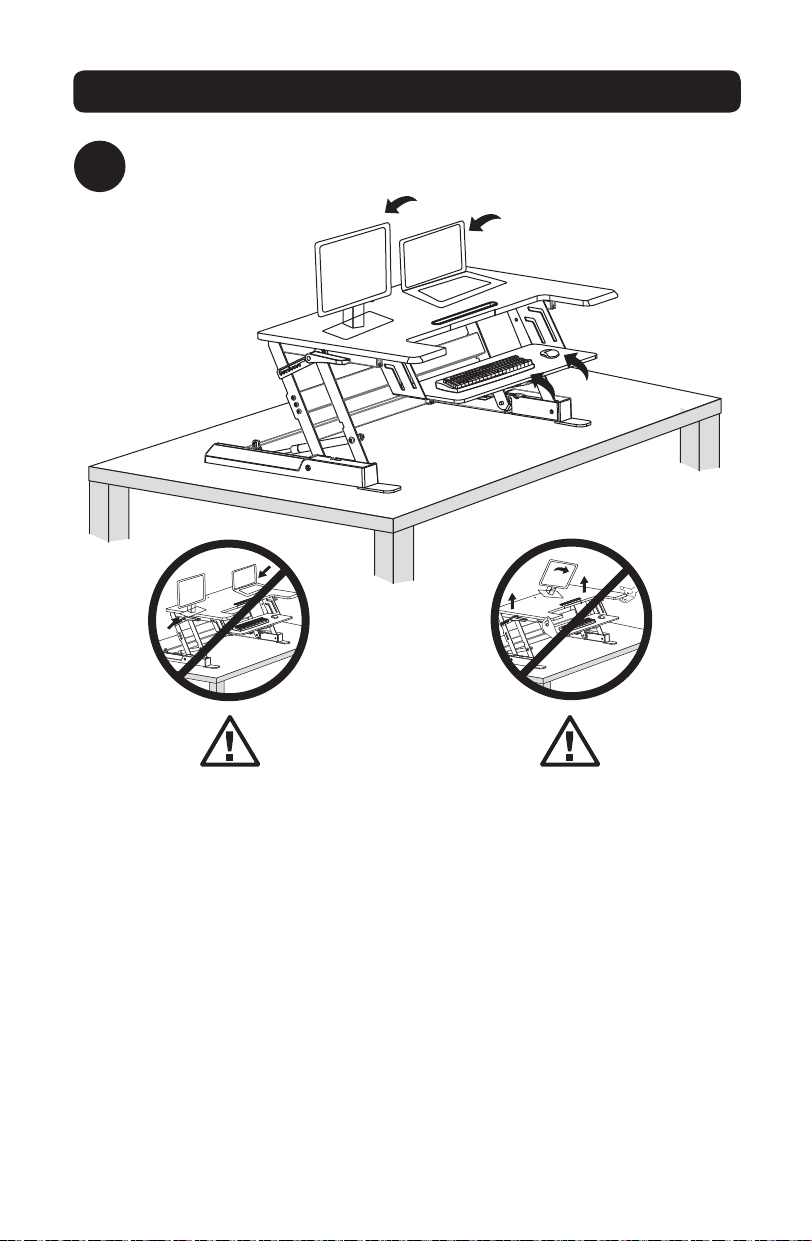
4
Coloque monitores, teclado y/o laptops en la estación de trabajo.
Mantenga los monitores y
laptops colocados firmemente
en el centro de la superficie
superior. Permitir que cualquier
parte del equipo cuelgue
fuera del borde puede resultar
en daños a la propiedad y/o
lesiones personales.
Asegúrese de elevar lentamente
la unidad. Elevar la estación
de trabajo demasiado rápido
puede crear una situación
inestable que resulte en daños
a la propiedad y/o lesiones
personales.
17-06-252-933703.indb 13 7/3/2017 12:16:47 PM
14
Ensamble
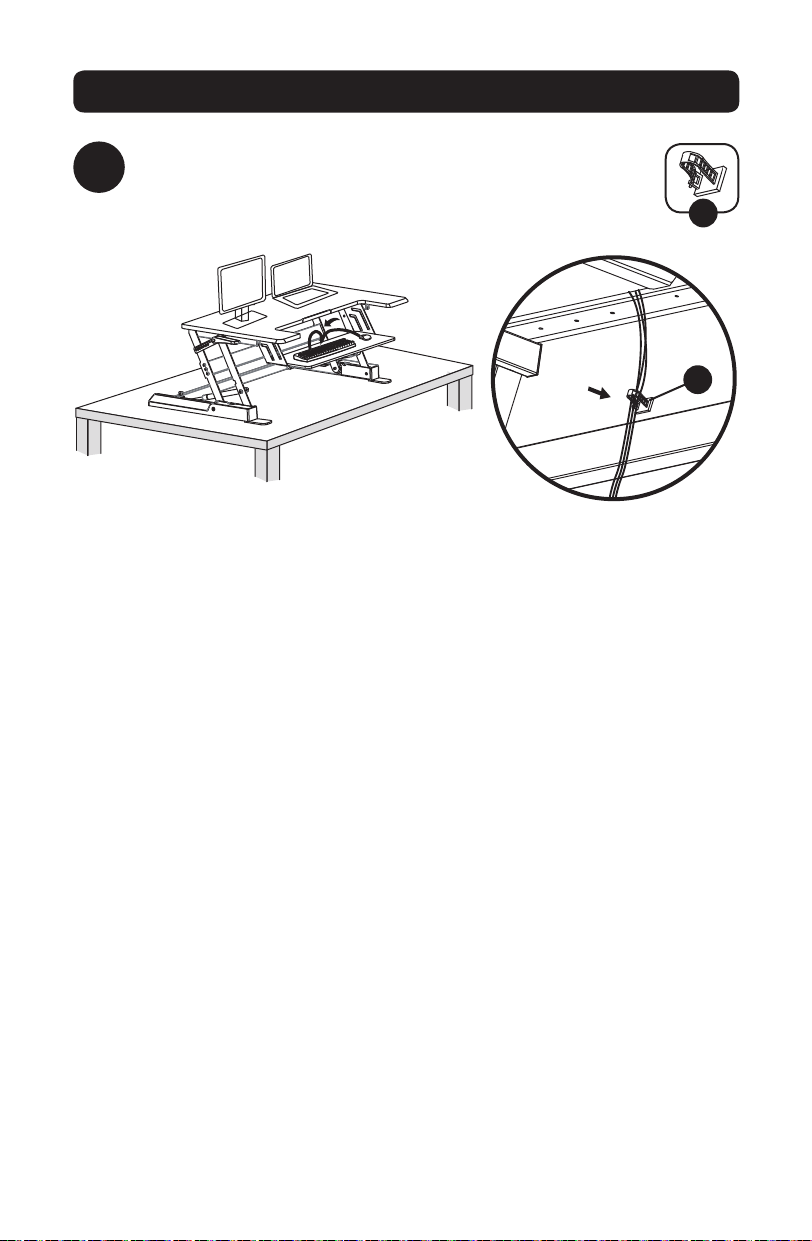
5
Fije la abrazadera de administración de cable a la parte
posterior de la bandeja del teclado. Conduzca los cables
del teclado y el mouse a través de la abrazadera, conforme
sea necesario.
E
E
17-06-252-933703.indb 14 7/3/2017 12:16:47 PM
15
Ensamble
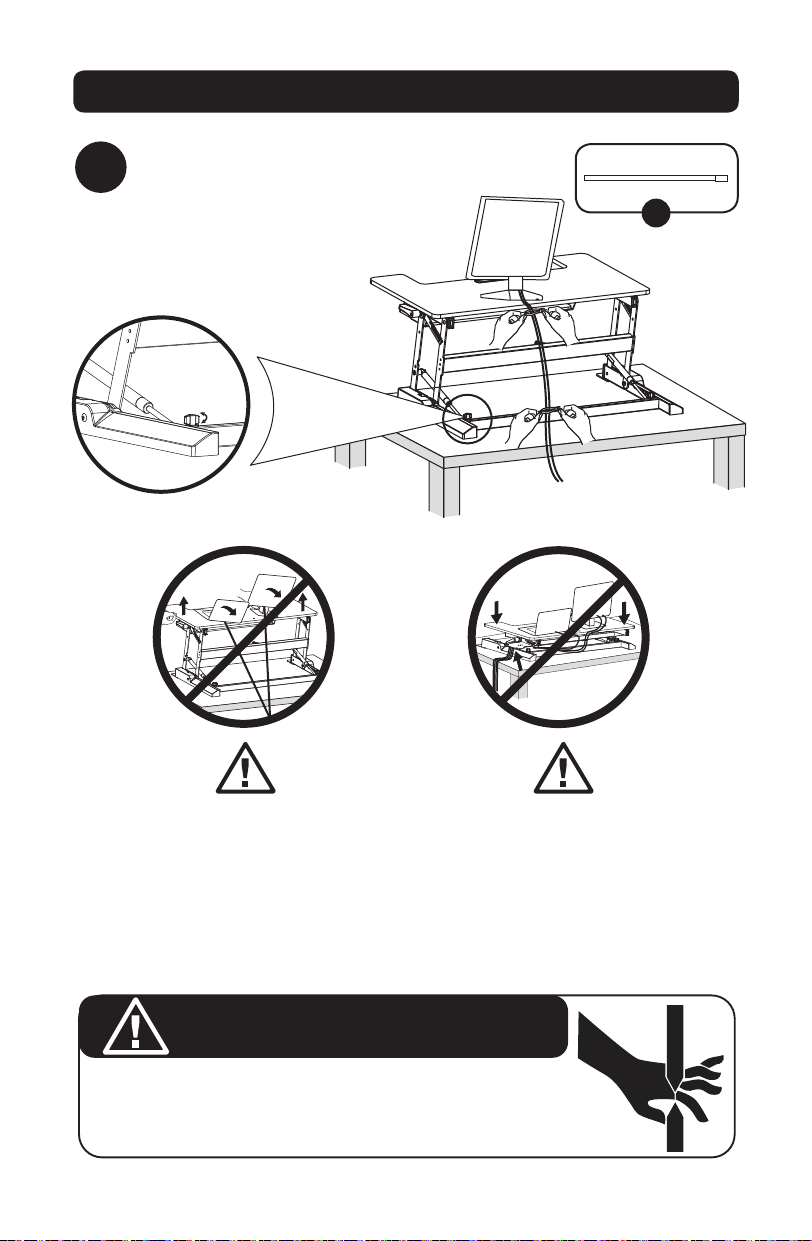
6
Utilizar los amarres incluidos para agrupar y
organizar los cables del equipo
F
Deje suficiente holgura de cable
para permitir la gama completa
de movimiento vertical (38 cm).
No seguir esta advertencia
puede resultar en daños a
la propiedad y/o lesiones
personales.
PUNTO DE COMPRESIÓN
NO coloque las manos sobre o cerca de las barras de soporte. Se crean puntos
de compresión durante la elevación y descenso de la superficie de trabajo. No
seguir estas instrucciones puede causar serias lesiones personales.
Gire la perilla lateral hacia la
derecha o hacia la izquierda si
el pestillo no se puede asegurar
correctamente en la ranura.
Para evitar la posibilidad de pellizcar
los cables, es importante seguir las
instrucciones de enrutamiento del
cable en este manual. No seguir
estas instrucciones puede resultar
en daño al equipo y/o lesiones
personales.
ADVERTENCIA
17-06-252-933703.indb 15 7/3/2017 12:16:48 PM

16
Garantía
Garantía Limitada por 5 Años
El vendedor garantiza este producto, si se usa de acuerdo con todas las instrucciones aplicables, de que está libre de defectos en
material y mano de obra por un período de 5 años a partir de la fecha de compra inicial. Si el producto prueba ser defectuoso en
material o mano de obra dentro de ese período, el vendedor reparará o reemplazará el producto a su entera discreción.
ESTA GARANTÍA NO SE APLICA AL DESGASTE NORMAL O A LOS DAÑOS QUE RESULTEN DE ACCIDENTES, USO INCORRECTO, USO
INDEBIDO O NEGLIGENCIA. EL VENDEDOR NO OTORGA GARANTÍAS EXPRESAS DISTINTAS DE LA ESTIPULADA EN EL PRESENTE.
SALVO EN LA MEDIDA EN QUE LO PROHÍBAN LAS LEYES APLICABLES, TODAS LAS GARANTÍAS IMPLÍCITAS, INCLUYENDO
TODAS LAS GARANTÍAS DE COMERCIALIZACIÓN O IDONEIDAD, ESTÁN LIMITADAS EN DURACIÓN AL PERÍODO DE GARANTÍA
ESTABLECIDO; ASIMISMO, ESTA GARANTÍA EXCLUYE EXPRESAMENTE TODOS LOS DAÑOS INCIDENTALES E INDIRECTOS. (Algunos
estados no permiten limitaciones en cuanto a la duración de una garantía y algunos estados no permiten la exclusión o limitación
de daños incidentales o indirectos, de modo que las limitaciones anteriores pueden no aplicar para usted. Esta garantía le otorga
derechos legales específicos y usted puede tener otros derechos que pueden variar de una jurisdicción a otra).
ADVERTENCIA: Antes de usarlo, cada usuario debe tener cuidado al determinar si este dispositivo es adecuado o seguro para el
uso previsto. Ya que las aplicaciones individuales están sujetas a gran variación, el fabricante no garantiza la adecuación de estos
dispositivos para alguna aplicación específica.
Tripp Lite tiene una política de mejora continua. Las especificaciones están sujetas a cambios sin previo aviso.
1111 W. 35th Street, Chicago, IL 60609 USA • www.tripplite.com/support
17-06-252-933703.indb 16 7/3/2017 12:16:48 PM
17
Manuel de l’utilisateur
Bureau assis-debout à
hauteur réglable
Modèle : WWSSD3622
English 1 • Espanol 9 • Русский 25 • Deutsch 33
MISE EN GARDE : NE PAS EXCÉDER LA CAPACITÉ PONDÉRALE MAXIMUM
INDIQUÉE (15 kg/33 lb). CELA RISQUERAIT D’ENGENDRER DES BLESSURES
GRAVES OU DES DOMMAGES MATÉRIELS.
1111 W. 35th Street, Chicago, IL 60609 USA • www.tripplite.com/support
Droits d’auteur © 2017 Tripp Lite. Tous droits réservés.
17-06-252-933703.indb 17 7/3/2017 12:16:48 PM
18
AVERTISSEMENT : Risque
d’impact! Les pièces mobiles
peuvent écraser et couper.
Liste de vérification des composants
IMPORTANT : Assurez-vous d’avoir reçu toutes les pièces conformément à la liste
de vérification des composants avant de procéder à l’installation. Si des pièces
sont manquantes ou défectueuses, visitez www.tripplite.com/support pour obtenir
de l’aide.
Assemblage
1
Station de travail
x1
Clé hexagonale
de 4 mm
x1
Bride de gestion des câbles
x1
Attache mono-usage
x2
Coussinets de
feutre
x4
Pieds de montage
x2
Vis hexagonale
de 4 mm
x6
Retirer le contenu de l’emballage.
A
D E F G
B C
A
17-06-252-933703.indb 18 7/3/2017 12:16:48 PM
19
Assemblage
2
2
A
B
x6x2 x4
Utiliser des ciseaux ou autre outil tranchant pour couper les attaches
mono-usage retenant la station de travail en place.
Retourner la station de travail
sur son côté arrière de façon à
ce qu’elle se tienne en position
debout. Pour une stabilité et
une traction accrues, fixer les
rondelles, les pieds de montage
et les vis hexagonales. Fixer la
quincaillerie en place avec la clé
hexagonale de 4 mm.
B C D G
B
C
D
G
17-06-252-933703.indb 19 7/3/2017 12:16:49 PM
20
Assemblage
3
Appuyer sur les deux poignées de la station de travail pour soulever ou
abaisser l’appareil.
17-06-252-933703.indb 20 7/3/2017 12:16:49 PM
21
Assemblage
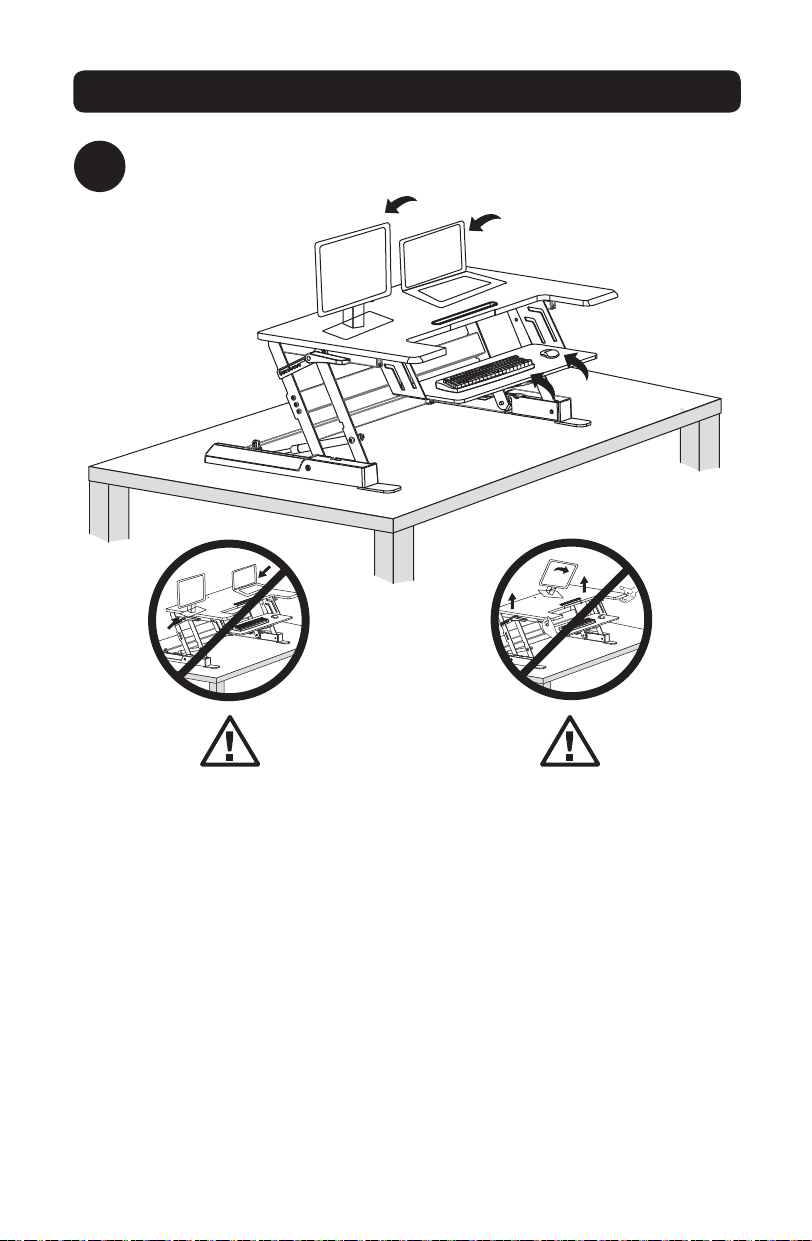
4
Placer les moniteurs ou les ordinateurs portatifs dans la station de travail.
Garder les moniteurs et les
ordinateurs portatifs fermement
placés au centre de la surface
supérieure. Laisser pendre de
l’équipement sur le rebord pourrait
causer des dommages graves à la
propriété ou des blessures.
S’assurer de soulever l’appareil
lentement. Soulever l’appareil trop
rapidement risquerait de créer une
situation instable pouvant causer
des dommages à la propriété ou des
blessures.
17-06-252-933703.indb 21 7/3/2017 12:16:49 PM
22
Assemblage
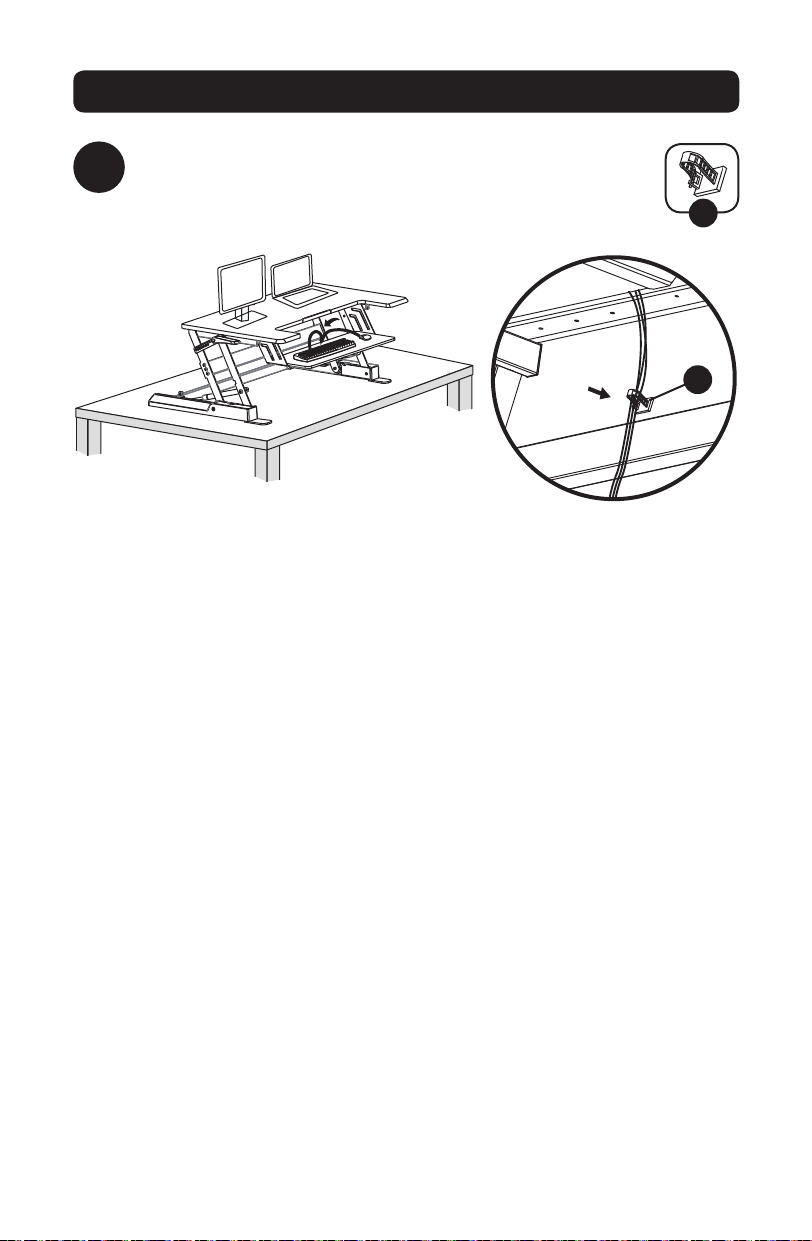
5
Fixer la bride de gestion des câbles à l’arrière du plateau du
clavier. Acheminer les câbles du clavier et de la souris à travers la
bride, si cela s’avère nécessaire.
E
E
17-06-252-933703.indb 22 7/3/2017 12:16:49 PM
23
Assemblage
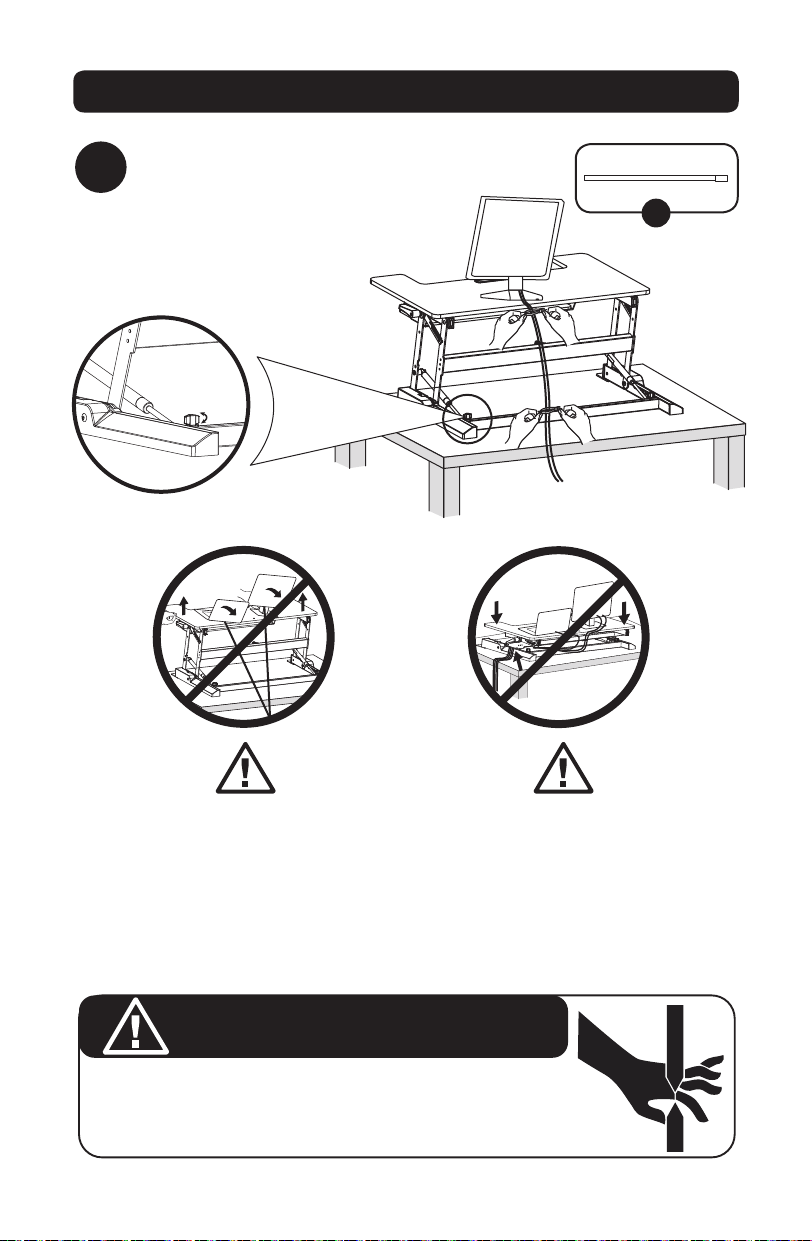
6
Utiliser les attaches mono-usage incluses pour
regrouper et organiser les câbles de l’équipement.
F
Laisser suffisamment de mou dans
le câble pour permettre une gamme
complète de mouvement sur le plan
vertical (38 cm). Le non-respect de
cet avertissement pourrait causer
des dommages à la propriété ou des
blessures.
POINT DE PINCEMENT
NE PAS placer les mains à proximité des barres de support ou sur elles. Des
points de pincement sont créés lors du levage et de l’abaissement de la surface de
travail. Le non-respect de ces instructions pourrait causer des blessures graves.
Tourner le bouton dans le sens des
aiguilles d’une montre ou dans le
sens contraire des aiguilles d’une
montre si le verrou ne se verrouille
pas correctement dans l’encoche.
Pour éviter le pincement des
câbles, il est important de suivre
les instructions concernant
l’acheminement des câbles dans le
présent manuel. Le non-respect de
ces instructions pourrait causer des
dommages à l’équipement ou des
blessures.
AVERTISSEMENT
17-06-252-933703.indb 23 7/3/2017 12:16:50 PM

24
Garantie
Garantie limitée de 5 ans
Le vendeur garantit que ce produit, s’il est utilisé conformément à toutes les instructions applicables, est exempt de tous défauts
de matériaux et de fabrication pour une période de 5 ans à partir de la date d’achat initiale. Si le produit s’avère défectueux en
raison d’un vice de matière ou de fabrication au cours de cette période, le vendeur s’engage à réparer ou remplacer le produit, à
sa seule discrétion.
CETTE GARANTIE NE S’APPLIQUE PAS À L’USURE NORMALE OU AUX DOMMAGES RÉSULTANT D’UNE MAUVAISE UTILISATION,
D’UN ABUS OU D’UNE NÉGLIGENCE. LE VENDEUR NE DONNE AUCUNE GARANTIE EXPRESSE AUTRE QUE LA GARANTIE
EXPRESSÉMENT DÉCRITE DANS LE PRÉSENT DOCUMENT. SAUF DANS LA MESURE INTERDITE PAR LA LOI APPLICABLE, TOUTE
GARANTIE IMPLICITE, Y COMPRIS TOUTES LES GARANTIES DE QUALITÉ MARCHANDE OU D’ADAPTATION, SONT LIMITÉES À LA
PÉRIODE DE GARANTIE CI-DESSUS ET CETTE GARANTIE EXCLUT EXPRESSÉMENT TOUS DOMMAGES DIRECTS ET INDIRECTS.
(Certains États ne permettent pas de limitations sur la durée d’une garantie implicite, et certains États ne permettent pas
l’exclusion ou la limitation des dommages fortuits ou consécutifs, de sorte que les limitations ou exclusions susmentionnées
peuvent ne pas s’appliquer à vous. Cette garantie vous donne des droits légaux spécifiques, et vous pouvez avoir d’autres droits
qui varient selon la juridiction).
AVERTISSEMENT : L’utilisateur individuel doit prendre soin de déterminer avant l’utilisation si cet appareil est approprié, adéquat
et sûr pour l’usage prévu. Puisque les utilisations individuelles sont sujettes à des variations importantes, le fabricant ne fait
aucune déclaration ou garantie quant à l’aptitude ou l’adaptation de ces dispositifs pour une application spécifique.
La politique de Tripp Lite en est une d’amélioration continue. Les caractéristiques techniques sont modifiables sans préavis.
1111 W. 35th Street, Chicago, IL 60609 USA • www.tripplite.com/support
17-06-252-933703.indb 24 7/3/2017 12:16:50 PM
25
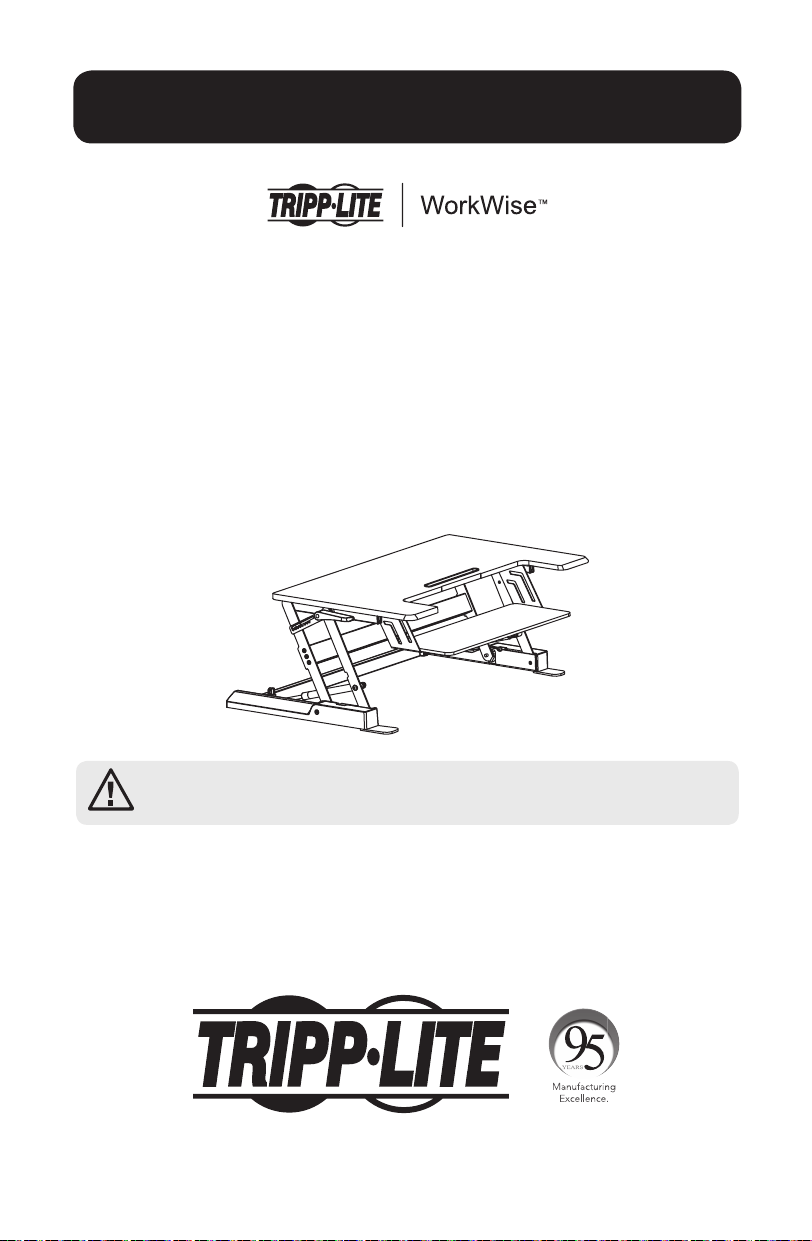
Руководство пользователя
Настольная рабочая
станция типа Sit-Stand с
регулируемой высотой
Модель: WWSSD3622
English 1 • Espanol 9 • Français 17 • Deutsch 33
ВНИМАНИЕ! НЕ ПРЕВЫШАЙТЕ МАКСИМАЛЬНО ДОПУСТИМЫЙ ВЕС (15 кг). ЭТО
МОЖЕТ ПРИВЕСТИ К СЕРЬЕЗНЫМ ТРАВМАМ ИЛИ ИМУЩЕСТВЕННОМУ УЩЕРБУ!
1111 W. 35th Street, Chicago, IL 60609 USA • www.tripplite.com/support
Охраняется авторским правом © 2016 Tripp Lite. Перепечатка запрещается.
17-06-252-933703.indb 25 7/3/2017 12:16:50 PM
26
ВНИМАНИЕ! Беречь от удара!
Движущаяся часть может
расколоться с возникновением
опасности порезов.
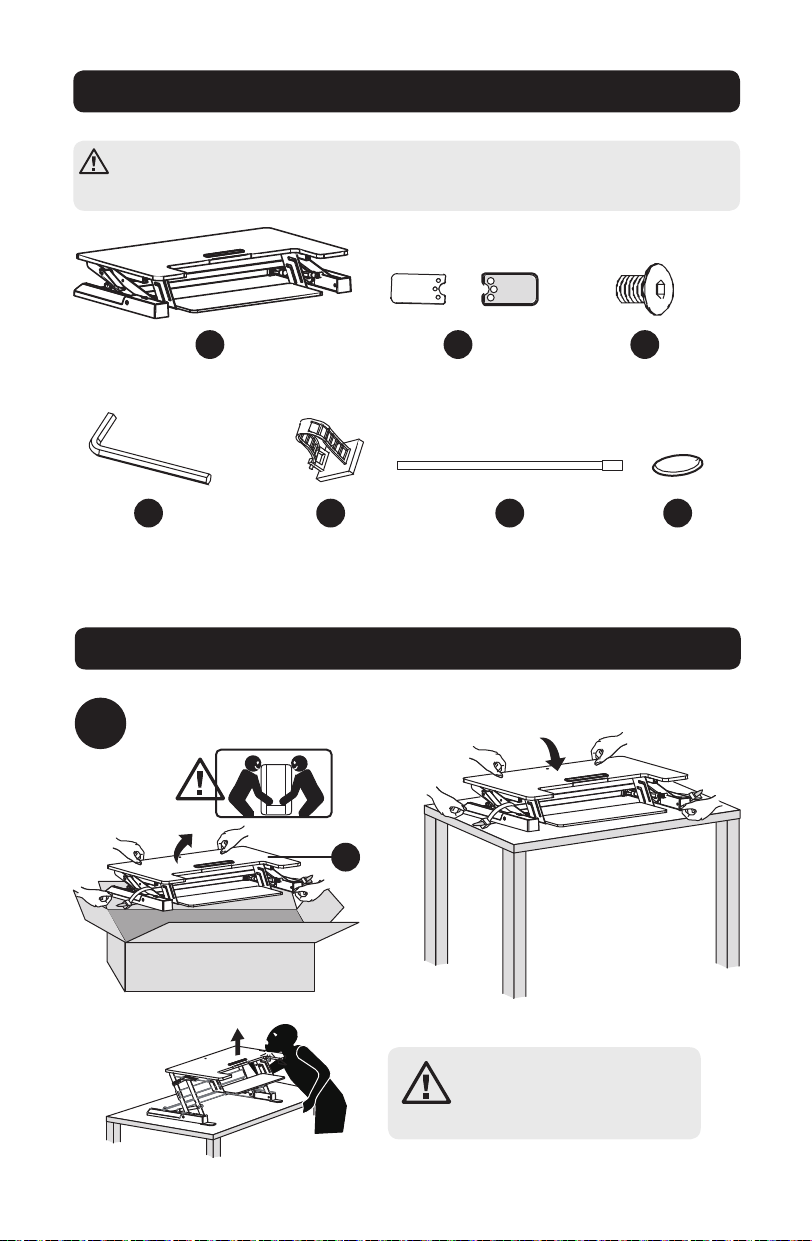
Перечень комплектации
ВНИМАНИЕ! Перед началом установки убедитесь в том, что вами получены все
детали согласно перечню комплектации. В случае отсутствия или повреждения
каких-либо деталей обратитесь за помощью на страницу www.tripplite.com/support.
Сборка
1
Рабочая станция
(1 шт.)
Шестигранный
ключ на 4 мм
(1 шт.)
Кабельный зажим
(1 шт.)
Кабельная стяжка
(2 шт.)
Войлочные
подкладки
(4 шт.)
Монтажные опоры
(2 шт.)
Шестигранный винт
4 мм
(6 шт.)
Извлеките содержимое упаковки.
A
D E F G
B C
A
17-06-252-933703.indb 26 7/3/2017 12:16:51 PM
27
Сборка
2
2
A
B
x6x2 x4
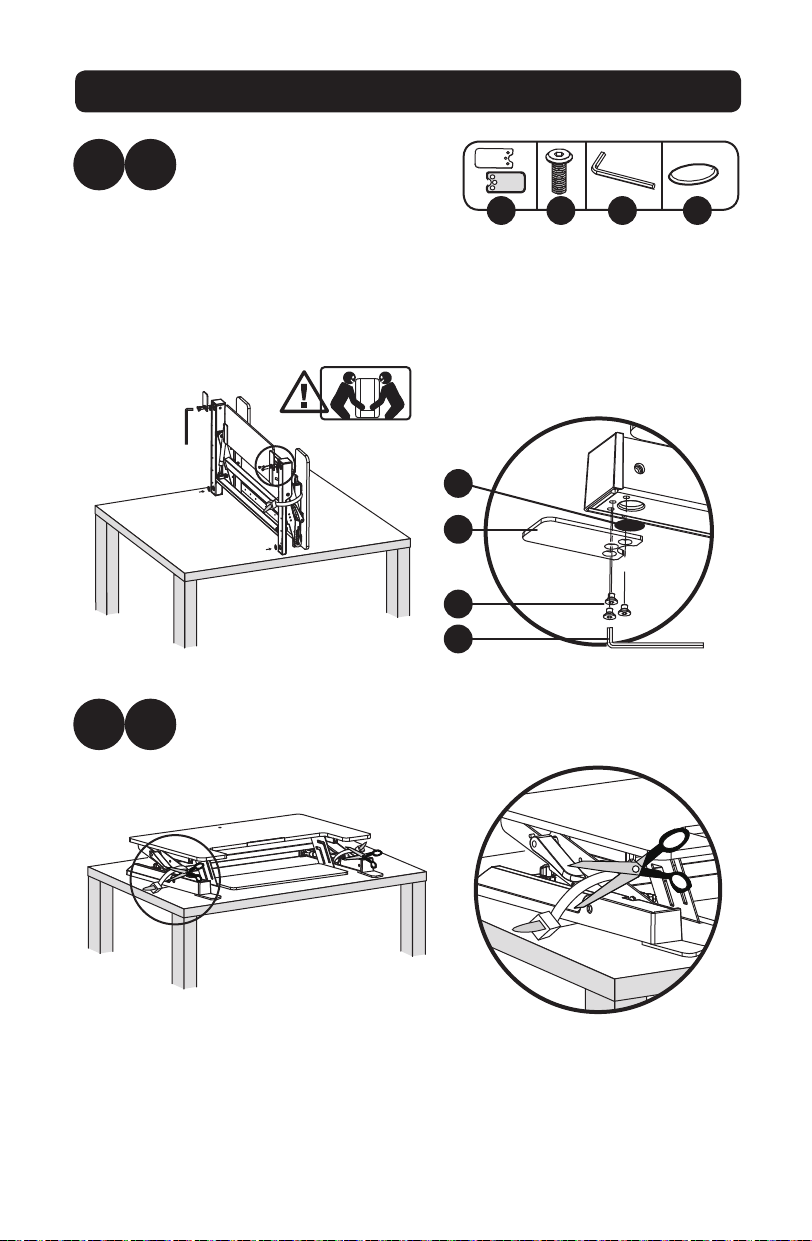
С помощью ножниц или другого острого инструмента разрежьте стяжки,
фиксирующие рабочую станцию.
Переверните рабочую станцию
на тыльную сторону таким
образом, чтобы она оказалась
в вертикальном положении.
Для улучшения устойчивости
и сцепления установите
шайбы, монтажные опоры и
шестигранные винты. Закрепите
указанную оснастку с помощью
шестигранного ключа на 4 мм.
B C D G
B
C
D
G
17-06-252-933703.indb 27 7/3/2017 12:16:51 PM
28
Сборка
3
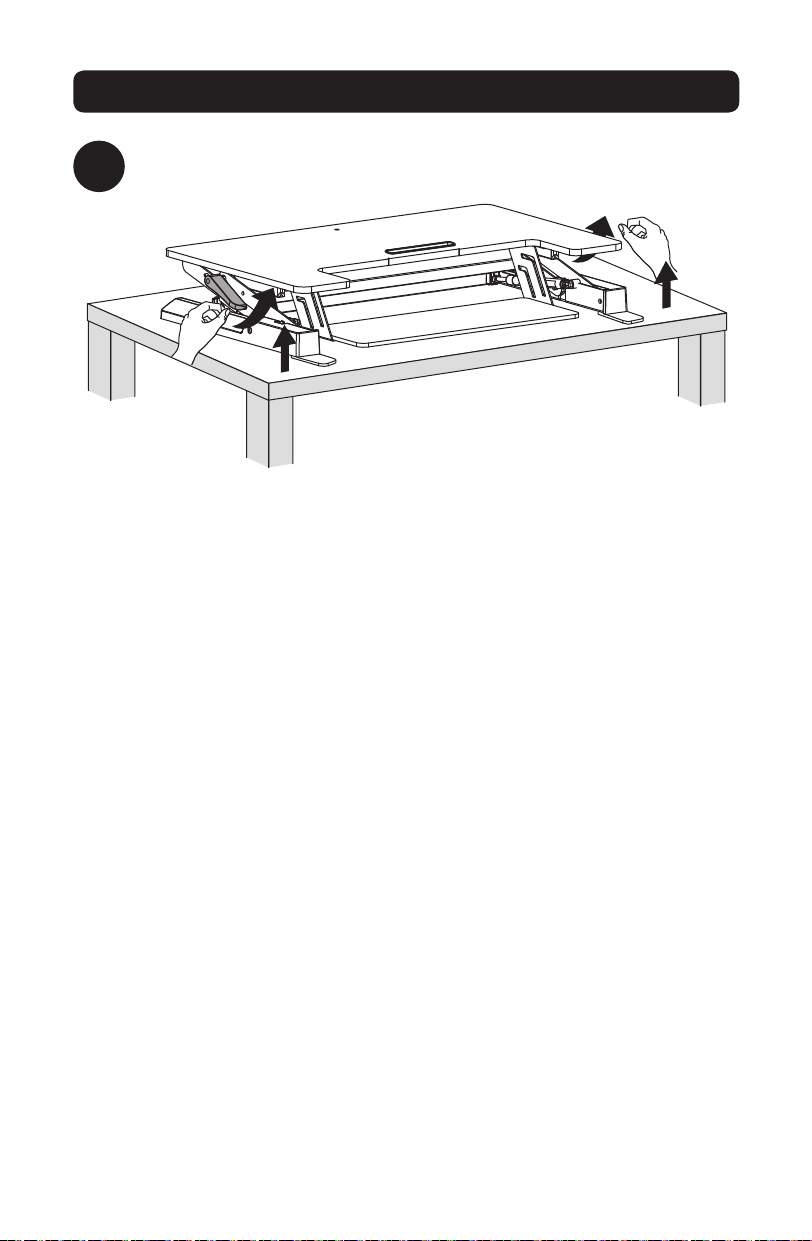
Нажмите на обе рукоятки рабочей станции для ее перемещения вверх или
вниз.
17-06-252-933703.indb 28 7/3/2017 12:16:51 PM
29
Сборка
4
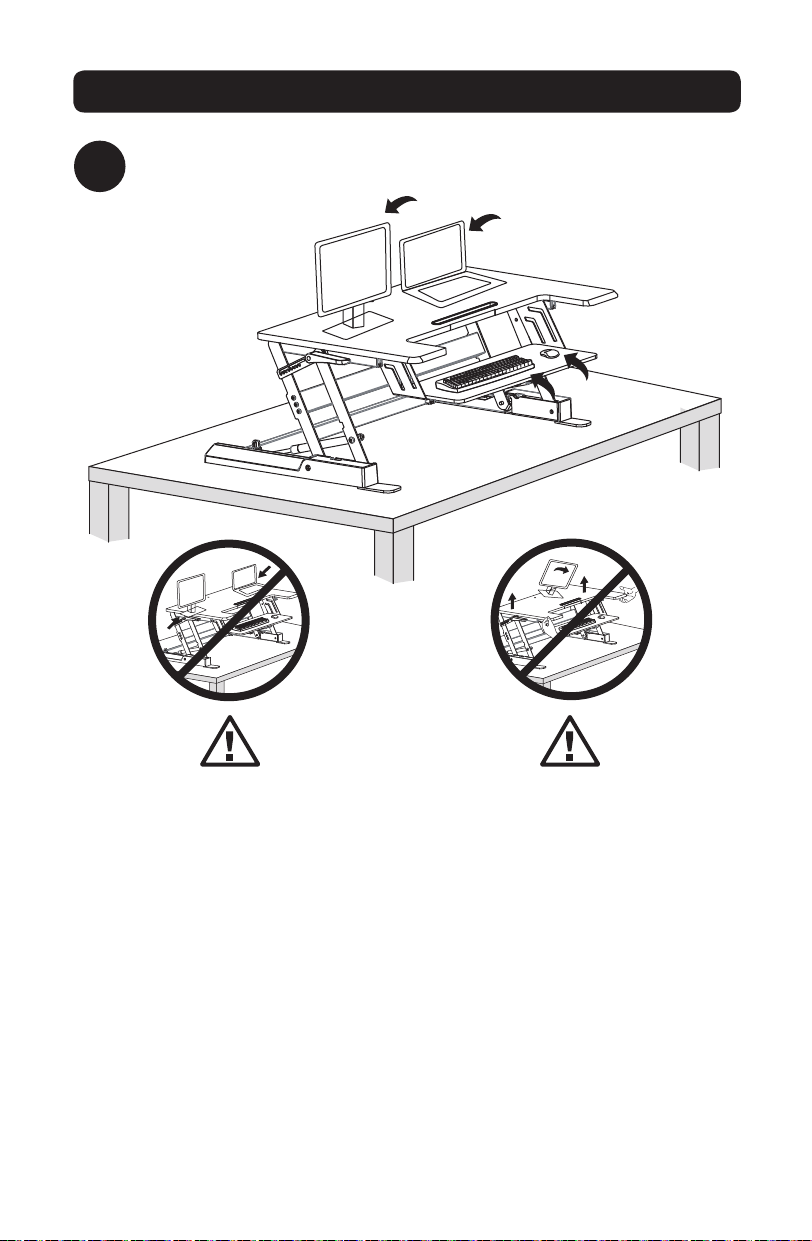
Установите мониторы, клавиатуру и/или портативные компьютеры на рабочую
станцию.
Мониторы и портативные
компьютеры должны прочно
держаться в центре верхней
поверхности. Свешивание любой
детали оборудования через край
может причинить существенный
материальный ущерб и/или вред
здоровью людей.
Поднимать установку следует
медленно. При слишком быстром
подъеме установки возможна
потеря устойчивости с причинением
материального ущерба и/или вреда
здоровью людей.
17-06-252-933703.indb 29 7/3/2017 12:16:52 PM
30
Сборка
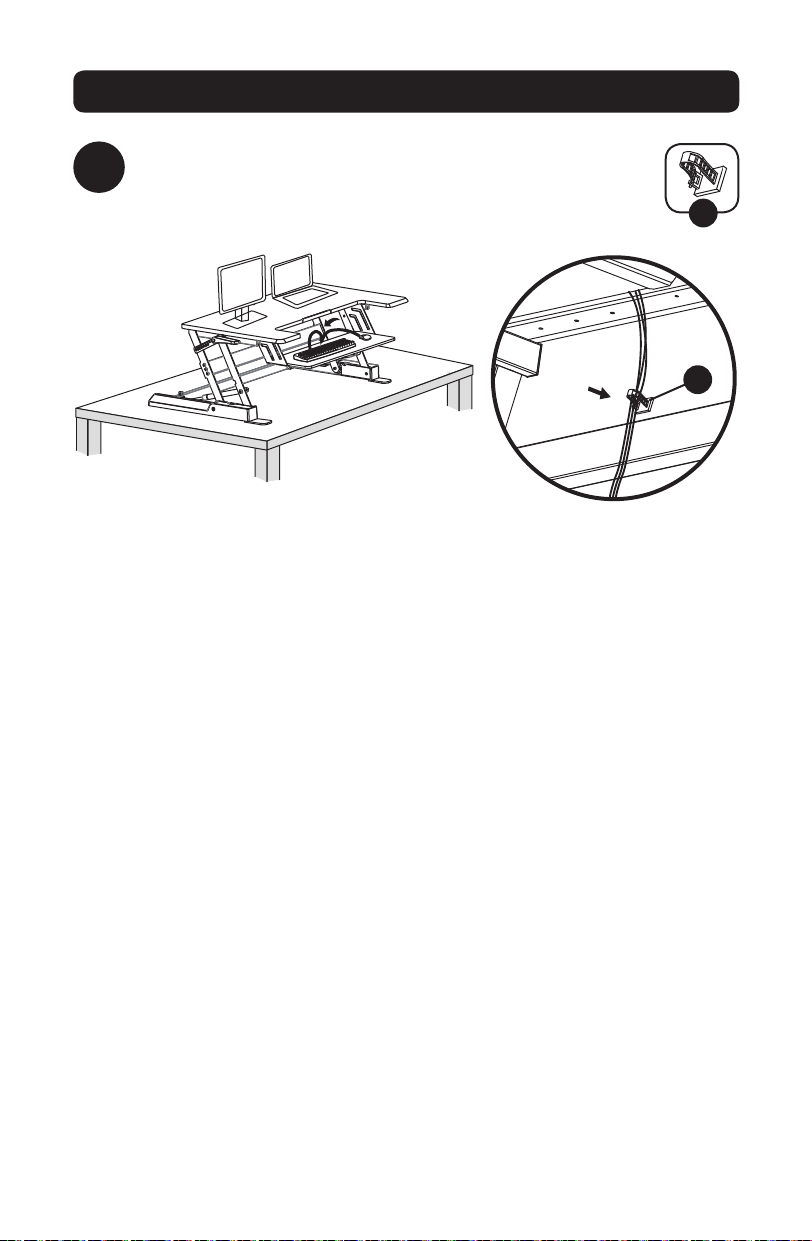
5
Прикрепите кабельный зажим с тыльной стороны лотка для
клавиатуры. При необходимости протяните кабели клавиатуры и
мыши через зажим.
E
E
17-06-252-933703.indb 30 7/3/2017 12:16:52 PM
31
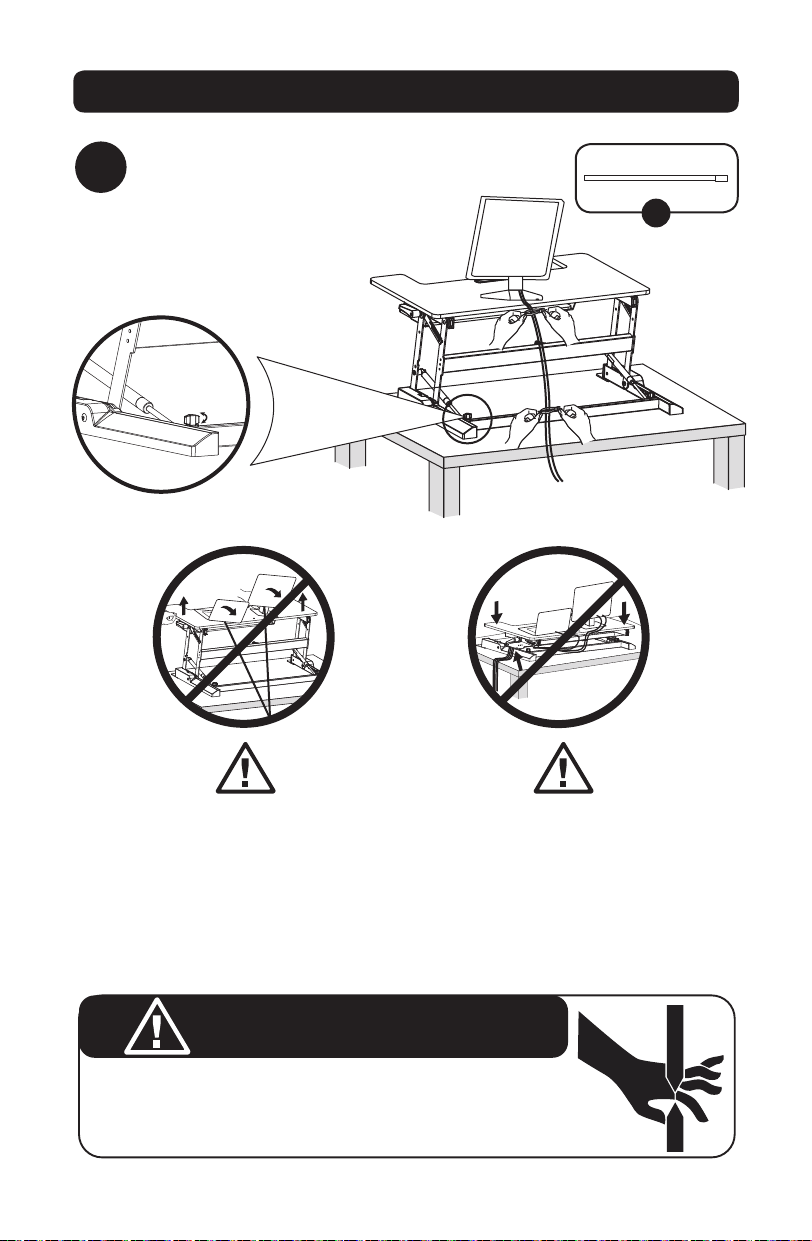
Сборка
6
Соберите кабели в пучок и оптимизируйте их
размещение с помощью кабельных стяжек.
F
Кабель должен иметь провисание,
обеспечивающее возможность
вертикального перемещения
установки на всю длину (38
см). Игнорирование данного
предупреждения может нанести
существенный материальный ущерб
и/или вред здоровью людей.
ОПАСНОСТЬ ЗАЩЕМЛЕНИЯ
НЕ кладите руки на опоры или рядом с ними. При подъеме и опускании
рабочей поверхности возникает опасность защемления. Несоблюдение этих
указаний может нанести существенный вред здоровью людей.
Если защелка должным образом
не зафиксировалась в монтажном
отверстии, поверните боковую
регулировочную головку по часовой
стрелке или против часовой стрелки.
Во избежание опасности
защемления кабелей необходимо
соблюдать указания по прокладке
кабелей, изложенные в настоящем
руководстве. Несоблюдение
этих указаний может нанести
существенный материальный ущерб
и/или вред здоровью людей.
ВНИМАНИЕ!
17-06-252-933703.indb 31 7/3/2017 12:16:52 PM

32
Регистрация гарантии
Условия 5-летней ограниченной гарантии
Продавец гарантирует отсутствие изначальных дефектов материала или изготовления в течение 5 лет с момента первой покупки
данного изделия при условии его использования в соответствии со всеми применимыми к нему указаниями. В случае проявления
каких-либо дефектов материала или изготовления в течение указанного периода Продавец осуществляет ремонт или замену
данного изделия исключительно по своему усмотрению.
ДЕЙСТВИЕ НАСТОЯЩЕЙ ГАРАНТИИ НЕ РАСПРОСТРАНЯЕТСЯ НА СЛУЧАИ ЕСТЕСТВЕННОГО ИЗНОСА ИЛИ ПОВРЕЖДЕНИЯ
В РЕЗУЛЬТАТЕ АВАРИИ, НЕНАДЛЕЖАЩЕГО ИСПОЛЬЗОВАНИЯ, НАРУШЕНИЯ ПРАВИЛ ЭКСПЛУАТАЦИИ ИЛИ ХАЛАТНОСТИ.
ПРОДАВЕЦ НЕ ПРЕДОСТАВЛЯЕТ НИКАКИХ ЯВНО ВЫРАЖЕННЫХ ГАРАНТИЙ ЗА ИСКЛЮЧЕНИЕМ ПРЯМО ИЗЛОЖЕННОЙ
В НАСТОЯЩЕМ ДОКУМЕНТЕ. ЗА ИСКЛЮЧЕНИЕМ СЛУЧАЕВ, ЗАПРЕЩЕННЫХ ДЕЙСТВУЮЩИМ ЗАКОНОДАТЕЛЬСТВОМ,
ВСЕ ПОДРАЗУМЕВАЕМЫЕ ГАРАНТИИ, ВКЛЮЧАЯ ВСЕ ГАРАНТИИ ПРИГОДНОСТИ ДЛЯ ПРОДАЖИ ИЛИ ИСПОЛЬЗОВАНИЯ
ПО НАЗНАЧЕНИЮ, ОГРАНИЧЕНЫ ПО ПРОДОЛЖИТЕЛЬНОСТИ ДЕЙСТВИЯ ВЫШЕУКАЗАННЫМ ГАРАНТИЙНЫМ СРОКОМ;
КРОМЕ ТОГО, ИЗ НАСТОЯЩЕЙ ГАРАНТИИ ЯВНЫМ ОБРАЗОМ ИСКЛЮЧАЮТСЯ ВСЕ ПОБОЧНЫЕ, СЛУЧАЙНЫЕ И КОСВЕННЫЕ
УБЫТКИ. (В некоторых штатах не допускается введение ограничений на продолжительность действия тех или иных
подразумеваемых гарантий, а в некоторых - исключение или ограничение размера побочных или косвенных убытков. В этих
случаях вышеизложенные ограничения или исключения могут на вас не распространяться. Настоящая гарантия предоставляет
вам конкретные юридические права, а набор других ваших прав может быть различным в зависимости от юрисдикции).
ВНИМАНИЕ! До начала использования данного устройства пользователь должен убедиться в том, что оно является пригодным,
соответствующим или безопасным для предполагаемого применения. В связи с большим разнообразием конкретных применений
производитель не дает каких-либо заверений или гарантий относительно пригодности данных изделий для какого-либо
конкретного применения или их соответствия каким-либо конкретным требованиям.
Компания Tripp Lite постоянно совершенствует свою продукцию. В связи с этим возможно изменение технических характеристик
без предварительного уведомления.
1111 W. 35th Street, Chicago, IL 60609 USA • www.tripplite.com/support
17-06-252-933703.indb 32 7/3/2017 12:16:53 PM
33
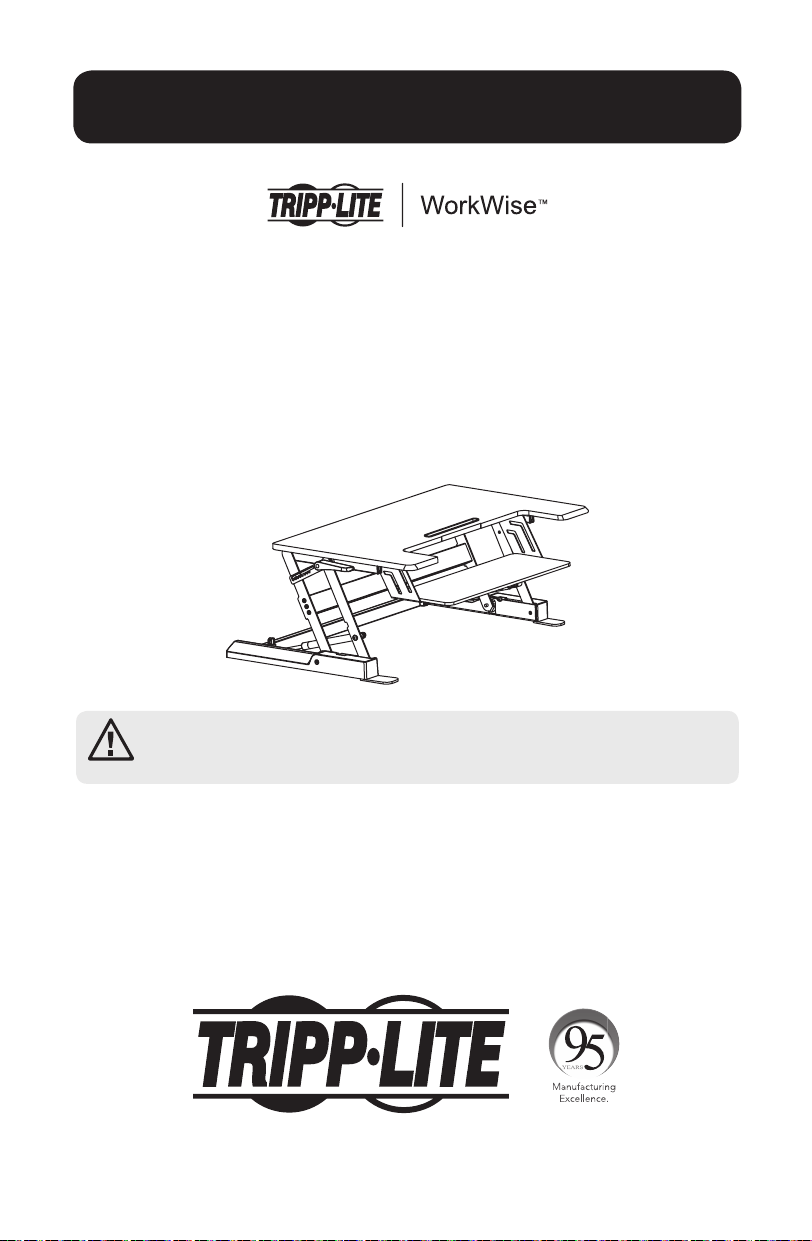
Bedienungsanleitung
Höhenverstellbare
Sitz-Steh-Arbeitsstation
Modell: WWSSD3622
English 1 • Espanol 9 • Français 17 • Русский 25
ACHTUNG: DAS ANGEGEBENE MAXIMALGEWICHT DARF NICHT ÜBERSCHRITTEN
WERDEN. (15 kg). EINE ÜBERSCHREITUNG KANN ZU SCHWEREN
VERLETZUNGEN UND ERHEBLICHEN SACHSCHÄDEN FÜHREN!
1111 W. 35th Street, Chicago, IL 60609 USA • www.tripplite.com/support
Copyright © 2017 Tripp Lite. Alle Rechte vorbehalten.
17-06-252-933703.indb 33 7/3/2017 12:16:53 PM
34
WARNUNG: Gefährdung durch
Stoß! Das bewegliche Teil kann
Körperteile einklemmen oder
schneiden.
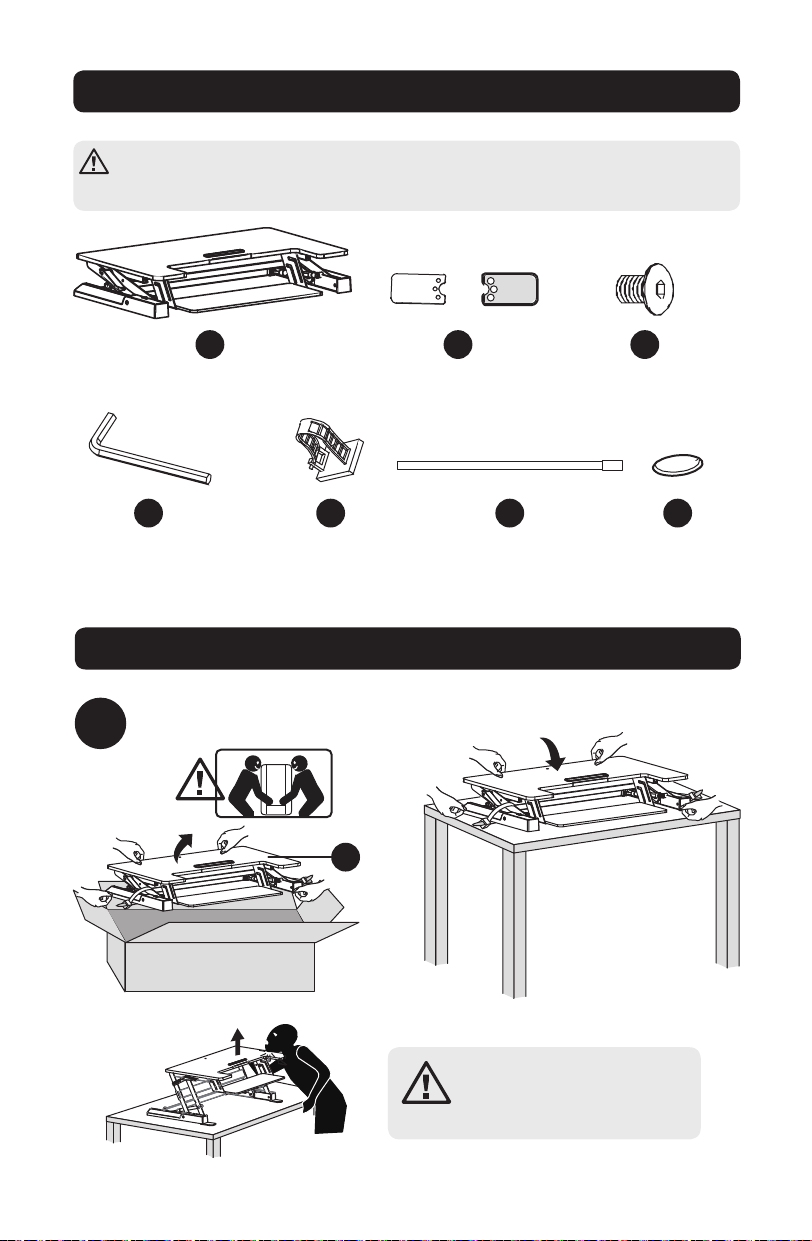
Komponentenliste
WICHTIG: Vergewissern Sie sich, dass alle in der Komponentenliste aufgeführten
Teile vorhanden sind, ehe Sie mit der Installation beginnen. Sollten Teile beschädigt
oder nicht vorhanden sein, besuchen Sie bitte www.tripplite.com/support.
Montage
1
Arbeitsstation
x1
4 mm
Inbusschlüssel
x1
Kabelführungsklammer
x1
Kabelbinder
x2
Filzunterlagen
x4
Befestigungsfüße
x2
4 mm
Sechskantschraube
x6
Nehmen Sie die Teile aus der Verpackung.
A
D E F G
B C
A
17-06-252-933703.indb 34 7/3/2017 12:16:53 PM
35
Montage
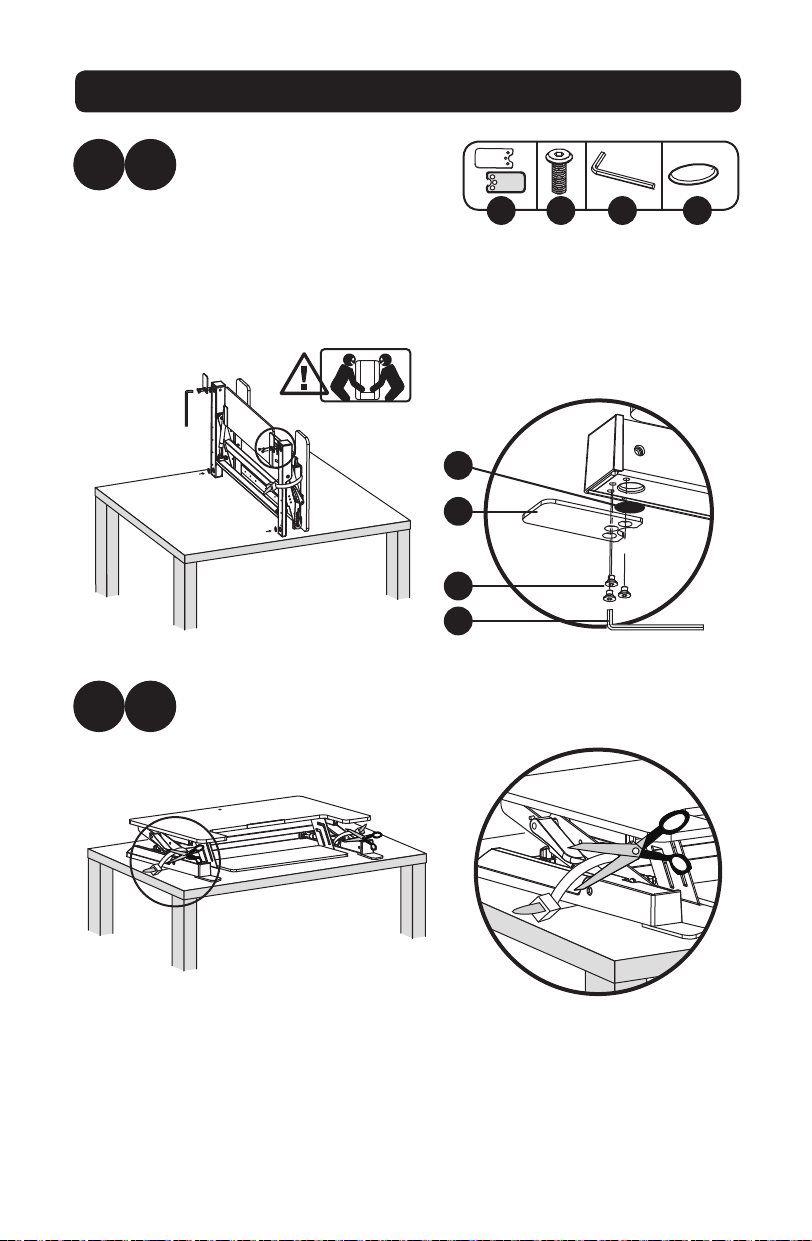
2
2
A
B
x6x2 x4
Schneiden Sie die Kabelbinder an der Arbeitsstation mit einer Schere
oder einem scharfen Gegenstand durch.
Stellen Sie die Arbeitsstation
aufrecht auf die Rückseite. Um
die Stabilität und Bodenhaftung
zu verbessern, bringen Sie die
Beilagscheiben, Befestigungsfüße
und Sechskantschrauben
an. Befestigen Sie die Teile
mit dem beiliegenden 4 mm
Inbusschlüssel.
B C D G
B
C
D
G
17-06-252-933703.indb 35 7/3/2017 12:16:53 PM
36
Montage
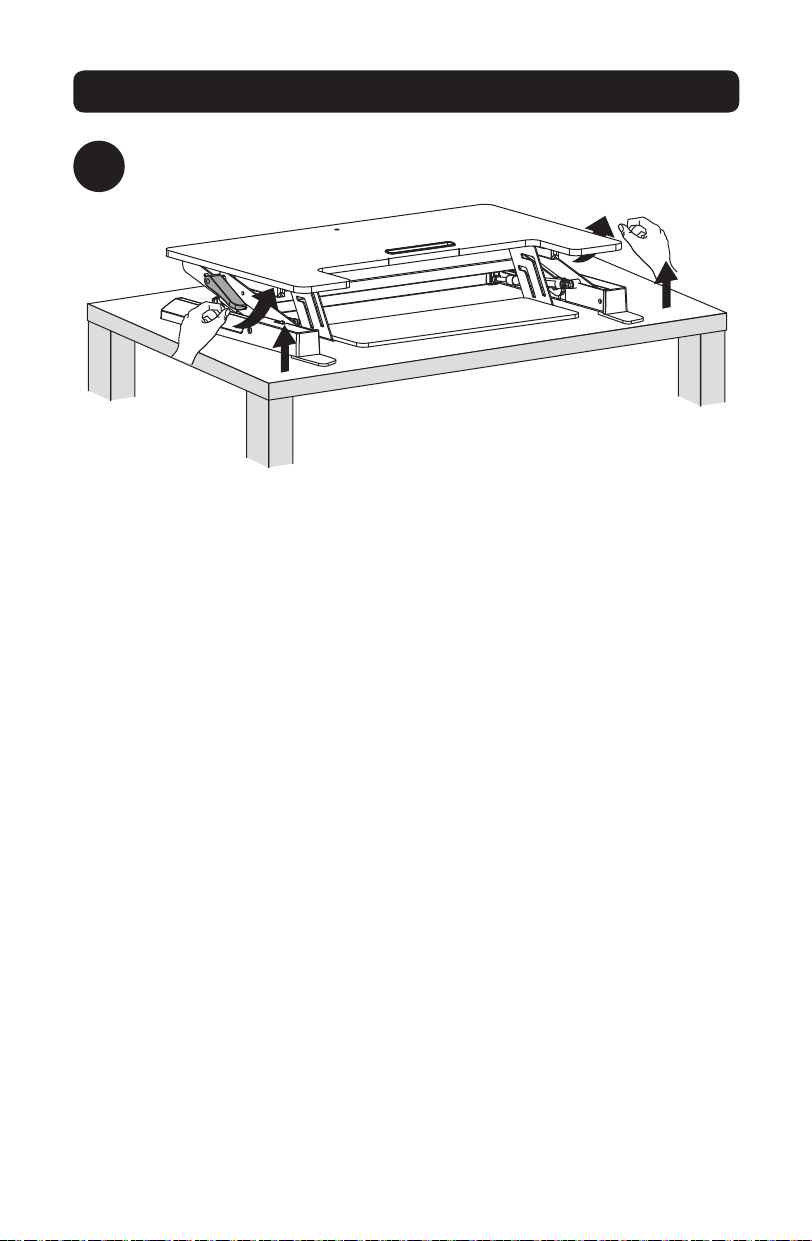
3
Drücken Sie beide Griffe an der Arbeitsstation, um sie anzuheben oder zu
senken.
17-06-252-933703.indb 36 7/3/2017 12:16:54 PM
37
Montage
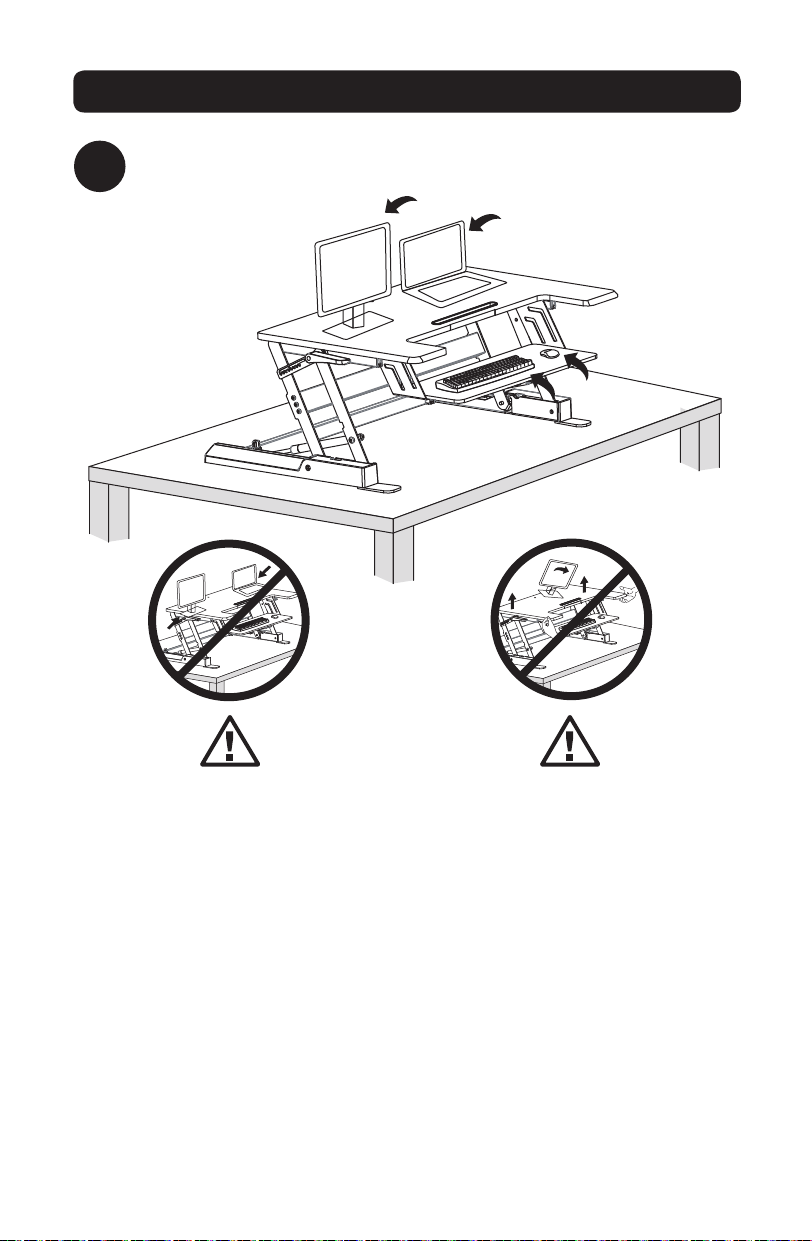
4
Stellen Sie Monitore, Tastaturen und/oder Laptops auf die Arbeitsstation.
Positionieren Sie Monitore und
Laptops in der Mitte der Oberfläche.
Das Vorstehen eines Teils des Geräts
kann zu Instabilität und Sach- und/
oder Personenschäden führen.
Die Arbeitsstation muss langsam
angehoben werden. Das zu schnelle
Anheben der Arbeitsstation kann zu
Instabilität und als Folge davon zu
Sach- und/oder Personenschäden
führen.
17-06-252-933703.indb 37 7/3/2017 12:16:54 PM
38
Montage
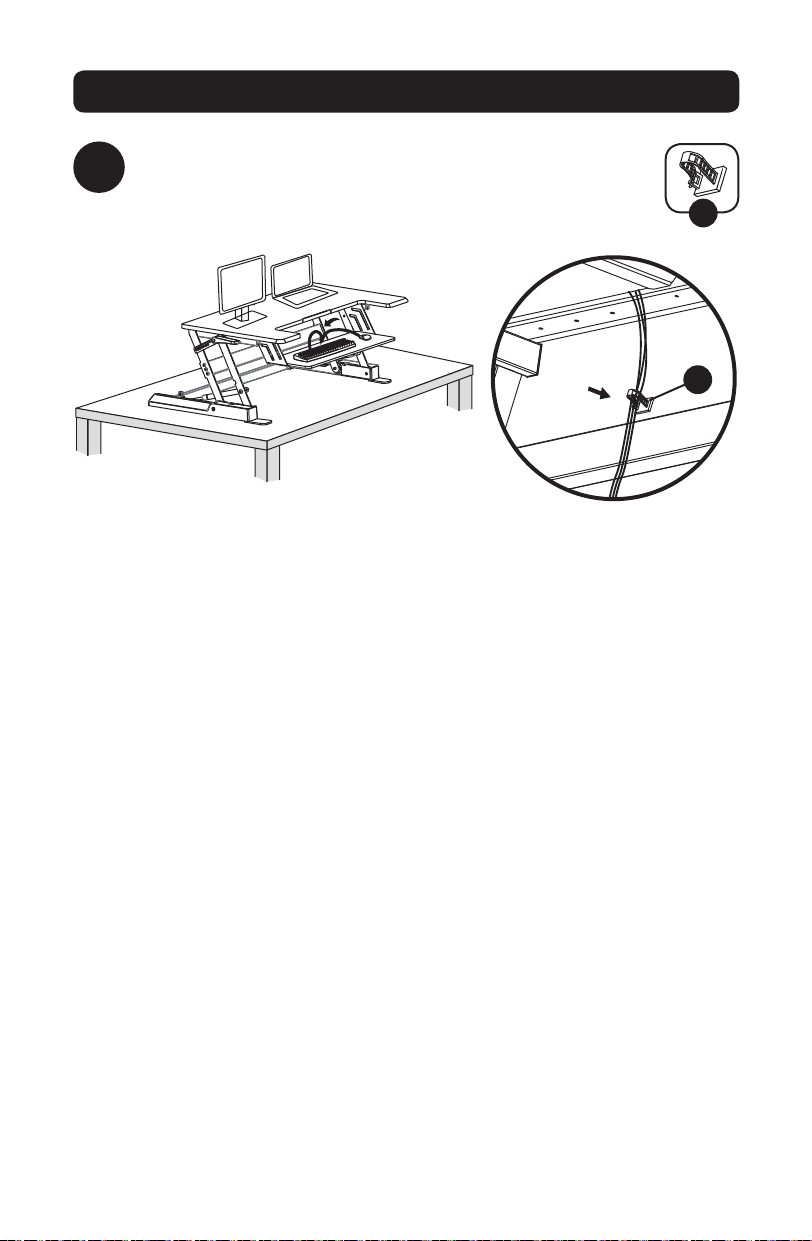
5
Befestigen Sie die Kabelführungsklammer an der Rückseite
der Tastaturablage. Leiten Sie die Tastatur- und Mauskabel
gegebenfalls durch die Klammer.
E
E
17-06-252-933703.indb 38 7/3/2017 12:16:54 PM
39
Montage
6
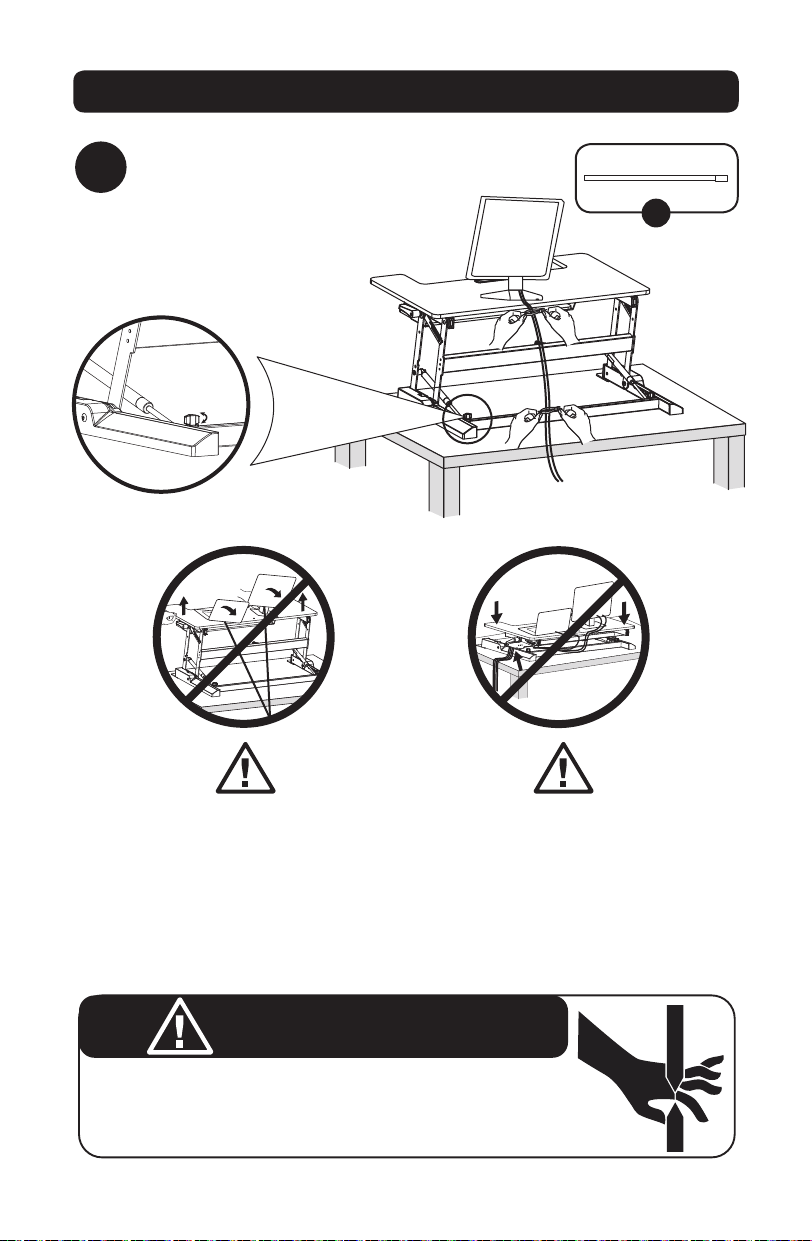
Bündeln und organisieren Sie die Gerätekabel mit den
beiliegenden Kabelbindern.
F
Lassen Sie das Kabel schlaff
genug, um die volle vertikale
Bewegung zuzulassen (38 cm).
Die Nichtbeachtung dieser
Warnung kann zu Sach- und/oder
Personenschäden führen.
EINKLEMMGEFAHR
Positionieren Sie die Hände NICHT auf oder in der Nähe der Halteschienen. Durch
das Anheben und Senken der Arbeitsfläche werden Einklemmstellen geschaffen.
Die Nichtbeachtung dieser Anweisungen kann zu schweren Verletzungen führen.
Drehen Sie den Knopf an der
Seite nach rechts oder links,
wenn der Riegel nicht richtig in
die Kerbe einrastet.
Folgen Sie den Anweisungen
für die Kabelführung in diesem
Handbuch, um zu verhindern, dass
die Kabel eingeklemmt werden. Die
Nichtbeachtung dieser Anweisungen
kann zu Geräte- und/oder
Personenschäden führen.
WARNUNG
17-06-252-933703.indb 39 7/3/2017 12:16:55 PM

40
Garantieanmeldung
5-Jahres-Garantie
Der Verkäufer garantiert für einen Zeitraum von fünf Jahren ab Kaufdatum, dass das Produkt weder Material- noch
Herstellungsfehler aufweist, wenn es gemäß aller zutreffenden Anweisungen verwendet wird. Wenn das Produkt in diesem
Zeitraum Material- oder Herstellungsfehler aufweist, kann der Verkäufer diese Fehler nach eigenem Ermessen beheben oder das
Produkt ersetzen.
DIE NORMALE ABNUTZUNG ODER BESCHÄDIGUNGEN AUFGRUND VON UNFÄLLEN, MISSBRAUCH ODER UNTERLASSUNG
WERDEN VON DIESER GARANTIE NICHT GEDECKT. AUSSER DEN NACHSTEHEND AUSDRÜCKLICH DARGELEGTEN
GARANTIEBEDINGUNGEN ÜBERNIMMT DER VERKÄUFER KEINERLEI GARANTIE. AUSSER WENN VON DEN GÜLTIGEN GESETZEN
UNTERSAGT, SIND ALLE IMPLIZIERTEN GARANTIEN, EINSCHLIESSLICH ALLE GARANTIEN FÜR DIE GEBRAUCHSTAUGLICHKEIT
ODER EIGNUNG AUF DIE OBEN FESTGELEGTE GARANTIEDAUER BESCHRÄNKT. DIESE GARANTIE SCHLIESST AUSDRÜCKLICH
ALLE FOLGESCHÄDEN UND BEILÄUFIG ENTSTANDENEN SCHÄDEN AUS. (Da einige Länder den Ausschluss oder die Beschränkung
von Folgeschäden oder beiläufig entstandenen Schäden sowie den Ausschluss von implizierten Garantien oder die zeitliche
Beschränkung einer implizierten Garantie untersagen, sind die oben genannten Beschränkungen für Sie möglicherweise nicht
zutreffend. Diese Garantie gibt Ihnen bestimmte Rechte. Sie haben jedoch möglicherweise andere Rechte, die abhängig von der
Gerichtsbarkeit variieren können.)
WARNUNG: Der Benutzer muss vor der Verwendung überprüfen, ob das Gerät für den beabsichtigten Zweck geeignet und
angemessen ist und ob der Einsatz sicher ist. Da die Anwendungen variieren können, übernimmt der Hersteller keine Garantie
bezüglich der Eignung dieser Geräte für einen bestimmten Verwendungszweck.
Tripp Lite hat den Grundsatz, sich kontinuierlich zu verbessern. Spezifikationen können ohne Ankündigung geändert werden.
1111 W. 35th Street, Chicago, IL 60609 USA • www.tripplite.com/support
17-06-252 93-3703_RevA
17-06-252-933703.indb 40 7/3/2017 12:16:55 PM