en Safety
2
Futher information and explanations are available online:
Table of contents
INFORMATION FOR USE
1 Safety...................................................................2
2 Preventing material damage ..............................5
3 Environmental protection and saving en-
ergy ......................................................................6
4 Familiarising yourself with your appliance .......6
5 Accessories.........................................................9
6 Before using for the first time ..........................11
7 Basic operation .................................................13
8 Steam.................................................................14
9 Time-setting options.........................................18
10 Meat probe.........................................................19
11 Baking and roasting assistant .........................21
12 Steam programs................................................21
13 Childproof lock..................................................22
14 Rapid heat-up ....................................................23
15 Sabbath mode ...................................................24
16 Basic settings....................................................24
17 Cleaning and servicing.....................................25
18 Cleaning functions............................................27
19 Rails ...................................................................30
20 Appliance door..................................................30
21 Troubleshooting................................................35
22 Disposal.............................................................38
23 Customer Service..............................................38
24 How it works......................................................38
25 INSTALLATION INSTRUCTIONS ......................49
25.1 General installation instructions....................
..49
1 Safety
Observe the following safety instructions.
1.1 General information
¡ Read this instruction manual carefully.
¡ Keep the instruction manual and the
product information safe for future refer-
ence or for the next owner.
¡ Do not connect the appliance if it has been
damaged in transit.
1.2 Intended use
This appliance is designed only to be built
into kitchen units. Read the special installation
instructions.
Only a licensed professional may connect ap-
pliances without plugs. Damage caused by in-
correct connection is not covered under the
warranty.
Only use this appliance:
¡ To prepare meals and drinks.
¡ In private households and in enclosed
spaces in a domestic environment.
¡ Up to an altitude of max. 2000m above
sea level.
1.3 Restriction on user group
This appliance may be used by children aged
8 or over and by people who have reduced
physical, sensory or mental abilities or inad-
equate experience and/or knowledge,
provided that they are supervised or have
been instructed on how to use the appliance
safely and have understood the resulting
dangers.
Do not let children play with the appliance.
Children must not perform cleaning or user
maintenance unless they are at least 15 years
old and are being supervised.
Keep children under the age of 8 years away
from the appliance and power cable.

Safety en
3
1.4 Safe use
Always place accessories in the cooking com-
partment the right way round.
→"Accessories", Page9
WARNING‒Risk of fire!
Combustible objects that are left in the cook-
ing compartment may catch fire.
▶ Never store combustible objects in the
cooking compartment.
▶ If smoke is emitted, the appliance must be
switched off or the plug must be pulled out
and the door must be held closed in order
to stifle any flames.
Loose food remnants, fat and meat juices
may catch fire.
▶ Before using the appliance, remove the
worst of the food residues and remnants
from the cooking compartment, heating ele-
ments and accessories.
Opening the appliance door creates a
draught. Greaseproof paper may come into
contact with the heating element and catch
fire.
▶ Never place greaseproof paper loosely
over accessories when preheating the ap-
pliance and while cooking.
▶ Always cut greaseproof paper to size and
use a plate or baking tin to hold it down.
WARNING‒Risk of burns!
The appliance and its parts that can be
touched become hot during use.
▶ Caution should be exercised here in order
to avoid touching heating elements.
▶ Young children under 8 years of age must
be kept away from the appliance.
Accessories and cookware get very hot.
▶ Always use oven gloves to remove ac-
cessories or cookware from the cooking
compartment.
When the cooking compartment is hot, any al-
coholic vapours inside may catch fire. The ap-
pliance door may spring open. Hot steam and
jets of flame may escape.
▶ Only use small quantities of drinks with a
high alcohol content in food.
▶ Do not heat spirits (≥ 15% vol.) when undi-
luted (e.g. for marinating or pouring over
food).
▶ Open the appliance door carefully.
The telescopic shelves become hot when the
appliance is in use.
▶ Allow hot telescopic shelves to cool down
before touching them.
▶ Only touch hot telescopic shelves with
oven gloves.
WARNING‒Risk of scalding!
The accessible parts of the appliance become
hot during operation.
▶ Never touch these hot parts.
▶ Keep children at a safe distance.
Hot steam may escape when you open the
appliance door. Steam may not be visible, de-
pending on the temperature.
▶ Open the appliance door carefully.
▶ Keep children at a safe distance.
If there is water in the cooking compartment
when it is hot, this may create hot steam.
▶ Never pour water into the cooking compart-
ment when the cooking compartment is
hot.
WARNING‒Risk of injury!
Scratched glass in the appliance door may
develop into a crack.
▶ Do not use any harsh or abrasive cleaners
or sharp metal scrapers to clean the glass
on the oven door, as they may scratch the
surface.
The appliance and its parts that can be
touched may have sharp edges.
▶ Take care when handling and cleaning
them.
▶ If possible, wear protective gloves.
The hinges on the appliance door move when
the door is opened and closed, which could
trap your fingers.
▶ Keep your hands away from the hinges.
Components inside the appliance door may
have sharp edges.
▶ Wear protective gloves.
WARNING‒Risk of electric shock!
Incorrect repairs are dangerous.
▶ Repairs to the appliance should only be
carried out by trained specialist staff.
▶ Only use genuine spare parts when repair-
ing the appliance.
▶ If the power cord of this appliance is dam-
aged, it must be replaced by trained spe-
cialist staff.

en Safety
4
If the insulation of the power cord is dam-
aged, this is dangerous.
▶ Never let the power cord come into contact
with hot appliance parts or heat sources.
▶ Never let the power cord come into contact
with sharp points or edges.
▶ Never kink, crush or modify the power
cord.
An ingress of moisture can cause an electric
shock.
▶ Do not use steam- or high-pressure clean-
ers to clean the appliance.
If the appliance or the power cord is dam-
aged, this is dangerous.
▶ Never operate a damaged appliance.
▶ Never pull on the power cord to unplug the
appliance. Always unplug the appliance at
the mains.
▶ If the appliance or the power cord is dam-
aged, immediately unplug the power cord
or switch off the fuse in the fuse box.
▶ Call customer services. →Page38
WARNING‒Danger: Magnetism!
Permanent magnets are used in the control
panel or in the controls. These may affect
electronic implants, e.g. heart pacemakers or
insulin pumps.
▶ Wearers of electronic implants must stay at
least 10 cm away from the control panel.
WARNING‒Risk of suffocation!
Children may put packaging material over
their heads or wrap themselves up in it and
suffocate.
▶ Keep packaging material away from chil-
dren.
▶ Do not let children play with packaging ma-
terial.
Children may breathe in or swallow small
parts, causing them to suffocate.
▶ Keep small parts away from children.
▶ Do not let children play with small parts.
1.5 Steam
Follow these instructions when using a steam
function.
WARNING‒Risk of scalding!
The water in the water tank may become very
hot if you operate the appliance for long peri-
ods.
▶ Always empty the water tank after using the
steam function.
Hot steam is generated in the cooking com-
partment.
▶ Do not reach into the cooking compartment
when using steam.
Hot liquid may spill over the sides of the ac-
cessory when it is removed from the cooking
compartment.
▶ Remove hot accessories with care and al-
ways wear oven gloves.
WARNING‒Risk of fire!
Due to the hot surfaces, vapours from flam-
mable liquids may catch fire in the cooking
compartment (explosion). The appliance door
may spring open. Hot steam and jets of flame
may escape.
▶ Do not pour flammable liquids (e.g. alco-
holic drinks) into the water tank.
▶ Only fill the water tank with water or with
the descaling solution we have recommen-
ded.
1.6 Meat probe
WARNING‒Risk of electric shock!
Using the wrong meat probe could damage
the insulation.
▶ Only use the meat probe for this specific
appliance.
1.7 Cleaning function
WARNING‒Risk of burns!
The outside of the appliance gets very hot
when the cleaning function is in progress.
▶ Never touch the appliance door.
▶ Allow the appliance to cool down.
▶ Keep children at a safe distance.

Preventing material damage en
5
2 Preventing material damage
2.1 General
ATTENTION!
Alcoholic vapours may catch fire in the hot cooking
compartment and cause permanent damage to the ap-
pliance. The appliance door may spring open due to
an explosion and it may fall off. The door panels may
shatter and fragment. Due to the resulting negative
pressure, the cooking compartment may become con-
siderably deformed inwards.
▶ Do not heat spirits (≥ 15% vol.) when undiluted (e.g.
for marinating or pouring over food).
If there is water on the cooking compartment floor
when operating the appliance at temperatures above
120°C, this will damage the enamel.
▶ Do not use the appliance if there is water on the
cooking compartment floor.
▶ Wipe away any water on the cooking compartment
floor before operation.
Objects on the cooking compartment floor at over
50°C will cause heat to build up. The baking and
roasting times will no longer be correct and the enamel
will be damaged.
▶ Do not place any accessories, greaseproof paper or
foil of any kind on the cooking compartment floor.
▶ Only place cookware on the cooking compartment
floor if a temperature under 50°C has been set.
When the cooking compartment is hot, any water in-
side it will create steam. The change in temperature
may cause damage.
▶ Never pour water into the cooking compartment
when it is still hot.
▶ Never place cookware containing water on the
cooking compartment floor.
The prolonged presence of moisture in the cooking
compartment leads to corrosion.
▶ Allow the cooking compartment to dry after use.
▶ Do not keep moist food in the cooking compartment
for a long time with the door closed.
▶ Do not store food in the cooking compartment.
Leaving the appliance to cool down with the door open
will damage the front of neighbouring kitchen units over
time.
▶ Always allow the cooking compartment to cool
down with the door closed after cooking at high
temperatures.
▶ Take care not to trap anything in the appliance
door.
▶ Only leave the cooking compartment to dry with the
door open if a lot of moisture was produced during
operation.
Fruit juice dripping from the baking tray leaves stains
that cannot be removed.
▶ When baking very juicy fruit flans, do not pack too
much on the baking tray.
▶ If possible, use the deeper universal pan.
Using oven cleaner in a hot cooking compartment
damages the enamel.
▶ Never use oven cleaner in the cooking compartment
when it is still warm.
▶ Remove all food remnants from the cooking com-
partment and the appliance door before you next
heat up the appliance.
If the seal is very dirty, the appliance door will no
longer close properly during operation. This may dam-
age the front of adjacent kitchen units.
▶ Keep the seal clean at all times.
▶ Never operate the appliance if the seal is damaged
or missing.
Sitting or placing objects on the appliance door may
damage it.
▶ Do not place, hang or support objects on the appli-
ance door.
▶ Do not place cookware or accessories on the appli-
ance door.
With certain models, accessories may scratch the door
pane when closing the appliance door.
▶ Always push accessories fully into the cooking com-
partment.
2.2 Steam
Follow these instructions when using the steam func-
tion.
ATTENTION!
Silicone bakeware is not suitable for combined opera-
tion with steam.
▶ Cookware must be heat- and steam-resistant.
Using cookware with rust spots may cause corrosion in
the cooking compartment. Even the smallest spots of
rust can cause corrosion.
▶ Do not use cookware with rust spots.
Dripping liquids make the cooking compartment floor
dirty.
▶ When steaming with a perforated cooking container,
always place the baking tray, the universal pan or
the unperforated cooking container underneath. This
will catch any liquid that drips down.
Hot water in the water tank may damage the steam
system.
▶ Only fill the water tank with cold water.
If there is water on the cooking compartment floor
when operating the appliance at temperatures above
120°C, this will damage the enamel.
▶ Do not use the appliance if there is water on the
cooking compartment floor.
▶ Wipe away any water on the cooking compartment
floor before operation.
A lot of steam is produced during operation with the
types of steam heating. Condensate that collects in the
drip trough underneath the cooking compartment may
overflow and damage adjacent units.
▶ Do not open the appliance door, or open it as infre-
quently as possible, while the appliance is in opera-
tion.
If descaling solution comes into contact with the control
panel or other delicate surfaces, it will damage them.
▶ Remove descaling solution immediately with water.
Cleaning the water tank in the dishwasher will damage
it.
▶ Do not clean the water tank in the dishwasher.
▶ Clean the water tank with a soft cloth and standard
washing-up liquid.
en Environmental protection and saving energy
6
3 Environmental protection and saving energy
3.1 Disposing of packaging
The packaging materials are environmentally compat-
ible and can be recycled.
▶
Sort the individual components by type and dispose
of them separately.
3.2 Saving energy
If you follow these instructions, your appliance will use
less power.
Only preheat the appliance if the recipe or the recom-
mended settings tell you to do so.
¡
Not preheating the appliance can reduce the en-
ergy used by up to 20%.
Use dark-coloured, black-coated or enamelled baking
tins.
¡
These types of baking tin absorb the heat particu-
larly well.
Open the appliance door as little as possible during
operation.
¡
This maintains the temperature in the cooking com-
partment and eliminates the need for the appliance
to reheat.
When baking multiple dishes, do so in succession or
in parallel.
¡
The cooking compartment is heated after baking
the first dish. This reduces the baking time for the
second cake.
If the cooking time is relatively long, you can switch
the appliance off 10minutes before the cooking time
ends.
¡
There will be enough residual heat to finish cooking
the dish.
Remove any accessories that are not being used from
the cooking compartment.
¡
Accessories that are not being used do not need to
be heated.
Allow frozen food to defrost before cooking.
¡
This saves the energy that would otherwise be re-
quired to defrost it.
Note:
The appliance requires:
¡ A maximum of 1W in standby mode with the dis-
play switched on
¡ A maximum of 0.5W in standby mode with the dis-
play switched off
4 Familiarising yourself with your appliance
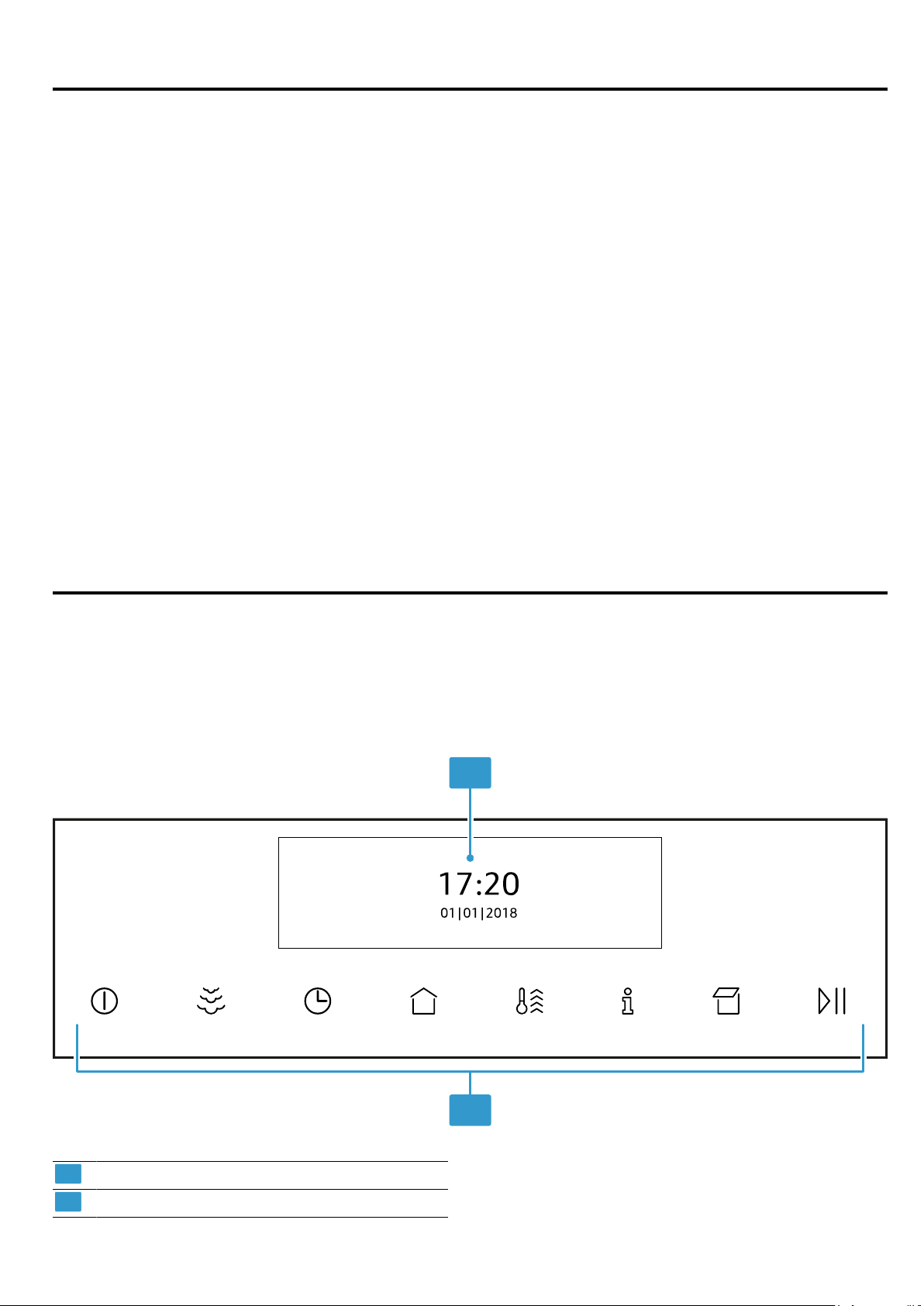
4.1 Control panel
You can use the control panel to configure all functions of your appliance and to obtain information about the operat-
ing status.
1
2
1
Display
2
Buttons
Familiarising yourself with your appliance en
7
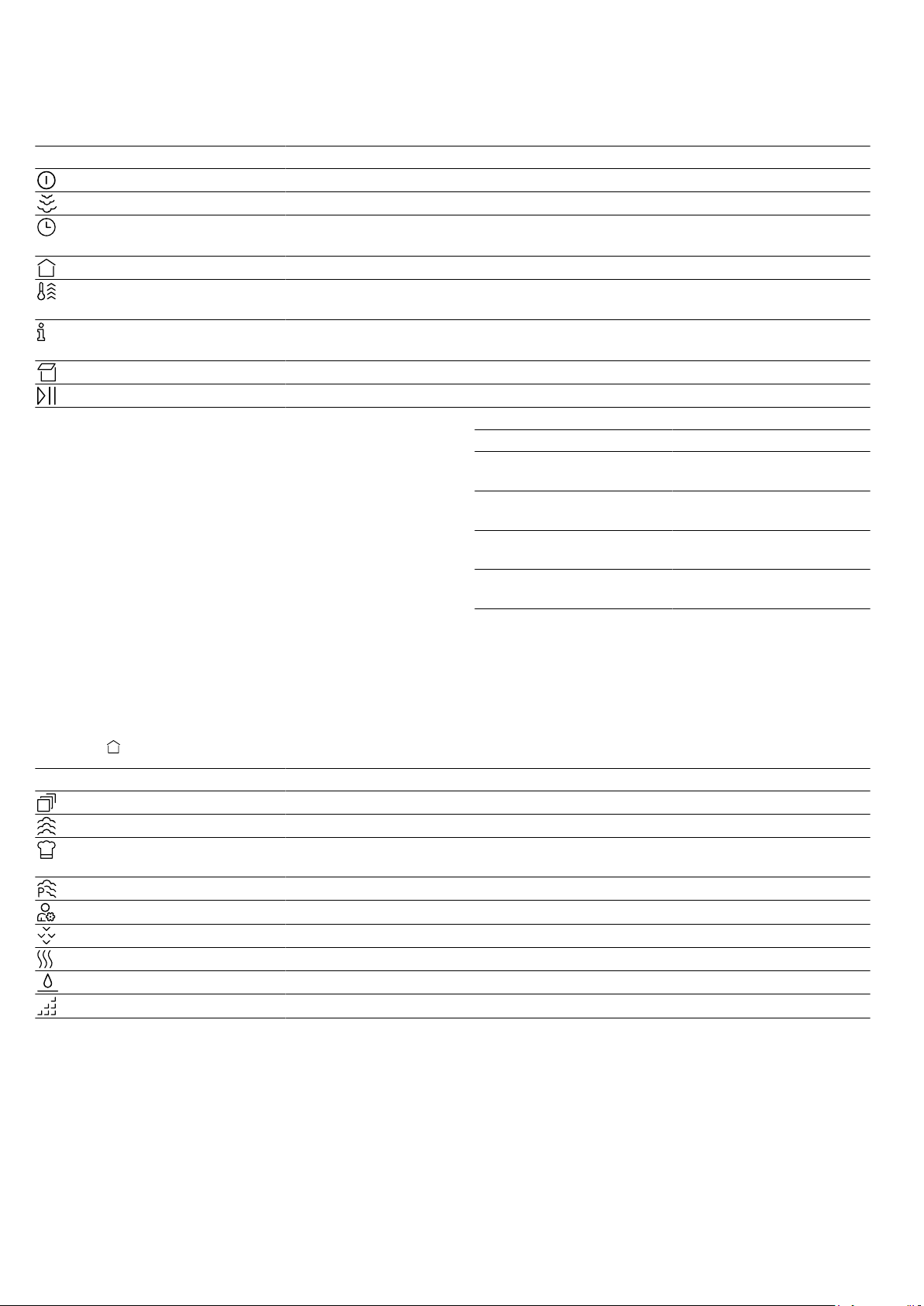
4.2 Buttons
The buttons are touch-sensitive areas. To select a function, press the corresponding button.
Symbol Name Use
On/off Switch the appliance on or off
Steam assistance Switch on steam assistance
Time-setting options/
childproof lock
¡ Set the "timer", "cooking time" or "Ready at" time for delayed starts
¡ Activate or deactivate the "childproof lock"
Main menu Select operating modes and settings
Rapid heat-up ¡ Activate or deactivate the "Rapid heat-up" function
¡ Activate or deactivate the "PowerBoost" function
Information ¡ View additional information
¡ View the current temperature
Open control panel Fill or empty the water tank
Start/stop Start or pause the appliance
4.3 Display
The display shows the current settings, options or rel-
evant information.
Control
You can configure all the functions on your appliance
via the display.
To adjust a setting, touch the appropriate place on the
display with your finger. The settings area will then be
displayed more brightly. Swipe left or right over this set-
tings area on the display with your finger until the re-
quired setting is magnified.
Direction Use
Navigate to the left Swipe right on the display
with your finger
Navigate to the right Swipe left on the display
with your finger
Navigate upwards Swipe down on the dis-
play with your finger
Navigate downwards Swipe up on the display
with your finger
4.4 Main menu
The main menu provides an overview of your appliance's functions.
Press the
button to open the main menu.
Function Name Use
Heating functions Select the required heating function and temperature for your food
Steam Cooking with steam
Baking and roasting
assistant
Recommended settings for baking and roasting
Steam programs Cooking food with steam
MyProfile Individually adjust the appliance settings
Descale Descale the steam system
Dry Dry the cooking compartment after cooking with steam
Floor cleaning aid Clean less stubborn dirt from the cooking compartment floor
EcoClean Clean the cooking compartment
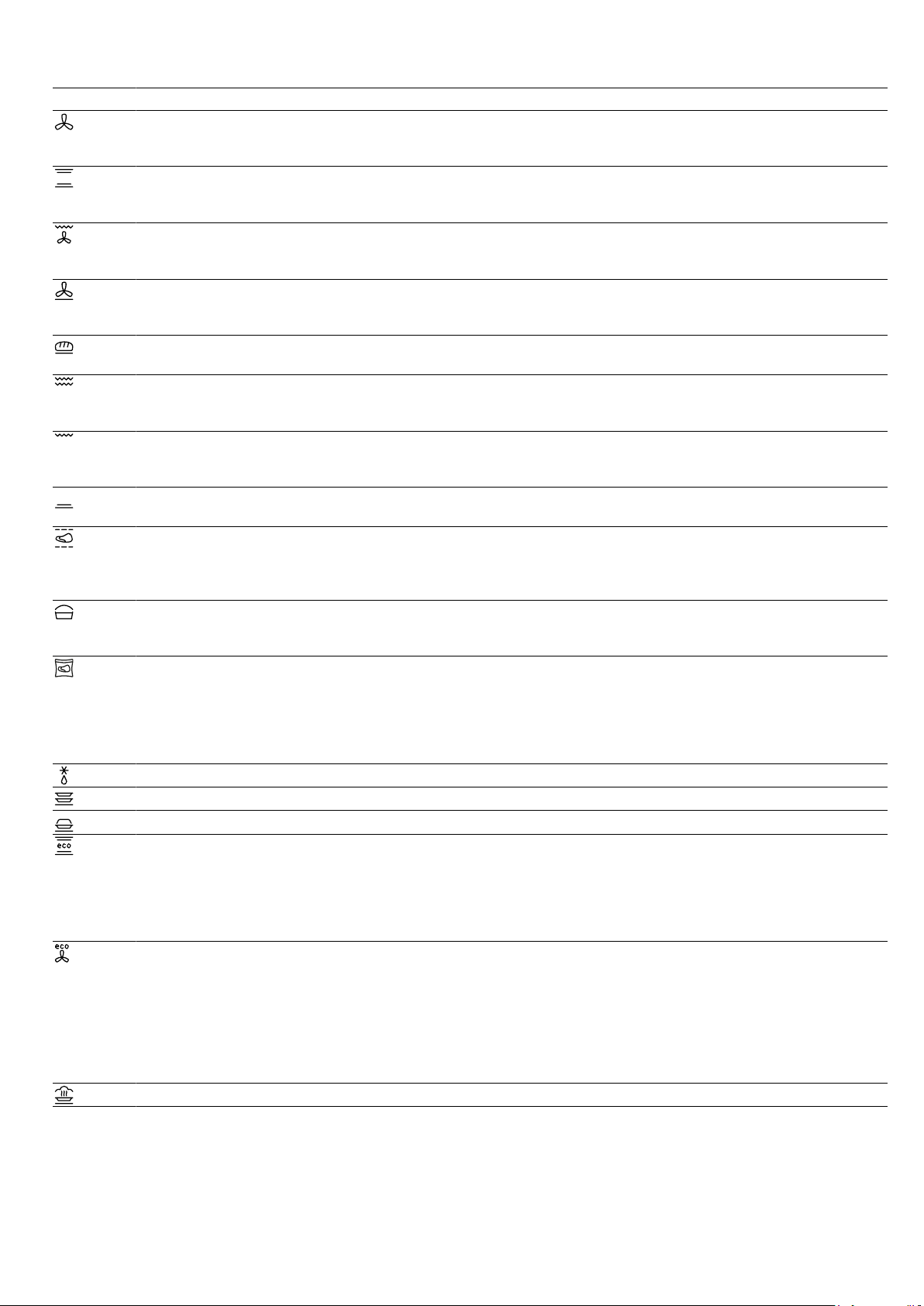
4.5 Types of heating
This is where you will find an overview of the types of heating. You will find recommendations for using the types of
heating.
For temperatures above 275°C, the appliance reduces the temperature to approx. 275°C after around 40minutes.
en Familiarising yourself with your appliance
8
Symbol Heating function Temperature Use
CircoTherm® hot air 40-200°C Bake or roast on one or more levels.
The fan distributes the heat from the ring-shaped heating ele-
ment in the back wall evenly around the cooking compartment.
Top/bottom heating 50-250°C Traditionally bake or roast on one level. This type of heating is
especially good for cakes with moist toppings.
The heat is emitted evenly from above and below.
Circo-roasting 50-250°C Roast poultry, whole fish or larger pieces of meat.
The grill element and the fan switch on and off alternately. The
fan circulates the hot air around the food.
Pizza setting 50-250°C Cook pizza or food that requires a lot of heat from below.
The bottom heating element and the ring-shaped heating ele-
ment in the back wall heat the cooking compartment.
Bread-baking setting 180-240°C For baking bread, bread rolls and baked goods that require
high temperatures.
Full-surface grill 50-275°C For grilling flat items such as steaks, sausages or bread, and
for cooking au gratin.
The entire area below the grill element becomes hot.
Centre-area grill 50-275°C For grilling small amounts of steaks, sausages or bread, and
for cooking au gratin.
The central area below the grill element becomes hot.
Bottom heating 30-250°C For cooking in a bain marie and for baking food for extra time.
The heat is emitted from below.
Slow cooking 70-120°C For gentle, slow cooking of seared, tender pieces of meat in
cookware without a lid.
The heat is emitted evenly from above and below at a low tem-
perature.
Dough proving 2settings For proving dough and culturing yoghurt.
Dough will prove more quickly than at room temperature. The
surface of the dough does not dry out.
Sous-vide 50-95°C For cooking meat, fish, vegetables and desserts in a vacuum
at low temperatures.
Before cooking the food, use a chamber vacuum-packing ma-
chine to heat-seal it in special air-tight, heat-resistant cooking
bags. The protective envelope retains the nutrients and fla-
vours.
Defrost 30-60°C For gently defrosting frozen food.
Preheat cookware 30-70°C For heating cookware.
Keep warm 60-100°C For keeping cooked food warm.
Top/bottom heating
eco
50-250°C For gently cooking selected types of food.
Heat is emitted from above and below.
This type of heating is most effective between 150 and
250°C.
This type of heating is used to determine the energy consump-
tion in the conventional mode.
CircoTherm® eco 40-200°C For gently cooking selected types of food on one level without
preheating.
The fan distributes the heat from the ring-shaped heating ele-
ment in the back wall around the cooking compartment.
This type of heating is most effective between 125 and
200°C.
This type of heating is used to determine the energy consump-
tion in circulating-air mode and the energy efficiency class.
Reheat 80-180°C For gently reheating food or for crisping up baked goods.
Accessories en
9
4.6 Cooking compartment
The functions in the cooking compartment make your
appliance easier to use.
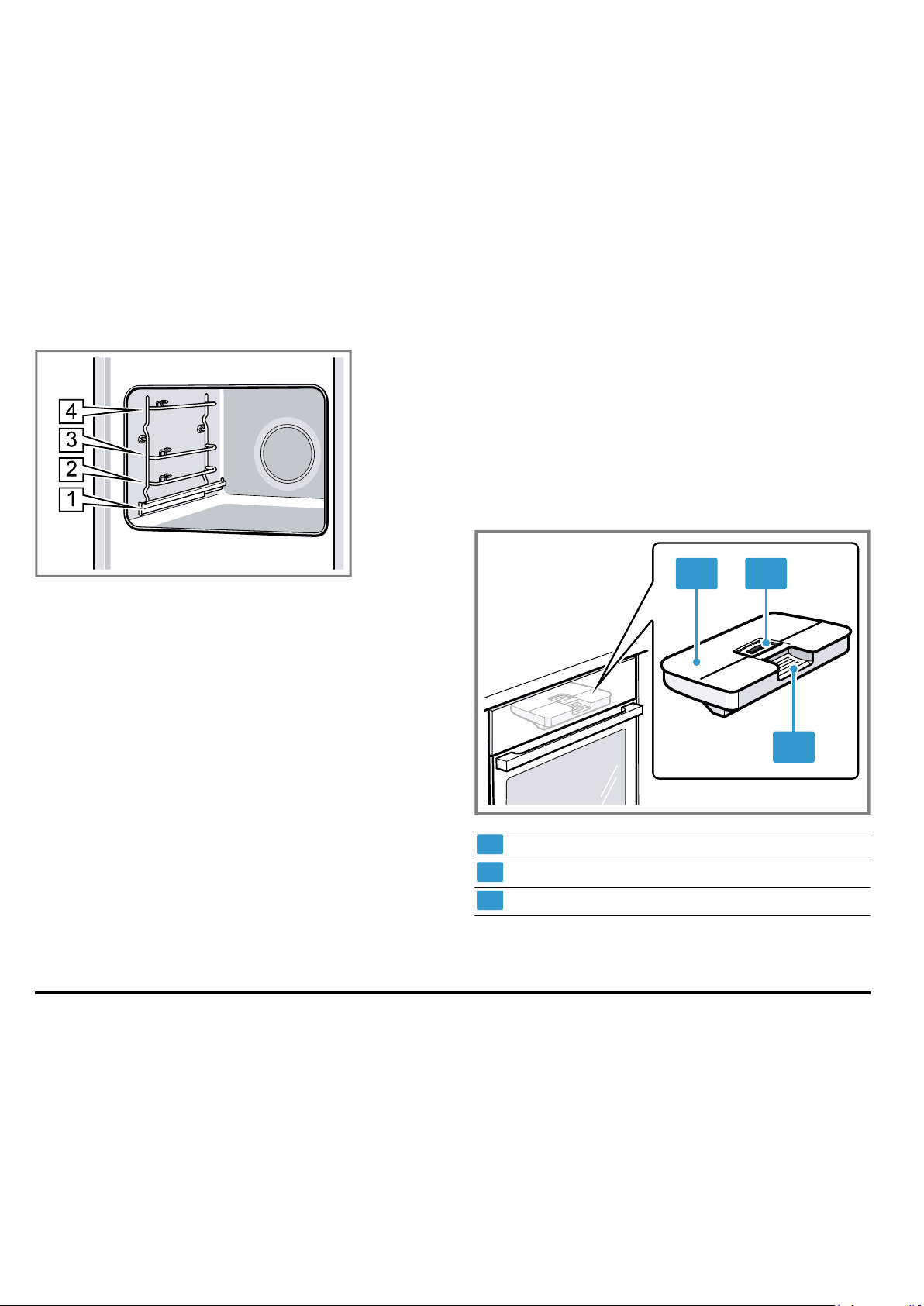
Shelf supports
The rails in the cooking compartment enable you to
place accessories at different heights.
→"Accessories", Page9
Your appliance has four shelf positions. The shelf posi-
tions are numbered from bottom to top.
The rails are equipped with pull-out rails on one or
more levels, depending on the appliance type.
You can remove the rails, e.g. for cleaning.
→"Rails", Page30
Self-cleaning surfaces
The self-cleaning surfaces in the cooking compartment
are coated with a porous, matt ceramic layer and have
a rough surface. When the appliance is in operation,
the self-cleaning surfaces absorb splashes from roast-
ing or grilling and break them down.
The following surfaces are self-cleaning:
¡ Back wall
¡ Ceiling
¡ Side walls
Use the cleaning function regularly to help retain the
cleaning ability of the self-cleaning surfaces and pre-
vent damage.
Lighting
One or more oven lights illuminate the cooking com-
partment.
When you open the appliance door, the light in the
cooking compartment switches on. If the appliance
door remains open for longer than 15minutes, the light
switches off again.
For most operating modes, the lighting is switched on
during operation. The lighting switches off again when
the operation ends.
Cooling fan
The cooling fan switches on and off depending on the
appliance's temperature. The hot air escapes above
the door.
ATTENTION!
Do not cover the ventilation slot above the appliance
door. The appliance overheats.
▶ Ensure that the ventilation slots are unobstructed.
To ensure that the appliance cools down more quickly
after operation, the cooling fan continues to run for a
certain period afterwards.
Appliance door
If you open the appliance door during operation, the
operation stops. When you close the appliance door,
the operation continues automatically.
Water tank
You need the water tank for the types of steam heating.
The water tank is behind the control panel.
→"Filling the water tank", Page14
1 2
3
1
Tank cover
2
Opening for filling and emptying
3
Handle for removing and inserting
5 Accessories
Use original accessories. These have been made espe-
cially for your appliance.
Note:Accessories may become deformed if they get
hot. Deformation has no effect on function. As the ac-
cessory cools down, it will regain its original shape.
The accessories supplied may differ depending on the
appliance model.
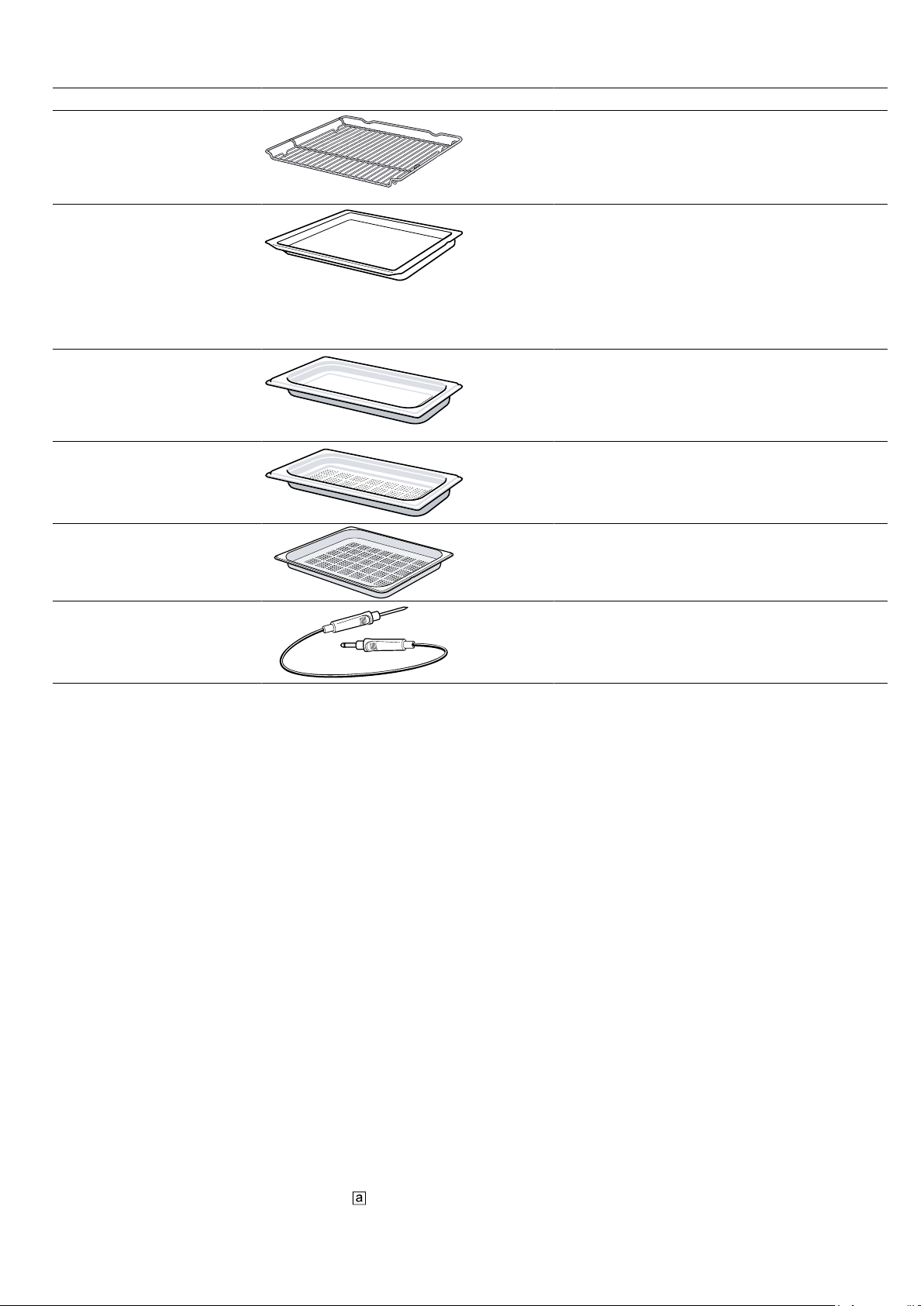
en Accessories
10
Accessories Use
Wire rack ¡ Cake tins
¡ Ovenproof dishes
¡ Cookware
¡ Meat, e.g. roasting joints or steak
¡ Frozen meals
Universal pan ¡ Moist cakes
¡ Baked items
¡ Bread
¡ Large roasts
¡ Frozen meals
¡ Catch dripping liquids, e.g. fat when
grilling food on the wire rack or water
when cooking with steam.
Unperforated steam con-
tainer, size S
Cooking:
¡ Rice
¡ Pulses
¡ Cereals
Place the steam container on the wire rack.
Perforated steam container,
size S
¡ Steaming vegetables.
¡ Juicing berries.
¡ Defrosting.
Place the steam container on the wire rack.
Perforated steam container,
size XL
Steaming large quantities of food.
Meat thermometer High-precision roasting or cooking.
→"Meat probe", Page19
5.1 Information on accessories
Some accessories are only suitable for certain types of
heating.
Steam container
The steam containers are suitable for steam-only types
of heating up to 120°C.
The steam containers are not suitable for higher tem-
peratures or other types of heating. The containers be-
come permanently discoloured and deformed.
5.2 Locking function
The locking function prevents the accessories from tilt-
ing when they are pulled out.
You can pull out the accessories approximately halfway
without them tipping. The accessories must be inserted
into the cooking compartment correctly for the tilt pro-
tection to work properly.
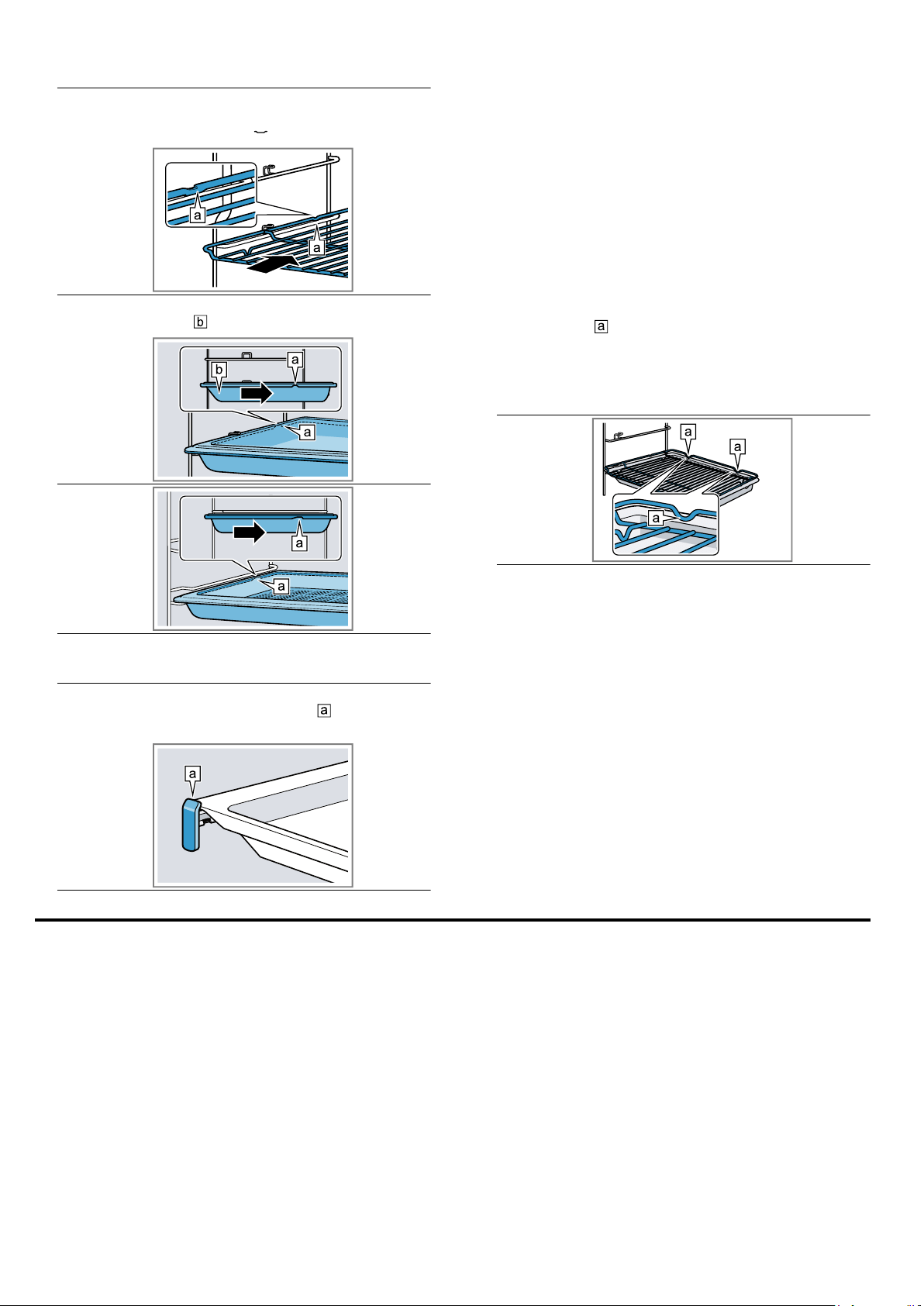
5.3 Sliding accessories into the cooking
compartment
Always slide the accessory into the cooking compart-
ment the right way round. This is the only way to en-
sure that accessories can be pulled out approximately
halfway without tipping.
1.
Turn the accessories so that the notch
is at the
rear and is facing downwards.
2.
Insert the accessory between the two guide rods for
a shelf position.
Before using for the first time en
11
Wire rack Insert the wire rack with the open
side facing the appliance door and
the curved lip facing downwards.
Baking tray
E.g. univer-
sal pan or
baking tray
Slide the tray in with the sloping
edge towards the appliance door.
Steam con-
tainer, per-
forated,
size XL
3.
To place the accessory at shelf positions with pull-
out rails, pull out the pull-out rails.
Wire rack
or baking
tray
Position the accessory so that its
edge is behind the lug on the pull-
out rail.
Note:The pull-out rails lock in place when they are
fully pulled out. Gently push the pull-out rails back
into the cooking compartment.
4.
Push the accessory all the way in, making sure that
it does not touch the appliance door.
Note:Take any accessories that you will not be using
out of the cooking compartment while the appliance is
in operation.
Combining accessories
You can combine the wire rack with the universal pan
to catch any liquid that drips down.
1.
Place the wire rack on the universal pan so that
both spacers
are on the rear edge of the univer-
sal pan.
2.
Insert the universal pan between the two guide rods
for a shelf position. In so doing, the wire rack is on
top of the upper guide rod.
Wire rack
on univer-
sal pan
5.4 Other accessories
You can purchase other accessories from our after-
sales service, specialist retailers or online.
You will find a comprehensive range of products for
your appliance in our brochures and online:
www.neff-international.com
Accessories vary from one appliance to another. When
purchasing accessories, always quote the exact
product number (E no.) of your appliance.
You can find out which accessories are available for
your appliance in our online shop or from our after-
sales service.
6 Before using for the first time
Implement the settings for the initial configuration. Calibrate the appliance. Clean the appliance and accessories.
6.1 Before using for the first time
Before using the appliance for the first time, ask your
water supplier about the hardness of your tap water. To
ensure that the appliance can reliably remind you to
descale it when required, you must set your water hard-
ness range correctly.
ATTENTION!
If the wrong water hardness has been set, the appli-
ance cannot remind you to descale it at the right time.
▶ Set the water hardness correctly.
Using unsuitable liquids may damage the appliance.
▶ Do not use distilled water, highly chlorinated tap wa-
ter (>40 mg/l) or other liquids.
▶ Only use cold, fresh tap water, softened water or
non-carbonated mineral water.
en Before using for the first time
12
Malfunctions may occur when using filtered or deminer-
alised water. The appliance may request that you top
up the water tank even though it may be full, or opera-
tion with steam is cancelled after approx. twominutes.
▶ If required, mix filtered or demineralised water with
the bottled non-carbonated mineral water with a ra-
tio of onetoone.
Tip:If you use mineral water, set the water hardness
range to "very hard". If you use mineral water, you must
only use non-carbonated mineral water.
Tip:If your tap water is very hard, we recommend that
you use softened water. If you use only softened water,
you can set your appliance to the "softened" water
hardness range.
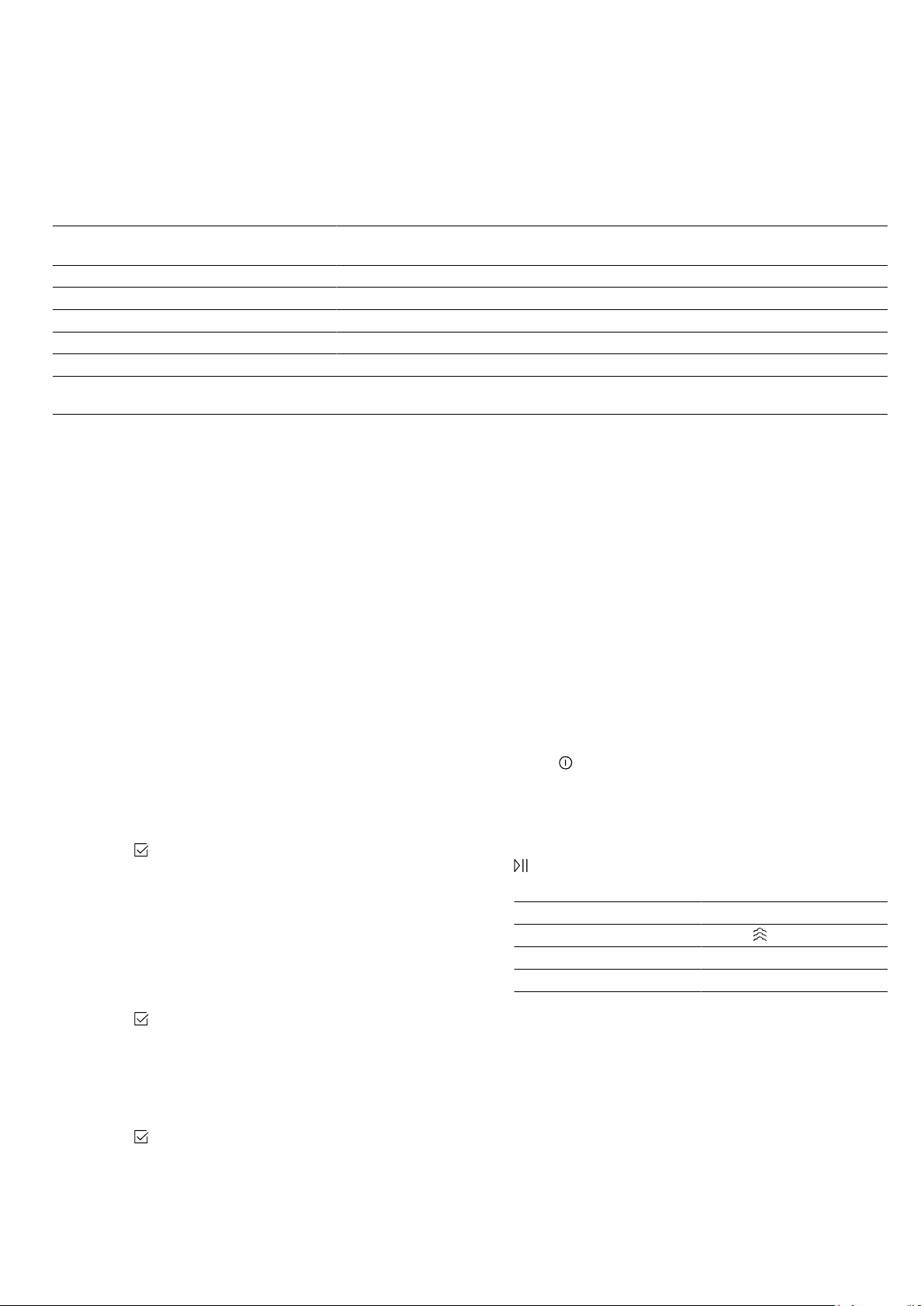
Setting Water hardness in
mmol/l
German hardness in
°dH
French hardness °fH
0 (softened)
1
- - -
1 (soft) Up to 1.5 Up to 8.4 Up to 15
2 (moderately hard) 1.5-2.5 8.4-14 15-25
3 (hard) 2.5-3.8 14-21.3 25-38
4 (very hard)
2
Above 3.8 Above 21.3 Above 38
1
Only set this if you will be using solely softened water.
2
Also set for mineral water. Only use non-carbonated mineral water.
6.2 Initial use
When the appliance is connected to the power supply
for the first time or following a lengthy power failure, the
settings that you will need to configure before you can
use it will appear.
Note:You can change these settings at any time by
going to the basic settings.
→"Basic settings", Page24
Setting the language
1.
Connect the appliance to the power supply.
a The first setting will appear after a few seconds.
2.
Press the bottom row.
3.
Swipe left or right to select the required language.
4.
Press the top row.
Setting the time
1.
Press "Time".
2.
Press the bottom row.
3.
Swipe left or right to select the correct hour.
4.
Press "Minutes".
5.
Swipe left or right to select the correct number of
minutes.
6.
Use the
button to save your settings.
Setting the date
1.
Press "Date".
2.
Press the bottom row.
3.
Swipe left or right to select the correct day.
4.
Press "Month".
5.
Swipe left or right to select the correct month.
6.
Press "Year".
7.
Swipe left or right to select the correct year.
8.
Use the
button to save your settings.
Setting the water hardness
1.
Press "Water hardness".
2.
Swipe left or right to select the appropriate water
hardness.
→"Before using for the first time", Page11
3.
Use the
button to finalise the initial configuration
process.
4.
Open and close the appliance door once.
a The appliance will perform a self-test, after which it
will be ready to use.
a Initial configuration is now complete.
6.3 Calibrating and cleaning the appliance
You will need to calibrate the appliance and clean the
cooking compartment and accessories before using it
to cook food for the first time.
Note:The boiling point of water depends on the air
pressure. During the calibration process, the appliance
makes adjustments to adapt it to the pressure condi-
tions in the location where it is installed.
Requirement:The cooking compartment must have
cooled down completely.
1.
Remove the product information, accessories and
any leftover packaging (e.g. polystyrene pellets)
from the cooking compartment.
2.
Wipe the smooth surfaces in the cooking compart-
ment with a soft, damp cloth.
3.
Press
to switch the appliance on.
→"Switching on the appliance", Page13
4.
Fill the water tank.
→"Filling the water tank", Page14
5.
Set the required type of heating, temperature and
cooking time for the calibration process and press
to start.
→"Steam", Page15
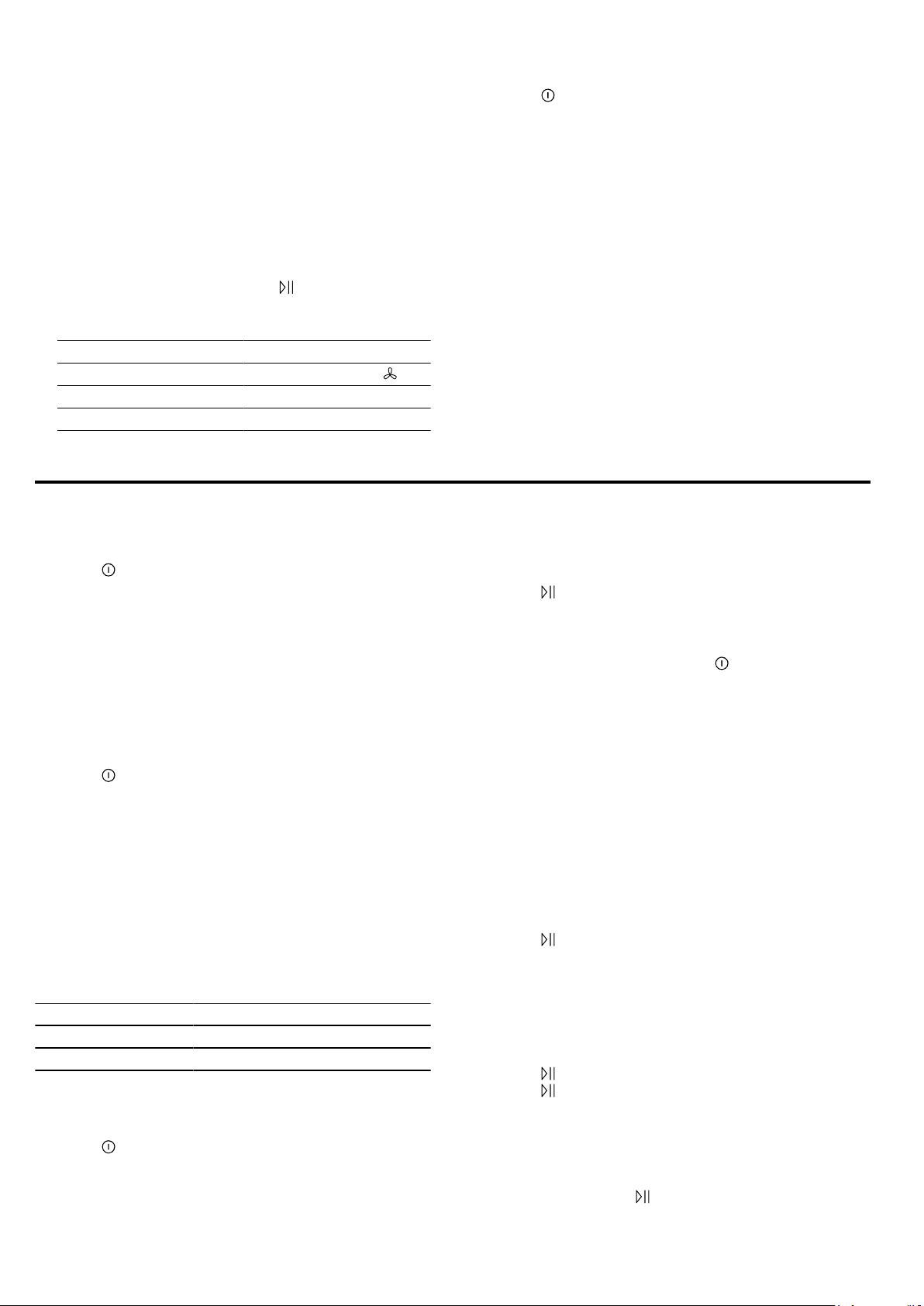
Calibration
Type of heating Steam
Temperature 100 °C
Duration 30minutes
Tip:Do not open the appliance door while calibra-
tion is in progress. Calibration will otherwise be in-
terrupted.
a Calibration starts. This generates a lot of steam.
Basic operation en
13
6.
ATTENTION!
If there is water on the cooking compartment floor
when operating the appliance at temperatures
above 120°C, this will damage the enamel.
▶ Do not use the appliance if there is water on the
cooking compartment floor.
▶ Wipe away any water on the cooking compart-
ment floor before operation.
Allow the appliance to cool down and then wipe
away the water from the cooking compartment floor.
7.
Set the required type of heating and temperature for
the heat-up process and press
to start.
→"Setting the type of heating and temperature",
Page13
Heating up
Type of heating CircoTherm hot air
Temperature Maximum
Duration 30minutes
8.
Ventilate the kitchen while the appliance is heating.
9.
Press to switch off the appliance after
30minutes.
→"Switching off the appliance", Page13
10.
Allow the appliance to cool down.
11.
Clean the smooth surfaces with soapy water and a
dish cloth.
12.
Empty the water tank and dry the cooking compart-
ment.
→"After every steam operation", Page17
13.
Thoroughly clean any accessories you used with
soapy water and a dish cloth.
Note:The appliance retains the calibration settings,
even in the event of a power cut or disconnection from
the mains.
Tip:To ensure that the calibration settings are updated
to accommodate the conditions at the new location
when you move house, restore the appliance's factory
settings in the basic settings. Then repeat the calibra-
tion procedure.
→"Basic settings", Page24
7 Basic operation
7.1 Switching on the appliance
▶
Press
to switch the appliance on.
Notes
¡ In the basic settings, you can specify whether the
heating functions or the main menu should appear
when you switch on the appliance.
→"Basic settings", Page24
¡ If you do not perform any actions on the appliance
for an extended period, it will automatically switch it-
self off.
7.2 Switching off the appliance
▶
Press
to switch the appliance off.
Notes
¡ The residual heat indicator will appear on the dis-
play while the cooking compartment is still hot.
→"Residual heat indicator", Page13
¡ The cooling fan will continue to run until the cooking
compartment has cooled down.
→"Cooling fan", Page9
7.3 Residual heat indicator
After you have switched off the appliance, the residual
heat indicator will appear on the display.
Display Temperature
Residual heat high Over 120°C
Residual heat low Between 60 and 120°C
7.4 Setting the type of heating and
temperature
1.
Press
to switch the appliance on.
a The heating functions will then be displayed.
2.
Swipe left or right until the required heating function
appears in the middle.
3.
Press the temperature.
4.
Swipe left or right until the required temperature ap-
pears in the middle.
5.
Press
to start.
a The cooking time will appear on the display.
a The heat-up indicator bar visualises the rising tem-
perature.
6.
When the food is ready, press
to switch the appli-
ance off.
7.5 Changing the temperature
You can also change the temperature once you have
started the appliance.
1.
Press the temperature.
2.
Swipe left or right until the required temperature ap-
pears in the middle.
a The temperature will now be changed.
7.6 Changing the type of heating
If you switch to a different heating function, the appli-
ance will reset all the settings.
1.
Press
to pause operation.
2.
Press the heating function.
3.
Swipe left or right until the required heating function
appears in the middle.
4.
Set the temperature and start the appliance.
7.7 Pausing operation
1.
Press
.
2.
Press again to resume operation.
7.8 Cancelling operation
Note:Some functions, e.g. cleaning functions, cannot
be cancelled.
▶
Press and hold the
button until the function that is
currently in progress is cancelled.
en Steam
14
a Operation will stop and all the settings will be reset.
a The cooling fan will continue to run until the cooking
compartment has cooled down.
7.9 Viewing the current temperature
You can view the current temperature while the appli-
ance is heating up.
▶
Press
.
a The temperature will be displayed for a few
seconds.
7.10 Displaying information
Requirement:The
button must be lit.
▶
Press
.
a The information will be displayed for a few seconds.
8 Steam
Food can be cooked particularly gently using steam.
You can use the special types of steam heating, or use
steam assistance with certain types of heating.
WARNING‒Risk of scalding!
Hot steam may escape when you open the appliance
door. Steam may not be visible, depending on the tem-
perature.
▶ Open the appliance door carefully.
▶ Keep children at a safe distance.
8.1 Filling the water tank
WARNING‒Risk of fire!
Due to the hot surfaces, vapours from flammable li-
quids may catch fire in the cooking compartment (ex-
plosion). The appliance door may spring open. Hot
steam and jets of flame may escape.
▶ Do not pour flammable liquids (e.g. alcoholic drinks)
into the water tank.
▶ Only fill the water tank with water or with the descal-
ing solution we have recommended.
WARNING‒Risk of burns!
The water tank may heat up while the appliance is in
operation.
▶ Wait until the water tank has cooled down from the
previous operation.
▶ Remove the water tank from the tank recess.
Requirement:The water hardness must be set cor-
rectly.
→"Before using for the first time", Page11
1.
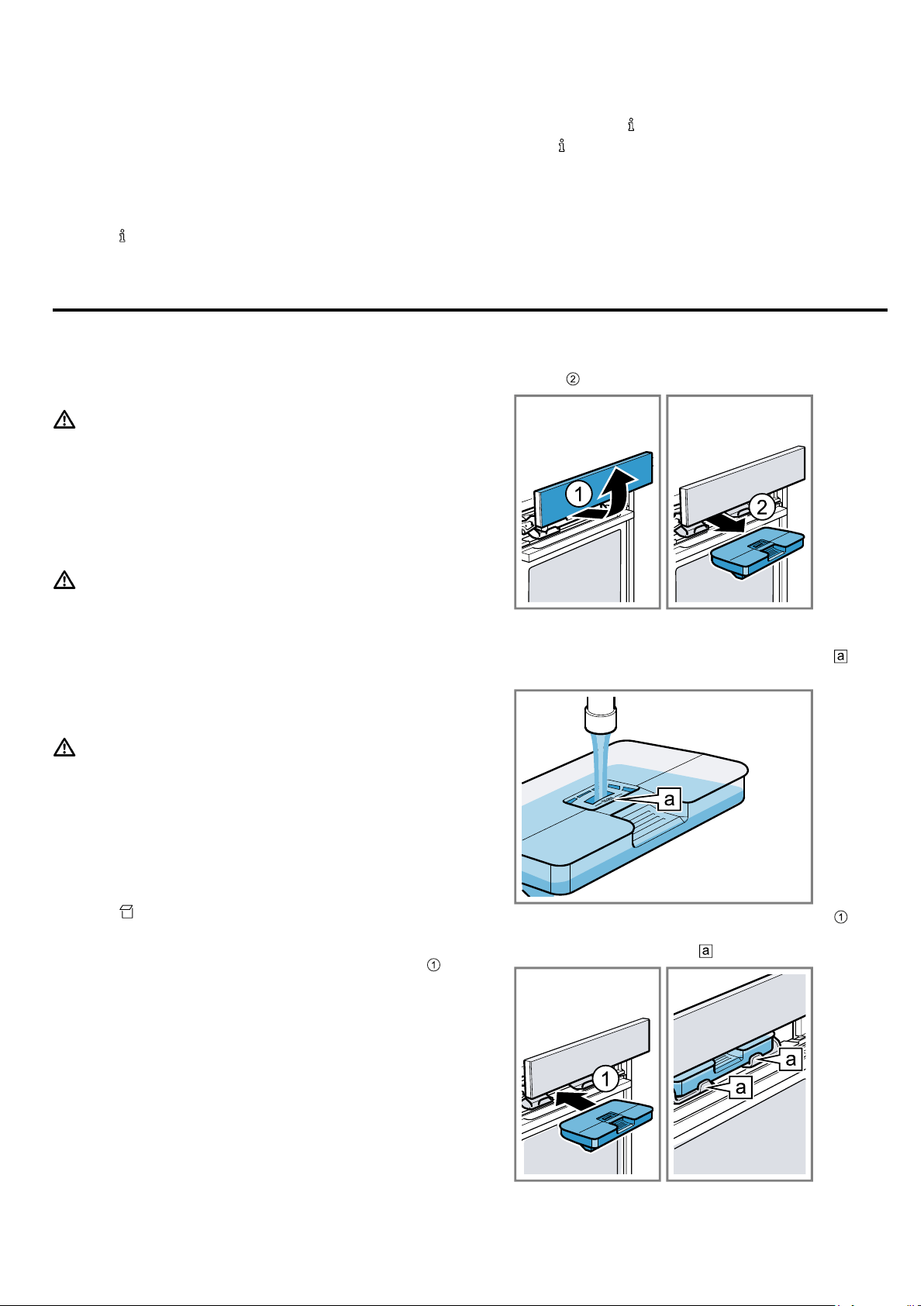
Press
.
a The control panel will pop out automatically.
2.
Pull the control panel towards you with both hands
and then push it upwards until it clicks into place
.
3.
Lift the water tank and remove it from the water tank
recess .
4.
Press down on the water tank lid along the seal to
prevent water from leaking out of the water tank.
5.
Fill the water tank with water up to the "max"
mark.
6.
Slide the full water tank back into the recess .
When doing so, make sure that the water tank clicks
into place in the retainers .
7.
Slowly slide the control panel downwards and then
push it away from you until it is closed completely.

Steam en
15
8.2 Refilling the water tank
When "Fill water tank" appears on the display, you
must refill the water tank.
Notes
¡ Steam, Dough proving, Defrost and Reheat func-
tions: If you do not refill the water tank, the appli-
ance will stop. Refill the water tank.
¡ Steam-assisted heating: If you do not refill the water
tank, the appliance will continue to heat but without
injecting steam into the cooking compartment.
1.
Open the control panel.
2.
Remove and refill the water tank.
3.
Insert the full water tank and close the control panel.
8.3 Steam heating functions
Your appliance has several steam heating functions:
¡ Steam
¡ Dough proving
¡ Sous-vide
¡ Defrost
¡ Reheat
Steam
With the "Steam" heating function, the food is envel-
oped by hot steam, which helps to retain the nutrients.
This cooking method also helps to retain the shape,
colour and typical flavour of the food.
Configuring the Steam heating function
1.
Fill the water tank.
→"Filling the water tank", Page14
2.
Press
to switch the appliance on.
3.
Press .
4.
Swipe left or right to set "Steam" .
5.
Press the bottom row to select the temperature.
6.
Swipe left or right to select the required temperat-
ure.
7.
Press the bottom row to select the cooking time.
8.
Swipe left or right to select the required cooking
time.
9.
Press to start the steaming process.
→"Pausing operation", Page13
→"Cancelling operation", Page13
a If the water tank runs dry during the steaming pro-
cess, steaming will be paused.
→"Refilling the water tank", Page15
a Once the cooking time has elapsed, an audible sig-
nal will sound and the appliance will stop heating.
→"Switching off the appliance", Page13
10.
Press any button to end the audible signal.
11.
Empty the water tank and dry the cooking compart-
ment.
→"After every steam operation", Page17
Dough proving
Yeast dough will prove considerably more quickly us-
ing the "Dough proving" heating function than at room
temperature, and it will not dry out.
Configuring the Dough proving heating function
Requirement:The cooking compartment must have
cooled down completely.
1.
Fill the water tank.
→"Filling the water tank", Page14
2.
Press
to switch the appliance on.
3.
Swipe left or right to set "Dough proving" .
4.
To select the setting, press "1" in the bottom row.
5.
To set setting 2, swipe left.
6.
Press to save your settings.
7.
Press to select the proving time.
8.
Swipe left or right to select the required proving
time.
9.
Press to save your settings.
10.
Press to start the dough proving process.
→"Pausing operation", Page13
→"Cancelling operation", Page13
a If the water tank runs dry during the dough proving
process, dough proving will be paused.
→"Refilling the water tank", Page15
a Once the duration has elapsed, an audible signal
will sound and the appliance will stop heating.
→"Switching off the appliance", Page13
11.
Press any button to end the audible signal.
12.
Empty the water tank and dry the cooking compart-
ment.
→"After every steam operation", Page17
Sous-vide
"Sous-vide" is a type of low-temperature cooking during
which vacuum-sealed food is cooked at temperatures
between 50 and 95°C and with 100% steam. Sous-
vide is suitable for meat, fish, vegetables and desserts.
A chamber vacuum-packing machine is used to heat-
seal the food in special air-tight, heat-resistant vacuum-
sealing bags. The protective vacuum-sealing bags re-
tain the nutrients and flavours.
Configuring the Sous-vide heating function
Notes
¡ During sous-vide cooking, more condensate forms
on the cooking compartment floor than for other
types of heating.
¡ If the water tank runs dry while sous-vide cooking,
the operation is interrupted.
Requirement:The cooking compartment must have
cooled down completely.
1.
ATTENTION!
Risk of damage to kitchen units
▶ Do not fill the water tank a second time for the
sous-vide cooking.
Fill the water tank completely.
→"Filling the water tank", Page14
2.
Press
to switch the appliance on.
3.
Swipe left or right to set "Sous-vide" .
4.
Press the temperature to select it.
5.
Swipe left or right to select the required temperat-
ure.
6.
Press to select the duration.
7.
Swipe left or right to select the required duration.
8.
Press to start the sous-vide cooking process.
→"Pausing operation", Page13
→"Cancelling operation", Page13
a Once the duration has elapsed, an audible signal
sounds and the appliance stops heating.
→"Switching off the appliance", Page13
9.
Press any button to end the audible signal.

en Steam
16
10.
WARNING‒Risk of scalding!
Hot water collects on the vacuum-sealing bag dur-
ing cooking.
▶ Use an oven cloth to carefully lift the vacuum-
sealing bag so that the hot water runs off into the
universal pan or the cooking container.
▶ Use the oven cloth to carefully remove the va-
cuum-sealing bag.
Use an oven cloth to carefully remove the vacuum-
sealing bag.
11.
Empty the water tank and dry the cooking compart-
ment.
→"After every steam operation", Page17
Defrost
Use the "Defrost" function to defrost deep-frozen and
frozen products.
Configuring the Defrost heating function
1.
Fill the water tank.
→"Filling the water tank", Page14
2.
Press
to switch the appliance on.
3.
Swipe left or right to set "Defrost" .
4.
Press the temperature to select it.
5.
Swipe left or right to select the required temperat-
ure.
6.
Press to save your settings.
7.
Press to select the defrosting time.
8.
Swipe left or right to select the required defrosting
time.
9.
Press to save your settings.
10.
Press to start the defrosting process.
→"Pausing operation", Page13
→"Cancelling operation", Page13
a If the water tank runs dry during the defrosting pro-
cess, defrosting will be paused.
→"Refilling the water tank", Page15
a Once the duration has elapsed, an audible signal
will sound and the appliance will stop heating.
→"Switching off the appliance", Page13
11.
Press any button to end the audible signal.
12.
Empty the water tank and dry the cooking compart-
ment.
→"After every steam operation", Page17
Reheat
The "Reheat" function is used to warm up food that has
already been cooked, or bread and pastries from the
day before, without affecting its quality.
Configuring the Reheat heating function
Requirement:The cooking compartment must have
cooled down completely (to room temperature).
1.
Fill the water tank.
→"Filling the water tank", Page14
2.
Press
to switch the appliance on.
3.
Swipe left or right to set "Reheat" .
4.
Press the temperature to select it.
5.
Swipe left or right to select the required temperat-
ure.
6.
Press to save your settings.
7.
Press to select the reheating time.
8.
Swipe left or right to select the required reheating
time.
9.
Press to save your settings.
10.
Press to start the reheating process.
→"Pausing operation", Page13
→"Cancelling operation", Page13
a If the water tank runs dry during the reheating pro-
cess, reheating will be paused.
→"Refilling the water tank", Page15
a Once the duration has elapsed, an audible signal
will sound and the appliance will stop heating.
→"Switching off the appliance", Page13
11.
Press any button to end the audible signal.
12.
Empty the water tank and dry the cooking compart-
ment.
→"After every steam operation", Page17
8.4 Steam-assisted cooking
When you cook with steam assistance, the appliance
introduces steam into the cooking compartment at vari-
ous intervals. This gives your food a crispy crust and a
shiny surface. Meat stays juicy, tender and only under-
goes a minimum reduction in volume.
Heating functions compatible with steam
assistance
You can switch on steam assistance for the following
heating functions:
¡ "CircoTherm hot air"
¡ "Top/bottom heating"
¡ "Circo-roasting"
¡ "Bread-baking setting"
¡ "Keep warm"
Switching on steam assistance
1.
Fill the water tank.
→"Filling the water tank", Page14
2.
Press
to switch the appliance on.
3.
Set a suitable heating function.
→"Heating functions compatible with steam assist-
ance", Page16
4.
Set the required temperature.
5.
Use the
button to switch on steam assistance.
6.
Swipe left or right to select the required steam in-
tensity :
– Low
– Medium
– High
7.
Press to save your settings.
8.
Press to start steam-assisted heating.
a If the water tank runs dry during steam-assisted
heating, "Fill water tank" will appear on the display.
The appliance will continue to heat but without in-
jecting steam into the cooking compartment.
→"Refilling the water tank", Page15
Cancelling steam-assisted cooking
1.
Press
.
2.
Press the bottom row featuring the steam intensity.
3.
Swipe right to set the steam intensity to "Off".
a The appliance will continue to heat but without in-
jecting steam into the cooking compartment.
Ending steam-assisted heating
1.
Press to switch the appliance off.
2.
Empty the water tank and dry the cooking compart-
ment.
→"After every steam operation", Page17

Steam en
17
8.5 After every steam operation
The remaining water is pumped back into the water
tank after every operation with steam. Then empty and
dry the water tank and the cooking compartment.
Emptying the water tank
WARNING‒Risk of burns!
The water tank may heat up while the appliance is in
operation.
▶ Wait until the water tank has cooled down from the
previous operation.
▶ Remove the water tank from the tank recess.
ATTENTION!
Drying the water tank in the hot cooking compartment
leads to damage to the water tank.
▶ Do not dry the water tank in the hot cooking com-
partment.
Cleaning the water tank in the dishwasher will damage
it.
▶ Do not clean the water tank in the dishwasher.
▶ Clean the water tank with a soft cloth and standard
washing-up liquid.
Note:Once the appliance has been switched off, the
button remains lit for a little longer to remind you to
empty the water tank.
1.
Use to open the control panel.
2.
Remove the water tank.
3.
Carefully remove the lid of the water tank.
4.
Empty the water tank, clean it with detergent and
then rinse it thoroughly with clean water.
5.
Dry all parts with a soft cloth.
6.
Rub the seal on the lid until dry.
7.
Leave the water tank to dry with the lid open.
8.
Place the lid on the water tank and push down on it.
9.
Insert the water tank and close the control panel.
Drying the cooking compartment
To dry the cooking compartment, you can either use
the "Dry" function or you can dry the cooking compart-
ment manually.
Drying the cooking compartment with the "Dry"
function
The "Dry" function heats up the cooking compartment
so that the moisture in the cooking compartment evap-
orates. You will then need to open the appliance door
to allow the steam to escape.
WARNING‒Risk of burns!
The appliance becomes hot during operation.
▶ Allow the appliance to cool down before cleaning.
ATTENTION!
If there is water on the cooking compartment floor
when operating the appliance at temperatures above
120°C, this will damage the enamel.
▶ Do not use the appliance if there is water on the
cooking compartment floor.
▶ Wipe away any water on the cooking compartment
floor before operation.
Requirement:The cooking compartment must have
cooled down.
1.
Remove any food remnants from the cooking com-
partment.
2.
Dry the cooking compartment with a sponge.
3.
Press
to switch the appliance on.
4.
Press .
5.
Swipe left or right to select "Dry" .
6.
Press the bottom row.
a The duration will appear on the display. The duration
cannot be changed.
7.
Press the bottom row.
8.
Press to start drying the appliance.
a Once the duration has elapsed, an audible signal
will sound and the appliance will stop heating.
9.
Press to switch the appliance off.
10.
Remove limescale marks with a cloth soaked in vin-
egar, then wipe with clean water and dry with a soft
cloth.
11.
Leave the appliance door open for 1-2minutes so
that the cooking compartment dries completely.
Drying the cooking compartment manually
WARNING‒Risk of burns!
The appliance becomes hot during operation.
▶ Allow the appliance to cool down before cleaning.
ATTENTION!
If there is water on the cooking compartment floor
when operating the appliance at temperatures above
120°C, this will damage the enamel.
▶ Do not use the appliance if there is water on the
cooking compartment floor.
▶ Wipe away any water on the cooking compartment
floor before operation.
Requirement:The cooking compartment must have
cooled down.
1.
Remove any food remnants from the cooking com-
partment.
2.
Dry the cooking compartment with a sponge.
3.
Leave the cooking compartment to dry with the ap-
pliance door open for 1hour.
4.
Remove limescale marks with a cloth soaked in vin-
egar, then wipe with clean water and dry with a soft
cloth.
5.
Leave the appliance door open for 1-2minutes so
that the cooking compartment dries completely.

en Time-setting options
18
9 Time-setting options
Your appliance has different time-setting options, with
which you can control its operation.
9.1 Overview of the time-setting options
When you are setting a time, the time values will in-
crease by greater increments as you scroll through the
higher values. The cooking time, for example, can be
set in 1-minute increments up to 1 hour, and then in 5-
minute increments thereafter.
Time-setting
option
Use
Timer When you set a time on the timer,
the timer will run independently of
the appliance and will not intervene
in its operation. The timer does not
affect the appliance.
Cooking
time
Once the cooking time has elapsed,
the appliance automatically stops
heating.
Ready at Along with the cooking time (dura-
tion), you can set the time at which
you want cooking to end. The appli-
ance will start up automatically so
that it finishes cooking at the re-
quired time.
9.2 Timer
You can set the timer regardless of whether the appli-
ance is on or off.
Setting the timer
1.
Press
.
2.
Once the appliance is switched on, press "Timer" .
3.
Swipe left or right to select the required timer dura-
tion.
4.
Press to start the timer.
a will appear on the display. The timer duration will
then count down.
a Once the timer duration has elapsed, an audible sig-
nal will sound.
5.
Press any button to end the audible signal.
Changing the timer
1.
Press
.
2.
Swipe left or right to change the timer duration.
a The setting will then be applied.
Cancelling the timer
1.
Press
.
2.
Swipe right to set the timer duration to "00:00".
a This cancels the current timer duration.
9.3 Cooking time
Once the set cooking time has elapsed, the appliance
switches off automatically. You can only use the cook-
ing time in conjunction with a heating function.
Setting the cooking time
1.
Set a heating function and a temperature.
2.
Press
.
3.
Swipe left or right to select the required cooking
time.
4.
Once the cooking time has been set, press to
start.
a The cooking time will appear on the display. The
cooking time will count down.
a Once the cooking time has elapsed, an audible sig-
nal will sound.
5.
Press any button to end the audible signal.
Changing the cooking time
1.
Press
.
2.
Swipe left or right to change the cooking time.
a The setting will then be applied.
Cancelling the cooking time
1.
Press
.
2.
Swipe right to set the cooking time to "00:00".
a This cancels the current cooking time.
3.
To continue without setting a cooking time, press
.
9.4 Delayed start/"Ready at" time
With this function, the appliance automatically switches
itself on, and then switches itself off at the preselected
end time. To enable it to do this, you set the cooking
time (duration) and specify when you want your food to
be ready. You can only use the delayed start function
in conjunction with a heating function.
Setting the "Ready at" time for delayed starts
Notes
¡ Do not leave food that spoils easily in the cooking
compartment for too long.
¡ You cannot use the delayed start function with every
heating function.
1.
Place the food into the cooking compartment and
close the appliance door.
2.
Set a heating function and a temperature.
3.
Press
.
4.
Swipe left or right to select the required cooking
time.
5.
Press "Ready at" .
a The time at which your food will be ready will ap-
pear on the display.
6.
Swipe left to select the required end time.
7.
Press
to confirm the delayed start.
a The appliance will start at the appropriate time.
a Once the cooking time has elapsed, an audible sig-
nal will sound.
8.
Press any button to end the audible signal.
Changing the "Ready at" time for delayed starts
1.
Press
.
2.
Press "Ready at" .
3.
Swipe left or right to change the end time.
a The setting will then be applied.
Cancelling the "Ready at" time for delayed starts
1.
Press
.
2.
Swipe right to reset the end time.
Meat probe en
19
a The end time corresponds to the current time plus
the set cooking time.
a The appliance will start heating using the set cook-
ing time.
10 Meat probe
Cook with precision by inserting the meat probe into
the food and setting a core temperature on the appli-
ance. Once the set core temperature has been
reached in the food, the appliance automatically stops
heating.
10.1 Suitable types of heating with the meat
probe
Only certain types of heating are suitable for use with
the meat probe.
Once you have placed the roasting sensor in the
cooking compartment, the following types of heating
are available for you to select.
¡ CircoTherm hot air
¡ Top/bottom heating
¡ Circo-roasting
¡ CircoTherm Intensive
¡ Bread-baking setting
¡ Slow cooking
¡ Top/bottom heating eco
¡ CircoTherm eco
¡ Reheat
¡ Steam
10.2 Inserting the meat thermometer
Use the meat probe supplied or order a suitable meat
probe from our after-sales service.
WARNING‒Risk of electric shock!
Using the wrong meat probe could damage the insula-
tion.
▶ Only use the meat probe for this specific appliance.
ATTENTION!
Otherwise the meat probe may be damaged.
▶ Do not trap the cable of the meat probe.
▶ To prevent the meat probe from being damaged by
excessive heat, there must be a gap of a few centi-
metres between the grill element and the meat
probe. The meat may expand during the cooking
process.
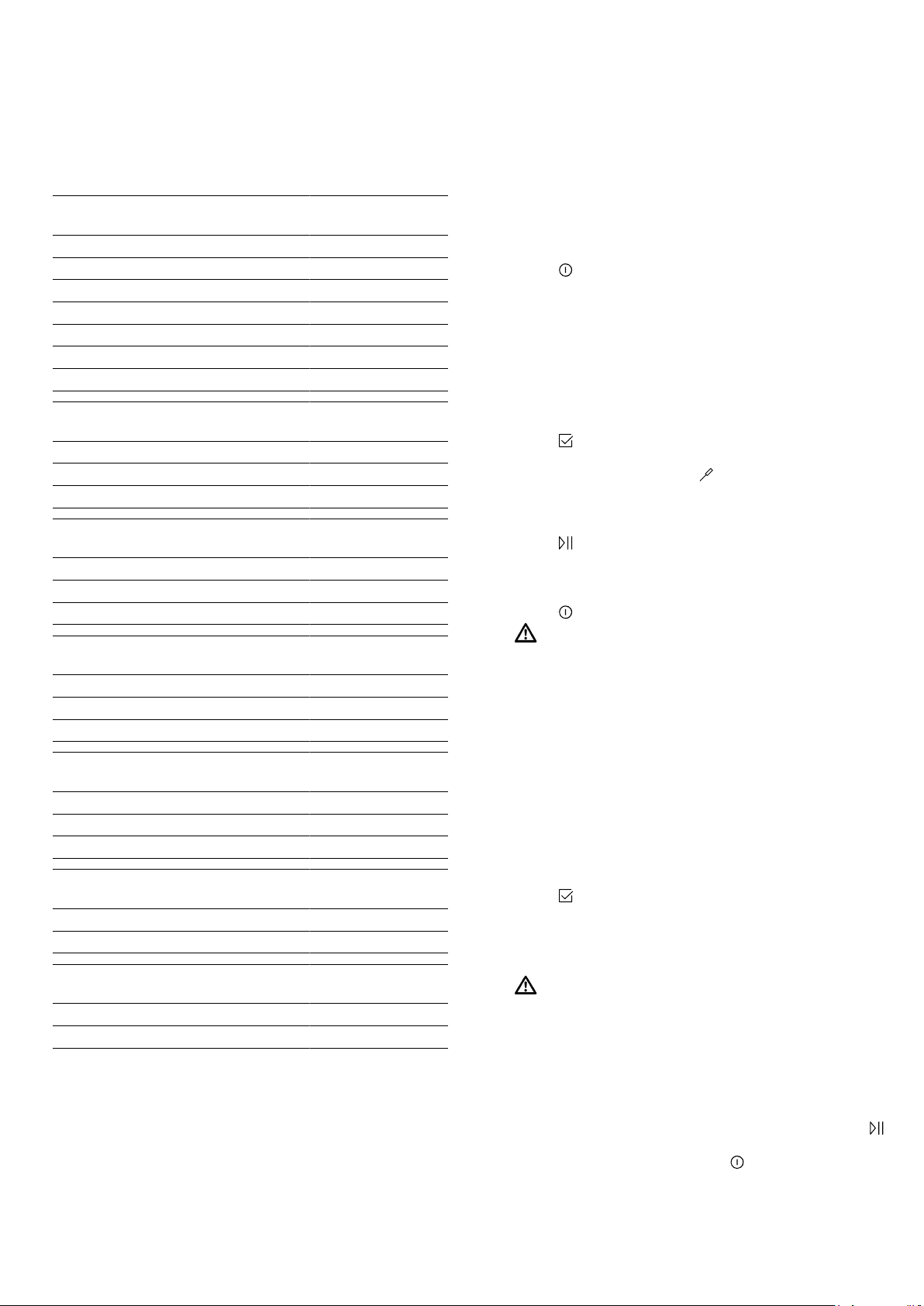
1.
Insert the meat probe into the food.
The meat probe has three measuring points. Ensure
that at least the middle measuring point is inserted
in the food.
Thin
pieces
of meat
Insert the meat probe into the thickest
part of the meat from the side.
Thick
pieces
of meat
Insert the meat probe diagonally into the
meat from above, pushing it in as far as
possible.
Poultry Insert the meat probe into the thickest
part of the breast, pushing it in as far as
possible. The meat probe can be inser-
ted horizontally or vertically depending
on the size and shape of the poultry.
Turn the poultry and place it on the wire
rack breast-side down.
Fish When cooking whole fish, insert the
meat probe behind the fish's head in the
direction of the spine, pushing it in as
far as possible.
Place the fish on the wire rack in the
swimming position without turning it,
e.g. using half a potato as a support.
2.
Place the food with the meat probe into the cooking
compartment.
3.
Plug the meat probe into the socket on the left-hand
side of the cooking compartment.
Notes
¡ If you remove the meat probe while the food is
cooking, all the settings will be reset.
¡ Do not remove the meat probe when turning the
food. Once you have turned the food, check that the
meat probe is correctly positioned in the food.
en Meat probe
20
10.3 Core temperatures of different foods
Here you can find the suggested core temperatures of
various different foods.
These suggestions depend on the quality and the size/
shape of the food. Do not use frozen food.
Poultry Core temperature
in °C
Chicken 80 - 85
Chicken breast 75 - 80
Duck 80 - 85
Duck breast, medium rare 55 - 60
Turkey 80 - 85
Turkey breast 80 - 85
Goose 80 - 90
Pork Core temperature
in °C
Shoulder of pork 85 - 90
Fillet of pork, medium rare 62 - 70
Pork loin, well done 72 - 80
Beef Core temperature
in °C
Tenderloin or sirloin, rare 45 - 52
Tenderloin or sirloin, medium rare 55 - 62
Tenderloin or sirloin, well done 65 - 75
Veal Core temperature
in °C
Joint of veal or hock, lean 75 - 80
Joint of veal, shoulder 75 - 80
Veal knuckle 85 - 90
Lamb Core temperature
in °C
Leg of lamb, medium rare 60 - 65
Leg of lamb, well done 70 - 80
Saddle of lamb, medium rare 55 - 60
Fish Core temperature
in °C
Whole fish 65 - 70
Fish fillet 60 - 65
Other Core temperature
in °C
Meat loaf, all kinds of meat 80 - 90
Heating food, reheating 65 - 75
10.4 Setting the oven temperature and core
temperature
The meat probe measures the temperature inside the
food between 30°C and 99°C.
Requirements
¡ The food with the meat probe is in the cooking com-
partment.
¡ The meat probe is inserted in the cooking compart-
ment.
1.
Press
to switch the appliance on.
2.
Select a suitable heating function.
3.
Press "Cooking compartment temperature" on the
left in the bottom row.
4.
Swipe left or right to select the required cooking
compartment temperature.
Set the cooking compartment temperature at least
10°C higher than the core temperature.
Do not set the cooking compartment temperature to
higher than 250°C.
5.
Press to save the cooking compartment temper-
ature.
6.
Press "Core temperature" on the right in the bot-
tom row.
7.
Swipe left or right to select the required core tem-
perature.
8.
Press to start cooking using the meat probe.
a Once the required core temperature has been
reached, an audible signal will sound and the appli-
ance will stop heating.
9.
Press to switch the appliance off.
10.
WARNING‒Risk of burns!
The cooking compartment, accessories and meat
probe become very hot.
▶ Always use oven gloves to remove hot accessor-
ies and the meat probe from the cooking com-
partment.
Pull the meat probe out of the socket in the cooking
compartment.
10.5 Changing the cooking compartment
temperature or core temperature
1.
Press the cooking compartment temperature or
core temperature twice.
2.
Swipe left or right to change the temperature.
3.
Press
to save your setting.
10.6 Cancelling operation with the meat
probe
▶
WARNING‒Risk of burns!
The cooking compartment, accessories and meat
probe become very hot.
▶ Always use oven gloves to remove hot accessor-
ies and the meat probe from the cooking com-
partment.
To continue cooking without the meat probe, pull
the meat probe out of the socket in the cooking
compartment and out of the food, and then press
to resume operation.
‒ To cancel operation, press to switch the appli-
ance off.

Baking and roasting assistant en
21
11 Baking and roasting assistant
The baking and roasting assistant helps you to use
your appliance to cook various dishes by suggesting
the optimal settings.
The baking and roasting assistant helps you to make
classic cakes, bread and roasts. The appliance selects
the optimal heating function for you. The default tem-
perature and cooking time can be changed according
to your requirements.
11.1 Overview of available foods
You can choose from the following foods:
¡ Sponge in a springform tin/loaf tin
¡ Sponge (6 eggs)
¡ Swiss roll
¡ Yeast dough tray bakes with dry topping
¡ Plaited ring/loaf
¡ Small baked puff-pastry items
¡ Muffins, on one level
¡ White bread in a loaf tin
¡ Part-baked bread rolls/baguettes
¡ Pizza, frozen, thin base, x 1
¡ Chips, frozen, on one level
¡ Potato gratin, made from raw potatoes
¡ Baked potatoes
¡ Lasagne, fresh
¡ Joint of pork, marbled, without rind
¡ Meat loaf (1kg)
¡ Sirloin, medium, 1.5kg
¡ Beef pot roast
¡ Leg of lamb, boned
¡ Chicken, whole
¡ Chicken legs
¡ Goose, whole (3-4kg)
11.2 Configuring the baking and roasting
assistant
Note:Use fresh and, ideally, chilled food. Use frozen
food straight from the freezer.
Requirement:The cooking compartment must have
cooled down.
1.
Press
to switch the appliance on.
2.
Press .
3.
Swipe left or right to select "Baking and roasting as-
sistant" .
4.
Press the bottom row.
5.
Tap the required category.
6.
Swipe left or right to select the required food.
7.
Press the required food.
a The recommended settings will appear on the dis-
play.
8.
Note:Additional information cannot be selected for
all foods.
Swipe left to view the additional information about
the food.
a Additional information will appear, for example re-
garding which shelf position, accessories or cook-
ware you should use or when you should turn or stir
your food or add liquid.
9.
To adjust the recommended settings, press "Adjust".
‒ Press the setting.
‒ Swipe left or right to adjust the setting.
10.
Press
to start the baking and roasting assistant.
a Some food needs to be turned or stirred. An audible
signal will sound and a notification will appear on
the display to let you know when it is time to turn or
stir your food.
a Once the cooking time has elapsed, an audible sig-
nal will sound and the appliance will stop heating.
11.
Note:Some programs allow you to extend the cook-
ing time.
→"Extending the cooking time", Page21
If you are happy with the cooking result, press
"End".
11.3 Extending the cooking time
1.
Press "Extend cooking time".
2.
Swipe left or right to change the settings.
3.
Press
to start the appliance again for the extra
cooking time.
12 Steam programs
The steam programs help you to use your appliance to
cook various dishes by selecting the optimal settings
automatically.
12.1 Cookware
The cooking result depends on the composition of the
meat and the size of cookware.
You should therefore use heat-resistant cookware that
is suitable for temperatures up to 300°C. Glass or
glass ceramic cookware is best. The joint should cover
approx. two thirds of the cookware base.
Cookware made from the following material is not
suitable:
¡ Bright, shiny aluminium
¡ Unglazed clay
¡ Plastic or plastic handles
12.2 Overview of the steam programs
You can choose from the following steam programs:
¡ White bread, without a tin
¡ Wheat bread, wheat bread with rye, without a tin
¡ Wheat bread, wheat bread with rye, in a loaf tin
¡ Rye bread with wheat and yeast in a loaf tin
¡ Flatbread
¡ Plaited loaf, unfilled/plaited ring
¡ Sponge cake
¡ Joint of pork with crackling
¡ Boned pork neck joint
¡ Smoked pork, boned/rolled joint
¡ Fillet of beef, fresh, medium
en Childproof lock
22
¡ Sirloin, fresh, medium
¡ Sirloin, fresh, rare
¡ Chicken, whole, fresh
¡ Chicken pieces, fresh
¡ Chicken breast, steam
¡ Duck, goose, unstuffed, fresh
¡ Fish fillet, au gratin
¡ Fish fillet, braise
¡ Fish, whole
¡ Fish, whole, steam
¡ Cauliflower florets, steam
¡ Broccoli florets, steam
¡ Green beans, steam
¡ Sliced carrots, steam
¡ Vegetables, frozen
¡ Unpeeled boiled potatoes, medium
¡ Basmati rice
¡ Brown rice
¡ Couscous
¡ Lentils
¡ Cooked side dishes, reheat
¡ Yoghurt in glass jars
¡ Rice pudding
¡ Fruit compote
¡ Eggs, soft-boiled
¡ Eggs, hard-boiled
¡ Bottles, sterilise
12.3 Preparing food for the steam program
Note:Use fresh and, ideally, chilled food. Use frozen
food straight from the freezer.
▶
Weigh the food.
Some steam programs need to know the weight of
the food in order to configure the steam program's
settings accordingly.
12.4 Configuring the steam program
WARNING‒Risk of scalding!
Hot steam may escape when you open the appliance
door. Steam may not be visible, depending on the tem-
perature.
▶ Open the appliance door carefully.
▶ Keep children at a safe distance.
1.
Fill the water tank and insert it.
2.
Press
to switch the appliance on.
3.
Press .
4.
Swipe left or right to select "Steam programs" .
5.
Press the bottom row.
6.
Press the required category.
7.
Swipe left or right to select the required steam pro-
gram.
8.
Press the steam program.
a The settings will appear on the display.
9.
Note:For some dishes, you can view additional re-
commendations.
Swipe left to view the recommendations for the
steam program.
a The recommended shelf position and cookware will
be displayed.
10.
If your chosen steam program takes into account
the weight of the food, you can adjust the weight.
‒ To adjust the weight, press "Adjust".
‒ Press the weight.
‒ Swipe left or right to adjust the weight.
11.
Press
to start the steam program.
a The calculated cooking time will be displayed. For
some steam programs, the cooking time may
change during the first few minutes, as the heating-
up time depends on the temperature of the food
and the water, amongst other things.
a Some food needs to be turned or stirred. An audible
signal will sound and a notification will appear on
the display to let you know when it is time to turn or
stir your food.
a Once the cooking time has elapsed, an audible sig-
nal will sound and the appliance will stop heating.
12.
Note:Some steam programs allow you to extend
the cooking time.
→"Extending the cooking time", Page22
If you are happy with the cooking result, press
"End".
12.5 Extending the cooking time
1.
Press "Extend cooking time".
2.
Swipe left or right to change the settings.
3.
Press
to start the appliance again for the extra
cooking time.
13 Childproof lock
You can secure your appliance to prevent children
from accidentally switching it on or changing the set-
tings.
13.1 Locks
Your appliance has two different locks:
Lock Activate/deactivate
Automatic childproof lock Via the MyProfile menu
One-time childproof lock Using the button
13.2 Activating the automatic childproof
lock
The automatic childproof lock disables the control
panel to prevent children from accidentally switching
on the appliance. To switch on the appliance, interrupt
the automatic childproof lock. Once the appliance has
finished cooking, it automatically disables the control
panel.
Note:When you activate the automatic childproof lock,
the appliance will immediately disable the control
panel. The
and buttons will not be disabled.
Requirement:The appliance must be switched on.
1.
Press .
2.
Swipe left or right to select "MyProfile" .
Rapid heat-up en
23
3.
Press the bottom row.
4.
Swipe left or right to select the "Automatic childproof
lock".
5.
Press the bottom row.
6.
Swipe right to set the lock to "Activated".
7.
Press
.
8.
Press "Save" to save your settings.
a When you switch off the appliance, will appear
on the display.
13.3 Interrupting the automatic childproof
lock
1.
Press and hold the
button until "Childproof lock
deactivated" appears on the display.
2.
Press to switch the appliance on and then start it
up.
13.4 Deactivating the automatic childproof
lock
1.
Press and hold the
button until "Childproof lock
deactivated" appears on the display.
2.
Press to switch the appliance on.
3.
Press .
4.
Swipe left or right to select "MyProfile" .
5.
Press the bottom row.
6.
Press the top row.
7.
Swipe left or right to select the "Automatic childproof
lock".
8.
Press the bottom row.
9.
Swipe left to set the lock to "Deactivated".
10.
Press
.
11.
Press "Save" to save your settings.
13.5 Activating the one-time childproof lock
The one-time childproof lock disables the control panel
to prevent children from accidentally switching on the
appliance. To switch on the appliance, deactivate the
one-time childproof lock. After you have switched off
the appliance, the control panel will no longer be dis-
abled.
Note:When you activate the automatic childproof lock,
the appliance will immediately disable the control
panel. The
and buttons will not be disabled.
▶
Press and hold the button until "Childproof lock
activated" appears on the display.
13.6 Deactivating the one-time childproof
lock
▶
Press and hold the
button until "Childproof lock
deactivated" appears on the display.
14 Rapid heat-up
You can use the "Rapid heat-up" and "PowerBoost" functions to reduce the heat-up time. Whether the appliance is
preheated with the "Rapid heat-up" function or the "PowerBoost" function depends on the heating function that has
been set.
14.1 Rapid heat-up and PowerBoost
Function Heating function Food in the cooking compartment
Rapid heat-up Top/bottom heating After preheating
PowerBoost ¡ CircoTherm hot air
¡ Bread-baking setting
Before heating up
Only cook on one level
14.2 Activating the "Rapid heat-up" function
1.
Set Top/bottom heating
and a temperature of at
least 100°C.
2.
Press to start.
a The button will be lit.
3.
Use the
button to activate the "Rapid heat-up"
function.
a will appear on the display.
a Once the set temperature has been reached, the
"Rapid heat-up" function will switch itself off auto-
matically and an audible signal will sound.
will go
out on the display.
4.
Place the food in the cooking compartment.
14.3 Deactivating the "Rapid heat-up"
function
▶
Use the
button to deactivate the "Rapid heat-up"
function early.
14.4 Activating the "PowerBoost" function
1.
Place the food on a single level in the cooking com-
partment.
2.
Set CircoTherm hot air
or the Bread-baking set-
ting and a temperature of at least 100°C.
3.
Press to start.
a The button will be lit.
4.
Press the
button to activate the "PowerBoost"
function.
a will appear on the display.
a Once the set temperature has been reached, the
"PowerBoost" function will switch itself off automatic-
ally and an audible signal will sound.
will go out
on the display.
14.5 Deactivating the "PowerBoost"
function
▶
Use the
button to deactivate the "PowerBoost"
function early.
en Sabbath mode
24
15 Sabbath mode
You can set a cooking time of up to 74hours using
Sabbath mode. You can use top/bottom heating to
keep food warm between 85°C and 140°C during
this time without having to switch the appliance on or
off.
15.1 Starting Sabbath mode
Notes
¡ If you open the appliance door during operation, the
appliance stops heating. When you close the appli-
ance door, the appliance continues to heat again.
¡ Once you have started the operation, you cannot
change any settings or pause operation.
Requirement:Sabbath mode must be activated in "Fa-
vourites" in the basic settings.
1.
Press to switch the appliance on.
2.
Swipe left or right to select "Sabbath mode".
3.
Press "Temperature".
4.
Swipe left or right to select the temperature.
5.
Press to save your setting.
6.
Press "Cooking time".
7.
Swipe left or right to select the cooking time.
8.
Press to save your setting.
9.
Press to start Sabbath mode.
a The cooking time appears on the display. The cook-
ing time counts down.
10.
Once the cooking time has elapsed, an audible sig-
nal sounds. A note appears on the display confirm-
ing that the operation has finished. The appliance
stops heating up and responds again as usual out-
side of Sabbath mode.
‒ Press to switch the appliance off.
The appliance automatically switches off after ap-
prox.10to 20 minutes.
15.2 Cancelling Sabbath mode
▶
Press
to cancel Sabbath mode.
16 Basic settings
You can configure the appliance to meet your needs.
16.1 Overview of the basic settings
Here you can find an overview of the basic settings
and factory settings. The basic settings depend on the
features of your appliance.
Basic setting Selection
Language See selection on the appliance
Time 00:00 - 23:59
Date Day, month and year
Water hardness
→"Before using for
the first time",
Page11
¡ 0 (softened)
¡ 1 (soft)
¡ 2 (moderately hard)
¡ 3 (hard)
¡ 4 (very hard)
Favourites
→"Changing your
favourites",
Page25
Set the heating functions that
you want to appear in the heat-
ing functions menu
Audible signal ¡ Short duration
¡ Medium duration
¡ Long duration
Volume 5 settings
Button tone ¡ Off (except for )
¡ On
Display brightness 5 settings
Clock display ¡ Off
¡ Digital
¡ Analogue
Lighting ¡ On during operation
¡ Off during operation
1
Depending on the appliance specifications
Basic setting Selection
Automatic childproof
lock
¡ Deactivated
¡ Activated
Operation after
switch-on
¡ Main menu
¡ Types of heating
¡ Steam
¡ Baking and roasting assist-
ant
¡ Steam programs
Night-time dimming ¡ Switched off
¡ On (display dimmed
between 10 p.m. and 5.59
a.m.)
Brand logo ¡ Indicators/symbols
¡ Do not display
Fan run-on time ¡ Recommended
¡ Minimum
Pull-out rail system
1
¡ Not retrofitted (rack or
single set of pull-out rails)
¡ Retrofitted (two or three sets
of pull-out rails)
Factory settings Restore
1
Depending on the appliance specifications
16.2 Changing MyProfile
1.
Press
to switch the appliance on.
2.
Press .
3.
Swipe left or right to select "MyProfile" .
4.
Press the bottom row.
5.
Swipe left or right to select a setting.
6.
Press the bottom row.
7.
Swipe left or right to change the setting.
8.
Press
.
9.
To save your settings, press "Save".
‒ To discard your settings, press "Discard".
Cleaning and servicing en
25
16.3 Changing your favourites
In Favourites, you can set the heating functions that
you want to appear in the heating functions menu.
Note:
Some heating functions cannot be deactivated:
¡ CircoTherm hot air
¡ Circo-roasting
¡ Full-surface grill
1.
Press to switch the appliance on.
2.
Press .
3.
Swipe left or right to select "MyProfile" .
4.
Press the bottom row.
5.
Swipe left or right to select "Favourites".
6.
Press the bottom row.
7.
Swipe left or right to select a heating function.
8.
Press the required setting.
Setting Display in the heating func-
tions menu?
Activated Yes
Deactivated No
9.
Press .
10.
To save your settings, press "Save".
‒ To discard your settings, press "Discard".
17 Cleaning and servicing
To keep your appliance working efficiently for a long
time, it is important to clean and maintain it carefully.
17.1 Cleaning products
In order to avoid damaging the various oven surfaces
on the appliance, do not use unsuitable cleaning
products.
WARNING‒Risk of electric shock!
An ingress of moisture can cause an electric shock.
▶ Do not use steam- or high-pressure cleaners to
clean the appliance.
ATTENTION!
Unsuitable cleaning products may damage the sur-
faces of the appliance.
▶ Do not use harsh or abrasive cleaning products.
▶ Do not use cleaning products with a high alcohol
content.
▶ Do not use hard scouring pads or cleaning
sponges.
▶ Do not use any special cleaners for cleaning the ap-
pliance while it is hot.
Using oven cleaner in a hot cooking compartment
damages the enamel.
▶ Never use oven cleaner in the cooking compartment
when it is still warm.
▶ Remove all food remnants from the cooking com-
partment and the appliance door before you next
heat up the appliance.
New sponge cloths contain residues from production.
▶ Wash new sponge cloths thoroughly before use.
Suitable cleaning agents
Only use cleaning agents that are suitable for the differ-
ent surfaces on your appliance.
Follow the instructions on cleaning the appliance.
→"Cleaning the appliance", Page27
Appliance front
Surface Suitable cleaning agents Information
Stainless steel ¡ Hot soapy water
¡ Special stainless steel
cleaning products
suitable for hot sur-
faces
To prevent corrosion, remove any limescale, grease, starch or albu-
min (e.g. egg white) stains on stainless steel fronts immediately.
Apply a thin layer of the stainless steel cleaning product with a soft
cloth.
Plastic or painted
surfaces
E.g. control panel
¡ Hot soapy water Do not use glass cleaner or a glass scraper.
To avoid permanent stains, remove any descaling agent that gets
onto the surface immediately.
Appliance door
Area Suitable cleaning agents Information
Door panels ¡ Hot soapy water Do not use a glass scraper or a stainless steel wool.
Tip:Remove the door panels in order to clean them thoroughly.
→"Appliance door", Page30
Door cover ¡ Made of stainless
steel:
Stainless steel cleaner
¡ Made of plastic:
Hot soapy water
Do not use glass cleaner or a glass scraper.
Do not use stainless steel care products.
Tip:Remove the door cover for thorough cleaning.
→"Appliance door", Page30

en Cleaning and servicing
26
Area Suitable cleaning agents Information
Stainless steel in-
terior door frame
Stainless steel cleaner Discolouration can be removed using stainless steel cleaner.
Do not use stainless steel care products.
Door handle ¡ Hot soapy water To avoid permanent stains, remove any descaling agent that gets
onto the surface immediately.
Door seal ¡ Hot soapy water Do not remove or scrub.
Cooking compartment
Area Suitable cleaning agents Information
Enamel surfaces ¡ Hot soapy water
¡ Vinegar water
¡ Oven cleaner
Soak any heavily soiled areas and use a brush or steel wool.
Leave the appliance door open to dry the cooking compartment
after cleaning it.
Notes
¡ Enamel burns at very high temperatures, causing minor discol-
ouration. The functionality of your appliance is not affected by
this.
¡ The edges of thin trays cannot be completely enamelled and may
be rough. This does not impair corrosion protection.
¡ Food residues will leave a white coating on the enamel surfaces.
The coating does not pose a health risk. The functionality of your
appliance is not affected by this. You can remove residues with
lemon juice.
Self-cleaning sur-
faces
- Follow the instructions for self-cleaning surfaces.
→"Cleaning self-cleaning surfaces in the cooking compartment",
Page27
Glass cover for
the oven light
¡ Hot soapy water Use oven cleaner to remove very heavy soiling.
Rails ¡ Hot soapy water Soak any heavily soiled areas and use a brush or steel wool.
Note:To clean thoroughly, detach the rails.
→"Rails", Page30
Pull-out system ¡ Hot soapy water Use a brush to remove very heavy soiling.
Clean the pull-out rails while they are pushed in so that you do not
remove the lubricant.
Do not clean in the dishwasher.
Note:To clean thoroughly, detach the pull-out system.
→"Rails", Page30
Accessories ¡ Hot soapy water
¡ Oven cleaner
Soak any heavily soiled areas and use a brush or steel wool.
Enamelled accessories are dishwasher-safe.
Do not use stainless steel wool on steam containers made from
stainless steel.
Use a vinegar solution to remove any dirt on stainless steel steam
containers caused by starchy foods (e.g. rice).
Water tank ¡ Hot soapy water To remove residual detergent after cleaning, rinse thoroughly with
clean water.
To dry the water tank after cleaning, leave the water tank to dry with
the lid open. Dry the seal on the lid.
Do not clean in the dishwasher.
Meat probe ¡ Hot soapy water Use a brush to remove heavy soiling.
Do not clean in the dishwasher.
Cleaning functions en
27
17.2 Cleaning the appliance
In order to avoid damaging the appliance, you must
clean your appliance only as specified, and with suit-
able cleaning products.
WARNING‒Risk of burns!
The appliance and its parts that can be touched be-
come hot during use.
▶ Caution should be exercised here in order to avoid
touching heating elements.
▶ Young children under 8 years of age must be kept
away from the appliance.
WARNING‒Risk of fire!
Loose food remnants, fat and meat juices may catch
fire.
▶ Before using the appliance, remove the worst of the
food residues and remnants from the cooking com-
partment, heating elements and accessories.
Requirement:Read the information on cleaning
products.
→"Cleaning products", Page25
1.
Clean the appliance using hot soapy water and a
dish cloth.
‒ For some surfaces, you can use alternative
cleaning agents.
→"Suitable cleaning agents", Page25
2.
Dry with a soft cloth.
17.3 Checking the cooking compartment
seal after cleaning
▶
If the cooking compartment seal is on the left or
right of the spacer
, slide the cooking compart-
ment seal inwards until it is beside the spacer .
17.4 Cleaning self-cleaning surfaces in the
cooking compartment
The back panel, ceiling and side walls in the cooking
compartment are self-cleaning and have a coarse sur-
face.
ATTENTION!
If you do not clean the self-cleaning surfaces regularly,
they may become damaged.
▶ If dark stains are visible on the self-cleaning sur-
faces, use the cleaning function to clean the cook-
ing compartment.
▶ If a prompt to clean appears in the display, use the
cleaning function to clean the cooking compart-
ment.
▶ Do not use oven cleaner or abrasive cleaning aids.
If oven cleaner accidentally comes into contact with
the self-cleaning surfaces, dab it off immediately us-
ing water and a sponge cloth. Do not rub.
▶
Use the cleaning function.
18 Cleaning functions
You can use the cleaning functions to clean the appli-
ance.
18.1 "EcoClean" cleaning function
Use the "EcoClean" cleaning function regularly to help
retain the cleaning ability of the self-cleaning surfaces
and prevent damage.
The self-cleaning surfaces in the cooking compartment
are coated with a porous, matt ceramic layer and have
a rough surface. When the appliance is in operation,
the self-cleaning surfaces absorb splashes from roast-
ing or grilling and break them down.
The following surfaces are self-cleaning:
¡ Back wall
¡ Ceiling
¡ Side walls
ATTENTION!
If you do not clean the self-cleaning surfaces regularly,
they may become damaged.
▶ If dark stains are visible on the self-cleaning sur-
faces, use the cleaning function to clean the cook-
ing compartment.
▶ If a prompt to clean appears in the display, use the
cleaning function to clean the cooking compart-
ment.
▶ Do not use oven cleaner or abrasive cleaning aids.
If oven cleaner accidentally comes into contact with
the self-cleaning surfaces, dab it off immediately us-
ing water and a sponge cloth. Do not rub.
Cleaning recommendation
The appliance records the type and duration of the op-
eration and, if required, recommends which cleaning
function to use.

en Cleaning functions
28
When you switch on the appliance, a notification ap-
pears in the display stating that you should use the
cleaning function. Start the cleaning function as soon
as possible.
You can use your appliance as normal. However, the
cleaning setting appears in the display until you have
run the cleaning function in full.
Note:If the appliance is prematurely contaminated, e.g.
by greasy poultry or roasts, or if dark spots appear on
the self-cleaning surfaces, do not wait until the notifica-
tion appears in the display before you use the cleaning
functions. The more often you use the cleaning func-
tion, the longer the cleaning ability of the self-cleaning
surfaces is retained.
Preparing the appliance for the cleaning
function
In order to achieve a good cleaning result, prepare the
appliance carefully.
ATTENTION!
Using oven cleaner on the self-cleaning surfaces dam-
ages the surfaces.
▶ Do not use oven cleaner on the self-cleaning sur-
faces. If oven cleaner does get onto these surfaces,
dab it off immediately using water and a sponge
cloth. Do not rub the surface and do not use abras-
ive cleaning aids.
1.
Remove accessories and cookware from the cook-
ing compartment.
2.
Detach the shelf supports and remove them from
the cooking compartment.
→"Rails", Page30
3.
Remove coarse dirt using soapy water and a soft
cloth:
– From the cooking compartment floor
– From the inside of the appliance door
– From the glass cover on the oven light
This prevents stains that cannot be removed.
4.
Remove any objects from the cooking compartment.
The cooking compartment must be empty.
Configuring the "EcoClean" cleaning function
WARNING‒Risk of burns!
The outside of the appliance gets very hot when the
cleaning function is in progress.
▶ Never touch the appliance door.
▶ Allow the appliance to cool down.
▶ Keep children at a safe distance.
Requirements
¡ Prepare the appliance for the cleaning function.
→Page28
¡ Do not open the appliance door while the appliance
is in operation, as this will abort the cleaning func-
tion.
1.
Press
to switch the appliance on.
2.
Press .
3.
Swipe left or right to set "EcoClean" .
4.
Press the bottom row.
a The duration of the cleaning function will appear on
the display.
5.
Press the bottom row.
6.
Note:Keep the kitchen ventilated while the cleaning
function is running.
Press
to start the cleaning function.
a The cleaning function will start. The duration will
count down on the display.
a Once the cleaning function has run through to the
end, an audible signal will sound.
7.
Press any button to end the audible signal.
8.
After using the cleaning function, wipe down the
cooking compartment.
→"Wiping the appliance clean following the clean-
ing function", Page28
Wiping the appliance clean following the
cleaning function
1.
Allow the appliance to cool down.
2.
Wipe the cooking compartment with a damp cloth.
Note:Marks may appear on the self-cleaning sur-
faces. Residues of sugar and egg white in the food
are not removed and stick to the surfaces. Red
stains are residues from salty food – they are not
rust. The stains are not hazardous to health. These
marks do not impair the cleaning ability of the self-
cleaning surfaces.
3.
Attach the shelf supports.
→"Rails", Page30
18.2 Floor cleaning aid
You can use the "floor cleaning aid" to clean the cook-
ing compartment floor. The "floor cleaning aid" soaks
dirt by evaporating soapy water. It is then easier to re-
move the dirt.
Setting the "floor cleaning aid"
WARNING‒Risk of scalding!
If there is water in the cooking compartment when it is
hot, this may create hot steam.
▶ Never pour water into the cooking compartment
when the cooking compartment is hot.
Requirements
¡ You can only start the cleaning aid once the cooking
compartment is cold (room temperature) and the ap-
pliance door is closed.
¡ Do not open the appliance door while the appliance
is in operation, as this will abort the cleaning aid.
¡ To remove particularly stubborn dirt, leave the soapy
water to work for a while before starting the cleaning
aid.
¡ To remove particularly stubborn dirt, rub washing-up
liquid onto dirty areas on the smooth surfaces before
starting the cleaning aid.
1.
Remove any accessories from the cooking compart-
ment.
2.
ATTENTION!
Distilled water in the cooking compartment leads to
corrosion.
▶ Do not use distilled water.
Mix 0.4litres water with a drop of washing-up liquid
and pour into the centre of the cooking compart-
ment floor.
3.
Press to switch the appliance on.
4.
Press .
5.
Select "Floor cleaning aid" .
To scroll through the various selection options,
swipe to the left or right on the display.
6.
Press the bottom row.
7.
Press
to start the cleaning aid.

Cleaning functions en
29
a The cleaning aid will start. The duration will count
down on the display.
a Once the cleaning aid has run through to the end,
an audible signal will sound.
8.
Press any button to end the audible signal.
9.
After using the cleaning aid, finish cleaning the
cooking compartment.
→"Wiping down the cooking compartment",
Page29
Wiping down the cooking compartment
ATTENTION!
The prolonged presence of moisture in the cooking
compartment leads to corrosion.
▶ After using the cleaning aid, wipe the cooking com-
partment clean and allow it to dry fully.
Requirement:The cooking compartment must have
cooled down.
1.
Open the appliance door and remove the remaining
water with an absorbent sponge cloth.
2.
Clean the smooth surfaces in the cooking compart-
ment with a dish cloth or a soft brush. Remove stub-
born food remnants using a stainless steel scouring
pad.
3.
Remove limescale with a cloth soaked in vinegar.
Then wipe with clean water and rub dry with a soft
cloth (including under the door seal).
4.
If there is any stubborn dirt that you are unable to
remove, run the cleaning aid again once the cook-
ing compartment has cooled down.
5.
Leave the cooking compartment to dry with the ap-
pliance door open for approx. 1hour.
18.3 Descaling
To ensure that your appliance continues to operate cor-
rectly, it must be descaled regularly.
How frequently you need to run the descaling pro-
gramme will depend on the water hardness and how
many times you have used the steam function. The ap-
pliance indicates when only another five or fewer
steam-assisted operations are possible. If you do not
carry out the descaling, you can no longer set any op-
eration with steam.
Descaling comprises several steps and takes approx.
70–95minutes:
¡ Descaling (approx. 55–70minutes)
¡ First rinse cycle (approx. 9–12minutes)
¡ Second rinse cycle (approx. 9–12minutes)
For reasons of hygiene, the descaling programme must
be run in full.
If descaling is interrupted, you can no longer set any
operation. To ensure that the appliance is ready for op-
eration again, carry out two rinse cycles.
Preparing descaling
ATTENTION!
The length of time for which the descaler is left to work
is based on the recommended, liquid descaler. Other
descalers may damage the appliance.
▶ Only use the liquid descaler recommended by us
for the descaling programme.
If descaling solution comes into contact with the control
panel or other delicate surfaces, it will damage them.
▶ Remove descaling solution immediately with water.
1.
Mix the descaling solution:
‒ 200ml liquid descaler
‒ 400ml water
2.
Open the control panel.
3.
Remove the water tank and pour the descaling solu-
tion into it.
4.
Once the descaling solution has been poured into
the water tank, slide the tank back in.
5.
Close the control panel.
Setting the descaling process
ATTENTION!
If descaling solution comes into contact with the control
panel or other delicate surfaces, it will damage them.
▶ Remove descaling solution immediately with water.
Requirement:The appliance must be prepared for de-
scaling. →Page29
1.
Press
to switch the appliance on.
2.
Press .
3.
Swipe left or right to set "Descale" .
4.
Press the bottom row.
a The duration will appear on the display. You cannot
change the duration of the descaling process.
5.
Press the bottom row.
6.
Press to start the descaling process.
a The descaling process will start. The duration will
count down on the display.
a Once the descaling process has run through to the
end, an audible signal will sound.
Running the first rinse cycle
1.
Open the control panel and remove the water tank.
2.
Thoroughly rinse the water tank and fill it with fresh
water.
3.
Slide in the water tank and close the control panel.
4.
Press
to start the rinse cycle.
a The rinse cycle will start. The duration will count
down on the display.
a Once the rinse cycle has run through to the end, an
audible signal will sound.
Running the second rinse cycle
1.
Open the control panel and remove the water tank.
2.
Thoroughly rinse the water tank and fill it with fresh
water.
3.
Slide in the water tank and close the control panel.
4.
Press
to start the rinse cycle.
a The rinse cycle will start. The duration will count
down on the display.
a Once the rinse cycle has run through to the end, an
audible signal will sound.
5.
Empty and dry the water tank.
→"Emptying the water tank", Page17
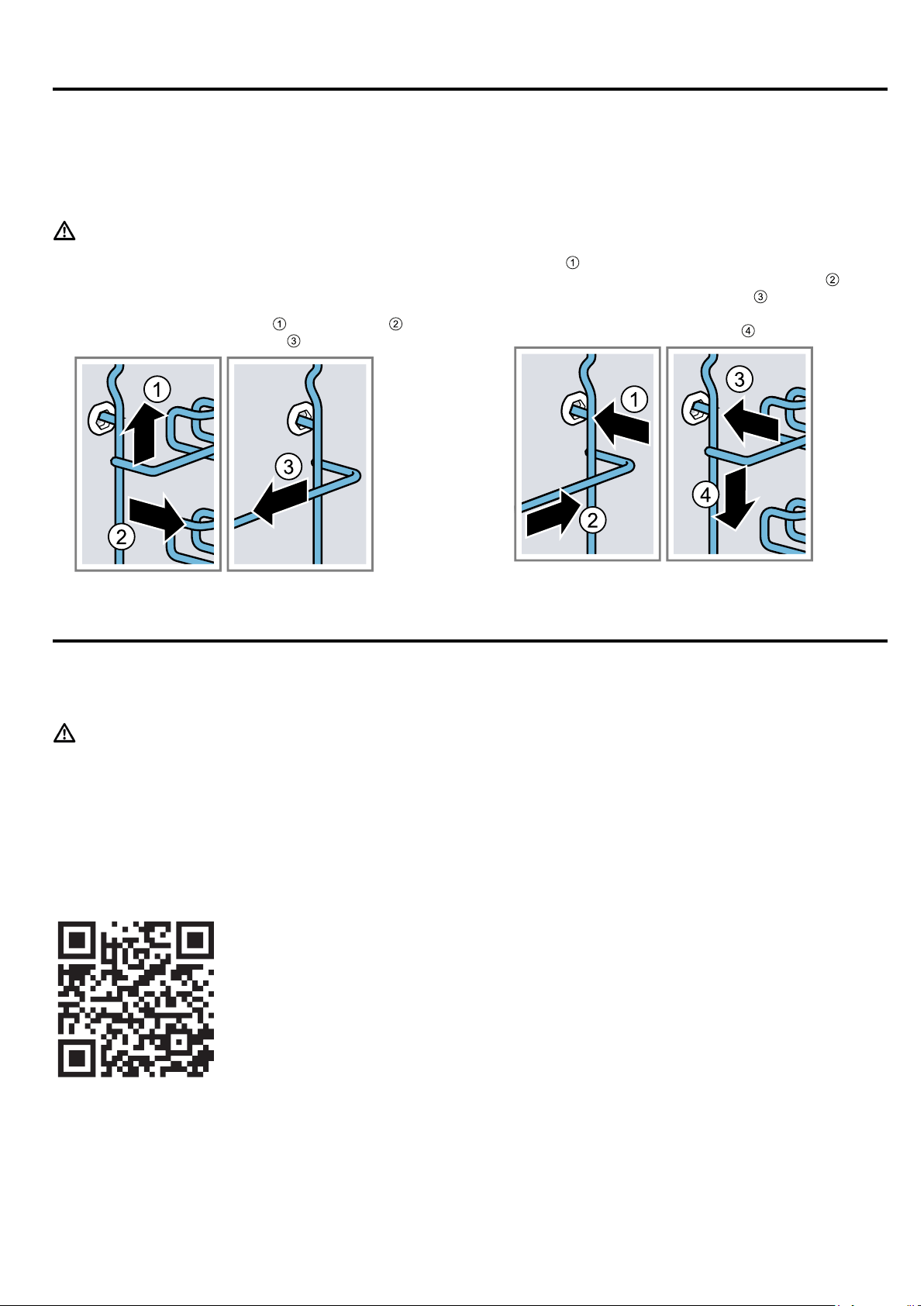
en Rails
30
19 Rails
To thoroughly clean the rails and the cooking compart-
ment, or to replace the rails, you can remove the rails.
19.1 Detaching the rails
WARNING‒Risk of burns!
The shelf supports get very hot
▶ Never touch the shelf supports when hot.
▶ Always allow the appliance to cool down.
▶ Keep children at a safe distance.
1.
Lift the rail forwards slightly and detach it .
2.
Pull the whole rail to the front and remove it.
3.
Clean the rail.
→"Cleaning products", Page25
19.2 Attaching the rails
Notes
¡ The rails only fit on the right or left.
¡ For both pull-out rails, ensure that you can pull them
forwards and out.
1.
First, push the rail into the middle of the rear
socket
until the rail rests against the cooking
compartment wall, and then push this back .
2.
Push the rail into the front socket until the rail
also rests against the cooking compartment wall,
and then press this downwards .
20 Appliance door
To clean the appliance door thoroughly, you can disas-
semble the appliance door.
WARNING‒Risk of injury!
If the hinges are not secured due to an incomplete
lock, they can snap shut with great force.
▶ To detach or attach the appliance door, always turn
the two locks as far as they will go.
▶ If the hinge snaps closed when detaching or attach-
ing the appliance door, do not reach into the hinge
– call the after-sales service.
Note:
Further information:
20.1 Detaching the appliance door
Requirements
¡ Have a torch ready.
¡ Have a screwdriver ready.
¡ Have a coin ready.
1.
To make it easier to see the door lock, shine the
torch into the gap beside the appliance door.
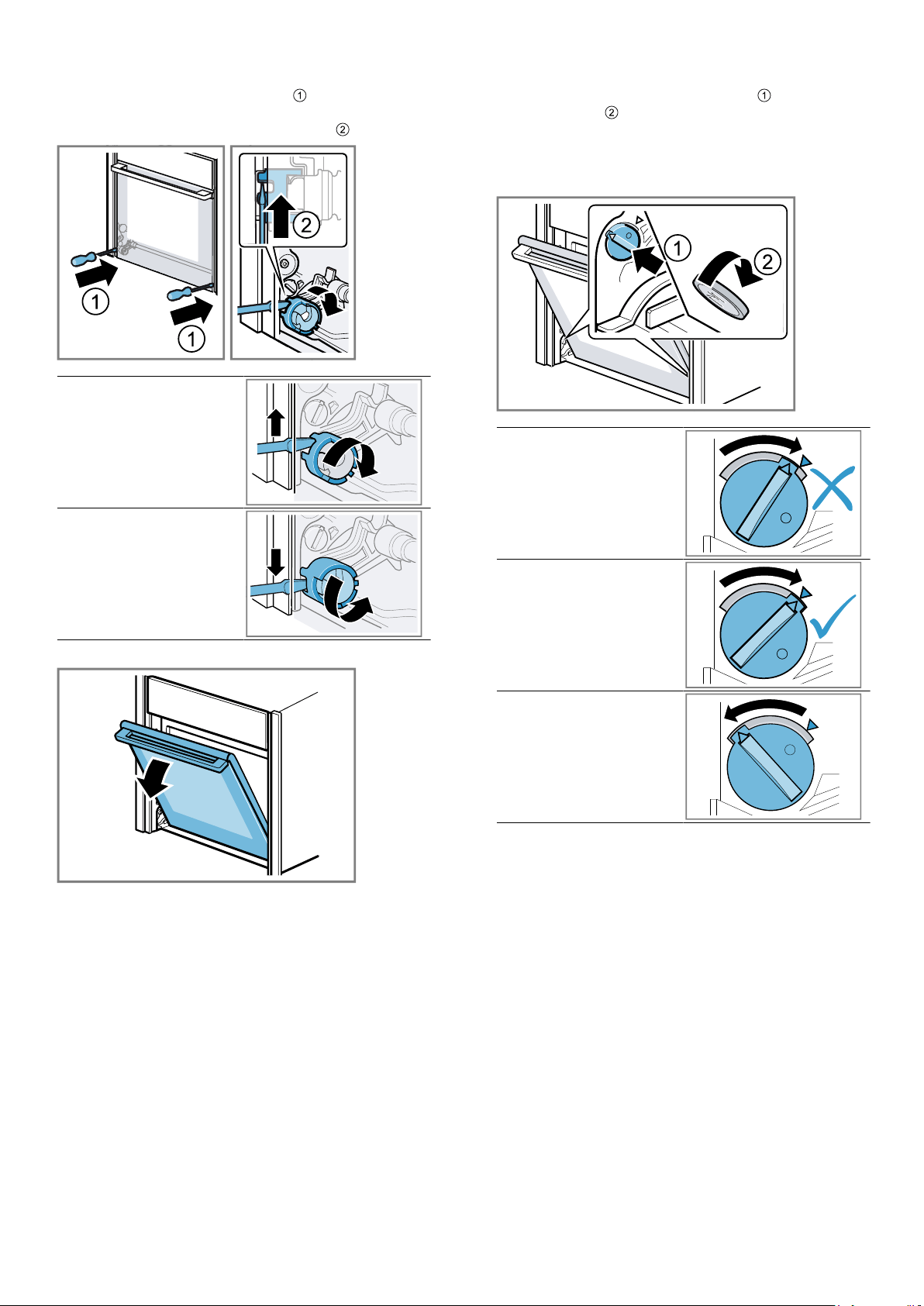
Appliance door en
31
2.
Hold the screwdriver horizontally
and use it to
push the door lock (black component) on each side
of the door upwards as far as it will go .
Door lock open
Door lock closed
3.
Open the appliance door approx. 45° wide.
4.
Insert the coin in the gap in the lock and rotate as
far as it will go .
‒ Turn the lock on the left-hand side in a clockwise
direction.
‒ Turn the lock on the right-hand side in an anti-
clockwise direction.
Left-hand lock not se-
cured
The arrows do not point
to each other
Left-hand lock secured
The arrows point to
each other
Left-hand lock released
a The lock audibly engages.
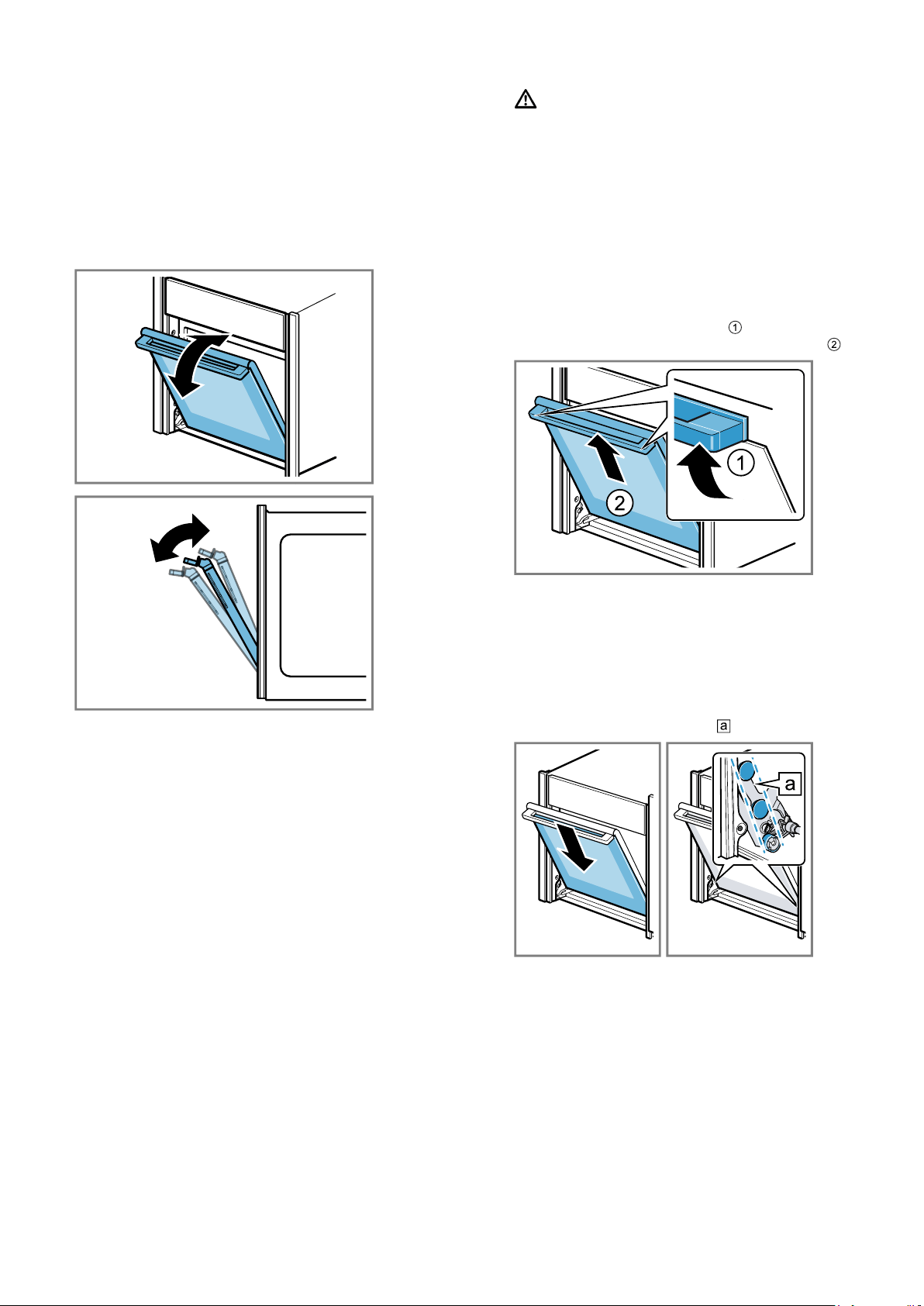
en Appliance door
32
5.
ATTENTION!
Opening and closing the appliance door when it is
in the lock position damages the door hinges.
▶ Never force the appliance door open or closed.
▶ If the door hinge has been damaged, call the
after-sales service.
Carefully move the appliance door back and forth in
the direction of both arrows until you hear a quiet
click. You can still only move the appliance door
slightly.
a The appliance door is in the lock position.
6.
WARNING‒Risk of injury!
The appliance door has a weight of 7–10 kg and
may fall if it is not handled carefully.
▶ Handle the appliance door carefully.
The door handle is not suitable for carrying the ap-
pliance door. The door handle may break off.
▶ Never carry the appliance door by the door
handle.
▶ Grab hold of the appliance door with both hands
on the left and right to carry it.
Take hold of the appliance door with both hands,
one on the left and one on the right, and slightly ro-
tate the door handle upwards until you are able
to pull up the appliance door and remove it .
7.
Set the appliance door down on a flat, soft, clean
surface.
20.2 Attaching the appliance door
1.
Tip:Ensure that the appliance door is not wedged
at an angle and that it is properly fitted in place.
Attach the appliance door via the left- and right-hand
guide rollers simultaneously
.

Appliance door en
33
2.
Rotate the door handle upwards slightly
.
a The appliance door slides the short distance re-
maining to the bottom .
3.
Use a coin to release both locks on the appliance
door. Insert the coin in the gap in the lock and ro-
tate as far as it will go .
‒ Turn the lock on the left-hand side in an anti-
clockwise direction.
‒ Turn the lock on the right-hand side in a clock-
wise direction.
4.
Open the appliance door slightly until you hear a
quiet click, and then close the appliance door.
5.
WARNING‒Risk of injury!
If the door locks are unsecured, the appliance door
may become detached.
▶ After attaching the appliance door, close the left-
and right-hand door locks.
Hold the screwdriver horizontally
and use it to
push the door lock (black component) on each side
of the door downwards as far as it will go .
a The door lock is closed.
20.3 Removing the door panes
To facilitate cleaning, you can remove the door pane.
WARNING‒Risk of injury!
Components inside the appliance door may have sharp
edges.
▶ Wear protective gloves.
Requirements
¡ Have a screwdriver ready.
¡ The appliance door is detached.
1.
Lay the appliance door with the front side facing
down on a flat surface that is soft and clean.
2.
Undo and remove the left- and right-hand screws on
the appliance door
.
3.
Carefully lift the inner pane upwards at an angle and
remove it in the direction of the arrow .
4.
Slide the screwdriver in between the metal tab
and the plastic.
5.
Use the screwdriver to lift the reflector until it
disengages, then lift it up and pull it out .
6.
Remove the second reflector in the same way as
the first.
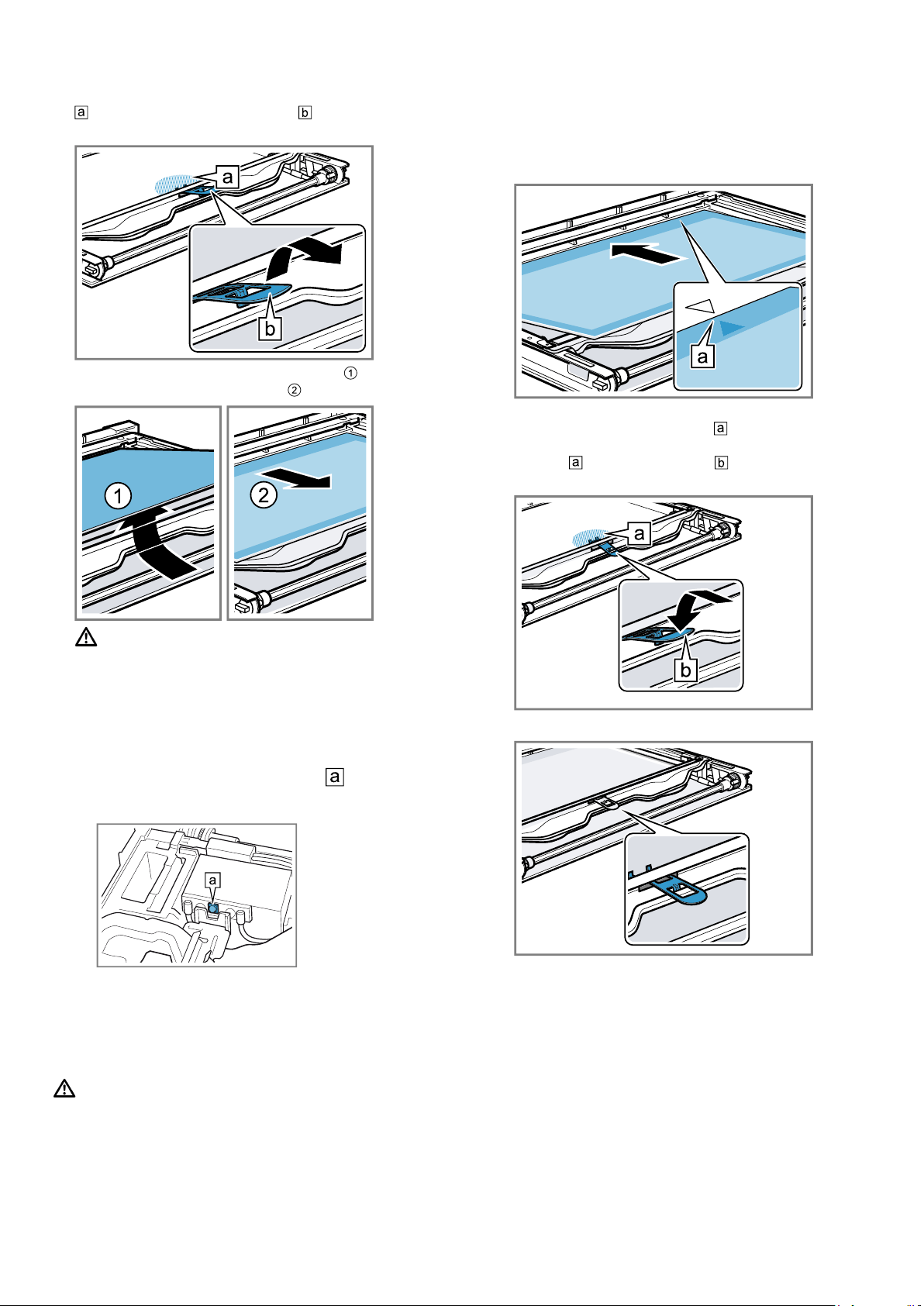
en Appliance door
34
7.
Push down on the intermediate pane lightly around
, and carefully lift the retainer until you are able
to pull it out.
8.
Lift the intermediate pane from below and remove
it in the direction of the arrow .
9.
WARNING‒Risk of injury!
Scratched glass in the appliance door may develop
into a crack.
▶ Do not use any harsh or abrasive cleaners or
sharp metal scrapers to clean the glass on the
oven door, as they may scratch the surface.
ATTENTION!
Damage to the lighting.
▶ Do not clean or touch the LEDs
. The LEDs
are located on the right- and left-hand side in the
appliance door.
Clean the door panes and reflectors on both sides
with glass cleaner and a soft cloth.
10.
Dry the door panes and refit them.
20.4 Fitting the door panes
WARNING‒Risk of injury!
If a door pane or appliance door has not been installed
correctly, this is dangerous.
▶ Make sure that all of the door panes and the appli-
ance door have been correctly fitted before you
switch the appliance back on again.
1.
Tip:When fitting the door panes, make sure that
they are in the original order.
Insert the intermediate pane in the direction of the
arrow and push it in in the direction of the arrow un-
til it is fitted in the frame.
The arrow on the intermediate pane must line up
with the arrow on the frame .
2.
Push down lightly on the first intermediate pane
around , slide the retainer in at an angle and
push down until it clicks into place.
a The retainer has been inserted.
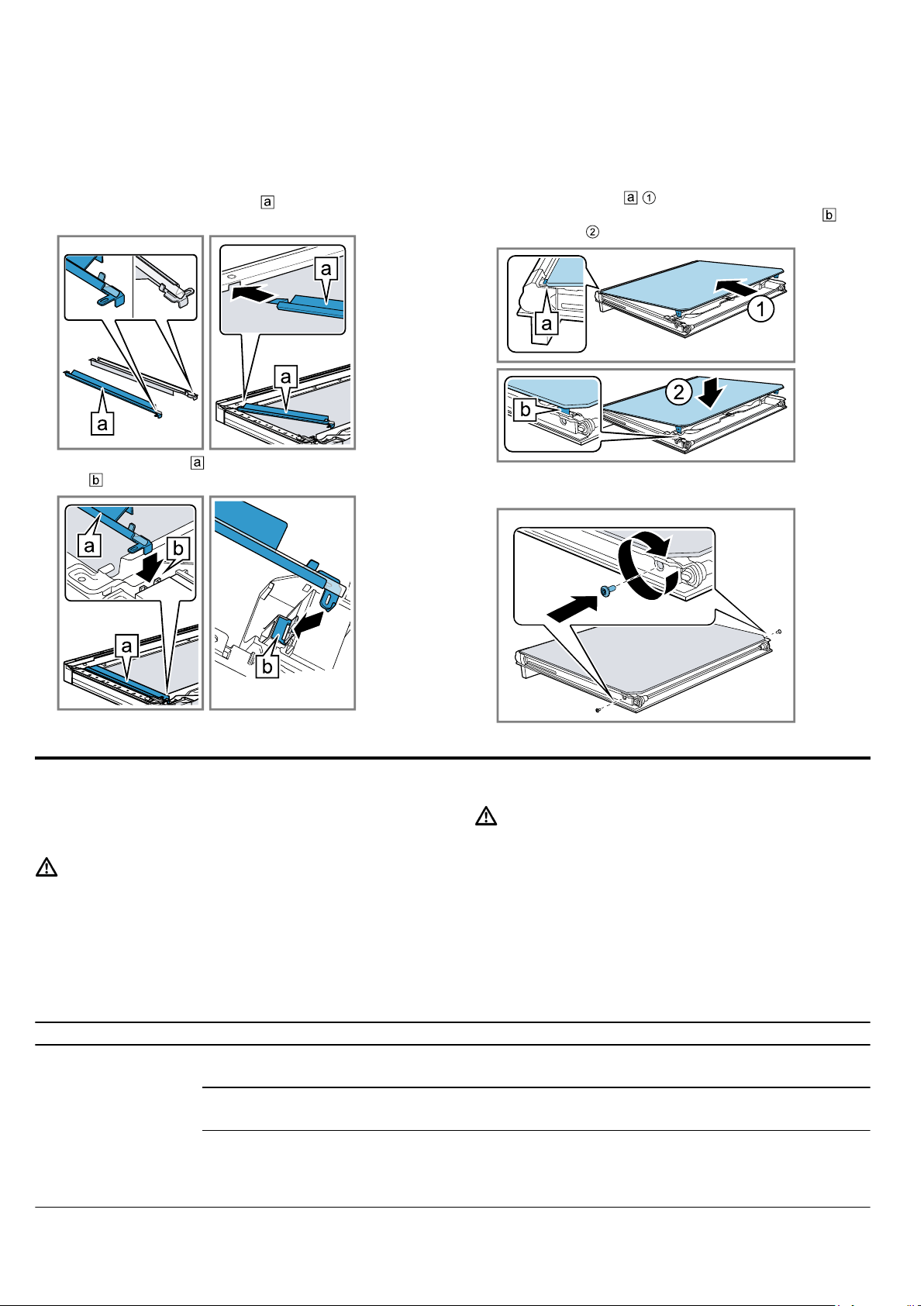
Troubleshooting en
35
3.
ATTENTION!
The light transmission is lower due to the glass rod
being held.
▶ Do not touch the glass rod with your bare hands.
▶ Clean the glass rod with glass cleaner before in-
serting it.
Select the left-hand reflector
and insert it at the
top.
4.
Insert the reflector and click it into place in the
gap .
5.
Insert the second reflector in the same way as the
first.
6.
Use glass cleaner to remove any finger marks from
the reflectors if necessary.
7.
Centre the inner pane on the appliance door.
8.
Insert the inner pane into the door cover at an angle
towards the back .
9.
Insert the retaining bracket for the inner pane into
the opening .
10.
Screw both screws back in on the left and right of
the appliance door.
21 Troubleshooting
You can rectify minor faults on your appliance yourself.
Read the troubleshooting information before contacting
after-sales service. This will avoid unnecessary costs.
WARNING‒Risk of injury!
Improper repairs are dangerous.
▶ Repairs to the appliance should only be carried out
by trained specialist staff.
▶ If the appliance is defective, call Customer Service.
WARNING‒Risk of electric shock!
Incorrect repairs are dangerous.
▶ Repairs to the appliance should only be carried out
by trained specialist staff.
▶ Only use genuine spare parts when repairing the
appliance.
▶ If the power cord of this appliance is damaged, it
must be replaced by trained specialist staff.
21.1 Malfunctions
Fault Cause and troubleshooting
The appliance is not
working.
The circuit breaker is faulty.
▶
Check the circuit breaker in the fuse box.
There has been a power cut.
▶
Check whether the lighting in your kitchen or other appliances are working.
Electronics fault
1.
Briefly disconnect the appliance from the power supply by switching off the fuse.
2.
Reset the basic settings to the factory settings.
→"Basic settings", Page24
en Troubleshooting
36
Fault Cause and troubleshooting
"Language English"
appears on the dis-
play.
There has been a power cut.
▶
Configure the initial configuration settings.
→"Initial use", Page12
The appliance cannot
be switched on;
appears on the dis-
play.
Automatic childproof lock or childproof lock is activated
▶
Press and hold the button until "Childproof lock deactivated" appears on the display.
Appliance will not
start or cuts out dur-
ing operation.
Different causes are possible.
▶
Check any notifications that appear on the display.
→"Displaying information", Page14
Malfunction
▶
Call the after-sales service.
→"Customer Service", Page38
The appliance is not
heating; appears
on the display.
Demo mode is activated in the basic settings.
1.
Briefly disconnect the appliance from the power supply by switching the circuit breaker in
the fuse box off and then on again.
2.
Deactivate Demo mode within the next 3 minutes in the
→"Basic settings", Page24.
There has been a power cut.
▶
Open and close the appliance door once after a power failure.
a The appliance will perform a self-test, after which it will be ready to use.
Time not displayed
when appliance
switched off.
Basic setting has been changed.
▶
Change the basic setting for the clock display.
→"Basic settings", Page24
The control panel
cannot be opened.
The circuit breaker is faulty.
▶
Check the circuit breaker in the fuse box.
There has been a power cut.
▶
Check whether the lighting in your kitchen or other appliances are working.
Malfunction
1.
Call the after-sales service.
→"Customer Service", Page38
2.
If there is water in the water tank, empty the water tank:
‒ Open the appliance door.
‒ Grip on the right and left below the control panel.
‒ Slowly pull out the control panel and push it upwards.
Intense steam gener-
ation when steaming.
The appliance is automatically calibrated.
No action required.
If the cooking times are too short, the appliance is not automatically calibrated.
If a lot of steam is generated repeatedly, the appliance is recalibrated.
1.
Reset the appliance to the factory setting.
→"Basic settings", Page24
2.
Repeat the calibrations.
→"Before using for the first time", Page11
Steam escaping from
ventilation slots dur-
ing cooking
Escaping steam is not a fault.
No action required.
The appliance re-
quests descaling
without the counter
appearing in ad-
vance.
The set water hardness range is too low.
1.
Descale the appliance.
→"Descaling", Page29
2.
Check the water hardness and set this in the basic settings.
→"Basic settings", Page24
The appliance
prompts you to rinse
it.
During the descaling, the power supply is interrupted or the appliance is switched off.
▶
Rinse the appliance twice.
→"Descaling", Page29

Troubleshooting en
37
Fault Cause and troubleshooting
"Fill water tank" ap-
pears in the display
even though the wa-
ter tank has been
filled.
The water tank has not clicked into place.
▶
Insert the water tank correctly so that it engages in the holder.
→"Filling the water tank", Page14
The water tank has fallen out. Shaking has caused parts to come loose in the water tank.
The water tank is leaking.
▶
Order a new water tank.
Malfunction
▶
Do not use deionised or filtered water.
→"Before using for the first time", Page11
The sensor is defective.
▶
Call the after-sales service.
→"Customer Service", Page38
Buttons are flashing. Condensation has formed behind the control panel.
No action required. As soon as the condensation has evaporated, the buttons no longer
flash.
"Plopping" sounds
can be heard when
cooking with steam.
Water vapour requires the cold/heat effect for frozen food.
No action required.
The appliance hums
during operation and
after it is switched off.
Functional test of the pump creates operating noise.
No action required.
The appliance hums
or clicks when the
control panel is
opened.
Removing the control panel creates operating noise.
No action required.
The interior lighting
does not work.
The LED light is defective.
Note:Do not remove the glass cover.
▶
Call the after-sales service.
→"Customer Service", Page38
Maximum operating
time reached.
To prevent the appliance from continuing to run when it is no longer needed, it automatically
stops heating after a few hours if the settings are not changed during this time. A notifica-
tion appears on the display.
The point at which the maximum operating time is reached is determined by the corres-
ponding settings for an operating mode.
1.
Press any button to continue operation.
2.
If you do not need to use the appliance, press to switch it off.
Tip:To prevent the appliance from switching off when you do not want it to, set a cooking
time.
→"Setting the cooking time", Page18
A message with "D"
or "E" appears in the
display, e.g. D0111
or E0111.
The electronics have detected a fault.
1.
Switch the appliance off and on again.
a If the fault was a one-off, the message disappears.
2.
If the message appears again, call the after-sales service. Please specify the exact error
message when calling.
→"Customer Service", Page38
NeffLight reflector in
appliance door is dis-
coloured.
High temperatures discolour the NeffLight reflector.
No action required.
The cooking result is
not satisfactory.
Settings were unsuitable.
Setting values, e.g. temperature or cooking time, depend on the recipe, quantity and food.
▶
Next time, set lower or higher values.
Tip:A lot of information about the food preparation and corresponding setting values
can be found on our website www.neff-international.com.
en Disposal
38
22 Disposal
22.1 Disposing of old appliance
Valuable raw materials can be reused by recycling.
1.
Unplug the appliance from the mains.
2.
Cut through the power cord.
3.
Dispose of the appliance in an environmentally
friendly manner.
Information about current disposal methods are
available from your specialist dealer or local author-
ity.
This appliance is labelled in accord-
ance with European Directive
2012/19/EU concerning used elec-
trical and electronic appliances
(waste electrical and electronic equip-
ment - WEEE).
The guideline determines the frame-
work for the return and recycling of
used appliances as applicable
throughout the EU.
23 Customer Service
Detailed information on the warranty period and terms
of warranty in your country is available from our after-
sales service, your retailer or on our website.
If you contact Customer Service, you will require the
product number (E-Nr.) and the production number
(FD) of your appliance.
The contact details for Customer Service can be found
in the enclosed Customer Service directory or on our
website.
This product contains light sources from energy effi-
ciency class G. These light sources are available as a
spare part and should only be replaced by trained spe-
cialist staff.
23.1 Product number (E-Nr.) and production
number (FD)
You can find the product number (E-Nr.) and the pro-
duction number (FD) on the appliance's rating plate.
You will see the rating plate with these numbers if you
open the appliance door. On some appliances with
steam-assisted cooking, you will find the rating plate
behind the control panel.
Make a note of your appliance's details and the Cus-
tomer Service telephone number to find them again
quickly.
24 How it works
Here, you can find the ideal settings for various types
of food as well as the best accessories and cookware.
We have perfectly tailored these recommendations to
your appliance.
24.1 General cooking tips
Please take note of the following information when
cooking all types of food.
¡ The temperature and cooking time depend on the
amount of food and the recipe. Settings ranges are
specified for this reason. Try using the lower values
to start with.
¡ The setting values apply to food placed in the cook-
ing compartment while the cooking compartment is
still cold. Do not place accessories into the cooking
compartment until it has finished preheating.
¡ Remove any accessories that are not being used
from the cooking compartment.
24.2 Baking tips
¡ Dark-coloured metal baking tins are most suitable
for baking cakes, bread and other baked goods.
¡ Use wide, shallow cookware for bakes and gratins.
Food takes longer to cook in deep, narrow cook-
ware and it browns more on top.
¡ If you are cooking bakes directly in the universal
pan, place the universal pan into the cooking com-
partment at level2.
¡ The setting values for bread dough apply to both
dough placed on a baking tray and dough placed in
a loaf tin.
ATTENTION!
When the cooking compartment is hot, any water in-
side it will create steam. The change in temperature
may cause damage.
▶ Never pour water into the cooking compartment
when it is still hot.
▶ Never place cookware containing water on the
cooking compartment floor.
Shelf positions
If you are using the CircoThermhot air heating func-
tion, you can choose between shelf positions 1, 2, 3
and 4.
Baking on one level Shelf position
Tall baked items and tins/dishes on
the wire rack
2
Shallow baked items/baking trays 3

How it works en
39
Baking on two or more levels Shelf position
2levels
¡ Universal pan
¡ Baking tray
3
1
2levels
¡ Baking tins on two wire racks 3
1
3levels
¡ Baking tray
¡ Universal pan
¡ Baking tray
4
3
1
4levels
¡ 4 wire racks with greaseproof pa-
per
4
3
2
1
Use the CircoThermhot air heating function.
Notes
¡ Items that are placed in the appliance on baking
trays or in baking tins/dishes at the same time will
not necessarily be ready at the same time.
¡ If you opt for steam-assisted cooking, you can only
cook on one level.
24.3 Roasting, braising and grilling tips
¡ The recommended settings are for fridge-temperat-
ure food and unstuffed, oven-ready poultry.
¡ Place the poultry onto the cookware breast-side or
skin-side down.
¡ Turn roasting joints, grilled items or whole fish after
approx. ½ to ⅔ of the specified time.
¡ The meat probe allows you to cook with absolute
precision. Please take note of the important informa-
tion on using it correctly. →Page19
Roasting on the wire rack
Food roasted on the wire rack will become very crispy
on all sides. You can roast large poultry, for example,
or multiple individual pieces at the same time.
¡ Roast pieces of a similar weight and thickness. The
grilled food will brown evenly and will remain succu-
lent and juicy.
¡ Place the food to be roasted directly on the wire
rack.
¡ To catch any liquids that drip down, place the uni-
versal pan, with the wire rack inside it, into the cook-
ing compartment at the specified shelf height.
¡ Add up to ½litre of water to the universal pan, de-
pending on the size and type of food that you want
to roast.
You can make a sauce from the juices that are col-
lected. This also means that less smoke is pro-
duced and the cooking compartment does not be-
come as dirty.
Roasting in cookware
If you cover the cookware when you cook your food,
this will keep the cooking compartment cleaner.
General information about roasting in cookware
¡ Use heat-resistant, ovenproof cookware.
¡ Place the cookware on the wire rack.
¡ Glass cookware is best.
¡ Follow the manufacturer's instructions for your roast-
ing dishes.
Roasting in uncovered cookware
¡ Use a deep roasting dish.
¡ If you do not have any suitable cookware, you can
use the universal pan.
Roasting in covered cookware
¡ Use a suitable lid that seals well.
¡ When roasting meat, there should be at least 3cm
between the food and the lid. The meat may ex-
pand.
WARNING‒Risk of scalding!
Very hot steam may escape when the lid is opened
after cooking. Steam may not be visible, depending on
the temperature.
▶ Lift the lid in such a way that the hot steam can es-
cape away from you.
▶ Keep children away from the appliance.
Grilling
Grill food if you want it to be crispy.
¡ When grilling several food items, choose pieces that
are of a similar weight and thickness. The grilled
food will brown evenly and will remain succulent
and juicy.
¡ Place the food to be grilled directly onto the wire
rack.
¡ To catch any liquids that drip down, place the uni-
versal pan into the cooking compartment at least
one level below the wire rack.
Notes
¡ The grill element switches on and off continuously.
This is normal. The temperature that you set determ-
ines how frequently this occurs.
¡ Smoke may be produced when grilling.
24.4 Steaming
Cook dishes gently. The food remains particularly suc-
culent.
In contrast to steam-assisted cooking, the meat does
not become crispy on the outside.
¡ Use open, heat-resistant cookware that is suitable
for cooking with steam.
¡ The perforated steam container (size XL) is the best
option here. To catch any liquid that drips down,
slide in the universal pan one level below in the
cooking compartment.
You can also use a glass tray and place this onto
the wire rack.
¡ Cover food that can normally be cooked in a water
bath, with film, e.g. with cling film.
¡ You do not need to turn the food.
¡ For a different flavour, you can sear the meat,
poultry or fish before steaming. Reduce the cooking
time.
¡ Larger pieces require a longer heating-up time and
a longer cooking time.
¡ If you are using several pieces which are the same
weight, the appliance's heating-up time is increased.
The cooking time remains the same.
en How it works
40
¡ In the main part of the instruction manual, you can
find information on how to set the steam function.
→"Steam", Page14
Vegetables on several levels
You can easily cook more than one type of food or
even whole menus, e.g. broccoli and potatoes, on two
levels.
Rice or cereals
¡ Add water or liquid in the indicated ratio.
For example, this means 1:1.5 for 100g of rice,
150ml liquid.
24.5 Cooking frozen products
¡ Do not use heavily frosted frozen products.
¡ Remove any ice.
¡ Some frozen products may be unevenly pre-baked.
Uneven browning may remain even after baking.
24.6 Cooking ready meals
¡ Take ready meals out of the packaging.
¡ If you are warming or cooking the ready meal in
cookware, make sure that the cookware is heat-res-
istant.
24.7 List of foods
Recommended settings for a variety of foods, sorted into food categories.
Recommended settings for various types of food
Food Accessories/cook-
ware
Shelf pos-
ition
Heating
function
→Page7
Temperature in
°C
Steam in-
tensity
Cooking time
in mins
Sponge cake, 2levels Ring-shaped tin
or
Loaf tin
3+1 140–160 - 60–80
Sponge cake, delicate Loaf tin 2 150–170 - 60–80
Fruit tart or cheesecake
with shortcrust pastry
base
Springform cake
tin, diameter 26 cm
2 170–190 - 60–80
Sponge cake, 6 eggs Springform cake
tin, diameter28cm
2 150–170
1
- 30–50
Sponge cake, 6 eggs Springform cake
tin, diameter28cm
2 1. 150–160
2. 150–160
Low
Off
1. 10
2. 25–35
Sponge cake, 6 eggs Springform cake
tin, diameter28cm
2 150–160 - 50–60
Shortcrust tart with moist
topping
Universal pan 3 160–180 - 55–75
Yeast cake with moist
topping
Universal pan 3 180–200 - 30–40
Swiss roll Baking tray 3 180–200
1
- 8–15
Swiss roll Baking tray 3 180–200
1
Low 10–15
Small yeast cakes Baking tray 3 160–180 - 25–35
Small yeast cakes Baking tray 3 160–180 Medium 25–35
Biscuits Baking tray 3 140–160 - 15–30
Biscuits, 2 levels Universal pan
+
Baking tray
3+1 140–160 - 15–30
Biscuits, 3 levels 1 pcs
Universal pan
+
2 pcs
Baking tray
4+3+1 140–160 - 15–30
Bread, without a tin, 750
g
Universal pan
or
Loaf tin
2 1. 210–220
1
2. 180–190
- 1. 10–15
2. 25–35
1
Preheat the appliance.
2
At the start, pour approx. 100 ml of liquid into the cookware. The water tank must be topped up during operation.
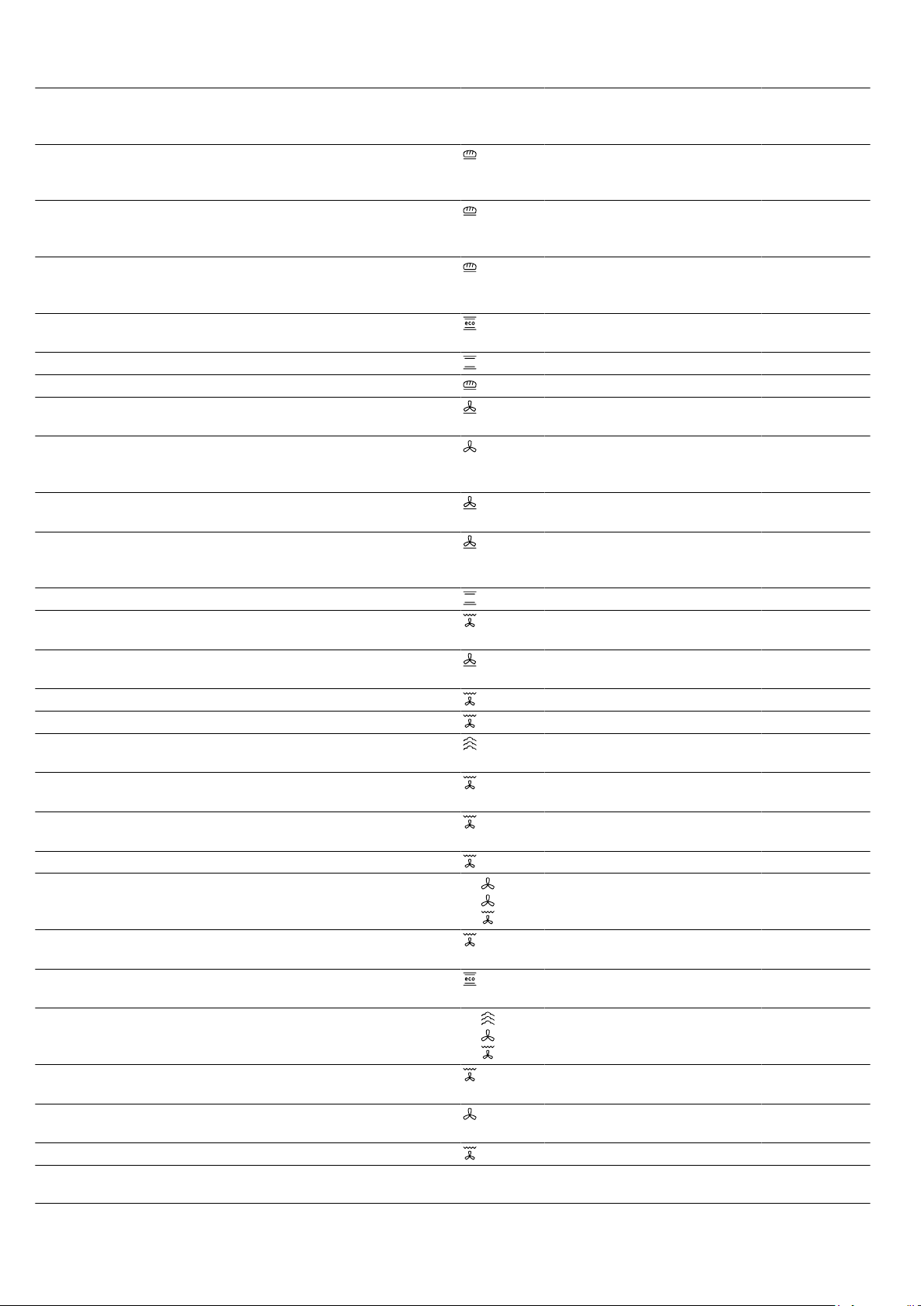
How it works en
41
Food Accessories/cook-
ware
Shelf pos-
ition
Heating
function
→Page7
Temperature in
°C
Steam in-
tensity
Cooking time
in mins
Bread, free-form, 750g Universal pan
or
Loaf tin
2 1. 210 - 220
2. 180 - 190
High
Off
1. 10 - 15
2. 25 - 35
Bread, without a tin,
1500g
Universal pan
or
Loaf tin
2 1. 210–220
1
2. 180–190
- 1. 10–15
2. 40–50
Bread, free-form, 1500g Universal pan
or
Loaf tin
2 1. 210 - 220
2. 180 - 190
High
Off
1. 10 - 15
2. 45 - 55
Bread, without a tin,
1500g
Loaf tin 2 200–210 - 35–45
Flatbread Universal pan 3 220 - 230 High 20 - 30
Bread rolls, fresh Baking tray 3 200–220 Medium 20–30
Pizza, fresh, on a baking
tray
Baking tray 3 200 - 220 - 25 - 35
Pizza, fresh, on a baking
tray, on 2levels
Universal pan
+
Baking tray
3+1 180 - 200 - 35 - 45
Pizza, fresh, thin-crust, on
a pizza tray
Pizza tray 2 220 - 230 - 20 - 30
Quiche Tart dish or tin
,
Black tray
3 190–210 - 30–40
Tarte flambée Universal pan 3 240 - 250
1
- 10 - 18
Bake, savoury, cooked
ingredients
Ovenproof dish 2 150 - 170 Medium 40 - 50
Potato gratin, raw in-
gredients, 4cm deep
Ovenproof dish 2 160 - 190 - 50 - 70
Chicken, 1kg, unstuffed Wire rack 2 200 - 220 - 60 - 70
Chicken, 1kg, unstuffed Wire rack 2 190-210 Medium 50-60
Chicken breast fillet,
steaming
Steaming tray 3 100 - 15 - 25
Small chicken portions,
250g each
Wire rack 3 220 - 230 - 30 - 35
Small chicken portions,
250g each
Wire rack 3 200 - 220 Medium 30 - 45
Goose, unstuffed, 3kg Wire rack 2 160 - 180 - 120 - 150
Goose, unstuffed, 3kg Wire rack 2 1.
2.
3.
1. 130 - 140
2. 150 - 160
3. 170 - 180
Medium
Medium
Off
1. 110 - 120
2. 20 - 30
3. 30 - 40
Joint of pork without rind,
e.g. neck, 1.5kg
Uncovered cook-
ware
2 180 - 190 - 110 - 130
Joint of pork without rind,
e.g.neck, 1.5kg
Uncovered cook-
ware
2 190–200 - 120–140
Joint of pork with rind,
e.g. shoulder, 2kg
Uncovered cook-
ware
2 1.
2.
3.
1. 100
2. 170 - 180
3. 200 - 210
Off
Low
Off
1. 25 - 30
2. 60 - 75
3. 20 - 25
Fillet of beef, medium,
1kg
Wire rack 2 210 - 220 - 40 - 50
Fillet of beef, medium,
1kg
Uncovered cook-
ware
2 190 - 200 Low 50 - 60
Pot-roasted beef, 1.5kg Covered cookware 2 200 - 220 - 130 - 160
1
Preheat the appliance.
2
At the start, pour approx. 100 ml of liquid into the cookware. The water tank must be topped up during operation.
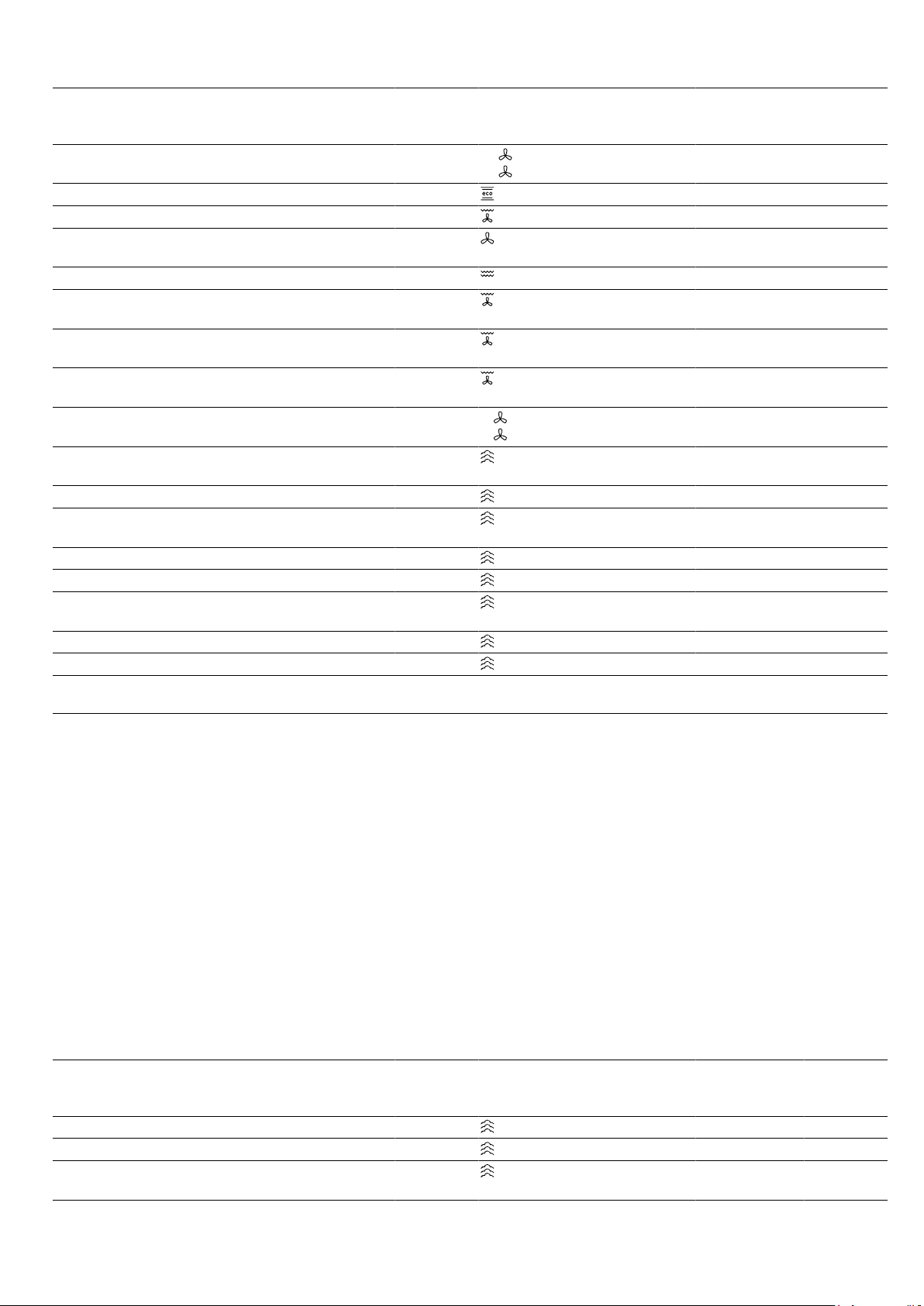
en How it works
42
Food Accessories/cook-
ware
Shelf pos-
ition
Heating
function
→Page7
Temperature in
°C
Steam in-
tensity
Cooking time
in mins
Pot-roasted beef, 1.5kg
2
Uncovered cook-
ware
2 1.
2.
1. 150
2. 130
High
Medium
1. 30
2. 120 - 150
Pot-roasted beef, 1.5kg Covered cookware 2 200 - 220 - 140 - 160
Sirloin, medium, 1.5kg Wire rack 2 220 - 230 - 60 - 70
Sirloin, medium, 1.5kg Uncovered cook-
ware
2 190 - 200 Low 65 - 80
Burger, 3-4cm thick Wire rack 4 275 - 25 - 30
Leg of lamb, boned, me-
dium, 1.5kg
Uncovered cook-
ware
2 170 - 190 - 50 - 80
Leg of lamb, boned, me-
dium, 1.5kg
Uncovered cook-
ware
2 170 - 180 Low 80 - 90
Fish, grilled, whole,
300g, e.g. trout
Wire rack 2 170 - 190 - 20 - 30
Fish, baked, whole,
300g, e.g. trout
Universal pan 2 1.
2.
1. 170–180
2. 160–170
Low
Off
1. 15–20
2. 5–10
Fish, steamed, whole,
300g, e.g. trout
Steaming tray 3 80 - 90 - 15 - 25
Fish fillet, plain, steamed Steaming tray 3 80–100 - 10–16
Cauliflower, whole,
steaming
Steaming tray 3 100 - 25 - 35
Sliced carrots, steaming Steaming tray 3 100 - 10 - 20
Spinach, steaming Steaming tray 3 100 - 2 - 3
Unpeeled boiled pota-
toes, whole
Steaming tray 3 100 - 35 - 45
Long-grain rice, 1:1.5 Shallow cookware 3 100 - 20 - 30
Eggs, hard-boiled Steaming tray 3 100 - 10 - 12
1
Preheat the appliance.
2
At the start, pour approx. 100 ml of liquid into the cookware. The water tank must be topped up during operation.
Desserts
Making crème caramel or crème brulée
1.
Use your preferred recipe to make the mixture for
the crème.
2.
Pour the mixture into moulds – keep pouring until
the mixture is 2-3cm deep.
3.
Place the moulds into the perforated steaming tray
(size XL).
4.
Cover food that you would normally cook in a bain
marie with film, e.g. cling film.
5.
Use the recommended settings when configuring
the appliance settings.
6.
If the moulds are made from very thick material, ex-
tend the cooking time.
Making yoghurt
1.
Remove the accessories and shelves from the
cooking compartment.
2.
Heat 1litre of whole milk (3.5% fat) to 90°C on the
hob and then leave it to cool down to 40°C.
It is sufficient to heat UHT milk to 40°C.
3.
Mix 150g of chilled yoghurt into the milk.
4.
Pour the mixture into small containers, e.g. cups or
small jars.
5.
Cover the containers with film, e.g. cling film.
6.
Place the containers on the cooking compartment
floor.
7.
Use the recommended settings when configuring
the appliance settings.
8.
After making the yoghurt, leave it to cool in the refri-
gerator for at least 12hours.
Recommended settings for desserts and compote
Food Accessories/cook-
ware
Shelf pos-
ition
Heating
function
→Page7
Temperature in
°C
Steam intens-
ity
Cooking
time in
mins
Crème brulée Individual moulds 3 85 - 20 - 30
Crème caramel Individual moulds 3 85 - 25 - 35
Steamed yeast dump-
lings
Universal pan 3 100 - 20 - 30
How it works en
43
Food Accessories/cook-
ware
Shelf pos-
ition
Heating
function
→Page7
Temperature in
°C
Steam intens-
ity
Cooking
time in
mins
Yoghurt Individual moulds Cooking
compart-
ment floor
1 - 300 - 360
Rice pudding, 1:2.5 Universal pan 3 1. 1
2. 1
- 35 - 45
Fruit compote, 1/3 water Universal pan 3 1. 1
2. 1
- 10 - 20
24.8 Special cooking methods and other
applications
Information and recommended settings for special
cooking methods and other applications, e.g. slow
cooking or preserving.
Slow cooking
Cook prime cuts of meat slowly at a low temperature,
e.g. tender cuts of beef, veal, lamb or poultry.
Low temperature cooking poultry or meat
Note:When using the low temperature cooking type of
heating, you cannot delay the start of the programme
by setting an end time.
Requirement:The cooking compartment is cold.
1.
Use fresh, clean, hygienic meat without bones.
2.
Place the cookware onto the wire rack at level 2 in
the cooking compartment.
3.
Preheat the cooking compartment and cookware for
approx. 15minutes.
4.
Sear the meat on all sides on the hob at a very high
heat.
5.
Immediately place the meat into the pre-warmed
cookware in the cooking compartment.
To ensure that the climate in the cooking compart-
ment remains constant, keep the cooking compart-
ment door closed during low temperature cooking.
6.
After low temperature cooking, remove the meat
from the cooking compartment.
Recommended settings for slow cooking
Food Accessory/cook-
ware
Shelf pos-
ition
Searing
time in
mins
Heating function
→Page7
Temperature
in °C
Cooking
time in
mins
Duck breast, medium
rare, 300g each
Uncovered cook-
ware
2 6 - 8 90
1
45 - 60
Fillet of pork, whole Uncovered cook-
ware
2 4 - 6 80
1
45 - 70
Fillet of beef, 1kg Uncovered cook-
ware
2 4 - 6 80
1
90 - 120
Veal medallions, 4cm
thick
Uncovered cook-
ware
2 4 80
1
30 - 50
Saddle of lamb, bone-
less, 200g each
Uncovered cook-
ware
2 4 80
1
30 - 45
1
Preheat the appliance.
Sous-vide
Sous-vide cooking is a method of cooking in a vacuum
at low temperatures between 50 and 95C and in
100% steam.
Sous-vide cooking is a gentle method of cooking meat,
fish, vegetables and desserts.
A chamber vacuum-sealing machine is used to heat-
seal the food in a special air-tight, heat-resistant va-
cuum-sealing bag.
The protective envelope of the vacuum-sealing bag re-
tains the nutrients and flavours. The low temperatures
and the direct transfer of heat allow precisely controlled
cooking in order to achieve the desired cooking res-
ults. It is almost impossible to overcook the food.
Sous-vide cooking tips
¡ Servings
– Take into consideration the specified quantities
and sizes for the food listed in the recommended
settings tables. Adjust the cooking time for larger
quantities and items.
– The appliance can cook up to 2kg of food sous-
vide.
– The quantities given for fish, meat and poultry
correspond to one to two servings.
– For vegetables and desserts, the specified quant-
ity is for 4people.
¡ You can cook on up to two levels. When you do
this, always slide the universal pan in at level1 to
catch any drops of condensate. Insert the wire racks
at the levels above accordingly.

en How it works
44
¡ The quality of the cooking result is 100% influenced
by the quality of the ingredients you use. Use only
fresh, top-quality food. This is the only way to guar-
antee a consistent cooking result that delivers im-
peccable flavour.
Vacuum-sealing food
To ensure an even transfer of heat and an optimised
cooking result, use a chamber vacuum-sealing ma-
chine that can create a 99% vacuum when vacuum-
sealing food.
Tip:To prevent gases escaping from the food, e.g.
from vegetables, vacuum-seal the food no more than
one day before you cook it. The gases inhibit the trans-
fer of heat or cause the texture of the food to change,
thus altering how it cooks, as a result of the vacuum
pressure.
Note:Do not use a core temperature probe.
1.
Season food with half the usual the amount of
spices.
Cooking in a vacuum means that the flavours can-
not escape. The usual quantities of flavourings such
as spices, herbs and garlic affect the taste much
more and intensify it.
Tip:You can intensify the natural flavours of high-
quality food simply by adding a small knob of butter
and a little salt to the vacuum-sealing bag.
Different ingredients affect how the food cooks:
– Salt and sugar reduce the cooking time.
– Acidic ingredients such as lemon juice or vinegar
make food firmer.
– Alcohol and garlic give the food an unpleasant
after-taste.
2.
To fill the vacuum-sealing bag, fold over the edge of
the bag 3-4cm from the top and place the bag
into a receptacle such as a measuring jug.
When you fill the vacuum-sealing bag, make sure
that there are no traces of food left on the seam
area of the vacuum-sealing bag.
3.
Before cooking the food, check that the vacuum in
the bag is intact.
Make sure that:
– There is no air in the vacuum-sealing bag.
– The heat-sealed seam is perfectly sealed.
– There are no holes in the vacuum-sealing bag.
– Pieces of meat or fish that have been vacuum-
sealed together are not pressed directly against
one another.
4.
If the vacuum-sealing bag is not filled as it should
be, place the food into a new bag and vacuum-seal
it again.
Preparing food for sous-vide cooking
There are germs on the surface of virtually all food.
WARNING‒Risk of harm to health!
Sous-vide cooking is a method of cooking at low tem-
peratures and, if the instructions for use and hygiene
instructions are not adhered to, it may result adverse
health effects.
▶ Only use high-quality, perfectly fresh food.
▶ Wash and disinfect your hands.
▶ Use disposable gloves, cooking tongs or grill tongs.
▶ Take extra care when preparing critical food, such
as poultry, eggs and fish.
▶ Always thoroughly rinse and peel fruit and veget-
ables.
▶ Always keep work surfaces and chopping boards
clean.
▶ Use different chopping boards for different types of
food.
▶ Only interrupt the cold chain briefly to prepare the
food.
▶ Store vacuum-sealed food in the refrigerator before
you starting the cooking process.
▶ Once the food is cooked, consume it immediately.
Do not store it after cooking – not even in the refri-
gerator. It is not suitable for reheating.
▶
To kill the germs, dip the vacuum-sealing bag con-
taining the uncooked food into boiling water for no
more than 3seconds.
a This minimises the germs on your ingredients and
maximises hygiene, so your food is now ready for
sous-vide cooking.
Cooking food sous-vide
Requirements
¡ The food is vacuum-sealed. →Page44
¡ The food is prepared. →Page44
1.
Place the food onto the wire rack.
To ensure that the heat is distributed evenly around
the food, do not place the vacuum-sealed food
items on top of one another or close together on the
wire rack.
2.
To catch any drops of condensate, slide the univer-
sal pan in at level1.
3.
ATTENTION!
Risk of damage to kitchen units
▶ Do not fill the water tank a second time for the
sous-vide cooking.
Use the recommended settings when configuring
the appliance settings.
The recommended settings are based on how long
one tankful of water lasts. As a general rule, de-
pending on the set temperature, the following max-
imum cooking times apply when the water tank is
completely full:
Temperature in °C Max. cooking time in
minutes
50 270
60 210
70 150
80 120
90 90
4.
WARNING‒Risk of scalding!
Hot water collects on the vacuum-sealing bag dur-
ing cooking.
▶ Use an oven cloth to carefully lift the vacuum-
sealing bag so that the hot water runs off into the
universal pan or the cooking container.
▶ Use the oven cloth to carefully remove the va-
cuum-sealing bag.
Once the food is cooked, allow the cooking com-
partment to cool and then use a sponge to wipe
away the water.
5.
Dry the outside of the vacuum-sealing bag and
place it in a clean container.

How it works en
45
6.
Use scissors to open the vacuum-sealing bag. Place
all of the food and liquid into the container.
You can use the stock or marinade to make a
sauce.
7.
Prepare the food for serving.
Food Cooking tips
Meat ¡ Dab the meat with a tea towel be-
fore placing it into hot oil, in order
to avoid fat spitting out of the pan.
¡ Sear the meat at a very high tem-
perature for a few seconds on
each side. This gives the meat a
nice crust and the flavours you
would expect from frying, without
overcooking it.
Food Cooking tips
Fish ¡ Season the fish and coat with hot
butter.
¡ To give the fish a nice crust and
the flavours you would expect
from frying, sear it for a few
seconds on each side.
¡ Fry the food for longer if has not
been sufficiently well cooked dur-
ing the sous-vide cooking stage.
¡ Serve the fish on preheated plates
and with a hot sauce or butter, as
sous-vide cooking takes place at
low temperatures.
Vegetables ¡ Sear the vegetables briefly to give
them the flavours you would ex-
pect from frying.
¡ Season the vegetables or mix
them with other ingredients.
Recommended settings for sous-vide cooking
Food Accessory/cookware Heating
function
Temperat-
ure in °C
Cooking
time in
mins
Tips for sous-vide cooking
Fillet of beef, piece, rare,
3–4cm thick
Wire rack
+
Universal pan
58 100 Vacuum-seal along with
some butter and rosemary
Fillet of beef, piece, me-
dium, 3–4cm thick
Wire rack
+
Universal pan
62 90 Vacuum-seal along with
some butter and rosemary
Duck breast, 350g each Wire rack
+
Universal pan
62 70 Cut into the layer of fat,
season the meat side with
a little salt and pepper, and
vacuum-seal it along with a
small piece of orange peel
Cod, 140g each Wire rack
+
Universal pan
58 25 Vacuum-seal along with
some butter and a little salt
Mushrooms, quartered,
500g
Wire rack
+
Universal pan
85 20–25 Vacuum-seal along with
some butter, rosemary, a
little garlic and salt
Carrots, in 0.5cm slices,
600g
Wire rack
+
Universal pan
90 70–80 Recipe tip: Vacuum-seal
along with some orange
juice, curry powder/paste
and butter.
Potatoes, peeled,
quartered, 800g
Wire rack
+
Universal pan
95 35–45 Recipe tip: Vacuum-seal
along with some butter and
salt. Can easily be used for
making dishes such as
salad.
Pineapple, in 1.5cm slices,
400g
Wire rack
+
Universal pan
85 70–80 Recipe tip: Vacuum-seal
along with some butter,
honey and vanilla.

en How it works
46
Food Accessory/cookware Heating
function
Temperat-
ure in °C
Cooking
time in
mins
Tips for sous-vide cooking
Apples, peeled, in 0.5cm
slices, x 2–4
Wire rack
+
Universal pan
85 15–25 Recipe tip: Vacuum-seal
along with some caramel
sauce. The cooking time
may vary depending on the
type of apple.
Vanilla sauce, 0.5l Wire rack
+
Universal pan
80 15–25 Recipe tip: Mix 0.5l milk,
1egg, 3egg yolks, 80g
sugar and the pulp of a
vanilla pod, and vacuum-
seal.
Sterilisation and hygiene
You can sterilise heat-resistant cookware or baby
bottles that are in perfect condition. The process is
equivalent to normal sterilisation by boiling.
Sterilising bottles
1.
Clean the bottles with a bottle brush immediately
after use.
2.
Wash the bottles in the dishwasher.
3.
Place the bottles into the steaming tray (size XL) in
such a way that they do not touch one another.
4.
Start the "Sterilise" program.
5.
Wipe down the appliance interior after sterilising.
6.
Dry the bottles with a clean cloth.
Recommended settings for hygiene
Food Accessories/cook-
ware
Shelf pos-
ition
Heating
function
→Page7
Temperature in
°C
Steam intens-
ity
Cooking
time in
mins
Prepare jam jars or pre-
serving jars
Steam containers,
XL size
2 100 - 10 - 15
Additional jam jar pro-
cessing step
Steam containers,
XL size
2 100 - 15 - 20
Sterilise clean cookware
1
Steam containers,
XL size
2 100 - 15 - 20
1
This process corresponds to normal sterilisation by boiling.
Proving dough
Always allow dough to prove in two steps: Once in their
entirety (1.-dough fermentation) and a second time
when shaped (2.–final fermentation).
Requirement:The cooking compartment is cold.
1.
Dough fermentation:
‒ Slide the wire rack into the cooking compart-
ment.
‒ Place the dough in a bowl onto the wire rack.
‒ Use the recommended settings when configuring
the appliance settings.
‒ Do not open the appliance door while the dough
is proving, otherwise moisture will escape.
2.
Final fermentation:
‒ Continue processing the dough and turn it into
the final shape for baking.
‒ Place the dough in the specified shelf position.
3.
Wipe the cooking compartment dry before baking.
Recommended settings for proving dough
Food Accessory/cookware Shelf posi-
tion
Heating
function
→Page7
Temperature in °C Cooking time
in mins
Rich dough, e.g. panettone Bowl on wire rack
Tin/dish on the wire
rack
1. 2
2. 2
1.
2.
1. 2
2. 2
1. 40–90
2. 30–60
White bread Bowl on wire rack
Universal pan
1. 2
2. 2
1.
2.
1. 1
2. 1
1. 30–40
2. 15–25
Defrosting
You can defrost frozen food in your appliance.
Tips for defrosting food
¡ The Defrost function is suitable for defrosting frozen
fruit and vegetables.
How it works en
47
¡ Use the CircoThermhot air heating function to de-
frost baked goods.
¡ It is better to defrost poultry, meat and fish in the re-
frigerator.
¡ Remove frozen food from its packaging before you
defrost it.
¡ Accessory/cookware:
– Place frozen fruit and vegetables into the perfor-
ated steaming tray (size XL). To catch any liquids
that drip down, place the universal pan into the
cooking compartment below the steaming tray.
– Frozen food for which the liquid is an integral
component and needs to be retained (e.g. frozen
creamed spinach) should be placed into the uni-
versal pan or into a piece of cookware that is
then placed onto the wire rack.
– Place baked goods directly onto the wire rack.
¡ The recommended settings are for freezer-temperat-
ure food (-18°C).
Reheating
You can use steam-assisted reheating to gently warm
up food. The food tastes and looks as though it has
been freshly cooked. You can even warm and crisp up
baked goods from the day before.
Tips for reheating food
¡ Use uncovered, heat-resistant cookware that is suit-
able for cooking with steam.
¡ Use wide, shallow cookware. Reheating takes
longer if you use cold cookware.
¡ Place the cookware on the wire rack.
¡ Place food that you are not reheating in cookware
(e.g. bread rolls) directly onto the wire rack at
level2.
¡ Do not cover the food.
¡ Do not open the cooking compartment door while
the food is being reheated, otherwise large amounts
of steam will escape.
¡ Wipe the cooking compartment dry after using it to
reheat food.
Recommended settings for reheating
Food Accessories/cook-
ware
Shelf pos-
ition
Heating
function
→Page7
Temperature in
°C
Steam intens-
ity
Cooking
time in
mins
Pizza, cooked Wire rack 2 170 - 180
1
- 5 - 15
Bread rolls, baguette,
baked
Wire rack 2 160 - 170
1
- 10 - 20
1
Preheat the appliance.
Keeping food warm
Tips for keeping food warm
¡ Using the "Keep warm" heating function prevents
condensation from forming. You will not have to
wipe down the cooking compartment.
¡ Do not cover the food.
¡ Do not keep food warming for longer than 2 hours.
¡ Be aware that some types of food will actually con-
tinue cooking when you are keeping them warm in
the oven.
The different added steam levels are suitable for
keeping the following foods warm:
¡ Level 1: Joints and briefly roasted food
¡ Level 2: Bakes and side dishes
¡ Level 3: Stews and soups
24.9 Test dishes
The information in this section is provided for test institutes to facilitate testing of the appliance in accordance with
EN 60350‑1.
Baking
¡ The setting values apply to food that is placed into a
cold cooking compartment.
¡ Please take note of the information on preheating in
the recommended settings tables. These setting val-
ues assume that the rapid heat-up function is not
being used.
¡ For baking, use the lower of the specified temperat-
ures to start with.
¡ Items that are placed in the appliance on baking
trays or in baking tins/dishes at the same time will
not necessarily be ready at the same time.
¡ Shelf positions when baking on 2levels:
– Universal pan: Shelf position3
Baking tray: Shelf position1
– Baking tins/dishes on the wire rack:
First wire rack: Shelf position3
Second wire rack: Shelf position1
¡ Shelf positions when baking on 3levels:
– Baking tray: Shelf position4
– Universal pan: Shelf position3
– Baking tray: Shelf position1
¡ Hot water sponge cake
– When baking on two levels, place the springform
tins at diagonally opposite corners of the wire
racks.
en How it works
48
Recommended settings for baking
Food Accessories/cook-
ware
Shelf pos-
ition
Heating
function
→Page7
Temperature in
°C
Steam intens-
ity
Cooking
time in
mins
Viennese whirls Baking tray 3 140 - 150
1
- 25 - 40
Viennese whirls Baking tray 3 140 - 150
1
- 25 - 40
Viennese whirls, on
2levels
Universal pan
+
Baking tray
3+1 140 - 150
1
- 30 - 40
Viennese whirls, on
3levels
x2
Baking tray
+
x1
Universal pan
4+3+1 130 - 140
1
- 35 - 55
Small cakes Baking tray 3 160
1
- 20 - 30
Small cakes Baking tray 3 150
1
- 25 - 35
Small cakes, on 2levels Universal pan
+
Baking tray
3+1 150
1
- 25 - 35
Small cakes, on 3levels x2
Baking tray
+
x1
Universal pan
4+3+1 140
1
- 35 - 45
Hot water sponge cake Springform cake
tin, diameter 26 cm
2 160 - 170
2
- 25 - 35
Hot water sponge cake Springform cake
tin, diameter 26 cm
2 160 - 170
2
- 25 - 35
Hot water sponge cake Springform cake
tin, diameter 26 cm
2 1. 150 - 160
2. 150 - 160
Low
Off
1. 10
2. 20 - 25
Hot water sponge cake,
on 2levels
Springform cake
tin, diameter 26 cm
3+1 150 - 170
2
- 30 - 50
1
Preheat the appliance for five minutes. Do not use the rapid heating function.
2
Preheat the appliance. Do not use the rapid heating function.
Steaming
Slide the universal pan into the cooking compartment
one level below the perforated steaming tray (sizeXL) if
instructed to do so in the recommended settings table.
Shelf positions
Shelf positions when steaming on 1level:
¡ Use a maximum of 2.5kg.
¡ Perforated steaming tray, sizeXL: Shelf position2
Shelf positions when steaming on 2levels:
¡ Use a maximum of 1.8kg per level.
¡ Perforated steaming tray, sizeXL: Shelf position4
¡ Perforated steaming tray, sizeXL: Shelf position3
Recommended settings for steaming
Food Accessory/cookware Shelf posi-
tion
Heating
function
→Page7
Temperature in °C Cooking time
in mins
Peas, frozen, two containers 2 pcs
Steam containers, XL
size
+
Universal pan
4+3+1 100 -
12
1
The test is over when 85 °C is reached at the coldest spot (see IEC 60350-1).
2
The test is over when 85°C is reached at the coldest spot (see IEC 60350-1).
3
Preheat the appliance.
4
A comparable degree of cooking between the reference sample and the main sample is achieved if the reference
sample is cooked for 5 minutes (produced as described in IEC 60350-1).
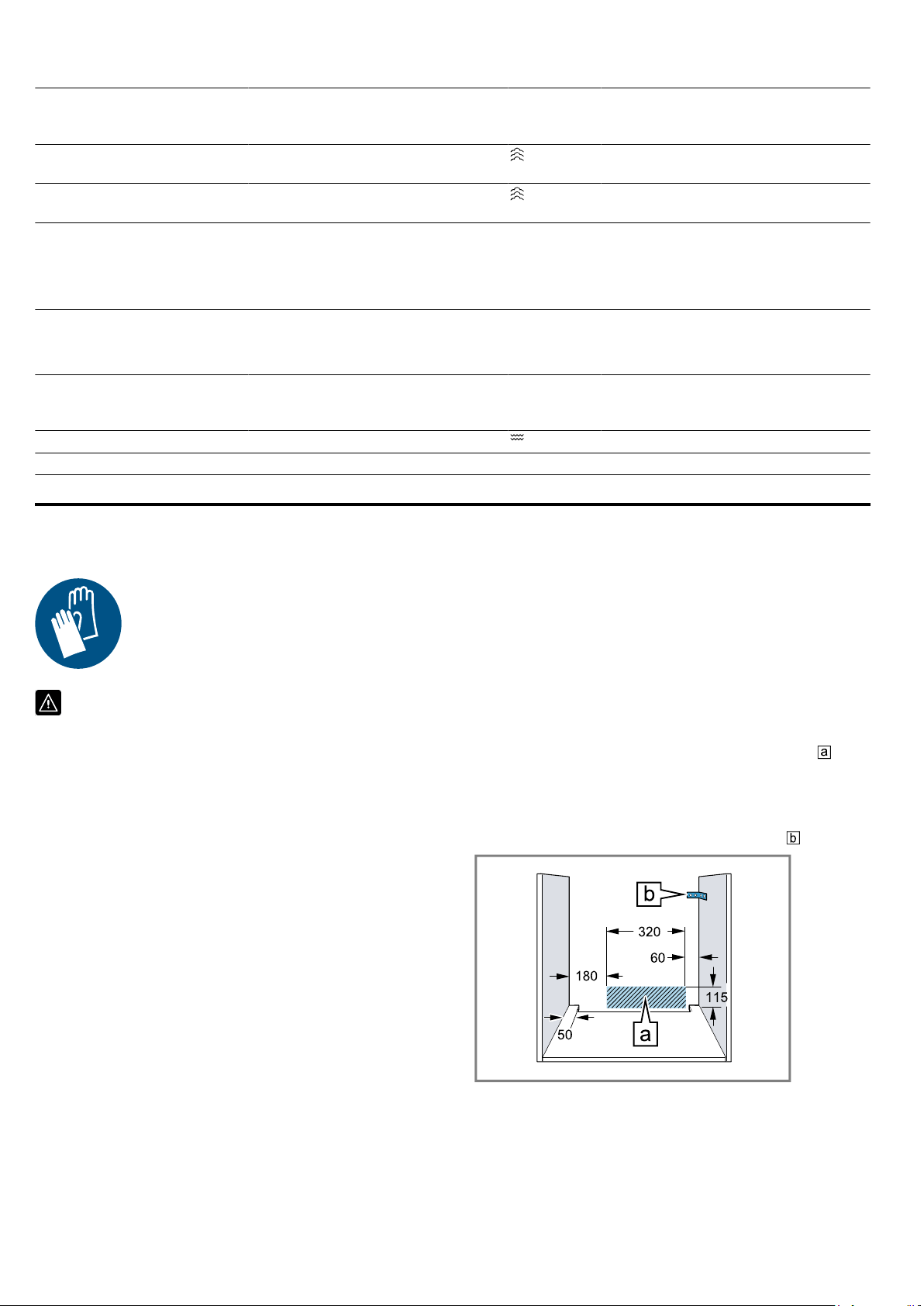
Installation instructions en
49
Food Accessory/cookware Shelf posi-
tion
Heating
function
→Page7
Temperature in °C Cooking time
in mins
Broccoli, fresh, 300g Steam containers, XL
size
3 100
3
7–8
4
Broccoli, fresh, one con-
tainer
Steam containers, XL
size
3 100
3
7–8
4
1
The test is over when 85 °C is reached at the coldest spot (see IEC 60350-1).
2
The test is over when 85°C is reached at the coldest spot (see IEC 60350-1).
3
Preheat the appliance.
4
A comparable degree of cooking between the reference sample and the main sample is achieved if the reference
sample is cooked for 5 minutes (produced as described in IEC 60350-1).
Recommended settings for grilling
Food Accessory/cookware Shelf posi-
tion
Heating
function
→Page7
Temperature in °C Cooking time
in mins
Toasting bread Wire rack 4 275
1
4–6
1
Do not preheat the appliance.
25 Installation instructions
Observe this information when installing the appliance.
25.1 General installation instructions
Follow these instructions before you start with
the installation of the appliance.
¡ The safe operation of this appliance can
only be guaranteed if it has been installed
to a professional standard in accordance
with these installation instructions. The in-
staller shall be liable for damages incurred
as a result of incorrect installation.
¡ Do not use the door handle for the trans-
port or installation.
¡ Check the appliance for damage after un-
packing it. Do not connect the appliance if
it has been damaged in transit.
¡ Before starting up the appliance, remove
any packaging material and adhesive film
from the cooking compartment and the
door.
¡ Proceed in accordance with the installation
sheets for installing accessories.
¡ Fitted units must be heat-resistant up to
95°C, and adjacent unit fronts up to
70°C.
¡ Do not install the appliance behind a decor-
ative door or the door of a kitchen unit.
There is a risk of overheating.
¡ Cut-out work on the units should be carried
out before installing the appliance. Remove
any shavings. Otherwise, the correct opera-
tion of electrical components may be ad-
versely affected.
¡ The mains socket for the appliance must
either be located in the hatched area
or
outside of the area where the appliance is
installed.
Any unsecured units must be secured to
the wall using a standard bracket
.
¡ For appliances that have a hinged switch
panel, make sure that the switch panel
does not hit adjacent kitchen units when
you open it.
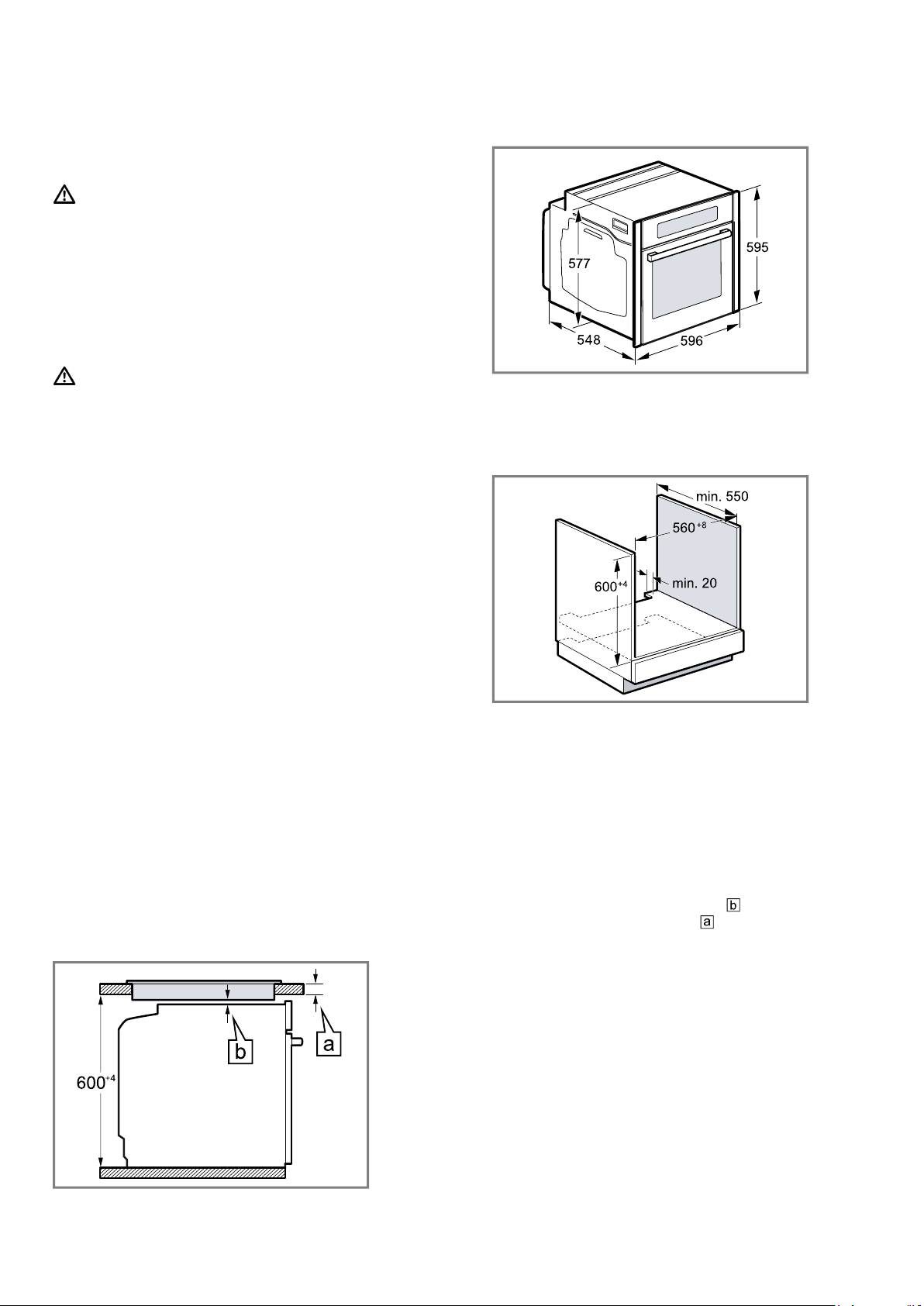
en Installation instructions
50
¡ Wear protective gloves so that you do not
cut yourself. Parts that are accessible dur-
ing installation may have sharp edges.
¡ Dimensions of the figures in mm.
WARNING‒Danger: Magnetism!
Permanent magnets are used in the control
panel or in the controls. They may affect elec-
tronic implants, e.g. pacemakers or insulin
pumps.
▶ Wearers of electronic implants must stay at
least 10 cm away from the control panel or
controls during the installation.
WARNING‒Risk of fire!
It is dangerous to use an extended power
cord and non-approved adapters.
▶ Do not use multiple socket strips.
▶ Only use extension cables that are certified,
have a minimum cross section of 1.5mm²
and comply with the applicable national
safety requirements.
▶ If the power cord is too short, contact cus-
tomer service.
▶ Only use adapters approved by the manu-
facturer.
ATTENTION!
Carrying the appliance by the door handle
could break it. The door handle cannot sup-
port the weight of the appliance.
▶ Do not carry or hold the appliance by the
door handle.
25.2 Appliance dimensions
You will find the dimensions of the appliance here
25.3 Installation below a worktop
Observe the installation dimensions and the installation
instructions when installing below a worktop.
¡ To ventilate the appliance, the intermediate floor
must have a ventilation cut-out.
¡ The worktop must be secured to the fitted unit.
¡ Observe any available installation instructions for the
hob.
¡ Observe different national installation instructions for
the hob.
25.4 Installation underneath a hob
If the appliance is installed under a hob, the following
minimum dimensions must be adhered to (including
substructure, if applicable).
The minimum worktop thickness a is based on the
required minimum clearance .
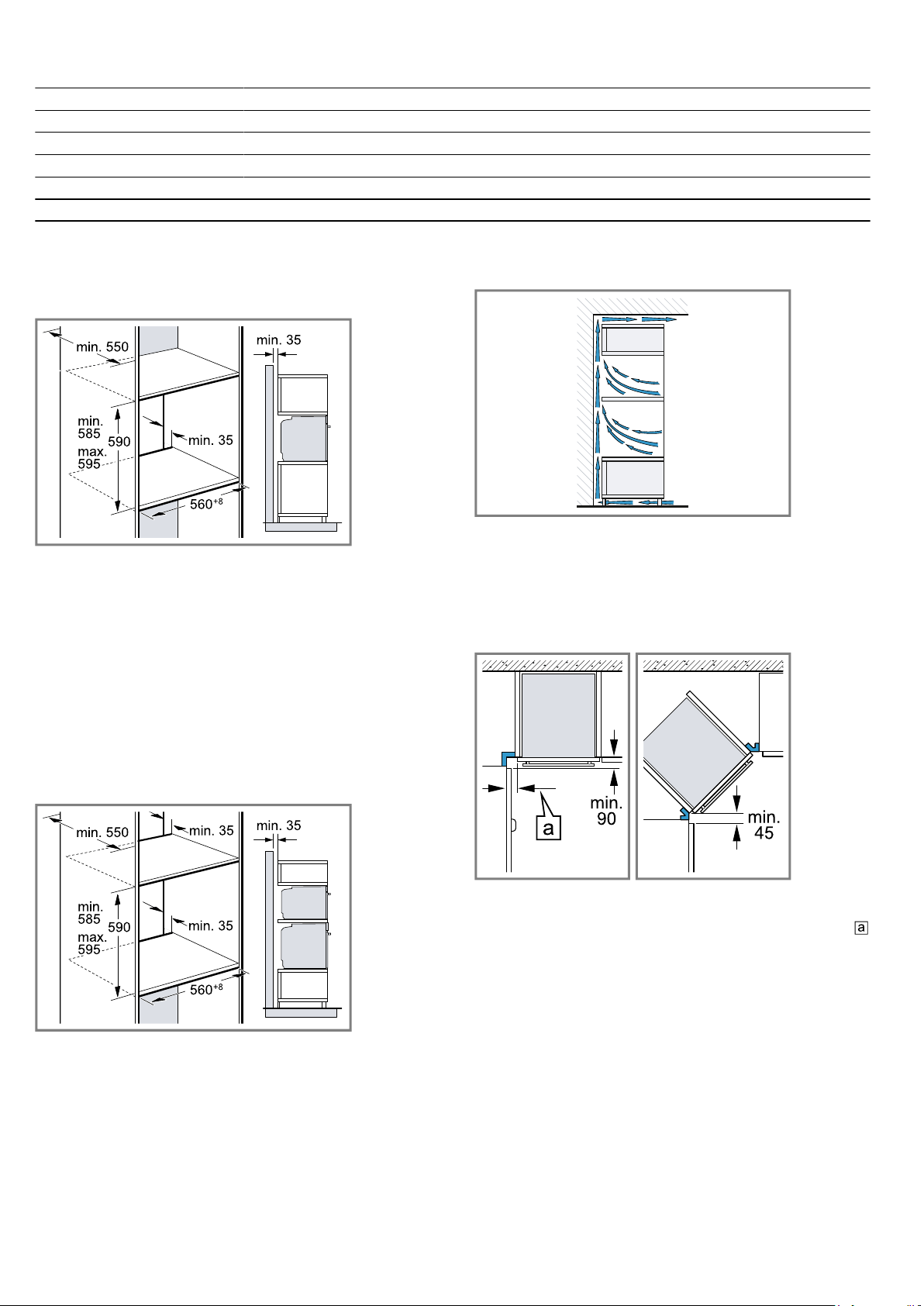
Installation instructions en
51
Hob type a raised in mm a flush in mm b in mm
Induction hob 37 38 5
Full-surface induction hob 47 48 5
Gas hob 27 38 5
1
Electric hob 27 30 2
1
Observe different national installation instructions for the hob.
25.5 Installation in a tall unit
Observe the installation dimensions and the installation
instructions when installing in a tall unit.
¡ To ventilate the appliance, the intermediate floors
must have a ventilation cut-out.
¡ If the tall unit has another back panel in addition to
the element back panels, this must be removed.
¡ Only fit the appliance up to a height which allows
accessories to be easily removed.
25.6 Installing two appliances on top of
each other
Your appliance can also be installed above or below
another appliance. Observe the installation dimensions
and the installation instructions when installing appli-
ances on top of each other.
¡ To ventilate the appliances, the intermediate floor
must have a ventilation cut-out.
¡ To ensure sufficient ventilation of the two appli-
ances, there must be a ventilation opening of at
least 200cm² in the base area. To do this, trim the
base panel or fit a ventilation grille.
¡ Ensure that air exchange is guaranteed in accord-
ance with the diagram.
¡ Only fit appliances up to a height that allows ac-
cessories to be easily removed.
25.7 Corner installation
Observe the installation dimensions and the installation
instructions when installing in a corner.
¡ To ensure that the appliance door can be opened,
you must take the minimum dimensions into consid-
eration when installing in a corner. The dimension
is dependent on the thickness of the unit front and
the handle.
25.8 Electrical connection
In order to safely connect the appliance to the elec-
trical system, follow these instructions.
¡ The appliance corresponds to protection class I and
must only be operated with a protective earth con-
nection.
¡ The fuse protection must correspond to the power
rating specified on the appliance's rating plate and
to the local regulations.
¡ The appliance must be disconnected from the
power supply whenever installation work is being
carried out.
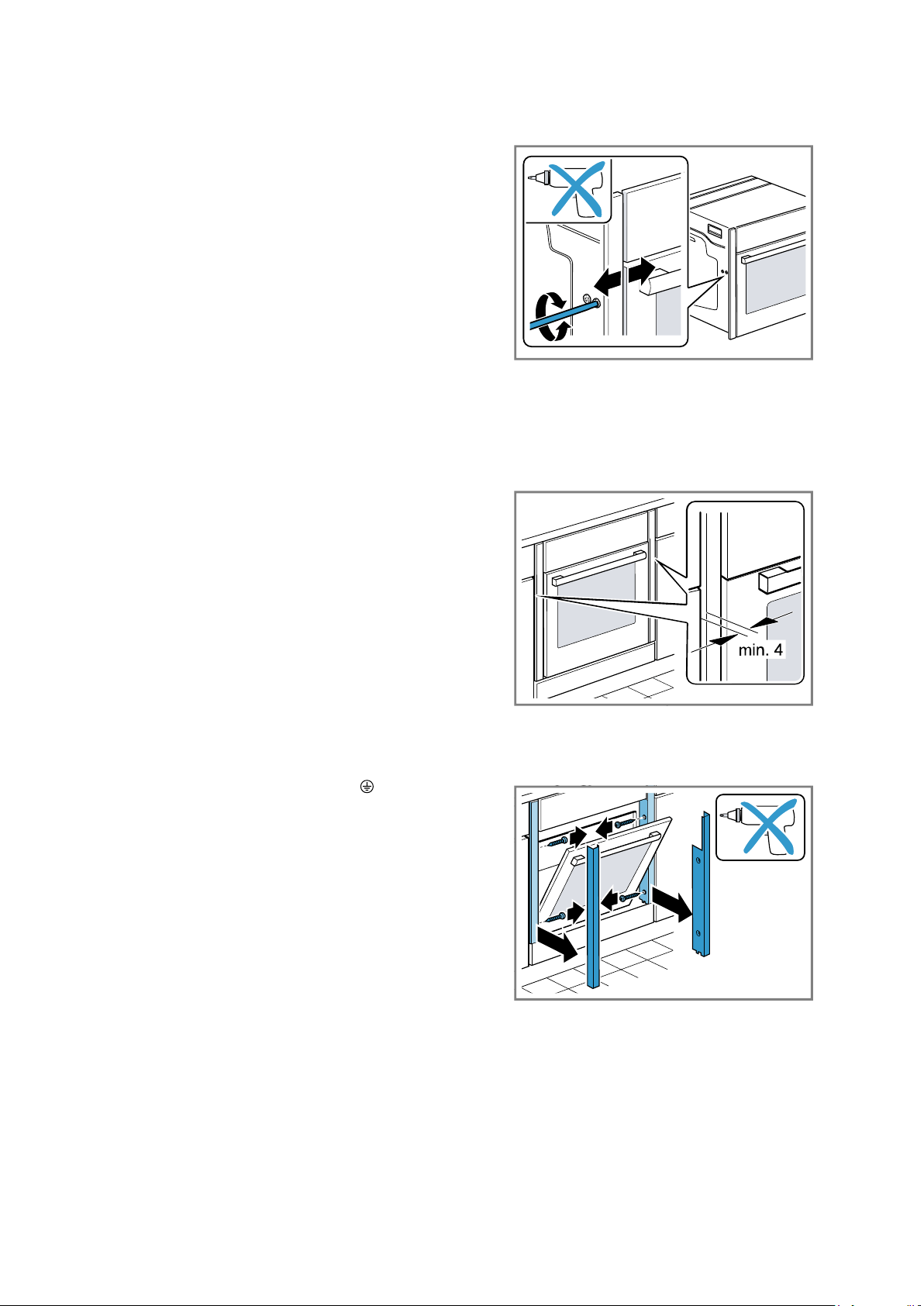
en Installation instructions
52
¡ The appliance must only be connected using the
power cable provided.
¡ The power cable must be plugged in at the rear of
the appliance until you hear a clicking sound. A 3 m
power cable can be obtained from the after-sales
service.
¡ The power cable must only be replaced with a cable
from the original manufacturer. This is available from
after-sales service.
¡ Contact protection must be guaranteed by the in-
stallation.
Electrically connect the appliance with the
protective contact plug
Note:The appliance must only be connected to a pro-
tective contact socket that has been correctly installed.
▶
Insert the plug into the protective contact socket.
When the appliance is installed, the mains plug of
the power cord must be freely accessible. If free ac-
cess is not possible, an isolating switch must be in-
tegrated into the permanent electrical installation ac-
cording to the installation regulations.
Electrically connecting an appliance without a
protective contact plug
Note:Only licensed specialists may connect the appli-
ance. Damage caused by incorrect connection is not
covered under the warranty.
An isolating switch must be integrated into the perman-
ent electrical installation according to the installation
regulations.
1.
Identify the phase and neutral conductors in the
socket.
The appliance may be damaged if it is not connec-
ted correctly.
2.
Connect the hob in accordance with the connection
diagram.
See the rating plate for the voltage.
3.
Connect the wires of the mains power cable accord-
ing to the colour coding:
‒ Green/yellow = Protective conductor
‒ Blue = Neutral conductor
‒ Brown = Phase (external conductor)
25.9 Installing the appliance
Note:Do not use a cordless screwdriver to secure the
panels. This may damage the panels.
1.
If required, you can adjust the gap between the ap-
pliance door and the panels using the adjustment
screws on the left and right.
Turning the screws clockwise makes the gap larger
Turning the screws anti-clockwise makes the gap
smaller
2.
Push the appliance in fully.
Do not kink or trap the connection cable, or route it
over sharp edges.
3.
Centre the appliance.
There must be an air gap of at least 4mm between
the appliance and adjacent unit fronts.
4.
Open the appliance door slightly and unscrew pan-
els on the left and right.
5.
Close the appliance door.
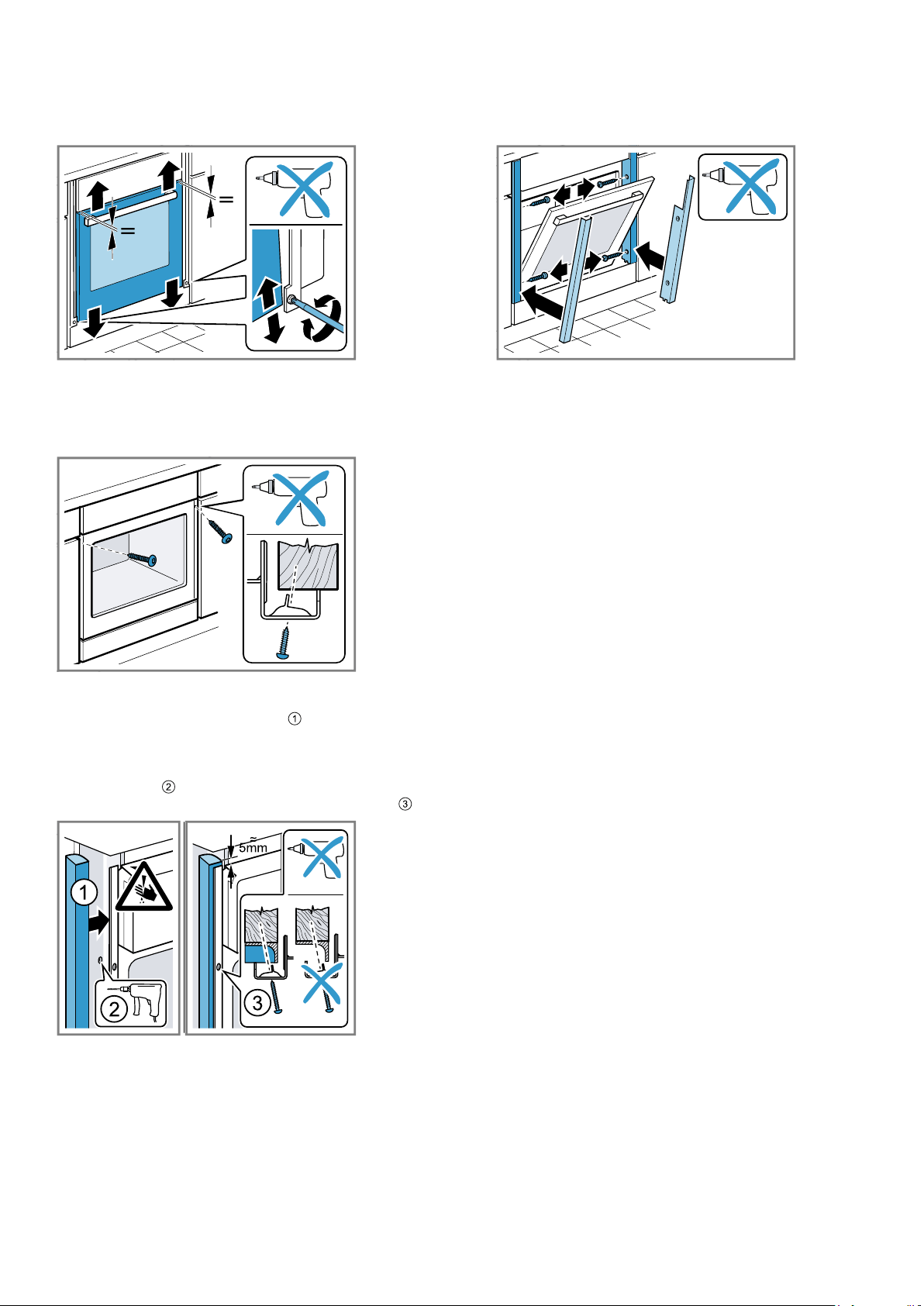
Installation instructions en
53
6.
If required, you can adjust the height of the appli-
ance door using the adjustment screws on the left
and right.
Turning the screws clockwise makes the gap smal-
ler
Turning the screws anti-clockwise makes the gap
larger
7.
Screw the appliance into place.
8.
For handleless kitchens with vertical bar handle
strips:
‒ Attach a suitable filling piece in order to cover
any sharp edges and to guarantee a safe install-
ation.
‒ Pre-drill aluminium profiles to establish a screw
connection .
‒ Secure the appliance using a suitable screw .
9.
Open the appliance door slightly, then refit the pan-
els and screw them in place, first at the top and
then at the bottom.
Note:The gap between the worktop and the appliance
must not be closed by additional battens.
Thermal insulation strips must not be fitted to the side
panels of the surround unit.
25.10 Removing the appliance
1.
Disconnect the appliance from the power supply.
2.
Undo the fastening screws.
3.
Lift the appliance slightly and pull it out completely.


Register your product online
neff -home.com
BSH Hausgeräte GmbH
Carl-Wery-Straße 34
81739 München, GERMANY
*9001751365*
9001751365
030202
en
Valid within Great Britain:
Imported to Great Britain by
BSH Home Appliances Ltd.
Grand Union House
Old Wolverton Road
Wolverton, Milton Keynes
MK12 5PT
United Kingdom