introduction
Operating instructions-PrefinishedModel 4
Operating instructions-IntegratedModel 6
Accessories 8
Basket,Cup racks,Drainfilter accesspanel, Mega rack, Plate insert, Cutlerybasket
Loading 9
Examplesof how we recommendyou loadyour DishDrawer%
Examplesof how not to load your DishDrawer_
Dispensers
Detergentdispenser,Fillingthe detergentdispenser,Detergent
quantities,Rinseagent dispenser,Fillingthe rinse agent dispenser
Water Softener
10
12
Dinnerware Care
Caringfor your dinnerware,VacationTime
WashPrograms
Wash descriptionsfor Rinse,Heavy,Normal,Fast,Delicate,Standard8 Ecoprograms
14
15
Dishwasher Standards Test 16
Option Adjustment Mode
Howto enter OptionAdjustment Mode, Howto changethe RinseAgent Setting,
Water SoftenerSetting,Auto PowerOption,Endof Wash ProgramBeeps,
ClosedDrawerOption,and the CleanDish IndicatorOption.
17
User MaintenanceInstructions
Cleaningthe DishDrawer%Cleaningthe drainfilter, spray arm,andfilter plate
TroubleShooting
Problemsolverchart, Possiblecauses,What to do
20
22
Fault codes
Howto recognizea fault code,How to attend to a fault code, Faultcode chart
importantSafetyinformation
Fisherb Paykel SmartCareManufacturer'sWarranty
24
25
27
CustomerCare 28
installationChecklist 29
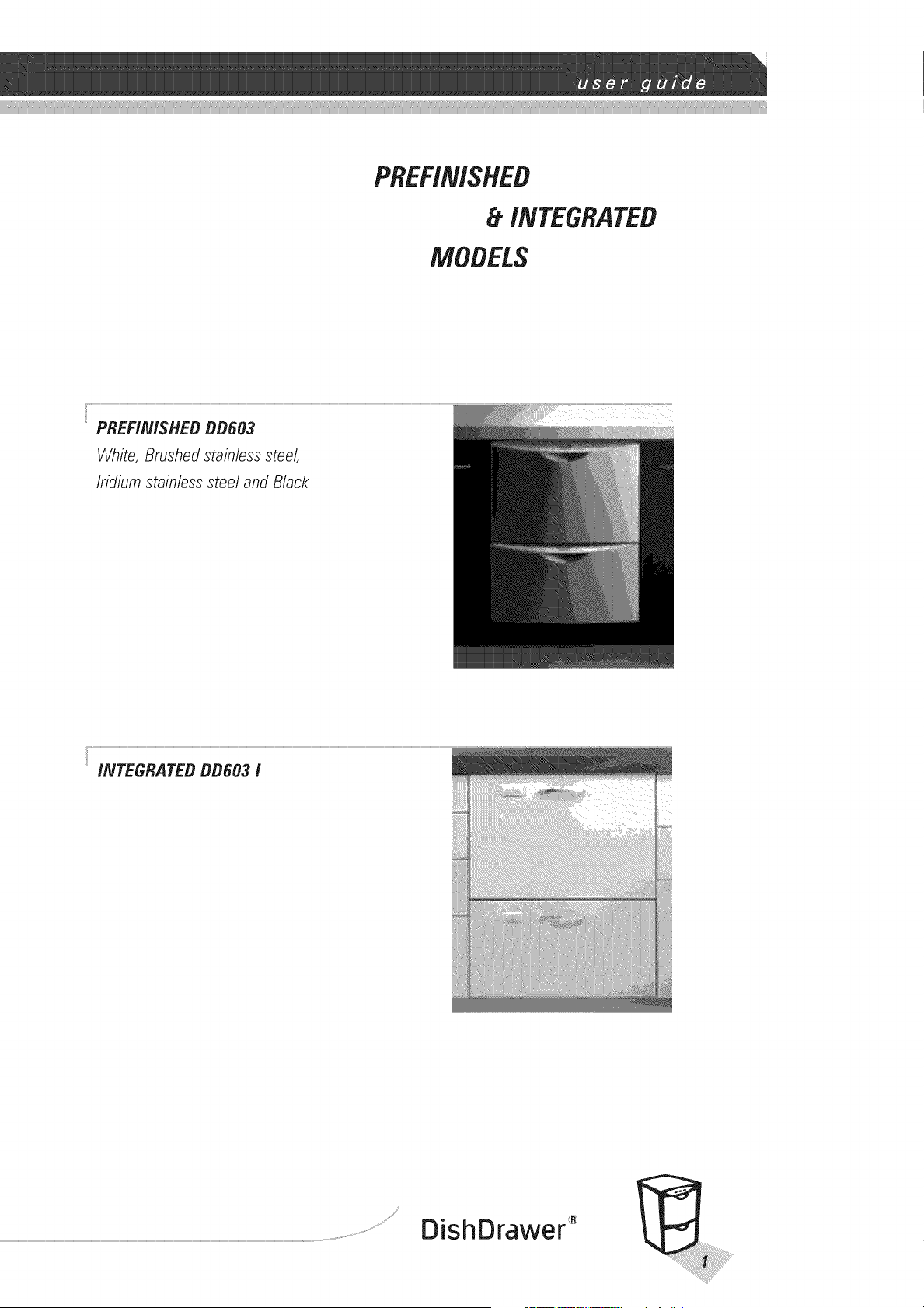
PREFINISHED
INTEGRATED
MODELS
PREF/IV/SHEDBB603
White, Brushedstainlesssteel,
Iridiumstainlesssteel and Black
INTEGRATED DD603 /
S ¸ ®
DishDrawer
Thankyouandcongratulationsfor pumhasingyourFisherEtPaykel
DishDrawer _, TheDishDrawer "_is uniqueandoffersbenefitsno other
dishwashercan,TheDishDrawe¢ _ utilizestheefficiencyandeasyaccessof
the everydaykitchendrawer,andturnsit into the mostadvanceddishwasherin
the world. Thisbookletwill guideyouthroughtheoperatinginstructionsand
featuresof your DishDrawer _, Werecommendthatyou readthisUserGuide
thoroughlybeforeyoustart usingyour DishDrawer '_,for thesakeof safetyas
well as success.
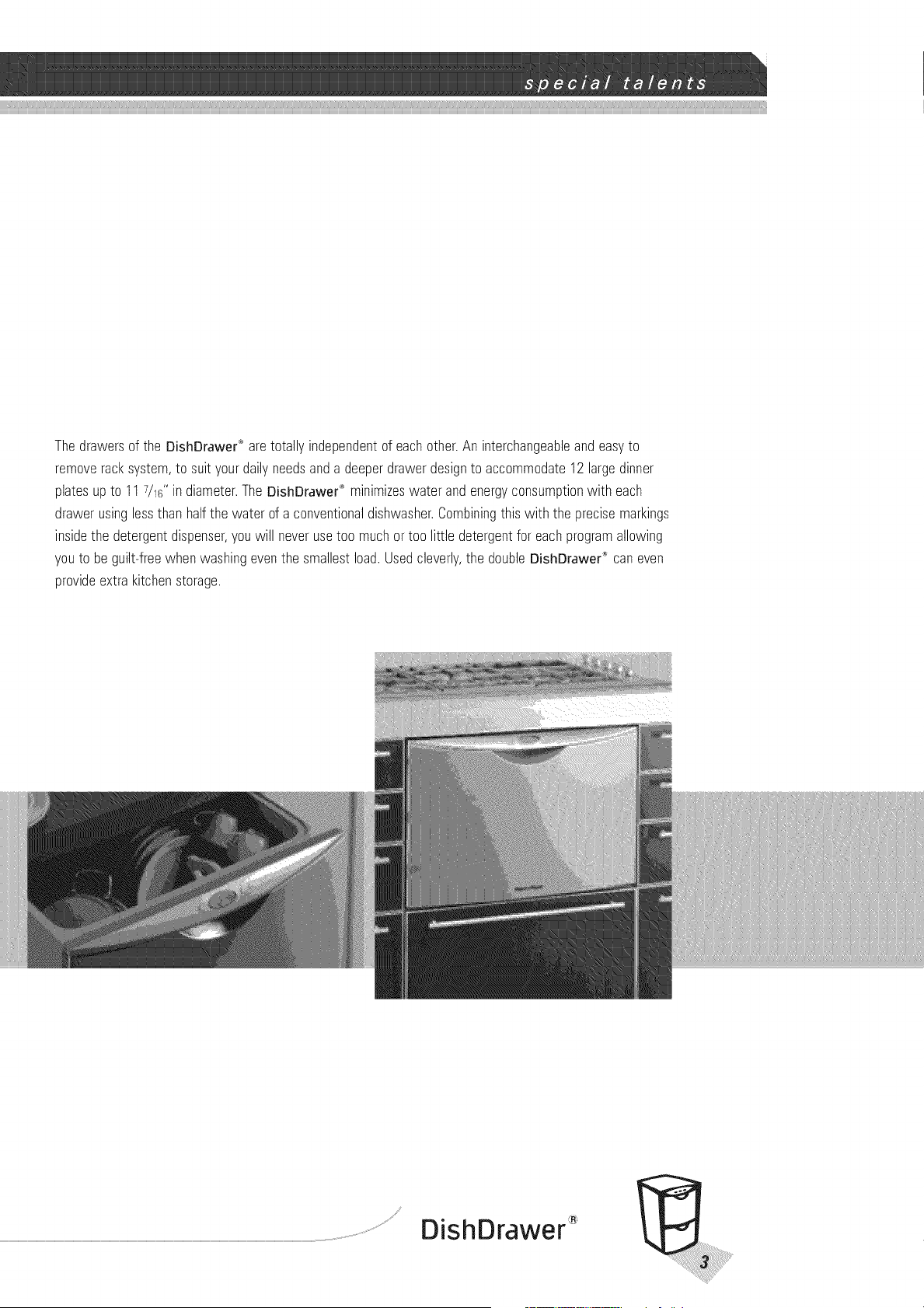
Thedrawersof the DishDrawe¢_aretotallyindependentof eachother.An interchangeableandeasyto
removeracksystem,to suityourdailyneedsanda deeperdrawerdesignto accommodate12 largedinner
platesupto 117/16"in diameter.The DishDrawe¢_minimizeswater andenergyconsumptionwith each
drawerusinglessthan halfthe water of a conventionaldishwasher.Combiningthiswith the precisemarkings
insidethe detergentdispenser,youwill neverusetoo muchor too little detergentfor eachprogramallowing
youto be guilt-freewhenwashingeventhe smallestload.Usedcleverly,the doubleDishDrawer® caneven
provideextrakitchenstorage.
Y®
DishDrawer
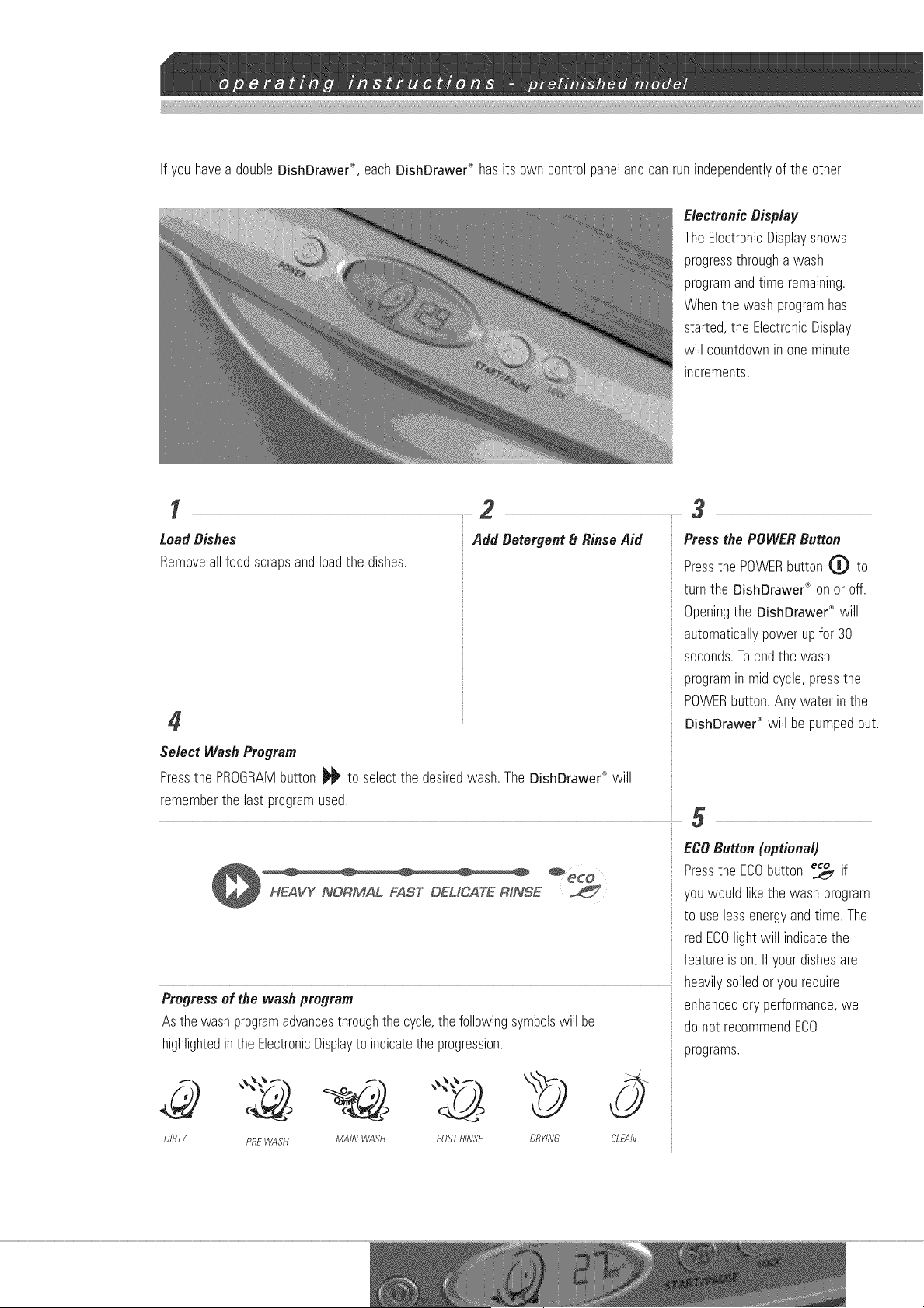
If you havea double DishDrawer ®,each DishDrawer ® has its own control panel and can run independently of the other.
ElectronicDisplay
TheElectronicDisplayshows
progressthroughawash
programandtime remaining.
Whenthe washprogramhas
started,the ElectronicDisplay
will countdownin oneminute
increments.
1....23
Load Dishes
Removeallfoodscrapsandloadthe dishes.
Add Detergent_RinseAid
Select WashProgram
Pressthe PROGRAMbutton _ to selectthe desiredwash.The DishDrawer'_'will
rememberthe lastprogramused.
Progressof the wash program
Asthe washprogramadvancesthroughthe cycle,thefollowingsymbolswill be
highlightedinthe ElectronicDisplayto indicatethe progression.
DIRTY PREWASH MAiN WASH POSTRINSE DRYING CLEAN
Pressthe POWERButton
Pressthe POWERbutton 0 to
turn the DishDrawed" on oroff.
Openingthe DishDrawer®will
automaticallypowerupfor 30
seconds.Toendthe wash
programin mid cycle,pressthe
POWERbutton.Any waterin the
DishDrawer"_will be pumpedout.
•
ECOButton(optional)
Pressthe ECObutton _ if
youwould likethe washprogram
to use lessenergyandtime. The
red ECOlightwill indicatethe
featureis on. Ifyourdishesare
heavilysoiledoryou require
enhanceddryperformance,we
do not recommendECO
programs.
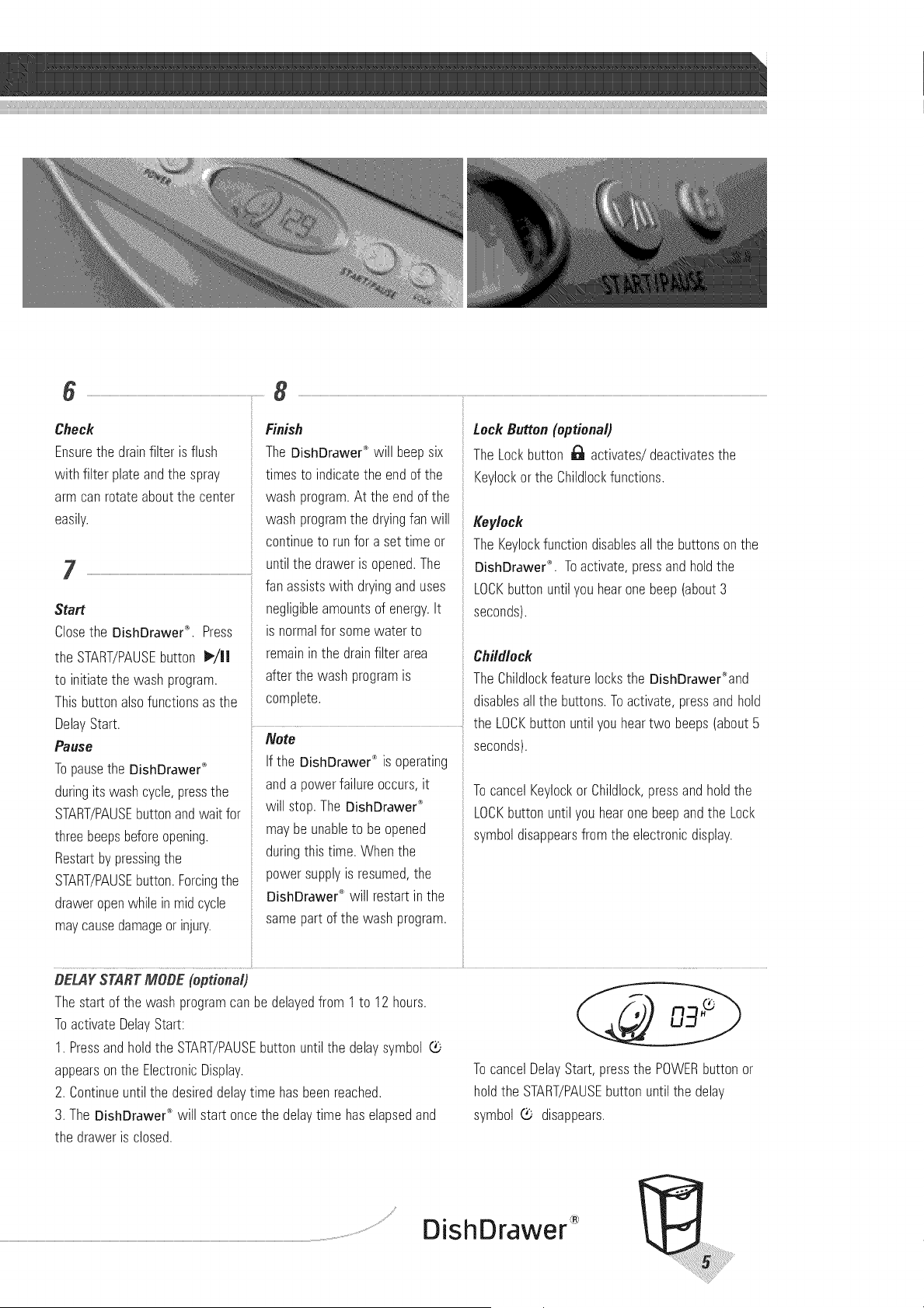
Check
Ensurethe drainfilter is flush
with filter plateandthe spray
arm canrotateaboutthe center
easily.
Finish
TheDishDrawe¢_will beepsix
timesto indicatethe endof the
washprogram.At the endof the
washprogramthe dryingfan will
continueto runfor a settime or
untilthe draweris opened.The
fanassistswith dryinganduses
negligibleamountsof energy.It
is normalfor somewater to
remainin the drainfilterarea
afterthe washprogramis
complete.
Start
Closethe DishDrawe¢_*.Press
the START/PAUSEbutton I_/11
to initiatethe washprogram.
Thisbuttonalsofunctionsas the
Keylockorthe Childlockfunctions.
Keylock
The Keylockfunctiondisablesallthe buttonsonthe
DishDrawer_'. Toactivate,pressandholdthe
LOCKbuttonuntilyou hearonebeep(about3
seconds).
Childlock
TheChildlockfeaturelocksthe DishDrawer%nd
disablesall the buttons.Toactivate,pressandhold
DelayStart.
Pause
Topausethe DishDrawer_
duringits washcycle,pressthe
START/PAUSEbuttonandwaitfor
threebeepsbeforeopening.
Restartby pressingthe
START/PAUSEbutton.Forcingthe
draweropenwhilein midcycle
maycausedamageorinjury.
............ the LOCKbuttonuntilyou heartwo beeps(about5
Note seconds).
If the DishDrawer®is operating
anda powerfailureoccurs,it
will stop.TheDishDrawe¢_
maybeunableto be opened
duringthistime. Whenthe
powersupplyis resumed,the
DishDrawer'_will restartinthe
TocancelKeylockor Childlock,pressandholdthe
LOCKbuttonuntilyou hearonebeepandthe Lock
symboldisappearsfromthe electronicdisplay.
samepart of the washprogram.
BELAYSTARTMOBE (optional)
Thestart of the washprogramcanbe delayedfrom 1to 12 hours.
ToactivateDelayStart:
1. Pressandholdthe START/PAUSEbuttonuntilthe delaysymbol (b
appearson the ElectronicDisplay.
2. Continueuntilthe desireddelaytime hasbeenreached.
3. The DishDrawer<_will start oncethe delaytime haselapsedand
TocancelDelayStart, pressthe POWERbuttonor
holdthe START/PAUSEbuttonuntilthe delay
symbol _- disappears.
the draweris closed.
DishDrawer
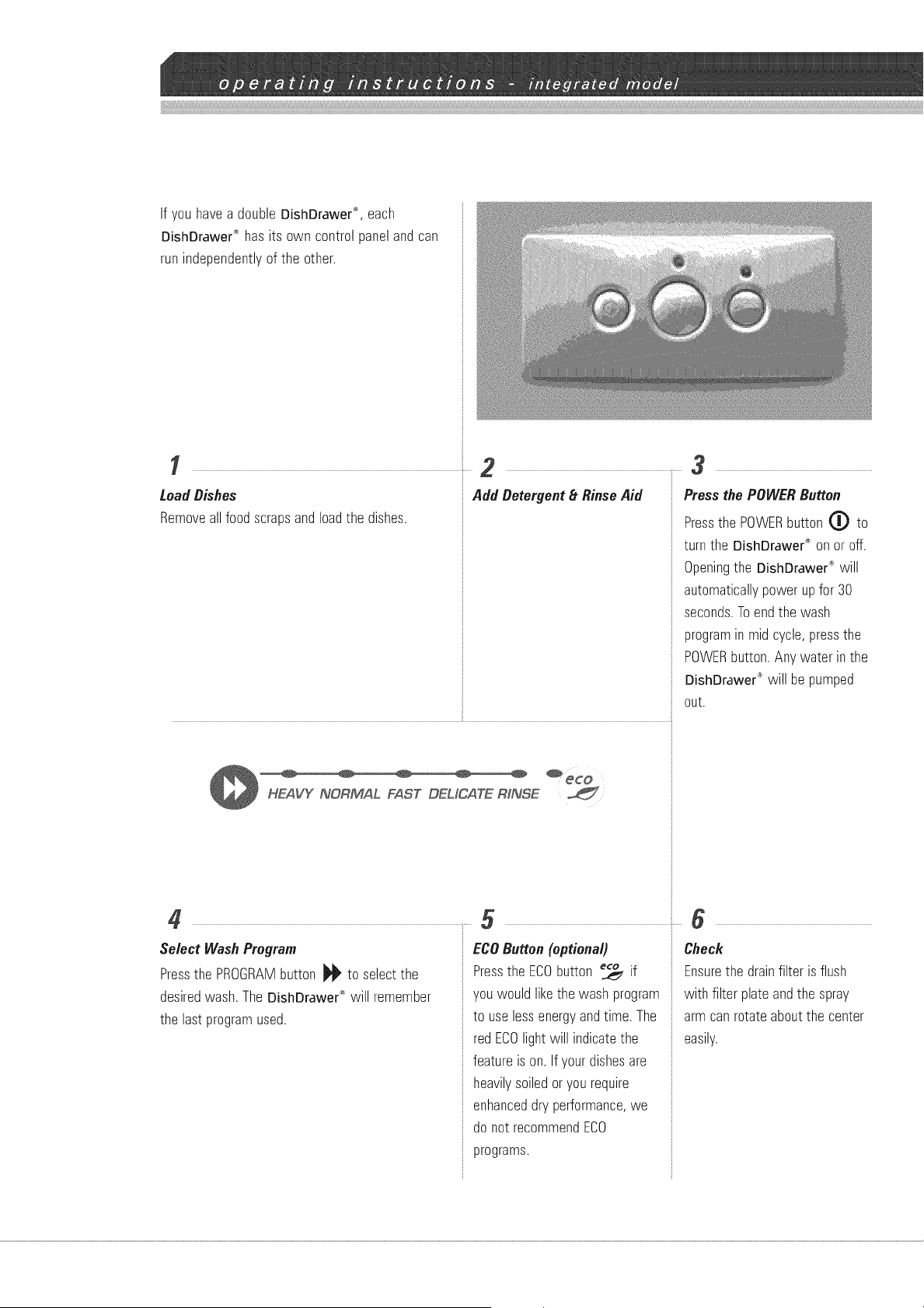
If you have a double DishDrawer ®, each
DishDrawer '*_has its own control panel and can
run independently of the other.
....... 2
Load Dishes
Removeallfoodscrapsandloadthe dishes.
..... •
Add Detergent_tRinse Aid
, Ji
Press the POWERButton
Pressthe POWERbutton (_ to
turn the DishDrawer_ on oroff.
Openingthe DishDrawer®will
automaticallypowerupfor 30
seconds.Toendthe wash
programin mid cycle,pressthe
POWERbutton.Any waterin the
DishDrawer"_will be pumped
out,
Select WashProgram
Pressthe PROGRAMbutton _ to selectthe
desiredwash.TheDishDrawer®will remember
the lastprogramused.
ECOButton (optional)
Pressthe ECObutton _ if
you wouldlikethe wash program
to uselessenergyandtime.The
redECOlight will indicatethe
featureis on. Ifyourdishesare
heavilysoiledor yourequire
enhanceddry performance,we
donot recommendECO
programs.
6
Check
Ensurethe drainfilter is flush
with filter plateandthe spray
arm canrotateaboutthe center
easily.
7
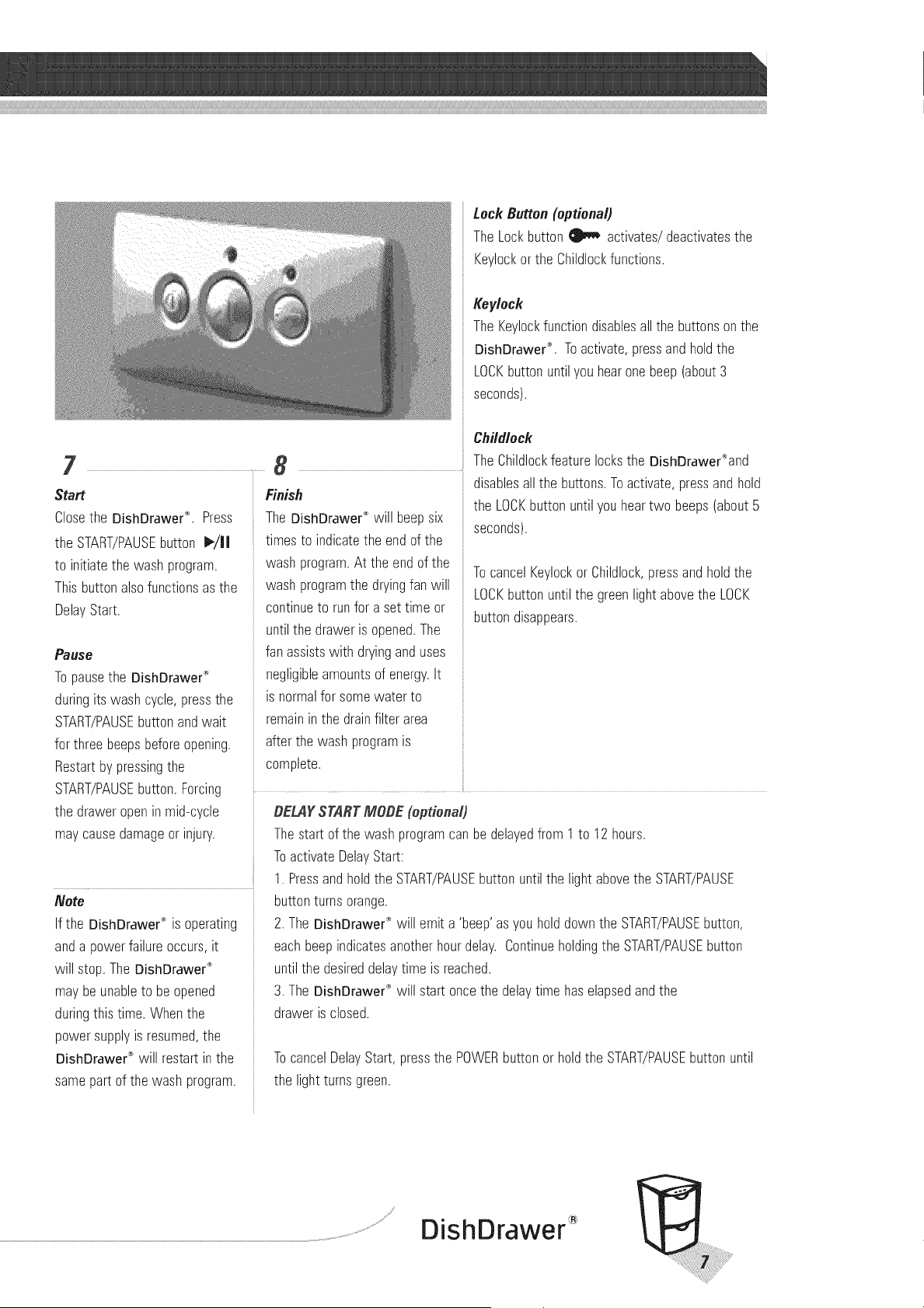
Start
Closethe DishDrawe¢_. Press
the START/PAUSEou_o_ _/JJ
to initiate_newashprogram.
Thisbuttonalsofunctionsas _ne
DelayStart.
Paus_
Topause_neDishDrawer_
duringits Nasncycle,Dressme
START/PAUSEuu_onanawak
for three DeeDsbeforeopening.
Restartby pressingme
START/PAUSEuu_on.Forcing
the drawer 9Denn mid-c cle
maycauseaamageor injury.
Note
If the DishDrawer" s operating
and a power failure occurs, i[
will stop. The DishDrawe¢ "_
may be unable _o be 9ueneu
during this time. When [ne
Dower SUDDIVS resumee _ne
DishDrawer _ wil res_ar_in _ne
same part of the wash program.
8
Finish
TheDishDrawer'_will beepsix
_lmes_oindicatethe endof the
Nasnprogram.At the endof the
Nasnprogramthe dryingfan will
continue_orunfor a settime or
until_nearaweris opened.The
fanassistswith dryinganduses
negligibleamountsof energy.It
s qormalfor somewater to
remainin the drainfilterarea
after_newashprogramis
complete
Lock Button(optional)
The Lockbutton _ activates/deactivatesthe
Keylockorthe Childlockfunctions.
/_eylock
The Keylockfunctiondisablesallthe buttonsonthe
DishDrawe¢_. Toactivate,pressandholdthe
LOCKbuttonuntilyou hearonebeep(about3
seconds).
Childlock
TheChildlockfeaturelocksthe DishDrawer_and
disablesall the buttons.Toactivate,pressandhold
the LOCKbuttonuntilyou heartwo beeps(about5
seconds).
TocancelKeylockor Childlock,pressandholdthe
LOCKbuttonuntilthe greenlightabovethe LOCK
buttondisappears.
_ELA_STARTMOgE (optional)
Thes_ar_of the washprogramcanbe delayedfrom 1to 12hours.
ToactivateDelayStart:
1. Pressandholdthe START/PAUSEbuttonuntilthe light abovethe START/PAUSE
uu_on_urnsorange.
2. TheDishDrawer:_will emita 'beep'as you holddownthe START/PAUSEbutton,
eachDeedindicatesanotherhourdelay. Continueholdingthe START/PAUSEbutton
untilme desireddelaytime is reached.
3. TheDishDrawe¢_will start oncethe delaytime haselapsedandthe
Draweris closed.
TocancelDelayStart,pressthe POWERbuttonor holdthe START/PAUSEbuttonuntil
_neight turnsgreen.
®
DishDrawer
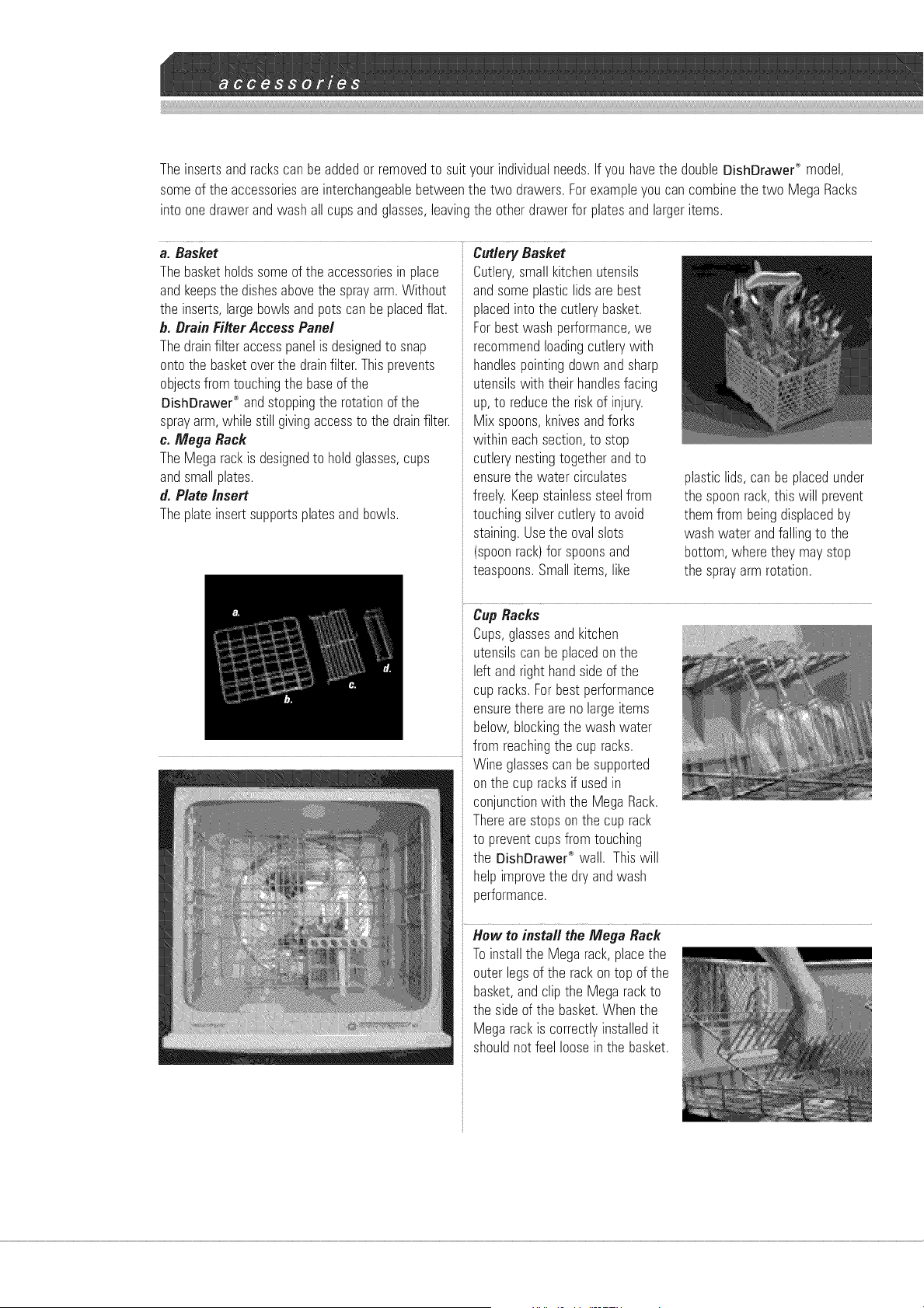
The insertsandrackscan beaddedorremovedto suityourindividualneeds.Ifyou havethe doubleDishDrawe¢_model,
someof the accessoriesare interchangeablebetweenthe two drawers.Forexampleyoucancombinethe two Mega Racks
into onedrawerandwashallcupsandglasses,leavingthe otherdrawerfor platesandlargeritems.
a. Basket CutleryBasket
Thebasketholdssomeof theaccessoriesin place
andkeepsthe dishesabovethe sprayarm.Without
the inserts,largebowlsandpotscan beplacedflat.
b. BrainFilterAccessPanel
Thedrainfilteraccesspanelis designedto snap
ontothe basketoverthe drainfilter.Thisprevents
objectsfromtouchingthe baseof the
DishDrawer_°andstoppingthe rotationof the
sprayarm,while stillgivingaccessto the drainfilter.
c. Mega Rack
The Megarackis designedto holdglasses,cups
andsmallplates.
d. Plate insert
Theplateinsertsupportsplatesandbowls.
Cutlery,smallkitchenutensils
andsomeplasticlidsarebest
placedinto the cutlerybasket.
Forbestwashperformance,we
recommendloadingcutlerywith
handlespointingdownandsharp
utensilswith their handlesfacing
up,to reducethe riskof injury.
Mix spoons,knivesandforks
within eachsection,to stop
cutlerynestingtogetherandto
ensurethe water circulates
freely.Keepstainlesssteelfrom
touchingsilvercutleryto avoid
staining.Usethe ovalslots
(spoonrack)for spoonsand
teaspoons.Smallitems,like
plastic lids,canbe placedunder
the spoonrack,this will prevent
themfrom beingdisplacedby
washwater andfallingto the
bottom,wheretheymaystop
the sprayarm rotation.
Cup Racks
Cups,glassesandkitchen
utensilscanbeplacedonthe
leftandright handsideof the
cupracks.Forbestperformance
ensurethereareno largeitems
below,blockingthe washwater
from reachingthe cup racks.
Wine glassescan besupported
onthe cup racksif usedin
conjunctionwith the MegaRack.
Therearestopsonthe cuprack
to preventcupsfrom touching
the DishDrawe¢"_wall. Thiswill
helpimprovethe dryandwash
performance.
Hew to insta// the Mega Rack
Toinstallthe Megarack,placethe
outerlegsof the rackontop of the
basket,andclipthe Megarackto
the sideof the basket.Whenthe
Megarackis correctlyinstalledit
shouldnot feel looseinthe basket.
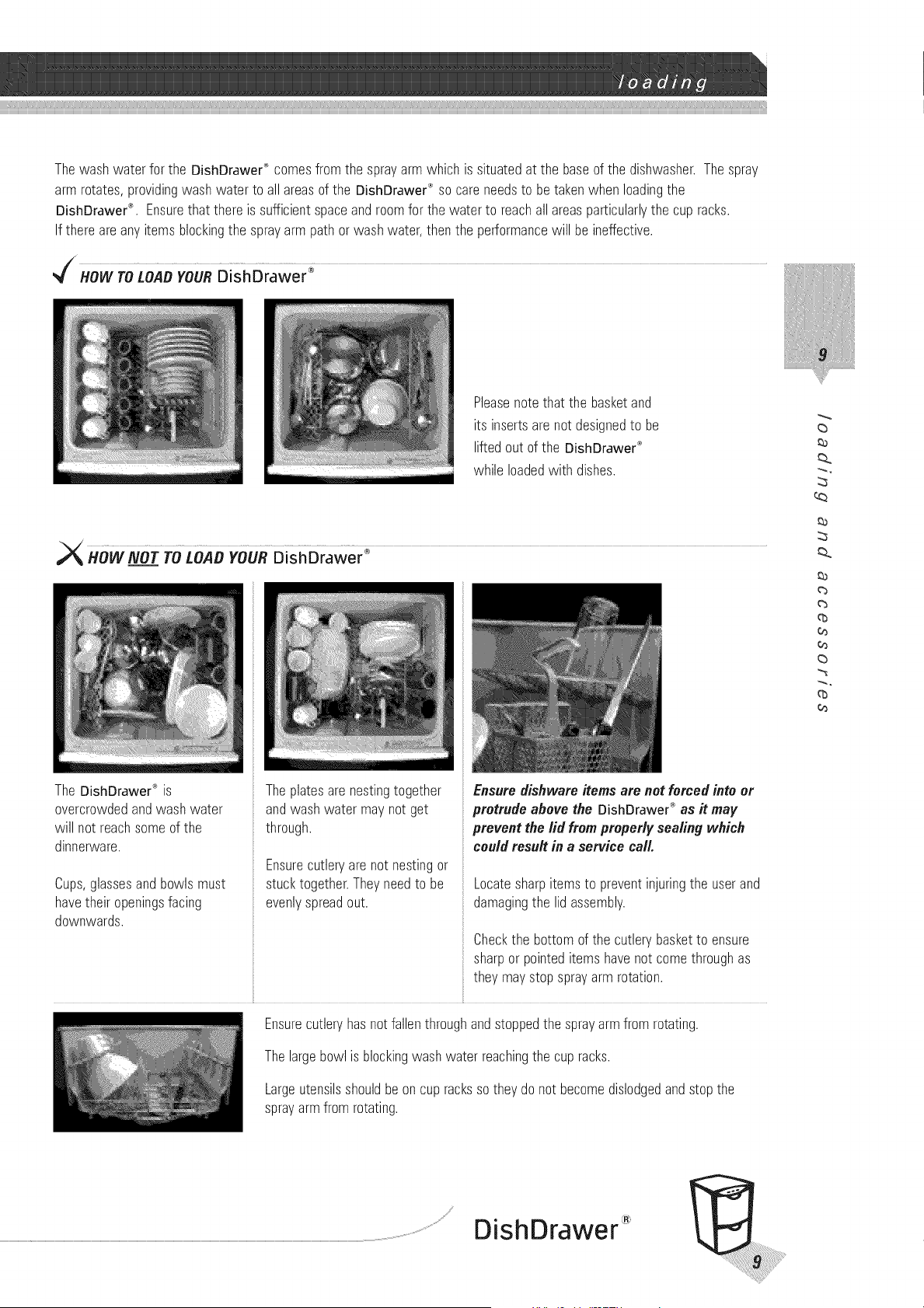
ThewashwaterfortheDishDrawer®comesfromthesprayarmwhichissituatedatthebaseofthedishwasher.Thespray
armrotates,providingwashwatertoallareasoftheDishDrawer®socareneedstobetakenwhenloadingthe
DishDrawer®.Ensurethatthereissufficientspaceandroomforthewatertoreachallareasparticularlythecupracks.
Ifthereareanyitemsblockingthesprayarmpathorwashwater,thentheperformancewillbeineffective.
HOWTOLOADYOURDisfiDiawer _
Please note that the basket and
its inserts are not designed to be
lifted out of the DishDrawer _"
while loaded with dishes.
The DishDrawer®is
overcrowdedandwash water
will not reachsomeof the
dinnerware.
Cups,glassesandbowlsmust
havetheir openingsfacing
downwards.
The plates are nesting together
and wash water may not get
through.
Ensurecutleryarenot nestingor
stucktogether.Theyneedto be
evenlyspreadout.
Ensure dishware items are not forced into or
protrude above the OishOrawer ® as it may
prevent the lid from properly sealing which
could result in a service call.
Locatesharpitemsto preventinjuringthe userand
damagingthe lidassembly.
Check the bottom of the cutlery basket to ensure
sharp or pointed items have not come through as
they may stop spray arm rotation.
Ensurecutleryhasnot fallenthroughandstoppedthe sprayarmfrom rotating.
Thelargebowlis blockingwashwaterreachingthe cupracks.
Largeutensilsshouldbeoncup rackssotheydo notbecomedislodgedandstopthe
sprayarmfromrotating.
_a
_b
qb
o_
o_
qb
o_
DishDrawer
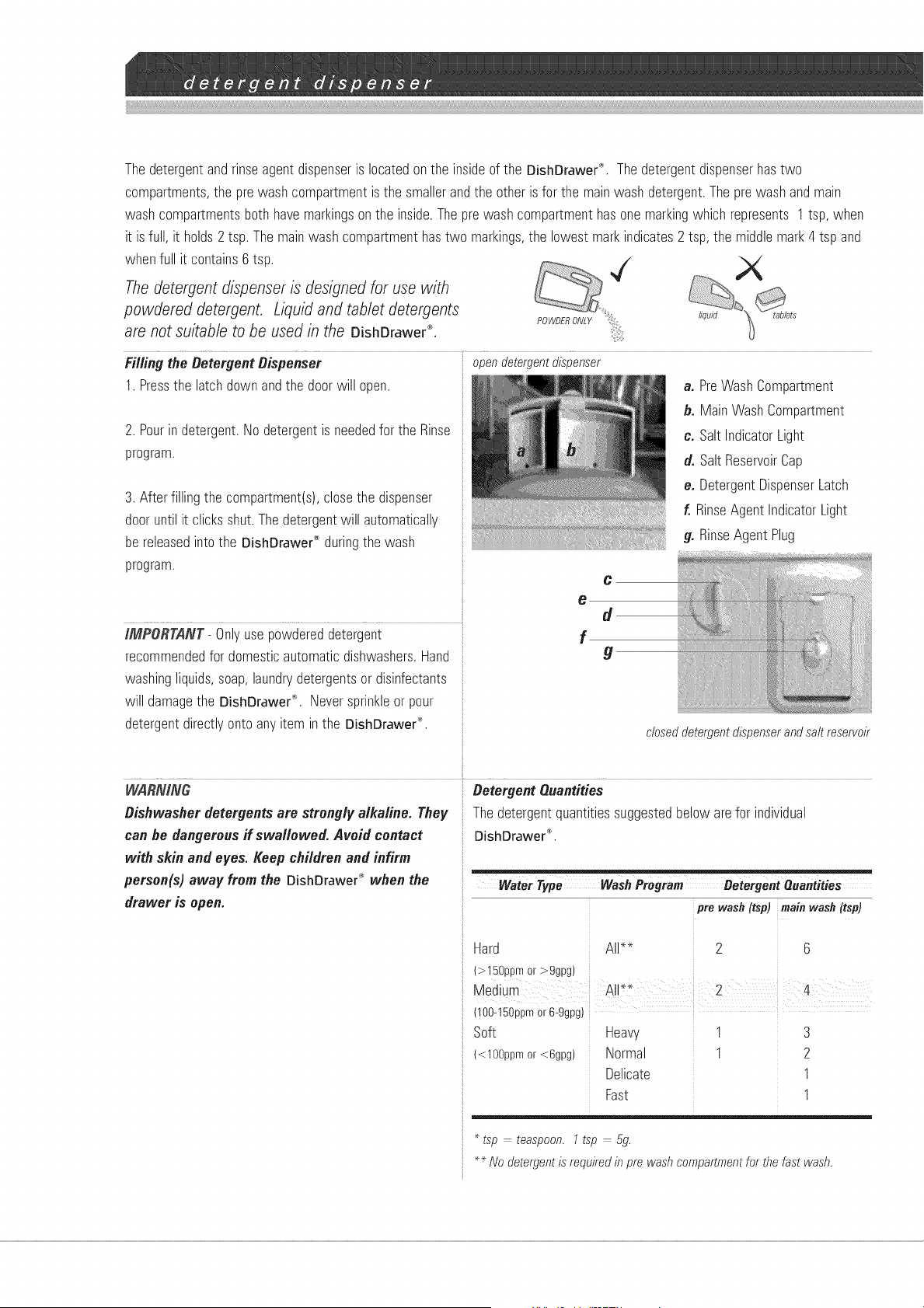
Thedetergentandrinseagent dispenseris locatedonthe insideof the DishDrawer'_, Thedetergentdispenserhastwo
compartments,the prewash compartmentis the smallerand the other isfor the mainwashdetergent.Theprewashandmain
washcompartmentsboth havemarkingsonthe inside.Theprewashcompartmenthasonemarkingwhichrepresents 1tsp, when
it isfull, it holds2 tsp.The mainwashcompartmenthastwo markings,the lowestmark indicates2 tsp, the middlemark4 tsp and
whenfull it contains6tsp.
The detergent dispenser is designed for use with
powdered detergent. Liquid and tablet detergents
are not suitable to be used in the DishDrawer ®.
Filling the DetergentDispenser ooendetergentdispenser
1. Pressthe latchdownandthe doorwill open.
2. Pourin detergent.Nodetergentis neededfor the Rinse
program.
3. Afterfillingthe compartment(s),closethe dispenser
dooruntil it clicksshut.Thedetergentwill automatically
be releasedintothe DishDrawe¢_duringthe wash
program.
IMPDRTANT- Onlyusepowdereddetergent
recommendedfor domesticautomaticdishwashers.Hand
washingliquids,soap,laundrydetergentsor disinfectants
will damagethe DishDrawe{"_, Neversprinkleor pour
detergentdirectlyonto anyitem inthe DishDrawer®,
a. PreWashComoar_men_
b. MainWashComoar_men_
c. Salt ndicatorLight
d. SaltReservoi_Cau
e. DetergentDispenserLatch
f. RinseAgent IndicatorLight
g. RinseAgent Plug
C
e
d
f
g
Ctoseo oeTergent dispenser ano Salt reservoir
WARNING
Dishwasherdetergentsare strong/y alkaline. They
can he dangerousif swa//owed. Avoid contact
with skinand eyes. Keep children and infirm
person(s) away from the DishDrawe¢_when the
drawer is open.
Detergent Quantities
The ae_ergen_auanddes sugges_eabelo_ are for individual
DishDrawe¢ °'.
Water Type Wash Program Detergent Quantities
pro wash (tsp) main wash (tsp)
rlard
t>150DDmc >ggpg
Medium
t100-150DDrnor6-ggpg_
Soft
i<10%um or <6gpg
All--
All* _
Heaw.
Norme
Delicate
Fast
2
2
1
1
3
2
I
I
TSO -- Teaspoon. "TSO -- 5g
Nooe_ergen_is reoulked _"ore washcomoar_men_for thefast wash.
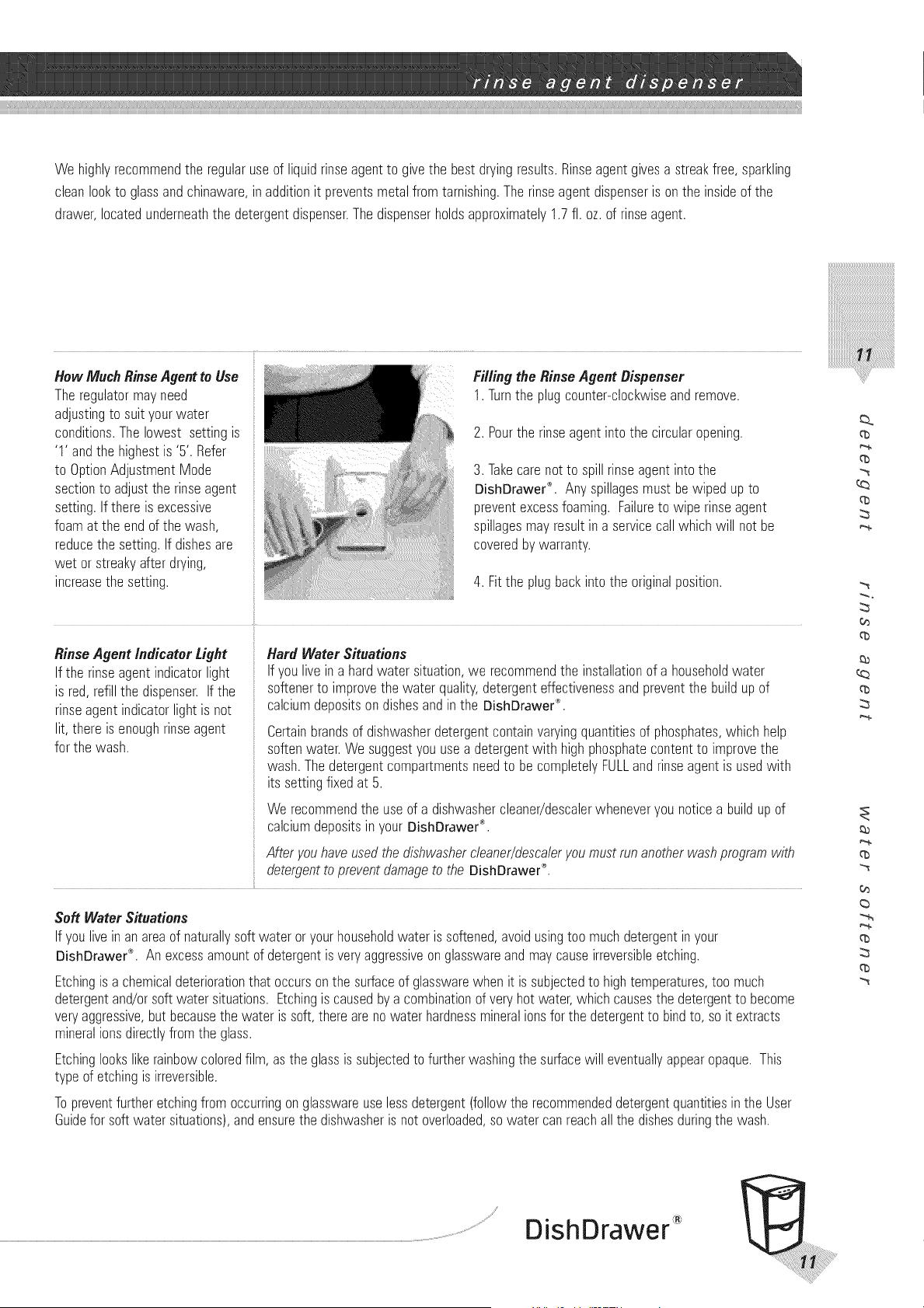
We highlyrecommendthe regularuseof liquidrinseagentto givethe bestdryingresults.Rinseagentgivesa streakfree, sparkling
cleanlookto glassandchinaware,in additionit preventsmetalfromtarnishing.Therinseagent dispenseris onthe insideof the
drawer,locatedunderneaththe detergentdispenser.Thedispenserholdsapproximately1.7fl. oz. of rinseagent.
How Much Rinse Agent to Use
The regulator may need
adjusting to suit your water
conditions. The lowest setting is
'1' and the highest is '5'. Refer
to Option Adjustment Mode
section to adjust the rinse agent
setting. If there is excessive
foam at the end of the wash,
reduce the setting. If dishes are
wet or streaky after drying,
increase the setting.
Fi//ing the RinseAgent Dispenser
1. Turnthe plugcounter-clockwiseandremove.
2. Pourthe rinseagentinto the circularopening.
3. Takecarenot to spillrinseagentintothe
DishDrawer'_'.Anyspillagesmustbewiped upto
preventexcessfoaming. Failureto wipe rinseagent
spillagesmayresultina servicecall whichwill not be
coveredby warranty.
4. Fitthe plugbackintothe originalposition.
RinseAgent Indicator Light
Ifthe rinseagentindicatorlight
is red,refillthe dispenser.If the
rinseagentindicatorlightis not
lit,there is enoughrinseagent
for the wash.
Hard Water Situations
If youlive ina hardwater situation,we recommendthe installationof a householdwater
softenerto improvethe water quality,detergenteffectivenessandpreventthe buildup of
calciumdepositsondishesandin the DishDrawer®.
Certainbrandsof dishwasherdetergentcontainvaryingquantitiesof phosphates,which help
softenwater.We suggestyouusea detergentwith highphosphatecontentto improvethe
wash.Thedetergentcompartmentsneedto be completelyFULLandrinseagentis usedwith
its settingfixedat 5.
We recommendthe useof a dishwashercleaner/descalerwheneveryou noticea build up of
calciumdepositsin yourBishOrawer®.
Afteryouhaveusedthedishwashercleaner/descaleryoumustrunanotherwashprogramwith
detergentto preventdamageto the OishBrawer®.
Soft Water Situations
Ifyoulive inanareaof naturallysoftwater oryourhouseholdwateris softened,avoidusingtoo muchdetergentin your
DishDrawer®. An excessamountof detergentis veryaggressiveonglasswareandmaycauseirreversibleetching.
Etchingis a chemicaldeteriorationthat occursonthe surfaceof glasswarewhen it is subjectedto hightemperatures,too much
detergentand/orsoft water situations.Etchingis causedbya combinationof veryhot water,whichcausesthe detergentto become
veryaggressive,but becausethe water is soft,therearenowaterhardnessmineralionsfor the detergentto bindto, so it extracts
mineralionsdirectlyfromthe glass.
Etchinglookslikerainbowcoloredfilm, as the glassis subjectedto furtherwashingthe surfacewill eventuallyappearopaque.This
typeof etchingis irreversible.
Topreventfurtheretchingfromoccurringonglasswareuselessdetergent(followthe recommendeddetergentquantitiesin the User
Guidefor softwater situations),andensurethe dishwasheris not overloaded,so water canreachall the dishesduringthe wash.
q_
q_
q_
¢0
(b
_a
q_
(b
¢0
(b
q_
(b
®
DishDrawer
Softwateris requiredfor dishwashingto preventthe buildupof scale(limedeposits)on yourdishesandin your DishDrawe¢_. If hard
water is usedfor dishwashing,you will noticeglasseswill becomeopaque,disheswill becomespottedor havea white film on them and
your dishwasherwill becomelessefficientovera periodof time. Tapwater above100ppmmust be softenedfor dishwashingfor optimum
wash performance.
DishDrawe¢"_modelsDD603HandDS603Harefitted with a ToEnsureOptimum Performanceof the Water Softener
water softenerwhich is designedto removethe calciumand
magnesiumionsthat causewater to be'hard'. Thewater
softenerwill automaticallyremovethe hardnessfrom the water
usinga saltsolution. Theamountof saltrequiredwill depend
onthe localwater hardness.Yourlocalwater companywill be
ableto provideyouwith the informationon the waterhardness
inyourlocalarea.
Thewater softenermustbe setto the correct localwater hardness
andmust alwaysbefilled with granularsaltmadeespeciallyfor
dishwasherwater softeningsystems. We do not recommendthe use
of cookingsalt liketable or rocksalt orpelletsas theymaycontain
impuritiesthat will impairor diminishthe lifeof the water softener.
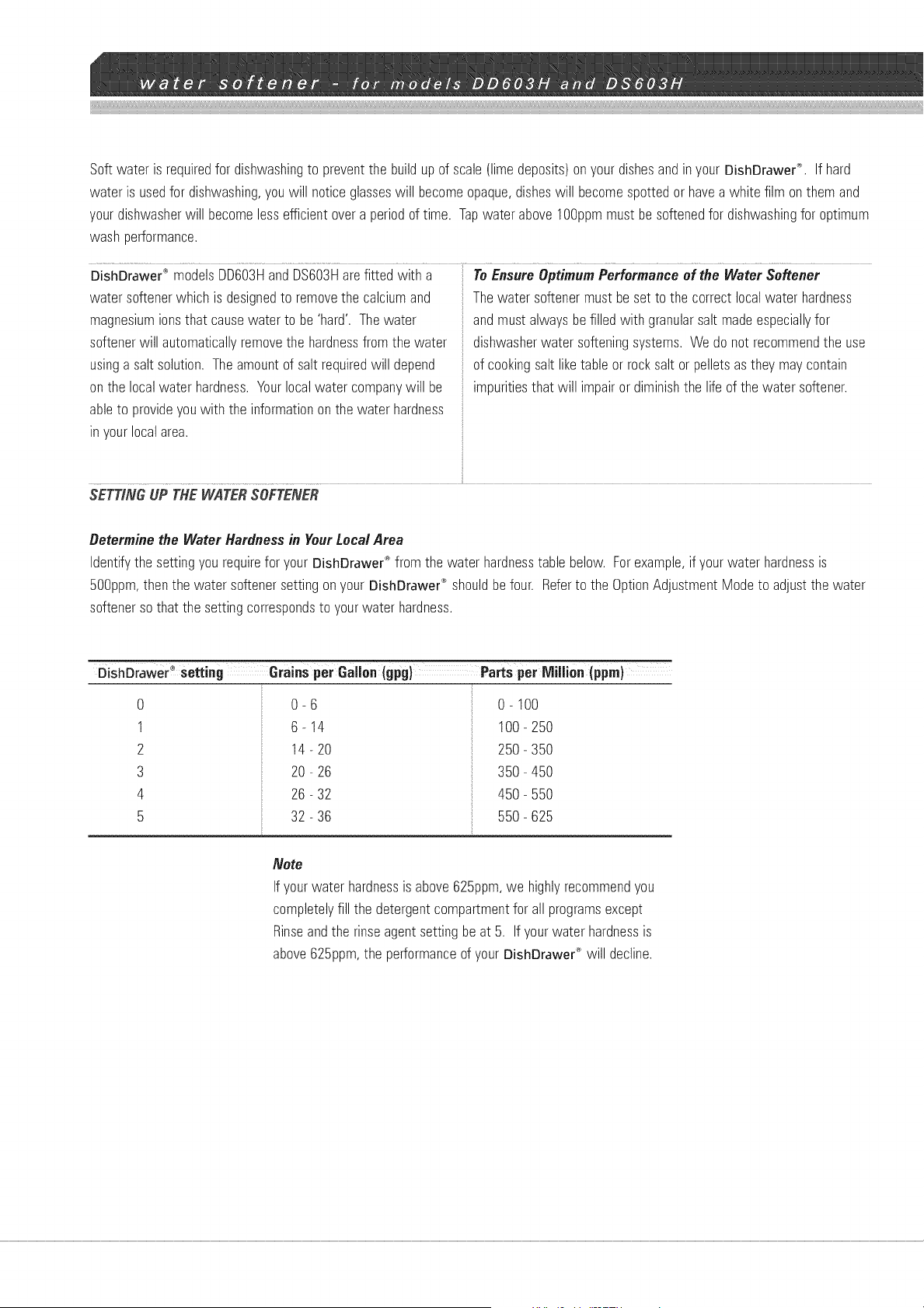
SETTINGUP THEWATERSOFTENER
Determine the Water Hardnessin Your Local Area
Identifythe settingyourequirefor your DishDrawer'_fromthe water hardnesstablebelow. Forexample,if yourwater hardnessis
500ppm,thenthe watersoftenersetting onyour DishDrawe¢_shouldbefour. Referto the OptionAdjustmentModeto adjustthe water
softenerso that the settingcorrespondsto yourwater hardness.
DishDraWe# °_setting Grains per Gallon (gpg} Parts per ivlillien_
0
1
2
3
4
5
0-6
6-14
14- 20
20 - 26
26 - 32
32 - 36
0-100
100-250
250-350
350-450
450-550
550-625
Note
Ifyourwater hardnessis above625ppm,we highlyrecommendyou
completelyfill the detergentcompartmentfor all programsexcept
Rinseandthe rinseagentsettingbe at 5. If yourwater hardnessis
above625ppm,the performanceof yourDishDrawer®will decline.
The Salt Reservoir Salt IndicatorLight
Watersofteningcanonlytakeplacewhen thereis salt inthe reservoir. : If the salt indicatorlight is red,the salt reservoiris empty.
Thesaltreservoirmustbe filledprior to usingthe DishDrawer_ and
wheneverthe salt reservoirindicatorlightis red.
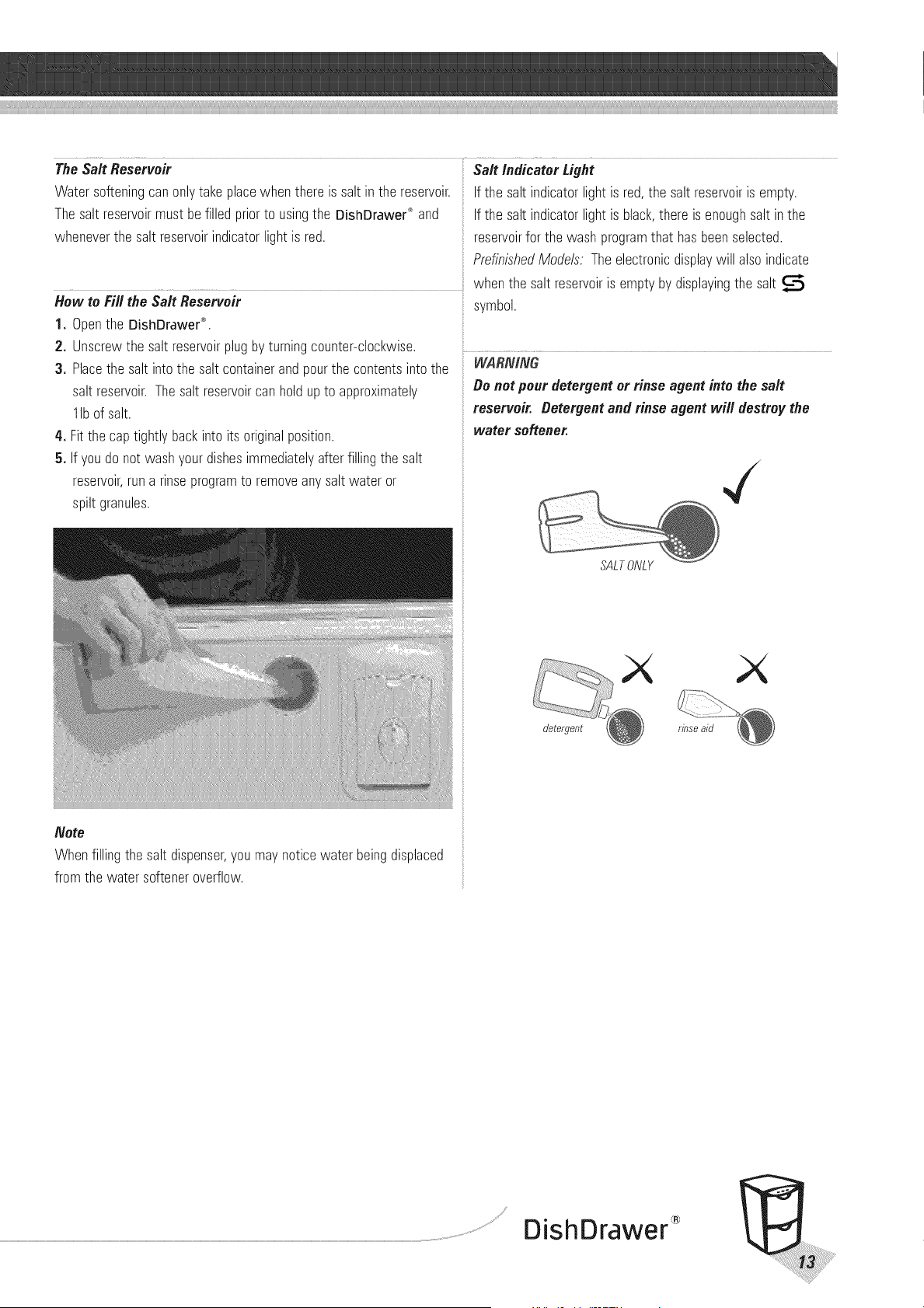
How to Fill the Salt Reservoir
1. Openthe DishDrawer®.
2. Unscrewthe salt reservoirplug by turningcounter-clockwise.
3. Placethe saltinto the saltcontainerandpourthe contentsinto the
saltreservoir.Thesalt reservoircan holdupto approximately
lib of salt.
4. Fitthe cap tightlybackinto its originalposition.
5. If youdo not washyourdishesimmediatelyafterfilling the salt
reservoir,runa rinseprogramto removeanysaltwater or
spiltgranules.
Note
Whenfillingthe salt dispenser,you maynoticewaterbeingdisplaced
fromthe water softeneroverflow.
If the salt indicatorlight is black,there is enoughsaltin the
reservoirfor the washprogramthat hasbeenselected.
PrefinishedModels. Theelectronicdisplaywill also indicate
whenthe saltreservoiris emptyby displayingthe salt
symbol.
WAR_V/N6"
Do notpour detergentor rinse agentinto the salt
reservoir. Detergent and rinse agent will destroythe
water softener.
SALTONLY
detergent rbse aid
DishDrawer
Thecombinationof hightemperaturesanddishwasherdetergentmaycausedamageto someitems if theyare washedin the
DishDrawer_. Remember,if in anydoubtaboutanyaspectconcerningitemswashedin the DishDrawer®,followthe instructionsfrom
the manufacturerof the items,or washthe item by hand.
Cutlery_Silverware DecoratedItems Plastic
All cutleryandsilverwareshouldberinsedimmediatelyafter
useto preventtarnishingcausedby somefoods.The Rinse
wash programis usefulfor this. Silveritems shouldnot come
into contactwith stainlesssteel,for exampleothercutlery.
Mixingtheseitemscan causestaining.Removesilvercutlery
from the DishDrawer®andhanddry it immediatelyafter the
programhasfinished.
Most modernchinapatternsare
Dishwashersafe.Antiqueitems,
thosewith a patternpainted
overthe glaze,goldrimsor hand
paintedchinamay bemore
sensitiveto machinewashing.If
indoubtwashtheseitems
by hand.
Pluminium GluedItems
Aluminiumcan bedulledby Dishwasherdetergent.Thedegree
of changedependson the qualityof the product.
OtherMetals
Ironandcast ironobjectscanrustandstainotheritems.
Copper,pewterand brasstendto stain.
Certainadhesivesaresoftened
ordissolvedin machinewashing.
If indoubt,washglueditems
by hand.
Someplasticmaychangeshape
or colorwith hotwater. Check
manufacturer'sinstructionsabout
washingplasticitems.Washable
plasticitemsshouldbeweighed
down sotheydo notflip overand
fill with water orfall throughthe
basketduringthe wash.
Woodware
Woodenitems aregenerallysensitiveto heatandwater.
Regularusein the Dishwashermaycausedeteriorationover
time. If indoubt,washbyhand.
Glassware
Most everydayglasswareis dishwashersafe.Crystal,veryfine
andantiqueglasswaremayetch i.e. becomeopaque.Youmay
preferto washtheseitemsby hand.
VACATIONTIME
If the DishDrawe¢_ is not goingto be usedfor sometime, we
recommendyouensurethe basketsare empty.Leavethe insideof the
DishDrawe¢_ clean.Leavethe drawersajarto allow air to circulate.
Turnoff boththe powerandwater supplyto the DishDrawer_.
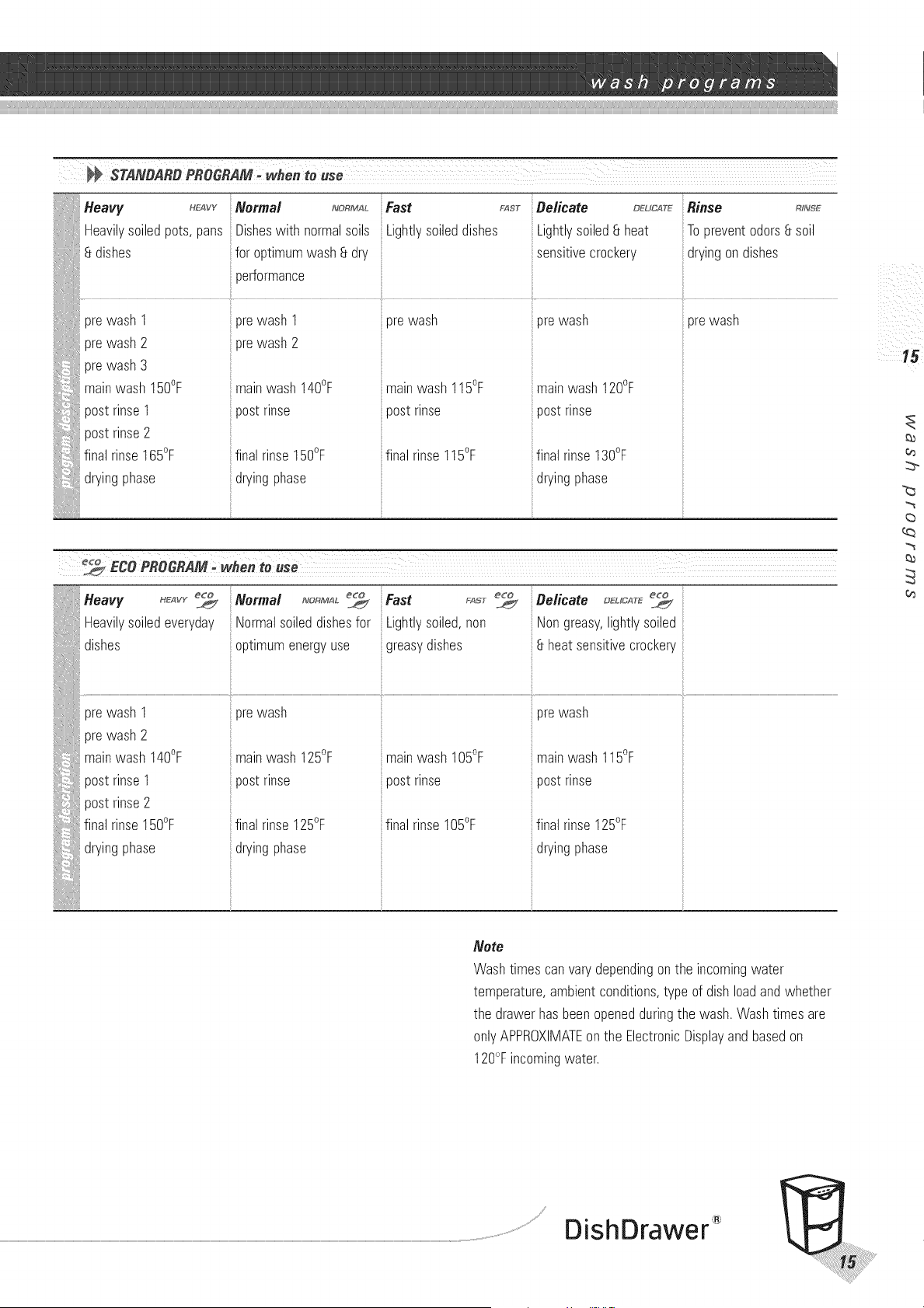
Heavy _vv Normal _RM,_ Fast F_T Delicate _uc__
Heavilvsoiledoo_s.oans Disheswith norms soils _ightlysoileddishes Lightlysoiled8 heat
dishes for ootimumwash8 at. sensitivecrockery
)erformance
orewasn 1 ore Nasn 1orewasn
prewasn2 ore Nasn2
orewasn3
mainwash 150°F mainwasn 140°F mainwash 115°F
pos_rinse 1 oos_rinse oos_rinse
oos_rinse2
final rinse165°F fins rinse 150°F final rinse1I5°F
dryingohase ailing ohase
orewash
mainwash 120°F
oos_rinse
fins rinse130°F
uryingphase
iiRinse R,_s_
Topreventodors8 soil
dryingondishes
::prewash
Fast rAsr Delicate _uc_r_
Lightlysoiled,non Nongreasy,lightlysoiled
greasydishes :8 heatsensitivecrockery
_eavy _:_vr
Heavilysoiledeveryday
....................................dishes
Normal _o_
Normalsoileddishesfor
i
optimumenergyuse
il i _/iii
_i i ii
5 15 ¸
(b
o_
03
Note
Washtimes canvarydependingonthe incomingwater
temperature,ambientconditions,typeof dishloadand whether
the drawerhasbeenopenedduringthe wash.Washtimes are
onlyAPPROXIMATEon the ElectronicDisplayand basedon
120°Fincomingwater.
DishDrawer
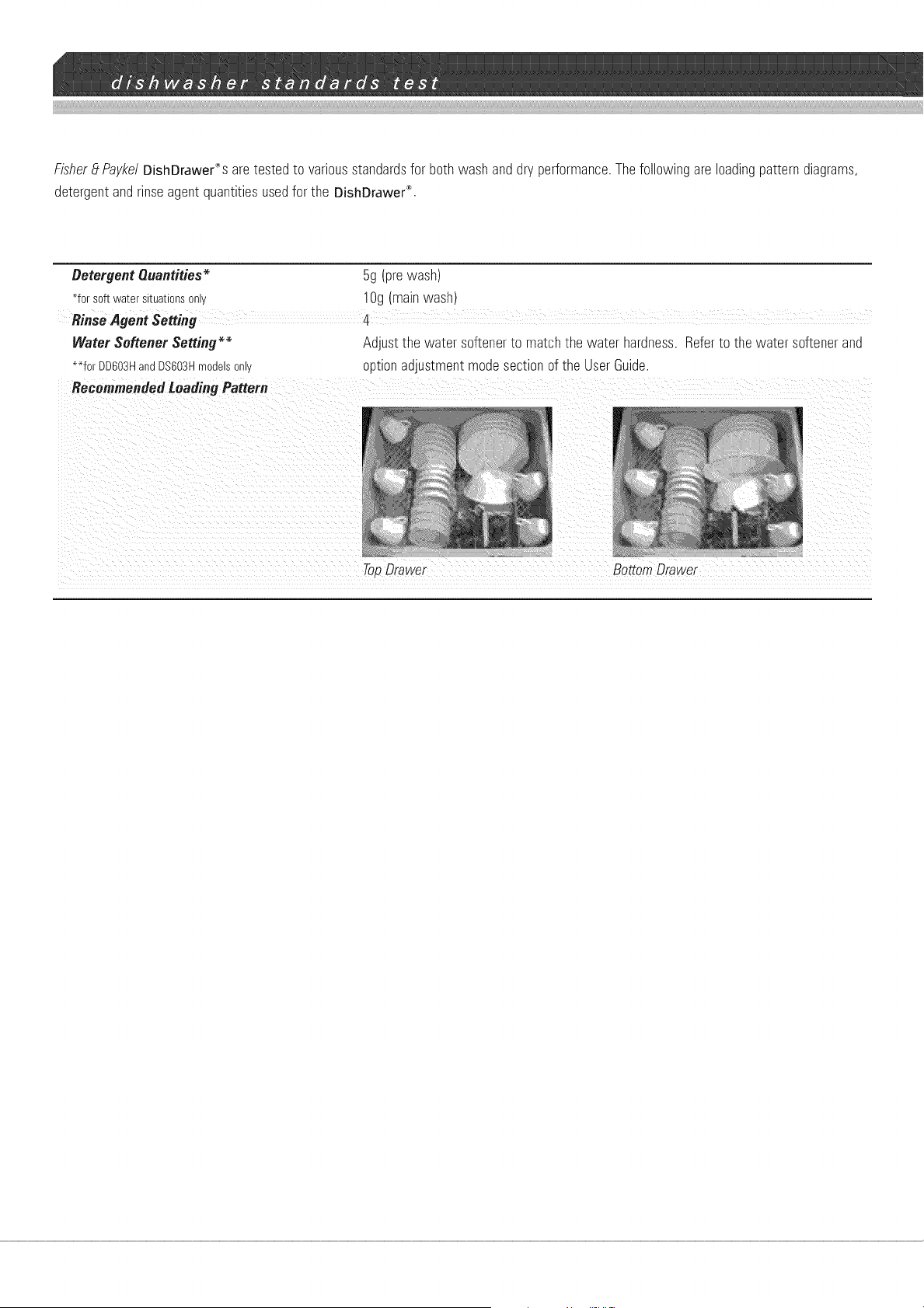
Fisher _tPaykel DishDrawer% are tested to various standards for both wash and dry performance. The following are loading pattern diagrams,
detergent and rinse agent quantities used for the DishDrawe¢ _.
Detergent Quantities _
_forsoftwatersituationsonly
5g (prewash)
lOg (mainwash)
Water Softener Setting _
_for DD603HandDS603Hmodelsonly
Recommended Loading Pattern
Adjustthe water softenerto matchthe water hardness.Referto the water softenerand
optionadjustmentmodesectionof the UserGuide.
TopDrawer Bottom Drawer
HOW TO ENTER OPTION ABJUSTMENT MORE
After usingthe DishDrawer®you maywant to changesomeof the
presetoptionsto suityourneeds.Thesettingsfor RinseAgent,Water
Softener,Auto Power,Endof WashProgramBeeps,ClosedDrawer
andCleanDishIndicatoroptionscanbechanged.
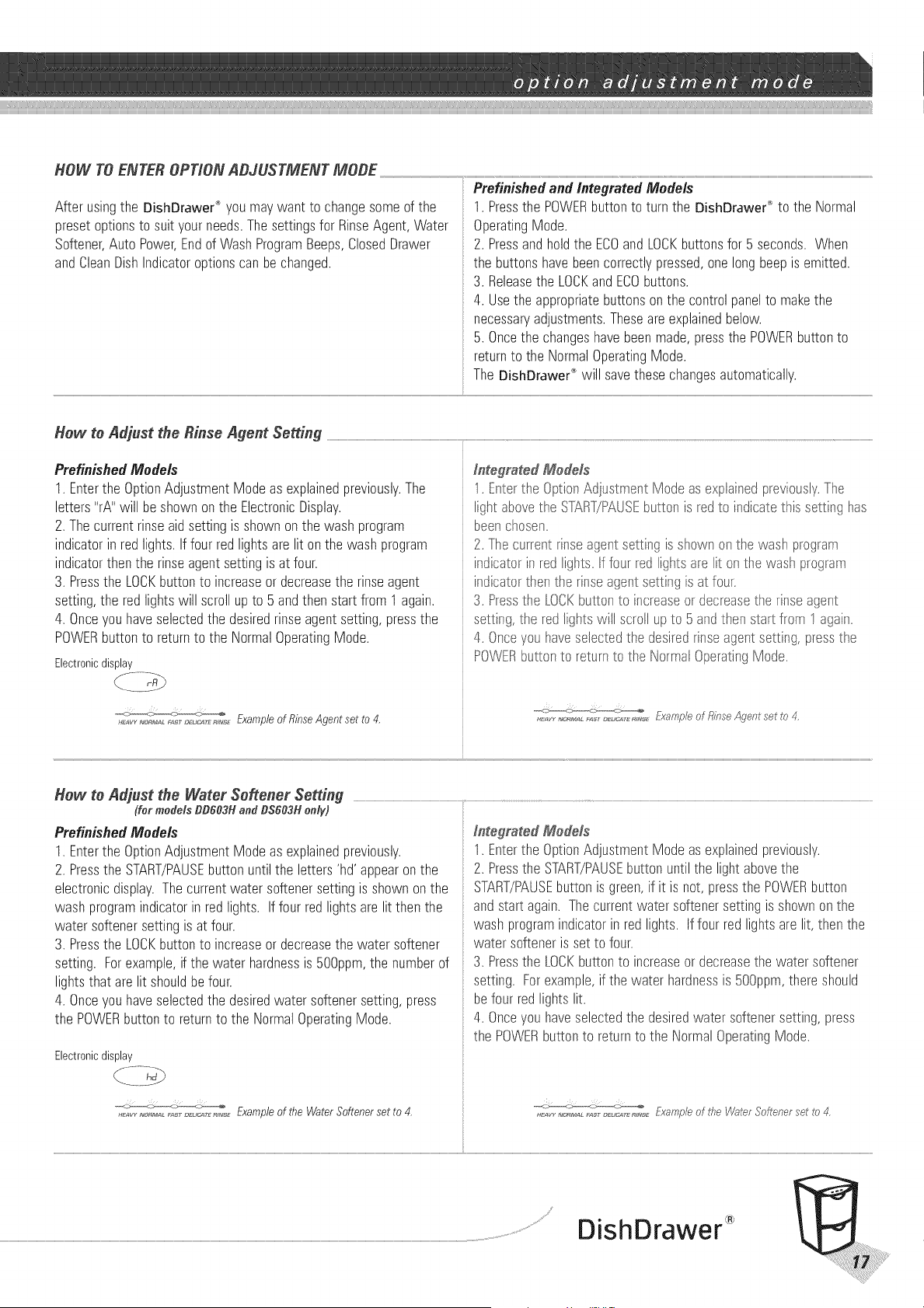
Prefinishedand Integrated Models
1. Pressthe POWERbuttonto turnthe DishDrawe¢_ to the Normal
OperatingMode.
2. Pressandholdthe ECOandLOCKbuttonsfor 5 seconds. When
the buttonshavebeencorrectlypressed,onelongbeepis emitted.
3. Releasethe LOCKandECObuttons.
4. Usethe appropriatebuttonsonthe controlpanelto makethe
necessaryadjustments.Theseare explainedbelow.
5. Oncethe changeshavebeenmade,pressthe POWERbuttonto
returnto the NormalOperatingMode.
The DishDrawer_"will savethesechangesautomatically.
Hew te Adjust the Rinse Agent Setting
PrefinishedModels
1. Enterthe OptionAdjustmentModeas explainedpreviously.The
letters'rA" will be shown on the ElectronicDisplay.
2. Thecurrentrinseaidsettingis shownonthe washprogram
indicatorinredlights. Iffour redlightsarelit onthe washprogram
indicatorthen the rinseagentsettingis at four.
3. Pressthe LOCKbuttonto increaseor decreasethe rinseagent
setting,the redlightswill scrollupto 5 andthen start from 1again.
4. Onceyouhaveselectedthe desiredrinseagentsetting,pressthe
POWERbuttonto returnto the NormalOperatingMode.
Electronicdisplay
._,_ ,_,_M,_L,_ ,_..,_._,_,_ Exampleof RinseAgentset to 4.
Integrated Medals
1. Ertertie OptiorAdjustl_ent Modeas explaired previously.The
light abovetie S-[£RT/PAUSEbuttor is red to indicatettis setting has
beenchosen.
2. Thecurrentri_seagert settlingis showr on t}e washprograrr
indicatori_ redligtts. f four redlightsare lit or tie was} prograr_
indicatortte_t tie rinseagert setti_gis at four.
3. Presstie LOCKbuttor to ir creaseor decreasetie rinseagent
settirg, tie redlights will scrollupto 5ard tier startfror 1agair.
4. Onceyou haveselectedthe desiredrinseagentsetting,pressthe
POWERbuttonto returnto the Norrral OperatingMode.
How to Adjust the Water Softener Setting
(for models DD603H and DS603H only)
PrefinishedModels
1. Enterthe OptionAdjustmentModeas explainedpreviously.
2. Pressthe START/PAUSEbuttonuntilthe letters'hd' appearonthe
electronicdisplay.Thecurrentwater softenersettingis shownonthe
washprogramindicatorin redlights. Iffour redlightsarelit then the
water softenersettingis at four.
3. Pressthe LOCKbuttonto increaseor decreasethe water softener
setting. Forexample,if the water hardnessis 500ppm,the numberof
lightsthat arelit shouldbefour.
4. Onceyouhaveselectedthe desiredwater softenersetting,press
the POWERbuttonto returnto the NormalOperatingMode.
Electronicdisplay
H_v_,_,,_._,L_,, _:._,.,_,_:_,_,_Exampleof the WaterSoftenersetto 4.
Integrated Medals
1. Enterthe OptionAdjustmentModeas explainedpreviously.
2. Pressthe START/PAUSEbuttonuntil the light abovethe
START/PAUSEbuttonis green,if it is not, pressthe POWERbutton
andstartagain. Thecurrentwatersoftenersettingis shownonthe
washprogramindicatorin redlights. If four redlightsare lit,then the
watersofteneris setto four.
3. Pressthe LOCI<button to increaseor decreasethe water softener
setting. Forexample,if the water hardnessis 500ppm,thereshould
befour redlightslit.
4. Onceyou haveselectedthe desiredwater softenersetting,press
the POWERbutton to returnto the NormalOperatingMode.
DishDrawer

Hew te Remove the Auto Power Option
Whenthe DishDrawe¢_leavesthe factory,it is programmedto automaticallyturn itself onwheneverthe draweris opened.TheDishDrawer'_
will not start washinguntilthe draweris closedandthe START/PAUSEbuttonhasbeenpressed.Ifyou donot want the DishDrawer_ to turn
itself onautomatically,thisfeature canbeturnedoff.
Prefinished Models Integrated Medals
1. Enterthe OptionAdjustmentModeas explainedpreviously.
2. Pressthe START/PAUSEbuttonuntil the letters'AP' appearonthe
electronicdisplay.
3. Pressthe LOCKbuttonto turnthe Auto Powerfeatureon or off.
Thebrushsymbolis not presentonthe electronicdisplaywhen the
Auto Powerfeaturehasbeenturnedoff.
4. Pressthe POWERbuttonto returnto the NormalOperatingMode.
Electronicdisplay
AutoPowerOr, .........
..... Auto PowerOff
l. Lntertie } }ho Adlust_rent Modeas ex@ainedpreviously.
2 Presste START-_AUSEbuttor untiltie [igtts abovetie
START5Y_USEcu_[or s ora_geard tie ECObuttor is red. [f it is not,
ess _e POWLRcu_-_o_to returnto Nomal OperatingModeard
Karl a .]d_
3 Press.re LOCK_u[_or[o turn fie Auto Powerfeature or or off. f
a Eretea _g rs o _e wast prograr_i_@icatorare offthen the Auto
Pov_errear[re nasbeer turnedoff,
4 Press_nePOWERsuKonto returnto the NorrralOperatingMode,
Hew te Remove the End ef Wash Program _eeps
Thefactoryhasprogrammedthe DishDrawer®to beepsixtimesat the endof the wash program.Thisfeaturecanbe turnedoff.
Prefinished Models Integrated Medals
1. Enterthe OptionAdjustmentModeas explainedpreviously.
2. Pressthe START/PAUSEbuttonuntil the letters'EC'appearonthe
ElectronicDisplay.
3. Pressthe LOCKbuttonto turnthe Endof WashProgramBeepson
or offas desired.Thebrushsymbolis not presentonthe Electronic
Displaywhenthe Endof WashProgramBeepshavebeenturnedoff.
4. Pressthe POWERbuttonto returnto the NormalOperatingMode.
Electronicdisplay
1, Entertie Optior Adjust_rert Modeas ex@ainedpreviously,
2, Presstie START/F@,USEbutt@ untiltie lightsabovethe
S_&RT/PAUSEbuttor is greet ard tie %0 buttor is red, f it is not,
presstie POWERbuttor to start again,
3, Presstie LOCKbuttor to turn tie Endof WashProgra_rBeepsor
oroff as desired.TheEndof WashPrograrrBeepshavebe@_turned
off if aletie red lights or tie wast prograr_i@icatorareoff,
4, Pressthe POWERbuttonto returnto the NormalOperatingMode,
................................................................................. BeepsOff
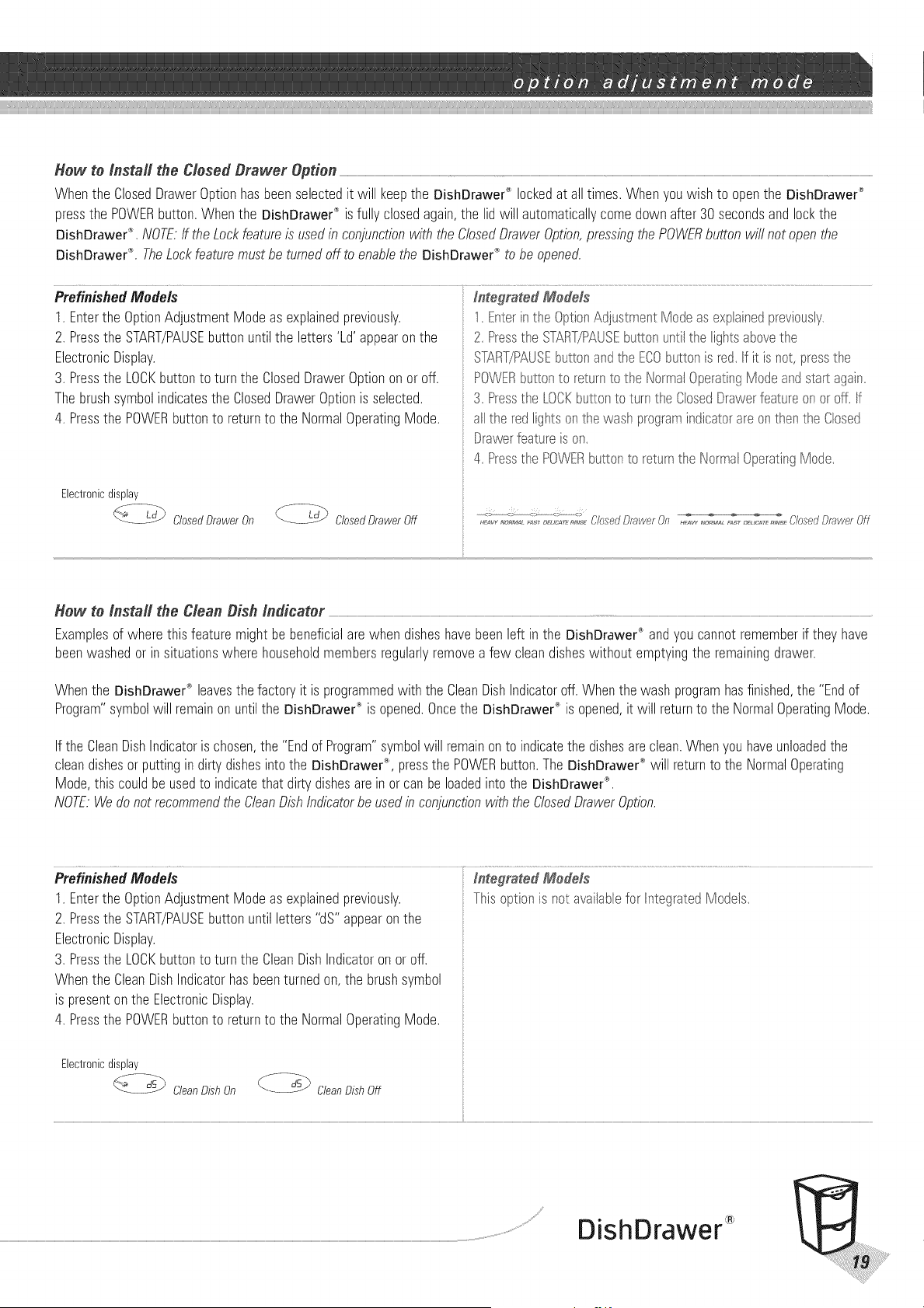
Hew to Install the Closed #rawer Option ................................................................................................................................................................................................................................................................................................................................................................................................................................................................................................................................................................................................................................................................
Whenthe ClosedDrawerOptionhasbeenselectedit will keepthe DishDrawe¢_ lockedat all times.Whenyouwish to openthe DishDrawer®
pressthe POWERbutton.Whenthe DishDrawer_ isfully closedagain,the lidwill automaticallycomedownafter 30secondsandlockthe
DishDrawer®,NOTE:ff the Lockfeatureis usedin conjunctionwith the ClosedDrawerOption,pressingthe POWERbuttonwill not openthe
DishDrawer_LTheLockfeaturemustbe turnedoff to enablethe DishDrawe¢_to be opened.
Prefinished Models In_egta_ed Medals
1. Enterthe OptionAdjustmentModeas explainedpreviously.
2. Pressthe START/PAUSEbuttonuntilthe letters'Ld'appearon the
ElectronicDisplay.
3. Pressthe LOCKbuttonto turn the ClosedDrawerOptionon oroff.
Thebrushsymbolindicatesthe ClosedDrawerOptionis selected.
4. Pressthe POWERbuttonto returnto the NormalOperatingMode.
Electronicdisplay
f -_d._--Ld_ClosedDrawer On f- -_('-_- Ld_ ClosedDrawerOff
1.Enterinthe OptiorAdjustr_ert Modeas explairedpreviously,
2, Presstie START/PAUSEbuttor untiltie ligtts abovetie
ST&RT/PAUSEbuttor ard tie ECObuttor is red,f it is not,presstie
POWERbuttorto returnto tie Norrral Operati_gModeard start agai_,
3, Presstie LOCKbuttor to turntie ClosedDrawerfeatureor or off, f
alltie redligtts or tie wast prograr_i_dicatora_eor tten tie Closed
Drawerfeatureis or,
4, Pressthe POWERbuttonto returnthe Norrral OperatingMode,
Hew to Install the Clean #ish indicator
Examplesof wherethis featuremight bebeneficialare when disheshavebeenleft in the DishDrawer® andyou cannotrememberif they have
beenwashedor in situationswhere householdmembersregularlyremovea few cleandisheswithout emptyingthe remainingdrawer.
Whenthe DishDrawe¢_leavesthefactoryit is programmedwith the CleanDishIndicatoroff.Whenthe wash programhasfinished,the "Endof
Program"symbolwill remainonuntilthe DishDrawe¢" is opened.Oncethe DishDrawe¢_ is opened,it will returnto the NormalOperatingMode.
Ifthe CleanDishIndicatoris chosen,the "Endof Program"symbolwill remainon to indicatethe dishesare clean.Whenyou haveunloadedthe
cleandishesorputtingindirtydishesinto the DishDrawe¢_,pressthe POWERbutton.The DishDrawer®will returnto the NormalOperating
Mode,this couldbe usedto indicatethat dirtydishesareinor canbe loadedinto the DishDrawer®,
NOTE:Wedo notrecommendtheCleanDishIndicatorbeusedin conjunctionwith theClosedDrawerOption.
Prefiaished Models I#_egra_ed Medals
1. Enterthe OptionAdjustmentModeas explainedpreviously. Thisoptionis not availaUefor IntegratedModels,
2. Pressthe START/PAUSEbuttonuntil letters"dS'"appearonthe
ElectronicDisplay.
3. Pressthe LOCKbuttonto turn the CleanDishIndicatoron or off.
Whenthe CleanDishIndicatorhasbeenturnedon, the brushsymbol
is presentonthe ElectronicDisplay.
4. Pressthe POWERbuttonto returnto the NormalOperatingMode.
Electronicdisplay
DishDrawer
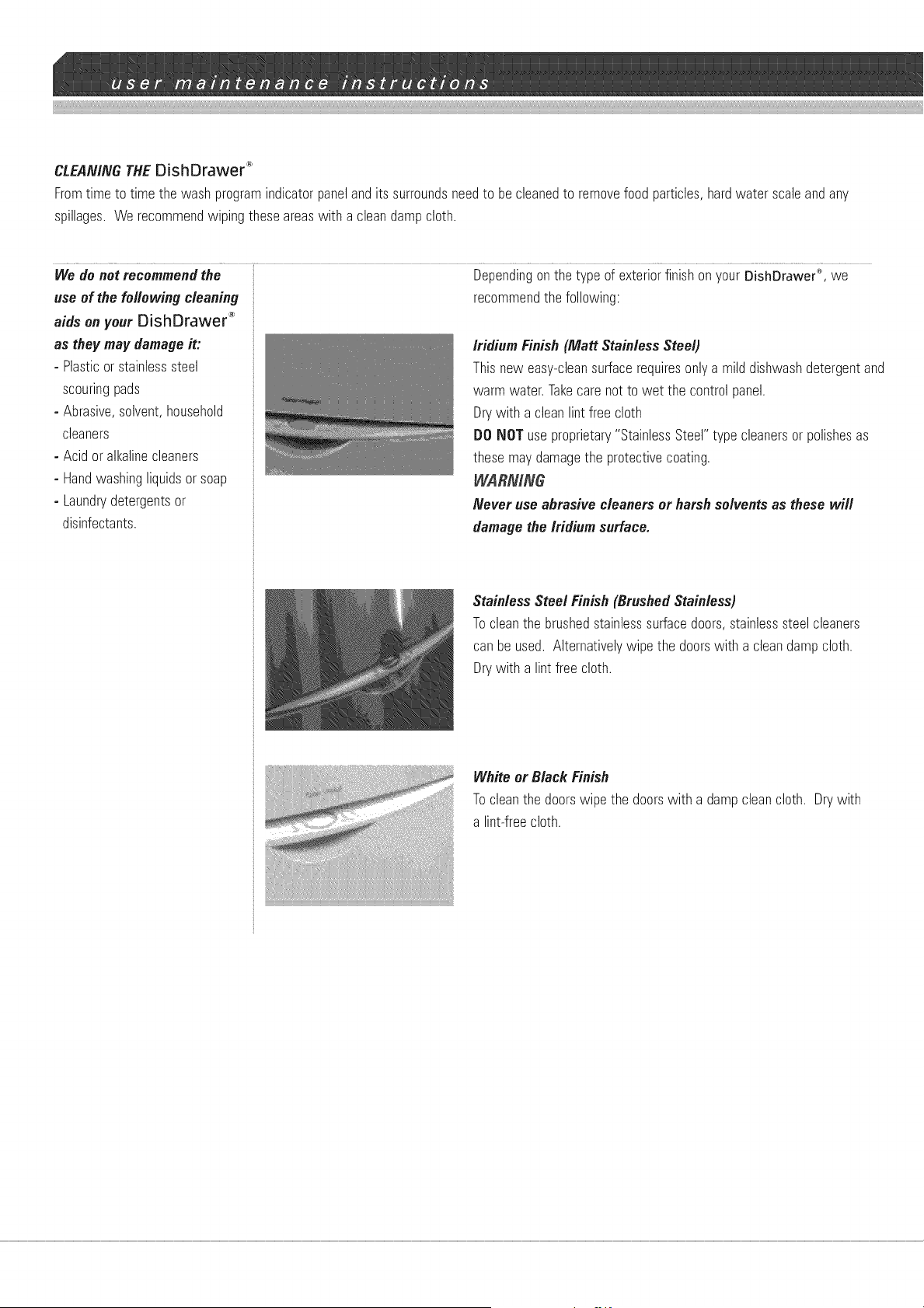
CLEANINGTHEDishDrawer _
Fromtime to timethe washprogramindicatorpanelandits surroundsneedto becleanedto removefood particles,hardwater scaleandany
spillages.We recommendwiping theseareaswith a cleandampcloth.
We de not recommendthe Dependingonthe type of exteriorfinishon yourDishDrawer'°',we
recommendthe following:use of the following cleaning
aidson your DishDrawe¢ _
as theymay damageit:
-Plasticor stainlesssteel
scouringpads
-Abrasive,solvent,household
cleaners
- Acid oralkalinecleaners
- Handwashingliquidsor soap
-Laundrydetergentsor
disinfectants.
iridium Finish(Matt StainlessSteel)
Thisnew easy-cleansurfacerequiresonlya milddishwashdetergentand
warm water.Takecare notto wet the controlpanel.
Drywith a cleanlint free cloth
DO NOT useproprietary"StainlessSteel" type cleanersorpolishesas
thesemaydamagethe protectivecoating.
WARNflVG
Never use abrasive cleaners or harshsolvents as these will
damagethe iridiumsurface.
StainlessSteel Finish (BrushedStainless)
Tocleanthe brushedstainlesssurfacedoors,stainlesssteelcleaners
canbe used. Alternativelywipe the doorswith a cleandampcloth.
Drywith a lint free cloth.
White or Black Finish
Tocleanthe doorswipe the doorswith a dampcleancloth. Drywith
a lintrfreecloth.
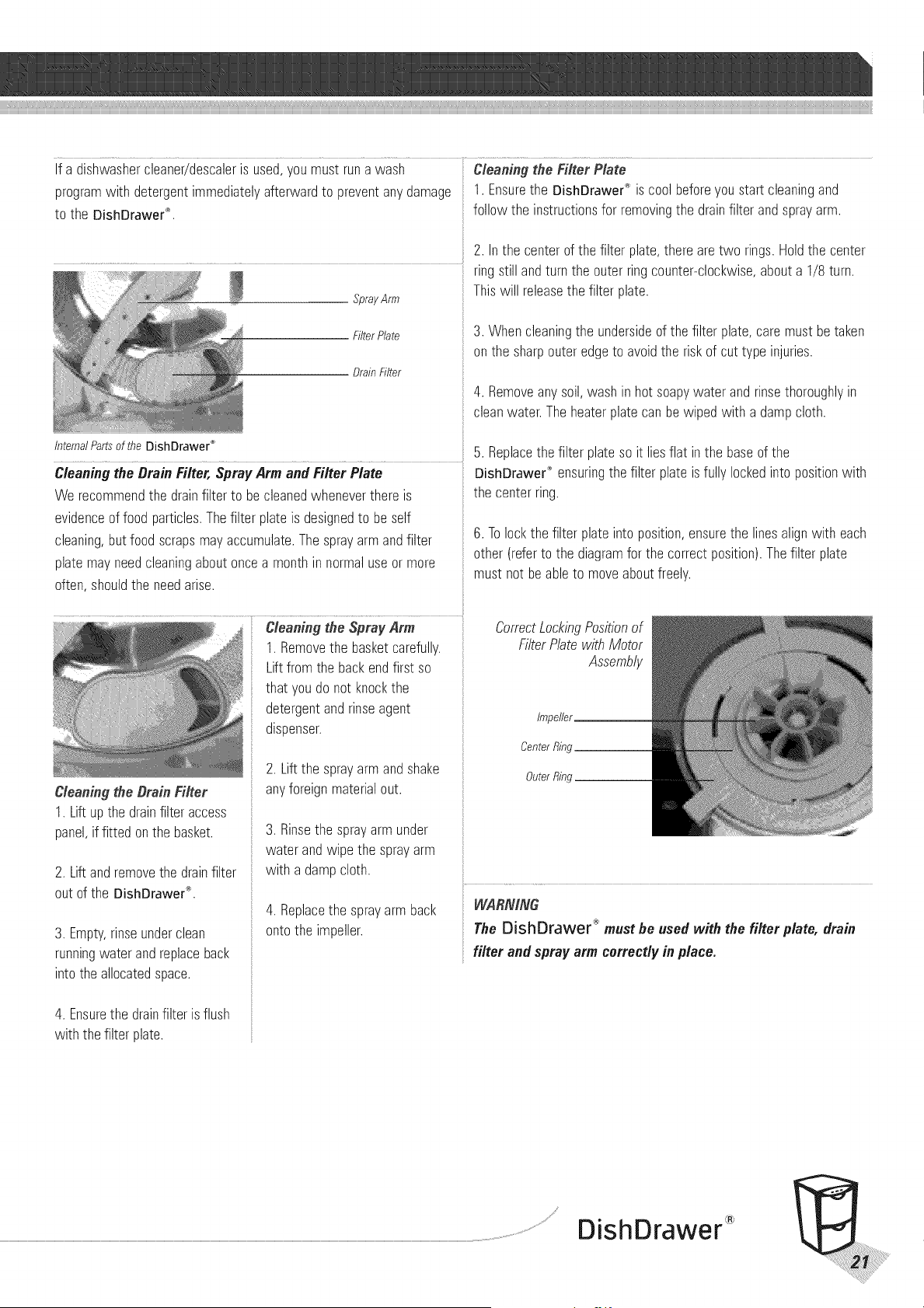
Ifadishwashercleaner/descalerisused,youmustrunawash Cleaning the Filter Plate
program with detergent immediately afterward to prevent any damage
to the DishDrawer _.
SprayArm
FilterPlate
BrainFilter
InternalPartsof the DishDrawer ®
Cleaningthe DrainFilter,SprayArm andFilter Plate
We recommendthe drainfilterto be cleanedwheneverthereis
evidenceof food particles.Thefilter plateis designedto be self
cleaning,butfood scrapsmayaccumulate.Thesprayarmandfilter
plate mayneedcleaningaboutoncea monthin normaluseor more
often, shouldthe needarise.
Cleaning the Drain Filter
1. Liftupthe drainfilter access
panel,if fitted onthe basket.
2. Liftandremovethe drainfilter
out of the DishDrawer''.
3. Empty,rinseunderclean
runningwaterandreplaceback
into the allocatedspace.
4. Ensurethe drainfilter is flush
with the filterplate.
1. Removethe basketcarefully.
Liftfrom the backendfirst so
that youdo not knockthe
detergentandrinseagent
dispenser.
2. Liftthe sprayarmandshake
anyforeignmaterialout.
3. Rinsethe sprayarm under
waterandwipe the sprayarm
with a dampcloth.
4. Replacethe sprayarm back
ontothe impeller.
1. Ensurethe DishDrawer'_is cool beforeyoustart cleaningand
follow the instructionsfor removingthe drainfilter andsprayarm.
2. Inthe centerof the filter plate,there aretwo rings.Holdthe center
ringstillandturn the outerringcounter-clockwise,abouta 1/8 turn.
Thiswill releasethe filter plate.
3. Whencleaningthe undersideof the filter plate,caremust be taken
onthe sharpouteredgeto avoidthe riskof cuttype injuries.
4. Removeanysoil,wash in hot soapywater and rinsethoroughlyin
cleanwater.Theheaterplatecanbe wipedwith a dampcloth.
5. Replacethe filter plateso it lies flat inthe baseof the
DishDrawe¢_ensuringthe filter plateis fullylockedintopositionwith
the centerring.
6. Tolockthe filter plate intoposition,ensurethe linesalignwith each
other (referto the diagramfor the correctposition).Thefilter plate
must not beableto moveaboutfreely.
CorrectLockingPositionof
FilterPlatewith Motor
Assembly
impeller
CenterRing
OuterRing
WARNING
The DishDrawer _ must he used with the filter plate, drain
filter and spray arm correctly in place.
/
DishDrawer
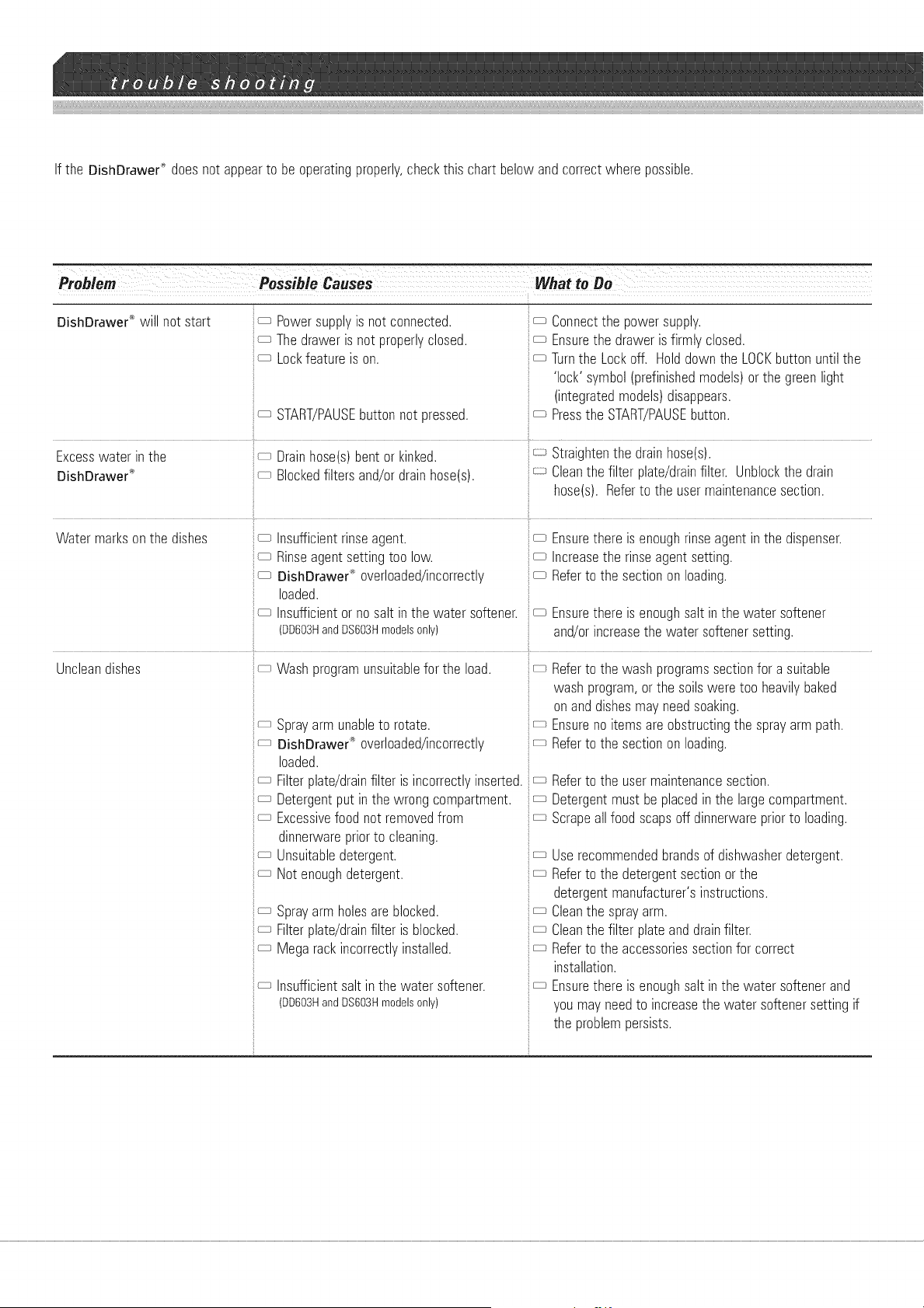
If the DishDrawer'_doesnot appearto beoperatingproperly,checkthis chart belowand correctwherepossible.
DishDrawer ® will not start
Excesswater inthe
DishDrawer'_"
Possible Causes What to Be
c_ PowerSUDDIV "S 30]: connected
c_ Thedrawers no_DroDenclosed
c_ Lockfeatures on.
c_ START/PAUSEbuttonno_pressea.
Connectthe DowerSUDDIV.
Ensureme _raweris firml. ClOSed,
Turnme _ock3ff. HoldDownme LOCKDU_Onuntil me
lock' svmbol_brefinished_oue_s,or me greenlight
(integratedmodels,disappears.
Pressthe START/PAUSEbutton.
Drainhose_s_Den_or kinked
Blockedfilters anD'ordrainhose_s_.
Straign_en[ne drainhose.s_
Cleanthe filter @ate'drainfilter. Unblockme Jrain
nose,s!. Refer_ome usermaintenancesection.
Watermarksonthe dishes
Uncleandishes
nsufficientrinseagent.
Rinseagen_semng_oolow.
DishDraweP_'ovenoaueu/incorrectl.
Daaea.
nsufficientor to salt i_me wa_ersoftener
DD603Hand DS603Hmoae,sor
Washprogramunsuitablefor the Dad.
Sprayarm unable_orotate.
DishDrawer_"ovenoaueu/incorrectl.
3aaea.
Filter@ate,drainfilter s ncorrec_. inserted.
Detergen_pu_n EneNrongcomDar_mem
Excessivefood no_removedfrom
dinnerwareprior_ocleaning.
Unsuitabledetergent.
Not enoughdetergent.
Sprayarm holesareblocked.
Filter[}late,drainfilter is blocked.
Megsrackincorrectl,installed.
nsufficient salt in me water softener.
DD603HandDS603Hmoae_sor
Ensuremeres enoughinse agen_in me dispenser.
ncreaseme rinseagentse_ing.
Refer_ome sectionon oading.
Ensure mere s enough salt i_ me water softener
ana/or increase me water softener se_:lng.
Refer _ome wash programs section for a suitable
wash program, or me soils Nere _ooheavil, oaKeu
on and dishes ma. need soaking.
Ensure no [ems are obstructing me sDravarm _am.
Refer _ome section on oading.
Refer _ome user maintenance sec;:lon.
Detergen_ must De placed in me arge compartment.
Scraoe all food scads off dinnerware orior _o loading.
use recommenaea brands of dishwasher detergent.
Refer _ome ae_ergen_section or me
ae_ergen_manufacturer's ns_ruc_ions
Clean the sDra arm.
Clean the filter pla_eana drain filter.
Refer _ome accessories section for correct
nstallation.
Ensure mere s enough salt in me water softener ana
vou mav neea _o ncrease me wa_er softener setting if
[ne problem oersls_s.
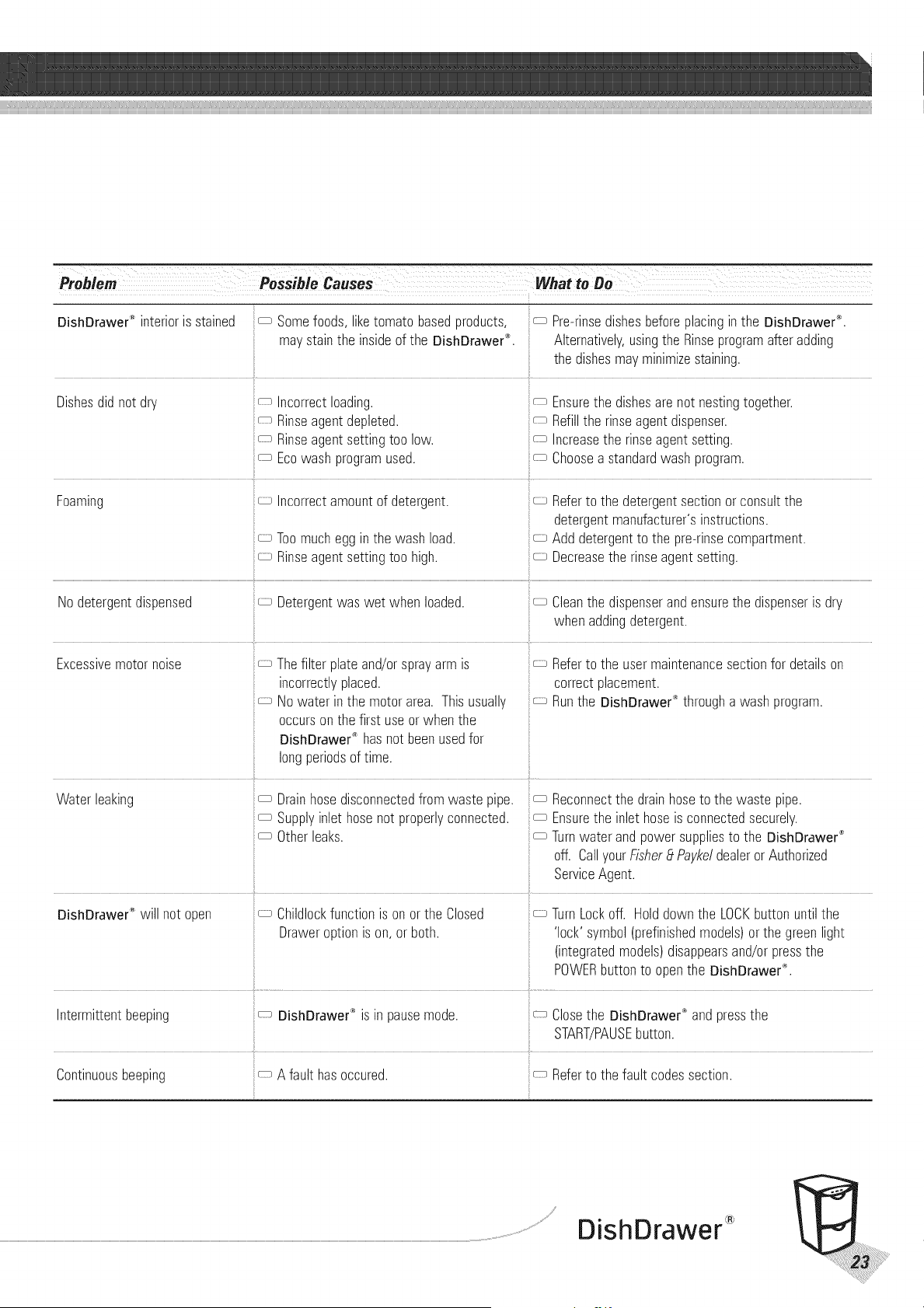
Problem
DishDrawer n_eriors stained Somefoods, liketomato basedproducts,
ma/stain the insideof the DishDrawer_.
c_ Re-rinsedishesbeforeplacingin the DishDrawer®.
Alternatively,usingthe Rinseprogramafter adding
the dishesmayminimizestaining.
Dishesdidno_ar'. ncorrec_loading.
Rinseagentdepleted.
Rinseagentsettingtoo low.
Ecowash programused.
_ Ensurethe dishesare not nestingtogether.
_ Refillthe rinseagentdispenser.
i
_ Increasethe rinseagentsetting.
_ Choosea standardwash program.
Foaming
No ae_ergen_disbensea
Excessive motor noise
ncorrec_amoun_of detergent.
Toomucheggin the washload.
Rinseagentsettingtoo high.
Detergentwas wet when loaded.
Thefilter plate and/orsprayarm is
incorrectlyplaced.
Nowater inthe motorarea. Thisusually
occursonthe first useorwhen the
DishDrawed_ hasnot beenusedfor
longperiodsof time.
Refer to the detergent section or consult the
detergent manufacturer's instructions.
Add detergent to the pre-rinse compartment.
Decreasethe rinse agent setting.
Cleanthe dispenserandensurethe dispenseris dry
when addingdetergent.
Refer to the user maintenance section for details on
correct placement,
Run the DishDrawer *_through a wash program,
Nate{ eaking
DishDrawer ° Nil no_oben
Drainhosedisconnectedfromwaste pipe.
Supplyinlet hosenot properlyconnected.
Otherleaks.
Childlockfunctionis on orthe Closed
Draweroptionis on, orboth.
Reconnectthe drainhoseto the waste pipe.
:: Ensurethe inlet hoseis connectedsecurely.
_ Turnwater and powersuppliesto the DishDrawer®
off. CallyourFisher_tPaykeldealeror Authorized
ServiceAgent.
TurnLockoff. Holddownthe LOCKbuttonuntilthe
'lock' symbol(prefinishedmodels)orthe greenlight
(integratedmodels)disappearsand/orpressthe
POWERbuttonto openthe DishDrawer_.
ntermitten_ beeping
Continuous peeping
DishDrawer ® is in pause mode.
A faulthasoccured.
Closethe DishDrawe¢_andpressthe
START/PAUSEbutton.
Referto the fault codessection.
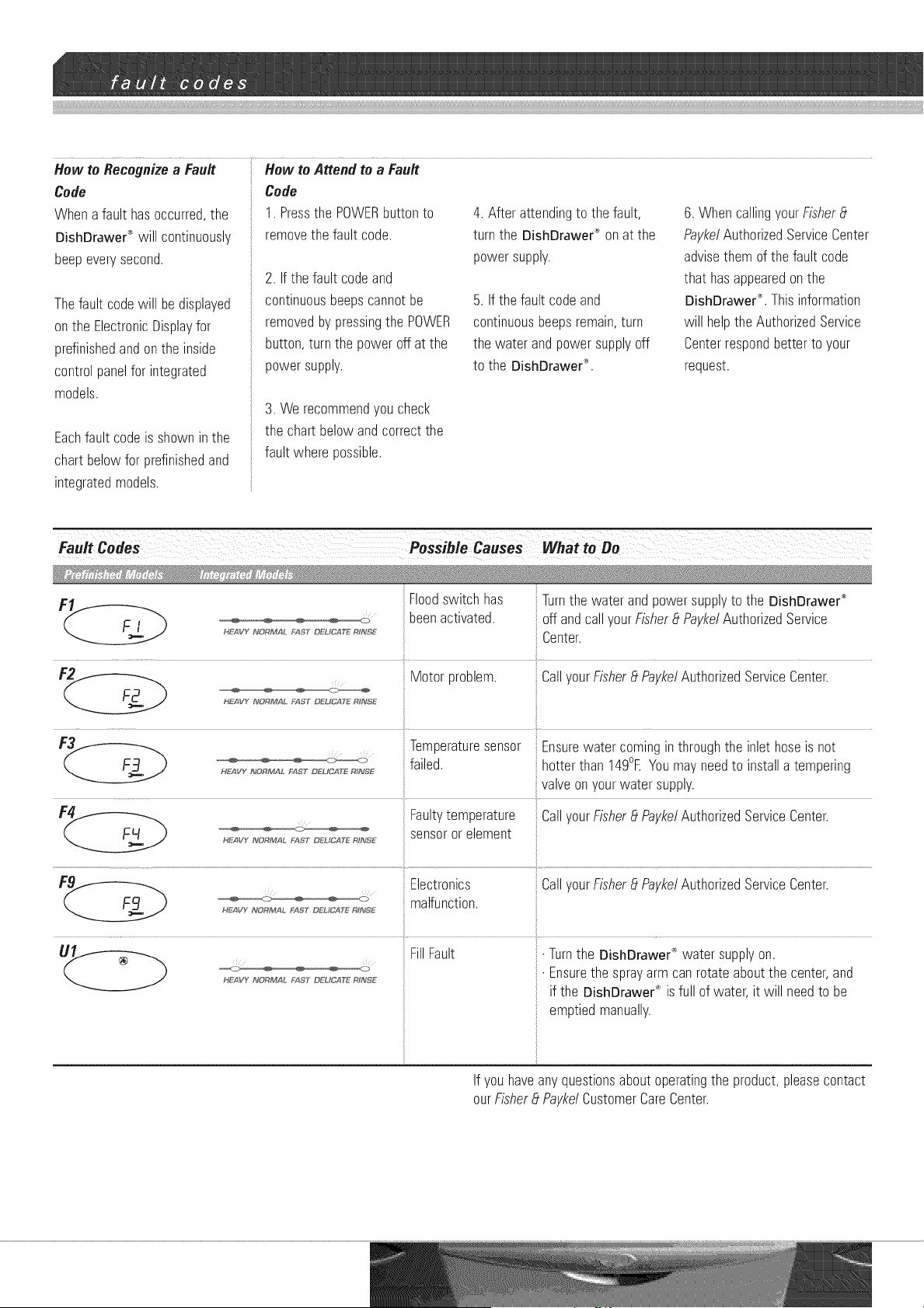
How to Recognizea Fault How toAttend to a Fault
Code
Whenafault hasoccurred,the
DishDrawe¢_will continuously
beepeverysecond.
Thefault codewill bedisplayed
onthe ElectronicDisplayfor
prefinishedandonthe inside
controlpanelfor integrated
models.
Eachfault codeis showninthe
chartbelowfor prefinishedand
integratedmodels.
Code
1. Pressthe POWERbuttonto
removethe fault code.
2. If the fault codeand
continuousbeepscannotbe
removedby pressingthe POWER
button,turn the poweroff at the
powersupply.
4. Afterattendingto the fault,
turn the DishDrawe¢_ onat the
powersupply.
5. If the fault codeand
continuousbeepsremain,turn
the water andpowersupplyoff
to the DishDrawe¢'.
6. WhencallingyourFisher_t
PaykelAuthorizedServiceCenter
advisethemof the fault code
that hasappearedonthe
DishDrawer®.Thisinformation
will helptheAuthorizedService
Centerrespondbetterto your
request.
3. We recommendyou check
the chartbelowandcorrectthe
fault wherepossible.
_._ ____ Floodswitchhas Turnthe water andpowersupplyto the DishDrawer®
beenactivated, off andcallyourFisher_tPaykelAuthorizedService
H_VY_O_M_LFAST_,C_ _ Center.
Motorproblem. CallyourFisher_tPaykelAuthorizedServiceCenter.
HEAVY NOR_#AL bAST DELICATE Rh_dSE
Temperaturesensor Ensurewater cominginthroughthe inlet hoseis not
,_xvY_4_ _AST"aEUCaT__,_SE failed, hotterthan 149°EYoumayneedto installa tempering
valveonyourwatersupply.
F_ Faultytemperature CallyourFisher_tPaykelAuthorizedServiceCenter.
HEAVY_O_M__STo_uc_T__Ns_ sensoror element
Electronics CallyourFisher_tPaykelAuthorizedServiceCenter.
_: malfunction.
HE/AVY I_J'ORMAL _'_ST DEHCATE R_NSE
U_ FillFault • Turnthe DishDrawer_ water supplyon.
:_' • Ensurethe sprayarm canrotateaboutthe center,and
HEAVY NORM/_L _:_ST DL°L_CAT_ R_NSE
if the DishDrawer_)is full of water, it will needto be
emptiedmanually.
If youhaveanyquestionsaboutoperatingthe product,pleasecontact
ourFisher_tPaykelCustomerCareCenter.
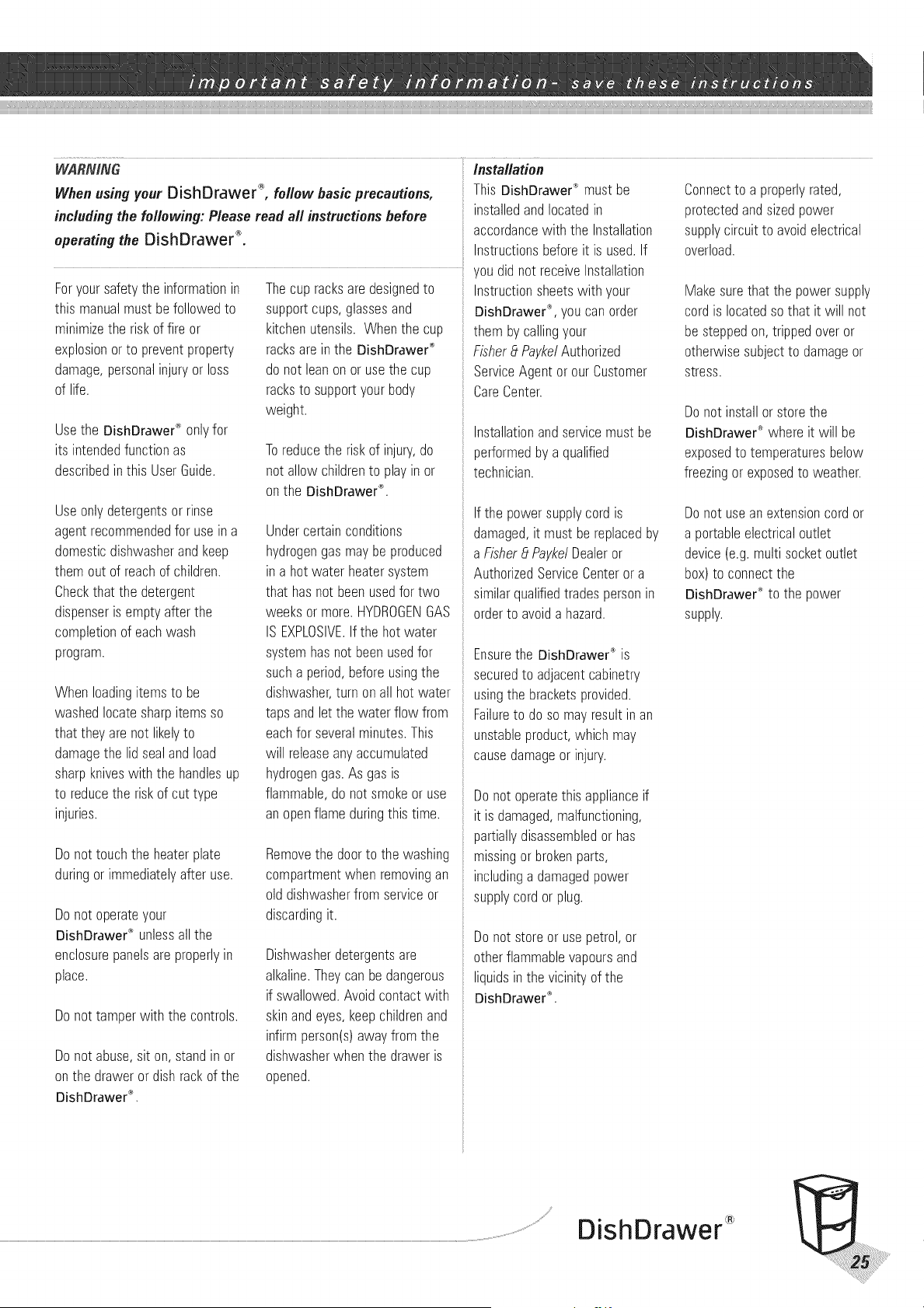
WARNING
Whenusing your DishDrawer _, follow basicprecautions,
includingthe following: Please read all instructionsbefore
operatingthe DishDrawer _.
installation
This DishDrawer®mustbe
installedandlocatedin
accordance with the Installation
Instructionsbeforeit is used.If
you did not receive Installation
Foryoursafetythe informationin
this manualmust befollowedto
minimizethe riskof fire or
explosionorto preventproperty
damage,personalinjuryorloss
of life.
Use the DishDrawe¢ _ only for
its intended function as
described in this User Guide.
Useonlydetergentsor rinse
agentrecommendedfor useina
domesticdishwasherandkeep
themout of reachof children.
Checkthatthe detergent
dispenseris emptyafterthe
completionof eachwash
program.
When loadingitems to be
washedlocatesharpitemsso
that theyarenot likelyto
damagethe lidsealandload
sharpkniveswith the handlesup
to reducethe riskof cut type
injuries.
Donottouchthe heaterplate
duringor immediatelyafteruse.
Donot operateyour
DishDrawe¢_ unlessall the
enclosurepanelsare properlyin
place.
Do not tamper with the controls.
Do not abuse, sit on, stand in or
on the drawer or dish rack of the
DishDrawer ®.
Thecup racksare designedto
supportcups,glassesand
kitchenutensils.Whenthe cup
racksarein the DishDrawer®
donot leanonor usethe cup
racksto supportyourbody
weight.
Toreduce the risk of injury, do
not allow children to play in or
on the DishDrawer '_.
Undercertainconditions
hydrogengasmaybeproduced
in a hotwater heatersystem
that hasnot beenusedfor two
weeksor more.HYDROGENGAS
IS EXPLOSIVE.If the hot water
systemhasnot beenusedfor
sucha period,beforeusingthe
dishwasher,turn onall hot water
tapsandlet the waterflow from
eachfor severalminutes.This
will releaseanyaccumulated
hydrogengas.As gas is
flammable,do not smokeor use
anopenflameduringthis time.
Removethe doorto the washing
compartmentwhen removingan
olddishwasherfrom serviceor
discardingit.
Dishwasherdetergentsare
alkaline.Theycanbedangerous
if swallowed.Avoidcontactwith
skinandeyes,keepchildrenand
infirmperson(s)awayfrom the
dishwasherwhen the draweris
opened.
Instructionsheetswith your
DishDrawe¢_,you canorder
themby callingyour
FisherEtPaykelAuthorized
ServiceAgentor ourCustomer
CareCenter.
Installationandservicemustbe
performedby a qualified
technician.
If the powersupplycordis
damaged,it must bereplacedby
aFisherEtPaykelDealeror
AuthorizedServiceCenterora
similarqualifiedtradespersonin
orderto avoida hazard.
Ensurethe DishDrawer"_is
securedto adjacentcabinetry
usingthe bracketsprovided.
Failureto do so mayresultin an
unstableproduct,which may
causedamageor injury.
Donot operatethis applianceif
it is damaged,malfunctioning,
partiallydisassembledor has
missingorbrokenparts,
: includinga damagedpower
supplycord orplug.
Donot storeor usepetrol,or
otherflammablevapoursand
liquidsin the vicinityof the
DishDrawer"_.
Connectto a properlyrated,
protectedandsizedpower
supplycircuitto avoidelectrical
overload.
Makesurethat the powersupply
cordis locatedso that it will not
besteppedon,trippedoveror
otherwisesubjectto damageor
stress.
Donot installorstorethe
DishDrawer®where it will be
exposedto temperaturesbelow
freezingor exposedto weather.
Donot useanextensioncordor
a portableelectricaloutlet
device(e.g.multisocketoutlet
box)to connectthe
DishDrawe¢_to the power
supply.
/¢ DishDrawer
Donot repairor replaceanypart
of the applianceor attemptany
servicingunlessspecifically
recommendedinthis User
Guide.We recommendthat you
calla Fisher_tPaykelAuthorized
ServiceAgent.
Keepthe floor aroundyour
appliancecleananddryto
reducethe possibilityof slipping.
Keepthe areaaround/
underneathyourappliancefree
fromthe accumulationof
combustiblematerials,suchas
lint, paper,ragsandchemicals.
Whencleaningthe undersideof
the filter plate,caremust be
takenonthe sharpouteredgeto
avoidthe riskof cuttype injuries.
Underno circumstances
shouldyouopenthe drawer
whilst the DishDrawer '_ is
in operation. Alwayspressthe
Start/Pausebuttonto pauseand
wait untilyou hearthe three
additionalbeepsbeforeopening
the drawer.
The DishDrawer_")must be used
with the motorassembly,filter
plate,drainfilter andsprayarm
in place.
When disconnectingthe
:! appliancepullthe plug rather
:: than the powersupplycordor
junctionof cordto avoid
damage.
Householdappliancesarenot
intendedto be playedwith by
children.Childrenor persons
with a disabilitywhichlimits
their abilityto usethe appliance,
shouldhavea responsible
personinstructthemin its use.
Theinstructorshouldbesatisfied
that they canthen usethe
appliancewithout dangerto
themselvesor their
surroundings.
Closesupervisionis necessaryif
this applianceis usedby ornear
children.Donot allow childrento
playinside,on orwith this
applianceor anydiscarded
appliance.
TheDishDrawer" is designed
for washingnormalhousehold
utensils.Itemsthat are
contaminatedby petrol,paint,
steelor irondebris,corrosive,
acidicoralkalinechemicalsare
not to bewashedin the
DishDrawe¢_.
Ifthe DishDrawer® is not being
usedfor longperiodsof time,
turn the electricityandwater
supplyto the DishDrawer_'_'off.
Donot pourdetergentorrinse
agentinto the salt reservoir.The
detergentorrinseagentwill
destroythe watersoftener
(DD603Hand DS603Hmodelsonly).
Takecarewhen loadingthe
DishDrawe¢" not to load
dishwareitemsso it prevents
the lidfrom properlysealingwith
the drawer.Itemsshouldbe
placedso theydo not protrude
aboveand/orforcedintothe
drawer,otherwisea servicecall
mayresult.
If a Dishwashercleaneris used,
we would stronglyrecommenda
wash programwith detergent
shouldbe runimmediately
afterward,to preventany
damageto the DishDrawer®.
It is importantthatthe User6uideshouldbe retainedwith the
appliancefor futurereference.Shouldthe appliancebesold or
transferredto anotherowner,alwaysensurethat the User6uide is left
withthe appliancein orderthatthe new ownercanbecomefamiliar
withthe applianceandtherelevantwarnings.
When you purchase any new Fisher & Paykel whiteware Product you PRODUCT DETAI£S
automatically receive a 2 year Manufacturer's Warranty covering parts Fisher EtPaykel Ltd.
and labor for servicing within the 48 mainland states, Hawaii and Model/Serial No.
Washington DC.
FISHER _t PAYKEL UNDERTAKES TO:
Repairor, at its option, replace without cost to the owner either for
material or labor any part of the Product, the serial number of which
appears on the Product, which is found to be defective within TWO
YEARSof the date of purchase.
This warranty DOES NOT cover
A. Service calls to which are not related to any defect in the
Product. The cost of a service call will be charged if the
problem is not found to be a Product fault. For example:
1. Correct the installation of the Product.
2. Instruct you how to use the Product.
3. Replace house fuses or correct house wiring or plumbing.
4. Correcting fault(s) caused by the user.
5. Noise or vibration that is considered normal, e.g. drain sounds,
regeneration noises or user warning beeps.
6. Correctingdamage caused by pests, e.g. rats, cockroaches etc.
B, Defects caused by factors other than:
1. Normal domestic use or
2. Use in accordance with the Product's User Guide.
C, Defects to the Product caused by accident, neg]ect,
misuse or Act of God.
D, The cost of repairs carried out by non-authorized repairers or
the cost of correcting such unauthorized repairs.
E, Normal recommended maintenance as set out in the
Product's User Guide.
Date of Purchase
Purchaser
Dealer
Suburb
Town
Country ...........................................................................................................................................................................................................................................................................................................................................................................................................................
Thiswarrantyappliesonlyto productpurchasedinthe UnitedStatesof
America.
SERVICEUNDERTHISMANUFACTURER'SWARRANTYMUSTBE
PROVIDEDBYFISHER_PAYKEL.SUCHSERVICESHALLBEPROVIDED
DURINGNORMALBUSINESSHOURS.THISWARRANTYCERTIFICATE
SHOULDBESHOWNWHENMAKINGANYCLAIM.
Please keep this User Guide in a safe place.
Do not return to Fisher _Paykel.
Note: ThisWarrantyis an extrabenefitanddoesnot affectyour
legalrights.
DishDrawer
Beforeyou call for serviceor assistance...
Checkthe thingsyoucando yourself.Referto yourUserGuideandcheck...
1.Yourproductis correctlyinstalled
2. Youarefamiliarwith its normaloperation
If aftercheckingthesepointsyoustill needassistance,pleasereferto the following...
in the USAif youneed assistance..._ _/f you callor write,pleaseprovide.nameandaddress,model
Foryour localFisher0 PaykelAuthorizedServiceAgent,pleasecall number,serialnumber,dateofpumhaseanda completedescriptionof
Toll Free:1 8889 FNPUSA (18889 367 872) the problem.Thisinformationis neededin orderto betterrespondto
or contactus throughour web site, yourrequestfor assistance.
Website:www.fisherpaykel.com
iiiii_i_iiiii_i_i_iiiiiiiiiiiiiiiiiiiiiiiiiiiiiiiiiiiiiiiiiiiiiiiiiiiiiiiiiiiiiiiiiiiiiiiiiiiiiiiiiiiiiiiiiiiiiiiiiiiiiiiiiiiiiiiiiiiiiiiiiiiiiiiiiiiiiiiiiii_i_iiiiY_i_ii_i_¸iiiiil¸iiiiil¸iiiiil¸iiiiil¸iiii,',',i'_iiiiiiiiil¸iiiiil¸iiiiil¸iiiiil¸iiiiil¸iiiiil¸iiiiil¸iiiiil¸iiiiil¸iiiiil¸iiiiil¸iiiiil¸iiiiil¸iiiiil¸iiiiil¸iiiiil¸iiiiil¸iiiiil¸iiiiil¸iiiiil¸iiiiil¸iiiiil¸iiiiil¸iiiiil¸iiiiil¸iiiiil¸iiiiil¸iiiiil¸iiiiil¸iiiiil¸iiiiil¸iiiiil¸iiiiil¸iiiiil¸iiiiil¸iiiiil¸iiiiil¸iiiiil¸iiiiil¸iiiiil¸iiiiil¸iiiiil¸iiiiil¸iiiiil¸iiiiil¸iiiiil¸iiiiil¸iiiiil¸iiiiil¸iiiiil¸iiiiil¸iiiiil¸iiiiil¸iiiiil¸iiiiil¸iiiiil¸iiiiil¸iiiiil¸iiiiil¸iiiiil¸iiiiil¸iiiiil¸iiiiil¸iiiiil¸iiiiil¸iiiiil¸iiiiil¸iiiiil¸iiiiil¸iiiiil¸iiiiil¸iiiiil¸iiiiil¸iiiiil¸iiiiil¸iiiiil¸iiiiil¸iiiiil¸iiiiil¸iiiiil¸iiiiil¸iiiiil¸iiiiil¸iiiiil¸iiiiil¸iiiiil¸iiiiil¸iiiiil¸iiiiil¸iiiiil¸iiiiil¸iiiiil¸iiiiil¸iiiiil¸iiiiil¸iiiiil¸iiiiil¸iiiiil¸iiiiil¸iiiiil¸iiiiil¸iiiiil¸iiiiil¸iiiiil¸iiiiil¸iiiiil¸iiiiil¸iiiiil¸iiiiil¸iiiiil¸iiiiil¸iiiiil¸ii_i'i!
InstallationChecklist
YourinstallerMUSThavecompletedandcheckedthe following:
The DishDrawer®is squareand level.
The DishDrawer®is fastenedsecurelyto the cabinetry.
Ensuremoistureprotectiontape hasbeen appliedandthe
cabinetis sealedaccordingto the InstallationInstructions.
The DishDrawer®opensand closesfreely. The
DishDrawer"_mustbefree to closecompletelywith no
resistancefrom cabinetry.
Forthe integratedmodels,checkthe 8mmairgaphasbeen
achievedinthe correctplace.
C_ Thepowersupplyis connectedandswitchedon.
Theinletwater hoseis connectedandturnedon. There
shouldbe noleaks.
C_3
CD
CD
CD
Thedrainhose(s)areconnectedandthere arenoleaks.
Theremustbe nokinks,orobstructionsin the drainhose(s).
The spray arm is in the center and can freely rotate.
Therinseprogramhasbeenrun.
Thewater levelwill bebelowthe stainlesssteelfilter plate
at the endof the washprogram. It is normalto find
somewater inthe drainfilter area.
Set the water softener to the correct water hardness for
your area (DD603HandDS603Hmodelsonly).
The installer is responsible for the DishDrawe¢ _
installation. Incorrect installation is net covered by warrant.
DishDrawer