CONTENTS
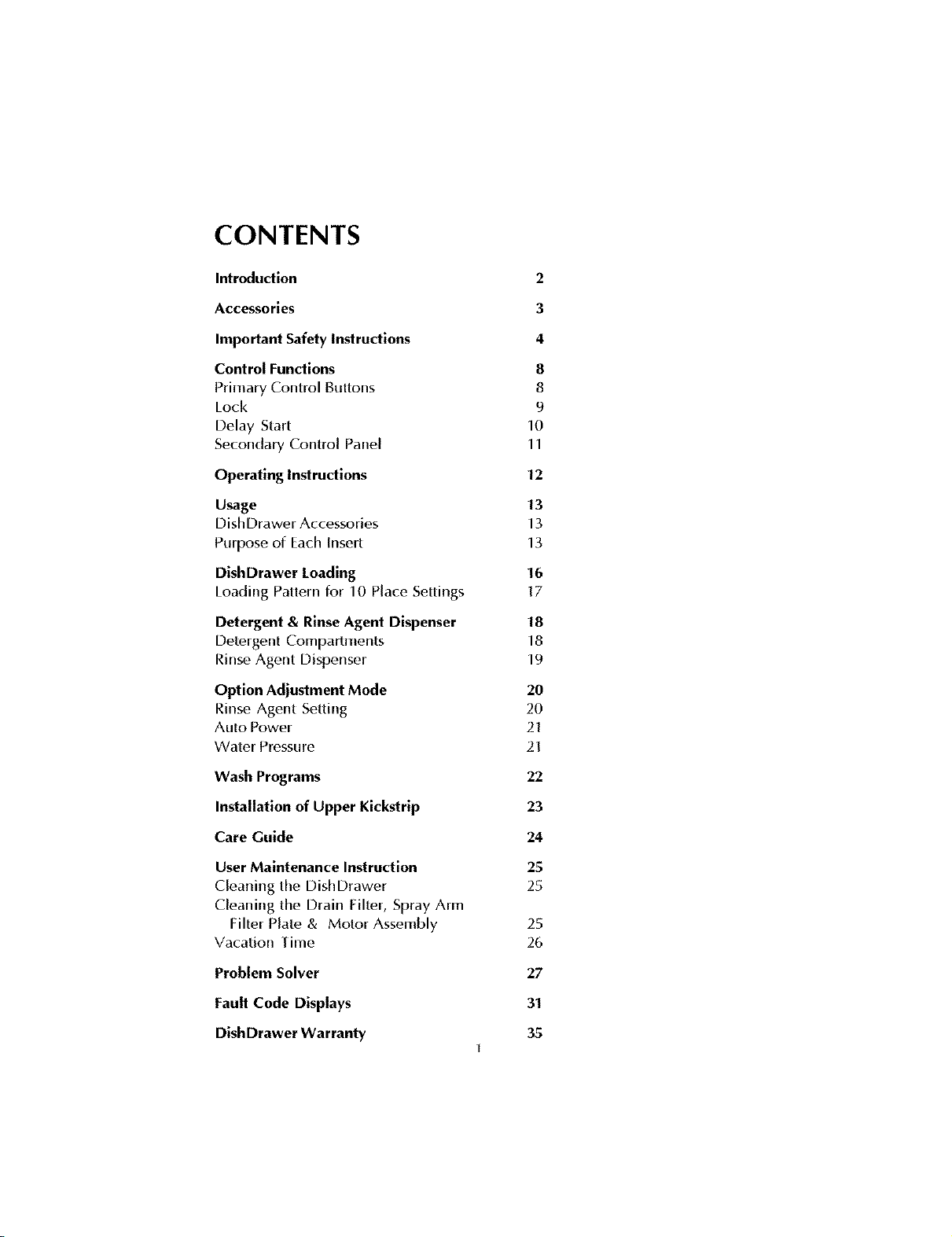
Introduction
Accessories
Important Safety Instructions
Control Functions
Primary Control Buttons
Lock
Delay Start
Secondary Control Panel
Operating Instructions
Usage
DishDrawer Accessories
Purpose of Each Insert
DishDrawer Loading
Loading Pattern Ior 10 Place Settings
Detergent & Rinse Agent Dispenser
Detergent Compartments
Rinse Agent Dispenser
Option Adjustment Mode
Rinse Agent Setting
Auto Power
Water Pressure
Wash Programs
Installation of Upper Kickstrlp
Care Guide
User Maintenance Instruction
Cleaning the DishDrawer
Cleaning the Drain Filter, Spray Arm
Filter Plate & Motor Assembly
Vacation [ime
Problem Solver
Fault Code Displays
DishDrawer Warranty
2
3
4
8
8
9
10
11
12
13
13
13
16
17
18
18
19
2O
2O
21
21
22
23
24
25
25
25
26
27
31
35
INTRODUCTION
Thank you and congratu[afions [or making the wise decision in purchasing your
Fisher & Paykel DishDrawer. Every cam has been taken in designing and
manut_tcturing your appliance. We are sure that you will enjoy using your
DishDrawer and will soon appreciate its many benefits. We wish you many years of
satis[ying use.
Unique Features of Your DishDrawer TM
By now you will be aware that Fisher & Paykel's DishDrawer isa unique
dishwasher, which oft_,rsbenefits no other dishwasher can.
The DishDrawer takes the everyday kitchen drawer - long recognised asthe most
efficient, easy to access storage syst(,m in the kitchen - and turns it into the most
advanced dishwasher in the world.
Ifyou have chosen a double DishDrawer, or moro than one single DishDrawer, you
will have totally separate, independently operatc,d washing units, introducing loading
and washing possibilities that have never betore been possible.
Now you can treat precious glassware to a delicate wash and give pots and pans the
heavy duty treatment - all at the same time.
The Clutter-Free Counter Top Becomes A Reality
Now it really ispossible to keep your counter top lree from ew,ryday clutter like tall
glasses and awkward serving dishes, rhe double DishDrawer's spacious
configuration gives you many new ways to Mad your machine - and use it.
Used cleverly, two DishDrawers can even provide extra kitchen storage. Use clean
dishes directly from one drawer and load them back into the other drawer when dirty.
Design Your Own Rack System
With flexible, interchangablo inseris the DishDrawer can be arranged to
accommodate the way you live and the dishes you use most often. Inserts are easy to
remove so it is easy to change your layout as your daily needs change.
Ifyou have two DishDrawers, you can arrange one drawer ior all your lightly soiled
cups, saucers and fine glassware - inckJding Mng-stemmed glasses - and wash them
using a delicate cycle. Set up your other drawer ior your morn robust, heavily-soiled
items like plates, pots and pans. Inserts can easily be removed completely to fit
awkward preparation or serving dishes.
The Guilt-Free Small Load
At[ DishDrawer models make the small, guilt-free toad a reality. The DishDrawer
minimizes water and energy consumption with each drawer using lessthan half the
water of a conventional dishwasher. By washing smaller loads more frequently, you
need never run out of clean dishes.
Gentler Introduction of Detergent
The DishDraweds innovativo detergent dispenser thoroughly pre-mixes water with
detergent before it is introduced into the drawer, so your delicate dishes are protected
from "detergentburn". Precise markings inside the dispenser ensure you never use
too much or too tittle detergent lot each program.
Big On the Inside
Each DishDrawer has been careffd[y designed to give you more usable space than
ever before.
Each DishDrawer can accommodate 12 large dinner plates up to 11.4" in diameter. A
deeper drawer design means large plates can be loaded into the drawer while cups
and glasses can be sal_,lystacked into the two levels.
Fisher & Paykel strongly recommends that you read the information contained in
this Use & Care Manual before using the DishDrawer.
ACCESSORIES
Each DishDrawer is supplied with the following:
• Basket
• Cutlery Basket
• Mega Rack
• Drain Filter Access Pane[
• Hate Insert
IMPORTANT SAFETY
INSTRUCTIONS
Warning - When using your DishDrawer, follow
basic precautions, including the following:
lot your safety the inlornlatiorl in this manual must be Iollowed to mirfinlize
the risk of fire or explosion or to prevent property damage, personal injury or
loss of lile.
Please read all instructions before operating the DishDrawer.
• Use,the DishDrawe_ only for its ink,nded function as described in this Use and
Care Manual.
• Use only detergents or wetting agents recommended ior L_sein a Dishwasher
and keep them out of reach of children.
• When loading items to be washed
1. Locate sharp items so that they arc'not likely to damage the lid seal and
2. Load sharp knives with the handles L_pto redL_cethe risk of clot type
injuries.
• Do not touch the heater plate during or immediak_[y alter use.
• Do not operate your DishDrawer mqess all the enclosL_repanels are properly
in place.
• Do not tamper with the controls.
• Do not abuse, sit on, stand in or on the drawer or dish rack of the DishDrawer.
IMPORTANT SAFETY
INSTRUCTIONS
ro reduce the risk of injury, do not allow children to play in or on the
DishDrawer.
Under certain conditions hydrogen gas may be produced in a hot watc, r heater
system that has not been used Jor two weeks or more. HYDROGEN GAS IS
EXPLOSIVE. [f the hot water system has not been used ior such a period,
betore using the dishwasher, turn on al[ hot water iaucets and let the water flow
fron-_ each for several minutes. This wil[ release any accumulated hydrogen
gas. As gas is flammable, do not smoke or use an open f[an-te during this time.
Remove the door to the washing compartment when removing an old
dishwasher irom service or discarding it.
Installation
rhis DishDrawer must be installed and located in accordance with the
Installation Instructions before it is used. If you did not receive an Installation
Instruction book with your DishDrawer, you can obtain one by calling toll free
1 888 9 FNP USA (1 888 9 367 872).
• Installation and service must be performed by a qualified technician.
this appliance must be grounded. In the event of a maliunction or
breakdown, grounding will reduce the risk of electric shock by providing a
path of least resistance ior electric current. Fhis appliance is equipped with a
cord having an equipment - grounding conductor and a grounding plug. Fhe
plug must be plugged into an appropriate outlet that is installed and grounded
in accordance with all local codes and ordinances.
WARNING - hnproper connection of the equipment - grounding conductor
can result in a risk of electric shock. Check with a qualified electrician or
service ropresentative if you are in doubt whether the appliance is properly
grounded. Do not modily the plug provided with the appliance; if it will not fit
the outlet, have a proper outlet installed by a qualified electrician.
Ensure the DishDrawer is secured to the floor or adjacent joinery using the
brackets provided. Failure to do so may result in an unstable product, which
may cause damage or injury.
IMPORTANT SAFETY
INSTRUCTIONS
Do not open,tie this appliance if it is damaged, mal[unctioning, partially
disassembled or has missing or broken parts, including a damaged cord or
plug.
Do not store or use gasoline, or other flammable vapors and liquids in the
vicinity of the DishDrawer.
Connect to a properly rated, protected and sized power supply circuit to avoid
electrical overload.
Make sure that the cord is located so that it will not be stepped on, tripped over
or otherwise subject to damage or stress.
Do not install or store the DishDrawer where it will be exposed to temperatures
below freezing or exposed to weather.
Do not use an extension cord or a portable electrical outlet device (e.g. multi
socket outlet box) to connect the DishDrawer to the power supply.
Maintenance
• Do not repair or replace any part of the appliance or attempt any servicing
unless specifically recommended in this Use and Care Manual. We
recommend that you call a Fisher & Paykel Authorized Service Agent.
Keep the floor around your appliance clean and dry to reduce the possibility of
slipping.
Keep the area around / underneath your appliance free from the accumulation
of combustible materials, such as lint, paper, rags and chemicals.
When cleaning the underside of the filter plate, care must be taken on the
sharp outer edge to avoid the risk of cut type injuries.
Operational
• Under no circumstances should you open the drawer whilst the DishDrawer
is in operation. Always use tho Start/Pause button to pause and wait until you
hear the two additional beeps before opening the drawer.
IMPORTANT SAFETY
INSTRUCTIONS
FheDishDrawer must be used with the motor assembly, filter plate, drain filter
and spray arm in place.
When disconnecting the appliance pull the plug rather than the cord or
junction of cord to avoid damage.
Household appliances are not intended to be played with by children.
Children or persons with a disability that may limit their ability to use the
appliance, should have a competent person instruct them in its use. This
person should be satisfied that they can then use the appliance without danger
to themselves or their surroundings.
Close supervision is necessary if this appliance is used by or near children. Do
not allow children to play inside, on or with this appliance or any discarded
appliance.
FheDishDrawer is designed for washing normal household utensils. Items that
are contaminated by gasoline, paint, steel or iron debris, corrosive, acidic or
alkaline chemicals are not to be washed in the DishDrawer.
If the DishDrawer is not being used ior long periods of time, turn the power and
water supply to the DishDrawer off.
SAVE THESE INSTRUCTIONS
CONTROL FUNCTIONS
Whf, re there are two DishDrawe_s in the one cabinet, each drawe_ has its own contro[
pane[ and can run independently of the other.
Figure 1 - Primary Control Panel
Key
1. Power
2. Start/Pause
3. Lock
Primary Control Buttons
Power
The Power button turns the Disl_Drawer on and off.
On
When pressing the Powerbutton, a short series of beeps will be emitted, a green light
above the Start/Pause button will flash.
off
To terminate a wash program, press the Powerbutlon. Any remaining water in the
DishDrawer will be pumped out. The green light above theStart/Pausebutton will
switch off.
Start / Pause
This button has a number ofiunctions. It serves to:
• Start the DishDrawer once the desired wash program has been selected.
• Interrupt the wash program while in operation.
Fopause the DishDrawer, press the Start/Pause button and wait until you
have heard two additional beeps beJore you open the drawer, allowing the lid
seal to deflate. While in pause mode, the light above the Start/Pause button
will flash.
• Restartthe DishDrawer aJterbeing paused.
You may notice a delay aJterthe Start/Pause button has been pressed. During
this time the lid sealwill be inflating.
• One Button Start.
Fhis starts the DishDrawer and will run the last wash program used.
NOTE:
Under no circumstances do we recommend that you open the DishDrawer while in
operation unlessyou have pressedthe Start/Pause button. If the drawer is opened
during the wash program, there isa possibility of getting wet, burnt, or damaging the
DishDrawer. There arc,salety mechanisms in place to stop the DishDrawc, r if it is
opened.
Ifa red light appears above the Start/Pause button, check the secondary control panel
and note which lights arc, lit up. If the red lights above the rinse and l_tstarc,[it this
indicates that the door was opened during the wash program. To rc,move this l_tult,
ensurc, the drawer is dosed and press Power. The DishDrawer will now be ready to
start from the beginning of the wash progr_tm. You may have to add more detergent in
the dispenser and then prc,ss Start/ Pause button to start the DishDrawer. Fhe
DishDrawer will not rc,start where itwas interrupted aJtera Jau[t.
Lock
fhe Lock function disables all the other Junctions on the
DishDrawer. This function is usetul when cleaning the
control panel and can also prevent children from turning
the DishDrawer on or off accidentally. Fhis button can be
used when the DishDrawer is in oper_ttion and will rc,main
active until the Lock isdeactivated.
[o activate this Junction, press and hold the Lock button
until the rc,d light above it appears continuously and is no
longer blinking. All the other buttons arc, now inactive.
Fodeactivate this Iunction, press and hold Lock button
until the rc,d light above this button has disappearc,d.
Figure 2 -Display
showing the lock mode
9
Delay Start
This leature allows you to delay the start of the wash program from one to twelw,
hours. Itis useh_l ifyouwanttotakeadvantageoftheoffpeak power rates. (Check
with your local Electricity Utility if this isavailable), or if you wish to start the
DishDrawer at alater time.
To Activate Delay Start
1. Ensurethe DishDrawer isclosed.
2. Pressand hold the Start/Pause button. Fhe light above the Start/Pause button
will turn orange.
3. Hold or pressthe Start/Pause button and the time will increase in increments
of one hour. The DishDrawer will emit a beep for each hour passe{].
4. Releasethe button when the desired time has been reached.
The DishDrawer will automatically startwhen the time haselapsed.
To cancel the Delay Start, press the Power button or keep pressing until it passes 12
beeps/hour. Fhe light above Start/ Pause button wi[I turn green when the De[ay Start
has been cancelled.
10
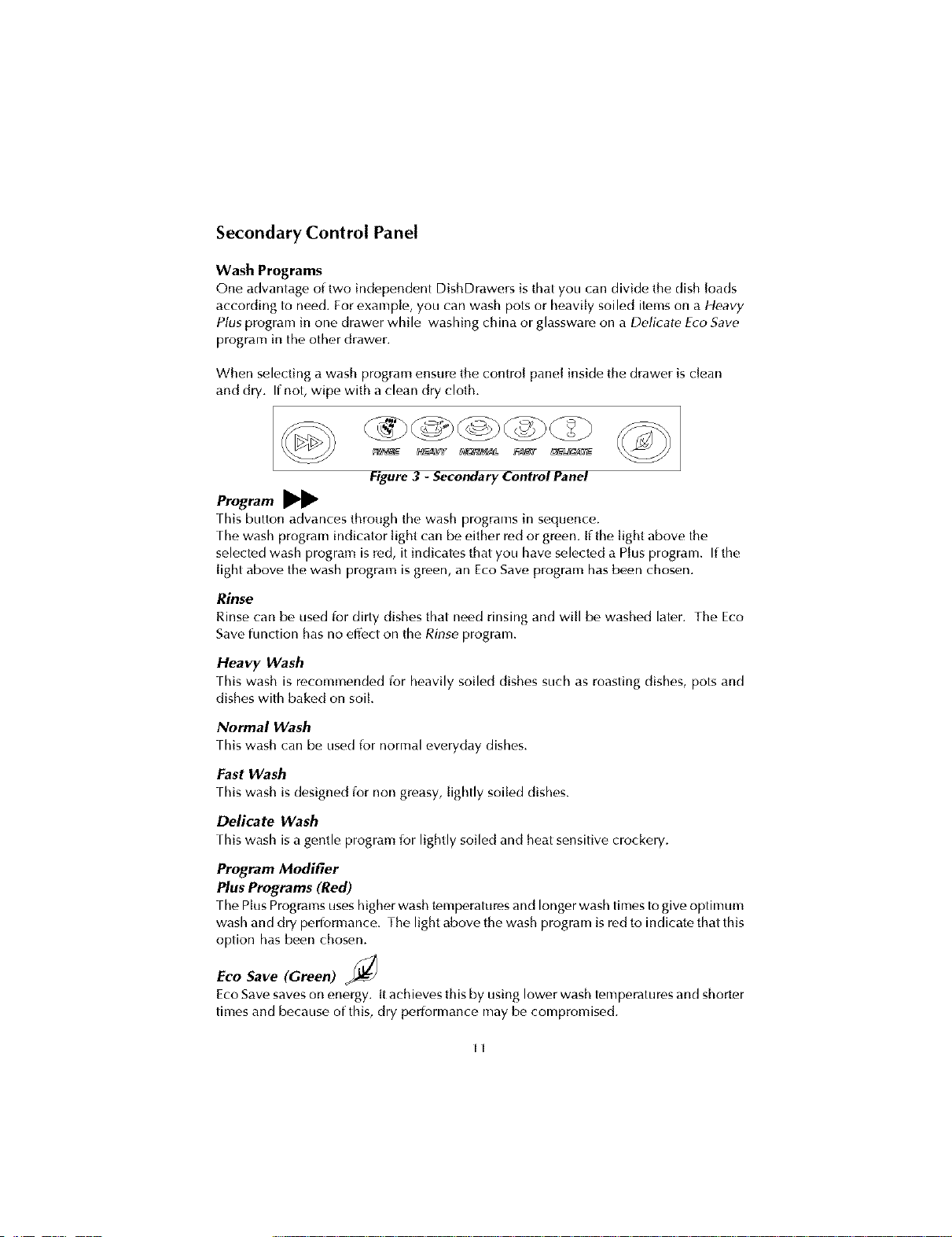
Secondary Control Panel
Wash Programs
One advantage of two independent DishDrawe_s is that you carl divide the dish loads
according to need. For example, you can wash pots or heavily soiled items on a Heavy
Plus program in one drawer while washing china or glassware on a Delicate Eco Save
program in the other drawer.
When selecting a wash program ensure the control panel inside the drawer is clean
and dry. If not, wipe with a clean dry cloth.
Figure3 - Secondary Control Panel
Program
[his button advances through the wash programs in sequt,nce.
Fhewash program indicator light can be either red or green. [f the light above the
selected wash program is red, it indicates that you have selected a Plus program. If the
light above the wash program is green, an Eco Save program has been chosen.
Rinse
Rinse can be used Jor dirty dishes that need rinsing and will be washed later. The Eco
Save function has no effect on the Rinse program.
Heavy Wash
rhis wash is rocommendcK] Jor heavily soiled dishes SLichas roasting dishes, pots and
dishes with baked on soil.
Normal Wash
Fhiswash can be usedior normaleveryday dishes.
Fast Wash
this wash is designed ior non greasy, lightly soiled dishes.
Delicate Wash
Fhiswash is a gentle program _or lightly soiled and heat sensitiw" crockery.
Program Modifier
Plus Programs (Red)
rh_,PlusPrograms useshigher wash tempt,ratures and longer wash times to giw" optimum
wash and dry performance. The light above the wash program is red to indicate that this
option has been chosen.
Eco Save (Green) _
Eco Save saw,s on energy, it achiew, sthis by using lower wash tempe_ttures and shorter
times and because of this, dry periormance may be compromised.
II
OPERATING INSTRUCTIONS
1.
Ensurc,the filter plate and drain filter is clean and free ofiood debris. Check the
drain filter isflush with the filter plate and the spray arm is correctly on the
impeller.
2. Check there is rinse agent in the dispenser.
3. Remove all food scraps from the dishes, before loading the DishDrawer.
4. Load the dishes.
Overloading the DishDrawer may lead to poor wash periormance. Ensure
there are no items blocking the spray arm path.
S.
Pour detergent into the detergent dispenser, then close the dispenser door.
Use the steps on the detergent dispenser as a guide to the correct amount of
detergent to use. Where the detergent manufacturer has made recommendations
on quantities, we suggest you follow their instruction.
6.
Select the wash program on the secondary control panel.
rouch the Program button until the desired wash program tight shows on the
panel, rhe wash program has now been selected.
7.
Select EcoSave (Optional)
Ifyou would like the wash program to use lessenergy and time, Eco Save should
be selected by touching this button, rhe wash program light will be green.
8. Close the drawer.
9.
Start the Wash Program.
Prossthe Start/Pause button to start the DishDrawer. To pause the
DishDrawer, press the Start/Pause button and wait for two additional beeps
before opening the drawer. When in the pause mode the tight above the
Start/Pause button will be flashing.
10.
End of Progr_tm
At the end of the program the DishDrawer will beep six times to let you know
that it has finished and the groen light above the Start/Pause button wil[
disappear. At the end of a wash program it is normal to find some water in the
drain filter area and the drying fan will be on for a short period of time or until the
drawer is opened.
In the event of a power lailure, the DishDrawer will stop until the supply power is
resumed. It will drain the water in the DishDrawer and restart in the same part of the
wash program it was in when the power lailed.
12
USAGE
DishDrawerTM Accessories
The basket isthe basic insert DishDrawer requires
wash dishes. The inserts and racks can be added or
removed to suit your individual needs. Ifyou have two
DishDrawers, some of the parts are interchangable
between the two drawers. For example you can
combine the two Mega Racks into one drawer and wash
all cups and glasses, leaving the other drawer for plates
and larger items.
Purpose of Each Insert
Basket
This is thf, most basic piece and it is essential lor this to
be carefully placed into the DishDrawer first. It holds
some of the inserts in place and keeps the dishes above
the spray arm so it can rotate and spray water onto the
dishes.
Drain Filter Access Panel
The drain filtc,r access panel is designed to giw • access to
the drain filter, the purpose of this insert is to prevent
objects from touching the base of the DishDrawer and
stopping the rotation of the spray arm, but still giving
access to the drain filter.
Cutlery Basket
The cutlery basket is removable and ideally should sit
over the opening of the drain filter in the front right hand
side of the drawer. For maximum wash performance the
ova[ slots should lace the middle of the drawer.
Individual pieces of cutlery, like knives or spoons, can
be placed in the oval slots ior convenience.
Figure 4 - Recommended
Positions for Inserts &
Racks
Figure 5 - Basket & Drain
Filter Access Panel
Figure 6 - Cutlery Basket
13
Plate Insert
The plate insert can be instal led to the left or the right
side of the basket. This insert is capable of supporting
plates and bowls.
Mega Rack
The Mega Rack can be installed to the [eli or tilt, right
side of the basket, ftyou want to wash wine glasses,this
rack should be installed on the [eft side. this rack is
designed to hold a combination of glasses, cups and
small plates. Foinstall this rack, place the outc_rlegs of
this rack on the top of the basket, hook into the mid
section under the middle wire and clip the Mega Rack to
the side of the basket.
When correctly installed this rack should not ieel loose.
It is important to assemble the Mega Rack correctly to
minimize the chance of obstructing the spray arm.
Figure 7 - Accessories in
the DishDrawer
Key
1. Mega Rack
2. Hate Insert
14
DISHDRAWER TM LOADING
Baskets
• Scrape off all [ood scraps and remove any bones, crusts, toothpicks and any
similar items.
• Overloading can lead to poorly washed dishes.
• Small light items should be placed soiled side down oil the basket.
• Plates, bowls and saucers can be slotted into spaces provided.
• Long kitchen utensils can be laid flat oil the large cup inserts.
• Ifthere are no inserts in the basket, large bowls and pots can be placed flat in
the DishDrawer.
• Ensure no items touch or protrude above the top of the drawer as you close it,
as damage to the DishDrawer and dishware may occur.
• Locate sharp items so they are not likely to damage the lid seal. Particular
attention must be paid to knives to ensure they do not dislodge during the
wash to prevent injury to yourself or the DishDrawer.
Please note that the DishDrawer basket and its inserts are not designed to be lifted out
of the Dish Drawer while loaded with dishes.
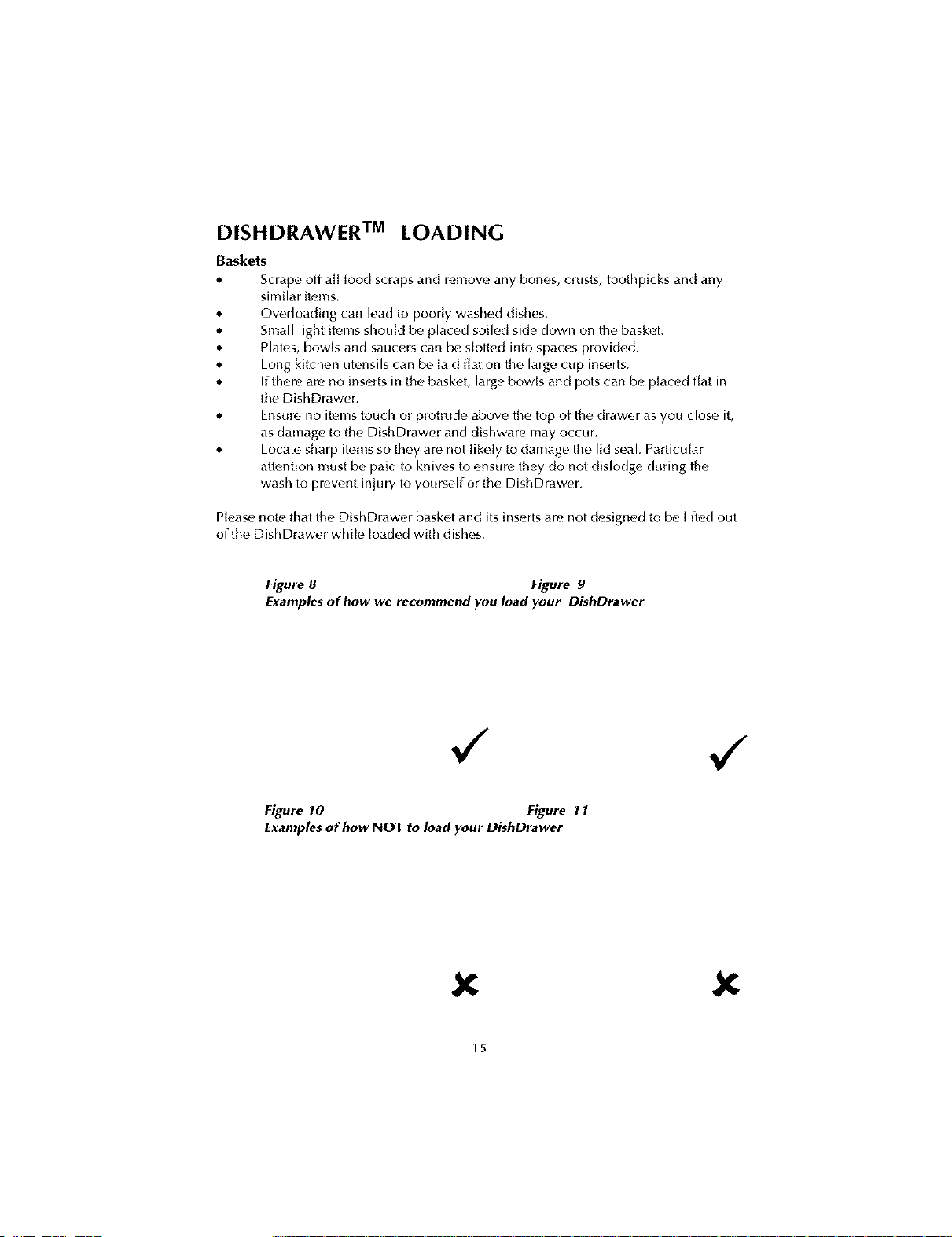
Figure 8 Figure 9
Examples of how we recommend you load your DishDrawer
,/ ,/
Figure 10 Figure 11
Examples of how NOT to load your DishDrawer
X X
[5

Cup Rack Posts
Cups, glasses and kitchen utensils can be placed on both
sides of the cup racks. For best wash performance ensure
there are no large items blocking the wash water from
reaching the cup racks. SeeFigures 8 and 9 for the
recommended method of loading the DishDrawer.
Wine glasses can be supported on the [ett hand cup racks
if used in conjLmction with the Mega Rack, see Figurc,12.
Cutlery Baskets
• For best wash performance, mix spoons, kniw, s
and forks within each section of the basket.
alt_mate between handles up and down to prevent
nesting and ensLtrewater circulates Jreely.
We recommend that sharp utensils should have
their handles Jacing Ltp,to redLtce the risk of cut
injuries.
Keep stainless steel from touching silver - mixing
these metals can stain cLtt[ery.
Spray Arms
• Ensurethere are no items blocking the path of the
spray arm.
• Check that no items have slipped through the
cutlery basket.
Figure 12 -
Recommended Placement
for Wine Glasses
Figure 13 - Cutlery Basket
16
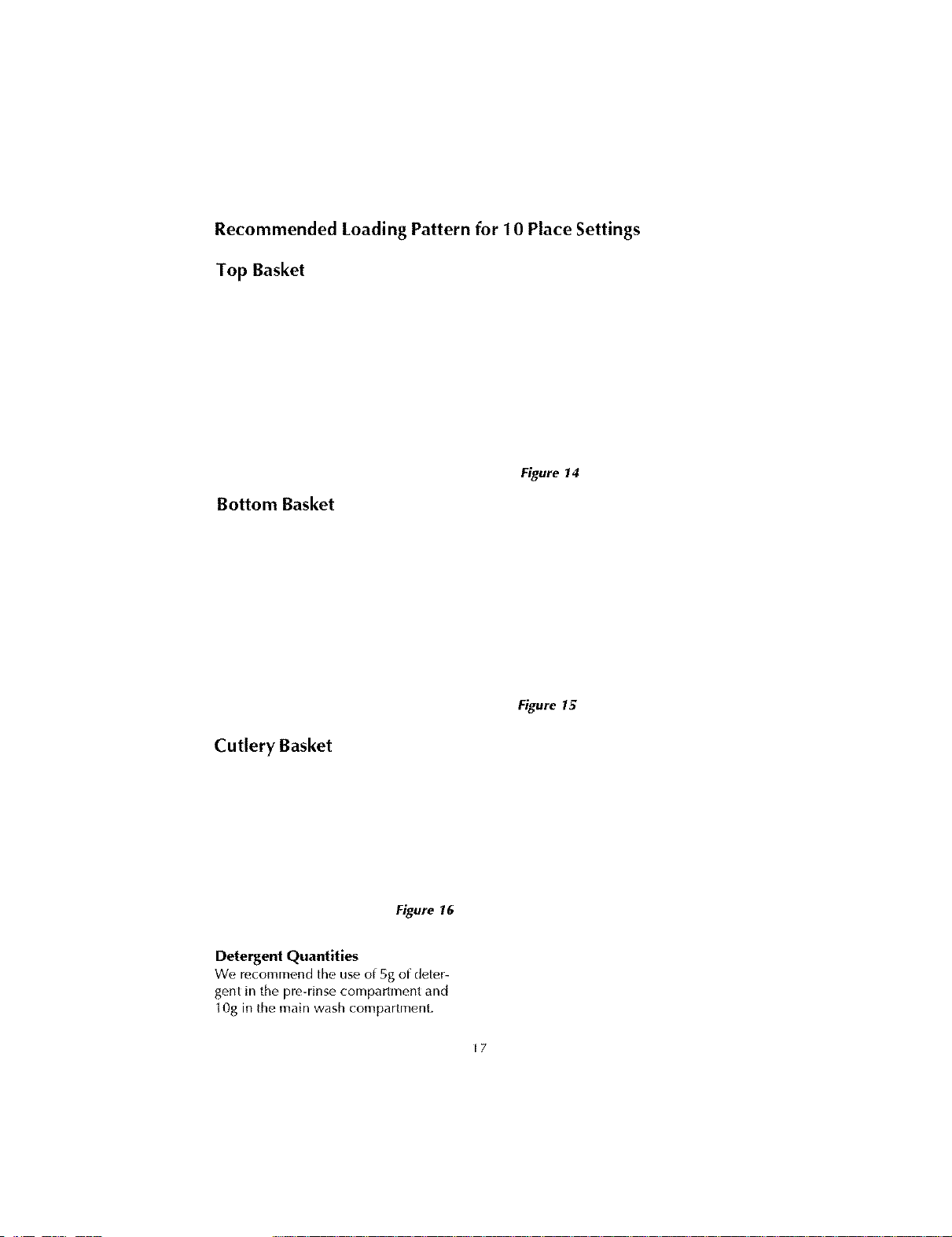
Recommended Loading Pattern for 10 Place Settings
Top Basket
Bottom Basket
Figure 14
Cutlery Basket
Figure 15
Figure 16
Detergent Quantities
We, rocommf, nd the use of 5g of deter-
gent in the pre-rinse compartment and
10g in the main wash compartment.
17
DETERGENT AND RINSE AGENT DISPENSER
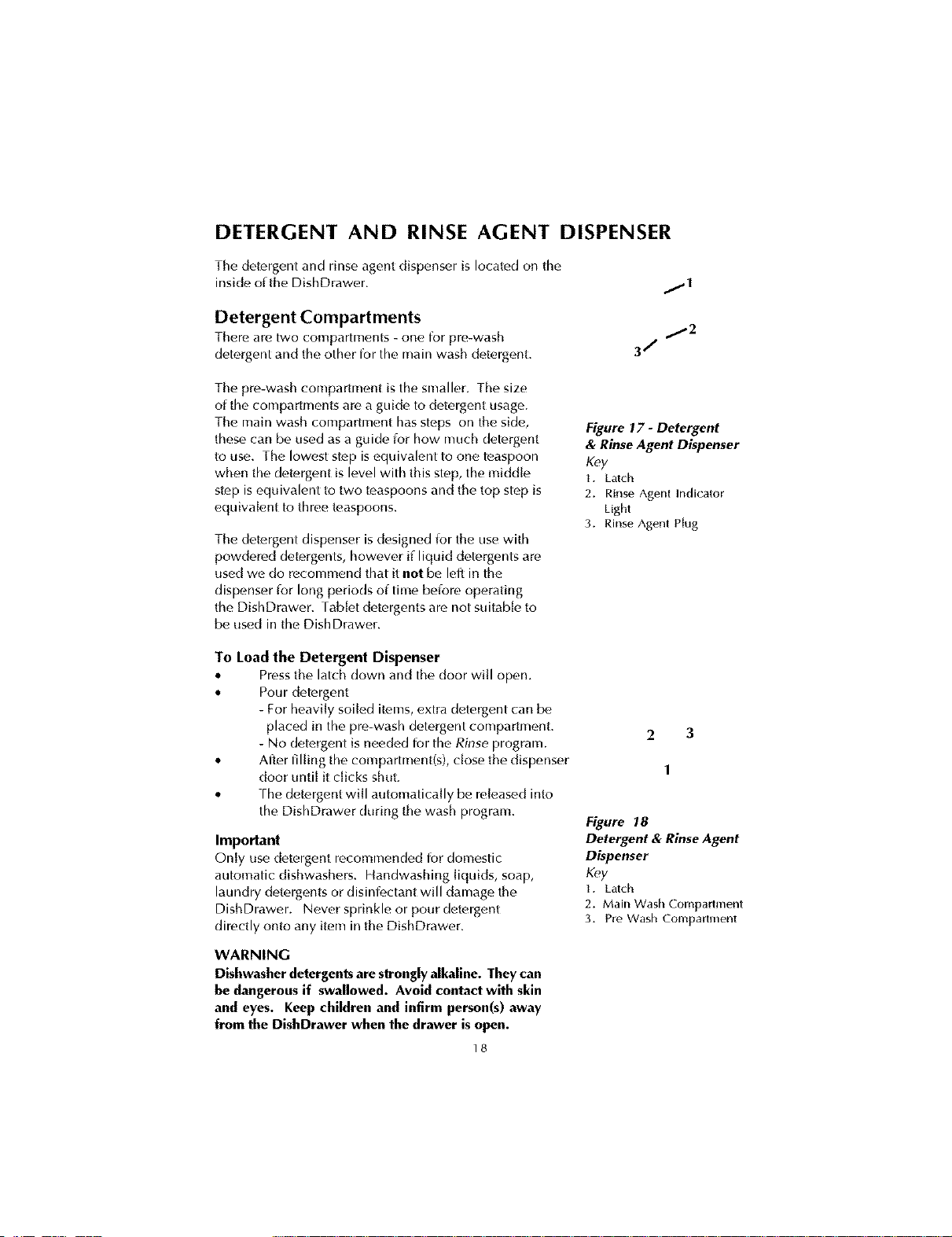
The detergent and rinse agent dispenser is located on the
inside of the DishDrawer.
Detergent Compartments
Thereare two compartments- one for pre-wash
detergentand the otherfor themain washdetergent.
/I
j2
3/
The pre-wash compartment is the smaller. The size
of the compartments are a guide to detergent usage.
The main wash compartment has steps on the side,
these can be used asa guide ior how much detergent
to use. The lowest step is equivalent to one teaspoon
when the detergent is level with this step, the middle
step isequivalent to two teaspoons and the top step is
equivalent to three teaspoons.
The detergent dispenser is designed ior the use with
powdered detergents, however if liquid detergents are
used we do recommend that it not be lell in the
dispenser ior long periods of time belore operating
the DishDrawer. Fab[etdetergents are not suitable to
be used in the DishDrawer.
Figure 17 - Detergent
& Rinse Agent Dispenser
Key
I. Latch
2. Rinse Agent Indicator
Light
3. Rinse Agent Plug
To Load the Detergent Dispenser
• Pressthe latch down and the door will open.
• Pour detergent
For heavily soiled items, extra detergent can be
placed in the pre-wash detergent compartment.
No detergent is needed for the Rinse program.
• After filling the compartment(s), close the dispenser
door until it dicks shut.
• rhe detergent will automatically be released into
the DishDrawer during the wash program.
Important
Only use detergent recommended for domestic
automatic dishwashers. Handwashing liquids, soap,
laundry detergents or disinlE,ctant will damage the
DishDrawer. Never sprinkle or pour detergent
directly onto any item in the DishDrawer.
WARNING
Dishwasher detergents are strongly alkaline. They can
be dangerous if swallowed. Avoid contact with skin
and eyes. Keep children and infirm person(s) away
from the DishDrawer when the drawer is open.
18
2 3
1
Figure 18
Detergent & RinseAgent
Dispenser
Key
I. Latch
2. Main Wash Compartment
3. PreWash Compartment
Rinse Agent Dispenser
Rinseagentgivf,sa streakfreesparklingclean look
to glassand chinaware. It speedsup drying and
helpsprevent metalfrom tarnishing.
We highly recommend that you regularly use liquid
rinse agent to give the best drying results. For best
drying results, periodically check the rinse agent
dispenser to see if it needs filling and fill when
empty.
The rinse agent dispenser is on the inside of the
drawer, located underneath the detergent dispenser.
The dispenser holds approximately 1.7 fluid oz of
rinse agent.
Figure 19 - Filling the
Rinse Agent Dispenser
To Load the Rinse Agent Dispenser
• rurn the plug counte_ clockwise, about one
eighth of a turn and remove.
• Pour the rinse agent into the circular opening.
• rake care not to spill rinse agent into the drawer.
• Wipe any overflow to prevent excess foaming.
• Fit the plug back into the original position.
Rinse Agent Indicator Light
• Ifthe rinse agent indicator light is red, then there is [itde or no rinse agent left in
the dispenser. Rinse agent should be added into the dispenser.
• Ifthe rinse agent window is black, there is enough rinseagent ior the wash.
How Much Rinse Agent to Use
fhf, regulator may nf,ed adjusting to suit your water conditions. The lowest
setting is '1' and the highest is '5' (relbr to Option Adjustment Mode).
• Ifyour dishes have white streaks, or there isexcessive foam in the
DishDrawer, reduce the setting.
• Ifyour dishes have water marks, or if flecks are [ett on glasses a_terdrying,
increase the setting.
f9
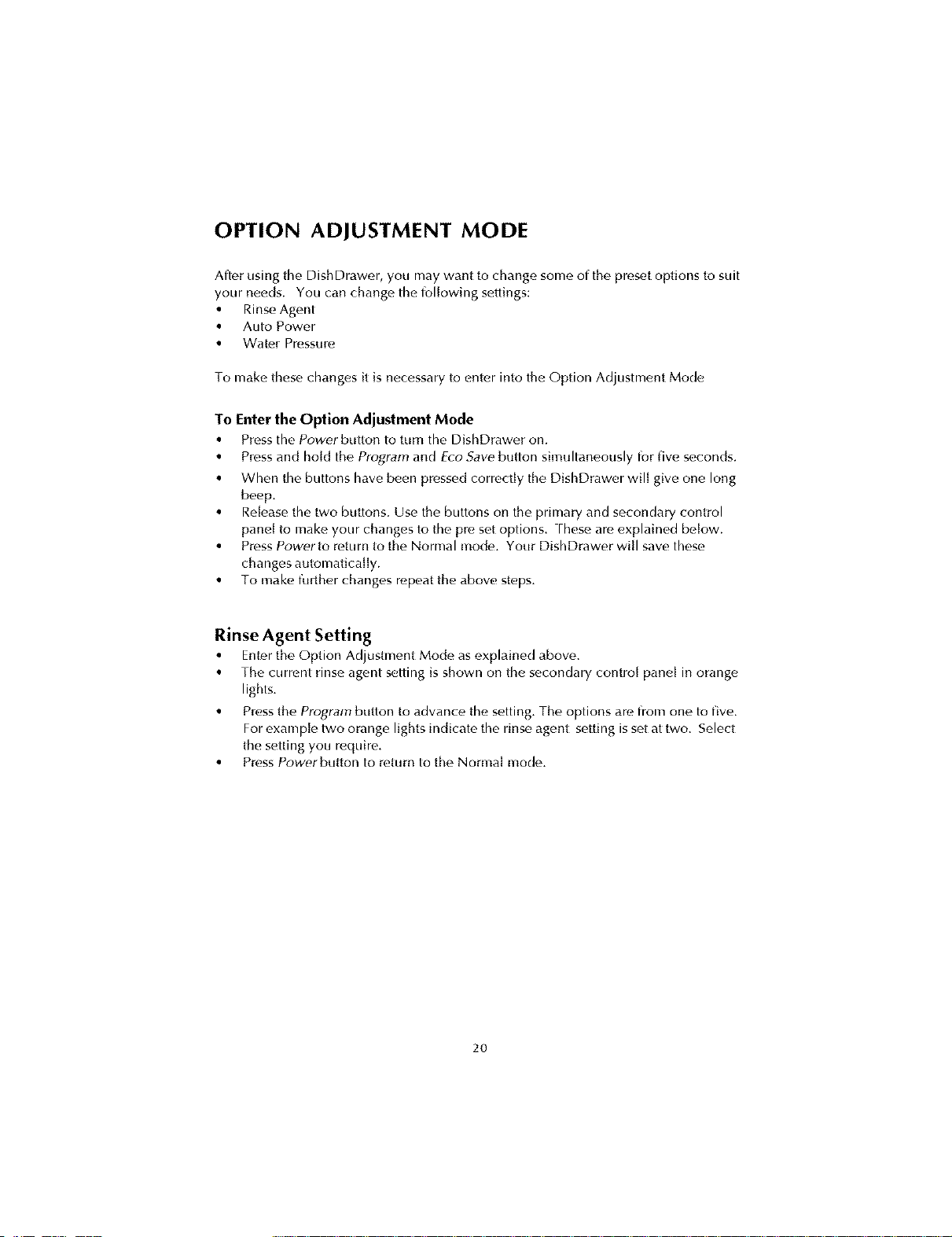
OPTION ADJUSTMENT MODE
After using the DishDrawer, you may want to change some of the preset options to suit
your needs. You can change the following settings:
• RinseAgent
• Auto Powf, r
• Wate_ Pressure
To make these changes it is necessary to enter into the Option Adjustment Mode
To Enter the Option Adjustment Mode
• Presstilt, Power button to turn tilt, DishDrawer on.
• Pressand hold the Program and Ere .Savebutton simuhaneously for five seconds.
• When the buttons have been pressed correctly the DishDrawer will give one long
beep.
• Release the two buttons. Use the buttons on the primary and secondary control
panel to make your changes to the pre set options. Fheseam explained below.
• PressPower to return to the Normal mode. Your DishDrawer will save these
changes automatically.
• To make ff_rther changes repeat the above steps.
Rinse Agent Setting
• Enter the Option Adjustment Mode as t,xplained abow,.
• The current rinse agent setting is shown on the secondary control panel in orange
lights.
• Press the Program button to advance the setting. The options art, from one to five.
Forexample two orange lights indicate the rinse agent setting is set at two. Select
the setting you require.
• Press Powerbutton to return to the Normal mode.
2O
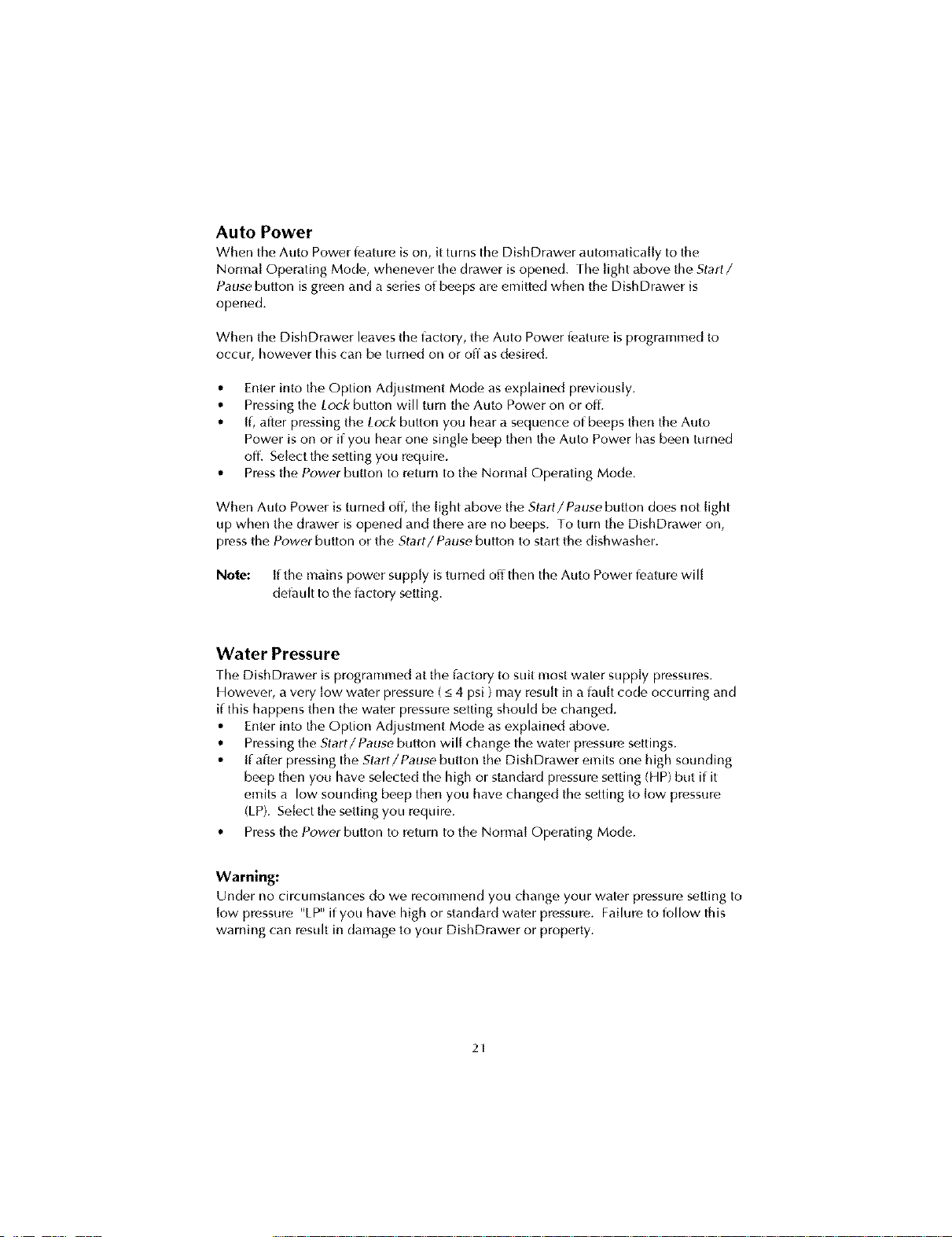
Auto Power
When the Auto Power k,ature is on, it turns thf, DishDrawer atdomatica[iy to the
Normal Operating Mode, whenever the drawer is opened. FhelightabovetheStart/
Pause button isgreen and a series of beeps art, emitted when the DishDrawer is
opened.
When the DishDrawer leaves the factory, the Auto Power ieature is programmed to
occur, however this can be turned on or off as desired.
• Enter into the Option Adjustment Mode asexplained previously.
• Pressing the Lock button will turn the Auto Power on or of[.
• [l, after pressing the Lock button you hear a sequence of beeps then the Auto
Power is on or if you hear one single beep then the Auto Power has been turned
off. Select the setting you require.
• Press the Power button to return to the Normal Operating Mode.
When Auto Power is turned off, the light above the Start/Pause button does not light
up when the drawer is opened and there are no beeps. To turn the DishDrawer on,
press the Power button or the Start/Pause button to start the dishwasher.
Note: if the mains power supply is turned off then the Auto Power IE,ature will
del_tult to the iactory setting.
Water Pressure
FheDishDrawer is programmed at the iactory to suit most water supply pressures.
However, a very low water pressure (_<4 psi ) may result in a iau[t code occurring and
if this happens then the water pressure setting should be changed.
• Enter into the Option Adjustment Mode asexplained above.
• Pressing the Start/Pause button will change the water pressure settings.
• [f alter pressing the Start/Pause button the DishDrawer emits one high sounding
beep then you have selected the high or standard pressure setting (14P)but if it
emits a low sounding beep then you have changed the setting to low pressure
(LP). Select the setting you require.
• Press the Power button to return to the Normal Operating Mode.
Warning:
Under no circumstances do we recommend you change your watc,r pressure setting to
low pressure %P_'if you have high or standard water pressure. Failure to follow this
warning can result in damage to your DishDrawer or property.
21
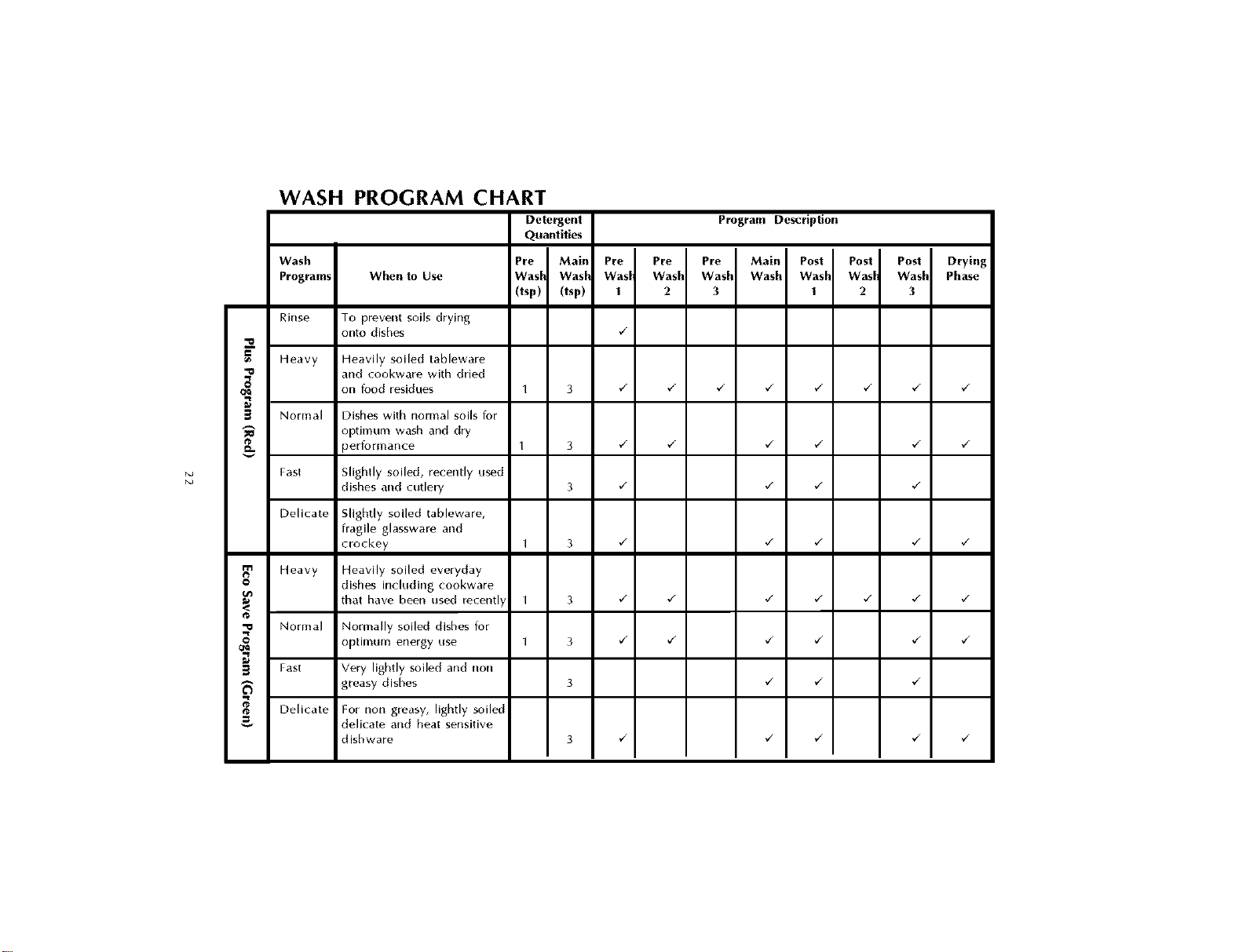
N_
N_
WASH PROGRAM CHART
Detergent Program Description
Quantities
Wash Pre Main Pre Pre Pre Main Post Post Post Drying
Programs When to Use Wasl Wasl Wasl Wash Wash Wash Wash Wasl Wasll Phase
(tsp) (tsp) 1 2 3 1 2 3
Rinse To prevent soils drying
onto dishes _/
Heavy Heavily soiled tableware
and cookware with dried
on food residues 1 3 _/ _/ _/ _/ _/ _/ _/ _/
3 Normal Dishes with normal soils tor
"_ optimum wash and dry
Jerformance 1 3 _/ _/ _/ _/ _/ _/
Fast Slightly soiled, recently used
dishes and cutlery 3 ,/ ,/ ,/ ,/
Delicate Slightly soiled tableware,
fragile glassware and
crockey 1 3 ,/ ,/ ,/ ,/ ,/
Heavy Heavily soiled everyday
O dishes including cookware
<_ recently ,/ ,/ ,/ ,/ ,/ ,/ ,/
that have been us_c_
1 3
@
'_ Normal Normally soiled dishes for
optimum energy use I 3 ¢_ ¢_ ¢_ ¢_ ¢_ ¢_
Fast Very lightly soiled and non
greasy dishes 3 _/ _/ _/
Delicate For non greasy, lightly soiled
delicate and heat sensitive
dishware 3 _/ _/ _/ _/ _/
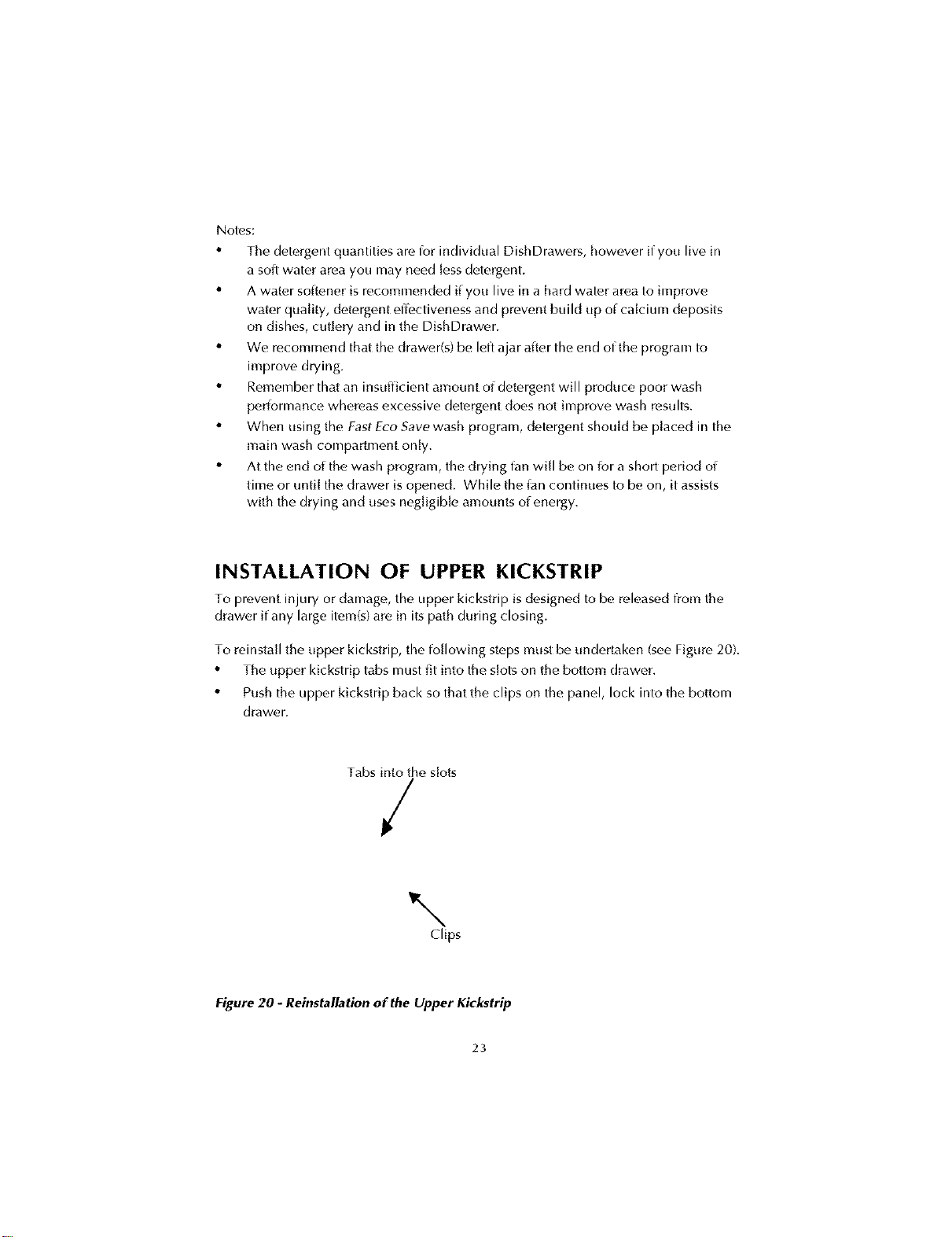
Notes;
• The detergent quantities arc,for individual DishDrawers, however if you live in
a solt water area you may need lessdetergent.
• A water sotk,ner is recommended if you live in a hard water area to improve
water quality, detergent effectiveness and prevent build up of calcium deposits
on dishes, cutlery and in the DishDrawer.
• We recommend that the drawer(s) be left ajar alter the end of the program to
improve drying.
• Remember that an insufficient amount of detergent will produce poor wash
periormance whereas excessive detergent does not improve wash results.
• When using the FastE_'oSave wash program, detergent should be placed in the
main wash compartment only.
• At the end of the wash program, the drying t_tn will be on ior a short period of
time or until the drawer is opened. While the Jan continues to be on, it assists
with the drying and uses negligible amounts of energy.
INSTALLATION OF UPPER KICKSTRIP
To prevent injury or ctamage, the upper kickstrip is designed to be releasect from the
drawer if any large item(s) are in its path during closing.
To reinstall the upper kickstrip, the following steps must be undertaken (seeFigure 20).
• The upper kickstrip tabs must fit into the slots on the bottom drawer.
• Push the upper kickstrip back so that the clips on the panel, lock into the bottom
drawer.
Tabs into the slots
/
\
Clips
Figure 20 - Reinstallation of the Upper Kickstrip
23
CARE GUIDE
The combination of high temperatures and dishwasher detergent may cause damage
to some items if they are washed in the DishDrawer.
Remember, if in any doubt about any aspect concerning items washed in the
DishDrawer, follow the instructions irom the manufacturer of the items, or wash the
item by hand.
Glassware
Most everyday glassware is Dishwasher sale. Crystal, very fine and antique glassware
may etch, i.e. become opaque. You may prel_,rto wash these items by hand.
Silverware and Cutlery
Cutk, ry should be rinsed immediately after use to prevent tarnishing caused by son-to
ioods. Fhe Rinse wash program is useful for this. Silver items should not come into
contact with stainless steel, for example other cutlery. Mixing these items can cause
staining. Remove silver cutlery from the DishDrawer and hand dry it immediately alter
the program has finished.
Aluminum
Aluminum can be dulled by Dishwasher detergent. Fhe degree of change depends on
the quality of the product.
Other Metals
Iron and cast iron objects can rust and stain other items. Copper, pewter and brass
tend to stain.
Woodware
Generally wooden items are sensitive to heat and water. Regular use in the
Dishwasher may cause deterioration over time. [f in doubt, wash by hand.
Plastic
Some plastic may change shape or color with hot water. Check manutacturer's
instructions about washing plastic items. Washable plastic items should be weighed
down so they do not flip over and fill with water or t_tl[through the basket during the
wash.
Decorated Items
Most modern china patterns are Dishwasher salb. Antique items, those with a pattern
painted over the glaze, gold rims or hand painted china may be more sensitive to
machine washing. If in doubt wash these items by hand.
Glued Items
Certain adhesives arc, soitened or dissolved in machine washing. If in doubt, wash
glued items by hand.
24
USER MAINTENANCE INSTRUCTION
Cleaning the DishDrawerTM
Fhc,secondarypane[andthefront oftheDishDrawe_may needwiping down from
time totime. This canbe done with aclean dampcloth.
We do not recommend the use of the [ol[owing cleaning agents on or hi your
DishDrawer asthey may damage it:
• Plastic or stainless steel scouring pads.
• Abrasive, solvent, household cleaners, acid or alkaline cleaners.
• Handwashing liquids, soap, laundry detergents or disiniectants.
[f a dishwasher cleaner is used, we would strongly recommend a Heavy Plus wash
program with detergent by run immediately afterward to prevent damaged to the
DishDrawer.
Cleaning the Drain Filter, Spray Arm,
Filter Plate and Motor Assembly
We recommend tho drain filter be cleaned wheneve_
there is evidence of food particles.
rhe filter plate is designed to be self cleaning, but
food scraps may accumulate.
3
rhe spray arm and filter plate may need cleaning
about once a inonth in normal use or more oJten,
should the need arise.
To Clean the Drain Filter
• Lift up the drain filte_ access pane[, if fitted on the
basket.
• Liltand remove the drain filter out of the
DishDrawer.
• EITipty, rinse under cJean running water and
replace back into the allocated space. Fhe correct
placement of the drain filter is shown in
Figure 21.
To Clean the Spray Arm
• Remove the basket carc4ul[y. Lift Irom the back
end first so that you do not knock the detergent
and rinse agent dispenser.
• Lift the spray arm.
• Shake any ioreign material out of the spray arm.
• Rinse the spray arm under water and wipe the
spray arm with a damp cloth.
• Replace the spray arm back onto the impeller.
Figure 21 shows the correct placement of the
spray arm.
Figure 21 - Internal Parts
of the DishDrawer
Key
1. Spray Arm
2. Filter Plate
3. Drain Filter
25
To Clean the Filter Plate
• Ensurethe DishDrawer iscool before you start
cleaning.
• Remove the drain fiher and spray arm (see
previous instructions for their removal).
• in the center of the filter plate, there are two rings.
Hold the center ring still and turn the outer ring
counk'r clockwise, about a _/_turn. rhis will
release the filter plate.
• When cleaning the underside of the filter plate,,
care must be taken on the sharp outer edge to
avoid the risk of cut type injuries.
• Remove any soil, wash in hot soapy water and
rinse thoroughly in clean water, rhe heater plate
can be wiped with a damp cloth.
• Replace the filter plate so that it lies fiat with the
base of the DishDrawer ensuring the filter plate is
fully locked into position with the outer ring. To
lock the filter plate into position, ensure the
triangles (A) align with each other (see
Figure 22 lot the correct position), rhe fiher plate
must not be able to move about lreely.
Figure 22 - Correct
Locking Position of Filter
Plate with Motor
Assembly
To Clean the Motor Assembly
This area only needs to be cleaned Lmder cerlain iault
conditions, rhe iault code will appear on the
secondary contro[ pane[ and when you mf_r to the
section on Fault Code Displays, it will explain under
which conditions to clean the motor assembly.
• Follow the above instructions ior the removal of
the drain filter, spray arm and filter plate.
• rurn the rotor-locking ring counter clockwise and lift OLIL.Once the motor
assembly is lifted up, check the cavity ior any foreign matter like bones or seeds
and relnove.
• Replace the motor assembly back into the small cavity in the DishDrawer.
rurn the motor assembly clockwise about _/_of a turn to lock into position.
rhe arrows (A) on the rotor locking ring and the motor housing must align
with each other (see Figure 23). rhe motor assembly should not be able to be
Jilted up freely. Carefully replace all the other parts back into the DishDrawer.
Note: The DishDrawer must be usedwith the motor assembly, filter plate,
drain filter and spray arm correctly in place.
Figure 23 -
Motor Assembly
Key
L Impeller
2. Rotor Locking Ring
3. Heater Hate
Vacation Time
Ifthe DishDrawer is not going to be, used for some time, we recommend you:
• Ensurethe baskets am empty.
• Leave the inside of the Dish Drawer clean.
• Leave the drawers ajar to allow air to circulate.
• rurn off both the electricity and water supply to the DishDrawer.
26
PROBLEM SOLVER
If the DishDrawer does not appear to be working properly, check this chart and
correct where possible. You are reminded that User lauhs are not covered by the
warranty. [fyou need any assistance, please call our Customer Care Center on
1 888 9 367 872 betore you call for service.
PROBLEM POSSIBLE CAUSE WHAT TO DO
DishDrawerwill not start Power supply not
connected
Connect the power supply.
The drawer not closed
properly
Ensuro the drawer is firmly
dosed.
Lock on Remove the Lock function
by holding down the Lock
button until the red light
above the Lock disappears.
Start/Pause button not
pressed
Press Start/Pause button.
DishDrawer does not
drain
Drain hose bent or kinked
Filter plate / drain filk, r
blocked
Straighten the drain hose.
Clean the fiher plate and
drain fiher.
Water does not flow into Water iaucet turned off
the DishDrawer
Inlet hose bent or kinked
turn the water iaucet on.
Straighten the inlet hose.
Water marks on the dishes Insufficient rinse agent Check if there is enough
rinse agent in the
dispenser.
Rinse agent setting too low Increase the rinse agent
setting.
DishDrawer overloaded
or incorrectly loaded
Ensure the dishes are not
nesting together.
Too much detergent
Decrease the alllOUnt of
detergent.
27
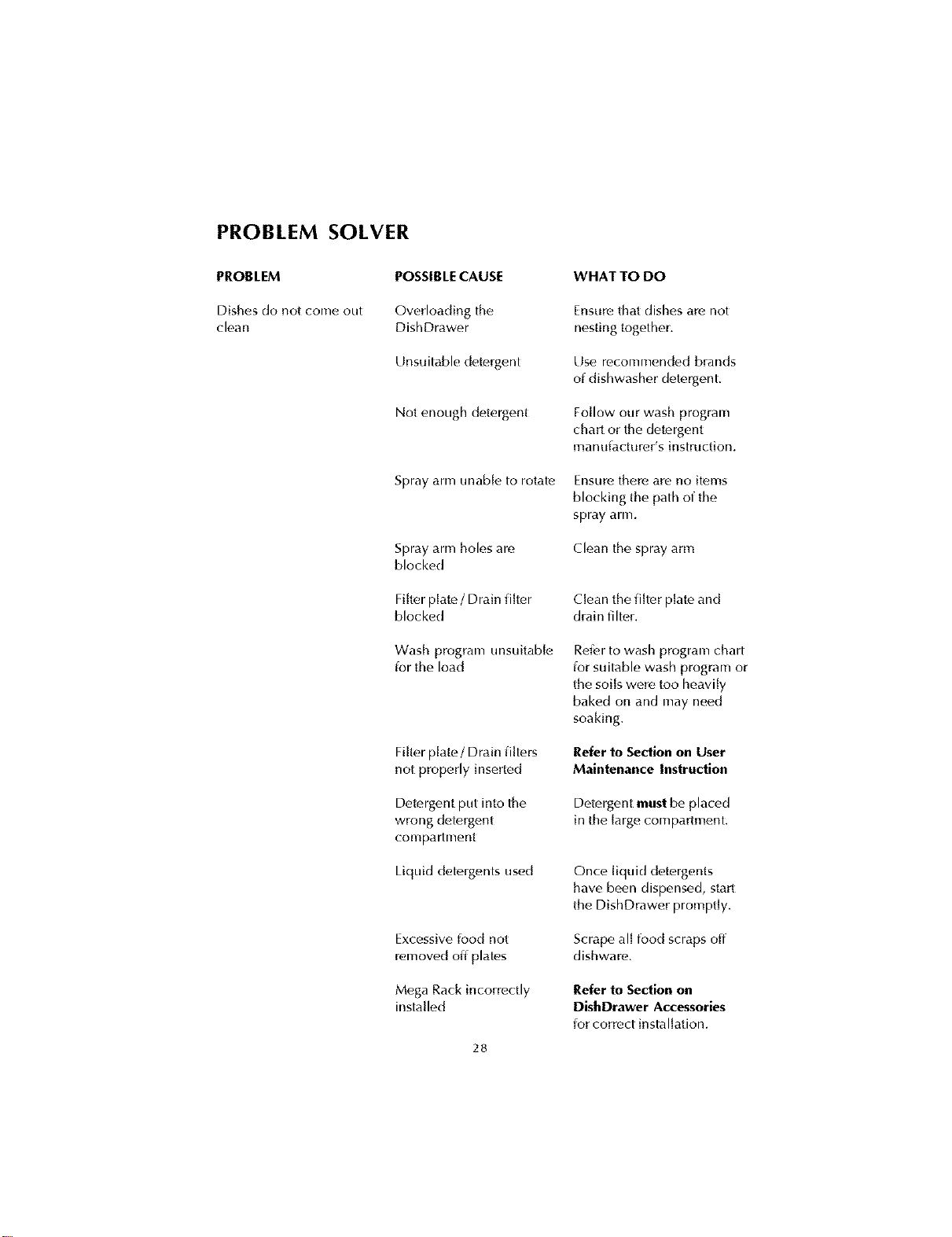
PROBLEM SOLVER
PROBLEM
Dishes do not come out
clean
POSSIBLE CAUSE
Overloadhlg the
DishDrawer
Unsuitable detergent
Not enough detergent
Spray arm unable to rotate
Spray arm holes arc,
blocked
Filter plate,/ Drain filter
blocked
Wash program unsuitable
ior the load
Filter plate/Drain filters
not properly inserted
Detergent put into the
wrong detergent
con-lpartment
Liquid detergents used
Excessive iood not
removed off plates
Mega Rack incorrectly
installed
28
WHAT TO DO
Ensure that dishes are not
nesting together.
Use rc,commended brands
of dishwasher detergent.
Follow our wash program
chart or the detergent
man LliactLlror's instrLlction.
Ensure there are no items
blocking the path of the
spray arm.
Clean the spray arm
Clean the filter plate,and
drain fiher.
Refer to wash program chart
ior suitable wash program or
the soils were too heavily
baked on and may need
soaking.
Refer to Section on User
Maintenance Instruction
Detergent must be placed
in the large, compartment.
Once liquid detergents
have been dispensed, start
the DishDrawer promptly.
Scrape all food scraps off
dishware.
Refer to Section on
DishDrawer Accessories
ior correct installation.
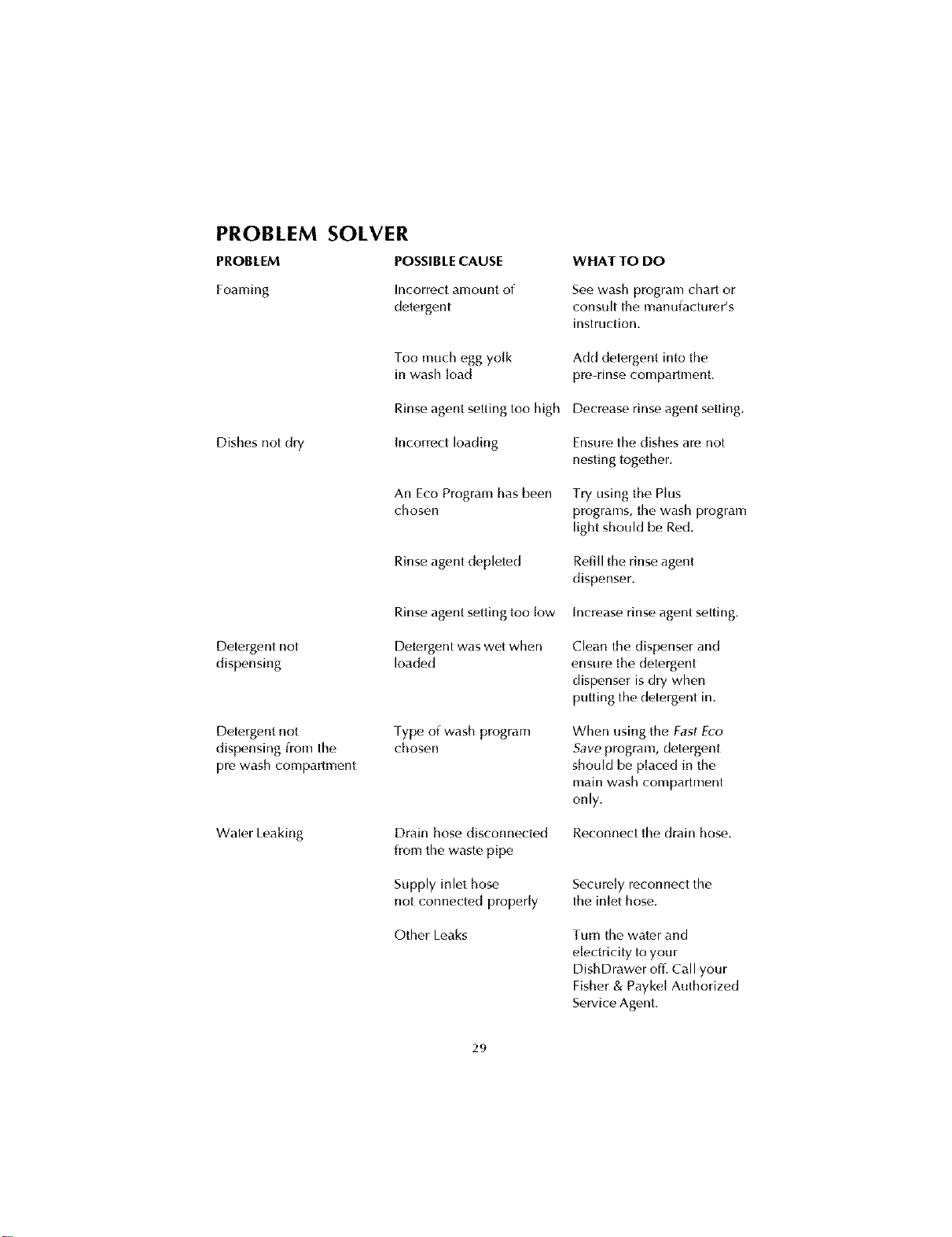
PROBLEM SOLVER
PROBLEM POSSIBLECAUSE
Foamhlg Incorrect amount of
detergent
Dishes not dry
Too much egg yolk
in wash load
Rinseagent setting too high
[ncorrectloading
An Eco Program has been
chosen
Rinseagent depleted
Detergent not
dispensing
Rinseagent setting too low
Detergent was wet when
loaded
Detergent not
dispensing from the
pre wash compartment
Fype of wash program
choson
Water Leaking
Drain hose disconnected
from the waste pipe
Supply inlet hose
not connected properly
Other Leaks
WHAT TO DO
See wash program chart or
consult the manulacturer's
instruction.
Add detergent into the
pre-rinse compartment.
Decrease rinse agent setting.
Ensure the dishes arc, not
nesting together.
Try using the Plus
programs, the wash program
light should be Red.
Refill the rinse agent
dispenser.
Increase rinse agent setting.
Clean the dispenser and
ensure the detergent
dispenser is dry when
putting the detergent in.
When using the Fast Eco
Save program, detergent
should be placed in the
main wash compartment
only.
Reconnect the drain hose.
Securely reconnect the
the inlet hose.
Turn the water and
electricity to your
DishDrawer off. Call your
Fisher & Paykel Authorized
Service Agent.
29
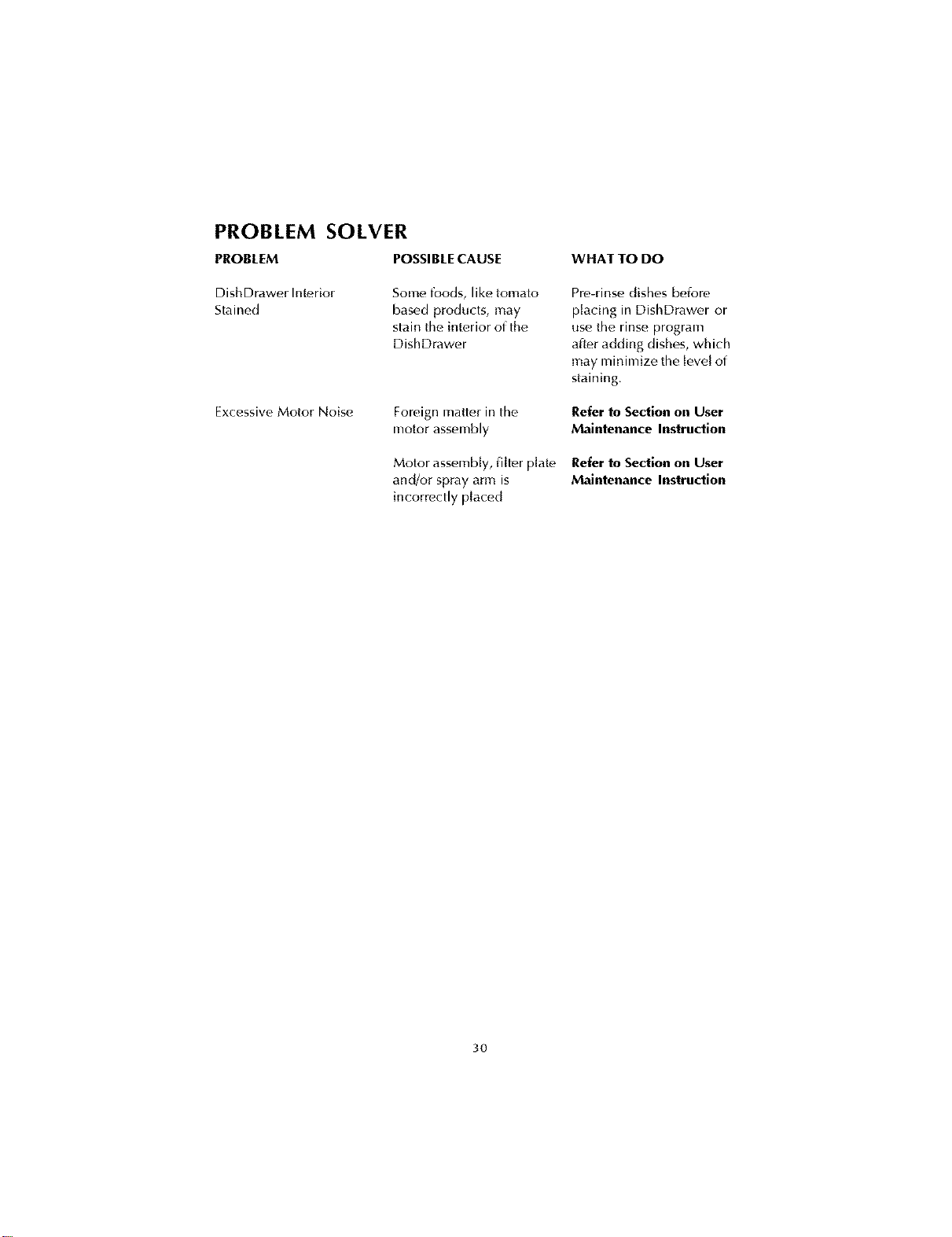
PROBLEM SOLVER
PROBLEM POSSIBLE CAUSE
DishDrawer Interior
Stained
Some foods, like tomato
based products, may
stain the interior of the
DishDrawer
Excessive Motor Noise
Foreign matter in the
motor assembly
Motor assembly, filter plate,
and/or spray arm is
incorrectly placed
WHAT TO DO
Pro-rinse dishes betore
placing in DishDrawer or
use the rinse program
alter adding dishes, which
may minimize the level of
staining.
Refer to Section on User
Maintenance Instruction
Refer to Section on User
Maintenance Instruction
3O
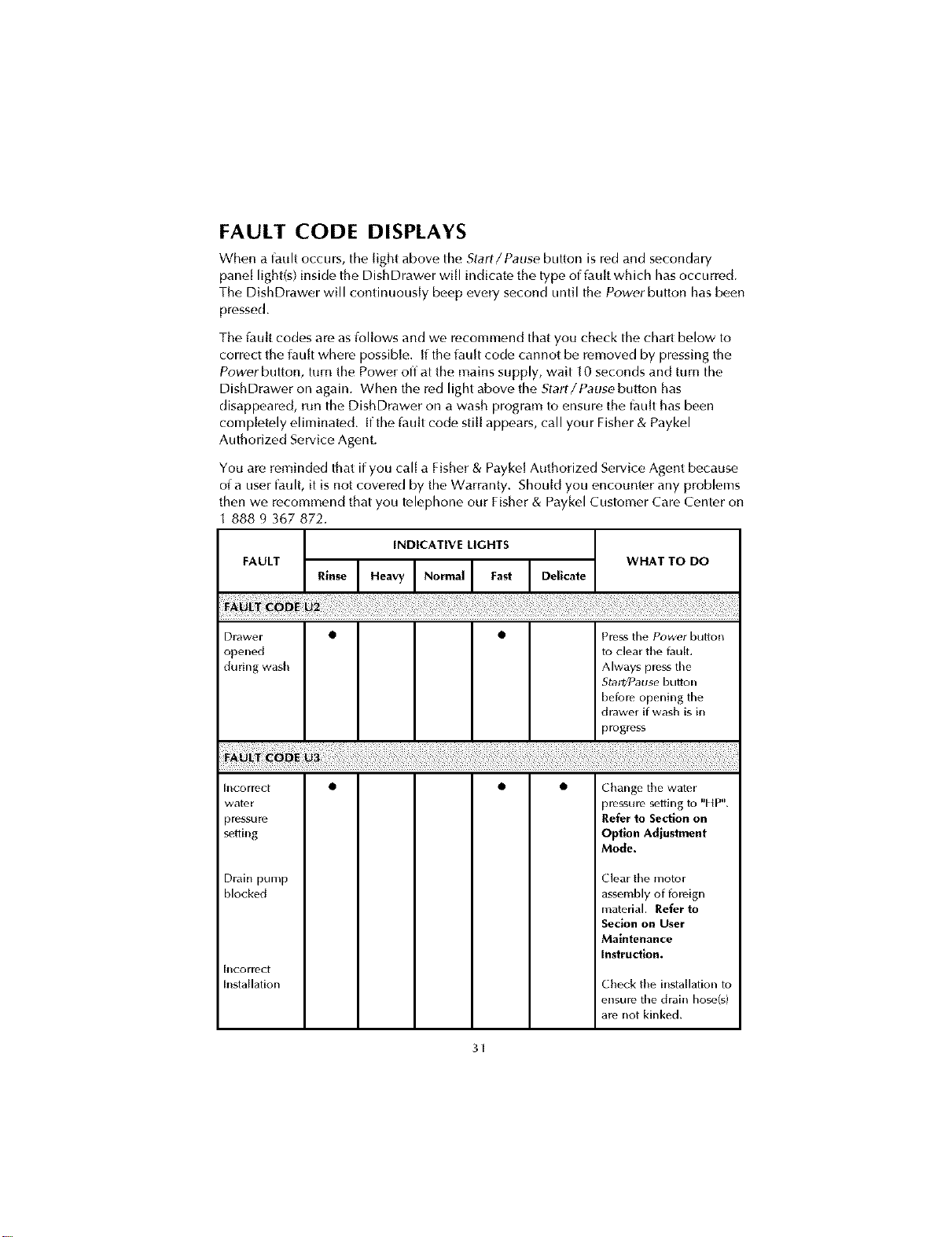
FAULT CODE DISPLAYS
When a fault occurs, the light above the Start/Pause button is rt,d and secondary
pane[ light(s) inside the DishDrawer will indicate the type of iau[t which has occurred.
The DishDrawer will continuously beep eveW second until the Power button has been
pressed.
The lault codes are as iol[ows and we recommend that you check the chart below to
correct the iau[t where possible, if the iau[t cocle cannot be removed by pressing the
Power button, turn the Power off at the mains supply, wait 10 seconds and turn the
DishDrawer on again. When the red light above the Start/Pause button has
disappeared, run the DishDrawer on a wash program to ensure the l_tu[thas been
completely eliminated, if the iau[t code still appears, call your Fisher & Paykel
Authorized Service Agent.
You are reminded that if you call a Fisher & Payke[ Authorized Service Agent because
of a user faulh it is not covert, d by the Warranty. Should you encounter any problems
then we recommend that you telephone our Fisher & Paykel Customer Cart, Center on
888 9 367 872.
INDICATIVE LIGHTS
FAULT WHAT TO DO
Drawer • • Press the Power button
opet_ed to c]ear the fault,
during wash Always press the
Stal_Pause button
before opening the
drawer ifwash is i_
progress
h_correct • • • Change the wate_
water prr, ssulc_ setting to "HP".
_mssure Refer to Section on
semi[iS Optlon Adjustment
Mode.
Dlain pump Ck_al thc_ motol
hlock_,d assc_mblyof foreign
matc_lial.Referto
Seclon on User
Maintenance
instruction.
h_cormct
h_stailation Chr_ckthr_i_stailationto
ensurethe drai[i hose(s)
arenot kinked.
3f
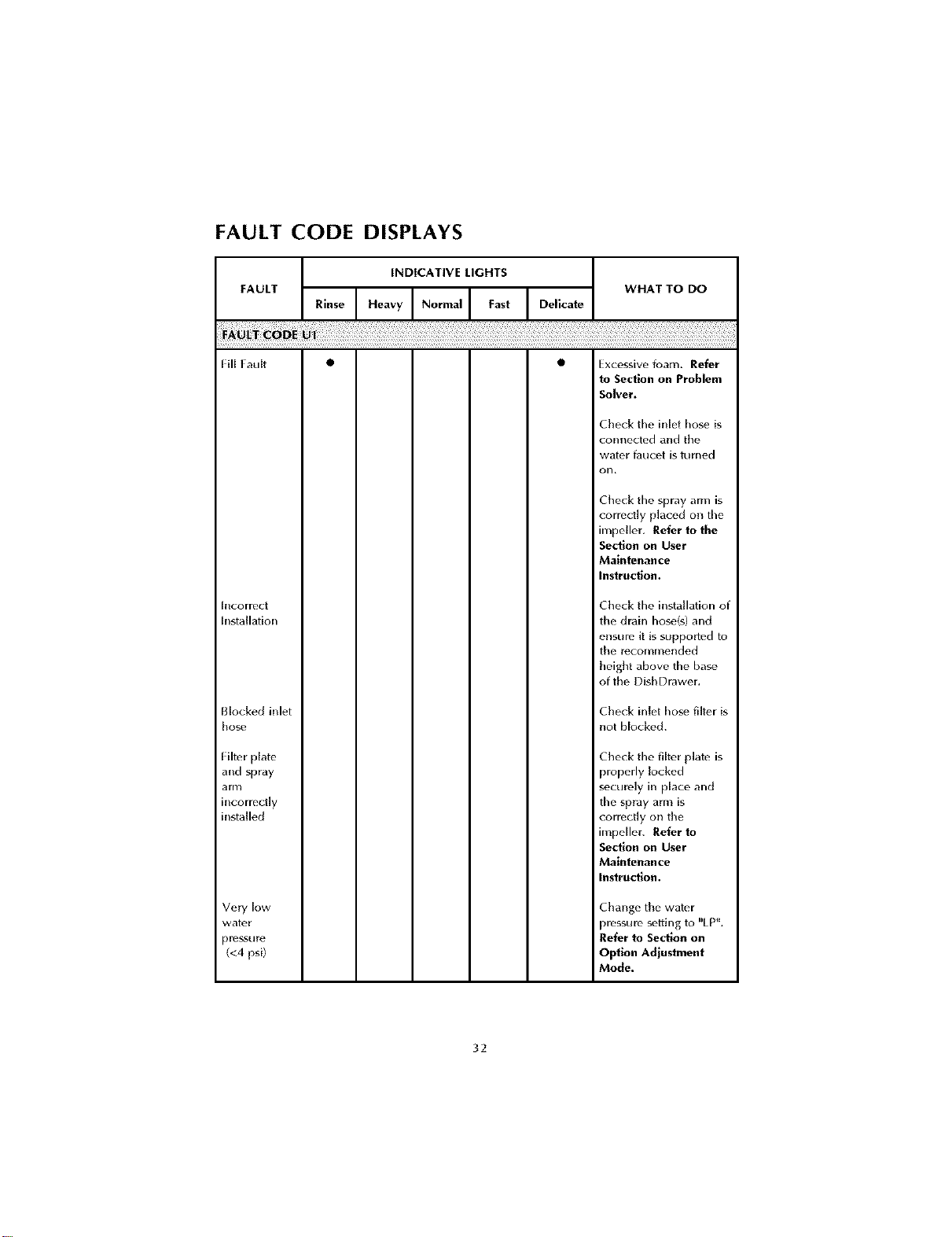
FAULT CODE DISPLAYS
INDICATIVE LIGHTS
FAULT WHAT TO DO
ReIHeavYlNoroaI astIOe"cate
Fill fault • • Excessive foam. Refer
to Section on Problem
Solver.
Cbeck the inlet hose is
connected and tbe
water faucet is turned
on.
Cbeck the spray arm is
correctly placed on the
nx_peller. Refer to the
Section on User
Maintenance
Instruction.
BlcoFrect
Installation
Cbeck the installation of
tbe drain hos_,(s) and
ensure it is supporied to
tbe rocommended
beigbt above the bas_,
of tile Disb Drawer.
Blocked inlet
bose
Cbeck inlet hos_ filter is
not blocked.
Filter plato
and spray
arm
incorrectly
installed
Cbeck the filt¢,r plate is
properly locked
s_cui_,ly in place and
the spray arm is
correctly on tbe
unpeller. Refer to
Section on User
Maintenance
Instruction.
Very low
water
pre_sui_ •
(<4 psi)
Cbange tbe water
)rf_sgLll'f_seffing to "LP'_.
Refer to Section on
Option Adjustment
Mode.
32
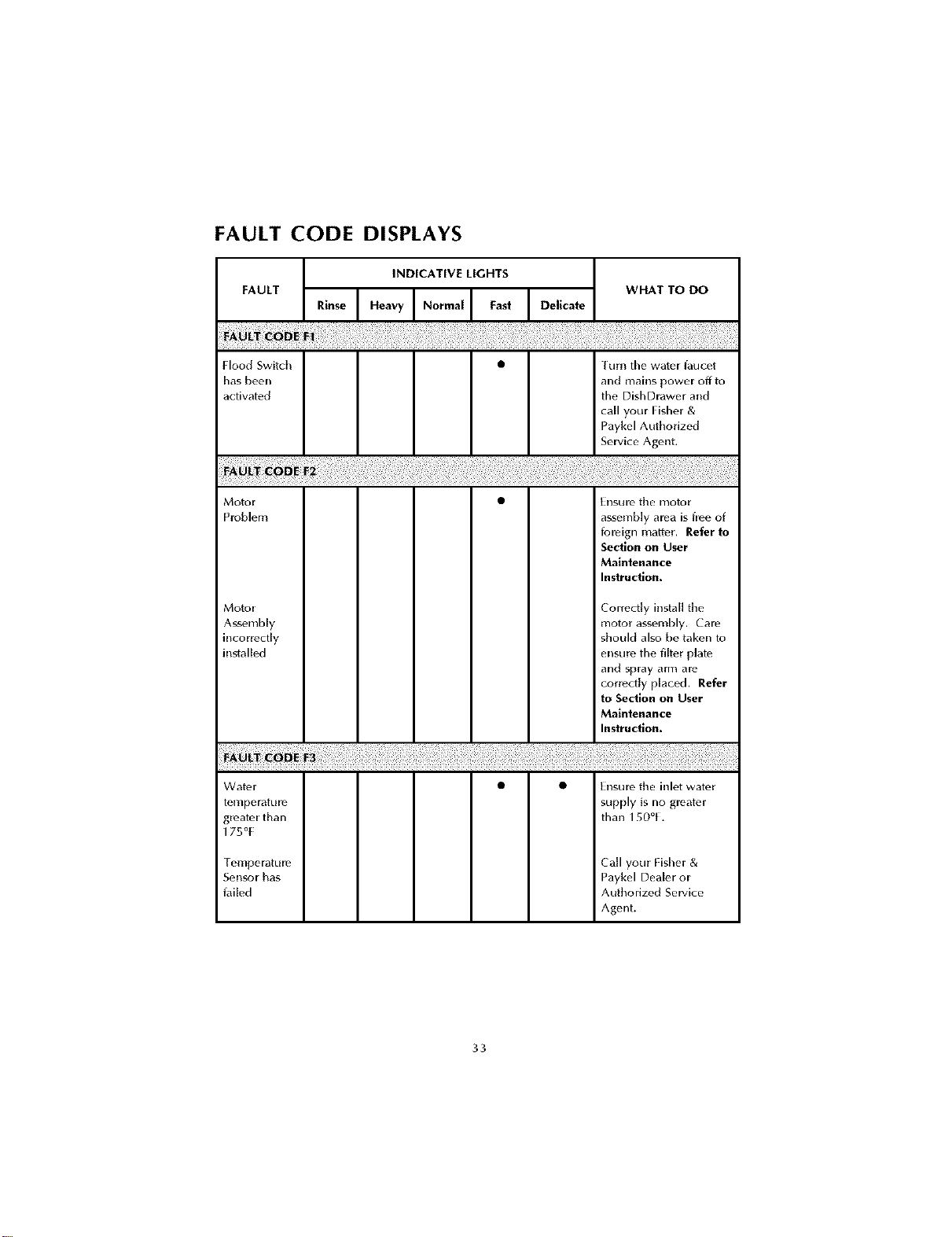
FAULT CODE DISPLAYS
Hood Switch
has been
activat*,d
INDICATIVE LIGHTS
I urn the water faucet
and mai_ls power off to
the DishDrawer a_ld
call your Fisher &
Paykel Authorized
Service Agent.
Motor
Problem
Motor
Ass_,mbly
incorrectly
installed
E_ISLII_ the I_lotor
assembly area is flee of
foleign matter. Refer to
Section on User
Maintenance
Instruction.
Correctly install tile
motor assembly. Care
should also be taken to
ensure the filt_,r plate
and spray arm are
correctly placed. Refer
to Section on User
Maintenance
Instruction.
Watt, r
temperatklle
gmate_ than
175°[
| elllpe ratLI I_?
Sensor has
failed
• • E[_sure the inlet water
supply is no greatt, r
than 150°[.
Call your Fisher &
Paykel Dealer or
Authorized Service
Agent.
33
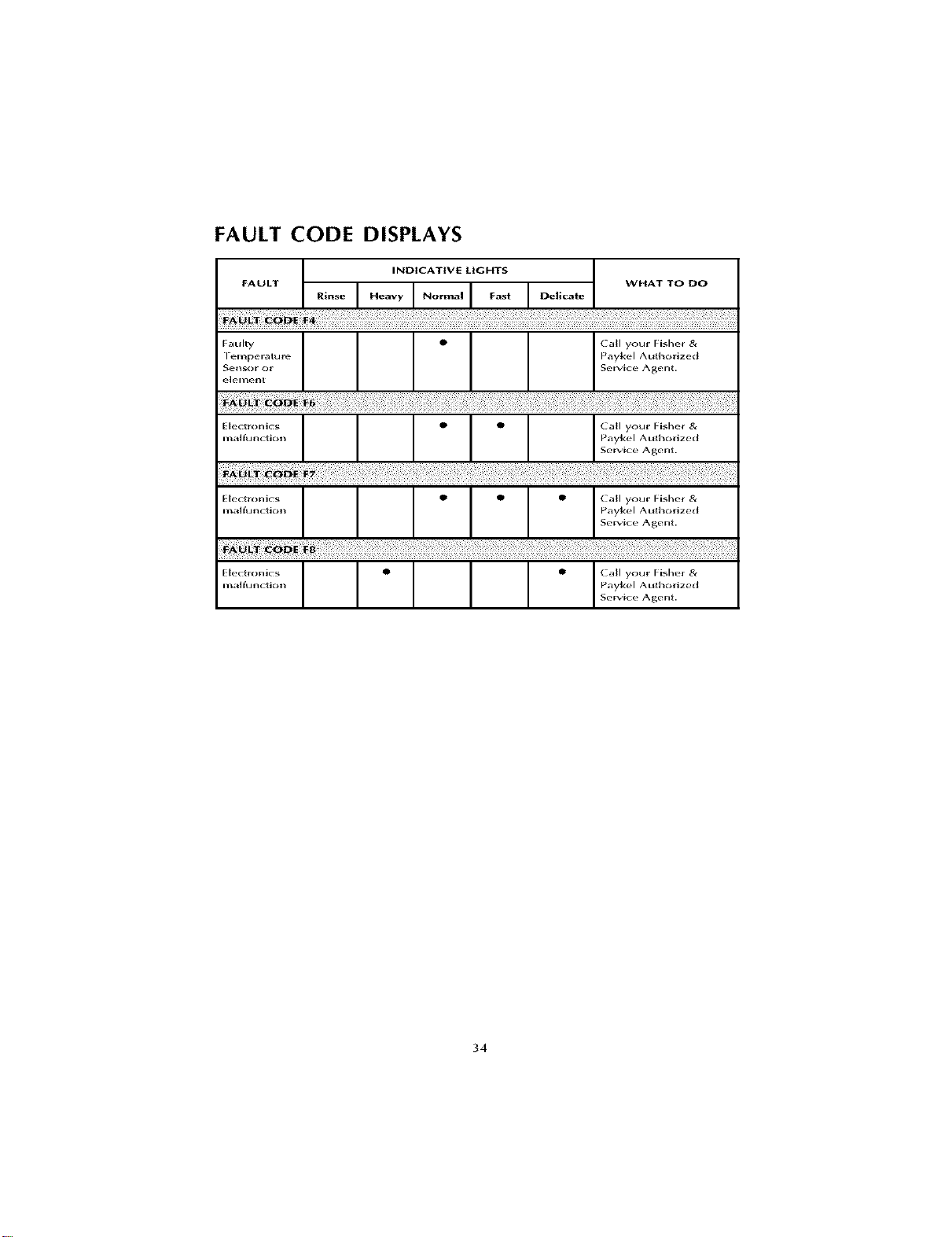
FAULT CODE DISPLAYS
34
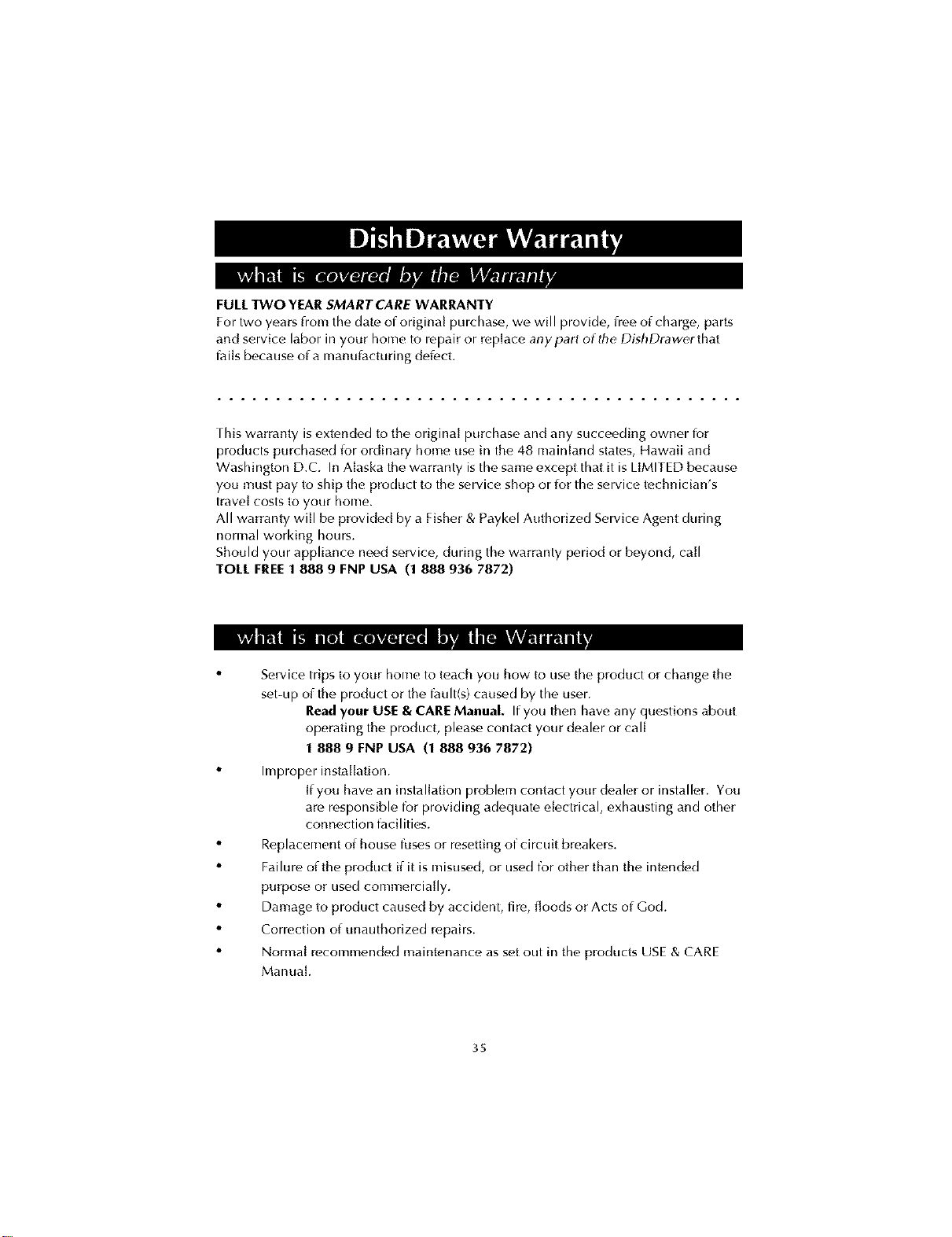
mm ii,1 4 gmlivAwmm'
FULLTWO YEAR SMARTCARE WARRANTY
For two years from the date of origina[ purchase, we will provide, lree of charge, parts
and service labor in your home to repair or replace anypart of the DishDrawerthat
l_tiis because ofa manulacturing detect.
rhis warranty is extended to the original purchase and any succeeding owner for
products purchased lor ordinary home use in the 48 mainland states, Hawaii and
Washington D.C. In Alaska the warranty isthe same except that it is LIMITED because
you must pay to ship the product to the service shop or lot the service technician's
travel costs to your home.
All warranty will be provided by a Fisher & Paykel Authorized Service Agent during
normal working hours.
Should your appliance need service, during the warranty period or beyond, call
TOLL FREE1 888 9 FNP USA (1 888 936 7872)
ml!'i'l m rk'L'W][i T.'qR" JIWJII lUt'4P'AV.A IIIfllti A
Service trips to your home to teach you how to use the product or change the
set-up of the product or the l_tult(s) caused by the user.
Read your USE& CAREManual. Ifyou then have any questions about
oper_tting the product, please contact your dealer or call
I 888 9 FNP USA (I 888 936 7872)
Improper installation.
If you have an installation problem contact your dealer or installer. You
are responsible for providing adequate electrical, exhausting and other
connection l_tcilities.
Replacement of house fuses or resetting of circuit breakers.
Failure of the product if it is misused, or used for other than the intended
purpose or used commercially.
Damage to product caused by accident, fire, floods or Acts of God.
Correction of unauthorized repairs.
Normal recommended maintenance as set out in the products USE& CARE
Manual.
35
mint1 ! L"d"JqJIF JImmFAv t Tnt,A TBXmtI II
I WARRANTOR IS NOT RESPONSIBLE FOR CONSEQUENTIAL DAMAGES I
Some states do not allow the exclusion or limitation ol- incidental or
consequential damages, so the above limitation or exclusion may not apply
to you. [his warranty gives you specific legal rights, and you may also have
other rights which vary from state to state. [o know what your legal rights
are in your state, consult your local or state consumer al-lairs officer or your
state's Attorney General.
Warrantor: Fisher & Paykel Appliances Inc.
If further help is needed concerning this warranty write:
Fisher & Paykel Appliances Inc., 27 Hubble, Irvlne,
CA 92618 r USA.
PROOF OF PURCHASE
Proof of original purchase date is required to obtain service under warranty. Attach
your sales receipt or cancelled check here.
Write clown the model, serial number and D_rchase information below.
Model Number
Serial No.
Purchaser
Date of Purchase / /
Dealer
Address
SERVICE
For your local Fisher & Paykel Authorized Service Agent,
please call 1 888 9 FNP USA (1 888 936 7872)
or contact usthrough our web site,
www.fisherpaykel.com
36