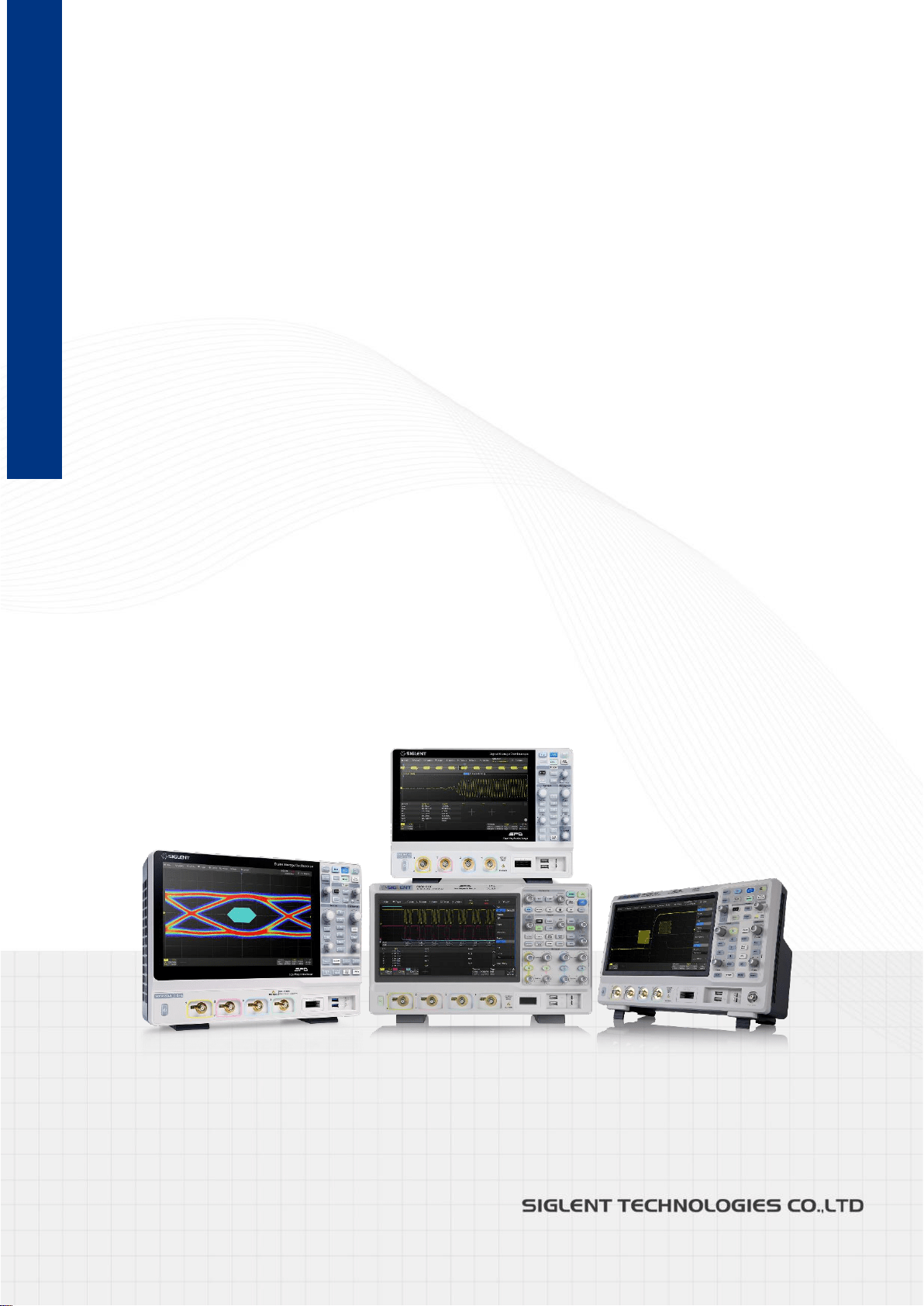
SDS Series
Digital Oscilloscope
数字示波器
Programming Guide
EN11C
June, 2022

SDS Series Programming Guide
www.siglent.com 1 / 642
Copyright and Declaration
Copyright
SIGLENT TECHNOLOGIES CO., LTD. All Rights Reserved.
Trademark Information
SIGLENT is the registered trademark of SIGLENT TECHNOLOGIES CO., LTD.
Declaration
SIGLENT products are protected by patent law in and outside of P.R.C.
SIGLENT reserves the right to modify or change parts of or all the specifications or pricing policies
at the companys the right to mo
Information in this publication replaces all previously corresponding material.
Any way of copying, extracting or translating the contents of this manual is not allowed without the
permission of SIGLENT.
Product Certification
SIGLENT guarantees this product conforms to the national and industrial standards in China and
other international standard conformance certifications are in progress.
Contact Us
If you have any problem or requirement when using our products, please contact SIGLENT
TECHNOLOGIES CO., LTD
Headquarters
SIGLENT Technologies Co., Ltd.
Add:Blog No.4 & No.5, Antongda Industrial Zone, 3rd Liuxian Road,
Bao’an District, Shenzhen, 518101, China.
Tel:+ 86 755 3688 7876
Fax:+ 86 755 3359 1582
Emall:market@siglent.com
Website:www.siglent.com/ens
Europe
SIGLENT Technologies Germany GmbH
Add:Staetzlinger Str. 70, 86165 Augsburg, Germany
Tel: +49(0)-821-666 0 111 0
Fax: +49(0)-821-666 0 111 22
Emall:info-eu@siglent.com
Website www.siglenteu.com


SDS Series Programming Guide
www.siglent.com 3 / 642
Version Declaration
This chapter declares the modifications of command in the most recent release of the
programming guide version.
What’s New in Version E11C
New features in version E11C of the software are:
• Support for SDS2000X HD
• New vertical resolution command for SDS2000X Plus
• DVM commands
• Memory commands
• Measure cursors commands
• New measurement item: PSLOPE, NSLOPE, TSR, TSF, THR, THF
• Update C# example
• New Read Waveform Data of FFT Example
• Update Read Waveform Data Example
• Update Read Sequence Waveform Data Example
What’s New in Version E11B
New features in version E11B of the software are:
• Measure threshold
• Network storage
• Memory management:Auto,Fixed Memory Depth and Fixed Sampling Rate
• Display menu style: EMBedded|FLOating
• Option for specifying FFT autoset as SPAN|PEAK|NORMal
• Set FFT span: FUNCtion<n>:FFT:SPAN
• :FUNCtion:INTGate revised to :FUNCtion<n>:INTegrate:GATE
• :FUNCtion:INTGate:GA|GB revised to :FUNCtion:GVALue
• PRINt revised to PRINt?
• Read sequence waveform
• Support reading waveform by piece
• WAV:PRE? and WAV:DATA? return in standard binary block format
• Support for SHS800X/SHS1000X/SDS6000A
Version E11A at Introduction
Compared with previous versions, this new document redefines the instruction format of each
group according to the SCPI specifications and adopts tree-style management. However, not all
series models support these instructions, see the next chapter “Supported Models” for details.
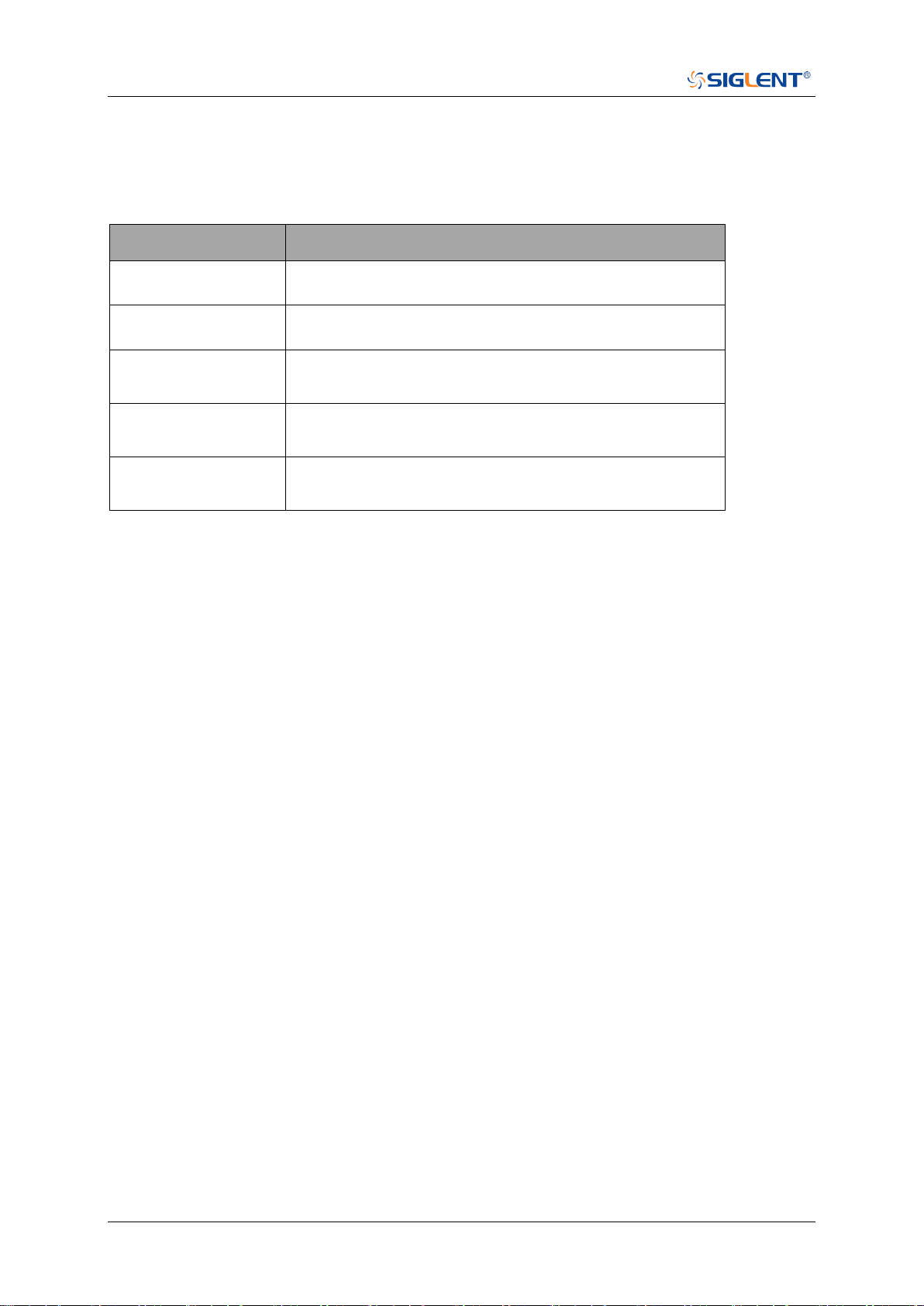
SDS Series Programming Guide
4 / 642 www.siglent.com
Supported Models
The commands and queries listed in this document can be used for SIGLENTs Digital
Oscilloscope Series as shown below. Models are arranged according to their initial release dates.
Model
Version for New Commands
SDS5000X
0.9.0 and later
SDS2000X Plus
1.3.5R3 and later
SDS6000 Pro/
SDS6000A
1.1.7.0 and later
SHS800X/
SHS1000X
1.1.9 and later
SDS2000X HD
1.2.0.2 and later
SDS Series Programming Guide
www.siglent.com 5 / 642
Programming Overview
This chapter introduces how to build communication between the instrument and the PC. It also
introduces how to configure a system for remote instrument control.
Users can remotely control the instrument through USB and LAN interfaces, in combination with
National Instruments NI-VISA and programming languages. Through the LAN interface, users can
communicate using VXI-11, Sockets and Telnet protocols, depending on the capabilities of the
specific instrument.
Establishing Communications
Install NI-VISA
USB control requires the National Instruments NI-VISA Library for communications. We also
recommend using it for LAN communications for its ease of use, but sockets, telnet, and VXI-11
can also be implemented via LAN connections.
Currently, NI-VISA is packaged in two versions: A full version and a Run-Time Engine version. The
full version includes the NI device drivers and a tool named NI MAX which is a user interface to
control and test remotely connected devices. The Run-Time Engine is recommended, as it is a
much smaller download than the full version and includes the necessary tools for basic
communication to instruments.
For example, you can get the NI-VISA 5.4 full version from
http://www.ni.com/download/ni-visa-5.4/4230/en/.
You also can download NI-VISA Run-Time Engine 5.4 to your PC and install it as the default
selection. Its installation process is similar to the full version.
After you downloaded the file, follow these steps to install NI-VISA (The full version of NI-VISA 5.4
is used in this example. Newer versions are likely and should be compatible with SIGLENT
instrumentation. Download the latest version available for the operating system being used by the
controlling computer):
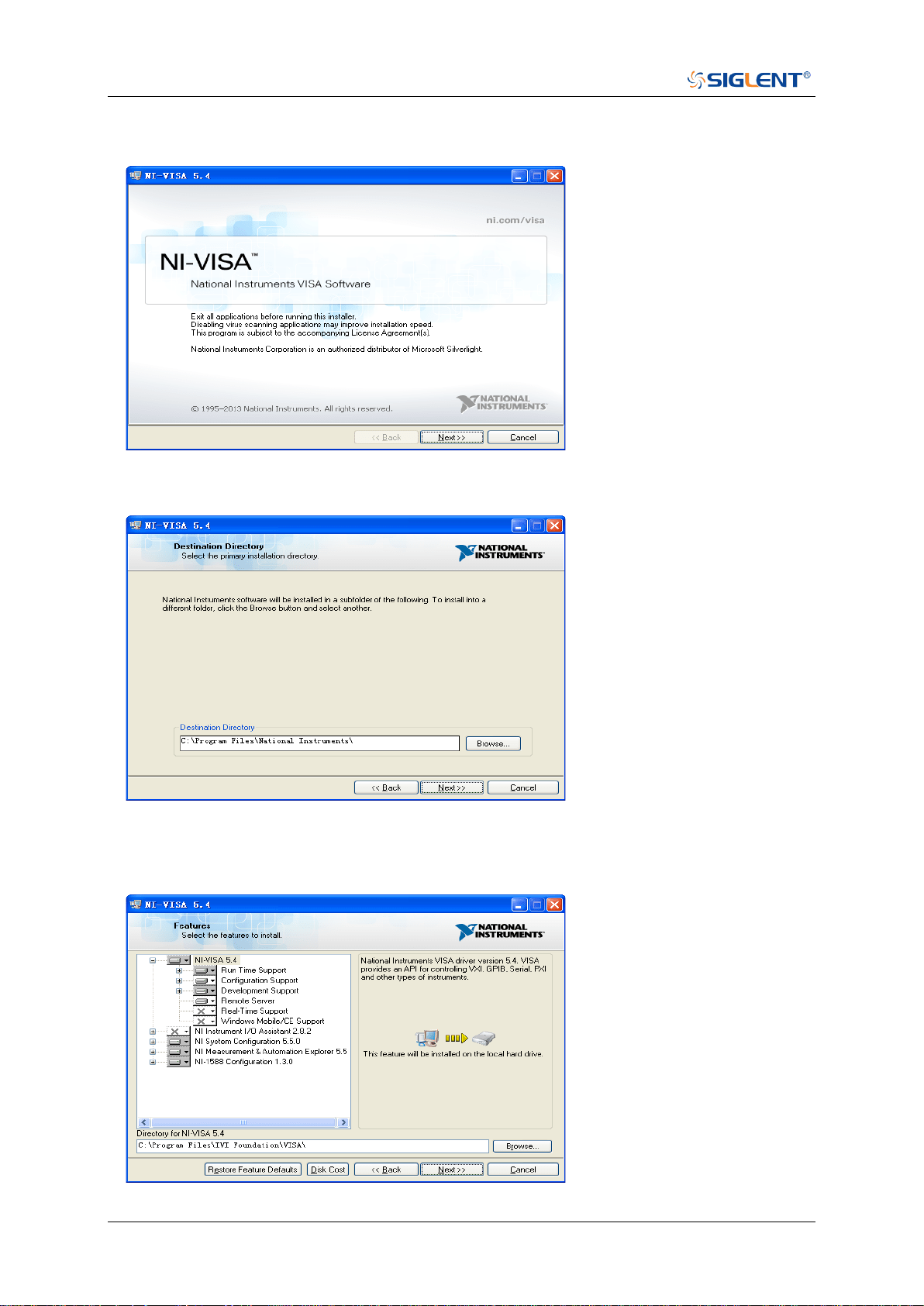
a. Double click the visa540_full.exe, the dialog will be similar to that shown below:
SDS Series Programming Guide
6 / 642 www.siglent.com
b. Click Unzip, the installation process will automatically launch after unzipping files. If your
computer needs to install .NET Framework 4, it may auto start.
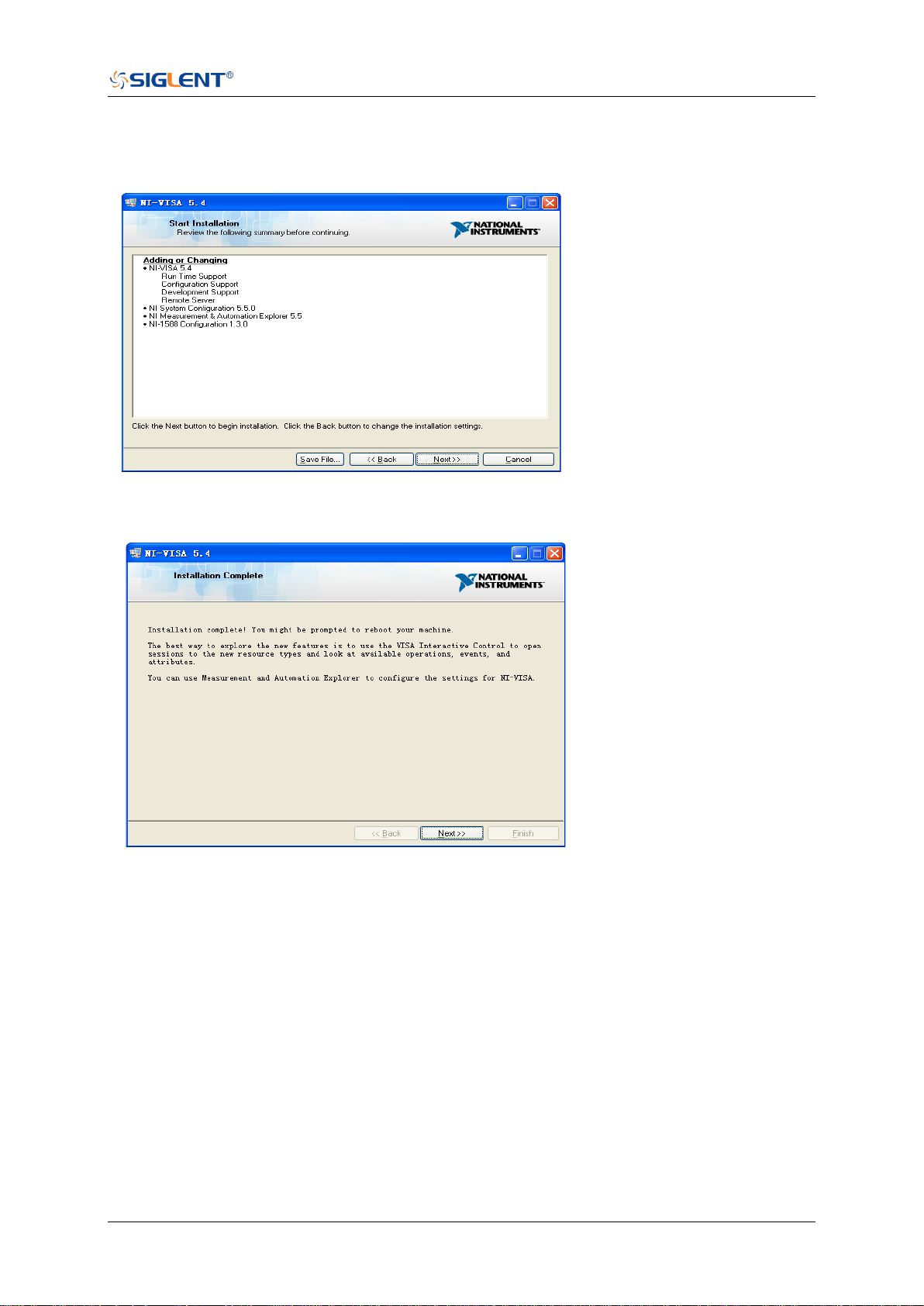
c. The NI-VISA installing dialog is shown above. Click Next to start the installation process.
d. Set the install path. The default path is “C:\Program Files\National Instruments\”, you can
change it. Click Next, dialog shown as above.
SDS Series Programming Guide
www.siglent.com 7 / 642
e. Click Next twice, in the License Agreement dialog, select the “I accept the above 2 License
Agreement(s).”,and click Next, dialog shown as below:
f. Click Next to begin the installation.
g. Now the installation is complete. Reboot your PC.
Connect the Instrument
Depending on the specific model, your oscilloscope may be able to communicate with a PC
through the USB or LAN interface.
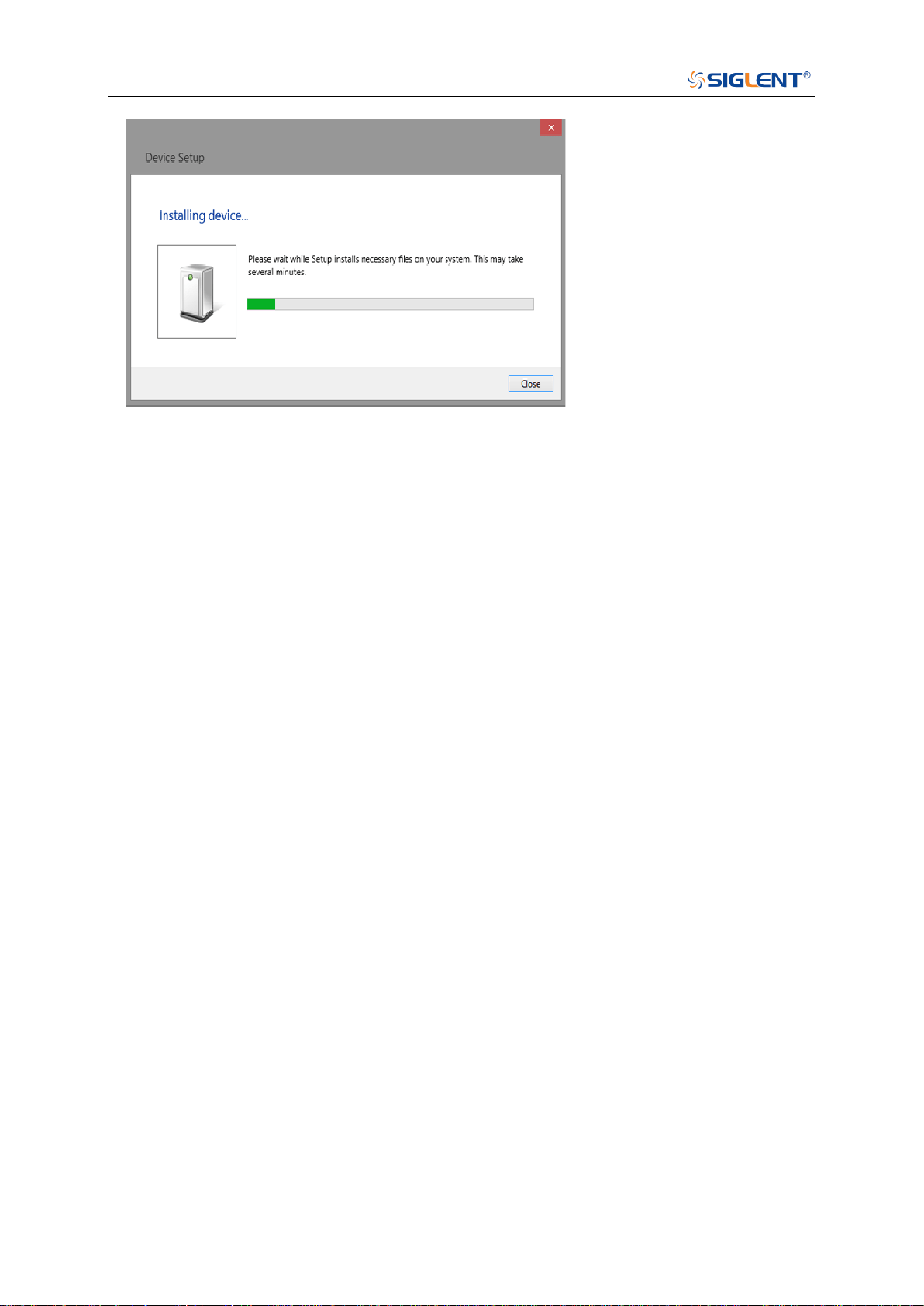
Connect the instrument and the USB Host interface of the PC using a USB cable. Assuming your
PC is already turned on, turn on your oscilloscope, and then the PC will display the “Device Setup”
screen as it automatically installs the device driver as shown below.
SDS Series Programming Guide
8 / 642 www.siglent.com
Wait for the installation to complete and then proceed to the next step.
SDS Series Programming Guide
www.siglent.com 9 / 642
Remote Control
User-defined Programming
Users can use SCPI commands via a computer to program and control the digital oscilloscope.
For details, refer to the introductions in "Programming Examples".
Send SCPI Commands via NI-MAX
NI-Measurement and Automation eXplorer (NI-MAX) is a program created and maintained by
National Instruments. It provides a basic remote control interface for VXI, LAN, USB, GPIB, and
Serial communications. It is a utility that enables you to send commands one-at-a-time and also
retrieve data from connected devices. It is a great tool for troubleshooting and testing command
sequences. The oscilloscopes can be controlled remotely by sending SCPI commands via
NI-MAX.
Using SCPI with Telnet
Telnet provides a means of communicating with the oscilloscopes over a LAN connection. The
Telnet protocol sends SCPI commands to the oscilloscopes from a PC and is similar to
communicating with the oscilloscopes over USB. It sends and receives information interactively:
one command at a time. Windows operating systems use a command prompt style interface for
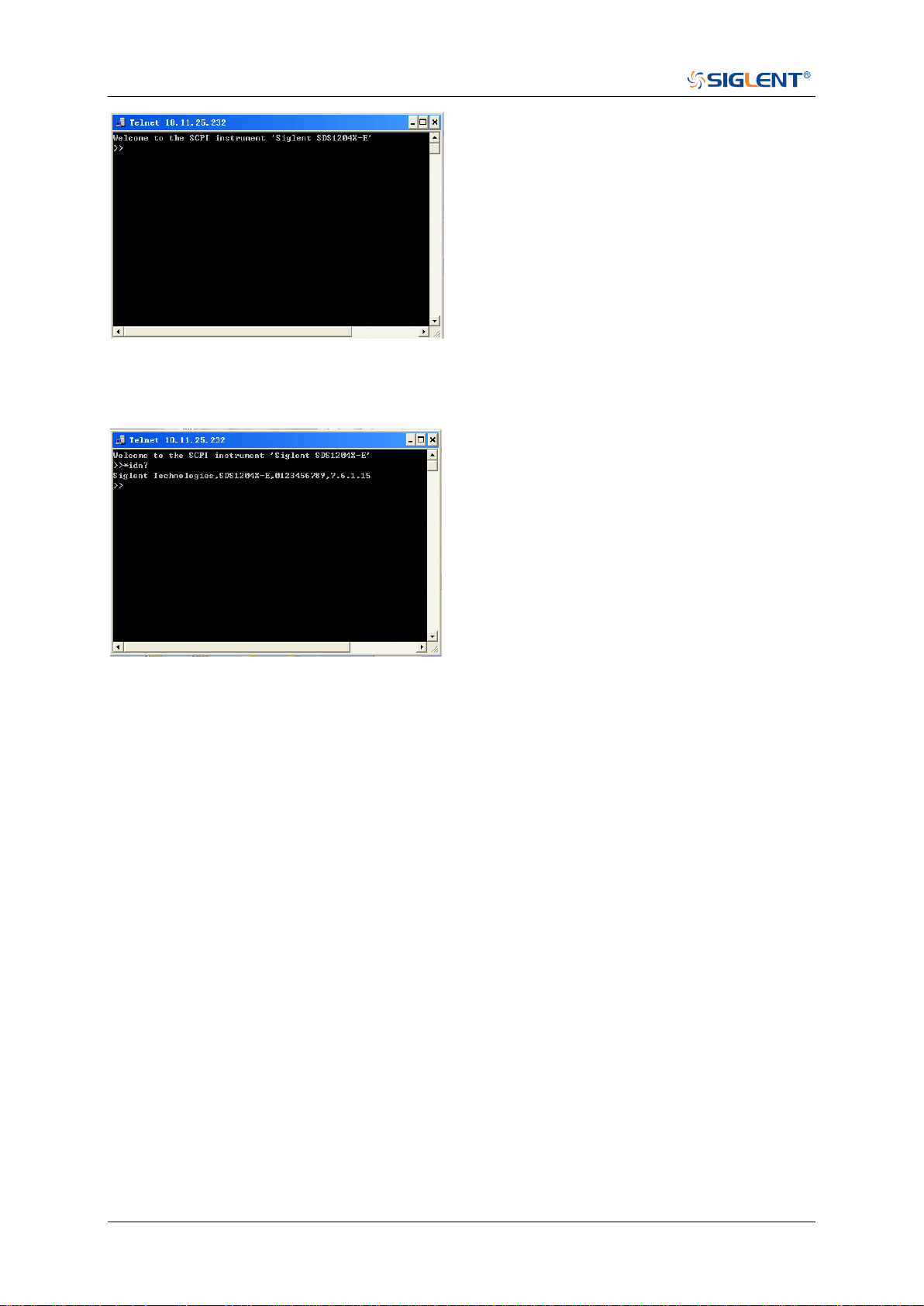
the Telnet client. The steps are as follows:
1. On your PC, click Start > All Programs > Accessories > Command Prompt.
2. At the command prompt, type in telnet.
3. Press the Enter key. The Telnet display screen will be displayed.
4. At the Telnet command line, type:
open XXX.XXX.XXX.XXX 5024
Where XXX.XXX.XXX.XXX is the instrument’s IP address and 5024 is the port. You should see a
response similar to the following:
SDS Series Programming Guide
10 / 642 www.siglent.com
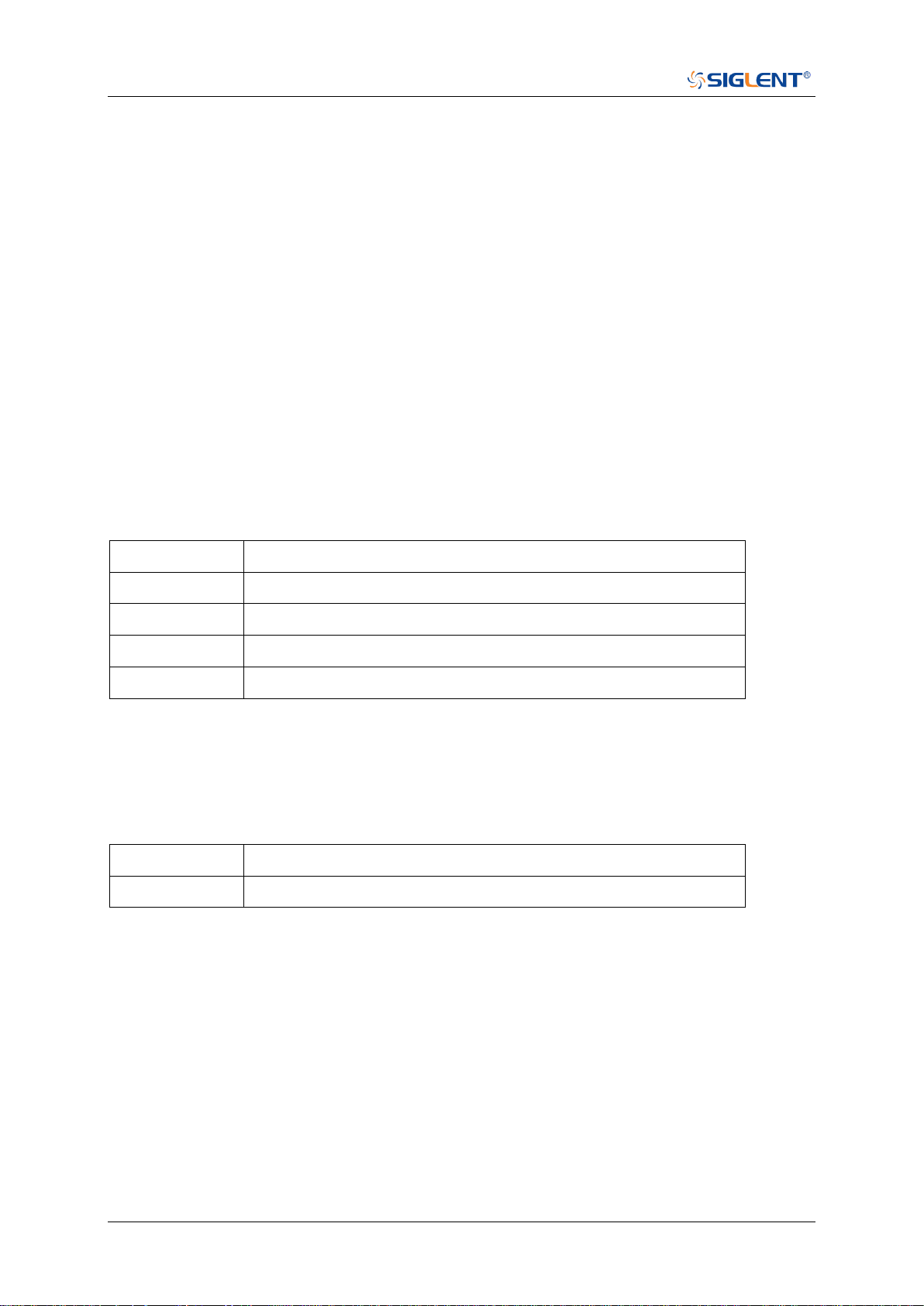
5. At the SCPI> prompt, input the SCPI commands such as *IDN? to return the company name,
model number, serial number, and firmware version number.
6. To exit the SCPI> session, press the Ctrl+] keys simultaneously.
7. Type quit at the prompt or close the Telnet window to close the connection to the instrument
and exit Telnet.
Using SCPI with Sockets
Socket API can be used to control the SDS2000X Plus series via LAN without installing any
other libraries. This can reduce the complexity of programming.
SOCKET ADDRESS IP address+port number
IP ADDRESS SDS IP address
PORT NUMBER 5025
Please see the section "Examples of Using Sockets" for the details.

SDS Series Programming Guide
www.siglent.com 11 / 642
Introduction to the SCPI Language
Command and Query Structure
Commands consist of set commands and query commands (usually called commands and
queries). Commands modify oscilloscope settings or tell the oscilloscope to perform a specific
action. Queries cause the oscilloscope to return data and status information. Not all commands
have both a set and a query form. Some commands have set only and some have query only.
Commands usually start with a colon [:]. A keyword is separated by a colon (:) followed by optional
parameter settings. A question mark (?) is added after the command line to indicate that this
function is queried. The command keyword is separated from the first parameter by spaces.
Example:
:CHANnel:SCALe <value>
:CHANnel:SCALe?
Long and Short Form
Each command has both a long and a short form. Note that elsewhere in this document a special
notation is employed to differentiate the short form keyword from the long form of the same
keyword. The long form of the keyword is shown, with the short form portion shown in uppercase
characters, and the rest of the keyword is shown in lowercase characters. If you want to abbreviate,
you have to type all the capital letters in the command format.
Example:
:CHANnel1:SCALe?
:CHAN1:SCAL?
Syntax Notation
The following notations are used in the commands:
< > (Angle Brackets)
Angle brackets enclose words that are used as placeholders, of which there are two types: the
header path and the data parameter of a command. Parameters are distinguished by enclosing
the type name in angle brackets.
:= (Defined As)
A colon followed by an equals sign separates a placeholder from the description of the type and
range of values that may be used in a command instead of the placeholder.
{ } (Braces)
Braces or curly brackets are used to enclose one or more parameters that may be included zero or
more times. The vertical bar (|) can be read as “or” and is used to separate alternative parameter
options.
[ ] (Square Brackets)
Square brackets are used to enclose a keyword that is optional when programming the command;
that is, the instrument shall process the command to have the same effect whether the option node
SDS Series Programming Guide
12 / 642 www.siglent.com
is omitted by the programmer or not.
… (Ellipsis)
An ellipsis (trailing dots) indicates that the preceding element may be repeated one or more times.
Parameter Types
Enumeration
Enter these arguments as unquoted text words. Like keywords, enumeration arguments follow the
same convention where the portion indicated in uppercase is required and that in lowercase is
optional.
Numeric
Many oscilloscope commands require numeric arguments. The syntax shows the format that the
oscilloscope returns in response to a query. This is also the preferred format when sending the
command to the oscilloscope, though any of the formats will be accepted. This documentation
represents these arguments as described below.
Type
Meaning
<NR1>
Signed integer value
<NR2>
Floating point value without an exponent
<NR3>
Floating point value with an exponent
<bin>
Signed or unsigned integer in binary format
Quoted String
A quoted string is simply a group of ASCII characters enclosed by double quote ("). The following
is an example of a quoted string: "This is a quoted string". This documentation represents these
arguments as follows: Some commands accept or return data in the form of a quoted string
Type
Meaning
<qstring>
Quoted string of ASCII text
A quoted string can include any character defined in the 7-bit ASCII character set. Follow these
rules when you use quoted strings:
1. Use a double quote character to open and close the string.
Example: "this is a valid string".
2. You can mix quotation marks within a string as long as you follow the previous rule. But cannot
include a double quote character within a string by repeating the quote.
Example: "this is an 'acceptable' string".
3. You cannot include double quotes character within a string by repeating the double quote.
Example: "here is a "" mark". It will be recognized as "here is a ".
4. Strings can have upper or lower case characters. But the oscilloscope will automatically convert
it to uppercase.

SDS Series Programming Guide
www.siglent.com 13 / 642
5. A carriage return or line feed embedded in a quoted string does be recognized as the string.
Here are some invalid strings:
⚫ "Invalid string argument' (quotes are not of the same type)
⚫ "here is a "" mark" (Duplicate double quotes inside double quotes)

SDS Series Programming Guide
14 / 642 www.siglent.com
Commands & Queries
This chapter introduces each command subsystem of the SIGLENT Digital Oscilloscope Series
command set. The contents of this chapter are shown as below:
Common (*) Commands
Root(:) Commands
ACQUire Commands
CHANnel Commands
CURSor Commands
DECode Commands
DIGital Commands [Option]
DISPlay Commands
DVM Commands
FUNCtion Commands
HISTORy Commands
MEASure Commands
MEMory Commands
MTEst Commands
RECall Commands
REF Commands
SAVE Commands
SYSTem Commands
TIMebase Commands
TRIGger Commands
WAVeform Commands
WGEN Commands

SDS Series Programming Guide
www.siglent.com 15 / 642
Common (*) Commands
The IEEE 488.2 standard defines some general commands for querying the basic information of
an instrument or performing common basic operations. These commands usually start with *, and
the command key length is 3 characters.
*IDN
*OPC
*RST

SDS Series Programming Guide
16 / 642 www.siglent.com
*IDN
Query
DESCRIPTION
The command query identifies the instrument type and
software version. The response consists of four different
fields providing information on the manufacturer, the scope
model, the serial number and the firmware revision.
QUERY SYNTAX
*IDN?
RESPONSE FORMAT
Siglent Technologies,<model>,<serial_number>,<firmware>
<model>:= The model number of the instrument.
<serial number>:= A 14-digit decimal code.
<firmware>:= The software revision of the instrument
EXAMPLE
The following command queries the instrument type and
software version.
Query message:
*IDN?
Response message:
Siglent
Technologies,SDS5104X,SDS5XDAD2R0160,4.6.0.8.7R1

SDS Series Programming Guide
www.siglent.com 17 / 642
*OPC
Query
DESCRIPTION
The command query places an ASCII "1" in the output queue
when all pending device operations have completed. The
interface hangs until this query returns.
QUERY SYNTAX
*OPC?
RESPONSE FORMAT
1
EXAMPLE
Query message:
*OPC?
Response message:
1

SDS Series Programming Guide
18 / 642 www.siglent.com
*RST
Command
DESCRIPTION
Resets the oscilloscope to the default configuration,
equivalent to the Default button on the front panel.
COMMAND SYNTAX
*RST
EXAMPLE
The following command resets the oscilloscope.
Command message:
*RST
RELATED COMMANDS
:RECall:FDEFault
:RECall:SETup
:SAVE:DEFault
:SAVE:SETup

SDS Series Programming Guide
www.siglent.com 19 / 642
Root(:) Commands
The Root commands for querying the basic information of an instrument or performing common
basic operations. These commands are only located at the root of the command tree, with no next
level and no parameters.
:AUToset
:PRINt

SDS Series Programming Guide
20 / 642 www.siglent.com
:AUToset
Command
DESCRIPTION
This command attempts to automatically adjust the trigger,
vertical, and horizontal controls of the oscilloscope to deliver
a usable display of the input signal. Autoset is not
recommended for use on low frequency events (< 100 Hz).
COMMAND SYNTAX
:AUToset
EXAMPLE
Command message:
:AUToset
AUT

SDS Series Programming Guide
www.siglent.com 21 / 642
:PRINt
Query
DESCRIPTION
The query captures the screen and returns the data in
specified image format.
QUERY SYNTAX
:PRINt? <type>
<type>:= {BMP|PNG}
BMP selects bitmap format
PNG selects Portable Networks Graphics format
RESPONSE FORMAT
<bin>
Image data in specified image format
EXAMPLE
See the code in Screen Dump (PRINt) Example

SDS Series Programming Guide
22 / 642 www.siglent.com
ACQUire Commands
The :ACQUIRE subsystem commands control the way in which waveforms are acquired. These
commands set the parameters for acquiring and storing data.
:ACQuire:AMODe
:ACQuire:CSWeep
:ACQuire:INTerpolation
:ACQuire:MMANagement
:ACQuire:MODE
:ACQuire:MDEPth
:ACQuire:POINts
:ACQuire:SEQuence
:ACQuire:SEQuence:COUNt
:ACQuire:SRATe
:ACQuire:TYPE

SDS Series Programming Guide
www.siglent.com 23 / 642
:ACQuire:AMODe
Command/Query
DESCRIPTION
The command sets the rate of waveform capture. This
command can provide a high-speed waveform capture rate
to help capture signal anomalies.
The query returns the current acquisition rate mode.
COMMAND SYNTAX
:ACQuire:AMODe <rate>
<rate>:= {FAST|SLOW}
FAST selects fast waveform capture
SLOW selects slow waveform capture
QUERY SYNTAX
:ACQuire:AMODe?
RESPONSE FORMAT
<rate>
<rate>:= {FAST|SLOW}
EXAMPLE
The following command sets the FAST acquisition rate
mode.
Command message:
:ACQuire:AMODe FAST
ACQ:AMOD FAST
Query message:
ACQ:AMOD?
Response message:
FAST

SDS Series Programming Guide
24 / 642 www.siglent.com
:ACQuire:CSWeep
Command
DESCRIPTION
The command clears the sweep and restarts the
acquisition. It is equivalent to the Clear Sweeps button on
the front panel.
COMMAND SYNTAX
:ACQuire:CSWeep
EXAMPLE
The following command clears acquisition sweep.
Command message:
:ACQuire:CSWeep
ACQ:CSW

SDS Series Programming Guide
www.siglent.com 25 / 642
:ACQuire:INTerpolation
Command/Query
DESCRIPTION
The command sets the method of interpolation.
The query returns the current method of interpolation.
COMMAND SYNTAX
:ACQuire:INTerpolation <state>
<state>:= {ON|OFF}
ON selects sinx/x (sinc) interpolation
OFF selects linear interpolation
QUERY SYNTAX
:ACQuire:INTerpolation?
RESPONSE FORMAT
<state>
<state>:= {ON|OFF}
EXAMPLE
The following command enables sinusoidal interpretation.
Command message:
:ACQuire:INTerpolation ON
ACQ:INT ON
Query message:
ACQ:INT?
Response message:
ON

SDS Series Programming Guide
26 / 642 www.siglent.com
:ACQuire:MMANagement
Command/Query
DESCRIPTION
The command sets the memory mode of the oscilloscope.
The query returns the current memory mode of the
oscilloscope.
COMMAND SYNTAX
:ACQuire:MMANagement <mem_mode>
<mem_mode>:= {AUTO|FSRate|FMDepth}
AUTO mode maintain the maximum sampling rate, and
automatically set the memory depth and sampling rate
according to the time base.
FSRate mode is Fixed Samling Rate, maintain the
specified sampling rate and automatically set the
memory depth according to the time base.
FMDepth mode is Fixed Memory Depth, the oscilloscope
automatically sets the sampling rate according to the
storage depth and time base.
QUERY SYNTAX
:ACQuire:MMANagement?
RESPONSE FORMAT
<mem_mode>
< mem_mode>:= {AUTO|FSRate|FMDepth}
EXAMPLE
The following command sets the memory mode of the
oscilloscope as FMDepth.
Command message:
:ACQuire:MMANagement FMDepth
ACQ:MMAN FMD
Query message:
ACQ:MMAN?
Response message:
FMDepth

SDS Series Programming Guide
www.siglent.com 27 / 642
:ACQuire:MODE
Command/Query
DESCRIPTION
The command sets the acquisition mode of the oscilloscope.
The query returns the current acquisition mode of the
oscilloscope.
COMMAND SYNTAX
:ACQuire:MODE <mode_type>
<mode_type>:= {YT|XY|ROLL}
YT mode plots amplitude (Y) vs. time (T)
XY mode plots channel X vs. channel Y, commonly
referred to as a Lissajous curve
Roll mode plots amplitude (Y) vs. time (T) as in YT mode,
but begins to write the waveforms from the right-hand
side of the display. This is similar to a “strip chart”
recording and is ideal for slow events that happen a few
times/second.
QUERY SYNTAX
:ACQuire:MODE?
RESPONSE FORMAT
<mode_type>
<mode_type>:= {YT|XY|ROLL}
EXAMPLE
The following command sets the mode of the oscilloscope as
YT.
Command message:
:ACQuire:MODE YT
ACQ:MODE YT
Query message:
ACQ:MODE?
Response message:
YT
SDS Series Programming Guide
28 / 642 www.siglent.com
:ACQuire:MDEPth
Command/Query
DESCRIPTION
The command sets the maximum memory depth.
The query returns the maximum memory depth.
COMMAND SYNTAX
:ACQuire:MDEPth <memory_size>
<memory_size>:= Varies by model. See the table below for
details:
Model
<memory_size>
SDS5000X
Single Channel
{250k|1.25M|2.5M|12.5M|25M|125M|
250M}
Dual-Channel
{125k|625k|1.25M|6.25M|12.5M|
62.5M|125M}
SDS2000X Plus
Single Channel
{20k|200k|2M|20M|200M}
Dual-Channel
{10k|100k|1M|10M|100M}
SDS6000 Pro/
SDS6000A
1G Model Single Channel
{1.25k|5k|25k|50k|250k|500k|
2.5M|5M|12.5M|125M|250M}
1G Model Dual-Channel
{1.25k|2.5k|12.5k|25k|125k|250k|
1.25M|2.5M|12.5M|62.5M|125M}
2G Model
{2.5k|5k|25k|50k|250k|500k|
2.5M|5M|12.5M|25M|50M|125M|250
M|250M}
SHS800X/
SHS1000X
Single Channel
{12k|120k|1.2M|12M}
Dual-Channel
{6k|60k|600k|6M}
SDS2000X HD
Single Channel
{20k|200k|2M|20M|200M}
Dual-Channel
{10k|100k|1M|10M|100M}
Note:
Single Channel Mode: Only one of C1/C2 is turned on,
and only one of C3/C4 is turned on.
Dual-Channel Mode: Both C1/C2 are turned on, or both
C3/C4 are turned on.
Turn on digital channels or set the acquisition type to
AVERage/ERES or set the acquisition mode to ROLL,
will limit the memory depth.

SDS Series Programming Guide
www.siglent.com 29 / 642
QUERY SYNTAX
:ACQuire:MDEPth?
RESPONSE FORMAT
<memory_size>
EXAMPLE
The following command sets the memory depth to 125 Mpts
for the SDS5000X series.
Command message:
:ACQuire:MDEPth 125M
ACQ:MDEP 125M
Query message:
:ACQ:MDEP?
Response message:
125M
RELATED COMMANDS
:ACQuire:MODE
:ACQuire:TYPE
:DIGital

SDS Series Programming Guide
30 / 642 www.siglent.com
:ACQuire:POINts
Query
DESCRIPTION
The query returns the number of sampled points of the
current waveform on the screen.
QUERY SYNTAX
:ACQuire:POINts?
RESPONSE FORMAT
<point>
<point>:= Value in NR3 format, including a decimal point and
exponent, like 1.23E+2.
EXAMPLE
The following command queries the points of current
acquisition.
Query message:
ACQ:POIN?
Response message:
1.25E+08

SDS Series Programming Guide
www.siglent.com 31 / 642
:ACQuire:RESolution
Command/Query
DESCRIPTION
The command sets the ADC resolution for SDS2000X Plus
oscilloscope.
The query returns the ADC resolution for SDS2000X Plus
oscilloscope.
COMMAND SYNTAX
:ACQuire:RESolution <bit>
<bit>:= {8Bits|10Bits}
QUERY SYNTAX
:ACQuire:RESolution?
RESPONSE FORMAT
<bit>
<bit>:= {8Bits|10Bits}
EXAMPLE
The following command sets the ADC resolution to 10Bits.
Command message:
:ACQuire:RESolution 10Bits
ACQ:RES 10B
Query message:
ACQ:RES?
Response message:
10Bits

SDS Series Programming Guide
32 / 642 www.siglent.com
:ACQuire:SEQuence
Command/Query
DESCRIPTION
The command enables or disables sequence acquisition
mode.
The query returns whether the current sequence acquisition
switch is on or not.
COMMAND SYNTAX
:ACQuire:SEQuence <state>
<state>:= {ON|OFF}
QUERY SYNTAX
:ACQuire:SEQuence?
RESPONSE FORMAT
<state>
<state>:= {ON|OFF}
EXAMPLE
The following command turns on sequence acquisition mode.
Command message:
:ACQuire:SEQuence ON
ACQ:SEQ ON
Query message:
ACQ:SEQ?
Response message:
ON
RELATED COMMANDS
:ACQuire:SEQuence:COUNt

SDS Series Programming Guide
www.siglent.com 33 / 642
:ACQuire:SEQuence:COUNt
Command/Query
DESCRIPTION
The command sets the number of memory segments to
acquire. The maximum number of segments may be limited
by the memory depth of your oscilloscope.
The query returns the current count setting.
COMMAND SYNTAX
:ACQuire:SEQuence:COUNt <count>
<count>:= Value in NR1 format, including an integer and no
decimal point, like 1. The range of the value varies from the
models and the current timebase, see the user manual for
details.
QUERY SYNTAX
: ACQuire:SEQuence:COUNt?
RESPONSE FORMAT
<count_value>
<count_value>:= Value in NR1 format, including an integer
and no decimal point, like 1.
EXAMPLE
The following command sets the count of sequence segment
as 5.
Command message:
:ACQuire:SEQuence:COUNt 5
ACQ:SEQ:COUN 5
Query message:
ACQ:SEQ:COUN?
Response message:
5
RELATED COMMANDS
:ACQuire:SEQuence

SDS Series Programming Guide
34 / 642 www.siglent.com
:ACQuire:SRATe
Command/Query
DESCRIPTION
The command set the sampling rate when in the fixed
sampling rare mode.
The query returns the current sampling rate.
COMMAND SYNTAX
:ACQuire:SRATe <rate>
<type>:= Value in NR3 format, including a decimal point and
exponent, like 1.23E+2. If the set value is greater than the
settable value, it will automatically match to the settable
value.
QUERY SYNTAX
:ACQuire:SRATe?
RESPONSE FORMAT
<sample_rate>
<sample_rate>:= Value in NR3 format, including a decimal
point and exponent, like 1.23E+2.
EXAMPLE
The following command sets the current sampling rate.
Command message:
:ACQuire:SRATe 5.00E9
ACQ:SRAT 5.00E9
Query message:
ACQ:SRAT?
Response message:
5.00E+09

SDS Series Programming Guide
www.siglent.com 35 / 642
:ACQuire:TYPE
Command/Query
DESCRIPTION
The command selects the type of data acquisition that is to
take place.
The query returns the current acquisition type.
COMMAND SYNTAX
:ACQuire:TYPE <type>
<type>:=
{NORMal|PEAK|AVERage[,<times>]|ERES[,<bits>]}
<times>:= {4|16|32|64|128|256|512|1024}
<bits>:= {0.5|1.0|1.5|2.0|2.5|3.0}
NORMal sets the oscilloscope to normal mode.
PEAK sets the oscilloscope to peak detect mode.
AVERage sets the oscilloscope acquisition to averaging
mode. You can set the number of averages by sending
the command followed by a numeric integer value
<times>.
ERES sets the oscilloscope to the enhanced resolution
mode. This is essentially a digital boxcar filter and is
used to reduce noise at slower sweep speeds. You can
set the enhanced bits by sending the command followed
by the <bits>.
Note:
The AVERage|ERES type is not available when in sequence
mode (:ACQuire:SEQuence ON).
QUERY SYNTAX
:ACQuire:TYPE?
RESPONSE FORMAT
<type>
<type>:=
{NORMal|PEAK|AVERage[,<times>]|ERES[,<bits>]}
<times>:= {4|16|32|64|128|256|512|1024}, when <type> is
AVERage.
<bits>:= {0.5|1.0|1.5|2.0|2.5|3.0} when <type> is ERES.
EXAMPLE
The following command sets the acquisition type as
AVERage, and the average number as 16.
Command message:
:ACQuire:TYPE AVERage,16
ACQ:TYPE AVER,16
Query message:
ACQ:TYPE?
Response message:
AVERage,16

SDS Series Programming Guide
36 / 642 www.siglent.com
CHANnel Commands
The :CHANnel<n> subsystem commands control the analog channels. Channels are
independently programmable for offset, probe, coupling, bandwidth limit, inversion, and more
functions. The channel index (1, 2, 3, or 4) specified in the command selects the analog channel
that is affected by the command.
:CHANnel<n>:BWLimit
:CHANnel<n>:COUPling
:CHANnel<n>:IMPedance
:CHANnel<n>:INVert
:CHANnel<n>:LABel
:CHANnel<n>:LABel:TEXT
:CHANnel<n>:OFFSet
:CHANnel<n>:PROBe
:CHANnel<n>:SCALe
:CHANnel<n>:SKEW
:CHANnel<n>:SWITch
:CHANnel<n>:UNIT
:CHANnel<n>:VISible

SDS Series Programming Guide
www.siglent.com 37 / 642
:CHANnel<n>:BWLimit
Command/Query
DESCRIPTION
The command enables or disables the bandwidth-limiting
low-pass filter. If the bandwidth filter is on, it will filter the
signal to reduce noise and other unwanted high frequency
components. When the filter is on, the bandwidth of the
specified channel is limited to approximately 20 MHz or 200
MHz.
The query returns the current setting of the low-pass filter.
COMMAND SYNTAX
:CHANnel<n>:BWLimit <bwlimit>
<n>:= 1 to (# analog channels) in NR1 format, including an
integer and no decimal point, like 1.
<bwlimit>:= {FULL|20M|200M}
FULL sets the oscilloscope bandwidth to full.
20M enables the 20 MHz bandwidth filter.
200M enables the 200 MHz bandwidth filter.
QUERY SYNTAX
:CHANnel<n>:BWLimit?
RESPONSE FORMAT
<bwlimit>
<bwlimit>:= {FULL|20M|200M}
EXAMPLE
The following command sets the bandwidth filter of Channel
1 to 20 MHz.
Command message:
:CHANnel1:BWLimit 20M
CHAN1:BWL 20M
Query message:
CHAN1:BWL?
Response message:
20M

SDS Series Programming Guide
38 / 642 www.siglent.com
:CHANnel<n>:COUPling
Command/Query
DESCRIPTION
The command selects the coupling mode of the specified
input channel.
The query returns the coupling mode of the specified
channel.
COMMAND SYNTAX
:CHANnel<n>:COUPling <coupling_mode>
<n>:= 1 to (# analog channels) in NR1 format, including an
integer and no decimal point, like 1.
<coupling_mode>:= {DC|AC|GND}
DC sets the channel coupling to DC.
AC sets the channel coupling to AC.
GND sets the channel coupling to Ground.
QUERY SYNTAX
:CHANnel<n>: COUPling?
RESPONSE FORMAT
<coupling_mode>
<coupling_mode>:= {DC|AC|GND}
EXAMPLE
The following command sets the coupling mode of Channel 1
to AC.
Command message:
:CHANnel1:COUPling AC
CHAN1:COUP AC
Query message:
CHAN1:COUP?
Response message:
AC

SDS Series Programming Guide
www.siglent.com 39 / 642
:CHANnel<n>:IMPedance
Command/Query
DESCRIPTION
The command sets the input impedance of the selected
channel. There are two impedance values available,
depending on model. They are 1 MOhm and 50.
The query returns the current impedance setting of the
selected channel.
COMMAND SYNTAX
:CHANnel<n>:IMPedance <impedance>
<n>:= 1 to (# analog channels) in NR1 format, including an
integer and no decimal point, like 1.
<impedance>:= {ONEMeg|FIFTy}
ONEMeg means 1 Mohm.
FIFTy means 50 ohm.
Note:
When set to FIFTy, the range of legal values set by
the :CHAN<n>:SCAL commands is limited to less than 1 V.
QUERY SYNTAX
:CHANnel<n>:IMPedance?
RESPONSE FORMAT
<impedance>
<impedance>:= {ONEMeg|FIFTy}
EXAMPLE
The following command sets the impedance of Channel 2 to
1 MOhm.
Command message:
:CHANnel2:IMPedance ONEMeg
CHAN2:IMP ONEM
Query message:
CHAN2:IMP?
Response message:
ONEMeg
RELATED COMMANDS
:CHANnel<n>:SCALe

SDS Series Programming Guide
40 / 642 www.siglent.com
:CHANnel<n>:INVert
Command/Query
DESCRIPTION
The command selects whether or not to mathematically invert
the input signal for the specified channel. This is a
mathematical operation and does not change the polarity of
the input signal with reference to ground.
The query returns the current state of the channel inversion.
COMMAND SYNTAX
:CHANnel<n>:INVert <state>
<n>:= 1 to (# analog channels) in NR1 format, including an
integer and no decimal point, like 1.
<state>:= {ON|OFF}
ON enables channel inversion.
Off disables channel inversion.
QUERY SYNTAX
:CHANnel<n>:INVert?
RESPONSE FORMAT
<state>
<state>:= {ON|OFF}
EXAMPLE
The following command inverts the display of Channel 2.
Command message:
:CHANnel2:INVert ON
CHAN2:INV ON
Query message:
CHAN2:INV?
Response message:
ON

SDS Series Programming Guide
www.siglent.com 41 / 642
:CHANnel<n>:LABel
Command/Query
DESCRIPTION
The command is to turn the specified channel label on or off.
The query returns the label associated with a particular
channel.
COMMAND SYNTAX
:CHANnel<n>:LABel <state>
<n>:= 1 to (# analog channels) in NR1 format, including an
integer and no decimal point, like 1.
<state>:= {ON|OFF}
ON enables the channel label.
OFF disables the channel label.
QUERY SYNTAX
:CHANnel<n>:LABel?
RESPONSE FORMAT
<state>
<state>:= {ON|OFF}
EXAMPLE
The following command turns on the label of Channel 1.
Command message:
:CHANnel1:LABel ON
CHAN1:LAB ON
Query message:
CHAN1:LAB?
Response message:
ON

SDS Series Programming Guide
42 / 642 www.siglent.com
:CHANnel<n>:LABel:TEXT
Command/Query
DESCRIPTION
The command sets the selected channel label to the string
that follows. Setting a label for a channel also adds the name
to the label list in non-volatile memory (replacing the oldest
label in the list)
The query returns the current label text of the selected
channel.
COMMAND SYNTAX
:CHANnel<n>:LABel:TEXT <qstring>
<n>:= 1 to (# analog channels) in NR1 format, including an
integer and no decimal point, like 1.
<qstring>:= Quoted string of ASCII text. The length of the
string is limited to 20.
Note:
All characters will be automatically converted to uppercase.
QUERY SYNTAX
:CHANnel<n>:LABel:TEXT?
RESPONSE FORMAT
<string>
EXAMPLE
The following command sets the label text of Channel 2 to
“VOUT”.
Command message:
:CHANnel2:LABel:TEXT ”VOUT”
CHAN2:LAB:TEXT “VOUT”
Query message:
CHAN2:LAB:TEXT?
Response message:
“VOUT”
RELATED COMMANDS
:CHANnel<n>:LABel

SDS Series Programming Guide
www.siglent.com 43 / 642
:CHANnel<n>:OFFSet
Command/Query
DESCRIPTION
The command allows adjustment of the vertical offset of the
specified input channel. The maximum ranges depend on the
fixed sensitivity setting.
The query returns the offset value of the specified channel.
COMMAND SYNTAX
:CHANnel<n>:OFFSet <offset_value>
<n>:= 1 to (# analog channels) in NR1 format, including an
integer and no decimal point, like 1.
<offset_value>:= Value in NR3 format, including a decimal
point and exponent, like 1.23E+2.
Note:
The range of legal values varies with the value set by
the :CHANnel<n>:SCALe commands.
QUERY SYNTAX
:CHANnel<n>:OFFSet?
RESPONSE FORMAT
<offset_value>
<offset_value>:= Value in NR3 format, including a decimal
point and exponent, like 1.23E+2.
EXAMPLE
The following command sets the offset of Channel 2 to -3.8 V.
Command message:
:CHANnel2:OFFSet -3.8E+00
CHAN1:OFFS -3.8E+00
Query message:
CHAN1:OFFS?
Response message:
-3.8E+00
RELATED COMMANDS
:CHANnel<n>:SCALe

SDS Series Programming Guide
44 / 642 www.siglent.com
:CHANnel<n>:PROBe
Command/Query
DESCRIPTION
The command specifies the probe attenuation factor for the
selected channel. This command does not change the actual
input sensitivity of the oscilloscope. It changes the reference
constants for scaling the display factors, for making
automatic measurements, and for setting trigger levels.
The query returns the current probe attenuation factor for the
selected channel.
COMMAND SYNTAX
:CHANnel<n>:PROBe <attenuation>[,<value>]
<n>:= 1 to (# analog channels) in NR1 format, including an
integer and no decimal point, like 1.
<attenuation>:= {DEFault|VALue}
DEFault means set to the default value 1X.
VALue means set to the <value>.
<value>:= Probe attenuation ratio in NR3 format when
<attenuation> is VALue, and the range is [1E-6, 1E6].
QUERY SYNTAX
:CHANnel<n>:PROBe?
RESPONSE FORMAT
<value>
<value>:= Value in NR3 format, including a decimal point and
exponent, like 1.23E+2.
EXAMPLE
The following command sets the attenuation factor of
Channel 1 to 100:1. To ensure the data matches the true
signal voltage values, the physical probe attenuation must
match the scope attenuation values for that input channel.
Command message:
:CHANnel1:PROBe VALue,1.00E+02
CHAN1:PROB VAL,1.00E+02
Query message:
CHAN1:PROB?
Response message:
1.00E+02
RELATED COMMANDS
:CHANnel<n>:SCALe
:CHANnel<n>:OFFSet

SDS Series Programming Guide
www.siglent.com 45 / 642
:CHANnel<n>:SCALe
Command/Query
DESCRIPTION
The command sets the vertical sensitivity in Volts/div. If the
probe attenuation is changed, the scale value is multiplied by
the probe's attenuation factor.
The query returns the current vertical sensitivity of the
specified channel.
COMMAND SYNTAX
:CHANnel<n>:SCALe <scale>
<n>:= 1 to (# analog channels) in NR1 format, including an
integer and no decimal point, like 1.
<scale>:= Value in NR3 format, including a decimal point and
exponent, like 1.23E+2.
Note:
The range of value varies from the models and the bandwidth
of the model. See the data sheet for details.
QUERY SYNTAX
:CHANnel<n>:SCALe?
RESPONSE FORMAT
<scale>
<scale>:= Value in NR3 format, including a decimal point and
exponent, like 1.23E+2. The return value is affected by
probe.
EXAMPLE
The following command sets the vertical sensitivity of
Channel 1 to 50 mV/div
Command message:
:CHANnel1:SCALe 5.00E-02
CHAN1:SCAL 5.00E-02
Query message:
CHAN1:SCAL?
Response message:
5.00E-02
5.00E-01 (when the probe attenuation ratio is 10:1)
RELATED COMMANDS
:CHANnel<n>:PROBe

SDS Series Programming Guide
46 / 642 www.siglent.com
:CHANnel<n>:SKEW
Command/Query
DESCRIPTION
The command sets the channel-to-channel skew factor for the
specified channel.
The query returns the current probe skew setting for the
selected channel.
COMMAND SYNTAX
:CHANnel<n>:SKEW <skew_value>
<n>:= 1 to (# analog channels) in NR1 format, including an
integer and no decimal point, like 1.
<skew_value>:= Value in NR3 format, including a decimal
point and exponent, like 1.23E+2. The range of the value is
[-1.00E-07, 1.00E-07].
QUERY SYNTAX
:CHANnel<n>:SKEW?
RESPONSE FORMAT
<value>
<value>:= Value in NR3 format, including a decimal point and
exponent, like 1.23E+2.
EXAMPLE
The following command sets the skew of Channel 1 to 1.52 ns.
Command message:
:CHANnel1:SKEW 1.52E-09
CHAN1:SKEW 1.52E-09
Query message:
CHAN1:SKEW?
Response message:
1.52E-09

SDS Series Programming Guide
www.siglent.com 47 / 642
:CHANnel<n>:SWITch
Command/Query
DESCRIPTION
The command turns the display of the specified channel on or
off.
The query returns current status of the selected channel.
COMMAND SYNTAX
:CHANnel<n>:SWITch <state>
<n>:= 1 to (# analog channels) in NR1 format, including an
integer and no decimal point, like 1.
<state>:= {OFF|ON}
QUERY SYNTAX
:CHANnel<n>:SWITch?
RESPONSE FORMAT
<state>
<state>:= {OFF|ON}
EXAMPLE
The following command displays Channel 1.
Command message:
:CHANnel1:SWITch ON
CHAN1:SWIT ON
Query message:
CHAN1:SWIT?
Response message:
ON

SDS Series Programming Guide
48 / 642 www.siglent.com
:CHANnel<n>:UNIT
Command/Query
DESCRIPTION
The command change the unit of input signal of specified
channel. There is voltage (V) and current (A) two choice to
choose for each channel.
The query returns the current unit of the concerned channel.
COMMAND SYNTAX
:CHANnel<n>:UNIT <unit>
<n>:= 1 to (# analog channels) in NR1 format, including an
integer and no decimal point, like 1.
<unit>:= {V|A}
Note:
The related parameter units are changed to the selected unit
after processing this command. This also effects
measurement results, cursors value, channel sensitivity, and
trigger level.
QUERY SYNTAX
:CHANnel<n>:UNIT?
RESPONSE FORMAT
<unit>
<unit>:= {V|A}
EXAMPLE
The following command sets the unit of Channel 1 to A.
Command message:
:CHANnel1:UNIT A
CHAN1:UNIT A
Query message:
CHAN1:UNIT?
Response message:
A

SDS Series Programming Guide
www.siglent.com 49 / 642
:CHANnel<n>:VISible
Command/Query
DESCRIPTION
The command is used to whether display the waveform of the
specified channel or not. Different from the
command :CHANnel<n>:SWITch, it sets the state on the
display, and the latter sets the physical switch.
The query returns whether the waveform display function of
the selected channel is on or off.
COMMAND SYNTAX
:CHANnel<n>:VISible <display_state>
<n>:= 1 to (# analog channels) in NR1 format, including an
integer and no decimal point, like 1.
<display_state>:= {ON|OFF}
QUERY SYNTAX
:CHANnel<n>:VISible?
RESPONSE FORMAT
<display_state>
<display_state>:= {ON|OFF}
EXAMPLE
The following command sets the display of Channel 2 to ON.
Command message:
:CHANnel2:VISible ON
CHAN2:VIS ON
Query message:
CHAN2:VIS?
Response message:
ON

SDS Series Programming Guide
50 / 642 www.siglent.com
CURSor Commands
The :CURSor subsystem commands control the cursor measurement function.
:CURSor
:CURSor:TAGStyle
:CURSor:IXDelta
:CURSor:MITem
:CURSor:MODE
:CURSor:SOURce1
:CURSor:SOURce2
:CURSor:X1
:CURSor:X2
:CURSor:XDELta
:CURSor:XREFerence
:CURSor:Y1
:CURSor:Y2
:CURSor:YDELta
:CURSor:YREFerence

SDS Series Programming Guide
www.siglent.com 51 / 642
:CURSor
Command/Query
DESCRIPTION
The command chooses whether to open the cursor.
This query returns the current state of the cursor.
COMMAND SYNTAX
:CURSor <state>
<state>:= {ON|OFF}
QUERY SYNTAX
:CURSor?
RESPONSE FORMAT
<state>
<state>:= {ON|OFF}
EXAMPLE
The following command enables cursor function.
Command message:
:CURSor ON
CURS ON
Query message:
CURS?
Response message:
ON

SDS Series Programming Guide
52 / 642 www.siglent.com
:CURSor:TAGStyle
Command/Query
DESCRIPTION
The command selects the tag type of the cursor value.
The query returns the current tag type of cursor value.
COMMAND SYNTAX
:CURSor:TAGStyle <type>
<type>:= {FIXed|FOLLowing}
QUERY SYNTAX
:CURSor:TAGStyle?
RESPONSE FORMAT
<type>
<type>:= {FIXed|FOLLowing}
EXAMPLE
The following command sets the tag type of cursor value to
FIXed.
Command message:
:CURSor:TAGStyle FIXed
CURS:TAGS FIXed
Query message:
:CURS:TAGS?
Response message:
FIXed

SDS Series Programming Guide
www.siglent.com 53 / 642
:CURSor:IXDelta
Query
DESCRIPTION
The query returns the current value of cursor 1/(X1-X2).
QUERY SYNTAX
:CURSor:IXDelta?
RESPONSE FORMAT
<value>
<value>:= Value in NR3 format, including a decimal point and
exponent, like 1.23E+2.
EXAMPLE
Query message:
CURS:IXD?
Response message:
5.7143E+00
RELATED COMMANDS
:CURSor:X1
:CURSor:X2
:CURSor:XDELta

SDS Series Programming Guide
54 / 642 www.siglent.com
:CURSor:MITem
Command/Query
DESCRIPTION
The command specifies the measure item of the cursors, when
the cursor mode is measure.
The query returns the current measure item of cursor.
COMMAND SYNTAX
:CURSor:MITem <type>,<source1>[,<source2>]
<type>:= the type of the selected measurement item in
advanced measurement,see the table Description of
Parameter for details.
<source1>:= the source of the selected measurement item in
advanced measurement. The optional parameters are the
same as the measurement source.
<source2>:= when the type is CH Delay type, source2 needs
to be specified. The optional parameters are the same as the
measurement source
QUERY SYNTAX
:CURSor:MITem?
RESPONSE FORMAT
<type>,<source1>[,<source2>]
EXAMPLE
The following command sets the mesure item of the cursor to
PKPK(C2), when the advanced measurement is turned on.
Command message:
:CURSor:MITem PKPK,C2
CURS:MIT PKPK,C2
Query message:
CURS:MIT?
Response message:
PKPK,C2

SDS Series Programming Guide
www.siglent.com 55 / 642
:CURSor:MODE
Command/Query
DESCRIPTION
The command specifies the mode of cursor, and the type of
cursor to be displayed when the cursor mode is manual.
The query returns the current mode of cursor.
COMMAND SYNTAX
:CURSor:MODE <type>
<type>:= {TRACk|MANual[,<mode>]|MEASure}
<mode>:= {X|Y|XY}
MANul means the manual cursors
TRACk means the track cursors
MEASure means the measure cursors
QUERY SYNTAX
:CURSor:MODE?
RESPONSE FORMAT
<type>
<type>:= {TRACk|MANual[,<mode>]}
<mode>:= {X|Y|XY}
EXAMPLE
The following command sets the cursor type to manual X,
when the cursor mode is manual.
Command message:
:CURSor:MODE MANual,X
CURS:MODE MAN,X
Query message:
CURS:MODE?
Response message:
MANual,X

SDS Series Programming Guide
56 / 642 www.siglent.com
:CURSor:SOURce1
Command/Query
DESCRIPTION
This command specifies the source of the cursor source 1.
The query returns the current source of the cursor source 1.
COMMAND SYNTAX
:CURSor:SOURce1 <source>
<source>:=
{C<x>|F<x>|REFA|REFB|REFC|REFD|DIGital|HISTOGram}
<x>:= 1 to (# analog channels) in NR1 format, including an
integer and no decimal point, like 1.
Note:
When the cursor mode is a TRACk, the source cannot be set
to HISTOGram or DIGital.
QUERY SYNTAX
:CURSor:SOURce1?
RESPONSE FORMAT
<source>
<source>:=
{C<x>|F<x>|REFA|REFB|REFC|REFD|DIGital|HISTOGram}
<x>:= 1 to (# analog channels) in NR1 format, including an
integer and no decimal point, like 1.
EXAMPLE
The following command sets the source of the cursor source 1
as Channel 1.
Command message:
:CURSor:SOURce1 C1
CURS:SOUR1 C1
Query message:
CURS:SOUR1?
Response message:
C1
RELATED COMMANDS
:CURSor:SOURce2

SDS Series Programming Guide
www.siglent.com 57 / 642
:CURSor:SOURce2
Command/Query
DESCRIPTION
This command specifies the source of the cursor source 2.
The query returns the current source of the cursor source 2.
COMMAND SYNTAX
:CURSor:SOURce2 <source>
<source>:=
{C<x>|F<x>|REFA|REFB|REFC|REFD|DIGital|HISTOGram}
<x>:= 1 to (# analog channels) in NR1 format, including an
integer and no decimal point, like 1.
Note:
When the cursor mode is a TRACk, the source cannot be set
to HISTOGram or DIGital.
QUERY SYNTAX
:CURSor:SOURce2?
RESPONSE FORMAT
<source>
<source>:=
{C<x>|F<x>|REFA|REFB|REFC|REFD|DIGital|HISTOGram}
<x>:= 1 to (# analog channels) in NR1 format, including an
integer and no decimal point, like 1.
EXAMPLE
The following command sets the source of the cursor source 2
as Channel 1.
Command message:
:CURSor:SOURce2 C1
CURS:SOUR2 C1
Query message:
CURS:SOUR2?
Response message:
C1
RELATED COMMANDS
:CURSor:SOURce1

SDS Series Programming Guide
58 / 642 www.siglent.com
:CURSor:X1
Command/Query
DESCRIPTION
This command specifies the position of the cursor X1.
The query returns the current position of the cursor X1.
COMMAND SYNTAX
:CURSor:X1 <value>
<value>:= Value in NR3 format, including a decimal point and
exponent, like 1.23E+2. The range of the value is
[-horizontal_grid/2*timebase, horizontal_grid/2*timebase].
QUERY SYNTAX
:CURSor:X1?
RESPONSE FORMAT
<value>
<value>:= Value in NR3 format, including a decimal point and
exponent, like 1.23E+2.
EXAMPLE
The following command sets the value of the cursor X1 to 1 us.
Command message:
:CURSor:X1 1.00E-06
CURS:X1 1.00E-06
Query message:
CURS:X1?
Response message:
1.00E-06
RELATED COMMANDS
:CURSor:X2
:CURSor:XDELta
:CURSor:IXDelta

SDS Series Programming Guide
www.siglent.com 59 / 642
:CURSor:X2
Command/Query
DESCRIPTION
This command specifies the position of the cursor X2.
The query returns the current position of the cursor X2.
COMMAND SYNTAX
:CURSor:X2 <value>
<value>:= Value in NR3 format, including a decimal point and
exponent, like 1.23E+2. The range of the value is
[-horizontal_grid/2*timebase, horizontal_grid/2*timebase].
QUERY SYNTAX
:CURSor:X2?
RESPONSE FORMAT
<value>
<value>:= Value in NR3 format, including a decimal point and
exponent, like 1.23E+2.
EXAMPLE
The following command sets the value of the cursor X2 to 1 us.
Command message:
:CURSor:X2 1.00E-06
CURS:X2 1.00E-06
Query message:
CURS:X2?
Response message:
1.00E-06
RELATED COMMANDS
:CURSor:X1
:CURSor:XDELta
:CURSor:IXDelta

SDS Series Programming Guide
60 / 642 www.siglent.com
:CURSor:XDELta
Query
DESCRIPTION
The query returns the horizontal difference between cursor X1
and cursor X2.
QUERY SYNTAX
:CURSor:XDELta?
RESPONSE FORMAT
<value>
<value>:= Value in NR3 format, including a decimal point and
exponent, like 1.23E+2.
EXAMPLE
The following command returns the current value of the cursor
X1-X2.
Query message:
CURS:XDEL?
Response message:
1.750E-01
RELATED COMMANDS
:CURSor:X1
:CURSor:X2
:CURSor:IXDelta

SDS Series Programming Guide
www.siglent.com 61 / 642
:CURSor:XREFerence
Command/Query
DESCRIPTION
This command specifies the expansion strategy around the
cursor X.
The query returns the expansion strategy of the cursor X.
COMMAND SYNTAX
:CURSor:XREFerence <type>
<type>:= {DELay|POSition}
DELay means that the cursor value is fixed, and the
on-screen cursor position changes for different timebase
values.
POSition means that the cursor position is fixed, and
does not change at any time. Timebase changes cause
an expansion or contraction of the waveforms around
the cursor position.
QUERY SYNTAX
:CURSor:XREFerence?
RESPONSE FORMAT
<type>
< type >:= {DELay|POSition}
EXAMPLE
The following command sets the type of the X cursor
reference to delay.
Command message:
:CURSor:XREFerence DELay
CURS:XREF DEL
Query message:
CURS:XREF?
Response message:
DELay

SDS Series Programming Guide
62 / 642 www.siglent.com
:CURSor:Y1
Command/Query
DESCRIPTION
This command specifies the position of the cursor Y1.
The query returns the current position of the cursor Y1.
COMMAND SYNTAX
:CURSor:Y1 <value>
<value>:= Value in NR3 format, including a decimal point and
exponent, like 1.23E+2. The range of the value is
[-vertical_grid/2*vertical_scale, vertical_grid/2*vertical_scale].
QUERY SYNTAX
:CURSor:Y1?
RESPONSE FORMAT
<value>
<value>:= Value in NR3 format, including a decimal point and
exponent, like 1.23E+2.
EXAMPLE
The following command sets the value of the cursor Y1 to 12 V.
Command message:
:CURSor:Y1 1.20E+01
CURS:Y1 1.20E+01
Query message:
CURS:Y1?
Response message:
1.20E+01
RELATED COMMANDS
:CURSor:Y2
:CURSor:YDELta

SDS Series Programming Guide
www.siglent.com 63 / 642
:CURSor:Y2
Command/Query
DESCRIPTION
This command specifies the position of the cursor Y2.
The query returns the current position of the cursor Y2.
COMMAND SYNTAX
:CURSor:Y2 <value>
<value>:= Value in NR3 format, including a decimal point and
exponent, like 1.23E+2. The range of the value is
[-vertical_grid/2*vertical_scale, vertical_grid/2*vertical_scale]
QUERY SYNTAX
:CURSor:Y2?
RESPONSE FORMAT
<value>
<value>:= Value in NR3 format, including a decimal point and
exponent, like 1.23E+2.
EXAMPLE
The following command sets the value of the cursor Y2 to 10 V.
Command message:
:CURSor:Y2 1.00E+01
CURS:Y2 1.00E+01
Query message:
CURS:Y2?
Response message:
1.00E+01
RELATED COMMANDS
:CURSor:Y1
:CURSor:YDELta

SDS Series Programming Guide
64 / 642 www.siglent.com
:CURSor:YDELta
Query
DESCRIPTION
The query returns the vertical difference between the cursor
Y1 and cursor Y2.
QUERY SYNTAX
:CURSor:YDELta?
RESPONSE FORMAT
<value>
<value>:= Value in NR3 format, including a decimal point and
exponent, like 1.23E+2.
EXAMPLE
The following command returns the current value of the
cursor Y1-Y2.
Query message:
CURS:YDEL?
Response message:
1.80E+01
RELATED COMMANDS
:CURSor:Y1
:CURSor:Y2

SDS Series Programming Guide
www.siglent.com 65 / 642
:CURSor:YREFerence
Command/Query
DESCRIPTION
This command specifies the expansion strategy of the Y
cursor.
The query returns the expansion strategy of the Y cursor.
COMMAND SYNTAX
:CURSor:YREFerence <type>
<type>:= {OFFSet|POSition}
OFFSet means that the cursor value is fixed, and the
cursor position moves with vertical scale changes. The
cursors expand or contract if the vertical scale changes.
POSition means that the cursor position is fixed, and
does not change at any time.
QUERY SYNTAX
:CURSor:YREFerence?
RESPONSE FORMAT
<type>
<type>:= {OFFSet|POSition}
EXAMPLE
The following command sets the type of the Y cursor
reference to offset.
Command message:
:CURSor:YREFerence OFFSet
CURS:YREF OFFS
Query message:
CURS:YREF?
Response message:
OFFSet

SDS Series Programming Guide
66 / 642 www.siglent.com
DECode Commands
The :DECode subsystem commands control the basic decode functions of the oscilloscope.
:DECode
:DECode:LIST
:DECode:LIST:LINE
:DECode:LIST:SCRoll
:DECode:BUS<n>
:DECode:BUS<n>:COPY
:DECode:BUS<n>:FORMat
:DECode:BUS<n>:PROTocol
:DECode:BUS<n>:IIC Commands
:DECode:BUS<n>:SPI Commands
:DECode:BUS<n>:UART Commands
:DECode:BUS<n>:CAN Commands
:DECode:BUS<n>:LIN Commands
:DECode:BUS<n>:FLEXray Commands [Option]
:DECode:BUS<n>:CANFd Commands [Option]
:DECode:BUS<n>:IIS Commands [Option]
:DECode:BUS<n>:M1553 Commands [Option]

SDS Series Programming Guide
www.siglent.com 67 / 642
:DECode
Command/Query
DESCRIPTION
The command sets the state of the decode function.
This query returns the current status of the decode function.
COMMAND SYNTAX
:DECode <state>
<state>:= {ON|OFF}
QUERY SYNTAX
:DECode?
RESPONSE FORMAT
<state>
<state>:= {ON|OFF}
EXAMPLE
The following command enables the decode function.
Command message:
:DECode ON
DEC ON
Query message:
DEC?
Response message:
ON

SDS Series Programming Guide
68 / 642 www.siglent.com
:DECode:LIST
Command/Query
DESCRIPTION
The command enables or disables the list of decode result.
This query returns the current switch state of the decode list.
COMMAND SYNTAX
:DECode:LIST <state>
<state>:= {OFF|D1|D2}
D1 means bus 1
D2 means bus 2
QUERY SYNTAX
:DECode:LIST?
RESPONSE FORMAT
<state>
<state>:= {OFF|D1|D2}
EXAMPLE
The following command enables the D1 list.
Command message:
:DECode:LIST D1
DEC:LIST D1
Query message:
DEC:LIST?
Response message:
D1

SDS Series Programming Guide
www.siglent.com 69 / 642
:DECode:LIST:LINE
Command/Query
DESCRIPTION
The command sets the number of lines displayed in the
decoding list on the screen.
This query returns the number of lines displayed in the
decoding list.
COMMAND SYNTAX
:DECode:LIST:LINE <value>
<value>:= Value in NR1 format, including an integer and no
decimal point, like 1. The range of value is [1, 7].
QUERY SYNTAX
:DECode:LIST:LINE?
RESPONSE FORMAT
<value>
<value>:= Value in NR1 format, including an integer and no
decimal point, like 1.
EXAMPLE
The following command sets the number of lines displayed
by decoding to 6.
Command message:
:DECode:LIST:LINE 6
DEC:LIST:LINE 6
Query message:
DEC:LIST:LINE?
Response message:
6

SDS Series Programming Guide
70 / 642 www.siglent.com
:DECode:LIST:SCRoll
Command/Query
DESCRIPTION
The command sets the selected line when the decode list is
turned on.
This query returns the selected line of the decode list.
COMMAND SYNTAX
:DECode:LIST:SCRoll <value>
<value>:= Value in NR1 format, including an integer and no
decimal point, like 1.
QUERY SYNTAX
:DECode:LIST:SCRoll?
RESPONSE FORMAT
<value>
<value>:= Value in NR1 format, including an integer and no
decimal point, like 1.
EXAMPLE
The following command sets the third line 3 selected when
decoding the display.
Command message:
:DECode:LIST:SCRoll 3
DEC:LIST:SCR 3
Query message:
DEC:LIST:SCR?
Response message:
3
RELATED COMMANDS
:DECode:LIST
:DECode:LIST:LINE

SDS Series Programming Guide
www.siglent.com 71 / 642
:DECode:BUS<n>
Command/Query
DESCRIPTION
The command sets the status of the decode bus.
This query returns the current status of the decode bus.
COMMAND SYNTAX
:DECode:BUS<n> <state>
<n>:= {1|2}, is attached as a suffix to BUS and defines the
bus that is affected by the command.
<state>:= {ON|OFF}.
QUERY SYNTAX
:DECode:BUS<n>?
RESPONSE FORMAT
<state>
<state>:= {ON|OFF}
EXAMPLE
The following command sets decode bus 1 on.
Command message:
:DECode:BUS1 ON
DEC:BUS1 ON
Query message:
DEC:BUS1?
Response message:
ON
RELATED COMMANDS
:DECode

SDS Series Programming Guide
72 / 642 www.siglent.com
:DECode:BUS<n>:COPY
Command
DESCRIPTION
The command synchronizes the decoding settings with the
trigger settings.
COMMAND SYNTAX
:DECode:BUS<n>:COPY <operation>
<n>:= {1|2}, is attached as a suffix to BUS and defines the
bus that is affected by the command.
<operation>:= {FROMtrigger|TOTRigger}.
FROMtrigger means copy trigger settings to the
decoding bus.
TOTRigger means copy decoding settings to trigger.
EXAMPLE
The following command copies the decode settings on bus 1
to the trigger settings.
Command message:
:DECode:BUS1:COPY FROMtrigger
DEC:BUS1:COPY FROM

SDS Series Programming Guide
www.siglent.com 73 / 642
:DECode:BUS<n>:FORMat
Command/Query
DESCRIPTION
The command selects the display format of the specified
decode bus.
This query returns the display format of the specified decode
bus.
COMMAND SYNTAX
:DECode:BUS<n>:FORMat <format>
<n>:= {1|2}, is attached as a suffix to BUS and defines the
bus that is affected by the command.
<format>:= {BINary|DECimal|HEX|ASCii}
QUERY SYNTAX
:DECode:BUS<n>:FORMat?
RESPONSE FORMAT
<format>
<format>:= {BINary|DECimal|HEX|ASCii}
EXAMPLE
The following command selects the display format of the bus
1 as HEX.
Command message:
:DECode:BUS1:FORMat HEX
DEC:BUS1:FORM HEX
Query message:
DEC:BUS1:FORM?
Response message:
HEX

SDS Series Programming Guide
74 / 642 www.siglent.com
:DECode:BUS<n>:PROTocol
Command/Query
DESCRIPTION
The command selects the protocol of the specified bus.
This query returns the protocol of the specified bus.
COMMAND SYNTAX
:DECode:BUS<n>:PROTocol <protocol>
<n>:= {1|2}, is attached as a suffix to BUS and defines the bus
that is affected by the command.
<protocol>:=
{IIC|SPI|UART|CAN|LIN|FLEXray|CANFd|IIS|M1553}
QUERY SYNTAX
:DECode:BUS<n>:PROTocol?
RESPONSE FORMAT
<protocol>
<protocol>:=
{IIC|SPI|UART|CAN|LIN|FLEXray|CANFd|IIS|M1553}
EXAMPLE
The following command sets the decoding protocol of bus 1 to
IIC.
Command message:
:DECode:BUS1:PROTocol IIC
DEC:BUS1:PROT IIC
Query message:
DEC:BUS1:PROT?
Response message:
IIC

SDS Series Programming Guide
www.siglent.com 75 / 642
:DECode:BUS<n>:IIC Commands
The :DECode:BUS<n>:IIC subsystem commands control the IIC decode settings of the specified
bus.
:DECode:BUS<n>:IIC:RWBit
:DECode:BUS<n>:IIC:SCLSource
:DECode:BUS<n>:IIC:SCLThreshold
:DECode:BUS<n>:IIC:SDASource
:DECode:BUS<n>:IIC:SDAThreshold

SDS Series Programming Guide
76 / 642 www.siglent.com
:DECode:BUS<n>:IIC:RWBit
Command/Query
DESCRIPTION
This command selects whether the decoding result includes
read bit and write bit.
This query returns whether the decoding result includes read
and write bits.
COMMAND SYNTAX
:DECode:BUS<n>:IIC:RWBit <state>
<n>:= {1|2}, is attached as a suffix to BUS and defines the
bus that is affected by the command.
<state>:= {ON|OFF}.
QUERY SYNTAX
:DECode:BUS<n>:IIC:RWBit?
RESPONSE FORMAT
<state>
<state>:= {ON|OFF}
EXAMPLE
The following command selects to enable read and write bits
on bus 1.
Command message:
:DECode:BUS1:IIC:RWBit ON
DEC:BUS1:IIC:RWB ON
Query message:
DEC:BUS1:IIC:RWB?
Response message:
ON

SDS Series Programming Guide
www.siglent.com 77 / 642
:DECode:BUS<n>:IIC:SCLSource
Command/Query
DESCRIPTION
The command selects the SCL source of the IIC bus.
This query returns the current SCL source of the IIC bus.
COMMAND SYNTAX
:DECode:BUS<n>:IIC:SCLSource <source>
<n>:= {1|2}, is attached as a suffix to BUS and defines the
bus that is affected by the command.
<source>:= {C<x>|D<m>}.
<x>:= 1 to (# analog channels) in NR1 format, including an
integer and no decimal point, like 1.
<m>:= 0 to (# digital channels - 1) in NR1 format, including an
integer and no decimal point, like 1.
QUERY SYNTAX
:DECode:BUS<n>:IIC:SCLSource?
RESPONSE FORMAT
<source>
<source>:= {C<x>|D<m>}
<x>:= 1 to (# analog channels) in NR1 format, including an
integer and no decimal point, like 1.
<m>:= 0 to (# digital channels - 1) in NR1 format, including an
integer and no decimal point, like 1.
EXAMPLE
The following command selects the SCL source of the IIC on
bus 1 as C1.
Command message:
:DECode:BUS1:IIC:SCLSource C1
DEC:BUS1:IIC:SCLS C1
Query message:
DEC:BUS1:IIC:SCLS?
Response message:
C1
RELATED COMMANDS
:DECode:BUS<n>:IIC:SCLThreshold
:DECode:BUS<n>:IIC:SDASource
SDS Series Programming Guide
78 / 642 www.siglent.com
:DECode:BUS<n>:IIC:SCLThreshold
Command/Query
DESCRIPTION
The command sets the threshold of the SCL on IIC bus.
This query returns the current threshold of the SCL on IIC bus.
COMMAND SYNTAX
:DECode:BUS<n>:IIC:SCLThreshold <value>
<n>:= {1|2}, is attached as a suffix to BUS and defines the bus
that is affected by the command.
<value>:= Value in NR3 format, including a decimal point and
exponent, like 1.23E+2.
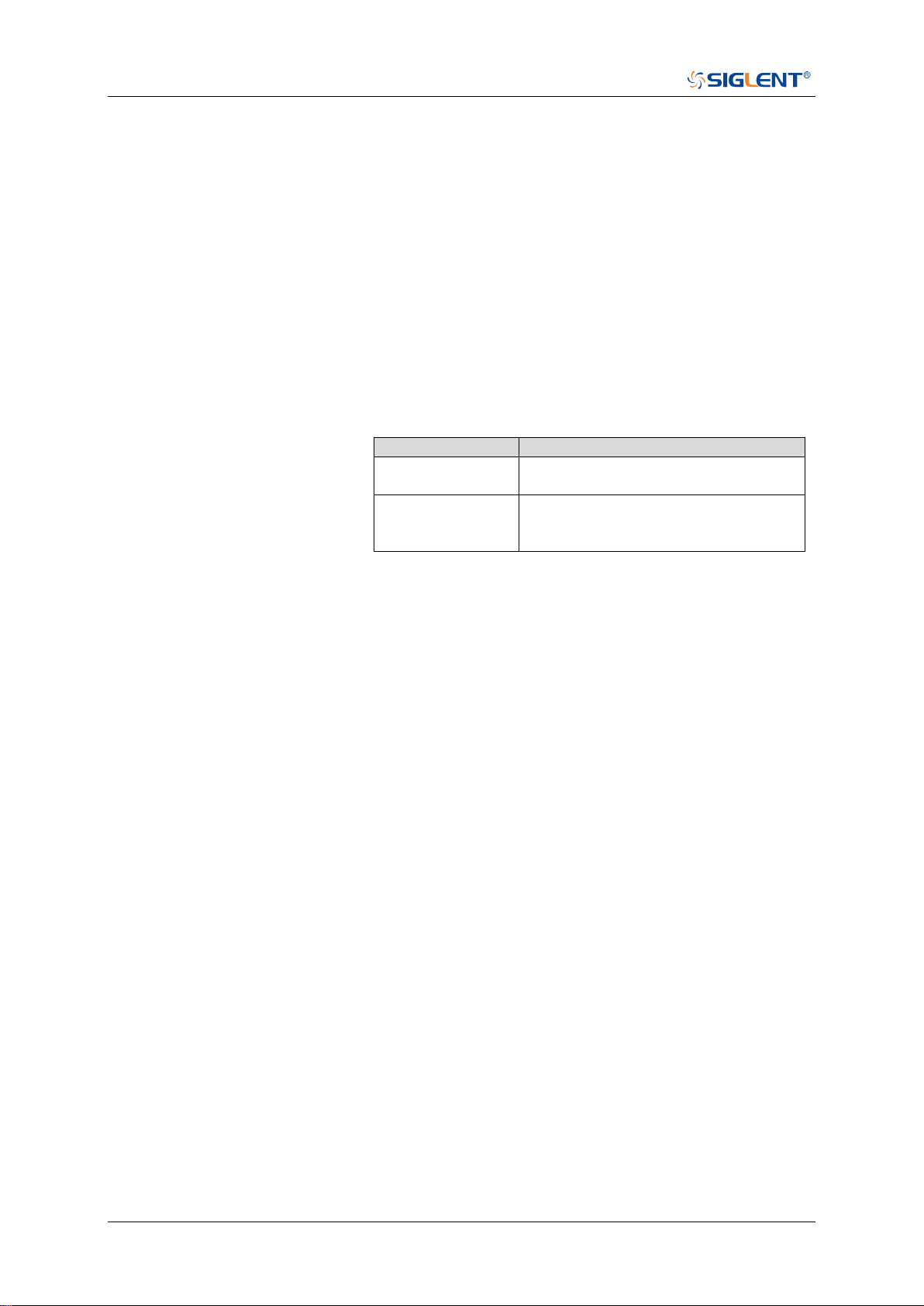
The range of the value varies by model, see the table below for
details.
Model
Value Range
SDS6000 Pro/
SDS6000A
[-4.5*vertical_scale-vertical_offset,
4.5*vertical_scale-vertical_offset]
SDS5000X
SDS2000X Plus
SDS2000X HD
[-4.1*vertical_scale-vertical_offset,
4.1*vertical_scale-vertical_offset]
QUERY SYNTAX
:DECode:BUS<n>:IIC:SCLThreshold?
RESPONSE FORMAT
<value>
<value>:= Value in NR3 format, including a decimal point and
exponent, like 1.23E+2.
EXAMPLE
The following command sets the threshold of the SCL to 1 V on
bus 1.
Command message:
:DECode:BUS1:IIC:SCLThreshold 1.00E+00
DEC:BUS1:IIC:SCLT 1.00E+00
Query message:
DEC:BUS1:IIC:SCLT?
Response message:
1.00E+00
RELATED COMMANDS
:DECode:BUS<n>:IIC:SCLSource

SDS Series Programming Guide
www.siglent.com 79 / 642
:DECode:BUS<n>:IIC:SDASource
Command/Query
DESCRIPTION
The command selects the SDA source of the IIC bus.
This query returns the current SDA source of the IIC bus.
COMMAND SYNTAX
:DECode:BUS<n>:IIC:SDASource <source>
<n>:= {1|2}, is attached as a suffix to BUS and defines the
bus that is affected by the command.
<source>:= {C<x>|D<m>}
<x>:= 1 to (# analog channels) in NR1 format, including an
integer and no decimal point, like 1.
<m>:= 0 to (# digital channels - 1) in NR1 format, including an
integer and no decimal point, like 1.
QUERY SYNTAX
:DECode:BUS<n>:IIC:SDASource?
RESPONSE FORMAT
<source>
<source>:= {C<x>|D<m>}
<x>:= 1 to (# analog channels) in NR1 format, including an
integer and no decimal point, like 1.
<m>:= 0 to (# digital channels - 1) in NR1 format, including an
integer and no decimal point, like 1.
EXAMPLE
The following command selects the SDA source of the IIC on
bus 1 as C1.
Command message:
:DECode:BUS1:IIC:SDASource C1
DEC:BUS1:IIC:SDAS C1
Query message:
DEC:BUS1:IIC:SDAS?
Response message:
C1
RELATED COMMANDS
:DECode:BUS<n>:IIC:SDAThreshold
:DECode:BUS<n>:IIC:SCLSource
SDS Series Programming Guide
80 / 642 www.siglent.com
:DECode:BUS<n>:IIC:SDAThreshold
Command/Query
DESCRIPTION
The command sets the threshold of the SDA on IIC bus.
This query returns the current threshold of the SDA on IIC bus.
COMMAND SYNTAX
:DECode:BUS<n>:IIC:SDAThreshold <value>
<n>:= {1|2}, is attached as a suffix to BUS and defines the bus
that is affected by the command.
<value>:= Value in NR3 format, including a decimal point and
exponent, like 1.23E+2.
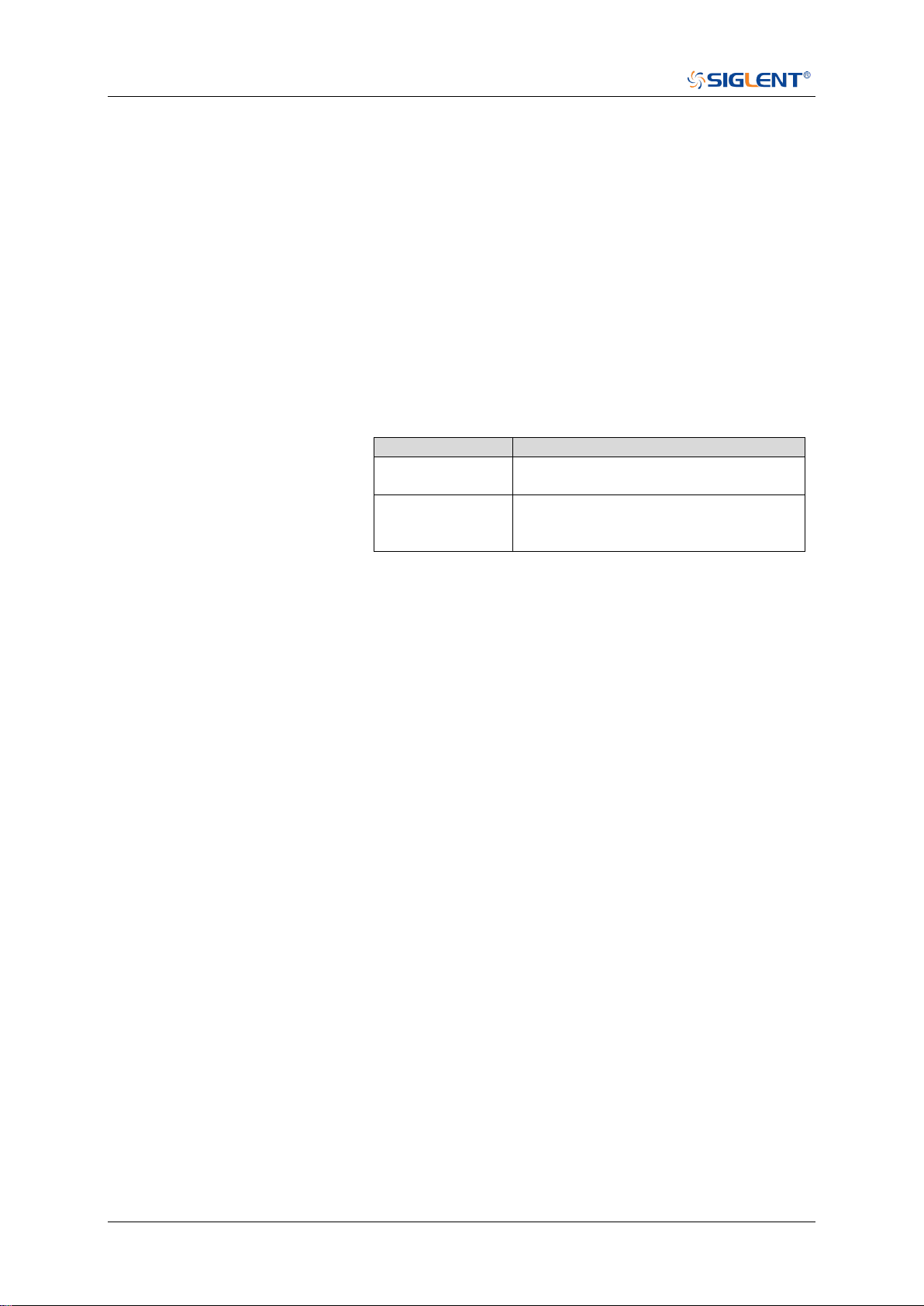
The range of the value varies by model, see the table below for
details.
Model
Value Range
SDS6000 Pro/
SDS6000A
[-4.5*vertical_scale-vertical_offset,
4.5*vertical_scale-vertical_offset]
SDS5000X
SDS2000X Plus
SDS2000X HD
[-4.1*vertical_scale-vertical_offset,
4.1*vertical_scale-vertical_offset]
QUERY SYNTAX
:DECode:BUS<n>:IIC:SDAThreshold?
RESPONSE FORMAT
<value>
<value>:= Value in NR3 format, including a decimal point and
exponent, like 1.23E+2.
EXAMPLE
The following command sets the threshold of the SDA to 1 V
on bus 1.
Command message:
:DECode:BUS1:IIC:SDAThreshold 1.00E+00
DEC:BUS1:IIC:SDAT 1.00E+00
Query message:
DEC:BUS1:IIC:SDAT?
Response message:
1.00E+00
RELATED COMMANDS
:DECode:BUS<n>:IIC:SDASource

SDS Series Programming Guide
www.siglent.com 81 / 642
:DECode:BUS<n>:SPI Commands
The :DECode:BUS<n>:SPI subsystem commands control the SPI decode settings of the specified
bus.
:DECode:BUS<n>:SPI:BITorder
:DECode:BUS<n>:SPI:CLKSource
:DECode:BUS<n>:SPI:CLKThreshold
:DECode:BUS<n>:SPI:CSSource
:DECode:BUS<n>:SPI:CSThreshold
:DECode:BUS<n>:SPI:CSTYpe
:DECode:BUS<n>:SPI:DLENgth
:DECode:BUS<n>:SPI:LATChedge
:DECode:BUS<n>:SPI:MISOSource
:DECode:BUS<n>:SPI:MISOThreshold
:DECode:BUS<n>:SPI:MOSISource
:DECode:BUS<n>:SPI:MOSIThreshold
:DECode:BUS<n>:SPI:NCSSource
:DECode:BUS<n>:SPI:NCSThreshold

SDS Series Programming Guide
82 / 642 www.siglent.com
:DECode:BUS<n>:SPI:BITorder
Command/Query
DESCRIPTION
The command sets the bit order of the SPI bus.
This query returns the current bit order of the SPI bus.
COMMAND SYNTAX
:DECode:BUS<n>:SPI:BITorder <order>
<n>:= {1|2}, is attached as a suffix to BUS and defines the
bus that is affected by the command.
<order>:= {LSB|MSB}.
QUERY SYNTAX
:DECode:BUS<n>:SPI:BITorder?
RESPONSE FORMAT
<order>
<order>:= {LSB|MSB}
EXAMPLE
The following command sets bit order of the SPI on BUS 1 to
LSB.
Command message:
:DECode:BUS1:SPI:BITorder LSB
DEC:BUS1:SPI:BIT LSB
Query message:
DEC:BUS1:SPI:BIT?
Response message:
LSB

SDS Series Programming Guide
www.siglent.com 83 / 642
:DECode:BUS<n>:SPI:CLKSource
Command/Query
DESCRIPTION
The command selects the CLK source of the SPI bus.
This query returns the current CLK source of the SPI bus.
COMMAND SYNTAX
:DECode:BUS<n>:SPI:CLKSource <source>
<n>:= {1|2}, is attached as a suffix to BUS and defines the
bus that is affected by the command.
<source>:= {C<x>|D<m>}.
<x>:= 1 to (# analog channels) in NR1 format, including an
integer and no decimal point, like 1.
<m>:= 0 to (# digital channels - 1) in NR1 format, including an
integer and no decimal point, like 1.
QUERY SYNTAX
:DECode:BUS<n>:SPI:CLKSource?
RESPONSE FORMAT
<source>
<source>:= {C<x>|D<m>}
<x>:= 1 to (# analog channels) in NR1 format, including an
integer and no decimal point, like 1.
<m>:= 0 to (# digital channels - 1) in NR1 format, including an
integer and no decimal point, like 1.
EXAMPLE
The following command selects the CLK source of the SPI on
bus 1 as C1.
Command message:
:DECode:BUS1:SPI:CLKSource C1
DEC:BUS1:SPI:CLKS C1
Query message:
DEC:BUS1:SPI:CLKS?
Response message:
C1
RELATED COMMANDS
:DECode:BUS<n>:SPI:CLKThreshold
SDS Series Programming Guide
84 / 642 www.siglent.com
:DECode:BUS<n>:SPI:CLKThreshold
Command/Query
DESCRIPTION
The command sets the threshold of the CLK on SPI bus.
This query returns the current threshold of the CLK on SPI
bus.
COMMAND SYNTAX
:DECode:BUS<n>:SPI:CLKThreshold <value>
<n>:= {1|2}, is attached as a suffix to BUS and defines the
bus that is affected by the command.
<value>:= Value in NR3 format, including a decimal point and
exponent, like 1.23E+2.
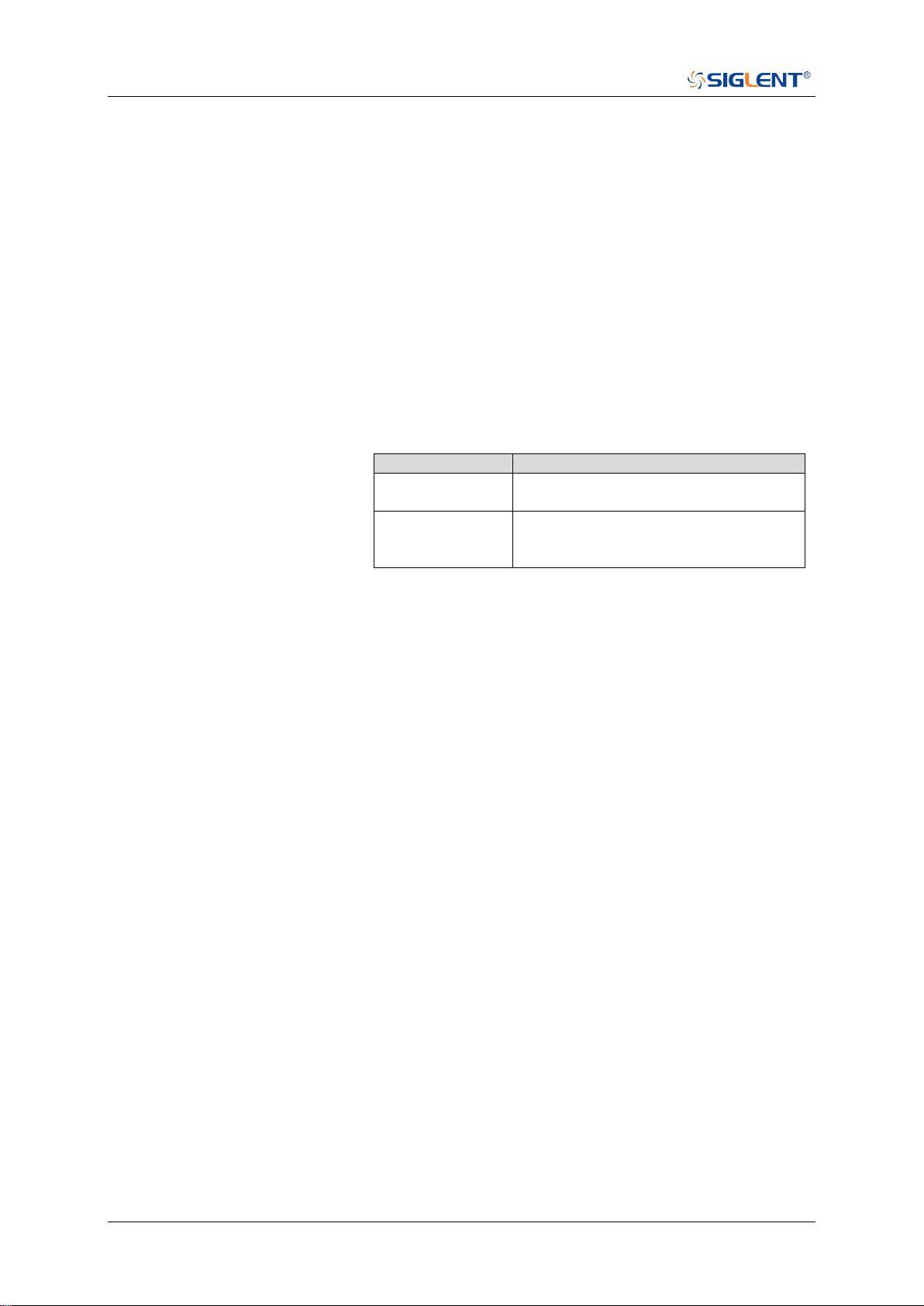
The range of the value varies by model, see the table below
for details.
Model
Value Range
SDS6000 Pro/
SDS6000A
[-4.5*vertical_scale-vertical_offset,
4.5*vertical_scale-vertical_offset]
SDS5000X
SDS2000X Plus
SDS2000X HD
[-4.1*vertical_scale-vertical_offset,
4.1*vertical_scale-vertical_offset]
QUERY SYNTAX
:DECode:BUS<n>:IIC:CLKThreshold?
RESPONSE FORMAT
<value>
<value>:= Value in NR3 format, including a decimal point and
exponent, like 1.23E+2.
EXAMPLE
The following command sets the threshold of the CLK to 1 V
on bus 1.
Command message:
:DECode:BUS1:SPI:CLKThreshold 1.00E+00
DEC:BUS1:SPI:CLKT 1.00E+00
Query message:
DEC:BUS1:SPI:CLKT?
Response message:
1.00E+00
RELATED COMMANDS
:DECode:BUS<n>:SPI:CLKSource

SDS Series Programming Guide
www.siglent.com 85 / 642
:DECode:BUS<n>:SPI:CSSource
Command/Query
DESCRIPTION
The command sets the CS source of the SPI bus.
This query returns the current CS source of the SPI bus.
COMMAND SYNTAX
:DECode:BUS<n>:SPI:CSSource <source>
<n>:= {1|2}, is attached as a suffix to BUS and defines the
bus that is affected by the command.
<source>:= {C<x>|D<m>}.
<x>:= 1 to (# analog channels) in NR1 format, including an
integer and no decimal point, like 1.
<m>:= 0 to (# digital channels - 1) in NR1 format, including an
integer and no decimal point, like 1.
QUERY SYNTAX
:DECode:BUS<n>:SPI:CSSource?
RESPONSE FORMAT
<source>
<source>:= {C<x>|D<m>}
<x>:= 1 to (# analog channels) in NR1 format, including an
integer and no decimal point, like 1.
<m>:= 0 to (# digital channels - 1) in NR1 format, including an
integer and no decimal point, like 1.
EXAMPLE
The following command sets the CS source of the SPI on bus
1 as C1.
Command message:
:DECode:BUS1:SPI:CSSource C1
DEC:BUS1:SPI:CSS C1
Query message:
DEC:BUS1:SPI:CSS?
Response message:
C1
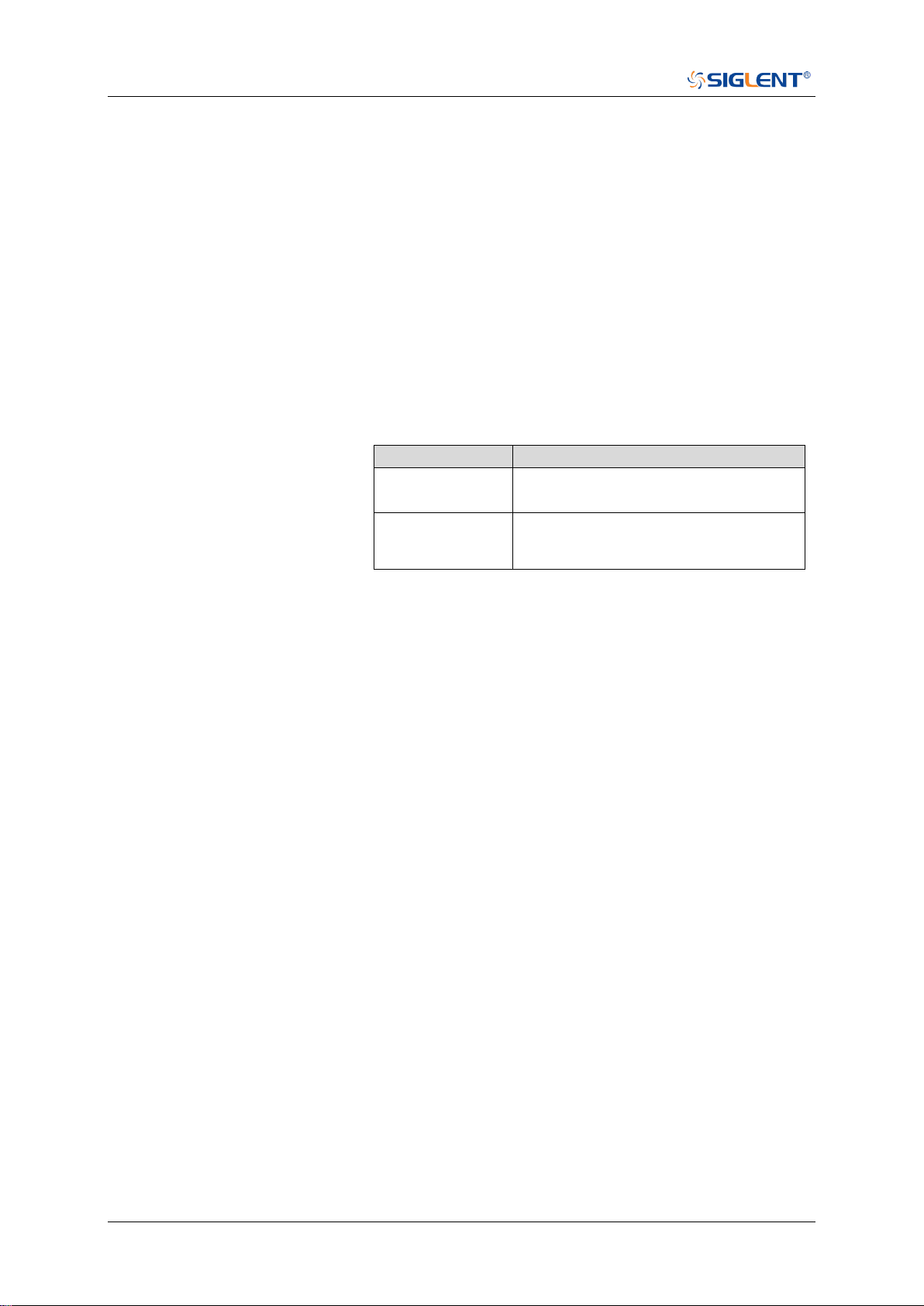
SDS Series Programming Guide
86 / 642 www.siglent.com
:DECode:BUS<n>:SPI:CSThreshold
Command/Query
DESCRIPTION
The command sets the threshold of the CS on SPI bus.
This query returns the current threshold of the CS on SPI bus.
COMMAND SYNTAX
:DECode:BUS<n>:SPI:CSThreshold <value>
<n>:= {1|2}, is attached as a suffix to BUS and defines the bus
that is affected by the command.
<value>:= Value in NR3 format, including a decimal point and
exponent, like 1.23E+2.
The range of the value varies by model, see the table below for
details.
Model
Value Range
SDS6000 Pro/
SDS6000A
[-4.5*vertical_scale-vertical_offset,
4.5*vertical_scale-vertical_offset]
SDS5000X
SDS2000X Plus
SDS2000X HD
[-4.1*vertical_scale-vertical_offset,
4.1*vertical_scale-vertical_offset]
QUERY SYNTAX
:DECode:BUS<n>:SPI:CSThreshold?
RESPONSE FORMAT
<value>
<value>:= Value in NR3 format, including a decimal point and
exponent, like 1.23E+2.
EXAMPLE
The following command sets the threshold of the CS to 1 V on
bus 1.
Command message:
:DECode:BUS1:SPI:CSThreshold 1.00E+00
DEC:BUS1:SPI:CST 1.00E+00
Query message:
DEC:BUS1:SPI:CST?
Response message:
1.00E+00
RELATED COMMANDS
:DECode:BUS<n>:SPI:CLKSource

SDS Series Programming Guide
www.siglent.com 87 / 642
:DECode:BUS<n>:SPI:CSTYpe
Command/Query
DESCRIPTION
The command sets the chip selection type of the SPI bus.
This query returns the current chip selection type of the SPI
bus.
COMMAND SYNTAX
:DECode:BUS<n>:SPI:CSTYpe <type>
<n>:= {1|2}, is attached as a suffix to BUS and defines the
bus that is affected by the command.
<type>:= {NCS|CS|TIMeout[,<time>]}
CS means set to chip select state.
NCS means set to non-chip select state.
TIMeout indicates set to clock timeout status.
<time>:= Value in NR3 format, including a decimal point and
exponent, like 1.23E+2. The range of the value is [1.00E-07,
5.00E-03].
QUERY SYNTAX
:DECode:BUS<n>:SPI:CSTYpe?
RESPONSE FORMAT
<type>
<type>:= {NCS|CS|TIMeout[,<time>]}
<time>:= Value in NR3 format, including a decimal point and
exponent, like 1.23E+2.
EXAMPLE
The following command sets the chip selection type of the
SPI on bus 1 to CS.
Command message:
:DECode:BUS1:SPI:CSTYpe CS
DEC:BUS1:SPI:CSTY CS
Query message:
DEC:BUS1:SPI:CSTY?
Response message:
CS

SDS Series Programming Guide
88 / 642 www.siglent.com
:DECode:BUS<n>:SPI:DLENgth
Command/Query
DESCRIPTION
The command sets the data length of the SPI bus.
This query returns the current data length of the SPI bus.
COMMAND SYNTAX
:DECode:BUS<n>:SPI:DLENgth <value>
<n>:= {1|2}, is attached as a suffix to BUS and defines the bus
that is affected by the command
<value>:= Value in NR1 format, including an integer and no
decimal point, like 1. The range of the value is [4, 32].
QUERY SYNTAX
:DECode:BUS<n>:SPI:DLENgth?
RESPONSE FORMAT
<value>
<value>:= Value in NR1 format, including an integer and no
decimal point, like 1.
EXAMPLE
The following command sets the data length of the SPI on bus
1 to 5.
Command message:
:DECode:BUS1:SPI:DLENgth 5
DEC:BUS1:SPI:DLEN 5
Query message:
DEC:BUS1:SPI:DLEN?
Response message:
5

SDS Series Programming Guide
www.siglent.com 89 / 642
:DECode:BUS<n>:SPI:LATChedge
Command/Query
DESCRIPTION
The command selects the sampling edge of CLK on SPI bus.
This query returns the sampling edge of CLK on SPI bus.
COMMAND SYNTAX
:DECode:BUS<n>:SPI:LATChedge <slope>
<n>:= {1|2}, is attached as a suffix to BUS and defines the bus
that is affected by the command.
<slope>:= {RISing|FALLing}
QUERY SYNTAX
:DECode:BUS<n>:SPI:LATChedge?
RESPONSE FORMAT
<slope>
<slope>:= {RISing|FALLing}
EXAMPLE
The following command sets the threshold judgment condition
of CLK on bus 1 to RISing.
Command message:
:DECode:BUS1:SPI:LATChege RISing
DEC:BUS1:SPI:LATC RIS
Query message:
DEC:BUS1:SPI:LATC?
Response message:
RISing

SDS Series Programming Guide
90 / 642 www.siglent.com
:DECode:BUS<n>:SPI:MISOSource
Command/Query
DESCRIPTION
The command selects the MISO source of the SPI bus.
This query returns the current MISO source of the SPI bus.
COMMAND SYNTAX
:DECode:BUS<n>:SPI:MISOSource <source>
<n>:= {1|2}, is attached as a suffix to BUS and defines the
bus that is affected by the command.
<source>:= {C<x>|D<m>|DIS}
<x>:= 1 to (# analog channels) in NR1 format, including an
integer and no decimal point, like 1. For example, C1 selects
analog channel 1.
<m>:= 0 to (# digital channels - 1) in NR1 format, including an
integer and no decimal point, like 1. For example, D1 selects
digital channel 1.
DIS means no source selected.
QUERY SYNTAX
:DECode:BUS<n>:SPI:MISOSource?
RESPONSE FORMAT
<source>
<source>:= {C<x>|D<m>|DIS}
<x>:= 1 to (# analog channels) in NR1 format, including an
integer and no decimal point, like 1.
<m>:= 0 to (# digital channels - 1) in NR1 format, including an
integer and no decimal point, like 1.
EXAMPLE
The following command sets the MISO source of the SPI on
bus 1 as C1.
Command message:
:DECode:BUS1:SPI:MISOSource C1
DEC:BUS1:SPI:MISOS C1
Query message:
DEC:BUS1:SPI:MISOS?
Response message:
C1
RELATED COMMANDS
:DECode:BUS<n>:SPI:MISOThreshold
SDS Series Programming Guide
www.siglent.com 91 / 642
:DECode:BUS<n>:SPI:MISOThreshold
Command/Query
DESCRIPTION
The command sets the threshold of the MISO on SPI bus.
This query returns the current threshold of the MISO.
COMMAND SYNTAX
:DECode:BUS<n>:SPI:MISOThreshold <value>
<n>:= {1|2}, is attached as a suffix to BUS and defines the
bus that is affected by the command.
<value>:= Value in NR3 format, including a decimal point and
exponent, like 1.23E+2.
The range of the value varies by model, see the table below
for details.
Model
Value Range
SDS6000 Pro/
SDS6000A
[-4.5*vertical_scale-vertical_offset,
4.5*vertical_scale-vertical_offset]
SDS5000X
SDS2000X Plus
SDS2000X HD
[-4.1*vertical_scale-vertical_offset,
4.1*vertical_scale-vertical_offset]
QUERY SYNTAX
:DECode:BUS<n>:SPI:MISOThreshold?
RESPONSE FORMAT
<value>
<value>:= Value in NR3 format, including a decimal point and
exponent, like 1.23E+2.
EXAMPLE
The following command sets the threshold of the MISO to 1 V
on bus 1.
Command message:
:DECode:BUS1:SPI:MISOThreshold 1.00E+00
DEC:BUS1:SPI:MISOT 1.00E+00
Query message:
DEC:BUS1:SPI:MISOT?
Response message:
1.00E+00
RELATED COMMANDS
:DECode:BUS<n>:SPI:MISOSource

SDS Series Programming Guide
92 / 642 www.siglent.com
:DECode:BUS<n>:SPI:MOSISource
Command/Query
DESCRIPTION
The command selects the MOSI source of the SPI bus.
This query returns the current MOSI source of the SPI bus.
COMMAND SYNTAX
:DECode:BUS<n>:SPI:MOSISource <source>
<n>:= {1|2}, is attached as a suffix to BUS and defines the
bus that is affected by the command.
<source>:= {C<x>|D<m>|DIS}
<x>:= 1 to (# analog channels) in NR1 format, including an
integer and no decimal point, like 1.
<m>:= 0 to (# digital channels - 1) in NR1 format, including an
integer and no decimal point, like 1.
DIS means no source selected
QUERY SYNTAX
:DECode:BUS<n>:SPI:MOSISource?
RESPONSE FORMAT
<source>
<source>:= {C<x>|D<m>|DIS}
<x>:= 1 to (# analog channels) in NR1 format, including an
integer and no decimal point, like 1.
<m>:= 0 to (# digital channels - 1) in NR1 format, including an
integer and no decimal point, like 1.
EXAMPLE
The following command selects the MOSI source of the SPI
on bus 1 as C1.
Command message:
:DECode:BUS1:SPI:MOSISource C1
DEC:BUS1:SPI:MOSIS C1
Query message:
DEC:BUS1:SPI:MOSIS?
Response message:
C1
RELATED COMMANDS
:DECode:BUS<n>:SPI:MOSIThreshold
SDS Series Programming Guide
www.siglent.com 93 / 642
:DECode:BUS<n>:SPI:MOSIThreshold
Command/Query
DESCRIPTION
The command sets the threshold of the MOSI.
This query returns the current threshold of the MOSI.
COMMAND SYNTAX
:DECode:BUS<n>:SPI:MOSIThreshold <value>
<n>:= {1|2}, is attached as a suffix to BUS and defines the
bus that is affected by the command.
<value>:= Value in NR3 format, including a decimal point and
exponent, like 1.23E+2.
The range of the value varies by model, see the table below
for details.
Model
Value Range
SDS6000 Pro/
SDS6000A
[-4.5*vertical_scale-vertical_offset,
4.5*vertical_scale-vertical_offset]
SDS5000X
SDS2000X Plus
SDS2000X HD
[-4.1*vertical_scale-vertical_offset,
4.1*vertical_scale-vertical_offset]
QUERY SYNTAX
:DECode:BUS<n>:SPI:MOSIThreshold?
RESPONSE FORMAT
<value>
<value>:= Value in NR3 format, including a decimal point and
exponent, like 1.23E+2.
EXAMPLE
The following command sets the threshold of the MOSI to 1 V
on bus 1.
Command message:
:DECode:BUS1:SPI:MOSIThreshold 1.00E+00
DEC:BUS1:SPI:MOSIT 1.00E+00
Query message:
DEC:BUS1:SPI:MOSIT?
Response message:
1.00E+00
RELATED COMMANDS
:DECode:BUS<n>:SPI:MOSISource

SDS Series Programming Guide
94 / 642 www.siglent.com
:DECode:BUS<n>:SPI:NCSSource
Command/Query
DESCRIPTION
The command sets the NCS source of the SPI bus.
This query returns the current NCS source of the SPI bus.
COMMAND SYNTAX
:DECode:BUS<n>:SPI:NCSSource <source>
<n>:= {1|2}, is attached as a suffix to BUS and defines the
bus that is affected by the command.
<source>:= {C<x>|D<m>}
<x>:= 1 to (# analog channels) in NR1 format, including an
integer and no decimal point, like 1.
<m>:= 0 to (# digital channels - 1) in NR1 format, including an
integer and no decimal point, like 1.
QUERY SYNTAX
:DECode:BUS<n>:SPI:NCSSource?
RESPONSE FORMAT
<source>
<source>:= {C<x>|D<m>}
<x>:= 1 to (# analog channels) in NR1 format, including an
integer and no decimal point, like 1.
<m>:= 0 to (# digital channels - 1) in NR1 format, including an
integer and no decimal point, like 1.
EXAMPLE
The following command sets the NCS source of the SPI on
bus 1 as C1.
Command message:
:DECode:BUS1:SPI:NCSSource C1
DEC:BUS1:SPI:NCSS C1
Query message:
DEC:BUS1:SPI:NCSS?
Response message:
C1
RELATED COMMANDS
:DECode:BUS<n>:SPI:NCSThreshold
SDS Series Programming Guide
www.siglent.com 95 / 642
:DECode:BUS<n>:SPI:NCSThreshold
Command/Query
DESCRIPTION
The command sets the threshold of the NCS on SPI bus.
This query returns the current threshold of the NCS on SPI
bus.
COMMAND SYNTAX
:DECode:BUS<n>:SPI:NCSThreshold <value>
<n>:= {1|2}, is attached as a suffix to BUS and defines the
bus that is affected by the command.
<value>:= Value in NR3 format, including a decimal point and
exponent, like 1.23E+2.
The range of the value varies by model, see the table below
for details.
Model
Value Range
SDS6000 Pro/
SDS6000A
[-4.5*vertical_scale-vertical_offset,
4.5*vertical_scale-vertical_offset]
SDS5000X
SDS2000X Plus
SDS2000X HD
[-4.1*vertical_scale-vertical_offset,
4.1*vertical_scale-vertical_offset]
QUERY SYNTAX
:DECode:BUS<n>:SPI:NCSThreshold?
RESPONSE FORMAT
<value>
<value>:= Value in NR3 format, including a decimal point and
exponent, like 1.23E+2.
EXAMPLE
The following command sets the threshold of the NCS on bus
1 to 1 V.
Command message:
:DECode:BUS1:SPI:NCSThreshold 1.00E+00
DEC:BUS1:SPI:NCST 1.00E+00
Query message:
DEC:BUS1:SPI:NCST?
Response message:
1.00E+00
RELATED COMMANDS
:DECode:BUS<n>:SPI:NCSSource

SDS Series Programming Guide
96 / 642 www.siglent.com
:DECode:BUS<n>:UART Commands
The :DECode:BUS<n>:UART subsystem commands control the UART decode settings of the
specified bus.
:DECode:BUS<n>:UART:BAUD
:DECode:BUS<n>:UART:BITorder
:DECode:BUS<n>:UART:DLENgth
:DECode:BUS<n>:UART:IDLE
:DECode:BUS<n>:UART:PARity
:DECode:BUS<n>:UART:RXSource
:DECode:BUS<n>:UART:RXThreshold
:DECode:BUS<n>:UART:STOP
:DECode:BUS<n>:UART:TXSource
:DECode:BUS<n>:UART:TXThreshold

SDS Series Programming Guide
www.siglent.com 97 / 642
:DECode:BUS<n>:UART:BAUD
Command/Query
DESCRIPTION
The command sets the baud rate of the UART bus.
This query returns the current baud rate of the UART bus.
COMMAND SYNTAX
:DECode:BUS<n>:UART:BAUD <baud>
<n>:= {1|2}, is attached as a suffix to BUS and defines the
bus that is affected by the command.
<baud>:=
{600bps|1200bps|2400bps|4800bps|9600bps|19200bps|384
00bps|57600bps|115200bps|CUSTom[,<value>]}
<value>:= Value in NR1 format, including an integer and no
decimal point, like 1. The range of the value is [300, 20000000].
QUERY SYNTAX
:DECode:BUS<n>:UART:BAUD?
RESPONSE FORMAT
<baud>
<baud>:=
{600bps|1200bps|2400bps|4800bps|9600bps|19200bps|384
00bps|57600bps|115200bps|CUSTom[,<value>]}
<value>:= Value in NR1 format, including an integer and no
decimal point, like 1.
EXAMPLE
The following command sets the baud rate of the UART to
9600bps on bus 1.
Command message:
:DECode:BUS1:UART:BAUD 9600bps
DEC:BUS1:UART:BAUD 9600bps
Query message:
DEC:BUS1:UART:BAUD?
Response message:
9600bps

SDS Series Programming Guide
98 / 642 www.siglent.com
:DECode:BUS<n>:UART:BITorder
Command/Query
DESCRIPTION
The command sets the bit order of the UART bus.
This query returns the current bit order of the UART bus.
COMMAND SYNTAX
:DECode:BUS<n>:UART:BITorder <order>
<n>= {1|2}, is attached as a suffix to BUS and defines the bus
that is affected by the command.
<order>:= {LSB|MSB}
QUERY SYNTAX
:DECode:BUS<n>:UART:BITorder?
RESPONSE FORMAT
<order>
<order>:= {LSB|MSB}
LSB is Least Significant Bit order
MSB is Most Significant Bit order
EXAMPLE
The following command sets bit order of the UART bus on
bus 1 to LSB.
Command message:
:DECode:BUS1:UART:BITorder LSB
DEC:BUS1:UART:BIT LSB
Query message:
DEC:BUS1:UART:BIT?
Response message:
LSB

SDS Series Programming Guide
www.siglent.com 99 / 642
:DECode:BUS<n>:UART:DLENgth
Command/Query
DESCRIPTION
The command sets the data length of the UART bus.
This query returns the current data length of the UART bus.
COMMAND SYNTAX
:DECode:BUS<n>:UART:DLENgth <value>
<n>:= {1|2}, is attached as a suffix to BUS and defines the bus
that is affected by the command.
<value>:= Value in NR1 format, including an integer and no
decimal point, like 1. The range of value is [5, 8].
QUERY SYNTAX
:DECode:BUS<n>:UART:DLENgth?
RESPONSE FORMAT
<value>
<value>:= Value in NR1 format, including an integer and no
decimal point, like 1.
EXAMPLE
The following command sets the data length of the UART to 5
on bus 1.
Command message:
:DECode:BUS1:UART:DLENgth 5
DEC:BUS1:UART:DLEN 5
Query message:
DEC:BUS1:UART:DLEN?
Response message:
5

SDS Series Programming Guide
100 / 642 www.siglent.com
:DECode:BUS<n>:UART:IDLE
Command/Query
DESCRIPTION
The command sets the idle level of the UART bus.
This query returns the current idle level of the UART bus.
COMMAND SYNTAX
:DECode:BUS<n>:UART:IDLE <idle>
<n>:= {1|2}, is attached as a suffix to BUS and defines the
bus that is affected by the command.
<idle>:= {LOW|HIGH}
QUERY SYNTAX
:DECode:BUS<n>:UART:IDLE?
RESPONSE FORMAT
<idle>
<idle>:= {LOW|HIGH}
LOW means that the idle voltage value is low
HIGH means that the idle voltage value is high
EXAMPLE
The following command sets the idle level of the UART on
bus 1 to low.
Command message:
:DECode:BUS1:UART:IDLE LOW
DEC:BUS1:UART:IDLE LOW
Query message:
DEC:BUS1:UART:IDLE?
Response message:
LOW

SDS Series Programming Guide
www.siglent.com 101 / 642
:DECode:BUS<n>:UART:PARity
Command/Query
DESCRIPTION
The command sets the parity check of the UART bus.
This query returns the current parity check of the UART bus.
COMMAND SYNTAX
:DECode:BUS<n>:UART:PARity <parity>
<n>:= {1|2}, is attached as a suffix to BUS and defines the
bus that is affected by the command.
<parity>:= {NONE|ODD|EVEN|MARK|SPACe}
QUERY SYNTAX
:DECode:BUS<n>:UART:PARity?
RESPONSE FORMAT
<parity>
<parity>:= {NONE|ODD|EVEN|MARK|SPACe}
EXAMPLE
The following command sets the parity check of the UART on
bus 1 to NONE.
Command message:
:DECode:BUS1:UART:PARity NONE
DEC:BUS1:UART:PAR NONE
Query message:
DEC:BUS1:UART:PAR?
Response message:
NONE

SDS Series Programming Guide
102 / 642 www.siglent.com
:DECode:BUS<n>:UART:RXSource
Command/Query
DESCRIPTION
The command sets the RX source of the UART bus.
This query returns the current RX source of the UART bus.
COMMAND SYNTAX
:DECode:BUS<n>:UART:RXSource <source>
<n>:= {1|2}, is attached as a suffix to BUS and defines the
bus that is affected by the command.
<source>:= {C<x>|D<m>|DIS}
<x>:= 1 to (# analog channels) in NR1 format, including an
integer and no decimal point, like 1.
<m>:= 0 to (# digital channels - 1) in NR1 format, including an
integer and no decimal point, like 1.
DIS means no source selected
QUERY SYNTAX
:DECode:BUS<n>:UART:RXSource?
RESPONSE FORMAT
<source>
<source>:= {C<x>|D<m>|DIS}
<x>:= 1 to (# analog channels) in NR1 format, including an
integer and no decimal point, like 1.
<m>:= 0 to (# digital channels - 1) in NR1 format, including an
integer and no decimal point, like 1.
EXAMPLE
The following command sets the RX source of the UART on
bus 1 as C1.
Command message:
:DECode:BUS1:UART:RXSource C1
DEC:BUS1:UART:RXS C1
Query message:
DEC:BUS1:UART:RXS?
Response message:
C1
SDS Series Programming Guide
www.siglent.com 103 / 642
:DECode:BUS<n>:UART:RXThreshold
Command/Query
DESCRIPTION
The command sets the threshold of RX on UART bus.
This query returns the current threshold of RX on UART bus.
COMMAND SYNTAX
:DECode:BUS<n>:UART:RXThreshold <value>
<n>:= {1|2}, is attached as a suffix to BUS and defines the
bus that is affected by the command.
<value>:= Value in NR3 format, including a decimal point and
exponent, like 1.23E+2.
The range of the value varies by model, see the table below
for details.
Model
Value Range
SDS6000 Pro/
SDS6000A
[-4.5*vertical_scale-vertical_offset,
4.5*vertical_scale-vertical_offset]
SDS5000X
SDS2000X Plus
SDS2000X HD
[-4.1*vertical_scale-vertical_offset,
4.1*vertical_scale-vertical_offset]
QUERY SYNTAX
:DECode:BUS<n>:UART:RXThreshold?
RESPONSE FORMAT
<value>
<value>:= Value in NR3 format, including a decimal point and
exponent, like 1.23E+2.
EXAMPLE
The following command sets the threshold of the RX to 1 V
on bus 1.
Command message:
:DECode:BUS1:UART:RXThreshold 1.00E+00
DEC:BUS1:UART:RXT 1.00E+00
Query message:
DEC:BUS1:UART:RXT?
Response message:
1.00E+00
RELATED COMMANDS
:DECode:BUS<n>:UART:RXSource

SDS Series Programming Guide
104 / 642 www.siglent.com
:DECode:BUS<n>:UART:STOP
Command/Query
DESCRIPTION
The command sets the length of the stop bit on UART bus.
This query returns the current length of the stop bit on UART
bus.
COMMAND SYNTAX
:DECode:BUS<n>:UART:STOP <bit>
<n>:= {1|2}, is attached as a suffix to BUS and defines the
bus that is affected by the command.
<bit>:= {1|1.5|2}
QUERY SYNTAX
:DECode:BUS<n>:UART:STOP?
RESPONSE FORMAT
<bit>
<bit>:= {1|1.5|2}
EXAMPLE
The following command sets the current length of the stop bit
to 1 on bus 1.
Command message:
:DECode:BUS1:UART:STOP 1
DEC:BUS1:UART:STOP 1
Query message:
DEC:BUS1:UART:STOP?
Response message:
1

SDS Series Programming Guide
www.siglent.com 105 / 642
:DECode:BUS<n>:UART:TXSource
Command/Query
DESCRIPTION
The command sets the TX source of the UART bus.
This query returns the current TX source of the UART bus.
COMMAND SYNTAX
:DECode:BUS<n>:UART:TXSource <source>
<n>:= {1|2}, is attached as a suffix to BUS and defines the bus
that is affected by the command.
<source>:= {C<x>|D<m>|DIS}
<x>:= 1 to (# analog channels) in NR1 format, including an
integer and no decimal point, like 1.
<m>:= 0 to (# digital channels - 1) in NR1 format, including an
integer and no decimal point, like 1.
DIS means no source selected
QUERY SYNTAX
:DECode:BUS<n>:UART:TXSource?
RESPONSE FORMAT
<source>
<source>:= {C<x>|D<m>|DIS}
<x>:= 1 to (# analog channels) in NR1 format, including an
integer and no decimal point, like 1.
<m>:= 0 to (# digital channels - 1) in NR1 format, including an
integer and no decimal point, like 1.
EXAMPLE
The following command sets the TX source of the UART on
bus 1 as C1.
Command message:
:DECode:BUS1:UART:TXSource C1
DEC:BUS1:UART:TXS C1
Query message:
DEC:BUS1:UART:TXS?
Response message:
C1
RELATED COMMANDS
:DECode:BUS<n>:UART:TXThreshold
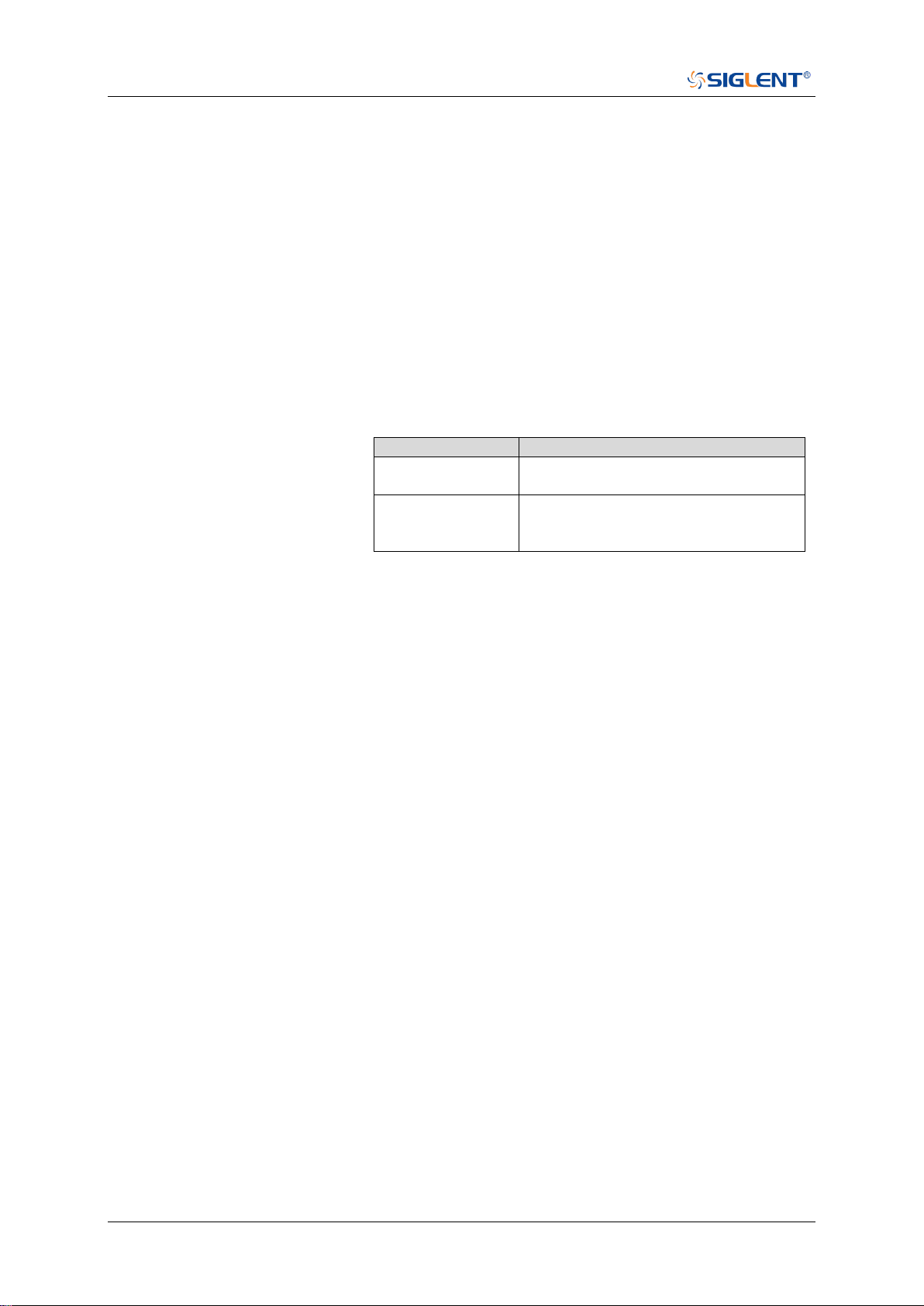
SDS Series Programming Guide
106 / 642 www.siglent.com
:DECode:BUS<n>:UART:TXThreshold
Command/Query
DESCRIPTION
The command sets the threshold of TX on UART bus.
This query returns the current threshold of TX on UART bus.
COMMAND SYNTAX
:DECode:BUS<n>:UART:TXThreshold <value>
<n>:= {1|2}, is attached as a suffix to BUS and defines the
bus that is affected by the command.
<value>:= Value in NR3 format, including a decimal point and
exponent, like 1.23E+2.
The range of the value varies by model, see the table below
for details.
Model
Value Range
SDS6000
Pro/SDS6000A
[-4.5*vertical_scale-vertical_offset,
4.5*vertical_scale-vertical_offset]
SDS5000X
SDS2000X Plus
SDS2000X HD
[-4.1*vertical_scale-vertical_offset,
4.1*vertical_scale-vertical_offset]
QUERY SYNTAX
:DECode:BUS<n>:UART:TXThreshold?
RESPONSE FORMAT
<value>
<value>:= Value in NR3 format, including a decimal point and
exponent, like 1.23E+2.
EXAMPLE
The following command sets the threshold of the TX to 1 V
on bus 1.
Command message:
:DECode:BUS1:UART:TXThreshold 1.00E+00
DEC:BUS1:UART:TXT 1.00E+00
Query message:
DEC:BUS1:UART:TXT?
Response message:
1.00E+00
RELATED COMMANDS
:DECode:BUS<n>:UART:TXSource


SDS Series Programming Guide
108 / 642 www.siglent.com
:DECode:BUS<n>:CAN:BAUD
Command/Query
DESCRIPTION
The command sets the baud rate of the CAN bus.
This query returns the current baud rate of the CAN bus.
COMMAND SYNTAX
:DECode:BUS<n>:CAN:BAUD <baud>
<n>:= {1|2}, is attached as a suffix to BUS and defines the
bus that is affected by the command.
<baud>:=
{5kbps|10kbps|20kbps|50kbps|100kbps|125kbps|250kbps|50
0kbps|800kbps|1Mbps|CUSTom[,<value>]}
<value>:= Value in NR1 format, including an integer and no
decimal point, like 1. The range of the value is [5000,
1000000].
QUERY SYNTAX
:DECode:BUS<n>:CAN:BAUD?
RESPONSE FORMAT
<baud>
<baud>:=
{5kbps|10kbps|20kbps|50kbps|100kbps|125kbps|250kbps|50
0kbps|800kbps|1Mbps|CUSTom[,<value>]}
<value>:= Value in NR1 format, including an integer and no
decimal point, like 1.
EXAMPLE
The following command sets the baud rate of the CAN on bus
1 to 10kbps.
Command message:
:DECode:BUS1:CAN:BAUD 10kbps
DEC:BUS1:CAN:BAUD 10kbps
Query message:
DEC:BUS1:CAN:BAUD?
Response message:
10kbps

SDS Series Programming Guide
www.siglent.com 109 / 642
:DECode:BUS<n>:CAN:SOURce
Command/Query
DESCRIPTION
The command selects the source of the CAN bus.
This query returns the current source of the CAN bus.
COMMAND SYNTAX
:DECode:BUS<n>:CAN:SOURce <source>
<n>:= {1|2}, is attached as a suffix to BUS and defines the
bus that is affected by the command.
<source>:= {C<x>|D<m>}
<x>:= 1 to (# analog channels) in NR1 format, including an
integer and no decimal point, like 1.
<m>:= 0 to (# digital channels - 1) in NR1 format, including an
integer and no decimal point, like 1.
QUERY SYNTAX
:DECode:BUS<n>:CAN:SOURce?
RESPONSE FORMAT
<source>
<source>:= {C<x>|D<m>}
<x>:= 1 to (# analog channels) in NR1 format, including an
integer and no decimal point, like 1.
<m>:= 0 to (# digital channels - 1) in NR1 format, including an
integer and no decimal point, like 1.
EXAMPLE
The following command selects the source of the CAN on
bus 1 as C1.
Command message:
:DECode:BUS1:CAN:SOURce C1
DEC:BUS1:CAN:SOUR C1
Query message:
DEC:BUS1:CAN:SOUR?
Response message:
C1
RELATED COMMANDS
:DECode:BUS<n>:CAN:THReshold
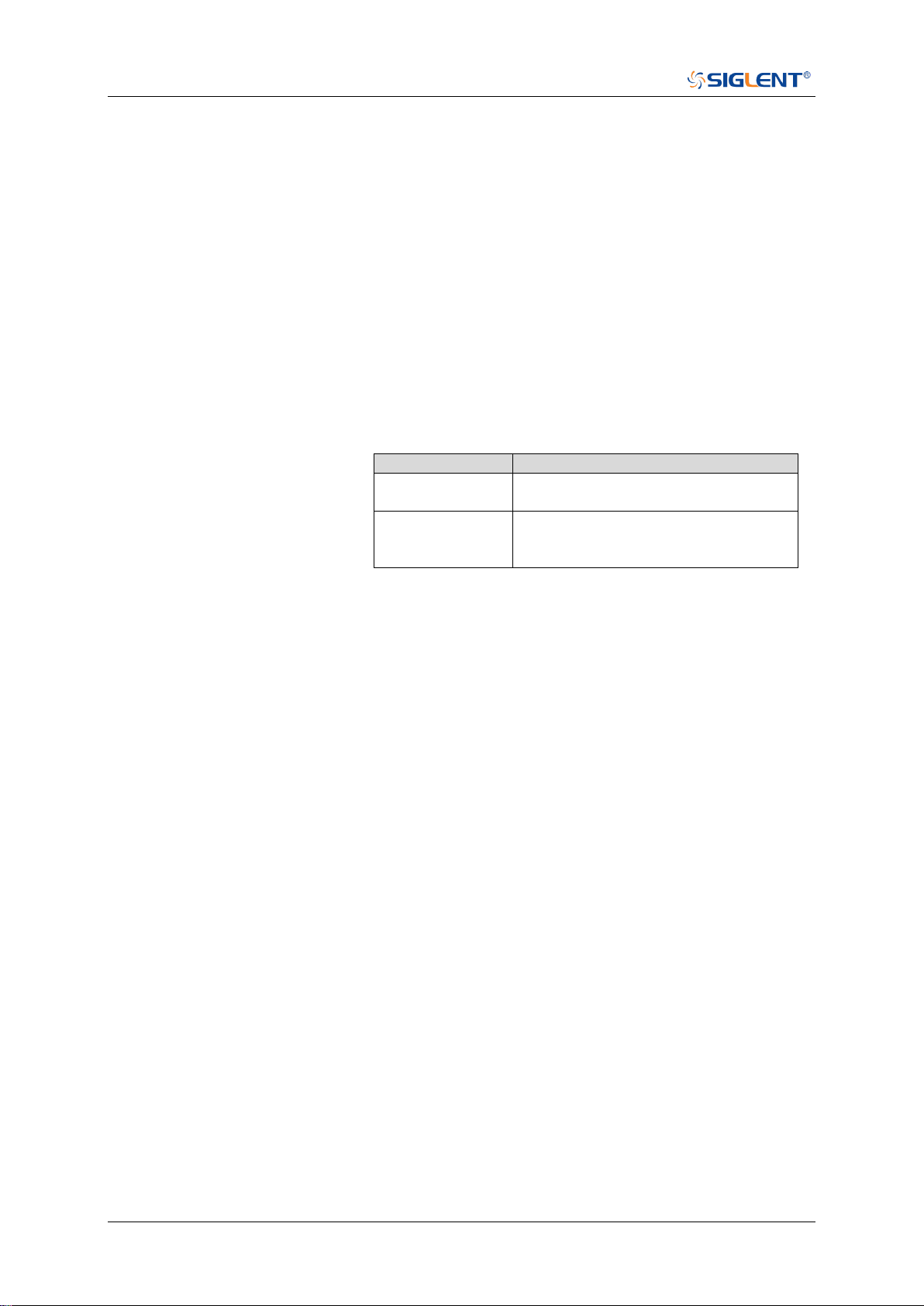
SDS Series Programming Guide
110 / 642 www.siglent.com
:DECode:BUS<n>:CAN:THReshold
Command/Query
DESCRIPTION
The command sets the threshold of the source on CAN bus.
This query returns the current threshold of the source on
CAN bus.
COMMAND SYNTAX
:DECode:BUS<n>:CAN:THReshold <value>
<n>:= {1|2}, is attached as a suffix to BUS and defines the
bus that is affected by the command.
<value>:= Value in NR3 format, including a decimal point and
exponent, like 1.23E+2.
The range of the value varies by model, see the table below
for details.
Model
Value Range
SDS6000 Pro/
SDS6000A
[-4.5*vertical_scale-vertical_offset,
4.5*vertical_scale-vertical_offset]
SDS5000X
SDS2000X Plus
SDS2000X HD
[-4.1*vertical_scale-vertical_offset,
4.1*vertical_scale-vertical_offset]
QUERY SYNTAX
:DECode:BUS<n>:CAN:THReshold?
RESPONSE FORMAT
<value>
<value>:= Value in NR3 format, including a decimal point and
exponent, like 1.23E+2.
EXAMPLE
The following command sets the threshold of the CAN bus
source to 1 V on bus 1.
Command message:
:DECode:BUS1:CAN:THReshold 1.00E+00
DEC:BUS1:CAN:THR 1.00E+00
Query message:
DEC:BUS1:CAN:THR?
Response message:
1.00E+00
RELATED COMMANDS
:DECode:BUS<n>:CAN:SOURce


SDS Series Programming Guide
112 / 642 www.siglent.com
:DECode:BUS<n>:LIN:BAUD
Command/Query
DESCRIPTION
The command sets the baud rate for the LIN bus.
This query returns the current baud rate for the LIN bus.
COMMAND SYNTAX
:DECode:BUS<n>:LIN:BAUD <baud>
<n>:= {1|2}, is attached as a suffix to BUS and defines the
bus that is affected by the command.
<baud>:=
{600bps|1200bps|2400bps|4800bps|9600bps|19200bps|CU
STom[,<value>]}
<value>:= Value in NR1 format, including an integer and no
decimal point, like 1. The range of the value is [300,
20000000].
QUERY SYNTAX
:DECode:BUS<n>:LIN:BAUD?
RESPONSE FORMAT
<baud>
<baud>:=
{600bps|1200bps|2400bps|4800bps|9600bps|19200bps|CU
STom[,<value>]}
<value>:= Value in NR1 format, including an integer and no
decimal point, like 1.
EXAMPLE
The following command sets the baud rate for the LIN to
9600bps on bus 1.
Command message:
:DECode:BUS1:LIN:BAUD 9600bps
DEC:BUS1:LIN:BAUD 9600bps
Query message:
DEC:BUS1:LIN:BAUD?
Response message:
9600bps

SDS Series Programming Guide
www.siglent.com 113 / 642
:DECode:BUS<n>:LIN:SOURce
Command/Query
DESCRIPTION
The command selects the source of the LIN bus.
This query returns the current source of the LIN bus.
COMMAND SYNTAX
:DECode:BUS<n>:LIN:SOURce <source>
<n>:= {1|2}, is attached as a suffix to BUS and defines the
bus that is affected by the command.
<source>:= {C<x>|D<m>}
<x>:= 1 to (# analog channels) in NR1 format, including an
integer and no decimal point, like 1.
<m>:= 0 to (# digital channels - 1) in NR1 format, including an
integer and no decimal point, like 1.
QUERY SYNTAX
:DECode:BUS<n>:LIN:SOURce?
RESPONSE FORMAT
<source>
<source>:= {C<x>|D<m>}
<x>:= 1 to (# analog channels) in NR1 format, including an
integer and no decimal point, like 1.
<m>:= 0 to (# digital channels - 1) in NR1 format, including an
integer and no decimal point, like 1.
EXAMPLE
The following command selects the source of the LIN on bus
1 as C1.
Command message:
:DECode:BUS1:LIN:SOURce C1
DEC:BUS1:LIN:SOUR C1
Query message:
DEC:BUS1:LIN:SOUR?
Response message:
C1
RELATED COMMANDS
:DECode:BUS<n>:LIN:THReshold
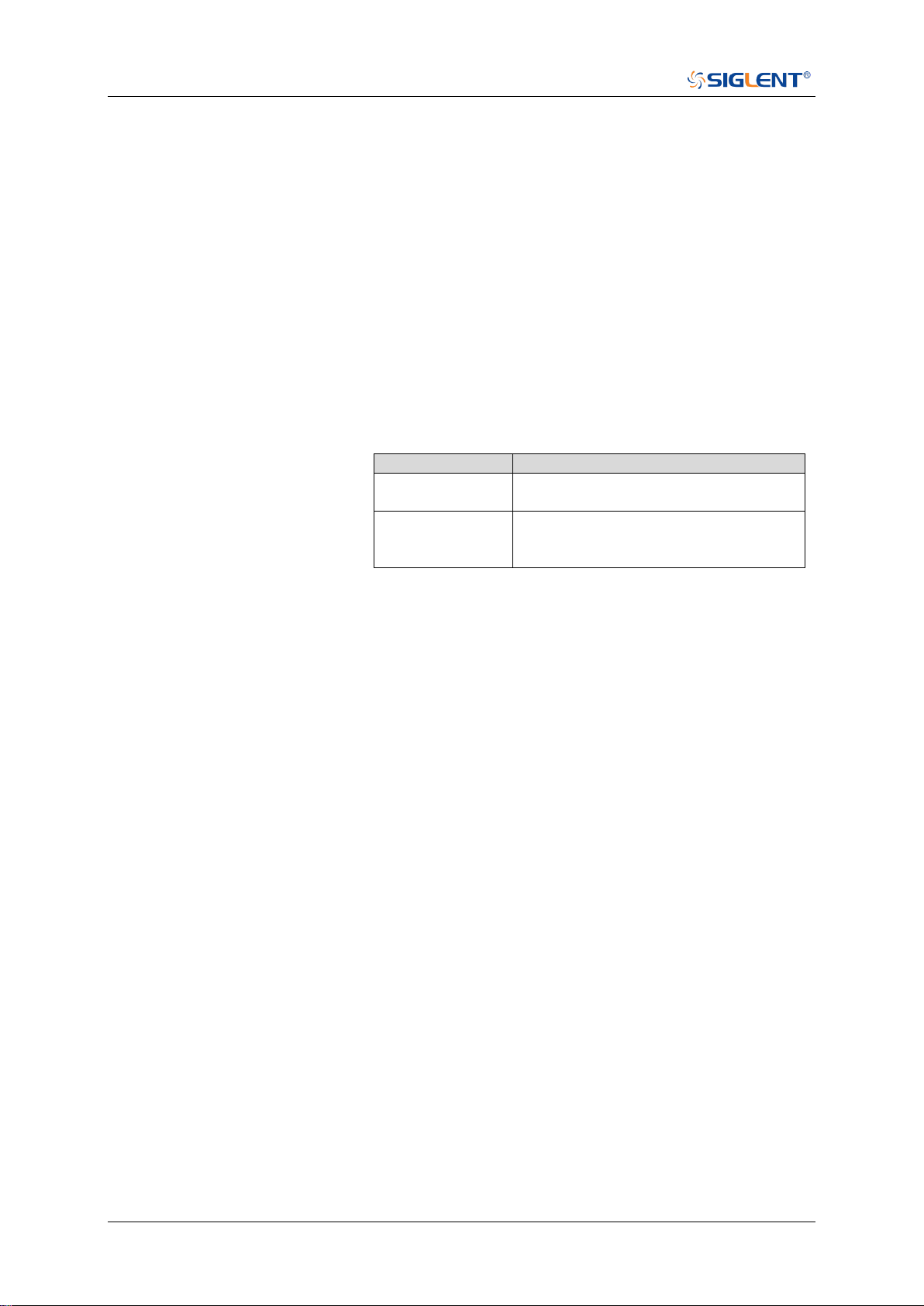
SDS Series Programming Guide
114 / 642 www.siglent.com
:DECode:BUS<n>:LIN:THReshold
Command/Query
DESCRIPTION
The command sets the threshold of the source on LIN bus.
This query returns the current threshold of the source on LIN
bus.
COMMAND SYNTAX
:DECode:BUS<n>:LIN:THReshold <value>
<n>:= {1|2}, is attached as a suffix to BUS and defines the
bus that is affected by the command.
<value>:= Value in NR3 format, including a decimal point and
exponent, like 1.23E+2.
The range of the value varies by model, see the table below
for details.
Model
Value Range
SDS6000 Pro/
SDS6000A
[-4.5*vertical_scale-vertical_offset,
4.5*vertical_scale-vertical_offset]
SDS5000X
SDS2000X Plus
SDS2000X HD
[-4.1*vertical_scale-vertical_offset,
4.1*vertical_scale-vertical_offset]
QUERY SYNTAX
:DECode:BUS<n>:LIN:THReshold?
RESPONSE FORMAT
<value>
<value>:= Value in NR3 format, including a decimal point and
exponent, like 1.23E+2.
EXAMPLE
The following command sets the threshold of the LIN source
to 1 V on bus 1.
Command message:
:DECode:BUS1:LIN:THReshold 1.00E+00
DEC:BUS1:LIN:THR 1.00E+00
Query message:
DEC:BUS1:LIN:THR?
Response message:
1.00E+00
RELATED COMMANDS
:DECode:BUS<n>:LIN:SOURce


SDS Series Programming Guide
116 / 642 www.siglent.com
:DECode:BUS<n>:FLEXray:BAUD
Command/Query
DESCRIPTION
The command sets the baud rate of the Flexray bus.
This query returns the current baud rate of the Flexray bus.
COMMAND SYNTAX
:DECode:BUS<n>:FLEXray:BAUD <baud>
<n>:= {1|2}, is attached as a suffix to BUS and defines the
bus that is affected by the command.
<baud>:= {2500kbps|5Mbps|10Mbps|CUSTom[,<value>]}
<value>:= Value in NR1 format, including an integer and no
decimal point, like 1. The range of the value is [1000000,
20000000]
QUERY SYNTAX
:DECode:BUS<n>:FLEXray:BAUD?
RESPONSE FORMAT
<baud>
<baud>:= {2500kbps|5Mbps|10Mbps|CUSTom[,<value>]}
<value>:= Value in NR1 format, including an integer and no
decimal point, like 1.
EXAMPLE
The following command sets the baud rate of the Flexray to
5Mbps on bus 1.
Command message:
:DECode:BUS1:FLEXray:BAUD 5Mbps
DEC:BUS1:FLEX:BAUD 5Mbps
Query message:
DEC:BUS1:FLEX:BAUD?
Response message:
5Mbps

SDS Series Programming Guide
www.siglent.com 117 / 642
:DECode:BUS<n>:FLEXray:SOURce
Command/Query
DESCRIPTION
The command selects the source of the Flexray bus.
This query returns the current source of the Flexray bus.
COMMAND SYNTAX
:DECode:BUS<n>:FLEXray:SOURce <source>
<n>:= {1|2}, is attached as a suffix to BUS and defines the
bus that is affected by the command.
<source>:= {C<x>|D<m>}
<x>:= 1 to (# analog channels) in NR1 format, including an
integer and no decimal point, like 1.
<m>:= 0 to (# digital channels - 1) in NR1 format, including an
integer and no decimal point, like 1.
QUERY SYNTAX
:DECode:BUS<n>:FLEXray:SOURce?
RESPONSE FORMAT
<source>
<source>:= {C<x>|D<m>}
<x>:= 1 to (# analog channels) in NR1 format, including an
integer and no decimal point, like 1.
<m>:= 0 to (# digital channels - 1) in NR1 format, including an
integer and no decimal point, like 1.
EXAMPLE
The following command selects the source of the Flexray on
bus 1 as C1.
Command message:
:DECode:BUS1:FLEXray:SOURce C1
DEC:BUS1:FLEX:SOUR C1
Query message:
DEC:BUS1:FLEX:SOUR?
Response message:
C1
RELATED COMMANDS
:DECode:BUS<n>:FLEXray:THReshold
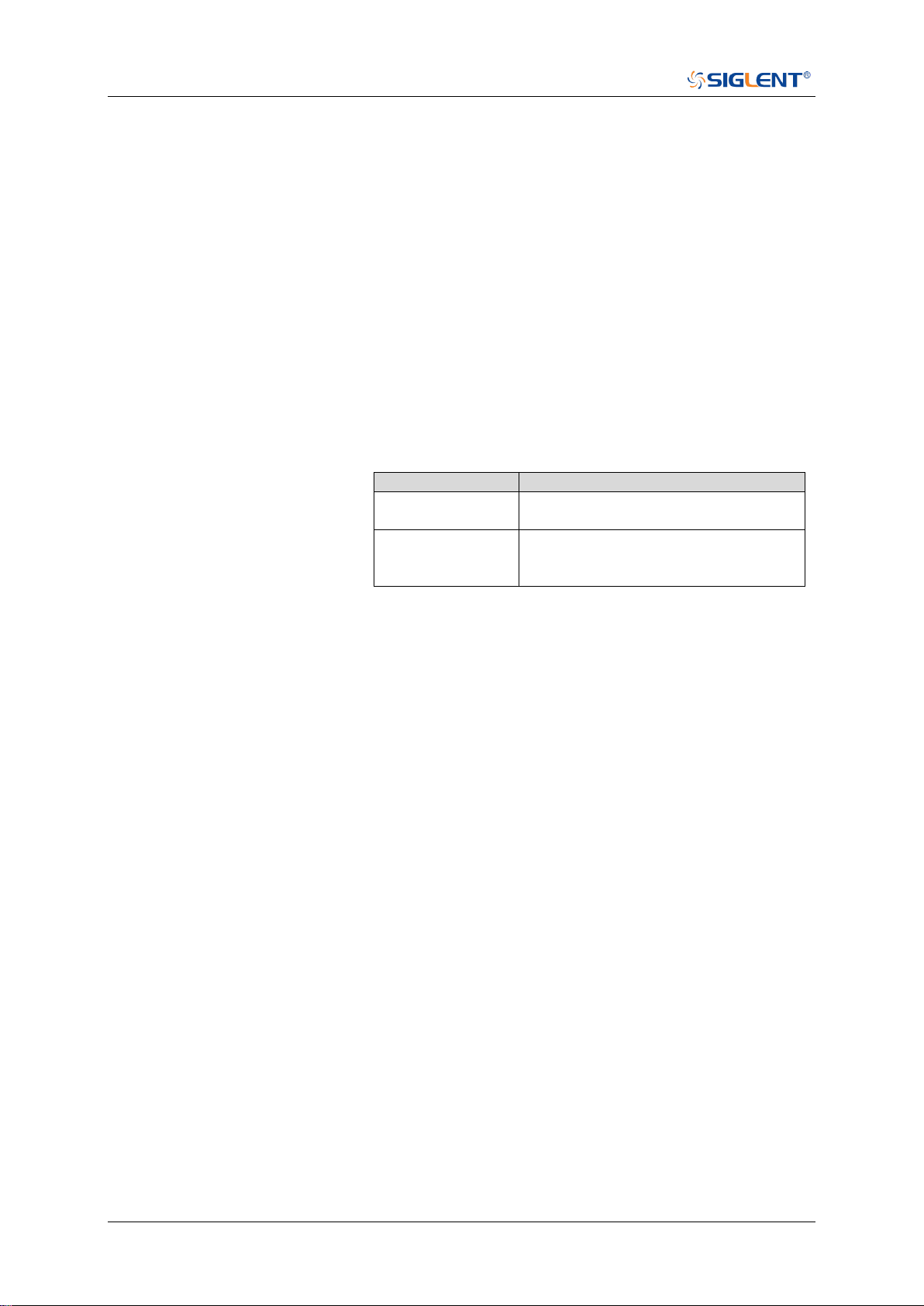
SDS Series Programming Guide
118 / 642 www.siglent.com
:DECode:BUS<n>:FLEXray:THReshold
Command/Query
DESCRIPTION
The command sets the threshold of the source on Flexray
bus.
This query returns the current threshold of the source on
Flexray bus.
COMMAND SYNTAX
:DECode:BUS<n>:FLEXray:THReshold <value>
<n>:= {1|2}, is attached as a suffix to BUS and defines the
bus that is affected by the command.
<value>:= Value in NR3 format, including a decimal point and
exponent, like 1.23E+2.
The range of the value varies by model, see the table below
for details.
Model
Value Range
SDS6000 Pro/
SDS6000A
[-4.5*vertical_scale-vertical_offset,
4.5*vertical_scale-vertical_offset]
SDS5000X
SDS2000X Plus
SDS2000X HD
[-4.1*vertical_scale-vertical_offset,
4.1*vertical_scale-vertical_offset]
QUERY SYNTAX
:DECode:BUS<n>:FLEXray:THReshold?
RESPONSE FORMAT
<value>
<value>:= Value in NR3 format, including a decimal point and
exponent, like 1.23E+2.
EXAMPLE
The following command sets the threshold of the Flexray
source to 1 V on bus 1.
Command message:
:DECode:BUS1:FLEXray:THReshold 1.00E+00
DEC:BUS1:FLEX:THR 1.00E+00
Query message:
DEC:BUS1:FLEX:THR?
Response message:
1.00E+00
RELATED COMMANDS
:DECode:BUS<n>:FLEXray:SOURce

SDS Series Programming Guide
www.siglent.com 119 / 642
:DECode:BUS<n>:CANFd Commands [Option]
The :DECode:BUS<n>:CANFd subsystem commands control the CANFD decode settings of the
specified bus.
:DECode:BUS<n>:CANFd:BAUDData
:DECode:BUS<n>:CANFd:BAUDNominal
:DECode:BUS<n>:CANFd:SOURce
:DECode:BUS<n>:CANFd:THReshold

SDS Series Programming Guide
120 / 642 www.siglent.com
:DECode:BUS<n>:CANFd:BAUDData
Command/Query
DESCRIPTION
The command sets the data baud rate of the CAN FD bus.
This query returns the current data baud rate of the CAN FD
bus.
COMMAND SYNTAX
:DECode:BUS<n>:CANFd:BAUDData <baud>
<n>:= {1|2}, is attached as a suffix to BUS and defines the
bus that is affected by the command.
<baud>:=
{500kbps|1Mbps|2Mbps|5Mbps|8Mbps|10Mbps|CUSTom[,<
value>]}
<value>:= Value in NR1 format, including an integer and no
decimal point, like 1. The range of the value is [100000,
10000000]
QUERY SYNTAX
:DECode:BUS<n>:CANFd:BAUDData?
RESPONSE FORMAT
<baud>
<baud>:=
{500kbps|1Mbps|2Mbps|5Mbps|8Mbps|10Mbps|CUSTom[,<
value>]}
<value>:= Value in NR1 format, including an integer and no
decimal point, like 1.
EXAMPLE
The following command sets the data baud rate of the CAN
FD to 500kbps on bus 1.
Command message:
:DECode:BUS1:CANFd:BAUDData 500kbps
DEC:BUS1:CANF:BAUDD 500kbps
Query message:
DEC:BUS1:CANF:BAUDD?
Response message:
500kbps

SDS Series Programming Guide
www.siglent.com 121 / 642
:DECode:BUS<n>:CANFd:BAUDNominal
Command/Query
DESCRIPTION
The command sets the nominal baud rate of the CAN FD
bus.
This query returns the current nominal baud rate of the CAN
FD bus.
COMMAND SYNTAX
:DECode:BUS<n>:CANFd:BAUDNominal <baud>
<n>:= {1|2} is attached as a suffix to BUS and defines the bus
that is affected by the command.
<baud>:=
{10kbps|25kbps|50kbps|100kbps|250kbps|1Mbps|CUSTom[,
<value>]}
<value>:= Value in NR1 format, including an integer and no
decimal point, like 1. The range of the value is [10000,
1000000]
QUERY SYNTAX
:DECode:BUS<n>:CANFd:BAUDNominal?
RESPONSE FORMAT
<baud>
<baud>:=
{10kbps|25kbps|50kbps|100kbps|250kbps|1Mbps|CUSTom[,
<value>]}
<value>:= Value in NR1 format, including an integer and no
decimal point, like 1.
EXAMPLE
The following command sets the nominal baud rate of the
CAN FD to 50kbps on bus 1.
Command message:
:DECode:BUS1:CANFd:BAUDNominal 50kbps
DEC:BUS1:CANF:BAUDN 50kbps
Query message:
DEC:BUS1:CANF:BAUDN?
Response message:
50kbps

SDS Series Programming Guide
122 / 642 www.siglent.com
:DECode:BUS<n>:CANFd:SOURce
Command/Query
DESCRIPTION
The command selects the source of the CAN FD bus.
This query returns the current source of the CAN FD bus.
COMMAND SYNTAX
:DECode:BUS<n>:CANFd:SOURce <source>
<n>:= {1|2}, is attached as a suffix to BUS and defines the
bus that is affected by the command.
<source>:= {C<x>|D<m>}
<x>:= 1 to (# analog channels) in NR1 format, including an
integer and no decimal point, like 1.
<m>:= 0 to (# digital channels - 1) in NR1 format, including an
integer and no decimal point, like 1.
QUERY SYNTAX
:DECode:BUS<n>:CANFd:SOURce?
RESPONSE FORMAT
<source>
<source>:= {C<x>|D<m>}
<x>:= 1 to (# analog channels) in NR1 format, including an
integer and no decimal point, like 1.
<m>:= 0 to (# digital channels - 1) in NR1 format, including an
integer and no decimal point, like 1.
EXAMPLE
The following command selects the source of the CAN FD on
bus 1 as C1.
Command message:
:DECode:BUS1:CANFd:SOURce C1
DEC:BUS1:CANF:SOUR C1
Query message:
DEC:BUS1:CANF:SOUR?
Response message:
C1
RELATED COMMANDS
:DECode:BUS<n>:CANFd:THReshold
SDS Series Programming Guide
www.siglent.com 123 / 642
:DECode:BUS<n>:CANFd:THReshold
Command/Query
DESCRIPTION
The command sets the threshold of the source on CAN FD
bus.
This query returns the current threshold of the source on CAN
FD bus.
COMMAND SYNTAX
:DECode:BUS<n>:CANFd:THReshold <value>
<n>:= {1|2}, is attached as a suffix to BUS and defines the bus
that is affected by the command.
<value>:= Value in NR3 format, including a decimal point and
exponent, like 1.23E+2.
The range of the value varies by model, see the table below for
details
Model
Value Range
SDS6000 Pro/
SDS6000A
[-4.5*vertical_scale-vertical_offset,
4.5*vertical_scale-vertical_offset]
SDS5000X
SDS2000X Plus
SDS2000X HD
[-4.1*vertical_scale-vertical_offset,
4.1*vertical_scale-vertical_offset]
QUERY SYNTAX
:DECode:BUS<n>:CANFd:THReshold?
RESPONSE FORMAT
<value>
<value>:= Value in NR3 format, including a decimal point and
exponent, like 1.23E+2.
EXAMPLE
The following command sets the threshold of the CAN FD
source to 1 V on bus 1.
Command message:
:DECode:BUS1:CANFd:THReshold 1.00E+00
DEC:BUS1:CANF:THR 1.00E+0
Query message:
DEC:BUS1:CANF:THR?
Response message:
1.00E+00
RELATED COMMANDS
:DECode:BUS<n>:CANFd:SOURce

SDS Series Programming Guide
124 / 642 www.siglent.com
:DECode:BUS<n>:IIS Commands [Option]
The :DECode:BUS<n>:IIS subsystem commands control the IIS decode settings of the specified
bus.
:DECode:BUS<n>:IIS:ANNotate
:DECode:BUS<n>:IIS:AVARiant
:DECode:BUS<n>:IIS:BCLKSource
:DECode:BUS<n>:IIS:BCLKThreshold
:DECode:BUS<n>:IIS:BITorder
:DECode:BUS<n>:IIS:DLENgth
:DECode:BUS<n>:IIS:DSource
:DECode:BUS<n>:IIS:DTHReshold
:DECode:BUS<n>:IIS:LATChedge
:DECode:BUS<n>:IIS:LCH
:DECode:BUS<n>:IIS:SBIT
:DECode:BUS<n>:IIS:WSSource
:DECode:BUS<n>:IIS:WSTHreshold

SDS Series Programming Guide
www.siglent.com 125 / 642
:DECode:BUS<n>:IIS:ANNotate
Command/Query
DESCRIPTION
The command specifies the channel for IIS bus to be
annotated.
This query returns the current annotated channel of IIS bus.
COMMAND SYNTAX
:DECode:BUS<n>:IIS:ANNotate <type>
<n>:= {1|2}, is attached as a suffix to BUS and defines the
bus that is affected by the command.
<type>:= {ALL|LEFT|RIGHt}
QUERY SYNTAX
:DECode:BUS<n>:IIS:ANNotate?
RESPONSE FORMAT
<type>
<type>:= {ALL|LEFT|RIGHt}
EXAMPLE
The following command annotates all the channels of IIS on
bus 1.
Command message:
:DECode:BUS1:IIS:ANNotate ALL
DEC:BUS1:IIS:ANN ALL
Query message:
DEC:BUS1:IIS:ANN?
Response message:
ALL
RELATED COMMANDS
:DECode:BUS<n>:IIS:LCH

SDS Series Programming Guide
126 / 642 www.siglent.com
:DECode:BUS<n>:IIS:AVARiant
Command/Query
DESCRIPTION
The command selects the audio variant for IIS bus.
This query returns the current audio variant for IIS bus.
COMMAND SYNTAX
:DECode:BUS<n>:IIS:AVARiant <type>
<n>:= {1|2}, is attached as a suffix to BUS and defines the
bus that is affected by the command.
<type>:= {I2S|LJ|RJ}
I2S justified.
LJ is left justified.
RL is right justified.
QUERY SYNTAX
:DECode:BUS<n>:IIS:AVARiant?
RESPONSE FORMAT
<type>
<type>:= {I2S|LJ|RJ}
EXAMPLE
The following command sets the audio variable of the IIS on
bus 1 to RJ.
Command message:
:DECode:BUS1:IIS:AVARiant RJ
DEC:BUS1:IIS:AVAR RJ
Query message:
DEC:BUS1:IIS:AVAR?
Response message:
RJ

SDS Series Programming Guide
www.siglent.com 127 / 642
:DECode:BUS<n>:IIS:BCLKSource
Command/Query
DESCRIPTION
The command selects the BCLK source of the IIS bus.
This query returns the current BCLK source of the IIS bus.
COMMAND SYNTAX
:DECode:BUS<n>:IIS:BCLKSource <source>
<n>:= {1|2}, is attached as a suffix to BUS and defines the
bus that is affected by the command.
<source>:= {C<x>|D<m>}
<x>:= 1 to (# analog channels) in NR1 format, including an
integer and no decimal point, like 1.
<m>:= 0 to (# digital channels - 1) in NR1 format, including an
integer and no decimal point, like 1.
QUERY SYNTAX
:DECode:BUS<n>:IIS:BCLKSource?
RESPONSE FORMAT
<source>
<source>:= {C<x>|D<m>}
<x>:= 1 to (# analog channels) in NR1 format, including an
integer and no decimal point, like 1.
<m>:= 0 to (# digital channels - 1) in NR1 format, including an
integer and no decimal point, like 1.
EXAMPLE
The following command selects the BCLK source of IIS on
bus 1 as C1.
Command message:
:DECode:BUS1:IIS:BCLKSource C1
DEC:BUS1:IIS:BCLKS C1
Query message:
DEC:BUS1:IIS:BCLKS?
Response message:
C1
RELATED COMMANDS
:DECode:BUS<n>:IIS:BCLKThreshold
SDS Series Programming Guide
128 / 642 www.siglent.com
:DECode:BUS<n>:IIS:BCLKThreshold
Command/Query
DESCRIPTION
The command sets the threshold of the BCLK on IIS bus.
This query returns the current threshold of the BCLK on IIS
bus.
COMMAND SYNTAX
:DECode:BUS<n>:IIS:BCLKThreshold <value>
<n>:= {1|2}, is attached as a suffix to BUS and defines the
bus that is affected by the command.
<value>:= Value in NR3 format, including a decimal point and
exponent, like 1.23E+2.
The range of the value varies by model, see the table below
for details.
Model
Value Range
SDS6000 Pro/
SDS6000A
[-4.5*vertical_scale-vertical_offset,
4.5*vertical_scale-vertical_offset]
SDS5000X
SDS2000X Plus
SDS2000X HD
[-4.1*vertical_scale-vertical_offset,
4.1*vertical_scale-vertical_offset]
QUERY SYNTAX
:DECode:BUS<n>:IIS:BCLKThreshold?
RESPONSE FORMAT
<value>
<value>:= Value in NR3 format, including a decimal point and
exponent, like 1.23E+2.
EXAMPLE
The following command sets the threshold of the BCLK to 1 V
on bus 1.
Command message:
:DECode:BUS1:IIS:BCLKThreshold 1.00E+00
DEC:BUS1:IIS:BCLKT 1.00E+00
Query message:
DEC:BUS1:IIS:BCLKT?
Response message:
1.00E+00
RELATED COMMANDS
:DECode:BUS<n>:IIS:BCLKSource

SDS Series Programming Guide
www.siglent.com 129 / 642
:DECode:BUS<n>:IIS:BITorder
Command/Query
DESCRIPTION
The command sets the bit order for the IIS bus.
This query returns the current bit order for the IIS bus.
COMMAND SYNTAX
:DECode:BUS<n>:IIS:BITorder <order>
<n>:= {1|2}, is attached as a suffix to BUS and defines the
bus that is affected by the command.
<order>:= {LSB|MSB}
LSB is Least Significant Bit.
MSB is Most Significant Bit.
QUERY SYNTAX
:DECode:BUS<n>:IIS:BITorder?
RESPONSE FORMAT
<order>
<order>:= {LSB|MSB}
EXAMPLE
The following command sets bit order for the IIS on bus 1 to
LSB.
Command message:
:DECode:BUS1:IIS:BITorder LSB
DEC:BUS1:IIS:BIT LSB
Query message:
DEC:BUS1:IIS:BIT?
Response message:
LSB

SDS Series Programming Guide
130 / 642 www.siglent.com
:DECode:BUS<n>:IIS:DLENgth
Command/Query
DESCRIPTION
The command sets the data bits for the IIS bus.
This query returns the current data bits for the IIS bus.
COMMAND SYNTAX
:DECode:BUS<n>:IIS:DLENgth <value>
<n>:= {1|2}, is attached as a suffix to BUS and defines the
bus that is affected by the command.
<value>:= Value in NR1 format, including an integer and no
decimal point, like 1. The range of the value is [1, 32].
QUERY SYNTAX
:DECode:BUS<n>:IIS:DLENgth?
RESPONSE FORMAT
<value>
<value>:= Value in NR1 format, including an integer and no
decimal point, like 1.
EXAMPLE
The following command sets the data bits for the IIS to 5 on
bus 1.
Command message:
:DECode:BUS1:IIS:DLENgth 5
DEC:BUS1:IIS:DLEN 5
Query message:
DEC:BUS1:IIS:DLEN?
Response message:
5
RELATED COMMANDS
:DECode:BUS<n>:IIS:SBIT

SDS Series Programming Guide
www.siglent.com 131 / 642
:DECode:BUS<n>:IIS:DSource
Command/Query
DESCRIPTION
The command selects the data source of the IIS bus.
This query returns the current data source of the IIS bus.
COMMAND SYNTAX
:DECode:BUS<n>:IIS:DSource <source>
<n>:= {1|2}, is attached as a suffix to BUS and defines the
bus that is affected by the command.
<source>:= {C<x>|D<m>}
<x>:= 1 to (# analog channels) in NR1 format, including an
integer and no decimal point, like 1.
<m>:= 0 to (# digital channels - 1) in NR1 format, including an
integer and no decimal point, like 1.
QUERY SYNTAX
:DECode:BUS<n>:IIS:DSource?
RESPONSE FORMAT
<source>
<source>:= {C<x>|D<m>}
<x>:= 1 to (# analog channels) in NR1 format, including an
integer and no decimal point, like 1.
<m>:= 0 to (# digital channels - 1) in NR1 format, including an
integer and no decimal point, like 1.
EXAMPLE
The following command selects the data source of the IIS
bus on bus 1 as C1.
Command message:
:DECode:BUS1:IIS:DSource C1
DEC:BUS1:IIS:DS C1
Query message:
DEC:BUS1:IIS:DS?
Response message:
C1
RELATED COMMANDS
:DECode:BUS<n>:IIS:DTHReshold
SDS Series Programming Guide
132 / 642 www.siglent.com
:DECode:BUS<n>:IIS:DTHReshold
Command/Query
DESCRIPTION
The command sets the threshold of the data source on IIS bus.
This query returns the current threshold of the data source on
IIS bus.
COMMAND SYNTAX
:DECode:BUS<n>:IIS:DTHReshold <value>
<n>:= {1|2}, is attached as a suffix to BUS and defines the bus
that is affected by the command.
<value>:= Value in NR3 format, including a decimal point and
exponent, like 1.23E+2.
The range of the value varies by model, see the table below for
details.
Model
Value Range
SDS6000 Pro/
SDS6000A
[-4.5*vertical_scale-vertical_offset,
4.5*vertical_scale-vertical_offset]
SDS5000X
SDS2000X Plus
SDS2000X HD
[-4.1*vertical_scale-vertical_offset,
4.1*vertical_scale-vertical_offset]
QUERY SYNTAX
:DECode:BUS<n>:IIS:DTHReshold?
RESPONSE FORMAT
<value>
<value>:= Value in NR3 format, including a decimal point and
exponent, like 1.23E+2.
EXAMPLE
The following command sets the threshold of the data source
to 1 V on bus 1.
Command message:
:DECode:BUS1:IIS:DTHReshold 1.00E+00
DEC:BUS1:IIS:DTHR 1.00E+00
Query message:
DEC:BUS1:IIS:DTHR?
Response message:
1.00E+00
RELATED COMMANDS
:DECode:BUS<n>:IIS:DSource

SDS Series Programming Guide
www.siglent.com 133 / 642
:DECode:BUS<n>:IIS:LATChedge
Command/Query
DESCRIPTION
The command selects the sampling edge of BCLK on IIS bus.
This query returns the sampling edge of BCLK on IIS bus.
COMMAND SYNTAX
:DECode:BUS<n>:IIS:LATChedge <slope>
<n>:= {1|2}, is attached as a suffix to BUS and defines the bus
that is affected by the command.
<slope>:= {RISing|FALLing}
QUERY SYNTAX
:DECode:BUS<n>:IIS:LATChedge?
RESPONSE FORMAT
<slope>
<slope>:= {RISing|FALLing}
RISing selects the rising edge.
FALLing selects the falling edge.
EXAMPLE
The following command sets the sampling edge of BCLK on
bus 1 to RISing.
Command message:
:DECode:BUS1:IIS:LATChege RISing
DEC:BUS1:IIS:LATC RIS
Query message:
DEC:BUS1:IIS:LATC?
Response message:
RISing

SDS Series Programming Guide
134 / 642 www.siglent.com
:DECode:BUS<n>:IIS:LCH
Command/Query
DESCRIPTION
The command selects the level of the left channel.
This query returns the current level of the left channel.
COMMAND SYNTAX
:DECode:BUS<n>:IIS:LCH <left>
<n>:= {1|2}, is attached as a suffix to BUS and defines the bus
that is affected by the command.
<left>:= {LOW|HIGH}
QUERY SYNTAX
:DECode:BUS<n>:IIS:LCH?
RESPONSE FORMAT
<left>
<left>:= {LOW|HIGH}
EXAMPLE
The following command sets the left channel on bus 1 to LOW.
Command message:
:DECode:BUS1:IIS:LCH LOW
DEC:BUS1:IIS:LCH LOW
Query message:
DEC:BUS1:IIS:LCH?
Response message:
LOW

SDS Series Programming Guide
www.siglent.com 135 / 642
:DECode:BUS<n>:IIS:SBIT
Command/Query
DESCRIPTION
The command sets the start bit of the data.
This query returns the start bit of the data.
COMMAND SYNTAX
:DECode:BUS<n>:IIS:SBIT <value>
<n>:= {1|2}, is attached as a suffix to BUS and defines the bus
that is affected by the command.
<value>:= Value in NR1 format, including an integer and no
decimal point, like 1. The range of the value is [0, 31].
QUERY SYNTAX
:DECode:BUS<n>:IIS:SBIT?
RESPONSE FORMAT
<value>
<value>:= Value in NR1 format, including an integer and no
decimal point, like 1.
EXAMPLE
The following command sets the number of the data bit to 1 on
bus 1.
Command message:
:DECode:BUS1:IIS:SBIT 1
:DEC:BUS1:IIS:SBIT 1
Query message:
DEC:BUS1:IIS:SBIT?
Response message:
1
RELATED COMMANDS
:DECode:BUS<n>:IIS:DLENgth

SDS Series Programming Guide
136 / 642 www.siglent.com
:DECode:BUS<n>:IIS:WSSource
Command/Query
DESCRIPTION
The command selects the WS source of the IIS bus.
This query returns the current WS source of the IIS bus.
COMMAND SYNTAX
:DECode:BUS<n>:IIS:WSSource <source>
<n>:= {1|2}, is attached as a suffix to BUS and defines the
bus that is affected by the command.
<source>:= {C<x>|D<m>}
<x>:= 1 to (# analog channels) in NR1 format, including an
integer and no decimal point, like 1.
<m>:= 0 to (# digital channels - 1) in NR1 format, including an
integer and no decimal point, like 1.
QUERY SYNTAX
:DECode:BUS<n>:IIS:WSSource?
RESPONSE FORMAT
<source>
<source>:= {C<x>|D<m>}
<x>:= 1 to (# analog channels) in NR1 format, including an
integer and no decimal point, like 1.
<m>:= 0 to (# digital channels - 1) in NR1 format, including an
integer and no decimal point, like 1.
EXAMPLE
The following command selects the WS source of the IIS bus
on bus 1 as C1.
Command message:
:DECode:BUS1:IIS:WSSource C1
DEC:BUS1:IIS:WSS C1
Query message:
DEC:BUS1:IIS:WSS?
Response message:
C1
RELATED COMMANDS
:DECode:BUS<n>:IIS:WSTHreshold
SDS Series Programming Guide
www.siglent.com 137 / 642
:DECode:BUS<n>:IIS:WSTHreshold
Command/Query
DESCRIPTION
The command sets the threshold of the WS on IIS bus.
This query returns the current threshold of the WS on IIS bus.
COMMAND SYNTAX
:DECode:BUS<n>:IIS:WSTHreshold <value>
<n>:= {1|2}, is attached as a suffix to BUS and defines the
bus that is affected by the command.
<value>:= Value in NR3 format, including a decimal point and
exponent, like 1.23E+2.
The range of the value varies by model, see the table below
for details
Model
Value Range
SDS6000 Pro/
SDS6000A
[-4.5*vertical_scale-vertical_offset,
4.5*vertical_scale-vertical_offset]
SDS5000X
SDS2000X Plus
SDS2000X HD
[-4.1*vertical_scale-vertical_offset,
4.1*vertical_scale-vertical_offset]
QUERY SYNTAX
:DECode:BUS<n>:IIS:WSTHreshold?
RESPONSE FORMAT
<value>
<value>:= Value in NR3 format, including a decimal point and
exponent, like 1.23E+2.
EXAMPLE
The following command sets the threshold of the WS to 1 V
on bus 1.
Command message:
:DECode:BUS1:IIS:WSTHreshold 1.00E+00
DEC:BUS1:IIS:WSTH 1.00E+00
Query message:
DEC:BUS1:IIS:WSTH?
Response message:
1.00E+00
RELATED COMMANDS
:DECode:BUS<n>:IIS:WSSource

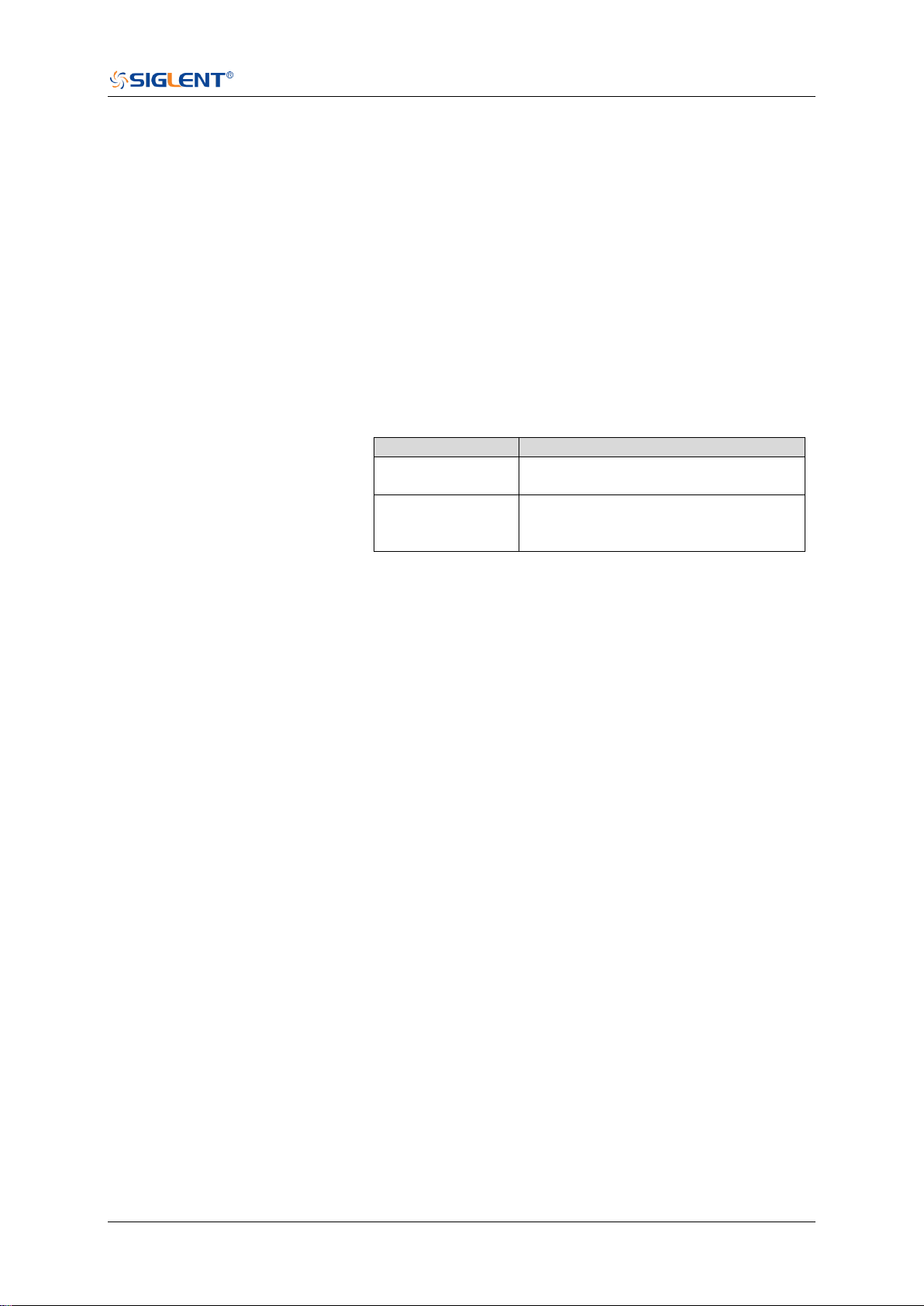
SDS Series Programming Guide
www.siglent.com 139 / 642
:DECode:BUS<n>:M1553:LTHReshold
Command/Query
DESCRIPTION
The command sets the lower threshold of the M1553 source.
This query returns the current lower threshold of the M1553 source.
COMMAND SYNTAX
:DECode:BUS<n>:M1553:LTHReshold <value>
<n>:= {1|2}, is attached as a suffix to BUS and defines the bus
that is affected by the command.
<value>:= Value in NR3 format, including a decimal point and
exponent, like 1.23E+2.
The range of the value varies by model, see the table below for
details
Model
Value Range
SDS6000 Pro/
SDS6000A
[-4.5*vertical_scale-vertical_offset,
4.5*vertical_scale-vertical_offset]
SDS5000X
SDS2000X Plus
SDS2000X HD
[-4.1*vertical_scale-vertical_offset,
4.1*vertical_scale-vertical_offset]
Note:
The lower threshold value cannot be greater than the upper
threshold value set by the command
:DECode:BUS<n>:M1553:UTHReshold.
QUERY SYNTAX
:DECode:BUS<n>:M1553:LTHReshold?
RESPONSE FORMAT
<value>
<value>:= Value in NR3 format, including a decimal point and
exponent, like 1.23E+2.
EXAMPLE
The following command sets the lower threshold of the M1553
source to 1 V on bus 1.
Command message:
:DECode:BUS1:M1553:LTHReshold 1.00E+00
DEC:BUS1:M1553:LTHR 1.00E+00
Query message:
DEC:BUS1:M1553:LTHR?
Response message:
1.00E+00
RELATED COMMANDS
:DECode:BUS<n>:M1553:SOURce
:DECode:BUS<n>:M1553:UTHReshold

SDS Series Programming Guide
140 / 642 www.siglent.com
:DECode:BUS<n>:M1553:SOURce
Command/Query
DESCRIPTION
The command selects the source of the M1553 bus.
This query returns the current source of the M1553 bus.
COMMAND SYNTAX
:DECode:BUS<n>:M1553:SOURce <source>
<n>:= {1|2}, is attached as a suffix to BUS and defines the bus
that is affected by the command.
<source>:= {C<x>}
<x>:= 1 to (# analog channels) in NR1 format, including an
integer and no decimal point, like 1.
QUERY SYNTAX
:DECode:BUS<n>:M1553:SOURce?
RESPONSE FORMAT
<source>
<source>:= {C<x>}
<x>:= 1 to (# analog channels) in NR1 format, including an
integer and no decimal point, like 1.
EXAMPLE
The following command selects the source of the M1553 as C1
on bus 1.
Command message:
:DECode:BUS1:M1553:SOURce C1
DEC:BUS1:M1553:SOUR C1
Query message:
DEC:BUS1:M1553:SOUR?
Response message:
C1
RELATED COMMANDS
:DECode:BUS<n>:M1553:UTHReshold
:DECode:BUS<n>:M1553:LTHReshold
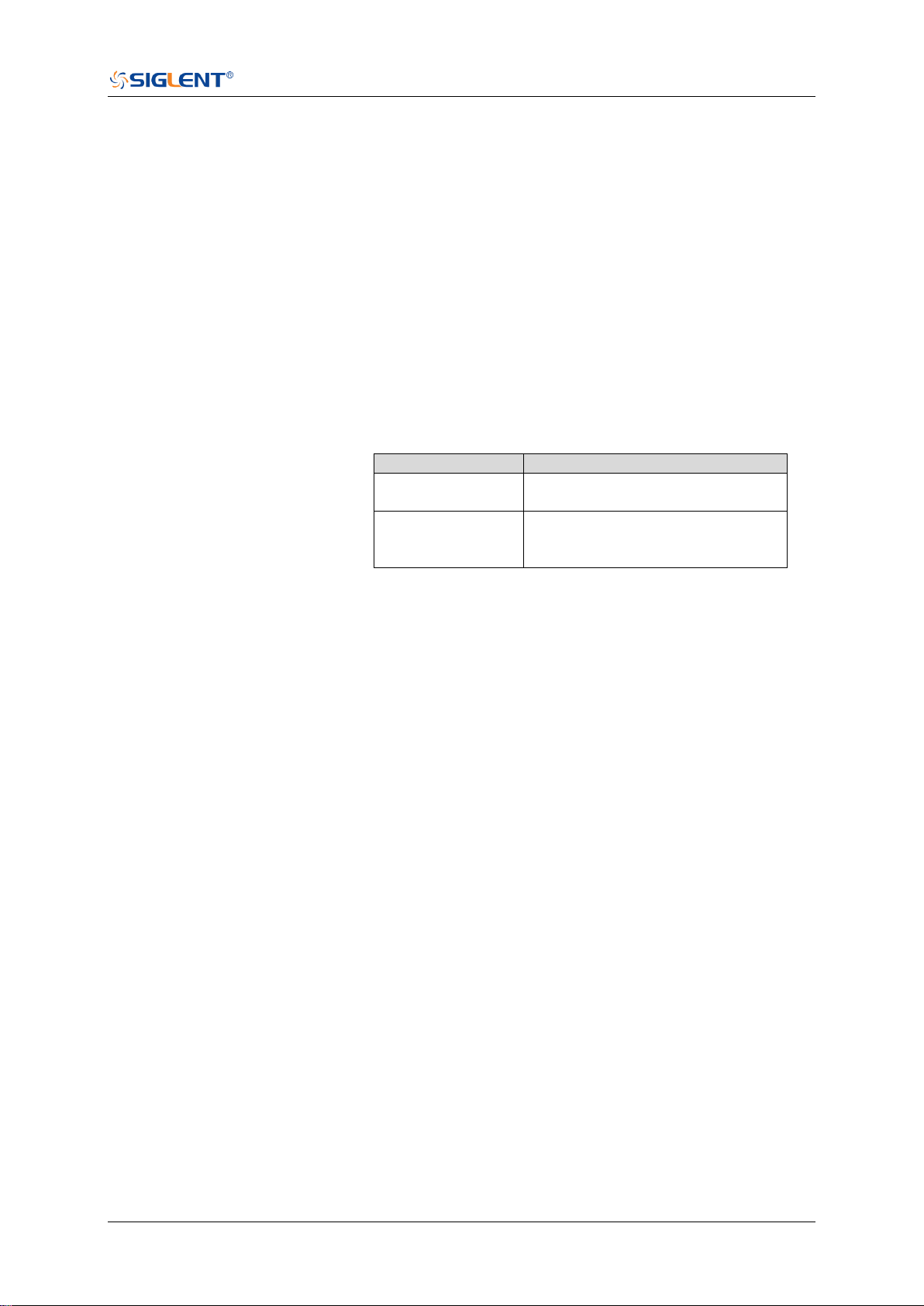
SDS Series Programming Guide
www.siglent.com 141 / 642
:DECode:BUS<n>:M1553:UTHReshold
Command/Query
DESCRIPTION
The command sets the upper threshold of the M1553 source.
This query returns the current upper threshold of the M1553
source.
COMMAND SYNTAX
:DECode:BUS<n>:M1553:UTHReshold <value>
<n>:= {1|2}, is attached as a suffix to BUS and defines the
bus that is affected by the command.
<value>:= Value in NR3 format, including a decimal point and
exponent, like 1.23E+2.
The range of the value varies by model, see the table below
for details
Model
Value Range
SDS6000 Pro/
SDS6000A
[-4.5*vertical_scale-vertical_offset,
4.5*vertical_scale-vertical_offset]
SDS5000X
SDS2000X Plus
SDS2000X HD
[-4.1*vertical_scale-vertical_offset,
4.1*vertical_scale-vertical_offset]
Note:
The upper threshold value cannot be less than the lower
threshold value set by the command
:DECode:BUS<n>:M1553:LTHReshold.
QUERY SYNTAX
:DECode:BUS<n>:M1553:UTHReshold?
RESPONSE FORMAT
<value>
<value>:= Value in NR3 format, including a decimal point and
exponent, like 1.23E+2.
EXAMPLE
The following command sets the upper threshold of the
M1553 bus source to 2 V on bus 1.
Command message:
:DECode:BUS1:M1553:UTHReshold 2.00E+00
DEC:BUS1:M1553:UTHR 2.00E+00
Query message:
DEC:BUS1:M1553:UTHR?
Response message:
2.00E+00
RELATED COMMANDS
:DECode:BUS<n>:M1553:SOURce
:DECode:BUS<n>:M1553:LTHReshold

SDS Series Programming Guide
142 / 642 www.siglent.com
DIGital Commands [Option]
The :DIGital subsystem commands control the viewing of digital channels. They also control
threshold settings for groups of digital channels.
:DIGital
:DIGital:ACTive
:DIGital:BUS<n>:DEFault
:DIGital:BUS<n>:DISPlay
:DIGital:BUS<n>:FORMat
:DIGital:BUS<n>:MAP
:DIGital:D<n>
:DIGital:HEIGht
:DIGital:LABel<n>
:DIGital:POINts
:DIGital:POSition
:DIGital:SKEW
:DIGital:SRATe
:DIGital:THReshold<n>

SDS Series Programming Guide
www.siglent.com 143 / 642
:DIGital
Command/Query
DESCRIPTION
The command set the switch of the digital.
This query returns the current state of the digital.
COMMAND SYNTAX
:DIGital <state>
<state>:= {ON|OFF}
ON enables the channel.
OFF disables the channel.
QUERY SYNTAX
:DIGital?
RESPONSE FORMAT
<state>
<state>:= {ON|OFF}
EXAMPLE
The following command enables digital function.
Command message:
:DIGital ON
DIG ON
Query message:
DIG?
Response message:
ON

SDS Series Programming Guide
144 / 642 www.siglent.com
:DIGital:ACTive
Command/Query
DESCRIPTION
This command activates the specified digital channel.
This query returns the active digital channel.
COMMAND SYNTAX
:DIGital:ACTive <digital>
<digital>:= {D<x>}
<x>:= 0 to (# digital channels - 1) in NR1 format, including an
integer and no decimal point, like 1.
QUERY SYNTAX
:DIGital:ACTive?
RESPONSE FORMAT
<digital>
<digital>:= {D<x>}
<x>:= 0 to (# digital channels - 1) in NR1 format, including an
integer and no decimal point, like 1.
EXAMPLE
The following command selects the digital channel 5
waveform.
Command message:
:DIGital:ACTive D5
DIG:ACT D5
Query message:
DIG:ACT?
Response message:
D5

SDS Series Programming Guide
www.siglent.com 145 / 642
:DIGital:BUS<n>:DEFault
Command
DESCRIPTION
This command resets the digital channel bus bit order
COMMAND SYNTAX
:DIGital:BUS<n>:DEFault
<n>:= {1|2}, is attached as a suffix to BUS and defines the bus
that is affected by the command.
EXAMPLE
The following command resets the digital channel bus1 data.
Command message:
:DIGital:BUS1:DEFault
DIG:BUS1:DEF
RELATED COMMANDS
:DIGital:BUS<n>:MAP

SDS Series Programming Guide
146 / 642 www.siglent.com
:DIGital:BUS<n>:DISPlay
Command/Query
DESCRIPTION
The command sets the display of the specified digital bus.
This query returns the current display of the specified digital
bus.
COMMAND SYNTAX
:DIGital:BUS<n>:DISPlay <state>
<n>:= {1|2}, is attached as a suffix to BUS and defines the
bus that is affected by the command.
<state>:= {ON|OFF}
QUERY SYNTAX
:DIGital:BUS<n>:DISPlay?
RESPONSE FORMAT
<state>
<state>:= {ON|OFF}
ON displays the selected bus.
OFF removes the selected bus from the display.
EXAMPLE
The following command sets digital bus 1 on.
Command message:
:DIGital:BUS1:DISPlay ON
DIG:BUS1:DISP ON
Query message:
DIG:BUS1:DISP?
Response message:
ON

SDS Series Programming Guide
www.siglent.com 147 / 642
:DIGital:BUS<n>:FORMat
Command/Query
DESCRIPTION
The command selects the display format of the specified
digital bus.
This query returns the current display format of the specified
digital bus.
COMMAND SYNTAX
:DIGital:BUS<n>:FORMat <format>
<n>:= {1|2}, is attached as a suffix to BUS and defines the
bus that is affected by the command.
<format>:= {BINary|DECimal|HEX|ASCii}
BINary presents the decoded data in binary format
DECimal presents the decoded data in decimal format
HEX presents the decoded data in hexadecimal format
ASCii presents the decoded data in ASCII format
QUERY SYNTAX
:DIGital:BUS<n>:FORMat?
RESPONSE FORMAT
<format>
<format>:= {BINary|DECimal|HEX|ASCii}
EXAMPLE
The following command selects the display format of the
digital bus 1 to HEX.
Command message:
:DIGital:BUS1:FORMat HEX
DIG:BUS1:FORM HEX
Query message:
DIG:BUS1:FORM?
Response message:
HEX

SDS Series Programming Guide
148 / 642 www.siglent.com
:DIGital:BUS<n>:MAP
Command/Query
DESCRIPTION
The command sets the bit order of each digital channel in the
digital bus and the bit width of the digital bus.
The query returns the current digital bus data composition in
the LSB order.
COMMAND SYNTAX
:DIGital:BUS<n>:MAP <source>[...[,<source>]]
<n>:= {1|2}, is attached as a suffix to BUS and defines the
bus that is affected by the command.
<source>:= {D<x>}
<x>:= 0 to (# digital channels - 1) in NR1 format, including an
integer and no decimal point, like 1.
Note:
It will synchronously set the bit width of the digital bus,
which is determined by the number of parameters.
Use the command :DIGital:BUS<n>:DEFault to reset the
bit sequence to d0-d15 according to the current digital
bus bit width.
QUERY SYNTAX
:DIGital:BUS<n>:MAP?
RESPONSE FORMAT
<source>[...[,<source>]]
<source>:= {D<x>}
<x>:= 0 to (# digital channels - 1) in NR1 format, including an
integer and no decimal point, like 1.
EXAMPLE
The following command the data of the digital bus 1 to
D0,D3,D7,D15.
Command message:
:DIGital:BUS1:MAP D0,D3,D7,D15
DIG:BUS1:MAP D0,D3,D7,D15
Query message:
DIG:BUS1:MAP?
Response message:
D0,D3,D7,D15
RELATED COMMANDS
:DIGital:BUS<n>:DEFault
:DIGital:D<n>

SDS Series Programming Guide
www.siglent.com 149 / 642
:DIGital:D<n>
Command/Query
DESCRIPTION
This command enables or disables the specified digital
channel.
This query returns the switch of the specified digital channel.
COMMAND SYNTAX
:DIGital:D<n> <state>
<n>:= 0 to (# digital channels - 1) in NR1 format, including an
integer and no decimal point, like 1.
<state>:= {ON|OFF}
ON enables the specified digital channel.
OFF disables the specified digital channel.
QUERY SYNTAX
:DIGital:D<n>?
RESPONSE FORMAT
<state>
<state>:= {ON|OFF}
EXAMPLE
The following command closes the digital channel 5.
Command message:
:DIGital:D5 OFF
DIG:D5 OFF
Query message:
DIG:D5?
Response message:
OFF
RELATED COMMANDS
:DIGital

SDS Series Programming Guide
150 / 642 www.siglent.com
:DIGital:HEIGht
Command/Query
DESCRIPTION
This command sets the height of digital channel waveform
display.
This query returns the height of digital channel waveform
display.
COMMAND SYNTAX
:DIGital:HEIGht <value>
<value>:= Value in NR3 format, including a decimal point and
exponent, like 1.23E+2. This value indicates the number of
divisions occupied by the digital waveform in the vertical
direction when the waveform area is not compressed.
The range of the value is [4.00E+00, 8.00E+00].
QUERY SYNTAX
:DIGital:HEIGht?
RESPONSE FORMAT
<value>
<value>:= Value in NR3 format, including a decimal point and
exponent, like 1.23E+2.
EXAMPLE
The following command sets the height of the digital channel
display area to 6 div.
Command message:
:DIGital:HEIGht 6.00E+00
DIG:HEIG 6.00E+00
Query message:
DIG:HEIG?
Response message:
6.00E+00
RELATED COMMANDS
:DIGital:POSition

SDS Series Programming Guide
www.siglent.com 151 / 642
:DIGital:LABel<n>
Command/Query
DESCRIPTION
This command sets the label text of the selected digital
channel.
This query returns the current label text of the selected digital
channel.
COMMAND SYNTAX
:DIGital:LABel<n> <string>
<n>:= 0 to (# digital channels - 1) in NR1 format, including an
integer and no decimal point, like 1.
<string>:= Quoted string of ASCII text. The length of the
string is limited to 7.
QUERY SYNTAX
:DIGital:LABel?
RESPONSE FORMAT
<string>
EXAMPLE
The following command sets the label name of the digital
channel 15 to "IIC_DATA".
Command message:
:DIGital:LABel15 "IIC_DATA"
DIG:LAB15 "IIC_DATA"
Query message:
DIG:LAB15?
Response message:
“IIC_DATA”
RELATED COMMANDS
:DIGital:LABel<n>

SDS Series Programming Guide
152 / 642 www.siglent.com
:DIGital:POINts
Query
DESCRIPTION
This query returns the number of sampling points of the digital
channel.
QUERY SYNTAX
:DIGital:POINts?
RESPONSE FORMAT
<value>
<value>:= Value in NR3 format, including a decimal point and
exponent, like 1.23E+2.
EXAMPLE
The following command query returns the number of sampling
points of the digital channel.
Query message:
DIG:POIN?
Response message:
6.25E+02
RELATED COMMANDS
:DIGital:SRATe

SDS Series Programming Guide
www.siglent.com 153 / 642
:DIGital:POSition
Command/Query
DESCRIPTION
The command sets the position of the digital channel
waveform display.
The query returns the position of the digital channel waveform
display.
COMMAND SYNTAX
:DIGital:POSition <value>
<value>:= Value in NR3 format, including a decimal point and
exponent, like 1.23E+2. This value indicates the number of
divisions the digital waveform moves from top to bottom of the
waveform area when the waveform area is not compressed
Note:
The range of legal values varies with the number of digital
channels displayed.
QUERY SYNTAX
:DIGital:POSition?
RESPONSE FORMAT
<value>
<value>:= Value in NR3 format, including a decimal point and
exponent, like 1.23E+2.
EXAMPLE
The following command sets the position of the digital channel
display area to 4 div when the digital channel height is 4.
Command message:
:DIGital:POSition 4.00E+00
DIG:POS 4.00E+00
Query message:
DIG:POS?
Response message:
4.00E+00
RELATED COMMANDS
:DIGital:HEIGht

SDS Series Programming Guide
154 / 642 www.siglent.com
:DIGital:SKEW
Command/Query
DESCRIPTION
This command sets the skew of the digital channel.
This query returns the current skew of the digital channel.
COMMAND SYNTAX
:DIGital:SKEW <value>
<value>:= Value in NR3 format, including a decimal point and
exponent, like 1.23E+2.
The range of the value is [-1.00E-07, 1.00E-07].
QUERY SYNTAX
:DIGital:SKEW?
RESPONSE FORMAT
<value>
<value>:= Value in NR3 format, including a decimal point and
exponent, like 1.23E+2.
EXAMPLE
The following command sets the skew of the digital channel
to 100 ns.
Command message:
:DIGital:SKEW 1.00E-07
DIG:SKEW 1.00E-07
Query message:
DIG:SKEW?
Response message:
1.00E-07

SDS Series Programming Guide
www.siglent.com 155 / 642
:DIGital:SRATe
Query
DESCRIPTION
This command query returns the sampling rate of the digital
channel.
QUERY SYNTAX
:DIGital:SRATe?
RESPONSE FORMAT
<value>
<value>:= Value in NR3 format, including a decimal point and
exponent, like 1.23E+2.
EXAMPLE
The following command query returns the sampling rate of the
digital channel.
Query message:
DIG:SRAT?
Response message:
1.25E+09

SDS Series Programming Guide
156 / 642 www.siglent.com
:DIGital:THReshold<n>
Command/Query
DESCRIPTION
This command sets the threshold value of the digital channel
group.
This query returns the threshold value of the digital channel
group.
COMMAND SYNTAX
:DIGital:THReshold<n> <type>
<n>:= {1|2}
1 means D0-D7
2 means D8-D15
<type>:=
{TTL|CMOS|LVCMOS33|LVCMOS25|CUSTom[,<value>]}
<value>:= Value in NR3 format, including a decimal point and
exponent, like 1.23E+2.
The range of the value is [-1.00E+01, 1.00E+01]
QUERY SYNTAX
:DIGital:THReshold<n>?
RESPONSE FORMAT
<type>
<type>:=
{TTL|CMOS|LVCMOS33|LVCMOS25|CUSTom[,<value>]}
<value>:= Value in NR3 format, including a decimal point and
exponent, like 1.23E+2.
EXAMPLE
The following command sets the threshold value of D0-D7 to
CMOS.
Command message:
:DIGital:THReshold1 CMOS
DIG:THR1 CMOS
Query message:
DIG:THR1?
Response message:
CMOS

SDS Series Programming Guide
www.siglent.com 157 / 642
DISPlay Commands
The :DISPlay subsystem commands control waveforms and screen displays.
:DISPlay:BACKlight
:DISPlay:CLEar
:DISPlay:COLor
:DISPlay:GRATicule
:DISPlay:GRIDstyle
:DISPlay:INTensity
:DISPlay:MENU
:DISPlay:PERSistence
:DISPlay:TRANsparence
:DISPlay:TYPE

SDS Series Programming Guide
158 / 642 www.siglent.com
:DISPlay:BACKlight
Command/Query
DESCRIPTION
This command sets the backlight level of the screen.
The query returns the current backlight level of the screen.
COMMAND SYNTAX
:DISPlay:BACKlight <value>
<value>:= Value in NR1 format, including an integer and no
decimal point, like 1. The range of the value is [0, 100]. 0 is
the least bright and 100 is the brightest.
QUERY SYNTAX
:DISPlay:BACKlight?
RESPONSE FORMAT
<value>
<value>:= Value in NR1 format, including an integer and no
decimal point, like 1.
EXAMPLE
The following command changes the backlight level to 100%.
Command message:
:DISPlay:BACKlight 100
DISP:BACK 100
Query message:
DISP:BACK?
Response message:
100

SDS Series Programming Guide
www.siglent.com 159 / 642
:DISPlay:CLEar
Command
DESCRIPTION
The command clears the waveform displayed on the screen.
COMMAND SYNTAX
:DISPlay:CLEar
EXAMPLE
The following command clears the waveform displayed on
the screen.
Command message:
:DISPlay:CLEar
DISP:CLE
RELATED COMMANDS
:ACQuire:CSWeep

SDS Series Programming Guide
160 / 642 www.siglent.com
:DISPlay:COLor
Command/Query
DESCRIPTION
The command sets the state of the color grade.
The query returns the state of the current color grade.
COMMAND SYNTAX
:DISPlay:COLor <state>
<state>:= {ON|OFF}
QUERY SYNTAX
:DISPlay:COLor?
RESPONSE FORMAT
<state>
<state>:= {ON|OFF}
EXAMPLE
The following command turns on the color grade.
Command message:
:DISPlay:COLor ON
DISP:COL ON
Query message:
DISP:COL?
Response message:
ON

SDS Series Programming Guide
www.siglent.com 161 / 642
:DISPlay:GRATicule
Command/Query
DESCRIPTION
The command sets the brightness level of the grid.
The query returns the current brightness level of the grid.
COMMAND SYNTAX
:DISPlay:GRATicule <value>
<value>:= Value in NR1 format, including an integer and no
decimal point, like 1. The range of the value is [0, 100]. 0 is
the least bright and 100 is the brightest.
QUERY SYNTAX
:DISPlay:GRATicule?
RESPONSE FORMAT
<value>
<value>:= Value in NR1 format, including an integer and no
decimal point, like 1.
EXAMPLE
The following command changes the grid brightness level to
50%.
Command message:
:DISPlay:GRATicule 50
DISP:GRAT 50
Query message:
DISP:GRAT?
Response message:
50

SDS Series Programming Guide
162 / 642 www.siglent.com
:DISPlay:GRIDstyle
Command/Query
DESCRIPTION
This command selects the type of grid to display.
The query returns the current type of grid to display.
COMMAND SYNTAX
:DISPlay:GRIDstyle <type>
<type>:= {FULL|LIGHt|NONE}
QUERY SYNTAX
:DISPlay:GRIDstyle?
RESPONSE FORMAT
<type>
<type>:= {FULL|LIGHt|NONE}
EXAMPLE
The following command sets the grid type to light grid.
Command message:
:DISPlay:GRIDstyle LIGHt
DISP:GRID LIGH
Query message:
DISP:GRID?
Response message:
LIGHt

SDS Series Programming Guide
www.siglent.com 163 / 642
:DISPlay:INTensity
Command/Query
DESCRIPTION
The command sets the intensity level of the waveform.
The query returns the current intensity level of the waveform.
COMMAND SYNTAX
:DISPlay:INTensity <value>
<value>:= Value in NR1 format, including an integer and no
decimal point, like 1. The range of the value is [0, 100]. 0 is
the least bright and 100 is the brightest.
QUERY SYNTAX
:DISPlay:INTensity?
RESPONSE FORMAT
<value>
<value>:= Value in NR1 format, including an integer and no
decimal point, like 1.
EXAMPLE
The following command sets the intensity level of the
waveform to 75%.
Command message:
:DISPlay:INTensity 75
DISP:INT 75
Query message:
DISP:INT?
Response message:
75

SDS Series Programming Guide
164 / 642 www.siglent.com
:DISPlay:MENU
Command/Query
DESCRIPTION
This command selects the style of menu to display.
The query returns the style of menu to display.
COMMAND SYNTAX
:DISPlay:MENU <type>
<type>:= {EMBedded|FLOating}
QUERY SYNTAX
:DISPlay:MENU?
RESPONSE FORMAT
<type>
<type>:= {EMBedded|FLOating}
EXAMPLE
The following command sets the menu style to floating.
Command message:
:DISPlay:MENU FLOating
DISP:MENU FLO
Query message:
DISP:MENU?
Response message:
FLOating

SDS Series Programming Guide
www.siglent.com 165 / 642
:DISPlay:PERSistence
Command/Query
DESCRIPTION
The command selects the persistence duration of the display,
in seconds, in persistence mode.
The query returns the current status of the persistence setting.
COMMAND SYNTAX
:DISPlay:PERSistence <time>
<time>:= {OFF|INFinite|1S|5S|10S|30S}
QUERY SYNTAX
:DISPlay:PERSistence?
RESPONSE FORMAT
<time>
<time>:= {OFF|INFinite|1S|5S|10S|30S}
EXAMPLE
The following command sets the variable persistence at 5
seconds.
Command message:
:DISPlay:PERSistence 5S
DISP:PERS 5S
Query message:
DISP:PERS?
Response message:
5S

SDS Series Programming Guide
166 / 642 www.siglent.com
:DISPlay:TRANsparence
Command/Query
DESCRIPTION
This command sets the transparency level of the information
bar.
The query returns the transparency level of the current
information bar.
COMMAND SYNTAX
:DISPlay:TRANsparence <value>
<value>:= Value in NR1 format, including an integer and no
decimal point, like 1. The range of the value is [0, 100]. 0 is
the least transparent and 100 is the most transparent.
QUERY SYNTAX
:DISPlay:TRANsparence?
RESPONSE FORMAT
<value>
<value>:= Value in NR1 format, including an integer and no
decimal point, like 1.
EXAMPLE
The following command changes the transparency level to
80%.
Command message:
:DISPlay:TRANsparence 80
DISP:TRAN 80
Query message:
DISP:TRAN?
Response message:
80

SDS Series Programming Guide
www.siglent.com 167 / 642
:DISPlay:TYPE
Command/Query
DESCRIPTION
The command sets the interpolation lines between data points.
The query returns the interpolation lines between data points.
COMMAND SYNTAX
:DISPlay:TYPE <type>
<type>:= {VECTor|DOT}
VECTor is the default mode and draws lines between
points.
DOT mode displays data more quickly than vector mode
but does not draw lines between sample points.
QUERY SYNTAX
:DISPlay:TYPE?
RESPONSE FORMAT
<type>
<type>:= {VECTor|DOT}
EXAMPLE
The following command sets the interpolation lines between
data points to vector.
Command message:
:DISPlay:TYPE VECTor
DISP:TYPE VECT
Query message:
DISP:TYPE?
Response message:
VECTor


SDS Series Programming Guide
www.siglent.com 169 / 642
:DVM
Command/Query
DESCRIPTION
This command sets the switch of the dvm function.
The query returns the current state of the dvm.
COMMAND SYNTAX
:DVM <state>
<state>:= {ON|OFF}
QUERY SYNTAX
:DVM?
RESPONSE FORMAT
<state>
<state>:= {ON|OFF}
EXAMPLE
The following command turns on the dvm.
Command message:
:DVM ON
DVM ON
Query message:
DVM?
Response message:
ON

SDS Series Programming Guide
170 / 642 www.siglent.com
:DVM:ALARm
Command/Query
DESCRIPTION
This command sets the switch of the overload alarm. When
enabled, an alarm will be given if the signal amplitude
exceeds the screen range.
The query returns the switch of the overload arm.
COMMAND SYNTAX
:DVM:ALARm <state>
<state>:= {ON|OFF}
QUERY SYNTAX
:DVM:ALARm?
RESPONSE FORMAT
<state>
<state>:= {ON|OFF}.
EXAMPLE
The following command sets the alarm on.
Command message:
:DVM:ALARm ON
DVM:ALAR ON
Query message:
DVM:ALAR?
Response message:
ON

SDS Series Programming Guide
www.siglent.com 171 / 642
:DVM:ARANge
Command/Query
DESCRIPTION
This command sets the auto range state for the dvm.
The query returns the auto range state for the dvm.
COMMAND SYNTAX
:DVM:ARANge <state>
<state>:= {ON|OFF}
QUERY SYNTAX
:DVM:ARANge?
RESPONSE FORMAT
<state>
<state>:= {ON|OFF}
EXAMPLE
The following command turns on the auto range.
Command message:
:DVM:ARANge ON
DVM:ARAN ON
Query message:
DVM:ARAN?
Response message:
ON

SDS Series Programming Guide
172 / 642 www.siglent.com
:DVM:CURRent
Query
DESCRIPTION
The query returns the displayed 3-digit DVM value based on
the current mode.
QUERY SYNTAX
:DVM:CURRent?
RESPONSE FORMAT
<value>
<value>:= Value in NR3 format, including a decimal point and
exponent, like 1.23E+2.
EXAMPLE
The following query returns the value of the current dvm
mode.
Query message:
DVM:CURR?
Response message:
0.98E+00

SDS Series Programming Guide
www.siglent.com 173 / 642
:DVM:HOLD
Command/Query
DESCRIPTION
This command sets the hold switch of dvm. When enabled,
the measured display value will remain unchanged.
The query returns the current hold switch of dvm.
COMMAND SYNTAX
:DVM:HOLD <state>
<state>:= {ON|OFF}
QUERY SYNTAX
:DVM:HOLD?
RESPONSE FORMAT
<state>
<state>:= {ON|OFF}
EXAMPLE
The following command turns on the hold switch.
Command message:
:DVM:HOLD ON
DVM:HOLD ON
Query message:
DVM:HOLD?
Response message:
ON

SDS Series Programming Guide
174 / 642 www.siglent.com
:DVM:MODE
Command/Query
DESCRIPTION
This command sets the digital voltmeter (DVM) mode.
The query returns the current digital voltmeter (DVM) mode:.
COMMAND SYNTAX
:DVM:MODE <mode>
<mode>:= {DCavg|DCRMs|ACRMs|PKPK|AMPLitude}
DCavg displays the DC value of the acquired data.
DCRMs displays the root-mean-square value of the
acquired data.
ACRMs displays the root-mean-square value of the
acquired data, with the DC component removed.
PKPK displays the difference between maximum and
minimum data values
AMPLitude displays difference between top and base in
a bimodal waveform. If not bimodal, displays difference
between max and min
QUERY SYNTAX
:DVM:MODE?
RESPONSE FORMAT
<mode>
<mode>:= {DCavg|DCRMs|ACRMs|PKPK| AMPLitude}
EXAMPLE
The following command sets the dvm mode to AMPLitude.
Command message:
:DVM:MODE AMPLitude
DVM:MODE AMPL
Query message:
DVM:MODE?
Response message:
AMPLitude

SDS Series Programming Guide
www.siglent.com 175 / 642
:DVM:SOURce
Command/Query
DESCRIPTION
This command sets the select the analog channel on which
digital voltmeter (DVM) measurements are made.
The query returns the current source of dvm.
COMMAND SYNTAX
:DVM:SOURce <source>
<source>:= {C<x>}
C is analog channel <x>
<x>:= 1 to (# analog channels) in NR1 format, including an
integer and no decimal point, like 1.
QUERY SYNTAX
:DVM:SOURce?
RESPONSE FORMAT
<source>
<source>:= {Cx}
EXAMPLE
The following command sets the dvm source to C2.
Command message:
:DVM:SOURce C2
DVM:SOUR C2
Query message:
DVM:SOUR?
Response message:
C2

SDS Series Programming Guide
176 / 642 www.siglent.com
FUNCtion Commands
The :FUNCtion subsystem commands control the math functions in the oscilloscope.
:FUNCtion:FFTDisplay
:FUNCtion:GVALue
:FUNCtion<n>
:FUNCtion<n>:DIFF:DX
:FUNCtion<n>:FFT:AUToset
:FUNCtion<n>:FFT:HCENter
:FUNCtion<n>:FFT:HSCale
:FUNCtion<n>:FFT:SPAN
:FUNCtion<n>:FFT:LOAD
:FUNCtion<n>:FFT:MODE
:FUNCtion<n>:FFT:POINts
:FUNCtion<n>:FFT:RESET
:FUNCtion<n>:FFT:RLEVel
:FUNCtion<n>:FFT:SCALe
:FUNCtion<n>:FFT:SEARch
:FUNCtion<n>:FFT:SEARch:EXCursion
:FUNCtion<n>:FFT:SEARch:THReshold
:FUNCtion<n>:FFT:UNIT
:FUNCtion<n>:FFT:WINDow
:FUNCtion<n>:INTegrate:GATE
:FUNCtion<n>:INVert
:FUNCtion<n>:LABel
:FUNCtion<n>:LABel:TEXT
:FUNCtion<n>:OPERation
:FUNCtion<n>:POSition
:FUNCtion<n>:SCALe
:FUNCtion<n>:SOURce1
:FUNCtion<n>:SOURce2

SDS Series Programming Guide
www.siglent.com 177 / 642
:FUNCtion:FFTDisplay
Command/Query
DESCRIPTION
This command sets the display mode of the FFT waveform.
This query returns the current display mode of the FFT
waveform.
COMMAND SYNTAX
:FUNCtion:FFTDisplay <mode>
<mode>:= {SPLit|FULL|EXCLusive}
SPLit means that the channel waveform and the FFT
waveform are displayed on the screen separately.
FULL means a full-screen display of the FFT waveform.
EXCLusive means that only the FFT waveform is
displayed on the screen.
QUERY SYNTAX
:FUNCtion:FFTDisplay?
RESPONSE FORMAT
<mode>
<mode>:= {SPLit|FULL|EXCLusive}
EXAMPLE
The following command sets the display mode of the FFT
waveform to split.
Command message:
:FUNCtion:FFTDisplay SPLit
FUNC:FFTD SPL
Query message:
FUNC:FFTD?
Response message:
SPLit

SDS Series Programming Guide
178 / 642 www.siglent.com
:FUNCtion:GVALue
Command/Query
DESCRIPTION
The command sets the integration threshold value of gate A
and gate B.
The query returns the current integration threshold values.
COMMAND SYNTAX
:FUNCtion:GVALue <valueA>,<valueB>
<value>:= Value in NR3 format, including a decimal point and
exponent, like 1.23E+2. The range of the value is
[-horizontal_grid/2*timebase, horizontal_grid/2*timebase].
Note:
The value of GA cannot be greater than that of GB. If you set
the value greater than GB, it will automatically be set to the
same value as GB.
QUERY SYNTAX
:FUNCtion:GVALue?
RESPONSE FORMAT
<valueA>,<valueB>
<value>:= Value in NR3 format, including a decimal point and
exponent, like 1.23E+2.
EXAMPLE
The following command sets the position of gate A to -100 ns
and set the position of gate B to 100ns.
Command message:
:FUNCtion:GVALue -1.00E-07,1.00E-07
FUNC:GVAL -1.00E-07,1.00E-07
Query message:
FUNC:GVAL?
Response message:
-1.00E-07,1.00E-07
RELATED COMMANDS
:FUNCtion<n>:INTegrate:GATE

SDS Series Programming Guide
www.siglent.com 179 / 642
:FUNCtion<n>
Command/Query
DESCRIPTION
This command set the switch of the math function.
This query returns the current state of the math function.
COMMAND SYNTAX
:FUNCtion<n> <state>
<n>:= 1 to (# math functions) in NR1 format, is attached as a
suffix to FUNCtion and defines the math that is affected by
the command.
<state>:= {ON|OFF}
QUERY SYNTAX
:FUNCtion<n>?
RESPONSE FORMAT
<state>
<state>:= {ON|OFF}
EXAMPLE
The following command enables Function1 of math.
Command message:
:FUNCtion1 ON
FUNC1 ON
Query message:
FUNC1?
Response message:
ON

SDS Series Programming Guide
180 / 642 www.siglent.com
:FUNCtion<n>:DIFF:DX
Command/Query
DESCRIPTION
This command sets the step size of the differential operation.
This query returns the current step size of the differential
operation.
COMMAND SYNTAX
:FUNCtion<n>:DIFF:DX <dx>
<n>:= 1 to (# math functions) in NR1 format, is attached as a
suffix to FUNCtion and defines the math that is affected by
the command
<dx>:= Value in NR1 format, including an integer and no
decimal point, like 1. The range of the value is [2, 20]
QUERY SYNTAX
:FUNCtion<n>:DIFF:DX?
RESPONSE FORMAT
<dx>
<dx>:= Value in NR1 format, including an integer and no
decimal point, like 1.
EXAMPLE
The following command sets the step of the differential
operation to 6 on Function1.
Command message:
:FUNCtion1:DIFF:DX 6
FUNC1:DIFF:DX 6
Query message:
FUNC1:DIFF:DX?
Response message:
6

SDS Series Programming Guide
www.siglent.com 181 / 642
:FUNCtion<n>:FFT:AUToset
Command
DESCRIPTION
This command causes the FFT waveform to be displayed at
the best position on the screen.
COMMAND SYNTAX
:FUNCtion<n>:FFT:AUToset <mode>
<n>:= 1 to (# math functions) in NR1 format, is attached as a
suffix to on FUNCtion and defines the math that is affected by
the command.
<mode>:= {SPAN|PEAK|NORMal}
SPAN – full span.
PEAK – center to peak.
NORMal –center set to the fundamental frequency and
the span is set to one-half of the fft sampling rate
EXAMPLE
The following command causes the FFT waveform to be
displayed at the best position on the screen on Function2.
Command message:
:FUNCtion2:FFT:AUToset NORMal
FUNC2:FFT:AUT NORM

SDS Series Programming Guide
182 / 642 www.siglent.com
:FUNCtion<n>:FFT:HCENter
Command/Query
DESCRIPTION
This command sets the center frequency of FFT.
This query returns the current center frequency of FFT.
COMMAND SYNTAX
:FUNCtion<n>:FFT:HCENter <center>
<n>:= 1 to (# math functions) in NR1 format, is attached as a
suffix to FUNCtion and defines the math that is affected by
the command.
<center>:= Value in NR3 format, including a decimal point
and exponent, like 1.23E+2.
Note:
The range of legal values varies with the value set by the
command :TIMebase:SCALe.
QUERY SYNTAX
:FUNCtion<n>:FFT:HCENter?
RESPONSE FORMAT
<center>
<center>:= Value in NR3 format, including a decimal point
and exponent, like 1.23E+2.
EXAMPLE
The following command sets the center frequency of FFT to 2
MHz on Function2.
Command message:
:FUNCtion2:FFT:HCENter 2.00E+06
FUNC2:FFT:HCEN 2.00E+06
Query message:
FUNC2:FFT:HCEN?
Response message:
2.00E+06Hz
RELATED COMMANDS
:TIMebase:SCALe

SDS Series Programming Guide
www.siglent.com 183 / 642
:FUNCtion<n>:FFT:HSCale
Query
DESCRIPTION
This query returns the current horizontal scale of FFT.
QUERY SYNTAX
:FUNCtion<n>:FFT:HSCale?
<n>:= 1 to (# math functions) in NR1 format, is attached as a
suffix to FUNCtion and defines the math that is affected by
the command.
RESPONSE FORMAT
<scale>
<scale>:= Value in NR3 format, including a decimal point and
exponent, like 1.23E+2.
EXAMPLE
The following query returns the horizontal scale of FFT on
Function2.
Query message:
FUNC2:FFT:HSC?
Response message:
1.00E+08
RELATED COMMANDS
:TIMebase:SCALe

SDS Series Programming Guide
184 / 642 www.siglent.com
:FUNCtion<n>:FFT:SPAN
Command/Query
DESCRIPTION
This query returns the current horizontal span of FFT.
QUERY SYNTAX
:FUNCtion<n>:FFT:SPAN?
<n>:= 1 to (# math functions) in NR1 format, is attached as a
suffix to FUNCtion and defines the math that is affected by
the command.
RESPONSE FORMAT
<span>
<span>:= Value in NR3 format, including a decimal point and
exponent, like 1.23E+2.
EXAMPLE
The following query returns the horizontal span of FFT on
Function2.
Query message:
FUNC2:FFT:SPAN?
Response message:
1.00E+08
RELATED COMMANDS
:FUNCtion<n>:FFT:HCENter

SDS Series Programming Guide
www.siglent.com 185 / 642
:FUNCtion<n>:FFT:LOAD
Command/Query
DESCRIPTION
This command sets the external load of the FFT.
This query returns the current external load of FFT.
COMMAND SYNTAX
:FUNCtion<n>:FFT:LOAD <load>
<n>:= 1 to (# math functions) in NR1 format, is attached as a
suffix to FUNCtion and defines the math that is affected by
the command.
<load>:= Value in NR1 format, including an integer and no
decimal point, like 1. The range of the value is [1, 1000000]
Note:
The load can be set only when the FFT unit is dBm.
QUERY SYNTAX
:FUNCtion<n>:FFT:LOAD?
RESPONSE FORMAT
<load>
<load>:= Value in NR1 format, including an integer and no
decimal point, like 1.
EXAMPLE
The following command sets the load of FFT to 50Ω on
Function2.
Command message:
:FUNCtion2:FFT:LOAD 50
FUNC2:FFT:LOAD 50
Query message:
FUNC2:FFT:LOAD?
Response message:
50
RELATED COMMANDS
:FUNCtion<n>:FFT:UNIT

SDS Series Programming Guide
186 / 642 www.siglent.com
:FUNCtion<n>:FFT:MODE
Command/Query
DESCRIPTION
This command selects the acquisition mode of the FFT
operation.
This query returns the current acquisition mode of the FFT
operation.
COMMAND SYNTAX
:FUNCtion<n>:FFT:MODE <mode>
<n>:= 1 to (# math functions) in NR1 format, is attached as a
suffix to FUNCtion and defines the math that is affected by
the command.
<mode>:= {NORMal|MAXHold|AVERage[,<num>]}
NORMal sets the FFT in the normal mode.
MAXHold sets the FFT in the max detect mode.
AVERage sets the FFT in the averaging mode.
<num>:= Value in NR1 format, including an integer and no
decimal point, like 1.
The range of the value is [4, 1024].
QUERY SYNTAX
:FUNCtion<n>:FFT:MODE?
RESPONSE FORMAT
<mode>
<mode>:= {NORMal|MAXHold|AVERage[,<num>]}
<num>:= Value in NR1 format, including an integer and no
decimal point, like 1.
EXAMPLE
The following command sets the acquisition mode of the FFT
operation on Function2 to normal.
Command message:
:FUNCtion2:FFT:MODE NORMaL
FUNC2:FFT:MODE NORM
Query message:
FUNC2:FFT:MODE?
Response message:
NORMal
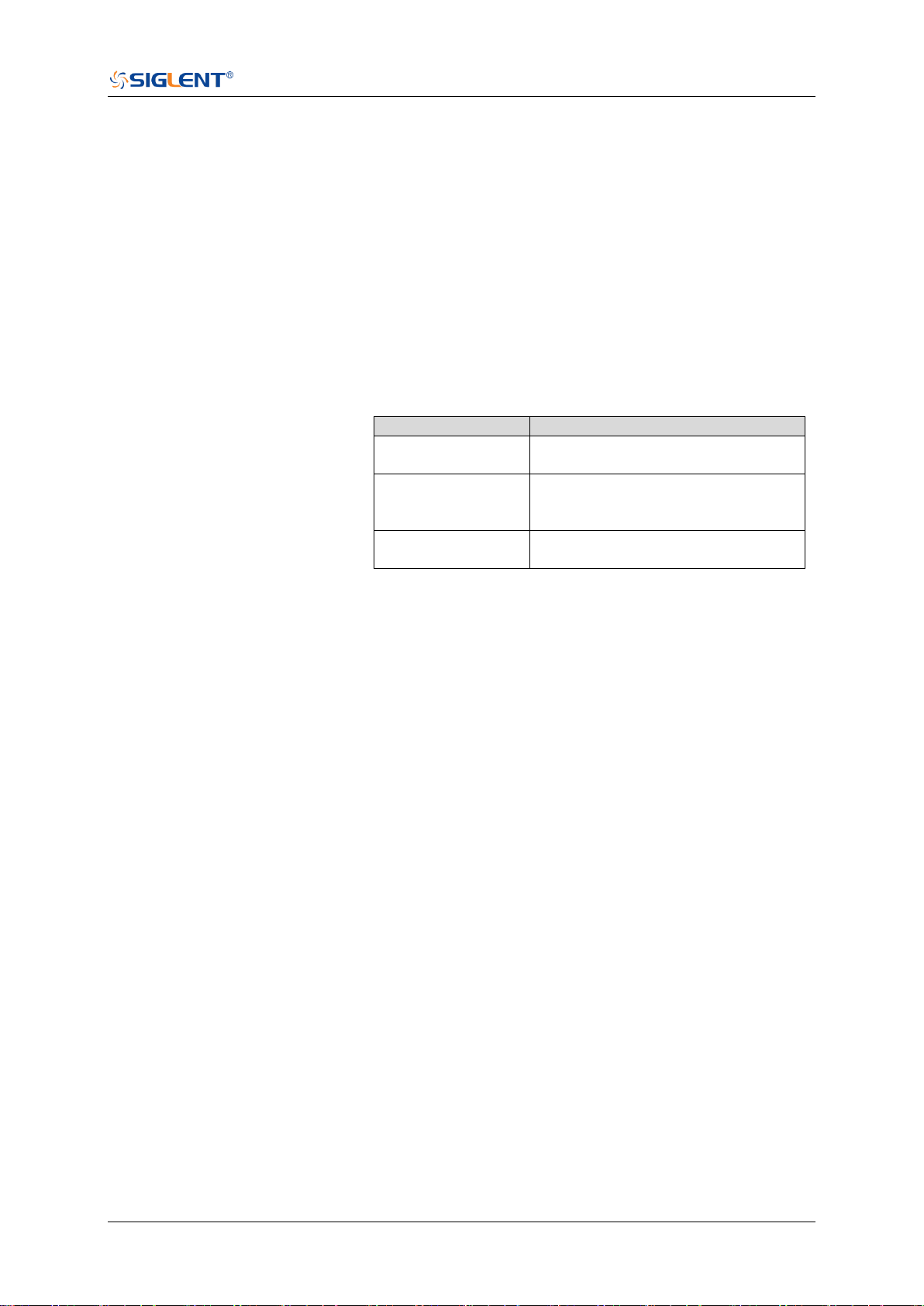
SDS Series Programming Guide
www.siglent.com 187 / 642
:FUNCtion<n>:FFT:POINts
Command/Query
DESCRIPTION
This command sets the maximum number of points for the
FFT operation.
This query returns the current maximum number of points for
the FFT operation.
COMMAND SYNTAX
:FUNCtion<n>:FFT:POINts <point>
<n>:= 1 to (# math functions) in NR1 format, is attached as a
suffix to FUNCtion and defines the math that is affected by
the command.
<point>:= Vary from models, see the table below for details.
Model
Value Range
SDS6000 Pro/
SDS6000A
{1k|2k|4k|8k|16k|32k|64k|128k|256k|51
2k|1M|2M|4M|8M}
SDS5000X
SDS2000X Plus
SDS2000X HD
{1k|2k|4k|8k|16k|32k|64k|128k|256k|51
2k|1M|2M}
SHS800X/
SHS1000X
{1k|2k|4k|8k|16k|32k|64k|128k|256k|51
2k|1M}
QUERY SYNTAX
:FUNCtion<n>:FFT:POINts?
RESPONSE FORMAT
<point>
EXAMPLE
The following command changes the maximum number of
points for the FFT operation to 2M on Function2.
Command message:
:FUNCtion2:FFT:POINts 2M
FUNC2:FFT:POIN 2M
Query message:
FUNC2:FFT:POIN?
Response message:
2M

SDS Series Programming Guide
188 / 642 www.siglent.com
:FUNCtion<n>:FFT:RESET
Command
DESCRIPTION
This command restarts counting when the acquisition mode
is average.
COMMAND SYNTAX
:FUNCtion<n>:FFT:RESET
<n>:= 1 to (# math functions) in NR1 format, is attached as a
suffix to FUNCtion and defines the math that is affected by
the command.
EXAMPLE
The following command restarts counting on Function2 when
the acquisition mode is average.
Command message:
:FUNCtion2:FFT:RESET
FUNC2:FFT:RESET
RELATED COMMANDS
:FUNCtion<n>:FFT:MODE
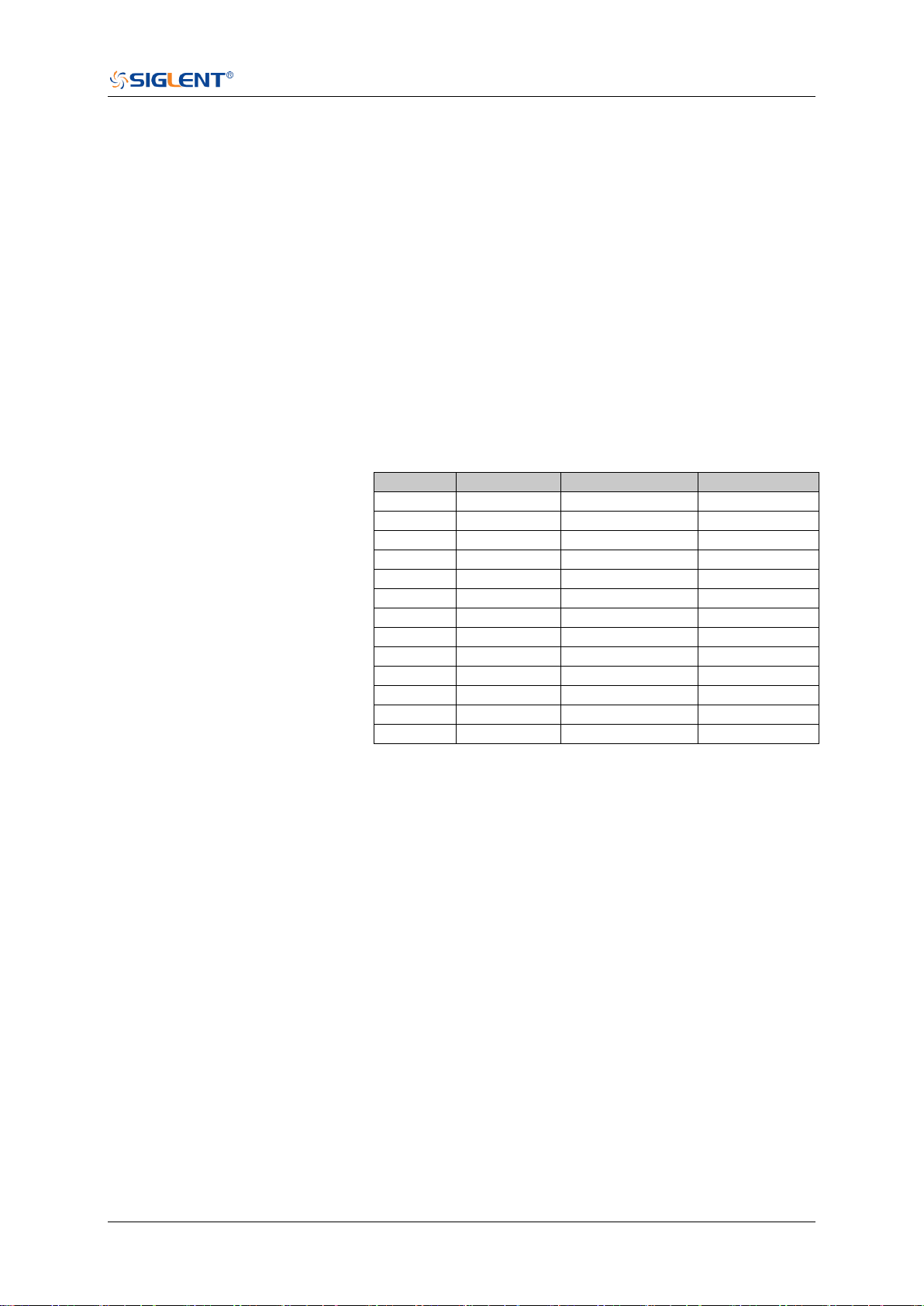
SDS Series Programming Guide
www.siglent.com 189 / 642
:FUNCtion<n>:FFT:RLEVel
Command/Query
DESCRIPTION
The command sets the reference level of the FFT operation.
The query returns the current reference level of the FFT
operation.
COMMAND SYNTAX
:FUNCtion<n>:FFT:RLEVel <level>
<n>:= 1 to (# math functions) in NR1 format, is attached as a
suffix to FUNCtion and defines the math that is affected by
the command.
<level>:= Value in NR3 format, including a decimal point and
exponent, like 1.23E+2.
The range of the values is related to the probe of the FFT
source.
Probe
dBVrms
Vrms
dBm
1E6 X
[-40,200]
[1E-2,1E10]
[-27,213]
1E5 X
[-60,180]
[1E-3,1E9]
[-47,193]
1E4 X
[-80,160]
[1E-4,1E8]
[-67,173]
1000X
[-100,140]
[1E-5,1E7]
[-87,153]
100X
[-120,120]
[1E-6,1E6]
[-107,133]
10X
[-140,100]
[1E-7,1E5]
[-127,113]
1
[-160,80]
[1E-8,1E4]
[-147,93]
0.1X
[-180,60]
[1E-9,1E3]
[-167,73]
0.01X
[-200,40]
[1E-10,1E2]
[-187,53]
1E-3 X
[-220,20]
[1E-11,10]
[-207,33]
1E-4 X
[-240,0]
[1E-12,1]
[-227,13]
1E-5 X
[-260,-20]
[1E-13,1E-1]
[-247,-7]
1E-6 X
[-280,-40]
[1E-14,1E-2]
[-267,-27]
Note:
The smaller the :FUNCtion<n>:FFT:SCALe, the greater the
accuracy of the level value.
QUERY SYNTAX
:FUNCtion<n>:FFT:RLEVel?
RESPONSE FORMAT
<level>
<level>:= Value in NR3 format, including a decimal point and
exponent, like 1.23E+2.

SDS Series Programming Guide
190 / 642 www.siglent.com
EXAMPLE
The following command sets the reference level of FFT
operation to 10 dBV on Function2 when the FFT unit is
dBVrms.
Command message:
:FUNCtion2:FFT:RLEVel 1.00E+01
FUNC2:FFT:RLEV 1.00E+01
Query message:
FUNC2:FFT:RLEV?
Response message:
1.00E+01
RELATED COMMANDS
:CHANnel<n>:PROBe
:FUNCtion<n>:FFT:SCALe
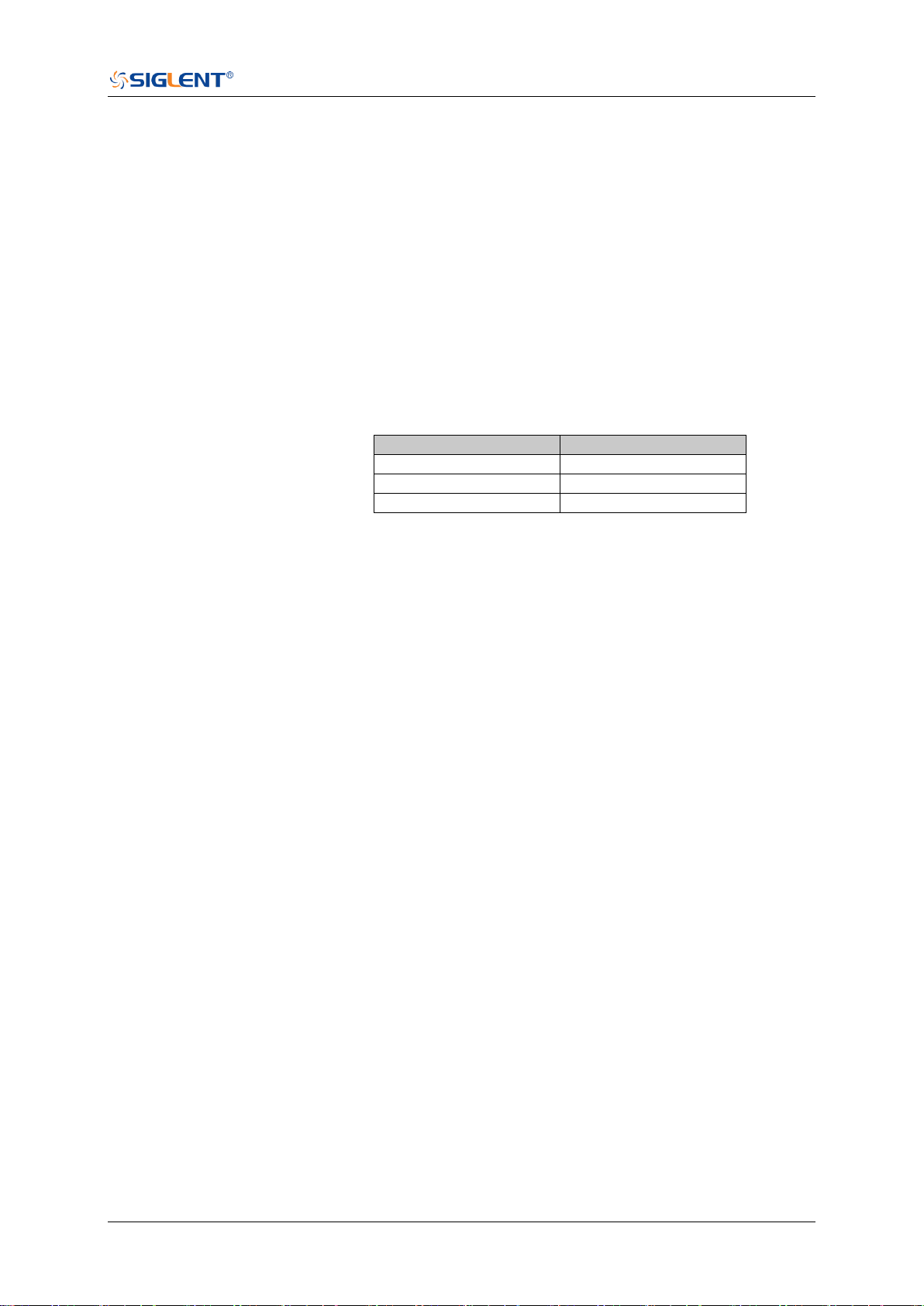
SDS Series Programming Guide
www.siglent.com 191 / 642
:FUNCtion<n>:FFT:SCALe
Command/Query
DESCRIPTION
The command sets the vertical scale of the FFT.
The query returns the current vertical scale of FFT.
COMMAND SYNTAX
:FUNCtion<n>:FFT:SCALe <scale>
<n>:= 1 to (# math functions) in NR1 format, is attached as a
suffix to FUNCtion and defines the math that is affected by
the command.
<scale>:= Value in NR3 format, including a decimal point and
exponent, like 1.23E+2.
The range of the values is related to the vertical unit.
Unit
Range
dBVrms
[1.00E-01, 2.00E+01]
Vrms
[1.00E-03, 1.00E+01]
dBm
[1.00E-01, 2.00E+01]
QUERY SYNTAX
:FUNCtion<n>:FFT:SCALe?
RESPONSE FORMAT
<scale>
<scale>:= Value in NR3 format, including a decimal point and
exponent, like 1.23E+2.
EXAMPLE
The following command sets the vertical scale of FFT to 20
dB on Function2 when the FFT unit is dBVrms.
Command message:
:FUNCtion2:FFT:SCALe 2.00E+01
FUNC2:FFT:SCAL 2.00E+01
Query message:
FUNC2:FFT:SCAL?
Response message:
2.00E+01
RELATED COMMANDS
:CHANnel<n>:PROBe

SDS Series Programming Guide
192 / 642 www.siglent.com
:FUNCtion<n>:FFT:SEARch
Command/Query
DESCRIPTION
This command selects the search tools type of the FFT
operation.
This query returns the current search tools type of the FFT
operation.
COMMAND SYNTAX
:FUNCtion<n>:FFT:SEARch <type>
<n>:= 1 to (# math functions) in NR1 format, is attached as a
suffix to FUNCtion and defines the math that is affected by
the command.
<type>:= {OFF|PEAK|MARKer}
QUERY SYNTAX
:FUNCtion<n>:FFT:SEARch?
RESPONSE FORMAT
<type>
<type>:= {OFF|PEAK|MARKer}
EXAMPLE
The following command sets the search tools type of FFT
operation on Function2 to marker.
Command message:
:FUNCtion2:FFT:SEARch MARKer
FUNC2:FFT:SEAR MARK
Query message:
FUNC2:FFT:SEAR?
Response message:
MARKer
RELATED COMMANDS
:FUNCtion<n>:FFT:SEARch:THReshold
:FUNCtion<n>:FFT:SEARch:EXCursion

SDS Series Programming Guide
www.siglent.com 193 / 642
:FUNCtion<n>:FFT:SEARch:EXCursion
Command/Query
DESCRIPTION
This command sets the search excursion of the search tool
(marker or peak) for the FFT operation.
This query returns the current search excursion of the search
tool for the FFT operation.
COMMAND SYNTAX
:FUNCtion<n>:FFT:SEARch:EXCursion <value>
<n>:= 1 to (# math functions) in NR1 format, is attached as a
suffix to FUNCtion and defines the math that is affected by
the command.
<value>:= Value in NR3 format, including a decimal point and
exponent, like 1.23E+2.
The range of the values is [0, 1.60E+02] when the FFT unit is
dBVrms. The value range varies with the corresponding unit.
Note:
The range of values varies with the value set by
the :CHANnel<n>:PROBe commands.
QUERY SYNTAX
:FUNCtion<n>:FFT:SEARch:EXCursion?
RESPONSE FORMAT
<value>
<value>:= Value in NR3 format, including a decimal point and
exponent, like 1.23E+2.
EXAMPLE
The following command sets the search excursion of the
marker of the FFT operation to 20 dB on Function2 when the
FFT unit is dBVrms.
Command message:
:FUNCtion2:FFT:SEARch:EXCursion 2.00E+01
FUNC2:FFT:SEAR:EXC 2.00E+01
Query message:
FUNC2:FFT:SEAR:EXC?
Response message:
2.00E+01
RELATED COMMANDS
:FUNCtion<n>:FFT:SEARch:THReshold

SDS Series Programming Guide
194 / 642 www.siglent.com
:FUNCtion<n>:FFT:SEARch:THReshold
Command/Query
DESCRIPTION
The command sets the search threshold of the search tool
(marker or peak) for the FFT operation.
The query returns the current search threshold of the search
tool for the FFT operation.
COMMAND SYNTAX
:FUNCtion<n>:FFT:SEARch:THReshold <value>
<n>:= 1 to (# math functions) in NR1 format, is attached as a
suffix to FUNCtion and defines the math that is affected by
the command.
<value>:= Value in NR3 format, including a decimal point and
exponent, like 1.23E+2.
The range of the values is [-1.60E+02, 8.00E+01], when FFT
unit is dBVrms. The value changes to match the set Units
value.
QUERY SYNTAX
:FUNCtion<n>:FFT:SEARch:THReshold?
RESPONSE FORMAT
<value>
<value>:= Value in NR3 format, including a decimal point and
exponent, like 1.23E+2.
EXAMPLE
The following command sets the search threshold of the
marker of the FFT operation to -100 dBV on Function2 when
the FFT unit is dBVrms.
Command message:
:FUNCtion2:FFT:SEARch:THReshold -1.00E+2
FUNC2:FFT:SEAR:THR -1.00E+2
Query message:
FUNC2:FFT:SEAR:THR?
Response message:
-1.00E+02
RELATED COMMANDS
:FUNCtion<n>:FFT:SEARch:EXCursion

SDS Series Programming Guide
www.siglent.com 195 / 642
:FUNCtion<n>:FFT:UNIT
Command/Query
DESCRIPTION
This command sets the unit type of the FFT operation.
This query returns the current unit type of the FFT operation.
COMMAND SYNTAX
:FUNCtion<n>:FFT:UNIT <unit>
<n>:= 1 to (# math functions) in NR1 format is attached as a
suffix to FUNCtion and defines the math that is affected by
the command.
<unit>:= {DBVrms|Vrms|DBm}
QUERY SYNTAX
:FUNCtion<n>:FFT:UNIT?
RESPONSE FORMAT
<unit>
<unit>:= {DBVrms|Vrms|DBm}
EXAMPLE
The following command sets the unit type of FFT operation
on Function2 to dBVrms.
Command message:
:FUNCtion2:FFT:UNIT DBVrms
FUNC2:FFT:UNIT DBVrms
Query message:
FUNC2:FFT:UNIT?
Response message:
DBVrms

SDS Series Programming Guide
196 / 642 www.siglent.com
:FUNCtion<n>:FFT:WINDow
Command/Query
DESCRIPTION
This command selects the window type of the FFT operation.
This query returns the current window type of the FFT operation.
COMMAND SYNTAX
:FUNCtion<n>:FFT:WINDow <window>
<n>:= 1 to (# math functions) in NR1 format, is attached as a
suffix to FUNCtion and defines the math that is affected by the
command.
<window>:=
{RECTangle|BLACkman|HANNing|HAMMing|FLATtop}
RECTangle is useful for transient signals, and signals
where there are an integral number of cycles in the time
record.
BLACkman reduces time resolution compared to the
rectangular window, but it improves the capacity to detect
smaller impulses due to lower secondary lobes (provides
minimal spectral leakage).
HANNing is useful for frequency resolution and
general-purpose use. It is good for resolving two
frequencies that are close together, or for making frequency
measurements.
HAMMing means Hamming.
FLATtop is the best for making accurate amplitude
measurements of frequency peaks.
QUERY SYNTAX
:FUNCtion<n>:FFT:WINDow?
RESPONSE FORMAT
<window>
<window>:=
{RECTangle|BLACkman|HANNing|HAMMing|FLATtop}
EXAMPLE
The following command sets the windowing of the FFT
operation on Function2 to Flattop.
Command message:
:FUNCtion2:FFT:WINDow FLATtop
FUNC2:FFT:WIND FLAT
Query message:
FUNC2:FFT:WIND?
Response message:
FLATtop

SDS Series Programming Guide
www.siglent.com 197 / 642
:FUNCtion<n>:INTegrate:GATE
Command/Query
DESCRIPTION
This command selects whether to enable the threshold of the
integral operation.
This query returns the threshold status of the integral
operation.
COMMAND SYNTAX
:FUNCtion<n>:INTegrate:GATE <state>
<n>:= 1 to (# math functions) in NR1 format, is attached as a
suffix to FUNCtion and defines the math that is affected by
the command.
<state>:= {ON|OFF}
QUERY SYNTAX
:FUNCtion<n>:INTegrate:GATE?
RESPONSE FORMAT
<state>
<state>:= {ON|OFF}
EXAMPLE
The following command turns on the threshold for the integral
operation of function 1.
Command message:
:FUNCtion1:INTegrate:GATE ON
FUNC1:INT:GATE ON
Query message:
FUNC1:INT:GATE?
Response message:
ON
RELATED COMMANDS
:FUNCtion:GVALue

SDS Series Programming Guide
198 / 642 www.siglent.com
:FUNCtion<n>:INTegrate:OFFSet
Command/Query
DESCRIPTION
The command sets the dc offset of the integrate operation.
The query returns the current dc offset of the integrate
operation.
COMMAND SYNTAX
:FUNCtion<n>:INTegrate:OFFSet <offset>
<n>:= 1 to (# math functions) in NR1 format, is attached as a
suffix to FUNCtion and defines the math that is affected by
the command.
<offset>:= Value in NR3 format, including a decimal point and
exponent, like 1.23E+2.
The range of the value is [-1.67E+00, 1.67E+00].
QUERY SYNTAX
:FUNCtion<n>:INTegrate:OFFSet?
RESPONSE FORMAT
<offset>
<offset>:= Value in NR3 format, including a decimal point and
exponent, like 1.23E+2.
EXAMPLE
The following command changes the offset of the integral
operation to 100 mV on Function1.
Command message:
:FUNCtion1:INTegrate:OFFSet 1.00E-01
FUNC1:INT:OFFS 1.00E-01
Query message:
FUNC1:INT:OFFS?
Response message:
1.00E-01
RELATED COMMANDS
:CHANnel<n>:PROBe

SDS Series Programming Guide
www.siglent.com 199 / 642
:FUNCtion<n>:INVert
Command/Query
DESCRIPTION
This command inverts the math waveform.
This query returns whether the math waveform is inverted or
not.
COMMAND SYNTAX
:FUNCtion<n>:INVert <state>
<n>:= 1 to (# math functions) in NR1 format, is attached as a
suffix to FUNCtion and defines the math that is affected by
the command.
<state>:= {ON|OFF}
QUERY SYNTAX
:FUNCtion<n>:INVert?
RESPONSE FORMAT
<state>
<state>:= {ON|OFF}
EXAMPLE
The following command inverts the Function1 waveform.
Command message:
:FUNCtion1:INVert ON
FUNC1:INV ON
Query message:
FUNC1:INV?
Response message:
ON

SDS Series Programming Guide
200 / 642 www.siglent.com
:FUNCtion<n>:LABel
Command/Query
DESCRIPTION
This command is to turn the specified math label on or off.
This query returns the label associated with a particular math
function.
COMMAND SYNTAX
:FUNCtion<n>:LABel <state>
<n>:= 1 to (# math functions) in NR1 format, is attached as a
suffix to FUNCtion and defines the math that is affected by
the command.
<state>:= {ON|OFF}
QUERY SYNTAX
:FUNCtion<n>:LABel?
RESPONSE FORMAT
<state>
<state>:= {ON|OFF}
EXAMPLE
The following command turns on the label of the Function1.
Command message:
:FUNCtion1:LABel ON
FUNC1:LAB ON
Query message:
FUNC1:LAB?
Response message:
ON
RELATED COMMANDS
:FUNCtion<n>:LABel:TEXT

SDS Series Programming Guide
www.siglent.com 201 / 642
:FUNCtion<n>:LABel:TEXT
Command/Query
DESCRIPTION
This command sets the selected math label to the string that
follows. Setting a label for a math function also adds the
name to the label list in non-volatile memory (replacing the
oldest label in the list)
This query returns the current label text of the selected math.
COMMAND SYNTAX
:FUNCtion<n>:LABel:TEXT <string>
<n>:= 1 to (# math functions) in NR1 format, is attached as a
suffix to FUNCtion and defines the math that is affected by
the command.
<string>:= Quoted string of ASCII text. The length of the
string is limited to 20.
QUERY SYNTAX
:FUNCtion<n>:LABel:TEXT?
RESPONSE FORMAT
<string>
EXAMPLE
The following command sets the label text of the Function1 to
“MATH”.
Command message:
:FUNCtion1:LABel:TEXT "MATH"
FUNC1:LAB:TEXT "MATH"
Query message:
FUNC1:LAB:TEXT?
Response message:
“MATH”
RELATED COMMANDS
:FUNCtion<n>:LABel

SDS Series Programming Guide
202 / 642 www.siglent.com
:FUNCtion<n>:OPERation
Command/Query
DESCRIPTION
This command sets the desired waveform math operation.
This query returns the current operation for the selected
function.
COMMAND SYNTAX
:FUNCtion<n>:OPERation <operation>
<n>:= 1 to (# math functions) in NR1 format, is attached as a
suffix to FUNCtion and defines the math that is affected by
the command.
<operation>:=
{ADD|SUBTract|MULTiply|DIVision|INTegrate|DIFF|FFT|SQRT|
ERES|AVERage|ABSolute|SIGN|IDENtity|NEGation|EXP|TEN|
LN|LOG|INTErpolate|MAXHold|MINHold}
QUERY SYNTAX
:FUNCtion<n>:OPERation?
RESPONSE FORMAT
<operation>
<operation>:=
{ADD|SUBTract|MULTiply|DIVision|INTegrate|DIFF|FFT|SQRT|
ERES|AVERage|ABSolute|SIGN|IDENtity|NEGation|EXP|TEN|
LN|LOG|INTErpolate|MAXHold|MINHold|}
EXAMPLE
The following command sets the Function1 operation to
Multiplication.
Command message:
:FUNCtion1:OPERation MULTiply
FUNC1:OPER MULT
Query message:
FUNC1:OPER?
Response message:
MULTiply

SDS Series Programming Guide
www.siglent.com 203 / 642
:FUNCtion<n>:POSition
Command/Query
DESCRIPTION
This command sets the vertical position of the selected math
operation (arithmetic and algebra operation).
This query returns the current position value for the selected
operation.
COMMAND SYNTAX
:FUNCtion<n>:POSition <offset>
<n>:= 1 to (# math functions) in NR1 format, is attached as a
suffix to FUNCtion and defines the math that is affected by
the command.
<offset>:= Value in NR3 format, including a decimal point and
exponent, like 1.23E+2.
Note:
The range of values is uniform and related to an operation.
QUERY SYNTAX
:FUNCtion<n>:POSition?
RESPONSE FORMAT
<offset>
<offset>:= Value in NR3 format, including a decimal point and
exponent, like 1.23E+2.
EXAMPLE
The following command changes the vertical position of
Function1 waveform to 1 V.
Command message:
:FUNCtion1:POSition 5.00E-01
FUNC1:POS 5.00E-01
Query message:
FUNC1:POS?
Response message:
5.00E-01
RELATED COMMANDS
:FUNCtion<n>:OPERation

SDS Series Programming Guide
204 / 642 www.siglent.com
:FUNCtion<n>:SCALe
Command/Query
DESCRIPTION
The command sets the vertical scale of the selected math
operation (arithmetic and algebra operation).
The query returns the current scale value for the selected
operation.
COMMAND SYNTAX
:FUNCtion<n>:SCALe <scale>
<n>:= 1 to (# math functions) in NR1 format, is attached as a
suffix to FUNCtion and defines the math that is affected by
the command.
<scale>:= Value in NR3 format, including a decimal point and
exponent, like 1.23E+2.
Note:
The range of the function scale is related to the scale of
the function source.
When the operation is INTegrate and DIFF, the scale
range is related to the timebase.
QUERY SYNTAX
:FUNCtion<n>:SCALe?
RESPONSE FORMAT
<scale>
<scale>:= Value in NR3 format, including a decimal point and
exponent, like 1.23E+2.
EXAMPLE
The following command changes the vertical scale of
Function1 waveform to 1 V.
Command message:
:FUNCtion1:SCALe 1.00E+00
FUNC1:SCAL 1.00E+00
Query message:
FUNC1:SCAL?
Response message:
1.00E+00
RELATED COMMANDS
:CHANnel<n>:SCALe

SDS Series Programming Guide
www.siglent.com 205 / 642
:FUNCtion<n>:SOURce1
Command/Query
DESCRIPTION
This command sets the source1 of the math operation.
This query returns the current source1 of the math operation.
COMMAND SYNTAX
:FUNCtion<n>:SOURce1 <source>
<n>:= 1 to (# math functions) in NR1 format, is attached as a
suffix to FUNCtion and defines the math that is affected by
the command.
<source>:= {C<x>|Z<x>|F<x>}
C is analog channel <x>
Z is zoom channel <x>
F is math function <x>, for math-on-math operations
<x>:= 1 to (# analog channels) in NR1 format, including an
integer and no decimal point, like 1.
Note:
Z<x> is optional only when Zoom is on.
FUNCtion<n> cannot set itself as the source.
QUERY SYNTAX
:FUNCtion<n>:SOURce1?
RESPONSE FORMAT
<source>
<source>:= {C<x>|Z<x>|F<x>}
<x>:= 1 to (# analog channels) in NR1 format, including an
integer and no decimal point, like 1.
EXAMPLE
The following command sets the source 1 of Function2 to C1.
Command message:
:FUNCtion2:SOURce1 C1
FUNC2:SOUR1 C1
Query message:
FUNC2:SOUR1?
Response message:
C1
RELATED COMMANDS
:FUNCtion<n>:SOURce2

SDS Series Programming Guide
206 / 642 www.siglent.com
:FUNCtion<n>:SOURce2
Command/Query
DESCRIPTION
This command sets the source2 of the math operation.
This query returns the current source2 of the math operation.
COMMAND SYNTAX
:FUNCtion<n>:SOURce2 <source>
<n>:= 1 to (# math functions) in NR1 format, is attached as a
suffix to FUNCtion and defines the math that is affected by
the command.
<source>:= {C<x>|Z<x>|F<x>}
C is analog channel <x>
Z is zoom channel <x>
F is math function <x>, for math-on-math operations
<x>:= 1 to (# analog channels) in NR1 format, including an
integer and no decimal point, like 1.
Note:
Z<x> is optional only when Zoom is on.
FUNCtion<n> cannot set itself as the source.
QUERY SYNTAX
:FUNCtion<n>:SOURce2?
RESPONSE FORMAT
<source>
<source>:= {C<x>|Z<x>|F<x>}
<x>:= 1 to (# analog channels) in NR1 format, including an
integer and no decimal point, like 1.
EXAMPLE
The following command sets the source2 of Function2 to C1.
Command message:
:FUNCtion2:SOURce2 C1
FUNC2:SOUR2 C1
Query message:
FUNC2:SOUR2?
Response message:
C1
RELATED COMMANDS
:FUNCtion<n>:SOURce1


SDS Series Programming Guide
208 / 642 www.siglent.com
:HISTORy
Command/Query
DESCRIPTION
The command sets the mode of the history function.
This query returns the current status of the history function.
COMMAND SYNTAX
:HISTORy <state>
<state>:= {ON|OFF}
QUERY SYNTAX
:HISTORy?
RESPONSE FORMAT
<state>
<state>:= {ON|OFF}
EXAMPLE
The following command turns on the history function.
Command message:
:HISTORy ON
HISTOR ON
Query message:
HISTOR?
Response message:
ON

SDS Series Programming Guide
www.siglent.com 209 / 642
:HISTORy:FRAMe
Command/Query
DESCRIPTION
This command sets the number of the history frame.
This query returns the current number of history frames.
COMMAND SYNTAX
:HISTORy:FRAMe <value>
<value>:= Value in NR1 format, including an integer and no
decimal point, like 1.
Note:
The maximum number of frames is related to the number of
samples set for the acquisition (memory depth). More
points/frame means less total frames available. Fewer
points/frame equals more frames available.
QUERY SYNTAX
:HISTORy:FRAMe?
RESPONSE FORMAT
<value>
<value>:= Value in NR1 format, including an integer and no
decimal point, like 1.
EXAMPLE
The following command sets the number of the history frame
to 4.
Command message:
:HISTORy:FRAMe 4
HISTOR:FRAM 4
Query message:
HISTOR:FRAM?
Response message:
4

SDS Series Programming Guide
210 / 642 www.siglent.com
:HISTORy:INTERval
Command/Query
DESCRIPTION
This command sets the play interval of the history frame.
This query returns the current play interval of the history frame.
COMMAND SYNTAX
:HISTORy:INTERval <value>
<value>:= Value in NR3 format, including a decimal point and
exponent, like 1.23E+2. The range of the value is [1.00E-06,1].
QUERY SYNTAX
:HISTORy:INTERval?
RESPONSE FORMAT
<value>
<value>:= Value in NR3 format, including a decimal point and
exponent, like 1.23E+2.
EXAMPLE
The following command sets the play interval of the history
frame to 1 ms.
Command message:
:HISTORy:INTERval 1.00E-03
HISTOR:INTER 1.00E-03
Query message:
HISTOR:INTER?
Response message:
1.00E-03

SDS Series Programming Guide
www.siglent.com 211 / 642
:HISTORy:LIST
Command/Query
DESCRIPTION
This command sets the state of the history list.
This query returns the current state of the history list.
COMMAND SYNTAX
:HISTORy:LIST <state>
<state>:= {OFF|ON[,<type>]}
<type>:= {TIME|DELTa}
TIME indicates that the time column is displayed by
sampling time
DELTa indicates that the time column is displayed by the
sampling interval.
QUERY SYNTAX
:HISTORy:LIST?
RESPONSE FORMAT
<state>
<state>:= {OFF|ON[,<type>]}
<type>:= {TIME|DELTa}
EXAMPLE
The following command turns on the history list and displays
it by sampling time.
Command message:
:HISTORy:LIST ON,TIME
HISTOR:LIST ON,TIME
Query message:
HISTOR:LIST?
Response message:
ON,TIME

SDS Series Programming Guide
212 / 642 www.siglent.com
:HISTORy:PLAY
Command/Query
DESCRIPTION
This command sets the play state of the history waveform.
This query returns the current play state of the history
waveform.
COMMAND SYNTAX
:HISTORy:PLAY <state>
<state>:= {BACKWards|PAUSe|FORWards}
BACKWards indicates that the frame number is played
from highest frame number to lowest (last-to-first,
chronologically).
FORWards indicates that the frame number is played
from the lowest frame number to the highest (first-to-last,
chronologically).
PAUSe will pause playback.
QUERY SYNTAX
:HISTORy:PLAY?
RESPONSE FORMAT
<state>
<state>:= {BACKWards|PAUSe|FORWards}
EXAMPLE
The following command sets the playback state of the history
waveform to backwards.
Command message:
:HISTORy:PLAY BACKWards
HISTOR:PLAY BACKW
Query message:
HISTOR:PLAY?
Response message:
BACKWards

SDS Series Programming Guide
www.siglent.com 213 / 642
:HISTORy:TIME
Query
DESCRIPTION
The query returns the acquire timestamp of the current frame.
QUERY SYNTAX
:HISTORy:TIME?
RESPONSE FORMAT
<time>
<time>:= hours:minutes:seconds.microseconds in NR1
format, including an integer and no decimal point, like 1.
EXAMPLE
The following command returns the time of acquisition of the
current frame.
Query message:
:HISTOR:TIME?
Response message:
07:48:09.253827
RELATED COMMANDS
:HISTORy:FRAMe

SDS Series Programming Guide
214 / 642 www.siglent.com
MEASure Commands
The :MEASure subsystem commands are used to control automatic measurements.
:MEASure
:MEASure:ADVanced:LINenumber
:MEASure:ADVanced:P<n>
:MEASure:ADVanced:P<n>:SOURce1
:MEASure:ADVanced:P<n>:SOURce2
:MEASure:ADVanced:P<n>:STATistics
:MEASure:ADVanced:P<n>:TYPE
:MEASure:ADVanced:P<n>:VALue
:MEASure:ADVanced:STATistics
:MEASure:ADVanced:STATistics:HISTOGram
:MEASure:ADVanced:STATistics:MAXCount
:MEASure:ADVanced:STATistics:RESet
:MEASure:ADVanced:STYLe
:MEASure:GATE
:MEASure:GATE:GA
:MEASure:GATE:GB
:MEASure:MODE
:MEASure:SIMPle:ITEM
:MEASure:SIMPle:SOURce
:MEASure:SIMPle:VALue

SDS Series Programming Guide
www.siglent.com 215 / 642
:MEASure
Command/Query
DESCRIPTION
The command sets the state of the measurement function.
This query returns the current state of the measurement
function.
COMMAND SYNTAX
:MEASure <state>
<state>:= {ON|OFF}
QUERY SYNTAX
:MEASure?
RESPONSE FORMAT
<state>
<state>:= {ON|OFF}
EXAMPLE
The following command enables the measurement function.
Command message:
:MEASure ON
:MEAS ON
Query message:
MEAS?
Response message:
ON

SDS Series Programming Guide
216 / 642 www.siglent.com
:MEASure:ADVanced:LINenumber
Command/Query
DESCRIPTION
The command sets the total number of advanced
measurement items displayed.
The query returns the current total number of advanced
measurement items displayed.
COMMAND SYNTAX
:MEASure:ADVanced:LINenumber <value>
<value>:= Value in NR1 format, including an integer and no
decimal point, like 1. The range of the value is [1, 12].
QUERY SYNTAX
:MEASure:ADVanced:LINenumber?
RESPONSE FORMAT
<value>
<value>:= Value in NR1 format, including an integer and no
decimal point, like 1.
EXAMPLE
The following command sets the total number of advanced
measurement items displayed to 12.
Command message:
:MEASure:ADVanced:LINenumber 12
MEAS:ADV:LIN 12
Query message:
MEAS:ADV:LIN?
Response message:
12
RELATED COMMANDS
:MEASure:MODE

SDS Series Programming Guide
www.siglent.com 217 / 642
:MEASure:ADVanced:P<n>
Command/Query
DESCRIPTION
This command sets the state of the specified measurement
item.
This query returns the current state of the measurement item.
COMMAND SYNTAX
:MEASure:ADVanced:P<n> <state>
P is the physical location of the specified measurement on
the display.
<n>:= 1 to 12
<state>:= {ON|OFF}
QUERY SYNTAX
:MEASure:ADVanced:P<n>?
RESPONSE FORMAT
<state>
<state>:= {ON|OFF}
EXAMPLE
The following command turns on the first (leftmost/topmost)
measurement item.
Command message:
:MEASure:ADVanced:P1 ON
MEAS:ADV:P1 ON
Query message:
MEAS:ADV:P1?
Response message:
ON
RELATED COMMANDS
:MEASure:ADVanced:P<n>:TYPE
:MEASure:ADVanced:P<n>:SOURce1
:MEASure:ADVanced:P<n>:SOURce2

SDS Series Programming Guide
218 / 642 www.siglent.com
:MEASure:ADVanced:P<n>:SOURce1
Command/Query
DESCRIPTION
This command sets the source1 of the specified advanced
measurement item.
This query returns the current source1 of the specified
advanced measurement item.
COMMAND SYNTAX
:MEASure:ADVanced:P<n>:SOURce1 <source>
<n>:= 1 to 12
<source>:=
{C<x>|Z<x>|F<x>|D<m>|ZD<m>|REFA|REFB|REFC|REFD}
C denotes an analog input channel.
Z denotes a zoomed input.
F denotes a math function.
D denotes a digital input channel.
ZD denotes a zoomed digital input channel.
REF denotes a reference waveform.
<x>:= 1 to (# analog channels) in NR1 format, including an
integer and no decimal point, like 1.
<m>:= 0 to (# digital channels - 1) in NR1 format, including an
integer and no decimal point, like 1.
Note:
Z<x> and ZD<m> are optional only when Zoom is on.
The source can only be set to C<x> when the type is
delay measurement.
QUERY SYNTAX
:MEASure:ADVanced:P<n>:SOURce1?
RESPONSE FORMAT
<source>
<source>:=
{C<x>|Z<x>|F<x>|D<m>|ZD<m>|REFA|REFB|REFC|REFD}
<x>:= 1 to (# analog channels) in NR1 format, including an
integer and no decimal point, like 1.
<m>:= 0 to (# digital channels - 1) in NR1 format, including an
integer and no decimal point, like 1.
EXAMPLE
The following command sets the source1 of the first
measurement item to C1.
Command message:
:MEASure:ADVanced:P1:SOURce1 C1
MEAS:ADV:P1:SOUR1 C1
Query message:
MEAS:ADV:P1:SOUR1?
Response message:


SDS Series Programming Guide
220 / 642 www.siglent.com
:MEASure:ADVanced:P<n>:SOURce2
Command/Query
DESCRIPTION
This command sets the source2 of the specified advanced
measurement item.
This query returns the source2 of the specified advanced
measurement item.
COMMAND SYNTAX
:MEASure:ADVanced:P<n>:SOURce2 <source>
<n>:= 1 to 12
<source>:=
{C<x>|Z<x>|F<x>|D<m>|ZD<m>|REFA|REFB|REFC|REFD}
C denotes an analog input channel. For example, C1 is
analog input 1.
Z denotes a zoomed waveform. For example, Z1 is zoom
waveform 1.
F denotes a math function. For example, F1 is math
function 1.
D denotes a digital waveform. For example, D1 denotes
digital input 1.
ZD denotes a zoomed digital input.
REF denotes a reference waveform.
<x>:= 1 to (# analog channels) in NR1 format, including an
integer and no decimal point, like 1.
<m>:= 0 to (# digital channels - 1) in NR1 format, including an
integer and no decimal point, like 1.
Note:
Z<x> and ZD<m> are optional only when Zoom is on.
The source can only be set to C<x> when the type is
delay measurement.
UERY SYNTAX
:MEASure:ADVanced:P<n>:SOURce2?
RESPONSE FORMAT
<source>
<source>:=
{C<x>|Z<x>|F<x>|D<m>|ZD<m>|REFA|REFB|REFC|REFD}
<x>:= 1 to (# analog channels) in NR1 format, including an
integer and no decimal point, like 1.
<m>:= 0 to (# digital channels - 1) in NR1 format, including an
integer and no decimal point, like 1.

SDS Series Programming Guide
www.siglent.com 221 / 642
EXAMPLE
The following command sets the source2 of the first
measurement item to C2.
Command message:
:MEASure:ADVanced:P1:SOURce2 C2
MEAS:ADV:P1:SOUR2 C2
Query message:
MEAS:ADV:P1:SOUR2?
Response message:
C2
RELATED COMMANDS
:MEASure:ADVanced:P<n>:SOURce1
:MEASure:ADVanced:P<n>:TYPE

SDS Series Programming Guide
222 / 642 www.siglent.com
:MEASure:ADVanced:P<n>:STATistics
Query
DESCRIPTION
This query returns statistics for the specified advanced
measurement item.
QUERY SYNTAX
:MEASure:ADVanced:P<n>:STATistics? <type>
<n>:= 1 to 12
<type>:=
{ALL|CURRent|MEAN|MAXimum|MINimum|STDev|COUNt}
ALL returns all the statistics
CURRent returns the current value of the statistics
MEAN returns the mean value of the statistics
MAXimum returns the maximum value of the statistics
MINimum returns the minimum value of the statistics
STDev returns the standard deviation of the statistics
COUNt returns the current number of counts used to
calculate the statistical data
RESPONSE FORMAT
<value>
<value>:= Value in NR3 format, including a decimal point and
exponent, like 1.23E+2.
Note:
When measurement statistics are off, it returns OFF.
EXAMPLE
The following query returns the statistical current value of the
first measurement item.
Query message:
MEAS:ADV:P1:STAT? CURR
Response message:
6.7E-02
RELATED COMMANDS
:MEASure:ADVanced:STATistics
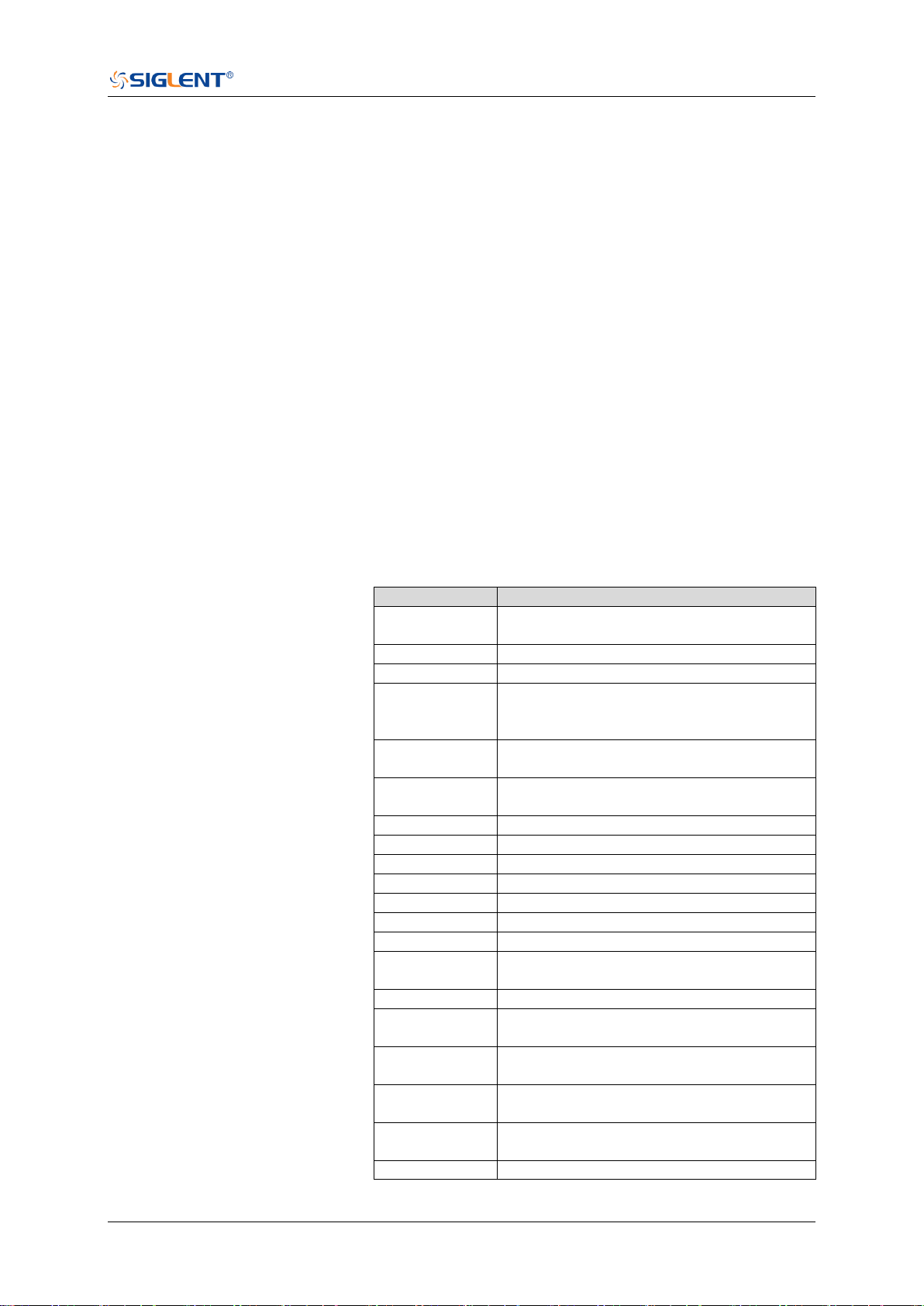
SDS Series Programming Guide
www.siglent.com 223 / 642
:MEASure:ADVanced:P<n>:TYPE
Command/Query
DESCRIPTION
This command sets the type for the specified measurement
item.
This query returns the type for the specified measurement
item.
COMMAND SYNTAX
:MEASure:ADVanced:P<n>:TYPE <parameter>
<n>:= 1 to 12
<parameter>:=
{PKPK|MAX|MIN|AMPL|TOP|BASE|LEVELX|CMEAN|MEAN
|STDEV|VSTD|RMS|CRMS|MEDIAN|CMEDIAN|OVSN|FPR
E|OVSP|RPRE|PER|FREQ|TMAX|TMIN|PWID|NWID|DUTY|
NDUTY|WID|NBWID|DELAY|TIMEL|RISE|FALL|RISE10T90|
FALL90T10|CCJ|PAREA|NAREA|AREA|ABSAREA|CYCLE
S|REDGES|FEDGES|EDGES|PPULSES|NPULSES|PHA|S
KEW|FRR|FRF|FFR|FFF|LRR|LRF|LFR|LFF|PACArea|NAC
Area|ACArea|ABSACArea|PSLOPE|NSLOPE|TSR|TSF|THR
|THF}
Description of Parameters
Parameter
Description
PKPK
Difference between maximum and
minimum data values
MAX
Highest value in waveform
MIN
Lowest value in waveform
AMPL
Difference between top and base in a
bimodal waveform. If not bimodal,
difference between max and min
TOP
Value of most probable higher state in a
bimodal waveform
BASE
Value of most probable lower state in a
bimodal waveform
LEVELX
Level measured at trigger position
CMEAN
Average value of the first cycle
MEAN
Average of data values
STDEV
Standard deviation of the data
VSTD
Standard deviation of the first cycle
RMS
Root mean square of the data
CRMS
Root mean square of the first cycle
MEDIAN
Value at which 50% of the measurement
are above and 50% are below
CMEDIAN
Median of the first cycle
OVSN
Overshoot following a falling edge;
100%* (base-min)/amplitude
FPRE
Overshoot before a falling edge;
100%*(max-top)/amplitude
OVSP
Overshoot following a rising edge;
100%*(max-top)/amplitude
RPRE
Overshoot before a rising edge;
100%*(base-min)/amplitude
PER
Time between the middle threshold
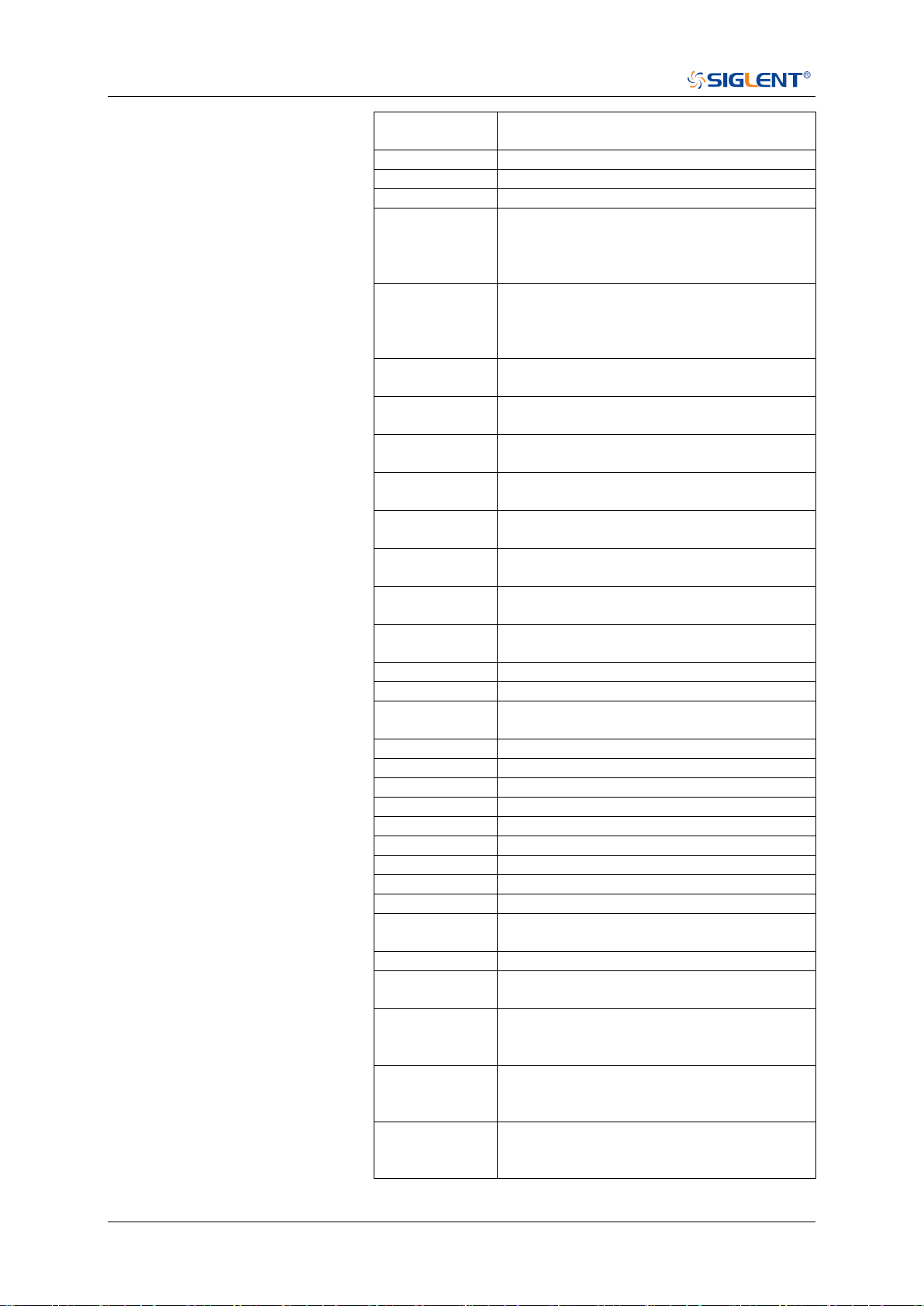
SDS Series Programming Guide
224 / 642 www.siglent.com
points of two consecutive, like-polarity
edges
FREQ
Reciprocal of period
TMAX
First time of maximum value
TMIN
First time of minimum value
PWID
Time difference between the middle
threshold of a rising edge to the middle
threshold of the next falling edge of the
pulse
NWID
Time difference between the middle
threshold of a falling edge to the middle
threshold of the next rising edge of the
pulse
DUTY
Positive Duty Cycle. Ratio of positive
width to period
NDUTY
Duty Cycle. Ratio of negative width to
period
WID
Time from the first rising edge to the last
falling edge at the middle threshold
NBWID
Time from the first falling edge to the last
rising edge at the middle threshold
DELAY
Time from the trigger to the first
transition at the middle threshold
TIMEL
Time from the trigger to each rising edge
at the middle threshold
RISE
Duration of rising edge from lower to
upper of threshold
FALL
Duration of falling edge from upper to
lower of threshold
RISE10T90
Duration of rising edge from 10-90%
FALL90T10
Duration of falling edge from 90-10%
CCJ
The difference between two continuous
periods
PAREA
Area of the waveform above zero
NAREA
Area of the waveform below zero
AREA
Area of the waveform
ABSAREA
Absolute area of the waveform
CYCLES
Number of cycles in a periodic waveform
EDGES
Number of edges in a waveform
REDGES
Number of rising edges in a waveform
FEDGES
Number of falling edges in a waveform
PPULSES
Number of positive pulses in a waveform
NPULSES
Number of negative pulses in a
waveform
PHA
Phase difference between two edges
SKEW
Time of source A edge minus time of
nearest source B edge
FRR
The time between the first rising edge of
source A and the first rising edge of
source B at the middle threshold
FRF
The time between the first rising edge of
source A and the first falling edge of
source B at the middle threshold
FFR
The time between the first falling edge of
source A and the first rising edge of
source B at the middle threshold
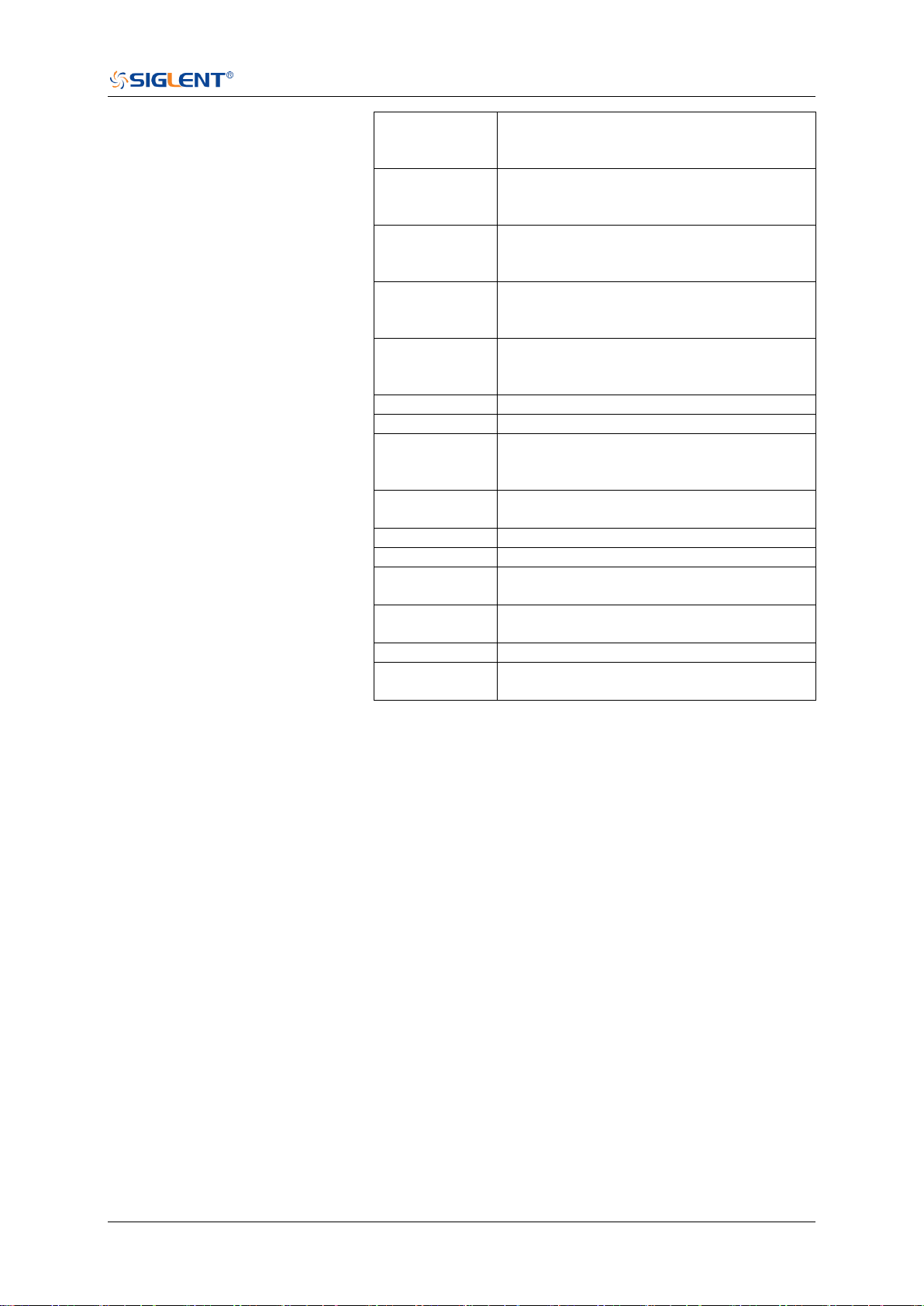
SDS Series Programming Guide
www.siglent.com 225 / 642
FFF
The time between the first falling edge of
source A and the first falling edge of
source B at the middle threshold
LRR
The time between the first rising edge of
source A and the last rising edge of
source B at the middle threshold
LRF
The time between the first rising edge of
source A and the last falling edge of
source B at the middle threshold
LFR
The time between the first falling edge of
source A and the last rising edge of
source B at the middle threshold
LFF
The time between the first falling edge of
source A and the last falling edge of
source B at the middle threshold
PACArea
Area of the waveform above average
NACArea
Area of the waveform below average
ACArea
Area of the waveform above average
minus area of the waveform below
average
ABSACArea
Area of the waveform above average
add area of the waveform below average
PSLOPE
The slope of rising edges
NSLOPE
The slope of falling edges
TSR
Data setup time before the clock rising
edge
TSF
Data setup time before the clock falling
edge
THR
Data hold time after the clock rising edge
THF
Data hold time after the clock falling
edge
QUERY SYNTAX
:MEASure:ADVanced:P<n>:TYPE?
RESPONSE FORMAT
<parameter>
EXAMPLE
The following command sets the type of the first
measurement to maximum.
Command message:
:MEASure:ADVanced:P1:TYPE MAX
MEAS:ADV:P1:TYPE MAX
Query message:
MEAS:ADV:P1:TYPE?
Response message:
MAX
RELATED COMMANDS
:MEASure:ADVanced:P<n>

SDS Series Programming Guide
226 / 642 www.siglent.com
:MEASure:ADVanced:P<n>:VALue
Query
DESCRIPTION
The query returns the value of the specified advanced
measurement item.
QUERY SYNTAX
:MEASure:ADVanced:P<n>:VALue?
<n>:= 1 to 12
RESPONSE FORMAT
<value>
<value>:= Value in NR3 format, including a decimal point and
exponent, like 1.23E+2.
EXAMPLE
The following query returns the value of the first
measurement item.
Query message:
MEAS:ADV:P1:VAL?
Response message:
4.033E+00
RELATED COMMANDS
:MEASure:ADVanced:P<n>:TYPE

SDS Series Programming Guide
www.siglent.com 227 / 642
:MEASure:ADVanced:STATistics
Command/Query
DESCRIPTION
The command sets the state of the measurement statistics.
This query returns the current state of the measurement
statistics function.
COMMAND SYNTAX
:MEASure:ADVanced:STATistics <state>
<state>:= {ON|OFF}
QUERY SYNTAX
:MEASure:ADVanced:STATistics?
RESPONSE FORMAT
<state>
<state>:= {ON|OFF}
EXAMPLE
The following command enables the statistics function.
Command message:
:MEASure:ADVanced:STATistics ON
MEAS:ADV:STAT ON
Query message:
MEAS:ADV:STAT?
Response message:
ON
RELATED COMMANDS
:MEASure:ADVanced:P<n>:STATistics

SDS Series Programming Guide
228 / 642 www.siglent.com
:MEASure:ADVanced:STATistics:HISTOGram
Command/Query
DESCRIPTION
The command sets the state of the histogram function.
This query returns the current state of the histogram function.
COMMAND SYNTAX
:MEASure:ADVanced:STATistics:HISTOGram <state>
<state>:= {ON|OFF}
QUERY SYNTAX
:MEASure:ADVanced:STATistics:HISTOGram?
RESPONSE FORMAT
<state>
<state>:= {ON|OFF}
EXAMPLE
The following command enables histogram function.
Command message:
:MEASure:ADVanced:STATistics:HISTOGram ON
MEAS:ADV:STAT:HISTOG ON
Query message:
MEAS:ADV:STAT:HISTOG?
Response message:
ON
RELATED COMMANDS
:MEASure:ADVanced:STATistics

SDS Series Programming Guide
www.siglent.com 229 / 642
:MEASure:ADVanced:STATistics:MAXCount
Command/Query
DESCRIPTION
This command sets the maximum value of the statistics count.
The query returns the current value of statistics count.
COMMAND SYNTAX
:MEASure:ADVanced:STATistics:MAXCount <value>
<value>:= Value in NR1 format, including an integer and no
decimal point, like 1. The range of the value is [0, 1024].
Note:
When the value is set to 0, it means unlimited statistics.
QUERY SYNTAX
:MEASure:ADVanced:STATistics:MAXCount?
RESPONSE FORMAT
<value>
<value>:= Value in NR1 format, including an integer and no
decimal point, like 1.
EXAMPLE
The following command sets the maximum value of statistics
count to 1024.
Command message:
:MEASure:ADVanced:STATistics:MAXCount 1024
MEAS:ADV:STAT:MAXC 1024
Query message:
MEAS:ADV:STAT:MAXC?
Response message:
1024
RELATED COMMANDS
:MEASure:ADVanced:STATistics

SDS Series Programming Guide
230 / 642 www.siglent.com
:MEASure:ADVanced:STATistics:RESet
Command
DESCRIPTION
The command resets the measurement statistics.
COMMAND SYNTAX
:MEASure:ADVanced:STATistics:RESet
EXAMPLE
The following command restarts statistics.
Command message:
:MEASure:ADVanced:STATistics:RESet
MEAS:ADV:STAT:RES
RELATED COMMANDS
:MEASure:ADVanced:STATistics

SDS Series Programming Guide
www.siglent.com 231 / 642
:MEASure:ADVanced:STYLe
Command/Query
DESCRIPTION
The command selects the display mode of the advanced
measurements.
This query returns the current display mode of the advanced
measurement.
COMMAND SYNTAX
:MEASure:ADVanced:STYLe <type>
<type>:= {M1|M2}
M1 lists a measurement, corresponding statistics, and
histogram vertically on the display.
M2 lists a measurement and corresponding statistics
horizontally on the display. No histogram is available with
M2.
QUERY SYNTAX
:MEASure:ADVanced:STYLe?
RESPONSE FORMAT
<type>
<type>:= {M1|M2}
EXAMPLE
The following command selects the display mode of the
advanced measurement to M1.
Command message:
:MEASure:ADVanced:STYLe M1
MEAS:ADV:STYL M1
Query message:
MEAS:ADV:STYL?
Response message:
M1

SDS Series Programming Guide
232 / 642 www.siglent.com
:MEASure:GATE
Command/Query
DESCRIPTION
This command sets the state of the measurement gate.
This query returns the current state of the measurement gate.
COMMAND SYNTAX
:MEASure:GATE <state>
<state>:= {ON|OFF}
QUERY SYNTAX
:MEASure:GATE?
RESPONSE FORMAT
<state>
<state>:= {ON|OFF}
EXAMPLE
The following command enables the measurement gate.
Command message:
:MEASure:GATE ON
MEAS:GATE ON
Query message:
MEAS:GATE?
Response message:
ON
RELATED COMMANDS
:MEASure:GATE:GA
:MEASure:GATE:GB

SDS Series Programming Guide
www.siglent.com 233 / 642
:MEASure:GATE:GA
Command/Query
DESCRIPTION
This command sets the position of gate A.
This query returns the current position of gate A.
COMMAND SYNTAX
:MEASure:GATE:GA <value>
<value>:= Value in NR3 format, including a decimal point and
exponent, like 1.23E+2. The range of the value is
[-horizontal_grid/2*timebase, horizontal_grid/2*timebase].
Note:
The value of GA cannot be greater than that of GB. If you set
the value greater than GB, it will automatically be set to the
same value as GB.
QUERY SYNTAX
:MEASure:GATE:GA?
RESPONSE FORMAT
<value>
<value>:= Value in NR3 format, including a decimal point and
exponent, like 1.23E+2.
EXAMPLE
The following command sets the position of gate A to -100 ns.
Command message:
:MEASure:GATE:GA -1.00E-07
MEAS:GATE:GA -1.00E-07
Query message:
MEAS:GATE:GA?
Response message:
-1.00E-07
RELATED COMMANDS
:MEASure:GATE
:MEASure:GATE:GB

SDS Series Programming Guide
234 / 642 www.siglent.com
:MEASure:GATE:GB
Command/Query
DESCRIPTION
This command sets the position of gate B.
This command returns the current position of gate B.
COMMAND SYNTAX
:MEASure:GATE:GB <value>
<value>:= Value in NR3 format, including a decimal point and
exponent, like 1.23E+2. The range of the value is
[-horizontal_grid/2*timebase, horizontal_grid/2*timebase].
Note:
The value of GB cannot be less than that of GA. If you set the
value less than GA, it will automatically be set to the same
value as GA.
QUERY SYNTAX
:MEASure:GATE:GB?
RESPONSE FORMAT
<value>
<value>:= Value in NR3 format, including a decimal point and
exponent, like 1.23E+2.
EXAMPLE
The following command sets the position of gate B to 100 ns.
Command message:
:MEASure:GATE:GB 1.00E-07
MEAS:GATE:GB 1.00E-07
Query message:
MEAS:GATE:GB?
Response message:
1.00E-07
RELATED COMMANDS
:MEASure:GATE
:MEASure:GATE:GA

SDS Series Programming Guide
www.siglent.com 235 / 642
:MEASure:MODE
Command/Query
DESCRIPTION
The command specifies the mode of measurement.
The query returns the current mode of measurement.
COMMAND SYNTAX
:MEASure:MODE <type>
<type>:= {SIMPle|ADVanced}
SIMPle shows measurements only
ADVanced shows measurements and includes selections
for statistics, view mode (M1, M2), histogram, and
trending.
QUERY SYNTAX
:MEASure:MODE?
RESPONSE FORMAT
<type>
<type>:= {SIMPle|ADVanced}
EXAMPLE
The following command sets the measurement mode to
simple.
Command message:
:MEASure:MODE SIMPle
MEAS:MODE SIMP
Query message:
MEAS:MODE?
Response message:
SIMPle

SDS Series Programming Guide
236 / 642 www.siglent.com
:MEASure:SIMPle:ITEM
Command
DESCRIPTION
This command sets the type of simple measurement.
COMMAND SYNTAX
:MEASure:SIMPle:ITEM <parameter>,<state>
<parameter>:=
{PKPK|MAX|MIN|AMPL|TOP|BASE|LEVELX|CMEAN|MEAN
|STDEV|VSTD|RMS|CRMS|MEDIAN|CMEDIAN|OVSN|FPR
E|OVSP|RPRE|PER|FREQ|TMAX|TMIN|PWID|NWID|DUTY|
NDUTY|WID|NBWID|DELAY|TIMEL|RISE|FALL|RISE20T80|
FALL80T20|CCJ|PAREA|NAREA|AREA|ABSAREA|CYCLE
S|REDGES|FEDGES|EDGES|PPULSES|NPULSES|PACAre
a|NACArea|ACArea|ABSACArea}
<state>:= {ON|OFF}
Note:
See the table Description of Parameter for details.
EXAMPLE
The following command adds maximum to the simple
measurements window.
Command message:
:MEASure:SIMPle:ITEM MAX,ON
MEAS:SIMP:ITEM MAX,ON
RELATED COMMANDS
:MEASure:SIMPle:VALue

SDS Series Programming Guide
www.siglent.com 237 / 642
:MEASure:SIMPle:SOURce
Command/Query
DESCRIPTION
This command sets the source of the simple measurement.
This query returns the current source of the simple measurement.
COMMAND SYNTAX
:MEASure:SIMPle:SOURce <source>
<source>:=
{C<x>|Z<x>|F<x>|D<m>|ZD<m>|REFA|REFB|REFC|REFD}
C denotes an analog input channel. For example, C1 is
analog input 1.
Z denotes a zoomed waveform. For example, Z1 is zoom
waveform 1.
F denotes a math function. For example, F1 is math function
1.
D denotes a digital waveform. For example, D1 denotes
digital input 1.
REF denotes a reference waveform.
<x>:= 1 to (# analog channels) in NR1 format, including an
integer and no decimal point, like 1.
<m>:= 0 to (# digital channels - 1) in NR1 format, including an
integer and no decimal point, like 1.
Note:
Z<x> and ZD<m> are optional only when Zoom is on.
QUERY SYNTAX
:MEASure:SIMPle:SOURce?
RESPONSE FORMAT
<source>
<source>:=
{C<x>|Z<x>|F<x>|D<m>|ZD<m>|REFA|REFB|REFC|REFD}
<x>:= 1 to (# analog channels) in NR1 format, including an
integer and no decimal point, like 1.
<m>:= 0 to (# digital channels - 1) in NR1 format, including an
integer and no decimal point, like 1.
EXAMPLE
The following command sets the source of simple measurement
to C1.
Command message:
:MEASure:SIMPle:SOURce C1
MEAS:SIMP:SOUR C1
Query message:
MEAS:SIMP:SOUR?
Response message:
C1

SDS Series Programming Guide
238 / 642 www.siglent.com
:MEASure:SIMPle:VALue
Query
DESCRIPTION
This query returns the specified measurement value that
appears on the simple measurement.
QUERY SYNTAX
:MEASure:SIMPle:VALue? <type>
<type>:=
{PKPK|MAX|MIN|AMPL|TOP|BASE|LEVELX|CMEAN|MEAN
|STDEV|VSTD|RMS|CRMS|MEDIAN|CMEDIAN|OVSN|FPR
E|OVSP|RPRE|PER|FREQ|TMAX|TMIN|PWID|NWID|DUTY|
NDUTY|WID|NBWID|DELAY|TIMEL|RISE|FALL|RISE20T80|
FALL80T20|CCJ|PAREA|NAREA|AREA|ABSAREA|CYCLE
S|REDGES|FEDGES|EDGES|PPULSES|NPULSES|PACAre
a|NACArea|ACArea|ABSACArea|ALL}
Note:
See the table Description of Parameter for details.
ALL is only valid for queries, and it returns all
measurement values of all measurement types except
for delay measurements.
RESPONSE FORMAT
<value>
<value>:= Value in NR3 format, including a decimal point and
exponent, like 1.23E+2.
EXAMPLE
The following query returns the maximum value.
Query message:
MEAS:SIMP:VAL? MAX
Response message:
2.000E+00
RELATED COMMANDS
:MEASure:SIMPle:ITEM

SDS Series Programming Guide
www.siglent.com 239 / 642
:MEASure:THReshold:SOURce
Command/Query
DESCRIPTION
This command sets the measurement threshold source.
This query returns the current measurement threshold source.
COMMAND SYNTAX
:MEASure:THReshold:SOURce <source>
<source>:= {C<x>|Z<x>|F<x>|REFA|REFB|REFC|REFD}
C denotes an analog input channel. For example, C1 is
analog input 1.
Z denotes a zoomed waveform. For example, Z1 is zoom
waveform 1.
F denotes a math function. For example, F1 is math
function 1.
REF denotes a reference waveform.
<x>:= 1 to (# analog channels) in NR1 format, including an
integer and no decimal point, like 1.
Note:
Z<x> and ZD<m> are optional only when Zoom is on.
QUERY SYNTAX
:MEASure:THReshold:SOURce?
RESPONSE FORMAT
<source>:= {C<x>|Z<x>|F<x>|REFA|REFB|REFC|REFD}
<x>:= 1 to (# analog channels) in NR1 format, including an
integer and no decimal point, like 1.
EXAMPLE
The following command sets the threshold source to C1.
Command message:
:MEASure:THReshold:SOURce C1
MEAS:THR:SOUR C1
Query message:
MEAS:THR:SOUR?
Response message:
C1

SDS Series Programming Guide
240 / 642 www.siglent.com
:MEASure:THReshold:TYPE
Command/Query
DESCRIPTION
This command sets the measurement threshold type.
This query returns the current measurement threshold type.
COMMAND SYNTAX
:MEASure:THReshold:TYPE <type>
<type>:= {PERCent|ABSolute}
QUERY SYNTAX
:MEASure:THReshold:TYPE?
RESPONSE FORMAT
<type>
<type>:= {PERCent|ABSolute}
EXAMPLE
The following command sets the threshold typr to percent.
Command message:
:MEASure:THReshold:TYPE PERCent
MEAS:THR:TYPE PERC
Query message:
MEAS:THR:TYPE?
Response message:
PERCent

SDS Series Programming Guide
www.siglent.com 241 / 642
:MEASure:THReshold:ABSolute
Command/Query
DESCRIPTION
This command specifies the reference level
when :MEASure:THReshold:TYPE is set to ABSolute.This
command affects the results of some measurements.
This query returns the reference level of the source
COMMAND SYNTAX
:MEASure:THReshold:ABSolute <high>,<mid>,<low>
<high>,<mid>,<low>:= Value in NR3 format, including a
decimal point and exponent, like 1.23E+2.
QUERY SYNTAX
:MEASure:THReshold:ABSolute?
RESPONSE FORMAT
<high>,<mid>,<low>
<high>,<mid>,<low>:= Value in NR3 format, including a
decimal point and exponent, like 1.23E+2.
EXAMPLE
The following command sets the upper,middle and lower
threshold to 3V,1V,-1.5V.
Command message:
:MEASure:THReshold:ABSolute 3.00,1.00,-1.50
MEAS:THR:ABS 3.00,1.00,-1.50
Query message:
MEAS:THR:ABS?
Response message:
3.00 E+00,1.00 E+00,-1.50E+00
RELATED COMMANDS
:MEASure:THReshold:TYPE:MEASure:SIMPle:ITEM

SDS Series Programming Guide
242 / 642 www.siglent.com
:MEASure:THReshold:PERCent
Command/Query
DESCRIPTION
This command specifies the percent used to calculate the
reference level when :MEASure:THReshold:TYPE is set to
PERCent. This command affects the results of some
measurements.
COMMAND SYNTAX
:MEASure:THReshold:PERCent <high>,<mid>,<low>
<high>,<mid>,<low>:= Value in NR1 format, including an
integer and no decimal point, like 10
QUERY SYNTAX
:MEASure:THReshold:PERCent?
RESPONSE FORMAT
<high>,<mid>,<low>
<high>,<mid>,<low>:= Value in NR1 format, including an
integer and no decimal point, like 10
EXAMPLE
The following command sets the upper,middle and lower
threshold to 80%,45%,10%.
Command message:
:MEASure:THReshold:PERCent 80,45,10
MEAS:THR:PERC 80,45,10
Query message:
MEAS:THR:PERC?
Response message:
80,45,10
RELATED COMMANDS
:MEASure:SIMPle:ITEM

SDS Series Programming Guide
www.siglent.com 243 / 642
MEMory Commands
The MEMory subsystem commands control memory waveforms.
:MEMory<n>:HORizontal:POSition
:MEMory<n>:HORizontal:SCALe
:MEMory<n>:HORizontal:SYNC
:MEMory<n>:IMPort
:MEMory<n>:LABel
:MEMory<n>:LABel:TEXT
:MEMory<n>:SWITch
:MEMory<n>:VERTical:POSition
:MEMory<n>:VERTical:SCALe

SDS Series Programming Guide
244 / 642 www.siglent.com
:MEMory<n>:HORizontal:POSition
Command/Query
DESCRIPTION
The command specifies the horizontal position of the
memory waveform.
The query returns the current horizontal position of the
memory.
COMMAND SYNTAX
:MEMory<n>:HORizontal:POSition <val>
<n>:= 1 to (# memory waveforms) in NR1 format, including
an integer and no decimal point, like 1.
<val>:= Value in NR3 format, including a decimal point and
exponent, like 1.23E+2.
QUERY SYNTAX
:MEMory<n>:HORizontal:POSition?
RESPONSE FORMAT
<val>
<val>:= Value in NR3 format, including a decimal point and
exponent, like 1.23E+2.
EXAMPLE
The following command specifies a 10 us delay of M2 to the
trigger point.
Command message:
:MEMory2:HORizontal:POSition 1.00E-05
MEM2:HOR:POS 1.00E-05
Query message:
MEM2:HOR:POS?
Response message:
1.00E-05

SDS Series Programming Guide
www.siglent.com 245 / 642
:MEMory<n>:HORizontal:SCALe
Command/Query
DESCRIPTION
The command sets the horizontal scale per division for the
memory waveform.
The query returns the current horizontal scale setting in
seconds per division for the memory.
COMMAND SYNTAX
:MEMory<n>:HORizontal:SCALe <value>
<n>:= 1 to (# memory waveforms) in NR1 format, including
an integer and no decimal point, like 1.
<value>:= Value in NR3 format, including a decimal point and
exponent, like 1.23E+2.
QUERY SYNTAX
:MEMory<n>:HORizontal:SCALe?
RESPONSE FORMAT
<value>
<value>:= Value in NR3 format, including a decimal point and
exponent, like 1.23E+2.
EXAMPLE
The following command horizontal scale of M2 to 100 ns/div.
Command message:
:MEMory2:HORizontal:SCALe 1.00E-07
MEM2:HOR:SCAL 1.00E-07
Query message:
MEM2:HOR:SCAL?
Response message:
1.00E-07

SDS Series Programming Guide
246 / 642 www.siglent.com
:MEMory<n>:HORizontal:SYNC
Command/Query
DESCRIPTION
The command turns on and off the horizontal parameter
synchronization switch. When enabled, modify the horizontal
parameters of the imported source, and the parameters of its
memory waveform will also be modified synchronously.
This query returns the current state of the horizontal
parameter synchronization switch.
COMMAND SYNTAX
:MEMory<n>:HORizontal:SYNC <state>
<n>:= 1 to (# memory waveforms) in NR1 format, including
an integer and no decimal point, like 1.
<state>:= {ON|OFF}
QUERY SYNTAX
:MEMory<n>:HORizontal:SYNC?
RESPONSE FORMAT
<state>
<state>:= {ON|OFF}
EXAMPLE
The following command enables the horizontal parameter
synchronization switch of M2.
Command message:
:MEMory2:HORizontal:SYNC ON
MEM2:HOR:SYNC ON
Query message:
MEM2:HOR:SYNC?
Response message:
ON

SDS Series Programming Guide
www.siglent.com 247 / 642
:MEMory<n>:IMPort
Command
DESCRIPTION
The command import the source to the memory waveform.
COMMAND SYNTAX
:MEMory<n>:IMPort <source>
<n>:= 1 to (# memory waveforms) in NR1 format, including
an integer and no decimal point, like 1.
<source>:= {C<x>|Z<x>|F<x>|M<x>|<path>}
C denotes an analog input channel. For example, C1 is
analog input 1.
Z denotes a zoomed waveform. For example, Z1 is zoom
waveform 1.
F denotes a math function. For example, F1 is math
function 1.
M denotes a memory waveform. For example, M1
denotes Memory 1.
<path>:= Quoted string of path with an extension “.bin”,
denotes a waveform file.
<x>:= 1 to (# analog channels) in NR1 format, including an
integer and no decimal point, like 1.
EXAMPLE
The following command imports waveform of C2 to the M2.
Command message:
:MEMory2:IMPort C2
MEM2:IMP C2

SDS Series Programming Guide
248 / 642 www.siglent.com
:MEMory<n>:LABel
Command/Query
DESCRIPTION
The command is to turn the specified memory label on or off.
This query returns the label associated with a particular
memory function.
COMMAND SYNTAX
:MEMory<n>:LABel <state>
<n>:= 1 to (# memory waveforms) in NR1 format, including
an integer and no decimal point, like 1.
<state>:= {ON|OFF}
QUERY SYNTAX
:MEMory<n>:LABel?
RESPONSE FORMAT
<state>
<state>:= {ON|OFF}
EXAMPLE
The following command turns on the label of M2.
Command message:
:MEMory2:LABel ON
MEM2:LAB ON
Query message:
MEM2:LAB?
Response message:
ON

SDS Series Programming Guide
www.siglent.com 249 / 642
:MEMory<n>:LABel:TEXT
Command/Query
DESCRIPTION
The command sets the selected memory label to the string
that follows. Setting a label for a memory waveform also adds
the name to the label list in non-volatile memory (replacing
the oldest label in the list)
The query returns the current label text of the selected
memory waveform.
COMMAND SYNTAX
:MEMory<n>:LABel:TEXT <string>
<n>:= 1 to (# memory waveforms) in NR1 format, including
an integer and no decimal point, like 1.
<string>:= Quoted string of ASCII text. The length of the
string is limited to 20.
QUERY SYNTAX
:MEMory<n>:LABel:TEXT?
RESPONSE FORMAT
<string>
EXAMPLE
The following command sets the label text of the M2 to
“MATH”.
Command message:
:MEMory2:LABel:TEXT “MATH”
MEM2:LAB:TEXT “MATH”
Query message:
MEM2:LAB:TEXT?
Response message:
“MATH”

SDS Series Programming Guide
250 / 642 www.siglent.com
:MEMory<n>:SWITch
Command
DESCRIPTION
The command sets the display of the memory waveform.
This query returns the current display of the memory
waveform.
COMMAND SYNTAX
:MEMory<n>:SWITch <state>
<n>:= 1 to (# memory waveforms) in NR1 format, including
an integer and no decimal point, like 1.
<state>:= {ON|OFF}
QUERY SYNTAX
:MEMory<n>:SWITch?
RESPONSE FORMAT
<state>
<state>:= {ON|OFF}
EXAMPLE
The following command enables the display of the M2.
Command message:
:MEMory2:SWITch ON
MEM2:SWIT ON
Query message:
MEM2:SWIT?
Response message:
ON

SDS Series Programming Guide
www.siglent.com 251 / 642
:MEMory<n>:VERTical:POSition
Command/Query
DESCRIPTION
The command the vertical position of the selected memory
waveform.
This query returns the current position value for the selected
memory.
COMMAND SYNTAX
:MEMory<n>:VERTical:POSition <offset>
<n>:= 1 to (# memory waveforms) in NR1 format, including
an integer and no decimal point, like 1.
<offset>:= Value in NR3 format, including a decimal point and
exponent, like 1.23E+2.
QUERY SYNTAX
:MEMory<n>:VERTical:POSition?
RESPONSE FORMAT
<offset>
<offset>:= Value in NR3 format, including a decimal point and
exponent, like 1.23E+2.
EXAMPLE
The following command changes the vertical position of M2
waveform to 1 V.
Command message:
:MEMory2:VERTical:POSition 1.00E-01
MEM2:VERT:POS 1.00E-01
Query message:
MEM2:VERT:POS?
Response message:
1.00E-01

SDS Series Programming Guide
252 / 642 www.siglent.com
:MEMory<n>:VERTical:SCALe
Command/Query
DESCRIPTION
The command sets the vertical scale of the selected memory
waveform.
The query returns the current scale value for the selected
memory waveform.
COMMAND SYNTAX
:MEMory<n>:VERTical:SCALe <scale>
<n>:= 1 to (# memory waveforms) in NR1 format, including
an integer and no decimal point, like 1.
<scale>:= Value in NR3 format, including a decimal point and
exponent, like 1.23E+2.
QUERY SYNTAX
:MEMory<n>:VERTical:SCALe?
RESPONSE FORMAT
<scale>
<scale>:= Value in NR3 format, including a decimal point and
exponent, like 1.23E+2.
EXAMPLE
The following command changes the vertical scale of M2
waveform to 1 V..
Command message:
:MEMory2:VERTical:SCALe 1.00E-01
MEM2:VERT:SCAL 1.00E-01
Query message:
MEM2:VERT:SCAL?
Response message:
1.00E-01

SDS Series Programming Guide
www.siglent.com 253 / 642
MTEst Commands
The :MTEst subsystem commands control the mask test features.
:MTESt
:MTESt:COUNt
:MTESt:FUNCtion:BUZZer
:MTESt:FUNCtion:COF
:MTESt:FUNCtion:FTH
:MTESt:FUNCtion:SOF
:MTESt:IDISplay
:MTESt:MASK:CREate
:MTESt:MASK:LOAD
:MTESt:OPERate
:MTESt:RESet
:MTESt:SOURce
:MTESt:TYPE

SDS Series Programming Guide
254 / 642 www.siglent.com
:MTESt
Command/Query
DESCRIPTION
The command sets the state of the mask test.
This query returns the current state of the mask test.
COMMAND SYNTAX
:MTESt <state>
<state>:= {ON|OFF}
QUERY SYNTAX
:MTESt?
RESPONSE FORMAT
<state>
<state>:= {ON|OFF}
EXAMPLE
The following command enables the mask test function.
Command message:
:MTESt ON
MTES ON
Query message:
MTES?
Response message:
ON

SDS Series Programming Guide
www.siglent.com 255 / 642
:MTESt:COUNt
Query
DESCRIPTION
The query returns the result of the mask test.
QUERY SYNTAX
:MTESt:COUNt?
RESPONSE FORMAT
FAIL,<num>,PASS,<num>,TOTAL,<num>
<num>:= Value in NR1 format, including an integer and no
decimal point, like 1.
EXAMPLE
The following command returns the count of the mask test.
Query message:
MTES:COUN?
Response message:
FAIL,38176,PASS,5617,TOTAL,43793
RELATED COMMANDS
:MTESt:OPERate

SDS Series Programming Guide
256 / 642 www.siglent.com
:MTESt:FUNCtion:BUZZer
Command/Query
DESCRIPTION
This command sets the state of the buzzer when failure frames
are detected.
This command query returns the status of the buzzer.
COMMAND SYNTAX
:MTESt:FUNCtion:BUZZer <state>
<state>:= {ON|OFF}
QUERY SYNTAX
:MTESt:FUNCtion:BUZZer?
RESPONSE FORMAT
<state>
<state>:= {ON|OFF}
EXAMPLE
The following command enables the buzzer.
Command message:
:MTESt:FUNCtion:BUZZer ON
MTES:FUNC:BUZZ ON
Query message:
MTES:FUNC:BUZZ?
Response message:
ON

SDS Series Programming Guide
www.siglent.com 257 / 642
:MTESt:FUNCtion:COF
Command/Query
DESCRIPTION
This command sets the state of the mask test function
"Capture on Fail". When this function is enabled, the default
path to save the image of failing frames is “SIGLENT/”.
This command query returns the status of “Capture on Fail”.
COMMAND SYNTAX
:MTESt:FUNCtion:COF <state>
<state>:= {OFF|ON}
QUERY SYNTAX
:MTESt:FUNCtion:COF?
RESPONSE FORMAT
<state>
<state>:= {OFF|ON}
EXAMPLE
The following command turns on the Capture on Fail and
saves the screenshot to the U disk path “SIGLENT/”.
Command message:
:MTESt:FUNCtion:COF ON
MTES:FUNC:COF ON
Query message:
MTES:FUNC:COF?
Response message:
ON

SDS Series Programming Guide
258 / 642 www.siglent.com
:MTESt:FUNCtion:FTH
Command/Query
DESCRIPTION
This command sets the state of the mask test function
"Failure to History".
This command query returns the status of “Failure to History”.
COMMAND SYNTAX
:MTESt:FUNCtion:FTH <state>
<state>:= {ON|OFF}
QUERY SYNTAX
:MTESt:FUNCtion:FTH?
RESPONSE FORMAT
<state>
<state>:= {ON|OFF}
EXAMPLE
The following command enables Failure to History.
Command message:
:MTESt:FUNCtion:FTH ON
MTES:FUNC:FTH ON
Query message:
MTES:FUNC:FTH?
Response message:
ON
RELATED COMMANDS
:MTESt:OPERate

SDS Series Programming Guide
www.siglent.com 259 / 642
:MTESt:FUNCtion:SOF
Command/Query
DESCRIPTION
This command sets the state of the mask test function
“Stop-on-Fail”.
This command query returns the status of “Stop- on-Fail”.
COMMAND SYNTAX
:MTESt:FUNCtion:SOF <state>
<state>:= {ON|OFF}
QUERY SYNTAX
:MTESt:FUNCtion:SOF?
RESPONSE FORMAT
<state>
<state>:= {ON|OFF}
EXAMPLE
The following command enables Stop-on-Fail.
Command message:
:MTESt:FUNCtion:SOF ON
MTES:FUNC:SOF ON
Query message:
MTES:FUNC:SOF?
Response message:
ON

SDS Series Programming Guide
260 / 642 www.siglent.com
:MTESt:IDISplay
Command/Query
DESCRIPTION
This command sets the state of the mask test result display.
This command query returns the status of the mask test
result display.
COMMAND SYNTAX
:MTESt:IDISplay <state>
<state>:= {ON|OFF}
QUERY SYNTAX
:MTESt:IDISplay?
RESPONSE FORMAT
<state>
<state>:= {ON|OFF}
EXAMPLE
The following command enables the display of the mask test.
Command message:
:MTESt:IDISplay ON
MTES:IDIS ON
Query message:
MTES:IDIS?
Response message:
ON
RELATED COMMANDS
:MTESt:COUNt

SDS Series Programming Guide
www.siglent.com 261 / 642
:MTESt:MASK:CREate
Command
DESCRIPTION
This command sets the mask X and mask Y of mask test.
COMMAND SYNTAX
:MTESt:MASK:CREate <XMARgin>,<YMARgin>
<XMARgin>:= Value in NR2 format. The range of the value is
[0.08, 4.00]
<YMARgin>:= Value in NR2 format. The range of the value is
[0.08, 4.00]
EXAMPLE
The following command sets the mask X to 0.8, the mask Y
to 0.08.
Command message:
:MTESt:MASK:CREate 0.8,0.08
MTES:MASK:CRE 0.8,0.08

SDS Series Programming Guide
262 / 642 www.siglent.com
:MTESt:MASK:LOAD
Command
DESCRIPTION
The command recalls the mask from internal or external
memory locations.
COMMAND SYNTAX
:MTESt:MASK:LOAD <location>
<location>:= {INTernal,<num>|EXTernal,<path>}
<num>:= {1|2|3|4}
<path>:= Quoted string of path name with an extension
“.msk” or “.smsk”
Note:
The file format is not automatically determined by the file
name extension. You need to choose a file name with an
extension which is consistent with the selected file format.
EXAMPLE
The following command recalls the mask from internal 1.
Command message:
:MTESt:MASK:LOAD INTernal,1
MTES:MASK:LOAD INT,1
The following command recalls the mask from an external file
named “TEST.msk”.
Command message:
MTES:MASK:LOAD EXTernal,”SIGLENT/TEST.msk”

SDS Series Programming Guide
www.siglent.com 263 / 642
:MTESt:OPERate
Command/Query
DESCRIPTION
This command sets the state of the mask test operation.
This command query returns the status of the mask test
operation.
COMMAND SYNTAX
:MTESt:OPERate <state>
<state>:= {ON|OFF}
QUERY SYNTAX
:MTESt:OPERate?
RESPONSE FORMAT
<state>
<state>:= {ON|OFF}
EXAMPLE
The following command enables the operation of the mask
test.
Command message:
:MTESt:OPERate ON
MTES:OPER ON
Query message:
MTES:OPER?
Response message:
ON


SDS Series Programming Guide
www.siglent.com 265 / 642
:MTESt:SOURce
Command/Query
DESCRIPTION
This command specifies the source of the mask test.
The query returns the current source of the mask test.
COMMAND SYNTAX
:MTESt:SOURce <source>
<source>:= {C<x>|Z<x>}
C denotes an analog input. C1 is analog input channel 1,
for example.
Z denotes a zoomed input. Z1 denotes zoom 1.
<x>:= 1 to (# analog channels) in NR1 format, including an
integer and no decimal point, like 1.
Note:
Only Z<x> can be selected when Zoom is on.
QUERY SYNTAX
:MTESt:SOURce?
RESPONSE FORMAT
<source>
<source>:= {C<x>|Z<x>}
<x>:= 1 to (# analog channels) in NR1 format, including an
integer and no decimal point, like 1.
EXAMPLE
The following command sets the source of the mask test
source as C1.
Command message:
:MTESt:SOURce C1
MTES:SOUR C1
Query message:
MTES:SOUR?
Response message:
C1

SDS Series Programming Guide
266 / 642 www.siglent.com
:MTESt:TYPE
Command/Query
DESCRIPTION
This command specifies the type of mask test.
The query returns the current type of mask test.
COMMAND SYNTAX
:MTESt:TYPE <type>
<type>:= {ALL_IN|ALL_OUT|ANY_IN|ANY_OUT}
ALL_IN means that all of the waveform elements must
fall within the mask area.
ALL_OUT means that all of the waveform elements are
all outside of the mask area.
ANY_IN means that the waveform is partially within the
mask area.
ANY_OUT means that the waveform is partially outside
the mask area.
QUERY SYNTAX
:MTESt:TYPE
RESPONSE FORMAT
<type
<type>:= {ALL_IN|ALL_OUT|ANY_IN|ANY_OUT}
EXAMPLE
The following command sets the type of the mask test source
as all in.
Command message:
:MTESt:TYPE ALL_IN
MTES:TYPE ALL_IN
Query message:
MTES:TYPE?
Response message:
ALL_IN


SDS Series Programming Guide
268 / 642 www.siglent.com
:RECall:FDEFault
Command
DESCRIPTION
This command recalls the factory settings.
COMMAND SYNTAX
:RECall:FDEFault
EXAMPLE
The following command recalls the factory settings.
Command message:
:RECall:FDEFault
REC:FDEF
RELATED COMMANDS
:RECall:SETup

SDS Series Programming Guide
www.siglent.com 269 / 642
:RECall:REFerence
Command
DESCRIPTION
This command recalls the specified waveform file from an
external USB memory device and copies it to the selected
reference waveform.
COMMAND SYNTAX
:RECall:REFerence <location>,<path>
<location>:= {REFA|REFB|REFC|REFD}
REF is the reference waveform name
<path>:= Quoted string of path with an extension “.ref”
Note:
The file format is not automatically determined by the file
name extension. You need to choose a file name with an
extension which is consistent with the selected file format.
EXAMPLE
The following command recalls the waveform
"SIGLENT\math.ref" from an external U disk/USB memory
device and applies it to REFD.
Command message:
:RECall:REFerence REFD,"Siglent\math.ref"
REC:REF REFD,"SIGLENT\math.ref"
RELATED COMMANDS
:SAVE:REFerence

SDS Series Programming Guide
270 / 642 www.siglent.com
:RECall:SERase
Command
DESCRIPTION
This command deletes user defined files stored inside the
oscilloscope, includes reference waveforms, internal setups,
internal mask files, custom default setups, the waveform files
copied from analog trace to AWG.
COMMAND SYNTAX
:RECall:SERase
EXAMPLE
The following command deletes user defined files stored
inside the oscilloscope.
Command message:
:RECall:SERase
REC:SER
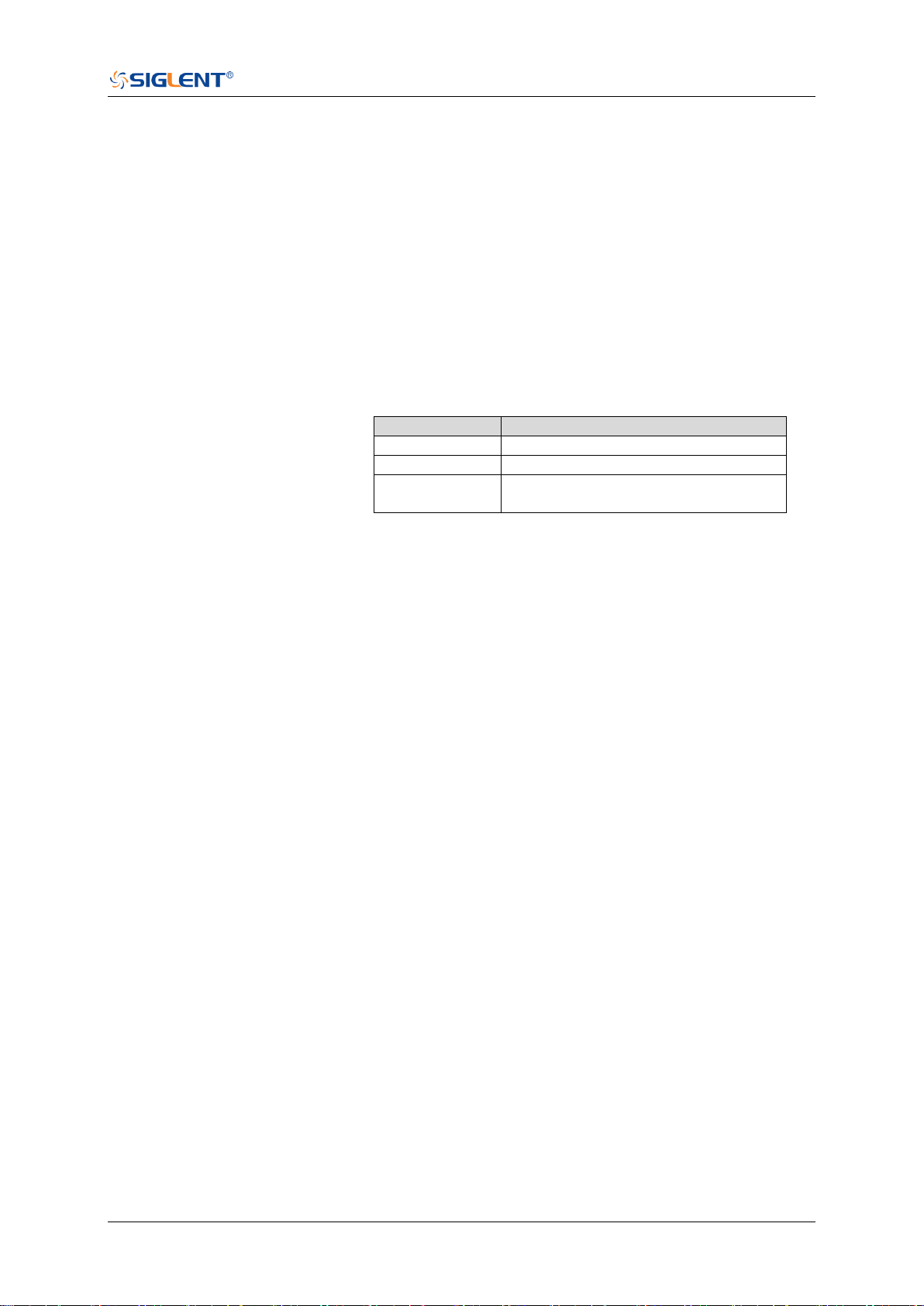
SDS Series Programming Guide
www.siglent.com 271 / 642
:RECall:SETup
Command
DESCRIPTION
This command will recall the saved settings file from internal
or external sources.
COMMAND SYNTAX
:RECall:SETup <state>
<state>:= {INTernal,<num>|EXTernal,<path>}
<num>:= Value in NR1 format, including an integer and no
decimal point, like 1.The range of the value is [1,10].
<path>:= Quoted string of path with an extension “.xml”.
Users can recall from local, net storage or U-disk according
to requirements.
Path type
Such as
local
“local/SIGLENT/default.xml”
net storage
“net_storage/SIGLENT/default.xml”
U-disk
“U-disk0/SIGLENT/default.xml”
“U-disk1/SIGLENT/default.xml”
Note:
The file format is not automatically determined by the file
name extension. You need to choose a file name with an
extension which is consistent with the selected file
format.
If the storage path type is not specified, it is recall from
U-disk0 by default
EXAMPLE
The following command recalls the settings from internal 1.
Command message:
:RECall:SETup INTernal,1
REC:SET INT,1
The following command recalls the settings from the external
file “SIGLENT\default.xml”.
Command message:
:RECall:SETup EXTernal,”SIGLENT\default.xml
”
REC:SET EXT,”SIGLENT\default.xml
”
RELATED COMMANDS
:RECall:FDEFault
:SAVE:SETup


SDS Series Programming Guide
www.siglent.com 273 / 642
:REF<r>:LABel
Command/Query
DESCRIPTION
The command is to turn the specified reference label on or off.
The query returns the state of the label associated with the
specified reference.
COMMAND SYNTAX
:REF<r>:LABel <state>
<r>:= {A|B|C|D}
Reference waveform name
<state>:= {ON|OFF}
QUERY SYNTAX
:REF<r>:LABel?
RESPONSE FORMAT
<state>
<state>:= {ON|OFF}
EXAMPLE
The following command turns on the label display.
Command message:
:REFA:LABel ON
REFA:LAB ON
Query message:
REFA:LAB?
Response message:
ON
RELATED COMMANDS
:REF<r>:LABel:TEXT

SDS Series Programming Guide
274 / 642 www.siglent.com
:REF<r>:LABel:TEXT
Command/Query
DESCRIPTION
The command sets the selected REF label to the string that
follows. Setting a label for a REF also adds the name to the
label list in non-volatile memory (replacing the oldest label in
the list).
The query returns the current label text of the selected
reference waveform.
COMMAND SYNTAX
:REF<r>:LABel:TEXT <string>
<r>:= {A|B|C|D}
Reference waveform name
<string>:= Quoted string of ASCII text. The length of the
string is limited to 20 characters.
QUERY SYNTAX
:REF<r>:LABel:TEXT?
RESPONSE FORMAT
<string>
EXAMPLE
The following command sets the reference waveform label
text to REFA.
Command message:
:REFA:LABel:TEXT “REFA”
REFA:LAB:TEXT “REFA”
Query message:
REFA:LAB:TEXT?
Response message:
“REFA”
RELATED COMMANDS
:REF<r>:LABel

SDS Series Programming Guide
www.siglent.com 275 / 642
:REF<r>:DATA
Command
DESCRIPTION
The command controls the display and saving of reference
waveforms.
COMMAND SYNTAX
:REF<r>:DATA <operation>
<r>:= {A|B|C|D}
Reference waveform name
<operation>:= {LOAD|UNLoad|SAVE,<source>}
LOAD means to call up the reference waveform display.
UNLoad means to turn off the reference waveform
display.
SAVE means to save the waveform to the reference
waveform.
<source>:= {C<x>|F<x>|D<n>}
C denotes an analog input channel. For example, C1 is
analog input 1.
F denotes a math function. For example, F1 is math
function 1.
D denotes a digital waveform. For example, D1 denotes
digital input 1.
<x>:= 1 to (# analog channels) in NR1 format, including an
integer and no decimal point, like 1.
<n>:= 0 to (# digital channels - 1) in NR1 format, including an
integer and no decimal point, like 1.
EXAMPLE
The following command turns on REFA.
Command message:
:REFA:DATA LOAD
REFA:DATA LOAD

SDS Series Programming Guide
276 / 642 www.siglent.com
:REF<r>:DATA:SOURce
Query
DESCRIPTION
This query returns the source of the current reference channel.
QUERY SYNTAX
:REF<r>:DATA:SOURce?
<r>:= {A|B|C|D}
RESPONSE FORMAT
<source>
<source>:= {C<x>|F<x>|D<n>}
C denotes an analog input channel. For example, C1 is
analog input 1.
F denotes a math function. For example, F1 is math
function 1.
D denotes a digital waveform. For example, D1 denotes
digital input 1.
<x>:= 1 to (# analog channels) in NR1 format, including an
integer and no decimal point, like 1.
<n>:= 0 to (# digital channels - 1) in NR1 format, including an
integer and no decimal point, like 1.
EXAMPLE
The following query returns the source of REFA.
Query message:
REFA:DATA:SOUR?
Response message:
C1

SDS Series Programming Guide
www.siglent.com 277 / 642
:REF<r>:DATA:SCALe
Command/Query
DESCRIPTION
The command sets the vertical scale of the current reference
channel. This command is only used when the current
reference channel has been stored, and the display state is on.
The query returns the vertical scale of the current reference
channel.
COMMAND SYNTAX
:REF<r>:DATA:SCALe <value>
<r>:= {A|B|C|D}
Reference waveform name
<value>:= Value in NR3 format, including a decimal point and
exponent, like 1.23E+2.
Note:
The scale range of the reference waveform is the same as that
of the reference source.
QUERY SYNTAX
:REF<r>:DATA:SCALe?
RESPONSE FORMAT
<value>
<value>:= Value in NR3 format, including a decimal point and
exponent, like 1.23E+2.
EXAMPLE
When the Reference function is on, and REFA has been
saved, the following command sets the vertical scale of REFA
to 100 mV.
Command message:
:REFA:DATA:SCALe 1.00E-01
REFA:DATA:SCAL 1.00E-01
Query message:
REFA:DATA:SCAL?
Response message:
1.00E-01
RELATED COMMANDS
:REF<r>:DATA:POSition

SDS Series Programming Guide
278 / 642 www.siglent.com
:REF<r>:DATA:POSition
Command/Query
DESCRIPTION
The command sets the vertical offset of the current reference
channel. This command is only used when the current
reference channel has been saved, and the display state is on.
This query returns the vertical offset of the current reference
channel.
COMMAND SYNTAX
:REF<r>:DATA:POSition <value>
<r>:= {A|B|C|D}
Reference channel name
<value>:= Value in NR3 format, including a decimal point and
exponent, like 1.23E+2.
Note:
The position range of the reference waveform is the same as
that of the reference source.
QUERY SYNTAX
:REF<r>:DATA:POSition?
RESPONSE FORMAT
<value>
<value>:= Value in NR3 format, including a decimal point and
exponent, like 1.23E+2.
EXAMPLE
When the Reference function is on, REFB has been saved and
the scale is 2 V, the following command sets the current
reference channel vertical offset to 0.2 V.
Command message:
:REFA:DATA:POSition 2.00E-01
REFA:DATA:POS 2.00E-01
Query message:
REFA:DATA:POS?
Response message:
2.00E-01
RELATED COMMANDS
:REF<r>:DATA:SCALe


SDS Series Programming Guide
280 / 642 www.siglent.com
:SAVE:BINary
Command
DESCRIPTION
This command saves the binary data of the channel
displayed on the screen to an external USB memory device.
COMMAND SYNTAX
:SAVE:BINary <path>
<path>:= Quoted string of path with an extension “.bin”
Note:
The file format is not automatically determined by the file
name extension. You need to choose a file name with an
extension which is consistent with the selected file format.
EXAMPLE
Here is an example of saving a file to an external drive when
channel 1 and a digital channel are enabled. The following
command will save their waveform data to the external file
"c1_digital.bin".
Command message:
:SAVE:BINary "Siglent/c1_digital.bin"
SAVE:BIN "Siglent/c1_digital.bin"

SDS Series Programming Guide
www.siglent.com 281 / 642
:SAVE:CSV
Command
DESCRIPTION
This command saves the waveform data of the specified
channel to an external U disk/USB memory device in CSV
format.
COMMAND SYNTAX
:SAVE:CSV <path>,<source>,<state>
<path>:= Quoted string of path with an extension “.csv”.
<source>:= {C<x>|D<n>}
C denotes an analog input channel. For example, C1 is
analog input 1.
D denotes a digital waveform. For example, D1 denotes
digital input 1.
<x>:= 1 to (# analog channels) in NR1 format, including an
integer and no decimal point, like 1.
<n>:= 0 to (# digital channels - 1) in NR1 format, including an
integer and no decimal point, like 1.
<state>:= {OFF|ON}
ON enables parameter save. This adds vertical scale
values, horizontal timebase settings, and more
instrument configuration information to the file.
OFF means to disables parameter save.
Note:
The file format is not automatically determined by the file
name extension. You need to choose a file name with an
extension which is consistent with the selected file format.
EXAMPLE
The following command saves data and parameters of
channel 1 to the external file “SIGLENT/channel1.csv”.
Command message:
:SAVE:CSV "SIGLENT/channel1.csv",C1,ON
SAVE:CSV "SIGLENT/channel1.csv",C1,ON
RELATED COMMANDS
:SAVE:MATLab

SDS Series Programming Guide
282 / 642 www.siglent.com
:SAVE:DEFault
Command
DESCRIPTION
This command saves the current settings or factory settings
as default settings.
COMMAND SYNTAX
:SAVE:DEFault <set>
<set>:= {CUSTom|FACTory}
CUSTom means the current settings.
FACTory means factory settings.
EXAMPLE
The following command saves the current settings to default
settings.
Command message:
:SAVE:DEFault CUSTom
SAVE:DEF CUST
RELATED COMMANDS
:RECall:SETup

SDS Series Programming Guide
www.siglent.com 283 / 642
:SAVE:IMAGe
Command
DESCRIPTION
This command saves the screenshot to external storage.
COMMAND SYNTAX
:SAVE:IMAGe <path>,<type>,<invert>
<path>:= Quoted string of path with an extension “.bmp”
or ”.jpg” or”.png”.
<type>:= {BMP|JPG|PNG}
<invert>:= {OFF|ON}}
ON will store images that have inverted colors. This
means that a normally black background will be white
when inverted. This setting is recommended if you plan
on printing the image as an inverted image with a white
background will save on ink.
OFF will store images that are identical to the display of
the instrument.
EXAMPLE
The following command saves the screenshot in BMP format
to the external file “SIGLENT/screen.bmp”.
Command message:
:SAVE:IMAGe “SIGLENT/screen.bmp”,BMP,ON
SAVE:IMAG “SIGLENT/screen.bmp",BMP,ON
RELATED COMMANDS
:PRINt

SDS Series Programming Guide
284 / 642 www.siglent.com
:SAVE:MATLab
Command
DESCRIPTION
This command saves the waveform data of the specified
channel to an external USB memory device in Matlab format.
COMMAND SYNTAX
:SAVE:MATLab <path>,<source>
<path>:= Quoted string of path with an extension “.dat”.
<source>:= {C<x>|D<n>}
C denotes an analog input channel. For example, C1 is
analog input 1.
D denotes a digital waveform. For example, D1 denotes
digital input 1.
<x>:= 1 to (# analog channels) in NR1 format, including an
integer and no decimal point, like 1.
<n>:= 0 to (# digital channels - 1) in NR1 format, including an
integer and no decimal point, like 1.
Note:
The file format is not automatically determined by the file
name extension. You need to choose a file name with an
extension which is consistent with the selected file format.
EXAMPLE
The following command saves data of channel 1 to the
external file “SIGLENT/channel1.dat”.
Command message:
:SAVE:MATLab "SIGLENT/channel.dat",C1
SAVE:MATL "SIGLENT/channel.dat",C1
RELATED COMMANDS
:SAVE:CSV

SDS Series Programming Guide
www.siglent.com 285 / 642
:SAVE:REFerence
Command
DESCRIPTION
This command saves the selected channel waveform to
external memory as reference.
COMMAND SYNTAX
:SAVE:REFerence <path>,<source>
<path>:= Quoted string of path with an extension “.ref”.
<source>:= {C<x>|F<x>|D<n>}
C denotes an analog input channel. For example, C1 is
analog input 1.
F denotes a math function. For example, F1 is math
function 1.
D denotes a digital waveform. For example, D1 denotes
digital input 1.
<x>:= 1 to (# analog channels) in NR1 format, including an
integer and no decimal point, like 1.
<n>:= 0 to (# digital channels - 1) in NR1 format, including an
integer and no decimal point, like 1.
Note:
The file format is not automatically determined by the file
name extension. You need to choose a file name with an
extension which is consistent with the selected file format.
EXAMPLE
The following command saves the waveform of channel 1 as
a reference to the external file “SIGLENT/channel.ref".
Command message:
:SAVE:REFerence "SIGLENT/channel.ref",C1
SAVE:REF "SIGLENT/channel.ref",C1
RELATED COMMANDS
:RECall:REFerence
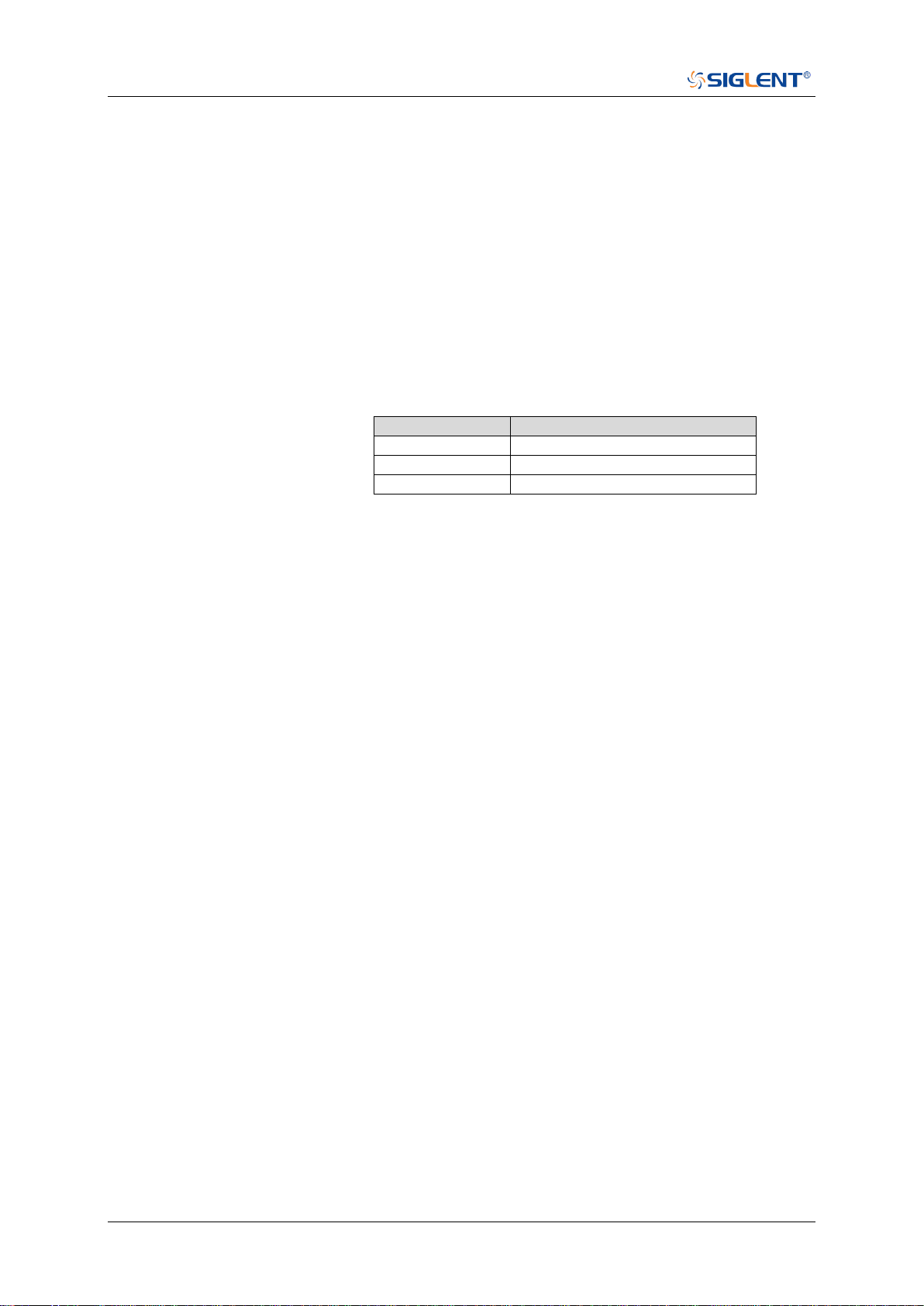
SDS Series Programming Guide
286 / 642 www.siglent.com
:SAVE:SETup
Command
DESCRIPTION
This command saves the current settings to internal or
external memory locations.
COMMAND SYNTAX
:SAVE:SETup <setup_num>
<setup_num>:= {INTernal,<num>|EXTernal,<path>}
<num>:= Value in NR1 format, including an integer and no
decimal point, like 1. The range of the value is [1, 10].
<path>:= Quoted string of path with an extension “.xml”.
Users can recall from local,net storage or U-disk according to
requirements
Path type
Such as
local
“local\SIGLENT\default.xml”
net storage
net_storage
U-disk
U-disk0
Note:
⚫ When save to internal, the default path is local.
⚫ When save to external, if the path type is not set, it is
stored to u-disk0 by default
⚫ The file format is not automatically determined by the file
name extension. You need to choose a file name with an
extension which is consistent with the selected file
format.
EXAMPLE
The following command saves the current settings to internal
file 1.
Command message:
:SAVE:SETup INTernal,1
SAVE:SET INT,1
RELATED COMMANDS
:SAVE:DEFault
:RECall:SETup

SDS Series Programming Guide
www.siglent.com 287 / 642
SYSTem Commands
The :SYSTem subsystem commands control the basic system functions of the oscilloscope.
:SYSTem:BUZZer
:SYSTem:CLOCk
:SYSTem:COMMunicate:LAN:GATeway
:SYSTem:COMMunicate:LAN:IPADdress
:SYSTem:COMMunicate:LAN:MAC
:SYSTem:COMMunicate:LAN:SMASk
:SYSTem:COMMunicate:LAN:TYPE
:SYSTem:COMMunicate:VNCPort
:SYSTem:DATE
:SYSTem:EDUMode
:SYSTem:MENU
:SYSTem:NSTorage
:SYSTem:NSTorage:CONNect
:SYSTem:NSTorage:DISConnect
:SYSTem:NSTorage:STATus
:SYSTem:PON
:SYSTem:REBoot
:SYSTem:REMote
:SYSTem:SELFCal
:SYSTem:SHUTdown
:SYSTem:SSAVer
:SYSTem:TIME
:SYSTem:TOUCh

SDS Series Programming Guide
288 / 642 www.siglent.com
:SYSTem:BUZZer
Command/Query
DESCRIPTION
The command the status of the buzzer.
The query returns the current status of the buzzer.
COMMAND SYNTAX
:SYSTem:BUZZer <state>
<state>:= {ON|OFF}
QUERY SYNTAX
:SYSTem:BUZZer?
RESPONSE FORMAT
<state>
<state>:= {ON|OFF}
EXAMPLE
The following command enables the oscilloscope buzzer.
Command message:
:SYSTem:BUZZer ON
SYST:BUZZ ON
Query message:
SYST:BUZZ?
Response message:
ON

SDS Series Programming Guide
www.siglent.com 289 / 642
:SYSTem:CLOCk
Command/Query
DESCRIPTION
The command sets the oscilloscope clock source and the
state of the 10 MHz clock output.
The query returns the oscilloscope current clock source and
the state of the 10 MHz clock output.
COMMAND SYNTAX
:SYSTem:CLOCk <source>
<source>:= {EXT|IN_ON|IN_OFF}
EXT selects the external clock source. The 10 MHz
output will be automatically disabled.
IN_ON selects the internal clock source and enables the
10 MHz output.
IN_OFF selects the internal clock source and disables
the 10M output.
QUERY SYNTAX
:SYSTem:CLOCk?
RESPONSE FORMAT
<source>
<source>:= {EXT|IN_ON|IN_OFF}
EXAMPLE
The following command sets the oscilloscope clock source to
inner and turns on the 10 MHz output.
Command message:
:SYSTem:CLOCk IN_ON
SYST:CLOC IN_ON
Query message:
SYST:CLOC?
Response message:
IN_ON

SDS Series Programming Guide
290 / 642 www.siglent.com
:SYSTem:COMMunicate:LAN:GATeway
Command/Query
DESCRIPTION
The command is used to set the gateway of the internal
network of the oscilloscope.
The query returns the gateway of the network.
COMMAND SYNTAX
:SYSTem:COMMunicate:LAN:GATeway <string>
<string>:=quoted string of ASCII text.
QUERY SYNTAX
:SYSTem:COMMunicate:LAN:GATeway?
RESPONSE FORMAT
<string>
EXAMPLE
The following command sets the gateway of the
oscilloscope’s internal network to “10.12.0.1”.
Command message:
:SYSTem:COMMunicate:GATeway "10.12.0.1"
SYST:COMM:LAN:GAT "10.12.0.1"
Query message:
SYST:COMM:LAN:GAT?
Response message:
"10.12.0.1"
RELATED COMMANDS
:SYSTem:COMMunicate:LAN:IPADdress
:SYSTem:COMMunicate:LAN:SMASk
:SYSTem:COMMunicate:LAN:TYPE

SDS Series Programming Guide
www.siglent.com 291 / 642
:SYSTem:COMMunicate:LAN:IPADdress
Command/Query
DESCRIPTION
The command sets the IP address of the oscilloscope’s
internal network interface.
The query returns the IP address of the oscilloscope’s
internal network interface.
COMMAND SYNTAX
:SYSTem:COMMunicate:LAN:IPADdress <string>
<string>:=quoted string of ASCII text.
QUERY SYNTAX
:SYSTem:COMMunicate:LAN:IPADdress?
RESPONSE FORMAT
<string>
EXAMPLE
The following command sets the IP address of the
oscilloscope’s internal network interface to “10.12.255.229”.
Command message:
:SYSTem:COMMunicate:IPADdress "10.12.255.229"
SYST:COMM:LAN:IPAD "10.12.255.229"
Query message:
SYST:COMM:LAN:IPAD?
Response message:
"10.12.255.229"
RELATED COMMANDS
:SYSTem:COMMunicate:LAN:GATeway
:SYSTem:COMMunicate:LAN:SMASk
:SYSTem:COMMunicate:LAN:TYPE

SDS Series Programming Guide
292 / 642 www.siglent.com
:SYSTem:COMMunicate:LAN:MAC
Query
DESCRIPTION
The query returns the MAC address of the oscilloscope.
QUERY SYNTAX
:SYSTem:COMMunicate:LAN:MAC?
RESPONSE FORMAT
<byte1>:<byte2>:<byte3>:<byte4>:<byte5>:<byte6>
EXAMPLE
The following query returns the MAC address of the
oscilloscope.
Query message:
SYST:COMM:LAN:MAC?
Response message:
00:01:D2:0C:00:A0

SDS Series Programming Guide
www.siglent.com 293 / 642
:SYSTem:COMMunicate:LAN:SMASk
Command/Query
DESCRIPTION
The command sets the subnet mask of the oscilloscope’s
internal network interface.
The query returns the subnet mask of the oscilloscope’s
internal network interface.
COMMAND SYNTAX
:SYSTem:COMMunicate:LAN:SMASK <string>
<string>:=quoted string of ASCII text.
QUERY SYNTAX
:SYSTem:COMMunicate:LAN:SMASK?
RESPONSE FORMAT
<string>
EXAMPLE
The following command sets the subnet mask of the
oscilloscope’s internal network interface to “10.12.255.229”.
Command message:
:SYSTem:COMMunicate:SMASk "255.255.0.0"
SYST:COMM:LAN:SMAS "255.255.0.0"
Query message:
SYST:COMM:LAN:SMAS?
Response message:
"255.255.0.0"
RELATED COMMANDS
:SYSTem:COMMunicate:LAN:GATeway
:SYSTem:COMMunicate:LAN:IPADdress
:SYSTem:COMMunicate:LAN:TYPE

SDS Series Programming Guide
294 / 642 www.siglent.com
:SYSTem:COMMunicate:LAN:TYPE
Command/Query
DESCRIPTION
The command sets the type of LAN configuration settings.
The query returns the current type of the LAN configuration
settings.
COMMAND SYNTAX
:SYSTem:COMMunicate:LAN:TYPE <state>
<state>:= {STATIC|DHCP}
STATIC means that the Ethernet settings will be
configured manually, using
commands :SYSTem:COMMunicate:LAN:IPADdress, :S
YSTem:COMMunicate:LAN:SMASK,
and :SYSTem:COMMunicate:LAN:GATeway
DHCP means that the oscilloscope’s IP address, subnet
mask and gateway settings will be received from a DHCP
server on the local network.
QUERY SYNTAX
:SYSTem:COMMunicate:LAN:TYPE?
RESPONSE FORMAT
<state>
<state>:= {STATIC|DHCP}
EXAMPLE
The following command sets the type of the LAN
configuration to DHCP.
Command message:
:SYSTem:COMMunicate:LAN:TYPE DHCP
SYST:COMM:LAN:TYPE DHCP
Query message:
SYST:COMM:LAN:TYPE?
Response message:
DHCP
RELATED COMMANDS
:SYSTem:COMMunicate:LAN:GATeway
:SYSTem:COMMunicate:LAN:IPADdress
:SYSTem:COMMunicate:LAN:SMASk

SDS Series Programming Guide
www.siglent.com 295 / 642
:SYSTem:COMMunicate:VNCPort
Command/Query
DESCRIPTION
The command sets the VNC port of the oscilloscope.
The query returns the current VNC port of the oscilloscope.
COMMAND SYNTAX
:SYSTem:COMMunicate:VNCPort <value>
<value>:= Value in NR1 format, including an integer and no
decimal point, like 1. The range of the value is [5900, 5999].
QUERY SYNTAX
:SYSTem:COMMunicate:VNCPort?
RESPONSE FORMAT
<value>
<value>:= Value in NR1 format, including an integer and no
decimal point, like 1.
EXAMPLE
The following command sets the VNC port to 5903.
Command message:
:SYSTem:COMMunicate:VNVPort 5903
SYST:COMM:VNCP 5903
Query message:
SYST:COMM:VNCP?
Response message:
5903

SDS Series Programming Guide
296 / 642 www.siglent.com
:SYSTem:DATE
Command/Query
DESCRIPTION
The command sets the system date of the oscilloscope.
This query returns the oscilloscope current date.
COMMAND SYNTAX
:SYSTem:DATE <date>
<date>:= 8-digit NR1 format, from high to low, is expressed
as a 4-digit year, 2-digit month, and 2-digit day.
QUERY SYNTAX
:SYSTem:DATE?
RESPONSE FORMAT
<date>
EXAMPLE
The following command sets the oscilloscope current date to
December 20, 2019.
Command message:
:SYSTem:DATE 20191220
SYST:DATE 20190819
Query message:
SYST:DATE?
Response message:
20190819
RELATED COMMANDS
:SYSTem:TIME

SDS Series Programming Guide
www.siglent.com 297 / 642
:SYSTem:EDUMode
Command/Query
DESCRIPTION
The command sets the education mode (locks of AutoSetup,
measure and cursors) of the oscilloscope.
The query returns the education mode of the oscilloscope.
COMMAND SYNTAX
:SYSTem:EDUMode <func>,<lock>
<func>:= {AUTOSet|MEASure|CURSor}
<lock>:= {ON|OFF}
ON means the enable the function.
OFF means disable the function.
QUERY SYNTAX
:SYSTem:EDUMode?
:SYSTem:EDUMode? <func>
Note:
The query without parameters will return the lock status of all
functions.
RESPONSE FORMAT
Format 1:
AUTOSet,<lock>;MEASure,<lock>;CURSor,<lock>
Format 2:
<lock>
<lock>:= {ON|OFF}
EXAMPLE
The following command disables the AutoSetup function.
Command message:
:SYSTem:EDUMode AUTOSet,OFF
SYST:EDUM AUTOS,OFF
Query message:
SYST:EDUM? AUTOS
Response message:
OFF

SDS Series Programming Guide
298 / 642 www.siglent.com
:SYSTem:LANGuage
Command/Query
DESCRIPTION
The command selects the oscilloscope language display.
This query returns the oscilloscope language display.
COMMAND SYNTAX
:SYSTem:LANGuage <language>
<language>:=
{SCHinese|TCHinese|ENGLish|FRENch|JAPanese|KORean
|DEUTsch|ESPan|RUSSian|ITALiana|PORTuguese}
QUERY SYNTAX
:SYSTem:LANGuage?
RESPONSE FORMAT
<language>
<language>:=
{SCHinese|TCHinese|ENGLish|FRENch|JAPanese|KORean
|DEUTsch|ESPan|RUSSian|ITALiana|PORTuguese}
EXAMPLE
The following command sets the Oscilloscope language to
English.
Command message:
:SYSTem:LANGuage ENGLish
SYST:LANG ENGL
Query message:
SYST:LANG?
Response message:
ENGLish

SDS Series Programming Guide
www.siglent.com 299 / 642
:SYSTem:MENU
Command/Query
DESCRIPTION
The command sets the state of the menu.
The query returns the current state of the menu.
Note:
This command is only valid for models with the menu switch.
COMMAND SYNTAX
:SYSTem:MENU <state>
<state>:= {ON|OFF}
QUERY SYNTAX
:SYSTem:MENU?
RESPONSE FORMAT
<state>
<state>:= {ON|OFF}
EXAMPLE
The following command turns on the menu.
Command message:
:SYSTem:MENU ON
SYST:MENU ON
Query message:
SYST:MENU?
Response message:
ON

SDS Series Programming Guide
300 / 642 www.siglent.com
:SYSTem:NSTorage
Command/Query
DESCRIPTION
This command attempts to mount the network drive specified
by the parameters.
This query returns the parameters of the mounted network
drive.
COMMAND SYNTAX
:SYSTem:NSTorage
<path>,<user>,<pwd>,<anon>,<auto_con>,<rem_path>,<re
m_user>,<rem_pwd>
<path>:= Quoted string of the server path to be mounted
<user>:= Quoted string of the user name.
<pwd>:= Quoted string of the user password
<anon>:= Anonymous flag, 1 for ON while 0 for OFF
<auto_con>:= Automatic connection flag, 1 for ON while 0 for
OFF
<rem_path>:= Remember path flag, 1 for ON while 0 for OFF
<rem_user>:= Remember user flag, 1 for ON while 0 for OFF
<rem pwd>:= Remember password flag, 1 for ON while 0 for
OFF
QUERY SYNTAX
:SYSTem:NSTorage?
RESPONSE FORMAT
<path>,<user>,<pwd>,<anon>,<auto_con>,<rem_path>,<re
m_user>,<rem_pwd>
Note:
For security, the password is always returned “***”.
EXAMPLE
The following command sets the network drive mount
information.
Command message:
:SYSTem:NSTorage "//10.12.255.239/nfs","","",0,0,1,0,0
SYST:NST "//10.12.255.239/nfs","","",0,0,1,0,0
Query message:
SYST:NST?
Response message:
"//10.12.255.239/nfs","","***",0,0,1,0,0

SDS Series Programming Guide
www.siglent.com 301 / 642
:SYSTem:NSTorage:CONNect
Command
DESCRIPTION
This command attempts to mount the network drive.
COMMAND SYNTAX
:SYSTem:NSTorage:CONNect
EXAMPLE
The following command mounts the network drive.
Command message:
:SYSTem:NSTorage:CONNect
SYST:NST:CONN

SDS Series Programming Guide
302 / 642 www.siglent.com
:SYSTem:NSTorage:DISConnect
Command
DESCRIPTION
This command attempts to un-mount the network drive.
COMMAND SYNTAX
:SYSTem:NSTorage:DISConnect
EXAMPLE
The following command unmounts the network drive.
Command message:
:SYSTem:NSTorage:DISConnect
SYST:NST:DISC

SDS Series Programming Guide
www.siglent.com 303 / 642
:SYSTem:NSTorage:STATus
Query
DESCRIPTION
The query returns the mount status of network drive.
QUERY SYNTAX
:SYSTem:NSTorage:STATus?
RESPONSE FORMAT
<status>
<status>:= {ON|OFF}.
EXAMPLE
The following query returns the mount status of network drive.
Query message:
SYST:NST:STAT?
Response message:
OFF

SDS Series Programming Guide
304 / 642 www.siglent.com
:SYSTem:PON
Command/Query
DESCRIPTION
The command sets the state of the Power-On-Line function.
When enabled, the instrument will reboot automatically if the
power is removed and re-established.
The query returns the current state of the Power-On-Line
function.
COMMAND SYNTAX
:SYSTem:PON <state>
<state>:= {ON|OFF}
QUERY SYNTAX
:SYSTem:PON?
RESPONSE FORMAT
<state>
<state>:= {ON|OFF}
EXAMPLE
The following command sets the state of the Power-On-Line
to on.
Command message:
:SYSTem:PON ON
SYST:PON ON
Query message:
SYST:PON?
Response message:
ON


SDS Series Programming Guide
306 / 642 www.siglent.com
:SYSTem:REMote
Command/Query
DESCRIPTION
The command sets the status of the remote control. When
the remote control is turned on, the touch screen, the front
panel and the touch screen, front panel and peripheral will be
locked, and there will be a remote prompt on the screen.
This query returns the current status of the remote setting.
COMMAND SYNTAX
:SYSTem:REMote <state>
<state>:= {ON|OFF}
QUERY SYNTAX
:SYSTem:REMote?
RESPONSE FORMAT
<state>
<state>:= {ON|OFF}
EXAMPLE
The following command enables the remote setting.
Command message:
:SYSTem:REMote ON
SYST:REM ON
Query message:
SYST:REM?
Response message:
ON

SDS Series Programming Guide
www.siglent.com 307 / 642
:SYSTem:SELFCal
Command/Query
DESCRIPTION
The command instructs the oscilloscope to perform
self-calibration.
The query returns the oscilloscope self-calibration status.
COMMAND SYNTAX
:SYSTem:SELFCal
QUERY SYNTAX
:SYSTem:SELFCal?
RESPONSE FORMAT
<state>
<state>:= {DOING|DONE}
EXAMPLE
The following command asks for the oscilloscope self-cal
status.
Command message:
:SYSTem:SELFCal
SYST:SELFC
Query message:
SYST:SELFC?
Response message:
DONE


SDS Series Programming Guide
www.siglent.com 309 / 642
:SYSTem:SSAVer
Command/Query
DESCRIPTION
The command controls the automatic screensaver, which
automatically shuts down the internal color monitor after a
preset time.
The query returns whether the automatic screensaver feature
is on.
COMMAND SYNTAX
:SYSTem:SSAVer <time>
<time>:= {OFF|1MIN|5MIN|10MIN|30MIN|60MIN}
QUERY SYNTAX
:SYSTem:SSAVer?
RESPONSE FORMAT
<time>
<time>:= {OFF|1MIN|5MIN|10MIN|30MIN|60MIN}
EXAMPLE
The following command sets the automatic screensaver to 10
minutes.
Command message:
:SYSTem:SSAVer 10MIN
SYST:SSAV 10MIN
Query message:
SYST:SSAV?
Response message:
10MIN

SDS Series Programming Guide
310 / 642 www.siglent.com
:SYSTem:TIME
Command/Query
DESCRIPTION
The command sets the oscilloscope current time using a
24-hour format.
This query returns the oscilloscope current time.
COMMAND SYNTAX
:SYSTem:TIME <time>
<time>:= 8-digit NR1 format, from high to low, is expressed
as 2-digit hour, 2-digit minute, and 2-digit second.
QUERY SYNTAX
:SYSTem:TIME?
RESPONSE FORMAT
<time>
EXAMPLE
The following command sets the current time of the
oscilloscope to 08:10:40.
Command message:
:SYSTem:TIME 081040
SYST:TIME 081040
Query message:
SYST:TIME?
Response message:
081040
RELATED COMMANDS
:SYSTem:DATE

SDS Series Programming Guide
www.siglent.com 311 / 642
:SYSTem:TOUCh
Command/Query
DESCRIPTION
The command sets the status of the touch screen.
The query returns the current status of the touch screen.
COMMAND SYNTAX
:SYSTem:TOUCh <state>
<state>:= {ON|OFF}
QUERY SYNTAX
:SYSTem:TOUCh?
RESPONSE FORMAT
<state>
<state>:= {ON|OFF}
EXAMPLE
The following command enables the touch setting.
Command message:
:SYSTem:TOUCh ON
SYST:TOUC ON
Query message:
SYST:TOUC?
Response message:
ON

SDS Series Programming Guide
312 / 642 www.siglent.com
TIMebase Commands
The :TIMEBASE subsystem commands control the horizontal (X-axis) functions. The time per
division, delay, and reference can be controlled for the main and window (zoomed) time bases.
:TIMebase:DELay
:TIMebase:SCALe
:TIMebase:WINDow
:TIMebase:WINDow:DELay
:TIMebase:WINDow:SCALe

SDS Series Programming Guide
www.siglent.com 313 / 642
:TIMebase:DELay
Command/Query
DESCRIPTION
The command specifies the main timebase delay. This delay
is the time between the trigger event and the delay reference
point on the screen.
The query returns the current delay value.
COMMAND SYNTAX
:TIMebase:DELay <delay_value>
<delay_value>:= Value in NR3 format, including a decimal
point and exponent, like 1.23E+2. The range of the value is
[-5000div*timebase, 5div*timebase].
QUERY SYNTAX
:TIMebase:DELay?
RESPONSE FORMAT
<value>
<value>:= Value in NR3 format, including a decimal point and
exponent, like 1.23E+2.
EXAMPLE
The following command specifies a 10 us delay of main time
base.
Command message:
:TIMebase:DELay 1.00E-05
TIM:DEL 1.00E-05
Query message:
TIM:DEL?
Response message:
1.00E-05
RELATED COMMANDS
:TIMebase:SCALe

SDS Series Programming Guide
314 / 642 www.siglent.com
:TIMebase:SCALe
Command/Query
DESCRIPTION
The command sets the horizontal scale per division for the
main window.
The query returns the current horizontal scale setting in
seconds per division for the main window.
Note:
Due to the limitation of the expansion strategy, when the time
base is set from large to small, it will automatically adjust to
the minimum time base that can be set currently.
COMMAND SYNTAX
:TIMebase:SCALe <value>
<value>:= Value in NR3 format, including a decimal point and
exponent, like 1.23E+2.
Note:
The range of value varies from the models. See the
datasheet for details.
QUERY SYNTAX
:TIMebase:SCALe?
RESPONSE FORMAT
<value>
<value>:= Value in NR3 format, including a decimal point and
exponent, like 1.23E+2.
EXAMPLE
The following command sets the horizontal scale to 100
ns/div.
Command message:
:TIMebase:SCALe 1.00E-07
TIM:SCAL 1.00E-07
Query message:
TIM:SCAL?
Response message:
1.00E-07
RELATED COMMANDS
:TIMebase:DELay

SDS Series Programming Guide
www.siglent.com 315 / 642
:TIMebase:WINDow
Command/Query
DESCRIPTION
The command turns on or off the zoomed window.
The query returns the state of the zoomed window.
COMMAND SYNTAX
:TIMebase:WINDow <state>
<state>:= {ON|OFF}
QUERY SYNTAX
:TIMebase:WINDow?
RESPONSE FORMAT
<state>
<state>:= {ON|OFF}
EXAMPLE
The following command turns on the zoomed window.
Command message:
:TIMebase:WINDow ON
TIM:WIND ON
Query message:
TIM:WIND?
Response message:
ON
RELATED COMMANDS
:TIMebase:WINDow:DELay
:TIMebase:WINDow:SCALe

SDS Series Programming Guide
316 / 642 www.siglent.com
:TIMebase:WINDow:DELay
Command/Query
DESCRIPTION
The command sets the horizontal position in the zoomed
view of the main sweep.
The query returns the current delay value between the
zoomed window and the main sweep.
COMMAND SYNTAX
:TIMebase:WINDow:DELay <delay_value>
<delay_value>:= Value in NR3 format, including a decimal
point and exponent, like 1.23E+2.
Note:
The main sweep range and the main sweep horizontal
position determine the range for the delay value of the
zoomed window. It must keep the zoomed view window
within the main sweep range.
If you set the delay to a value outside of the legal range,
the delay value is automatically set to the nearest legal
value.
QUERY SYNTAX
:TIMebase:WINDow:DELay?
RESPONSE FORMAT
<delay_value>
<delay_value>:= Value in NR3 format, including a decimal
point and exponent, like 1.23E+2.
EXAMPLE
The following command sets 1 ms delay value to change the
position of the zoomed window.
Command message:
:TIMebase:WINDow:DELay 1.00E-03
TIM:WIND:DEL 1.00E-03
Query message:
TIM:WIND:DEL?
Response message:
1.00E-03
RELATED COMMANDS
:TIMebase:WINDow:SCALe
:TIMebase:SCALe
:TIMebase:DELay

SDS Series Programming Guide
www.siglent.com 317 / 642
:TIMebase:WINDow:SCALe
Command/Query
DESCRIPTION
The command sets the zoomed window horizontal scale
(seconds/division).
The query returns the current zoomed window scale setting.
COMMAND SYNTAX
:TIMebase:WINDow:SCALe <scale_value>
<scale_value>:= Value in NR3 format, including a decimal
point and exponent, like 1.23E+2.
Note:
The scale of the zoomed window cannot be greater than that
of the main window. If you set the value greater than, it will
automatically be set to the same value as the main window.
QUERY SYNTAX
:TIMebase:WINDow:SCALe?
RESPONSE FORMAT
<scale_value>
<scale_value>:= Value in NR3 format, including a decimal
point and exponent, like 1.23E+2.
EXAMPLE
The following command sets a 1 ms/div horizontal scale for
the zoomed window.
Command message:
:TIMebase:WINDow:SCALe 1.00E-03
TIM:WIND:SCAL 1.00E-03
Query message:
TIM:WIND:SCAL?
Response message:
1.00E-03
RELATED COMMANDS
:TIMebase:WINDow:DELay
:TIMebase:SCALe
:TIMebase:DELay

SDS Series Programming Guide
318 / 642 www.siglent.com
TRIGger Commands
The :TRIGGER subsystem commands control the trigger modes and parameters for each trigger
type.
:TRIGger:MODE
:TRIGger:RUN
:TRIGger:STATus
:TRIGger:STOP
:TRIGger:TYPE
:TRIGger:EDGE Commands
:TRIGger:SLOPe Commands
:TRIGger:PULSe Commands
:TRIGger:VIDeo Commands
:TRIGger:WINDow Commands
:TRIGger:INTerval Commands
:TRIGger:DROPout Commands
:TRIGger:PATTern Commands
:TRIGger:QUALified Commands
:TRIGger:IIC Commands
:TRIGger:SPI Commands
:TRIGger:UART Commands
:TRIGger:CAN Commands
:TRIGger:LIN Commands
:TRIGger:FLEXray Commands [Option]
:TRIGger:CANFd Commands [Option]
:TRIGger:IIS Commands [Option]

SDS Series Programming Guide
www.siglent.com 319 / 642
:TRIGger:MODE
Command/Query
DESCRIPTION
The command sets the mode of the trigger.
The query returns the current mode of trigger.
COMMAND SYNTAX
:TRIGger:MODE <mode>
<mode>:= {SINGle|NORMal|AUTO}
AUTO: The oscilloscope begins to search for the trigger
signal that meets the conditions. If the trigger signal is
satisfied, the running state on the top left corner of the
user interface shows Trig'd, and the interface shows
stable waveform.
Otherwise, the running state always shows Auto, and the
interface shows unstable waveform.
NORMal: The oscilloscope enters the wait trigger state
and begins to search for trigger signals that meet the
conditions. If the trigger signal is satisfied, the running
state shows Trig'd, and the interface shows stable
waveform.
Otherwise, the running state shows Ready, and the
interface displays the last triggered waveform (previous
trigger) or does not display the waveform (no previous
trigger).
SINGle: The backlight of SINGLE key lights up, the
oscilloscope enters the waiting trigger state and begins to
search for the trigger signal that meets the conditions. If
the trigger signal is satisfied, the running state shows
Trig'd, and the interface shows stable waveform. Then,
the oscilloscope stops scanning, the RUN/STOP key
becomes red, and the running status shows Stop
Otherwise, the running state shows Ready, and the
interface does not display the waveform.
QUERY SYNTAX
:TRIGger:MODE?
RESPONSE FORMAT
<mode>
<mode>:= {SINGle|NORMal|AUTO}
EXAMPLE
The following command sets the oscilloscope to SINGLE
trigger mode.
Command message:
:TRIGger:MODE SINGle
TRIG:MODE SING
Query message:
TRIG:MODE?
Response message:
SINGle


SDS Series Programming Guide
www.siglent.com 321 / 642
:TRIGger:STATus
Query
DESCRIPTION
The command query returns the current state of the trigger.
QUERY SYNTAX
:TRIGger:STATus?
RESPONSE FORMAT
<status>
<status>:= {Arm|Ready|Auto|Trig'd|Stop|Roll}
EXAMPLE
The following command queries the state of trigger mode.
Query message:
TRIG:STAT?
Response message:
Stop
RELATED COMMANDS
:TRIGger:MODE


SDS Series Programming Guide
www.siglent.com 323 / 642
:TRIGger:TYPE
Command/Query
DESCRIPTION
The command sets the type of trigger.
The query returns the current type of trigger.
COMMAND SYNTAX
:TRIGger:TYPE <type>
<type>:=
{EDGE|PULSE|SLOPe|INTerval|PATTern|RUNT|QUALified|
WINDow|DROPout|VIDeo|QUALified|NTHEdge|DELay|SET
uphold|IIC|SPI|UART|LIN|CAN|FLEXray|CANFd|IIS|1553B|S
ENT}
QUERY SYNTAX
:TRIGger:TYPE?
RESPONSE FORMAT
<type>
<type>:=
{EDGE|PULSE|SLOPe|INTerval|PATTern|RUNT|QUALified|
WINDow|DROPout|VIDeo|QUALified|NTHEdge|DELay|SET
uphold|IIC|SPI|UART|LIN|CAN|FLEXray|CANFd|IIS|1553B|S
ENT}
EXAMPLE
The following command sets the type of trigger to edge
trigger.
Command message:
:TRIGger:TYPE EDGE
TRIG:TYPE EDGE
Query message:
TRIG:TYPE?
Command message:
EDGE

SDS Series Programming Guide
324 / 642 www.siglent.com
:TRIGger:EDGE Commands
The :TRIGGER:EDGE subsystem commands control the edge trigger parameters.
:TRIGger:EDGE:COUPling
:TRIGger:EDGE:HLDEVent
:TRIGger:EDGE:HLDTime
:TRIGger:EDGE:HOLDoff
:TRIGger:EDGE:HSTart
:TRIGger:EDGE:LEVel
:TRIGger:EDGE:NREJect
:TRIGger:EDGE:SLOPe
:TRIGger:EDGE:SOURce

SDS Series Programming Guide
www.siglent.com 325 / 642
:TRIGger:EDGE:COUPling
Command/Query
DESCRIPTION
The command sets the coupling mode of the edge trigger.
The query returns the current coupling mode of the edge
trigger.
COMMAND SYNTAX
:TRIGger:EDGE:COUPling <mode>
<mode>:= {DC|AC|LFREJect|HFREJect}
DC coupling allows dc and ac signals into the trigger
path.
AC coupling places a high-pass filter in the trigger path,
removing dc offset voltage from the trigger waveform.
Use AC coupling to get a stable edge trigger when your
waveform has a large dc offset.
HFREJect which is a high-frequency rejection filter that
adds a low-pass filter in the trigger path to remove
high-frequency components from the trigger waveform.
Use the high-frequency rejection filter to remove
high-frequency noise, such as AM or FM broadcast
stations, from the trigger path.
LFREJect which is a low frequency rejection filter adds a
high-pass filter in series with the trigger waveform to
remove any unwanted low-frequency components from a
trigger waveform, such as power line frequencies, that
can interfere with proper triggering.
QUERY SYNTAX
:TRIGger:EDGE:COUPling?
RESPONSE FORMAT
<mode>
<mode>:= {DC|AC|LFREJect|HFREJect}
EXAMPLE
The following command sets the coupling mode of the edge
trigger to DC.
Command message:
:TRIGger:EDGE:COUPling DC
TRIG:EDGE:COUP DC
Query message:
TRIG:EDGE:COUP?
Response message:
DC

SDS Series Programming Guide
326 / 642 www.siglent.com
:TRIGger:EDGE:HLDEVent
Command/Query
DESCRIPTION
This command sets the number of holdoff events of the edge
trigger.
The query returns the current number of holdoff events of the
edge trigger.
COMMAND SYNTAX
:TRIGger:EDGE:HLDEVent <value>
<value>:= Value in NR1 format, including an integer and no
decimal point, like 1. The range of the value is [1,
100000000].
QUERY SYNTAX
:TRIGger:EDGE:HLDEVent?
RESPONSE FORMAT
<value>
<value>:= Value in NR1 format, including an integer and no
decimal point, like 1.
EXAMPLE
The following command sets the number of holdoff events of
the edge trigger to 3.
Command message:
:TRIGger:EDGE:HLDEVent 3
TRIG:EDGE:HLDEV 3
Query message:
TRIG:EDGE:HLDEV?
Response message:
3
RELATED COMMANDS
:TRIGger:EDGE:HOLDoff
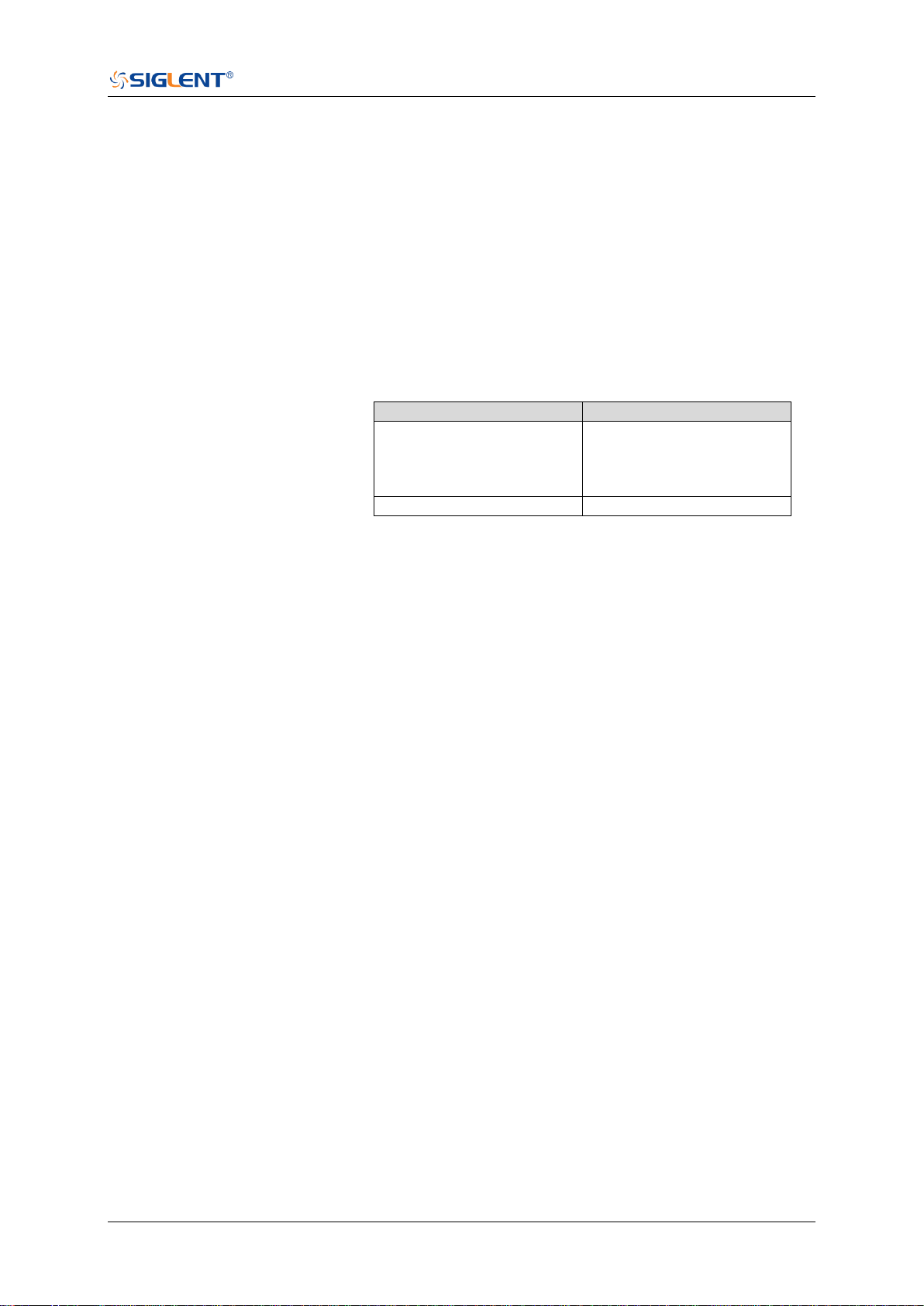
SDS Series Programming Guide
www.siglent.com 327 / 642
:TRIGger:EDGE:HLDTime
Command/Query
DESCRIPTION
The command sets the holdoff time of the edge trigger.
The query returns the current holdoff time of the edge trigger.
COMMAND SYNTAX
:TRIGger:EDGE:HLDTime <value>
<value>:= Value in NR3 format, including a decimal point and
exponent, like 1.23E+2.
The range of the value varies by model, see the table below
for details.
Model
Value Range
SDS5000X
SDS2000X Plus
SDS6000 Pro/SDS6000A
SDS2000X HD
[8.00E-09, 3.00E+01]
SHS800X/SHS1000X
[80.00E-09, 1.5E+00]
QUERY SYNTAX
:TRIGger:EDGE:HLDTime?
RESPONSE FORMAT
<value>
<value>:= Value in NR3 format, including a decimal point and
exponent, like 1.23E+2.
EXAMPLE
The following command sets the holdoff time of the edge
trigger to 15 ns.
Command message:
:TRIGger:EDGE:HLDTime 1.50E-08
TRIG:EDGE:HLDT 1.50E-08
Query message:
TRIG:EDGE:HLDT?
Response message:
1.50E-08
RELATED COMMANDS
:TRIGger:DROPout:HOLDoff

SDS Series Programming Guide
328 / 642 www.siglent.com
:TRIGger:EDGE:HOLDoff
Command/Query
DESCRIPTION
The command selects the holdoff type of the edge trigger.
The query returns the current holdoff type of the edge trigger.
COMMAND SYNTAX
:TRIGger:EDGE:HOLDoff <holdoff_type>
<holdoff_type>:= {OFF|EVENts|TIME}
OFF means to turn off the holdoff.
EVENts means the number of trigger events that the
oscilloscope counts before re-arming the trigger circuitry.
TIME means the amount of time that the oscilloscope
waits before re-arming the trigger circuitry.
QUERY SYNTAX
:TRIGger:EDGE:HOLDoff?
RESPONSE FORMAT
<holdoff_type>
<holdoff_type>:= {OFF|EVENts|TIME}
EXAMPLE
The following command turns off the holdoff of the edge
trigger.
Command message:
:TRIGger:EDGE:HOLDoff OFF
TRIG:EDGE:HOLD OFF
Query message:
TRIG:EDGE:HOLD?
Response message:
OFF
RELATED COMMANDS
:TRIGger:EDGE:HLDEVent
:TRIGger:EDGE:HLDTime
:TRIGger:EDGE:HSTart

SDS Series Programming Guide
www.siglent.com 329 / 642
:TRIGger:EDGE:HSTart
Command/Query
DESCRIPTION
The command defines the initial position of the edge trigger
holdoff.
The query returns the initial position of the edge trigger
holdoff.
COMMAND SYNTAX
:TRIGger:EDGE:HSTart <start_holdoff>
<start_holdoff>:= {LAST_TRIG|ACQ_START}
LAST_TRIG means the initial position of holdoff is the
first time point satisfying the trigger condition.
ACQ_START means the initial position of holdoff is the
time of the last trigger.
QUERY SYNTAX
:TRIGger:EDGE:HSTart?
RESPONSE FORMAT
<start_holdoff>
<start_holdoff>:= {LAST_TRIG|ACQ_START}
EXAMPLE
The following command sets the start holdoff mode to last
trigger.
Command message:
:TRIGger:EDGE:HSTart LAST_TRIG
TRIG:EDGE:HST LAST_TRIG
Query message:
TRIG:EDGE:HST?
Response message:
LAST_TRIG
RELATED COMMANDS
:TRIGger:EDGE:HOLDoff
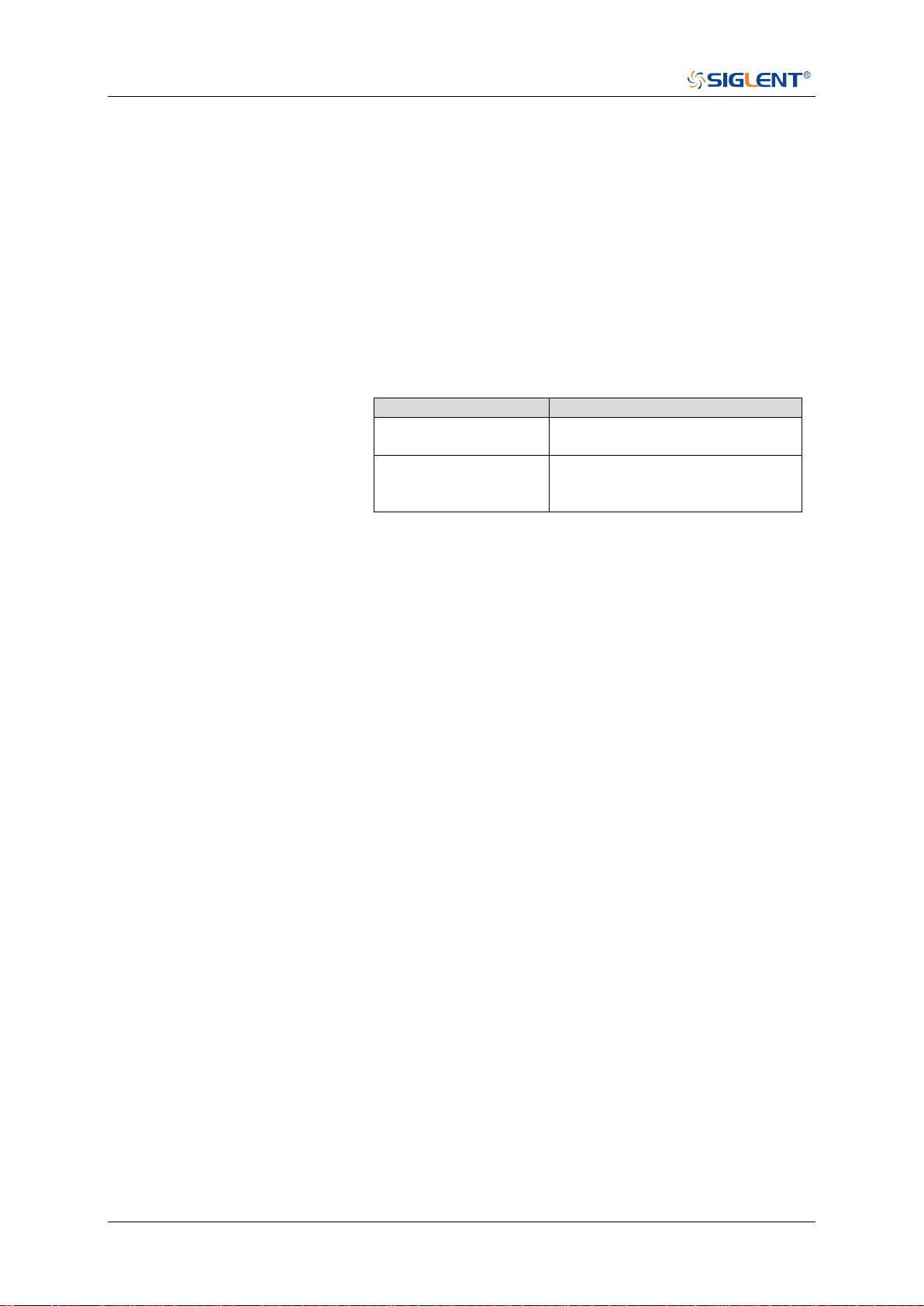
SDS Series Programming Guide
330 / 642 www.siglent.com
:TRIGger:EDGE:LEVel
Command/Query
DESCRIPTION
The command sets the trigger level of the edge trigger.
The query returns the current trigger level value of the edge
trigger.
COMMAND SYNTAX
:TRIGger:EDGE:LEVel <level_value>
<level_value>:= Value in NR3 format, including a decimal
point and exponent, like 1.23E+2.
The range of the value varies by model, see the table below
for details.
Model
Value Range
SDS6000 Pro/SDS6000A
SHS800X/SHS1000X
[-4.5*vertical_scale-vertical_offset,
4.5*vertical_scale-vertical_offset]
SDS5000X
SDS2000X Plus
SDS2000X HD
[-4.1*vertical_scale-vertical_offset,
4.1*vertical_scale-vertical_offset]
QUERY SYNTAX
:TRIGger:EDGE:LEVel?
RESPONSE FORMAT
<level_value>
<level_value>:= Value in NR3 format, including a decimal
point and exponent, like 1.23E+2.
EXAMPLE
The following command sets the trigger level of the edge
trigger to 0.5 V.
Command message:
:TRIGger:EDGE:LEVel 5.00E-01
TRIG:EDGE:LEV 5.00E-01
Query message:
TRIG:EDGE:LEV?
Response message:
5.00E-01
RELATED COMMANDS
:TRIGger:EDGE:SOURce

SDS Series Programming Guide
www.siglent.com 331 / 642
:TRIGger:EDGE:NREJect
Command/Query
DESCRIPTION
The command sets the state of the noise rejection.
The query returns the current state of the noise rejection.
COMMAND SYNTAX
:TRIGger:EDGE:NREJect <state>
<state>:= {OFF|ON}
QUERY SYNTAX
:TRIGger:EDGE:NREJect?
RESPONSE FORMAT
<state>
<state>:= {OFF|ON}
EXAMPLE
The following command turns on noise rejection.
Command message:
:TRIGger:EDGE:NREJect ON
TRIG:EDGE:NREJ ON
Query message:
TRIG:EDGE:NREJ?
Response message:
ON

SDS Series Programming Guide
332 / 642 www.siglent.com
:TRIGger:EDGE:SLOPe
Command/Query
DESCRIPTION
The command sets the slope of the edge trigger.
The query returns the current slope setting of the edge trigger.
COMMAND SYNTAX
:TRIGger:EDGE:SLOPe <slope_type>
<slope_type>:= {RISing|FALLing|ALTernate}
QUERY SYNTAX
:TRIGger:EDGE:SLOPe?
RESPONSE FORMAT
<slope_type>
<slope_type>:= {RISing|FALLing|ALTernate}
EXAMPLE
The following command set the rising slope as trigger edge.
Command message:
:TRIGger:EDGE:SLOPe RISing
TRIG:EDGE:SLOP RIS
Query message:
TRIG:EDGE:SLOP?
Response message:
RISing

SDS Series Programming Guide
www.siglent.com 333 / 642
:TRIGger:EDGE:SOURce
Command/Query
DESCRIPTION
The command sets the trigger source of the edge trigger.
The query returns the current trigger source of the edge
trigger.
COMMAND SYNTAX
:TRIGger:EDGE:SOURce <source>
<source>:= {C<x>|D<n>|EX|EX5|LINE}
<x>:= 1 to (# analog channels) in NR1 format, including an
integer and no decimal point, like 1.
<n>:= 0 to (# digital channels - 1) in NR1 format, including an
integer and no decimal point, like 1.
QUERY SYNTAX
:TRIGger:EDGE:SOURce?
RESPONSE FORMAT
<source>
<source>:= {C<x>|D<n>|EX|EX5|LINE}
<x>:= 1 to (# analog channels) in NR1 format, including an
integer and no decimal point, like 1.
<n>:= 0 to (# digital channels - 1) in NR1 format, including an
integer and no decimal point, like 1.
EXAMPLE
The following command sets the trigger source of the edge
trigger as C1.
Command message:
:TRIGger:EDGE:SOURce C1
TRIG:EDGE:SOUR C1
Query message:
TRIG:EDGE:SOUR?
Response message:
C1
RELATED COMMANDS
:TRIGger:EDGE:LEVel

SDS Series Programming Guide
334 / 642 www.siglent.com
:TRIGger:SLOPe Commands
The :TRIGGER:SLOPe subsystem commands control the slope trigger parameters.
:TRIGger:SLOPe:COUPling
:TRIGger:SLOPe:HLDEVent
:TRIGger:SLOPe:HLDTime
:TRIGger:SLOPe:HLEVel
:TRIGger:SLOPe:HOLDoff
:TRIGger:SLOPe:HSTart
:TRIGger:SLOPe:LIMit
:TRIGger:SLOPe:LLEVel
:TRIGger:SLOPe:NREJect
:TRIGger:SLOPe:SLOPe
:TRIGger:SLOPe:SOURce
:TRIGger:SLOPe:TLOWer
:TRIGger:SLOPe:TUPPer

SDS Series Programming Guide
www.siglent.com 335 / 642
:TRIGger:SLOPe:COUPling
Command/Query
DESCRIPTION
The command sets the coupling mode of the slope trigger.
The query returns the current the coupling mode of the slope
trigger.
COMMAND SYNTAX
:TRIGger:SLOPe:COUPling <mode>
<mode>:= {DC|AC|LFREJect|HFREJect}
DC coupling allows dc and ac signals into the trigger
path.
AC coupling places a high-pass filter in the trigger path,
removing dc offset voltage from the trigger waveform.
Use AC coupling to get a stable edge trigger when your
waveform has a large dc offset.
HFREJect which is a high-frequency rejection filter adds
a low-pass filter in the trigger path to remove high
frequency components from the trigger waveform. Use
the high-frequency reject filter to remove high-frequency
noise, such as AM or FM broadcast stations, from the
trigger path.
LFREJect which is a low frequency rejection filter adds a
high-pass filter in series with the trigger waveform to
remove any unwanted low frequency components from a
trigger waveform, such as power line frequencies, that
can interfere with proper triggering.
QUERY SYNTAX
:TRIGger:SLOPe:COUPling?
RESPONSE FORMAT
<mode>
<mode>:= {DC|AC|LFREJect|HFREJect}
EXAMPLE
The following command sets the coupling mode of the slope
trigger to DC.
Command message:
:TRIGger:SLOPe:COUPling DC
TRIG:SLOP:COUP DC
Query message:
TRIG:SLOP:COUP?
Response message:
DC

SDS Series Programming Guide
336 / 642 www.siglent.com
:TRIGger:SLOPe:HLDEVent
Command/Query
DESCRIPTION
This command sets the number of holdoff events of the slope
trigger.
The query returns the current number of holdoff events of the
slope trigger.
COMMAND SYNTAX
:TRIGger:SLOPe:HLDEVent <value>
<value>:= Value in NR1 format, including an integer and no
decimal point, like 1. The range of the value is [1, 100000000].
QUERY SYNTAX
:TRIGger:SLOPe:HLDEVent?
RESPONSE FORMAT
<value>
<value>:= Value in NR1 format, including an integer and no
decimal point, like 1.
EXAMPLE
The following command sets the number of holdoff events of
the slope trigger to 3.
Command message:
:TRIGger:SLOPe:HLDEVent 3
TRIG:SLOP:HLDEV 3
Query message:
TRIG:SLOP:HLDEV?
Response message:
3
RELATED COMMANDS
:TRIGger:SLOPe:HOLDoff
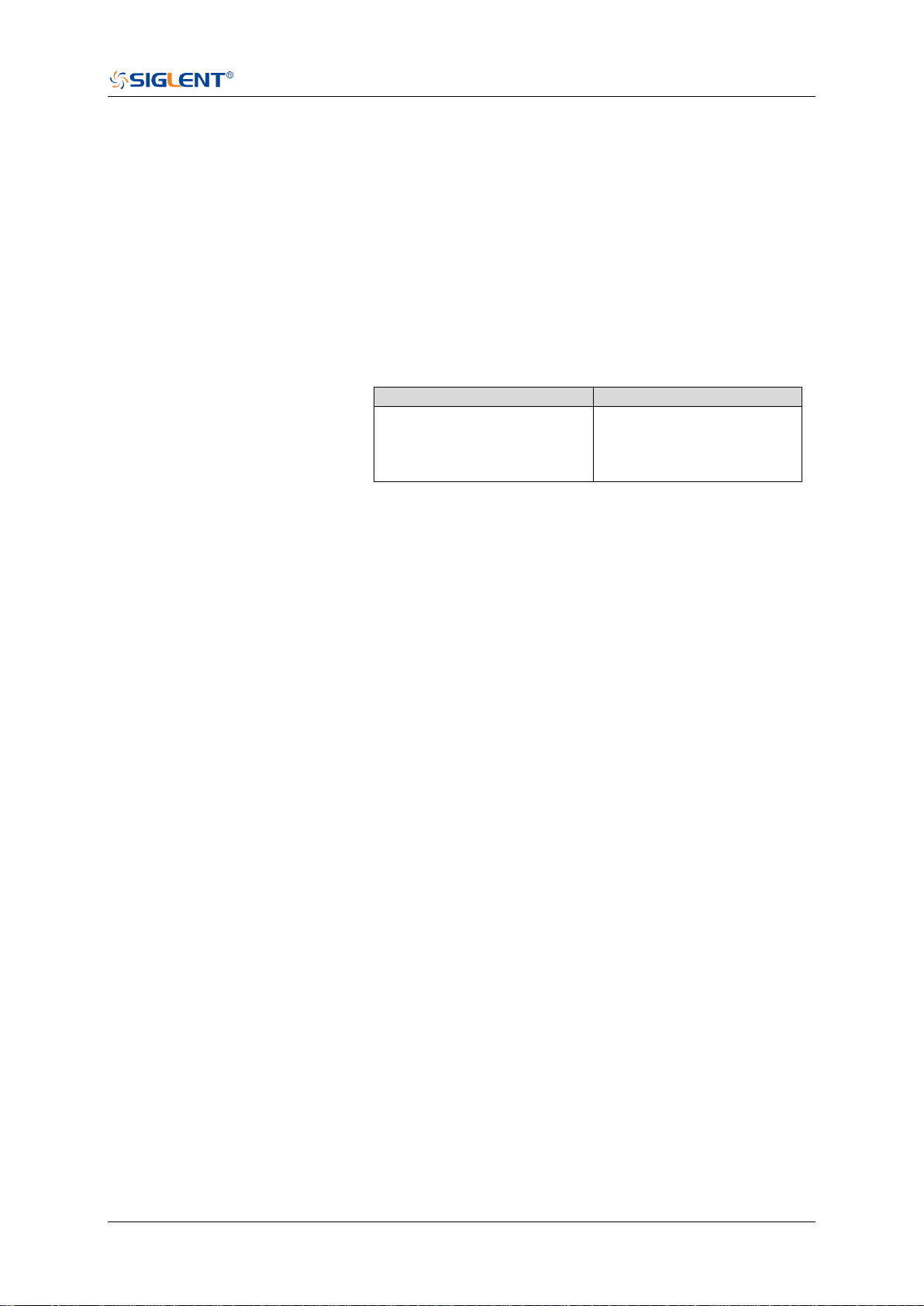
SDS Series Programming Guide
www.siglent.com 337 / 642
:TRIGger:SLOPe:HLDTime
Command/Query
DESCRIPTION
This This command sets the holdoff time of the slope trigger.
The query returns the current holdoff time of the slope trigger.
COMMAND SYNTAX
:TRIGger:SLOPe:HLDTime <value>
<value>:= Value in NR3 format, including a decimal point and
exponent, like 1.23E+2.
The range of the value varies by model, see the table below
for details.
Model
Value Range
SDS5000X
SDS2000X Plus
SDS6000 Pro/SDS6000A
SDS2000X HD
[8.00E-09, 3.00E+01]
QUERY SYNTAX
:TRIGger:SLOPe:HLDTime?
RESPONSE FORMAT
<value>
<value>:= Value in NR3 format, including a decimal point and
exponent, like 1.23E+2.
EXAMPLE
The following command sets the holdoff time of the slope
trigger to 15 ns.
Command message:
:TRIGger:SLOPe:HLDTime 1.50E-08
TRIG:SLOP:HLDT 1.50E-08
Query message:
TRIG:SLOP:HLDT?
Response message:
1.50E-08
RELATED COMMANDS
:TRIGger:SLOPe:HOLDoff
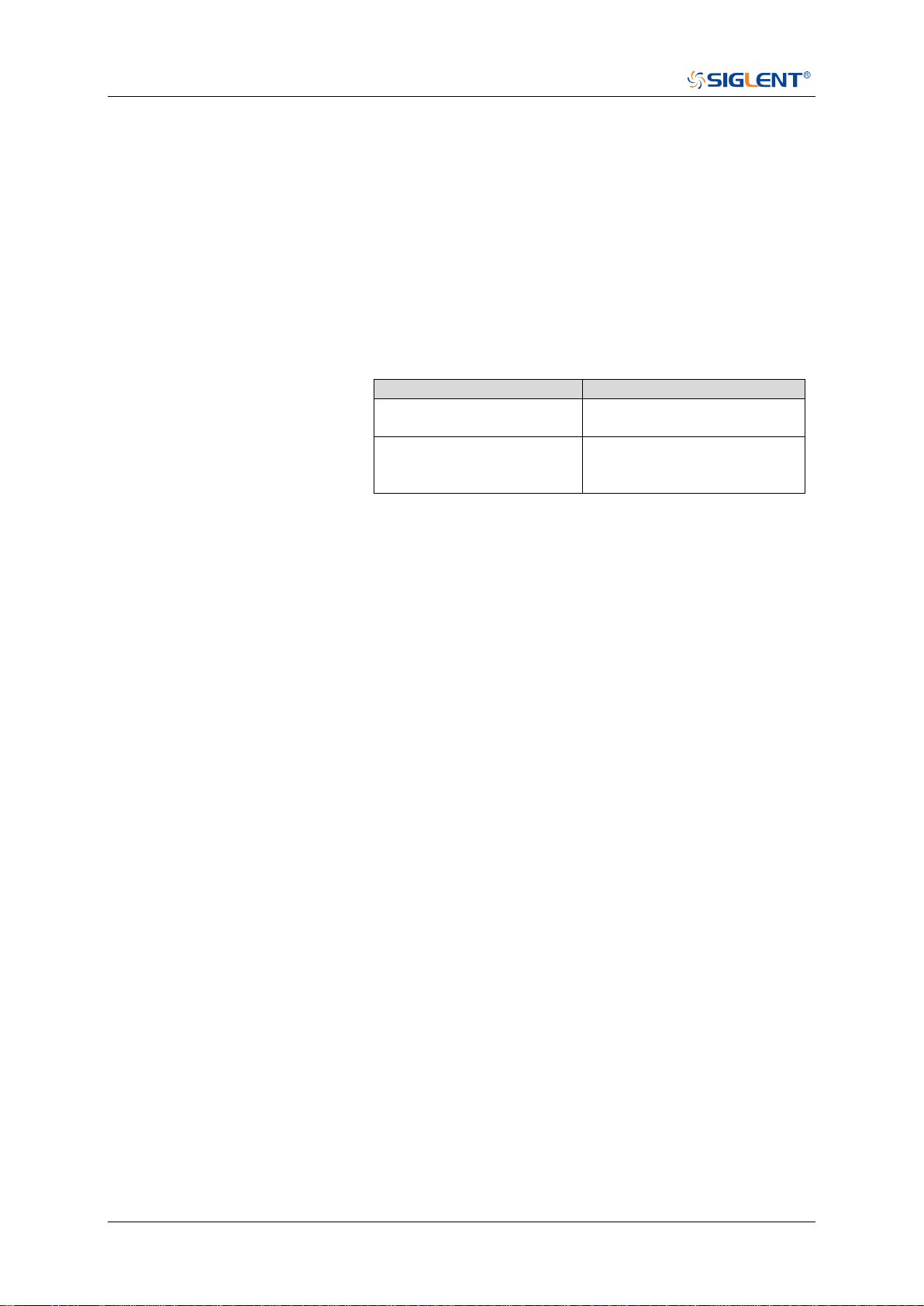
SDS Series Programming Guide
338 / 642 www.siglent.com
:TRIGger:SLOPe:HLEVel
Command/Query
DESCRIPTION
The command sets the high level of the slope trigger.
The query returns the current high level of the slope trigger.
COMMAND SYNTAX
:TRIGger:SLOPe:HLEVel <high_level_value>
<high_level_value>:= Value in NR3 format, including a
decimal point and exponent, like 1.23E+2.
The range of the value varies by model, see the table below
for details.
Model
Value Range
SDS6000 Pro/SDS6000A
SHS800X/SHS1000X
[-4.5*vertical_scale-vertical_offset,
4.5*vertical_scale-vertical_offset]
SDS5000X
SDS2000X Plus
SDS2000X HD
[-4.1*vertical_scale-vertical_offset,
4.1*vertical_scale-vertical_offset]
Note:
The high level value cannot be less than the low level value
using by the command :TRIGger:SLOPe:LLEVel.
QUERY SYNTAX
:TRIGger:SLOPe:HLEVel?
RESPONSE FORMAT
<high_level_value>
<high_level_value>:= Value in NR3 format, including a
decimal point and exponent, like 1.23E+2.
EXAMPLE
The following command sets the high level of the slope
trigger to 0.5 V.
Command message:
:TRIGger:SLOPe:HLEVel 5.00E-01
TRIG:SLOP:HLEV 5.00E-01
Query message:
TRIG:SLOP:HLEV?
Response message:
5.00E-01
RELATED COMMANDS
:TRIGger:SLOPe:LLEVel

SDS Series Programming Guide
www.siglent.com 339 / 642
:TRIGger:SLOPe:HOLDoff
Command/Query
DESCRIPTION
The command selects the holdoff type of the slope trigger.
The query returns the curent holdoff type of the slope trigger.
COMMAND SYNTAX
:TRIGger:SLOPe:HOLDoff <holdoff_type>
<holdoff_type>:= {OFF|EVENts|TIME}
OFF means to turn off the holdoff
EVENts means the amount of events that the
oscilloscope counts before re-arming the trigger circuitry
TIME means the amount of time that the oscilloscope
waits before re-arming the trigger circuitry
QUERY SYNTAX
:TRIGger:SLOPe:HOLDoff?
RESPONSE FORMAT
<holdoff_type>
< holdoff_type>:= {OFF|EVENts|TIME}
EXAMPLE
The following command turns off the holdoff of the slope
trigger.
Command message:
:TRIGger:SLOPe:HOLDoff OFF
TRIG:SLOP:HOLD OFF
Query message:
TRIG:SLOP:HOLD?
Response message:
OFF
RELATED COMMANDS
:TRIGger:SLOPe:HLDTime
:TRIGger:SLOPe:HLDEVent
:TRIGger:SLOPe:HSTart

SDS Series Programming Guide
340 / 642 www.siglent.com
:TRIGger:SLOPe:HSTart
Command/Query
DESCRIPTION
The command defines the initial position of the slope trigger
holdoff.
The query returns the initial position of the slope trigger
holdoff.
COMMAND SYNTAX
:TRIGger:SLOPe:HSTart <type>
<start_type>:= {LAST_TRIG|ACQ_START}
LAST_TRIG means the initial position of holdoff is the
first time point satisfying the trigger condition.
ACQ_START means the initial position of holdoff is the
time of the last trigger.
QUERY SYNTAX
:TRIGger:SLOPe:HSTart?
RESPONSE FORMAT
<type>
<type>:= {LAST_TRIG|ACQ_START}
EXAMPLE
The following command sets the start holdoff mode to
LAST_TRIG (last trigger).
Command message:
:TRIGger:SLOPe:HSTart LAST_TRIG
TRIG:SLOP:HST LAST_TRIG
Query message:
TRIG:SLOP:HST?
Response message:
LAST_TRIG
RELATED COMMANDS
:TRIGger:SLOPe:HOLDoff

SDS Series Programming Guide
www.siglent.com 341 / 642
:TRIGger:SLOPe:LIMit
Command/Query
DESCRIPTION
The command sets the limit range type of the slope trigger.
The query returns the current limit range type of the slope
trigger.
COMMAND SYNTAX
:TRIGger:SLOPe:LIMit <type>
<type>:= {LESSthan|GREATerthan|INNer|OUTer}
QUERY SYNTAX
:TRIGger:SLOPe:LIMit?
RESPONSE FORMAT
<type>
<type>:= {LESSthan|GREATerthan|INNer|OUTer}
EXAMPLE
The following command sets the limit of the slope trigger to
LESSthan.
Command message:
:TRIGger:SLOPe:LIMit LESSthan
TRIG:SIOP:LIM LESS
Query message:
TRIG:SIOP:LIM?
Response message:
LESSthan
RELATED COMMANDS
:TRIGger:SLOPe:TLOWer
:TRIGger:SLOPe:TUPPer
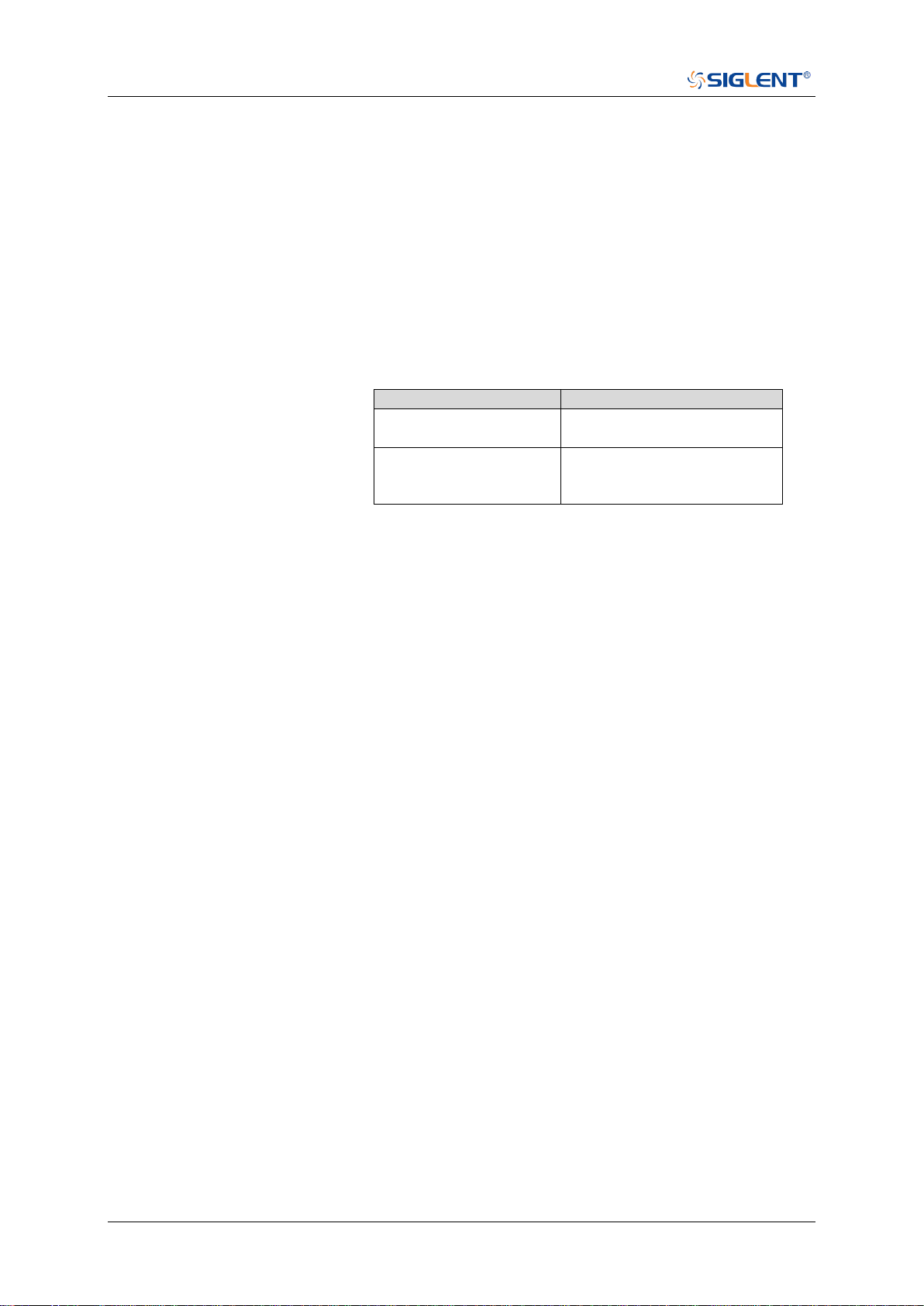
SDS Series Programming Guide
342 / 642 www.siglent.com
:TRIGger:SLOPe:LLEVel
Command/Query
DESCRIPTION
The command sets the low level of the slope trigger.
The query returns the current low level of the slope trigger.
COMMAND SYNTAX
:TRIGger:SLOPe:LLEVel <low_level_value>
<low_level_value>:= Value in NR3 format, including a
decimal point and exponent, like 1.23E+2.
The range of the value varies by model, see the table below
for details.
Model
Value Range
SDS6000 Pro/SDS6000A
SHS800X/SHS1000X
[-4.5*vertical_scale-vertical_offset,
4.5*vertical_scale-vertical_offset]
SDS5000X
SDS2000X Plus
SDS2000X HD
[-4.1*vertical_scale-vertical_offset,
4.1*vertical_scale-vertical_offset]
Note:
The low level value cannot be greater than the low level
value using by the command :TRIGger:SLOPe:HLEVel.
QUERY SYNTAX
:TRIGger:SLOPe:LLEVel?
RESPONSE FORMAT
<low_level_value>
<low_level_value>:= Value in NR3 format, including a
decimal point and exponent, like 1.23E+2.
EXAMPLE
The following command sets the low level of the slope trigger
to -0.5 V.
Command message:
:TRIGger:SLOPe:LLEVel -5.00E-01
TRIG:SLOP:LLEV -5.00E-01
Query message:
TRIG:SLOP:LLEV?
Response message:
-5.00E-01
RELATED COMMANDS
:TRIGger:SLOPe:HLEVel

SDS Series Programming Guide
www.siglent.com 343 / 642
:TRIGger:SLOPe:NREJect
Command/Query
DESCRIPTION
The command sets the state of noise rejection.
The query returns the current state of noise rejection.
COMMAND SYNTAX
:TRIGger:SLOPe:NREJect <state>
<state>:= {OFF|ON}
QUERY SYNTAX
:TRIGger:SLOPe:NREJect?
RESPONSE FORMAT
<state>
<state>:= {OFF|ON}
EXAMPLE
The following command turns on the noise rejection.
Command message:
:TRIGger:SLOPe:NREJect ON
TRIG:SLOP:NREJ ON
Query message:
TRIG:SLOP:NREJ?
Response message:
ON

SDS Series Programming Guide
344 / 642 www.siglent.com
:TRIGger:SLOPe:SLOPe
Command/Query
DESCRIPTION
The command sets the slope of the slope trigger.
The query returns the current slope of the slope trigger.
COMMAND SYNTAX
:TRIGger:SLOPe:SLOPe <slope_type>
<slope_type>:= {RISing|FALLing|ALTernate}
QUERY SYNTAX
:TRIGger:SLOPe:SLOPe?
RESPONSE FORMAT
<slope_type>
<slope_type>:= {RISing|FALLing|ALTernate}
EXAMPLE
The following command sets the rising slope of the slope
trigger.
Command message:
:TRIGger:SLOPe:SLOPe RISing
TRIG:SLOP:SLOP RIS
Query message:
TRIG:SLOP:SLOP?
Response message:
RISing

SDS Series Programming Guide
www.siglent.com 345 / 642
:TRIGger:SLOPe:SOURce
Command/Query
DESCRIPTION
The command sets the trigger source of the slope trigger.
The query returns the current trigger source of the slope
trigger.
COMMAND SYNTAX
:TRIGger:SLOPe:SOURce <source>
<source>:= {C<x>}
<x>:= 1 to (# analog channels) in NR1 format, including an
integer and no decimal point, like 1.
QUERY SYNTAX
:TRIGger:SLOPe:SOURce?
RESPONSE FORMAT
<source>
<source>:= {C<x>}
<x>:= 1 to (# analog channels) in NR1 format, including an
integer and no decimal point, like 1.
EXAMPLE
The following command sets the trigger source of the slope
trigger to C2 (channel 2).
Command message:
:TRIGger:SLOPe:SOURce C2
TRIG:SLOP:SOUR C2
Query message:
TRIG:SLOP:SOUR?
Response message:
C2
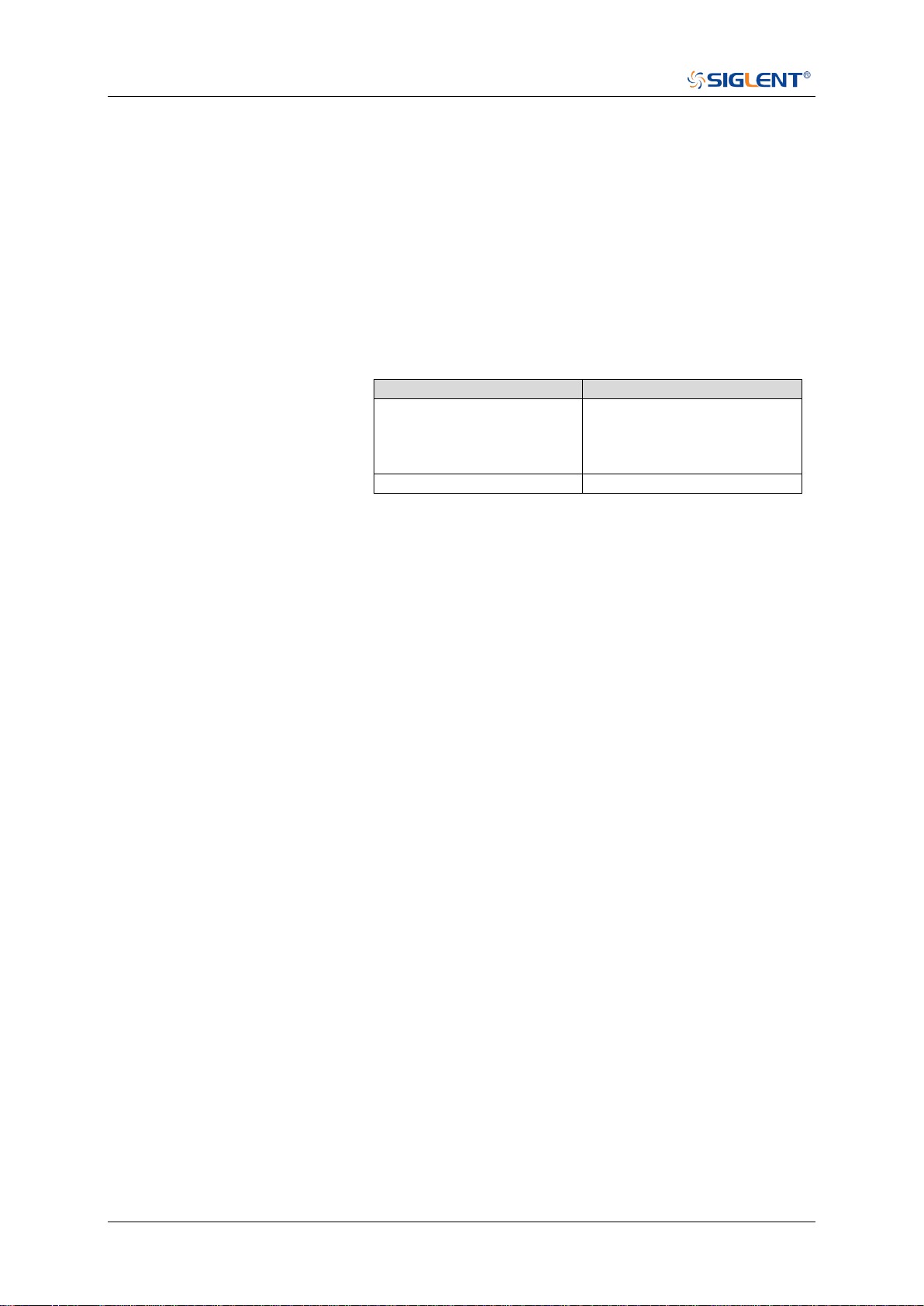
SDS Series Programming Guide
346 / 642 www.siglent.com
:TRIGger:SLOPe:TLOWer
Command/Query
DESCRIPTION
The command sets the lower value of the slope trigger limit
type.
The query returns the current lower value of the slope trigger
limit type.
COMMAND SYNTAX
:TRIGger:SLOPe:TLOWer <value>
<value>:= Value in NR3 format, including a decimal point and
exponent, like 1.23E+2. The range of the value varies by
model, see the table below for details.
Model
Value Range
SDS5000X
SDS2000X Plus
SDS6000 Pro/SDS6000A
SDS2000X HD
[2.00E-09, 2.00E+01]
SHS800X/SHS1000X
[2.00E-09, 4.20E+00]
Note:
The lower value cannot be greater than the upper value
using by the command :TRIGger:SLOPe:TUPPer.
The command is not valid when the limit range type is
LESSthan.
QUERY SYNTAX
:TRIGger:SLOPe:TLOWer?
RESPONSE FORMAT
<value>
<value>:= Value in NR3 format, including a decimal point and
exponent, like 1.23E+2.
EXAMPLE
The following command sets the lower time of the slope
trigger to 10 ns.
Command message:
:TRIGger:SLOPe:TLOWer 1.00E-08
TRIG:SLOP:TLOW 1.00E-08
Query message:
TRIG:SLOP:TLOW?
Response message:
1.00E-08
RELATED COMMANDS
:TRIGger:SLOPe:LIMit
:TRIGger:SLOPe:TUPPer
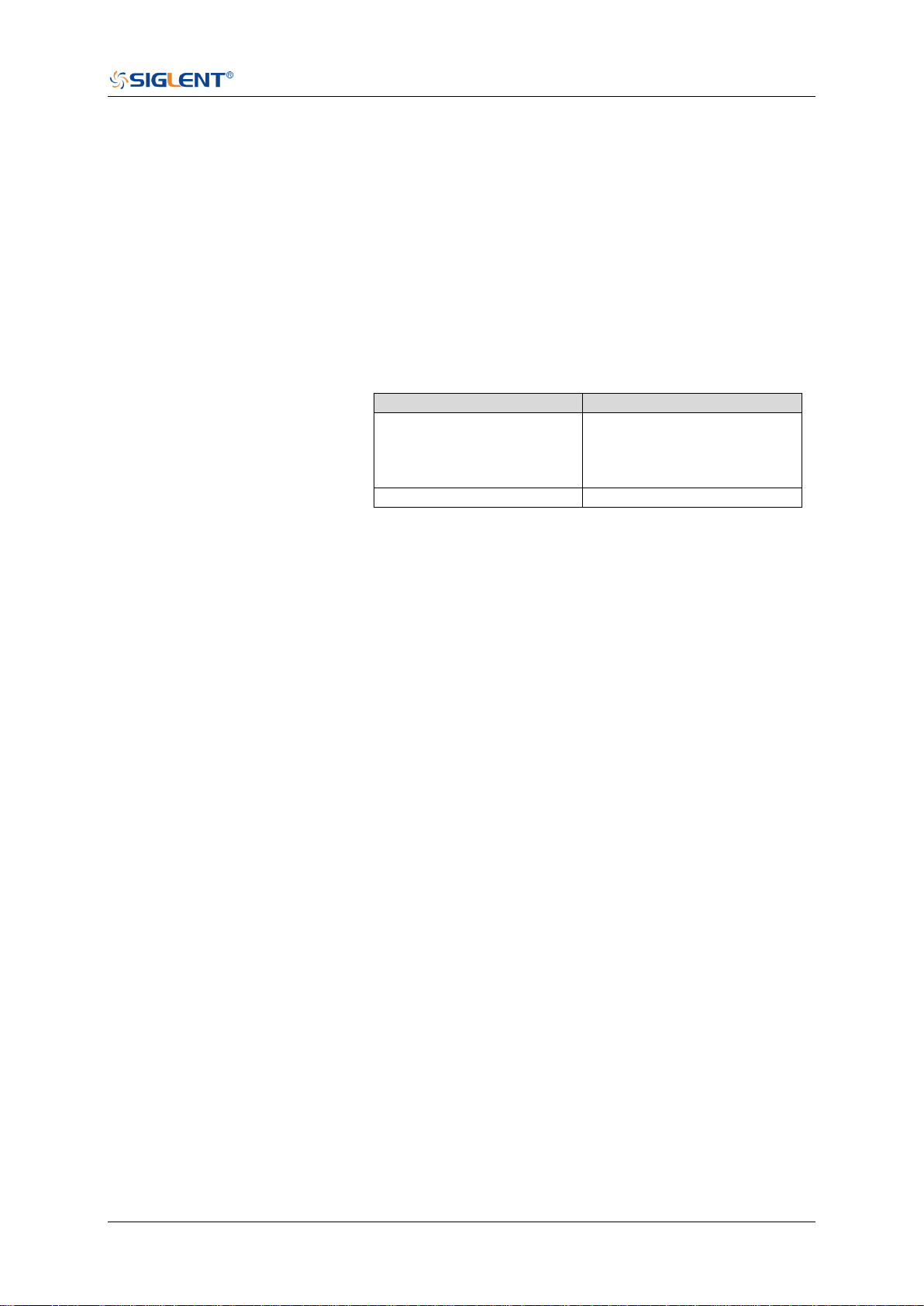
SDS Series Programming Guide
www.siglent.com 347 / 642
:TRIGger:SLOPe:TUPPer
Command/Query
DESCRIPTION
The command sets the upper value of the slope trigger limit
type.
The query returns the current upper value of the slope trigger
limit type.
COMMAND SYNTAX
:TRIGger:SLOPe:TUPPer <value>
<value>:= Value in NR3 format, including a decimal point and
exponent, like 1.23E+2. The range of the value varies by
model, see the table below for details.
Model
Value Range
SDS5000X
SDS2000X Plus
SDS6000 Pro/SDS6000A
SDS2000X HD
[2.00E-09, 2.00E+01]
SHS800X/SHS1000X
[2.00E-09, 4.20E+00]
Note:
The upper value cannot be less than the lower value
using by the command :TRIGger:SLOPe:TLOWer.
The command is not valid when the limit range type is
GREATerthan.
QUERY SYNTAX
:TRIGger:SLOPe:TUPPer?
RESPONSE FORMAT
<value>
<value>:= Value in NR3 format, including a decimal point and
exponent, like 1.23E+2.
EXAMPLE
The following command sets the upper value of the slope
trigger to 30 ns, when the limit range type is OUTer.
Command message:
:TRIGger:SLOPe:TUPPer 3.00E-08
TRIG:SLOP:TUPP 3.00E-08
Query message:
TRIG:SLOP:TUPP?
Response message:
3.00E-08
RELATED COMMANDS
:TRIGger:SLOPe:LIMit
:TRIGger:SLOPe:TLOWer

SDS Series Programming Guide
348 / 642 www.siglent.com
:TRIGger:PULSe Commands
The :TRIGGER:PULSe subsystem commands control the pulse trigger parameters.
:TRIGger:PULSe:COUPling
:TRIGger:PULSe:HLDEVent
:TRIGger:PULSe:HLDTime
:TRIGger:PULSe:HOLDoff
:TRIGger:PULSe:HSTart
:TRIGger:PULSe:LEVel
:TRIGger:PULSe:LIMit
:TRIGger:PULSe:NREJect
:TRIGger:PULSe:POLarity
:TRIGger:PULSe:SOURce
:TRIGger:PULSe:TLOWer
:TRIGger:PULSe:TUPPer

SDS Series Programming Guide
www.siglent.com 349 / 642
:TRIGger:PULSe:COUPling
Command/Query
DESCRIPTION
The command sets the coupling mode of the pulse trigger.
The query returns the coupling mode of the pulse trigger.
COMMAND SYNTAX
:TRIGger:PULSe:COUPling <mode>
<mode>:= {DC|AC|LFREJect|HFREJect}
DC coupling allows dc and ac signals into the trigger
path.
AC coupling places a high-pass filter in the trigger path,
removing dc offset voltage from the trigger waveform.
Use AC coupling to get a stable edge trigger when your
waveform has a large dc offset.
HFREJect which is a high-frequency rejection filter adds
a low-pass filter in the trigger path to remove high
frequency components from the trigger waveform. Use
the high-frequency rejection filter to remove
high-frequency noise, such as AM or FM broadcast
stations, from the trigger path.
LFREJect which is a low frequency rejection filter adds a
high-pass filter in series with the trigger waveform to
remove any unwanted low frequency components from a
trigger waveform, such as power line frequencies, that
can interfere with proper triggering.
QUERY SYNTAX
:TRIGger:PULSe:COUPling?
RESPONSE FORMAT
<mode>
<mode>:= {DC|AC|LFREJect|HFREJect}
EXAMPLE
The following command sets coupling mode of the pulse
trigger to DC.
Command message:
:TRIGger:PULSe:COUPling DC
TRIG:PULS:COUP DC
Query message:
TRIG:PULS:COUP?
Response message:
DC

SDS Series Programming Guide
350 / 642 www.siglent.com
:TRIGger:PULSe:HLDEVent
Command/Query
DESCRIPTION
This command sets the number of holdoff events of the pulse
trigger.
The query returns the current number of holdoff events of the
pulse trigger.
COMMAND SYNTAX
:TRIGger:PULSe:HLDEVent <value>
<value>:= Value in NR1 format, including an integer and no
decimal point, like 1. The range of the value is [1, 100000000].
QUERY SYNTAX
:TRIGger:PULSe:HLDEVent?
RESPONSE FORMAT
<value>
<value>:= Value in NR1 format, including an integer and no
decimal point, like 1.
EXAMPLE
The following command sets the number of holdoff events of
the pulse trigger to 3.
Command message:
:TRIGger:PULSe:HLDEVent 3
TRIG:PULS:HLDEV 3
Query message:
TRIG:PULS:HLDEV?
Response message:
3
RELATED COMMANDS
:TRIGger:PULSe:HOLDoff
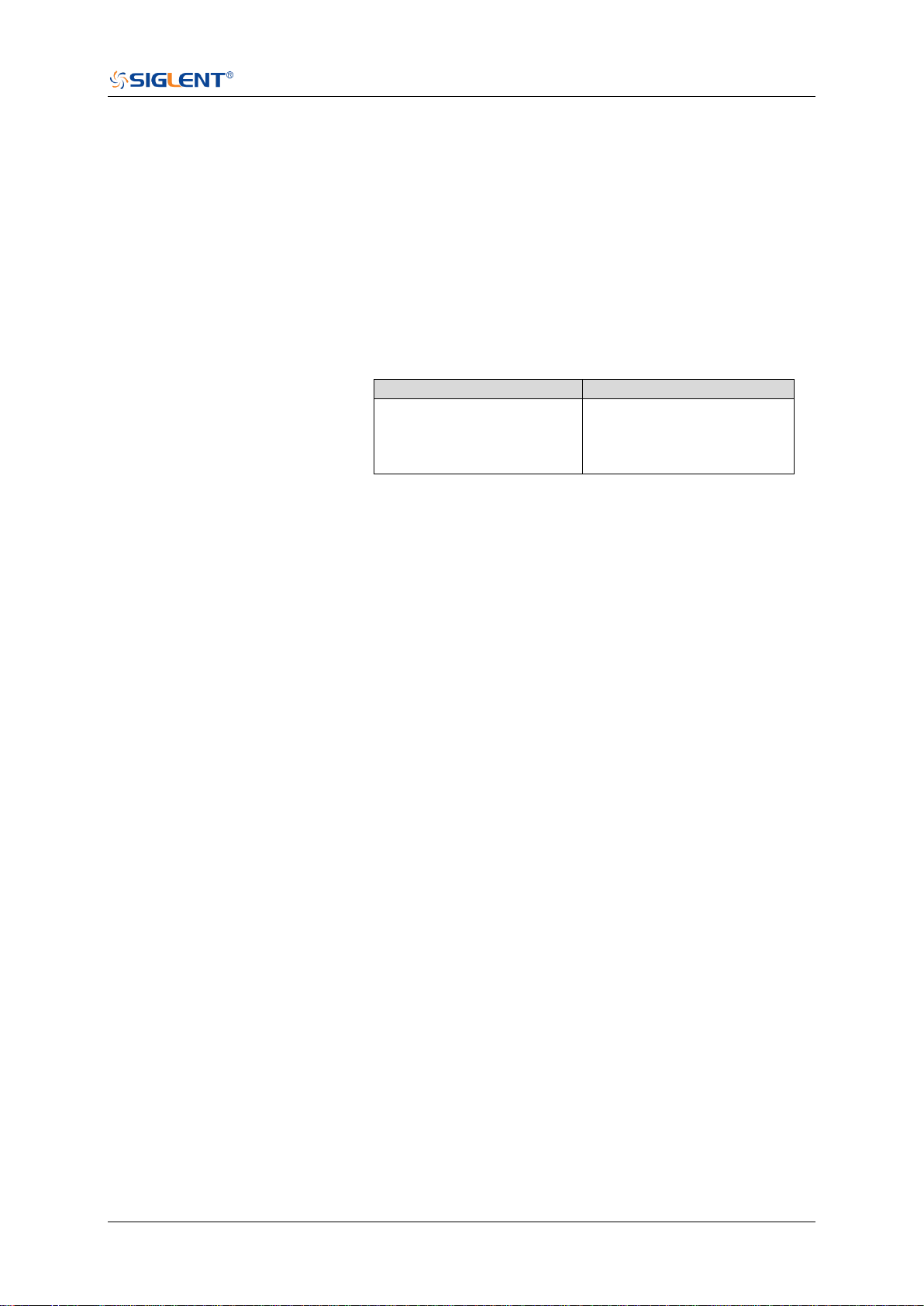
SDS Series Programming Guide
www.siglent.com 351 / 642
:TRIGger:PULSe:HLDTime
Command/Query
DESCRIPTION
This This command sets the holdoff time of the pulse trigger.
The query returns the current holdoff time of the pulse trigger.
COMMAND SYNTAX
:TRIGger:PULSe:HLDTime <value>
<value>:= Value in NR3 format, including a decimal point and
exponent, like 1.23E+2.
The range of the value varies by model, see the table below
for details.
Model
Value Range
SDS5000X
SDS2000X Plus
SDS6000 Pro/SDS6000A
SDS2000X HD
[8.00E-09, 3.00E+01]
QUERY SYNTAX
:TRIGger:PULSe:HLDTime?
RESPONSE FORMAT
<value>
<value>:= Value in NR3 format, including a decimal point and
exponent, like 1.23E+2.
EXAMPLE
The following command sets the holdoff time of the pulse
trigger to 15 ns.
Command message:
:TRIGger:PULSe:HLDTime 1.50E-08
TRIG:PULS:HLDT 1.50E-08
Query message:
TRIG:PULS:HLDT?
Response message:
1.50E-08
RELATED COMMANDS
:TRIGger:PULSe:HOLDoff

SDS Series Programming Guide
352 / 642 www.siglent.com
:TRIGger:PULSe:HOLDoff
Command/Query
DESCRIPTION
The command selects the holdoff type of the pulse trigger.
The query returns the current holdoff type of the pulse trigger.
COMMAND SYNTAX
:TRIGger:PULSe:HOLDoff <holdoff_type>
<holdoff_type>:= {OFF|EVENts|TIME}
OFF means to turn off the holdoff.
EVENts means the amount of events that the
oscilloscope counts before re-arming the trigger circuitry.
TIME means the amount of time that the oscilloscope
waits before re-arming the trigger circuitry.
QUERY SYNTAX
:TRIGger:PULSe:HOLDoff?
RESPONSE FORMAT
<holdoff_type>
< holdoff_type >:= {OFF|EVENts|TIME}
EXAMPLE
The following command turns off the holdoff of the pulse
trigger.
Command message:
:TRIGger:PULSe:HOLDoff OFF
TRIG:PULS:HOLD OFF
Query message:
TRIG:PULS:HOLD?
Response message:
OFF
RELATED COMMANDS
:TRIGger:PULSe:HLDEVent
:TRIGger:PULSe:HLDTime
:TRIGger:PULSe:HSTart

SDS Series Programming Guide
www.siglent.com 353 / 642
:TRIGger:PULSe:HSTart
Command/Query
DESCRIPTION
The command defines the initial position of the pulse trigger
holdoff.
The query returns the initial position of the pulse trigger
holdoff.
COMMAND SYNTAX
:TRIGger:PULSe:HSTart <start_holdoff>
<start_holdoff>:= {LAST_TRIG|ACQ_START}
LAST_TRIG means the initial position of holdoff is the
first time point satisfying the trigger condition.
ACQ_START means the initial position of holdoff is the
time of the last trigger.
QUERY SYNTAX
:TRIGger:PULSe:HSTart?
RESPONSE FORMAT
<start_holdoff>
<start_holdoff>:= {LAST_TRIG|ACQ_START}
EXAMPLE
The following command sets the start holdoff mode of pulse
trigger to LAST_TRIG (last trigger).
Command message:
:TRIGger:PULSe:HSTart LAST_TRIG
TRIG:PULS:HST LAST_TRIG
Query message:
TRIG:PULS:HST?
Response message:
LAST_TRIG
RELATED COMMANDS
:TRIGger:PULSe:HOLDoff
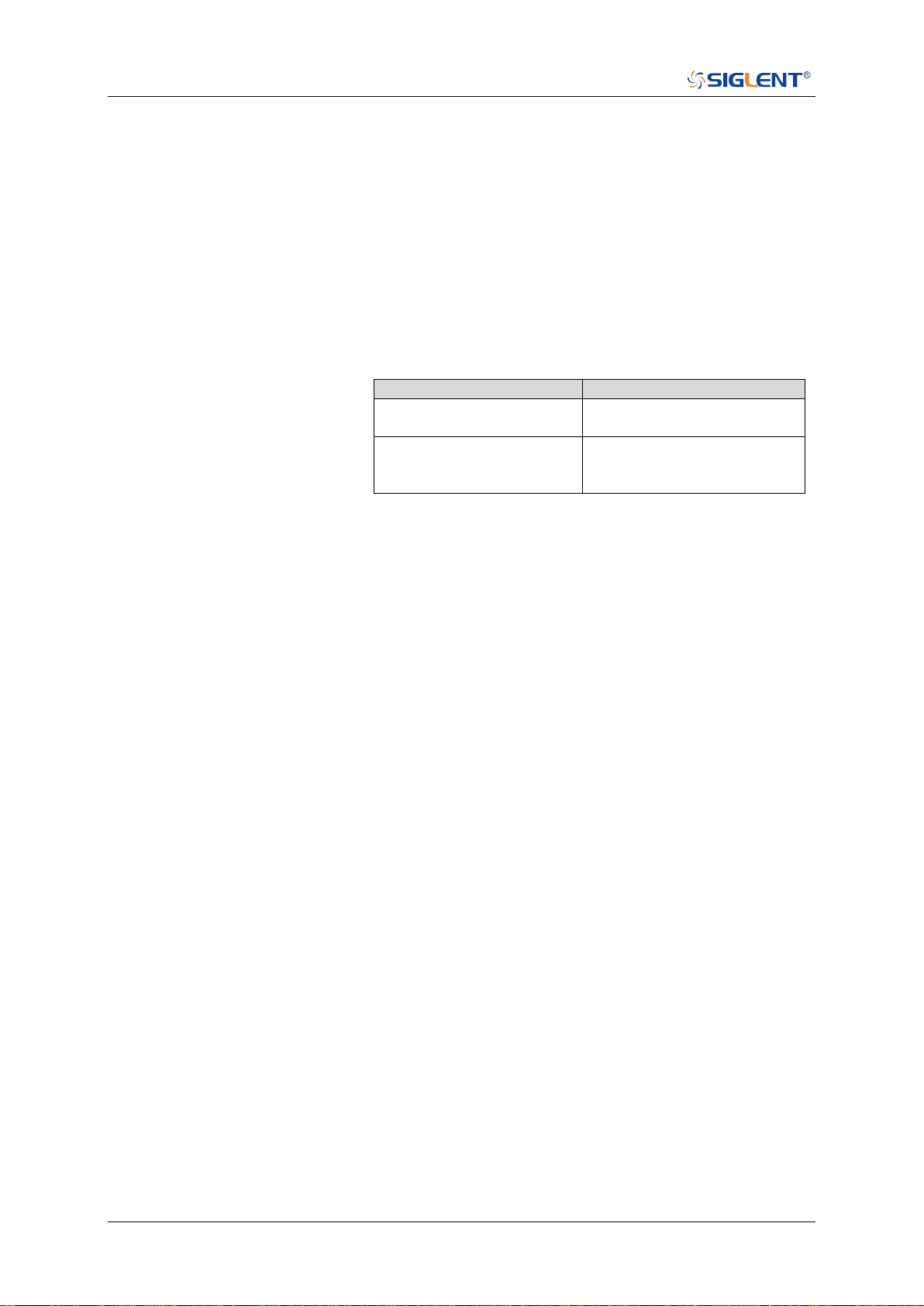
SDS Series Programming Guide
354 / 642 www.siglent.com
:TRIGger:PULSe:LEVel
Command/Query
DESCRIPTION
The command sets the trigger level of the pulse trigger.
The query returns the current trigger level of the pulse trigger.
COMMAND SYNTAX
:TRIGger:PULSe:LEVel <level_value>
<level_value>:= Value in NR3 format, including a decimal
point and exponent, like 1.23E+2.
The range of the value varies by model, see the table below
for details.
Model
Value Range
SDS6000 Pro/SDS6000A
SHS800X/SHS1000X
[-4.5*vertical_scale-vertical_offset,
4.5*vertical_scale-vertical_offset]
SDS5000X
SDS2000X Plus
SDS2000X HD
[-4.1*vertical_scale-vertical_offset,
4.1*vertical_scale-vertical_offset]
QUERY SYNTAX
:TRIGger:PULSe:LEVel?
RESPONSE FORMAT
<level_value>
<level_value>:= Value in NR3 format, including a decimal
point and exponent, like 1.23E+2.
EXAMPLE
The following command sets the trigger level of the pulse
trigger to 0.5 V.
Command message:
:TRIGger:PULSe:LEVel 5.00E-01
TRIG:PULS:LEV 5.00E-01
Query message:
TRIG:PULS:LEV?
Response message:
5.00E-01
RELATED COMMANDS
:TRIGger:PULSe:SOURce

SDS Series Programming Guide
www.siglent.com 355 / 642
:TRIGger:PULSe:LIMit
Command/Query
DESCRIPTION
The command sets the limit range type of the pulse trigger.
The query returns the current limit range type of the pulse
trigger.
COMMAND SYNTAX
:TRIGger:PULSe:LIMit <type>
<type>:= {LESSthan|GREATerthan|INNer|OUTer}
QUERY SYNTAX
:TRIGger:PULSe:LIMit?
RESPONSE FORMAT
<type>
<type>:= {LESSthan|GREATerthan|INNer|OUTer}
EXAMPLE
The following command sets the trigger limit of the pulse
trigger to inner.
Command message:
:TRIGger:PULSe:LIMit INNer
TRIG:PULS:LIM INN
Query message:
TRIG:PULS:LIM?
Response message:
INNer
RELATED COMMANDS
:TRIGger:PULSe:TLOWer
:TRIGger:PULSe:TUPPer

SDS Series Programming Guide
356 / 642 www.siglent.com
:TRIGger:PULSe:NREJect
Command/Query
DESCRIPTION
The command sets the state of noise rejection.
The query returns the current state of the noise rejection
function.
COMMAND SYNTAX
:TRIGger:PULSe:NREJect <state>
<state>:= {OFF|ON}
QUERY SYNTAX
:TRIGger:PULSe:NREJect?
RESPONSE FORMAT
<state>
<state>:= {OFF|ON}
EXAMPLE
The following command turns on noise rejection.
Command message:
:TRIGger:PULSe:NREJect ON
TRIG:PULS:NREJ ON
Query message:
TRIG:PULS:NREJ?
Response message:
ON

SDS Series Programming Guide
www.siglent.com 357 / 642
:TRIGger:PULSe:POLarity
Command/Query
DESCRIPTION
The command sets the polarity of the pulse trigger.
The query returns the current polarity of the pulse trigger.
COMMAND SYNTAX
:TRIGger:PULSe:POLarity <polarity_type>
<polarity_type>:= {POSitive|NEGative}
QUERY SYNTAX
:TRIGger:PULSe:POLarity?
RESPONSE FORMAT
<polarity_type>
<polarity_type>:= {POSitive|NEGative}
EXAMPLE
The following command sets the polarity of the pulse trigger
to POSitive.
Command message:
:TRIGger:PULSe:POLarity POSitive
TRIG:PULS:POL POS
Query message:
TRIG:PULS:POL?
Response message:
POSitive

SDS Series Programming Guide
358 / 642 www.siglent.com
:TRIGger:PULSe:SOURce
Command/Query
DESCRIPTION
The command sets the trigger source of the pulse trigger.
The query returns the current trigger source of the pulse
trigger.
COMMAND SYNTAX
:TRIGger:PULSe:SOURce <source>
<source>:= {C<x>|D<n>}
<x>:= 1 to (# analog channels) in NR1 format, including an
integer and no decimal point, like 1.
<n>:= 0 to (# digital channels - 1) in NR1 format, including an
integer and no decimal point, like 1.
QUERY SYNTAX
:TRIGger:PULSe:SOURce?
RESPONSE FORMAT
<source>
<source>:= {C<x>|D<n>}
<x>:= 1 to (# analog channels) in NR1 format, including an
integer and no decimal point, like 1.
<n>:= 0 to (# digital channels - 1) in NR1 format, including an
integer and no decimal point, like 1.
EXAMPLE
The following command sets the polarity of the pulse trigger
as channel 2.
Command message:
:TRIGger:PULSe:SOURce C2
TRIG:PULS:SOUR C2
Query message:
TRIG:PULS:SOUR?
Response message:
C2
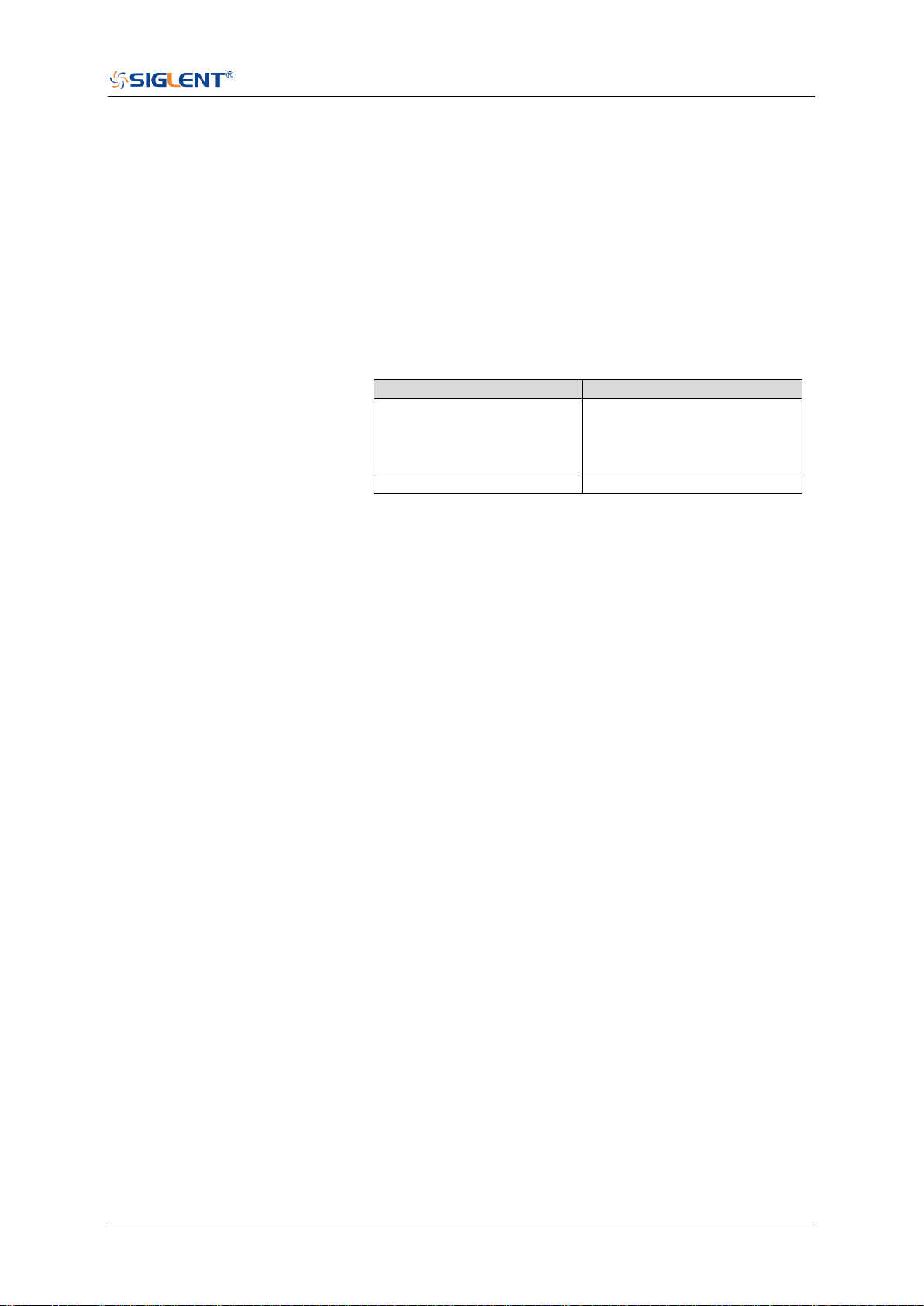
SDS Series Programming Guide
www.siglent.com 359 / 642
:TRIGger:PULSe:TLOWer
Command/Query
DESCRIPTION
The command sets the lower value of the pulse trigger limit
type.
The query returns the current lower value of the pulse trigger
limit type.
COMMAND SYNTAX
:TRIGger:PULSe:TLOWer <value>
<value>:= Value in NR3 format, including a decimal point and
exponent, like 1.23E+2. The range of the value varies by
model, see the table below for details.
Model
Value Range
SDS5000X
SDS2000X Plus
SDS6000 Pro/SDS6000A
SDS2000X HD
[2.00E-09, 2.00E+01]
SHS800X/SHS1000X
[2.00E-09, 4.20E+00]
Note:
The lower value cannot be greater than the upper value
using by the command :TRIGger:PULSe:TUPPer.
The command is not valid when the limit range type is
LESSthan.
QUERY SYNTAX
:TRIGger:PULSe:TLOWer?
RESPONSE FORMAT
<value>
<value>:= Value in NR3 format, including a decimal point and
exponent, like 1.23E+2.
EXAMPLE
The following command sets the lower time of the pulse
trigger to 10 ns.
Command message:
:TRIGger:PULSe:TLOWer 1.00E-08
TRIG:PULS:TLOW 1.00E-08
Query message:
TRIG:PULS:TLOW?
Response message:
1.00E-08
RELATED COMMANDS
:TRIGger:PULSe:LIMit
:TRIGger:PULSe:TUPPer
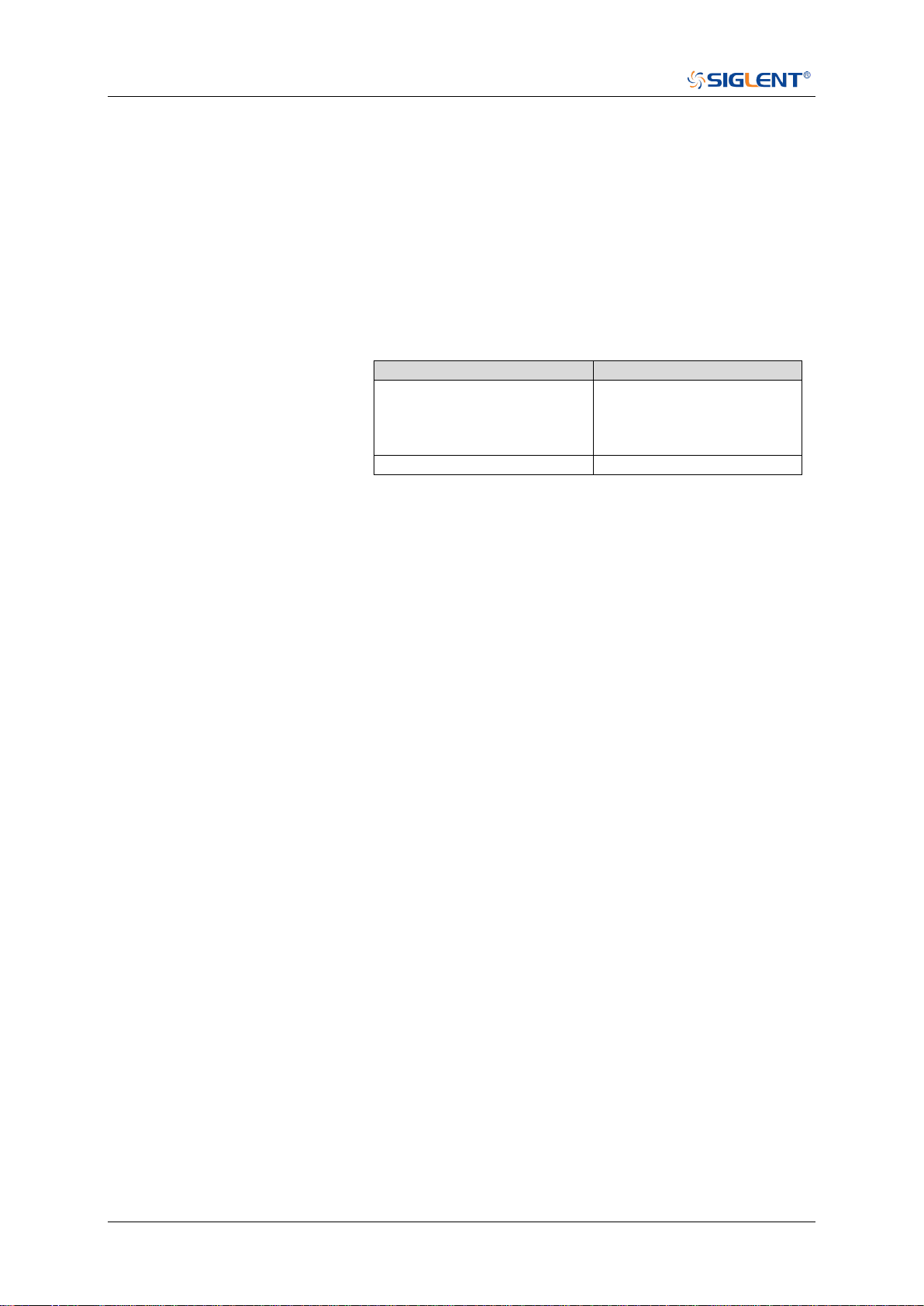
SDS Series Programming Guide
360 / 642 www.siglent.com
:TRIGger:PULSe:TUPPer
Command/Query
DESCRIPTION
The command sets the upper value of the pulse trigger limit
type.
The query returns the current upper value of the pulse trigger
limit type.
COMMAND SYNTAX
:TRIGger:PULse:TUPPer <value>
<value>:= Value in NR3 format.The range of the value varies
by model, see the table below for details.
Model
Value Range
SDS5000X
SDS2000X Plus
SDS6000 Pro/SDS6000A
SDS2000X HD
[2.00E-09, 2.00E+01]
SHS800X/SHS1000X
[2.00E-09, 4.20E+00]
Note:
The upper value cannot be less than the lower value
using by the command :TRIGger:PULse:TLOWer.
The command is not valid when the limit range type is
GREATerthan.
QUERY SYNTAX
:TRIGger:PULSe:TUPPer?
RESPONSE FORMAT
<value>
<value>:= Value in NR3 format
EXAMPLE
The following command sets the upper time of the pulse
trigger to 30 ns.
Command message:
:TRIGger:PULSe:TUPPer 3.00E-08
TRIG:PULS:TUPP 3.00E-08
Query message:
TRIG:PULS:TUPP?
Response message:
3.00E-08
RELATED COMMANDS
:TRIGger:PULSe:LIMit
:TRIGger:PULSe:TLOWer

SDS Series Programming Guide
www.siglent.com 361 / 642
:TRIGger:VIDeo Commands
The :TRIGGER:VIDeo subsystem commands control the video trigger parameters.
:TRIGger:VIDeo:FCNT
:TRIGger:VIDeo:FIELd
:TRIGger:VIDeo:FRATe
:TRIGger:VIDeo:INTerlace
:TRIGger:VIDeo:LCNT
:TRIGger:VIDeo:LEVel
:TRIGger:VIDeo:LINE
:TRIGger:VIDeo:SOURce
:TRIGger:VIDeo:STANdard
:TRIGger:VIDeo:SYNC

SDS Series Programming Guide
362 / 642 www.siglent.com
:TRIGger:VIDeo:FCNT
Command/Query
DESCRIPTION
The command sets the fields of the custom video trigger.
The query returns the current fields of the custom video
trigger.
COMMAND SYNTAX
:TRIGger:VIDeo:FCNT <field_cnt>
<field_cnt>:= {1|2|4|8}
QUERY SYNTAX
:TRIGger:VIDeo:FCNT?
RESPONSE FORMAT
<field_cnt>
<field_cnt>:= {1|2|4|8}
EXAMPLE
The following command sets the fields of the custom video
trigger to 8.
Command message:
:TRIGger:VIDeo:FCNT 8
TRIG:VID:FCNT 8
Query message:
TRIG:VID:FCNT?
Response message:
8
RELATED COMMANDS
:TRIGger:VIDeo:STANdard

SDS Series Programming Guide
www.siglent.com 363 / 642
:TRIGger:VIDeo:FIELd
Command/Query
DESCRIPTION
The command sets the synchronous trigger field when the
video standard is NTSC, PAL, 1080i/50 or 1080i/60.
The query returns the current synchronous trigger field when
the video standard is NTSC, PAL, 1080i/50 or 1080i/60.
COMMAND SYNTAX
:TRIGger:VIDeo:FIELd <field>
<field>:= {1|2}
QUERY SYNTAX
:TRIGger:VIDeo:FIELd?
RESPONSE FORMAT
<field>
<field>:= {1|2}
EXAMPLE
The following command sets the synchronous trigger field to
field 2 when the video standard is NTSC.
Command message:
:TRIGger:VIDeo:FIELd 2
TRIG:VID:FIEL 2
Query message:
TRIG:VID:FIEL?
Response message:
2
RELATED COMMANDS
:TRIGger:VIDeo:STANdard
:TRIGger:VIDeo:SYNC

SDS Series Programming Guide
364 / 642 www.siglent.com
:TRIGger:VIDeo:FRATe
Command/Query
DESCRIPTION
The command sets the frame rate of the custom video trigger.
The query returns the current frame rate of the custom video
trigger.
COMMAND SYNTAX
:TRIGger:VIDeo:FRATe <frate>
<frate>:= {25Hz|30Hz|50Hz|60Hz}
QUERY SYNTAX
:TRIGger:VIDeo:FRATe?
RESPONSE FORMAT
<frate>
<frate>:= {25Hz|30Hz|50Hz|60Hz}
EXAMPLE
The following command sets the frame rate of the custom
video trigger to 50Hz.
Command message:
:TRIGger:VIDeo:FRATe 50Hz
TRIG:VID:FRAT 50Hz
Query message:
TRIG:VID:FRAT?
Response message:
50Hz
RELATED COMMANDS
:TRIGger:VIDeo:STANdard

SDS Series Programming Guide
www.siglent.com 365 / 642
:TRIGger:VIDeo:INTerlace
Command/Query
DESCRIPTION
The command sets the interlace of the custom video trigger.
The query returns the current interlace of the custom video
trigger.
COMMAND SYNTAX
:TRIGger:VIDeo:INTerlace <interlace>
<interlace>:= {1|2|4|8}
QUERY SYNTAX
:TRIGger:VIDeo:INTerlace?
RESPONSE FORMAT
<interlace>
<interlace>:= {1|2|4|8}
EXAMPLE
The following command sets the interlace of the custom
video trigger to 8:1.
Command message:
:TRIGger:VIDeo:INTerlace 8
TRIG:VID:INT 8
Query message:
TRIG:VID:INT?
Response message:
8
RELATED COMMANDS
:TRIGger:VIDeo:STANdard
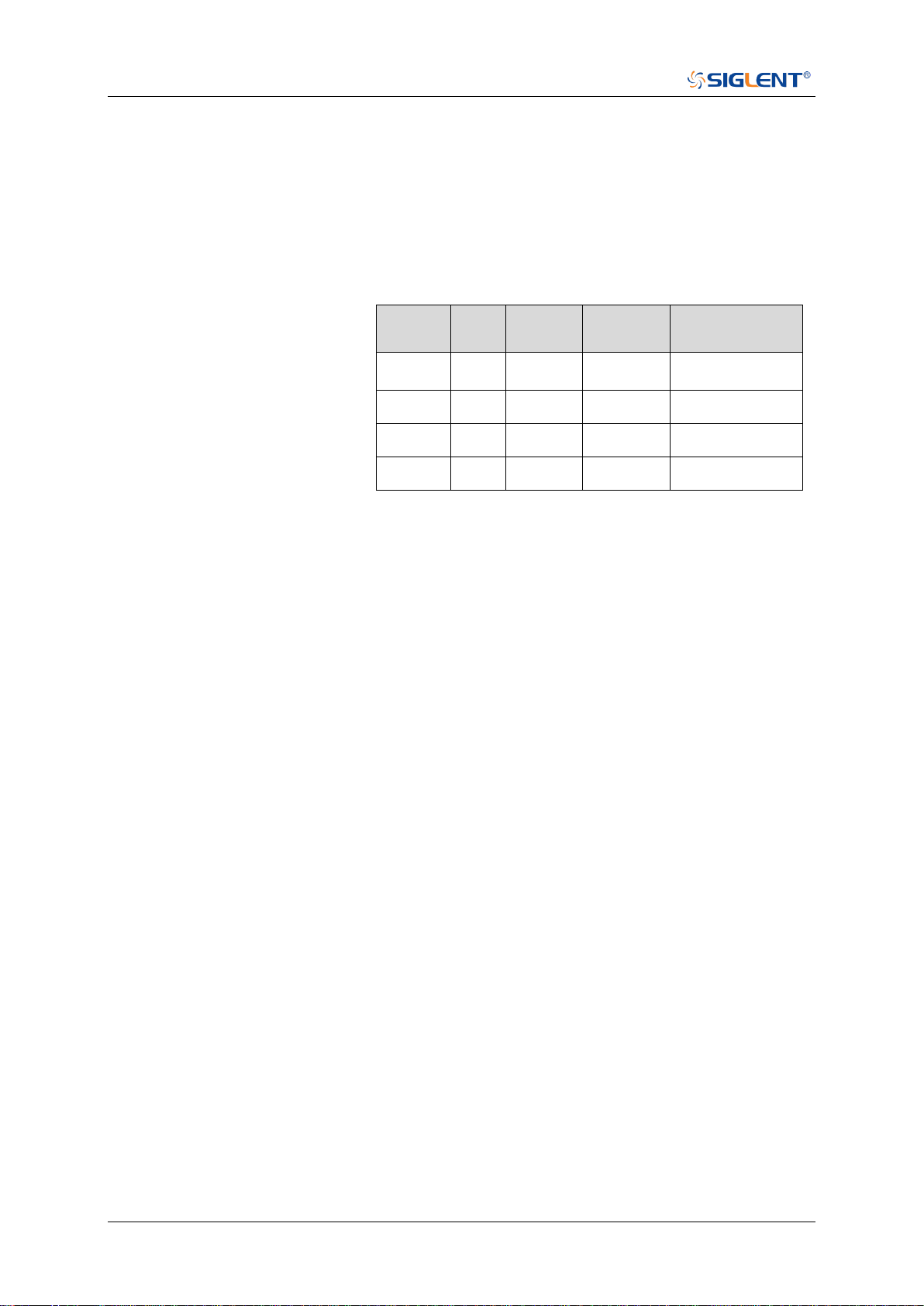
SDS Series Programming Guide
366 / 642 www.siglent.com
:TRIGger:VIDeo:LCNT
Command/Query
DESCRIPTION
The command sets the lines of the custom video trigger.
The query returns the current of lines of the custom video
trigger.
If the "Of Lines" is set to 800, the correct relationship between
the interface, of fields, trigger line and trigger field is as follows:
Of
Lines
Inter
lace
Of
Fields
Trigger
Line
Trigger Field
800
1:1
1
800
1
800
2:1
1/2/4/8
400
1/1~2/1~4/1~8
800
4:1
1/2/4/8
300
1/1~2/1~4/1~8
800
8:1
1/2/4/8
100
1/1~2/1~4/1~8
COMMAND SYNTAX
:TRIGger:VIDeo:LCNT <line_cnt>
<line_cnt>:= Value in NR1 format, including an integer and no
decimal point, like 1. The range of the value is [300, 2000].
QUERY SYNTAX
:TRIGger:VIDeo:LCNT?
RESPONSE FORMAT
<line_cnt>
<line_cnt>:= Value in NR1 format, including an integer and no
decimal point, like 1.
EXAMPLE
The following command sets the lines of the custom video
trigger to 500.
Command message:
:TRIGger:VIDeo:LCNT 500
TRIG:VID:LCNT 500
Query message:
TRIG:VID:LCNT?
Response message:
500
RELATED COMMANDS
:TRIGger:VIDeo:STANdard
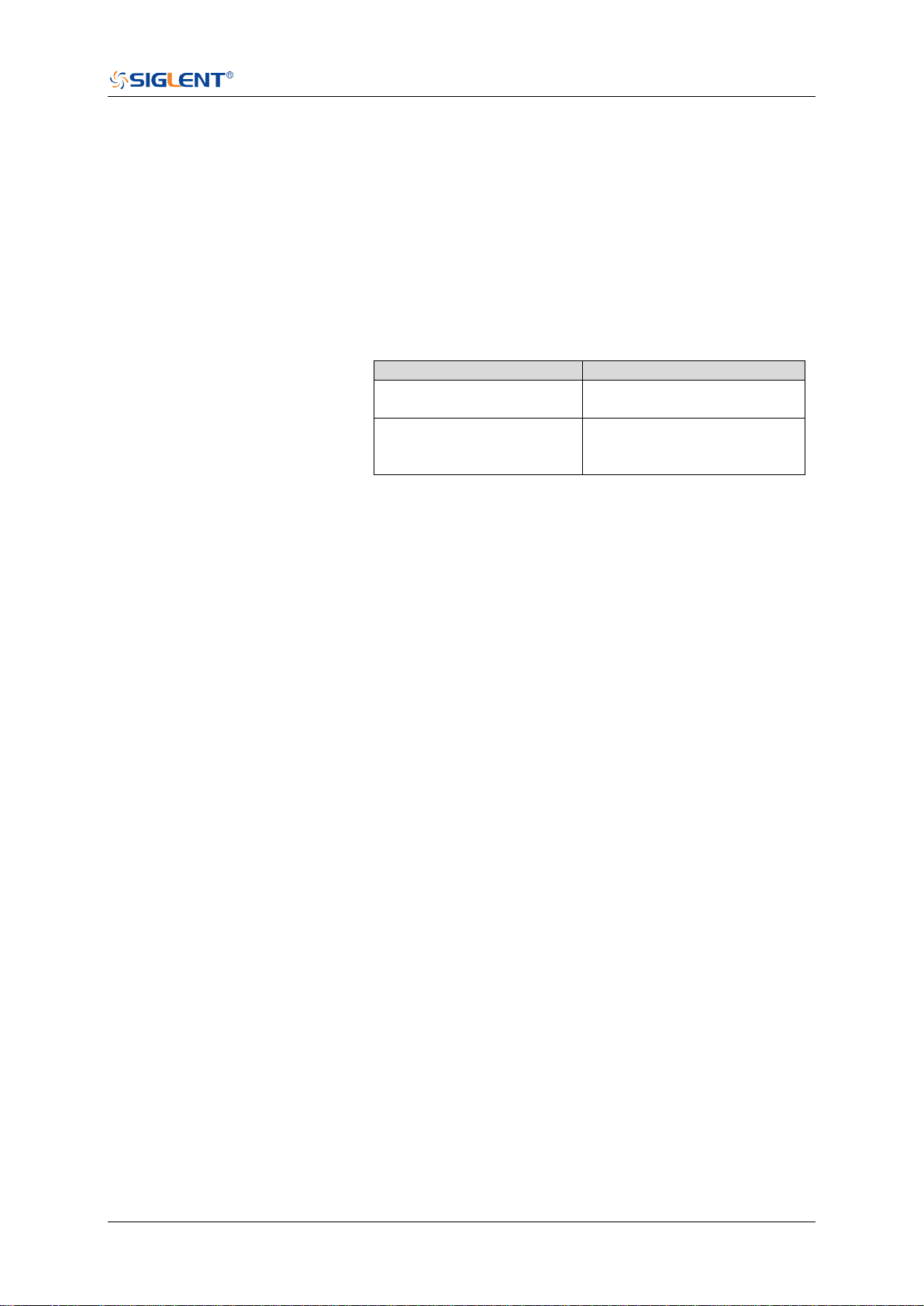
SDS Series Programming Guide
www.siglent.com 367 / 642
:TRIGger:VIDeo:LEVel
Command/Query
DESCRIPTION
The command sets the trigger level of the video trigger.
The query returns the current trigger level of the video trigger.
COMMAND SYNTAX
:TRIGger:VIDeo:LEVel <level_value>
<level_value>:= Value in NR3 format.
The range of the value varies by model, see the table below
for details.
Model
Value Range
SDS6000 Pro/SDS6000A
SHS800X/SHS1000X
[-4.5*vertical_scale-vertical_offset,
4.5*vertical_scale-vertical_offset]
SDS5000X
SDS2000X Plus
SDS2000X HD
[-4.1*vertical_scale-vertical_offset,
4.1*vertical_scale-vertical_offset]
QUERY SYNTAX
:TRIGger:VIDeo:LEVel?
RESPONSE FORMAT
<level_value>
<level_value>:= Value in NR3 format
EXAMPLE
The following command sets the trigger level of the video
trigger to 0.5 V.
Command message:
:TRIGger:VIDeo:LEVel 5.00E-01
TRIG:VID:LEV 5.00E-01
Query message:
TRIG:VID:LEV?
Response message:
5.00E-01
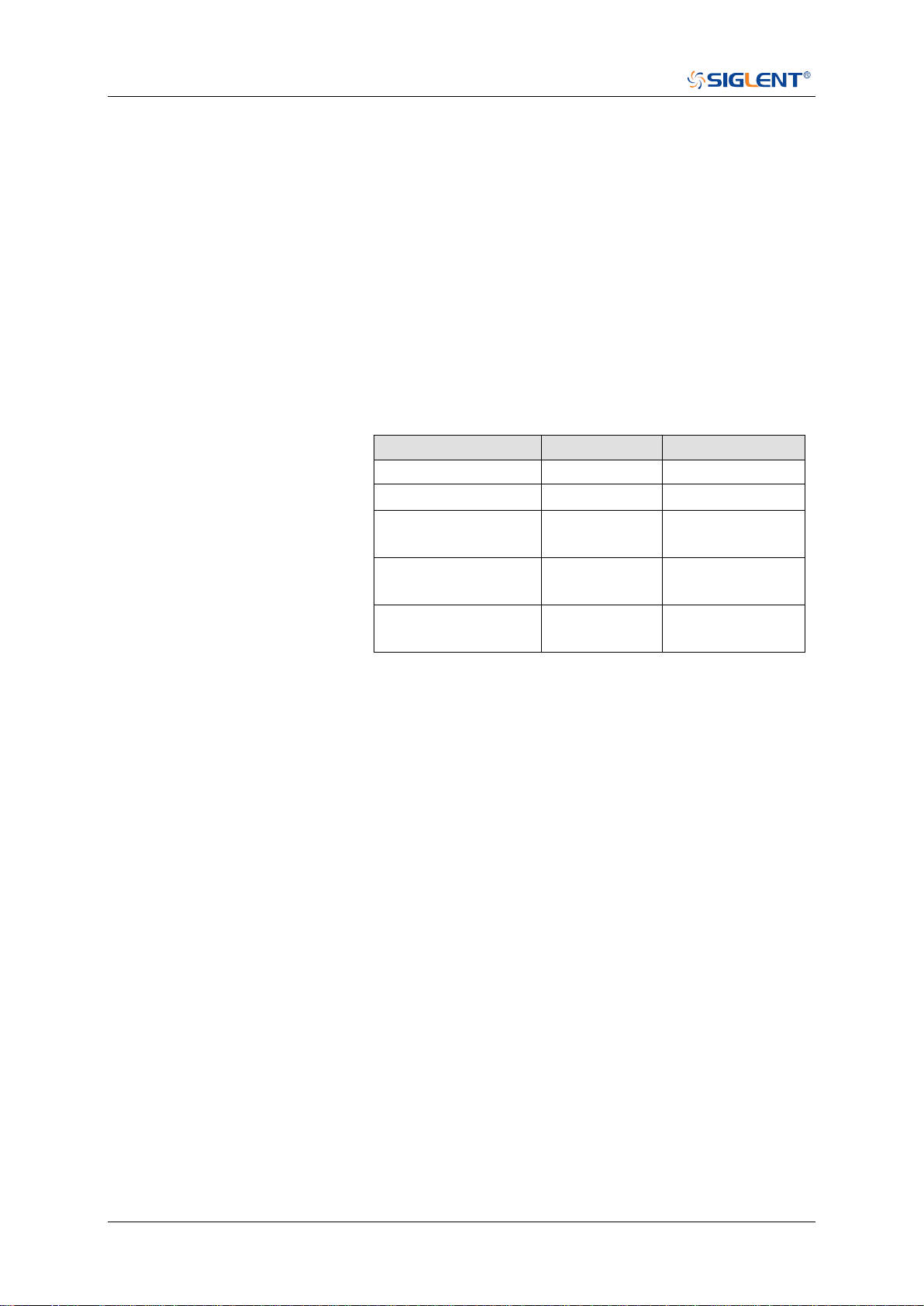
SDS Series Programming Guide
368 / 642 www.siglent.com
:TRIGger:VIDeo:LINE
Command/Query
DESCRIPTION
The command sets the synchronous trigger line when the
video standard is not custom.
The query returns the current synchronous trigger line when
the video standard is not custom.
COMMAND SYNTAX
:TRIGger:VIDeo:LINE <line>
<line>:= Value in NR1 format, including an integer and no
decimal point, like 1.
The following table shows the corresponding relations
between line and field for all video standards(except for
custom)
Standard
Field 1
Field 2
NTSC
[1, 263]
[1, 262]
PAL
[1, 313]
[1, 312]
HDTV 720P/50,
720P/60
[1, 750]
HDTV 1080P/50,
1080P/60
[1, 1125]
HDTV 1080i/50,
1080i/60
[1, 563]
[1, 562]
QUERY SYNTAX
:TRIGger:VIDeo:LINE?
RESPONSE FORMAT
<line>
<line>:= Value in NR1 format, including an integer and no
decimal point, like 1.
EXAMPLE
The following command sets the synchronous trigger line to
2.
Command message:
:TRIGger:VIDeo:LINE 2
TRIG:VID:LINE 2
Query message:
TRIG:VID:LINE?
Response message:
2
RELATED COMMANDS
:TRIGger:VIDeo:STANdard
:TRIGger:VIDeo:SYNC

SDS Series Programming Guide
www.siglent.com 369 / 642
:TRIGger:VIDeo:SOURce
Command/Query
DESCRIPTION
The command sets the trigger source of the video trigger.
The query returns the current trigger source of the video
trigger.
COMMAND SYNTAX
:TRIGger:VIDeo:SOURce <source>
<source>:= {C<x>}
<x>:= 1 to (# analog channels) in NR1 format, including an
integer and no decimal point, like 1.
QUERY SYNTAX
:TRIGger:VIDeo:SOURce?
RESPONSE FORMAT
<source>
<source>:= {C<x>}
<x>:= 1 to (# analog channels) in NR1 format, including an
integer and no decimal point, like 1.
EXAMPLE
The following command sets the trigger source of the video
trigger to channel 2.
Command message:
:TRIGger:VIDeo:SOURce C2
TRIG:VID:SOUR C2
Query message:
TRIG:VID:SOUR?
Response message:
C2

SDS Series Programming Guide
370 / 642 www.siglent.com
:TRIGger:VIDeo:STANdard
Command/Query
DESCRIPTION
The command sets the standard of the video trigger.
The query returns the current standard of the video trigger.
COMMAND SYNTAX
:TRIGger:VIDeo:STANdard <standard>
<standard>:=
{NTSC|PAL|P720L50|P720L60|P1080L50|P1080L60|I1080L
50|I1080L60|CUSTom}
QUERY SYNTAX
:TRIGger:VIDeo:STANdard?
RESPONSE FORMAT
<standard>
<standard>:=
{NTSC|PAL|P720L50|P720L60|P1080L50|P1080L60|I1080L
50|I1080L60|CUSTom}
EXAMPLE
The following command sets the standard of the video trigger
to NTSC.
Command message:
:TRIGger:VIDeo:STANdard NTSC
TRIG:VID:STAN NTSC
Query message:
TRIG:VID:STAN?
Response message:
NTSC

SDS Series Programming Guide
www.siglent.com 371 / 642
:TRIGger:VIDeo:SYNC
Command/Query
DESCRIPTION
The command sets the sync mode of the video trigger.
The query returns the current sync mode of the video trigger.
COMMAND SYNTAX
:TRIGger:VIDeo:SYNC <sync>
<sync>:= {SELect|ANY}
QUERY SYNTAX
:TRIGger:VIDeo:SYNC?
RESPONSE FORMAT
<sync>
<sync>:= {SELect|ANY}
EXAMPLE
The following command sets the sync mode of the video
trigger to select.
Command message:
:TRIGger:VIDeo:SYNC SELect
TRIG:VID:SYNC SEL
Query message:
TRIG:VID:SYNC?
Response message:
SELect
RELATED COMMANDS
:TRIGger:VIDeo:STANdard
:TRIGger:VIDeo:LINE
:TRIGger:VIDeo:FIELd

SDS Series Programming Guide
372 / 642 www.siglent.com
:TRIGger:WINDow Commands
The :TRIGGER:WINDow subsystem commands control the window trigger parameters.
:TRIGger:WINDow:CLEVel
:TRIGger:WINDow:COUPling
:TRIGger:WINDow:DLEVel
:TRIGger:WINDow:HLDEVent
:TRIGger:WINDow:HLDTime
:TRIGger:WINDow:HLEVel
:TRIGger:WINDow:HOLDoff
:TRIGger:WINDow:HSTart
:TRIGger:WINDow:LLEVel
:TRIGger:WINDow:NREJect
:TRIGger:WINDow:SOURce
:TRIGger:WINDow:TYPE
SDS Series Programming Guide
www.siglent.com 373 / 642
:TRIGger:WINDow:CLEVel
Command/Query
DESCRIPTION
The command sets the center level of the window trigger.
The query returns the current center level of the window
trigger.
COMMAND SYNTAX
:TRIGger:WINDow:CLEVel <value>
<value>:= Value in NR3 format.
The range of the value varies by model, see the table below
for details.
Model
Value Range
SDS6000 Pro/SDS6000A
SHS800X/SHS1000X
[-4.5*vertical_scale-vertical_offset,
4.5*vertical_scale-vertical_offset]
SDS5000X
SDS2000X Plus
SDS2000X HD
[-4.1*vertical_scale-vertical_offset,
4.1*vertical_scale-vertical_offset]
QUERY SYNTAX
:TRIGger:WINDow:CLEVel?
RESPONSE FORMAT
<value>
<value>:= Value in NR3 format
EXAMPLE
The following command sets the center level of the window
trigger to 0.5 V.
Command message:
:TRIGger:WINDow:CLEVel 5.00E-01
TRIG:WIND:CLEV 5.00E-01
Query message:
TRIG:WIND:CLEV?
Response message:
5.00E-01
RELATED COMMANDS
:TRIGger:WINDow:DLEVel

SDS Series Programming Guide
374 / 642 www.siglent.com
:TRIGger:WINDow:COUPling
Command/Query
DESCRIPTION
The command sets the coupling mode of the window trigger.
The query returns the current coupling mode of the window
trigger
COMMAND SYNTAX
:TRIGger:WINDow:COUPling <mode>
<mode>:= {DC|AC|LFREJect|HFREJect}
DC coupling allows dc and ac signals into the trigger
path.
AC coupling places a high-pass filter in the trigger path,
removing dc offset voltage from the trigger waveform.
Use AC coupling to get a stable edge trigger when your
waveform has a large dc offset.
HFREJect which is a high-frequency rejection filter adds
a low-pass filter in the trigger path to remove
high-frequency components from the trigger waveform.
Use the high frequency rejection filter to remove
high-frequency noise, such as AM or FM broadcast
stations, from the trigger path.
LFREJect which is a low frequency rejection filter adds a
high-pass filter in series with the trigger waveform to
remove any unwanted low frequency components from a
trigger waveform, such as power line frequencies, that
can interfere with proper triggering.
QUERY SYNTAX
:TRIGger:WINDow:COUPling?
RESPONSE FORMAT
<mode>
<mode>:= {DC|AC|LFREJect|HFREJect}
EXAMPLE
The following command sets the coupling mode of the
window trigger to DC.
Command message:
:TRIGger:WINDow:COUPling DC
TRIG:WIND:COUP DC
Query message:
TRIG:WIND:COUP?
Response message:
DC
SDS Series Programming Guide
www.siglent.com 375 / 642
:TRIGger:WINDow:DLEVel
Command/Query
DESCRIPTION
The command sets the delta level of window trigger.
The query returns the current delta level of window trigger.
COMMAND SYNTAX
:TRIGger:WINDow:DLEVel <value>
<value>:= Value in NR3 format.
The range of the value varies by model, see the table below
for details.
Model
Value Range
SDS6000 Pro/SDS6000A
SHS800X/SHS1000X
[-4.5*vertical_scale-vertical_offset,
4.5*vertical_scale-vertical_offset]
SDS5000X
SDS2000X Plus
SDS2000X HD
[-4.1*vertical_scale-vertical_offset,
4.1*vertical_scale-vertical_offset]
QUERY SYNTAX
:TRIGger:WINDow:DLEVel?
RESPONSE FORMAT
<value>
<value>:= Value in NR3 format.
EXAMPLE
The following command sets the delta level of window trigger
to 0.5 V.
Command message:
:TRIGger:WINDow:DLEVel 5.00E-01
TRIG:WIND:DLEV 5.00E-01
Query message:
TRIG:WIND:DLEV?
Response message:
5.00E-01
RELATED COMMANDS
:TRIGger:WINDow:CLEVel

SDS Series Programming Guide
376 / 642 www.siglent.com
:TRIGger:WINDow:HLDEVent
Command/Query
DESCRIPTION
This command sets the number of holdoff events of the
window trigger.
The query returns the current number of holdoff events of the
window trigger.
COMMAND SYNTAX
:TRIGger:WINDow:HLDEVent <value>
<value>:= Value in NR1 format, including an integer and no
decimal point, like 1. The range of the value is [1,
100000000].
QUERY SYNTAX
:TRIGger:WINDow:HLDEVent?
RESPONSE FORMAT
<value>
<value>:= Value in NR1 format, including an integer and no
decimal point, like 1.
EXAMPLE
The following command sets the number of holdoff events of
the window trigger to 3.
Command message:
:TRIGger:WINDow:HLDEVent 3
TRIG:WIND:HLDEV 3
Query message:
TRIG:WIND:HLDEV?
Response message:
3
RELATED COMMANDS
:TRIGger:WINDow:HOLDoff
SDS Series Programming Guide
www.siglent.com 377 / 642
:TRIGger:WINDow:HLDTime
Command/Query
DESCRIPTION
This This command sets the holdoff time of the window trigger.
The query returns the current holdoff time of the window
trigger.
COMMAND SYNTAX
:TRIGger:WINDow:HLDTime <value>
<value>:= Value in NR3 format.
The range of the value varies by model, see the table below for
details.
Model
Value Range
SDS5000X
SDS2000X Plus
SDS6000 Pro/SDS6000A
SDS2000X HD
[8.00E-09, 3.00E+01]
QUERY SYNTAX
:TRIGger:WINDow:HLDTime?
RESPONSE FORMAT
<value>
<value>:= Value in NR3 format.
EXAMPLE
The following command sets the holdoff time of the window
trigger to 15 ns.
Command message:
:TRIGger:WINDow:HLDTime 1.50E-08
TRIG:WIND:HLDT 1.50E-08
Query message:
TRIG:WIND:HLDT?
Response message:
1.50E-08
RELATED COMMANDS
:TRIGger:WINDow:HOLDoff
SDS Series Programming Guide
378 / 642 www.siglent.com
:TRIGger:WINDow:HLEVel
Command/Query
DESCRIPTION
The command sets the high trigger level of window trigger.
The query returns the current high trigger level of window
trigger.
COMMAND SYNTAX
:TRIGger:WINDow:HLEVel <value>
<value>:= Value in NR3 format.
The range of the value varies by model, see the table below
for details.
Model
Value Range
SDS6000 Pro/SDS6000A
SHS800X/SHS1000X
[-4.5*vertical_scale-vertical_offset,
4.5*vertical_scale-vertical_offset]
SDS5000X
SDS2000X Plus
SDS2000X HD
[-4.1*vertical_scale-vertical_offset,
4.1*vertical_scale-vertical_offset]
Note:
The high level value cannot be less than the low level value
using by the command :TRIGger:WINDow:LLEVel.
QUERY SYNTAX
:TRIGger:WINDow:HLEVel?
RESPONSE FORMAT
<value>
<value>:= Value in NR3 format
EXAMPLE
The following command sets the high trigger level of window
trigger to 0.5 V.
Command message:
:TRIGger:WINDow:HLEVel 5.00E-01
TRIG:WIND:HLEV 5.00E-01
Query message:
TRIG:WIND:HLEV?
Response message:
5.00E-01
RELATED COMMANDS
:TRIGger:WINDow:LLEVel

SDS Series Programming Guide
www.siglent.com 379 / 642
:TRIGger:WINDow:HOLDoff
Command/Query
DESCRIPTION
The command selects the holdoff type of the window trigger.
The query returns the current holdoff type of the window
trigger.
COMMAND SYNTAX
:TRIGger:WINDow:HOLDoff <holdoff_type>
<holdoff_type>:= {OFF|EVENts|TIME}
OFF means to turn off the holdoff.
EVENts means the amount of events that the
oscilloscope counts before re-arming the trigger circuitry.
TIME means the amount of time that the oscilloscope
waits before re-arming the trigger circuitry.
QUERY SYNTAX
:TRIGger:WINDow:HOLDoff?
RESPONSE FORMAT
<holdoff_type>
< holdoff_type >:= {OFF|EVENts|TIME}
EXAMPLE
The following command turns off the holdoff of the window
trigger.
Command message:
:TRIGger:WINDow:HOLDoff OFF
TRIG:WIND:HOLD OFF
Query message:
TRIG:WIND:HOLD?
Response message:
OFF
RELATED COMMANDS
:TRIGger:WINDow:HLDEVent
:TRIGger:WINDow:HLEVel
:TRIGger:WINDow:HSTart

SDS Series Programming Guide
380 / 642 www.siglent.com
:TRIGger:WINDow:HSTart
Command/Query
DESCRIPTION
The command defines the initial position of the window trigger
holdoff.
The query returns the initial position of the window trigger
holdoff.
COMMAND SYNTAX
:TRIGger:WINDow:HSTart <start_holdoff>
<start_holdoff>:= {LAST_TRIG|ACQ_START}
LAST_TRIG means the initial position of holdoff is the first
time point satisfying the trigger condition.
ACQ_START means the initial position of holdoff is the
time of the last trigger.
QUERY SYNTAX
:TRIGger:WINDow:HSTart?
RESPONSE FORMAT
<start_holdoff>
<start_holdoff>:= {LAST_TRIG|ACQ_START}
EXAMPLE
The following command sets the start holdoff mode to
LAST_TRIG (last trigger).
Command message:
:TRIGger:WINDow:HSTart LAST_TRIG
TRIG:WIND:HST LAST_TRIG
Query message:
TRIG:PULS:HST?
Response message:
LAST_TRIG
RELATED COMMANDS
:TRIGger:WINDow:HOLDoff
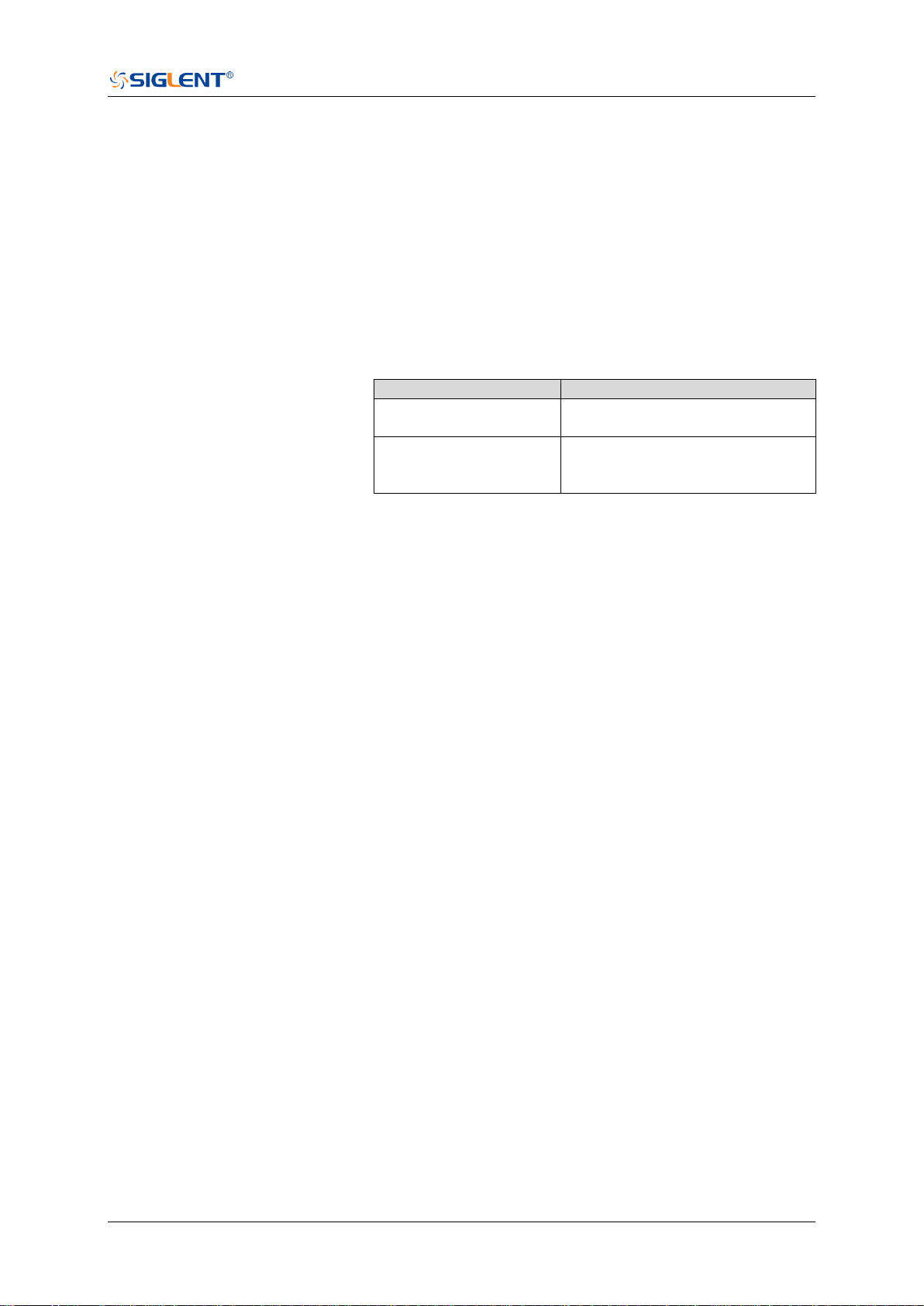
SDS Series Programming Guide
www.siglent.com 381 / 642
:TRIGger:WINDow:LLEVel
Command/Query
DESCRIPTION
The command sets the low trigger level of the window trigger.
The query returns the current low trigger level of the window
trigger.
COMMAND SYNTAX
:TRIGger:WINDow:LLEVel <value>
<value>:= Value in NR3 format.
The range of the value varies by model, see the table below
for details.
Model
Value Range
SDS6000 Pro/SDS6000A
SHS800X/SHS1000X
[-4.5*vertical_scale-vertical_offset,
4.5*vertical_scale-vertical_offset]
SDS5000X
SDS2000X Plus
SDS2000X HD
[-4.1*vertical_scale-vertical_offset,
4.1*vertical_scale-vertical_offset]
Note:
The low level value cannot be greater than the high level
value using by the command :TRIGger:WINDow:HLEVel.
QUERY SYNTAX
:TRIGger:WINDow:LLEVel?
RESPONSE FORMAT
<value>
<value>:= Value in NR3 format
EXAMPLE
The following command sets the low trigger level of runt
trigger to -0.5 V.
Command message:
:TRIGger:WINDowLLEVel -5.00E-01
TRIG:WIND:LLEV -5.00E-01
Query message:
TRIG:WIND:LLEV?
Response message:
-5.00E-01
RELATED COMMANDS
:TRIGger:WINDow:HLEVel

SDS Series Programming Guide
382 / 642 www.siglent.com
:TRIGger:WINDow:NREJect
Command/Query
DESCRIPTION
The command the state of noise reject.
The query returns the current state of noise reject.
COMMAND SYNTAX
:TRIGger:WINDow:NREJect <state>
<state>:= {OFF|ON}
QUERY SYNTAX
:TRIGger:WINDow:NREJect?
RESPONSE FORMAT
<state>
<state>:= {OFF|ON}
EXAMPLE
The following command turns on the noise rejection.
Command message:
:TRIGger:WINDow:NREJect ON
TRIG:WIND:NREJ ON
Query message:
TRIG:WIND:NREJ?
Response message:
ON

SDS Series Programming Guide
www.siglent.com 383 / 642
:TRIGger:WINDow:SOURce
Command/Query
DESCRIPTION
The command sets the trigger source of the window trigger.
The query returns the current trigger source of the window
trigger.
COMMAND SYNTAX
:TRIGger:WINDow:SOURce <source>
<source>:= {C<x>}
<x>:= 1 to (# analog channels) in NR1 format, including an
integer and no decimal point, like 1.
QUERY SYNTAX
:TRIGger:WINDow:SOURce?
RESPONSE FORMAT
<source>
<source>:= {C<x>}
<x>:= 1 to (# analog channels) in NR1 format, including an
integer and no decimal point, like 1.
EXAMPLE
The following command sets the trigger source of the window
trigger to channel 2.
Command message:
:TRIGger:WINDow:SOURce C2
TRIG:WIND:SOUR C2
Query message:
TRIG:WIND:SOUR?
Response message:
C2

SDS Series Programming Guide
384 / 642 www.siglent.com
:TRIGger:WINDow:TYPE
Command/Query
DESCRIPTION
The command sets the window type of the window trigger.
The query returns the current window type of the window
trigger.
COMMAND SYNTAX
:TRIGger:WINDow:TYPE <type>
<type>:= {ABSolute|RELative}
QUERY SYNTAX
:TRIGger:WINDow:TYPE?
RESPONSE FORMAT
<type>
<type>:= {ABSolute|RELative}
EXAMPLE
The following command sets the absolute type to window
trigger.
Command message:
:TRIGger:WINDow:TYPE ABSolute
TRIG:WIND:TYPE ABS
Query message:
TRIG:WIND:TYPE?
Response message:
ABSolute

SDS Series Programming Guide
www.siglent.com 385 / 642
:TRIGger:INTerval Commands
The :TRIGGER:INTerval subsystem commands control the interval trigger parameters.
:TRIGger:INTerval:COUPling
:TRIGger:INTerval:HLDEVent
:TRIGger:INTerval:HLDTime
:TRIGger:INTerval:HOLDoff
:TRIGger:INTerval:HSTart
:TRIGger:INTerval:LEVel
:TRIGger:INTerval:LIMit
:TRIGger:INTerval:NREJect
:TRIGger:INTerval:SLOPe
:TRIGger:INTerval:SOURce
:TRIGger:INTerval:TLOWer
:TRIGger:INTerval:TUPPer

SDS Series Programming Guide
386 / 642 www.siglent.com
:TRIGger:INTerval:COUPling
Command/Query
DESCRIPTION
The command sets the coupling mode of the interval trigger.
The query returns the current coupling mode of the interval
trigger.
COMMAND SYNTAX
:TRIGger:INTerval:COUPling <mode>
<mode>:= {DC|AC|LFREJect|HFREJect}
DC coupling allows dc and ac signals into the trigger
path.
AC coupling places a high-pass filter in the trigger path,
removing dc offset voltage from the trigger waveform.
Use AC coupling to get a stable edge trigger when your
waveform has a large dc offset.
HFREJect which is a high-frequency rejection filter adds
a low-pass filter in the trigger path to remove
high-frequency components from the trigger waveform.
Use the high-frequency reject filter to remove
high-frequency noise, such as AM or FM broadcast
stations, from the trigger path.
LFREJect which is a low frequency rejection filter adds a
high-pass filter in series with the trigger waveform to
remove any unwanted low frequency components from a
trigger waveform, such as power line frequencies, that
can interfere with proper triggering.
QUERY SYNTAX
:TRIGger:INTerval:COUPling?
RESPONSE FORMAT
<mode>
<mode>:= {DC|AC|LFREJect|HFREJect}
EXAMPLE
The following command sets the coupling mode of the
interval trigger to DC.
Command message:
:TRIGger:INTerval:COUPling DC
TRIG:INT:COUP DC
Query message:
TRIG:INT:COUP?
Response message:
DC

SDS Series Programming Guide
www.siglent.com 387 / 642
:TRIGger:INTerval:HLDEVent
Command/Query
DESCRIPTION
This command sets the number of holdoff events of the interval
trigger.
The query returns the current number of holdoff events of the
interval trigger.
COMMAND SYNTAX
:TRIGger:INTerval:HLDEVent <value>
<value>:= Value in NR1 format, including an integer and no
decimal point, like 1. The range of the value is [1, 100000000].
QUERY SYNTAX
:TRIGger:INTerval:HLDEVent?
RESPONSE FORMAT
<value>
<value>:= Value in NR1 format, including an integer and no
decimal point, like 1.
EXAMPLE
The following command sets the number of holdoff events of
the interval trigger to 3.
Command message:
:TRIGger:INTerval:HLDEVent 3
TRIG:INT:HLDEV 3
Query message:
TRIG:INT:HLDEV?
Response message:
3
RELATED COMMANDS
:TRIGger:INTerval:HOLDoff
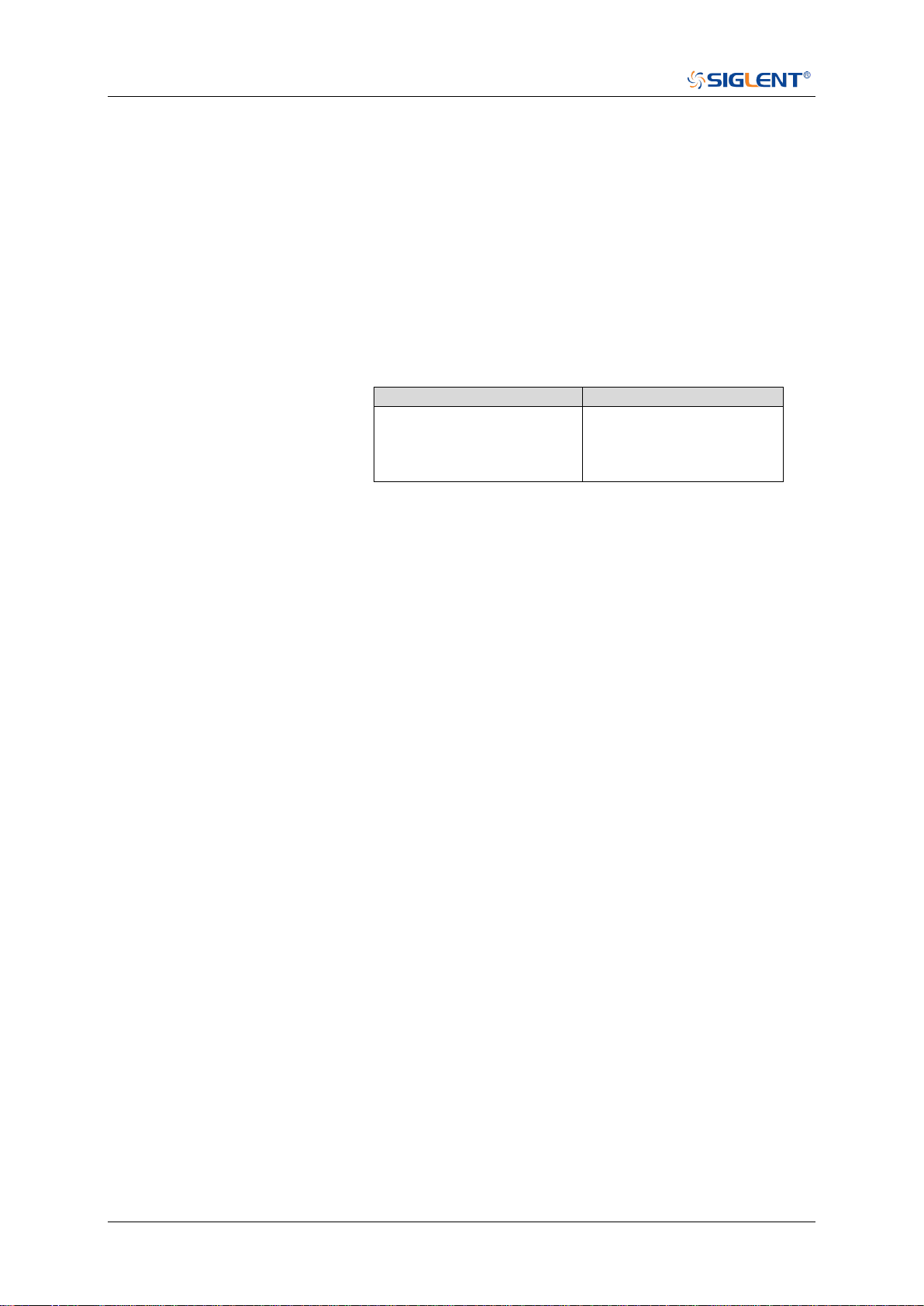
SDS Series Programming Guide
388 / 642 www.siglent.com
:TRIGger:INTerval:HLDTime
Command/Query
DESCRIPTION
This This command sets the holdoff time of the interval trigger.
The query returns the current holdoff time of the interval
trigger.
COMMAND SYNTAX
:TRIGger:INTerval:HLDTime <value>
<value>:= Value in NR3 format.
The range of the value varies by model, see the table below for
details.
Model
Value Range
SDS5000X
SDS2000X Plus
SDS6000 Pro/SDS6000A
SDS2000X HD
[8.00E-09, 3.00E+01]
QUERY SYNTAX
:TRIGger:INTerval:HLDTime?
RESPONSE FORMAT
<value>
<value>:= Value in NR3 format
EXAMPLE
The following command sets the holdoff time of the interval
trigger to 15 ns.
Command message:
:TRIGger:INTerval:HLDTime 1.50E-08
TRIG:INT:HLDT 1.50E-08
Query message:
TRIG:INT:HLDT?
Response message:
1.50E-08
RELATED COMMANDS
:TRIGger:INTerval:HOLDoff

SDS Series Programming Guide
www.siglent.com 389 / 642
:TRIGger:INTerval:HOLDoff
Command/Query
DESCRIPTION
The command selects the holdoff type of the interval trigger.
The query returns the current holdoff type of the interval
trigger.
COMMAND SYNTAX
:TRIGger:INTerval:HOLDoff <holdoff_type>
<holdoff_type>:= {OFF|EVENts|TIME}
OFF means to turn off the holdoff.
EVENts means the amount of events that the
oscilloscope counts before re-arming the trigger circuitry
TIME means the amount of time that the oscilloscope
waits before re-arming the trigger circuitry.
QUERY SYNTAX
:TRIGger:INTerval:HOLDoff?
RESPONSE FORMAT
<holdoff_type>
< holdoff_type >:= {OFF|EVENts|TIME}
EXAMPLE
The following command turns off the holdoff of the interval
trigger.
Command message:
:TRIGger:INTerval:HOLDoff OFF
TRIG:INT:HOLD OFF
Query message:
TRIG:INT:HOLD?
Response message:
OFF
RELATED COMMANDS
:TRIGger:INTerval:HLDEVent
:TRIGger:INTerval:HLDTime
:TRIGger:INTerval:HSTart

SDS Series Programming Guide
390 / 642 www.siglent.com
:TRIGger:INTerval:HSTart
Command/Query
DESCRIPTION
The command sets the start holdoff mode of the interval
trigger.
The query returns the current start holdoff mode of the interval
trigger.
COMMAND SYNTAX
:TRIGger:INTerval:HSTart <start_holdoff>
<start_holdoff>:= {LAST_TRIG|ACQ_START}
LAST_TRIG means the initial position of holdoff is the first
time point satisfying the trigger condition.
ACQ_START means the initial position of holdoff is the
time of the last trigger.
QUERY SYNTAX
:TRIGger:INTerval:HSTart?
RESPONSE FORMAT
<start_holdoff>
<start_holdoff>:= {LAST_TRIG|ACQ_START}
EXAMPLE
The following command sets the start holdoff mode of the
interval trigger as LAST_TRIG (last trigger).
Command message:
:TRIGger:INTerval:HSTart LAST_TRIG
TRIG:INT:HST LAST_TRIG
Query message:
TRIG:INT:HST?
Response message:
LAST_TRIG
RELATED COMMANDS
:TRIGger:INTerval:HOLDoff
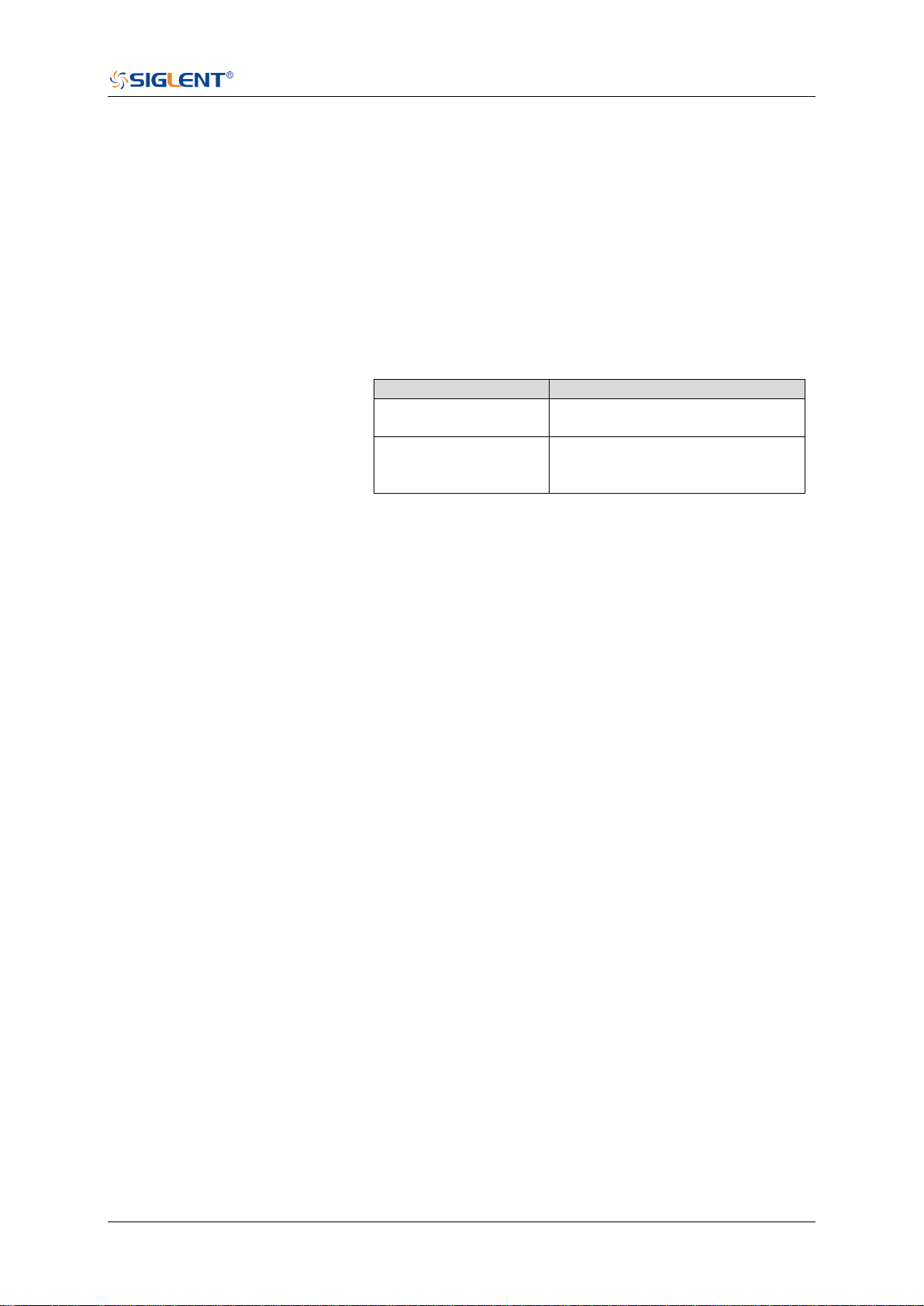
SDS Series Programming Guide
www.siglent.com 391 / 642
:TRIGger:INTerval:LEVel
Command/Query
DESCRIPTION
The command sets the trigger level of the interval trigger.
The query returns the current trigger level of the interval
trigger.
COMMAND SYNTAX
:TRIGger:INTerval:LEVel <level_value>
<level_value>:= Value in NR3 format.
The range of the value varies by model, see the table below
for details.
Model
Value Range
SDS6000 Pro/SDS6000A
SHS800X/SHS1000X
[-4.5*vertical_scale-vertical_offset,
4.5*vertical_scale-vertical_offset]
SDS5000X
SDS2000X Plus
SDS2000X HD
[-4.1*vertical_scale-vertical_offset,
4.1*vertical_scale-vertical_offset]
QUERY SYNTAX
:TRIGger:INTerval:LEVel?
RESPONSE FORMAT
<level_value>
<level_value>:= Value in NR3 format
EXAMPLE
The following command sets the trigger level of the interval
trigger to 0.5 V.
Command message:
:TRIGger:INTerval:LEVel 5.00E-01
TRIGr:INT:LEV 5.00E-01
Query message:
TRIG:INT:LEV?
Response message:
5.00E-01

SDS Series Programming Guide
392 / 642 www.siglent.com
:TRIGger:INTerval:LIMit
Command/Query
DESCRIPTION
The command sets the limit range type of the interval trigger.
The query returns the current limit range type of the interval
trigger.
COMMAND SYNTAX
:TRIGger:INTerval:LIMit <type>
<type>:= {LESSthan|GREATerthan|INNer|OUTer}
QUERY SYNTAX
:TRIGger:INTerval:LIMit?
RESPONSE FORMAT
<type>
<type>:= {LESSthan|GREATerthan|INNer|OUTer}
EXAMPLE
The following command sets the limit of the interval trigger to
LESSthan.
Command message:
:TRIGger:INTerval:LIMit LESSthan
TRIG:INT:LIM LESS
Query message:
TRIG:INT:LIM?
Response message:
LESSthan
RELATED COMMANDS
:TRIGger:INTerval:TLOWer
:TRIGger:INTerval:TUPPer

SDS Series Programming Guide
www.siglent.com 393 / 642
:TRIGger:INTerval:NREJect
Command/Query
DESCRIPTION
The command sets the state of the noise rejection.
The query returns the current state of the noise rejection
function.
COMMAND SYNTAX
:TRIGger:INTerval:NREJect <state>
<state>:= {OFF|ON}
QUERY SYNTAX
:TRIGger:INTerval:NREJect?
RESPONSE FORMAT
<state>
<state>:= {OFF|ON}
EXAMPLE
The following command turns on the noise rejection.
Command message:
:TRIGger:INTerval:NREJect ON
TRIG:INT:NREJ ON
Query message:
TRIG:INT:NREJ?
Response message:
ON

SDS Series Programming Guide
394 / 642 www.siglent.com
:TRIGger:INTerval:SLOPe
Command/Query
DESCRIPTION
The command sets the slope of the interval trigger.
The query returns the current slope of the interval trigger.
COMMAND SYNTAX
:TRIGger:INTerval:SLOPe <slope_type>
<slope_type>:= {RISing|FALLing}
QUERY SYNTAX
:TRIGger:INTerval:SLOPe?
RESPONSE FORMAT
<slope_type>
<slope_type>:= {RISing|FALLing}
EXAMPLE
The following command sets the rising slope of the interval
trigger.
Command message:
:TRIGger:INTerval:SLOPe RISing
TRIG:INT:SLOP RIS
Query message:
TRIG:INT:SLOP?
Response message:
RISing

SDS Series Programming Guide
www.siglent.com 395 / 642
:TRIGger:INTerval:SOURce
Command/Query
DESCRIPTION
The command sets the trigger source of the interval trigger.
The query returns the current trigger source of the interval
trigger.
COMMAND SYNTAX
:TRIGger:INTerval:SOURce <source>
<source>:= {C<x>|D<n>}
<x>:= 1 to (# analog channels) in NR1 format, including an
integer and no decimal point, like 1.
<n>:= 0 to (# digital channels - 1) in NR1 format, including an
integer and no decimal point, like 1.
QUERY SYNTAX
:TRIGger:INTerval:SOURce?
RESPONSE FORMAT
<source>
<source>:= {C<x>|D<n>}
<x>:= 1 to (# analog channels) in NR1 format, including an
integer and no decimal point, like 1.
<n>:= 0 to (# digital channels - 1) in NR1 format, including an
integer and no decimal point, like 1.
EXAMPLE
The following command sets the trigger source of the interval
trigger as channel 1.
Command message:
:TRIGger:INTerval:SOURce C1
TRIG:INT:SOUR C1
Query message:
TRIG:INT:SOUR?
Response message:
C1
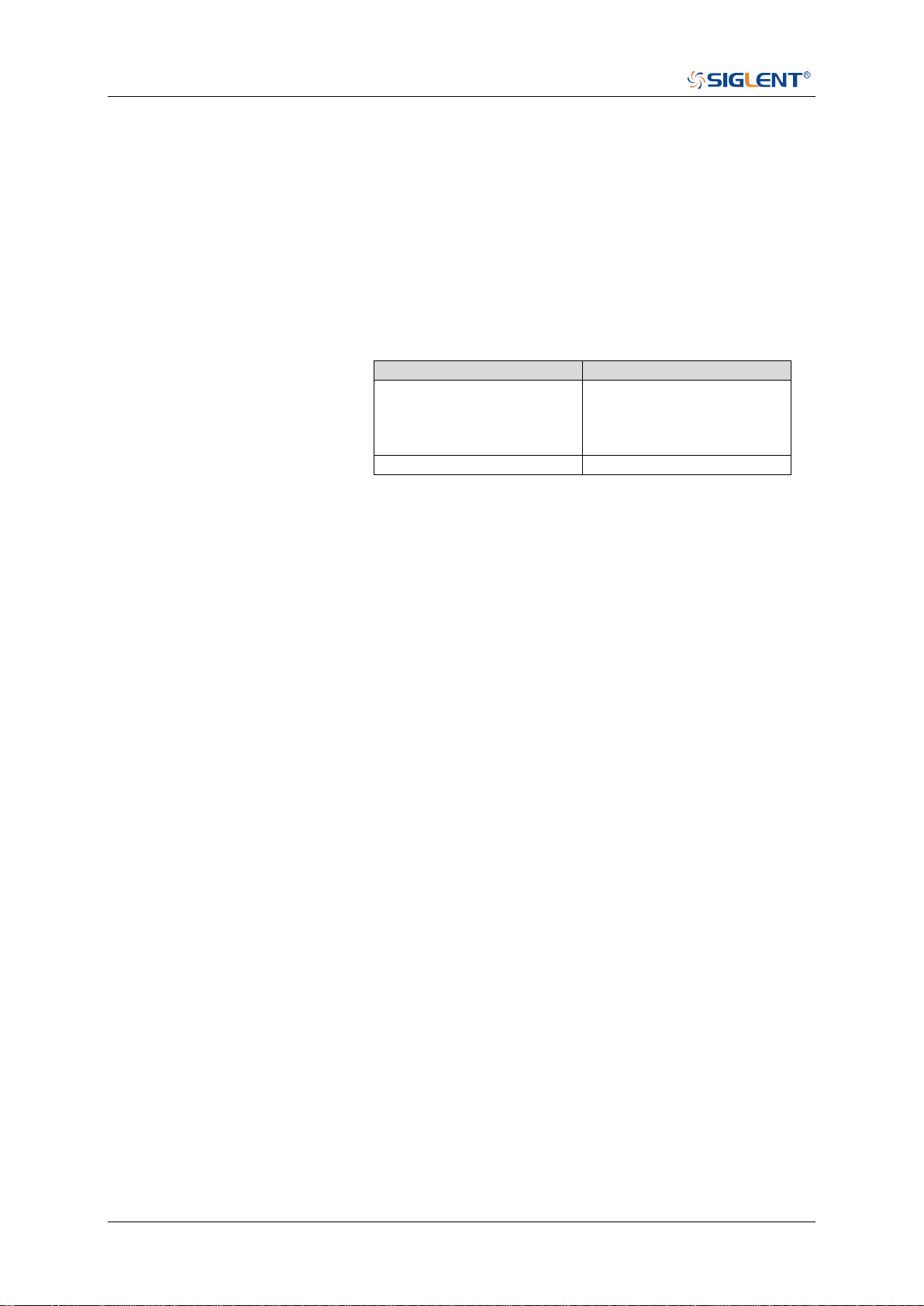
SDS Series Programming Guide
396 / 642 www.siglent.com
:TRIGger:INTerval:TLOWer
Command/Query
DESCRIPTION
The command sets the lower value of the interval trigger limit
type.
The query returns the current lower value of the interval
trigger limit type.
COMMAND SYNTAX
:TRIGger:INTerval:TLOWer <value>
<value>:= Value in NR3 format. The range of the value varies
by model, see the table below for details.
Model
Value Range
SDS5000X
SDS2000X Plus
SDS6000 Pro/SDS6000A
SDS2000X HD
[2.00E-09, 2.00E+01]
SHS800X/SHS1000X
[2.00E-09, 4.20E+00]
Note:
The lower value cannot be greater than the upper value
using by the command :TRIGger:INTerval:TUPPer.
The command is not valid when the limit range type is
LESSthan.
QUERY SYNTAX
:TRIGger:INTerval:TLOWer?
RESPONSE FORMAT
<value>
<value>:= Value in NR3 format
EXAMPLE
The following command sets the time lower value of the
interval trigger to 10 ns.
Command message:
:TRIGger:INTerval:TLOWer 1.00E-08
TRIG:INT:TLOW 1.00E-08
Query message:
TRIG:INT:TLOW?
Response message:
1.00E-08
RELATED COMMANDS
:TRIGger:INTerval:LIMit
:TRIGger:INTerval:TUPPer
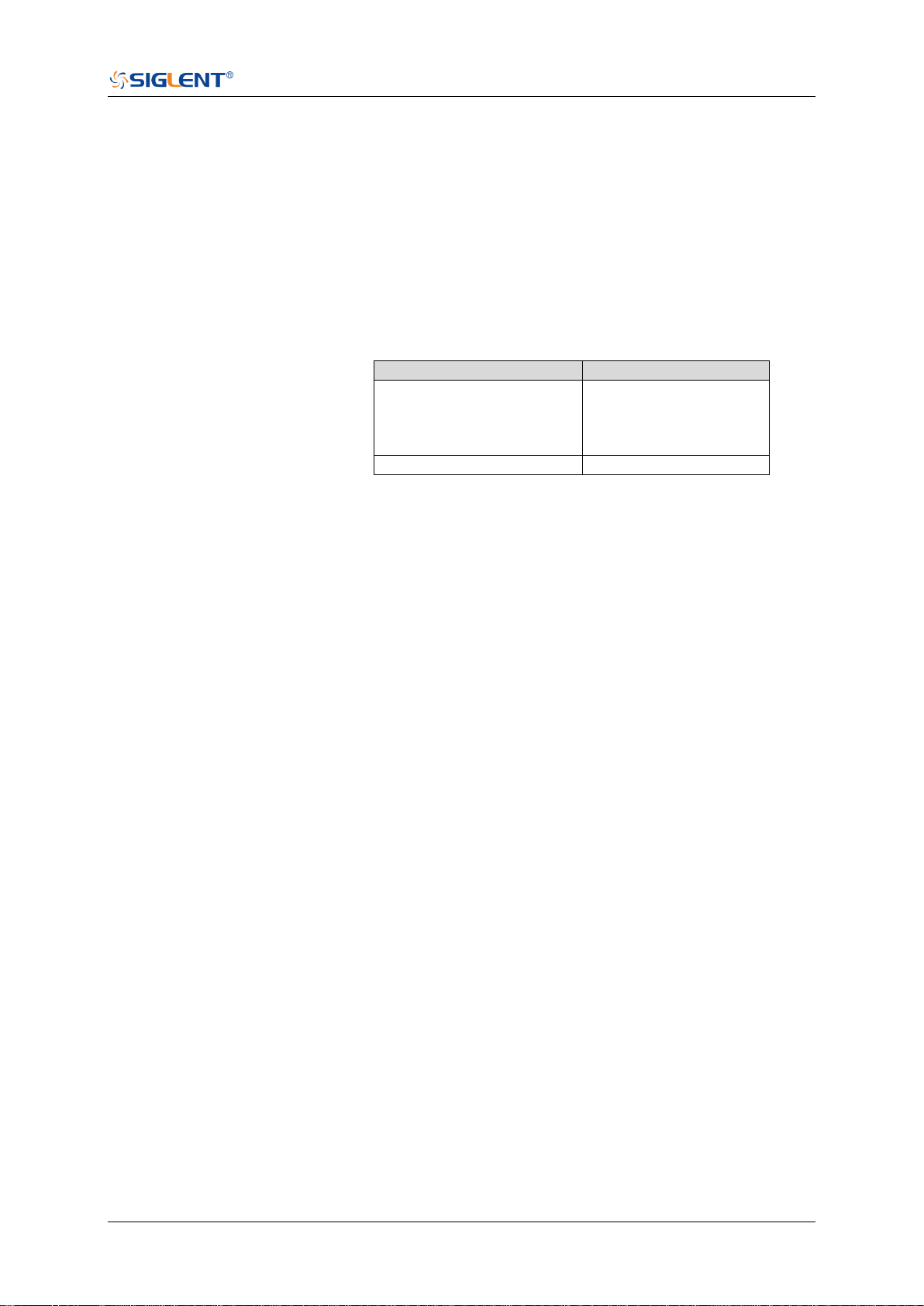
SDS Series Programming Guide
www.siglent.com 397 / 642
:TRIGger:INTerval:TUPPer
Command/Query
DESCRIPTION
The command sets the upper value of the interval trigger limit
type.
The query returns the current upper value of the interval
trigger limit type.
COMMAND SYNTAX
:TRIGger:INTerval:TUPPer <value>
<value>:= Value in NR3 format. The range of the value varies
by model, see the table below for details.
Model
Value Range
SDS5000X
SDS2000X Plus
SDS6000 Pro/SDS6000A
SDS2000X HD
[2.00E-09, 2.00E+01]
SHS800X/SHS1000X
[2.00E-09, 4.20E+00]
Note:
The upper value cannot be less than the lower value
using by the command :TRIGger:INTerval:TLOWer.
The command is not valid when the limit range type is
GREATerthan.
QUERY SYNTAX
:TRIGger:INTerval:TUPPer?
RESPONSE FORMAT
<tupper_value>
<tupper_value>:= Value in NR3 format.
EXAMPLE
The following command sets the time upper value of the
interval trigger to 30 ns.
Command message:
:TRIGger:INTerval:TUPPer 3.00E-08
TRIG:INT:TUPP 3.00E-08
Query message:
TRIG:INT:TUPP?
Response message:
3.00E-08
RELATED COMMANDS
:TRIGger:INTerval:LIMit
:TRIGger:INTerval:TLOWer

SDS Series Programming Guide
398 / 642 www.siglent.com
:TRIGger:DROPout Commands
The :TRIGGER:DROPout subsystem commands control the dropout trigger parameters.
:TRIGger:DROPout:COUPling
:TRIGger:DROPout:HLDEVent
:TRIGger:DROPout:HLDTime
:TRIGger:DROPout:HOLDoff
:TRIGger:DROPout:HSTart
:TRIGger:DROPout:LEVel
:TRIGger:DROPout:NREJect
:TRIGger:DROPout:SLOPe
:TRIGger:DROPout:SOURce
:TRIGger:DROPout:TIME
:TRIGger:DROPout:TYPE

SDS Series Programming Guide
www.siglent.com 399 / 642
:TRIGger:DROPout:COUPling
Command/Query
DESCRIPTION
The command sets the coupling mode of the dropout trigger.
The query returns the current coupling mode of the dropout
trigger.
COMMAND SYNTAX
:TRIGger:DROPout:COUPling <mode>
<mode>:= {DC|AC|LFREJect|HFREJect}
DC coupling allows dc and ac signals into the trigger
path.
AC coupling places a high-pass filter in the trigger path,
removing dc offset voltage from the trigger waveform.
Use AC coupling to get a stable edge trigger when your
waveform has a large dc offset.
HFREJect which is a high-frequency rejection filter adds
a low-pass filter in the trigger path to remove
high-frequency components from the trigger waveform.
Use the high-frequency rejection filter to remove
high-frequency noise, such as AM or FM broadcast
stations, from the trigger path.
LFREJect which is a low frequency rejection filter adds a
high-pass filter in series with the trigger waveform to
remove any unwanted low frequency components from a
trigger waveform, such as power line frequencies, that
can interfere with proper triggering.
QUERY SYNTAX
:TRIGger:DROPout:COUPling?
RESPONSE FORMAT
<mode>
<mode>:= {DC|AC|LFREJect|HFREJect}
EXAMPLE
The following command sets coupling mode of the dropout
trigger to DC.
Command message:
:TRIGger:DROPout:COUPling DC
TRIG:DROP:COUP DC
Query message:
TRIG:DROP:COUP?
Response message:
DC

SDS Series Programming Guide
400 / 642 www.siglent.com
:TRIGger:DROPout:HLDEVent
Command/Query
DESCRIPTION
This command sets the number of holdoff events of the
dropout trigger.
The query returns the current number of holdoff events of the
dropout trigger.
COMMAND SYNTAX
:TRIGger:DROPout:HLDEVent <value>
<value>:= Value in NR1 format, including an integer and no
decimal point, like 1. The range of the value is [1, 100000000].
QUERY SYNTAX
:TRIGger:DROPout:HLDEVent?
RESPONSE FORMAT
<value>
<value>:= Value in NR1 format, including an integer and no
decimal point, like 1.
EXAMPLE
The following command sets the number of holdoff events of
the dropout trigger to 3.
Command message:
:TRIGger:DROPout:HLDEVent 3
TRIG:DROP:HLDEV 3
Query message:
TRIG:DROP:HLDEV?
Response message:
3
RELATED COMMANDS
:TRIGger:DROPout:HOLDoff
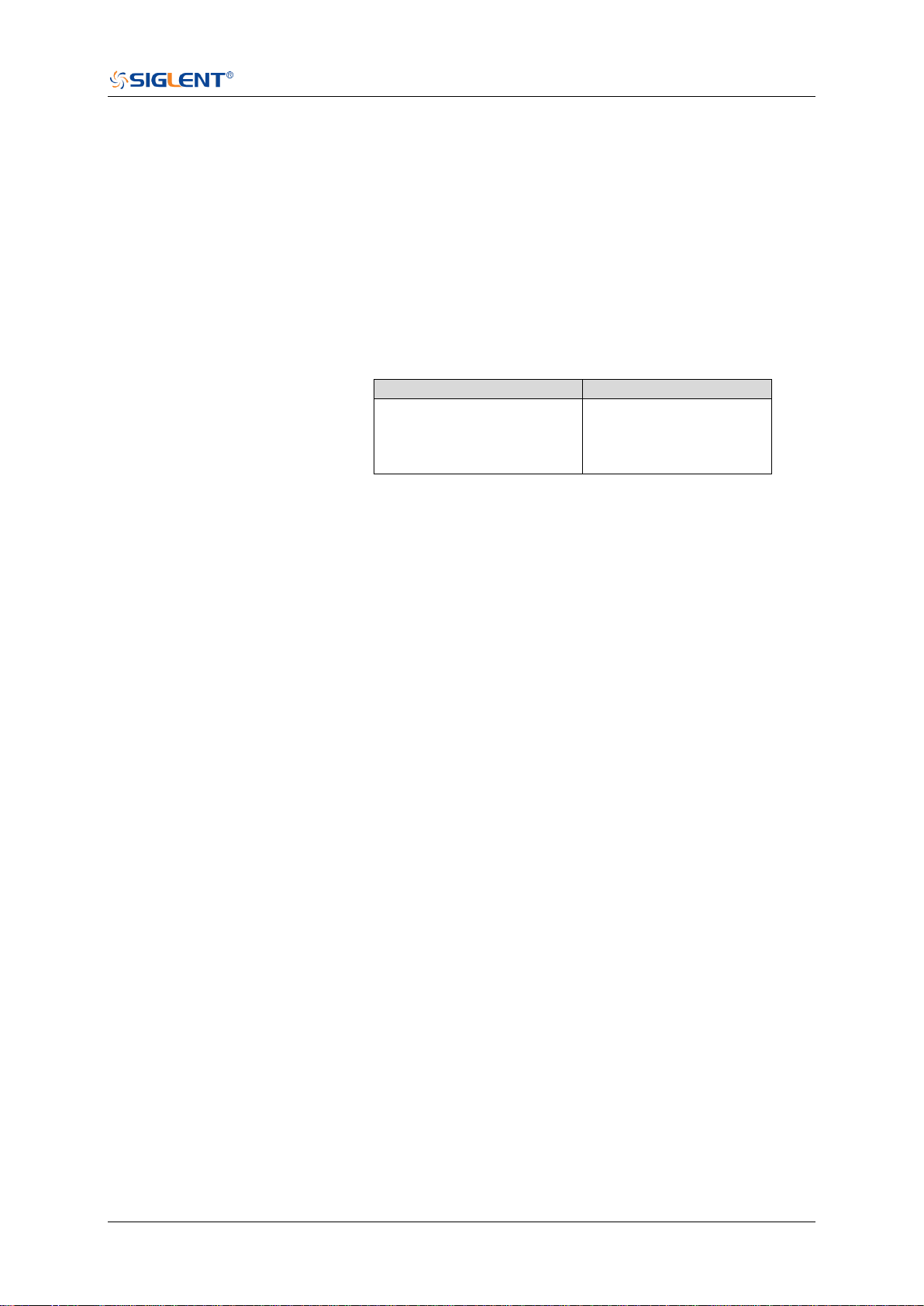
SDS Series Programming Guide
www.siglent.com 401 / 642
:TRIGger:DROPout:HLDTime
Command/Query
DESCRIPTION
This This command sets the holdoff time of the dropout trigger.
The query returns the current holdoff time of the dropout
trigger.
COMMAND SYNTAX
:TRIGger:DROPout:HLDTime <value>
<value>:= Value in NR3 format.
The range of the value varies by model, see the table below for
details.
Model
Value Range
SDS5000X
SDS2000X Plus
SDS6000 Pro/SDS6000A
SDS2000X HD
[8.00E-09, 3.00E+01]
QUERY SYNTAX
:TRIGger:DROPout:HLDTime?
RESPONSE FORMAT
<value>
<value>:= Value in NR3 format.
EXAMPLE
The following command sets the holdoff time of the dropout
trigger to 15 ns.
Command message:
:TRIGger:DROPout:HLDTime 1.50E-08
:TRIG:DROP:HLDT 1.50E-08
Query message:
TRIG:DROP:HLDT?
Response message:
1.50E-08
RELATED COMMANDS
:TRIGger:DROPout:HOLDoff

SDS Series Programming Guide
402 / 642 www.siglent.com
:TRIGger:DROPout:HOLDoff
Command/Query
DESCRIPTION
The command selects the holdoff type of the dropout trigger.
The query returns the current holdoff type of the dropout
trigger.
COMMAND SYNTAX
:TRIGger:DROPout:HOLDoff <holdoff_type>
<holdoff_type>:= {OFF|EVENts|TIME}
OFF means to turn off the holdoff.
EVENts means the amount of events that the
oscilloscope counts before re-arming the trigger circuitry.
TIME means the amount of time that the oscilloscope
waits before re-arming the trigger circuitry.
QUERY SYNTAX
:TRIGger:DROPout:HOLDoff?
RESPONSE FORMAT
<holdoff_type>
< holdoff_type>:= {OFF|EVENts|TIME}
EXAMPLE
The following command turns off the holdoff of the dropout
trigger.
Command message:
:TRIGger:DROPout:HOLDoff OFF
TRIG:DROP:HOLD OFF
Query message:
TRIG:DROP:HOLD?
Response message:
OFF
RELATED COMMANDS
:TRIGger:DROPout:HLDEVent
:TRIGger:DROPout:HLDTime
:TRIGger:DROPout:HSTart

SDS Series Programming Guide
www.siglent.com 403 / 642
:TRIGger:DROPout:HSTart
Command/Query
DESCRIPTION
The command sets the start holdoff mode of the dropout
trigger.
The query returns the current start holdoff mode of the
dropout trigger.
COMMAND SYNTAX
:TRIGger:DROPout:HSTart <start_holdoff>
<start_holdoff>:= {LAST_TRIG|ACQ_START}
LAST_TRIG means the initial position of holdoff is the
first time point satisfying the trigger condition.
ACQ_START means the initial position of holdoff is the
time of the last trigger.
QUERY SYNTAX
:TRIGger:DROPout:HSTart?
RESPONSE FORMAT
<start_holdoff>
<start_holdoff>:= {LAST_TRIG|ACQ_START}
EXAMPLE
The following command sets the start hold off mode to
LAST_TRIG (last trigger).
Command message:
:TRIGger:DROPout:HSTart LAST_TRIG
TRIG:DROP:HST LAST_TRIG
Query message:
TRIG:DROP:HST?
Response message:
LAST_TRIG
RELATED COMMANDS
:TRIGger:DROPout:HOLDoff
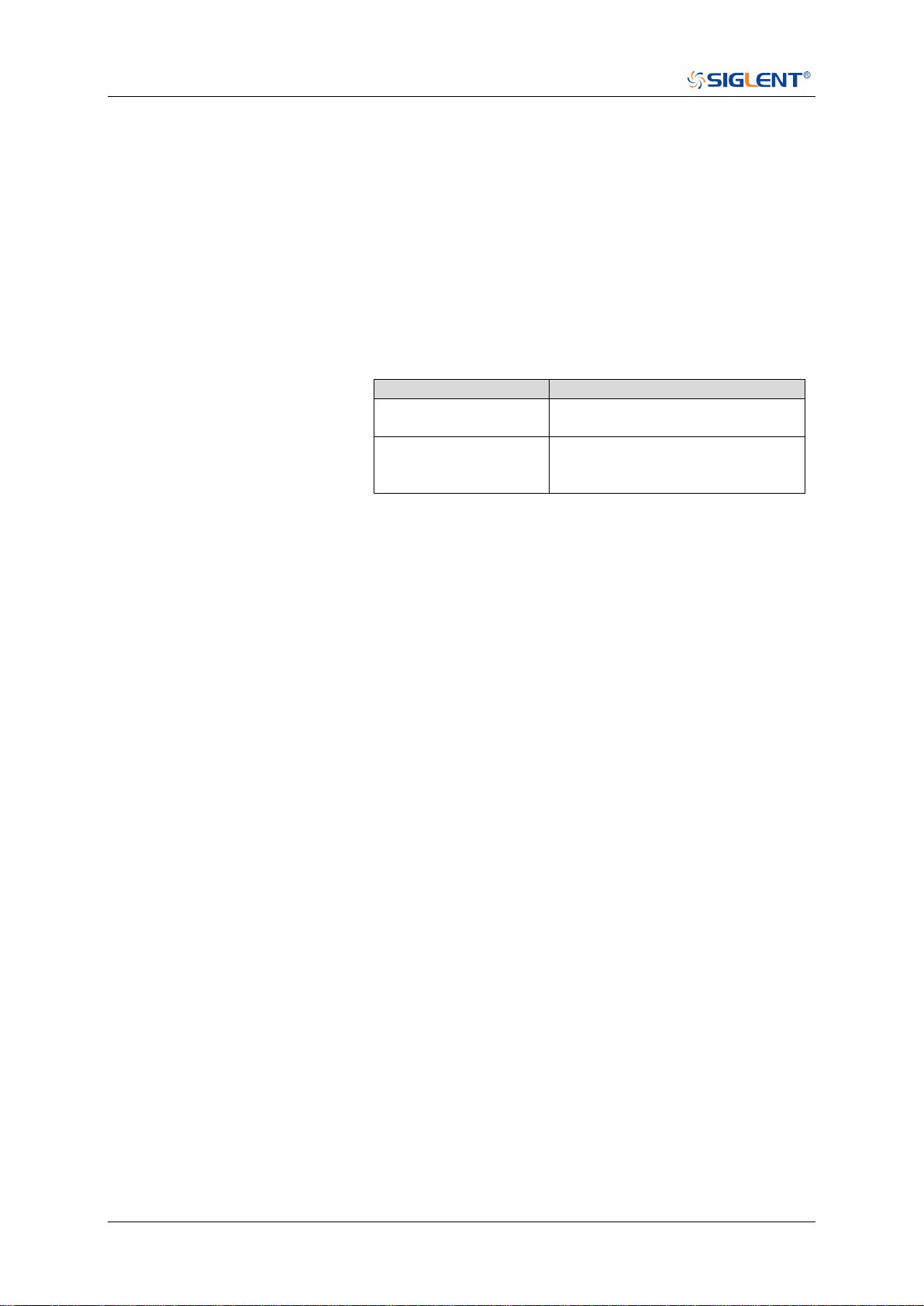
SDS Series Programming Guide
404 / 642 www.siglent.com
:TRIGger:DROPout:LEVel
Command/Query
DESCRIPTION
The command sets the trigger level of the dropout trigger.
The query returns the current trigger level of the dropout
trigger.
COMMAND SYNTAX
:TRIGger:DROPout:LEVel <level_value>
<level_value>:= Value in NR3 format.
The range of the value varies by model, see the table below
for details.
Model
Value Range
SDS6000 Pro/SDS6000A
SHS800X/SHS1000X
[-4.5*vertical_scale-vertical_offset,
4.5*vertical_scale-vertical_offset]
SDS5000X
SDS2000X Plus
SDS2000X HD
[-4.1*vertical_scale-vertical_offset,
4.1*vertical_scale-vertical_offset]
QUERY SYNTAX
:TRIGger:DROPout:LEVel?
RESPONSE FORMAT
<level_value>
<level_value>:= Value in NR3 format.
EXAMPLE
The following command sets the trigger level of the dropout
trigger to 0.5 V.
Command message:
:TRIGger:DROPout:LEVel 5.00E-1
TRIG:DROP:LEV 5.00E-1
Query message:
TRIG:DROP:LEV?
Response message:
5.00E-01

SDS Series Programming Guide
www.siglent.com 405 / 642
:TRIGger:DROPout:NREJect
Command/Query
DESCRIPTION
The command sets the state of the noise rejection.
The query returns the current state of the noise rejection
function.
COMMAND SYNTAX
:TRIGger:DROPout:NREJect <state>
<state>:= {OFF|ON}
QUERY SYNTAX
:TRIGger:DROPout:NREJect?
RESPONSE FORMAT
<state>
<state>:= {OFF|ON}
EXAMPLE
The following command turns on the noise rejection.
Command message:
:TRIGger:DROPout:NREJect ON
TRIG:DROP:NREJ ON
Query message:
TRIG:DROP:NREJ?
Response message:
ON

SDS Series Programming Guide
406 / 642 www.siglent.com
:TRIGger:DROPout:SLOPe
Command/Query
DESCRIPTION
The command sets the slope of the dropout trigger.
The query returns the current slope of the dropout trigger.
COMMAND SYNTAX
:TRIGger:DROPout:SLOPe <slope_type>
<slope_type>:= {RISing|FALLing}
QUERY SYNTAX
:TRIGger:DROPout:SLOPe?
RESPONSE FORMAT
<slope_type>
<slope_type>:= {RISing|FALLing}
EXAMPLE
The following command sets the rising slope of the dropout
trigger.
Command message:
:TRIGger:DROPout:SLOPe RISing
TRIG:DROP:SLOP RIS
Query message:
TRIG:DROP:SLOP?
Response message:
RISing

SDS Series Programming Guide
www.siglent.com 407 / 642
:TRIGger:DROPout:SOURce
Command/Query
DESCRIPTION
The command sets the trigger source of the dropout trigger.
The query returns the current trigger source of the dropout
trigger.
COMMAND SYNTAX
:TRIGger:DROPout:SOURce <source>
<source>:= {C<x>|D<n>}
<x>:= 1 to (# analog channels) in NR1 format, including an
integer and no decimal point, like 1.
<n>:= 0 to (# digital channels - 1) in NR1 format, including an
integer and no decimal point, like 1.
QUERY SYNTAX
:TRIGger:DROPout:SOURce?
RESPONSE FORMAT
<source>
<source>:= {C<x>|D<n>}
<x>:= 1 to (# analog channels) in NR1 format, including an
integer and no decimal point, like 1.
<n>:= 0 to (# digital channels - 1) in NR1 format, including an
integer and no decimal point, like 1.
EXAMPLE
The following command sets the trigger source of the dropout
trigger to channel 2.
Command message:
:TRIGger:DROPout:SOURce C2
TRIG:DROP:SOUR C2
Query message:
TRIG:DROP:SOUR?
Response message:
C2
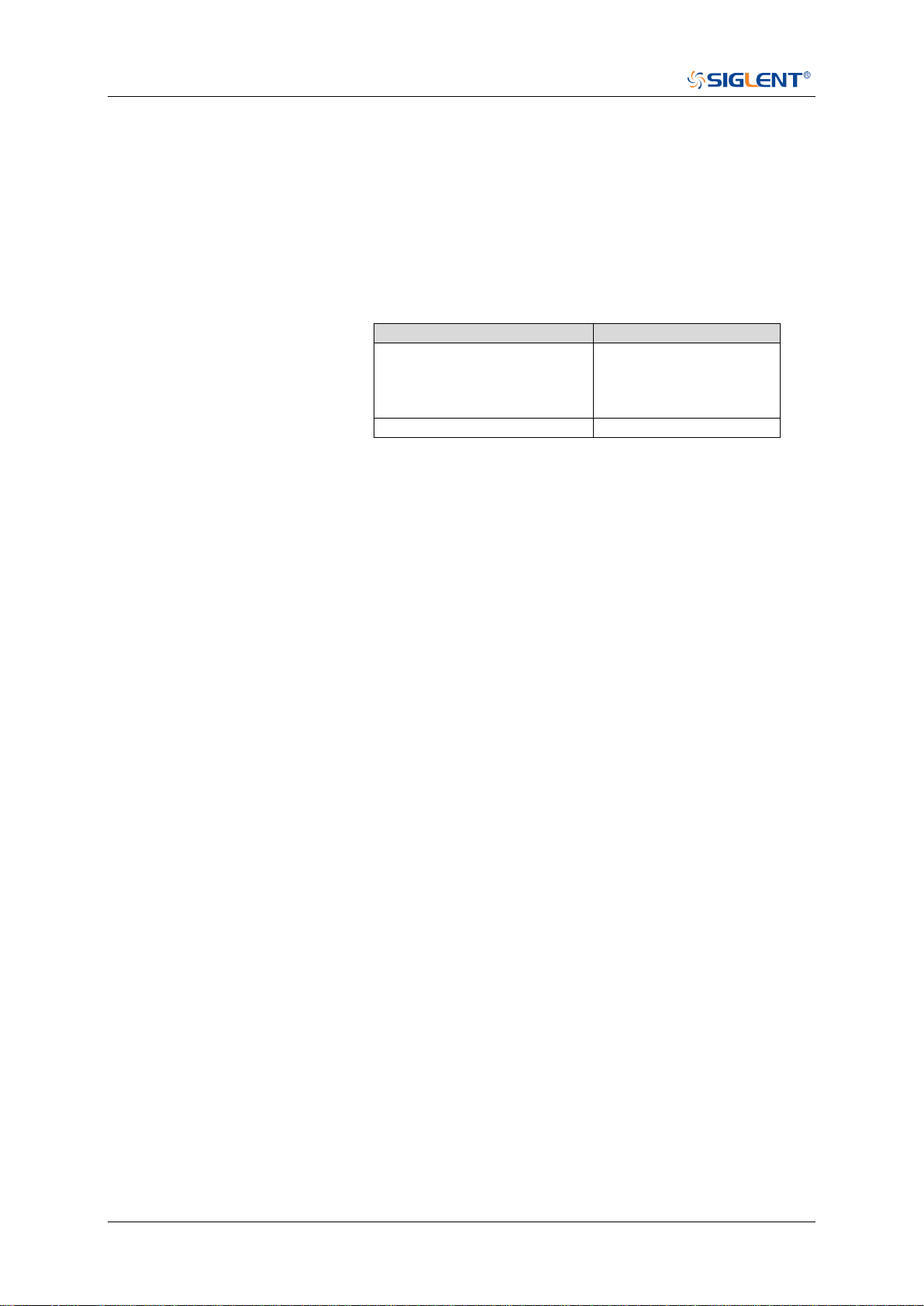
SDS Series Programming Guide
408 / 642 www.siglent.com
:TRIGger:DROPout:TIME
Command/Query
DESCRIPTION
The command sets the dropout time of the dropout trigger.
The query returns the current time of the dropout trigger.
COMMAND SYNTAX
:TRIGger:DROPout:TIME <time>
<time>:= Value in NR3 format. The range of the value varies
by model, see the table below for details.
Model
Value Range
SDS5000X
SDS2000X Plus
SDS6000 Pro/SDS6000A
SDS2000X HD
[2.00E-09, 2.00E+01]
SHS800X/SHS1000X
[2.00E-09, 4.20E+00]
QUERY SYNTAX
:TRIGger:DROPout:TIME?
RESPONSE FORMAT
<time>
<time>:= Value in NR3 format
EXAMPLE
The following command sets the time of the dropout trigger to
10 ns.
Command message:
:TRIGger:DROPout:TIME 1.00E-08
TRIG:DROP:TIME 1.00E-08
Query message:
TRIG:DROP:TIME?
Response message:
1.00E-08

SDS Series Programming Guide
www.siglent.com 409 / 642
:TRIGger:DROPout:TYPE
Command/Query
DESCRIPTION
The command sets the over time type of the dropout trigger.
The query returns the current over time type of the dropout
trigger.
COMMAND SYNTAX
:TRIGger:DROPout:TYPE <type>
<type>:= {EDGE|STATe}
QUERY SYNTAX
:TRIGger:DROPout:TYPE?
RESPONSE FORMAT
<type>
<type>:= {EDGE|STATe}
EXAMPLE
The following command sets the over time type of the
dropout trigger to EDGE.
Command message:
:TRIGger:DROPout:TYPE EDGE
TRIG:DROP:TYPE EDGE
Query message:
TRIG:DROP:TYPE?
Response message:
EDGE

SDS Series Programming Guide
410 / 642 www.siglent.com
:TRIGger:RUNT Commands
The :TRIGGER:RUNT subsystem commands control the runt trigger parameters.
:TRIGger:RUNT:COUPling
:TRIGger:RUNT:HLDEVent
:TRIGger:RUNT:HLDTime
:TRIGger:RUNT:HLEVel
:TRIGger:RUNT:HOLDoff
:TRIGger:RUNT:HSTart
:TRIGger:RUNT:LIMit
:TRIGger:RUNT:LLEVel
:TRIGger:RUNT:NREJect
:TRIGger:RUNT:POLarity
:TRIGger:RUNT:SOURce
:TRIGger:RUNT:TLOWer
:TRIGger:RUNT:TUPPer

SDS Series Programming Guide
www.siglent.com 411 / 642
:TRIGger:RUNT:COUPling
Command/Query
DESCRIPTION
The command sets the coupling mode of the runt trigger.
The query returns the current coupling mode of the runt
trigger.
COMMAND SYNTAX
:TRIGger:RUNT:COUPling <mode>
<mode>:= {DC|AC|LFREJect|HFREJect}
DC coupling allows dc and ac signals into the trigger
path.
AC coupling places a high-pass filter in the trigger path,
removing dc offset voltage from the trigger waveform.
Use AC coupling to get a stable edge trigger when your
waveform has a large dc offset.
HFREJect which is a high-frequency rejection filter adds
a low-pass filter in the trigger path to remove high
frequency components from the trigger waveform. Use
the high-frequency reject filter to remove high-frequency
noise, such as AM or FM broadcast stations, from the
trigger path.
LFREJect which is a low frequency rejection filter adds a
high-pass filter in series with the trigger waveform to
remove any unwanted low frequency components from a
trigger waveform, such as power line frequencies, that
can interfere with proper triggering.
QUERY SYNTAX
:TRIGger:RUNT:COUPling?
RESPONSE FORMAT
<mode>
<mode>:= {DC|AC|LFREJect|HFREJect}
EXAMPLE
The following command sets coupling mode of the runt
trigger to DC.
Command message:
:TRIGger:RUNT:COUPling DC
TRIG:RUNT:COUP DC
Query message:
TRIG:RUNT:COUP?
Response message:
DC

SDS Series Programming Guide
412 / 642 www.siglent.com
:TRIGger:RUNT:HLDEVent
Command/Query
DESCRIPTION
This command sets the number of holdoff events of the runt
trigger.
The query returns the current number of holdoff events of the
runt trigger.
COMMAND SYNTAX
:TRIGger:RUNT:HLDEVent <value>
<value>:= Value in NR1 format, including an integer and no
decimal point, like 1. The range of the value is [1, 100000000].
QUERY SYNTAX
:TRIGger:RUNT:HLDEVent?
RESPONSE FORMAT
<value>
<value>:= Value in NR1 format, including an integer and no
decimal point, like 1.
EXAMPLE
The following command sets the number of holdoff events of
the runt trigger to 3.
Command message:
:TRIGger:RUNT:HLDEVent 3
TRIG:RUNT:HLDEV 3
Query message:
TRIG:RUNT:HLDEV?
Response message:
3
RELATED COMMANDS
:TRIGger:RUNT:HOLDoff
SDS Series Programming Guide
www.siglent.com 413 / 642
:TRIGger:RUNT:HLDTime
Command/Query
DESCRIPTION
This This command sets the holdoff time of the runt trigger.
The query returns the current holdoff time of the runt trigger.
COMMAND SYNTAX
:TRIGger:RUNT:HLDTime <value>
<value>:= Value in NR3 format, including a decimal point and
exponent, like 1.23E+2.
The range of the value varies by model, see the table below
for details.
Model
Value Range
SDS5000X
SDS2000X Plus
SDS6000 Pro/SDS6000A
SDS2000X HD
[8.00E-09, 3.00E+01]
QUERY SYNTAX
:TRIGger:RUNT:HLDTime?
RESPONSE FORMAT
<value>
<value>:= Value in NR3 format, including a decimal point and
exponent, like 1.23E+2.
EXAMPLE
The following command sets the holdoff time of the runt
trigger to 15 ns.
Command message:
:TRIGger:RUNT:HLDTime 1.50E-08
TRIG:RUNT:HLDT 1.50E-08
Query message:
TRIG:RUNT:HLDT?
Response message:
1.50E-08
RELATED COMMANDS
:TRIGger:DROPout:HOLDoff
SDS Series Programming Guide
414 / 642 www.siglent.com
:TRIGger:RUNT:HLEVel
Command/Query
DESCRIPTION
The command sets the high trigger level of the runt trigger.
The query returns the current high trigger level of the runt
trigger.
COMMAND SYNTAX
:TRIGger:RUNT:HLEVel <value>
<value>:= Value in NR3 format, including a decimal point and
exponent, like 1.23E+2.
The range of the value varies by model, see the table below
for details.
Model
Value Range
SDS6000 Pro/SDS6000A
SHS800X/SHS1000X
[-4.5*vertical_scale-vertical_offset,
4.5*vertical_scale-vertical_offset]
SDS5000X
SDS2000X Plus
SDS2000X HD
[-4.1*vertical_scale-vertical_offset,
4.1*vertical_scale-vertical_offset]
Note:
The high level value cannot be less than the low level value
using by the command :TRIGger:RUNT:LLEVel.
QUERY SYNTAX
:TRIGger:RUNT:HLEVel?
RESPONSE FORMAT
<value>
<value>:= Value in NR3 format.
EXAMPLE
The following command sets the high trigger level of the runt
trigger to 0.5 V.
Command message:
:TRIGger:RUNT:HLEVel 5.00E-01
TRIG:RUNT:HLEV 5.00E-01
Query message:
TRIG:RUNT:HLEV?
Response message:
5.00E-01
RELATED COMMANDS
:TRIGger:RUNT:LLEVel

SDS Series Programming Guide
www.siglent.com 415 / 642
:TRIGger:RUNT:HOLDoff
Command/Query
DESCRIPTION
The command selects the holdoff type of the runt trigger.
The query returns the current holdoff type of the runt trigger.
COMMAND SYNTAX
:TRIGger:RUNT:HOLDoff <holdoff_type>
<holdoff_type>:= {OFF|EVENts|TIME}
OFF means to turn off the holdoff.
EVENts means the amount of events that the oscilloscope
counts before re-arming the trigger circuitry.
TIME means the amount of time that the oscilloscope
waits before re-arming the trigger circuitry.
QUERY SYNTAX
:TRIGger:RUNT:HOLDoff?
RESPONSE FORMAT
<holdoff_type>
< holdoff_type>:= {OFF|EVENts|TIME}
EXAMPLE
The following command turns off the holdoff of the runt trigger.
Command message:
:TRIGger:RUNT:HOLDoff OFF
TRIG:RUNT:HOLD OFF
Query message:
TRIG:RUNT:HOLD?
Response message:
OFF
RELATED COMMANDS
:TRIGger:RUNT:HLDEVent
:TRIGger:RUNT:HLDTime
:TRIGger:RUNT:HSTart

SDS Series Programming Guide
416 / 642 www.siglent.com
:TRIGger:RUNT:HSTart
Command/Query
DESCRIPTION
The command sets the start holdoff mode of the runt trigger.
The query returns the current start holdoff mode of the runt
trigger.
COMMAND SYNTAX
:TRIGger: RUNT:HSTart <start_holdoff>
<start_holdoff>:= {LAST_TRIG|ACQ_START}
LAST_TRIG means the initial position of holdoff is the
first time point satisfying the trigger condition.
ACQ_START means the initial position of holdoff is the
time of the last trigger.
QUERY SYNTAX
:TRIGger:RUNT:HSTart?
RESPONSE FORMAT
<start_holdoff>
<start_holdoff>:= {LAST_TRIG|ACQ_START}
EXAMPLE
The following command sets the start holdoff mode to
LAST_TRIG (last trigger).
Command message:
:TRIGger:RUNT:HSTart LAST_TRIG
TRIG:RUNT:HST LAST_TRIG
Query message:
TRIG:RUNT:HST?
Response message:
LAST_TRIG
RELATED COMMANDS
:TRIGger:RUNT:HOLDoff

SDS Series Programming Guide
www.siglent.com 417 / 642
:TRIGger:RUNT:LIMit
Command/Query
DESCRIPTION
The command sets the limit range type of the runt trigger.
The query returns the current limit range type of the runt
trigger.
COMMAND SYNTAX
:TRIGger:RUNT:LIMit <type>
<type>:= {LESSthan|GREATerthan|INNer|OUTer}
QUERY SYNTAX
:TRIGger:RUNT:LIMit?
RESPONSE FORMAT
<type>
<type>:= {LESSthan|GREATerthan|INNer|OUTer}
EXAMPLE
The following command sets the limit of the runt trigger to
LESSthan.
Command message:
:TRIGger:RUNT:LIMit LESSthan
TRIG:RUNT:LIM LESS
Query message:
TRIG:RUNT:LIM?
Response message:
LESSthan
RELATED COMMANDS
:TRIGger:RUNT:TLOWer
:TRIGger:RUNT:TUPPer
SDS Series Programming Guide
418 / 642 www.siglent.com
:TRIGger:RUNT:LLEVel
Command/Query
DESCRIPTION
The command sets the low trigger level of the runt trigger.
The query returns the current low trigger level of the runt
trigger.
COMMAND SYNTAX
:TRIGger:RUNT:LLEVel <value>
<value>:= Value in NR3 format, including a decimal point and
exponent, like 1.23E+2.
The range of the value varies by model, see the table below for
details.
Model
Value Range
SDS6000 Pro/SDS6000A
SHS800X/SHS1000X
[-4.5*vertical_scale-vertical_offset,
4.5*vertical_scale-vertical_offset]
SDS5000X
SDS2000X Plus
SDS2000X HD
[-4.1*vertical_scale-vertical_offset,
4.1*vertical_scale-vertical_offset]
Note:
The low level value cannot be greater than the high level value
using by the command :TRIGger:RUNT:HLEVel.
QUERY SYNTAX
:TRIGger:RUNT:LLEVel?
RESPONSE FORMAT
<value>
<value>:= Value in NR3 format.
EXAMPLE
The following command sets the low trigger level of the runt
trigger to -0.5 V.
Command message:
:TRIGger:RUNT:LLEVel -5.00E-01
TRIG:RUNT:LLEV -5.00E-01
Query message:
TRIG:RUNT:LLEV?
Response message:
-5.00E-01
RELATED COMMANDS
:TRIGger:RUNT:HLEVel

SDS Series Programming Guide
www.siglent.com 419 / 642
:TRIGger:RUNT:NREJect
Command/Query
DESCRIPTION
The command sets the state of noise rejection.
The query returns the current state of noise rejection function.
COMMAND SYNTAX
:TRIGger:RUNT:NREJect <state>
<state>:= {OFF|ON}
QUERY SYNTAX
:TRIGger:RUNT:NREJect?
RESPONSE FORMAT
<state>
<state>:= {OFF|ON}
EXAMPLE
The following command turns on the noise rejection.
Command message:
:TRIGger:RUNT:NREJect ON
TRIG:RUNT:NREJ ON
Query message:
TRIG:RUNT:NREJ?
Response message:
ON

SDS Series Programming Guide
420 / 642 www.siglent.com
:TRIGger:RUNT:POLarity
Command/Query
DESCRIPTION
The command sets the polarity of the runt trigger.
The query returns the current polarity of the runt trigger.
COMMAND SYNTAX
:TRIGger:RUNT:POLarity <polarity_type>
<polarity_type>:= {POSitive|NEGative}
QUERY SYNTAX
:TRIGger:RUNT:POLarity?
RESPONSE FORMAT
<polarity_type>
<polarity_type>:= {POSitive|NEGative}
EXAMPLE
The following command sets the polarity of the runt trigger to
POSitive.
Command message:
:TRIGger:RUNT:POLarity POSitive
TRIG:RUNT:POL POS
Query message:
TRIG:RUNT:POL?
Response message:
POSitive

SDS Series Programming Guide
www.siglent.com 421 / 642
:TRIGger:RUNT:SOURce
Command/Query
DESCRIPTION
The command sets the trigger source of the runt trigger.
The query returns the current trigger source of the runt trigger.
COMMAND SYNTAX
:TRIGger:RUNT:SOURce <source>
<source>:= {C<x>}
<x>:= 1 to (# analog channels) in NR1 format, including an
integer and no decimal point, like 1.
QUERY SYNTAX
:TRIGger:RUNT:SOURce?
RESPONSE FORMAT
<source>
<source>:= {C<x>}
<x>:= 1 to (# analog channels) in NR1 format, including an
integer and no decimal point, like 1.
EXAMPLE
The following command sets the trigger source of the runt
trigger to channel 2
Command message:
:TRIGger:RUNT:SOURce C2
TRIG:RUNT:SOUR C2
Query message:
TRIG:RUNT:SOUR?
Response message:
C2
SDS Series Programming Guide
422 / 642 www.siglent.com
:TRIGger:RUNT:TLOWer
Command/Query
DESCRIPTION
The command sets the lower value of the runt trigger limit type.
The query returns the current lower value of the runt trigger
limit type.
COMMAND SYNTAX
:TRIGger:RUNT:TLOWer <value>
<value>:= Value in NR3 format, including a decimal point and
exponent, like 1.23E+2. The range of the value varies by
model, see the table below for details.
Model
Value Range
SDS5000X
SDS2000X Plus
SDS6000 Pro/SDS6000A
SDS2000X HD
[2.00E-09, 2.00E+01]
SHS800X/SHS1000X
[2.00E-09, 4.20E+00]
Note:
The lower value cannot be greater than the upper value
using by the command :TRIGger:RUNT:TUPPer.
The command is not valid when the limit range type is
LESSthan.
QUERY SYNTAX
:TRIGger:RUNT:TLOWer?
RESPONSE FORMAT
<value>
<value>:= Value in NR3 format.
EXAMPLE
The following command sets the lower time of the runt trigger
to 10 ns.
Command message:
:TRIGger:RUNT:TLOWer 1.00E-08
TRIG:RUNT:TLOW 1.00E-08
Query message:
TRIG:RUNT:TLOW?
Response message:
1.00E-08
RELATED COMMANDS
:TRIGger:RUNT:TUPPer
:TRIGger:RUNT:LIMit
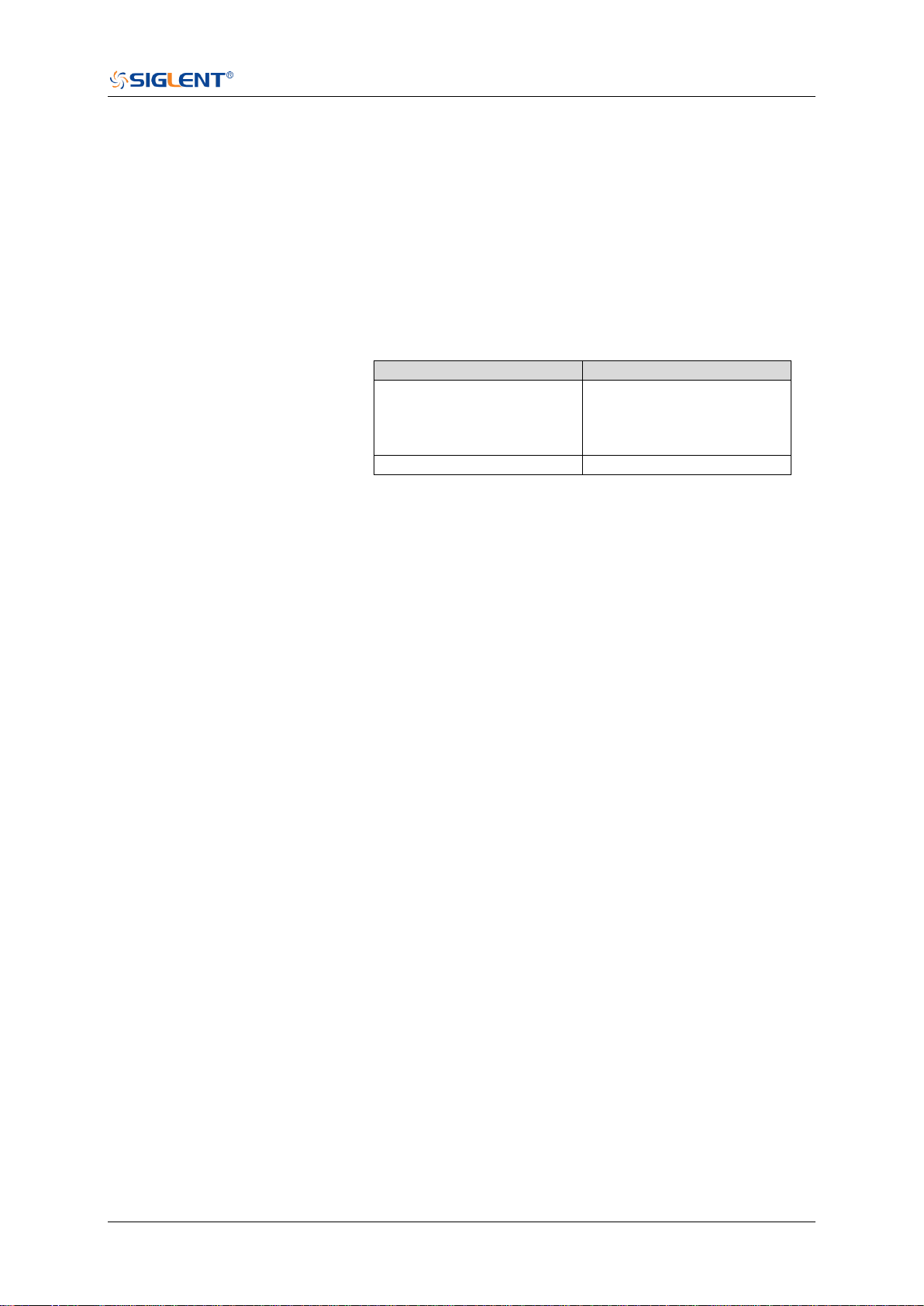
SDS Series Programming Guide
www.siglent.com 423 / 642
:TRIGger:RUNT:TUPPer
Command/Query
DESCRIPTION
The command sets the upper value of the runt trigger limit type.
The query returns the current upper value of the runt trigger limit
type.
COMMAND SYNTAX
:TRIGger:PULse:RUNT <value>
<value>:= Value in NR3 format, including a decimal point and
exponent, like 1.23E+2. The range of the value varies by model,
see the table below for details.
Model
Value Range
SDS5000X
SDS2000X Plus
SDS6000 Pro/SDS6000A
SDS2000X HD
[2.00E-09, 2.00E+01]
SHS800X/SHS1000X
[2.00E-09, 4.20E+00]
Note:
The upper value cannot be less than the lower value using
by the command :TRIGger:RUNT:TLOWer.
The command is not valid when the limit range type is
GREATerthan.
QUERY SYNTAX
:TRIGger:RUNT:TUPPer?
RESPONSE FORMAT
<value>
<value>:= Value in NR3 format.
EXAMPLE
The following command sets the upper time of the runt trigger to
30 ns.
Command message:
:TRIGger:RUNT:TUPPer 3.00E-08
TRIG:RUNT:TUPP 3.00E-08
Query message:
TRIG:RUNT:TUPP?
Response message:
3.00E-08
RELATED COMMANDS
:TRIGger:RUNT:LIMit
:TRIGger:RUNT:TLOWer

SDS Series Programming Guide
424 / 642 www.siglent.com
:TRIGger:PATTern Commands
The :TRIGGER:PATTern subsystem commands control the pattern trigger parameters.
:TRIGger:PATTern:HLDEVent
:TRIGger:PATTern:HLDTime
:TRIGger:PATTern:HOLDoff
:TRIGger:PATTern:HSTart
:TRIGger:PATTern:INPut
:TRIGger:PATTern:LEVel
:TRIGger:PATTern:LIMit
:TRIGger:PATTern:LOGic
:TRIGger:PATTern:TLOWer
:TRIGger:PATTern:TUPPer

SDS Series Programming Guide
www.siglent.com 425 / 642
:TRIGger:PATTern:HLDEVent
Command/Query
DESCRIPTION
This command sets the number of holdoff events of the pattern
trigger.
The query returns the current number of holdoff events of the
pattern trigger.
COMMAND SYNTAX
:TRIGger:PATTern:HLDEVent <value>
<value>:= Value in NR1 format, including an integer and no
decimal point, like 1. The range of the value is [1, 100000000].
QUERY SYNTAX
:TRIGger:PATTern:HLDEVent?
RESPONSE FORMAT
<value>
<value>:= Value in NR1 format, including an integer and no
decimal point, like 1.
EXAMPLE
The following command sets the number of holdoff events of
the pattern trigger to 3.
Command message:
:TRIGger:PATTern:HLDEVent 3
TRIG:PATT:HLDEV 3
Query message:
TRIG:PATT:HLDEV?
Response message:
3
RELATED COMMANDS
:TRIGger:PATTern:HOLDoff
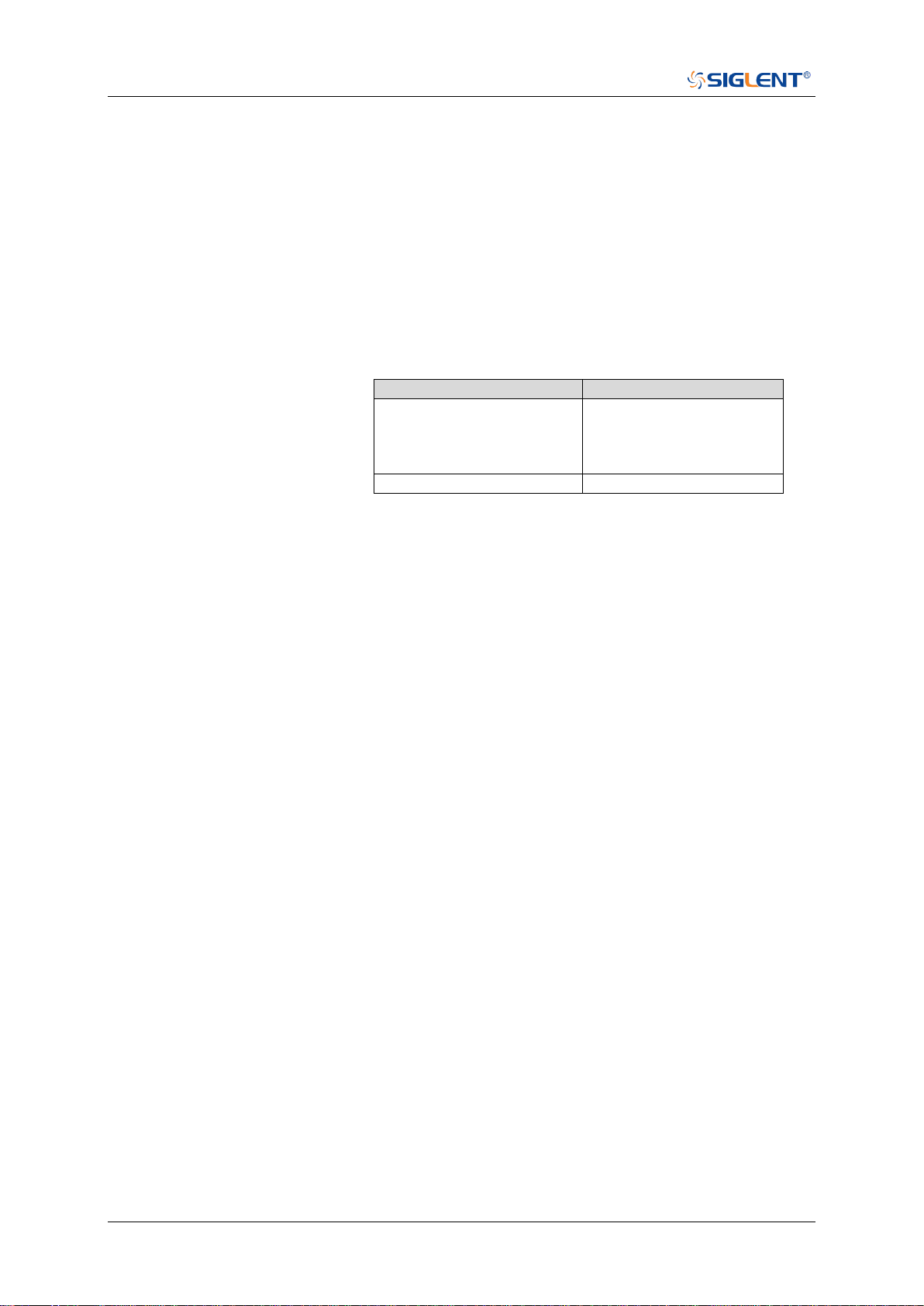
SDS Series Programming Guide
426 / 642 www.siglent.com
:TRIGger:PATTern:HLDTime
Command/Query
DESCRIPTION
This This command sets the holdoff time of the pattern trigger.
The query returns the current holdoff time of the pattern trigger.
COMMAND SYNTAX
:TRIGger:PATTern:HLDTime <value>
<value>:= Value in NR3 format, including a decimal point and
exponent, like 1.23E+2.
The range of the value varies by model, see the table below for
details.
Mode
value
SDS5000X
SDS2000X Plus
SDS6000 Pro/SDS6000A
SDS2000X HD
[8.00E-09, 3.00E+01]
SHS800X/SHS1000X
[80.00E-09, 1.50E+00]
QUERY SYNTAX
:TRIGger:PATTern:HLDTime?
RESPONSE FORMAT
<value>
<value>:= Value in NR3 format.
EXAMPLE
The following command sets the holdoff time of the pattern
trigger to 15 ns.
Command message:
:TRIGger:PATTern:HLDTime 1.50E-08
TRIG:PATT:HLDT 1.50E-08
Query message:
TRIG:PATT:HLDT?
Response message:
1.50E-08
RELATED COMMANDS
:TRIGger:PATTern:HOLDoff

SDS Series Programming Guide
www.siglent.com 427 / 642
:TRIGger:PATTern:HOLDoff
Command/Query
DESCRIPTION
The command selects the holdoff type of the pattern trigger.
The query returns the current holdoff type of the pattern trigger.
COMMAND SYNTAX
:TRIGger:PATTern:HOLDoff <holdoff_type>
<holdoff_type>:= {OFF|EVENts|TIME}
OFF means to turn off the holdoff
EVENts means the amount of events that the oscilloscope
counts before re-arming the trigger circuitry
TIME means the amount of time that the oscilloscope
waits before re-arming the trigger circuitry
QUERY SYNTAX
:TRIGger:PATTern:HOLDoff?
RESPONSE FORMAT
<holdoff_type>
< holdoff_type >:= {OFF|EVENts|TIME}
EXAMPLE
The following command turns off the holdoff of the pattern
trigger.
Command message:
:TRIGger:PATTern:HOLDoff OFF
TRIG:PATT:HOLD OFF
Query message:
TRIG:PATT:HOLD?
Response message:
OFF
RELATED COMMANDS
:TRIGger:PATTern:HLDEVent
:TRIGger:PATTern:HLDTime
:TRIGger:PATTern:HSTart

SDS Series Programming Guide
428 / 642 www.siglent.com
:TRIGger:PATTern:HSTart
Command/Query
DESCRIPTION
The command sets the start holdoff mode of the pattern
trigger.
The query returns the current start holdoff mode of the
pattern trigger.
COMMAND SYNTAX
:TRIGger:PATTern:HSTart <start_holdoff>
<start_holdoff>:= {LAST_TRIG|ACQ_START}
LAST_TRIG means the initial position of holdoff is the
first time point satisfying the trigger condition.
ACQ_START means the initial position of holdoff is the
time of the last trigger.
QUERY SYNTAX
:TRIGger:PATTern:HSTart?
RESPONSE FORMAT
<start_holdoff>
<start_holdoff>:= {LAST_TRIG|ACQ_START}
EXAMPLE
The following command sets the start holdoff mode to
LAST_TRIG (last trigger).
Command message:
:TRIGger:PATTern:HSTart LAST_TRIG
TRIG:PATT:HST LAST_TRIG
Query message:
TRIG:PATT:HST?
Response message:
LAST_TRIG
RELATED COMMANDS
:TRIGger:PATTern:HOLDoff

SDS Series Programming Guide
www.siglent.com 429 / 642
:TRIGger:PATTern:INPut
Command/Query
DESCRIPTION
The command specifies the logical input condition for the
channel (C1-C4) and digital channel (d0-d15) of the pattern
trigger.
The query returns the logical input condition of pattern trigger.
COMMAND SYNTAX
:TRIGger:PATTern:INPut <logic>[...[,<logic>]]
<logic>:= {X|L|H}
X means the "don't care" state.
H means the logic high state.
L means the logic low state.
Note:
Parameters are configured to corresponding sources in the
order of C1-C4, d0-d15.
QUERY SYNTAX
:TRIGger:PATTern:INPut?
RESPONSE FORMAT
<input>
<input>:= {X|L|H}
EXAMPLE
The following command sets the logic input for channel 1 to H,
for channel 2 to H, for channel 3 to L, for channel 4 to X and for
all digital channel to X.
Command message:
:TRIGger:PATTern:INPut
H,H,L,X,X,X,X,X,X,X,X,X,X,X,X,X,X,X,X,X
TRIG:PATT:INP H,H,L,X,X,X,X,X,X,X,X,X,X,X,X,X,X,X,X,X
Query message:
TRIG:PATT:INP?
Response message:
H,H,L,X,X,X,X,X,X,X,X,X,X,X,X,X,X,X,X,X
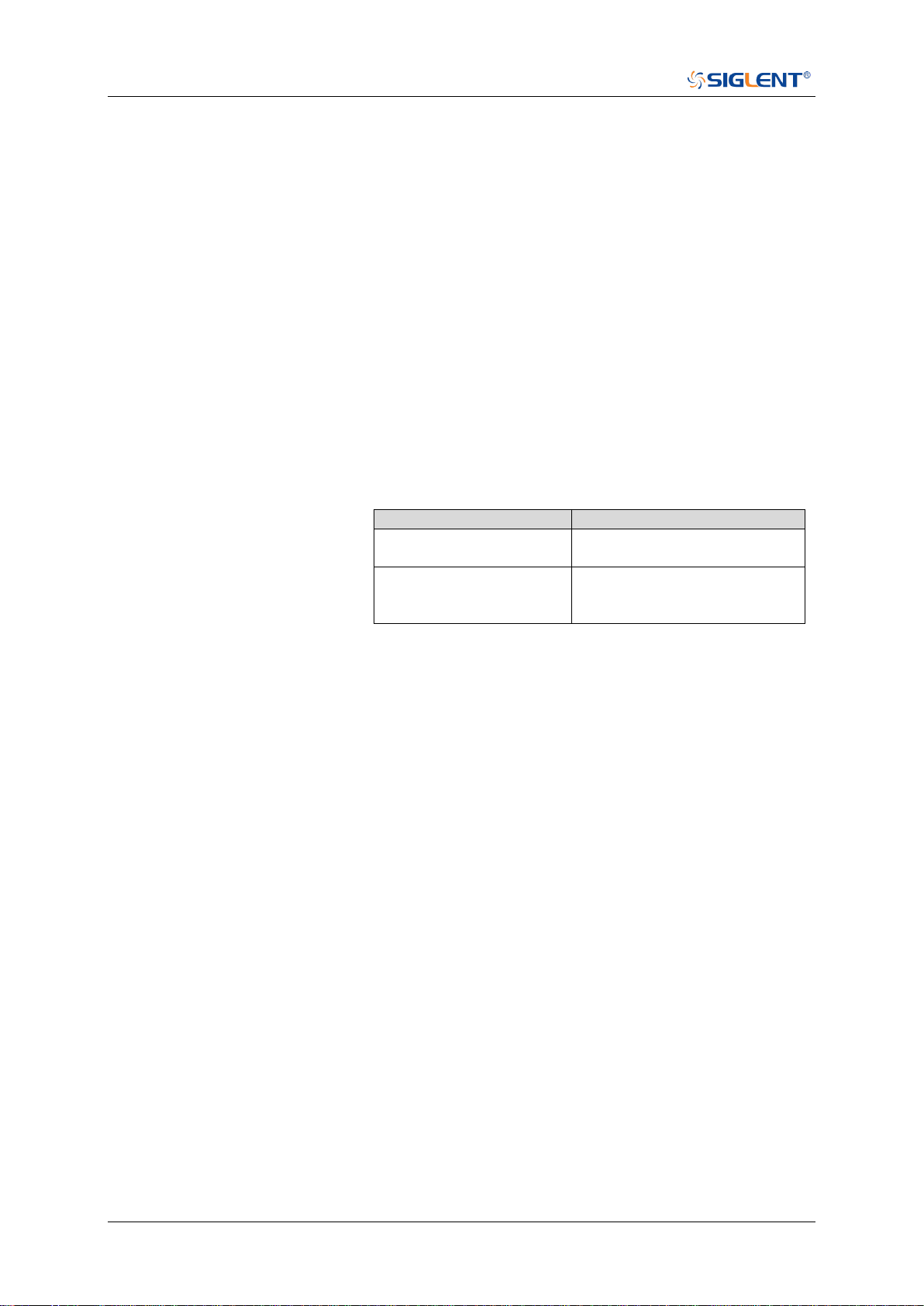
SDS Series Programming Guide
430 / 642 www.siglent.com
:TRIGger:PATTern:LEVel
Command/Query
DESCRIPTION
The command sets the trigger level of source in the pattern
trigger.
The query returns the current trigger level of source in the
pattern trigger.
COMMAND SYNTAX
:TRIGger:PATTern:LEVel <source>,<value>
<source>:= {C<x>}
<x>:= 1 to (# analog channels) in NR1 format, including an
integer and no decimal point, like 1.
<value>:= Value in NR3 format, including a decimal point and
exponent, like 1.23E+2.
The range of the value varies by model, see the table below
for details.
Model
Value Range
SDS6000 Pro/SDS6000A
SHS800X/SHS1000X
[-4.5*vertical_scale-vertical_offset,
4.5*vertical_scale-vertical_offset]
SDS5000X
SDS2000X Plus
SDS2000X HD
[-4.1*vertical_scale-vertical_offset,
4.1*vertical_scale-vertical_offset]
QUERY SYNTAX
:TRIGger:PATTern:LEVel? <source>
<source>:= {C<x>}
<x>:= 1 to (# analog channels) in NR1 format, including an
integer and no decimal point, like 1.
RESPONSE FORMAT
<source>,<value>
<source>:= {C<x>}
<x>:= 1 to (# analog channels) in NR1 format, including an
integer and no decimal point, like 1.
<value>:= Value in NR3 format.
EXAMPLE
The following command sets the pattern trigger level to 0.5 V.
Command message:
:TRIGger:PATTern:LEVel C2,5.00E-01
TRIG:PATT:LEV C2,5.00E-01
Query message:
TRIG:PATT:LEV? C2
Response message:
C2,5.00E-01
RELATED COMMANDS
:TRIGger:PATTern:INPut

SDS Series Programming Guide
www.siglent.com 431 / 642
:TRIGger:PATTern:LIMit
Command/Query
DESCRIPTION
The command sets the limit range type of the pattern trigger
when the logic combination is AND or NOR.
The query returns the current limit range type of the pattern
trigger.
COMMAND SYNTAX
:TRIGger:PATTern:LIMit <type>
<type>:= {LESSthan|GREATerthan|INNer|OUTer}
QUERY SYNTAX
:TRIGger:PATTern:LIMit?
RESPONSE FORMAT
<type>
<type>:= {LESSthan|GREATerthan|INNer|OUTer}
EXAMPLE
The following command sets the limit of pattern trigger to
LESSthan.
Command message:
:TRIGger:PATTern:LIMit LESSthan
TRIG:PATT:LIM LESS
Query message:
TRIG:PATT:LIM?
Response message:
LESSthan
RELATED COMMANDS
:TRIGger:PATTern:TLOWer
:TRIGger:PATTern:TUPPer

SDS Series Programming Guide
432 / 642 www.siglent.com
:TRIGger:PATTern:LOGic
Command/Query
DESCRIPTION
The command sets the logical combination of the input
channels for the pattern trigger.
The query returns the current logical combination of the
pattern trigger.
COMMAND SYNTAX
:TRIGger:PATTern:LOGic <type>
<type>:= {AND|OR|NAND|NOR}
QUERY SYNTAX
:TRIGger:PATTern:LOGic?
RESPONSE FORMAT
<logic_type>
<logic_type>:= {AND|OR|NAND|NOR}
EXAMPLE
The following command sets the logic mode of the pattern
trigger to AND.
Command message:
:TRIGger:PATTern:LOGic AND
TRIG:PATT:LOG AND
Query message:
TRIG:PATT:LOG?
Response message:
AND

SDS Series Programming Guide
www.siglent.com 433 / 642
:TRIGger:PATTern:TLOWer
Command/Query
DESCRIPTION
The command sets the lower value of the pattern trigger limit
type when the logic combination is AND or NOR.
The query returns the current lower value of the pattern
trigger limit type.
COMMAND SYNTAX
:TRIGger:PATTern:TLOWer <value>
<value>:= Value in NR3 format, including a decimal point and
exponent, like 1.23E+2. The range of the value is [2.00E-09,
2.00E+01].
Note:
The lower value cannot be greater than the upper value
using by the command :TRIGger:PATTern:TUPPer.
The command is not valid when the limit range type is
LESSthan.
QUERY SYNTAX
:TRIGger:PATTern:TLOWer?
RESPONSE FORMAT
<value>
<value>:= Value in NR3 format.
EXAMPLE
The following command sets the lower time of the pattern
trigger to 10 ns.
Command message:
:TRIGger:PATTern:TLOWer 1.00E-08
TRIG:PATT:TLOW 1.00E-08
Query message:
TRIG:PATT:TLOW?
Response message:
1.00E-08
RELATED COMMANDS
:TRIGger:PATTern:LIMit
:TRIGger:PATTern:TUPPer

SDS Series Programming Guide
434 / 642 www.siglent.com
:TRIGger:PATTern:TUPPer
Command/Query
DESCRIPTION
The command sets the upper value of the pattern trigger limit
type when the logic combination is AND or NOR.
The query returns the current upper value of the pattern
trigger limit type.
COMMAND SYNTAX
:TRIGger:PULse:PATTern <value>
<value>:= Value in NR3 format, including a decimal point and
exponent, like 1.23E+2. The range of the value is [3.00E-09,
2.00E+01].
Note:
The upper value cannot be less than the lower value
using by the command :TRIGger:PATTern:TLOWer.
The command is not valid when the limit range type is
GREATerthan.
QUERY SYNTAX
:TRIGger:PATTern:TUPPer?
RESPONSE FORMAT
<value>
<value>:= Value in NR3 format.
EXAMPLE
The following command sets the upper time of the pattern
trigger to 30 ns.
Command message:
:TRIGger:PATTern:TUPPer 3.00E-08
TRIG:PATT:TUPP 3.00E-08
Query message:
TRIG:PATT:TUPP?
Response message:
3.00E-08
RELATED COMMANDS
:TRIGger:PATTern:LIMit
:TRIGger:PATTern:TLOWer

SDS Series Programming Guide
www.siglent.com 435 / 642
:TRIGger:QUALified Commands
The :TRIGGER:QUALified subsystem commands control the qualified trigger parameters.
:TRIGger:QUALified:ELEVel
:TRIGger:QUALified:ESLope
:TRIGger:QUALified:ESource
:TRIGger:QUALified:LIMit
:TRIGger:QUALified:QLEVel
:TRIGger:QUALified:QSource
:TRIGger:QUALified:TLOWer
:TRIGger:QUALified:TUPPer
:TRIGger:QUALified:TYPE
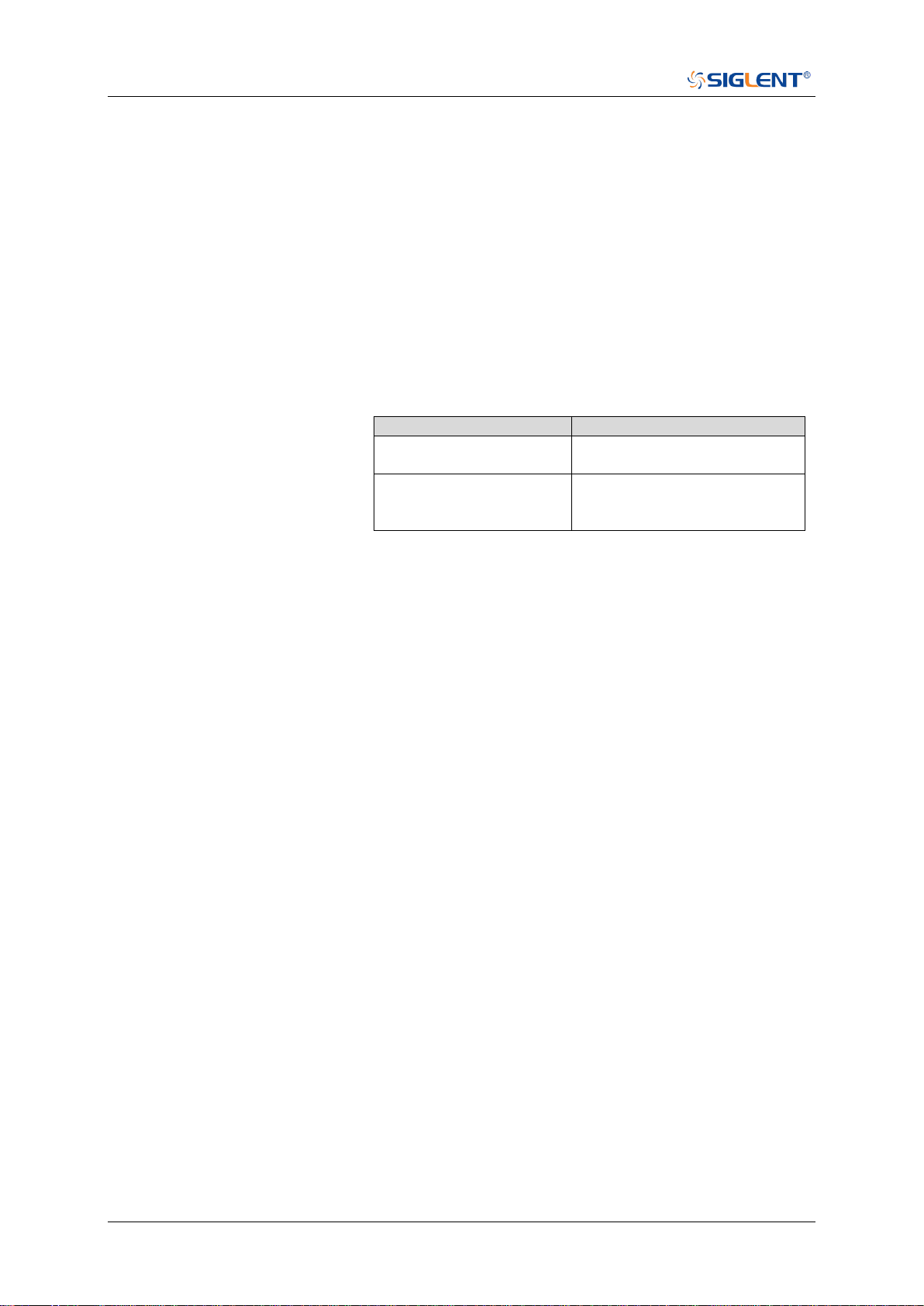
SDS Series Programming Guide
436 / 642 www.siglent.com
:TRIGger:QUALified:ELEVel
Command/Query
DESCRIPTION
The command sets the edge trigger level value in the
qualified trigger.
The query returns the current edge trigger level value in the
qualified trigger.
COMMAND SYNTAX
:TRIGger:QUALified:ELEVel <value>
<value>:= Value in NR3 format, including a decimal point and
exponent, like 1.23E+2.
The range of the value varies by model, see the table below
for details.
Model
Value Range
SDS6000 Pro/SDS6000A
[-4.5*vertical_scale-vertical_offset,
4.5*vertical_scale-vertical_offset]
SDS5000X
SDS2000X Plus
SDS2000X HD
[-4.1*vertical_scale-vertical_offset,
4.1*vertical_scale-vertical_offset]
QUERY SYNTAX
:TRIGger:QUALified:ELEVel?
RESPONSE FORMAT
<value>
<value>:= Value in NR3 format.
EXAMPLE
The following command sets the edge trigger level value of
the qualified trigger to 0.5 V.
Command message:
:TRIGger:QUALified:ELEVel 5.00E-01
TRIG:QUAL:ELEV 5.00E-01
Query message:
TRIG:QUAL:ELEV?
Response message:
5.00E-01
RELATED COMMANDS
:TRIGger:QUALified:QLEVel

SDS Series Programming Guide
www.siglent.com 437 / 642
:TRIGger:QUALified:ESLope
Command/Query
DESCRIPTION
The command sets the edge trigger slope in the qualified
trigger.
The query returns the current edge trigger slope in the
qualified trigger.
COMMAND SYNTAX
:TRIGger:QUALified:ESLope <type>
<type>:= {RISing|FALLing}
QUERY SYNTAX
:TRIGger:QUALified:ESLope?
RESPONSE FORMAT
<type>
<type>:= {RISing|FALLing}
EXAMPLE
The following command sets the edge trigger slope in the
qualified trigger to RISing.
Command message:
:TRIGger:QUALified:ESLope RISing
TRIG:QUAL:ESL RIS
Query message:
TRIG:QUAL:ESL?
Response message:
RISing
RELATED COMMANDS
:TRIGger:QUALified:TYPE

SDS Series Programming Guide
438 / 642 www.siglent.com
:TRIGger:QUALified:ESource
Command/Query
DESCRIPTION
The command sets the edge trigger source in the qualified
trigger.
The query returns the current edge trigger source in the
qualified trigger.
COMMAND SYNTAX
:TRIGger:QUALified:ESource <source>
<source>:= {C<x>|D<n>}
<x>:= 1 to (# analog channels) in NR1 format, including an
integer and no decimal point, like 1.
<n>:= 0 to (# digital channels - 1) in NR1 format, including an
integer and no decimal point, like 1.
QUERY SYNTAX
:TRIGger:QUALified:ESource?
RESPONSE FORMAT
<source>
<source>:= {C<x>|D<n>}
<x>:= 1 to (# analog channels) in NR1 format, including an
integer and no decimal point, like 1.
<n>:= 0 to (# digital channels - 1) in NR1 format, including an
integer and no decimal point, like 1.
EXAMPLE
The following command sets the edge trigger source of the
qualified trigger to channel 1.
Command message:
:TRIGger:QUALified:ESource C1
TRIG:QUAL:ES C1
Query message:
TRIG:QUAL:ES?
Response message:
C1
RELATED COMMANDS
:TRIGger:QUALified:QSource

SDS Series Programming Guide
www.siglent.com 439 / 642
:TRIGger:QUALified:LIMit
Command/Query
DESCRIPTION
The command sets the limit range type when the qualified
type is State with Delay or Edge with Delay in the qualified
trigger.
The query returns the current limit range type in the qualified
trigger.
COMMAND SYNTAX
:TRIGger:QUALified:LIMit <type>
<type>:= {LESSthan|GREATerthan|INNer|OUTer}
QUERY SYNTAX
:TRIGger:QUALified:LIMit?
RESPONSE FORMAT
<type>
<type>:= {LESSthan|GREATerthan|INNer|OUTer}
EXAMPLE
The following command sets the limit range type to
LESSthan in the qualified trigger.
Command message:
:TRIGger:QUALified:LIMit LESSthan
TRIG:QUAL:LIM LESS
Query message:
TRIG:QUAL:LIM?
Response message:
LESSthan
RELATED COMMANDS
:TRIGger:QUALified:TLOWer
:TRIGger:QUALified:TUPPer
SDS Series Programming Guide
440 / 642 www.siglent.com
:TRIGger:QUALified:QLEVel
Command/Query
DESCRIPTION
The command sets the level of the qualify source level in the
qualified trigger.
The query returns the current level of the qualify source in the
qualified trigger.
COMMAND SYNTAX
:TRIGger:QUALified:QLEVel <level>
<level>:= Value in NR3 format, including a decimal point and
exponent, like 1.23E+2.
The range of the value varies by model, see the table below
for details.
Model
Value Range
SDS6000 Pro/SDS6000A
[-4.5*vertical_scale-vertical_offset,
4.5*vertical_scale-vertical_offset]
SDS5000X
SDS2000X Plus
SDS2000X HD
[-4.1*vertical_scale-vertical_offset,
4.1*vertical_scale-vertical_offset]
QUERY SYNTAX
:TRIGger:QUALified:QLEVel?
RESPONSE FORMAT
<level>
<level>:= Value in NR3 format.
EXAMPLE
The following command sets the level of the qualify source in
the qualified trigger to 0.5 V.
Command message:
:TRIGger:QUALified:QLEVel 5.00E-01
TRIG:QUAL:QLEV 5.00E-01
Query message:
TRIG:QUAL:QLEV?
Response message:
5.00E-01
RELATED COMMANDS
:TRIGger:QUALified:ELEVel

SDS Series Programming Guide
www.siglent.com 441 / 642
:TRIGger:QUALified:QSource
Command/Query
DESCRIPTION
The command sets the qualify source of the qualified trigger.
The query returns the current qualify source of the qualified
trigger.
COMMAND SYNTAX
:TRIGger:QUALified:QSource <source>
<source>:= {C<x>|D<n>}
<x>:= 1 to (# analog channels) in NR1 format, including an
integer and no decimal point, like 1.
<n>:= 0 to (# digital channels - 1) in NR1 format, including an
integer and no decimal point, like 1.
QUERY SYNTAX
:TRIGger:QUALified:QSource?
RESPONSE FORMAT
<source>
<source>:= {C<x>|D<n>}
<x>:= 1 to (# analog channels) in NR1 format, including an
integer and no decimal point, like 1.
<n>:= 0 to (# digital channels - 1) in NR1 format, including an
integer and no decimal point, like 1.
EXAMPLE
The following command sets the qualify source of the
qualified trigger as channel 1.
Command message:
:TRIGger:QUALified:QSource C1
TRIG:QUAL:QS C1
Query message:
TRIG:QUAL:QS?
Response message:
C1
RELATED COMMANDS
:TRIGger:QUALified:ESource

SDS Series Programming Guide
442 / 642 www.siglent.com
:TRIGger:QUALified:TLOWer
Command/Query
DESCRIPTION
The command sets the delay lower value when the qualified
type is Edge with Delay or State with Delay in the qualified
trigger.
The query returns the current delay lower value in the
qualified trigger.
COMMAND SYNTAX
:TRIGger:QUALified:TLOWer <value>
<value>:= Value in NR3 format, including a decimal point and
exponent, like 1.23E+2. The range of the value is [2.00E-09,
2.00E+01].
Note:
The lower value cannot be greater than the upper value
using by the command :TRIGger:QUALified:TUPPer.
The command is not valid when the limit range type is
LESSthan.
QUERY SYNTAX
:TRIGger:QUALified:TLOWer?
RESPONSE FORMAT
<value>
<value>:= Value in NR3 format.
EXAMPLE
The following command sets the lower time of the qualified
trigger to 10 ns.
Command message:
:TRIGger:QUALified:TLOWer 1.00E-08
TRIG:QUAL:TLOW 1.00E-08
Query message:
TRIG:QUAL:TLOW?
Response message:
1.00E-08
RELATED COMMANDS
:TRIGger:QUALified:LIMit
:TRIGger:QUALified:TUPPer

SDS Series Programming Guide
www.siglent.com 443 / 642
:TRIGger:QUALified:TUPPer
Command/Query
DESCRIPTION
The command sets delay upper value when the qualified type
is Edge with Delay or State with Delay in the qualified trigger.
The query returns the current delay upper value in the
qualified trigger.
COMMAND SYNTAX
:TRIGger:QUALified:TUPPer <value>
<value>:= Value in NR3 format, including a decimal point and
exponent, like 1.23E+2. The range of the value is [3.00E-09,
2.00E+01].
Note:
The upper value cannot be less than the lower value
using by the command :TRIGger:QUALified:TLOWer.
The command is not valid when the limit range type is
GREATerthan.
QUERY SYNTAX
:TRIGger:QUALified:TUPPer?
RESPONSE FORMAT
<value>
<value>:= Value in NR3 format.
EXAMPLE
The following command sets the delay upper value of the
qualified trigger to 30 ns.
Command message:
:TRIGger:QUALified:TUPPer 3.00E-08
TRIG:QUAL:TUPP 3.00E-08
Query message:
TRIG:QUAL:TUPP?
Response message:
3.00E-08
RELATED COMMANDS
:TRIGger:QUALified:LIMit
:TRIGger:QUALified:TLOWer

SDS Series Programming Guide
444 / 642 www.siglent.com
:TRIGger:QUALified:TYPE
Command/Query
DESCRIPTION
The command sets the qualified type of the qualified trigger.
The query returns the current qualified type of the qualified
trigger.
COMMAND SYNTAX
:TRIGger:QUALified:TYPE <type>[,<option>]
<type>:= {STATe|STATE_DLY|EDGE|EDGE_DLY}
<option>:= {LOW|HIGH} when <type> is STATe or
STATE_DLY
<option>:= {RISing|FALLing} when <type> is EDGE or
EDGE_DLY
QUERY SYNTAX
:TRIGger:QUALified:TYPE?
RESPONSE FORMAT
<type>[,<option>]
<type>:= {STATe|STATE_DLY|EDGE|EDGE_DLY}
<option>:= {LOW|HIGH} when <type> is STATe or
STATE_DLY
<option>:= {RISing|FALLing} when <type> is EDGE or
EDGE_DLY
EXAMPLE
The following command sets the qualified type of the
qualified trigger to edge.
Command message:
:TRIGger:QUALified:TYPE EDGE
TRIG:QUAL:TYPE EDGE
Query message:
TRIG:QUAL:TYPE?
Response message:
EDGE

SDS Series Programming Guide
www.siglent.com 445 / 642
:TRIGger:IIC Commands
The :TRIGGER:IIC subsystem commands control the IIC bus trigger parameters.
:TRIGger:IIC:ADDRess
:TRIGger:IIC:ALENgth
:TRIGger:IIC:CONDition
:TRIGger:IIC:DAT2
:TRIGger:IIC:DATA
:TRIGger:IIC:DLENgth
:TRIGger:IIC:LIMit
:TRIGger:IIC:RWBit
:TRIGger:IIC:SCLSource
:TRIGger:IIC:SCLThreshold
:TRIGger:IIC:SDASource
:TRIGger:IIC:SDAThreshold

SDS Series Programming Guide
446 / 642 www.siglent.com
:TRIGger:IIC:ADDRess
Command/Query
DESCRIPTION
The command sets the address of the IIC bus trigger.
The query returns the current address of the IIC bus trigger.
COMMAND SYNTAX
:TRIGger:IIC:ADDRess <addr>
<addr>:= Value in NR1 format, including an integer and no
decimal point, like 1. The range of the value is [0, 127].
QUERY SYNTAX
:TRIGger:IIC:ADDRess?
RESPONSE FORMAT
<addr>
<addr>:= Value in NR1 format, including an integer and no
decimal point, like 1.
EXAMPLE
The following command sets the address of the IIC bus
trigger to 0x0a.
Command message:
:TRIGger:IIC:ADDRess 10
TRIG:IIC:ADDR 10
Query message:
TRIG:IIC:ADDR?
Response message:
10
RELATED COMMANDS
:TRIGger:IIC:CONDition

SDS Series Programming Guide
www.siglent.com 447 / 642
:TRIGger:IIC:ALENgth
Command/Query
DESCRIPTION
The command sets the length of address of the IIC bus trigger.
The query returns the current length of address of the IIC bus
trigger.
COMMAND SYNTAX
:TRIGger:IIC:ALENgth <length>
<length>:= {7BIT|10BIT}
QUERY SYNTAX
:TRIGger:IIC:ALENgth?
RESPONSE FORMAT
<addr_length>
<addr_length>:= {7BIT|10BIT}
EXAMPLE
The following command sets the length of address of the IIC
bus trigger to 10 bit.
Command message:
:TRIGger:IIC:ALENgth 10BIT
TRIG:IIC:ALEN 10BIT
Query message:
TRIG:IIC:ALEN?
Response message:
10BIT
RELATED COMMANDS
:TRIGger:IIC:CONDition

SDS Series Programming Guide
448 / 642 www.siglent.com
:TRIGger:IIC:CONDition
Command/Query
DESCRIPTION
The command sets the trigger condition of the IIC bus.
The query returns the current trigger condition of the IIC bus.
COMMAND SYNTAX
:TRIGger:IIC:CONDition <condition>
<condition>:=
{STARt|STOP|RESTart|NACK|EEPRom|7ADDRess|10ADD
Ress|DLENgth}
QUERY SYNTAX
:TRIGger:IIC:CONDition?
RESPONSE FORMAT
<condition>
<condition>:=
{STARt|STOP|RESTart|NACK|EEPRom|7ADDRess|10ADD
Ress|DLENgth}
EXAMPLE
The following command sets the condition of the IIC bus
trigger to STOP.
Command message:
:TRIGger:IIC:CONDition STOP
TRIG:IIC:COND STOP
Query message:
TRIG:IIC:COND?
Response message:
STOP

SDS Series Programming Guide
www.siglent.com 449 / 642
:TRIGger:IIC:DAT2
Command/Query
DESCRIPTION
The command sets the data2 of the IIC bus trigger.
The query returns the current data2 of the IIC bus trigger.
COMMAND SYNTAX
:TRIGger:IIC:DAT2 <data>
<data>:= Value in NR1 format, including an integer and no
decimal point, like 1. The range of the value is [0, 256].
Note:
Use the don’t care data (256) to ignore the data2 value.
QUERY SYNTAX
:TRIGger:IIC:DAT2?
RESPONSE FORMAT
<data>
<data>:= Value in NR1 format, including an integer and no
decimal point, like 1.
EXAMPLE
The following command sets the data2 of the IIC bus trigger to
0x0b.
Command message:
:TRIGger:IIC:DAT2 11
TRIG:IIC:DAT2 11
Query message:
TRIG:IIC:DAT2?
Response message:
11
RELATED COMMANDS
:TRIGger:IIC:CONDition

SDS Series Programming Guide
450 / 642 www.siglent.com
:TRIGger:IIC:DATA
Command/Query
DESCRIPTION
The command sets the data of the IIC bus trigger.
The query returns the current data of the IIC bus trigger.
COMMAND SYNTAX
:TRIGger:IIC:DATA <data>
<data>:= Value in NR1 format, including an integer and no
decimal point, like 1. The range of the value is [0, 256].
Note:
Use the don’t care data (256) to ignore the data value.
QUERY SYNTAX
:TRIGger:IIC:DATA?
RESPONSE FORMAT
<data>
<data>:= Value in NR1 format, including an integer and no
decimal point, like 1.
EXAMPLE
The following command sets the data of the IIC bus trigger to
0x2A.
Command message:
:TRIGger:IIC:DATA 42
TRIG:IIC:DATA 42
Query message:
TRIG:IIC:DATA?
Response message:
42
RELATED COMMANDS
:TRIGger:IIC:CONDition
:TRIGger:IIC:DAT2

SDS Series Programming Guide
www.siglent.com 451 / 642
:TRIGger:IIC:DLENgth
Command/Query
DESCRIPTION
The command sets the data length of the IIC bus trigger.
The query returns the current data length of the IIC bus trigger.
COMMAND SYNTAX
:TRIGger:IIC:DLENgth <length>
<length>:= Value in NR1 format, including an integer and no
decimal point, like 1. The range of the value is [1, 12].
QUERY SYNTAX
:TRIGger:IIC:DLENgth?
RESPONSE FORMAT
<length>
<length>:= Value in NR1 format, including an integer and no
decimal point, like 1.
EXAMPLE
The following command sets the data length of the IIC bus
trigger to 10 bytes.
Command message:
:TRIGger:IIC:DLENgth 10
TRIG:IIC:DLEN 10
Query message:
TRIG:IIC:DLEN?
Response message:
10
RELATED COMMANDS
:TRIGger:IIC:CONDition

SDS Series Programming Guide
452 / 642 www.siglent.com
:TRIGger:IIC:LIMit
Command/Query
DESCRIPTION
The command sets the data comparison type when the
trigger condition is EEPROM on the IIC bus trigger.
The query returns the current the limit range type when the
trigger condition is EEPROM.
COMMAND SYNTAX
:TRIGger:IIC:LIMit <limit_type>
<limit_type>:= {EQUal|GREaterthan|LESSthan}
QUERY SYNTAX
:TRIGger:IIC:LIMit?
RESPONSE FORMAT
<limit_type>
<limit_type>:= {EQUal|GREaterthan|LESSthan}
EXAMPLE
The following command sets the limit range type when the
trigger condition is EEPROM to LESSthan.
Command message:
:TRIGger:IIC:LIMit LESSthan
TRIG:IIC:LIM LESS
Query message:
TRIG:IIC:LIM?
Response message:
LESSthan
RELATED COMMANDS
:TRIGger:IIC:CONDition

SDS Series Programming Guide
www.siglent.com 453 / 642
:TRIGger:IIC:RWBit
Command/Query
DESCRIPTION
The command sets whether the trigger frame is read address
or write address when the IIC trigger condition is 7 or 10
ADDR&DATA.
The query returns the current read write bit of the IIC bus
trigger.
COMMAND SYNTAX
:TRIGger:IIC:RWBit <type>
<type>:= {WRITe|READ|ANY}
QUERY SYNTAX
:TRIGger:IIC:RWBit?
RESPONSE FORMAT
<type>
<type>:= {WRITe|READ|ANY}
EXAMPLE
The following command sets to trigger on the read address of
the IIC bus.
Command message:
:TRIGger:IIC:RWBit READ
TRIG:IIC:RWB READ
Query message:
TRIG:IIC:RWB?
Response message:
READ
RELATED COMMANDS
:TRIGger:IIC:CONDition

SDS Series Programming Guide
454 / 642 www.siglent.com
:TRIGger:IIC:SCLSource
Command/Query
DESCRIPTION
The command selects the SCL source of the IIC bus trigger.
This query returns the current SCL source of the IIC bus
trigger.
COMMAND SYNTAX
:TRIGger:IIC:SCLSource <source>
<source>:= {C<x>|D<n>}
<x>:= 1 to (# analog channels) in NR1 format, including an
integer and no decimal point, like 1.
<n>:= 0 to (# digital channels - 1) in NR1 format, including an
integer and no decimal point, like 1.
QUERY SYNTAX
:TRIGger:IIC:SCLSource?
RESPONSE FORMAT
<source>
<source>:= {C<x>|D<n>}
<x>:= 1 to (# analog channels) in NR1 format, including an
integer and no decimal point, like 1.
<n>:= 0 to (# digital channels - 1) in NR1 format, including an
integer and no decimal point, like 1.
EXAMPLE
The following command selects the SCL source of the IIC
bus trigger as channel 2.
Command message:
:TRIGger:IIC:SCLSource C2
TRIG:IIC:SCLS C2
Query message:
TRIG:IIC:SCLS?
Response message:
C2
RELATED COMMANDS
:TRIGger:IIC:SCLThreshold
:TRIGger:IIC:SDASource
SDS Series Programming Guide
www.siglent.com 455 / 642
:TRIGger:IIC:SCLThreshold
Command/Query
DESCRIPTION
The command sets the threshold of the SCL on IIC bus trigger.
This query returns the current threshold of the SCL on IIC bus
trigger.
COMMAND SYNTAX
:TRIGger:IIC:SCLThreshold <value>
<value>:= Value in NR3 format, including a decimal point and
exponent, like 1.23E+2.
The range of the value varies by model, see the table below for
details.
Model
Value Range
SDS6000 Pro/SDS6000A
SHS800X/SHS1000X
[-4.5*vertical_scale-vertical_offset,
4.5*vertical_scale-vertical_offset]
SDS5000X
SDS2000X Plus
SDS2000X HD
[-4.1*vertical_scale-vertical_offset,
4.1*vertical_scale-vertical_offset]
QUERY SYNTAX
:TRIGger:IIC:SCLThreshold?
RESPONSE FORMAT
<value>
<value>:= Value in NR3 format.
EXAMPLE
The following command sets the threshold of the SCL on IIC
bus trigger to 1.5 V.
Command message:
:TRIGger:IIC:SCLThreshold 1.50E+00
TRIG:IIC:SCLT 1.50E+00
Query message:
TRIG:IIC:SCLT?
Response message:
1.50E+00
RELATED COMMANDS
:TRIGger:IIC:SCLSource

SDS Series Programming Guide
456 / 642 www.siglent.com
:TRIGger:IIC:SDASource
Command/Query
DESCRIPTION
The command selects the SDA source of the IIC bus trigger.
This query returns the current SDA source of the IIC bus
trigger.
COMMAND SYNTAX
:TRIGger:IIC:SDASource <source>
<source>:= {C<x>|D<n>}
<x>:= 1 to (# analog channels) in NR1 format, including an
integer and no decimal point, like 1.
<n>:= 0 to (# digital channels - 1) in NR1 format, including an
integer and no decimal point, like 1.
QUERY SYNTAX
:TRIGger:IIC:SDASource?
RESPONSE FORMAT
<source>
<source>:= {C<x>|D<n>}
<x>:= 1 to (# analog channels) in NR1 format, including an
integer and no decimal point, like 1.
<n>:= 0 to (# digital channels - 1) in NR1 format, including an
integer and no decimal point, like 1.
EXAMPLE
The following command selects the SDA source of the IIC bus
trigger as channel 2.
Command message:
:TRIGger:IIC:SDASource C2
TRIG:IIC:SDAS C2
Query message:
TRIG:IIC:SDAS?
Response message:
C2
RELATED COMMANDS
:TRIGger:IIC:SCLSource
:TRIGger:IIC:SDAThreshold
SDS Series Programming Guide
www.siglent.com 457 / 642
:TRIGger:IIC:SDAThreshold
Command/Query
DESCRIPTION
The command sets the threshold of the SDA on IIC bus trigger.
This query returns the current threshold of the SDA on IIC bus
trigger.
COMMAND SYNTAX
:TRIGger:IIC:SDAThreshold <value>
<value>:= Value in NR3 format, including a decimal point and
exponent, like 1.23E+2.
The range of the value varies by model, see the table below for
details.
Model
Value Range
SDS6000 Pro/SDS6000A
SHS800X/SHS1000X
[-4.5*vertical_scale-vertical_offset,
4.5*vertical_scale-vertical_offset]
SDS5000X
SDS2000X Plus
SDS2000X HD
[-4.1*vertical_scale-vertical_offset,
4.1*vertical_scale-vertical_offset]
QUERY SYNTAX
:TRIGger:IIC:SDAThreshold?
RESPONSE FORMAT
<value>
<value>:= Value in NR3 format.
EXAMPLE
The following command sets the threshold of the SDA on IIC
bus trigger to 1.5 V.
Command message:
:TRIGger:IIC:SDAThreshold 1.50E+00
TRIG:IIC:SDAT 1.50E+00
Query message:
TRIG:IIC:SDAT?
Response message:
1.50E+00
RELATED COMMANDS
:TRIGger:IIC:SDASource

SDS Series Programming Guide
458 / 642 www.siglent.com
:TRIGger:SPI Commands
The :TRIGGER:SPI subsystem commands control the SPI bus trigger modes and parameters.
:TRIGger:SPI:BITorder
:TRIGger:SPI:CLKSource
:TRIGger:SPI:CLKThreshold
:TRIGger:SPI:CSSource
:TRIGger:SPI:CSThreshold
:TRIGger:SPI:CSTYpe
:TRIGger:SPI:DATA
:TRIGger:SPI:DLENgth
:TRIGger:SPI:LATChedge
:TRIGger:SPI:MISOSource
:TRIGger:SPI:MISOThreshold
:TRIGger:SPI:MOSISource
:TRIGger:SPI:MOSIThreshold
:TRIGger:SPI:NCSSource
:TRIGger:SPI:NCSThreshold
:TRIGger:SPI:TTYPe

SDS Series Programming Guide
www.siglent.com 459 / 642
:TRIGger:SPI:BITorder
Command/Query
DESCRIPTION
The command sets the bit order of the SPI bus trigger.
The query returns the current bit order of the SPI bus trigger.
COMMAND SYNTAX
:TRIGger:SPI:BITorder <bit_order>
<bit_order>:= {LSM|MSB}
QUERY SYNTAX
:TRIGger:SPI:BITorder?
RESPONSE FORMAT
<bit_order>
<bit_order>:= {LSM|MSB}
EXAMPLE
The following command sets the bit order of the SPI bus trigger
to LSB.
Command message:
:TRIGger:SPI:BITorder LSB
TRIG:SPI:BIT LSB
Query message:
TRIG:SPI:BIT?
Response message:
LSB

SDS Series Programming Guide
460 / 642 www.siglent.com
:TRIGger:SPI:CLKSource
Command/Query
DESCRIPTION
The command selects the CLK source of the SPI bus trigger.
This query returns the current CLK source of the SPI bus
trigger.
COMMAND SYNTAX
:TRIGger:SPI:CLKSource <source>
<source>:= {C<x>|D<n>}
<x>:= 1 to (# analog channels) in NR1 format, including an
integer and no decimal point, like 1.
<n>:= 0 to (# digital channels - 1) in NR1 format, including an
integer and no decimal point, like 1.
QUERY SYNTAX
:TRIGger:SPI:CLKSource?
RESPONSE FORMAT
<source>
<source>:= {C<x>|D<n>}
<x>:= 1 to (# analog channels) in NR1 format, including an
integer and no decimal point, like 1.
<n>:= 0 to (# digital channels - 1) in NR1 format, including an
integer and no decimal point, like 1.
EXAMPLE
The following command selects the CLK source of the SPI bus
trigger as channel 2.
Command message:
:TRIGger:SPI:CLKSource C2
TRIG:SPI:CLKS C2
Query message:
TRIG:SPI:CLKS?
Response message:
C2
RELATED COMMANDS
:TRIGger:SPI:CLKThreshold
SDS Series Programming Guide
www.siglent.com 461 / 642
:TRIGger:SPI:CLKThreshold
Command/Query
DESCRIPTION
The command sets the threshold of the CLK on SPI bus trigger.
This query returns the current threshold of the CLK on SPI bus
trigger.
COMMAND SYNTAX
:TRIGger:SPI:CLKThreshold <clk_threshold>
<clk_threshold>:= Value in NR3 format, including a decimal
point and exponent, like 1.23E+2.
The range of the value varies by model, see the table below for
details.
Model
Value Range
SDS6000 Pro/SDS6000A
SHS800X/SHS1000X
[-4.5*vertical_scale-vertical_offset,
4.5*vertical_scale-vertical_offset]
SDS5000X
SDS2000X Plus
SDS2000X HD
[-4.1*vertical_scale-vertical_offset,
4.1*vertical_scale-vertical_offset]
QUERY SYNTAX
:TRIGger:SPI:CLKThreshold?
RESPONSE FORMAT
<clk_threshold>
<clk_threshold>:= Value in NR3 format.
EXAMPLE
The following command sets the threshold of the CLK on SPI
bus trigger to 1.5 V.
Command message:
:TRIGger:SPI:CLKThreshold 1.50E+00
TRIG:SPI:CLKT 1.50E+00
Query message:
TRIG:SPI:CLKT?
Response message:
1.50E+00
RELATED COMMANDS
:TRIGger:SPI:CLKSource

SDS Series Programming Guide
462 / 642 www.siglent.com
:TRIGger:SPI:CSSource
Command/Query
DESCRIPTION
The command sets the CS source of the SPI bus trigger.
The query returns the current CS source of the SPI bus trigger.
COMMAND SYNTAX
:TRIGger:SPI:CSSource <source>
<source>:= {C<x>|D<n>}
<x>:= 1 to (# analog channels) in NR1 format, including an
integer and no decimal point, like 1.
<n>:= 0 to (# digital channels - 1) in NR1 format, including an
integer and no decimal point, like 1.
QUERY SYNTAX
:TRIGger:SPI:CSSource?
RESPONSE FORMAT
<source>
<source>:= {C<x>|D<n>}
<x>:= 1 to (# analog channels) in NR1 format, including an
integer and no decimal point, like 1.
<n>:= 0 to (# digital channels - 1) in NR1 format, including an
integer and no decimal point, like 1.
EXAMPLE
The following command selects the CS source of the SPI bus
trigger as channel 2.
Command message:
:TRIGger:SPI:CSSource C2
TRIG:SPI:CSS C2
Query message:
TRIG:SPI:CSS?
Response message:
C2
RELATED COMMANDS
:TRIGger:SPI:CSThreshold
SDS Series Programming Guide
www.siglent.com 463 / 642
:TRIGger:SPI:CSThreshold
Command/Query
DESCRIPTION
The command sets the threshold of the CS on SPI bus trigger.
This query returns the current threshold of the CS on SPI bus
trigger.
COMMAND SYNTAX
:TRIGger:SPI:CSThreshold <threshold>
<threshold>:= Value in NR3 format, including a decimal point
and exponent, like 1.23E+2.
The range of the value varies by model, see the table below for
details.
Model
Value Range
SDS6000 Pro/SDS6000A
SHS800X/SHS1000X
[-4.5*vertical_scale-vertical_offset,
4.5*vertical_scale-vertical_offset]
SDS5000X
SDS2000X Plus
SDS2000X HD
[-4.1*vertical_scale-vertical_offset,
4.1*vertical_scale-vertical_offset]
QUERY SYNTAX
:TRIGger:SPI:CSThreshold?
RESPONSE FORMAT
<threshold>
<threshold>:= Value in NR3 format.
EXAMPLE
The following command sets the threshold of the CS on SPI
bus trigger to 1.5 V.
Command message:
:TRIGger:SPI:CSThreshold 1.50E+00
TRIG:SPI:CST 1.50E+00
Query message:
TRIG:SPI:CST?
Response message:
1.50E+00
RELATED COMMANDS
:TRIGger:SPI:CSSource

SDS Series Programming Guide
464 / 642 www.siglent.com
:TRIGger:SPI:CSTYpe
Command/Query
DESCRIPTION
The command sets the chip selection type of the SPI bus trigger.
This query returns the current chip selection type of the SPI bus
trigger.
COMMAND SYNTAX
:TRIGger:SPI:CSTYpe <type>
<type>:= {NCS|CS|TIMeout[,<time>]}
CS means set to chip select state
NCS means set to non-chip select state
TIMeout indicates set to clock timeout status
<time>:= Value in NR3 format, including a decimal point and
exponent, like 1.23E+2.
The range of the value is [1.00E-07, 5.00E-03].
QUERY SYNTAX
:TRIGger:SPI:CSTYpe?
RESPONSE FORMAT
<type>
<type>:= {NCS|CS|TIMeout[,<time>]}
<time>:= Value in NR3 format.
EXAMPLE
The following command sets the chip selection type of the SPI
bus trigger to CS.
Command message:
:TRIGger:SPI:CSTYpe CS
TRIG:SPI:CSTY CS
Query message:
TRIG:SPI:CSTY?
Response message:
CS

SDS Series Programming Guide
www.siglent.com 465 / 642
:TRIGger:SPI:DATA
Command
DESCRIPTION
The command sets the data of the SPI bus trigger.
COMMAND SYNTAX
:TRIGger:SPI:DATA <data>[,<data>[...[,<data>]]]
<data>:= {0|1|X}
Note:
The number of parameters should be consistent with the
data length using by the
command :TRIGger:SPI:DLENgth.
Parameters are assigned to each bit in order from high to
low.
EXAMPLE
The following command sets the data of the SPI bus trigger to
0x82 when the data length is 8.
Command message:
:TRIGger:SPI:DATA 1,0,0,0,0,0,1,0
TRIG:SPI:DATA 1,0,0,0,0,0,1,0
RELATED COMMANDS
:TRIGger:SPI:DLENgth

SDS Series Programming Guide
466 / 642 www.siglent.com
:TRIGger:SPI:DLENgth
Command/Query
DESCRIPTION
The command sets the data length of the SPI bus trigger.
The query returns the current data length of the SPI bus
trigger.
COMMAND SYNTAX
:TRIGger:SPI:DLENgth <data_length>
<data_length>:= Value in NR1 format, including an integer
and no decimal point, like 1. The range of the value is [4, 96].
QUERY SYNTAX
:TRIGger:SPI:DLENgth?
RESPONSE FORMAT
<data_length>
<data_length>:= Value in NR1 format, including an integer
and no decimal point, like 1.
EXAMPLE
The following command sets the data length of the SPI bus
trigger to 10 bit.
Command message:
:TRIGger:SPI:DLENgth 10
TRIG:SPI:DLEN 10
Query message:
TRIG:SPI:DLEN?
Response message:
10

SDS Series Programming Guide
www.siglent.com 467 / 642
:TRIGger:SPI:LATChedge
Command/Query
DESCRIPTION
The command selects the sampling edge of CLK on SPI bus
trigger.
This query returns the sampling edge of CLK on SPI bus
trigger.
COMMAND SYNTAX
:TRIGger:SPI:CLK:LATChedge <slope>
<slope>:= {RISing|FALLing}
QUERY SYNTAX
:TRIGger:SPI:LATC?
RESPONSE FORMAT
<slope>
<slope>:= {RISing|FALLing}
EXAMPLE
The following command sets the threshold judgment
condition of CLK on SPI bus trigger to RISing.
Command message:
:TRIGger:SPI:LATChedge RISing
:TRIG:SPI:LATC RIS
Query message:
:TRIG:SPI:LATC?
Response message:
RISing

SDS Series Programming Guide
468 / 642 www.siglent.com
:TRIGger:SPI:MISOSource
Command/Query
DESCRIPTION
The command selects the MISO source of the SPI bus trigger.
This query returns the current MISO source of the SPI bus
trigger.
COMMAND SYNTAX
:TRIGger:SPI:MISOSource <source>
<source>:= {C<x>|D<n>}
<x>:= 1 to (# analog channels) in NR1 format, including an
integer and no decimal point, like 1.
<n>:= 0 to (# digital channels - 1) in NR1 format, including an
integer and no decimal point, like 1.
QUERY SYNTAX
:TRIGger:SPI:MISOSource?
RESPONSE FORMAT
<source>
<source>:= {C<x>|D<n>}
<x>:= 1 to (# analog channels) in NR1 format, including an
integer and no decimal point, like 1.
<n>:= 0 to (# digital channels - 1) in NR1 format, including an
integer and no decimal point, like 1.
EXAMPLE
The following command selects the MISO source of the SPI
bus trigger as channel 2.
Command message:
:TRIGger:SPI:MISOSource C2
TRIG:SPI:MISOS C2
Query message:
TRIG:SPI:MISOS?
Response message:
C2
RELATED COMMANDS
:TRIGger:SPI:MISOThreshold
SDS Series Programming Guide
www.siglent.com 469 / 642
:TRIGger:SPI:MISOThreshold
Command/Query
DESCRIPTION
The command sets the threshold of the MISO on SPI bus
trigger.
This query returns the current threshold of the MISO on SPI
bus trigger.
COMMAND SYNTAX
:TRIGger:SPI:MISOThreshold <value>
<value>:= Value in NR3 format, including a decimal point and
exponent, like 1.23E+2.
The range of the value varies by model, see the table below
for details.
Model
Value Range
SDS6000 Pro/SDS6000A
SHS800X/SHS1000X
[-4.5*vertical_scale-vertical_offset,
4.5*vertical_scale-vertical_offset]
SDS5000X
SDS2000X Plus
SDS2000X HD
[-4.1*vertical_scale-vertical_offset,
4.1*vertical_scale-vertical_offset]
QUERY SYNTAX
:TRIGger:SPI:MISOThreshold?
RESPONSE FORMAT
<value>
<value>:= Value in NR3 format.
EXAMPLE
The following command sets the threshold of the MISO on
SPI bus trigger to 1.5 V.
Command message:
:TRIGger:SPI:MISOThreshold 1.50E+00
TRIG:SPI:MISOT 1.50E+00
Query message:
TRIG:SPI:MISOT?
Response message:
1.50E+00
RELATED COMMANDS
:TRIGger:SPI:MISOSource

SDS Series Programming Guide
470 / 642 www.siglent.com
:TRIGger:SPI:MOSISource
Command/Query
DESCRIPTION
The command selects the MOSI source of the SPI bus trigger.
This query returns the current MOSI source of the SPI bus
trigger.
COMMAND SYNTAX
:TRIGger:SPI:MOSISource <source>
<source>:= {C<x>|D<n>}
<x>:= 1 to (# analog channels) in NR1 format, including an
integer and no decimal point, like 1.
<n>:= 0 to (# digital channels - 1) in NR1 format, including an
integer and no decimal point, like 1.
QUERY SYNTAX
:TRIGger:SPI:MOSISource?
RESPONSE FORMAT
<source>
<source>:= {C<x>|D<n>}
<x>:= 1 to (# analog channels) in NR1 format, including an
integer and no decimal point, like 1.
<n>:= 0 to (# digital channels - 1) in NR1 format, including an
integer and no decimal point, like 1.
EXAMPLE
The following command selects the MOSI source of the SPI
bus trigger as channel 2.
Command message:
:TRIGger:SPI:MOSISource C2
TRIG:SPI:MOSIS C2
Query message:
TRIG:SPI:MOSIS?
Response message:
C2
RELATED COMMANDS
:TRIGger:SPI:MOSIThreshold
SDS Series Programming Guide
www.siglent.com 471 / 642
:TRIGger:SPI:MOSIThreshold
Command/Query
DESCRIPTION
The command sets the threshold of the MOSI on SPI bus
trigger.
The query returns the current threshold of the MOSI on SPI
bus trigger.
COMMAND SYNTAX
:TRIGger:SPI:MOSIThreshold <value>
<value>:= Value in NR3 format, including a decimal point and
exponent, like 1.23E+2.
The range of the value varies by model, see the table below
for details.
Model
Value Range
SDS6000 Pro/SDS6000A
SHS800X/SHS1000X
[-4.5*vertical_scale-vertical_offset,
4.5*vertical_scale-vertical_offset]
SDS5000X
SDS2000X Plus
SDS2000X HD
[-4.1*vertical_scale-vertical_offset,
4.1*vertical_scale-vertical_offset]
QUERY SYNTAX
:TRIGger:SPI:MOSIThreshold?
RESPONSE FORMAT
<value>
<value>:= Value in NR3 format.
EXAMPLE
The following command sets the threshold of the MOSI on
SPI bus trigger to 1.5 V.
Command message:
:TRIGger:SPI:MOSIThreshold 1.50E+00
TRIG:SPI:MOSIT 1.50E+00
Query message:
TRIG:SPI:MOSIT?
Response message:
1.50E+00
RELATED COMMANDS
:TRIGger:SPI:MOSISource

SDS Series Programming Guide
472 / 642 www.siglent.com
:TRIGger:SPI:NCSSource
Command/Query
DESCRIPTION
The command sets the NCS source of the SPI bus trigger.
The query returns the current NCS source of the SPI bus
trigger.
COMMAND SYNTAX
:TRIGger:SPI:NCSSource <source>
<source>:= {C<x>|D<n>}
<x>:= 1 to (# analog channels) in NR1 format, including an
integer and no decimal point, like 1.
<n>:= 0 to (# digital channels - 1) in NR1 format, including an
integer and no decimal point, like 1.
QUERY SYNTAX
:TRIGger:SPI:NCSSource?
RESPONSE FORMAT
<source>
<source>:= {C<x>|D<n>}
<x>:= 1 to (# analog channels) in NR1 format, including an
integer and no decimal point, like 1.
<n>:= 0 to (# digital channels - 1) in NR1 format, including an
integer and no decimal point, like 1.
EXAMPLE
The following command selects the NCS source of the SPI
bus trigger as D0.
Command message:
:TRIGger:SPI:NCSSource D0
:TRIG:SPI:NCSS D0
Query message:
:TRIG:SPI:NCSS?
Response message:
D0
RELATED COMMANDS
:TRIGger:SPI:NCSThreshold
SDS Series Programming Guide
www.siglent.com 473 / 642
:TRIGger:SPI:NCSThreshold
Command/Query
DESCRIPTION
The command sets the threshold of the NCS on SPI bus
trigger.
This query returns the current threshold of the NCS on SPI
bus trigger.
COMMAND SYNTAX
:TRIGger:SPI:NCSThreshold <value>
<value>:= Value in NR3 format, including a decimal point and
exponent, like 1.23E+2.
The range of the value varies by model, see the table below
for details.
Model
Value Range
SDS6000 Pro/SDS6000A
SHS800X/SHS1000X
[-4.5*vertical_scale-vertical_offset,
4.5*vertical_scale-vertical_offset]
SDS5000X
SDS2000X Plus
SDS2000X HD
[-4.1*vertical_scale-vertical_offset,
4.1*vertical_scale-vertical_offset]
QUERY SYNTAX
:TRIGger:SPI:NCSThreshold?
RESPONSE FORMAT
<value>
<value>:= Value in NR3 format.
EXAMPLE
The following command sets the threshold of the NCS on IIC
bus trigger to 1.5 V.
Command message:
:TRIGger:SPI:NCSThreshold 1.50E+00
TRIG:SPI:NCST 1.50E+00
Query message:
TRIG:SPI:NCST?
Response message:
1.50E+00
RELATED COMMANDS
:TRIGger:SPI:NCSSource

SDS Series Programming Guide
474 / 642 www.siglent.com
:TRIGger:SPI:TTYPe
Command/Query
DESCRIPTION
The command sets the trigger type of the SPI bus trigger.
The query returns the current trigger type of the SPI bus
trigger.
COMMAND SYNTAX
:TRIGger:SPI:TTYPe <trigger_type>
<trigger_type>:= {MISO|MOSI}
QUERY SYNTAX
:TRIGger:SPI:TTYPe?
RESPONSE FORMAT
<trigger_type>
<trigger_type>:= {MISO|MOSI}
EXAMPLE
The following command sets the trigger type of the SPI bus
trigger to MOSI.
Command message:
:TRIGger:SPI:TTYPe MOSI
TRIG:SPI:TTYP MOSI
Query message:
TRIG:SPI:TTYP?
Response message:
MOSI

SDS Series Programming Guide
www.siglent.com 475 / 642
:TRIGger:UART Commands
The :TRIGGER:UART subsystem commands control the UART bus trigger parameters.
:TRIGger:UART:BAUD
:TRIGger:UART:BITorder
:TRIGger:UART:CONDition
:TRIGger:UART:DATA
:TRIGger:UART:DLENgth
:TRIGger:UART:IDLE
:TRIGger:UART:LIMit
:TRIGger:UART:PARity
:TRIGger:UART:RXSource
:TRIGger:UART:RXThreshold
:TRIGger:UART:STOP
:TRIGger:UART:TTYPe
:TRIGger:UART:TXSource
:TRIGger:UART:TXThreshold

SDS Series Programming Guide
476 / 642 www.siglent.com
:TRIGger:UART:BAUD
Command/Query
DESCRIPTION
The command sets the baud rate of the UART bus trigger.
The query returns the current baud rate of the UART bus
trigger.
COMMAND SYNTAX
:TRIGger:UART:BAUD <baud>
<baud>:=
{600bps|1200bps|2400bps|4800bps|9600bps|19200bps|384
00bps|57600bps|115200bps|CUSTom[,<value>]}
<value>:= Value in NR1 format, including an integer and no
decimal point, like 1. The range of the value is [300, 20000000].
QUERY SYNTAX
:TRIGger:UART:BAUD?
RESPONSE FORMAT
<baud>
<baud>:=
{600bps|1200bps|2400bps|4800bps|9600bps|19200bps|384
00bps|57600bps|115200bps|CUSTom[,<value>]}
<value>:= Value in NR1 format, including an integer and no
decimal point, like 1.
EXAMPLE
The following command sets the baud rate of the UART bus
trigger to 9600bps.
Command message:
:TRIGger:UART:BAUD 9600bps
TRIG:UART:BAUD 9600bps
Query message:
TRIG:UART:BAUD?
Response message:
9600bps

SDS Series Programming Guide
www.siglent.com 477 / 642
:TRIGger:UART:BITorder
Command/Query
DESCRIPTION
The command sets the bit order of the UART trigger.
The query returns the current bit order of the UART trigger.
COMMAND SYNTAX
:TRIGger:UART:BITorder <order>
<order>:= {LSM|MSB}
QUERY SYNTAX
:TRIGger:UART:BITorder?
RESPONSE FORMAT
<order>
<order>:= {LSM|MSB}
EXAMPLE
The following command sets the bit order to LSB.
Command message:
:TRIGger:UART:BITorder LSB
TRIG:UART:BIT LSB
Query message:
TRIG:UART:BIT?
Response message:
LSB

SDS Series Programming Guide
478 / 642 www.siglent.com
:TRIGger:UART:CONDition
Command/Query
DESCRIPTION
The command sets the condition of the UART bus trigger.
The query returns the current condition of the UART bus
trigger.
COMMAND SYNTAX
:TRIGger:UART:CONDition <condition>
<condition>:= {STARt|STOP|DATA|ERRor}
QUERY SYNTAX
:TRIGger:UART:CONDition?
RESPONSE FORMAT
<condition>
<condition>:= {STARt|STOP|DATA|ERRor}
EXAMPLE
The following command sets the condition of the UART bus
trigger to STOP.
Command message:
:TRIGger:UART:CONDition STOP
TRIG:UART:COND STOP
Query message:
TRIG:UART:COND?
Response message:
STOP

SDS Series Programming Guide
www.siglent.com 479 / 642
:TRIGger:UART:DATA
Command/Query
DESCRIPTION
The command sets the data of the UART bus trigger.
The query returns the current data of the UART bus trigger.
COMMAND SYNTAX
:TRIGger:UART:DATA <data>
<data>:= Value in NR1 format, including an integer and no
decimal point, like 1.
Note:
The range of the value is related to data length by using
the command :TRIGger:UART:DLENgth.
Use the don’t care data (256, data length is 8) to ignore
the data value.
QUERY SYNTAX
:TRIGger:UART:DATA?
RESPONSE FORMAT
<data>
<data>:= Value in NR1 format, including an integer and no
decimal point, like 1.
EXAMPLE
The following command sets the data of the UART bus
trigger to 0x53.
Command message:
:TRIGger:UART:DATA 83
TRIG:UART:DATA 83
Query message:
TRIG:UART:DATA?
Response message:
83
RELATED COMMANDS
:TRIGger:UART:CONDition
:TRIGger:UART:DLENgth

SDS Series Programming Guide
480 / 642 www.siglent.com
:TRIGger:UART:DLENgth
Command/Query
DESCRIPTION
The command sets the data length of the UART bus trigger.
The query returns the current data length of the UART bus
trigger.
COMMAND SYNTAX
:TRIGger:UART:DLENgth <value>
<value>:= Value in NR1 format, including an integer and no
decimal point, like 1. The range of the value is [5, 8].
QUERY SYNTAX
:TRIGger:UART:DLENgth?
RESPONSE FORMAT
<value>
<value>:= Value in NR1 format, including an integer and no
decimal point, like 1.
EXAMPLE
The following command sets the data length of the UART bus
trigger to 8.
Command message:
:TRIGger:UART:DLENgth 8
TRIG:UART:DLEN 8
Query message:
TRIG:UART:DLEN?
Response message:
8

SDS Series Programming Guide
www.siglent.com 481 / 642
:TRIGger:UART:IDLE
Command/Query
DESCRIPTION
The command sets the idle level of the UART bus trigger.
The query returns the current idle level of the UART bus
trigger.
COMMAND SYNTAX
:TRIGger:UART:IDLE <idle>
<idle>:= {LOW|HIGH}
QUERY SYNTAX
:TRIGger:UART:IDLE?
RESPONSE FORMAT
<idle>
<idle>:= {LOW|HIGH}
EXAMPLE
The following command sets the idle level of the UART bus
trigger as LOW.
Command message:
:TRIGger:UART:IDLE LOW
TRIG:UART:IDLE LOW
Query message:
TRIG:UART:IDLE?
Response message:
LOW

SDS Series Programming Guide
482 / 642 www.siglent.com
:TRIGger:UART:LIMit
Command/Query
DESCRIPTION
The command sets the data comparison type of the UART
bus trigger when the trigger condition is Data.
The query returns the current data comparison type of the
UART bus trigger.
COMMAND SYNTAX
:TRIGger:UART:LIMit <limit_type>
<limit_type>:= {EQUal|GREaterthan|LESSthan}
QUERY SYNTAX
:TRIGger:UART:LIMit?
RESPONSE FORMAT
<limit_type>
<limit_type>:= {EQUal|GREaterthan|LESSthan}
EXAMPLE
The following command sets the limit of the UART bus trigger
to LESSthan.
Command message:
:TRIGger:UART:LIMit LESSthan
TRIG:UART:LIM LESS
Query message:
TRIG:UART:LIM?
Response message:
LESSthan
RELATED COMMANDS
:TRIGger:UART:CONDition

SDS Series Programming Guide
www.siglent.com 483 / 642
:TRIGger:UART:PARity
Command/Query
DESCRIPTION
The command sets the parity check of the UART bus trigger.
The query returns the current parity check of the UART bus
trigger.
COMMAND SYNTAX
:TRIGger:UART:PARity <parity>
<parity>:= {NONE|ODD|EVEN|MARK|SPACe}
QUERY SYNTAX
:TRIGger:UART:PARity?
RESPONSE FORMAT
<parity_check>
<parity_check>:= {NONE|ODD|EVEN|MARK|SPACe}
EXAMPLE
The following command sets the parity check of the UART
bus trigger to odd.
Command message:
:TRIGger:UART:PARity ODD
TRIG:UART:PAR ODD
Query message:
TRIG:UART:PAR?
Response message:
ODD

SDS Series Programming Guide
484 / 642 www.siglent.com
:TRIGger:UART:RXSource
Command/Query
DESCRIPTION
The command sets the RX source of the UART bus trigger.
The query returns the current RX source of the UART bus
trigger.
COMMAND SYNTAX
:TRIGger:UART:RXSource <source>
<source>:= {C<x>|D<n>}
<x>:= 1 to (# analog channels) in NR1 format, including an
integer and no decimal point, like 1.
<n>:= 0 to (# digital channels - 1) in NR1 format, including an
integer and no decimal point, like 1.
QUERY SYNTAX
:TRIGger:UART:RXSource?
RESPONSE FORMAT
<source>
<source>:= {C<x>|D<n>}
<x>:= 1 to (# analog channels) in NR1 format, including an
integer and no decimal point, like 1.
<n>:= 0 to (# digital channels - 1) in NR1 format, including an
integer and no decimal point, like 1.
EXAMPLE
The following command selects the RX source of the UART
bus trigger as channel 2.
Command message:
:TRIGger:UART:RXSource C2
TRIG:UART:RXS C2
Query message:
TRIG:UART:RXS?
Response message:
C2
RELATED COMMANDS
:TRIGger:UART:RXThreshold
SDS Series Programming Guide
www.siglent.com 485 / 642
:TRIGger:UART:RXThreshold
Command/Query
DESCRIPTION
The command sets the threshold of RX on UART bus trigger.
The query returns the current threshold of RX on UART bus
trigger.
COMMAND SYNTAX
:TRIGger:UART:RXThreshold <value>
<value>:= Value in NR3 format, including a decimal point and
exponent, like 1.23E+2.
The range of the value varies by model, see the table below for
details.
Model
Value Range
SDS6000 Pro/SDS6000A
SHS800X/SHS1000X
[-4.5*vertical_scale-vertical_offset,
4.5*vertical_scale-vertical_offset]
SDS5000X
SDS2000X Plus
SDS2000X HD
[-4.1*vertical_scale-vertical_offset,
4.1*vertical_scale-vertical_offset]
QUERY SYNTAX
:TRIGger:UART:RXThreshold?
RESPONSE FORMAT
<value>
<value>:= Value in NR3 format.
EXAMPLE
The following command sets the threshold of RX on UART bus
trigger to 1.5 V.
Command message:
:TRIGger:UART:RXThreshold 1.50E+00
TRIG:UART:RXT 1.50E+00
Query message:
TRIG:UART:RXT?
Response message:
1.50E+00
RELATED COMMANDS
:TRIGger:UART:RXSource

SDS Series Programming Guide
486 / 642 www.siglent.com
:TRIGger:UART:STOP
Command/Query
DESCRIPTION
The command sets the length of the stop bit on UART bus
trigger.
The query returns the current length of the stop bit on UART
bus trigger.
COMMAND SYNTAX
:TRIGger:UART:STOP <bit>
<bit>:= {1|1.5|2}
QUERY SYNTAX
:TRIGger:UART:STOP?
RESPONSE FORMAT
<bit>
<bit>:= {1|1.5|2}
EXAMPLE
The following command sets the length of the stop bit on
UART bus trigger to 1 bit.
Command message:
:TRIGger:UART:STOP 1
TRIG:UART:STOP 1
Query message:
TRIG:UART:STOP?
Response message:
1

SDS Series Programming Guide
www.siglent.com 487 / 642
:TRIGger:UART:TTYPe
Command/Query
DESCRIPTION
The command sets the trigger type of the UART bus trigger.
The query returns the current trigger type of the UART bus
trigger.
COMMAND SYNTAX
:TRIGger:UART:TTYPe <trigger_type>
<trigger_type>:= {RX|TX}
QUERY SYNTAX
:TRIGger:UART:TTYPe?
RESPONSE FORMAT
<trigger_type>
<trigger_type>:= {RX|TX}
EXAMPLE
The following command sets the trigger type of the UART
bus trigger to RX.
Command message:
:TRIGger:UART:TTYPe RX
TRIG:UART:TTYP RX
Query message:
TRIG:UART:TTYP?
Response message:
RX

SDS Series Programming Guide
488 / 642 www.siglent.com
:TRIGger:UART:TXSource
Command/Query
DESCRIPTION
The command sets the TX source of the UART bus trigger.
The query returns the current TX source of the UART bus
trigger.
COMMAND SYNTAX
:TRIGger:UART:TXSource <source>
<source>:= {C<x>|D<n>}
<x>:= 1 to (# analog channels) in NR1 format, including an
integer and no decimal point, like 1.
<n>:= 0 to (# digital channels - 1) in NR1 format, including an
integer and no decimal point, like 1.
QUERY SYNTAX
:TRIGger:UART:TXSource?
RESPONSE FORMAT
<source>
<source>:= {C<x>|D<n>}
<x>:= 1 to (# analog channels) in NR1 format, including an
integer and no decimal point, like 1.
<n>:= 0 to (# digital channels - 1) in NR1 format, including an
integer and no decimal point, like 1.
EXAMPLE
The following command sets the TX source of the UART bus
trigger as channel 2.
Command message:
:TRIGger:UART:TXSource C2
TRIG:UART:TXS C2
Query message:
TRIG:UART:TXS?
Response message:
C2
RELATED COMMANDS
:TRIGger:UART:TXThreshold
SDS Series Programming Guide
www.siglent.com 489 / 642
:TRIGger:UART:TXThreshold
Command/Query
DESCRIPTION
The command sets the threshold of TX on the UART bus
trigger.
The query returns the current threshold of TX on the UART
bus trigger.
COMMAND SYNTAX
:TRIGger:UART:TXThreshold <value>
<value>:= Value in NR3 format, including a decimal point and
exponent, like 1.23E+2.
The range of the value varies by model, see the table below
for details.
Model
Value Range
SDS6000 Pro/SDS6000A
SHS800X/SHS1000X
[-4.5*vertical_scale-vertical_offset,
4.5*vertical_scale-vertical_offset]
SDS5000X
SDS2000X Plus
SDS2000X HD
[-4.1*vertical_scale-vertical_offset,
4.1*vertical_scale-vertical_offset]
QUERY SYNTAX
:TRIGger:UART:TXThreshold?
RESPONSE FORMAT
<value>
<value>:= Value in NR3 format.
EXAMPLE
The following command sets the threshold of TX on UART
bus trigger to 1.5 V.
Command message:
:TRIGger:UART:TXThreshold 1.50E+00
TRIG:UART:TXT 1.50E+00
Query message:
TRIG:UART:TXT?
Response message:
1.50E+00
RELATED COMMANDS
:TRIGger:UART:TXSource

SDS Series Programming Guide
490 / 642 www.siglent.com
:TRIGger:CAN Commands
The :TRIGGER:CAN subsystem commands control the CAN bus trigger parameters.
:TRIGger:CAN:BAUD
:TRIGger:CAN:CONDition
:TRIGger:CAN:DAT2
:TRIGger:CAN:DATA
:TRIGger:CAN:ID
:TRIGger:CAN:IDLength
:TRIGger:CAN:SOURce
:TRIGger:CAN:THReshold

SDS Series Programming Guide
www.siglent.com 491 / 642
:TRIGger:CAN:BAUD
Command/Query
DESCRIPTION
The command sets the baud rate of the CAN bus trigger.
The command query returns the baud rate of the CAN bus
trigger.
COMMAND SYNTAX
:TRIGger:CAN:BAUD <baud>
<baud>:=
{5kbps|10kbps|20kbps|50kbps|100kbps|125kbps|250kbps|50
0kbps|800kbps|1Mbps|CUSTom[,<value>]}
<value>:= Value in NR1 format, including an integer and no
decimal point, like 1. The range of the value is [5000,
1000000].
QUERY SYNTAX
:TRIGger:CAN:BAUD?
RESPONSE FORMAT
<baud>
<baud>:=
{5kbps|10kbps|20kbps|50kbps|100kbps|125kbps|250kbps|50
0kbps|800kbps|1Mbps|CUSTom[,<value>]}
<value>:= Value in NR1 format, including an integer and no
decimal point, like 1.
EXAMPLE
This command sets the baud rate of the CAN bus trigger to
20kbps.
Command message:
:TRIGger:CAN:BAUD 20kbps
TRIG:CAN:BAUD 20kbps
Query message:
TRIG:CAN:BAUD?
Response message:
20kbps

SDS Series Programming Guide
492 / 642 www.siglent.com
:TRIGger:CAN:CONDition
Command/Query
DESCRIPTION
The command sets the trigger condition for the CAN bus
trigger.
The query returns the current trigger condition for the CAN
bus trigger.
COMMAND SYNTAX
:TRIGger:CAN:CONDition <condition>
<condition>:= {STARt|REMote|ID|ID_AND_DATA|ERRor}
QUERY SYNTAX
:TRIGger:CAN:CONDition?
RESPONSE FORMAT
<condition>
<condition>:= {STARt|REMote|ID|ID_AND_DATA|ERRor}
EXAMPLE
The following command sets the trigger condition for the
CAN bus trigger to start.
Command message:
:TRIGger:CAN:CONDition STARt
TRIG:CAN:COND STAR
Query message:
TRIG:CAN:COND?
Response message:
STARt

SDS Series Programming Guide
www.siglent.com 493 / 642
:TRIGger:CAN:DAT2
Command/Query
DESCRIPTION
The command sets the data2 of the CAN bus trigger.
The query returns the current data2 of the CAN bus trigger.
COMMAND SYNTAX
:TRIGger:CAN:DAT2 <data>
<data>:= Value in NR1 format, including an integer and no
decimal point, like 1. The range of the value is [0, 256].
Note:
Use the don’t care data (256) to ignore the data2 value.
QUERY SYNTAX
:TRIGger:CAN:DAT2?
RESPONSE FORMAT
<data>
<data>:= Value in NR1 format, including an integer and no
decimal point, like 1.
EXAMPLE
The following command sets the CAN bus triggered data 2 to
0x49.
Command message:
:TRIGger:CAN:DAT2 73
TRIG:CAN:DAT2 73
Query message:
TRIG:CAN:DAT2?
Response message:
73
RELATED COMMANDS
:TRIGger:CAN:CONDition

SDS Series Programming Guide
494 / 642 www.siglent.com
:TRIGger:CAN:DATA
Command/Query
DESCRIPTION
The command sets the data of the CAN bus trigger.
The query returns the current data of the CAN bus trigger.
COMMAND SYNTAX
:TRIGger:CAN:DATA <data>
<data>:= Value in NR1 format, including an integer and no
decimal point, like 1. The range of the value is [0, 256].
Note:
Use the don’t care data (256) to ignore the data value.
QUERY SYNTAX
:TRIGger:CAN:DATA?
RESPONSE FORMAT
<data>
<data>:= Value in NR1 format, including an integer and no
decimal point, like 1.
EXAMPLE
The following command sets the data of the CAN bus
triggered to 0x43.
Command message:
:TRIGger:CAN:DATA 67
TRIG:CAN:DATA 67
Query message:
TRIG:CAN:DATA?
Response message:
67
RELATED COMMANDS
:TRIGger:CAN:CONDition

SDS Series Programming Guide
www.siglent.com 495 / 642
:TRIGger:CAN:ID
Command/Query
DESCRIPTION
The command sets the ID of the CAN bus trigger.
The query returns the current ID of the CAN bus trigger.
COMMAND SYNTAX
:TRIGger:CAN:ID <id>
<id>:= Value in NR1 format, including an integer and no
decimal point, like 1.
The range of the value is [0, 536870912] when the ID length
is 29 bits. The range of the value is [0, 2048] when the ID
length is 11 bits.
Note:
Use the don’t care data (536870912, ID length is 29 bits) to
ignore the ID value.
QUERY SYNTAX
:TRIGger:CAN:ID?
RESPONSE FORMAT
<id>
<id>:= Value in NR1 format, including an integer and no
decimal point, like 1.
EXAMPLE
The following command sets the ID of the CAN bus trigger to
0x7819F51.
Command message:
:TRIGger:CAN:ID 125935441
TRIG:CAN:ID 125935441
Query message:
TRIG:CAN:ID?
Response message:
125935441
RELATED COMMANDS
:TRIGger:CAN:CONDition

SDS Series Programming Guide
496 / 642 www.siglent.com
:TRIGger:CAN:IDLength
Command/Query
DESCRIPTION
The command sets the ID length of the CAN bus trigger when
the trigger condition is Remote, ID or ID+Data.
The query returns the current ID length of the CAN bus
trigger.
COMMAND SYNTAX
:TRIGger:CAN:IDLENgth <id_length>
<id_length>:= {11BITS|29BITS}
QUERY SYNTAX
:TRIGger:CAN:IDLENgth?
RESPONSE FORMAT
<id_length>
<id_length>:= {11BITS|29BITS}
EXAMPLE
The following command sets the ID length of the CAN trigger
to 29BITS.
Command message:
:TRIGger:CAN:IDLength 29BITS
TRIG:CAN:IDL 29BITS
Query message:
TRIG:CAN:IDL?
Response message:
29BITS
RELATED COMMANDS
:TRIGger:CAN:CONDition

SDS Series Programming Guide
www.siglent.com 497 / 642
:TRIGger:CAN:SOURce
Command/Query
DESCRIPTION
The command selects the source of the CAN bus trigger.
The query returns the current source of the CAN bus trigger.
COMMAND SYNTAX
:TRIGger:CAN:SOURce <source>
<source>:= {C<x>|D<n>}
<x>:= 1 to (# analog channels) in NR1 format, including an
integer and no decimal point, like 1.
<n>:= 0 to (# digital channels - 1) in NR1 format, including an
integer and no decimal point, like 1.
QUERY SYNTAX
:TRIGger:CAN:SOURce?
RESPONSE FORMAT
<source>
<source>:= {C<x>|D<n>}
<x>:= 1 to (# analog channels) in NR1 format, including an
integer and no decimal point, like 1.
<n>:= 0 to (# digital channels - 1) in NR1 format, including an
integer and no decimal point, like 1.
EXAMPLE
This following command sets the source of the CAN bus
trigger to C2.
Command message:
:TRIGger:CAN:SOURce C2
TRIG:CAN:SOUR C2
Query message:
TRIG:CAN:SOUR?
Response message:
C2
RELATED COMMANDS
:TRIGger:CAN:THReshold
SDS Series Programming Guide
498 / 642 www.siglent.com
:TRIGger:CAN:THReshold
Command/Query
DESCRIPTION
The command sets the threshold of the source on CAN bus
trigger.
The query returns the current threshold of the source on CAN
bus trigger.
COMMAND SYNTAX
:TRIGger:CAN:THReshold <value>
<value>:= Value in NR3 format, including a decimal point and
exponent, like 1.23E+2.
The range of the value varies by model, see the table below
for details.
Model
Value Range
SDS6000 Pro/SDS6000A
SHS800X/SHS1000X
[-4.5*vertical_scale-vertical_offset,
4.5*vertical_scale-vertical_offset]
SDS5000X
SDS2000X Plus
SDS2000X HD
[-4.1*vertical_scale-vertical_offset,
4.1*vertical_scale-vertical_offset]
QUERY SYNTAX
:TRIGger:CAN:THReshold?
RESPONSE FORMAT
<value>
<value>:= Value in NR3 format, including a decimal point and
exponent, like 1.23E+2.
EXAMPLE
The following command sets the threshold of the source on
CAN bus trigger to 1.5 V.
Command message:
:TRIGger:CAN:THReshold 1.50E+00
TRIG:CAN:THR 1.50E+00
Query message:
TRIG:CAN:THR?
Response message:
1.50E+00
RELATED COMMANDS
:TRIGger:CAN:SOURce

SDS Series Programming Guide
www.siglent.com 499 / 642
:TRIGger:LIN Commands
The :TRIGGER:LIN subsystem commands control the LIN bus trigger parameters.
:TRIGger:LIN:BAUD
:TRIGger:LIN:CONDition
:TRIGger:LIN:DAT2
:TRIGger:LIN:DATA
:TRIGger:LIN:ERRor:CHECksum
:TRIGger:LIN:ERRor:DLENgth
:TRIGger:LIN:ERRor:ID
:TRIGger:LIN:ERRor:PARity
:TRIGger:LIN:ERRor:SYNC
:TRIGger:LIN:ID
:TRIGger:LIN:SOURce
:TRIGger:LIN:STANdard
:TRIGger:LIN:THReshold

SDS Series Programming Guide
500 / 642 www.siglent.com
:TRIGger:LIN:BAUD
Command/Query
DESCRIPTION
The command sets the baud rate of the LIN bus trigger.
The query returns the current baud rate of the LIN bus
trigger.
COMMAND SYNTAX
:TRIGger:LIN:BAUD <baud>
<baud>:=
{600bps|1200bps|2400bps|4800bps|9600bps|19200bps|CU
STom[,<value>]}
<value>:= Value in NR1 format, including an integer and no
decimal point, like 1. The range of the value is [300,
20000000].
QUERY SYNTAX
:TRIGger:LIN:BAUD?
RESPONSE FORMAT
<baud>
<baud>:=
{600bps|1200bps|2400bps|4800bps|9600bps|19200bps|CU
STom[,<value>]}
<value>:= Value in NR1 format, including an integer and no
decimal point, like 1.
EXAMPLE
The following command sets the baud rate of the LIN bus
trigger to 9600bps.
Command message:
:TRIGger:LIN:BAUD 9600bps
:TRIG:LIN:BAUD 9600bps
Query message:
:TRIG:LIN:BAUD?
Response message:
9600bps

SDS Series Programming Guide
www.siglent.com 501 / 642
:TRIGger:LIN:CONDition
Command/Query
DESCRIPTION
The command sets the trigger condition of the LIN bus.
The query returns the current trigger condition of the LIN bus.
COMMAND SYNTAX
:TRIGger:LIN:CONDition <condition>
<condition>:= {BReak|ID|ID_AND_DATA|DATA_ERROR}
QUERY SYNTAX
:TRIGger:LIN:CONDition?
RESPONSE FORMAT
<condition>
<condition>:= {BReak|ID|ID_AND_DATA|DATA_ERROR}
EXAMPLE
The following command sets the condition of the LIN bus
trigger to ID_AND_DATA.
Command message:
:TRIGger:LIN:CONDition ID_AND_DATA
TRIG:LIN:COND ID_AND_DATA
Query message:
TRIG:LIN:COND?
Response message:
ID_AND_DATA

SDS Series Programming Guide
502 / 642 www.siglent.com
:TRIGger:LIN:DAT2
Command/Query
DESCRIPTION
The command sets the data2 of the LIN bus trigger when the
trigger condition is ID+Data.
The query returns the current data2 of the LIN bus trigger.
COMMAND SYNTAX
:TRIGger:LIN:DAT2 <data>
<data>:= Value in NR1 format, including an integer and no
decimal point, like 1. The range of the value is [0, 256].
Note:
Use the don’t care data (256) to ignore the data2 value.
QUERY SYNTAX
:TRIGger:LIN:DAT2?
RESPONSE FORMAT
<data>
<data>:= Value in NR1 format, including an integer and no
decimal point, like 1.
EXAMPLE
The following command sets the data2 of the LIN bus trigger
to 0x4C.
Command message:
:TRIGger:LIN:DAT2 76
TRIG:LIN:DAT2 76
Query message:
TRIG:LIN:DAT2?
Response message:
76
RELATED COMMANDS
:TRIGger:LIN:CONDition
:TRIGger:LIN:DATA

SDS Series Programming Guide
www.siglent.com 503 / 642
:TRIGger:LIN:DATA
Command/Query
DESCRIPTION
The command sets the data of the LIN bus trigger when the
trigger condition is ID+Data.
The query returns the current data1 of the LIN bus trigger.
COMMAND SYNTAX
:TRIGger:LIN:DATA <data>
<data>:= Value in NR1 format, including an integer and no
decimal point, like 1. The range of the value is [0, 256].
Note:
Use the don’t care data (256) to ignore the data value.
QUERY SYNTAX
:TRIGger:LIN:DATA?
RESPONSE FORMAT
<data>
<data>:= Value in NR1 format, including an integer and no
decimal point, like 1.
EXAMPLE
The following command sets the data1 of the LIN bus trigger
to 0x45.
Command message:
:TRIGger:LIN:DATA 69
TRIG:LIN:DATA 69
Query message:
TRIG:LIN:DATA?
Response message:
69
RELATED COMMANDS
:TRIGger:LIN:CONDition
:TRIGger:LIN:DAT2

SDS Series Programming Guide
504 / 642 www.siglent.com
:TRIGger:LIN:ERRor:CHECksum
Command/Query
DESCRIPTION
The command sets the checksum error state of the LIN bus
trigger when the trigger condition is Error.
The query returns the current checksum error state of the LIN
bus trigger.
COMMAND SYNTAX
:TRIGger:LIN:ERRor:CHECksum <state>
<state>:= {0|1}
0 means OFF
1 means ON
QUERY SYNTAX
:TRIGger:LIN:ERRor:CHECksum?
RESPONSE FORMAT
<state>
<state>:= {0|1}
EXAMPLE
The following command sets to trigger when a checksum
error occurs.
Command message:
:TRIGger:LIN:ERRor:CHECksum 1
TRIG:LIN:ERR:CHEC 1
Query message:
TRIG:LIN:ERR:CHEC?
Response message:
1
RELATED COMMANDS
:TRIGger:LIN:CONDition

SDS Series Programming Guide
www.siglent.com 505 / 642
:TRIGger:LIN:ERRor:DLENgth
Command/Query
DESCRIPTION
The command sets the data length of the error frame when
the trigger condition is Error and the checksum error state is
on.
The query returns the current data length of the error frame
on LIN bus.
COMMAND SYNTAX
:TRIGger:LIN:DLENgth <length>
<length>:= Value in NR1 format, including an integer and no
decimal point, like 1. The range of the value is [1, 8].
QUERY SYNTAX
:TRIGger:LIN:DLENgth?
RESPONSE FORMAT
<length>
<length>:= Value in NR1 format, including an integer and no
decimal point, like 1.
EXAMPLE
The following command sets the data length of the error
frame on LIN bus to 4 bytes.
Command message:
:TRIGger:LIN:ERRor:DLENgth 4
TRIG:LIN:ERR:DLEN 4
Query message:
TRIG:LIN:ERR:DLEN?
Response message:
4
RELATED COMMANDS
:TRIGger:LIN:CONDition
:TRIGger:LIN:ERRor:CHECksum

SDS Series Programming Guide
506 / 642 www.siglent.com
:TRIGger:LIN:ERRor:ID
Command/Query
DESCRIPTION
The command sets the error frame ID of the LIN bus when
the trigger condition is Error and the checksum error state is
on.
The query returns the current error frame ID of the LIN bus.
COMMAND SYNTAX
:TRIGger:LIN:ERRor:ID <id>
<id>:= Value in NR1 format, including an integer and no
decimal point, like 1. The range of the value is [0, 63].
QUERY SYNTAX
:TRIGger:LIN:ERRor:ID?
RESPONSE FORMAT
<id>
<id>:= Value in NR1 format, including an integer and no
decimal point, like 1.
EXAMPLE
The following command sets the error frame ID of the LIN
bus trigger to 0x2A.
Command message:
:TRIGger:LIN:ERRor:ID 42
TRIG:LIN:ERR:ID 42
Query message:
TRIG:LIN:ERR:ID?
Response message:
42
RELATED COMMANDS
:TRIGger:LIN:CONDition
:TRIGger:LIN:ERRor:CHECksum

SDS Series Programming Guide
www.siglent.com 507 / 642
:TRIGger:LIN:ERRor:PARity
Command/Query
DESCRIPTION
The command sets the header parity error state of the LIN
bus trigger when the trigger condition is Error.
The query returns the header parity error state of the LIN bus
trigger.
COMMAND SYNTAX
:TRIGger:LIN:ERRor:PARity <state>
<state>:= {0|1}
0 means OFF
1 means ON
QUERY SYNTAX
:TRIGger:LIN:ERRor:PARity?
RESPONSE FORMAT
<state>
<state>:= {0|1}
EXAMPLE
The following command sets to trigger when a header parity
error occurs.
Command message:
:TRIGger:LIN:ERRor:PARity 1
TRIG:LIN:ERR:PAR 1
Query message:
TRIG:LIN:ERR:PAR?
Response message:
1
RELATED COMMANDS
:TRIGger:LIN:CONDition

SDS Series Programming Guide
508 / 642 www.siglent.com
:TRIGger:LIN:ERRor:SYNC
Command/Query
DESCRIPTION
The command sets the sync byte error state of the LIN bus
trigger.
The query returns the current sync byte error state of the LIN
bus trigger.
COMMAND SYNTAX
:TRIGger:LIN:ERRor:SYNC <state>
<state>:= {0|1}
QUERY SYNTAX
:TRIGger:LIN:ERRor:SYNC?
RESPONSE FORMAT
<state>
<state>:= {0|1}
EXAMPLE
The following command sets to trigger when a sync byte
error occurs.
Command message:
:TRIGger:LIN:ERRor:SYNC 1
TRIG:LIN:ERR:SYNC 1
Query message:
TRIG:LIN:ERR:SYNC?
Response message:
1
RELATED COMMANDS
:TRIGger:LIN:CONDition

SDS Series Programming Guide
www.siglent.com 509 / 642
:TRIGger:LIN:ID
Command/Query
DESCRIPTION
The command sets the ID of the LIN bus when the trigger
condition is ID.
The query returns the current ID of the LIN bus trigger.
COMMAND SYNTAX
:TRIGger:LIN:ID <id>
<id>:= Value in NR1 format, including an integer and no
decimal point, like 1. The range of the value is [0, 64].
Note:
Use the don’t care data (64) to ignore the ID value.
QUERY SYNTAX
:TRIGger:LIN:ID?
RESPONSE FORMAT
<id>
<id>:= Value in NR1 format, including an integer and no
decimal point, like 1.
EXAMPLE
The following command sets the ID of the LIN bus trigger to
0x2B.
Command message:
:TRIGger:LIN:ID 43
TRIG:LIN:ID 43
Query message:
TRIG:LIN:ID?
Response message:
43
RELATED COMMANDS
:TRIGger:LIN:CONDition

SDS Series Programming Guide
510 / 642 www.siglent.com
:TRIGger:LIN:SOURce
Command/Query
DESCRIPTION
The command selects the trigger source of the LIN bus.
The query returns the current trigger source of the LIN bus.
COMMAND SYNTAX
:TRIGger:LIN:Source <source>
<source>:= {C<x>|D<n>}
<x>:= 1 to (# analog channels) in NR1 format, including an
integer and no decimal point, like 1.
<n>:= 0 to (# digital channels - 1) in NR1 format, including an
integer and no decimal point, like 1.
QUERY SYNTAX
:TRIGger:LIN:Source?
RESPONSE FORMAT
<source>
<source>:= {C<x>|D<n>}
<x>:= 1 to (# analog channels) in NR1 format, including an
integer and no decimal point, like 1.
<n>:= 0 to (# digital channels - 1) in NR1 format, including an
integer and no decimal point, like 1.
EXAMPLE
The following command sets the trigger source of the LIN bus
as channel 2.
Command message:
:TRIGger:LIN:SOURce C2
TRIG:LIN:SOUR C2
Query message:
TRIG:LIN:SOUR?
Response message:
C2
RELATED COMMANDS
:TRIGger:LIN:THReshold

SDS Series Programming Guide
www.siglent.com 511 / 642
:TRIGger:LIN:STANdard
Command/Query
DESCRIPTION
The command sets the LIN protocol standard when the
trigger condition is Error and the checksum error state is on.
The query returns the current protocol standard of the LIN
bus.
COMMAND SYNTAX
:TRIGger:LIN:STANdard <version>
<version>:= {0|1}
0 means Rev1.3
1 means Rev2.x
QUERY SYNTAX
:TRIGger:LIN:STANdard?
RESPONSE FORMAT
<version>
<version>:= {0|1}
EXAMPLE
The following command sets to trigger when a checksum
error occurs according to Lin protocol 1.3.
Command message:
:TRIGger:LIN:STANdard 0
TRIG:LIN:STAN 0
Query message:
TRIG:LIN:STAN?
Response message:
0
RELATED COMMANDS
:TRIGger:LIN:CONDition
:TRIGger:LIN:ERRor:CHECksum
SDS Series Programming Guide
512 / 642 www.siglent.com
:TRIGger:LIN:THReshold
Command/Query
DESCRIPTION
The command sets the threshold of the source on LIN bus
trigger.
The query returns the current threshold of source on the LIN
bus trigger.
COMMAND SYNTAX
:TRIGger:LIN:THReshold <value>
<value>:= Value in NR3 format, including a decimal point and
exponent, like 1.23E+2.
The range of the value varies by model, see the table below
for details.
Model
Value Range
SDS6000 Pro/SDS6000A
SHS800X/SHS1000X
[-4.5*vertical_scale-vertical_offset,
4.5*vertical_scale-vertical_offset]
SDS5000X
SDS2000X Plus
SDS2000X HD
[-4.1*vertical_scale-vertical_offset,
4.1*vertical_scale-vertical_offset]
QUERY SYNTAX
:TRIGger:LIN:THReshold?
RESPONSE FORMAT
<value>
<value>:= Value in NR3 format.
EXAMPLE
The following command sets the threshold of the source on
LIN bus trigger to 1.5 V.
Command message:
:TRIGger:LIN:THReshold 1.50E+00
TRIG:LIN:THR 1.50E+00
Query message:
TRIG:LIN:THR?
Response message:
1.50E+00
RELATED COMMANDS
:TRIGger:LIN:SOURce

SDS Series Programming Guide
www.siglent.com 513 / 642
:TRIGger:FLEXray Commands [Option]
The :TRIGGER:FLEXray subsystem commands control the FlexRay bus trigger parameters.
:TRIGger:FLEXray:BAUD
:TRIGger:FLEXray:CONDition
:TRIGger:FLEXray:FRAMe:COMPare
:TRIGger:FLEXray:FRAMe:CYCLe
:TRIGger:FLEXray:FRAMe:ID
:TRIGger:FLEXray:FRAMe:REPetition
:TRIGger:FLEXray:SOURce
:TRIGger:FLEXray:THReshold

SDS Series Programming Guide
514 / 642 www.siglent.com
:TRIGger:FLEXray:BAUD
Command/Query
DESCRIPTION
The command sets the baud rate of the Flexray bus trigger.
The query returns the current baud rate of the Flexray bus
trigger.
COMMAND SYNTAX
:TRIGger:FLEXray:BAUD <baud>
<baud>:= {2500kbps|5Mbps|10Mbps|CUSTom[,<value>]}
<value>:= Value in NR1 format, including an integer and no
decimal point, like 1. The range of the value is [1000000,
20000000].
QUERY SYNTAX
:TRIGger:FLEXray:BAUD?
RESPONSE FORMAT
<baud>
<baud>:= {2500kbps|5Mbps|10Mbps|CUSTom[,<value>]}
<value>:= Value in NR1 format, including an integer and no
decimal point, like 1.
EXAMPLE
The following command sets the baud rate of the Flexray bus
trigger to 2500kbps.
Command message:
:TRIGger:FLEXray:BAUD 2500kbps
TRIG:FLEX:BAUD 2500kbps
Query message:
TRIG:FLEX:BAUD?
Response message:
2500kbps

SDS Series Programming Guide
www.siglent.com 515 / 642
:TRIGger:FLEXray:CONDition
Command/Query
DESCRIPTION
The command sets the trigger condition of FLEXray bus.
The query returns the current trigger condition of FLEXray
bus.
COMMAND SYNTAX
:TRIGger:FLEXray:CONDition <condition>
<condition>:= {TSS|FRAMe|SYMBol|ERRor}
QUERY SYNTAX
:TRIGger:FLEXray:CONDition?
RESPONSE FORMAT
<condition>
<condition>:= {TSS|FRAMe|SYMBol|ERRor}
EXAMPLE
The following command sets the condition of FLEXray bus
trigger to SYMBol.
Command message:
:TRIGger:FLEXray:CONDition SYMBol
TRIG:FLEX:COND SYMB
Query message:
TRIG:FLEX:COND?
Response message:
SYMBol

SDS Series Programming Guide
516 / 642 www.siglent.com
:TRIGger:FLEXray:FRAMe:COMPare
Command/Query
DESCRIPTION
The command sets the frame cycle compare type of FLEXray
bus trigger.
The query returns the current frame cycle compare type of
FLEXray bus trigger.
COMMAND SYNTAX
:TRIGger:FLEXray:FRAMe:COMPare <type>
<type >:= {ANY|EQUal|GREaterthan|LESSthan}
QUERY SYNTAX
:TRIGger:FLEXray:FRAMe:COMPare?
RESPONSE FORMAT
<type >
<type >:= {ANY|EQUal|GREaterthan|LESSthan}
EXAMPLE
The following command sets the frame cycle compare type of
FLEXray bus trigger to LESSthan.
Command message:
:TRIGger:FLEXray:FRAMe:COMPare LESSthan
TRIG:FLEX:FRAM:COMP LESS
Query message:
TRIG:FLEX:FRAM:COMP?
Response message:
LESSthan
RELATED COMMANDS
:TRIGger:FLEXray:CONDition

SDS Series Programming Guide
www.siglent.com 517 / 642
:TRIGger:FLEXray:FRAMe:CYCLe
Command/Query
DESCRIPTION
The command sets the frame cycle of FLEXray bus trigger.
The query returns the current frame cycle of FLEXray bus
trigger.
COMMAND SYNTAX
:TRIGger:FLEXray:FRAMe:CYCLe <cycle>
<cycle>:= Value in NR1 format, including an integer and no
decimal point, like 1. The range of the value is [0, 63].
QUERY SYNTAX
:TRIGger:FLEXray:FRAMe:CYCLe?
RESPONSE FORMAT
<cycle>
<cycle>:= Value in NR1 format, including an integer and no
decimal point, like 1.
EXAMPLE
The following command sets the frame cycle of FLEXray bus
trigger to 2.
Command message:
:TRIGger:FLEXray:FRAMe:CYCLe 2
TRIG:FLEX:FRAM:CYCL 2
Query message:
TRIG:FLEX:FRAM:CYCL?
Response message:
2
RELATED COMMANDS
:TRIGger:FLEXray:CONDition

SDS Series Programming Guide
518 / 642 www.siglent.com
:TRIGger:FLEXray:FRAMe:ID
Command/Query
DESCRIPTION
The command sets the frame ID of FLEXray bus trigger.
The query returns the current frame ID of FLEXray bus
trigger.
COMMAND SYNTAX
:TRIGger:FLEXray:FRAMe:ID <id>
<id>:= Value in NR1 format, including an integer and no
decimal point, like 1. The range of the value is [0, 2048].
Note:
Use the don’t care data (2048) to ignore the ID value.
QUERY SYNTAX
:TRIGger:FLEXray:FRAMe:ID?
RESPONSE FORMAT
<id>
<id>:= Value in NR1 format, including an integer and no
decimal point, like 1.
EXAMPLE
The following command sets the frame ID of FLEXray bus
trigger to 0x701.
Command message:
:TRIGger:FLEXray:FRAMe:ID 1793
TRIG:FLEX:FRAM:ID 1793
Query message:
TRIG:FLEX:FRAM:ID?
Response message:
1793
RELATED COMMANDS
:TRIGger:FLEXray:CONDition

SDS Series Programming Guide
www.siglent.com 519 / 642
:TRIGger:FLEXray:FRAMe:REPetition
Command/Query
DESCRIPTION
The command sets the cycle repetition of FLEXray bus
trigger when the cycle compare type is Equal
The query returns the current frame repetition of FLEXray
bus trigger.
COMMAND SYNTAX
:TRIGger:FLEXray:FRAMe:REPetition <times>
<times>:= {1|2|4|8|16|32|64}
QUERY SYNTAX
:TRIGger:FLEXray:FRAMe:REPetition?
RESPONSE FORMAT
<times>
<times>:= {1|2|4|8|16|32|64}
EXAMPLE
The following command sets the frame repetition of FLEXray
bus trigger to 8.
Command message:
:TRIGger:FLEXray:FRAMe:REPetition 8
TRIG:FLEX:FRAM:REP 8
Query message:
TRIG:FLEX:FRAM:REP?
Response message:
8
RELATED COMMANDS
:TRIGger:FLEXray:CONDition
:TRIGger:FLEXray:FRAMe:COMPare

SDS Series Programming Guide
520 / 642 www.siglent.com
:TRIGger:FLEXray:SOURce
Command/Query
DESCRIPTION
The command selects the source of FLEXray bus trigger.
The query returns the current source of FLEXray bus trigger.
COMMAND SYNTAX
:TRIGger:FLEXray:Source <source>
<source>:= {C<x>|D<n>}
<x>:= 1 to (# analog channels) in NR1 format, including an
integer and no decimal point, like 1.
<n>:= 0 to (# digital channels - 1) in NR1 format, including an
integer and no decimal point, like 1.
QUERY SYNTAX
:TRIGger:FLEXray:Source?
RESPONSE FORMAT
<source>
<source>:= {C<x>|D<n>}
<x>:= 1 to (# analog channels) in NR1 format, including an
integer and no decimal point, like 1.
<n>:= 0 to (# digital channels - 1) in NR1 format, including an
integer and no decimal point, like 1.
EXAMPLE
The following command sets the source of FLEXray bus
trigger as channel 2.
Command message:
:TRIGger:FLEXray:SOURce C2
TRIG:FLEX:SOUR C2
Query message:
TRIG:FLEX:SOUR?
Response message:
C2
RELATED COMMANDS
:TRIGger:FLEXray:THReshold
SDS Series Programming Guide
www.siglent.com 521 / 642
:TRIGger:FLEXray:THReshold
Command/Query
DESCRIPTION
The command sets the threshold of the source on FLEXray
bus trigger.
The query returns the current threshold of the source on
FLEXray bus trigger.
COMMAND SYNTAX
:TRIGger:FLEXray:THReshold <value>
<value>:= Value in NR3 format, including a decimal point and
exponent, like 1.23E+2.
The range of the value varies by model, see the table below
for details.
Model
Value Range
SDS6000 Pro/SDS6000A
[-4.5*vertical_scale-vertical_offset,
4.5*vertical_scale-vertical_offset]
SDS5000X
SDS2000X Plus
SDS2000X HD
[-4.1*vertical_scale-vertical_offset,
4.1*vertical_scale-vertical_offset]
QUERY SYNTAX
:TRIGger:FLEXray:THReshold?
RESPONSE FORMAT
< value>
< value>:= Value in NR3 format.
EXAMPLE
The following command sets the threshold of the source on
FLEXray bus trigger to 1.5 V.
Command message:
:TRIGger:FLEXray:THReshold 1.50E+00
TRIG:FLEX:THR 1.50E+00
Query message:
TRIG:FLEX:THR?
Response message:
1.50E+00
RELATED COMMANDS
:TRIGger:FLEXray:SOURce

SDS Series Programming Guide
522 / 642 www.siglent.com
:TRIGger:CANFd Commands [Option]
The :TRIGGER:CANFd subsystem commands control the CAN FD bus trigger parameters.
:TRIGger:CANFd:BAUDData
:TRIGger:CANFd:BAUDNominal
:TRIGger:CANFd:CONDition
:TRIGger:CANFd:DAT2
:TRIGger:CANFd:DATA
:TRIGger:CANFd:FTYPe
:TRIGger:CANFd:ID
:TRIGger:CANFd:IDLength
:TRIGger:CANFd:SOURce
:TRIGger:CANFd:THReshold

SDS Series Programming Guide
www.siglent.com 523 / 642
:TRIGger:CANFd:BAUDData
Command/Query
DESCRIPTION
The command sets the data baud rate of the CAN FD bus
trigger when the frame type is Both or CAN FD.
The query returns the current data baud rate of the CAN FD
bus trigger.
COMMAND SYNTAX
:TRIGger:CANFd:BAUDData <baud>
<baud>:=
{500kbps|1Mbps|2Mbps|5Mbps|8Mbps|10Mbps|CUSTom[,<
value>]}
<value>:= Value in NR1 format, including an integer and no
decimal point, like 1. The range of the value is [100000,
10000000].
QUERY SYNTAX
:TRIGger:CANFd:BAUDData?
RESPONSE FORMAT
<baud>
<baud>:=
{500kbps|1Mbps|2Mbps|5Mbps|8Mbps|10Mbps|CUSTom[,<
value>]}
<value>:= Value in NR1 format, including an integer and no
decimal point, like 1.
EXAMPLE
The following command sets the data baud rate of the CAN
FD bus trigger to 500kbps.
Command message:
:TRIGger:CANFd:BAUDData 500kbps
TRIG:CANF:BAUDD 500kbps
Query message:
TRIG:CANF:BAUDD?
Response message:
500kbps
RELATED COMMANDS
:TRIGger:CANFd:FTYPe
:TRIGger:CANFd:BAUDNominal

SDS Series Programming Guide
524 / 642 www.siglent.com
:TRIGger:CANFd:BAUDNominal
Command/Query
DESCRIPTION
The command sets the nominal baud rate of the CAN FD bus
trigger.
The query returns the current nominal baud rate of the CAN
FD bus trigger.
COMMAND SYNTAX
:TRIGger:CANFd:BAUDNominal <baud>
<baud>:=
{10kbps|25kbps|50kbps|100kbps|250kbps|1Mbps|CUSTom[,
<value>]}
<value>:= Value in NR1 format, including an integer and no
decimal point, like 1. The range of the value is [10000,
1000000].
QUERY SYNTAX
:TRIGger:CANFd:BAUDNominal?
RESPONSE FORMAT
<baud>
<baud>:=
{10kbps|25kbps|50kbps|100kbps|250kbps|1Mbps|CUSTom[,
<value>]}
<value>:= Value in NR1 format, including an integer and no
decimal point, like 1.
EXAMPLE
The following command sets the nominal baud of the CAN
FD bus trigger to 10kbps.
Command message:
:TRIGger:CANFd:BAUDNominal 10kbps
TRIG:CANF:BAUDN 10kbps
Query message:
TRIG:CANF:BAUDN?
Response message:
10kbps
RELATED COMMANDS
:TRIGger:CANFd:FTYPe
:TRIGger:CANFd:BAUDData

SDS Series Programming Guide
www.siglent.com 525 / 642
:TRIGger:CANFd:CONDition
Command/Query
DESCRIPTION
The command sets the trigger condition for the CAN FD bus
trigger.
The query returns the current trigger condition for the CAN
FD bus trigger.
COMMAND SYNTAX
:TRIGger:CANFd:CONDition <condition>
<condition>:= {STARt|REMote|ID|ID_AND_DATA|ERRor}
QUERY SYNTAX
:TRIGger:CANFd:CONDition?
RESPONSE FORMAT
<condition>
<condition>:= {STARt|REMote|ID|ID_AND_DATA|ERRor}
EXAMPLE
The following command sets the condition of the CAN FD
bus trigger to ID_AND_DATA.
Command message:
:TRIGger:CANFd:CONDition ID_AND_DATA
TRIG:CANF:COND ID_AND_DATA
Query message:
TRIG:CANF:COND?
Response message:
ID_AND_DATA

SDS Series Programming Guide
526 / 642 www.siglent.com
:TRIGger:CANFd:DAT2
Command/Query
DESCRIPTION
The command sets the data2 of the CAN FD bus when the
trigger condition is ID+Data.
The query returns the current data2 of the CAN FD bus
trigger.
COMMAND SYNTAX
:TRIGger:CANFd:DAT2 <data>
<data>:= Value in NR1 format, including an integer and no
decimal point, like 1. The range of the value is [0, 256].
Note:
Use the don’t care data (256) to ignore the data2 value.
QUERY SYNTAX
:TRIGger:CANFd:DAT2?
RESPONSE FORMAT
<data>
<data>:= Value in NR1 format, including an integer and no
decimal point, like 1.
EXAMPLE
The following command sets the data2 of the CAN FD bus
trigger to 0x3F.
Command message:
TRIGger:CANFd:DAT2 63
TRIG:CANF:DAT2 63
Query message:
TRIG:CANF:DAT2?
Response message:
63
RELATED COMMANDS
:TRIGger:CANFd:CONDition
:TRIGger:CANFd:DATA

SDS Series Programming Guide
www.siglent.com 527 / 642
:TRIGger:CANFd:DATA
Command/Query
DESCRIPTION
The command the data of the CAN FD bus trigger.
The query returns the current data of the CAN FD bus trigger.
COMMAND SYNTAX
:TRIGger:CANFd:DATA <data>
<data>:= Value in NR1 format, including an integer and no
decimal point, like 1. The range of the value is [0, 256].
Note:
Use the don’t care data (256) to ignore the data value.
QUERY SYNTAX
:TRIGger:CANFd:DATA?
RESPONSE FORMAT
<data>
<data>:= Value in NR1 format, including an integer and no
decimal point, like 1.
EXAMPLE
The following command sets the data1 of the CAN FD bus
trigger to 0x2E.
Command message:
:TRIGger:CANFd:DATA 46
TRIG:CANF:DATA 46
Query message:
TRIG:CANF:DATA?
Response message:
46
RELATED COMMANDS
:TRIGger:CANFd:CONDition
:TRIGger:CANFd:DAT2

SDS Series Programming Guide
528 / 642 www.siglent.com
:TRIGger:CANFd:FTYPe
Command/Query
DESCRIPTION
This command sets the frame type of the CAN FD bus trigger.
The query returns the current frame type of the CAN FD bus
trigger.
COMMAND SYNTAX
:TRIGger:CANFd:FTYPe <frame_type>
<frame_type>:= {BOTH|CAN|CANFd}
QUERY SYNTAX
:TRIGger:CANFd:FTYPe?
RESPONSE FORMAT
<frame_type>
<frame_type>:= {BOTH|CAN|CANFd}
EXAMPLE
The following command sets the frame type of the CAN FD
bus trigger to CANFd.
Command message:
:TRIGger:CANFd:FTYPe CANFd
TRIG:CANF:FTYP CANF
Query message:
TRIG:CANF:FTYP?
Response message:
CANFd

SDS Series Programming Guide
www.siglent.com 529 / 642
:TRIGger:CANFd:ID
Command/Query
DESCRIPTION
The command sets the ID of the CAN FD bus trigger when
the trigger condition is Remote, ID or ID+Data.
The query returns the current ID of the CAN FD bus trigger.
COMMAND SYNTAX
:TRIGger:CANFd:ID <id>
<id>:= Value in NR1 format, including an integer and no
decimal point, like 1.
The range of the value is [0, 536870911] when the ID length
is 29 bits. The range of the value is [0, 2047] when the ID
length is 11 bits.
Note:
Use the don’t care data (536870912, ID length is 29) to
ignore the data value.
QUERY SYNTAX
:TRIGger:CANFd:ID?
RESPONSE FORMAT
<id>
<id>:= Value in NR1 format, including an integer and no
decimal point, like 1.
EXAMPLE
The following command sets the ID of the CAN FD trigger to
0x56A710C.
Command message:
:TRIGger:CANFd:ID 90861836
TRIG:CANF:ID 90861836
Query message:
TRIG:CANF:ID?
Response message:
90861836
RELATED COMMANDS
:TRIGger:CANFd:CONDition
:TRIGger:CANFd:IDLength

SDS Series Programming Guide
530 / 642 www.siglent.com
:TRIGger:CANFd:IDLength
Command/Query
DESCRIPTION
The command sets the ID length of the CAN FD bus trigger.
The query returns the current ID length of the CAN FD bus
trigger.
COMMAND SYNTAX
:TRIGger:CANFd:IDLENgth <length>
<length>:= {11BITS|29BITS}
QUERY SYNTAX
:TRIGger:CANFd:IDLENgth?
RESPONSE FORMAT
<length>
<length>:= {11BITS|29BITS}
EXAMPLE
The following command sets the ID length of the CAN FD
bus trigger to 29BITS.
Command message:
:TRIGger:CANFd:IDLength 29BITS
TRIG:CANF:IDL 29BITS
Query message:
TRIG:CANF:IDL?
Response message:
29BITS
RELATED COMMANDS
:TRIGger:CANFd:CONDition
:TRIGger:CANFd:ID

SDS Series Programming Guide
www.siglent.com 531 / 642
:TRIGger:CANFd:SOURce
Command/Query
DESCRIPTION
The command selects the source of the CAN FD bus trigger.
The query returns the current source of the CAN FD bus
trigger.
COMMAND SYNTAX
:TRIGger:CANFd:SOURce <source>
<source>:= {C<x>|D<n>}
<x>:= 1 to (# analog channels) in NR1 format, including an
integer and no decimal point, like 1.
<n>:= 0 to (# digital channels - 1) in NR1 format, including an
integer and no decimal point, like 1.
QUERY SYNTAX
:TRIGger:CANFd:SOURce?
RESPONSE FORMAT
<source>
<source>:= {C<x>|D<n>}
<x>:= 1 to (# analog channels) in NR1 format, including an
integer and no decimal point, like 1.
<n>:= 0 to (# digital channels - 1) in NR1 format, including an
integer and no decimal point, like 1.
EXAMPLE
The following command sets the source of the CAN FD bus
trigger as channel 2.
Command message:
:TRIGger:CANFd:SOURce C2
TRIG:CANF:SOUR C2
Query message:
TRIG:CANF:SOUR?
Response message:
C2
RELATED COMMANDS
:TRIGger:CANFd:THReshold
SDS Series Programming Guide
532 / 642 www.siglent.com
:TRIGger:CANFd:THReshold
Command/Query
DESCRIPTION
The command sets the threshold of the source on CAN FD
bus triggering.
The query returns the current threshold of the source on CAN
FD bus triggering.
COMMAND SYNTAX
:TRIGger:CANFd:THReshold <threshold>
<threshold>:= Value in NR3 format, including a decimal point
and exponent, like 1.23E+2.
The range of the value varies by model, see the table below
for details.
Model
Value Range
SDS6000 Pro/SDS6000A
[-4.5*vertical_scale-vertical_offset,
4.5*vertical_scale-vertical_offset]
SDS5000X
SDS2000X Plus
SDS2000X HD
[-4.1*vertical_scale-vertical_offset,
4.1*vertical_scale-vertical_offset]
QUERY SYNTAX
:TRIGger:CANFd:THReshold?
RESPONSE FORMAT
<threshold>
<threshold>:= Value in NR3 format.
EXAMPLE
The following command sets the threshold of the source on
CAN FD bus trigger to 1.5 V.
Command message:
:TRIGger:CANFd:THReshold 1.50E+00
TRIG:CANF:THR 1.50E+00
Query message:
TRIG:CANF:THR?
Response message:
1.50E+00
RELATED COMMANDS
:TRIGger:CANFd:SOURce

SDS Series Programming Guide
www.siglent.com 533 / 642
:TRIGger:IIS Commands [Option]
The :TRIGGER:IIS subsystem commands control the IIS bus trigger parameters.
:TRIGger:IIS:AVARiant
:TRIGger:IIS:BCLKSource
:TRIGger:IIS:BCLKThreshold
:TRIGger:IIS:BITorder
:TRIGger:IIS:CHANnel
:TRIGger:IIS:COMPare
:TRIGger:IIS:CONDition
:TRIGger:IIS:DLENgth
:TRIGger:IIS:DSource
:TRIGger:IIS:DTHReshold
:TRIGger:IIS:LATChedge
:TRIGger:IIS:LCH
:TRIGger:IIS:VALue
:TRIGger:IIS:WSSource
:TRIGger:IIS:WSTHreshold

SDS Series Programming Guide
534 / 642 www.siglent.com
:TRIGger:IIS:AVARiant
Command/Query
DESCRIPTION
The command sets the audio variant of the IIS bus trigger.
The query returns the current audio variant of the IIS bus
trigger.
COMMAND SYNTAX
:TRIGger:IIS:AVARiant <type>
<type>:= {IIS|LJ|RJ}
QUERY SYNTAX
:TRIGger:IIS:AVARiant?
RESPONSE FORMAT
<type>
<type>:= {IIS|LJ|RJ}
EXAMPLE
The following command sets the audio variant of the IIS bus
trigger to IIS.
Command message:
:TRIGger:IIS:AVARiant IIS
TRIG:IIS:AVAR IIS
Query message:
TRIG:IIS:AVAR?
Response message:
IIS

SDS Series Programming Guide
www.siglent.com 535 / 642
:TRIGger:IIS:BCLKSource
Command/Query
DESCRIPTION
The command selects the BCLK source of the IIS bus trigger.
The query returns the current BCLK source of the IIS bus
trigger.
COMMAND SYNTAX
:TRIGger:IIS:BCLKSource <source>
<source>:= {C<x>|D<n>}
<x>:= 1 to (# analog channels) in NR1 format, including an
integer and no decimal point, like 1.
<n>:= 0 to (# digital channels - 1) in NR1 format, including an
integer and no decimal point, like 1.
QUERY SYNTAX
:TRIGger:IIS:BCLKSource?
RESPONSE FORMAT
<source>
<source>:= {C<x>|D<n>}
<x>:= 1 to (# analog channels) in NR1 format, including an
integer and no decimal point, like 1.
<n>:= 0 to (# digital channels - 1) in NR1 format, including an
integer and no decimal point, like 1.
EXAMPLE
The following command sets the BCLK source of the IIS bus
trigger as channel 2.
Command message:
:TRIGger:IIS:BCLKSource C2
TRIG:IIS:BCLKS C2
Query message:
TRIG:IIS:BCLKS?
Response message:
C2
RELATED COMMANDS
:TRIGger:IIS:BCLKThreshold
SDS Series Programming Guide
536 / 642 www.siglent.com
:TRIGger:IIS:BCLKThreshold
Command/Query
DESCRIPTION
The command sets the threshold of the BCLK on LIN bus
trigger.
The query returns the current threshold of the BCLK on LIN
bus trigger.
COMMAND SYNTAX
:TRIGger:IIS:BCLKThreshold <value>
<value>:= Value in NR3 format, including a decimal point and
exponent, like 1.23E+2.
The range of the value varies by model, see the table below
for details.
Model
Value Range
SDS6000 Pro/SDS6000A
[-4.5*vertical_scale-vertical_offset,
4.5*vertical_scale-vertical_offset]
SDS5000X
SDS2000X Plus
SDS2000X HD
[-4.1*vertical_scale-vertical_offset,
4.1*vertical_scale-vertical_offset]
QUERY SYNTAX
:TRIGger:IIS:BCLKThreshold?
RESPONSE FORMAT
<value>
<value>:= Value in NR3 format.
EXAMPLE
The following command sets the threshold of the BCLK on
LIN bus trigger to 1.5 V.
Command message:
:TRIGger:IIS:BCLKThreshold 1.50E+00
TRIG:IIS:BCLKT 1.50+00
Query message:
TRIG:IIS:BCLKT?
Response message:
1.50E+00
RELATED COMMANDS
:TRIGger:IIS:BCLKSource

SDS Series Programming Guide
www.siglent.com 537 / 642
:TRIGger:IIS:BITorder
Command/Query
DESCRIPTION
The command sets the bit order of the IIS bus trigger.
The query returns the current bit order of the IIS bus trigger.
COMMAND SYNTAX
:TRIGger:IIS:BITorder <order>
<order>:= {LSM|MSB}
QUERY SYNTAX
:TRIGger:IIS:BITorder?
RESPONSE FORMAT
<order>
<order>:= {LSM|MSB}
EXAMPLE
The following command sets the bit order of the IIS bus
trigger to MSB.
Command message:
:TRIGger:IIS:BITorder MSB
TRIG:IIS:BIT MSB
Query message:
TRIG:IIS:BIT?
Response message:
MSB

SDS Series Programming Guide
538 / 642 www.siglent.com
:TRIGger:IIS:CHANnel
Command/Query
DESCRIPTION
The command sets the channel of the IIS bus trigger.
The query returns the current channel of the IIS bus trigger
COMMAND SYNTAX
:TRIGger:IIS:CHANnel <channel>
<channel>:= {LEFT|RIGHT}
QUERY SYNTAX
:TRIGger:IIS:CHANnel?
RESPONSE FORMAT
<channel>
<channel>:= {LEFT|RIGHT}
EXAMPLE
The following command sets to trigger on right channel of the
IIS bus.
Command message:
:TRIGger:IIS:CHANnel RIGHT
TRIG:IIS:CHAN RIGHT
Query message:
TRIG:IIS:CHAN?
Response message:
RIGHT

SDS Series Programming Guide
www.siglent.com 539 / 642
:TRIGger:IIS:COMPare
Command/Query
DESCRIPTION
The command sets the data compare type of the IIS bus
trigger.
The query returns the current data compare type of the IIS
bus trigger.
COMMAND SYNTAX
:TRIGger:IIS:COMPare <type>
<type>:= {EQUal|GREaterthan|LESSthan}
QUERY SYNTAX
:TRIGger:IIS:COMPare?
RESPONSE FORMAT
<type>
<type>:= {EQUal|GREaterthan|LESSthan}
EXAMPLE
The following command sets the data compare type of the IIS
bus trigger to LESSthan.
Command message:
:TRIGger:IIS:COMPare LESSthan
TRIG:IIS:COMP LESS
Query message:
TRIG:IIS:COMP?
Response message:
LESSthan
RELATED COMMANDS
:TRIGger:IIS:CONDition

SDS Series Programming Guide
540 / 642 www.siglent.com
:TRIGger:IIS:CONDition
Command/Query
DESCRIPTION
The command sets the trigger condition of the IIS bus.
The query returns the current trigger condition of the IIS bus.
COMMAND SYNTAX
:TRIGger:IIS:CONDition <condition>
<condition>:= {DATA|MUTE|CLIP|GLITch|RISing|FALLing}
QUERY SYNTAX
:TRIGger:IIS:CONDition?
RESPONSE FORMAT
<condition>
<condition>:= {DATA|MUTE|CLIP|GLITch|RISing|FALLing}
EXAMPLE
The following command sets the trigger condition of the IIS
bus to DATA.
Command message:
:TRIGger:IIS:CONDition DATA
TRIG:IIS:COND DATA
Query message:
TRIG:IIS:COND?
Response message:
DATA

SDS Series Programming Guide
www.siglent.com 541 / 642
:TRIGger:IIS:DLENgth
Command/Query
DESCRIPTION
The command sets the data bits of the IIS bus trigger.
The query returns the current data bits of the IIS bus trigger.
COMMAND SYNTAX
:TRIGger:IIS:DLENgth <value>
<value>:= Value in NR1 format, including an integer and no
decimal point, like 1.
Note:
The range of the value is related to the channel bits and the
start bits. If the channel bits are 32 and the start bit is 2, the
range is [1,30]
QUERY SYNTAX
:TRIGger:IIS:DLENgth?
RESPONSE FORMAT
<value>
<value>:= Value in NR1 format, including an integer and no
decimal point, like 1.
EXAMPLE
The following command sets the data bits of the IIS bus
trigger to 10.
Command message:
:TRIGger:IIS:DLENgth 10
TRIG:IIS:DLEN 10
Query message:
TRIG:IIS:DLEN?
Response message:
10

SDS Series Programming Guide
542 / 642 www.siglent.com
:TRIGger:IIS:DSource
Command/Query
DESCRIPTION
The command selects the data source of the IIS bus trigger.
The query returns the current data source of the IIS bus
trigger
COMMAND SYNTAX
:TRIGger:IIS:DSource <source>
<source>:= {C<x>|D<n>}
<x>:= 1 to (# analog channels) in NR1 format, including an
integer and no decimal point, like 1.
<n>:= 0 to (# digital channels - 1) in NR1 format, including an
integer and no decimal point, like 1.
QUERY SYNTAX
:TRIGger:IIS:DSource?
RESPONSE FORMAT
<source>
<source>:= {C<x>|D<n>}
<x>:= 1 to (# analog channels) in NR1 format, including an
integer and no decimal point, like 1.
<n>:= 0 to (# digital channels - 1) in NR1 format, including an
integer and no decimal point, like 1.
EXAMPLE
The following command sets the data source of the IIS bus
trigger as C2.
Command message:
:TRIGger:IIS:DSource C2
TRIG:IIS:DS C2
Query message:
TRIG:IIS:DS?
Response message:
C2
RELATED COMMANDS
:TRIGger:IIS:DTHReshold
SDS Series Programming Guide
www.siglent.com 543 / 642
:TRIGger:IIS:DTHReshold
Command/Query
DESCRIPTION
The command sets the threshold of the data source on IIS
bus trigger.
The query returns the current threshold of the data source on
IIS bus trigger.
COMMAND SYNTAX
:TRIGger:IIS:DTHReshold <value>
<value>:= Value in NR3 format, including a decimal point and
exponent, like 1.23E+2.
The range of the value varies by model, see the table below
for details.
Model
Value Range
SDS6000 Pro/SDS6000A
[-4.5*vertical_scale-vertical_offset,
4.5*vertical_scale-vertical_offset]
SDS5000X
SDS2000X Plus
SDS2000X HD
[-4.1*vertical_scale-vertical_offset,
4.1*vertical_scale-vertical_offset]
QUERY SYNTAX
:TRIGger:IIS:DTHReshold?
RESPONSE FORMAT
<threshold>:= Value in NR3 format.
EXAMPLE
The following command sets the threshold of the data source
on IIS bus trigger to 1.5 V.
Command message:
TRIGger:IIS:DTHReshold 1.50E+00
TRIG:IIS:DTHR 1.50E+00
Query message:
TRIG:IIS:DTHR?
Response message:
1.50E+00
RELATED COMMANDS
:TRIGger:IIS:DSource

SDS Series Programming Guide
544 / 642 www.siglent.com
:TRIGger:IIS:LATChedge
Command/Query
DESCRIPTION
The command selects the sampling edge of BCLK on IIS bus
trigger.
The query returns the sampling edge of BCLK on IIS bus
trigger
COMMAND SYNTAX
:TRIGger:IIS:BCLK:EDGE <slope>
<slope>:= {RISing|FALLing}
QUERY SYNTAX
:TRIGger:IIS:BCLK:EDGE?
RESPONSE FORMAT
<slope>
<slope>:= {RISing|FALLing}
EXAMPLE
The following command sets the sampling edge of BCLK on
IIS bus trigger to RISing.
Command message:
:TRIGger:IIS:BCLK:EDGE RISing
TRIG:IIS:BCLK:EDGE RIS
Query message:
TRIG:IIS:BCLK:EDGE?
Response message:
RISing

SDS Series Programming Guide
www.siglent.com 545 / 642
:TRIGger:IIS:LCH
Command/Query
DESCRIPTION
The command selects the level of the left channel on IIS bus
trigger.
The query returns the current level of the left channel on IIS
bus trigger.
COMMAND SYNTAX
:TRIGger:IIS:LCH <level>
<level>:= {LOW|HIGH}
QUERY SYNTAX
:TRIGger:IIS:LCH?
RESPONSE FORMAT
<level>
<level>:= {LOW|HIGH}
EXAMPLE
The following command sets the level of the left channel on
IIS bus trigger to HIGH.
Command message:
:TRIGger:IIS:LCH HIGH
TRIG:IIS:LCH HIGH
Query message:
TRIG:IIS:LCH?
Response message:
HIGH

SDS Series Programming Guide
546 / 642 www.siglent.com
:TRIGger:IIS:VALue
Command/Query
DESCRIPTION
The command sets the value of the IIS bus trigger.
The query returns the current value of the IIS bus trigger.
COMMAND SYNTAX
:TRIGger:IIS:VALue <value>
<value>:= Value in NR1 format, including an integer and no
decimal point, like 1.
Note:
The range of the value is related to data length by using
the command :TRIGger:IIS:DLENgth.
Use the don’t care data (256, data length is 8) to ignore
the data value.
QUERY SYNTAX
:TRIGger:IIS:VALue?
RESPONSE FORMAT
<value>
<value>:= Value in NR1 format, including an integer and no
decimal point, like 1.
EXAMPLE
The following command sets the value of the IIS bus trigger
to 0x56 when the data length is 8.
Command message:
:TRIGger:IIS:VALue 86
TRIG:IIS:VAL 86
Query message:
TRIG:IIS:VAL?
Response message:
86
RELATED COMMANDS
:TRIGger:IIS:CONDition
:TRIGger:IIS:DLENgth

SDS Series Programming Guide
www.siglent.com 547 / 642
:TRIGger:IIS:WSSource
Command/Query
DESCRIPTION
The command selects the WS source of the IIS bus trigger.
The query returns the current WS source of the IIS bus trigger.
COMMAND SYNTAX
:TRIGger:IIS:WSSource <source>
<source>:= {C<x>|D<n>}
<x>:= 1 to (# analog channels) in NR1 format, including an
integer and no decimal point, like 1.
<n>:= 0 to (# digital channels - 1) in NR1 format, including an
integer and no decimal point, like 1.
QUERY SYNTAX
:TRIGger:IIS:WSSource?
RESPONSE FORMAT
<source>
<source>:= {C<x>|D<n>}
<x>:= 1 to (# analog channels) in NR1 format, including an
integer and no decimal point, like 1.
<n>:= 0 to (# digital channels - 1) in NR1 format, including an
integer and no decimal point, like 1.
EXAMPLE
The following command sets the WS source of the IIS bus
trigger as channel 2.
Command message:
:TRIGger:IIS:WSSource C2
TRIG:IIS:WSS C2
Query message:
TRIG:IIS:WSS?
Response message:
C2
RELATED COMMANDS
:TRIGger:IIS:WSTHreshold
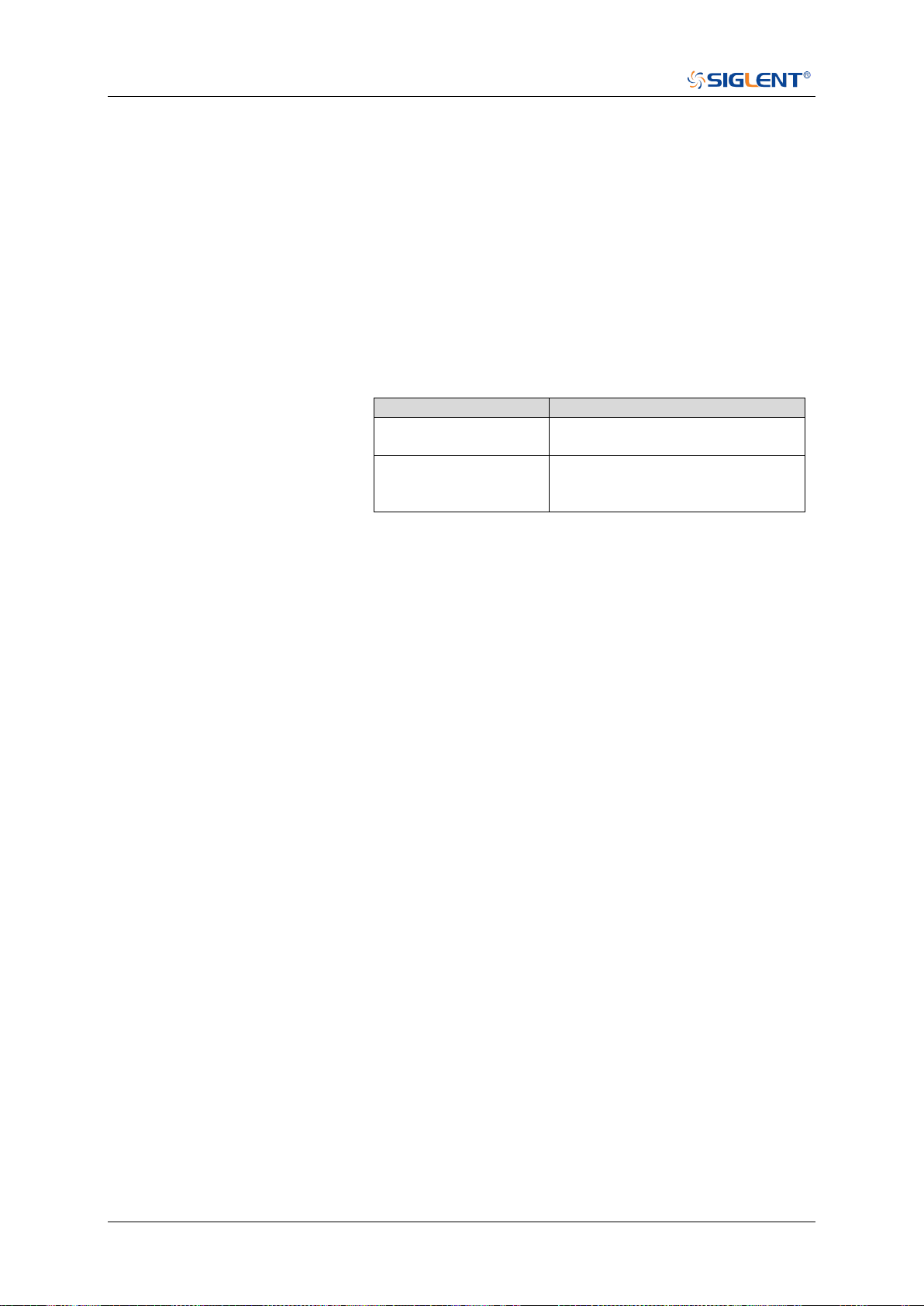
SDS Series Programming Guide
548 / 642 www.siglent.com
:TRIGger:IIS:WSTHreshold
Command/Query
DESCRIPTION
The command sets the threshold of the WS on IIS bus trigger.
The query returns the current threshold of the WS on IIS bus
trigger.
COMMAND SYNTAX
:TRIGger:IIS:WSThreshold <value>
<value>:= Value in NR3 format, including a decimal point and
exponent, like 1.23E+2.
The range of the value varies by model, see the table below for
details.
Model
Value Range
SDS6000 Pro/SDS6000A
[-4.5*vertical_scale-vertical_offset,
4.5*vertical_scale-vertical_offset]
SDS5000X
SDS2000X Plus
SDS2000X HD
[-4.1*vertical_scale-vertical_offset,
4.1*vertical_scale-vertical_offset]
QUERY SYNTAX
:TRIGger:IIS:WSThreshold?
RESPONSE FORMAT
<value>
<value>:= Value in NR3 format.
EXAMPLE
The following command sets the threshold of the WS on IIS
bus trigger to 1.5 V.
Command message:
:TRIGger:IIS:WSThreshold 1.50E+00
TRIG:IIS:WST 1.50E+00
Query message:
TRIG:IIS:WST?
Response message:
1.50E+00
RELATED COMMANDS
:TRIGger:IIS:WSSource

SDS Series Programming Guide
www.siglent.com 549 / 642
WAVeform Commands
The WAVEFORM subsystem is used to transfer data to a controller from the oscilloscope
waveform memory.
The waveform record is actually contained in two portions: the preamble and waveform data. The
waveform record must be read from the oscilloscope by the controller using two separate
commands. The waveform data is the actual data acquired for each point in the specified source.
The preamble contains the information for interpreting the waveform data.
:WAVeform:DATA
:WAVeform:INTerval
:WAVeform:MAXPoint
:WAVeform:POINt
:WAVeform:PREamble
:WAVeform:SEQuence
:WAVeform:SOURce
:WAVeform:STARt
:WAVeform:WIDTh

SDS Series Programming Guide
550 / 642 www.siglent.com
:WAVeform:SOURce
Command/Query
DESCRIPTION
The command specifies the source waveform to be transferred
from the oscilloscope using the query :WAVeform:DATA?
The query returns the source waveform to be transferred from
the oscilloscope.
COMMAND SYNTAX
:WAVeform:SOURce <source>
<source>:= {C<x>|F<x>|D<m>}
<x>:= 1 to (# analog channels) in NR1 format, including an
integer and no decimal point, like 1.
<m>:= 0 to (# digital channels - 1) in NR1 format, including an
integer and no decimal point, like 1.
QUERY SYNTAX
:WAVeform:SOURce?
RESPONSE FORMAT
<source>
<source>:= {C<x>|F<x>|D<m>}
<x>:= 1 to (# analog channels) in NR1 format, including an
integer and no decimal point, like 1.
<m>:= 0 to (# digital channels - 1) in NR1 format, including an
integer and no decimal point, like 1.
EXAMPLE
The following command specifies that the Channel 2 waveform
will be transferred in the next :WAVeform:DATA? query
or :WAVeform:PREamble? query.
Command message:
:WAVeform:SOURce C2
WAV:SOUR C2
Query message:
WAV:SOUR?
Response message:
C2
RELATED COMMANDS
:WAVeform:DATA
:WAVeform:PREamble

SDS Series Programming Guide
www.siglent.com 551 / 642
:WAVeform:STARt
Command/Query
DESCRIPTION
The command specifies the starting data point for waveform
transfer using the query :WAVeform:DATA?.
The query returns the starting data point for waveform
transfer.
COMMAND SYNTAX
:WAVeform:STARt <value>
<value>:= Value in NR1 format, including an integer and no
decimal point, like 1.
Note:
The value range is related to the current waveform point and
the value set by the command :WAVeform:POINt.
QUERY SYNTAX
:WAVeform:STARt?
RESPONSE FORMAT
<value>
<value>:= Value in NR1 format, including an integer and no
decimal point, like 1.
EXAMPLE
The following command sets the start point to 1000 when the
current waveform point is 400 kpts.
Command message:
:WAVeform:STARt 1000
WAV:STAR 1000
Query message:
WAV:STAR?
Response message:
1000
RELATED COMMANDS
:WAVeform:POINt

SDS Series Programming Guide
552 / 642 www.siglent.com
:WAVeform:INTerval
Command/Query
DESCRIPTION
The command sets the interval between data points for
waveform transfer using the query :WAVeform:DATA?
The query returns the interval between data points for
waveform transfer.
COMMAND SYNTAX
:WAVeform:INTerval <value>
<value>:= Value in NR1 format, including an integer and no
decimal point, like 1.
Note:
The value range is related to the values set by the
command :WAVeform:POINt and :WAVeform:STARt.
QUERY SYNTAX
:WAVeform:INTerval?
RESPONSE FORMAT
<value>
<value>:= Value in NR1 format, including an integer and no
decimal point, like 1.
EXAMPLE
The following command sets the interval between data points
for waveform transfer to 200.
Command message:
:WAVeform:INTerval 200
WAV:INT 200
Query message:
WAV:INT?
Response message:
200
RELATED COMMANDS
:WAVeform:STARt
:WAVeform:POINt

SDS Series Programming Guide
www.siglent.com 553 / 642
:WAVeform:POINt
Command/Query
DESCRIPTION
The command sets the number of waveform points to be
transferred with the query :WAVeform:DATA?
The query returns the number of waveform points to be
transferred.
COMMAND SYNTAX
:WAVeform:POINt <value>
<value>:= Value in NR1 format, including an integer and no
decimal point, like 1.
Note:
The value range is related to the current waveform point.
QUERY SYNTAX
:WAVeform:POINt?
RESPONSE FORMAT
<value>
<value>:= Value in NR1 format, including an integer and no
decimal point, like 1.
EXAMPLE
The following command the number of waveform points to be
transferred to 2000 pts.
Command message:
:WAVeform:POINt 20000
WAV:POIN 20000
Query message:
WAV:POIN?
Response message:
20000
RELATED COMMANDS
:ACQuire:POINts

SDS Series Programming Guide
554 / 642 www.siglent.com
:WAVeform:MAXPoint
Query
DESCRIPTION
The query returns the maximum points of one piece, when it
needs to read the waveform data in pieces.
QUERY SYNTAX
:WAVeform:MAXPoint?
RESPONSE FORMAT
<value>
<value>:= Value in NR1 format, including an integer and no
decimal point, like 1.
EXAMPLE
The following return the maximum points of one piece in
SDS2000X Plus series.
Query message:
:WAV:MAXPoint?
Response message:
10000000

SDS Series Programming Guide
www.siglent.com 555 / 642
:WAVeform:WIDTh
Command/Query
DESCRIPTION
The command sets the current output format for the transfer
of waveform data.
The query returns the current output format for the transfer of
waveform data.
COMMAND SYNTAX
:WAVeform:WIDTh <type>
<type>:= {BYTE|WORD}
WORD formatted data transfers 16-bit data as two bytes,
and the upper byte is transmitted first.
BYTE formatted data is transferred as 8-bit bytes.
Note:
When the vertical resolution is set to 10 bit or the ADC bit is
more than 8bit, it must to use the command to set to WORD
before transferring waveform data.
QUERY SYNTAX
:WAVeform:WIDTh?
RESPONSE FORMAT
<type>
<type>:= {BYTE|WORD}
EXAMPLE
The following command sets the current output format for the
transfer of waveform data to BYTE.
Command message:
:WAVeform:WIDTh BYTE
WAV:WIDT BYTE
Query message:
WAV:WIDT?
Response message:
BYTE
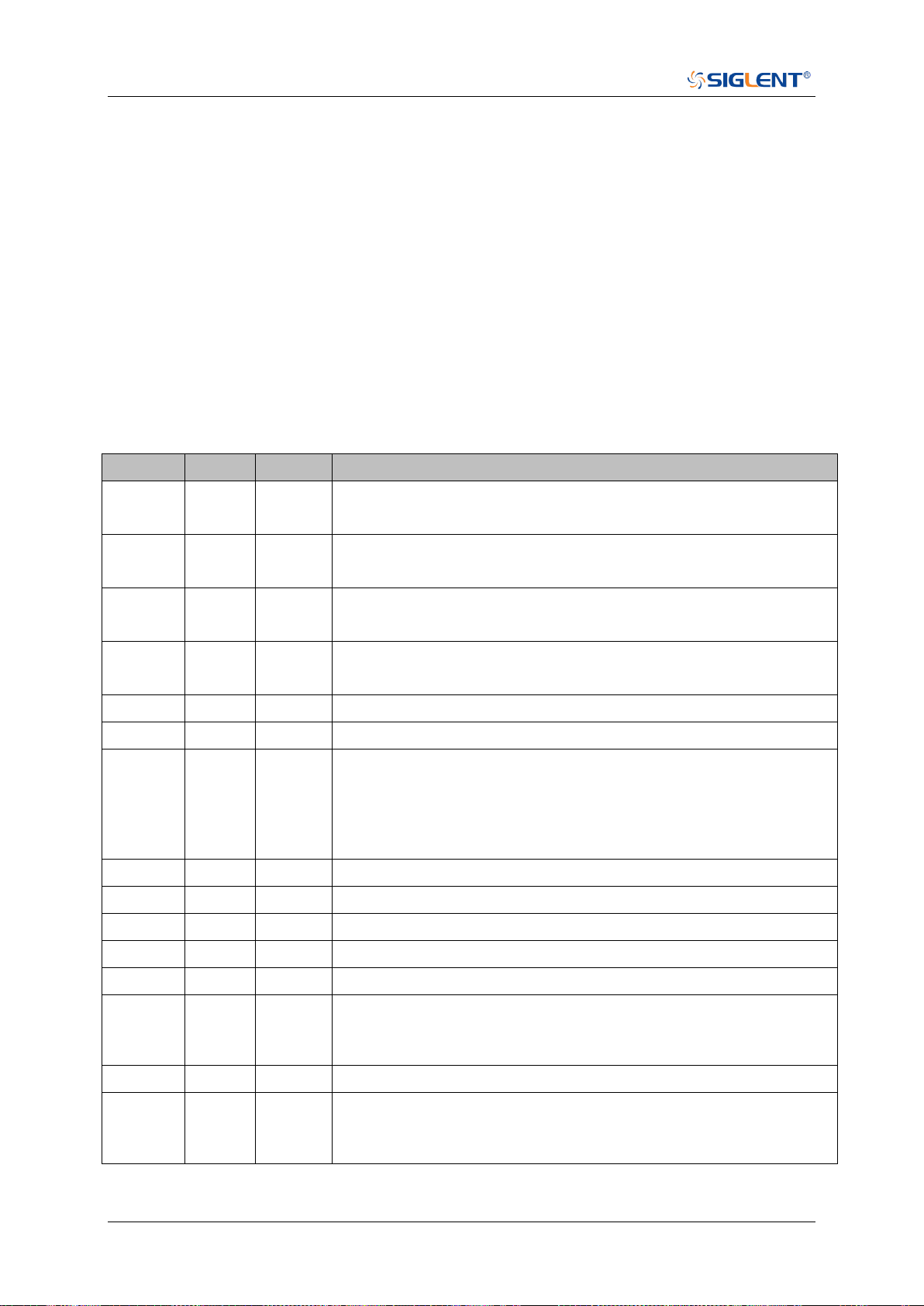
SDS Series Programming Guide
556 / 642 www.siglent.com
:WAVeform:PREamble
Query
DESCRIPTION
The query returns the parameters of the source using by the
command :WAVeform:SOURce.
QUERY SYNTAX
:WAVeform:PREamble?
RESPONSE FORMAT
<bin>
<bin>:= binary data block headed " #9<9-Digits>”. See the
table below for details.
RELATED COMMANDS
:WAVeform:SOURce
Table 1 Explanation of the descriptor block
(The first byte after "#9<9-digits>" is the starting position)
Address
Type
Length
Description
0~15
char
16
Descriptor name. It is string, the first 8 chars are always
“WAVEDESC”
16~31
char
16
Template name. It is string, the first 7 chars are always
“WAVEACE”.
32~33
short
2
COMM_TYPE. It is chosen by remote command comm_format. 0 -
byte, 1- word. Default value is 0.
34~35
short
2
COMM_ORDER. It is chosen by remote command comm_format. 0
- LSB, 1- MSB. Default value is 0.
36~39
long
4
wave_desc_length. Length in bytes of block WAVEDESC. (346)
40~59
long
4*5
Reserved
60~63
long
4
WAVE_ARRAY_1. Length in bytes of 1st simple data array. In
transmitted waveform, represent the number of transmitted bytes in
accordance with the parameter of the :WAVeform:POINt remote
command and the used format (see COMM_TYPE). Only for analog
channel.
64~75
long
4*3
Reserved
76~91
char
16
Instrument name. It is string, always “Siglent SDS”.
92~95
long
4
Reserved
96~111
char
16
Reserved
112~115
long
4
Reserved
116~119
long
4
Wave array count. Number of data points in the data array. Only for
analog channel. When sequence is on, this value means the points
number of single sequence frame.
120~131
long
4*3
Reserved
132~135
long
4
First point. Indicates the offset relative to the beginning of the trace
buffer. Value is the same as the parameter of
the :WAVeform:STARt remote command.
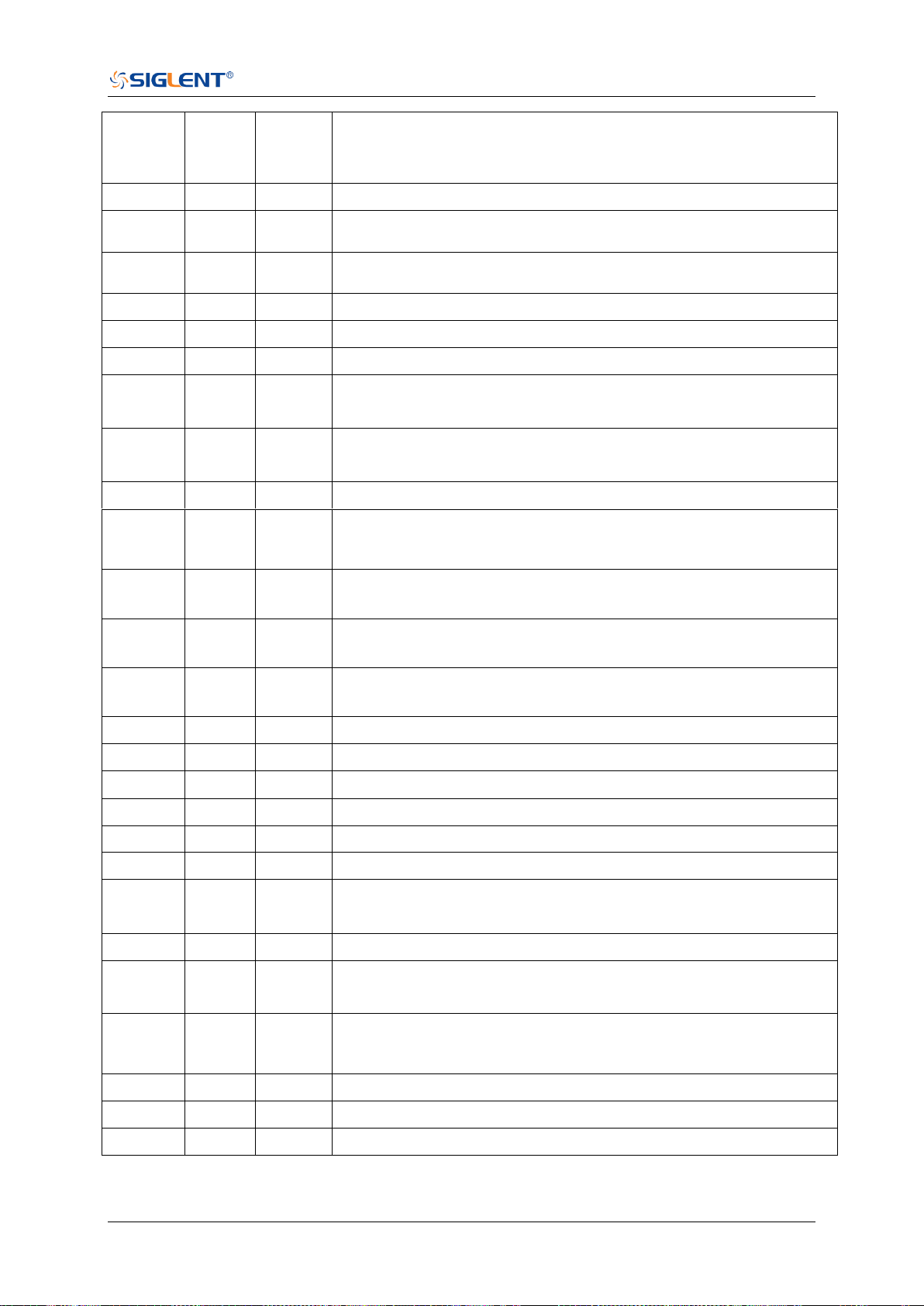
SDS Series Programming Guide
www.siglent.com 557 / 642
136~139
long
4
Data interval. Indicates the interval between data points for
waveform transfer. Value is the same as the parameter of
the :WAVeform:INTerval remote command.
140~143
long
4
Reserved
144~147
long
4
read_frames, number of sequence frames transferred this time.
Used to calculate the reading times of sequence waveform
148~151
long
4
sum_frames, number of sequence frames acquired. Used to
calculate the reading times of sequence waveform
152~155
short
2*2
Reserved
156~159
float
4
Vertical gain. The value of vertical scale without probe attenuation.
160~163
float
4
Vertical offset. The value of vertical offset without probe attenuation.
164~167
float
4
code_per_div. The value is different for different vertical gain of
different models
168~171
float
4
Reserved
172~173
short
2
Adc_bit
174~175
short
2
The specified frame index of sequence set by the parameter
<value1> of the command :WAVeform:SEQuence. Default Value is
1
176~179
float
4
Horizontal interval. Sampling interval for time domain waveforms.
Horizontal interval = 1/sampling rate.
180~187
long
double
8
Horizontal offset. Trigger offset for the first sweep of the trigger,
seconds between the trigger and the first data point. Unit is s.
188~195
long
double
8
Reserved
196~243
char
48
Reserved
244~291
char
48
Reserved
292~295
float
4
Reserved
296~311
struct
16
Reserved
312~315
float
4
Reserved
316~323
short
2*4
Reserved
324~325
short
2
Time_base. This is the enumerated time/div. see the Table 2 for
details.
326~327
short
2
Vertical coupling. 0-DC,1-AC,2-GND
328~331
float
4
Probe attenuation.
332~333
short
2
Fixed vertical gain. This is the enumerated vertical scale. This value
is not intuitive, and the vertical scale is usually represented by the
value of address 156~159
334~335
short
2
Bandwidth limit. 0-OFF,1-20M,2-200M
336~343
float
4*2
Reserved
344~345
short
2
Wave source. 0-C1,1-C2,2-C3,3-C4
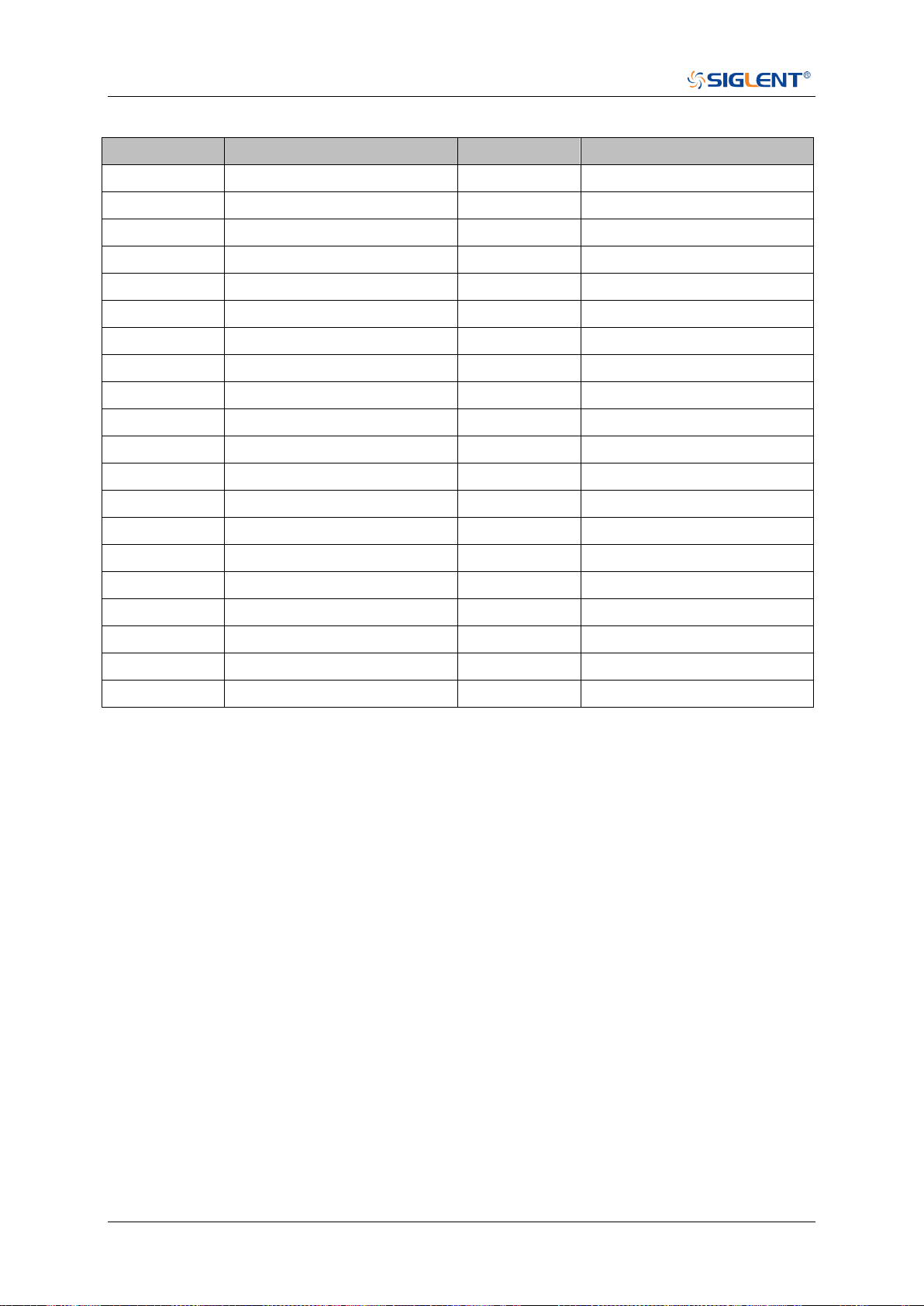
SDS Series Programming Guide
558 / 642 www.siglent.com
Table 2 Enum of Timebase
Index
Timebase (s)
Index
Timebase(s)
0
200E-12
20
1E-3
1
500E-12
21
2E-3
2
1E-9
22
5E-3
3
2E-9
23
10E-3
4
5E-9
24
20E-3
5
10E-9
25
50E-3
6
20E-9
26
100E-3
7
50E-9
27
200E-3
8
100E-9
28
500E-3
9
200E-0
29
1
10
500E-9
30
2
11
1E-6
31
5
12
2E-6
32
10
13
5E-6
33
20
14
10E-6
34
50
15
20E-6
35
100
16
50E-6
36
200
17
100E-6
37
500
18
200E-6
38
1000
19
500E-6
Note: Different models have different time base enumeration
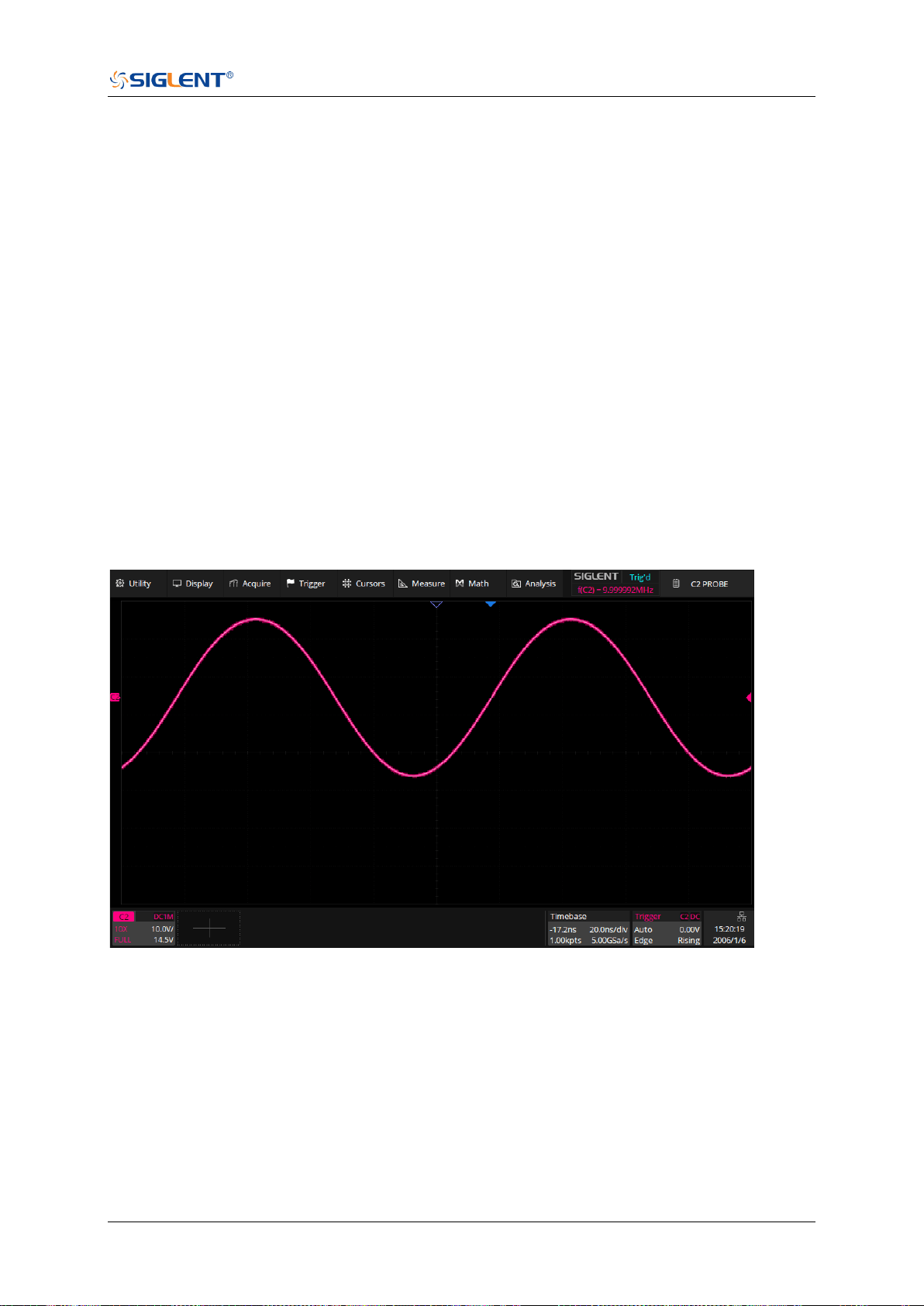
SDS Series Programming Guide
www.siglent.com 559 / 642
:WAVeform:DATA
Query
DESCRIPTION
The query returns the waveform data of the source using by
the command :WAVeform:SOURce to be transferred from
the oscilloscope.
QUERY SYNTAX
:WAVeform:DATA?
RESPONSE FORMAT
<waveform_data>
<waveform_data>:=binary data block headed " #9<9-Digits>”
RELATED COMMANDS
:WAVeform:STARt
:WAVeform:INTerval
:WAVeform:POINt
:WAVeform:MAXPoint
:WAVeform:WIDTh
EXAMPLE
For SDS5000X series, the following steps show how to use
the command to reconstitute the display of waveform.
For analog channel waveform and math waveform (except for FFT):
Step 1: Send the commands to get the data of waveform.
Command message:
:WAVeform:SOURce C2
:WAVeform:DATA?
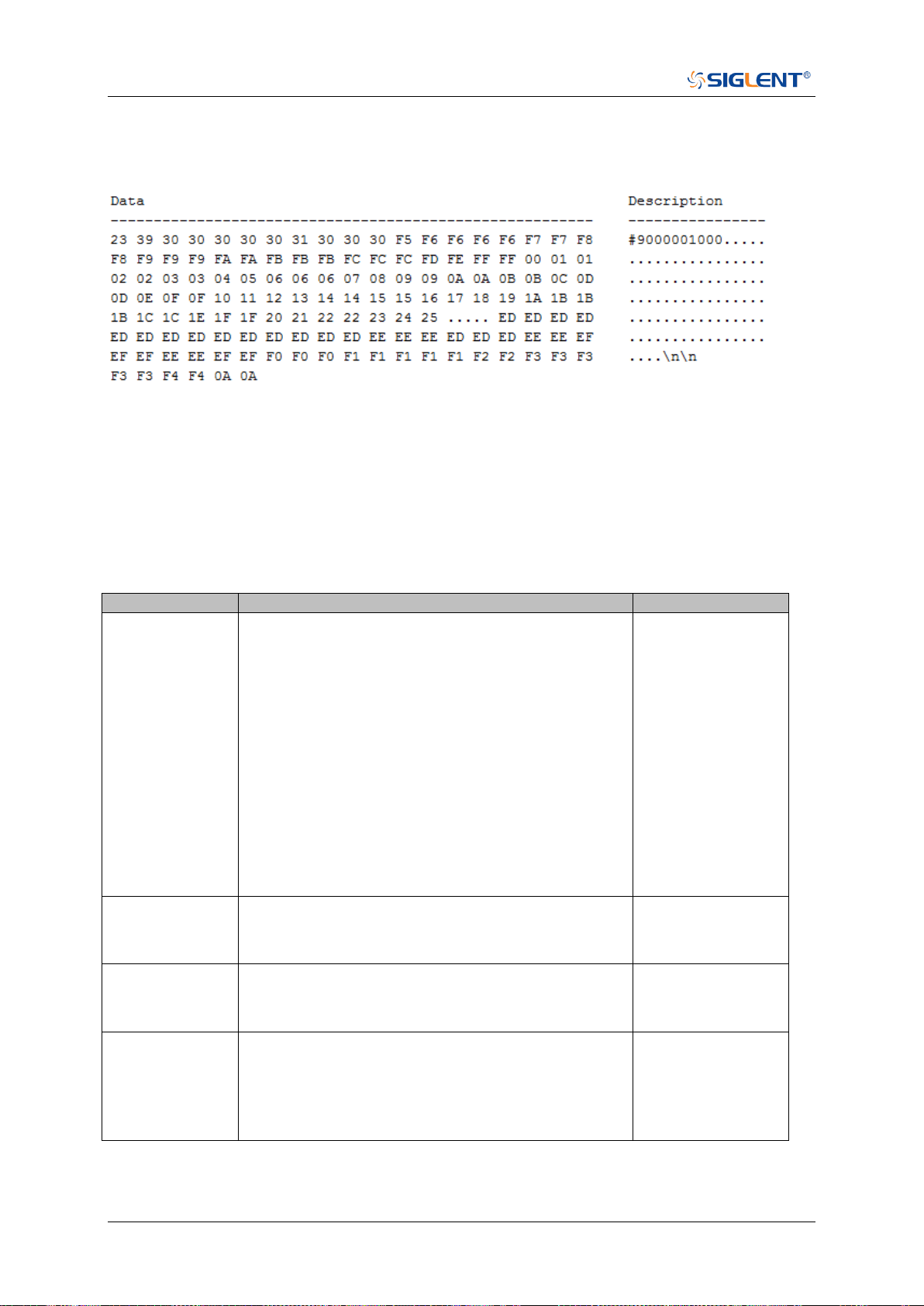
SDS Series Programming Guide
560 / 642 www.siglent.com
Response message:
The header is “#9000001000” which nine ASCII integers are used to give the number of the
waveform data points (1000 pts). After the header of block, is beginning of the wave data, and
the last two bytes “0A 0A” means the end of data.
Step 2: Send the query to get the parameters of waveform.
Query message:
:WAVeform:PRE?
For parameter parsing, see the section of the query. Through the query, we can get the vertical
scale is 10 V/div, the vertical offset is 14.5 V, the timebase is 20E-9 s, the trigger delay is
1.72E-8 s, and the sampling interval is 2E-10 s.
Step 3: Calculate the voltage value corresponding to the data point.
Using the formula: voltage value (V) = code value *(vdiv /code_per_div) - voffset.
Parameter
Description
Example above
code value
Signed number of wave data. For python, if the
code value is greater than the center code, you
need to convert to signed number by subtracting
the full code. Get the center and full code by
referring to the Table 1 below.
If the vertical resolution of the model is greater
than 8bit, the code value is a word in LSB byte
order by the command :WAVeform:WIDTh. The
data is left aligned, and the lower bit is zero filled.
For SDS6000 Pro, 12bit data is used for 12bit and
10bit models, but the ADC range is different.
( “0x90 0x35”->0x359->857)
The first point is
the 17th data
“F5”, convert to
decimal is “-11”
vdiv
The vertical scale.
It is the value with address 156~159 in the data
block returned by the :WAVeform:PREamble?
10
voffset
The vertical position value.
It is the value with address 160~163 in the data
block returned by the :WAVeform:PREamble?
14.5
code_per_div
Code value per division in vertical direction.
It is the value with address 164~167 in the data
block returned by the :WAVeform:PREamble?
You also can get the value by referring to the
Table 1 below
30
The picture above as an example:
The first point: voltage value = -11*(10/30)-(14.5) = -18.167 V.
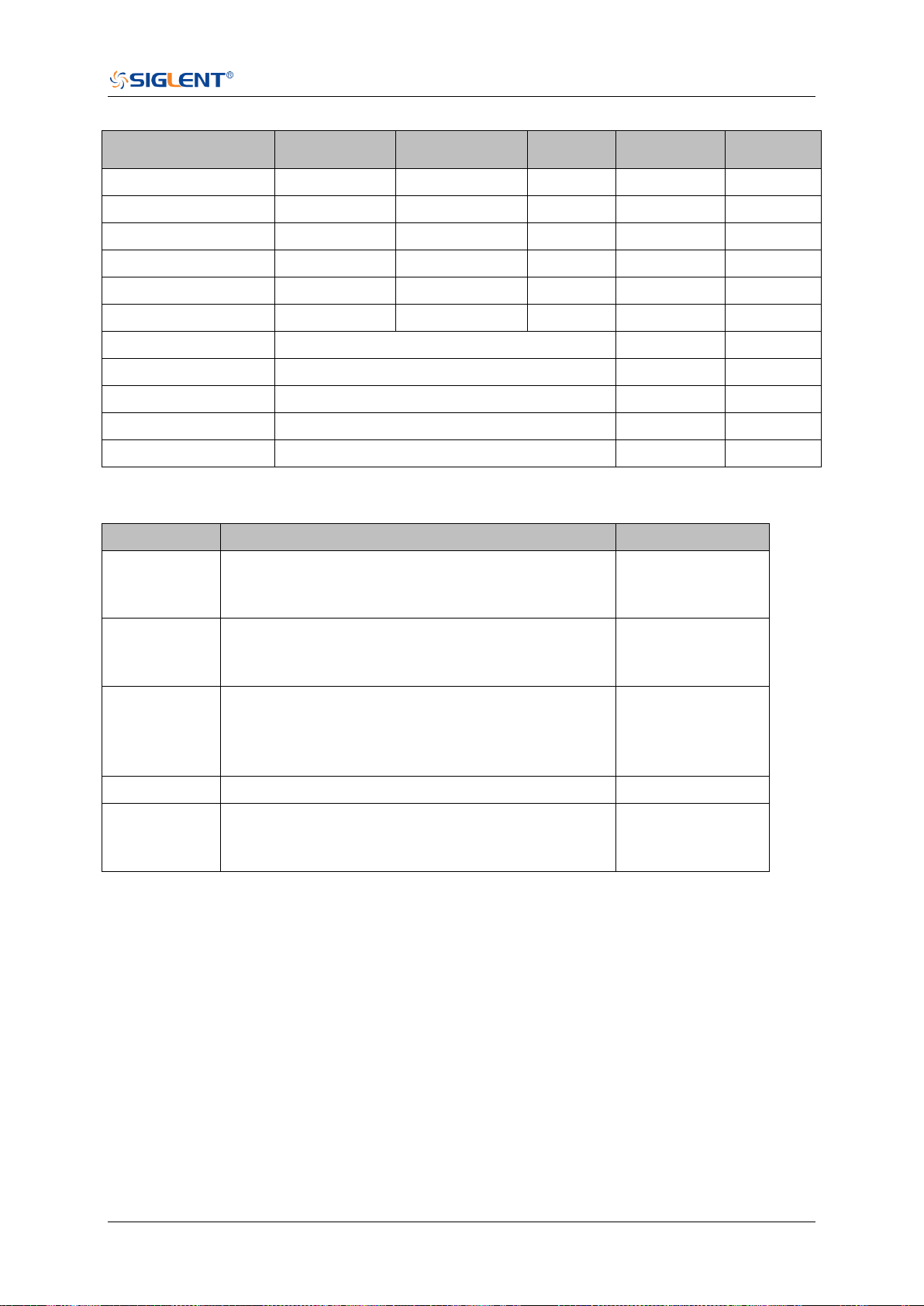
SDS Series Programming Guide
www.siglent.com 561 / 642
Table 1 Code_per_div/Center Code/Full Code of Models
Model
(,500E-6]
[1E-3,10E-3]
( ,10]
Center
Code
Full
Code
SDS6104 H12 Pro
1700/8
425
425
2047
4096
SDS6104 H10 Pro
680/8
170
255
2047
4096
SDS6104A
510/8
1020/8
170
2047
4096
SDS6204 H12 Pro
1020/8
255
425
2047
4096
SDS6204 H10 Pro
680/8
170
255
2047
4096
SDS6204A
510/8
1020/8
170
2047
4096
SDS5000X
30
127
256
SDS2000X Plus
30
127
256
SHS800X
25
127
256
SHS1000X
25
127
256
SDS2000X HD
480
2047
4096
Step 4: Calculate the time value of the data point.
Using the formula: time value(S) = -delay-(timebase*grid/2)*index*interval
Parameter
Description
Example above
timebase
The horizontal scale.
It is the value with address 324~325 in the data
block returned by the :WAVeform:PREamble?
2E-8
delay
The horizontal position value.
It is the value with address 180~187 in the data
block returned by the :WAVeform:PREamble?
1.72E-8
grid
The grid numbers in horizontal direction.
SDS6000 Pro/SDS6000A/SDS5000X/SDS2000X
Plus/SDS2000X HD:10
SHS800X/SHS1000X:12
10
index
The index of the data. The first point is 0.
--
interval
Sampling interval.
It is the value with address 176~179 in the data
block returned by the :WAVeform:PREamble?
2E-10
The picture above as an example:
The first data point: time value = -1.72E-8-(2E-08*10/2) = -1.172E-07 s = -117.2 ns.
The second data point: time value = -117.2 ns + 0.2ns = -117 ns.
Use python to reconstruct the waveform: (See the code in Read Waveform Data Example)
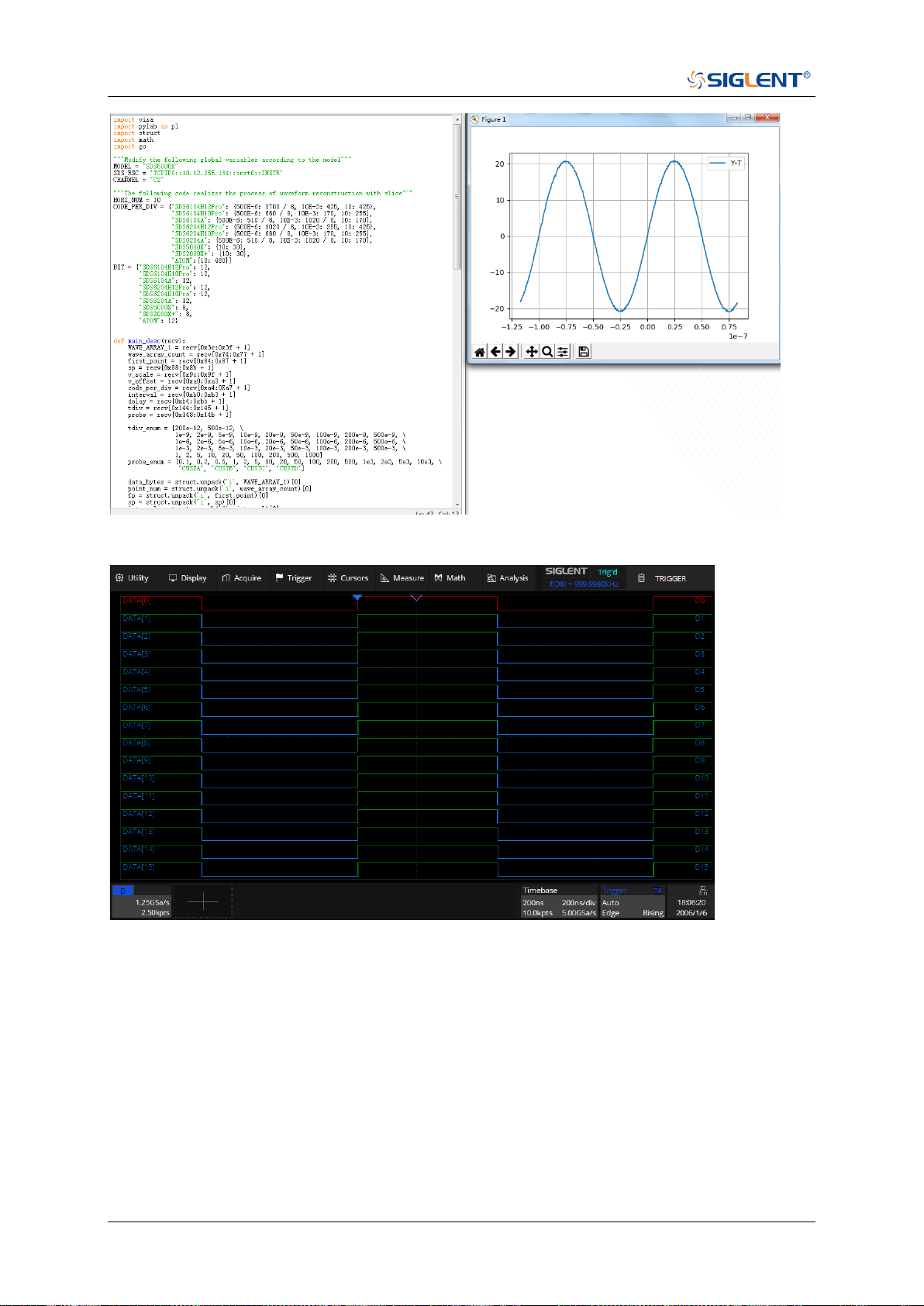
SDS Series Programming Guide
562 / 642 www.siglent.com
For digital channel waveform:
Step 1: Send the commands to get the data of waveform.
Command message:
:WAVeform:SOURce D0
:WAVeform:DATA?
Response message:
The header is “#9000002500” which nine ASCII integers are used to give the number of the
waveform data points (2500 pts). After the header of block, is beginning of the wave data. For
digital, one bit represents a data point, if the number of points is not an integer multiple of 8, the
byte less than 8 bits will be filled with 0. So there are 313 bytes. The last two bytes “0A 0A”
means the end of data.
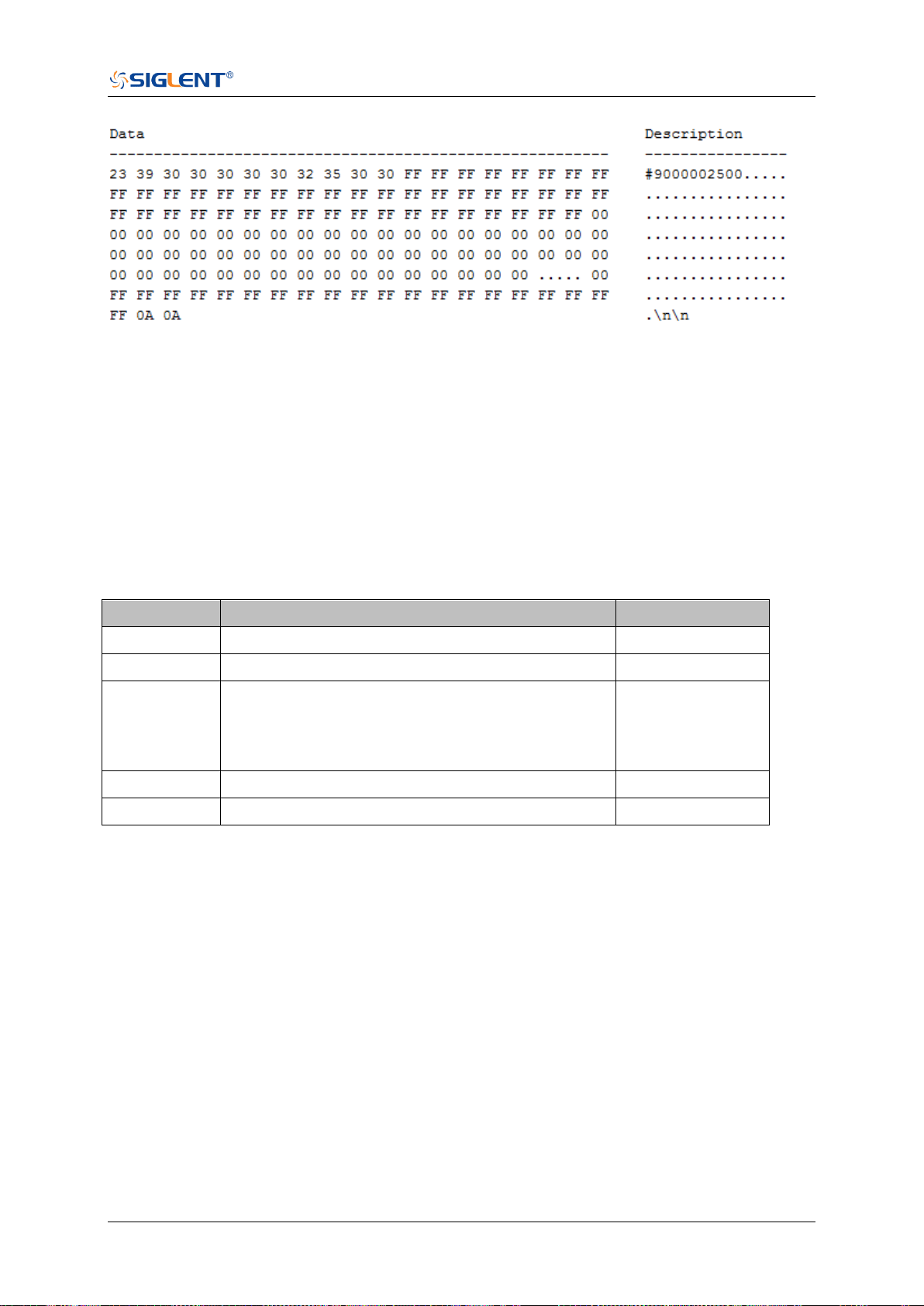
SDS Series Programming Guide
www.siglent.com 563 / 642
Step 2: Send the query to get the parameters of waveform.
Query message:
:WAVeform:PRE?
For parameter parsing, see the section of the query. Through the query, we can get the
timabase is 2E-7 s, the trigger delay is -2E-7 s, and the sampling interval is 2E-10 s.
Step 3: Covert to the high (1) and low (0) corresponding to the data point.
According to the wave data, we can know the first eight points of waveform is the 17th byte “FF”,
convert to binary is “11111111” (Hexadecimal converted to binary (LSB)).
Step 4: Calculate the time value of the data point.
Using the formula: time value(S) = -delay-(timebase*grid/2)*index*interval
Parameter
Description
Example above
timebase
The horizontal scale.
2E-7
delay
The voltage position value.
-2E-7
grid
The grid numbers in horizontal direction.
SDS6000 Pro/SDS6000A/SDS5000X/SDS2000X
Plus/SDS2000X HD:10
SHS800X/SHS1000X:12
10
index
The index of the data. The first point is 0.
--
interval
Sampling interval.
8E-10
The picture above as an example:
The first data point: time value = 2E-7-(2E-7*10/2) = -8E-07 s = -800 ns.
The second data point: time value = -800 ns+0.8 ns = -799.2 ns.
Use python to reconstruct the waveform: (See the code in Read Waveform Data of Digital
Example)
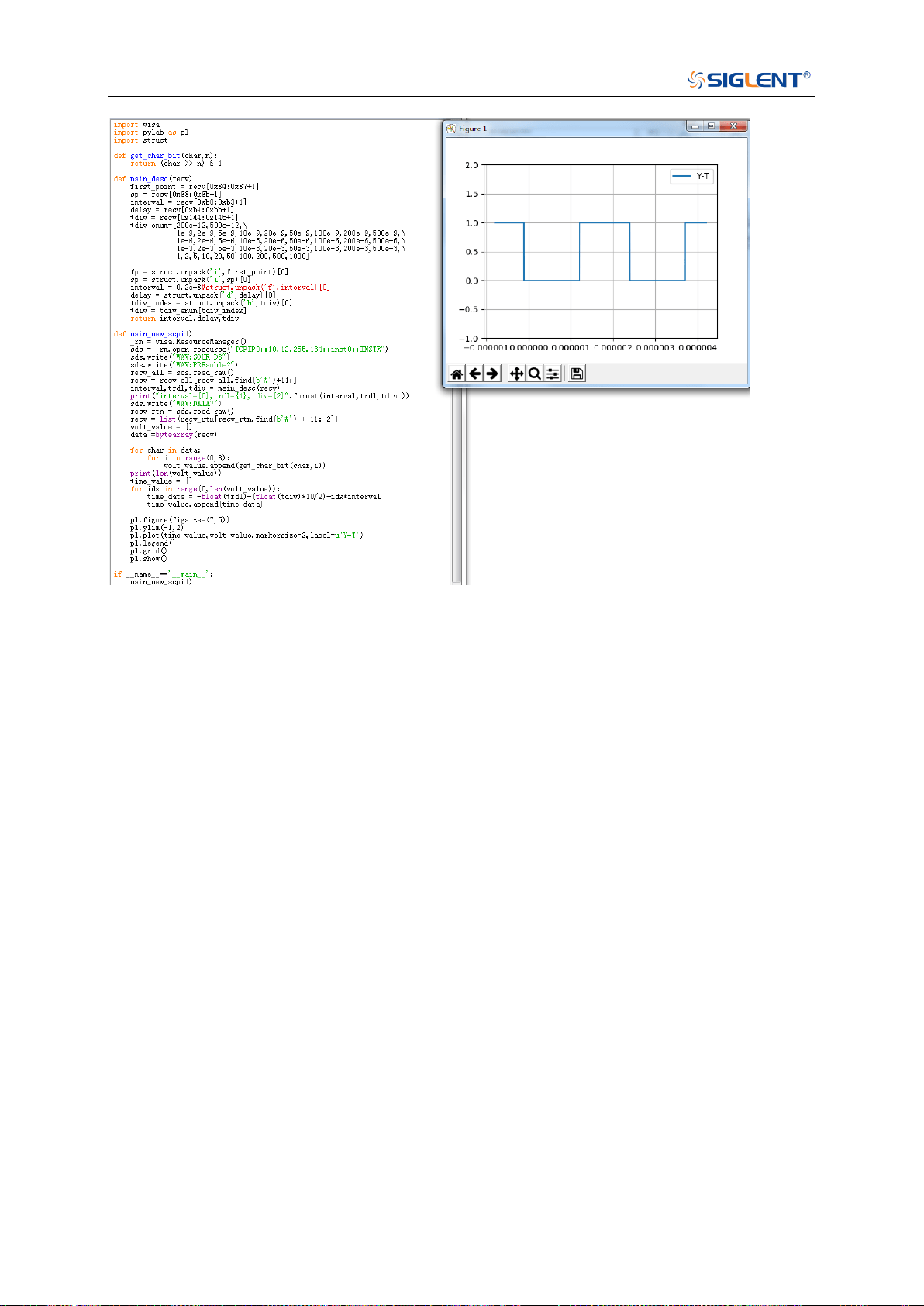
SDS Series Programming Guide
564 / 642 www.siglent.com

SDS Series Programming Guide
www.siglent.com 565 / 642
:WAVeform:SEQuence
Command/Query
DESCRIPTION
This command is used to set the sequence waveform frame to
be read. Valid only when sequnce is on.
The query returns the index of sequence frame to be transferred.
COMMAND SYNTAX
:WAVeform:SEQuence <value1>,<value2>
<value1>:= Value in NR1 format, including an integer and no
decimal point, like 1.
It sets the index of sequence frame to be transferred with the
query :WAVeform:DATA?. When set to 0, all sequence frames
are returned and the query :WAVeform:DATA? will transfer as
much sequence frames as it can transfer at once.
<value2>:= Value in NR1 format, including an integer and no
decimal point, like 1.
It sets the start index of sequence frame to be transferred with
the query :WAVeform:DATA? This value is valid when <value1>
is set to 0.
Due to the memory limitation, when the number of all frames
exceeds the limit, it is necessary to read by slice through
<value2>. The number of slices can be calculated by
read_frames (0x90-0x93) and sum_frames(0x94-0x97) in the
query :WAVeform:PREamble?
Note:
When sequence is enabled, <value1> will be set to 1 by
default;when sequence and history are enabled, <value1>
will be set to the current frame by default. In other cases,
<value1> is set to 4294967295 by default.
The value range is related to the current sequence number.
QUERY SYNTAX
:WAVeform:SEQuence?
RESPONSE FORMAT
<value1>,<value2>
<value1>:= Value in NR1 format, including an integer and no
decimal point, like 1.
<value2>:= Value in NR1 format, including an integer and no
decimal point, like 1.
EXAMPLE
After 5 frames are acquired in sequence mode, and history is
enabled, there are 10 kpts per frame, totaling 50 kpts. After
sending the following command, all segments can be read at
one time through the query :WAVeform:DATA?.
Command message:
:WAVeform:SEQuence 0,1
WAV:SEQ 0,1
Query message:
WAV:SEQ?


SDS Series Programming Guide
www.siglent.com 567 / 642
WGEN Commands
When the oscilloscope supports the function generator module (built-in waveform generator or
SAG1021I) and is licensed (Option FG), you can output sine, square, ramp, pulse, DC, noise,
exponential rise, exponential fall, cardiac, Gaussian pulse and arbitrary waveforms. The WGEN
commands are used to select the waveform function and parameters.
The WGEN commands are the same as that of Siglent SDG series, so the format is not consistent
with other groups. Refer to SDG programming guide for details.
ARbWaVe
BaSic_WaVe
OUTPut
SToreList
SYNC
VOLTPRT
SDS Series Programming Guide
568 / 642 www.siglent.com
ARbWaVe
Command/Query
DESCRIPTION
This command sets or gets the basic wave parameters.
COMMAND SYNTAX
<channel>:ARbWaVe INDEX,<index>
<channel>:ARbWaVe NAME,<name>
<channel>:={C1}, SAG and the built-in waveform generator
only support one output channel.
<index>:= the index of the arbitrary waveform from the table
below.
<name>:= the name of the arbitrary waveform from the table
below.
Note:
This table is just an example, the index depends on the specific
model. The “STL?” query can be used to get the accurate
mapping relationship between the index and name.
Index
Name
Index
Name
Index
Name
Index
Name
0
Sine
12
Logfall
24
Gmonopuls
36
Triang
1
Noise
13
Logrise
25
Tripuls
37
Harris
2
StairUp
14
Sqrt
26
Cardiac
38
Bartlett
3
StairDn
15
Root3
27
Quake
39
Tan
4
Stairud
16
X^2
28
Chirp
40
Cot
5
Ppulse
17
X^3
29
Twotone
41
Sec
6
Npulse
18
Sinc
30
Snr
42
Csc
7
Trapezia
19
Gaussian
31
Hamming
43
Asin
8
Upramp
20
Dlorentz
32
Hanning
44
Acos
9
Dnramp
21
Haversine
33
Kaiser
45
Atan
10
Exp_fall
22
Lorentz
34
Blackman
46
Acot
11
Exp_rise
23
Gauspuls
35
Gausswin
47
Square
QUERY SYNTAX
<channel>:ARbWaVe?
<channel>:= {C1}
RESPONSE FORMAT
<channel>:ARWV
INDEX,<index>,NAME,<name>
RELATED COMMANDS
SToreList

SDS Series Programming Guide
www.siglent.com 569 / 642
EXAMPLE
Set CH1 current waveform by index 2:
C1:ARWV INDEX,2
Read CH1 current waveform:
C1:ARWV?
Return:
C1:ARWV INDEX,2,NAME,StairUp
Set CH1 current waveform to wave_1 by name.
C1:ARWV NAME,wave_1
SDS Series Programming Guide
570 / 642 www.siglent.com
BaSic_WaVe
Command/Query
DESCRIPTION
This command sets or gets the basic wave parameters.
COMMAND SYNTAX
<channel>:BaSic_WaVe <parameter>,<value>
<channel>:={C1}, SAG and the built-in waveform generator
only support one output channel.
<parameter>:= a parameter from the table below.
<value>:= value of the corresponding parameter.
Parameters
Value
Description
WVTP
<type>
:= {SINE, SQUARE, RAMP, PULSE, NOISE, ARB, DC,
PRBS, IQ}. If the command doesn’t set basic waveform
type, WVPT will be set to the current waveform.
FRQ
<frequency>
:= frequency. The unit is Hertz “Hz”. Refer to the data
sheet for the range of valid values. Not valid when WVTP
is NOISE or DC.
PERI
<period>
:= period. The unit is seconds "s". Refer to the data sheet
for the range of valid values. Not valid when WVTP is
NOISE or DC.
AMP
<amplitude>
:= amplitude. The unit is volts, peak-to-peak "Vpp". Refer
to the data sheet for the range of valid values. Not valid
when WVTP is NOISE or DC.
OFST
<offset>
:= offset. The unit is volts "V". Refer to the data sheet for
the range of valid values. Not valid when WVTP is
NOISE.
SYM
<symmetry>
:= {0 to 100}. Symmetry of RAMP. The unit is "%". Only
settable when WVTP is RAMP.
DUTY
<duty>
:= {0 to 100}. Duty cycle. The unit is "%". Value depends
on frequency. Only settable when WVTP is SQUARE or
PULSE.
STDEV
<stdev>
:= standard deviation of NOISE. The unit is volts "V".
Refer to the data sheet for the range of valid values. Only
settable when WVTP is NOISE.
MEAN
<mean>
:= mean of NOISE. The unit is volts "V". Refer to the data
sheet for the range of valid values. Only settable when
WVTP is NOISE.
WIDTH
<width>
:= positive pulse width. The unit is seconds "s". Refer to
the data sheet for the range of valid values. Only settable
when WVTP is PULSE.

SDS Series Programming Guide
www.siglent.com 571 / 642
QUERY SYNTAX
<channel>: BaSic_WaVe?
<channel>:= {C1}
RESPONSE FORMAT
<channel>:BSWV <parameter>
<parameter>:= All the parameters of the current basic
waveform.
EXAMPLE
Change the waveform type of C1 to Ramp:
C1:BSWV WVTP,RAMP
Change the frequency of C1 to 2000 Hz:
C1:BSWV FRQ,2000
Set the amplitude of C1 to 3 Vpp:
C1:BSWV AMP,3
Return parameters of C1 from the device:
C1:BSWV?
Return:
C1:BSWV
WVTP,SINE,FRQ,100HZ,PERI,0.01S,AMP,2V,OFST,0V,
HLEV,1V,LLEV,-1V,PHSE,0

SDS Series Programming Guide
572 / 642 www.siglent.com
OUTPut
Command/Query
DESCRIPTION
This command enables or disables the output port(s) at the
front panel. The query returns “ON” or “OFF” and “LOAD”,
“PLRT”, “RATIO” parameters.
COMMAND SYNTAX
<channel>:OUTPut <state>,LOAD,<load>
<channel>:= {C1}, SAG and the built-in waveform generator
only support one output channel.
<state>:= {ON|OFF}
<load>:= {50|HZ}. The unit is ohm.
QUERY SYNTAX
<channel>:OUTPut?
RESPONSE FORMAT
<channel>:OUTP <state>,LOAD,<load>,PLRT,<polarity>
<state>:= {ON|OFF}
<load>:= {50|HZ}
<polarity>:= {NOR|INVT}, in which NOR refers to normal, and
INVT refers to invert. SAG and the built-in waveform
generator only support to set to NOR.
EXAMPLE
Turn on CH1:
C1:OUTP ON
Read CH1 output state:
C1:OUTP?
Return:
C1:OUTP ON,LOAD,HZ,PLRT,NOR
Set the load of CH1 to 50 ohm:
C1:OUTP LOAD,50
Set the load of CH1 to HiZ:
C1:OUTP LOAD,HZ

SDS Series Programming Guide
www.siglent.com 573 / 642
SToreList
Query
DESCRIPTION
This query is used to read the stored waveforms list with
indexes and names. If the store unit is empty, the command
will return “EMPTY” string.
QUERY SYNTAX
SToreList? [<location>]
<location>:= {BUILDIN|USER}
EXAMPLE
Read all arbitrary data saved in the built-in waveform
generator in SDS2000X Plus.
STL?
Return:
STL M10, ExpFal, M100, ECG14, M101, ECG15, M102,
LFPulse, M103, Tens1, M104, Tens2, M105, Tens3, M106,
Airy, M107, Besselj, M108, Bessely, M109, Dirichlet, M11,
ExpRise, M110, Erf, M111, Erfc, M112, ErfcInv, M113, ErfInv,
M114, Laguerre, M115, Legend, M116, Versiera, M117,
Weibull, M118, LogNormal, M119, Laplace, M12, LogFall,
M120, Maxwell, M121, Rayleigh, M122, Cauchy, M123,
CosH, M124, CosInt, M125, CotH, M126, CscH, M127,
SecH, M128, SinH, M129, SinInt, M13, LogRise, M130,
TanH, M131, ACosH, M132, ASecH, M133, ASinH, M134,
ATanH, M135, ACsch, M136, ACoth, M137, Bartlett, M138,
BohmanWin, M139, ChebWin, M14, Sqrt, M140, FlattopWin,
M141, ParzenWin, M142, TaylorWin, M143, TukeyWin,
M144, Duty01, M145, Duty02, M146, Duty04, M147, Duty06,
M148, Duty08, M149, Duty10, M15, Root3, M150, Duty12,
M151, Duty14, M152, Duty16, M153, Duty18, M154, Duty20,
M155, Duty22, M156, Duty24, M157, Duty26, M158, Duty28,
M159, Duty30, M16, X^2, M160, Duty32, M161, Duty34,
M162, Duty36, M163, Duty38, M164, Duty40, M165, Duty42,
M166, Duty44, M167, Duty46, M168, Duty48, M169, Duty50,
M17, X^3, M170, Duty52, M171, Duty54, M172, Duty56,
M173, Duty58, M174, Duty60, M175, Duty62, M176, Duty64,
M177, Duty66, M178, Duty68, M179, Duty70, M18, Sinc,
M180, Duty72, M181, Duty74, M182, Duty76, M183, Duty78,
M184, Duty80, M185, Duty82, M186, Duty84, M187, Duty86,
M188, Duty88, M189, Duty90, M19, Gaussian, M190,
Duty92, M191, Duty94, M192, Duty96, M193, Duty98, M194,
Duty99, M195, demo1_375, M196, demo1_16k, M197,
demo2_3k, M198, demo2_16k, M2, StairUp, M20, Dlorentz,
M21, Haversine, M22, Lorentz, M23, Gauspuls, M24,
Gmonopuls, M25, Tripuls, M26, Cardiac, M27, Quake, M28,
Chirp, M29, Twotone, M3, StairDn, M30, SNR, M31,
Hamming, M32, Hanning, M33, kaiser, M34, Blackman, M35,
Gausswin, M36, Triangle, M37, BlackmanH, M38,
Bartlett-Hann, M39, Tan, M4, StairUD, M40, Cot, M41, Sec,
M42, Csc, M43, Asin, M44, Acos, M45, Atan, M46, Acot,
M47, Square, M48, SineTra, M49, SineVer, M5, Ppulse, M50,
AmpALT, M51, AttALT, M52, RoundHalf, M53, RoundsPM,
M54, BlaseiWave, M55, DampedOsc, M56, SwingOsc, M57,
Discharge, M58, Pahcur, M59, Combin, M6, Npulse, M60,
SCR, M61, Butterworth, M62, Chebyshev1, M63,
Chebyshev2, M64, TV, M65, Voice, M66, Surge, M67, Radar,

SDS Series Programming Guide
574 / 642 www.siglent.com
M68, Ripple, M69, Gamma, M7, Trapezia, M70, StepResp,
M71, BandLimited, M72, CPulse, M73, CWPulse, M74,
GateVibr, M75, LFMPulse, M76, MCNoise, M77, AM, M78,
FM, M79, PFM, M8, Upramp, M80, PM, M81, PWM, M82,
EOG, M83, EEG, M84, EMG, M85, Pulseilogram, M86,
ResSpeed, M87, ECG1, M88, ECG2, M89, ECG3, M9,
Dnramp, M90, ECG4, M91, ECG5, M92, ECG6, M93, ECG7,
M94, ECG8, M95, ECG9, M96, ECG10, M97, ECG11, M98,
ECG12, M99, ECG13
Read built-in wave data from a SDS2000X Plus built-in
waveform generator:
STL? BUILDIN
Return:
STL M10, ExpFal, M100, ECG14, M101, ECG15, M102,
LFPulse, M103, Tens1, M104, Tens2, M105, Tens3, M106,
Airy, M107, Besselj, M108, Bessely, M109, Dirichlet, M11,
ExpRise, M110, Erf, M111, Erfc, M112, ErfcInv, M113, ErfInv,
M114, Laguerre, M115, Legend, M116, Versiera, M117,
Weibull, M118, LogNormal, M119, Laplace, M12, LogFall,
M120, Maxwell, M121, Rayleigh, M122, Cauchy, M123,
CosH, M124, CosInt, M125, CotH, M126, CscH, M127,
SecH, M128, SinH, M129, SinInt, M13, LogRise, M130,
TanH, M131, ACosH, M132, ASecH, M133, ASinH, M134,
ATanH, M135, ACsch, M136, ACoth, M137, Bartlett, M138,
BohmanWin, M139, ChebWin, M14, Sqrt, M140, FlattopWin,
M141, ParzenWin, M142, TaylorWin, M143, TukeyWin,
M144, Duty01, M145, Duty02, M146, Duty04, M147, Duty06,
M148, Duty08, M149, Duty10, M15, Root3, M150, Duty12,
M151, Duty14, M152, Duty16, M153, Duty18, M154, Duty20,
M155, Duty22, M156, Duty24, M157, Duty26, M158, Duty28,
M159, Duty30, M16, X^2, M160, Duty32, M161, Duty34,
M162, Duty36, M163, Duty38, M164, Duty40, M165, Duty42,
M166, Duty44, M167, Duty46, M168, Duty48, M169, Duty50,
M17, X^3, M170, Duty52, M171, Duty54, M172, Duty56,
M173, Duty58, M174, Duty60, M175, Duty62, M176, Duty64,
M177, Duty66, M178, Duty68, M179, Duty70, M18, Sinc,
M180, Duty72, M181, Duty74, M182, Duty76, M183, Duty78,
M184, Duty80, M185, Duty82, M186, Duty84, M187, Duty86,
M188, Duty88, M189, Duty90, M19, Gaussian, M190,
Duty92, M191, Duty94, M192, Duty96, M193, Duty98, M194,
Duty99, M195, demo1_375, M196, demo1_16k, M197,
demo2_3k, M198, demo2_16k, M2, StairUp, M20, Dlorentz,
M21, Haversine, M22, Lorentz, M23, Gauspuls, M24,
Gmonopuls, M25, Tripuls, M26, Cardiac, M27, Quake, M28,
Chirp, M29, Twotone, M3, StairDn, M30, SNR, M31,
Hamming, M32, Hanning, M33, kaiser, M34, Blackman, M35,
Gausswin, M36, Triangle, M37, BlackmanH, M38,
Bartlett-Hann, M39, Tan, M4, StairUD, M40, Cot, M41, Sec,
M42, Csc, M43, Asin, M44, Acos, M45, Atan, M46, Acot,
M47, Square, M48, SineTra, M49, SineVer, M5, Ppulse, M50,
AmpALT, M51, AttALT, M52, RoundHalf, M53, RoundsPM,
M54, BlaseiWave, M55, DampedOsc, M56, SwingOsc, M57,
Discharge, M58, Pahcur, M59, Combin, M6, Npulse, M60,
SCR, M61, Butterworth, M62, Chebyshev1, M63,
Chebyshev2, M64, TV, M65, Voice, M66, Surge, M67, Radar,
M68, Ripple, M69, Gamma, M7, Trapezia, M70, StepResp,
M71, BandLimited, M72, CPulse, M73, CWPulse, M74,

SDS Series Programming Guide
www.siglent.com 575 / 642
GateVibr, M75, LFMPulse, M76, MCNoise, M77, AM, M78,
FM, M79, PFM, M8, Upramp, M80, PM, M81, PWM, M82,
EOG, M83, EEG, M84, EMG, M85, Pulseilogram, M86,
ResSpeed, M87, ECG1, M88, ECG2, M89, ECG3, M9,
Dnramp, M90, ECG4, M91, ECG5, M92, ECG6, M93, ECG7,
M94, ECG8, M95, ECG9, M96, ECG10, M97, ECG11, M98,
ECG12, M99, ECG13

SDS Series Programming Guide
576 / 642 www.siglent.com
SYNC
Command/Query
DESCRIPTION
This command sets or gets the synchronization signal.
COMMAND SYNTAX
<channel>:SYNC <state>
<channel>:= {C1}, SAG and the built-in waveform generator
only support one output channel.
<state>:= {ON|OFF}
QUERY SYNTAX
<channel>:SYNC?
<channel>:= {C1}
RESPONSE FORMAT
<channel>:SYNC <state>,TYPE,<TYPE>
<channel>:= {C1}
<state>:= {ON|OFF}
<TYPE>:={CH1}, SAG and the built-in waveform generator
only support one output channel, so it can only be CH1.
EXAMPLE
Turn on sync output:
C1:SYNC ON
Read state of CH1 sync.
C1:SYNC?
Return:
C1:SYNC ON,TYPE,CH1

SDS Series Programming Guide
www.siglent.com 577 / 642
VOLTPRT
Command/Query
DESCRIPTION
This commend sets or gets the state of over-voltage protection.
COMMAND SYNTAX
VOLTPRT <state>
<state>:= {ON|OFF}
QUERY SYNTAX
VOLTPRT?
RESPONSE FORMAT
VOLTPRT <state>


SDS Series Programming Guide
www.siglent.com 579 / 642
METEr
Command
DESCRIPTION
Enter the multimeter.
COMMAND SYNTAX
METEr <switch>
<switch>:= {ON|OFF}
EXAMPLE
Enter the multimeter
Command message:
METEr ON

SDS Series Programming Guide
580 / 642 www.siglent.com
READ
Query
DESCRIPTION
Read measurement results.
QUERY SYNTAX
READ?
RESPONSE FORMAT
MM_VALUE <value>
EXAMPLE
Read measurement results
Command message:
READ?
Response message:
MM_VALUE 0.00V

SDS Series Programming Guide
www.siglent.com 581 / 642
CONFigure Commands
The CONFigure commands are the most concise way to configure measurements. These
commands use default measurement configuration values. However, these commands do not
automatically start measurements, so you can modify measurement attributes before initiating the
measurement.
CONFigure
CONFigure:CAPacitance
CONFigure:CONTinuity
CONFigure:CURRent:AC
CONFigure:CURRent:DC
CONFigure:DIODe
CONFigure:RESistance
CONFigure[:VOLTage]:AC
CONFigure[:VOLTage]:DC

SDS Series Programming Guide
582 / 642 www.siglent.com
CONFigure
Query
DESCRIPTION
Returns the present function and measured value. The present
function name is returned in short format, such as ACV.
QUERY SYNTAX
CONFigure?
RESPONSE FORMAT
<func>
<func>:= {DCV|ACV|RES|DIODE|CONTINUITY|CAP|DCI|ACI}
EXAMPLE
Return the present function and measured value:
Command message:
CONFigure?
Response message:
DCV -04.mV

SDS Series Programming Guide
www.siglent.com 583 / 642
CONFigure:CONTinuity
Command
DESCRIPTION
Sets all measurement parameters and trigger parameters to
their default values for continuity measurements.
The READ? and MEASure:CONTinuity? queries return the
measured resistance. If the resistance is greater than 600Ω,
the instrument displays the word overload on front panel and
returns "Overload" from the remote interface.
COMMAND SYNTAX
CONFigure:CONTinuity
EXAMPLE
Configure the instrument for continuity measurements. and
read the measurement:
Command message:
CONF:CONT
READ?
Response message:
Overload

SDS Series Programming Guide
584 / 642 www.siglent.com
CONFigure:CURRent:AC
Command/Query
DESCRIPTION
Sets all measurement parameters and trigger parameters to
their default values for AC current measurements. Also
specifies the range through the incoming parameters.
⚫ You can let autoranging select the measurement range,
or you can manually select a fixed range. Autoranging
conveniently selects the range for each measurement
based on the input signal. For fastest measurements,
use manual ranging (autoranging may require additional
time for range selection).
⚫ If the input signal is greater than can be measured on the
specified manual range, the instrument displays the word
overload on front panel and returns "Overload" from the
remote interface.
⚫ Use READ? to start the measurement.
COMMAND SYNTAX
CONFigure:CURRent:AC <range>
<range>:= {60mA|600mA|6A|10A|AUTO|MIN|MAX|DEF}
Default: AUTO
EXAMPLE
Configure AC current measurements using the 6A range.
And read measurement:
Command message:
CONF:CURR:AC 6A
READ?
Response message:
+4.32133675E-04

SDS Series Programming Guide
www.siglent.com 585 / 642
CONFigure:CURRent:DC
Command/Query
DESCRIPTION
Sets all measurement parameters and trigger parameters to
their default values for DC current measurements. Also
specifies the range through the incoming parameters.
COMMAND SYNTAX
CONFigure:CURRent:DC <range>
<range>:= {60mA|600mA|6A|10A|AUTO|MIN|MAX|DEF}
Default: AUTO
EXAMPLE
Configure DC current measurements using the 6A range.
And read measurement:
Command message:
CONF:CURR:DC 6A
READ?
Response message:
+4.32133675E-04

SDS Series Programming Guide
586 / 642 www.siglent.com
CONFigure:DIODe
Command
DESCRIPTION
Sets all measurement parameters and trigger parameters to
their default values for diode measurements.
⚫ The range is fixed for diode tests is 2 VDC.
⚫ The READ? and MEASure:DIODe? queries return the
measured voltage. If the voltage is greater than 2V, the
instrument displays the word overload on front panel and
returns "Overload" from the remote interface.
⚫ Use READ? to start the measurement.
COMMAND SYNTAX
CONFigure:DIODe
EXAMPLE
Configure diode measurement ,and read the measurement:
Command message:
CONF:DIOD
READ?
Response message:
Overload

SDS Series Programming Guide
www.siglent.com 587 / 642
CONFigure:RESistance
Command
DESCRIPTION
Sets all measurement parameters and trigger parameters to
their default values for 2-wire (RESistance) resistance
measurements. Also specifies the range and resolution.
⚫ You can let autoranging select the measurement range,
or you can manually select a fixed range. Autoranging
conveniently selects the range for each measurement
based on the input signal. For fastest measurements,
use manual ranging (autoranging may require additional
time for range selection).
⚫ If the input signal is greater than can be measured on the
specified manual range, the instrument displays the word
Overload on front panel and returns "Overload" from the
remote interface.
⚫ Use READ? to start the measurement.
COMMAND SYNTAX
CONFigure:RESistance <range>
<range>:= {600|6k|60k|600k|6M|60M|AUTO|MIN|MAX|DEF}
Default: AUTO
EXAMPLE
Configure 2-wire resistance measurements using the 600 Ω
range. Make and read measurements.
Command message:
CONF:RES 600
READ?
Response message:
+6.71881065E+01
SDS Series Programming Guide
588 / 642 www.siglent.com
CONFigure[:VOLTage]:AC
Command
DESCRIPTION
Sets all measurement parameters and trigger parameters to
their default values for AC voltage measurements. Also
specifies the range through the incoming parameters.
⚫ You can let autoranging select the measurement range,
or you can manually select a fixed range. Autoranging
conveniently selects the range for each measurement
based on the input signal. For fastest measurements,
use manual ranging (autoranging may require additional
time for range selection).
⚫ If the input signal is greater than can be measured on the
specified manual range, the instrument displays the word
Overload on front panel and returns "Overload" from the
remote interface.
⚫ Use READ? to start the measurement.
COMMAND SYNTAX
CONFigure[:VOLTage]:AC <range>
Model
<range>
SHS800X
{60mV|600mV|6V|60V|600V|AUTO|MIN|
MAX|DEF}
SHS1000X
{60mV|600mV|6V|60V|600V|750V|AUTO
|MIN|MAX|DEF}
Default: AUTO
EXAMPLE
Configure AC voltage measurements using the 60 V range.
Read measurements:
Command message:
CONF:VOLT:AC 60
READ?
Response message:
+2.43186951E-02
SDS Series Programming Guide
www.siglent.com 589 / 642
CONFigure[:VOLTage]:DC
Command
DESCRIPTION
Sets all measurement parameters and trigger parameters to
their default values for DC voltage measurements. Also
specifies the range through the incoming parameters.
⚫ You can let autoranging select the measurement range,
or you can manually select a fixed range. Autoranging
conveniently selects the range for each measurement
based on the input signal. For fastest measurements,
use manual ranging (autoranging may require additional
time for range selection).
⚫ If the input signal is greater than can be measured on the
specified manual range, the instrument displays the word
Overload on front panel and returns "Overload" from the
remote interface.
⚫ Use READ? to start the measurement.
COMMAND SYNTAX
CONFigure[:VOLTage]:DC <range>
Model
<range>
SHS800X
{60mV|600mV|6V|60V|600V|AUTO|MIN|
MAX|DEF}
SHS1000X
{60mV|600mV|6V|60V|600V|1000V|AUT
O|MIN|MAX|DEF}
Default: AUTO
EXAMPLE
Configure DC voltage measurements using the 60 V range.
Read measurements:
Command message:
CONF:VOLT:DC 60
READ?
Response message:
+2.43186951E-02

SDS Series Programming Guide
590 / 642 www.siglent.com
CONFigure:CAPacitance
Command
DESCRIPTION
Sets all measurement parameters and trigger parameters to
their default values for capacitance measurement.
⚫ If the input signal is greater than can be measured on the
specified manual range, the instrument displays the word
Overload on front panel and returns "Overload" from the
remote interface.
⚫ Use READ? to start the measurement.
COMMAND SYNTAX
CONFigure:CAPacitance
EXAMPLE
Configure capacitance measurement using the 4uF range.
Read measurements:
Command message:
CONF:CAP
READ?
Response message:
+7.26141264E-10

SDS Series Programming Guide
www.siglent.com 591 / 642
MEASure Commands
The MEASure queries are the easiest way to program measurements because they always use
default measurement parameters. You set the function, range in one command, but you cannot
change other parameters from their default values. The results are sent directly to the instrument's
output buffer.
Note: A MEASure query is functionally equivalent to sending CONFigure followed immediately by
READ? The difference is that CONFigure commands allow you to change parameters between
the CONFigure and the READ?
MEASure:CONTinuity
MEASure:CURRent:AC
MEASure:CURRent:DC
MEASure:DIODe
MEASure:RESistance
MEASure[:VOLTage]:AC
MEASure[:VOLTage]:DC
MEASure[:VOLTage]:AC
MEASure:CAPacitance

SDS Series Programming Guide
592 / 642 www.siglent.com
MEASure:CONTinuity
Query
DESCRIPTION
Sets all measurement parameters and trigger parameters to
their default values for continuity test and immediately
triggers a measurement. The results are sent directly to the
instrument's output buffer.
⚫ The range is fixed at 600Ω for continuity tests (a 2-wire
resistance measurement).
⚫ The instrument beeps (if the beeper is enabled) for each
measurement less than or equal to the continuity
threshold, and the actual resistance measurement
appears on the display.
⚫ The READ? and MEASure:CONTinuity? queries return
the measured resistance. If the resistance is greater than
600Ω, the instrument displays the word overload on front
panel and returns "Overload" from the remote interface.
QUERY SYNTAX
MEASure:CONTinuity?
RESPONSE FORMAT
<value>
EXAMPLE
Configure the instrument for continuity measurements. Then
Read measurements:
Command message:
MEAS:CONT?
Response message:
+9.84739065E+02

SDS Series Programming Guide
www.siglent.com 593 / 642
MEASure:CURRent:AC
Query
DESCRIPTION
Sets all measurement parameters and trigger parameters to
their default values for AC current measurements and
immediately triggers a measurement. Also specifies the
range through the incoming parameters.
⚫ You can let auto ranging select the measurement range,
or you can manually select a fixed range. Auto ranging
conveniently selects the range for each measurement
based on the input signal. For fastest measurements,
use manual ranging (auto ranging may require additional
time for range selection).
⚫ If the input signal is greater than can be measured on the
specified manual range, the instrument displays the word
Overload on front panel and returns "Overload" from the
remote interface.
QUERY SYNTAX
MEASure:CURRent:AC? <range>
<range>:={60mA|600mA|6A|10A|AUTO}
Default: AUTO
RESPONSE FORMAT
<value>
EXAMPLE
Configure AC current measurement using the 6A range.
Read measurements:
Command message:
MEAS:CURR:AC? 6
Response message:
+4.32133675E-04

SDS Series Programming Guide
594 / 642 www.siglent.com
MEASure:CURRent:DC
Query
DESCRIPTION
Sets all measurement parameters and trigger parameters to
their default values for DC current measurements and
immediately triggers a measurement. Also specifies the
range through the incoming parameters.
QUERY SYNTAX
MEASure:CURRent:DC? <range>
<range>:={60mA|600mA|6A|10A|AUTO}
Default: AUTO
RESPONSE FORMAT
<value>
EXAMPLE
Configure DC current measurement using the 6A range.
Read measurements:
Command message:
MEAS:CURR:DC? 6
Response message:
+4.32133675E-04

SDS Series Programming Guide
www.siglent.com 595 / 642
MEASure:DIODe
Query
DESCRIPTION
Sets all measurement parameters and trigger parameters to
their default values for diode test measurements and
immediately triggers a measurement. The results are sent
directly to the instrument's output buffer.
⚫ The range and resolution are fixed for diode tests: the
range is 2 VDC.
⚫ The READ? and MEASure:DIODe? queries return the
measured voltage. If the voltage is greater than 2V, the
instrument displays the word overload on front panel and
returns "Overload" from the remote interface.
QUERY SYNTAX
MEASure:DIODe?
RESPONSE FORMAT
<value>
EXAMPLE
Configureand read a default diode measurement:
MEAS:DIOD?
Response message:
+9.84733701E-01

SDS Series Programming Guide
596 / 642 www.siglent.com
MEASure:RESistance
Query
DESCRIPTION
Sets all measurement to their default values for 2-wire
(RESistance) measurements, and immediately triggers a
measurement. The results are sent directly to the
instrument's output buffer. Also specifies the range through
the incoming parameters.
⚫ You can let auto ranging select the measurement range,
or you can manually select a fixed range. Auto ranging
conveniently selects the range for each measurement
based on the input signal. For fastest measurements,
use manual ranging (auto ranging may require additional
time for range selection).
⚫ If the input signal is greater than can be measured on the
specified manual range, the instrument displays the word
overload on front panel and returns "Overload" from the
remote interface.
QUERY SYNTAX
MEASure:RESistance? <range>
<range>:={600|6k|60k|600k|6M|60M}
Default: AUTO
RESPONSE FORMAT
<value>
EXAMPLE
Configure 2-wire resistance measurements using the 600Ω
range. Make and read measurements.
Command message:
MEAS:RES? 600
Response message:
+6.71881065E+01
SDS Series Programming Guide
www.siglent.com 597 / 642
MEASure[:VOLTage]:AC
Query
DESCRIPTION
Sets all measurement parameters and trigger parameters to
their default values and immediately triggers a measurement.
The results are sent directly to the instrument's output buffer.
Also specifies the range through the incoming parameters.
⚫ You can let auto ranging select the measurement range,
or you can manually select a fixed range. Auto ranging
conveniently selects the range for each measurement
based on the input signal. For fastest measurements,
use manual ranging (auto ranging may require additional
time for range selection).
⚫ If the input signal is greater than can be measured on the
specified manual range, the instrument displays the word
overload on front panel and returns "Overload" from the
remote interface.
QUERY SYNTAX
MEASure:VOLTage:AC? <range>
Model
<range>
SHS800X
{60mV|600mV|6V|60V|600V }
SHS1000X
{60mV|600
mV|6V|60V|600V|1000V(DC)/750V(AC)}
Default: AUTO
RESPONSE FORMAT
<value>
EXAMPLE
Configure AC voltage measurements using the 600 V range.
Read measurements:
Command message:
MEAS:VOLT:AC? 600
Response message:
+2.43186951E-02
SDS Series Programming Guide
598 / 642 www.siglent.com
MEASure[:VOLTage]:DC
Query
DESCRIPTION
Sets all measurement parameters and trigger parameters to
their default values and immediately triggers a measurement.
The results are sent directly to the instrument's output buffer.
Also specifies the range through the incoming parameters.
QUERY SYNTAX
MEASure:VOLTage:DC? <range>
Model
<range>
SHS800X
{60mV|600mV|6V|60V|600V }
SHS1000X
{60mV|600
mV|6V|60V|600V|1000V(DC)/750V(DC)}
Default: AUTO
RESPONSE FORMAT
<value>
EXAMPLE
Configure DC voltage measurements using the 600 V range.
Read measurements:
Command message:
MEAS:VOLT:DC? 600
Response message:
+2.43186951E-02

SDS Series Programming Guide
www.siglent.com 599 / 642
MEASure:CAPacitance
Query
DESCRIPTION
Sets all measurement parameters o their default values for
capacitance measurement.
⚫ If the input signal is greater than can be measured on the
specified manual range, the instrument displays the word
overload on front panel and returns "Overload" from the
remote interface.
QUERY SYNTAX
MEASure:CAPacitance?
RESPONSE FORMAT
<value>
EXAMPLE
Command message:
MEAS:CAP?
Response message:
+7.26141264E-10

SDS Series Programming Guide
600 / 642 www.siglent.com
SENSe Commands
[SENSe:]CAPacitance:NULL
[SENSe:]CURRent:AC:NULL
[SENSe:]CURRent:AC:SELEct
[SENSe:]CURRent:DC:NULL
[SENSe:]CURRent:DC:SELEct
[SENSe:]RESistance:NULL
[SENSe:]VOLTage:AC:NULL
[SENSe:]VOLTage:AC:SELEct
[SENSe:]VOLTage:DC:NULL
[SENSe:]VOLTage:DC:SELEct

SDS Series Programming Guide
www.siglent.com 601 / 642
[SENSe:]CURRent:AC:NULL
Command
DESCRIPTION
Enables or disables the relative function for AC current
measurements.
Note: This parameter is not shared between AC and DC
measurements. The parameters are independent for AC and
DC measurements.
⚫ Enabling the scaling function also enables automatic
relative value selection ([SENSe:]CURRent:AC:NULL
ON).
⚫ The instrument disables the relative function after a
Factory Reset or CONFigure function.
COMMAND SYNTAX
[SENSe:]CURRent:AC:NULL <state>
<state>:={ON|OFF}
Default: OFF
EXAMPLE
Configure AC current measurements.
CONF:CURR:AC
CURR:AC:NULL ON
READ?
Response message:
MM_VALUE 0.00V

SDS Series Programming Guide
602 / 642 www.siglent.com
[SENSe:]CURRent:DC:NULL
Command
DESCRIPTION
Enables or disables the relative function for DC current
measurements.
Note: This parameter is not shared between AC and DC
measurements. The parameters are independent for AC and
DC measurements.
⚫ Enabling the scaling function also enables automatic
relative value selection ([SENSe:]CURRent:DC:NULL
ON).
⚫ The instrument disables the relative function after a
Factory Reset or CONFigure function.
COMMAND SYNTAX
[SENSe:]CURRent:DC:NULL <state>
<state>:={ON|OFF}
Default: OFF
EXAMPLE
Configure DC current measurements.
CONF:CURR:DC
CURR:DC:NULL ON
READ?
Response message:
MM_VALUE 0.00V

SDS Series Programming Guide
www.siglent.com 603 / 642
[SENSe:]CURRent:AC:SELEct
Command
DESCRIPTION
mA or A selection for AC current measurements.
Note: This parameter is not shared between AC and DC
measurements. The parameters are independent for AC and
DC measurements.
COMMAND SYNTAX
[SENSe:]CURRent:AC:SELEct <unit>
<unit>:={MA|A}
EXAMPLE
CONF:CURR:AC
CURR:AC:SELE MA

SDS Series Programming Guide
604 / 642 www.siglent.com
[SENSe:]CURRent:DC:SELEct
Command
DESCRIPTION
mA or A selection for DC current measurements.
Note: This parameter is not shared between AC and DC
measurements. The parameters are independent for AC and
DC measurements.
COMMAND SYNTAX
[SENSe:]CURRent:DC:SELEct <unit>
<unit>:={MA|A}
EXAMPLE
CONF:CURR:DC
CURR:DC:SELE MA

SDS Series Programming Guide
www.siglent.com 605 / 642
[SENSe:]RESistance:NULL
Commend
DESCRIPTION
Enables or disables the relative function for resistance
measurements.
⚫ Enabling the scaling function also enables automatic
relative value selection ([SENSe:]RESistance:NULL
ON).
⚫ The instrument disables the relative function after a
Factory Reset or CONFigure function.
COMMAND SYNTAX
[SENSe:]RESistance:NULL <state>
<state>:={ON|OFF}
Default: OFF
EXAMPLE
Configure 2-wire resistance measurements, provide 1.5KΩ
measurement resistance. Make and read measurements
Command message:
CONF:RES
RES:NULL ON
READ?
Response message:
0

SDS Series Programming Guide
606 / 642 www.siglent.com
[SENSe:]VOLTage:AC:NULL
Commend
DESCRIPTION
Enables or disables the relative function for AC voltage
measurements.
Note: This parameter is not shared between AC and DC
measurements. The parameters are independent for AC and
DC measurements.
The instrument disables the relative function after a Factory
Reset or CONFigure function.
COMMAND SYNTAX
[SENSe:]VOLTage:AC:NULL <state>
<state>:={ON|OFF}
Default:OFF
EXAMPLE
Configure AC voltage measurements, Provide 1.5V AC
voltage signal, Make and read measurements:
Command message:
CONF:VOLT:AC
VOLT:AC:NULL ON
READ?
Response message:
MM_VALUE 00.04V

SDS Series Programming Guide
www.siglent.com 607 / 642
[SENSe:]VOLTage:DC:NULL
Commend
DESCRIPTION
Enables or disables the relative function for DC voltage
measurements.
Note: This parameter is not shared between AC and DC
measurements. The parameters are independent for AC and
DC measurements.
The instrument disables the relative function after a Factory
Reset or CONFigure function.
COMMAND SYNTAX
[SENSe:]VOLTage:DC:NULL <state>
<state>:={ON|OFF}
Default: OFF
EXAMPLE
Configure DC voltage measurements, Provide 1.5V DC
voltage signal, Make and read measurements:
Command message:
CONF:VOLT:DC
VOLT:DC:NULL ON
READ?
Response message:
MM_VALUE 00.04V

SDS Series Programming Guide
608 / 642 www.siglent.com
[SENSe:]VOLTage:AC:SELEct
Commend
DESCRIPTION
mV or V selection for AC voltage measurements.
Note: This parameter is not shared between AC and DC
measurements. The parameters are independent for AC and
DC measurements.
COMMAND SYNTAX
[SENSe:]VOLTage:AC:SELEct <unit>
<unit>:={MV|V}
EXAMPLE
CONF:VOLT:AC
VOLT:AC:SELE V

SDS Series Programming Guide
www.siglent.com 609 / 642
[SENSe:]VOLTage:DC:SELEct
Commend
DESCRIPTION
mV or V selection for DC voltage measurements.
Note: This parameter is not shared between AC and DC
measurements. The parameters are independent for AC and
DC measurements.
COMMAND SYNTAX
[SENSe:]VOLTage:DC:SELEct <unit>
<unit>:={MV|V}
EXAMPLE
CONF:VOLT:DC
VOLT:DC:SELE V

SDS Series Programming Guide
610 / 642 www.siglent.com
[SENSe:]CAPacitance:NULL
Commend
DESCRIPTION
Enable or disable the relative function for capacitance
measurement.
COMMAND SYNTAX
[SENSe:]CAPacitance:NULL <state>
<state>:={ON|OFF}
Default: OFF
EXAMPLE
Configure capacitance measurements, make and read
measurements:
Command message:
CONF:CAP
CAP:NULL ON
READ?
Response message:
MM_VALUE 0.00nF

SDS Series Programming Guide
www.siglent.com 611 / 642
Programming Examples
This chapter gives some examples for the programmer. In these examples you can see how to use
VISA or sockets, in combination with the commands described above to control the oscilloscope.
By following these examples, you can develop many more applications.
VISA Examples
VC++ Example
VB Example
MATLAB Example
LabVIEW Example
错误!未找到引用源。
Examples of Using Sockets
Python Example
C Example
Common Command Examples
Read Waveform Data Example
Screen Dump (PRINt) Example
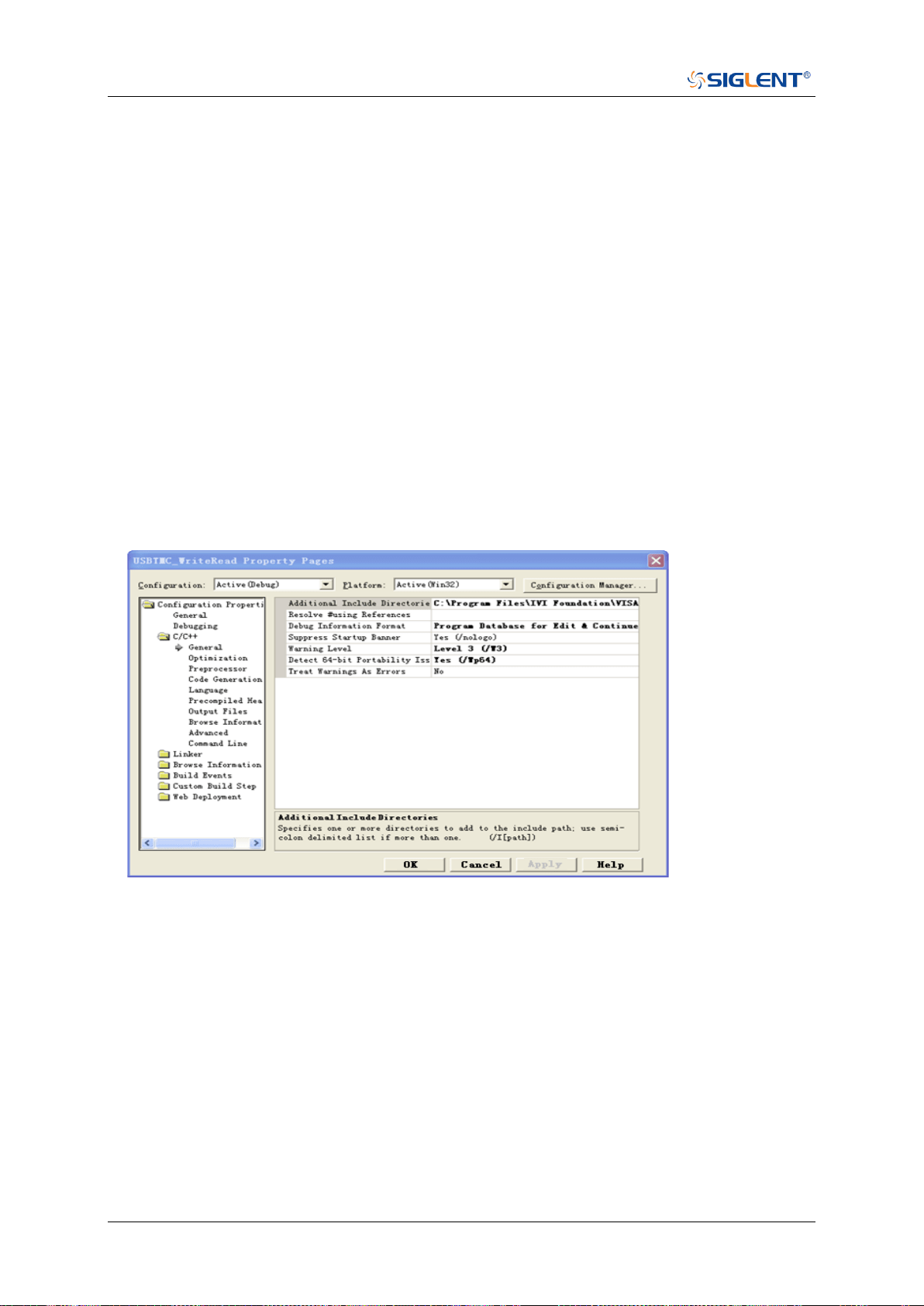
SDS Series Programming Guide
612 / 642 www.siglent.com
VISA Examples
VC++ Example
Environment: Win7 32-bit, Visual Studio.
Description: Use National Instruments VISA to control the device with USBTMC or TCP/IP
access. Perform a write and read operation.
Steps:
1. Open Visual Studio, create a new VC++ win32 project.
2. Set the project environment to use the NI-VISA library. There are two ways to use NI-VISA,
static or automatic:
a) Static:
Find the files visa.h, visatype.h, visa32.lib in the NI-VISA installation path, copy them to your
project, and add them into the project. In the projectname.cpp file, add the follow two lines:
#include "visa.h"
#pragma comment(lib,"visa32.lib")
b) Automatic:
Set the .h file include directory, the NI-VISA install path, in our computer we set the path is:
C:\Program Files\IVI Foundation \VISA\WinNT\include. Set this path to:
project->properties->C/C++->General->Additional Include Directories.
See the picture:
Set lib path set lib file:
Set lib path: the NI-VISA install path, in our computer we set the path is C:\Program Files\IVI
Foundation\VISA\WinNT\lib\msc. Set this path to:
project->properties->Linker->General->Additional Library Directories.
As shown in the pictures below:
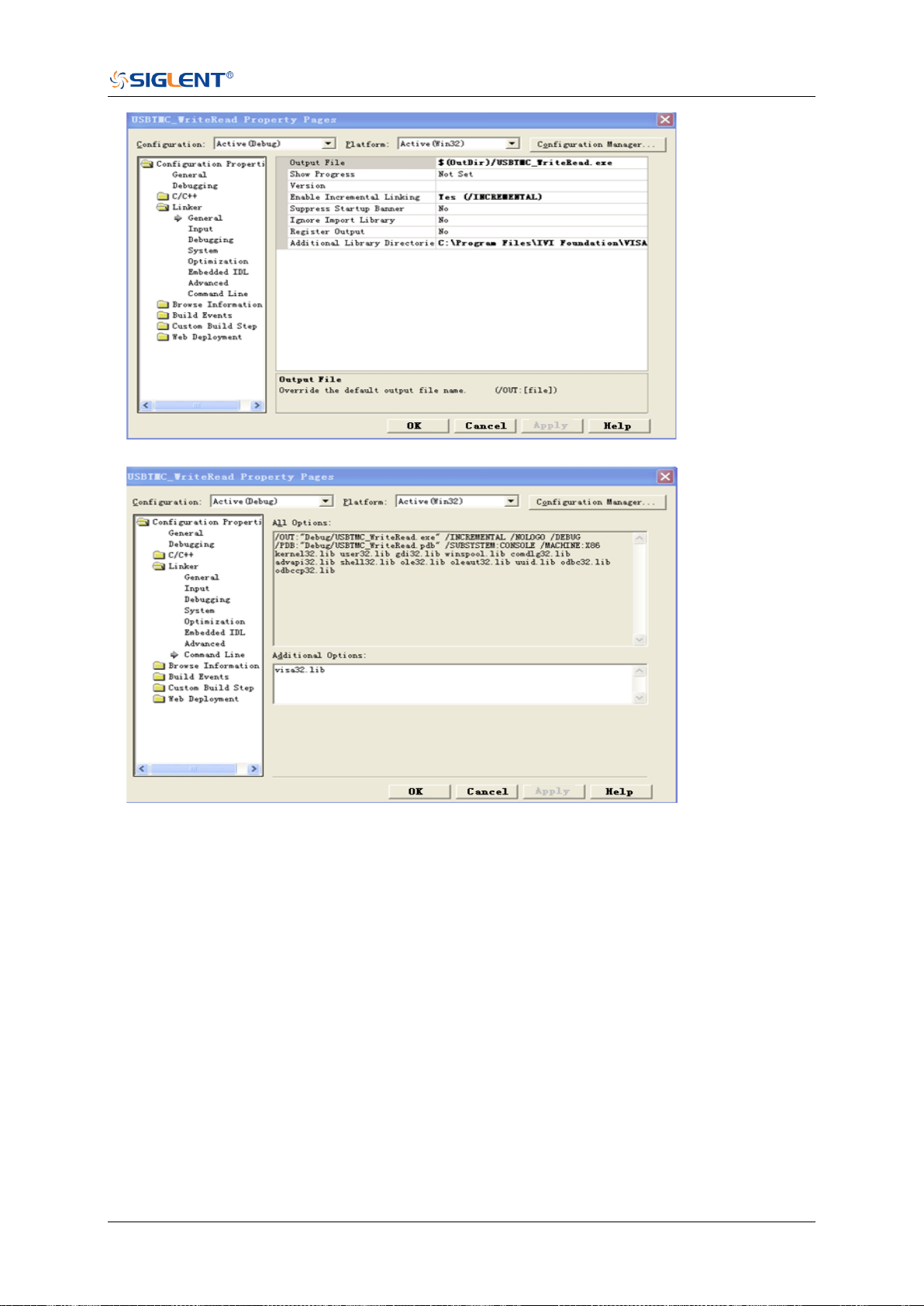
SDS Series Programming Guide
www.siglent.com 613 / 642
Set lib file:project->properties->Linker->Command Line->Additional Options: visa32.lib
Include visa.h file in the projectname.cpp file:
#include <visa.h>
3. Coding:
a) USBTMC:
Int Usbtmc_test()
{
/* This code demonstrates sending synchronous read & write commands */
/* to an USB Test & Measurement Class (USBTMC) instrument using */
/* NI-VISA */
/* The example writes the "*IDN?\n" string to all the USBTMC */
/* devices connected to the system and attempts to read back */
/* results using the write and read functions. */
/* The general flow of the code is */
/* Open Resource Manager */
/* Open VISA Session to an Instrument */
/* Write the Identification Query Using viPrintf */
/* Try to Read a Response With viScanf */
/* Close the VISA Session */

SDS Series Programming Guide
614 / 642 www.siglent.com
/***********************************************************/
ViSession defaultRM;
ViSession instr;
ViUInt32 numInstrs;
ViFindList findList;
ViUInt32 retCount;
ViUInt32 writeCount;
ViStatus status;
char instrResourceString[VI_FIND_BUFLEN];
unsigned char buffer[100];
char stringinput[512];
int i;
/** First we must call viOpenDefaultRM to get the manager
* handle. We will store this handle in defaultRM.*/
status= ViOpenDefaultRM (&defaultRM);
if (status<VI_SUCCESS)
{
printf ("Could not open a session to the VISA Resource Manager!\n");
return status;
}
/* Find all the USB TMC VISA resources in our system and store the number of
resources in the system in numInstrs. */
status = viFindRsrc (defaultRM, "USB?*INSTR", &findList, &numInstrs,
instrResourceString);
if (status<VI_SUCCESS)
{
printf ("An error occurred while finding resources.\nHit enter to continue.");
fflush(stdin);
getchar();
viClose (defaultRM);
return status;
}
/** Now we will open VISA sessions to all USB TMC instruments.
* We must use the handle from viOpenDefaultRM and we must
* also use a string that indicates which instrument to open. This
* is called the instrument descriptor. The format for this string
* can be found in the function panel by right clicking on the
* descriptor parameter. After opening a session to the
* device, we will get a handle to the instrument which we
* will use in later VISA functions. The AccessMode and Timeout
* parameters in this function are reserved for future
* functionality. These two parameters are given the value VI_NULL.*/
for (i= 0; i<numInstrs; i++)
{
if (i> 0)
{
viFindNext (findList, instrResourceString);
}
status = viOpen (defaultRM, instrResourceString, VI_NULL, VI_NULL, &instr);
if (status<VI_SUCCESS)
{
printf ("Cannot open a session to the device %d.\n", i+1);
continue;
}
/* * At this point we now have a session open to the USB TMC instrument.
* We will now use the viPrintf function to send the device the string "*IDN?\n",
* asking for the device's identification. */
char * cmmand ="*IDN?\n";

SDS Series Programming Guide
www.siglent.com 615 / 642
status = viPrintf (instr, cmmand);
if (status<VI_SUCCESS)
{
printf ("Error writing to the device %d.\n", i+1);
status = viClose (instr);
continue;
}
/** Now we will attempt to read back a response from the device to
* the identification query that was sent. We will use the viScanf
* function to acquire the data.
* After the data has been read the response is displayed.*/
status = viScanf(instr, "%t", buffer);
if (status<VI_SUCCESS)
{
printf ("Error reading a response from the device %d.\n", i+1);
}
else
{
printf ("\nDevice %d: %*s\n", i+1,retCount, buffer);
}
status = viClose (instr);
}
/** Now we will close the session to the instrument using
* viClose. This operation frees all system resources. */
status = viClose (defaultRM);
printf("Press 'Enter' to exit.");
fflush(stdin);
getchar();
return 0;
}
b) TCP/IP:
int TCP_IP_Test(char *pIP)
{
char outputBuffer[VI_FIND_BUFLEN];
ViSession defaultRM, instr;
ViStatus status;
ViUInt32 count;
ViUInt16 portNo;
/* First we will need to open the default resource manager. */
status = viOpenDefaultRM (&defaultRM);
if (status<VI_SUCCESS)
{
printf("Could not open a session to the VISA Resource Manager!\n");
}
/* Now we will open a session via TCP/IP device */
char head[256] ="TCPIP0::";
char tail[] ="::INSTR";
char resource [256];
strcat(head,pIP);
strcat(head,tail);
status = viOpen (defaultRM, head, VI_LOAD_CONFIG, VI_NULL, &instr);
if (status<VI_SUCCESS)
{
printf ("An error occurred opening the session\n");
viClose(defaultRM);
}
status = viPrintf(instr, "*idn?\n");

SDS Series Programming Guide
616 / 642 www.siglent.com
status = viScanf(instr, "%t", outputBuffer);
if (status<VI_SUCCESS)
{
printf("viRead failed with error code: %x \n",status);
viClose(defaultRM);
}
else
{
printf ("\ndata read from device: %*s\n", 0,outputBuffer);
}
status = viClose (instr);
status = viClose (defaultRM);
printf("Press 'Enter' to exit.");
fflush(stdin);
getchar();
return 0;
}
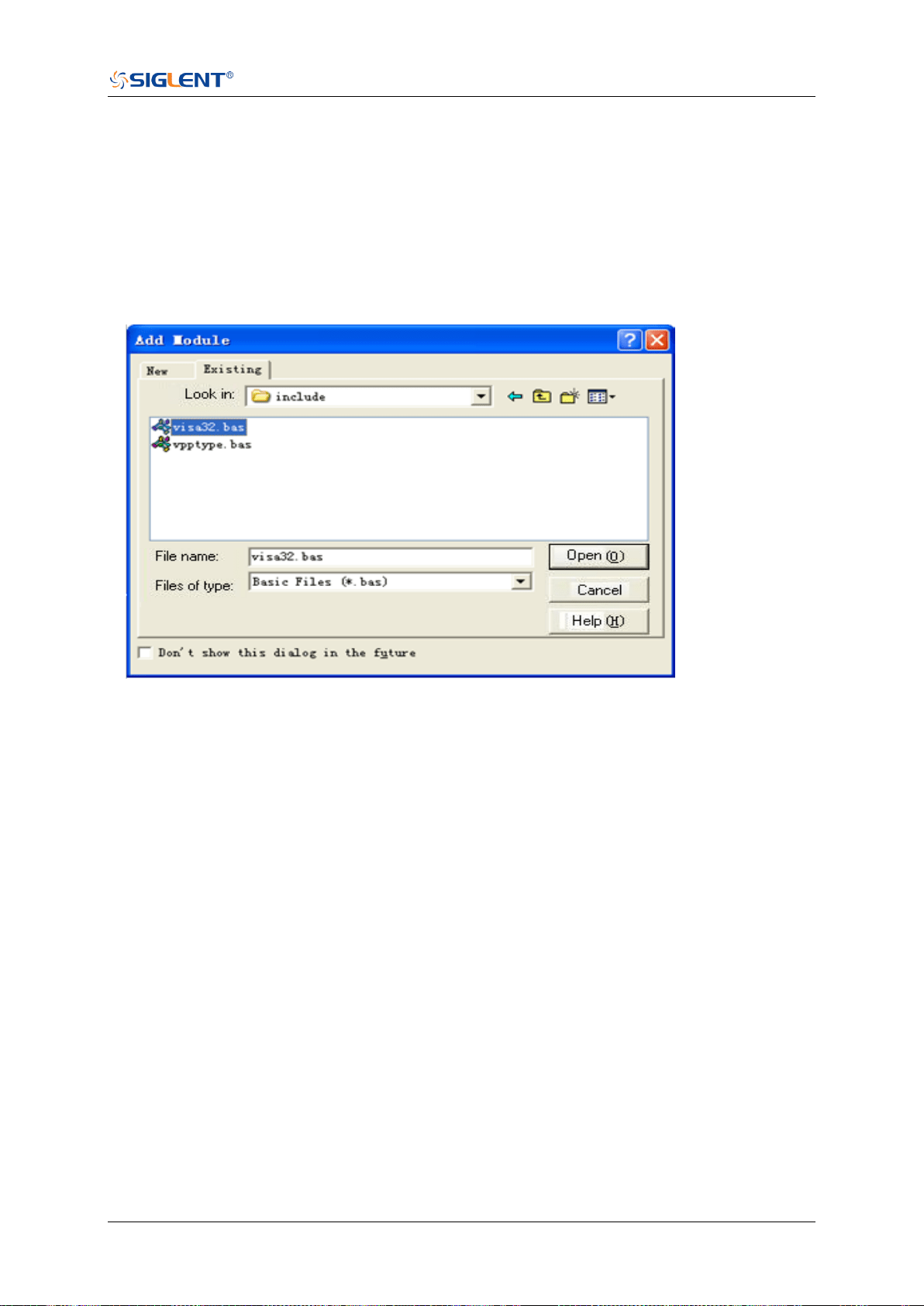
SDS Series Programming Guide
www.siglent.com 617 / 642
VB Example
Environment: Windows7 32-bit, Microsoft Visual Basic 6.0
Description: The function of this example: Use the NI-VISA, to control the device with USBTMC
and TCP/IP access to do a write and read.
Steps:
1. Open Visual Basic, and build a standard application program project.
2. Set the project environment to use the NI-VISA lib: Click the Existing tab of Project->Add
Module, search the visa32.bas file in the “include” folder under the NI-VISA installation path
and add the file, as shown in the figure below:
3. Coding:
a) USBTMC:
Private Function Usbtmc_test() As Long
' This code demonstrates sending synchronous read & write commands
' to an USB Test & Measurement Class (USBTMC) instrument using
' NI-VISA
' The example writes the "*IDN?\n" string to all the USBTMC
' devices connected to the system and attempts to read back
' results using the write and read functions.
' The general flow of the code is
' Open Resource Manager
' Open VISA Session to an Instrument
' Write the Identification Query Using viWrite
' Try to Read a Response With viRead
' Close the VISA Session
Const MAX_CNT = 200
Dim defaultRM As Long
Dim instrsesn As Long
Dim numlnstrs As Long
Dim findList As Long
Dim retCount As Long
Dim writeCount As Long
Dim status As Long
Dim instrResourceString As String * VI_FIND_BUFLEN
Dim buffer As String * MAX_CNT

SDS Series Programming Guide
618 / 642 www.siglent.com
Dim i As Integer
' First we must call viOpenDefaultRM to get the manager
' handle. We will store this handle in defaultRM.
status = viOpenDefaultRM(defaultRM)
If (status < VI_SUCCESS) Then
Debug.Print "Could not open a session to the VISA Resource Manager!"
Usbtmc_test = status
Exit Function
End If
' Find all the USB TMC VISA resources in our system and store the
' number of resources in the system in numInstrs.
status= ViFindRsrc(defaultRM,"USB?*INSTR",findList,numlnstrs,instrResourceString)
If (status < VI_SUCCESS) Then
Debug.Print "An error occurred while finding resources."
viClose (defaultRM)
Usbtmc_test = status
Exit Function
End If
' Now we will open VISA sessions to all USB TMC instruments.
' We must use the handle from viOpenDefaultRM and we must
' also use a string that indicates which instrument to open. This
' is called the instrument descriptor. The format for this string
' can be found in the function panel by right clicking on the
' descriptor parameter. After opening a session to the
' device, we will get a handle to the instrument which we
' will use in later VISA functions. The AccessMode and Timeout
' parameters in this function are reserved for future
' functionality. These two parameters are given the value VI_NULL.
For i = 0 To numInstrs
If (i > 0) Then
status = viFindNext(findList, instrResourceString)
End If
status = viOpen(defaultRM, instrResourceString, VI_NULL, VI_NULL, instrsesn)
If (status < VI_SUCCESS) Then
Debug.Print "Cannot open a session to the device ", i + 1
GoTo NextFind
End If
' At this point we now have a session open to the USB TMC instrument.
' We will now use the viWrite function to send the device the string "*IDN?",
' asking for the device's identification.
status = viWrite(instrsesn, "*IDN?", 5, retCount)
If (status < VI_SUCCESS) Then
Debug.Print "Error writing to the device."
status = viClose(instrsesn)
GoTo NextFind
End If
' Now we will attempt to read back a response from the device to
' the identification query that was sent. We will use the viRead
' function to acquire the data.
' After the data has been read the response is displayed.
status = viRead(instrsesn, buffer, MAX_CNT, retCount)
If (status < VI_SUCCESS) Then
Debug.Print "Error reading a response from the device.", i + 1
Else

SDS Series Programming Guide
www.siglent.com 619 / 642
Debug.Print i + 1, retCount, buffer
End If
status = viClose(instrsesn)
Next i
' Now we will close the session to the instrument using
' viClose. This operation frees all system resources.
status = viClose(defaultRM)
Usbtmc_test = 0
End Function
b) TCP/IP:
Private Function TCP_IP_Test(ip As String) As Long
Dim outputBuffer As String * VI_FIND_BUFLEN
Dim defaultRM As Long
Dim instrsesn As Long
Dim status As Long
Dim count As Long
' First we will need to open the default resource manager.
status = viOpenDefaultRM (defaultRM)
If (status < VI_SUCCESS) Then
Debug.Print "Could not open a session to the VISA Resource Manager!"
TCP_IP_Test = status
Exit Function
End If
' Now we will open a session via TCP/IP device
status = viOpen(defaultRM, "TCPIP0::" + ip + "::INSTR", VI_LOAD_CONFIG, VI_NULL,
instrsesn)
If (status < VI_SUCCESS) Then
Debug.Print "An error occurred opening the session"
viClose (defaultRM)
TCP_IP_Test = status
Exit Function
End If
status = viWrite(instrsesn, "*IDN?", 5, count)
If (status < VI_SUCCESS) Then
Debug.Print "Error writing to the device."
End If
status = viRead(instrsesn, outputBuffer, VI_FIND_BUFLEN, count)
If (status < VI_SUCCESS) Then
Debug.Print "Error reading a response from the device.", i + 1
Else
Debug.Print "read from device:", outputBuffer
End If
status = viClose(instrsesn)
status = viClose(defaultRM)
TCP_IP_Test = 0
End Function

SDS Series Programming Guide
620 / 642 www.siglent.com
MATLAB Example
Environment: Windows7 32-bit, MATLAB R2010b
Description: The function of this example: Use the NI-VISA, to control the device with USBTMC
or TCP/IP access to do a write and read.
Steps:
1. Open MATLAB, and modify the current directory. In this demo, the current directory is modified
to D:\USBTMC_TCPIP_Demo.
2. Click File>>New>>Script in the Matlab interface to create an empty M file.
3. Coding:
a) USBTMC:
function USBTMC_test()
% This code demonstrates sending synchronous read & write commands
% to an USB Test & Measurement Class (USBTMC) instrument using
% NI-VISA
%Create a VISA-USB object connected to a USB instrument
vu = visa('ni','USB0::0xF4EC::0xEE38::0123456789::INSTR');
%Open the VISA object created
fopen(vu);
%Send the string "*IDN?",asking for the device's identification.
fprintf(vu,'*IDN?');
%Request the data
outputbuffer = fscanf(vu);
disp(outputbuffer);
%Close the VISA object
fclose(vu);
delete(vu);
clear vu;
end
b) TCP/IP:
function TCP_IP_test( IPstr )
% This code demonstrates sending synchronous read & write commands
% to an TCP/IP instrument using NI-VISA
%Create a VISA-TCPIP object connected to an instrument
%configured with IP address.
vt = visa('ni',['TCPIP0::',IPstr,'::INSTR']);
%Open the VISA object created
fopen(vt);
%Send the string "*IDN?", asking for the device's identification.
fprintf(vt,'*IDN?');
%Request the data
outputbuffer = fscanf(vt);
disp(outputbuffer);
%Close the VISA object

SDS Series Programming Guide
www.siglent.com 621 / 642
fclose(vt);
delete(vt);
clear vt;
end
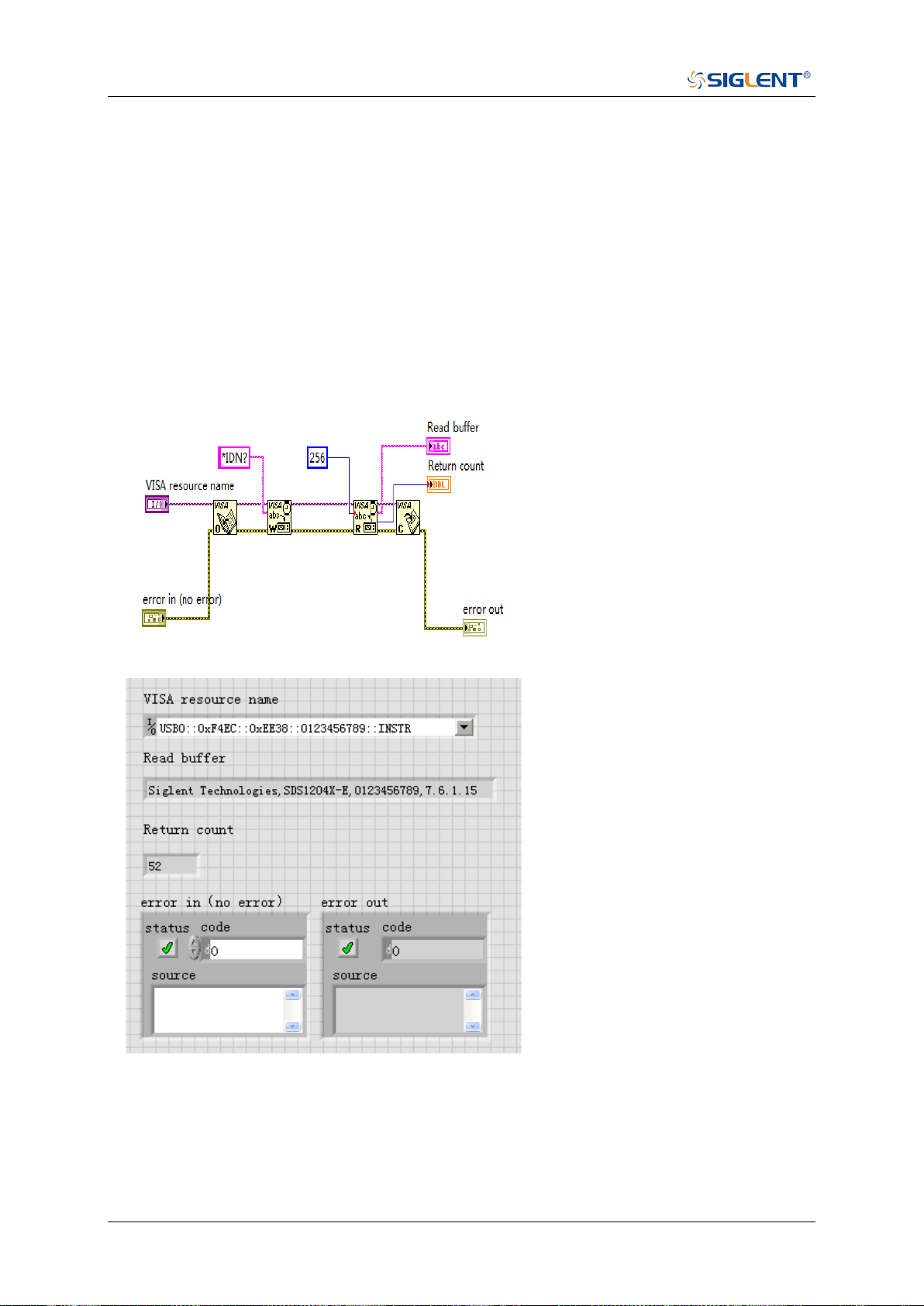
SDS Series Programming Guide
622 / 642 www.siglent.com
LabVIEW Example
Environment: Windows7 32-bit, LabVIEW 2011
Description: The functions of this example: use the NI-VISA, to control the device with USBTMC
and TCP/IP access to do a write and read.
Steps:
1. Open LabVIEW, create a VI file.
2. Add controls. Right-click in the Front Panel interface, select and add VISA resource name,
error in, error out and some indicators from the Controls column.
3. Open the Block Diagram interface. Right-click on the VISA resource name and you can
select and add the following functions from VISA Palette from the pop-up menu: VISA Write,
VISA Read, VISA Open and VISA Close.
4. The connection is as shown in the figure below:
5. Select the device resource from the VISA Resource Name list box and run the program.
In this example, the VI opens a VISA session to a USBTMC device, writes a command to the
device, and reads back the response. After all communication is complete, the VI closes the
VISA session.
6. Communicating with the device via TCP/IP is similar to USBTMC. But you need to change VISA
Write and VISA Read Function to Synchronous I/O. The LabVIEW default is asynchronous I/O.
Right-click the node and select Synchronous I/O Mod>>Synchronous from the shortcut menu
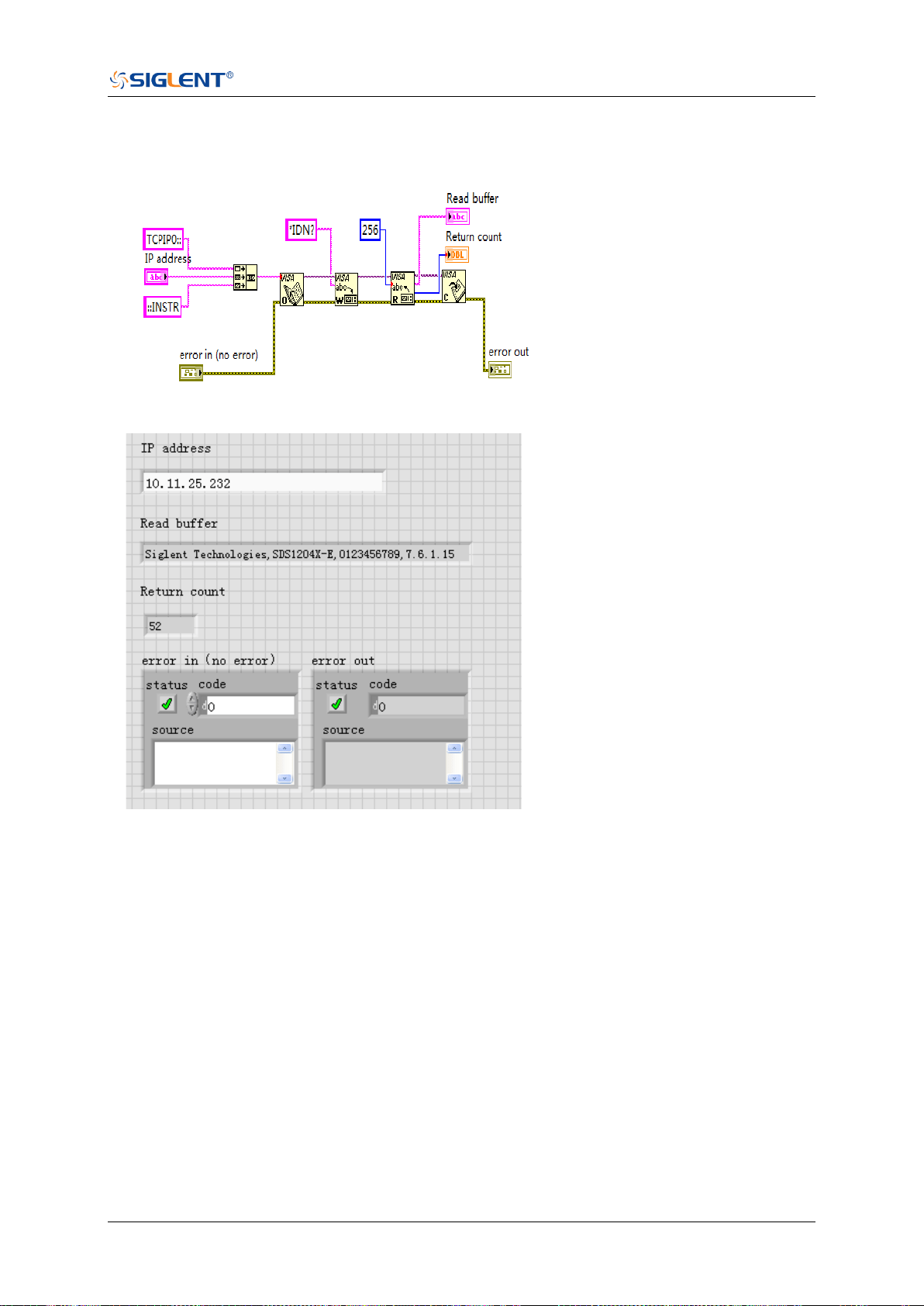
SDS Series Programming Guide
www.siglent.com 623 / 642
to write or read data synchronously.
7. The connection is as shown in the figure below:
8. Input the IP address and run the program.
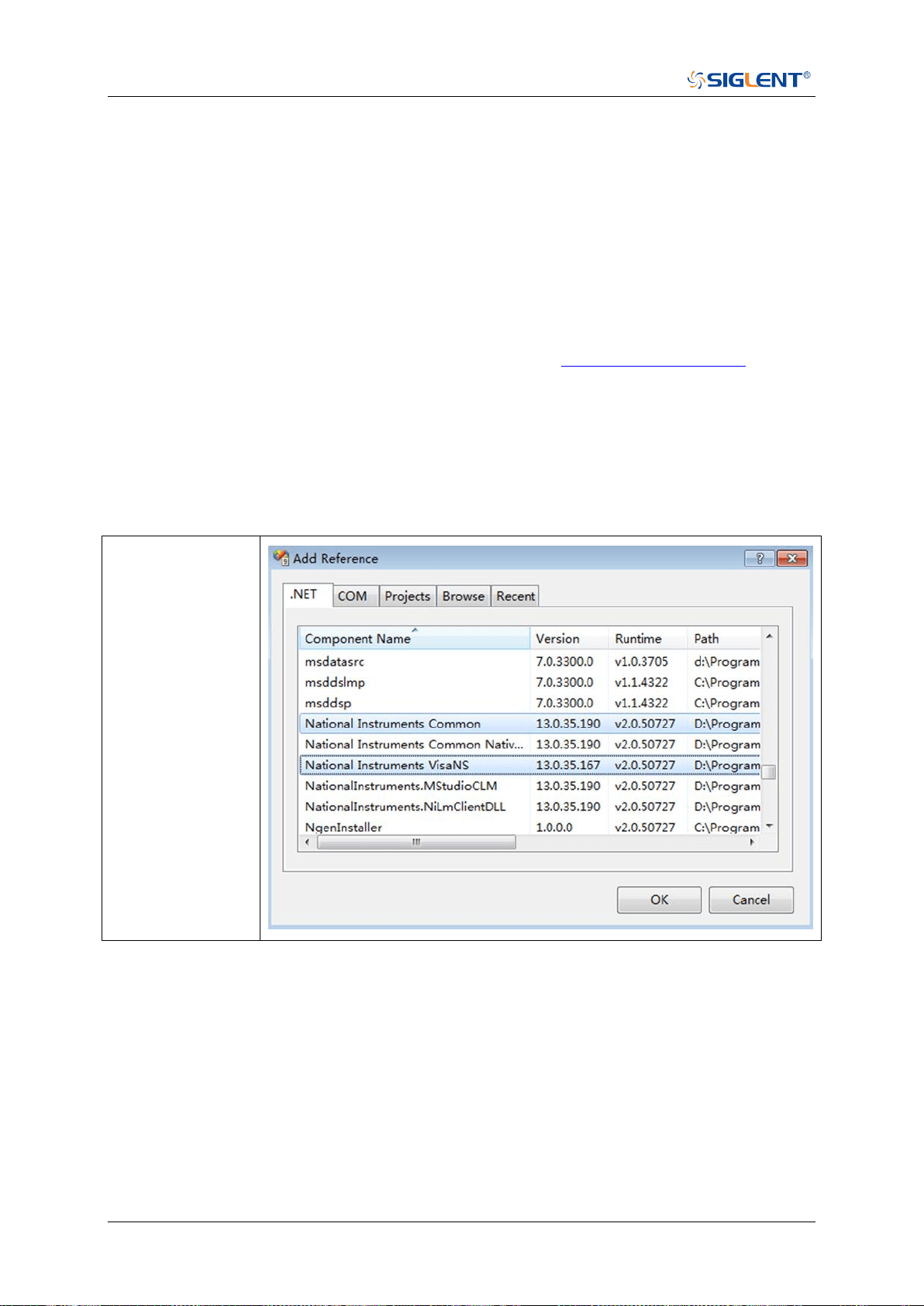
SDS Series Programming Guide
624 / 642 www.siglent.com
C# Example
Environment: Windows7 32-bit, Visual Studio 2008/2010
Description: The functions of this example: use the NI-VISA, to control the device with USBTMC
or TCP/IP access to do a write and read.
Steps:
1. Open Visual Studio, create a new C# project.
2. Cut-and-paste the code that follows into the C# source file.
3. Edit the program to use the VISA address of your oscilloscope.
4. Add References.
Add Ivi.Visa.dll and NationalInstruments.Visa.dll to the project.
If your NI-VISA version is too low(e.g. 5.4.0),you should add NationalInstruments.Common.dll
and NationalInstruments.VisaNS.dll to the project. (Item 11 of this link details some of the
main differences between NI-VISA .NET and NI-VISA NS: NI-VISA .NET Library - NI)
(Notice: you must install the .NET Framework 3.5/4.0/4.5 Languages support when you install
the NI-VISA.)
⚫ Right-click the project you wish to modify (not the solution) in the Solution Explorer window
of the Microsoft Visual Studio environment.
⚫ Choose Add Reference....
⚫ In the Add Reference dialog, select the Browse tab, and navigate to the NI-VISA installed
folder. (for example: C:\Program Files (x86)\IVI Foundation\VISA\Microsoft.NET\..)
⚫ Select the .dll file above; then, click OK.
Add references
based on VisaNS in
Visual Studio 2008
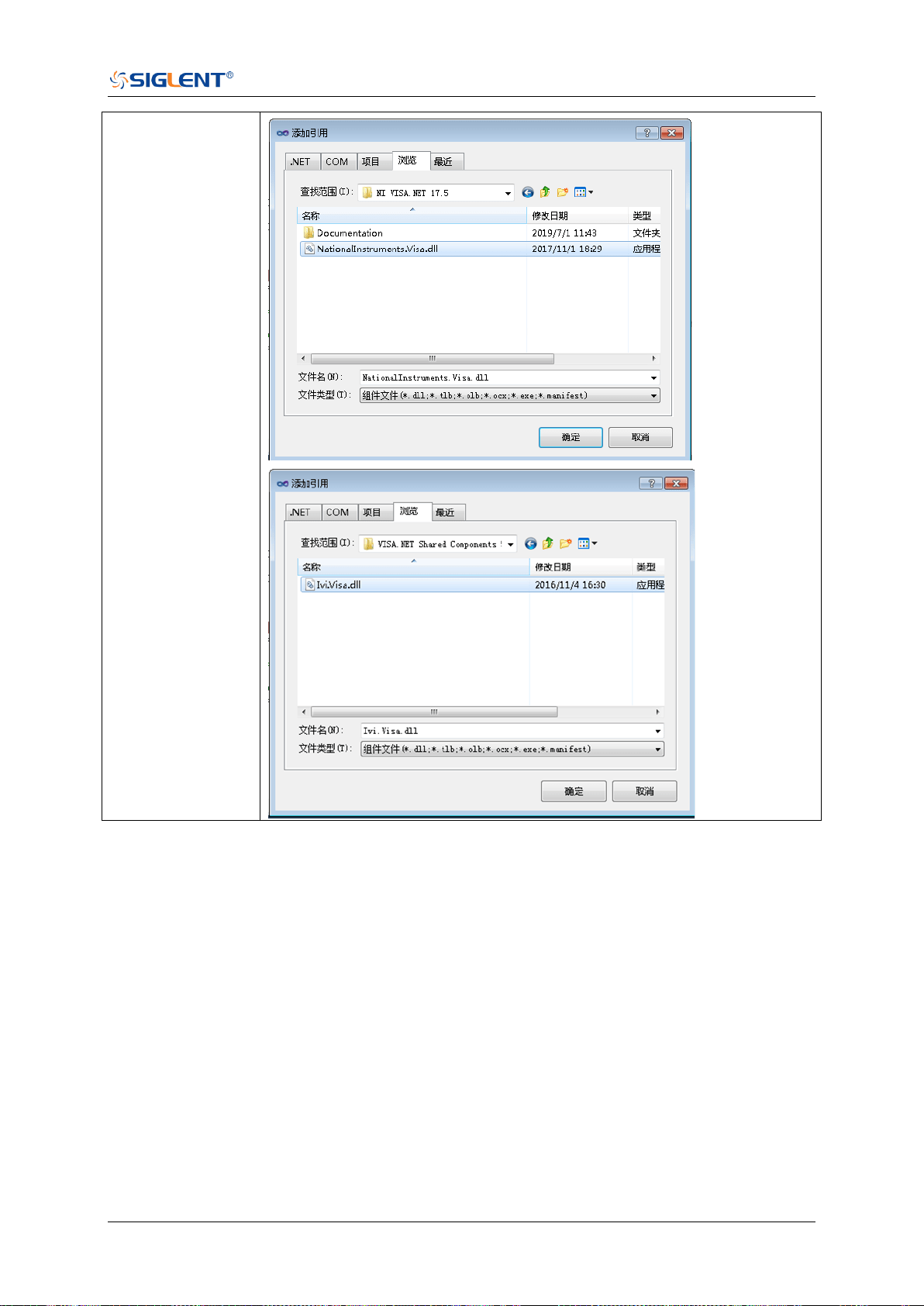
SDS Series Programming Guide
www.siglent.com 625 / 642
Add references
based on
NI-VISA.NET in
Visual Studio 2010
5. Code on VisaNS:
using System;
using System.Collections.Generic;
using System.Linq;
using System.Text;
using NationalInstruments.VisaNS;
namespace TestVisa
{
class Program
{
static void Main(string[] args)
{
// Find all the USBTMC resources
string[]
usbRsrcStrings=ResourceManager.GetLocalManager().FindResources("USB?*INSTR");
if (usbRsrcStrings.Length <= 0)
{

SDS Series Programming Guide
626 / 642 www.siglent.com
Console.WriteLine("Cannot find USBTMC Device!");
return;
}
//Choose the first resource string to connect the device.
//You can input the address manually
//USBTMC:
//MessageBasedSession
mbSession=(MessageBasedSession)ResourceManager.GetLocalManager().Open("USB0::0
xF4EC::0xEE38::0123456789::INSTR");
/TCP IP:
//MessageBasedSession
mbSession=(MessageBasedSession)ResourceManager.GetLocalManager().Open("TCPIP0:
:192.168.1.100::INSTR");
MessageBasedSession
mbSession=(MessageBasedSession)ResourceManager.GetLocalManager().Open(usbRsrcS
trings[0]);
mbSession.Write("*IDN?");
string result = mbSession.ReadString();
mbSession.Dispose();
Console.WriteLine(result);
}
}
}
6. Code on Visa.NET:
using System;
using System.Collections.Generic;
using System.Linq;
using NationalInstruments.Visa;
using Ivi.Visa;
namespace test_visa_csharp
{
static class Program
{
static void Main()
{
TcpipSession section = new TcpipSession("TCPIP::10.12.255.135::inst0::INSTR");
IMessageBasedFormattedIO io = section.FormattedIO;
io.WriteLine("*IDN?");
string result = io.ReadLine();
section.Dispose();
Console.WriteLine(result);
}
}
}

SDS Series Programming Guide
www.siglent.com 627 / 642
Examples of Using Sockets
Socket communication is a basic communication technology in computer network. It allows
applications to communicate through the standard network protocol mechanism built by network
hardware and operation system.
This method is a two-way communication between the instrument and the computer through a
fixed port number.
Note that SCPI strings are terminated with a “\n” (new line) character.
Python Example
Python has a low-level networking module that provides access to the socket interface. Python
scripts can be written for sockets to do a variety of test and measurement tasks.
Environment: Windows7 32-bit, Python v2.7.5
Description: Open a socket, send a query, and repeat this loop for 10 times, finally close the
socket.
Below is the code of the script:
#!/usr/bin/env python
#-*- coding:utf-8 –*-
#-----------------------------------------------------------------------------
# The short script is a example that open a socket, sends a query,
# print the return message and closes the socket.
#-----------------------------------------------------------------------------
import socket # for sockets
import sys # for exit
import time # for sleep
#-----------------------------------------------------------------------------
remote_ip = "10.12.255.209" # should match the instrument’s IP address
port = 5025 # the port number of the instrument service
count = 0
def SocketConnect():
try:
#create an AF_INET, STREAM socket (TCP)
s = socket.socket(socket.AF_INET, socket.SOCK_STREAM)
except socket.error:
print ('Failed to create socket.')
sys.exit();
try:
#Connect to remote server
s.connect((remote_ip , port))
except socket.error:
print ('failed to connect to ip ' + remote_ip)

SDS Series Programming Guide
628 / 642 www.siglent.com
return s
def SocketQuery(Sock, cmd):
try :
#Send cmd string
Sock.sendall(cmd)
Sock.sendall(b'\n')
time.sleep(1)
except socket.error:
#Send failed
print ('Send failed')
sys.exit()
reply = Sock.recv(4096)
return reply
def SocketClose(Sock):
#close the socket
Sock.close()
time.sleep(.300)
def main():
global remote_ip
global port
global count
# Body: send the SCPI commands *IDN? 10 times and print the return message
s = SocketConnect()
for i in range(10):
qStr = SocketQuery(s, b'*IDN?')
print (str(count) + ":: " + str(qStr))
count = count + 1
SocketClose(s)
input('Press "Enter" to exit')
if __name__ == '__main__':
proc = main()

SDS Series Programming Guide
www.siglent.com 629 / 642
C Example
int MySocket;
if((MySocket=socket(PF_INET,SOCK_STREAM,0))==-1)
{
exit(1);
}
struct in_addr
{
unsigned long s_addr;
};
struct sockaddr_in
{
short int sin_family; // Address family
unsigned short int sin_port; // Port number
struct in_addr sin_addr; // Internet address
unsigned char sin_zero[8]; // Padding
};
struct sockaddr_in MyAddress;
// Initialize the whole structure to zero
memset(&MyAddress,0,sizeof(struct sockaddr_in));
// Then set the individual fields
MyAddress.sin_family=PF_INET; // IPv4
MyAddress.sin_port=htons(5025); // Port number used by most instruments
MyAddress.sin_addr.s_addr=inet_addr(ntsddr_in)); // IP Address
// Establish TCP connection
if(connect(MySocket,(struct sockaddr*)&MyAddress,sizeof(struct sockaddr_in))==-1)
{
exit(1);
}
// Send SCPI command
if(send(MySocket,ands,sizeof(t_addr(
{
exit(1);
}
// Read response
char buffer[200];
int actual;
if((actual=recv(MySocket,&buffer[0],200,0))==-1)
{
exit(1);
}
buffer[actual]= 0; // Add zero character (C string)
printf(d zero character (C string)],2
// Close socket
if(close(MySocket)==-1)
{
exit(1);
}

SDS Series Programming Guide
630 / 642 www.siglent.com
Common Command Examples
This section lists the programming instances of common commands.
Environment: Windows7 32-bit, Python v3.6.5, pyvisa-1.9, Matplotlib-3.1.1
Read Waveform Data Example
import visa
import pylab as pl
import struct
import math
import gc
"""Modify the following global variables according to the model"""
MODEL = "SDS6104H12Pro"
SDS_RSC = "TCPIP0::10.12.255.127::inst0::INSTR"
CHANNEL = "C2"
tdiv_enum=[100e-12,200e-12,500e-12,\
1e-9,2e-9,5e-9,10e-9,20e-9,50e-9,100e-9,200e-9,500e-9,\
1e-6,2e-6,5e-6,10e-6,20e-6,50e-6,100e-6,200e-6,500e-6,\
1e-3,2e-3,5e-3,10e-3,20e-3,50e-3,100e-3,200e-3,500e-3,\
1,2,5,10,20,50,100,200,500,1000]
"""The following code realizes the process of waveform reconstruction with slice"""
HORI_NUM = 10
BIT = {"SDS6104H12Pro":12,
"SDS6104H10Pro":12,
"SDS6104A":12,
"SDS6204H12Pro":12,
"SDS6204H10Pro":12,
"SDS6204A":12,
"SDS5000X":8,
"SDS2000X+":8,
"SDS2000XHD":12
}
Note:
When using the visa library, you should pay attention to the following settings:
1. Set the I/O buffer size.
I.E. For the command “:WAVeform:DATA?”, the read buffer size depends on the number of
waveform points. When it needs to read in segments, the size of each segment is vary from the
models.
2. Set the timeout value.
The timeout value is related to the network speed or USB transmission speed. Please evaluate
by yourself. The initial value is generally 2s.

SDS Series Programming Guide
www.siglent.com 631 / 642
def main_desc(recv):
WAVE_ARRAY_1 = recv[0x3c:0x3f+1]
wave_array_count = recv[0x74:0x77+1]
first_point = recv[0x84:0x87+1]
sp = recv[0x88:0x8b+1]
v_scale = recv[0x9c:0x9f+1]
v_offset = recv[0xa0:0xa3+1]
interval = recv[0xb0:0xb3+1]
code_per_div = recv[0xa4:0Xa7 + 1]
delay = recv[0xb4:0xbb+1]
tdiv = recv[0x144:0x145+1]
probe = recv[0x148:0x14b+1]
data_bytes = struct.unpack('i',WAVE_ARRAY_1)[0]
point_num = struct.unpack('i',wave_array_count)[0]
fp = struct.unpack('i',first_point)[0]
sp = struct.unpack('i',sp)[0]
interval = struct.unpack('f',interval)[0]
delay = struct.unpack('d',delay)[0]
tdiv_index = struct.unpack('h',tdiv)[0]
probe = struct.unpack('f',probe)[0]
vdiv = struct.unpack('f',v_scale)[0]*probe
offset = struct.unpack('f',v_offset)[0]*probe
code = struct.unpack('f', code_per_div)[0]
tdiv = tdiv_enum[tdiv_index]
return vdiv,offset,interval,delay,tdiv,code
def main_get_code_per_div(code):
if code > pow(2,8):
code = code / pow(2, 4)
return code
def main_wf_data():
_rm = visa.ResourceManager()
sds = _rm.open_resource(SDS_RSC)
sds.timeout = 30000 #default value is 2000(2s)
sds.chunk_size = 20*1024*1024 #default value is 20*1024(20k bytes)
sds.write(":WAVeform:STARt 0")
sds.write("WAV:SOUR {}".format(CHANNEL))
sds.write("WAV:PREamble?")
recv_all = sds.read_raw()
recv = recv_all[recv_all.find(b'#')+11:]
print(len(recv))
vdiv,ofst,interval,trdl,tdiv, vcode_per= main_desc(recv)
print(vdiv,ofst,interval,trdl,tdiv)
vcode_per = main_get_code_per_div(vcode_per)
points = float(sds.query(":ACQuire:POINts?").strip())
one_piece_num =float(sds.query(":WAVeform:MAXPoint?").strip())
if points > one_piece_num:
sds.write(":WAVeform:POINt {}".format(one_piece_num))
if BIT[MODEL] > 8:
sds.write(":WAVeform:WIDTh WORD")
read_times = math.ceil(points/one_piece_num)
recv_all = []
for i in range(0,read_times):

SDS Series Programming Guide
632 / 642 www.siglent.com
start = i*one_piece_num
sds.write(":WAVeform:STARt {}".format(start))
sds.write("WAV:DATA?")
recv_rtn = sds.read_raw()
recv = list(recv_rtn[recv_rtn.find(b'#') + 11:-2])
recv_all += recv
convert_data = []
if BIT[MODEL] > 8:
for i in range(0, int(len(recv_all) / 2)):
data_16bit = recv_all[2 * i + 1] * 256 + recv_all[2 * i]
data = data_16bit >> (16-BIT[MODEL])
convert_data.append(data)
else:
convert_data = recv_all
volt_value = []
for data in convert_data:
if data > pow(2,BIT[MODEL]-1)-1:#12bit-2047,8bit-127
data = data - pow(2,BIT[MODEL])
else:
pass
volt_value.append(data)
del recv,recv_all,convert_data
gc.collect()
time_value = []
for idx in range(0, len(volt_value)):
volt_value[idx] = volt_value[idx] / vcode_per * float(vdiv) - float(ofst)
time_data = -float(trdl) - (float(tdiv) * HORI_NUM / 2) + idx * interval
time_value.append(time_data)
print(len(volt_value))
pl.figure(figsize=(7, 5))
pl.plot(time_value, volt_value, markersize=2, label=u"Y-T")
pl.legend()
pl.grid()
pl.show()
if __name__=='__main__':
main_wf_data()
Read Waveform Data of Digital Example
import visa
import pylab as pl
import struct
def get_char_bit(char,n):
return (char >> n) & 1
def main_desc(recv):
first_point = recv[0x84:0x87+1]
sp = recv[0x88:0x8b+1]
interval = recv[0xb0:0xb3+1]
delay = recv[0xb4:0xbb+1]
tdiv = recv[0x144:0x145+1]

SDS Series Programming Guide
www.siglent.com 633 / 642
tdiv_enum=[200e-12,500e-12,\
1e-9,2e-9,5e-9,10e-9,20e-9,50e-9,100e-9,200e-9,500e-9,\
1e-6,2e-6,5e-6,10e-6,20e-6,50e-6,100e-6,200e-6,500e-6,\
1e-3,2e-3,5e-3,10e-3,20e-3,50e-3,100e-3,200e-3,500e-3,\
1,2,5,10,20,50,100,200,500,1000]
fp = struct.unpack('i',first_point)[0]
sp = struct.unpack('i',sp)[0]
interval = struct.unpack('f',interval)[0]
delay = struct.unpack('d',delay)[0]
tdiv_index = struct.unpack('h',tdiv)[0]
tdiv = tdiv_enum[tdiv_index]
return interval,delay,tdiv
def main_new_scpi():
_rm = visa.ResourceManager()
sds = _rm.open_resource("TCPIP0::10.12.255.209::inst0::INSTR")
sds.write("WAV:SOUR D0")
sds.write("WAV:PREamble?")
recv_all = sds.read_raw()
recv = recv_all[recv_all.find(b'#')+11:]
interval,trdl,tdiv = main_desc(recv)
sds.write("WAV:DATA?")
recv_rtn = sds.read_raw()
recv = list(recv_rtn[recv_rtn.find(b'#') + 11:-2])
volt_value = []
data =bytearray(recv)
for char in data:
for i in range(0,8):
volt_value.append(get_char_bit(char,i))
print(len(volt_value))
time_value = []
for idx in range(0,len(volt_value)):
time_data = -float(trdl)-(float(tdiv)*10/2)+idx*interval
time_value.append(time_data)
pl.figure(figsize=(7,5))
pl.ylim(-1,2)
pl.plot(time_value,volt_value,markersize=2,label=u"Y-T")
pl.legend()
pl.grid()
pl.show()
if __name__=='__main__':
main_new_scpi()
Read Waveform Data of FFT Example
import visa
import pylab as pl
import struct
import math
import gc
"""Modify the following global variables according to the model"""
SDS_RSC = "TCPIP0::10.12.255.127::inst0::INSTR"
FUNC = "FUNC1”

SDS Series Programming Guide
634 / 642 www.siglent.com
def main_desc(recv):
interval = recv[0xb0:0xb3 + 1]
interval = struct.unpack('f', interval)[0]
return interval
def main_fft_data():
_rm = visa.ResourceManager()
sds = _rm.open_resource(SDS_RSC)
sds.write("WAV:SOUR F1")
sds.write("WAV:PREamble?")
recv_all = sds.read_raw()
recv = recv_all[recv_all.find(b'#') + 11:]
interval = main_desc(recv)
unit = sds.query("{}:FFT:UNIT?".format(FUNC)).strip()
if unit == "DBm":
load = float(sds.query("{}:FFT:LOAD?".format(FUNC)).strip())
mode = sds.query("{}:FFT:MODE?".format(FUNC)).strip()
sds.write("WAV:DATA?")
recv = sds.read_raw()[recv_all.find(b'#')+11:]
recv = recv.strip()
print(len(recv))
volt_value = []
freq_value = []
len_data = int(len(recv) / 8)
print(len_data)
for i in range(0, len_data):
data_rel = struct.unpack("f", recv[8 * i:8 * i + 4])
data_imag = struct.unpack("f", recv[8 * i + 4:8 * i + 8])
data_rel = list(data_rel)[0]
data_imag = list(data_imag)[0]
if mode == "NORMal":
data_float = math.sqrt(pow(float(data_rel), 2) + pow(float(data_imag), 2))
else:
data_float = float(data_rel)
if unit == "DBVrms":
data_float = 20*math.log10(data_float)
elif unit == "DBm":
data_float = 10 * math.log10(data_float*data_float/load/1E-3)
volt_value.append(data_float)
freq_value.append(i*interval)
pl.figure(figsize=(7, 5))
pl.plot(freq_value, volt_value, markersize=2)
pl.legend()
pl.grid()
pl.show()
if __name__ == '__main__':
main_fft_data()
Read Sequence Waveform Data Example
import visa

SDS Series Programming Guide
www.siglent.com 635 / 642
import pylab as pl
import time as t
import math
import struct
import gc
"""Modify the following global variables according to the model"""
ADC_BIT = 12
TDIV_ENUM = [100e-12, 200e-12, 500e-12, \
1e-9, 2e-9, 5e-9, 10e-9, 20e-9, 50e-9, 100e-9, 200e-9, 500e-9, \
1e-6, 2e-6, 5e-6, 10e-6, 20e-6, 50e-6, 100e-6, 200e-6, 500e-6, \
1e-3, 2e-3, 5e-3, 10e-3, 20e-3, 50e-3, 100e-3, 200e-3, 500e-3, \
1, 2, 5, 10, 20, 50, 100, 200, 500, 1000]
def main_wf_desc(recv):
data_width = recv[0x20:0x21+1]#01-16bit,00-8bit
data_order = recv[0x22:0x23+1]#01-MSB,00-LSB
WAVE_ARRAY_1 = recv[0x3c:0x3f+1]
wave_array_count = recv[0x74:0x77+1]
first_point = recv[0x84:0x87+1]
sp = recv[0x88:0x8b+1]
one_fram_pts = recv[0x74:0x77+1]#pts of single frame,maybe bigger than 12.5M
read_frame = recv[0x90:0x93+1]#all sequence frames number return by this command
sum_frame = recv[0x94:0x97+1]#all sequence frames number acquired
v_scale = recv[0x9c:0x9f+1]
v_offset = recv[0xa0:0xa3+1]
code_per_div = recv[0xa4:0Xa7 + 1]
adc_bit = recv[0xac:0Xad + 1]
sn = recv[0xae:0xaf+1]
interval = recv[0xb0:0xb3+1]
delay = recv[0xb4:0xbb+1]
tdiv = recv[0x144:0x145+1]
probe = recv[0x148:0x14b+1]
width = struct.unpack('h',data_width)[0]
order = struct.unpack('h',data_order)[0]
data_bytes = struct.unpack('i',WAVE_ARRAY_1)[0]
point_num = struct.unpack('i',wave_array_count)[0]
fp = struct.unpack('i',first_point)[0]
sp = struct.unpack('i',sp)[0]
sn = struct.unpack('h',sn)[0]
one_fram_pts = struct.unpack('i',one_fram_pts)[0]
read_frame = struct.unpack('i',read_frame)[0]
sum_frame = struct.unpack('i',sum_frame)[0]
interval = struct.unpack('f',interval)[0]
delay = struct.unpack('d',delay)[0]
tdiv_index = struct.unpack('h',tdiv)[0]
probe = struct.unpack('f',probe)[0]
vdiv = struct.unpack('f',v_scale)[0]*probe
offset = struct.unpack('f',v_offset)[0]*probe
code = struct.unpack('f', code_per_div)[0]
if ADC_BIT>8:
code = code/16
adc_bit = struct.unpack('h', adc_bit)[0]
tdiv = TDIV_ENUM[tdiv_index]
print("data_bytes=",data_bytes)
print("point_num=",point_num)

SDS Series Programming Guide
636 / 642 www.siglent.com
print("fp=",fp)
print("sp=",sp)
print("sn=",sn)
print("vdiv=",vdiv)
print("offset=",offset)
print("interval=",interval)
print("delay=",delay)
print("tdiv=",tdiv)
print("probe=",probe)
print("data_width=",width)
print("data_order=",order)
print("code=", code)
print("adc_bit=", adc_bit)
print("one_fram_pts=", one_fram_pts)
print("read_frame=", read_frame)
print("sum_frame=", sum_frame)
return vdiv,offset,interval,delay,tdiv,code,one_fram_pts,read_frame,sum_frame
def main_time_stamp_deal(time):
seconds = time[0x00:0x08] # type:long double
minutes = time[0x08:0x09] # type:char
hours = time[0x09:0x0a] # type:char
days = time[0x0a:0x0b] # type:char
months = time[0x0b:0x0c] # type:char
year = time[0x0c:0x0e] # type:short
seconds = struct.unpack('d',seconds)[0]
minutes = struct.unpack('c', minutes)[0]
hours = struct.unpack('c', hours)[0]
days = struct.unpack('c', days)[0]
months = struct.unpack('c', months)[0]
year = struct.unpack('h', year)[0]
months = int.from_bytes(months, byteorder='big', signed=False)
days = int.from_bytes(days, byteorder='big', signed=False)
hours = int.from_bytes(hours, byteorder='big', signed=False)
minutes = int.from_bytes(minutes, byteorder='big', signed=False)
print("{}/{}/{},{}:{}:{}".format(year,months,days,hours,minutes,seconds))
'''
Read data of all sequence frame.
PS.when total points num (single_frame_pts * frame_num) is bigger than 12.5Mpts, you have
to read more than one time.
Frames number and points number readed this time will saved in the head parameter, see
main_wf_desc.
'''
def main_all_frame(sds):
sds.write(":WAVeform:SOURce C2")
sds.write(":WAVeform:STARt 0")
sds.write(":WAVeform:POINt 0")
sds.write(":WAVeform:SEQUence 0,0")
sds.timeout = 2000 #default value is 2000(2s)
sds.chunk_size = 20*1024*1024 #default value is 20*1024(20k bytes)
sds.write(":WAVeform:PREamble?")
recv_all = sds.read_raw()
recv = recv_all[recv_all.find(b'#')+11:]
print(len(recv))
vdiv, ofst, interval, delay, tdiv, code, one_frame_pts, read_frame, sum_frame =

SDS Series Programming Guide
www.siglent.com 637 / 642
main_wf_desc(recv)
read_times = math.ceil(sum_frame/read_frame)
print("read_times=",read_times)
one_piece_num = float(sds.query(":WAVeform:MAXPoint?").strip())
for i in range(0,read_times):
sds.write(":WAVeform:SEQUence {},{}".format(0,read_frame*i+1))
if i+1 == read_times:#frame num of last read time
read_frame = sum_frame -(read_times-1)*read_frame
sds.write(":WAVeform:PREamble?")
recv_rtn = sds.read_raw()
recv_desc = recv_rtn[recv_rtn.find(b'#')+11:]
time_stamp = recv_desc[346:]
if ADC_BIT > 8:
sds.write(":WAVeform:WIDTh WORD")
sds.write(":WAVeform:DATA?")
recv_rtn = sds.read_raw()
recv = list(recv_rtn[recv_rtn.find(b'#') + 11:])
for j in range(0,read_frame):
time = time_stamp[16*j:16*(j+1)]#timestamp spends 16 bytes
main_time_stamp_deal(time)
if ADC_BIT > 8:
start = int(j * one_frame_pts*2)
end = int((j + 1) * one_frame_pts*2)
data_recv = recv[start:end]
convert_data = []
for k in range(0, int(len(data_recv) / 2)):
data_16bit = data_recv[2 * k + 1] * 256 + data_recv[2 * k]
data = data_16bit >> (16 - ADC_BIT)
convert_data.append(data)
else:
start = int(j*one_frame_pts)
end = int((j+1)*one_frame_pts)
convert_data = recv[start:end]
volt_value = []
for data in convert_data:
if data > pow(2, ADC_BIT - 1) - 1: # 12bit-2047,8bit-127
data = data - pow(2, ADC_BIT)
else:
pass
volt_value.append(data)
time_value = []
for idx in range(0,len(volt_value)):
volt_value[idx] = volt_value[idx]/code*float(vdiv)-float(ofst)
time_data = -(float(tdiv)*HORI_NUM/2)+idx*interval-delay#calc ch
timestamp
time_value.append(time_data)
print('Data convert finish,start to draw!')
pl.figure(figsize=(7,5))
pl.plot(time_value,volt_value,markersize=2,label=u"Y-T")
pl.legend()
pl.grid()
pl.show()
pl.close()

SDS Series Programming Guide
638 / 642 www.siglent.com
del volt_value,time_value,convert_data
gc.collect()
del recv
gc.collect()
'''
Read data of single frame.
'''
def main_specify_frame(sds,frame_num):
sds.write(":WAVeform:SOURce C2")
sds.write(":WAVeform:STARt 0")
sds.write(":WAVeform:POINt 0")
sds.write(":WAVeform:SEQUence {},{}".format(frame_num,0))
sds.timeout = 2000 # default value is 2000(2s)
sds.chunk_size = 20 * 1024 * 1024 # default value is 20*1024(20k bytes)
sds.write(":WAVeform:PREamble?")
recv_all = sds.read_raw()
recv = recv_all[recv_all.find(b'#')+11:]
time_stamp = recv[346:]
main_time_stamp_deal(time_stamp)
vdiv, ofst, interval, delay, tdiv, code,one_frame_pts, read_frame, sum_frame =
main_wf_desc(recv)
one_piece_num = float(sds.query(":WAVeform:MAXPoint?").strip())
if one_frame_pts > one_piece_num:
sds.write(":WAVeform:POINt {}".format(one_piece_num))
if ADC_BIT > 8:
sds.write(":WAVeform:WIDTh WORD")
read_times = math.ceil(one_frame_pts / one_piece_num)
data_recv = []
for i in range(0, read_times):
start = i * one_piece_num
sds.write(":WAVeform:STARt {}".format(start))
sds.write("WAV:DATA?")
recv_rtn = sds.read_raw()
recv_piece = list(recv_rtn[recv_rtn.find(b'#') + 11:-2])
data_recv += recv_piece
print("len(data_recv)=", len(data_recv))
convert_data = []
if ADC_BIT > 8:
for i in range(0, int(len(data_recv) / 2)):
data_16bit = data_recv[2 * i + 1] * 256 + data_recv[2 * i]
data = data_16bit >> (16 - ADC_BIT)
convert_data.append(data)
else:
convert_data = data_recv
volt_value = []
for data in convert_data:
if data > pow(2, ADC_BIT-1) - 1: # 12bit-2047,8bit-127
data = data - pow(2, ADC_BIT)
else:
pass
volt_value.append(data)
time_value = []

SDS Series Programming Guide
www.siglent.com 639 / 642
for idx in range(0, len(volt_value)):
volt_value[idx] = volt_value[idx] / code * float(vdiv) - float(ofst)
time_data = -(float(tdiv) * HORI_NUM / 2) + idx * interval - delay # calc ch timestamp
time_value.append(time_data)
print('Data convert finish,start to draw!')
pl.figure(figsize=(7, 5))
pl.plot(time_value, volt_value, markersize=2, label=u"Y-T")
pl.legend()
pl.grid()
pl.show()
pl.close()
del volt_value, time_value, data_recv
gc.collect()
if __name__=='__main__':
HORI_NUM = 10
_rm = visa.ResourceManager()
sds = _rm.open_resource("TCPIP0::10.12.255.135::inst0::INSTR")
main_all_frame(sds)
# main_specify_frame(sds, 5)
sds.close()
Screen Dump (PRINt) Example
import visa
def main():
_rm = visa.ResourceManager()
sds = _rm.open_resource("USB0::0xF4EC::0xEE38::0123456789::INSTR")
sds.chunk_size = 20*1024*1024 #default value is 20*1024(20k bytes)
file_name = "F:\\SCDP.bmp"
sds.write("PRIN? BMP")
result_str = sds.read_raw()
f = open(file_name,'wb')
f.write(result_str)
f.flush()
f.close()
if __name__=='__main__':
main()
Then you can open the file as shown below:
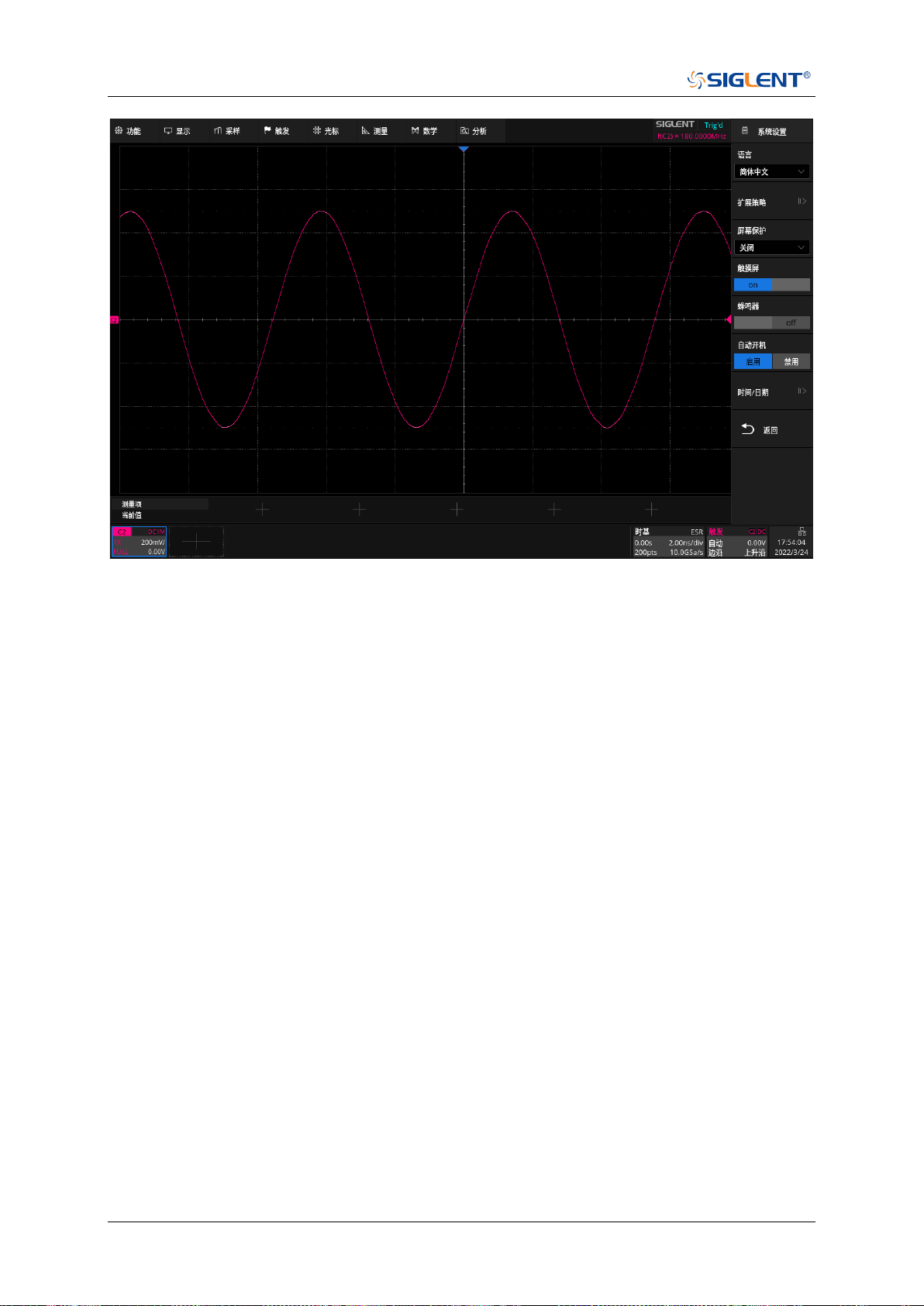
SDS Series Programming Guide
640 / 642 www.siglent.com

SDS Series Programming Guide
www.siglent.com 641 / 642
About SIGLENT
SIGLENT is an international high-tech company, concentrating on R&D, sales,
production and services of electronic test & measurement instruments.
SIGLENT first began developing digital oscilloscopes independently in 2002.
After more than a decade of continuous development, SIGLENT has extended
its product line to include digital oscilloscopes, isolated handheld oscilloscopes,
function/arbitrary waveform generators, RF/MW signal generators, spectrum
analyzers, vector network analyzers, digital multimeters, DC power supplies,
electronic loads and other general purpose test instrumentation. Since its first
oscilloscope was launched in 2005, SIGLENT has become the fastest growing
manufacturer of digital oscilloscopes. We firmly believe that today SIGLENT is
the best value in electronic test & measurement.
Headquarters:
SIGLENT Technologies Co., Ltd
Add: Bldg No.4 & No.5, Antongda Industrial
Zone, 3rd Liuxian Road, Bao'an District,
Shenzhen, 518101, China
Tel: + 86 755 3688 7876
Fax: + 86 755 3359 1582
Email: sales@siglent.com
Website: int.siglent.com
North America:
SIGLENT Technologies America, Inc
6557 Cochran Rd Solon, Ohio 44139
Tel: 440-398-5800
Toll Free: 877-515-5551
Fax: 440-399-1211
Email: info@siglent.com
Website: www.siglentna.com
Europe:
SIGLENT Technologies Germany GmbH
Add: Staetzlinger Str. 70
86165 Augsburg, Germany
Tel: +49(0)-821-666 0 111 0
Fax: +49(0)-821-666 0 111 22
Email: info-eu@siglent.com
Website: www.siglenteu.com
Follow us on
Facebook: SiglentTech