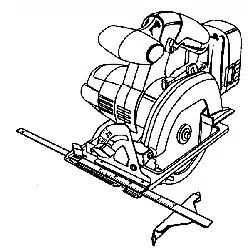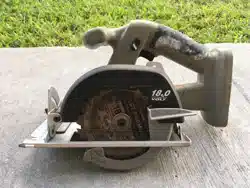

Model No.
31 5.114233
®
WARNING: To reduce the risk of injury,
the user must read and understand the
operator's manual before using this
product.
Customer HeUp Line: 1-800-932-3188
Sears, Roebuck and Co., 3333 BeveHy Rd., Hoffman Estates, IL 60179 USA
Visit the Craftsman web page: www.sears.comicraftsman
983000-650 Save this manuaJ for future reference
12-04
US
FULL ONE YEAR WARRANTY ON CRAFTSMAN TOOL
(f this CRAFTSMAN too! fa(Is to give complete sat(sfaction within one year from the date of purchase, RETURN (T TO
THE NEAREST SEARS STORE OR SEARS SERV(OE CENTER IN THE UN)TED STATES, and Sears w(l( replace (t, free
of charge.
(f th(s CRAFTSMAN too( (s used for commerc(al or rental purposes, th(s warranty applies for only 90 days from the date
of purchase.
Th(s warranty gives you specific lega( dghts, and you may also have other rights wh(ch vary from state to state.
Sears, Roebuck and Co., Dept. 817WA, Noffrnan Estates, (L 60179
This tool has many features for making its use more p(easant and enjoyable. Safety, performance, and dependability
have been given top prior(ty in the design of this product making it easy to maintain and operate.
_ WARNING!READANDUNDERSTANDALL
INSTRUCTIONS. Failure to follow all instructions
listed below, may result in electric shock, fire and/or
serious personal injury.
SAVE THESE mNSTRUCTmONS
WORK AREA
[] Keep your work area clean and well lit. Cluttered
benches and dark areas invite accidents.
[] Do not operate power tools in explosive atmo-
spheres, such as in the presence of flammable
liquids, gases, or dust. Power tools create sparks
which may ignite the dust or fumes.
[] Keep bystanders, children, and visitors away while
operating a power tool. Distractions can cause you to
lose control.
ELECTRmCAL SAFETY
[] A battery operated tool with integral batteries or a
separate battery pack must be recharged only with
the specified charger for the battery. A charger that
may be suitable for one type of battery may create a
risk of fire when used with another battery.
[] Use battery operated tool only with specifically
designated battery pack. Use of any other batteries
may create a risk of fire.
[] Use battery only with charger listed.
MODEL BATTERY PACK CHARGER
315.114233 130139020 140295004
Item no. 9 11378 Item no. 9 11379
[] Do not abuse the cord. Never use the cord to carry
the charger. Keep cord away from heat, oil, sharp
edges, or moving parts. Replace damaged cords
immediately. Damaged cords may create a fire.
PERSONAL SAFETY
[] Stay alert, watch what you are doing and use
common sense when operating a power tool. Do
not use tool while tired or under the influence of
drugs, alcohol, or medication. A moment of inatten-
tion while operating power tools may result in serious
personal injury.
[] Dress properly. Do not wear loose clothing or
jewelry. Contain long hair. Keep your hair, clothing,
and gloves away from moving parts. Loose clothes,
jewelry, or long hair can be caught in moving parts.
[] Avoid accidental starting. Be sure switch is in the
locked or off position before inserting battery pack.
Carrying tools with your finger on the switch or insert-
ing the battery pack into a too! with the switch on
invites accidents.
[] Remove adjusting keys or wrenches before turning
the tool on. A wrench or a key that is left attached to a
rotating part of the tool may result in personal injury.
[] Do not overreach. Keep proper footing and balance
at all times. Proper footing and balance enable better
control of the too! in unexpected situations.
[] Use safety equipment. Always wear eye protection.
Dust mask, non-skid safety shoes, hard hat, or hearing
protection must be used for appropriate conditions.
[] Do not wear loose clothing or jewelry. Contain long
hair. Loose clothes, jewelry, or long hair can be drawn
into air vents.
[] Do not use on a ladder or unstable support. Stable
footing on a solid surface enables better control of the
tool in unexpected situations.
TOOL USE AND CARE
[] Use clamps or other practical way to secure and
support the workpiece to a stable platform. Holding
the work by hand or against your body is unstable and
may lead to loss of control.
[] Do not force tool. Use the correct tool for your
application. The correct too! will do the job better and
safer at the rate for which it is designed.
[] Do not use tool if switch does not turn it on or off. A
tool that cannot be controlled with the switch is
dangerous and must be repaired.
[] Disconnect battery pack from tool or place the
switch in the locked or off position before making
any adjustments, changing accessories, or storing
the tool. Such preventive safety measures reduce the
risk of starting the tool accidentally.
[] Store idle tools out of reach of children and other
untrained persons. Tools are dangerous in the hands
of untrained users.
[] When battery pack is not in use, keep it away from
other metal objects like: paper clips, coins, keys,
nails, screws, or other small metal objects that can
make a connection from one terminal to another.
Shorting the battery terminals together may cause
sparks, burns, or a fire.
[] Maintain tooms with care. Keep cutting tools sharp
and clean. Properly maintained tools with sharp
cutting edges are less likely to bind and are easier to
control.
[] Check for misalignment or binding of moving parts,
breakage of parts, and any other condition that
may affect the tool's operation, if damaged, have
the tool serviced before using. Many accidents are
caused by poorly maintained tools.
[] Use only accessories that are recommended by the
manufacturer for your model. Accessories that may
be suitable for one too! may create a risk of injury when
used on another too!.
[] Keep the tool and its handle dry, clean and free
from oil and grease. Always use a clean cloth when
cleaning. Never use brake fluids, gasoline, petroleum-
based products, or any strong solvents to clean the
too!. Following this rule wil! reduce the risk of loss of
control and deterioration of the enclosure plastic.
SERVmCE
[] Tool service must be performed only by qualified
repair personnel. Service or maintenance performed
by unqualified personne! may result in a risk of injury.
[] When servicing a tool, use only identical replace-
ment parts. Follow instructions in the Maintenance
section of this manual. Use of unauthorized parts or
failure to follow Maintenance hstructions may create a
risk of shock or injury.
[] DANGER! Keep hands away from cutting area and
blade. Keep your second hand on auxiliary handle
or motor housing. Hfboth hands are holding the saw,
they cannot be cut by the bJade.
[] Keep your body positioned to either side of the
saw blade, but not in line with the saw blade. KHCK-
BACK could cause the saw to jump backwards.
[] Do not reach underneath the work. The guard can=
not protect you from the blade be!ow the work.
[] Check the lower guard for proper closing before
each use. Do not operate saw if lower guard does
not move freely and close instantly. Never clamp or
tie the lower guard into the open position. Hfsaw is
accidentally dropped, lower guard may be bent. Raise
the lower guard with the retracting handle and make
sure it moves freely and does not touch the blade or
any other part, in all angles and depths of cut.
[] Check the operation and condition of the lower
guard spring. If the guard and the spring are not
operating properly, they must be serviced before
use. Lower guard may operate sluggishly due to dam=
aged parts, gummy deposits, or a buildup of debris.
[] Lower guard should be retracted manually only
for special cuts such as "Pocket Cuts" and "Com-
pound Cuts". Raise lower guard by Retracting
Handle. As soon as blade enters the material,
lower guard must be released. For aUother sawing,
the lower guard should operate automatically.
[] Always observe that the mower guard is cover-
ing the blade before placing saw down on bench
or floor. An unprotected, coasting blade wit! cause
the saw to watk backwards, cutting whatever is in its
path. Be aware of the time it takes for the blade to
stop after switch is released.
[] NEVER hold piece being cut in your hands or
across your leg. It is important to support the work
properly to minimize body exposure, blade binding, or
loss of control.
[] Hold tool by insulating gripping surfaces when
performing an operation where the cutting tool
may contact hidden wiring. Contact with a "live"
wire wil! also make exposed metal parts of the tool
"live" and shock the operator.
[] When ripping always use a rip fence or an edge
guide. This improves the accuracy of cut and reduces
the chance of blade binding.
[] Always use blades with correct size and shape
(diamond vs. round) arbor holes. Blades that do not
match the mounting hardware of the saw wil! run ec=
centdcaliy, causing loss of control.
[] Never use damaged or incorrect blade washers
or bolts. The blade washers and bolt were specially
designed for the saw, for optimum performance and
safety of operation.
[] Causes and Operator Prevention of Kickback:
Kickback is a sudden reaction to a pinched, bound, or
misaligned saw blade, causing an uncontrolled saw to
lift up and out of the workpiece toward the operator.
When the blade is pinched or bound tightly by the kerf
closing down, the bJade stalls and the motor reaction
drives the unit rapidly back toward the operator.
If the blade becomes twisted or misaligned in the
cut, the teeth at the back edge of the blade can dig
into the top surface of the wood causing the blade
to climb out of the kerf and jump back toward the
operator.
Kickback is a result of tool misuse and!or incor-
rect operating procedures or conditions and can be
avoided by taking proper precautions as given below:
[] Maintain a firm grip on the saw and position your
body and arm ina way that allows you to resist
KICKBACK forces. KICKBACK forces can be con-
trolled by the operator, if proper precautions are taken.
[] When blade is binding, or when interrupting s
cut for any reason, release the trigger and hold
the saw motionless in the material until the blade
comes to a complete stop. Never attempt to re-
move the saw from the work or pull the saw back-
ward while the blade is in motion or KICKBACK
may occur. Investigate and take corrective actions to
eliminate the cause of blade binding.
[] When restarting a saw inthe workpiece, center the
saw blade in the kerf and check that teeth are not
engaged into the material. If saw blade is binding, it
may walk up or KICKBACK from the workpiece as the
saw is restarted.
Additional Specific Safety RuJes
[] Supportlargepanelsto minimizethe risk of blade
pinchingandKICKBACK.Largepanelstendtosag
undertheirownweight.Supportsmustbeplaced
underthepanelonbothsides,nearthelineof cutand
neartheedgeofthe panel.
[] Donot usedullor damagedblade.Unsharpenedor
improperlysetbladesproducenarrowkerfcausing
excessivefriction,bladebinding,andKICKBACK.
[] Bladedepthandbeveladjustinglockinglevers
mustbetight andsecurebeforemakingcut. [f
bladeadjustmentshiftswhilecutting,it wil! cause
binding and KICKBACK.
[] Use extra caution when making a "Pocket Out"
into existing walls or other blind areas. The pro-
truding blade may cut objects that can cause KICK-
BACK.
[] Hold tool by insulated gripping surfaces when
performing an operation where the cutting tool may
contact hidden wiring. Contact with a "live" wire will
also make exposed metal parts of the tool "live" and
shock the operator.
[] Know the power tool. Read operator's manual care-
fully. Learn its applications and limitations, as well
as the specific potential hazards related to this tool.
Following this rule will reduce the risk of electric shock,
fire, or serious injury.
[] Always wear safety glasses with side shields.
Everyday glasses have only impact resistant lenses.
They are NOT safety glasses. Following this rule wil!
reduce the risk of eye injury.
[] Protect your lungs. Wear a face or dust mask if the
operation is dusty. Following this rule wi[! reduce the
risk of serious personal injury.
[] Protect your hearing. Wear hearing protection dur-
ing extended periods of operation. Following this rule
wil! reduce the risk of serious personal injury.
[] Battery tools do not have to be plugged into an
electrical outlet; therefore, they are always in
operating condition. Be aware of possible hazards
when not using the battery tool or when changing
accessories. Fo!lowing this rule will reduce the risk of
electric shock, fire, or serious personal injury.
[] Do not place battery tools or their batteries near
fire or heat. This wi[! reduce the risk of explosion and
possibly injury.
[] Never use a battery that has been dropped or
received a sharp blow. A damaged battery [s subject
to explosion. Properly dispose of a dropped or dam=
aged battery immediately.
[] Batteries vent hydrogen gas and can explode in
the presence of a source of ignition, such as a pilot
light. To reduce the risk of serious persona! injury,
never use any cordless product in the presence of
open flame. An exploded battery can propel debris and
chemicals. [f exposed, flush with water immediately.
[] Do not charge battery tool in a damp or wet
location. Following this rule will reduce the risk of
electric shock.
[] For best results, the battery tool should be charged
in a location where the temperature is more than
50°P but less than 100°P. Do not store outside or in
vehicles.
[] Under extreme usage or temperature condi-
tions, battery leakage may occur. [f liquid comes
in contact with your skin, wash immediately with
soap and water, then neutralize with lemon juice
or vinegar. [f liquid gets into your eyes, flush them
with clean water for at least 10 minutes, then seek
immediate medical attention. Following this rule wi[!
reduce the risk of serious personal injury.
Laser Guide Warnings:
The laser guide radiation used in the Craftsman trim saw
is Class [[ with maximum <1 mW and 650nm wavelengths.
These lasers do not normally present an optical hazard
although staring at the beam may cause flash blindness.
[] Avoid direct eye exposure when using the laser guide.
[] The laser shall be used and maintained in accordance
with the manufacturer's instructions.
[] Never aim the beam at a person or object other than the
workpiece.
[] Always ensure the laser beam is aimed at a sturdy
workpiece without reflective surfaces. Shiny reflective
sheet metal or similar shiny materials are not suitable for
laser use.
[] All repairs should be made by an authorized service
representative or the laser manufacturer.
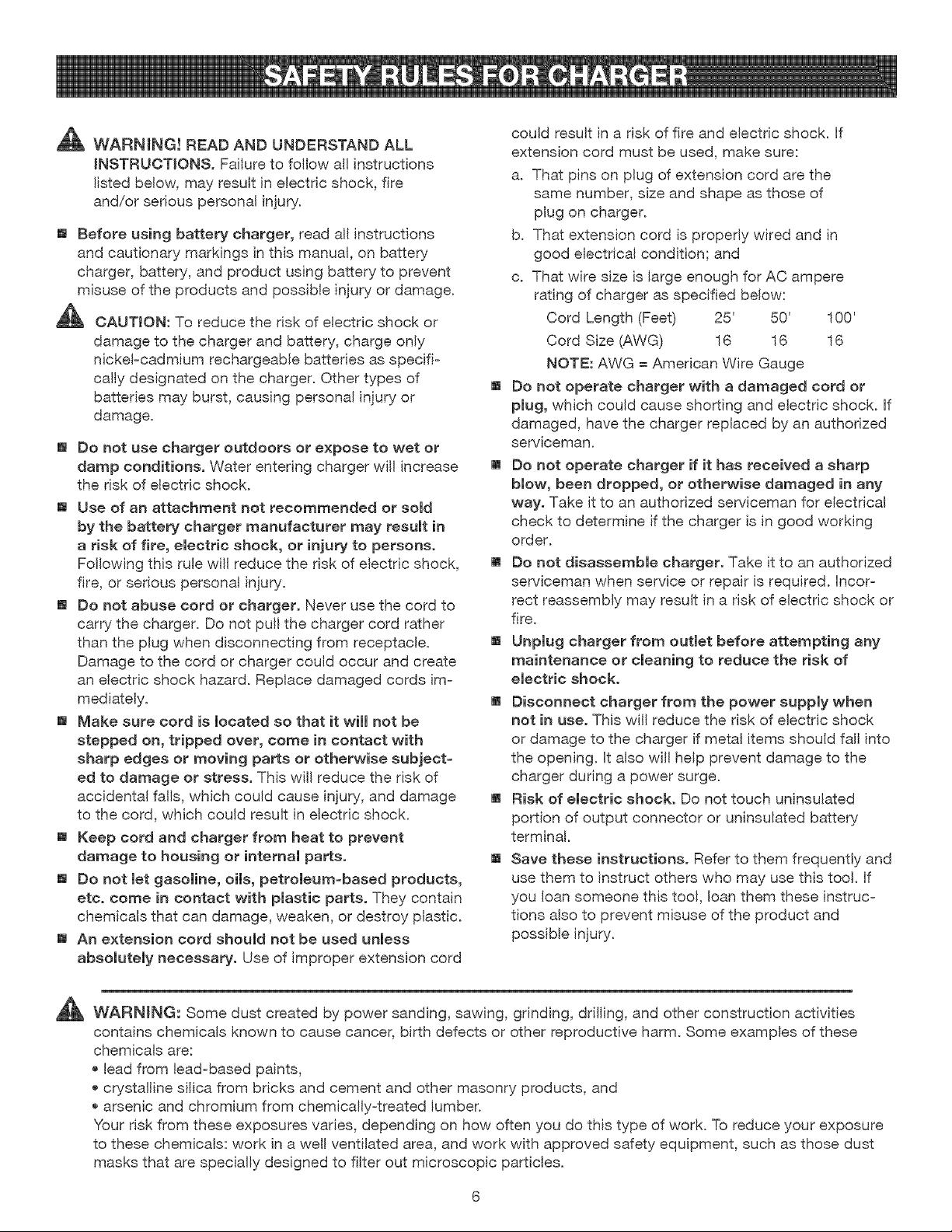
_ WARNING!READANDUNDERSTANDALL
[NSTRUOT[ONSo Failure to follow all instructions
listed below, may result in electric shock, fire
and/or serious personal injury.
[] Before using battery charger, read all instructions
and cautionary markings inthis manual, on battery
charger, battery, and product using battery to prevent
misuse of the products and possible injury or damage.
CAUTION: To reduce the risk of electric shock or
damage to the charger and battery, charge only
nickeFcadmium rechargeabie batteries as specifi=
cally designated on the charger. Other types of
batteries may burst, causing personal injury or
damage.
[] Do not use charger outdoors or expose to wet or
damp conditions. Water entering charger wil! increase
the risk of electric shock.
[] Use of an attachment not recommended or sold
by the battery charger manufacturer may result in
a risk of fire, electric shock, or injury to persons.
Following this rule will reduce the risk of electric shock,
fire, or serious personal injury.
[] Do not abuse cord or charger. Never use the cord to
carry the charger. Do not pull the charger cord rather
than the plug when disconnecting from receptacle.
Damage to the cord or charger could occur and create
an electric shock hazard. Replace damaged cords ira=
mediately.
[] Make sure cord is located so that it wi[[ not be
stepped on, tripped over, come in contact with
sharp edges or moving parts or otherwise subject-
ed to damage or stress. This wil! reduce the risk of
accidental falls, which could cause injury, and damage
to the cord, which could result in electric shock.
[] Keep cord and charger from heat to prevent
damage to housing or internal parts.
[] Do not let gasoline, oils, petroleum=based products,
etc. come in contact with plastic parts. They contain
chemicals that can damage, weaken, or destroy plastic.
[] An extension cord should not be used unless
absolutely necessary. Use of improper extension cord
could result in a risk of fire and electric shock. If
extension cord must be used, make sure:
a. That pins on plug of extension cord are the
same number, size and shape as those of
plug on charger.
b. That extension cord is properly wired and in
good electrical condition; and
c. That wire size is large enough for AC ampere
rating of charger as specified below:
Cord Length (Feet) 25' 50' 100'
Cord Size (AWG) 16 16 16
NOTE: AWG = American Wire Gauge
[] Do not operate charger with a damaged cord or
plug, which could cause shorting and electric shock. If
damaged, have the charger replaced by an authorized
serviceman.
[] Do not operate charger if it has received a sharp
blow, been dropped, or otherwise damaged in any
way. Take it to an authorized serviceman for electrical
check to determine if the charger is in good working
order.
[] Do not disassemble charger. Take it to an authorized
serviceman when service or repair is required. Incor-
rect reassembly may result in a risk of electric shock or
fire.
[] Unplug charger from outlet before attempting any
maintenance or cleaning to reduce the risk of
electric shock.
[] Disconnect charger from the power supply when
not in use. This will reduce the risk of electric shock
or damage to the charger if metal items should fall into
the opening. It also wil! help prevent damage to the
charger during a power surge.
[] Risk of electric shock. Do not touch uninsu[ated
portion of output connector or uninsulated battery
terminal.
[] Save these instructions. Refer to them frequently and
use them to instruct others who may use this tool. If
you loan someone this tool, loan them these instruc-
tions also to prevent misuse of the product and
possible injury.
_t_ WARNING: Some dust created by power sanding, sawing, grinding, drilling, and other construction activities
contains chemicals known to cause cancer, birth defects or other reproductive harm. Some examples of these
chemicals are:
lead from lead=based paints,
crystalline silica from bricks and cement and other masonry products, and
arsenic and chromium from chemically=treated lumber.
Your risk from these exposures varies, depending on how often you do this type of work. To reduce your exposure
to these chemicals: work in a well ventilated area, and work with approved safety equipment, such as those dust
masks that are specially designed to filter out microscopic particles.
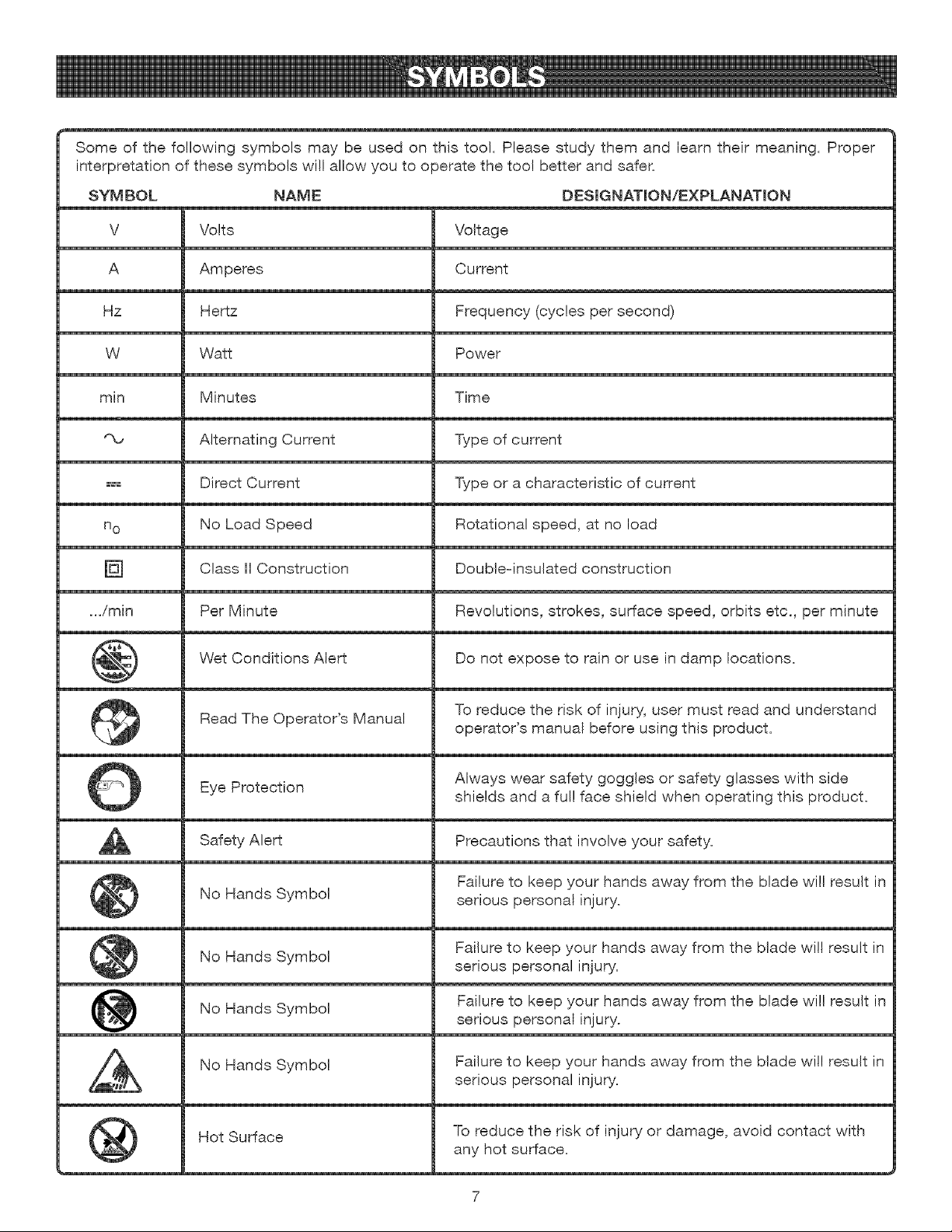
Someof the followingsymbolsmaybe usedon thistool. Pleasestudythemand learntheirmeaning.Proper
interpretationof thesesymbolswillallowyouto operatethetoo!betterandsafer.
SYMBOL NAME DESIGNATION/EXPLANATmON
V Volts
A Amperes
Hz Hertz
W Watt
min Minutes
'_ Alternating Current
H_ Direct Current
no No Load Speed
Class II Construction
.../min Per Minute
Wet Conditions Alert
Read The Operator's Manual
Eye Protection
Safety Alert
No Hands Symbol
No Hands
Symbol
No Hands Symbol
No Hands Symbol
®
Hot Surface
Voltage
Current
Frequency (cycles per second)
Power
Time
Type of current
Type or a characteristic of current
Rotational speed, at no load
Doubleqnsulated construction
Revolutions, strokes, surface speed, orbits etc,, per minute
Do not expose to rain or use in damp locations.
To reduce the risk of injury, user must read and understand
operator's manual before using this product.
Always wear safety goggles or safety glasses with side
shields and a ful! face shield when operating this product.
Precautions that involve your safety.
Failure to keep your hands away from the blade will result in
serious personal injury.
Failure to keep your hands away from the blade will result in
serious personal injury.
Failure to keep your hands away from the blade will result in
serious personal injury.
Failure to keep your hands away from the blade will result in
serious personal injury.
To reduce the risk of injury or damage, avoid contact with
any hot surface.
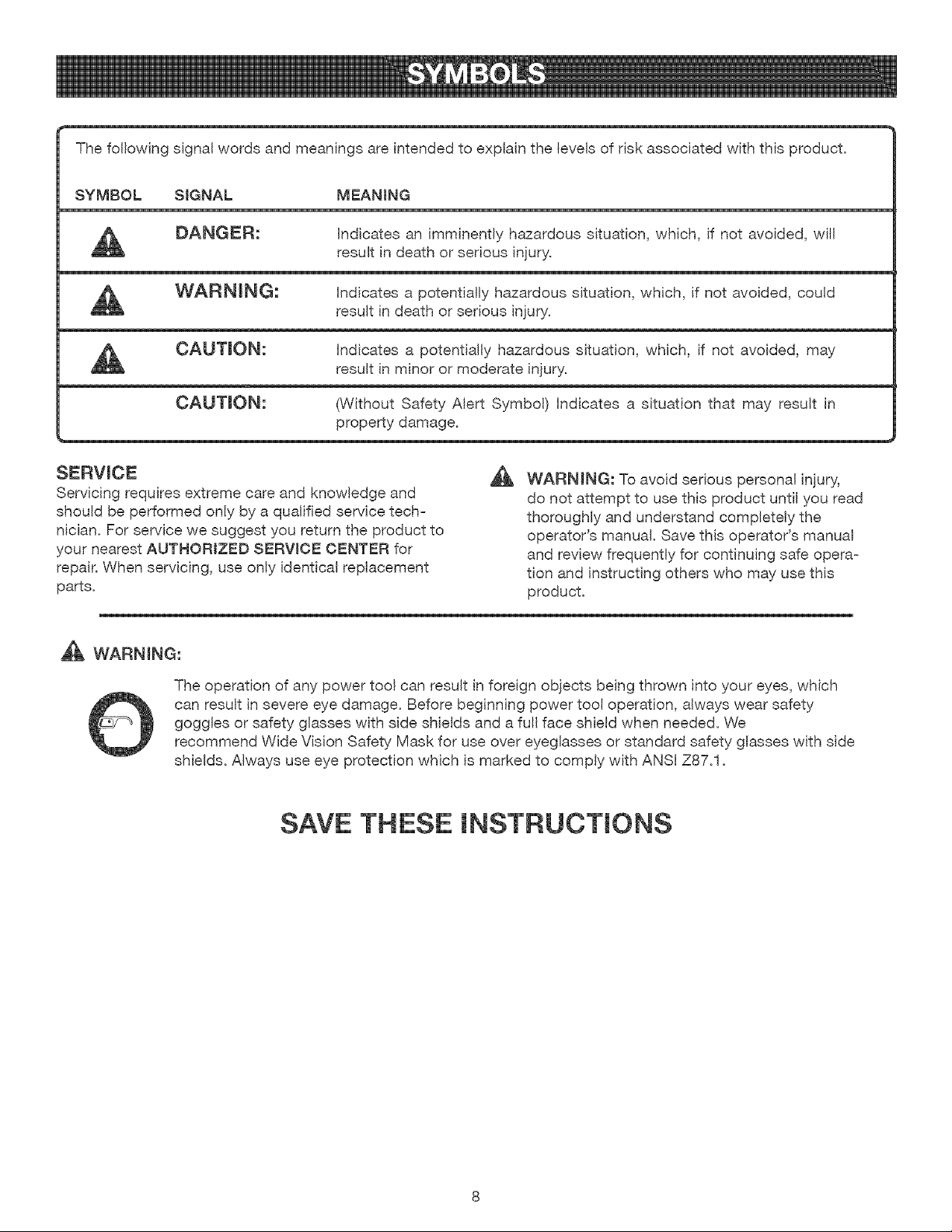
Thefollowingsignalwordsandmeaningsareintendedto explainthe levelsof riskassociatedwiththisproduct.
SYMBOL SIGNAL MEANING
DANGER: hdicates an imminently hazardous situation, which, if not avoided, will
result in death or serious injury.
WARNING: hdicates a potentially hazardous situation, which, if not avoided, could
result in death or serious injury.
CAUTmON: hdicates a potentially hazardous situation, which, if not avoided, may
result in minor or moderate injury.
CAUTmON: (Without Safety Alert Symbol) hdicates a situation that may result in
property damage.
SERVICE
Servicing requires extreme care and knowledge and
should be performed only by a qualified service tech-
nician. For service we suggest you return the product to
your nearest AUTHORIZED SERWOE CENTER for
repair. When servicing, use only identical replacement
parts.
WARNING: To avoid serious personal injury,
do not attempt to use this product until you read
thoroughly and understand completely the
operator's manual. Save this operator's manual
and review frequently for continuing safe opera-
tion and instructing others who may use this
product.
WARNING:
The operation of any power too! can result in foreign objects being thrown into your eyes, which
can result in severe eye damage. Before beginning power tool operation, always wear safety
goggles or safety glasses with side shields and a full face shield when needed. We
recommend Wide Vision Safety Mask for use over eyeglasses or standard safety glasses with side
shields. Always use eye protection which is marked to comply with ANSI Z87.1.
SAVE THESE INSTRUCTIONS
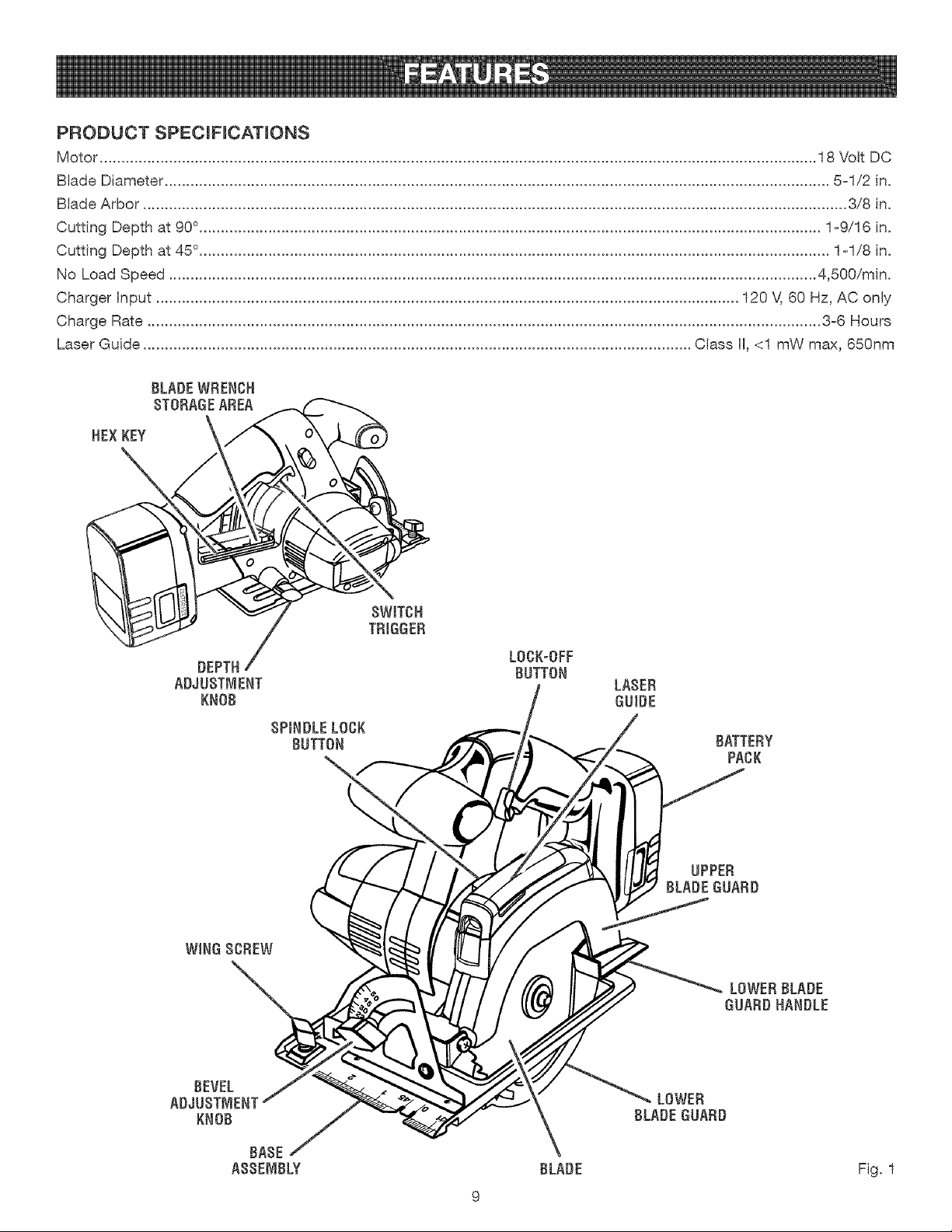
PRODUCT SPECIFICATIONS
Motor ...................................................................................................................................................................... 18 Volt DC
Blade Diameter .......................................................................................................................................................... 5-1/2 in.
Blade Arbor ................................................................................................................................................................... 3/8 in.
Cutting Depth at 90 °................................................................................................................................................ 1-9/16 in.
Cutting Depth at 45 °.................................................................................................................................................. 1-1/8 in.
No Load Speed ...................................................................................................................................................... 4,500/rain.
Charger hput ....................................................................................................................................... 120 V, 60 Hz, AC only
Charge Rate ............................................................................................................................................................ 3-6 Hours
Laser Guide ............................................................................................................................... Class II, <1 mW max, 650nm
BLADE WRENCH
$TORAGEAREA
HEXKEY
DEPTH
ADJUSTMENT
KNOB
SPINDLE LOCK
BUTTON
L0CK-0FF
BUTTON
BATTERY
PACK
UPPER
BLADE GUARD
LOWER BLADE
GUARD HANDLE
BEVEL
ADJUSTMENT
KNOB
BASE
AB$EMBLY BLADE
LOWER
BLADE GUARD
Fig. 1
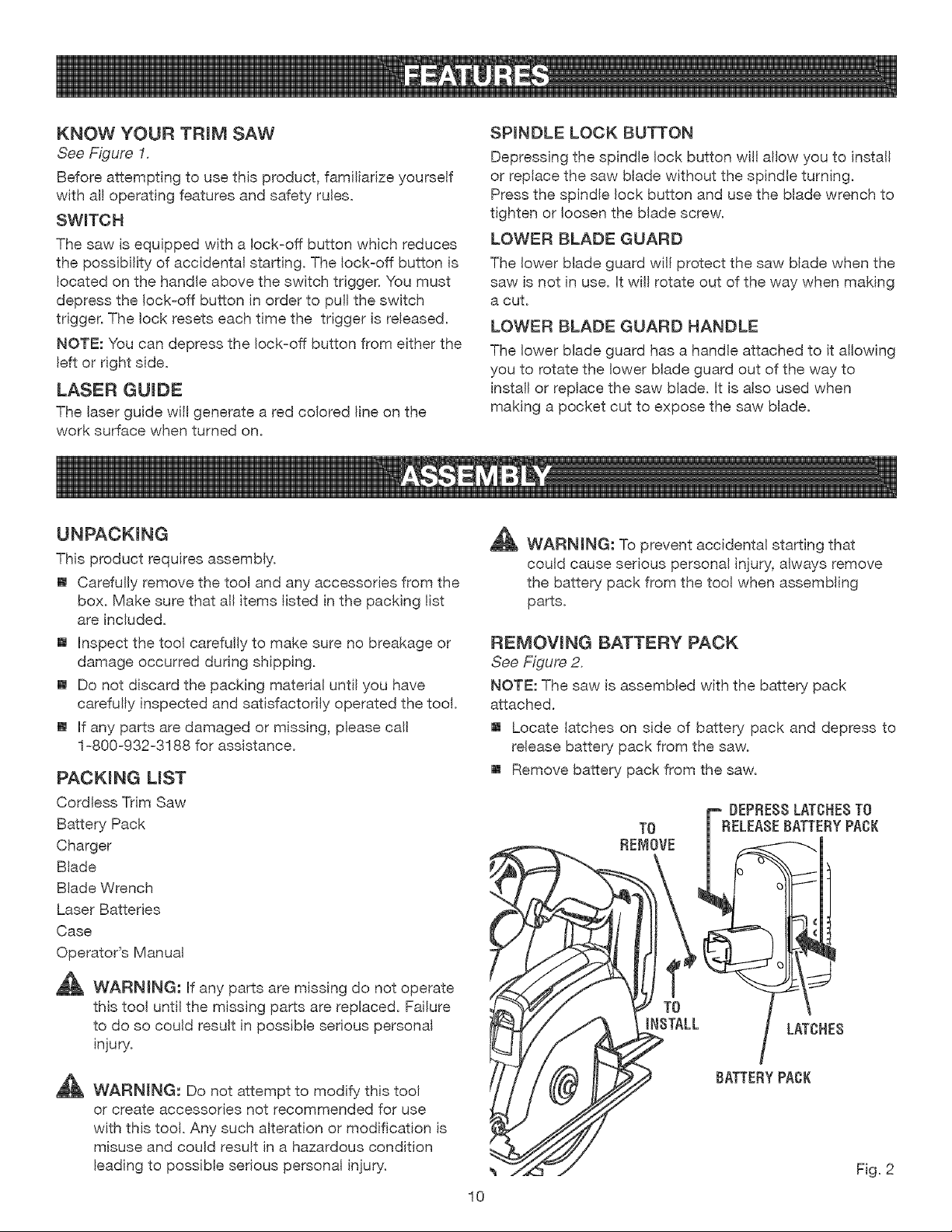
KNOW YOUR TRiM SAW
See Figure 1.
Before attempting to use this product, familiarize yourself
with all operating features and safety rules.
SWITCH
The saw is equipped with a lock=off button which reduces
the possibility of accidental starting. The lock=off button is
located on the handle above the switch trigger. You must
depress the lock=off button in order to pull the switch
trigger. The lock resets each time the trigger is released.
NOTE: You can depress the lock=off button from either the
left or right side.
LASER GUmDE
The laser guide will generate a red colored line on the
work surface when turned on.
SPINDLE LOCK BUTTON
Depressing the spindle lock button witl allow you to install
or replace the saw blade without the spindle turning.
Press the spindle lock button and use the blade wrench to
tighten or loosen the blade screw.
LOWER BLADE GUARD
The lower blade guard will protect the saw blade when the
saw is not in use. it will rotate out of the way when making
a cut.
LOWER BLADE GUARD HANDLE
The lower blade guard has a handle attached to it allowing
you to rotate the lower blade guard out of the way to
instal! or replace the saw blade. It is also used when
making a pocket cut to expose the saw blade.
UNPACKING
This product requires assembly.
[] Carefully remove the tool and any accessories from the
box. Make sure that all items listed in the packing list
are included.
[] inspect the tool carefully to make sure no breakage or
damage occurred during shipping.
[] Do not discard the packing material until you have
carefully inspected and satisfactorily operated the tool.
[] if any parts are damaged or missing, please call
1=800=932=3188 for assistance.
PACKING LiST
Cordless Trim Saw
Battery Pack
Charger
Blade
Blade Wrench
Laser Batteries
Case
Operator's Manual
_ WARMNG: if any parts are missing do not operate
this tool unti! the missing parts are replaced. Failure
to do so could result in possible serious personal
injury.
_ WARNING: Do not attempt to modify this tool
or create accessories not recommended for use
with this toot. Any such alteration or modification is
misuse and could result in a hazardous condition
leading to possible serious personal injury.
_ WARNING: To prevent accidental starting that
could cause serious personal injury, always remove
the battery pack from the tool when assembling
parts.
REMOVING BATTERY PACK
See Figure 2.
NOTE: The saw is assembled with the battery pack
attached.
[] Locate latches on side of battery pack and depress to
release battery pack from the saw.
[] Remove battery pack from the saw.
TO
REMOVE
F DEPRE88LATCHESTO
RELEASEBATTERYPACK
LATCHES
BATTERYPACK
10
Fig. 2
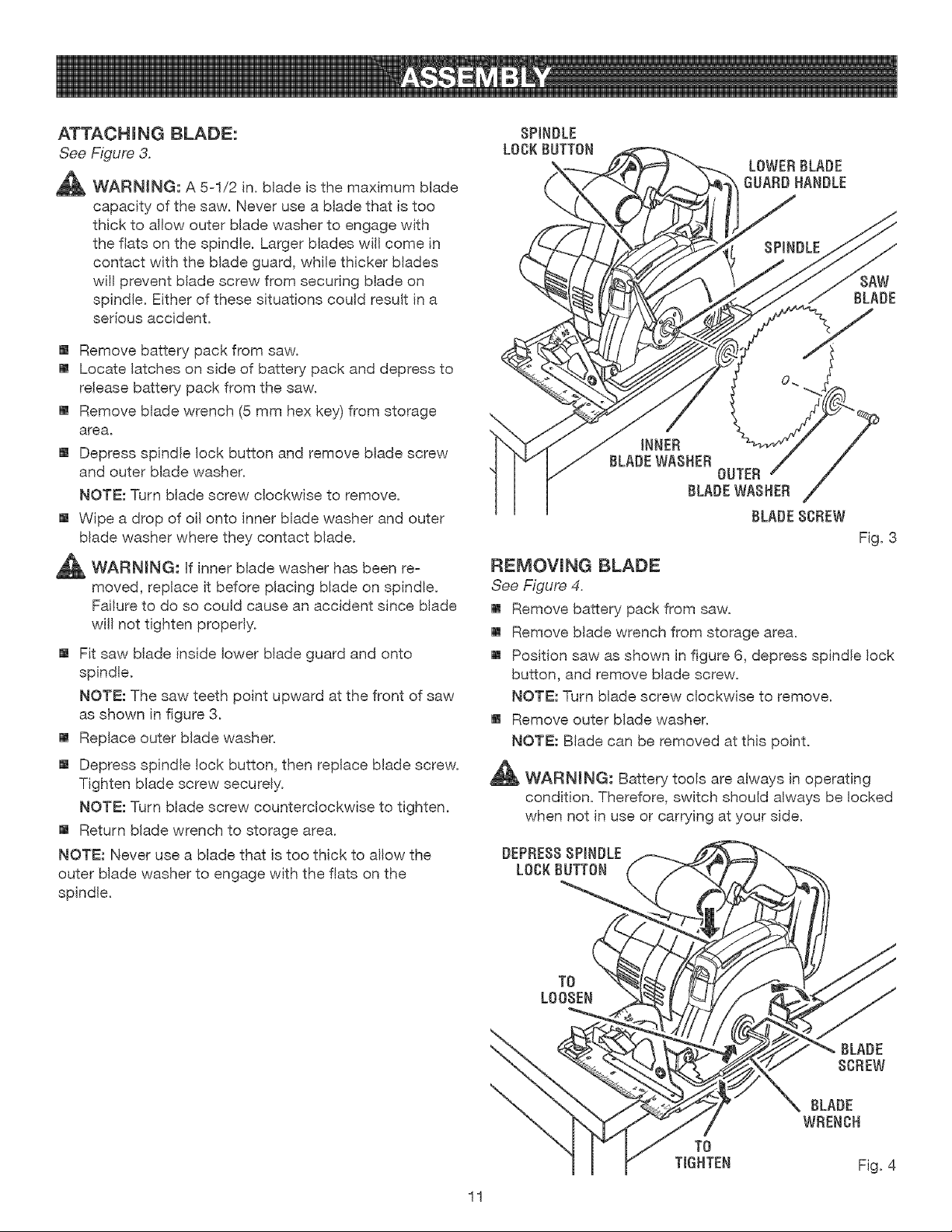
ATTACHmNG BLADE:
See Figure 3.
_ WARNING: A 5=1/2 in. blade is the maximum blade
capacity of the saw. Never use a blade that is too
thick to allow outer blade washer to engage with
the flats on the spindle. Larger blades will come in
contact with the blade guard, while thicker blades
wil! prevent blade screw from securing blade on
spindle. Either of these situations could result in a
serious accident.
[] Remove battery pack from saw.
[] Locate latches on side of battery pack and depress to
release batten/pack from the saw.
[] Remove blade wrench (5 mm hex key) from storage
area.
[] Depress spindle lock button and remove blade screw
and outer blade washer.
NOTE: Turn blade screw clockwise to remove.
[] Wipe a drop of oil onto inner blade washer and outer
blade washer where they contact blade.
_ll_ WARNING: Hfinner blade washer has been re-
moved, replace it before placing blade on spindle.
Failure to do so could cause an accident since blade
will not tighten properly.
[] Fit saw blade inside lower blade guard and onto
spindle.
NOTE: The saw teeth point upward at the front of saw
as shown in figure 3.
[] Replace outer blade washer.
[] Depress spindle lock button, then replace blade screw.
Tighten blade screw securely.
NOTE: Turn blade screw counterclockwise to tighten.
[] Return blade wrench to storage area.
NOTE: Never use a blade that is too thick to allow the
outer blade washer to engage with the fiats on the
spindle.
SPINDLE
LOCK BUTTON
LOWER BLADE
GUADO HANDLE
SAW
BLADE
INNER
BLADEWASHER
OUTER
BLADEWASHER
Fig. 3
FiEJViOVmNG BLADE
See Figure 4.
[] Remove battery pack from saw.
[] Remove blade wrench from storage area.
[] Position saw as shown in figure 6, depress spindle lock
button, and remove blade screw.
NOTE: Turn blade screw clockwise to remove.
[] Remove outer blade washer.
NOTE: Blade can be removed at this point.
_i_ WARNING: Battery tools are always in operating
condition. Therefore, switch should always be locked
when not in use or carrying at your side.
DEPRE88SPINDLE
LOCKBUTTON
T0
L008EN
11
\
\
T0
TIGHTEN
BLADE
WRENCH
Fig. 4
,_ WAF{NING: Do not allow familiarity with tools to
make you careless. Remember that a careless
fraction of a second is sufficient to inflict serious
injury.
_ WAF{NING: Always wear safety goggles or safety
glasses with side sMelds when operating tools.
Failure to do so could result in objects being thrown
into your eyes, resulting in possible serious injury.
_ WAF{NING: Do not use any attachments or acces-
sories not recommended by the manufacturer of
this tool. The use of attachments or accessories not
recommended can result in serious personal injury.
APPLiCATiONS
You may use this tool for the following purposes:
[] Cutting all types of wood products (lumber, plywood,
paneling)
CAUTION: To prevent damage to the battery pack,
remove the battery pack from the charger immedi-
ately if no LED comes on. Return the battery pack
and charger to your nearest service center for check-
ing or replacing. Also, if you are removing the battery
pack from the charger and no LEDs are on, return
both the battery pack and the charger to your near-
est service center. Do not insert another battery pack
into the charger. A damaged charger may
damage a battery pack.
CHARGING THE BATTERY PACK
The battery pack for this tool has been shipped in a low
charge condition to prevent possible problems. Therefore,
you should charge overnight prior to use.
NOTE: Batteries will not reach full charge the first time
they are charged. Allow several cycles (operation followed
by recharging) for them to become fully charged.
[] Charge battery pack only with the charging assembly
provided.
[] Make sure power supply is normal household voltage,
120 volts, 60 Hz, AC only.
[] Connect charger to power supply.
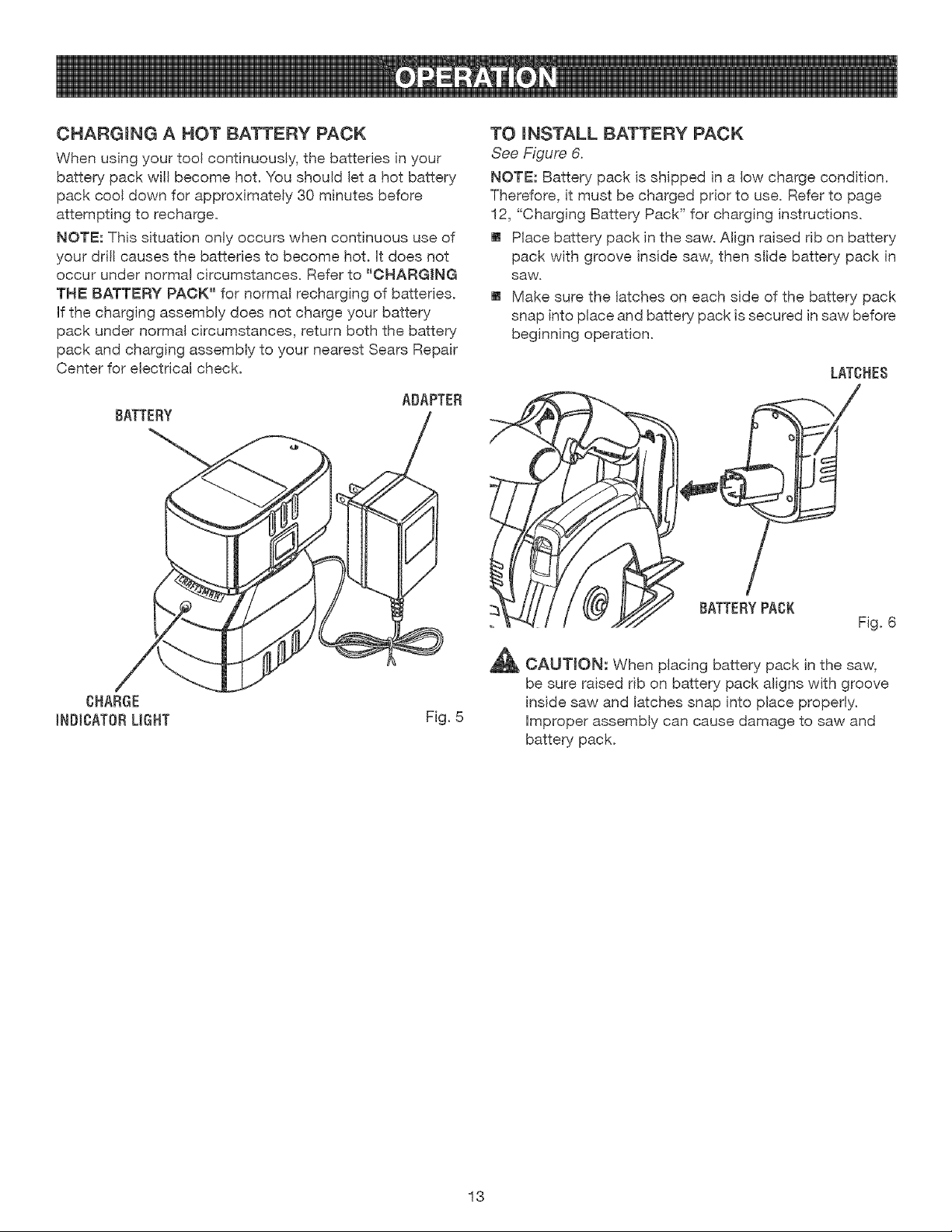
[] Place battery pack in charging stand. Align raised rib
on battery pack with groove in charging stand. See
Figure 5.
[] Press down on battery pack to be sure contacts on
battery pack engage properly with contacts in charging
stand.
[] The charge indicator light (LED), located on the charg-
ing stand, will light up red and glow when the charger
is propedy connected to power supply. This light
indicates the charger is operating properly. It wil!
remain on until battery pack is removed from charging
stand or charger is disconnected from power supply.
NOTE: If charger does not charge battery pack, return
battery pack and charging assembly to your nearest
Sears Repair Center for electrical check.
[] After normal usage, 3 hours or less of charging time is
required to fully recharge battery pack.
NOTE: If battery pack is completely discharged,
6 hours or longer of charging time is required to fully
recharge battery pack.
[] The battery pack wil! become slightly warm to the
touch while charging. This is normal and does not
indicate a problem.
[] Do not place charger in an area of extreme heat or
cold. It wil! work best at normal room temperature.
[] When batteries become fully charged, unplug charger
from power supply and remove the battery pack.
12
CHARGmNG A HOT BATTERY PACK
When using your tool continuously, the batteries in your
battery pack will become hot. You should let a hot battery
pack cool down for approximately 30 minutes before
attempting to recharge.
NOTE: This situation only occurs when continuous use of
your drill causes the batteries to become hot. Htdoes not
occur under normal circumstances. Refer to "CHARGING
THE BATTERY PACK" for normal recharging of batteries.
Hfthe charging assembly does not charge your battery
pack under normal circumstances, return both the battery
pack and charging assembly to your nearest Sears Repair
Center for electrical check.
ADAPTEB
BATTEBY
CHABGE
INDICATOBLIGHT Fig. 5
TO mNSTALL BATTERY PACK
See Figure 6.
NOTE: Battery pack is shipped in a low charge condition.
Therefore, it must be charged prior to use. Refer to page
12, "Charging Battery Pack" for charging instructions.
[] Place battery pack in the saw. Align raised rib on battery
pack with groove inside saw, then slide battery pack in
saw.
[] Make sure the latches on each side of the battery pack
snap into place and battery pack is secured in saw before
beginning operation.
LATCHES
!
BATTEBYPACK
Fig. 6
_ CAUTION: When placing battery pack in the saw,
be sure raised rib on battery pack aligns with groove
inside saw and latches snap into place properly.
Improper assembly can cause damage to saw and
battery pack.
13
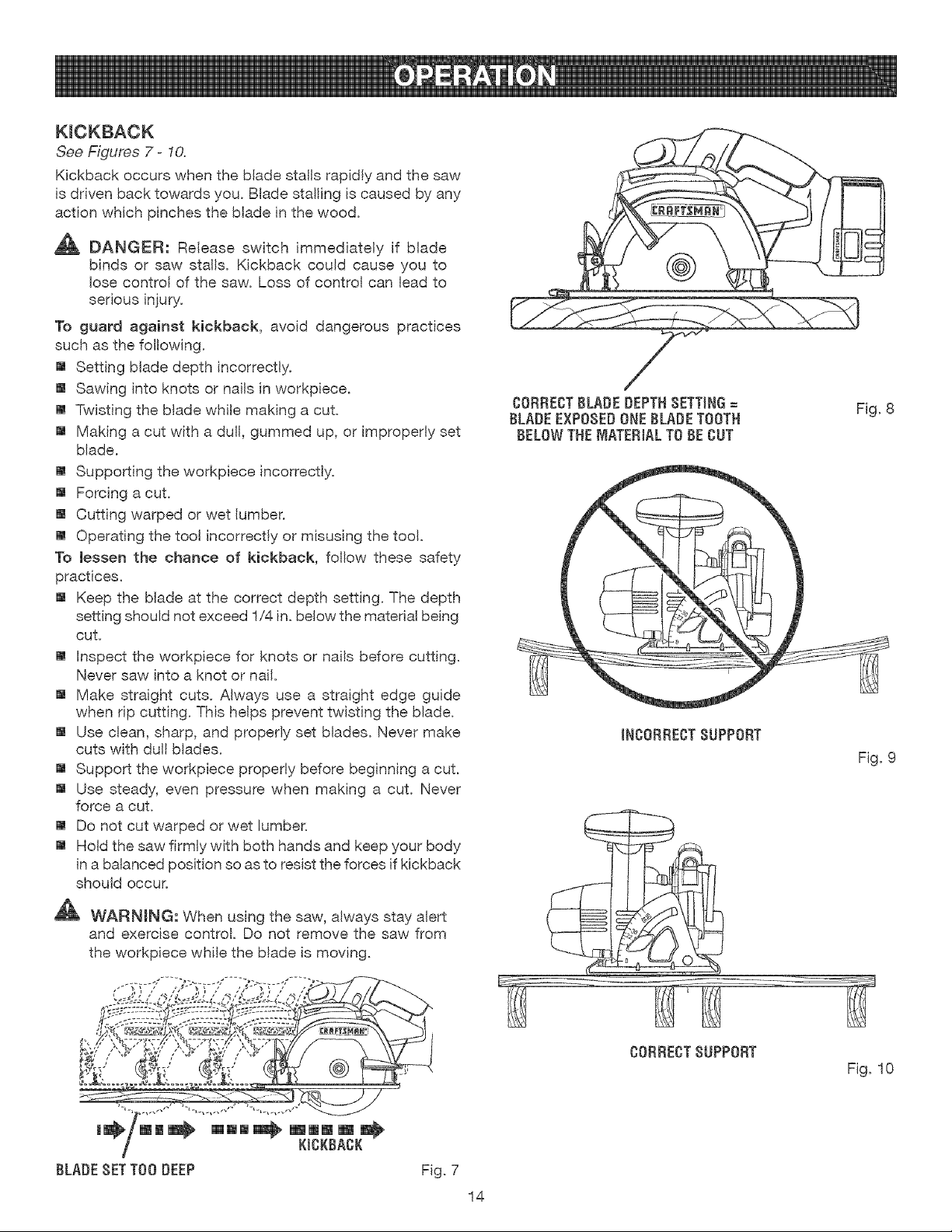
KICKBACK
See Figures 7 - 10.
Kickback occurs when the blade stalls rapidly and the saw
is driven back towards you. Blade stalling is caused by any
action which pinches the blade in the wood.
,_ DANGER: Release switch immediately if blade
binds or saw stalls. Kickback could cause you to
lose control of the saw. Loss of control can lead to
serious injury.
To guard against kickback, avoid dangerous practices
such as the following.
[] Setting blade depth incorrectly.
[] Sawing into knots or nails in workpiece.
[] Twisting the blade wMle making a cut.
[] Making a cut with a dull, gummed up, or improperly set
blade.
[] Supporting the workpiece incorrectly.
[] Forcing a cut.
[] Cutting warped or wet lumber.
[] Operating the tool incorrectly or misusing the tool.
To lessen the chance of kickback, fol!ow these safety
practices.
[] Keep the blade at the correct depth setting. The depth
setting should not exceed 1,/4in. below the material being
cut.
[] Inspect the workpiece for knots or nails before cutting.
Never saw into a knot or nail.
[] Make straight cuts. Always use a straight edge guide
when rip cutting. This helps prevent twisting the blade.
[] Use clean, sharp, and properly set blades. Never make
cuts with dull blades.
[] Support the workpiece properly before beginning a cut.
[] Use steady, even pressure when making a cut. Never
force a cut.
[] Do not cut warped or wet lumber.
[] Hold the saw firmly with both hands and keep your body
in a balanced position so as to resist the forces if kickback
should occur.
WARNING: When using the saw, always stay alert
and exercise control. Do not remove the saw from
the workpiece while the blade is moving.
OORREOTBLADEDEPTHSETTING=
BLADEEXPOSEDONEBLADETOOTH
BELOWTHEMATERIALTO BE OUT
IN00RREOTSUPPORT
Fig. 8
Fig. 9
BLADESETTOO DEEP
Fig. 7
14
00RRECTSUPPORT
Fig. 10
SAW BLADES
The best of saw blades wilt not cut efficiently if they are
not kept clean, sharp, and properly set. Using a dull blade
will place a heavy load on the saw and increase the dan-
get of kickback. Keep extra blades on hand, so that sharp
blades are always available.
Gum and wood pitch hardened on blades will s!ow the
saw down. Remove saw blade from the saw and use gum
and pitch remover, hot water, or kerosene to remove these
accumulations. DO NOT USE GASOLINE.
BLADE GUARD SYSTEM
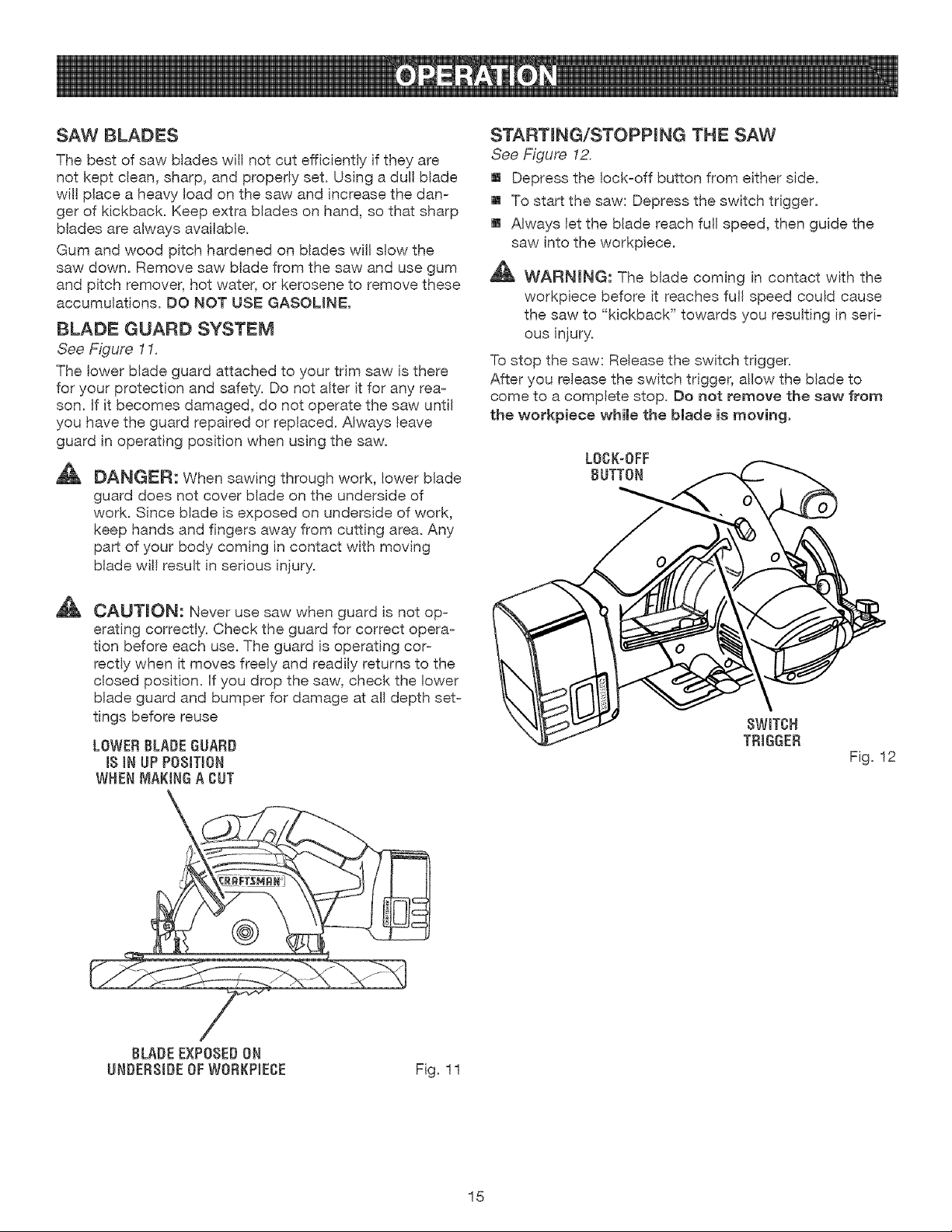
See Figure 11.
The lower blade guard attached to your trim saw is there
for your protection and safety. Do not alter it for any rea-
son. If it becomes damaged, do not operate the saw unti!
you have the guard repaired or replaced. Always leave
guard in operating position when using the saw.
A
DANGER: When sawing through work, lower blade
guard does not cover blade on the underside of
work. Since blade is exposed on underside of work,
keep hands and fingers away from cutting area. Any
part of your body coming in contact with moving
blade wil! result in serious injury.
CAUTION: Never use saw when guard is not op=
orating correctly. Check the guard for correct opera-
tion before each use. The guard is operating cor-
rectly when it moves freely and readily returns to the
closed position. If you drop the saw, check the lower
blade guard and bumper for damage at all depth set-
tings before reuse
LOWER BLADE GUARD
IS IN UP POSITION
WHEN MAKING A OUT
STARTING/STOPPING THE SAW
See Figure 12.
[] Depress the lock-off button from either side.
[] To start the saw: Depress the switch trigger.
[] Always let the blade reach full speed, then guide the
saw into the workpiece.
WARNING: The blade coming in contact with the
workpiece before it reaches full speed could cause
the saw to "kickback" towards you resulting in seri-
ous injury.
To stop the saw: Release the switch trigger.
After you release the switch trigger, allow the blade to
come to a complete stop. Do not remove the saw from
the workpiece while the blade is moving.
LOOK-OFF
BUTTON
SWITCH
TRIGGER
Fig. 12
BLADE EXPOSED ON
UNDERSIDE OF WORKPIEOE
Fig. 11
15
DEPTH OF CUT ADJUSTMENT
Always keep correct blade depth setting. The correct
blade depth setting for al! cuts should not exceed 1/4
inch below the material to be cut. More blade depth will
increase the chance of kickback and cause the cut to be
rough. One blade tooth below the matedal to be cut works
best for most efficient cutting action.
TO ADJUST BLADE DEPTH
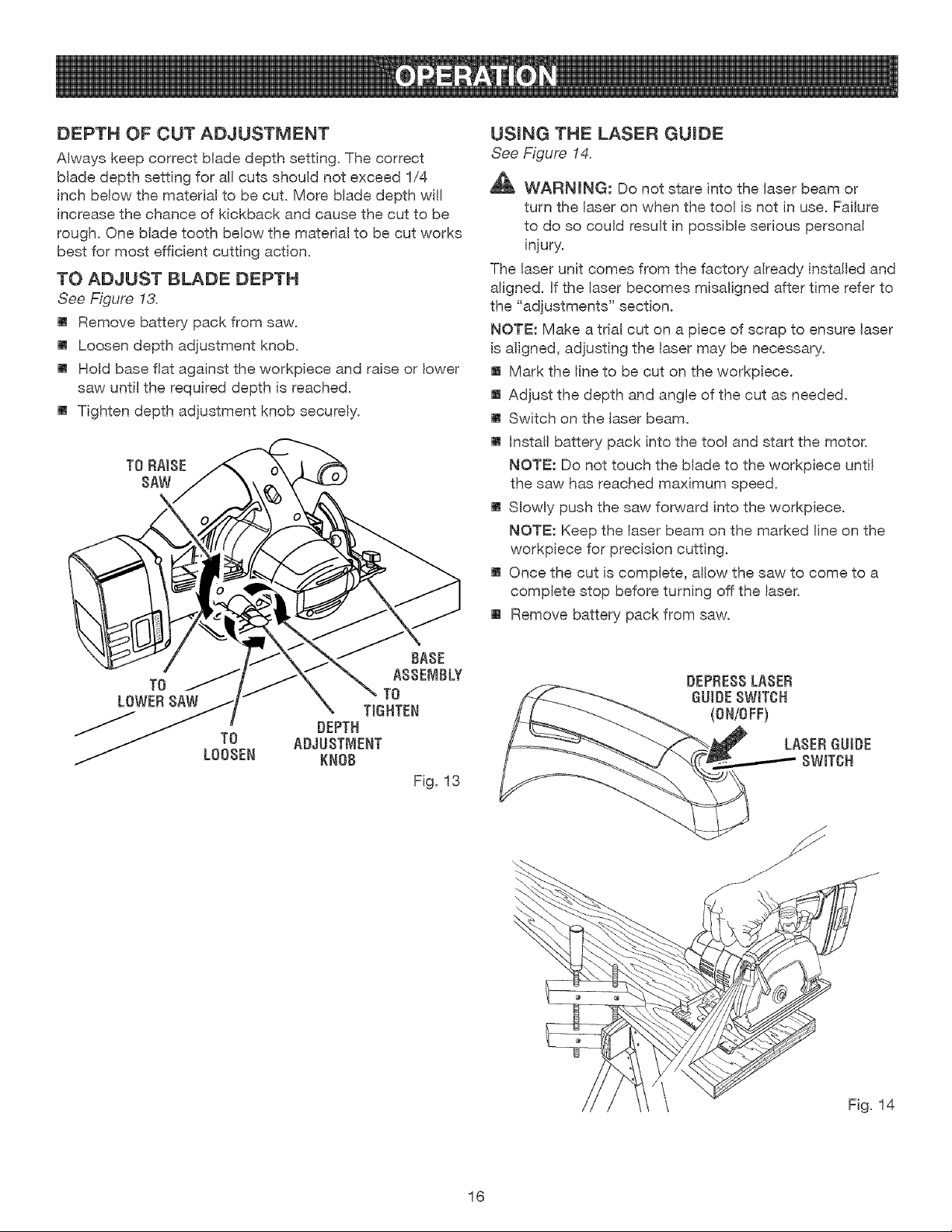
See Figure 13.
[] Remove battery pack from saw.
[] Loosen depth adjustment knob.
[] Hold base flat against the workpiece and raise or lower
saw until the required depth is reached.
[] Tighten depth adjustment knob securely.
TO RAISE
SAW
TO
LOWERSAW
TO
LOOSEN
BASE
ASSEMBLY
TO
TIGHTEN
DEPTH
ADJUSTMENT
KNOB
Fig. 13
USmNG THE LASER GUmDE
See Figure 14.
WARMNG: Do not stare into the laser beam or
turn the laser on when the too] is not in use. Failure
to do so could result in possible serious personal
injury.
The laser unit comes from the factory already installed and
aligned, if the laser becomes misaligned after time refer to
the "adjustments" section.
NOTE: Make a trial cut on a piece of scrap to ensure laser
is aligned, adjusting the laser may be necessary.
[] Mark the line to be cut on the workpiece.
[] Adjust the depth and angle of the cut as needed.
[] Switch on the laser beam.
[] install battery pack into the tool and start the motor.
NOTE: Do not touch the blade to the workpiece until
the saw has reached maximum speed.
[] Slowly push the saw forward into the workpiece.
NOTE: Keep the laser beam on the marked line on the
workpiece for precision cutting.
[] Once the cut is complete, allow the saw to come to a
complete stop before turning off the laser.
m Remove battery pack from saw.
DEPRESSLASER
OUtOESWITCH
(ON/OFF)
LASERGUIDE
8WITOH
16
OPERATmNG THE SAW
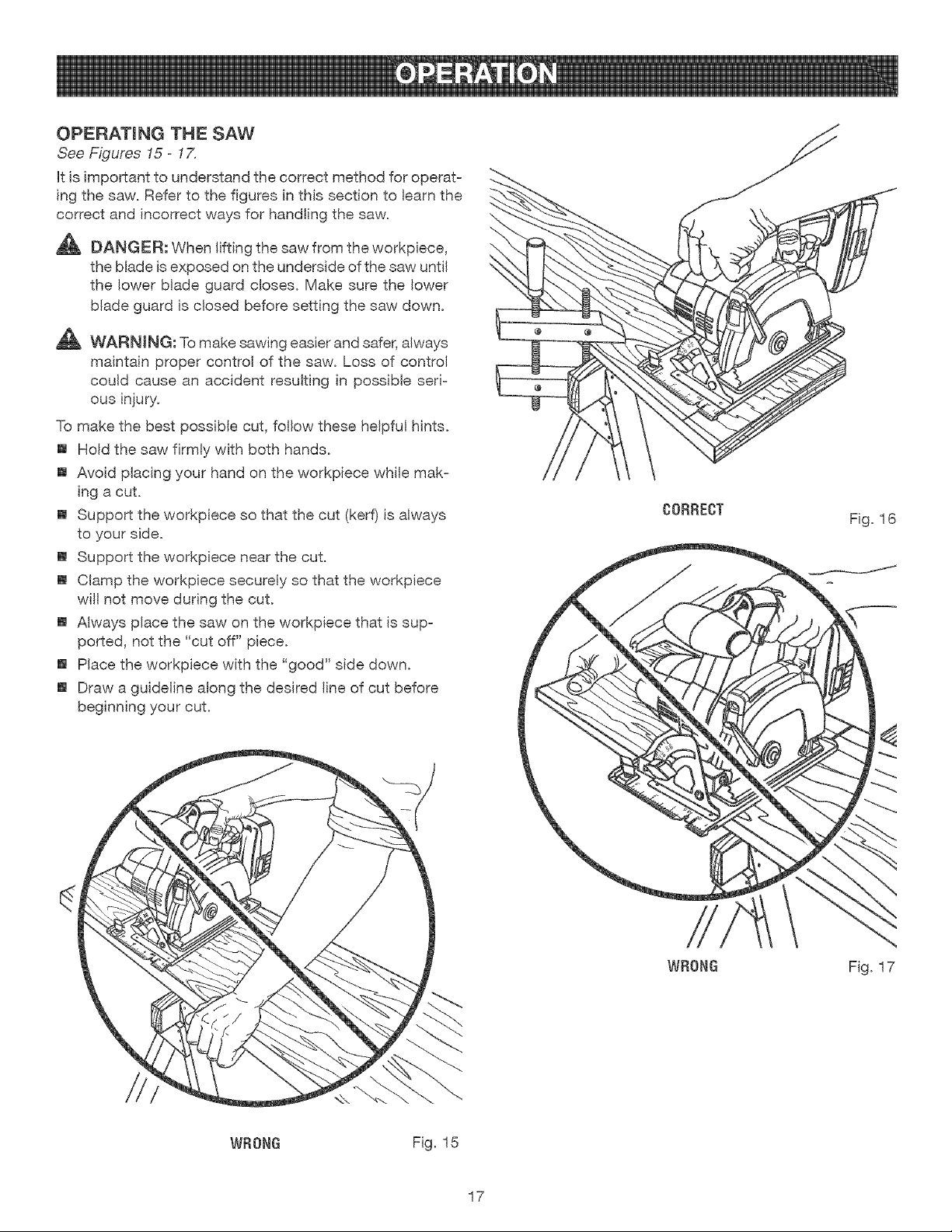
See Figures 15- 17.
Htis important to understand the correct method for operat-
ing the saw. Refer to the figures in this section to learn the
correct and incorrect ways for handling the saw.
DANGER: When lifting the saw from the workpiece,
the blade is exposed on the underside of the saw unti!
the lower blade guard closes. Make sure the lower
blade guard is closed before setting the saw down.
_, WARNING: To make sawing easier and safer, always
maintain proper control of the saw. Loss of control
could cause an accident resulting in possible seri=
ous injury.
To make the best possible cut, follow these helpful hints.
[] Hold the saw firmly with both hands.
[] Avoid placing your hand on the workpiece while mak=
ing a cut.
[] Support the workpiece so that the cut (kerf) is always
to your side.
[] Support the workpiece near the cut.
[] Clamp the workpiece securely so that the workpiece
will not move during the cut.
[] Always place the saw on the workpiece that is sup-
ported, not the "cut off" piece.
[] Place the workpiece with the "good" side down.
[] Draw a guideline along the desired line of cut before
beginning your cut.
WRONG Fig. 15
17
C0RRECT
WRONG
Fig. 16
Fig. 17
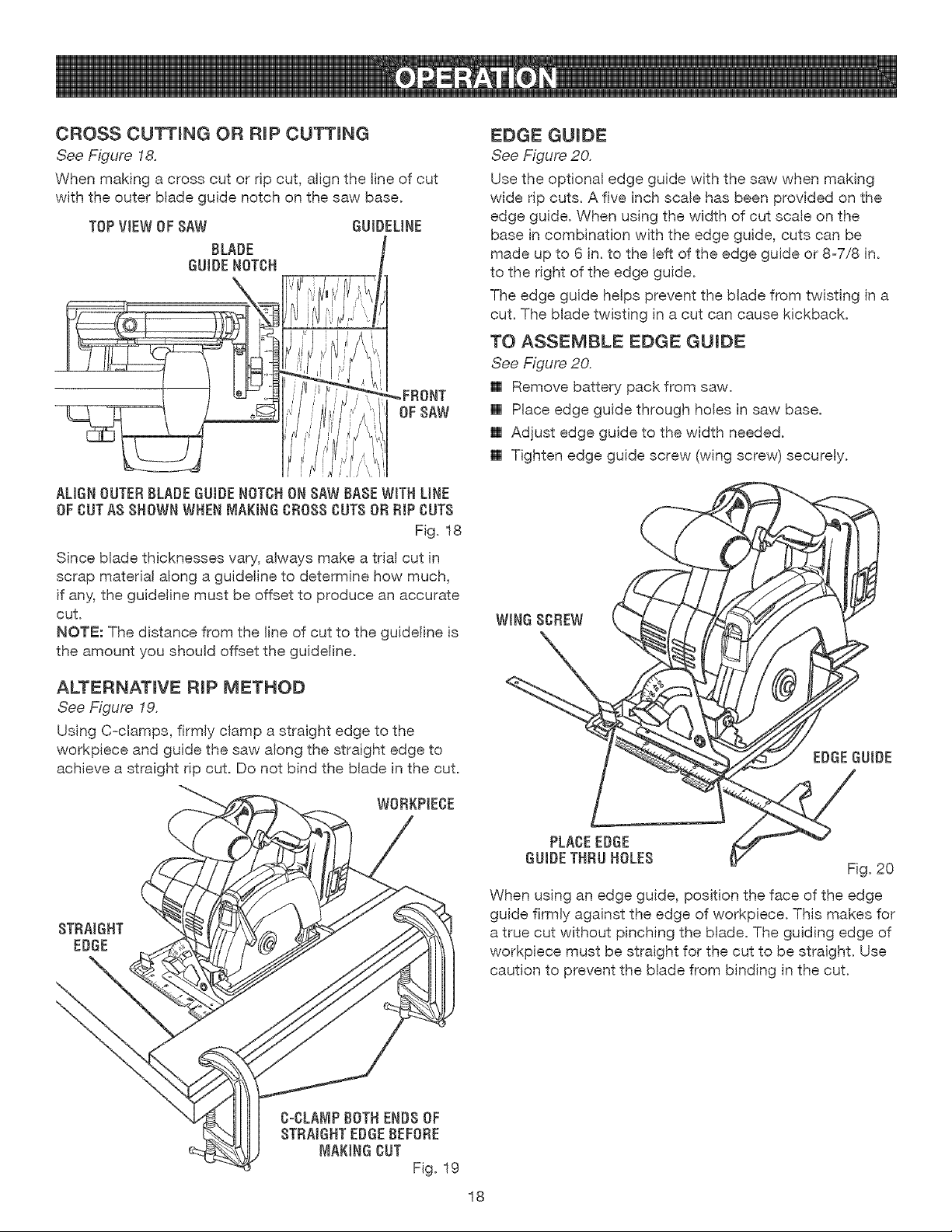
CROSS CUTTmNG OR RmPCUTTmNG
See Figure 18.
When making a cross cut or rip cut, align the line of cut
with the outer blade guide notch on the saw base.
TOPVIEW OF SAW
BLADE
GUIDENOT{3H
GUIDELINE
ALIGNOUTERBLADEGUIDENOT{3HONSAW BASEWITH LINE
OF {3UTA$ SHOWNWHENMAKING {3BOSS{3UT$OF{DIP {3UT$
Fig. 18
Since blade thicknesses vary, always make a trial cut in
scrap material along a guideline to determine how much,
if any,,the guideline must be offset to produce an accurate
cut.
NOTE: The distance from the line of cut to the guideline is
the amount you should offset the guideline.
ALTERNATmVE RmP METHOD
See Figure 19.
Using C-clamps, firmly clamp a straight edge to the
workpiece and guide the saw along the straight edge to
achieve a straight rip cut. Do not bind the blade in the cut.
STRAIGHT
EDGE
EDGE GUmDE
See Figure 20.
Use the optional edge guide with the saw when making
wide rip cuts. A five inch scale has been provided on the
edge guide. When using the width of cut scale on the
base in combination with the edge guide, cuts can be
made up to 6 in. to the left of the edge guide or 8-7/8 in.
to the right of the edge guide.
The edge guide helps prevent the blade from twisting in a
cut. The blade twisting in a cut can cause kickback.
TO ASSEMBLE EDGE GUmDE
See Figure 20.
[] Remove battery pack from saw.
[] Place edge guide through holes in saw base.
[] Adjust edge guide to the width needed.
[] Tighten edge guide screw (wing screw) securely.
EDGEGUIDE
PLA{3EEDGE
GUIDETHRUHOLES
Fig. 20
When using an edge guide, position the face of the edge
guide firmly against the edge of workpiece. This makes for
a true cut without pinching the blade. The guiding edge of
workpiece must be straight for the cut to be straight. Use
caution to prevent the blade from binding in the cut.
18
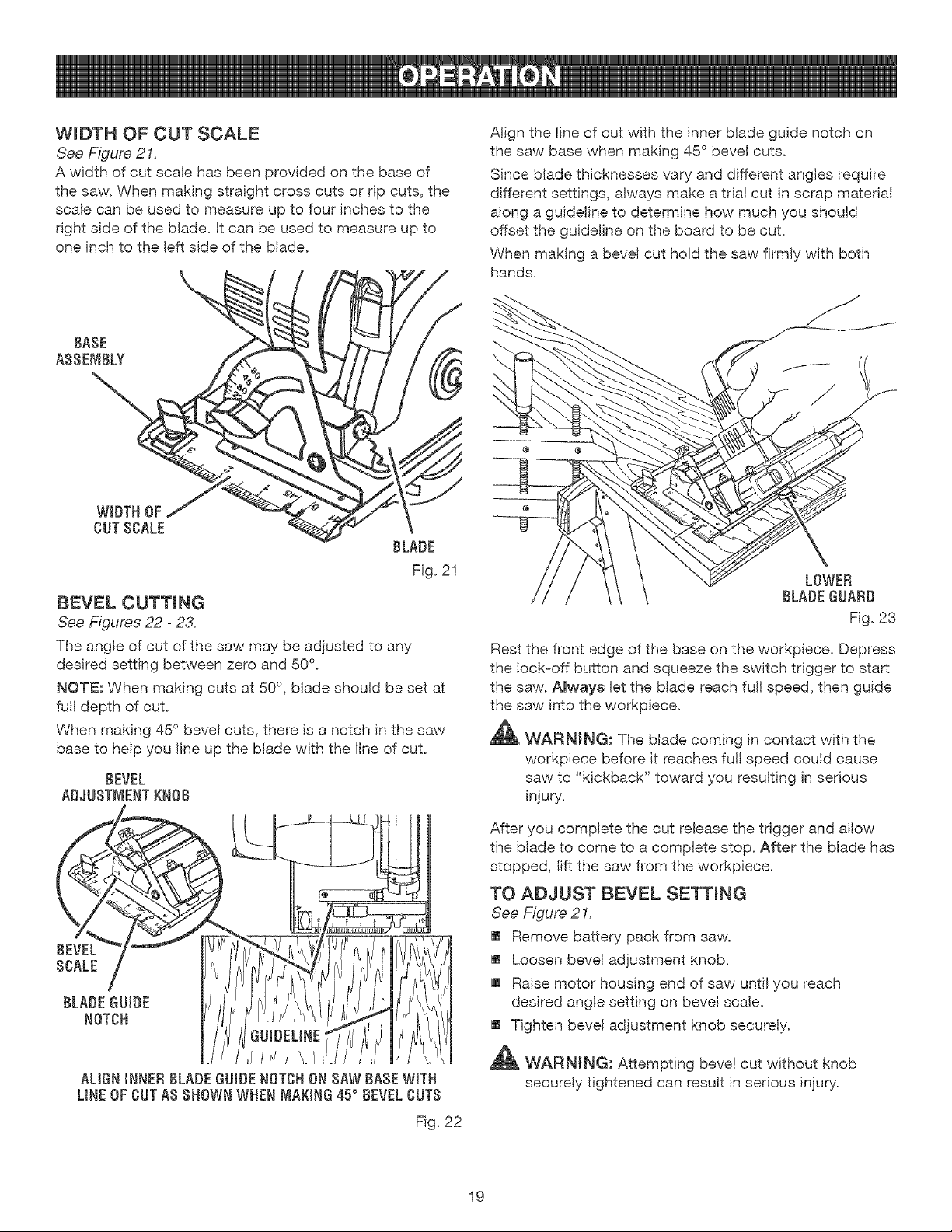
WmDTH OF CUT SCALE
See Figure 21.
A width of cut scale has been provided on the base of
the saw. When making straight cross cuts or rip cuts, the
scale can be used to measure up to four inches to the
right side of the blade, ff can be used to measure up to
one inch to the left side of the blade.
BASE
ABBEMBLY_
CUT SCALE
®
BLADE
Fig. 21
BEVEL CUTTmNG
See Figures 22 - 23.
The angle of cut of the saw may be adjusted to any
desired setting between zero and 50 °.
NOTE: When making cuts at 50° , blade should be set at
full depth of cut.
When making 45° bevel cuts, there is a notch in the saw
base to help you line up the blade with the line of cut.
BEVEL
ADJUSTMENTKNOB
ALIGNiNNERBLADEGUIDENOTCHON RAW BASEWITH
LINE OFCUTAB BHOWNWHENMAKING45° BEVELCUTB
Fig. 22
Align the line of cut with the inner blade guide notch on
the saw base when making 45 ° bevel cuts.
Since blade thicknesses vary and different angles require
different settings, always make a trial cut in scrap material
along a guideline to determine how much you should
offset the guideline on the board to be cut.
When making a bevel cut hold the saw firmly with both
hands.
@ @
Rest the front edge of the base on the workpiece. Depress
the lock-off button and squeeze the switch trigger to start
the saw. Always let the blade reach full speed, then guide
the saw into the workpiece.
_11_ WARNING: The blade coming in contact with the
workpiece before it reaches full speed could cause
saw to "kickback" toward you resulting in serious
injury.
After you complete the cut release the trigger and allow
the blade to come to a complete stop. After the blade has
stopped, lift the saw from the workpiece.
TO ADJUST BEVEL SETTING
See Figure 21.
[] Remove battery pack from saw.
[] Loosen beve! adjustment knob.
[] Raise motor housing end of saw until you reach
desired angle setting on bevel scale.
[] Tighten bevel adjustment knob securely.
_1_ WAFINJNG: Attempting bevel cut without knob
securely tightened can result in serious injury.
19
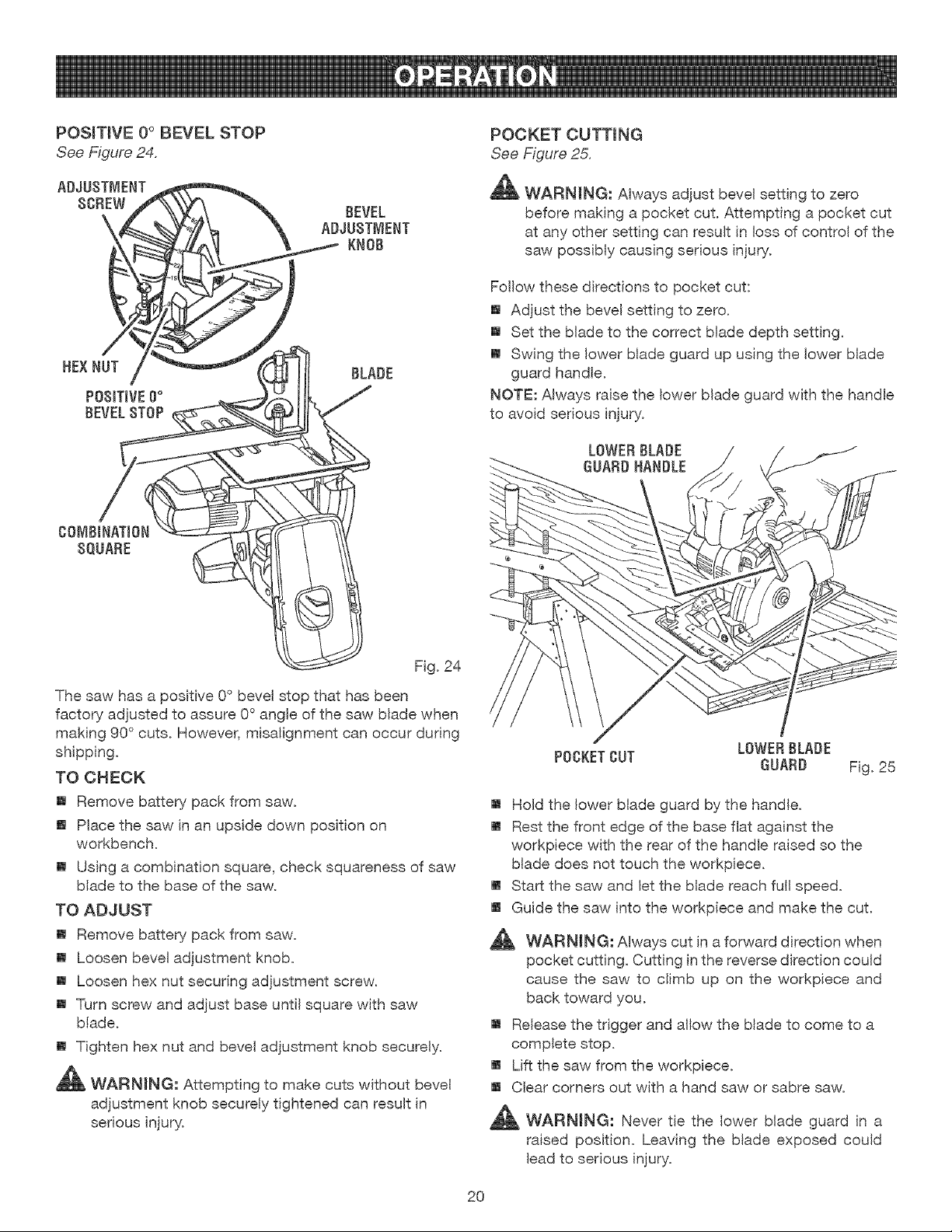
POSiTiVE 0° BEVEL STOP
See Figure 24.
ADJUSTMENT
SCREW
HEX NUT
POSITIVEO°
BEVEL STOP
BEVEL
ADJUSTMENT
KNOB
BLADE
POCKET CUTTING
See Figure 25.
_ WARNING: Always adjust bevel setting to zero
before making a pocket cut. Attempting a pocket cut
at any other setting can result in loss of control of the
saw possibly causing serious injury.
Fol!ow these directions to pocket cut:
[] Adjust the bevel setting to zero.
[] Set the blade to the correct blade depth setting.
[] Swing the lower blade guard up using the lower blade
guard handle.
NOTE: Always raise the lower blade guard with the handle
to avoid serious injury.
LOWER BLADE
GUARD HANDLE
COMBiNATION
SQUARE
Fig. 24
The saw has a positive 0° bevel stop that has been
factory adjusted to assure 0 ° angle of the saw blade when
making 90° cuts. However, misalignment can occur during
shipping.
TO CHECK
[] Remove battery pack from saw.
[] Place the saw in an upside down position on
workbench.
[] Using a combination square, check squareness of saw
blade to the base of the saw.
TO ADJUST
[] Remove battery pack from saw.
[] Loosen bevel adjustment knob.
[] Loosen hex nut securing adjustment screw.
[] Turn screw and adjust base unti! square with saw
blade.
[] Tighten hex nut and bevel adjustment knob securely.
_ WARNING: Attempting to make cuts without bevel
adjustment knob securely tightened can result in
serious injury.
LOWER BLADE
POCKET CUT GUARD Fig.25
[] Hold the lower blade guard by the handle.
[] Rest the front edge of the base flat against the
workpiece with the rear of the handle raised so the
blade does not touch the workpiece.
[] Start the saw and let the blade reach full speed.
[] Guide the saw into the workpiece and make the cut.
,_ WARNING: Always cut in a forward direction when
pocket cutting. Cutting in the reverse direction could
cause the saw to climb up on the workpiece and
back toward you.
[] Release the trigger and allow the blade to come to a
complete stop.
[] Lift the saw from the workpiece.
[] Clear corners out with a hand saw or sabre saw.
| WARNING: Never tie the lower blade guard in a
raised position. Leaving the blade exposed could
lead to serious injury.
2O
,&
4_, WARMNG: Before performing any adjustment,
make sure the battery pack is removed from too(.
Fa((ure to heed th(s warn(ng cou(d resu(t in sedous
persona( injury.
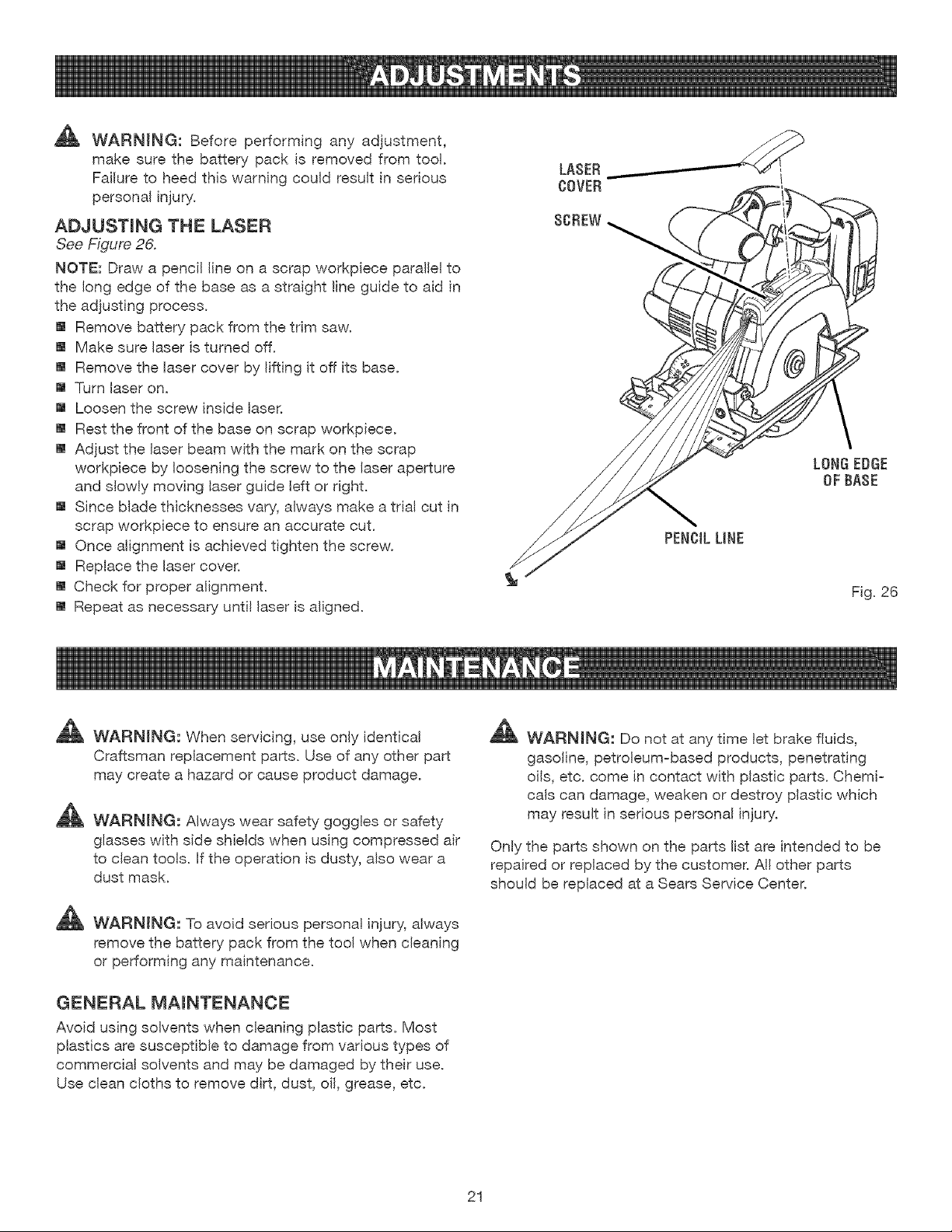
ADJUST(NG THE LASER
See Figure 26.
NOTE: Draw a pencil (ine on a scrap workpiece para((e( to
the (ong edge of the base as a straight line guide to aid in
the adjusting process.
[] Remove battery pack from the trim saw.
[] Make sure (aser is turned off.
[] Remove the (aser cover by lifting (t off its base.
[] Turn (aser on.
[] Loosen the screw inside laser.
[] Rest the front of the base on scrap workpiece.
[] Adjust the (aser beam with the mark on the scrap
workp(ece by (oosening the screw to the (aser aperture
and s(ow(y moving (aser guide (eft or r(ght.
[] Since Made thicknesses vary, a(ways make a trial cut in
scrap workpiece to ensure an accurate cut.
[] Once alignment is achieved tighten the screw.
[] Rep(ace the (aser cover.
[] Check for proper a(ignment.
[] Repeat as necessary until laser is aligned.
%
LONGEDGE
OF BASE
F(g. 26
_, WARNING: When servicing, use only (dentical
Craftsman rep(acement parts. Use of any other part
may create a hazard or cause product damage.
_ WARN(NG: Always wear safety goggles or safety
glasses with side shields when using compressed air
to clean too(s. (f the operation is dusty, also wear a
dust mask.
_ WARNING: To avoid ser(ous personal injury, always
remove the battery pack from the too( when c(eaning
or performing any maintenance.
GENERAL MAINTENANCE
Avoid using so(vents when c(eaning p(astic parts. Most
plastics are susceptib(e to damage from various types of
commercia( solvents and may be damaged by their use.
Use c(ean c(oths to remove dirt, dust, oi(, grease, etc.
_ WARMNG: Do not at any time let brake fluids,
gaso(ine, petroleum-based products, penetrating
ells, etc. come in contact w(th plastic parts. Chemi-
ca(s can damage, weaken or destroy plastic which
may result in ser(ous personal injury.
Only the parts shown on the parts (ist are intended to be
repaired or replaced by the customer. A!l other parts
shou(d be replaced at a Sears Service Center.
21
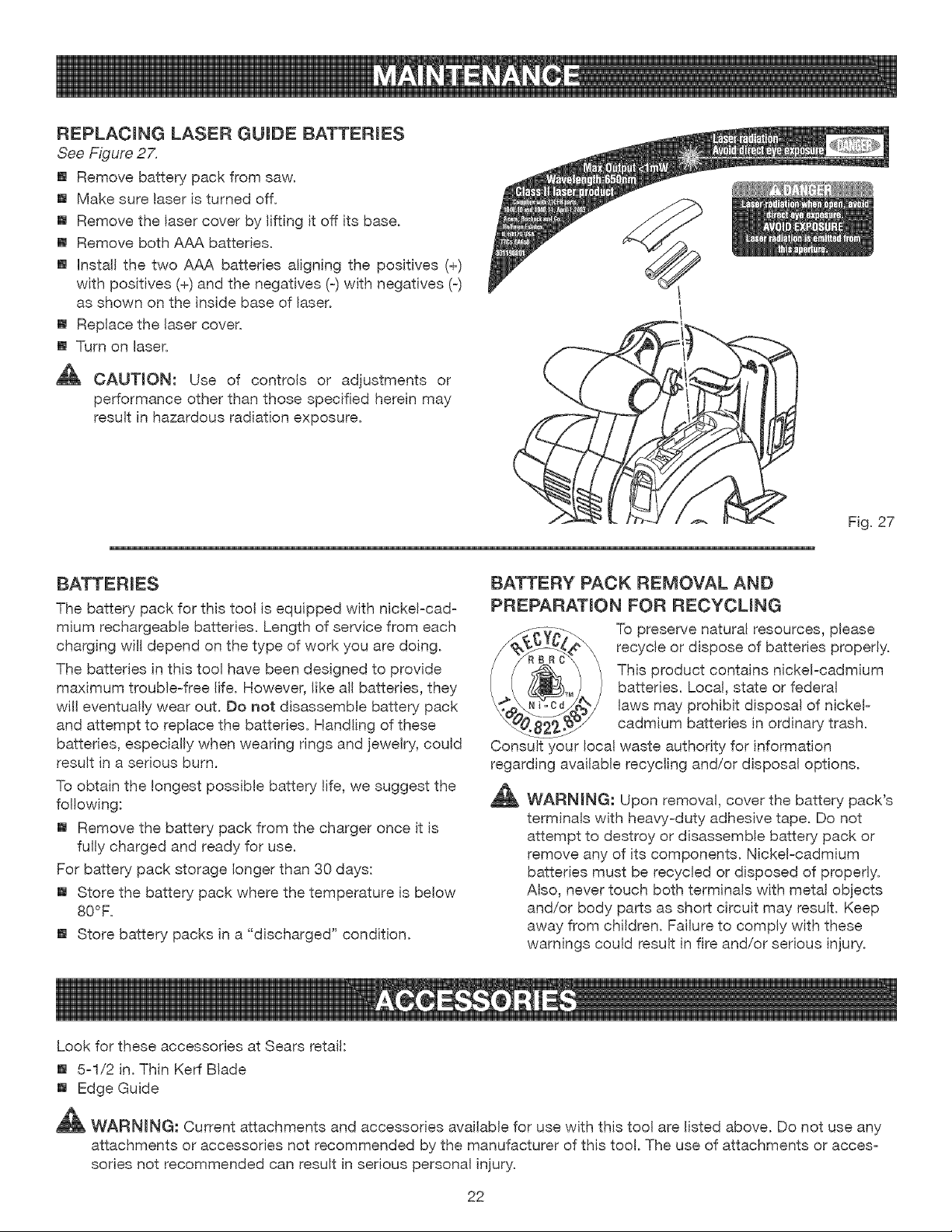
REPLAC(NG LASER GU(DE BATTER(ES
See Figure 27.
[] Remove battery pack from saw.
[] Make sure laser is turned off.
[] Remove the laser cover by (ifting it off its base.
[] Remove both AAA batteries.
[] (nsta(( the two AAA batter(es align(ng the positives (+)
with positives (+) and the negatives (-) with negatives (-)
as shown on the inside base of (aser.
[] Rep(ace the (aser cover.
[] Turn on laser.
_t, CAUTION: Use of contro(s or adjustments or
performance other than those specified herein may
resu(t in hazardous radiation exposure.
F(g. 27
The battery pack for th(s too( is equipped w(th n(cke(-cad-
mium rechargeable batteries. Length of service from each
charging wil( depend on the type of work you are doing.
The batteries in this too( have been designed to provide
maximum troub(e-free (ife. However, (ike a(( batteries, they
w((( eventua!)y wear out. Do not disassemb(e battery pack
and attempt to rep(ace the batteries. Handling of these
batteries, especia(iy when wearing r(ngs and jewelry, cou(d
resu(t (n a serious burn.
To obta(n the (ongest poss(b(e battery life, we suggest the
following:
[] Remove the battery pack from the charger once it is
fu(ly charged and ready for use.
For battery pack storage (onger than 30 days:
[] Store the battery pack where the temperature is below
80°F.
[] Store battery packs (n a "discharged" condition.
BATTERY PACK REMOVAL AND
PREPARAT(ON FOR RECYCL(NG
_ recyc(e or dispose of batteries proper(y._ i_._ To preserve natura( resources, please
Thisproductcontainsnickel-cadmium
batteries. Local, state or federal
_^_.___._/'p_!_ laws may proh(b(t disposal of nickel-
_.8_27_ cadm,um batteries ,n ordinary trash.
Consult your local waste authority for information
regarding ava(lable recycl(ng and/or disposal opt(ons.
_ WARNING: Upon remova), cover the battery pack's
terminals with heavy-duty adhesive tape. Do not
attempt to destroy or disassemble battery pack or
remove any of its components. Nicke!-cadm(um
batteries must be recycled or disposed of properly.
Also, never touch both termlna(s with metal objects
and/or body parts as short circuit may resu(t. Keep
away from ch(Idren. Failure to comply w(th these
warn(rigs could result (n fire and/or ser(ous (njury.
Look for these accessories at Sears retail:
[] 5-1/2 in. Thin Kerf Blade
[] Edge Guide
_ WARN(NG: Current attachments and accessories available for use with this tool are (isted above. Do not use any
attachments OFaccessories not recommended by the manufacturer of this tool. The use of attachments or acces-
sories not recommended can result in sedous persona( injury.
22
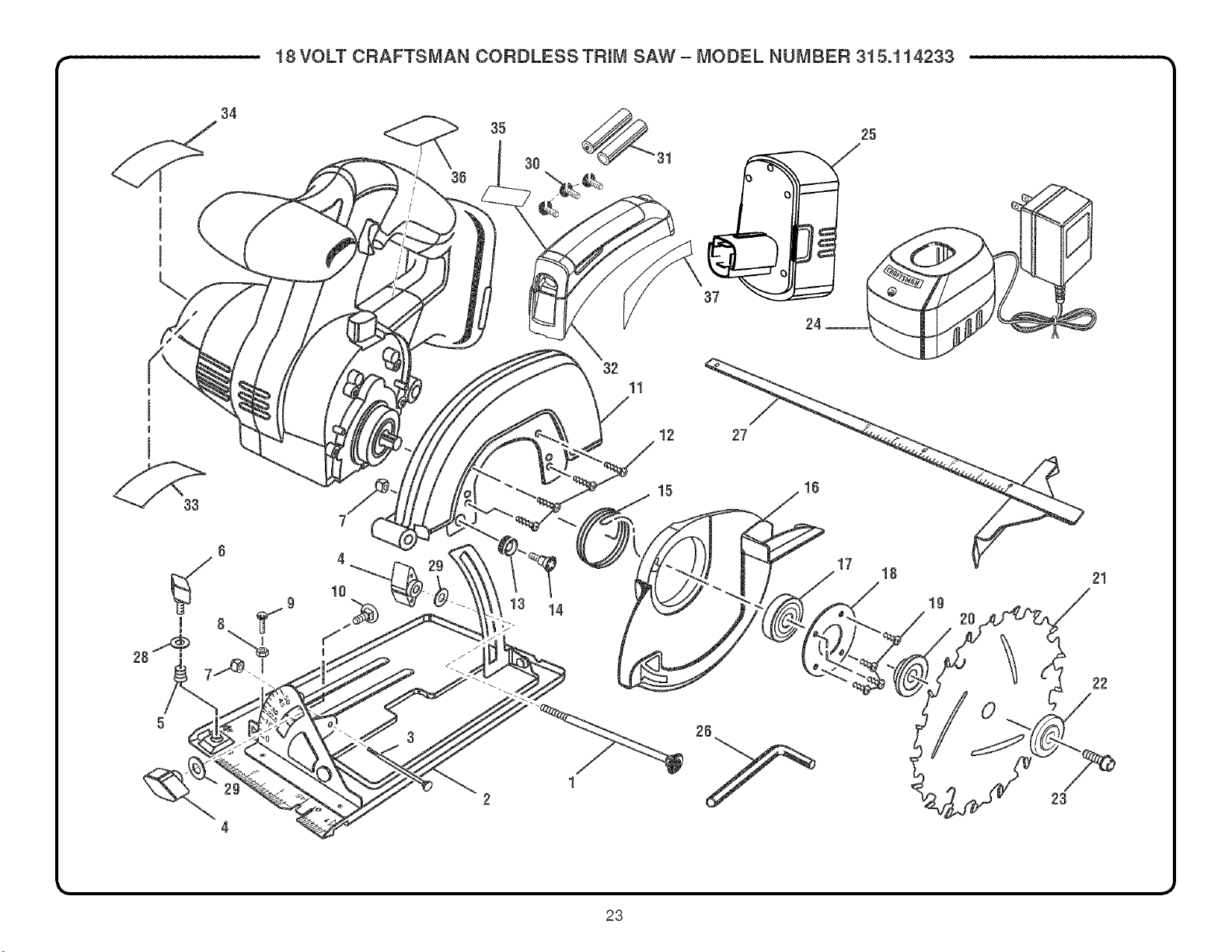
18VOLT CRAFTSMAN CORDLESS TRIM SAW- MODEL NUMBER 315.114233
I
I
I
34
32
11
25
12 27
33
g
f
I
4 _ 2g
b--
j_J
14
15
17
18
lg
20
0
21
22
23
23
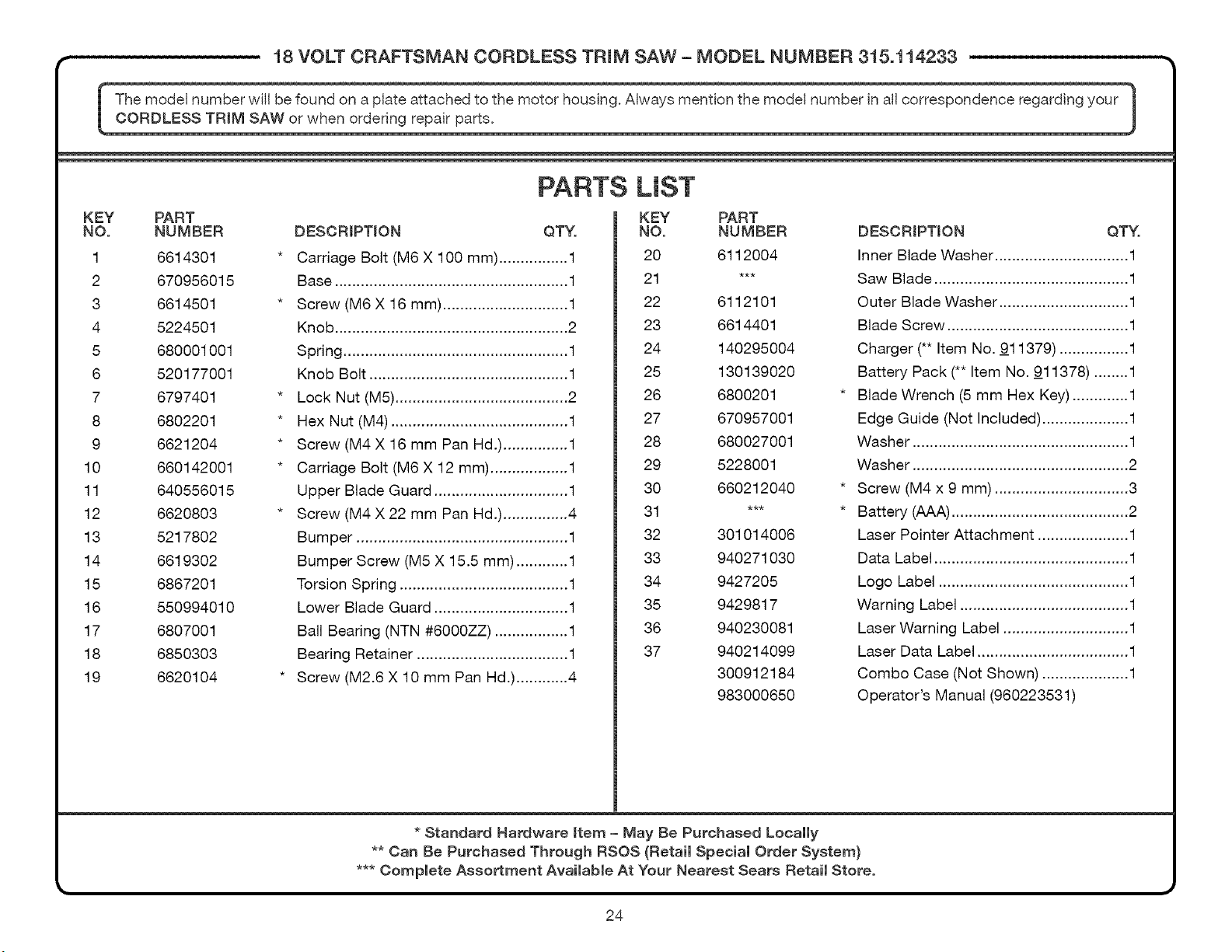
18 VOLT CRAFTSMAN CORDLESS TRmM SAW - MODEL N U M BER 315.114233
[ The mode, number WilJbe found on a plaie attached io the m0t0r housing. Always mention the model number in al, correspondence regarding your 1
CORDLESS TRiM SAW or when ordering repair parts. |
,#
KEY PART
NO. NUMBER
1 6614301
2 670956015
3 6614501
4 5224501
5 680001001
6 520177001
7 6797401
8 6802201
9 6621204
10 660142001
11 640556015
12 6620803
13 5217802
14 6619302
15 6867201
16 550994010
17 6807001
18 6850303
19 6620104
PARTS LIST
DESCRIPTION QTY.
Carriage Bolt (M6 X 100 mm) ................ 1
Base ...................................................... 1
Screw (M6 X 16 mm) ............................. 1
Knob ...................................................... 2
Spring .................................................... 1
Knob Bolt .............................................. 1
Lock Nut (M5) ........................................ 2
Hex Nut (M4) ......................................... 1
Screw (M4 X 16 mm Pan Hd.) ............... 1
Carriage Bolt (M6 X 12 mm) .................. 1
Upper Blade Guard ............................... 1
Screw (M4 X 22 mm Pan Hd.) ............... 4
Bumper ................................................. 1
Bumper Screw (M5 X 15.5 mm) ............ 1
Torsion Spring ....................................... 1
Lower Blade Guard ............................... 1
Ball Bearing (NTN #6000ZZ) ................. 1
Bearing Retainer ................................... 1
Screw (M2.6 X 10 mm Pan Hd.) ............ 4
KEY PART
NO. NUMBER
20 6112004
21 ***
22 6112101
23 6614401
24 140295004
25 130139020
26 6800201
27 670957001
28 680027001
29 5228001
30 660212040
31 ***
32 301014006
33 940271030
34 9427205
35 9429817
36 940230081
37 940214099
300912184
983000650
DESORIPTJON QTY.
Inner Blade Washer ............................... 1
Saw Blade ............................................. 1
Outer Blade Washer .............................. 1
Blade Screw .......................................... 1
Charger (** Item No. 911379) ................ 1
Battery Pack (** Item No. 911378) ........ 1
Blade Wrench (5 mm Hex Key) ............. 1
Edge Guide (Not Included) .................... 1
Washer .................................................. 1
Washer .................................................. 2
Screw (M4 x 9 mm) ............................... 3
Battery (AAA) ......................................... 2
Laser Pointer Attach ment ..................... 1
Data Label ............................................. 1
Logo Label ............................................ 1
Warning Label ....................................... 1
Laser Warning Label ............................. 1
Laser Data Label ................................... 1
Combo Case (Not Shown) .................... 1
Operator's Manual (960223531)
* Standard Hardware Item - May Be Purchased Locally
** Can Be Purchased Through RSOS (Retail Special Order System)
*** Compmete Assortment AvaimabmeAt Your Nearest Sears RetaimStore.
24