F nmore
OWNER'S
MANUAL
MODEL NO.
9tt. 64261
9tt. 64268
9tl. 6326t
9tl. 63265
9tt. 63268
9tt. 9326t
9tt. 93268
9tt. 93371
9tt. 93378
9tl. 9346t
9tt. 93468
9tt, 94371
9tl. 94378
9tt. 94465
9tt. 94466
CAUTION:
Read and Follow All Safety
Rules and Operating
Instructions Before First
Use of This Product
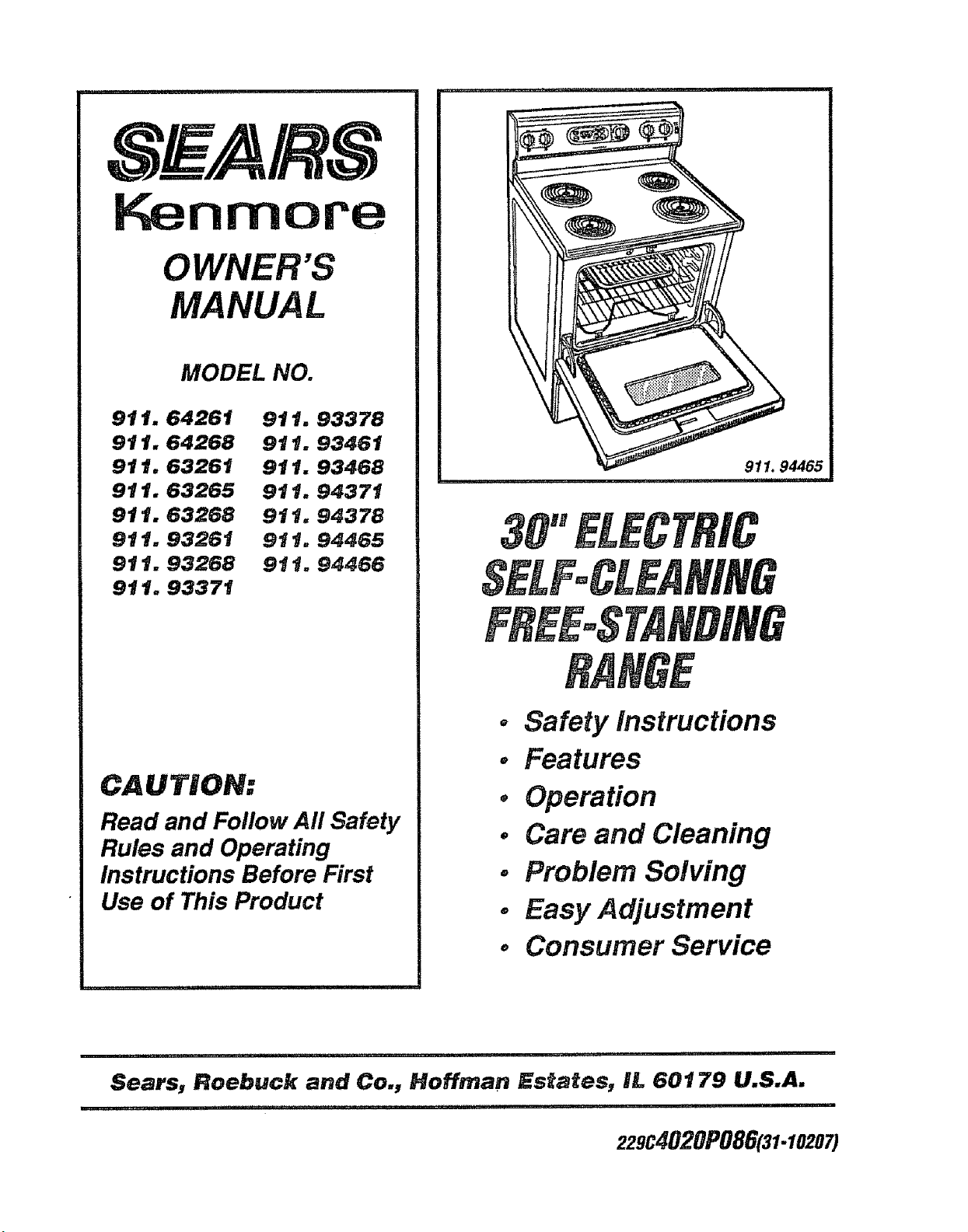
911, 94465
. Safety instructions
o Features
, Operation
° Care and Cleaning
. Problem Solving
° Easy Adjustment
° Consumer Service
i i ii ii i,ii ,,llllll,i,,llllll,llll , i ,i ii ,,,i,l,ll,ii i i1,1111,1 i
Sears, Roebuck and Co., Hoffman Estates, IL 60179 U.S.A.
'HH" '11.................. ' I'11'11'I III ',l
229C4020P086(31-10207)
TABLEOFCOHTEHT$
Range Safety ........................................... 3-5
Stability Device ........................................ 3
Removal of Packaging Tape .................... 6
Features of Your Range ............................. 6
Broiling .................................. 13
General Rules, Preparing Meats for
Broiling, How to Set Broil ......................... 13
SeBf.CSean_ng ..................... 14-15
Preparing Your Oven .............................. 14
Oven Door Gasket ................................. 14
Door Lock Device ................................. 14
Walls of the Oven ............................... 14
How to Set A Clean Cycle ..................... 15
To Stop A Cycle ....................................... 15
After The Cycle ........................................ 15
Control Settings .......................................... 7
Home Canning ........................................... 7
Arrow Pads ................................................... 8
Display .............................................................8
Indicator Lights ..............................................8
F-Codes ........................................................ 8
PF.Oodes ........................................................8
Black-Out Display .........................................8
Automatic Shut-Off ................................ 8
To Set the Clock ..................................... 9
To Set the Timer .......................:................. 9
Control Panel ............................................ 16
Broiler Pan and Grid ............................... 16
Cooktop ........................................... 16
Burner Box Bottom ................................ 16
Painted Surfaces .............................. 16
Glass ................................................... 16
Surface Control Knobs ..............................t7
Oven Light Bulb ............................................17
Storage Drawer ................................... 18
Lift-Up Cooktop ............................. 18
CookTop Units ......................................... 19
Oven Racks ...................................... 20
Oven Door .................................... 20
Oven Cooking Tips ........................... 10-12
How to Set Bake ................................... 12
Before Calling for ServiCe ..................21, 22
Temperature Adjustment .........................23
Consumer Service Numbers ................. 25
Warranty
_##_:& NUMaER: SERBJ_L NUMB$F_:
................... ul,,, i 2 _ ......
FORYOURSAFETY
Tools you will need:
Phillips head screwdriver
t 3/8" open end or adjustable wrench
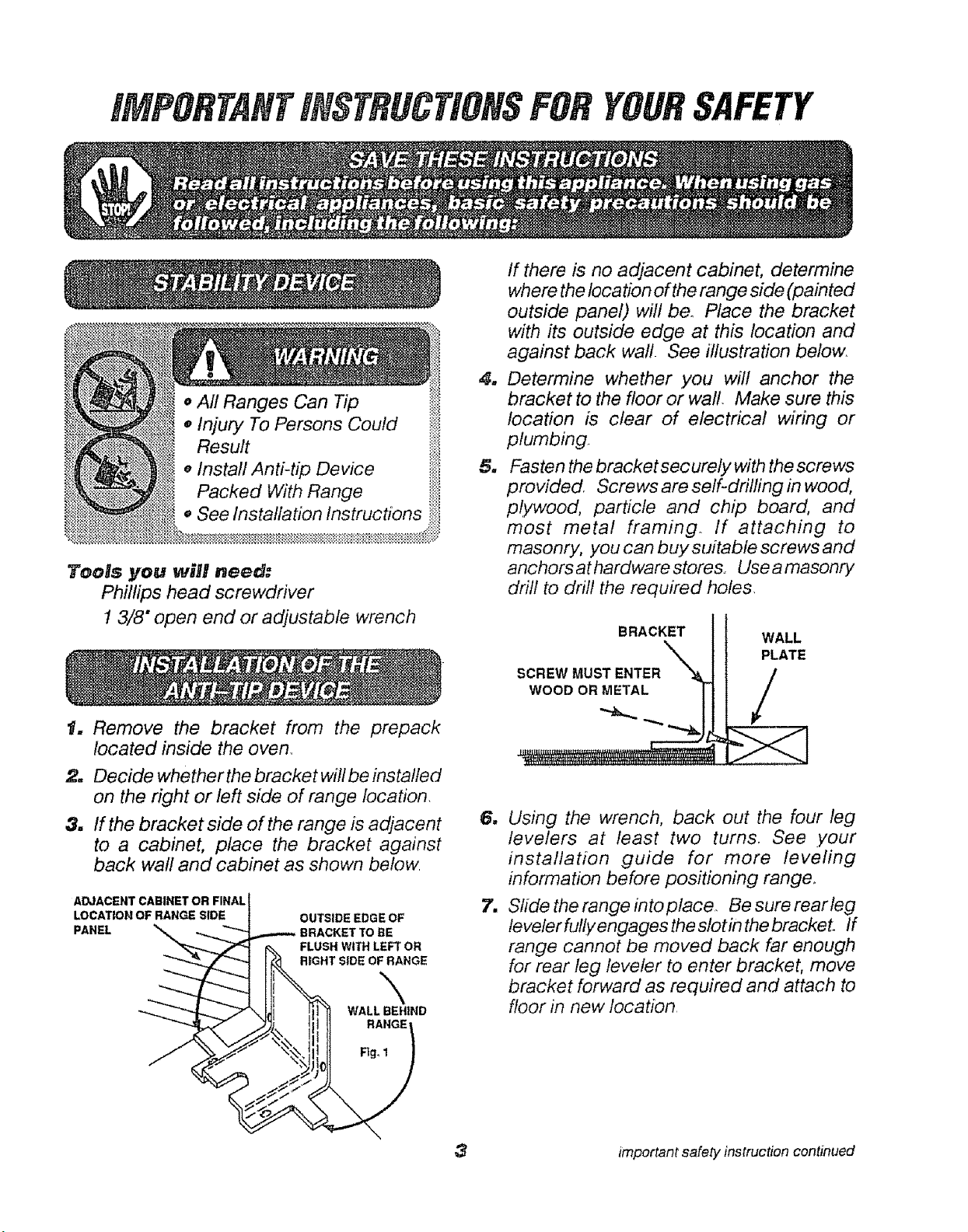
1. Remove the bracket from the prepack
located inside the oven_
2. Decide whether the bracket will be installed
on the right or left side of range location.
3. tf the bracket side of the range is adjacent
to a cabinet, place the bracket against
back wall and cabinet as shown below
ADJACENT CABINET OR FINAL
LOCATION OF RANGE SIDE
PANEL
4_
u
=
7_
3
If there is no adjacent cabinet, determine
where the location of the range side (painted
outside panel) wift be. Place the bracket
with its outside edge at this location and
against back waft. See illustration below.
Determine whether you will anchor the
bracket to the floor or wall Make sure this
location is clear of electrical wiring or
plumbing,
Fasten the bracket securely with the screws
provided, Screws are self-dritling in wood,
plywood, particle and chip board, and
most metal framing If attaching to
masonry, you can buy suitable screws and
anchors at hardware stores,, Use a masonry
drill to drill the required holes.
BRACKET
SCREW MUST ENTER
WOOD OR METAL
WALL
PLATE
/
Using the wrench, back out the four leg
levelers at least two turns. See .your
installation guide for more leveling
information before positioning range_
Slide the range into placeo Be sure rearteg
leveler fully engages the slot in the brackeL If
range cannot be moved back far enough
for rear leg leveler to enter bracket, move
bracket forward as required and attach to
floor in new location
important safety instruction continued
To insure safety for yourself, family and home,
please read your Owner's Manual carefully.
Keep it handy for reference. Pay close
attention to Safety Sections.
BE SURE your applliance is installed and
grounded by a qualified technician,
IMPORTANT SAFETY NOTICJ_I
The California Safe Drinking Water
and Toxic Enforcement Act requires
the governor of California to publish
a nist of substances known to t_e
state to cause birth defects or other
reproductive harm and requires
businesses to warn their
customers of potential exposure to
such substances.
The fiberglass insulation in
seBf-cleaning even will give off a
very small amount of carbon
r_onoxide during the cleaning cycle.
Exposure can be rninirnized by
ventint_ _vNth an open door or
window or using a ventilation fan or
hoodo
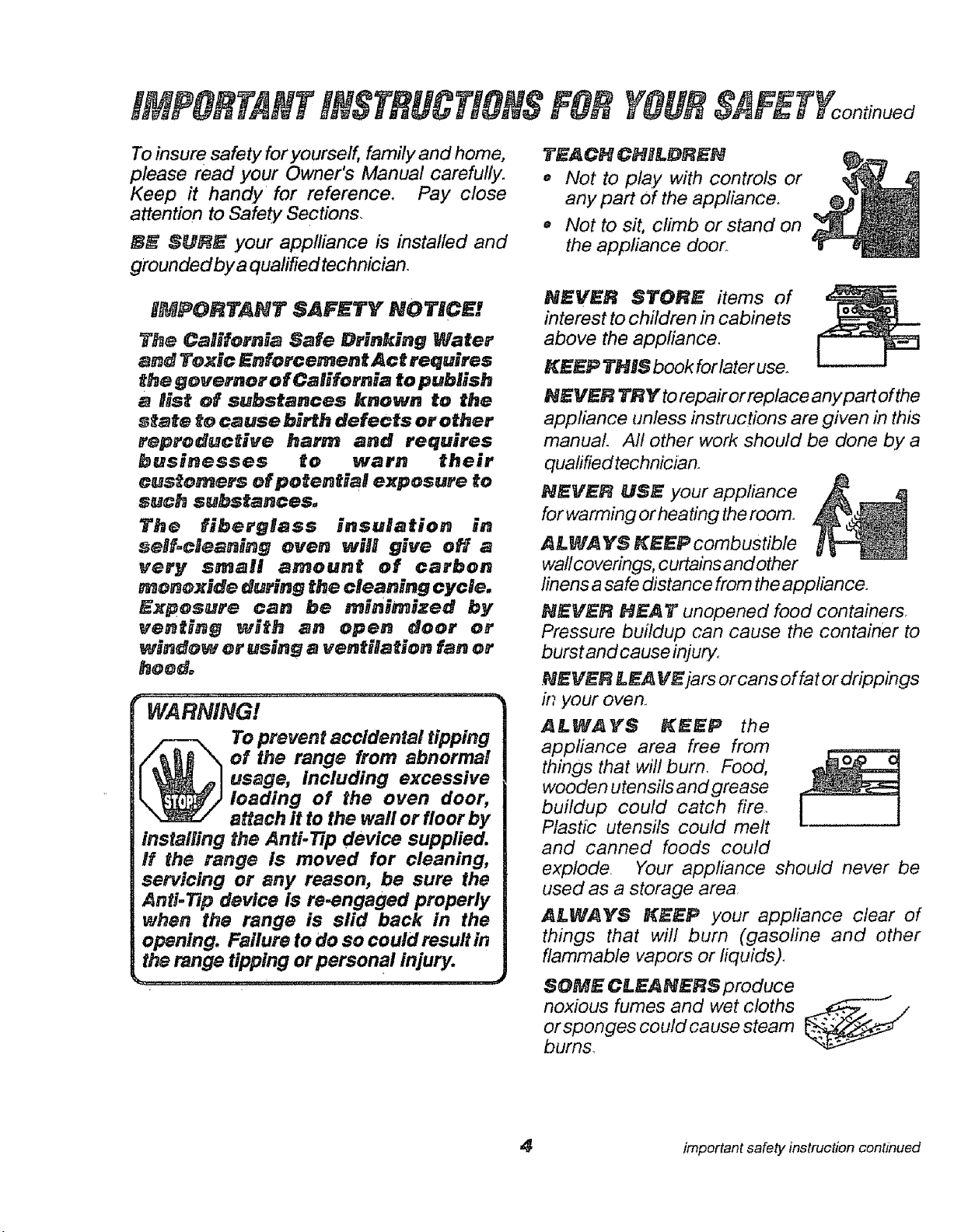
WARNING!
To prevent accidental tipping
of the range from abnormal
usage, including excessive
leading of the oven door,
attach it to the wall or floor by
installing the Anti-Tip device supplied.
H the range is moved for cleaning,
servicing or any reason, be sure the
Anti-Tip device is re-engaged properly
when the range is slid back in the
opening. Failure to do so could result in
the range tipping or personal injury.
$_F_FYcontinued
TEACH CHILDREN
,, Not to play with controls or
any part Of the appliance°
,, Not to sit, climb or stand on
the appliance door.
NEVER STORE items of
interest to children in cabinets
above the appliance,
KEEP THIS book forlater use.
NEVER TRY to repair or replace anYpart of the
appliance lmless instructions are given in this
manual Aft other work should be done by a
qualified technician.
NEVER USE your appliance
for warming or heating the room°
AI.WA YS KEF.P combustible
wall coverings, curtains and other
linens a safe distance from the appliance.
NEVER HEAT unopened food containers
Pressure buildup can cause the container to
burst and cause injury.
.NEVF_F_LE,A V_jars or cans of fat or drippings
#_,your oven.
A_W_YS _EP the
appliance area free from
things that wilt burn. Food,
wooden utensils and grease
buildup could catch fire
Plastic utensils could melt
and canned foods could
explode. Your appliance should never be
used as a storage area
_L_AYS KEEP your appliance clear of
things that will bum (gasoline and other
flammable vapors or liquids),
SOME CLE_N_RS produce
noxious fumes and wet cloths I_--_. /
or sponges co uld ca use steam
burn&
important safety instruction continued
iMPORTANTiNSTRUCTIONSFORYOURSIIFETY on u u
NEVER WEAR Ioose fittng c!othing when using
yourapplianceo
NEVER USE a towel or
other bulky cloth as a
potholder and make sure the
potholder is dry. Moist
potholders could cause
steam burns_ Keep dish
towels, dish cloths,
potholders and other linens a safe distance
away from ,your appliance.
ONLY SOME kinds of glass or ceramic
cookware can be used for cooktop cooking,
Make sure the cookware you choose to use is
designed for cooktop cooking
ALWAYS USE care when touching cooktop
elements. They will retain heat after the range
has been turned off,
NEVER BLOCK the oven air vent under the
right rear element.
COOKWARE USED for cooktop cooking
should be flat on the bottom
and large enough to cover
the heating area being used.
PL4CE OVEN RACKS in the desired
position while the oven is coo!. If racks must be
moved while oven is hot, do not let potholder
contact the hot oven element,
AFTER BROILIING_ always take the broiler
pan and grid out of the oven and clean them
Leftover grease in the broiler pan could catch
fire the next time .you use your oven,
ALWAYS USE care when opening the oven
door, Let hot air and steam escape before
moving food&
NEVER USE aluminum foil toline theoven bottom.
tmproper use of foil could start afire.
CL EA N ONLY the parts listed in this man uaL
Follow atl cleaning instructions.
iF THE SELF.CLEANING mode
malfunctions, turn off the controls or disconnect
the power supply_ Have serviced by a qualified
technician,
NEVER RUB_ move or damage the door
gasket on self-cleaning ranges.
NEVER TRY to clean utensils, cookware,
removable parts or broiler pan and grid in the
self-clean cycle
DO NOT USE oven cleaners -No commercial
ovencleaner should be used inor around anypart of
theoven
READ AND
UH#£RSTAN# THiS
INFORMATION NOW!
Should you ever need it, you will not
have time for reading. Be sure everyone
in your home knows what to do in case
of fire. Never use water on a grease fire;
it will only spread the flames.
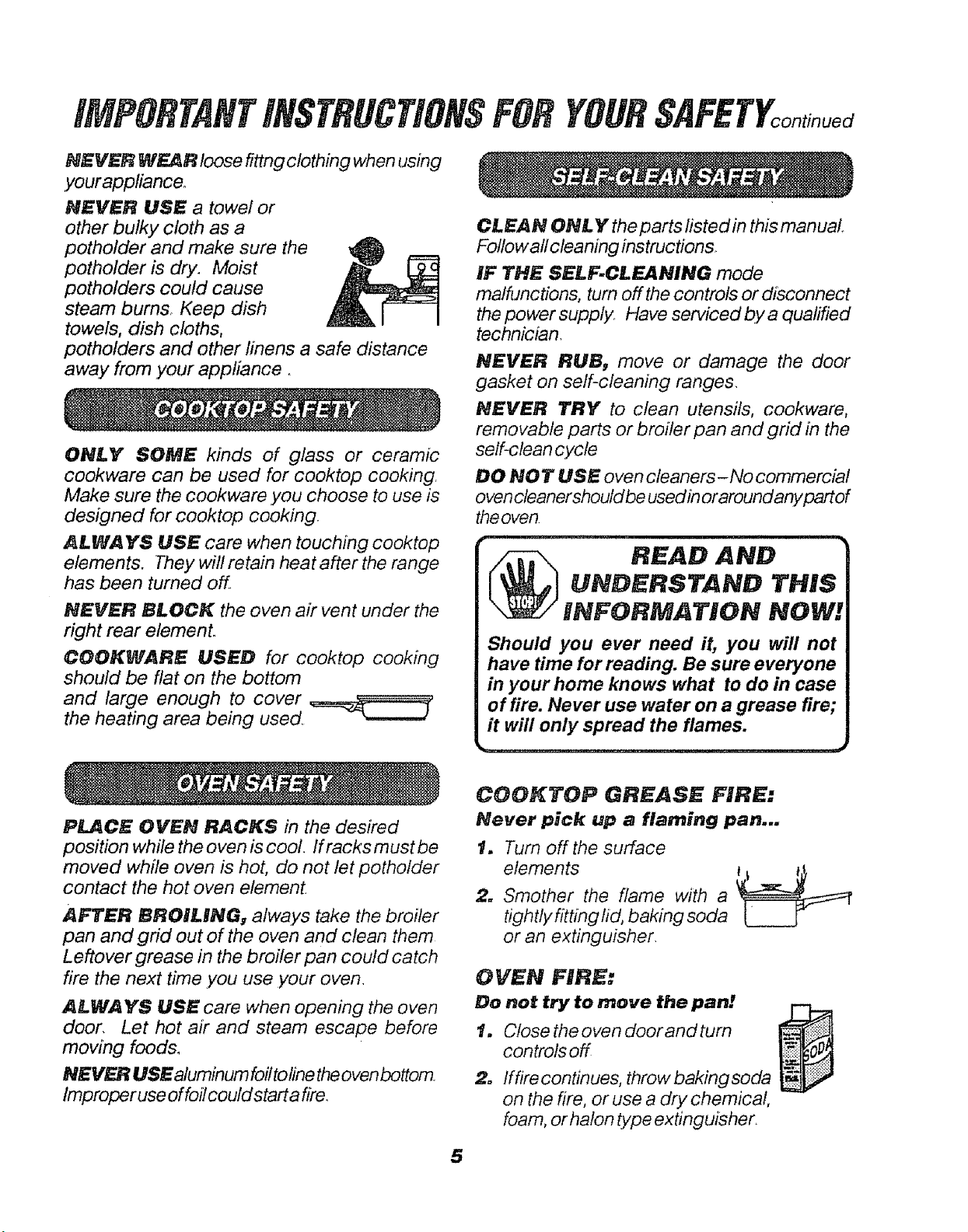
COOKTOP GREASE FIRE:
Never pick up a flaming pan...
t. Turn off the surface
elements
2. Smother the flame with a
tightlyfitting tid, baking soda
or an extinguisher.
OVEN FIRE:
Do not try to move the pan e.
1. controls offCl°sethe °ven d°°r and turn
2. lffire continues, throw bakingsoda
on the fire, or use a dry chemical,
foam, or halon type extinguisher,
5
8f
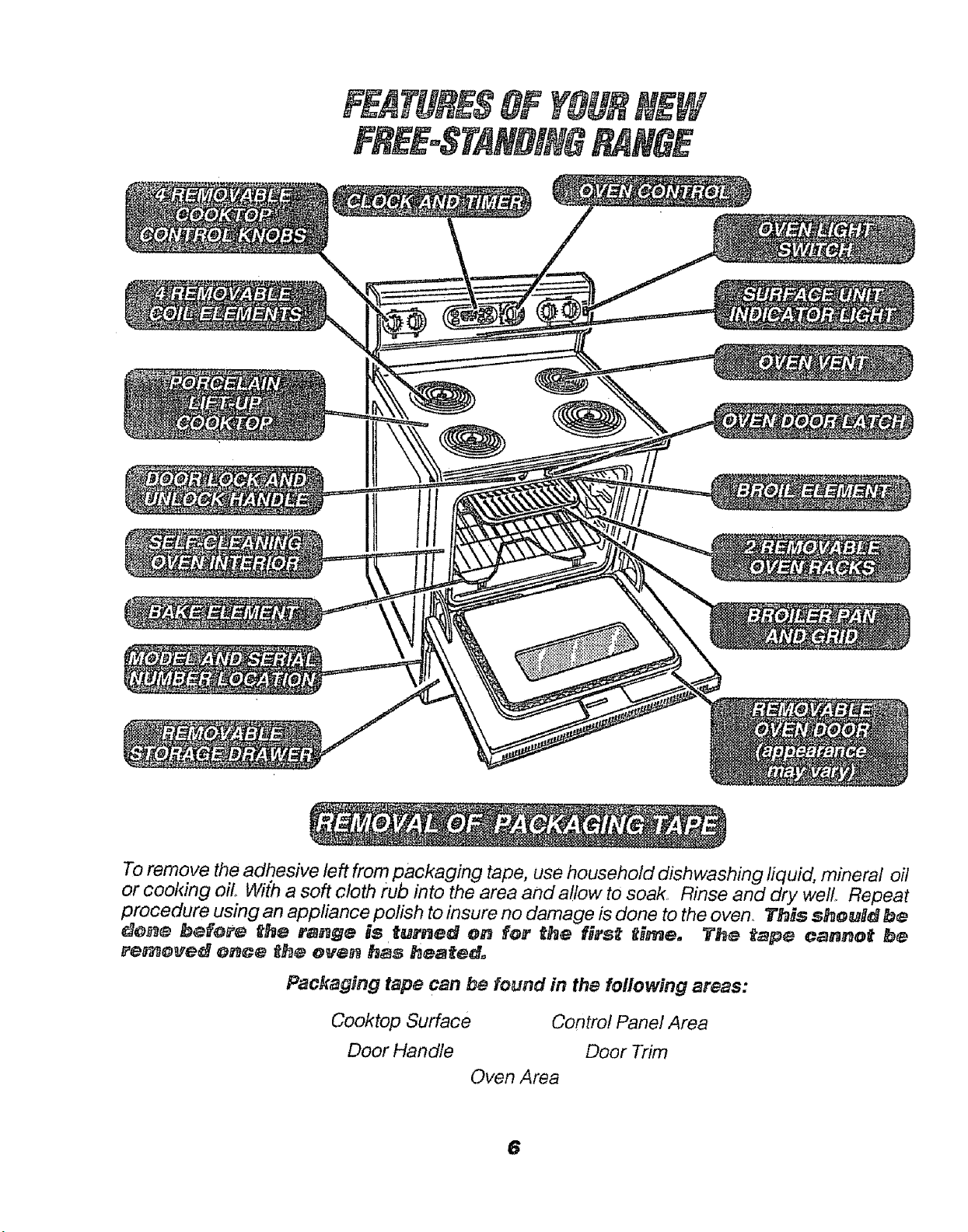
To remove the adhesive left from packaging tape, use household dishwashing fiquid, mineral oil
or cooldng oil. With a soft cloth rub into the area and a!low to soak, Rinse and dry well Repeat
procedure using an appliance polish to insure no damage is done to the oven. lFhNs sheuDd be
_o_e befere _he range is turned on for the first _Hme, The _ape cannot be
re_ove_ once th_ eve_ has heated_
Packaging tape can be found in the following areas:
Cooktop Surface Control Panel Area
Door Handle Door Trim
Oven Area
6
COOgTOPCOO-KING
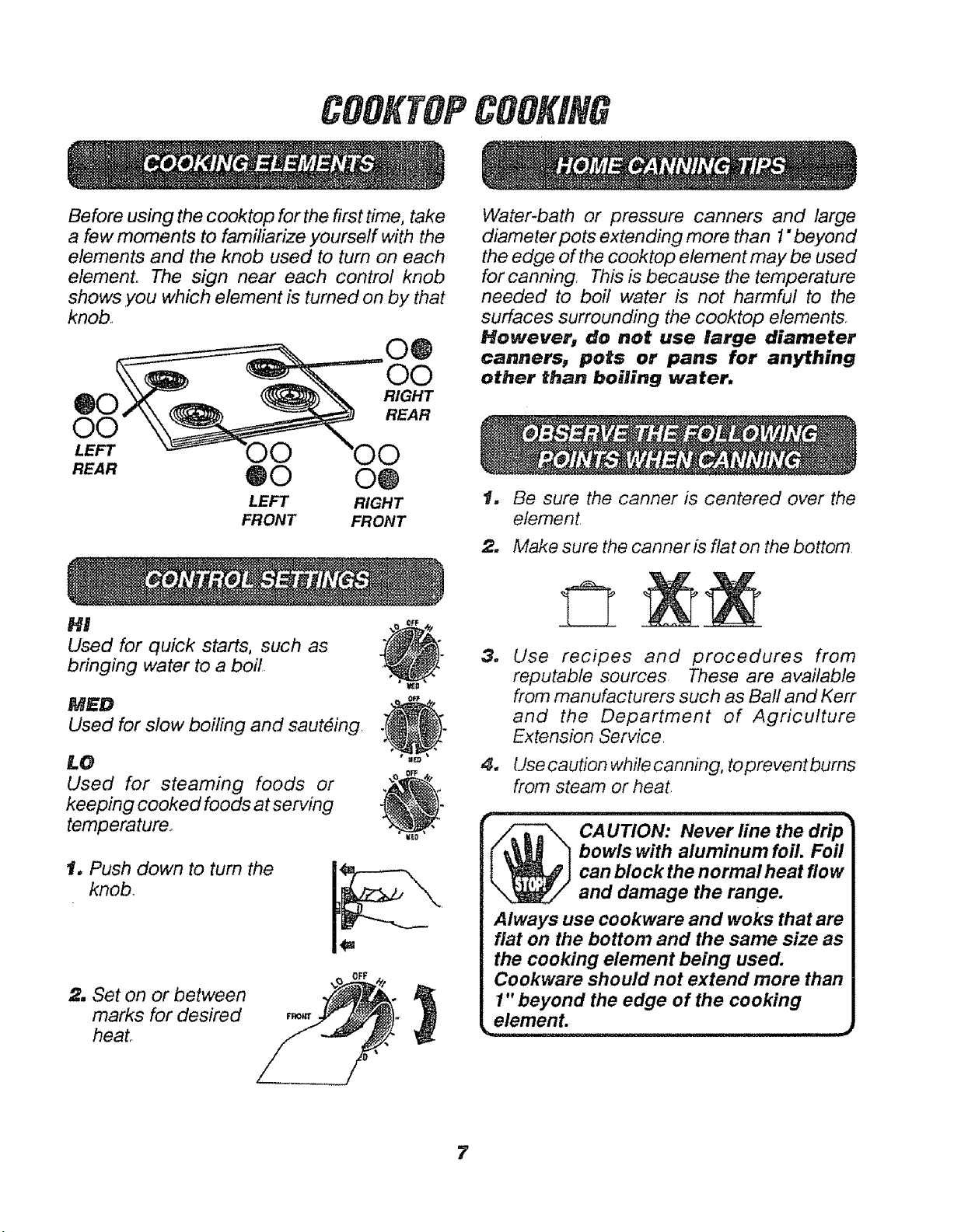
Before using the cooktop for the first time, take
a few moments to familiarize yourself with the
elements and the knob used to turn on each
element° The sign near each control knob
shows ,you which element is turned on by that
knob,
®0
O0
LEFT
REAR
O@
O0
RIGHT
REAR
O0
@0 O@
LEFT RIGHT
FRONT FRONT
H!
Used for quick starts, such as
bringing water to a boil,
MED
Used for slow boiling and sauteing.
LO
Used for steaming foods or
keeping cooked foods at serving
temperature,,
@
o÷
1oPush down to tum the
knob,
2, Set on or between
marks for desired
heat°
Water-bath or pressure canners and large
diameter pots extending more than 1"beyond
the edge of the cooktop element may be used
for canning. This is because the temperature
needed to boil water is not harmful to the
surfaces surrounding the cooktop elements,
However, do not use large diameter
cannersw pots or pans for anything
other than boiling water.
t. Be sure the canner is centered over the
element,
2. Make sure the canner is flat on the bottom,
3_
4_
Use recipes and procedures from
reputable sources These are available
from manufacturers such as Ball and Kerr
and the Department of Agriculture
Extension Service
Use caution while canning, to prevent bums
from steam or heat
i,ii i i i ..... i i .............................
_ CAUTION: Never line the drip
bowls with aluminum foil. Foil
can block the normal heat flow
and damage the range.
Always use cookware and woks that are
fiat on the bottom and the same size as
the cooking element being used.
Cookware should not extend more than
1" beyond the edge of the cooking
elemenL
_1_........ i i iiiiii, ii i ii ,,_
7
CLOCK
I!kk!
I I .d.=l
HOUR MtN.
HOUR
@
OVEN
ON
0
MIN. 0
DOOR
0
PRE-
HEATED
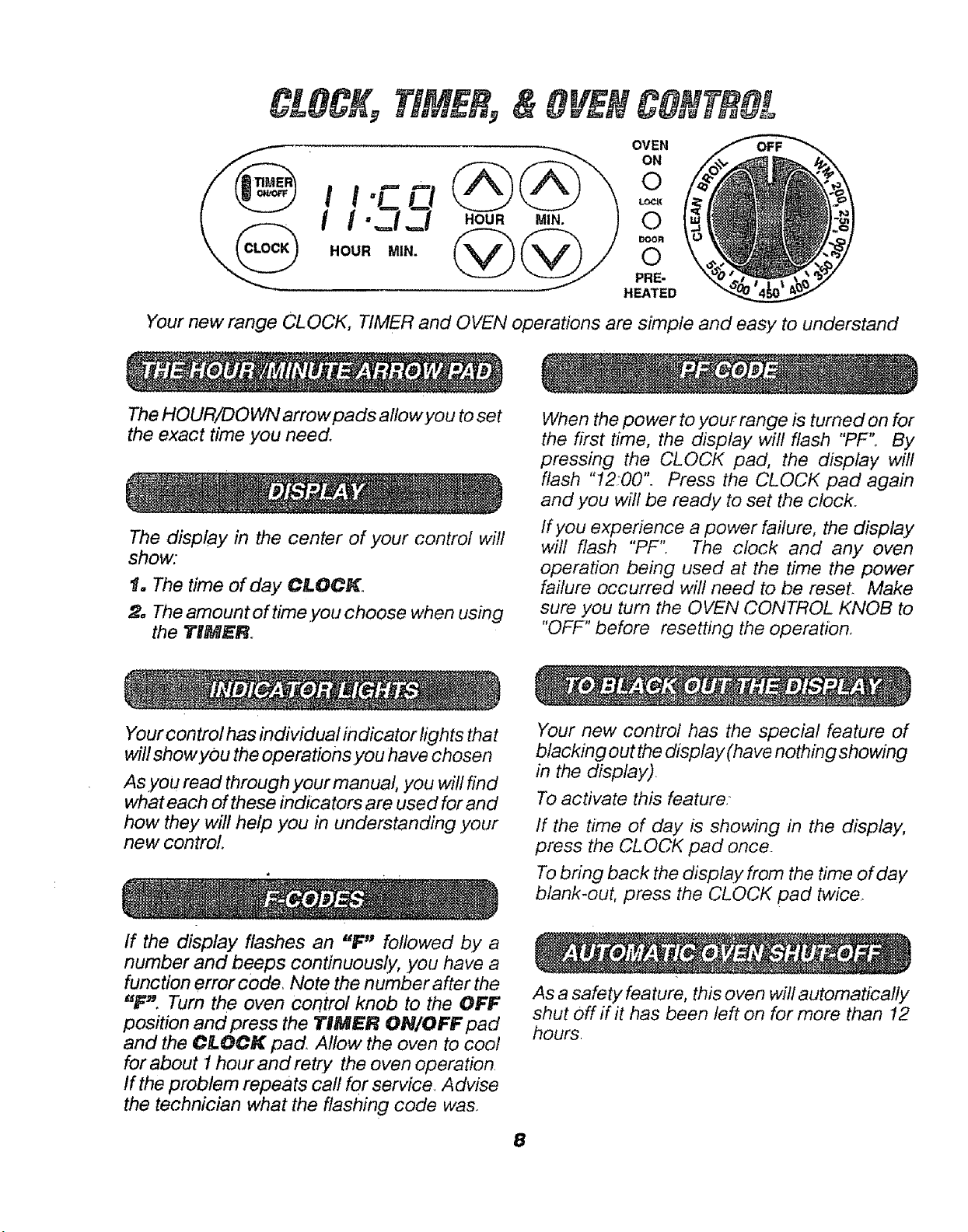
Your new range CLOCK, TIMER and OVEN operations are simple and easy to understand
The HOUR/DOWN arrow pads allow you to set
the exact time .you need.
The display in the center of your control will
show:
1. The time of day CLOCK.
2, The amount of time.you choose when using
the TIM_R
When the power to your range is turned on for
the first time, the display will flash "PF" By
pressing the CLOCK pad, the display will
flash "1200". Press the CLOCK pad again
and you will be ready to set the clock.
If you experience a power failure, the display
wilt flash "PF", The clock and any oven
operation being used at the time the power
failure occurred will need to be reset. Make
sure you turn the OVEN CONTROL KNOB to
"OFF" before resetting the operation.
Your control has individual indicator lights that
wilt show you the operations you ha ve chosen
As you read through your manual, you will find
what each of these indicators are used for and
how they will help you in understanding ,your
new control
Your new control has the special feature of
btacking out the display(have nothing showing
in the display),
To activate this feature
If the time of day is showing in the display,
press the CLOCK pad once.
To bring back the display from the time of day
blank-out, press the CLOCK pad twice,
If the display flashes an "F" followed by a
number and beeps continuously, .youhave a
function error code, Note the number after the
"F: Turn the oven control knob to the OFF
position and press the I"IM£R ON/OFF pad
and the CLOCK pad. Allow the oven to cool
for about I hour and retry the oven operation,
If the problem repeats call for service Advise
the technician what the flashing code was.
As a safety feature, this oven will automatically
shut Off if it has been left on for more than 12
hours
8
CLOCKANDTIMER
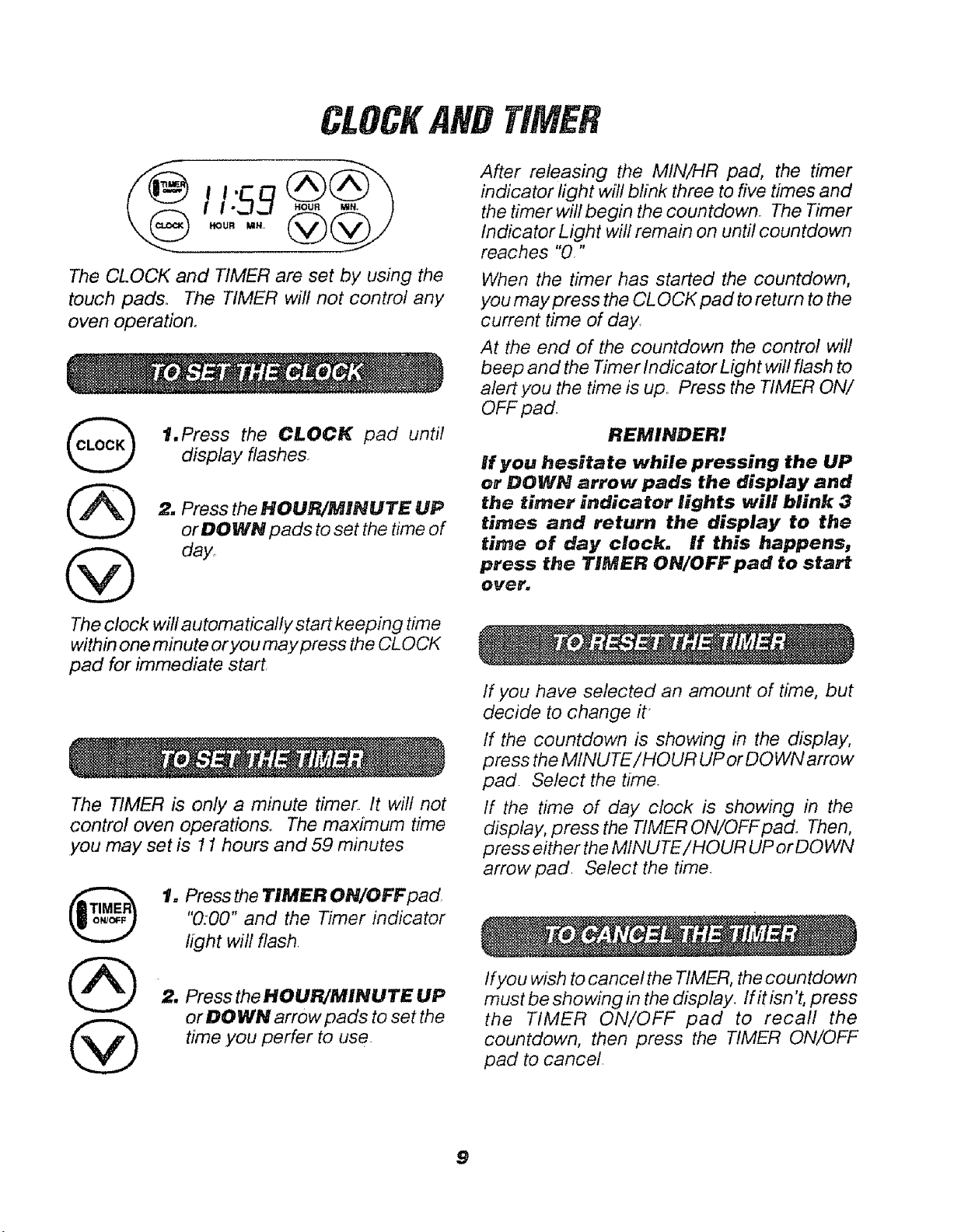
The CLOCK and TIMER are set by using the
touch pads° The TIMER will not control any
oven operation.
G
1.Press the CLOCK pad until
display flashes
2. Press the HOUR/MINUTE UP
orDOWN pads to set the ttme of
day.
The clock will automatically start keeping time
within one minute or you may press the CLOCK
pad for immediate start
The TIMER is only a minute timer, It will not
control oven operations, The maximum time
you may set is 11 hours and 59 minutes
t. Press the TIMER ON/OFF pad
"0:00" and the Timer indicator
light will flash,
2. Press the HOUR/MINUTE UP
or DO WN arrow pads to set the
time you perfer to use.
After releasing the MIN/HR pad, the timer
indicator light will blink three to five times and
the timer will begin the countdown, The Timer
Indicator Light will remain on until countdown
reaches "0,"
When the timer has started the countdown,
you may press the CLOCK pad to return to the
current time of day,
At the end of the countdown the control will
beep and the Timer Indicator Light will flash to
alert you the time is up_ Press the TIMER ON/
OFF pad.
REMINDER!
If you hesitate while pressing the UP
or DOWN arrow pads the display and
the rimer indicator lights will blink 3
times and return the display to the
time of day clock. If this happens,
press the TIMER ON/OFF pad to start
over.
If you have selected an amount of time, but
decide to change it
If the countdown is showing in the display,
press the MINUTE!HOUR UP or DOWN arrow
pad Select the time.
If the time of day clock is showing in the
display, press the TIMER ON/OFFpad, Then,
press either the MINUTE!HOUR UP or DO WN
arrow pad Select the time.
ifyou wish to cancel the TIMER, the countdown
must be sho wing in the display. If it isn't, press
the TIMER ON/OFF pad to recall the
countdown, then press the TIMER ON/OFF
pad to cancel.
9
TIP8
It is normal to have some odor when using
.your oven for the first timer This is caused by
the heating of new parts and insulation.
To help eliminate this odor, ventilate the
room by epening a window or using a
verst hood.
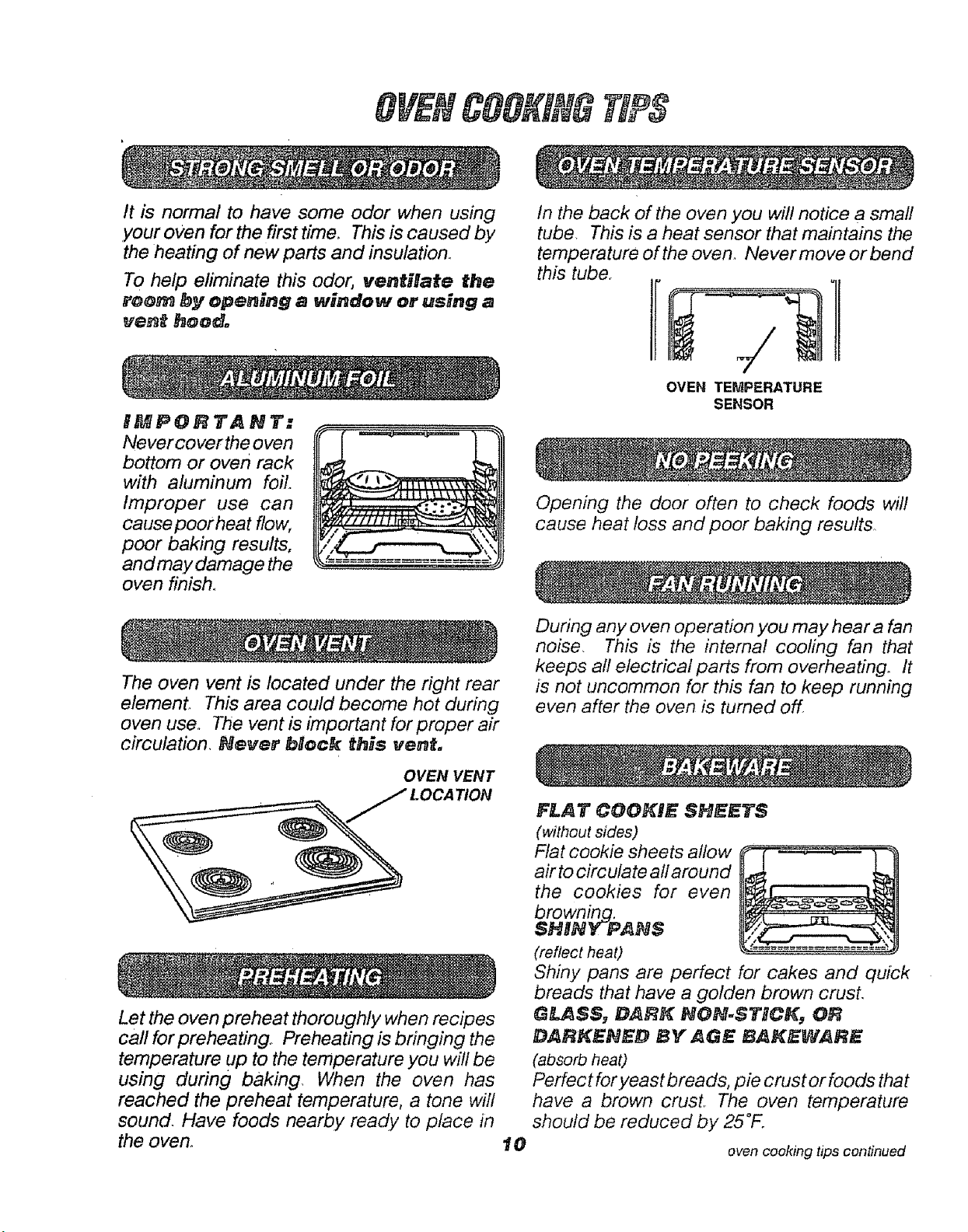
IMPORTANT:
Never coverthe oven
bottom or oven rack
with ahJminum foil.
Improper use can
causepoorheat flow,
poor baking results,
and may damage the
oven finish°
)
==========_---==_
In the back of the oven you wilt notice a small
tube This is a heat sensor that maintains the
temperature of the oven. Never move or bend
this tube
OVEN TEMPERATURE
SENSOR
The oven vent is located under the right rear
element. This area could become hot during
oven use. The vent is important for proper air
circulation, Never Mock this vent,
OVEN VENT
Let the oven preheat thoroughly when recipes
call for preheating.. Preheating is bringing the
temperature up to the temperature you will be
using during baking. When the oven has
reached the preheat temperature, a tone will
sound Have foods nearby ready to place in
the oven.
10
Opening the door often to check foods will
cause heat loss and poor baking results,
During any oven operation you may hear a fan
noise, This is the internal cooling fan that
keeps all electrical parts from overheating. It
is not uncommon for this fan to keep running
even after the oven is turned off
FLAT COOKIE SHEETS
(without sides)
Flat cookie sheets allow
air to circulate all around
the cookies for even
browning.
SHNNY-P, ANS
(reflect heat)
Shiny pans are perfect for cakes and quick
breads that have a golden brown crust,
GLASS_ DAFJK NON.STICK_ OR
DARKEBED BY _GE BAKEVIABE
(absorb heat)
Perfectfor yeast breads, pie crust orfoods that
have a brown crust. The oven temperature
should be reduced by 25°F.
oven cooking tips continued
OVENCOOglHGTIPS
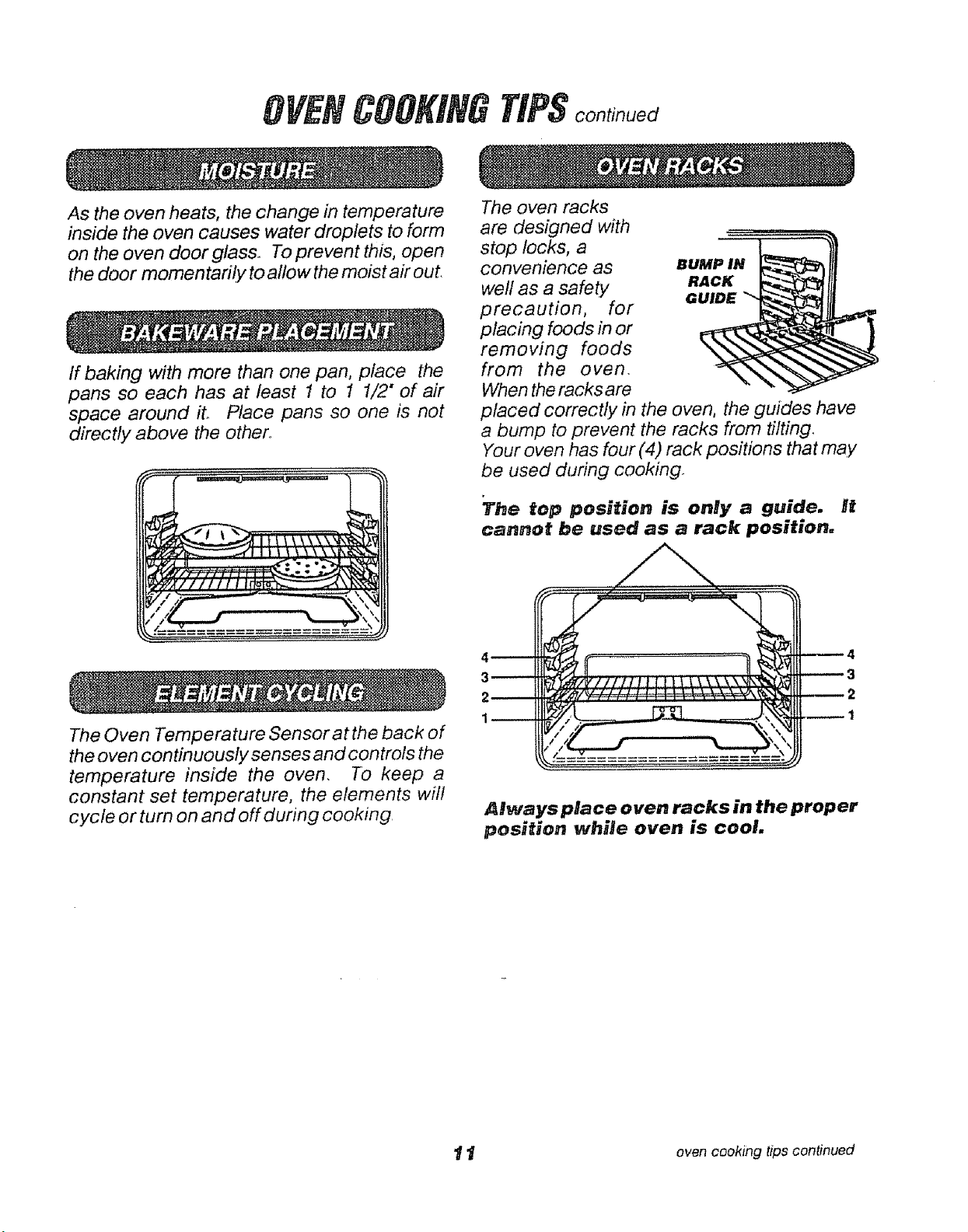
As the oven heats, the change in temperature
inside the oven causes water droplets to form
on the oven door glass To prevent this, open
the door momentari!y to allow the moist air out
If baking with more than one pan, place the
pans so each has at least 1 to 1 1/2" of air
space around ito Place pans so one is not
directly above the other
The oven racks
are designed with
stop locks, a
convenience as
well as a safety
precaution, for
placing foods in or
removing foods
from the oven
When the racks are
BUMP IN_
RACK
GUIDE "_
placed correctly in the oven, the guides have
a bump to prevent the racks from tilting
Your oven has four (4) rack positions that may
be used during cooking
The top position is only a guide, it
cannot be used as a rack position:
The Oven Temperature Sensor at the back of
the oven continuously senses and con trois the
temperature inside the oven. To keep a
constant set temperature, the elements will
cycle or turn on and off during cooking,
Always place oven racks in the proper
position while oven is cool.
1 t oven cooking tips continued
You may feel that your new oven cooks
differently than the oven it replaced, We
recommend that you use your new oven a
few weeks to become more familiar with it,
following the times given in your recipes as
a guide, See Do It Yourself Adjustment in the
back of this manual to make the adjustment if
you feel your oven is too hot or too cool for your
cooking preference.
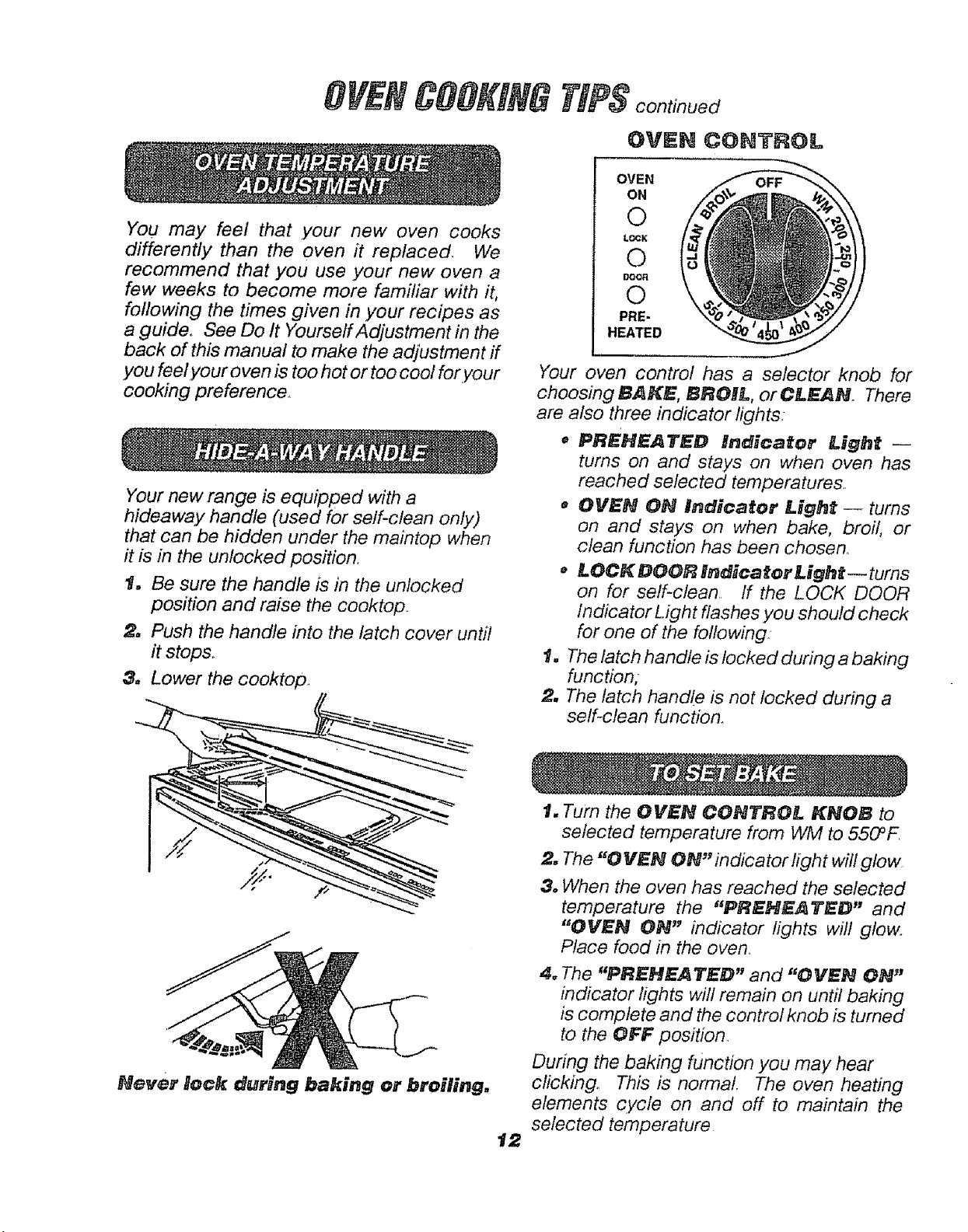
Your new range is equipped with a
hideaway handle (used for self-clean only)
that can be hidden under the maintop when
it is in the unlocked position.
1. Be sure the handle is in the unlocked
position and raise the cooktop,
£_ Push the handle into the latch cover until
it stops..
& Lower the cooktop,
Never lock durNng baking or broiling.
t2
TfPS continued
OVEN CONTROL
OVEN
ON
©
L_g
©
©
PRE-
HEATED
Your oven control has a selector knob for
choosing BAKE, BROIL, orCLEAN There
are also three indicator lights:
o PRENEATED Indicator Lig#_t --
turns on and stays on when oven has
reached selected temperatures..
o OVEN ON indKcator Light- turns
on and stays on when bake, broil, or
clean function has been chosen_
• LOCKDOORlndicatorLight--turns
on for self-clean If the LOCK DOOR
Indicator Light flashes .you should check
for one of the following
1. The latch handle is locked during a baking
function,-
2. The latch handle is not locked during a
self-clean function°
I. Turn the OVEN CONTROL KNOB to
selected temperature from WM to 550°F
2. The "0 VEN ON'indicator light will glow
3. When the oven has reached the selected
temperature the "PREHEATED" and
"OVEN ON" indicator lights will glow.
Place food in the oven,
4_ The "PREHEATED" and "OVEN ON"
indicator lights will remain on until baking
is complete and the control knob is turned
to the OFF position,
During the baking function you may hear
clicking. This is normal, The oven heating
elements cycle on and off to maintain the
selected temperature
BROILING
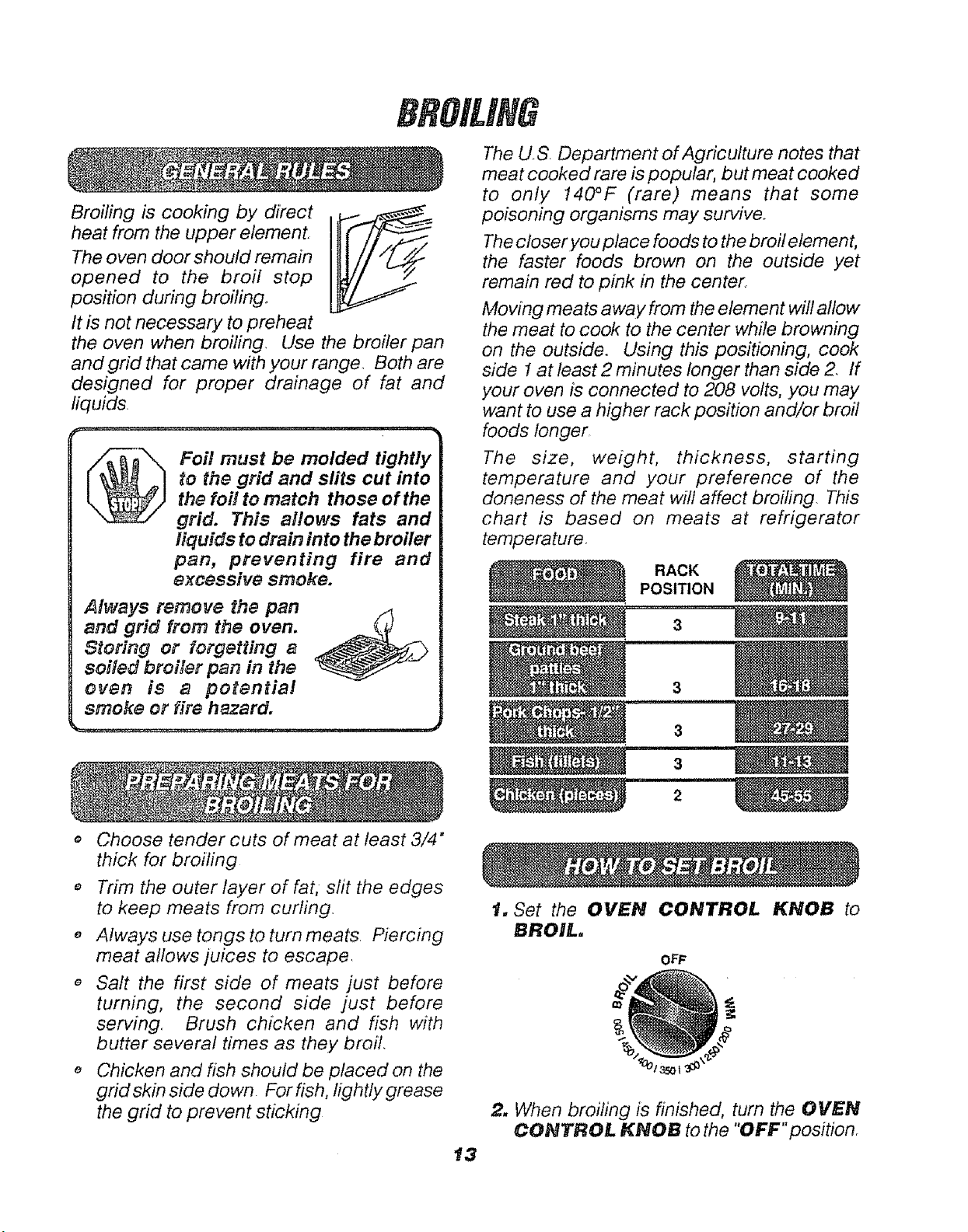
Broiling is cooking by direct
heat from the upper element.
The oven door should remain
opened to the broil stop
position during broiling°
It is not necessary to preheat
the oven when broiling. Use the broiler pan
and grid that came with your range Both are
designed for proper drainage of fat and
liquids.
_ oi! must be molded tightly
to the grid and slits cut into
the foi! to match those of the
grid. This allows fats and
liquids to drain into the broiler
pan, preventing fire and
excessive smoke.
Always remove the pan
and grid from the oven.
Storing or forgetting a
soiled broiler pan in the
even is a potential
smoke or fire hazard.
The U.S Department of Agricdture notes that
meat cooked rare is popular, but meat cooked
to only 140°F (rare) means that some
poisoning organisms may survive.
The closer you place foods to the broil element,
the faster foods brown on the outside yet
remain red to pink in the center.
Moving meats away from the element will allow
the meat to cook to the center while browning
on the outside. Using this positioning, cook
side I at least 2 minutes longer than side 2_ /f
your oven is connected to 208 volts, you may
want to use a higher rack position and/or broil
foods longer_
The size, weight, thickness, starting
temperature and your preference of the
doneness of the meat will affect broiling. This
chart is based on meats at refrigerator
temperature.
RACK
POSITION
3
,, Choose tender cuts of meat at least 3/4"
thick for broiling
o Trim the outer layer of fat,- slit the edges
to keep meats from curling.
o Always use tongs to turn meats. Piercing
meat allows juices to escape.
Salt the first side of meats just before
turning, the second side just before
serving. Brush chicken and fish with
butter several times as they broil.
e Chicken and fish should be placed on the
grid skin side down. Forfish, lightly grease
the grid to prevent sticking
t. Set the OVEN CONTROL KNOB to
BROIL.
OFF
2. When broifing is finished, turn the OVEN
CONTROL KNOB to the "OFF"position
t3
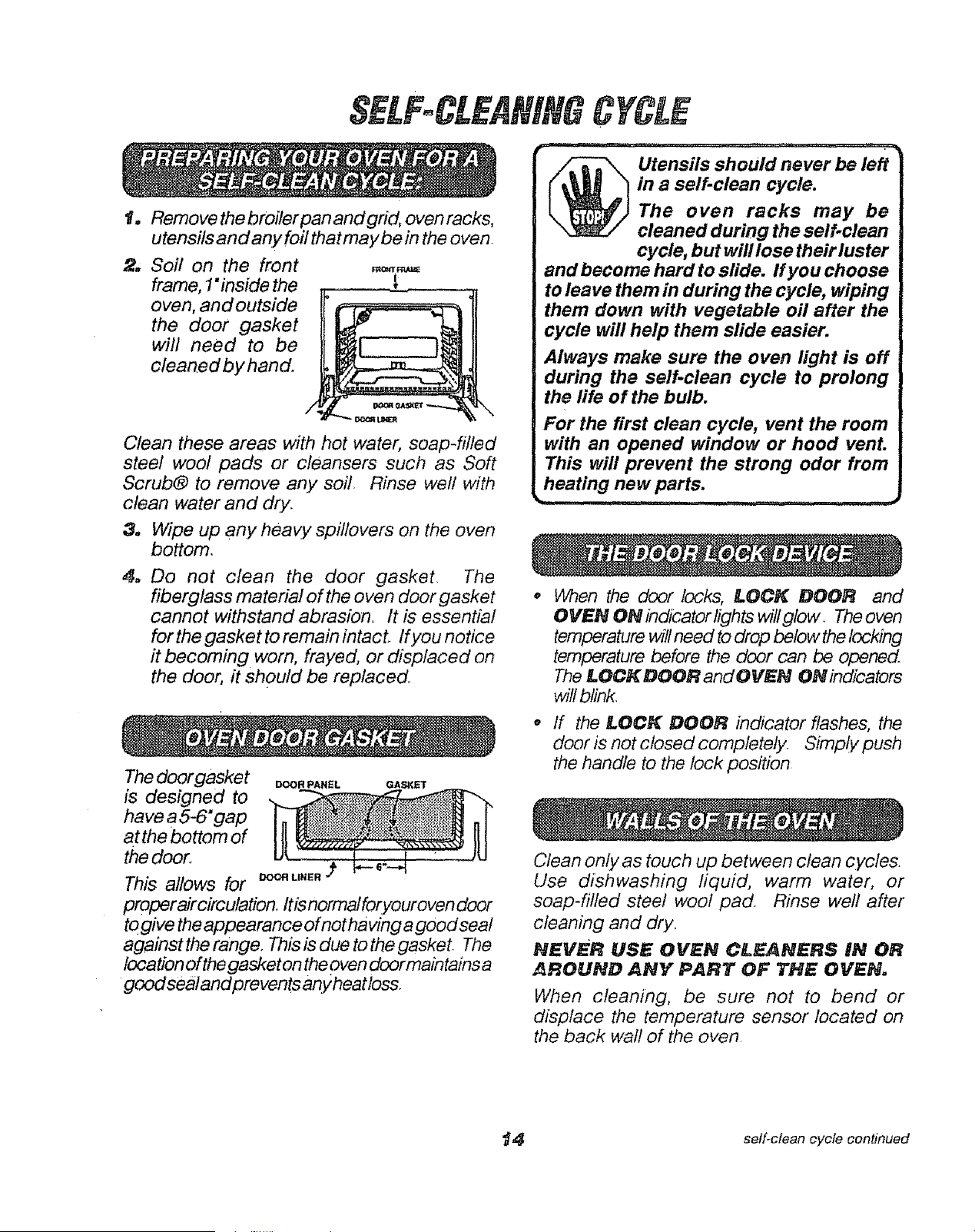
Io Remove thebroiler pan and grid, oven racks,
utensils and any foil thatmaybe in the oven.
2. Soil on the front
frame, 1"inside the
oven, and outside
the door gasket
will need to be
clean.ed by hand.
/!,,
\
Clean these areas with hot water, soap-filled
steel wool pads or cleansers such as Soft
Scrub® to remove any soil, Rinse well with
clean water and dry.
3. Wipe up any heavy spitlovers on the oven
bottom.
4. Do not clean the door gasket. The
fiberglass material of the oven door gasket
cannot withstand abrasion. It is essential
forthe gasket to remain intact. If you notice
it becoming worn, frayed, or displaced on
the door, it should be replaced.
The door gasket _=O,PA.EL QA_
is designed to
have a 5-6" gap
atthe bottom of
the door,.
This allows for _u._.
proper aircirculationo Itis normal foryour oven door
to give the appearance of not having agood sea/
against the range. This is due to the gasket. The
location of the gasket on the oven door main tains a
good seal and prevents any heat loss.
Utensils should never be left
in a self-clean cycle.
The oven racks may be
cleaned during the self-clean
cycle, but will lose their luster
and become hard to slide, ff you choose
to leave them in during the cycle, wiping
them down with vegetable oil after the
cycle will help them slide easier.
Always make sure the oven light is off
during the self-clean cycle to prolong
the life of the bulb.
For the first clean cycle, vent the room
with an opened window or hood vent.
This will prevent the strong odor from
heating new parts.
When the door locks, LOCK DOOR and
OVEN ON indicator lights willglow. Theoven
temperature will need to drop below the locking
temperature before the door can be opened
The LOCK DOOR and OVEN ON indicators
will blink,
o If the LOCK DOOR indicator flashes, the
door is not closed completely. Simply push
the handle to the lock position
Clean only as touch up between clean cycles.
Use dishwashing fiquid, warm water, or
soap-fitted steel wool pad Rinse weh' after
cleaning and dry,
NEVER USE OVEN CLEANERS IN OR
AROUND ANY PART OF THE OVEN.
When cleaning, be sure not to bend or
displace the temperature sensor located on
the back wall of the oven
_4 self-clean cycle continued
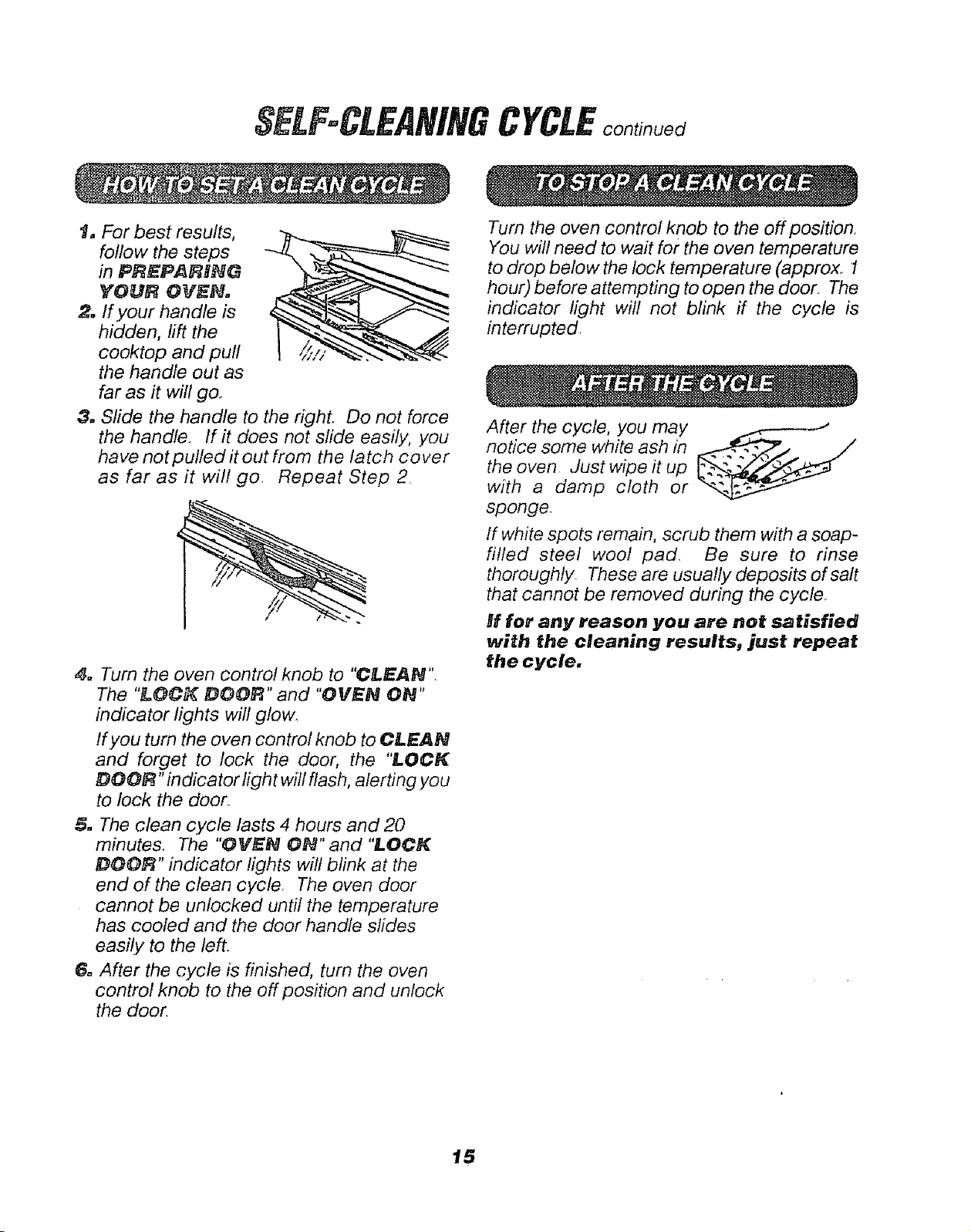
t. For best results,
follow the steps
in PREPARNNG
YOUR OVEN,
2. If your handle is
hidden, lift the
cooktop and puff
the handle out as
far as it will go.
3. Slide the handle to the right. Do not force
the handle_ If it does not slide easily, you
have not pulled it out from the latch co ver
as far as it will go. Repeat Step 2
4. Turn the oven control knob to "CLEAN".
The "LOCK DOOR" and "OVEN ON"
indicator lights will glow,
If you turn the oven control knob to CLEAN
and forget to lock the door, the "LOCK
DOOR" indicator light will flash, alerting,you
to lock the door.
5. The clean cycle lasts 4 hours and 20
minutes. The "OVEN ON" and "LOCK
DOOF_" indicator lights will blink at the
end of the clean cycle. The oven door
cannot be unlocked until the temperature
has cooled and the door handle slides
easily to the left.
6. After the cycle is finished, turn the oven
control knob to the off position and unlock
the door
CYCLE
Turn the oven control knob to the off position.
You will need to wait for the oven temperature
to drop below the lock temperature (approxo 1
hour) before attempting to open the door The
indicator light will not blink if the cycle is
interrupted
After the cycle, you may .....,--_-J
notice some white ash in
the oven ,Just wipe it up
with a damp cloth or
sponge
If white spots remain, scrub them with a soap-
filled steel wool pad_ Be sure to rinse
thoroughly_ These are usually deposits of salt
that cannot be removed during the cycle.
If for any reason you are not satisfied
with the cleaning results, just repeat
the cycle.
15
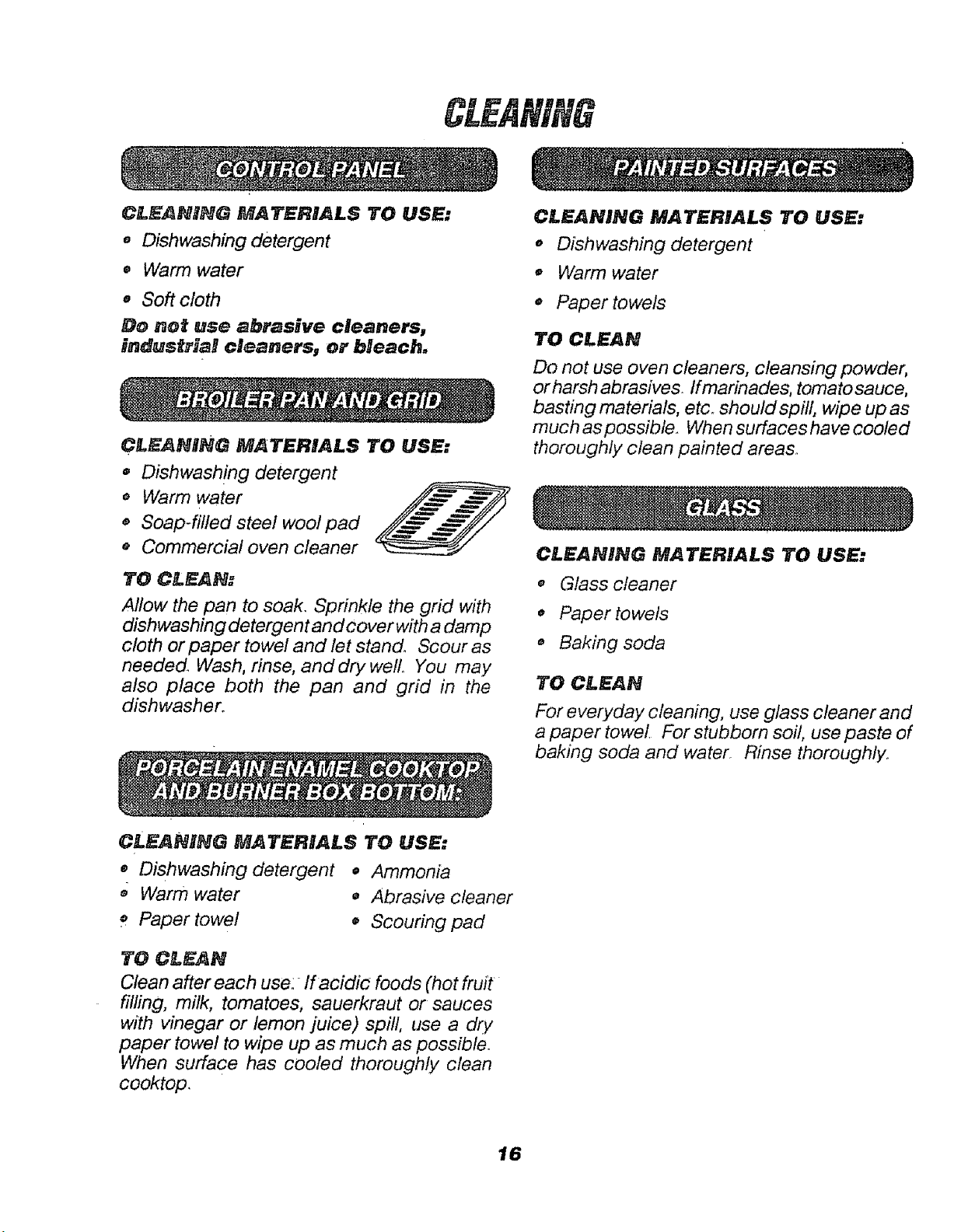
CL_$ANNNG MATERIALS TO USE:
• Dishwashing detergent
• Warm water
o Soft cloth
Do not use abrasive cleaners,
industriaB cleaners, or bHeach,
CL$ANRNG MATERIALS TO USE:
• Dishwashing detergent
o Warm water
,, Soap-filled steel wool pad
* Commercial oven cleaner
TO CLEAN:
Allow the pan to soak. Sprinkle the grid with
dishwashing detergent and cover with a damp
cloth or paper towel and let stand° Scour as
needed. Wash, rinse, and dry well, You may
also place both the pan and grid in the
dishwasher.
CLEANIHG MATERIALS TO USE:
CLEANING MATERIALS TO USE:
o Dishwashing detergent
• Warm water
,, Paper towels
TO CLEAN
Do not use oven cleaners, cleansing powder,
or harsh abrasives. If marinades, tomato sauce,
basting materials, etc. should spill, wipe up as
much as possible. When surfaces have cooled
thoroughly clean painted areas°
Ci.EANING MATERIALS TO USE:
o Glass cleaner
0 Paper towels
o Baking soda
TO CI-EAN
For everyday cleaning, use glass cleaner and
a paper towel. For stubborn soil, use paste of
baking soda and water Rinse thoroughly.
,, Dishwashing detergent • Ammonia
,_ Warm water • Abrasive cleaner
Paper towel o Scouring pad
TO CLEAN
Clean after each use:_ lf acidic foods (hot fruit
filling, milk, tomatoes, sauerkraut or sauces
with vinegar or lemon juice) spill, use a dry
paper towel to wipe up as much as possible.
When surface has cooled thoroughly clean
cooktop.
16
REMOVABLEPARTS
CLEANNNG MATERIALS 1"0 USE:
• Dishwashing detergent
o Warm water
o Soft cloth
MOLDED
RIB
CAUTION:
Be sure the oven light switch is
in the off position. Do not touch
a hot light bulb with wet hands
or a wet cloth. Wait until the
bulb has cooled and use a dry cloth.
Never touch the five collar of the bulb. If
you are replacing a broken light bulb,
make sure the power supply is off.
J
i i ii, i i, HIII,I,IIIIIII
SPRING
CLIP
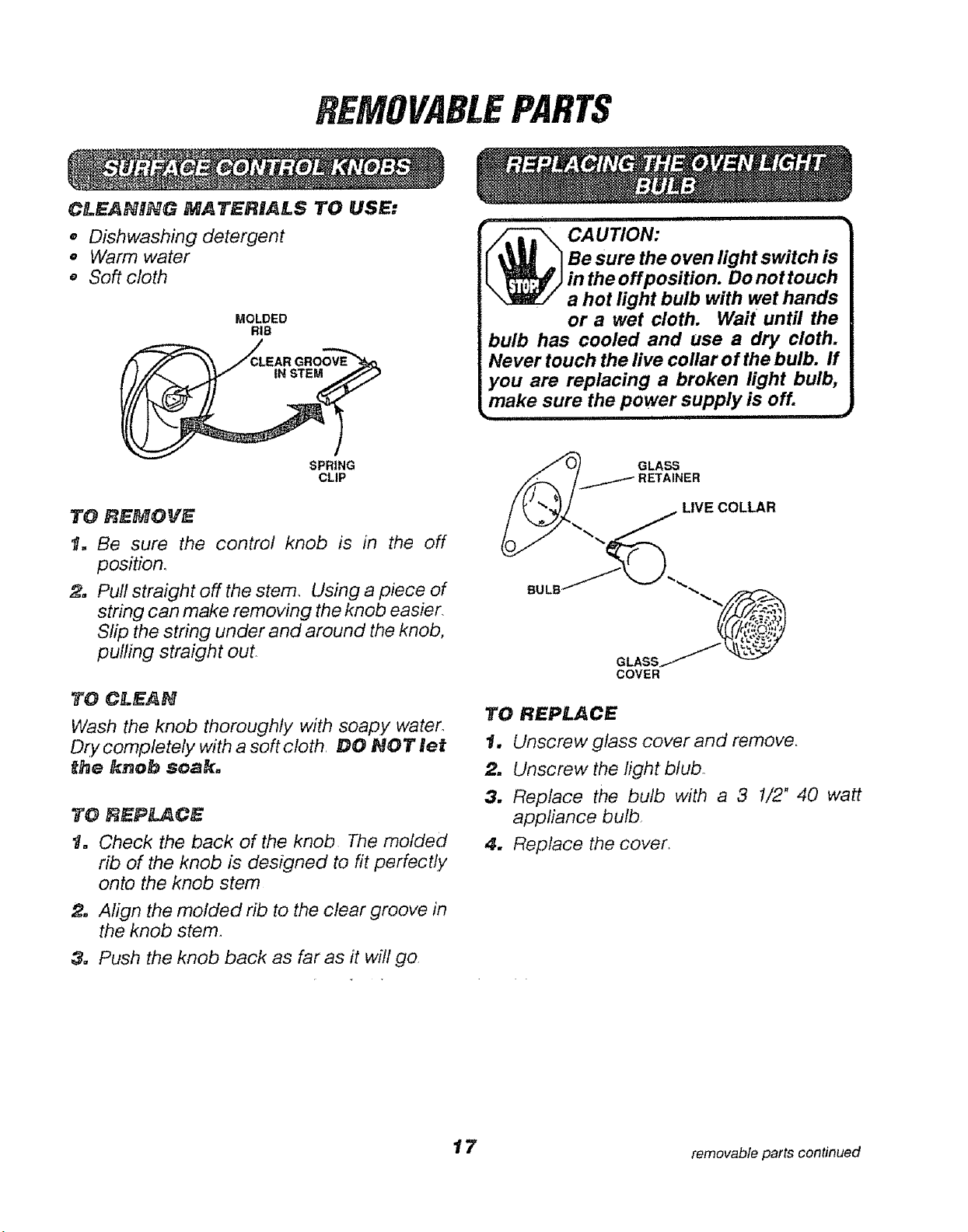
TO REMOVE
1. Be sure the control knob is in the off
position,
2. Pull straight off the stem, Using a piece of
string can make removing the knob easier,
Slip the string under and around the knob,
pulling straight out
TO CLEAN
Wash the knob thoroughly with soapy water,
Dty completely with a soft ctoth, DO NOT let
t_e knob soak.
TO REPLACE
t. Check the back of the knob The molded
rib of the knob is designed to fit perfectly
onto the knob stem
2. Align the molded rib to the clear groove in
the knob stem.
3. Push the knob back as far as it will go
GLASS
RETAINER
LIVE COLLAR
TO REPLACE
1. Unscrew glass cover and remove,
2. Unscrew the light blubo
3. Replace the bulb with a 3 1/2" 40 watt
appliance bulb
4. Replace the cover,
t 7 removable parts continued
continued
CLF NnNGMATBRnALS
,, Dishwashing detergent
o Damp cloth
,, Warm water
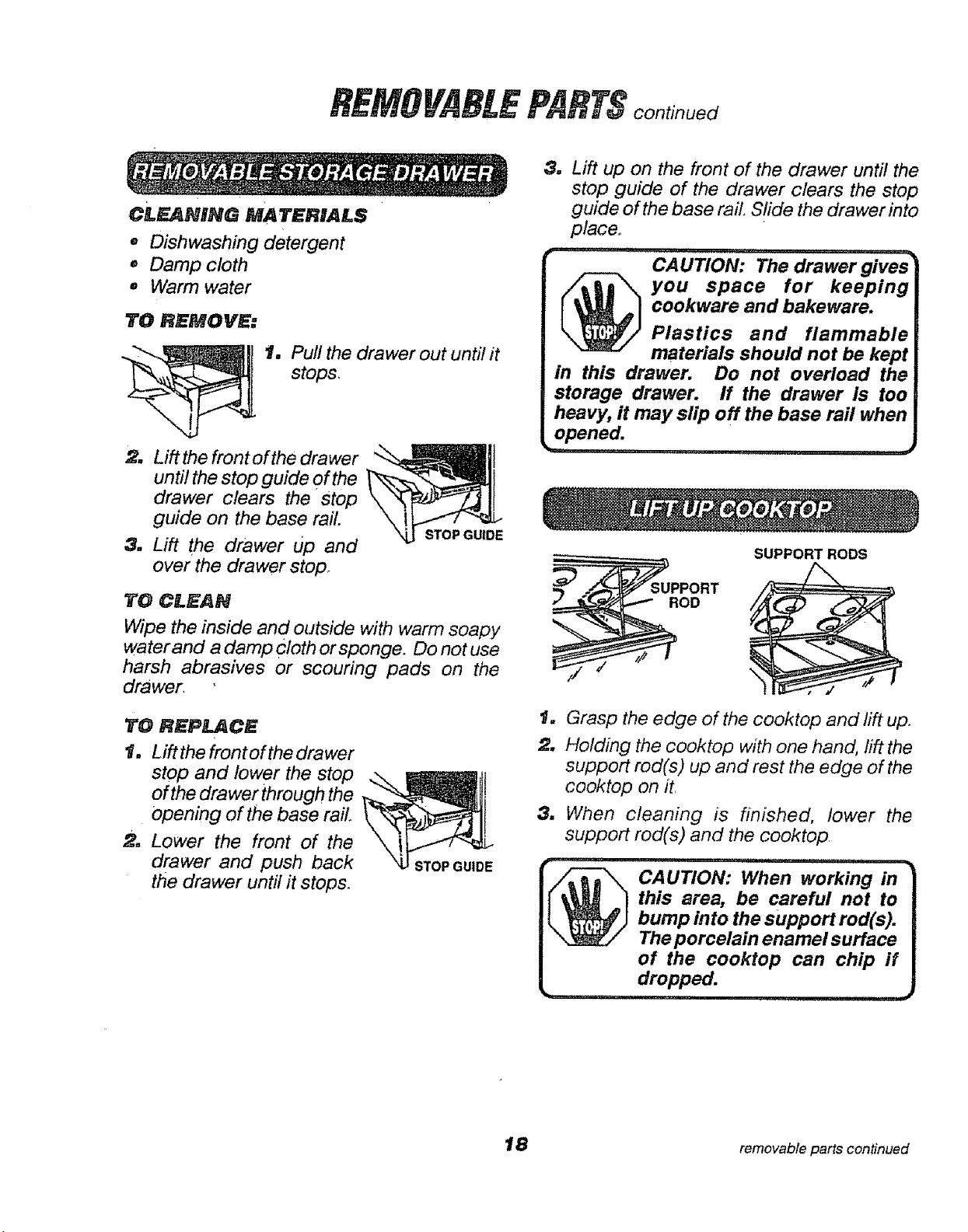
TO RHMOVE:
t. Pull the drawer out until it
stops.
2. Lift the front ofthe drawer
until the stop guide Of the
drawer clears the stop
guide on the base rail.
3. Lift the drawer up and
over the drawer stop.
STOP GUIDE
TO CLEAN
Wipe the inside and outside with warm soapy
water and a damp cloth or sponge. Do not use
harsh abrasives or scouring pads on the
drawer,
TO REPlaCE
t, Lift the front of the drawer
stop and lower the stop
of the drawerthrough the
opening of the base rail.
2. Lower the front of the
drawer and push back
the drawer until it stops.
STOP GUIDE
3. Lift up on the front of the drawer until the
stop guide of the drawer clears the stop
guide of the base rail. Slide the drawer into
place°
u l ,u, q,, i ,u,,,i
CAUTION: The drawer gives
you space for keeping
cookware and bakeware.
Plastics and flammable
materials should not be kept
in this drawer. Do not overload the
storage drawer. If the drawer is too
heavy, it may slip off the base rail when
opened.
w,, ,i !l,,, d
SUPPORT RODS
ROD
1. Grasp the edge of the cooktop and lift up.
2, Holding the cooktop with one hand, lift the
support rod(s) up and rest the edge of the
cooktop on it
& When cleaning is finished, lower the
support rod(s) and the cooktop
i,,,i , n=" i'=',',Ul=" =' i
CAUTION: When working in
this area, be careful not to
J
bump into the support rod(s).
The porcelain enamel surface
of the cooktop can chip if
dropped.
,p ,11
18 removable parts continued
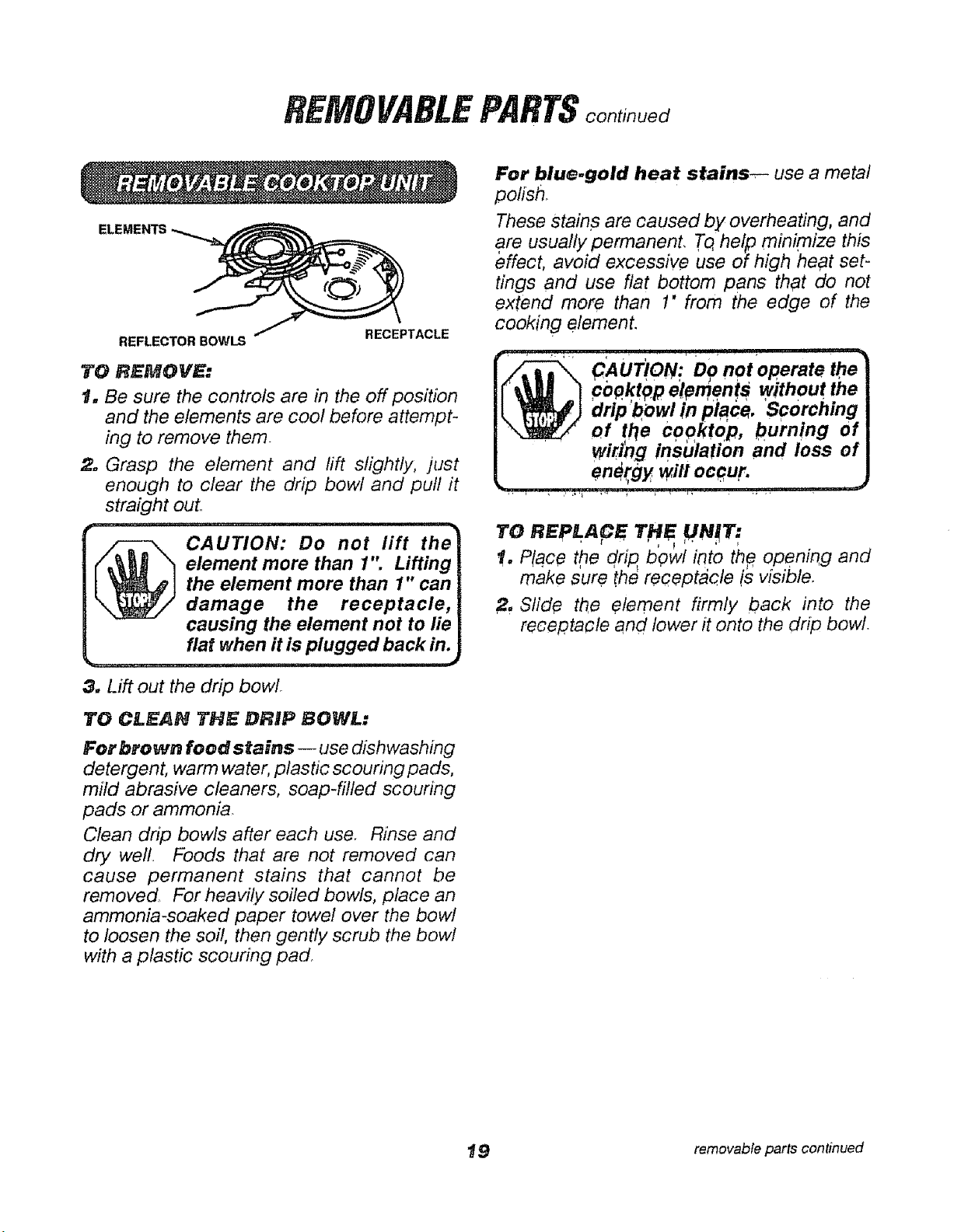
REMOVABLEPARTS
REFLECTOR BOWLS
RECEPTACLE
TO REMOVE:
1. Be sure the controls are in the off position
and the elements are cool before attempt-
ing to remove them.
2. Grasp the element and rift slightly, just
enough to clear the drip bowl and pull it
straight out,,
, ,,,, i i, i L__JHI_JIJ_LL_JI'"I•
CAUTION: Do not lift the
element more than 1'" Lifting
the element mere than 1" can
damage the receptacle,
causing the element not to lie
fiat when it is plugged back in.
3. Lift out the drip bowl
TO CLEAN TH_ DRIP BOWL:
For brown food stains -- use dishwashing
detergent, warm water, plastic scouring pads,
mild abrasive cleaners, soap-filled scouring
pads or ammonia.
Clean drip bowls after each use. Rinse and
dry weft. Foods that are not removed can
cause permanent stains that cannot be
removed For heavily soiled bowls, place an
ammonia-soaked paper towel over the bowl
to loosen the soil, then gently scrub the bowl
with a plastic scouring pad
For blue.gold heat stains_-- use a metal
polish.
These stains are caused by overheating, and
are usually permanent, To,help minimize this
effect, avoid excessive use of high heat set-
tings and use flat bottom Pans that do not
extend more than 1" from the edge of the
cooking element.
To R PLACe T"
!, Place the drip bowl i_to th# opening and
make sure the receptacle is visible.
2, Slide the element firmly back into the
receptacle and lower it onto the drip bowl.
t 9 removable parts continued
continued
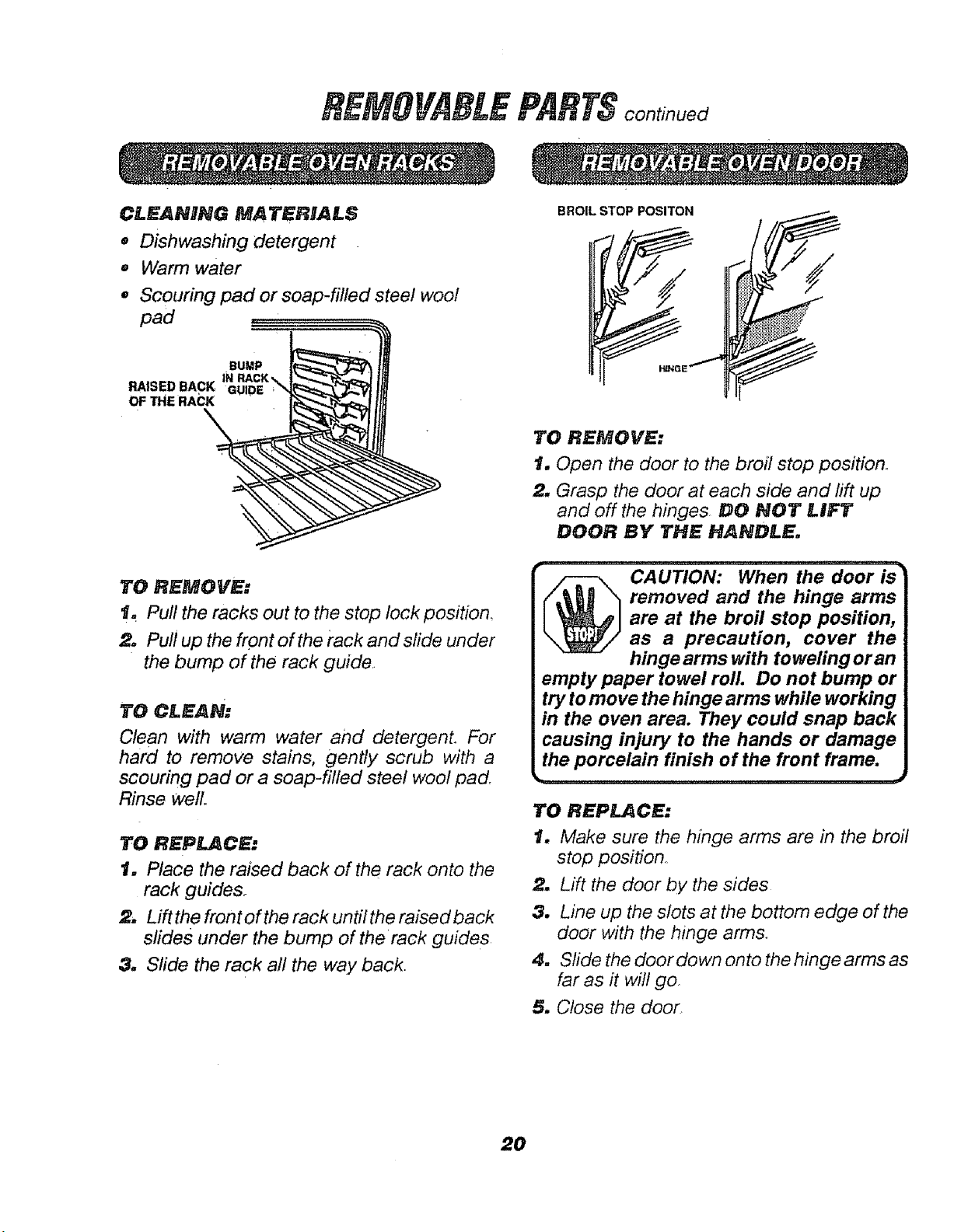
CLEANING MATERIALS
e
@
e
Dishwashing detergent
Warm water
Scouring pad or soap-filled steel wool
.BUMP
RAISED BACK IN RACK,_ L_--'£"_-'F_4J |_
OF THE RAC
TO REMOVE:
t. Pull the racks out to the stop lock position_
2, Pull up the front of the rack and slide under
the bump of the rack guide,
To CLEAN.
Clean with warm water and detergent. For
hard to remove stains, gently scrub with a
scouring pad or a soap-filled steel wool pad,
Rinse well.
TO REPIJ_CE:
t, Place the raised back of the rack onto the
rack guide&
2, Lifl the front of the rack until the raised back
slides under the bump of the rack guides
3, Slide the rack all the way back.
BROIL STOP POSITON
/
TO REMOVE:
t. Open the door to the broil stop position°
2. Grasp the door at each side and rift up
and off the hinges, DO NOT LIFT
DOOR BY THE HANDLE.
removed and the hinge arms
are at the broil stop position,
as a precaution, cover the
hinge arms with toweling or an
empty paper towel roll. Do not bump or
try to move the hinge arms while working
in the oven area. They could snap back
causing injury to the hands or damage
the porcelain finish of the front frame.
TO REPLACE:
1. Make sure the hinge arms are in the broil
stop position.
2, Lift the door by the sides
3, Line up the slots at the bottom edge of the
door with the hinge arms.
4. Slide the door down onto the hinge arms as
far as it will go_
5, Close the door.
20
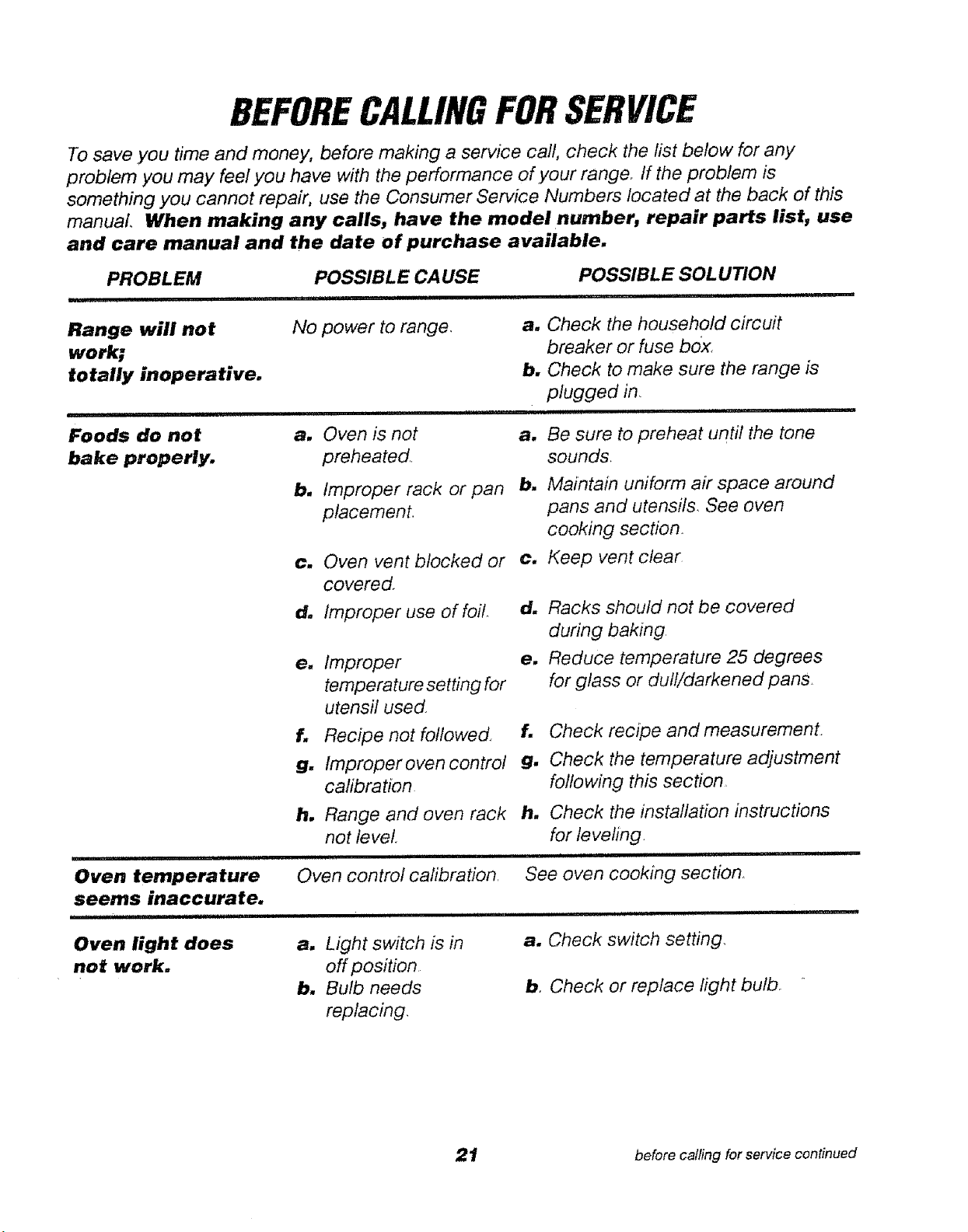
BEFORECALLINGFORSERVICE
To save you time and money, before making a service call, check the list below for any
problem you may feel you have with the performance of your range. If the problem is
something you cannot repair, use the Consumer Service Numbers located at the back of this
manual When making any calls, have the model number, repair parts list, use
and care manual and the date of purchase available.
PROBLEM POSSIBLE CAUSE POSSIBLE SOLUTION
,i uiiiiil,llll , i iiii III i .................... iiii
Range will not
work;
totally inoperative.
i i,ii1,111
Foods do not
bake properly.
i ill ..............
Oven temperature
seems inaccurate.
No power to range.
iii ..................
a, Oven is not
preheated..
b, Improper rack or pan
placement_
c. Oven vent blocked or
covered.
d, Improper use of foil
e. Improper
temperature setting for
utensil used
f, Recipe not followed
g, tmproper oven control
calibration
h, Range and oven rack
not level.
i i i, i, i ,ill ii ,,,,,,,,iMi
Oven control cafibration.
a, Check the household circuit
breaker or fuse box.
b, Check to make sure the range is
plugged in.
i IIIIIII ii iii1,111
a. Be sure to preheat until the tone
sounds.
b. Maintain uniform air space around
pans and utensils See oven
cooking section.
c, Keep vent clear
d, Racks should not be covered
during baking
e, Reduce temperature 25 degrees
for glass or dull/darkened pans.
f. Check recipe and measurement.
g. Check the temperature adjustment
following this section.
h. Check the installation instructions
for leveling.
See oven cooking section.
Oven light does
not work.
a. Light switch is in
off position
b. Bulb needs
replacing.
a. Check switch setting.
b. Check or replace light bulb.
21 before calling for service continued
continued
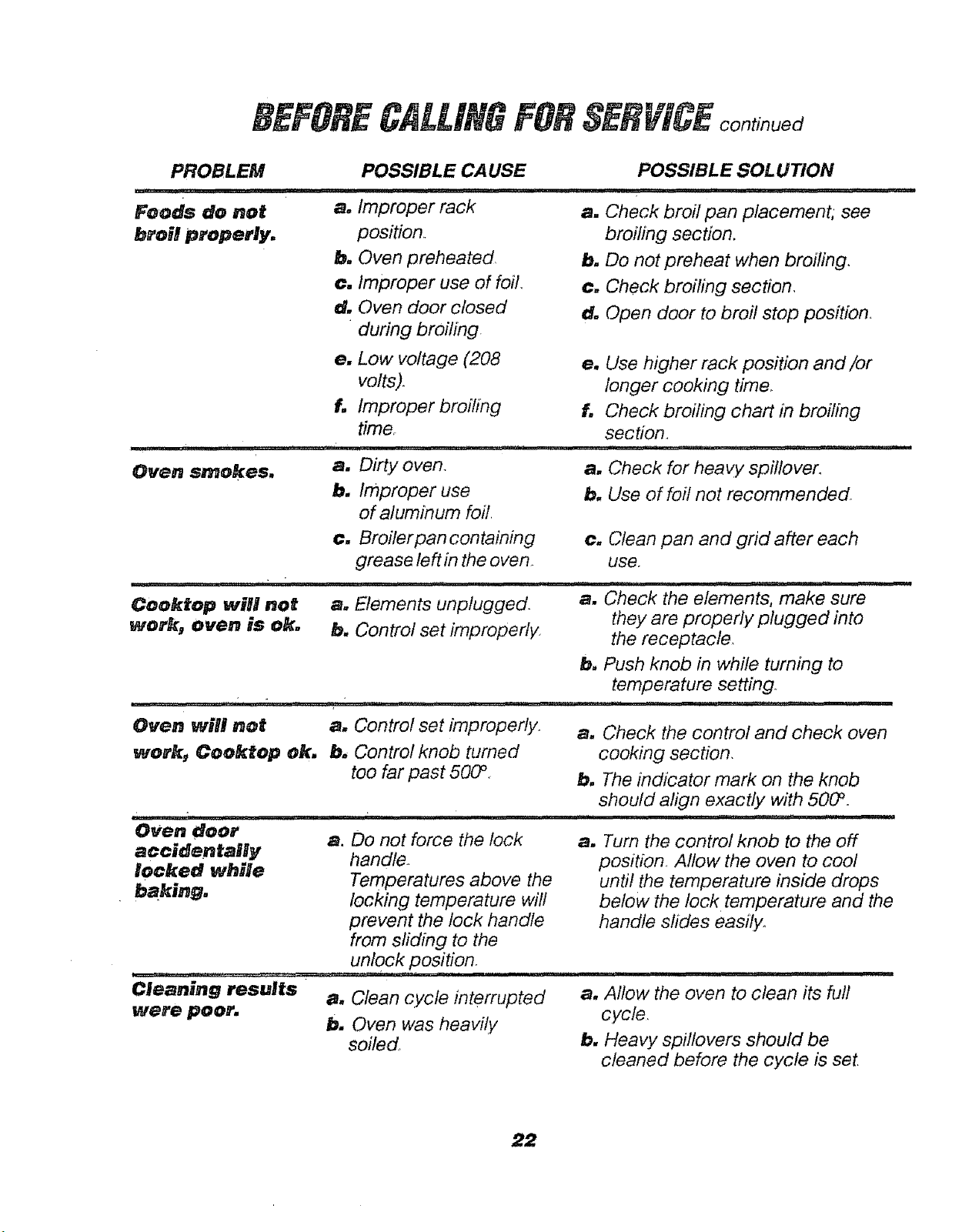
PROBLEM POSSIBLE CAUSE POSSIBLE SOLUTION
Foods do not a. Improper rack a. Check broil pan placement, see
broil properly.
position.
b. Oven preheated
c. Improper use of foil.
d. Oven door closed
during broiling
broiling section.
b, Do not preheat when broiling,
c. Check broiling section,
d. Open door to broil stop position.
I .... '
Oven smokes.
e. Low voltage (208
volts).
f. Improper broiling
time.
i,:,, u .uH-, u
a. DiRy oven.
b. Improper use
of aluminum foil
e. Use higher rack position and/or
longer cooking time.
f. Check broiling chart in broiling
section,
i1,11 i1,,I ,i ,IIIMI,,IIII I I
a. Check for heavy spillover.
b. Use of foil not recommended.
r_r,,,r,ll,,
Cooktop will not
work, oven is ok.
c. Broiler pan containing
grease left in the oven
i -,u
a. Elements unplugged_
b. Control set improperly.
.......... i,, i , .,, ,,i,,,,,,i,,i,luu i
Oven will not a. Contro! set improperly.
work_ Cooktop ok. b, Control knob turned
too far past 500 °
i _,llU _:Ul
Oven doer
accidentaBly
locked while
baking.
c. Clean pan and grid after each
use.
.......... ..........
a. ck the elements, make sure
they are properly plugged into
the receptacle.
b. Push knob in while turning to
temperature setting.
a. Check the control and check oven
cooking section,
b. The indicator mark on the knob
should align exactly with 5000 .
i,iiii i IR,II,III,I, , i,
a. Do not force the lock
handle..
Temperatures above the
locking temperature will
prevent the lock handle
from sliding to the
unlock position.
CJe;aning results
a, Clean cycle interrupted
were poor. b. Oven was heavily
soiled
a. Turn the control knob to the off
position_ Allow the oven to cool
until the temperature inside drops
below the lock temperature and the
handle sfides easily.
a, Allow the oven to clean its full
cycle.
b, Heavy spillovers should be
cleaned before the cycle is set
22
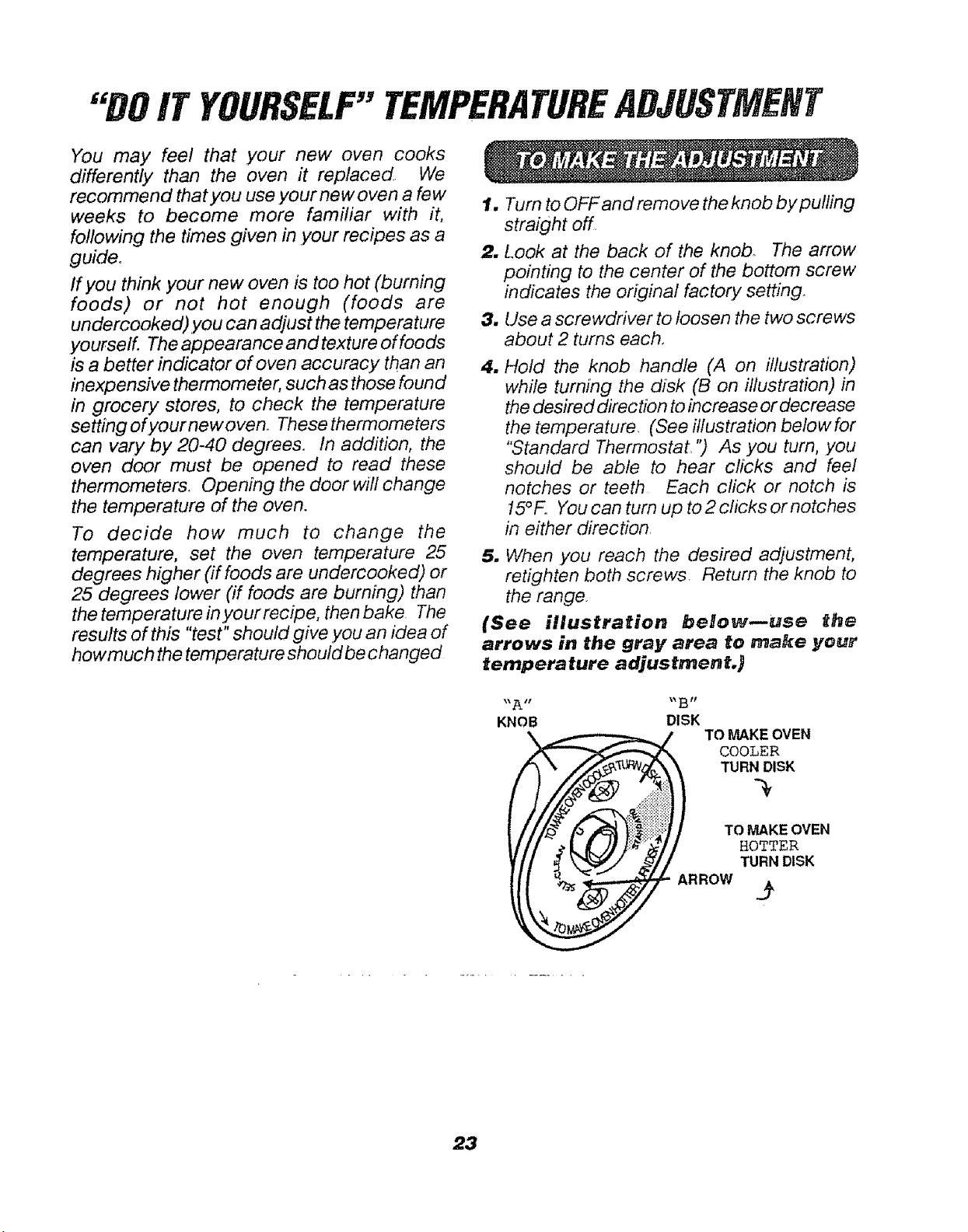
'DOIT YOURSELF"TEMPERATUREADJUSTMENT
You may feet that your new oven cooks
differently than the oven it replaced We
recommend that you use your new oven a few
weeks to become more familiar with it,
following the times given in .your recipes as a
guide.
If you think your new oven is too hot (burning
foods) or not hot enough (foods are
undercooked).you can adjust the temperature
yourselL The appearance and texture of foods
is a better indicator of oven accuracy than an
inexpensive thermometer, such as those found
in grocery stores, to check the temperature
setting ofyour new oven. These thermometers
can vary by 20-40 degrees. In addition, the
oven door must be opened to read these
thermometers. Opening the door will change
the temperature of the oven.
To decide how much to change the
temperature, set the oven temperature 25
degrees higher (if foods are undercooked) or
25 degrees lower (if foods are burning) than
the temperature in your recipe, then bake. The
results of this "test" should give .you an idea of
howmuch the temperature should be changed
1. Turn to OFF and remove the knob by pulling
straight off
2. Look at the back of the knob The arrow
pointing to the center of the bottom screw
indicates the original factory setting,
3. Use a screwdriver to loosen the two screws
about 2 turns each,
4. Hold the knob handle (A on illustration)
while turning the disk (B on illustration) in
the desired direc tJonto increase or decrease
the temperature, (See illustration below for
"Standard Thermostat ") As you turn, .you
should be able to hear clicks and feel
notches or teeth Each click or notch is
15°F. You can turn up to 2 cficks or notches
in either direction,
5, When .you reach the desired adjustment,
retighten both screws Return the knob to
the range.
(See illustration belowmuse the
arrows in the gray area to ma_e your
temperature adjustmenL )
"A .... B"
KNOB DISK
\ TO MAKE OVEN
COOLER
TURN DISK
TO MAKEOVEN
HOTTER
TURN DISK
ARROW .__
23

2.4
Fortherepairorreplacementpartsyouneed
delivereddirectlytoyourhome
Call7 am- 7 pro,7 daysa week
=800=366-PART
(1-800-366-7278)
©
©
Forin-homemajorbrandrepairservice
Call24 hoursaday,7 daysaweek
.8OO.4,,R_
(1-800-473-7247)
SEARS
_etica'_ Rep_irSpecia#_s
Forthelocationofa
SearspartsandRepairCentarinyourarea
Call24 hoursaday,7 daysaweek
=800-488=1
BBBBBB
ForinformationonpurchasingaSears
MaintenanceAgreementortoinquire
aboutanexistingAgreement
Call9 am- 5 prn, Monday-Saturday
-800=827-6655
America's Repair Specialists
25
ENMONE
f
Dear Customer:
Our constant efforts are
dlracted toward making
sure your new Kenmore
Range will arrive at your
home In perfect condi-
tion and will give you
properperformance. As
part of these efforts, we
feel It Is our responsibil-
Ity to provide you with
this warranty for your
range,
Re_tded Paper
_.. J
ELECTRIC RANGE WARRANTY
FULL ONE YEAR WARRANTY OH THE FUNCTIONHNG OF ALL
PARTS EXCEPT GL,_SS PARTS
If, within one year from the date of installation, any part, other than a glass
part, falls to function properly due to a defect In material or workmanship,
Sears will repair or replace It, free of charge.
FULL 30-DAY W_RANTY ON GLASS PARTS AND FINISH OF PORCE-
LAIN ENAMELp PAINTED OR BRIGHT METAL FINISHED PARTS
If, within 30 days from the date of installation, any glass part or the finish
on any porcelain enamel, painted or bright metal part is defective In
material or workmanship, Sears will replace the part, free of charge.
FULL 90-DAY WARRANTY ON MECHANICAL ADJUSTMENTS
;or 90 days from the date of Installation, Sears will provide, free of charge,
any mechanical adjustments necessary for proper operation of the range,
except for normal maintenance.
If the range ts subjected to other than private family use, the above
warranty coverage Is effective for only 90 days.
WARRANTY SERVICE iS AVA_LAELE BY CONTACTING THE
NEAREST SEARS SERVICE CEHTER!DEPARTMENT IN THE
UNITED STATES
This warranty applies only while this product ISIn use in the United States.
This warranty gives you specific legal righis, and you may also have other
rights which vary from state to state.
SEARS_ ROEBUCK and CO.
Dept. 817 WA
Hoffman Estates, IL 60179
.................... i"H HH'= =
WE SEIRVJCE WHAT WE SELL
"We Service What We Sell" is our assurance to you that you can depend on Sears for service because Sears service Is
nationwide.
Your Kenmere Range hasaddedvalue when you consider that Searshasa service unit near you staffed bySearstrained
technicians.., professionaltechnicians specificallytrained on Searsappliances, having the parts, tools and equipment
to ensure that we meet our pledge to you -- "We Service What We Sell!"
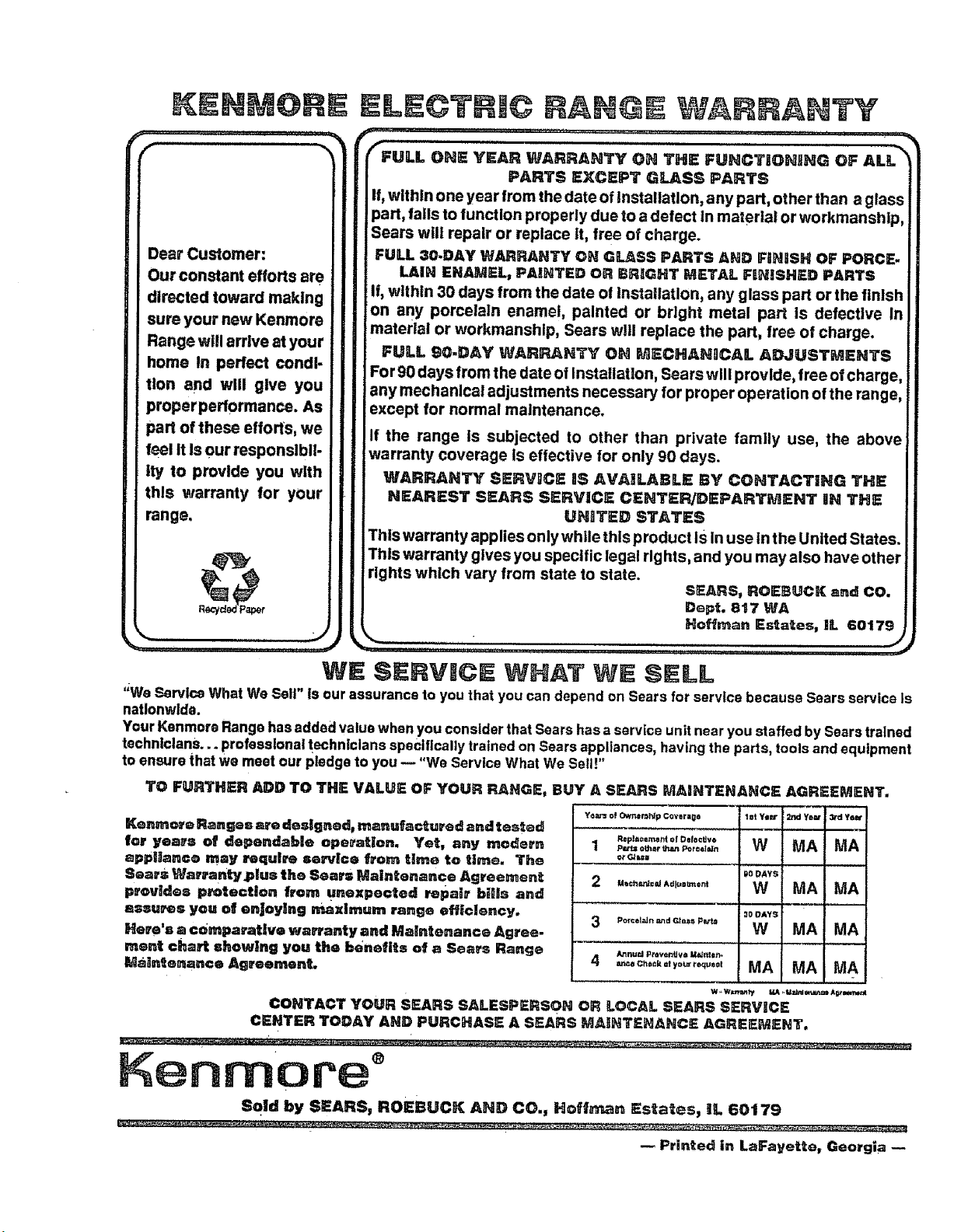
TO FURTHER ADD TO THE VALUE OF YOUR RANGE, BUY A SEARS MAINTENANCE
Kenmc_'e Ranges are deslgnad_ manufactured and tested
lot years of dependable operaUon. Yet, any modem
appliance may _qulre service from time to time. The
Sears Walrrantyplus the Sears Maintenance Agreement
provides p_tectlon from Unexpected repair hills and
assu_s you of enjoying mximum range efficiency.
Here's a c0_paraUve warranty and Maintenance Agree-
ment chert shewing you the benefits of a Sears Range
Maintenance Agreement,
Y_ar= o! Own=r_ldp covlr=_e
R=pl=c=met_t of Def0©Uw
1 _ o_r that Por¢01_n
or G_ul
2 ..oh._o., AdJuzltment
Po_'cel_dn :._d Gtluts p _J=
/_t nu=d Ptowr_Uv_ Mt_t_r_
4 =inca Ch(t_k at yo_ requ_01
l=t ye=r
W
i_oDAYS
W
3g DAYg
W
MA
AGREEMENT.
Yo_" | 3rd Y_,B"I
! ,,*,*4
MA I MA I
; I
MA I MA I
MAI MA1
MAIMAI
CONTACT YOUR SEARS SALESPERSON OR LOCAL SEARS SERVICE
CENTER TODAY AND PURCHASE A SEARS MAINTENANCE AGREEMENT.
,, ,',
Kenmore °
Sold by SEARS, ROEBUCN AND CO., Hoff_. Estates, ill 60179
Printed in LaFayette. Georgia