
www.taotronics.com
TAOTRONICS WIRELESS ADAPTER
User Guide
TT-BA014_V1.2
20191021
EUROPE
E-mail:
EU Importer: ZBT International Trading GmbH
Address: Halstenbeker Weg 98C, 25462 Rellingen, Deutschland
NORTH AMERICA
E-mail : [email protected](US)
Tel : 1-888-456-8468 (Monday-Friday: 9:00 – 17:00 PST)
Address: 46724 Lakeview Blvd, Fremont, CA 94538
ASIA PACIFIC
E-mail: [email protected](JP)
JP Importer: 株式会社SUNVALLEYJAPAN
Tel: 03-5542-0238(10-18時/土日祝日を除く)
MANUFACTURER
Shenzhen NearbyExpress Technology Development Co.,Ltd.
Address: 333 Bulong Road, Shenzhen, China, 518129
Learn more about the EU Declaration of Conformity:
https://www.taotronics.com/downloads-TT-BA014-CE-Cert.html

www.taotronics.com
TAOTRONICS WIRELESS ADAPTER
User Guide
TT-BA014_V1.2
20191021
EUROPE
E-mail:
support.uk@taotronics.com(UK)
support.de@taotronics.com(DE)
support.fr@taotronics.com(FR)
support.es@taotronics.com(ES)
support.it@taotronics.com(IT)
EU Importer: ZBT International Trading GmbH
Address: Halstenbeker Weg 98C, 25462 Rellingen, Deutschland
NORTH AMERICA
E-mail : support@taotronics.com(US)
support.ca@taotronics.com(CA)
Tel : 1-888-456-8468 (Monday-Friday: 9:00 – 17:00 PST)
Address: 46724 Lakeview Blvd, Fremont, CA 94538
ASIA PACIFIC
E-mail: support.jp@taotronics.com(JP)
JP Importer: 株式会社SUNVALLEYJAPAN
Tel: 03-5542-0238(10-18時/土日祝日を除く)
MANUFACTURER
Shenzhen NearbyExpress Technology Development Co.,Ltd.
Address: 333 Bulong Road, Shenzhen, China, 518129
Learn more about the EU Declaration of Conformity:
https://www.taotronics.com/downloads-TT-BA014-CE-Cert.html

CONTENTS
English
Deutsch
Français
Español
Italiano
日本語
01/06
07/12
13/18
19/24
25/30
31/36

CONTENTS
English
Deutsch
Français
Español
Italiano
日本語
01/06
07/12
13/18
19/24
25/30
31/36
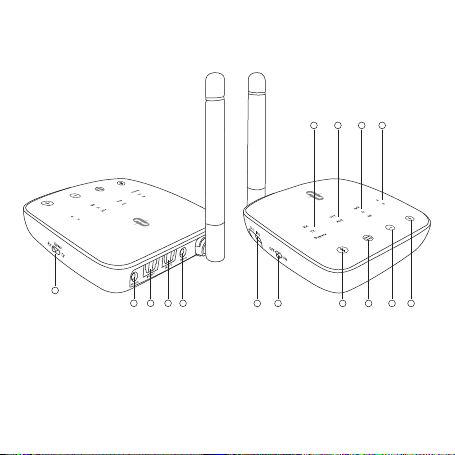
EN
Product Diagram
1. Mode Switch
2. AUX Output
3. OPT Audio Output
4. OPT Audio Input
5. AUX Input
6. Micro USB Charging Port
7. Power Switch
8. Multifunction Button (Charging Indicator)
9. OPT / AUX Mode Switch Button
10. Volume –
11. Volume +
12. Device A / B Indicators
13. Codec Indicators
14. OPT / AUX Indicators
15. RX / TX / Bypass Indicators
DE
Produktabbildung
1. Moduswechsel
2. AUX-Ausgang
3. OPT-Audio-Ausgang
4. OPT-Audio-Eingang
5. AUX-Eingang
6. Micro-USB-Ladeanschluss
7. Power-Schalter
8. Multifunktionstaste (Ladeanzeige)
9. OPT- / AUX-Moduswechseltaste
10. Lautstärke -
11. Lautstärke +
12. Gerät A / B-Anzeigen
13. Codec-Anzeigen
14. OPT- / AUX-Anzeigen
15. RX- / TX- / Bypass-Anzeigen
1
2 3 4 5
6 7 8 9 10 11
15 14 13 12

EN
Product Diagram
1. Mode Switch
2. AUX Output
3. OPT Audio Output
4. OPT Audio Input
5. AUX Input
6. Micro USB Charging Port
7. Power Switch
8. Multifunction Button (Charging Indicator)
9. OPT / AUX Mode Switch Button
10. Volume –
11. Volume +
12. Device A / B Indicators
13. Codec Indicators
14. OPT / AUX Indicators
15. RX / TX / Bypass Indicators
DE
Produktabbildung
1. Moduswechsel
2. AUX-Ausgang
3. OPT-Audio-Ausgang
4. OPT-Audio-Eingang
5. AUX-Eingang
6. Micro-USB-Ladeanschluss
7. Power-Schalter
8. Multifunktionstaste (Ladeanzeige)
9. OPT- / AUX-Moduswechseltaste
10. Lautstärke -
11. Lautstärke +
12. Gerät A / B-Anzeigen
13. Codec-Anzeigen
14. OPT- / AUX-Anzeigen
15. RX- / TX- / Bypass-Anzeigen
1
2 3 4 5
6 7 8 9 10 11
15 14 13 12

FR
Schéma produit
1. Interrupteur de changement de mode
2. Sortie AUX
3. Sortie Audio OPT
4. Entrée Audio OPT
5. Entrée AUX
6. Port de charge Micro USB
7. Interrupteur d’allumage
8. Bouton multifonctions (Témoin de recharge)
9. Bouton de sélection de mode OPT / AUX
10. Volume –
11. Volume +
12. Indicateurs Appareil A/B
13. Indicateurs de Codec
14. Indicateurs OPT / AUX
15. Indicateurs RX / TX / Bypass
ES
Diagrama del Producto
1. Cambio de Modo
2. Salida de Audio Auxiliar
3. Salida de Audio OPT
4. Entrada de Audio OPT
5. Entrada de Audio Auxiliar
6. Puerto de Carga Micro USB
7. Interruptor de Encendido
8. Botón Multifunción (Indicador de Carga)
9. Botón de Cambio de Modo OPT / AUX
10. Volumen –
11. Volumen +
12. Indicadores A / B del Dispositivo
13. Indicadores de Codec
14. Indicadores OPT / AUX
15. Indicadores RX / TX / Bypass
IT
Schema del Prodotto
1. Interruttore Modalità
2. Uscita AUX
3. Uscita Audio OPT
4. Ingresso Audio OPT
5. Ingresso AUX
6. Porta di Ricarica Micro USB
7. Interruttore di Alimentazione
8. Pulsante Multifunzione (Indicatore di Ricarica)
9. Pulsante Interruttore Modalità OPT / AUX
10. Volume –
11. Volume +
12. Indicatori Dispositivo A / B
13. Indicatori Codec
14. Indicatori OPT / AUX
15. Indicatori RX / TX / Bypass
JP
製品図
1.モードスイッチ
2.AUX出力
3.光デジタル音声出力
4.光デジタル音声入力
5.AUX入力
6.MicroUSB充電ポート
7.電源スイッチ
8.多機能ボタン(充電インジケーター)
9.光デジタル/AUXモード切替ボタン
10.音量‒
11.音量+
12.機器A/Bインジケーター
13.コーデックインジケーター
14.光デジタル/AUXインジケーター
15.RX/TX/Bypassインジケーター

FR
Schéma produit
1. Interrupteur de changement de mode
2. Sortie AUX
3. Sortie Audio OPT
4. Entrée Audio OPT
5. Entrée AUX
6. Port de charge Micro USB
7. Interrupteur d’allumage
8. Bouton multifonctions (Témoin de recharge)
9. Bouton de sélection de mode OPT / AUX
10. Volume –
11. Volume +
12. Indicateurs Appareil A/B
13. Indicateurs de Codec
14. Indicateurs OPT / AUX
15. Indicateurs RX / TX / Bypass
ES
Diagrama del Producto
1. Cambio de Modo
2. Salida de Audio Auxiliar
3. Salida de Audio OPT
4. Entrada de Audio OPT
5. Entrada de Audio Auxiliar
6. Puerto de Carga Micro USB
7. Interruptor de Encendido
8. Botón Multifunción (Indicador de Carga)
9. Botón de Cambio de Modo OPT / AUX
10. Volumen –
11. Volumen +
12. Indicadores A / B del Dispositivo
13. Indicadores de Codec
14. Indicadores OPT / AUX
15. Indicadores RX / TX / Bypass
IT
Schema del Prodotto
1. Interruttore Modalità
2. Uscita AUX
3. Uscita Audio OPT
4. Ingresso Audio OPT
5. Ingresso AUX
6. Porta di Ricarica Micro USB
7. Interruttore di Alimentazione
8. Pulsante Multifunzione (Indicatore di Ricarica)
9. Pulsante Interruttore Modalità OPT / AUX
10. Volume –
11. Volume +
12. Indicatori Dispositivo A / B
13. Indicatori Codec
14. Indicatori OPT / AUX
15. Indicatori RX / TX / Bypass
JP
製品図
1.モードスイッチ
2.AUX出力
3.光デジタル音声出力
4.光デジタル音声入力
5.AUX入力
6.MicroUSB充電ポート
7.電源スイッチ
8.多機能ボタン(充電インジケーター)
9.光デジタル/AUXモード切替ボタン
10.音量‒
11.音量+
12.機器A/Bインジケーター
13.コーデックインジケーター
14.光デジタル/AUXインジケーター
15.RX/TX/Bypassインジケーター
EN
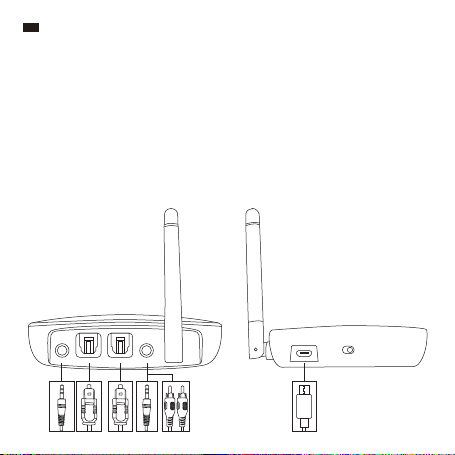
Package Contents
1 x TaoTronics Wireless Adapter (TT-BA014)
1 x 3.5mm Audio Cable
1 x 3.5mm Female to RCA Male Cable
1 x USB Charging Cable
1 x Optical Cable
1 x User Guide
Cable Connection
Button Control
Operation and Function
Toggle it to turn on / off the device.
Toggle it to set the adapter between RX / TX / Bypass
modes
Tap twice to enter paring mode
Tap once to play / pause music in RX mode
When the device is on, tap and hold for 7 seconds to
turn on / off the HD mode
Tap and hold it and plug in the charging cable at the
same time to restore to factory settings
When the device is on, tap once to switch between
OPT / AUX mode
Tap to increase volume in RX mode
Tap and hold to turn to next track in RX mode
Tap to decrease volume in RX mode
Tap and hold to turn to previous track in RX mode
Button
Power Switch
Mode Switch
Multifunction Button
OPT / AUX Mode Switch Button
Volume +
Volume -
RX-AUX RX-OPT TX-OPT TX-AUX
OFF
DC IN
ON
01/02

EN
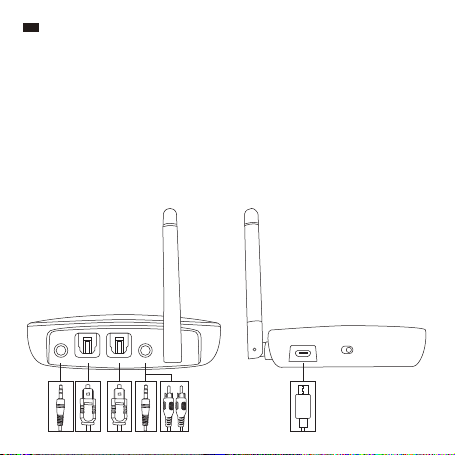
Package Contents
1 x TaoTronics Wireless Adapter (TT-BA014)
1 x 3.5mm Audio Cable
1 x 3.5mm Female to RCA Male Cable
1 x USB Charging Cable
1 x Optical Cable
1 x User Guide
Cable Connection
Button Control
Operation and Function
Toggle it to turn on / off the device.
Toggle it to set the adapter between RX / TX / Bypass
modes
Tap twice to enter paring mode
Tap once to play / pause music in RX mode
When the device is on, tap and hold for 7 seconds to
turn on / off the HD mode
Tap and hold it and plug in the charging cable at the
same time to restore to factory settings
When the device is on, tap once to switch between
OPT / AUX mode
Tap to increase volume in RX mode
Tap and hold to turn to next track in RX mode
Tap to decrease volume in RX mode
Tap and hold to turn to previous track in RX mode
Button
Power Switch
Mode Switch
Multifunction Button
OPT / AUX Mode Switch Button
Volume +
Volume -
RX-AUX RX-OPT TX-OPT TX-AUX
OFF
DC IN
ON
01/02

03/04
How to Use
Charging
1. Connect the Micro USB charging port with any active USB port via the included
charging cable, charging will start automatically.
2. The charging indicator will stay solid red during charging and turn off once charging is
completed.
Note:
• You can use the adapter while it is being charged. There might be current sound if
the battery level or quality is low.
• It is recommended to fully charge the adapter when using it for the first time or
before putting it away for storage.
• Charge the adapter at least once every 3 months when not using for a long time.
Pairing in TX Mode
1. Set the adapter to TX mode, connect it to your Non-Bluetooth audio transmitting
device.
2. Place your Bluetooth audio receiving device like earphones / speakers within 3 feet /
1 meter range and set it to pairing mode.
3. Turn on the adapter and tap Multifunction Button twice to enter pairing mode. The TX
indicator will flash fast blue. After approximately 10 seconds, pairing will complete
with the TX indicator staying solid blue.
Note:
• When connected with OPT Audio Input, please set your audio transmitting device to
PCM mode.
• The adapter is unable to pair with audio transmitting devices e.g. smartphone in TX
mode.
• To clear the pairing history in TX mode, tap and hold the Volume + for 7 seconds
with the TX indicator and charging indicator flashing twice at the same time.
Pairing in RX Mode
1. Set the adapter to RX mode, connect it to your Non-Bluetooth audio receiving device.
2. Turn on the adapter and tap the Multifunction Button twice to enter pairing mode with
the RX indicator flashing fast blue.
3. Activate Bluetooth function on your transmitting device (phone / tablet) and search for
nearby Bluetooth connections.
4. Find “TaoTronics TT-BA014” in the search results, tap on the name to connect. Once
connected, the RX indicator will stay solid blue.
Note: The adapter will try to re-pair the last connected device when turned on.

03/04
How to Use
Charging
1. Connect the Micro USB charging port with any active USB port via the included
charging cable, charging will start automatically.
2. The charging indicator will stay solid red during charging and turn off once charging is
completed.
Note:
• You can use the adapter while it is being charged. There might be current sound if
the battery level or quality is low.
• It is recommended to fully charge the adapter when using it for the first time or
before putting it away for storage.
• Charge the adapter at least once every 3 months when not using for a long time.
Pairing in TX Mode
1. Set the adapter to TX mode, connect it to your Non-Bluetooth audio transmitting
device.
2. Place your Bluetooth audio receiving device like earphones / speakers within 3 feet /
1 meter range and set it to pairing mode.
3. Turn on the adapter and tap Multifunction Button twice to enter pairing mode. The TX
indicator will flash fast blue. After approximately 10 seconds, pairing will complete
with the TX indicator staying solid blue.
Note:
• When connected with OPT Audio Input, please set your audio transmitting device to
PCM mode.
• The adapter is unable to pair with audio transmitting devices e.g. smartphone in TX
mode.
• To clear the pairing history in TX mode, tap and hold the Volume + for 7 seconds
with the TX indicator and charging indicator flashing twice at the same time.
Pairing in RX Mode
1. Set the adapter to RX mode, connect it to your Non-Bluetooth audio receiving device.
2. Turn on the adapter and tap the Multifunction Button twice to enter pairing mode with
the RX indicator flashing fast blue.
3. Activate Bluetooth function on your transmitting device (phone / tablet) and search for
nearby Bluetooth connections.
4. Find “TaoTronics TT-BA014” in the search results, tap on the name to connect. Once
connected, the RX indicator will stay solid blue.
Note: The adapter will try to re-pair the last connected device when turned on.

05/06
Operation
AUX indicator keeps on
Tap the OPT / AUX Mode Switch Button once, and the
OPT indicator keeps on
Tap the OPT / AUX Mode Switch Button again, both the
OPT and AUX indicators will stay on with the AUX
indicator lighting up first.
Tap the OPT / AUX Mode Switch Button one more time,
both the OPT and AUX indicators will stay on with the
OPT indicator lighting up first.
Note:
• Please make sure there are no other Bluetooth devices within range during the connection.
• When paired with two devices, both can play music at the same time.
Note: When connected with two devices, only one device can play music at any time.
You have to stop the music on one device to play that on the other.
Pair with Two Devices at One Time
In TX Mode
In TX mode, the adapter is able to pair with two pairs of Bluetooth stereo earphones /
speakers at the same time.
1. Pair the adapter with the first audio receiving device as instructed above.
2. Set the second audio receiving device into pairing mode. Tap the Multifunction Button
on the adapter twice until the TX indicator keeps flashing. Connection will be
completed after approximately 30 seconds.
In RX Mode
In RX mode, the adapter is able to pair with two Bluetooth devices like phones and tablets
at the same time.
1. Pair the adapter with your first device as previously instructed.
2. Tap the Multifunction Button twice to bring the adapter into pairing mode, pair the
second device with it as instructed above.
Bypass Mode
Set the adapter to Bypass mode, and the Bypass indicator will stay solid on.
Auto Shut off
• In TX mode, the unit will shut off automatically if the battery level is low.
• In RX mode, the unit will shut off automatically if the battery level is low or there is no
connection in 10 minutes.
Function
AUX Input to AUX Output
OPT Input to OPT Output
AUX Input to OPT Output
OPT Input to AUX Output

05/06
Operation
AUX indicator keeps on
Tap the OPT / AUX Mode Switch Button once, and the
OPT indicator keeps on
Tap the OPT / AUX Mode Switch Button again, both the
OPT and AUX indicators will stay on with the AUX
indicator lighting up first.
Tap the OPT / AUX Mode Switch Button one more time,
both the OPT and AUX indicators will stay on with the
OPT indicator lighting up first.
Note:
• Please make sure there are no other Bluetooth devices within range during the connection.
• When paired with two devices, both can play music at the same time.
Note: When connected with two devices, only one device can play music at any time.
You have to stop the music on one device to play that on the other.
Pair with Two Devices at One Time
In TX Mode
In TX mode, the adapter is able to pair with two pairs of Bluetooth stereo earphones /
speakers at the same time.
1. Pair the adapter with the first audio receiving device as instructed above.
2. Set the second audio receiving device into pairing mode. Tap the Multifunction Button
on the adapter twice until the TX indicator keeps flashing. Connection will be
completed after approximately 30 seconds.
In RX Mode
In RX mode, the adapter is able to pair with two Bluetooth devices like phones and tablets
at the same time.
1. Pair the adapter with your first device as previously instructed.
2. Tap the Multifunction Button twice to bring the adapter into pairing mode, pair the
second device with it as instructed above.
Bypass Mode
Set the adapter to Bypass mode, and the Bypass indicator will stay solid on.
Auto Shut off
• In TX mode, the unit will shut off automatically if the battery level is low.
• In RX mode, the unit will shut off automatically if the battery level is low or there is no
connection in 10 minutes.
Function
AUX Input to AUX Output
OPT Input to OPT Output
AUX Input to OPT Output
OPT Input to AUX Output
07/08
DE
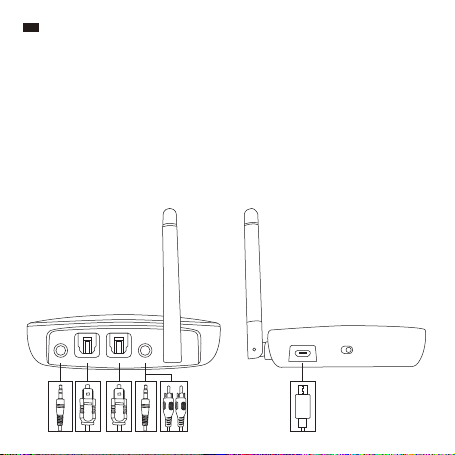
Im Lieferumfang enthalten
1 x TaoTronics Wireless Adapter (TT-BA014)
1 x 3.5mm Audiokabel
1 x 3,5mm-Buchse auf Cinch-Stecker-Kabel
1 x USB-Ladekabel
1 x Optisches Kabel
1 x Bedienungsanleitung
Kabelverbindungen
Tastensteuerung
Bedienung und Funktionen
Umschalten, um das Gerät ein- / auszuschalten.
Umschalten, um zwischen RX- / TX- / Bypass-Modus des Adapters zu
wechseln
Zweimal drücken, um in den Kopplungsmodus zu gelangen
Einmal drücken, um Musik im RX-Modus wiederzugeben / zu
pausieren
Die Taste 7 Sekunden lang gedrückt halten, wenn das Gerät
eingeschaltet ist, um den HD-Modus ein- / auszuschalten
Die Taste gedrückt halten und das Ladekabel ins Gerät stecken, um
den Adapter auf Werkseinstellungen zurückzusetzen
Einmal drücken, wenn das Gerät eingeschaltet ist, um zwischen OPT- /
AUX-Modus zu wechseln
Drücken, um die Lautstärke im RX-Modus zu erhöhen
Gedrückt halten, um im RX-Modus zum nächsten Lied zu springen
Drücken, um die Lautstärke im RX-Modus zu verringern
Gedrückt halten, um im RX-Modus zum vorherigen Lied zu springen
Taste
Powerschalter
Moduswechsel
Multifunktionstaste
OPT- /
AUX-Moduswechseltaste
Lautstärke +
Lautstärke -
RX-AUX RX-OPT TX-OPT TX-AUX
OFF
DC IN
ON

07/08
DE
Im Lieferumfang enthalten
1 x TaoTronics Wireless Adapter (TT-BA014)
1 x 3.5mm Audiokabel
1 x 3,5mm-Buchse auf Cinch-Stecker-Kabel
1 x USB-Ladekabel
1 x Optisches Kabel
1 x Bedienungsanleitung
Kabelverbindungen
Tastensteuerung
Bedienung und Funktionen
Umschalten, um das Gerät ein- / auszuschalten.
Umschalten, um zwischen RX- / TX- / Bypass-Modus des Adapters zu
wechseln
Zweimal drücken, um in den Kopplungsmodus zu gelangen
Einmal drücken, um Musik im RX-Modus wiederzugeben / zu
pausieren
Die Taste 7 Sekunden lang gedrückt halten, wenn das Gerät
eingeschaltet ist, um den HD-Modus ein- / auszuschalten
Die Taste gedrückt halten und das Ladekabel ins Gerät stecken, um
den Adapter auf Werkseinstellungen zurückzusetzen
Einmal drücken, wenn das Gerät eingeschaltet ist, um zwischen OPT- /
AUX-Modus zu wechseln
Drücken, um die Lautstärke im RX-Modus zu erhöhen
Gedrückt halten, um im RX-Modus zum nächsten Lied zu springen
Drücken, um die Lautstärke im RX-Modus zu verringern
Gedrückt halten, um im RX-Modus zum vorherigen Lied zu springen
Taste
Powerschalter
Moduswechsel
Multifunktionstaste
OPT- /
AUX-Moduswechseltaste
Lautstärke +
Lautstärke -
RX-AUX RX-OPT TX-OPT TX-AUX
OFF
DC IN
ON

09/10
Anleitung
Ladevorgang
1. Schließen Sie den Micro-USB-Ladeanschluss mithilfe des mitgelieferten Ladekabels an
einem beliebigen aktiven USB-Anschluss an. Der Ladevorgang beginnt dann automatisch.
2. Die Ladeanzeige leuchtet während des Ladens konstant rot und schaltet sich ab, wenn der
Ladevorgang abgeschlossen ist.
Anmerkung:
• Sie können den Adapter während des Ladens verwenden. Sollte der Akkustand zu
niedrig sein, kann die Soundqualität leiden und es zu Klangstörungen durch den
Stromfluss kommen.
• Es wird empfohlen, den Adapter vollständig aufzuladen, bevor Sie ihn zum ersten Mal
verwenden oder ihn einlagern.
• Laden Sie den Adapter mindestens alle 3 Monate auf, wenn Sie ihn längere Zeit nicht
benutzen.
Koppeln im TX-Modus
1. Versetzen Sie den Adapter in den TX-Modus und verbinden Sie ihn mit Ihrem
Audioübertragungs-Gerät ohne Bluetooth-Funktion.
2. Stellen Sie Ihr Audioempfangsgerät mit Bluetooth-Funktion wie Kopfhörer / Lautsprecher
maximal 1 Meter weit entfernt auf und versetzen Sie es in den Kopplungsmodus.
3. Schalten Sie den Adapter ein und drücken Sie die Multifunktionstaste zwei Mal, um in den
Kopplungsmodus zu wechseln. Die TX-Anzeige blinkt schnell blau. Nach etwa 10 Sekunden
ist der Kopplungsvorgang abgeschlossen und die TX-Anzeige leuchtet konstant blau.
Anmerkung:
• Wenn Sie den Adapter über den OPT-Audio-Eingang anschließen, versetzen Sie Ihr
audioübertragendes Gerät bitte in den PCM-Modus.
• Der Adapter lässt sich nicht mit audioübertragenden Geräten wie Smartphones im
TX-Modus koppeln.
• Um den Kopplungsverlauf im TX-Modus zu bereinigen, halten Sie die Taste Lautstärke +
7 Sekunden lang gedrückt, wobei die TX- und die Ladeanzeige zwei Mal gleichzeitig
blinken.
Koppeln im RX-Modus
1. Versetzen Sie den Adapter in den RX-Modus und schließen Sie ihn an Ihr Audioempfangs-
gerät ohne Bluetooth-Funktion an.
2. Schalten Sie den Adapter ein und drücken Sie die Multifunktionstaste zwei Mal, um in den
Kopplungsmodus zu gelangen, wobei die RX-Anzeige schnell blau blinkt.
3. Aktivieren Sie die Bluetooth-Funktion auf Ihrem Übertragungsgerät (Telefon / Tablet) und
suchen Sie nach Bluetooth-Verbindungen in der Nähe.
4. Suchen Sie aus den Ergebnissen “TaoTronics TT-BA014” heraus und tippen Sie zum
Verbinden auf den Namen. Nach erfolgreicher Verbindung leuchtet die RX-Anzeige
konstant blau.
Anmerkung: Der Adapter versucht sich nach dem Einschalten erneut mit dem zuletzt
verbundenen Gerät zu koppeln.

09/10
Anleitung
Ladevorgang
1. Schließen Sie den Micro-USB-Ladeanschluss mithilfe des mitgelieferten Ladekabels an
einem beliebigen aktiven USB-Anschluss an. Der Ladevorgang beginnt dann automatisch.
2. Die Ladeanzeige leuchtet während des Ladens konstant rot und schaltet sich ab, wenn der
Ladevorgang abgeschlossen ist.
Anmerkung:
• Sie können den Adapter während des Ladens verwenden. Sollte der Akkustand zu
niedrig sein, kann die Soundqualität leiden und es zu Klangstörungen durch den
Stromfluss kommen.
• Es wird empfohlen, den Adapter vollständig aufzuladen, bevor Sie ihn zum ersten Mal
verwenden oder ihn einlagern.
• Laden Sie den Adapter mindestens alle 3 Monate auf, wenn Sie ihn längere Zeit nicht
benutzen.
Koppeln im TX-Modus
1. Versetzen Sie den Adapter in den TX-Modus und verbinden Sie ihn mit Ihrem
Audioübertragungs-Gerät ohne Bluetooth-Funktion.
2. Stellen Sie Ihr Audioempfangsgerät mit Bluetooth-Funktion wie Kopfhörer / Lautsprecher
maximal 1 Meter weit entfernt auf und versetzen Sie es in den Kopplungsmodus.
3. Schalten Sie den Adapter ein und drücken Sie die Multifunktionstaste zwei Mal, um in den
Kopplungsmodus zu wechseln. Die TX-Anzeige blinkt schnell blau. Nach etwa 10 Sekunden
ist der Kopplungsvorgang abgeschlossen und die TX-Anzeige leuchtet konstant blau.
Anmerkung:
• Wenn Sie den Adapter über den OPT-Audio-Eingang anschließen, versetzen Sie Ihr
audioübertragendes Gerät bitte in den PCM-Modus.
• Der Adapter lässt sich nicht mit audioübertragenden Geräten wie Smartphones im
TX-Modus koppeln.
• Um den Kopplungsverlauf im TX-Modus zu bereinigen, halten Sie die Taste Lautstärke +
7 Sekunden lang gedrückt, wobei die TX- und die Ladeanzeige zwei Mal gleichzeitig
blinken.
Koppeln im RX-Modus
1. Versetzen Sie den Adapter in den RX-Modus und schließen Sie ihn an Ihr Audioempfangs-
gerät ohne Bluetooth-Funktion an.
2. Schalten Sie den Adapter ein und drücken Sie die Multifunktionstaste zwei Mal, um in den
Kopplungsmodus zu gelangen, wobei die RX-Anzeige schnell blau blinkt.
3. Aktivieren Sie die Bluetooth-Funktion auf Ihrem Übertragungsgerät (Telefon / Tablet) und
suchen Sie nach Bluetooth-Verbindungen in der Nähe.
4. Suchen Sie aus den Ergebnissen “TaoTronics TT-BA014” heraus und tippen Sie zum
Verbinden auf den Namen. Nach erfolgreicher Verbindung leuchtet die RX-Anzeige
konstant blau.
Anmerkung: Der Adapter versucht sich nach dem Einschalten erneut mit dem zuletzt
verbundenen Gerät zu koppeln.

11/12
Koppeln im TX-Modus
1. Versetzen Sie den Adapter in den TX-Modus und verbinden Sie ihn mit Ihrem
Audioübertragungs-Gerät ohne Bluetooth-Funktion.
2. Stellen Sie Ihr Audioempfangsgerät mit Bluetooth-Funktion wie Kopfhörer / Lautsprecher
maximal 1 Meter weit entfernt auf und versetzen Sie es in den Kopplungsmodus.
3. Schalten Sie den Adapter ein und drücken Sie die Multifunktionstaste zwei Mal, um in den
Kopplungsmodus zu wechseln. Die TX-Anzeige blinkt schnell blau. Nach etwa 10 Sekunden
ist der Kopplungsvorgang abgeschlossen und die TX-Anzeige leuchtet konstant blau.
Bedienung
Die AUX-Anzeige leuchtet
Tippen Sie die OPT- / AUX-Moduswechseltaste ein Mal an,
wobei die OPT-Anzeige leuchtet
Tippen Sie die OPT- / AUX-Moduswechseltaste erneut an.
Die Anzeigen OPT und AUX werden leuchten, und die
AUX-Anzeige leuchtet zuerst.
Tippen Sie die OPT- / AUX-Moduswechseltaste ein weiteres
Mal an. Die Anzeigen OPT und AUX werden leuchten, und
die OPT-Anzeige leuchtet zuerst.
Anmerkung:
• Bitte stellen Sie sicher, dass sich während der Verbindung keine anderen
Bluetooth-Geräte innerhalb der Reichweite befinden.
• Wenn Sie zwei Geräte koppeln, können beide gleichzeitig Musik abspielen.
Anmerkung: Wenn der Adapter mit zwei Geräten verbunden ist, kann nur ein Gerät Musik
wiedergeben. Sie müssen die Musikwiedergabe auf einem Gerät beenden, um Musik von
dem anderen Gerät abspielen zu können.
Zwei Geräte gleichzeitig koppeln
Zwei Geräte gleichzeitig koppeln
Im TX-Modus lässt sich der Adapter mit zwei Paaren von Bluetooth-Stereokopfhörern /
-Lautsprechern gleichzeitig koppeln.
1. Koppeln Sie den Adapter wie oben beschrieben mit dem ersten Audioempfangsgerät.
2. Versetzen Sie das zweite Audioempfangsgerät in den Kopplungsmodus. Tippen Sie zweimal
auf die Multifunktionstaste am Adapter, dann blinkt die TX-Anzeige. Eine erfolgreiche
Verbindung dauert etwa 30 Sekunden.
Im RX-Modus
Im RX-Modus lässt sich der Adapter mit zwei Bluetooth-Geräten wie Handys und Tablets
gleichzeitig koppeln.
1. Koppeln Sie den Adapter wie oben beschrieben mit Ihrem ersten Gerät.
2. Drücken Sie die Multifunktionstaste zwei Mal, um den Adapter in den Kopplungsmodus zu
versetzen. Koppeln Sie das zweite Gerät wie oben beschrieben.
Bypass-Modus
Versetzen Sie den Adapter in den Bypass-Modus. Die Bypass-Anzeige leuchtet dann konstant.
Abschaltautomatik
• Im TX-Modus schaltet sich das Gerät automatisch ab, wenn der Akkustand zu niedrig ist.
• Im RX-Modus schaltet sich das Gerät automatisch ab, wenn der Akkustand zu niedrig ist oder
innerhalb von 10 Minuten keine Verbindung zustandekommt.
Funktion
AUX-Eingang zu AUX-Ausgang
OPT-Eingang zu OPT-Ausgang
AUX-Eingang zu OPT-Ausgang
OPT-Eingang zu AUX-Ausgang

11/12
Koppeln im TX-Modus
1. Versetzen Sie den Adapter in den TX-Modus und verbinden Sie ihn mit Ihrem
Audioübertragungs-Gerät ohne Bluetooth-Funktion.
2. Stellen Sie Ihr Audioempfangsgerät mit Bluetooth-Funktion wie Kopfhörer / Lautsprecher
maximal 1 Meter weit entfernt auf und versetzen Sie es in den Kopplungsmodus.
3. Schalten Sie den Adapter ein und drücken Sie die Multifunktionstaste zwei Mal, um in den
Kopplungsmodus zu wechseln. Die TX-Anzeige blinkt schnell blau. Nach etwa 10 Sekunden
ist der Kopplungsvorgang abgeschlossen und die TX-Anzeige leuchtet konstant blau.
Bedienung
Die AUX-Anzeige leuchtet
Tippen Sie die OPT- / AUX-Moduswechseltaste ein Mal an,
wobei die OPT-Anzeige leuchtet
Tippen Sie die OPT- / AUX-Moduswechseltaste erneut an.
Die Anzeigen OPT und AUX werden leuchten, und die
AUX-Anzeige leuchtet zuerst.
Tippen Sie die OPT- / AUX-Moduswechseltaste ein weiteres
Mal an. Die Anzeigen OPT und AUX werden leuchten, und
die OPT-Anzeige leuchtet zuerst.
Anmerkung:
• Bitte stellen Sie sicher, dass sich während der Verbindung keine anderen
Bluetooth-Geräte innerhalb der Reichweite befinden.
• Wenn Sie zwei Geräte koppeln, können beide gleichzeitig Musik abspielen.
Anmerkung: Wenn der Adapter mit zwei Geräten verbunden ist, kann nur ein Gerät Musik
wiedergeben. Sie müssen die Musikwiedergabe auf einem Gerät beenden, um Musik von
dem anderen Gerät abspielen zu können.
Zwei Geräte gleichzeitig koppeln
Zwei Geräte gleichzeitig koppeln
Im TX-Modus lässt sich der Adapter mit zwei Paaren von Bluetooth-Stereokopfhörern /
-Lautsprechern gleichzeitig koppeln.
1. Koppeln Sie den Adapter wie oben beschrieben mit dem ersten Audioempfangsgerät.
2. Versetzen Sie das zweite Audioempfangsgerät in den Kopplungsmodus. Tippen Sie zweimal
auf die Multifunktionstaste am Adapter, dann blinkt die TX-Anzeige. Eine erfolgreiche
Verbindung dauert etwa 30 Sekunden.
Im RX-Modus
Im RX-Modus lässt sich der Adapter mit zwei Bluetooth-Geräten wie Handys und Tablets
gleichzeitig koppeln.
1. Koppeln Sie den Adapter wie oben beschrieben mit Ihrem ersten Gerät.
2. Drücken Sie die Multifunktionstaste zwei Mal, um den Adapter in den Kopplungsmodus zu
versetzen. Koppeln Sie das zweite Gerät wie oben beschrieben.
Bypass-Modus
Versetzen Sie den Adapter in den Bypass-Modus. Die Bypass-Anzeige leuchtet dann konstant.
Abschaltautomatik
• Im TX-Modus schaltet sich das Gerät automatisch ab, wenn der Akkustand zu niedrig ist.
• Im RX-Modus schaltet sich das Gerät automatisch ab, wenn der Akkustand zu niedrig ist oder
innerhalb von 10 Minuten keine Verbindung zustandekommt.
Funktion
AUX-Eingang zu AUX-Ausgang
OPT-Eingang zu OPT-Ausgang
AUX-Eingang zu OPT-Ausgang
OPT-Eingang zu AUX-Ausgang
13/14
FR
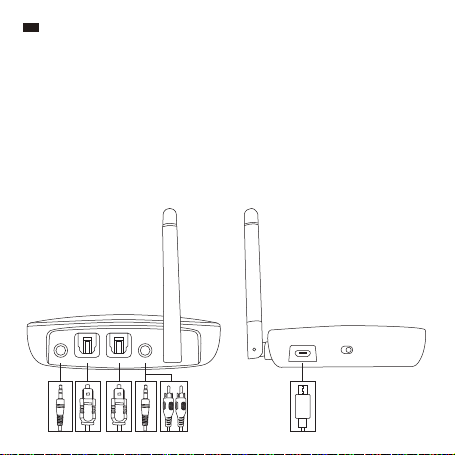
Contenu de la boîte
1 x TaoTronics Adaptateur Sans Fil (TT-BA014)
1 x Câble Audio 3.5mm
1 x Câble 3.5mm Femelle vers RCA Mâle
1 x Câble de recharge USB
1 x Câble Optique
1 x Guide utilisateur
Branchement des câbles
Commandes des boutons
Utilisation et Fonction
Utiliser pour allumer / éteindre l’appareil.
Utiliser pour régler l’adaptateur sur les modes RX / TX / Bypass
Appuyer deux fois pour passer en mode appairage
Appuyer une fois pour lire / arrêter la musique en mode RX
Lorsque l’appareil est allumé, appuyer et maintenir pendant 7
secondes pour activer / désactiver le mode HD
Appuyer et maintenir, et brancher le câble de recharge en même
temps pour restaurer les paramètres d’usine
Lorsque l’appareil est allumé, appuyer une fois pour basculer
entre les modes OPT / AUX
Appuyer pour augmenter le volume en mode RX
Appuyer et maintenir pour passer à la piste suivante en mode RX
Appuyer pour diminuer le volume en mode RX
Appuyer et maintenir pour passer à la piste précédente en mode RX
Bouton
Interrupteur d’allumage
Interrupteur de cha
gement de mode
Bouton multifonctions
Bouton de sélection de
mode OPT / AUX
Volume +
Volume -
RX-AUX RX-OPT TX-OPT TX-AUX
OFF
DC IN
ON

13/14
FR
Contenu de la boîte
1 x TaoTronics Adaptateur Sans Fil (TT-BA014)
1 x Câble Audio 3.5mm
1 x Câble 3.5mm Femelle vers RCA Mâle
1 x Câble de recharge USB
1 x Câble Optique
1 x Guide utilisateur
Branchement des câbles
Commandes des boutons
Utilisation et Fonction
Utiliser pour allumer / éteindre l’appareil.
Utiliser pour régler l’adaptateur sur les modes RX / TX / Bypass
Appuyer deux fois pour passer en mode appairage
Appuyer une fois pour lire / arrêter la musique en mode RX
Lorsque l’appareil est allumé, appuyer et maintenir pendant 7
secondes pour activer / désactiver le mode HD
Appuyer et maintenir, et brancher le câble de recharge en même
temps pour restaurer les paramètres d’usine
Lorsque l’appareil est allumé, appuyer une fois pour basculer
entre les modes OPT / AUX
Appuyer pour augmenter le volume en mode RX
Appuyer et maintenir pour passer à la piste suivante en mode RX
Appuyer pour diminuer le volume en mode RX
Appuyer et maintenir pour passer à la piste précédente en mode RX
Bouton
Interrupteur d’allumage
Interrupteur de cha
gement de mode
Bouton multifonctions
Bouton de sélection de
mode OPT / AUX
Volume +
Volume -
RX-AUX RX-OPT TX-OPT TX-AUX
OFF
DC IN
ON

15/16
Utilisation
Recharge
1. Connecter le port de recharge Micro USB à n’importe quel port USB actif via le câble
de recharge inclus, la recharge commencera automatiquement.
2. L’indicateur de recharge restera rouge fixe pendant la recharge et s’éteindra une fois la
recharge terminée.
Note:
• Vous pouvez utiliser l’adaptateur pendant qu’il est en charge. Un son de courant
pourrait se faire entendre si le niveau de batterie ou la recharge est faible.
• Il est recommandé de recharger complètement l’adaptateur avant la première
utilisation ou avant de la ranger pour une longue durée.
• Recharger l’adaptateur au moins une fois tous les 3 mois lorsque vous ne l’utilisez
pas pendant longtemps.
Appairage en mode TX
1. Réglez l’adaptateur en mode TX, connectez-le à votre appareil audio non-Bluetooth.
2. Placez votre appareil récepteur Bluetooth tel qu’un casque / une enceinte à une portée
de 3 pieds / 1 mètre, et réglez-le en mode appairage.
3. Réglez l’adaptateur et appuyez sur le bouton multifonctions deux fois pour passer en
mode appairage. L’indicateur TX clignotera en bleu rapidement. Après environ 10
secondes, l’appairage se terminera et l’indicateur TX restera bleu fixe.
Note:
• En étant branché à l’entrée audio OPT, veuillez régler votre appareil audio
transmetteur en mode PCM.
• L’adaptateur est incapable de s’appairer à un appareil transmetteur d’audio (ex
smartphone) en mode TX.
• Pour vider l’historique d’appairage en mode TX, appuyez et maintenez le bouton
Volume + pendant 7 secondes, avec l’indicateur TX et l’indicateur de recharge
clignotant deux fois au même moment
Appairage en mode RX
1. Réglez l’adaptateur en mode RX, connectez-le à votre appareil audio non-Bluetooth.
2. Allumez l’adaptateur et appuyez sur le bouton multifonctions deux fois pour passer en
mode appairage avec l’indicateur RX clignotant en bleu rapidement.
3. Activez le Bluetooth sur votre appareil transmetteur (téléphone / tablette) et cherchez
les appareils Bluetooth à proximité.
4. Trouvez “TaoTronics TT-BA014” dans les résultats de recherche, touchez le nom pour
vous connecter. Une fois connecté, l’indicateur RX restera bleu fixe.
Note: L’adaptateur essayera de se ré-appairer au dernier appareil connecté une fois
allumé.

15/16
Utilisation
Recharge
1. Connecter le port de recharge Micro USB à n’importe quel port USB actif via le câble
de recharge inclus, la recharge commencera automatiquement.
2. L’indicateur de recharge restera rouge fixe pendant la recharge et s’éteindra une fois la
recharge terminée.
Note:
• Vous pouvez utiliser l’adaptateur pendant qu’il est en charge. Un son de courant
pourrait se faire entendre si le niveau de batterie ou la recharge est faible.
• Il est recommandé de recharger complètement l’adaptateur avant la première
utilisation ou avant de la ranger pour une longue durée.
• Recharger l’adaptateur au moins une fois tous les 3 mois lorsque vous ne l’utilisez
pas pendant longtemps.
Appairage en mode TX
1. Réglez l’adaptateur en mode TX, connectez-le à votre appareil audio non-Bluetooth.
2. Placez votre appareil récepteur Bluetooth tel qu’un casque / une enceinte à une portée
de 3 pieds / 1 mètre, et réglez-le en mode appairage.
3. Réglez l’adaptateur et appuyez sur le bouton multifonctions deux fois pour passer en
mode appairage. L’indicateur TX clignotera en bleu rapidement. Après environ 10
secondes, l’appairage se terminera et l’indicateur TX restera bleu fixe.
Note:
• En étant branché à l’entrée audio OPT, veuillez régler votre appareil audio
transmetteur en mode PCM.
• L’adaptateur est incapable de s’appairer à un appareil transmetteur d’audio (ex
smartphone) en mode TX.
• Pour vider l’historique d’appairage en mode TX, appuyez et maintenez le bouton
Volume + pendant 7 secondes, avec l’indicateur TX et l’indicateur de recharge
clignotant deux fois au même moment
Appairage en mode RX
1. Réglez l’adaptateur en mode RX, connectez-le à votre appareil audio non-Bluetooth.
2. Allumez l’adaptateur et appuyez sur le bouton multifonctions deux fois pour passer en
mode appairage avec l’indicateur RX clignotant en bleu rapidement.
3. Activez le Bluetooth sur votre appareil transmetteur (téléphone / tablette) et cherchez
les appareils Bluetooth à proximité.
4. Trouvez “TaoTronics TT-BA014” dans les résultats de recherche, touchez le nom pour
vous connecter. Une fois connecté, l’indicateur RX restera bleu fixe.
Note: L’adaptateur essayera de se ré-appairer au dernier appareil connecté une fois
allumé.

17/18
Utilisation
L’indicateur AUX reste allumé
Appuyez sur le Bouton de sélection de mode OPT /
AUX une fois, et l’indicateur OPT restera allumé
Appuyez à nouveau sur le bouton de commutation de
mode OPT / AUX, les voyants OPT et AUX resteront
allumés, le voyant AUX s'allumant en premier.
Appuyez à nouveau sur le bouton de commutation de
mode OPT / AUX. Les voyants OPT et AUX restent
allumés, le voyant OPT s'allumant en premier.
Note:
• Veuillez vous assurer de ne pas avoir d’autres appareils Bluetooth à portée pendant
la connexion.
• Une fois appairé à deux appareils, les deux peuvent lire de la musique en même
temps.
Note: Une fois appairé à deux appareils, seul un appareil peut lire de la musique à la
fois. Vous devez arrêter la musique sur l’appareil pour lire celle de l’autre.
Appairage à deux appareils en même temps
En mode TX
En mode TX, l’adaptateur est en mesure de s’appairer à deux casques / enceintes stéréo
Bluetooth en même temps.
1. Appairez l’adaptateur avec le premier appareil récepteur comme indiqué ci-dessus.
2. Mettez le deuxième appareil récepteur en mode appairage. Appuyez deux fois sur le
bouton multifonction de l'adaptateur jusqu’à ce que l’indicateur TX clignote en continu.
La connexion se fera après environ 30 secondes.
En mode RX
En mode RX, l’adaptateur est en mesure de s’appairer à deux appareils Bluetooth tels que
le téléphones et tablettes, en même temps.
1. Appairez l’adaptateur avec le premier appareil récepteur comme indiqué ci-dessus.
2. Appuyez sur le bouton multifonctions deux fois pour passer l’adaptateur en mode
appairage, appairez le deuxième appareil comme indiqué ci-dessus.
Mode Bypass
Réglez l’adaptateur en mode Bypass, et l’indicateur de Bypass restera allumé.
Auto Extinction
• En mode TX, l’appareil s’éteint automatiquement si le niveau de batterie est faible.
• En mode RX, l’appareil s’éteint automatiquement si la batterie est faible ou qu’il n’y a aucune
connexion en 10 minutes.
Fonction
Entrée AUX vers Sortie AUX
Entrée OPT vers Sortie OPT
Entrée AUX vers Sortie OPT
Entrée OPT vers Sortie AUX

17/18
Utilisation
L’indicateur AUX reste allumé
Appuyez sur le Bouton de sélection de mode OPT /
AUX une fois, et l’indicateur OPT restera allumé
Appuyez à nouveau sur le bouton de commutation de
mode OPT / AUX, les voyants OPT et AUX resteront
allumés, le voyant AUX s'allumant en premier.
Appuyez à nouveau sur le bouton de commutation de
mode OPT / AUX. Les voyants OPT et AUX restent
allumés, le voyant OPT s'allumant en premier.
Note:
• Veuillez vous assurer de ne pas avoir d’autres appareils Bluetooth à portée pendant
la connexion.
• Une fois appairé à deux appareils, les deux peuvent lire de la musique en même
temps.
Note: Une fois appairé à deux appareils, seul un appareil peut lire de la musique à la
fois. Vous devez arrêter la musique sur l’appareil pour lire celle de l’autre.
Appairage à deux appareils en même temps
En mode TX
En mode TX, l’adaptateur est en mesure de s’appairer à deux casques / enceintes stéréo
Bluetooth en même temps.
1. Appairez l’adaptateur avec le premier appareil récepteur comme indiqué ci-dessus.
2. Mettez le deuxième appareil récepteur en mode appairage. Appuyez deux fois sur le
bouton multifonction de l'adaptateur jusqu’à ce que l’indicateur TX clignote en continu.
La connexion se fera après environ 30 secondes.
En mode RX
En mode RX, l’adaptateur est en mesure de s’appairer à deux appareils Bluetooth tels que
le téléphones et tablettes, en même temps.
1. Appairez l’adaptateur avec le premier appareil récepteur comme indiqué ci-dessus.
2. Appuyez sur le bouton multifonctions deux fois pour passer l’adaptateur en mode
appairage, appairez le deuxième appareil comme indiqué ci-dessus.
Mode Bypass
Réglez l’adaptateur en mode Bypass, et l’indicateur de Bypass restera allumé.
Auto Extinction
• En mode TX, l’appareil s’éteint automatiquement si le niveau de batterie est faible.
• En mode RX, l’appareil s’éteint automatiquement si la batterie est faible ou qu’il n’y a aucune
connexion en 10 minutes.
Fonction
Entrée AUX vers Sortie AUX
Entrée OPT vers Sortie OPT
Entrée AUX vers Sortie OPT
Entrée OPT vers Sortie AUX
19/20
ES
Contenido del Paquete
1 x Adaptador Bluetooth de TaoTronics (TT-BA014)
1 x Cable de Audio de 3.5mm
1 x Cable RCA de Hembra a Macho de 3.5mm
1 x Cable de Carga USB
1 x Cable Óptico
1 x Guía del Usuario
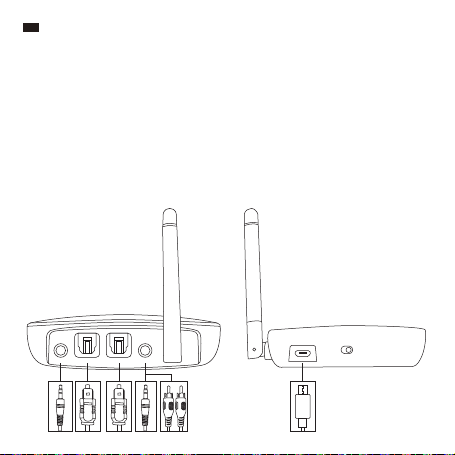
Cable de Conexión
Controles de los Botones
Operación y Función
Enciende o apaga el dispositivo.
Presione para configurar el adaptador entre los modos RX / TX
/ Bypass
Presione dos veces para entrar en modo de emparejamiento
Presione una vez para reproducir / pausar música en modo RX
Cuando el dispositivo está encendido, oprima y mantenga
presionado durante 7 segundos para encender / apagar el
modo HD
Presione y mantenga presionado y conecte el cable de carga
al mismo tiempo para restaurar a la configuración de fábrica
Cuando el dispositivo está encendido, presione una vez para
cambiar entre el modo entre OPT / AUX
Presione para aumentar el volumen en modo RX
Presione y mantenga presionado para reproducir la siguiente
pista en modo RX
Presione para disminuir el volumen en modo RX
Presione y mantenga presionado para reproducir la pista
anterior en modo RX
Botón
Interruptor de Encendió
Cambio de Modo
Botón Multifunción
Botón de Cambio de
modo OPT / AUX
Volumen +
Volumen -
RX-AUX RX-OPT TX-OPT TX-AUX
OFF
DC IN
ON

19/20
ES
Contenido del Paquete
1 x Adaptador Bluetooth de TaoTronics (TT-BA014)
1 x Cable de Audio de 3.5mm
1 x Cable RCA de Hembra a Macho de 3.5mm
1 x Cable de Carga USB
1 x Cable Óptico
1 x Guía del Usuario
Cable de Conexión
Controles de los Botones
Operación y Función
Enciende o apaga el dispositivo.
Presione para configurar el adaptador entre los modos RX / TX
/ Bypass
Presione dos veces para entrar en modo de emparejamiento
Presione una vez para reproducir / pausar música en modo RX
Cuando el dispositivo está encendido, oprima y mantenga
presionado durante 7 segundos para encender / apagar el
modo HD
Presione y mantenga presionado y conecte el cable de carga
al mismo tiempo para restaurar a la configuración de fábrica
Cuando el dispositivo está encendido, presione una vez para
cambiar entre el modo entre OPT / AUX
Presione para aumentar el volumen en modo RX
Presione y mantenga presionado para reproducir la siguiente
pista en modo RX
Presione para disminuir el volumen en modo RX
Presione y mantenga presionado para reproducir la pista
anterior en modo RX
Botón
Interruptor de Encendió
Cambio de Modo
Botón Multifunción
Botón de Cambio de
modo OPT / AUX
Volumen +
Volumen -
RX-AUX RX-OPT TX-OPT TX-AUX
OFF
DC IN
ON

21/22
Como Usar
Cargar
1. Conecte el puerto de carga Micro USB con cualquier puerto USB usando el cable de
carga incluido
2. El indicador de carga permanecerá iluminado en rojo durante la carga y se apagara
una vez que la carga se haya completado
Notas:
• Puede utilizar el adaptador mientras se está cargando. Cuando la batería está baja
o la batería es de mala calidad, es posible que se escuche el sonido de la corriente.
• Se recomienda cargar completamente el adaptador de red cunado lo use por
primera vez o cuando lo vaya a guardar por un largo tiempo.
• Cargue el adaptador al menos una vez cada 3 meses cuando no lo use por una
largo tiempo.
Emparejamiento en Modo TX
1. Configure el adaptador en modo TX, conéctelo a su dispositivo de transmisión de
audio sin Bluetooth.
2. Coloque su dispositivo Bluetooth de recepción de audio como audífonos / bocinas a
una distancia de 3 pies / 1 metro y configúrelo para el modo de emparejamiento
3. Encienda el adaptador y presione el Botón de Multifunción dos veces para iniciar el
modo de emparejamiento. El indicador de modo TX parpadeara en azul. Después de
aproximadamente 10 segundos, el emparejamiento se completara y el indicador TX
permanecerá iluminado en azul.
Notas:
• Cuando se conecte con la entrada de audio OPT, configure el dispositivo de
transmisión de audio en modo PCM.
• El adaptador no puede emparejarse con los dispositivos de transmisión de audio,
por ejemplo Smartphone en modo TX.
• Para borrar el historial de emparejamiento en el modo TX, mantenga presionado
Volume + durante 7 segundos con el indicador de TX y el indicador de carga
parpadeando dos veces al mismo tiempo.
Emparejamiento en Modo RX
1. Configure el adaptador en modo RX, conéctelo a su dispositivo de transmisión de
audio sin Bluetooth.
2. Encienda el adaptador y presione el Botón Multifunción dos veces para iniciar el modo
de emparejamiento, el indicador RX parpadeara en azul.
3. Active la función Bluetooth en su dispositivo de transmisión (teléfono/ tableta) y
busque conexiones Bluetooth cercanas.
4. Encuentre “TaoTronics TT-BA014” en los resultados de búsqueda, presione en el
nombre correcto para contestarse. Una vez conectado, el indicador RX se iluminara
azul.
Nota: El adaptador tratara de auto emparejarse al último dispositivo conectado una
vez encendido.

21/22
Como Usar
Cargar
1. Conecte el puerto de carga Micro USB con cualquier puerto USB usando el cable de
carga incluido
2. El indicador de carga permanecerá iluminado en rojo durante la carga y se apagara
una vez que la carga se haya completado
Notas:
• Puede utilizar el adaptador mientras se está cargando. Cuando la batería está baja
o la batería es de mala calidad, es posible que se escuche el sonido de la corriente.
• Se recomienda cargar completamente el adaptador de red cunado lo use por
primera vez o cuando lo vaya a guardar por un largo tiempo.
• Cargue el adaptador al menos una vez cada 3 meses cuando no lo use por una
largo tiempo.
Emparejamiento en Modo TX
1. Configure el adaptador en modo TX, conéctelo a su dispositivo de transmisión de
audio sin Bluetooth.
2. Coloque su dispositivo Bluetooth de recepción de audio como audífonos / bocinas a
una distancia de 3 pies / 1 metro y configúrelo para el modo de emparejamiento
3. Encienda el adaptador y presione el Botón de Multifunción dos veces para iniciar el
modo de emparejamiento. El indicador de modo TX parpadeara en azul. Después de
aproximadamente 10 segundos, el emparejamiento se completara y el indicador TX
permanecerá iluminado en azul.
Notas:
• Cuando se conecte con la entrada de audio OPT, configure el dispositivo de
transmisión de audio en modo PCM.
• El adaptador no puede emparejarse con los dispositivos de transmisión de audio,
por ejemplo Smartphone en modo TX.
• Para borrar el historial de emparejamiento en el modo TX, mantenga presionado
Volume + durante 7 segundos con el indicador de TX y el indicador de carga
parpadeando dos veces al mismo tiempo.
Emparejamiento en Modo RX
1. Configure el adaptador en modo RX, conéctelo a su dispositivo de transmisión de
audio sin Bluetooth.
2. Encienda el adaptador y presione el Botón Multifunción dos veces para iniciar el modo
de emparejamiento, el indicador RX parpadeara en azul.
3. Active la función Bluetooth en su dispositivo de transmisión (teléfono/ tableta) y
busque conexiones Bluetooth cercanas.
4. Encuentre “TaoTronics TT-BA014” en los resultados de búsqueda, presione en el
nombre correcto para contestarse. Una vez conectado, el indicador RX se iluminara
azul.
Nota: El adaptador tratara de auto emparejarse al último dispositivo conectado una
vez encendido.

23/24
Operación
El indicador AUX permanecerá encendido
Presione el Botón de Modo AUX /OPT una vez, y el
indicador de OPT permanecerá encendido
Presione nuevamente el botón del interruptor de modo
OPT / AUX, los indicadores OPT y AUX se mantendrán
encendidos con el indicador AUX encendido primero.
Presione el botón del interruptor de modo OPT / AUX una
vez más, los indicadores OPT y AUX se mantendrán
encendidos con el indicador OPT encendido primero.
Notas:
• Por favor, asegúrese que no haya otros dispositivos Bluetooth dentro del rango de
alcance durante la conexión.
• Cuando dos dispositivos estén emparejados, los podrán reproducir música al
mismo tiempo.
Nota: Al estar conectado a dos dispositivos, solo uno puede reproducir musca a la
vez. Pause que la música en un dispositivo para reproducirla en el otro.
Emparejamiento con Dos Dispositivos a la Vez
En Modo TX
En modo TX, el adaptador puede emparejarse con dos pares dispositivos Bluetooth,
como audífonos estero / bocinas, al mismo tiempo.
1. Empareje el adaptador con el primer dispositivo de recepción de audio como indicado
anteriormente.
2. Configure el segundo dispositivo de recepción de audio a modo de emparejamiento.
Toque el botón multifunción en el adaptador dos veces hasta que el indicador TX se
quede parpadeando. La conexión se completara en aproximadamente 30 segundos.
En Modo RX
En modo RX, el adaptador puede emparejarse con dos dispositivos Bluetooth, como
teléfonos y tabletas, al mismo tiempo.
1. Empareje el adaptador con el primer dispositivo como indicado anteriormente.
2. Presione el Botón de Multifunción dos veces para iniciar el modo de emparejamiento,
empareje el segundo dispositivo como indicado anteriormente.
Modo Bypass
Configure el adaptador a modo Bypass, el indicador de Modo Bypass se iluminara.
Apagado Automático
• En el modo TX, la unidad se apagará automáticamente si el nivel de la batería es bajo.
• En el modo RX, la unidad se apagará automáticamente si el nivel de batería es bajo o si no
hay conexión en 10 minutos.
Función
Entrada AUX a salida AUX
Entrada OPT a salida OPT
Entrada AUX a salida OPT
Entrada OPT a salida AUX

23/24
Operación
El indicador AUX permanecerá encendido
Presione el Botón de Modo AUX /OPT una vez, y el
indicador de OPT permanecerá encendido
Presione nuevamente el botón del interruptor de modo
OPT / AUX, los indicadores OPT y AUX se mantendrán
encendidos con el indicador AUX encendido primero.
Presione el botón del interruptor de modo OPT / AUX una
vez más, los indicadores OPT y AUX se mantendrán
encendidos con el indicador OPT encendido primero.
Notas:
• Por favor, asegúrese que no haya otros dispositivos Bluetooth dentro del rango de
alcance durante la conexión.
• Cuando dos dispositivos estén emparejados, los podrán reproducir música al
mismo tiempo.
Nota: Al estar conectado a dos dispositivos, solo uno puede reproducir musca a la
vez. Pause que la música en un dispositivo para reproducirla en el otro.
Emparejamiento con Dos Dispositivos a la Vez
En Modo TX
En modo TX, el adaptador puede emparejarse con dos pares dispositivos Bluetooth,
como audífonos estero / bocinas, al mismo tiempo.
1. Empareje el adaptador con el primer dispositivo de recepción de audio como indicado
anteriormente.
2. Configure el segundo dispositivo de recepción de audio a modo de emparejamiento.
Toque el botón multifunción en el adaptador dos veces hasta que el indicador TX se
quede parpadeando. La conexión se completara en aproximadamente 30 segundos.
En Modo RX
En modo RX, el adaptador puede emparejarse con dos dispositivos Bluetooth, como
teléfonos y tabletas, al mismo tiempo.
1. Empareje el adaptador con el primer dispositivo como indicado anteriormente.
2. Presione el Botón de Multifunción dos veces para iniciar el modo de emparejamiento,
empareje el segundo dispositivo como indicado anteriormente.
Modo Bypass
Configure el adaptador a modo Bypass, el indicador de Modo Bypass se iluminara.
Apagado Automático
• En el modo TX, la unidad se apagará automáticamente si el nivel de la batería es bajo.
• En el modo RX, la unidad se apagará automáticamente si el nivel de batería es bajo o si no
hay conexión en 10 minutos.
Función
Entrada AUX a salida AUX
Entrada OPT a salida OPT
Entrada AUX a salida OPT
Entrada OPT a salida AUX
25/26
IT
Contenuto della Confezione
1 x Adattatore Wireless TaoTronics (TT-BA014)
1 x Cavo Audio da 3,5mm
1 x Cavo Femmina-RCA Maschio da 3,5mm
1 x Cavo di Ricarica USB
1 x Cavo Ottico
1 x Manuale Utente
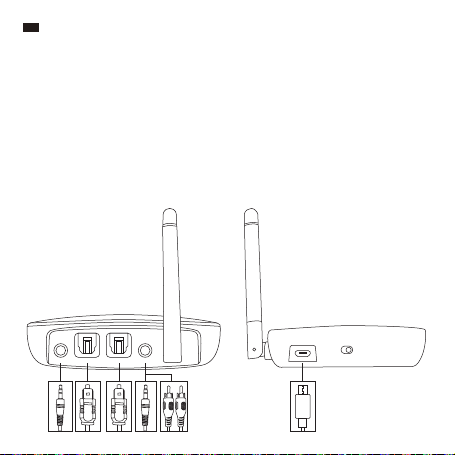
Collegamento via Cavo
Pulsanti di Controllo
Operazione e Funzione
Premerlo per accendere / spegnere il dispositivo.
Premerlo per impostare l’adattatore nelle modalità RX /
TX / Bypass
Premerlo due volte per attivare la modalità
accoppiamento
Premerlo una volta per riprodurre / mettere in pausa la
musica nella modalità RX
Quando il dispositivo è acceso, premere e tenere
premuto il pulsante per 7 secondi per accendere /
spegnere la modalità HD
Premere e tenere premuto inserendo allo stesso tempo
il cavo di ricarica per ripristinare alle impostazioni di
fabbrica
Quando il dispositivo è acceso, premere una volta per
passare tra le modalità OPT / AUX
Premere per aumentare il volume in modalità RX
Premere e tenere premuto per passare alla traccia
successiva in modalità RX
Premere per diminuire il volume in modalità RX
Premere e tenere premuto per tornare alla traccia
precedente in modalità RX
Pulsante
Interruttore di Alimentazione
Interruttore Modalità
Pulsante Multifunzione
Pulsante Interruttore Modalità
OPT / AUX
Volume +
Volume -
RX-AUX RX-OPT TX-OPT TX-AUX
OFF
DC IN
ON

25/26
IT
Contenuto della Confezione
1 x Adattatore Wireless TaoTronics (TT-BA014)
1 x Cavo Audio da 3,5mm
1 x Cavo Femmina-RCA Maschio da 3,5mm
1 x Cavo di Ricarica USB
1 x Cavo Ottico
1 x Manuale Utente
Collegamento via Cavo
Pulsanti di Controllo
Operazione e Funzione
Premerlo per accendere / spegnere il dispositivo.
Premerlo per impostare l’adattatore nelle modalità RX /
TX / Bypass
Premerlo due volte per attivare la modalità
accoppiamento
Premerlo una volta per riprodurre / mettere in pausa la
musica nella modalità RX
Quando il dispositivo è acceso, premere e tenere
premuto il pulsante per 7 secondi per accendere /
spegnere la modalità HD
Premere e tenere premuto inserendo allo stesso tempo
il cavo di ricarica per ripristinare alle impostazioni di
fabbrica
Quando il dispositivo è acceso, premere una volta per
passare tra le modalità OPT / AUX
Premere per aumentare il volume in modalità RX
Premere e tenere premuto per passare alla traccia
successiva in modalità RX
Premere per diminuire il volume in modalità RX
Premere e tenere premuto per tornare alla traccia
precedente in modalità RX
Pulsante
Interruttore di Alimentazione
Interruttore Modalità
Pulsante Multifunzione
Pulsante Interruttore Modalità
OPT / AUX
Volume +
Volume -
RX-AUX RX-OPT TX-OPT TX-AUX
OFF
DC IN
ON

27/28
Modalità di Utilizzo
Ricarica
1. Collegare la porta di ricarica Micro USB con qualsiasi porta USB attiva utilizzando il
cavo di ricarica incluso. La ricarica inizierà automaticamente.
2. L’indicatore di ricarica resterà rosso fisso per tutta la durata della ricarica, e si spegnerà
una volta completata la ricarica.
Note:
• È possibile utilizzare l’adattatore durante la ricarica. Potrebbe esserci un leggero
rumore di corrente se il livello della batteria è basso o la qualità del segnale è bassa.
• Si raccomanda di ricaricare completamente l’adattatore prima del primo utilizzo o
prima di riporlo in previsione di non utilizzarlo per un lungo periodo di tempo.
• Ricaricare l’adattatore almeno una volta ogni 3 mesi quando non viene utilizzato per
un lungo periodo di tempo.
Accoppiamento in Modalità TX
1. Impostare l’adattatore in modalità TX e collegarlo al proprio dispositivo per la
trasmissione audio Non-Bluetooth.
2. Collocare il proprio dispositivo per la ricezione dell’audio via Bluetooth (ad esempio
cuffie o altoparlanti) nel raggio di 1 metro e attivare la modalità accoppiamento.
3. Accendere l’adattatore e premere il Pulsante Multifunzione due volte per attivare la
modalità di accoppiamento. L’indicatore TX lampeggerà velocemente di colore blu.
Dopo circa 10 secondi, l’accoppiamento sarà completato e l’indicatore TX resterà di
colore blu fisso.
Note:
• Quando si è collegati con l’Ingresso Audio OPT, si prega di impostare l’audio del
dispositivo trasmittente in modalità PCM.
• L’adattatore non è in grado di accoppiarsi a dispositivi trasmittenti audio (ad es.
smartphone) in modalità TX.
• Per cancellare lo storico degli accoppiamenti in modalità TX, premere e tenere
premuto il pulsante Volume + per 7 secondi. L’indicatore TX e l’indicatore di ricarica
lampeggeranno due volte contemporaneamente.
Accoppiamento in Modalità RX
1. Impostare l’adattatore sulla modalità RX. Collegarlo al proprio dispositivo per la
ricezione audio Non-Bluetooth.
2. Accendere l’adattatore e premere il Pulsante Multifunzione due volte per entrare nella
modalità di accoppiamento. L’indicatore RX lampeggerà velocemente di colore blu.
3. Attivare la funzione Bluetooth sul proprio dispositivo trasmittente (telefono / tablet) e
cercare le connessioni Bluetooth nelle vicinanze.
4. Trovare “TaoTronics TT-BA014” nei risultati di ricerca. Premere sul nome per collegare.
Una volta collegato, l’indicatore RX resterà di colore blu fisso.
Nota: Quando riacceso, l’adattatore cercherà automaticamente di ricollegarsi all’ultimo
dispositivo a cui era stato accoppiato l’ultima volta.

27/28
Modalità di Utilizzo
Ricarica
1. Collegare la porta di ricarica Micro USB con qualsiasi porta USB attiva utilizzando il
cavo di ricarica incluso. La ricarica inizierà automaticamente.
2. L’indicatore di ricarica resterà rosso fisso per tutta la durata della ricarica, e si spegnerà
una volta completata la ricarica.
Note:
• È possibile utilizzare l’adattatore durante la ricarica. Potrebbe esserci un leggero
rumore di corrente se il livello della batteria è basso o la qualità del segnale è bassa.
• Si raccomanda di ricaricare completamente l’adattatore prima del primo utilizzo o
prima di riporlo in previsione di non utilizzarlo per un lungo periodo di tempo.
• Ricaricare l’adattatore almeno una volta ogni 3 mesi quando non viene utilizzato per
un lungo periodo di tempo.
Accoppiamento in Modalità TX
1. Impostare l’adattatore in modalità TX e collegarlo al proprio dispositivo per la
trasmissione audio Non-Bluetooth.
2. Collocare il proprio dispositivo per la ricezione dell’audio via Bluetooth (ad esempio
cuffie o altoparlanti) nel raggio di 1 metro e attivare la modalità accoppiamento.
3. Accendere l’adattatore e premere il Pulsante Multifunzione due volte per attivare la
modalità di accoppiamento. L’indicatore TX lampeggerà velocemente di colore blu.
Dopo circa 10 secondi, l’accoppiamento sarà completato e l’indicatore TX resterà di
colore blu fisso.
Note:
• Quando si è collegati con l’Ingresso Audio OPT, si prega di impostare l’audio del
dispositivo trasmittente in modalità PCM.
• L’adattatore non è in grado di accoppiarsi a dispositivi trasmittenti audio (ad es.
smartphone) in modalità TX.
• Per cancellare lo storico degli accoppiamenti in modalità TX, premere e tenere
premuto il pulsante Volume + per 7 secondi. L’indicatore TX e l’indicatore di ricarica
lampeggeranno due volte contemporaneamente.
Accoppiamento in Modalità RX
1. Impostare l’adattatore sulla modalità RX. Collegarlo al proprio dispositivo per la
ricezione audio Non-Bluetooth.
2. Accendere l’adattatore e premere il Pulsante Multifunzione due volte per entrare nella
modalità di accoppiamento. L’indicatore RX lampeggerà velocemente di colore blu.
3. Attivare la funzione Bluetooth sul proprio dispositivo trasmittente (telefono / tablet) e
cercare le connessioni Bluetooth nelle vicinanze.
4. Trovare “TaoTronics TT-BA014” nei risultati di ricerca. Premere sul nome per collegare.
Una volta collegato, l’indicatore RX resterà di colore blu fisso.
Nota: Quando riacceso, l’adattatore cercherà automaticamente di ricollegarsi all’ultimo
dispositivo a cui era stato accoppiato l’ultima volta.

29/30
Operazione
L’indicatore AUX resterà acceso
Premere una volta il Pulsante Interruttore Modalità OPT /
AUX, e l’indicatore OPT resterà acceso
Toccare nuovamente il Pulsante Interruttore Mode OPT /
AUX, entrambi gli indicatori OPT e AUX, si accenderanno
con l'indicatore AUX si accende per primo.
Toccare il Pulsante Interruttore Mode OPT / AUX ancora una
volta, entrambi gli indicatori OPT e AUX, si accenderanno
con l'indicatore OPT si accende per primo.
Note:
• Si prega di assicurarsi che non ci siano altri dispositivi Bluetooth all’interno del
raggio d’azione durante il collegamento.
• Quando due dispositivi sono accoppiati, entrambi potranno riprodurre musica allo
stesso tempo.
Nota: Quando collegato con due dispositivi, solo un dispositivo potrà riprodurre
musica. Sarà necessario fermare la musica sul primo dispositivo per poter riprodurre
musica con il secondo dispositivo.
Accoppiamento di Due Dispositivi Allo Stesso Tempo
In Modalità TX
In modalità TX, l’adattatore è in grado di accoppiarsi contemporaneamente a due cuffie /
speaker stereo Bluetooth.
1. Accoppiare l’adattatore con il primo dispositivo ricevente audio come spiegato sopra.
2. Impostare il secondo dispositivo ricevente audio in modalità accoppiamento. Toccare il
pulsante multifunzione sull'adattatore due volte finché l'indicatore TX continua a
lampeggiare. La connessione sarà completata nel giro di circa 30 secondi.
In Modalità RX
In modalità RX, l’adattatore è in grado di accoppiarsi contemporaneamente a due
dispositivi Bluetooth (ad es. telefoni e tablet).
1. Accoppiare l’adattatore con il primo dispositivo come spiegato in precedenza.
2. Premere il Pulsante Multifunzione due volte per portare l’adattatore in modalità di
accoppiamento. Accoppiare il secondo dispositivo come spiegato sopra.
Modalità Bypass
Impostare l’adattatore in modalità Bypass. L’indicatore Bypass resterà acceso.
Autospegnimento
• In modalità TX, il dispositivo si spegnerà automaticamente se il livello della batteria è basso.
• In modalità RX, il dispositivo si spegnerà automaticamente se il livello della batteria è basso
o se non ci sono connessioni per 10 minuti.
Funzione
Da Ingresso AUX a Uscita AUX
Da Ingresso OPT a Uscita OPT
Da Ingresso AUX a Uscita OPT
Da Ingresso OPT a Uscita AUX

29/30
Operazione
L’indicatore AUX resterà acceso
Premere una volta il Pulsante Interruttore Modalità OPT /
AUX, e l’indicatore OPT resterà acceso
Toccare nuovamente il Pulsante Interruttore Mode OPT /
AUX, entrambi gli indicatori OPT e AUX, si accenderanno
con l'indicatore AUX si accende per primo.
Toccare il Pulsante Interruttore Mode OPT / AUX ancora una
volta, entrambi gli indicatori OPT e AUX, si accenderanno
con l'indicatore OPT si accende per primo.
Note:
• Si prega di assicurarsi che non ci siano altri dispositivi Bluetooth all’interno del
raggio d’azione durante il collegamento.
• Quando due dispositivi sono accoppiati, entrambi potranno riprodurre musica allo
stesso tempo.
Nota: Quando collegato con due dispositivi, solo un dispositivo potrà riprodurre
musica. Sarà necessario fermare la musica sul primo dispositivo per poter riprodurre
musica con il secondo dispositivo.
Accoppiamento di Due Dispositivi Allo Stesso Tempo
In Modalità TX
In modalità TX, l’adattatore è in grado di accoppiarsi contemporaneamente a due cuffie /
speaker stereo Bluetooth.
1. Accoppiare l’adattatore con il primo dispositivo ricevente audio come spiegato sopra.
2. Impostare il secondo dispositivo ricevente audio in modalità accoppiamento. Toccare il
pulsante multifunzione sull'adattatore due volte finché l'indicatore TX continua a
lampeggiare. La connessione sarà completata nel giro di circa 30 secondi.
In Modalità RX
In modalità RX, l’adattatore è in grado di accoppiarsi contemporaneamente a due
dispositivi Bluetooth (ad es. telefoni e tablet).
1. Accoppiare l’adattatore con il primo dispositivo come spiegato in precedenza.
2. Premere il Pulsante Multifunzione due volte per portare l’adattatore in modalità di
accoppiamento. Accoppiare il secondo dispositivo come spiegato sopra.
Modalità Bypass
Impostare l’adattatore in modalità Bypass. L’indicatore Bypass resterà acceso.
Autospegnimento
• In modalità TX, il dispositivo si spegnerà automaticamente se il livello della batteria è basso.
• In modalità RX, il dispositivo si spegnerà automaticamente se il livello della batteria è basso
o se non ci sono connessioni per 10 minuti.
Funzione
Da Ingresso AUX a Uscita AUX
Da Ingresso OPT a Uscita OPT
Da Ingresso AUX a Uscita OPT
Da Ingresso OPT a Uscita AUX
31/32
JP
パッケージ内 容
1xTaoTronicsBluetoothトランスミッター&レシーバー(TT-BA014)
1x3.5mmオーディオケーブル
1x3.5mmメス−RCAオスケーブル
1xUSB充電ケーブル
1x光デジタルケーブル
1xユーザーガイド
ケーブル接続
ボタン操 作
操作と機能
スライドして、機器の電源オン/オフができます。
スライドして、RX/TX/Bypassモードの切り替えを行います。
二回タップするとペアリングモードに 入ります。
タップすると、RXモードで音楽の再生/一時停止ができます。
機器の電源入っている際に、7秒間長押しするとHDモードのオン/オフ
ができます。
長押ししたまま同時に充電ケーブルを差し込むと工場出荷時の設定に
戻ります。
機器の電源がオンの際、タップすると光デジタル/AUXモードの切り替
えができます。
RXモードでタップすると、音量を上げることができます。
RXモードで、長押しすると次の曲へ進みます。
RXモードでタップすると、音量を下げることができます。
RXモードで、長押しすると前の曲へ戻ります。
ボタン
電源スイッチ
モードスイッチ
多機能ボタン
光デジタル/AUX
モード切替ボタン
音声+
音声-
RX-AUX RX-OPT TX-OPT TX-AUX
OFF
DC IN
ON

31/32
JP
パッケージ内 容
1xTaoTronicsBluetoothトランスミッター&レシーバー(TT-BA014)
1x3.5mmオーディオケーブル
1x3.5mmメス−RCAオスケーブル
1xUSB充電ケーブル
1x光デジタルケーブル
1xユーザーガイド
ケーブル接続
ボタン操 作
操作と機能
スライドして、機器の電源オン/オフができます。
スライドして、RX/TX/Bypassモードの切り替えを行います。
二回タップするとペアリングモードに 入ります。
タップすると、RXモードで音楽の再生/一時停止ができます。
機器の電源入っている際に、7秒間長押しするとHDモードのオン/オフ
ができます。
長押ししたまま同時に充電ケーブルを差し込むと工場出荷時の設定に
戻ります。
機器の電源がオンの際、タップすると光デジタル/AUXモードの切り替
えができます。
RXモードでタップすると、音量を上げることができます。
RXモードで、長押しすると次の曲へ進みます。
RXモードでタップすると、音量を下げることができます。
RXモードで、長押しすると前の曲へ戻ります。
ボタン
電源スイッチ
モードスイッチ
多機能ボタン
光デジタル/AUX
モード切替ボタン
音声+
音声-
RX-AUX RX-OPT TX-OPT TX-AUX
OFF
DC IN
ON

33/34
使い方
充電
1.付属の充電ケーブルを本製品のMicroUSBポートに接続し、もう片方の端子を電源の入った
USBポートに接続すると充電が自動的に開始されます。
2.充電インジケーターが赤く点灯し、充電が終了すると消えます。
注意:
• 本製品は充電中もご利用頂けます。バッテリーレベルが低くなると音がする場合があり
ます。
• 初めて利用する場合、長期使用せずに保管していた場合は、使う前にフル充電にしてか
らご使用ください。
• 本製品を長期利用しない場合、最低でも3ヶ月に一度は充電を行ってください。
TXモードでのペアリング
1.本製品をTXモードに設定し、Bluetooth非対応の音声通信機器に接続します。
2.Bluetooth搭載のイヤホンやスピーカーなどのオーディオ機器を1メートル以内に置いて、ペ
アリングモード に 設 定します。
3.本製品の電源を入れ、多機能ボタンを二回タップすると、ペアリングモードになり、TXインジケ
ーターが青く点滅します。およそ10秒でペアリングが完了し、TXインジケーターの点滅が止ま
り 、青 く 点 灯 し ま す 。
注意:
• 光デジタル音声入力で接続している時は、オーディオ機器はPCMモードに設定してください。
• TXモードでは、スマートフォンなどのオーディオ機器と本製品はペアリング出来ません。
• TXモードでペアリングの履歴を消すには、音量+ボタンを7秒間長押しします。TXインジ
ケーターと充電インジケーターが同時に2回点滅します。
RXモードでのペアリング
1.本製品をRXモードに設定し、Bluetooth非対応の音声通信機器に接続します。
2.本製品の電源を入れ、多機能ボタンを二回タップすると、ペアリングモードになり、RXインジケ
ーターが青く点滅します。
3.スマートフォンやタブレットなどの機器のBluetooth機能を有効にし、近くのBluetooth機器を
検索します。
4.検索結果の“TaoTronicsTT-BA014”をタップし、接続します。正常に接続されるとRXインジケ
ーターが青く点灯します。
注意: 本製品の電源を入れた際、前回接続した機器と再接続を試みます。

33/34
使い方
充電
1.付属の充電ケーブルを本製品のMicroUSBポートに接続し、もう片方の端子を電源の入った
USBポートに接続すると充電が自動的に開始されます。
2.充電インジケーターが赤く点灯し、充電が終了すると消えます。
注意:
• 本製品は充電中もご利用頂けます。バッテリーレベルが低くなると音がする場合があり
ます。
• 初めて利用する場合、長期使用せずに保管していた場合は、使う前にフル充電にしてか
らご使用ください。
• 本製品を長期利用しない場合、最低でも3ヶ月に一度は充電を行ってください。
TXモードでのペアリング
1.本製品をTXモードに設定し、Bluetooth非対応の音声通信機器に接続します。
2.Bluetooth搭載のイヤホンやスピーカーなどのオーディオ機器を1メートル以内に置いて、ペ
アリングモード に 設 定します。
3.本製品の電源を入れ、多機能ボタンを二回タップすると、ペアリングモードになり、TXインジケ
ーターが青く点滅します。およそ10秒でペアリングが完了し、TXインジケーターの点滅が止ま
り 、青 く 点 灯 し ま す 。
注意:
• 光デジタル音声入力で接続している時は、オーディオ機器はPCMモードに設定してください。
• TXモードでは、スマートフォンなどのオーディオ機器と本製品はペアリング出来ません。
• TXモードでペアリングの履歴を消すには、音量+ボタンを7秒間長押しします。TXインジ
ケーターと充電インジケーターが同時に2回点滅します。
RXモードでのペアリング
1.本製品をRXモードに設定し、Bluetooth非対応の音声通信機器に接続します。
2.本製品の電源を入れ、多機能ボタンを二回タップすると、ペアリングモードになり、RXインジケ
ーターが青く点滅します。
3.スマートフォンやタブレットなどの機器のBluetooth機能を有効にし、近くのBluetooth機器を
検索します。
4.検索結果の“TaoTronicsTT-BA014”をタップし、接続します。正常に接続されるとRXインジケ
ーターが青く点灯します。
注意: 本製品の電源を入れた際、前回接続した機器と再接続を試みます。

35/36
操作
AUXインジケーター点灯
光デジタル/AUXモード切替ボタンを一回タップすると
、光デジタルインジケーターが点灯
もう一回光デジタル/AUXモード切替ボタンをタップす
ると、AUXインジケーターが先に点灯してから、光デジ
タルインジケーターが点灯します。
再度光デジタル/AUXモード切替ボタンをタップすると、
光デジタルインジケーターが先に点灯してから、AUXイ
ンジケーターが点灯します。
注意:
• ペアリング作業中に、接続範囲内に他のBluetooth機器がないことを確認してください。
• 2つの機器をペアリングしている際、2台同時に音楽再生することが可能です。
注意:2つの機器を接続している場合、音楽再生は1つの機器でしか行えません。他の機器
で再生する場合は、もう1台の機器の再生を止めてから行ってください。
同時に2つの機器とペアリング
TXモード時
TXモードでは、Bluetoothのステレオイヤフォンやスピーカーなど、2つの機器を同時に接続す
ることが可能です。
1.上記の説明のように1つ目の機器を本製品とペアリングします。
2.2つ目の機器をペアリングモードに設定します。本製品の多機能ボタンを二回タップすると、
TXインジケーターが点滅を始めます。30秒程度で接続が完了します。
RXモード時
RXモードでは、スマートフォンやタブレットのようなBluetooth機器を2つ同時に接続すること
が可能です。
1.上記の説明のように1つ目の機器を本製品とペアリングします。
2.多機能ボタンを二回タップし、本製品をペアリングモードにし、2つ目の機器を前述の説明の
ようにペアリングします。
Bypassモード
Bypassモードに設定するとBypassインジケーターが点 灯します。
自動オフ
• TXモードの際、本体のバッテリーレベルが低くなると電源が自動でオフになります。
• RXモードの際、本体のバッテリーレベルが低い、または10分以上接続がない場合には電源が
自動でオフになります。
機能
AUX入力−AUX出力
光デジタル入力−光デジタル出力
AUX入力−光デジタル出力
光デジタル入力−AUX出力

35/36
操作
AUXインジケーター点灯
光デジタル/AUXモード切替ボタンを一回タップすると
、光デジタルインジケーターが点灯
もう一回光デジタル/AUXモード切替ボタンをタップす
ると、AUXインジケーターが先に点灯してから、光デジ
タルインジケーターが点灯します。
再度光デジタル/AUXモード切替ボタンをタップすると、
光デジタルインジケーターが先に点灯してから、AUXイ
ンジケーターが点灯します。
注意:
• ペアリング作業中に、接続範囲内に他のBluetooth機器がないことを確認してください。
• 2つの機器をペアリングしている際、2台同時に音楽再生することが可能です。
注意:2つの機器を接続している場合、音楽再生は1つの機器でしか行えません。他の機器
で再生する場合は、もう1台の機器の再生を止めてから行ってください。
同時に2つの機器とペアリング
TXモード時
TXモードでは、Bluetoothのステレオイヤフォンやスピーカーなど、2つの機器を同時に接続す
ることが可能です。
1.上記の説明のように1つ目の機器を本製品とペアリングします。
2.2つ目の機器をペアリングモードに設定します。本製品の多機能ボタンを二回タップすると、
TXインジケーターが点滅を始めます。30秒程度で接続が完了します。
RXモード時
RXモードでは、スマートフォンやタブレットのようなBluetooth機器を2つ同時に接続すること
が可能です。
1.上記の説明のように1つ目の機器を本製品とペアリングします。
2.多機能ボタンを二回タップし、本製品をペアリングモードにし、2つ目の機器を前述の説明の
ようにペアリングします。
Bypassモード
Bypassモードに設定するとBypassインジケーターが点 灯します。
自動オフ
• TXモードの際、本体のバッテリーレベルが低くなると電源が自動でオフになります。
• RXモードの際、本体のバッテリーレベルが低い、または10分以上接続がない場合には電源が
自動でオフになります。
機能
AUX入力−AUX出力
光デジタル入力−光デジタル出力
AUX入力−光デジタル出力
光デジタル入力−AUX出力

EN The Bluetooth
®
word mark and logos are registered
trademarks owned by the Bluetooth SIG, Inc. and any use of
such marks by Sunvalleytek International Inc. is under license. Other trademarks
and trade names are those of their respective owners.
DE Die Marke Bluetooth
®
und das Bluetooth Logo sind eingetragene
Markenzeichen der Bluetooth SIG, Inc. und jegliche Verwendung dieser Marke
durch Sunvalleytek International Inc. ist lizensiert. Die Rechte an anderen
Markenzeichen liegen beim jeweiligen Eigentümer.
FR Le terme et les logos Bluetooth
®
sont la propriété de Bluetooth SIG, Inc. et toute
utilisation de ces marques par Sunvalleytek International Inc. se fait sous licence.
Les autres désignations commerciales et marques mentionnées sont détenues
par leur propriétaire respectif.
ES La marca Bluetooth
®
y los logotipos son de propiedad de Bluetooth SIG, Inc. y
se encuentra autorizado cualquier uso de estas marcas por parte de Sunvalleytek
International Inc. Otras marcas y nombres comerciales son aquellas de sus
respectivos propietarios.
IT La parola e i loghi Bluetooth
®
sono marchi di fabbrica registrati di proprietà di
Bluetooth SIG, Inc. e qualsiasi utilizzo di questi marchi da parte di Sunvalleytek
International Inc. avviene su licenza. Gli altri marchi di fabbrica e nomi
commerciali appartengono ai rispettivi proprietari.
JP Bluetooth
®
のワードマークおよびロゴはBluetooth SIG, Inc.が所有する登録商標であり 、
Sunvalleytek International Inc.はこれらのマークおよびロゴをライセンスに基づいて使用し
ています。その他の 商標およびトレードネームは、それぞれの所有者に帰属します。
NOTE: This equipment has been tested and found to comply with the limits for a
Class B digital device, pursuant to part 15 of the FCC Rules. These limits are
designed to provide reasonable protection against harmful interference in a
residential installation. This equipment generates uses and can radiate radio
frequency energy and, if not installed and used in accordance with the instructions,
may cause harmful interference to radio communications. However, there is no
guarantee that interference will not occur in a particular installation. If this
equipment does cause harmful interference to radio or television reception, which
can be determined by turning the equipment off and on, the user is encouraged to
try to correct the interference by one or more of the following measures:
- Reorient or relocate the receiving antenna.
- Increase the separation between the equipment and receiver.
- Connect the equipment into an outlet on a circuit different from that to which the
receiver is connected.
- Consult the dealer or an experienced radio/TV technician for help
Changes or modications not expressly approved by the party responsible for
compliance could void the user's authority to operate the equipment. This device
complies with Part 15 of the FCC Rules. Operation is subject to the following two
conditions:
(1) this device may not cause harmful interference, and(2) this device must accept
any interference received, including interference that may cause undesired
operation.

EN The Bluetooth
®
word mark and logos are registered
trademarks owned by the Bluetooth SIG, Inc. and any use of
such marks by Sunvalleytek International Inc. is under license. Other trademarks
and trade names are those of their respective owners.
DE Die Marke Bluetooth
®
und das Bluetooth Logo sind eingetragene
Markenzeichen der Bluetooth SIG, Inc. und jegliche Verwendung dieser Marke
durch Sunvalleytek International Inc. ist lizensiert. Die Rechte an anderen
Markenzeichen liegen beim jeweiligen Eigentümer.
FR Le terme et les logos Bluetooth
®
sont la propriété de Bluetooth SIG, Inc. et toute
utilisation de ces marques par Sunvalleytek International Inc. se fait sous licence.
Les autres désignations commerciales et marques mentionnées sont détenues
par leur propriétaire respectif.
ES La marca Bluetooth
®
y los logotipos son de propiedad de Bluetooth SIG, Inc. y
se encuentra autorizado cualquier uso de estas marcas por parte de Sunvalleytek
International Inc. Otras marcas y nombres comerciales son aquellas de sus
respectivos propietarios.
IT La parola e i loghi Bluetooth
®
sono marchi di fabbrica registrati di proprietà di
Bluetooth SIG, Inc. e qualsiasi utilizzo di questi marchi da parte di Sunvalleytek
International Inc. avviene su licenza. Gli altri marchi di fabbrica e nomi
commerciali appartengono ai rispettivi proprietari.
JP Bluetooth
®
のワードマークおよびロゴはBluetooth SIG, Inc.が所有する登録商標であり 、
Sunvalleytek International Inc.はこれらのマークおよびロゴをライセンスに基づいて使用し
ています。その他の 商標およびトレードネームは、それぞれの所有者に帰属します。
NOTE: This equipment has been tested and found to comply with the limits for a
Class B digital device, pursuant to part 15 of the FCC Rules. These limits are
designed to provide reasonable protection against harmful interference in a
residential installation. This equipment generates uses and can radiate radio
frequency energy and, if not installed and used in accordance with the instructions,
may cause harmful interference to radio communications. However, there is no
guarantee that interference will not occur in a particular installation. If this
equipment does cause harmful interference to radio or television reception, which
can be determined by turning the equipment off and on, the user is encouraged to
try to correct the interference by one or more of the following measures:
- Reorient or relocate the receiving antenna.
- Increase the separation between the equipment and receiver.
- Connect the equipment into an outlet on a circuit different from that to which the
receiver is connected.
- Consult the dealer or an experienced radio/TV technician for help
Changes or modications not expressly approved by the party responsible for
compliance could void the user's authority to operate the equipment. This device
complies with Part 15 of the FCC Rules. Operation is subject to the following two
conditions:
(1) this device may not cause harmful interference, and(2) this device must accept
any interference received, including interference that may cause undesired
operation.

www.taotronics.com

www.taotronics.com