
Table of Contents
Read Me.............................................................................2
PACKAGE LIST................................................................... 3
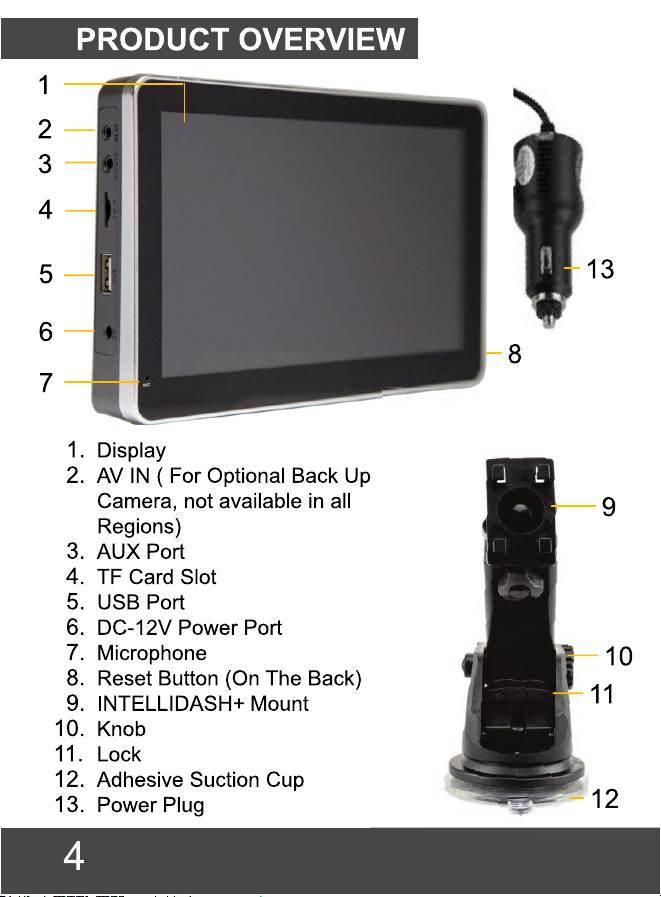
PRODUCT OVERVIEW........................................................ 4
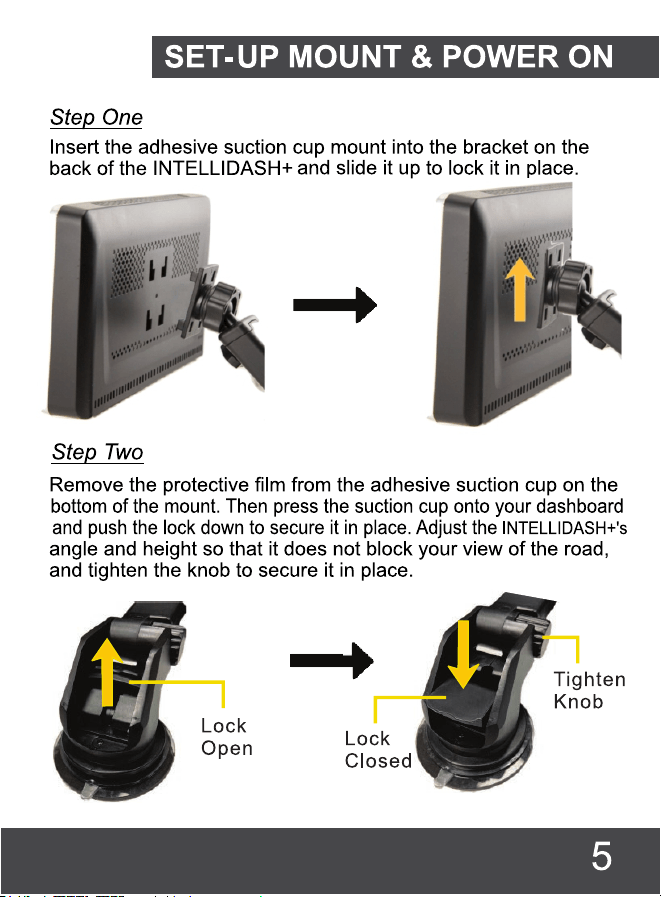
SET-UP MOUNT & POWER ON.............................................5
IMPORTANT NOTES............................................................8
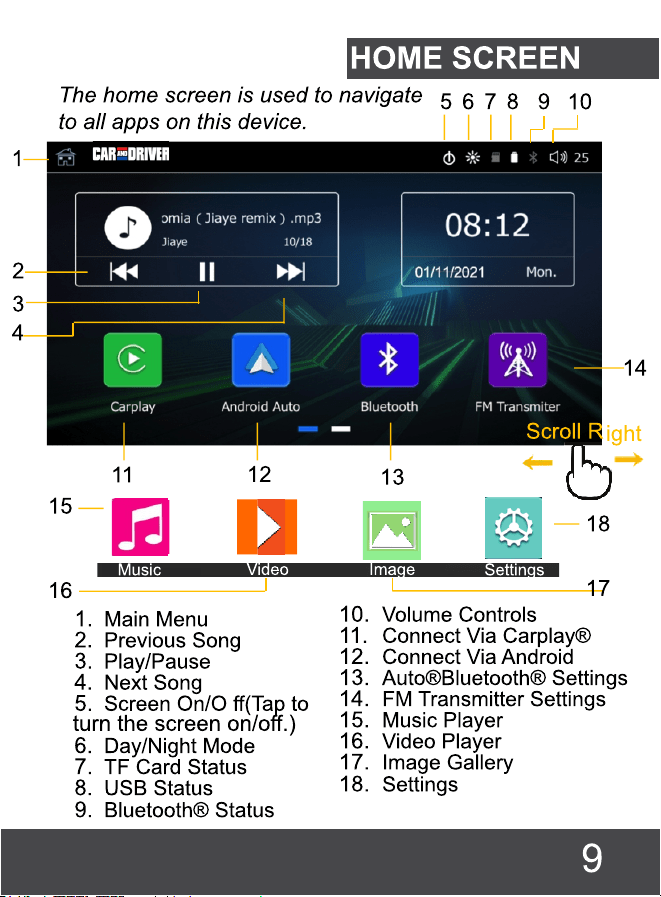
HOME SCREEN...................................................................9
CARPLAY ........................................................................10®
ANDROID AUTO ..............................................................11®
BLUETOOTH ....................................................................12®
FM TRANSMITTER..............................................................14
BUILT-IN SPEAKER.............................................................15
MUSIC................................................................................15
VIDEO................................................................................16
IMAGE................................................................................17
SETTINGS..........................................................................18
MirrorLink ........................................................................19®
SUMMIT ELECTRONICS LLC ONE YEAR LIMITED WARRANTY...22

Read Me
Important Safety Instructions
Read these instructions, Keep these instructions, Heed all warnings, Follow all
instructions.
1) Do not use this apparatus near water.
2) Clean only with a dry cloth.
3) Do not block any ventilation openings. Install in accordance with the manufacturer’s
instructions.
4) Do not install near any heat sources such as radiators, heat registers, stoves, or other
apparatus (including amplifiers) that produce heat.
5) Protect the power cord from being walked on or pinched, ensure that the power cord
does not get tangled with the gas or break peddles.
6) Only use attachments/accessories specified by the manufacturer.
7) Unplug this apparatus during lightning storms or when unused for long periods of time.
8) Refer all servicing to qualified service personnel. Servicing is required when the
apparatus has been damaged in any way, such as power-supply cord or plug is damaged,
liquid has been spilled or objects have fallen into the apparatus, the apparatus has been
exposed to rain or moisture, does not operate normally, or has been dropped.
FCC NOTICE TO USERS:
FCC ID: 2AMSOCAD-DU1000
Caution: Changes or modifications not expressly approved by the Party responsible for
compliance could void the user’s authority to operate the equipment.
Note: This equipment has been tested and found to comply with the limits for a Class B
digital device, pursuant to part 15 of the FCC Rules. These limits are designed to provide
reasonable protection Against harmful interference in a residential installation. This
equipment generates, uses and can radiate radio frequency energy and, if not installed
and used in accordance with the instructions, may cause harmful interference to radio
communications, however there is no guarantee that interference will not occur in a
particular installation. If this equipment does cause harmful interference to radio or
television reception, which can be determined by turning the equipment o ffand on, the
user is encouraged to try to correct the interference by one or more of the following
measures:
- Reorient or relocate the receiving antenna.
- Increase the separation between the equipment and receiver.
- Connect the equipment into an outlet on a circuit different from that to which the
receiver is connected.
- Consult the dealer or an experienced radio/TV technician for Help.
The device complies with part 15 of the FCC Rules. Operation is subject to the following
two conditions: (1) this device may not cause harmful interference, and (2) this device
must accept any interference received, including interference that may cause undesired
operation.
2

IMPORTANT NOTES
Ensure that the INTELLIDASH+
is mounted in a place
that
does not block your view of the road.
The INTELLIDASH+
has built-in speakers. However, to play
music over your car radio please ensure that the FM
Transmitter function has been set up and is connected
properly with your car radio. (See Page 14)
Some Android operating versions may not be
compatible with the Android Auto® app. As such, we
strongly recommend updating your phone's operating
system to the latest version.
Ensure that you are using the power cable provided
with the purchase of your phone (or compatible cable)
to connect the INTELLIDASH+ and your phone.
Apps displayed on the INTELLIDASH+
(when pairing with
either the Carplay® or Android Auto® app) will vary
depending on the apps available on the connected
phone.
The INTELLIDASH+ does not support it's own GPS. All
Navigation app's are functionally dependent on the
connected phone.
8
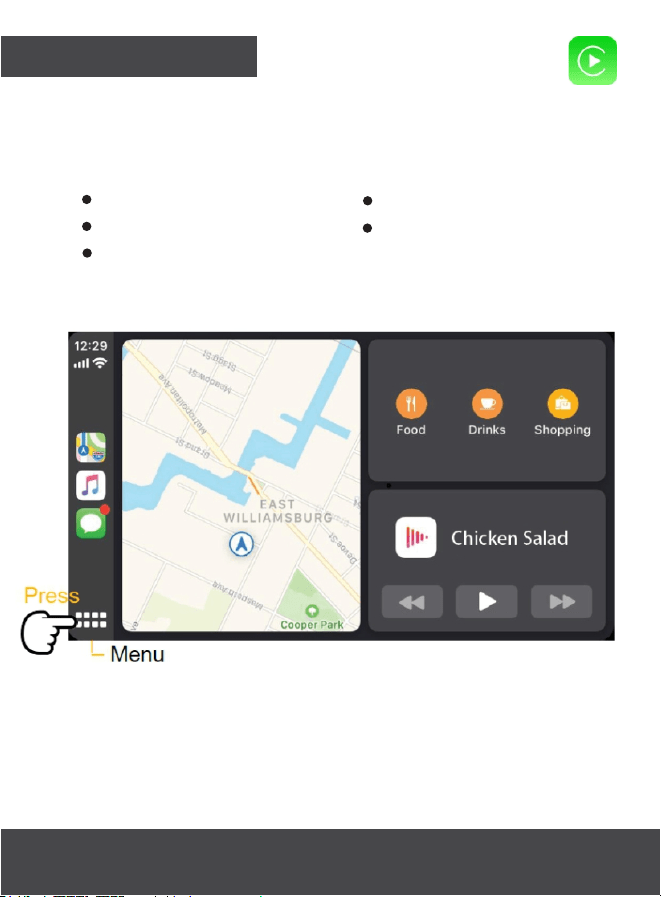
CARPLAY®
Connect your INTELLIDASH+ to your iPhone using your
iPhone's charging cable. The Carplay app will
launch, allowing your phone to access the following
features and more.
Siri
iTunes Music Player
Apple Maps
SMS Messages
Hands-free calls
The "Menu" button will open and close a page with all of
the Carplay compatible apps.
Note: Audio and music apps can be used
simultaneously with Maps by opening the menu,
selecting them, and navigating back to Maps.
Note: Apps displayed on the INTELLIDASH+ will vary
depending on the apps on the connected phone.
10
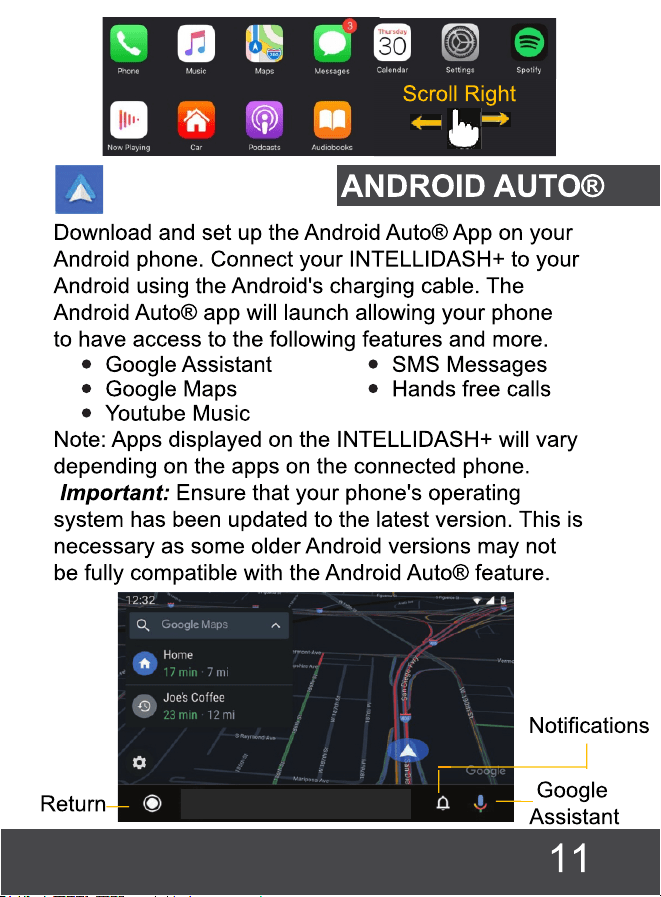

The "Return" button will open and close a page with
all of Android Auto's® compatible apps.
Note: Audio apps such as Spotify, Apple Music,
and Youtube Music can be used simultaneously
with Google maps or other navigation software.
This can be done by following the below steps.
1. Press the Return button to view all available
apps.
2. Selecting an audio app to launch it.
3. Press the Return button again to navigate
back to all available apps.
4. Finally, open Google maps or another navigation
app.
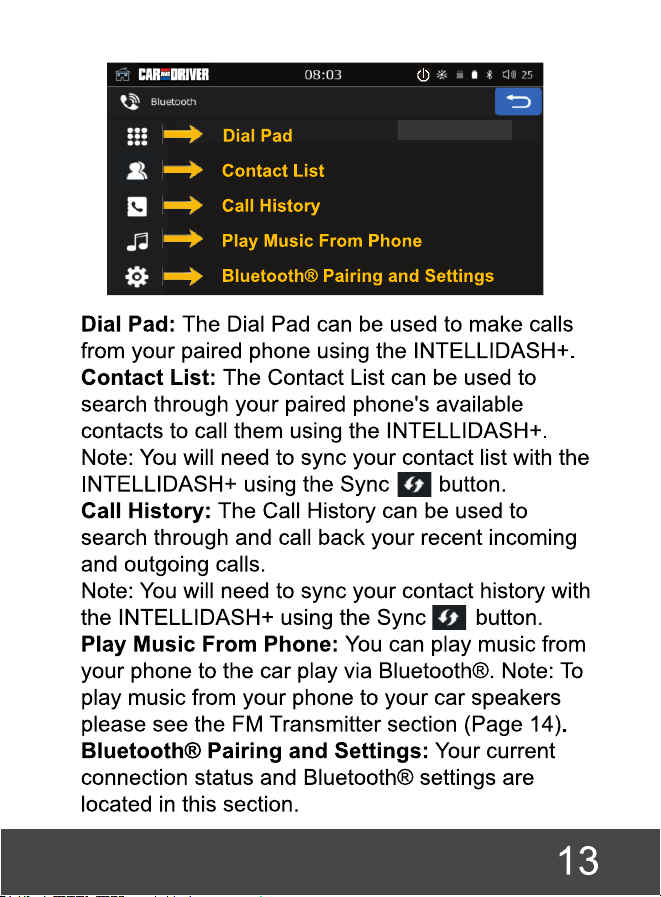
BLUETOOTH®
Play Music
Adjust Bluetooth®
Settings
Receive/Send Calls
and Messages
View Contacts
View Call History
The Bluetooth® feature allows you to pair your phone
to your INTELLIDASH+, so you can listen to music or make
calls when not using Carplay® or Android Auto®.
Pairing Your Phone To The INTELLIDASH+
Open your phone's Bluetooth® settings and search for
"CarPlay-BT" to pair. If you are asked for a password
enter "0000". Pairing your phone to the INTELLIDASH+ via
Bluetooth® gives you access to the following features
when not using Carplay® or Android Auto®:
12
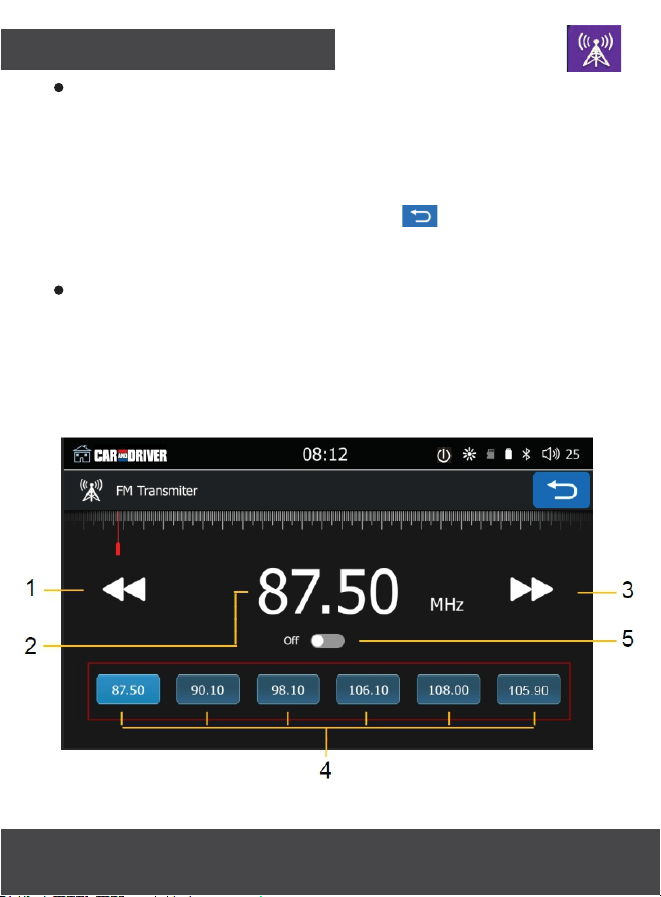
FM TRANSMITTER
The FM transmitter allows you to broadcast music from
your phone to your car speakers via the radio. To do
this, turn the transmitter on, then tune both your car
radio and the INTELLIDASH+ to the unused blank frequency.
Note: If sound does not immediately stream from your
phone to the cars speaker press to navigate back
to the home screen. Then press play directly on the
home screen.
You can save up to six preset radio frequencies by
adjusting the "Current Frequency" to the channel you
want to save and briefly pressing and holding any of
the "Frequency Presets."
Note: You may need to switch between USA1 and
USA2 in the Settings to find a clear frequency.
1. Lower Frequency
2. Current Frequency
3. Raise Frequency
4. Frequency Presets
5. Turn Transmitter On/Off
14
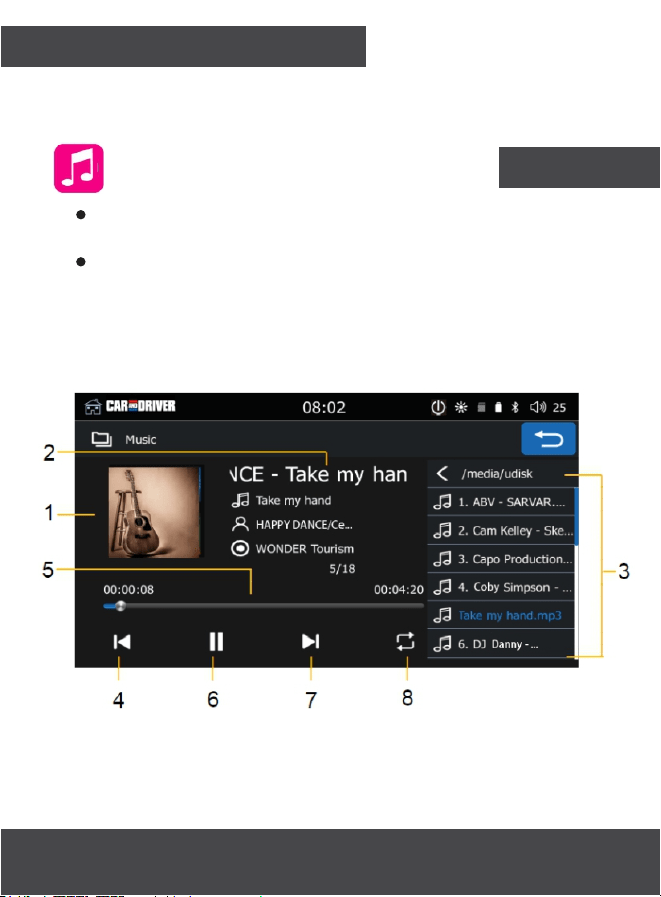
MUSIC
You can play audio files from a
compatible
USB drive or TF
card.
We recommend all songs be saved in either of the following
formats (MP3/WMA/AAC/AC3/OGG/Real Audio/FLAG/APE)
as other format types are not supported.
Note: Featured information, including album cover and song
name, may vary depending on the files hosted on the TF card
or USB drive.
TO USE THE BUILT-IN SPEAKER ON YOUR INTELLIDASH+,
YOU MUST TURN THE FM TRANSMITTER TO THE "OFF"
ABOVE.
BUILT-IN SPEAKER
1. Album Cover
2. Song Name
3. Playlist
4. Previous Song
5. Progress Bar
6. Play/Pause
7. Next Song
8. Loop Song
15
POSITION. SEE # 5
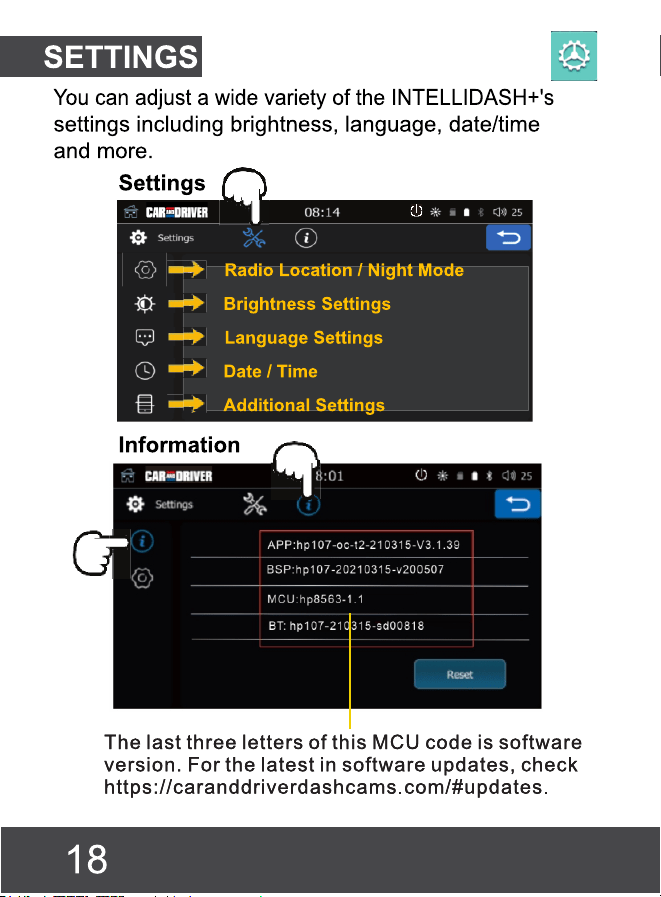
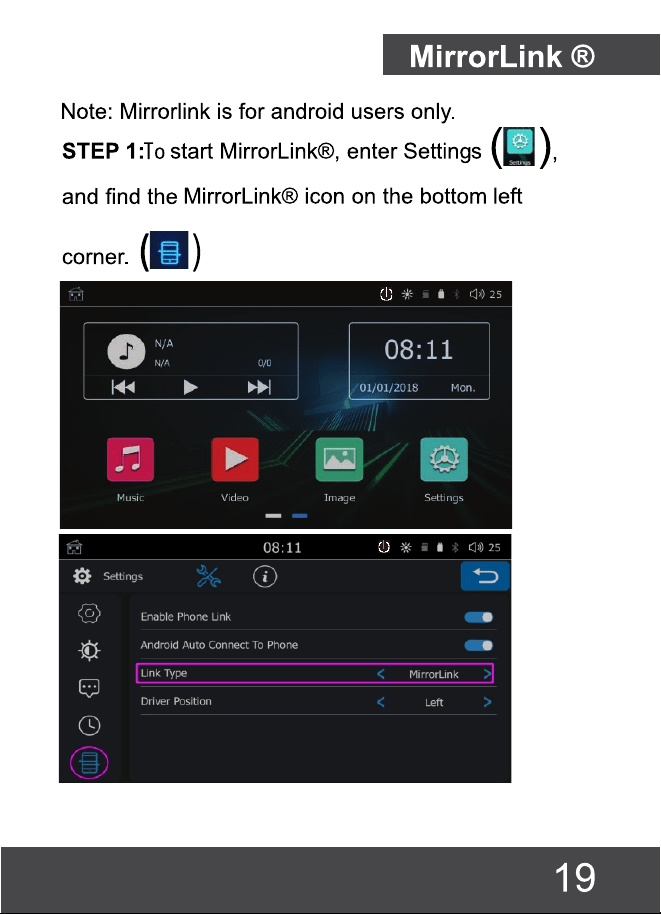
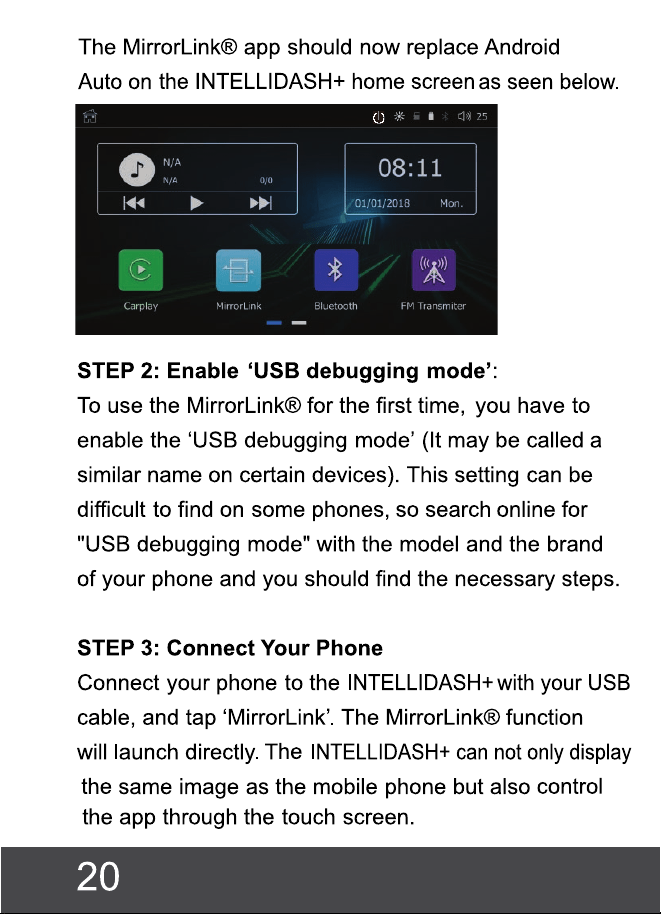

STEP 4: MirrorLink® sound output:
There are 2 options to connect audio to your car.
The first is to connect your phone directly to your
car’s Bluetooth. If there is no built-in Bluetooth, turn
on your phone's Bluetooth and search for the CAR-
BT connection. If asked for a password, enter 0000.
This will play audio fr
om the
INTELLIDASH+
rspeake , or
through the FM transmitter (see earlier in manual).
Disable 'USB debugging mode':
After disconnecting from the machine the first time,
turn off debugging. If USB debugging mode is left
on, you may be at risk of your data being breached
when plugged into a new device.
21

SUMMIT ELECTRONICS LLC ONE YEAR LIMITED WARRANTY
SUMMIT ELECTRONICS LLC LIMITED WARRANTY (“Warranty”) ― For Product Categories
Listed in Chart Below (as applicable, “Product”) Before returning your Product for service under
this Warranty, please (i) read the instruction manual carefully. If you are still having trouble with
your Product, please contact Technical Support at [email protected]
Warning: Some Products may contain components that are small enough to be swallowed.
Please keep out of reach of children.
Subject to the terms and conditions herein, SUMMIT ELECTRONICS LLC (hereinafter called
“SUMMIT ELECTRONICS LLC”) warrants to the original purchaser of the Product (“Customer”)
that for the applicable Warranty Period listed below, the Product will be free from defects in
material or workmanship under normal, non-commercial use
(“Defects”). Warranty Period encompasses, as listed below, separate “Coverage Periods” for
Parts and Labor, each Coverage Period for one year, to begin from the original date of
Customer purchase. If Customer returns a defective Product (or any component thereof) during
the applicable
Warranty Period, SUMMIT ELECTRONICS LLC will, at its option, during the specified
Coverage Periods for Parts and Labor (as applicable) either: (i) repair Product (or, as applicable,
any component thereof) or (ii) replace the Product (or, as applicable, any component thereof)
with a new or refurbished Product (or, as applicable, any component thereof), in either case free
of charge to Customer for Parts and/or Labor
(as applicable) during the specified Coverage Period only, and excluding applicable shipping
charges (noted below), for which the Customer is responsible. The foregoing states the
Customer’s exclusive remedy and SUMMIT ELECTRONICS LLC’s sole liability for breach of the
limited warranty contained herein.
This Warranty specifically excludes any Product (or, as applicable, any component thereof) that
has been subject to or Defects resulting from: (a) any neglect or misuse by a Customer, an
accident, improper application, violation of operating instructions for the Product, any other
Customer-induced damage, or the alteration or removal of any Product serial number: (b) any
modification or repair to Product (or, as applicable, any component thereof) by any party other
than SUMMIT ELECTRONICS LLC or a party authorized in writing by SUMMIT ELECTRONICS
LLC; (c) any damage to Product (or, as applicable, any component thereof) due to power
surges, incorrect electrical voltage, misconnection to any device, or malfunction of any device
used with the Product (or, as applicable, any component thereof); (d) cosmetic damage to the
Product (or, as applicable, any component thereof) caused by normal wear and tear; (e)
shipping damage that occurs while the Product is in transit; (f) damage caused by heat sources,
sunlight, electromagnetic conditions, or other climatic conditions; or (g) any acts of God. Product
is sold to Customer for personal, non-commercial use only. Product is not warranted for
Customer’s commercial or rental use. In addition, Product is not warranted against failure, and
should not be used by Customer for any application where (i) there is a risk that any data stored
on Product will be breached or otherwise compromised, or (ii) the data stored on Product is
relied upon for medical or lifesaving applications. SUMMIT ELECTRONICS LLC disclaims any
Warranty for any of the foregoing uses to the fullest extent permitted by law. Customer assumes
any and all risks associated with such uses of Product, and agrees to indemnify SUMMIT
ELECTR-ONICS LLC for any damages claimed against SUMMIT ELECTRONICS LLC for such
uses. EXCEPT FOR EXPRESS WARRANTIES STATED ABOVE AND TO THE MAXIMUM
22

EXTENT PERMITTED BY LAW, THE PRODUCTS ARE PROVIDED “AS IS”, AND SUMMIT
ELECTRONICS LLC DISCLAIMS ALL OTHER WARRANTIES, INCLUDING WITHOUT
LIMITATION ANY IMPLIED WARRANTY (I) OF MERCHANTABILITY, (II) OF FITNESS FOR
A PARTICULAR PURPOSE, OR (III) OF NON-INFRINGEMENT OF THIRD PARTY RIGHTS.
TO THE MAXIMUM EXTENT PERMITTED BY APPLICABLE LAW, IN NO EVENT WILL
SUMMIT ELECTRONICS LLC BE LIABLE TO CUSTOMER OR ANY THIRD PARTY FOR
ANY INDIRECT, SPECIAL, INCIDENTAL, CONSEQUENTIAL, EXEMPLARY OR PUNITIVE
DAMAGES, INCLUDING, WITHOUT LIMITATION, ANY LOST PROFITS OR REVENUES,
LOSS OR INACCURACY OF ANY DATA OR COST OF SUBSTITUTE GOODS,
REGARDLESS OF THE THEORY OF LIABILITY (INCLUDING NEGLIGENCE) AND EVEN
IF SUMMIT ELECTRONICS LLC HAS BEEN ADV ISED OF THE POSSIBILITY OF SUCH
DAMAGES,
SUMMIT ELECTRONICS LLC’S AGGREGATE LIABILITY TO CUSTOMER FOR ACTUAL
DIRECT DAMAGES FOR ANY CAUSE WHATSOEVER SHALL BE LIMITED TO THE
CUMULATIVE PRODUCT FEES PAID BY THAT CUSTOMER FOR THE PRODUCT
CAUSING THE DAMAGES, IF ANY. This Warranty gives Customer specifics rights, and
Customer may also have other rights that vary from jurisdiction to jurisdiction. To obtain
Warranty service, Customer must email SUMMIT ELECTRONICS LLC Technical Support
prior to making a Product return. Customer must include with Product return the following
items (failure to enclose any of these items may result in a delay in the processing of your
Warranty claim): (i) a dated sales receipt that indicates the place of purchase, model number
of Product, and amount paid; (ii) a detailed description of Customer’s problem with Product;
(iii) Customer’s full name, phone number, and return address, and; (iv) a money order made
out to SUMMIT ELECTRONICS LLC Electronics Corporation to cover return shipping
charges to US destinations only, for the applicable dollar amount shown for the Product in the
table above. SUMMIT ELECTRONICS LLC will not make return shipments to a P.O. Box. For
shipping to international addresses, actual freight will be charged to Customer. Return your
Product freight-prepaid in its original packaging, or packaging that affords an equal measure
of protection. Please allow 4 to 6 weeks for the processing of your claim (6 to 8 weeks from
November to February).
23

ESPAÑOL

Tabla de contenido
Léame ................................................ ............................. 2
LISTA DE PAQUETES................................................ ........3
DESCRIPCIÓN DEL PRODUCTO........................................4
MONTAJE DE CONFIGURACIÓN Y ENCENDIDO ................ 5
NOTAS IMPORTANTES................................................ ......8
PANTALLA DE INICIO................................................ .........9
CARPLAY® ................................................ ......................10
ANDROID AUTO® ............................................... ..............11
BLUETOOTH® ................................................ .................12
TRANSMISOR FM................................................ .............14
ALTAVOZ INCORPORADO.............................................. ...15
MÚSICA................................................. ...........................15
VIDEO................................................. .............................16
IMAGEN................................................. ...........................17
AJUSTES................................................. .........................18
MirrorLink® ................................................ .......................19
GARANTÍA LIMITADA DE UN AÑO DE SUMMIT ELECTRONICS LLC ... 23

Léame
Instrucciones de seguridad importantes
Lea estas instrucciones, mantenga estas instrucciones, preste atención a
todas las advertencias, siga todas las instrucciones.
1) No utilice este aparato cerca del agua.
2) Limpiar sólo con un paño seco.
3) No bloquee ninguna abertura de ventilación. Instalación de acuerdo con las
instrucciones del fabricante.
4) No instale cerca de ninguna fuente de calor como radiadores, registros de calor,
estufas u otros aparatos (incluidos los amplificadores) que produzcan calor.
5) Proteja el cable de alimentación de ser pisado o pellizcado, asegúrese de que el
cable de alimentación no se enrede con el gas o rompe los vendedores ambulantes.
6) Utilice únicamente los accesorios/accesorios especificados por el fabricante.
7) Desenchufe este aparato durante tormentas eléctricas o cuando no se utilice durante
largos períodos de tiempo.
8) Recomiende todo el servicio a personal de servicio calificado. El mantenimiento es
necesario cuando el aparato ha sido dañado de alguna manera, como el cable de
alimentación o el enchufe está dañado, se ha derramado líquido o se han caído objetos
en el aparato, el aparato ha estado expuesto a la lluvia o a la humedad, no funciona
normalmente o se ha caído.
AVISO DE FCC A LOS USUARIOS:
ID DE FCC: 2AMSOCAD-DU1000
Precaución: Los cambios o modificaciones no aprobados expresamente por la Parte
responsable del cumplimiento podrían anular la autoridad del usuario para operar el equipo.
Nota: Este equipo ha sido probado y se ha comprobado que cumple con los límites para
un dispositivo digital de clase B, de conformidad con la parte 15 de las Reglas de la
FCC. Estos límites están diseñados para proporcionar una protección razonable contra
interferencias dañinas en una instalación residencial. Este equipo genera, utiliza y puede
irradiar energía de radiofrecuencia y, si no se instala y utiliza de acuerdo con las
instrucciones, puede causar interferencias perjudiciales en las comunicaciones de radio,
sin embargo, no hay garantía de que no se produzcan interferencias en una instalación
particular. Si este equipo causa interferencias perjudiciales en la recepción de radio o
televisión, que pueden determinarse apagando y encendiendo el equipo, se recomienda
al. usuario que intente corregir la interferencia mediante una o varias de las siguientes
medidas:
- Reorientar o reubicar la antena receptora.
- Aumentar la separación entre el equipo y el receptor.
- Conecte el equipo a una toma de corriente en un circuito diferente de aquel al que está
conectado el receptor.
- Consulte al distribuidor o a un técnico experimentado de radio/TV para obtener ayuda.
El dispositivo cumple con la parte 15 de las Reglas de la FCC. El funcionamiento está
sujeto a las dos condiciones siguientes: (1) este dispositivo no puede causar
interferencias dañinas y (2) este dispositivo debe aceptar cualquier interferencia recibida,
incluidas las interferencias que puedan causar un funcionamiento no deseado.
2
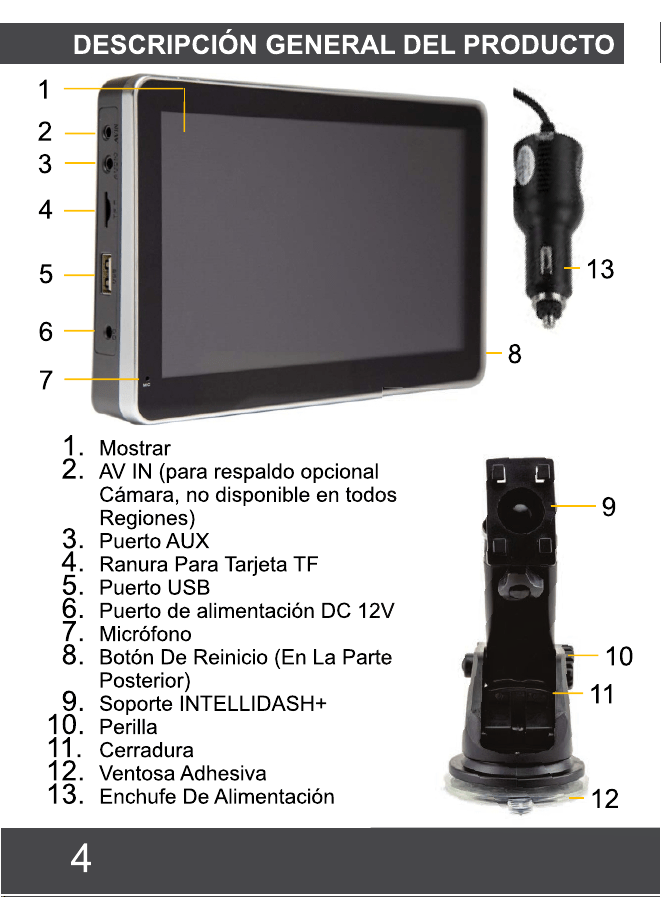
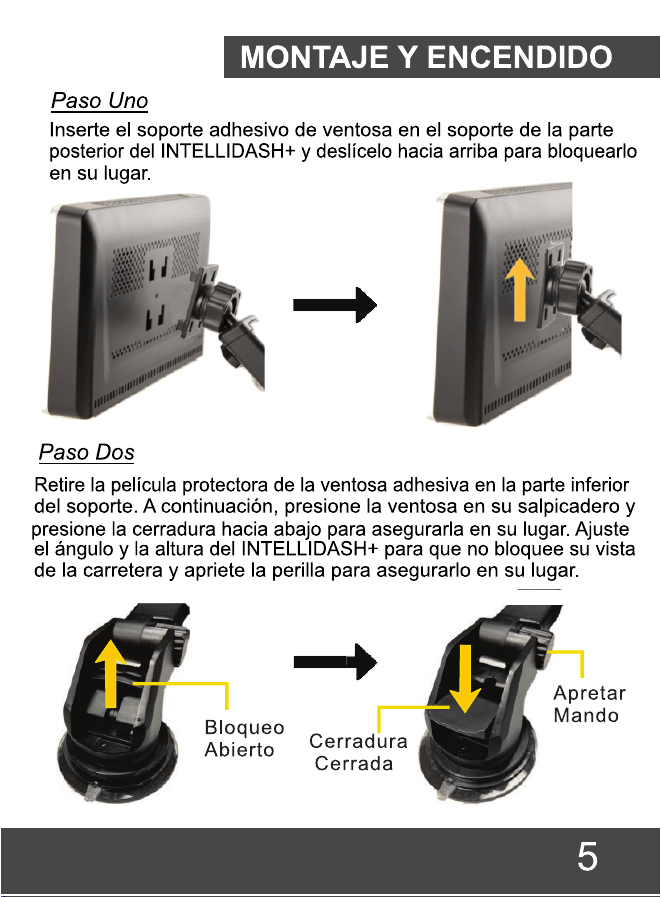
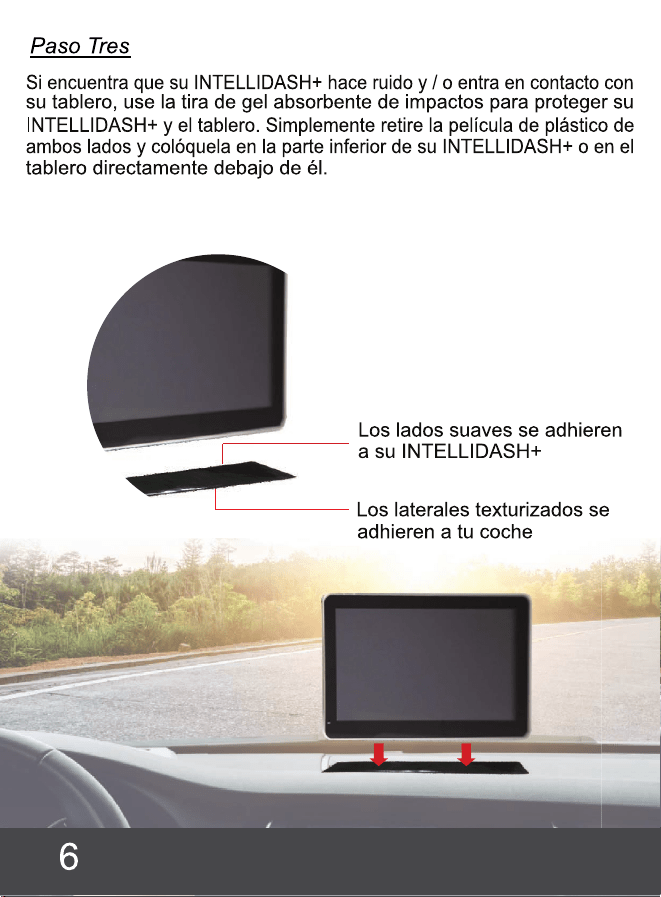
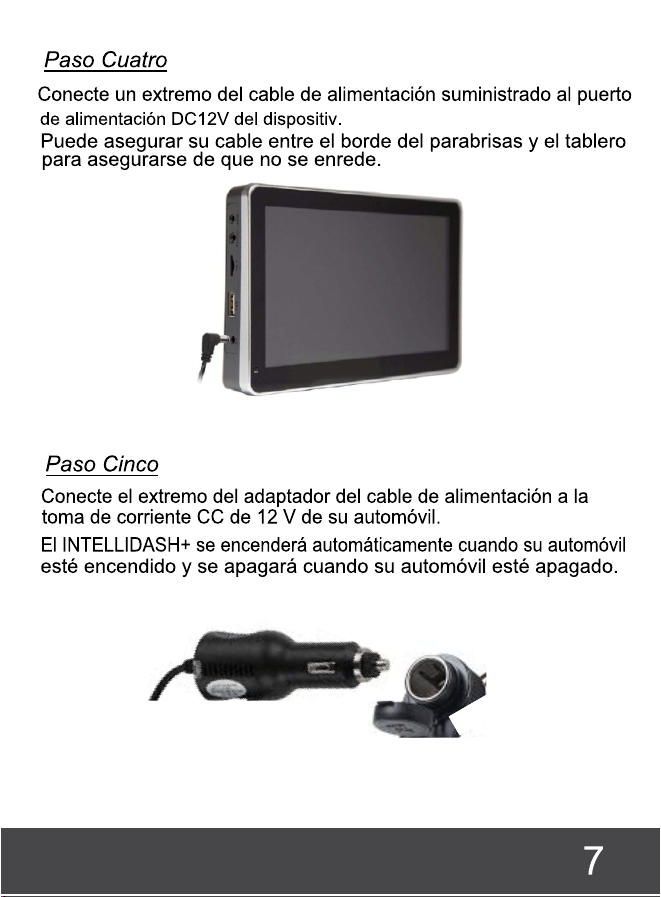

NOTAS IMPORTANTES
Asegúrese de que el INTELLIDASH+ esté montado en un
lugar que no bloquee la vista de la carretera.
El INTELLIDASH+ tiene altavoces integrados. Sin embargo,
para reproducir música a través de la radio del coche,
asegúrese de que la función del transmisor FM ha sido
configurada y está conectada correctamente con la
radio del coche. (Véase la página 14)
Es posible que algunas versiones operativas de
Android no sean compatibles con la aplicación Android
Auto®. Por lo tanto, recomendamos encarecidamente
que actualice el sistema operativo de su teléfono a la
última versión.
Asegúrese de que está utilizando el cable de
alimentación proporcionado con la compra de su
teléfono (o cable compatible) para conectar el
Intellidash y su teléfono.
Las aplicaciones que se muestran en INTELLIDASH+ (al
emparejar con la aplicación Carplay® o Android
Auto®) variarán en función de las aplicaciones
disponibles en el teléfono conectado.
El INTELLIDASH+ no es compatible con su propio GPS.
Todas las aplicaciones de navegación dependen
funcionalmente del teléfono conectado.
8
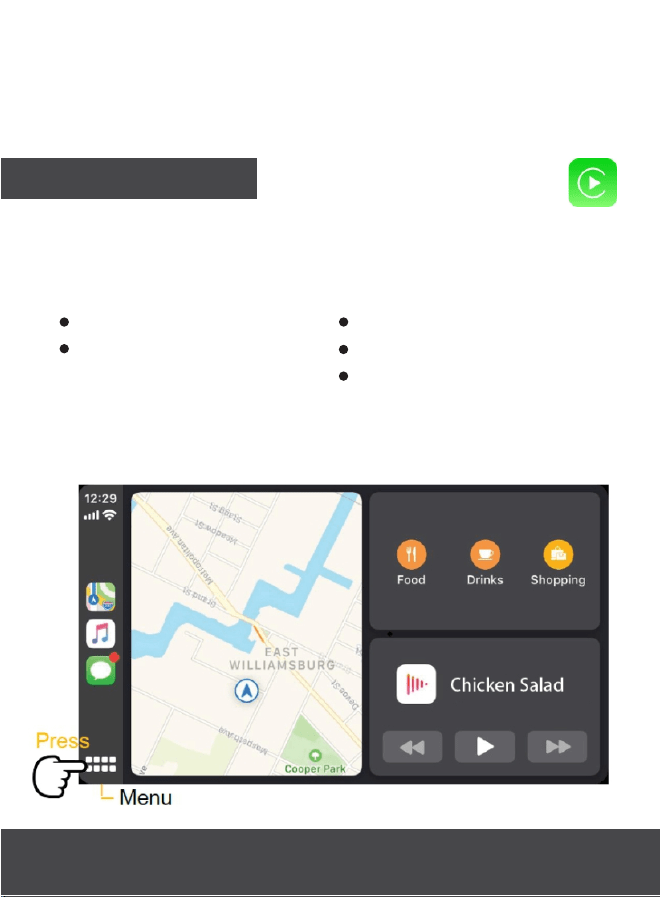
CARPLAY®
Siri
Reproductor de música
iTunes
Apple Maps
Nota: Las aplicaciones mostradas en el INTELLIDASH+
variarán en función de las aplicaciones del teléfono
conectado.
Mensajes SMS
Llamadas manos libres
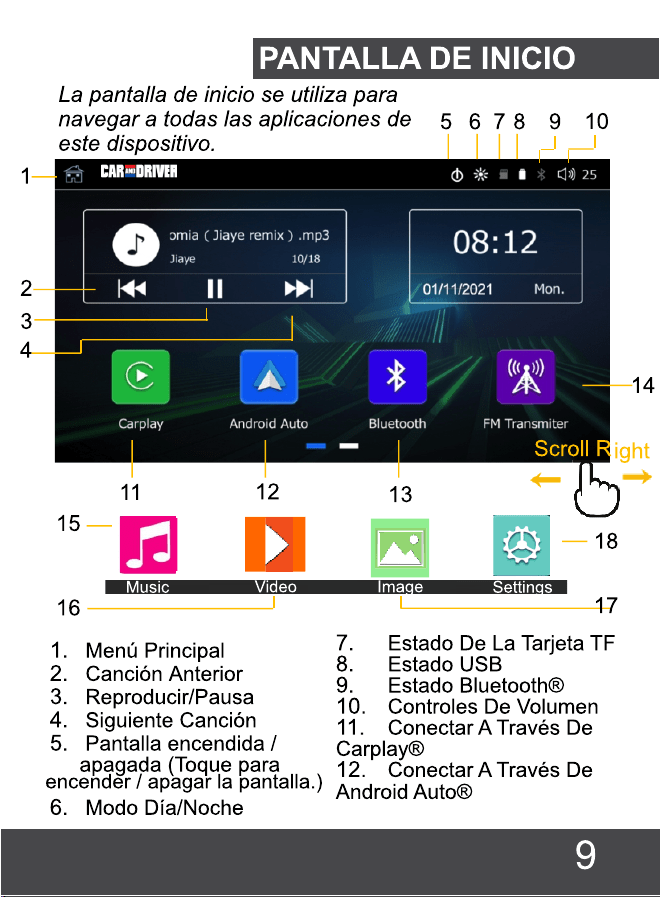
13.Configuración De Bluetooth®
14.Configuración Del transmisor FM
15.Reproductor de música
16.Reproductor de video
17.Galería de imágenes
18.Ajustes
Conecte su INTELLIDASH+ a su iPhone usando el cable
de carga de su iPhone. Se iniciará la aplicación Carplay,
lo que permitirá que su teléfono acceda a las
siguientes funciones y más.
10
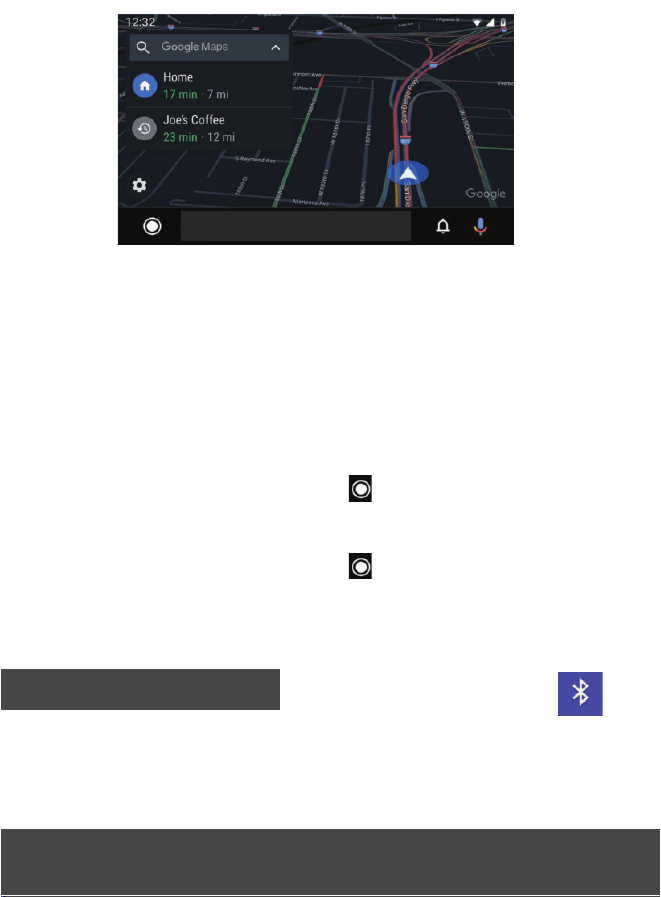
Regresa
__
__
Asistente
De Google
__
__
Notificaciones
__________
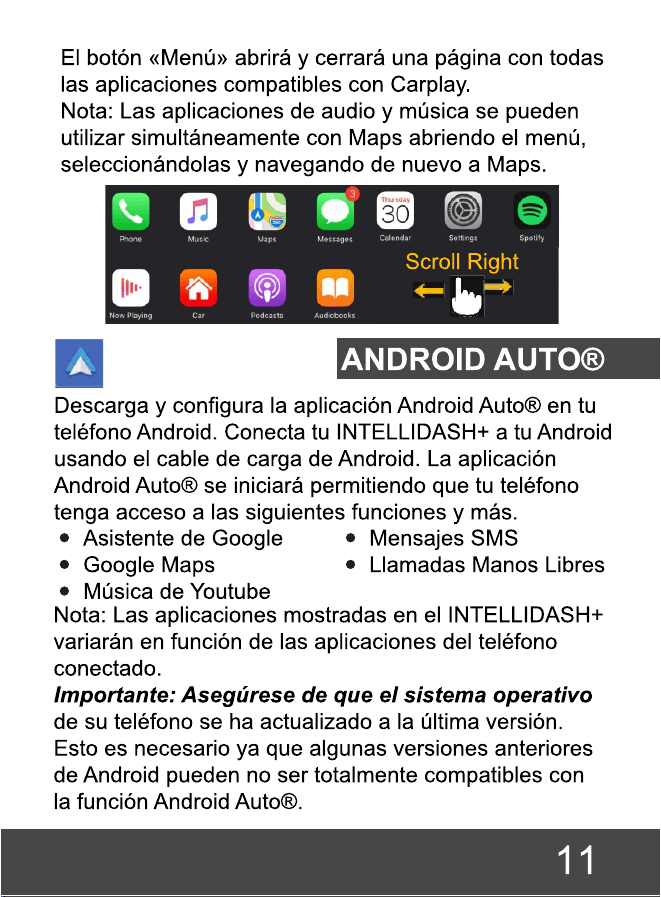
El botón «Volver» abrirá y cerrará una página con
todas las aplicaciones compatibles con Android
Auto®.
Nota: Las aplicaciones de audio como Spotify, Apple
Music y Youtube Music se pueden usar
simultáneamente con mapas de Google u otro
software de navegación. Esto se puede hacer
siguiendo los pasos a continuación.
1. Presione la tecla Retorno para ver todas las
aplicaciones disponibles.
2. Seleccionar una aplicación de audio para iniciarla.
3. Presione la tecla Retorno para volver a navegar
hasta todas las aplicaciones disponibles.
4. Por último, abre Google Maps u otra aplicación de
navegación.
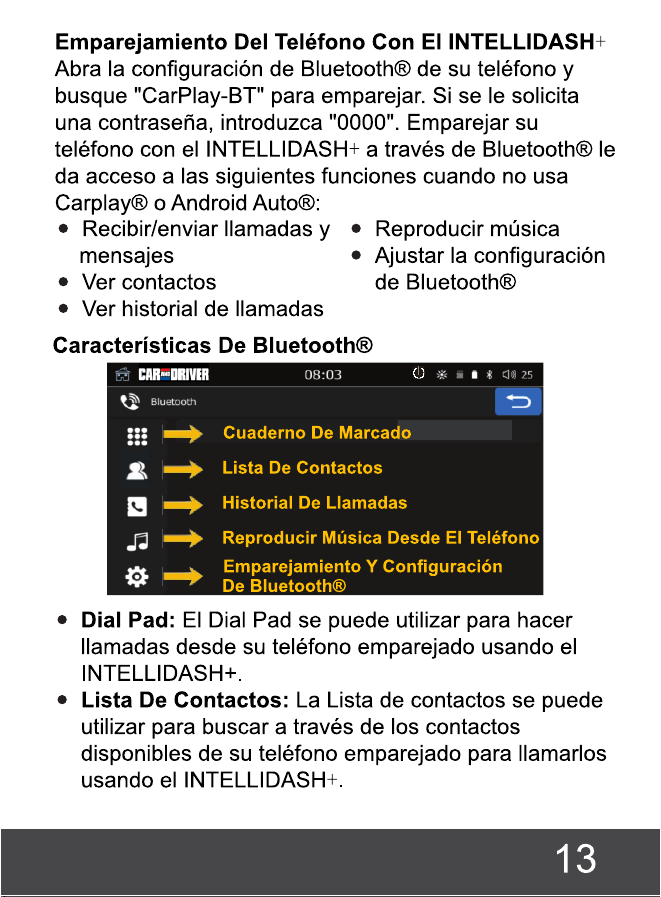
BLUETOOTH®
La función Bluetooth® le permite emparejar su teléfono
a tu INTELLIDASH+, para que puedas escuchar música o
hacer llamadas cuando no está usando Carplay® o
Android Auto®.
12
Nota: Deberá sincronizar su lista de contactos con el
INTELLIDASH+ usando el botón Sync.
Historial De Llamadas: El Historial de llamadas se
puede utilizar para buscar y devolver las llamadas
entrantes y salientes recientes.
Nota: Deberá sincronizar su historial de contactos con
INTELLIDASH+ usando elbotón Sincronizar.
Reproducir Música Desde El Teléfono: Puede
reproducir música desde su teléfono hasta el coche
a través de Bluetooth®. Nota: Para reproducir
música desde el teléfono a los altavoces del coche,
consulte la sección Transmisor FM.
Emparejamiento Y Configuración De Bluetooth®:
El estado actual de la conexión y la configuración de
Bluetooth® se encuentran en esta sección.
TRANSMISOR FM
El transmisor FM le permite transmitir música desde su
teléfono a los parlantes de su automóvil a través de la
radio. Para hacer esto, encienda el transmisor, luego
sintonice la radio de su automóvil y el INTELLIDASH+ a la
frecuencia en blanco no utilizada. Nota: Si el sonido no se
transmite inmediatamente desde el teléfono al altavoz
del coche, pulse para volver a la pantalla de inicio.
A continuación, pulse reproducir directamente en la
pantalla de inicio.
Puede guardar hasta seis frecuencias de radio
predefinidas ajustando la «Frecuencia actual» al canal
14
que desea guardar y manteniendo pulsado
brevemente cualquiera de los «Preajustes de
frecuencia».
Nota: Es posible que tengas que cambiar entre USA1
y USA2 en la Configuración para encontrar una
frecuencia clara adecuada.
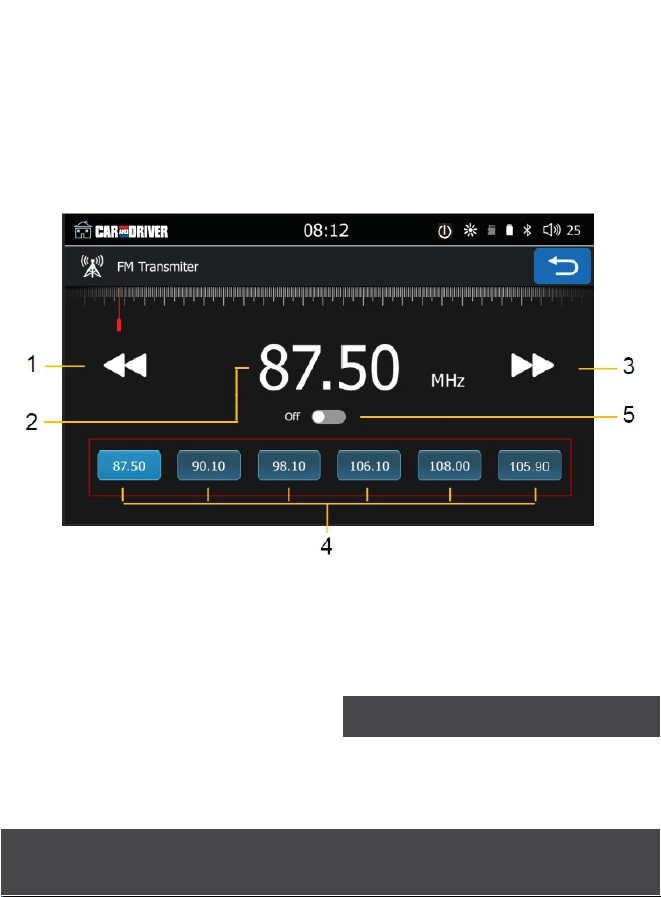
1. Frecuencia Más Baja
2. Frecuencia Actual
3. Elevar Frecuencia
4. Preajustes De Frecuencia
5. Encender/Apagar El Transmisor
PARA USAR EL ALTAVOZ INTEGRADO EN SU INTELLIDASH+,
DEBE ENCENDER LA FM TRANSMISOR EN POSICIÓN "OFF".
VER # 5 ARRIBA.
ALTAVOZ INTEGRADO
15
MÚSICA
Puede reproducir archivos de audio desde una
unidad USB compatible o tarjeta TF.
Recomendamos que todas las canciones se
guarden en cualquiera de los siguientes formatos
(MP3/WMA/AAC/AC3/OGG/Real Audio/Flag/APE)
ya que no se admiten otros tipos de formato.
Nota: La información destacada, incluida la
portada del álbum y el nombre de la canción,
puede variar dependiendo de los archivos alojados
en la tarjeta TF o en la unidad USB.
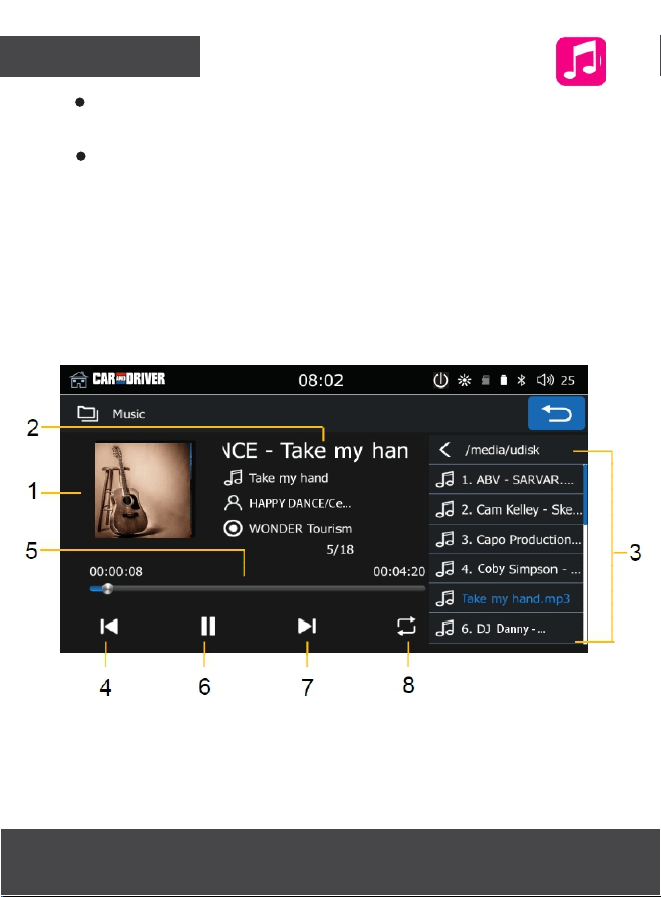
1. Portada Del Album
2. Nombre De La Canción
3. Lista De Reproducción
4. Canción Anterior
5.Barra de progreso
6.Reproducir/Pausa
7.Siguiente canción
8.Canción de bucle
16
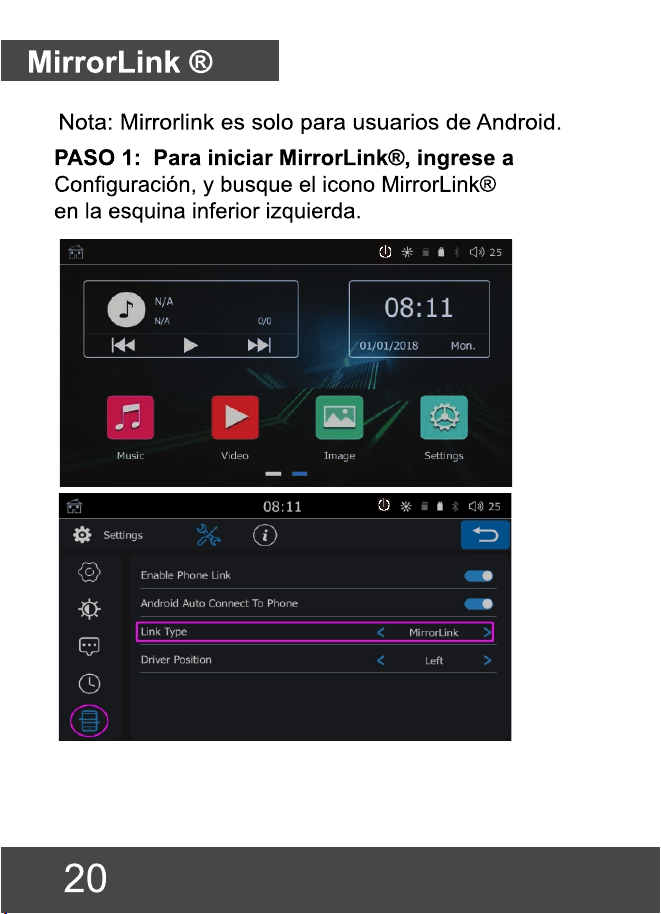
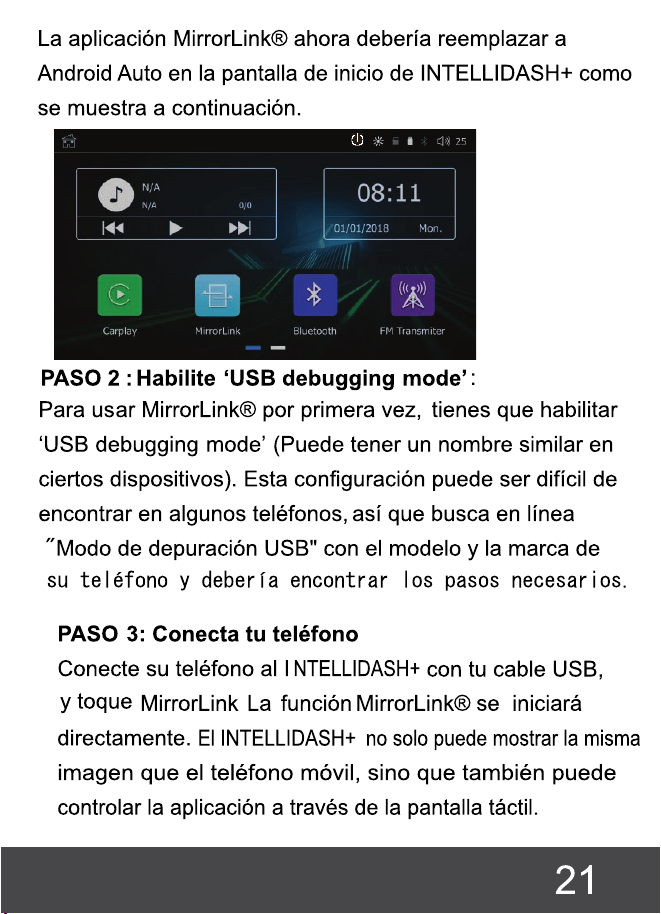

PASO 4: Salida de Sonido:
Hay 2 opciones para conectar audio a su automóvil.
La primera es conectar su teléfono directamente al
Bluetooth de su automóvil. Si no hay Bluetooth
incorporado, encienda el Bluetooth de su teléfono y
busque la conexión CAR-BT. Si se le solicita una
contraseña, ingrese 0000. Esto reproducirá audio
desde el altavoz INTELLIDASH+ o mediante el transmisor
de FM (consulte anteriormente en el manual).
Inhabilitar 'USB debugging mode':
Después de desconectarse de la máquina por
primera vez, apague 'debugging'. Si la 'USB
debugging mode' se deja encendida, puede correr el
riesgo de que se vulneren sus datos cuando se
conecta a un dispositivo nuevo.
.
22

SUMMIT ELECTRONICS LLC GARANTÍA LIMITADA DE UN AÑO
GARANTÍA LIMITADA DE SUMMIT ELECTRONICS LLC («Garantía») ― Para las categorías de
productos enumeradas en la tabla siguiente (según corresponda, «Producto») Antes de devolver su
producto para el servicio bajo esta garantía, por favor (i) lea atentamente el manual de instrucciones.
Si sigue teniendo problemas con su producto, póngase en contacto con el servicio de asistencia
técnica en [email protected]
Advertencia: Algunos productos pueden contener componentes que son lo suficientemente pequeños
para ser tragados. Por favor, manténgalo fuera del alcance de los niños.
Sujeto a los términos y condiciones aquí presentes, SUMMIT ELECTRONICS LLC (en adelante
denominada
«SUMMIT ELECTRONICS LLC») garantiza al comprador original del Producto («Cliente») que
durante el período de garantía aplicable que se indica a continuación, el Producto estará libre de
defectos en el material o en la mano de obra bajo un uso normal y no comercial.
(«Defectos»). El Período de Garantía abarca, como se indica a continuación, «Períodos de
Cobertura» separados para Piezas y Mano de Obra, cada Período de Cobertura de un año, a partir de
la fecha original de compra del Cliente. Si el Cliente devuelve un Producto defectuoso (o cualquier
componente del mismo) durante el
Período de garantía, SUMMIT ELECTRONICS LLC, a su elección, durante los períodos de cobertura
especificados para piezas y mano de obra (según corresponda): (i) reparar el Producto (o, según
corresponda, cualquier componente del mismo) o (ii) reemplazar el Producto (o, según corresponda,
cualquier componente del mismo) por un Producto nuevo o reacondicionado (o, según corresponda,
cualquier componente del mismo), en cualquier caso de forma gratuita al Cliente por piezas y/o mano
de obra
(según corresponda) durante el período de cobertura especificado, y excluyendo los gastos de envío
aplicables (indicados a continuación), de los que el Cliente es responsable. Lo anterior indica el
recurso exclusivo del Cliente y la única responsabilidad de SUMMIT ELECTRONICS LLC por
incumplimiento de la garantía limitada contenida en el presente documento.
Esta Garantía excluye específicamente cualquier Producto (o, según corresponda, cualquier
componente del mismo) que haya sido objeto o Defectos resultantes de: (a) cualquier negligencia o
mal uso por parte de un Cliente, un accidente, una aplicación incorrecta, una violación de las
instrucciones de funcionamiento del Producto, cualquier otro daño inducido por el Cliente, o la
alteración o eliminación de cualquier número de serie del Producto: (b) cualquier modificación o
reparación del Producto (o, según corresponda, cualquier componente del mismo) por cualquier parte
que no sea SUMMIT ELECTRONICS LLC o una parte autorizada por escrito por SUMMIT
ELECTRONICS LLC; (c) cualquier daño al Producto (o, según corresponda, cualquier componente del
mismo) debido a sobretensiones, tensión eléctrica incorrecta, mala conexión a cualquier dispositivo o
mal funcionamiento de cualquier dispositivo utilizado con el Producto (o, según corresponda,
cualquier componente del mismo); (d) daños cosméticos en el Producto (o, según corresponda,
cualquier componente del mismo) causados por un desgaste normal; (e) daños en el envío que ocurre
mientras el Producto está en tránsito; (f) daños causados por fuentes de calor, luz solar, condiciones
electromagnéticas u otras condiciones climáticas; o (g) cualquier acto de Dios. El producto se vende
al cliente solo para uso personal y no comercial. El producto no está garantizado para el uso
comercial o de alquiler del Cliente. Además, el Producto no está garantizado contra fallos, y no debe
ser utilizado por el Cliente para cualquier aplicación en la que (i) exista el riesgo de que los datos
almacenados en el Producto sean violados o comprometidos de otra manera, o (ii) los datos
almacenados en el Producto sean confiados para aplicaciones médicas o de salvamento. SUMMIT
ELECTRONICS LLC renuncia a cualquier Garantía para cualquiera de los usos anteriores en la
máxima medida permitida por la ley. El Cliente asume todos y cada uno de los riesgos asociados con
dichos usos del Producto y se compromete a indemnizar a SUMMIT ELECTR-ONICS LLC por
cualquier daño reclamado contra SUMMIT ELECTRONICS LLC por tales usos. EXCEPTO PARA LAS
GARANTÍAS EXPRESAS MENCIONADAS ANTERIORMENTE Y AL MÁXIMO
23

PERMITIDO POR LA LEY, LOS PRODUCTOS SE PROPORCIONAN «TAL CUAL», Y
SUMMIT ELECTRONICS LLC RENUNCIA A TODAS LAS DEMÁS GARANTÍAS,
INCLUYENDO, SIN LIMITACIÓN, CUALQUIER GARANTÍA IMPLÍCITA (I) DE
COMERCIABILIDAD, (II) DE IDONEIDAD PARA UN PROPÓSITO PARTICULAR, O (III) DE
NO INFRACCIÓN DE DERECHOS DE TERCEROS. EN LA MEDIDA MÁXIMA PERMITIDA
POR LA LEY APLICABLE, EN NINGÚN CASO SUMMIT ELECTRONICS LLC SERÁ
RESPONSABLE ANTE EL CLIENTE O CUALQUIER TERCERO POR CUALQUIER DAÑO
INDIRECTO, ESPECIAL, INCIDENTAL, CONSECUENTE, EJEMPLAR O PUNITIVO,
INCLUYENDO, SIN LIMITACIÓN, CUALQUIER PÉRDIDA DE BENEFICIOS O INGRESOS,
PÉRDIDA O INEXACTITUD DE CUALQUIER DATO O EL COSTE DE LOS PRODUCTOS
SUSTITUTIVOS, INDEPENDIENTEMENTE DE LA TEORÍA DE LA RESPONSABILIDAD
(INCLUIDA LA NEGLIGENCIA), E INCLUSO SI SUMMIT ELECTRONICS LLC HA SIDO
AÑADIDO DE LA POSIBILIDAD DE TALES DAÑOS,
LA RESPONSABILIDAD AGREGADA DE SUMMIT ELECTRONICS LLC ANTE EL CLIENTE
POR DAÑOS DIRECTOS REALES POR CUALQUIER CAUSA SE LIMITARÁ A LAS TARIFAS
ACUMULATIVAS DE PRODUCTO PAGADAS POR ESE CLIENTE POR EL PRODUCTO QUE
CAUSA LOS DAÑOS, SI LOS HUBIERE. Esta Garantía otorga al Cliente derechos
específicos, y el Cliente también puede tener otros derechos que varían de una jurisdicción a
otra. Para obtener el servicio de garantía, el Cliente debe enviar un correo electrónico al
Soporte Técnico de SUMMIT ELECTRONICS LLC antes de realizar una devolución del
Producto. El Cliente debe incluir con la devolución del Producto los siguientes artículos (el
hecho de no adjuntar cualquiera de estos artículos puede resultar en un retraso en el
procesamiento de su reclamación de Garantía): (i) un recibo de venta fechado que indique el
lugar de compra, el número de modelo del Producto y la cantidad pagada; (ii) una descripción
detallada de la problema con el Producto; (iii) nombre completo, número de teléfono y
dirección de devolución del Cliente, y (iv) un giro postal realizado a SUMMIT ELECTRONICS
LLC Electronics Corporation para cubrir los gastos de envío de devolución a destinos de EE.
UU., por la cantidad en dólares aplicable que se muestra para el Producto en la tabla anterior.
SUMMIT ELECTRONICS LLC no realizará envíos de devolución a un apartado postal. Para el
envío a direcciones internacionales, el flete real se cargará al Cliente. Devuelva su Producto
con carga prepagada en su embalaje original, o un embalaje que ofrezca igual medida de
protección. Por favor, espere de 4 a 6 semanas para el procesamiento de su reclamación (de 6
a 8 semanas de noviembre a febrero).
24