

Copyright © Einstein Associates LLC
All rights reserved.
Einstein Associates LLC owns and reserves all of the rights
comprised in the copyright of this document. No part of this
document may be changed, excerpted, copied, reproduced,
or imitated in any form or by any means without prior
written consent of Einstein Associates LLC.
All statements, information, and recommendations in this
document are provided "AS IS" without warranties, guarantees or
representations of any kind, either expressed or implied. The
information in this document is subject to change without notice.
Einstein Associates LLC reserves the right of final interpretation of
this document.
is a registered trade mark of Einstein
Associates LLC
Version 1.0
Prepared in September 2017

Contents
Letter to Users ................................................................................1
Standard Packing List ......................................................................2
Chapter 1 Precautions, Warnings and Symbol ...........................2
1.1 Precautions................................................................2
1.2 Warnings ...................................................................4
1.3 Symbol.......................................................................7
Chapter 2 About This Product ....................................................9
2.1 Overview ...................................................................9
2.2 Working Principles .....................................................9
2.3 Intended Use ...........................................................10
2.4 Product Features .....................................................10
2.5 Limitations ...............................................................11
2.6 Innovative features of the 500DL .............................12
2.7 Schematic Structural Diagram ..................................13
2.8 Schematic Diagram of Display ..................................14

Chapter 3 Operation Instructions ............................................15
3.1 Battery Installation ..................................................15
3.2 Using the Lanyard ....................................................16
3.3 Taking SpO
2
and Pulse Rate Readings ....................... 17
3.4 Tips to getting a good reading .................................18
Chapter 4 Cleaning and Disinfection ........................................20
Chapter 5 Maintenance and Troubleshooting ..........................22
5.1 Maintenance ...........................................................22
5.2 Troubleshooting .......................................................23
Chapter 6 Technical Description and Safety Type .....................25
6.1 Technical Specifications ...........................................25
6.2 Technical Description ...............................................28
6.3 Safety Type ..............................................................31
6.4 Storage and Transportation .....................................31

1
Letter to Users
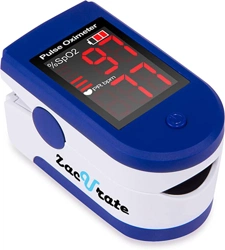
Thank you for choosing our Zacurate® 500DL Finger Pulse Oximeter.
By listening intently and applying some of the changes as suggested
by our customers, we hope you will find that the 500DL is a much
more user-friendly, reliable and comfortable pulse oximeter than its
predecessor. Before using this product, please read the user manual
carefully and follow the instructions stated herein. Please also check
that all accessories are complete as listed in the packing list and
whether any component is damaged during shipping. If there is any
damage and/or if you have any concerns, please contact us at
[email protected] or phone: 1-832-939-8290 with the
following information:
1. Product model
2. Serial number of the product
3. Your contact information and address
The manual is updated periodically and the latest manual can
be downloaded at
http://www.beyondmedshop.com/products/500dl

2
Standard Packing List
1. Pulse Oximeter………………………….1 PC
2. AAA Battery……………………………...2 PCS
3. Lanyard………………………………….….1 PC
4. Silicone Cover……………………………..1 PC
5. User Manual……………………………...1 PC
Chapter 1 Precautions, Warnings and Symbol
1.1 Precautions
Do not attempt to repair the pulse oximeter by yourself.
Only certified engineers should maintain and repair it.
Change the contact position between the oximeter probe
and the finger periodically if your finger feels sore or is
uncomfortable.
Stop immediately if you have broken skin or the blood
circulation of your finger is affected during prolonged use.
This product is not designed to be used by newborn babies.
Seek medical care if the measured value goes beyond the

3
normal range and you are sure that the device is not
malfunctioning.
The pulse oximeter uses infrared light (invisible to your eyes)
to measure your SpO
2
level. Hence, please do not stare at
the light emitting components of the oximeter to avoid
potential eye damage and/or blindness.
This pulse oximeter is not a medical device and is not intended to
diagnose and/or treat any medical condition or disease. It is
intended for non-medical use by healthy people to monitor their
pulse rate and blood oxygen levels. It is for sports and/or aviation
use. People who need SpO
2
and pulse rate measurements
because of a medical condition should consult with their
physician.
The following factors may affect the performance and accuracy
of the oximeter:
◆ The oximeter is used in an environment with high-frequency
devices, such as high-frequency electric knives and/or CT
apparatuses.

4
◆ Ambient light intensity that is too bright. Hence, please
avoid direct exposure to strong light (such as beams from
operating lamps or sunlight) during measurement.
◆ The probe of the oximeter is placed on the same arm that a
blood pressure cuff, arterial duct or intravenous injection is
placed.
◆ The user suffers from hypotension, severe vascular atrophy,
severe anemia, or low oxygen.
◆ The user is in sudden cardiac arrest or shock state.
◆ The user is wearing nail polish or artificial nails.
1.2 Warnings
Warning: Do not use the oximeter in an environment with
any flammable gases, flammable anesthetic, or other
flammable substances.

5
Warning: Keep unit and lanyard away from children as the
included lanyard may pose as an entanglement or choking
hazard to small children. Adult supervision is required;
never leave children unattended with unit or lanyard.
Warning: Do not throw the batteries into fire, as that may
cause an explosion.
Warning: Do not attempt to charge the included batteries,
as that could cause leakage, fire disaster, or even
explosion. Dispose the used batteries in accordance to the
local laws and regulations.
Warning: Do not use the oximeter in an MRI or CT
environment.

6
Caution: Do not operate the oximeter if it is wet. Avoid
moving the oximeter from a cold to a hot and humid
environment.
Caution: Install the batteries properly before powering on
the oximeter for normal use. Please remove the batteries
if you are not planning to use the oximeter for an
extended period of time.
Caution: Close the battery cover when the device is in use.
7
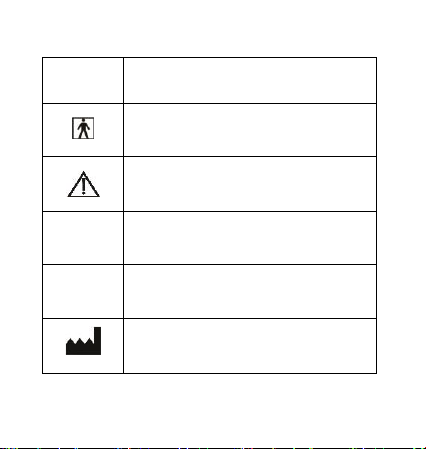
1.3 Symbol
Symbol
Meaning
BF-type application part
Caution: Please refer to this manual
%SpO
2
Symbol of oxygen saturation
♡ /Min
Symbol of pulse rate
Manufacturer information

8
Symbol
Meaning
Temperature limitation
Electrical waste materials should be sent to
dedicated collection points for recycling.
Warning
A personal injury or device damage may
result if the device is not used correctly.
Caution
Important information on the proper usage
of the device.
Attention
Necessary information to protect this
device against damage.

9
Chapter 2 About This Product
2.1 Overview
SpO
2
stands for peripheral capillary oxygen saturation. Oxygen
saturation is defined as the ratio of oxyhemoglobin (HbO
2
) to the total
concentration of hemoglobin (i.e. Oxyhemoglobin + reduced
hemoglobin) present in the blood. It is an important physiological
parameter involved in respiration and circulation. The Pulse Oximeter
feature herein is small, portable, non-invasive and easy to use. The
user only needs to insert a finger into the chamber to measure
his/her SpO
2
level and pulse rate.
2.2 Working Principles
Oxygenated blood absorbs light
preferentially at 905nm (near
infrared light), whereas
deoxygenated blood absorbs light
preferentially at 660nm (red light).
A pulse oximeter works by passing
a beam of red and infrared light
through a pulsating capillary bed and then measure the amount of
red and infrared light emerging from the tissues via a sensor. To
Light Emitting
Diode
Light beams
sensor

10
improve accuracy, the 500DL uses a proprietary algorithm to collect
data from pulsatile arterial blood and excludes local noise from the
tissues. The relative absorption of light by oxyhemoglobin (HbO) and
deoxyhemoglobin is then calculated according to the Beer-Lambert's
law and a quantitative measurement of the users’ oxyhemoglobin
status i.e. Oxygen saturation level (SpO
2
) is derived.
Due to the sensitivity of the pulse oximeter, finger should be kept
stationary during measurement. It is recommended that you use this
device for measurement before or after sports. Do not use for
continuous monitoring.
2.3 Intended Use
The Zacurate® 500DL Finger Pulse Oximeter is a portable non-invasive
device intended for spot-checking of oxygen saturation of arterial
hemoglobin (SpO
2
) and pulse rate (PR) of adult and children (>2 years
old).
2.4 Product Features
Lightweight, portable and easy to use
Large LED screen for easy reading
Low Battery indicator
Automatic shut down if no signal is detected after 8seconds.

11
The device is equipped with two 1.5V AAA batteries, which
will allow the pulse oximeter to operate for approximately 30
hours.
2.5 Limitations
The pulse oximeter works by measuring the amount of oxygenated
hemoglobin in your blood over a period of time. Spot check pulse
oximeter takes 1-2 readings every second and takes an average of 4-6
readings before displaying the result. Hence, you will have to wait at
least 4-6 seconds before a result will be displayed on the monitor. If
the pulse oximeter fails to detect blood flow for the first few seconds,
the results will be delayed accordingly.
The pulse oximeter does not work for people with naturally small
fingers or low peripheral blood flow. This is because the pulse
oximeter could not detect enough blood for a measurement. Please
note that prolonged use of a pulse oximeter, hypotension,
vasoconstriction, hypothermia and certain medications can lead to
low or restricted blood flow. Nail polish can also impede the pulse
oximeter from taking a reading. To know how much blood flow is
being detected by the pulse oximeter, you will need a model that can
display the plethysmograph (Model 500D). Finally, it is generally

12
accepted that the saturation percentage is unreliable on the steep
part (around 60 mm Hg) of the oxyhemoglobin dissociation curve.
2.6 Innovative features of the 500DL
The 500DL is designed to address and alleviate some of the above
problems by
1) Increasing the sensitivity of the sensor to allow user to measure
his/her SpO
2
levels and Pulse Rate (PR) even at low blood perfusion.
2) Using a self-adjusting smart spring system to fit user’s finger snugly
but not too tight as to impede blood flow.
3) Using soft, hypoallergenic medical grade silicone in the finger
chamber to minimize discomfort to user’s finger.
4) Using solid ABS plastic to block ambient light from reaching the
sensor so that the signal to background ratio and accuracy of
measurement is dramatically increased.
13
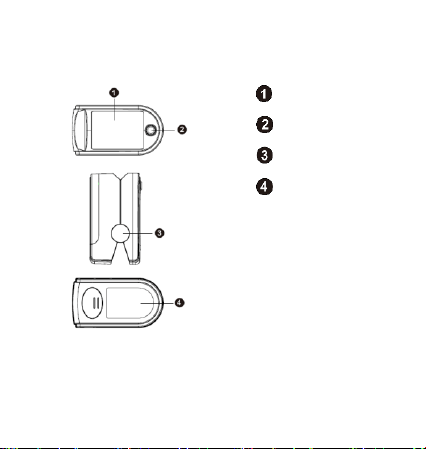
2.7 Schematic Structural Diagram
LED screen
Power-on key
Shaft housing
Battery cover
14
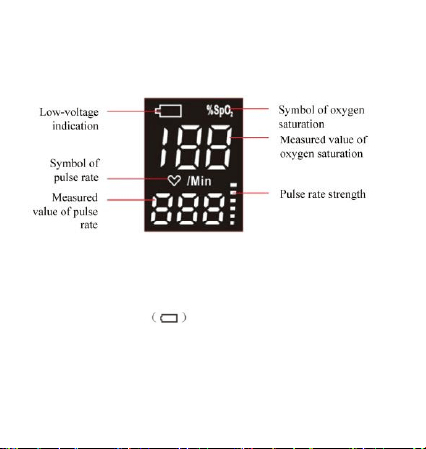
2.8 Schematic Diagram of Display
The following figure shows the information display on the LED screen
of the Oximeter in normal detection state:
Note: The display shows all segments during an internal self-check
when powered on.
When the battery icon flickers continuously on the LED screen,
the battery is low and needs to be replaced.
15
Chapter 3 Operation Instructions
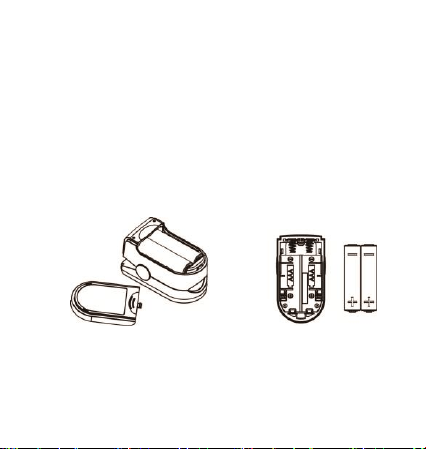
3.1 Battery Installation
Open the battery compartment. Install two AAA batteries by
matching the plus (+) and minus (-) signs in the compartment.
Slide battery cover back until it snaps in place.
Note: Incorrectly installed batteries may damage the device.
16
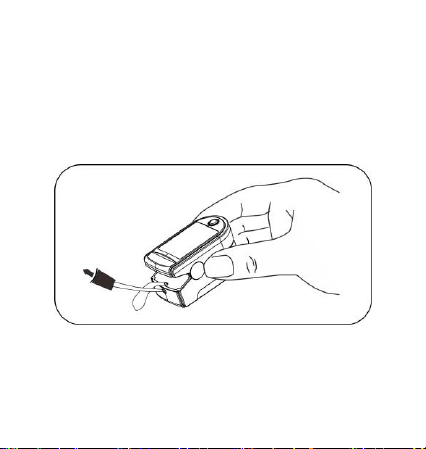
3.2 Using the Lanyard
Remove the silicone cover. Thread the thin end of the lanyard
through the lanyard hole, thread the coarse end of the
lanyard through the thin end of the lanyard, and tighten the
lanyard. Put the silicone cover back on.

17
3.3 Taking SpO
2
and Pulse Rate Readings
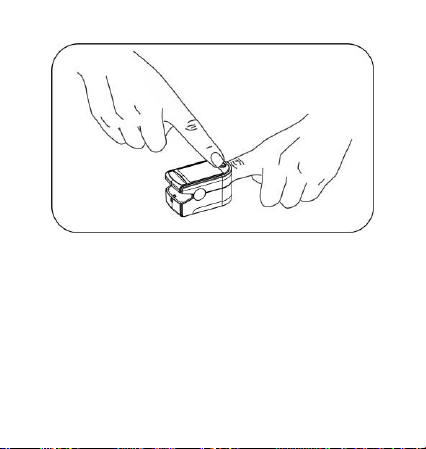
1. Insert one of your fingers into the finger chamber of the pulse
oximeter.
Note: The fingernail should be facing the top chamber (which
contains the sensor). Finger should also be inserted completely
into the chamber. Otherwise, measurement will be inaccurate.
2. Press the power-on key to turn the pulse oximeter on.
3. Keep your hand and finger still for the reading. It is
recommended that you do not move your body while taking a
reading.
4. Once the reading stabilizes, read the measured values of the
oxygen saturation level and pulse rate on the LED screen.
5. The pulse oximeter will automatically shut down in 8 seconds
after finger is removed from the chamber or if no signal is
detected by the device.
18
Note: Before each use, it is recommended to clean finger and the
silicone padded finger chamber. The silicone is non-toxic, soft and
hypoallergenic.
3.4 Tips to getting a good reading
1. Make sure that your finger is inserted deep into the chamber
so that the fingertip is placed directly in between the LED light
source and the LED sensor.

19
2. Avoid making any body movement, especially your finger while
taking measurement.
3. Long fingernails may obstruct the light sensor and prevent
accurate measurement. Please keep fingernails short while
using the device.
4. Excessive ambient infra-red light, especially in an overly bright
lit room, can interfere with the sensor, preventing an accurate
measurement.
5. Poor blood circulation can affect oximeter readings. Warm
your hands and fingers before taking measurements. Note that
the pulse oximeter is measuring your SpO
2
and PR based on
your blood flow. If the blood flow in your finger drops below a
certain level, the pulse oximeter will not be able to get a
reading.
6. Some people with medical conditions such as anemia,
hypotension and hypothermia may experience inaccurate
reading during use. In such case, we suggest that you consult a
physician.
7. The pulse bar graph which indicates pulse strength can be used
to determine the reliability of a reading. If the height of the
pulse bar is less than 30%, this indicates signal inadequacy and
the displayed SpO
2
and Pulse Rate value is potentially incorrect.
Readjust your finger to ensure proper placement.

20
Chapter 4 Cleaning and Disinfection
It is recommended to clean the pulse oximeter regularly. The pulse
oximeter can be disinfected as needed.
To clean, use a soft cloth lightly dampened with water.
To disinfect, use a soft cloth lightly dampened with isopropyl alcohol.
1. Make sure that the device is off and remove the batteries.
2. Wipe the outer surface of the device and the finger chamber
using lightly dampened soft cloth.
3. Allow the device to air dry thoroughly before use.
Caution: Do not use any strong dissolving agent such as
acetone.
Caution: Do not rub the body of the device using materials
such as steel wire balls or polished metal objects.

21
Caution: Do not immerse or soak any part of the device in any
liquid.
Caution: Do not pour or spray liquid onto the device.
Caution: Do not allow any liquid to seep into the device
during cleaning.
Caution: Do not disinfect the device using high-temperature
and/or high-pressure disinfecting gas.

22
Chapter 5 Maintenance and Troubleshooting
5.1 Maintenance
Remove the batteries from the battery compartment if the
pulse oximeter will not be used for an extended period of
time.
Replace the batteries if they are low on power.
Clean the pulse oximeter and the fingertip before every use
to ensure accurate reading.
Store the pulse oximeter between -13F and 158F (–25C
and +70C) and at humidity levels no greater than 93%.
Periodically check the pulse oximeter for damage.
Do not use the pulse oximeter in an environment with
flammable gases and/or where the temperature or humidity
is excessively high or low.

23
5.2 Troubleshooting
Problems
Possible Cause
Solution
The oximeter
fails to display
the blood
oxygen
saturation
levels and/or
pulse rate.
1. Finger is not
inserted
correctly.
2. User’s blood
flow is too low
to be measured.
1. Make sure that
finger is placed
right in between
the sensor and
LED lights.
2. Make sure that
nothing is
restricting the
user’s blood
flow.

24
Problems
Possible Cause
Solution
The SpO
2
or
Pulse Rate
reading is
unstable or
fluctuates.
1. Finger may not
be inserted
deep enough.
2. Excessive body
movement.
3. Pulse is too
weak.
1. Insert finger
deep into the
chamber.
2. Please do not
move during
measurement.
3. Warm finger or
switch finger.
The oximeter
cannot be
powered on.
1. Batteries are
drained.
2. Batteries are
incorrectly
installed.
3. The oximeter is
damaged or
defective.
1. Replace the
batteries.
2. Please refer to
‘Battery
Installation’
instruction.
3. Please contact
the distributor.

25
Problems
Possible Cause
Solution
The display
screen turns
off suddenly.
1. The oximeter
powers off
automatically
when no signal
is detected for
more than 8
seconds.
2. Batteries are
drained.
1. This is normal.
Just turn the
oximeter on
again.
2. Replace the
batteries.
Chapter 6 Technical Description and Safety Type
6.1 Technical Specifications
1. Dimensions: 58.0 mm (Width) × 32.0 mm (Depth) × 33.2 mm
(Height) (Approximately 2.28 inch X 1.25 inch X 1.30 inch)
Weight: 49.5 g/1.7 oz (including the weight of two AAA batteries)
2. Peak wavelength range of the light emitted by the probe: red light
660 nm ± 3nm; infrared light 905 nm ± 10nm.

26
3. Maximum optical output power of the probe: 2.4 mW for infrared
light (905 nm).3.2mW for infrared light (660nm)
4. Working power supply and current
Internal Power Supply
Two 1.5 V dry batteries
Working Current
35 mA
5. Normal working condition
Working Temperature
5C to 40C (41F to 104F)
Relative Humidity
15% to 93%, non-condensing
Atmospheric Pressure
700 hPa to 1060 hPa

27
Rated Voltage
DC 3.0 V
6. Technical parameters
Parameter
Value
Display range
Oxygen
saturation
0% to 100%
Pulse rate
0 bpm to 250 bpm
Resolution
Oxygen
saturation
1%
Pulse rate
1 bpm
Measurement
accuracy
Oxygen
saturation
± 2% (70% to 100%)
No requirement (≤ 69%)
Pulse rate
± 2 bpm (30 to 99 bpm)
± 2% (100 to 250 bpm)
7. Capability to resist ambient light interference
Comparing the measured value of oxygen saturation taken in indoor

28
natural light or other illumination sources to that taken in darkroom
condition, the deviation is smaller than ± 1%.
6.2 Technical Description
1. Oxygen Saturation Accuracy
The accuracy is ±2% (in the absence of movement) between 70% to
100%.
Note: The oxygen saturation accuracy is a root mean square of the
difference. The measured values of the device are distributed
according to statistical probability. Only about two thirds of the
measured values of the Pulse Oximeter fall within ±Arms of the
measured values of a carbon-monoxide-blood-gas analyzer.
2. Determination of Oxygen Saturation Accuracy
The claimed oxygen saturation is supported by coverage of the entire
range of clinical research measurements.
3. Data Collection
In the clinical test process, data points are recorded with comparable
density in the entire claimed range.
4. Data Analysis

29
For each claimed range, the oxygen saturation accuracy of the Pulse
Oximeter should be represented in the form of mean root square of
the difference between the measured values of oxygen saturation
and the reference value. The formula is as follows:
Arms=
n
SSPO
n
i
Ri
1
2
i2 )(
Arms: accuracy
n
: test sample quantity
iSPO2
: measured value of pulse oxygen saturation during the first
measurement using the finger pulse Oximeter
iRS
: reference value of pulse oxygen saturation during the i
th
measurement using the carbon-monoxide-blood-gas analyzer
5. Characteristics of Population under Clinical Research
The summary clinical research report for evaluating SpO
2
accuracy
should state whether the tested subject suffers from disease or is
healthy, and should state the skin color, age, and gender of the tested
subject.

30
6. Data updating interval: The display data updating interval is 1
second.
7. When the signal detected by the Pulse Oximeter is incomplete or
weak, the readings of the oxygen saturation and pulse rate on the LED
screen are "--" and "--".
Note: The functional tester shall not be used to evaluate the
accuracy of the probe of the Pulse Oximeter or the accuracy of the
pulse oxygen monitor
Note: The Pulse Oximeter has a specific calibration curve, and is
precise for the combination of the mainframe and probe of the
Pulse Oximeter. If the functional tester can measure the portion of
overall errors of the mainframe-probe system of the Oximeter
attributable to the mainframe of the Oximeter, the functional tester
can test the accuracy of a Pulse Oximeter that duplicates the
calibration curve.
Note: The product does not provide alarm function and is not
suitable for continuous long-term monitoring. When the probe of
the Oximeter fails, the Oximeter displays "--" and "--".
31
6.3 Safety Type
Anti-electric-shock type: internal power supply device
Anti-electric-shock degree: BF-type application part
Running mode: continuous operation
Liquid-intrusion protection class: IP22
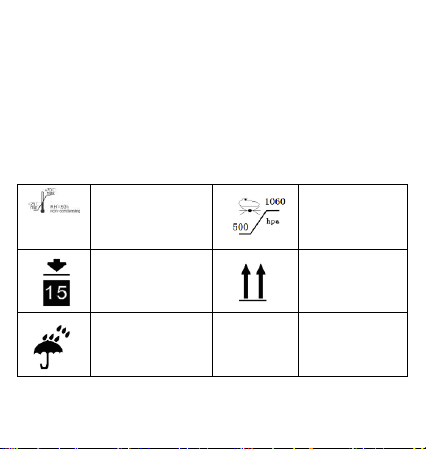
6.4 Storage and Transportation
Storage
temperature and
relative
humidity
Atmospheric
pressure:
500hpa to
1060hpa
Limited height: 15
stories
Place upward
Guard against
moisture