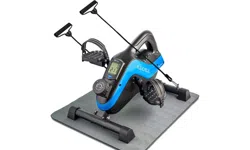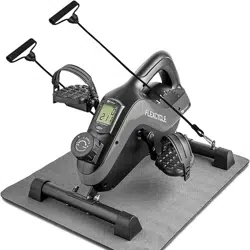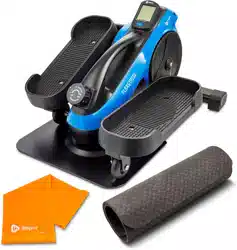
FLEXSTRIDE PRO PEDAL EXERCISER
READY,
SET, PRO
USER MANUAL

HELLO THERE.
Joel and I are athletes who suffered from
severe ACL injuries a few months apart.
We purchased multiple pieces of exercise
equipment for our in-home rehab but were left
disappointed and frustrated by fitness gear
that made big promises but gave no support, no
well-thought-out plan to follow, and no results.
And that’s how Lifepro came about, and why
the Endurance Training collection was created
— we’ve set out to change all of that. It’s why
every piece of equipment bearing our name
not only undergoes rigorous scrutiny to make
sure it delivers on power and efficacy, but also
comes with built-in support from our ‘guiding
angels’ and a built-in lifetime warranty so that
you’re never left hanging.
Welcome to Lifepro.
We’re in this together now.
Aerobic exercise has
enormous benefits
for your body, brain,
and mental health.
At least 75 minutes
of vigorous aerobic
exercise such
as pedaling, are
recommended each
week for optimal
health.

HELLO THERE.
Joel and I are athletes who suffered from
severe ACL injuries a few months apart.
We purchased multiple pieces of exercise
equipment for our in-home rehab but were left
disappointed and frustrated by fitness gear
that made big promises but gave no support, no
well-thought-out plan to follow, and no results.
And that’s how Lifepro came about, and why
the Endurance Training collection was created
— we’ve set out to change all of that. It’s why
every piece of equipment bearing our name
not only undergoes rigorous scrutiny to make
sure it delivers on power and efficacy, but also
comes with built-in support from our ‘guiding
angels’ and a built-in lifetime warranty so that
you’re never left hanging.
Welcome to Lifepro.
We’re in this together now.
Aerobic exercise has
enormous benefits
for your body, brain,
and mental health.
At least 75 minutes
of vigorous aerobic
exercise such
as pedaling, are
recommended each
week for optimal
health.

Not everyone can afford to hire a personal trainer or a team of professionals
to help them feel and look their best. But the good news is: you don’t have
to. Lifepro brings the gym to you.
With the Lifepro FlexStride Pro Pedal Exerciser, you can build cardiovascular
fitness and muscle strength from the comfort of your home or office. Use
the FlexStride Pro while sitting on the couch watching TV, while reading a
book, or while working at the office. The FlexStride Pro is small and portable
enough to take with you to work and fits right under your desk!
The FlexStride Pro improves blood circulation, muscle tone, and flexibility.
Sixteen pedal resistance levels allow you to create custom pedaling
workouts. On the lowest resistance level, workouts would be equivalent to a
leisurely bike ride in the park. Increasing the pedal resistance allows you to
create more intense workouts, similar to biking up a steep hill. Just sit back,
relax, and let your legs do the work! See results in just 15–20 minutes a day.
Redefine your workouts and experience the
transformative power of the Lifepro FlexStride Pro:
Increase strength & flexibility: improves stability and muscle tone
Regulate weight: boost your heart rate and burn calories.
Decrease chronic pain: improves core strength & circulation
Boost your metabolism: encourages your body to burn fat faster
Decrease your stress: increases serotonin and decreases cortisol
Lower blood pressure: improves circulation
Develop stronger bones: increases bone density
Check out the information in this manual for ways to get started
using your FlexStride Pro. Next, be sure to visit our website
flexstridepro.lifeprofitness.com for access to our FREE library of workout
videos which demonstrate how to easily incorporate the FlexStride Pro into
your fitness routine
.
4 FlexStride Pro User Manual Lifepro Endurance Training Collection 5
Not everyone can afford to hire a personal trainer or a team of professionals
to help them feel and look their best. But the good news is: you don’t have
to. Lifepro brings the gym to you.
With the Lifepro FlexStride Pro Pedal Exerciser, you can build cardiovascular
fitness and muscle strength from the comfort of your home or office. Use
the FlexStride Pro while sitting on the couch watching TV, while reading a
book, or while working at the office. The FlexStride Pro is small and portable
enough to take with you to work and fits right under your desk!
The FlexStride Pro improves blood circulation, muscle tone, and flexibility.
Sixteen pedal resistance levels allow you to create custom pedaling
workouts. On the lowest resistance level, workouts would be equivalent to a
leisurely bike ride in the park. Increasing the pedal resistance allows you to
create more intense workouts, similar to biking up a steep hill. Just sit back,
relax, and let your legs do the work! See results in just 15–20 minutes a day.
Redefine your workouts and experience the
transformative power of the Lifepro FlexStride Pro:
Increase strength & flexibility: improves stability and muscle tone
Regulate weight: boost your heart rate and burn calories.
Decrease chronic pain: improves core strength & circulation
Boost your metabolism: encourages your body to burn fat faster
Decrease your stress: increases serotonin and decreases cortisol
Lower blood pressure: improves circulation
Develop stronger bones: increases bone density
Check out the information in this manual for ways to get started
using your FlexStride Pro. Next, be sure to visit our website
flexstridepro.lifeprofitness.com for access to our FREE library of workout
videos which demonstrate how to easily incorporate the FlexStride Pro into
your fitness routine
.
4 FlexStride Pro User Manual Lifepro Endurance Training Collection 5

6 FlexStride Pro User Manual Lifepro Endurance Training Collection 7
GET ACQUAINTED
Lifepro
FlexStride Pro
Pedal Exerciser
GET STARTED
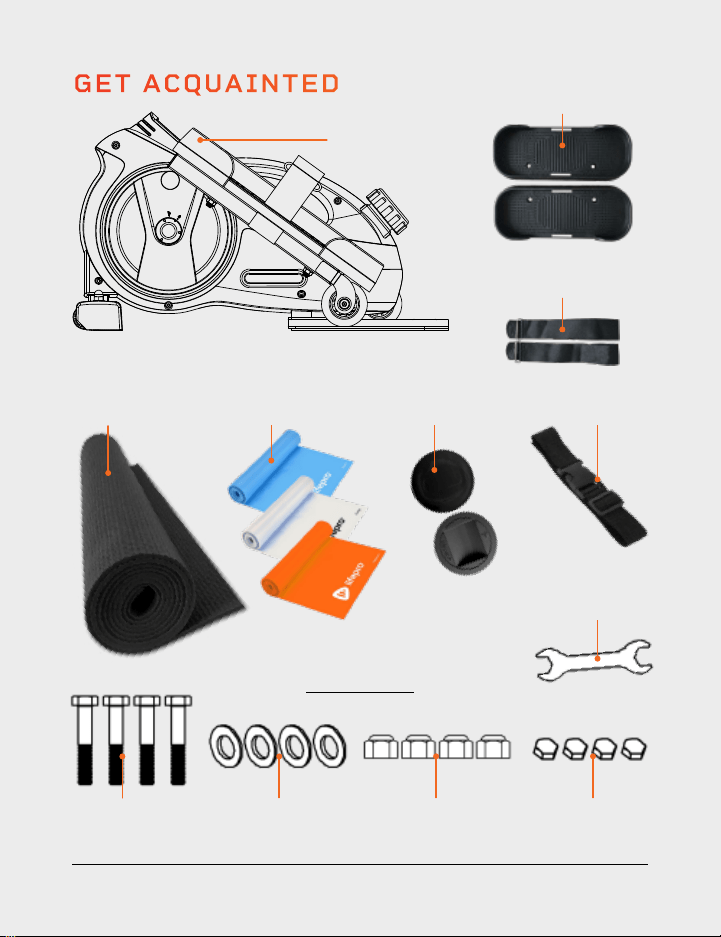
WHAT’S IN THE BOX
• Lifepro FlexStride Pro Pedal Exerciser
• Pedals (2)
• Pedal Straps (2)
• Wheel Stoppers (2)
• Tether Strap
• Yoga Resistance Bands (3) + Carry Bag
• Non-Slip Exercise Mat
• User Guide
FIRST STEPS
1. Remove your FlexStride Pro from the shipping box and remove all
packaging from the unit, parts, and hardware.
2. Read carefully through this user manual and all safety instructions
before assembling and using the FlexStride Pro.
3. Go to flexstridepro.lifeprofitness.com and register your product within
14 days of purchase to activate your lifetime warranty.
4. Complete the steps in the 7-MINUTE ASSEMBLY GUIDE on page 8
to begin using your FlexStride Pro.
CUSTOMER SUPPORT
If you have any questions about setting up your FlexStride Pro, we’re
here to help. Call or email us and an experienced customer support
representative will be happy to assist you: (800) 563-6604 or
support@lifeprofitness.com.
FLEXSTRIDE PRO
PEDAL EXERCISER
ENDURANCE TRAINING
• AAA Batteries (2)
• Wrench
• Hardware
• M8 Bolts (4)
• D8 Flat Washers (4)
• M8 Nylon Lock Nuts (4)
• Adhesive Foam Pads (4)
Wheel
Stoppers (2)
Wrench
Pedals (2)
Pedal Straps (2)
Nylon Lock
Nuts (4)
Adhesive Foam
Pads (4)
D8 Flat
Washers (4)
Hardware
M8 Bolts (4)
Exercise
Mat
Tether
Strap
Yoga Resistance
Bands (3)
6 FlexStride Pro User Manual Lifepro Endurance Training Collection 7
GET ACQUAINTED
Lifepro
FlexStride Pro
Pedal Exerciser
GET STARTED
WHAT’S IN THE BOX
• Lifepro FlexStride Pro Pedal Exerciser
• Pedals (2)
• Pedal Straps (2)
• Wheel Stoppers (2)
• Tether Strap
• Yoga Resistance Bands (3) + Carry Bag
• Non-Slip Exercise Mat
• User Guide
FIRST STEPS
1. Remove your FlexStride Pro from the shipping box and remove all
packaging from the unit, parts, and hardware.
2. Read carefully through this user manual and all safety instructions
before assembling and using the FlexStride Pro.
3. Go to flexstridepro.lifeprofitness.com and register your product within
14 days of purchase to activate your lifetime warranty.
4. Complete the steps in the 7-MINUTE ASSEMBLY GUIDE on page 8
to begin using your FlexStride Pro.
CUSTOMER SUPPORT
If you have any questions about setting up your FlexStride Pro, we’re
here to help. Call or email us and an experienced customer support
representative will be happy to assist you: (800) 563-6604 or
support@lifeprofitness.com.
FLEXSTRIDE PRO
PEDAL EXERCISER
ENDURANCE TRAINING
• AAA Batteries (2)
• Wrench
• Hardware
• M8 Bolts (4)
• D8 Flat Washers (4)
• M8 Nylon Lock Nuts (4)
• Adhesive Foam Pads (4)
Wheel
Stoppers (2)
Wrench
Pedals (2)
Pedal Straps (2)
Nylon Lock
Nuts (4)
Adhesive Foam
Pads (4)
D8 Flat
Washers (4)
Hardware
M8 Bolts (4)
Exercise
Mat
Tether
Strap
Yoga Resistance
Bands (3)
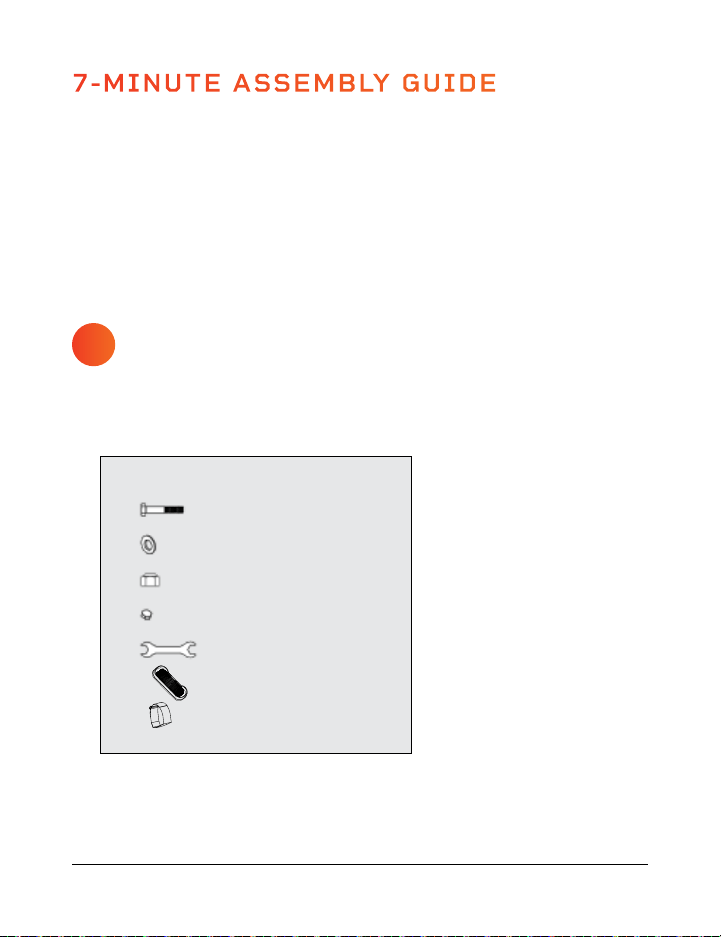
GATHER HARDWARE
AND COMPONENTS
1. Gather all the required assembly components and hardware for your
FlexStride Pro, listed below.
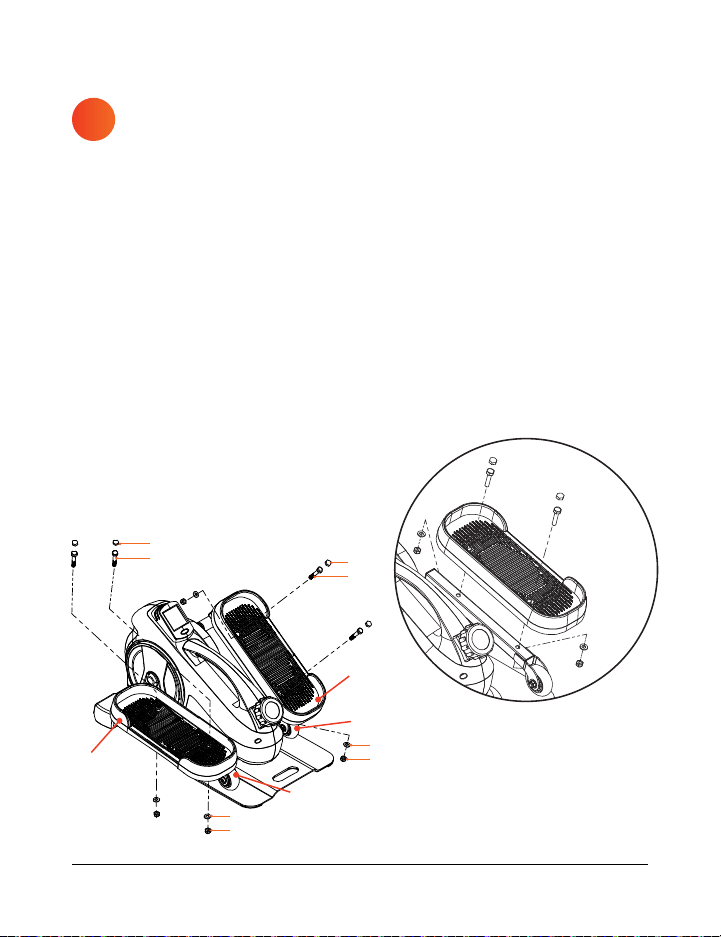
ATTACH THE PEDALS
TO THE PEDAL ARMS
1. Align the one pedal (F) with the screw holes in the right pedal arm (H).
2. Insert two bolts (A) through the top of the pedal and through the screw
holes in the pedal arm.
3. Put a washer (B) onto the end of each bolt.
4. Screw a lock nut (C) onto the end of each bolt.
5. Use the wrench (E) to tighten the two nuts, securing the pedal to the
pedal arm. Make the nuts as tight as you can.
6. Remove the adhesive backing from two foam pads (D) and firmly press
one to each bolt head.
7. Align the second pedal with the screw holes in the left pedal arm (I).
8. Repeat steps 2–6 to secure the left pedal.
7-MINUTE ASSEMBLY GUIDE
8 FlexStride Pro User Manual Lifepro Endurance Training Collection 9
ASSEMBLY NOTES
• Assemble the FlexStride Pro on a flat, sturdy floor, covered by a mat or
cloth to protect your carpet or flooring.
• Ensure the space is free of obstructions.
F
F
A
C
C
A
D
B
B
D
H
I
1
2
A
B
C
D
E
F
G
M8 Bolts (x4)
D8 Flat Washers (x4)
M8 Lock Nuts (x4)
Foam Pads (x4)
Wrench (x1)
Pedals (2)
Velcro
®
Pedal Straps (2)
HARDWARE AND COMPONENTS
GATHER HARDWARE
AND COMPONENTS
1. Gather all the required assembly components and hardware for your
FlexStride Pro, listed below.
ATTACH THE PEDALS
TO THE PEDAL ARMS
1. Align the one pedal (F) with the screw holes in the right pedal arm (H).
2. Insert two bolts (A) through the top of the pedal and through the screw
holes in the pedal arm.
3. Put a washer (B) onto the end of each bolt.
4. Screw a lock nut (C) onto the end of each bolt.
5. Use the wrench (E) to tighten the two nuts, securing the pedal to the
pedal arm. Make the nuts as tight as you can.
6. Remove the adhesive backing from two foam pads (D) and firmly press
one to each bolt head.
7. Align the second pedal with the screw holes in the left pedal arm (I).
8. Repeat steps 2–6 to secure the left pedal.
7-MINUTE ASSEMBLY GUIDE
8 FlexStride Pro User Manual Lifepro Endurance Training Collection 9
ASSEMBLY NOTES
• Assemble the FlexStride Pro on a flat, sturdy floor, covered by a mat or
cloth to protect your carpet or flooring.
• Ensure the space is free of obstructions.
F
F
A
C
C
A
D
B
B
D
H
I
1
2
A
B
C
D
E
F
G
M8 Bolts (x4)
D8 Flat Washers (x4)
M8 Lock Nuts (x4)
Foam Pads (x4)
Wrench (x1)
Pedals (2)
Velcro
®
Pedal Straps (2)
HARDWARE AND COMPONENTS
10 FlexStride Pro User Manual Lifepro Endurance Training Collection 11
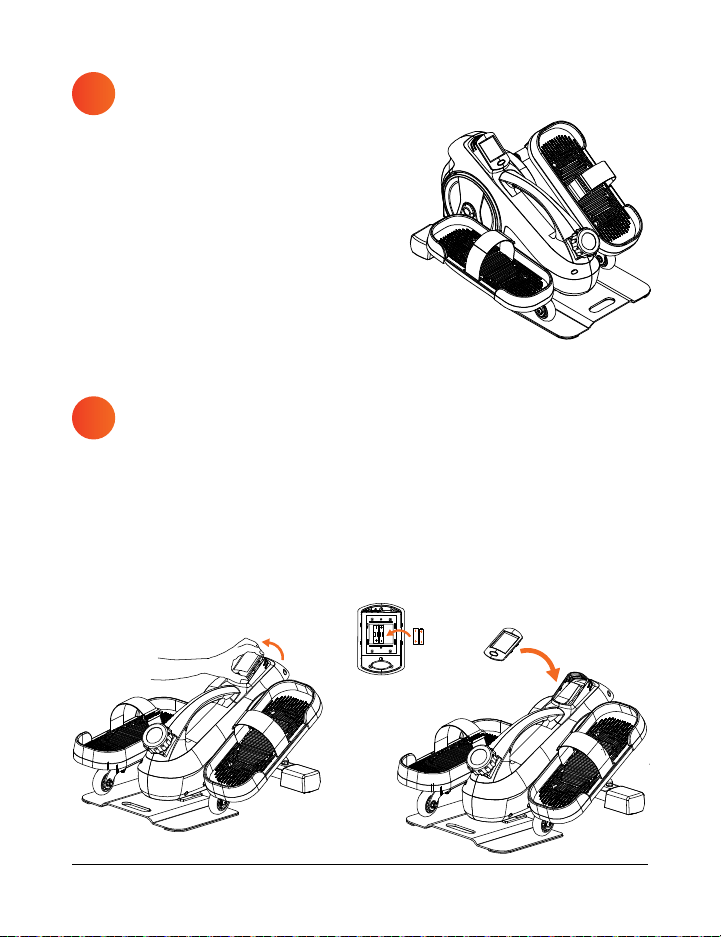
INSTALL THE BATTERIES IN
THE MONITOR
1. Remove the monitor by carefully pulling it out from the top edge.
2. Insert two AAA batteries into the battery receptacle. Ensure they are
oriented correctly.
3. Carefully tuck the wires back in as you re-insert the monitor. Insert
from the bottom first, then press in the top of the monitor.
ATTACH THE PEDAL STRAPS
TO THE PEDALS (OPTIONAL)
1. Slide the end of a pedal strap (G)
down through the slot in one side of
the right pedal and up through the
slot on the other side of the pedal.
2. Fasten the pedal strap with the
Velcro
®
.
3. Repeat steps 1–2 to attach the
second pedal strap to the left pedal.
INSTALL A FITNESS APP TO
MANAGE YOUR WORKOUTS
1. Scan the QR code below for a list of
compatible fitness apps.
NOTE: Many newer phones have a QR code
scanning feature built into the camera app. If
you do not have this QR code scanning feature
in your camera app, or if you do not have a
standalone QR code scanning app, you will need
to download one before proceeding.
2. Download your preferred fitness app.
3. On your phone, go to Settings > Bluetooth,
to turn on Bluetooth.
4. In the Bluetooth device list, connect to your FlexStride Pro.
5. Open the app and create an account.
6. Now, you can create a personalized exercise plan in the app. You can
follow structured pedaling workouts, including cycling routes around
the world. Track calories burned, your speed, workout duration, and all
of your workout activity information. Create training goals, complete
fitness challenges, and more.
Apps are not affiliated with Lifepro. Some features may require in-app purchase.
3
4
5

10 FlexStride Pro User Manual Lifepro Endurance Training Collection 11
INSTALL THE BATTERIES IN
THE MONITOR
1. Remove the monitor by carefully pulling it out from the top edge.
2. Insert two AAA batteries into the battery receptacle. Ensure they are
oriented correctly.
3. Carefully tuck the wires back in as you re-insert the monitor. Insert
from the bottom first, then press in the top of the monitor.
ATTACH THE PEDAL STRAPS
TO THE PEDALS (OPTIONAL)
1. Slide the end of a pedal strap (G)
down through the slot in one side of
the right pedal and up through the
slot on the other side of the pedal.
2. Fasten the pedal strap with the
Velcro
®
.
3. Repeat steps 1–2 to attach the
second pedal strap to the left pedal.
INSTALL A FITNESS APP TO
MANAGE YOUR WORKOUTS
1. Scan the QR code below for a list of
compatible fitness apps.
NOTE: Many newer phones have a QR code
scanning feature built into the camera app. If
you do not have this QR code scanning feature
in your camera app, or if you do not have a
standalone QR code scanning app, you will need
to download one before proceeding.
2. Download your preferred fitness app.
3. On your phone, go to Settings > Bluetooth,
to turn on Bluetooth.
4. In the Bluetooth device list, connect to your FlexStride Pro.
5. Open the app and create an account.
6. Now, you can create a personalized exercise plan in the app. You can
follow structured pedaling workouts, including cycling routes around
the world. Track calories burned, your speed, workout duration, and all
of your workout activity information. Create training goals, complete
fitness challenges, and more.
Apps are not affiliated with Lifepro. Some features may require in-app purchase.
3
4
5
12 FlexStride Pro User Manual Lifepro
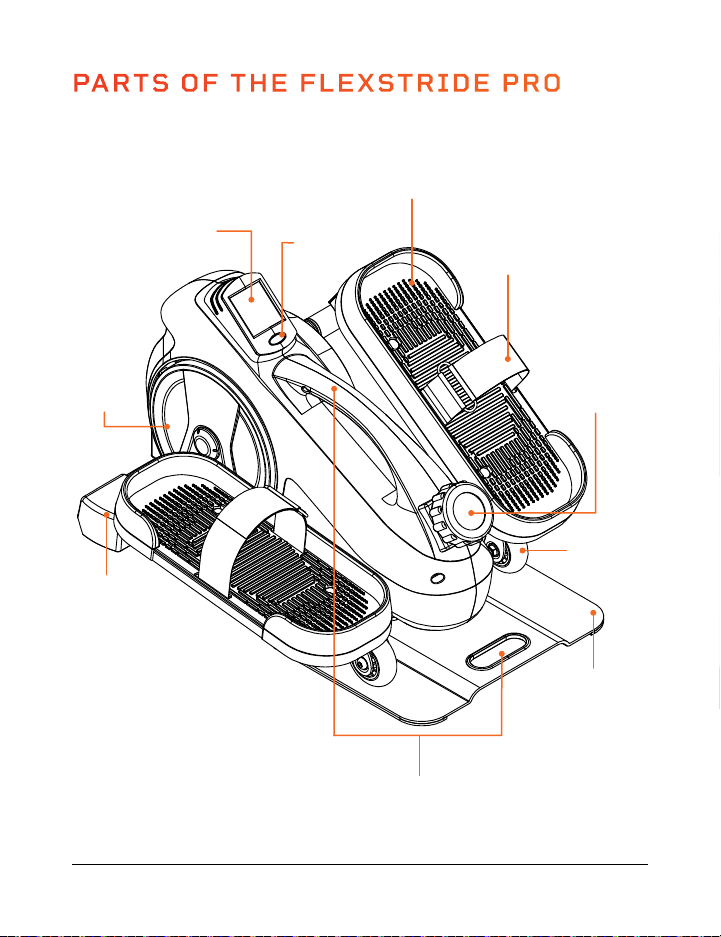
PARTS OF THE FLEXSTRIDE PRO
Tension Control
Knob
(16 Levels)
Base
Plate
Pedal
(Left & Right)
Pedal Strap
(Left & Right)
Monitor Screen
Carrying
Handle
Flywheel
Mode
Button
Carrying
Handles (2)
Wheel
(Left & Right)
End Cap with
2 Wheels
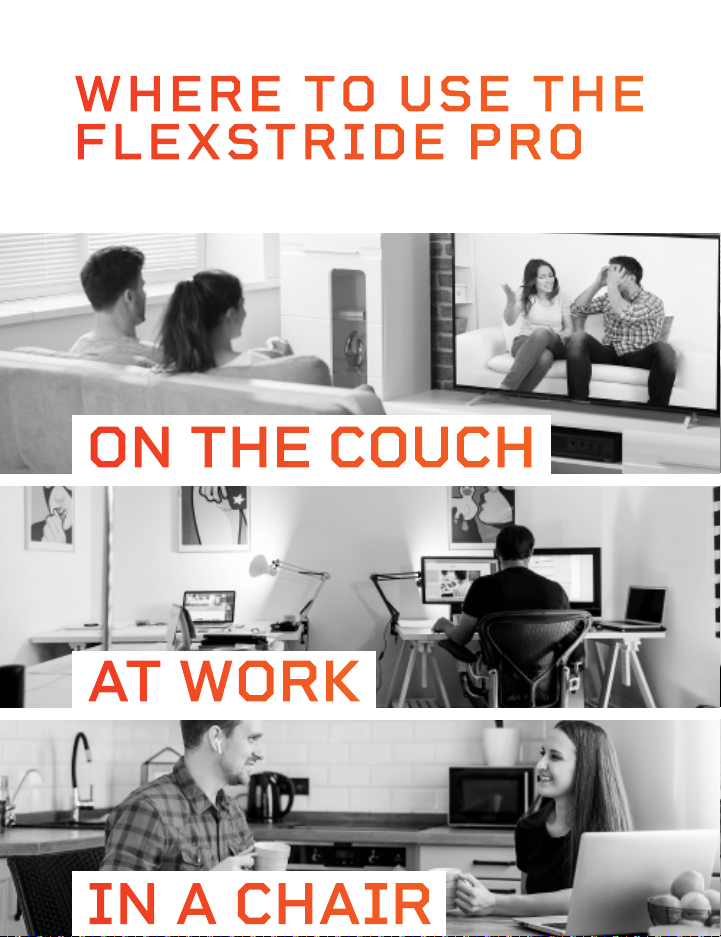
IN A CHAIR
WHERE TO USE THE
FLEXSTRIDE PRO
ON THE COUCH
AT WORK
12 FlexStride Pro User Manual Lifepro
PARTS OF THE FLEXSTRIDE PRO
Tension Control
Knob
(16 Levels)
Base
Plate
Pedal
(Left & Right)
Pedal Strap
(Left & Right)
Monitor Screen
Carrying
Handle
Flywheel
Mode
Button
Carrying
Handles (2)
Wheel
(Left & Right)
End Cap with
2 Wheels
IN A CHAIR
WHERE TO USE THE
FLEXSTRIDE PRO
ON THE COUCH
AT WORK
14 FlexStride Pro User Manual Lifepro
Endurance Training Collection 15
OPERATING INSTRUCTIONS
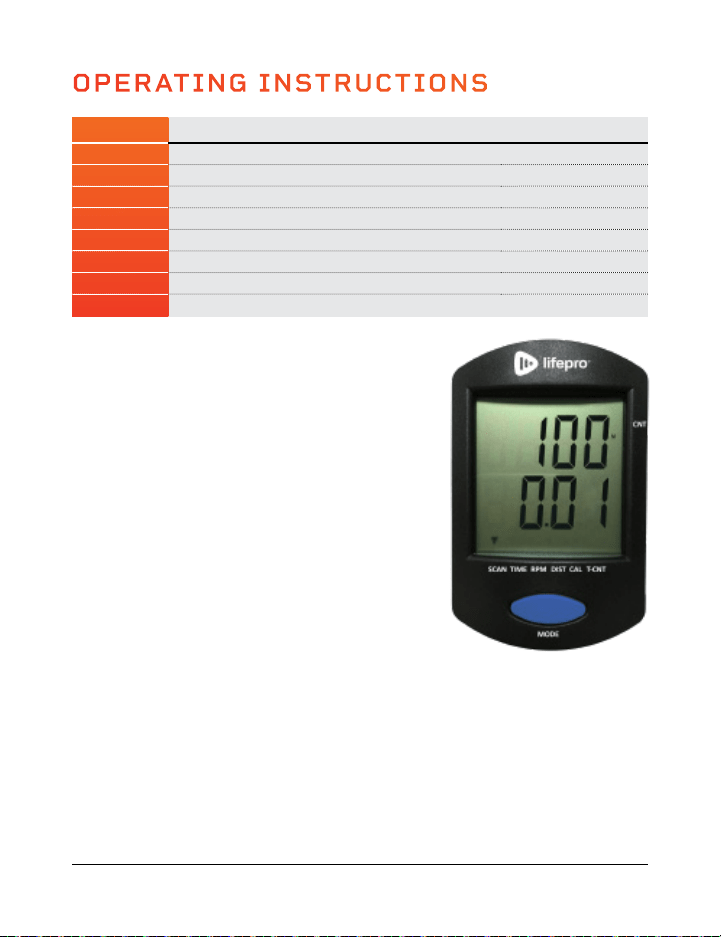
MODE INFORMATION DISPLAYED ON MONITOR VALUE
CNT Displays the count or number of strides in the workout 0 – 9999 Strides
SCAN Displays each mode in turn: time, rpm, dist, cal, t-cnt Varies
TIME Displays the duration of the workout 0:00 – 99:59 (HR:MIN)
RPM Displays the current workout speed in strides/minute 0 – 999 Strides/Min
DIST Displays the distance traveled in the workout 0 – 999.9 Mi or Km
CAL Displays the number of calories expended in the workout 0.0 – 999.9 KCAL
T-CNT Displays the total number of strides (across all workouts) 0 – 9999 Strides Total
BATTERY Displays only if the batteries need to be changed N/A
CHANGING THE MODE
The monitor’s top line shows
the “CNT”, the number
of strides in the current workout. The bottom line
shows the value of the selected mode. To change
the mode:
1. Press the blue Mode button to toggle through
the modes: scan, time, RPM, distance, calories,
and total count. See the table above for
information about each mode.
2. The small black arrow at the bottom of the
screen shows which mode is currently selected.
RESETTING ALL WORKOUT VALUES
1. Press and hold the Mode button for 3 seconds.
Workout values will flash once, then reset.
Workout values automatically reset when they
reach their maximum (for example, 999.9 miles)
and when the batteries are replaced.
SWITCHING BETWEEN MILES (M) AND KILOMETERS (K)
1. Press and hold the Mode button for at least 6 seconds. Release the button
after all of the workout values flash twice. A small M next to the count value
indicates miles are selected. A small K indicates kilometers are selected.
AUTO SHUTOFF
The monitor will automatically shut off after four minutes of inactivity. The monitor
will automatically power on when you press the Mode button or begin to exercise.
CREATING A CUSTOM PEDALING WORKOUT
Create a custom aerobic workout with your desired speed, intensity, and
duration:
1. Adjust the pedal tension (see below) to your desired resistance level.
2. Place your feet flat on the pedals.
3. Begin pedaling, forwards or backwards, at your desired speed. You can
check your speed on the monitor. Speed is displayed in RPMs (rotations/
strides per minute).
4. Keep an eye on the monitor to track your workout duration.
ADJUSTING THE PEDAL RESISTANCE/TENSION
The FlexStride Pro has sixteen levels of resistance (1–16). Level 1 is the
lowest resistance level and provides the easiest pedaling. Level 16 is the
highest resistance level and provides the most intense pedaling workout.
1. Turn the Tension Control Knob to the right or left to adjust the resistance
level. Align the arrow on the knob to the tension level you would like to
select.
2. Turn the knob to the right to increase the resistance level. Turn the knob
to the left to decrease the resistance level.
MOVING THE FLEXSTRIDE PRO
The FlexStride Pro has two carry handles to allow for easy transportation.
Grab the top carry handle to lift the FlexStride Pro and move it to a new
location.
You may also roll the FlexStride Pro to a new location:
1. Firmly grasp the carry handle in the base plate.
2. Tilt the FlexStride Pro up onto the wheels at the front of the unit.
3. Now, you can easily wheel the FlexStride Pro to its new location.

14 FlexStride Pro User Manual Lifepro
Endurance Training Collection 15
OPERATING INSTRUCTIONS
MODE INFORMATION DISPLAYED ON MONITOR VALUE
CNT Displays the count or number of strides in the workout 0 – 9999 Strides
SCAN Displays each mode in turn: time, rpm, dist, cal, t-cnt Varies
TIME Displays the duration of the workout 0:00 – 99:59 (HR:MIN)
RPM Displays the current workout speed in strides/minute 0 – 999 Strides/Min
DIST Displays the distance traveled in the workout 0 – 999.9 Mi or Km
CAL Displays the number of calories expended in the workout 0.0 – 999.9 KCAL
T-CNT Displays the total number of strides (across all workouts) 0 – 9999 Strides Total
BATTERY Displays only if the batteries need to be changed N/A
CHANGING THE MODE
The monitor’s top line shows
the “CNT”, the number
of strides in the current workout. The bottom line
shows the value of the selected mode. To change
the mode:
1. Press the blue Mode button to toggle through
the modes: scan, time, RPM, distance, calories,
and total count. See the table above for
information about each mode.
2. The small black arrow at the bottom of the
screen shows which mode is currently selected.
RESETTING ALL WORKOUT VALUES
1. Press and hold the Mode button for 3 seconds.
Workout values will flash once, then reset.
Workout values automatically reset when they
reach their maximum (for example, 999.9 miles)
and when the batteries are replaced.
SWITCHING BETWEEN MILES (M) AND KILOMETERS (K)
1. Press and hold the Mode button for at least 6 seconds. Release the button
after all of the workout values flash twice. A small M next to the count value
indicates miles are selected. A small K indicates kilometers are selected.
AUTO SHUTOFF
The monitor will automatically shut off after four minutes of inactivity. The monitor
will automatically power on when you press the Mode button or begin to exercise.
CREATING A CUSTOM PEDALING WORKOUT
Create a custom aerobic workout with your desired speed, intensity, and
duration:
1. Adjust the pedal tension (see below) to your desired resistance level.
2. Place your feet flat on the pedals.
3. Begin pedaling, forwards or backwards, at your desired speed. You can
check your speed on the monitor. Speed is displayed in RPMs (rotations/
strides per minute).
4. Keep an eye on the monitor to track your workout duration.
ADJUSTING THE PEDAL RESISTANCE/TENSION
The FlexStride Pro has sixteen levels of resistance (1–16). Level 1 is the
lowest resistance level and provides the easiest pedaling. Level 16 is the
highest resistance level and provides the most intense pedaling workout.
1. Turn the Tension Control Knob to the right or left to adjust the resistance
level. Align the arrow on the knob to the tension level you would like to
select.
2. Turn the knob to the right to increase the resistance level. Turn the knob
to the left to decrease the resistance level.
MOVING THE FLEXSTRIDE PRO
The FlexStride Pro has two carry handles to allow for easy transportation.
Grab the top carry handle to lift the FlexStride Pro and move it to a new
location.
You may also roll the FlexStride Pro to a new location:
1. Firmly grasp the carry handle in the base plate.
2. Tilt the FlexStride Pro up onto the wheels at the front of the unit.
3. Now, you can easily wheel the FlexStride Pro to its new location.
16 FlexStride Pro User Manual Lifepro
Endurance Training Collection 17
SECURING THE FLEXSTRIDE PRO
USING THE FLEXSTRIDE PRO WITH THE WHEEL STOPPERS
While using the pedal exerciser with a wheeled office chair, use the included
wheel stoppers to prevent the chair from moving backwards when pedaling.
To use the wheel stoppers:
1. Place the wheel stoppers on the floor, with the notched-side facing up.
2. Insert the chair’s front wheels into the notches of the stoppers.
3. Position the pedal exerciser in front of the chair.
4. Sit in the chair and begin pedaling. Your feet should easily reach the
pedals while sitting in the chair. Your knees should be slightly bent
when the pedals are furthest from you.
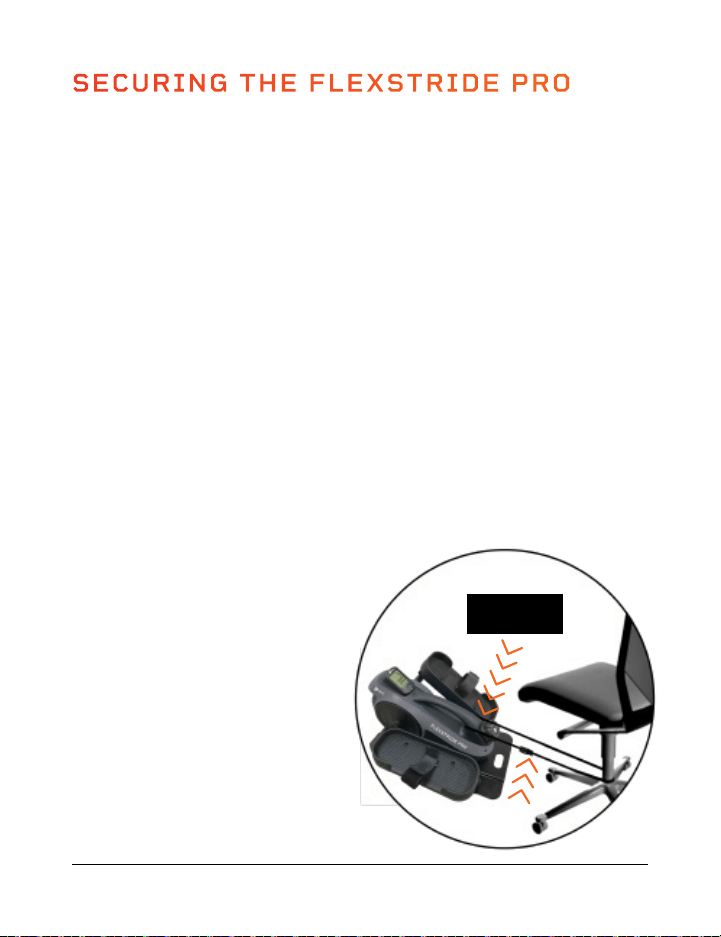
USING THE FLEXSTRIDE PRO WITH THE TETHER STRAP
The FlexStride Pro comes with a long strap which can be used to tether it
to a chair. Most users will NOT need to tether the FlexStride Pro; pedaling
with downward force will prevent it from slipping on carpet and most other
surfaces. To tether the FlexStride Pro when using it on a slippery surface:
1. Position the FlexStride Pro in front of a chair.
2. Sit in the chair and begin pedaling. Your feet should easily reach the
pedals while sitting in the chair.
Your knees should be slightly
bent when the pedals are
furthest from you.
3. Unbuckle the tether strap and
route it through the carry handle
and around the chair as shown.
4. Pull the strap taut and
re-connect the buckle.
5. Pedal the bike to make sure
the distance is correct. Adjust
if necessary.
Route Around
Handle
Tether
Strap
TIPS FOR USING THE FLEXSTRIDE PRO
HOW TO PEDAL
1. Start pushing downward on the pedal when the pedal arm is at its
highest position.
2. Stop pedaling when the pedal is at its lowest position.
3. Make sure to press downward with your feet while you are pedaling.
PRO TIP: The included yoga resistance bands provide a great way to
exercise your arms and legs at the same time. While you are pedaling, use
the resistance bands to do bicep curls, shoulder presses, and more!
KEEP YOUR UPPER BODY STILL
Pedaling is easier when you keep your upper body still.
1. Use your legs to pedal, not your body.
2. Your head and upper body should not move while you are pedaling.
3. Don’t rock from side to side.
4. It is easier to keep your body still if you pedal downward by pressing
your feet downward--rather than forward--on the pedals.
SAFETY TIPS
• Place the FlexStride Pro on a sturdy, level, non-slip surface, with at least
12 inches of clearance on all sides. Place a mat or rug under the bike to
protect your carpet or flooring.
• Stop exercising immediately if you feel lightheaded, or nauseous, or if
you experience pain, chest tightness, irregular heartbeat, or shortness
of breath.
• Start with the lowest resistance level.
• Slowly increase the resistance, as well as your speed and workout
duration.
• Drink plenty of water before, during, and after exercise.
• Do not sit or stand on the FlexStride Pro.
• Do not use on a full stomach.

16 FlexStride Pro User Manual Lifepro
Endurance Training Collection 17
SECURING THE FLEXSTRIDE PRO
USING THE FLEXSTRIDE PRO WITH THE WHEEL STOPPERS
While using the pedal exerciser with a wheeled office chair, use the included
wheel stoppers to prevent the chair from moving backwards when pedaling.
To use the wheel stoppers:
1. Place the wheel stoppers on the floor, with the notched-side facing up.
2. Insert the chair’s front wheels into the notches of the stoppers.
3. Position the pedal exerciser in front of the chair.
4. Sit in the chair and begin pedaling. Your feet should easily reach the
pedals while sitting in the chair. Your knees should be slightly bent
when the pedals are furthest from you.
USING THE FLEXSTRIDE PRO WITH THE TETHER STRAP
The FlexStride Pro comes with a long strap which can be used to tether it
to a chair. Most users will NOT need to tether the FlexStride Pro; pedaling
with downward force will prevent it from slipping on carpet and most other
surfaces. To tether the FlexStride Pro when using it on a slippery surface:
1. Position the FlexStride Pro in front of a chair.
2. Sit in the chair and begin pedaling. Your feet should easily reach the
pedals while sitting in the chair.
Your knees should be slightly
bent when the pedals are
furthest from you.
3. Unbuckle the tether strap and
route it through the carry handle
and around the chair as shown.
4. Pull the strap taut and
re-connect the buckle.
5. Pedal the bike to make sure
the distance is correct. Adjust
if necessary.
Route Around
Handle
Tether
Strap
TIPS FOR USING THE FLEXSTRIDE PRO
HOW TO PEDAL
1. Start pushing downward on the pedal when the pedal arm is at its
highest position.
2. Stop pedaling when the pedal is at its lowest position.
3. Make sure to press downward with your feet while you are pedaling.
PRO TIP: The included yoga resistance bands provide a great way to
exercise your arms and legs at the same time. While you are pedaling, use
the resistance bands to do bicep curls, shoulder presses, and more!
KEEP YOUR UPPER BODY STILL
Pedaling is easier when you keep your upper body still.
1. Use your legs to pedal, not your body.
2. Your head and upper body should not move while you are pedaling.
3. Don’t rock from side to side.
4. It is easier to keep your body still if you pedal downward by pressing
your feet downward--rather than forward--on the pedals.
SAFETY TIPS
• Place the FlexStride Pro on a sturdy, level, non-slip surface, with at least
12 inches of clearance on all sides. Place a mat or rug under the bike to
protect your carpet or flooring.
• Stop exercising immediately if you feel lightheaded, or nauseous, or if
you experience pain, chest tightness, irregular heartbeat, or shortness
of breath.
• Start with the lowest resistance level.
• Slowly increase the resistance, as well as your speed and workout
duration.
• Drink plenty of water before, during, and after exercise.
• Do not sit or stand on the FlexStride Pro.
• Do not use on a full stomach.
18 FlexStride Pro User Manual Lifepro
EXERCISE INSTRUCTIONS
Using your FlexStridePro will improve your physical fitness, tone your muscles, and
when combined with a calorie-controlled diet, it will help you lose weight.
PRO TIP: Change up your workout duration, speed, as well as your exertion level and
heart rate to keep improving your fitness and mobility.
STEP 1: WARM UP PHASE
Spend about 5 minutes warming up. Doing warm up stretches before exercising
prevents pulled muscles and other exercise injuries. Stretching gets blood flowing and
helps loosen your muscles so they are ready for exercise. While doing the following
stretches, do not force or jerk your muscles, and most important, if it hurts: STOP.
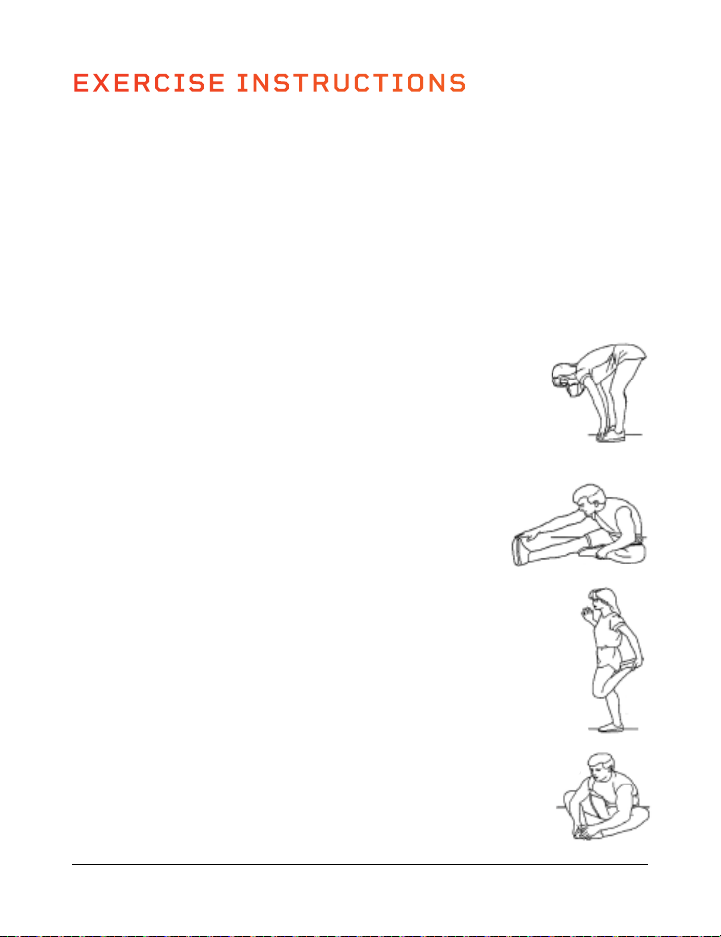
TOUCH YOUR TOES
1. Bend your knees slightly.
2. Let your back and shoulders relax as you bend over and try to
touch your toes.
3. Hold the stretch for 10–15 seconds.
4. Repeat 3 times.
STRETCH YOUR CALVES AND FEET
1. Sit on the floor or a cushion.
2. Place your left foot against your right inner thigh.
3. Bend toward your right foot and try to touch your toes.
4. Hold the stretch for 10–15 seconds
5. Switch legs and repeat. Stretch each leg 3 times.
STRETCH YOUR QUADS
1. Place your left hand on a wall or a table to help with your balance.
2. With your right hand, grab your right ankle.
3. Pull your heel in toward your buttocks.
4. Hold the stretch for 10–15 seconds
5. Switch legs and repeat. Stretch each leg 3 times.
STRETCH YOUR GROIN
1. Sit on the floor or a cushion with your knees bent and the soles
of your feet together.
2. Hold your ankles and bend forward at your hips.
3. Hold the stretch for 10–15 seconds
4. Repeat 3 times.
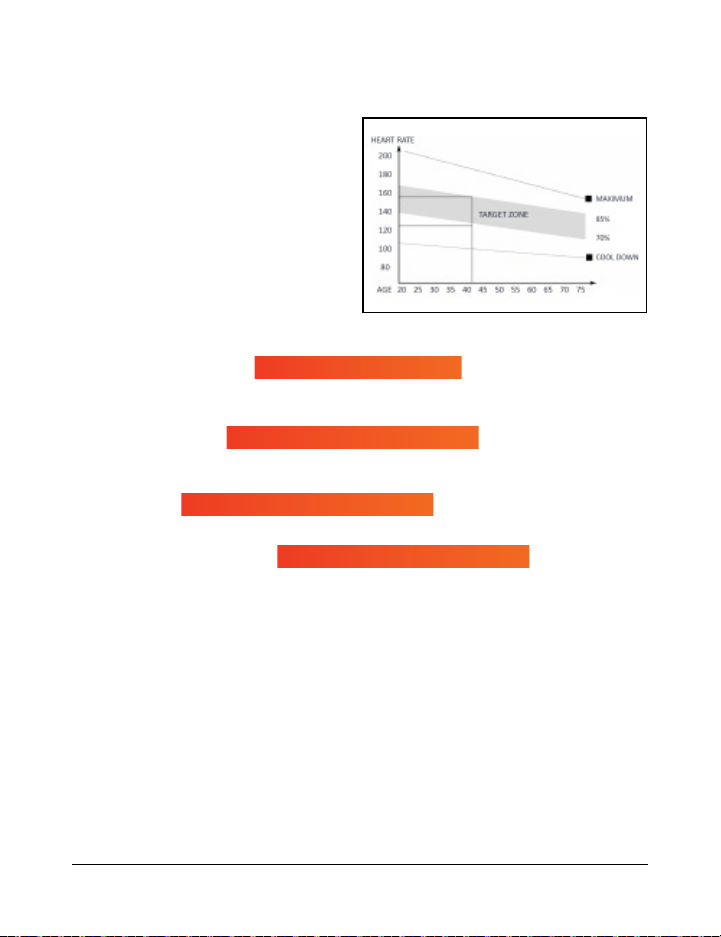
MAXIMUM HEART RATE
This value represents your maximum heart rate and serves as a basis from which to
calculate your personal training heart rate.
HEALTH & WELLNESS
Ideal for people who are overweight, older, beginners, and/or who do not exercise
regularly.
FAT BURNING
Ideal for athletes and sports people who aim to lose weight.
CONDITIONING & FITNESS
Ideal for athletes and sports people who want to improve their stamina and/or
conditioning.
For optimal training results, calculate the average value of selected target zone
(also see chart above):
• Health & Wellness: target zone average = 55% of max heart rate
(max heart rate × 0.55)
• Fat Burning: target zone average = 65% of max heart rate (max heart rate × 0.65)
• Conditioning & Fitness: target zone average = 75% of max heart rate
(max heart rate × 0.75
STEP 3: RECOVERY PHASE
After exercising, it’s important to give your body time to cool down and recover. Spend
5 minutes completing the warm up stretches again to allow yourself time to cool down.
Be careful not to force or jerk your muscles as you stretch.
Target Zone = 70-80% of Max Heart Rate
Target Zone = 50-60% of Max Heart Rate
220 - Your Age = Max Heart Rate
Target Zone = 60-70% of Max Heart Rate
Endurance Training Collection 19
STEP 2: EXERCISE PHASE
During the exercise phase you’re building
muscle, stamina, and improving your
cardiovascular health. It’s important to
begin slowly and increase your workout
duration, intensity, and the resistance
level of the pedals slowly over time.
Work at your own pace and be sure to
maintain a steady tempo throughout.
The intensity of your workout should be
sufficient to raise your heartbeat into
the target zone shown in the graph.
Calculate your personal target heart rate when exercising based on your fitness goals.
18 FlexStride Pro User Manual Lifepro
EXERCISE INSTRUCTIONS
Using your FlexStridePro will improve your physical fitness, tone your muscles, and
when combined with a calorie-controlled diet, it will help you lose weight.
PRO TIP: Change up your workout duration, speed, as well as your exertion level and
heart rate to keep improving your fitness and mobility.
STEP 1: WARM UP PHASE
Spend about 5 minutes warming up. Doing warm up stretches before exercising
prevents pulled muscles and other exercise injuries. Stretching gets blood flowing and
helps loosen your muscles so they are ready for exercise. While doing the following
stretches, do not force or jerk your muscles, and most important, if it hurts: STOP.
TOUCH YOUR TOES
1. Bend your knees slightly.
2. Let your back and shoulders relax as you bend over and try to
touch your toes.
3. Hold the stretch for 10–15 seconds.
4. Repeat 3 times.
STRETCH YOUR CALVES AND FEET
1. Sit on the floor or a cushion.
2. Place your left foot against your right inner thigh.
3. Bend toward your right foot and try to touch your toes.
4. Hold the stretch for 10–15 seconds
5. Switch legs and repeat. Stretch each leg 3 times.
STRETCH YOUR QUADS
1. Place your left hand on a wall or a table to help with your balance.
2. With your right hand, grab your right ankle.
3. Pull your heel in toward your buttocks.
4. Hold the stretch for 10–15 seconds
5. Switch legs and repeat. Stretch each leg 3 times.
STRETCH YOUR GROIN
1. Sit on the floor or a cushion with your knees bent and the soles
of your feet together.
2. Hold your ankles and bend forward at your hips.
3. Hold the stretch for 10–15 seconds
4. Repeat 3 times.
MAXIMUM HEART RATE
This value represents your maximum heart rate and serves as a basis from which to
calculate your personal training heart rate.
HEALTH & WELLNESS
Ideal for people who are overweight, older, beginners, and/or who do not exercise
regularly.
FAT BURNING
Ideal for athletes and sports people who aim to lose weight.
CONDITIONING & FITNESS
Ideal for athletes and sports people who want to improve their stamina and/or
conditioning.
For optimal training results, calculate the average value of selected target zone
(also see chart above):
• Health & Wellness: target zone average = 55% of max heart rate
(max heart rate × 0.55)
• Fat Burning: target zone average = 65% of max heart rate (max heart rate × 0.65)
• Conditioning & Fitness: target zone average = 75% of max heart rate
(max heart rate × 0.75
STEP 3: RECOVERY PHASE
After exercising, it’s important to give your body time to cool down and recover. Spend
5 minutes completing the warm up stretches again to allow yourself time to cool down.
Be careful not to force or jerk your muscles as you stretch.
Target Zone = 70-80% of Max Heart Rate
Target Zone = 50-60% of Max Heart Rate
220 - Your Age = Max Heart Rate
Target Zone = 60-70% of Max Heart Rate
Endurance Training Collection 19
STEP 2: EXERCISE PHASE
During the exercise phase you’re building
muscle, stamina, and improving your
cardiovascular health. It’s important to
begin slowly and increase your workout
duration, intensity, and the resistance
level of the pedals slowly over time.
Work at your own pace and be sure to
maintain a steady tempo throughout.
The intensity of your workout should be
sufficient to raise your heartbeat into
the target zone shown in the graph.
Calculate your personal target heart rate when exercising based on your fitness goals.

20 FlexStride Pro User Manual Lifepro
Endurance Training Collection 21
SAFETY INSTRUCTIONS
PLEASE KEEP THIS MANUAL IN A SAFE PLACE FOR REFERENCE.
WARNING:
To reduce the risk of burns, fire, electric shock, injury to persons, or
damage to equipment, read the following important precautions and information
before operating the FlexStride Pro.
DISCLAIMER
1. The health benefits suggested or implied in this manual, other product literature, and
website are not certified or endorsed by any regulatory authority or medical institute.
2. The use of this product is entirely at the user’s discretion. Please read all instructions
and safety information carefully before using this product. We assume no responsibility
for personal injury or property damage sustained by or through using this product.
RESPONSIBILITIES
3. WARNING: To ensure the safety of users, always ensure all pedals, nuts, and bolts
are securely tightened before exercise.
4. Always inspect the device for damage before each use. Do not use if damaged, worn,
malfunctioning, or if the unit has been exposed to water. Do not use device again until
the problem has been fixed.
5. Use the FlexStride Pro only as instructed in this manual.
6. It is the responsibility of the owner to ensure that all users of the FlexStride Pro are
adequately informed of all warnings and precautions.
7. Place the unit on a sturdy, level, non-slip surface, with at least 12 inches of clearance
on all sides. Place a mat or rug under the FlexStride Pro to protect your carpet
or flooring. Ensure that the underlayment does not slide around before beginning
exercise.
8. During assembly, it is recommended that you place parts and hardware on a mat to
avoid soiling carpet or flooring.
9. Keep the FlexStride Pro indoors, away from heat, moisture, and dust. Do not use
outdoors. Keep away from open flame, explosive or flammable items, and heat
sources.
10. Replace the batteries only with new AAA batteries.
11. Do not ingest the batteries. If the batteries have been ingested, seek medical help
immediately, as this can cause internal burns or even death.
12. Dispose of the FlexStride Pro, batteries, and all parts according to local regulations.
DOS AND DON’TS
13. Keep children and pets away from the FlexStride Pro at all times. For adult use only.
14. Adults with diminished mental or physical capacity may only use the FlexStride Pro
while supervised by a responsible adult.
15. Do not stand on the pedals. Only use the FlexStride Pro in a seated position.
16. Do not allow more than one person to use the FlexStride Pro at a time.
EXERCISE SAFETY
17. Before starting any exercise program, consult with a medical professional to determine
if you have any health conditions that could create a risk to your health and safety, or
prevent you from using the FlexStride Pro properly. Your doctor’s advice is essential if
you are taking medication that affects your heart rate, blood pressure, or cholesterol
level.
18. Stop exercising immediately if you feel dizzy, lightheaded, or nauseous, or if you
experience pain, tightness in your chest, irregular heartbeat, or extreme shortness
of breath. If you experience any of these symptoms, consult your physician before
continuing your exercise program.
19. Incorrect or excessive exercise can be damaging to health. Always exercise within the
heart beat range and time limits recommended by your physician.
20. Always wear appropriate athletic clothing, socks, and athletic shoes when using the
FlexStride Pro. It is especially important to wear well-fitting shoes.
21. Do not wear loose or baggy clothing which may get caught in the equipment or restrict
or prevent movement.
22. Do not use for more than 20 minutes at a time.
23. The FlexStride Pro is intended for in-home use only. Do not use the FlexStride Pro in
any commercial, rental, institutional, or therapeutic setting.
CLEANING & MAINTENANCE
24. Wipe down the FlexStride Pro with a soft, damp cloth after each use. Do not use
abrasive, solvent, or chemical cleaners or harsh detergents.
25. Store the device in a cool, dry location. Do not store in a garage or covered patio, or
near water.
26. Remove batteries from the computer monitor if the FlexStride Pro will not be used for
a long time. Store the FlexStride Pro and batteries in a cool, dry place.
27. Never remove the motor hood unless instructed to do so by an authorized service
representative. Servicing other than the procedures in this manual should be
performed by an authorized service representative only.
28. Never insert or drop any object into any opening.

20 FlexStride Pro User Manual Lifepro
Endurance Training Collection 21
SAFETY INSTRUCTIONS
PLEASE KEEP THIS MANUAL IN A SAFE PLACE FOR REFERENCE.
WARNING:
To reduce the risk of burns, fire, electric shock, injury to persons, or
damage to equipment, read the following important precautions and information
before operating the FlexStride Pro.
DISCLAIMER
1. The health benefits suggested or implied in this manual, other product literature, and
website are not certified or endorsed by any regulatory authority or medical institute.
2. The use of this product is entirely at the user’s discretion. Please read all instructions
and safety information carefully before using this product. We assume no responsibility
for personal injury or property damage sustained by or through using this product.
RESPONSIBILITIES
3. WARNING: To ensure the safety of users, always ensure all pedals, nuts, and bolts
are securely tightened before exercise.
4. Always inspect the device for damage before each use. Do not use if damaged, worn,
malfunctioning, or if the unit has been exposed to water. Do not use device again until
the problem has been fixed.
5. Use the FlexStride Pro only as instructed in this manual.
6. It is the responsibility of the owner to ensure that all users of the FlexStride Pro are
adequately informed of all warnings and precautions.
7. Place the unit on a sturdy, level, non-slip surface, with at least 12 inches of clearance
on all sides. Place a mat or rug under the FlexStride Pro to protect your carpet
or flooring. Ensure that the underlayment does not slide around before beginning
exercise.
8. During assembly, it is recommended that you place parts and hardware on a mat to
avoid soiling carpet or flooring.
9. Keep the FlexStride Pro indoors, away from heat, moisture, and dust. Do not use
outdoors. Keep away from open flame, explosive or flammable items, and heat
sources.
10. Replace the batteries only with new AAA batteries.
11. Do not ingest the batteries. If the batteries have been ingested, seek medical help
immediately, as this can cause internal burns or even death.
12. Dispose of the FlexStride Pro, batteries, and all parts according to local regulations.
DOS AND DON’TS
13. Keep children and pets away from the FlexStride Pro at all times. For adult use only.
14. Adults with diminished mental or physical capacity may only use the FlexStride Pro
while supervised by a responsible adult.
15. Do not stand on the pedals. Only use the FlexStride Pro in a seated position.
16. Do not allow more than one person to use the FlexStride Pro at a time.
EXERCISE SAFETY
17. Before starting any exercise program, consult with a medical professional to determine
if you have any health conditions that could create a risk to your health and safety, or
prevent you from using the FlexStride Pro properly. Your doctor’s advice is essential if
you are taking medication that affects your heart rate, blood pressure, or cholesterol
level.
18. Stop exercising immediately if you feel dizzy, lightheaded, or nauseous, or if you
experience pain, tightness in your chest, irregular heartbeat, or extreme shortness
of breath. If you experience any of these symptoms, consult your physician before
continuing your exercise program.
19. Incorrect or excessive exercise can be damaging to health. Always exercise within the
heart beat range and time limits recommended by your physician.
20. Always wear appropriate athletic clothing, socks, and athletic shoes when using the
FlexStride Pro. It is especially important to wear well-fitting shoes.
21. Do not wear loose or baggy clothing which may get caught in the equipment or restrict
or prevent movement.
22. Do not use for more than 20 minutes at a time.
23. The FlexStride Pro is intended for in-home use only. Do not use the FlexStride Pro in
any commercial, rental, institutional, or therapeutic setting.
CLEANING & MAINTENANCE
24. Wipe down the FlexStride Pro with a soft, damp cloth after each use. Do not use
abrasive, solvent, or chemical cleaners or harsh detergents.
25. Store the device in a cool, dry location. Do not store in a garage or covered patio, or
near water.
26. Remove batteries from the computer monitor if the FlexStride Pro will not be used for
a long time. Store the FlexStride Pro and batteries in a cool, dry place.
27. Never remove the motor hood unless instructed to do so by an authorized service
representative. Servicing other than the procedures in this manual should be
performed by an authorized service representative only.
28. Never insert or drop any object into any opening.
22 FlexStride Pro User Manual Lifepro
ISSUE COMPUTER MONITOR DOES NOT WORK
CAUSE Batteries are installed incorrectly.
SOLUTION Check to see if the batteries are installed in the correct direction.
CAUSE Batteries are dead.
SOLUTION Replace dead batteries with two new AAA batteries.
ISSUE THE PEDALS CAME LOOSE WHEN USING THE FLEXSTRIDEPRO
CAUSE
This can happen if the pedals were not properly tightened during
assembly.
SOLUTION
Stop using the FlexStridePro immediately and tighten the nuts
securing the pedals.
ISSUE THERE IS A NOISE WHILE PEDALING
CAUSE
The nuts attaching the pedals to the pedal mounts are not tight
enough.
SOLUTION
Use the included wrench to tighten the nuts securing the pedals to
the pedal arms as tightly as you can.
CAUSE
The nuts attaching the pedal arms to the FlexStridePro frame are
loose.
SOLUTION
Each pedal arm is attached to the frame with two nuts. Use the
included wrench to tighten all the nuts. Be careful not to over-
tighten.
ISSUE THE PEDALS WON’T STAY TIGHTENED OR ARE STRIPPED
CAUSE
Using the FlexStridePro with loose pedals will eventually damage
the threads on the pedal arms. If caught early, tightening the nuts
will solve the problem. If the threads are too damaged, the pedal
won’t stay tightened even after tightening the nuts.
SOLUTION If the pedals are stripped, please contact us for assistance.
Endurance Training Collection 23
LIFETIME
WARRANTY
Lifepro Fitness creates quality,
durable exercise products and
we stand by that quality with a
lifetime warranty on all of our
products. If your FlexStride Pro ever
breaks (and we doubt it will), we’ll
send you replacement parts and
show you how to repair it. If your
FlexStride Pro cannot be repaired,
we’ll replace it—free of charge.
Register your FlexStride Pro at
flexstridepro.lifeprofitness.com
to activate your warranty within
14 days of purchase.
Endurance Training Collection 23
TROUBLESHOOTING GUIDE
Quickly troubleshoot simple issues you might experience using the table
below. Please contact us for additional assistance at: (800) 563-6604
or support@lifeprofitness.com. Please do not attempt to repair the
FlexStride Pro on your own.

22 FlexStride Pro User Manual Lifepro
ISSUE COMPUTER MONITOR DOES NOT WORK
CAUSE Batteries are installed incorrectly.
SOLUTION Check to see if the batteries are installed in the correct direction.
CAUSE Batteries are dead.
SOLUTION Replace dead batteries with two new AAA batteries.
ISSUE THE PEDALS CAME LOOSE WHEN USING THE FLEXSTRIDEPRO
CAUSE
This can happen if the pedals were not properly tightened during
assembly.
SOLUTION
Stop using the FlexStridePro immediately and tighten the nuts
securing the pedals.
ISSUE THERE IS A NOISE WHILE PEDALING
CAUSE
The nuts attaching the pedals to the pedal mounts are not tight
enough.
SOLUTION
Use the included wrench to tighten the nuts securing the pedals to
the pedal arms as tightly as you can.
CAUSE
The nuts attaching the pedal arms to the FlexStridePro frame are
loose.
SOLUTION
Each pedal arm is attached to the frame with two nuts. Use the
included wrench to tighten all the nuts. Be careful not to over-
tighten.
ISSUE THE PEDALS WON’T STAY TIGHTENED OR ARE STRIPPED
CAUSE
Using the FlexStridePro with loose pedals will eventually damage
the threads on the pedal arms. If caught early, tightening the nuts
will solve the problem. If the threads are too damaged, the pedal
won’t stay tightened even after tightening the nuts.
SOLUTION If the pedals are stripped, please contact us for assistance.
Endurance Training Collection 23
LIFETIME
WARRANTY
Lifepro Fitness creates quality,
durable exercise products and
we stand by that quality with a
lifetime warranty on all of our
products. If your FlexStride Pro ever
breaks (and we doubt it will), we’ll
send you replacement parts and
show you how to repair it. If your
FlexStride Pro cannot be repaired,
we’ll replace it—free of charge.
Register your FlexStride Pro at
flexstridepro.lifeprofitness.com
to activate your warranty within
14 days of purchase.
Endurance Training Collection 23
TROUBLESHOOTING GUIDE
Quickly troubleshoot simple issues you might experience using the table
below. Please contact us for additional assistance at: (800) 563-6604
or support@lifeprofitness.com. Please do not attempt to repair the
FlexStride Pro on your own.

24 FlexStride Pro User Manual Lifepro
PRODUCT
SPECIFICATIONS
MADE IN CHINA
UNIT SPECS
Size: 22.7” × 18.5” × 12.9”
Net Weight: 27 lbs.
Decibel Rating: <75 dB
Batteries Required: 2 AAA (included)
FLEXSTRIDE PRO
PEDAL EXERCISER
ENDURANCE TRAINING
FROM OUR VIBRATION THERAPY COLLECTION
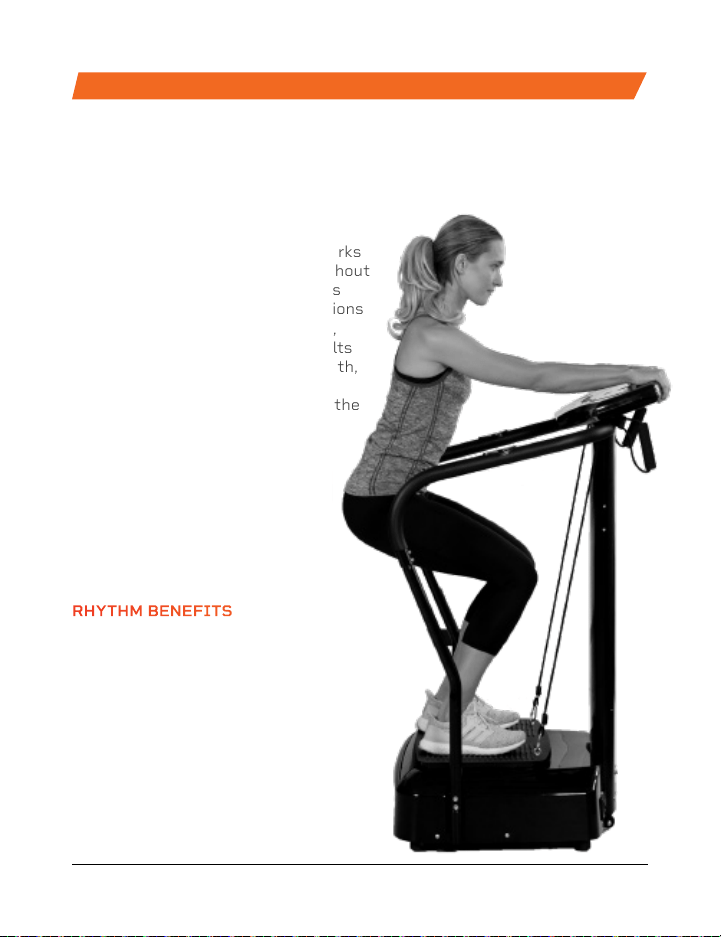
The Rhythm Vibration Platform works
by creating rapid vibrations throughout
the body, especially on the muscles
specifically targeted. These vibrations
cause the muscles to stretch, flex,
and relax at a rapid rate. This results
in increased muscle and bone growth,
improved flexibility, and boosted
metabolism—all of which increase the
number of calories you burn.
The Rhythm can be used by people
from every fitness level. If you
have suffered an injury or you
experience joint or back pain,
find relief and help prevent
future injuries by adding the
Rhythm to your rehab routine.
RHYTHM
VIBRATION PLATFORM
RHYTHM BENEFITS
• Improve mobility
• Prevent injury
• Increase strength
• Boost metabolism
• Improve sleep
• Develop stronger bones
• Increase circulation
Endurance Training Collection 25
24 FlexStride Pro User Manual Lifepro
PRODUCT
SPECIFICATIONS
MADE IN CHINA
UNIT SPECS
Size: 22.7” × 18.5” × 12.9”
Net Weight: 27 lbs.
Decibel Rating: <75 dB
Batteries Required: 2 AAA (included)
FLEXSTRIDE PRO
PEDAL EXERCISER
ENDURANCE TRAINING
FROM OUR VIBRATION THERAPY COLLECTION
The Rhythm Vibration Platform works
by creating rapid vibrations throughout
the body, especially on the muscles
specifically targeted. These vibrations
cause the muscles to stretch, flex,
and relax at a rapid rate. This results
in increased muscle and bone growth,
improved flexibility, and boosted
metabolism—all of which increase the
number of calories you burn.
The Rhythm can be used by people
from every fitness level. If you
have suffered an injury or you
experience joint or back pain,
find relief and help prevent
future injuries by adding the
Rhythm to your rehab routine.
RHYTHM
VIBRATION PLATFORM
RHYTHM BENEFITS
• Improve mobility
• Prevent injury
• Increase strength
• Boost metabolism
• Improve sleep
• Develop stronger bones
• Increase circulation
Endurance Training Collection 25
Enjoy all of the benefits of foam
rolling and vibration technology
together with the Surger Vibrating
Foam Roller. Use the Surger before
or after your workout as part of
your warm-up or recovery routine
to gain more flexibility and to help
prevent soreness and injuries.
Deep compression of muscle
fibers and tissues (self-myofascial
release) combined with the
Surger’s vibration technology
breaks up muscle knots and relaxes
tight muscles and fascia. Choose
from four vibration speed levels
to apply the perfect amount of
intensity every time.
SURGER
VIBRATING FOAM ROLLER
SURGER BENEFITS
• Increase workout
effectiveness
• Reduce soreness
• Speed up recovery
• Prevent injury
• Boost circulation
• Improve muscle flexibility
and performance
• Decrease pain and
inflammation
• Loosen knots, trigger
points, and tightness in
your muscles and fascia.
FROM OUR SPORTS RECOVERY COLLECTION
Endurance Training Collection 27 Endurance Training Collection 27
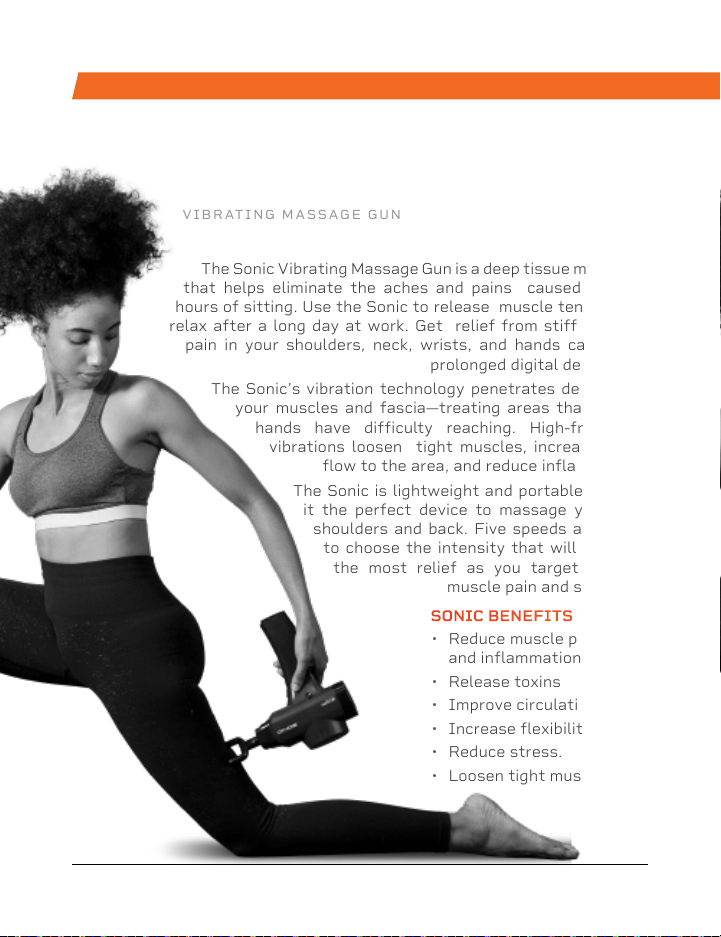
SONIC
VIBRATING MASSAGE GUN
The Sonic Vibrating Massage Gun is a deep tissue massager
that helps eliminate the aches and pains caused by long
hours of sitting. Use the Sonic to release muscle tension and
relax after a long day at work. Get relief from stiffness and
pain in your shoulders, neck, wrists, and hands caused by
prolonged digital device use.
The Sonic’s vibration technology penetrates deeply into
your muscles and fascia—treating areas that human
hands have difficulty reaching. High-frequency
vibrations loosen tight muscles, increase blood
flow to the area, and reduce inflammation.
The Sonic is lightweight and portable, making
it the perfect device to massage your own
shoulders and back. Five speeds allow you
to choose the intensity that will give you
the most relief as you target specific
muscle pain and stiffness.
SONIC BENEFITS
• Reduce muscle pain
and inflammation
• Release toxins
• Improve circulation
• Increase flexibility
• Reduce stress.
• Loosen tight muscles
26 FlexStride Pro User Manual Lifepro
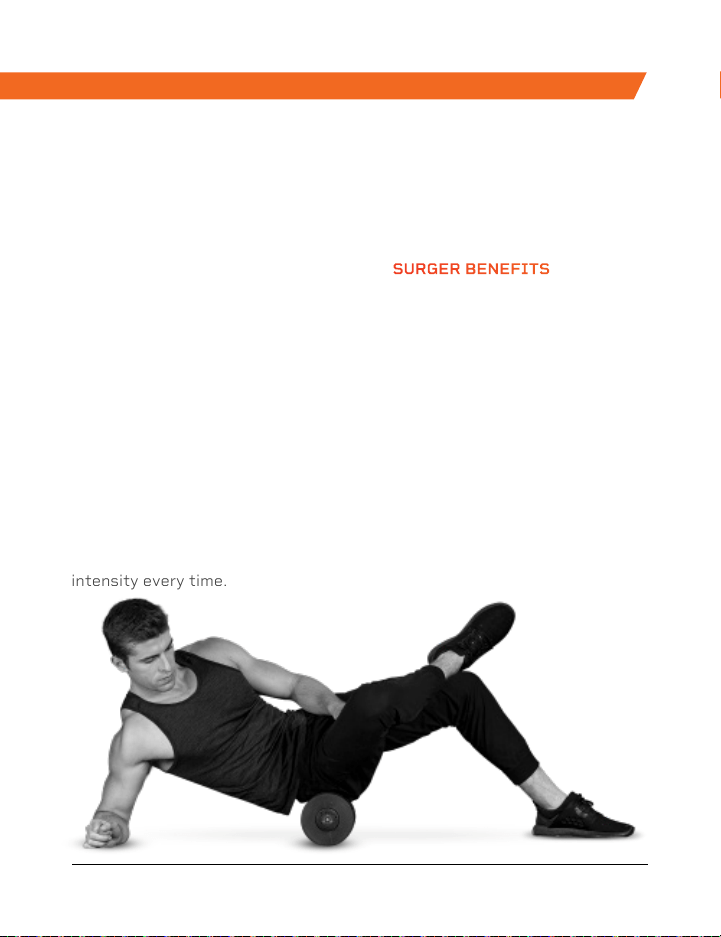
Enjoy all of the benefits of foam
rolling and vibration technology
together with the Surger Vibrating
Foam Roller. Use the Surger before
or after your workout as part of
your warm-up or recovery routine
to gain more flexibility and to help
prevent soreness and injuries.
Deep compression of muscle
fibers and tissues (self-myofascial
release) combined with the
Surger’s vibration technology
breaks up muscle knots and relaxes
tight muscles and fascia. Choose
from four vibration speed levels
to apply the perfect amount of
intensity every time.
SURGER
VIBRATING FOAM ROLLER
SURGER BENEFITS
• Increase workout
effectiveness
• Reduce soreness
• Speed up recovery
• Prevent injury
• Boost circulation
• Improve muscle flexibility
and performance
• Decrease pain and
inflammation
• Loosen knots, trigger
points, and tightness in
your muscles and fascia.
FROM OUR SPORTS RECOVERY COLLECTION
Endurance Training Collection 27 Endurance Training Collection 27
SONIC
VIBRATING MASSAGE GUN
The Sonic Vibrating Massage Gun is a deep tissue massager
that helps eliminate the aches and pains caused by long
hours of sitting. Use the Sonic to release muscle tension and
relax after a long day at work. Get relief from stiffness and
pain in your shoulders, neck, wrists, and hands caused by
prolonged digital device use.
The Sonic’s vibration technology penetrates deeply into
your muscles and fascia—treating areas that human
hands have difficulty reaching. High-frequency
vibrations loosen tight muscles, increase blood
flow to the area, and reduce inflammation.
The Sonic is lightweight and portable, making
it the perfect device to massage your own
shoulders and back. Five speeds allow you
to choose the intensity that will give you
the most relief as you target specific
muscle pain and stiffness.
SONIC BENEFITS
• Reduce muscle pain
and inflammation
• Release toxins
• Improve circulation
• Increase flexibility
• Reduce stress.
• Loosen tight muscles
26 FlexStride Pro User Manual Lifepro

Access Lifepro TV, our library of free
personal training videos on the web
at flexstridepro.lifeprofitness.com to
learn how to get the most out of your
Lifepro
®
FlexStride Pro and achieve
the results you want.
Lifeprousa Lifeprousa support@lifeprofitness.com
YOU’VE
GOT
THIS