

en
2
Further information and explanations are
available online:
Table of contents
1 Safety ...........................................4
1.1 General information................... 4
1.2 Intended use.............................. 4
1.3 Restriction on user group.......... 4
1.4 Safe installation ......................... 5
1.5 Safe use .................................... 7
1.6 Safe cleaning and mainten-
ance........................................... 9
2 Preventing material damage ....11
3 Environmental protection and
saving energy............................11
3.1 Disposing of packaging .......... 11
3.2 Saving energy.......................... 11
3.3 Energy saving mode ............... 12
4 Installation and connection......12
4.1 Unpacking the appliance ........ 12
4.2 Scope of delivery..................... 12
4.3 Requirements for the install-
ation location ........................... 13
4.4 Water drain hose ..................... 13
4.5 Aligning the appliance............. 16
4.6 Reversing the door.................. 16
4.7 Connecting the appliance to
the electricity supply................ 19
5 Familiarising yourself with
your appliance...........................20
5.1 Appliance ................................ 20
5.2 Control panel........................... 21
5.3 Operating logic........................ 21
6 Display .......................................22
7 Buttons ......................................24
8 Dryness level.............................29
8.1 Changing the dryness level..... 29
8.2 Adjusting the dryness level ..... 29
9 Programmes ..............................30
9.1 Automatic programmes........... 30
9.2 Timed programmes ................. 31
10 Accessories.............................33
11 Laundry....................................34
11.1 Preparing the laundry............ 34
12 Basic operation .......................34
12.1 Switching on the appliance ... 34
12.2 Setting a programme ............ 34
12.3 Adjusting the programme
settings .................................. 34
12.4 Saving the programme set-
tings....................................... 35
12.5 Loading laundry..................... 35
12.6 Starting the programme ........ 35
12.7 Adding laundry ...................... 35
12.8 Cancelling the programme.... 35
12.9 Unloading the laundry ........... 35
12.10 Put the appliance into
standby mode ..................... 35
12.11 Fluff filter.............................. 36
12.12 Condensation container ...... 37
13 Childproof lock........................38
13.1 Activating the childproof
lock........................................ 38
13.2 Deactivating the childproof
lock........................................ 38

en
3
14 Crease-removal function ........39
14.1 Starting a programme with
the crease-removal function .. 39
14.2 Filling the water tank ............. 39
15 HomeConnect ........................40
15.1 Setting up the HomeCon-
nect app ................................ 40
15.2 Setting up HomeConnect..... 41
15.3 HomeConnect menu ............ 41
15.4 Activating Wi-Fi on the ap-
pliance ................................... 41
15.5 Deactivating Wi-Fi on the
appliance............................... 41
15.6 Resetting the appliance
network settings .................... 41
15.7 Remote start .......................... 42
15.8 Intelligent programme re-
commendation....................... 42
15.9 Remote diagnostics .............. 42
15.10 Data protection.................... 43
16 Basic settings..........................44
16.1 Overview of the basic set-
tings....................................... 44
16.2 Changing the basic set-
tings....................................... 45
17 Appliance care ........................45
17.1 Preparing for appliance
care ....................................... 45
17.2 Calling up the appliance
care programme.................... 45
17.3 Running the basic appli-
ance care programme .......... 46
17.4 Running the intensive appli-
ance care programme .......... 46
18 Cleaning and servicing...........48
18.1 Tips on cleaning and care .... 48
18.2 Water tank filter ..................... 48
18.3 Moisture sensor..................... 48
18.4 Condensation container fil-
ter .......................................... 49
19 Troubleshooting......................50
20 Transportation, storage and
disposal ...................................55
20.1 Preparing the appliance for
transportation ........................ 55
20.2 Disposing of old appliance ... 55
21 Customer Service....................56
21.1 Product number (E-Nr.),
production number (FD)
and consecutive numbering
(Z-Nr.) .................................... 56
22 Consumption values...............57
23 Technical data .........................58
24 Declaration of Conformity ......59
en Safety
4
1 Safety
Observe the following safety instructions.
1.1 General information
¡ Read this instruction manual carefully.
¡ Keep the instruction manual and the product information safe
for future reference or for the next owner.
¡ Do not connect the appliance if it has been damaged in transit.
1.2 Intended use
Only use this appliance:
¡ for drying and freshening up fabrics that are washed with water
and suitable for dryers.
¡ in private households and in enclosed spaces in a domestic en-
vironment.
¡ up to an altitude of max. 4000m above sea level.
1.3 Restriction on user group
This appliance may be used by children aged 8 or over and by
people who have reduced physical, sensory or mental abilities or
inadequate experience and/or knowledge, provided that they are
supervised or have been instructed on how to use the appliance
safely and have understood the resulting dangers.
Do not let children play with the appliance.
Cleaning and user maintenance must not be performed by chil-
dren unless they are being supervised.
Keep children under the age of 3 years and pets away from the
appliance.

Safety en
5
1.4 Safe installation
WARNING‒Risk of electric shock!
Incorrect installation is dangerous.
▶ Connect and operate the appliance only in accordance with the
specifications on the rating plate.
▶ Connect the appliance to a power supply with alternating cur-
rent only via a properly installed socket with earthing.
▶ The protective conductor system of the domestic electrical in-
stallation must be properly installed. The installation must have
a sufficiently large cross section.
▶ When using a residual current circuit breaker, only use a type
with the mark.
▶ Never equip the appliance with an external switching device,
e.g. a timer or remote control.
▶ Never connect the appliance to a circuit that is regularly
switched on and off by the energy supplier.
▶ When the appliance is installed, the mains plug of the power
cord must be freely accessible. If free access is not possible, an
all-pole isolating switch must be installed in the permanent elec-
trical installation according to the installation regulations.
▶ When installing the appliance, check that the power cable is not
trapped or damaged.
If the insulation of the power cord is damaged, this is dangerous.
▶ Never let the power cord come into contact with hot appliance
parts or heat sources.
▶ Never let the power cord come into contact with sharp points or
edges.
▶ Never kink, crush or modify the power cord.
WARNING‒Risk of fire!
It is dangerous to use an extended power cord and non-approved
adapters.
▶ Do not use extension cables or multiple socket strips.
▶ Only use adapters and power cords approved by the manufac-
turer.

en Safety
6
▶ If the power cord is too short and a longer one is not available,
please contact an electrician to have the domestic installation
adapted.
WARNING‒Risk of injury!
The high weight of the appliance may result in injury when lifted.
▶ Do not lift the appliance on your own.
If this appliance is not correctly installed in a washer-dryer stack,
the installed appliance may fall.
▶ Only stack the dryer on a washing machine using the connec-
tion kit from the dryer manufacturer
→"Accessories", Page33. No other installation method is per-
mitted.
▶ Do not install the appliance in a washer-dryer stack if the dryer
manufacturer does not offer a suitable connection kit.
▶ Do not install appliances from different manufacturers and with
varying depths and widths in a washer-dryer stack.
▶ Do not install a washer-dryer stack on a platform; the appli-
ances may tip over.
WARNING‒Risk of suffocation!
Children may put packaging material over their heads or wrap
themselves up in it and suffocate.
▶ Keep packaging material away from children.
▶ Do not let children play with packaging material.
CAUTION‒Risk of injury!
The appliance may vibrate or move when in use.
▶ Place the appliance on a clean, even, solid surface.
▶ Align the appliance using the appliance feet and a spirit level.
If hoses and power cords have been laid incorrectly, this causes a
tripping hazard.
▶ Lay hoses and power cords in such a way that there is no risk
of tripping.
If the appliance is moved by holding onto protruding components,
such as the appliance door, the parts may break off.
▶ Do not move the appliance by holding onto protruding parts.

Safety en
7
CAUTION‒Risk of cutting!
Touching sharp edges on the appliance may lead to cuts.
▶ Do not touch the sharp edges on the appliance.
▶ Wear protective gloves when installing and transporting the ap-
pliance.
1.5 Safe use
WARNING‒Risk of electric shock!
If the appliance or the power cord is damaged, this is dangerous.
▶ Never operate a damaged appliance.
▶ Never pull on the power cord to unplug the appliance. Always
unplug the appliance at the mains.
▶ If the appliance or the power cord is damaged, immediately un-
plug the power cord or switch off the fuse in the fuse box.
▶ Call customer services. →Page56
An ingress of moisture can cause an electric shock.
▶ Only use the appliance in enclosed spaces.
▶ Never expose the appliance to intense heat or humidity.
▶ Do not use steam- or high-pressure cleaners, hoses or sprays
to clean the appliance.
WARNING‒Risk of harm to health!
Children can lock themselves in the appliance, thereby putting
their lives at risk.
▶ Do not install the appliance behind a door as this may obstruct
the appliance door or prevent it from opening.
▶ With redundant appliances, unplug the power cord. Then cut
through the cord and damage the lock on the appliance door
beyond repair so that the appliance door will no longer close.
WARNING‒Risk of suffocation!
Children may breathe in or swallow small parts, causing them to
suffocate.
▶ Keep small parts away from children.
▶ Do not let children play with small parts.
en Safety
8
WARNING‒Risk of explosion!
If there is coal dust or flour in the air around the appliance, this
may cause an explosion.
▶ Keep the area around the appliance clean during operation.
WARNING‒Risk of poisoning!
Condensation water from this appliance is not suitable for drinking
and may be contaminated with fluff.
▶ Do not drink or reuse the condensation water from the appli-
ance.
Detergents and care products may result in poisoning if con-
sumed.
▶ If accidentally swallowed, seek medical advice.
▶ Keep detergents and care products out of the reach of children.
WARNING‒Risk of fire!
The refrigerant R290 in this appliance is environmentally friendly
yet combustible and may ignite if it comes into contact with open
flames or ignition sources.
▶ Keep naked flames and ignition sources away from the appli-
ance.
WARNING‒Risk of explosion!
If there is any residual material left in the fluff filter, this may ignite
during the drying process.
▶ Clean the fluff filter regularly.
Highly flammable objects such as lighters or matches may ignite
during the drying process.
▶ Remove all highly flammable objects from any pockets in your
laundry before the drying process.
Unwashed laundry that has come into contact with solvents, oil,
wax, wax remover, paint, grease or stain remover may ignite when
drying is in progress.
▶ Do not place laundry in this appliance to be dried if the laundry
has not been washed first.

Safety en
9
▶ Rinse the laundry thoroughly with warm water and detergent be-
fore drying it in the machine.
▶ Do not use the appliance if industrial chemicals have been used
to clean the laundry beforehand.
WARNING‒Risk of fire!
If drying is interrupted early, the laundry is not cooled sufficiently
and may ignite.
▶ Do not interrupt the drying programme early.
▶ If drying is interrupted early, remove the laundry immediately
and spread it out.
CAUTION‒Risk of injury!
The covering plate may break if you stand on or climb onto the
appliance.
▶ Do not stand on or climb onto the appliance.
The appliance may tip over if you sit on or lean against the open
door.
▶ Do not sit on or lean against the appliance door.
▶ Do not place any objects on the appliance door.
Reaching into the drum while it is still turning may cause hand in-
juries.
▶ Wait for the drum to come to a complete stop before reaching
inside.
1.6 Safe cleaning and maintenance
WARNING‒Risk of electric shock!
Improper repairs are dangerous.
▶ Never make any technical modifications to the appliance or its
features.
▶ Repairs to the appliance should only be carried out by trained
specialist staff.
▶ Only use genuine spare parts when repairing the appliance.
▶ If the power cord of this appliance is damaged, it must be re-
placed by the manufacturer, the manufacturer's Customer Ser-
vice or a similarly qualified person in order to prevent any risk.

en Safety
10
An ingress of moisture can cause an electric shock.
▶ Do not use steam- or high-pressure cleaners, hoses or sprays
to clean the appliance.
WARNING‒Risk of injury!
The use of non-original spare parts and non-original accessories
is dangerous.
▶ Only use the manufacturer's original spare parts and original ac-
cessories.
WARNING‒Risk of poisoning!
Poisonous fumes may be given off if you use cleaning agents that
contain solvents.
▶ Do not use cleaning agents that contain solvents.

Preventing material damage en
11
Preventing material damage
2 Preventing material
damage
Preventing material damage
ATTENTION!
The functionality of the appliance
may be impaired if you use the
wrong quantity of fabric softener, de-
tergent, care product or cleaning
agent.
▶ Follow the dosage recommenda-
tions from the manufacturer.
Exceeding the maximum load capa-
city impairs the function of the appli-
ance.
▶ Observe the maximum load capa-
city for each programme and do
not exceed it.
→"Programmes", Page30
The function of the appliance may be
impaired if the appliance overheats.
▶ Keep the ventilation opening on
the appliance clear during opera-
tion.
▶ Make sure that the area is ad-
equately ventilated.
Light objects such as hair and fluff
may be sucked in from the ventilation
opening on the appliance during op-
eration and impair the function of the
appliance.
▶ Keep the area around the appli-
ance clean during operation.
▶ Keep light objects away from the
appliance.
Foam and foam rubber may deform
or melt during the drying process.
▶ Do not dry laundry that contains
foam or foam rubber.
Unsuitable cleaning products may
damage the surfaces of the appli-
ance.
▶ Do not use harsh or abrasive de-
tergents.
▶ Do not use cleaning products with
a high alcohol content.
▶ Do not use hard scouring pads or
cleaning sponges.
▶ Clean the appliance with nothing
but water and a soft, damp cloth.
▶ Remove all detergent residue,
spray residue or other residues im-
mediately if they come into contact
with the appliance.
Environmental protection and saving energy
3 Environmental protec-
tion and saving energy
Environmental protection and saving energy
3.1 Disposing of packaging
The packaging materials are environ-
mentally compatible and can be re-
cycled.
▶ Sort the individual components by
type and dispose of them separ-
ately.
3.2 Saving energy
If you follow these instructions, your
appliance will use less power.
Operate the appliance in a well-vent-
ilated room and keep the ventilation
opening on the appliance clear.
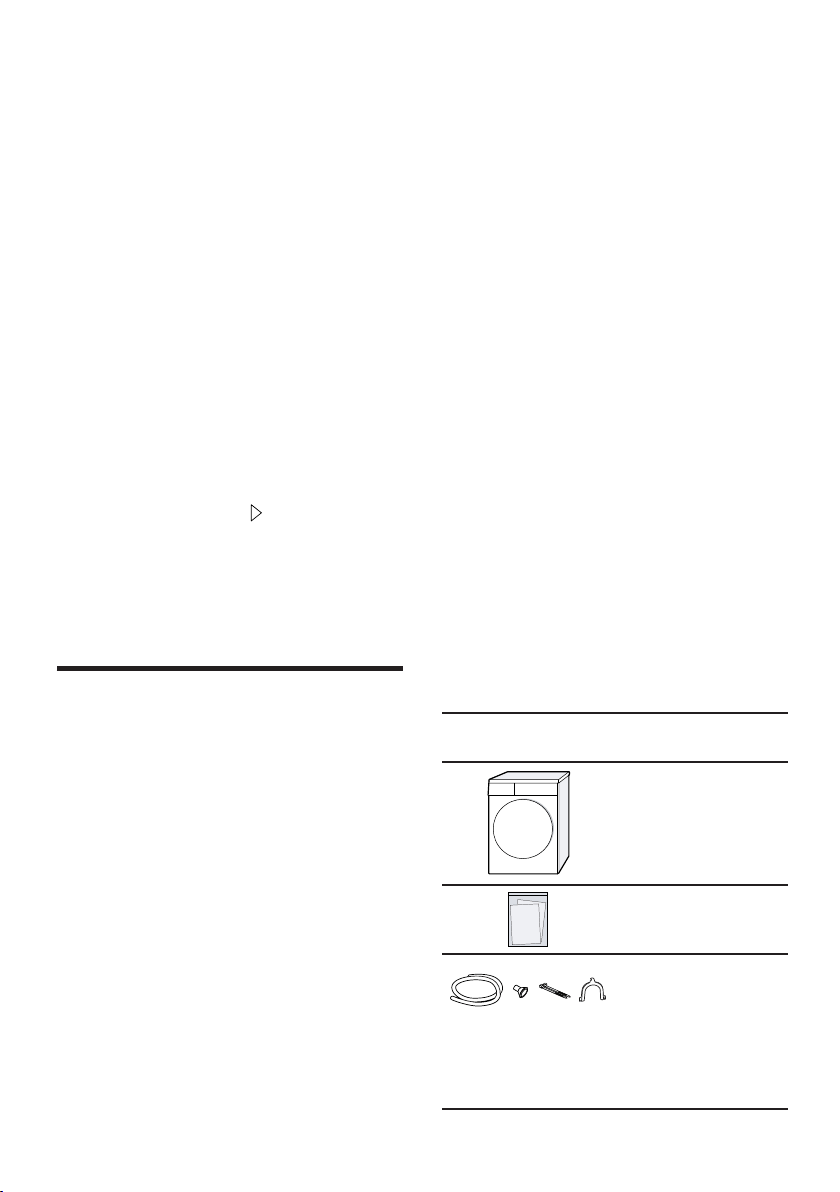
a
If air exchange is impeded, this ex-
tends the programme duration and
increases energy consumption.
Spin the laundry in the washing ma-
chine before drying.
a
Damper laundry extends the pro-
gramme duration and increases
energy consumption.
Observe the programme's maximum
load capacity.
→"Programmes", Page30
a
If the maximum load is exceeded,
this extends the programme dura-
tion and increases energy con-
sumption.
en Installation and connection
12
After drying, clean the fluff filter
→Page36.
a
If the fluff filter is dirty, this reduces
the air flow in the appliance, ex-
tends the programme duration and
increases energy consumption.
Deactivate Wi-Fi on the appliance if it
is not being used.
→"Deactivating Wi-Fi on the appli-
ance", Page41.
a
If the Wi-Fi is activated, this in-
creases energy consumption.
3.3 Energy saving mode
If you do not use the appliance for an
extended period, it automatically
switches to energy-saving mode. All
displays go out and flashes.
Energy-saving mode ends when you
use the appliance again.
If you do not continue operating the
appliance, it automatically switches to
standby mode.
Installation and connection
4 Installation and con-
nection
Installation and connection
4.1 Unpacking the appliance
ATTENTION!
Objects remaining in the drum that
are not designed for operation with
the appliance may cause material
damage and damage to the appli-
ance.
▶ Remove these objects, along with
all supplied accessories, from the
drum before starting the appliance.
1. Remove any packaging and pro-
tective covers completely from the
appliance.
→"Disposing of packaging",
Page11
2. Check the appliance for visible
damage.
3. Open the door.
4. Remove any accessories from the
drum.
5. Close the door.
4.2 Scope of delivery
After unpacking all parts, check for
any damage in transit and complete-
ness of the delivery.
ATTENTION!
If the appliance is operated with in-
complete or defective accessories,
the appliance may not be able to op-
erate properly, or this may result in
material damage or damage to the
appliance.
▶ Do not operate the appliance with
incomplete or defective accessor-
ies.
▶ Replace the accessories in ques-
tion before operating the appli-
ance.
→"Accessories", Page33
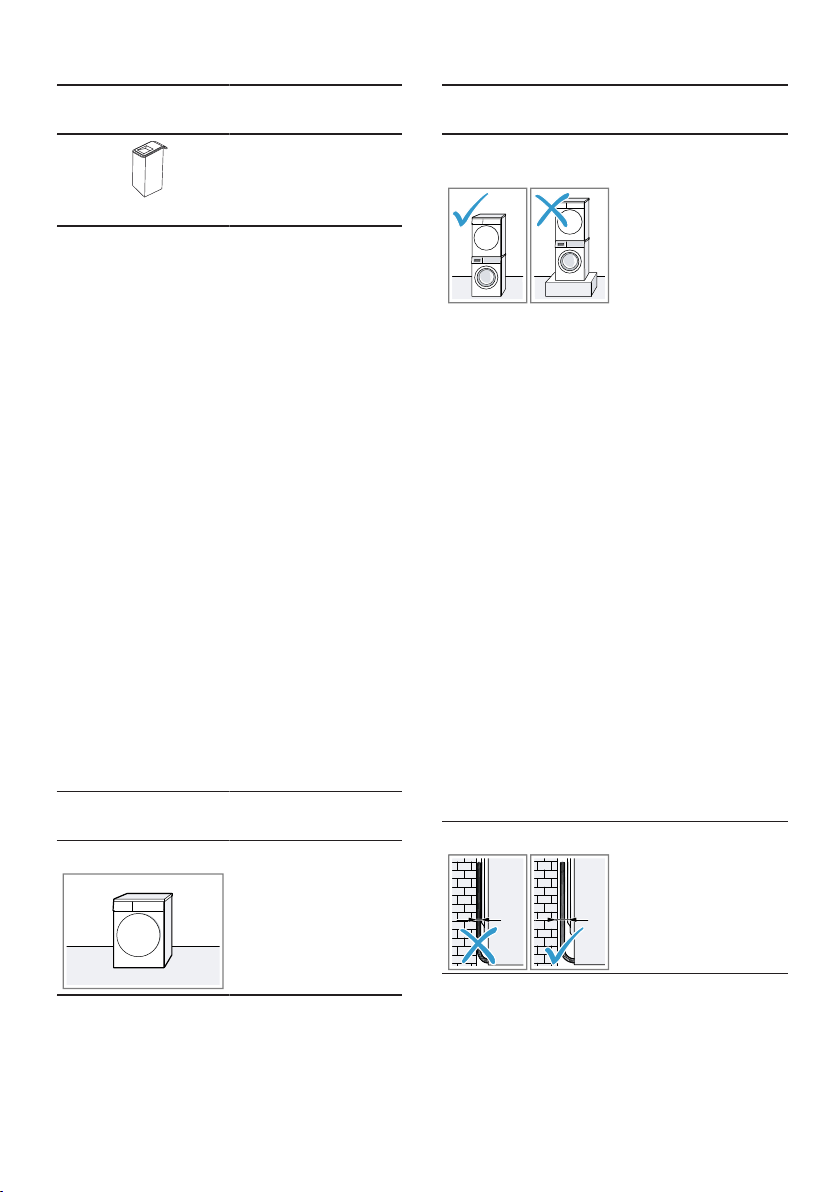
Included with
the appliance
Description
Tumble dryer
Accompanying
documents
Water drain hose
with connection
adapter, fixing
material and el-
bow.
→"Water drain
hose", Page13
Installation and connection en
13
Included with
the appliance
Description
Water jug
→"Filling the wa-
ter tank",
Page39
4.3 Requirements for the in-
stallation location
ATTENTION!
If the appliance is tilted at an angle
greater than 40°, residual water may
leak out of the appliance and cause
material damage.
▶ Tilt the appliance carefully.
▶ Transport the appliance in an up-
right position.
If residual water in the appliance
freezes, this may cause damage to
the appliance.
▶ Do not install or operate this appli-
ance anywhere that is liable to ex-
perience frost or outdoors.
If the appliance is operated immedi-
ately after transportation, the refriger-
ant contained in the appliance may
result in damage to the appliance.
▶ Immediately after transporting the
appliance, leave it to rest for two
hours before putting it into opera-
tion.
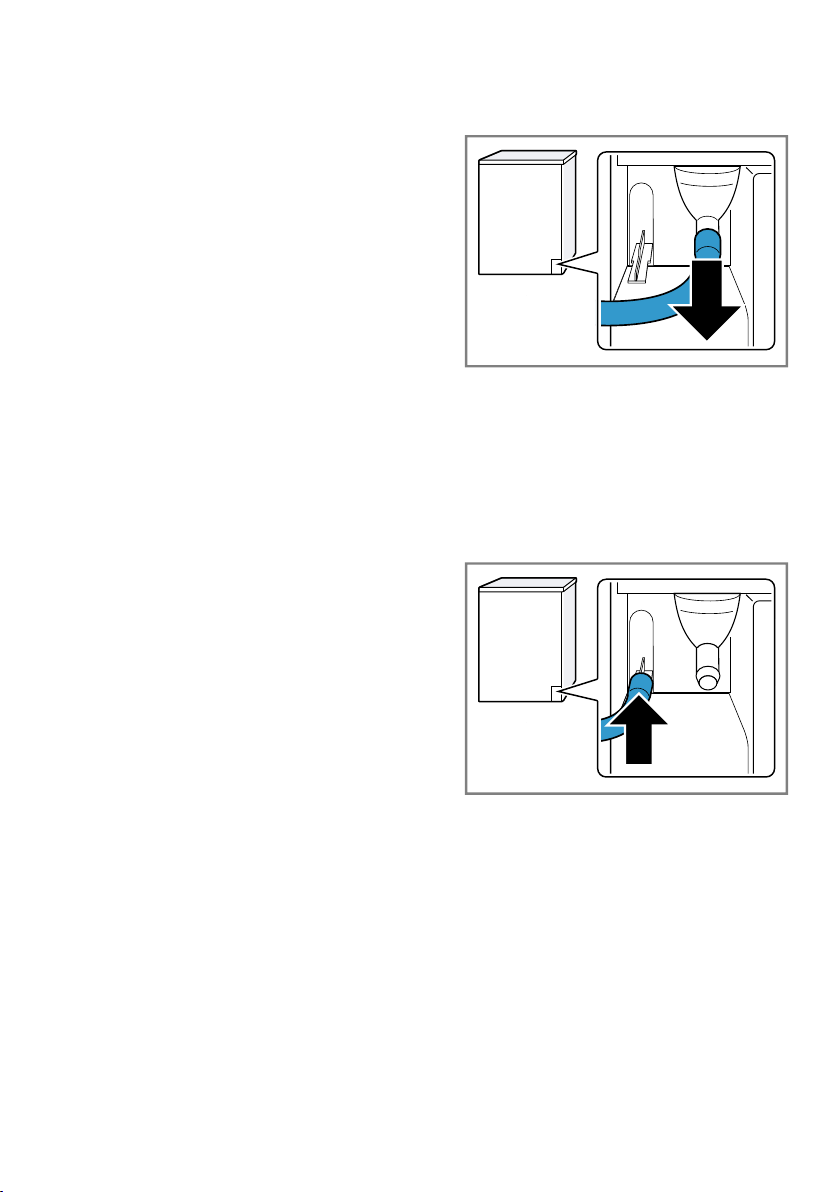
Installation loca-
tion
Requirements
On the floor Place the appli-
ance on a clean,
level and firm
surface.
Align the appli-
ance
→Page16.
Installation loca-
tion
Requirements
In a washer-dryer
stack
Only use the ori-
ginal connection
set from the
dryer manufac-
turer when set-
ting up this appli-
ance in a
washer-dryer
stack.
¡ Connection kit
with pull-out
worktop
→Page33
¡ Connection kit
→Page33
This appliance
must only be
stacked on a
washing machine
from the same
manufacturer.
The depth and
width of this ap-
pliance must cor-
respond with the
dimensions of
the washing ma-
chine.
Do not place the
washer-dryer
stack on a plat-
form.
Against a wall Do not trap the
hoses and power
cord between the
wall and the ap-
pliance.
4.4 Water drain hose
Condensation that forms in the appli-
ance as it dries the laundry is collec-
ted by default in the condensation
en Installation and connection
14
container. Use the water outlet hose
to drain away excess condensation
directly into the waste water system.
Notes
¡ Operate this appliance using the
water outlet hose provided.
→"Connecting the water drain
hose", Page14
If you connect the water outlet
hose, you do not have to regularly
empty the condensation container.
→"Emptying the condensation
container", Page37
¡ You can order this optional
→"Accessories", Page33 from
our customer service.
Connecting the water drain hose
If you do not want to regularly empty
the appliance's condensation con-
tainer, connect the water outlet hose.
ATTENTION!
When operating the appliance
without the water drain hose being
connected properly, liquid may leak
out of the connecting piece.
▶ Before operating the appliance,
connect the water drain hose prop-
erly to the connecting piece.
Requirements
¡ The appliance and the accessory
have been unpacked.
→"Unpacking the appliance",
Page12
¡ The appliance is installed at the in-
stallation location.
→"Requirements for the installa-
tion location", Page13
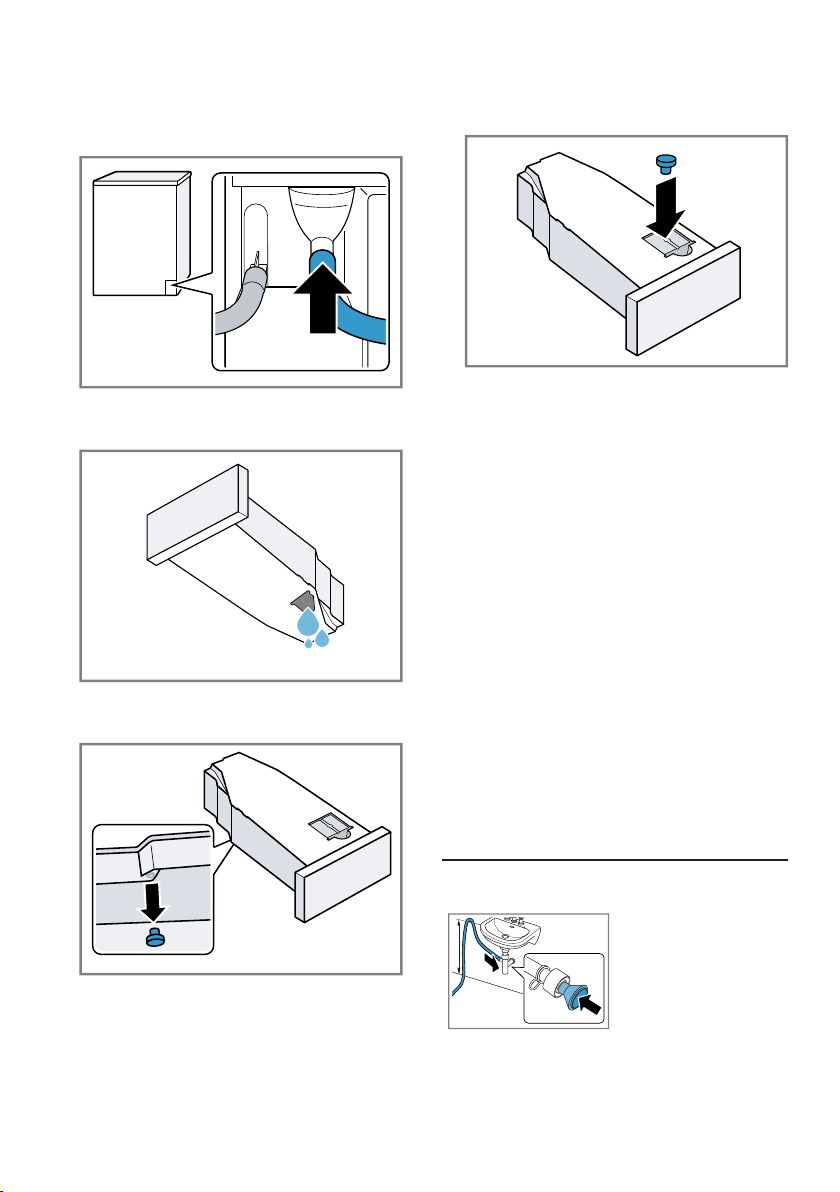
1. Pull out the condensation hose
from the connecting piece.
The condensation hose is connec-
ted to the connecting piece at the
factory.
Note:When removing the con-
densation hose, liquid may leak
out of the connecting piece.
2. Push the condensation hose into
the holder.
Installation and connection en
15
3. Push the water drain hose as far
as it will go into the connecting
piece.
4. Empty the condensation container
→Page37.
5. Remove the stopper on the under-
side.
6. Insert the stopper into the recess
in the top.
7. Insert the condensation container
→Page38.
8. Connect the appliance to the water
outlet.
→"Water outlet connection types",
Page15
Tip:To collect condensation in the
condensation container again (e.g. if
you change where the appliance is
located), carry out these steps in re-
verse order.
Water outlet connection types
ATTENTION!
In the event of a blocked or covered
outlet, accumulated wastewater can
flow back into the appliance.
▶ Before operating the appliance, en-
sure that the wastewater drains
away quickly and eliminate any
blockages.
Drainage into a
siphon.
Secure the con-
nection point with
a (12-22 mm)
hose clamp.
Secure the water
outlet hose with
a hose guide at
a height of at
least 80 cm and
no more than
100 cm.
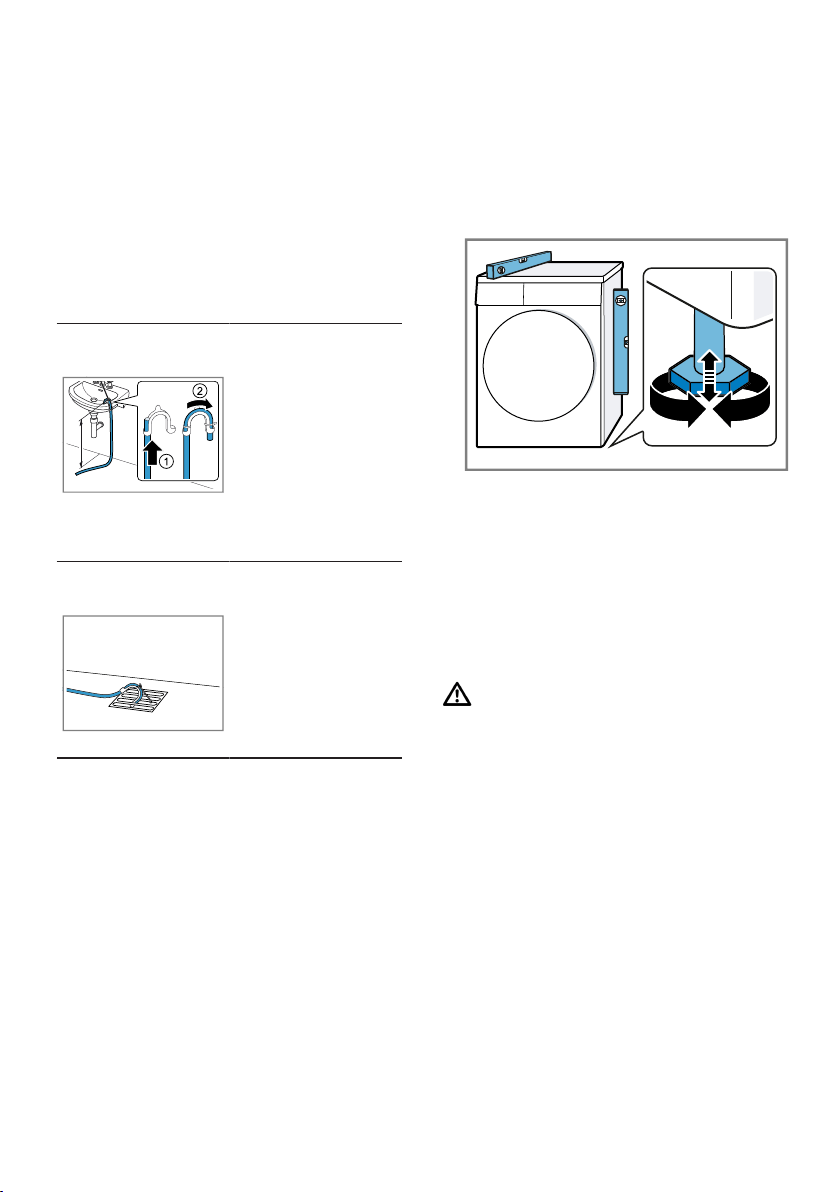
en Installation and connection
16
Note:You can
use the Y-distrib-
utor →Page33
to connect the
water drain hose
of an additional
appliance, such
as a washing
machine, to the
same siphon out-
let.
Drainage into a
wash basin.
Push the water
drain hose fully
through the el-
bow →Page12
and secure it us-
ing fixing mater-
ial.
Secure the elbow
at a height of no
more than 100
cm.
Drainage into a
gully.
Push the water
drain hose fully
through the el-
bow →Page12
and secure it us-
ing fixing mater-
ial.
Secure the elbow
to the gully.
4.5 Aligning the appliance
In order to reduce vibrations and
noises, align the appliance correctly.
▶ To align the appliance, turn the ap-
pliance feet. Check that the appli-
ance is level using a spirit level.
All appliance feet must stand firmly
on the ground.
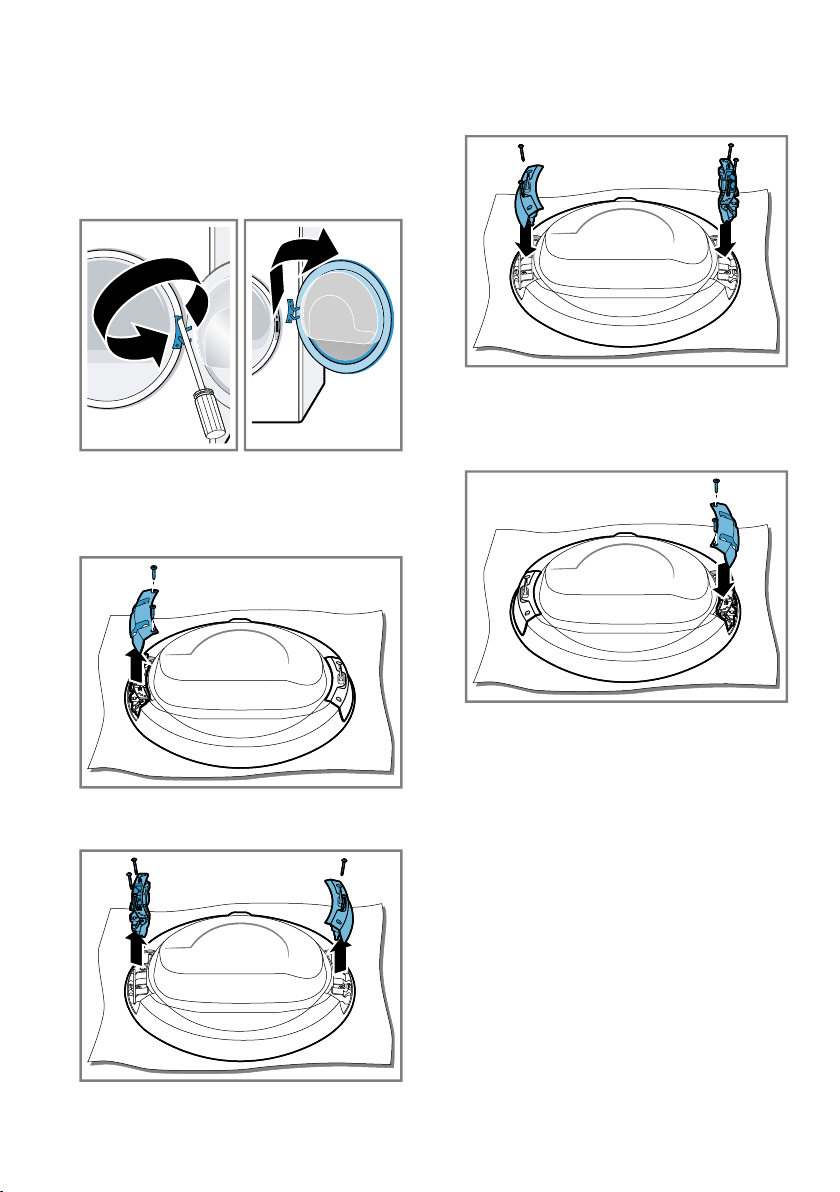
4.6 Reversing the door
To make it easier to place and re-
move laundry in the drum, you can
change the side on which the door is
hinged.
CAUTION
Risk of cutting!
Touching sharp edges on the appli-
ance may lead to cuts.
▶ Do not touch the sharp edges on
the appliance.
▶ Wear protective gloves when in-
stalling and transporting the appli-
ance.
Notes
¡ Only use a Torx T15 screwdriver
and a Torx T20 screwdriver to re-
move and insert screws.
¡ To prevent material damage, lay
the removed door on a level and
soft surface.
Installation and connection en
17
Removing the door
Requirement:The appliance is dis-
connected from the mains.
1. Open the door.
2. Unscrew the door.
Changing the door hinge and door
hook
1. Unscrew the door hinge cover.
2. Unscrew the door hinge and the
door hook.
3. Screw the door hinge and the door
hook onto the opposite sides.
When you do this, ensure that the
door seal is not trapped or dam-
aged.
4. Screw on the door hinge cover.
When you do this, ensure that the
door seal is not trapped or dam-
aged.
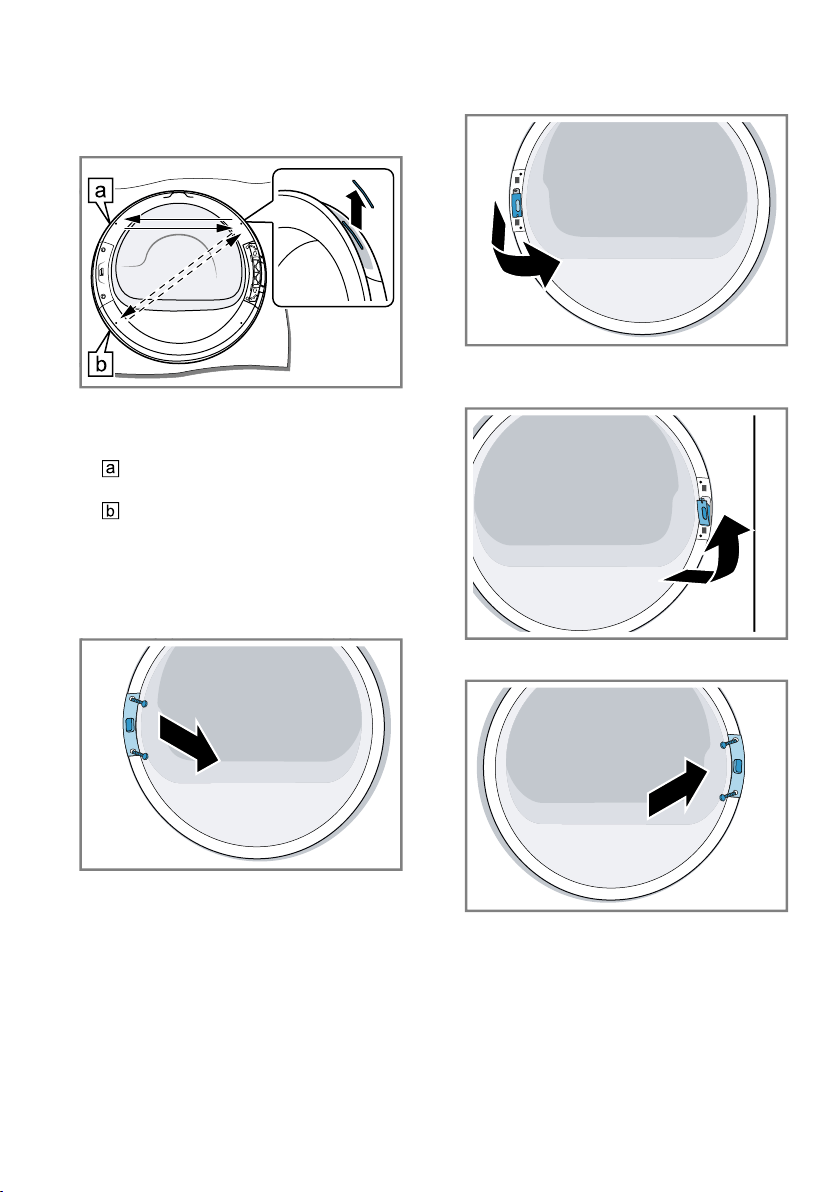
en Installation and connection
18
5. Remove the colour door handle in-
dicator and swap it with the cover
on the opposite side.
Select the position of the door
handle indicator based on the
appliance's installation location:
– The appliance is installed on
the floor.
– The unit is installed in a
raised position in a washer-dryer
stack.
Changing the door lock
1. Unscrew the door lock cover.
2. Remove the door lock.
3. Insert the door lock on the oppos-
ite side.
4. Screw on the door lock cover.
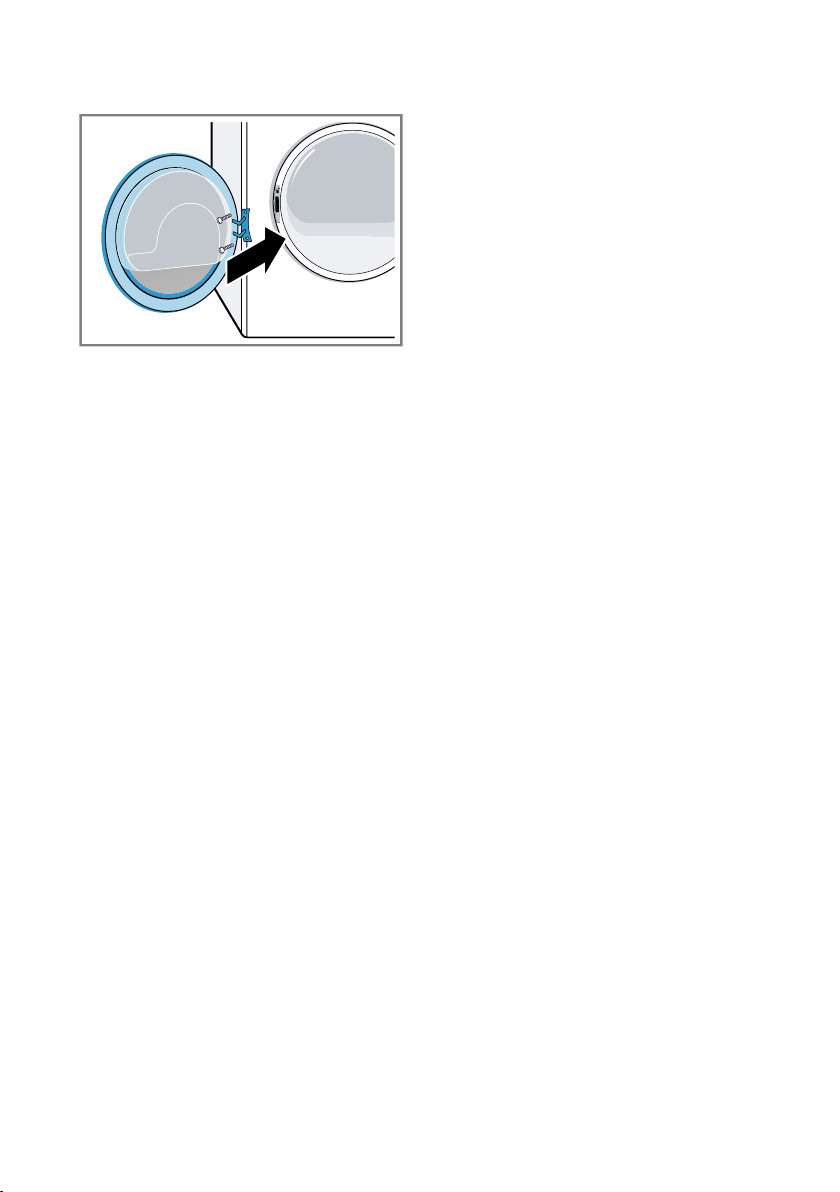
Installation and connection en
19
5. Screw on the door.
4.7 Connecting the appliance
to the electricity supply
1. Insert the mains plug of the appli-
ance's power cable in a socket
nearby.
The connection details of the appli-
ance can be found under Tech-
nical data →Page58.
2. Check the mains plug is inserted
properly.
en Familiarising yourself with your appliance
20
Familiarising yourself with your appliance
5 Familiarising yourself with your appliance
Familiarising yourself with your appliance
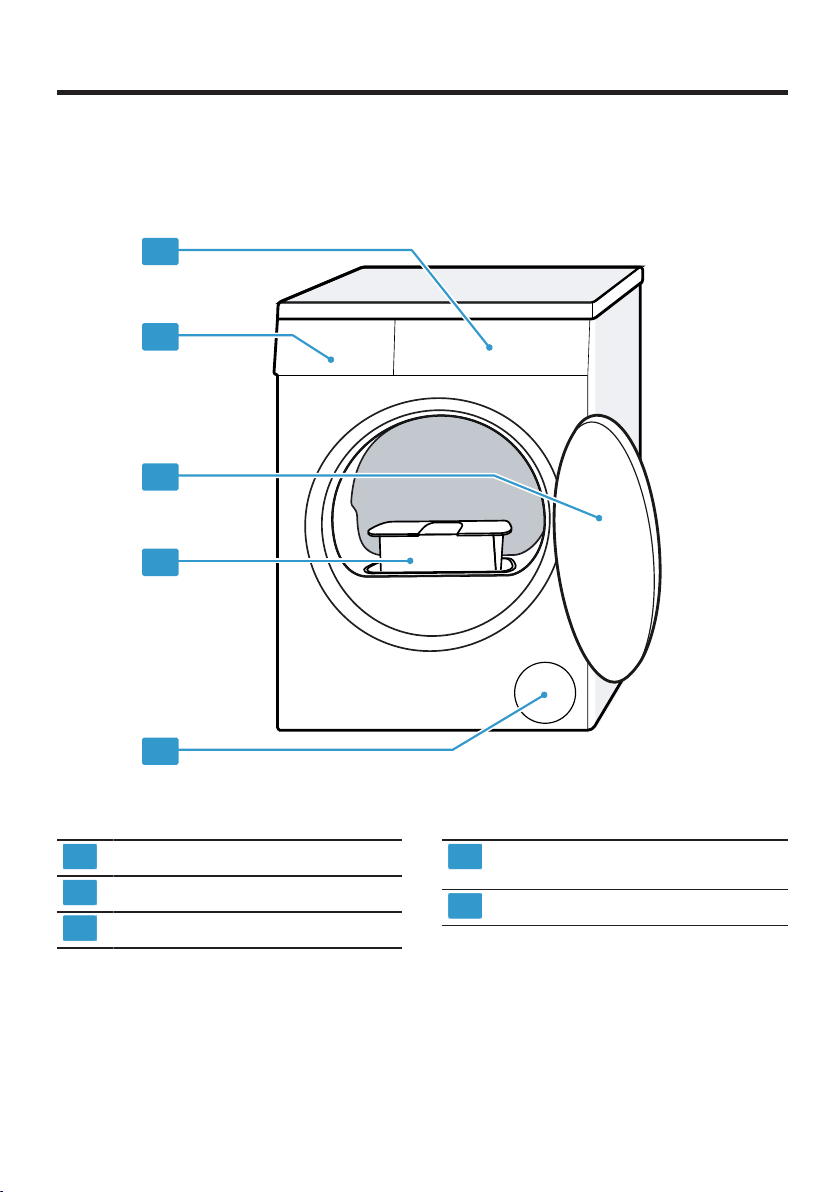
5.1 Appliance
You can find an overview of the parts of your appliance here.
1
2
3
4
5
On certain models, specific details such as the colour and shape may differ
from those pictured.
1
Ventilation opening
2
Fluff filter →Page36
3
Door
4
Condensation container
→Page37
5
Control panel →Page21
Familiarising yourself with your appliance en
21
5.2 Control panel
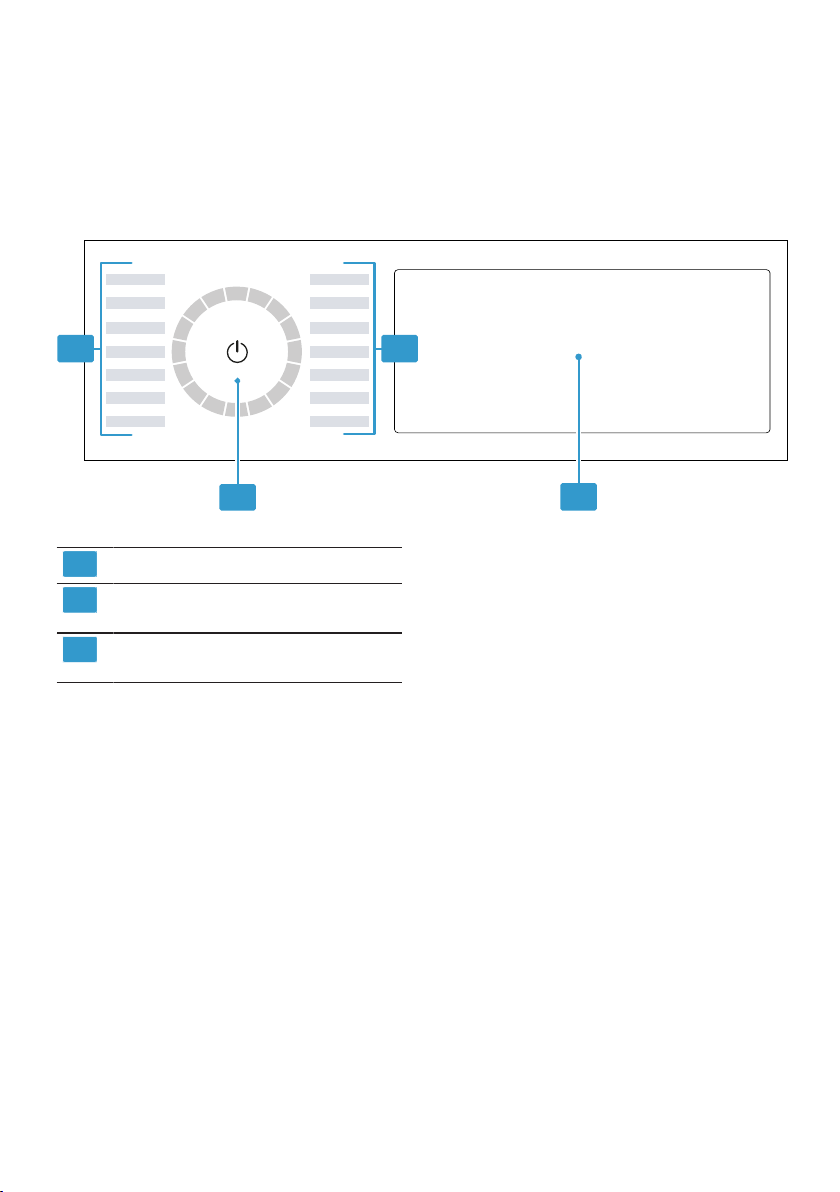
You can use the control panel to configure all functions of your appliance and
to obtain information about the operating status.
3
1 1
2
1
Programmes →Page30
2
Programme selector
→Page34
3
Buttons →Page24 and dis-
play →Page22
5.3 Operating logic
Some areas of the display are but-
tons and respond to touch. You can
activate, deactivate or change set-
tings by pressing the buttons. The ac-
tivated settings are highlighted
brightly on the display.
ATTENTION!
Pressing on the display with force
may cause damage.
▶ Do not apply heavy pressure on
the display.
▶ Do not press on the display using
pointed or sharp objects.
Changing a setting value
If you activate certain settings, the
display shows selection buttons and
you can change the setting value.
▶ Press the selection buttons
→Page24.
The display shows the setting
value.
en Display
22
Display
6 Display
Display
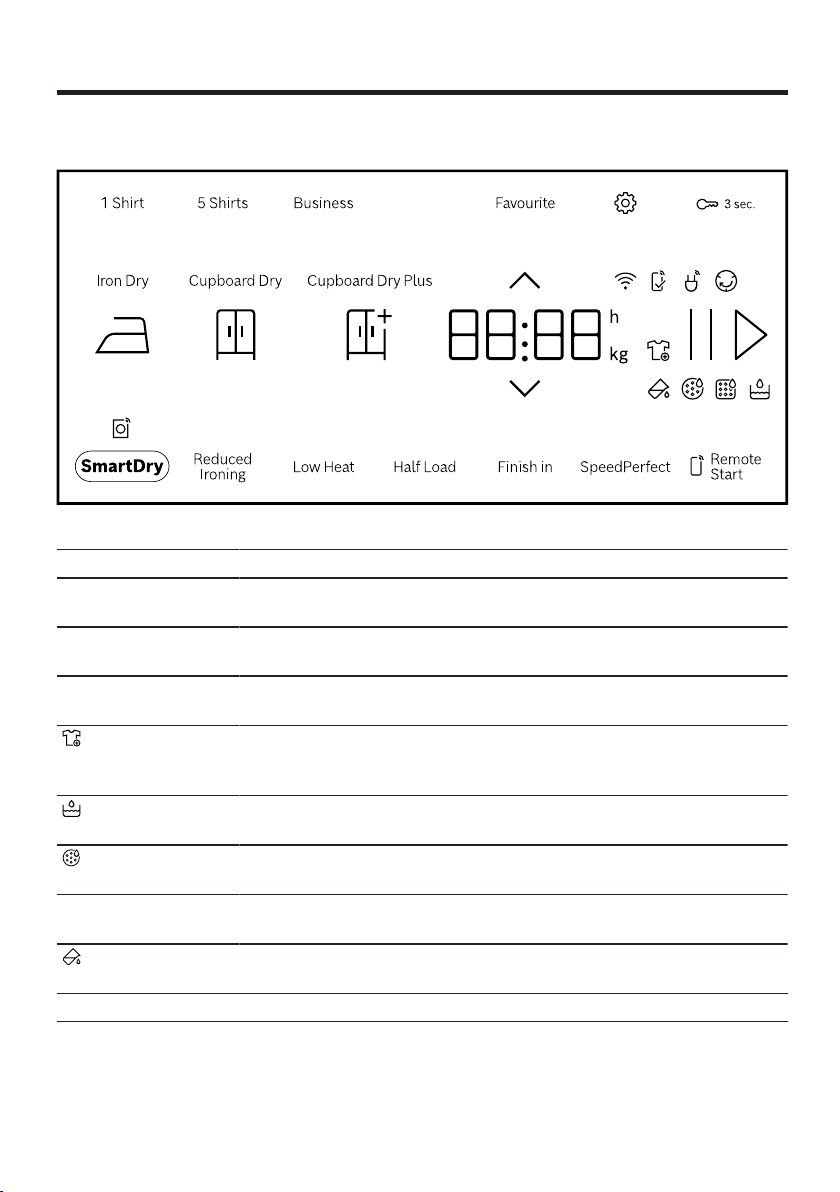
The display shows the current settings, options or relevant information.
Example: Display
Display Description
0:40
1
Expected programme duration or programme time re-
maining in hours and minutes.
9.0
1
Recommendation for the maximum load capacity for the
selected program in kg.
10h
1
Program end time
→"Buttons", Page28
You can remove or add laundry, and interrupt the current
programme.
→"Adding laundry", Page35
Empty and insert the condensation container.
→"Emptying the condensation container", Page37
Clean the fluff filter.
→"Cleaning the fluff filter", Page36
CArE Run the basic appliance care programme.
→"Appliance care", Page45
Fill the water tank for the crease-removal function.
→"Filling the water tank", Page39
1
Example
Display en
23
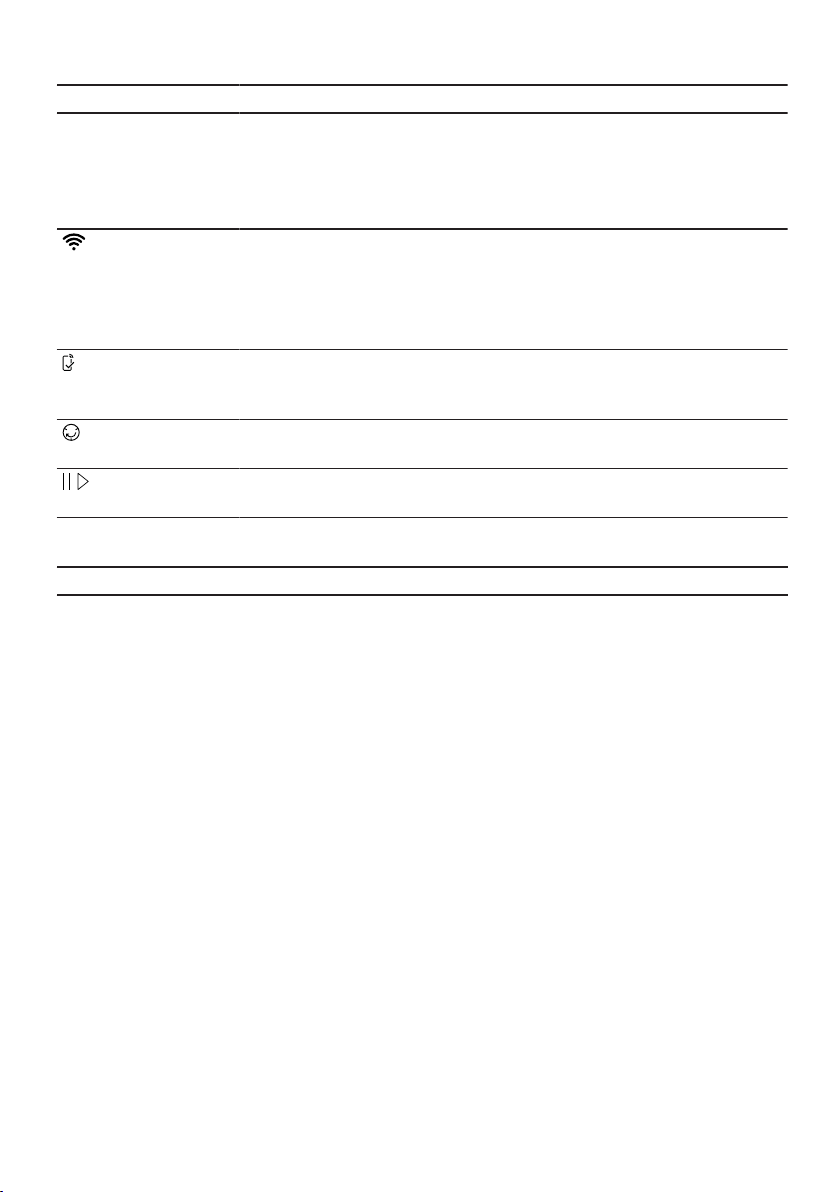
Display Description
Hot The cooling process cools the laundry for a few minutes
while the drum is rotating, in order to avoid damage to the
laundry. The cooling process can be cancelled by open-
ing the door.
Note:Do not change the set programme.
¡ Lights up: The appliance is connected to your home
network via Wi-Fi.
¡ Flashes: The appliance is trying to connect to your
home network via Wi-Fi.
→"HomeConnect ", Page40
Settings that are not available on the appliance have been
set via the HomeConnect app.
You can find more information in the HomeConnectapp.
Crease-reduction function
Programme status
Pause
Programme status
End Program end
Programme status
1
Example
en Buttons
24
Buttons
7 Buttons
Buttons
Below is an overview of the buttons and their setting options.
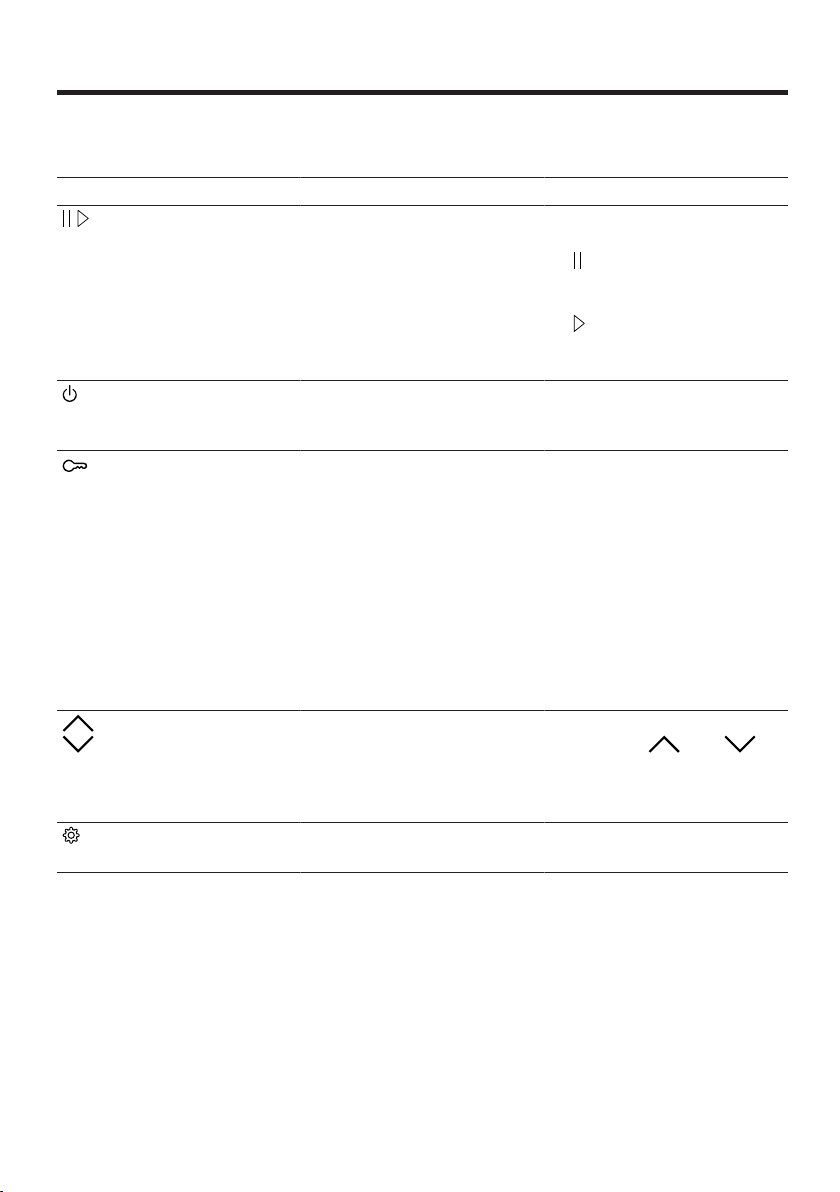
Button Selection Description
¡ Start
¡ Cancel
¡ Pause
Start, cancel or pause
the programme.
If is displayed, you
can pause the pro-
gramme.
If is displayed, you
can start the pro-
gramme.
(mains switch) ¡ Switch on
¡ Standby mode
Switch on the appliance
or put it in standby
mode.
3 sec. ¡ Activate
¡ Deactivate
Activate or deactivate the
childproof lock.
Disable the control panel
to prevent unwanted or
accidental operation.
If the childproof lock is
activated and the appli-
ance has been switched
off, the childproof lock
remains activated.
→"Childproof lock",
Page38
Multiple selection To change a setting,
press the or
selection button until the
display shows the re-
quired setting.
Multiple selection
→"Basic settings",
Page44
Buttons en
25
Button Selection Description
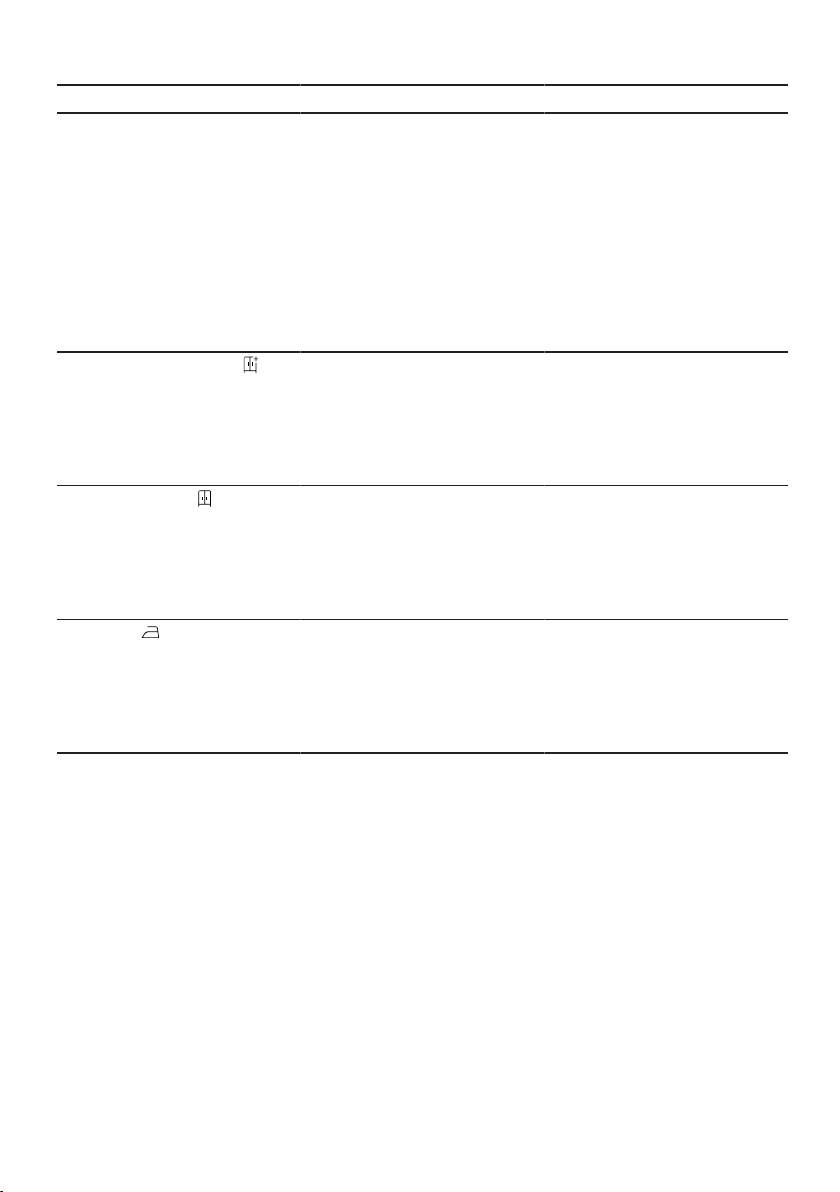
Favourite ¡ Saving
¡ Setting
Press the button for ap-
prox. 3 seconds to save
your customised pro-
gram settings.
→"Saving the pro-
gramme settings",
Page35
If you briefly press the
button, you can set cus-
tomised program set-
tings for your program.
Cupboard Dry Plus ¡ Activate
¡ Deactivate
The dryness level
defines how damp or dry
the laundry is after the
programme ends.
→"Dryness level",
Page29
Cupboard Dry ¡ Activate
¡ Deactivate
The dryness level
defines how damp or dry
the laundry is after the
programme ends.
→"Dryness level",
Page29
Iron Dry ¡ Activate
¡ Deactivate
The dryness level
defines how damp or dry
the laundry is after the
programme ends.
→"Dryness level",
Page29
en Buttons
26
Button Selection Description
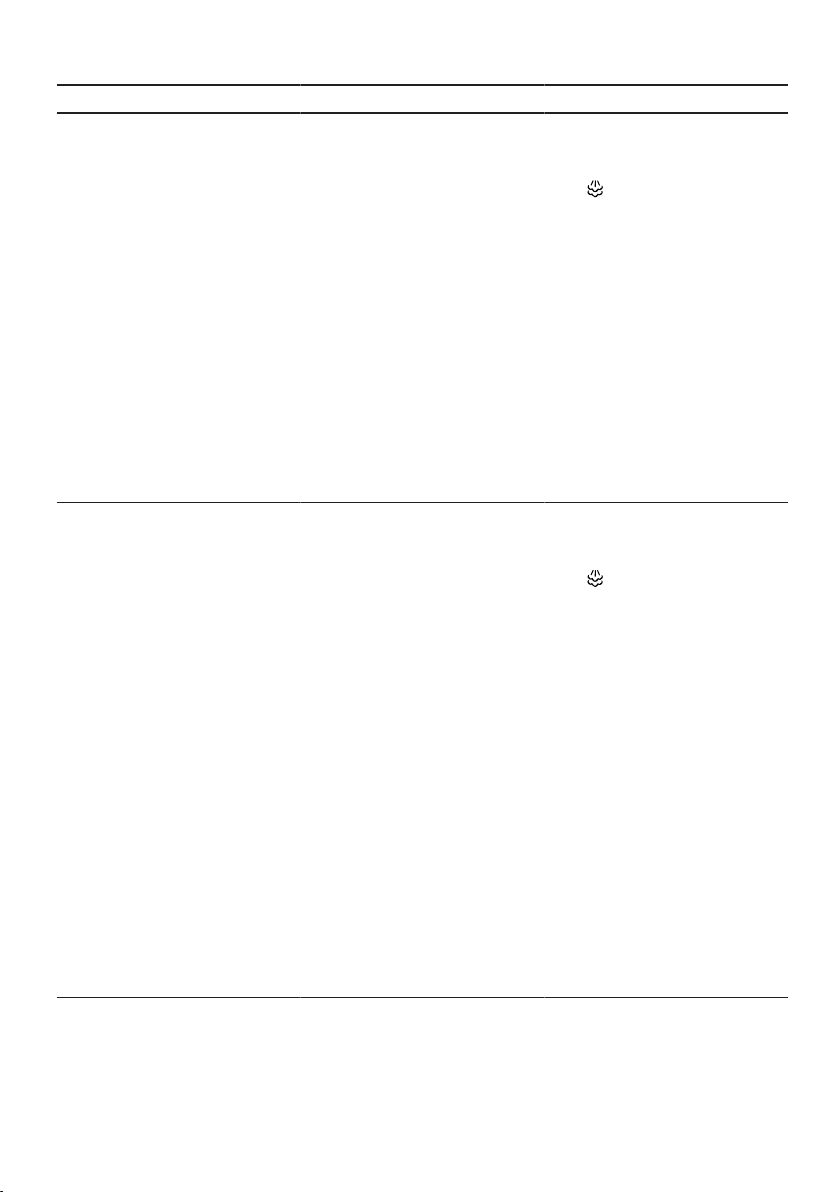
5 Shirts ¡ Activate
¡ Deactivate
Adjust the set pro-
gramme with crease-re-
moval function Iron As-
sist .
→"Crease-removal func-
tion", Page39
Suitable for dry shirts
and blouses that have
only been worn once.
Activate for 2 to 5 items
of laundry.
Notes
¡ The laundry is not
dried or washed.
¡ To prevent creasing,
remove the laundry
after the programme
ends.
Business ¡ Activate
¡ Deactivate
Adjust the set pro-
gramme with crease-re-
moval function Iron As-
sist .
→"Crease-removal func-
tion", Page39
Suitable for dry suits,
jackets and trousers that
have not been worn for
long and are labelled
"Dry clean only".
Activate for one suit or
two items of laundry.
Notes
¡ The laundry is not
dried or washed.
¡ To prevent creasing,
remove the laundry
after the programme
ends.
¡ The programme is not
suitable for thin, light-
weight summer suits.

Buttons en
27
Button Selection Description
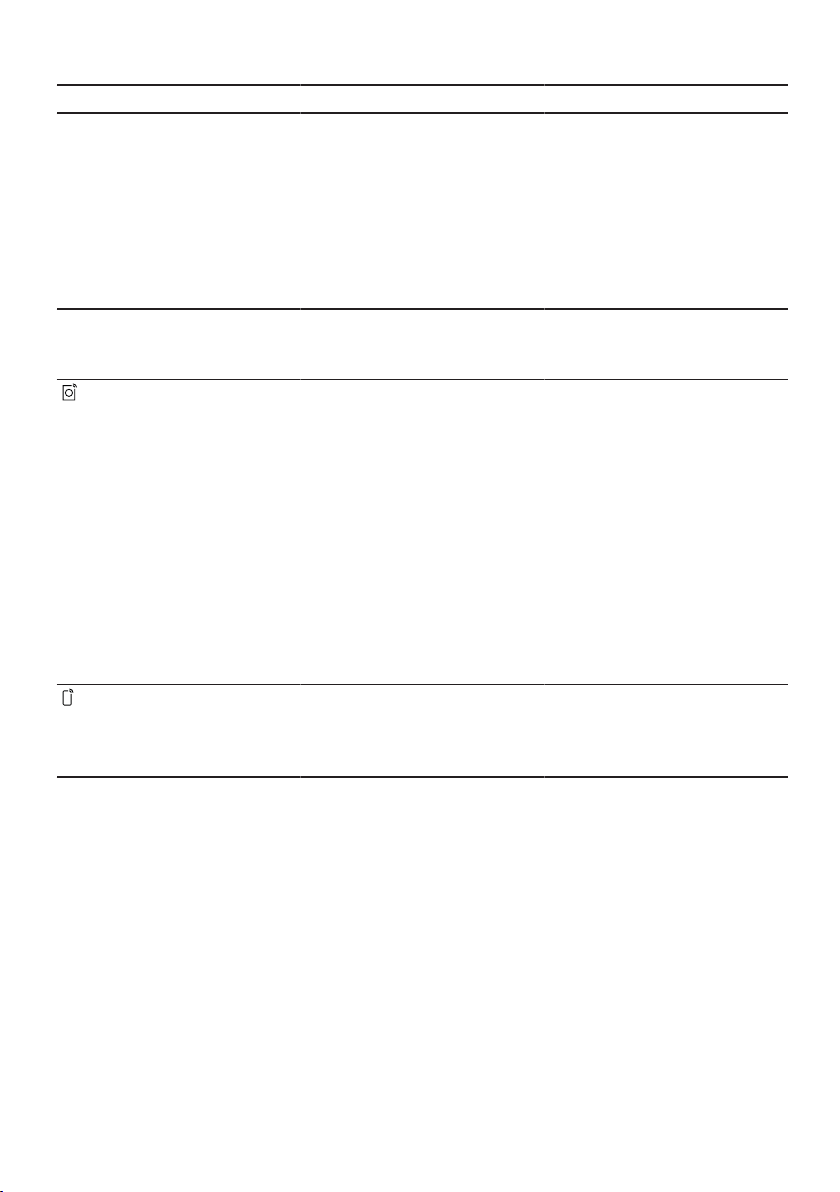
1 Shirt ¡ Activate
¡ Deactivate
Adjust the set pro-
gramme with crease-re-
moval function Iron As-
sist .
→"Crease-removal func-
tion", Page39
Suitable for dry shirts
and blouses that have
only been worn once.
Activate for one item of
laundry.
Notes
¡ The laundry is not
dried or washed.
¡ To prevent creasing,
remove the laundry
after the programme
ends.
Reduced Ironing ¡ Activate
¡ Deactivate
Activate or deactivate the
crease-reduction func-
tion.
Once the programme
has ended, the drum
moves the laundry at
regular intervals for 120
minutes to prevent
creasing.
SpeedPerfect ¡ Activate
¡ Deactivate
Activate or deactivate a
shorter programme dura-
tion.
Note:The energy con-
sumption increases. This
does not impair the dry-
ing result.
Low Heat ¡ Activate
¡ Deactivate
Activate or deactivate
gentle drying.
The temperature is re-
duced for delicate fab-
rics, e.g. polyacrylic or
elastane.
The programme duration
is extended.
en Buttons
28
Button Selection Description
Finish in Up to 24 hours Set the programme end
time.
The programme duration
is already included in the
set number of hours.
Once the programme
has started, the pro-
gramme duration is dis-
played.
Half Load ¡ Activate
¡ Deactivate
Dry individual items of
laundry or small loads of
laundry.
SmartDry Activate After you have washed
your laundry in the wash-
ing machine, the dryer
recommends a suitable
programme for drying
the laundry.
Note:The washing ma-
chine must be compat-
ible with HomeConnect.
The washing machine
and dryer must be con-
nected to your home net-
work and registered in
your HomeConnect app.
Remote Start ¡ Activate
¡ Deactivate
¡ Open the HomeCon-
nect menu
→"Remote start",
Page42
Dryness level en
29
Dryness level
8 Dryness level
Dryness level
Each automatic programme has a specified dryness level. The dryness level
defines how dry or damp your laundry is after the programme ends.
Dryness level Laundry Drying result
Multi-layered, thick laundry
that does not dry readily.
The laundry is dry.
Normal, single-layered
laundry.
The laundry is dry.
Normal, single-layered
laundry.
The laundry is still slightly damp.
To prevent creasing after drying,
iron the laundry or hang it up.
8.1 Changing the dryness
level
For some automatic programmes,
you can change the dryness level so
that your laundry will be drier or more
damp.
1. Set an automatic programme.
→"Automatic programmes",
Page30
a The display shows the specified
dryness level.
2. Press Cupboard Dry , Cup-
board Dry Plus or Iron Dry .
8.2 Adjusting the dryness
level
If the laundry feels too damp after it
has been dried to a particular dry-
ness level, you can adjust the dry-
ness level.
Note:You can also adjust the dry-
ness level in the basic settings.
1. Set an automatic programme.
→"Automatic programmes",
Page30
a The display shows the specified
dryness level.
2. Press and hold Cupboard Dry ,
Cupboard Dry Plus or Iron
Dry for approx. 3seconds.
3. Press or to adjust the
dryness level.
4. Press and hold the selected dry-
ness level for approx. 3 seconds
to return to the automatic pro-
gramme.
en Programmes
30
Programmes
9 Programmes
Programmes
You can dry your fabrics using either an automatic programme or a timed pro-
gramme.
9.1 Automatic programmes
Automatic programmes are pro-
grammes in which humidity sensors
measure the residual moisture in the
laundry during the drying cycle. The
programme only ends once the set
dryness level is reached.
Each automatic programme has a
dryness level →Page29. The dry-
ness level defines how dry or damp
the laundry is after the programme
ends.
Tips
¡ Select the dryness level according
to the type of fabric or the desired
drying result.
→"Dryness level", Page29
¡ The laundry's care labels provide
you with additional information
about programme selection.
Programme Description Max. load
(kg)
Cottons Dry hard-wearing, heat-resistant fabrics
made of cotton or linen.
9.0
Cottons Eco Dry hard-wearing, heat-resistant fabrics
made of cotton or linen.
Energy-saving programme.
9.0
Easy Care Dry items made of synthetic materials or
blended fabrics.
3.5
Mixed Load Dry items made of cotton and synthetics. 3.0
Bed linen Dry duvet covers, pillowcases and sheets
made of cotton.
Note:The drum movement is optimised
for drying large items of laundry.
3.5
Delicates Dry delicate items made of satin, synthet-
ics or blended fabrics.
2.0
Hygiene Plus Dry hard-wearing, heat-resistant fabrics
made of cotton or linen.
Note:Particularly suitable for strict hy-
giene requirements.
4.0
Sportswear Dry self-drying sportswear made of per-
formance fibres, microfibres and synthet-
ics.
1.5
Programmes en
31
Programme Description Max. load
(kg)
Shirts Suitable for shirts and blouses made of
cotton, linen, synthetics or blended fab-
rics.
Note:For optimal drying results, dry a
maximum of 5 shirts or 5 blouses at the
same time.
Once the laundry is dry, iron it or hang it
up. The residual moisture is then distrib-
uted evenly.
1.5
Towels Dry hard-wearing, heat-resistant towels
and dressing gowns made of cotton or
linen.
6.0
Quiet Dry Dry hard-wearing, heat-resistant fabrics
made of cotton or linen.
Suitable for quiet drying.
9.0
Iron Assist Reduce creasing and airborne odours.
→"Crease-removal function", Page39
To adjust the programme with crease-re-
moval function, press the corresponding
button.
→"Buttons", Page24
-
App Select additional programmes directly via
the HomeConnect app.
A description of the programmes can be
found in the HomeConnect app.
Note:Your appliance must be connected
to your home network and registered in
your HomeConnect app.
→"HomeConnect ", Page40
–
9.2 Timed programmes
Timed programmes are programmes with a defined or adjustable programme
duration. The programme ends once this time has elapsed, even if the laundry
is still not dry, for example. Timed programmes are suitable for drying individual
items of laundry or thin fabrics.
Tip:The laundry's care labels provide you with additional information about pro-
gramme selection.

en Programmes
32
Programme Description Max. load
(kg)
Timed Progr. Warm Dry all types of fabric except for wool and
silk.
Suitable for pre-dried or slightly damp
laundry and for drying off multi-layered,
thick laundry.
3.0
App Select additional programmes directly via
the HomeConnect app.
A description of the programmes can be
found in the HomeConnect app.
Note:Your appliance must be connected
to your home network and registered in
your HomeConnect app.
→"HomeConnect ", Page40
–

Accessories en
33
Accessories
10 Accessories
Accessories
Use original accessories. These have
been made especially for your appli-
ance.
Note:Some accessories are avail-
able in other colours. Contact
→"Customer Service", Page56.
Use Order number
Connection kit To save space, stack the
appliance on a suitable
washing machine of the
same width and depth
and that is from the
same manufacturer.
WTZ27510
Connection kit with pull-
out worktop
To save space, stack the
appliance on a suitable
washing machine of the
same width and depth
and that is from the
same manufacturer.
The pull-out worktop
makes it easier to load
and unload the appli-
ance.
WTZ27500
Y-distributor Connect the water drain
hose of an additional ap-
pliance to the same si-
phon outlet.
15000490
Appliance care product Spare part for the intens-
ive appliance care func-
tion.
00311829
Platform Install the appliance at a
raised height so that it
can be easily loaded and
unloaded.
WTZPW20D
en Laundry
34
Laundry
11 Laundry
Laundry
11.1 Preparing the laundry
ATTENTION!
Objects remaining in the laundry may
damage the laundry and the drum.
▶ Remove all items from any pock-
ets in your laundry before using
the appliance.
Note
The appliance and fabrics are
protected when you prepare your
laundry.
¡ Brush off sand and soil
¡ Sort the laundry according to col-
our and textiles and observe the
care labels
¡ Close all zips, Velcro fasteners,
hooks and eyes
¡ Remove curtain fittings and lead
strips
¡ Load the laundry unfolded into the
drum
¡ Spin the laundry before drying
Basic operation
12 Basic operation
Basic operation
12.1 Switching on the appli-
ance
Note:If you switch the appliance on
the first time after you have connec-
ted it to the electrical system, the
switch-on process takes up to one
minute.
Requirement:The appliance has
been correctly installed and connec-
ted.
→"Installation and connection",
Page12
▶ Press .
The switch-on process takes a few
seconds.
Note:The lighting for the drum goes
out automatically.
12.2 Setting a programme
1. Press the required programme.
→"Programmes", Page30
a The display shows the programme
settings.
2. If required, adjust the programme
settings.
→"Adjusting the programme set-
tings", Page34
12.3 Adjusting the pro-
gramme settings
Depending on the programme and
programme progress, you can adjust
or activate/deactivate the settings.
Requirement:A programme is set.
→"Setting a programme", Page34
▶ Adjust the programme settings.
→"Buttons", Page24
Observe the information about op-
erating logic →Page21.
Note:The programme settings are
not saved permanently for the pro-
gramme.

Basic operation en
35
12.4 Saving the programme
settings
You can save your individual pro-
gramme settings as favourites.
Requirements
¡ A programme is set.
→"Setting a programme", Page34
¡ The programme settings have
been adjusted.
→"Adjusting the programme set-
tings", Page34
▶ Press and hold Favourite for ap-
prox. 3 seconds.
Press Favourite to call up the
saved programme.
Note:To overwrite the saved pro-
gramme, repeat the steps above.
12.5 Loading laundry
Note:To prevent creasing, note the
maximum load for the programmes.
→"Programmes", Page30
Requirements
¡ The laundry is prepared and sor-
ted.
→"Laundry", Page34
¡ The drum is empty.
1. Open the door.
2. Place the laundry in the drum.
3. Close the door.
Ensure that there is no laundry
trapped in the door.
12.6 Starting the programme
Requirement:A programme is set.
→"Setting a programme", Page34
▶ Press .
a The display shows the programme
duration or the programme end
time.
a After the programme has ended,
the display shows: "End" .
Note:If "Hot" appears, the appli-
ance cools the laundry.
When "Hot" goes out, the laundry
has cooled down.
12.7 Adding laundry
After the programme starts, you can
remove or add laundry at any time.
1. Press .
The cooling process starts auto-
matically after approximately 30
seconds and cools down the laun-
dry while the drum is rotating. If
you want to avoid or cancel the
cooling process, open the door.
→"Display", Page23
2. Open the door.
3. Add or remove laundry.
4. Close the door.
5. Press .
12.8 Cancelling the pro-
gramme
1. Press .
2. Open the door.
3. Remove the laundry.
→"Unloading the laundry",
Page35
12.9 Unloading the laundry
1. Open the door.
2. Remove the laundry from the
drum.
12.10 Put the appliance into
standby mode
▶ Press .
en Basic operation
36
12.11 Fluff filter
During drying, fluff from the laundry is
collected in the fluff filter. The fluff fil-
ter protects the appliance from fluff.
Cleaning the fluff filter
If the drying programme has finished
or the display shows a notification
while the appliance is in operation,
clean the fluff filter.
Note:If you do not clean the appli-
ance as described, the appliance's
functionality may be impaired.
Requirements
¡ The display shows the following
after drying: "End"
¡ or the display shows the following
during operation: .
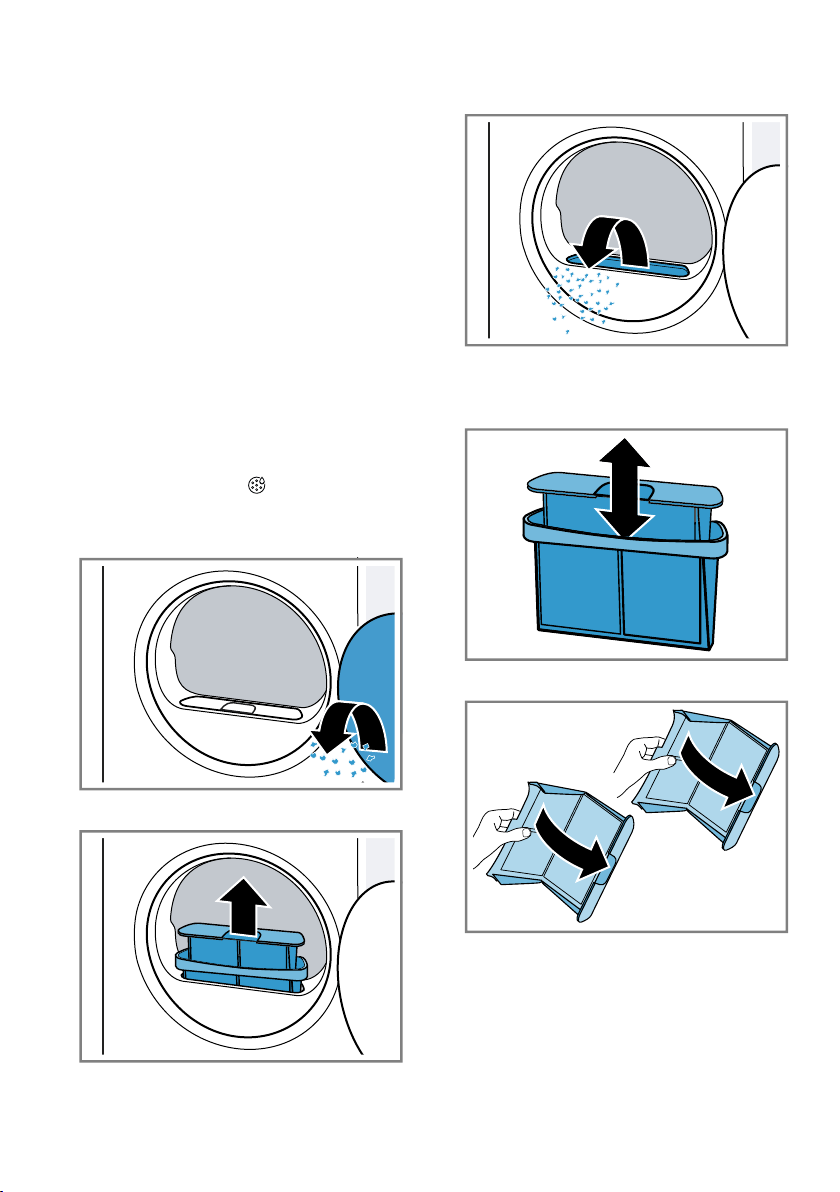
1. Open the door.
2. Remove the fluff from the door.
3. Remove the two-part fluff filter.
4. Remove the fluff from the recess.
Ensure that no fluff falls into the air
channel.
5. Disconnect the two-part fluff filter.
6. Open the two fluff filters.
Basic operation en
37
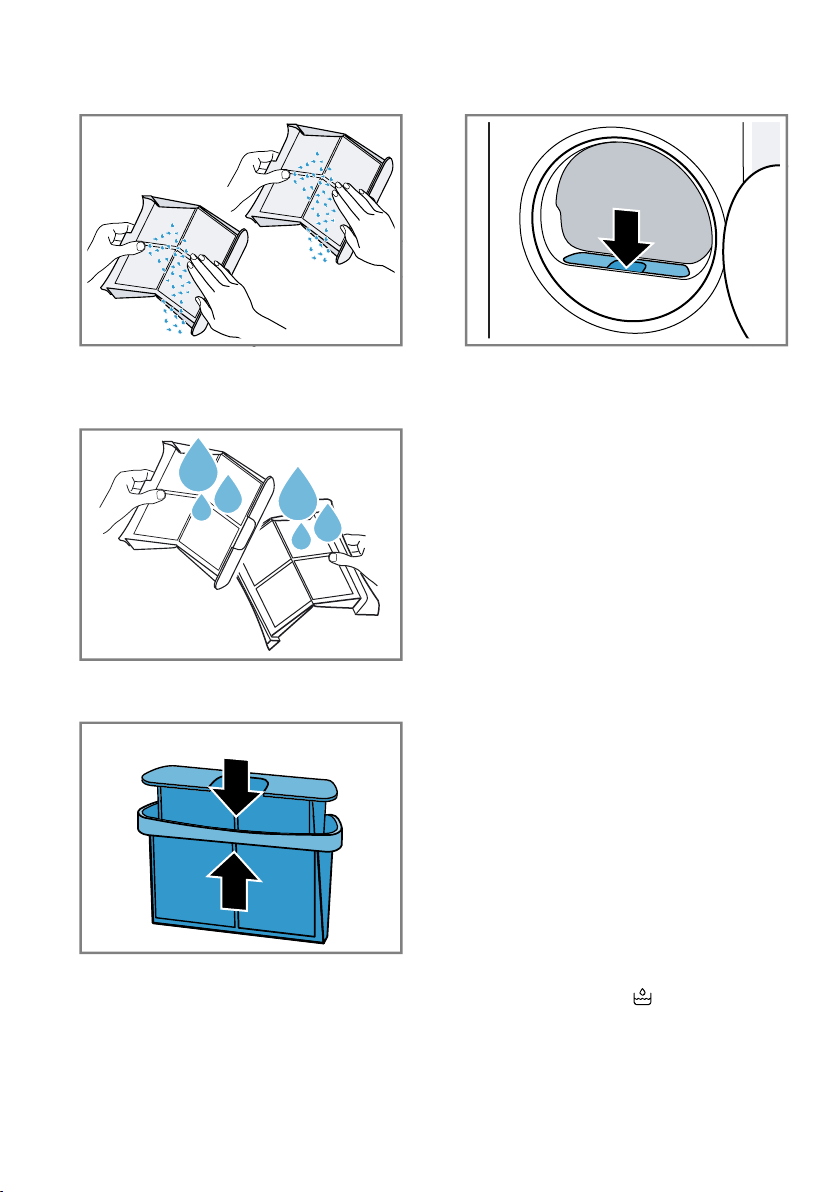
7. Remove the fluff.
8. Clean the two fluff filters thoroughly
under warm, running water and
then dry them off.
9. Close the two fluff filters and put
them together.
10.Insert the two-part fluff filter.
11.Close the door.
12.12 Condensation con-
tainer
Condensation that forms in the appli-
ance as it dries the laundry is collec-
ted by default in the condensation
container.
Note:Operate this appliance using
the water outlet hose provided.
→"Connecting the water drain hose",
Page14
If you connect the water outlet hose,
you do not have to regularly empty
the condensation container.
→"Emptying the condensation con-
tainer", Page37
Emptying the condensation
container
If the drying programme has finished
or the display shows a notification
while the appliance is in operation,
empty the condensation container.
Requirements
¡ The display shows the following
after drying: "End"
¡ or the display shows the following
during operation: .
en Childproof lock
38
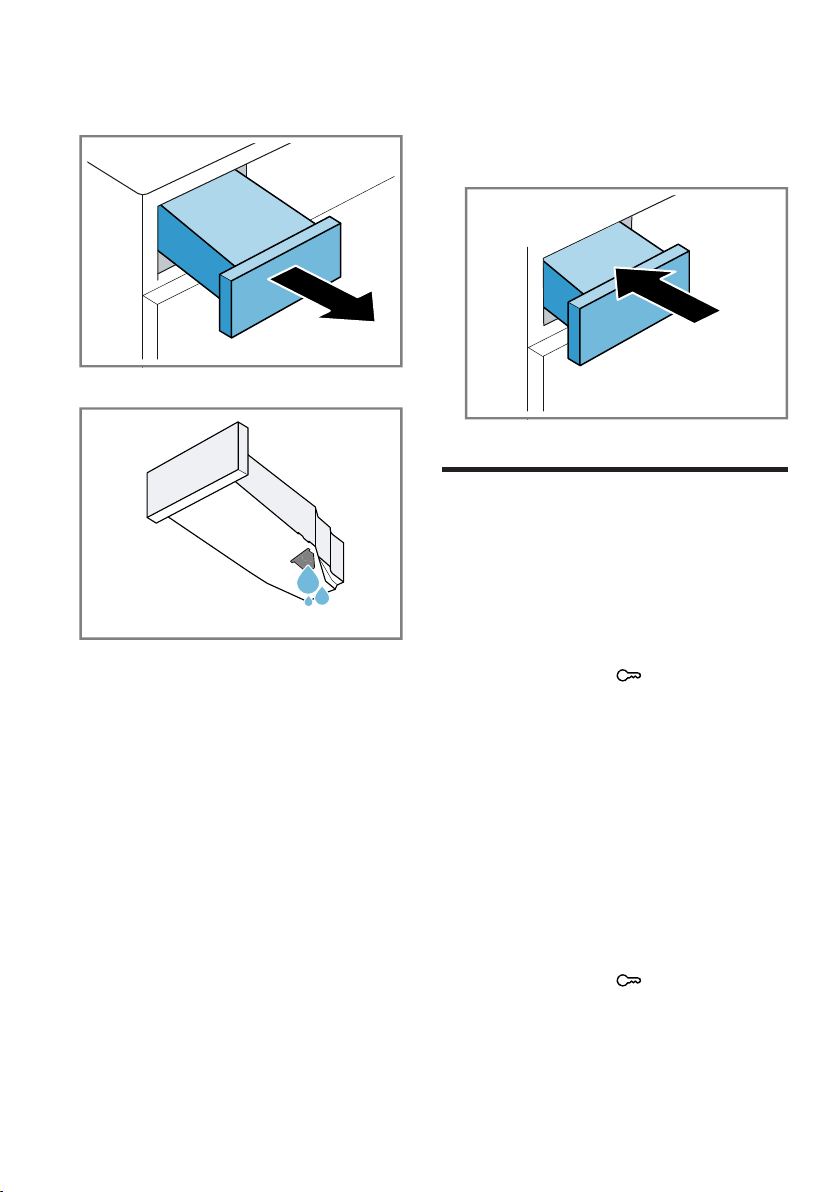
1. Pull out the condensation con-
tainer, keeping it level.
2. Empty the condensation container.
Check the condensation container
filter →Page49 regularly and
clean the filter if it is dirty.
Make sure that you insert the con-
densation container before operat-
ing the appliance.
→"Inserting the condensation con-
tainer", Page38
Inserting the condensation
container
▶ Push the condensation container
in as far as it will go.
Childproof lock
13 Childproof lock
Childproof lock
Secure your appliance against being
operated unintentionally using the
controls.
13.1 Activating the childproof
lock
▶ Press and hold 3 sec. for ap-
prox. 3 seconds.
a The control elements are locked.
a The childproof lock also remains
activated when the appliance is in
standby mode and in the event of
a power cut.
13.2 Deactivating the child-
proof lock
Requirement:To deactivate the
childproof lock, the appliance must
be switched on.
▶ Press and hold 3 sec. for ap-
prox. 3 seconds.

Crease-removal function en
39
Crease-removal function
14 Crease-removal func-
tion
Crease-removal function
In order to reduce creasing and air-
borne odours, such as cigarette
smoke, you can use a programme
with a crease-removal function for
any laundry that has not been worn
for long.
14.1 Starting a programme
with the crease-removal
function
Note
Wash items of laundry that have
traces of sweat, perfume or deodor-
ant before wearing them again.
Do not use dryer cleaning sets.
Do not use a programme with the
crease-removal function for the
following fabrics:
¡ Wool, leather and viscose
¡ Fabrics with parts made from
metal, wood or plastic
¡ Waxed jackets and oilskin jackets
Requirements
¡ The laundry is prepared.
→"Preparing the laundry", Page34
¡ The laundry is sorted.
¡ The laundry is placed in the appli-
ance.
→"Loading laundry", Page35
1. Set a programme with crease-re-
moval function.
→"Automatic programmes",
Page30
2. If required, adjust the set pro-
gramme with crease-removal func-
tion.
→"Buttons", Page24
3. Start the programme.
→"Starting the programme",
Page35
If the water tank is empty, the dis-
play shows: .
→"Filling the water tank",
Page39
The average programme duration
of the crease-removal function is
approx. 45 minutes and may be
longer or shorter depending on the
ambient temperature.
a After the programme has ended,
the display shows: "End" .
4. Remove the laundry.
→"Unloading the laundry",
Page35
The results of the crease-removal
function may vary depending on
the type of fabric, the amount of
laundry and the selected pro-
gramme.
Remove the laundry immediately
after the programme has ended to
prevent creasing.
5. Hang up the items of laundry and
pull them into shape.
14.2 Filling the water tank
Your appliance removes the creases
from rarely worn clothing using cold
drinking water. If the display shows a
notification while the appliance is in
operation, fill the water tank.
ATTENTION!
Operating the appliance with water
that is dirty or too hot may result in
damage to the appliance.
▶ Only fill the water tank with cold
drinking water.
▶ Never use condensed water, dis-
tilled water, additives or descaler
for the crease-removal function.
en HomeConnect
40
Requirements
¡ You have started a programme
with the crease-removal function.
→"Starting a programme with the
crease-removal function", Page39
¡ The display shows: .
¡ The condensation container
→Page37 is removed from the
appliance.
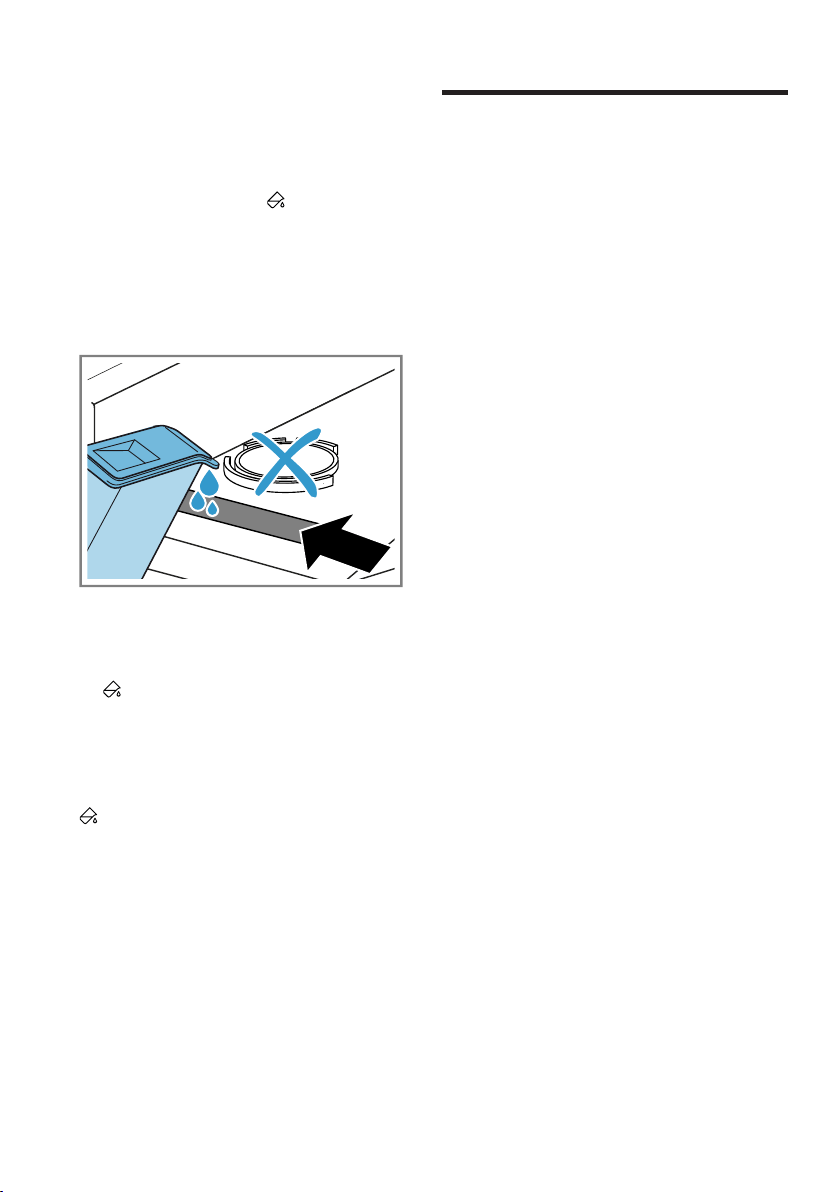
1. Add approx. 180ml cold mains
water through the front opening,
using the water jug provided.
Check the water tank filter regu-
larly and clean the filter if it is dirty.
→"Cleaning the water tank filter",
Page48
If does not go out on the dis-
play, add cold drinking water
through the front opening and
align the appliance correctly.
→"Aligning the appliance",
Page16
a goes out on the display.
2. Insert the condensation container.
→"Inserting the condensation con-
tainer", Page38
3. Start the programme.
→"Starting a programme with the
crease-removal function", Page39
HomeConnect
15 HomeConnect
HomeConnect
This appliance is network-capable.
Connecting your appliance to a mo-
bile device lets you control its func-
tions via the HomeConnect app, ad-
just its basic settings and monitor its
operating status.
The HomeConnect services are not
available in every country. The avail-
ability of the HomeConnect function
depends on the availability of
HomeConnect services in your coun-
try. You can find information about
this at: www.home-connect.com.
The HomeConnect app guides you
through the entire login process. Fol-
low the instructions in the HomeCon-
nect app to configure the settings.
Tips
¡ Please consult the documents sup-
plied by HomeConnect.
¡ Please also follow the instructions
in the HomeConnect app.
Notes
¡ Please note the safety precautions
in this instruction manual and
make sure that they are also ob-
served when operating the appli-
ance via the HomeConnect app.
→"Safety", Page4
¡ Operating the appliance on the ap-
pliance itself always takes priority.
During this time it is not possible
to operate the appliance using the
HomeConnect app.
15.1 Setting up the
HomeConnect app
1. Install the HomeConnect app on
your mobile device.
2. Start the HomeConnect app and
set up access for HomeConnect.

HomeConnect en
41
The HomeConnect app guides
you through the entire login pro-
cess.
15.2 Setting up HomeCon-
nect
Requirements
¡ The HomeConnectapp has been
installed on your mobile device.
¡ Wi-Fi has been activated on the
router.
¡ The appliance is receiving signals
from the WLAN home network (Wi-
Fi) at its installation location.
1. Press and hold Remote Start
for approx. 3seconds.
2. Follow the instructions in the
HomeConnect app.
15.3 HomeConnect menu
The HomeConnect menu contains
all of the HomeConnect settings.
Calling up the HomeConnect
menu
▶ Press and hold Remote Start
for at least 3seconds.
a The display shows the first setting
of the HomeConnect menu.
Navigating in the HomeConnect
menu
▶ Briefly press Remote Start until
the display shows the required set-
ting.
Exiting the HomeConnect menu
▶ Press and hold Remote Start
for at least 3seconds.
15.4 Activating Wi-Fi on the
appliance
Requirements
¡ The HomeConnect menu is called
up.
→"Calling up the HomeConnect
menu", Page41
¡ The display shows "oFF".
▶ Press to change the setting.
a The display shows "on" if the Wi-Fi
is activated.
Note:If the Wi-Fi is activated, the dis-
play alternately shows "on" and the
signal strength of the Wi-Fi connec-
tion.
15.5 Deactivating Wi-Fi on the
appliance
Requirements
¡ The HomeConnect menu is called
up.
→"Calling up the HomeConnect
menu", Page41
¡ The display shows "on".
▶ Press to change the setting.
a The display shows "oFF" if the Wi-
Fi is deactivated.
15.6 Resetting the appliance
network settings
Requirements
¡ The HomeConnect menu is called
up.
→"Calling up the HomeConnect
menu", Page41
¡ The display shows "rES" .
▶ Press and hold for at least
3seconds.
a The network settings are reset.

en HomeConnect
42
15.7 Remote start
Enable the appliance for remote start
via the HomeConnect app.
Note
Remote start is deactivated for safety
reasons in the following
circumstances:
¡ The appliance door is opened.
¡ is pressed.
¡ Remote Start is pressed.
¡ Following a power cut.
Activating remote start
Requirements
¡ The appliance is connected to your
home WiFi network.
¡ The appliance is connected to the
HomeConnect app.
¡ A programme is selected.
¡ The appliance door is closed.
¡ The refresher tank is not empty.
▶ Press Remote Start .
a Remote Start lights up and the
appliance is enabled for remote
start via the HomeConnect app.
Deactivating remote start
▶ Press Remote Start .
a Remote Start goes out.
15.8 Intelligent programme
recommendation
After you have washed your laundry
in the washing machine, the dryer will
recommend a suitable programme
for drying your laundry.
To determine the best drying
programme to use, your appliances
must transmit and receive
information. Observe the following:
¡ The washing machine must be an
appliance with the HomeConnect
function.
¡ The washing machine and dryer
must be connected to your home
network and registered in your
HomeConnect app.
Using the intelligent programme
recommendation
1. Press SmartDry .
a The appliance detects a suitable
programme. To cancel or change
the programme recommendation,
set a different programme or
switch the appliance to standby
mode.
a If the appliance finds a suitable
programme, the display for the
programme lights up and the pro-
gramme information is displayed.
a If the appliance does not find a
suitable programme, a signal
sounds and the display shows "-
--" .
2. Press .
Note
Why is my dryer unable to
recommend a programme?
¡ No suitable drying programmes for
the selected washing programme
on the dryer.
¡ No data is available for the last
washing programme used. The
data is stored for 24 hours and
then deleted.
¡ The washing programme has been
cancelled. The washing pro-
gramme must run through to the
end for analysis to be possible.
15.9 Remote diagnostics
Customer Service can use Remote
Diagnostics to access your appliance
if you contact them, have your appli-
ance connected to the HomeCon-

HomeConnect en
43
nect server and if Remote Dia-
gnostics is available in the country in
which you are using the appliance.
Tip:For further information and de-
tails about the availability of Remote
Diagnostics in your country, please
visit the service/support section of
your local website: www.home-con-
nect.com.
15.10 Data protection
Please see the information on data
protection.
The first time your appliance is
registered on a home network
connected to the Internet, your
appliance will transmit the following
types of data to the HomeConnect
server (initial registration):
¡ Unique appliance identification
(consisting of appliance codes as
well as the MAC address of the
Wi-Fi communication module in-
stalled).
¡ Security certificate of the Wi-Fi
communication module (to ensure
a secure data connection).
¡ The current software and hardware
version of your appliance.
¡ Status of any previous reset to
factory settings.
This initial registration prepares the
HomeConnect functions for use and
is only required when you want to
use the HomeConnect functions for
the first time.
Note:Please note that the
HomeConnect functions can only be
utilised with the HomeConnect app.
Information on data protection can be
retrieved in the HomeConnect app.
en Basic settings
44
Basic settings
16 Basic settings
Basic settings
You can configure the basic settings for your appliance to meet your needs.
16.1 Overview of the basic settings
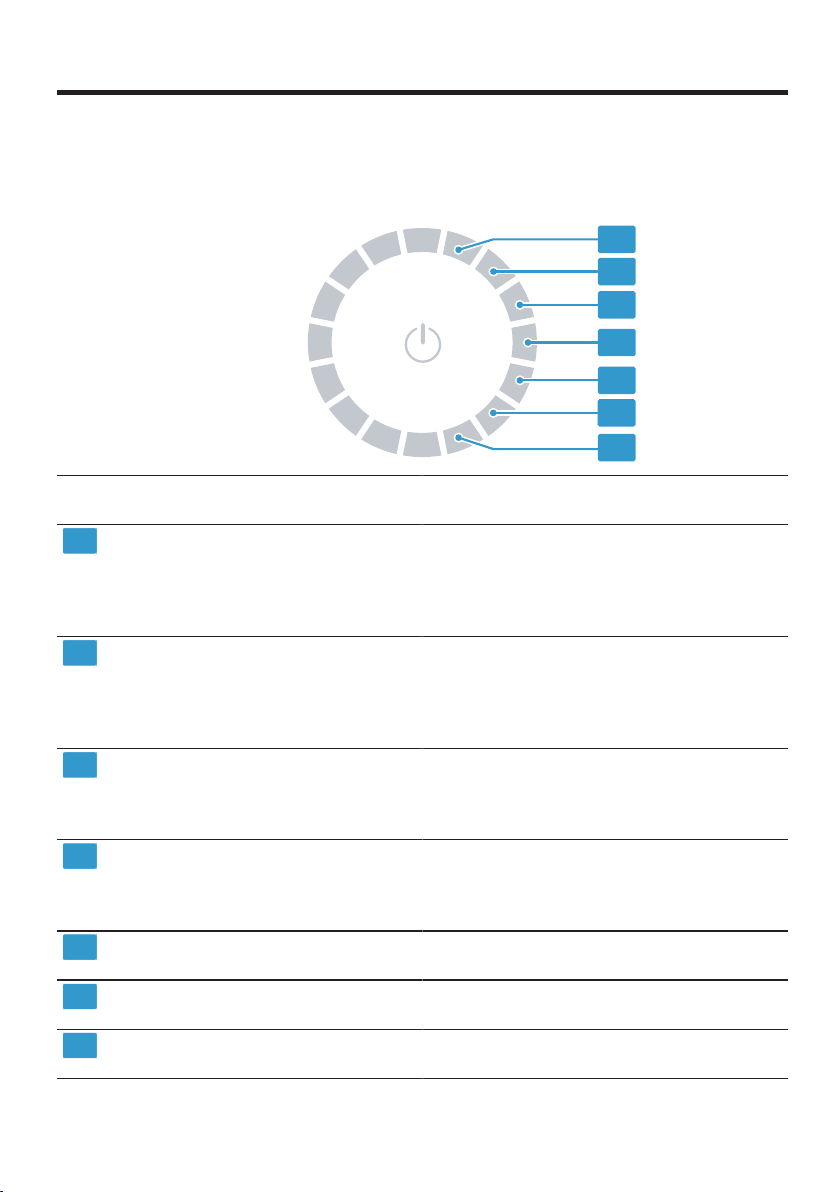
1
2
3
4
5
6
7
Posi-
tion
Basic setting Selection Description
1
End signal 0 (off)
1 (quiet)
2 (medium)
3 (loud)
4 (very loud)
Set the volume of the signal at the
end of the programme.
2
Button signal 0 (off)
1 (quiet)
2 (medium)
3 (loud)
4 (very loud)
Set the volume of the signal tone emit-
ted when the buttons are pressed.
3
Display bright-
ness
1 (low)
2 (medium)
3 (high)
4 (very high)
Set the display brightness.
4
Dryness level 0
1
2
3
Adjust the dryness level.
→"Dryness level", Page29
5
Appliance
care
CP1
CP2
Start the appliance care programme.
→"Appliance care", Page45
6
Programme
counter
Display the number of started pro-
grammes.
7
Factory set-
tings
rES Restore the appliance to the factory
settings.
Appliance care en
45
16.2 Changing the basic set-
tings
1. To call up the basic settings,
press .
2. Select the required basic setting.
→"Overview of the basic settings",
Page44
3. Adjust the basic setting:
‒ To change the value, press
or .
‒ To reset the appliance to the
factory settings, press and hold
for approx.3seconds.
4. Press to save the settings.
Appliance care
17 Appliance care
Appliance care
The appliance offers cleaning pro-
grammes for basic and intensive ap-
pliance care.
17.1 Preparing for appliance
care
Preparing the appliance for the
appliance care programme
Prepare the appliance before running
the appliance care programme.
Requirements
¡ The drum is empty.
¡ The appliance is in standby mode.
1. Clean the fluff filter.
→"Cleaning the fluff filter",
Page36
2. Pull out the condensation con-
tainer horizontally and empty it.
→"Emptying the condensation
container", Page37
Preparing the condensation
container for the appliance care
programme
If you are draining the condensation
water from the appliance using the
drain hose, prepare the condensation
container before running the appli-
ance care programme.
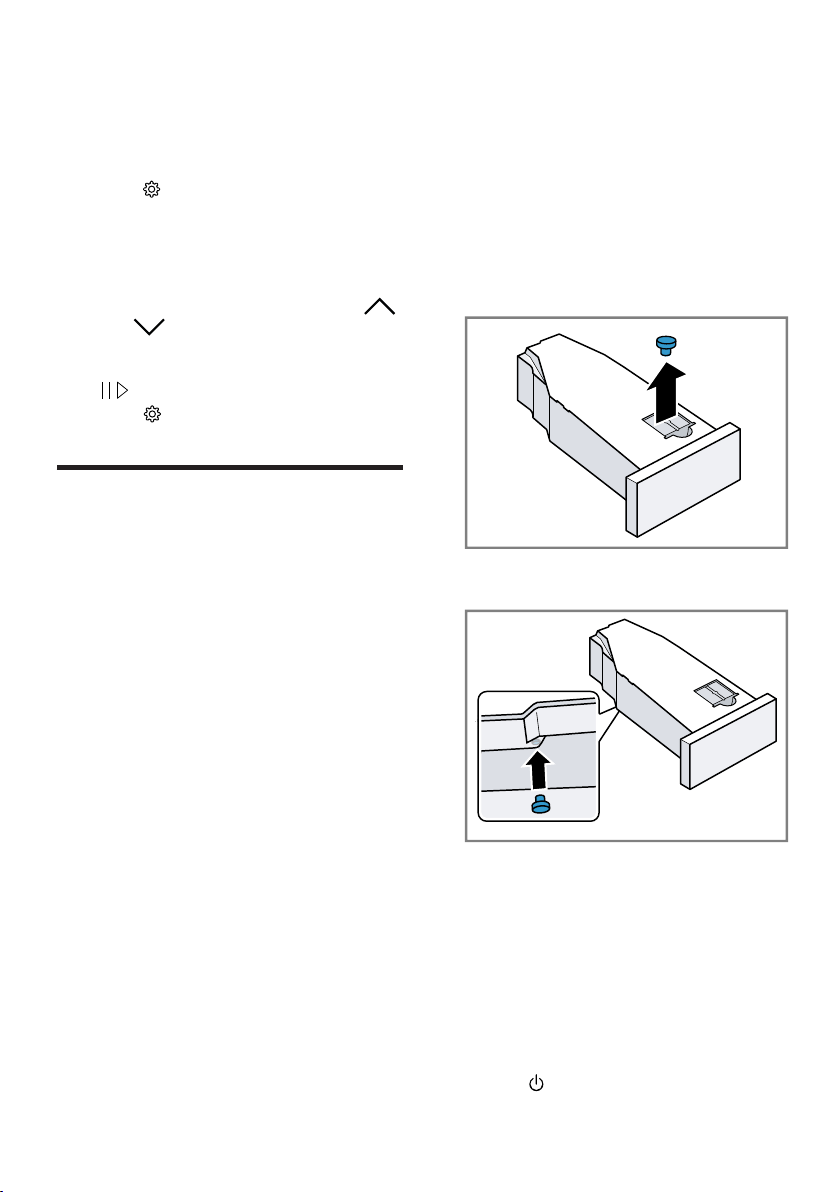
1. Remove the stopper from the re-
cess in the top.
2. Insert the stopper on the under-
side.
3. Clean the filter in the condensation
container.
17.2 Calling up the appliance
care programme
Requirement:The appliance care
programme is ready.
→"Preparing for appliance care",
Page45
1. Press .

en Appliance care
46
The switch-on process takes a few
seconds.
2. Press .
3. Set the programme to position5.
a "CP1" and the programme dura-
tion alternate on the display.
17.3 Running the basic appli-
ance care programme
To remove any dirt deposits in the
appliance, you can run the basic ap-
pliance care programme.
Notes
¡ The basic appliance care pro-
gramme runs for approximately
1hour.
¡ After a lengthy period of use, the
appliance reminds you to run the
basic appliance care programme.
Before the programme starts or
after the programme has ended,
the display shows the notification
"CArE" . This notification appears
repeatedly until you have run the
basic appliance care programme
through to the end.
Requirements
¡ The appliance care programme is
ready.
→"Preparing for appliance care",
Page45
¡ The appliance care programme is
now called up.
→"Calling up the appliance care
programme", Page45
1. Pour approx. 1.5litres of hot
mains water into the condensation
container.
Hold the filled condensation con-
tainer level so that no liquid spills
out.
2. Insert the condensation container
so that it locks into place.
3. Press .
a The appliance care programme
starts and a signal tone sounds.
a "End" appears on the display and
a signal tone sounds once the ap-
pliance care programme has
ended.
4. Pull out the condensation con-
tainer horizontally and empty it.
→"Emptying the condensation
container", Page37
5. If you are draining the condensa-
tion water using the drain hose:
‒ Remove the stopper from the
underside of the condensation
container.
‒ Insert the stopper into the re-
cess on the top of the condens-
ation container.
6. Insert the condensation container
so that it locks into place.
7. Put the appliance into standby
mode.
→"Put the appliance into standby
mode", Page35
17.4 Running the intensive
appliance care pro-
gramme
You can run the intensive appliance
care programme to remove any stub-
born dirt deposits in the appliance
and odours after a downtime of more
than one month.
Notes
¡ The intensive appliance care pro-
gramme runs for approximately 4
hours and must not be cancelled.
¡ When you run the intensive appli-
ance care programme, you need
the original appliance care
product.
→"Accessories", Page33

Appliance care en
47
WARNING
Risk of injury!
The use of non-original spare parts
and non-original accessories is dan-
gerous.
▶ Only use the manufacturer's ori-
ginal spare parts and original ac-
cessories.
Starting the intensive appliance
care programme
Requirements
¡ The appliance care programme is
ready.
→"Preparing for appliance care",
Page45
¡ The appliance care programme is
now called up.
→"Calling up the appliance care
programme", Page45
1. Press .
a "CP2" and the programme dura-
tion alternate on the display.
2. ATTENTION! The functionality of
the appliance may be impaired if
you use the wrong quantity of fab-
ric softener, detergent, care
product or cleaning agent.
▶ Follow the dosage recommenda-
tions from the manufacturer.
Pour a bottle of the appliance care
product and approx. 1.5 litres of
hot mains water into the condensa-
tion container.
Hold the filled condensation con-
tainer level so that no liquid spills
out.
3. Insert the condensation container
so that it locks into place.
4. Press .
a The appliance care programme
starts and a signal tone sounds.
a After around 3hours, the appli-
ance pauses the appliance care
programme and the remaining pro-
gramme duration flashes on the
display.
5. Pull out the condensation con-
tainer horizontally and empty it.
6. Pour approx. 1.5litres of hot
mains water into the condensation
container.
7. Carefully swing the condensation
container horizontally and empty it
to rinse out any remaining appli-
ance care product.
Continuing the intensive
appliance care programme
1. Pour approx. 1.5litres of hot
mains water into the condensation
container.
Hold the filled condensation con-
tainer level so that no liquid spills
out.
2. Insert the condensation container
so that it locks into place.
3. Press .
a The appliance care programme
continues.
a "End" appears on the display and
a signal tone sounds once the ap-
pliance care programme has
ended.
4. Pull out the condensation con-
tainer horizontally and empty it.
5. If you are draining the condensa-
tion water using the drain hose:
‒ Remove the stopper from the
underside of the condensation
container.
‒ Insert the stopper into the re-
cess on the top of the condens-
ation container.
6. Insert the condensation container
so that it locks into place.
en Cleaning and servicing
48
7. Put the appliance into standby
mode.
→"Put the appliance into standby
mode", Page35
Cleaning and servicing
18 Cleaning and servi-
cing
Cleaning and servicing
To keep your appliance working effi-
ciently for a long time, it is important
to clean and maintain it carefully.
18.1 Tips on cleaning and
care
Wipe down the
housing and the
controls with
nothing but water
and a damp
cloth.
This ensures the
parts of the appli-
ance will remain
clean and hy-
gienic.
Remove all de-
tergent residue,
spray residue or
other residues
immediately.
Fresh deposits
are easier to re-
move without
leaving any
residue.
Leave the appli-
ance door open
after use.
This allows the
residual water to
dry, reducing
odours in the ap-
pliance.
18.2 Water tank filter
The filter in the water tank protects
the appliance from dirt and contamin-
ants.
Cleaning the water tank filter
Check the filter regularly and clean
the filter if it is dirty.
Requirement:The condensation con-
tainer →Page37 is removed from
the appliance.
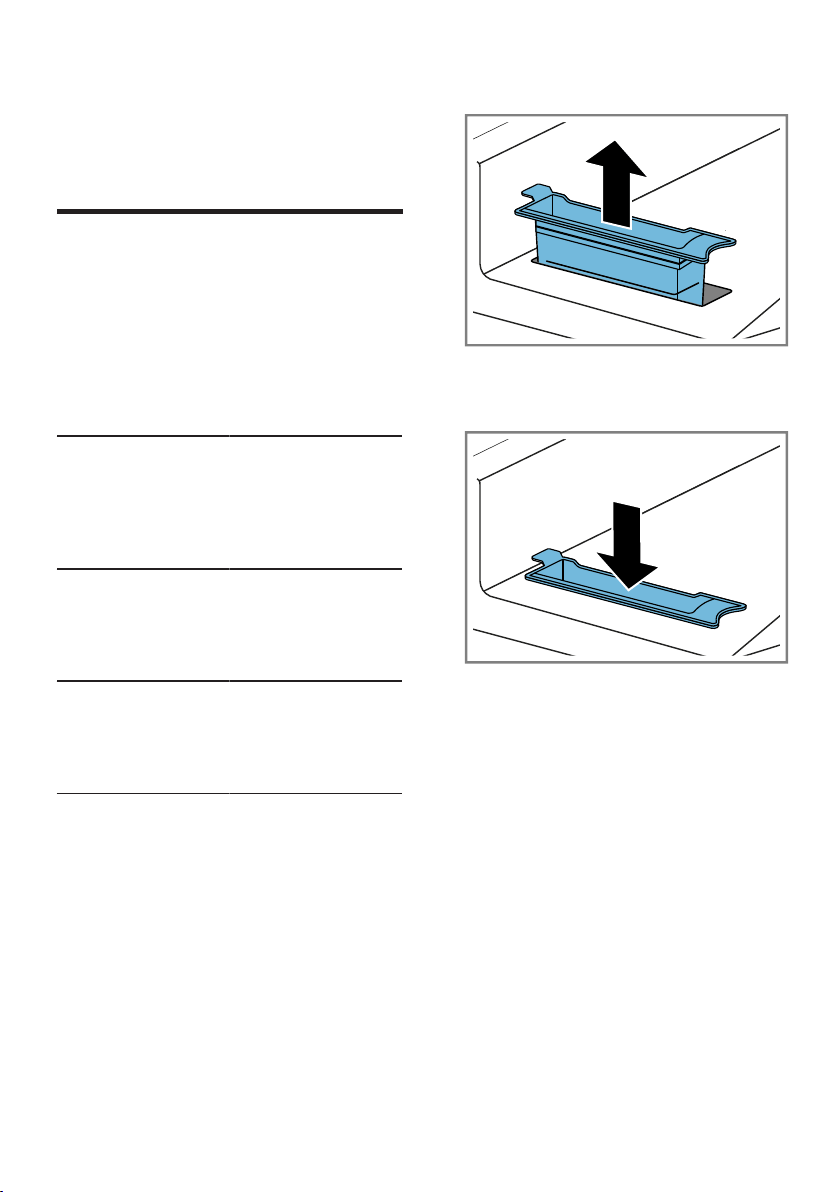
1. Pull out the filter.
2. Clean the filter under warm, run-
ning water or in the dishwasher.
3. Fit the filter.
4. Insert the condensation container
→Page38.
18.3 Moisture sensor
The moisture sensor in this appliance
measures how damp the laundry is
during the drying cycle. The appli-
ance changes the duration of the
automatic programme depending on
the residual moisture in the laundry.
Cleaning the moisture sensor
Over time, residue from limescale,
detergents and care products can
build up on the moisture sensor.
Clean the moisture sensor regularly.
Cleaning and servicing en
49
ATTENTION!
Hard or rough objects may damage
the moisture sensor.
▶ Do not use hard or rough objects,
abrasive cleaning products or steel
wool for cleaning.
Note:If you do not clean the appli-
ance as described, the appliance's
functionality may be impaired.
1. Open the door.
2. Clean the moisture sensor with a
sponge.
18.4 Condensation container
filter
During drying, fluff from the laundry
gets into the condensation. The filter
in the condensation container pro-
tects the appliance from fluff.
Clean the filter for the
condensation tank.
The filter is cleaned automatically
when the condensation container is
emptied. Check the filter regularly
and clean the filter if it is dirty.
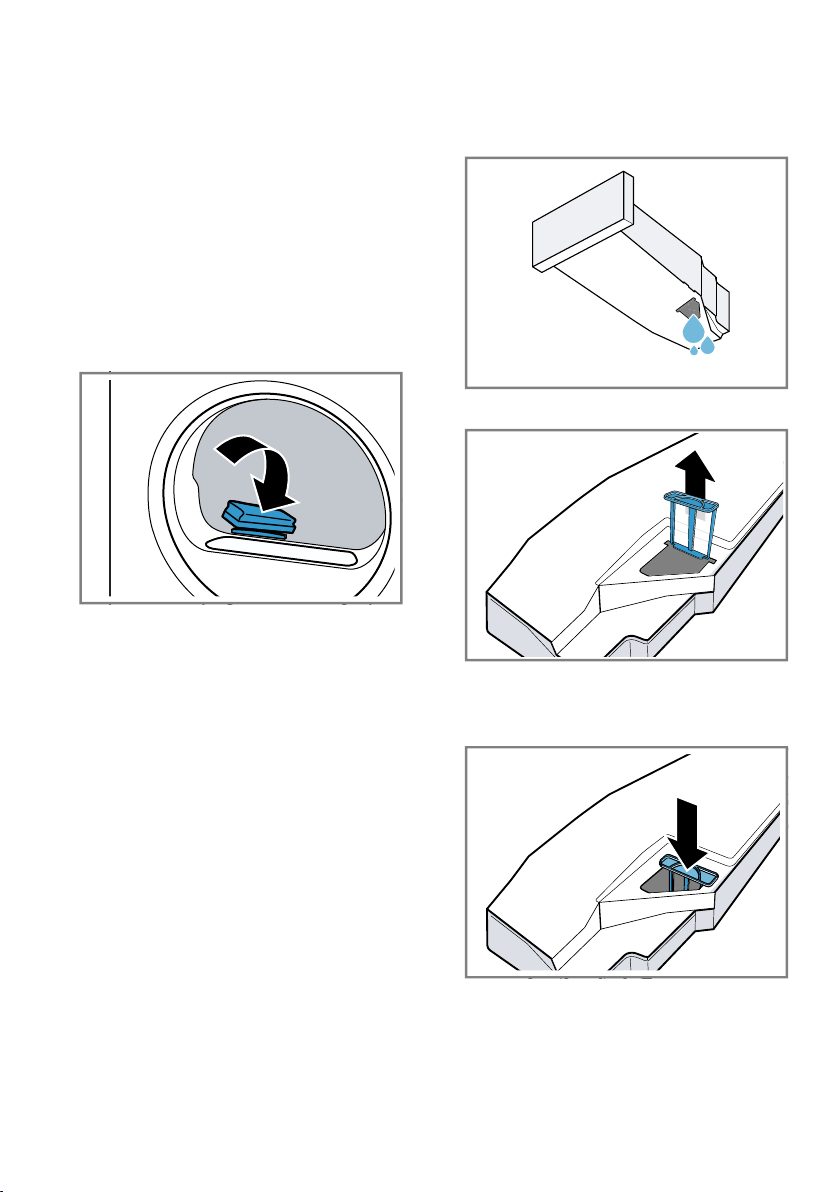
1. Empty the condensation container.
→"Emptying the condensation
container", Page37
2. Remove the filter.
3. Clean the filter under warm, run-
ning water or in the dishwasher.
4. Slide in the filter as far as it will go.
5. Insert the condensation container.
→"Inserting the condensation con-
tainer", Page38
en Troubleshooting
50
Troubleshooting
19 Troubleshooting
Troubleshooting
You can rectify minor faults on your appliance yourself. Read the troubleshoot-
ing information before contacting after-sales service. This will avoid unneces-
sary costs.
WARNING
Risk of electric shock!
Incorrect repairs are dangerous.
▶ Repairs to the appliance should only be carried out by trained specialist
staff.
▶ Only use genuine spare parts when repairing the appliance.
▶ If the power cord of this appliance is damaged, it must be replaced by the
manufacturer, the manufacturer's Customer Service or a similarly qualified
person in order to prevent any risk.
Fault Cause and troubleshooting
"Hot" and the drum
rotates.
Cooling process active.
1. Not a fault.
2. Do not change the programme during the cooling
process.
Note:The cooling process takes up to 10 minutes.
You can continue to operate the appliance.
Humming noise. Compressor active.
▶ Not a fault – normal operating noise.
The display goes out
and flashes.
Energy-saving mode is active
▶ Press any button.
a The display lights up again.
"CArE" After a period of operation, the appliance automatic-
ally recommends that you run the basic appliance
care programme.
▶ Running the basic appliance care programme on
the appliance.
→"Appliance care", Page45
The crease-removal
function takes too
long.
A low ambient temperature extends the duration of the
crease-removal function.
▶ Not a fault – no action required.
Fluff filter is soiled.
▶
→"Cleaning the fluff filter", Page36
The appliance is not
working.
The mains plug of the power cord is not plugged in.
▶ Connect the appliance to the power supply.
The circuit breaker in the fuse box has tripped.
▶ Check the circuit breaker in the fuse box.
Troubleshooting en
51
Fault Cause and troubleshooting
The appliance is not
working.
There has been a power cut.
▶ Check whether the lighting in your room or other
appliances are working.
Appliance paused, but
the drum is rotating.
Cooling process active.
▶ Not a fault – no action required.
HomeConnect is not
working properly.
Different causes are possible.
▶ Go to www.home-connect.com.
No connection to the
home network.
Wi-Fi is switched off.
▶ Activating Wi-Fi on the appliance.
→"Activating Wi-Fi on the appliance", Page41.
Wi-Fi is activated but a connection to your home net-
work cannot be established.
1. Ensure that the home network is available.
2. Reconnect the appliance to the home network.
→"Setting up HomeConnect", Page41
Creasing. The load is too large.
▶ Observe the maximum load capacity of the
→"Programmes", Page30.
The laundry lies in the drum for too long after drying.
1. Remove the laundry from the drum as soon as the
drying programme has finished.
2. Spread the items of laundry for cooling.
Unsuitable programme for the type of fabric.
▶ Set the suitable programme for the type of fabric.
→"Programmes", Page30
Easy-Care fabrics are dried for too long.
▶
→"Changing the dryness level", Page29.
▶
→"Adjusting the dryness level", Page29.
Anti-Creasenot activated.
▶ Activate the Anti-Crease function.
→"Buttons", Page27
and programme
terminated.
Condensation tank filled.
1.
→"Emptying the condensation container", Page37.
2.
→"Inserting the condensation container", Page38.
3.
→"Starting the programme", Page35.
Water drain hose is caught or jammed.
1. Ensure that the water drain hose is not kinked or
trapped.
2. Route the water drain hose without kinks.
en Troubleshooting
52
Fault Cause and troubleshooting
and programme
terminated.
Water drain hose is not connected correctly.
▶ Ensure that the water drain hose is connected cor-
rectly.
→"Connecting the water drain hose", Page14
Water drain hose is blocked.
▶ Rinse the water drain hose with tap water.
The filter for the condensation tank is soiled.
▶
→"Clean the filter for the condensation tank.",
Page49.
Condensation in the
condensation tank
even though the water
drain hose is connec-
ted.
The remaining volume of condensation may remain in
the condensation container.
▶ Not a fault – no action required.
Water drain hose is not connected correctly.
▶ Ensure that the water drain hose is connected cor-
rectly.
→"Connecting the water drain hose", Page14
The programme does
not start.
Childproof lock is activated.
▶
→"Deactivating the childproof lock", Page38
has not been pressed.
▶ Press .
No programme set.
1.
→"Setting a programme", Page34.
2.
→"Starting the programme", Page35.
The length of the pro-
gramme changes dur-
ing the drying cycle.
The programme operation is optimised electronically.
This may change the programme duration.
▶ Not a fault – no action required.
Pumping noise. Condensation pump active.
▶ Not a fault – normal operating noise.
Buzzing noise. Compressor ventilation active.
▶ Not a fault – normal operating noise.
The drying time is too
long.
Fluff filter is soiled.
▶
→"Cleaning the fluff filter", Page36
The ambient temperature is greater than 30°C.
▶ Ensure that the ambient temperature is below 30
°C.
The ambient temperature is lower than 15 °C.
▶ Ensure that the ambient temperature is above
15°C.
Troubleshooting en
53
Fault Cause and troubleshooting
The drying time is too
long.
Insufficient air circulation at the appliance's installation
location.
▶ Ventilate the appliance's installation location.
Insufficient condensation for the automatic self-clean-
ing when permanently using the crease-removal func-
tion.
The appliance's ventilation opening is blocked.
▶ Ensure that the ventilation opening of the appliance
is kept clear.
Heat exchanger is soiled.
▶ Running the basic appliance care programme on
the appliance.
→"Appliance care", Page45
Water is leaking from
the appliance.
Appliance is not correctly aligned.
▶
→"Aligning the appliance", Page16
Water drain hose is not connected correctly.
▶ Ensure that the water drain hose is connected cor-
rectly.
→"Connecting the water drain hose", Page14
The water tank for the crease-removal function is
empty.
▶ Fill water tank.
→"Filling the water tank", Page39.
Water overflows when
filling the water tank.
The water tank has been filled.
Note:The overflowing water is harmless.
▶ Do not pour any more water into the water tank.
The water tank filter is soiled.
▶
→"Cleaning the water tank filter", Page48.
The laundry is too
damp.
Unsuitable programme for the type of fabric.
▶ Set a timed programme for the subsequent drying.
→"Programmes", Page30
There has been a power cut.
▶ Check whether the lighting in your room or other
appliances are working.
The load is too large.
▶ Observe the maximum load capacity of the
→"Programmes", Page30.
After the end of the programme, warm laundry feels
damper than it actually is.
en Troubleshooting
54
Fault Cause and troubleshooting
The laundry is too
damp.
1. Remove the laundry from the drum as soon as the
drying programme has finished.
2. Spread the items of laundry for cooling.
Unsuitable dryness level set.
▶
→"Changing the dryness level", Page29.
Drying target not adjusted.
▶
→"Adjusting the dryness level", Page29.
Load too small.
▶ Set a timed programme for the subsequent drying.
→"Programmes", Page30
Moisture sensor dirty.
▶
→"Cleaning the moisture sensor", Page48.
The drying process is interrupted and the condensa-
tion tank has been filled.
1.
→"Emptying the condensation container", Page37.
2.
→"Inserting the condensation container", Page38.
3.
→"Starting the programme", Page35.
Odours have formed
in the appliance.
Stubborn dirt in the appliance or an extended appli-
ance downtime of more than one month.
▶ Run the intensive appliance care programme.
→"Appliance care", Page45
Transportation, storage and disposal en
55
Transportation, storage and disposal
20 Transportation, stor-
age and disposal
Transportation, storage and disposal
20.1 Preparing the appliance
for transportation
ATTENTION!
If the appliance is operated immedi-
ately after transportation, the refriger-
ant contained in the appliance may
result in damage to the appliance.
▶ Immediately after transporting the
appliance, leave it to rest for two
hours before putting it into opera-
tion.
Tip:The appliance may contain re-
sidual water, which may drip out of it
when transported. The appliance
should be transported upright.
Requirements
¡ The condensation container is
emptied. Emptying the condensa-
tion container →Page37
¡ The appliance has been switched
on.
→"Switching on the appliance",
Page34
1.
Set any programme →Page34.
2.
Start the programme →Page35
and wait 5 minutes.
a The condensation is drained.
3. Put the appliance into standby
mode.
→"Put the appliance into standby
mode", Page35
4. Remove the water drain hose from
the connection point.
→"Water outlet connection types",
Page15
5. Secure the water drain hose on the
appliance against unintentional
loosening.
Ensure that you do not bend the
water drain hose.
6. Empty the condensation container
→Page37.
7. Insert the condensation container
→Page38.
8. Disconnect the appliance's mains
plug from the power supply.
a The appliance is now ready to be
transported.
20.2 Disposing of old appli-
ance
Valuable raw materials can be re-
used by recycling.
WARNING
Risk of harm to health!
Children can lock themselves in the
appliance, thereby putting their lives
at risk.
▶ Do not install the appliance behind
a door as this may obstruct the ap-
pliance door or prevent it from
opening.
▶ With redundant appliances, unplug
the power cord. Then cut through
the cord and damage the lock on
the appliance door beyond repair
so that the appliance door will no
longer close.
WARNING
Risk of fire!
The refrigerant R290 used in this ap-
pliance is environmentally friendly. It
is however flammable and may ignite
if appliances are not disposed of
properly.
▶ Dispose of the appliance properly.
▶ Do not damage the tubing of the
refrigerant circuit.
1. Unplug the appliance from the
mains.
2. Cut through the power cord.
en Customer Service
56
3. Dispose of the appliance in an en-
vironmentally friendly manner.
Information about current disposal
methods are available from your
specialist dealer or local authority.
This appliance is la-
belled in accordance
with European Directive
2012/19/EU concerning
used electrical and elec-
tronic appliances (waste
electrical and electronic
equipment - WEEE).
The guideline determ-
ines the framework for
the return and recycling
of used appliances as
applicable throughout
the EU.
Customer Service
21 Customer Service
Customer Service
Function-relevant genuine spare parts
according to the corresponding Eco-
design Order can be obtained from
Customer Service for a period of at
least 10 years from the date on
which your appliance was placed on
the market within the European Eco-
nomic Area.
Note:Under the terms of the manu-
facturer's warranty the use of Cus-
tomer Service is free of charge.
Detailed information on the warranty
period and terms of warranty in your
country is available from our after-
sales service, your retailer or on our
website.
If you contact Customer Service, you
will require the product number (E-
Nr.), the production number (FD) and
the consecutive numbering (Z-Nr.) of
your appliance.
The contact details for Customer Ser-
vice can be found in the enclosed
Customer Service directory or on our
website.
21.1 Product number (E-Nr.),
production number (FD)
and consecutive num-
bering (Z-Nr.)
You can find the product number (E-
Nr.), the production number (FD) and
the consecutive numbering (Z-Nr.) on
the appliance's rating plate.
Depending on the model, the rating
plate is located:
¡ On the inside of the door.
¡ On the inside of the maintenance
flap.
¡ On the rear of the appliance.
Make a note of your appliance's de-
tails and the Customer Service tele-
phone number to find them again
quickly.
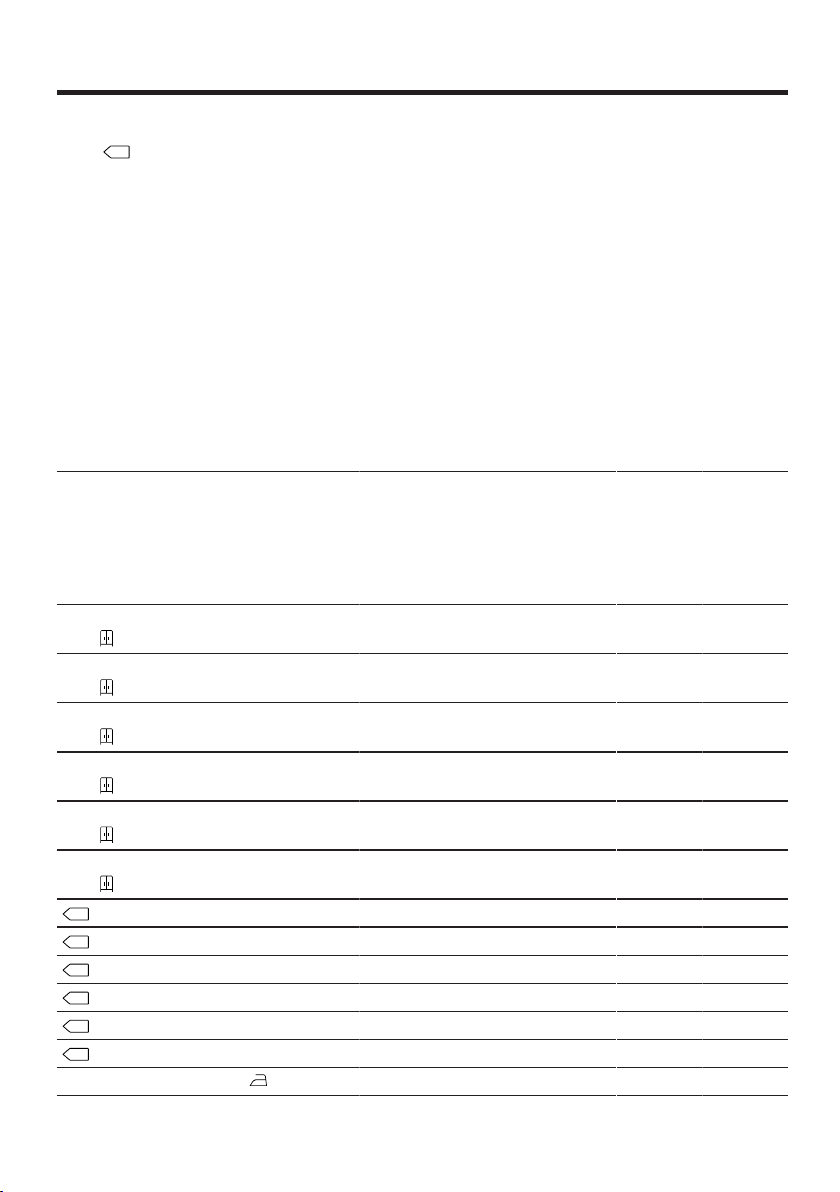
Consumption values en
57
Consumption values
22 Consumption values
Consumption values
The Cottons Eco programme
(denoted by the arrow symbol) is
suitable for drying cotton laundry with
a normal dampness level, and is the
most efficient programme for drying
damp cotton laundry in terms of com-
bined energy consumption.
The consumption values for this pro-
gramme that are declared on the en-
ergy label refer to a moisture content
of the laundry of 60%.
The values specified for other pro-
grammes are indicative only and
were determined in accordance with
the applicable standard EN61121.
The actual values may deviate from
the indicated values depending on
the type of fabric, composition of
laundry to be dried, residual moisture
in the fabric, set degree of dryness,
amount of laundry being loaded, en-
vironmental conditions and the activ-
ation of additional functions.
The expected programme dura-
tion/"Ready in" time that is shown on
the appliance display when selecting
the programme is based on the spin
speed in the washing machine of
1000 rpm when the appliance is de-
livered.
Programme Final
mois-
ture
level
(%)
Load
(kg)
Spin
speed
(rpm)
Initial
mois-
ture
level
(%)
Pro-
gramm
e dura-
tion
(h:min)
Energy
con-
sump-
tion
(kWh/
cycle)
Cottons + Cupboard
Dry
-1.5 9.0 1400 50 4:07 1.35
Cottons + Cupboard
Dry
-1.5 4.5 1400 50 2:57 0.89
Cottons + Cupboard
Dry
-1.5 9.0 1000 60 4:36 1.55
Cottons + Cupboard
Dry
-1.5 4.5 1000 60 3:13 0.98
Cottons + Cupboard
Dry
-1.5 9.0 800 70 5:05 1.75
Cottons + Cupboard
Dry
-1.5 4.5 800 70 3:29 1.08
Cottons Eco 0.0 9.0 1400 50 3:49 1.24
Cottons Eco 0.0 4.5 1400 50 2:18 0.70
Cottons Eco 0.0 9.0 1000 60 4:20 1.44
Cottons Eco 0.0 4.5 1000 60 2:36 0.80
Cottons Eco 0.0 9.0 800 70 4:51 1.64
Cottons Eco 0.0 4.5 800 70 2:54 0.90
Cottons + Iron Dry 12.0 9.0 1400 50 2:38 0.81
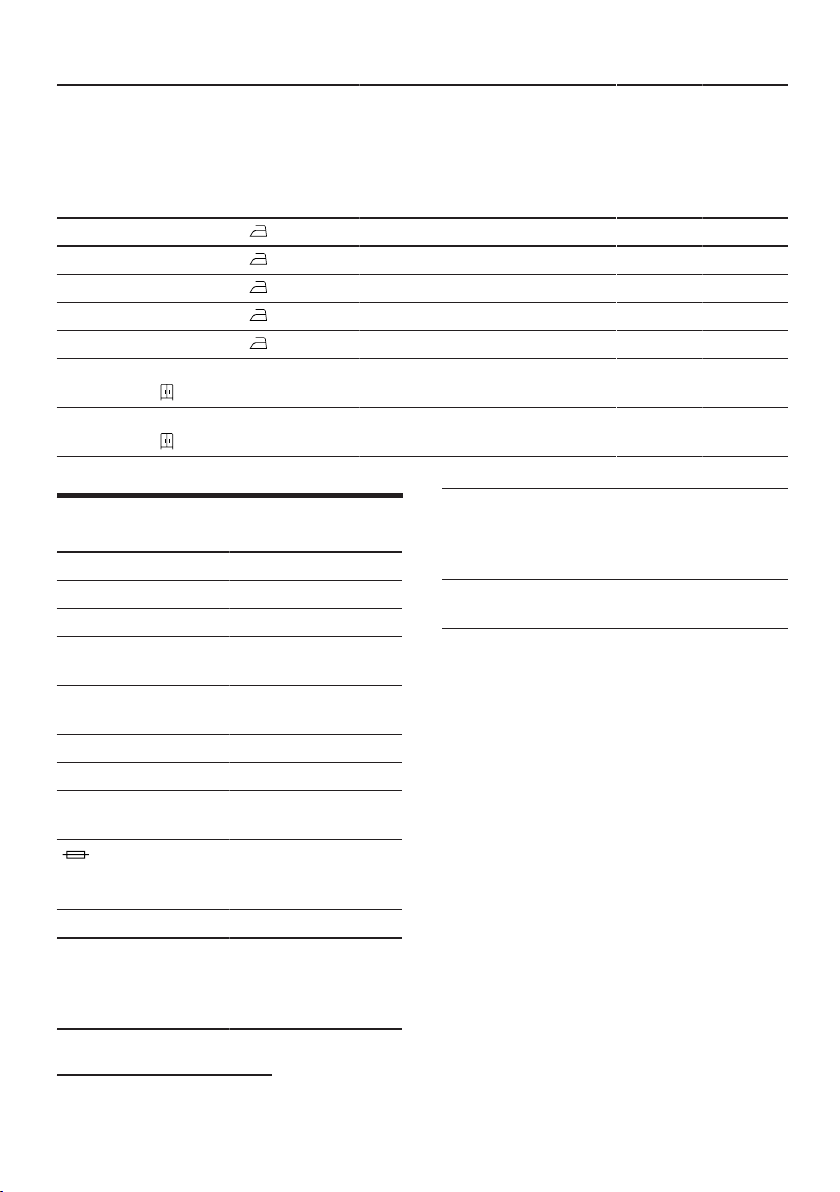
en Technical data
58
Programme Final
mois-
ture
level
(%)
Load
(kg)
Spin
speed
(rpm)
Initial
mois-
ture
level
(%)
Pro-
gramm
e dura-
tion
(h:min)
Energy
con-
sump-
tion
(kWh/
cycle)
Cottons + Iron Dry 12.0 4.5 1400 50 1:40 0.48
Cottons + Iron Dry 12.0 9.0 1000 60 3:08 1.01
Cottons + Iron Dry 12.0 4.5 1000 60 1:56 0.58
Cottons + Iron Dry 12.0 9.0 800 70 3:37 1.21
Cottons + Iron Dry 12.0 4.5 800 70 2:13 0.68
Easy Care + Cup-
board Dry
2.0 3.5 800 40 1:19 0.37
Easy Care + Cup-
board Dry
2.0 3.5 600 50 1:34 0.45
Technical data
23 Technical data
Technical data
Appliance height 84.2cm
Appliance width 59.8cm
Appliance depth 61.3cm
Appliance depth
with door closed
66.2cm
Appliance depth
with door open
110.5cm
Weight 54.7kg
Maximum load 9.0kg
Mains voltage 220-240V,
50Hz
Minimum in-
stallation protec-
tion
10A
Nominal power 600W
Power consump-
tion
¡ Standby
mode: 0.30W
¡ Left-on mode:
0.30W
Ambient temper-
ature
¡ Minimum:
5°C
¡ Maximum:
35°C
Length of the
power cord
179.5cm
This product contains light sources
from energy efficiency class F. These
light sources are available as a spare
part and must only be replaced by
trained specialist staff.
You can find more information about
your model online at https://
eprel.ec.europa.eu/
1
. This web ad-
dress is linked to the official EU
EPREL product database. Please
then follow the instructions on
searching for the model. The model
identifier is made up of the charac-
ters before the slash in the product
number (E-Nr.) on the rating plate. Al-
ternatively, you can also find the
model identifier in the first line of the
EU energy label.
1
Only applies to countries in the European Economic Area
Declaration of Conformity en
59
Declaration of Conformity
24 Declaration of Con-
formity
Declaration of Conformity
BSH Hausgeräte GmbH hereby de-
clares that the appliance with Home
Connect functionality conforms to the
essential requirements and other rel-
evant provisions of Directive
2014/53/EU.
A detailed RED Declaration of Con-
formity can be found online at
www.bosch-home.com among the
additional documents on the product
page for your appliance.
Hereby, BSH Hausgeräte GmbH de-
clares that the appliance with
HomeConnect functionality is in
compliance with relevant statutory
requirements.
1
A detailed Declaration of Conformity
can be found online at www.bosch-
home.co.uk among the additional
documents on the product page for
your appliance.
1
2.4 GHz band (2400–2483.5MHz):
Max. 100mW
5-GHz band (5150–5350MHz +
5470–5725MHz): max. 150mW
BE BG CZ DK DE EE IE EL ES
FR HR IT CY LI LV LT LU HU
MT NL AT PL PT RO SI SK FI
SE NO CH TR IS UK (NI)
5GHz WLAN (Wi-Fi): For indoor use only.
AL BA MD ME MK RS UK UA
5GHz WLAN (Wi-Fi): For indoor use only.
1
Only applies to Great Britain

Thank you for buying a
Bosch Home Appliance!
Register your new device on MyBosch now and profit directly from:
• Expert tips & tricks for your appliance
• Warranty extension options
• Discounts for accessories & spare-parts
• Digital manual and all appliance data at hand
• Easy access to Bosch Home Appliances Service
Free and easy registration – also on mobile phones:
www.bosch-home.com/welcome
Looking for help?
You'll find it here.
Expert advice for your Bosch home appliances, help with problems
or a repair from Bosch experts.
Find out everything about the many ways Bosch can support you:
www.bosch-home.com/service
Contact data of all countries are listed in the attached service direct-
ory.
*9001797390*
9001797390 (030901)
en
BSH Hausgeräte GmbH
Carl-Wery-Straße 34
81739 München, GERMANY
www.bosch-home.com
A Bosch Company
Valid within Great Britain:
Imported to Great Britain by
BSH Home Appliances Ltd.
Grand Union House
Old Wolverton Road
Wolverton, Milton Keynes
MK12 5PT
United Kingdom