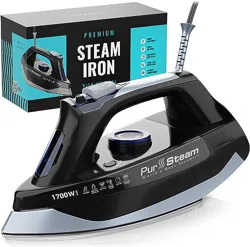
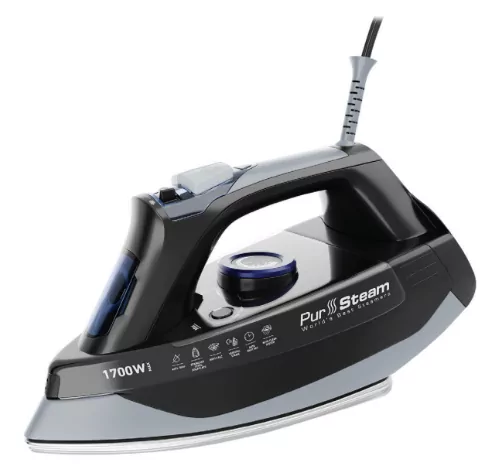
PurSteam STEAMIRON User Manual
Model No: PSSI-01
IMPORTANT SAFETY INSTRUCTIONS
1. Make sure that the voltage indicated on the rating plate of the appliance corresponds to your outlet voltage.
2. Use the iron only for its intended use.
3. To protect against the risk of electric shock, do not immerse the iron in water or any other liquids.
4. The steam iron should always be turned to Minimum (Min) before being plugged or unplugged from the outlet. Do not yank the cord to disconnect from the outlet, instead grasp the plug and pull to disconnect.
5. We do not recommend using an extension cord, but if necessary, a proper gauge extension cord rated for the appropriate power must be used.
6. Do not allow the cord to touch hot surfaces. Let the steam iron cool completely before putting away. Loop the cord loosely around the iron when storing.
7. Always disconnect the steam iron from electrical outlet when filling it with water, emptying it, or when not use it.
8. Do not operate the steam iron with a damaged cord or if the iron has been dropped or damaged. To avoid the risk of electrical shock, do not disassemble the steam iron.
9. Close supervision is necessary for any appliance being used by or near children. Do not leave the steam iron unattended while the steam iron is plugged in or on an ironing board.
10. Burns can occur when encountering any hot metal parts, hot water, or steam. Use caution when turn the steam iron upside down, there may be hot water in the water tank.
11. Do not touch the appliance with wet or damp hands.
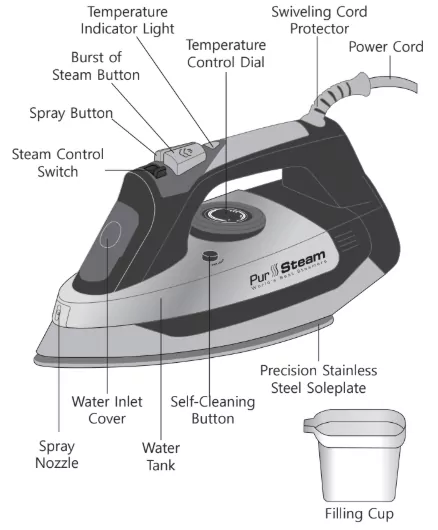
PARTS LIST
BEFORE USE
Please read the instructions and the important safety instructions carefully.
Remove the transparent soleplate protective foil.
It is normal for a small amount of smoke to be produced the first time the iron is used. This will quickly disappear.
To avoid damage to clothes from dust or dirt that may collect in the iron, before the first use or after the iron has been stored for some time, first iron an old cloth, testing both the "Spray" and the "Burst of Steam" features.
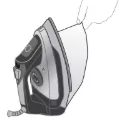
PRODUCT FEATURES & SPECIFICATIONS
- Stainless Steel Soleplate
- Anti-Drip
- Anti-Calc
- Auto Shut Off
- Self-Cleaning
- Voltage / Power Consumption: 120V/60Hz, 1700W
- Water Tank Capacity: 420 ml /14 fl.oz.
- Cord Length: 8ft /2.46m
- Temperature of Steam: 100°C /212°F (Use with caution)
- Ergonomic material and design of the handle
3-WAY AUTO-OFF
If the iron is not moved while it is plugged in, an internal safety switch will turn it off. The iron will beep 3 times and will automatically shut off if left for:
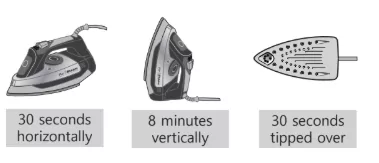
When this happens, the Temperature light indicator will flash GREEN until you unplug the iron from the power socket.
To avoid automatic switch off while the iron is heating up, always keep the iron on its heel.
FILLING THE WATER TANK
- Ensure the iron is unplugged.
- Slide the steam switch entirely to the left.
- Open the Water inlet cover.
- Hold the appliance upright so that the Water tank stands horizontally. Fill with water (containing no additives) to the “Max” water level mark using the provided Filling cup, then close the cover.
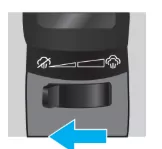
NOTE: If you need to add water during ironing, UNPLUG the iron and repeat the above steps. Ensure the iron is fully reheated after filling (temperature indicator light turns GREEN) before ironing.
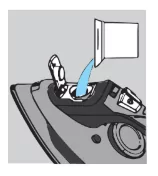
SELECTING THE TEMPERATURE
1. Place the iron upright on its heel, on an even and stable surface.
2. Insert the power cord into an electric power socket.
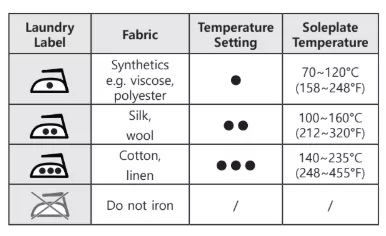
3. Set the Temperature control dial according to the type of fabric you are ironing. Check the fabric's label for appropriate setting. For delicate fabrics, we recommend carrying out a test on a hidden part of the garment (inner seam).
4. The desired temperature has been reached when the Temperature indicator light turns GREEN. The Temperature indicator light will turn from RED to GREEN intermittently, indicating that the selected temperature is being maintained.
STEAM FUNCTION
The amount of steam is being regulated by the Steam control switch.
1. Ensure there is water in the Water tank.
2. Wait for the Temperature indicator light to turn GREEN.
3. Set or turn off the continuous steam output using the Steam control switch.
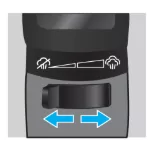
NOTE: This function can be used only when the Temperature control dial is set in the range from ●●● to MAX.
NOTE: The iron continuously emits steam only if you hold it in a horizontal position.
You can stop the release of steam by standing the iron on its heel or sliding the Steam control switch entirely to the left.
ATTENTION: Do not use the steam function for silk and synthetics so as not to damage the surface of the fabric.
If the Temperature control dial is set to a lower setting, to prevent potential dripping, the iron is equipped with the ANTI-DRIP SYSTEM.
The anti-drip system automatically reduces the volume of steam when ironing at low temperatures to prevent dripping.
During use, the anti-drip system may emit a clicking sound, particularly during heat up or when the iron is cooling down. This is normal and indicates that the anti-drip system is functioning correctly.
SPRAY SETTING
The spray function can be used at any temperature setting. Use this function to make wrinkle removal easier.
1. Ensure there is water in the Water tank.
2. Aim the Spray nozzle towards the garment.
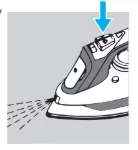
3. Press the Spray button down slowly for a jet or press quickly and firmly for a mist.
NOTE: Do not use the spray function on silk and synthetics.
BURST OF STEAM
Use the Burst of steam function to remove stubborn wrinkles or to press in a sharp crease.
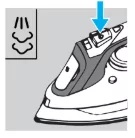
1. Ensure there is water in the Water tank.
2. Wait for the Temperature indicator light to turn GREEN.
3. Press the Burst of steam button firmly to generate a strong flow of steam.
4. Wait at least 4 seconds before pressing the Burst of steam button again.
NOTE: This function can be used only when the Temperature control dial is set in the range from to MAX.
ATTENTION: Do not use the Burst of steam function on silk and synthetics.
VERTICAL STEAM
The iron can also be used vertically. This is especially useful for getting creases out of hanging clothes, curtains, tapestries, etc. To steam vertically, press the Burst of steam button while holding the iron in the upright position.
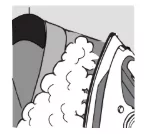
WARNING: Do not iron clothes while they are being worn.
DRY IRONING
1. Slide the Steam control switch entirely to the left.
2. Set the Temperature control dial to the desired setting according to the type of fabric you are ironing.
3. The iron is ready for use when the Temperature indicator light turns GREEN.
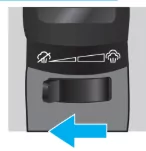
NOTE: We recommend dry ironing with an empty tank to be sure there are no drips, however, dry ironing can also be performed with water already in the tank.
STORING YOUR IRON
1. Slide the Steam control switch entirely to the left and turn the Temperature control dial to MIN.
2. Disconnect the power cord from the power socket and allow the soleplate to cool down.
3. Empty the Water tank into a sink by turning the iron upside down and gently shaking it.
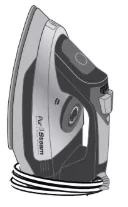
4. Roll up the power cord around the iron.
5. Always store the iron in an upright position.
WATER TO USE IN IRON
Tap Water
The steam iron are designed to be used with REGULAR TAP WATER (up to 12 grains of hardness). If your water is harder than this, we recommend mixing half tap water with half distilled water, which reduces the hardness; or just use inexpensive bottled spring water.
Never use 100% pure distilled water since this can cause the iron to spit and leak.
Always remember:
Water containing additives (such as starch, perfume or fabric conditioner) may not be used. Such additives can affect the properties of the steam and, at high temperatures, can form deposits in the steam chamber, which will mark the laundry when they are emitted through the steam vents. For this reason, descaling liquids should not be used.
SELF-CLEANING FEATURE
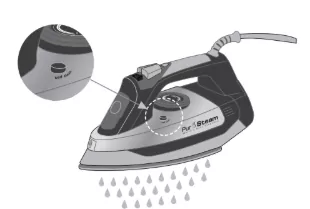
The self-cleaning feature cleans inside the soleplate, removing scale and impurities. We recommend using it every 10-15 days.
Instructions on how to perform the self-cleaning:
- Fill the Water tank up to the maximum level and set the Steam control switch to "OFF".
- Set the Temperature control dial to the maximum and wait for the light to turn GREEN.
- Pull the plug out of the socket and hold the iron horizontally over the sink.
- Hold the Self-cleaning button until all the boiling water, steam, impurities, and scale come out.
CLEANING AND MAINTENANCE
NOTE: Before cleaning the iron, make sure that it is unplugged from the wall outlet and cooled down.
- When cold and unplugged, the iron can be cleaned with a damp cloth and wiped dry. Do not use household cleaners or solvents.
- If the iron has not been used for a long time (e.g., several weeks) the steam channels should be cleaned, and any deposits removed from the iron. To do this, hold the iron horizontally before you start to use it and allow it to produce steam for about 1 minute. Also, activate the Burst of steam button several times.
Cleaning the Soleplate
The stainless steel soleplate has excellent non-stick properties and can be simply wiped clean when cold.
- During normal use, a sticky coating may build up on the soleplate (starch, detergent buildup, burnt synthetic fibers). This can be easily removed by using quality hot iron soleplate cleaner available at most stores.
- Do not use abrasive household cleaners or abrasive cleaning pads.
- The soleplate of your iron makes ironing easier. To prevent scratching of the soleplate, do not iron over sharp objects (zippers, etc.). Do not place the iron on rough surfaces, e.g., metal iron support, which may scratch the soleplate.
ADVICES FOR GOOD IRONING
We recommend using the lowest temperatures with fabrics that have unusual finishes (sequins, embroidery, flush, etc.).
- If the fabric is a blend (e.g., 40% cotton 60% synthetics), set a lower ironing temperature.
- If you don't know the composition of the fabric, determine the suitable temperature by testing on a hidden corner of the garment. Start with a low temperature and increase it gradually until it reaches the ideal temperature.
- Do not iron areas with traces of perspiration or other marks: the heat of the plate fixes the stains on the fabric, making them irremovable.
- To avoid marking silk, wool, or synthetic garments, iron them inside out.
- To avoid marking velvet garments, iron in one direction (following the fiber) and do not press down on the iron.
- Many fabrics are easier to iron if they are not completely dry. For example, silk should always be ironed damp.
TROUBLESHOOTING
| Problem |
Possible Cause |
Solution |
| Iron is leaking. |
Distilled water |
DO NOT use 100% pure distilled water, use tap water. In very hard water areas mix half tap water with half distilled to reduce hardness; or use inexpensive bottled spring water. |
| |
Softened water |
Most softened water is alright, but if you experience leaks or spitting, change to untreated tap water or inexpensive bottled spring water. DO NOT use 100% distilled water. |
| |
Auto-off activated? |
Move iron or gently shake. |
| |
Overuse of burst of steam |
Allow more time between each burst. |
| Iron won't heat. |
Is iron plugged in? |
Make sure the plug is in the socket. |
| |
Temperature dial set too low? |
Turn Temperature dial higher. |
| |
Auto-off activated? |
Move iron or gently shake. |
| Temperature Indicator light turns GREEN and RED intermittently. |
This is normal. |
The Temperature indicator light will turn from RED to GREEN intermittently, indicating that the selected temperature is being maintained. |
| Iron does not steam. |
Iron is not hot enough. |
If the iron is not hot enough, the anti-drip system will activate and stop the iron's steam production. Set thermostat to the position. Always allow sufficient time for the iron to heat up (indicator light turns GREEN) before activating the Steam control switch. |
| |
Steam valve is clogged. |
Move the Steam control switch from min to max several times to clear blockage. |
1-YEAR LIMITED WARRANTY
This product is warranted to be free from defects in material and workmanship under normal use and service for one year from the date of the original purchase with the receipt. The manufacturer's obligation shall be limited to repairing or replacing any part of the product that is defective. Such warranty shall not apply to damages resulting from accidents, abuse, or misuse.
Customer service
350 Springfield Avenue, Suite #200, Summit, NJ 07901
E-mail: [email protected]
Web: www.pursteam.us