
49-2000954 Rev. 0 08-21 GEA
Write the model and serial
numbers here:
Model # _________________
Serial # _________________
You can find them on a label
on the side trim or on the front of
the (lower) oven behind the oven
door.
ESPAÑOL
Para consultar una version en
español de este manual de
instrucciones, visite nuestro sitio de
internet GEAppliances.com.
OWNER’S MANUAL
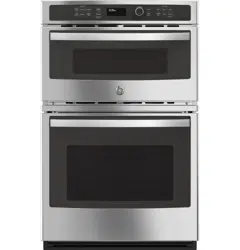
JT3800 - 30" Double Wall Oven
JK3800 - 27" Double Wall Oven
GE is a trademark of the General Electric Company. Manufactured under trademark license.
WALL OVEN
Built-In Combination Microwave/Thermal
SAFETY INFORMATION .......... 3
USING THE RANGE
Oven Controls ..........................10
Oven Settings ..........................11
Oven Options ..........................12
Microwaving ...........................13
Cooking Modes .........................17
Sabbath Mode ..........................18
Cooking Guide .........................19
Rack .................................20
Aluminum Foil/Oven Liners .............20
CARE AND CLEANING
Cleaning the Range .....................21
Oven Maintenance ..................... 23
Oven Door ............................ 23
TROUBLESHOOTING TIPS .......24
LIMITED WARRANTY ............30
ACCESSORIES .....................31
CONSUMER SUPPORT ........... 32
2 49-2000954 Rev. 0
THANK YOU FOR MAKING GE APPLIANCES A PART OF YOUR HOME.
Whether you grew up with GE Appliances, or this is your first, we’re happy to have you in the family.
We take pride in the craftsmanship, innovation and design that goes into every GE Appliances
product, and we think you will too. Among other things, registration of your appliance ensures that we
can deliver important product information and warranty details when you need them.
Register your GE appliance now online. Helpful websites and phone numbers are available in the
Consumer Support section of this Owner’s Manual. You may also mail in the pre-printed registration
card included in the packing material.
49-2000954 Rev. 0 3
READ AND SAVE THESE INSTRUCTIONS
IMPORTANT SAFETY INFORMATION
READ ALL INSTRUCTIONS BEFORE USING THE APPLIANCE
SAFETY INFORMATION (Upper Oven)
PRECAUTIONS TO AVOID POSSIBLE EXPOSURE TO EXCESSIVE
MICROWAVE ENERGY
(a) Do Not Attempt to operate this oven with the
door open since open-door operation can result
in harmful exposure to microwave energy. It is
important not to defeat or tamper with the safety
interlocks.
(b) Do Not Place any object between the oven front
face and the door or allow soil or cleaner residue
to accumulate on sealing surfaces.
(c) Do Not Operate the oven if it is damaged. It is
particularly important that the oven door close
properly and that there is no damage to the:
(1) door (bent),
(2) hinges and latches (broken or loosened),
(3) door seals and sealing surfaces.
(d) The Oven Should Not be adjusted or repaired by
anyone except properly qualified service personnel.
WARNING
GENERAL SAFETY INSTRUCTIONS
Ŷ 5HDGDOOLQVWUXFWLRQVEHIRUHXVLQJWKLVDSSOLDQFH
When using electrical appliances, basic safety
precautions should be followed, including the
following:
Ŷ 5HDGDQGIROORZWKHVSHFLILFSUHFDXWLRQVLQ
the PRECAUTIONS TO AVOID POSSIBLE
EXPOSURE TO EXCESSIVE MICROWAVE
ENERGY section.
Ŷ %HVXUH\RXUDSSOLDQFHLVSURSHUO\LQVWDOOHGDQG
grounded by a qualified technician in accordance
with the provided installation instructions.
Ŷ ,QVWDOORUORFDWHWKLVDSSOLDQFHRQO\LQDFFRUGDQFH
with the provided installation instructions.
Ŷ 6RPHSURGXFWVVXFKDVZKROHHJJVDQGVHDOHG
containers—for example, closed jars—are able to
explode and should not be heated in this oven.
Such use of the oven could result in injury.
Ŷ 'RQRWPRXQWWKLVDSSOLDQFHRYHUDVLQN
Ŷ 7KLVRYHQLVQRWDSSURYHGRUWHVWHGIRUPDULQHXVH
Ŷ 7KLVRYHQLV8/OLVWHGIRUVWDQGDUGZDOOLQVWDOODWLRQ
Ŷ 'RQRWRSHUDWHWKLVDSSOLDQFHLILWKDVEHHQ
damaged or dropped.
Ŷ $VZLWKDQ\DSSOLDQFHFORVHVXSHUYLVLRQLV
necessary when used by children.
Ŷ 8VHWKLVDSSOLDQFHRQO\IRULWVLQWHQGHGXVHDV
described in this manual.
Ŷ 'RQRWXVHFRUURVLYHFKHPLFDOVRUYDSRUVLQWKLV
appliance.
Ŷ 7KLVRYHQLVVSHFLILFDOO\GHVLJQHGWRKHDWGU\RU
cook food and is not intended for laboratory or
industrial use.
Ŷ 7KLVDSSOLDQFHPXVWRQO\EHVHUYLFHGE\TXDOLILHG
service personnel. Contact nearest authorized
service facility for examination, repair or adjustment.
Ŷ 'RQRWFRYHURUEORFNDQ\RSHQLQJVRQWKH
appliance.
Ŷ 'RQRWVWRUHWKLVDSSOLDQFHRXWGRRUV'RQRWXVH
this product near water—for example, in a wet
basement, near a swimming pool, near a sink or in
similar locations.
Ŷ 6HHGRRUVXUIDFHFOHDQLQJLQVWUXFWLRQVLQWKH&DUH
and Cleaning of the Oven section of this manual.
To reduce the risk of burns, electric shock, fire, injury to persons or exposure to excessive microwave energy:
4 49-2000954 Rev. 0
SAFETY INFORMATION (Upper Oven)
READ AND SAVE THESE INSTRUCTIONS
IMPORTANT SAFETY INFORMATION
READ ALL INSTRUCTIONS BEFORE USING THE APPLIANCE
WARNING
ARCING
Arcing can occur during microwave cooking. If you see arcing, press the Clear/Off pad and correct the problem..
Arcing is the microwave term for sparks in the oven. Arcing is caused by:
Ŷ 0HWDORUIRLOWRXFKLQJWKHVLGHRIWKHRYHQ
Ŷ )RLOQRWPROGHGWRIRRGXSWXUQHGHGJHVDFWOLNH
antennas).
Ŷ 8VHIRLORQO\DVUHFRPPHQGHGLQWKLVPDQXDO
Ŷ 0HWDOFRRNZDUHXVHGGXULQJPLFURZDYHFRRNLQJ
Ŷ 0HWDOVXFKDVWZLVWWLHVSRXOWU\SLQVRUJROG
rimmed dishes, in the oven.
Ŷ 5HF\FOHGSDSHUWRZHOVFRQWDLQLQJVPDOOPHWDO
pieces being used in the oven.
WARNING
NOTICE—PACEMAKERS
Most pacemakers are shielded from interference from electronic products, including microwaves. However,
patients with pacemakers may wish to consult their physicians if they have concerns.
WARNING
GENERAL SAFETY INSTRUCTIONS (Cont.)
Ŷ 7RUHGXFHWKHULVNRIILUHLQWKHRYHQFDYLW\
— Do not overcook food. Carefully attend appliance
when paper, plastic or other combustible
materials are placed inside the oven while
microwave cooking.
— Remove wire twist-ties and metal handles from
paper or plastic containers before placing them
in the oven.
— Do not use the oven for storage purposes. Do
not leave paper products, cooking utensils or
food in the oven when not in use.
— If materials inside the oven ignite, keep the oven
door closed, turn the oven off and shut off power
at the fuse or circuit breaker panel. If the door is
opened, the fire may spread.
²'RQRWXVHWKH6HQVRU)HDWXUHVWZLFHLQ
succession on the same food portion. If food
is undercooked after the first countdown, use
COOK BY TIME for additional cooking time.
Ŷ 'RQRWRSHUDWHWKHRYHQZLWKRXWWKHWXUQWDEOHLQSODFH
The turntable must be unrestricted so it can turn.
Ŷ 3RWHQWLDOO\KRWVXUIDFHVLQFOXGHWKHRYHQGRRUIORRU
walls, oven rack and turntable.
Ŷ 'RQ¶WGHIURVWIUR]HQEHYHUDJHVLQQDUURZQHFNHG
bottles (especially carbonated beverages). Even if
the container is open, pressure can build up. This
can cause the container to burst, possibly resulting
in injury.
Ŷ )RRGVFRRNHGLQOLTXLGVVXFKDVSDVWDPD\WHQG
to boil more rapidly than foods containing less
moisture. Should this occur, refer to the Care and
Cleaning of the oven section for instructions on how
to clean the inside of the oven.
Ŷ +RWIRRGVDQGVWHDPFDQFDXVHEXUQV%HFDUHIXO
when opening any containers of hot food, including
popcorn bags, cooking pouches and boxes. To
prevent possible injury, direct steam away from
hands and face.
Ŷ 'RQRWRYHUFRRNSRWDWRHV7KH\FRXOGGHK\GUDWH
and catch fire, causing damage to your oven.
Ŷ $YRLGKHDWLQJEDE\IRRGLQJODVVMDUVHYHQZLWK
the lid off. Make sure all infant food is thoroughly
cooked. Stir food to distribute the heat evenly. Be
careful to prevent scalding when warming formula.
The container may feel cooler than the formula really
is. Always test the formula before feeding the baby.
Ŷ 'RQRWDWWHPSWWRGHHSIU\LQWKHRYHQ
49-2000954 Rev. 0 5
READ AND SAVE THESE INSTRUCTIONS
IMPORTANT SAFETY INFORMATION
READ ALL INSTRUCTIONS BEFORE USING THE APPLIANCE
WARNING
FOODS
Ŷ :KHQPLFURZDYLQJSODFHDOOIRRGVDQGFRQWDLQHUV
on the clear glass tray.
Ŷ 'RQRWSRSSRSFRUQLQ\RXURYHQXQOHVVLQDVSHFLDO
microwave popcorn accessory or unless you use
popcorn labeled for use in microwave ovens.
Ŷ 'RQRWERLOHJJVLQWKLVRYHQ3UHVVXUHZLOOEXLOGXS
inside egg yolk and will cause it to burst, possibly
resulting in injury.
Ŷ 'RQRWRSHUDWHWKHRYHQZLWKRXWIRRGLQVLGH7KLV
may cause damage to the oven. It increases the
heat around the magnetron and can shorten the life
of the oven.
Ŷ )RRGVZLWKXQEURNHQRXWHU³VNLQ´VXFKDVSRWDWRHV
hot dogs, sausages, tomatoes, apples, chicken
livers and other giblets, and egg yolks should be
pierced to allow steam to escape during cooking.
Ŷ SUPERHEATED WATER
Liquids, such as water, coffee or tea, are able to
be overheated beyond the boiling point without
appearing to be boiling. Visible bubbling or boiling
when the container is removed from the microwave
oven is not always present. THIS COULD RESULT
IN VERY HOT LIQUIDS SUDDENLY BOILING
OVER WHEN THE CONTAINER IS DISTURBED
OR A SPOON OR OTHER UTENSIL IS INSERTED
INTO THE LIQUID.
To reduce the risk of injury to persons:
— Do not overheat the liquid.
— Stir the liquid both before and halfway through
heating it.
— Do not use straight-sided containers with narrow
necks.
— After heating, allow the container to stand in
the microwave oven for a short time before
removing the container.
— Use extreme care when inserting a spoon or
other utensil into the container.
SAFETY INFORMATION (Upper Oven)
6 49-2000954 Rev. 0
READ AND SAVE THESE INSTRUCTIONS
IMPORTANT SAFETY INFORMATION
READ ALL INSTRUCTIONS BEFORE USING THE APPLIANCE
The turntable must
always be in place when
using the oven.
The clear glass tray
should always be in place
when microwaving.
SAFETY INFORMATION (Upper Oven)
WARNING
MICROWAVE-SAFE COOKWARE
Make sure to use suitable cookware during microwave cooking. Most glass casseroles, cooking dishes,
measuring cups, custard cups, pottery or china dinnerware which does not have metallic trim or glaze with a
PHWDOOLFVKHHQFDQEHXVHG6RPHFRRNZDUHLVODEHOHG³VXLWDEOHIRUPLFURZDYLQJ´
Ŷ 3ODFHIRRGRUPLFURZDYDEOHFRQWDLQHUGLUHFWO\RQ
the clear glass tray to cook your food.
Ŷ 8VHRIWKHQRQVWLFNPHWDOWUD\GXULQJPLFURZDYH
cooking will result in inferior cooking performance.
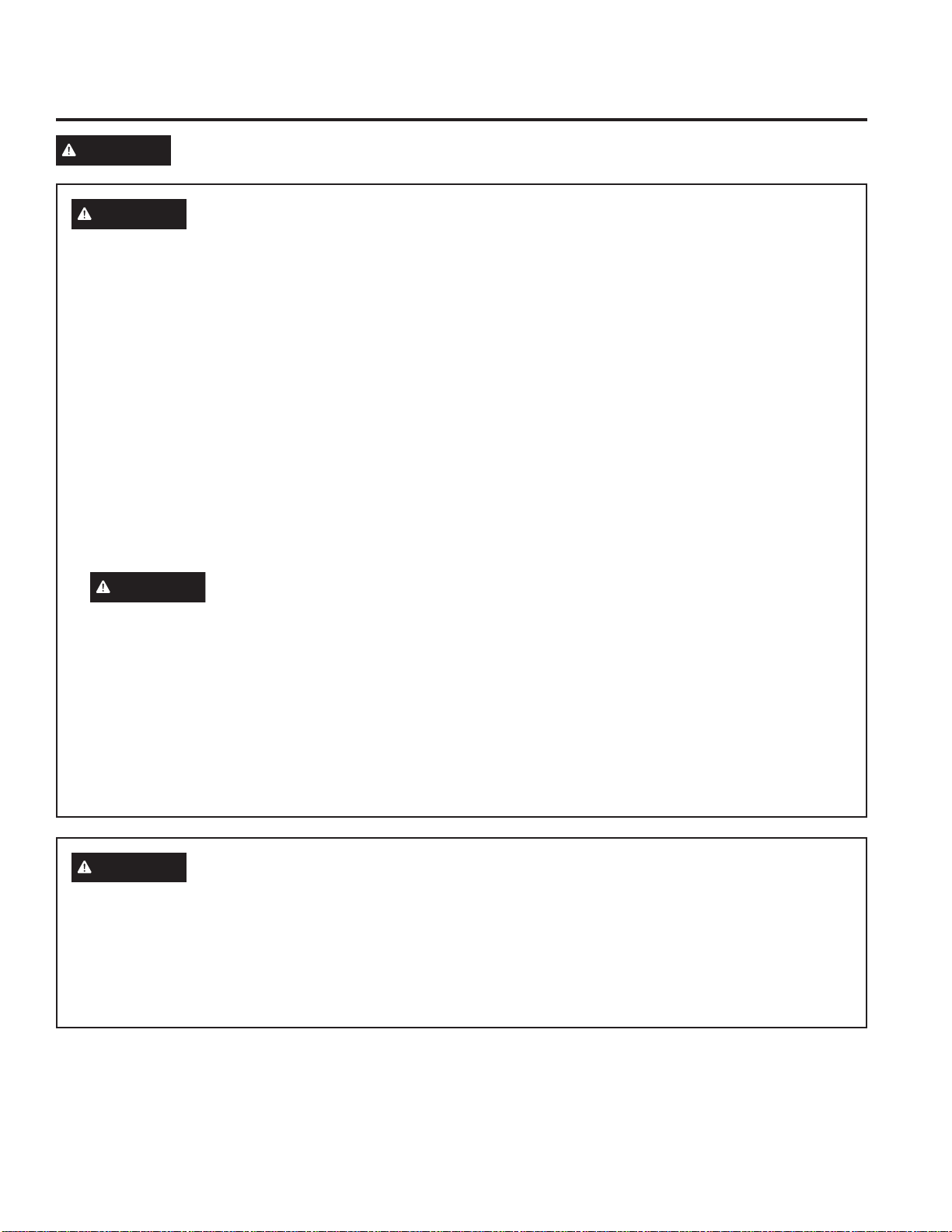
Ŷ ,I\RXDUHQRWVXUHLIDGLVKLVPLFURZDYHVDIH
use this test: Place in the oven both the dish you
are testing and a glass
measuring cup filled with
1 cup of water—set the
measuring cup either in or
next to the dish. Microwave
30-45 seconds at high. If the
dish heats, it should not be
used for microwaving.
If the dish remains cool and only the water in the
cup heats, then the dish is microwave-safe.
Ŷ &RRNZDUHPD\EHFRPHKRWEHFDXVHRIKHDW
transferred from the heated food. Oven mitts may
be needed to handle the cookware.
Ŷ 'RQRWXVHUHF\FOHGSDSHUSURGXFWV5HF\FOHG
paper towels, napkins and waxed paper can contain
metal flecks which may cause arcing or ignite.
Paper products containing nylon or nylon filaments
should be avoided, as they may also ignite.
Ŷ 8VHIRLORQO\DVGLUHFWHGLQWKLVPDQXDO:KHQXVLQJ
IRLOLQWKHRYHQNHHSWKHIRLODWOHDVW´DZD\IURP
the sides of the oven.
Ŷ 'RQRWXVHWKHRYHQWRGU\QHZVSDSHUV
Ŷ ,I\RXXVHDPHDWWKHUPRPHWHUZKLOHFRRNLQJPDNH
sure it is safe for use in microwave ovens.
Ŷ 6RPHIRDPWUD\VOLNHWKRVHWKDWPHDWLVSDFNDJHG
on) have a thin strip of metal embedded in the
bottom. When microwaved, the metal can burn the
floor of the oven or ignite a paper towel.
Ŷ 3DSHUWRZHOVZD[HGSDSHUDQGSODVWLFZUDSFDQEH
used to cover dishes in order to retain moisture and
prevent spattering. Be sure to vent plastic wrap so
steam can escape.
Ŷ 1RWDOOSODVWLFZUDSLVVXLWDEOHIRUXVHLQPLFURZDYH
ovens. Check the package for proper use.
Ŷ ³%RLODEOH´FRRNLQJSRXFKHVDQGWLJKWO\FORVHGSODVWLF
bags should be slit, pierced or vented as directed by
package. If they are not, plastic could burst during
or immediately after cooking, possibly resulting in
injury. Also, plastic storage containers should be at
least partially uncovered because they form a tight
seal. When cooking with containers tightly covered
with plastic wrap, remove covering carefully and
direct steam away from hands and face.
Ŷ 3ODVWLFFRRNZDUH²3ODVWLFFRRNZDUHGHVLJQHGIRU
microwave cooking is very useful, but should be used
carefully. Even microwave-safe plastic may not be
as tolerant of overcooking conditions as are glass or
ceramic materials and may soften or char if subjected
to short periods of overcooking. In longer exposures
to overcooking, the food and cookware could ignite.
Follow these guidelines:
1. Use microwave-safe plastics only and use them in
strict compliance with the cookware manufacturer’s
recommendations.
2. Do not microwave empty containers.
3. Do not permit children to use plastic cookware
without complete supervision.
How to test for a
microwave-safe dish.
49-2000954 Rev. 0 7
READ AND SAVE THESE INSTRUCTIONS
IMPORTANT SAFETY INFORMATION
READ ALL INSTRUCTIONS BEFORE USING THE APPLIANCE
SAFETY INFORMATION (Lower Oven)
WARNING
5HDGDOOVDIHW\LQVWUXFWLRQVEHIRUHXVLQJWKHSURGXFW)DLOXUHWRIROORZWKHVHLQVWUXFWLRQVPD\UHVXOW
in fire, electrical shock, serious injury or death.
WARNING
GENERAL SAFETY INSTRUCTIONS
Ŷ 8VHWKLVDSSOLDQFHRQO\IRULWVLQWHQGHGSXUSRVHDV
described in this Owner’s Manual.
Ŷ%HVXUH\RXUDSSOLDQFHLVSURSHUO\LQVWDOOHGDQG
grounded by a qualified installer in accordance with
the provided installation instructions.
Ŷ'RQRWDWWHPSWWRUHSDLURUUHSODFHDQ\SDUWRI\RXU
oven unless it is specifically recommended in this
manual. All other servicing should be transferred to
a qualified technician.
Ŷ%HIRUHSHUIRUPLQJDQ\VHUYLFHGLVFRQQHFWWKH
power supply at the household distribution panel by
removing the fuse or switching off the circuit breaker.
Ŷ'RQRWOHDYHFKLOGUHQDORQH²FKLOGUHQVKRXOGQRW
be left alone or unattended in an area where an
appliance is in use. They should never be allowed
to climb, sit or stand on any part of the appliance.
Ŷ
CAUTION
Do not store items of interest
to children in cabinets above an oven - children
climbing on the oven to reach items could be
seriously injured.
Ŷ8VHRQO\GU\SRWKROGHUV²PRLVWRUGDPSSRW
holders on hot surfaces may result in burns from
steam. Do not let pot holders touch hot heating
elements. Do not use a towel or other bulky cloth
in place of pot holders.
Ŷ 1HYHUXVH\RXUDSSOLDQFHIRUZDUPLQJRUKHDWLQJ
the room.
Ŷ 'RQRWWRXFKWKHKHDWLQJHOHPHQWVRUWKHLQWHULRU
surface of the oven. These surfaces may be hot
enough to burn even though they are dark in color.
During and after use, do not touch, or let clothing
or other flammable materials contact any interior
area of the oven; allow sufficient time for cooling
first. Other surfaces of the appliance may become
hot enough to cause burns. Potentially hot surfaces
include the oven vent opening, surfaces near the
opening and crevices around the oven door.
Ŷ 'RQRWKHDWXQRSHQHGIRRGFRQWDLQHUV3UHVVXUH
could build up and the container could burst,
causing an injury.
Ŷ 'RQRWXVHDQ\W\SHRIIRLORUOLQHUWRFRYHUWKH
oven bottom or anywhere in the oven, except as
described in this manual. Oven liners can trap heat
or melt, resulting in damage to the product and risk
of shock, smoke or fire.
Ŷ $YRLGVFUDWFKLQJRULPSDFWLQJJODVVGRRUVRUFRQWURO
panels. Doing so may lead to glass breakage.
Do not cook on or in a product with broken glass.
Shock, fire or cuts may occur.
Ŷ &RRNPHDWDQGSRXOWU\WKRURXJKO\²PHDWWRDWOHDVW
DQLQWHUQDOWHPSHUDWXUHRI)DQGSRXOWU\WRDW
OHDVWDQLQWHUQDOWHPSHUDWXUHRI)&RRNLQJ
to these temperatures usually protects against
foodborne illness.
WARNING
KEEP FLAMMABLE MATERIALS AWAY FROM THE RANGE
Failure to do so may result in fire or personal injury.
Ŷ 'RQRWVWRUHRUXVHIODPPDEOHPDWHULDOVLQDQRYHQ
or near the cooktop, including paper, plastic, pot
holders, linens, wall coverings, curtains, drapes and
gasoline or other flammable vapors and liquids.
Ŷ 1HYHUZHDUORRVHILWWLQJRUKDQJLQJJDUPHQWVZKLOH
using the appliance. These garments may ignite if
they contact hot surfaces causing severe burns.
Ŷ 'RQRWOHWFRRNLQJJUHDVHRURWKHUIODPPDEOH
materials accumulate in or near the range. Grease
in the oven or on the cooktop may ignite.
8 49-2000954 Rev. 0
READ AND SAVE THESE INSTRUCTIONS
IMPORTANT SAFETY INFORMATION
READ ALL INSTRUCTIONS BEFORE USING THE APPLIANCE
SAFETY INFORMATION (Lower Oven)
WARNING
IN THE EVENT OF A FIRE, TAKE THE FOLLOWING
STEPS TO PREVENT INJURY AND FIRE SPREADING
Ŷ 'RQRWXVHZDWHURQJUHDVHILUHV1HYHUSLFNXSD
flaming pan.
Ŷ ,IWKHUHLVDILUHLQWKHRYHQGXULQJEDNLQJVPRWKHU
the fire by closing the oven door and turning the
oven off or by using a multi-purpose dry chemical or
foam-type fire extinguisher.
Ŷ ,IWKHUHLVDILUHLQWKHRYHQGXULQJVHOIFOHDQWXUQ
the oven off and wait for the fire to go out. Do not
force the door open. Introduction of fresh air at self-
clean temperatures may lead to a burst of flame
IURPWKHRYHQ)DLOXUHWRIROORZWKLVLQVWUXFWLRQPD\
result in severe burns.
WARNING
OVEN SAFETY INSTRUCTIONS
Ŷ 6WDQGDZD\IURPWKHRYHQZKHQRSHQLQJWKHRYHQ
door. Hot air or steam which escapes can cause
burns to hands, face and/or eyes.
Ŷ .HHSWKHRYHQYHQWXQREVWUXFWHG
Ŷ .HHSWKHRYHQIUHHIURPJUHDVHEXLOGXS*UHDVHLQ
the oven may ignite.
Ŷ 3ODFHRYHQUDFNVLQGHVLUHGORFDWLRQZKLOHRYHQLV
cool. If rack must be moved while oven is hot, do not
let pot holder contact hot heating element in oven.
Ŷ :KHQXVLQJFRRNLQJRUURDVWLQJEDJVLQWKHRYHQ
follow the manufacturer’s directions.
Ŷ 3XOOLQJRXWWKHVWDQGDUGUDFNVWRWKHLUVWRSORFNV
or the extension rack to its fully open position is
a convenience in lifting heavy foods. It is also a
precaution against burns from touching hot surfaces
of the door or oven walls.
Ŷ 'RQRWOHDYHLWHPVVXFKDVSDSHUFRRNLQJXWHQVLOV
or food in the oven when not in use. Items stored in
an oven can ignite.
Ŷ 1HYHUSODFHFRRNLQJXWHQVLOVSL]]DRUEDNLQJVWRQHV
or any type of foil or liner on the oven floor. These
items can trap heat or melt, resulting in damage to
the product and risk of shock, smoke or fire.
WARNING
SELF-CLEANING OVEN SAFETY INSTRUCTIONS
The self-cleaning feature operates the oven at temperatures high enough to burn away food soils in the oven.
)ROORZWKHVHLQVWUXFWLRQVIRUVDIHRSHUDWLRQ
Ŷ 'RQRWWRXFKRYHQVXUIDFHVGXULQJVHOIFOHDQ
operation. Keep children away from the oven during
VHOIFOHDQLQJ)DLOXUHWRIROORZWKHVHLQVWUXFWLRQV
may cause burns.
Ŷ %HIRUHVHOIFOHDQLQJWKHRYHQUHPRYHVKLQ\VLOYHU
colored oven racks (on some models), the probe,
any aluminum foil, and any broiler pan, grid, and
other cookware. Only porcelain coated oven racks
may be left in the oven.
Ŷ %HIRUHRSHUDWLQJWKHVHOIFOHDQF\FOHZLSHJUHDVH
and food soils from the oven. Excessive amount
of grease may ignite, leading to smoke damage to
your home.
Ŷ ,IWKHVHOIFOHDQLQJPRGHPDOIXQFWLRQVWXUQWKH
oven off and disconnect the power supply. Have it
serviced by a qualified technician.
Ŷ 'RQRWFOHDQWKHGRRUJDVNHW7KHGRRUJDVNHWLV
essential for a good seal. Care should be taken not
to rub, damage or move the gasket.
Ŷ 'RQRWXVHDSURWHFWLYHFRDWLQJWROLQHWKHRYHQDQG
do not use commercial oven cleaner unless certified
for use in a self-cleaning oven.
49-2000954 Rev. 0 9
READ AND SAVE THESE INSTRUCTIONS
How to Remove Protective Shipping Film and Packaging Tape
Carefully grasp a corner of the protective shipping film
with your fingers and slowly peel it from the appliance
surface. Do not use any sharp items to remove the film.
Remove all of the film before using the appliance for the
first time.
To assure no damage is done to the finish of the
product, the safest way to remove the adhesive from
packaging tape on new appliances is an application of
a household liquid dishwashing detergent. Apply with a
soft cloth and allow to soak.
NOTE: The adhesive must be removed from all parts. It
cannot be removed if it is baked on.
Consider recycling options for your appliance packaging
material.
FCC RADIO FREQUENCY INTERFERENCE
This equipment generates and uses ISM frequency
energy and if not installed and used properly, that is in
strict accordance with the manufacturer's instructions,
may cause interference to radio and television reception.
It has been type tested and found to comply with limits
IRUDQ,60(TXLSPHQWSXUVXDQWWRSDUWRI)&&5XOHV
which are designed to provide reasonable protection
against such interference in a residential installation.
However, there is no guarantee that interference will not
occur in a particular installation. If this equipment does
cause interference to radio or television reception, which
can be determined by turning the equipment off and on,
the user is encouraged to try to correct the interference
by one or more of the following:
Ŷ 5HRULHQWWKHUHFHLYLQJDQWHQQDRIUDGLRRUWHOHYLVLRQ
Ŷ 5HORFDWHWKH0LFURZDYHRYHQZLWKUHVSHFWWRWKH
receiver.
Ŷ 0RYHWKHPLFURZDYHRYHQDZD\IURPWKHUHFHLYHU
Ŷ 3OXJWKHPLFURZDYHRYHQLQWRDGLIIHUHQWRXWOHWVRWKDW
microwave oven and receiver are on different branch
circuits.
The manufacturer is not responsible for any radio or TV
interference caused by unauthorized modification to
this microwave oven. It is the responsibility of the user to
correct such interference.
IMPORTANT SAFETY INFORMATION
READ ALL INSTRUCTIONS BEFORE USING THE APPLIANCE
SAFETY INFORMATION
PROPER DISPOSAL OF YOUR APPLIANCE
'LVSRVHRIRUUHF\FOH\RXUDSSOLDQFHLQDFFRUGDQFHZLWK)HGHUDODQG/RFDO5HJXODWLRQV&RQWDFW\RXUORFDO
authorities for the environmentally safe disposal or recycling of your appliance.
10 49-2000954 Rev. 0
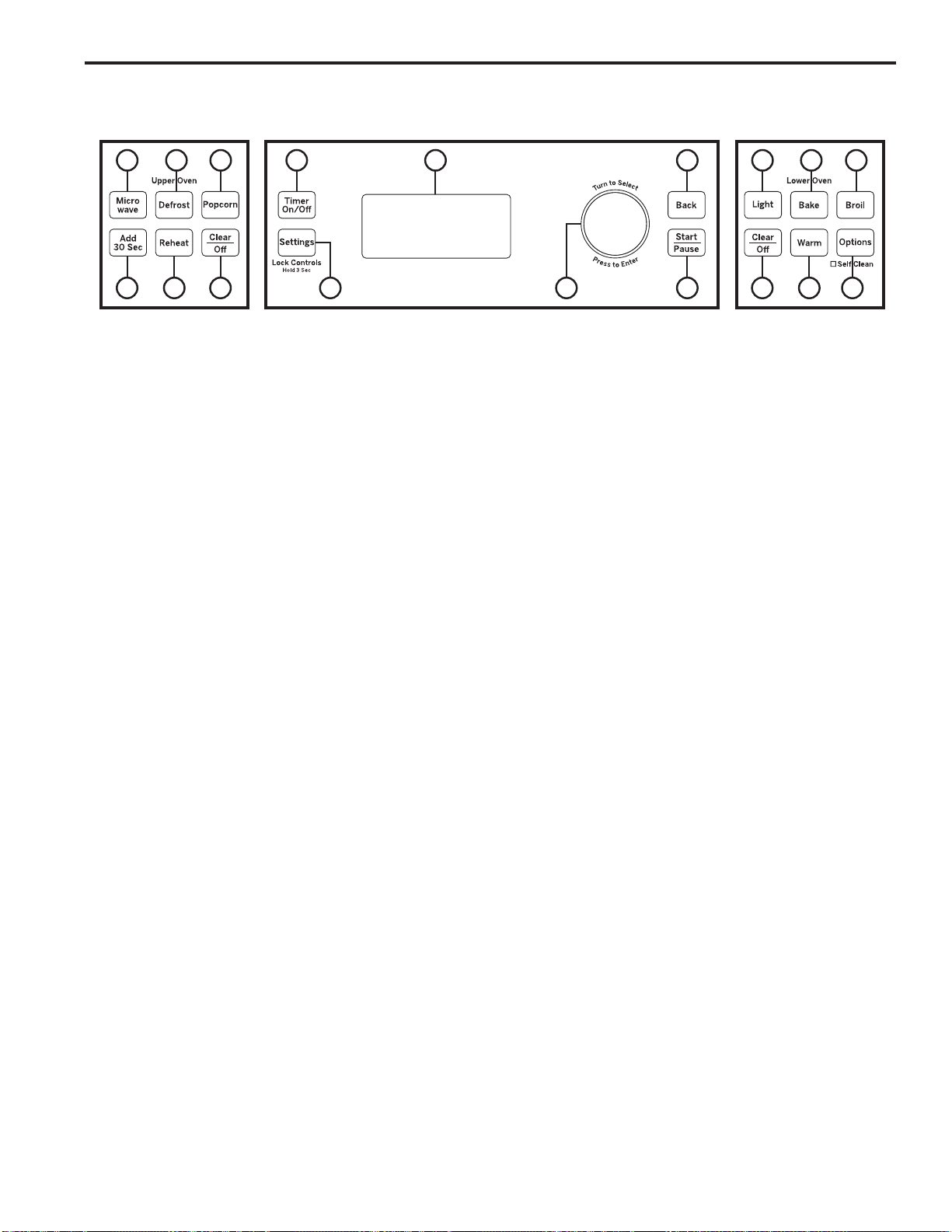
Common Controls
1. Timer On/Off:
Works as a countdown timer. Press
the Timer On/Off pad, select the timer type (hours and
minutes or minutes and seconds), use the selector dial
to set the time, and press the selector dial to start the
timer countdown. The oven will continue to operate
when the timer countdown is complete. To turn the timer
off, press the Timer On/Off pad.
2. Settings / Lock Controls: )LQGRYHQ
options for: Help, Clock Settings, Display Mode, Auto
Conversion, Auto Shut Off, Beeper Volume, Reminder,
Temperature Units, Thermostat Adjust and Oven
Information under this selection. See the Oven Settings
section for more details. Press and hold Settings pad
for 3 seconds to lock or unlock the controls. This locks
out the control so that pressing any of the control pads
does not activate the feature. Clear/Off is always active,
even when the control is locked.
3. Selector Dial: The selector dial is used for both
the upper and lower ovens. Rotate dial to select oven
settings, upper/lower oven options and cooking options
then press to confirm the selection. Rotate dial to
increase or decrease temperatures or time and then
press to confirm the set temperature or time.
4. Back: Press this pad to go back a menu level in the
display.
5. Start/Pause: Press the Start/Pause pad to start
any cooking, clean or timed function. Press the Start/
Pause pad to pause any upper oven features.
6. Display: Information about both the upper and lower
ovens is shown in this display window.
Upper Oven Controls
7. Microwave:
Press the Microwave pad for
microwaving options. Use the selector dial to find the
microwaving option desired and press the selector dial to
select it. Options available include Cook by Time, Cook,
Defrost, Beverage, Popcorn, Melt, Reheat, Simmer and
Soften. Use the clear glass tray and microwave-safe
cookware when using the microwave features. See
Upper Oven Microwaving section for more detail.
8. Add 30 Sec: Press the Add 30 Sec pad for 30
seconds of microwave cooking time. Each time this pad
is pressed an additional 30 seconds is added to the
remaining cooking time. The oven starts immediately.
9. Defrost: Press the Defrost pad to defrost, rotate
selector dial to select the type of defrost and press to
select. Type of defrost available include; Defrost by
)RRG7\SH'HIURVWE\7LPH'HIURVWE\:HLJKWOE
Quick Defrost, Melt, and Soften. See the Microwaving
section for more information.
10. Reheat: Press the Reheat pad to reheat, rotate
selector dial to select food type to reheat and press
to select. Types of food available under the Reheat
feature include; Beverage, Casserole, Chicken, Pasta,
3L]]D3ODWHRI)RRG5LFH6RXS6WHDNV&KRSVDQG
Vegetables.
11. Popcorn: Press the Popcorn pad to microwave
popcorn, press the selector dial to select. Popcorn
feature is a microwave sensor feature and automatically
senses when popcorn is done and shuts itself off. Do
QRWXVHWKH6HQVRU)HDWXUHVWZLFHLQVXFFHVVLRQRQWKH
same food portion.
12. Clear/Off: The Clear/Off pad cancels ALL upper
oven programs except the clock and timer.
Lower Oven Controls
13. Light:
Press the Light pad to turn the oven light on
or off in the lower oven. Note that light in the lower oven
will not turn on if the oven is in a clean mode.
14. Bake: Press the Bake pad to bake, rotate selector dial
to select baking temperature and press to select.
15. Broil: Press the Broil pad to broil, rotate selector dial
to select Hi/Lo and press to select.
16. Options: )LQGWKH'HOD\6WDUW3URRI6DEEDWK
Self Clean, Steam Clean and Warm features under
this selection. See the Oven Options section for more
details.
17. Warm: Press the Warm pad to warm, press the
selector dial to select. Do not use Warm to cook or
heat cold food. See the Cooking Mode section for more
information.
18. Clear/Off: The Clear/Off pad cancels ALL lower oven
programs except the clock and timer.
USING THE OVEN: Oven Controls
Common Controls
Upper Oven
Controls
Lower Oven
Controls
Oven Controls
10 12 18 1617
11 13 14 15
179 6 4
582 3

49-2000954 Rev. 0 11
Help
Use this feature to find out more about your oven and
its features by pressing the Settings pad and selecting
help. Turn the selector dial and press to select the
feature you want to find out more about.
NOTE: Not all features of help may be on your oven
model. Below are features found in the Help function:
Clock Settings
Use this feature to set the time of day and to specify
how the time of day will be displayed. You can select a
standard 12-hour clock (12 hr) or 24-hour military time
display (24 hr). Prior to the first use of your oven, the
clock must be set.
Display Mode
Use this feature to set Power Saver or Display Always
On display mode.
Auto Shut-Off
Use this feature to activate/deactivate Auto Shut-Off.
Activating the Auto Shut-Off feature will turn off the
lower oven after 12 hours of continuous operations.
The factory setting for Auto Shut-Off feature is
activated. When in Sabbath mode Auto Shut-Off will be
deactivated.
Beeper Volume
Use this feature to set Beeper Volume to Mute or Normal.
NOTE: Some tones are not mutable.
Reminder
Use this feature to Set, Review, or Clear Reminder.
Temperature Units
8VHWKLVIHDWXUHWRVHWWKHGLVSOD\WHPSHUDWXUHXQLWWR)
)DKUHQKHLWRU&&HOVLXV
Thermostat Adjust
This feature allows the oven baking and convection
EDNLQJWHPSHUDWXUHWREHDGMXVWHGXSWR)KRWWHU
RUGRZQWR)FRROHURQWKHORZHURYHQ7KHXSSHU
oven cannot be adjusted. Use this feature if you believe
your oven temperature is too hot or too cold and wish to
change it. This adjustment affects Bake, and Convection
Bake modes. No other cooking modes are affected.
Oven Information
This feature shows the Oven Model and Serial number.
Oven Settings
USING THE OVEN: Oven Settings
Features found in the Help function.
Adding Time Defrost by Weight Start/Pause
Auto Conversion Delay Start (Lower) Steam Clean
Auto Shut-Off Display Mode Temperature Units
Back Edit Thermostat Adjust
Bake Help Timer On/Off
Beeper Volume Melt Toast
Beverage Micro 30 Secs Warm
Broil Microwave
Clear/Off My Recipes
Clock Probe
Control Lockout Proof
Cook Reheat
&RRNE\)RRG Reminder
Cook by Time Repeat Last
Cook by Time 1 & 2 Resume
Cooking Options
(Lower)
Sabbath
Cooking Options
(Upper)
Self Clean
Defrost Sensor Cooking
'HIURVWE\)RRG Simmer
Defrost by Time Soften
Speed Cook

12 49-2000954 Rev. 0
Oven Options
USING THE OVEN: Oven Options
Lower Oven Options
Delay Start
Use this feature to delay starting a Bake or Self Clean
feature. To use this feature select Delay Start and set the
time to start, then select cook mode. You can also use the
Delay Start feature while programming a Bake cooking
feature.
Proof
Use this feature to proof dough. See Lower Oven
Cooking Modes for more detail.
Sabbath
Use this feature to enter Sabbath mode. Sabbath mode
sets the oven for observance of the Jewish Sabbath and
Holidays. This feature conforms to the Star-K Jewish
Sabbath requirements. Sabbath mode disables the oven
lights (the oven light will not turn on when the door is
opened), all sounds (the control will not beep when a
button is pressed, but will still beep if certain oven faults
occur), and all upper oven functions and lower oven
functions, except lower oven Bake. During Sabbath mode
only lower oven Bake is available. While in Sabbath
mode, after setting/changing a bake temperature, a
random delay of approximately 30 seconds to 1 minute
will occur before the oven will begin baking. To stop
cooking, press the Back pad and then the Start/Pause
pad. Your oven will shut off after a random delay of
approximately 30 seconds to 1 minute. To immediately
exit lower oven Bake, press the Clear/Off pad at any time
– cooking elements will immediately turn off and Sabbath
Bake will change to Sabbath on the display, indicating
that the oven has turned off. To exit Sabbath mode press
and hold the Back pad for 3 seconds. Do not press any
other buttons until Sabbath mode has exited, or Sabbath
mode will be re-initialized and will not exit. See Lower
Oven Sabbath Mode for more detail.
NOTE: If power outage occurs during Sabbath mode the
unit will remain in Sabbath mode but will no longer be
cooking when power is restored.
Self Clean
Use this feature to enter Self Clean mode. See Cleaning
The Oven section for more detail.
Steam Clean
Use this feature to enter Steam-Clean mode. See
Cleaning The Oven section for more detail.
Warm
Use this feature to warm. See Lower Oven Cooking
Modes for more detail.
49-2000954 Rev. 0 13
UPPER OVEN: Microwaving
Microwaving
Using The Microwave Features
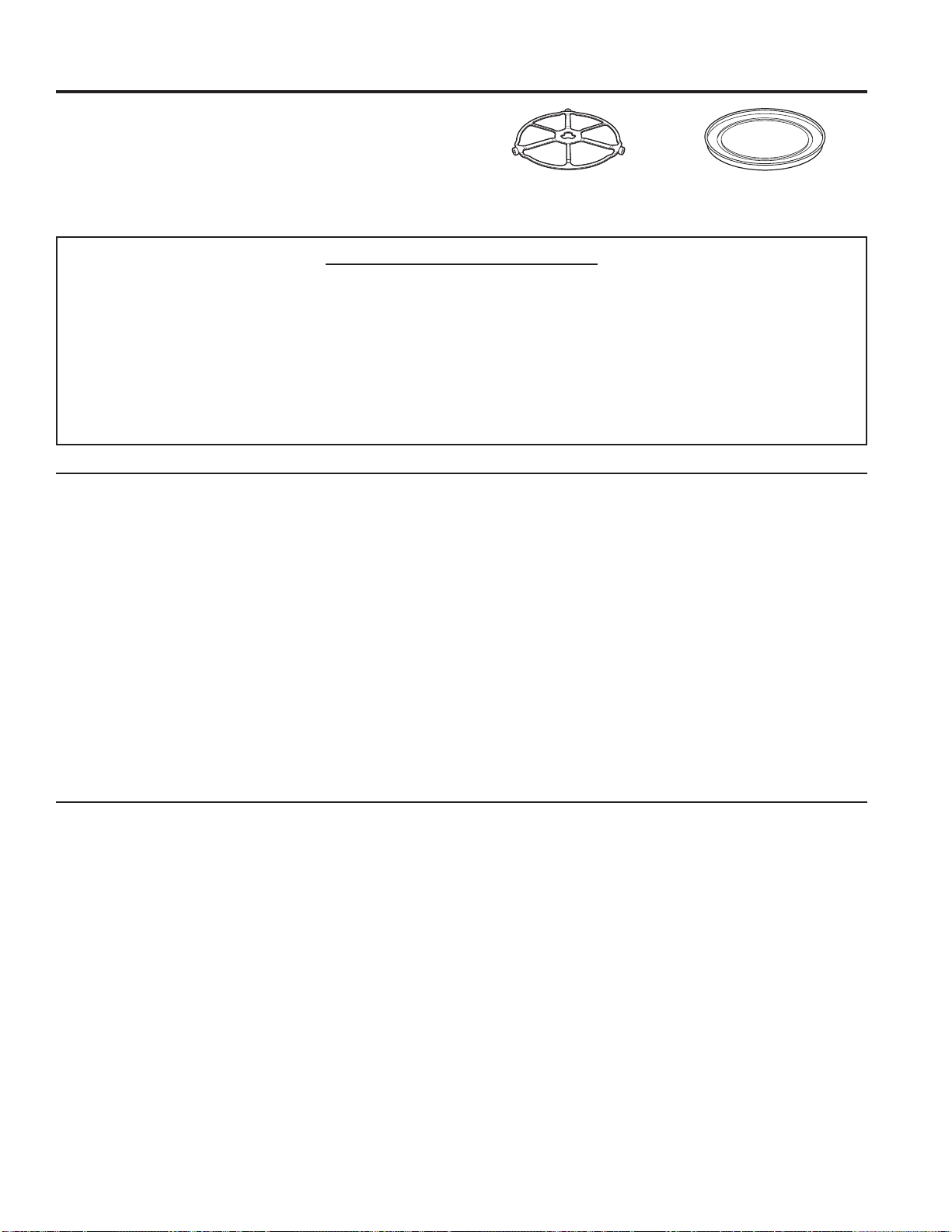
Make sure the turntable and clear glass tray are in place.
Place food or microwavable container directly on the
clear glass tray to cook your food.
The turntable must always be
in place when using the oven.
The clear glass tray should
always be in place when
microwaving.
MICROWAVE PRESET SELECTIONS:
Ŷ %HYHUDJH
– Water (8-12 oz.)
– Coffee
(8-12 oz.)
– Tea (8-12 oz.)
– Milk (8-12 oz.)
– Hot Cocoa
(8-12 oz.)
Ŷ 3RSFRUQ
– Popcorn Sensor
Ŷ 0HOW
– Butter
– Caramel
– Cheese
– Chocolate Chips
– Marshmallow
Ŷ 6LPPHU
Ŷ &RRN
±%\)RRG7\SH
– By Time
– By Time 1 & 2
Ŷ 6RIWHQ
– Butter
– Cream Cheese
±)URVWLQJR]
– Ice Cream
Ŷ 'HIURVW
– 1.0 lb Quick
– By Time
– By Weight
±%\)RRG7\SH
– Melt
– Soften
Ŷ 5HKHDW
– Beverage
– Casserole
– Chicken
– Pasta
– Pizza
±3ODWHRI)RRG
– Rice
– Soup
– Steaks/Chops
– Vegetables
How To Use Pre-Set Microwave Selections
1. Press the Microwave pad.
If no selection is made within 15 seconds, the display
will revert back to the time of day.
2. Turn the selector dial to find the food or beverage you
want to cook, defrost, soften, melt, simmer or reheat.
Press the selector dial to enter.
3. Turn the selector dial to select the type, amount,
weight and/or size. (As required, the oven will prompt
you.) Press the selector dial after each selection.
4. Press the selector dial or the Start/Pause pad to start
cooking.
To review or edit settings during cooking, press the
selector dial.
If the door is opened during cooking, the oven will stop
and PAUSE will appear in the display. Close the door
and press Start/Pause pad to resume cooking.
If you enter an undesired selection at any time, simply
press the Back pad and reenter the desired selections.
Ŷ :KHQWKHRYHQLVRQOLJKWPD\EHYLVLEOHDURXQGWKH
door or outer case.
Ŷ 7KHRYHQFDYLW\OLJKWZLOOFRPHRQGXULQJDPLFURZDYH
cooking cycle.
Ŷ 6WHDPRUYDSRUPD\HVFDSHIURPDURXQGWKHGRRU
Cook By Time And Cook By Time 1 & 2
Use Cook By Time and Cook By Time 1 & 2 to
microwave food that is not in the recipe section and at
the time(s) you set.
Ŷ 7KHSRZHUOHYHOLVDXWRPDWLFDOO\VHWDWKLJKEXW\RX
can change it for more flexibility.
1. Press the Microwave pad.
2. Turn the selector dial to select Cook By Time or Cook
By Time 1 & 2 and press the selector dial to enter.
3. Turn the selector dial to set the cook time and press
the selector dial to enter.
4. Select power level setting.
If you selected Cook By Time 1 & 2, turn the selector
dial to set the second cook time, second power level
setting and press the selector dial to enter.
5. Press the selector dial or the Start/Pause pad to
start cooking.
You may open the door during Cook By Time and Cook
By Time 1 & 2 to check the food. Close the door and
press Start/Pause to resume cooking.
14 49-2000954 Rev. 0
UPPER OVEN: Microwaving
Microwaving (Cont.)
Defrost By Food Type
Auto Defrost automatically sets the defrosting times and
power levels to give even defrosting results for meats,
poultry and fish weighing up to 6 pounds.
1. Remove food from the package and place it on a
microwave-safe dish.
2. Press the Microwave pad and select defrost.
7XUQWKHVHOHFWRUGLDOWR'HIURVW%\)RRG7\SH3UHVV
the selector dial to enter.
4. Turn the selector dial to select food type. Press the
selector dial to enter.
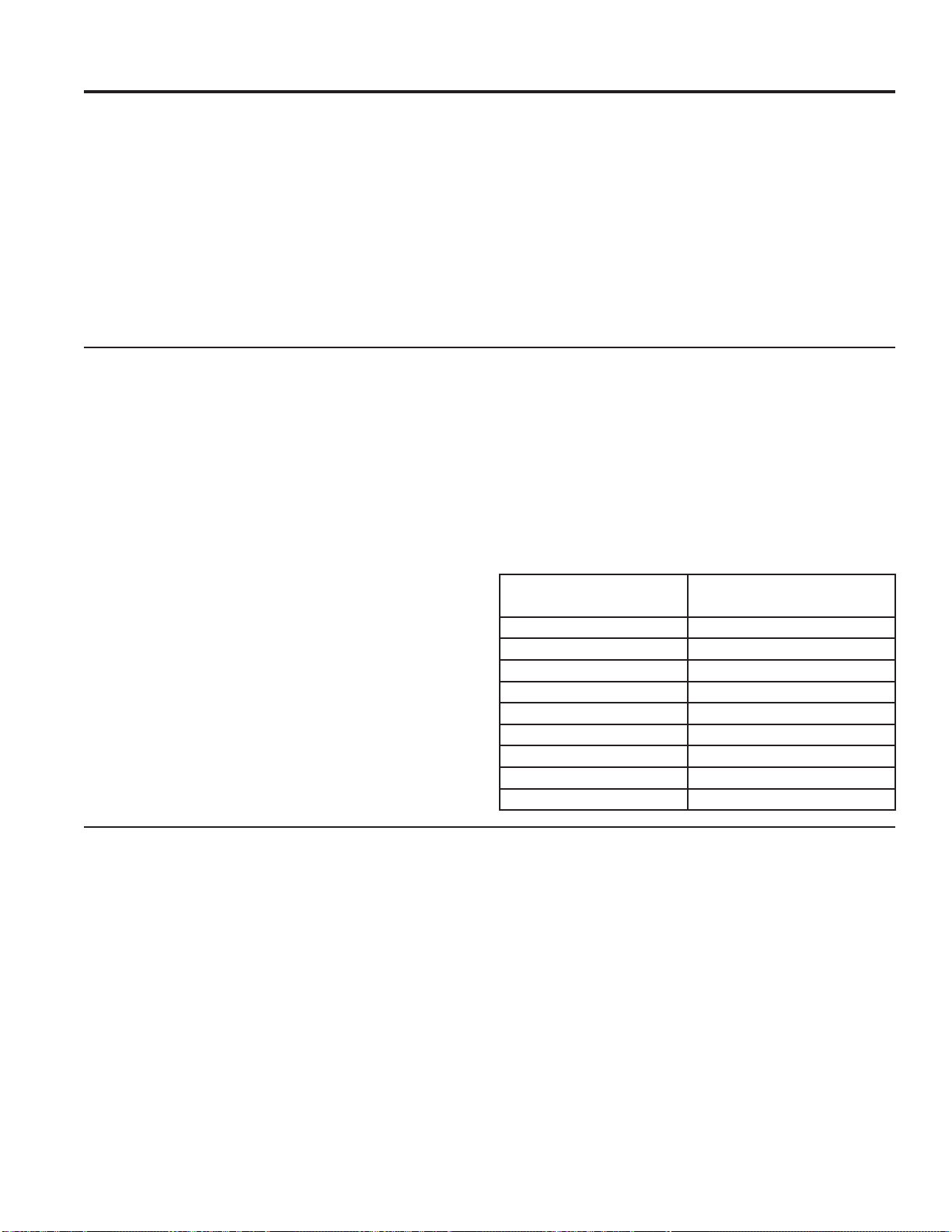
5. Turn the selector dial to the food weight, using the
&RQYHUVLRQ*XLGHDWWKHULJKW)RUH[DPSOHGLDO
for 1.2 pounds (1 pound, 3 oz.) Press the selector dial
to enter.
6. Press the selector dial or Start/Pause pad to start
defrosting.
7XUQWKHIRRGRYHUZKHQWKHRYHQVLJQDOV7XUQ)RRG
Over.
Ŷ 5HPRYHGHIURVWHGPHDWRUVKLHOGZDUPDUHDVZLWK
small pieces of foil for even defrosting.
Ŷ $IWHUGHIURVWLQJPRVWPHDWVQHHGWRVWDQGPLQXWHV
to complete defrosting. Large roasts should stand for
about 30 minutes.
Conversion Guide
If the weight of food is stated in pounds and ounces, the
ounces must be converted to tenths (.1) of a pound.
Defrost By Time
Use Defrost By Time to defrost for a selected length of time.
1. Press the Microwave pad and select defrost.
2. Turn the selector dial to Defrost By Time. Press the
selector dial to enter.
3. Turn the selector dial to select the time you want.
Press the selector dial to enter.
4. Press the selector dial or Start/Pause pad to start
defrosting.
7XUQWKHIRRGRYHUZKHQWKHRYHQVLJQDOV7XUQ)RRG
Over.
Power level is automatically set at 3, but can be
changed. To change the power levels, see the
Microwave Power Level(s) section. You can defrost
small items quickly by raising the power level after
entering the time. Power level 7 cuts the total defrosting
time in about half; power level 10 cuts the total time to
about 1/3. When defrosting at high power levels, food
will need more frequent attention than usual.
Microwave Power Level(s)
Ŷ <RXFDQFKDQJHWKHSRZHUOHYHOGXULQJPRVWFRRNLQJ
program.
1. Press the selector dial to edit
2. Rotate selector dial to change time and/or press
selector dial to enter.
3. Turn the selector dial clockwise to increase and
counterclockwise to decrease the power level. Press
the selector dial to enter.
Here are some examples of uses for various power
levels:
High 10)LVKEDFRQYHJHWDEOHVERLOLQJOLTXLGV
Med-High 7: Gentle cooking of meat and poultry; baking
casseroles and reheating.
Medium 5: Slow cooking and tenderizing for stews and
less tender cuts of meat.
Low 2 or 3: Defrosting, simmering, delicate sauces.
Warm 1: Keeping food warm, softening butter.
Weight of Food in
Ounces
Enter Food Weight
(tenths of a pound)
1–2 .1
3.2
4–5 .3
6–7 .4
8.5
9–10 .6
11 .7
12–13 .8
14–15 .9

49-2000954 Rev. 0 15
Defrost By Weight
Use Defrost By Weight to defrost for a selected length
of time.
1. Press the Microwave pad and select defrost.
2. Turn the selector dial to Defrost By Weight. Press the
selector dial to enter.
3. Turn the selector dial to select the weight you want.
Press the selector dial to enter.
4. Press the selector dial or Start/Pause pad to start
defrosting.
7XUQWKHIRRGRYHUZKHQWKHRYHQVLJQDOV7XUQ)RRG
Over.
Power level cannot be changed during this setting.
1.0 lb. Quick Defrost
Use 1.0 lb. Quick Defrost for quick defrost of 1.0 lb. of
frozen food.
1. Press the Microwave pad and select 1.0 Lb. quick
defrost.
2. Press selector dial or Start/Pause pad to start
defrosting. Press the selector dial to enter.
7XUQWKHIRRGRYHUZKHQWKHRYHQVLJQDOV7XUQ)RRG
Over.
Power level cannot be changed during this setting.
Defrosting Tips
Ŷ )RRGVIUR]HQLQSDSHURUSODVWLFFDQEHWLPH
defrosted in the package, but foods should be taken
RXWRIWKHSDFNDJHZKHQXVLQJ'HIURVW%\)RRG7\SH
Closed packages should be slit, pierced or vented
after food has partially defrosted. Plastic storage
containers should be partially uncovered.
Ŷ )DPLO\VL]HSUHSDFNDJHGIUR]HQGLQQHUVFDQEH
defrosted and microwaved. If the food is in a foil
container, transfer it to a microwave-safe dish.
Ŷ )RRGVWKDWVSRLOHDVLO\VKRXOGQRWEHDOORZHGWRVLW
out for more than one hour after defrosting. Room
temperature promotes the growth of harmful bacteria.
Ŷ )RUPRUHHYHQGHIURVWLQJRIODUJHUIRRGVVXFKDV
roasts, use Defrost By Time. Be sure large meats are
completely defrosted before cooking.
Ŷ :KHQGHIURVWHGIRRGVKRXOGEHFRROEXWVRIWHQHGLQ
all areas. If still slightly icy, return to the microwave
very briefly, or let it stand a few minutes.
UPPER OVEN: Microwaving
Microwaving (Cont.)
16 49-2000954 Rev. 0
Microwave Sensor Cooking
The sensor feature detects the increasing humidity
released during cooking. The oven automatically adjusts
the cooking time to various types and amounts of food.
'RQRWXVHWKH6HQVRU)HDWXUHVWZLFHLQVXFFHVVLRQ
on the same food portion— it may result in severely
overcooked or burnt food. If food is undercooked after
the first countdown, use Cook By Time for additional
cooking time.
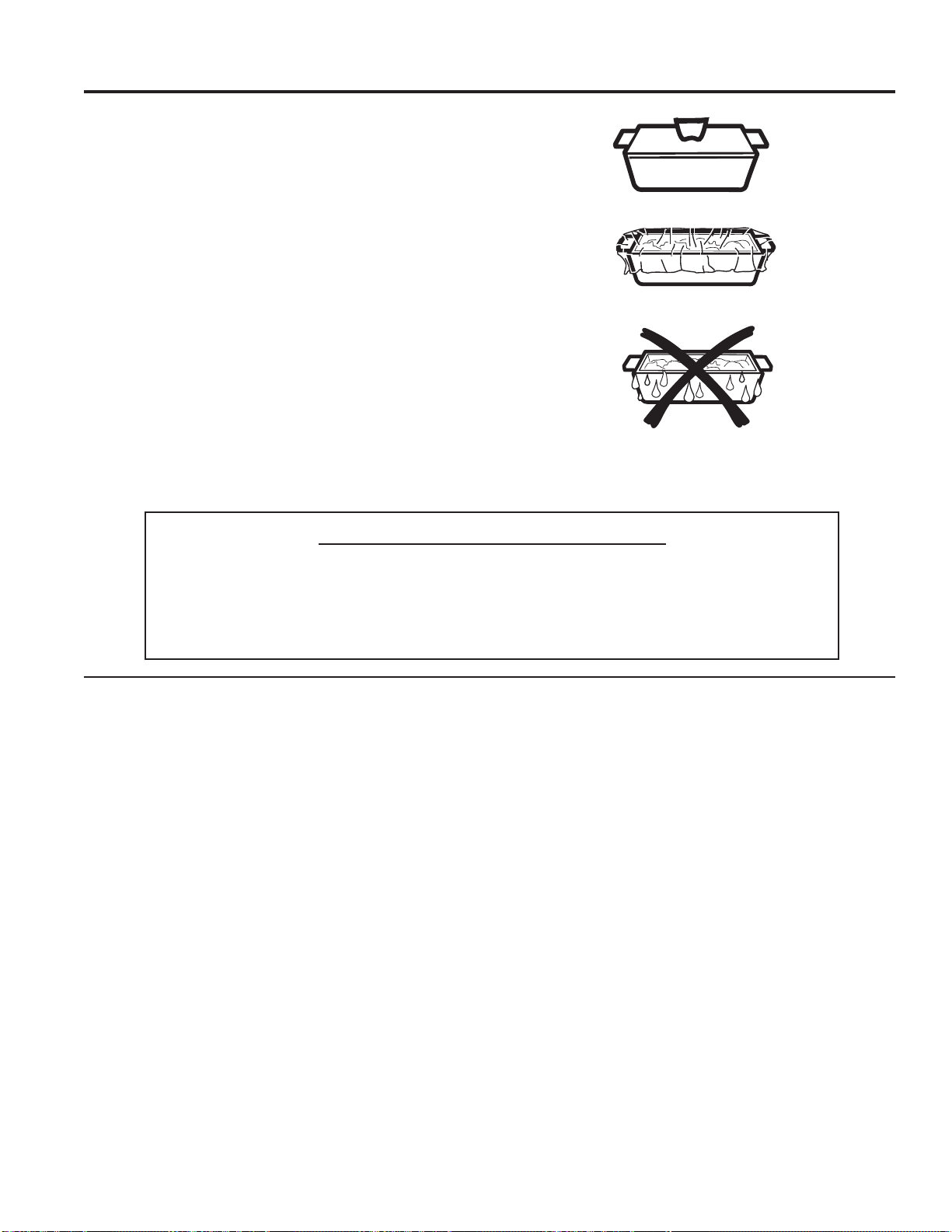
The proper containers and covers are essential for
best sensor cooking.
Ŷ $OZD\VXVHPLFURZDYHVDIHFRQWDLQHUVDQGFRYHU
them with lids or vented plastic wrap. Never use tight
sealing plastic containers—they can prevent steam
from escaping and cause food to overcook.
Ŷ %HVXUHWKHRXWVLGHRIWKHFRRNLQJFRQWDLQHUVDQG
the inside of the oven are dry before placing food in
the oven. Beads of moisture turning into steam can
mislead the sensor.
Ŷ %HYHUDJHVDUHEHVWKHDWHGXQFRYHUHG
Covered
Vented
Dry off dishes so they don’t
mislead the sensor.
To Use All Sensor Programs
Upper Oven microwave mode features sensor cooking. It
automatically senses when food is done and shuts itself
off—eliminating the need to program cook times and
power levels.
1. Press the Microwave pad and turn the selector dial
WR&RRN%\)RRG7\SHRU5HKHDW3UHVVWKHVHOHFWRU
dial to enter.
2. Turn the selector dial to select the food you want.
Press the selector dial to enter.
3. Press the selector dial or press the Start/Pause pad
to start cooking.
Do not open the oven door until time is counting down
in the display or the microwave stop cooking. If the door
is opened, close it and press Start/Pause immediately.
If the food is not done enough, use Cook By Time in the
microwave selector to cook for more time.
NOTE:'RQRWXVHWKH6HQVRU)HDWXUHVWZLFHLQ
succession on the same food portion—it may result in
severely overcooked or burnt food.
Ŷ ,I\RXKDYHEHHQVSHHGFRRNLQJDQGWKHRYHQLV
already hot, it may indicate that it is too hot for sensor
cooking. Of course, you can always continue with
Cook By Time.
NOTE: If the oven is too hot then it will automatically
change to time cooking.
Ŷ 7RVKRUWHQRUOHQJWKHQWKHFRRNWLPHZDLWXQWLOWKH
time countdown shows in the display. Then turn the
selector dial to add or subtract time.
Ŷ ,I\RXRSHQWKHGRRUZKLOH6HQVRU&RRNLQJ6HQVRU
Error will appear. Close the door, press Start/Pause
to begin again.
Notes about the Reheat program:
Reheated foods may have wide variations in
temperature. Some areas may be extremely hot.
It is best to use Cook By Time and not Reheat for these
foods:
Ŷ %UHDGSURGXFWV
Ŷ )RRGWKDWPXVWEHUHKHDWHGXQFRYHUHG
Ŷ )RRGVWKDWQHHGWREHVWLUUHGRUWXUQHG
Ŷ )RRGVFDOOLQJIRUDGU\ORRNRUFULVSVXUIDFHDIWHU
reheating.
UPPER OVEN: Microwaving
Microwaving (Cont.)
MICROWAVE SENSOR PROGRAMS:
Ŷ*URXQG0HDW
Ŷ3RSFRUQ
Ŷ6RXS
Ŷ5LFH
Ŷ9HJHWDEOHV
(Canned, Fresh, Frozen)
Ŷ&KLFNHQ5HKHDW
Ŷ3DVWD5HKHDW
Ŷ3ODWHRI)RRG5HKHDW
Ŷ6RXS5HKHDW
Ŷ9HJHWDEOH5HKHDW

49-2000954 Rev. 0 17
Your new oven has a variety of cooking modes to help you get the best results. These modes are described below. Refer
to the Cooking Guide section for recommendations for specific foods. Remember, your new oven may perform differently
than the oven it is replacing.
Baking and Roasting Modes
Select a mode for baking and roasting based on the type
and quantity of food you are preparing. When preparing
baked goods such as cakes, cookies, and pastries always
SUHKHDWWKHRYHQILUVW)ROORZUHFLSHUHFRPPHQGDWLRQVIRU
food placement. If no guidelines are provided, center food
in the oven.
Traditional Bake
The traditional bake mode is intended for single rack cooking.
This mode uses heat primarily from the lower element but
also from the upper element to cook food. To use this mode
press the Bake pad, turn the selector dial to set the oven
temperature and press to enter, then press Start. Preheating
is generally recommended when using this mode.
Broiling Modes
Always broil with the door closed. The broil element in this
oven is very powerful. Monitor food closely while broiling.
Use caution when broiling on upper rack positions as
placing food closer to the broil element increases smoking,
spattering, and the possibility of fats igniting. Broiling on
rack position 6 is not recommended.
Try broiling foods that you would normally grill. Adjust rack
positions to adjust the intensity of the heat to the food. Place
foods closer to the broil element when a seared surface
and rare interior is desired. Thicker foods and foods that
need to be cooked through should be broiled on a rack
position farther from the broiler or by using Broil Lo. )RUEHVW
performance center food below the broil heating element.
Broil Hi
The Traditional Broil Hi mode uses intense heat from the
upper element to sear foods. Use Broil Hi for thinner cuts
of meat and/ or foods you prefer less done on the interior.
To use this mode press the Broil pad, turn the selector
dial to Hi and press to enter, and then press Start. It is not
necessary to preheat when using this mode.
Broil Lo
The Traditional Broil Lo mode uses less intense heat from
the upper element to cook food thoroughly while also
producing surface browning. Use Broil Lo for thicker cuts of
meat and/or foods that you would like cooked all the way
through. To use this mode press the Broil pad, turn the
selector dial to Lo and press to enter, and then press Start.
It is not necessary to preheat when using this mode.
Proof
Proof mode is designed for rising (fermenting and proofing)
bread dough. Press the Options pad, turn the selector
dial to select Proof and press to select, then press Start.
Cover dough well to prevent drying out. Bread will rise more
rapidly than at room temperature. Note that for double wall
ovens, proof cannot be run when running a clean mode in
the lower oven.
Warm
Warm mode is designed to keep hot foods hot for up to 3
hours. To use this mode, press the Options pad, turn the
selector dial to select Warm and press to select, then press
Start. Cover foods that need to remain moist and do not
cover foods that should be crisp. Preheating is not required.
Do not use warm to heat cold food other than crisping
crackers, chips or dry cereal. It is also recommended that
food not be kept warm for more than 2 hours.
LOWER OVEN: Cooking Modes
Cooking Modes
18 49-2000954 Rev. 0
Your new oven conforms to the Star-K Jewish Sabbath requirements with the Sabbath mode cooking feature. Below
describes the detail of Sabbath mode feature.
To Enter Sabbath Mode
Press the lower oven Options pad and turn the selector
dial to Sabbath and press to select. The display
ZLOOVKRZ³'XULQJ6DEEDWK0RGHWKHXSSHURYHQLV
XQDYDLODEOH´3UHVVWKHVHOHFWRUGLDOWRFRQWLQXH$Q\
upper oven features running will exit, and the lower oven
will immediately transition into Sabbath mode.
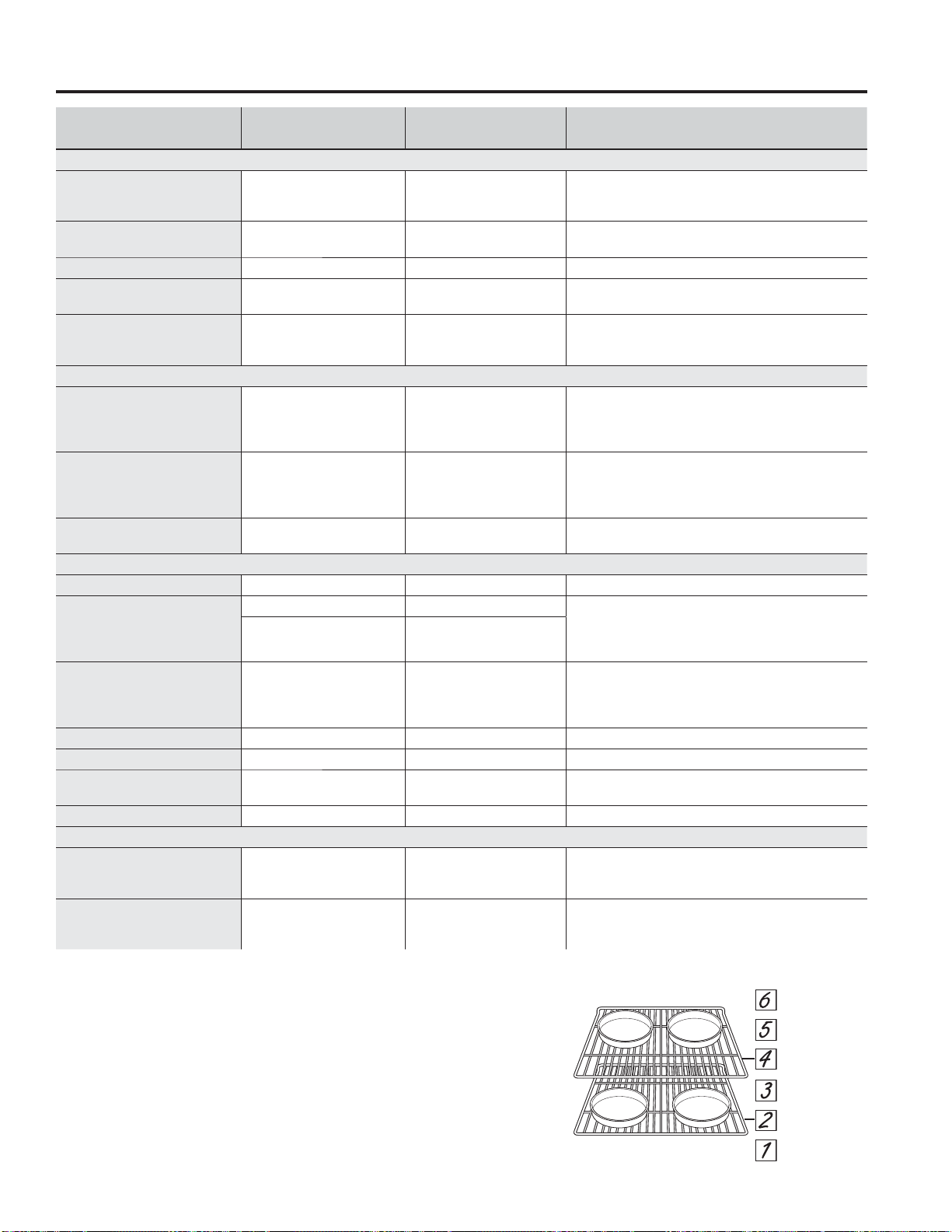
To Change Temperature
Once in Sabbath mode, in order to change oven
temperature or start a bake feature, the user can
change temperature to one of 10 pre-set temperatures
as indicated below:
Changing to one of the above temperatures requires the
user to press the keypad associated with the desired
temperature and then press the Start/PauseSDG)RU
H[DPSOHWRVHWD%DNH)WKHXVHUZLOOSUHVVWKHBake
pad on the lower oven and then press Start/Pause pad.
The Bake feature will start (or if already running, the
oven temperature will change) at a random time between
30 – 60 seconds after the Start/Pause pad is pressed,
with the exception of pressing the Clear/Off pad, which
will immediately cancel the cooking settings. (The unit
will remain in Sabbath mode). Change of temperature
may be executed at any time in the cooking cycle.
To Turn Oven Off
Press Clear/Off pad or Back and then Start pads at
any time. The oven will immediately turn off but will stay
in Sabbath mode and return to the standby Sabbath
display screen.
To Exit Sabbath Mode
Press and hold the Back pad for 3 seconds. The oven
will shut down at a random time between 30 – 60
seconds after the Back pad is pressed and held.
NOTE: Do not press any other pads during this time, or
the Sabbath mode will be re-initialized and will not exit.
The oven will exit Sabbath mode and return to its
default screen.
Timed Cook Feature In Sabbath Mode
The Sabbath mode is not capable of running a timed
cook feature on its own. If there is a desire to run a
Timed Cook, the following steps must be followed:
1. Use the Settings pad to set your Beeper Volume to
Mute.
2. Use the Light pad to set your lower oven Light to On.
3. Use Bake to program a temperature. After
programming a temperature select a cook time and
enter your cook time. Press Start to start the oven.
NOTE: Convection Bake should NOT be used.
4. Once the oven is started, do NOT open the door
until the oven has finished preheating and reached a
steady state temperature. Doing so prior to preheating
completing will result in the air distribution fan
de-energizing immediately upon door opening.
5. Once the food has been placed in the oven, do not
open the door until cooking has completed. Doing so
will result in the display on the screen changing to
prompt you to close your door.
6. Do NOT open the upper oven door. Doing so will turn
the light on immediately.
7. Do not press any additional buttons on the lower
oven controls once started or the display will change
immediately upon the button press.
NOTES
Ŷ 'XULQJ6DEEDWKPRGHRQO\ORZHURYHQ%DNHLV
available. Broil, Convection Bake, Warm, or other
functions are not available.
Ŷ :KHQLQ6DEEDWKPRGHWKHKRXUDXWRVKXWRII
is disabled regardless of the setting selected in the
Settings.
Ŷ 6DEEDWKPRGHFDQEHHQWHUHGRQO\LIQRFRRNLQJ
mode is running in the lower oven. Entering the
Sabbath Mode will cancel all functions in the lower
and upper oven (including timer and reminder).
Ŷ :KHQDQ\EXWWRQVDUHSUHVVHGLQ6DEEDWK0RGH
there are no beeps or tones, no changes to lights or
change in the display. Also, when the door is opened
or closed in Sabbath Mode, there are no beeps or
tones, no changes to lights or change in the display.
Ŷ ,IDSRZHURXWDJHRFFXUVGXULQJ6DEEDWKPRGHEDNLQJ
the unit will return to Sabbath Mode when power
comes back, but will not return in the baking mode.
UI Key Temp. (°F)
Left Side Keys (Upper Oven)
Microwave 170
Speed Cook/ Defrost 200
Cooking Options/ Popcorn 225
Add 30 Sec 250
Convection Bake/Reheat 300
Right Side Keys (Lower Oven)
Back 0
Clear/Off Cancels immediately
Light 325
Bake 350
Broil 375
Convection Bake/Warm 400
Options 450
LOWER OVEN: Sabbath Mode
Sabbath Mode
49-2000954 Rev. 0 19
LOWER OVEN: Cooking Guide
FOOD TYPE
RECOMMENDED
MODE(S)
RECOMMENDED
RACK POSITION(S) ADDITIONAL SUGGESTIONS
Baked Goods
Layer cakes, sheet cakes,
bundt cakes, muffins, quick
breads on a Single Rack
Bake 3 Use shiny cookware.
Layer cakes* on Multiple
Racks
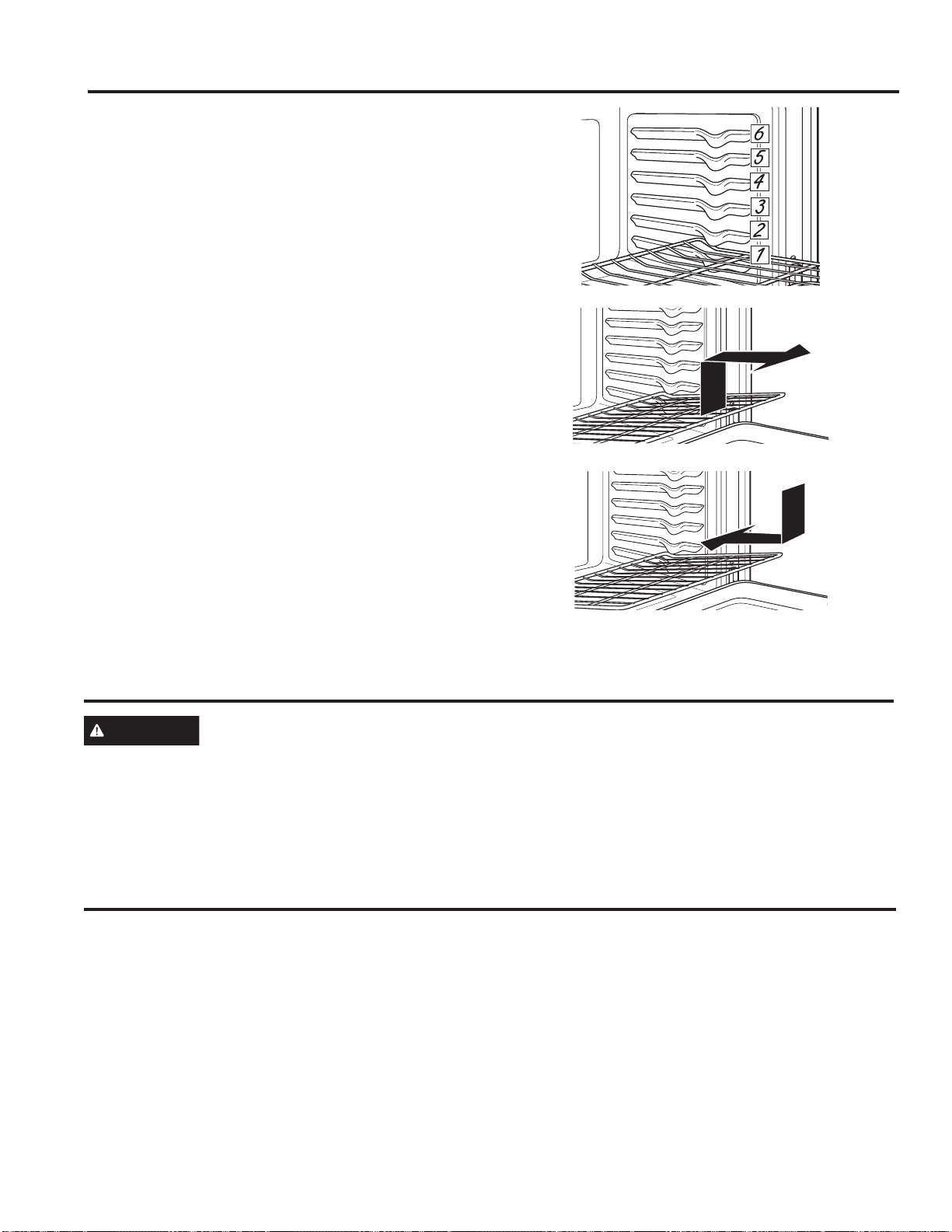
Bake 2 and 4 Ensure adequate airflow (see illustration below).
Chiffon cakes (angel food) Bake 1 Use shiny cookware.
Cookies, biscuits, scones on
a Single Rack
Bake 3 Use shiny cookware.
Cookies, biscuits, scones on
Multiple Racks
Bake 2 and 4
)RUIRRGVOLNHVXJDUFRRNLHVVZLWFKIRRGORFDWLRQ
partially through cooking for more even cooking
results between racks. Ensure adequate airflow.
Beef & Pork
Hamburgers Broil Hi 5
Use a broil pan; move food down for more
doneness/less searing. Watch food
FORVHO\ZKHQEURLOLQJ)RUEHVWSHUIRUPDQFHFHQWHU
food below the broil heating element.
Steaks & Chops Broil Hi 5
Use a broil pan; Move food down for more
doneness/less searing. Watch food closely when
EURLOLQJ)RUEHVWSHUIRUPDQFHFHQWHUIRRGEHORZWKH
broil heating element.
Roasts Bake 2 or 3
Leave uncovered, use a low sided pan such
as a broil pan. Preheating is not necessary.
Poultry
Whole chicken Bake 2 or 3 Use a low sided pan such as a broil pan.
Bone-in chicken breasts,
legs, thighs
Broil Hi 1 If breaded or coated in sauce avoid Broil Hi modes.
Broil skin side down first. Watch food closely when
EURLOLQJ)RUEHVWSHUIRUPDQFHZKHQEURLOLQJFHQWHU
food below the broil heating element.
Broil Lo
Bake
3
Boneless chicken breasts
Broil Lo
Bake
1 (broil) or 3
Move food down for more doneness/less searing
and up for greater searing/browning when broiling.
)RUEHVWSHUIRUPDQFHZKHQEURLOLQJFHQWHUIRRG
below the broil heating element.
Whole turkey Bake 1 or 2 Use a low sided pan such as a broil pan.
Turkey breast Bake 2 or 3 Use a low sided pan such as a broil pan.
Fish Broil Lo
5 (1/2 thick or less)
4 (>1/2 inch)
:DWFKIRRGFORVHO\ZKHQEURLOLQJ)RUEHVWSHUIRUPDQFH
center food below the broil heating element.
Casseroles Bake 3
Frozen Convenience Foods
Pizza, french fries, tator tots,
chicken nuggets, appetizers
on a Single Rack
Bake 3 Use shiny cookware.
Pizza, french fries, tator tots,
chicken nuggets, appetizers
on Multiple Racks
Bake 2 and 4
Use shiny cookware. Switch food location partially
through cooking for more even cooking results.
*When baking four cake layers at a time, use racks 2
and 4. Place the pans as shown so that one pan is not
directly above another.
Cook food thoroughly to help protect against food
borne illness. Minimum safe food temperature
recommendations for food safety can be found at
IsItDoneYet.gov. Make sure to use a food thermometer
to take food temperatures.
Cooking Guide
20 49-2000954 Rev. 0
LOWER OVEN:5DFNV$OXPLQXP)RLODQG2YHQ/LQHUV&RRNZDUH
Racks
Your oven has six rack positions. Recommended rack
positions for various types of foods are provided in the
Cooking Guide. Adjusting rack position is one way to
LPSDFWFRRNLQJUHVXOWV)RUH[DPSOHLI\RXZRXOGSUHIHU
darker tops on cakes, muffins, or cookies, try moving
food one rack position higher. If you find foods are too
brown on top try moving them down next time.
When baking with multiple pans and on multiple racks,
ensure there is sufficient space between pans to allow
air to flow.
Flat Racks
When placing and removing cookware, pull the rack out
to the bump (stop position) on the rack support.
To remove a rack, pull it toward you, tilt the front end up
and pull it out.
To replace, place the curved end of the rack (stop-locks)
onto the oven supports, tilt up the front of the rack and
push the rack in.
Racks may become difficult to slide, especially after a
self-clean. Put some vegetable oil on a soft cloth or
paper towel and rub onto the left and right edges.
Note: Using other cooking oils will cause a discoloring
or a rust like color residue on the racks and cavity sides.
To clean this residue, use a soap and water or a vinegar
and water solution. Rinse with clean water and dry with
a soft cloth.
Cookware
Cookware Guidelines
The material, finish, and size of cookware affect baking
performance.
Dark, coated and dull pans absorb heat more readily
than light, shiny pans. Pans that absorb heat more
readily can result in a browner, crisper, and thicker crust.
If using dark and coated cookware check food earlier
than minimum cook time. If undesirable results are
obtained with this type of cookware consider reducing
RYHQWHPSHUDWXUHE\)QH[WWLPH
Shiny pans can produce more evenly cooked baked
goods such as cakes and cookies.
Glass and ceramic pans heat slowly but retain heat well.
These types of pans work well for dishes such as pies
and custards.
Air insulated pans heat slowly and can reduce bottom
browning.
Keep cookware clean to promote even heating.
CAUTION
Do not use any type of foil or oven liner to cover the oven bottom. These items can trap heat
or melt, resulting in damage to the product and risk of shock, smoke or fire. Damage from improper use of
these items is not covered by the product warranty.
)RLOPD\EHXVHGWRFDWFKVSLOOVE\SODFLQJDVKHHWRQDORZHUUDFNVHYHUDOLQFKHVEHORZWKHIRRG'RQRWXVHPRUH
IRLOWKDQQHFHVVDU\DQGQHYHUHQWLUHO\FRYHUDQRYHQUDFNZLWKDOXPLQXPIRLO.HHSIRLODWOHDVW´IURPRYHQZDOOV
to prevent poor heat circulation.
Aluminum Foil and Oven Liners
49-2000954 Rev. 0 21
CARE AND CLEANING: Cleaning The Oven
Cleaning The Oven
Helpful Hints
An occasional thorough wiping with a solution of
baking soda and water keeps the inside fresh. Also
we recommend against using cleaners with ammonia
or alcohol, as they can damage the appearance of
the oven. If you choose to use a common household
cleaner, first apply the cleaner directly to a clean cloth,
then wipe the soiled area.
Control Panel
It’s a good idea to wipe the control panel after each use.
Clean with mild soap and water or vinegar and water,
rinse with clean water and polish dry with a soft cloth.
Do not use abrasive cleansers, strong liquid cleansers,
plastic scouring pads or oven cleaners on the control
panel—they will damage the finish.
Oven Exterior
Do not use oven cleaners, abrasive cleansers, strong
liquid cleansers, steel wool, plastic scouring pads, or
cleaning powders on the interior or exterior of the oven.
Clean with a mild soap and water or vinegar and water
solution. Rinse with clean water and dry with a soft cloth.
When cleaning surfaces, make sure that they are at
room temperature and not in direct sunlight.
If stain on the door vent trim is persistent, use a mild
abrasive cleaner and a sponge-scrubber for best results.
Spillage of marinades, fruit juices, tomato sauces and
basting liquids containing acids may cause discoloration
and should be wiped up immediately. Let hot surfaces
cool, then clean and rinse.
Stainless Steel Surfaces (on some models)
Do not use a steel wool pad; it will scratch the surface.
To clean the stainless steel surface, use warm sudsy
water or a stainless steel cleaner or polish. Always
ZLSHWKHVXUIDFHLQWKHGLUHFWLRQRIWKHJUDLQ)ROORZ
the cleaner instructions for cleaning the stainless steel
surface.
To inquire about purchasing cleaning products including
stainless steel appliance cleaner or polish, see the
Accessories and Consumer Support sections at the end
of this manual.
How To Clean The Upper Oven Interior
Clean the inside of the oven often for proper heating
performance.
Some spatters can be removed with a paper towel,
others may require a warm soapy cloth. Remove greasy
spatters with a sudsy cloth; then rinse with a damp cloth.
Do not use abrasive cleaners or sharp utensils on oven
walls.
Never use a commercial oven cleaner on any part of
your oven.
Do not clean the inside of the oven with metal scouring
pads. Pieces can break off the pad, causing electrical
shock.
Door Seal
It’s important to keep the area clean where the door seals
against the oven. Use only mild, nonabrasive detergents
applied with a clean sponge or soft cloth. Rinse well.
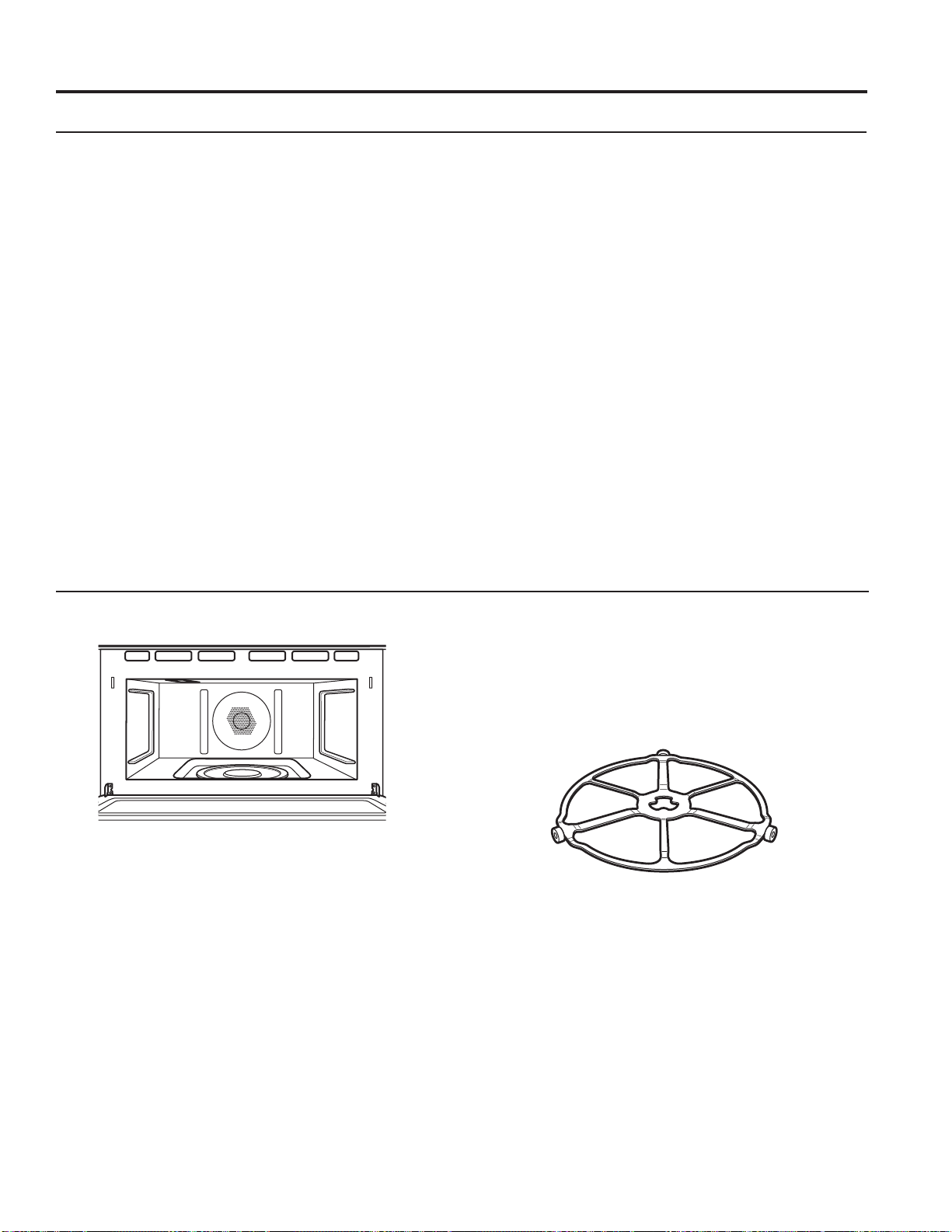
Removable Turntable
The area underneath the turntable should be cleaned
frequently to avoid odors and smoking during a cooking
cycle.
The turntable can be broken if dropped. Wash carefully
in warm, sudsy water. Dry completely and replace.
To replace the turntable, place its center over the spindle
in the center of the oven and turn it until it seats into place.
(Make sure the smooth side of the turntable is facing up
and that its center seats securely on the spindle.)
Be sure electrical power is off and all surfaces are cool before cleaning any part of the oven.
:DOOV)ORRU,QVLGH:LQGRZ0HWDODQG
Plastic Parts on the Door
Turntable
Do not use the oven without the
turntable in place.

22 49-2000954 Rev. 0
How To Clean The Upper Oven Interior (Cont.)
Cooking Trays And Baking Sheet
To prevent breakage, allow the trays to cool completely
before cleaning. Wash carefully in warm, sudsy water or
in the dishwasher.
Do not use metal scouring pads or abrasives, as they
may damage the finish. A soap-filled scouring pad may
be used to clean the trays.
Clear glass tray for microwaving
How To Clean The Lower Oven Interior
The interior of your new oven can be cleaned manually
or by using the Steam Clean or Self Clean modes.
Spillage of marinades, fruit juices, tomato sauces and
basting liquids containing acids may cause discoloration
and should be wiped up immediately. Let hot surfaces
cool, then clean and rinse.
Manual Cleaning
Do not use oven cleaners (unless certified for self-
cleaning oven), abrasive cleaners, strong liquid
cleansers, steel wool, scouring pads, or cleaning
powders on the interior of the oven. Clean with a mild
soap and water or vinegar and water solution. Rinse with
clean water and dry with a soft cloth. When cleaning
surfaces, make sure that they are at room temperature.
Steam Clean Mode
Steam clean is intended to clean small spills using water
and a lower cleaning temperature than Self Clean.
To use the Steam Clean feature, wipe grease and soils
from the oven. Pour one cup of water into the bottom
of the oven. Close the door. Press the Options pad,
select Steam Clean, and then press Start. The oven
door will lock. You can not open the door during the
30 minute steam clean as this will decrease the steam
clean performance. At the end of the steam clean cycle
the door will unlock. Wipe out any excess water and any
remaining soil.
Self Clean Mode
Read Self-Cleaning Oven Safety Instructions at the
beginning of this manual before using Self Clean Mode.
Self-clean uses very high temperatures to clean the oven
interior. The oven door will lock when using this feature.
Before operating the self-clean cycle, wipe up grease
and soils from the oven. Remove all items from the
oven other than enameled (dark color) racks. Shiny or
silver racks and any cookware or other items should all
be removed from the oven before initiating a self-clean
cycle. Close the door. Press the Options pad, select
Self Clean, and a default self-clean time is displayed.
The clean time can be changed to 3:00, 4:00, or 5:00
KRXUVE\XVLQJWKHVHOHFWRUGLDO)RUKHDYLO\VRLOHG
ovens, the maximum 5 hour clean time is recommended.
If you wish to use the default time, press the Start pad
immediately after selecting the Self Clean. The oven
will turn off automatically when the self-clean cycle is
complete. The door will stay locked until the oven has
cooled down. After the oven has cooled down wipe any
ash out of the oven.
IMPORTANT: The health of some birds is extremely
sensitive to the fumes given off during the self-cleaning
cycle of any range. Move birds to another well-
ventilated room.
CARE AND CLEANING: Cleaning The Oven
Cleaning The Oven (Cont.)
Flat Racks
)ODWUDFNVFDQEHOHIWLQWKHFDYLW\GXULQJVHOIFOHDQ
(if enameled racks, not shiny) or can be washed with
warm, soapy water.
Racks may be more difficult to slide, especially after
a self-clean. Put some vegetable oil on a soft cloth or
paper towel and rub onto the left and right edges.
NOTE: Using other cooking oils will cause a discoloring
or a rust like color residue on the racks and cavity sides.
To clean this residue, use a soap and water or a vinegar
and water solution. Rinse with clean water and dry with a
soft cloth.
49-2000954 Rev. 0 23
WARNING
SHOCK OR BURN HAZARD: Before replacing oven light bulb, disconnect the electrical power to the
UDQJHDWWKHPDLQIXVHRUFLUFXLWEUHDNHUSDQHO)DLOXUHWRGRVRPD\UHVXOWLQHOHFWULFVKRFNRUEXUQ
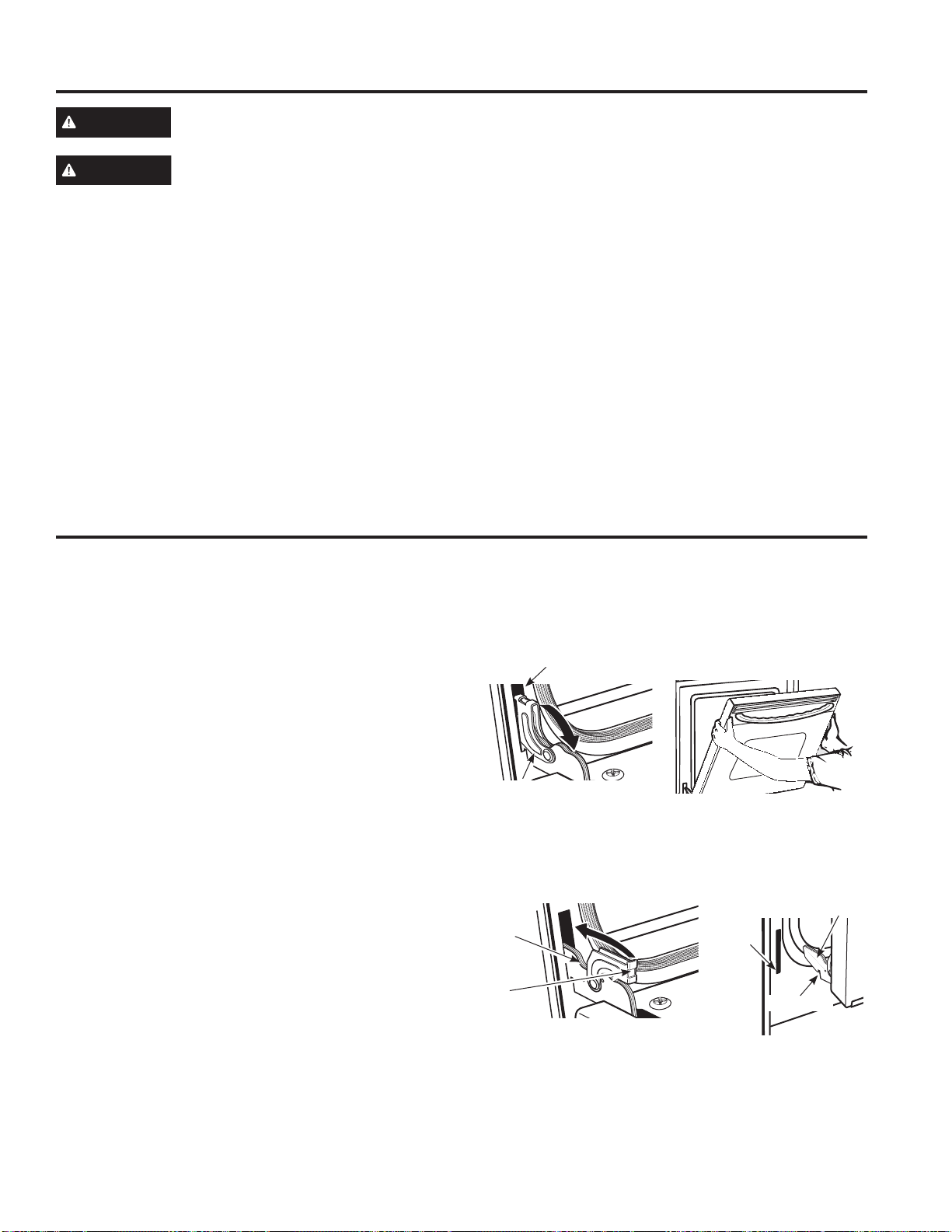
Lift-Off Lower Oven Door
The door is very heavy. Be careful when removing and lifting the door.
Do not lift the door by the handle.
To remove the door:
)XOO\RSHQWKHGRRU
2. Pull the hinge locks down toward the door frame, to
the unlocked position. A tool, such as a small flat-
blade screwdriver, may be required.
)LUPO\JUDVSERWKVLGHVRI WKHGRRUDWWKHWRS
4. Close door to the door removal position. The door
should be open approximately 3" with no obstruction
above the door.
5. Lift door up and out until both hinge arms are clear of
the slots.
To replace the door:
)LUPO\JUDVSERWKVLGHVRI WKHGRRUDWWKHWRS
2. Starting on the left side, with the door at the same
angle as the removal position, seat the indentation of
the hinge arm into the bottom edge of the hinge slot.
The notch in the hinge arm must be fully seated into
the bottom of the slot. Repeat for right side.
)XOO\RSHQWKHGRRU,IWKHGRRUZLOOQRWIXOO\ RSHQWKH
indentation is not seated correctly in the bottom edge
of the slot.
4. Push the hinge locks up against the front frame of the
oven cavity, to the locked position.
5. Close the oven door.
CAUTION
BURN HAZARD: The glass cover and bulb should be removed when cool. Touching hot glass with
bare hands or a damp cloth can cause burns.
Lower Oven Light Replacement
1. Disconnect power at the main fuse or circuit breaker
panel.
2. Remove oven racks.
3. Slide a flat blade screwdriver between the housing
and the glass light cover.
4. Support the glass light cover with two fingers to
prevent the cover from falling to the bottom of the
oven. Be careful not to chip the oven coating.
5. Gently twist the screwdriver blade to loosen the glass
light cover.
6. Remove the glass light cover.
7. Remove the bulb by firmly grasping and sliding the
bulb straight out until the two prongs have cleared the
ceramic holder.
8. Do not touch the glass of the new replacement bulb
with your fingers. It will cause the bulb to fail when it
lights. Grasp the replacement bulb with a clean towel
or facial tissue with the prongs facing down. Align
the two prongs in the ceramic holder, pressing gently
until the bulb is securely in the ceramic socket.
9. Slide the protective lens into the holder and push until
the clips snap into the housing.
10. Reconnect power.
CARE AND CLEANING: Lower Oven Maintenance / Oven Door
Lower Oven Maintenance
Oven Door
Removal position
Hinge lock
Slot
Pull hinge locks down to unlock
Push hinge locks up to lock
Hinge
lock
Hinge
arm
Indentation
Bottom
edge of
slot
Hinge arm
24 49-2000954 Rev. 0
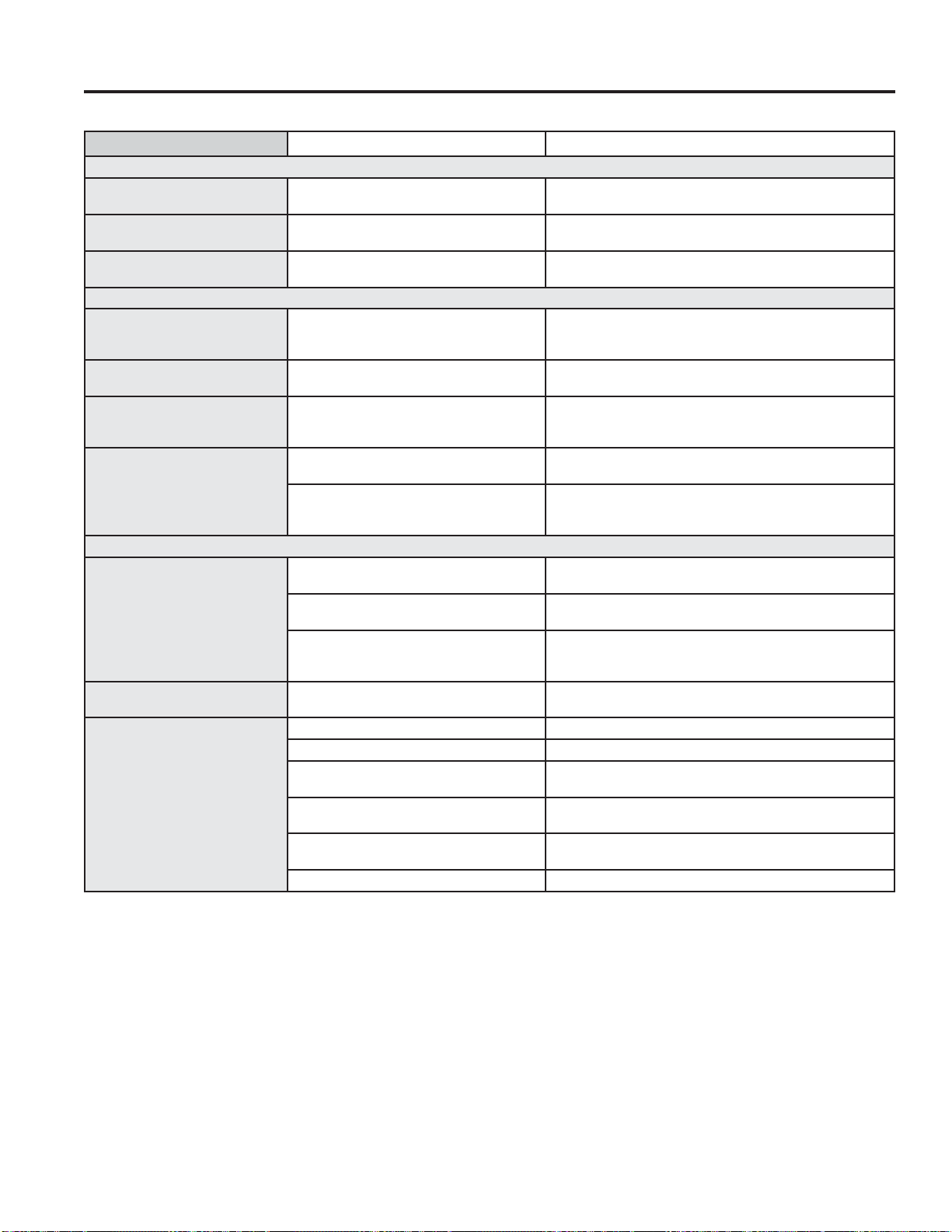
Problem Possible Cause What To Do
FAN
Fan continues to run after
cooking stops
The oven is cooling. The fan will automatically shut off when the internal parts of
the oven have cooled.
Oven vent emits warm air
while oven is on
This is normal.
Fan comes on automatically
when using the microwave
This is normal.
COOKING
The oven makes unusual
sounds while cooking
Clicks and fans blowing are normal. The
relay board is turning the components on
and off.
These sounds are normal.
Smoke comes out of the
oven when I open the door
)RRGLVKLJKLQIDWFRQWHQW$HURVROVSUD\
used on the pans.
Smoke is normal when cooking high-fat foods.
Food is not fully cooked
or browned at the end of a
cooking program
Programmed times may not match the size
or amount of food you are cooking.
Adjust time for doneness or adjust the upper or
lower lamps for browning and doneness.
SENSOR ERROR displayed
along with an oven signal
)RRGDPRXQWRUW\SHSODFHGLQWKHRYHQ
does not match the program that was set.
Press the Clear/Off pad. Set the oven program to match
the food or liquid to be cooked or heated.
Steam was not sensed by the oven because
plastic wrap was not vented, a lid too tight
was on the dish or a liquid was covered.
Vent plastic wrap, use a looser lid or uncover liquids when
cooking or heating.
DISPLAY
The display is blank Power saver mode may be activated. Check the Settings menu for clock display settings. Turn
the display on.
A fuse in your home may be blown or the
circuit breaker tripped.
Replace the fuse or reset the circuit breaker.
Power outage or surge Reset the clock. If the oven was in use, you must reset it by
pressing the Clear/Off pad, setting the clock and resetting
any cooking function.
“Control is LOCKED”
appears in display
The control has been locked. Press and hold Settings pad for 3 seconds to unlock the
control.
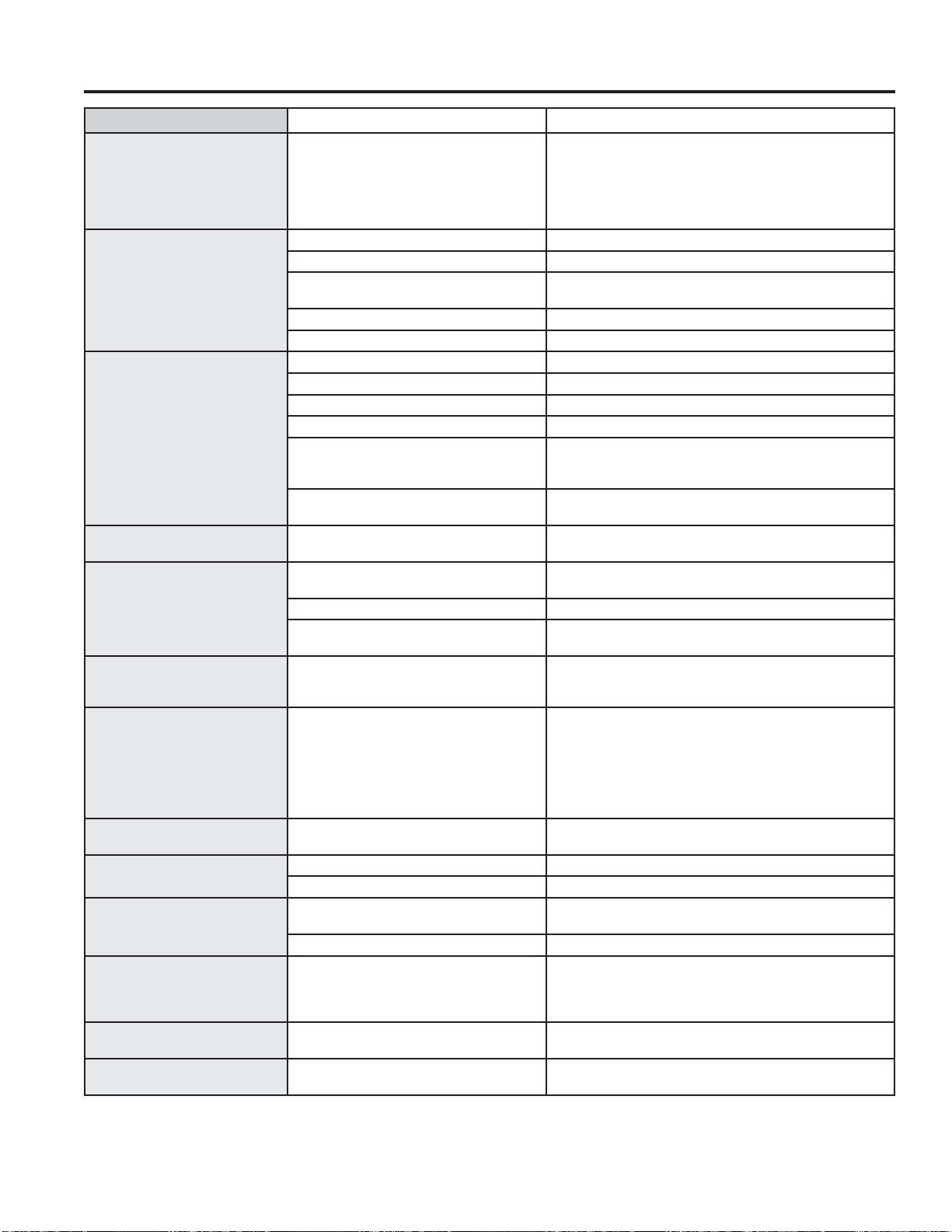
TROUBLESHOOTING TIPS (Upper Oven)
Save time and money! Review the charts on the following pages first and you may not need to schedule service.
Troubleshooting tips ... Before you schedule service
Control display is lit yet oven
will not start
Clock is not set. Set the clock.
Door not securely closed. Open the door and close securely.
Start/Pause pad or selector dial not
pressed after entering cooking selection.
Press Start/Pause pad or selector dial.
Another selection already entered in oven
and Clear/Off pad not pressed to cancel it.
Press Clear/Off pad.
Size, quantity or cooking time not entered
after final selection.
Make sure you have entered cooking time after selecting.
Clear/Off pad was pressed accidentally. Reset cooking program and press Start/Pause pad.
49-2000954 Rev. 0 25
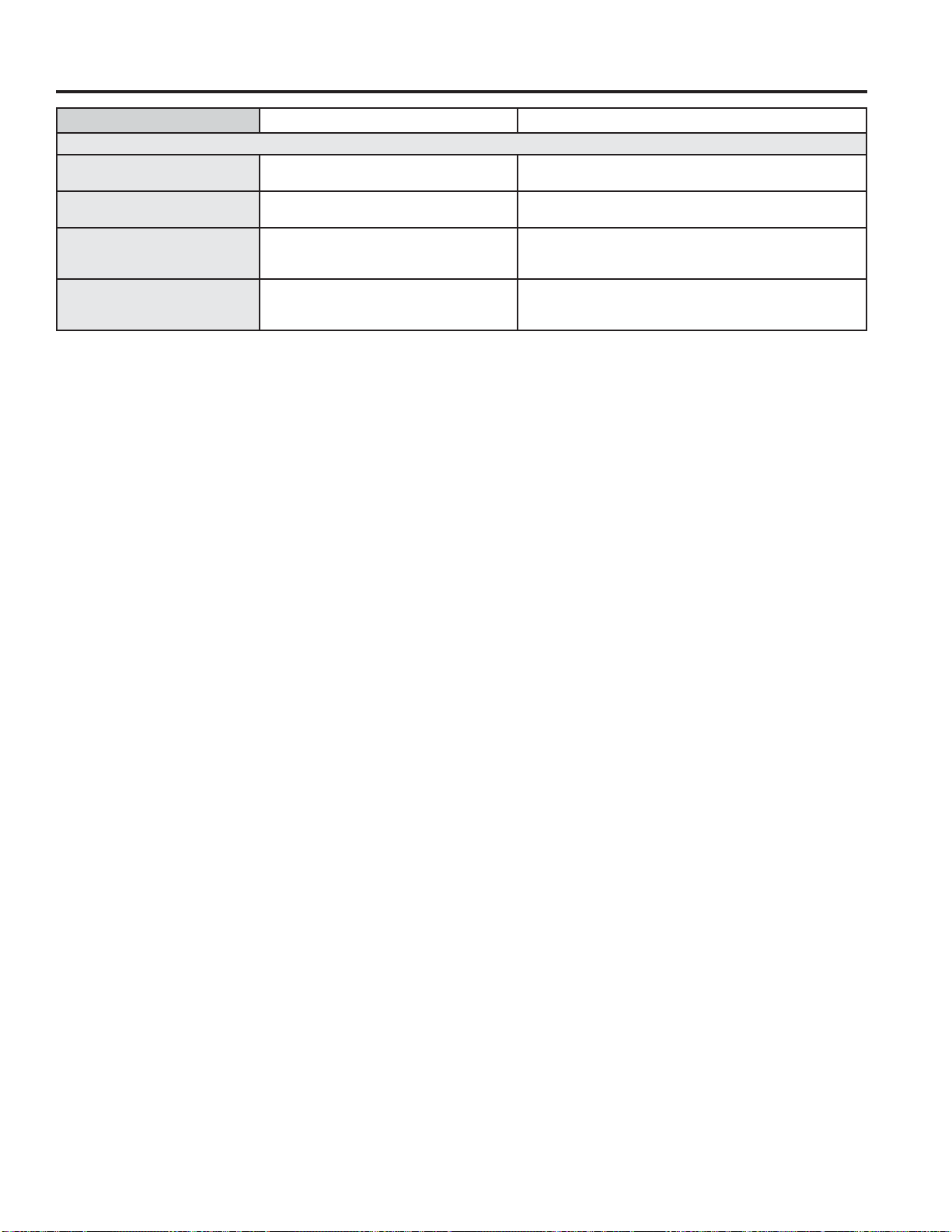
Problem Possible Cause What To Do
OTHER PROBLEMS
The door and inside of the
oven feels hot
The heat lamps produce intense heat in a
small space.
This is normal. Use oven mitts to remove food when ready.
Oven will not start A fuse in your home may be blown or the
circuit breaker tripped.
Replace fuse or reset circuit breaker.
Cannot edit cooking features Some pre-programmed cooking features
may not be able to be edited to prevent
degradation of cooking performance.
This is normal.
The pads on one side of the
control do not function
The control has locked out the use of these
pads and need to be reset.
Press and hold the Clear/Off pad on the other side of the
display for 30 seconds. If this does not reset the control, it
may be necessary to cycle the circuit breaker.
TROUBLESHOOTING TIPS (Upper Oven)
Troubleshooting tips ... Before you schedule service
26 49-2000954 Rev. 0
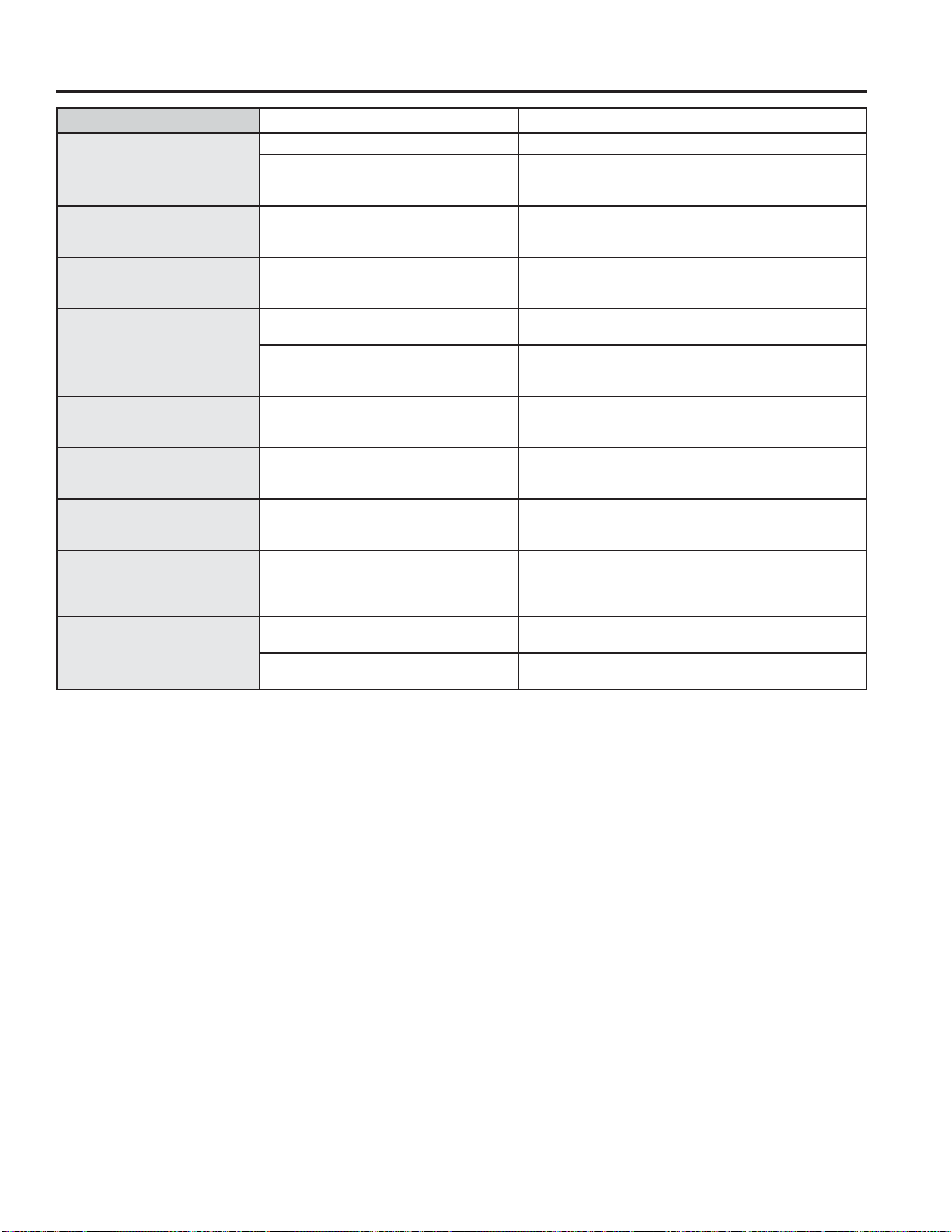
TROUBLESHOOTING TIPS (Lower Oven)
Problem Possible Cause What To Do
My new oven doesn't cook
like my old one. Is something
wrong with the temperature
settings?
Your new oven has a different cooking
system from your old oven and therefore
may cook differently than your old oven.
)RUWKHILUVWIHZXVHVIROORZ\RXUUHFLSHWLPHVDQG
temperatures carefully. If you still think your new oven is
too hot or too cold, you can adjust the temperature yourself
to meet your specific cooking preference. NOTE: This
adjustment affects Bake temperatures; it will not affect Broil
or Clean.
Food does not bake properly Oven controls improperly set. See the Cooking Modes section.
Rack position is incorrect or rack is not level. See the Cooking Modes section and Cooking Guide.
Incorrect cookware or cookware of improper
size being used.
See the Cookware section.
Oven temperature needs adjustment. See the Settings section.
Ingredient substitution Substituting ingredients can change the recipe outcome.
Food does not broil properly Oven controls improperly set. Make sure you select the appropriate broil mode.
Improper rack position being used. See Cooking Guide for rack location suggestions.
)RRGEHLQJFRRNHGLQDKRWSDQ Make sure cookware is cool.
Cookware not suited for broiling. Use a pan specifically designed for broiling.
Aluminum foil used on the broiling pan and
grid has not been fitted properly and slit as
recommended.
If using aluminum foil conform to pan slits.
In some areas the power (voltage) may be
low.
Preheat the broil element for 10 minutes.
Oven temperature too hot or
too cold
Oven temperature needs adjustment. See the Settings section.
Oven does not work or appears
not to work
A fuse in your home may be blown or the
circuit breaker tripped.
Replace the fuse or reset the circuit breaker.
Oven controls improperly set. See the Using the Oven section.
Oven is in Sabbath Mode. Verify, that the oven is not in Sabbath Mode.
See the Sabbath Mode section.
“Crackling” or “popping”
sound
This is the sound of the metal heating
and cooling during both the cooking and
cleaning functions.
This is normal.
Why is my range making a
"clicking" noise when using my
oven?
Your range has been designed to
maintain a tighter control over your oven's
temperature. You may hear your oven's
heating elements "click" on and off more
frequently than in older ovens to achieve
better results during baking, broiling,
convection, and self-clean cycles.
This is normal.
Clock and timer do not work A fuse in your home may be blown or the
circuit breaker tripped.
Replace the fuse or reset the circuit breaker.
Oven light does not work Light bulb is loose or defective. Tighten or replace bulb.
Pad operating light is broken.
Call for service.
Oven will not self-clean The temperature is too high to set a self-
clean operation.
Allow the oven to cool and reset the controls.
Oven controls improperly set. See the Cleaning the Oven section.
Excessive smoking during
clean cycle
Excessive soil or grease. Press the Clear/Off pad. Open the windows to rid the room
of smoke. Wait until the OVEN IS COOLING DOOR IS
LOCKED display goes off. Wipe up the excess soil and
reset the clean cycle.
Excessive smoking during
broiling
)RRGWRRFORVHWREXUQHUHOHPHQW Lower the rack position of the food.
Oven door will not open after a
clean cycle
Oven too hot. Allow the oven to cool below locking temperature.
Troubleshooting tips ... Before you schedule service
49-2000954 Rev. 0 27
TROUBLESHOOTING TIPS (Lower Oven)
Problem Possible Cause What To Do
Oven not clean after a clean
cycle
Oven controls improperly set. See the Cleaning the Oven section.
Oven was heavily soiled. Clean up heavy spillovers before starting the clean cycle.
Heavily soiled ovens may need to self-clean again or for a
longer period of time.
"CLOSE DOOR TO CONTINUE
COOKING" show on display
section
The door is open during a cooking or
cleaning feature.
Close the oven door.
"OVEN IS COOLING DOOR IS
LOCKED" show on display
section
The oven door is locked because the
temperature inside the oven has not
dropped below the unlocking temperature.
Press the Clear/Off pad. Allow the oven to cool.
An oven error and "SERVICE
MAY BE NEEDED" show in the
display
You have a function error code. Press the Clear/Off pad. Allow the oven to cool for one
hour. Put the oven back into operation.
If the function code repeats. Disconnect all power to the oven for at least 30 seconds
and then reconnect power. If the function error code
repeats
, call for service.
“Burning” or “oily” odor
emitting from the vent
This is normal in a new oven and will
disappear in time.
To speed the process, set a self-clean cycle for a minimum
of 3 hours. See the Cleaning the Oven section.
Strong odor An odor from the insulation around the
inside of the oven is normal for the first few
times the oven is used.
This is temporary and will go away after several uses or a
self-clean cycle.
Fan noise A cooling fan may automatically turn on. This is normal. The cooling fan will turn on to cool internal
parts. It may run for up to 1-1/2 hours after the oven is
turned off.
My oven door glass appears to
be "tinted" or have a "rainbow"
color. Is this defective?
No. The inner oven glass is coated with
a heat barrier to reflect the heat back into
the oven to prevent heat loss and keep the
outer door cool while baking.
This is normal. Under certain light or angles, you may see
this tint or rainbow color.
Sometimes the oven takes
longer to preheat to the same
temperature
Cookware or food in oven The cookware or food in the oven will cause the oven to take
longer to preheat. Remove items to reduce preheat time.
Number of racks in oven Adding more racks to the oven will cause the oven to take
longer to preheat. Remove some racks.
Troubleshooting tips ... Before you schedule service

28 49-2000954 Rev. 0
Notes

49-2000954 Rev. 0 29
Notes
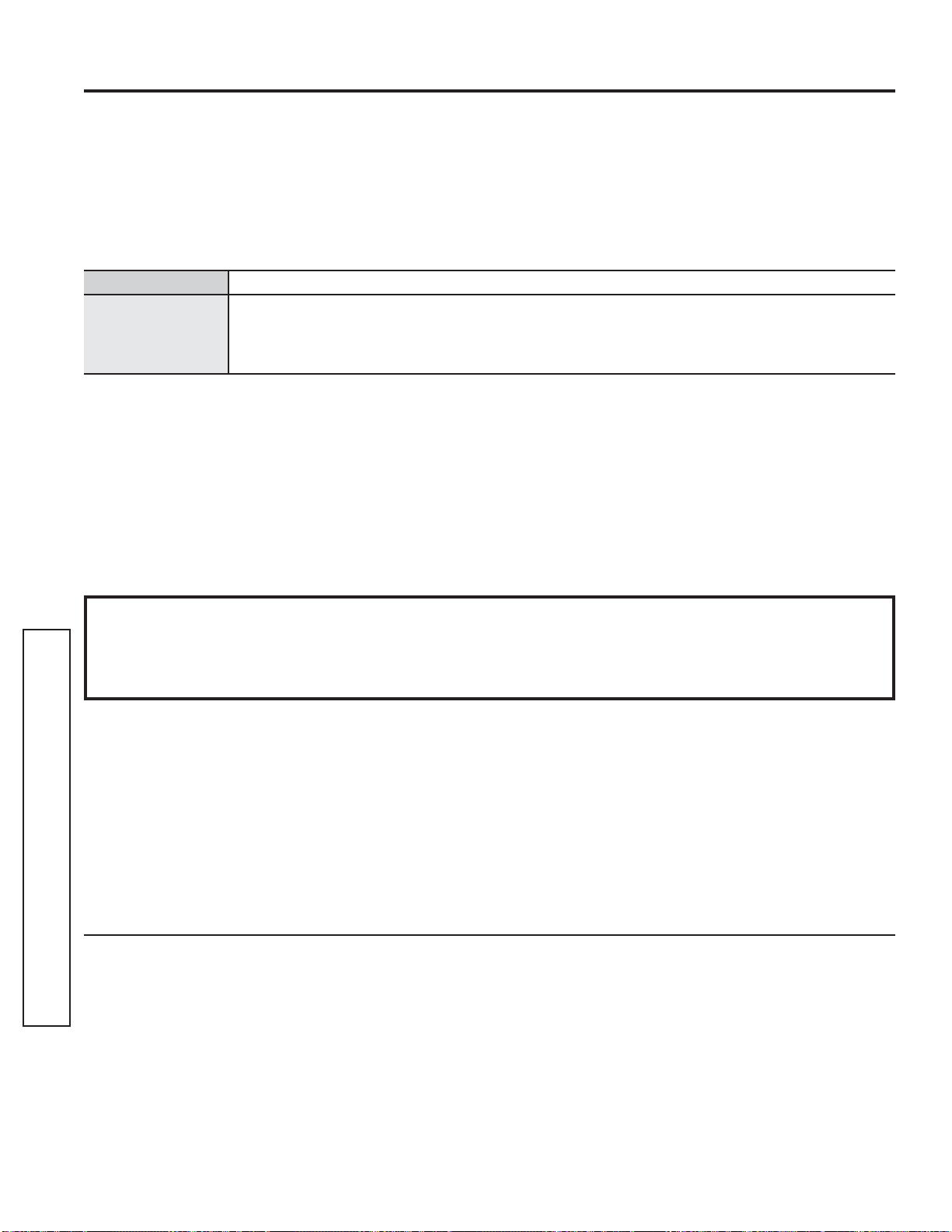
30 49-2000954 Rev. 0
Staple your receipt here. Proof of the original purchase
date is needed to obtain service under the warranty.
GEAppliances.com
$OOZDUUDQW\VHUYLFHLVSURYLGHGE\RXU)DFWRU\6HUYLFH&HQWHUVRUDQDXWKRUL]HG&XVWRPHU&DUH
®
technician. To schedule
service online, visit us at GEAppliances.com/service, or call GE Appliances at 800.GE.CARES (800.432.2737). Please
have your serial number and your model number available when calling for service.
Servicing your appliance may require the use of the onboard data port for diagnostics. This gives a GE Appliances factory
service technician the ability to quickly diagnose any issues with your appliance and helps GE Appliances improve its
products by providing GE Appliances with information on your appliance. If you do not want your appliance data to be
sent to GE Appliances, please advise your technician not to submit the data to GE Appliances at the time of service.
What GE Appliances will not cover:
Ŷ 6HUYLFHWULSVWR\RXUKRPHWRWHDFK\RXKRZWR
use the product.
Ŷ ,PSURSHULQVWDOODWLRQGHOLYHU\RUPDLQWHQDQFH
Ŷ )DLOXUHRIWKHSURGXFWLILWLVDEXVHGPLVXVHG
modified or used for other than the intended
purpose or used commercially.
Ŷ 5HSODFHPHQWRIKRXVHIXVHVRUUHVHWWLQJRI
circuit breakers.
Ŷ 'DPDJHWRWKHSURGXFWFDXVHGE\DFFLGHQWILUH
floods or acts of God.
Ŷ ,QFLGHQWDORUFRQVHTXHQWLDOGDPDJHFDXVHGE\
possible defects with this appliance.
Ŷ 'DPDJHFDXVHGDIWHUGHOLYHU\
Ŷ 3URGXFWQRWDFFHVVLEOHWRSURYLGHUHTXLUHG
service.
Ŷ 6HUYLFHWRUHSDLURUUHSODFHOLJKWEXOEVH[FHSW
for LED lamps.
LIMITED WARRANTY
GE Appliances Limited Warranty
EXCLUSION OF IMPLIED WARRANTIES
Your sole and exclusive remedy is product repair as provided in this Limited Warranty. Any implied warranties,
including the implied warranties of merchantability or fitness for a particular purpose, are limited to one year or
the shortest period allowed by law.
This limited warranty is extended to the original purchaser and any succeeding owner for products purchased for
home use within the USA. If the product is located in an area where service by a GE Appliances Authorized Servicer
is not available, you may be responsible for a trip charge or you may be required to bring the product to an Authorized
GE Appliances Service location for service. In Alaska, the limited warranty excludes the cost of shipping or service
calls to your home.
Some states do not allow the exclusion or limitation of incidental or consequential damages. This limited warranty
gives you specific legal rights, and you may also have other rights which vary from state to state. To know what your
legal rights are, consult your local or state consumer affairs office or your state’s Attorney General.
Warrantor: GE Appliances, a Haier company
Louisville, KY 40225
Extended Warranties: Purchase a GE Appliances extended warranty and learn about special discounts that are
available while your warranty is still in effect. You can purchase it online anytime at
GEAppliances.com/extended-warranty
or call 800.626.2224 during normal business hours. GE Appliances Service will still be there after your warranty expires.
For the period of GE Appliances will replace
One year
)URPWKHGDWH
of the original
purchase
Any part of the range which fails due to a defect in materials or workmanship. During this
limited one-year warranty, GE Appliances will provide, free of charge, all labor and in-home
service to replace the defective part.

49-2000954 Rev. 0 31
Accessories
6PDOO%URLOHU3DQô´[ó´[ò³
/DUJH%URLOHU3DQô´[ó´[ò³
;/%URLOHU3DQ´[ó´[³
Parts
Glass Tray
Turntable
Oven Racks
Oven Elements
Light Bulbs
Cleaning Supplies
16 oz. Micro Bryte
®
Appliance Cleaner
CitruShine™ Stainless Steel Wipes
CERAMA BRYTE
®
Stainless Steel Appliance Cleaner
Graphite Lubricant
7KHODUJHEURLOHUSDQGRHVQRWILWLQ´´UDQJHV
7KH;/EURLOHUSDQGRHVQRWILWLQ´ZDOORYHQV´GURSLQVRU´´UDQJHV
ACCESSORIES
Looking For Something More?
GE Appliances offers a variety of accessories to improve your cooking and maintenance experiences!
To place an order visit us online at:
www.GEApplianceParts.com (U.S.) or www.GEAppliances.ca (Canada)
or call 800.626.2002 (U.S.) 800.661.1616 (Canada)
The following products and more are available:
Accessories

32 49-2000954 Rev. 0
Printed in the United States
CONSUMER SUPPORT
Consumer Support
GE Appliances Website
Have a question or need assistance with your appliance? Try the GE Appliances Website 24 hours a day, any day
of the year! You can also shop for more great GE Appliances products and take advantage of all our on-line support
services designed for your convenience. In the US: GEAppliances.com
Register Your Appliance
Register your new appliance on-line at your convenience! Timely product registration will allow for enhanced
communication and prompt service under the terms of your warranty, should the need arise. You may also mail in
the pre-printed registration card included in the packing material. In the US: GEAppliances.com/register
Schedule Service
Expert GE Appliances repair service is only one step away from your door. Get on-line and schedule your service at
your convenience any day of the year. In the US: GEAppliances.com/service
or call 800.432.2737 during normal business hours.
Extended Warranties
Purchase a GE Appliances extended warranty and learn about special discounts that are available while your
warranty is still in effect. You can purchase it on-line anytime. GE Appliances Services will still be there after your
warranty expires. In the US: GEAppliances.com/extended-warranty
or call 800.626.2224 during normal business hours.
Remote Connectivity
)RUDVVLVWDQFHZLWKZLUHOHVVQHWZRUNFRQQHFWLYLW\IRUPRGHOVZLWKUHPRWHHQDEOH
visit our website at GEAppliances.com/connect or call 800.220.6899 in the US.
Parts and Accessories
Individuals qualified to service their own appliances can have parts or accessories sent directly to their homes
(VISA, MasterCard and Discover cards are accepted). Order on-line today 24 hours every day.
In the US: GEApplianceparts.com or by phone at 877.959.8688 during normal business hours.
Instructions contained in this manual cover procedures to be performed by any user. Other servicing
generally should be referred to qualified service personnel. Caution must be exercised, since improper
servicing may cause unsafe operation.
Contact Us
If you are not satisfied with the service you receive from GE Appliances, contact us on our Website with all the
details including your phone number, or write to:
In the US: General Manager, Customer Relations | GE Appliances, Appliance Park | Louisville, KY 40225
GEAppliances.com/contact