User Manual
VA81-01129B-00
SWA-W510
© 2022 Samsung Electronics Co., Ltd. All rights reserved.
Contact SAMSUNG WORLD WIDE
If you have any questions or comments relating to Samsung products, please contact the SAMSUNG customer care Center.
HEADQUARTERS
Samsung Electronics Canada Inc. 2050 Derry Road West, Mississauga, Ontario L5N 0B9 Canada
TEL: 1-800-SAMSUNG (1-800-726-7864)
www.samsung.com/ca/support
Country Samsung Service Center
Web Site
CANADA
1-800-SAMSUNG(726-7864)
1-844-SAM-PAYS (726-7297)
www.samsung.com/ca/support(English)
www.samsung.com/ca_fr/support(French)
U.S.A
1-800-SAMSUNG (726-7864)
1-844-SAM-PAYS (726-7297)
www.samsung.com/us/support
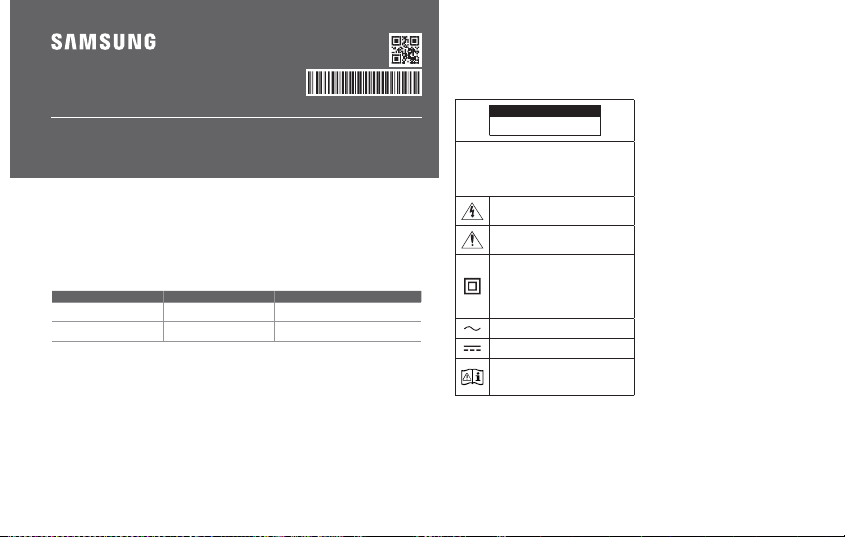
SAFETY INFORMATION
Thank you for purchasing this
product (SWA-W510).
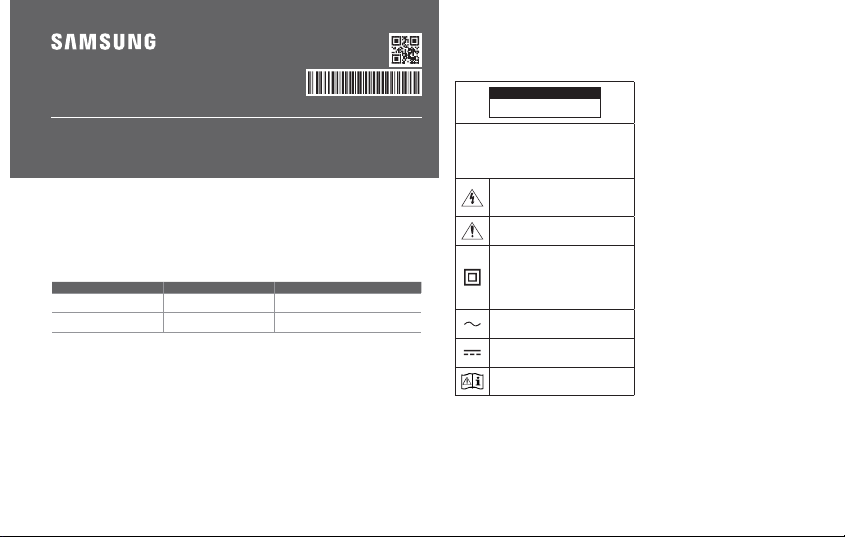
CAUTION
RISK OF ELECTRIC SHOCK. DO NOT
OPEN.
CAUTION:TOREDUCETHERISKOFELECTRICSHOCK,
DO NOT REMOVE THE COVER (OR BACK). NO USER-
SERVICEABLEPARTSAREINSIDE.REFERSERVICING
TOQUALIFIEDSERVICEPERSONNEL.Refertothetable
below for an explanation of symbols which may be on
your Samsung product.
This symbol indicates that high voltage is
present inside. It is dangerous to make any
kind of contact with any internal part of this
product.
This symbol indicates that this product has
included important literature concerning
operation and maintenance.
Class II product : This symbol indicates that
it does not require a safety connection to
electrical earth (ground).
If this symbol is not present on a product
with a power cord, the product MUST have
a reliable connection to protective earth
(ground).
AC voltage : This symbol indicates that the
rated voltage marked with the symbol is AC
voltage.
DC voltage : This symbol indicates that the
rated voltage marked with the symbol is DC
voltage.
Caution, Consult instructions for use : This
symbol instructs the user to consult the user
manual for further safety related information.
• The slots and openings in the cabinet and in the back or
bottom are provided for necessary ventilation. To ensure
reliable operation of this apparatus, and to protect it
from overheating, these slots and openings must never
be blocked or covered.
• Donotplacethisapparatusinacon�nedspace,
such as a bookcase, or built-in cabinet, unless proper
ventilation is provided.
• Do not place this apparatus near or over a radiator
or heat register, or where it is exposed to direct
sunlight.
• Do not place vessels (vases etc.) containing water
onthisapparatus.Awaterspillcancausea�reor
electric shock.
• Do not expose this apparatus to rain or place it near
water (near a bathtub, washbowl, kitchen sink, or
laundry tub, in a wet basement, or near a swimming
pool, etc.). If this apparatus accidentally gets wet,
unplug it and contact an authorized dealer immediately.
• Do not overload wall outlets, extension cords or
adaptors beyond their capacity, since this can result in
�reorelectricshock.
• Route power-supply cords so that they are not likely to
be walked on or pinched by items placed on or against
them. Pay particular attention to cords at the plug end,
at wal l outlets, and the point where they exit from the
apparatus.
• To protect this apparatus from a lightning storm, or
when it is left unattended and unused for long periods
of time, unplug it from the wall outlet and disconnect
the antenna or cable system. This will prevent damage
to the set due to lightning and power line surges.
• Before connecting the AC power cord to the DC adaptor
outlet, make sure the voltage designation of the DC
adaptor corresponds to the local electrical supply.
• Never insert anything metallic into the open parts of
this apparatus. Doing so may create a danger of electric
shock.
• To avoid electric shock, never touch the inside of this
apparatus.Onlyaquali�edtechnicianshouldopenthis
apparatus.
• Makesuretoplugthe powercordinuntilitis�rmly
seated. When unplugging the power cord from a wall
outlet, always pull on the power cord’s plug. Never
unplug by pulling on the power cord. Do not touch the
power cord with wet hands.
• If this apparatus does not operate normally - in
particular, if there are any unusual sounds or smells
coming from it - unplug it immediately and contact an
authorized dealer or service center.
• Maintenance of Cabinet.
• Before connecting other components to this product,
be sure to turn them off.
• Be sure to pull the power plug out of the outlet if the
product is to remain unused or if you are leaving the
house for an extended period of time (especially when
children, elderly, or disabled people will be left alone in
the house).
• Accumulated dust can cause an electric shock, an
electricleakage,ora�rebycausingthepowercord
to generate sparks and heat or the insulation to
deteriorate.
• Contact an authorized service center for information
if you intend to install your product in a location with
heavy dust, high or low temperatures, high humidity,
chemical substances, or where it will operate 24 hours a
day such as in an airport, a train station, etc.
Failingtodosomaycauseseriousdamagetoyour
product.
• Use only a properly grounded plug and wall outlet.
• An improper ground may cause electric shock or
equipment damage. (Class l Equipment only.)
• To turn this apparatus off completely, you must
disconnect it from the wall outlet.
Consequently, the wall outlet and power plug must be
readily accessible at all times.
• Do not allow children to hang on the product.
• Store the accessories (battery, etc.) in a location safely
out of the reach of children.
• Do not install the product in an unstable location such
asashakyself,aslantedoor,oralocationexposedto
vibration.
• Do not drop or strike the product. If the product is
damaged, disconnect the power cord and contact a
service center.
• To clean this apparatus, unplug the power cord from
the wall outlet, and then wipe the product using a
soft, dry cloth. Do not use any chemicals such as wax,
benzene, alcohol, thinners, insecticide, air fresheners,
lubricants, or detergent. These chemicals can damage
the appearance of the product or erase the printing on
the product.
• Do not expose this apparatus to dripping or splashing.
Donotputobjects�lledwithliquids,suchasvases,on
the apparatus.
• Do not plug multiple electric devices into the same wall
socket. Overloading a socket can cause it to overheat,
resultingina�re.
WARNING
• TOPREVENTTHESPREADOFFIRE,
KEEP CANDLES AND OTHER ITEMS WITH
OPENFLAMESAWAYFROM
THIS PRODUCT AT ALL TIMES.
• Toreducetheriskof�reorelectricshock,donotexpose
this appliance to rain or moisture.
CAUTION (for Canada)
Thisdevicecontainslicence-exempttransmitter(s)/
receiver(s) that comply with Innovation, Science and
Economic Development Canada’s licence-exempt RSS(s).
Operation is subject to the following two conditions:
(1) This device may not cause interference.
(2) This device must accept any interference, including
interference that may cause undesired operation of the
device.
This device and its antenna(s) must not be colocated
or operation in conjunction with any other antenna or
transmitter.
This device may automatically discontinue transmission
if there is no information to transmit, or an operational
failure. Note that this is not intended to prohibit the
transmission of control or signaling information or the use
of repetitive co des where required by the technology.
This Class B digital apparatus complies with
Canadian ICES-003.
Radiation Exposure Statement
This equipment complies with IC RSS-102 radiation
exposure limits set for th for an uncontrolled environment.
This equipment should be installed and operated with
minimum distance 20 cm between the radiator & your body.
Precautions
1. Ensure that the AC o r DC power supply in your house
complies with the power requirements listed on the
identi�cationstickerlocatedontherearofyourproduct.
Install your product horizontally, on a suitable base
(furniture), with enough space around it for ventilation
(3~4 inches). Make sure the ventilation slots are not
covered.Donotplacetheunitonampli�ersorother
equipment which may become hot. This unit is designed
for continuous use. To fully turn off the unit, disconnect
the AC plug from the wall outlet.
2. Do not expose the unit to direct sunlight or other heat
sources. This could lead to overheating and cause the
unit to malfunction.
3. Unplug the Power cord from the AC wall socket if the
unit malfunctions. Your product is not intended for
industrial use. It is for personal use only. Condensation
may occur if your product has been stored in cold
temperatures. If transporting the unit during the winter,
wait approximately 2 hours until the unit has reached
room temperature before using it.
4. If the electricity supplied to your home is rated at 240V
AC, use a suitable plug adapter to connect this unit to
your electrical outlets.
Important Safety Instructions
Read these operating instructions carefully before using
theunit.Followallthesafetyinstructionslistedbelow.
Keep these operating instructions handy for future
reference.
1. Read these instructions.
2. Keep these Instructions.
3. Heed all warnings.
4. Followallinstructions.
5. Do not use this apparatus near water.
6. Clean only with dry cloth.
7. Do not block any ventilation openings.
Install in accordance with the manufacturer’s
instructions.
8. Do not install near any heat sources such as radiators,
heat registers, stoves, or other apparatus (including AV
receivers) that produce heat.
9. Do not defeat the safety purpose of the polarized or
grounding-type plug.
A polarized plug has two blades with one wider than the
other. A grounding type plug has two blades and a third
grounding prong. The wide blade or the third prong are
providedforyoursafety.Iftheprovidedplugdoesnot�t
into your outlet, consult an electrician for replacement
of the obsolete outlet.
10. Protect the power cord from being walked on or pinched
particularly at plugs, convenience receptacles, and the
point where it exits the apparatus.
11. Onlyuseattachments/accessoriesspeci�edbythe
manufacturer.
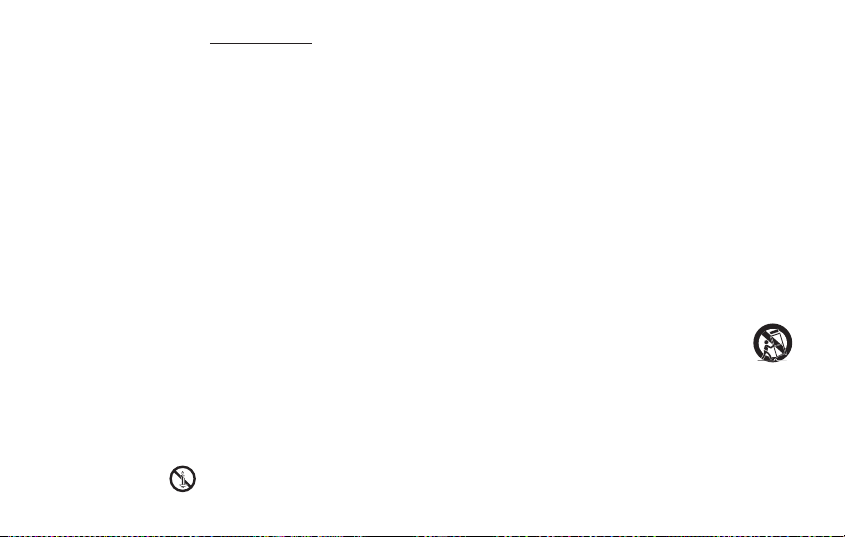
12. Use only with the cart, stand, tripod,
bracket,ortablespeci�edbythe
manufacturer, or sold with the apparatus.
When a cart is used, use caution when
movingthecart/apparatuscombination
to avoid injury from tip-over.
13. Unplug this apparatus during lightning storms or when
you intend to leave it unused for long periods of time.
14. Referallservicingtoquali�edservicepersonnel.
Servicing is required when the apparatus has been
damaged in any way, such as power-supply cord or
plug is damaged, liquid has been spilled or objects
have fallen into the apparatus, the apparatus has been
exposed to rain or moisture, does not operate normally,
or has been dropped.

User Manual
VA81-01129B-00
SWA-W510
© 2022 Samsung Electronics Co., Ltd. All rights reserved.
Contact SAMSUNG WORLD WIDE
If you have any questions or comments relating to Samsung products, please contact the SAMSUNG customer care Center.
HEADQUARTERS
Samsung Electronics Canada Inc. 2050 Derry Road West, Mississauga, Ontario L5N 0B9 Canada
TEL: 1-800-SAMSUNG (1-800-726-7864)
www.samsung.com/ca/support
Country Samsung Service Center
Web Site
CANADA
1-800-SAMSUNG(726-7864)
1-844-SAM-PAYS (726-7297)
www.samsung.com/ca/support(English)
www.samsung.com/ca_fr/support(French)
U.S.A
1-800-SAMSUNG (726-7864)
1-844-SAM-PAYS (726-7297)
www.samsung.com/us/support
SAFETY INFORMATION
Thank you for purchasing this
product (SWA-W510).
CAUTION
RISK OF ELECTRIC SHOCK. DO NOT
OPEN.
CAUTION:TOREDUCETHERISKOFELECTRICSHOCK,
DO NOT REMOVE THE COVER (OR BACK). NO USER-
SERVICEABLEPARTSAREINSIDE.REFERSERVICING
TOQUALIFIEDSERVICEPERSONNEL.Refertothetable
below for an explanation of symbols which may be on
your Samsung product.
This symbol indicates that high voltage is
present inside. It is dangerous to make any
kind of contact with any internal part of this
product.
This symbol indicates that this product has
included important literature concerning
operation and maintenance.
Class II product : This symbol indicates that
it does not require a safety connection to
electrical earth (ground).
If this symbol is not present on a product
with a power cord, the product MUST have
a reliable connection to protective earth
(ground).
AC voltage : This symbol indicates that the
rated voltage marked with the symbol is AC
voltage.
DC voltage : This symbol indicates that the
rated voltage marked with the symbol is DC
voltage.
Caution, Consult instructions for use : This
symbol instructs the user to consult the user
manual for further safety related information.
• The slots and openings in the cabinet and in the back or
bottom are provided for necessary ventilation. To ensure
reliable operation of this apparatus, and to protect it
from overheating, these slots and openings must never
be blocked or covered.
• Donotplacethisapparatusinacon�nedspace,
such as a bookcase, or built-in cabinet, unless proper
ventilation is provided.
• Do not place this apparatus near or over a radiator
or heat register, or where it is exposed to direct
sunlight.
• Do not place vessels (vases etc.) containing water
onthisapparatus.Awaterspillcancausea�reor
electric shock.
• Do not expose this apparatus to rain or place it near
water (near a bathtub, washbowl, kitchen sink, or
laundry tub, in a wet basement, or near a swimming
pool, etc.). If this apparatus accidentally gets wet,
unplug it and contact an authorized dealer immediately.
• Do not overload wall outlets, extension cords or
adaptors beyond their capacity, since this can result in
�reorelectricshock.
• Route power-supply cords so that they are not likely to
be walked on or pinched by items placed on or against
them. Pay particular attention to cords at the plug end,
at wal l outlets, and the point where they exit from the
apparatus.
• To protect this apparatus from a lightning storm, or
when it is left unattended and unused for long periods
of time, unplug it from the wall outlet and disconnect
the antenna or cable system. This will prevent damage
to the set due to lightning and power line surges.
• Before connecting the AC power cord to the DC adaptor
outlet, make sure the voltage designation of the DC
adaptor corresponds to the local electrical supply.
• Never insert anything metallic into the open parts of
this apparatus. Doing so may create a danger of electric
shock.
• To avoid electric shock, never touch the inside of this
apparatus.Onlyaquali�edtechnicianshouldopenthis
apparatus.
• Makesuretoplugthe powercordinuntilitis�rmly
seated. When unplugging the power cord from a wall
outlet, always pull on the power cord’s plug. Never
unplug by pulling on the power cord. Do not touch the
power cord with wet hands.
• If this apparatus does not operate normally - in
particular, if there are any unusual sounds or smells
coming from it - unplug it immediately and contact an
authorized dealer or service center.
• Maintenance of Cabinet.
• Before connecting other components to this product,
be sure to turn them off.
• Be sure to pull the power plug out of the outlet if the
product is to remain unused or if you are leaving the
house for an extended period of time (especially when
children, elderly, or disabled people will be left alone in
the house).
• Accumulated dust can cause an electric shock, an
electricleakage,ora�rebycausingthepowercord
to generate sparks and heat or the insulation to
deteriorate.
• Contact an authorized service center for information
if you intend to install your product in a location with
heavy dust, high or low temperatures, high humidity,
chemical substances, or where it will operate 24 hours a
day such as in an airport, a train station, etc.
Failingtodosomaycauseseriousdamagetoyour
product.
• Use only a properly grounded plug and wall outlet.
• An improper ground may cause electric shock or
equipment damage. (Class l Equipment only.)
• To turn this apparatus off completely, you must
disconnect it from the wall outlet.
Consequently, the wall outlet and power plug must be
readily accessible at all times.
• Do not allow children to hang on the product.
• Store the accessories (battery, etc.) in a location safely
out of the reach of children.
• Do not install the product in an unstable location such
asashakyself,aslantedoor,oralocationexposedto
vibration.
• Do not drop or strike the product. If the product is
damaged, disconnect the power cord and contact a
service center.
• To clean this apparatus, unplug the power cord from
the wall outlet, and then wipe the product using a
soft, dry cloth. Do not use any chemicals such as wax,
benzene, alcohol, thinners, insecticide, air fresheners,
lubricants, or detergent. These chemicals can damage
the appearance of the product or erase the printing on
the product.
• Do not expose this apparatus to dripping or splashing.
Donotputobjects�lledwithliquids,suchasvases,on
the apparatus.
• Do not plug multiple electric devices into the same wall
socket. Overloading a socket can cause it to overheat,
resultingina�re.
WARNING
• TOPREVENTTHESPREADOFFIRE,
KEEP CANDLES AND OTHER ITEMS WITH
OPENFLAMESAWAYFROM
THIS PRODUCT AT ALL TIMES.
• Toreducetheriskof�reorelectricshock,donotexpose
this appliance to rain or moisture.
CAUTION (for Canada)
Thisdevicecontainslicence-exempttransmitter(s)/
receiver(s) that comply with Innovation, Science and
Economic Development Canada’s licence-exempt RSS(s).
Operation is subject to the following two conditions:
(1) This device may not cause interference.
(2) This device must accept any interference, including
interference that may cause undesired operation of the
device.
This device and its antenna(s) must not be colocated
or operation in conjunction with any other antenna or
transmitter.
This device may automatically discontinue transmission
if there is no information to transmit, or an operational
failure. Note that this is not intended to prohibit the
transmission of control or signaling information or the use
of repetitive co des where required by the technology.
This Class B digital apparatus complies with
Canadian ICES-003.
Radiation Exposure Statement
This equipment complies with IC RSS-102 radiation
exposure limits set for th for an uncontrolled environment.
This equipment should be installed and operated with
minimum distance 20 cm between the radiator & your body.
Precautions
1. Ensure that the AC o r DC power supply in your house
complies with the power requirements listed on the
identi�cationstickerlocatedontherearofyourproduct.
Install your product horizontally, on a suitable base
(furniture), with enough space around it for ventilation
(3~4 inches). Make sure the ventilation slots are not
covered.Donotplacetheunitonampli�ersorother
equipment which may become hot. This unit is designed
for continuous use. To fully turn off the unit, disconnect
the AC plug from the wall outlet.
2. Do not expose the unit to direct sunlight or other heat
sources. This could lead to overheating and cause the
unit to malfunction.
3. Unplug the Power cord from the AC wall socket if the
unit malfunctions. Your product is not intended for
industrial use. It is for personal use only. Condensation
may occur if your product has been stored in cold
temperatures. If transporting the unit during the winter,
wait approximately 2 hours until the unit has reached
room temperature before using it.
4. If the electricity supplied to your home is rated at 240V
AC, use a suitable plug adapter to connect this unit to
your electrical outlets.
Important Safety Instructions
Read these operating instructions carefully before using
theunit.Followallthesafetyinstructionslistedbelow.
Keep these operating instructions handy for future
reference.
1. Read these instructions.
2. Keep these Instructions.
3. Heed all warnings.
4. Followallinstructions.
5. Do not use this apparatus near water.
6. Clean only with dry cloth.
7. Do not block any ventilation openings.
Install in accordance with the manufacturer’s
instructions.
8. Do not install near any heat sources such as radiators,
heat registers, stoves, or other apparatus (including AV
receivers) that produce heat.
9. Do not defeat the safety purpose of the polarized or
grounding-type plug.
A polarized plug has two blades with one wider than the
other. A grounding type plug has two blades and a third
grounding prong. The wide blade or the third prong are
providedforyoursafety.Iftheprovidedplugdoesnot�t
into your outlet, consult an electrician for replacement
of the obsolete outlet.
10. Protect the power cord from being walked on or pinched
particularly at plugs, convenience receptacles, and the
point where it exits the apparatus.
11. Onlyuseattachments/accessoriesspeci�edbythe
manufacturer.
12. Use only with the cart, stand, tripod,
bracket,ortablespeci�edbythe
manufacturer, or sold with the apparatus.
When a cart is used, use caution when
movingthecart/apparatuscombination
to avoid injury from tip-over.
13. Unplug this apparatus during lightning storms or when
you intend to leave it unused for long periods of time.
14. Referallservicingtoquali�edservicepersonnel.
Servicing is required when the apparatus has been
damaged in any way, such as power-supply cord or
plug is damaged, liquid has been spilled or objects
have fallen into the apparatus, the apparatus has been
exposed to rain or moisture, does not operate normally,
or has been dropped.
English
LIMITED WARRANTY TO ORIGINAL PURCHASER
Samsung Electronics Canada Inc.(SECA), warrants that this product is free from defective material and
workmanship.
SECAfurtherwarrantsthatifthisproductfallstooperateproperlywithinthespeci�edwarrantyperiod
and the failure is due to improper workmanship or defective materials, SECA will repair or replace the
product at its option.
All warranty repairs must be performed by a SECA Authorized Service Center. (The name and address of
the location nearest you can be obtained by calling toll free: 1- 800- SAMSUNG)
LABOR PARTS
One year (Carry-
in)
One year
On carry-in models, transportation to and from the service center is the customer’s responsibility.
The original dated sales receipt must be retained by the customer and is the only acceptable proof of
purchase. It must be presented to the authorized service center at the time service is requested.
EXCLUSIONS (WHAT IS NOT COVERED)
Thiswarrantydoesnotcoverdamageduetoaccident,�re,oodand/orotheractsofGod;misuse,
incorrect line voltage, improper installation, improper or unauthorized repairs, commercial use or
damagethatoccursinshipping.Exteriorandinterior�nish,lamps,glassarenotcoveredunderthis
warranty. Customer adjustments which are explained in the instruction manual are not covered under
the terms of this warranty. This warranty will automatically be voided for any unit found with a missing
or altered serial number. This warranty is valid only on products purchased and used in Canada.
Samsung Electronics Canada Inc
2050 Derry Rd West
Mississauga, On. L5N 0B9
Tel: 1-800-SAMSUNG (726-7864)
Fax: (905) 542- 1199
Website: www.samsung.com/ca
01 CHECKING THE
COMPONENTS
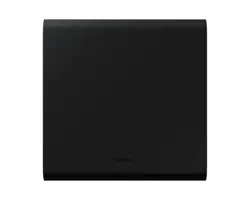
Subwoofer/PowerCord
NOTE
• Formoreinformationaboutthepowersupplyand
power consumption, refer to the label attached to the
product. (Label: Bottom of the Main Unit)
• Designandspeci�cationsaresubjecttochangewithout
prior notice.
02 CONNECTING THE
SOUNDBAR
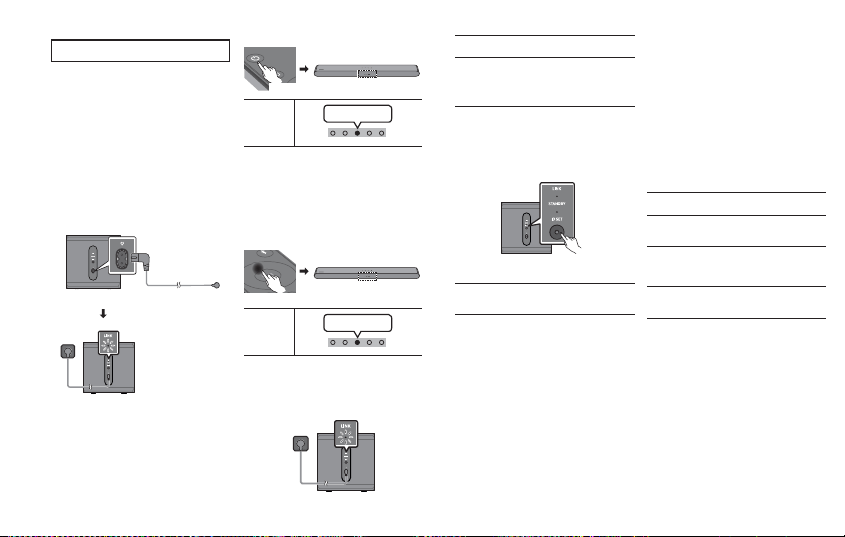
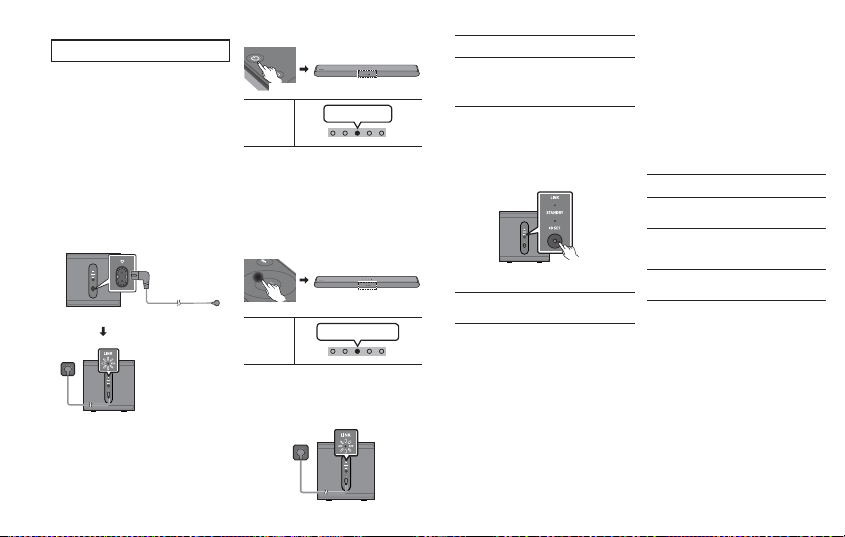
1. Check the standby status after plugging into an
electrical outlet.
Plug the Subwoofer power cord into an electrical outlet and
into the Subwoofer to turn on the Subwoofer. The LINK LED
indicator (blue LED) on the Subwoofer blinks. If the LED
does not blink, refer to step 5.
"Blinking blue fast"
Rear of Subwoofer
2. Turn off the Soundbar
Turn off the Soundbar using the Soundbar’s remote control.
• The image of the Soundbar may differ from your
Soundbar, depending on the model.
5 sec
Soundbar
LED Indicato r
Red BlinksX3
3.Con�gure“IDSET”usingtheSoundbar’sremote
control
Press the Up button on the Soundbar remote control for 5
seconds.
• The ID SET message appears on the Soundbar main
unit’s display for a short time and then disappears.
• After the ID SET process, the Soundbar power is
automatically turned on.
• Until pairing is complete, the Multicolor LED on the
Soundbarchangesas“Red→Green→Blue”inturn.
S
O
U
N
D
P
A
I
R
5 sec
Soundbar
LED Indicato r
Red→Green→
Blue Blinks
4. Check if the LINK LED is solid blue (connection
complete)
The LINK LED indicato r stops blinking and glows a solid
blue when a connection is established between the
Soundbar and the Subwoofer.
LINK LED - Blue is On
5. If the SWA-W510 does not connect, take the
necessarystepsaccordingtotheLEDIndicator’s
status
LINK (Blue) On : Successfully connected (normal
operation).
LINK (Blue) Blinking : Recovering the connection.
• Check if the power cable attached to the main
Soundbar unit is connected properly or wait about
5 minutes.
• Repeat steps 2 through 4.
STANDBY (Red) On :
• Standby (with the Soundbar main unit turned off).
• Check if the power cable attached to the main
Soundbar unit is connected properly.
• Connection failed
• 1. Press the ID SET button on the back of the
Surround Speakers with a pen tip for 5~6 seconds
until the LINK LED indicator blinks (in Blue).
Rear of Subwoofer
5 sec
• 2. Repeat steps 2 through 4.
Red and blue Blinking : Malfunction
• See the contact information for the Samsung Service
Center in this manual.
03 COMPATIBLE MODELS
• Compatible with select Samsung Soundbar. Please visit
the Soundbar product page at www.samsung.com/
support for more information.
• Compatible model list is subject to change without
further notice.
04 OPEN SOURCE LICENSE
NOTICE
To send inquiries and requests for questions regarding
open sources, contact Samsung Open Source
(http://opensource.samsung.com)
05 SPECIFICATIONS AND
GUIDE
Speci�cations
Subwoofer Name
SWA-W510
Weight
14.1lbs (6.4 kg)
Dimensions (W x H x D)
9.4 x 9.5 x 9.4 inches
(238.0 x 240.8 x 238.0 mm)
Operating Temperature
Range
+41°Fto+95°F
(+5°C to +35°C)
Operating Humidity Range
10 % ~ 75 %
AMPLIFIER
Rated Output power
200 W
NOTE
• Samsung Electronics Co., Ltd reserves the right to
changethespeci�cationswithoutnotice.
• Weight and dimensions are approximate.
English
LIMITED WARRANTY TO ORIGINAL PURCHASER
Samsung Electronics Canada Inc.(SECA), warrants that this product is free from defective material and
workmanship.
SECAfurtherwarrantsthatifthisproductfallstooperateproperlywithinthespeci�edwarrantyperiod
and the failure is due to improper workmanship or defective materials, SECA will repair or replace the
product at its option.
All warranty repairs must be performed by a SECA Authorized Service Center. (The name and address of
the location nearest you can be obtained by calling toll free: 1- 800- SAMSUNG)
LABOR PARTS
One year (Carry-
in)
One year
On carry-in models, transportation to and from the service center is the customer’s responsibility.
The original dated sales receipt must be retained by the customer and is the only acceptable proof of
purchase. It must be presented to the authorized service center at the time service is requested.
EXCLUSIONS (WHAT IS NOT COVERED)
Thiswarrantydoesnotcoverdamageduetoaccident,�re,oodand/orotheractsofGod;misuse,
incorrect line voltage, improper installation, improper or unauthorized repairs, commercial use or
damagethatoccursinshipping.Exteriorandinterior�nish,lamps,glassarenotcoveredunderthis
warranty. Customer adjustments which are explained in the instruction manual are not covered under
the terms of this warranty. This warranty will automatically be voided for any unit found with a missing
or altered serial number. This warranty is valid only on products purchased and used in Canada.
Samsung Electronics Canada Inc
2050 Derry Rd West
Mississauga, On. L5N 0B9
Tel: 1-800-SAMSUNG (726-7864)
Fax: (905) 542- 1199
Website: www.samsung.com/ca
01 CHECKING THE
COMPONENTS
Subwoofer/PowerCord
NOTE
• Formoreinformationaboutthepowersupplyand
power consumption, refer to the label attached to the
product. (Label: Bottom of the Main Unit)
• Designandspeci�cationsaresubjecttochangewithout
prior notice.
02 CONNECTING THE
SOUNDBAR
1. Check the standby status after plugging into an
electrical outlet.
Plug the Subwoofer power cord into an electrical outlet and
into the Subwoofer to turn on the Subwoofer. The LINK LED
indicator (blue LED) on the Subwoofer blinks. If the LED
does not blink, refer to step 5.
"Blinking blue fast"
Rear of Subwoofer
2. Turn off the Soundbar
Turn off the Soundbar using the Soundbar’s remote control.
• The image of the Soundbar may differ from your
Soundbar, depending on the model.
5 sec
Soundbar
LED Indicato r
Red BlinksX3
3.Con�gure“IDSET”usingtheSoundbar’sremote
control
Press the Up button on the Soundbar remote control for 5
seconds.
• The ID SET message appears on the Soundbar main
unit’s display for a short time and then disappears.
• After the ID SET process, the Soundbar power is
automatically turned on.
• Until pairing is complete, the Multicolor LED on the
Soundbarchangesas“Red→Green→Blue”inturn.
S
O
U
N
D
P
A
I
R
5 sec
Soundbar
LED Indicato r
Red→Green→
Blue Blinks
4. Check if the LINK LED is solid blue (connection
complete)
The LINK LED indicato r stops blinking and glows a solid
blue when a connection is established between the
Soundbar and the Subwoofer.
LINK LED - Blue is On
5. If the SWA-W510 does not connect, take the
necessarystepsaccordingtotheLEDIndicator’s
status
LINK (Blue) On : Successfully connected (normal
operation).
LINK (Blue) Blinking : Recovering the connection.
• Check if the power cable attached to the main
Soundbar unit is connected properly or wait about
5 minutes.
• Repeat steps 2 through 4.
STANDBY (Red) On :
• Standby (with the Soundbar main unit turned off).
• Check if the power cable attached to the main
Soundbar unit is connected properly.
• Connection failed
• 1. Press the ID SET button on the back of the
Surround Speakers with a pen tip for 5~6 seconds
until the LINK LED indicator blinks (in Blue).
Rear of Subwoofer
5 sec
• 2. Repeat steps 2 through 4.
Red and blue Blinking : Malfunction
• See the contact information for the Samsung Service
Center in this manual.
03 COMPATIBLE MODELS
• Compatible with select Samsung Soundbar. Please visit
the Soundbar product page at www.samsung.com/
support for more information.
• Compatible model list is subject to change without
further notice.
04 OPEN SOURCE LICENSE
NOTICE
To send inquiries and requests for questions regarding
open sources, contact Samsung Open Source
(http://opensource.samsung.com)
05 SPECIFICATIONS AND
GUIDE
Speci�cations
Subwoofer Name
SWA-W510
Weight
14.1lbs (6.4 kg)
Dimensions (W x H x D)
9.4 x 9.5 x 9.4 inches
(238.0 x 240.8 x 238.0 mm)
Operating Temperature
Range
+41°Fto+95°F
(+5°C to +35°C)
Operating Humidity Range
10 % ~ 75 %
AMPLIFIER
Rated Output power
200 W
NOTE
• Samsung Electronics Co., Ltd reserves the right to
changethespeci�cationswithoutnotice.
• Weight and dimensions are approximate.
Manuel utilisateur
VA81-01129B-00
SWA-W510
© 2022 Samsung Electronics Co., Ltd. Tous droits réservés.
Comment contacter Samsung dans le monde
Si vous avez des suggestions ou des questions concernant les produits Samsung, veuillez contacter le Service Consommateurs
Samsung.
SIÈGE SOCIAL
Samsung Electronics Canada Inc. 2050 Derry Road West, Mississauga, Ontario L5N 0B9 Canada
TEL: 1-800-SAMSUNG (1-800-726-7864)
www.samsung.com/ca/support
Pays Centre de service de Samsung
Site Web
CANADA
1-800-SAMSUNG(726-7864)
1-844-SAM-PAYS (726-7297)
www.samsung.com/ca/support (English)
www.samsung.com/ca_fr/support (French)
U.S.A
1-800-SAMSUNG (726-7864)
1-844-SAM-PAYS (726-7297)
www.samsung.com/us/support
INFORMATIONS RELATIVES À
LA SÉCURITÉ
Nous vous remercions d’avoir fait
l’acquisition de ce produit (SWA-W510).
MISE EN GARDE
RISQUE DE CHOC ÉLECTRIQUE NE
PAS OUVRIR
ATTENTION : POUR ÉVITER LES RISQUES DE CHOC
ÉLECTRIQUE, NE DÉMONTEZ PAS LE CAPOT. L’APPAREIL NE
CONTIENT PAS DE PIÈCES RÉPARABLES PAR L’UTILISATEUR.
S’ADRESSER À UN SERVICE APRÈSVENTE QUALIFIÉ.
Reportez-vous au tableau ci-dessous pour comprendre les
symbolespouvant�gurersurvotreproduitSamsung.
Ce symbole indique la présence d’une haute
tension à l’intérieur. Tout contact avec une pièce
interne de l’appareil présente un danger.
Ce symbole vous informe qu’une documentation
importante relative au fonctionnement et à
l’entretien est fournie avec le produit.
Produit de catégorie II : Ce symbole indique qu’il
ne nécessite pas une connextion de sécurité à la
terre (masse).
Si ce symbole n’est pas présent sur un produit
équipé d’un cordon d’alimentation, le produit
DOITêtreraccordéàlaterredemanière�ableà
des�nsdeprotection.
Tension CA : Ce symbole indique que la tension
nominale est la tension CA.
Tension CC : Ce symbole indique que la tension
nominale est la tension CC.
Attention,consultezlesinstructionsaux�ns
d’utilisation : Ce symbole indique à l’utilisateur
qu’il doit consulter le guide d’utilisation pour
avoir de l’information au sujet de la sécurité.
• Les fentes et évents présents à l’arrière et sous le boîtier
sontfournisàdes�nsdeventilation.A�ndegarantirle
bon fonctionnement de l’appareil et d’éviter les risques
de surchauffe, ces fentes et ouvertures ne doivent être ni
obstruées ni couvertes.
• L’appareil ne doit pas être placé dans un environnement
clos tel qu’une bibliothèque ou une armoire encastrée,
sauf si une ventilation adéquate est prévue.
• L’appareil ne doit pas être placé à proximité ou au-dessus
d’un radiateur ou d’une grille d’air de chauffage, ni dans
un endroit exposé à la lumière directe du soleil.
• Aucun récipient contenant de l’eau (vase, etc.) ne doit
être placé sur l’appareil. L’eau peut causer un incendie ou
une électrocution.
• L’appareil ne doit pas être exposé à la pluie ni placé à
proximité d’une source d’eau, par exemple une baignoire,
un lavabo, un évier, un bac de lavage, un sous-sol humide,
une piscine, etc. Si l’appareil est mouillé par accident,
débranchez-le et appelez immédiatement un revendeur
agréé.
• Évitez de surcharger les prises murales, les rallonges et
les adaptateurs, car cela présente un risque d’incendie ou
d’électrocution.
• Disposez les cordons d’alimentation de façon à éviter que
l’on ne marche dessus ou qu’un objet s’y accroche. Portez
une attention particulière aux cordons près de l’extrémité
dela�che,àproximitédesprisesdesortiemuralesetàleur
point de sortie sur l’appareil.
• En cas d’orage, ou bien lorsque vous vous absentez ou
n’utilisez pas votre appareil pendant une longue période,
débranchez celui-ci de la prise murale et débranchez
également l’antenne ou le connecteur au réseau câblé. Ces
précautions éviteront que l’appareil ne soit endommagé par
la foudre ou par des surtensions.
• Avant de raccorder le cordon d’alimentation CA à la prise
del’adaptateurCC,véri�ezquelatensionindiquéesurce
dernier correspond bien à la tension délivrée par le réseau
électrique local.
• N’insérez jamais d’objet métallique dans les parties ouvertes
de cet appareil, car vous pourriez recevoir une décharge
électrique.
• Pour éviter tout risque d’électrocution, ne mettez jamais les
doigtsàl’intérieurdel’appareil.Seuluntechnicienquali�é
est habilité à ouvrir cet appareil.
• Veillez à brancher le cordon d’alimentation de sorte qu’il
soit correctement inséré dans la prise. Pour débrancher le
cordond’alimentationd’uneprisemurale,tenezla�che.Ne
débranchez jamais le cordon en tirant sur ce dernier. Évitez
de toucher le cordon avec les mains mouillées.
• Si l’appareil ne fonctionne pas normalement, surtout s’il
émet des odeurs ou des sons anormaux, débranchez-le
immédiatement et appelez un revendeur ou un centre de
dépannage agréé.
• Entretien du boîtier.
• Éteignez les composants avant de les brancher à ce
produit.
• Si vous envisagez de ne pas utiliser le produit ou de vous
absenter de chez vous pendant une période prolongée,
veillezàretirerla�ched’alimentationdelaprise(en
particulier si des enfants, des personnes âgées ou des
personnes handicapées restent seuls à la maison sans
supervision).
• L’accumulation de poussière peut provoquer une
électrocution, une perte d’énergie ou un incendie induit
par le cordon d’alimentation dû à des variations, une
surchauffe ou une détérioration de l’isolation.
• Communiquez avec un centre de service homologué
lorsque vous installez le produit dans un endroit exposé à
la poussière, à des températures faibles ou élevées, à des
produits chimiques et s’il doit fonctionner continuellement
24 heures sur 24, comme dans un aéroport, une gare, etc.
Le non-respect de ces consignes peut causer de sérieux
dommages au produit.
• N’utilisezquedesprisesdesortiemuraleetdes�ches
correctement mises à la terre.
• Une mise à la terre incorrecte peut entraîner des
électrocutions ou endommager l’appareil. (appareil de
classe I uniquement.)
• Pour mettre cet appareil totalement hors tension, il doit être
débranché de la prise murale.
Parconséquent,laprisemuraleetla�chedoiventêtre
accessibles en tout temps.
• Ne laissez pas les enfants se suspendre à l’appareil.
• Gardez les petits accessoires (piles, etc.) dans un endroit
hors de portée des enfants.
• Évitez d’installer l’appareil dans un endroit instable, comme
sur une étagère branlante, sur une surface inclinée ou à un
endroit exposé à des vibrations.
• Veillez à ne pas échapper ni plier les lunettes. Si le produit
est endommagé, débranchez le cordon d’alimentation et
communiquez avec un centre de service.
• Pour nettoyer l’appareil, débranchez le cordon
d’alimentation de la prise murale, puis nettoyez l’appareil
à l’aide d’un chiffon doux et sec. N’utilisez pas de produits
chimiques tels que la cire, le benzène, l’alcool, des solvants,
desinsecticides,desdésodorisants,deslubri�antsoudes
détergents. Ces produits peuvent endommager la surface du
produit ou effacer les parties imprimées.
• Veillez à éviter toute projection sur l’appareil. Ne placez
jamais de récipients contenant un liquide (ex. : vase) dessus.
• Évitez de brancher plusieurs appareils électriques dans la
même prise murale. Si elle est surchargée, la prise peut
subir une surchauffe, ce qui pourrait causer un incendie.
AVERTISSEMENT
• POUR ÉVITER TOUT RISQUE D’INCENDIE,
TENEZ TOUJOURS CE PRODUIT À DISTANCE DES
BOUGIES OU AUTRES ARTICLES COMPORTANT
UNE FLAMME NUE.
• A�ndediminuerlesrisquesd’incendieoudechoc
électrique, n’exposez pas cet appareil à la pluie ou à
l’humidité.
ATTENTION (Pour le Canada)
L’émetteur/récepteur exempt de licence contenu dans le
présent appareil est conforme aux CNR d’Innovation, Sciences
et Développement économique Canada applicables aux
appareils radio exempts de licence. L’exploitation est autorisée
aux deux conditions suivantes :
1) L’appareil ne doit pas produire de brouillage;
2) L’appareil doit accepter tout brouillage radioélectrique subi,
même si le brouillage est susceptible d’en compromettre le
fonctionnement.
Cet appareil et son ou ses antennes ne doivent pas etre installés
a proximité ou etre utilisés conjointement avec une autre
antenne ou un autre émetteur.
Le dispositif pourrait automatiquement cesser d’émettre en
cas d’absence d’informations à transmettre, ou une défaillance
opérationnelle.
Notez que ce n’est pas l’intention d’interdire la transmission des
informations de contrôle ou de signalisation ou l’utilisation de
codes répétitifs lorsque requis par la technologie.
Cet appareil numerique de la classe B est conforme a la norme
NMB-003 du Canada.
Déclaration d’exposition aux radiations:
Cet equipement est conforme aux limites d’exposition aux
rayonnements IC RSS-102 établies pour un environnement non
contrôlé. Cet équipement doit etre installé et utilisé avec un
minimum de 20 cm de distance entre la source de rayonnement
et votre corps.
Précautions
1. Assurez-vous que le bloc d’alimentation CA ou CC de votre
demeureestconformeauxexigencesdepuissance�gurant
surlaplaqued’identi�cationsituéeàl’arrièredevotre
produit. Installez votre produit horizontalement, sur un socle
approprié(meuble),enlaissantunespacesuf�santpour
la ventilation sur le pourtour (3 ou 4 po). Faites attention
ànepasobstruerlesori�cesdeventilation.Neposez
pasl’ensemblesurunampli�cateurouunautreappareil
susceptible de chauffer. Cet ensemble est conçu pour une
utilisation en continu. Pour éteindre totalement l’appareil,
débranchezla�chec.a.delaprisemurale.
2. N’exposez pas l’ensemble aux rayons directs du soleil ou
à toute autre source de chaleur. Cela pourrait causer une
surchauffedu�letcauserundysfonctionnementdel’unité.
3. En cas de dysfonctionnement, débranchez le cordon
d’alimentation. Votre produit n’est pas prévu pour un usage
industriel.Ceproduitnepeutêtreutiliséqu’àdes�ns
personnelles. Une condensation peut se former si le produit
ou un disque a été stocké à basse température. Si vous devez
transporter l’appareil pendant l’hiver, attendez environ
2 heures que l’appareil ait atteint la température de la pièce
avant de l’utiliser.
4. Si la tension nominale de l’électricité distribuée dans votre
demeure est de 240 Vca, utilisez un adaptateur approprié
pour brancher cet appareil à vos prises électriques.
Consignes de sécurité importantes
Lisez attentivement ces consignes avant d’utiliser l’appareil.
Veillez à respecter toutes les consignes répertoriées ci-après.
Conservez ces instructions à portée de main pour vous y référer
ultérieurement.
1. Lisez attentivement ces consignes.
2. Conservez-les précieusement.
3. Tenez compte de tous les avertissements mentionnés.
4. Respectez toutes les instructions sans exception.
5. N’utilisez pas cet appareil à proximité de l’eau.
6. Nettoyez-le à l’aide d’un tissu sec.
7. Ne bloquez pas les ouvertures de ventilation.
Installez l’appareil conformément aux instructions du
fabricant.
8. N’installez pas l’appareil à proximité d’une source de chaleur
de type radiateur, registre de chaleur, cuisinière ou tout
autre appareil (y compris les récepteurs A/V) générateur de
chaleur.
9. Nedésactivezpasledispositifdesécuritédela�chedemise
àlaterreoudela�chepolarisée.
Une�chepolariséecomportedeuxlamesdontl’uneestplus
largequel’autre.Une�chedemiseàlaterrecomportedeux
lames et une troisième broche de mise à la terre. La lame
la plus large et la troisième broche sont destinées à assurer
votresécurité.Sila�chefournienes’insèrepasdanslaprise
utilisée, faites appel à un électricien pour faire remplacer
celle-ci.
10. Placez le cordon d’alimentation de sorte qu’il ne puisse être
nipiétinénipincé,particulièrementauniveaudela�che,de
la prise de courant et du point de sortie de l’appareil.
11. Utilisezexclusivementles�xations/accessoiresspéci�és
par le fabricant.
12. Utiliser uniquement avec le chariot, la base,
letrépied,lesupportoulatablespéci�épar
le fabricant ou vendu avec l’appareil. Si
l’appareil est posé sur un meuble à roulettes,
déplacez l’ensemble avec précaution pour
éviter de faire tomber le lecteur et de vous
blesser.
13. Débranchez l’appareil en cas d’orage ou si vous prévoyez une
longue période d’inactivité.
14. Con�eztouteslesréparationsàuntechnicienquali�é.Votre
appareil doit impérativement être réparé lorsqu’il a été
endommagé de quelque manière que ce soit : détérioration
ducordonoudela�ched’alimentation,projectionde
liquide sur l’appareil, chute d’objets à l’intérieur de l’appareil,
exposition à la pluie ou à l’humidité, dysfonctionnement,
chute.
Manuel utilisateur
VA81-01129B-00
SWA-W510
© 2022 Samsung Electronics Co., Ltd. Tous droits réservés.
Comment contacter Samsung dans le monde
Si vous avez des suggestions ou des questions concernant les produits Samsung, veuillez contacter le Service Consommateurs
Samsung.
SIÈGE SOCIAL
Samsung Electronics Canada Inc. 2050 Derry Road West, Mississauga, Ontario L5N 0B9 Canada
TEL: 1-800-SAMSUNG (1-800-726-7864)
www.samsung.com/ca/support
Pays Centre de service de Samsung
Site Web
CANADA
1-800-SAMSUNG(726-7864)
1-844-SAM-PAYS (726-7297)
www.samsung.com/ca/support (English)
www.samsung.com/ca_fr/support (French)
U.S.A
1-800-SAMSUNG (726-7864)
1-844-SAM-PAYS (726-7297)
www.samsung.com/us/support
INFORMATIONS RELATIVES À
LA SÉCURITÉ
Nous vous remercions d’avoir fait
l’acquisition de ce produit (SWA-W510).
MISE EN GARDE
RISQUE DE CHOC ÉLECTRIQUE NE
PAS OUVRIR
ATTENTION : POUR ÉVITER LES RISQUES DE CHOC
ÉLECTRIQUE, NE DÉMONTEZ PAS LE CAPOT. L’APPAREIL NE
CONTIENT PAS DE PIÈCES RÉPARABLES PAR L’UTILISATEUR.
S’ADRESSER À UN SERVICE APRÈSVENTE QUALIFIÉ.
Reportez-vous au tableau ci-dessous pour comprendre les
symbolespouvant�gurersurvotreproduitSamsung.
Ce symbole indique la présence d’une haute
tension à l’intérieur. Tout contact avec une pièce
interne de l’appareil présente un danger.
Ce symbole vous informe qu’une documentation
importante relative au fonctionnement et à
l’entretien est fournie avec le produit.
Produit de catégorie II : Ce symbole indique qu’il
ne nécessite pas une connextion de sécurité à la
terre (masse).
Si ce symbole n’est pas présent sur un produit
équipé d’un cordon d’alimentation, le produit
DOITêtreraccordéàlaterredemanière�ableà
des�nsdeprotection.
Tension CA : Ce symbole indique que la tension
nominale est la tension CA.
Tension CC : Ce symbole indique que la tension
nominale est la tension CC.
Attention,consultezlesinstructionsaux�ns
d’utilisation : Ce symbole indique à l’utilisateur
qu’il doit consulter le guide d’utilisation pour
avoir de l’information au sujet de la sécurité.
• Les fentes et évents présents à l’arrière et sous le boîtier
sontfournisàdes�nsdeventilation.A�ndegarantirle
bon fonctionnement de l’appareil et d’éviter les risques
de surchauffe, ces fentes et ouvertures ne doivent être ni
obstruées ni couvertes.
• L’appareil ne doit pas être placé dans un environnement
clos tel qu’une bibliothèque ou une armoire encastrée,
sauf si une ventilation adéquate est prévue.
• L’appareil ne doit pas être placé à proximité ou au-dessus
d’un radiateur ou d’une grille d’air de chauffage, ni dans
un endroit exposé à la lumière directe du soleil.
• Aucun récipient contenant de l’eau (vase, etc.) ne doit
être placé sur l’appareil. L’eau peut causer un incendie ou
une électrocution.
• L’appareil ne doit pas être exposé à la pluie ni placé à
proximité d’une source d’eau, par exemple une baignoire,
un lavabo, un évier, un bac de lavage, un sous-sol humide,
une piscine, etc. Si l’appareil est mouillé par accident,
débranchez-le et appelez immédiatement un revendeur
agréé.
• Évitez de surcharger les prises murales, les rallonges et
les adaptateurs, car cela présente un risque d’incendie ou
d’électrocution.
• Disposez les cordons d’alimentation de façon à éviter que
l’on ne marche dessus ou qu’un objet s’y accroche. Portez
une attention particulière aux cordons près de l’extrémité
dela�che,àproximitédesprisesdesortiemuralesetàleur
point de sortie sur l’appareil.
• En cas d’orage, ou bien lorsque vous vous absentez ou
n’utilisez pas votre appareil pendant une longue période,
débranchez celui-ci de la prise murale et débranchez
également l’antenne ou le connecteur au réseau câblé. Ces
précautions éviteront que l’appareil ne soit endommagé par
la foudre ou par des surtensions.
• Avant de raccorder le cordon d’alimentation CA à la prise
del’adaptateurCC,véri�ezquelatensionindiquéesurce
dernier correspond bien à la tension délivrée par le réseau
électrique local.
• N’insérez jamais d’objet métallique dans les parties ouvertes
de cet appareil, car vous pourriez recevoir une décharge
électrique.
• Pour éviter tout risque d’électrocution, ne mettez jamais les
doigtsàl’intérieurdel’appareil.Seuluntechnicienquali�é
est habilité à ouvrir cet appareil.
• Veillez à brancher le cordon d’alimentation de sorte qu’il
soit correctement inséré dans la prise. Pour débrancher le
cordond’alimentationd’uneprisemurale,tenezla�che.Ne
débranchez jamais le cordon en tirant sur ce dernier. Évitez
de toucher le cordon avec les mains mouillées.
• Si l’appareil ne fonctionne pas normalement, surtout s’il
émet des odeurs ou des sons anormaux, débranchez-le
immédiatement et appelez un revendeur ou un centre de
dépannage agréé.
• Entretien du boîtier.
• Éteignez les composants avant de les brancher à ce
produit.
• Si vous envisagez de ne pas utiliser le produit ou de vous
absenter de chez vous pendant une période prolongée,
veillezàretirerla�ched’alimentationdelaprise(en
particulier si des enfants, des personnes âgées ou des
personnes handicapées restent seuls à la maison sans
supervision).
• L’accumulation de poussière peut provoquer une
électrocution, une perte d’énergie ou un incendie induit
par le cordon d’alimentation dû à des variations, une
surchauffe ou une détérioration de l’isolation.
• Communiquez avec un centre de service homologué
lorsque vous installez le produit dans un endroit exposé à
la poussière, à des températures faibles ou élevées, à des
produits chimiques et s’il doit fonctionner continuellement
24 heures sur 24, comme dans un aéroport, une gare, etc.
Le non-respect de ces consignes peut causer de sérieux
dommages au produit.
• N’utilisezquedesprisesdesortiemuraleetdes�ches
correctement mises à la terre.
• Une mise à la terre incorrecte peut entraîner des
électrocutions ou endommager l’appareil. (appareil de
classe I uniquement.)
• Pour mettre cet appareil totalement hors tension, il doit être
débranché de la prise murale.
Parconséquent,laprisemuraleetla�chedoiventêtre
accessibles en tout temps.
• Ne laissez pas les enfants se suspendre à l’appareil.
• Gardez les petits accessoires (piles, etc.) dans un endroit
hors de portée des enfants.
• Évitez d’installer l’appareil dans un endroit instable, comme
sur une étagère branlante, sur une surface inclinée ou à un
endroit exposé à des vibrations.
• Veillez à ne pas échapper ni plier les lunettes. Si le produit
est endommagé, débranchez le cordon d’alimentation et
communiquez avec un centre de service.
• Pour nettoyer l’appareil, débranchez le cordon
d’alimentation de la prise murale, puis nettoyez l’appareil
à l’aide d’un chiffon doux et sec. N’utilisez pas de produits
chimiques tels que la cire, le benzène, l’alcool, des solvants,
desinsecticides,desdésodorisants,deslubri�antsoudes
détergents. Ces produits peuvent endommager la surface du
produit ou effacer les parties imprimées.
• Veillez à éviter toute projection sur l’appareil. Ne placez
jamais de récipients contenant un liquide (ex. : vase) dessus.
• Évitez de brancher plusieurs appareils électriques dans la
même prise murale. Si elle est surchargée, la prise peut
subir une surchauffe, ce qui pourrait causer un incendie.
AVERTISSEMENT
• POUR ÉVITER TOUT RISQUE D’INCENDIE,
TENEZ TOUJOURS CE PRODUIT À DISTANCE DES
BOUGIES OU AUTRES ARTICLES COMPORTANT
UNE FLAMME NUE.
• A�ndediminuerlesrisquesd’incendieoudechoc
électrique, n’exposez pas cet appareil à la pluie ou à
l’humidité.
ATTENTION (Pour le Canada)
L’émetteur/récepteur exempt de licence contenu dans le
présent appareil est conforme aux CNR d’Innovation, Sciences
et Développement économique Canada applicables aux
appareils radio exempts de licence. L’exploitation est autorisée
aux deux conditions suivantes :
1) L’appareil ne doit pas produire de brouillage;
2) L’appareil doit accepter tout brouillage radioélectrique subi,
même si le brouillage est susceptible d’en compromettre le
fonctionnement.
Cet appareil et son ou ses antennes ne doivent pas etre installés
a proximité ou etre utilisés conjointement avec une autre
antenne ou un autre émetteur.
Le dispositif pourrait automatiquement cesser d’émettre en
cas d’absence d’informations à transmettre, ou une défaillance
opérationnelle.
Notez que ce n’est pas l’intention d’interdire la transmission des
informations de contrôle ou de signalisation ou l’utilisation de
codes répétitifs lorsque requis par la technologie.
Cet appareil numerique de la classe B est conforme a la norme
NMB-003 du Canada.
Déclaration d’exposition aux radiations:
Cet equipement est conforme aux limites d’exposition aux
rayonnements IC RSS-102 établies pour un environnement non
contrôlé. Cet équipement doit etre installé et utilisé avec un
minimum de 20 cm de distance entre la source de rayonnement
et votre corps.
Précautions
1. Assurez-vous que le bloc d’alimentation CA ou CC de votre
demeureestconformeauxexigencesdepuissance�gurant
surlaplaqued’identi�cationsituéeàl’arrièredevotre
produit. Installez votre produit horizontalement, sur un socle
approprié(meuble),enlaissantunespacesuf�santpour
la ventilation sur le pourtour (3 ou 4 po). Faites attention
ànepasobstruerlesori�cesdeventilation.Neposez
pasl’ensemblesurunampli�cateurouunautreappareil
susceptible de chauffer. Cet ensemble est conçu pour une
utilisation en continu. Pour éteindre totalement l’appareil,
débranchezla�chec.a.delaprisemurale.
2. N’exposez pas l’ensemble aux rayons directs du soleil ou
à toute autre source de chaleur. Cela pourrait causer une
surchauffedu�letcauserundysfonctionnementdel’unité.
3. En cas de dysfonctionnement, débranchez le cordon
d’alimentation. Votre produit n’est pas prévu pour un usage
industriel.Ceproduitnepeutêtreutiliséqu’àdes�ns
personnelles. Une condensation peut se former si le produit
ou un disque a été stocké à basse température. Si vous devez
transporter l’appareil pendant l’hiver, attendez environ
2 heures que l’appareil ait atteint la température de la pièce
avant de l’utiliser.
4. Si la tension nominale de l’électricité distribuée dans votre
demeure est de 240 Vca, utilisez un adaptateur approprié
pour brancher cet appareil à vos prises électriques.
Consignes de sécurité importantes
Lisez attentivement ces consignes avant d’utiliser l’appareil.
Veillez à respecter toutes les consignes répertoriées ci-après.
Conservez ces instructions à portée de main pour vous y référer
ultérieurement.
1. Lisez attentivement ces consignes.
2. Conservez-les précieusement.
3. Tenez compte de tous les avertissements mentionnés.
4. Respectez toutes les instructions sans exception.
5. N’utilisez pas cet appareil à proximité de l’eau.
6. Nettoyez-le à l’aide d’un tissu sec.
7. Ne bloquez pas les ouvertures de ventilation.
Installez l’appareil conformément aux instructions du
fabricant.
8. N’installez pas l’appareil à proximité d’une source de chaleur
de type radiateur, registre de chaleur, cuisinière ou tout
autre appareil (y compris les récepteurs A/V) générateur de
chaleur.
9. Nedésactivezpasledispositifdesécuritédela�chedemise
àlaterreoudela�chepolarisée.
Une�chepolariséecomportedeuxlamesdontl’uneestplus
largequel’autre.Une�chedemiseàlaterrecomportedeux
lames et une troisième broche de mise à la terre. La lame
la plus large et la troisième broche sont destinées à assurer
votresécurité.Sila�chefournienes’insèrepasdanslaprise
utilisée, faites appel à un électricien pour faire remplacer
celle-ci.
10. Placez le cordon d’alimentation de sorte qu’il ne puisse être
nipiétinénipincé,particulièrementauniveaudela�che,de
la prise de courant et du point de sortie de l’appareil.
11. Utilisezexclusivementles�xations/accessoiresspéci�és
par le fabricant.
12. Utiliser uniquement avec le chariot, la base,
letrépied,lesupportoulatablespéci�épar
le fabricant ou vendu avec l’appareil. Si
l’appareil est posé sur un meuble à roulettes,
déplacez l’ensemble avec précaution pour
éviter de faire tomber le lecteur et de vous
blesser.
13. Débranchez l’appareil en cas d’orage ou si vous prévoyez une
longue période d’inactivité.
14. Con�eztouteslesréparationsàuntechnicienquali�é.Votre
appareil doit impérativement être réparé lorsqu’il a été
endommagé de quelque manière que ce soit : détérioration
ducordonoudela�ched’alimentation,projectionde
liquide sur l’appareil, chute d’objets à l’intérieur de l’appareil,
exposition à la pluie ou à l’humidité, dysfonctionnement,
chute.
Français (Canada)
GARANTIE LIMITÉE À L’ACHETEUR INITIAL
Samsung Electronics Canada Inc. (SECA) garantit ce produit contre tout défaut de fabrication.
SECA garantit aussi que si cet appareil ne fonctionne pas convenablement durant la période de garantie SECA
se réservera le droit de réparer ou de remplacer l’appareil défectueux.
Toutes les réparations sous garantie doivent être effectuées par un Centre de service autorisé SECA. Le nom
et l’adresse du Centre de service le plus près de chez vous peut être obtenu en composant sans frais le 1- 800-
SAMSUNG ou en visitant notre site web au www.samsung.ca
MAIN-D’OEUVRE PIÈCES
UN (1) AN (AU COMPTOIR) UN (1) AN
Pour tous les modèles portatifs, le transport de l’appareil sera la responsabilité du client.
Le reçu de vente original doit être conservé par le client car cela constitue la seule preuve d’achat acceptée.
Le client doit le présenter au Centre de service agréé au moment où il fait la demande d’une réparation sous
garantie.
EXCLUSIONS (CE QUI N’EST PAS COUVERT)
Cette garantie ne couvre pas les dommages causés par un accident, un incendie, une inondation, un cas de force
majeure, un mauvais usage ou une tension incorrecte.
La garantie ne couvre pas une mauvaise installation, une mauvaise réparation, une réparation non autorisée
ettoutusagecommercialoudommagessurvenusdurantletransport.Le�niextérieuretintérieurdemême
que les lampes ne sont pas couverts par cette garantie. Les ajustements par le client qui sont expliqués dans
le guide de l’utilisateur ne sont pas couverts en vertu de cette garantie. Cette garantie sera automatiquement
annuléepourtoutappareilquiauraitunnumérodesériemanquantoumodi�é.Cettegarantieestvalable
seulement sur les appareils achetés et utilisés au Canada.
Samsung Electronics Canada Inc
2050 Derry Rd West
Mississauga, On. L5N 0B9
Tel: 1-800-SAMSUNG (726-7864)
Fax: (905) 542- 1199
Website: http://www.samsung.com/ca_fr
01 VÉRIFICATION DES
COMPOSANTS
Caisson de basses/cordon d’alimentation
REMARQUE
• Pour plus d’informations sur l’alimentation et la
consommation électriques, reportez-vous à l’étiquette
apposée sur le produit (Étiquette : Dessous de l’unité
principale)
• La conception et les caractéristiques techniques sont
susceptiblesd’êtremodi�éessanspréavis.
02 CONNEXION DU
SOUNDBAR
1.Véri�ezl’étatdeveilleaprèslebranchementsurune
prise électrique.
Branchez le cordon d’alimentation du caisson de basses sur
la prise électrique et sur le caisson de basses pour allumer ce
dernier. Le voyant DEL LINK (LIAISON) (DEL bleue) sur le caisson
de basses clignote. Si le voyant ne clignote pas, reportez-vous
à l'étape 5.
Voyant bleu clignotant rapidement
Arrièreducaissondebasses
2.ÉteignezleSoundbar.
Éteignez le Soundbar à l’aide de la télécommande du Soundbar.
• L’image du Soundbar peut différer de votre Soundbar, selon
le modèle.
5 sec
Voyant DEL
sur le Soundbar
Le voyant rouge
clignote 3 fois
3.Con�gurez«IDSET»àl’aidedelatélécommandedu
Soundbar
Appuyez sur le bouton Haut de la télécommande du Soundbar
pendant 5 secondes.
• Le message ID SET apparaît brièvement à l’écran de l’unité
principale du Soundbar, puis disparaît.
• Une fois le processus ID SET terminé, le Soundbar est
automatiquement mis sous tension.
• Jusqu’à ce que l’appairage soit terminé, les voyants DEL
multicolores sur le Soundbar s’allument successivement :
Rouge→Vert→Bleu.
S
O
U
N
D
P
A
I
R
5 sec
Voyant DEL
sur le Soundbar
LesvoyantsRouge→Vert→
Bleu clignotent
4.Véri�ezquelevoyantLINKestbleu�xe(connexion
établie)
LevoyantLINKcessedeclignoterets’allumeenbleu�xe
lorsque la connexion est établie entre le Soundbar et le caisson
de basses.
DELLINK-Lebleuestallumé
5.SileproduitSWA-W510neseconnectepas,prenez
les mesures nécessaires en fonction de l’état du
voyant.
VoyantLINK(bleu)allumé : Connexion réussie
(fonctionnement normal).
VoyantLINK(bleu)clignotant : Récupération de la connexion.
• Véri�ezsilecâbled’alimentationraccordéàl’unité
principale du Soundbar est correctement connecté ou
attendez environ cinq minutes.
• Répétez les étapes 2 et 4.
Voyant STANDBY (rouge) allumé :
• Veille (avec l’unité principale du Soundbar éteinte).
• Véri�ezsilecâbled’alimentationraccordéàl’unité
principale du Soundbar est correctement connecté.
• Échec de la connexion
• 1. Enfoncez le bouton ID SET situé à l’arrière des haut-
parleurs ambiophoniques avec une pointe de stylo
pendant 5 à 6 secondes, jusqu’à ce que le voyant LINK
clignote (en bleu).
5 sec
Arrièreducaissondebasses
• 2. Répétez les étapes 2 et 4.
Clignote en rouge et bleu : Dysfonctionnement
• Consultez les coordonnées du centre de service Samsung
dans ce manuel.
03 MODÈLES COMPATIBLES
• Compatibilité avec certains modèles de Soundbar Samsung.
Consultez la page du Soundbar à l’adresse www.samsung.
com/support pour plus d’informations.
• La liste des modèles compatibles peut faire l’objet de
modi�cationssanspréavis.
04 AVIS CONCERNANT LES
LICENCES LIBRES
Pour envoyer des demandes de renseignements et questions
concernant les sources libres, communiquez avec Samsung
Open Source (http://opensource.samsung.com)
05 SPÉCIFICATIONS ET GUIDE
Caractéristiques techniques
Nom du caisson de basses
SWA-W510
Poids
6,4 kg (14,1 lb)
Dimensions (L × H × P)
9,4 x 9,5 x 9,4 inches
(238,0 x 240,8 x 238,0 mm)
Plage de températures de
fonctionnement
+5 °C à +35 °C
(+41 °F à +95 °F)
Plage d’humidité de
fonctionnement
10 % à 75 %
AMPLIFICATEUR
Puissance de sortie nominale
200 W
REMARQUE
• SamsungElectronicsCo.,Ltdseréserveledroitdemodi�er
lesspéci�cationssanspréavis.
• Le poids et les dimensions sont approximatifs.
Français (Canada)
GARANTIE LIMITÉE À L’ACHETEUR INITIAL
Samsung Electronics Canada Inc. (SECA) garantit ce produit contre tout défaut de fabrication.
SECA garantit aussi que si cet appareil ne fonctionne pas convenablement durant la période de garantie SECA
se réservera le droit de réparer ou de remplacer l’appareil défectueux.
Toutes les réparations sous garantie doivent être effectuées par un Centre de service autorisé SECA. Le nom
et l’adresse du Centre de service le plus près de chez vous peut être obtenu en composant sans frais le 1- 800-
SAMSUNG ou en visitant notre site web au www.samsung.ca
MAIN-D’OEUVRE PIÈCES
UN (1) AN (AU COMPTOIR) UN (1) AN
Pour tous les modèles portatifs, le transport de l’appareil sera la responsabilité du client.
Le reçu de vente original doit être conservé par le client car cela constitue la seule preuve d’achat acceptée.
Le client doit le présenter au Centre de service agréé au moment où il fait la demande d’une réparation sous
garantie.
EXCLUSIONS (CE QUI N’EST PAS COUVERT)
Cette garantie ne couvre pas les dommages causés par un accident, un incendie, une inondation, un cas de force
majeure, un mauvais usage ou une tension incorrecte.
La garantie ne couvre pas une mauvaise installation, une mauvaise réparation, une réparation non autorisée
ettoutusagecommercialoudommagessurvenusdurantletransport.Le�niextérieuretintérieurdemême
que les lampes ne sont pas couverts par cette garantie. Les ajustements par le client qui sont expliqués dans
le guide de l’utilisateur ne sont pas couverts en vertu de cette garantie. Cette garantie sera automatiquement
annuléepourtoutappareilquiauraitunnumérodesériemanquantoumodi�é.Cettegarantieestvalable
seulement sur les appareils achetés et utilisés au Canada.
Samsung Electronics Canada Inc
2050 Derry Rd West
Mississauga, On. L5N 0B9
Tel: 1-800-SAMSUNG (726-7864)
Fax: (905) 542- 1199
Website: http://www.samsung.com/ca_fr
01 VÉRIFICATION DES
COMPOSANTS
Caisson de basses/cordon d’alimentation
REMARQUE
• Pour plus d’informations sur l’alimentation et la
consommation électriques, reportez-vous à l’étiquette
apposée sur le produit (Étiquette : Dessous de l’unité
principale)
• La conception et les caractéristiques techniques sont
susceptiblesd’êtremodi�éessanspréavis.
02 CONNEXION DU
SOUNDBAR
1.Véri�ezl’étatdeveilleaprèslebranchementsurune
prise électrique.
Branchez le cordon d’alimentation du caisson de basses sur
la prise électrique et sur le caisson de basses pour allumer ce
dernier. Le voyant DEL LINK (LIAISON) (DEL bleue) sur le caisson
de basses clignote. Si le voyant ne clignote pas, reportez-vous
à l'étape 5.
Voyant bleu clignotant rapidement
Arrièreducaissondebasses
2.ÉteignezleSoundbar.
Éteignez le Soundbar à l’aide de la télécommande du Soundbar.
• L’image du Soundbar peut différer de votre Soundbar, selon
le modèle.
5 sec
Voyant DEL
sur le Soundbar
Le voyant rouge
clignote 3 fois
3.Con�gurez«IDSET»àl’aidedelatélécommandedu
Soundbar
Appuyez sur le bouton Haut de la télécommande du Soundbar
pendant 5 secondes.
• Le message ID SET apparaît brièvement à l’écran de l’unité
principale du Soundbar, puis disparaît.
• Une fois le processus ID SET terminé, le Soundbar est
automatiquement mis sous tension.
• Jusqu’à ce que l’appairage soit terminé, les voyants DEL
multicolores sur le Soundbar s’allument successivement :
Rouge→Vert→Bleu.
S
O
U
N
D
P
A
I
R
5 sec
Voyant DEL
sur le Soundbar
LesvoyantsRouge→Vert→
Bleu clignotent
4.Véri�ezquelevoyantLINKestbleu�xe(connexion
établie)
LevoyantLINKcessedeclignoterets’allumeenbleu�xe
lorsque la connexion est établie entre le Soundbar et le caisson
de basses.
DELLINK-Lebleuestallumé
5.SileproduitSWA-W510neseconnectepas,prenez
les mesures nécessaires en fonction de l’état du
voyant.
VoyantLINK(bleu)allumé : Connexion réussie
(fonctionnement normal).
VoyantLINK(bleu)clignotant : Récupération de la connexion.
• Véri�ezsilecâbled’alimentationraccordéàl’unité
principale du Soundbar est correctement connecté ou
attendez environ cinq minutes.
• Répétez les étapes 2 et 4.
Voyant STANDBY (rouge) allumé :
• Veille (avec l’unité principale du Soundbar éteinte).
• Véri�ezsilecâbled’alimentationraccordéàl’unité
principale du Soundbar est correctement connecté.
• Échec de la connexion
• 1. Enfoncez le bouton ID SET situé à l’arrière des haut-
parleurs ambiophoniques avec une pointe de stylo
pendant 5 à 6 secondes, jusqu’à ce que le voyant LINK
clignote (en bleu).
5 sec
Arrièreducaissondebasses
• 2. Répétez les étapes 2 et 4.
Clignote en rouge et bleu : Dysfonctionnement
• Consultez les coordonnées du centre de service Samsung
dans ce manuel.
03 MODÈLES COMPATIBLES
• Compatibilité avec certains modèles de Soundbar Samsung.
Consultez la page du Soundbar à l’adresse www.samsung.
com/support pour plus d’informations.
• La liste des modèles compatibles peut faire l’objet de
modi�cationssanspréavis.
04 AVIS CONCERNANT LES
LICENCES LIBRES
Pour envoyer des demandes de renseignements et questions
concernant les sources libres, communiquez avec Samsung
Open Source (http://opensource.samsung.com)
05 SPÉCIFICATIONS ET GUIDE
Caractéristiques techniques
Nom du caisson de basses
SWA-W510
Poids
6,4 kg (14,1 lb)
Dimensions (L × H × P)
9,4 x 9,5 x 9,4 inches
(238,0 x 240,8 x 238,0 mm)
Plage de températures de
fonctionnement
+5 °C à +35 °C
(+41 °F à +95 °F)
Plage d’humidité de
fonctionnement
10 % à 75 %
AMPLIFICATEUR
Puissance de sortie nominale
200 W
REMARQUE
• SamsungElectronicsCo.,Ltdseréserveledroitdemodi�er
lesspéci�cationssanspréavis.
• Le poids et les dimensions sont approximatifs.