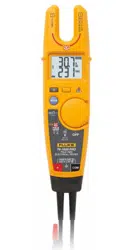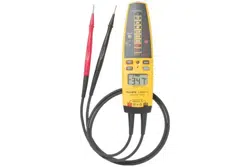

T+/T+PRO English Instruction Sheet
Page 1
T+ and T+ PRO
Electrical Tester
Instruction Sheet
Introduction
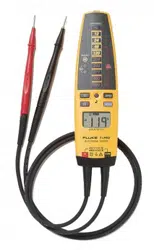
The Fluke T+ and T+ PRO Electrical Testers (the “Tester”) have the
following features:
• AC and dc voltage measurement, 12 V to 600 V, with or without
batteries
• LED bar voltage and hazardous voltage indicators function with or
without batteries
• Vibration and beeper indicators for ac and dc voltages
• Beeper and LED continuity indication
• Backlit LCD displays measured voltage (T+ PRO only)
• Rotary field direction indicators (T+ PRO only)
• Resistance measurement up to 9.99 kΩ (T+ PRO only)
• Flashlight
• GFCI trip
Additional languages of this instruction sheet (Brazilian Portuguese,
Simplified Chinese, Japanese, Korean, and Thai) are available for
download at www.fluke.com.
Contacting Fluke
To contact Fluke, call one of the following telephone numbers:
• Technical Support USA: 1-800-44-FLUKE (1-800-443-5853)
• Calibration/Repair USA: 1-888-99-FLUKE (1-888-993-5853)
• Canada: 1-800-36-FLUKE (1-800-363-5853)
• Europe: +31 402-675-200
• Japan: +81-3-6714-3114
• Singapore: +65-6799-5566
• China: +86-400-921-0835
• Anywhere in the world: +1-425-446-5500
Or, visit Fluke's website at www.fluke.com.
To register your product, visit http://register.fluke.com.
To view, print, or download the latest manual supplement, visit
http://us.fluke.com/usen/support/manuals.
PN 2559547 November 2006 Rev. 2, 9/17
© 2006 - 2017 Fluke Corporation. All rights reserved.

T+/T+PRO English Instruction Sheet
Page 2
Safety Information
XWWarning
To avoid possible electric shock or personal injury, follow
these guidelines:
• Use the Tester only as specified in this instruction
sheet, otherwise the protection provided by the Tester
may be impaired.
• The Tester is to be used only by qualified personnel.
• Do not use the Tester if it is damaged. Inspect the case
before use. Look for cracks or missing plastic. Pay
particular attention to the insulation surrounding the
connectors.
• Inspect the test leads for damaged insulation or
exposed metal. Check the test leads for continuity.
Replace damaged test leads before using the Tester.
• Do not use the Tester if it operates abnormally.
Protection may be impaired. When in doubt, have the
Tester serviced.
• Do not operate the Tester around explosive gas, vapor,
or dust.
• Do not apply more than the rated voltage, as marked
on the Tester, between terminals or between any
terminal and earth ground.
• When measuring hazardous voltage, verify the Tester’s
operation by measuring a known voltage.
• Only the test probes and batteries are serviceable.
When servicing, use only specified replacement parts.
• To determine the LEDs and beeper are working
correctly, short the test leads together. The beeper
sounds (if enabled) and all LEDs and display segments
(T+ PRO) switch on briefly indicating correct operation.
• Comply with local and national safety requirements
when working in hazardous locations.
• Use proper protective equipment, as required by local
or national authorities when working in hazardous
areas.
• Use caution when working above 30 V ac rms, 42 V
peak, or 60 V dc. Such voltages pose a shock hazard.
• When using the probes, keep fingers away from the
ends of the probe tips.
• Connect the common test lead before connecting the
live test lead. When disconnecting the test leads,
disconnect the live test lead first.
• Do not operate the Tester with the battery door or
portions of the cover removed or loosened.
• When the batteries are depleted, self test will not
function.
• When the beeper is disabled, it will not sound until the
beeper is reactivated.

T+/T+PRO English Instruction Sheet
Page 3
• For voltages above 240 V, you must only
connect to a voltage source for a MAXIMUM of
30s and then disconnect for a MINIMUM of 300s.
• Perform a self test before any measurements are taken
for voltage, continuity, resistance, or rotary field. See
“Self Test”.
• Exercise caution when performing measurements on
PLC (Programmable Logical Controller) inputs. When
measuring relay control voltages on PLCs, be aware
that this may open or close the relay/switch.
• All appliances or equipment on the circuit being tested
should be unplugged to help avoid erroneous
readings.
WCaution
Although the Tester may be used with depleted batteries,
replace depleted batteries immediately to avoid Tester
damage from battery acid leakage.
T+/T+PRO English Instruction Sheet
Page 4
Symbols
The following symbols appear on the Tester or in this instruction sheet.
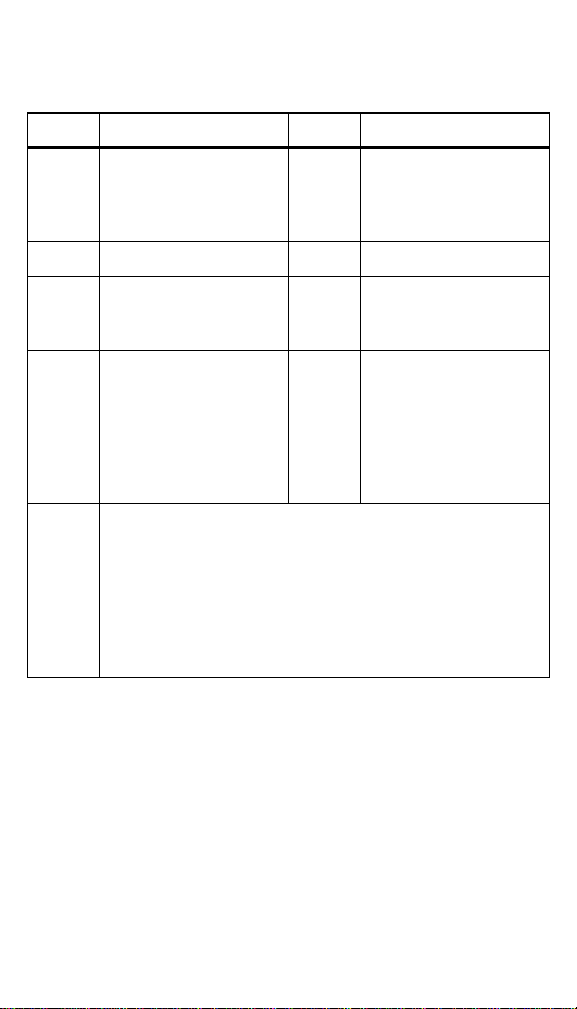
Table 1. Symbols
Symbol Explanation Symbol Explanation
W
WARNING - RISK OF
DANGER. Consult user
documentation.
X
WARNING.
HAZARDOUS
VOLTAGE. Risk of
electric shock.
T
Double insulated
Earth
)
Certified by CSA Group
to North American
safety standards.
R
Continuity beeper
Measurement Category
III is applicable to test
and measuring circuits
connected to the
distribution part of the
building’s low-voltage
MAINS installation.
Measurement Category
IV is applicable to test
and measuring circuits
connected at the source
of the building’s low-
voltage MAINS
installation.
~
This product complies with the WEEE Directive marking
requirements. The affixed label indicates that you must not
discard this electrical/electronic product in domestic
household waste. Product Category: With reference to the
equipment types in the WEEE Directive Annex I, this product
is classed as category 9 "Monitoring and Control
Instrumentation" product. Do not dispose of this product as
unsorted municipal waste.
T+/T+PRO English Instruction Sheet
Page 5
Optional Accessories
Accessories are available for the T+/T+ PRO Electrical Tester. See Table
2.
Table 2. Accessories
Item Item Number
Belt Holster H3
Replaceable Test Probes (1 red and 1 black) TP2
Pushbuttons
Use the pushbuttons to toggle switchable functions of the Tester on or off.
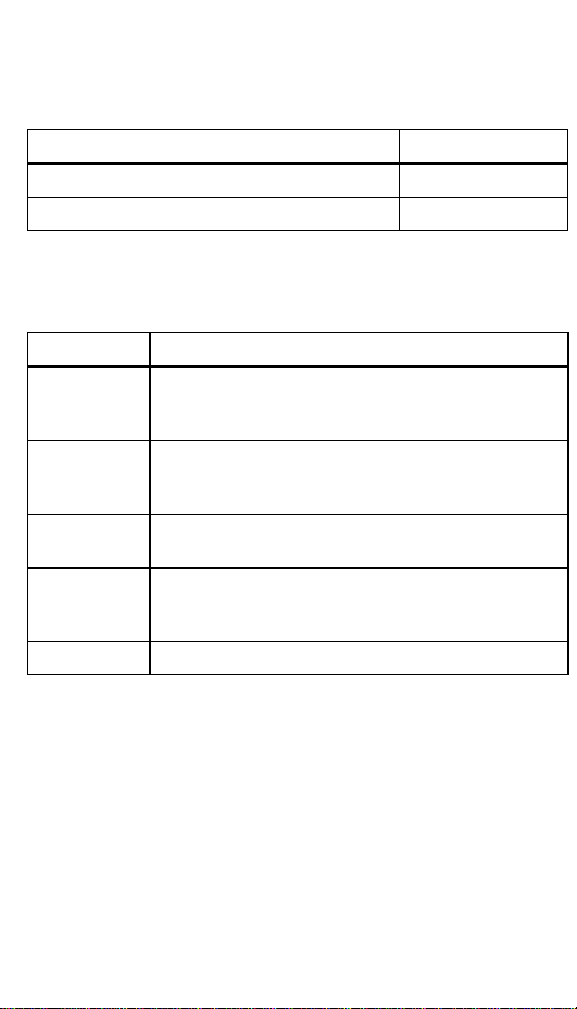
The pushbuttons are shown and described in Table 3.
Table 3. Pushbuttons
Pushbutton Description
C
Press to turn the flashlight on, release to turn it off.
The flashlight will turn off 5 seconds after release of the
pushbutton. Batteries are required for this feature.
O
Toggles the ohms function on or off. T+PRO only. See
“Measuring Resistance (T+ PRO Only)”.
Batteries are required for this feature.
Toggles the HOLD function on or off. T+PRO only. See
“HOLD”. Batteries are required for this feature.
Turns beeper on or off. When the beeper is turned off, it
will not sound until it is reactivated. Batteries are
required for this feature.
Performs Ground Fault and trips the GFCI.

T+/T+PRO English Instruction Sheet
Page 6
Understanding the Display (T+ PRO Only)
Display indicators are shown and described in Figure 1.
1
8
7
2
3 4
5
6
eqc001f.emf
Item Description
Low battery icon. If the battery is depleted the voltage will
still be displayed by the LED stack but the beeper and
vibration will not operate, continuity and resistance
measurements cannot be made, and the LCD will not
switch on.
WCaution
Replace depleted batteries immediately to avoid
damage to the Tester from battery acid leakage.
All audible signals are disabled
HOLD function is selected
Indicates phase rotation for a right or left-hand turning field
from one phase to the next in a three-phase system
Measurement units
Numeric display
AC or dc volts
Continuity test function is selected
Figure 1. Display Indicators

T+/T+PRO English Instruction Sheet
Page 7
Beeper
When the Tester detects a voltage, the LEDs light to indicate the voltage
level, the Tester vibrates, and a beeper sounds (the T+ PRO also shows
the voltage on the display). The beeper tones are different depending on
what is being measured:
• AC voltage - the beeper is a chirping tone
• DC voltage - the beeper is a steady tone
• Continuity - the beeper is a steady tone for resistances less than 20
kΩ
Note
If any voltage is present, the Tester automatically switches to
voltage mode.
To turn the beeper on or off, press for more than 3 seconds. Each time
the beeper is activated or deactivated, the Tester emits 3 short beeps.
Batteries are required for this feature.
Vibration Voltage Indication
The Tester vibrates when voltages 40 V and higher are measured.
Batteries are required for vibration to function.
Automatic Operation
The Tester automatically turns on when the probes are placed across a
complete circuit. The Tester selects continuity, ac or dc voltage modes
based on the resistance or voltage between the probes. The tester
switches off immediately after the test probes are removed from the circuit
under test or after 5 seconds if C is released when the probes are not
attached to a test circuit. If the HOLD function is activated, this switches off
after 1 minute if a voltage is not detected.
HOLD
Press to freeze the display reading. Press again to release HOLD.
HOLD does not interfere with the voltage LED function.
T+/T+PRO English Instruction Sheet
Page 8
Removing the Probe Tips
To remove the probe tips:
1. Grasp the probe firmly in one hand.
2.
Hold the test lead jack firmly in the other hand.
3. Pull to disengage the test lead probe from the test lead jack.
LED Display Voltages
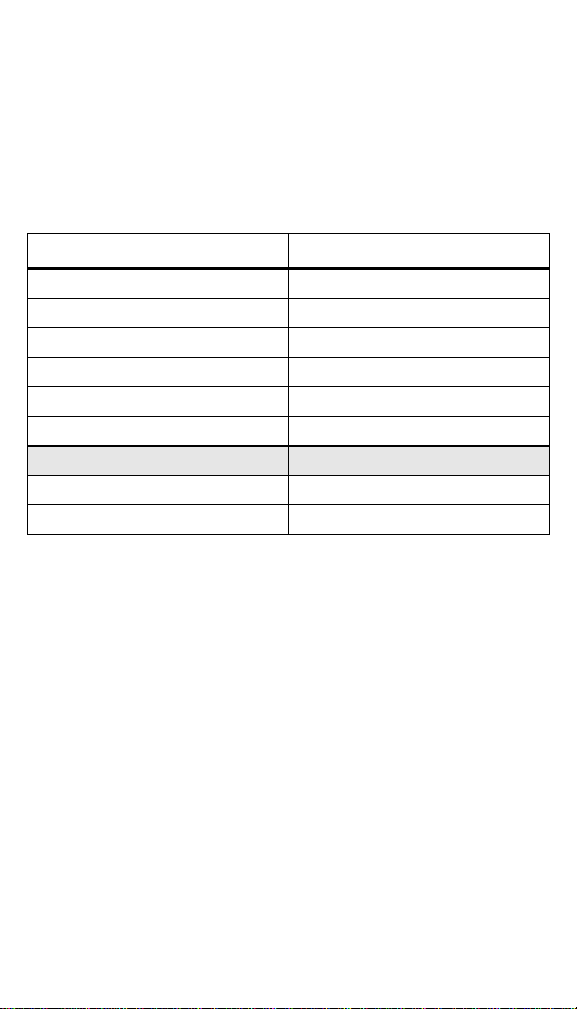
Table 4 shows the differences in the displayed voltages on the LEDs on
the Canadian and USA versions of the Tester.
Table 4. LED Display Voltages
USA Canada
Q Q
R R
S S
T T
U U
V V
W
X X
Y Y
Self Test
XWWarning
To avoid possible electric shock or personal injury:
• Perform a self test before any measurements are taken for
voltage, continuity, resistance, or rotary field.
• When the batteries are depleted, self test will not function.
Replace the batteries.
WCaution
Although the Tester may be used with depleted batteries,
replace depleted batteries immediately to avoid Tester
damage from battery acid leakage.
To perform the self test, short the two probes. The self test lights all LEDs,
and all LCD segments (T+ PRO). The beeper sounds (unless disabled)
and the Tester switches to continuity mode. The self test will then be de-
activated for 30 seconds. If the self test needs to be repeated, wait 30
seconds.
To complete the check procedure, always measure a known voltage
before use. If the Tester fails self test or voltage check, it must not be used
and requires service. See “Contacting Fluke”.
Measuring Voltage
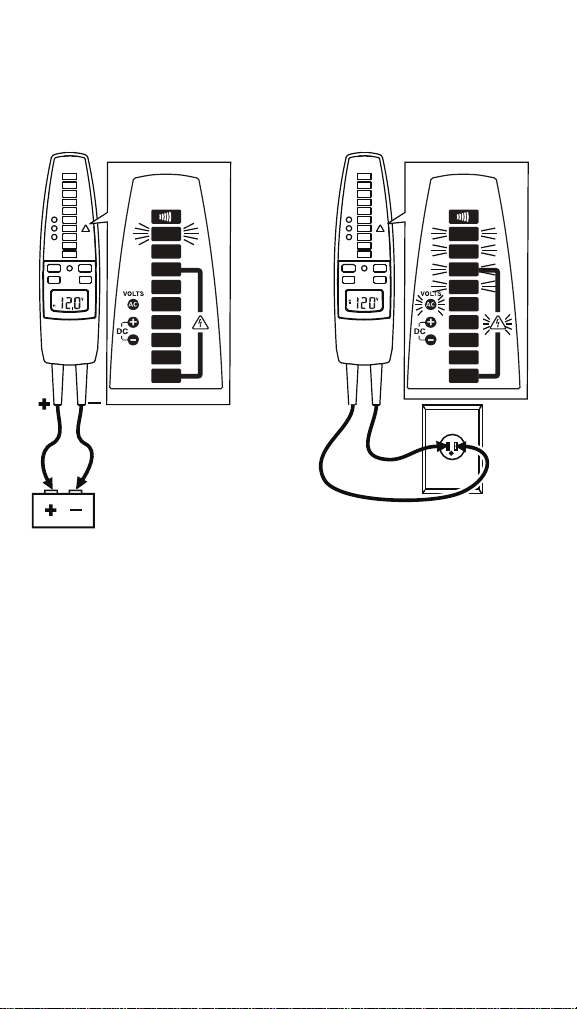
To measure voltage, connect the probes to the circuit under test. The
voltage is indicated by the voltage LED stack and beeper (if enabled). The
T+PRO will show the measurement on the LCD for voltages > 10 V; < 10
T+/T+PRO English Instruction Sheet
Page 9
V the LCD remains blank. The AC, DC+ and DC- LEDs will only operate
for voltages greater than 24 V. Refer to Figure 2.
DC Voltage
600 V dc maximum
AC Voltage
600 V rms maximum
45 Hz to 66 Hz
12 V dc
120 V ac
CONTINUITY
120
208
48
24
12
240
277
600
480
CONTINUITY
120
208
48
24
12
240
277
600
480
eqc03f.eps
Figure 2. Measuring Voltage
Note
Maximum measurable voltage is 600 V ac or dc. This will be
indicated on the LED and LCD (T+ PRO).
T+/T+PRO English Instruction Sheet
Page 10
Testing for Continuity
XW Warning
To avoid electrical shock:
• Make sure the power to the circuit is turned off and all
capacitors are discharged.
• If the beeper is disabled, the Tester will not beep and only
P will light. On the T+ PRO, the display will also show .
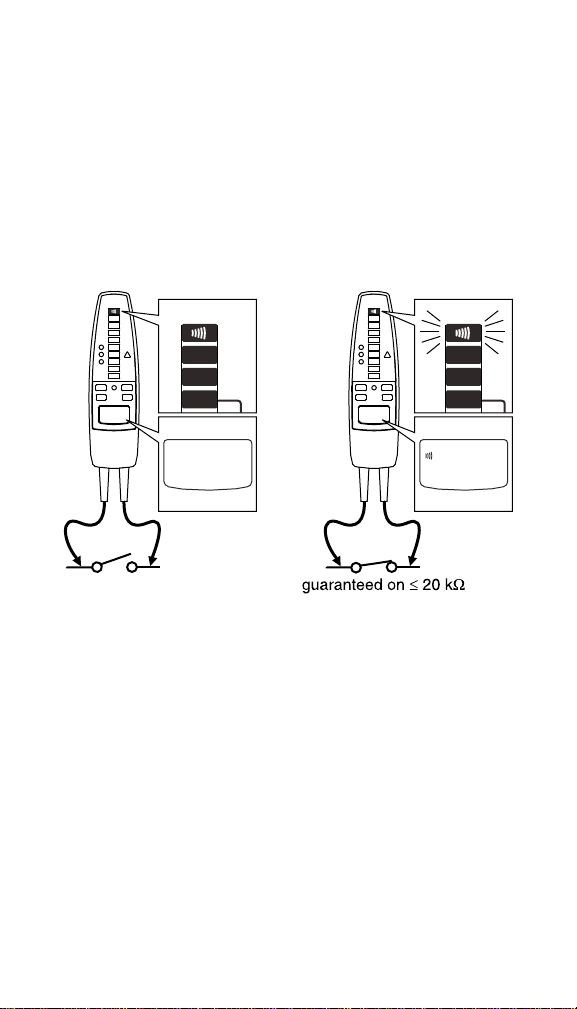
To measure continuity, turn off circuit power and connect the probes to the
circuit under test. Continuity (a resistance less than 20 kΩ) is indicated by
the beeper and a lighted P. If the beeper is disabled, it will not sound
during this test. The T+PRO shows on the LCD. If the resistance is
greater than 20 kΩ, the beeper will not sound and P will not light. Refer
to Figure 3.
open
CONTINUITY
CONTINUITY
48
24
12
CONTINUITY
CONTINUITY
48
24
12
eqc02f.emf
Figure 3. Continuity Test
T+/T+PRO English Instruction Sheet
Page 11
Measuring Resistance (T+ PRO Only)
XWWarning
To avoid electrical shock when measuring resistance in a
circuit, make sure the power to the circuit is turned off and
all capacitors are discharged.
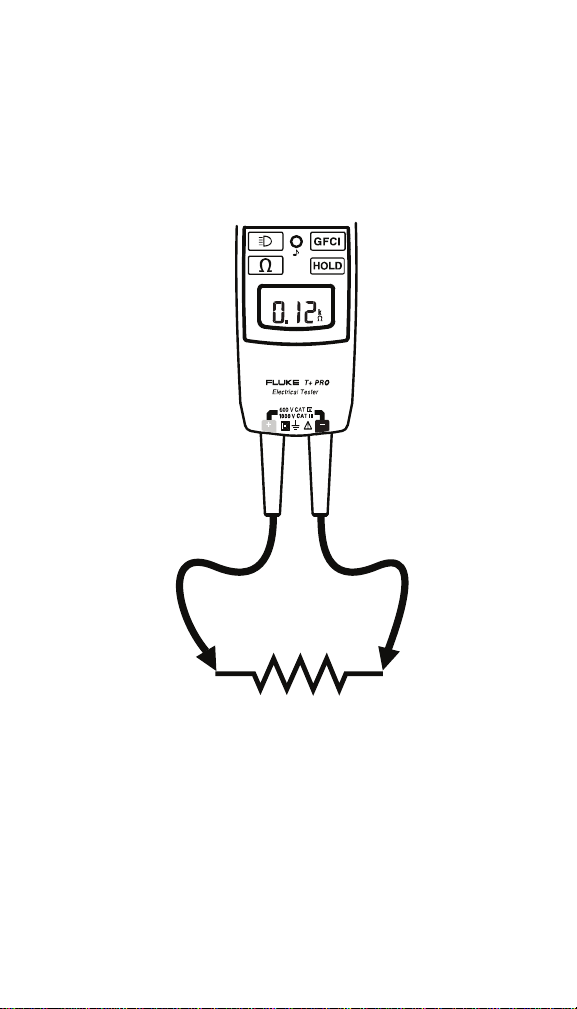
To measure resistance, turn off the circuit power, press O, and place
the test probes across the resistance under test. For resistances less than
9.99 kΩ, the T+PRO display shows the resistance value. For greater
resistances, the display shows OL. See Figure 4.
DISPLAY ON >10V
eqc04f.eps
Figure 4. Measuring Resistance

T+/T+PRO English Instruction Sheet
Page 12
GFCI Test
XWWarning
To avoid electrical shock, do not touch any exposed
metalwork during the test.
This test will switch off the power to the circuit.
To test a GFCI receptacle, do the following:
1. Insert the Tester probes into the GFCI receptacle under test.
2. Connect probes to the phase (hot) and ground (PE-protective earth)
of the GFCI receptacle.
3. Press for 1 second. The DC+ and DC- LEDs will alternately
switch on and off and, if activated, the beeper will sound indicating
that a test is in progress. The test may last up to 7 seconds.
4. Keep the probes connected while the LEDs are switching on and off.
If the GFCI trips, power to the circuit will be interrupted and the Tester
will stop indicating voltage. If the GFCI does not trip after
approximately 7 seconds, the GFCI test stops, indicated by no
switching of the DC+ and DC- LEDs but the tester will continue to
indicate the presence of voltage.
When testing and verifying GFCI circuits or components, do the following:
• Consult the GFCI manufacturer’s installation instructions to determine
that the GFCI is installed in accordance with its specifications.
• Check for correct wiring of receptacles and all remotely-connected
receptacles on branch circuits.
• Operate the pushbutton on the GFCI receptacle installed in the
circuit. The GFCI must trip. If it does not, the GFCI receptacle is not
operating properly. DO NOT use the circuit. Consult an electrician or
properly certified personnel.
If the GFCI does trip, retest the receptacle as explained above.
If the Tester fails to trip the GFCI, consider either of the following:
• The GFCI is fully functional but a wiring problem exists within the
installation or receptacle.
• The GFCI is faulty and the installation wiring is correct.
Consult an electrician to check the wiring and GFCI.
Note
• After a GFCI test, further GFCI tests will be inhibited for 0.5
seconds.
• It is not possible to switch the beeper off during a GFCI test.
XWWarning
To avoid possible electric shock or personal injury, follow
these guidelines:
• When testing GFCIs installed in 2-wire systems,
(systems where no ground wire is available at the
receptacle) the Tester may give a false indication that
the GFCI is not functioning properly. If this occurs,
recheck the operation of the GFCI using the test and
reset button.

T+/T+PRO English Instruction Sheet
Page 13
• The GFCI button test function should demonstrate
proper operations. However, if there is cause to verify
proper operation of the GFCI receptacle in a 2-wire
system, apply one test probe of the Tester to the
energized input of the GFCI receptacle while applying
the alternates test probe to a known external neutral or
ground reference location external to the GFCI
receptacle. Operate the GFCI button on the Tester as
described in the Instruction Sheet to verify the GFCI
receptacle is operating properly.
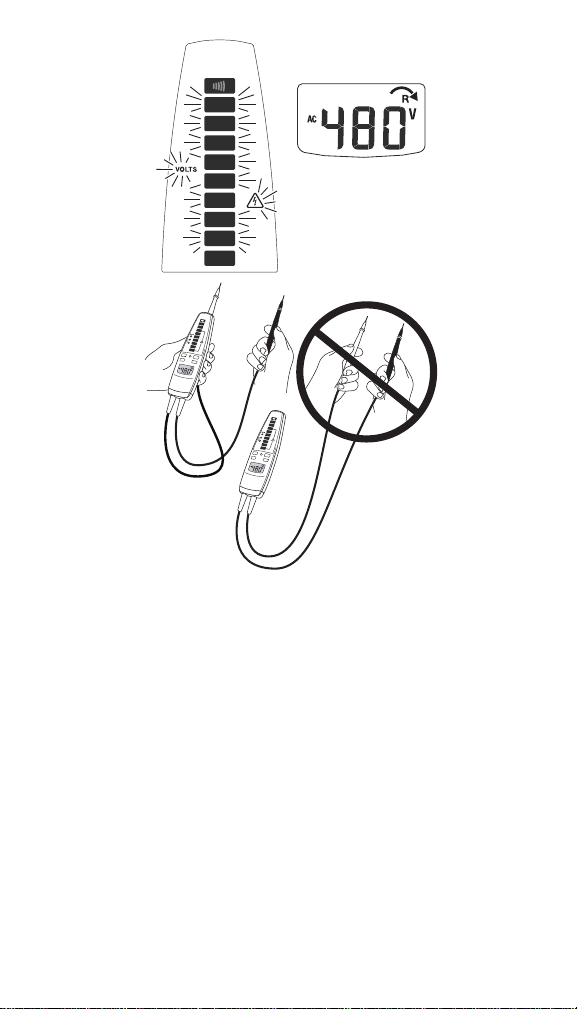
Rotary Field Direction (T+ PRO Only)
This test shows the direction of a rotary field in a three-phase system
when measured phase to phase. The LCD indicates phase rotation for a
right or left-hand turning field from one phase to the next in a three-phase
system.
Note
If measuring from phase to neutral at a panel or single-phase
outlet, the Tester may indicate or . However, this is not a
valid reading. A valid reading can only come from a phase to
phase circuit. The rotary field function is specified for use on line
(mains) systems only.
To perform a rotary field direction test, see Figure 5:
1. Attach one probe to the center probe holder on the back of the Tester
and grip the main body with one hand.
2. Attach both probes to the test points. If the red lead is 120 degrees
ahead of the black lead, is displayed. If the red lead lags the
black lead by 120 degrees, is displayed. In both situations the
voltage is shown on the display. If a phase rotation measurement is
not possible, no arrows will light but the voltage appears on the
display.
Note
You can verify the rotary field direction by reversing the two
probes and watching for an indication of a change in the field
direction.
T+/T+PRO English Instruction Sheet
Page 14
C
O
N
T
IN
U
I
T
Y
1
20
20
8
4
8
24
12
2
40
2
77
6
00
4
8
0
C
O
N
T
I
N
U
I
T
Y
12
0
20
8
4
8
24
1
2
240
2
77
600
4
8
0
600
CONTINUITY
120
208
48
24
12
240
277
480
eqc05f.emf
Figure 5. Rotary Field Measurement

T+/T+PRO English Instruction Sheet
Page 15
Maintenance
WCaution
Do not use abrasives or solvents on the Tester.
Clean the case with a damp cloth and mild detergent.
Replacing the Batteries
Perform a self test to determine the charge state of the batteries on T+
Testers. The self test will not work with dead batteries. On T+ PRO
Testers, the low battery icon (B) on the LCD indicates that the batteries
need to be replaced.
XWWarning
To avoid possible electric shock or personal injury:
• Disconnect test leads from any electrical source before
opening the battery compartment.
• Do not operate the Tester with the battery door or
portions of the cover removed or loosened.
1. Turn the Tester over and use a flat-head screwdriver to loosen the
battery door screw and remove the door.
2. Replace the batteries with two new AAA alkaline batteries.
3. Reattach the battery compartment door and reinstall the screw.
Specifications
Temperature: Operating: -10 °C to +55 °C (14 °F to 131 °F)
Storage: -30 °C to +60 °C (-22 °F to +140 °F)
Relative Humidity: 0 °C to 30 °C (32 °F to 86 °F) 90 %
30 °C to 40 °C (86 °F to 104 °F) 75 %
40 °C to 50 °C (104 °F to 122 °F): 45 %
Altitude: Operating: 2,000 m
Storage: 10,000 m
Battery Type/Life: AAA (2); 40 hours
Shock, Vibration: Sinusoidal vibration per MIL-PRF-28800F for a
Class 2 instrument
Safety: ANSI/ISA S82.02.01, CSA C22.2-1010.1, IEC 61010-
1 to 1000 V CAT III/600 V CAT IV; Pollution Degree II
AC Bandwidth: 45 Hz to 66 Hz
Maximum Input
Voltage Between
Terminal and
Earth Ground: Maximum working voltage 1000 V ac or dc.
Maximum measurable voltage 600 V ac or dc. This
will be displayed on the LED and the LCD (T+ PRO).
Duty Cycle:
Indefinitely for voltages up to 240 V.
For voltages between 240 V to 600 V the duty cycle is
30 seconds on / 300 seconds off. For voltages above
240 V the Tester must connect to a voltage source
only for a MAXIMUM of 30 seconds and then
disconnect for a MINIMUM of 300 seconds.
Voltage
Hazard LED: LEDs turn on @ voltages > 30 V ac/dc ± 35 %

T+/T+PRO English Instruction Sheet
Page 16
LEDs: LEDs turn on @ between 70 % and 100 % of the
indicated voltage on the LED, except for the 12 V LED
which turns on @ between 50 % and 100 %.
EMC Compliance: EN61326-1:2005 Class B emissions and immunity in
field strengths between 1 V/m and 3 V/m add
8 % of range.
Accuracy:
AC voltage: ± (3 % rdg. + 2 digits)
DC voltage: ± (2 % rdg + 2 digits)
Resistance: ± (5 % rdg + 3 digits)
LCD Resolution: 0.1 V for voltages < 50 V, 1 V for voltages ≥ 50 V,
0.01 kΩ at resistance measurement
GFCI Test
Current: 100 V to 150 V @ 6 mA to 9 mA ac
150 V to 240 V < 12 mA
Standard Input
Test Current: < 5 mA
Size (HxWxL): 1.3 in x 2.15 in x 7.6 in
Weight: 9.9 oz
LIMITED WARRANTY & LIMITATION OF LIABILITY
This Fluke product will be free from defects in material and workmanship
for two years from the date of purchase. This warranty does not cover
fuses, disposable batteries, or damage from accident, neglect, misuse,
alteration, contamination, or abnormal conditions of operation or handling.
Resellers are not authorized to extend any other warranty on Fluke’s
behalf. To obtain service during the warranty period, contact your nearest
Fluke authorized service center to obtain return authorization information,
then send your defective Tester to that Service Center with a description of
the problem. Replace depleted batteries immediately to avoid Tester
damage from battery leakage.
THIS WARRANTY IS YOUR ONLY REMEDY. NO OTHER
WARRANTIES, SUCH AS FITNESS FOR A PARTICULAR PURPOSE,
ARE EXPRESSED OR IMPLIED. FLUKE IS NOT LIABLE FOR ANY
SPECIAL, INDIRECT, INCIDENTAL OR CONSEQUENTIAL DAMAGES
OR LOSSES, ARISING FROM ANY CAUSE OR THEORY. Since some
states or countries do not allow the exclusion or limitation of an implied
warranty or of incidental or consequential damages, this limitation of
liability may not apply to you.
Fl
u
k
e
C
orporat
i
on
P.O. Box 9090
Everett WA
98206-9090
Fl
u
k
e
E
urope
B
.
V
.
P.O. Box 1186
5602 B.D. Eindhoven
The Netherlands
11/99