SPRINKLER TIMER
USER MANUAL
HN01
*GZPVFODPVOUFSQSPCMFNT
QMFBTFDPOUBDUVTUISPVHI"NB[PO

IMPORTANT !
PLEASE READ !
1:ONLY USE WITH CLEAN COLD WATER.
2:FILTER TRAPS DIRT PARTICLES PROLONG-
ING THE LIFE OF THE PRODUCT, CLEAN
FILTER REGULARLY AND REPLACE IF WORN.
3:WHEN EXPECTING FREEZING TEMPERA-
TURES,TIMERS SHOULD BE REMOVED FROM
THE HOSE FAUCET AND STORED INDOORS TO
AVOID POTENTIAL FREEZE DAMAGE.
4:DO NOT INSTALL THE TIMER WITH TOOLS.
HAND TIGHTEN ONLY. USE OF TOOLS MAY
DAMAGE THE TIMER.
5:FOR ANY PROBLEMS DURING USE, PLEASE
CONTACT US THROUGH AMAZON.
02

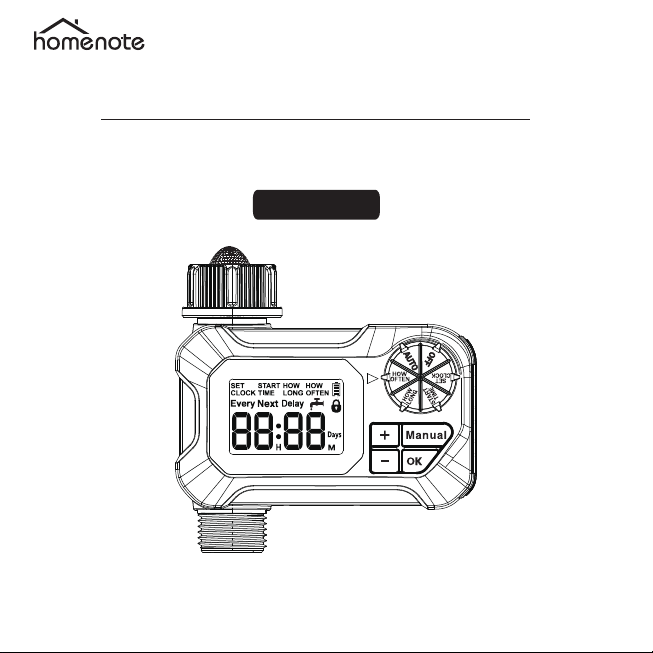
MANUAL WATERING
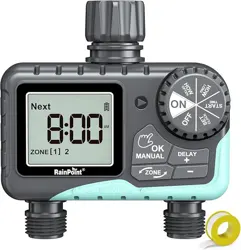
BUTTON
DIAL
HOSE TAP
CONNECTION
BIG LCD
SCREEN
OUTLET
- BUTTON
+ BUTTON
OK BUTTON
PRODUCT OVERVIEW
· DILA:Turn the dial to customize your watering schedule.
· OK Button:Conf irm the settings or next step.
· + Button:Adjust time and system setup or delay watering program.
· - Button:Adjust time and system setup or child lock.
03

Battery Indicator Watering Child Lock
SET CLOCK
Set Current Time
Set the time of start watering
Set watering duration
(1minute to 23hour 59minutes)
Set watering frequency
(1minute to 7days)
The next watering time
OFF timer
START TIME
HOW LONG
HOW OFTEN
NEXT
OFF
PRODUCT OVERVIEW
04

ITEMS
SPECIFICATIONS
1min to 23h 59min
1min to 23h 59min, 1Day to 7Days
0.5-8bar ( 7.2psi - 116psi )
35L/MIN
For taps with NH 3/4"
4.5℃-45℃(40.1℉-113℉)
2xAA Alkaline batteries
Approx 1 year
Water Duration
Watering Frequency
Working Pressure
Max Flow Rate
Thread
Working
Temperature
Battery Power
Battery Life
PRODUCT OVERVIEW
05
PRODUCT INSTALLATION
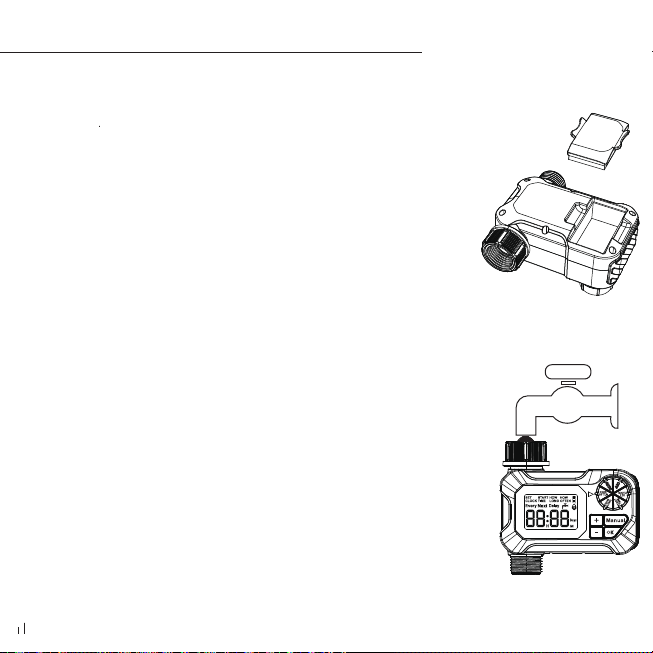
1、Installing the Batteries
1) Remove the battery cover on back of the timer
2) Install 2 new AA (1.5V) alkaline batteries (not included)
3) Firmly reinstall the cover back into the timer
2、Installing the Timer
1) Attach the timer to an outdoor hose faucet.
Ļō.ǁLJLJLjLjLJY
Please secure the battery cover to ensure the wa-
terproofness of the battery compartment.
Please remove the battery to avoid damage to the
timer if it is not used for a long time or before wi-
nter comes.
When the low battery indicator light on the disp-
lay is on, please replace the battery in time.
Please do not install rechargeable batteries to av-
oid low voltage.
The calculator has a power failure memory func-
LjY%ǁLjLjLjĜ
you don't need to reset the watering schedule, you
just need to set the current time.
NOTE:
06

PROGRAM SETTINGS
1. SET CLOCK
TIPS:
· Hold the“ or ” button can change the time quickly.
· At the end of setting, please turn dial to save changes. If you press
"OK"at the end, it will go back to the previous step.
1. Turn dial to SET CLOCK.
2. Press the " " to set the current hour and mintues. Turn the
dial to save the settings.
07

TIPS:
· At the end of setting, please turn dial to save changes. If you press
"OK"at the end, it will go back to the previous step.
2. SET START TIME
PROGRAM SETTINGS
1. Turn dial to START TIME.
2. Press the " " button to set the start watering time you want,
Turn the dial to save the settings.
08

3. SET HOW LONG
1. Turn dial to HOW LONG.
2. Press the " " button to select the watering duration, and
turn the dial to save the settings.
PROGRAM SETTINGS
TIPS:
· At the end of setting, please turn dial to save changes. If you press
"OK"at the end, it will go back to the previous step.
09

TIPS:
· At the end of setting, please turn dial to save changes. If you press
"OK"at the end, it will go back to the previous step.
4. SET HOW OFTEN
1. Turn dial to HOW OFTEN.
2. Use and to set the watering frequency. You can set water
at least every 1 minute or several hours (applicable to the spray cool-
ing system), Watering every day or once every few days.
3. Turn the dial to save changes.
Examples of watering frequencies are every 1 day, every 2 days and
every 3 days:
EVERY 1 DAY
Day 1 Day 2 Day 3 Day 4 Day 5 Day 6 Day 7
Day 1 Day 2 Day 3 Day 4 Day 5 Day 6 Day 7
Day 1 Day 2 Day 3 Day 4 Day 5 Day 6 Day 7
EVERY 2 DAYS
EVERY 3 DAYS
PROGRAM SETTINGS
" " " "
10
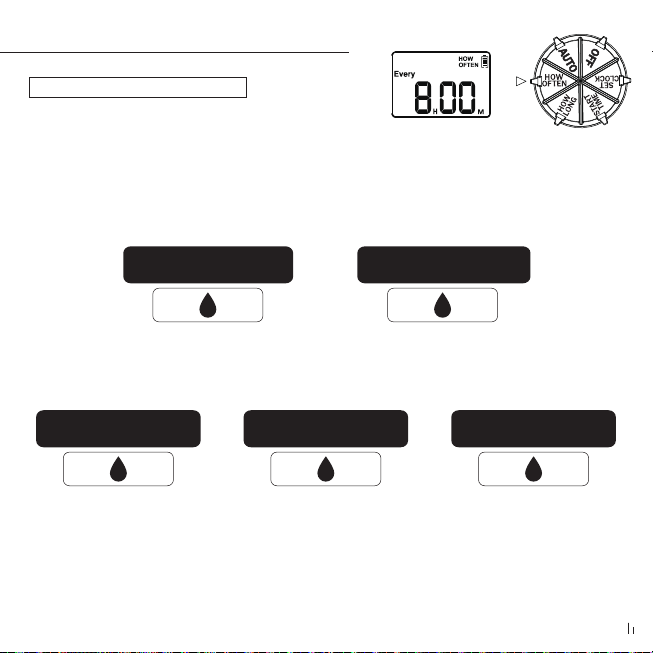
· Examples of watering frequency are 2 times a day and 3
times a day.
Start time AM 6:00 .Watering duration: 30 minutes .Watering every 8
hours.
Note:
· If the watering plan is more than twice a day (includ-ing twice),
the timer will repeat the watering plan every day. The timer has a
built-in 24-hour system, so you don't have to worry about time
confusion.
Watering time period
6:00 → 6:30
Watering time period
14:30 → 15:00
Watering time period
23:00 → 23:30
Start time AM 6:00 .Watering duration: 30 minutes. Watering every
12 hours.
Watering time period
6:00 ĺ 6:30
Watering time period
18:30 → 19:00
4. SET HOW OFTEN
PROGRAM SETTINGS
11
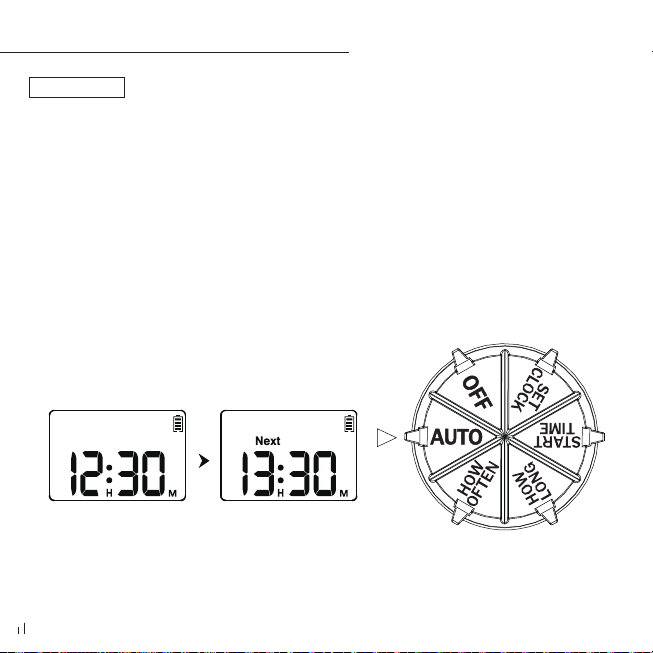
5. AUTO
Turn the dial to "AUTO". The timer will execute the watering plan
and the screen will display the current time. The next watering time
LjLjǁļY1LjLJLj
ļĹǁLjY
PROGRAM SETTINGS
12

6. OFF MODE
1. If you wish to stop the watering plan for an extended period , turn
the dial to OFF . ( Your settings are saved)
2. The timer will not water automatically while in OFF mode ( The s-
creen will display the word OFF in large letters ) .
3. To start watering automatically again , turn the dial back to AUTO
to resume your programmed watering schedule .
PROGRAM SETTINGS
13

ADDITIONAL FEATURES
RAIN DELAY WATERING
When you know rain is coming, the Rain Delay feature
allows you to skip future rain days and does not interrupt
your future watering schedule.
To enable the Rain Delay feature, perform the following
steps.
1. When the dial at the " AUTO " position, press the " + "
button for 3-5s to enter the rain delay mode.
2. The screen will display 1days by default, press the " + "
or " - " button to select 1 days to 7 days for rain delay
setting.
14

ADDITIONAL FEATURES
Note:. LJLJ Ķ&#Ķ ǁ
selecting the delay time otherwise the delay mode will
LjLJLjǁLjťĻňľY
ļY . Ķ &# Ķ Lj ǁ
selecting the delay time, and all the watering plans will
skip in this period.
4. To quit rain delay modeȄplease hold the " + " button again for
3-5s to resume your programmed watering schedule.
RAIN DELAY WATERING
15

MANUAL / HAND WATERING
This feature allows you to water without interrupting your
set watering schedule. To access this feature, please follow
the steps below.
1. Keep the dial at the "AUTO" position, click "MANUAL"
button to enter manual watering mode.
2. The default duration of manual watering is 1 minute,
you can press "+" or "-" button to set the manual watering
time from 1 minute to 23 hours 59 minutes and hours.
ADDITIONAL FEATURES
16

MANUAL / HAND WATERING
Note: Please remember to press the "OK" button again to
save the set watering time, otherwise the set manual water-
LjLjLJLjLJLjǁĺĹ
seconds.
ļY%ǁLjLjLjLJĜĶ&#Ķ
to run the manual watering function.
4. To stop manual watering, turn the dial to "OFF" and then
back to "AUTO" or press the "MANUAL" button to resume
the watering schedule you set.
ADDITIONAL FEATURES
17
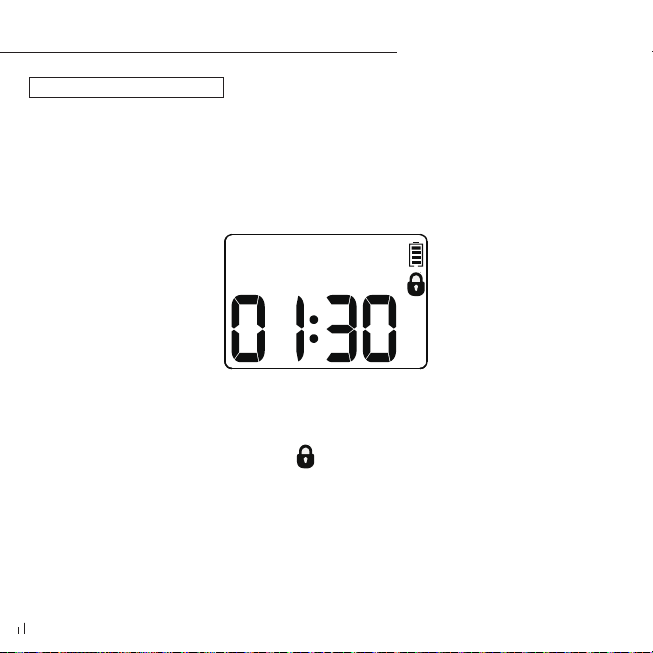
Make sure the timer dial is at the " AUTO " position. Press and hold the
" - " button for 5 seconds until " " appears on the screen. If you want
to cancel the child lock setting, please press and hold " - " again for 5s.
CHILDREN LOCK
ADDITIONAL FEATURES
18

Battery Status will be displayed as following.
Note :
· When low battery indication appears on the display, the valve will
automatically close to avoid leakage. Please replace the battery in
time to keep the normal operation.
Low PowerFull
ADDITIONAL FEATURES
BATTERY STATUS
19

Problem
The water
inlet leakage
The water won't
ŠŤ
No response
for manual/
rain delay
function
Possible Cause Possible Solution
ĺY%ŤLJLjĵ
horizontally in the inlet.
2 . Make sure the faucet is a 3 / 4" fau-
cet.
3 . Strengthen it with raw rubber wrap.
.&#LjǁLjLJLj
ŤLJY
Refer to 14-16 page
0ĺY#ţň
rn the timer dial to AUTO .
Step2 . Run the manual watering fun-
ction for 5-7s and stop it ( refer to
page 16 ).
Step3 . Repeat the Step2 for 3 to 5 ti-
mes.
Step4 . Try to use it normally .
ĺY-Ťň
aced horizontally.
2 . The faucet is not the
standard 3 / 4".
1 . Long time in storage
and transportation ma-
ke the valve inactive.
2 . Valve blockage.
%ǁLjLJň
tering or rain delay ti-
me , without pressing
OK button to save and
run.
TROUBLESHOOTING
20

Short battery
life
Low water-
pressure
If it doesn't work and you want to return or replace it, please contact us
through Amazon for support.
1 . Use new alkaline batteries.
2 . Rechargeable batteries and carbon
batteries have a short life, use the alk-
aline batteries instead of them.
ĺY(LjŤLjĜLjĜ
ŤY
2 . Make sure the timer is installed pr-
operly and not cross-threaded.
3 . Installation of a booster pump or
other auxiliary equipment of increas-
ing pressure.
1 . Mixed use of old and
new batteries.
2 . Used the carbon bat-
teries or rechargeable
batteries.
1 . Filter blockage.
2 . Inlet pressure not s-
ŦLjň
tering needs.
TROUBLESHOOTING
21

1 ) Intended for outdoor use only , put in the sheltered
outdoor will prolong the the product lifetime.
2 ) Using tools to tighten timer too tight , easy to cause
damage, to avoid damaging the timer , please tighten it
with your hands instead of a tool.
ļō.ŤLjLjLj
top connector before installation to prevent leakage , add
ŤLjY
Ľō$ŤLjLj
Lj LjLJ Y(ŤLj
worn.
5 ) When the power is low , please replace the batteries in
time to avoid the interruption of the normal operation ;
when replacing the batteries ,please make sure the battery
compartment is dry.
22
WARNINGS

6 ) When not in use , remove batteries , drain and store indoors to
keep away from freezing.
7 ) Do not use the timer when it's more than 113F (45°C ) , or less
than 40.1 F ( 4.5°C ) .
8 ) Do not subject the product to extreme force and shock .
9 ) Never immerse the product in water . If water is sprayed into
power source,it may cause severe electrical shock. .
WARNINGS
23

WARRANTY
We provides a 1-year worry-free warranty against
manufacturing defects in materials and workmanship
from the date of purchase.
During the warranty period,We will replace the defec-
tive products found under reasonable use and service
for free.
Please contact us through Amazon , and we will reply
to your questions within 24 hours.
24