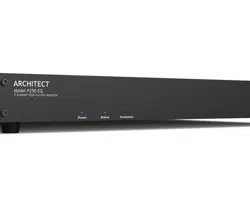

Installation Manual
ARCHITECT
™
MODEL P250 EQ
2 CHANNEL HIGH CURRENT POWER AMPLIFIER
2
Important Safety
Instructions
1. Read these instructions.
2. Keep these instructions.
3. Heed all warnings.
4. Follow all instructions.
5. Do not use this apparatus near water.
6. Clean only with a dry cloth.
7. Do not block any ventilation openings. In-
stall in accordance with the manufacturer’s
instructions.
8. Do not install near any heat sources such
as radiators, heat registers, stoves, or
produce heat.
9. Protect the power cord from being walked
on or pinched particularly at plugs, conve-
nience receptacles, and the point where
they exit from the apparatus.
10. Only use attachments/accessories speci-
11. Unplug this apparatus during lightning
storms or when unused for long periods of
time.
personnel. Servicing is required when
the apparatus has been damaged in any
way, such as power-supply cord or plug is
damaged, liquid has been spilled or objects
have fallen into the apparatus, the appara-
tus has been exposed to rain or moisture,
does not operate normally, or has been
dropped.
13. This apparatus shall not be exposed to
with liquids, such as vases or glasses, shall
be placed on the apparatus.
symbol within an equilateral triangle
is intended to alert the user to the
presence of uninsulated “dangerous voltage”
within the product’s enclosure, that may be
electric shock to persons.
The exclamation point within an
equilateral triangle is intended to alert
the user of the presence of import-
instructions in the literature accompanying the
appliance.
Caution: to reduce the risk of electric shock,
do not remove the top cover. There are no
user-serviceable parts inside. Refer servicing to
This equipment has been tested and found
to comply with the limits for a Class B digital
device, pursuant to part 15 of the FCC Rules.
These limits are designed to provide reasonable
protection against harmful interference in a
residential installation.
This equipment generates, uses, and can radi-
ate radio frequency energy and, if not installed
and used in accordance with the instructions,
may cause harmful interference to radio com-
munications. However, there is no guarantee
that interference will not occur in a particular
installation.
If this equipment does cause harmful interfer-
ence to radio or television reception, which can
and on, the user is encouraged to try to correct
the interference by one or more of the follow-
ing measures:
• Reorient or relocate the receiving antenna.
• Increase the separation between the equip-
ment and the receiver.
• Connect the equipment into an outlet on
receiver is connected.
• Consult the dealer or an experienced radio/
TV technician for help.
device not expressly approved by AudioControl
Inc. could void the user’s authority to operate
the equipment under FCC rules.
Recycling notice: If the time comes
destiny, do not throw it out into the
trash. It has to be carefully recycled
for the good of mankind, by a facility specially
equipped for the safe recycling of electronic
apparatii. Please contact your local or state
recycling leaders for assistance in locating a
suitable nearby recycling facility. Or, contact us
and we might be able to repair it for you.
Important Safety Instructions

3
Installation Manual
Model P250 EQ
ARCHITECT
™
Table of Contents
Table of Contents
Important Safety Instructions .......2
Introduction .......................4
Congratulations! ..................4
Features .........................5
Complimentary bullet points ........6
Quick View .......................7
Getting Started ....................8
An Important note about Triggering ..8
Home Installation .................9
Commercial Installation ............9
Front Panel Features ...............10
Rear Panel Features ................11
Speaker and Wiring Impedance ......14
Block Diagram .....................16
Troubleshooting ...................17
Specications ......................19
Service ............................20
The Warranty ......................21
Right Grapevine ....................23
©2022 AudioControl Inc All rights reserved.
Accidentally awarded “Best Interpretive Moss Display ” at the 2021
Washington State Fair.
4
Flowery Marketing Introduction
You are now installing a component which
will dramatically improve the performance
of any distributed audio system, especially
those utilizing small aperture, in-wall,
in-ceiling, and even invisible speakers.
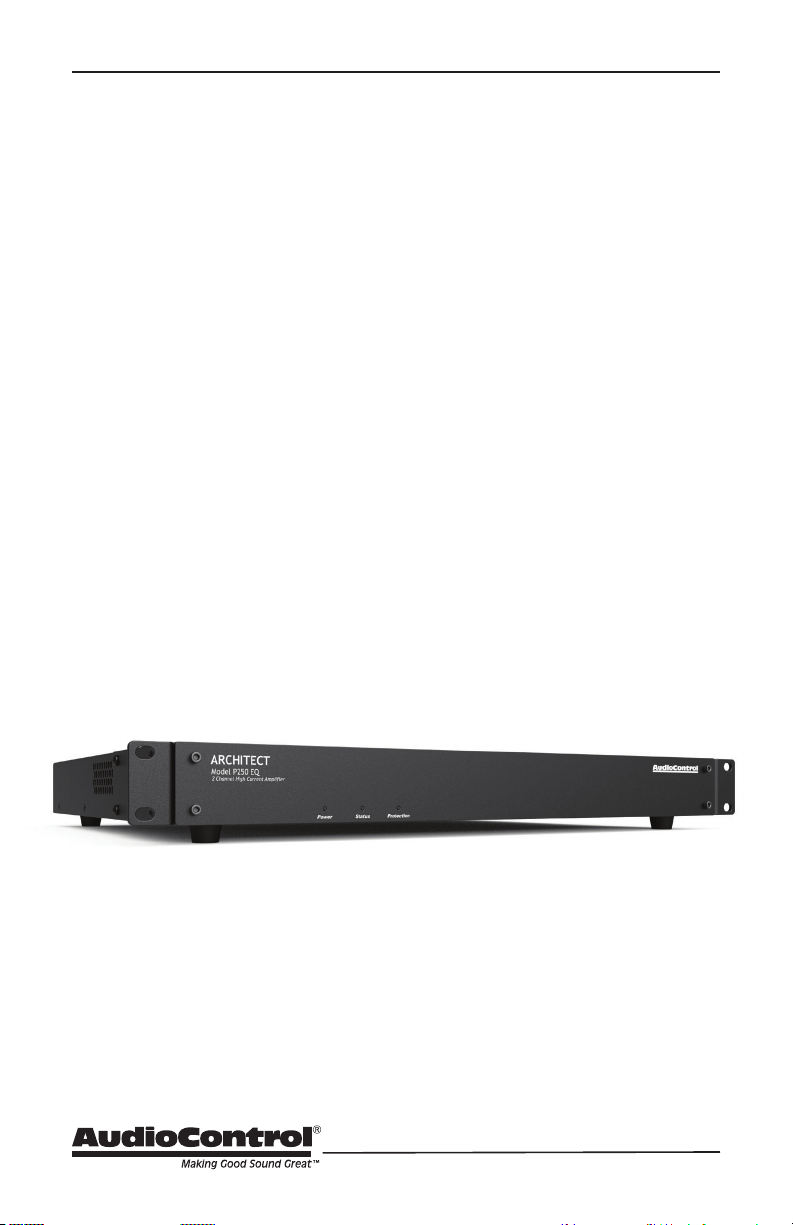
The Architect model P250 EQ is a con-
That means your 250 watts power is the
same 8, 6, 4 or 2 ohms. This gives you an
designing your system as it can adapt to
whatever loads you throw at it. Plus, while
providing this high level of power, you get
all the legendary qualities of AudioCon-
trol engineering - pristine sound quality,
analog and digital inputs, priority signal
sense switching, some simple EQ and SDS
priority switching to handle event based
audio sources.
and built, “set and forget” component
which will provide a lifetime of trou-
ble-free service for your large zone audio
system.
Congratulations!
The Architect model P250 EQ is designed
and manufactured by AudioControl, the
only electronics company in the world that
processors and audio analyzers. Our pas-
sion for high quality, meticulous attention
to detail, and pro sound heritage shows
itself in the dozens of awards we have won
for our designs, products, and service.
Now, as when we begin, our greatest sat-
isfaction is our reputation for sonic excel-
lence and reliability among people just like
you throughout the world.
This manual is designed to help you get
though you’re wanting to see it in action,
please take a few minutes to slog through
our not-so-weighty prose and learn how
to get the most from your Architect power

5
Installation Manual
Model P250 EQ
ARCHITECT
™
Features
Here are some of the features that make
the Architect Model P250 EQ a unique
• Constant Wattage Output
At any common speaker impedance,
including 2 ohms, you’ll get 250 watts
of pristine power from this fantastic
• High Current Design
Very demanding speaker loads can
presenting you with continual cut
outs or worse! The High Current Drive
power through speaker loads that
most other amps simply can’t handle.
• Glorious IO options
Digital, analog, SDS! Want to output
a single source to multiple Architect
Model P250 EQs? No problem. Loop
outputs are available for digital or
analog sources, allowing you to
• Unparalleled Energy Eciency
In terms of saving electricity or re-
ducing heat in the rack, the Architect
Model P250 EQ has no equal…
• Signal Sense Switching
This feature will switch between the
two main input stages - the analog
and the digital stage. You can connect
an analog source and a digital source
and the unit will always switch to the
prioritized input whenever a signal is
sensed there. Set the prioritization
with the Input Priority switch.
• LightDrive™ Anti-clipping
With durability in mind,
AudioControl’s LightDrive anti-
clipping protection defends the
system against clipping, distortion,
damage, and even teenage parties.
The Architect Model P250 EQ
features the latest evolution of
LightDrive which adds a power-
supply-tracking instantaneous
dynamic control to the smooth
sound of the traditional AudioControl
LightDrive.
• Self Resetting Protection Features
Protection features are extensive and
include thermal, short circuit, clip-
others.
• Pacic Northwest Heritage
Hard to believe, but we make this
product in the USA. We are very
proud of that fact. What is more im-
portant is the care we craft in at every
step, and the extensive knowledge
we have in all aspects of the product.
Plus, we back this up with a condi-
Features
6
• 2 channels of AudioControl
• High Current design
• Constant Power into any common
speaker impedances
•
supply
• Rack mountable 1U form factor
• Removable rack ears
• Less depth than traditional rack mount
type amps - perfect for spice cabinets
• Stackable - up to 4 units
• Signal sense turn on
• Selectable EQ presets
• Loop outputs - both analog and digital
• 12V Master trigger
• S/PDIF input with premium Wolfson
digital to analog converter
• Input prioritization and signal sense
switching
• SDS input - automagically switches for
event based audio
Complimentary bullet points
7
Installation Manual
Model P250 EQ
ARCHITECT
™
Quick View
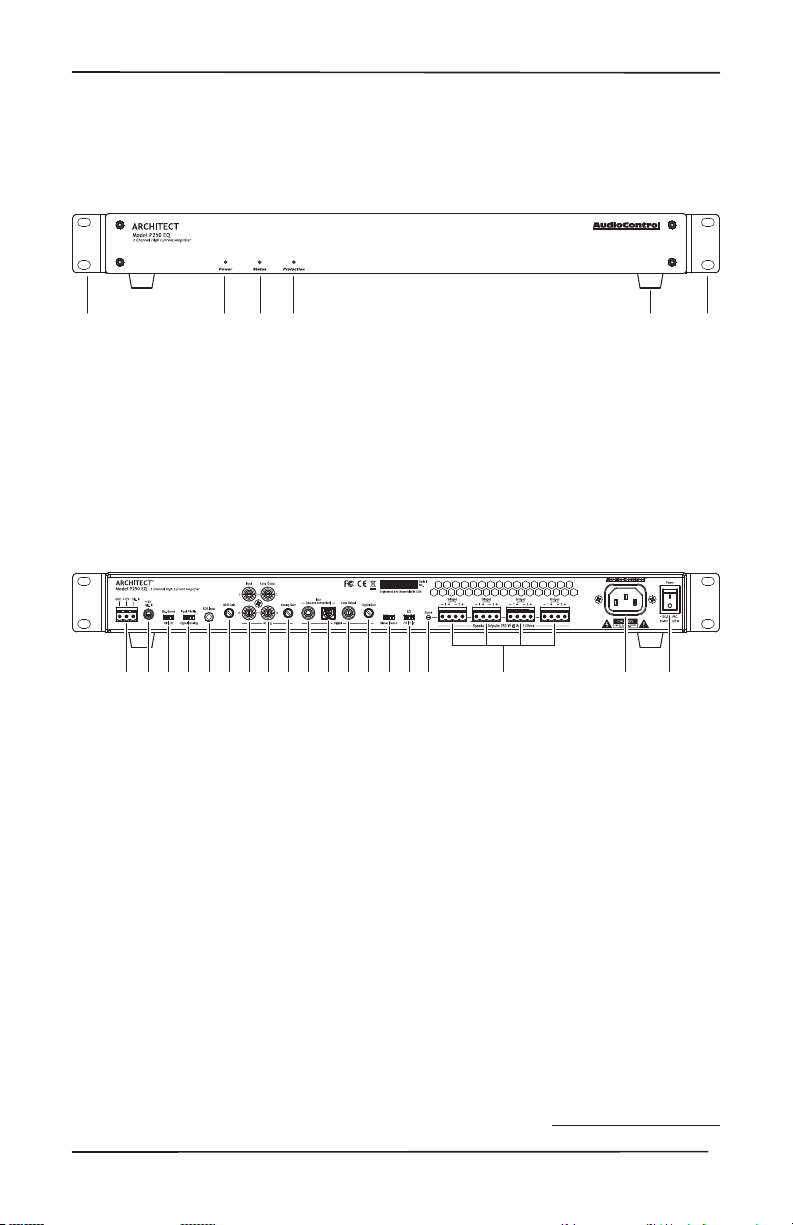
4. Feet (removable)
5. Rack Mount Ears (removable)
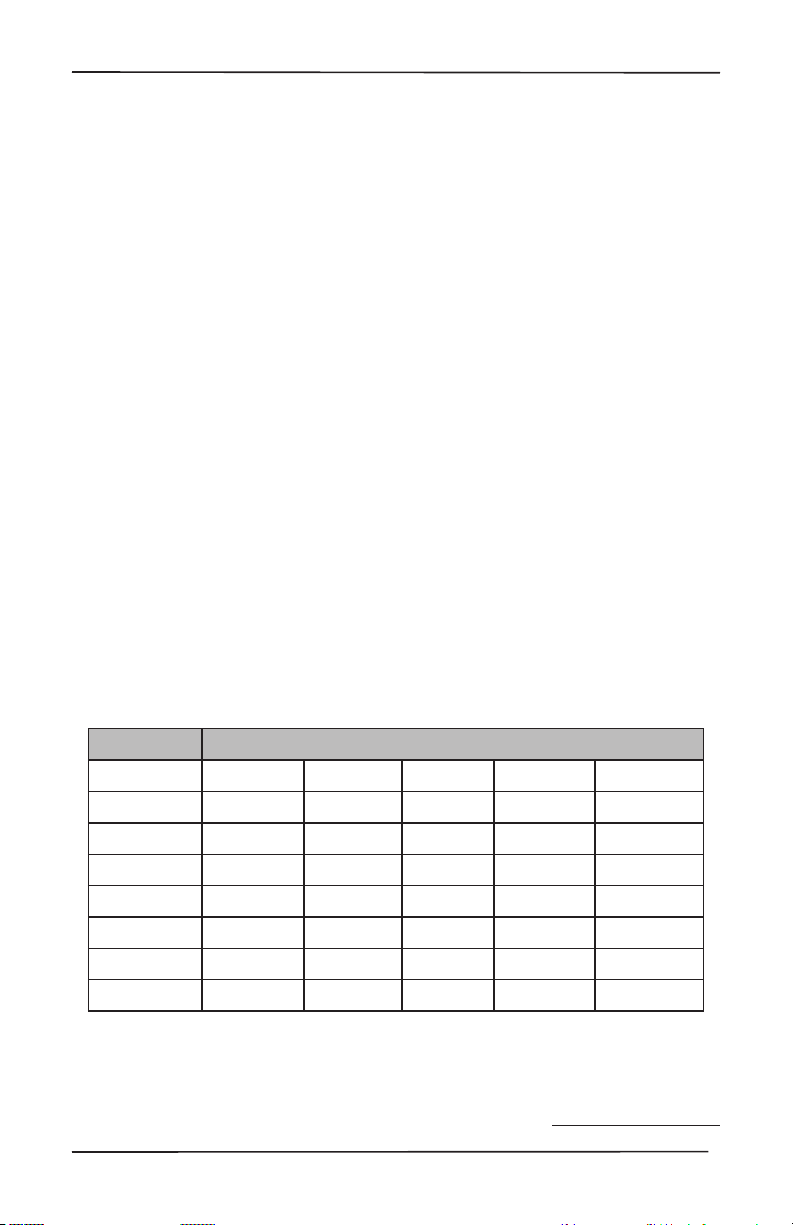
11. Optical Input
12. Digital Coaxial Loop Output
13. Digital Gain Control
14. Stereo Mono Switch
15. EQ Preset Selection Switch
16. Speaker Output Status LED
17. Speaker Outputs
18. AC Power Inlet
19. Power Switch
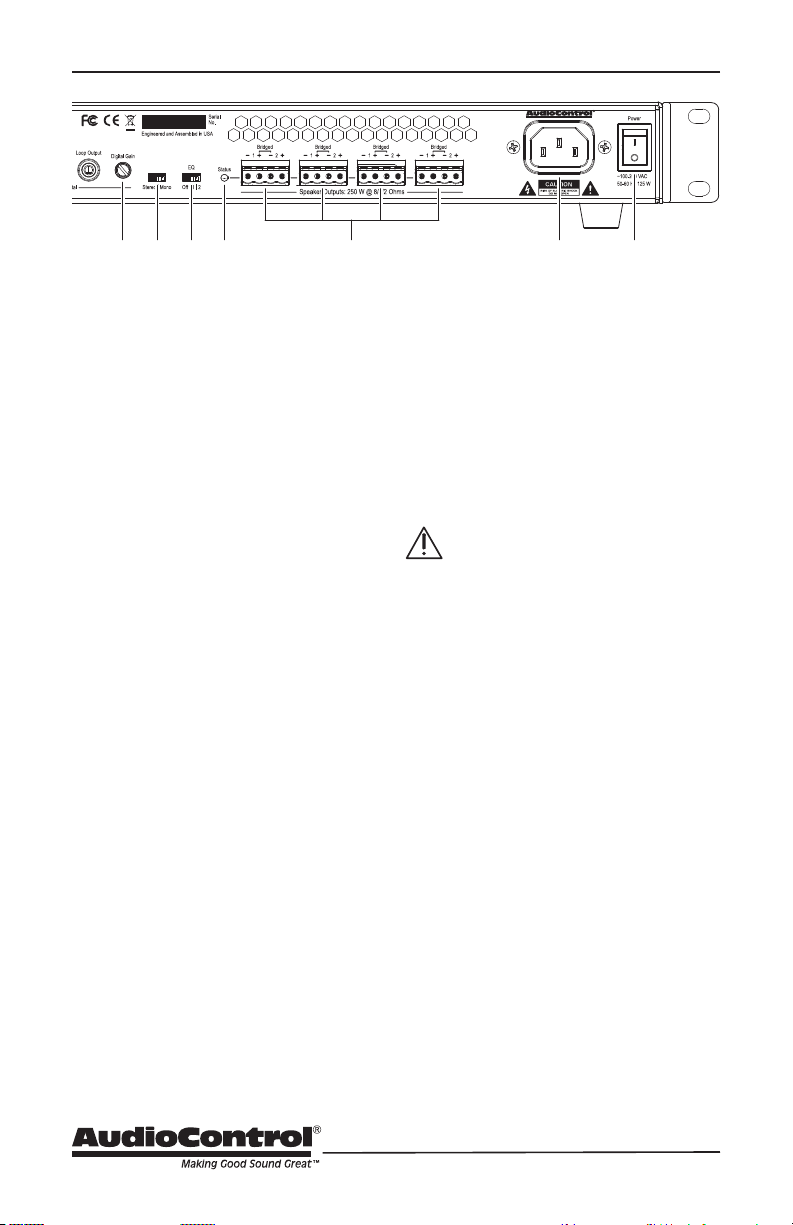
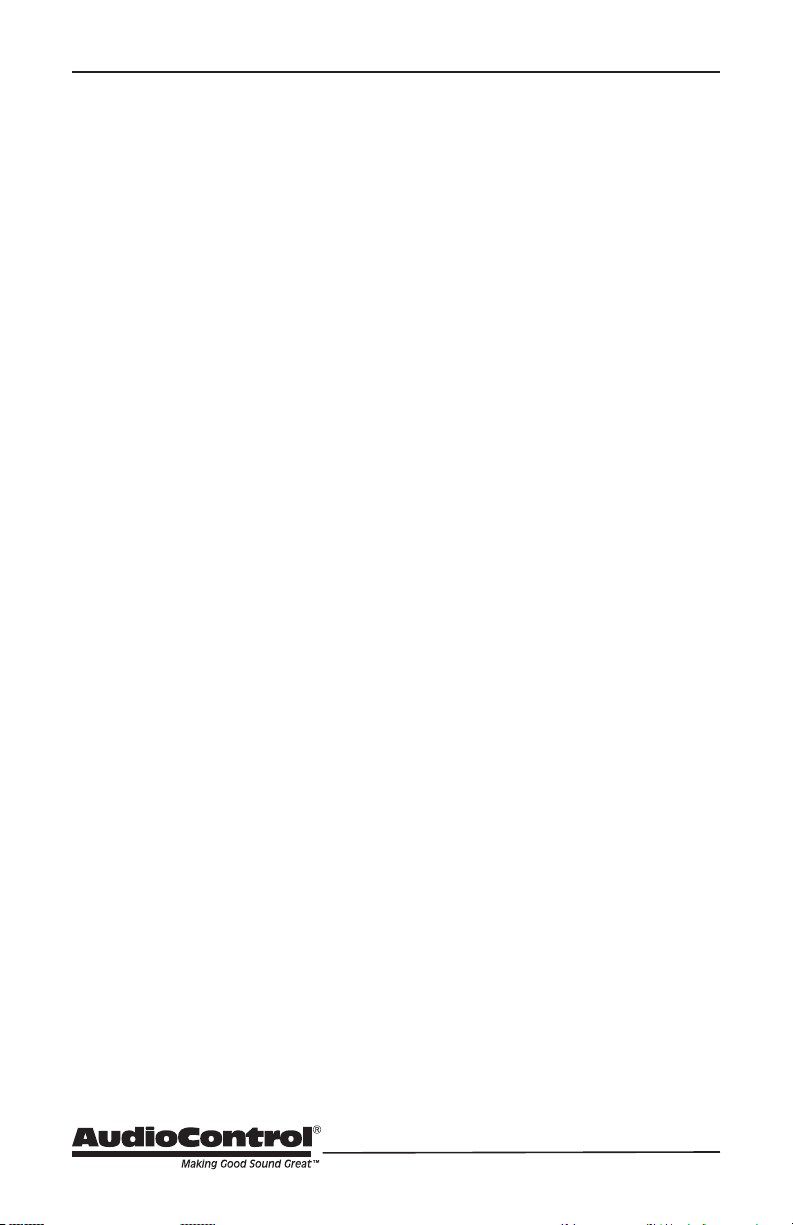
1. Master Trigger
2. +12V Trigger Input
3. Signal Sense On/O
4. Input Priority
5. SDS input
6. SDS Gain control
7. Analog Input
8. Analog Loop Output
9. Analog Gain Control
10. Digital Coaxial Input
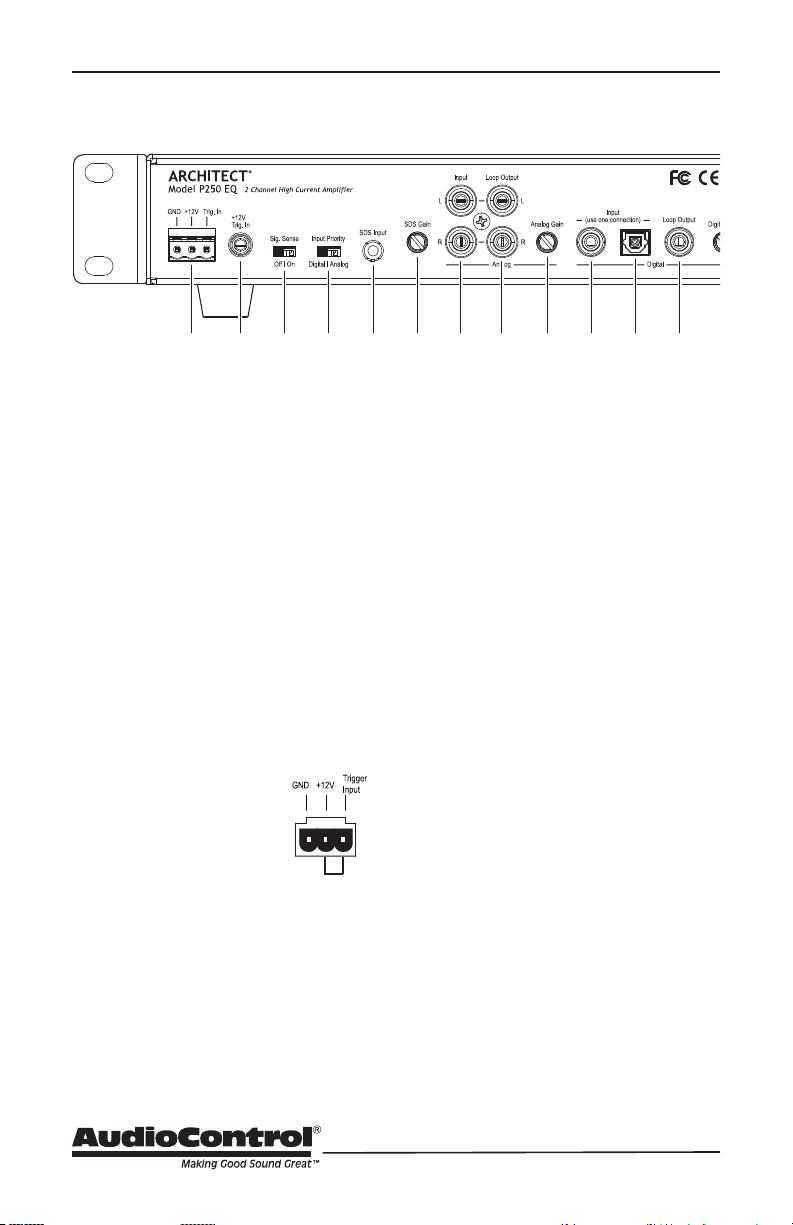
1. Power LED
2. Status LED
3. Protection LED
Front Panel
Quick View
Rear Panel
8
1. -
ponents before making any
connections.
2. When making connections,
designate red RCA plugs as right,
and designate white, black, or gray
plugs as left. This is a good idea for
all signal connections made in your
audio system. The key is consistency.
Stick with the same color coding and
you’ll reduce possible problems.
3. Whenever possible, keep power
cords away from signal cables
to prevent induced hum. This is
especially important if you bundle
the cables to keep the installation
neat looking.
4. Use quality interconnect cables. We
know from experience that really
cheap cables can cause a multitude
of problems. They tend to break
inside or corrode, causing a loss of
signal or hum. They also have poor
shielding.
5. If you need to run the RCA audio
cables more than 20 feet, consider
using an active balanced line driver
for the signals. This will provide
better noise rejection against nasty
things like hum, spikes, local talk
radio, and metaphysical paranormal
phenomena, etc. The AudioControl
balanced line driver components
send audio over long distances with
standard Cat-5 wiring. Check them
out at audiocontrol.com.
6. If you are using the digital input, and
running higher resolution sample
quality digital interconnect cables.
Getting Started
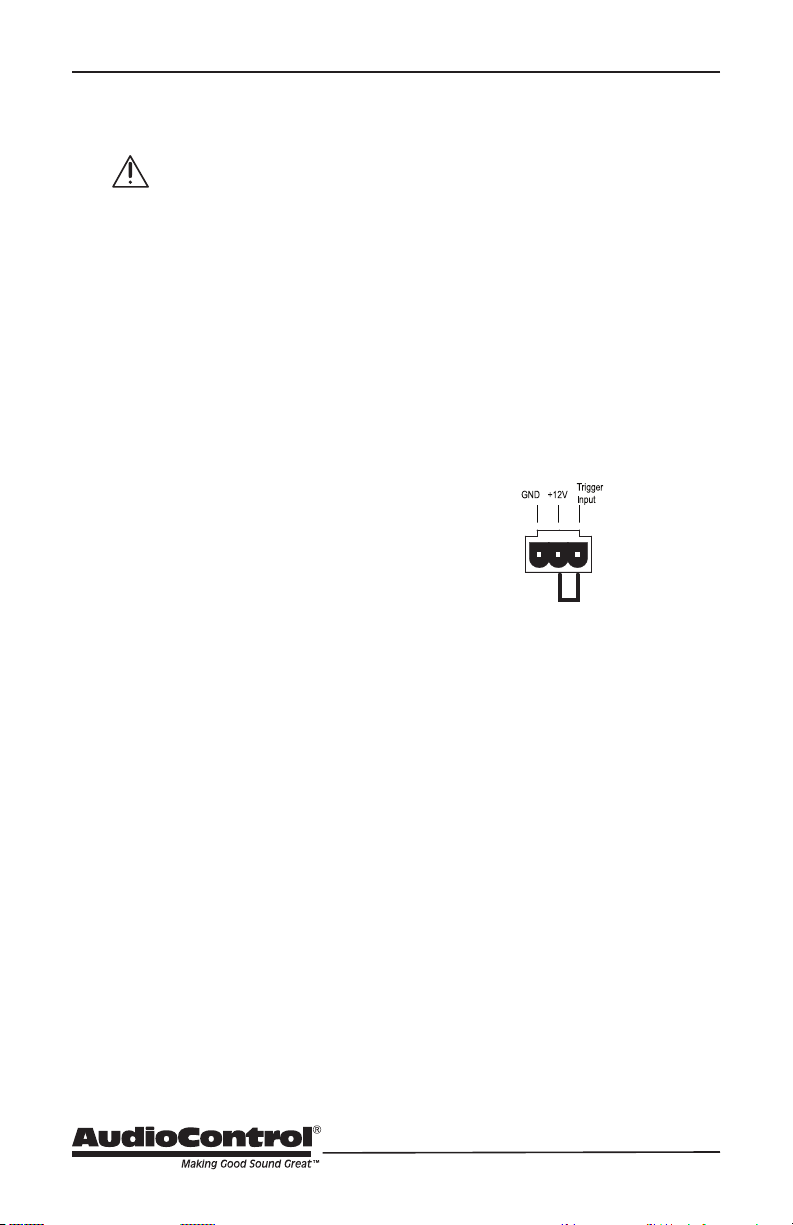
An Important Note about Triggering
The rear panel master trigger connectors
on the unit or place it into standby mode.
If no trigger voltage is present at any of
these trigger inputs, then the unit will be
in standby, with all zones muted. If you
are not using master triggering, then you
must install a short wire link from the 12V
output pin to the trigger input pin of the
3-pin connector.
To put the unit into standby, remove the
link.
Getting Started

9
Installation Manual
Model P250 EQ
ARCHITECT
™
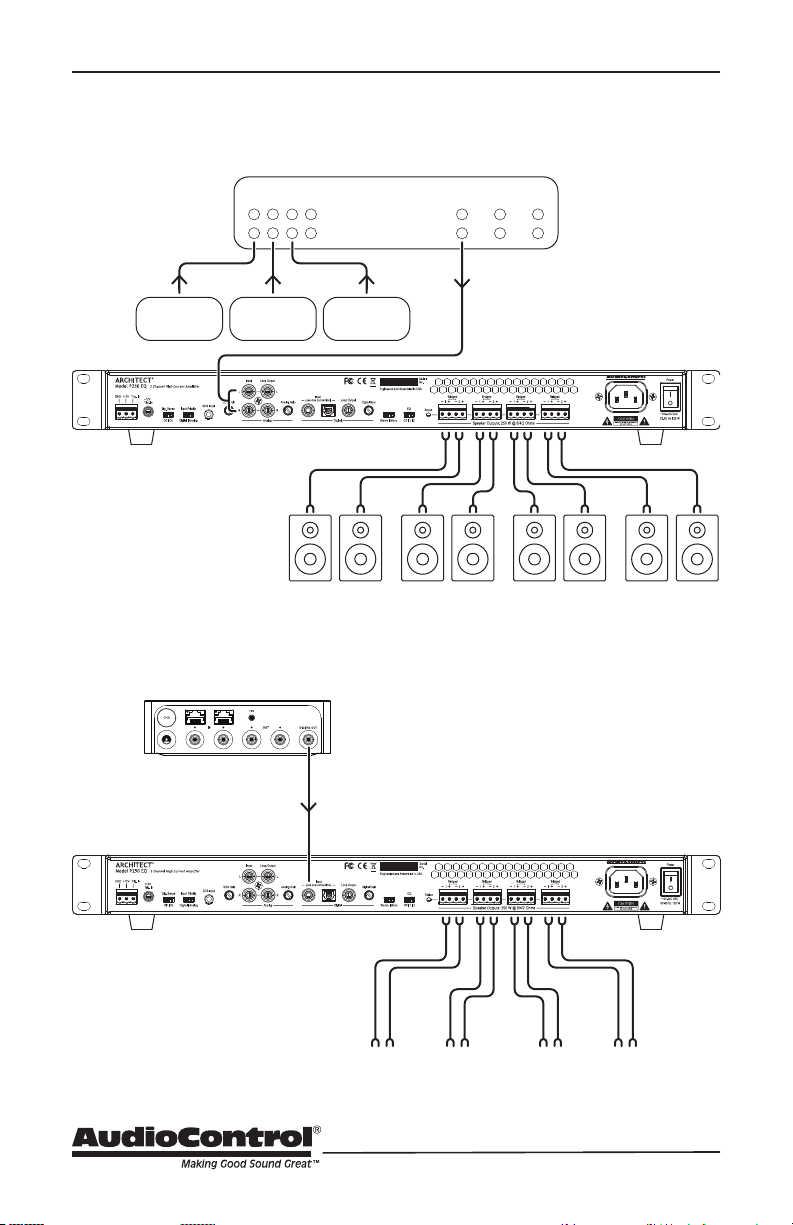
The next page shows two typical installa-
tions of the Architect Model P250 EQ.
with a large living/dining room space that
is set up as a single zone powering 8 small
aperture speakers. Volume and source
control is done through The Director
M6800 via it’s digital output.
The second example small bar where
there are 3 sources connected to an audio
matrix controller where output source
selection and volume control is located.
Installation Examples
Installation Examples
10
Home Installation
Commercial Installation
Audio System Controller
Source Inputs
CD Player Satellite
Music
Server
Analog Source Outputs
Digital Source Output
Dining
Room
North
Dining
Room
South
Kitchen
South
Kitchen
North
11
Installation Manual
Model P250 EQ
ARCHITECT
™
Front Panel
1. Power LED – This dual color LED indi-
cates when the unit is in standby, on,
Red: The unit is in standby mode
and is ready to be turned on
via 12V triggering
Blue: The unit is on
2. Status LED – This dual color LED will
illuminate blue when the unit is out
of standby and the amp is powering
speakers or is ready to power speak-
ers. This LED will illuminate red when
there is a short somewhere along the
the speaker and speaker wire for a
short.
3. Protection LED – This single color
LED illuminates when there is a prob-
lem. After trying to play into a short
for instance, the protection LED will
show red and the amp will stop pro-
ducing power. Both status and power
remove speaker wires and source con-
nections, then reboot. The protection
state should be released and you can
now troubleshoot.
4. Removable Feet – Best make sure
that if you do remove the feet, you still
have a slight air gap between stacked
components.
5. Rack Mount Ears – The unit comes
supplied with removable rack mount
ears. These allow the unit to be rack
mounted in a standard 19” wide rack,
with a 1U height. Use standard rack
mount screws and washers to secure
the unit in a rack. The unit does not
have to be supported at the rear if the
To remove the rack ears (making the
cord, and then locate and undo the
four screws securing each ear to the
side of the chassis, and remove the
ears. Replace the screws securely back
into the chassis. Do not remove any of
the other screws from the chassis or
top cover. There are hazardous voltag-
es inside the unit. Keep the rack ears
carefully wrapped up in a sock under
your pillow. Make a wish and the rack
ear fairy may come.
Front Panel Features
12
Rear Panel
1. Master Trigger – This 3-pin block
connector is used to turn on the unit
or place it into standby mode. You
can also use the 1/8” TS trigger to turn
voltage is present at either jack, then
the unit will be in standby, with output
muted.
To remotely turn on the unit, use
either a contact closure between the
Trigger Input and the +12V output,
or an external +12V trigger between
the Trigger In and GND terminals. To
turn on and keep it on , jump the 12V
output to the 12V input - but keep in
mind the 12V output is not designed
to power other pieces of equipment or
jump start your car.
Pinout:
GND Ground
+12V Output
+12V Trigger Input
2. 1/8” TS Trigger – If you have an
automation system or source device
with a 1/8” TS trigger output, you can
the Architect P250 EQ instead of the
Master Trigger 3 Pin connector.
Pinout:
Tip = +12V Trigger Input
Sleev
e = Ground
Power Up Process: When a +3 to +12V
signal is sensed at the trigger input of
either 1/8” TS connector, or the 3-pin
connector, the Architect P250 EQ will
turn on. The outputs will be held in
standby for about 2 seconds until the
power supplies have fully charged
and performed their self-tests. During
this short process, the front panel
complete, the Power LED will turn a
during this time. Once the Architect
P250EQ is fully powered up, the Status
LED will illuminate Blue if Signal Sense
is a signal present, then it will also be
Blue. If however Signal Sense is on
and there is no signal present during
boot up, then the Status LED will not
illuminate.
3. Signal Sense Switch – This switch
controls whether the zone is always
active when the master 12V trigger is
active, or if the zone stays in standby
until a signal is sensed. If signal sense
standby until an audio signal greater
than 5 mV is detected. The zone will
remain active whenever a signal is
present. After two minutes with no
signal detected, the zone will return to
standby.
Rear Panel Features

13
Installation Manual
Model P250 EQ
ARCHITECT
™
4. Input Priority Switch - Specify the
active input stage you have from your
source here. If you are using either the
optical or digital coaxial input, select
digital. If you are using analog RCA
Inputs, select analog. If you are using
both and want to switch between
the two input stages, select the one
you want to be prioritized. If the
non-prioritized input is active then the
prioritized input becomes active, the
prioritized input will cause the input
stage to switch to the prioritized input.
5. SDS Input - Use this input with event
based audio sources like voice-noti-
and doorbells. Connect your product
here and the audio from the analog or
digital input will mute when a signal
is sensed on this SDS input. That SDS
audio will now become the active
input. After 2 to 3 seconds of no con-
tent from this input, the active source
switches back to the analog or digital
input. Great for door bells, voice
enabled devices or periodic applause
tracks.
6. SDS Gain – Control the gain of the
SDS Input source here to balance
out the volume of that source vs the
analog or digital input. You can make it
louder or quieter with this control.
7. RCA Input - connect your line level ana
-
log input here with RCAs.
8. Loop outputs
outputs will pass the content from the
analog inputs right back out to any down
-
stream device
9. Analog Gain Control - Use this control
knob to increase or decrease the input
gain of the analog input stage. Turning
up this control knob will increase the sig
-
nal to the amp stage. Take care not to clip
this input stage as maxing out your gain
with a common signal from a streamer
for example will likely bring about the
objectionable sounds of a distorted input.
turning up this control. Leaving at the
default detente is really the way to go.
If you are using a phone as your source
- you would turn this up. If the source
is coming from a analog matrix distro -
leave at detente or turn down a touch.
10. Digital Coaxial Input - For sources with
Digital Coaxial outputs, you can connect
it to this digital input. Make sure to use a
Digital Audio RCA cable as the imped
-
ance is tightly control and will make the
connection robust. Using a standard RCA
may be OK for a while but you’re sure to
a get a drop out or two. Using the right
cable will eliminate many troubleshoot-
ing steps.
11. Optical Input - For those sources with
a Toslink Optical digital audio output,
connect that source to this input.
12. Digital Loop Output - This loop out will
pass through either digital audio input -
the Digital Coaxial or the Toslink Optical
inputs.
***Important note - the loop outputs -
analog or digital - are not eected by the
Gain controls
14
13. Digital Input Gain Control - This knob
will boost or cut the gain for the digital
input stage. Best leave at detente
and double check full system volume
before making adjustments to this
control.
14. Stereo/Mono Switch - If you have
a large zone where left and right
imaging isn’t feasible, switch it over to
mono. Switching to Mono will give you
a summed stereo signal on both the
left and right channel outputs. When
running bridged, set this to mono as
well.
15. EQ Switch - Use this to setting to
were developed over many years and
many installs. EQ 1 is tailored for Small
speaker. EQ 2 is a loudness curve -
boosting the bass and treble a bit.
16. Status LED - This illuminating LED
will shine brightly when the amps are
charged and ready to output or as
content is output through the speaker
level outputs and mirrors the front
panel status LED.
17. Speaker outputs - Connect your
speakers here! These speaker outputs
are internally wired in parallel. Each
output terminal is connected to left/
Up to 4 pairs of 8 ohm (not 4 pairs of
these terminals (one pair per termi-
Architect Model P250 EQ can drive low
impedances, even down to 2 ohms,
single zone and distributed small aper-
ture speaker system designs.
Bridged operation - connect the
speaker to the center two pins of the
speaker level output. There is a U
bracket on the silkscreen to guide you.
When rack-mounting the unit,
make sure that the power cord and
the AC power switch remain readi-
ly accessible.
18. AC Inlet - Connect the supplied AC
power cord securely to this input. Plug
the other end into an AC mains outlet.
The power supply operates at both
110V and 220V - no switches. Just plug
it in to our main AC outlet and you are
19. AC Power Switch - This switch shuts
system is going to be shut down for an
extended period of time.
15
Installation Manual
Model P250 EQ
ARCHITECT
™
Speaker and Wiring Impedance
Wire Gauge Run Length
25’ 50’ 100’ 250’ 500’
24 GA
22 GA
20 GA
18 GA
16 GA
14 GA
12 GA
Speaker Wire Resistance:
Wire Gauge versus Run Length
Be aware
dips from “nominal” values in portions
of their frequency range, and speakers
that are rated at unusual impedances, for
example 3.5 Ohms. The Architect model is
tolerant of lower impedance loads, how-
ever, all good designs use some margin of
error.
Your choice of speaker wire gauge and the
-
ers. As you can see in this table, even fairly
resistance if you use a smaller wire gauge.
lots of speakers. The wire itself acts as
cannot see a speaker load lower than the
resistance of the wire. The downside of
this wire resistance is that you waste some
part of the total power available to the
speakers.
Speaker impedance often is and should
be straight forward. Speakers, like other
resistors, if wired in parallel “show” lower
values than the individual components.
Here are two examples for calculating
speakers wired in parallel:
Calculating Impedance
For three 8 Ohm speakers wired in
the impedance is 1/8 + 1/8 + 1/8 = 3/8
Then take the inverse or 8/3 = 2.66 Ω
For two 8 Ohm speakers wired in
the impedance is 1/8 + 1/8 = 2/8
Then take the inverse or 8/2 = 4 Ω
Often the real world is more complicated
than theory, and for speakers this is the
case. An 8 Ohm speaker is not 8 Ohms at
all frequencies. Plus passive crossover net-
works add their own changing conditions.
Speaker Wiring and Impedance
16
Ventilation
This may be as good a time as any to have
“the talk” about ventilation. The Architect
model P250 EQ features a cool-running
thermally controlled fans. This is a pow-
requires plenty of good ventilation to
properly cool.
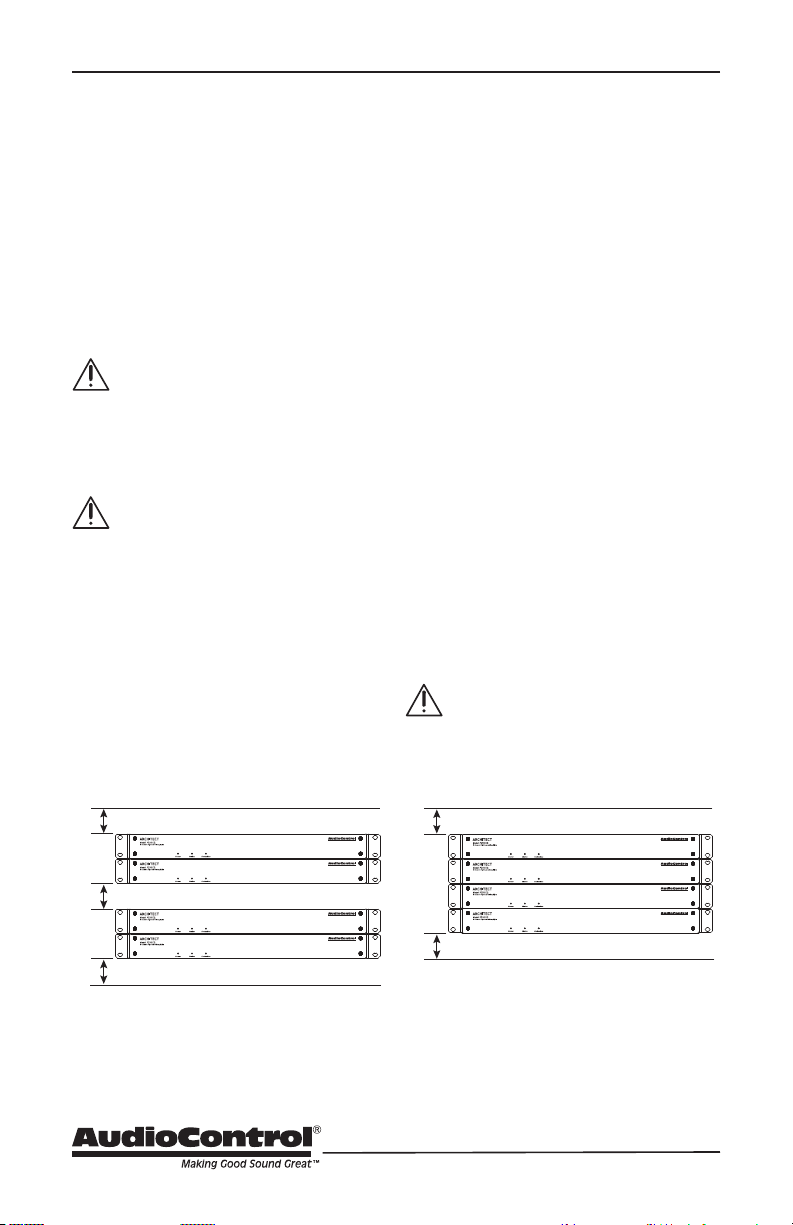
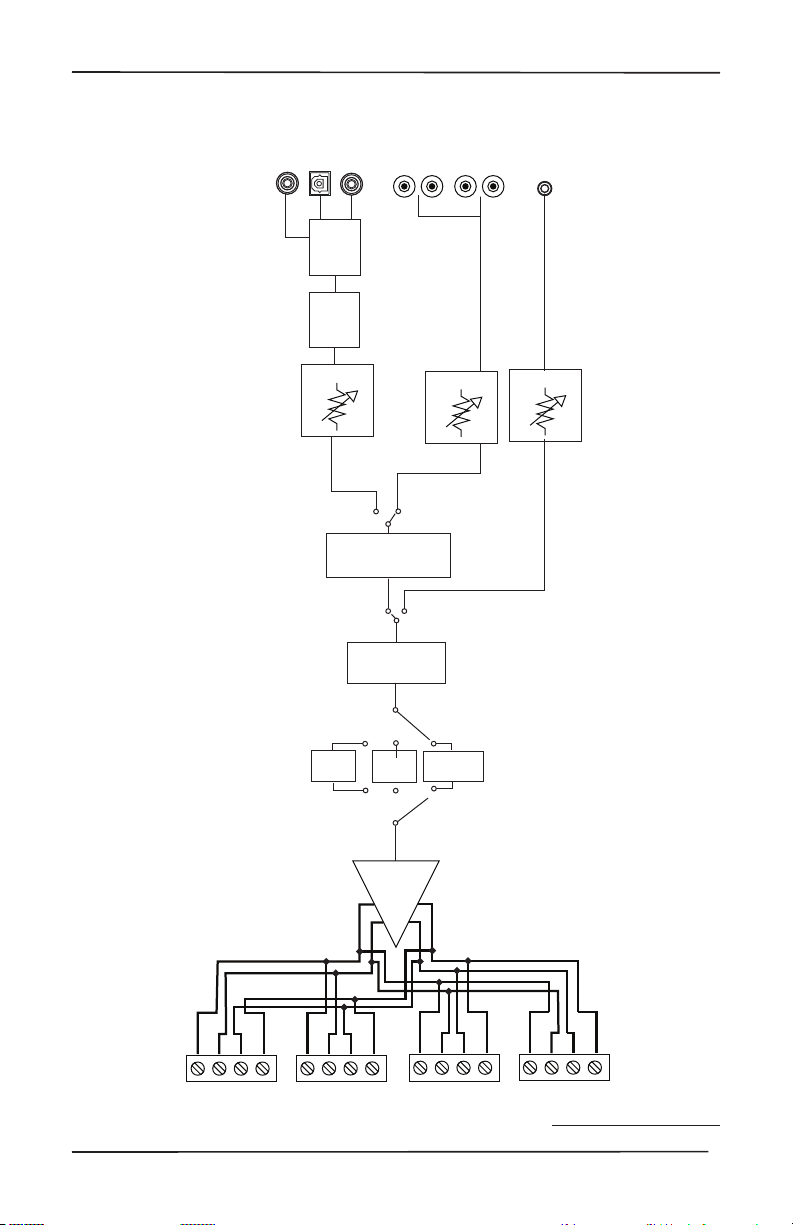
Please be advised that no more
than 4 Architect may be stacked
together. Any more than that,
then an empty rack space above
and below is required for adequate
ventilation.
-
tions and ensure that your rack
room meets these requirements.
sensor will put it into standby mode,
allowing the heatsink to cool down.
reactivate. If this occurs often, identify the
cause of the problem and take corrective
action, for example:
• Provide additional ventilation
• Do not install in a sealed location
• Install a fan in the rack
•
not overloaded with speaker im-
pedances below the recommended
minimum
• Check that there are no short
circuits in the speaker cables or
speakers. Note: Each zone will shut
circuit is detected.
1U
1U
1U
1U
1U
Ventilation
Ideal Spacing 1U rack space or more
above and below each pair
No more than four units can be
stacked without a rack space be-
tween them. Allow 1U rack space
or more above and below each
stack of four.
17
Installation Manual
Model P250 EQ
ARCHITECT
™
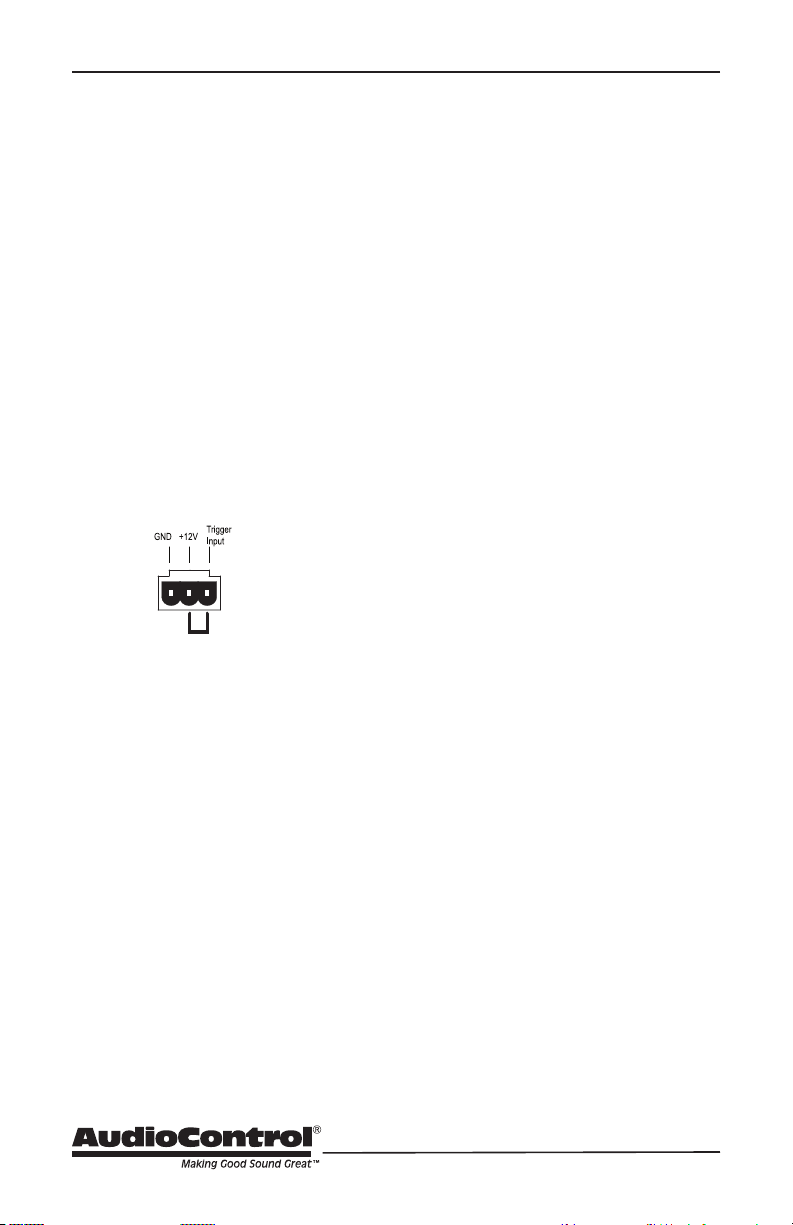
Signal Sense
Priority switch
Analog Input
Analog Loop
Output
Digital Input
Digital Loop
Output
SDS Input
SDS Detection
Switch
Digital
transceiver
DAC
Gain
Gain
Gain
EQ 1
Flat/No EQ
EQ2
Amplifiers
Speaker
Outputs
Block
Diagram
Block Diagram
18
Troubleshooting
Many problems can be eliminated by
re-checking the wiring and settings of the
unit. If a problem cannot be solved using
the guide below, please call the AudioCon-
trol team for further assistance, or e-mail
us at [email protected]
1. No Sound
a. Verify the Power LED is Blue.
b. Verify Status LED is Blue.
d. If you are not using master trigger-
ing, check that there is a wire link
between the +12V pin and the Trig-
ger Input pin of the Master Trigger
3-pin connector block.
e. Verify the source unit is operating.
f. Check the speaker connector plugs
on the rear panel.
g Unplug the power cord and leave
for 1 minute. Reconnect power
and turn the unit on and check for
audio.
2. Protection LED is o, but none of
the Zone Status LEDs are on:
a. Defeat the signal-sense circuits
using the zone DIP switches on the
rear panel. All of the zone status
LEDs should turn on. If not, call
AudioControl’s customer service.
b. Verify the source unit is operating.
c. Increase the preamp volume if sig-
nal sense is engaged, or just going
steady.
d. Adjust the rear panel zone gain
controls clockwise.
3. Channel Status LED is Red:
a. Check speaker leads for a short.
Swap speaker connectors on rear to
see if the problem moves with the
wires.
b. If the unit is excessively hot, turn
down the volume and allow it to
that any ventilation holes have not
become blocked.
c. The speaker impedance may be too
low. Use an Ohmeter to measure
the impedance on the speaker
wires.
4. Speaker channels are cutting in and
out:
a. If using external volume controls,
check that they can handle the
power output.
b. Make sure the speaker impedance
is not less than 2 Ohms, or 4 Ohms
when used in bridged mono.
c. There may be a short in the wires.
Suspect a short if the problem hap-
pens only at the highest volumes.
5. Protection LED is Red:
a. Disconnect power from the unit
for 3 to 4 minutes and reconnect to
power.
b. Disconnect all speaker wires. If
it still turns red, and the unit has
cooled, something rather serious
has happened inside the unit. Call
AudioControl’s lonely folks in cus-
tomer service.
Wire Link
Troubleshooting

19
Installation Manual
Model P250 EQ
ARCHITECT
™
6. Speaker Buzzing or Crackling at high
volume:
-
boost that might be happening in
an upstream device.
b. Reduce the gain on the active input.
b. Take a moment and remove the cod
deep frying from your kitchen stove
and listen again.
7. There is no audio input signal, but
the Zone Status LED are still blue:
a. Check the signal-sense switches
on the rear panel. If they are not
engaged, the zone status LEDs will
stay on as long as the master trig-
ger is enabled.
b. The zone status LEDs stays on for
2 minutes (depending on music
stopped. This delay helps prevent
prematurely muting during quiet
passages or song changes.
8. The unit is on but you cannot trigger
it o
The unit will stay on if either the 12v
master trigger is on, or jumpered on.
9. Is an in-wall volume control rated at
100 Watts (continuous) adequate?
• Not at all. Go for one with a higher
rating of about 300 watts if you
want a reliable long-lasting system.
Although the Architect model P250
EQ is rated at 250 Watts, it is a con-
servative number. In contrast to the
conservative rating of the Architect
model P250 EQ, the wall volume
control may be rated using favor-
able assumptions. Also make sure
the volume control power rating is
continuous not peak. The contin-
uous rating is about one-third of
peak.
20
P250 EQ Specications
Output Power
Per Channel .......... 250 Watts @ 8 Ohm, 250 Watts @ 4 Ohm , 250 Watts @ 2 Ohm
Bridged Mono ......................................... 500 Watts @ 8 Ohm, 500 Watts @ 4 Ohm
Signal to Noise Ratio ..............................................
Frequency Response .................................................
Crosstalk ............................................................................................... > 80 dB @ 1 kHz
Damping Factor ...................................................................................................... >100
Gain ....................................................................................................................... 27 dB
Analog Input Sensitivity ....................................1 Vrms for full output, level at maximum
.......................................... 32 – 192 kHz sample rate, 16/24 bit depth
AC Power Requirements
Standby ..................................................................................................... 1.5Watts
......................................................... 18 Watts
All channels active ..................................................................................... 24 Watts
All channels 1/8th rated power .................................................................... 87Watts
Full Power ................................................................................................ 591 Watts
BTU/hr Output
Standby .................................................................................................. 5.1 BTU/hr
....................................................... 61 BTU/hr
All channels active ................................................................................... 82 BTU/hr
All channels 1/8th rated power ............................................................... 108 BTU/hr
............................................ 268 BTU/hr
Dimensions
Height ......................................................................................................1.75"
............................................................................................... 19.0"
................................................................................................17.0"
Depth .............................................................................................................. 13.5"
Weight ............................................................................................................ 15 lbs
Please note: Because of AudioControl’s bold and daring quest to push back the frontiers of
audio perfection, all specications are subject to change without notice, and at any time,
including (and not limited to) breaktime, lunchtime, and afternoon tea in engineering.

21
Installation Manual
Model P250 EQ
ARCHITECT
™
Service
First, if you need service, it is probably
best to go and see a trained health care
professional.
If the Architect Model P250 EQ needs
service, then please contact AudioControl,
either by e-mail or phone. We will verify if
there is anything wrong in the system that
you can correct yourself, or if it needs to
be sent back to our factory for repair.
If it does end up that it needs to return
home for some care, make sure that
the nice and friendly tech support folks
provide you with an RMA number. They’ll
want to give you one so you and they can
track the product, know when it’s arrived,
give you a call should any questions arise
Please include the following items when
returning the unit:
1. An RMA number
2. A copy of your proof of purchase. No
originals please. We cannot guarantee
returning them to you.
3. A brief explanation of the trouble you
are having with the unit. (You’d be
surprised how many people forget
description of the problem, this would
be so much better, and our service
technicians may add you to their
Christmas Card list. Please include any
notes about the system, whether or
not pineapple is really a pizza topping,
and other components you are using.
Is it an intermittent problem that only
4. A return street address. (No PO Boxes,
5. A daytime phone number in case our
technicians have a question about the
problem you are having, or if they are
just feeling lonely.
6. Package the unit in the original
packaging if you still have it, and if the
cat hasn’t had three litters of kittens
in the box. Use great care and plenty
of good packing materials to protect
the unit and prevent it from moving
about inside the box. Do not use loose
materials like packing peanuts or real
peanuts.
You are responsible for the freight charges
to us, but we’ll pay the return freight back
as long as the unit is under warranty. We
match whatever shipping method you
use to send it to us, so if you return the
unit overnight freight, we send it back
overnight. We recommend United Parcel
Repair service is available at:
Attention: Service Department
22410 70th Avenue West, Suite 1
Mountlake Terrace,
WA 98043 USA
Phone 425-775-8461
FAX 425-778-3166
e-mail:
What to do if you need service
22
The Warranty
In just the same way as being covered in
honey and thrown into a dark pit full of
hungry woodchucks, people are scared of
waiting around. Well, fear no more. This
warranty is designed to make you rave
about AudioControl. It’s a warranty that
looks out for you and your client, plus
helps you resist the temptation to have
your friend Sparky, who’s “good with elec-
tronics,” try to repair your AudioControl
product. So go ahead, read this warranty,
then register the information at www.
audiocontrol.com/product-registration
and include your comments.
Our warranty has conditional conditions!
“Conditional” doesn’t mean anything
ominous. The Federal Trade Commission
tells all manufacturers to use the term
to indicate that certain conditions have
to be met before they’ll honor the war-
ranty. If you meet all of these conditions,
AudioControl will, at its discretion, repair
or replace any AudioControl products
that exhibit defects in materials and/or
workmanship during the warranty on your
at our option, during that time.
Here are the conditional conditions:
1. You must fully register your purchase
within 15 days of the purchase date
by going to the AudioControl product
registration page at www.audiocon-
trol.com/product-registration. Failure
to register your product will negate
the warranty.
2. You need to hold on to your sales
receipt! All warranty service requires
original sales receipt documentation.
The warranty only applies to the
original purchaser from an authorized
AudioControl dealer. Note: Products
purchased from unauthorized dealers
are not covered under warranty.
3. If an authorized AudioControl dealer
installs your AudioControl product,
4. Our warranty covers AudioControl
products that have been installed
according to the instructions in the
installation manual.
5. You cannot let anybody who isn’t:
somebody authorized in writing by
AudioControl service your AudioCon-
product, the warranty is void.
6. The warranty is void if the serial num-
ber is altered, defaced or removed, or
if your product has been used improp-
erly. Now that may sound like a big
loophole, but here is what we mean
physical damage (don’t use your prod-
into the RCA jacks can fry the poor
know how to build, but for example
if you mount it to the front bumper
of your car, drop it over the Niagara
Falls or use it for Clay Pigeon shooting
practice, something will go wrong.
Assuming you conform to 1 through 6, and
it really isn’t all that hard to do, we get the
it with a new one at our discretion.
In the event that your product is out of
warranty or not covered under our warran-
ty you may request to have any damage
repaired at our normal “Out of Warranty”
repair cost.
Please Remain Calm

23
Installation Manual
Model P250 EQ
ARCHITECT
™
Legalese Section
This is the only warranty issued by Audio-
legal rights, and you may also have rights
that vary from state to state. Promises of
how well your AudioControl product will
work are not implied by this warranty.
Other than what we’ve said we’ll do in this
warranty, we have no obligation, express
or implied. We make no warranty of mer-
purpose. Also neither we nor anyone else
who has been involved in the develop-
ment or manufacture of the unit will have
any liability of any incidental, consequen-
tial, special or punitive damages, includ-
damage to other parts of your system by
hooking up to the unit (whether the claim
is one for breach of warranty, negligence
Some states do not allow limitations of
consequential damages.
24
Hurrah, you are done!
PN 913-173-0 Rev B
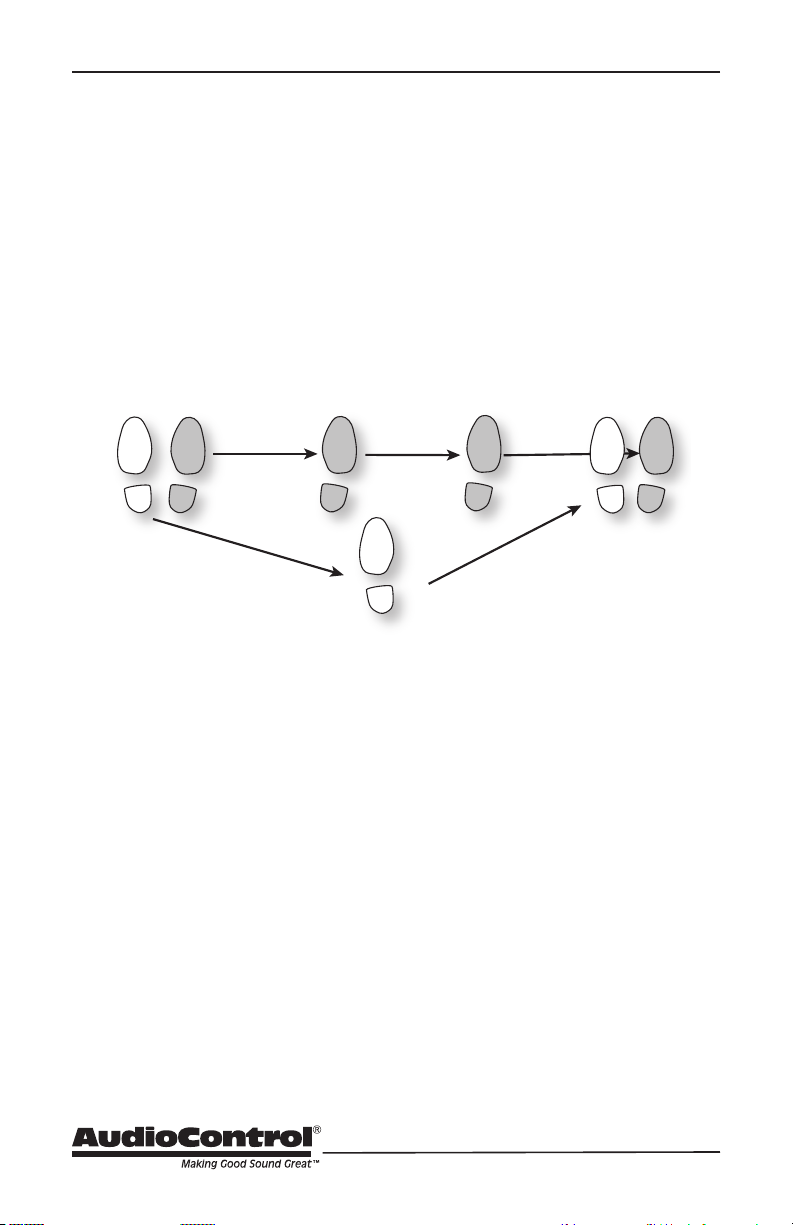
Right Grapevine
2
1
4
3
4