
INSTRUCTION
MANUAL
FOR MODEL
DC40 DRAWER FRIDGE/
FREEZER
PLATINUM SERIES


Please read operating manual carefully before using your unit.
Please keep manual in a safe place.
If lost find a digital copy at Evakool.com.au or contact Evakool on
1300 385 665.
3
Key Product Features
• Powered by 12 Volt DC Compressor.
• Reliable electronics, high eiciency, low energy consumption.
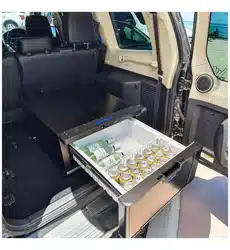
• Built-in drawer compartment.
Contents
1 Safety Instructions ................................................................................................ 4
2 Notes On Using The Product ............................................................................. 4
3 Operation ................................................................................................................ 4
4 Cleaning & Maintenance ..................................................................................... 6
5 Troubleshooting .................................................................................................... 6
6 Installation Instructions . . . . . . . . . . . . . . . . . . . . . . . . . . . . . . . . . . . . . . . . . . . . . . . . . . . . . . . . . . . . . . . . . . . . . . . . . . . . . . . . . . . . . . . 8
7 International Certification Approvals ............................................................... 9
8 Dimensions ........................................................................................................... 10
9 Parts ........................................................................................................................ 11
PLATINUM SERIES
4
1 Safety Instructions
• Warning: Do not use your unit if any cabling is damaged, frayed or exposed.
• Warning: Do not attempt or continue to operate your unit if it is wet.
• When using the unit ensure the circuit being used has a fuse or circuit breaker,
recommended size for DC 12 Volt is 15 Amp, DC 24 Volt is 7.5 Amp.
• Make sure the voltage is within the correct range for socket and cable being used.
• Do not place any electrical devices inside the refrigerator as they may be damaged.
2. Notes On Using The Product
• Your unit requires good ventilation, especially around the vents of the refrigerator; allow
a gap of at least 100mm around all vents.
• Do not allow a large amount of frost to build up on the inside walls as this may impair
cooling. Defrost by turning the unit o, allowing the frost to melt and wiping out the
water.
• The lower the ambient temperature, the lower the power usage. In order to maximise
eiciency keep the unit in a cool location out of direct sunlight.
• It is recommended to operate the unit on a flat surface, but it will operate at angles up to
30°.
3. Operation
• Power: DC (12 and 24 Volt)
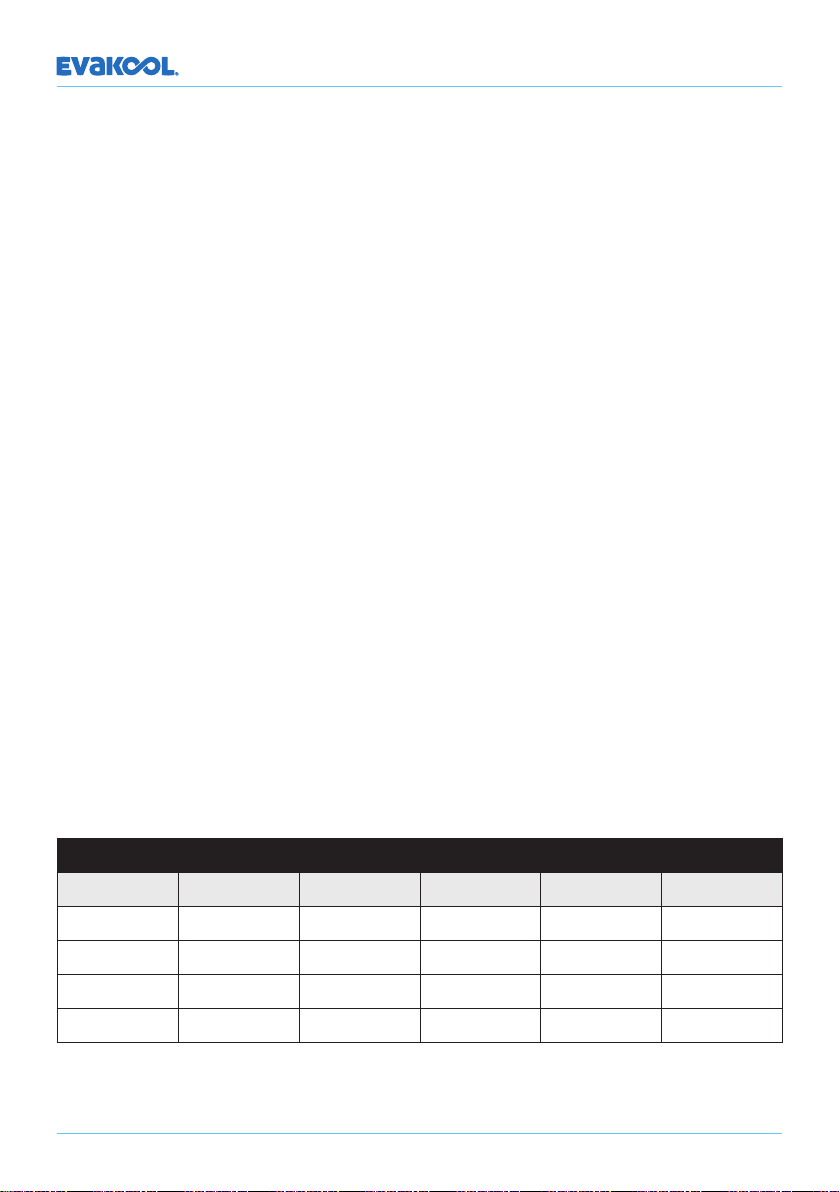
• Cable Length Specification
The DC cables must have a suitable cross-section for their length (measured from the
battery to the unit), according to this table:
Cable Thickness (Area) 12V Max Cable Length 24V Max Cable Length
(mm
2
) AWG (m) () (m) ()
2.5 14 2.5 8 5 16
4 12 4 13 8 26
6 10 6 20 12 39
10 8 10 33 20 66
PLATINUM SERIES
5
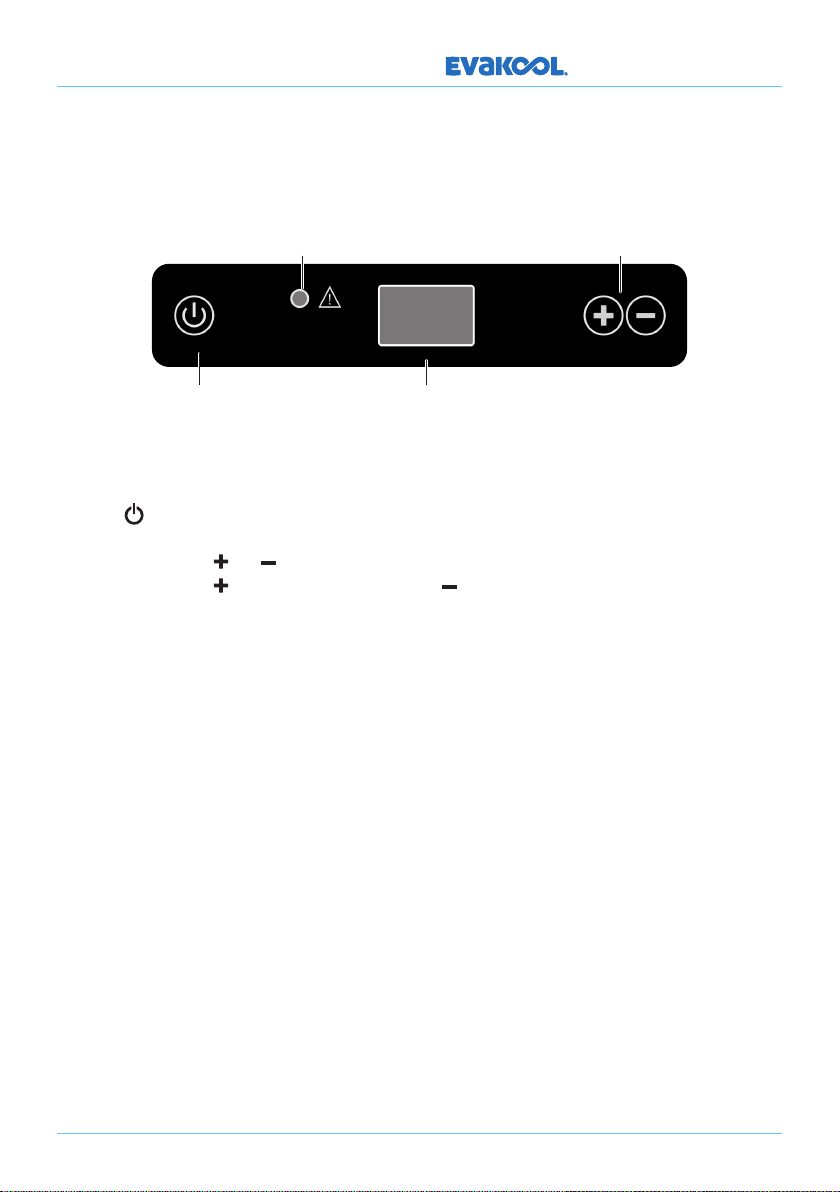
LED Control Panel
Temperature setting range: -18°C to 10°C.
• Plug in the DC power cable.
• Press button to turn on unit. The LED display on the control panel will turn on and
the interior temperature is displayed.
• Press the button or button to adjust the temperature the unit aims to achieve.
Press the button to increase or the button to decrease the temperature.
• If the power supply is cut o or disconnected, the unit will switch o automatically and
once the power supply is restored it will automatically switch back on.
LED Display
Fault
Indicator
On/O
Switch
Temperature
Controls
DC40
PLATINUM SERIES

6
4. Cleaning & Maintenance
• Clean the appliance inside and out with a clean damp cloth every week. If it is dirty, use
sodium bicarbonate dissolved in lukewarm water to clean the unit.
• Never use abrasive products, detergents or soap. Aer cleaning, wipe out with a clean
damp cloth and dry carefully.
• Do not store product inside unit if the unit is not on
• Do not store the unit if it is wet inside or without leaving the lid open.
• Never clean the unit under running water or in dish water. Do not use abrasive cleaning
agents or hard objects during cleaning as these can damage the unit.
5. Troubleshooting
The Unit is Not Turning On
• Check whether the unit has been turned on.
• Check the power supply (try a dierent power source/vehicle/socket).
• Check whether the plug and the socket have a good connection.
• Check whether the fuse has been burned out or blown.
Low Refrigeration Performance
• Too much product been placed inside the unit.
• There is too much warm product inside the unit .
• The lid is unlatched / or open.
• The lid seal is broken.
• Problems arising from poor ventilation (allow 100mm of space around all vents).
• The ambient temperature is too high.
• The temperature setting is too high.
Yellow Fault Light Flashing
1 Flash every 4 seconds: Low Voltage
• Try on dierent power source (vehicle or 240V AC power). If changing power source fixed
issue, then possible issue with original power source.
• Ensure cabling between fridge and battery is at least 4mm, if the distance is more than 2
metres then use at least 6mm cable.
PLATINUM SERIES

7
2 Flashes every 4 seconds: Fan Issue
• Fan is drawing too many amps (over 0.5 amps), replace fan.
3 Flash every 4 seconds: Compressor Start Issue
• Unplug cable and allow unit to rest for 10 minutes.
• Try on dierent power source (vehicle or 240V AC power).
• Electronic box fault.
• Compressor fault.
4 Flash every 4 seconds: Low Motor Speed
• Reduce products / items inside unit.
• Move so unit is in a lower ambient temperature clean vents / ensure clear air flow over
compressor.
• Fan fault.
5 Flash every 4 seconds: Over Temperature
• Ambient temperature too high.
• Clean vents / ensure clear air flow over compressor.
• Fan fault.
Can hear the sound of running water from inside the unit
• This is normal, due to the flow of refrigerant in the unit.
Unusual noise when refrigerator is working
• The refrigerator is not placed on a level surface.
If none of the above solves your issue please contact Evakool on 1300 385 665 or
warranty@evakool.com for details of your closest Evakool service centre.
PLATINUM SERIES
8
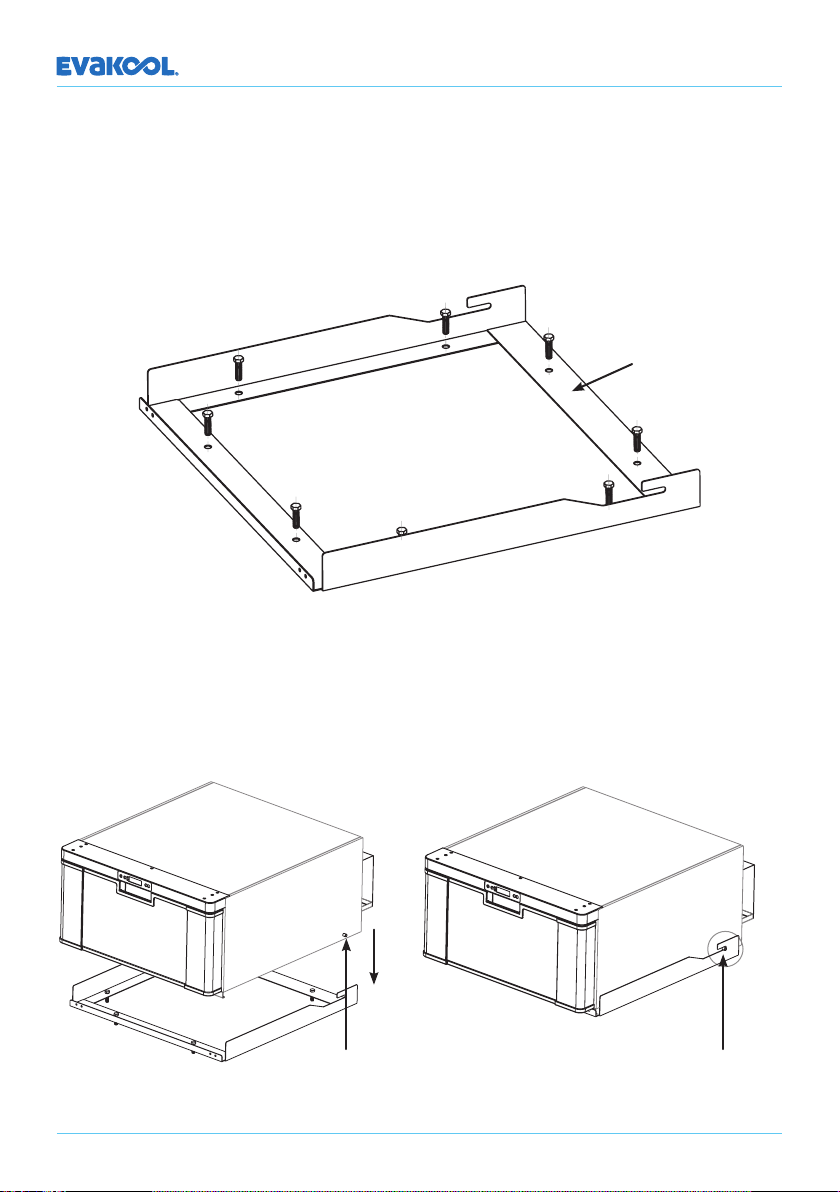
6. Installation Instructions
a. Remove the mounting frame from the fridge.
b. Locate the mounting frame into the position you wish to install the fridge.
c. Use the screws provided to fix the mounting frame to the base.
d. Insert the drawer fridge onto the mounting frame. Ensure the locating lugs are securely
inserted into the locating slots.
Locating Lug
Mounting Frame
Securing Slot
PLATINUM SERIES
9
7. International Certification Approvals
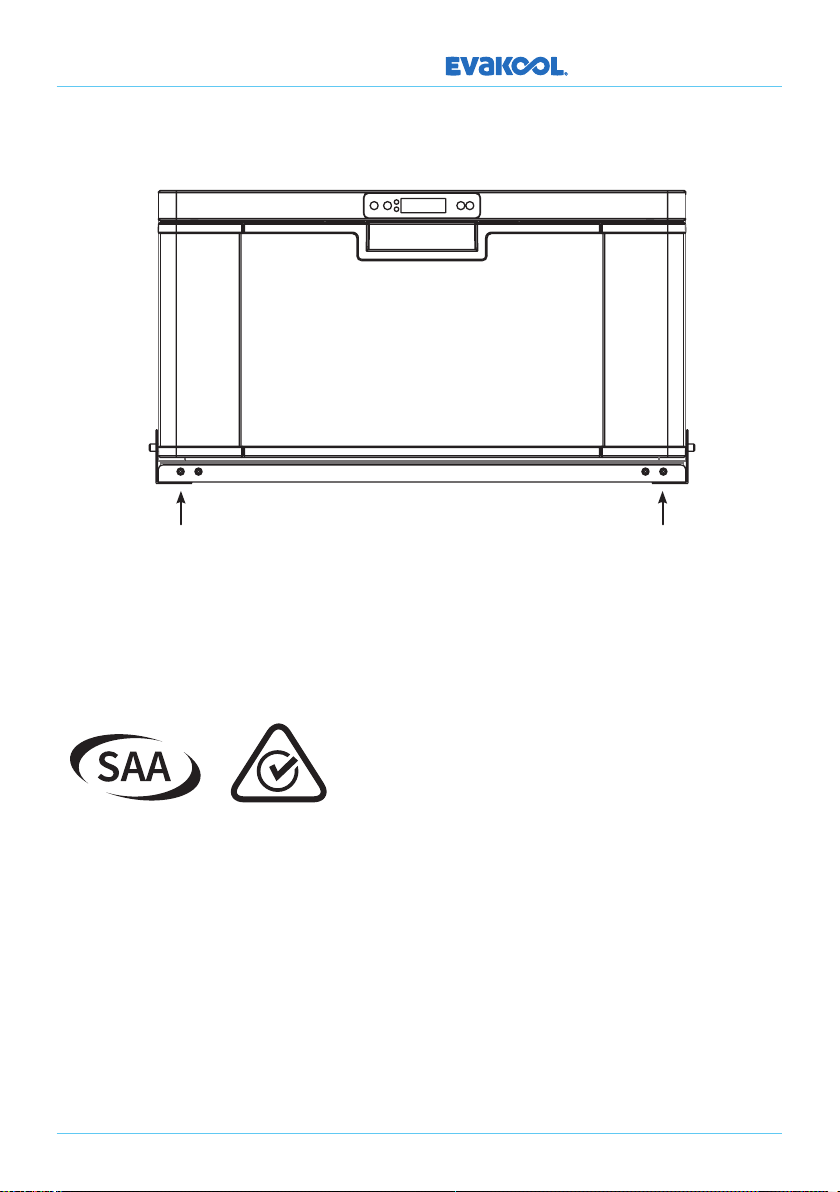
e. Using the 4 screws provided, secure the fridge to the mounting frame as shown below.
PLATINUM SERIES
10
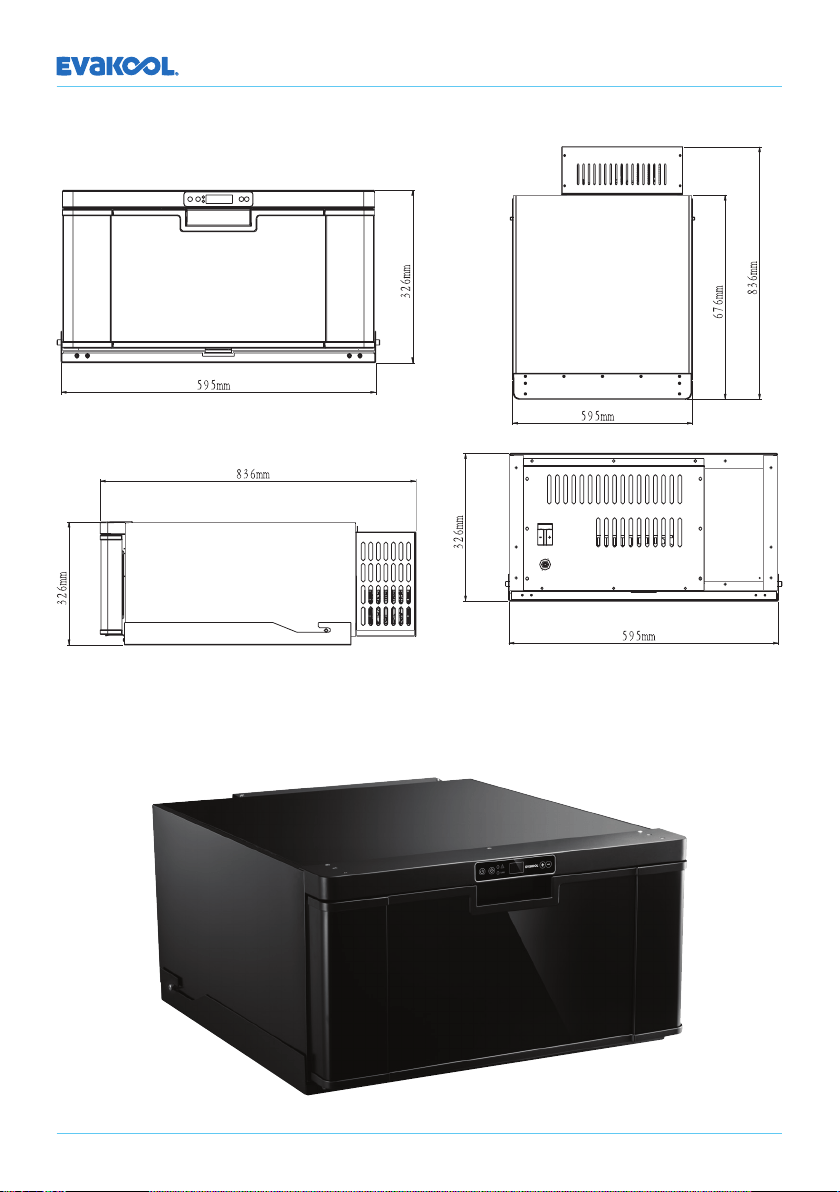
8. DC40 Dimensions
PLATINUM SERIES
11
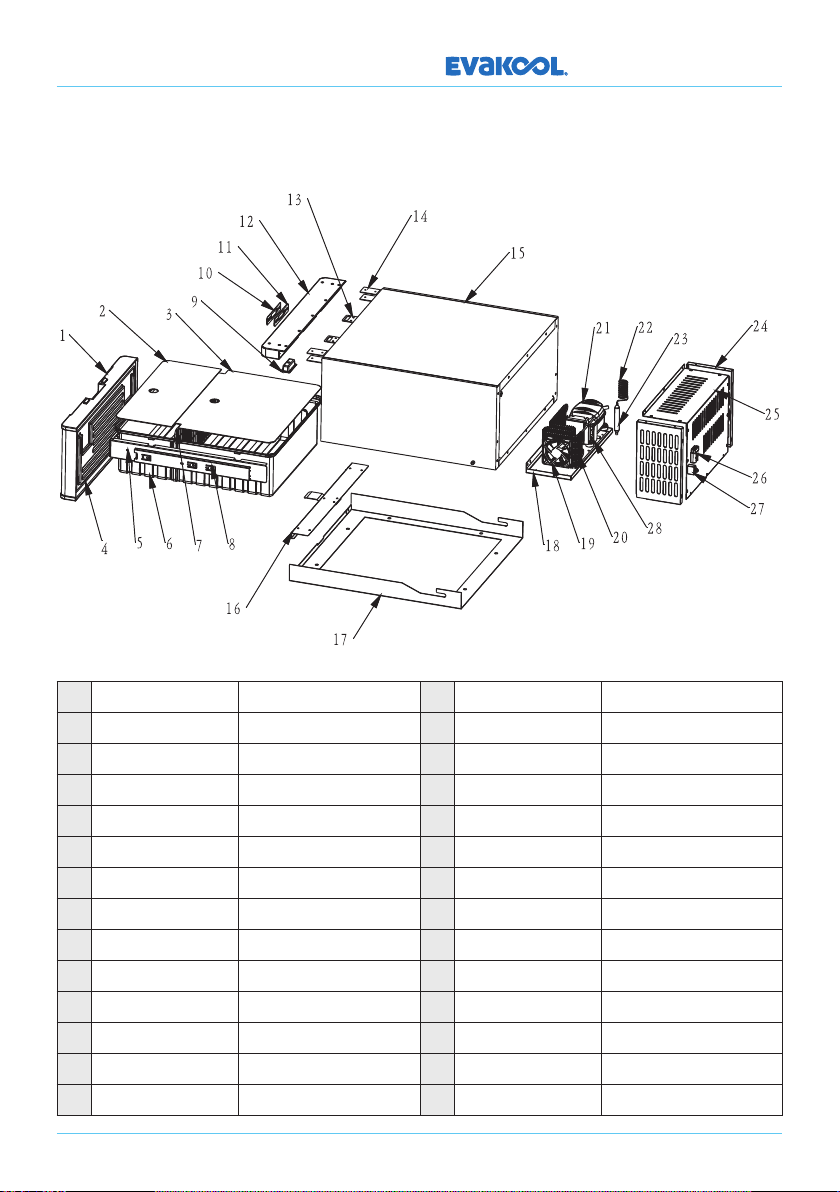
9. DC40 Parts
1 DC40DR-ZJ-002 Door 15 DC40DR-ZJ-001 Cabinet
2 DC40DR-SL-01 Acrylic-Front 16 DC40DR-WJ-011A Fixed Bracket 1
3 DC40DR-SL-010 Acrylic-Rear 17 DC40DR-WJ-022 Fixed Bracket 2
4 DC40DR-SL-005 Door Gasket 18 DC40DR-WJ-003 Compressor Base Board
5 DC40DR-WJ-004A Cabinet Bracket 19 DQ-02 Fan
6 DC40DR-SL-006 Cabinet 20 DC40DR-WJ-037 Condenser
7 DC40DR-WJ-035 Shelf 21 DQ-236 Compressor
8 DC40DR-SJ-030 Track 22 WJ-029 Capillary
9 DC25-DQ-001 LED Light 23 T-WJ-001 Dryer
10 XF-186 Display Sticker 24 DC40DR-WJ-019A Le & Right Cover Board
11 DC40R-DQ-002 Display Board 25 DC40DR-WJ-024 Rear Cover Board
12 DC40DR-SL-002A Top Plastic Cover 26 KC-DQ-005 50A Plug
13 DC40DR-WJ-032 Door Lock Panel 27 66.20-B1B1-B0139 Circuit Breaker
14 DC40DR-WJ-023
Metal Bracket for Top Cover
28 DC35T-DQ-001 Main PCB
PLATINUM SERIES

12
PLATINUM SERIES

13
PLATINUM SERIES

14
PLATINUM SERIES


For your nearest stockist contact EvaKool
T: 1300 385 665 (1300 EVKOOL)
E: warr[email protected]om
or visit us at evakool.com.au