McIntosh Laboratory, Inc. 2 Chambers Street Binghamton, New York 13903-2699 Phone: 607-723-3512 www.mcintoshlabs.com
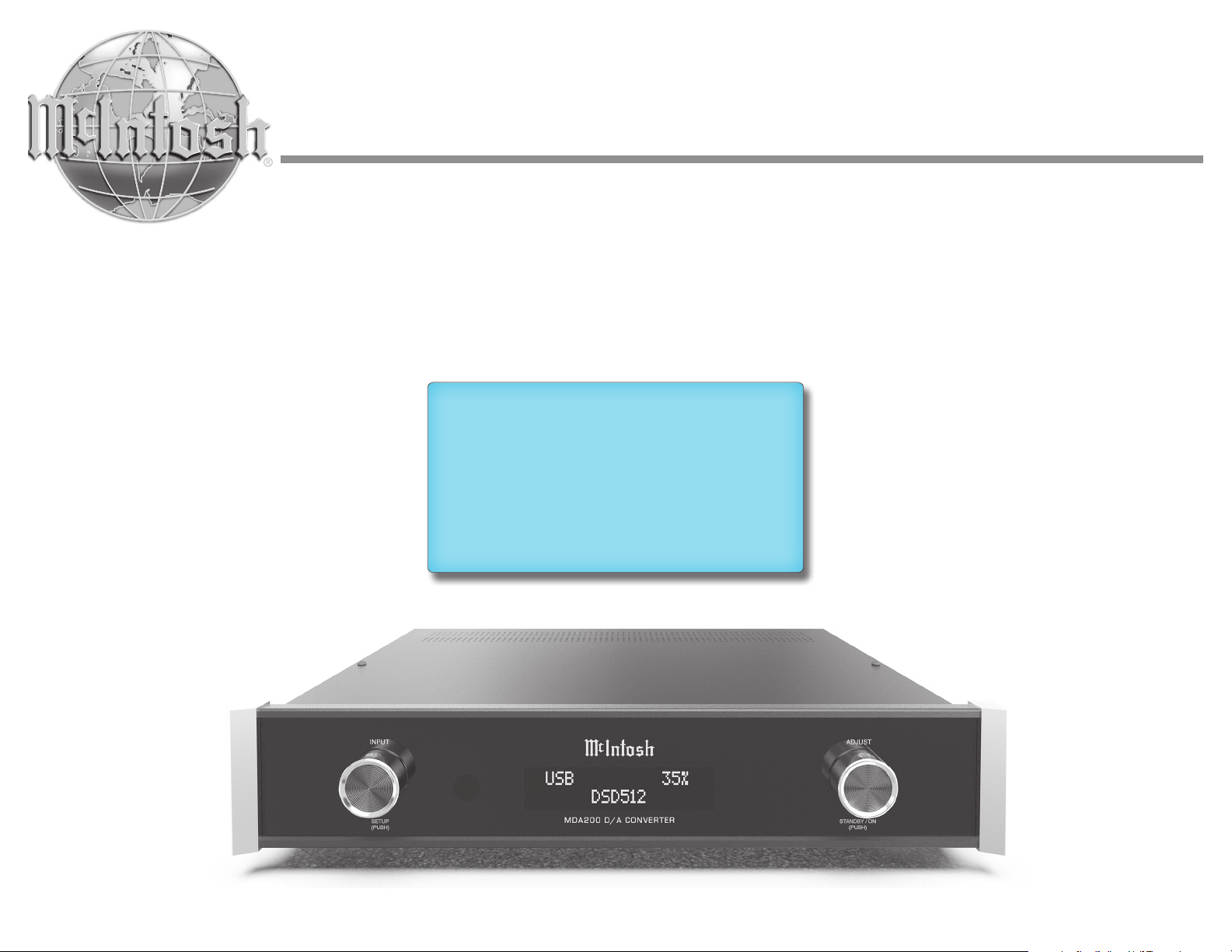
MDA200
D/A Converter
Owner’s Manual
2
General Information
The main AC power going to the MDA200 and
any other McIntosh component(s) should not be
applied until all the system components are con-
nected together. Failure to do so could result in
the malfunctioning of some or all of the system’s
normal operations. When the MDA200 and other
McIntosh components are in their Standby / Power
each component is active and communication is
occurring between them.
The unbalanced outputs and the balanced outputs
can be used simultaneously.
The MDA200 internal digital-to-analog converter
circuitry is designed to decode 2 channel PCM
-
digital inputs. Other digital audio signal format
types will cause the audio outputs of the MDA200
to be muted.
a
away or incinerated but disposed of in accordance
with the local regulations concerning battery
disposal.
For additional information on the MDA200 and
other McIntosh products please visit the McIntosh
website at www.mcintoshlabs.com.
Table of Contents including Figures
General Information �� �� �� �� �� �� �� �� �� �� 2
Performance Features�� �� �� �� �� �� �� �� �� �� 3
Trademark and License Information �� �� �� 3
Front Panel Displays and Switches� �� �� �� �� 4
Rear Panel Connections and Switches �� �� �� 5
Connectors and Cable Information �� �� �� �� 6
System Configurations �� �� �� �� �� �� �� �� �� 7
DAC Mode . .. .. .. .. .. .. .. .. .. .. .. .. .. 7
Preamp / DAC Mode .. .. .. .. .. .. .. .. .. .. 7
Setup Menu �� �� �� �� �� �� �� �� �� �� �� �� �� 8-10
Trim Functions Menu � �� �� �� �� �� �� �� �� �� 10
Dimensions �� �� �� �� �� �� �� �� �� �� �� �� �� �� 11
Using Your MDA200 �� �� �� �� �� �� �� �� �� ��12
Remote Control �� �� �� �� �� �� �� �� �� �� �� ��13
. .. .. .. .. ..
Specifications �� �� �� �� �� �� �� �� �� �� �� �� �� 14
Audio Specifications .. .. .. .. .. .. .. .. .. .. 14
Digital Audio Specifications .. .. .. .. .. .. .. 14
General Specifications .. .. .. .. .. .. .. .. .. 14
Packing Instructions �� �� �� �� �� �� �� �� �� ��15
Part List �� �� �� �� �� �� �� �� �� �� �� �� �� �� ��15
Thank You from All of Us at McIntosh
You have invested in a precision instrument that
with the features and instructions to get the
maximum performance from your equipment.
contact your dealer who may be more familiar with
your particular setup including other brands. You
can also contact McIntosh with additional questions
McIntosh Laboratory, Inc�
2 Chambers Street
Technical Assistance
Customer Service
Email support@mcintoshlabs.com
Website www.mcintoshlabs.com
Important Safety Information is supplied in a separate document “Important Additional Operation Information Guide”
Safety First
Please read the safety instructions included in a
separate document called “Important Additional
Operation Information Guide.”
Please Take A Moment
serial number and purchase information here. We
can identify your purchase from this information
if the occasion should arise:
Serial Number: __________________________
Purchase Date: ___________________________
Dealer Name: ___________________________
Performance Features
• Alphanumeric Fluorescent Display
The front panel information display indicates the
• Dual Function
Connect the MDA200 to an existing McIntosh
analog audio system to provide the latest in
digital-to-analog conversion from digital audio
together with McIntosh source components and
• Electronic Input Switching
Electronic input switching on all inputs provides
• Quad Balanced Digital-to-Analog
Converter
music is reproduced with a wide dynamic range
and extremely low distortion.
• Balanced Outputs
The balanced outputs allow the connection of
long cable lengths without a loss in sound quality.
• Precision Tracking Volume Control
Volume levels are controlled by a new precision
-
• Remote Control with External Sensor Input
The remote control provides control of the
-
ment of your McIntosh system from another room
in your home by connecting an external sensor.
• Power Control Input and Output
A power control connection for powering on
convenience.
• Special Power Supply
Fully regulated power supplies ensure stable noise
free operation even though the power line varies.
• Gold Plated Connectors
The input and output connector contacts are gold
plated for superior corrosion resistance and high
electrical conductivity.
• Fiber Optic Front Panel Illumination
The even illumination of the front panel is ac-
complished by a combination of custom-designed
Emitting Diodes (LEDs).
• HDMI TV Sound
The HDMI ARC (Audio Return Channel) allows
you to use your entire audio system to play the
• Digital Audio Inputs
DSD signals from an external source. The coaxial
and optical inputs process digital signals up to
connection allows for streaming of high bandwidth
Trademark and License Information
The McIntosh MDA200 incorporates copyright
patents and other intellectual property rights. The
MDA200 uses the following technologies:
Trademark Logo License Information
software of Steinberg Media
Technologies GmbH
HIGH-DEFINITION MULTIMEDIA INTERFACE
TM
dts.com. Manufactured under license
All Rights Reserved.
-
edgment: Manufactured under license
4
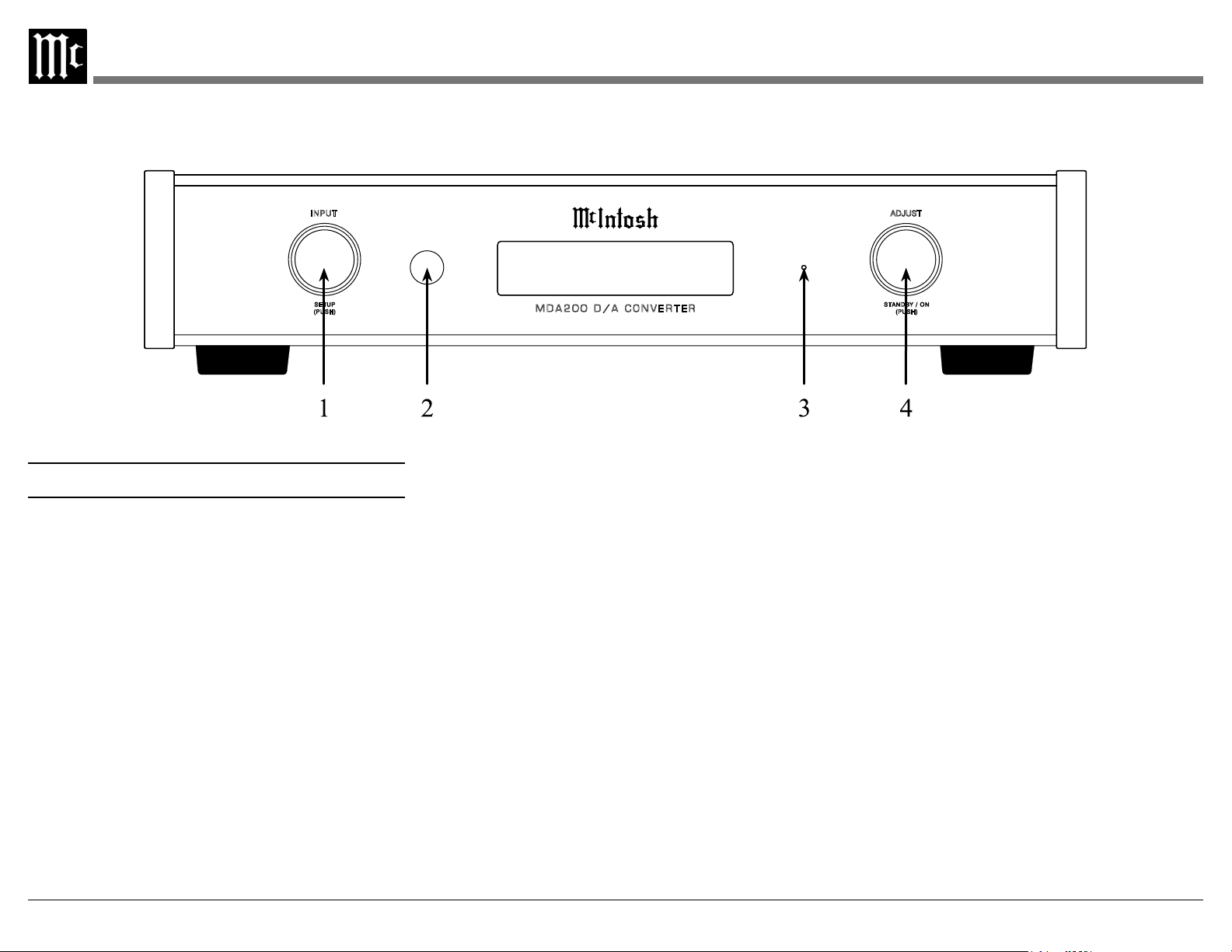
Front Panel Displays and Switches
1� INPUT Knob
Access menus by holding or pressing the
2� IR Sensor receives commands from your
remote control.
3� Standby Indicator LED illuminates
when the MDA200 is connected to AC
power.
4� ADJUST Knob
setup menu. Also used to navigate in the
menus and trims.
A053103 MDA200 D/A CONVERTER FRONT 4/22/22 JM
Layer 3 diffusion - LED=BLUE 80/80 FO=YELLOW 45/45
USB 35%
DSD512
USB 35%
DSD512
INPUT ADJUST
SET UP
(PU SH)
STANDBY / ON
(PU SH)
M D A 2 0 0 D / A C O N V E R T E R
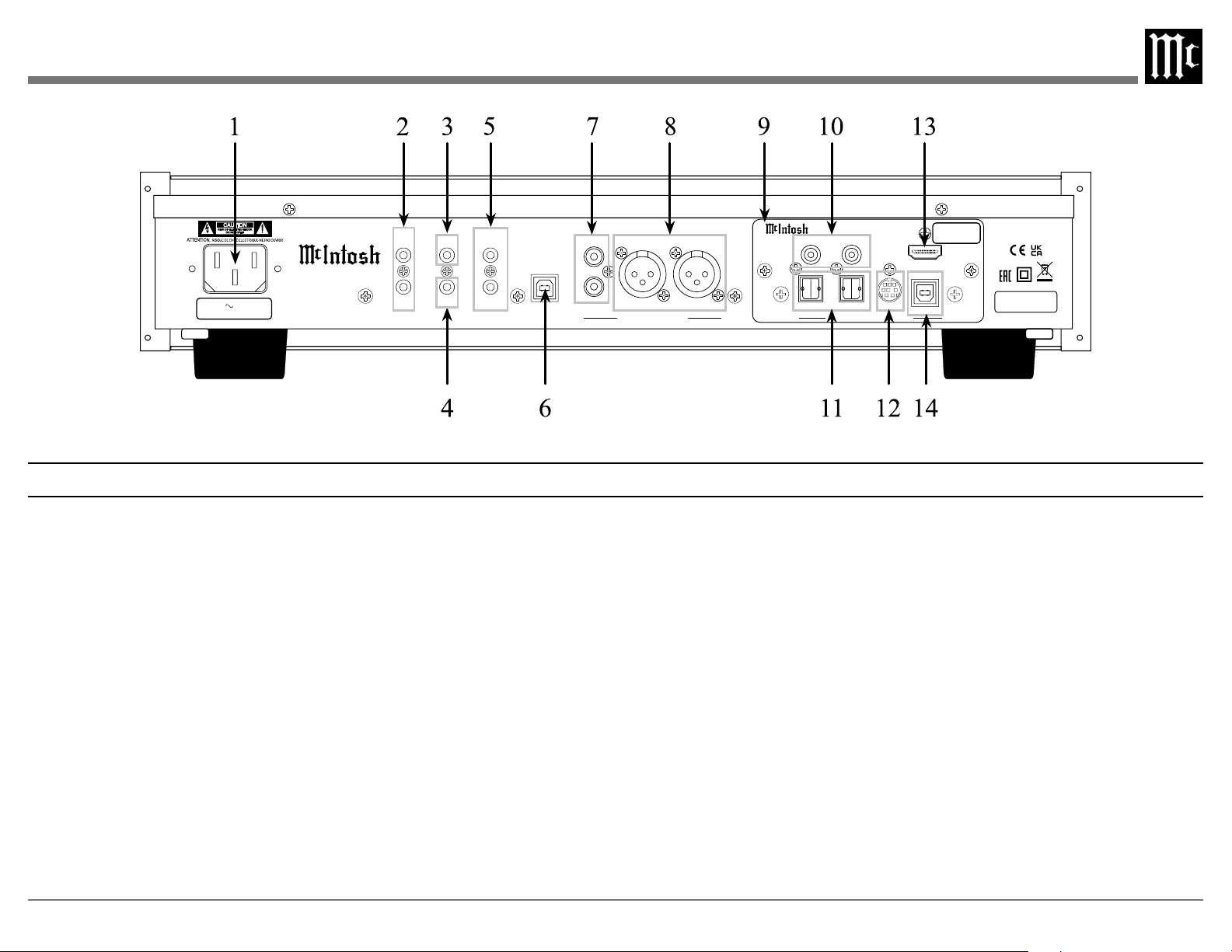
Rear Panel Connections and Switches
1� AC Input uses a Power Cord to connect
to an AC Outlet.
2� DATA IN receives operating data from a
DATA OUT sends remote control
signals to source components.
3� RS232 Connector communicates with
stereo mini phone plug cable.
4� IR INput connects to an IR receiver using
5� Power Control IN
signals from another McIntosh component.
Power Control OUT
signals to another McIntosh component.
6� SERVICE USB
used for service purposes only.
7� UNBALanced Outputs use an RCA
volume level signal.
8� BALANCED Outputs each use an XLR
connector cable for a balanced output
signal.
9� DA2 DIGITAL AUDIO MODULE
10� COAX Inputs (1 and 2) accept coaxial
cables for digital signals.
11� OPTICAL Inputs (1 and 2) accept
optical connections for digital signals.
12� MCT Input transfers signals from
McIntosh products with an MCT
connector and is required for SACD
audio.
13� HDMI (ARC) Input connects with a
compatible ARC TV using an HDMI
cord to share control and digital audio
connectivity.
Note: The HDMI ARC functionality of the MDA200 is only
compatible with ARC TVs. Other devices like DVD
and Blu-ray players will not work.
14� USB AUDIO Input
connector used to connect the MDA200
to a computer to stream digital audio.
A059800 MDA200 D/A CONVERTER - REAR 10/12/22 JM
120V 50/60Hz
35 WATTS
McINTOSH LABORATORY, INC., BINGHAMTON, NY
HANDCRAFTED IN USA WITH US AND IMPORTED PARTS
MDA200 D/A CONVERTER
L
BALANCED
AUDIO OUTPUTS
R
L
R
UNBAL
SERIAL
NUMBER
USB AUDIO
DA2 DIGITAL AUDIO MODULE
HDMI (ARC)
COAX 2
COAX 1
MCT
OPTICAL 2OPTICAL 1
DIGITAL AUDIO INPUTS
SERIAL
NUMBER
OUT
PWR CTRL
IN
CAUTION
RISK OF ELECTRIC SHOCK
DO NOT OPEN
RS232
IR IN
OUT
DATA
IN
SERVICE
USB
6
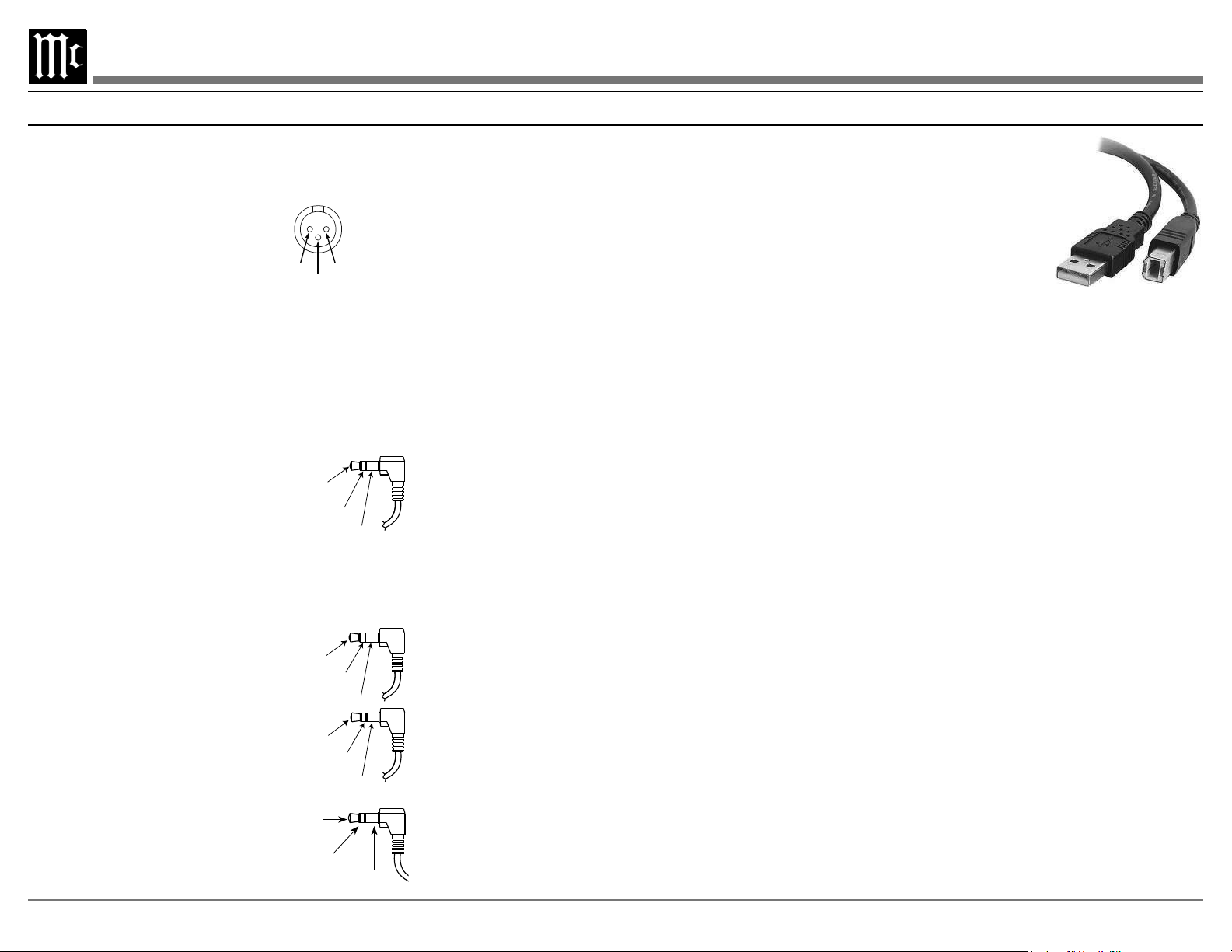
XLR Connectors
-
anced output connectors on the MDA200. Refer
to the diagram for connection:
Power Control Connector
is for controlling the illumination of other McIntosh
stereo mini phone plug connects to a
center power control output.
Data Input and IR IN Port Connectors
The MDA200 data in port receives remote control
control centers. The data out port will send the
converted IR commands to another
attached McIntosh component. A
for connection.
stereo mini phone plug and allows
the connection of other brand IR
receivers to the MDA200.
Note: The IR receiver must provide its own power supply.
plug used to connect to exter
-
nal third party controllers.
Power
Control
Meter
Illumination
Control
Ground
PIN 2 PIN 1
PIN 3
Data
Signal
N/C
Data
Ground
IR Data
Control
Ground
N/C
USB Audio
the capability to receive music/sound in a digital
format from a connected computer.
Software Requirements
Apple
®
computers with OS-10.6.8 or later require
no additional driver install to communicate with
the MDA200.
the PC to communicate with the MDA200.
based computers download the latest driver from
the McIntosh website: https://www.mcintoshlabs.
com/products/specialty-products/MDA200
The driver can be found in the Downloads section
Audio Windows Driver. You may select this
driver in many third-party applications such as
JRiver Media Center.
The MDA200’s display will show the sampling
Service USB Port
of the MDA200 is for McIntosh
audio port for audio input.
Optical
The two optical inputs allow
digital sources to be connected to the MDA200
audio cables.” The optical inputs can handle high
The MDA200 DAC will process standard format
SPDIF PCM signals and Dolby Digital and DTS
strange and/or unpleasant sounds.
Coax
The two digital coaxial inputs allow digital
sources to be connected to the MDA200 using
Digital Audio RCA coaxial Cables. The coax
inputs can handle high-resolution digital audio
process standard format SPDIF PCM signals and
unsupported formats can result in strange and/or
unpleasant sounds.
MDA200 TXD Out
Data being transmitted
MDA200 RXD In
Data being received
Ground
Connectors and Cable Information
7
REMOTE
CONTROL
REMOTE
CONTROL
DIGITAL
SOURCES
MDA200
(DAC MODE)
PRE-AMP
(VOLUME CONTROL)
POWER
AMP
DIGITAL
SOURCES
MDA200
(PRE-AMP/DAC MODE)
POWER
AMP
DIGITAL
AUDIO
POWER
CONTROL
DATA
POWER
CONTROL
DATA
VARIABLE
ANALOG
AUDIO
DIGITAL
AUDIO
POWER
CONTROL
DATA
VARIABLE ANALOG AUDIO
POWER CONTROL
POWER
CONTROL
FIXED
ANALOG
AUDIO
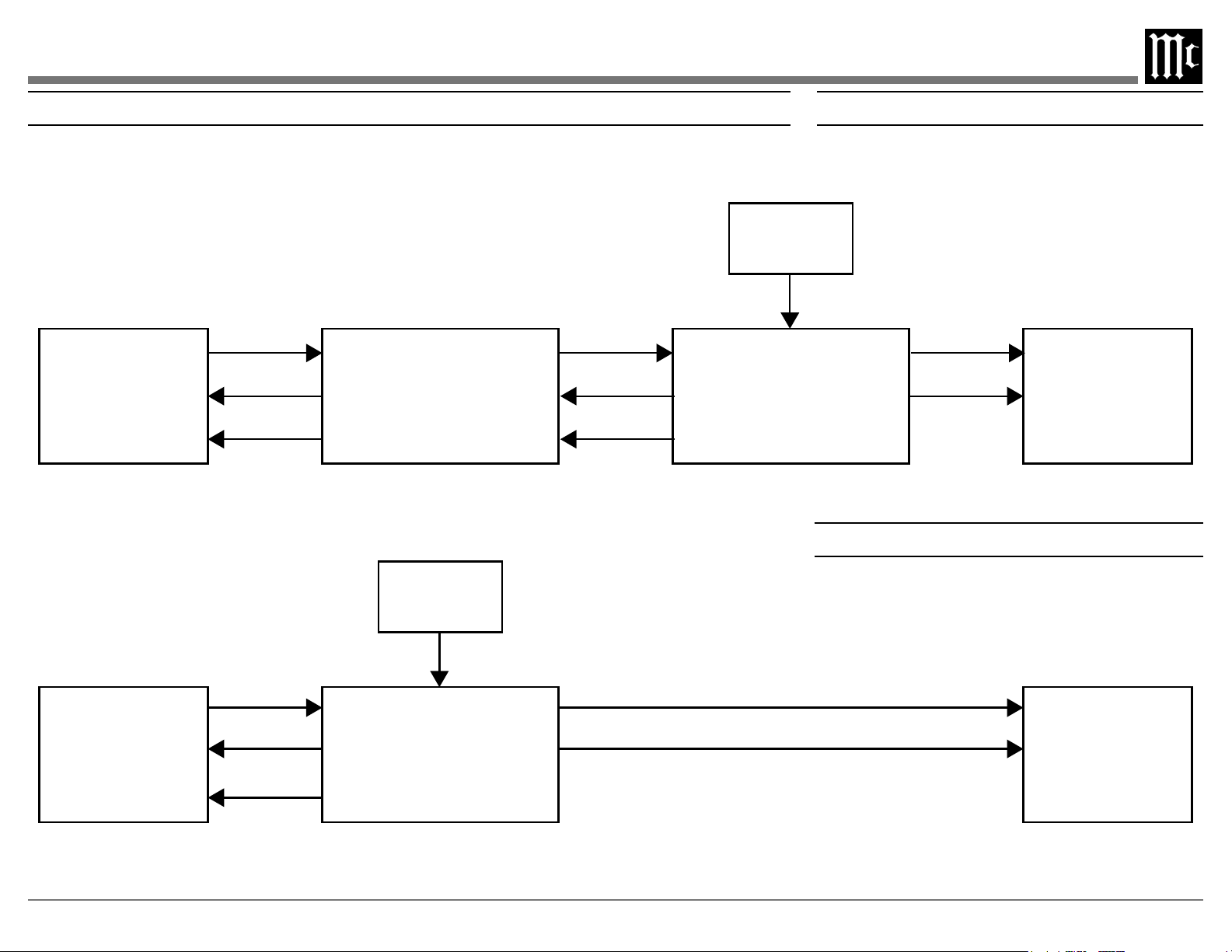
System Conguration for DAC Mode
System Conguration for Preamp / DAC Mode
System Congurations
actual components would be connected in a similar manner.
Note: The preamplifier or power amplifier may be connected to the MDA200 balanced or unbalanced outputs.
REMOTE
CONTROL
REMOTE
CONTROL
DIGITAL
SOURCES
MDA200
(DAC MODE)
PRE-AMP
(VOLUME CONTROL)
POWER
AMP
DIGITAL
SOURCES
MDA200
(PRE-AMP/DAC MODE)
POWER
AMP
DIGITAL
AUDIO
POWER
CONTROL
DATA
POWER
CONTROL
DATA
VARIABLE
ANALOG
AUDIO
DIGITAL
AUDIO
POWER
CONTROL
DATA
VARIABLE ANALOG AUDIO
POWER CONTROL
POWER
CONTROL
FIXED
ANALOG
AUDIO
8
Navigating the Setup Menu
Entering Setup Menu:
setup menu. See next section for the setup menu
overview.
Note: “Enter Code” will appear if the INPUT knob is held
too long. This is for support purposes only. Press the
knob again to exit.
Selecting/Adjusting Menu Settings:
see additional options.
Exiting/Navigating Back:
A brief deliberate press (not hold) and release of
additional presses until the display shows the
main operating screen to continue normal use of
the unit.
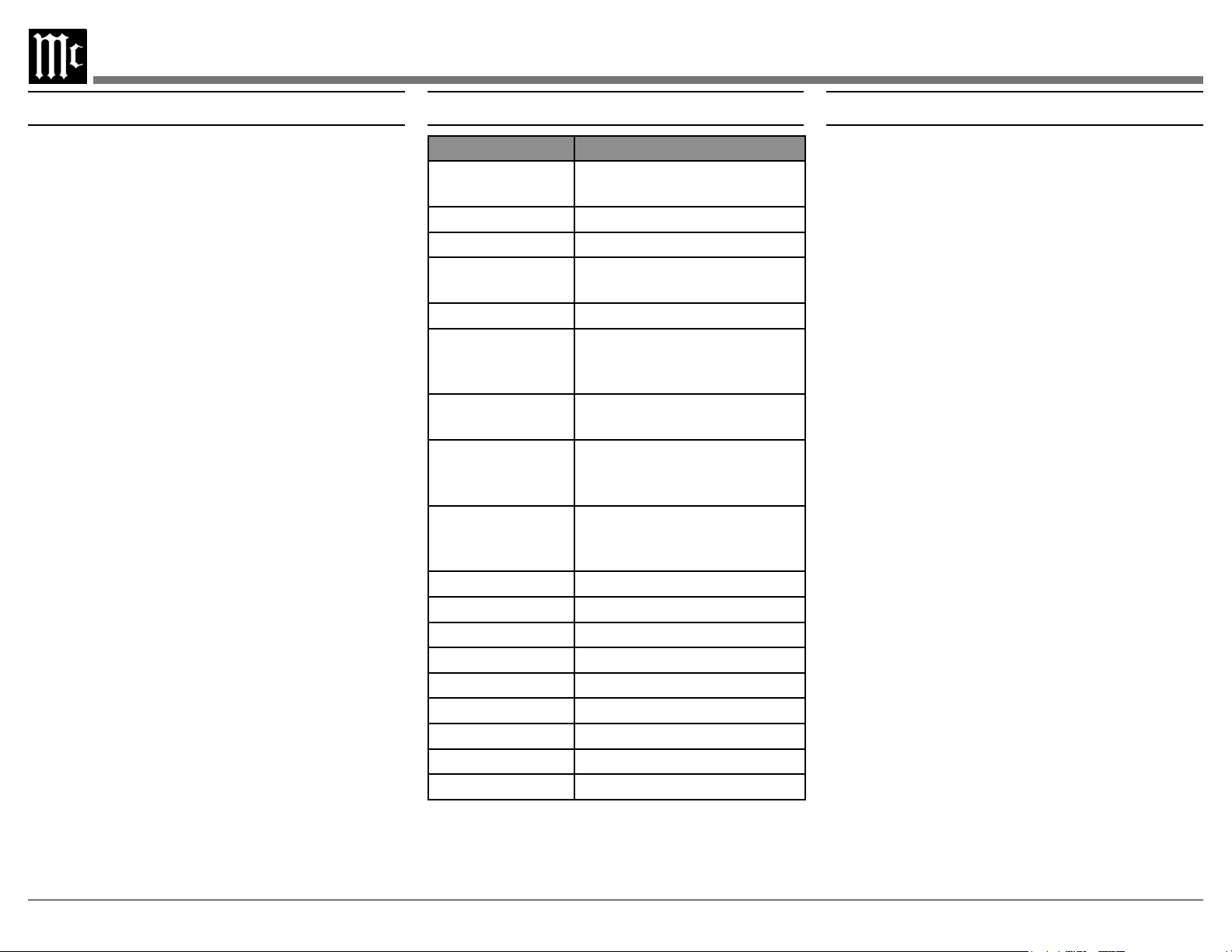
The following is a list of the available settings
the display says “Hold Input”. The selectable
what each option does when selected.
Serial Number:
The MDA200’s unique serial number can be
viewed by entering the setup menu and rotating
-
bers and letters to the right are the unit’s serial
number. This number can also be found on the
rear of the unit.
Firmware Version:
Firmware is internal software that controls the
MDA200’s functionality. Firmware upgrades
technicians.
can be viewed by entering the setup menu. The
-
number following the V to the right is the digital
Setup Menu SettingsSetup Menu Settings and Options
Setting Options
Displays the serial number
of the MDA200
MDA200 V_ . _ _
DA2 V_ . _ _
Setup: Level
On / Rename
HDMI CEC VOL
(Consumer Elec-
tronic Control)
Control Command
HDMI CEC
PWR
Mode (Audio
Only)
Auto / Manual
Digital Gain (for
1&2)
DATA PORT All Data / Individual Input
IR Codes
Front IR Enabled / Disabled
Power IR Enabled / Disabled
Input IR Enabled / Disabled
Trim IR Enabled / Disabled
Enabled / Disabled
Factory Reset Default Settings

Output Level Adjust:
own master volume control.
volume control.
Input Settings:
On / Rename: The selected input will be function-
menu to rename the input*.
O: The selected input will be deactivated and
will no longer be selectable from the main display
*Renaming inputs: While in the selected input’s
-
select which character you want to change and use
HDMI CEC Settings:
ON: Allows compatible devices to use CEC
(Consumer Electronics Control) to control certain
functions of the MDA200.
OFF: Prevents MDA200 from being controlled w/
CEC.
ON: Allows compatible devices to use CEC (Con-
OFF: Prevents devices from using CEC to power
MDA200.
HDMI Lip Sync Mode Settings:
Auto: The MDA200 will automatically synchro-
Manual: Disables auto video/audio synchroni-
-
ally calibrate audio/video sync from connected
devices.
Digital Gain Settings:
Setup Menu Settings (continued)
Data Port Settings:
All Data: Devices connected to the data port will
receive the same data from the remote control.
[ input name ]: Dedicate the data port to a spe-
received from that input when it receives com-
mands from the remote control.
RS232 Baud Rate Setup:
The settings for serial communications are:
The speed at which the MDA200 communicates
It is recommended to leave this at the highest
10
IR Codes Settings:
-
mal” IR codes will receive the signal. To prevent
controlling multiple devices with the remote
to prevent signals from the remote control being
would control the MDA200.
Front IR Sensor Settings:
You can enable or disable the functionality of the
IR sensor to change whether or not the MDA200
will accept commands from the remote control.
You may want to do this if you have an external
IR sensor that operates the MDA200 with other
devices.
Power IR, Input IR, and Trim IR Settings:
The MDA200 can be controlled by another Mc-
Intosh unit’s remote control using the data in port.
If you want to limit what commands sent by the
Power IR and Input IR settings.
To disable power commands coming from the
data port or from a connected external IR sensor
Trim Functions Menu
Entering Trim Functions Menu
A brief deliberate press (not hold) and release of
-
tions menu.
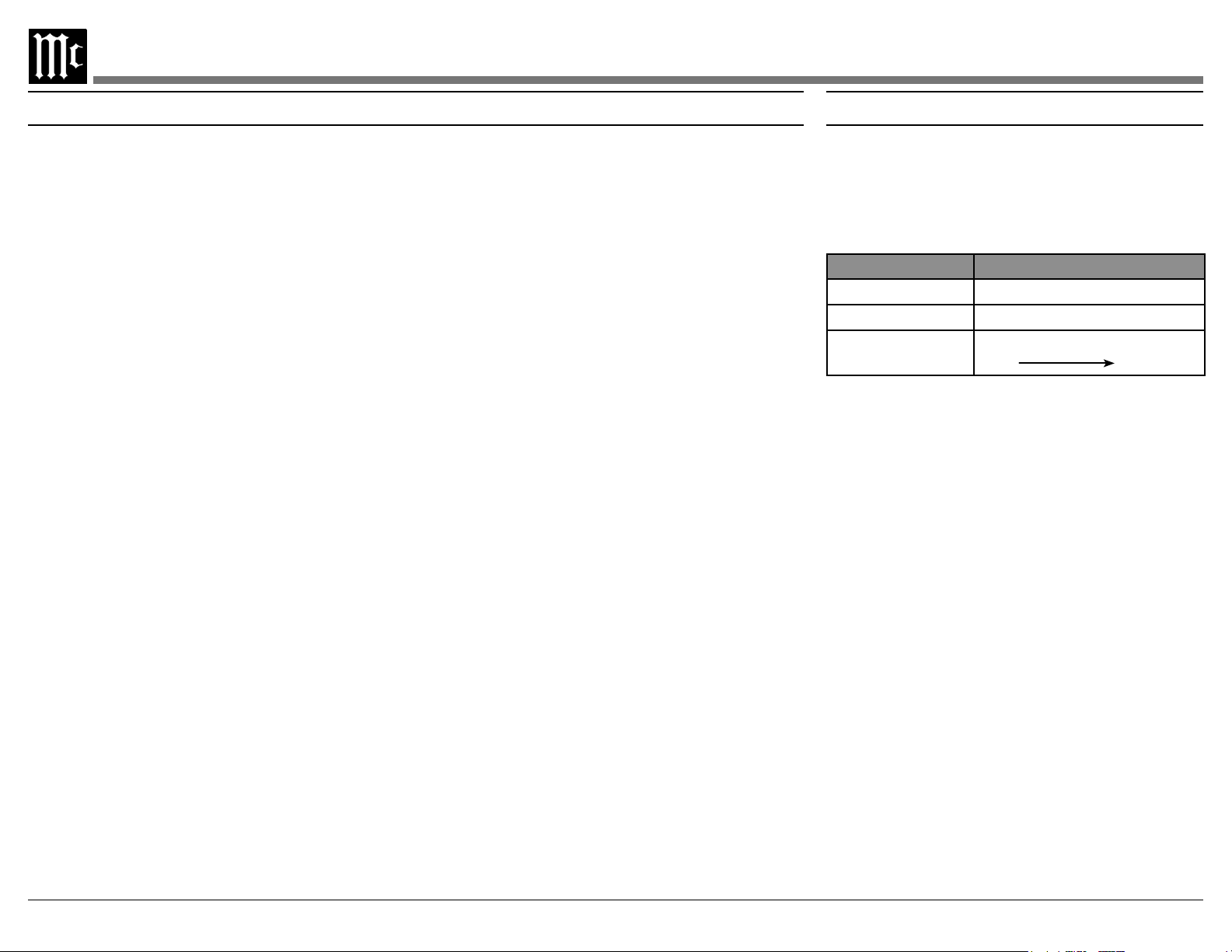
Trim Functions Menu Options
Settings Options
Input Trim
4 Levels
Adjusting Trim Functions:
The following is a list of descriptions of the
various options in the trim functions menu. The
Note: The balance and input trim settings in this menu will
only be adjusted and affect the currently selected input
and their configurations will be independently saved.
• Adjusting Audio Balance: If you want one
• Adjusting Input Trim Levels: Devices connected
to the various inputs may be sending audio at
varying volumes to the MDA200. This could
volume of an input as it enters the MDA200 by
• Adjusting Brightness: The front information
levels from dim to bright.
Setup Menu Settings (continued)
If you wish to disable input commands coming from
the data port or from a connected external IR sensor
If you wish to disable trim commands coming from
the data port or from a connected external IR sensor
Power Saving Settings:
Enabled: The MDA200 automatically enters
not playing sound or changing settings.
Disabled:-
Factory Reset:
all settings to factory defaults. All previous setup
changes will be lost.
FACTORY RESET
display says “In Progress!” and immediately release.
defaults.
11
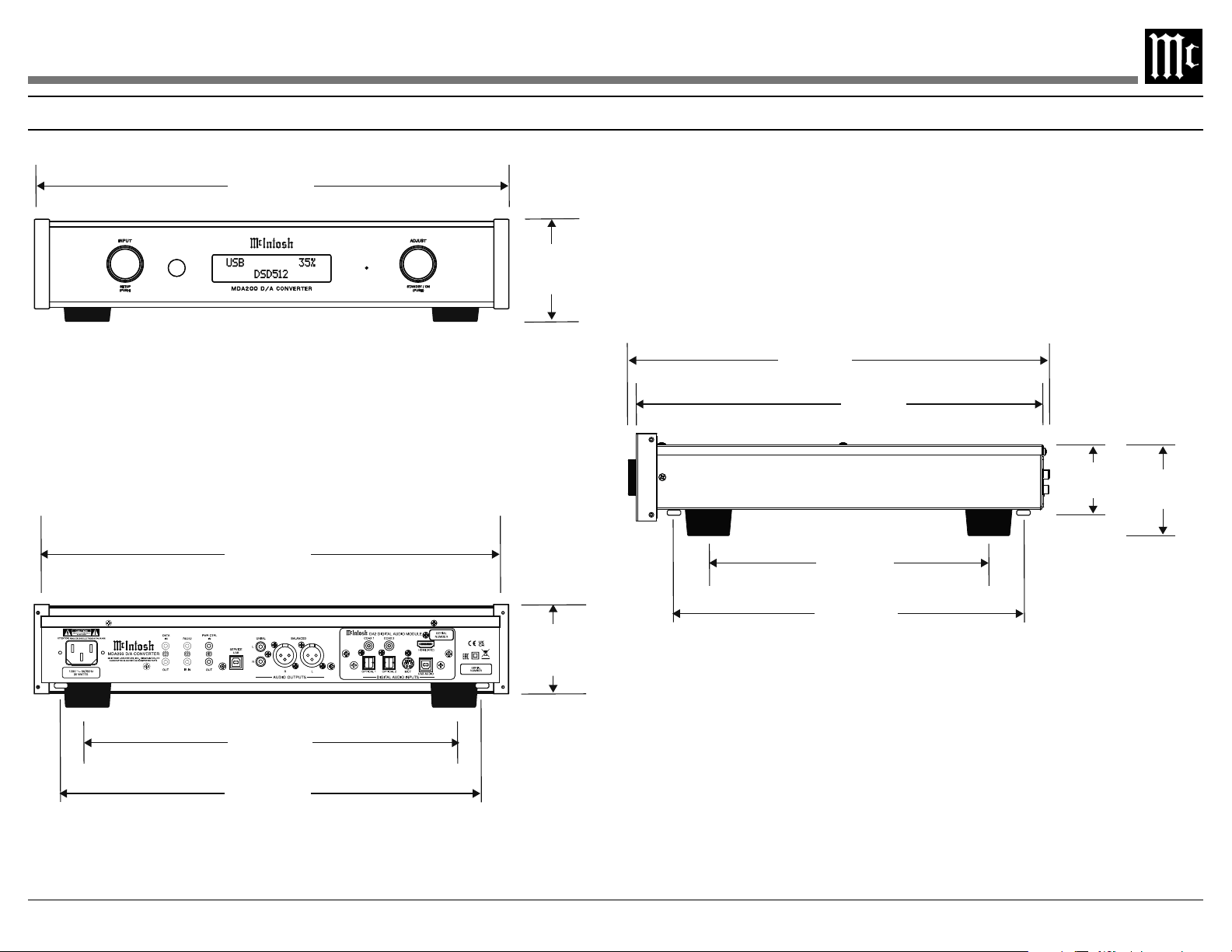
Dimensions
The following dimensions can assist in determining the best location for your MDA200.
17-1/2”
44.45 cm
3-7/8”
9.84 cm
15-11/16”
39.95 cm
15-3/8”
39.05 cm
2-5/8”
6.66 cm
10-9/16”
28.62 cm
17-1/16”
43.33 cm
13-1/4”
33.70 cm
3-9/32”
8.33 cm
INNER DIMENSION
15”
38.1 cm
12-3/8”
31.43 cm
3-7/8”
9.8 cm
Front View
Side View
Rear View
12
HDMI ARC
The HDMI ARC (Audio Return Channel) allows
you to use your entire audio system to play the
sound from your TV.
Notes:• Ensure you are connected to the TV’s HDMI input
port that is labeled “ARC”.
• Your TV’s setup menu and settings may need to be
adjusted before sound is heard.
• When the MDA200 is set to the HDMI input, the
unit will automatically turn On and Off with the TV.
The front display will show “Entering HDMI
Standby Mode” when turning Off.
• Multi-channel formats will be down mixed to a
2-channel output.
Audio formats supported by HDMI ARC:
• PCM (2 channel)
•
•
MCT Input
stereo (SACD) or CD layer. The multi-channel
layer will not reproduce sound.
Troubleshooting
-
The MDA200 has the ability to automatically
via the power control connections. The data port
connections allow for the remote operation of
basic functions using the remote control. With an
control operation of the system is possible from
another room and/or when the MDA200 is located
in a cabinet with the doors closed.
Powering On / Turning O:
While the unit is in Standby Mode (no lights
Selecting an Input for Playback:
button on the remote control.
Adjusting the Level:
If the level setting in the setup menu is set for
volume. The current volume level is represented
by a percentage on the display.
Note: The volume control will not affect audio if the level
setting in the setup menu is set for “Fixed” level.
Using Your MDA200
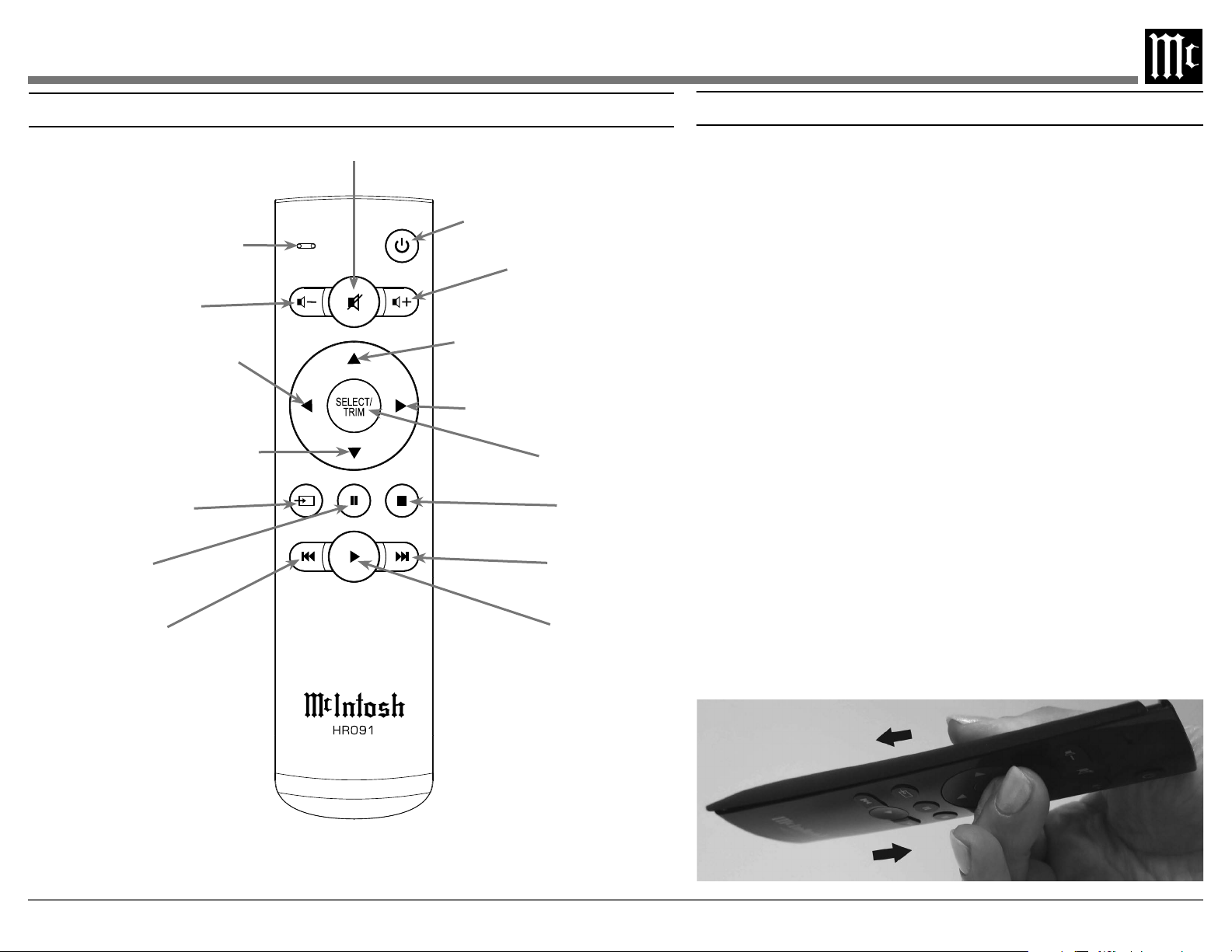
Remote Control Buttons
Activates Trim Mode
Select the desired TRIM function
and manually tune down the dial
with contemporary McIntosh Tuners
and manually tune up the dial with
contemporary McIntosh Tuners
LED illuminates when a command
is sent to the MDA200
Increases the volume level
Decreases the volume level
Mutes and unmutes the audio
Select the desired TRIM function
Changing the Remote’s Battery
Open the remote:
1.
2. -
remote should both be pointing away from you.
-
either hand.
4.
again.
Remove and replace the battery noting the polarity.
Replace the back:
snap it into place.
Note: The following additional discrete IR commands for external control systems are available:
POWER ON, POWER OFF, INPUT (Down), COAX 1, COAX 2, OPT 1, OPT 2, USB, MCT, and
HDMI ARC. Contact McIntosh Technical Assistance or your dealer for more information.

14
Audio Specications
Frequency Response
dependent)
Total Harmonic Distortion
Fixed Output level
Adjustable Output level
Signal To Noise Ratio (A-Weighted)
Dynamic Range
Output Impedance
General Specications
Power Control Out
Power Requirements
Field AC Voltage conversion of the MDA200 is
not possible. The MDA200 is factory congured
for one of the following AC Voltages:
Note: Refer to the rear panel of the MDA200 for the correct
voltage.
Overall Dimensions
Weight
shipping carton
Shipping Carton Dimensions
Digital Audio Specications
Digital Input Signal Format
bitstream
Digital Input Sample Rates
Digital Inputs
HDMI: 2.0 ARC
Packing Instructions Part List
Qty Part Number Description
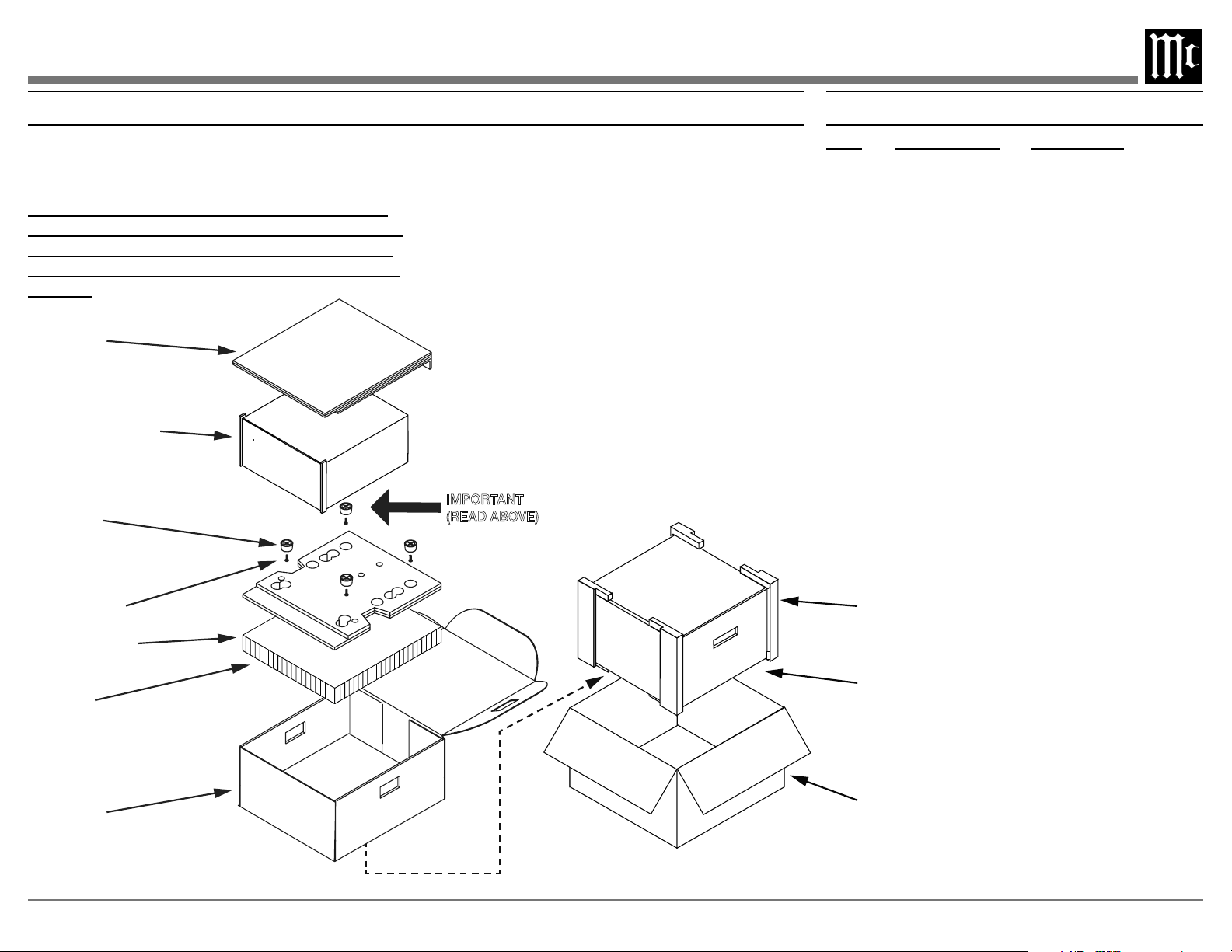
-
exactly as shown below.
It is very important that the four plastic feet are
attached to the bottom of the equipment. This will
ensure the proper equipment location on the bot-
tom pad. Failure to do this will result in shipping
damage.
only if they are all in good serviceable condition.
If a shipping carton or any of the interior part(s)
Department of McIntosh Laboratory. Refer to
page 2. Please see the Part List for the correct part
numbers.
TOP PAD
UNIT WITH
(4) FEET ON
BOTTOM COVER
PLASTIC
FOOT (4)
10-32 X 3/4”
SCREW WITH
WASHER (4)
BOTTOM PAD
BOTTOM PAD
FILLER
INSIDE
CARTON
IMPORTANT
(READ ABOVE)
INSIDE
CARTON
END CAPS
SHIPPING
CARTON

The continuous improvement of its products is the
policy of McIntosh Laboratory Incorporated who
reserve the right to improve design without notice.
Printed in the U.S.A.
McIntosh Laboratory, Inc.
2 Chambers Street
Binghamton, NY 13903
www.mcintoshlabs.com
McIntosh Part No. 24120100