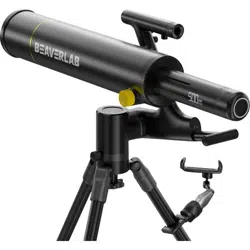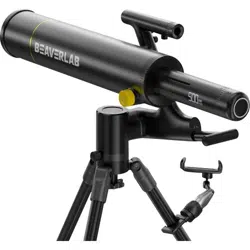
DDL-TW1/Pro/Max Instruction Manual
Intelligent
Astronomical Telescope TW1
Special Reminder:
Do not observe the sun directly when not wearing "Bud film sunglasses".
Otherwise, the image sensor will burn out.
Image Collector: WIFI Password: 12345678
Please read this manual carefully before using the product!
Please keep the instruction manual properly!


1.Product Overview
2.
Instructions For Use
3.
Installation Instructions
4.
Usage Procedure
5.
Accessories And Tools
6.
The Fault Is Rectified
7. Trademarks And Legal Statements
8.Overall Parameters
01
03
04
08
16
17
18
19
Directory
Thank you for purchasing Intelligent Astronomical Telescope.
Please read this manual carefully before use and keep it properly. Do not use the telescope without
knowing how to use it In order to avoid unnecessary loss caused by wrong use.
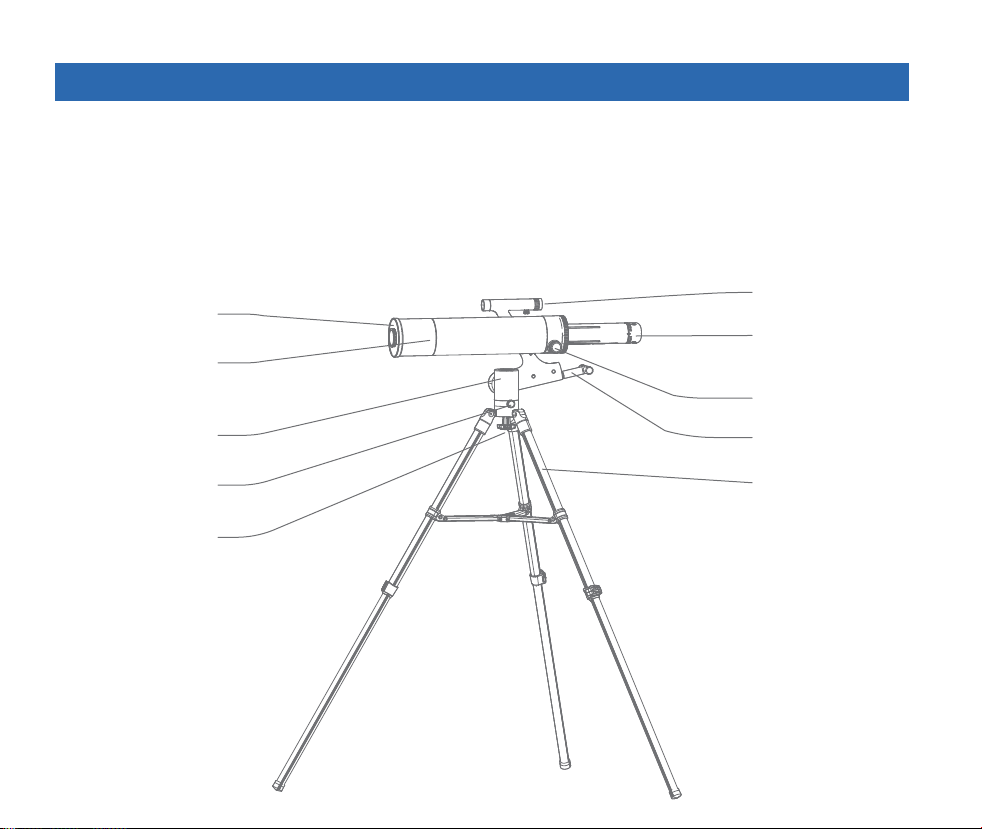
Description of telescope composition
Dust cover
The primary
mirror
holder
Locking knob
The tripod
The focuser knobs
Pitch locking handle
Image
acquisition unit
Find the star mirror
Quick release
screw rod
01
01 Product Overview
02
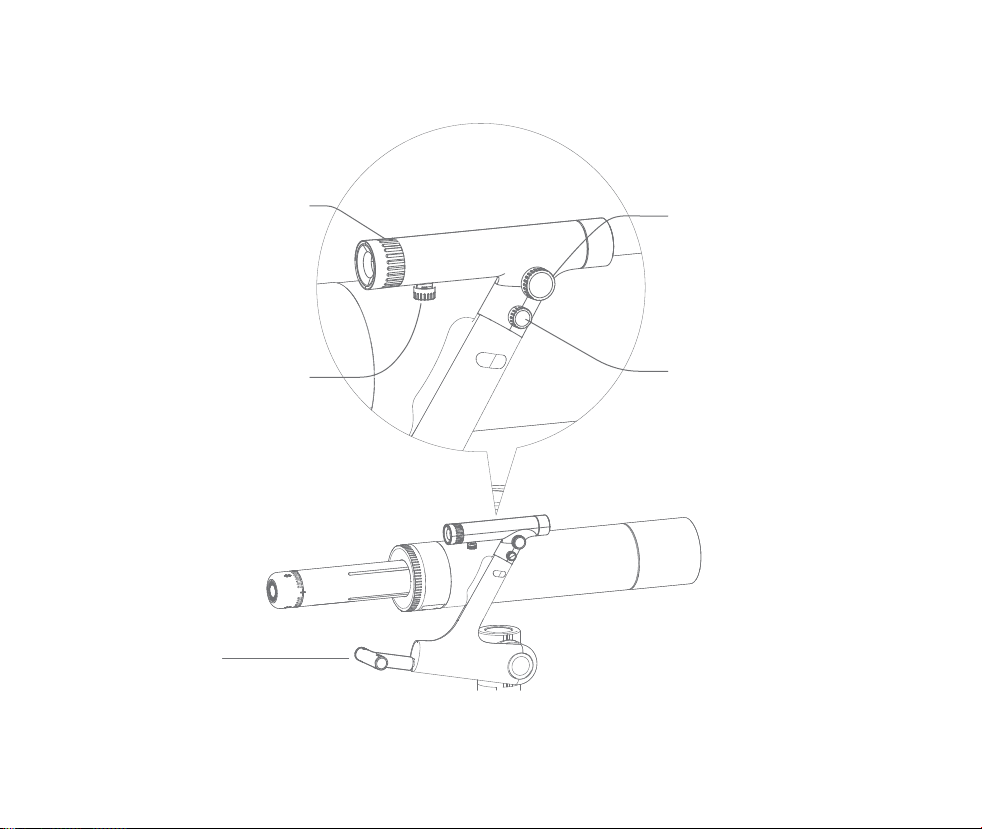
Description of telescope knobs
Starfinder red dot left and
right fine-tuning knob
Starfinder red dot up and
down fine-tuning knob
Fine tune the red dot
clockwise to the left
Fine tune the red dot
counterclockwise to the right
Fine tune the red dot clockwise upwards
backwards Needle down to fine tune the red dot
Starfinder red dot switch
Brightness trim knob
Fine tune the red dot to lighten
reverse time clockwise Needle
fine tuning red dots to darken
close
Star finder fixed locking knob
Lock the star finder clockwise
counterclockwise Release the starfinder
Tilt lock handle
Lock pitch clockwise
loosen counterclockwise Open, can be bent through the grip Their operations.
03
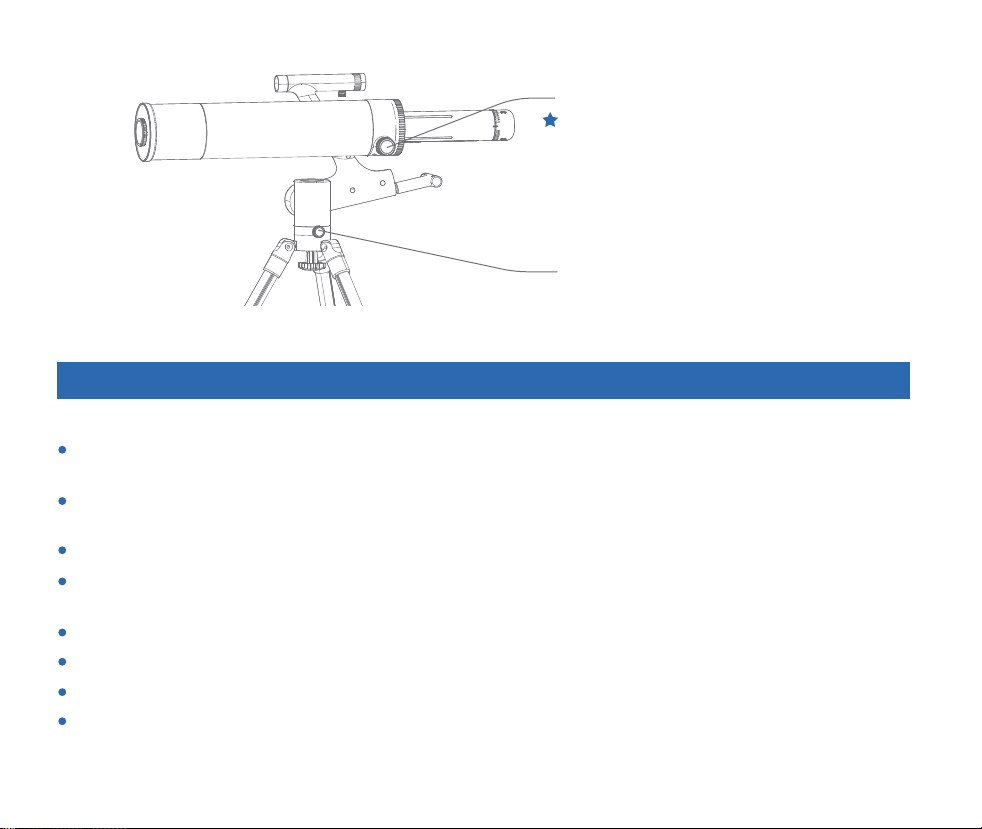
Lock knob in horizontal direction of gimbal
Focal length adjustment knob
Clockwise lock for horizontal turn
counterclockwise release.
The rack at the bottom of the focusing seat is coated
with grease. Do not touch it.
02 Usage Instructions
Protect the lens of the objective lens and close the dust cover after use to avoid dust or foreign
objects.
Pay attention to protect the image collector. Please put the protective cover on after use to avoid dust
or foreign matter.
The telescope is suspended from the side, without heavy weight.
When you do not use this product, please lock the various institutions of the gimbal to avoid the
rotation of the astronomical telescope under the action of gravity.
Please use in the environment of -10℃-45℃.
This product is not waterproof, please avoid getting wet by any liquid.
Keep away from fire and heat sources.
Please keep dust out of the lens.
This product is a precision instrument, please avoid collision and violent vibration.
In the case of low temperature, the available capacity of the battery will have different degrees of
decay, this is the characteristics of lithium batteries, is a normal phenomenon.
In case of any abnormal phenomenon, please refer to the troubleshooting manual in time. In case of
any unsolvable fault, please refer to the after-sales instructions.
Disassembling telescopes without permission is not covered by the warranty policy and may result in
irreparable damage.

After receiving the product, users are required to complete the overall assembly of the product by
themselves.
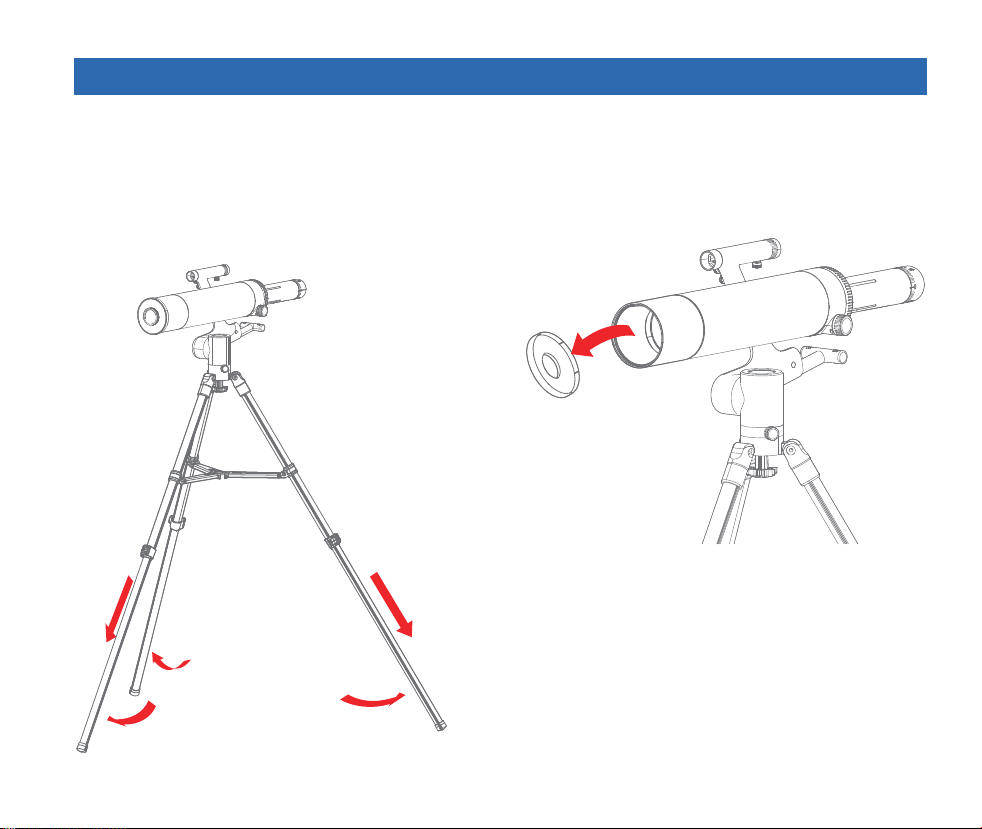
Install the tripod
1. Take out the tripod, loosen the fastening knob of the tripod, and pull out each leg to a uniform length.
2. Flatten the folded structure in the middle of the tripod.
Special Warning
Do not directly observe the sun without properly installed Bader film sunglasses. This will cause the
image collector chip to burn.
Minors should be accompanied by an adult.
Private modification of the telescope is prohibited.
When the telescope is not in use, please cover the dustproof cover to keep the machine clean.
04
03 Installation Instructions
Protect the lens of the objective lens and close the dust cover after use to avoid dust or foreign
objects.
Pay attention to protect the image collector. Please put the protective cover on after use to avoid dust
or foreign matter.
The telescope is suspended from the side, without heavy weight.
When you do not use this product, please lock the various institutions of the gimbal to avoid the
rotation of the astronomical telescope under the action of gravity.
Please use in the environment of -10℃-45℃.
This product is not waterproof, please avoid getting wet by any liquid.
Keep away from fire and heat sources.
Please keep dust out of the lens.
This product is a precision instrument, please avoid collision and violent vibration.
In the case of low temperature, the available capacity of the battery will have different degrees of
decay, this is the characteristics of lithium batteries, is a normal phenomenon.
In case of any abnormal phenomenon, please refer to the troubleshooting manual in time. In case of
any unsolvable fault, please refer to the after-sales instructions.
Disassembling telescopes without permission is not covered by the warranty policy and may result in
irreparable damage.
05
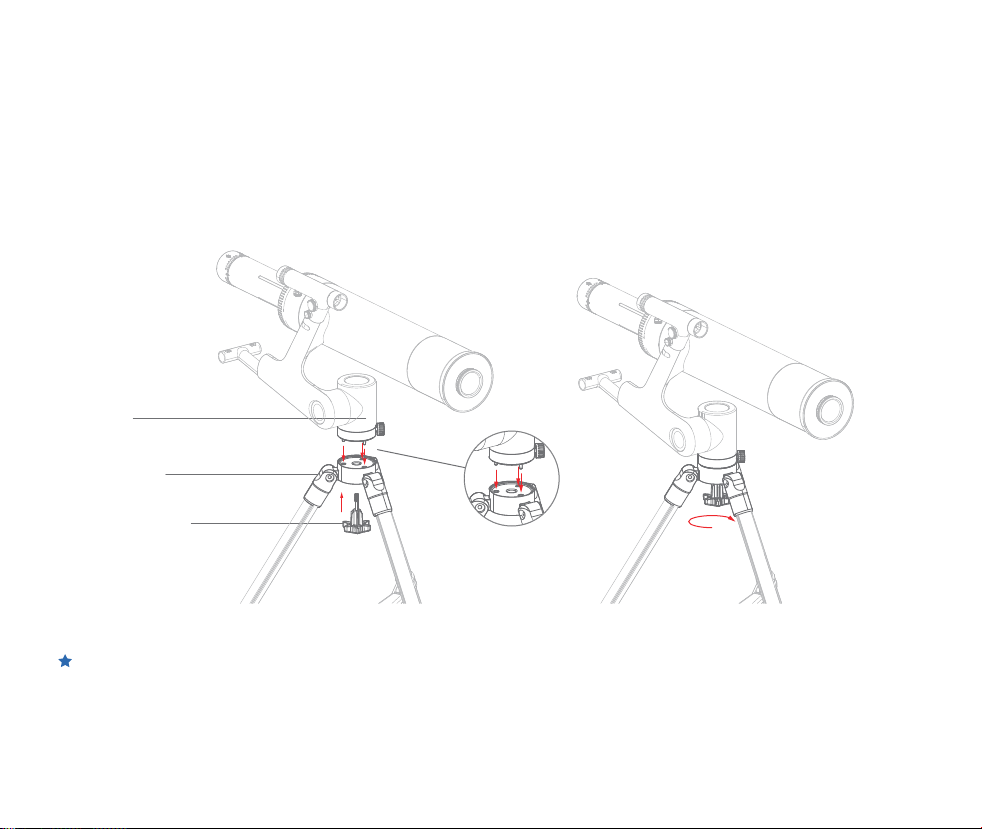
Install primary mirror barrel with tripod
1. Prepare the main mirror, the whole head, the tripod, and the quick detachable rod, as shown below.
2. Take out the main mirror and the cradle head, and align the three positioning pins of the cradle head
base with the corresponding three holes on the tripod.
3. Insert the quick disconnecting rod into the hole at the bottom of the tripod and tighten it clockwise.
During the removal, it is necessary to hold the head of the gimbal and the mirror barrel by hand
while loosening the quick detachable rod to prevent falling.
Holder
The tripod
Quick release
screw rod
06
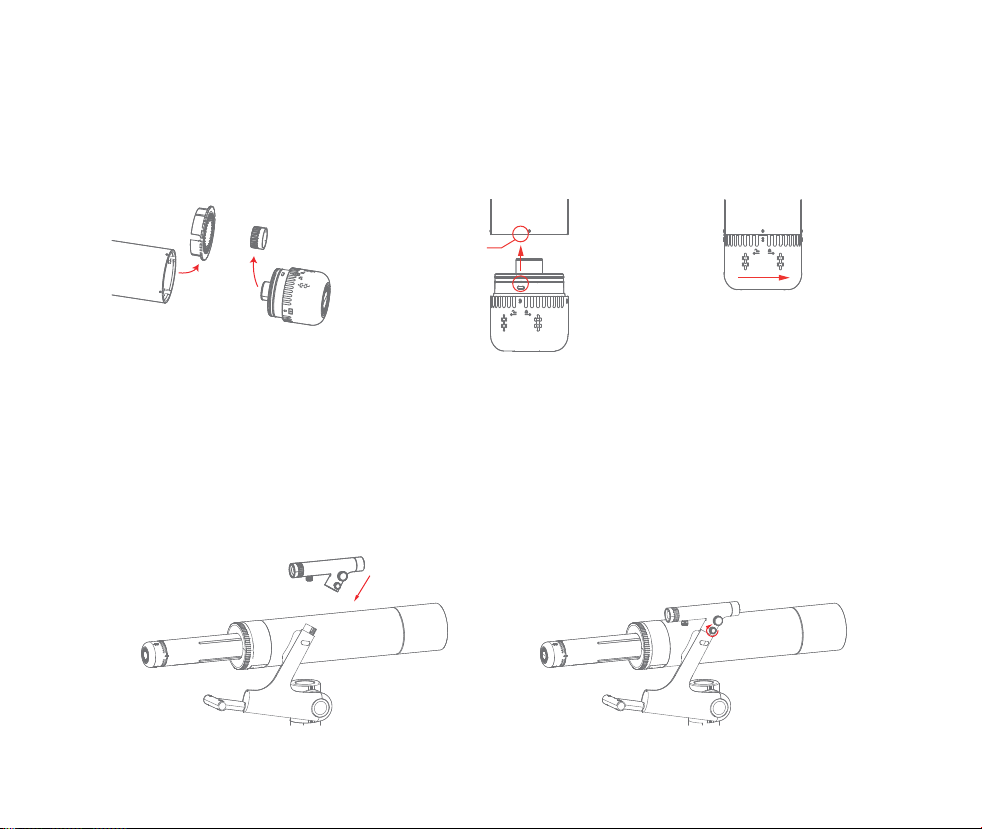
Installation of image collector
1. Get the image collector ready.
2. Align the locking clip on the side of the image collector with the notch of the telescopic cylinder and
insert it, and then rotate the image collector to align the mark point to fix and jam.
② Insert the image collector① Take off the dust cover③ Rotate clockwise to the
locking position
Install the star finder
1. Prepare the star finder and align the star finder with the support port. Note the gap in the port.
2. Tighten the fixing knob of the star finder.
Tip: Pay attention to the installation direction of the star finder.
① Insert the star finder into the support interface② Tighten the fixing knob of the star finder
Pay attention to the
bayonet position
07
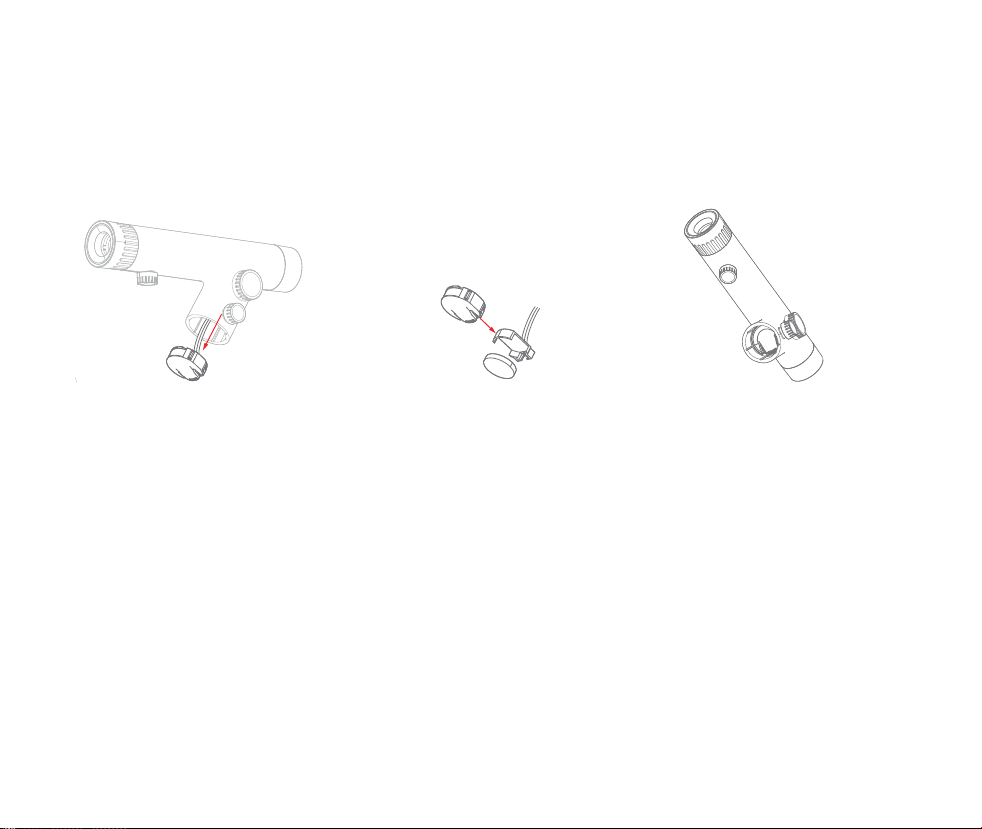
Replace the battery
1. Take out the star finder, place the battery in the interface where the star finder is inserted into the
support, and remove the battery holder with your fingers or tweezers.
2. The star finder uses CR-2032 battery. When replacing the button battery, pay attention to the positive
and negative terminals of the battery.
Calibrate the red dot star finder
1. Find a target more than 100 meters away with your naked eye.
2. Adjust the primary mirror of the telescope to find the target as a whole and move to the center of the
field of view.
3. Turn on the star finder red dot switch and turn on the light.
4. Find the red dot inside the circular observation mouth at the back of the star finder.
5. Adjust the position of the red dot through the knob next to the star finder mirror. The whole assembly
is not finished until the red dot coincides with the target and the calibration is completed.
Tip: After the observation, please turn off the red dot of the finderscope.
①Take out the battery holder together
(Be careful to loosen the locking knob)
②Replace the battery,Pay attention to
the positive and negative electrodes
③Put the battery holder back, pay
attention to the direction and position
08
04 User Procedure
The tripod is placed smoothly
Remove the dust cover
The middle triangle is
stretched flat and tight
The tripod extension leg
is opened and locked
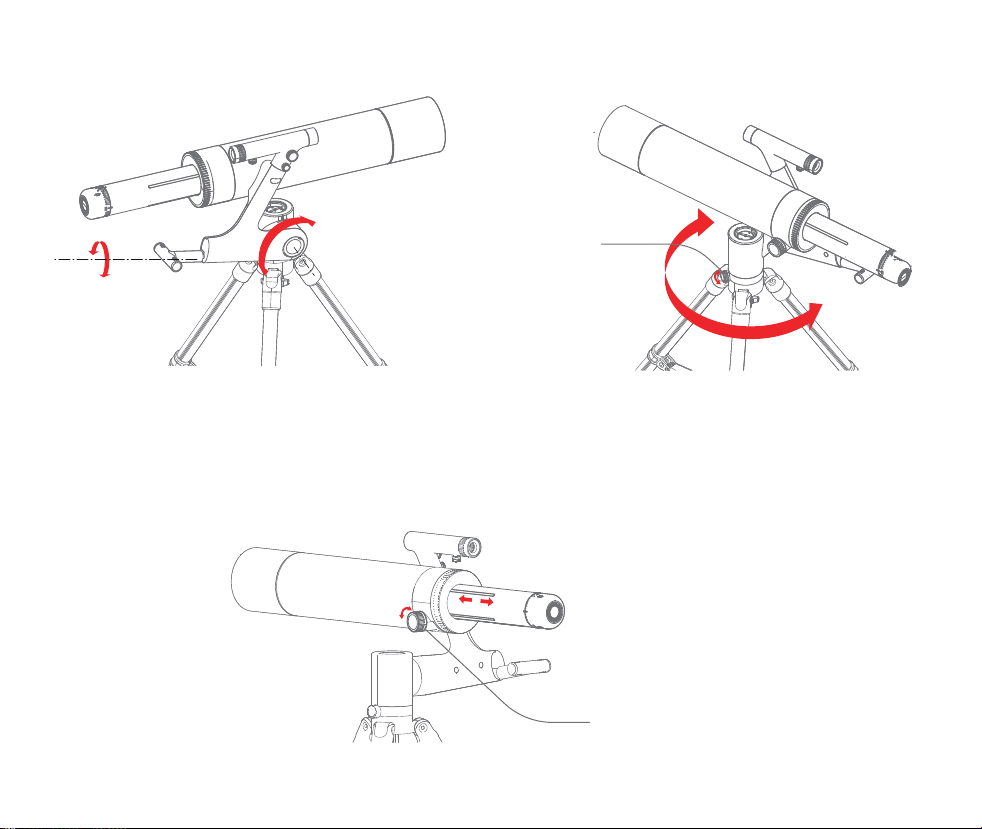
Through the focal length adjustment knob can focus the image, so that
the image is more clear
Through the focusing knob,
the image is focused
09
Release the gimbal locking knob and pitch locking armrest to confirm the observation target.
Loosen the gimbal
locking knob
Pitch lock
the handrail
Pitch steering adjustmentHorizontal steering regulation
10
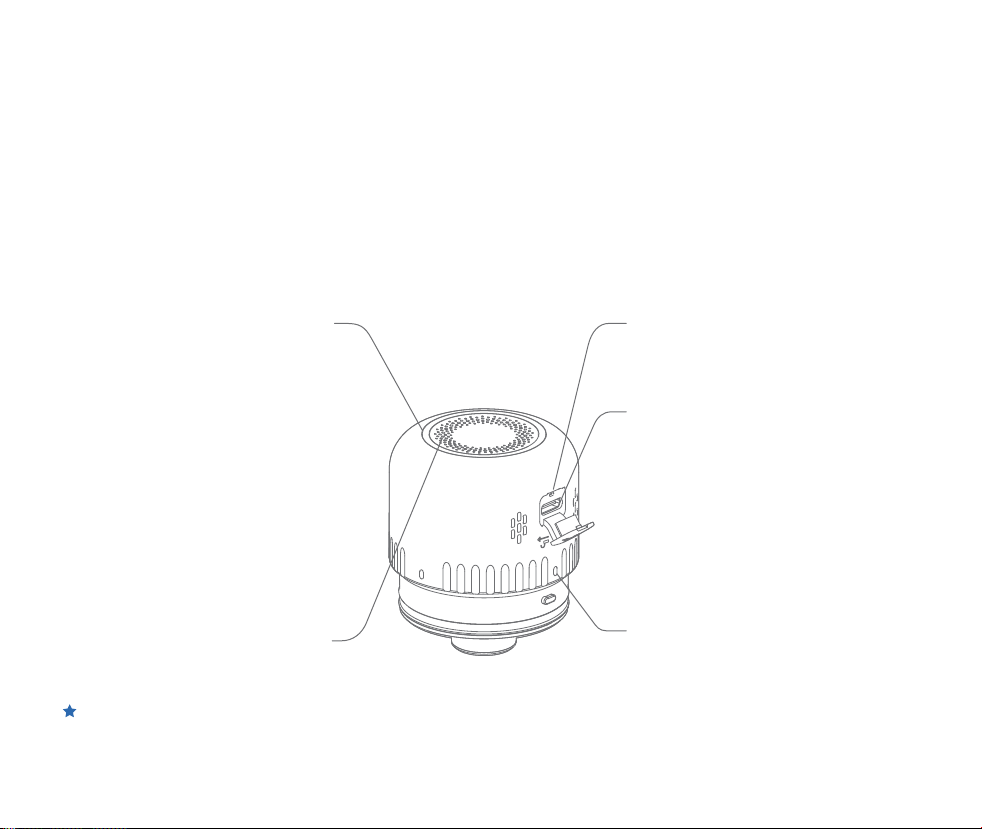
Image collector interface and switch instructions:
Use of image collector:
Orientation calibration
type-C Indicates the data
transmission interface
Image collector switch button
Image collector indicator light
When installing the image collector, align the
locking position with the image collector
The scale can be used to confirm whether the
card is tight.
Image and video transmission: Connect to a
computer or pad and open the software to
watch relevant images and videos in real time.
Charging: When the image collector is short of
power, the light ring will turn to red flash.
At this time, please connect the adapter
through the Type-C charging cable for charging.
The red light will be on when fully charged.
When there is a crash, you can press the
reset key through small objects, restart the
boot again.
Reset button
Blue light breathing: wifi is not connected
in wifi mode.
The machine is in standby state and
automatically shuts down after 3 minutes
without operation.
Blinking blue: The usb port is not
connected.
Blue light is on: the machine is normally
connected.
Blinking red: Power is low. Please charge in
time.
Red breathing light: charging status.
Steady red: The battery is fully charged.
On and off machine: long press for 2 seconds to
switch on and off machine.
Mode switch: Double-click to switch between
wifi mode and USB connection mode.
This product is equipped with an image collector
Support wireless observation, and wired observation (users need to be equipped with OTG adapter,
Apple system can not be wired connection.
11
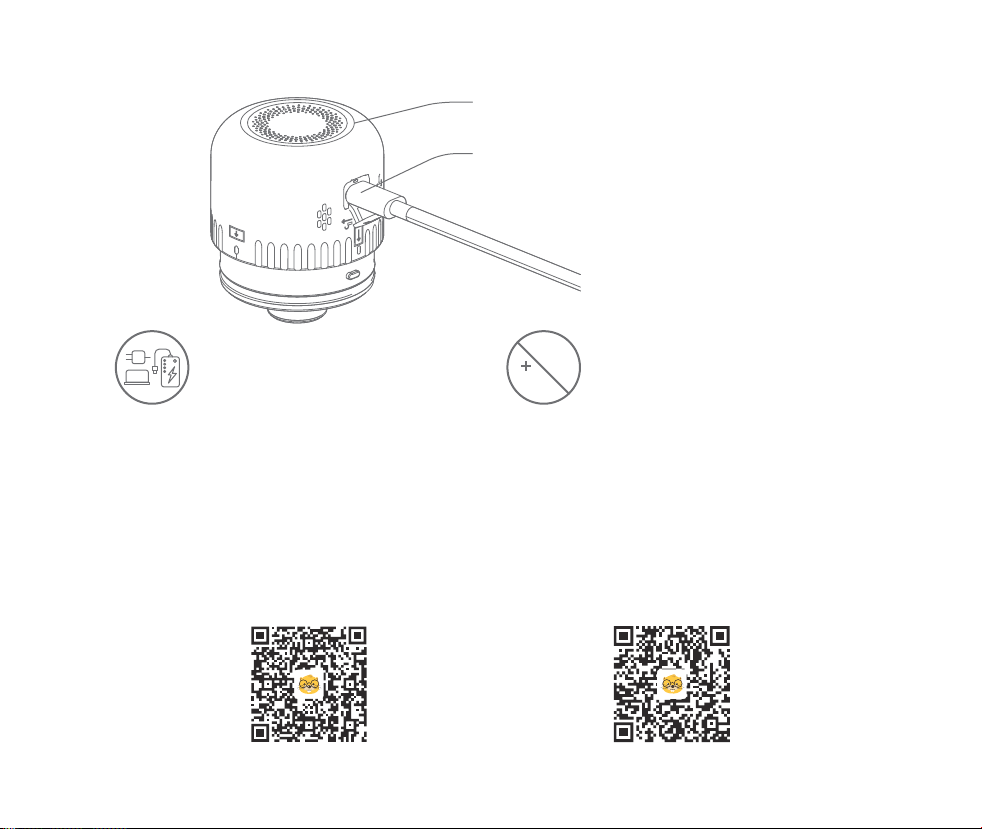
Charging instructions
Mobile phone wireless connection
When charging, it is a red breathing light, and when
fully charged, it turns into a long red light.
type-C Charging port
12h
The image collector can be
charged using a 5V1A charger.
Do not charge the battery for more than
12 hours to avoid affecting the battery life.
APP download and installation:
1. The image collector should be fully charged before use. If the observation time needs to be extended,
it can also be equipped with charging devices such as mobile charging bank to charge in time during the
observation.
2. Scan the QR code below to download the APP (search "Beaver Point" in App store or Google Play to
download the APP)
Scan here to download APP
Android
iOS
WIFI password for image collector: 12345678
12
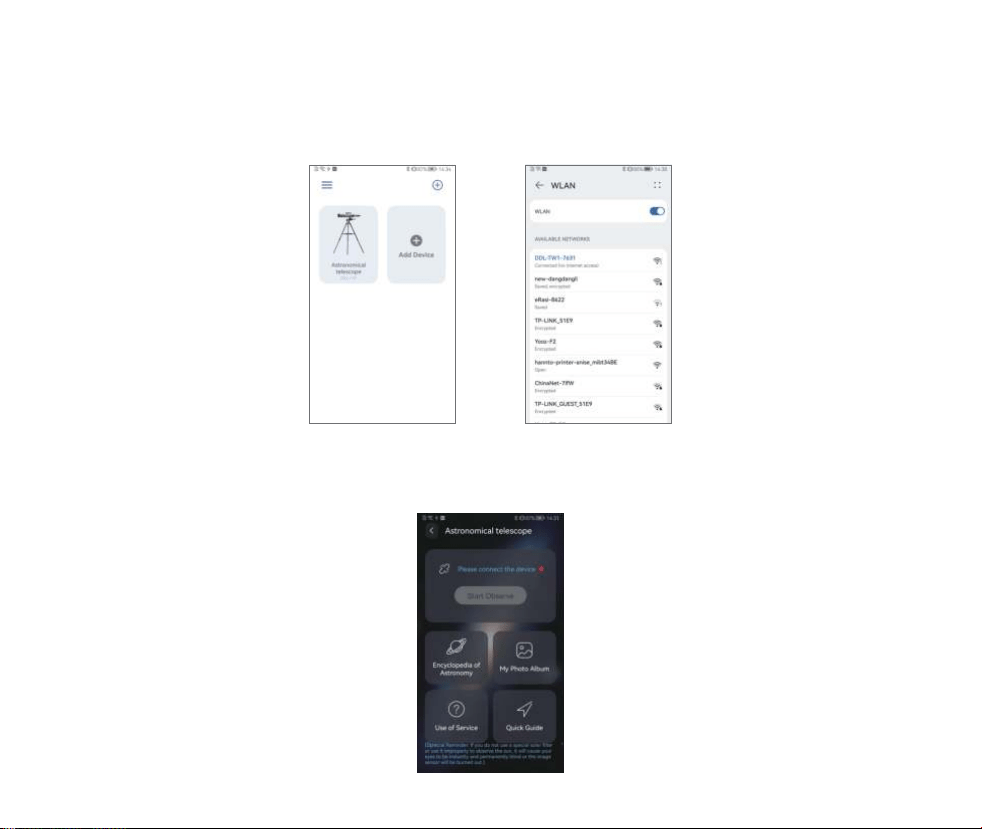
3. Long press the image collector for 2 seconds to start the device, and then it will be in standby state
(the blue light is breathing at this time). Open the APP of the mobile phone, select Add Device → select
the wifi name corresponding to the astronomical telescope (such as DL-TW1-XXXX), and connect→
Click Enter after it shows that it has been connected.
4. Open the home page and click Start observation to enter the real-time transmission screen.
13
5. In the process of observation, images can be obtained by taking photos and videotaping. Click below
the pictures to download and save them in the system album.
6. The exposure, sharpening, contrast, saturation and other parameters of the image can also be adjusted
in real time through the App to achieve the optimal overall effect.
7. Click Astronomy Science on the home page to learn about the eight planets and main constellations of
the solar system.
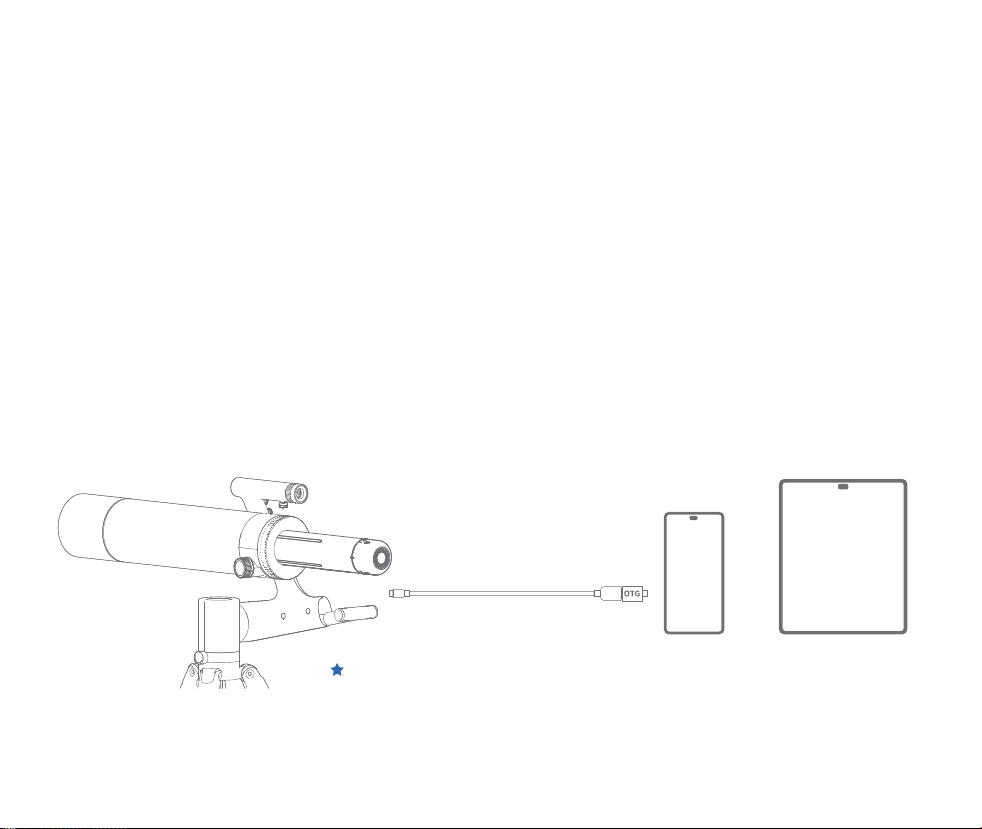
① Double-click the switch on the image collector to switch the default wifi mode to wired
connection mode.
Mobile phone, pad and other wired connection
When connecting the USB data cable to the mobile phone (pad),
the OTG head must be connected to the mobile phone (pad) end.
② Connect the device to the image collector through USB data cable.
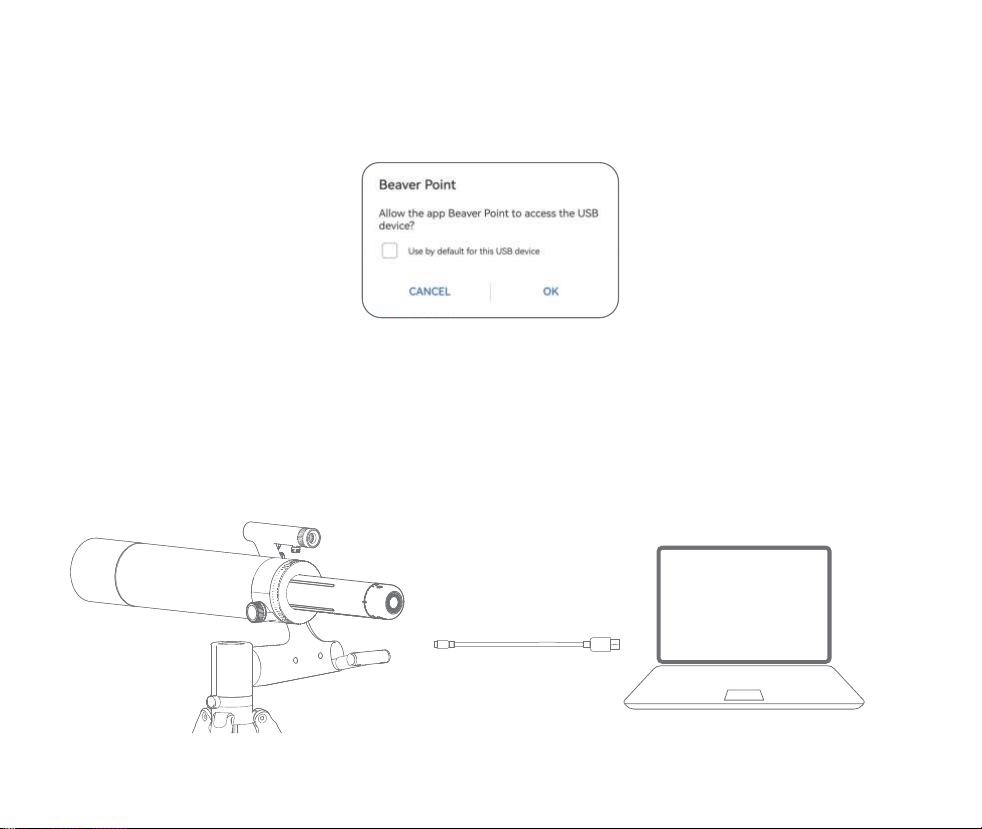
③ Open the APP and click "Start Observation".
In the pop-up "Allow the app Beaver Point to access the USBdevice Dialog box, click OK.
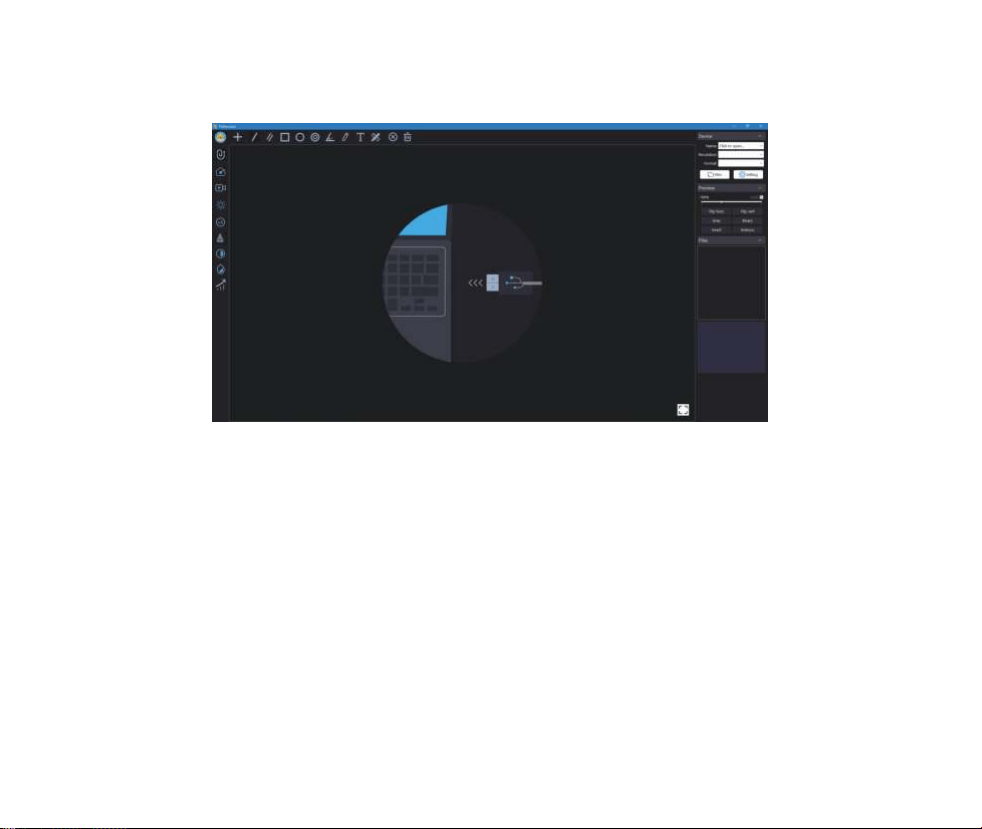
①Double-click the switch of the image collector to switch the default wifi mode to
wired connection mode.
②Connect the computer to the image collector through USB data cable.
Wired computer connection
14
Connect the USB cable to the computer
Pay attention to the cable connection
1. IPhone and pad do not support wired connection.
2. Mobile phone and pad users need to purchase OTG adapters.
3. Before use, the wireless mode of the image collector needs to be converted to the wired mode,
and the mode switch can be realized by double-clicking the switch button.
4. In wired mode, the image collector will enter the automatic charging mode.
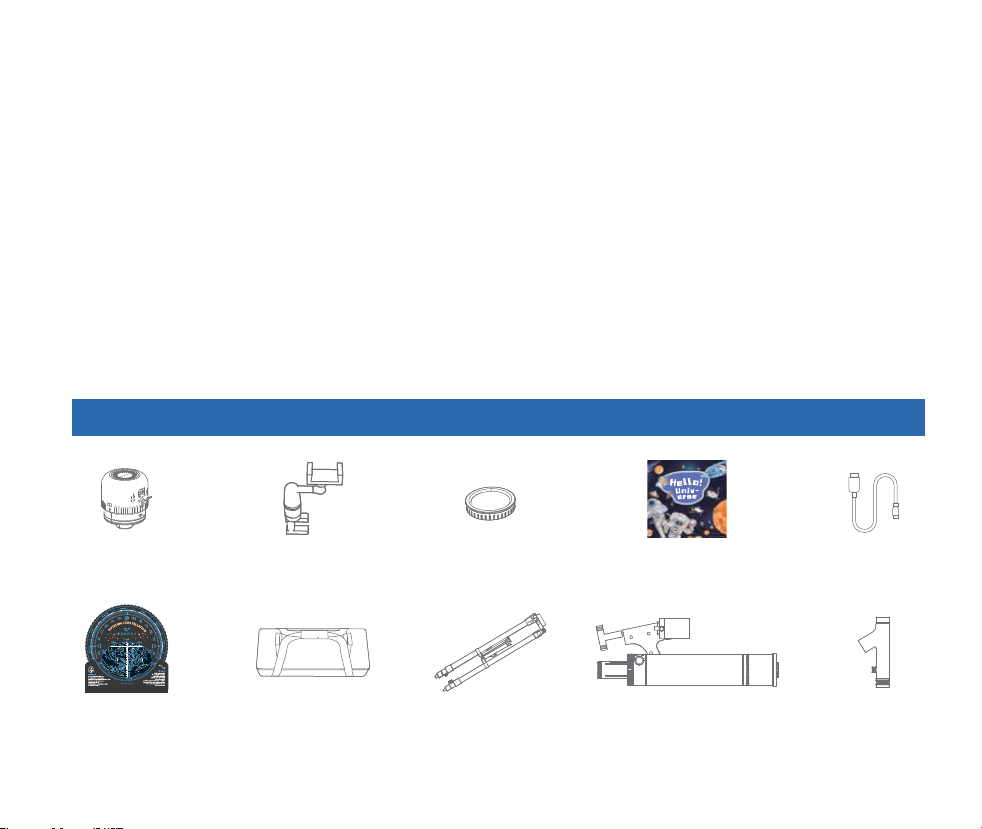
③ Open the Windows software and select the device to observe.
15
Computer users can download the Windows version of the
software to's official website (www.beaverlabtech.com or www.dangdangli.com)
16
Sensor
Optical Tube
Science BookCable
Finder Scope
Phone Holder
05 Accessories And Tools
Astronomical observations
Guide to Lunar Observation
1. Connection: On a clear and moonlit night, check the device to ensure sufficient power of the device.
Connect the device through mobile phone to realize real-time image transmission.
2. Moon search: open the switch knob of the red dot star search mirror, and find the red dot, find the
moon through the star search mirror, and overlap the red dot with the moon target center by turning
the head.
3. Moonwatching: Use the focus knob until the image is clear.
If you need to observe other stars, you can use star finder software or manual astrolabes to find them.
The telescope is equipped with a compass, combined with the gift of astrofinder, you can confirm
the current map of the sky, and compare the map to find specific stars or nebulae for observation.
See the Astrolabe manual for specific usage
H
e
l
l
o
!
u
n
i
v
e
r
s
e
It's been 13.8 billion years since the Big
Bang. In the long river of time, countless
stars were born. Stars grow in the
expansion of the universe and die in the
expansion of the universe. The earth is but
a drop in the ocean of stars. Man should
keep his eyes on the world, focus on the
stars, and set sail for the sea of stars.
⸺Thomas Chen
Beaver Culture Innovation Honors production
Beaver Culture Innovation Honors production
BEAVERLAB
Not for sale
PlanisphereTripod
Solar Filter
Carry Bag

17
Reason
The battery is dead.
The charging port is
not securely inserted
No power access
Equipment failure
Processing method
Replace the battery
Remove and reinsert the interface
Put through power supply
Send to repair
Phenomenon of the problem
The starfinder's red
dot is not bright
The device cannot be charged
There is a power shortage
in the image collector
Image collector water
short circuit
The image collector crashed
The ambient temperature
changes rapidly, causing the
lens to fog
Image collector lens filter is dirty
Damage caused by external use
Crash
Timely charging
Send to repair
Press the reset button once to reset
At a constant temperature,
Use it after the fog clears
Wipe the filter with a cotton
swab dipped in alcohol
Man-made damage is
not covered by the warranty
Press the reset button once to reset
The image collector device
cannot be used normally
Image fuzzy
Fall、impact to cause the
shell broken、 crack
The product can not be shut
down or the key failure
06 Telescope Faults And Troubleshooting Methods

18
Dangdang Cat Intelligent astronomical telescope is a precision optical equipment with high professional
degree. If there is a fault other than the above phenomenon, it needs to be sent back to the factory for
repair.
It is recommended to do the following in daily use to keep your telescope in the best condition:
When you do not use this product, please put the dust cover on the objective lens to protect the lens and
prevent dust at the same time. If there is dust on the image collector, it is recommended to use camel
hair brush or air to blow it off.
Do not clean the optical lens as much as possible. A little dust on the lens will have little effect on the
overall image.
Keep the telescope in a cool and ventilated place.
Warning: Do not use chemical lens cleaning solutions, which may damage optical parts.
“ ”、“ ”、“当当狸”是海狸文创科技(深圳)有限公司在中国大陆申请或注册的商标,并在本商品上
07 Trademark And Legal Statement
"BeaverLAB" is Beaver Technology (Shenzhen) Co., Ltd.A trademark applied or registered in mainland
China and used on the goods. Without the permission of the trademark owner, no person or organization
may use the above-mentioned trademark marks on the commodities that have not been approved.
This manual is from Beaver Technology (Shenzhen) Co., Ltd. This manual is made and copyrighted. No
institution or individual may reproduce or distribute all or any part of this manual without permission.
Due to the continuous improvement of product functions, design changes and other reasons, this manual
may be inconsistent with the product you purchased, please refer to the actual product.

19
BeaverLAB
Intelligent Astronomical Telescope TW1
DDL-TW1
Black 、Blue
F/6.1
Brand
Product Name
Product Model
Product Color
TW1/TW1 Pro/TW1 MaxVersion
Aperture
当当狸
当当狸智能天文望远镜
DDL-TW1(PRO)
黑色、蓝色
80mm
500mm
Refractor
1700mAh
Type-C
品牌
产品名称
产品型号
产品颜色
口径
Focal Length
Type
Image acquisition unit
Battery Capacity
Input Voltage
Charging Port
500mm
折射式望远镜
200W(DDL-TW1)、500W(DDL-TW1Pro)
1600mAh
DC5V1A
type-C
焦距
构型
电子目镜
图像像素
电池容量
充电电源
充电接口
DC5V 1A
08 Overall Telescope Parameters

友情提示:因运输过程中需要使用包装箱保证产品运输安全,建议您自签收之日起至少保留包装箱 30 天。
2. 保修内容
主机保修 6 个月。
3. 非保修条例
①未经授权的维修、误用、碰撞、疏忽、滥用、进液、事故、改动等不正确的使用方式,或撕毁、涂改标贴、防伪标
记;
②已超过保修期;
③因不可抗力造成的损坏;
④不符合《当当狸智能天文望远镜产品性能故障表》所列性能故障的情况;
⑤因人为原因导致本产品及其配件产生《当当狸智能天文望远镜产品性能故障表》所列性能故障。

Brand Company: Beaver Technology (Shenzhen) Co., Ltd.Address:Room101.102, Building 6, F518 Idea
Land, No.1065, Baoyuan Road, Laodong,
Xixiang, Bao'an District, Shenzhen,
Guang Dong, China
Web Site:
Intelligent Astronomical Telescope TW1
Product Name:Intelligent Astronomical Telescope TW1
Product Net Weight:About 3.5kg
FCC ID:2A6VMDDL-TW1
Product Model:DDL-TW1
Product Size:1300x1140x1030mm
Input Voltage:
Operating Temperature: -10℃ ~45℃
www.beaverlabtech.com
Service Mailbox:
/ www.dangdangli.com
DC5V 1A