Quick Installation Guide
Wireless Access Point
Setup with videos
Visit https://www.tp-link.com/support/setup-video/ or scan the QR code to search for
the setup video of your product model.
Note: For simplicity, we will take EAP660 HD for example throughout the Guide. The image may dier from the
actual product.
Hardware Overview
1
On:
Working normally/Initializing.
Off:
Working abnormally/Power o/LED is turned o.
Flashing:
Initialization
: The LED ashes twice after initialization is completed.
Upgrade
: The LED ashes once per second while upgrading.
Reset
: The LED ashes quickly during the reset. The EAP will then reboot.
Locate
: When the Locate feature is activated in the Omada controller, the LED ashes quickly to locate and
identify the device. The LED will ash for 10 minutes, or you can disable the feature manually to stop it ashing.
LED Indicator
RESET
With the device powered on, press and hold the button for about 5 seconds until the LED flashes quickly . Then release the
button. The device will restore to factory default settings.
The port is used to connect to a router or a switch to transmit data, or to a PSE (Power Sourcing Equipment), such as a PoE switch,
for both data transmission and Power over Ethernet (PoE) through Ethernet cable. The port supports transmission speed of
10/100/1000/2500 Mbps for EAP660 HD and 10/100/1000 Mbps for EAP610 / EAP620 HD.
Ethernet Port: 2.5G ETH (PoE) (for EAP660 HD) | ETH (PoE) (for EAP610 / EAP620 HD)
Plug one end of the provided power adapter to this port and the other end to a standard electrical wall outlet to power the EAP.
Power Port: 12V 2A (for EAP660 HD) | 12V 1A (for EAP610 / EAP620 HD)
2
Insert the plastic wall anchors into the 6 mm
diameter holes.
4
Connect the Ethernet cable to the Ethernet port on
the EAP.
5
Attach the EAP to the mounting bracket, then
rotate the EAP until it locks into place, as shown on
the left.
M3×20 Self-tapping Screws (Qty.4)
M3×28 Plastic Wall Anchors (Qty.4)
1
If your Ethernet cable feeds through the wall, you
can position the mounting bracket below the cable
hole. Mark four positions for the screw holes and
then drill four 6 mm diameter holes at the marked
positions.
3
Secure the mounting bracket to the wall by driving
the self-tapping screws into the anchors. Make
sure that the shoulders of the mounting bracket are
on the outside.
1
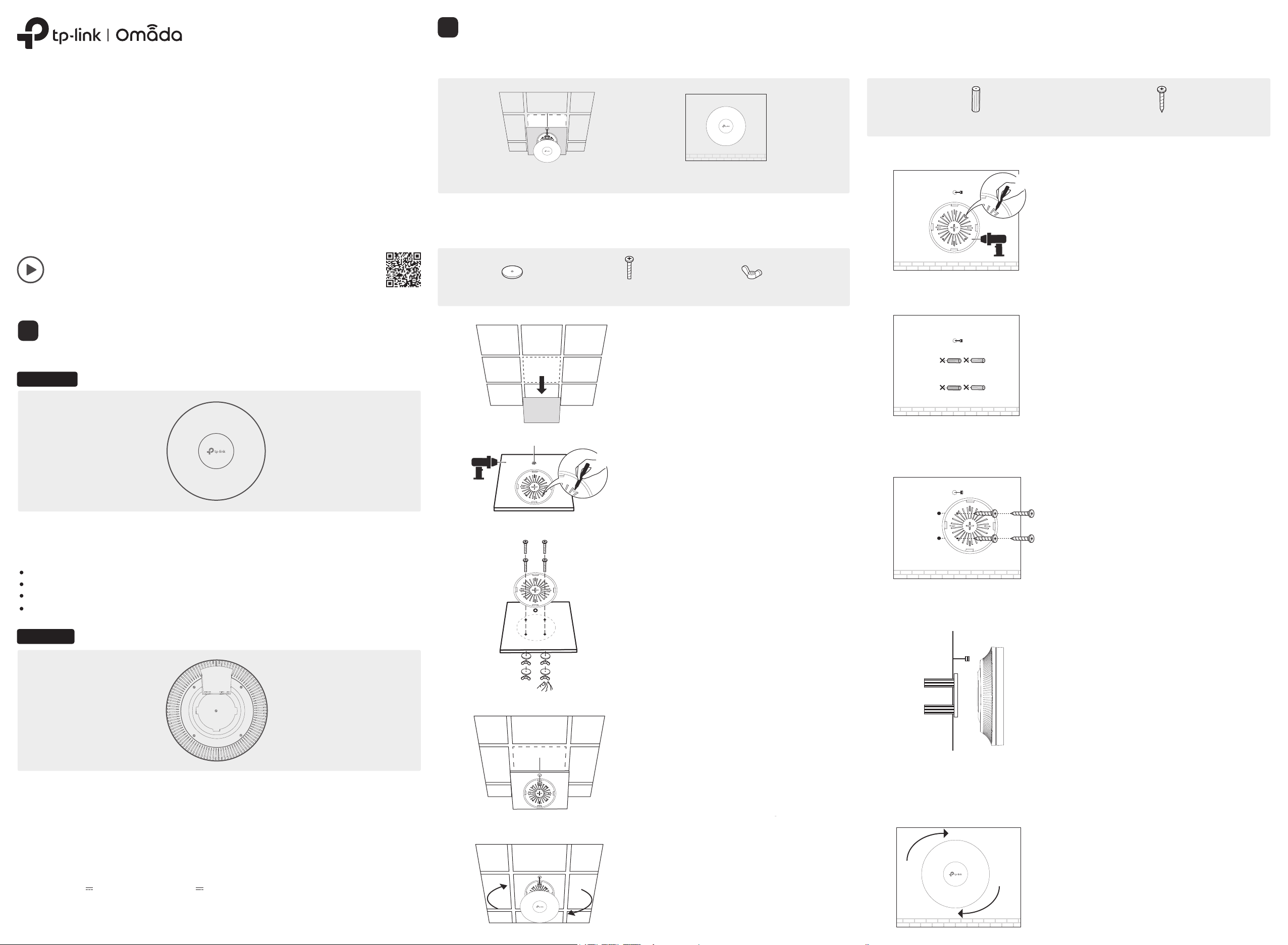
Remove the ceiling tile.
2
Place the mounting bracket in the center of the
ceiling tile. Mark four positions for the screw
holes and a position for the Ethernet cable hole.
Drill four 4 mm diameter holes for the screws and
a 25 mm diameter hole for the Ethernet cable at
the marked positions.
3
Secure the mounting bracket to the ceiling tile
using four M3x30 pan-head screws, washers and
wing nuts, as shown on the left.
4
Feed the Ethernet cable through the hole and set
the ceiling tile back into place.
5
Connect the Ethernet cable to the Ethernet port.
Attach the EAP to the mounting bracket, then
rotate the EAP until it locks into place, as shown on
the left.
Note: Make sure that the ceiling tile is bigger than the EAP.
Wing Nuts (Qty.4)Washers (Qty.4) M3×30 Pan-head Screws (Qty.4)
The EAP can be ceiling-mounted or wall-mounted. Choose a mounting method according to your
needs. Follow the steps below for the appropriate installation.
Hardware Installation
2
Drill Hole for Ethernet cable
X4
X4
Front Panel
Rear Panel
Option 1: Ceiling Mounting Option 2: Wall Mounting
Option1: Ceiling Mounting
Option2: Wall Mounting
©2021 TP-Link 7106509200 REV1.1.1
The products of TP-Link partly contain software code developed by third parties, including software code
subject to the GNU General Public License (“GPL”). As applicable, the terms of the GPL and any information on
obtaining access to the respective GPL Code used in TP-Link products are available to you in
GPL-Code-Centre under (https://www.tp-link.com/en/support/gpl/). The respective programs are distributed
WITHOUT ANY WARRANTY and are subject to the copyrights of one or more authors. For details, see the GPL
Code and other terms of the GPL.
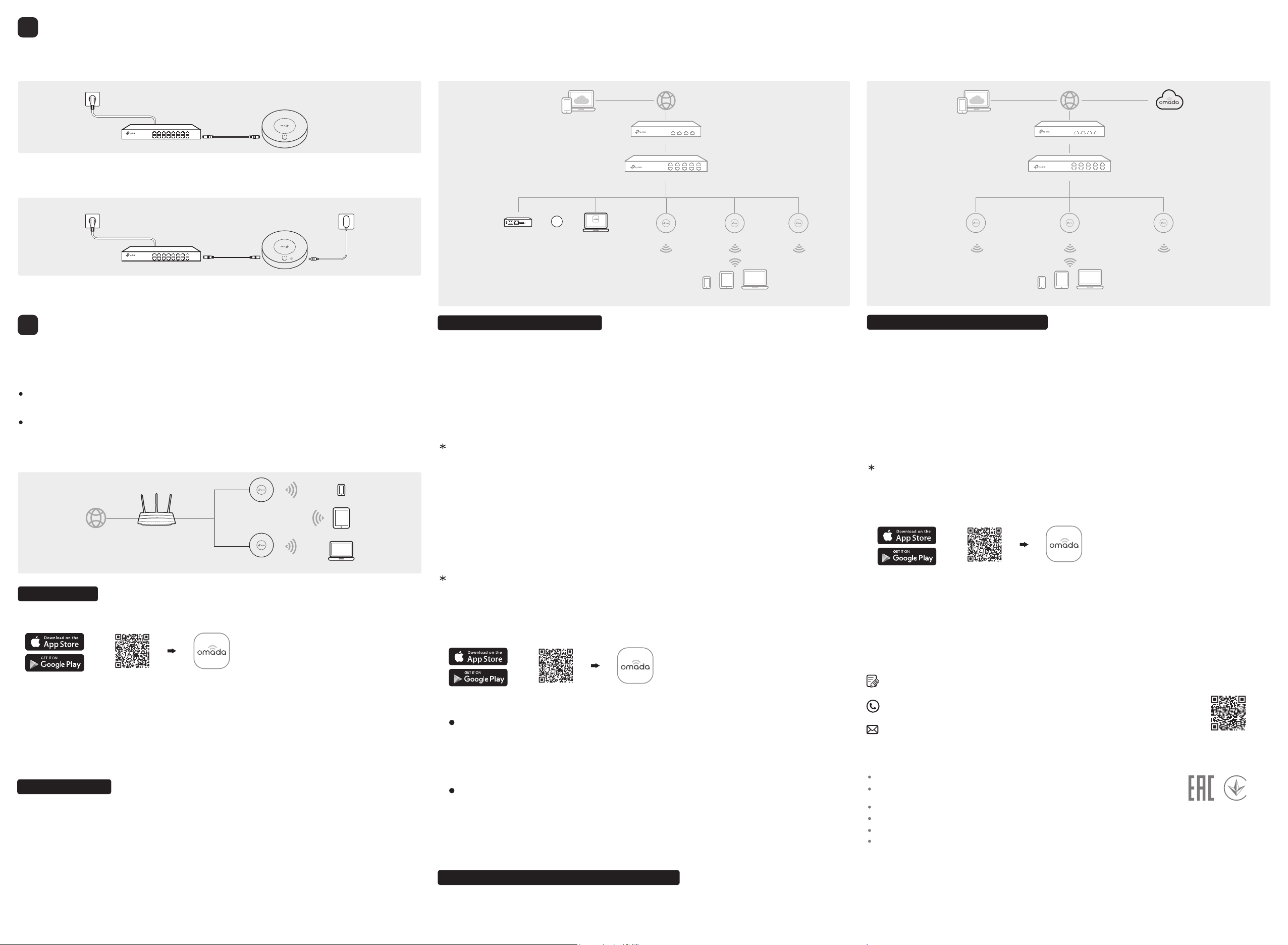
The EAP supports two configuring options:
To configure and manage EAPs singly (usually suitable for a small network with a few
EAPs), Standalone Mode is recommended. Please refer to Option 1.
To configure and manage EAPs in batch, Controller Mode is recommended. Please refer to
Option 2.
The EAP can be powered via a power adapter or a PSE device (such as a PoE switch).
Option1: Standalone Mode
Option1: Via PoE Switch (Compliant with 802.3at)
Option2: Via Power Adapter
A DHCP server (typically a router with DHCP function enabled) is required to assign IP addresses to
the EAPs and clients in your local network.
Via Omada App
1. Connect wirelessly by using the default SSID (format: TP-Link_2.4GHz/5GHz_XXXXXX) printed
on the label at the bottom of the product.
2. Launch a web browser and enter http://tplinkeap.net
in the address bar. Use admin for both
Username and Password to log in.
3. Set up a new Username and Password for secure management purpose. Modify the wireless
parameters and reconnect your wireless devices to the new wireless network.
To configure other EAPs, connect your device to the EAP by the coresponding default SSID and
repeat the steps listed above. You can configure some basic functions in Standalone Mode. If you
want to configure advanced functions, use Controller Mode.
1. Download the TP-Link Omada App on your mobile device. It can be downloaded from App Store or
Google Play:
2. Connect your mobile device to the EAP by using the default SSID (format:
TP-Link_2.4GHz/5GHz_XXXXXX) printed on the label at the bottom of the product.
3. Open the Omada App, and wait for the EAP to appear on the Standalone APs page. Tap on the
EAP you want to congure.
The Omada App is designed to help you quickly configure the common settings. If you want to
configure advanced settings, log in to the web page of your EAP or the controller.
Via a Web Browser
Omada Hardware Controller (OC200/OC300), which is pre-installed with Omada Software Controller, is a
good alternative if you have no spare PC to keep running Omada Software Controller in the network. It
needs to be purchased additionally. For more details, refer to the Installation Guide of OC200/OC300.
Via Omada Software Controller
Via Omada Cloud-Based Controller
Via Omada Hardware Controller (OC200/OC300)
Option2: Controller Mode
Controller Mode applies to the large scale network with mass devices. All devices can be centrally
configured and monitored via Omada Software Controller, Omada Hardware Controller or Omada
Cloud-Based Controller.
1. Download the TP-Link Omada App on your mobile device. It can be downloaded from App Store or
Google Play:
Scan for Omada App Download Omada App
or
With Omada App, you can also manage your Omada Software Controller at a local site and remote site.
Note that Omada Software Controller needs to be kept running when using Omada App.
Local Management
For the detailed configurations, refer to the User Guide of the controller and EAPs. The guides can be found
on the download center of our official website: https://www.tp-link.com/support/download/.
Omada App
2. Launch your Omada App and configure the controller at a local site or remote site.
Remote Management
Omada Cloud Portal
Connect an Ethernet cable from the PoE switch (compliant with 802.3at) to the Ethernet port.
Plug one end of the provided power adapter into the power port of the EAP and the other end to a
standard electrical wall outlet.
Power Supply
3
PoE Switch (Compliant with 802.3at)
Switch
Power Adapter
Software Conguration
4
Internet
Clients
Router
EAP
EAP
Scan for Omada App Download Omada App
or
Switch
Router
For technical support, the user guide and other information,
please visit https://www.tp-link.com/support, or simply scan the QR code.
If you have any suggestions or needs on the product guides,
welcome to email techwriter@tp-link.com.cn.
To ask questions, find answers, and communicate with TP-Link users or engineers,
please visit https://community.tp-link.com to join TP-Link Community.
Safety Information
Keep the device away from water, re, humidity or hot environments.
Do not attempt to disassemble, repair, or modify the device. If you
need service, please contact us.
Do not use the device where wireless devices are not allowed.
Do not use damaged charger or USB cable to charge the device.
Do not use any other chargers than those recommended.
Adapter shall be installed near the equipment and shall be easily accessible.
Omada Cloud-Based Controller
1. Download the TP-Link Omada App on your mobile device. It can be downloaded from App Store or
Google Play:
2. Launch Omada App and log in with your TP-Link ID. Then go to Cloud Access. A list of controllers
that have been bound with your TP-Link ID will appear. Then you can further configure the controller.
Scan for Omada App Download Omada App
or
With Omada App, you can also manage your Omada Cloud-Based Controller.
Before managing the devices via Omada Cloud-Based Controller, make sure they can access the
internet.
Omada App
1. On the PC with Windows OS or Linux OS, download the Omada Software Controller installation
file from https://www.tp-link.com/support/download/omada-software-controller/.
2. Run the file and follow the wizard to install the Omada Software Controller.
3. Launch the Omada Software Controller and follow the step-by-step instructions to complete
the Quick Setup. After the wizard is finished, a login screen will appear.
4. Enter the username and password you created and click Log in. Then you can further
configure the network.
1. Enable Cloud Access on the setting page on the controller and bind a TP-Link ID to your
controller. If you have congured this in the setup wizard, skip the step.
a. Connect your mobile device to the EAP by using the default SSID (format:
TP-Link_2.4GHz/5GHz_XXXXXX) printed on the label at the bottom of the product.
b. Launch Omada App and go to Local Access, tap the
+ button on the upper-right corner to add
the controller. Then you can further congure the controller.
a. Make sure Cloud Access is enabled on your controller and your controller has been bound with
your TP-Link ID.
b. Launch Omada App and log in with your TP-Link ID. Then go to Cloud Access. A list of
controllers that have been bound with your TP-Link ID will appear. Then you can further
configure the controller.
2. Launch a web browser and enter https://omada.tplinkcloud.com in the address bar.
3. Enter your TP-Link ID and password to log in. A list of controllers that have been bound with your
TP-Link ID will appear. Then you can click Launch to further congure the controller.
After installing Omada Software Controller, you can remotely access the controller through Omada
Cloud Portal. Follow the steps below.
Clients
EAP EAP EAP
1. Launch a web browser and enter https://omada.tplinkcloud.com in the address bar. Enter your
TP-Link ID and password to log in.
2. Click Add Controller and register for an Omada Cloud-Based Controller. Follow the instructions to
complete the setup process.
3. Add devices with the serial number, make sure the devices are online and in factory default.
4. Assign appropriate licenses in order to manage and congure the devices on the cloud-based
controller. Then wait until your controller is deployed.
Switch
Router
EAP EAP
Clients
Omada Hardware Controller
Controller
Omada Software Controller
Or
EAP
running on the Host PC
(OC200/OC300)

Regulatory Compliance
EAP
For Class A EAP with adapter:
FCC Compliance Information Statement
Product Name: Omada EAP
Model Number: EAP110 / EAP110-Outdoor / EAP660 HD
Component Name Model
I.T.E. Power Supply
TL-POE2406 (For EAP110 / EAP110-Outdoor)
T120200-2B1 (For EAP660 HD)
Responsible party:
TP-Link USA Corporation, d/b/a TP-Link North America, Inc.
Address: 145 South State College Blvd. Suite 400, Brea, CA 92821
Website: https://www.tp-link.com/us/
Tel: +1 626 333 0234
Fax: +1 909 527 6803
E-mail: sales.usa@tp-link.com
This equipment has been tested and found to comply with the limits for a Class A digital device,
pursuant to part 15 of the FCC Rules. These limits are designed to provide reasonable protection
against harmful interference when the equipment is operated in a commercial environment.
This equipment generates, uses, and can radiate radio frequency energy and, if not installed
and used in accordance with the instruction manual, may cause harmful interference to radio
communications. Operation of this equipment in a residential area is likely to cause harmful
interference in which case the user will be required to correct the interference at his own expense.
This device complies with part 15 of the FCC Rules. Operation is subject to the following two
conditions:
1) This device may not cause harmful interference.
2) This device must accept any interference received, including interference that may cause
undesired operation.
Any changes or modifications not expressly approved by the party responsible for compliance
could void the user’s authority to operate the equipment.
Note: The manufacturer is not responsible for any radio or TV interference caused by
unauthorized modifications to this equipment. Such modifications could void the user’s authority
to operate the equipment.
FCC RF Radiation Exposure Statement:

This equipment complies with FCC RF radiation exposure limits set forth for an uncontrolled
environment. This device and its antenna must not be co-located or operating in conjunction with
any other antenna or transmitter.
“To comply with FCC RF exposure compliance requirements, this grant is applicable to only Mobile
Configurations. The antennas used for this transmitter must be installed to provide a separation
distance of at least 20cm from all persons and must not be colocated or operating in conjunction
with any other antenna or transmitter.”
Product Name: I.T.E. Power Supply
Model Number: TL-POE2406 / T120200-2B1
Responsible party:
TP-Link USA Corporation, d/b/a TP-Link North America, Inc.
Address: 145 South State College Blvd. Suite 400, Brea, CA 92821
Website: https://www.tp-link.com/us/
Tel: +1 626 333 0234
Fax: +1 909 527 6803
E-mail: sales.usa@tp-link.com
This equipment has been tested and found to comply with the limits for a Class B digital device,
pursuant to part 15 of the FCC Rules. These limits are designed to provide reasonable protection
against harmful interference in a residential installation. This equipment generates, uses and can
radiate radio frequency energy and, if not installed and used in accordance with the instructions,
may cause harmful interference to radio communications. However, there is no guarantee that
interference will not occur in a particular installation. If this equipment does cause harmful
interference to radio or television reception, which can be determined by turning the equipment
off and on, the user is encouraged to try to correct the interference by one or more of the
following measures:
• Reorient or relocate the receiving antenna.
• Increase the separation between the equipment and receiver.
• Connect the equipment into an outlet on a circuit different from that to which the receiver is
connected.
• Consult the dealer or an experienced radio/ TV technician for help.
This device complies with part 15 of the FCC Rules. Operation is subject to the following two
conditions:
1) This device may not cause harmful interference.
2) This device must accept any interference received, including interference that may cause
undesired operation.
Any changes or modifications not expressly approved by the party responsible for compliance
could void the user’s authority to operate the equipment.
We, TP-Link USA Corporation, has determined that the equipment shown as above has been
shown to comply with the applicable technical standards, FCC part 15. There is no unauthorized
change is made in the equipment and the equipment is properly maintained and operated.
Issue Date:2020-5-12
CE Mark Warning
This is a class A product. In a domestic environment, this product may cause radio interference, in
which case the user may be required to take adequate measures.
OPERATING FREQUENCY (the maximum transmitted power)
2412MHz—2472MHz(20dBm)
EU declaration of conformity
TP-Link hereby declares that the device is in compliance with the essential requirements and
other relevant provisions of directives 2014/53/EU, 2009/125/EC, 2011/65/EU and (EU)2015/863.
The original EU declaration of conformity may be found at https://www.tp-link.com/en/ce.
RF Exposure Information
This device meets the EU requirements (2014/53/EU Article 3.1a) on the limitation of exposure of
the general public to electromagnetic fields by way of health protection.
The device complies with RF specifications when the device used at 20 cm from your body.
Canadian Compliance Statement
This device contains licence-exempt transmitter(s)/receiver(s) that comply with Innovation,
Science and Economic Development Canada’s licence-exempt RSS(s). Operation is subject to the
following two conditions:
(1) This device may not cause interference.
(2) This device must accept any interference, including interference that may cause undesired
operation of the device.
L’émetteur/récepteur exempt de licence contenu dans le présent appareil est conforme aux CNR
d’Innovation, Sciences et Développement économique Canada applicables aux appareils radio
exempts de licence. L’exploitation est autorisée aux deux conditions suivantes :
1) L’appareil ne doit pas produire de brouillage;
2) L’appareil doit accepter tout brouillage radioélectrique subi, même si le brouillage est
susceptible d’en compromettre le fonctionnement.
For EAP110-Outdoor:
This radio transmitter (IC: 8853A-EAP110OD / Model: EAP110-Outdoor) has been approved by
Industry Canada to operate with the antenna types listed below with the maximum permissible
gain indicated. Antenna types not included in this list below, having a gain greater than the
maximum gain indicated for that type, are strictly prohibited for use with this device.
Le présent émetteur radio (IC: 8853A-EAP110OD / Model: EAP110-Outdoor) a été approuvé par
Industrie Canada pour fonctionner avec les types d'antenne énumérés ci-dessous et ayant un
gain admissible maximal. Les types d'antenne non inclus dans cette liste ci-dessous et dont
le gain est supérieur au gain maximal indiqué, sont strictement interdits pour l'exploitation de
l'émetteur.
Antenna Two 2.4GHz 3dBi external omnidirectional antennas
Radiation Exposure Statement:
This equipment complies with IC radiation exposure limits set forth for an uncontrolled
environment. This equipment should be installed and operated with minimum distance 20cm
between the radiator & your body.
Déclaration d'exposition aux radiations:
Cet équipement est conforme aux limites d'exposition aux rayonnements IC établies pour un
environnement non contrôlé. Cet équipement doit être installé et utilisé avec un minimum de 20
cm de distance entre la source de rayonnement et votre corps.
Industry Canada Statement
CAN ICES-3 (A)/NMB-3(A)
Korea Warning Statements
당해 무선설비는 운용중 전파혼신 가능성이 있음 .
この装置は、クラス A 情報技術装置です. この装置を家庭環境で使用すると電波妨害を引き起こすこと
があります . この場合には使用者が適切な対策を講ずるよう要求されることがあります .
VCCI‑A
NCC Notice & BSMI Notice
注意!
依據 低功率電波輻射性電機管理辦法
第十二條 經型式認證合格之低功率射頻電機,非經許可,公司、商號或使用者均不得擅自變更頻率、加
大功率或變更原設計之特性或功能。
第十四條 低功率射頻電機之使用不得影響飛航安全及干擾合法通行;經發現有干擾現象時,應立即停
用,並改善至無干擾時方得繼續使用。前項合法通信,指依電信規定作業之無線電信。低功率射頻電機
需忍受合法通信或工業、科學以及醫療用電波輻射性電機設備之干擾。
安全諮詢及注意事項
■
請使用原裝電源供應器或只能按照本產品注明的電源類型使用本產品。
■
清潔本產品之前請先拔掉電源線 . 請勿使用液體、噴霧清潔劑或濕布進行清潔。
■
注意防潮,請勿將水或其他液體潑灑到本產品上。
■
插槽與開口供通風使用,以確保本產品的操作可靠並防止過熱,請勿堵塞或覆蓋開口。
■
請勿將本產品置放於靠近熱源的地方 . 除非有正常的通風,否則不可放在密閉位置中。
■
不要私自拆開機殼或自行維修,如產品有故障請與原廠或代理商聯繫。
此為甲類資訊技術設備,于居住環境中使用時,可能會造成射頻擾動,在此種情況下,使用者會被要求
採取某些適當的對策。
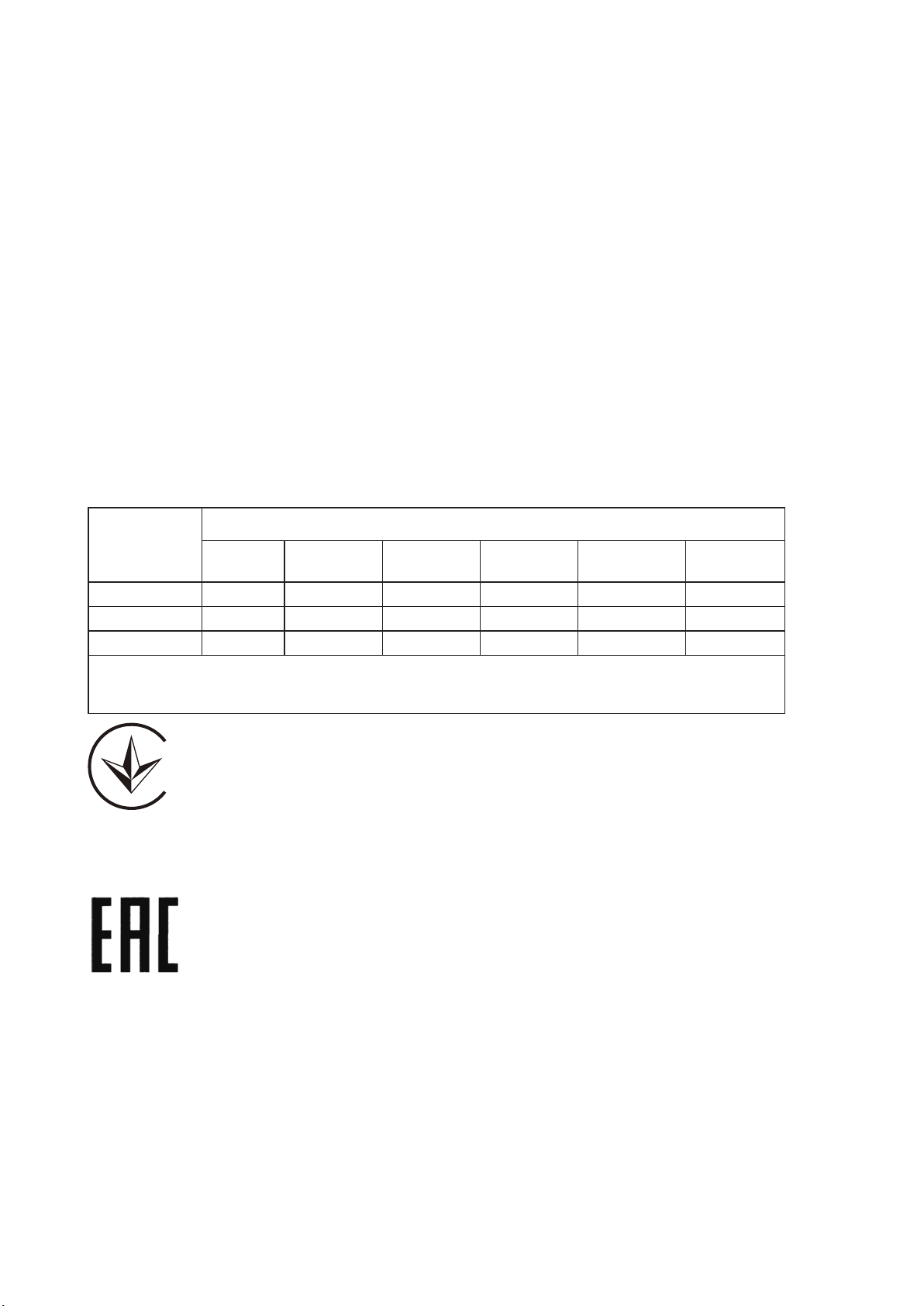
限用物質含有情況標示聲明書
產品元件名稱
限用物質及其化學符號
鉛
Pb
鎘
Cd
汞
Hg
六價鉻
CrVI
多溴聯苯
PBB
多溴二苯醚
PBDE
PCB ○ ○ ○ ○ ○ ○
外殼 ○ ○ ○ ○ ○ ○
電源供應器 — ○ ○ ○ ○ ○
備考1. "超出0.1 wt %" 及 "超出0.01 wt %" 系指限用物質之百分比含量超出百分比含量基準值.
備考2."○"系指該項限用物質之百分比含量未超出百分比含量基準值.
備考3."—" 系指該項限用物質為排除項目.
Продукт сертифіковано згідно с правилами системи УкрСЕПРО на відповідність вимогам
нормативних документів та вимогам, що передбачені чинними законодавчими актами
України.
Safety Information
■ Keep the device away from water, fire, humidity or hot environments.
■ Do not attempt to disassemble, repair, or modify the device. If you need service, please
contact us.
■ Do not use damaged charger or USB cable to charge the device.
■ Do not use any other chargers than those recommended.
■ Do not use the device where wireless devices are not allowed
■ Adapter shall be installed near the equipment and shall be easily accessible.
■ Use only power supplies which are provided by manufacturer and in the original packing of
this product. If you have any questions, please don’t hesitate to contact us.
Please read and follow the above safety information when operating the device. We cannot
guarantee that no accidents or damage will occur due to improper use of the device. Please use
this product with care and operate at your own risk.
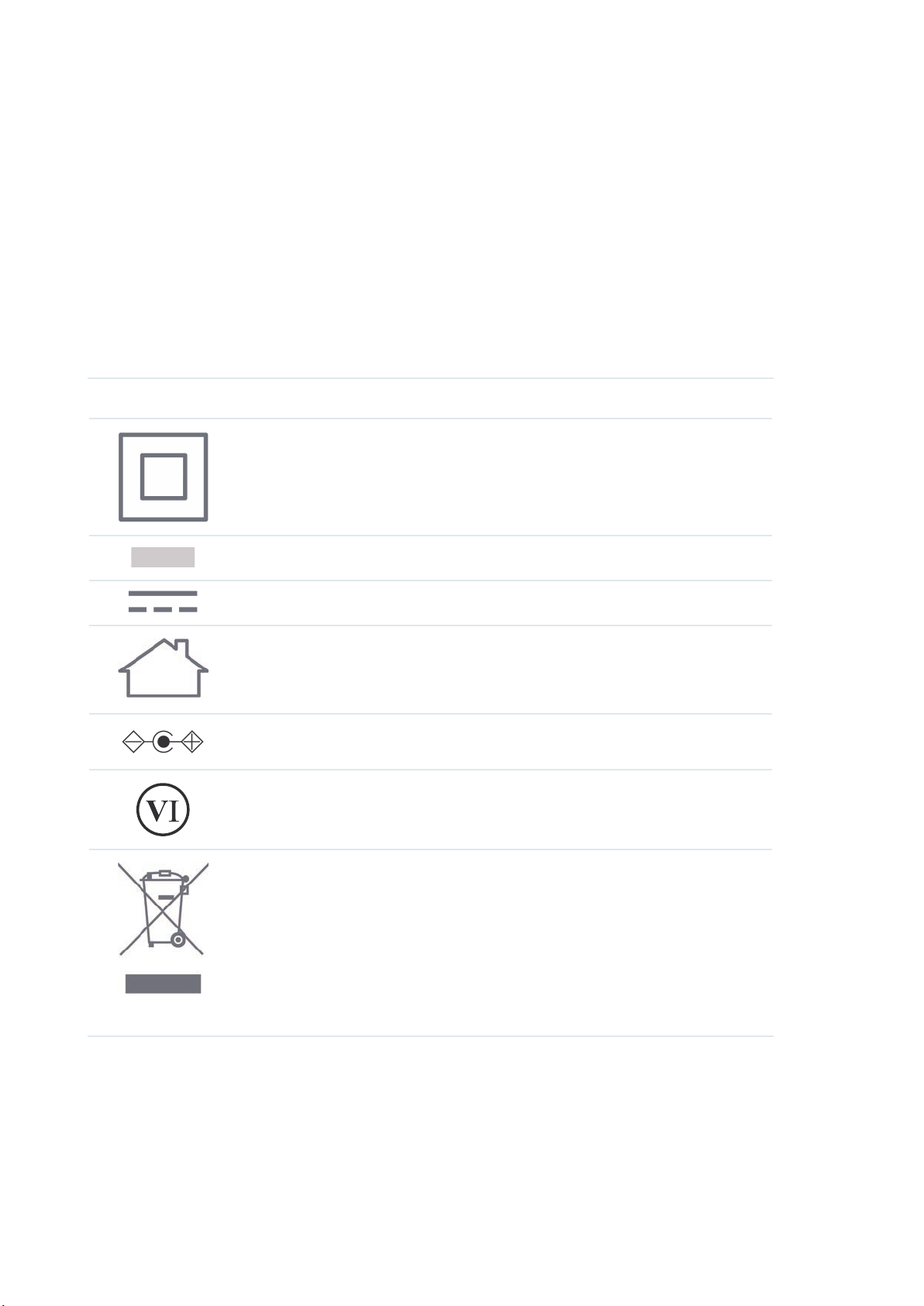
Explanation of the symbols on the product label
Note: The product label can be found at the bottom of the product and its I.T.E. power supply.
Symbol Explanation
Class II equipment
AC voltage
DC voltage
Indoor use only.
Polarity of output terminals
Energy efficiency marking (Level VI)
RECYCLING
This product bears the selective sorting symbol for Waste electrical and
electronic equipment (WEEE). This means that this product must be handled
pursuant to European directive 2012/19/EU in order to be recycled or
dismantled to minimize its impact on the environment.
User has the choice to give his product to a competent recycling organization
or to the retailer when he buys a new electrical or electronic equipment.
For Class B EAP with adapter:
FCC Compliance Information Statement
Product Name: Omada EAP
Model Number: EAP115 / EAP225 / EAP245 / EAP265 HD / EAP610 / EAP620 HD / EAP660 HD /
EAP225-Outdoor / EAP610-Outdoor
Component Name Model
I.T.E. Power Supply
T090060-2B1 (For EAP115)
TL-POE2412G (For EAP225 / EAP225-Outdoor)
T120150-2B1 (For EAP245)
T480050-2-POE (For EAP265 HD / EAP610-Outdoor)
T120100-2B1 (For EAP610 / EAP620 HD / EAP660 HD)
Responsible party:
TP-Link USA Corporation, d/b/a TP-Link North America, Inc.
Address: 145 South State College Blvd. Suite 400, Brea, CA 92821
Website: https://www.tp-link.com/us/
Tel: +1 626 333 0234
Fax: +1 909 527 6803
E-mail: sales.usa@tp-link.com
This equipment has been tested and found to comply with the limits for a Class B digital device,
pursuant to part 15 of the FCC Rules. These limits are designed to provide reasonable protection
against harmful interference in a residential installation. This equipment generates, uses and can
radiate radio frequency energy and, if not installed and used in accordance with the instructions,
may cause harmful interference to radio communications. However, there is no guarantee that
interference will not occur in a particular installation. If this equipment does cause harmful
interference to radio or television reception, which can be determined by turning the equipment
off and on, the user is encouraged to try to correct the interference by one or more of the
following measures:
• Reorient or relocate the receiving antenna.
• Increase the separation between the equipment and receiver.
• Connect the equipment into an outlet on a circuit different from that to which the receiver is
connected.

• Consult the dealer or an experienced radio/ TV technician for help.
This device complies with part 15 of the FCC Rules. Operation is subject to the following two
conditions:
1) This device may not cause harmful interference.
2) This device must accept any interference received, including interference that may cause
undesired operation.
Any changes or modifications not expressly approved by the party responsible for compliance
could void the user’s authority to operate the equipment.
Note: The manufacturer is not responsible for any radio or TV interference caused by
unauthorized modifications to this equipment. Such modifications could void the user’s authority
to operate the equipment.
FCC RF Radiation Exposure Statement:
This equipment complies with FCC RF radiation exposure limits set forth for an uncontrolled
environment. This device and its antenna must not be co-located or operating in conjunction with
any other antenna or transmitter.
“To comply with FCC RF exposure compliance requirements, this grant is applicable to only Mobile
Configurations. The antennas used for this transmitter must be installed to provide a separation
distance of at least 20cm from all persons and must not be colocated or operating in conjunction
with any other antenna or transmitter.”
Product Name: I.T.E. Power Supply
Model Number: T090060-2B1 / TL-POE2412G / T120150-2B1 / T480050-2-POE / T120100-2B1
Responsible party:
TP-Link USA Corporation, d/b/a TP-Link North America, Inc.
Address: 145 South State College Blvd. Suite 400, Brea, CA 92821
Website: https://www.tp-link.com/us/
Tel: +1 626 333 0234
Fax: +1 909 527 6803
E-mail: sales.usa@tp-link.com
This equipment has been tested and found to comply with the limits for a Class B digital device,
pursuant to part 15 of the FCC Rules. These limits are designed to provide reasonable protection
against harmful interference in a residential installation. This equipment generates, uses and can
radiate radio frequency energy and, if not installed and used in accordance with the instructions,
may cause harmful interference to radio communications. However, there is no guarantee that
interference will not occur in a particular installation. If this equipment does cause harmful
interference to radio or television reception, which can be determined by turning the equipment
off and on, the user is encouraged to try to correct the interference by one or more of the
following measures:
• Reorient or relocate the receiving antenna.
• Increase the separation between the equipment and receiver.
• Connect the equipment into an outlet on a circuit different from that to which the receiver is
connected.
• Consult the dealer or an experienced radio/ TV technician for help.
This device complies with part 15 of the FCC Rules. Operation is subject to the following two
conditions:
1) This device may not cause harmful interference.
2) This device must accept any interference received, including interference that may cause
undesired operation.
Any changes or modifications not expressly approved by the party responsible for compliance
could void the user’s authority to operate the equipment.
We, TP-Link USA Corporation, has determined that the equipment shown as above has been
shown to comply with the applicable technical standards, FCC part 15. There is no unauthorized
change is made in the equipment and the equipment is properly maintained and operated.
Issue Date:2020-5-12
CE Mark Warning
This is a class B product. In a domestic environment, this product may cause radio interference, in
which case the user may be required to take adequate measures.
OPERATING FREQUENCY (the maximum transmitted power)
For E AP115:
2412MHz—2472MHz(20dBm)
For EAP225 / EAP245 / EAP265 HD:
2412MHz—2472MHz(20dBm)
5180MHz—5240MHz(23dBm)
For EAP225-Outdoor / EAP610-Outdoor / EAP610 /EAP620 HD / EAP660 HD:
2412MHz—2472MHz(20dBm)
5180MHz—5240MHz(23dBm)
5260MHz—5320MHz(23dBm)
5500MHz—5700MHz(30dBm)
EU declaration of conformity
TP-Link hereby declares that the device is in compliance with the essential requirements and
other relevant provisions of directives 2014/53/EU, 2009/125/EC, 2011/65/EU and (EU)2015/863.
The original EU declaration of conformity may be found at https://www.tp-link.com/en/ce.
RF Exposure Information
This device meets the EU requirements (2014/53/EU Article 3.1a) on the limitation of exposure
of the general public to electromagnetic fields by way of health protection.
The device complies with RF specifications when the device used at 20 cm from your body.
National Restrictions
For EAP225 / EAP245 / EAP265 HD / EAP610 / EAP620 HD / EAP660 HD:
Attention: In EU member states and EFTA countries, the operation in the frequency range
5150MHz - 5350MHz is only permitted indoors.
Canadian Compliance Statement
This device contains licence-exempt transmitter(s)/receiver(s) that comply with Innovation,
Science and Economic Development Canada’s licence-exempt RSS(s). Operation is subject to
the following two conditions:
(1) This device may not cause interference.
(2) This device must accept any interference, including interference that may cause undesired
operation of the device.
L’émetteur/récepteur exempt de licence contenu dans le présent appareil est conforme aux
CNR d’Innovation, Sciences et Développement économique Canada applicables aux appareils
radio exempts de licence. L’exploitation est autorisée aux deux conditions suivantes :
1) L’appareil ne doit pas produire de brouillage;
2) L’appareil doit accepter tout brouillage radioélectrique subi, même si le brouillage est
susceptible d’en compromettre le fonctionnement.
For EAP225-Outdoor:
This radio transmitter (IC: 8853A-EAP225OD / Model: EAP225-Outdoor) has been approved by
Industry Canada to operate with the antenna types listed below with the maximum permissible
gain indicated. Antenna types not included in this list below, having a gain greater than the
maximum gain indicated for that type, are strictly prohibited for use with this device.
Le présent émetteur radio (IC: 8853A-EAP225OD / Model: EAP225-Outdoor) a été approuvé
par Industrie Canada pour fonctionner avec les types d'antenne énumérés ci-dessous et ayant
un gain admissible maximal. Les types d'antenne non inclus dans cette liste ci-dessous et dont
le gain est supérieur au gain maximal indiqué, sont strictement interdits pour l'exploitation de
l'émetteur.
Antenna
Two 2.4GHz 3dBi external omnidirectional antennas
Two 5GHz 4dBi external omnidirectional antennas
Caution
1) The device for operation in the band 5150–5250 MHz is only for indoor use to reduce the
potential for harmful interference to co-channel mobile satellite systems; 5150 MHz to 5350
MHz is restricted to indoor operations in Hong Kong.
2) For devices with detachable antenna(s), the maximum antenna gain permitted for devices in
the bands 5250-5350 MHz and 5470-5725 MHz shall be such that the equipment still complies
with the e.i.r.p. limit;
DFS (Dynamic Frequency Selection) products that operate in the bands 5250- 5350 MHz, 5470-
5600MHz, and 5650-5725MHz.
Avertissement
1) Le dispositif fonctionnant dans la bande 5150-5250 MHz est réservé uniquement pour une
utilisation à l’intérieur afin de réduire les risques de brouillage préjudiciable aux systèmes de
satellites mobiles utilisant les mêmes canaux;
2) Le gain maximal d'antenne permis pour les dispositifs avec antenne(s) amovible(s) utilisant
les bandes 5250-5350 MHz et 5470-5725 MHz doit se conformer à la limitation P.I.R.E.;
Les produits utilisant la technique d'atténuation DFS (sélection dynamique des fréquences) sur
les bandes 5250- 5350 MHz, 5470-5600MHz et 5650-5725MHz.
Radiation Exposure Statement:
This equipment complies with IC radiation exposure limits set forth for an uncontrolled
environment. This equipment should be installed and operated with minimum distance 20cm
between the radiator & your body.
Déclaration d'exposition aux radiations:
Cet équipement est conforme aux limites d'exposition aux rayonnements IC établies pour un
environnement non contrôlé. Cet équipement doit être installé et utilisé avec un minimum de 20
cm de distance entre la source de rayonnement et votre corps.
Industry Canada Statement
CAN ICES-3 (B)/NMB-3(B)
Korea Warning Statements
당해 무선설비는 운용중 전파혼신 가능성이 있음 .
NCC Notice & BSMI Notice
注意!
依據 低功率電波輻射性電機管理辦法
第十二條 經型式認證合格之低功率射頻電機,非經許可,公司、商號或使用者均不得擅自變更頻率、加
大功率或變更原設計之特性或功能。
第十四條 低功率射頻電機之使用不得影響飛航安全及干擾合法通行;經發現有干擾現象時,應立即停
用,並改善至無干擾時方得繼續使用。前項合法通信,指依電信規定作業之無線電信。低功率射頻電機
需忍受合法通信或工業、科學以及醫療用電波輻射性電機設備之干擾。
針對EAP225 / EAP245 / EAP265 HD / EAP610 /EAP620 HD / EAP660 HD / EAP225-Outdoor:
4.7.9.1應避免影響附近雷達系統之操作。
4.7.9.2高增益指向性天線只得應用於固定式點對點系統。
安全諮詢及注意事項
■
請使用原裝電源供應器或只能按照本產品注明的電源類型使用本產品。
■
清潔本產品之前請先拔掉電源線 . 請勿使用液體、噴霧清潔劑或濕布進行清潔。
■
注意防潮,請勿將水或其他液體潑灑到本產品上。
■
插槽與開口供通風使用,以確保本產品的操作可靠並防止過熱,請勿堵塞或覆蓋開口。
■
請勿將本產品置放於靠近熱源的地方 . 除非有正常的通風,否則不可放在密閉位置中。
■
不要私自拆開機殼或自行維修,如產品有故障請與原廠或代理商聯繫。
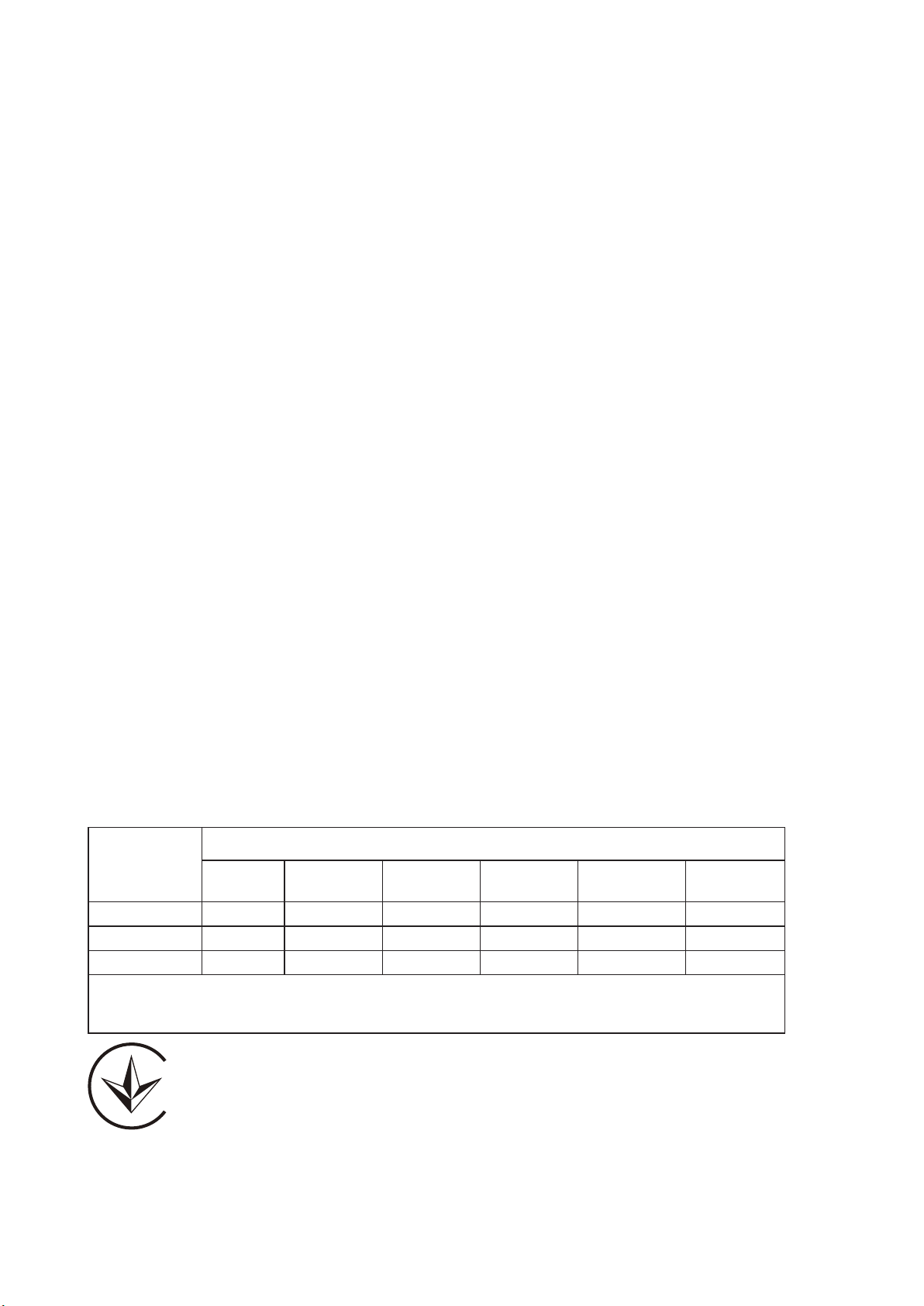
限用物質含有情況標示聲明書
產品元件名稱
限用物質及其化學符號
鉛
Pb
鎘
Cd
汞
Hg
六價鉻
CrVI
多溴聯苯
PBB
多溴二苯醚
PBDE
PCB ○ ○ ○ ○ ○ ○
外殼 ○ ○ ○ ○ ○ ○
電源供應器 — ○ ○ ○ ○ ○
備考1. "超出0.1 wt %" 及 "超出0.01 wt %" 系指限用物質之百分比含量超出百分比含量基準值.
備考2."○"系指該項限用物質之百分比含量未超出百分比含量基準值.
備考3."—" 系指該項限用物質為排除項目.
Продукт сертифіковано згідно с правилами системи УкрСЕПРО на відповідність вимогам
нормативних документів та вимогам, що передбачені чинними законодавчими актами
України.
Safety Information
■ Keep the device away from water, fire, humidity or hot environments.
■ Do not attempt to disassemble, repair, or modify the device. If you need service, please
contact us.
■ Do not use damaged charger or USB cable to charge the device.
■ Do not use any other chargers than those recommended.
■ Do not use the device where wireless devices are not allowed
■ Adapter shall be installed near the equipment and shall be easily accessible.
■ Use only power supplies which are provided by manufacturer and in the original packing of
this product. If you have any questions, please don’t hesitate to contact us.
Please read and follow the above safety information when operating the device. We cannot
guarantee that no accidents or damage will occur due to improper use of the device. Please use
this product with care and operate at your own risk.
Explanation of the symbols on the product label
Note: The product label can be found at the bottom of the product and its I.T.E. power supply.
Symbol Explanation
Class II equipment
AC voltage
DC voltage
Indoor use only.
Polarity of output terminals
Energy efficiency marking (Level VI)

RECYCLING
This product bears the selective sorting symbol for Waste electrical and
electronic equipment (WEEE). This means that this product must be handled
pursuant to European directive 2012/19/EU in order to be recycled or
dismantled to minimize its impact on the environment.
User has the choice to give his product to a competent recycling organization
or to the retailer when he buys a new electrical or electronic equipment.
Mounting Requirements
For safety, we recommend you to use the original screws in the package when mounting. The
following are alternatives to mount the device on the wall:
• (For EAP115) Use 3 screws which comply with ANSI B1.1 4# or 6# standard and are longer
than 7.5 mm.
• (For EAP225 / EAP245 / EAP265 HD) Use 3 screws which comply with ANSI B1.1 4# standard
and are longer than 7 mm.
• (For EAP610 / EAP620 HD / EAP660 HD) Use 4 screws which comply with ANSI B1.1 4#
standard and are longer than 15 mm.
• (For EAP610-Outdoor) Use 2 screws which comply with ANSI B1.1 4#, (5#), 6# standard and
are longer than 7mm.

For Class B EAP with no adapter:
FCC Compliance Information Statement
Product Name: Omada EAP
Model Number: EAP115-Wall / EAP225-Wall / EAP230-Wall / EAP235-Wall / EAP615-Wall
Responsible party:
TP-Link USA Corporation, d/b/a TP-Link North America, Inc.
Address: 145 South State College Blvd. Suite 400, Brea, CA 92821
Website: https://www.tp-link.com/us/
Tel: +1 626 333 0234
Fax: +1 909 527 6803
E-mail: sales.usa@tp-link.com
This equipment has been tested and found to comply with the limits for a Class B digital device,
pursuant to part 15 of the FCC Rules. These limits are designed to provide reasonable protection
against harmful interference in a residential installation. This equipment generates, uses and can
radiate radio frequency energy and, if not installed and used in accordance with the instructions,
may cause harmful interference to radio communications. However, there is no guarantee that
interference will not occur in a particular installation. If this equipment does cause harmful
interference to radio or television reception, which can be determined by turning the equipment
off and on, the user is encouraged to try to correct the interference by one or more of the
following measures:
• Reorient or relocate the receiving antenna.
• Increase the separation between the equipment and receiver.
• Connect the equipment into an outlet on a circuit different from that to which the receiver is
connected.
• Consult the dealer or an experienced radio/ TV technician for help.
This device complies with part 15 of the FCC Rules. Operation is subject to the following two
conditions:
1) This device may not cause harmful interference.
2) This device must accept any interference received, including interference that may cause
undesired operation.
Any changes or modifications not expressly approved by the party responsible for compliance
could void the user’s authority to operate the equipment.
Note: The manufacturer is not responsible for any radio or TV interference caused by
unauthorized modifications to this equipment. Such modifications could void the user’s authority
to operate the equipment.
FCC RF Radiation Exposure Statement:
This equipment complies with FCC RF radiation exposure limits set forth for an uncontrolled
environment. This device and its antenna must not be co-located or operating in conjunction with
any other antenna or transmitter.
“To comply with FCC RF exposure compliance requirements, this grant is applicable to only Mobile
Configurations. The antennas used for this transmitter must be installed to provide a separation
distance of at least 20cm from all persons and must not be colocated or operating in conjunction
with any other antenna or transmitter.”
We, TP-Link USA Corporation, has determined that the equipment shown as above has been
shown to comply with the applicable technical standards, FCC part 15. There is no unauthorized
change is made in the equipment and the equipment is properly maintained and operated.
Issue Date:2020-5-12
CE Mark Warning
This is a class B product. In a domestic environment, this product may cause radio interference, in
which case the user may be required to take adequate measures.
OPERATING FREQUENCY (the maximum transmitted power)
For EAP115-Wall:
2412MHz—2472MHz(20dBm)
For EAP225-Wall / EAP230-Wall / EAP235-Wall / EAP615-Wall:
2412MHz—2472MHz(20dBm)
5180MHz—5240MHz(23dBm)
EU declaration of conformity
TP-Link hereby declares that the device is in compliance with the essential requirements and
other relevant provisions of directives 2014/53/EU, 2009/125/EC, 2011/65/EU and (EU)2015/863.
The original EU declaration of conformity may be found at https://www.tp-link.com/en/ce.
RF Exposure Information
This device meets the EU requirements (2014/53/EU Article 3.1a) on the limitation of exposure of
the general public to electromagnetic fields by way of health protection.
The device complies with RF specifications when the device used at 20 cm from your body.
National Restrictions
For EAP225-Wall / EAP230-Wall / EAP235-Wall:
Attention: In EU member states and EFTA countries, the operation in the frequency range
5150MHz - 5350MHz is only permitted indoors.
Canadian Compliance Statement
This device contains licence-exempt transmitter(s)/receiver(s) that comply with Innovation,
Science and Economic Development Canada’s licence-exempt RSS(s). Operation is subject to the
following two conditions:
(1) This device may not cause interference.
(2) This device must accept any interference, including interference that may cause undesired
operation of the device.
L’émetteur/récepteur exempt de licence contenu dans le présent appareil est conforme aux CNR
d’Innovation, Sciences et Développement économique Canada applicables aux appareils radio
exempts de licence. L’exploitation est autorisée aux deux conditions suivantes :
1) L’appareil ne doit pas produire de brouillage;
2) L’appareil doit accepter tout brouillage radioélectrique subi, même si le brouillage est
susceptible d’en compromettre le fonctionnement.
Caution
For EAP225-Wall / EAP230-Wall / EAP235-Wall / EAP615-Wall:
1) The device for operation in the band 5150–5250 MHz is only for indoor use to reduce the
potential for harmful interference to co-channel mobile satellite systems; 5150 MHz to 5350 MHz
is restricted to indoor operations in Hong Kong.
2) For devices with detachable antenna(s), the maximum antenna gain permitted for devices in the
bands 5250-5350 MHz and 5470-5725 MHz shall be such that the equipment still complies with
the e.i.r.p. limit;

DFS (Dynamic Frequency Selection) products that operate in the bands 5250- 5350 MHz, 5470-
5600MHz, and 5650-5725MHz.
Avertissement
For EAP225-Wall / EAP230-Wall / EAP235-Wall / EAP615-Wall:
1) Le dispositif fonctionnant dans la bande 5150-5250 MHz est réservé uniquement pour une
utilisation à l’intérieur afin de réduire les risques de brouillage préjudiciable aux systèmes de
satellites mobiles utilisant les mêmes canaux;
2) Le gain maximal d'antenne permis pour les dispositifs avec antenne(s) amovible(s) utilisant
les bandes 5250-5350 MHz et 5470-5725 MHz doit se conformer à la limitation P.I.R.E.;
Les produits utilisant la technique d'atténuation DFS (sélection dynamique des fréquences) sur
les bandes 5250- 5350 MHz, 5470-5600MHz et 5650-5725MHz.
Radiation Exposure Statement:
This equipment complies with IC radiation exposure limits set forth for an uncontrolled
environment. This equipment should be installed and operated with minimum distance 20cm
between the radiator & your body.
Déclaration d'exposition aux radiations:
Cet équipement est conforme aux limites d'exposition aux rayonnements IC établies pour un
environnement non contrôlé. Cet équipement doit être installé et utilisé avec un minimum de 20
cm de distance entre la source de rayonnement et votre corps.
Industry Canada Statement
CAN ICES-3 (B)/NMB-3(B)
Korea Warning Statements
당해 무선설비는 운용중 전파혼신 가능성이 있음 .
NCC Notice & BSMI Notice
注意!
依據 低功率電波輻射性電機管理辦法
第十二條 經型式認證合格之低功率射頻電機,非經許可,公司、商號或使用者均不得擅自變更頻率、加
大功率或變更原設計之特性或功能。
第十四條 低功率射頻電機之使用不得影響飛航安全及干擾合法通行;經發現有干擾現象時,應立即停
用,並改善至無干擾時方得繼續使用。前項合法通信,指依電信規定作業之無線電信。低功率射頻電機
需忍受合法通信或工業、科學以及醫療用電波輻射性電機設備之干擾。
針對
EAP225-Wall / EAP230-Wall / EAP235-Wall / EAP615-Wall
:
4.7.9.1應避免影響附近雷達系統之操作。
4.7.9.2高增益指向性天線只得應用於固定式點對點系統。
安全諮詢及注意事項
■
請使用原裝電源供應器或只能按照本產品注明的電源類型使用本產品。
■
清潔本產品之前請先拔掉電源線 . 請勿使用液體、噴霧清潔劑或濕布進行清潔。
■
注意防潮,請勿將水或其他液體潑灑到本產品上。
■
插槽與開口供通風使用,以確保本產品的操作可靠並防止過熱,請勿堵塞或覆蓋開口。
■
請勿將本產品置放於靠近熱源的地方 . 除非有正常的通風,否則不可放在密閉位置中。
■
不要私自拆開機殼或自行維修,如產品有故障請與原廠或代理商聯繫。
限用物質含有情況標示聲明書
產品元件名稱
限用物質及其化學符號
鉛
Pb
鎘
Cd
汞
Hg
六價鉻
CrVI
多溴聯苯
PBB
多溴二苯醚
PBDE
PCB ○ ○ ○ ○ ○ ○
外殼 ○ ○ ○ ○ ○ ○
備考1. "超出0.1 wt %" 及 "超出0.01 wt %" 系指限用物質之百分比含量超出百分比含量基準值.
備考2."○"系指該項限用物質之百分比含量未超出百分比含量基準值.
備考3."—" 系指該項限用物質為排除項目.
Продукт сертифіковано згідно с правилами системи УкрСЕПРО на відповідність вимогам
нормативних документів та вимогам, що передбачені чинними законодавчими актами
України.
Safety Information
■ Keep the device away from water, fire, humidity or hot environments.
■ Do not attempt to disassemble, repair, or modify the device. If you need service, please
contact us.
■ Do not use the device where wireless devices are not allowed.
Please read and follow the above safety information when operating the device. We cannot
guarantee that no accidents or damage will occur due to improper use of the device. Please use
this product with care and operate at your own risk.
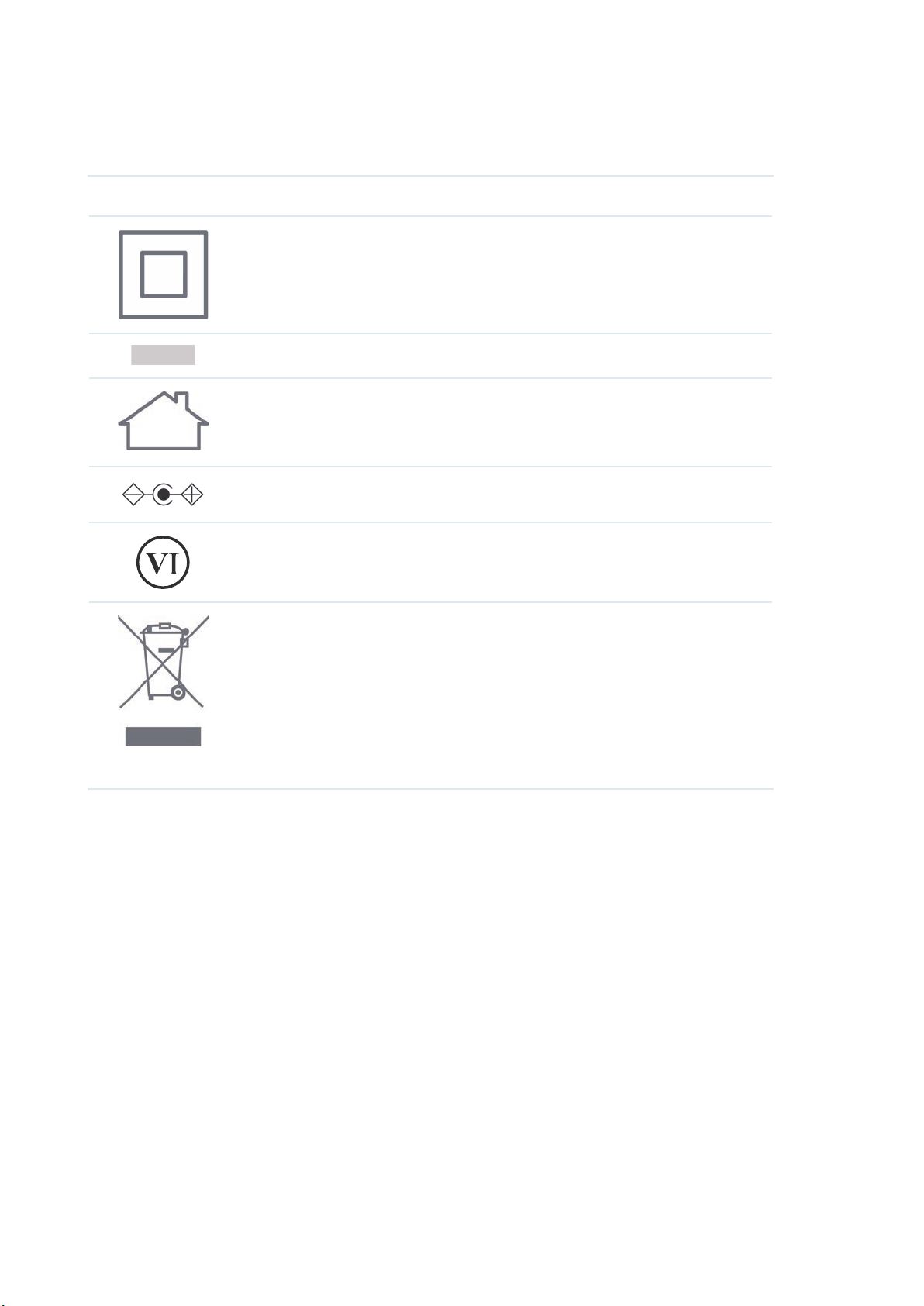
Explanation of the symbols on the product label
Note: The product label can be found at the bottom of the product and its I.T.E. power supply.
Symbol Explanation
Class II equipment
AC voltage
Indoor use only.
Polarity of output terminals
Energy efficiency marking (Level VI)
RECYCLING
This product bears the selective sorting symbol for Waste electrical and
electronic equipment (WEEE). This means that this product must be handled
pursuant to European directive 2012/19/EU in order to be recycled or
dismantled to minimize its impact on the environment.
User has the choice to give his product to a competent recycling organization
or to the retailer when he buys a new electrical or electronic equipment.
Mounting Requirements
For safety, we recommend you to use the original screws in the package when mounting. The
following are alternatives to mount the device on the wall:
• (For EAP115-Wall / EAP230-Wall) Use a 86 mm/standard EU wall junction box and 2 screws
which comply with ANSI B1.1 4# or 6# standard and are longer than 15 mm.
• (For EAP225-Wall / EAP235-Wall) Use a 86 mm/standard EU/standrad US wall junction box
and 2–4 screws which comply with ANSI B1.1 4#, 6# or 8# standard and are longer than 8.5
mm.
• (For EAP615-Wall) Use a 86 mm/standard EU/standrad US wall junction box and 2–4 screws
which comply with ANSI B1.1 4#, 6# or 8# standard and are longer than 10 mm.