For your safety and continued enjoyment of this product,
always read the instruction book carefully before using.
INSTRUCTION BOOKLET
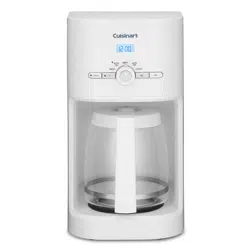
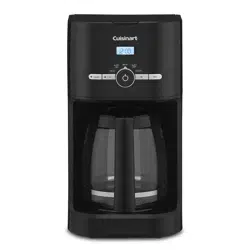
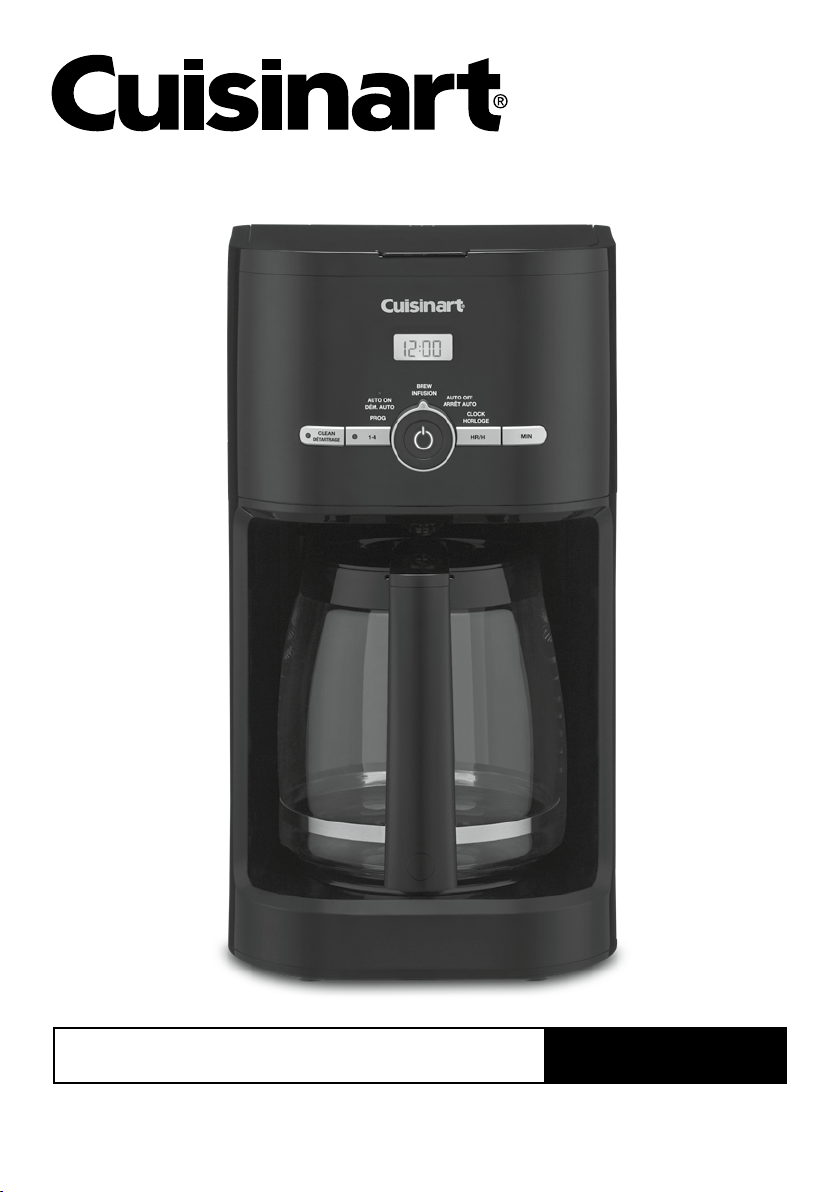
12-Cup Classic Coffeemaker
DCC-1120C Series
2 3
IMPORTANT
SAFEGUARDS
When using electrical appliances, basic safety
precautions should always be followed to
reduce the risk of fire, electric shock and/or
injury to persons, including the following:
1. READ ALL INSTRUCTIONS.
2. Do not touch hot surfaces. Use handles
and knobs.
3. To protect against electric shock, do not
place cord, plug, or base in water or
other liquids.
4. Close supervision is necessary when
any appliance is used by or near
children.
5. Always unplug from outlet when not
in use and before cleaning. Allow to
cool before putting on or taking off
parts and before cleaning the appliance.
6. Do not operate any appliance with a
damaged cord or plug or after the
appliance malfunctions or has been
dropped or damaged in any manner.
Return appliance to the nearest
Cuisinart Repair Center for examination,
repair, or electrical or mechanical
adjustment.
7. The use of accessory attachments not
recommended by Cuisinart may cause
injuries.
8. Do not use outdoors.
9. Do not let cord hang over edge of table
or counter, or touch any hot surface.
10. Do not place on or near a hot gas or
electric burner, or in a heated oven.
11. Always fill water reservoir first, then plug
cord into the wall outlet. To disconnect,
turn controls to OFF, then remove plug
from wall outlet.
12. Do not use appliance for other than its
intended use.
13. Snap lid securely onto carafe before
serving any beverages.
14. Scalding may occur if the lid is removed
during the brewing cycle.
15. The glass carafe is designed for use
with appliance base only. It must never
be used on the range top.
16. Do not set a hot carafe on a wet or cold
surface.
17. Do not use a cracked carafe or a carafe
having a loose or weakened handle.
18. Do not clean carafe or warming plate
with cleansers, steel wool pads, or other
abrasive materials.
19. WARNING: TO REDUCE THE RISK OF
FIRE OR ELECTRIC SHOCK, DO NOT
REMOVE THE BASE PANEL. NO
USER-SERVICEABLE PARTS ARE
INSIDE. REPAIR SHOULD BE DONE
ONLY BY AUTHORIZED PERSONNEL.
20. Avoid contact with moving parts.
21. Do not operate your appliance in an
appliance garage or under a wall
cabinet. When storing in an appliance
garage, always unplug the unit from
the electrical outlet. Not doing so
could create a risk of fire, especially if
the appliance touches the walls of the
garage or the door touches the unit as it
closes.
WARNING: RISK OF FIRE OR ELECTRIC SHOCK
The lightning flash with arrowhead symbol within an equilateral triangle is intended
to alert the user to the presence of uninsulated dangerous voltage within the
product’s enclosure that may be of sufficient magnitude to constitute a risk of fire or
electric shock to persons.
The exclamation point within an equilateral triangle is intended to alert the user to
the presence of important operating and maintenance (servicing) instructions in the
literature accompanying the appliance.
3
SAVE THESE
INSTRUCTIONS
FOR
HOUSEHOLD
USE ONLY
SPECIAL CORD SET
INSTRUCTIONS
A short power-supply cord is provided to
reduce the risks resulting from becoming
entangled in or tripping over a longer cord.
Extension cords may be used if care is
exercised in their use.
If an extension cord is used, the marked
electrical rating of the extension cord must be
at least as great as the electrical rating of the
appliance, and the longer cord should be
arranged so that it will not drape over the
countertop or tabletop where it can be pulled
on by children or tripped over.
NOTICE
This appliance has a polarized plug (one blade
is wider than the other). To reduce the risk of
electric shock, this plug will fit in a polarized
outlet only one way. If the plug does not fit fully
in the outlet, reverse the plug. If it still does not
fit, contact a qualified electrician. Do not modify
the plug in any way.
OPERATING NOTICE
Clogging and backing up of water and/or
coffee in the filter basket can occur under
any or a combination of any of the following
conditions: The use of too finely ground coffee,
using two or more paper filters, using the gold
tone filter in conjunction with a paper filter or
not properly cleaning coffee grounds from the
gold tone filter, or allowing coffee grounds to
spill over the filter.
Caution: Never open the reservoir cover during
the brewing cycle, even if no water is draining
from the filter basket, since extremely hot water/
coffee can spill out from the basket and cause
injury. If water/coffee is not draining from the
filter basket during the brewing cycle, unplug
the unit and wait 10 minutes before opening the
reservoir cover and checking the basket.
WARNING: TO REDUCE THE RISK OF FIRE OR ELECTRIC SHOCK,
DO NOT REMOVE COVER (OR BACK)
NO USER-SERVICEABLE PARTS INSIDE
REPAIR SHOULD BE DONE BY AUTHORIZED SERVICE PERSONNEL ONLY
WARNING
RISK OF FIRE OR ELECTRIC SHOCK
DO NOT OPEN

4 5
CONTENTS
Important Safeguards . . . . . . . . . . . . . . . . . . . 2
Important Unpacking Instructions .........4
The Quest for the
Perfect Cup of Coffee ...................4
Features and Benefits ...................5
Control Panel..........................6
Programming Your Coffeemaker ..........7
Charcoal Water Filter....................7
Brewing Coffee ........................8
Cleaning and Maintenance ...............9
Warranty.............................10
IMPORTANT UNPACKING
INSTRUCTIONS
1. Place the box on a large, sturdy,
flat surface.
2. Remove the instruction book and any
other literature.
3. Turn the box so that the back side of
the coffeemaker is down and slide the
coffeemaker from the box.
4. After the coffeemaker has been removed,
place the box out of the way and remove
the top and bottom two polyfoam inserts.
5. Grasp the carafe by its handle, remove
it from the heater plate and remove the
polybag.
6. Remove the polybag covering from the
coffeemaker and lift the coffeemaker off
the remaining two inserts.
We suggest you save all packing materials in
the event that future shipping of the machine
is needed. Keep all plastic bags away from
children.
THE QUEST
FOR THE PERFECT
CUP OF COFFEE
ELEMENT 1: WATER
Coffee is 98% water. The quality of that
water is as important as the quality of your
coffee. If water doesn’t taste good from the
tap, it won’t taste good in your coffee.
Cuisinart includes a charcoal water filter
to remove chlorine, bad tastes and odours,
for the purest coffee flavour, every time
you brew.
ELEMENT 2: COFFEE
While coffee is 98% water, all of the flavour
comes from the beans. To achieve the same
great taste you enjoy at a coffee bar, you
need to use the same quality of coffee. If
you choose to grind your own beans, buy
them fresh and whole. Buy only about a
two-week supply at a time, because once
the bean is broken, its flavour degrades
quickly.
ELEMENT 3: GRIND
The grind is critical for proper flavour
extraction. If the grind is too fine,
over-extraction and bitterness will result.
Too fine a grind may also clog the filter.
If grind is too coarse, the water will pass
through too quickly and the maximum
flavour will not be extracted. When grinding
your own beans, we recommend a
medium-fine grind.
ELEMENT 4: PROPORTION
Coffee that is too strong or too weak is
always a disappointment. Follow the
recommended portions of ground coffee in
the instructions under Brewing Coffee, and
later adjust the amount to suit your taste.
NOTE: The maximum capacity for ground
coffee is 15 scoops (15 tablespoons) for
this 60 oz. (twelve 5 oz. cups) coffeemaker.
Exceeding this amount may cause overflow.
5
FEATURES
AND BENEFITS
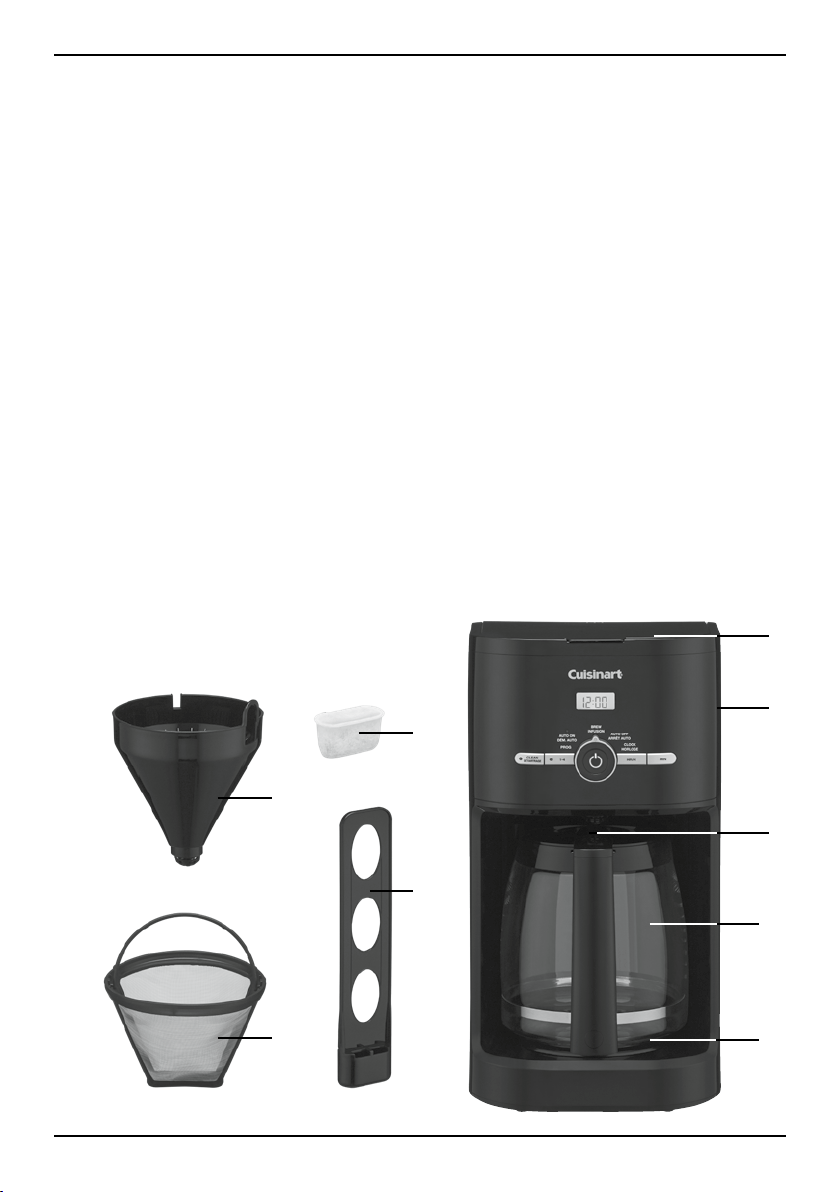
1. Reservoir Cover
Flips back for easy filling.
2. Water Reservoir
With water level indicator window.
3. Showerhead (not shown)
Distributes water evenly over coffee,
reducing temperature loss as water
passes through grounds.
4. Filter Basket
Holds a #4 paper filter OR
a permanent filter.
5. Permanent Gold-Tone
Commercial-Style Filter
Eliminates the need for paper filters.
NOTE: Some fine grounds may flow
through the filter and appear as sediment
in the carafe.
6. Charcoal Water Filter Holder
Holds filter firmly in place.
7. Charcoal Water Filter (shown on page 7)
Charcoal water filter eliminates chlorine,
bad tastes and odours from tap water.
8. Control Panel
See detailed illustration, page 6.
9. Brew Pause
™
Stops flow of coffee from basket when
carafe is removed (20 seconds max) from
the heater plate, so a cup can be poured
in mid-brew.
10. 12-Cup Glass Carafe
The easy-pour, no-drip, 12-cup carafe has
an ergonomic handle and brewed coffee
markings for two to 12 cups.
11. Heating Plate
Scratch resistant with black,
nonstick coating.
12. Measuring Scoop (not shown)
13. Ready Tone (not shown)
Signals the end of the brew cycle
with five beeps.
14. Power Loss Backup System (not shown)
One-minute protection if a breaker trips,
unit is unplugged, or power fails. Holds
all programmed information, including
time of day, auto-on time and auto-off
time.
2
1
9
10
11
7
4
6
5
a.
b.
c.
d.
e.
2. 3.
4. 5.
6.
6 7
CONTROL PANEL
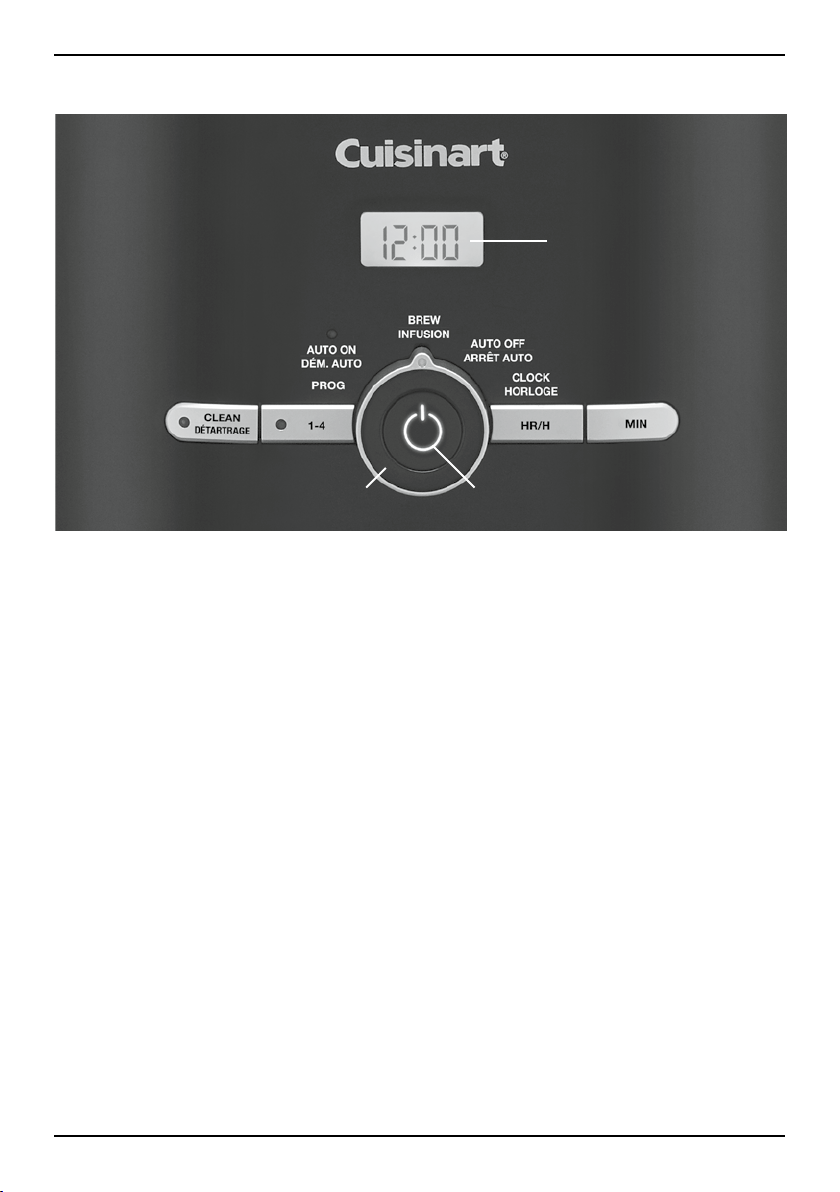
1. Clock Display
Displays time of day, Auto On, and Auto Off
times.
2. Clean Button
Red indicator appears when it is time to
decalcify your coffeemaker.
3. 1–4 Cup Button
Adjusts brew process to maximize coffee
flavor when brewing fewer than 5 cups.
White indicator appears when function is
selected.
4. Function Knob
a. Program Set
Select brew start time with hour and
minute buttons – LCD displays PM for
afternoon and nighttime brew starts.
Holds selected time until you change it.
b. Auto On
The Auto On setting programs the
coffeemaker to turn on at the time
selected, up to 24 hours in advance.
See Programming Your Coffeemaker
(page 7) for instructions on setting time.
c. Brew
The Brew feature is used to start the
brew cycle directly.
d. Auto Off
The Auto Off feature is used to
shut off the coffeemaker at a preset
time, anywhere from 0 to 4 hours
after brewing.
e. Clock Set
Used to program the time of day.
5. Power Button
Used to turn your coffeemaker on and off;
also works in tandem with the Function
knob.
6. Hour and Minute Buttons
For use in setting hour and minute for time
of day and auto-on time.
7. Audible Tone (not shown)
The Cuisinart
®
12-Cup Classic Coffeemaker
is equipped with an
audible tone that will sound 5 times when
the coffee has completed brewing (coffee
will continue to stream from the filter
for a few seconds after tone).
1.
7
PROGRAMMING
YOUR COFFEEMAKER
SETTING THE CLOCK
When the coffeemaker is plugged in,
12:00 will flash.
TURN THE FUNCTION KNOB TO CLOCK
Press Hour and Minute buttons to select the
desired time. Hold buttons down to scroll
through the digits, or press and release to
advance one digit at a time. When scrolling,
the numbers will advance slowly and then
speed up. When the number displayed
approaches the desired time, press and release
to advance one digit at a time. Be sure the PM
indicator is on if a PM time is desired. To finish
setting the clock, turn the Function knob to any
other setting or simply wait until the numbers
stop blinking.
SETTING THE AUTO-ON TIME
When you turn the Function knob to PROG, the
previously selected Auto On time, or the default
time (12:00) will flash.
1. Turn the Function knob to PROG. Follow
directions under SETTING THE CLOCK,
(in previous section) to program your
start-brew time.
2. Turn the Function knob to AUTO ON.
The LCD will display the current time.
3. Press and release On/Off button to activate.
The white AUTO ON light will illuminate,
indicating that the coffeemaker is in Auto On
mode. The On/Off white indicator light will
illuminate when the brew cycle begins at the
time you have selected. Both lights will go off
when Keep Warm cycle ends.
NOTE: To start brew time at the same time the
next day, simply make sure the Function knob is
on Auto On and press and release On/Off
button once more. The white Auto On light will
go on.
CHARCOAL WATER FILTER
Your coffeemaker comes with a charcoal water
filter that eliminates chlorine, bad tastes and
odours from tap water.
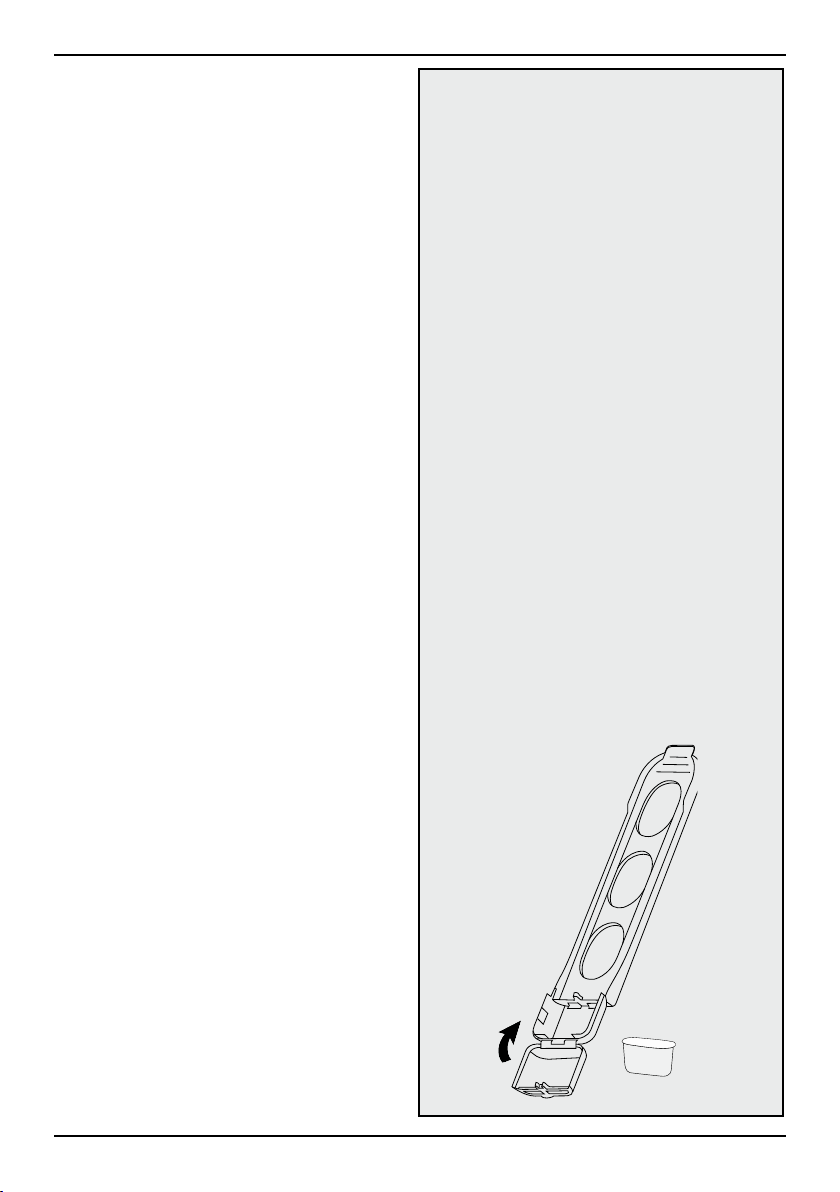
Inserting the Water Filter
• Remove the filter from the polybag and
soak it, fully immersed, in cold tap water
for 15 minutes.
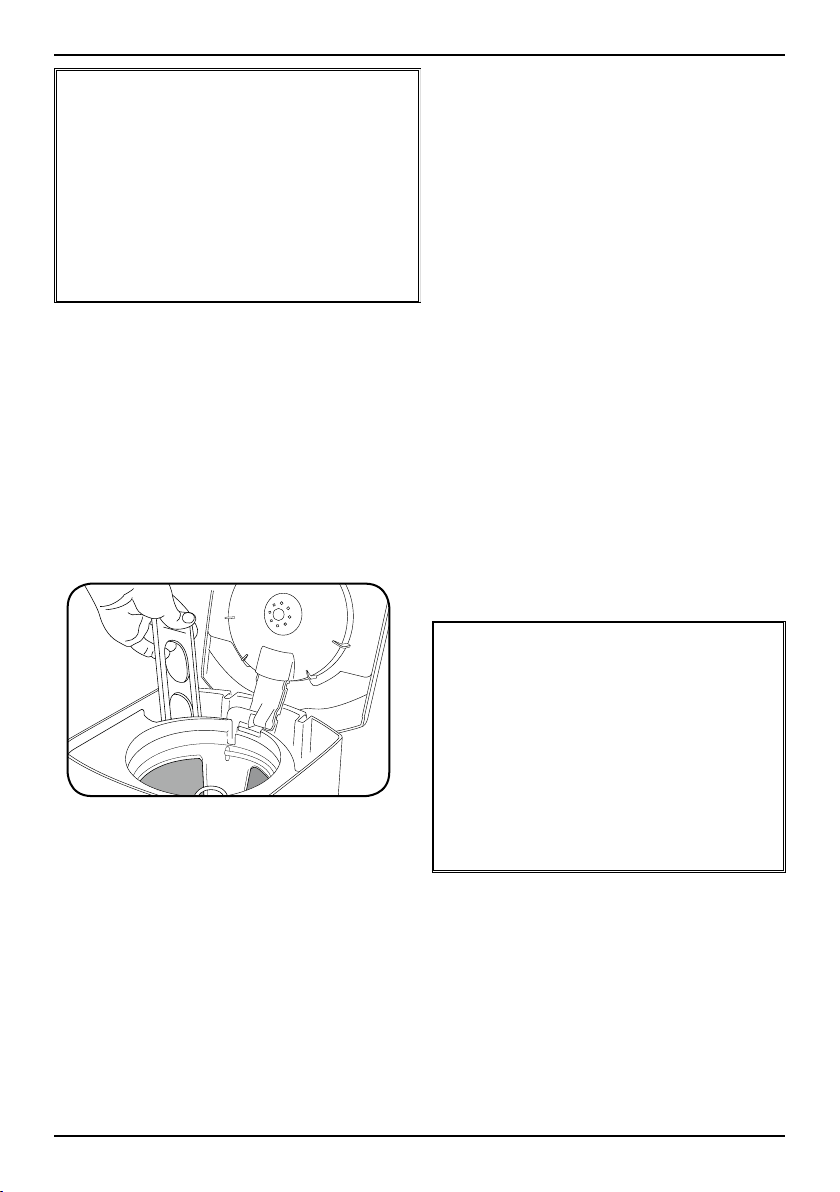
• Lift the water filter holder out of the water
reservoir (see diagram, page 5).
• Press down on the filter compartment and
pull toward you to open.
• Place filter into the holder and snap it closed.
Be careful – improper placement can tear the
filter skin.
• Flush filter by running cold tap water
through holes in bottom of compartment
for 10 seconds.
• Allow the filter to drain completely.
• Slide the water filter holder back into the
channel in the water reservoir, pushing it
down to the base of the unit.
NOTE: We recommend changing the water
filter every 60 days or after 60 uses, and
more often if you have hard water.
Replacement filters can be purchased in
stores, by calling Cuisinart Customer Service,
or at www.cuisinart.ca.
8 9
SETTING THE AUTO OFF TIME
1. Turn the Function knob to Auto Off.
The clock display will start blinking.
2. Program the coffeemaker to shut off from
zero to four hours after brew cycle is
finished by using the Hour and Minute
buttons (see Setting the Clock, page 7).
MAKING COFFEE
Follow the instructions for BEFORE
BREWING YOUR FIRST POT OF COFFEE
above.
1. Insert charcoal water filter
Follow directions for the preparation and
insertion of the filter on page 7.
2. Fill the water reservoir
Open the coffeemaker reservoir cover by
lifting it up. Pour in the desired amount
of water, using the water level indicator
located at the side of the coffeemaker.
3. Add the ground coffee
Insert a #4 paper filter OR the gold-tone
filter. Be sure that the paper filter is
completely open and fully inserted in the
basket. It may help to fold and flatten the
seams of a paper filter beforehand. Add 1
level scoop of ground coffee per cup.
Adjust the amount according to taste.
NOTE: The maximum capacity for ground
coffee is 15 tablespoons for this
coffeemaker. Exceeding this amount may
cause overflow if the coffee is too finely
ground.
4. Position carafe and plug in unit
Place carafe on heating plate and be sure
coffeemaker lid is closed. Plug coffeemaker
into an electrical outlet.
5. Cup preference
Push the 1–4 cup button if you are brewing
fewer than 5 cups.
6. Start brewing
Turn the function knob to Brew, press the
On/Off button, and the white indicator light
will turn on.
7. After brewing
When the brewing cycle has been
completed, five beeps will sound. Coffee
will continue to stream from the filter for
several seconds.
NOTE: Reservoir cover may be hot
during and directly after brewing. Wait at
least 10 minutes before opening.
BEFORE BREWING YOUR
FIRST POT OF COFFEE
Rinsing your coffeemaker: During the
manufacturing process, dust can get trapped
in the unit. We recommend flushing out the
system before brewing your first pot of coffee.
Simply fill the reservoir and power on the unit
(See steps 2, 4 and 6 in MAKING COFFEE
instructions, below). DO NOT ADD COFFEE!
BREW PAUSE
™
FEATURE
This feature interrupts the flow of coffee
from the basket to let you pour that first
cup mid-brew. Because the flavour profile
of coffee brewed at the start of a cycle
differs from that brewed toward the end,
be aware that using this feature will
weaken the flavour strength of the
finished pot.
NOTE: Removing carafe for more than
20 seconds may cause filter basket to
overflow.

9
CLEANING AND
MAINTENANCE
Always turn coffeemaker off and remove the
plug from the electrical outlet before cleaning.
Lift up the reservoir cover. Remove and discard
the paper filter and ground coffee. The filter
basket can be washed in warm, soapy water
and rinsed thoroughly, or cleaned in the upper
rack of the dishwasher. Dry all parts after use.
Do not put any water in the unit once the
filter basket has been removed. Wipe the
area under the filter basket with a damp
cloth.
Remove the carafe from the heating plate.
Discard any remaining coffee. The carafe and
lid can be washed in warm, soapy water and
rinsed thoroughly, or placed in a dishwasher.
The carafe and carafe lid should be placed
on the upper rack only.
Helpful Hint: Coffee contains oils that can build
up on your carafe. For best performance, wash
carafe and wipe pour spout clean after each
use.
Do not use any scouring agents or harsh
cleansers on any part of the coffeemaker.
Never immerse base unit in water or other
liquids. To clean base, simply wipe with a clean,
damp cloth and dry before storing. Fingerprints
and other blemishes on the glass housing can
be washed off with soap and water or a
nonabrasive cleaning solution. Wipe resting
plate with a clean, damp cloth. Never use
rough, abrasive materials or cleansers to clean
the resting plate. Do not dry the inside of the
water reservoir with a cloth, as lint may remain.
DECALCIFICATION
Decalcification refers to the removal of calcium
deposits that form over time on the metal parts
of your coffeemaker. The mineral content of the
tap water in your area and the frequency of use
affects the rate of the calcium buildup, which
can affect the functioning of your coffeemaker
and the flavor of your coffee.
For best performance from your coffeemaker,
we recommend cleaning it whenever the
CLEAN LED indicator lights up.
NOTE: Before decalcifying your unit, remove
the charcoal water filter from the water
reservoir.
To clean:
1. Fill the water reservoir to capacity with a
mixture of 1⁄3 white vinegar and 2⁄3 water.
2. Press and hold the CLEAN button. When
the CLEAN LED indicator flashes, the
coffeemaker is in Clean mode. Release the
button.
3. When the cycle is completed, 5 beeps will
sound and the coffeemaker will shut off.
4. If the CLEAN indicator illuminates once
more, repeat the cleaning procedure with a
fresh solution of vinegar and water.
NOTE: One cleaning cycle is usually
sufficient.
5. When the CLEAN indicator remains off, run
one cycle with a full reservoir of fresh, cold
water to rinse the unit.
6. Return the charcoal water filter to the holder
inside the water reservoir, and your
coffeemaker is ready to brew!
MAINTENANCE
Any other servicing should be performed by
an authorized service representative.

10
WARRANTY
LIMITED THREE-YEAR
WARRANTY
We warrant that this Cuisinart product
will be free of defects in materials or
workmanship under normal home use for
3 years from the date of original purchase.
This warranty covers manufacturer’s
defects including mechanical and electrical
defects. It does not cover damage from
consumer abuse, unauthorized repairs or
modifications, theft, misuse, or damage
due to transportation or environmental
conditions. Products with removed or
altered identification numbers will not
be covered.
This warranty is not available to retailers or
other commercial purchasers or owners. If
your Cuisinart product should prove to be
defective within the warranty period, we
will repair it or replace it if necessary. For
warranty purposes, please register your
product online at www.cuisinart.ca to
facilitate verification of the date of original
purchase and keep your original receipt for
the duration of the limited warranty. This
warranty excludes damage caused by
accident, misuse or abuse, including
damage caused by overheating, and it
does not apply to scratches, stains,
discolouration or other damage to external
or internal surfaces that does not impair
the functional utility of the product. This
warranty also expressly excludes all
incidental or consequential damages.
Your Cuisinart product has been
manufactured to the strictest specifications
and has been designed for use only in
120 volt outlets and only with authorized
accessories and replacement parts. This
warranty expressly excludes any defects
or damages caused by attempted use of
this unit with a converter, as well as use
with accessories, replacement parts or
repair service other than those authorized
by Cuisinart.
If the appliance should become defective
within the warranty period, do not return
the appliance to the store. Please contact
our Customer Service Centre:
Toll-free phone number:
1-800-472-7606
Address:
Cuisinart Canada
100 Conair Parkway
Woodbridge, ON. L4H 0L2
Email:
consumer_Canada@conair.com
Model:
DCC1120C SERIES
To facilitate the speed and accuracy of
your return, please enclose:
• $10.00 for shipping and handling of
the product (cheque or money order
to: Cuisinart Canada)
• Return address and phone number
• Description of the product defect
• Product date code*/copy of original
proof of purchase
• Any other information pertinent to
the product’s return
* The date code format we are using on
unit is WWYY, representing week, and
year. eg.2420 = manufactured in 24th
week of the year 2020.
Note: We recommend you use a traceable,
insured delivery service for added
protection. Cuisinart will not be held
responsible for in-transit damage or for
packages that are not delivered to us.
To order replacement parts or accessories,
call our Customer Service Centre at
1-800-472-7606. For more information,
please visit our website at www.cuisinart.ca

11
NOTES:
IB-16796-CAN
©2020 Cuisinart Canada
100 Conair Parkway,
Woodbridge, ON L4H 0L2
Consumer Call Centre E-mail:
Consumer_Canada@Conair.com
Printed in China
20CC075767
Cuisinart offers an extensive assortment of top quality products to
make life in the kitchen easier than ever. Try some of our other countertop
appliances and cookware, and Savour the Good Life
®
.
www.cuisinart.ca
Juicers
Coffeemakers Cookware
Tools and
Gadgets
Food
Processors