®
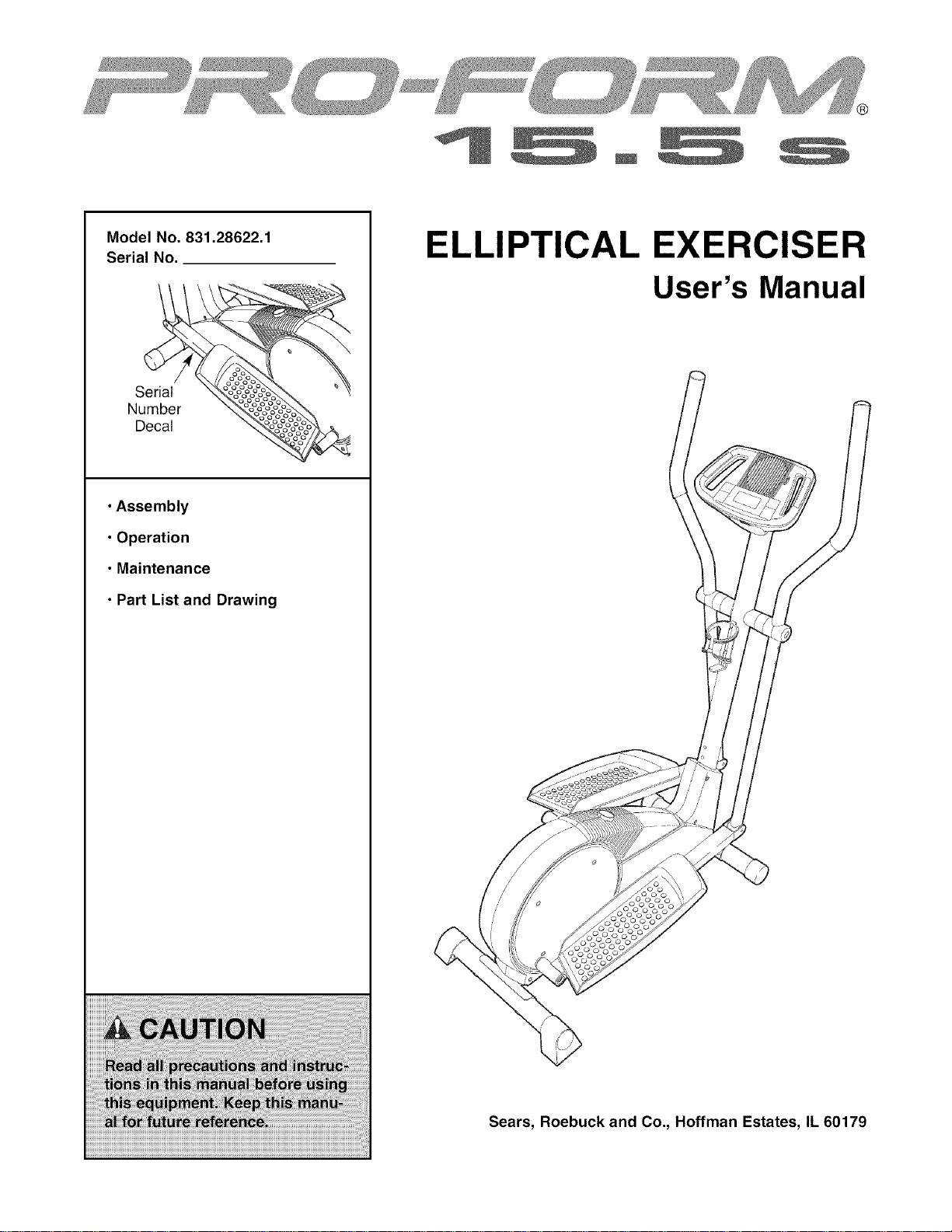
Model No. 831.28622.1
Serial No.
Serial
Number
Decal
• Assembly
• Operation
• Maintenance
• Part List and Drawing
ELLIPTICAL EXERCISER
User's Manual
Sears, Roebuck and Co., Hoffman Estates, IL 60179

TABLE OF CONTENTS
WARNING DECAL PLACEMENT .............................................................. 2
IMPORTANT PRECAUTIONS ................................................................ 3
BEFORE YOU BEGIN ...................................................................... 4
ASSEMBLY ............................................................................... 5
HOW TO USE THE ELLIPTICAL EXERCISER ................................................... 9
MAINTENANCE AND TROUBLESHOOTING ................................................... 12
EXERCISE GUIDELINES ................................................................... 13
PART LIST .............................................................................. 14
EXPLODED DRAWING .................................................................... 15
ORDERING REPLACEMENT PARTS .................................................. Back Cover
90 DAY FULL WARRANTY .......................................................... Back Cover
WARNING DECAL PLACEMENT
The warning decal shown here has
been applied in the location shown.
If the decal is missing or illegible,
call 1-888-533-1333 and request a
free replacement decal. Apply the
decal in the location shown, Note:
The decal may not be shown at
actual size.
• Misuseof this machine
may result in serious
injury.
, Read user's manual
prior to use and follow
all warnings and
instructions.
, Do net allow children
on oraround machine.
• Pedals continue to
spin when you stop
pedaling.
• Spinning pedals can
cause injury.
• Reduce pedal speed
in acontrolledmanner.
• User weight must not
exceed 250 pounds.
• Replace label if
damaged, illegible, or
removed.
!
\
2
IMPORTANT PRECAUTIONS
BEFORE YOU BEGIN
Congratulations for selecting the new PROFORM ®
15.5 S. The PROFORM 15.5 S is an incredibly
smooth exerciser that moves your feet in a natural
elliptical path, minimizing the impact on your knees
and ankles. And the unique PROFORM 15.5 S fea-
tures adjustable resistance and a simple-to-use con-
sole to help you get the most from your exercise.
For your benefit, read this manual carefully before
you use the elliptical exerciser. If you have ques-
tions after reading this manual, please see the back
cover of this manual. To help us assist you, note the
product model number and serial number before con-
tacting us. The model number and the location of the
serial number decal are shown on the front cover of
this manual.
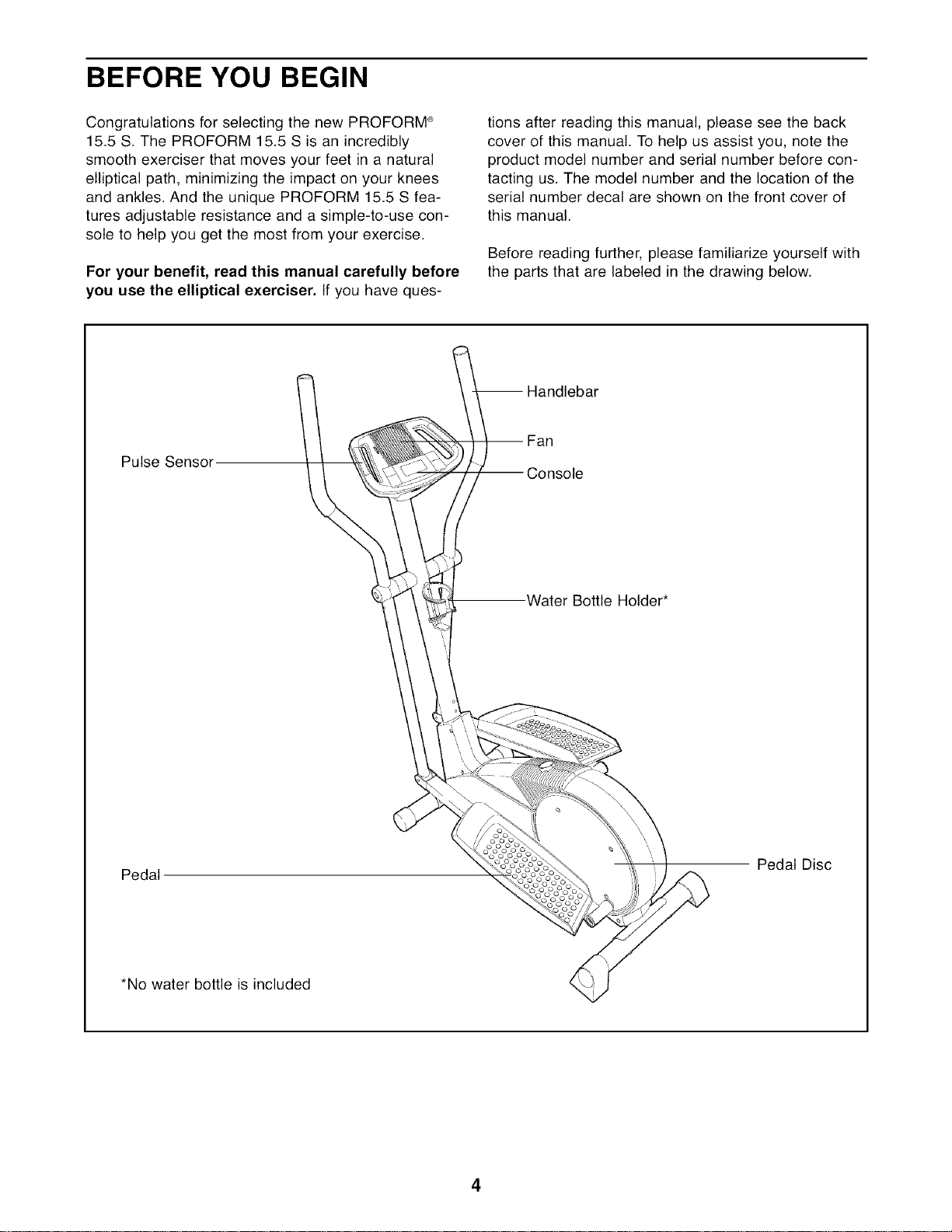
Before reading further, please familiarize yourself with
the parts that are labeled in the drawing below.
-- Handlebar
Pulse Sensor
-- Fan
-- Console
Water Bottle Holder*
Pedal
Pedal Disc
*No water bottle is included
4
ASSEMBLY
Assembly requires two persons. Place all parts of the elliptical exerciser in a cleared area and remove the
packing materials. Do not dispose of the packing materials until assembly is completed.
Assembly requires the included hex keys and your own Phillips screwdriver _, adjustable
wrench o__, and rubber mallet ___;___{_q
I
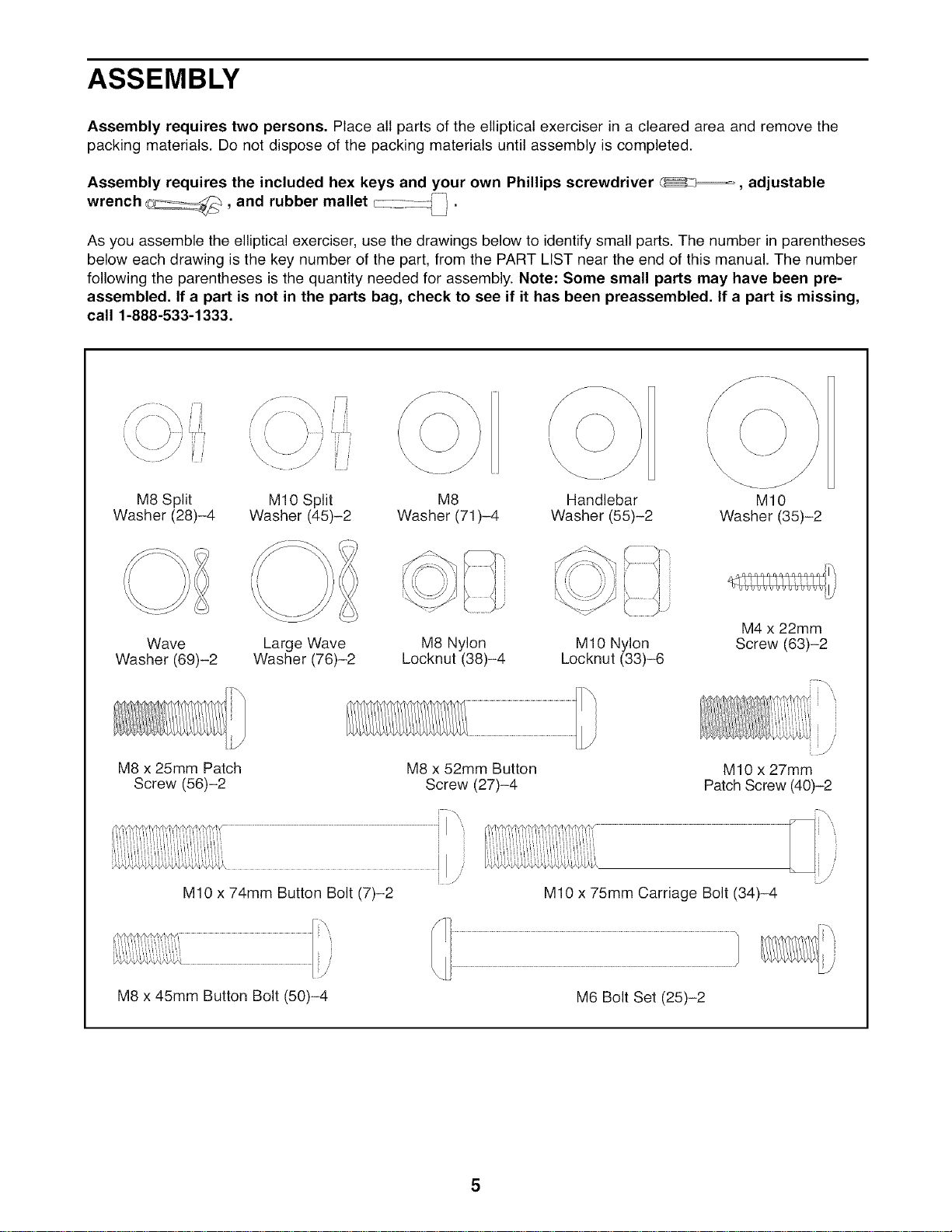
As you assemble the elliptical exerciser, use the drawings below to identify small parts. The number in parentheses
below each drawing is the key number of the part, from the PART LIST near the end of this manual. The number
following the parentheses is the quantity needed for assembly. Note: Some small parts may have been pre-
assembled. If a part is not in the parts bag, check to see if it has been preassembled. If a part is missing,
call 1-888-533-1333.
M8 Split
Washer (28)-4
\
\
M10 Split M8 Handlebar
Washer (45)-2 Washer (71)-4 Washer (55)-2
\\\
\
\\\
MIO
Washer (35)-2
Wave
Washer (69)-2
Large Wave M8 Nylon M10 Nylon
Washer (76)-2 Locknut (38)-4 Locknut (33)-6
M8 x 25mm Patch
Screw (56)-2
M10 x 74mm Button Bolt (7)-2
M4 x 22mm
Screw (63)-2
M8 x 52mm Button
Screw (27)-4
, /
M10 x 27mm
Patch Screw (40)-2
/
M10 x 75mm Carriage Bolt (34)-4
M8 x 45mm Button Bolt (50)-4 M6 Bolt Set (25)-2
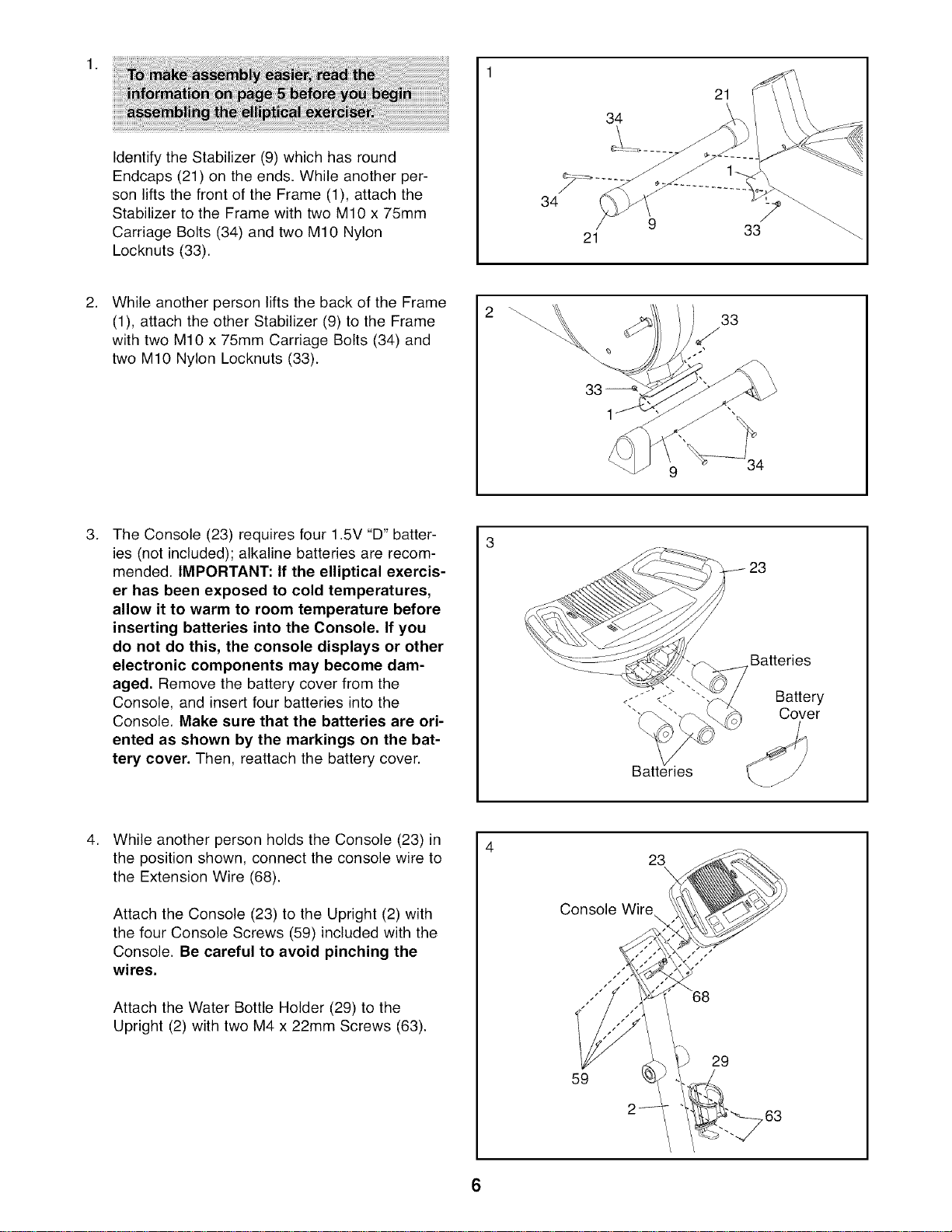
IdentifytheStabilizer(9)whichhasround
Endcaps(21)ontheends.Whileanotherper-
sonliftsthefrontoftheFrame(1),attachthe
StabilizertotheFramewithtwoM10x75mm
CarriageBolts(34)andtwoM10Nylon
Locknuts(33).
34
21
34
21
33
WhileanotherpersonliftsthebackoftheFrame
(1),attachtheotherStabilizer(9)totheFrame
withtwoM10x75mmCarriageBolts(34)and
twoM10NylonLocknuts(33).
9
,
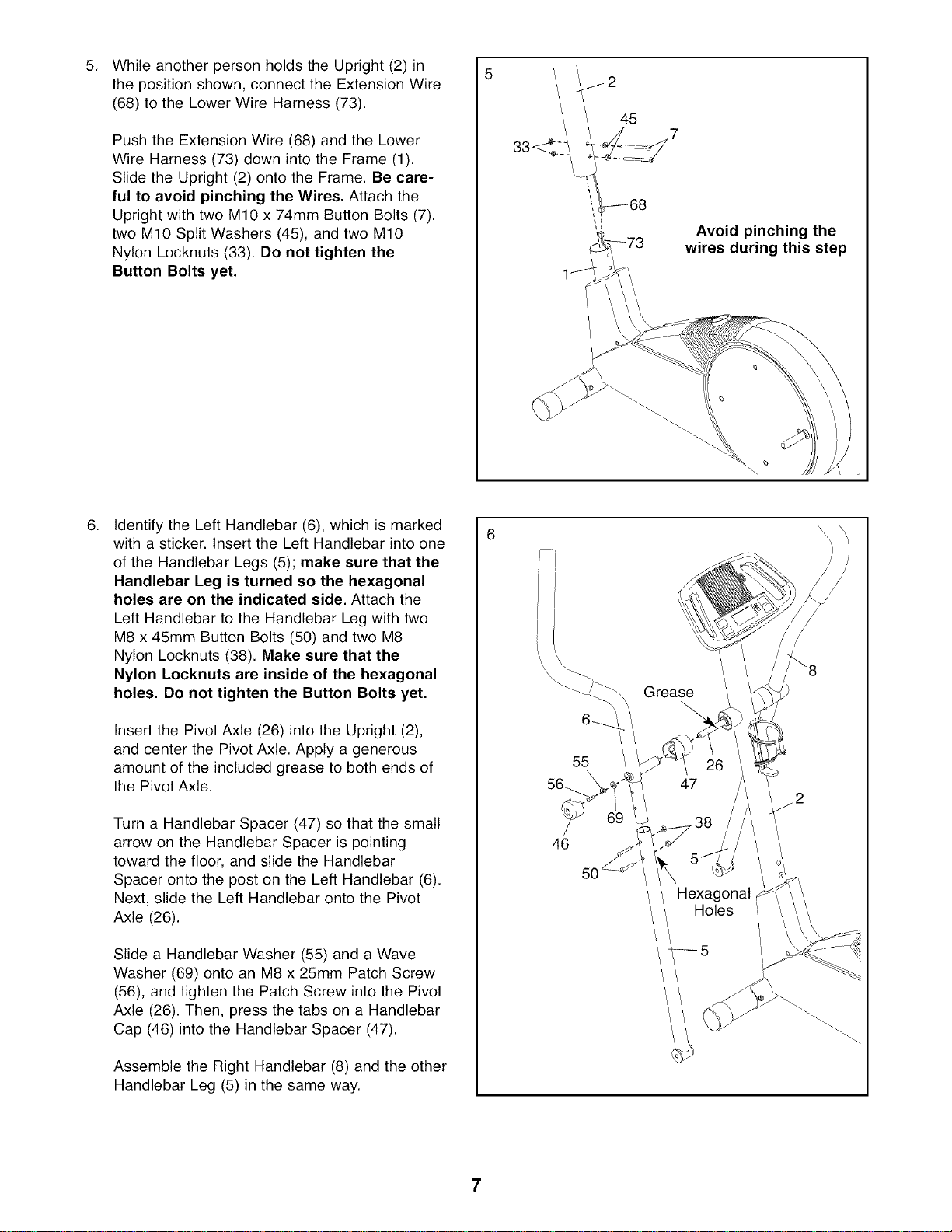
The Console (23) requires four 1.5V "D" batter-
ies (not included); alkaline batteries are recom-
mended. IMPORTANT: If the elliptical exercis-
er has been exposed to cold temperatures,
allow it to warm to room temperature before
inserting batteries into the Console. If you
do not do this, the console displays or other
electronic components may become dam-
aged. Remove the battery cover from the
Console, and insert four batteries into the
Console. Make sure that the batteries are ori-
ented as shown by the markings on the bat-
tery cover. Then, reattach the battery cover.
23
Batteries
Battery
Cover
4,
While another person holds the Console (23) in
the position shown, connect the console wire to
the Extension Wire (68).
Attach the Console (23) to the Upright (2) with
the four Console Screws (59) included with the
Console. Be careful to avoid pinching the
wires.
Attach the Water Bottle Holder (29) to the
Upright (2) with two M4 x 22mm Screws (63).
23
\
Console Wire
59
29
6
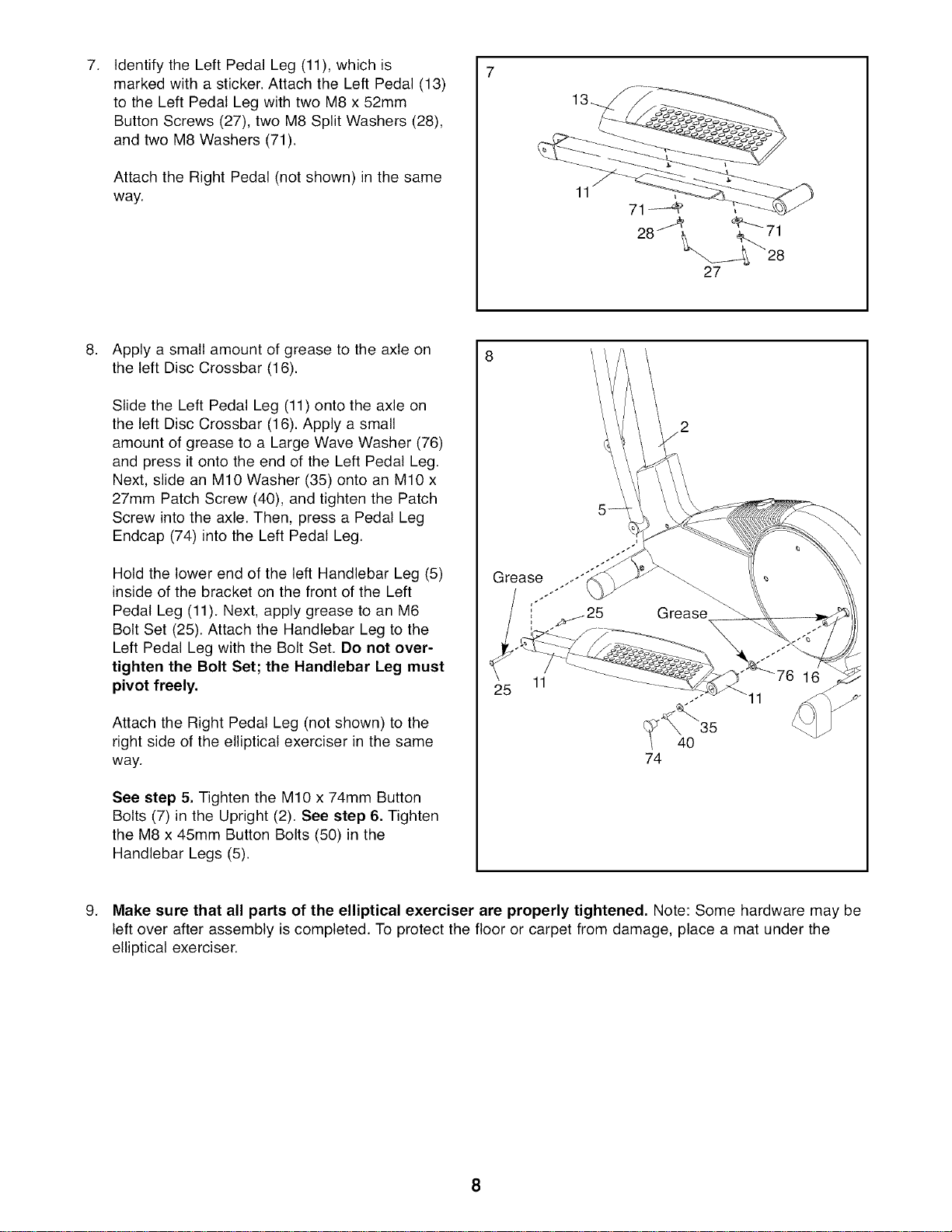
5. 5
While another person holds the Upright (2) in
the position shown, connect the Extension Wire
(68) to the Lower Wire Harness (73).
Push the Extension Wire (68) and the Lower
Wire Harness (73) down into the Frame (1).
Slide the Upright (2) onto the Frame. Be care-
ful to avoid pinching the Wires, Attach the
Upright with two M10 x 74mm Button Bolts (7),
two M10 Split Washers (45), and two M10
Nylon Locknuts (33). Do not tighten the
Button Bolts yet.
45
\
Avoid pinching the
wires during this step
,
Identify the Left Handlebar (6), which is marked
with a sticker. Insert the Left Handlebar into one
of the Handlebar Legs (5); make sure that the
Handlebar Leg is turned so the hexagonal
holes are on the indicated side. Attach the
Left Handlebar to the Handlebar Leg with two
M8 x 45mm Button Bolts (50) and two M8
Nylon Locknuts (38). Make sure that the
Nylon Locknuts are inside of the hexagonal
holes. Do not tighten the Button Bolts yet,
Insert the Pivot Axle (26) into the Upright (2),
and center the Pivot Axle. Apply a generous
amount of the included grease to both ends of
the Pivot Axle.
Turn a Handlebar Spacer (47) so that the small
arrow on the Handlebar Spacer is pointing
toward the floor, and slide the Handlebar
Spacer onto the post on the Left Handlebar (6).
Next, slide the Left Handlebar onto the Pivot
Axle (26).
Slide a Handlebar Washer (55) and a Wave
Washer (69) onto an M8 x 25mm Patch Screw
(56), and tighten the Patch Screw into the Pivot
Axle (26). Then, press the tabs on a Handlebar
Cap (46) into the Handlebar Spacer (47).
Assemble the Right Handlebar (8) and the other
Handlebar Leg (5) in the same way.
6 \\
\
55
46
7
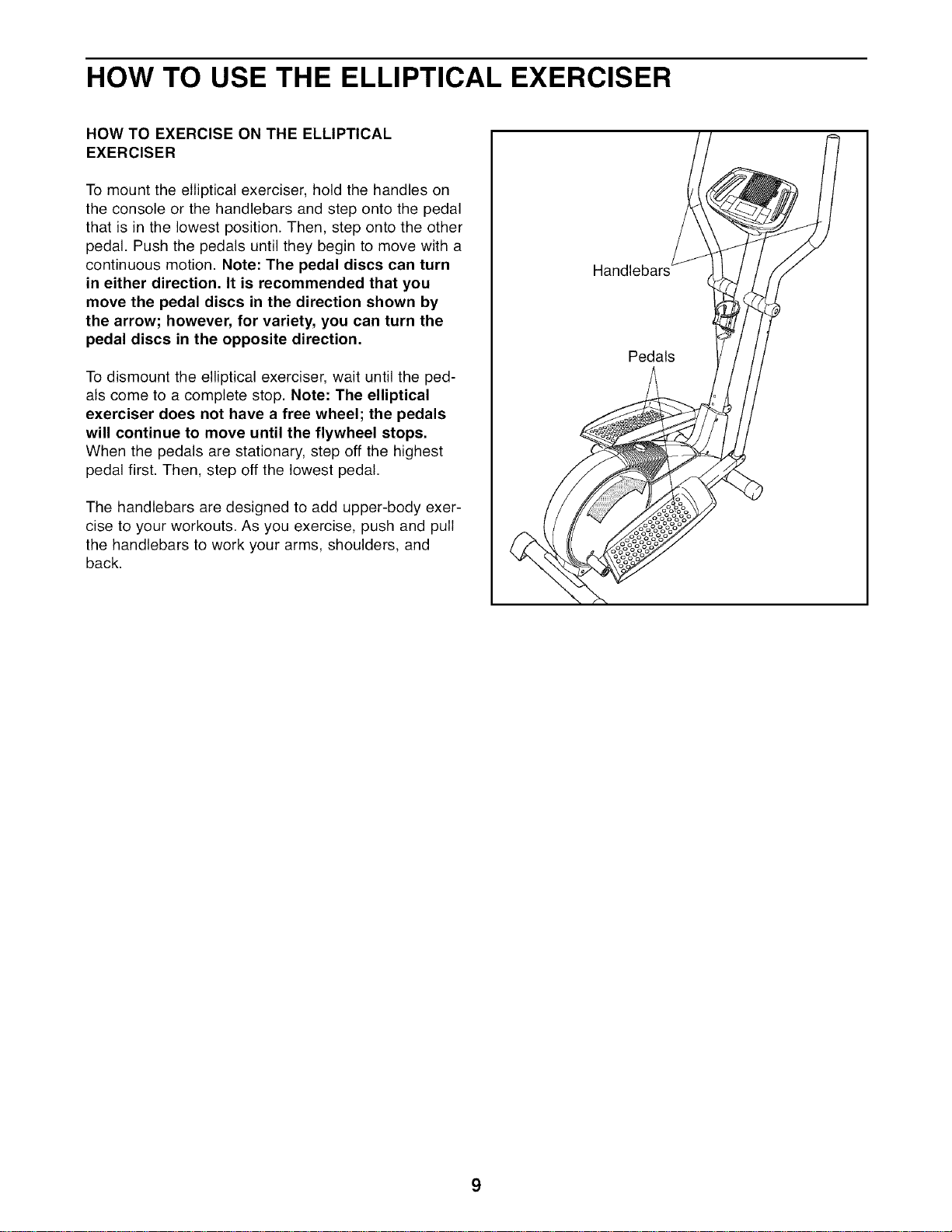
7. 7
Identify the Left Pedal Leg (11), which is
marked with a sticker. Attach the Left Pedal (13)
to the Left Pedal Leg with two M8 x 52mm
Button Screws (27), two M8 Split Washers (28),
and two M8 Washers (71).
Attach the Right Pedal (not shown) in the same
way.
11
Apply a small amount of grease to the axle on
the left Disc Crossbar (16).
Slide the Left Pedal Leg (11) onto the axle on
the left Disc Crossbar (16). Apply a small
amount of grease to a Large Wave Washer (76)
and press it onto the end of the Left Pedal Leg.
Next, slide an M10 Washer (35) onto an M10 x
27mm Patch Screw (40), and tighten the Patch
Screw into the axle. Then, press a Pedal Leg
Endcap (74) into the Left Pedal Leg.
Hold the lower end of the left Handlebar Leg (5)
inside of the bracket on the front of the Left
Pedal Leg (11). Next, apply grease to an M6
Bolt Set (25). Attach the Handlebar Leg to the
Left Pedal Leg with the Bolt Set. Do not over-
tighten the Bolt Set; the Handlebar Leg must
pivot freely.
Attach the Right Pedal Leg (not shown) to the
right side of the elliptical exerciser in the same
way.
See step 5. Tighten the M10 x 74mm Button
Bolts (7) in the Upright (2). See step 6. Tighten
the M8 x 45mm Button Bolts (50) in the
Handlebar Legs (5).
Grease .-"
11
40 35
74
11
9. Make sure that all parts of the elliptical exerciser are properly tightened, Note: Some hardware may be
left over after assembly is completed. To protect the floor or carpet from damage, place a mat under the
elliptical exerciser.
HOW TO USE THE ELLIPTICAL EXERCISER
HOW TO EXERCISE ON THE ELLIPTICAL
EXERCISER
To mount the elliptical exerciser, hold the handles on
the console or the handlebars and step onto the pedal
that is in the lowest position. Then, step onto the other
pedal. Push the pedals until they begin to move with a
continuous motion. Note: The pedal discs can turn
in either direction. It is recommended that you
move the pedal discs in the direction shown by
the arrow; however, for variety, you can turn the
pedal discs in the opposite direction.
To dismount the elliptical exerciser, wait until the ped-
als come to a complete stop. Note: The elliptical
exerciser does not have a free wheel; the pedals
will continue to move until the flywheel stops.
When the pedals are stationary, step off the highest
pedal first. Then, step off the lowest pedal.
The handlebars are designed to add upper-body exer-
cise to your workouts. As you exercise, push and pull
the handlebars to work your arms, shoulders, and
back.
Handlebars
Pedals
9
Increase Button
Decrease Button
\
HOW TO USE THE CONSOLE
1. Turn on the console,
Note: The console requires four 1.5V "D" batteries
(see assembly step 3 on page 6). If there is a
sheet of clear plastic on the face of the console,
peel off the plastic.
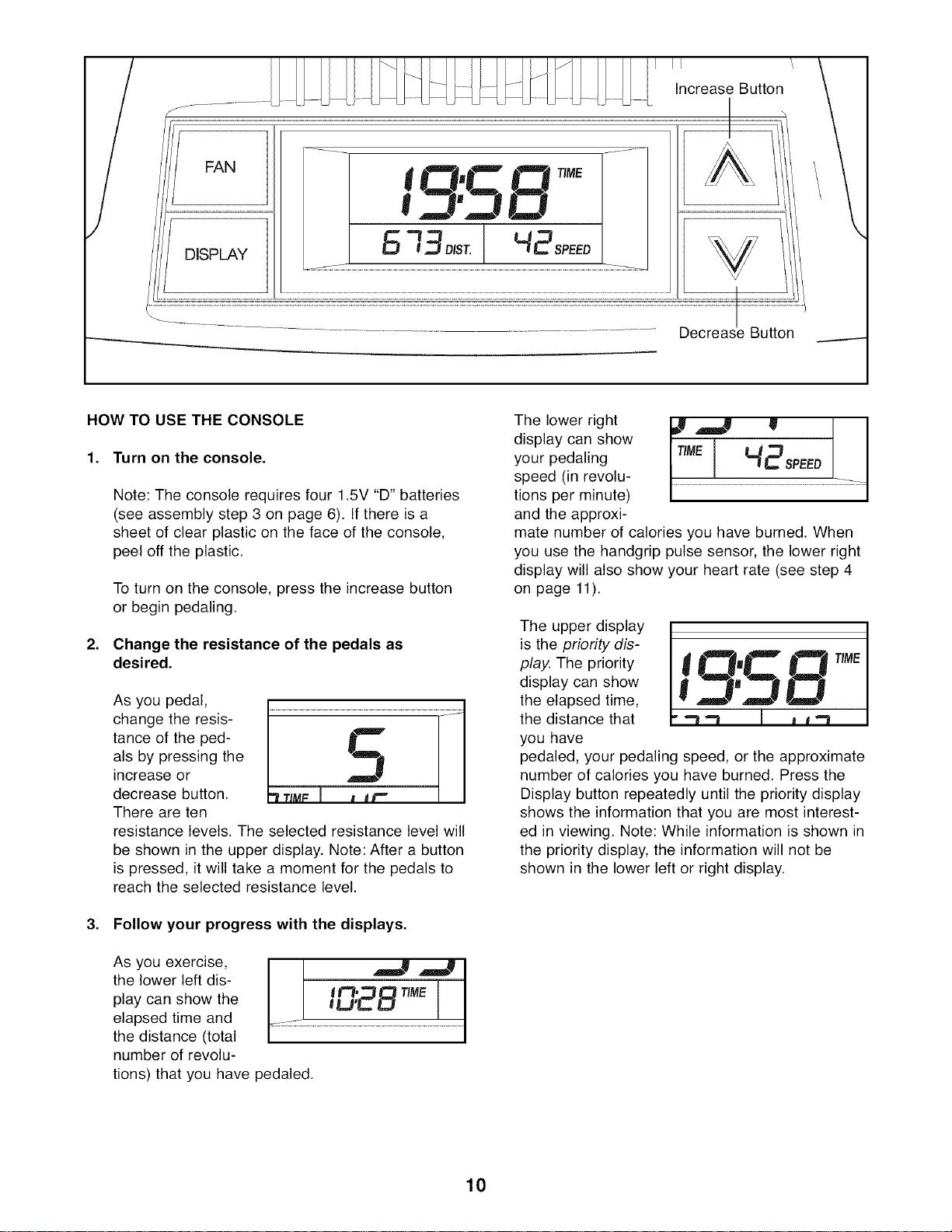
To turn on the console, press the increase button
or begin pedaling.
2. Change the resistance of the pedals as
desired.
As you pedal,
change the resis-
tance of the ped-
als by pressing the
increase or
decrease button.
There are ten
resistance levels. The selected resistance level will
be shown in the upper display. Note: After a button
is pressed, it will take a moment for the pedals to
reach the selected resistance level.
3. Follow your progress with the displays.
As you exercise,
the lower left dis-
play can show the
elapsed time and
the distance (total
number of revolu-
tions) that you have pedaled.
The lower right
display can show
your pedaling
speed (in revolu-
tions per minute)
and the approxi-
I ! I
ME HBsPEEol
mate number of calories you have burned. When
you use the handgrip pulse sensor, the lower right
display will also show your heart rate (see step 4
on page 11).
The upper display
is the priority dis-
play. The priority
display can show
the elapsed time,
the distance that
you have
.TJ.TJ
pedaled, your pedaling speed, or the approximate
number of calories you have burned. Press the
Display button repeatedly until the priority display
shows the information that you are most interest-
ed in viewing. Note: While information is shown in
the priority display, the information will not be
shown in the lower left or right display.
10
4. Measure your heart rate if desired.
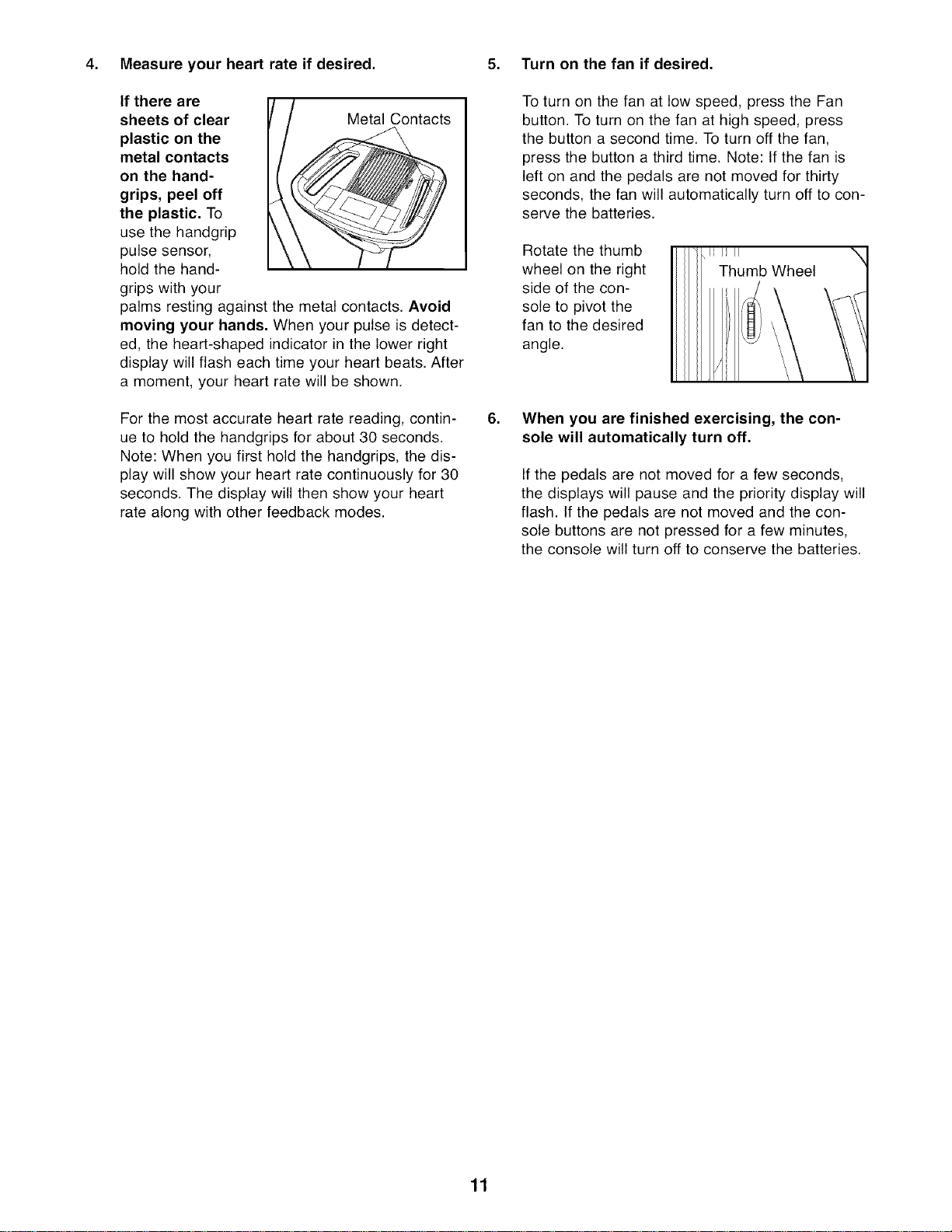
If there are
sheets of clear Metal Contacts
plastic on the
metal contacts
on the hand-
grips, peel off
the plastic, To
use the handgrip
pulse sensor,
hold the hand-
grips with your
palms resting against the metal contacts. Avoid
moving your hands, When your pulse is detect-
ed, the heart-shaped indicator in the lower right
display will flash each time your heart beats. After
a moment, your heart rate will be shown.
For the most accurate heart rate reading, contin-
ue to hold the handgrips for about 30 seconds.
Note: When you first hold the handgrips, the dis-
play will show your heart rate continuously for 30
seconds. The display will then show your heart
rate along with other feedback modes.
5. Turn on the fan if desired.
.
To turn on the fan at low speed, press the Fan
button. To turn on the fan at high speed, press
the button a second time. To turn off the fan,
press the button a third time. Note: If the fan is
left on and the pedals are not moved for thirty
seconds, the fan will automatically turn off to con-
serve the batteries.
Rotate the thumb
wheel on the right
side of the con-
sole to pivot the
fan to the desired
angle.
When you are finished exercising, the con-
sole will automatically turn off.
If the pedals are not moved for a few seconds,
the displays will pause and the priority display will
flash. If the pedals are not moved and the con-
sole buttons are not pressed for a few minutes,
the console will turn off to conserve the batteries.
11
MAINTENANCE AND TROUBLESHOOTING
Inspect and tighten all parts of the elliptical exerciser
regularly. Replace any worn parts immediately.
To clean the elliptical exerciser, use a damp cloth and
a small amount of mild dish soap. Important: Keep
liquids away from the console and keep the con-
sole out of direct sunlight, During storage, remove
the batteries from the console.
BATTERY REPLACEMENT
If the console display becomes dim, the batteries
should be replaced. See assembly step 3 on page 6
for replacement instructions.
HOW TO ADJUST THE REED SWITCH
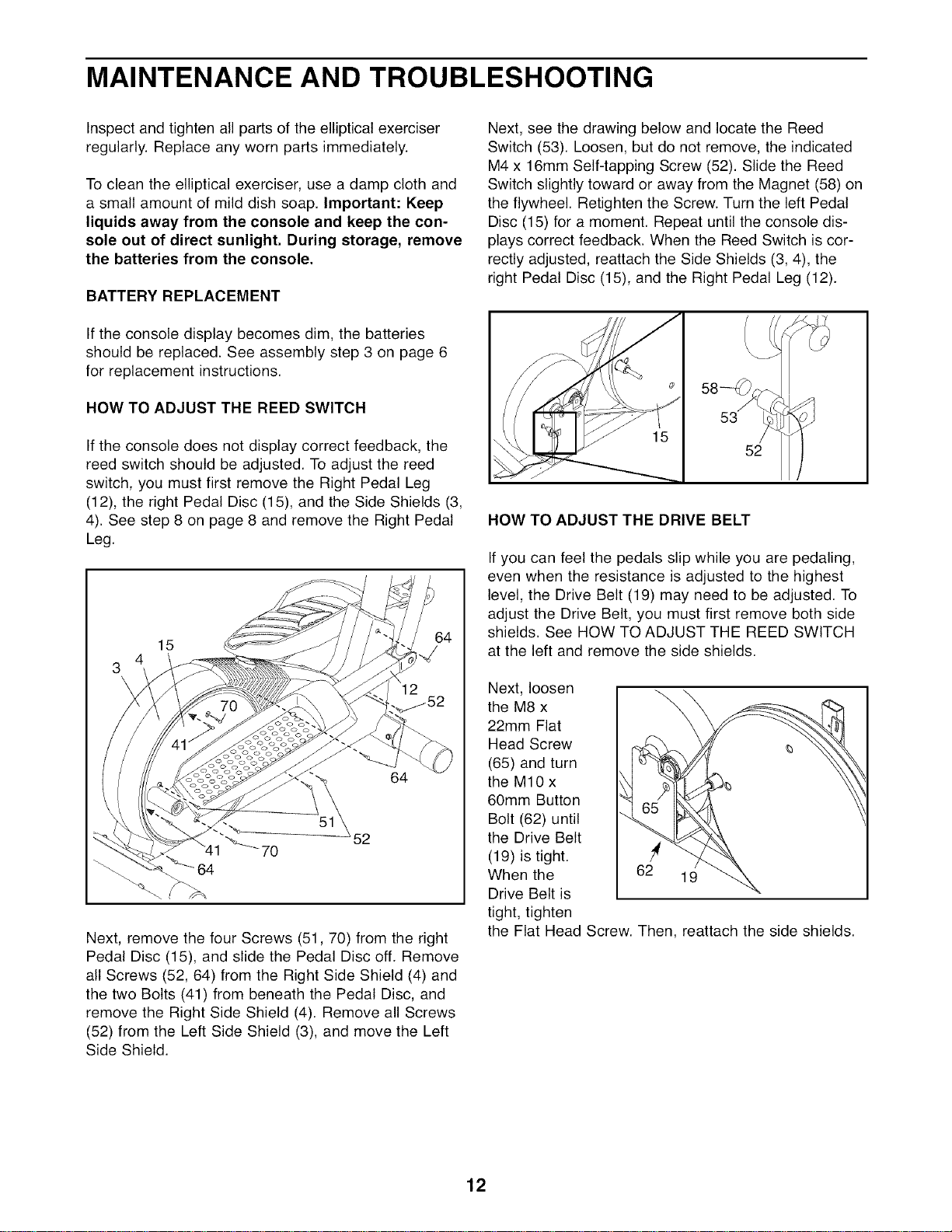
If the console does not display correct feedback, the
reed switch should be adjusted. To adjust the reed
switch, you must first remove the Right Pedal Leg
(12), the right Pedal Disc (15), and the Side Shields (3,
4). See step 8 on page 8 and remove the Right Pedal
Leg.
15
64
Next, remove the four Screws (51,70) from the right
Pedal Disc (15), and slide the Pedal Disc off. Remove
all Screws (52, 64) from the Right Side Shield (4) and
the two Bolts (41) from beneath the Pedal Disc, and
remove the Right Side Shield (4). Remove all Screws
(52) from the Left Side Shield (3), and move the Left
Side Shield.
Next, see the drawing below and locate the Reed
Switch (53). Loosen, but do not remove, the indicated
M4 x 16mm Self-tapping Screw (52). Slide the Reed
Switch slightly toward or away from the Magnet (58) on
the flywheel. Retighten the Screw. Turn the left Pedal
Disc (15) for a moment. Repeat until the console dis-
plays correct feedback. When the Reed Switch is cor-
rectly adjusted, reattach the Side Shields (3, 4), the
right Pedal Disc (15), and the Right Pedal Leg (12).
53
52
HOW TO ADJUST THE DRIVE BELT
If you can feel the pedals slip while you are pedaling,
even when the resistance is adjusted to the highest
level, the Drive Belt (19) may need to be adjusted. To
adjust the Drive Belt, you must first remove both side
shields. See HOW TO ADJUST THE REED SWITCH
at the left and remove the side shields.
Next, loosen
the M8 x \
22mm Flat
Head Screw
(65) and turn
the M10 x
60mm Button
Bolt (62) until
the Drive Belt
(19) is tight.
When the 62 19
Drive Belt is
tight, tighten
the Flat Head Screw. Then, reattach the side shields.
12
EXERCISE GUIDELINES
te_
These guidelines will help you to plan your exercise
program. For detailed exercise information, obtain a
reputable book or consult your physician. Remember,
proper nutrition and adequate rest are essential for
successful results.
EXERCISE INTENSITY
Whether your goal is to burn fat or to strengthen your
cardiovascular system, exercising at the proper inten-
sity is the key to achieving results. You can use your
heart rate as a guide to find the proper intensity level.
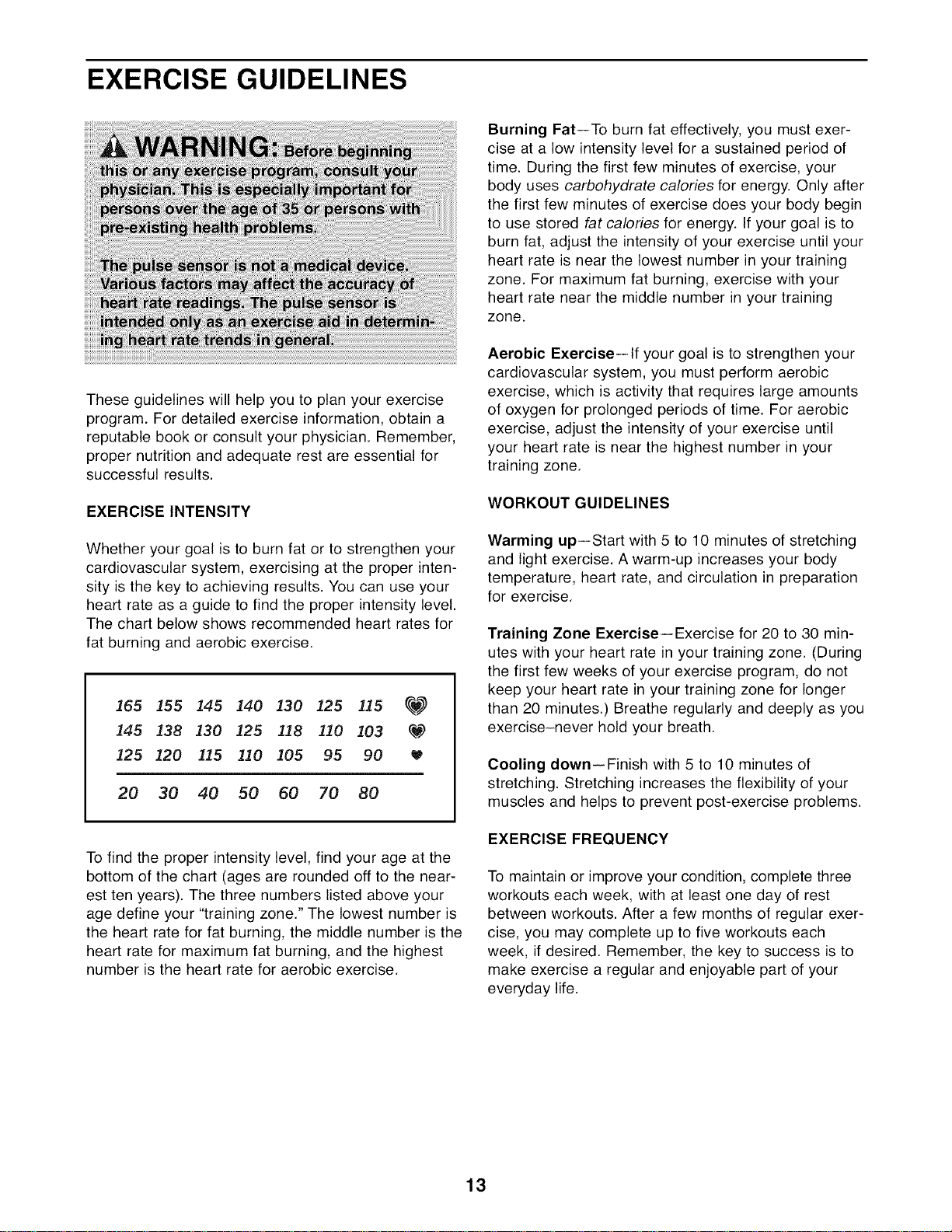
The chart below shows recommended heart rates for
fat burning and aerobic exercise.
165 155 145 140 130 125 _15 _
145 _38 _30 125 118 110 103 q,_?
_25 _20 115 110 ]05 95 90
20 30 40 50 60 70 80
To find the proper intensity level, find your age at the
bottom of the chart (ages are rounded off to the near-
est ten years). The three numbers listed above your
age define your "training zone." The lowest number is
the heart rate for fat burning, the middle number is the
heart rate for maximum fat burning, and the highest
number is the heart rate for aerobic exercise.
Burning Fat--To burn fat effectively, you must exer-
cise at a low intensity level for a sustained period of
time. During the first few minutes of exercise, your
body uses carbohydrate calories for energy. Only after
the first few minutes of exercise does your body begin
to use stored fat calories for energy. If your goal is to
burn fat, adjust the intensity of your exercise until your
heart rate is near the lowest number in your training
zone. For maximum fat burning, exercise with your
heart rate near the middle number in your training
zone.
Aerobic Exercise--If your goal is to strengthen your
cardiovascular system, you must perform aerobic
exercise, which is activity that requires large amounts
of oxygen for prolonged periods of time. For aerobic
exercise, adjust the intensity of your exercise until
your heart rate is near the highest number in your
training zone.
WORKOUT GUIDELINES
Warming up--Start with 5 to 10 minutes of stretching
and light exercise. A warm-up increases your body
temperature, heart rate, and circulation in preparation
for exercise.
Training Zone Exercise--Exercise for 20 to 30 min-
utes with your heart rate in your training zone. (During
the first few weeks of your exercise program, do not
keep your heart rate in your training zone for longer
than 20 minutes.) Breathe regularly and deeply as you
exercise-never hold your breath.
Cooling down--Finish with 5 to 10 minutes of
stretching. Stretching increases the flexibility of your
muscles and helps to prevent post-exercise problems.
EXERCISE FREQUENCY
To maintain or improve your condition, complete three
workouts each week, with at least one day of rest
between workouts. After a few months of regular exer-
cise, you may complete up to five workouts each
week, if desired. Remember, the key to success is to
make exercise a regular and enjoyable part of your
everyday life.
13
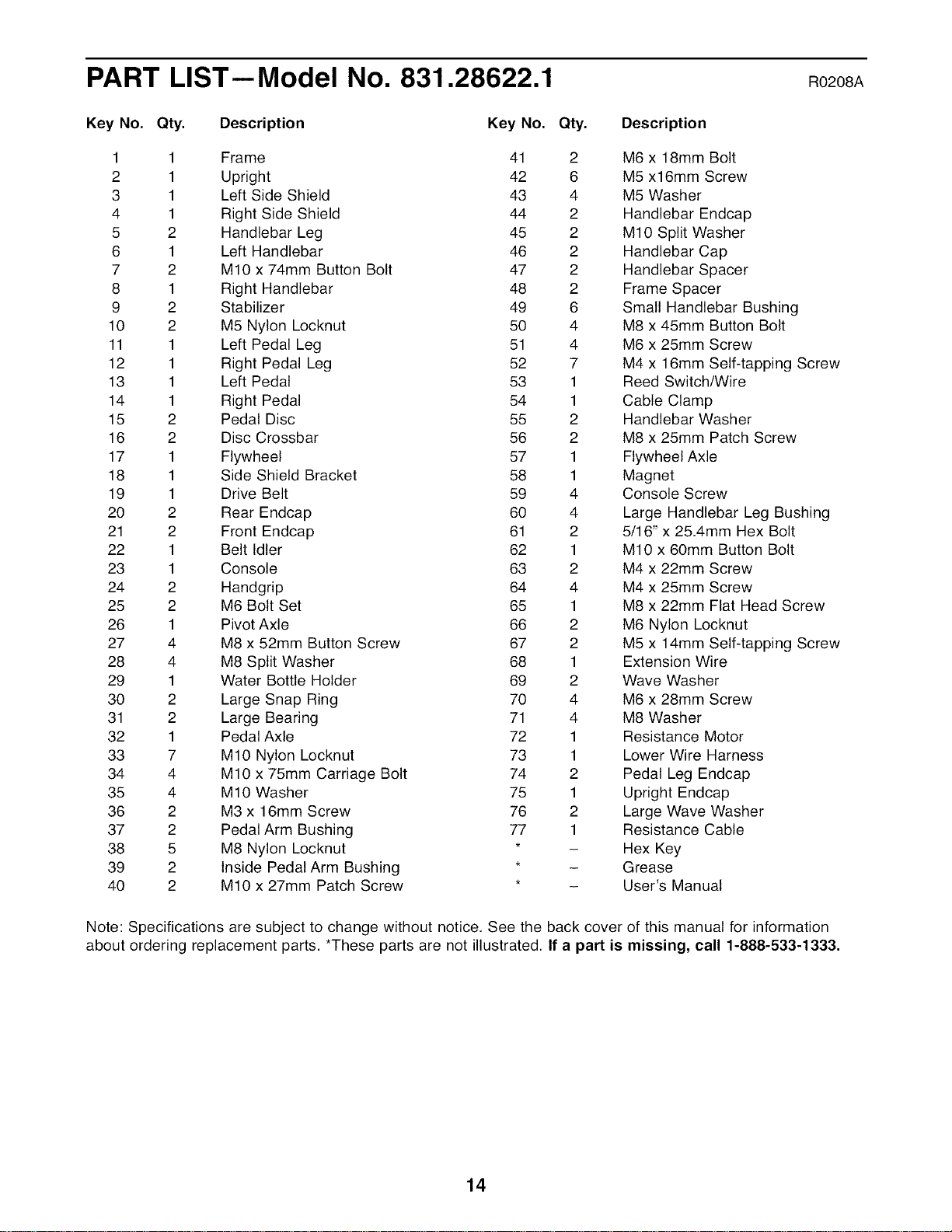
PART LIST--Model No. 831.28622.1 Ro2o8A
Key No. Qty. Description Key No. Qty. Description
1 1 Frame 41 2 M6 x 18mm Bolt
2 1 Upright 42 6 M5 x16mm Screw
3 1 Left Side Shield 43 4 M5 Washer
4 1 Right Side Shield 44 2 Handlebar Endcap
5 2 Handlebar Leg 45 2 MIO Split Washer
6 1 Left Handlebar 46 2 Handlebar Cap
7 2 MIO x 74mm Button Bolt 47 2 Handlebar Spacer
8 1 Right Handlebar 48 2 Frame Spacer
9 2 Stabilizer 49 6 Small Handlebar Bushing
10 2 M5 Nylon Locknut 50 4 M8 x 45mm Button Bolt
11 1 Left Pedal Leg 51 4 M6 x 25mm Screw
12 1 Right Pedal Leg 52 7 M4 x 16mm Self-tapping Screw
13 1 Left Pedal 53 1 Reed Switch/Wire
14 1 Right Pedal 54 1 Cable Clamp
15 2 Pedal Disc 55 2 Handlebar Washer
16 2 Disc Crossbar 56 2 M8 x 25mm Patch Screw
17 1 Flywheel 57 1 Flywheel Axle
18 1 Side Shield Bracket 58 1 Magnet
19 1 Drive Belt 59 4 Console Screw
20 2 Rear Endcap 60 4 Large Handlebar Leg Bushing
21 2 Front Endcap 61 2 5/16" x 25.4mm Hex Bolt
22 1 Belt Idler 62 1 MIO x 60mm Button Bolt
23 1 Console 63 2 M4 x 22mm Screw
24 2 Handgrip 64 4 M4 x 25mm Screw
25 2 M6 Bolt Set 65 1 M8 x 22mm Flat Head Screw
26 1 Pivot Axle 66 2 M6 Nylon Locknut
27 4 M8 x 52mm Button Screw 67 2 M5 x 14mm Self-tapping Screw
28 4 M8 Split Washer 68 1 Extension Wire
29 1 Water Bottle Holder 69 2 Wave Washer
30 2 Large Snap Ring 70 4 M6 x 28mm Screw
31 2 Large Bearing 71 4 M8 Washer
32 1 Pedal Axle 72 1 Resistance Motor
33 7 MIO Nylon Locknut 73 1 Lower Wire Harness
34 4 MIO x 75mm Carriage Bolt 74 2 Pedal Leg Endcap
35 4 MIO Washer 75 1 Upright Endcap
36 2 M3 x 16mm Screw 76 2 Large Wave Washer
37 2 Pedal Arm Bushing 77 1 Resistance Cable
38 5 M8 Nylon Locknut * - Hex Key
39 2 Inside Pedal Arm Bushing * - Grease
40 2 MIO x 27mm Patch Screw * - User's Manual
Note: Specifications are subject to change without notice. See the back cover of this manual for information
about ordering replacement parts. *These parts are not illustrated. If a part is missing, call 1-888-533-1333.
14
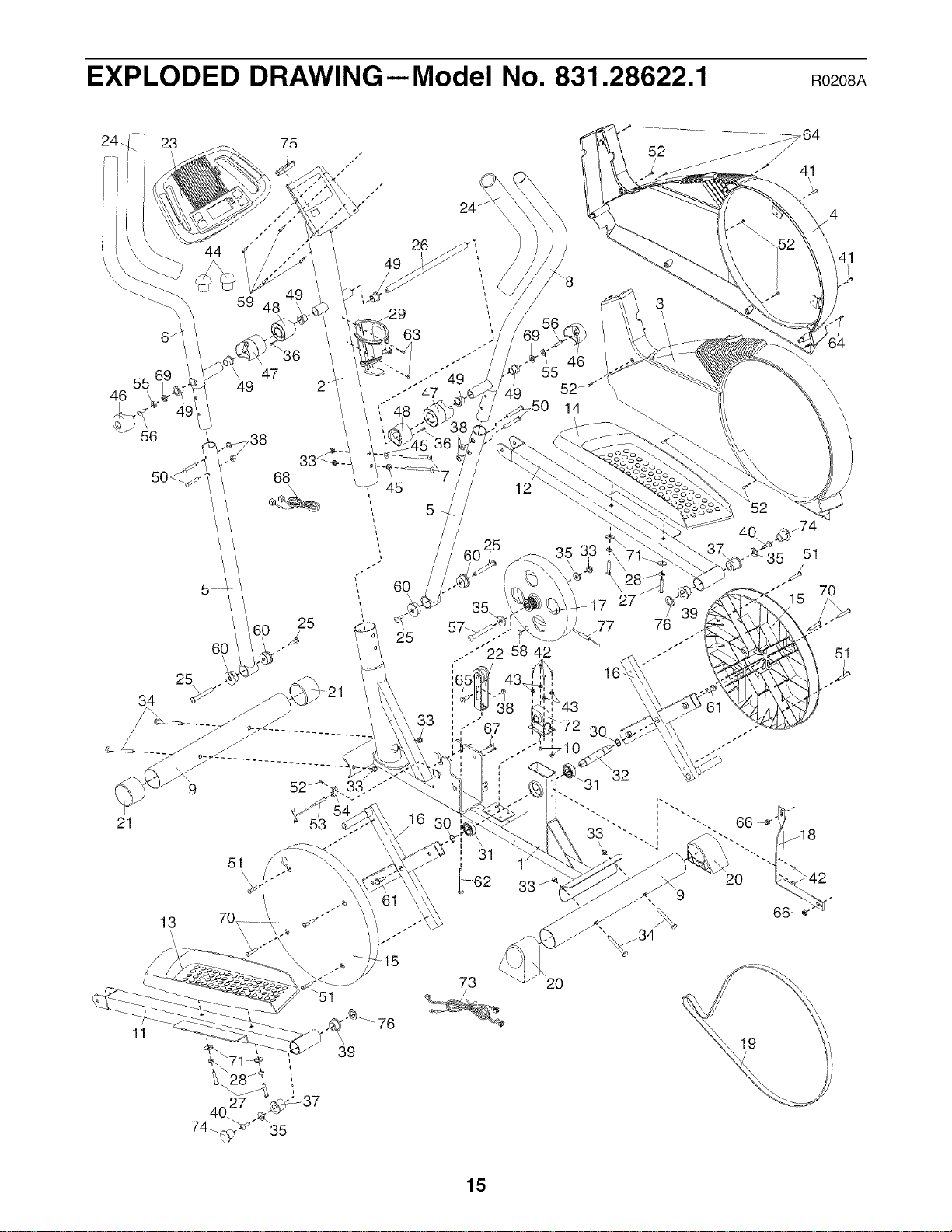
EXPLODED DRAWING--Model No. 831.28622.1 Ro2o8A
44 26 _p",,
59 48 _29 ",
63
47 ..-"" 49
55 49 2
46 .--'" 47 49
56
\\
_50 14
I
3
4
41
64
25
34
21
13
11
51
73
7 27_
77 76
20
15

® Registered Trademark / TMTrademark / SMService Mark of Sears Brands. LLC
F bnc / SMM
® Marca Registrada /TMMarca de a a arca de Servicio de Sears Brands, LLC
f
90 DAY FULL WARRANTY
f
If this Sears Elliptical Exerciser fails due to a defect in material or workmanship within 90 days from the
date of purchase, call 1-800-4-MY-HOME ®(1-800-469-4663) to arrange for free repair (or replacement
if repair proves impossible).
This warranty does not apply when the Elliptical Exerciser is used commercially or for rental purposes.
This warranty gives you specific legal rights, and you may also have other rights which vary from state
to state.
Sears, Roebuck and Co., Hoffman Estates, IL 60179
J
J
Part No. 261865 R0208A Printed in China © 2008 ICON IP, Inc.

