IIIlrl I I I III
IIIIIlI
IIIII IIII IIIIIIIM
III1! II IIIIIIII
I IIII I I IIII I
II I IIIII IIII
1111111111111111III
I IIII IIIII
IIIIr III r l IIIIIIII IIIIII
IIII I
I IIIII IIII IIIIIIII IIII
II
II ..........................
• III
II I IIIIIIII IIIIII
IIIIIII I
III II II IIIIIIIIIIL IIIII
iiiiiiiiiiiii
lUlIII I
III
_ I II II I I I I I II11111 ] I II
_1111111 I]
! • I I
' I!11 IIIIIII I III III '
] I I IIIIII II I I II
.................... I 1_ I!l I_
'PIPIIIIIrP I !!lrr il :]I:EII!!II ! i
WL.. ' I ! I IF IIII '! ........
II II IIII IIII
II IIII IIIII IIIIIIII
IIIIll!It! I IIIIII II IIII I IIIIII III I II IIIIII1[
Ilrllllll IIIIIIIIIIIIII I I1'11 IIIIIIII III IIIIII IIIIII
'1!11111 IIIIIIIIIII '111111 III II
III I
IIIIIIIII IIII I
IIII III I
l!1111111 IIIIIIII I II
• [!l[ll ii I IjII / Hi
I I'111 IIIIlll III
I I I
IIIII IIIIIII
I
II
SEARS
Kenmore Vacuum Cleaner
0WNER'SMANUAL
READTHISMANUAL for important safety,
assembly and operating instructions.
C_) IZACR 1OUOO-4369556A
ONTENTS
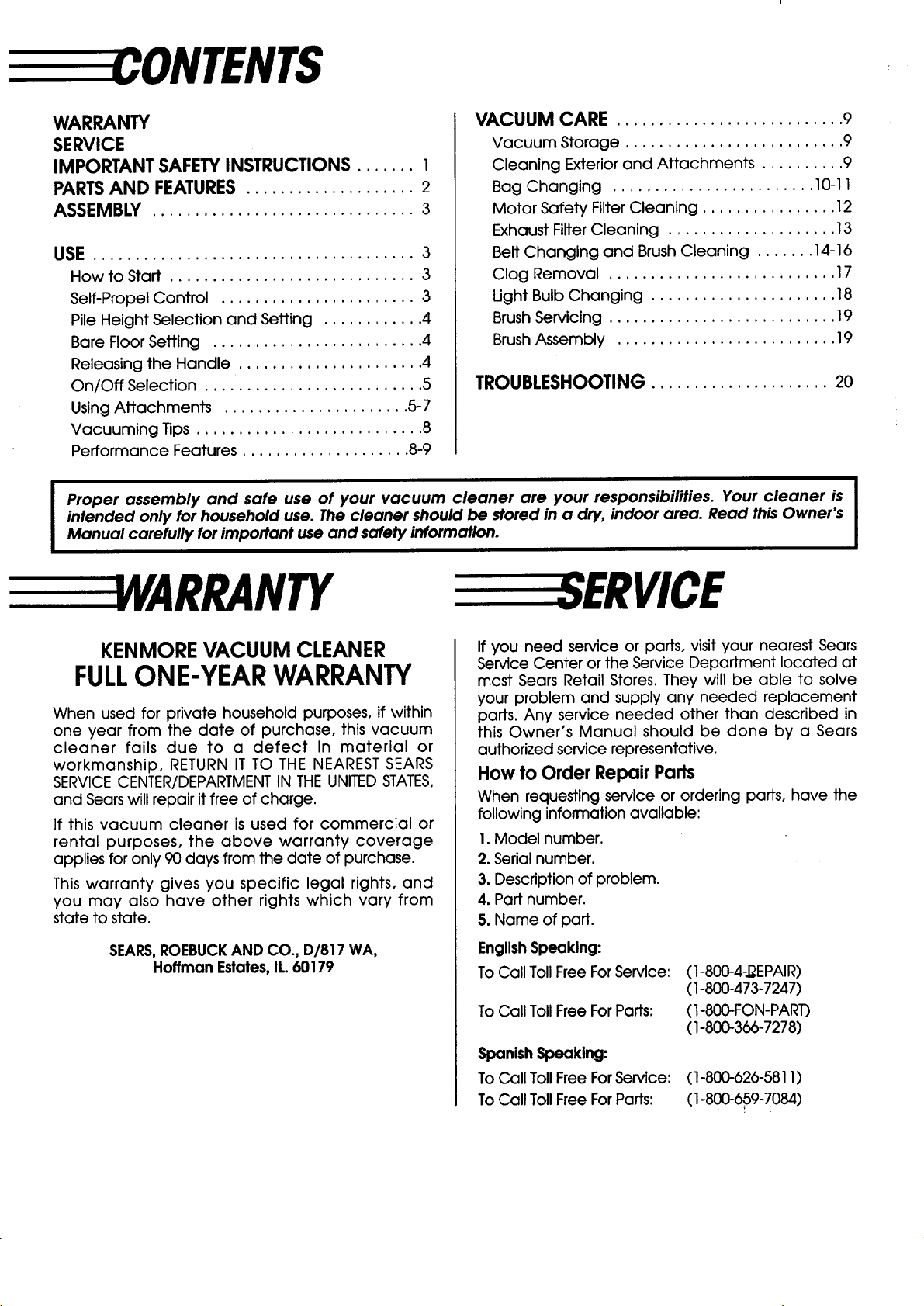
WARRANTY
SERVICE
IMPORTANT SAFETYINSTRUCTIONS ....... I
PARTSAND FEATURES.................... 2
ASSEMBLY ............................... 3
USE ...................................... 3
How to Start ............................. 3
Self-Propel Control ....................... 3
Pile Height Selection and Setting ............ 4
Bare Floor Setting ......................... 4
Releasing the Handle ...................... 4
On/Off Selection .......................... 5
Using Attachments ...................... 5-7
Vacuuming Tips ........................... 8
Performance Features .................... 8-9
VACUUM CARE ........................... 9
Vacuum Storage .......................... 9
Cleaning Exterior and Attachments .......... 9
Bag Changing ........................ 10-11
Motor Safety Filter Cleaning ................ 12
Exhaust Filter Cleaning .................... 13
Belt Changing and Brush Cleaning ....... 14-16
Clog Removal ........................... 17
Light Bulb Changing ...................... 18
Brush Servicing ........................... 19
Brush Assembly .......................... 19
TROUBLESHOOTING..................... 20
Proper assembly and safe use of your vacuum cleaner are your responsibilities. Your cleaner is
intended only for household use. The cleaner should be stored in a dry, indoor area. Read this Owner's
Manual carefully for important use and safety information.
YARRANTY
KENMOREVACUUM CLEANER
FULLONE-YEARWARRANTY
When used for private household purposes, if within
one year from the date of purchase, this vacuum
cleaner fails due to a defect in material or
workmanship, RETURN IT TO THE NEAREST SEARS
SERVICECENTER/DEPARTMENTIN THE UNITEDSTATES,
and Sears will repair it free of charge.
If this vacuum cleaner is used for commercial or
rental purposes, the above warranty coverage
applies for only 90 days from the date of purchase.
This warranty gives you specific legal rights, and
you may also have other rights which vary from
state to state.
SEARS,ROEBUCKAND CO., D/817 WA,
Hoffman Estates,IL.60179
If you need service or parts, visit your nearest Sears
Service Center or the Service Department located at
most Sears Retail Stores. They will be able to solve
your problem and supply any needed replacement
parts. Any service needed other than described in
this Owner's Manual should be done by a Sears
authorized service representative.
How to Order Repair Parts
When requesting service or ordering parts, have the
following information available:
1.Model number.
2. Serial number.
3. Description of problem.
4. Part number.
5. Name of part.
EnglishSpeaking:
To Call Toll Free For Service:
To Call Toll Free For Parts:
Spanish Speaking:
To Call TollFree ForService:
To Call Toll Free For Parts:
(1-800-4-J_EPAIR)
(1-800-473-7247)
(1-80DFON-PART)
(1-800-366-7278)
(1-800-626-5811)
(1-800-659-7084)
SAFETYINSTRUCTIONS
To reduce the risk of fire, electrical shock, injury to persons or damage when using
your vacuum cleaner, follow basic safety precautions including the following:
Read this manual before assembling or using
your vacuum cleaner.
Use your cleaner only as described in this
manual. Use only with Sears recommended
attachments.
To reduce the risk of electrical shock - Do not
use outdoors or on wet surfaces.
Disconnect electrical supply before servicing
or cleaning out brush area. Failure to do so
could result in electrical shock or brush
suddenly starting.
Always turn cleaner off before unplugging.
Do not unplug by pullingon cord.To unplug,
graspthe plug,notthe cord.
Do not use with damaged cord or plug. If
cleaner isnot working as itshould,has been
dropped, damaged, leftoutdoors,ordropped
into water, return itto a Sears Service
Center/Department.
Do not pull or carry by cord, use cord as a
handle, close door on cord, or pull cord
around sharp edges or corners. Do not run
cleaner over cord. Keep cord away from
heated surfaces.
Do not leave cleaner when plugged in.
Unplug from outletwhen not inuse and before
servicing.
Do not allow to be used as a toy. Close
attention is necessary when used by or near
children.
Do not handle plug orcleaner withwet hands.
Do not put any objects intoopenings.
Do not use with any opening blocked; keep
freeof dust,lint,hairand anythingthat may
reduce airflow.
Keep hair, loose clothing, fingers, and all parts
of body away from openings and moving
parts.
Do not use cleaner without dust bag in place.
Always change the dust bag after vacuuming
carpet cleaners or fresheners, powders and
fine dust. These products clog the bag,
reduce airflow and can cause the bag to
burst. Failure to change bag could cause
permanent damage to the cleaner.
Do not use the cleaner to pick up sharp hard
objects,small toys,pins,paper, etc.They may
damage the cleaner or dustbag.
Do not pick up anything that isburning or
smoking, such as cigarettes,matches, or
hot ashes.
Do not use cleaner to pick up flammable or
combustible liquids (gasoline, cleaning fluids,
perfumes, etc.), or use in areas where they
may be present. The fumes from these
substances can create a fire hazard or
explosion.
Use extra care when cleaning on stairs.Do not
put on chairs,tables,etc.Keep on floor.
You are responsible for making sure that your
vacuum cleaner is not used by anyone unable
to operate it properly.
SAVETHESEINSTRUCTIONS
Proper assembly and safe use of your vacuum cleaner are your responsibilities.
Your cleaner is intended only for household use.
Read this Owner's Manual carefully for impoffant use and safety information.
AND FEATURES
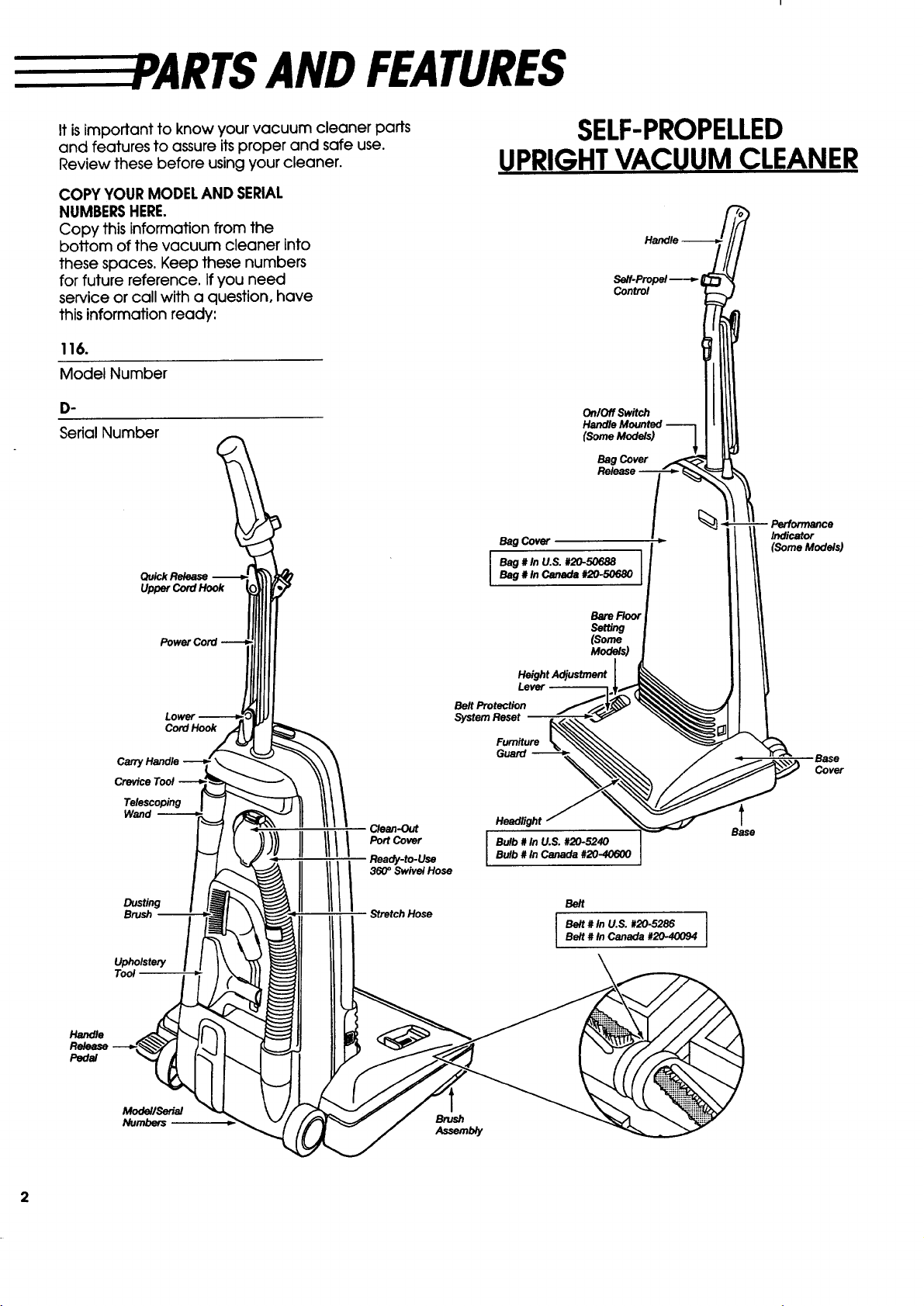
It isimportant to know your vacuum cleaner parts
and features to assure its proper and safe use.
Review these before using your cleaner.
COPY YOUR MODELAND SERIAL
NUMBERSHERE.
Copy this information from the
bottom of the vacuum cleaner into
these spaces. Keep these numbers
for future reference. If you need
service or call with a question, have
this information ready:
116.
Model Number
O.
Serial Number
SELF-PROPELLED
UPRIGHTVACUUM CLEANER
Seff-Prepei
Control
OnlOff Switch
Handle Mounted ---'--1
(Some Models) _
Bag Cover
Handle
Pedal
Quick Release
Upper Cord Hook
Power Cord
Cord Hook
Carry Handle
Telescoping
Wand
Upholstery
Bag Cover
I Bag # ln U.S. #20-506881Bag # In Canada #20-50680
BareFtoor
Setting
(Some
Models)
Height Adjustment
Lever
Belt Protection
System Reset
Furniture
Guard
Clean-Out
Port Cover
Ready-to-Use
3_0° Swivel Hose
Stretch Hose
Headlight
Bulb # In U.S. #20-5240
Bulb # In Canada #20-40600
Belt
Belt # In U.S. #20-5286 I
Belt # In Canada #20-40094
I
Indicator
(SomeModels)
Base
Cover
t
Base
Modell,.ea_riei
Numbers
Brush
Assemuy
Y
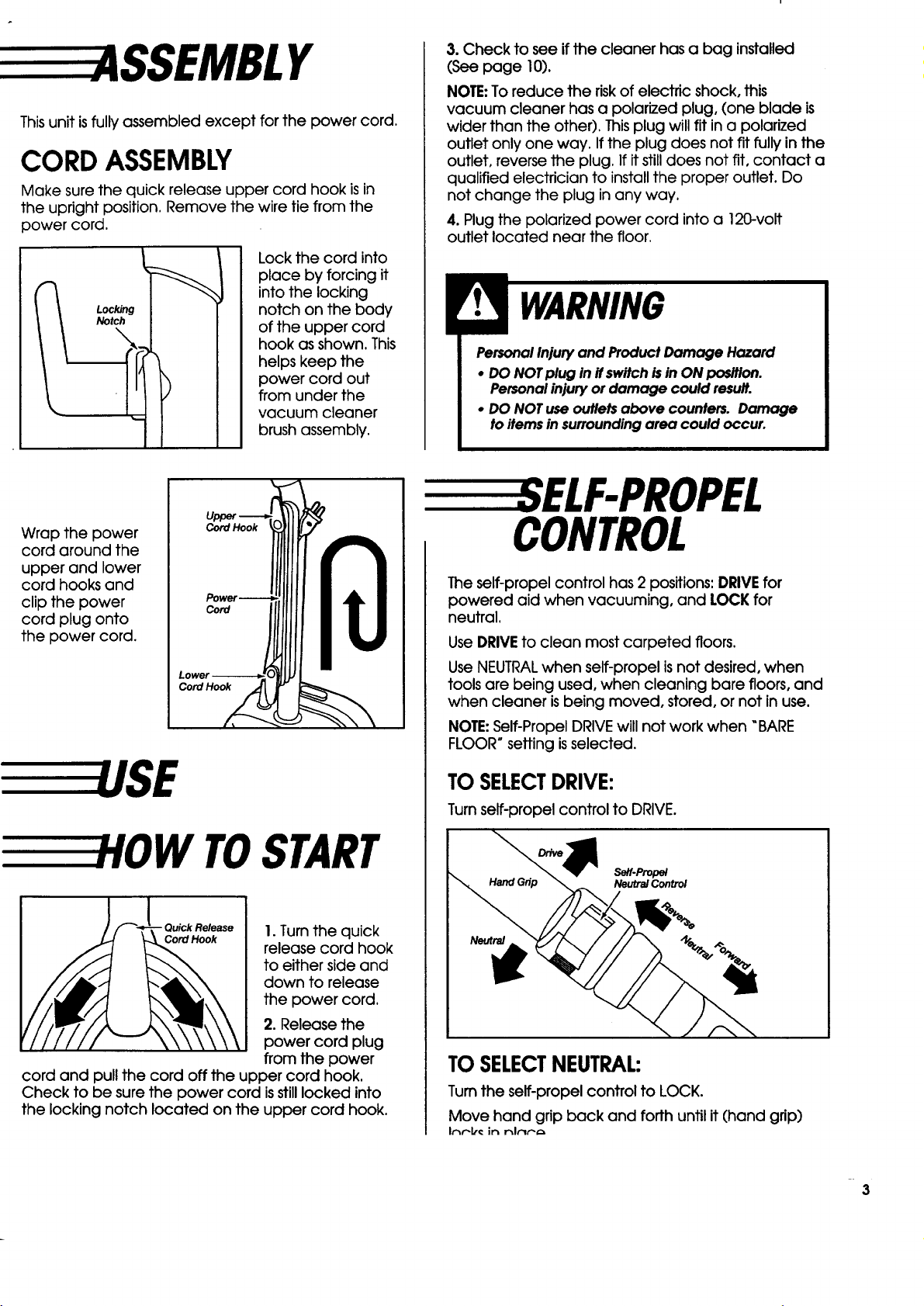
Thisunit isfully assembled except for the power cord.
CORD ASSEMBLY
Make sure the quick release upper cord hook is in
the upright position. Remove the wire tie from the
power cord.
Locking
Notch
Lock the cord into
place by forcing it
into the locking
notch on the body
of the upper cord
hook as shown. This
helps keep the
power cord out
from under the
vacuum cleaner
brush assembly.
3.Check to see ifthe cleanerhas a bag installed
(Seepage 10).
NOTE:To reduce the riskofelectricshock,this
vacuum cleanerhas a polarizedplug,(one blade is
widerthan the other).Thisplugwillfitina polarized
outletonlyone way. Ifthe plugdoes notfitfullyinthe
outlet,reversethe plug.Ifitstilldoes notfit,contact a
qualifiedelectriciantoinstallthe proper outlet.Do
not change the plug inany way.
4.Plugthe polarizedpower cord intoa 12C-volt
outletlocatednearthe floor.
Personal Injuryand Product Damage Hazard
• DO NOTplug in ifswitchisin ON position.
Personalinjuryor damage could result.
• DO NOTuse outletsabove counters. Damage
toitemsin surroundingarea could occur.
Wrap the power
cord around the
upper and lower
cord hooks and
clipthe power
cord plugonto
the power cord.
Cord Hook
Cord
Cord Hook
W TOSTART
- Quick Release I.Turnthe quick
Cord Hook
release cord hook
to either side and
down to release
the power cord.
2. Release the
power cord plug
from the power
cord and pull the cord off the upper cord hook.
Check to be sure the power cord isstill locked into
the locking notch located on the upper cord hook.
ELF-PROPEL
CONTROL
The self-propelcontrolhas 2 positions:DRIVE for
powered aidwhen vacuuming, and LOCK for
neutral.
Use DRIVE toclean most carpeted floors.
Use NEUTRALwhen self-propel is not desired, when
tools are being used, when cleaning bare floors, and
when cleaner is being moved, stored, or not in use.
NOTE:Self-PropelDRIVE willnot work when "BARE
FLOOR" settingisselected.
TO SELECTDRIVE:
Turnself-propel control to DRIVE.
s_f-Prop_
Neutra/Contro/
TO SELECTNEUTRAL:
Turnthe self-propel control to LOCK.
Move hand grip back and forth until it (hand grip)
Ir_r-lt_in r_l_..'-,",
3
HEIGHT
SELECTIONAND
SETTING
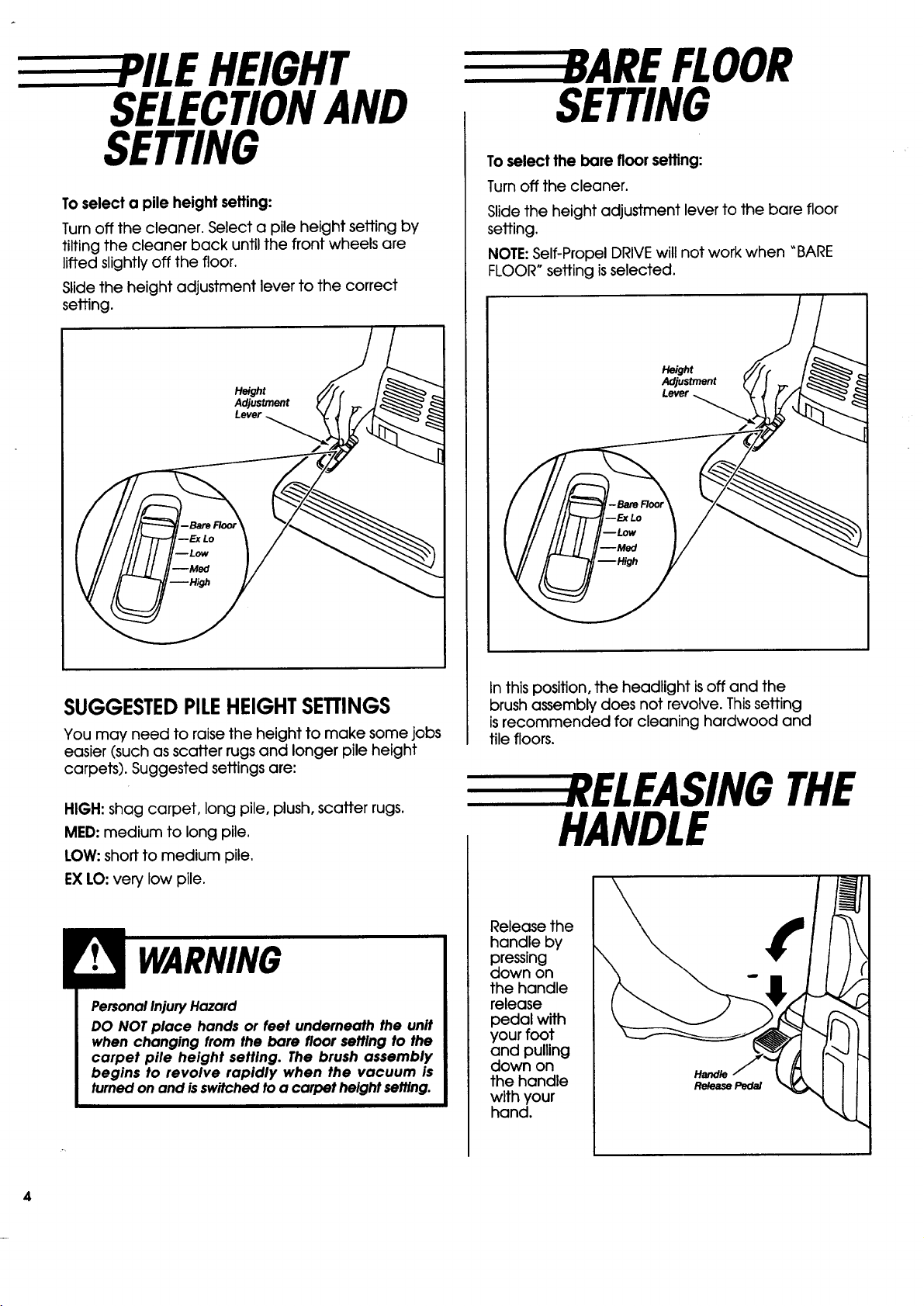
To select a pile height setting:
Turnoffthe cleaner.Selecta pileheightsettingby
tiltingthe cleanerback untilthefrontwheels are
liftedslightlyoffthe floor.
Slidethe heightadjustmentlevertothe correct
setting.
Height
Adjustment
Lever
SUGGESTEDPILEHEIGHTSETTINGS
You may need to raisethe heightto make some jobs
easier(suchas scatterrugsand longerpileheight
carpets).Suggested settingsare:
HIGH: shag carpet,longpile,plush,scatterrugs.
MED: medium to longpile.
LOW: shortto medium pile.
EX LO:verylow pile.
PersonalInjuryHazard
DO NOT place hands or feet underneath the unit
when changing from the bare floor settlng to the
carpet pile height setting. The brush assembly
begins to revolve rapidly when the vacuum is
turnedon and isswitchedtoa carpet height setting.
FLOOR
SETTING
To selectthe barefloorseffing:
Turnoffthe cleaner.
Slidethe heightadjustmentlevertothe bare floor
setting.
NOTE: Self-PropelDRIVE willnot work when "BARE
FLOOR" settingisselected.
Height
Adjustment
Inthisposition,the headlightisoffand the
brushassembly does not revolve.Thissetting
isrecommended forcleaninghardwood and
tilefloors.
E EREL EASINGTHE
HANDLE
Release the
handle by
pressing
down on
the handle
release
pedal with
your foot
and pulling
down on
the handle
with your
hand.
Hand/e
Re/ease Peda/
4
LEVELSELECTION
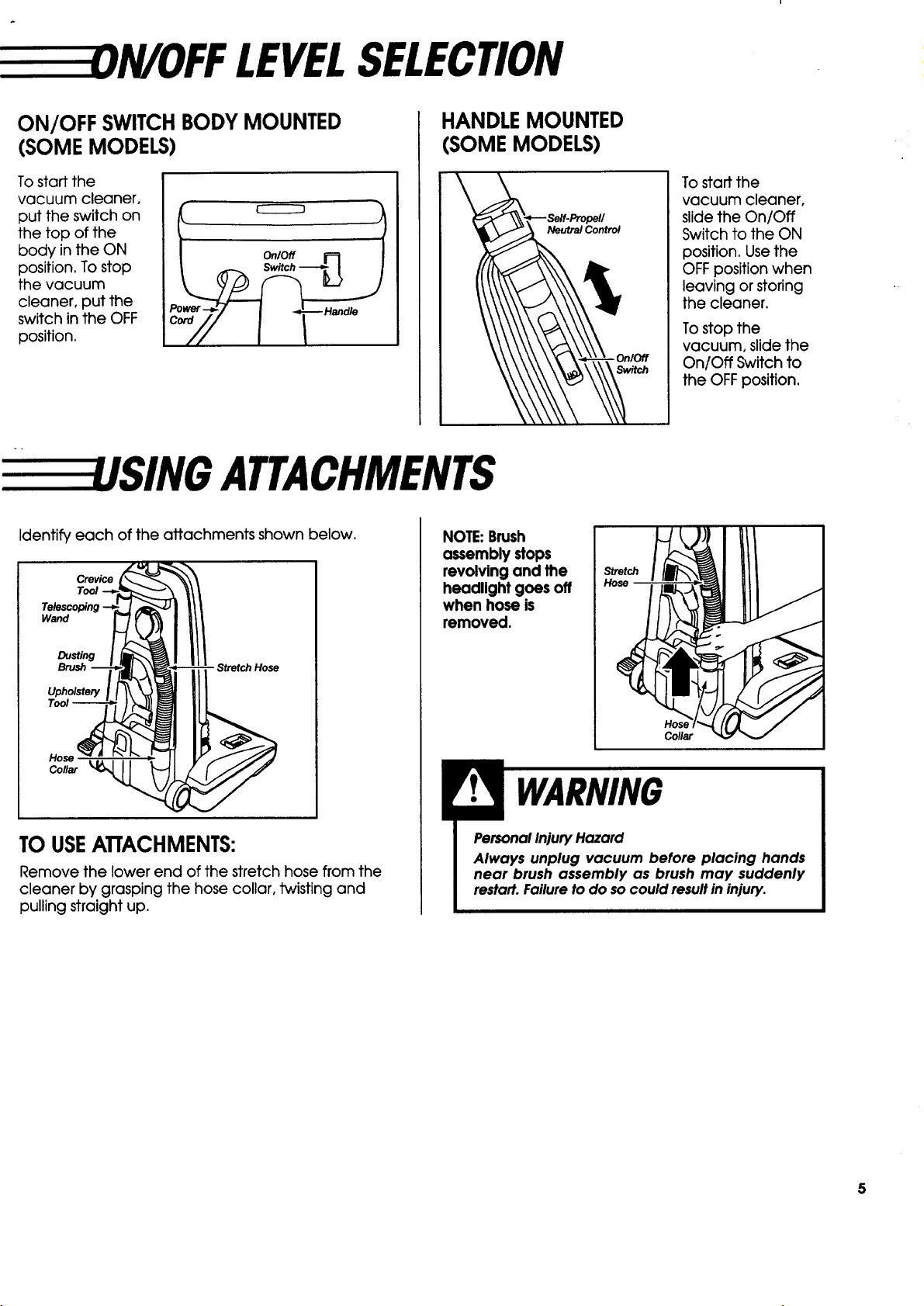
ON/OFF SWITCHBODYMOUNTED
(SOMEMODELS)
To start the
vacuum cleaner,
put the switch on
the top of the
body in the ON
position. To stop
the vacuum
cleaner, put the
switch in the OFF
position.
r
Handle
HANDLEMOUNTED
(SOMEMODELS)
To staff the
vacuum cleaner,
slide the On/Off
Switch to the ON
position. Use the
OFF position when
leaving or storing
the cleaner.
To stop the
vacuum, slide the
On/Off Switch to
the OFFposition.
SING ATTACHMENTS
Identify each of the attachments shown below.
Crevice
Tool
Wand
Dusting
Brush
Upholstery
Tool --
Hose
Collar _,_
TO USEATTACHMENTS:
Remove the lower end of the stretch hose from the
cleaner by grasping the hose collar, twisting and
pulling straight up.
NOTE:Brush
assembly stops
revolving and the
headlight goes off
when hose is
removed.
Hos(
Collar
PersonalInjuryHazard
Always unplug vacuum before placing hands
near brush assembly as brush may suddenly
restart.Failureto do socould resultin injury.
5
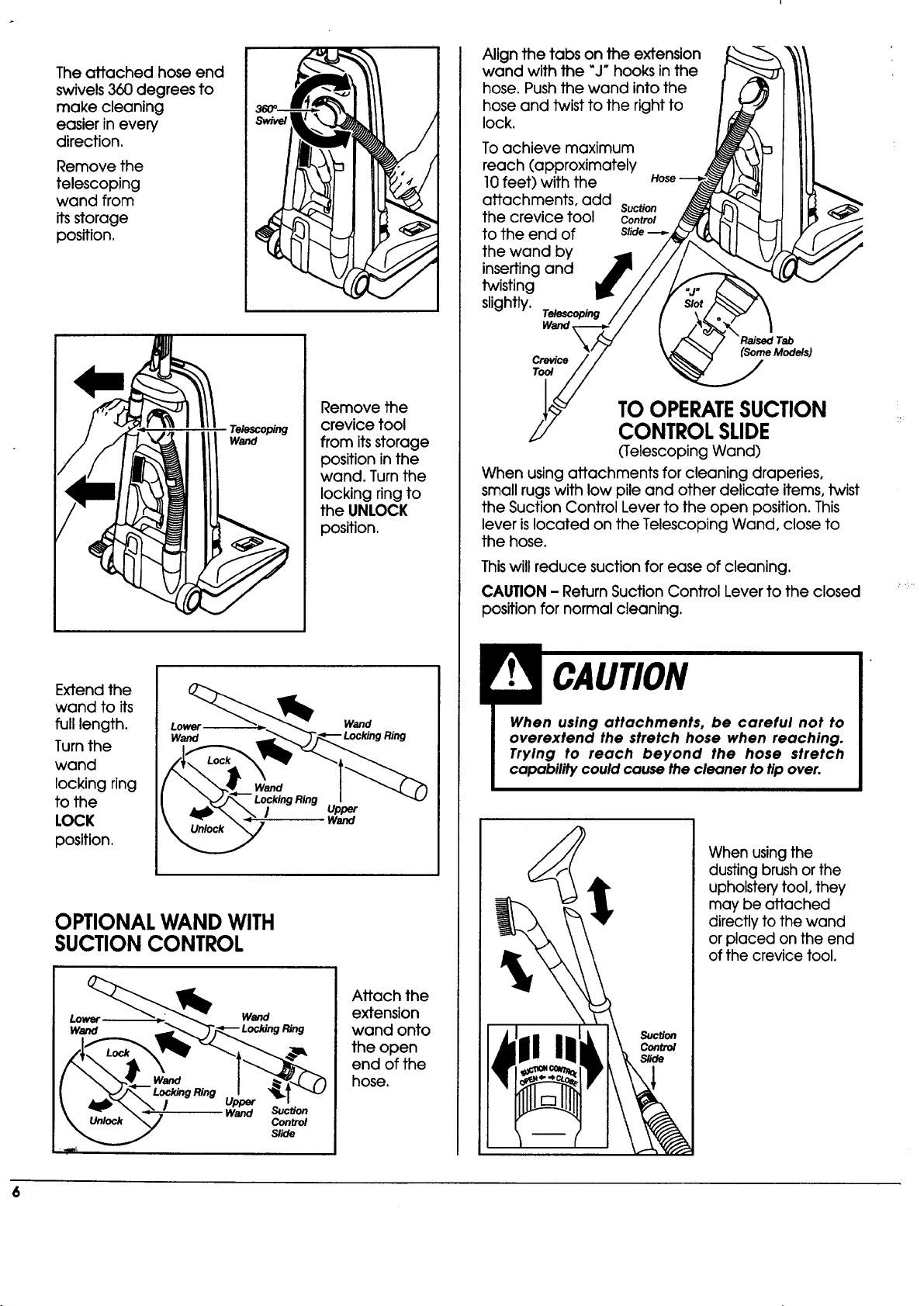
The attached hose end
swivels 360 degrees to
make cleaning
easier in every
direction.
Remove the
telescoping
wand from
its storage
position.
Telescoping
Wand
Remove the
crevice tool
from itsstorage
position in the
wand. Turn the
locking ring to
the UNLOCK
position.
Extend the
wand to its
full length.
Turn the
wand
locking ring
to the
LOCK
position.
Lower
Wand
Locking Ring
/
Wand
Upper
Wand
OPTIONALWAND WITH
SUCTIONCONTROL
Attach the
extension
wand onto
the open
end of the
hose.
Align the tabs on the extension
wand with the "J" hooks in the
hose. Push the wand into the
hose and twist to the right to
lock.
To achieve maximum
reach (approximately
10feet) with the
attachments, add
the crevice tool
to the end of
the wand by
inserting and
twisting
slightly.
Telescoping
Wand
Suction
Control
Slide
Crevice
Tool
(Some Models)
TOOPERATESUCTION
CONTROLSLIDE
(Telescoping Wand)
When using attachments for cleaning draperies,
small rugs with low pile and other delicate items, twist
the Suction Control Lever to the open position. This
lever islocated on the Telescoping Wand, close to
the hose.
Thiswill reduce suction for ease of cleaning,
CAUTION - Return Suction Control Lever to the closed
position for normal cleaning,
When using attachments, be careful not to
overextend the stretch hose when reaching.
Trying to reach beyond the hose stretch
capability could cause the cleaner to tip over.
Suction
Control
When using the
dusting brush or the
upholstery tool, they
may be attached
directly to the wand
or placed on the end
of the crevice tool.
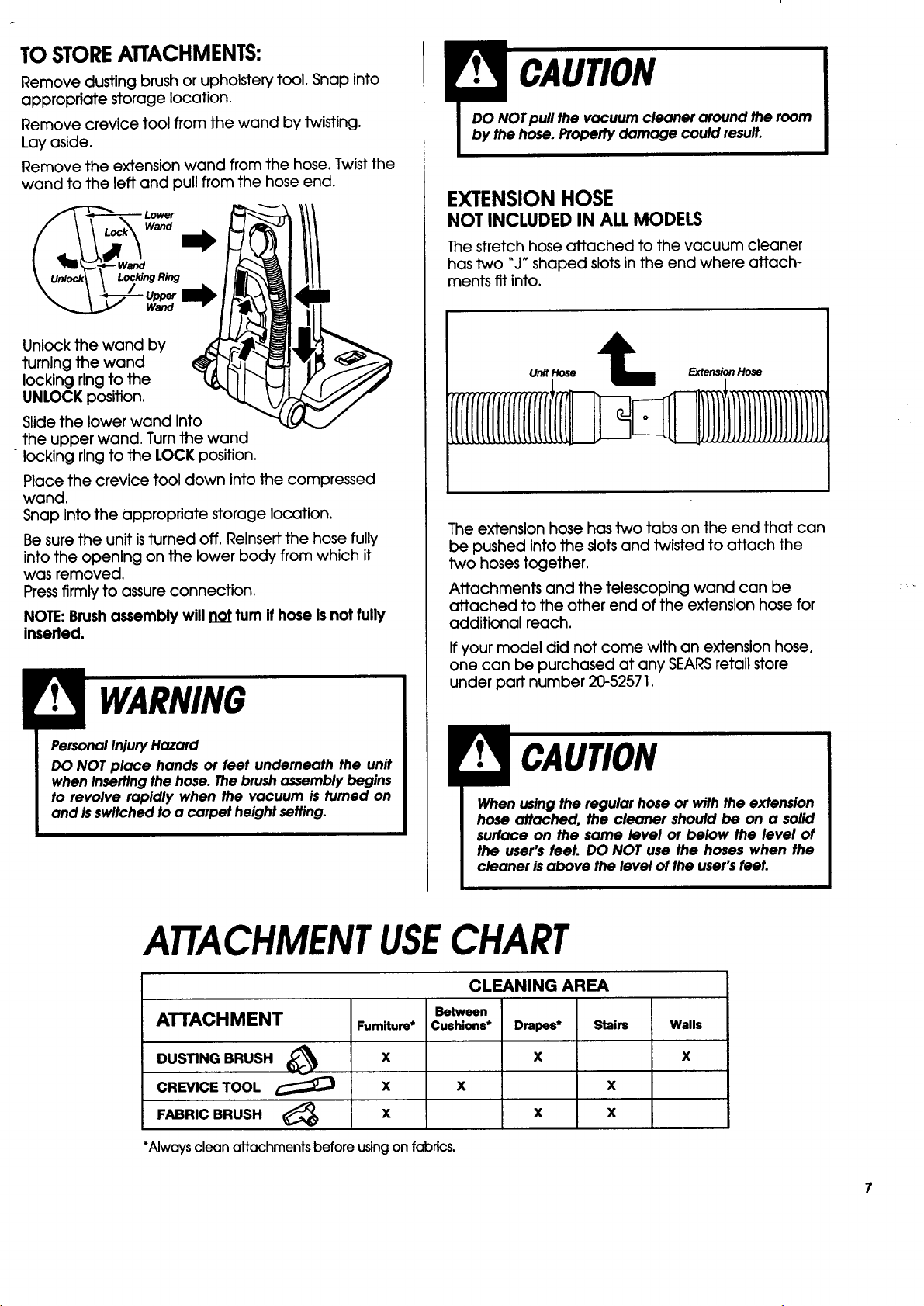
TOSTOREATTACHMENTS:
Remove dusting brush or upholstery tool. Snap into
appropriate storage location.
Remove crevice tool from the wand by twisting.
Lay aside.
Remove the extension wand from the hose. Twist the
wand to the left and pull from the hose end.
Unlock the wand by
turning the wand
locking ring to the
UNLOCK position.
Slide the lower wand into
the upper wand. Turn the wand
"locking ring to the LOCK position.
Place the crevice tool down into the compressed
wand.
Snap into the appropriate storage location.
Be sure the unit isturned off. Reinsert the hose fully
into the opening on the lower body from which it
was removed.
Pressfirmly to assure connection.
NOTE:Brushassembly will not turn if hose isnot fully
inserted.
PersonalInjuryHazard
DO NOT place hands or feet underneath the unit
when insertingthe hose. Thebrushassembly begins
to revolve rapidly when the vacuum is tumed on
and isswitched to a carpet height setting.
EXTENSION HOSE
NOT INCLUDED IN ALL MODELS
The stretch hose attached to the vacuum cleaner
has two "J" shaped slots in the end where attach-
ments fit into.
Unit Hose Extension Hose
The extension hose has two tabs on the end that can
be pushed into the slots and twisted to attach the
two hoses together.
Attachments and the telescoping wand can be
attached to the other end of the extension hose for
additional reach.
If your model did not come with an extension hose,
one can be purchased at any SEARSretail store
under part number 20-52571.
When using the regular hose or with the extension
hose attached, the cleaner should be on a solid
surface on the same level or below the level of
the user's feet. DO NOT use the hoses when the
cleaner isabove the level of the user'sfeet.
ATTACHMENTUSECHART
CLEANING AREA
ATTACHMENT
DUSTING BRUSH (_
CREVlCE TOOL
FABRIC BRUSH _)
Fumiture*
X
X
X
Between
Cushions*
Drapes*
X
*Always clean attachments before using on fabrics.
x x
x x
Stairs Walls
X
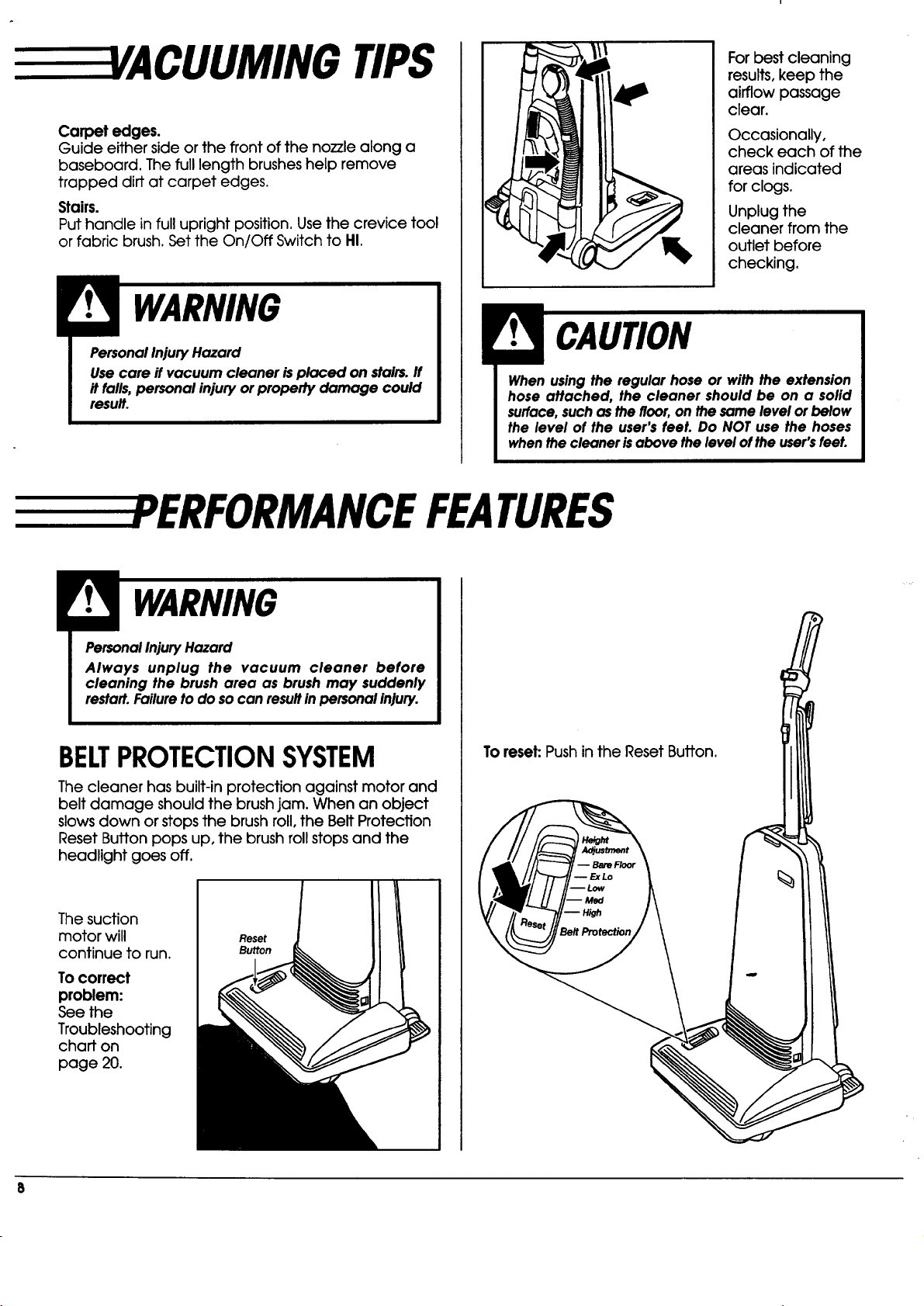
TIPS
Carpet edges.
Guide eithersideorthe frontofthe no771ealong a
baseboard. The fulllengthbrusheshelpremove
trapped dirtat carpetedges.
Stairs.
Puthandle infulluprightposition.Use the crevicetool
orfabricbrush.Setthe On/Off SwitchtoHI.
I PersonalInjuryHazard
Usecare if vacuum cleaner isplaced on stairs.If
it falls,personal injuryor property damage could
result.
Forbestcleaning
results,keep the
airflowpassage
clear.
Occasionally,
check each of the
areas indicated
for clogs.
Unplug the
cleaner from the
outlet before
checking.
When using the regular hose or with the extension
hose attached, the cleaner should be on a solid
surface,such as thefloor,on the same level or below
the level of the user's feeL Do NOT use the hoses
whenthe cleaner isabove the level ofthe user'sfeet.
ERFORMANCE FEATURES
PersonalInjuryHazard
Always unplug the vacuum cleaner before
cleaning the brush area as brush may suddenly
restart.Failureto do socan resultinpersonal injury.
BELTPROTECTIONSYSTEM
The cleanerhas built-inprotectionagainstmotor and
beltdamage shouldthe brushjam.When an object
slowsdown orstopsthe brushroll,the BeltProtection
ResetButtonpops up,the brushrollstopsand the
headlightgoes off.
The suction
motor will
continuetorun.
To correct
problem:
See the
Troubleshooting
chaff on
page 20.
Reset
Button
To reset: Push inthe ResetButton.
-- Bare Root
-- Ex Lo
-- Low
--H_h
BeltProtection
8
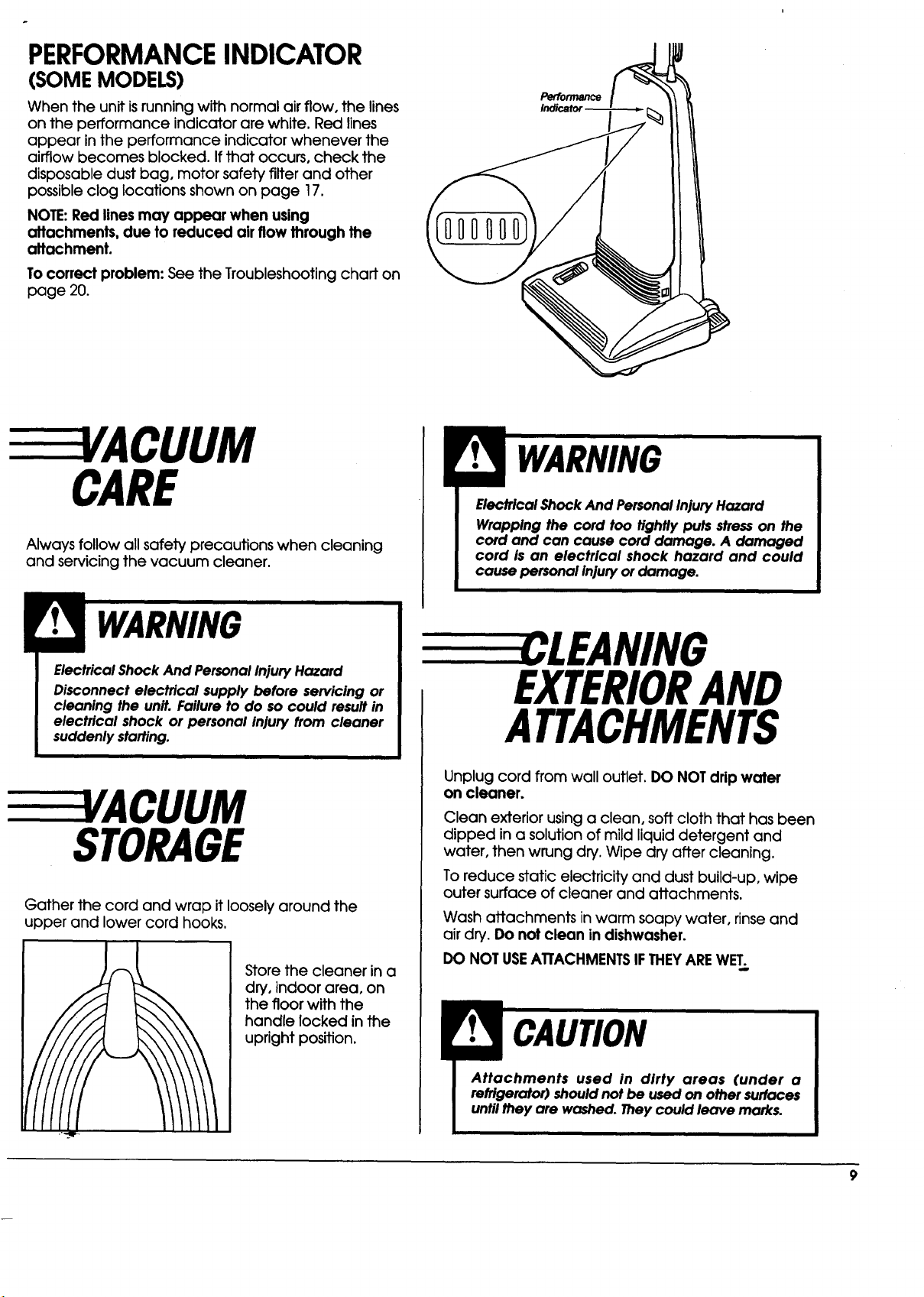
PERFORMANCEINDICATOR
(SOME MODELS)
When the unit isrunning with normal air flow, the lines
on the performance indicator are white. Red lines
appear in the performance indicator whenever the
airflow becomes blocked. If that occurs, check the
disposable dust bag, motor safety filter and other
possible clog locations shown on page 17.
NOTE:Red lines may appear when using
attachments, due to reduced air flow through the
attachment.
To correct problem: See the Troubleshooting chart on
page 20.
Performance
EEEEVACUUM
CARE
Always follow all safety precautions when cleaning
and servicing the vacuum cleaner.
Electrical Shock And PersonalInjuryHazard
Disconnect electrical supply before servicing or
cleaning the unit. Failure to do so could result in
electrical shock or personal injury from cleaner
suddenly starfing.
3/ACUUM
STORAGE
Gather the cord and wrap it loosely around the
upper and lower cord hooks,
Store the cleaner in a
dry, indoor area, on
the floor with the
handle locked in the
upright position.
Electrical Shock And PersonalInjuryHazard
Wrapping the cord too tightly puts stresson the
cord and can cause cord damage. A damaged
cord is an electrical shock hazard and could
cause personal Injuryor damage.
EEEEEECLEANING
EXTERIORAND
ATTACHMENTS
Unplug cord from wall outlet. DO NOT drip water
on cleaner.
Clean exterior using a clean, soft cloth that has been
dipped in a solution of mild liquid detergent and
water, then wrung dry. Wipe dry after cleaning.
To reduce static electricity and dust build-up, wipe
outer surface of cleaner and attachments.
Wash attachments in warm soapy water, rinse and
air dry. Do not clean in dishwasher.
DO NOT USEATTACHMENTSIF THEYAREWET.
Attachments used in dirty areas (under a
refrigerator) shouldnot be used on other surfaces
untilthey are washed. Theycould leave marks.
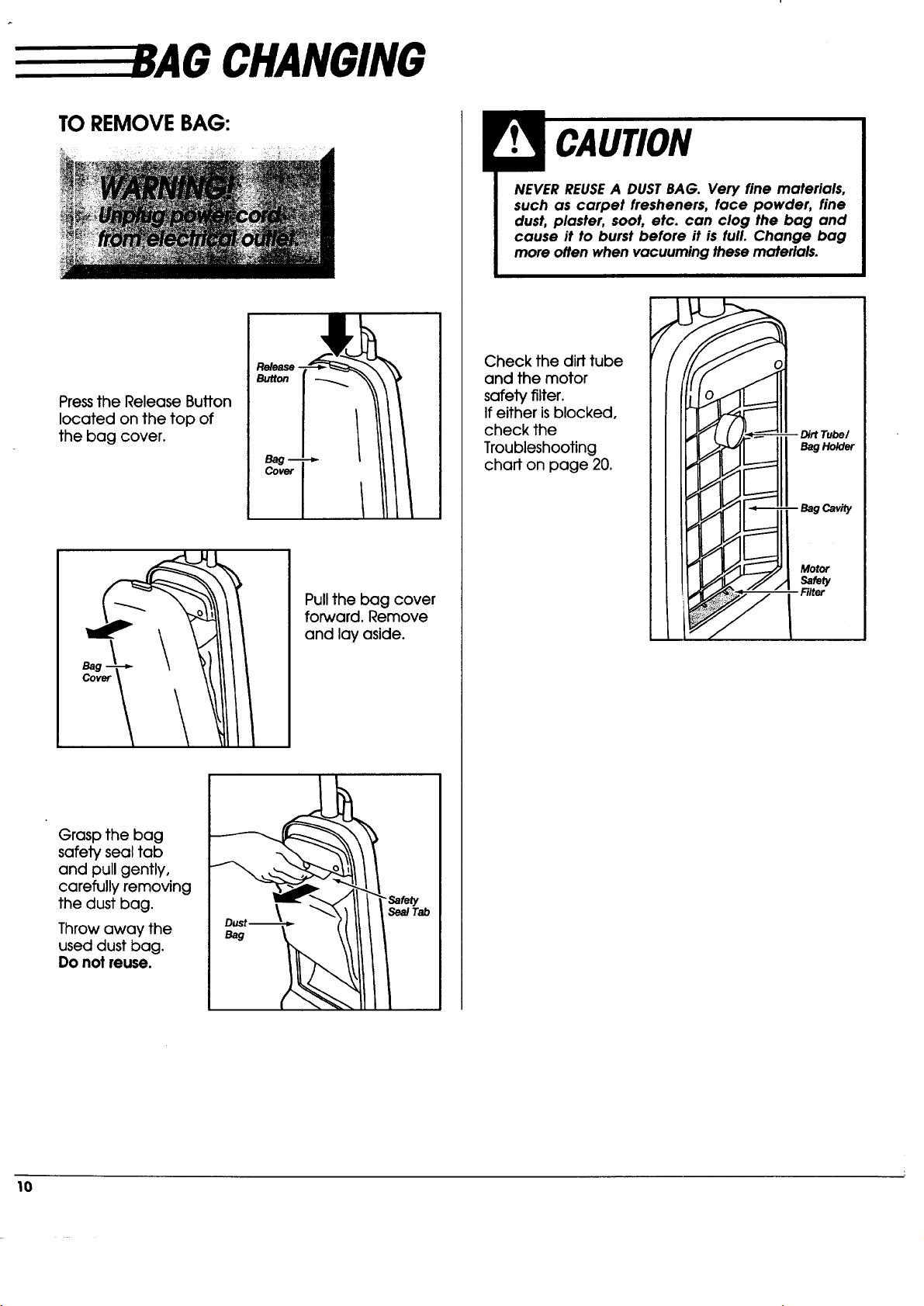
CHANGING
TO REMOVEBAG:
Pressthe Release Button
located on the top of
the bag cover.
Grasp the bag
safety seal tab
and pull gently,
carefully removing
the dust bag.
Throw away the
used dust bag.
Do not reuse.
Pull the bag cover
forward. Remove
and lay aside.
_-,a/Tab
NEVERREUSEA DUSTBAG. Very fine materials,
such as carpet fresheners, face powder, fine
dust, plaster, soot, etc. can clog the bag and
cause it to burst before it is full. Change bag
more often when vacuuming these materials.
Check the dirt tube
and the motor
safety filter.
If either isblocked,
check the
Troubleshooting
chart on page 20.
Ho/der
Motor
Safety
10
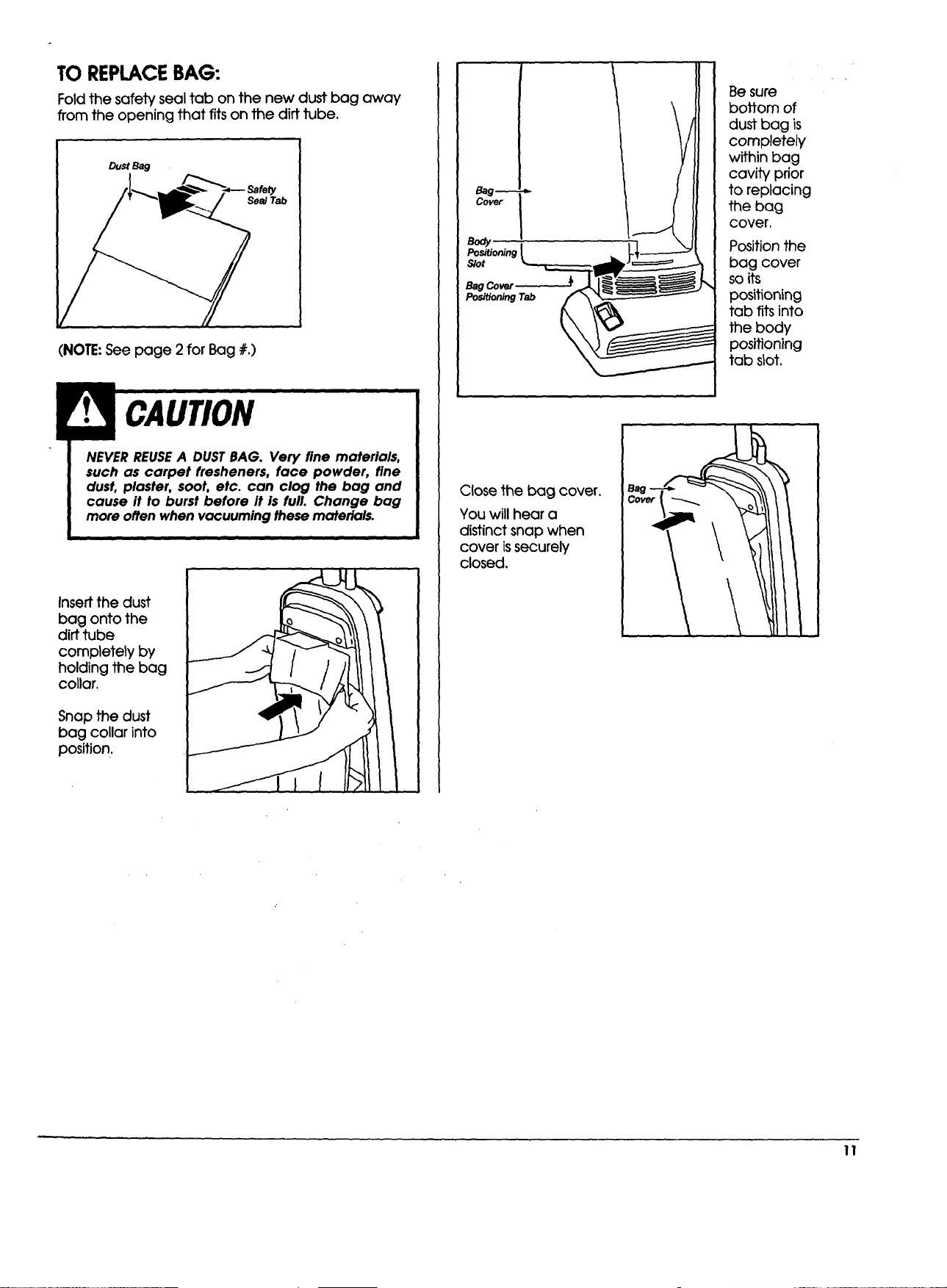
TO REPLACEBAG:
Fold the safety seal tab on the new dust bag away
from the opening that fits on the dirt tube.
DustBag
Sea/Tab
{
(NOTE: See page 2 for Bag #,)
NEVER REUSE A DUST BAG. Very fine materials,
such as carpet fresheners, face powder, fine
dust, plaster, soot, etc. can clog the bag and
cause it to burst before It is full. Change bag
more often when vacuuming these materials.
Insert the dust
bag onto the
dirt tube
completely by
holding the bag
collar.
Snap the dust
bag collar into
position,
Bag_
Cover ;
Body
Positioning
Slot
Bag Cover
PositioningTab
Close the bag cover.
You will hear a
distinct snap when
cover issecurely
closed.
Be sure
bottom of
dust bag is
completely
within bag
cavity prior
to replacing
the bag
cover,
Position the
bag cover
so its
positioning
tab fits into
the body
positioning
tab slot.
11
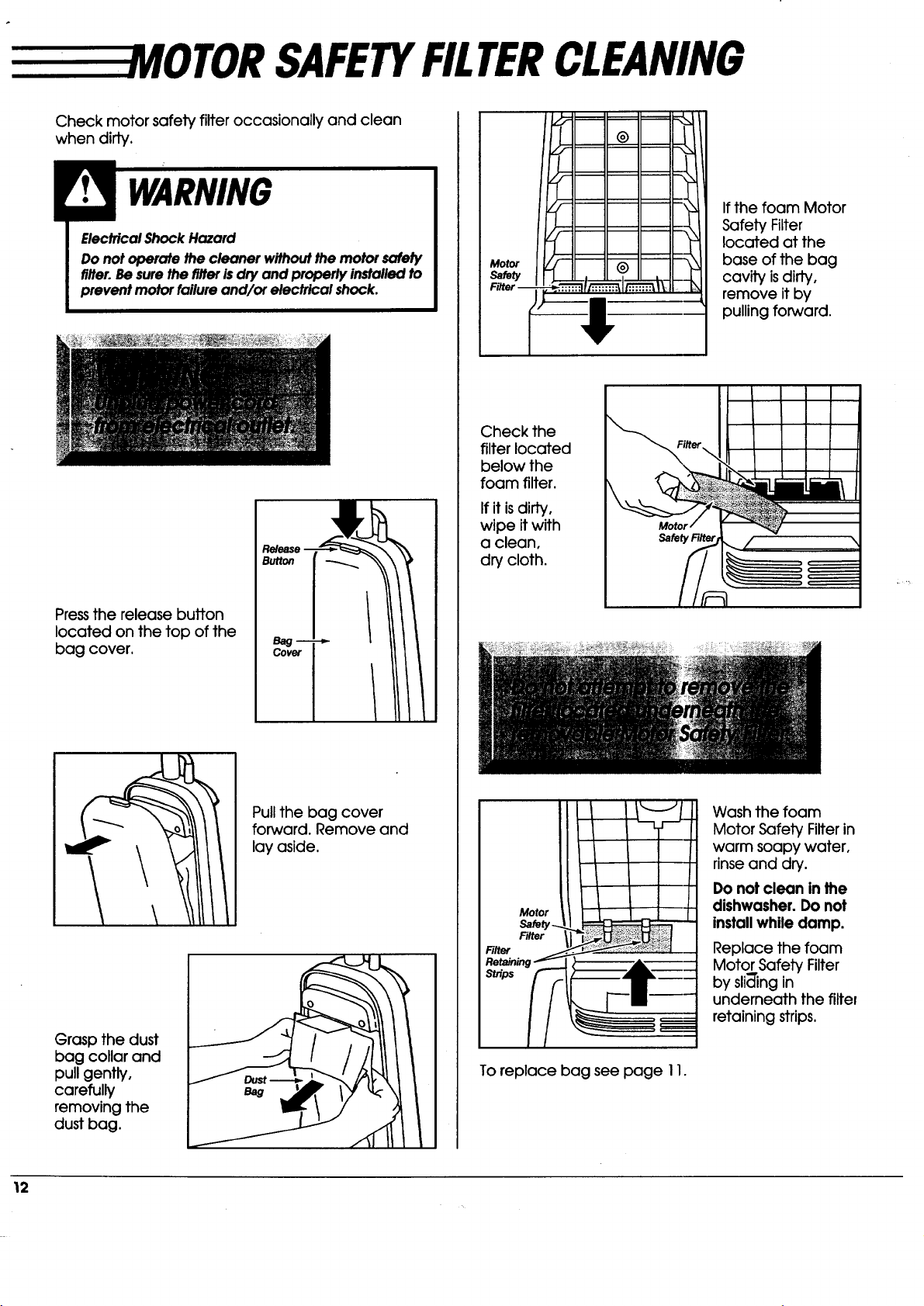
SAFETYFILTERCLEANING
Check motor safety filter occasionally and clean
when dirty.
Electrical Shock Hazard
Do not operate the cleaner without the motor safety
filter. Be sure the filter is dry and properly installed to
prevent motor failure and/or electrical shock.
Pressthe release button
located on the top of the
bag cover.
Re/ease -
Button
B_g m
Cover
Pull the bag cover
forward. Remove and
lay aside.
Grasp the dust
bag collar and
pull gently,
carefully
removing the
dust bag.
If the foam Motor
Safety Filter
located at the
base of the bag
cavity isdiffy,
remove it by
pulling forward.
Check the
filter located
below the
foam filter.
If it isdirty,
wipe it with
a clean,
dry cloth.
Motor
Filter
Filter
Retainin
St_ps
Wash the foam
Motor Safety Filter in
warm soapy water,
rinse and dry.
Do not clean in the
dishwasher. Do not
install while damp.
Replace the foam
Motor Safety Filter
by sli_'ing in
underneath the filter
retaining strips.
To replace bag see page 11.
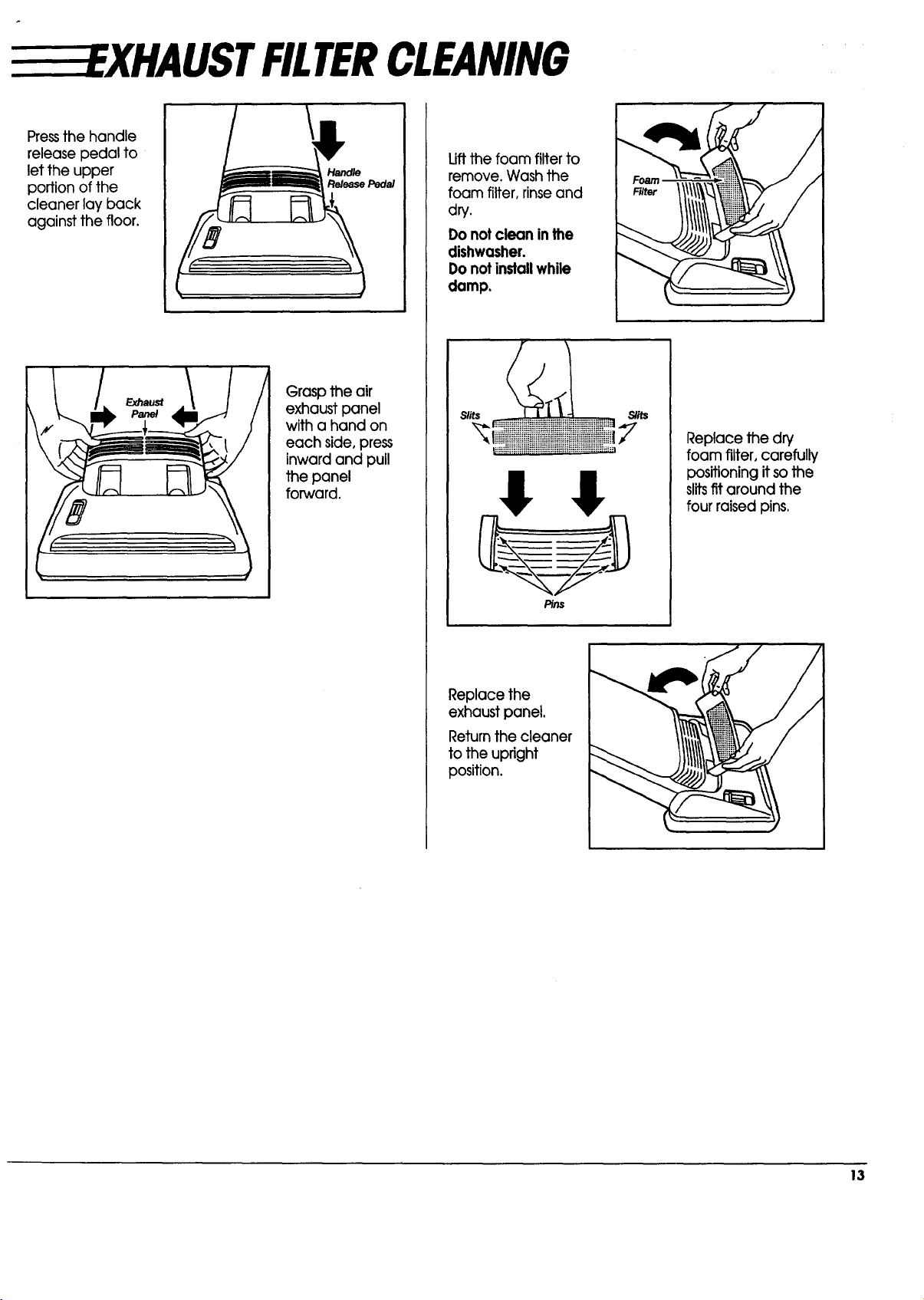
__EXHAUSTFIITERCLEANING
Pressthe handle
release pedal to
let the upper
portion of the
cleaner lay back
against the floor.
Peda/
Grasp theair
exhaustpanel
witha hand on
each side,press
inwardand pull
thepanel
forward.
Lift the foam filter to
remove. Wash the
foam filter, rinseand
dry.
Do not clean in the
dishwasher.
Do not installwhile
damp.
@iiiiiiiii!iiiiiiiiii!!i!!_ii_7
P}/}s
Replacethe
exhaustpanel.
Returnthecleaner
totheupright
position.
Replace the dry
foam filter, carefully
positioning it so the
slitsfit around the
four raised pins,
13
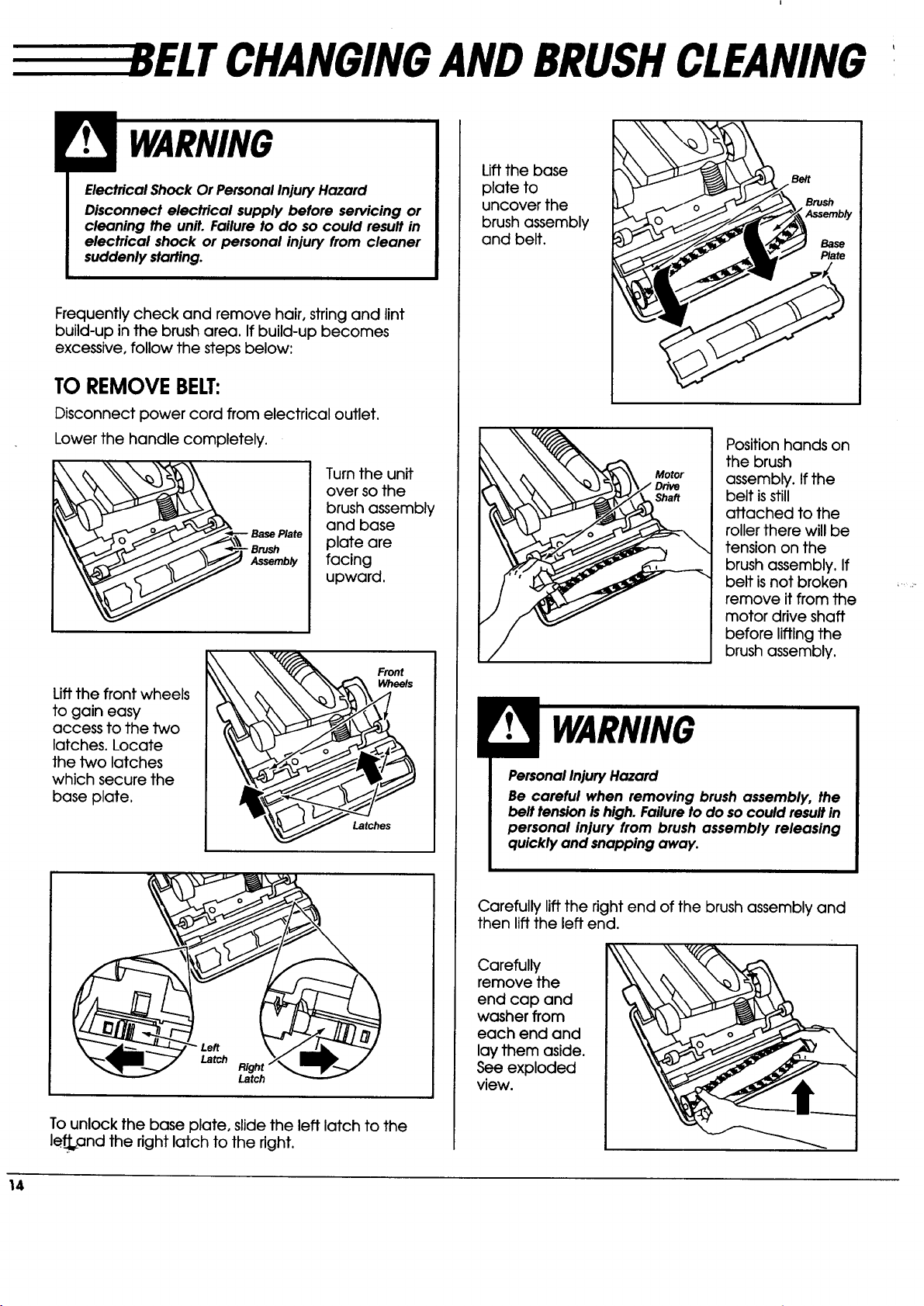
CHANGINGANDBRUSHCLEANING'
Electrical Shock Or Personal Injury Hazard
Disconnect electrical supply before servicing or
cleaning the unit. Failure to do so could result in
electrical shock or personal injury from cleaner
suddenly starting.
Frequently check and remove hair, string and lint
build-up in the brush area. If build-up becomes
excessive, follow the steps below:
TO REMOVEBELT:
Disconnect power cord from electrical outlet.
Lower the handle completely.
_,___ Turn the unit
over so the
brush assembly
and base
BasePlate plate are
_ _--_mb_, facing
upward,
Lift the front wheels
to gain easy
access to the two
latches. Locate
the two latches
which secure the
base plate.
Front
Wheels
Latches
Latch
Right
Latch
To unlock the base plate, slide the left latch to the
left.and the right latch to the right.
Lift the base
plate to
uncover the
brush assembly
and belt.
Position hands on
the brush
assembly. If the
belt isstill
attached to the
roller there will be
tension on the
brush assembly. If
belt is not broken
remove it from the
motor drive shaft
before lifting the
brush assembly.
PersonalInjuryHazard
Be careful when removing brush assembly, the
belt tensionishigh. Failureto do socould resultin
personal injury from brush assembly releasing
quickly and snapping away.
Carefully lift the right end of the brush assembly and
then lift the left end.
Carefully
remove the
end cap and
washer from
each end and
lay them aside.
See exploded
view.
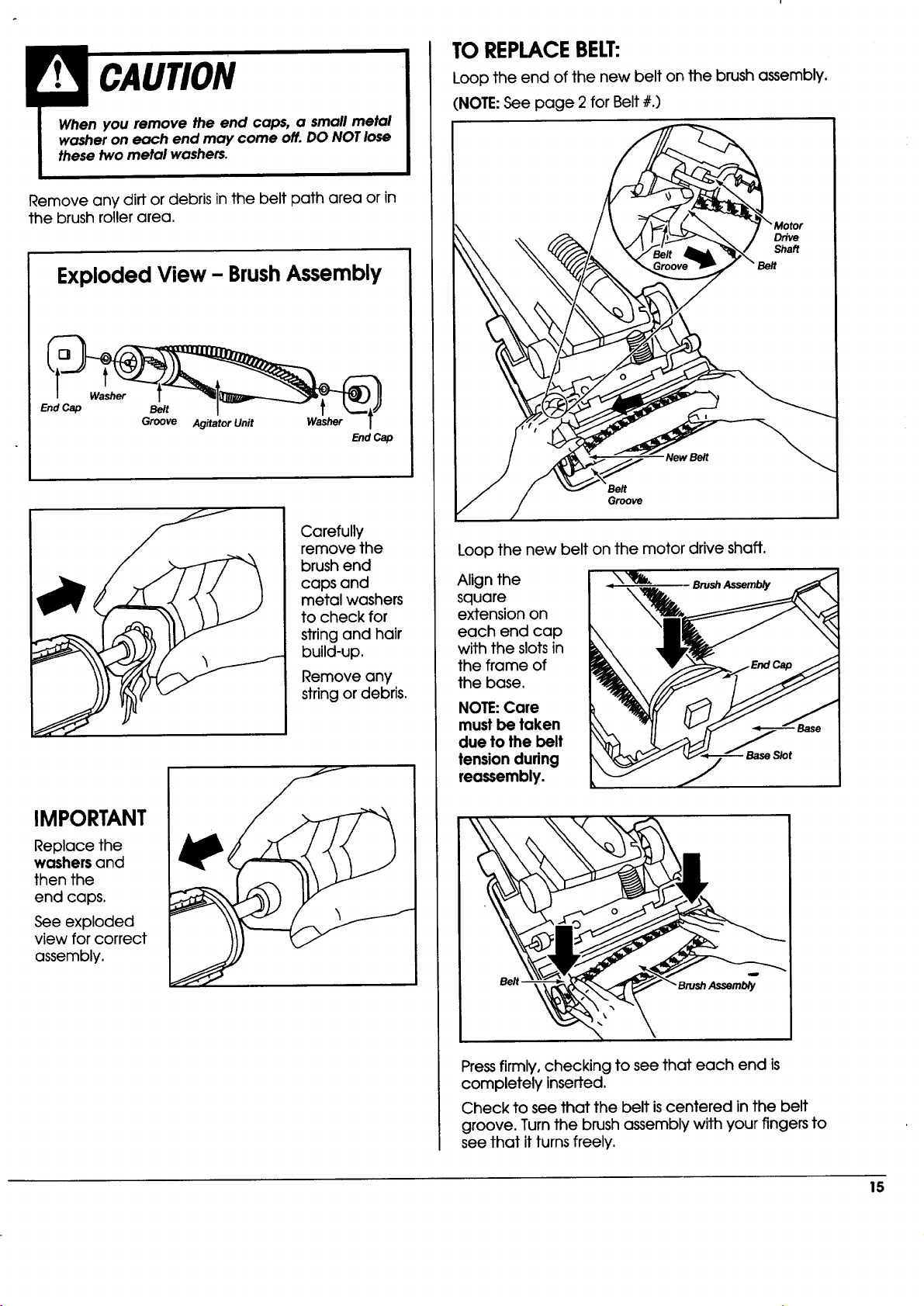
Removeanydirtordebrisinthebeltpathareaorin
thebrushrollerarea.
Exploded View - BrushAssembly
Washer
End Cap Belt
Groove
Agitator Unit Washer
EndCap
Carefully
remove the
brush end
caps and
metal washers
to check for
string and hair
build-up.
Remove any
string or debris.
IMPORTANT
Replace the
washers and
then the
end caps.
See exploded
view for correct
assembly.
TO REPLACEBELT:
Loop the end of the new belt on the brush assembly.
(NOTE:See page 2 for Belt #.)
'New Belt
Belt
Groove
Loop the new belt on the motor drive shaft.
Align the
square
extension on
each end cap
with the slots in
the frame of
the base.
NOTE:Care
must be taken
due to the belt
tension during
reossembly.
Belt -
Pressfirmly, checking to see that each end is
completely inserted,
Check to see that the belt iscentered in the belt
groove. Turn the brush assembly with your fingers to
see that it turns freely.
15
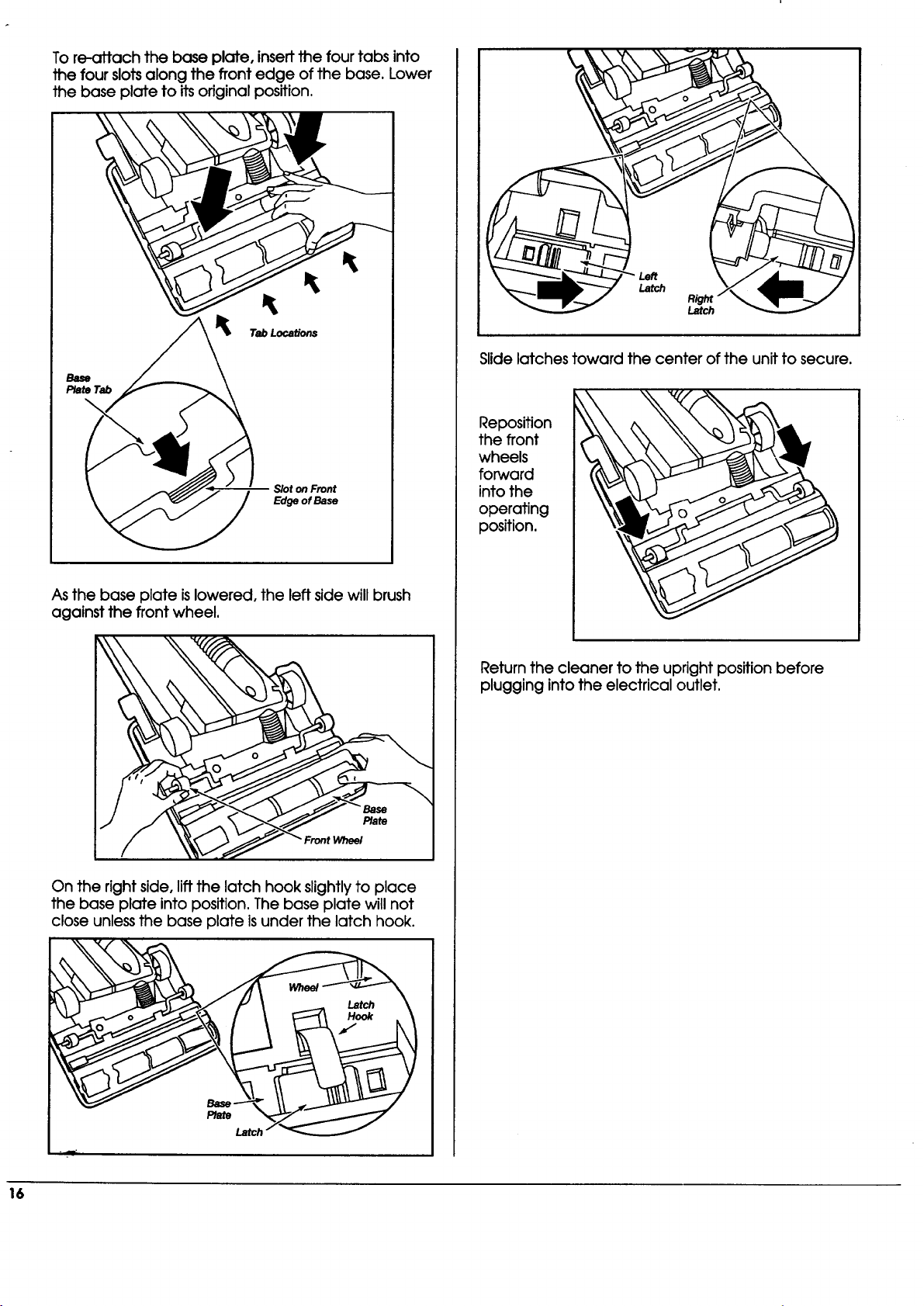
To re-attachthe base plate,insertthefourtabsinto
the fourslotsalong the frontedge ofthe base.Lower
the base plateto itsoriginalposition.
Tab Locations
Base
PlateTab
Slot on Front
Edge of Base
As the base plate islowered, the left side will brush
against the front wheel,
Front Wheel
On the right side, lift the latch hook slightly to place
the base plate into position. The base plate will not
close unless the base plate isunder the latch hook.
_e
Latch
Left
Latch
Right"
Latch
Slide latches toward the center of the unit to secure.
Reposition
the front
wheels
forward
into the
operating
position.
Return the cleaner to the upright position before
plugging into the electrical outlet.
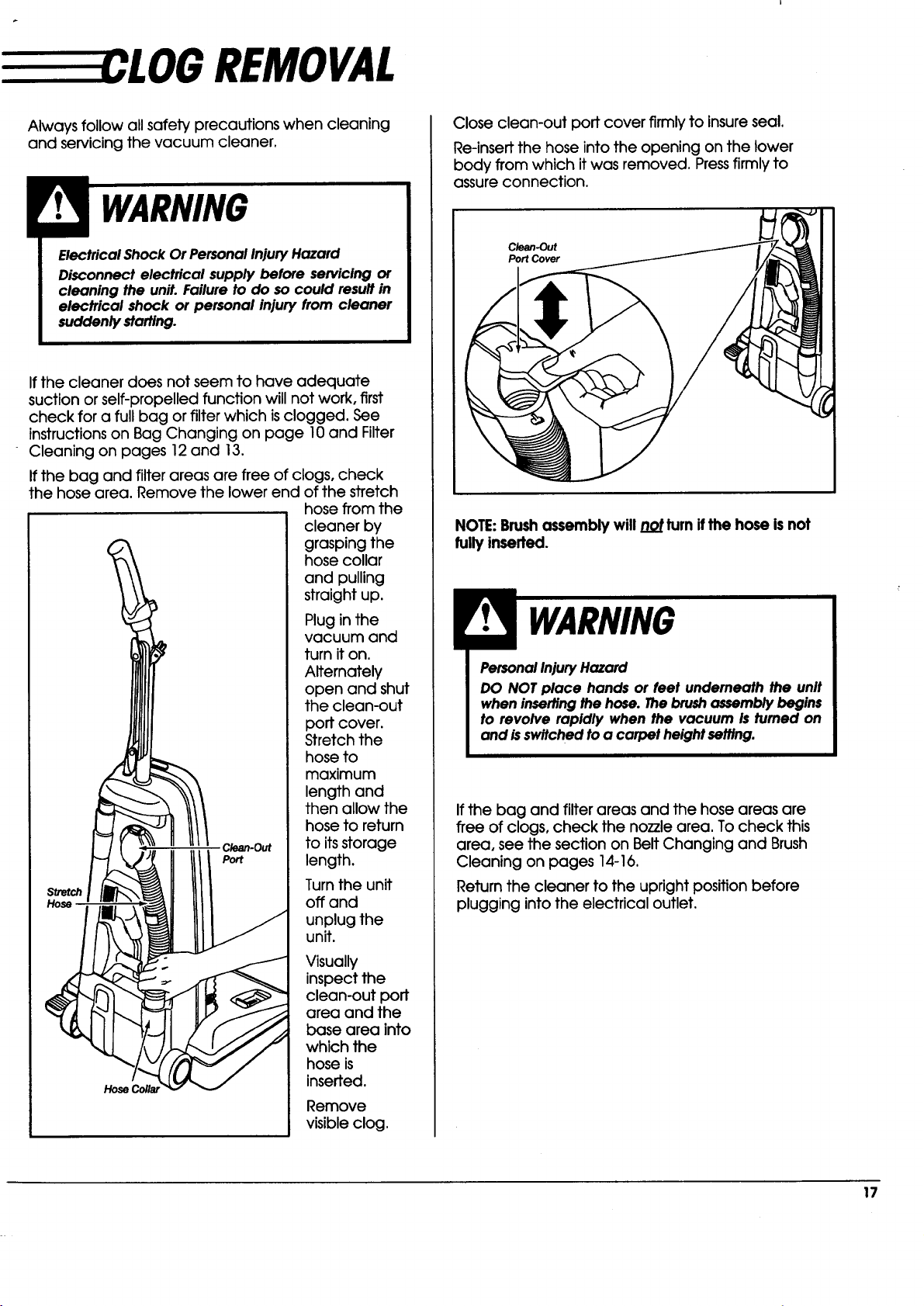
REMOVAL
Always follow all safety precautions when cleaning
and servicing the vacuum cleaner.
Electrical Shock Or Personal Injury Hazard
Disconnect electrical supply before servicing or
cleaning the unit. Failure to do so could result in
electrical shock or personal injury from cleaner
suddenly starting.
If the cleaner does not seem to have adequate
suction or self-propelled function will not work, first
check for a full bag or filter which isclogged. See
instructions on Bag Changing on page 10 and Filter
Cleaning on pages 12 and 13.
If the bag and filter areas are free of clogs, check
the hose area. Remove the lower end of the stretch
_retch
C/_n-Out
Port
hose from the
cleaner by
grasping the
hose collar
and pulling
straight up.
Plug in the
vacuum and
turn it on.
Alternately
open and shut
the clean-out
port cover.
Stretch the
hose to
maximum
length and
then allow the
hose to return
to itsstorage
length.
Turn the unit
off and
unplug the
unit.
Visually
inspect the
clean-out port
area and the
base area into
which the
hose is
inserted.
Remove
visible clog.
Close clean-out port cover firmly to insure seal.
Re-insert the hose into the opening on the lower
body from which it was removed. Pressfirmly to
assure connection.
Clean-Out
PortCover
NOTE:Brushassembly will not turn ifthe hose isnot
fully inserted.
PersonalInjuryHazard
DO NOT place hands or feet underneath the unit
when insertingthe hose. Thebrushassembly begins
to revolve rapidly when the vacuum Is fumed on
and isswitched toa carpet height setting.
If the bag and filter areas and the hose areas are
free of clogs, check the nozzle area. To check this
area, see the section on Belt Changing and Brush
Cleaning on pages 14-16.
Return the cleaner to the upright position before
plugging into the electrical outlet.
17
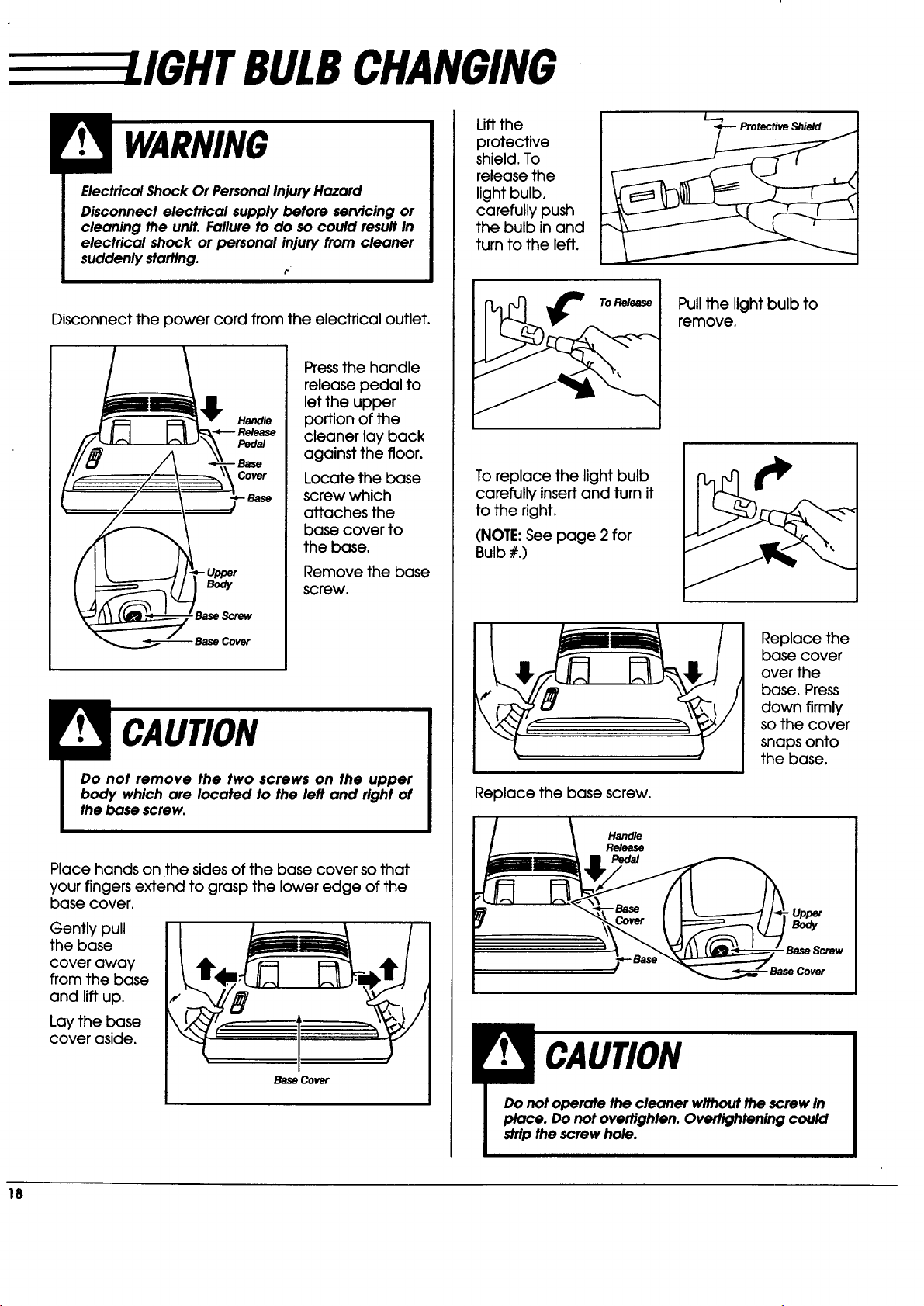
BULBCHANGING
Electrical Shock Or Personal InjuryHazard
Disconnect electrical supply before servicing or
cleaning the unit. Failure to do so could resultin
electrical shock or personal injury from cleaner
suddenly starting.
i-
Disconnect the power cord from the electrical outlet.
Pressthe handle
release pedal to
let the upper
portion of the
cleaner lay back
against the floor.
Locate the base
screw which
attaches the
base cover to
the base.
Remove the base
screw,
CAUTI
I Do not remove the two screws on the upper I
I body which are located to the left and right of I
the bose screw.
Place hands on the sides of the base cover so that
your fingers extend to grasp the lower edge of the
base cover.
Gently pull
the base
cover away
from the base
and lift up.
Lay the base
cover aside.
Base Cover
Lift the
protective
shield. To
release the
light bulb,
carefully push
the bulb in and
turn to the left.
Protective Shield
To Release
Pull the light bulb to
remove.
To replace the light bulb
carefully insertand turn it
to the right.
(NOTE:See page 2 for
Bulb #.)
Replace the base screw.
Replace the
base cover
over the
base. Press
down firmly
so the cover
snaps onto
the base.
Handle
Release
Pedal
• Upper
Body
Base Screw
RUSH SERVICING
Electrical Shock Or Personal Injury Hazard
Disconnect electrical supply before servicing or
cleaning the unit. Failure to do so can result in
electrical shock or personal injury from cleaner
suddenly starting.
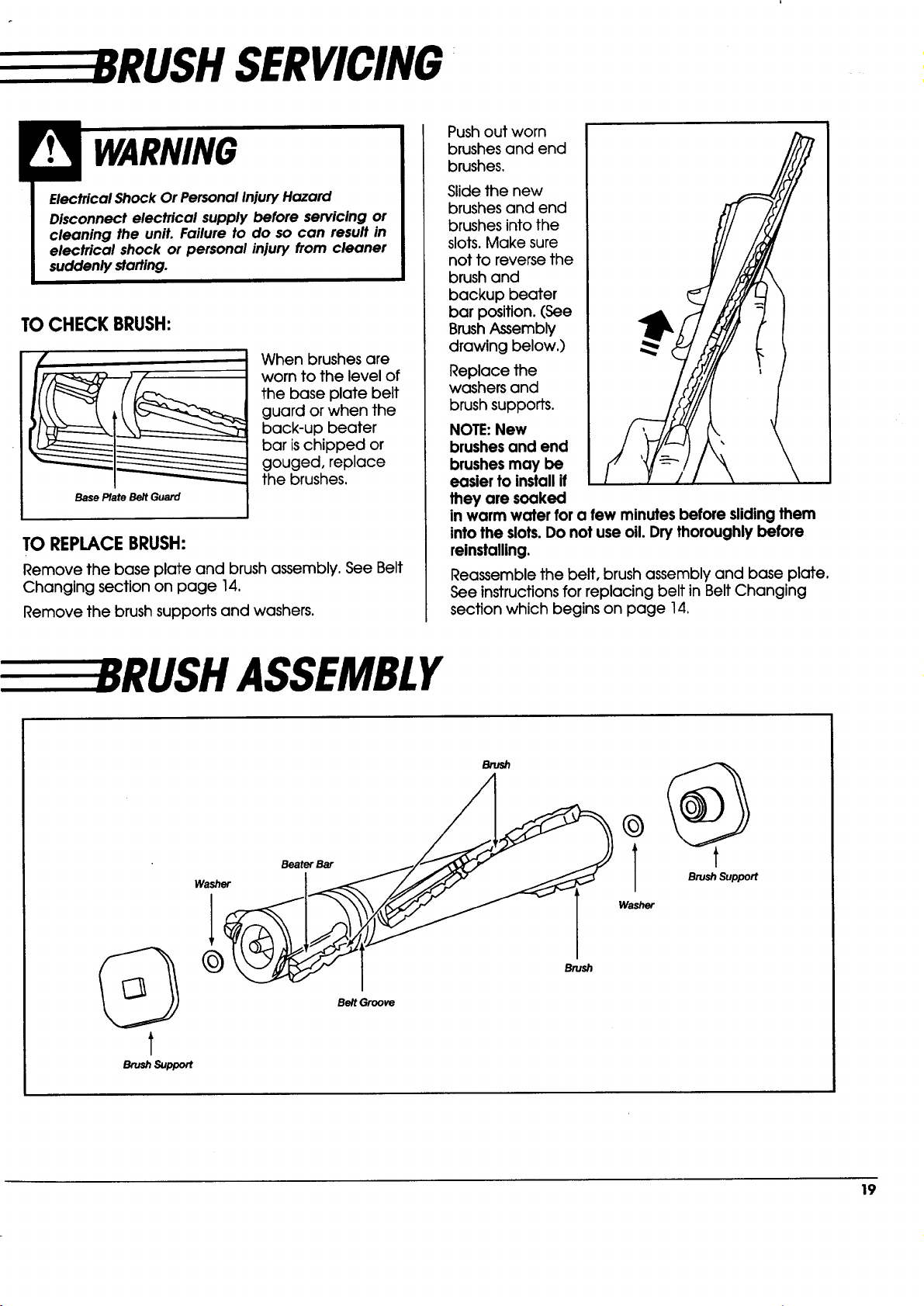
TO CHECK BRUSH:
Base Plate Belt Guard
When brushes are
worn to the level of
the base plate belt
guard or when the
back-up beater
bar ischipped or
gouged, replace
the brushes,
TO REPLACEBRUSH:
Remove the base plate and brush assembly. See Belt
Changing section on page 14,
Remove the brush supports and washers.
Push out worn
brushes and end
brushes.
Slide the new
brushes and end
brushes into the
slots. Make sure
not to reverse the
brush and
backup beater
bar position.(See
Brush Assembly
drawing below,)
Replace the
washers and
brush supports.
NOTE: New
brushes and end
brushes may be
easier to install if
they are soaked
in warm water for a few minutes before sliding them
into the slots.Do not use oil. Dry thoroughly before
reinstalling.
Reassemble the belt, brush assembly and base plate.
See instructions for replacing belt in Belt Changing
section which begins on page 14.
RUSH ASSEMBLY
Brush
t
_ushSupport
Washer
©
Beater Bar
Belt Groove
Brush
©
Brush Support
Washer
19
EEEEEETROUBLESHOOTING
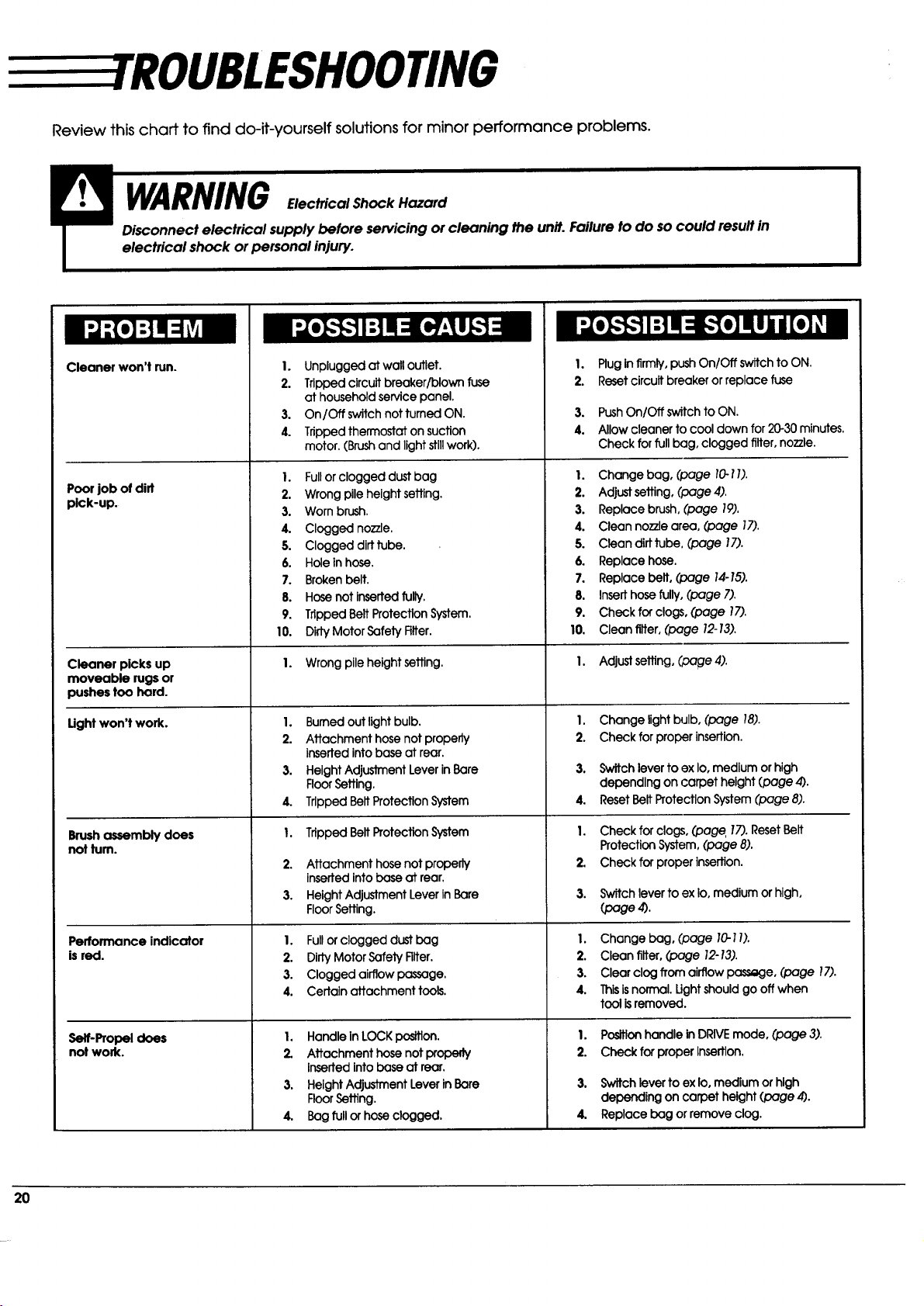
Review this chaff to find do-it-yourself solutions for minor performance problems.
WARNING
LL [o)!OJlI[o]
un. ::1
PJ;l o]:111=1 'AI
Cleaner won't run.
Poor job of did
pick-up.
Cleaner picks up
moveable rugs or
pushestoo hard.
Ught won't work.
Brushassembly does
notturn.
Performance indicator
is red.
Serf-Propeldoes
notwork.
I. Unplugged atwalloutlet.
2. Trippedcircuitbreaker/blownfuse
athouseholdservicepanel.
3. On/Off switchnot turnedON.
4. Trippedthermostaton suction
motor.(Brushand lightstillwork).
I. Full or clogged dust bag
2. Wrong pile height setting.
3. Worn brush.
4. Clogged nozzle.
5. Clogged dirttube.
6. Holeinhose.
7. Brokenbelt.
8. Hose notInsertedtully.
9. TrippedBeltProtectionSystem.
10. DirtyMotorSafelyRlter.
1. Wrong pileheightsetting.
I.
2.
3.
4.
I.
2.
3.
Burnedoutlightbulb.
Attachmenthosenotproperly
insertedintobaseatrear.
HelghtAdjustmentLeverinBare
Floorsettlng.
TrlppedBeltProtectlonSystem
TrippedBeltProtectionSystem
Attachmenthosenotproperly
insertedIntobaseatrear.
HeightAdjustmentLeverInBare
FloorSetting.
I. Fullorclogged dustbag
2. DirtyMotorSafetyFilter.
3. Clogged airflowpassage.
4. Certainattachment tools.
I. Handle inLOCK position.
2. Attachment hose notproperly
insertedintobase at rear.
3. HeightAdjustmentLeverinBare
FloorSetting.
4. Bag fullorhose clogged.
1. Pluginfirmly,pushOn/Off switch toON.
2. Resetcircuit breaker or replace fuse
3. Push On/Off switch to ON.
4. Allow cleaner to cool down for 20-30 minutes.
Check for full bag, clogged filter, nozzle.
I. Change bag, (page 10-1I).
2. Adjustsetting, (page4).
3. Replace brush,(page 19).
4. Cleannozzlearea, (page 17).
5. Cleondirttube, (page 17).
6. Replace hose.
7. Replace belt, (page 14-15).
8. Inserthosefully,(page 7).
9. Checkfor clogs,(page 17).
10. Cleanrifler,(page 12-13).
I. Adjustsetting,(page 4).
I. Change lightbulb,(page 18).
2. Check forproperinsertion.
3. Switchlevertoex Io,medium orhigh
dependingoncarpetheight(page4).
4. ResetBeltProtectionSystem(page8).
I. Check for clogs, (page.17).ResetBait
Protection System,(page 8).
2. Checkfor properinsertion.
3. SwitchlevertoexIo,medium orhigh,
(page4).
I. Change bag, (page 10-1I).
2. Clean filter,(page 12-13).
3. Clear clog from airflow _e, (page 17).
4. Ibis is normal. Ught should go off when
tool isremoved.
I. Positionhandlein DRIVEmode, (page 3).
2. CheckforproperInsertion.
3. Switchleverto exIoomedium orhigh
dependingoncarpet height(page 4).
4. Replacebag orremoveclog.