E L I T
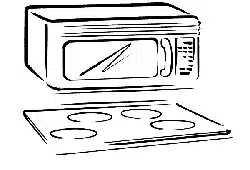
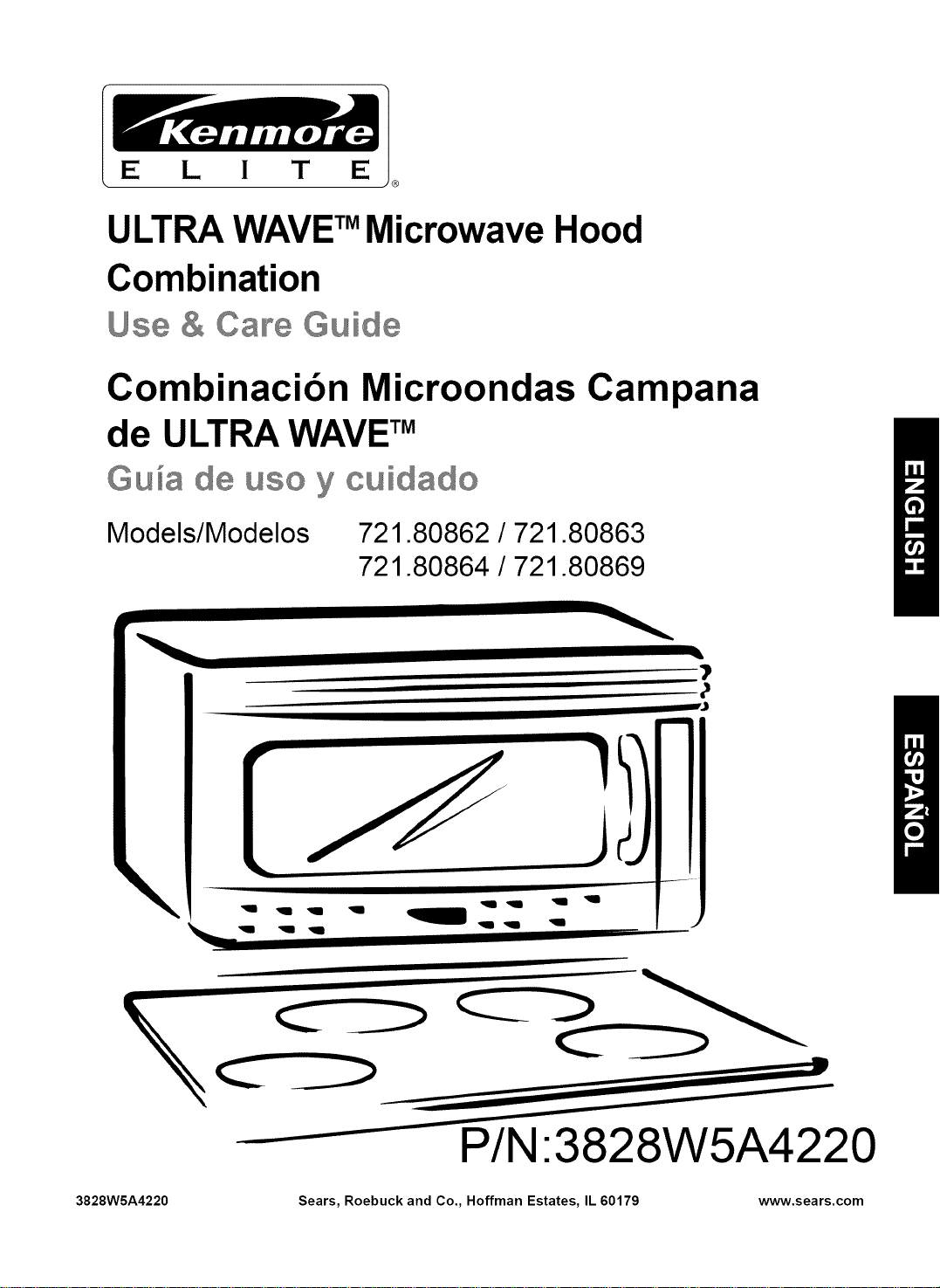
ULTRA WAVE TMMicrowave Hood
Combination
Use & Callr÷Guide
Combinacibn Microondas Campana
de ULTRA WAVETM
Gu_a de use y cuidado
Models/Modelos 721.80862 / 721.80863
721.80864 / 721.80869
\
1"= =1
q q q _ I
q q 1
P/N:3828W5A4220
3828WSA4220 Sears, Roebuck and Co., Hoffman Estates, IL 60179 www.sears.com

Table of
Contents
Microwave Hood
Combination
Warranty
Warranty ........................................................... 2
Sears Service .................................................. 3
Microwave Oven Safety .................................. 4
Getting to Know Your
Microwave Oven .............................................. 7
How your kenmore ULTRA WAVE TM
microwave hood combination works ............... 7
Radio interference .......................................... 7
Testing your microwave oven ......................... 8
Testing your dinnerware or cookware ............ 8
Operating safety precautions .......................... 8
Electrical connection ...................................... 8
Microwave oven features ............................... 9
Control panel features ................................... 10
Using Your Microwave Oven ....................... 12
Audible Signals ............................................. 12
Interrupting Cooking ...................................... 12
Clock ............................................................. 12
Child Lock ..................................................... 12
Timer ............................................................. 13
Cooktop Light ................................................ 14
Exhaust Fan .................................................. 14
Add Minute .................................................... 14
Timed Cooking .............................................. 15
Multi-stage Cooking ...................................... 15
Microwave Power Levels .............................. 16
Auto Defrost .................................................. 17
Auto defrost table .......................................... 18
Auto defrost table (Cont.) .............................. 19
Defrosting tips .............................................. 20
Hold Warm .................................................... 20
Sure Simmer ................................................. 21
Using Sensor Cooking .................................. 22
Sensor Cooking ............................................ 22
Potato (Example) .......................................... 22
More/Less ..................................................... 22
Sensor Cooking Table .................................. 23
Auto Cook, Auto Reheat ............................... 24
Auto Cook Table, Auto Reheat Table ........... 25
Soften, Soften Table ..................................... 26
Melt, Melt Table ............................................ 26
Caring for Your Microwave Oven ................. 27
Caring for the filters ....................................... 28
Replacing the cooktop and oven lights ......... 29
Microwave Cooking Tips ............................... 31
Questions and Answers ................................ 33
Troubleshooting ............................................. 34
Service ............................................. Back cover
FULL ONE-YEAR WARRANTY ON
MICROWAVE HOOD COMBINATION
For one year from the date of purchase, if this
Kenmore Microwave Hood Combination fails due to
a defect in material or workmanship, Sears will
repair itfree of charge.
FULL FIVE-YEAR WARRANTY ON THE
MAGNETRON
For five years from the date of purchase, if the
magnetron in this Kenmore Microwave Hood
Combination fails due to a defect in material or
workmanship, Sears will repair it free of charge.
The above warranty coverage applies only to
Microwave Hood Combinations which are used for
private household purposes.
WARRANTY SERVICE IS AVAILABLE BY
SIMPLY CONTACTING SEARS SERVICE AT
1-800-4-MY-HOME ®
This warranty applies only while this product is in
use in the United States.
This warranty gives you specific legal rights, and
you may also have other rights which vary from
state to state.
Sears, Roebuck and Co.,
Dept. 817WA,
Hoffman Estates, IL 60179
For service call:
1-800-4-MY-HOME ®
(t -800-469-4663)
Please record your model's information.
Whenever you call to request service for your
appliance, you need to know your complete model
number and serial number. You can find this
information on the model and serial number
label/plate at the upper side of cavity front in your
Microwave oven. Also, record the other information
shown below.
Model Number
Serial Number
Purchase Date

Sears Service
Master Protection Agreements
Congratulations on making a smart purchase.
Your new Kenmore ®product is designed and manufactured for years of dependable operation.
But like all products, it may require preventive maintenance or repair from time to time.
That's when having a Master Protection Agreement can save you money and aggravation.
Purchase a Master Protection Agreement now and protect yourself from unexpected hassle
and expense.
The Master Protection Agreement also helps extend the life of your new product. Here's
what's included in the Agreement:
Expert service by our 12,000 professional repair specialists
F1 Unlimited service and no charge for parts and labor on all covered repairs
"No-lemon" guarantee - replacement of your covered product if four or more product failures
occur within twelve months
Product replacement if your covered product can't be fixed
Annual Preventive Maintenance Check at your request - no extra charge
Fast help by phone - phone support from a Sears technician on products requiring in-home
repair, plus convenient repair scheduling
Power surge protection against electrical damage due to power fluctuations
Rental reimbursement if repair of your covered product takes longer than promised
Once you purchase the Agreement, a simple phone call is all that it takes for you to schedule service.
You can call anytime day or night, or schedule a service appointment online.
Sears has over 12,000 professional repair specialists, who have access to over 4.5 million quality
parts and accessories. That's the kind of professionalism you can count on to help prolong the life of
your new purchase for years to come. Purchase your Master Protection Agreement today!
Some limitations and exclusions apply. For prices and additional information call 1-800-827-
6655.
Sears Installation Service
For Sears professional installation of home appliances, garage door openers, water heaters, and
other major home items, in the U.S.A. call
1-800-4-MY-HOME ®
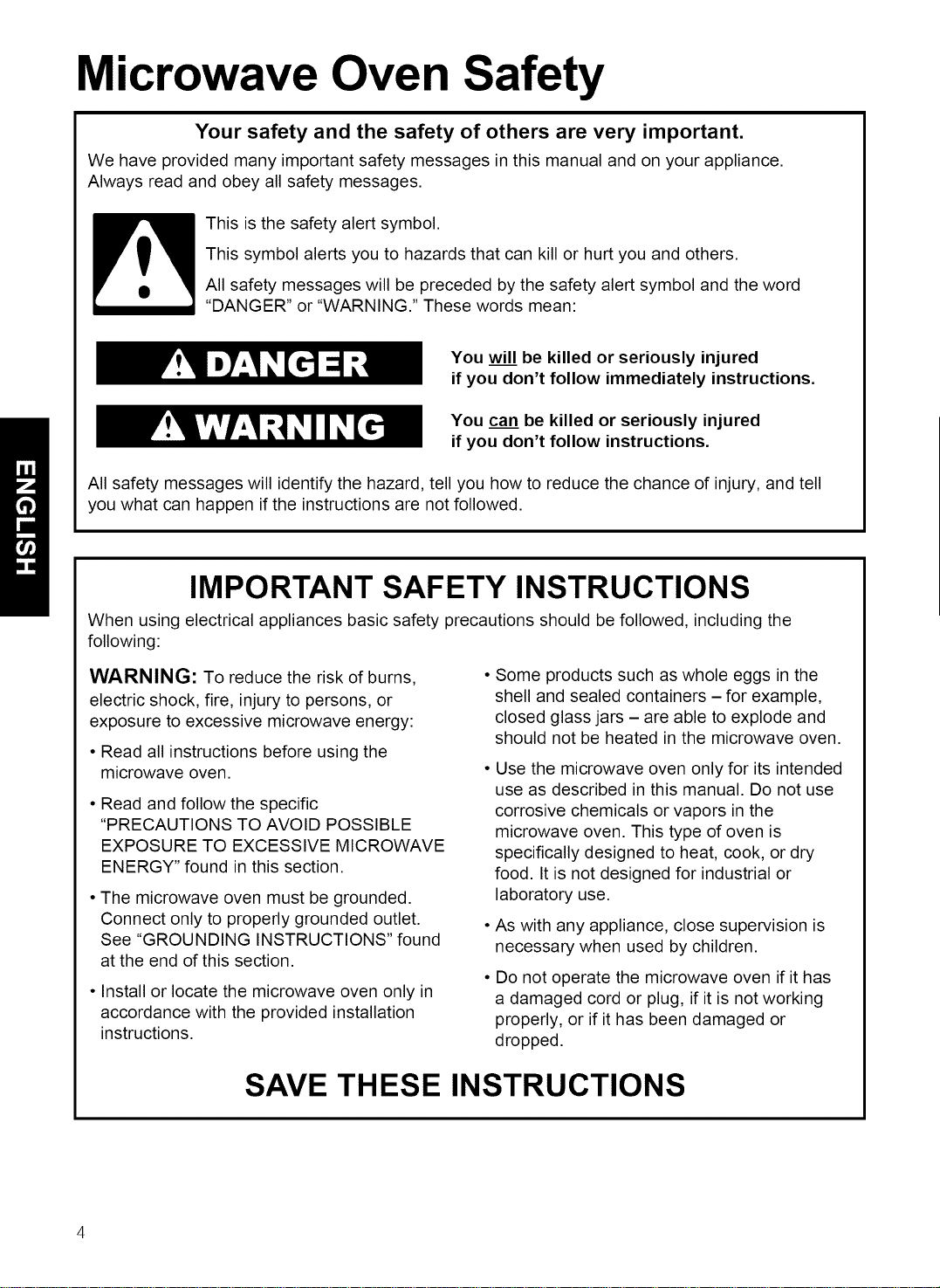
Microwave Oven Safety
Your safety and the safety of others are very important.
We have provided many important safety messages in this manual and on your appliance.
Always read and obey all safety messages.
This is the safety alert symbol.
This symbol alerts you to hazards that can kill or hurt you and others.
All safety messages will be preceded by the safety alert symbol and the word
"DANGER" or "WARNING." These words mean:
You will be killed or seriously injured
if you don't follow immediately instructions.
You can be killed or seriously injured
if you don't follow instructions.
All safety messages will identify the hazard, tell you how to reduce the chance of injury, and tell
you what can happen if the instructions are not followed.
IMPORTANT SAFETY INSTRUCTIONS
When using electrical appliances basic safety precautions should be followed, including the
following:
WARNING: To reduce the risk of burns,
electric shock, fire, injury to persons, or
exposure to excessive microwave energy:
• Read all instructions before using the
microwave oven.
• Read and follow the specific
"PRECAUTIONS TO AVOID POSSIBLE
EXPOSURE TO EXCESSIVE MICROWAVE
ENERGY" found in this section.
• The microwave oven must be grounded.
Connect only to properly grounded outlet.
See "GROUNDING INSTRUCTIONS" found
at the end of this section.
• Install or locate the microwave oven only in
accordance with the provided installation
instructions.
Some products such as whole eggs in the
shell and sealed containers - for example,
closed glass jars - are able to explode and
should not be heated in the microwave oven.
Use the microwave oven only for its intended
use as described in this manual. Do not use
corrosive chemicals or vapors in the
microwave oven. This type of oven is
specifically designed to heat, cook, or dry
food. It is not designed for industrial or
laboratory use.
As with any appliance, close supervision is
necessary when used by children.
Do not operate the microwave oven if it has
a damaged cord or plug, if it is not working
properly, or if it has been damaged or
dropped.
SAVE THESE INSTRUCTIONS
4

IMPORTANT SAFETY INSTRUCTIONS
•Themicrowaveovenshouldbe servicedonlyby
qualifiedservicepersonnel.Callan authorized
servicecompanyforexamination,repair,or
adjustment.
•Seedoorsurfacecleaninginstructionsinthe"Caring
forYour MicrowaveOven"section.
•To reducetheriskd fireinthe ovencavity:
- Donotovercookfood.Carefullyattendthe
microwaveovenwhenpaper,plastic,or other
combustiblematerialsareplacedinsidetheovento
facilitatecooking.
- Removewiretwist-tiesfrom paperor plasticbags
beforeplacingbagsin oven.
- Ifmaterialsinsidetheovenignite,keepovendoor
closed,tumovenoff,and disconnectthepower
cord,or shutoff poweratthefuseor circuitbreaker
panel.
- Donotusethecavityfor storagepurposes.Donot
leavepaperproducts,cookingutensils,orfoodin
thecavitywhen notin use.
•Suitableforuseabovebothgas andelectriccooking
equipment.
• Intendedto be usedaboverangeswith maximum
widthd 36 inches(91 cm).
•CleanVentilatingHoodsFrequently- Greaseshould
not beallowedtoaccumulateon hoodorfilter.
•Whenflamingfoodsunderthe hood,tumthe fanon.
• Usecarewhencleaningthevent-hoodfilter.
Corrosivecleaningagents,such aslye-basedoven
cleaners,maydamagethefilter.
•Oversizedfoods or oversizedmetalutensilsshould
not beinsertedin themicrowaveovenasthey may
createa fireor riskd electricshock.
• Donotcleanwith metalscouringpads.Piecescan
bum offthe pad andtouchelectricalparts involvinga
riskd electricshock.
• Do not store anything directly on top d the
microwave oven when the microwave oven is in
operation.
• Do not cover or block any openings on the
microwave oven.
• Do not store this microwave oven outdoors. Do not
use the microwave oven near water for example,
near a kitchen sink, in awet basement, near a
swimming pool, or similar location.
• Do not immerse cord or plug in water.
• Keep cord away from heated surfaces.
• Do not let cord hang over edge d table or counter.
• Do not mount over a sink.
• Do not cover racks or any other part d the oven with
metal foil. This will cause overheating d the oven.
• Liquids such as water, coffee, or tea are able to
be overheated beyond the boiling point without
appearing to be boiling due to surface tension of
the liquid. Visible bubbling or boiling when the
container is removed from the microwave oven is
not always present. This could result in very hot
liquids suddenly boiling over when a spoon or
other utensil is inserted into the liquid. To reduce
the risk of injury to persons.
1) Do not overheat the liquid.
2) Stir the liquid both before and halfway through
heating it.
3) Do not use straight-sided containers with
narrow necks.
4) After heating, allow the container to stand
in the microwave oven for a short time before
removing the container.
5) Use extreme care when inserting a spoon or
other utensil into the container.
SAVE THESE INSTRUCTIONS

i!ii!i!iiiii:!!! iiii iiiiiiiiiiiiii ii!!! !!iiiiiiiii:ii:iii:!i!iiiiiill!!!!!!!!!!!!!!!!!!!!!!!!!!!!!!!!!!!!!!!!!!!!!!!!!!
PRECAUTIONS TO AVOID POSSIBLE
EXPOSURE TO EXCESSIVE MICROWAVE
ENERGY
(a) Do not attempt to operate this oven with the
door open since open - door operation can
result in harmful exposure to microwave
energy. It is important not to defeat or tamper
with the safety interlocks.
(b) Do not place any object between the oven
front face and the door or allow soil or cleaner
residue to accumulate on sealing surfaces.
(c) Do not operate the oven if it is damaged. It is
particularly important that the oven door close
properly and that there is no damage to the:
(1) Door (bent),
(2) Hinges and latches (broken or loosened),
(3) Door seals and sealing surfaces.
(d) The oven should not be adjusted or repaired
by anyone except properly qualified service
personnel.
Electrical
requirements
Observe all governing codes and
ordinances. A 120 Volt, 60 Hz, AC only,
20 amp fused electrical supply is
required. (A time-delay fuse is recommended.)
It is recommended that a separate circuit
serving only this appliance be provided.
Electrical Shock Hazard
Plug into a grounded 3-prong
outlet. Do not remove ground
prong. Do not use an adapter.
Do not use an extension cord.
Failure to follow these
instructions can result in death,
fire, or electrical shock.
GROUNDING INSTRUCTIONS
• For all cord connected appliances:
The microwave oven must be grounded.
In the event of an electrical short circuit,
grounding reduces the risk of electric
shock by providing an escape wire for the
electric current. The microwave oven is
equipped with a cord having a grounding
wire with a grounding plug. The plug must
be plugged into an outlet that is properly
installed and grounded.
Ensure proper ground
exists before use
WARNING: Improper use of the
grounding can result in a risk of electric
shock.
Consult a qualified electrician or
serviceman if the grounding instructions
are not completely understood, or if doubt
exists as to whether the microwave oven
is properly grounded.
Do not use an extension cord. If the power
supply cord is too short, have a qualified
electrician or serviceman install an outlet
near the microwave oven.
• For a permanently connected appliance:
The microwave oven must be connected
to a grounded, metallic, permanent wiring
system, or an equipment grounding
conductor should be run with the circuit
conductors and connected to the
equipment grounding terminal or lead on
the microwave oven.
SAVE THESE INSTRUCTIONS
6
Gettingto KnowYour
MicrowaveOven
This section discusses the concepts behind microwave cooking. It also shows you the basics you need to know
to operate your microwave oven. Please read this information before you use your oven.
HOW YOUR KENMORE ULTRA WAVE TM MICROWAVE
HOOD COMBINATION WORKS
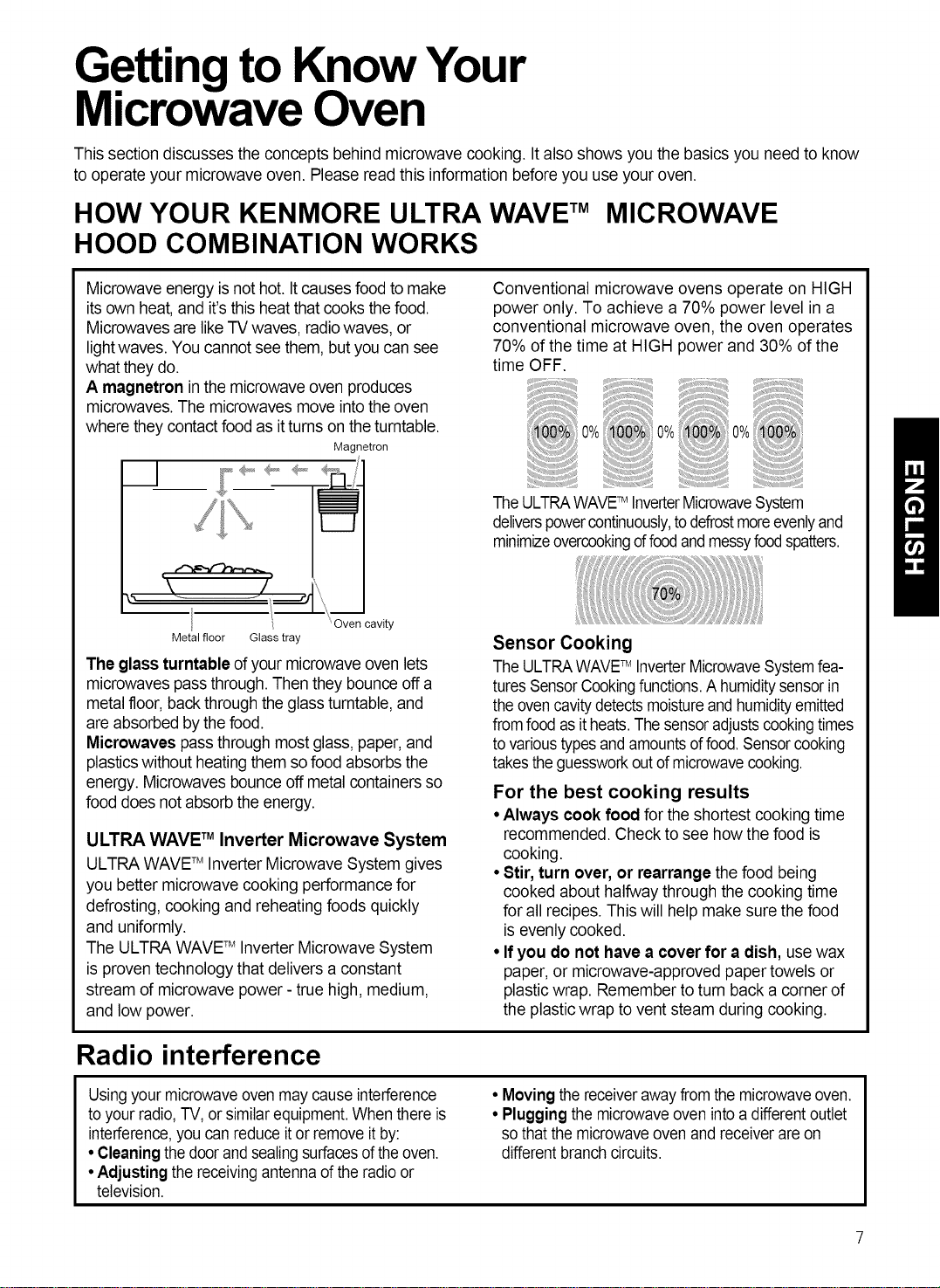
Microwave energy isnot hot. Itcauses food to make
its own heat, and it's this heat that cooks thefood.
Microwaves are like TV waves, radio waves, or
lightwaves. You cannot see them, butyou can see
what they do.
A magnelron inthe microwave oven produces
microwaves. The microwavesmove intothe oven
where they contactfood as it tums on the tumtable.
Magnetron
__1
Conventional microwave ovens operate on HIGH
power only. To achieve a 70% power level in a
conventional microwave oven, the oven operates
70% of the time at HIGH power and 30% of the
time OFF.
0%
TheULTRAWAVETM InverterMicrowaveS 'stem
deliverspowercontinuously,todefrostmoreevenlyand
minimizeovercookingoffoodandmessyfoodspatters.
Metal floor Glass tray
The glass turntableof your microwave oven lets
microwaves pass through. Thenthey bounce off a
metal floor, back throughthe glass turntable, and
are absorbedby the food.
Microwaves pass through most glass,paper, and
plastics without heatingthem sofood absorbs the
energy. Microwaves bounceoff metal containersso
food does not absorbthe energy.
ULTRA WAVE TM Inverter Microwave System
ULTRA WAVETM Inverter Microwave System gives
you better microwave cooking performance for
defrosting, cooking and reheating foods quickly
and uniformly.
The ULTRA WAVETM Inverter Microwave System
is proven technology that delivers a constant
stream of microwave power - true high, medium,
and low power.
Sensor Cooking
TheULTRAWAVETM InverterMicrowaveSystemfea-
turesSensorCookingfunctions.A humiditysensorin
theovencavitydetectsmoistureandhumidityemitted
fromfoodasitheats.Thesensoradjustscookingtimes
tovarioustypesand amountsd food.Sensorcooking
takestheguessworkoutd microwavecooking.
For the best cooking results
• Always cook food for the shortest cooking time
recommended. Check to see how the food is
cooking.
• Stir, turn over, or rearrange the food being
cooked about halfway through the cooking time
for all recipes. This will help makesure the food
is evenly cooked.
• If you do not have a cover for a dish, use wax
paper, or microwave-approved papertowels or
plastic wrap. Remember to tum back a corner of
the plastic wrap to vent steam during cooking.
Radio interference
Usingyourmicrowaveovenmay cause interference
to yourradio,TV, or similarequipment.When thereis
interference,youcanreduceit or remove itby:
• Cleaning thedoorand sealingsurfacesd theoven.
•Adjustingthe receivingantennad theradio or
television.
• Movingthereceiverawayfromthe microwaveoven.
• Plugging the microwaveoven intoa differentoutlet
sothat the microwaveoven and receiverare on
differentbranchcircuits.

Testing your microwave oven
I otesttheovenputabout1cupof coldwater ina
glasscontainerintheoven. Closethedoor.
Makesureitlatches.Cookat 100%powerfor 1 minute.
Whenthetimeisup,thewatershouldbeheated.
Testing your dinnerware or cookware
Test dinnerware or cookware before using.To
test a dish for safe use, put itinto the oven witha
cupof water beside it.Cook at 100% cook power
for one minute. Ifthe dish gets hot,do not use it.
Some dishes (melamine, some ceramic
dinnerware, etc.)absorb microwave energy,
becoming too hot to handle and slowing cooking
times. Cooking in metal containers notdesigned for
microwave use could damage the oven, as could
containerswith hidden metal (twist-ties,foil lining,
staples, metallicglaze or trim).
Operating safety precautions
• Never leanon the door or allowa childto swing
on it when the door is open.
• Use hot pads. Microwave energydoes not heat
containers, but the heatfrom the food can make
the container hot.
• Do not use newspaper or other printedpaper in
the oven.
• Do not dryflowers, fruit, herbs, wood, paper,
gourds, or clothesin the oven.
• Do not starta microwave oven when it is empty.
Product lifemay beshortened. Ifyou practice
programming the oven, put a container of water in
the oven. Itis normalfor the oven door to look
wavy after the oven has been running for a while.
• Do not try to melt paraffin wax inthe oven.
Paraffin wax will not melt in a microwave oven
because it allows microwaves to pass through it.
• Do not operate themicrowave oven unless the
glass turntable is securely in place and can move
freely. The tumtable can move in eitherdirection.
Make sure the turntable is correct-side up in the
oven. Handleyour turntable with carewhen
removing it from the oven to avoid possibly
breaking it. If yourtumtable cracks or breaks,
contact your dealer for a replacement.
•When you use a browning dish, the browning
dish bottom must be at least 3/16 inch abovethe
turntable. Followthe directions suppliedwith the
browning dish.
• Never cook or reheata whole egg inside the
shell. Steam buildup in whole eggs may cause
them to burst,and possiblydamage the oven.
81ice hard-boiledeggs beforeheating. Inrare
cases, poached eggs havebeen known to
explode. Cover poached eggsand allow a
standing time ofone minute before cutting into
them.
• Forbest results, stir any liquid several times
during heating or reheating. Liquidsheated in
certain containers (especiallycontainers shaped
likecylinders)may become overheated. The liquid
may splash outwith a loud noise during or after
heatingor when adding ingredients (coffee
granules, tea bags, etc.).This can harmthe oven.
• Microwaves may not reach the center of a roast.
The heat spreads to the center from the outer,
cooked areasjust as in regular oven cooking.This
isone of the reasons for letting some foods (for
example, roasts or baked potatoes) stand for a
while after cooking, or for stirringsome foods
during the cooking time.
• Do not deep fry in the oven. Microwavable
utensilsare not suitable and itisdifficult to
maintain appropriatedeep-frying temperatures.
• Do not overcook potatoes.At the end of the
recommended cooking time,potatoes should be
slightlyfirm because they will continue cooking
during standing time.After microwaving, let
potatoesstand for 5 minutes. They willfinish
cooking while standing.
I
Electrical connection
Ifyour electric power line or outlet voltage is
less than 110 volts, cooking times may be longer.
8
Have a qualified electrician check your electrical
system.
I

Microwave oven features
®
_;Jc_ - o_,__, _ (_I_, .....
®
Your microwave oven isdesigned to make your
cooking experience as enjoyable and productive
as possible. To get you up and running quickly, the
following is a list of the oven's basic features:
1. Metal Shielded Window. The shield prevents
microwaves from escaping. It is designed as a
screen to allow you to view food as it cooks.
2. Model and Serial Number Plate & Cooking
Guide Label
3. Charcoal Filter (behind Vent Grille)
1. Glass tray
2. Support
3. Hub
.
5.
.
7.
8.
9.
®
Vent Grille
Glass tray. The glass tray moves food as it
cooks for more even cooking. It must be in the
oven during operation for best cooking results.
Cooktop Light
Grease Filter. See "Caring for the filters"
section.
Control Panel. Touch the buttons on this panel
to perform all functions.
Cooking Rack. Use for extra space when
cooking in more than one container at the
same time.
Defrost Plate
Use the DEFROST PLATE provided for
complete defrosting.
The turntable rotates in both directions to help cook food more evenly. Do not operate the microwave oven
without the turntable in place.
To Install:
1. Place the support on the oven cavity bottom.
2. Place the turntable on the support.
Fit the raised, curved lines in the center of the turntable bottom between the three spokes of the hub.
The rollers on the support should fit inside the turntable bottom ridge.

Control panel features
Your microwave oven control panel lets you select the desired cooking function quickly and easily.
All you have to do is touch the necessary Command Button. The following is a list of all the
Command and Number Buttons located on the control panel. For more information on these
features, see the "Using your microwave oven" section.
OOO OOO o
OOO OOO o
PolAro EmIIE_ £EI_'E_,[ DE_tI_S[ MEal ivll.ul_ LSS
TIME
o o 00000 C)
TI_E_ P0w_ _ 7 _ g 0 STOP/ Ct_A_
O S_,_E_ _WAVE
0 }[I_/NIG HT/0 FF ' ...........
POPCORN VEGETABLE AUTO SURE
COOK SIMMER SOFTEN HOLD MORE
WARM
CLOCK_'E_ 3 4 5
(_
ON/OFF
5-SPEED _AVE
_ TECHNOLOGY
HIGH/NIOHT/O_F
.
.
.
Display. The display includes a clock and 4.
indicators to tell you time of day, cooking time
settings, cook powers, quantities, weights, and
cooking functions selected. 5.
Popcorn. Touch this button to pop popcom with
the sensor feature. The oven's sensor will tell the
oven how long to cook depending on the amount
of humidity itdetects from the popcorn.
Potato. Touch this button to cook potatoes
without entering a cook time or power.
.
Vegetable. Touch this button to cook vegetables
without entering a cook time or power.
Frozen Entree. Touch this button to cook a 10-
to 21- ounce frozen entree without entering a
cook time or power.
Auto Cook. Touch this button to cook
microwavable foods without entering a cook time
or power.
10

7.AutoReheat.Touchthisbuttontoreheat
microwavablefoodswithoutenteringacook
timeorpower.
8.SureSimmer.Touchthispadtosimmersoups,
casseroles,stews,andotherliquidfoods.
9.AutoDefrost.Touchthisbuttonfollowedby
NumberButtonstothawfrozenmeatbyweight.
10.Soften.Touchthisbuttontosoftenicecream,
creamcheese,butter,orfrozenjuice.
11.Melt. Touch this button to melt chocolate,
cheese, butter, or marshmallows.
12. Hold Warm. Touch this button to keep hot,
cooked foods safely warm in your oven for up
to 99 minutes, 99 seconds. Hold Warm can be
used by itself, or itcan automatically follow a
cooking cycle.
13. Add Minute. Touch this button to cook for 1
minute at 100% cook power, or to add extra
minutes at the set cook power to your cooking
cycle.
14. More. Touch this button to add 10 seconds of
cook time each time you press it.
15. Less. Touch this button to subtract 10 seconds
of cook time each time you press it.
16. Clock. Touch this button to enter the time of
day.
17. Timer. Touch this button to change the oven's
default settings for Kitchen Timer, Light Timer
SET or CLEAR.
18. Cook Time. Touch this button followed by
Number Buttons to set a cooking time.
19. Power. Touch this button after the cook time
has been set,followed by a Number Button to
set the amount of microwave energy released
to cook the food. The higher the number, the
higher the microwave power or "cooking
speed."
20. Number Buttons. Touch number buttons to
enter cooking times, cook powers, quantities,
weights, or food categories.
21. START. Touch this button to start a function. If
you open the door after the oven begins to
cook, retouch START.
22.
23.
STOP/Clear. Touch this button to erase an
incorrect command, cancel a program during
cooking, or to clear the Display.
Fan (c_i_)On/Off. Touch this button to turn the
fan on or off.
24. Fan (c_i_)5-Speed. Touch this button to
choose one of 5 fan speeds.
25. Light (O _,',).Touch this button to tum the light
on high, night, or off.
NOTE: If you try to enter incorrect instructions,
you will not hear any tones. Touch STOP/CLEAR
and re-enter the instructions.
11
Using Your Microwave
Oven
This section gives you instructions for operating
each function. Please read these instructions
carefully.
AUDIBLE SIGNALS
Audible signals are available to guide you when
setting and using your oven:
• A programming tone will sound each time
you touch a pad.
• Seven tones signal the end of a Kitchen Timer
countdown.
• Four tones signal the end of a cooking cycle.
CLOCK
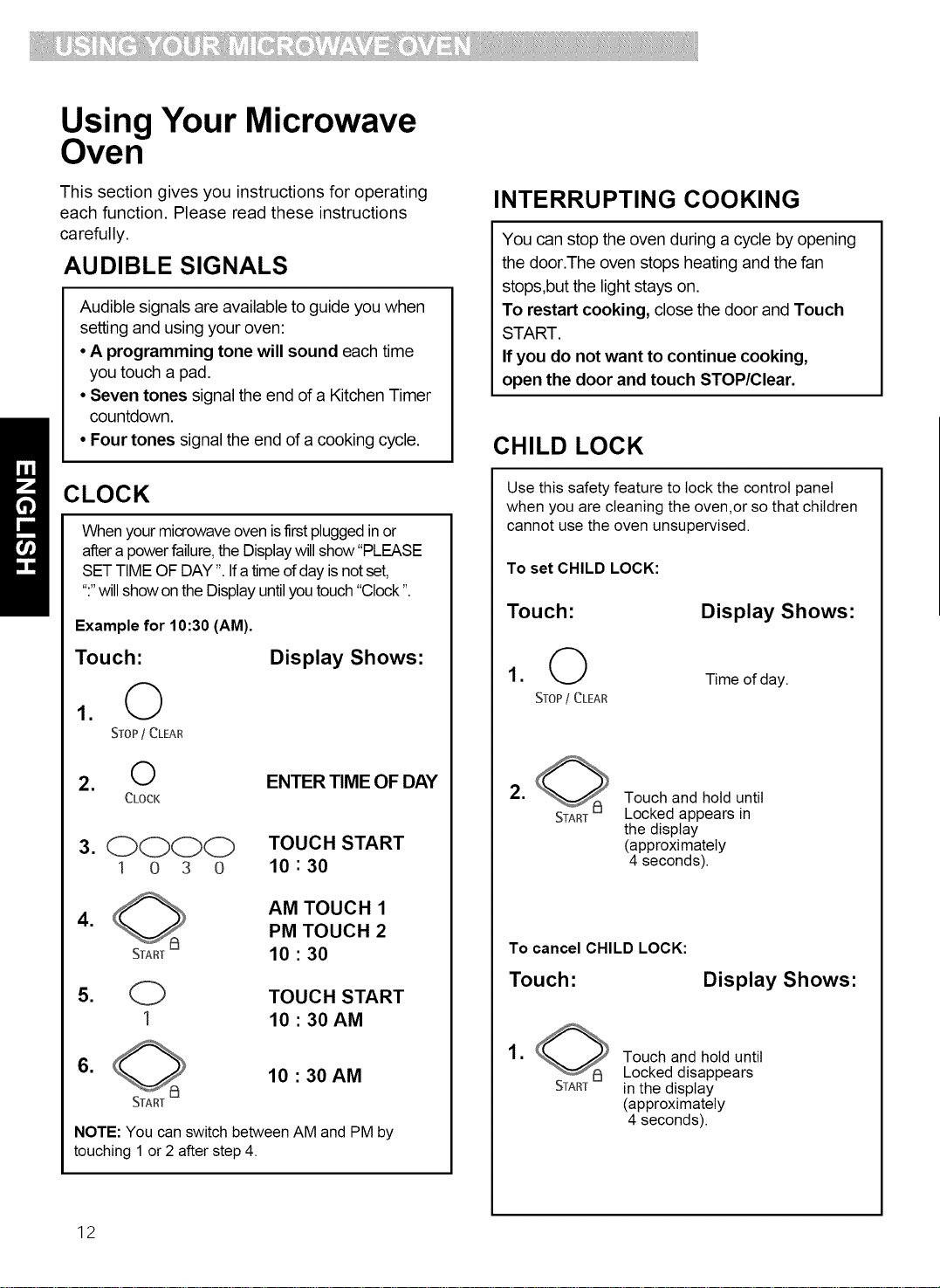
When your microwave oven isfirst plugged in or
after a power failure, the Display will show"PLEASE
SET TIME OF DAY ". Ifa time of day is not set,
":"will show on the Display until you touch "Clock ".
Example for 10:30 (AM).
Touch:
1. @
STOP/ CLEAR
Display Shows"
2. O
CLOCK
ENTER TIME OF DAY
3. COCO TOUCH START
1 o 3 o 10 " 30
,
AM TOUCH 1
PM TOUCH 2
10 • 30
5. O TOUCH START
1 10 • 30 AM
,
10 • 30 AM
NOTE: You can switch between AM and PM by
touching 1or 2 after step 4.
INTERRUPTING COOKING
You can stop the oven during a cycle by opening
the door.The oven stops heating and the fan
stops,but the light stays on.
To restart cooking, close the door and Touch
START.
If you do not want to continue cooking,
open the door and touch STOP/Clear.
CHILD LOCK
Use this safety feature to lock the control panel
when you are cleaning the oven,or so thatchildren
cannot use the oven unsupervised.
To set CHILD LOCK:
Touch: Display Shows:
1. O Timeof day.
STOP/ CLEAR
.
START
Touch and hold until
Locked appears in
the display
(approximately
4 seconds).
To cancel CHILD LOCK:
Touch: Display Shows:
,
START
Touch and hold until
Locked disappears
in the display
(approximately
4 seconds).
12
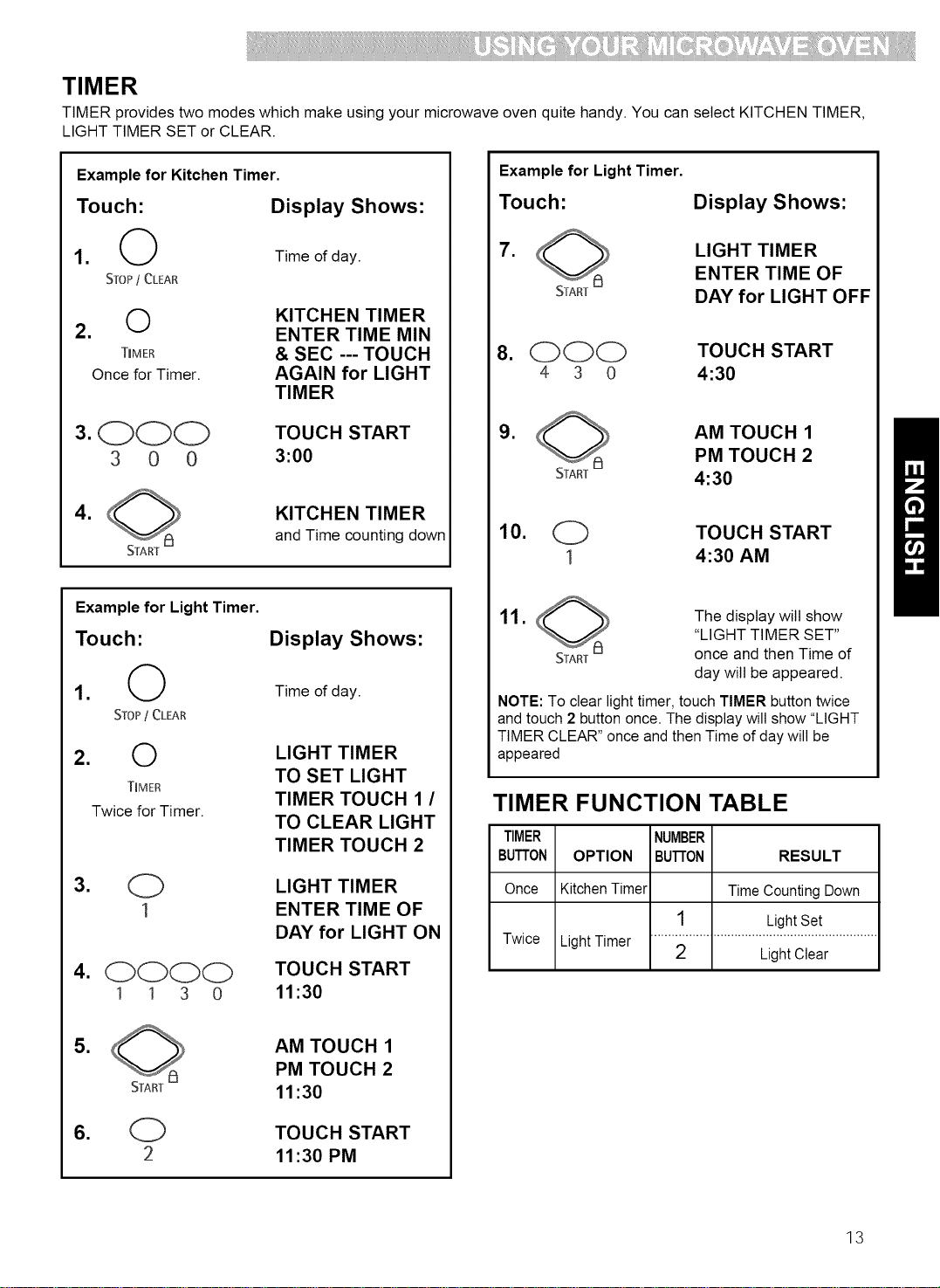
TIMER
TIMER provides two modes which make using your microwave oven quite handy. You can select KITCHEN TIMER,
LIGHT TIMER SET or CLEAR.
Example for Kitchen Timer.
Touch: Display Shows:
1. (,_ Time of day.
STOP/ CLEAR
t'_ KITCHEN TIMER
2.
ENTER TIME MIN
TIMER & SEC --- TOUCH
Once for Timer. AGAIN for LIGHT
TIMER
3. OOO TOUCH START
3 0 0 3:00
,
START
KITCHEN TIMER
and Time counting down
Example for Light Timer.
Touch:
1. @
STOP/ CLEAR
2. 0
TIMER
Twice for Timer.
4. 0000
1 1 3 0
Display Shows:
Time of day.
LIGHT TIMER
TO SET LIGHT
TIMER TOUCH 1 /
TO CLEAR LIGHT
TIMER TOUCH 2
LIGHT TIMER
ENTER TIME OF
DAY for LIGHT ON
TOUCH START
11:30
, AM TOUCH 1
PM TOUCH 2
11:30
TOUCH START
11:30 PM
Example for Light Timer.
Touch:
,
Display Shows:
LIGHT TIMER
ENTER TIME OF
DAY for LIGHT OFF
8. OOO
4 3 0
TOUCH START
4:30
,
START
AM TOUCH 1
PM TOUCH 2
4:30
10. O
1
TOUCH START
4:30 AM
11.
START
The display will show
"LIGHT TIMER SET"
once and then Time of
day will be appeared.
NOTE: To clear light timer,touch TIMER button twice
and touch 2 button once. The display will show "LIGHT
TIMER CLEAR" once and then Time of day will be
appeared
TIMER FUNCTION TABLE
Twice LightTimer
TIMER NUMBER
BUTTON OPTION BUTTON RESULT
Once KitchenTimer Time Counting Down
1 LightSet
2 Light Clear
13

COOKTOP LIGHT
The button right of the control panel controls the
cooktop light.
Example for Light HIGH.
Touch:
10°'
• HIGH/NIGHT/OFF
once for HIGH light
twice for NIGHT light
Display Shows:
The display will show
"HIGH LIGHT" once.
2.0 o'_
HiGH/NiGHT/Off
TO turn off, touch button
once or twice depending
on light setting.
The display will show
"OFF LIGHT" once.
ADD MINUTE
A time-saving button, this simplified control lets
you quickly set and start microwave cooking at
100% power without the need to touch START.
Example for 2 minutes.
Touch:
1 0
STOP/ CLEAR
Display Shows:
Time of day.
2. O Twice
ADD
MINUTE
TIME COOK
2:00 P-100
and Time counting down.
NOTE: Each time you touch ADD MINUTE, it will
add 1 minute up to 99 min 59 seconds.
EXHAUST FAN
The button right of the control panel controls the 5-speed
exhaust fan.
Example for exhaust fan speed to level 4
Touch: Display Shows:
1.0_
ON/OEE LEVEL 1 VENT FAN
This shows the last level
until you select the fan
speed level.
2.0e
5-SPEED
LEVEL 4 VENT FAN
Touch until Level 4
3.0
ON/OFF
OFF VENT FAN
Turn off fan when desired
NOTE: If the temperature from the range or cooktop
below the oven gets too hot, the exhaust fan in the vent
hood will automatically turn on at the LEVEL 5 setting to
protect the oven. ttmay stay on up to an hour to cool the
oven. When this occurs, the 8_ button will notturn
the fan off. O.fOFF
14
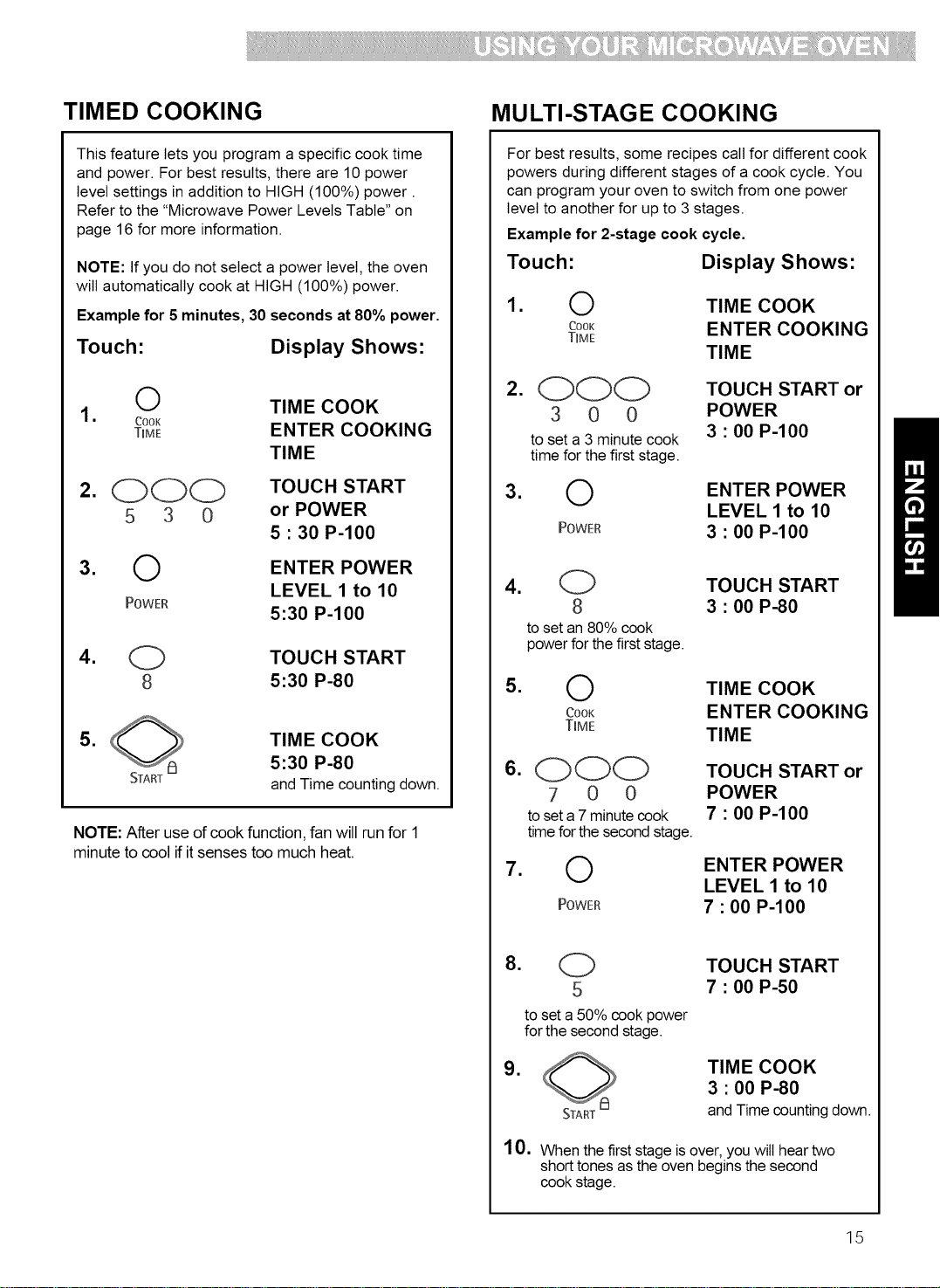
TIMED COOKING MULTI-STAGE COOKING
This feature lets you program a specific cook time
and power. For best results, there are 10 power
level settings in addition to HIGH (100%) power.
Refer to the "Microwave Power Levels Table" on
page 16 for more information.
NOTE: If you do not select a power level, the oven
will automatically cook at HIGH (100%) power.
Example for 5 minutes, 30 seconds at 80% power.
Touch: Display Shows:
,
,
,
O TIME COOK
Cook
T_ME ENTER COOKING
TIME
OOO TOUCH START
5 3 0 or POWER
5 • 30 P-100
O ENTER POWER
LEVEL 1 to 10
POWER
5:30 P-100
,
O TOUCH START
8 5:30 P-80
,
TIME COOK
;_ 5:30 P-80
START and Time counting down.
NOTE: After use of cook function, fan will run for 1
minute to cool if it senses too much heat.
For best results, some recipes call for different cook
powers during different stages of a cook cycle. You
can program your oven to switch from one power
level to another for up to 3 stages.
Example for 2-stage cook cycle.
Touch: Display Shows:
,
O TIME COOK
COOK ENTER COOKING
TIME
TIME
,
,
C)OO TOUCH START or
3 0 0 POWER
to set a 3 minute cook 3 " 00 P-100
time for the first stage.
O ENTER POWER
LEVEL 1 to 10
POWER 3 • 00 P-100
,
,
,
,
(_ TOUCH START
8 3 • 00 P-80
to set an 80% cook
power for the first stage.
O TIME COOK
cook ENTER COOKING
TmME
TIME
OOO TOUCH START or
7 0 0 POWER
to set a 7minute cook 7 " 00 P-100
time for the second stage.
O ENTER POWER
LEVEL 1 to 10
POWER 7 • 00 P-100
8.
(_ TOUCH START
5 7 • 00 P-50
to set a 50% cook power
for the second stage.
,
START
TIME COOK
3 • 00 P-80
and Time counting down.
10. When the first stage is over, you wilt hear two
short tones as the oven begins the second
cook stage.
15

MICROWAVE POWER LEVELS
For best results, some recipes call for different cook
powers. The lower the cook power, the slower the
cooking. Each number from 1 to 9 stands for a
different percentage of full cook power.
The following table gives the percentage of cook power
each number pad stands for, and the cook power
name usually used.
Italso tells you when to use each cook power.
Follow recipe or food package instructions if available.
COOK POWER NAME
100% of full power High
9 = 90% of full power
8 = 80% of full power
7 = 70% of full power
Medium-High
6 = 60% of full power
5 = 50% of full power Medium
4 = 40% of full power
3 = 30% of full power Medium-Low,
Defrost
2 = 20% of full power
1 = 10% of full power Low
WHEN TO USE IT
• Quick heating many convenience foods and
foods with high water content, such as soups and
beverages
• Cooking tender cuts of meat, ground meat
• Heating cream soups
• Heating rice, pasta, or casseroles
• Cooking and heating foods that need a
Cook Power lower than high (for example,
whole fish and meat loaf) or when food is
cooking too fast
• Reheating a single serving of food
• Cooking requiring special care, such as cheese
and egg dishes, pudding, and custards
• Finishing cooking casseroles
• Cooking ham, whole poultry, and pot roasts
• Simmering stews
• Melting chocolate
• Heating pastries
• Manually defrosting foods, such as bread, fish,
meats, poultry, and precooked foods
• Softening butter, cheese, and ice cream
• Keeping food warm
• Taking chill out of fruit
16

AUTO DEFROST
Four defrost sequences are preset in the oven.
The auto defrost feature provides you with the best
defrosting method for frozen foods. The cooking guide
wilt show you which defrost sequence is recommended
for the food you are defrosting. For added convenience,
the Auto Defrost includes a built-in beep mechanism
that reminds you to check, turn over, separate, or
rearrange to get best defrost results.
1. MEAT
2. POULTRY
3. FISH
4. BREAD
Example for 1.2 Ibs of ground beef.
Touch" Display Shows:
1. _ MEAT TOUCH 1
AuTo POULTRY TOUCH 2
DEFROST FISH TOUCH 3
BREAD TOUCH 4
2. (_ MEAT
1 ENTER WEIGHT
3. (_) and O TOUCH START
1 2 1.2 LBS
to enter the weight
,
DEFROST and
Time counting down
NOTE:
When you touch the START pad, the display changes
to defrost time count down. The oven will beep during
the DEFROST cycle. At this time, open the door and
turn, separate, or rearrange the food. Remove any
portions that have thawed. Return frozen portions to
the oven and touch START to resume the defrost cycle.
Operating Tips
• For best results, remove fish, shellfish, meat, and
poultry from its original closed paper or plastic
package (wrapper), Otherwise, the wrap wilt hold
steam and juice close to the foods, which can cause
the outer surface of the foods to cook,
• For best results, shape your ground meat into the
form of a doughnut before freezing, When defrosting,
scrape off thawed meat when the beep sounds and
continue defrosting,
• Place foods in a shallow container or on a microwave
roasting rack to catch drippings,
This table shows you food type selections and the
weights you can set for each type. For best
results, loosen or remove covering on food.
WEIGHTS YOU
TOUCH CAN SET
FOOD Auto Defrost (tenths of a pound)
Meat 1 .1to 6.0 (45g to 2722g)
Poultry 2 .1to 6.0 (45g to 2722g)
Fish 3 .1to 6.0 (45g to 2722g)
Bread 4 .1to 1.0(45g to 450g)
Weight conversion table
You are probably used to food weights as being in
pounds and ounces that are fractions of a pound (for
example, 4 ounces equals 1/4 pound). However, in
order to enter food weight in Auto Defrost, you must
specify pounds and tenths of a pound.
Ifthe weight on the food package is in fractions of a
pound, you can use the following table to convert the
weight to decimals.
EQUIVALENT WEIGHT
OUNCES
1.6
3.2
4.0
4.8
6.4
8.0
9.6
11.2
12.0
12.8
14.4
16.0
DECIMALWEIGHT
.10
.20
.25 One-Quarter Pound
.30
.40
.50 One-Half Pound
.60
.70
.75
.80
.90
1.00 One Pound
Three-Quarters Pound
17

AUTO DEFROST TABLE
Meat setting
FOOD
BEEF
Ground Beef,
Bulk
Ground Beef,
Patties
Round Steak
Tenderloin
Steak
Stew Beef
Pot Roast,
Chuck Roast
Rib Roast
Rolled Rump
Roast
LAMB
Cubes for
Stew
Chops
(1 inchthick)
PORK
Chops
(112inchthick)
Hot Dogs
Spareribs
Country-style
Ribs
Sausage,
Links
Sausage,
Bulk
Loin Roast,
Boneless
SETTING AT BEEP SPECIAL INSTRUCTIONS
MEAT
MEAT
MEAT
MEAT
MEAT
MEAT
MEAT
MEAT
MEAT
MEAT
MEAT
MEAT
MEAT
MEAT
MEAT
MEAT
Removethawedportionswith fork.
Turnover. Returnremainderto oven.
Separateand rearrange.
Tum over. Cover warm areaswith
aluminum foil.
Tum over. Cover warm areaswith
aluminum foil.
Remove thawed portions with fork.
Separateremainder.
Return remainder tooven.
Tum over. Cover warm areaswith
aluminum foil.
Tum over. Cover warm areaswith
aluminum foil.
Tum over. Cover warm areaswith
aluminum foil.
Remove thawed portions with fork.
Return remainder tooven.
Separateand rearrange.
Separateand rearrange.
Separateand rearrange.
Tum over. Cover warm areaswith
aluminum foil.
Separateand rearrange.
Removethawedportionswith fork.
Donot defrost less than 1/4lb.
Freeze in doughnut shape.
Placeon the DEFROST PLATE.
Donot defrost less than 2 oz. patties.
Depresscenter when freezing.
Placeon the DEFROST PLATE.
Placeon the DEFROST PLATE.
Placein a microwavable baking dish.
Placeon the DEFROST PLATE.
Placeon the DEFROST PLATE.
Placeon the DEFROST PLATE.
Placein a microwavable baking dish.
Placeon the DEFROST PLATE.
Placeon the DEFROST PLATE.
Placeon the DEFROST PLATE.
Placeon the DEFROST PLATE.
Placeon the DEFROST PLATE.
Turnover. Returnremainderto oven.
Tum over. Cover warm areaswith
aluminum foil.
Placein a microwavable baking dish.
Placeon the DEFROST PLATE.
18

AUTO DEFROST TABLE (CONT.)
Poultry setting
FOOD SETTING AT BEEP SPECIAL INSTRUCTIONS
CHICKEN
Whole
(upto 6 Ibs)
Cut-up
CORNISH
HENS
Whole
POULTRY
POULTRY
Turnover (finishdefrosting breast-
sidedown). Cover warm areas with
aluminum foil.
Separate pieces and rearrange.
Turnover. Cover warm areas with
aluminum foil.
Turnover. Cover warm areas with
aluminum foil.
Place chicken breast-side up on the
DEFROST PLATE. Finishdefrosting by
immersing in coldwater. Remove giblets when
chicken ispartially defrosted.
Place on the DEFROST PLATE.
Finishdefrosting by immersing in cold water.
Place on the DEFROST PLATE.
Finishdefrosting by immersing in cold water.
TURKEY
Breast POULTRY Turn over. Cover warm areas with Place on the DEFROST PLATE.
(upto 6 Ibs) aluminum foil. Finishdefrosting by immersing in cold water.
Fish setting
SPECIAL INSTRUCTIONSFOOD
FISH
Fillets
Steaks
Whole
SHELLFISH
Crabmeat
Lobstertails
Shrimp
Scallops
SETTING
FISH
FISH
FISH
FISH
FISH
FISH
FISH
AT BEEP
Turn over. Separate fillets when
partially thawed if possible.
Separate and rearrange.
Turn over.
Break apart. Turn over.
Turn over and rearrange.
Separate and rearrange.
Separate and rearrange.
Place in a microwavable baking dish.
Carefully separate fillets under cold
water.
Place in a microwavable baking dish.
Run cold water over to finish defrosting.
Place in a microwavable baking dish.
Finish defrosting by immersing in cold
water.
Place in a microwavable baking dish.
Place in a microwavable baking dish.
Place in a microwavable baking dish.
Place in a microwavable baking dish.
Bread setting
FOOD
Bagel
Dinner Roll
Muffin
Hamburger
Hot Dog Bun
Slicesof Bread
Loafof Bread
SETTING AT BEEP
BREAD Turnoverandrearrange.
SPECIAL INSTRUCTIONS
Placeon3 sheetsofpapertowel,
19
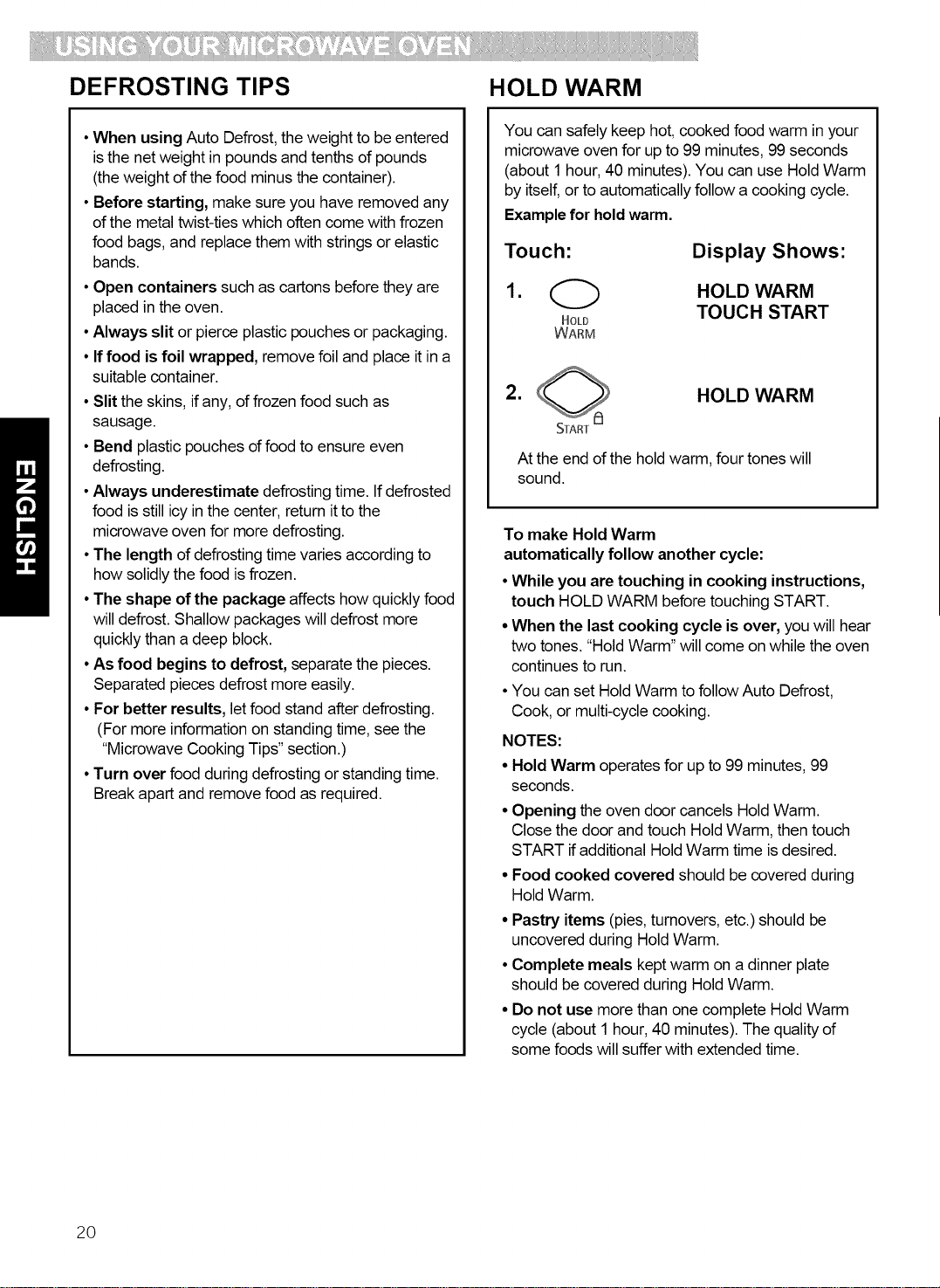
DEFROSTING TIPS HOLD WARM
• When using Auto Defrost, the weight to be entered
is the net weight in pounds and tenths of pounds
(the weight of the food minus the container).
• Before starting, make sure you have removed any
of the metal twist-ties which often come with frozen
food bags, and replace them with strings or elastic
bands.
• Open containers such as cartons before they are
placed in the oven.
• Always slit or pierce plastic pouches or packaging.
• If food is foil wrapped, remove foil and place it in a
suitable container.
• Slit the skins, if any, of frozen food such as
sausage.
• Bend plastic pouches of food to ensure even
defrosting.
• Always underestimate defrosting time. If defrosted
food is still icy in the center, return it to the
microwave oven for more defrosting.
• The length of defrosting time varies according to
how solidly the food is frozen.
• The shape of the package affects how quickly food
will defrost. Shallow packages will defrost more
quickly than a deep block.
• As food begins to defrost, separate the pieces.
Separated pieces defrost more easily.
• For better results, let food stand after defrosting.
(For more information on standing time, see the
"Microwave Cooking Tips" section.)
• Turn over food during defrosting or standing time.
Break apart and remove food as required.
You can safely keep hot, cooked food warm in your
microwave oven for up to 99 minutes, 99 seconds
(about 1 hour, 40 minutes). You can use Hold Warm
by itself, or to automatically follow a cooking cycle.
Example for hold warm.
Touch: Display Shows:
1. _ HOLD WARM
TOUCH START
HOLD
WARM
2. HOLD WARM
START
At the end ofthe hold warm,four tones will
sound.
To make Hold Warm
automatically follow another cycle:
• While you are touching in cooking instructions,
touch HOLD WARM before touching START.
• When the last cooking cycle is over, you will hear
two tones. "Hold Warm" will come on while the oven
continues to run.
• You can set Hold Warm to follow Auto Defrost,
Cook, or multi-cycle cooking.
NOTES:
• Hold Warm operates for up to 99 minutes, 99
seconds.
• Opening the oven door cancels Hold Warm.
Close the door and touch Hold Warm, then touch
START if additional Hold Warm time is desired.
• Food cooked covered should be covered during
Hold Warm.
• Pastry items (pies, turnovers, etc.) should be
uncovered during Hold Warm.
• Complete meals kept warm on a dinner plate
should be covered during Hold Warm.
• Do not use more than one complete Hold Warm
cycle (about 1 hour, 40 minutes). The quality of
some foods will suffer with extended time.
20

SURE SIMMER
Your microwave oven lets you simmer soups,
casseroles, stews, and other liquid foods. All you do
is set a simmer time and your oven wilt bring your
food to a boil and then simmer it for the time you
specify.
NOTES:
• You cannot change the cook power or doneness
for Sure Simmer.
• This function uses the sensor. The sensor needs
2 minutes 30 seconds to warm up after the oven
is connected to power or after a power failure.
If you start Sure Simmer during the warm up,
microwave energy will not be turned on until the
sensor is warm.
• When cooking vegetables, increase amount of
water to 1/4 to 1/2 cup (60 to 125ml).
• Cover dish with a hard lid, i.e., the lid that comes
with the dish or a dinner plate. Do not use plastic
wrap.
Touch:
Display Shows:
1. Place the food in the oven and
close the door.
,
,
O
SURE
SIMMER
0000
3 0 0 0
Touch Number buttons
to enter the simmer
time. Example for 30
minutes.
SURE SIMMER
ENTER COOKING
TIME
TOUCH START
30:00
, SURE SIMMER
(SENSOR)
The oven wilt bring the
food to a boil.
The food will then simmer for the time you set.
When simmering foods like pasta use a container
that can hold enough water to cover the food
completely when cooking, such as a 3-quart (12 cup)
casserole with a lid. When cooking pasta or noodles,
add 1 tbsp (15mt) oil to the water before boiling.
Use the following method:
Place container with water in the oven and follow
steps 2~4, setting the simmer time at 1 second. At
the end of the signal, place the food in the water and
stir until completely covered by water. Cover. Repeat
steps 2~4, setting the simmer time you want.
Changing instructions you can change the simmering
time while simmering by repeating steps 2, 3, and 4.
21
Using Sensor Cooking
SENSOR COOKING
SENSOR OPERATING INSTRUCTIONS
Sensor Cook allows you to cook most of your favorite
foods without selecting cooking times and power
levels. The oven automatically determines required
cooking time for each food item. When the internal
sensor detects a certain amount d humidity coming
from the food, it will tell the oven how much longer to
heat. The display will show the remaining heat time.
For best results by Sensor, following these
recommendations.
• Food cooked with the sensor system should be at
normal storage temperature.
• Glass Tray and outside of container should be dry
to assure best cooking results.
• Foods should always be covered loosely with
microwavable plastic wrap, waxed paper or a lid.
• Do not open the door or touch the "STOP/CLEAR"
key during the sensing time. When sensing time is
over, the oven beeps twice and the remaining
cooking time will appear in the display window. At
this time you can open the door to stir, turn, or
rearrange the food.
SENSOR COOKING GUIDE
Appropriate containers and coverings help assure
good Sensor cooking results.
• Always use microwavable containers and cover
them with lids or vented plastic wrap.
• Never use tight-sealing plastic covers. They can
prevent steam from escaping and cause food to
overcook.
• Match the amount to the size of the container.
Fill containers at least half full for best results.
• Be sure the outside of the cooking container and
the inside d the microwave oven are dry before
placing food in the oven. Beads of moisture turning
into steam can mislead the sensor.
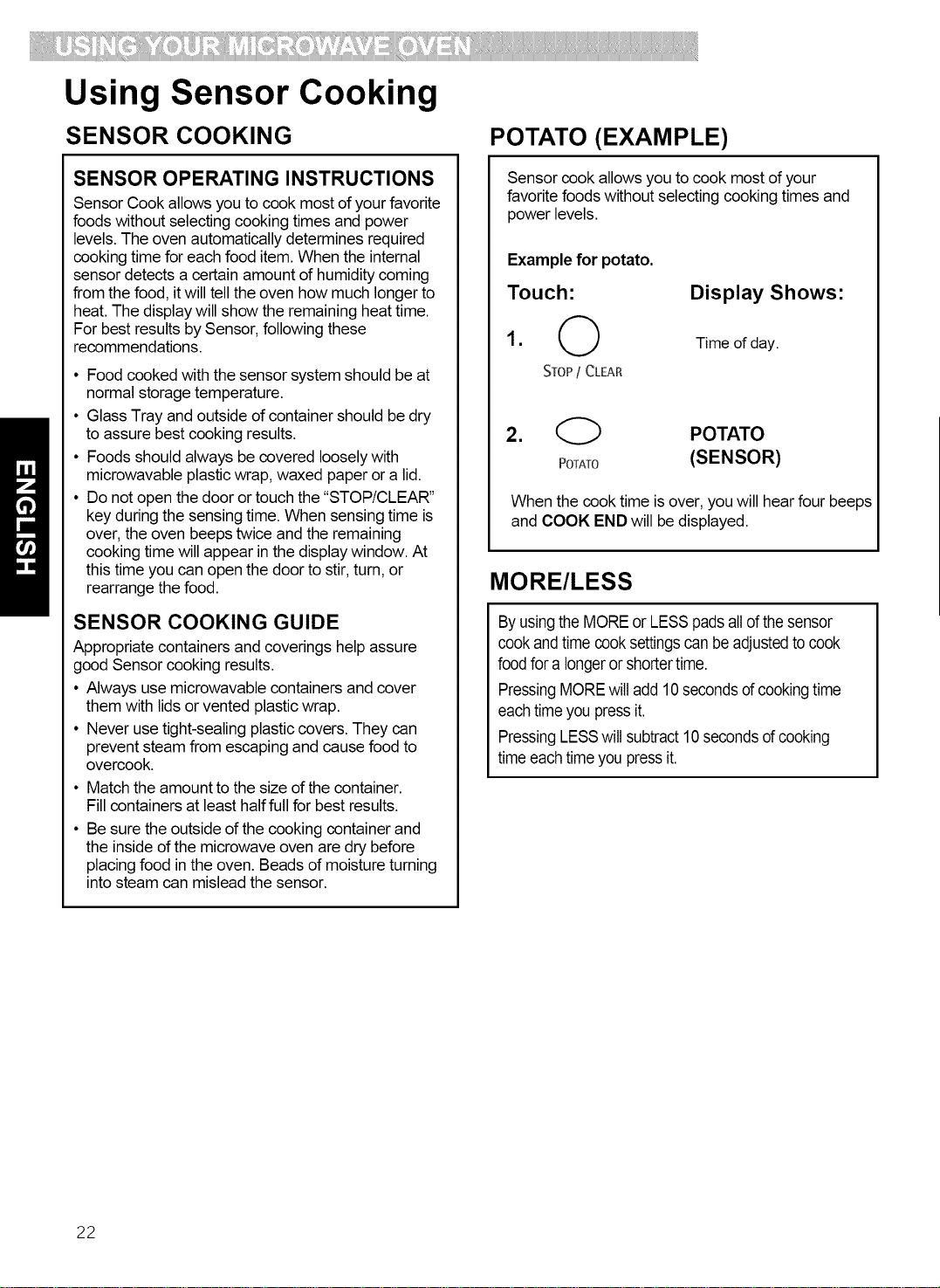
POTATO (EXAMPLE)
Sensor cook allows you to cook most of your
favorite foods without selecting cooking times and
power levels.
Example for potato.
Touch"
1. 0
STOP / CLEAR
Display Shows:
Time of day.
2. (_) POTATO
POTATO (SENSOR)
When the cook time is over, you will hear four beeps
and COOK END will be displayed.
MORE/LESS
Byusingthe MOREor LESSpadsalld thesensor
cookandtime cooksettingscan beadjustedto cook
foodfor a longeror shortertime.
PressingMOREwilladd 10secondsd cookingtime
eachtimeyoupressit.
PressingLESSwillsubtract10secondsd cooking
timeeachtimeyoupressit.
22
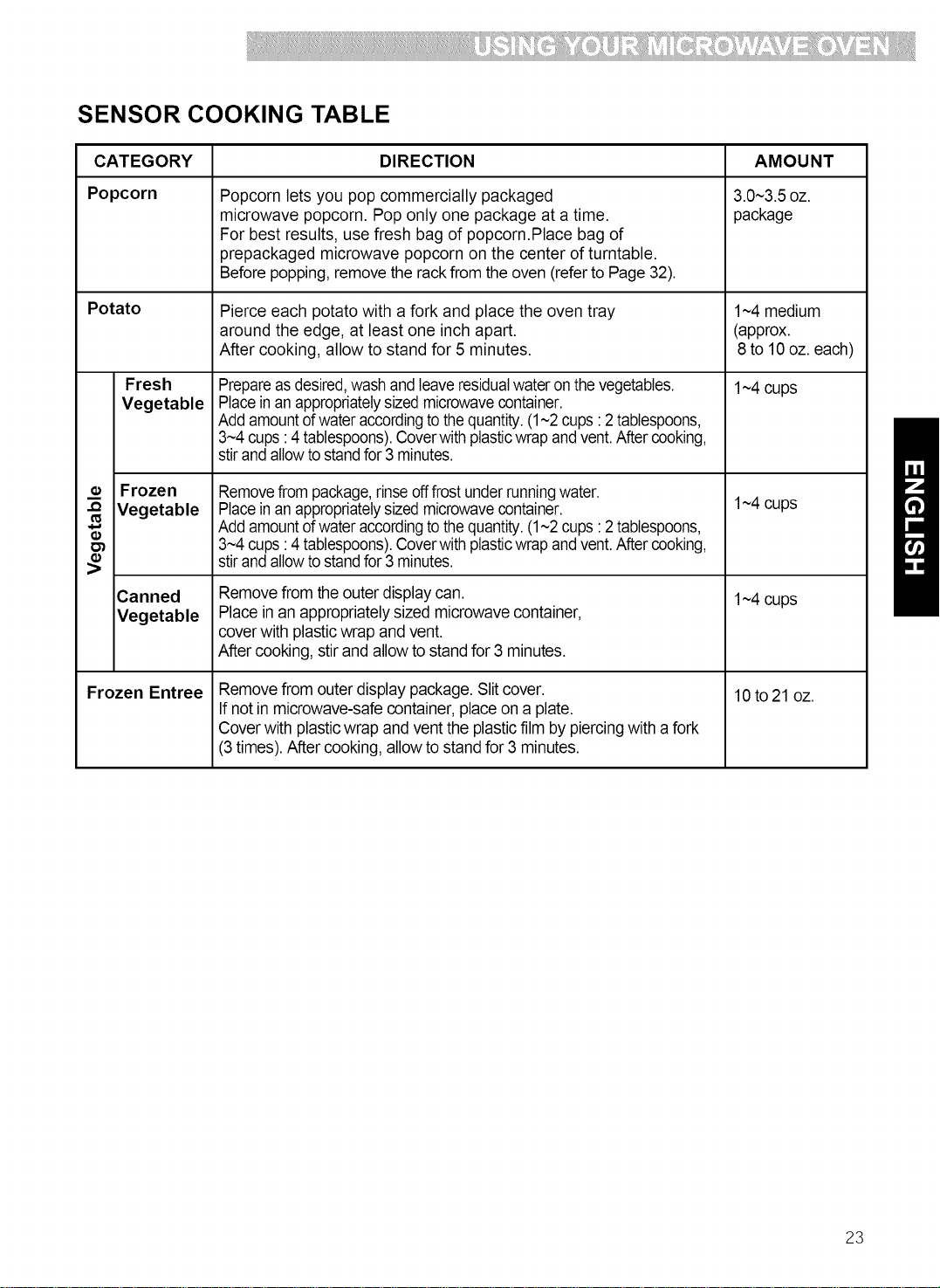
SENSOR COOKING TABLE
CATEGORY
Popcorn
Potato
Fresh
Vegetable
_¢ Frozen
-_ Vegetable
Canned
Vegetable
Frozen Entree
DIRECTION
Popcorn lets you pop commercially packaged
microwave popcorn. Pop only one package at a time.
For best results, use fresh bag of popcorn.Place bag of
prepackaged microwave popcorn on the center of turntable.
Before popping,remove the rackfrom the oven (referto Page 32).
Pierce each potato with a fork and place the oven tray
around the edge, at least one inch apart.
After cooking, allow to stand for 5 minutes.
Prepareasdesired,wash and leaveresidualwater onthevegetables.
Placein an appropriatelysizedmicrowavecontainer.
Add amountofwateraccordingtothequantity.(1~2cups :2 tablespoons,
3~4cups:4 tablespoons).Coverwith plasticwrap andvent.After cooking,
stirand allowtostandfor3 minutes.
Removefrompackage,rinseofffrost underrunningwater.
Placeinan appropriatelysizedmicrowavecontainer.
Add amountofwateraccordingtothequantity.(1~2cups :2 tablespoons,
3~4cups:4 tablespoons).Coverwith plasticwrap andvent.After cooking,
stirand allowtostandfor3 minutes.
Remove from the outer display can.
Place in an appropriately sized microwave container,
cover with plasticwrap and vent.
After cooking,stir and allowto stand for 3 minutes.
Remove from outer display package. Slit cover.
If not in microwave-safe container, placeon a plate.
Cover with plasticwrap and vent the plasticfilm by piercingwith afork
(3 times). After cooking, allowto stand for 3 minutes.
AMOUNT
3.0~3.5oz.
package
1~4medium
(approx.
8 to 10 oz. each)
1~4cups
1~4cups
1~4cups
10 to21 oz.
23
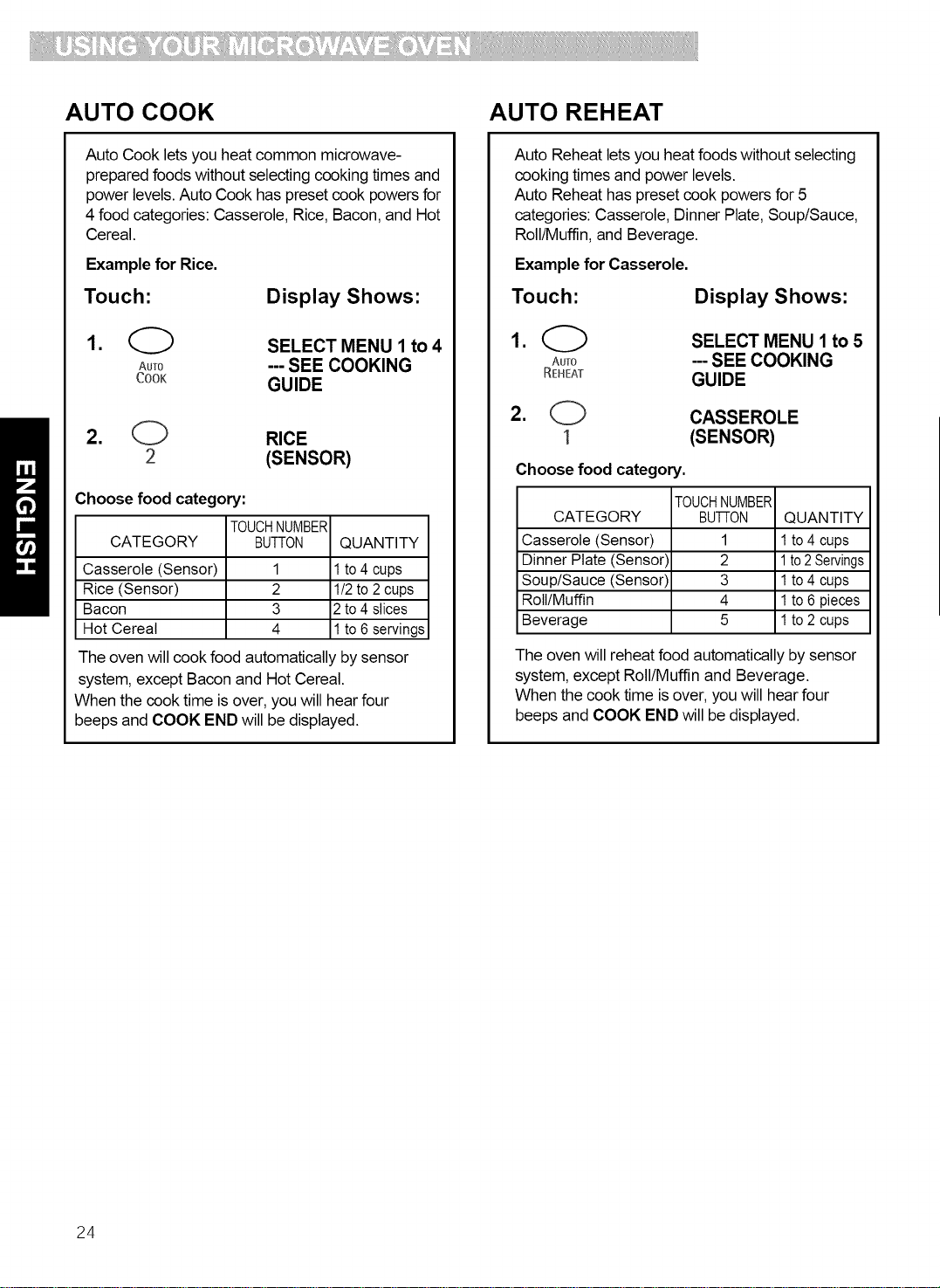
AUTO COOK
Auto Cook lets you heat common microwave-
prepared foods without selecting cooking times and
power levels. Auto Cook has preset cook powers for
4 food categories: Casserole, Rice, Bacon, and Hot
Cereal.
Example for Rice.
Touch:
Display Shows"
1. _ SELECTMENU 1 to4
AuT0 --- SEE COOKING
cook GUIDE
2. O RICE
2 (SENSOR)
Choose food category:
TOUCHNUMBER
CATEGORY BUTTON QUANTITY
Casserole (Sensor) 1 1to 4 cups
Rice (Sensor) 2 1/2 to 2 cups
Bacon 3 2 to 4 slices
Hot Cereal 4 1to 6 servings
The oven will cook food automatically by sensor
system, except Bacon and Hot Cereal.
When the cook time is over, you will hear four
beeps and COOK END will be displayed.
AUTO REHEAT
Auto Reheat lets you heat foods without selecting
cooking times and power levels.
Auto Reheat has preset cook powers for 5
categories: Casserole, Dinner Plate, Soup/Sauce,
Roll/Muffin, and Beverage.
Example for Casserole.
Touch: Display Shows:
1. O SELECT MENU 1 to 5
AuTo --- SEE COOKING
REHEAT GUIDE
2. O CASSEROLE
1 (SENSOR)
Choose food category.
TOUCHNUMBER
CATEGORY BUI-ION QUANTITY
Casserole (Sensor) 1 1to 4 cups
Dinner Plate (Sensor) 2 1to2Servings
Soup/Sauce (Sensor) 3 1 to 4 cups
Roll/Muffin 4 1 to 6 pieces
Beverage 5 1to 2 cups
The oven will reheat food automatically by sensor
system, except Roll/Muffin and Beverage.
When the cook time is over, you will hear four
beeps and COOK END will be displayed.
24

AUTO COOK TABLE
CATEGORY
Casserole
(Sensor)
Rice
(Sensor)
Bacon
Hot Cereal
FOUCHNUMBER
BUTTON DIRECTION AMOU NT
1 1~4cupsAssemble the ingredients per the recipe
ina 1~2- quart casserole.
Cover with plasticwrap and vent.
After cooking, stir and allow to stand for 3 minutes.
Placerice and twice as much liquid
(water,chicken, or vegetable stock) in a 2- quart
microwavedish.
Cover with plasticwrap and vent.
After cooking, allow tostand for 10 minutes.
Stirfor fluffier rice.
Placebacon stripson a microwave
baconrack for best results.
(Usedinner plate linedwith paper towels
ifrack isnot available)
Prepare asdirected on package and cook.
Stirwell beforeeating.
Use only instanthot cereal.
1/2~2 cups
Use medium or
long grain rice.
Cook instant rice
according to
directions on
the package.
2~4 slices
1~6servings
AUTO REHEAT TABLE
CATEGORY
Casserole
(Sensor)
Dinner Plate
(Sensor)
Soup/Sauce
(Sensor)
Roll/Muffin
Beverage
TOUCHNUMBER
BUTTON
DIRECTION
Cover dish containing the casserole
with plasticwrap and vent.
After cooking,stir and allowto stand for 3minutes.
Place on a low plate.
Cover with vented plasticwrap.
Letstand 3 minutes.
Place in shallow microwavable casserole.
Cover with vented plasticwrap.
After cooking,stir and letstand 3minutes.
Remove from display package and place on a plate.
Use a wide-mouth mug. Do not cover.
Remove from display package and place on a plate.
(Be careful!The beveragewill be very hot! Sometimes
liquidsheated in cylindricalcontainerswillsplash out
when the cup ismoved.)
AMOUNT
1~4cups
1~2servings
1~4cups
1~6pieces
(2~3oz. each)
fresh
1~2cups
(240 ml per cup)
25

SOFTEN MELT
The oven uses low power to soften foods (butter, ice
cream, cream cheese, and frozen juice)
See the following table.
Example for quart of ice cream.
Touch:
Display Shows:
1. _ Time of day.
STOP / CLEAR
2. _ SELECT MENU 1 to 4
--- SEE COOKING
SOFTEN
GUIDE
3. O ICE CREAM
2 TOUCH 1 to 3
4. 0 The display will show
2 ICECREAM
QUART once,
ICE CREAM and
Time counting down.
When the cook time isover, youwill hearfour
beepsand COOK END will be displayed.
SOFTEN TABLE
CODE CATEGORY DIRECTION AMOUNT
1 Butter Unwrap and place in 1, 2 or 3
microwavable container, sticks
Butter wilt be at room
temperature and ready
for use in recipe.
2 Ice Place container in oven. Pint,
cream Ice cream wilt be soft Quart,
enough to make Half
scooping easier, gallon
3 Cream Unwrap and place in 3 or 8 oz.
cheese microwavable Container.
Cream cheese will be at
room temperature and
ready for use in recipe.
4 Frozen Remove top. 6, 12 or
juice Place in oven. 16 oz.
Frozen juice wilt be soft
enough to easily mix with
water.
26
The oven uses low power to melt foods (butter or
margarine, chocolate, marshmallows, or processed
cheese food). See the following table.
Example for 8 oz. Chocolate.
Touch"
Display Shows:
,
.
O
STOP / CLEAR
Time of day.
SELECT MENU 1 to 4
--- SEE COOKING
MELT GUIDE
3. O CHOCOLATE
2 TOUCH 1 to 2
4. O The display will show
2 CHOCOLATE 80Z
once, CHOCOLATE and
Time counting down.
When the cook time is over, you will hear four
beeps and COOK END will be displayed.
MELT TABLE
CODE CATEGORY DIRECTION AMOUNT
1 Butter or Unwrap and place in 1, 2 or 3
Margarine microwavable container, sticks
No need to cover butter.
Stir at the end of cooking
to complete melting.
2 Chocolate Chocolate chips or 4 or 8 oz.
squares of baking
chocolate may be used.
Unwrap squares and
place in microwavable
container. Stir at the end
of cycle to complete
melting.
3 Cheese Use processed cheese 8 or 16
food only. Cut into cubes, oz.
Place in a single layer in
microwavable container.
Stir at the end of cooking
to complete melting.
4 Marshmallows Largeor miniature 5 or 10
marshmallowsmay beused. oz.
Placein microwavable
container.Stirattheend of
cycletocompletemelting.

Caring for Your Microwave Oven
To make sure your microwave oven looks good and works well for a long time, you should
maintain it properly. For proper care, please follow these instructions carefully.
For interior surfaces: Wash often with warm, sudsy
water and a sponge or
soft cloth. Use only mild,
nonabrasive soaps or a
mild detergent. Be sure
to keep the areas clean
where the door and
oven frame touch
when closed. Wipe well
with clean cloth.
Over time, stains can
occur on the surfaces as the result of food particles
spattering during cooking. This is normal.
For stubborn soil, boil a cup of water in the oven for 2
to 3 minutes. Steam will
soften the soil. To get rid
of odors inside the oven,
boil a cup of water with
some lemon juice or
vinegar in it.
To use of the metal rack:
The metal rack gives you extra space when cooking
in more than one container at the same time.
1. Place rack securely in the four plastic supports.
• Rack must not touch metal walls or back of
microwave oven.
2. Place equal amounts of food both above and
below rack.
To avoid risk of propertydamage:
1. Do not cook with rack on floor of the oven.
2. Use the metal rack when cooking equal amounts
of food at the same time.
3. Do not use rack to pop popcorn.
4. Rack must be on the four plastic supports when
used.
For exterior surfaces and control panel: Use a soft
1_ loth with spray glass
cleaner. Apply the spray
glass cleaner to the soft
cloth; do not spray
directly on the oven.
NOTE: Abrasive
cleansers, steel wool
pads, gritty wash
cloths, some paper
towels, etc., can
damage the control panel and the interior and exterior
oven surfaces.
To clean glass tray and support, wash in mild,
Glasstray
Support
Hub
sudsy water; for heavily
soiled areas use a mild
cleanser and scouring
sponge. The glass tray
and support are
dishwasher safe.
27
i
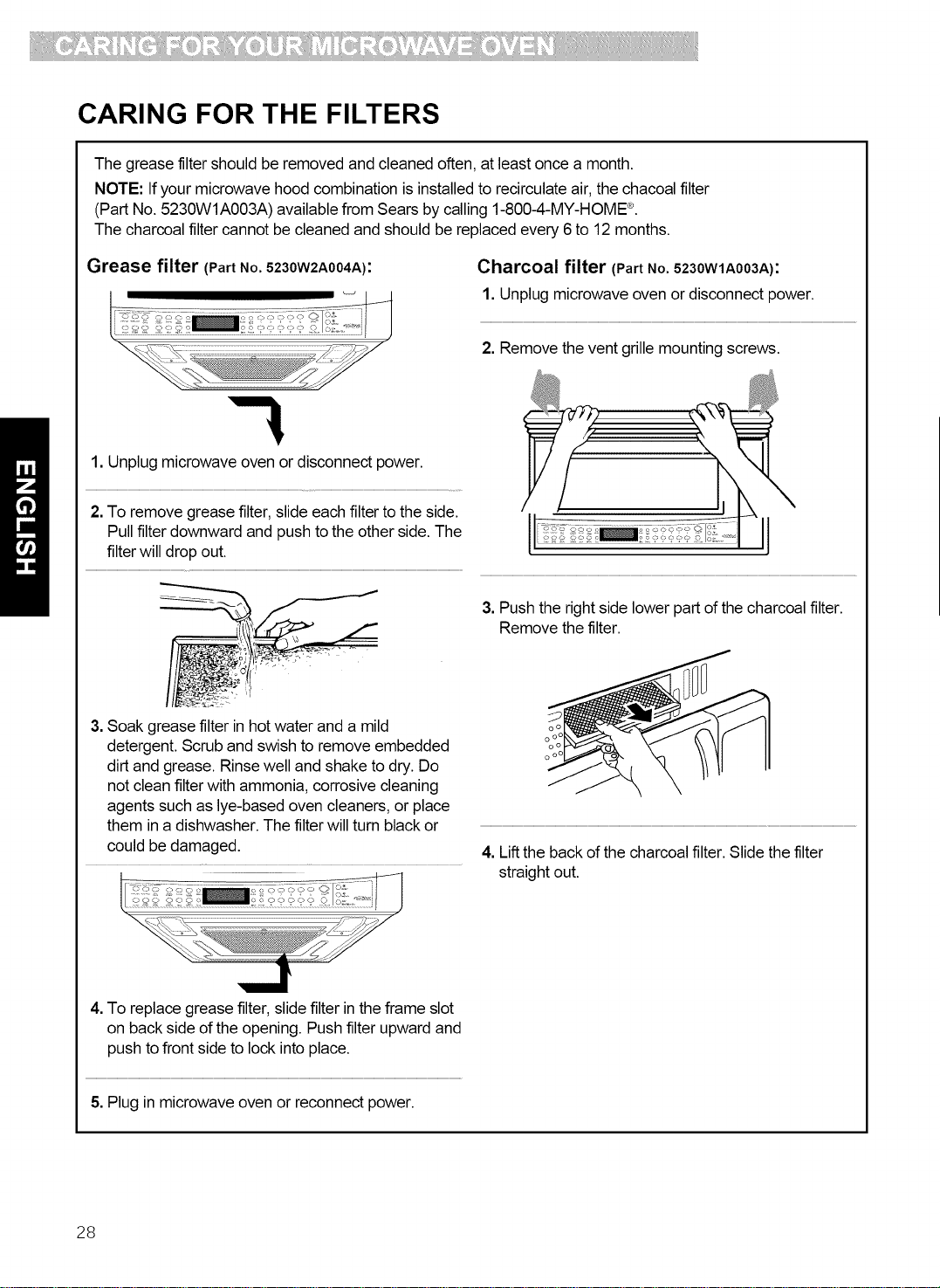
CARING FOR THE FILTERS
The grease filter should be removed and cleaned often, at least once a month.
NOTE: If your microwave hood combination is installed to recirculate air, the chacoal filter
(Part No. 5230W1A003A) available from Sears by calling 1-800-4-MY-HOME ®.
The charcoal filter cannot be cleaned and should be replaced every 6 to 12 months.
Grease filter (Part No. 5230W2A004A):
Charcoal filter (Part No. 5230W1A003A),
1. Unplug microwave oven or disconnect power.
2. Remove the vent grille mounting screws.
1. Unplug microwave oven or disconnect power.
2. To remove grease filter, slide each filter to the side.
Pull filter downward and push to the other side. The
filter will drop out.
3. Soak grease filter in hot water and a mild
detergent. Scrub and swish to remove embedded
dirt and grease. Rinse well and shake to dry. Do
not clean filter with ammonia, corrosive cleaning
agents such as lye-based oven cleaners, or place
them in a dishwasher. The filter will turn black or
could be damaged.
3. Push the right side lower part of the charcoal filter.
Remove the filter.
o o
o oo
o o
o oo
4. Lift the back of the charcoal filter. Slide the filter
straight out.
4. To replace grease filter, slide filter in the frame slot
on back side of the opening. Push filter upward and
push to front side to lock into place.
5. Plug in microwave oven or reconnect power.
28
REPLACING THE COOKTOP
AND OVEN LIGHTS
o o
oo
o o
oo
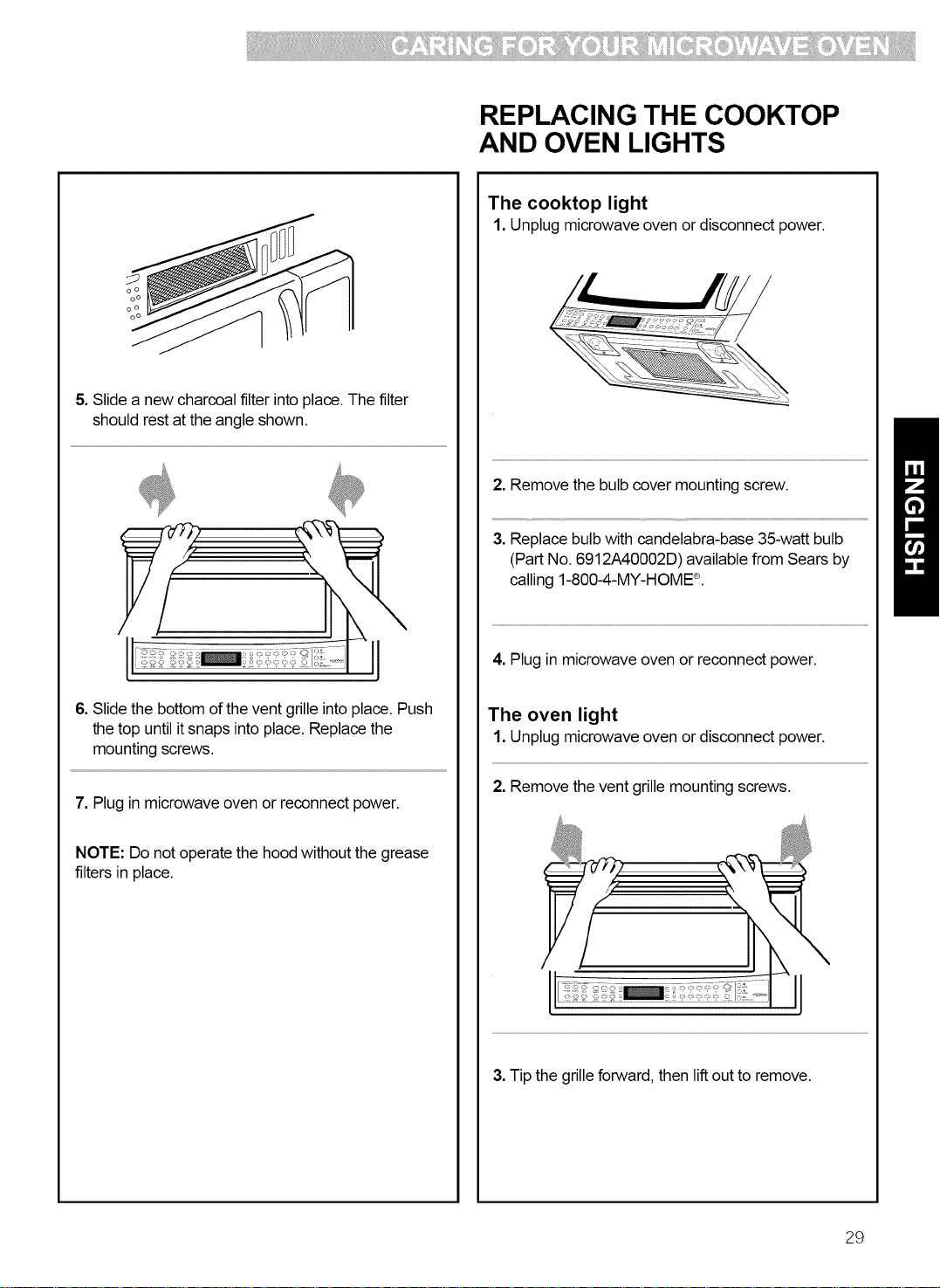
5. Slide a new charcoal filter into place. The filter
should rest at the angle shown.
6. Slide the bottom of the vent grille into place. Push
the top until it snaps into place. Replace the
mounting screws.
7. Plug in microwave oven or reconnect power.
NOTE: Do not operate the hood without the grease
filters in place.
The cooktop light
1. Unplug microwave oven or disconnect power.
2. Remove the bulb cover mounting screw.
3. Replace bulb with candelabra-base 35-watt bulb
(Part No. 6912A40002D) available from Sears by
calling 1-800-4-MY-HOME ®.
4. Plug in microwave oven or reconnect power.
The oven light
1. Unplug microwave oven or disconnect power.
2. Remove the vent grille mounting screws.
3. Tip the grille forward, then lift out to remove.
29

i
4. Lift up the bulb holder.
5. Replace the bulb with a candelabra-base 35-watt
bulb (Part No. 6912A40002D) available from Sears
by calling 1-800-4-MY-HOME ®.
6. Slide the top of the vent grille into place. Push the
bottom until it snaps into place. Replace the
mounting screws.
7. Plug in microwave oven or reconnect power.
30

MICROWAVE COOKING TIPS
Amount of food
• If you increase or decrease the amount of food
you prepare, the time it takes to cook that food will
also change. For example, if you double a recipe,
add a little more than half the original cooking time.
Check for doneness and, if necessary, add more
time in small increments.
Starting temperature of food
• The lower the temperature of the food being put
into the microwave oven, the longer it takes to cook.
Food at room temperature will be re-heated more
quickly than food at refrigerator temperature.
Composition of food
• Food with a lot of fat and sugar will be heated
faster than food containing a lot of water. Fat and
sugar will also reach a higher temperature than
water in the cooking process.
• The more dense the food, the longer it takes to
heat. "Very dense" food like meat takes longer to
heat than lighter, more porous food like sponge
cakes.
Sizeandshape
• Smaller pieces of food will cook faster than larger
pieces. Also, same-shaped pieces cook more
evenly than different-shaped pieces.
• With foods that have different thicknesses, the
thinner parts will cook faster than the thicker parts.
Place the thinner parts of chicken wings and legs in
the center of the dish.
Stirring, turning foods
• Stirring and turning foods spreads heat quickly to
the center of the dish and avoids overcooking at the
outer edges of the food.
Covering food
Cover food to:
• Reduce splattering
• Shorten cooking times
• Keep food moist
You can use any covering that lets microwaves pass
through. See "Getting to Know Your Microwave
Oven" for materials that microwaves will pass
through. Ifyou are using the Sensor function, be sure
to vent.
Releasingpressure in foods
• Several foods (for example: baked potatoes,
sausages, egg yolks, and some fruits) are tightly
covered by a skin or membrane. Steam can build up
under the membrane during cooking, causing the
food to burst. To relieve the pressure and to prevent
bursting, pierce these foods before cooking with a
fork, cocktail pick, or toothpick.
Usingstanding time
• Always allow food to stand after cooking.
Standing time after defrosting and cooking allows
the temperature to evenly spread throughout the
food, improving the cooking results.
• The length of the standing time depends on how
much food you are cooking and how dense it is.
Sometimes it can be as short as the time it takes
you to remove the food from the oven and take it to
the serving table. However, with larger, denser food,
the standing time may be as long as 10 minutes.
Arranging food
For best results, place food evenly on the plate. You
can do this in several ways:
• If you are cooking several items of the same
food, such as baked potatoes, place them in a ring
pattern for uniform cooking.
• When cooking foods of uneven shapes or
thickness, such as chicken breasts, place the
smaller or thinner area of the food towards the
center of the dish where it will be heated last.
• Layer thin slices of meat on top d each other.
• When you cook or reheat whole fish, score the
skin - this prevents cracking.
• Do not let food or a container touch the top or sides
of the oven. This will prevent possible arcing.
Using aluminumfoil
Metal containers should not be used in a microwave
oven. There are, however, some exceptions. If you
have purchased food which is prepackaged in an
aluminum foil container, refer to the instructions on
the package. When using aluminum foil containers,
cooking times may be longer because microwaves
will only penetrate the top of the food. If you use
aluminum containers without package instructions,
follow these guidelines:
31

iii ii:i!i!i:i !!!!! ....
MICROWAVE COOKING TIPS (CONT.)
Using aluminum foil (cont.)
• Place the container in a glass bowl and add some
water so that it covers the bottom of the container,
not more than 1/4 in. (.64 cm) high. This ensures
even heating of the container bottom.
• Always remove the lid to avoid damage to the
oven.
• Use only undamaged containers.
• Do not use containers taller than 3/4 in. (1.9 cm).
• Container must be at least half filled.
• To avoid arcing, there must be a minimum 1/4 in.
(.64 cm) between the aluminum container and the
walls of the oven and also between two aluminum
containers.
• Always place the container on the turntable.
• Shield with small pieces of aluminum foil, parts of
food that may cook quickly, such as wing tips and
leg ends of poultry.
• Heating food in aluminum foil containers usually
takes up to double the time compared to reheating
in plastic, glass, china, or paper containers.
The time when food is ready will vary depending
upon the type of container you use.
• Let food stand for 2 to 3 minutes after heating so
that heat is spread evenly throughout container.
Cookingyou should notdo inyour
microwaveoven
• Do not do canning of foods in the oven. Closed
glass jars may explode, resulting in damage to the
oven.
• Do not use the microwave oven to sterilize objects
(baby bottles, etc.). It is difficult to keep the oven at
the high temperature needed for sterilization.
Removing the rack
• When popping commercially packaged popcorn,
Remove the rack from the oven; Do not place the
bag of microwave popcorn on the rack or under the
rack.
• In the case of popping microwave popcorn with
rack, that can cause the fire or damage to your
microwave oven.
32

Questions and Answers
QUESTIONS ANSWERS
Can I operate my microwave oven without the glass No. If you remove or move the glass tray, you
tray or move the glass tray over to hold a large dish? will get poor cooking results. Dishes used in
your oven must fit on the glass tray.
Can I use either metal or aluminum pans in my
microwave oven?
Is it normal for the glass tray to move in either
direction?
Sometimes the door of my microwave oven appears
wavy. Is this normal?
Why does the dish become hot when I microwave
food in it? I thought that this should not happen.
What does "standing time" mean?
Why does steam come out of the air exhaust vent?
Can Ipop popcorn inmy microwave oven?
How do Iget the best results?
You can use aluminum foil for shielding (use
small, flat pieces), small skewers, and shallow
foil trays (if tray is not taller than 3/4 in. [1.9 cm]
deep and is filled with food to absorb microwave
energy). Never allow metal to touch walls or
door.
Yes. The glass tray moves from side to side,
depending on the rotation of the motor when the
cooking cycle begins.
This appearance is normal and does not affect
the operation of your oven.
As the food becomes hot it will conduct the heat
to the dish. Be prepared to use hot pads to
remove food after cooking.
"Standing time" means that food should be
removed from the oven and covered for
additional time to allow it to finish cooking. This
frees the oven for other cooking.
Steam is normally produced during cooking. The
microwave oven has been designed to vent this
steam out the vents.
Yes. Pop packaged microwave popcorn
following manufacturer's guidelines. Do not use
regular paper bags.
Do not repop unpopped kernels. Do not pop
popcorn in glass cookware.
33

Troubleshooting
Most cooking problems often are caused by little things you can find and fix without tools of any kind. Check the
lists below and on the next page before calling for assistance or service. If you still need help, call Sears Service
at 1-800-4-MY-HOME ®.
MICROWAVE OVEN DOES NOT WORK
PROBLEM CAUSE
Nothing works. • The power supply cord is not plugged into a grounded 3 prong outlet. (See the
Electrical Requirements" section on page 6 and the "Electrical connection"
section on Page 8.)
• A household fuse has blown or a circuit breaker has tripped.
• The electric company has had a power failure.
The microwave oven will
not run.
• You are using the oven as a timer. Touch STOP/CLEAR to cancel the Kitchen
Timer.
• The door is not firmly closed and latched.
• You did not touch START.
• You did not follow directions exactly.
• An operation that you set earlier is still running. Touch STOP/CLEAR to cancel
that operation.
COOKING TIMES
PROBLEM CAUSE
Food is notcooked
enough.
• The electric supply to your home or wall outlets is low or lower than normal. Your
electric company can tell you if the line voltage is low. Your electrician or service
technician can tell you if the outlet voltage is low.
• The cook power is not at the recommended setting.
Check the chart on Page 16.
The display shows a time • The oven door is not closed completely.
counting down but the oven • You have set the controls as a kitchen timer. Touch STOP/CLEAR to cancel the
is not cooking. Kitchen Timer.
34

GLASS TRAY
PROBLEM CAUSE
The glass tray will not
move.
• The glass tray is not correctly in place. It should be correct-side up and sitting
firmly on the center hub.
• The support is not operating correctly. Remove the glass tray and restart the
oven. Ifthe hub still does not move, call Sears Service at 1-800-4-MY-HOME ®.
Cooking without the glass tray can give you poor results.
TONES
PROBLEM CAUSE
You do not hear • You have not entered the correct command.
the programming or
end-of-cycle tone.
DISPLAY MESSAGES
PROBLEM CAUSE
The display is flashing" : ." • There has been a power interruption. Reset the clock. (See the "Clock" section
on Page 12.)
If none of these items are causing your problem, call Sears Service at 1-800-4-MY-HOME ®.
35