
Write the modeland serialnumber here:
Model#
Serial #
Find these numberson a labelof the
refrigerator'scabinet onthe left hand-side wall.
ER'$
I
TO
RS265L**
RS267L**
RS269L**
INSTALLAT
CONTENTS
SAFETY_RNII"VGSIGNS...............................................................2
OPERA77NG INSTRUCTIONS ........................................................4
SETTINGUPTHE REFRIGERATOR.........................................................4
MAJORFEATURES.....................................................................................4
CONTROLPANEL........................................................................................5
DIGITALPANEL...........................................................................................6
TEMPERATURECONTROL.......................................................................7
ICEandCOLDWATERDISPENSER.........................................................7
SHELVESandBINS.....................................................................................8
FOODSTORAGEGUIDE ...........................................................................9
CoolSelectZoneTM DrawerGUIDE.............................................................11
REMOVINGTHE FREEZERACCESSORIES..........................................13
REMOVINGTHE REFRIGERATORACCESSORIES..............................13
CLEANINGTHE ACCESSORIES.............................................................14
CHANGINGTHE INTERIORLIGHT.........................................................15
WATERFILTER..........................................................................................16
DOORS.......................................................................................................16
INSTALLATION L'VSTR UCTIONS................................................17
INSTALLATIONOFTHE REFRIGERATOR.............................................17
REMOVINGTHE REFRIGERATORDOORS...........................................18
REATTACHINGTHE REFRIGERATORDOORS......................................21
LEVELINGTHE REFRIGERATOR............................................................24
ADJUSTINGTHECLEARANCEBETWEENTHE DOORS....................25
CHECKINGTHEWATERDISPENSERLINE...........................................26
INSTALLATIONOFTHEWATERDISPENSERLINE...............................27
TROUBLESHOOTING...............................................................................29
7
CONSlg_IER SbPPORT ....................................................................30
WARRANTY...............................................................................................30
In the U.S.for questions about features,
operation/performance, parts, accesories or service, call:
1-800-726-7864 (1-800-SAMSUNG)
www.samsung.oom
DA99-O1278A REV(0.4)
WARNING
,, Beforeoperatingtheappliance,pleasereadandretainthismanualthoroughlybr yourreference.
,, Becausethesefollowingoperatinginstructionscovervariousmodels,thecharacteristicsofyourrefrigerator
maydifferslightlyfromthosedescribedinthismanual.
,,Theapplianceisnotintendedforusebychildrenor infirmpersonswithoutadultsupervision.
,,Childrenshouldbesupervisedtoensurethattheydonotplaywiththeappliance.
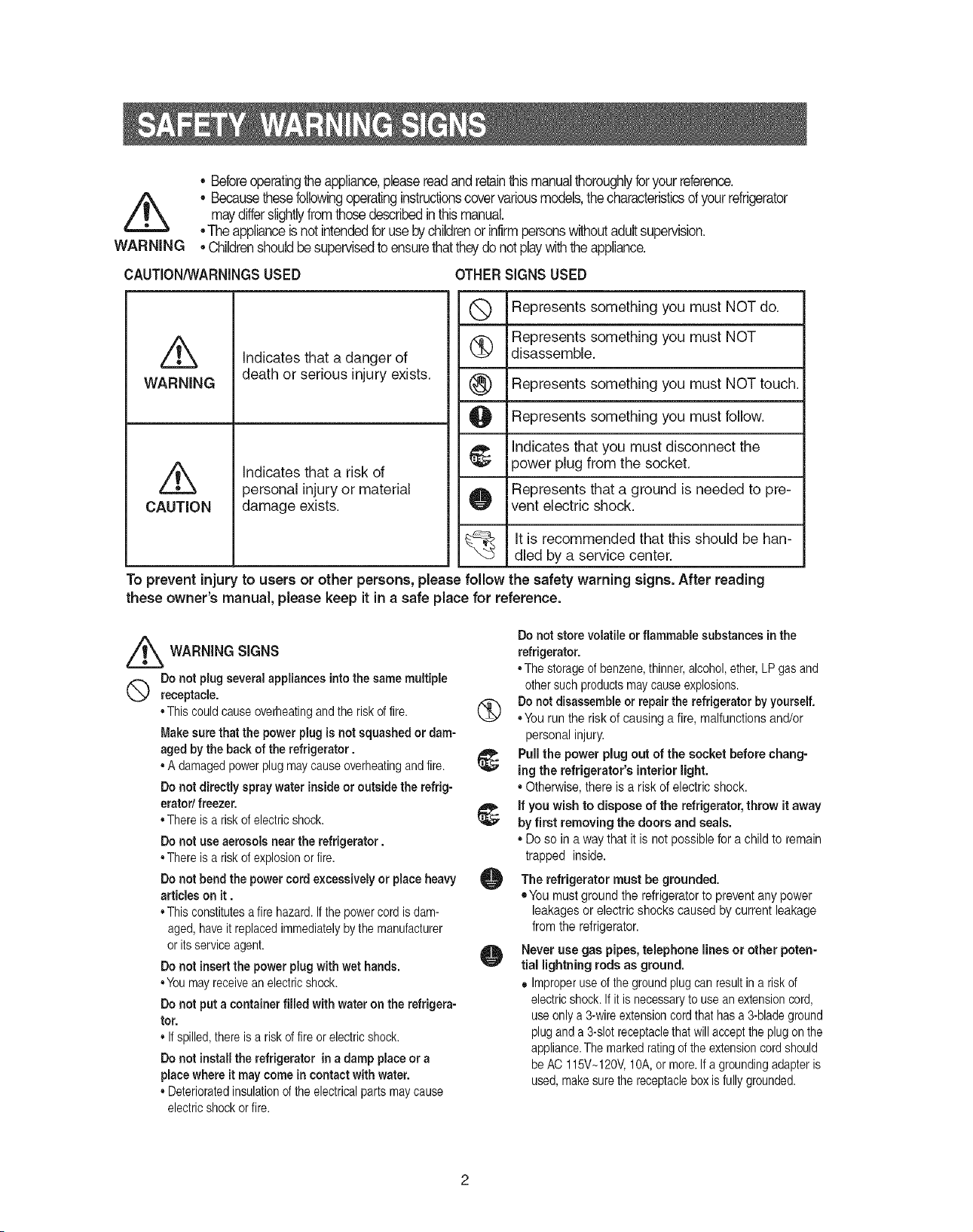
CAUTION/WARNINGSUSED OTHERSIGNS USED
WARNING
CAUTION
Indicates that a danger of
death or serious injury exists.
indicates that a risk of
personal injury or material
damage exists.
Q Represents something you must NOTdo.
Represents something you must NOT
(_ disassemble.
®
O iRepresents something you must follow.
Indicates that you must disconnect the
power plug from the socket.
Represents that a ground is needed to pre-
O vent electric shock.
iRepresents something you must NOT touch.
It is recommended that this should be han-
dled by a service center.
To prevent injury to users or other persons, please follow the safety warning signs. After reading
these owner's manual, please keep itin a safe place for reference.
_ WARNING SIGNS
Donot plugseveralappliancesintothe samemultiple
Q receptacle.
•This couldcauseoverheatingandthe riskoffire.
Makesure that the powerplug isnot squashedordam-
aged bythe back of the refrigerator.
• Adamagedpowerplugmaycauseoverheatingand fire.
Do not directly spray water insideor outside the refrig-
erator/ freezer.
•Thereis ariskofelectricshock.
Donot use aerosols nearthe refrigerator.
•Thereis ariskofexplosionor fire.
Do not bend the powercord excessively or placeheavy
articles on it.
•This constitutesafire hazard.Ifthe powercordisdam-
aged,haveit replacedimmediatelybythe manufacturer
or itsserviceagent.
Donot insertthe power plugwithwet hands.
•Youmayreceiveanelectricshock.
Do not put a container filled with wateron the refrigera-
tor.
• Ifspilled,thereis ariskoffireor electricshock.
Do not installthe refrigerator ina damp placeor a
placewhereit may comein contact withwater.
• Deterioratedinsulationofthe electricalpartsmaycause
electricshockorfire.
Donot storevolatileor flammable substancesinthe
refrigerator.
•Thestorageof benzene,thinner,alcohol,ether,LPgasand
othersuchproductsmaycauseexplosions.
1_ Do not disassembleor repairthe refrigeratorbyyourself.
•You runthe riskof causinga fire, malfunctionsand/or
personalinjury.
Pullthe power plugout of the socket before chang-
ing the refrigerator's interiorlight.
• Otherwise, there is a riskof electric shock.
if you wish to dispose of the refrigerator,throw it away
by first removing the doors and seals.
• Doso in away that it is not possible forachild to remain
trapped inside.
O The refrigeratormust be grounded.
• Youmust ground the refrigeratorto preventany power
leakagesor electric shockscaused bycurrent leakage
fromthe refrigerator.
O Never use gas pipes,telephone lines or other poten-
tial lightningrods as ground.
• Improperuseofthe groundplugcan resultina risk of
electricshock.Ifit isnecessaryto useanextensioncord,
useonlya3-wireextensioncordthathasa 3-bladeground
plugand a 3-slotreceptaclethat willacceptthe plugonthe
appliance.Themarkedratingofthe extensioncordshould
beAC 115V~120V,10A,or more.If a groundingadapteris
used,makesurethe receptacleboxisfully grounded.
®
®
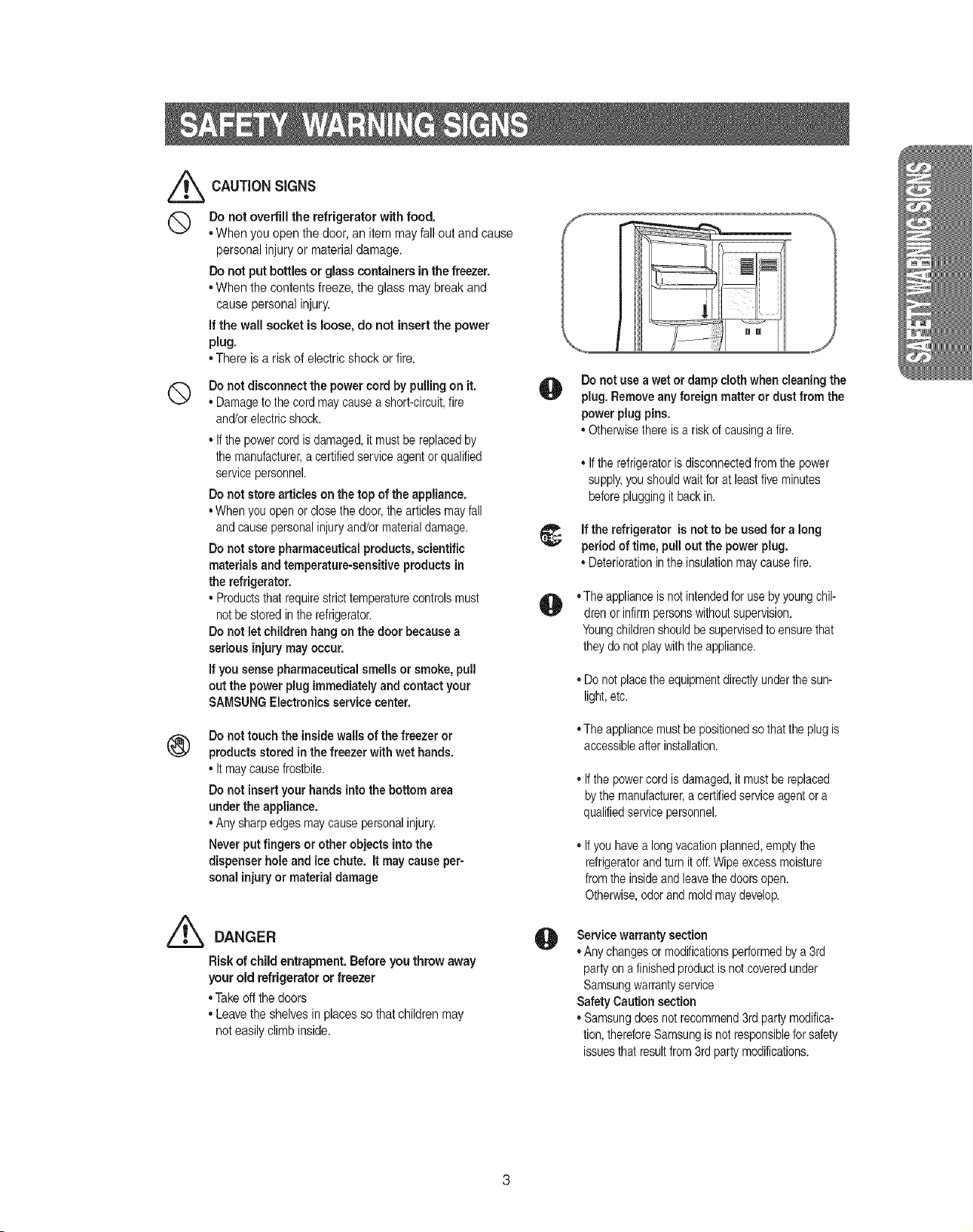
CAUTIONSIGNS
Donot overfill the refrigerator with food.
• When you openthe door,an item mayfall out and cause
personalinjury or material damage.
Do not put bottles or glass containers in the freezer.
• When the contents freeze,the glass may breakand
cause personalinjury.
if the wall socket is loose, do not insert the power
plug.
• There isa risk of electricshock or fire.
Donot disconnect the powercord by pulling on it.
• Damagetothe cordmaycauseashort-circuit,fire
and/orelectricshock.
• Ifthe powercordisdamaged,it mustbe replacedby
the manufacturer,acertifiedserviceagentor qualified
servicepersonnel.
Do not storearticles on the top of the appliance.
•Whenyouopenor closethe door,the articlesmayfall
andcausepersonalinjuryand/ormaterialdamage.
Do not storepharmaceutical products, scientific
materials and temperature-sensitive products in
the refrigerator.
• Productsthatrequirestricttemperaturecontrolsmust
not bestoredinthe refrigerator.
Do not let children hang on thedoor becausea
serious injurymay occur.
If you sensepharmaceutical smellsor smoke,pull
out the power plug immediately andcontact your
SAMSUNGElectronics servicecenter.
Do not touch the insidewalls of the freezeror
products storedinthe freezer with wet hands.
• Itmaycausefrostbite.
Do not insert your hands into the bottom area
under the appliance.
• Anysharpedgesmaycausepersonalinjury.
Neverput fingers or other objects intothe
dispenser hole and icechute, it maycause per-
sonalinjuryor materialdamage
Z_ DANGER
Risk of child entrapment. Before you throw away
your old refrigerator or freezer
•Takeoffthe doors
• Leavethe shelves inplaces sothat childrenmay
not easilyclimbinside.
O
Do not use awetor damp cloth when cleaning the
plug.Removeany foreign matteror dust from the
powerplugpins.
• Otherwisethere isa riskofcausingafire.
• Ifthe refrigeratorisdisconnectedfromthe power
supply,youshouldwaitforat leastfive minutes
beforepluggingit backin.
t_ if the refrigeratoris not to be usedfor along
periodof time, pullout the power plug.
• Deteriorationinthe insulationmaycausefire.
O
O
• Theapplianceisnot intendedfor usebyyoungchil-
drenor infirmpersonswithoutsupervision.
Youngchildrenshouldbesupervisedtoensurethat
theydonotplaywiththe appliance.
• Do notplacethe equipmentdirectlyunderthesun-
light,etc.
• Theappliancemustbepositionedsothattheplugis
accessibleafterinstallation.
,,Ifthe powercordisdamaged,it mustbereplaced
bythe manufacturer,a certifiedserviceagentora
qualifiedservicepersonnel.
,,Ifyou havea longvacationplanned,emptythe
refrigeratorandturn itoff.Wipeexcessmoisture
fromthe insideandleavethedoorsopen.
Otherwise,odorandmoldmaydevelop.
Servicewarranty section
• Anychangesormodificationsperformedbya 3rd
partyonafinishedproductisnotcoveredunder
Samsungwarrantyservice
SafetyCaution section
• Samsungdoesnotrecommend3rdpartymodifica-
tion,thereforeSamsungisnot responsibleforsafety
issuesthat resultfrom3rdpartymodifications.
Once you haveperformedthe following steps, yourrefrigerator should befully operational. If not,check
the power supply and electricity source, if you have any questions, contact your SAIVlSUNG
service center.
Placethe refigeratorin an appropriate
locationwith reasonableclearance
between thewall andthe refrigerator.
(referto installationinstructionsin this
manual)
When the refrigerator is plugged in,
the interior light should come on when
you open the doors.
Setthe temperaturecontrolto thecoldest
temperatureand wait for an hour.The
freezershouldget slightlychilledandthe
motor shouldrunsmoothly.
Oncethe refrigeratortemperatureis suffi-
cientlylow,youcan store foodinthe
refrigerator.After startingthe refrigerator,it
takesafew hoursto reachthe appropriate
temperature.
iiii[] [] iii_i
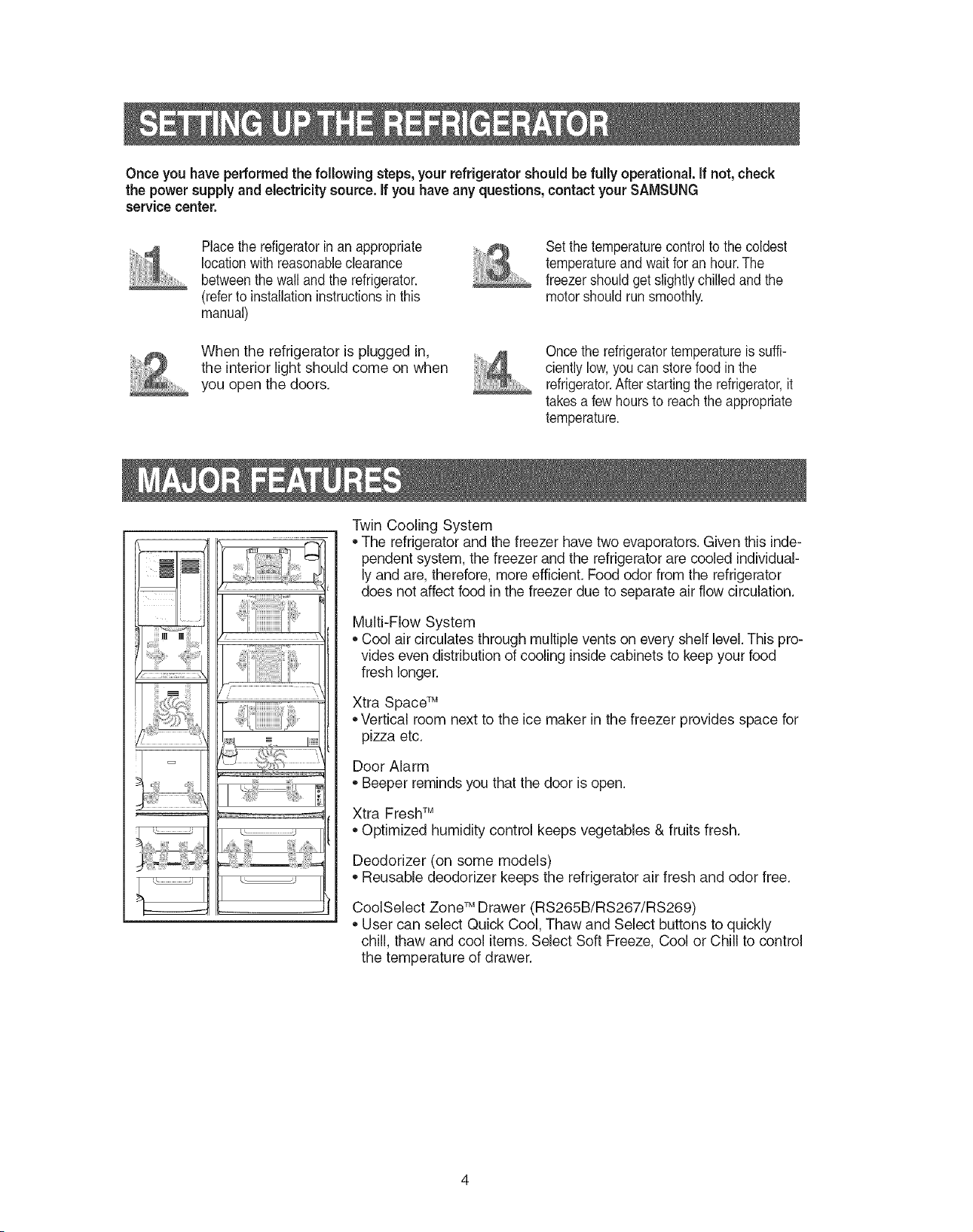
Twin Cooling System
,,The refrigerator and the freezer have two evaporators. Given this inde-
pendent system, the freezer and the refrigerator are cooled individual-
ly and are, therefore, more efficient. Food odor from the refrigerator
does not affect food in the freezer due to separate air flow circulation.
Multi-Flow System
,, Cool air circulates through multiple vents on every shelf level. This pro-
vides even distribution of cooling inside cabinets to keep your food
fresh longer.
Xtra Space TM
,,Vertical room next to the ice maker in the freezer provides space for
pizza etc.
Door Alarm
,, Beeper reminds you that the door is open.
Xtra FreshTM
,, Optimized humidity control keeps vegetables & fruits fresh.
Deodorizer (on some models)
,, Reusable deodorizer keeps the refrigerator air fresh and odor free.
CoolSelect ZoneTM Drawer (RS265B/RS267/RS269)
,, User can select Quick Cool, Thaw and Select buttons to quickly
chill, thaw and cool items. Select Soft Freeze, Cool or Chill to control
the temperature of drawer.
RS26:
Fridge
Ice Type Child Lock
Filter Ii_dicator Cubed Crushed I_Of{
Ice Water
RS265/R $267 B**/RS267/RS269L**
Power Cool
Ice Type
Filter Indicator Cubed Crushed Ice Off
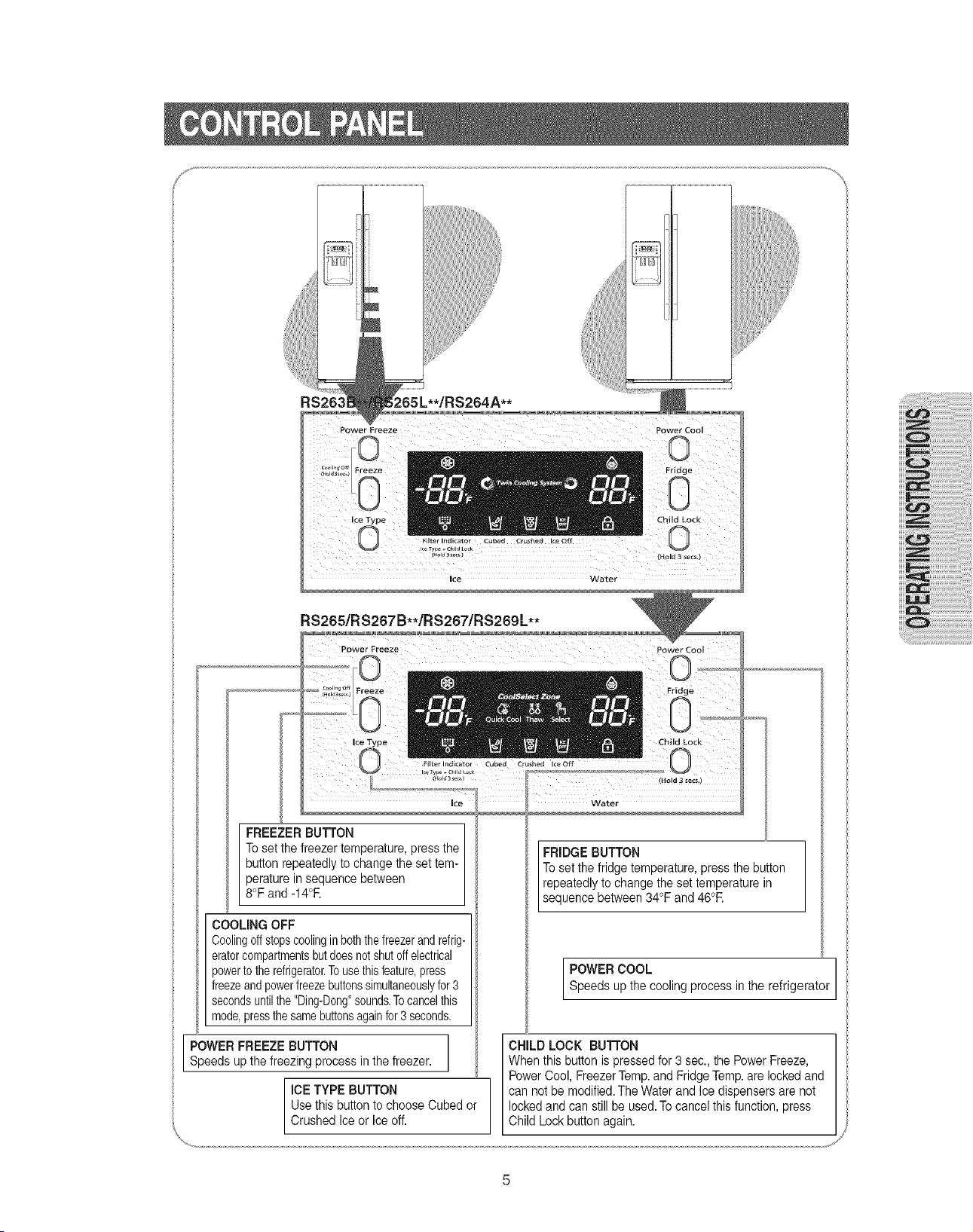
FREEZERBUTTON
Toset the freezer temperature,pressthe
button repeatedlyto change the set tem-
peraturein sequence between
8°Fand -14°R
COOLING OFF
Coolingoffstopscoolingin boththefreezerandrefrig-
eratorcompartmentsbutdoesnotshutoffelectrical
powertotherefrigerator.Tousethisfeature,press
freezeandpowerfreezebuttonssimultaneouslyfor3
secondsuntilthe"Ding-Dong"sounds.Tocancelthis
mode,pressthesamebuttonsagainfor3seconds.
POWER FREEZEBUTTON
Speeds upthe freezing process in the freezer.
ICETYPE BUTTON
Use this button to chooseCubed or
Crushed Iceor leeoff.
Child Lock
_Hold3_ecs,)
RIDGE BUTTON
Toset the fridge temperature,pressthe button
repeatedlyto change the set temperature in
sequencebetween 34 F and46 R
POWERCOOL I
Speeds upthe cooling process inthe refrigerator i
CHILD LOCK BUTTON
When thisbutton is pressedfor 3sec., the PowerFreeze, I
PowerCool, FreezerTemp.andFridgeTemp.are lockedand i
can not be modified.The Water and Ice dispensersare not 'i
locked andcan stillbe used.Tocancelthis function, press
Child Lock button again.
or
RS263B**! RS265L**! RS264A** RS265/RS267B**/RS267/RS269L**
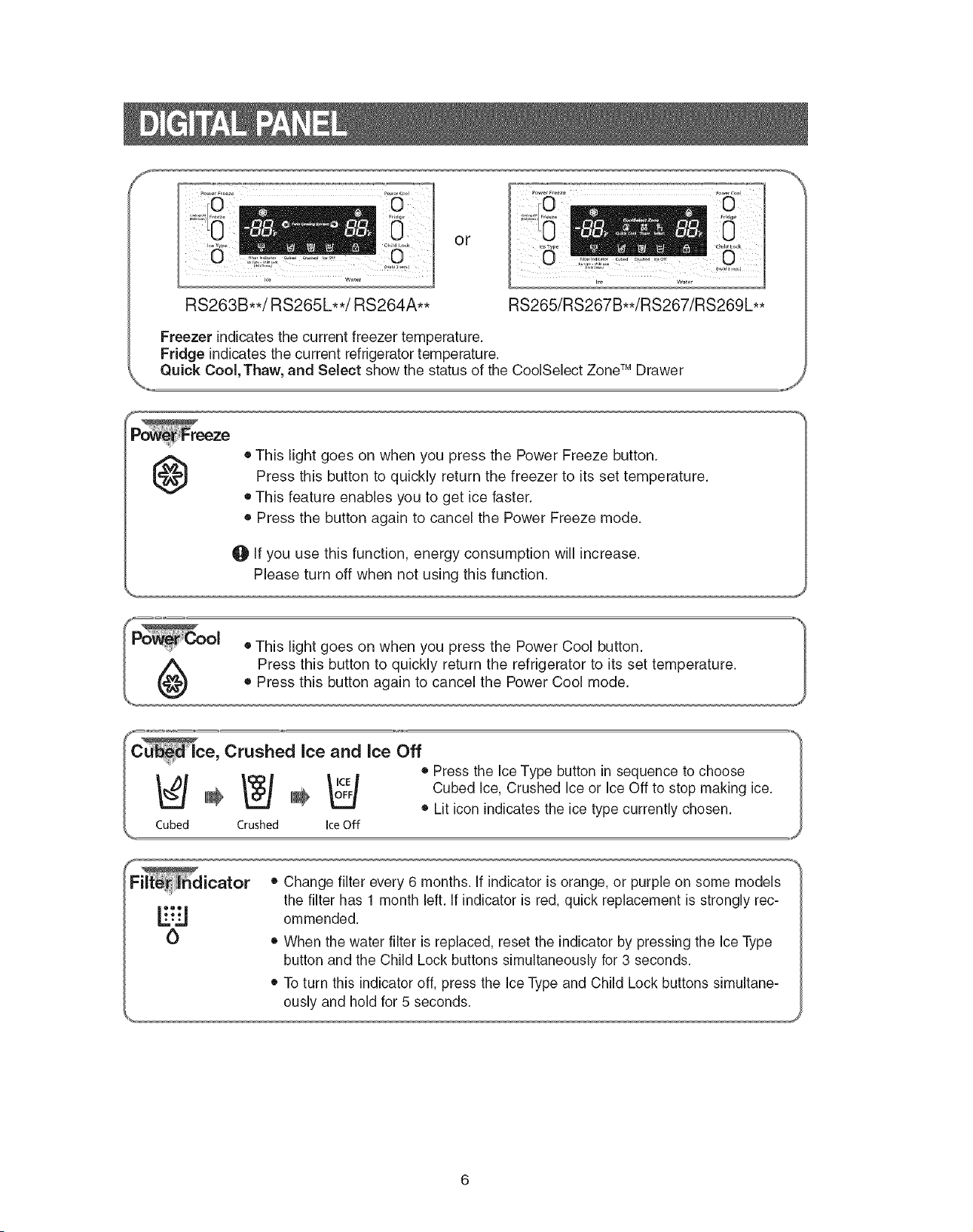
Freezer indicates the current freezer temperature.
Fridge indicates the current refrigerator temperature.
Quick Cool, Thaw, and Select show the status of the CoolSelect ZoneTM Drawer
@
• This light goes on when you press the Power Freeze button.
Press this button to quickly return the freezer to its set temperature.
• This feature enables you to get ice faster.
• Press the button again to cancel the Power Freeze mode.
O If you use this function, energy consumption will increase.
Please turn off when not using this function.
e, Crushed Ice and Ice Off
. • Press the Ice Type button in sequence to choose
I_I=I_I=Io_:4 CubedIce,CrushedIceorIceOfftostopmakingice._
_ _ • Lit icon indicates the ice type currently chosen i
Cubed Crushed Ice Off ,,,,J
• Change filter every 6 months. If indicator is orange, or purple on some models
the filter has 1 month left. If indicator is red, quick replacement is strongly rec-
L.'%'._ ommended.
O • When the water filter is replaced, reset the indicator by pressing the Ice Type
button and the Child Lock buttons simultaneously for 3 seconds.
• To turn this indicator off, press the Ice Type and Child Lock buttons simultane-
ously and hold for 5 seconds.
Freezer
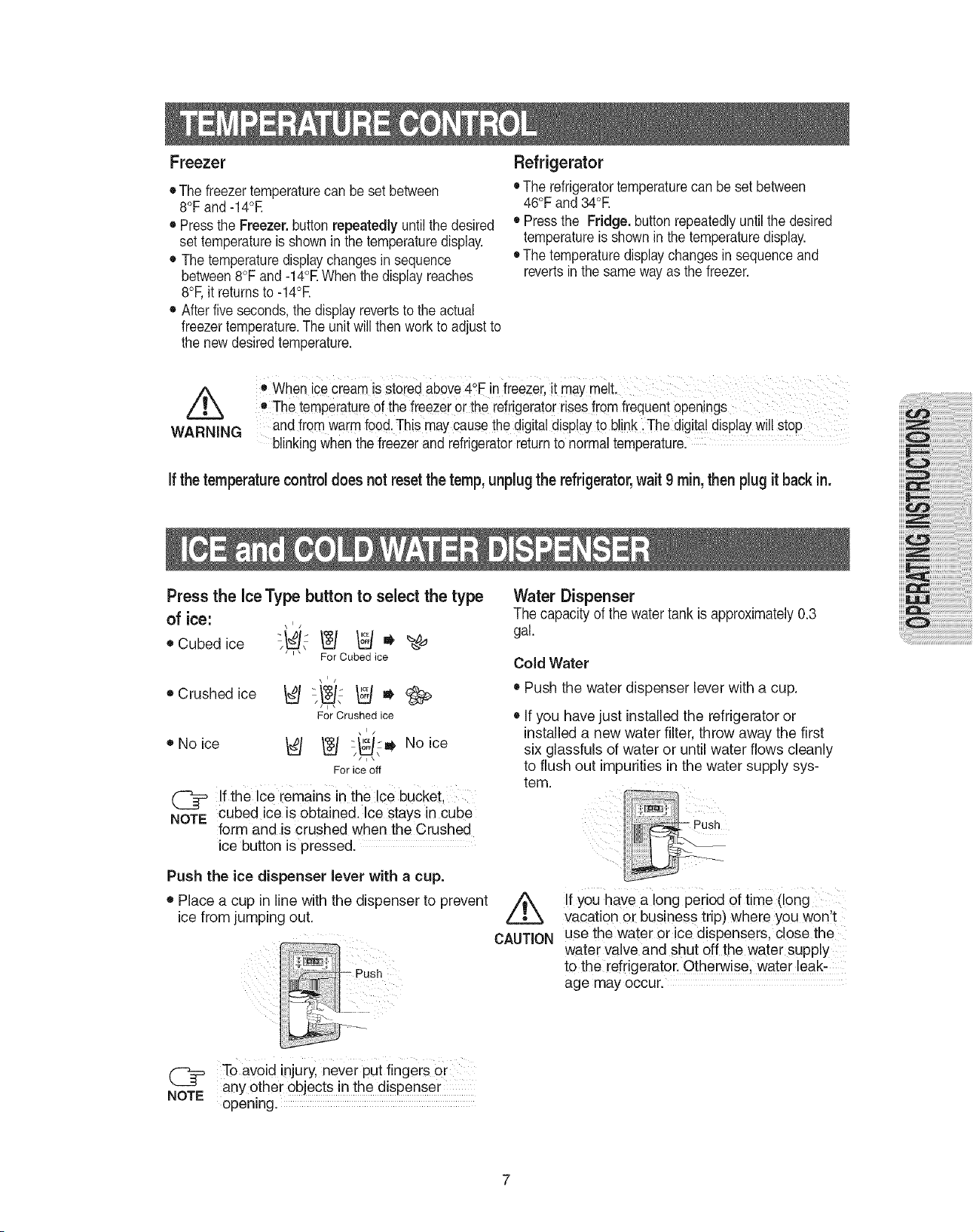
• The freezertemperaturecan be set between
8°Fand-14°E
• Press the Freezer,buttonrepeatedly untilthe desired
set temperatureisshown in the temperaturedisplay.
• The temperaturedisplaychanges in sequence
between 8°Fand-14°EWhen thedisplay reaches
8°F,it returnsto -14°E
• After five seconds,the displayrevertsto theactual
freezertemperature.The unitwill thenwork to adjust to
the newdesiredtemperature.
Refrigerator
• Therefrigeratortemperaturecan besetbetween
46°Fand34°E
• Press the Fridge. buttonrepeatedlyuntilthe desired
temperatureisshown in the temperaturedisplay.
• Thetemperaturedisplaychangesin sequenceand
revertsinthe sameway asthe freezer.
/k
WARNING
• When ice cream isstored above4°Finfreezer it may melt.
e The temperatureOfthefreezer or the refrigeratorrisesfrom frequent Qpenings
andfrom warmfood,Thismaycause thedigital disPlayto blinki-i-he digitaldisplayWillStop
blinking whenthe freezer and refrigeratorreturnto normaltemperature.
Ifthetemperaturecontrol doesnot resetthe temp,unplugthe refrigerator,wait 9 rain,thenplugitbackin.
Press the IceType button to select the type
of ice:
\1/
• Cubed ice "_," _ _ " _,_
' ' For Cubed ice
• Crushedice
• No ice
For Crushed ice
\1/
/__J __/ "_ No ice
For ice off
If the ce remains in the Ice bucket.
NOTE_ cubed ice is obtained. Ice stays in cube
form and is crushed when the Crushed
ice button is oressed.
Push the ice dispenser lever with a cup.
• Place a cup in line with the dispenser to prevent
ice from jumping out.
C2
NOTE
Push
To aVoid injury, never Put fingeis or
anY other objects in the dispense r
opening.
Water Dispenser
The capacity of the water tank is approximately 0.3
gal.
Cold Water
• Push the water dispenser lever with a cup.
• If you have just installed the refrigerator or
installed a new water filter, throw away the first
six glassfuls of water or until water flows cleanly
to flush out impurities in the water supply sys-
tem.
\
CAUTION
If you have a long period of time (long
vacation or business trip) where you won't
use the water or ice dispensers, close the
water valve and shut off the water supply
to the refrigerator. Otherwise, water !eak:
age may occur.
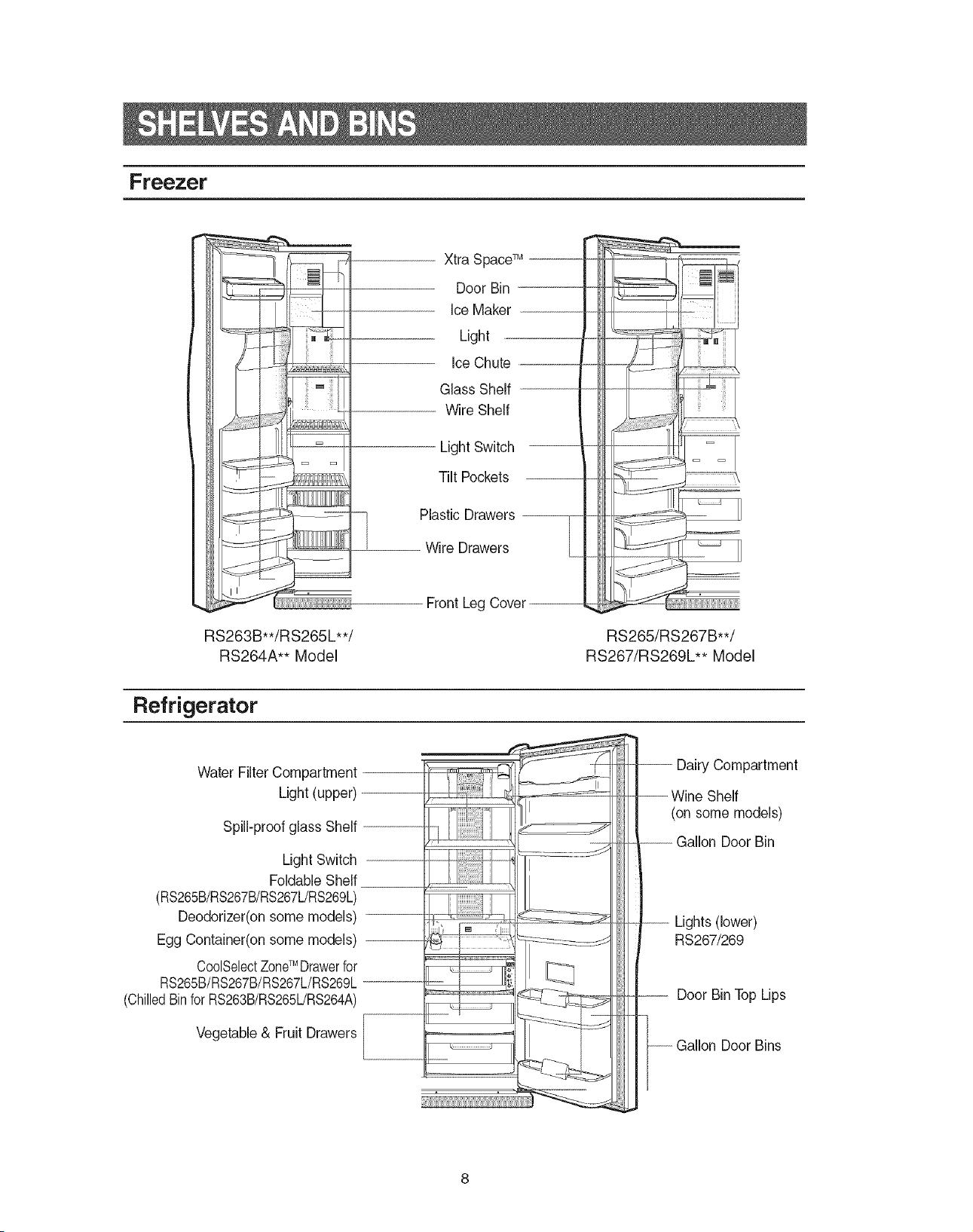
Freezer
RS263B**/RS265L**/
RS264A** Model
Xtra Space TM '
Door Bin
Ice Maker
Light
Ice Chute
Glass Shelf
Wire Shelf
Light Switch
Tilt Pockets
Plastic Drawers ----------------------------
T
.................................-Wire Drawers
Front Leg Cover
i
i
RS265/RS267B**/
RS267/RS269L** Model
Refrigerator
Water Filter Compartment
Light (upper)
Spill-proof glass Shelf
Light Switch
Foldable Shelf
(RS265B/RS267B/RS267L/RS269L)
Deodorizer(on some models)
Egg Container(on some models)
CoolSelectZoneTM Drawerfor
RS265B/RS267B/RS267L/RS269L
(ChilledBinforRS263B/RS265L/RS264A)
Vegetable & Fruit Drawers
Door Bins
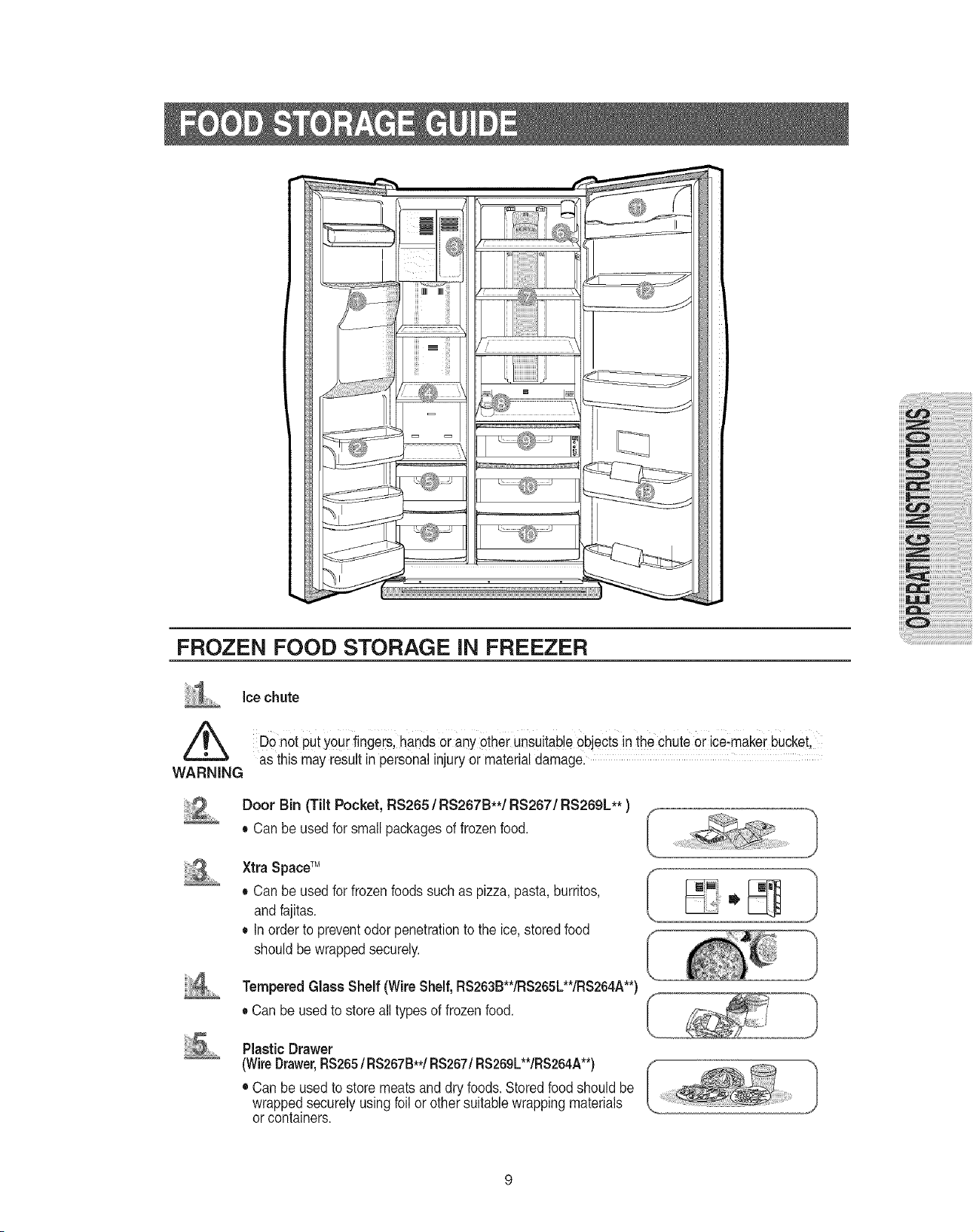
FROZEN FOOD STORAGE iN FREEZER
ice chute
DOnot putyourfingeiSl handsor anyetherunsuitableObjectsin the chute0i iceimakerbucketl
asthis may resultin personal injuryor material damagel
WARNING
Door Bin (Tilt Pocket, RS265 / RS267B**/RS267/RS269L** )
• Canbe usedforsmall packagesof frozenfood.
Xtra Space TM
• Canbe usedforfrozen foods such as pizza,pasta,burritos,
and fajitas.
• Inorder to preventodorpenetrationto the ice,storedfood
shouldbe wrappedsecurely.
iiii!i ,,.......
Tempered Glass Shelf (Wire Shelf,RS263B**/RS265L**/RS264A**)
• Can be usedto store all typesof frozenfood.
PlasticDrawer
(WireDrawer,RS265/RS267B**/RS267/RS269L**/RS264A**)
• Can be used tostore meats and dryfoods.Storedfoodshould be
wrappedsecurelyusingfoil or othersuitablewrappingmaterials
or containers.
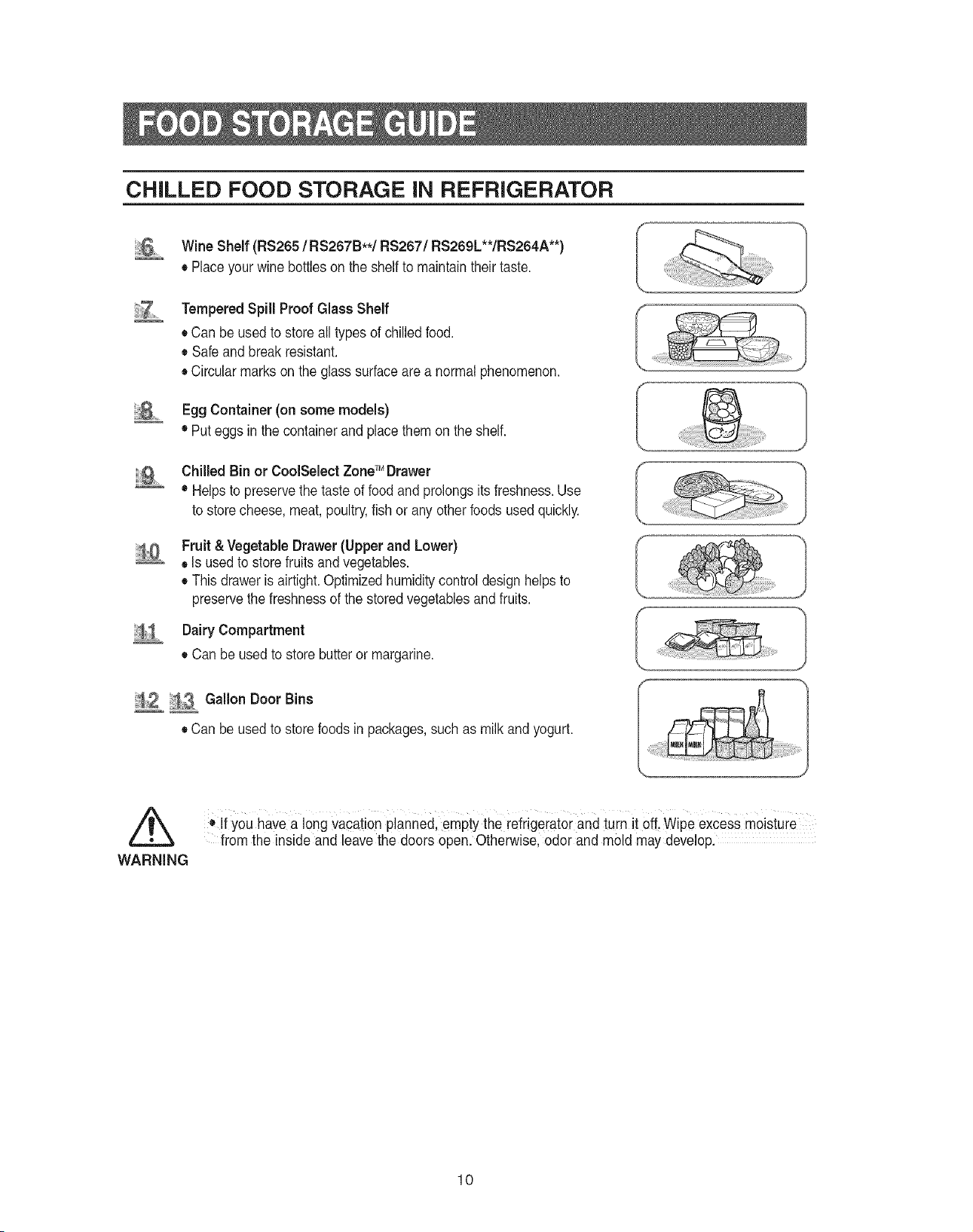
CHILLED FOOD STORAGE iN REFRIGERATOR
Wine Shelf (RS265 / RS267B**/RS267/RS269L**/RS264A**)
• Placeyourwine bottlesonthe shelfto maintaintheirtaste.
Tempered Spill Proof Glass Shelf
• Canbe usedto store all typesof chilledfood.
• Safeand breakresistant.
• Circularmarks on theglass surfaceare a normalphenomenon.
Egg Container (on some models)
• Puteggs in the containerandplacethem on the shelf.
1
Chilled Bin or CoolSelect ZoneTM Drawer
• Helps to preservethe tasteof foodand prolongsitsfreshness.Use
to storecheese, meat,poultry,fish or anyotherfoods used quickly.
Fruit &Vegetable Drawer(Upper and Lower)
• Is usedto store fruitsand vegetables.
• This draweris airtight.Optimizedhumiditycontroldesign helpsto
preservethe freshnessof the storedvegetablesand fruits.
Dairy Compartment
• Can be used tostore butter or margarine.
i02 113 Gallon Door Bins
• Canbe usedto storefoodsin packages,such asmilk and yogurt.
WARNING
o If you havea long vacation planned, empty the refrigerator andturn itofLWipe excess moisture
from the inside andleave the doors open.Otherwise, odor and mold may develop.
10
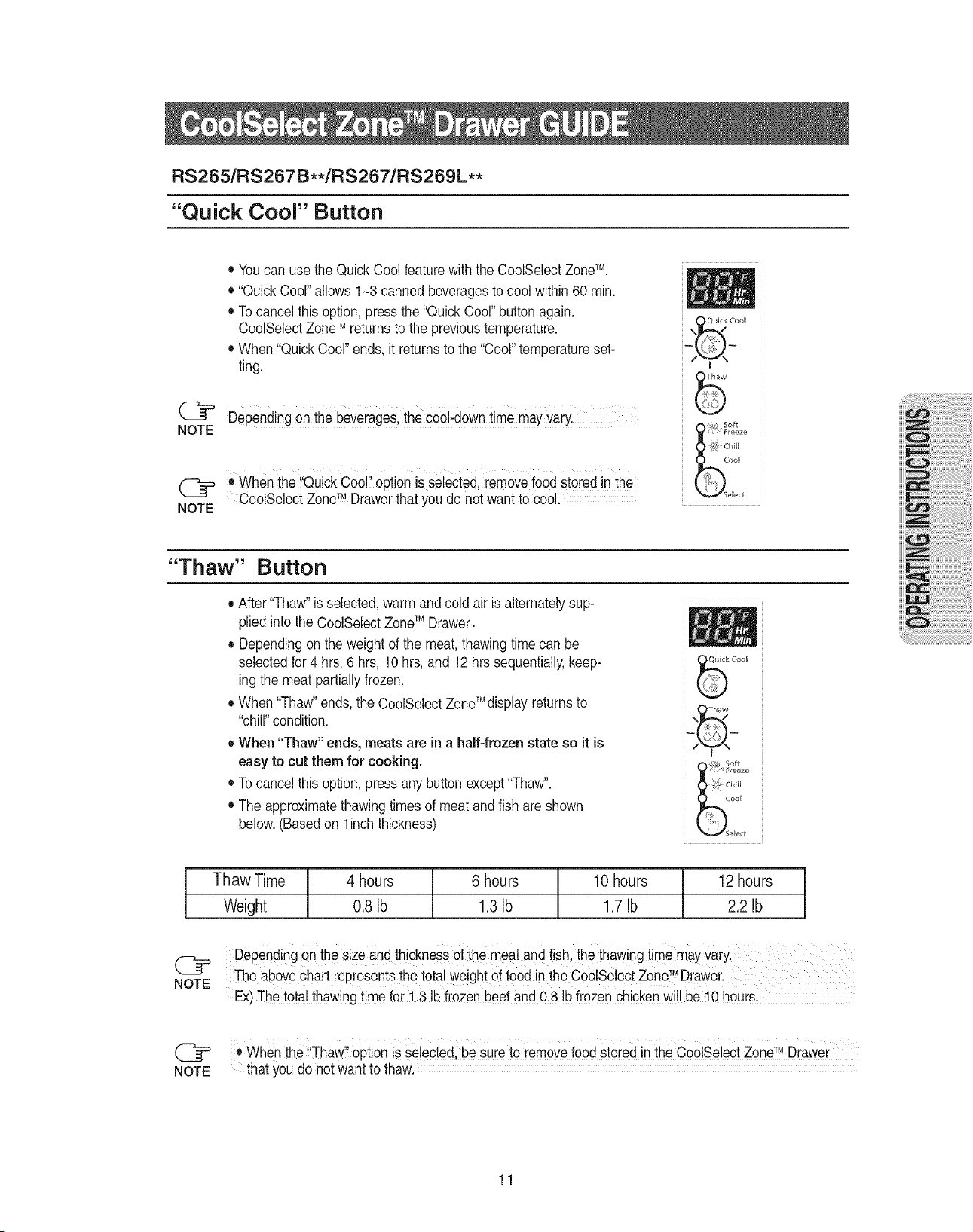
RS2651RS267B**/RS267/RS269L **
"Quick Cool" Button
NOTE
NOTE
• Youcan usethe QuickCool featurewiththe CoolSelectZoneTM.
• "Quick Cool"allows 1-3 canned beveragesto cool within60 rain.
• Tocancel this option, press the"Quick Cool"buttonagain.
CoolSelectZoneTM returnsto the previoustemperature.
• When"QuickCool"ends, itreturns to the"Cool"temperatureset-
ting.
Dependingonthe beverageslthe co01-downtime mayvary.
When the Quick Cool opt!onis selected,remove foodstoredinthe
CoolSelectZoneTMDrawerthat you do not wantto cool.
"Thaw" Button
• After "Thaw"isselected, warm and coldair isalternatelysup-
plied intothe CoolSelectZoneTM Drawer.
• Dependingon the weightof the meat,thawingtime can be
selectedfor4 hrs,6hrs, 10hrs, and 12hrssequentially,keep-
ing the meat partiallyfrozen.
• When"Thaw"ends, the CoolSelectZoneTM display returnsto
"chill"condition.
• When "Thaw" ends, meats are in a half-frozen state so it is
easy to cut them for cooking.
• Tocancel this option, press anybutton except"Thaw".
• Theapproximatethawingtimesof meat and fish are shown
below.(Basedon 1inchthickness)
Thaw Time 4 hours 6 hours 10hours 12hours
Weight 0.8 Ib 1.3Ib 1.7Ib 2.2 Ib
C]_p DependingOnthesize and thicknessOfthe meat and fish,thethawing time mayVary.
TM
NOTE The above chart represents the total weight offood in the CoolSeJect Zone D[awer.
Ex)The tota! thawing time for 1,3 Ibfrozen beef and 0.8 !bfrozen chicken willbelO hours.
Cr
NOTE
Ii 11 TM
• Whenthe Thaw option isselected,besureto removefoodstored in theCoolSelectZone Drawer
that you do not want to thaw.
11
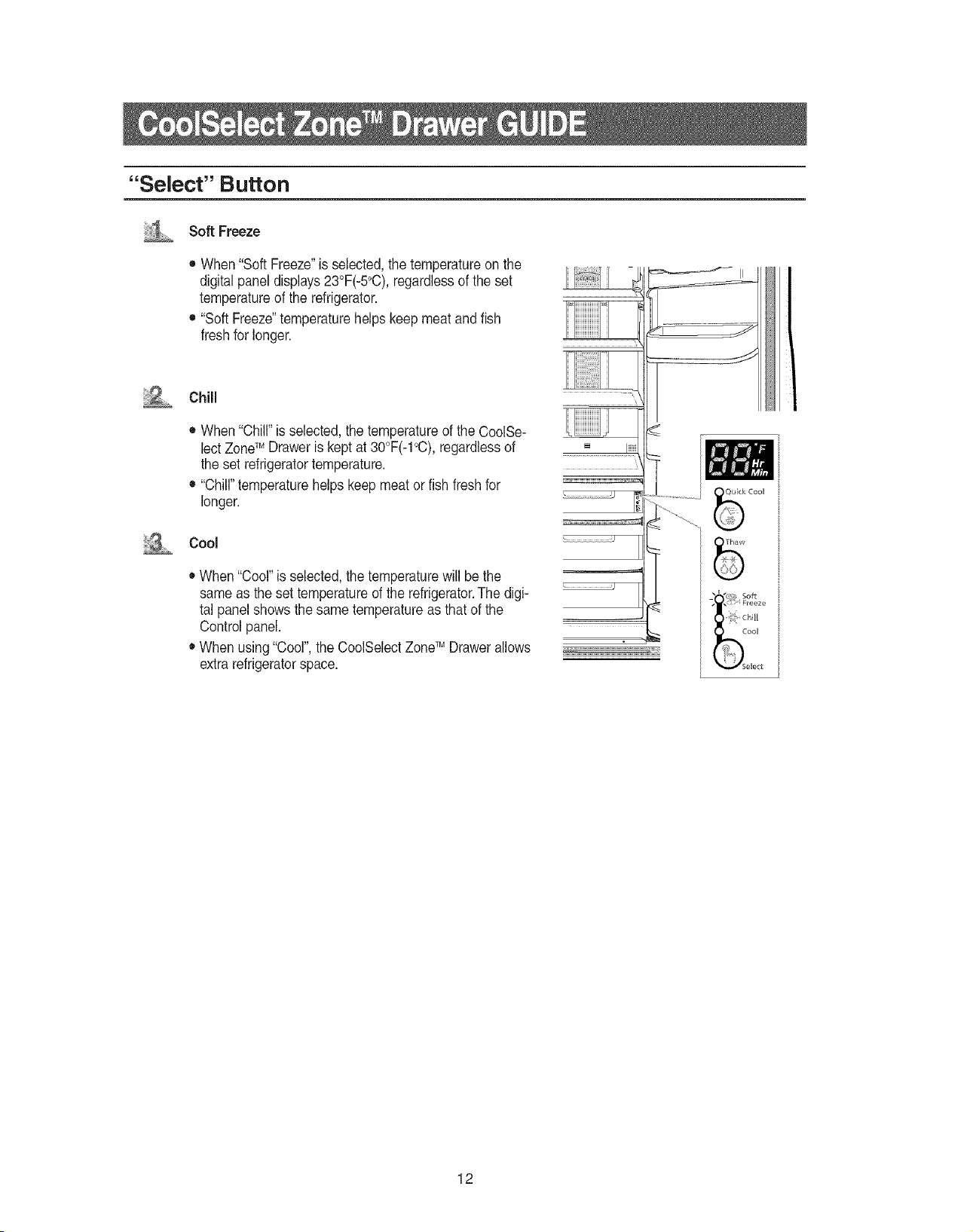
"Select" Button
i'i_ Soft Freeze
iii;
iiiiil
• When"Soft Freeze"is selected,the temperatureon the
digitalpaneldisplays23°F(-5°C),regardlessof the set
temperatureofthe refrigerator.
• "Soft Freeze"temperaturehelpskeepmeatandfish
freshfor longer.
Chill
• When"Chill"is selected,thetemperatureofthe CoolSe-
lect ZoneTM Draweris kept at30°F(-1°C),regardlessof
the set refrigeratortemperature.
• "Chill"temperaturehelpskeep meat or fish freshfor
longer.
Cool
• When"Cool"is selected,the temperaturewill be the
same as the set temperatureof the refrigerator.The digi-
tal panel showsthesame temperatureas that ofthe
Control panel.
• When using"Cool",the CoolSelectZoneTM Drawerallows
extra refrigeratorspace.
_!__i!_i_
12
iiii
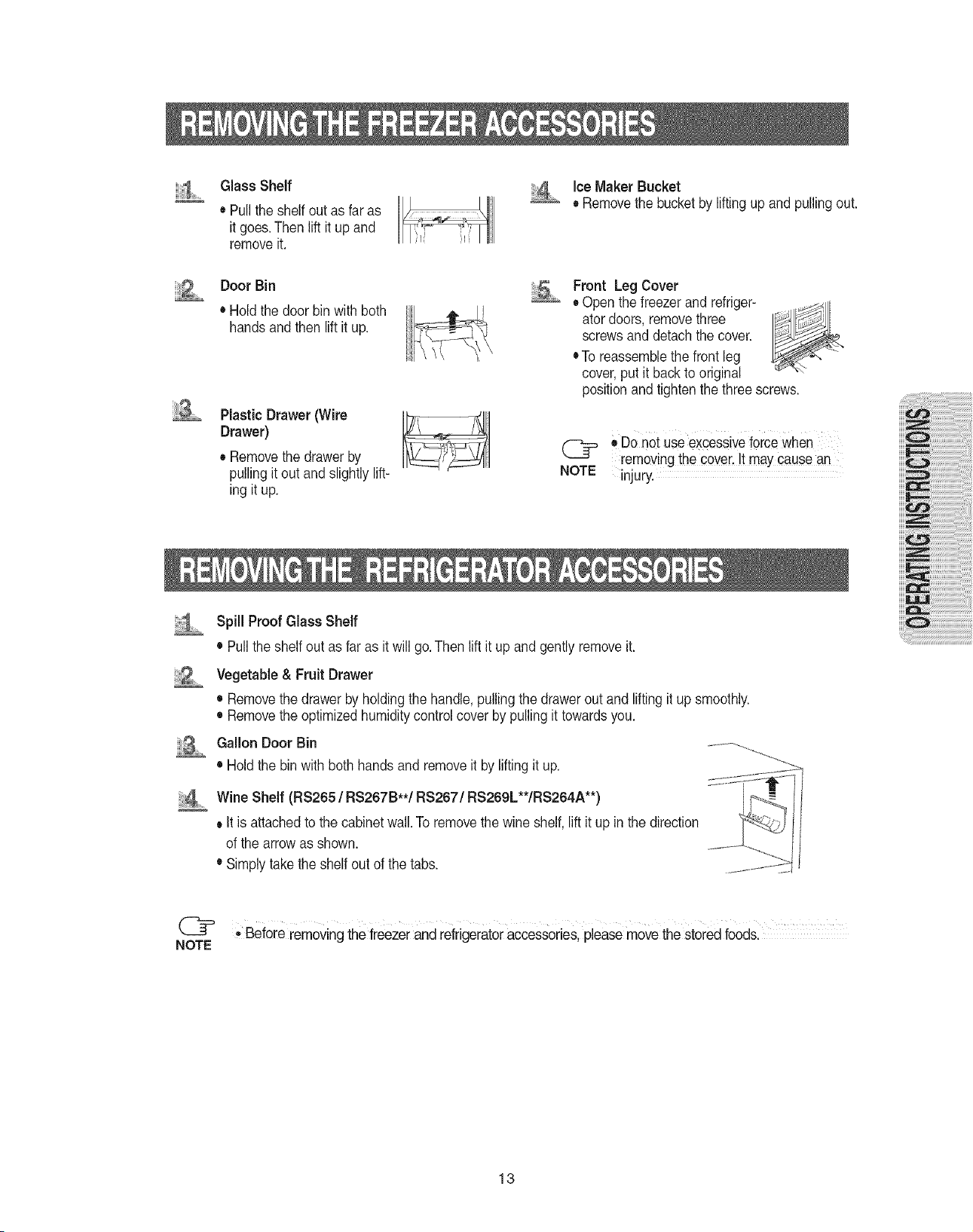
Glass Shelf
• Pull the shelf outas faras
it goes.Thenlift it up and
remove it.
'4 iceMaker Bucket
• Removethe bucketby liftingup and pullingout.
Door Bin
• Holdthe doorbinwithboth
handsandthen liftit up.
Plastic Drawer(Wire
Drawer)
• Removethedrawerby
pulling itout andslightlylift-
ing it up.
Front Leg Cover
• Open thefreezerand refriger-
atordoors,removethree
screwsand detachthe cover.
•To reassemblethe front leg
cover,put it backto original
positionand tighten thethree screws.
(_= ODOnet useexcessiveforce When
removingthecover, Itmaycause an
NOTE injury.
_1_ Spill Proof Glass Shelf
• Pullthe shelf outas faras itwill go.Then liftit up and gently removeit.
Vegetable & Fruit Drawer
• Removethe drawerbyholding thehandle,pulling thedrawerout and lifting itup smoothly.
• Removethe optimizedhumiditycontrolcoverby pullingittowardsyou.
GallonDoorBin
• Hold the binwith bothhandsand removeit bylifting it up.
_:4_ Wine Shelf (RS265 / RS267B**/RS267/RS269L**/RS264A**)
• It is attachedtothe cabinetwall.To removethe wine shelf,liftit upinthe direction
ofthe arrowas shown.
• Simplytake the shelf outof the tabs.
_---_ • Before removingthe freezerand refrigeratoraccessories,pleasemove the storedfoods.
NOTE
13
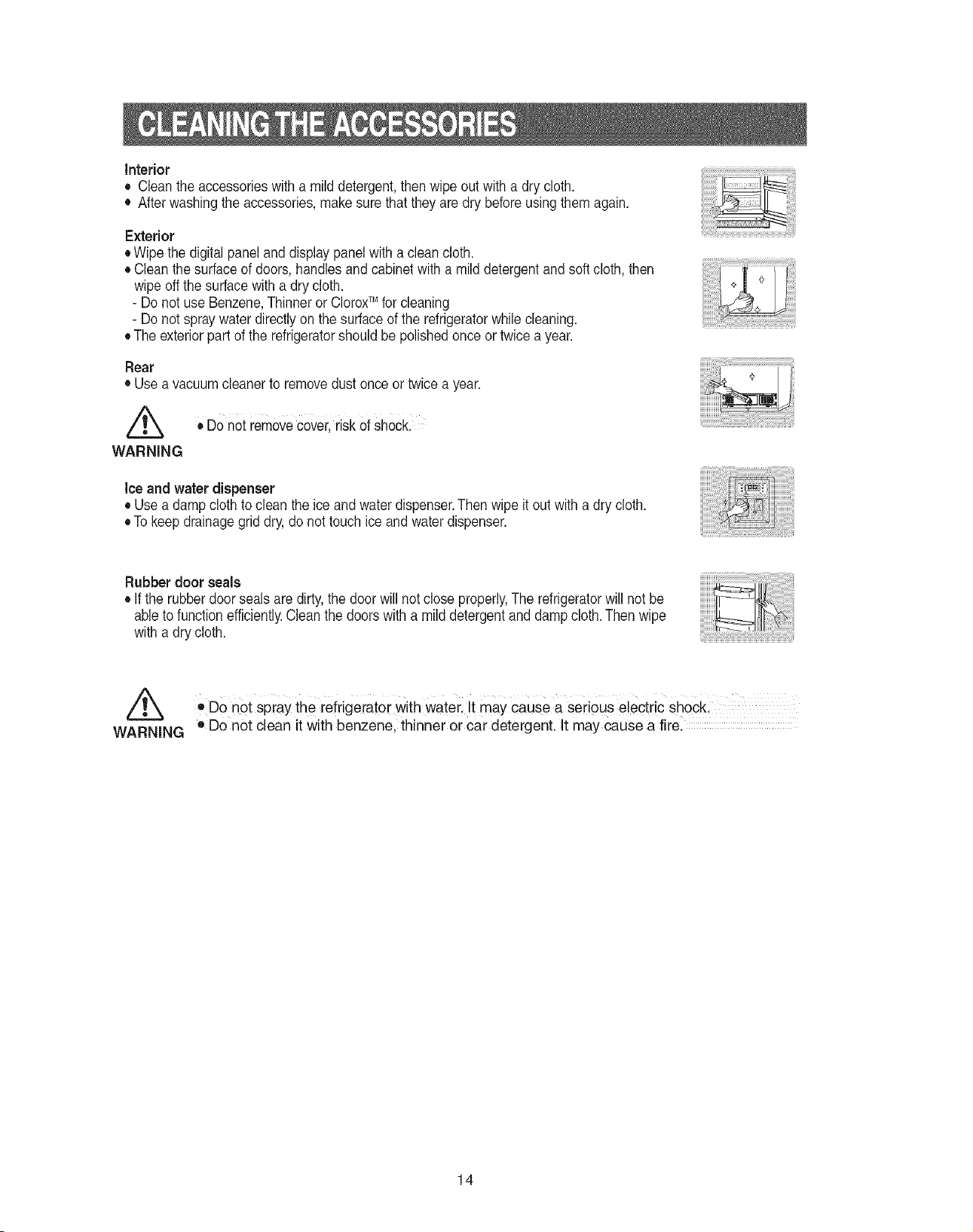
Interior
• Cleantheaccessorieswithamilddetergent,thenwipeoutwithadrycloth.
• Afterwashingtheaccessories,makesurethattheyaredrybeforeusingthemagain.
Exterior
•Wipethedigitalpanelanddisplaypanelwithacleancloth.
• Cleanthesurfaceofdoors,handlesandcabinetwithamilddetergentandsoftcloth,then
wipeoffthesurfacewithadrycloth.
-DonotuseBenzene,ThinnerorCloroxTM forcleaning
- Do not spraywater directlyon the surfaceof the refrigeratorwhilecleaning.
• The exteriorpart of the refrigeratorshould be polishedonceortwice a year.
Rear
• Use a vacuumcleanerto remove dust onceor twice a year.
,/_ • Do not removecover,risk OfshocL
WARNING
Ice and water dispenser
• Use a damp clothto clean theice andwaterdispenser.Then wipeit out with a dry cloth.
• Tokeepdrainage grid dry,do not touch ice and waterdispenser.
Rubber door seals
• If the rubberdoor seals are dirty,the doorwill not close properly,The refrigeratorwill not be
ableto functionefficiently.Cleanthe doorswithamild detergentand damp cloth.Thenwipe
with a dry cloth.
Z_ 'DO not Spraythe refrigerator With Water It may cause a seiious electric shock
WARNING o Do not clean it with benzene, thinner or car detergent. It may cause a fire.
14
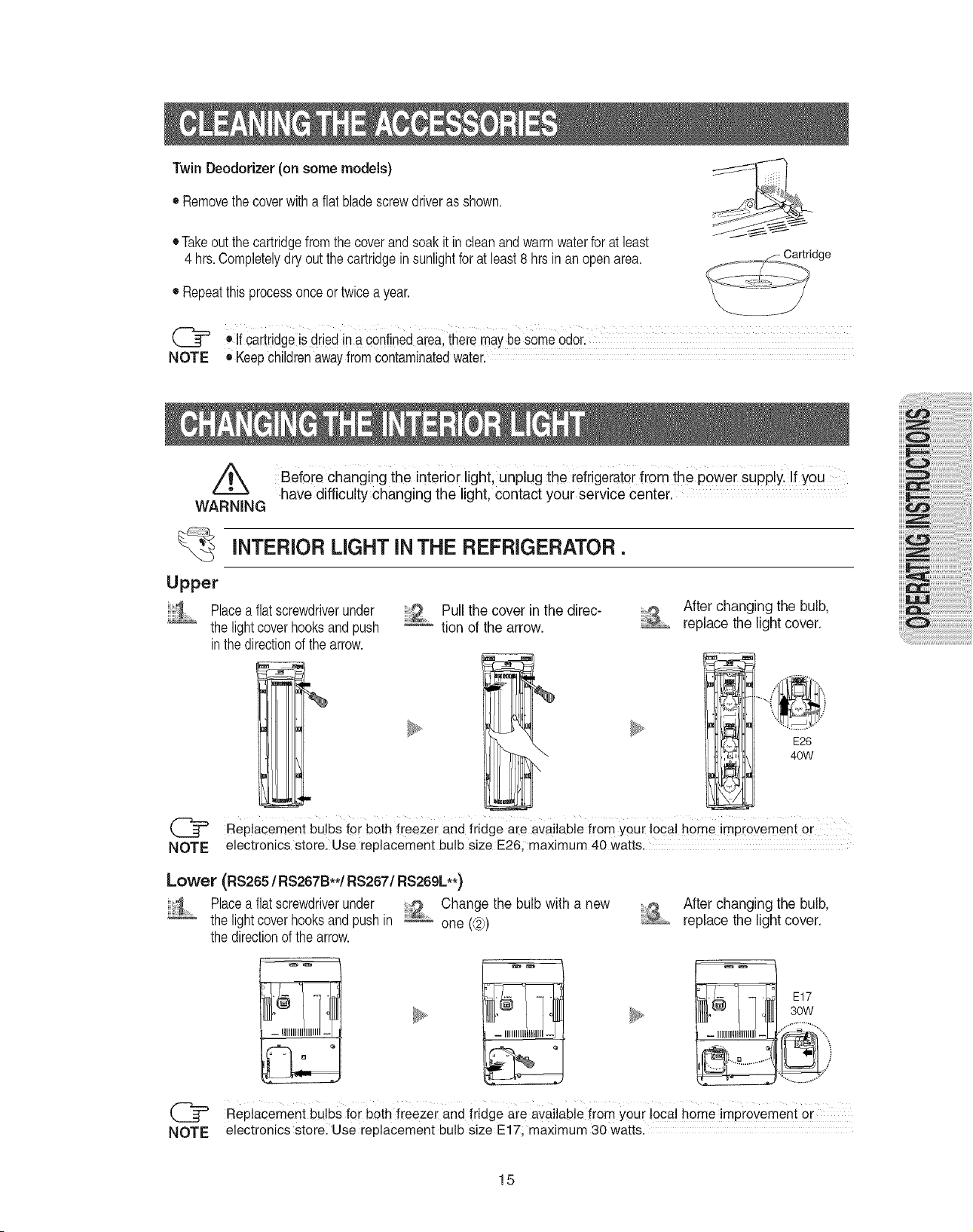
TwinDeodorizer(on some models)
• Removethecoverwithaflat bladescrewdriverasshown.
• Takeoutthecartridgefromthecoverandsoakit incleanand warmwaterfor atleast
4 hrs.Completelydryoutthecartridgeinsunlightforatleast8 hrsinan openarea.
• Repeatthisprocessonceor twicea year.
(_= ®If cartridgeisdriedin aconfinedarea,theiemaybesomeOdor.
NOTE ®Keepchildrenawayfromcontaminatedwater.
have difficulty changing the light, contact your service center.
WARNING
Before changing the interior light, unplug the rdrigerator from the power Supply. if you
INTERIOR LIGHT INTHE REFRIGERATOR.
Upper
Placeaflat screwdriverunder
thelightcoverhooksand push
inthedirectionof thearrow.
Pull the cover inthe direc-
tion of the arrow.
After changing the bulb,
replace the light cover.
E26
40W
Replacement bulbs for both freezer and fridge are available from your local home im %ovement or
NOTE electronics store, Use replacement bulb size E26, maximum 4.0watts.
Lower (RS265 /RS267B**/RS267/RS269L**)
1 .... Placeaflat screwdriverunder Change the bulb witha new
thelightcoverhooksand pushin _ one (@)
thedirectionof thearrow.
After changing the bulb,
replace the light cover.
E17
30W
Replacement bulbs for both freezer and ffidge are available from your local home improvement or
NOTE electronics storel Use replacement bulb size E17, maximum 30 watts.
15
iiii
NOTE
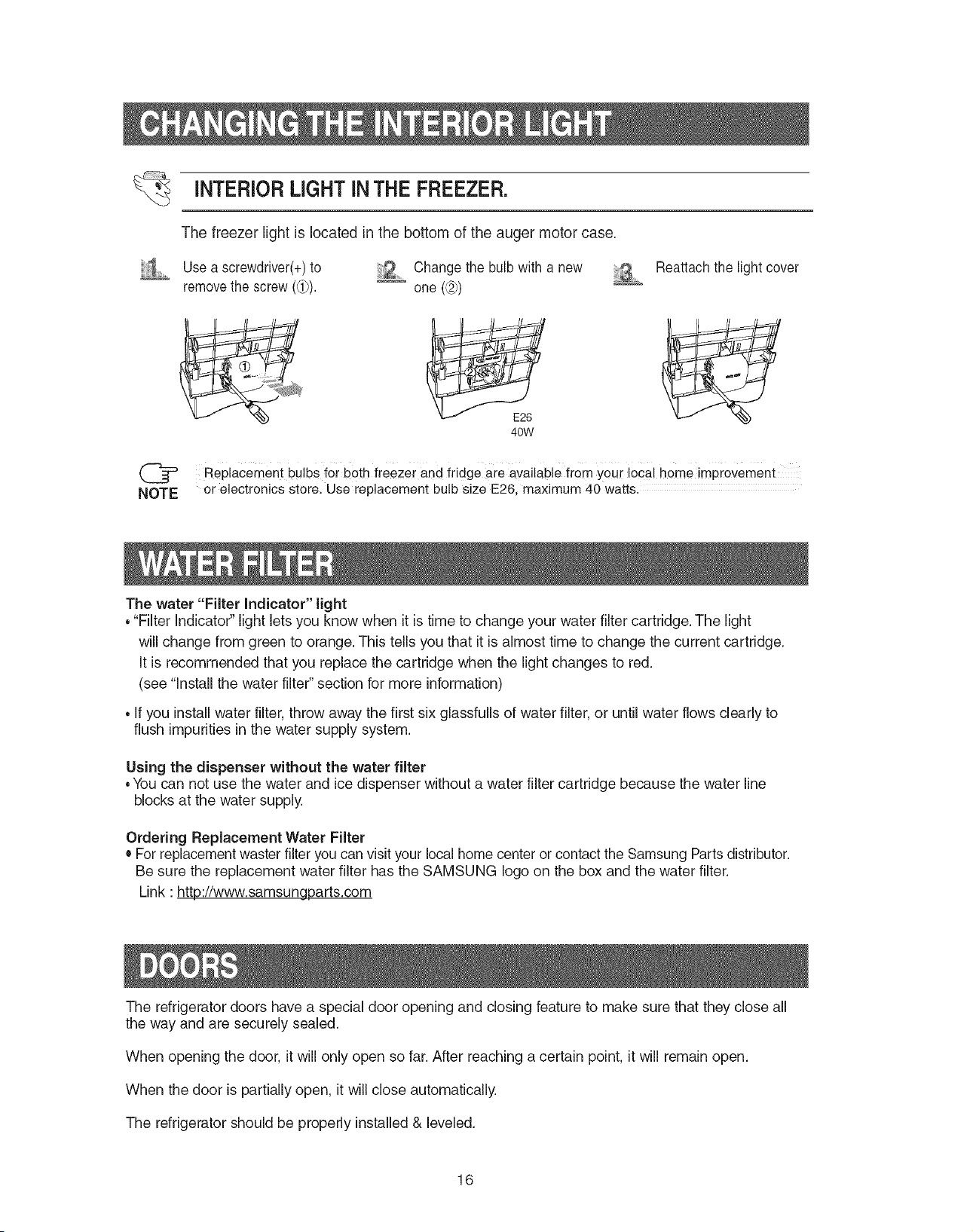
iNTERiORLIGHTiNTHE FREEZER.
The freezer light is located in the bottom of the auger motor case.
Use a screwdriver(+)to '2 Change the bulb with a new
removethe screw (_). _ one (L_)
Reattach the light cover
40W
Replacement bulbs for both freezer and fridge are available from your local home impiovement
or electronics store. Use replacement bulb size E26, maximum 40 watts.
The water "Filter Indicator" light
•"Filter Indicator" light lets you know when it is time to change your water filter cartridge. The light
will change from green to orange. This tells you that it is almost time to change the current cartridge.
It is recommended that you replace the cartridge when the light changes to red.
(see "Install the water filter" section for more information)
• if you install water filter, throw away the first six glassfulls of water filter, or until water flows clearly to
flush impurities in the water supply system.
Using the dispenser without the water filter
•Youcan not use the water and ice dispenser without a water filter cartridge because the water line
blocks at the water supply.
Ordering Replacement Water Filter
• For replacement waster filter you can visit your local home center or contact the Samsung Parts distributor.
Be sure the replacement water filter has the SAMSUNG logo on the box and the water filter.
Link :http://www.samsungparts.com
The refrigerator doors have a special door opening and closing feature to make sure that they close all
the way and are securely sealed.
When opening the door, itwill only open so far. After reaching a certain point, it will remain open.
When the door is partially open, itwill close automatically.
The refrigerator should be properly installed& leveled.
16
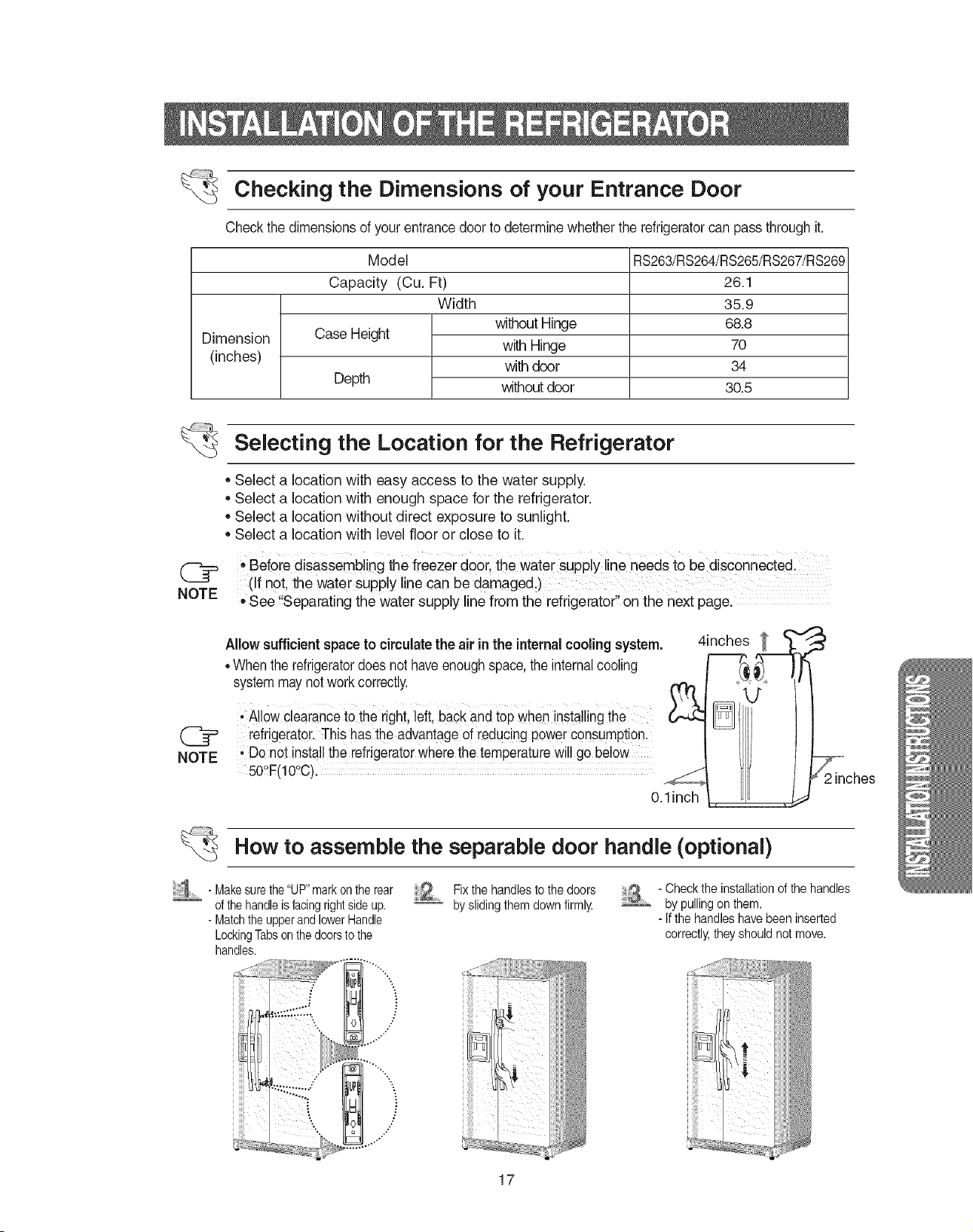
Checking the Dimensions of your Entrance Door
Check thedimensionsof your entrancedoor to determine whether the refrigeratorcan pass throughit.
Dimension
(inches)
Model
Capacity (Cu. Ft)
Width
Case Height
Depth
without Hinge
with Hinge
with door
withoutdoor
RS263/RS264/RS265/RS267/RS269
26.1
35.9
68.8
7O
34
30.5
NOTE
Selecting the Location for the Refrigerator
,, Select a location with easy access to the water supply.
,, Select a location with enough space for the refrigerator.
,, Select a location without direct exposure to sunlight.
,, Select a location with level floor or close to it.
,,Before disassembling the ireezer doOrlthe Water SUpp!yl!neneeds to be disconnected.
(if not, the water supp!y line can be damaged.)
* See !!Separating the water supply line from the refrigerator" on the next page.
Allowsufficient spaceto circulate the air inthe internalcooling system.
,,Whenthe refrigeratordoesnot haveenoughspace,the internalcooling
systemmaynotwork correctly. (_
&2.
Allow clearanceto the right, left,back and top wheninstallingthe
refrigerator.Thishas theadvantage of reducingpowerconsumption,
, Donot installthe refrigeratorwherethe temperaturewill go below
50tF(lOtC).
O.1inch
4inches
How to assemble the separable door handle (optional)
- Makesurethe"UP"markontherear
ofthehandleisfacingrightsideup.
- MatchtheupperandlowerHandle
LockingTabsonthedoorstothe
handles.
"'"%**
i
...¢'
Fixthe handlesto the doors
byslidingthemdown firmly.
- Checkthe installationofthe handles
bypullingon them.
- Ifthe handleshave beeninserted
correctly,theyshouldnot move.
17
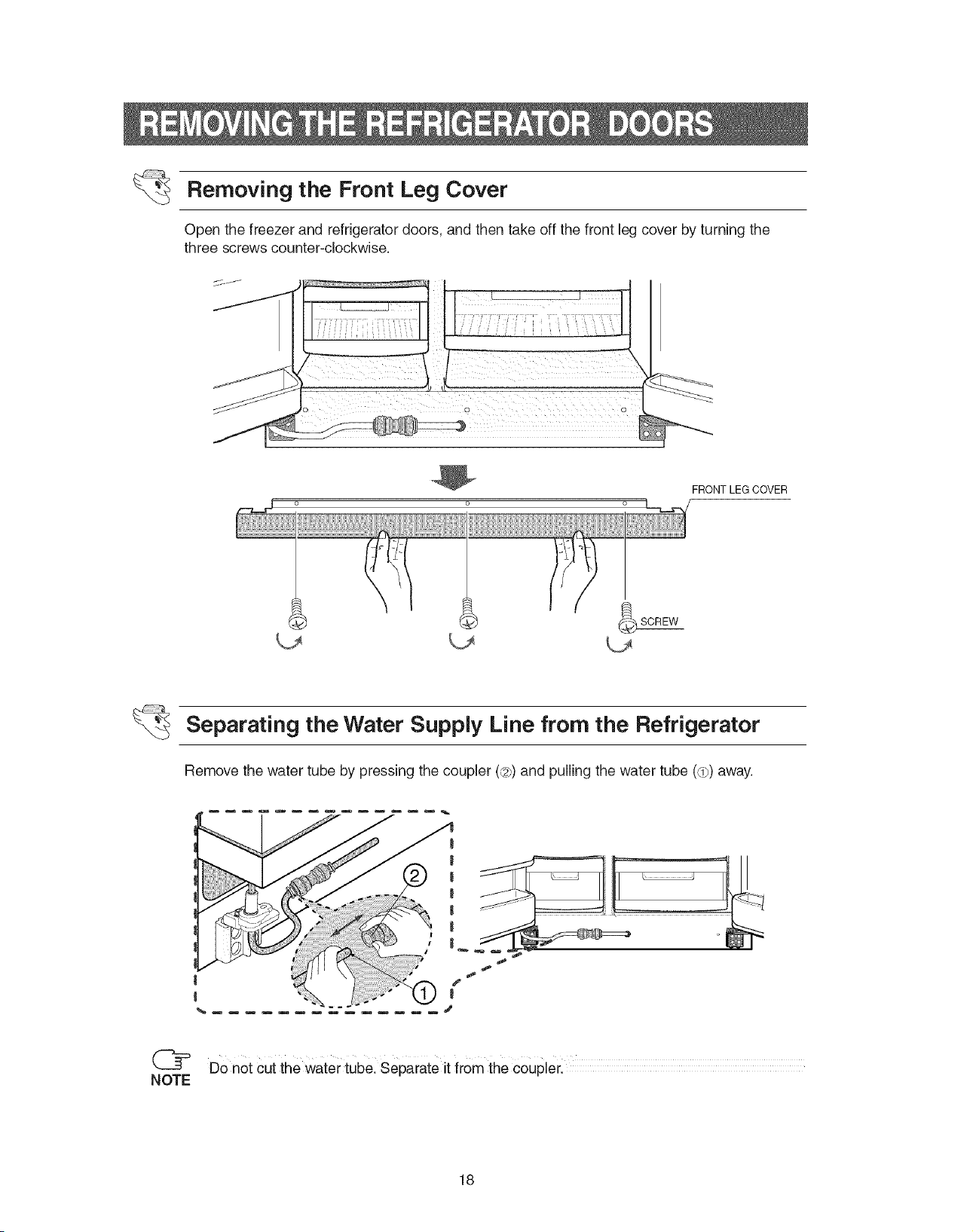
Removing the Front Leg Cover
Open the freezer and refrigerator doors, and then take off the front leg cover by turning the
three screws counter-clockwise.
FRONT LEG COVER
_SCREW
Separating the Water Supply Line from the Refrigerator
Remove the water tube by pressing the coupler (¢27)and pulling the water tube (dp)away.
Do not cut the water tube. Separate it from the coupler.
NOTE
18
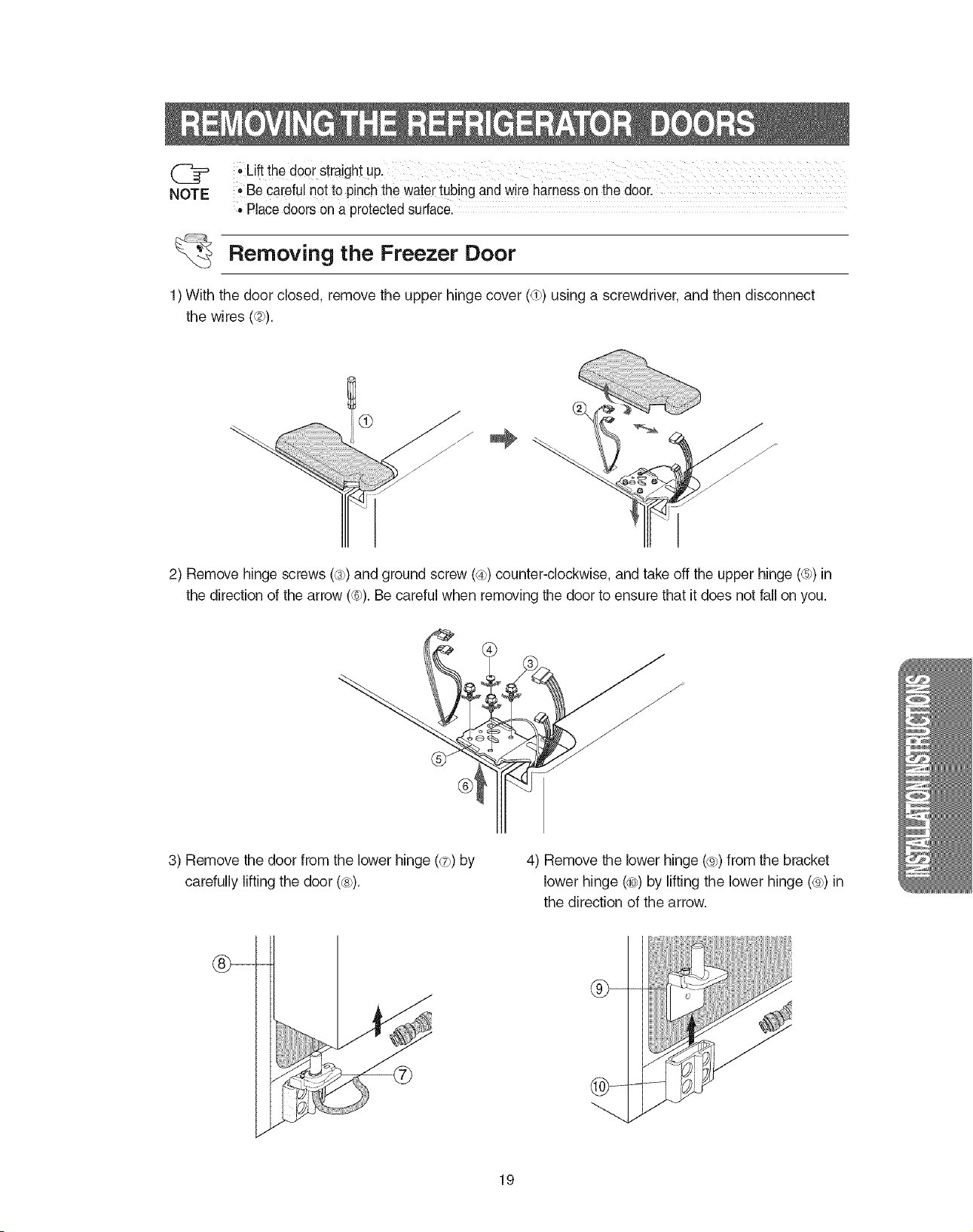
,,Beca[efu!notto pinchthewater tubingandwireharness onthe door.
,, Place doorson a protectedsurface.
Removing the Freezer Door
1) With the door closed, remove the upper hinge cover (dp)using a screwdriver, and then disconnect
the wires (¢2p).
2) Remove hinge screws (_)) and ground screw (_4p)counter-clockwise, and take off the upper hinge (_)) in
the direction of the arrow (_6_).Be careful when removing the door to ensure that it does not fall on you.
J
3) Remove the door from the lower hinge (_7))by
carefully lifting the door ((_)).
4) Remove the lower hinge (®7)from the bracket
lower hinge (_¢)by lifting the lower hinge (®7)in
the direction of the arrow.
db-
19
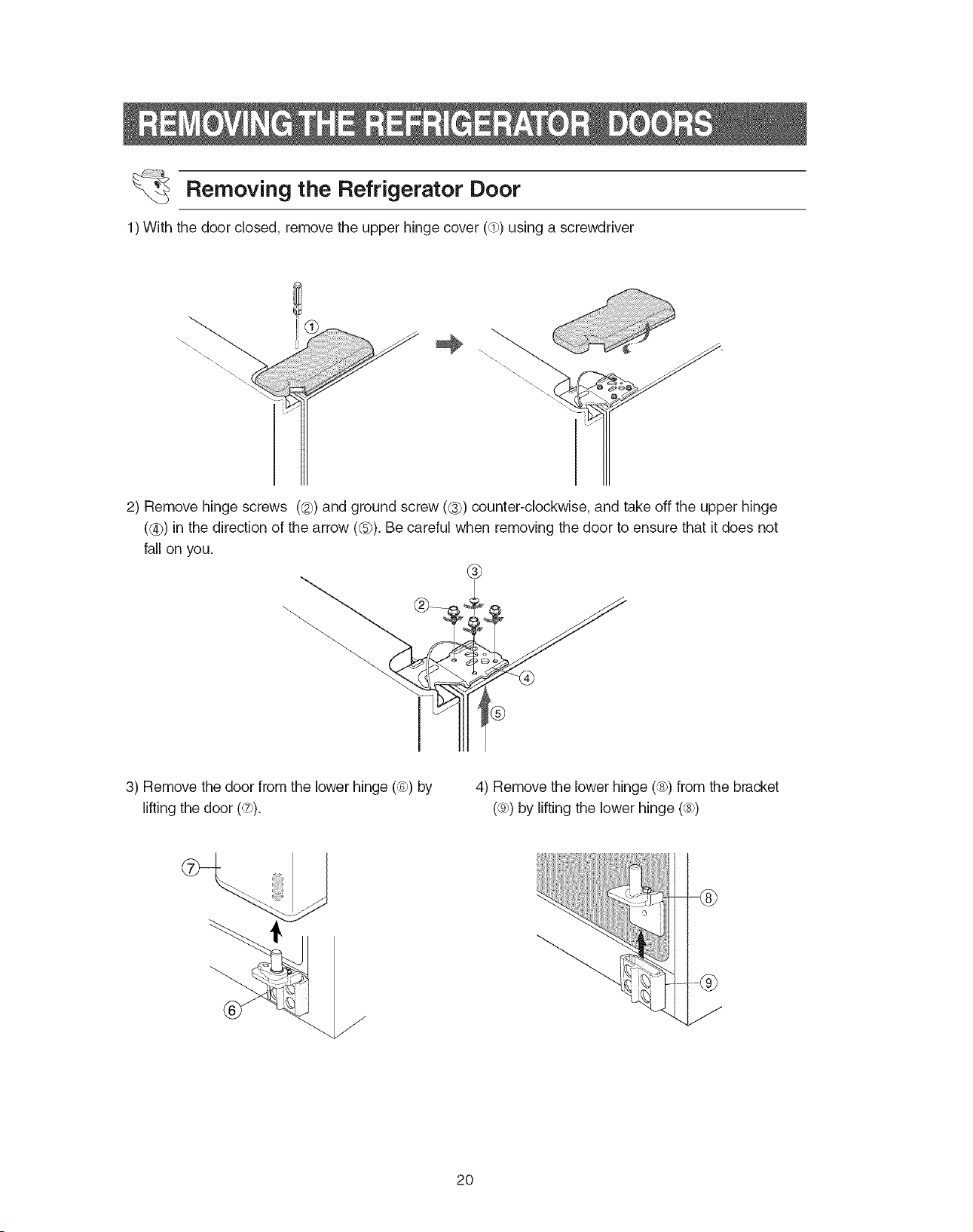
Removing the Refrigerator Door
1) With the door closed remove the upper hinge cover (dp)using a screwdriver
2) Remove hinge screws ((_) and ground screw (_) counter-clockwise, and take off the upper hinge
((_) in the direction of the arrow (@). Be careful when removing the door to ensure that it does not
fall on you.
3) Remove the door from the lower hinge (_) by
lifting the door (_7)).
4) Remove the lower hinge (_) from the bracket
(®))by lifting the lower hinge (_))
2O
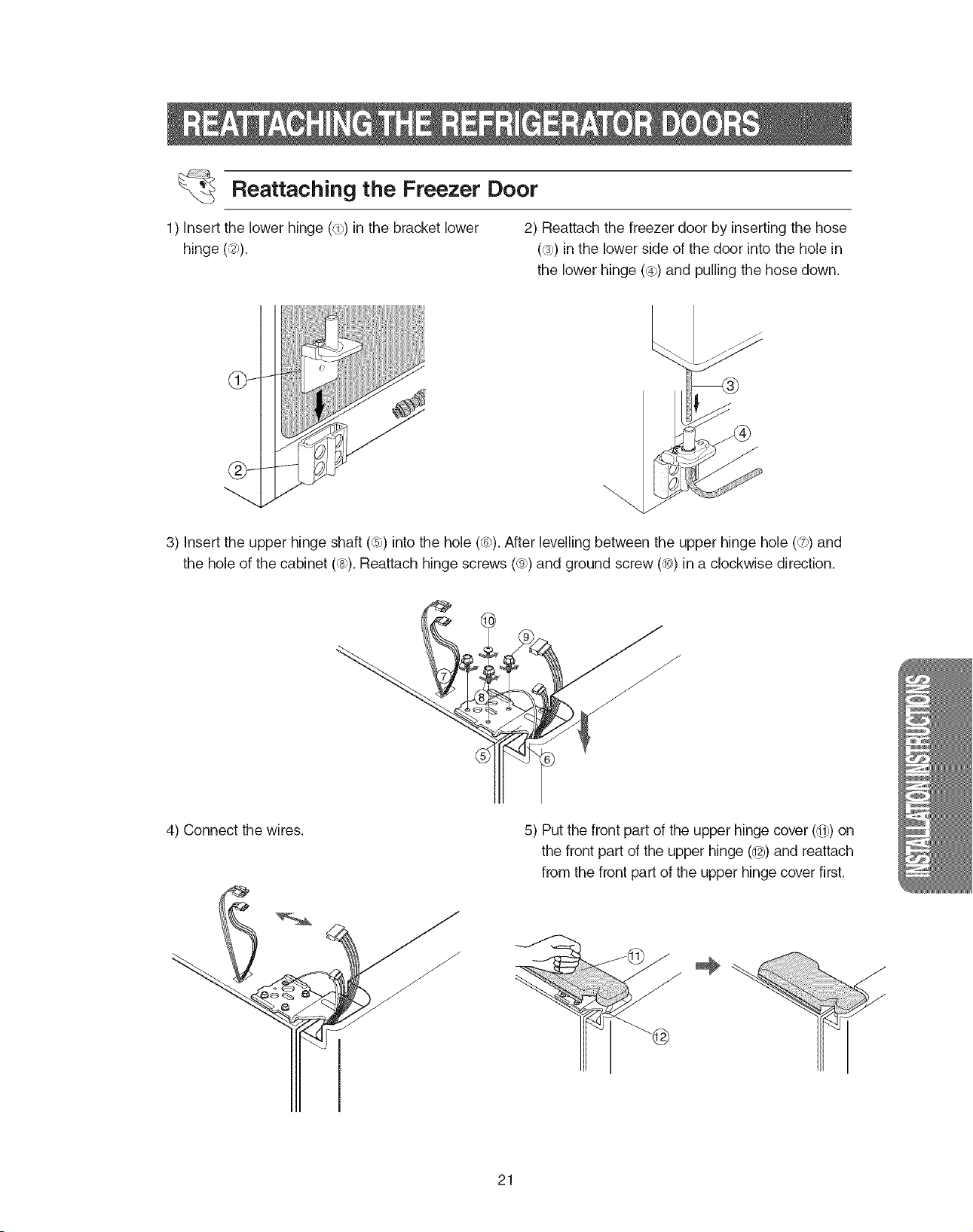
Reattaching the Freezer Door
1) insert the lower hinge (dp)in the bracket lower
hinge (¢2p).
2) Reattach the freezer door by inserting the hose
(@))in the lower side of the door into the hole in
the lower hinge (@p)and pulling the hose down.
dP
3) insert the upper hinge shaft (6)) into the hole (¢P).After levelling between the upper hinge hole (dTP)and
the hole of the cabinet @_).Reattach hinge screws (®))and ground screw @0))in a clockwise direction.
4) Connect the wires. 5) Put the front part of the upper hinge cover (1_#)on
the front part of the upper hinge (@)and reattach
from the front part of the upper hinge cover first.
21
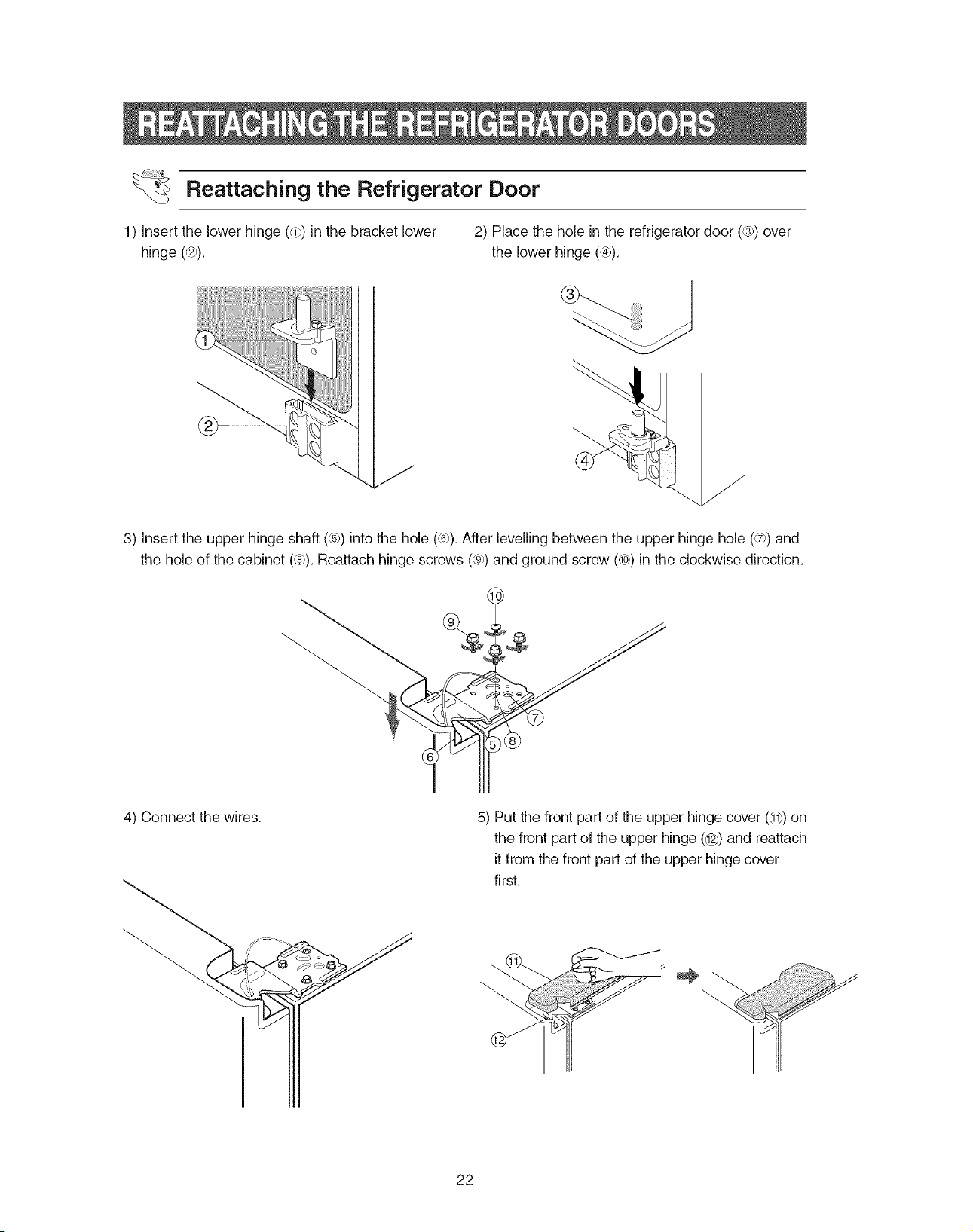
1)insertthelowerhinge(dp)inthebracketlower
hinge(¢2p).
Reattaching the Refrigerator Door
2) Place the hole in the refrigerator door (@b)over
the lower hinge (@p).
3) insert the upper hinge shaft (6p)into the hole (@)).After levelling between the upper hinge hole (dT))and
the hole of the cabinet @_).Reattach hinge screws (®))and ground screw @0_)in the clockwise direction.
4) Connect the wires. 5) Put the front part of the upper hinge cover (@9)on
the front part of the upper hinge (@) and reattach
it from the front part of the upper hinge cover
first.
22
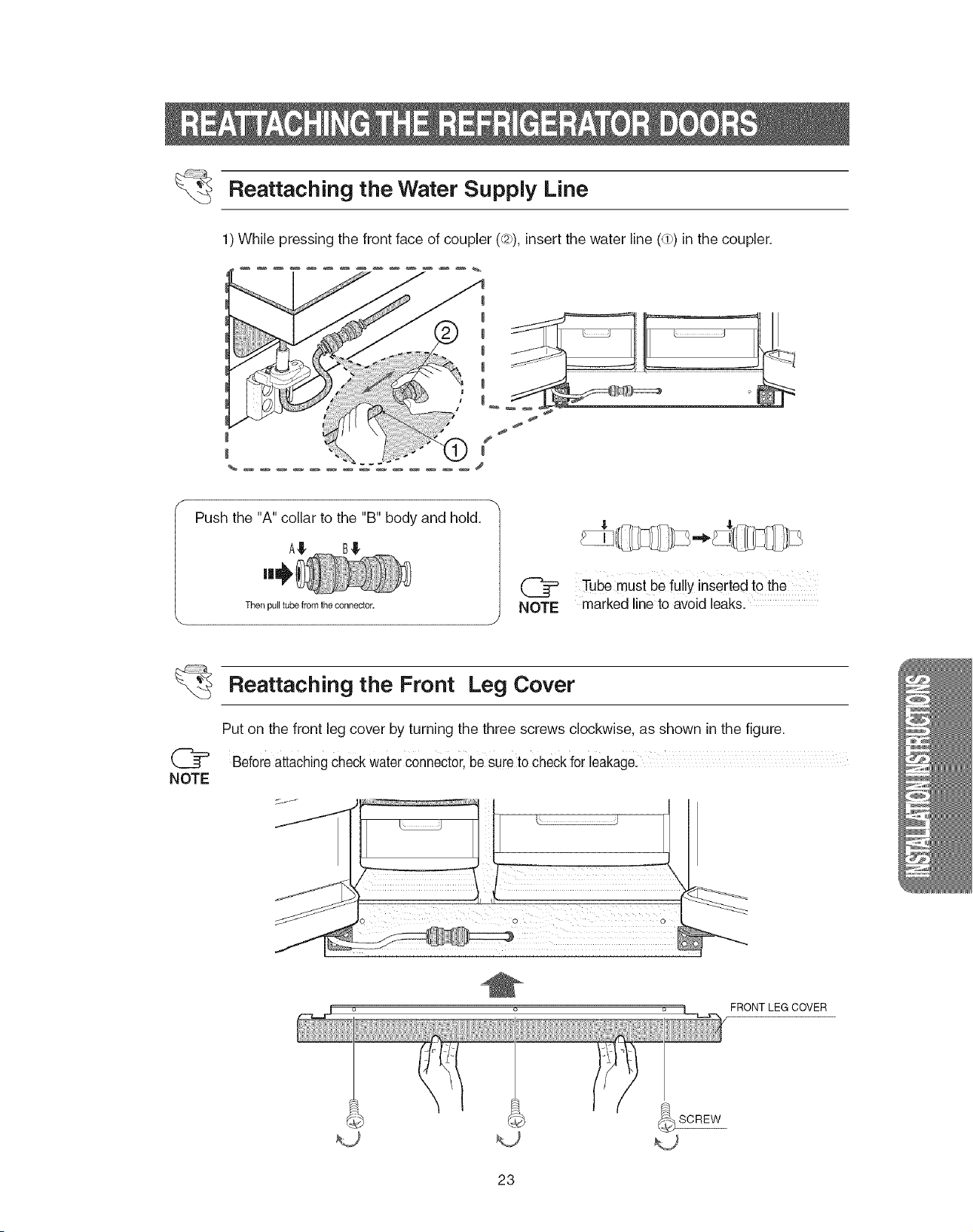
Reattaching the Water Supply Line
1) While pressing the front face of coupler (@),insert the water line (@)in the coupler.
Push the 'W' collar to the "B" body and hold.
A,!!,
Then pull tube from the connector.
NOTE
Tube must be fuilyinserted to the
marked line to avoid leaks.
NOTE
Reattaching the Front Leg Cover
Put on the front leg cover by turning the three screws clockwise, as shown in the figure.
BeforeattachingcheckwaterConnectorlbe sureto checkfor leakage
FRONT LEG COVER
23
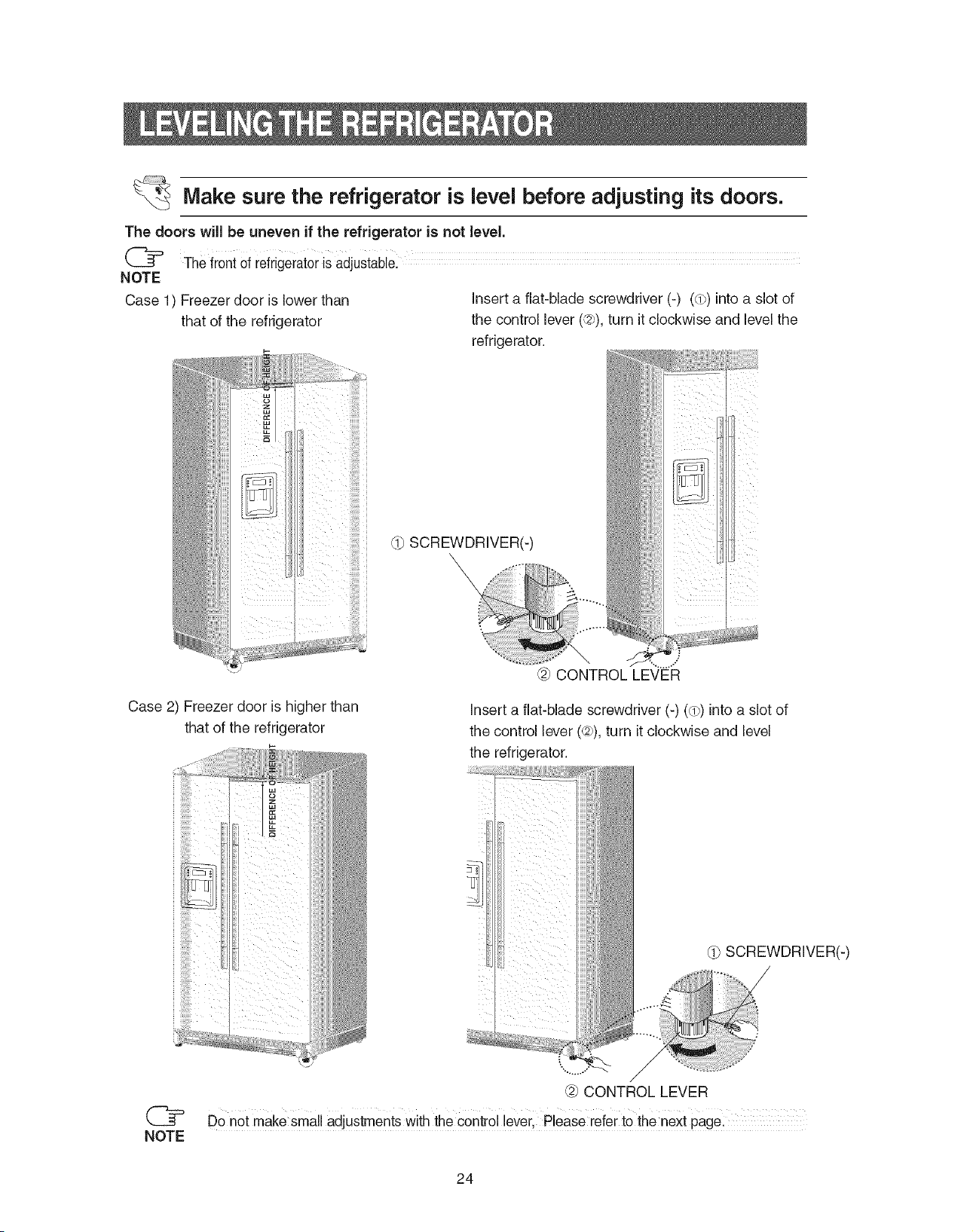
_Make sure the refrigerator is level before adjusting its doors.
The doors wiJJbe uneven if the refrigerator is not level.
The front of refrigeratorisadjustable.
NOTE
Case 1) Freezer door is lower than
that of the refrigerator
i ;!!!!!!!_i
insert a flat-blade screwdriver (-) (dp)into a slot of
the control lever (¢27),turn it clockwise and level the
refrigerator.
dp SCREWDRIVER(-)
\
Case 2) Freezer door is higher than
that of the refrigerator
insert a flat-blade screwdriver (-) (dp)into a slot of
the control lever (d2_),turn it clockwise and level
the refrigerator.
SCREWDRIVER(-)
%**_.,"
@ CONTROL LEVER
(_ Do not make small adjustments with the control lever, Please refer to the next page:
NOTE
24
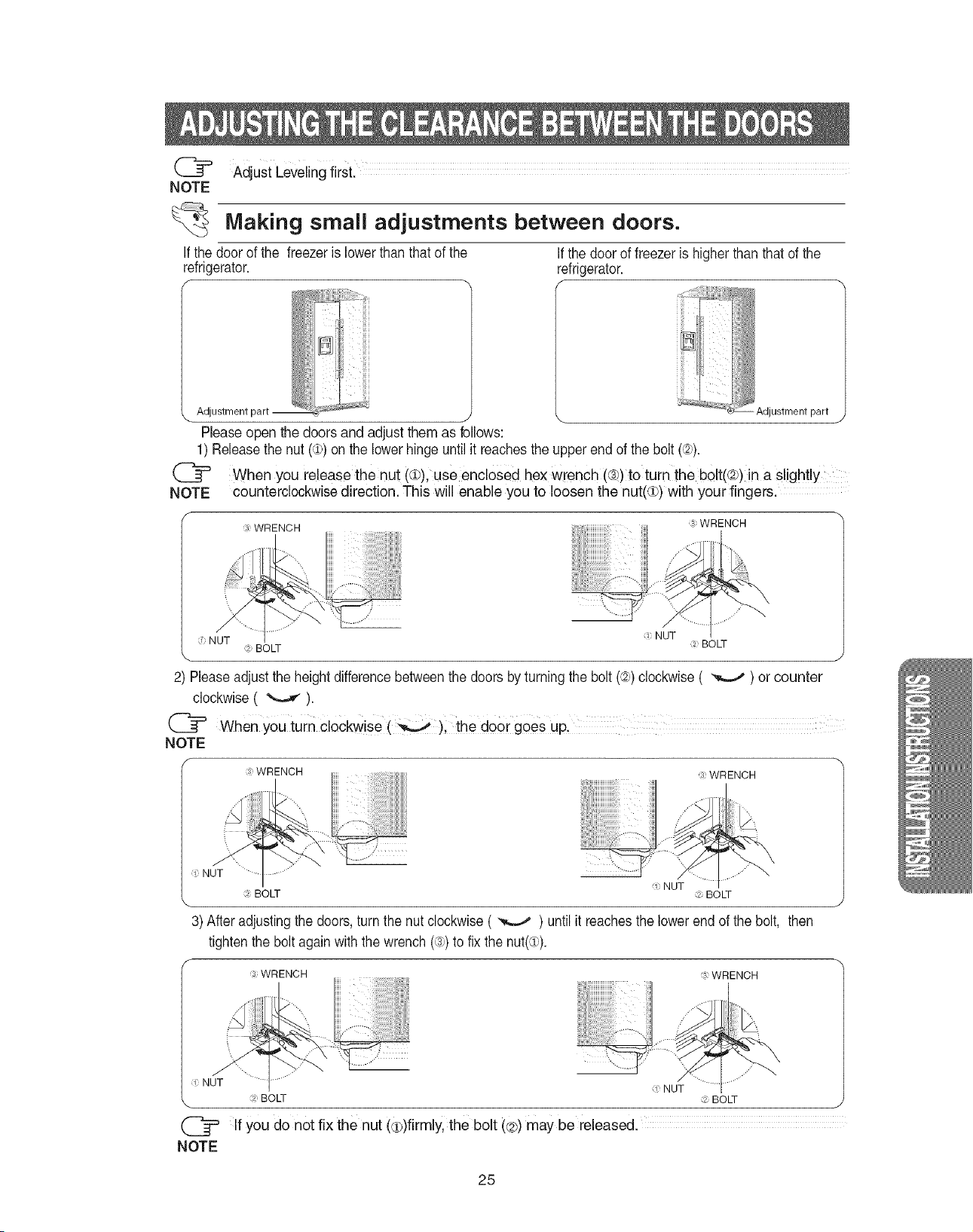
NOTE
AdjustLevelingfirst.
Making small adjustments between doors.
Ifthe door of the freezer islowerthan that of the Ifthe door of freezeris higher thanthatof the
refrigerator, refrigerator.
f
_ _'_:_i Adjustment part
Please open the doors and adjust them as follows:
1) Releasethe nut(¢) on the lowerhingeuntilit reachestheupper end of the bolt (,_).
When you release the nut (¢), use encloSed hex wrench ((_)to turnthe belt(L2b)in a slightly
NOTE counterclockwise direction. This will enable you to loosen the nut(Q) with your fingers.
WRENCH
WRENCH
NUT
:: NUT BOLT :_: BOLT
2) Pleaseadjustthe heightdifferencebetweenthe doorsbyturning the bolt(_,)clockwise( _ ) or counter
clockwise( _'--,-.,_).
([_ When you turn clockwise ()i the doer goes up,
NOTE
f
:_WRENCH WRENCH
NUT .............
NUT
BOLT BOLT
3) After adjusting the doors, turn the nut clockwise ( _ ) untilit reaches the lower end of the bolt, then
tighten the boltagainwiththe wrench (._.)to fix the nut(_,).
_, WRENCH WRENCH
.L:::......
d NUT d NUT
:4 BOLT _2BOLT
If you do not fix the nut (€)firmly, the bolt (@)may be released.
NOTE
25
1)Inordertooperatetheicemakerproperly,waterpressureof20-125 psi is required.
In this range a 170 cc (5.74ounces) paper cup can be filled in 10 secs.
2) The water filter removes particles. It does not sterilize or destroy any micro-organisms.
3) Ifthe refrigerator is installed in an area with low water pressure (below 20psi), you should install a
booster pump to compensate.
4) Ensure the water storage tank inside the refrigerator is properly filled initially. Push the water dis-
penser lever until the water runs from the outlet.
(_ watei line installation kit is available at extra cost from your dealer.The refrigerator
NOTE manufacturer recommends using a water supply kit containing copper tubing.
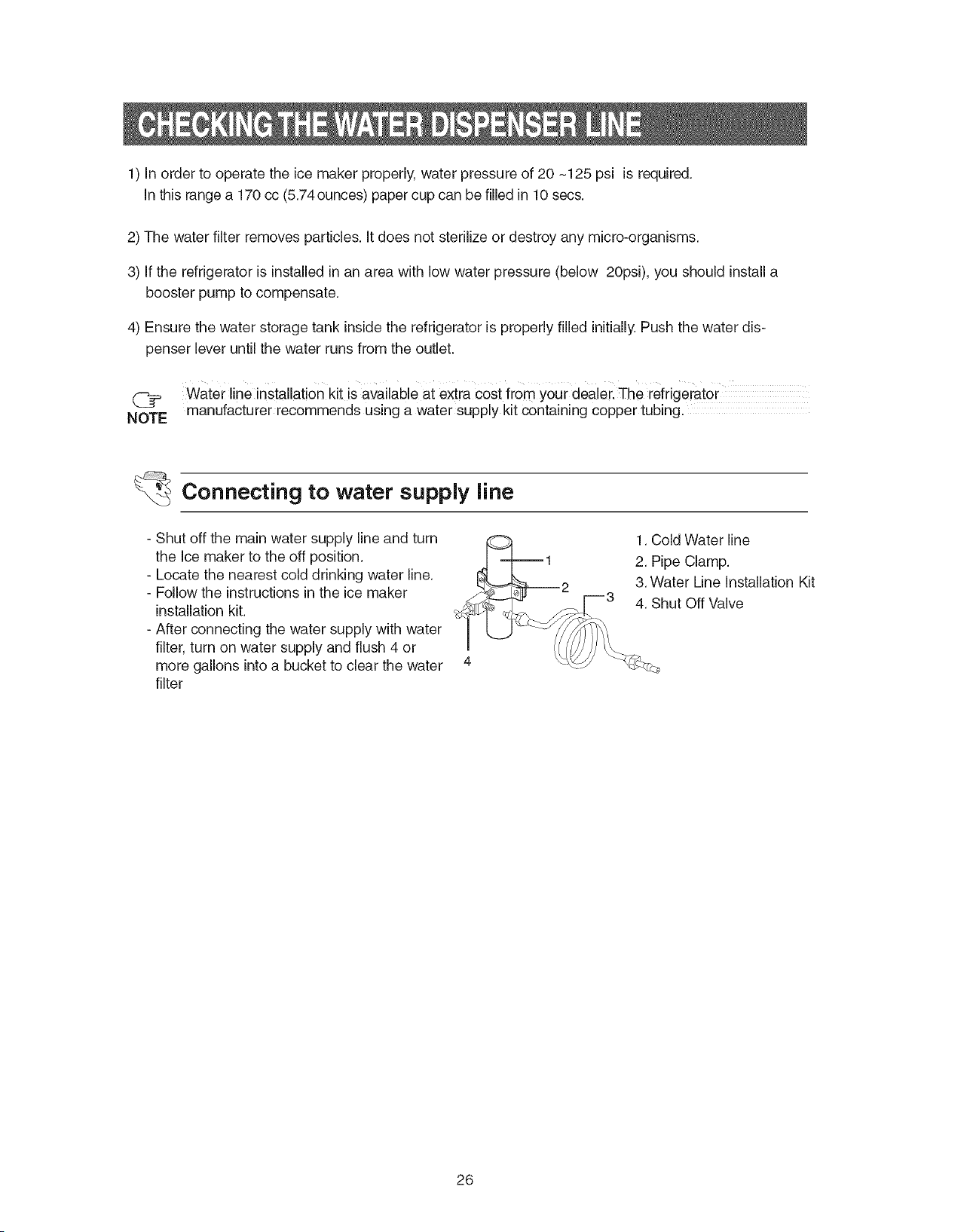
Connecting to water supply line
- Shut off the main water supply line and turn
the Ice maker to the off position.
- Locate the nearest cold drinking water line.
- Follow the instructions in the ice maker
installation kit.
- After connecting the water supply with water
filter, turn on water supply and flush 4 or
more gallons into a bucket to clear the water
filter
1. Cold Water line
_J ---t-----1 2. Pipe Clamp.
L_L-.-M___ 2 3. Water Line Installation Kit
I__ _-_. E--3 4. Shut Off Valve
!
26
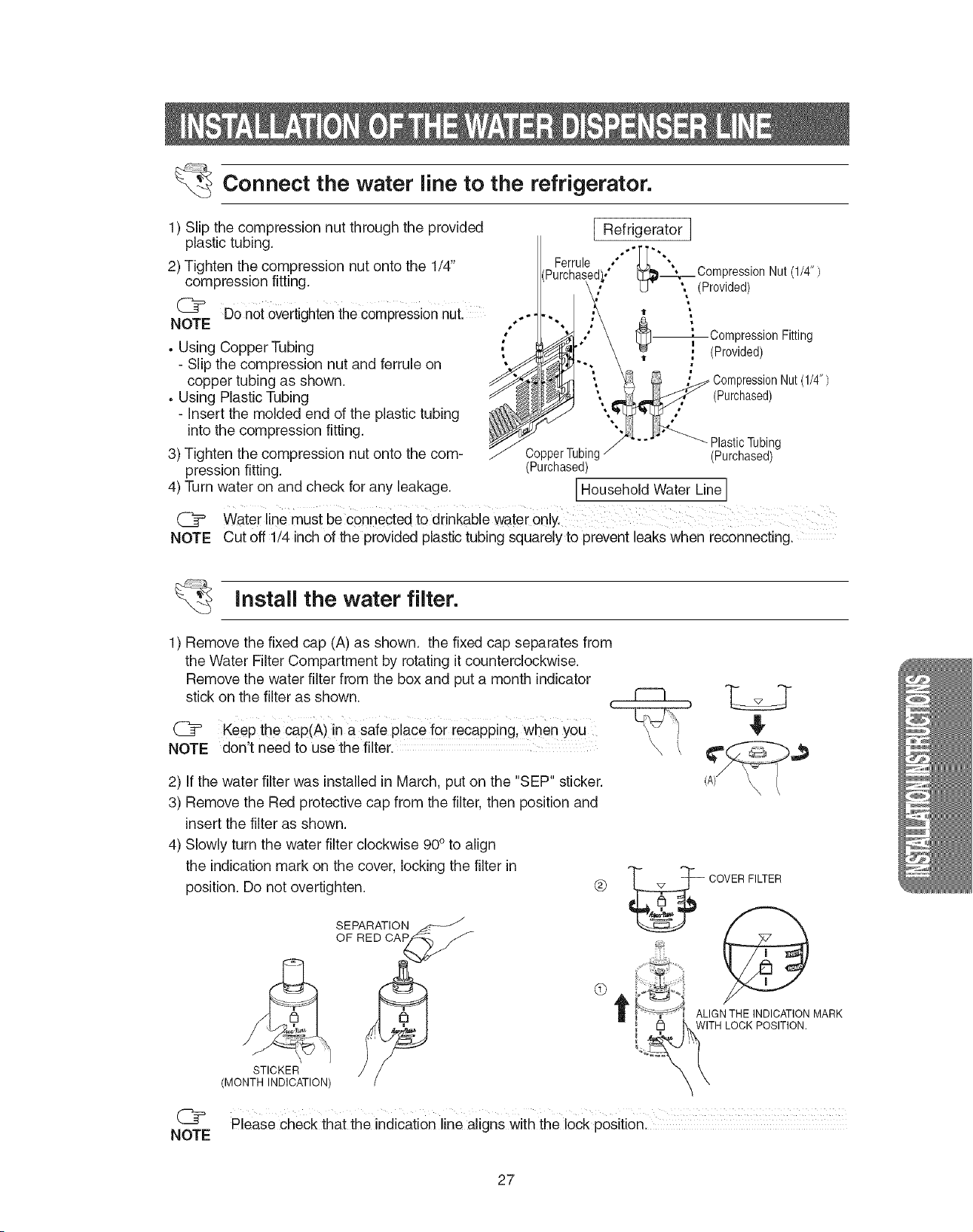
Connect the water line to the refrigerator.
1) Slip the compression nut through the provided
plastic tubing.
2) Tighten the compression nut onto the 1/4"
compression fitting.
(_ Do notOvertightenthecompression nut.
NOTE
• Using Copper Tubing
- Slip the compression nut and ferrule on
copper tubing as shown.
• Using Plastic Tubing
- Insert the molded end of the plastic tubing
intothe compression fitting.
3) Tighten the compression nut onto the com-
pression fitting.
4) Turn water on and check for any leakage.
NOTE
I Refrigerator
Ferrule , .
_Compresslon Nut(1/4")
U ", (Provided)
--_Compression Fitting
. (Provided)
)ressi0nNut(1/4")
(Purchased)
PlasticTubing
CopperTubing (Purchased)
(Purchased)
IHousehold Water Line I
Waterline must be connected to drinkabie water o_ly.
Cut off 1/4 inch of the provided plastic tubing squarely to prevent leaks when reconnecting.
Install the water filter.
1) Remove the fixed cap (A) as shown, the fixed cap separates from
the Water Filter Compartment by rotating itcounterclockwise.
Remove the water filter from the box and put a month indicator
stick on the filter as shown.
(_ Keep the cap(A) in a safe place for recapping, when you
NOTE don't need to use the filter.
2) If the water filter was installed in March, put on the "SEP" sticker.
3) Remove the Red protective cap from the filter, then position and
insertthe filter as shown.
4) Slowly turn the water filter clockwise 90° to align
the indicationmark on the cover, locking the filter in
position. Do not overtighten. ®
SEPARATION ._-:___
OF RED CAP -
STICKER __
(MONTH INDICATION)
G
3
\ \
COVER FILTER
ALIGN THE INDICATION MARK
WITH LOCK POSITION.
Please check that the indication line aligns with the lock position.
NOTE
27
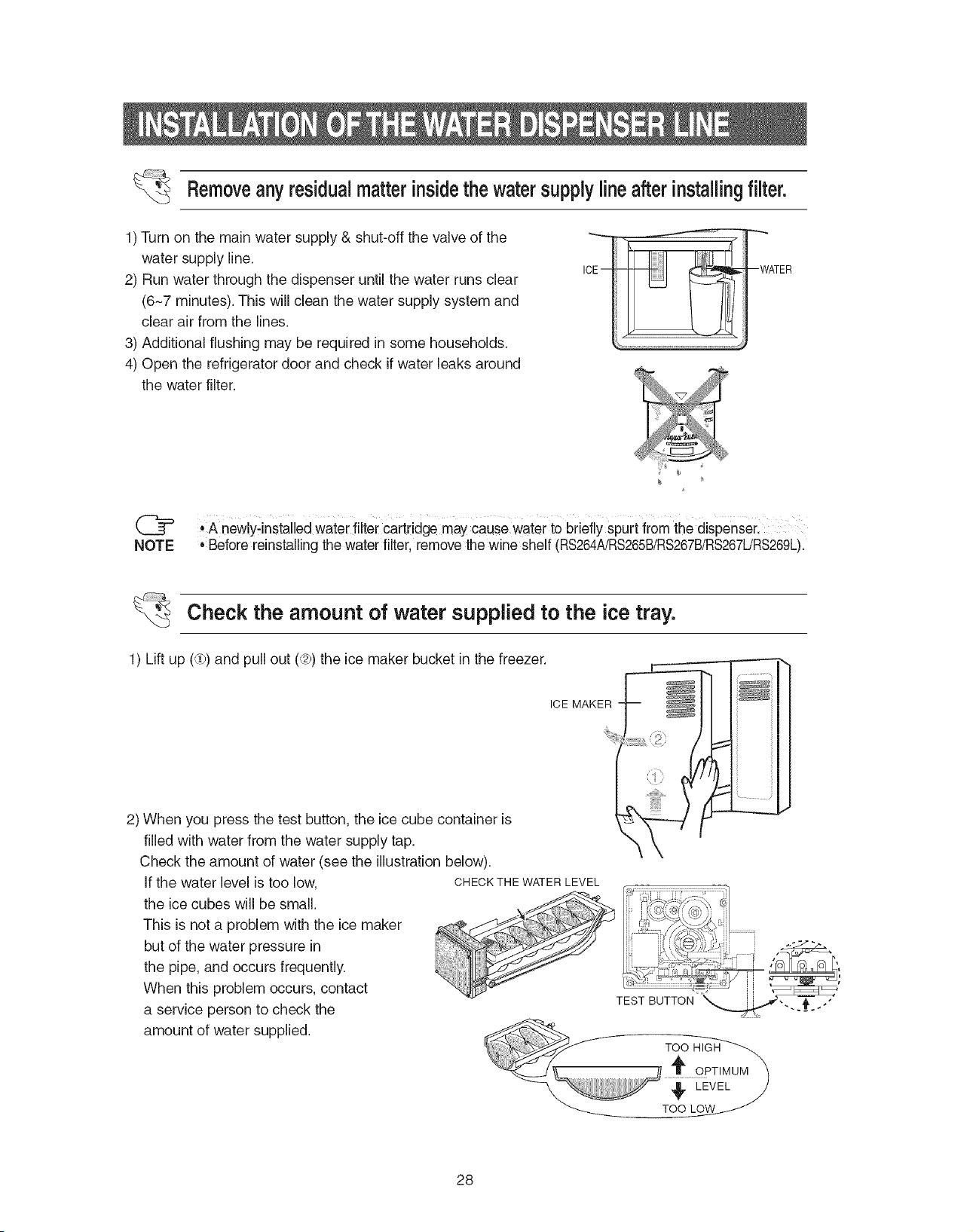
Removeanyresidualmatterinsidethewatersupplylineafterinstalingfilter.
1) Turn on the main water supply & shut-off the valve of the
water supply line.
2) Run water through the dispenser until the water runs clear
(6-7 minutes). This will clean the water supply system and
clear air from the lines.
3) Additional flushing may be required in some households.
4) Open the refrigerator door and check if water leaks around
the water filter.
ICE-
--WATER
(_ • A newly-installed water filter cartridge maycause water to briefly spurt from the dispenser.
NOTE ,Before reinstalling the water filter, remove the wine shelf (RS264A/RS265B!RS267B!RS267URS269L).
Check the amount of water supplied to the ice tray.
1) Lift up (3))and pull out (C2p)the ice maker bucket in the freezer.
ICE MAKER
2) When you press the test button, the ice cube container is
filled with water from the water supply tap.
Check the amount of water (see the illustrationbelow).
If the water level is too low, CHECKTHEWATERLEVEL
the ice cubes will be small.
This is not a problem with the ice maker
but of the water pressure in
the pipe, and occurs frequently.
When this problem occurs, contact
a service person to check the
amount of water supplied.
:::::::::::::::::::::::::::::::::::::::::::::::::::
[_\, j ,]1 r " " , F,
TEST BUTTON
28
The refrigerator does not work at all or it does not
chill sufficiently
=Check that the power plug is properly connected.
• Is the temperature control on the display panel set to
the correct temperature?Try setting it to a lower tem-
perature.
• Is the refrigerator in direct sunlight or located near a
heat source?
• Is the back of the refrigerator too close to the wall?
Ice is not dispensed
• Didyou stop the ice making function?
• Is there any ice in the ice storage unit?
• Is the water lineconnected and the shut-off valve
open?
• Is the freezer temperature too warm?
(Setthe temperature lower)
• Didyou wait for 12 hours after installation of the
water supply line before making ice?
The food in the refrigerator is frozen
• Is the temperature control on the display panel set to You can hear water bubbling in the refrigerator
the correct temperature?Try setting it to a warmer
temperature.
• Is the temperature in the room too low?
• Didyou store food with a high watercontent in the
coldest part of the refrigerator?
• The bubbling comes from the refrigerant circulating in
the refrigerator and is normal.
There is a bad smell in the refrigerator
• Wrap strong smellingfood so that it is airtight.
Throw away any rotten food.
You hear unusual noiseor sounds
• Check that the floor is leveled and stable.
• Is the back of the refrigerator too close to the wall?
• Was anything dropped behind or under the refrigera-
tor?
• A "ticking"sound may be heard from inside the refrig-
erator, this is normal. This occurs because various
accessories are contracted or expanded.
The front corners and sides of the cabinet are hot;
condensation occurs,
• Anti-condensators are installed in the front corners of
the refrigerator to prevent condensation.
• Condensation can occur when you leave the door
open for a long time.
Frost forms on the walls of the freezer
• Is the air vent blocked?
• Allow sufficient space between the foods stored for
efficient air circulation.
• Is the door closed properly?
No water is supplied
• Is the water lineconnected and the shut-off valve
open?
• Is the water supply line crushed?
• Is the water tankfrozen because the refrigerator tem-
perature istoo low? Select awarmer setting on the
display panel.
29
SAMSUNG REFRIGERATOR
(18 Cubic Feet and Larger Capacity)
This SAMSUNGbrandproduct,as suppliedanddistributedby Samsung ElectronicsAmerica,Inc. (SAMSUNG)and deliverednew,
inthe originalcarton tothe original consumerpurchaser,is warrantedbySAMSUNGagainstmanufacturingdefectsin materials
and workmanshipfor a limitedwarrantyperiod of:
One (1)Year Parts and Laboron Refrigerator
Five (5)Years Partsand Labor on Sealed Refrigeration System Only*
(*Compressor,evaporator,condenser,drier, connectingtubing)
This limitedwarrantybegins onthe originaldate of purchase,and isvalid onlyon productspurchasedand usedin the United
States. Toreceivewarrantyservice,the purchasermust contactSAMSUNGforproblemdeterminationandservice procedures.
Warrantyservicecanonly be performedbya SAMSUNG authorized servicecenter. The originaldated billof sale must be
presentedupon requestasproof of purchaseto SAMSUNGor SAMSUNG'sauthorizedservicecenter.
SAMSUNGwill repairor replace anypart found to bedefective,at ouroptionand at nochargeas stipulatedherein,with newor
reconditionedparts duringthe limitedwarrantyperiodspecifiedabove. All replacedpartsand productsbecomethe propertyof
SAMSUNGand mustbe returnedto SAMSUNG. Replacementparts andproductsassume the remainingoriginalwarranty,or
ninety(90) days,whichever islonger.
In-homeservice will be providedduring the warrantylabor periodsubject to availabilitywithin the contiguousUnitedStates.In-
homeservice is not availablein all areas. To receivein-homeservice,the productmustbe unobstructedand accessiblefrom floor
levelto service personnel. Ifduring in-homeservice repaircannot be completed,it maybe necessaryto remove,repairandreturn
the product. Ifin-homeservice is unavailable,SAMSUNGmayelect, atour option,to providefortransportationo1ourchoiceto
and froma SAMSUNGauthorizedservice center. Otherwise,transportationto and from the SAMSUNG authorizedservice center
isthe responsibilityofthe purchaser.
This limitedwarrantycoversmanufacturingdefectsin materialsand workmanshipencounteredin normal,noncommercialuse of
this product,andshallnot applyto the following,including,but not limitedto: damagewhichoccursin shipment;deliveryand
installation;applicationsand usesfor which this productwas not intended;alteredproductor serial numbers;cosmeticdamageor
exteriorfinish;accidents,abuse,neglect,fire, water,lightningor otheracts o1nature;useof products,equipment,systems,utilities,
services,parts, supplies,accessories,applications,installations,repairs,externalplumbingand leaks,externalwiring,circuit
breakers,fuses or connectorsnot suppliedand authorizedby SAMSUNG,or whichdamagethis productor resultin service
problems;incorrectelectricallinevoltage,fluctuationsand surges;customeradjustmentsand failureto followoperatinginstructions,
cleaning, maintenanceandenvironmentalinstructionsthatare coveredand prescribedin the instruction book;lossof fooddueto
spoilage;consumableitems includingfilters andlightbulbs.
THERE ARE NO EXPRESSWARRANTIESOTHERTHAN THOSELISTED AND DESCRIBEDABOVE,AND NO WARRANTIES
WHETHER EXPRESSOR IMPLIED,INCLUDING,BUT NOT LIMITEDTO,ANY IMPLIEDWARRANTIESOF
MERCHANTABILITYOR FITNESS FORA PARTICULARPURPOSE,SHALL APPLYAFTERTHE EXPRESSWARRANTY
PERIODSSTATEDABOVE,AND NO OTHER EXPRESSWARRANTYOR GUARANTYGIVEN BYANY PERSON,FIRM OR
CORPORATIONWITHRESPECTTOTHIS PRODUCTSHALLBE BINDING ON SAMSUNG. SAMSUNGSHALLNOTBE
LIABLEFOR LOSSOF REVENUEOR PROFITS,FAILURETO REALIZESAVINGSOR OTHERBENEFITS,OR ANY OTHER
SPECIAL,INCIDENTALOR CONSEQUENTIALDAMAGESCAUSEDBYTHE USE,MISUSEOR INABILITYTOUSETHIS
PRODUCT,REGARDLESSOF THE LEGALTHEORYONWHICH THE CLAIMIS BASED,AND EVEN IF SAMSUNG HASBEEN
ADVISEDOF THE POSSIBILITYOF SUCH DAMAGES. NORSHALL RECOVERYOFANY KIND AGAINST SAMSUNGBE
GREATERINAMOUNTTHAN THE PURCHASEPRICE OFTHE PRODUCTSOLD BY SAMSUNGAND CAUSINGTHE
ALLEGED DAMAGE. WITHOUTLIMITINGTHE FOREGOING,PURCHASERASSUMES ALLRISKAND LIABILITYFOR LOSS,
DAMAGEOR INJURYTO PURCHASERAND PURCHASER'S PROPERTYAND TOOTHERSAND THEIR PROPERTY
ARISING OUT OFTHE USE,MISUSEOR INABILITYTO USETHIS PRODUCTSOLDBY SAMSUNGNOTCAUSEDDIRECTLY
BYTHE NEGLIGENCEOF SAMSUNG. THIS LIMITEDWARRANTY SHALLNOTEXTENDTO ANYONEOTHERTHANTHE
ORIGINAL PURCHASEROF THISPRODUCT,IS NONTRANSFERABLEAND STATESYOUR EXCLUSIVEREMEDY.
Somestatesdo not allow limitationson how longan implied warrantylasts,orthe exclusionor limitationof incidentalor
consequentialdamages,so the abovelimitationsor exclusionsmay notapplyto you. This warrantygivesyouspecific legalrights,
and youmay also haveother rights,which vary from state to state.
Toobtainwarrantyservice,pleasecontactSAMSUNGat:
SAMSUNG CUSTOMERCARE CENTER
Samsung Electronics America,Inc.
105Challenger Road Ridgefield Park NJ 07660-0511
1-800-SAMSUNG(1-800-726-7864)and www.SAMSUNG,com
061002
3O
f
If you have any questions or comments relating to Samsung products,
please contact the SAMSUNG customer care centre.
Samsung Electronics America, Inc.
105 Challenger Road Ridgefield Park, NJ 07660-0511
1-800-SAMSUNG (1-800-726-7864)
www.samsung.com