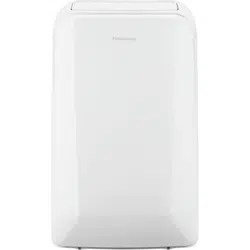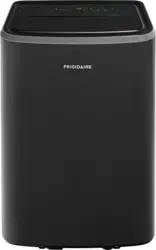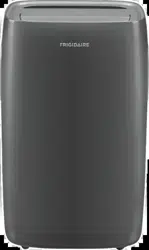
Frigidaire.com USA 1-800-944-9044 Frigidaire.ca Canada 1-800-265-8352
use
&
care
Portable Air Conditioner
13326050000227 (July 2019)
Introduction...................................................... 2
Important Safety Instructions.................... 3
FCC Statement.................................................7
Operating Instructions............................... 13
Care and Cleaning........................................ 22
Before You Call............................................. 23
Major Appliance Limited Warranty....... 25
Air Conditioner Features............................ 12
Unit Description...............................................8
Accessories Included.....................................9
Installation Instructions................................ 9
2 INTRODUCTION
Welcome to our
family
Model Number
Serial Number
Purchase Date
Thank you for bringing Frigidaire into your
home! We see your purchase as the
beginning of a long relationship together.
This manual is your resource for the use and
care of your product. Please read it before
using your appliance. Keep it handy for
quick reference. If something doesn’t seem
right, the troubleshooting section will help
you with common issues.
FAQs, helpful tips and videos, cleaning
products, and kitchen and home accessories
are available at www.frigidaire.com.
We are here for you! Visit our website, chat
with an agent, or call us if you need help. We
may be able to help you avoid a service visit.
If you do need service, we can get that
started for you.
Let’s make it ocial! Be sure to register your
product.
Keep your product info here so it’s easy to
find.
3
For Your Safety
IMPORTANT SAFETY INSTRUCTIONS
WARNING
Do not store or use gasoline or other
flammable vapors and liquids in the vicinity
of this or any other appliance. Read product
labels for flammability and other warnings.
Prevent Accidents
WARNING
To reduce the risk of fire, electrical shock, or
injury to persons when using your air
conditioner, follow basic precautions,
including the following:
• Be sure the electrical service is adequate
for the model you have chosen. This
information can be found on the serial
plate, which is located on the side of the
cabinet.
• If the air conditioner is to be installed in a
window, you will probably want to clean
both sides of the glass first.
• Be sure the air conditioner has been
securely and correctly installed according
to the installation instructions in this
manual. Save this manual for possible
future use in removing or reinstalling this
unit.
WARNING
Avoid fire hazard or electric shock. Do not
use an extension cord or an adaptor plug.
Do not remove any prong from the power
cord.
Electrical Information
WARNING
The complete electrical rating of your new
portable air conditioner is stated on the
serial plate. Refer to the rating when
checking the electrical requirements.
• Be sure the air conditioner is properly
grounded. To minimize shock and fire
hazards, proper grounding is important.
The power cord is equipped with a
three-prong grounding plug for protection
against shock hazards.
• Your air conditioner must be used in a
properly grounded wall receptacle. If the
wall receptacle you intend to use is not
adequately grounded or protected by a
time delay fuse or circuit breaker, have a
qualified electrician install the proper
receptacle.
• Do not run air conditioner without outside
protective cover in place. This could result
in mechanical damage within the air
conditioner.
• Do not use an extension cord or an
adapter plug.
Grounding type wall receptacle
Do not, under any
circumstances, cut,
remove, or bypass the
grounding prong.
Power supply cord
with 3-prong grounding
plug and current
detection device
NOTE: The power supply cord with this air
conditioner contains a current detection
device designed to reduce the risk of fire.
Please refer to the section ‘Operation of
Current Device’ for details.
In the event that the power supply cord is
damaged, it cannot be repaired. It must be
replaced with a cord from the product
manufacturer.
4 IMPORTANT SAFETY INSTRUCTIONS
SAFETY PRECAUTIONS
DANGER! Avoid Serious Injury or Death
• This air conditioner contains no
user-serviceable parts. Always call an
authorized Electrolux servicer for repairs.
• Do not insert or place fingers or objects
into the air discharge area in the front of
the unit.
• Do not start or stop the air conditioner by
unplugging the power cord or turning o
the power at the electrical box.
• Do not cut or damage the power cord.
• If the power cord is damaged, it should
only be replaced by an authorized
Electrolux servicer.
• In the event of a malfunction (sparks,
burning smell, etc.), immediately stop the
operation, disconnect the power cord, and
call an authorized Electrolux servicer.
• Do not operate the air conditioner with
wet hands.
• Do not pull on the power cord.
• Do not drink any water that is drained
from the air conditioner.
• This appliance is not intended for use by
persons (including children) with reduced
physical ,sensory or mental capabilities or
lack of experience and knowledge, unless
they have been given supervision or
instruction concerning use of the
appliance by a person responsible for their
safety.
• Children should be supervised to ensure
that they do not play with the appliance.
• If the supply cord is damaged, it must be
replaced by the manufacturer, its service
agent or similarly qualified persons in
order to avoid a hazard.
• The appliance shall be installed in
accordance with national wiring
regulations.
• Provide ventilation per installation
instructions.
• Do not direct airflow at fireplaces or other
heat related sources as this could cause
flare ups or make units run excessively.
• Do not climb on or place objects on the
unit.
• Do not hang objects off the unit.
• Do not place containers with liquids on
the unit.
• Turn off the air conditioner at the power
source when it will not be used for an
extended period of time.
• Periodically check the condition of the
unit’s installation accessories for any
damage.
• Do not apply heavy pressure to the
radiator fins of the unit.
• Operate the unit with air filter in place.
• Do not block or cover the intake grille,
discharge area and outlet ports.
• Ensure that any electrical/electronic
equipment is one yard away from the unit.
• Do not use or store flammable gases near
the unit.
• Do not touch the metal parts of the unit
when removing the filter. Injuries can
occur when handling sharp metal edges.
• Do not use water to clean inside the air
conditioner. Exposure to water can
destroy the insulation, leading to possible
electric shock.
• When cleaning the unit, first make sure
that the power and circuit breaker are
turned off.
SAFETY PRECAUTIONS
CAUTION! Avoid Injury or damage to the
unit or other property
WARNING
FOR FLAMMABLE REFRIGERANT
• Do not use means to accelerate the
defrosting process or to clean, other than
those recommended by the manufacturer.
• Do not pierce or burn.
• Be aware that the refrigerants may not
contain an odour.
• Compliance with national gas regulations
shall be observed.
5IMPORTANT SAFETY INSTRUCTIONS
store or maintain the air conditioner to
prevent mechanical damage from
occurring.
• Flammable refrigerant - R32 is used in air
conditioner. Please follow the instruction
carefully to avoid any hazard.
• The refrigerating system should not
receive maintenance, service, or repair by
any person.
• Ensure that the area is in the open or that
it is adequately ventilated before breaking
into the system or conducting any hot
work. A degree of ventilation shall
continue during the period that the work is
carried out. The ventilation should safely
disperse any released refrigerant and
preferably expel it externally into the
atmosphere.
• Check that cabling will not be subject to
wear, corrosion, excessive pressure,
vibration, sharp edges or any other
adverse environmental effects. The check
shall also take into account the effects of
aging or continual vibration from sources
such as compressors or fans.
• Under no circumstances shall potential
sources of ignition be used in the
searching for or detection of refrigerant
leaks. A halide torch (or any other detector
using a naked flame) shall not be used. The
following leak detection methods are
deemed acceptable for all refrigerant
systems. Electronic leak detectors may be
used to detect refrigerant leaks but, in the
case of FLAMMABLE REFRIGERANTS, the
sensitivity may not be adequate, or may
need re-calibration. (Detection equipment
shall be calibrated in a refrigerant-free
area.) Ensure that the detector is not a
potential source of ignition and is suitable
for the refrigerant used. Leak detection
equipment shall be set at a percentage of
the LFL of the refrigerant and shall be
calibrated to the refrigerant employed, and
the appropriate percentage of gas (25 %
maximum) is confirmed. Leak detection
fluids are also suitable for use with most
refrigerants but the use of detergents
containing chlorine shall be avoided as the
chlorine may react with the refrigerant and
• Keep ventilation openings clear of
obstruction.
• The appliance shall be stored in a room
without continuously operating ignition
sources (for example: open flames, an
operating gas appliance) and ignition
sourcesor (for example:an operating
electric heater) close to the appliance.
• The appliance shall be stored so as to
prevent mechanical damage from
occurring.
• A warning that the appliance shall be
stored in a well-ventilated area where the
room size corresponds to the room area
as specified for operation.
• Any person who is involved with working
on or breaking into a refrigerant circuit
should hold a current valid certificate
from an industry-accredited assessment
authority, which authorises their
competence to handle refrigerants safely
in accordance with an industry recognised
assessment specification.
• Servicing shall only be performed as
recommended by the equipment
manufacturer. Maintenance and repair
requiring the assistance of other skilled
personnel shall be carried out under the
supervision of the person competent in
the use of flammable refrigerants.
• DO NOT modify the length of the power
cord or use an extension cord to power
the unit.
• DO NOT share a single outlet with other
electrical appliances. Improper power
supply can cause fire or electrical shock.
• Please follow the instruction carefully to
handle, install, clear, service the air
conditioner to avoid any damage or
hazard. Flammable Refrigerant R32 is
used within air conditioner. When
maintaining or disposing the air
conditioner, the refrigerant (R32 or R290)
shall be recovered properly, shall not
discharge to air directly.
• No any open fire or device like switch
which may generate spark/arcing shall be
around air conditioner to avoid causing
ignition of the flammable refrigerant used.
Please follow the instruction carefully to
6 IMPORTANT SAFETY INSTRUCTIONS
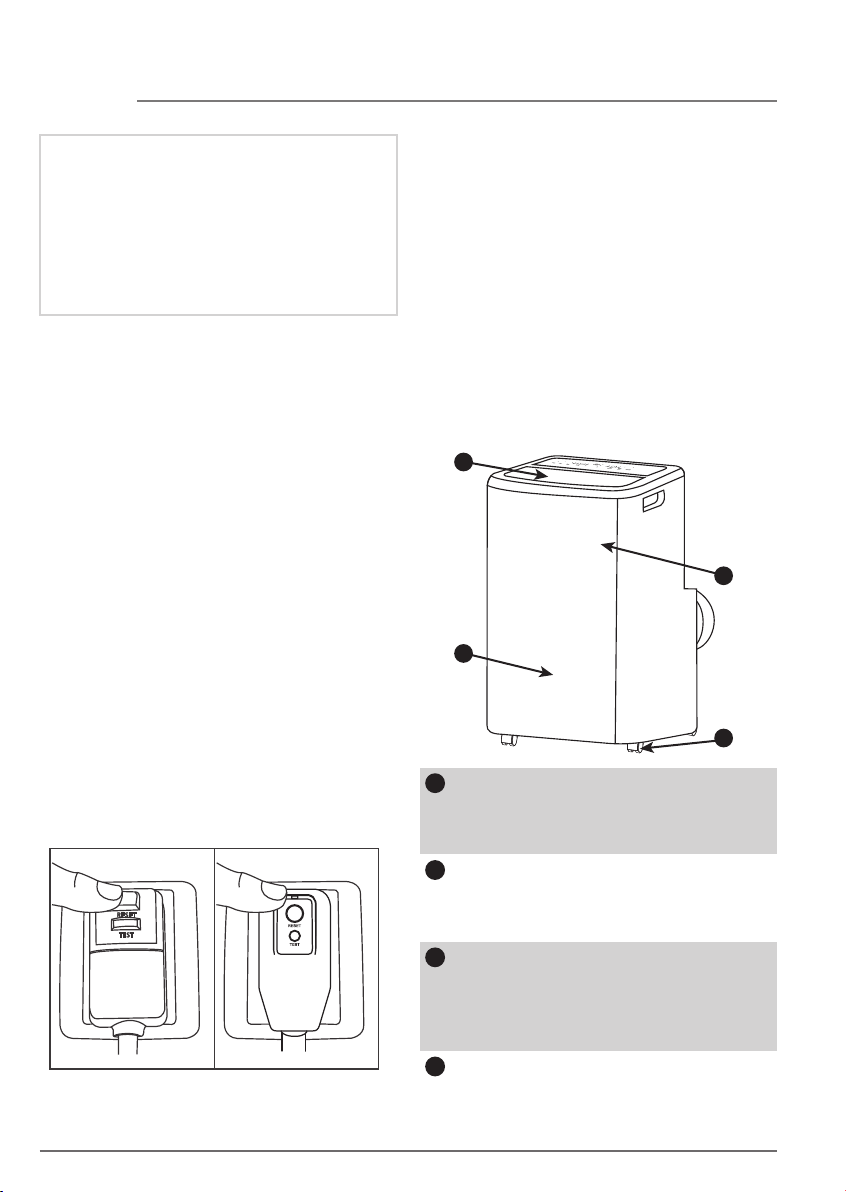
Normal Sounds
1
2
3
4
High pitched Chatter
Today’s high eciency compressors
may have a high pitched chatter during
the cooling cycle.
1
Sound of Rushing Air
At the top of the unit, you may hear the
sound of rushing air being moved by
the fan.
2
Gurgle/Hiss
“Gurgling or hissing” noise may be
heard due to refrigerant passing
through evaporator during normal
operation.
3
Vibration
Unit may vibrate and make noise
because of uneven floor.
4
• Do not use this device to turn the unit on
or off.
• Always make sure the RESET button is
pushed in for correct operation.
• The power supply cord must be replaced
if it fails to reset when either the TEST
button is pushed, or it cannot be reset. A
new one can be obtained from the
product manufacturer.
• If power supply cord is damaged, it
CANNOT be repaired. It MUST be
replaced by one obtained from the
product manufacturer.
READ THIS SECTION BEFORE ATTEMPTING
TO OPERATE AIR CONDITIONER.
Unit must be upright for one hour prior to
operating.
The unit should be operated in a
temperature range of 60°F - 95°F (16°C -
35°C). Performance may be reduced outside
of these operating temperatures.
Operation of Current Device
The power supply cord contains a current
device that senses damage to the power
cord. To test your power supply cord do the
following:
1. Plug in the Air Conditioner.
2. The power supply cord will have TWO
buttons on the plug head. Press the TEST
button. You will notice a click as the
RESET button pops out.
3. Press the RESET button. Again you will
notice a click as the button engages.
4. The power supply cord is now supplying
electricity to the unit. (This is also
indicated by a light on the plug head).
Plug in & press RESET
corrode the copper pipe-work.
NOTE Examples of leak detection fluids are
– bubble method,
– fluorescent method agents.
If a leak is suspected, all naked flames shall
be removed/extinguished.
If a leakage of refrigerant is found contact
local manufacter to replace unit.
7FCC STATEMENT
This equipment has been tested and found
to comply with the limits for a Class B digital
device, pursuant to part 15 of the FCC Rules.
These limits are designed to provide
reasonable protection against harmful
interference in a residential environment.
This equipment generates, uses, and can
radiate radio frequency energy and, if not
installed and used in accordance with the
instructions, may cause harmful interference
to radio communications. However, there is
no guarantee that interference will not occur
in a particular installation. If this equipment
does cause harmful interference to radio or
television reception, which can be
determined by tuning the device o and on,
the user is encouraged to try to correct the
interference by one or more of the following
measures:
This device complies with Part 15 of the FCC
Rules. Operation is subject to the following
two conditions: (1) This device may not
cause harmful interference, and (2) This
device must accept any interference
received, including interference that may
cause undesired operation.
FCC CAUTION: Any changes or
modifications not expressly approved by the
party responsible for compliance could void
the user’s authority to operate the
equipment.
Host device Labeling
This device includes the following module.
Contains FCC ID: 2AIBX-NIULL
INDUSTRY CANADA (IC) STATEMENT
This Class B digital apparatus complies with
Canadian ICES-003.
This device complies with Industry Canada
license-exempt RSS standard(s). Operation
is subject to the following two conditions: (1)
this device may not cause interference, and
(2) this device must accept any interference,
including interference that may cause
undesired operation of the device.
Le présent appareil est conforme aux CNR
d'Industrie Canada applicables aux appareils
radio exempts de licence. L'exploitation est
autorisée aux deux conditions suivantes : (1)
l'appareil ne doit pas produire de brouillage,
et (2) l'utilisateur de l'appareil doit accepter
tout brouillage radioélectrique subi, même si
le brouillage est susceptible d'en
compromettre le fonctionnement.
RF Exposure
The antenna (or antennas) must be installed
so as to maintain at all times a distance
minimum of at least 20 cm between the
radiation source (antenna) and any
individual. This device may not be installed
or used in conjunction with any other
antenna or transmitter.
l'exposition aux RF
L’antenne (ou les antennes) doit être installé
e de façon à maintenir à tout instant une
distance minimum de au moins 20 cm entre
la source de radiation (l’antenne) et toute
personne physique.
Host device Labeling
This device includes the following module.
Contains IC: 21700-NIULL
Host dispositif d'étiquetage
Ce dispositif inclut le module suivant.
Contient module émetteur IC: 21700-NIULL
FCC Interference Statement
• Reorient or relocate the receiving antenna.
• Increase the separation between the
device and receiver.
• Connect the equipment into an outlet
other than the one used for the receiver.
• Consult the dealer or an experienced
radio/TV technician for assistance.
RF exposure statement
This equipment complies with FCC radiation
exposure limits set forth for an uncontrolled
environment. This equipment should be
installed and operated with minimum 20 cm
between the radiator and your body. This
transmitter must not be collocated or
operating in conjunction with any other
antenna or transmitter unless authorized to
do so by the FCC.
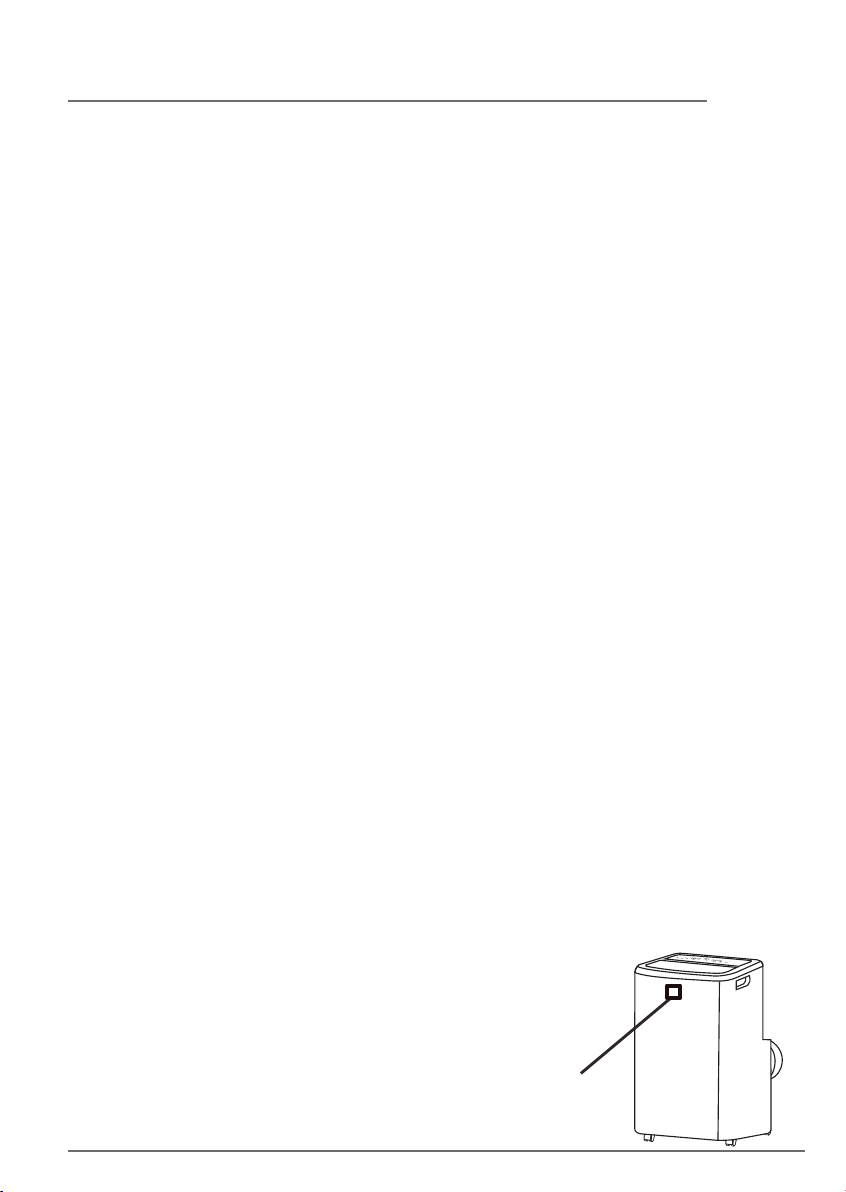
This is the location
of the module.
8 UNIT DESCRIPTION
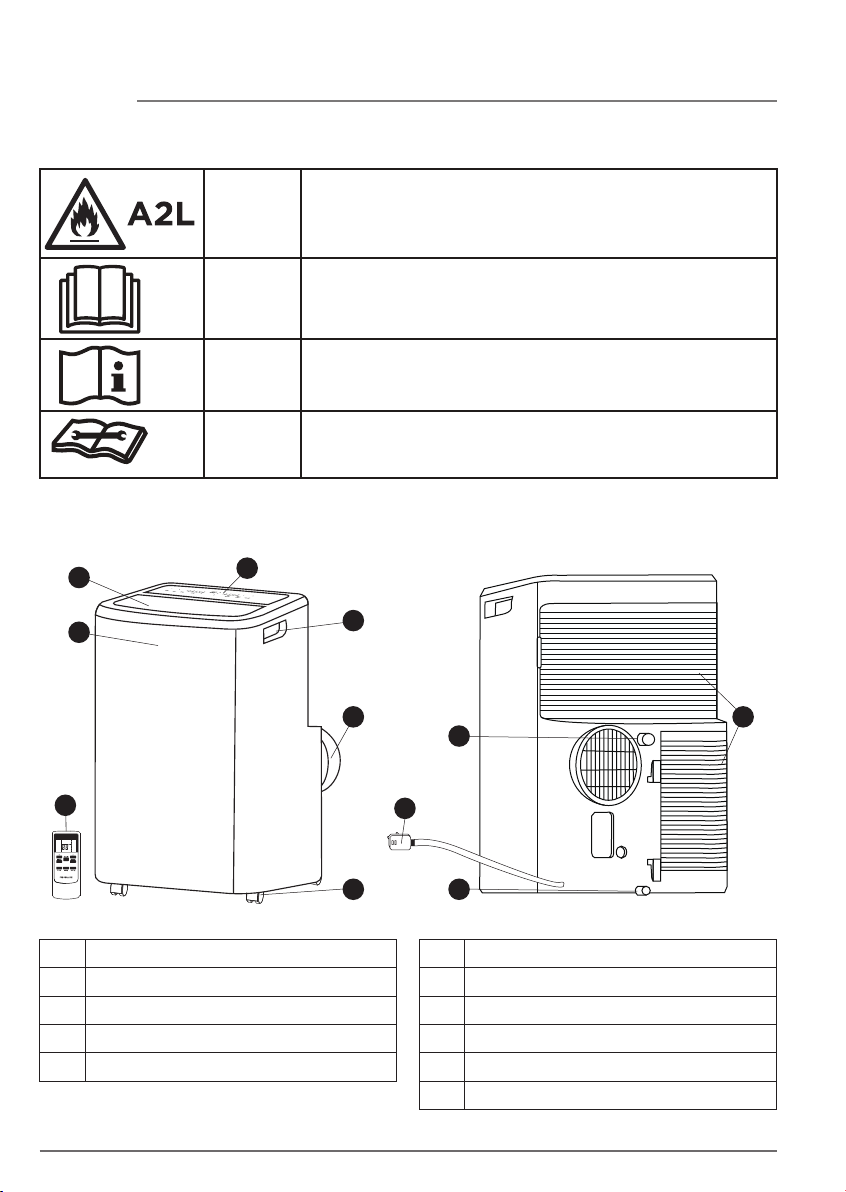
A Castor
B Remote Control
C Signal Receiver
D Air Outlet Grill
E Control Panel
F Carrying Handle
G Air Exhaust
H Air Intake
I Bottom Drain Outlet
K Continuous Drain Outlet
J Power Cord
Unit Description
A
B
C
D
E
F
G H
J
I
K
Explanation of symbols displayed on the unit
WARNING
This symbol shows that this appliance used a flammable
refrigerant. If the refrigerant is leaked and exposed to an
external ignition source, there is a risk of fire.
This symbol shows that the operation manual should be
read carefully.
This symbol shows that a service personnel should be
handling this equipment with reference to the installation
manual.
This symbol shows that information is available such as
the operating manual or installation manual.
CAUTION
CAUTION
CAUTION
9
ACCESSORIES INCLUDED & INSTALLATION INSTRUCTIONS
Installation Instructions
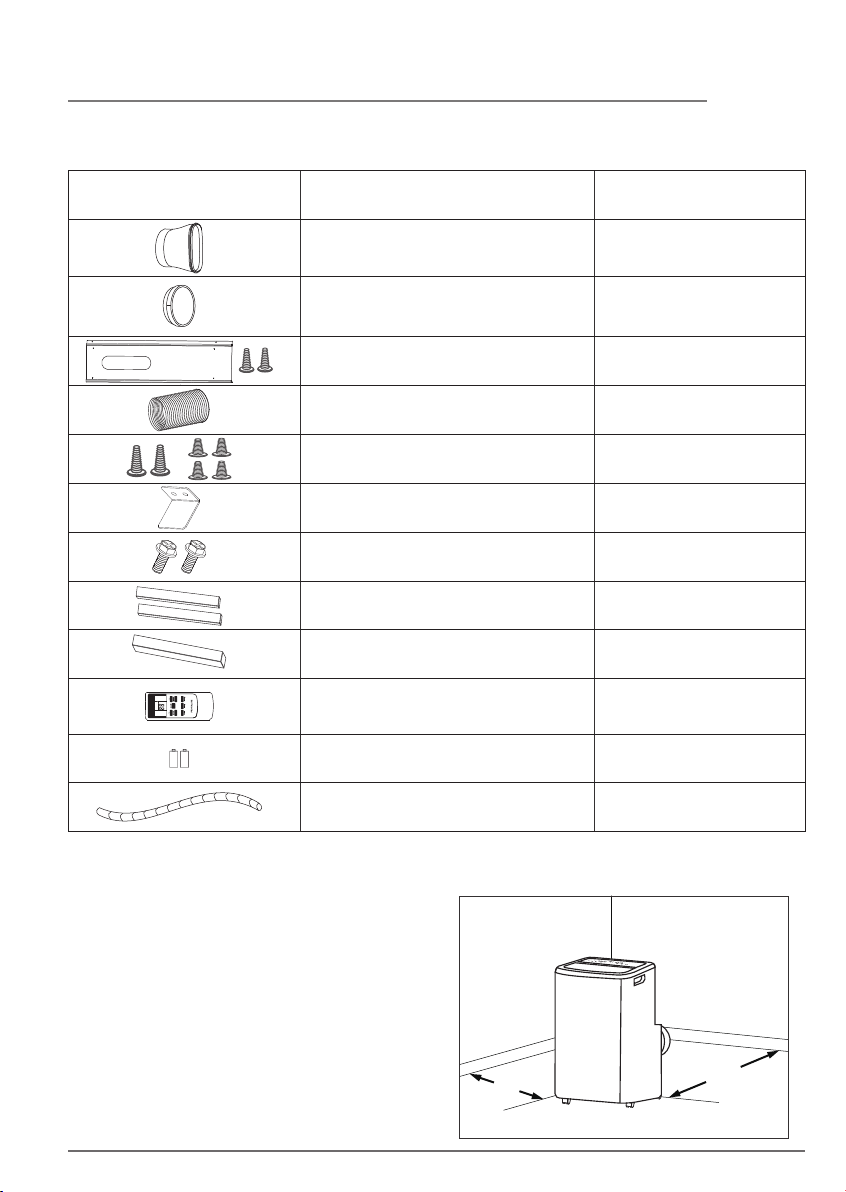
In the Cool Mode the appliance must be
placed close to a window or opening so that
the warm exhaust air can be ducted outside.
First position the unit on a flat surface, and
make sure it is within the vicinity of a single
circuit outlet power source. Make sure
there’s a minimum of 31.5" clearance in the
front/back of the unit, and a minimum of
19.7" clearance in the left/right sides of the
unit.
EXHAUSTING HOT AIR
31.5"
19.7"
Remote Control
Safety Lock
Bolts
Foam seal B
Foam seal A
Drain hose
1 pc
Battery 2 pcs
1 pc
2 pcs
1 pc
2 pcs
1 pc
PARTS: PARTS NAME:
QUANTITY:
Window Kit Connector A
Exhaust hose connector B
Window Kit
Exhaust Hose
Screws
1 pc
1 pc
1 set
1 pc
4 pcs (1/2 screws)
2 pcs (3/4 screws)
Accessories Included
10 INSTALLATION INSTRUCTIONS
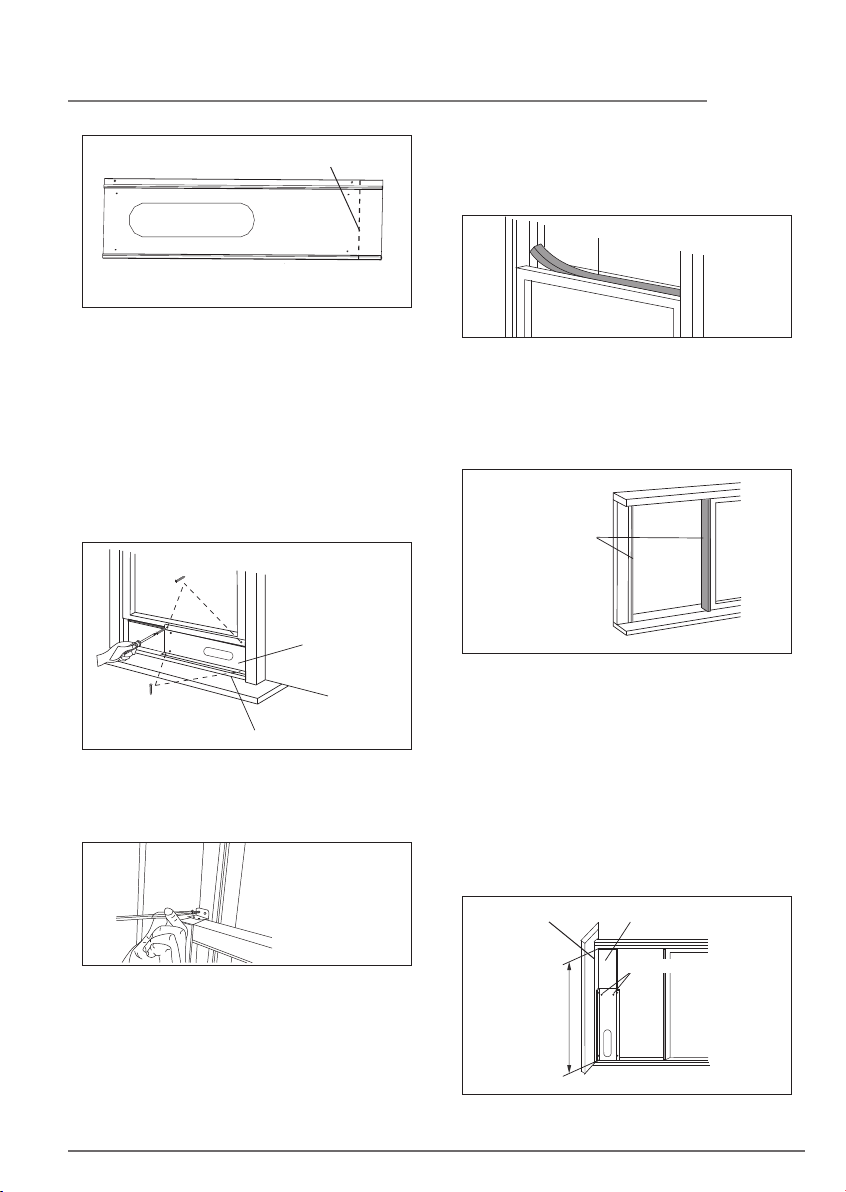
Installation in a double-hung sash
window
1.Cut the adhesive foam seals (A) to the
proper lengths and attach them to the
window and sill.(Fig.6)
2.Open the window sash and place the
window slider kit on the window sill (Fig.7).
Attach the window slider kit to the window
sill. Adjust the length of the window slider
kit according to the width of window. Screw
down the two screws on the window slider
kit. See Fig.7.
Cut the adjustable window slider kit if the
width of window is less than 26.6
inches(Fig.8).
Fig.6
Foam seal A
(adhesive type)
Fig.7
screws
Window slider kit
window sill
26.6"~52.5"
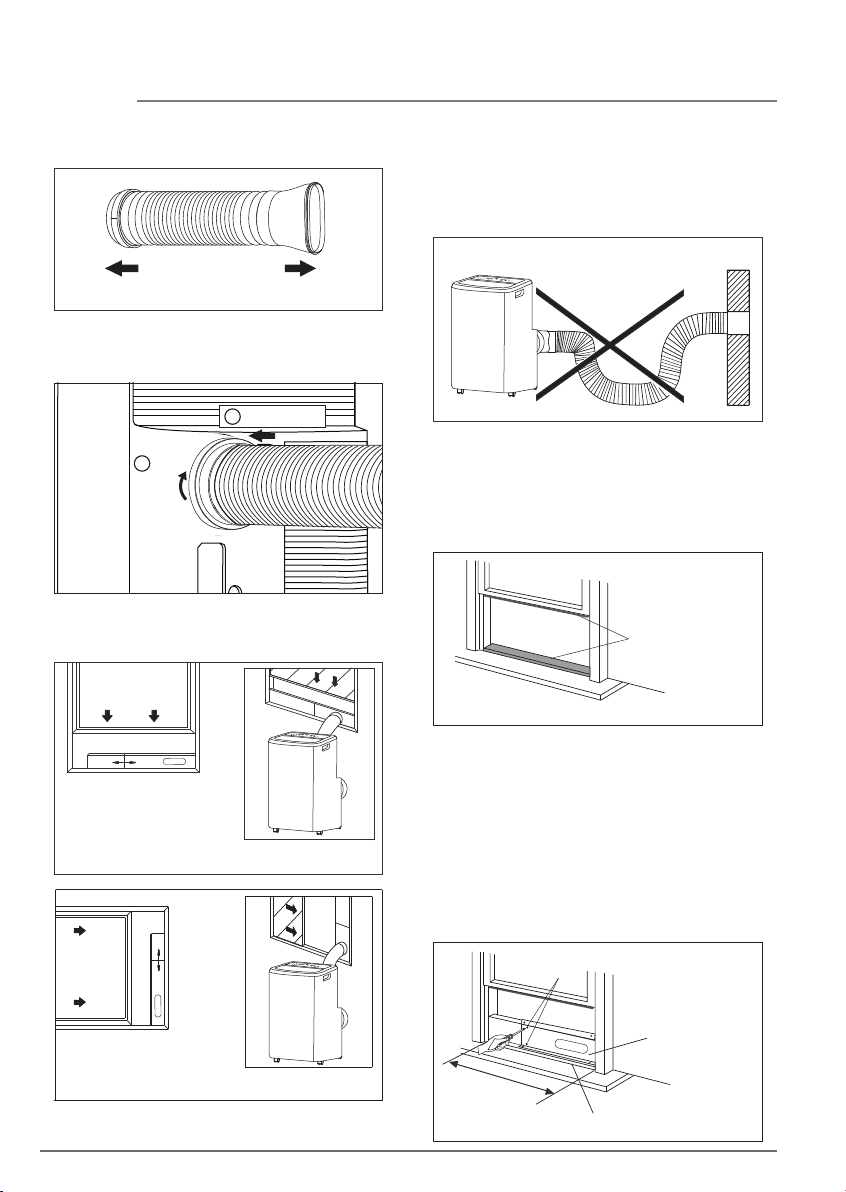
3. Ax the connector A into the window
slider kit and seal.(Fig.3&4)
The hose can be extended from its original
length of 15" up to 59", but try to maintain
the minimum required length. Also make
sure that the hose does not have any sharp
bends or sags.(Fig.5)
Vertical
window
Window Slider Kit
Minimum:26.6(67.5cm)
Maxmum:52.5(133cm)
Fig.3
Horizontal
window
Window Slider Kit
Minimum:26.6(67.5cm)
Maxmum:52.5(133cm)
Fig.4
Fig.5
2. Install the connector B into the unit
(Fig.2).
Fig.1A
Extend the side of hose
Slide onto
1
Lock
2
Fig.2
1. Extend either side of the hose(Fig.1).
11INSTALLATION INSTRUCTIONS
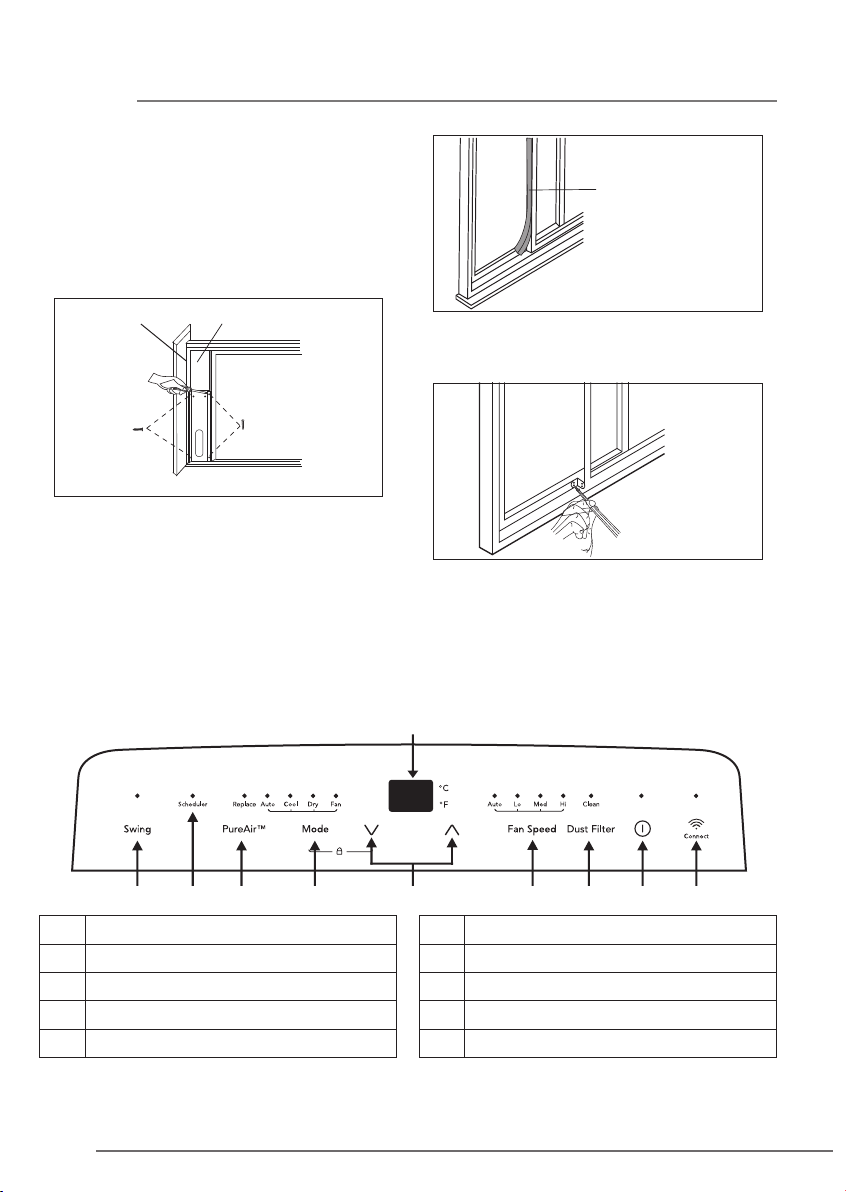
4.Drive two 1/2" screws to secure the
window slider kit to the window sash.(Fig.9)
5.Secure the window slider kit to the
window sill(Fig.9):
A: For wooden window: Use 3/4" screws for
securing.
B: For Vinyl-Clad windows: Use 1/2" hex
head cap screws for securing.
6.To secure lower sash in place, attach right
angle sash lock with 1/2" (12.7mm) screw as
shown(Fig.10).
2.Open the window sash and place the
window slider kit on the window sill (Fig.13).
Attach the window slider kit to the window
sill. Adjust the length of the window slider
kit according to the height of window.
Screw down the two screws on the window
slider kit. See Fig.13.
Cut the adjustable window slider kit if the
height of window is less than 26.6
inches(Fig.8).
Fig.12
Foam seal A
(adhesive type)
Fig.13
window sill
Window slider kit
screws
26.6"~52.5"
Fig.10
Fig.9
1/2"screws
3/4" screws or 1/2"
hex head cap screws
window sill
Window slider kit
7.Cut the non-adhesive foam seal (B) to an
appropriate length and seal the open gap
between the top window sash and outer
window sash, as shown in Fig.11.
1.Cut the adhesive foam seals (A) to the
proper lengths and attach them to the
window frame. See Fig.12.
Fig.11
Foam seal B
Installation in a sliding sash window
3.Close the window sash securely against
the window slider kit.(Fig.9)
Fig.8
Cut this to fit your window
12
INSTALLATION INSTRUCTIONS & AIR CONDITIONER FEATURES
6.Cut the foam seal B to an appropriate
length and seal the open gap between the
sliding sash and outer window sash, as
shown in Fig.15.
Fig.15
Foam seal B
Fig.16
7.To secure sliding sash in place, attach right
angle sash lock with 1/2" (12.7mm) screw as
shown(Fig.16).
AIR CONDITIONER FEATURES
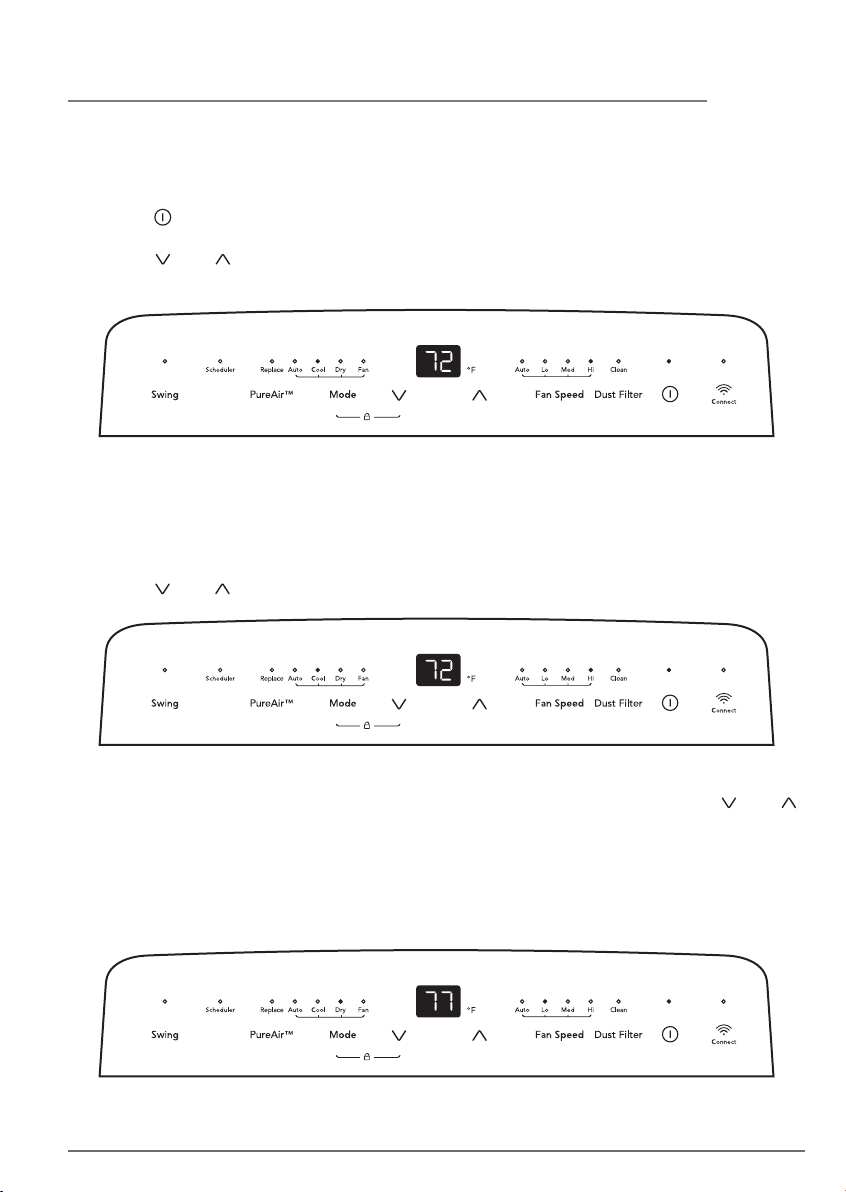
Control Panel
*Note: Refer to the Quick Start Guide that came with your Smart Air Conditioner for detailed
instructions on setting up your air conditioner for connected operation from your smart
phone or tablet.
A Swing
B Display Temperature/Timer
C WIFI Button*
D Power on·o
F Fan Speed
G Adjust Temperature
H Mode Selection
E Dust Filter J Scheduler Indicator
I PureAir
TM
Button
B
A
J CI H G F E D
3.Close the window sash securely against
the window slider kit.(Fig.14)
4.Drive two 1/2" screws to secure the
window slider kit to the window
sash.(Fig.14)
5.Drive two 3/4" screws to secure the
window slider kit to the window sill.(Fig.14)
Fig.14
window sill
Window slider kit
3/4" screws
1/2" screws
13OPERATING INSTRUCTIONS
OPERATING INSTRUCTION
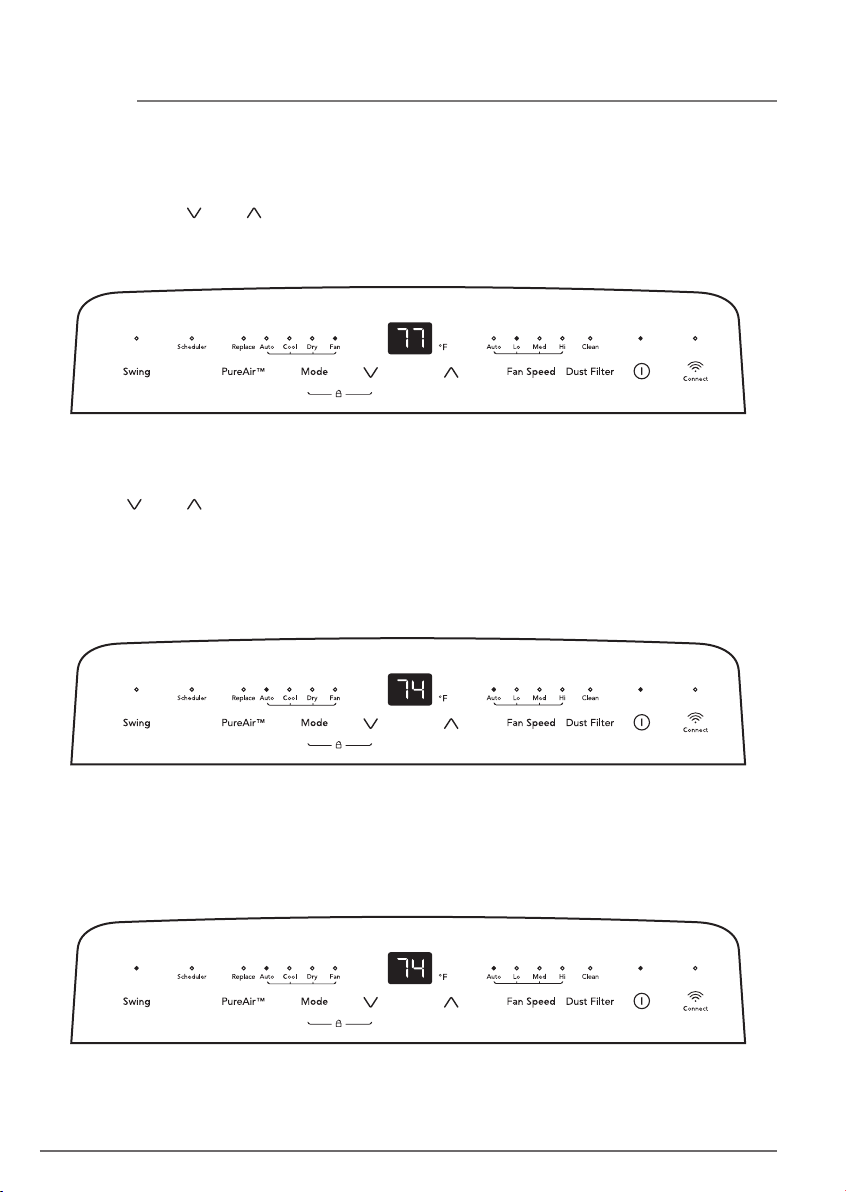
Cool mode
Press the “Mode” button until the Cool mode indicator lights up.
Press the "fan speed" button to choose the fan speed according to the illumination of the
fan speed indicator.
You can choose the “Auto”, “Lo”, “Med”, or “Hi” fan speed setting.
Press the “ ” or “ ”button to choose the temperature you want.
Dry mode
Press the “Mode” button until the Dry mode indicator lights up. In this mode, the “ ” or “ ”
button is disabled and the screen displays the room temperature. The unit will continuously
drain moisture from the room.
Note: In this mode, the fan speed will be automatically set to "Lo", which cannot be
changed.
In this mode, condensate drainage is required, refer to the "Drainage Instructions" on Page
21 for more instructions to drain the excess condensate.
To change temperature setting
Press the “ ” button to turn the unit ON.
The unit will run in "Cool" mode with a set temperature of 72°F.
Press the “ ” or “ ” button to choose the temperature in a range of 60°F - 90°F (16°C -
32°C).
14 OPERATING INSTRUCTIONS
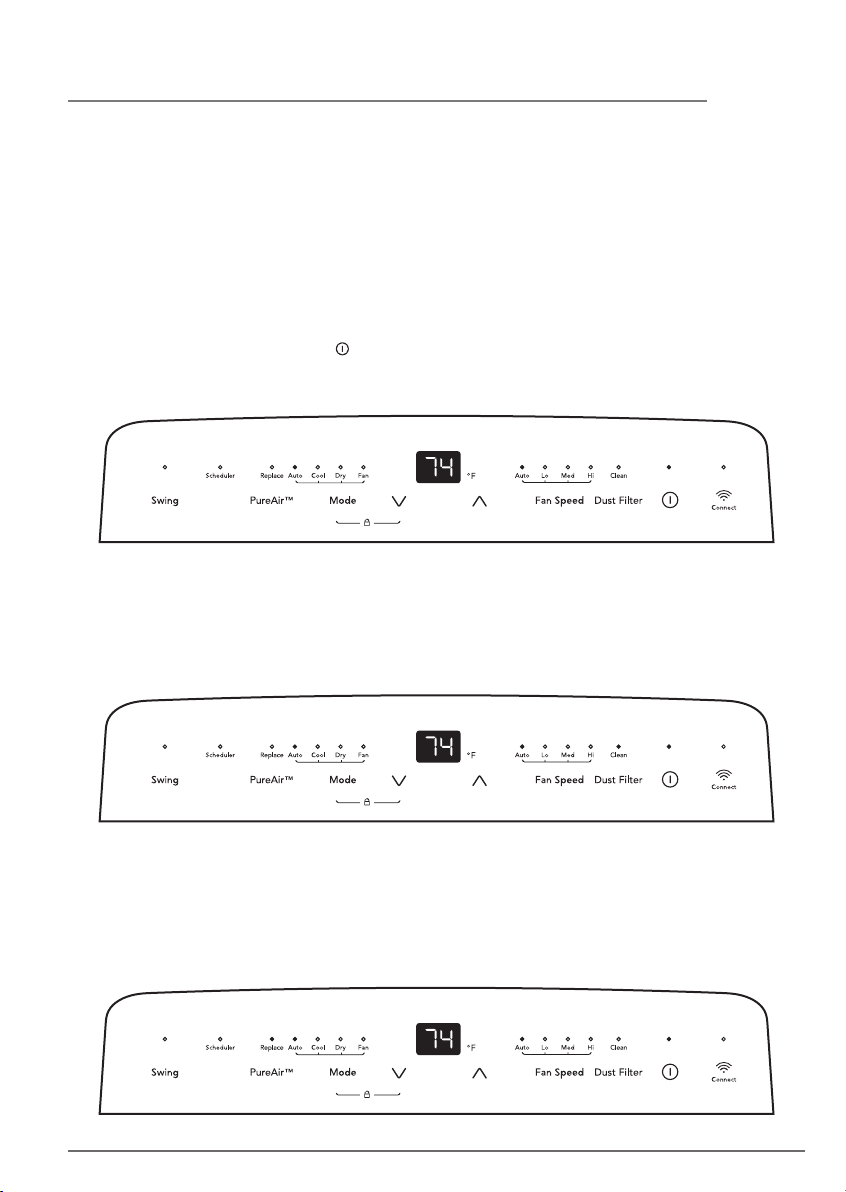
Auto mode
Press the “Mode” button until the Auto mode indicator lights up.
Press the “ ” or “ ” button to choose the temperature you want. The screen will display
the temperature setting.
In this mode, the unit will automatically select cooling, or fan only operation depending on
what temperature you have selected and the room temperature. The air conditioner will
control room temperature automatically around the temperature point set by you.
Note: In this mode, the unit will run in Auto fan speed and cannot be changed.
Fan mode
Press the “Mode” button until the Fan mode indicator lights up.
In this mode, you can select fan speed “Lo”, “Med”, or “Hi”.
In this mode, the “ ” or “ ” button is disabled and the screen displays the room
temperature.
Note: In this mode, the air exhaust hose does not need to be connected.
Louver Swing Function
Press the “Swing” button to enable louver swing function, the swing indicator will illuminate
and the louver on the top panel will swing up and down. Press this button again to disable
the louver swing function.
15OPERATING INSTRUCTIONS
Sleep mode
When the unit is in Cool or Auto mode, you can press the “Sleep” button on remote control
to make the unit run in Sleep mode.
In this mode, the fan speed will automatically set to "Auto", which cannot be changed.
In Cool mode the selected temperature will increase by 2 °F 30 minutes after the mode is
selected. The temperature will then increase by another 2 °F for an additional 30 minutes.
This new temperature will be maintained for 7 hours before it returns to the originally
selected temperature. This ends the "Sleep" mode and the unit will continue to operate as
originally programmed.
The Sleep mode program can be cancelled at any time during operation by pressing the
"Sleep", “Mode”, “Fan speed” or “ ” button.
Note: In Fan or Dry mode, Sleep mode cannot be set.
During Sleep mode the brightness of the indicators will reduce by half.
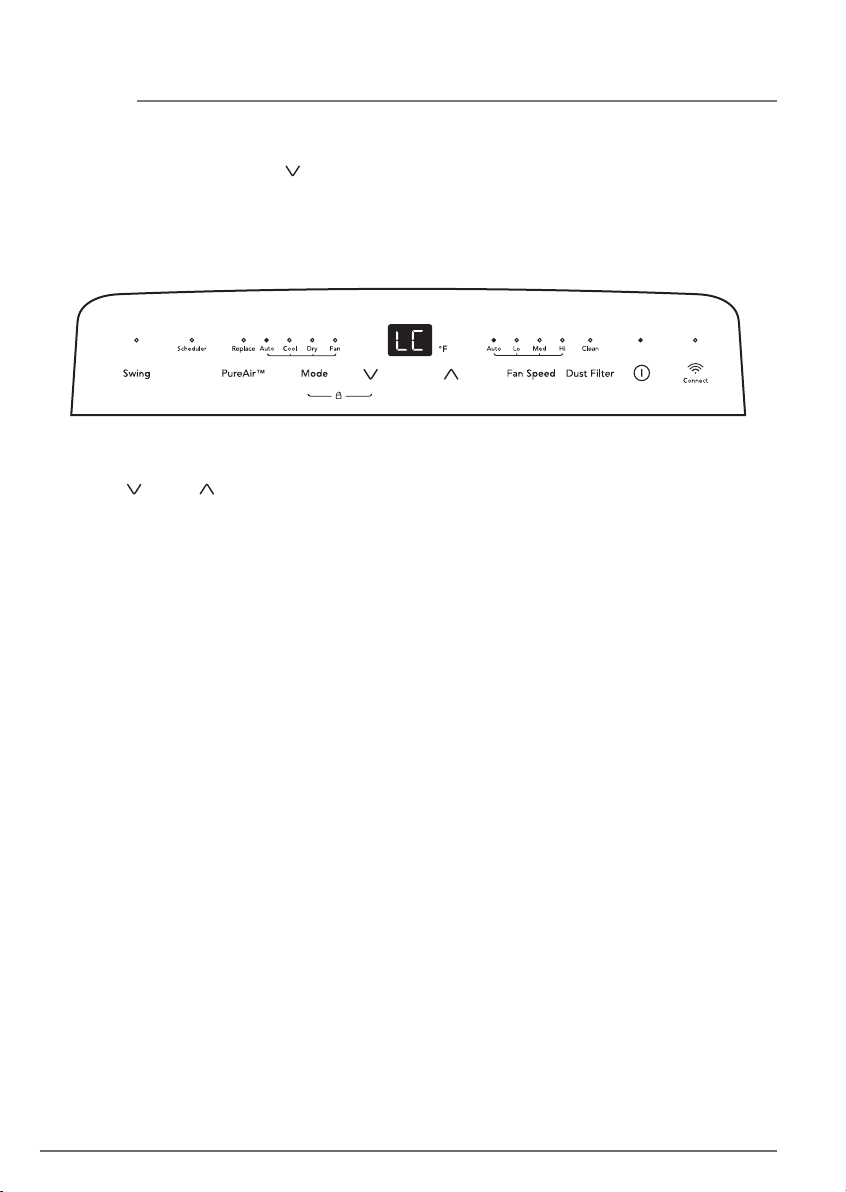
Dust filter reset
This feature is a reminder to clean the Air Filter (See Care and Cleaning) for more ecient
operation.
The “Clean” indicator will illuminate after 250 hours of fan operation. Press and hold the
“Dust Filter” button for 3 seconds to reset, after cleaning the filter.
Replace indicator
This feature is a reminder to replace the Advance Filter (not included, sold separately) for
more ecient operation.
The “Replace” indicator will illuminate after 4000 hours of fan operation. Press and hold the
“PureAir
TM
” button for 3 seconds to reset, after replacing the advanced filter.
16 OPERATING INSTRUCTIONS
°F/°C function
Press the “ ” and “ ” button at the same time for more than 3 seconds to switch between
degrees Fahrenheit and degrees Celsius.
Note: Under Dry/Fan mode, you cannot select °F/°C.
Ionizer function
The unit is equipped with an internal air cleaning device called an ionizer. This feature can
be activated and deactivated by pressing and holding the “Swing” button for 2 seconds or
via the Frigidaire app, which can be downloaded onto your smart phone device. By
activating this function, the ionizer will generate ions into the air, attracting and removing
impurities from the air. This provides cleaner, healthier air to breathe.
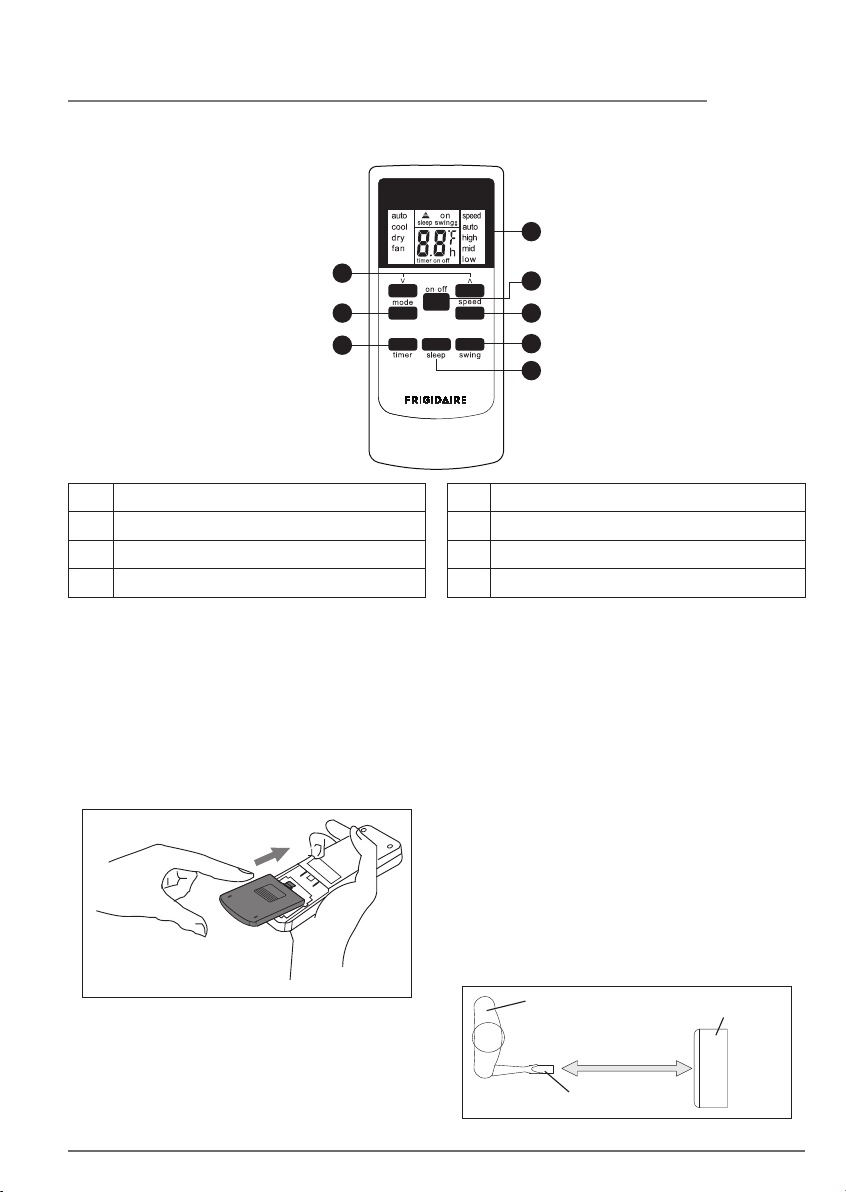
Child Lock
Press and hold the Mode and “ ” button for 3 seconds to activate the Child Lock mode. In
this mode, the unit’s setting cannot be changed by pressing the buttons on control panel.
The display will show “LC” for 5 seconds then return to the normal display. Press and hold
the Swing and Sleep button for another 3 seconds to quit this mode.
Note: After the child lock feature activated the setting can still be changed by remote
control or app.
17OPERATING INSTRUCTIONS
B Mode Button
C Temp/Timer Setting Button
D Remote Control Screen
F Fan Speed Button
G Swing Button
H Sleep Button
Remote Control
Remove the cover at the back of the remote
control.
Insert the provided batteries correctly(see
the instructions inside the battery
compartment).
Close up the cover.
Battery Installation and Important
Instructions
Fig.17
To replace the old batteries(which have
been used up) with two new R03 “AAA”
1.5V batteries, repeat the steps above.
and disposed of in accordance with local
legislation as they do harm to the
environment.
Do not mix old and new batteries.
Do not mix alkaline, standard (carbon-zinc)
or rechargeable (nickel-cadmium) batteries.
Do not dispose of batteries in fire. Batteries
may explode or leak. If the remote control is
not used for a long time, remove the
batteries from the remote control.
The remote control must be handled with
extreme care. Do not drop it or expose it to
direct sunlight or sources of heat.
If the remote control unit is replaced or
discarded, the batteries must be removed
Point the remote control at the location of
the signal receiver. The remote control must
be no more than 16 ft(5 meters) away from
the unit (without obstacles between the
remote control and the unit).
Max. 16 ft(5m)
User
Remote Control
Portable AC
Fig.18
A
B
C
D
F
G
H
E
A Timer Button E on·o Button
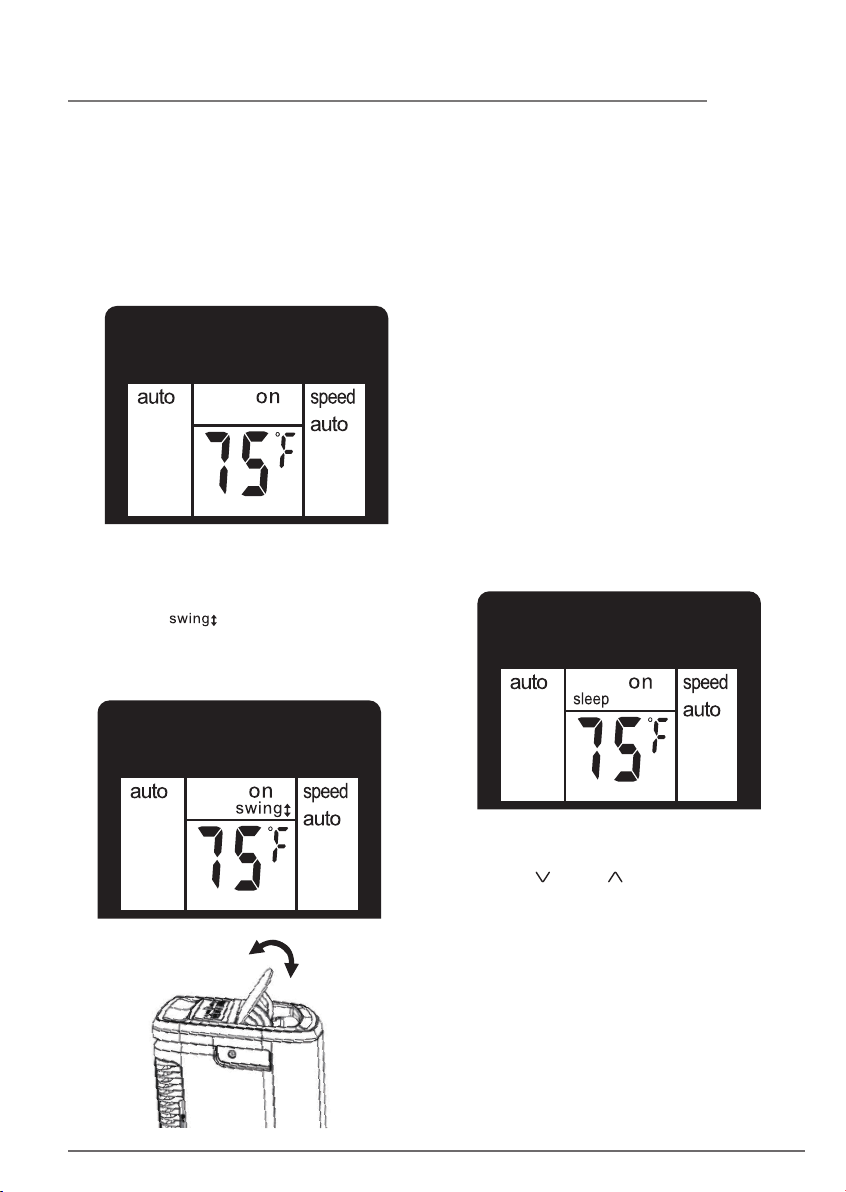
Press the “mode” button until the left side of
LCD screen displays “auto”.
Press the “ ” and “ ” button to choose the
temperature you want.
In this mode, the unit will automatically
select cooling, heating(not applicable for
18 OPERATING INSTRUCTIONS
This device complies with Part 15 of the FCC
Rules. Operation is subject to the following
two conditions: (1) This device may not
cause harmful interference, and (2) this
device must accept any interference
received, including interference that may
cause undesired operation.
Plug in the unit, then press the “on·o” button.
When turned on, the unit will operate
according to the last settings before shutdown.
To switch the unit o, press “on·o” button
again, then remove the plug.
How to Use the Remote Control
Turning the unit on
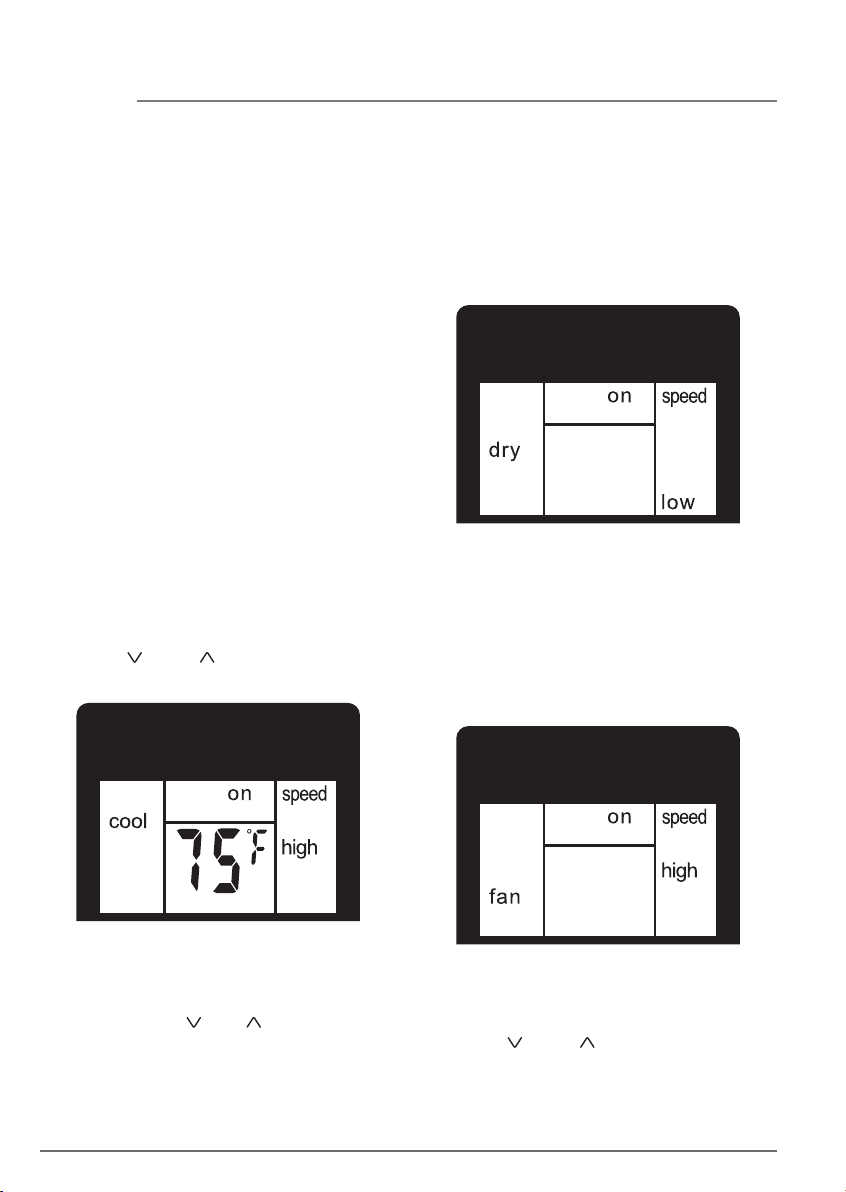
Press the “mode” button until the left side of
LCD screen displays “cool”.
Press the “speed” button to choose the fan
speed “auto”, “high”, “mid”, and “low”.
Press the “ ” and “ ” button to choose the
temperature you want.
Cool mode
Press the “mode” button until the left side of
LCD screen displays “fan”.
In this mode, you can select fan speed
“high”, “mid”, “low” by pressing the Fan
speed button and referring to the diagram.
Note: In this mode, the air exhaust hose
does not need to be connected.
Fan mode
Auto mode
Do NOT switch the unit o by removing the
plug. Always switch the unit o by pressing
the “on·o” button and wait for few minutes
before removing the plug.
Press the “mode” button until the left side of
LCD screen displays “dry”.
In this mode, the “ ” or “ ” button is
disabled and the screen will remain blank.
The unit will continuously drain moisture
from the room.
Note:
In this mode, the fan speed will be set as
“low” automatically, which cannot be
changed.
In this mode, condensate drainage is
required, refer to the "Drainage Instructions"
on Page 21 for more instructions to drain the
excess condensate.
Dry mode
19OPERATING INSTRUCTIONS
cooling only models), or fan only operation
depending on what temperature you have
selected and the room temperature. The air
conditioner will control room temperature
automatically round the temperature point
set by you.
Note: In this mode, fan speed cannot be
selected.
When the unit is in Cool, Heat or Auto mode,
you can press the “sleep” button to make
the unit run in Sleep mode. In this mode, the
fan speed will be set as “Auto”
automatically, which cannot be changed.
In Cool/Heat mode the selected
temperature will increase/decrease by 2 °F
30 minutes after the mode is selected. The
temperature will then increase/decrease by
another 2 °F after an additional 30 minutes.
This new temperature will be maintained for
7 hours before it returns to the originally
selected temperature. This ends the "Sleep"
mode and the unit will continue to operate
as originally programmed.
The "Sleep" mode program can be cancelled
at any time during operation by pressing the
"Sleep", “mode”, “fan speed” or “on·o”
button.
Note: In Fan or Dry mode, Sleep mode
cannot be set.
Sleep mode
Press the “swing” button to enable louver
swing function, and the upper side of screen
will display “ ”. The louver on the top
panel will swing up and down. Press this
button again to disable the louver swing
function.
Louver Swing Function
Press the “ ” and “ ” button at the same
time for more than 3 seconds to switch
between degrees Fahrenheit and degrees
Celsius.
Note: Under Dry/Fan mode, you cannot
select °F/°C.
°F/°C function
20OPERATING INSTRUCTIONS
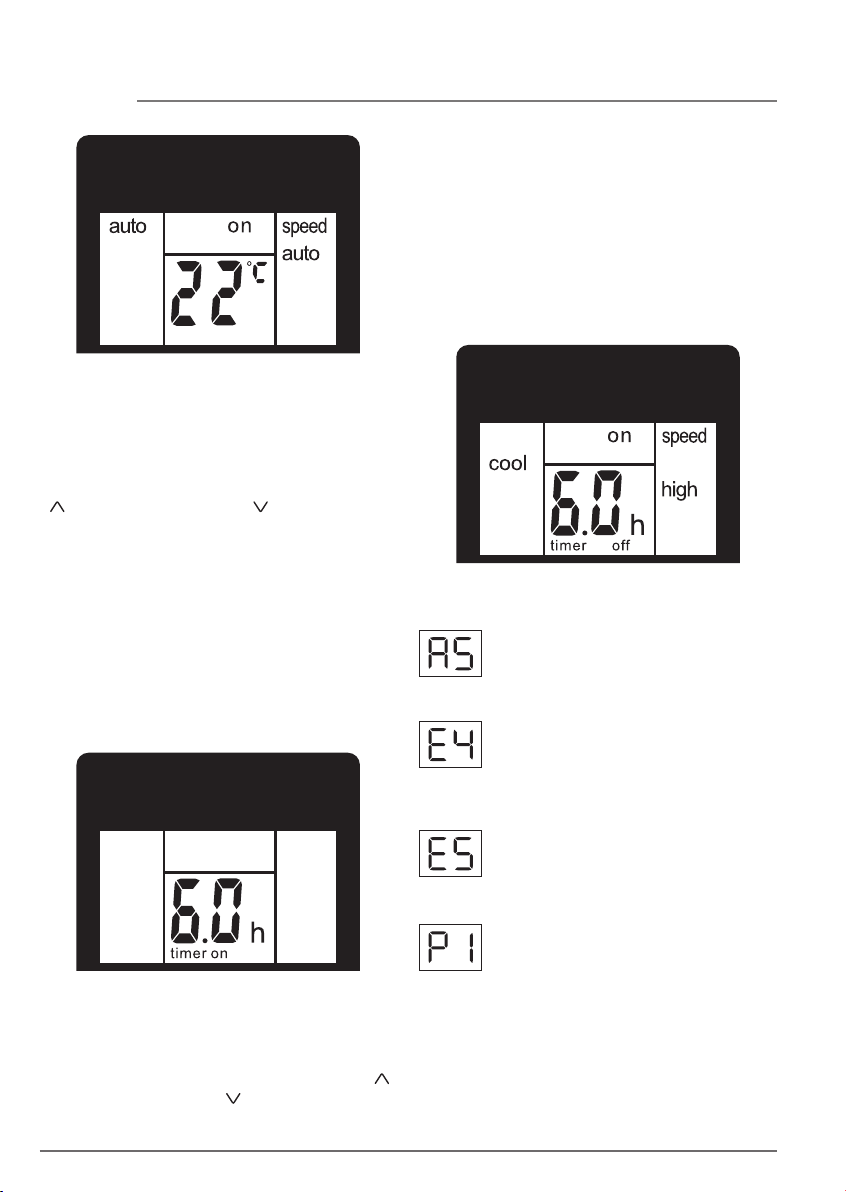
How to delay startup
Plug in the unit, so the unit turns to standby.
Press the “timer” button, when the unit is
o. The screen will display “timer” and “h”,
and "on" will flash. Tap or hold the UP arrow
" " or the DOWN arrow " " to change
delay start timer at 0.5 hour increments up
to 10 hours, then at 1 hour increments up to
24 hours. After 3 seconds, the timer function
is enabled, then “on” will stop flashing, the
display will show the temperature and the
control will count down the time remaining
until startup. The unit will start up in the
mode as previously set.
To cancel the setting, press the “timer”
button again. You can also cancel the
setting by pressing the “on·o” button.
Timer mode
How to delay shutdown
You can delay shutdown when the unit is on.
Press the “timer” button, when the unit is on.
The screen will display “timer”and “h”, and
"o" will flash. Tap or hold the UP arrow “
” or the DOWN arrow “ ” to
change delay shutdown timer at 0.5 hour
increments up to 10 hours, then at 1 hour
increments up to 24 hours. After 3 seconds,
the timer function is enabled, then “o ” will
stop flashing, the display will show the
temperature and the control will count
down the time remaining until shutdown.
To cancel the setting, press the “timer”
button again. You can also cancel the
setting by pressing the “on·o” button.
Fault Code
If the screen on the unit displays
“AS”, the room temperature sensor
has failed. Contact your Authorized
Frigidaire Service Center.
If the display reads "E4", the
communication between display
PCB and main control PCB is
faulty. Contact your Authorized
Frigidaire Service Center.
If the screen on the unit displays
“ES”, the pipe temperature sensor
has failed. Contact your Authorized
Frigidaire Service Center.
Emptying the condensate residue
inside the unit for the P1 message
or during winter storage. Refer to
the "Drainage Instructions" on
Page 21 for more instructions to
drain the successive condensate. If
error repeats, contact your
Authorized Frigidaire Service
Center.
21OPERATING INSTRUCTIONS
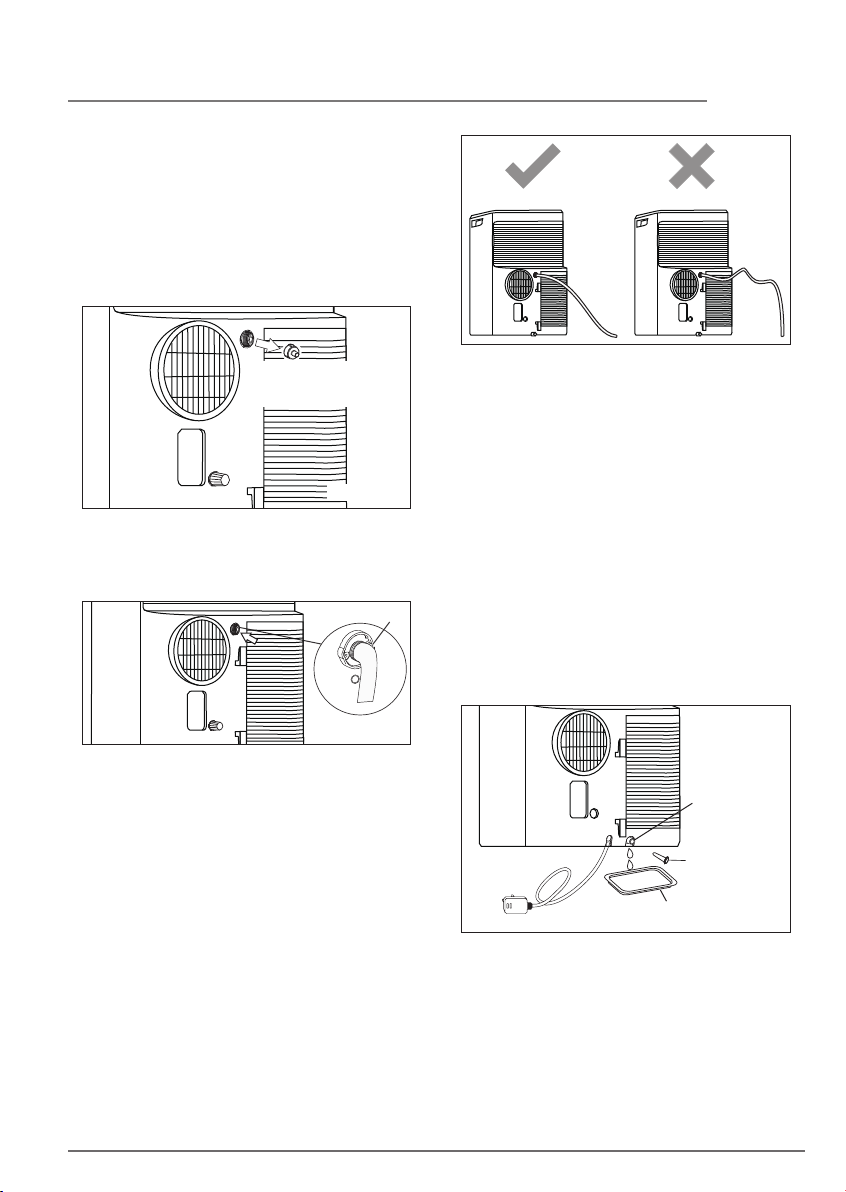
Drainage Instructions
Continuous Drainage
During the Dry mode, you will need a garden
hose (sold separately) to drain the
condensate from the unit. Follow the steps
below:
• Unscrew the drain cap of continuous drain
outlet(Fig.20).
• Connect one end of the garden hose (sold
separately) to the drain outlet then lead
the other end into a drain that is lower
than the unit(Fig.21).
Drain cap for Dry
mode
Figure 20
NOTE:
• Condensate may flow out after removing
the drain cap, if the unit is running in Cool
or Auto mode. When you want to remove
the garden hose, prepare a drip tray (not
supplied) to collect the condensate from
the drain outlet.
• Please be sure that the height of the drain
and section of the drain hose should not
be higher than that of the drain outlet, or
the continous drainage may not work
properly.
• During Cool or Auto mode, it is
recommended to disable continuous
drainage by replacing the drain cap to the
drain outlet, to reach the maximum
performance.
Garden hose
Figure 21
Note: To ensure all condensate residue has
been removed, tilt the unit by lifting it
slightly upwards from the front until no
more condensate comes out from the drain
outlet.
Put a drip tray (not supplied) under the
continuous drain outlet, then unscrew the
drain cap to allow the condensate to flow
into the drip tray. Replace the drain cap to
the continuous drain outlet when no
condensate flows out.
Put the drip tray under the bottom drain
outlet, then remove the rubber stopper from
the drain outlet, to allow the condensate to
flow into the drip tray. If your drip tray can’t
hold all the condensate, a number of fills will
be needed.
Replace the drain cap to the bottom drain
outlet when no condensate flows out.
Emptying the condensate residue inside
the unit during winter storage.
Bottom
Drain Outlet
Drip tray
Drain cap
Figure 25
22CARE AND CLEANING
Clean your air conditioner occasionally to
keep it looking new. Be sure to unplug the
unit before cleaning to prevent shock or fire
hazards.
CLEANING THE UNIT
The cabinet and front may be dusted with
an oil-free cloth or washed with a cloth
dampened in a solution of warm water and
mild liquid dishwashing detergent.
Never use harsh cleaners, wax or polish on
the cabinet front.
Be sure to wring excess water from the
cloth before wiping around the controls.
Excess water in or around the controls may
cause damage to the air conditioner.
If the air conditioner will not be used for an
extended period of time:
1.Drain the water collection tank completely
and leave the bottom drain cap and rubber
plug o for an extended period of time to
allow any residual. Once the tank is
completely drained and no more water flows
out, reinstall the rubber plug and cap.
2.Remove and clean the filter, allow it to dry
completely, then reinstall it.
3.Remove the batteries from the remote
control.
4.Store the air conditioner in a cool, dry
location, away from direct sunlight, extreme
temperature, and excessive dust.
Before using the air conditioner again:
1.Make sure the filter and drain cap are in
place.
2.Check the cord to make sure it is in good
condition, without cracks or damage.
3.Place new batteries in the remote control.
4.Install the air conditioner as described in
the Installation Instructions.
CLEANING THE FILTERS
To keep your air conditioner working
eciently, you should clean the filters every
week of operation.
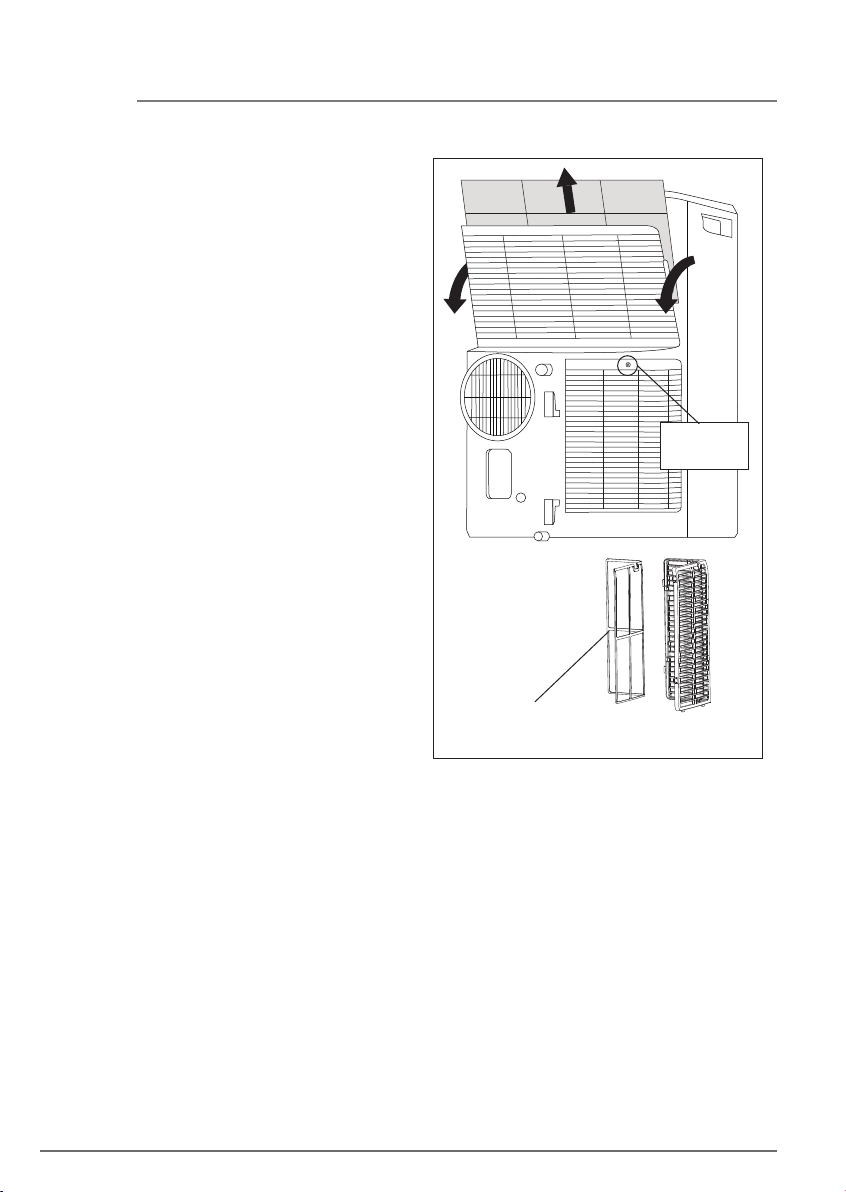
This unit has two filters, they are filter A and
B. Grasp the upper panel tab and take o
the filter A which behind the grill of the back
panel (Fig.25). Remove the lower filter B by
loosening the screw. Take down the air inlet
grille, then remove the air filter as shown in
Fig.25.
Wash the filter using liquid dishwashing
detergent and warm water.
Rinse filter thoroughly. Gently shake excess
water from the filter. Be sure filter is
thoroughly dry before replacing. Or, instead
of washing you may vacuum the filter clean.
Replace the filter after the filter is dry.
Cleaning
Winter Storage
Figure 25
Remove
screw
Take down filter
23BEFORE YOU CALL
Noise when unit is
cooling.
• Air movement sound. This is normal. If too loud, set to lower FAN setting.
• Vibration from uneven floor. Move or support appliance correctly on even
surface.
Air conditioner turns
on and o rapidly.
• Dirty air filter - air restricted. Clean air filter.
• Outside temperature extremely hot. Set FAN speed to a faster setting to
bring air through cooling coils more frequently.
Air conditioner
cooling, but room is
too warm - NO ice
forming on cooling
coil behind
decorative front.
• Dirty air filter - air restricted. Clean air filter. Refer to Care and Cleaning
section.
• Temperature is set too high. Set temperature to a lower setting.
• Air directional louvers positioned improperly. Position louvers for better air
distribution.
• Front of unit is blocked by drapes, blinds, furniture, etc. - restricts air
distribution. Clear blockage in front of unit.
• Doors, windows, registers, etc. open - cool air escapes. Close doors,
windows, registers, etc.
• Unit recently turned on in hot room. Allow additional time to remove
“stored heat” from walls, ceiling, floor and furniture.
Air from unit does not
feel cold enough.
• Room temperature below 60°F (16°C). Cooling may not occur until room
temperature rises above 60°F (16°C).
• Reset to a lower temperature.
• Compressor shut-off by changing modes. Wait approximately 4 minutes
and listen for compressor to restart when set in the COOL mode.
Before calling for service, review this list. It may save you time and expense. This list
includes common occurrences that are not the result of defective workmanship or materials
in this appliance.
SOLUTIONOCCURRENCE
Air conditioner will
not operate.
• Wall plug disconnected. Push plug firmly into wall outlet.
• Plug Current Device Tripped. Press the RESET button.
• House fuse blown or circuit breaker tripped. Replace fuse with time delay
type or reset circuit breaker.
• Control is OFF. Turn Control ON and set to desired setting.
• P1 appears in the display window. Drain water as described in Drainage
Section.
• Room Temperature lower than the set temperature (Cool Mode). Reset the
temperature.
Air conditioner
cooling, but room is
too warm - ice
forming on cooling
coil behind
decorative front
• Outdoor temperature below 60 F (16 C). To defrost the coil, set FAN ONLY
mode.
• Air filter may be dirty. Clean filter. Refer to Care and Cleaning section. To
defrost, set to FAN ONLY mode.
• Temperature is set too low for night-time cooling. To defrost the coil, set to
FAN ONLY mode. Then, set temperature to a higher setting.
• Exhaust duct not connected or blocked. See EXHAUSTING HOT AIR
Section.
24BEFORE YOU CALL
SOLUTIONOCCURRENCE
Room too cold. • Set temperature too low. Increase set temperature.
Room too hot. • Set temperature too high. Lower setting.
If These Solutions Fail, Call 1-800-944-9044(US)/1-800-265-8352(Canada)
For Frigidaire Service.
Exclusions
This warranty does not cover the following:
DISCLAIMER OF IMPLIED WARRANTIES; LIMITATION OF REMEDIES
If You Need
Service
Canada
1.800.265.8352
Electrolux Canada Corp.
5855 Terry Fox Way
Mississauga, Ontario, Canada
L5V 3E4
USA
1.800.944.9044
Electrolux Major Appliances
10200 David Taylor Drive
Charlotte, NC 28262
Your appliance is covered by a limited one-year warranty for functional repairs only. For one year from your
original date of purchase, Electrolux will pay all costs for repairing or replacing any parts of this appliance that
prove to be defective in materials or workmanship when such appliance is installed, used and maintained in
accordance with the provided instructions. After one year from your original date of purchase, the consumer
will be responsible for diagnostic, labor and parts costs as well as any removal, transportation and
reinstallation expenses which are incurred during service on components.
CUSTOMER'S SOLE AND EXCLUSIVE REMEDY UNDER THIS LIMITED WARRANTY SHALL BE PRODUCT
REPAIR OR REPLACEMENT AS PROVIDED HEREIN. CLAIMS BASED ON IMPLIED WARRANTIES, INCLUDING
WARRANTIES OF MERCHANTABILITY OR FITNESS FOR A PARTICULAR PURPOSE, ARE LIMITED TO ONE
YEAR OR THE SHORTEST PERIOD ALLOWED BY LAW, BUT NOT LESS THAN ONE YEAR. ELECTROLUX
SHALL NOT BE LIABLE FOR CONSEQUENTIAL OR INCIDENTAL DAMAGES SUCH AS PROPERTY DAMAGE
AND INCIDENTAL EXPENSES RESULTING FROM ANY BREACH OF THIS WRITTEN LIMITED WARRANTY OR
ANY IMPLIED WARRANTY. SOME STATES AND PROVINCES DO NOT ALLOW THE EXCLUSION OR
LIMITATION OF INCIDENTAL OR CONSEQUENTIAL DAMAGES, OR LIMITATIONS ON THE DURATION OF
IMPLIED WARRANTIES, SO THESE LIMITATIONS OR EXCLUSIONS MAY NOT APPLY TO YOU. THIS WRITTEN
WARRANTY GIVES YOU SPECIFIC LEGAL RIGHTS. YOU MAY ALSO HAVE OTHER RIGHTS THAT VARY
FROM STATE TO STATE.
Keep your receipt, delivery slip, or some other appropriate payment record to establish the
warranty period should service be required. If service is performed, it is in your best interest to
obtain and keep all receipts. Service under this warranty must be obtained by contacting
Electrolux at the addresses or phone numbers below.
This limited warranty only applies in the USA and Canada. In the USA, your appliance is warranted by
Electrolux Major Appliances North America, a division of Electrolux Home Products, Inc. In Canada, your
appliance is warranted by Electrolux Canada Corp. Electrolux authorizes no person to change or add to any
obligations under this warranty. Obligations for service and parts under this warranty must be performed by
Electrolux or an authorized service company. Product features or specifications as described or illustrated are
subject to change without notice.
1. Products with original serial numbers that have been removed, altered or cannot be readily determined.
2. Product that has been transferred from its original owner to another party or removed outside the USA or
Canada.
3. Rust on the interior or exterior of the unit.
4. Products purchased "as-is" are not covered by this warranty.
5. Food loss due to any refrigerator or freezer failures.
6. Products used in a commercial setting.
7. Service calls which do not involve malfunction or defects in materials or workmanship, or for appliances
not in ordinary household use or used other than in accordance with the provided instructions.
8. Service calls to correct the installation of your appliance or to instruct you how to use your appliance.
9. Expenses for making the appliance accessible for servicing, such as removal of trim, cupboards, shelves,
etc., which are not a part of the appliance when it is shipped from the factory.
10. Service calls to repair or replace appliance light bulbs, air filters, water filters, other consumables, or
knobs, handles, or other cosmetic parts.
11. Surcharges including, but not limited to, any after hour, weekend, or holiday service calls, tolls, ferry trip
charges, or mileage expense for service calls to remote areas, including the state of Alaska.
12. Damages to the finish of appliance or home incurred during installation, including but not limited to
floors, cabinets, walls, etc.
13. Damages caused by: services performed by unauthorized service companies; use of parts other than
genuine Electrolux parts or parts obtained from persons other than authorized service companies; or
external causes such as abuse, misuse, inadequate power supply, accidents, fires, or acts of God.
25MAJOR APPLIANCE LIMITED WARRANTY
welcome
home
Frigidaire.com
1-800-944-9044
Frigidaire.ca
1-800-265-8352
owner support
accessories
service
Our home is your home. Visit us if you
need help with any of these things:
registration
(See your registration card
for more information.)