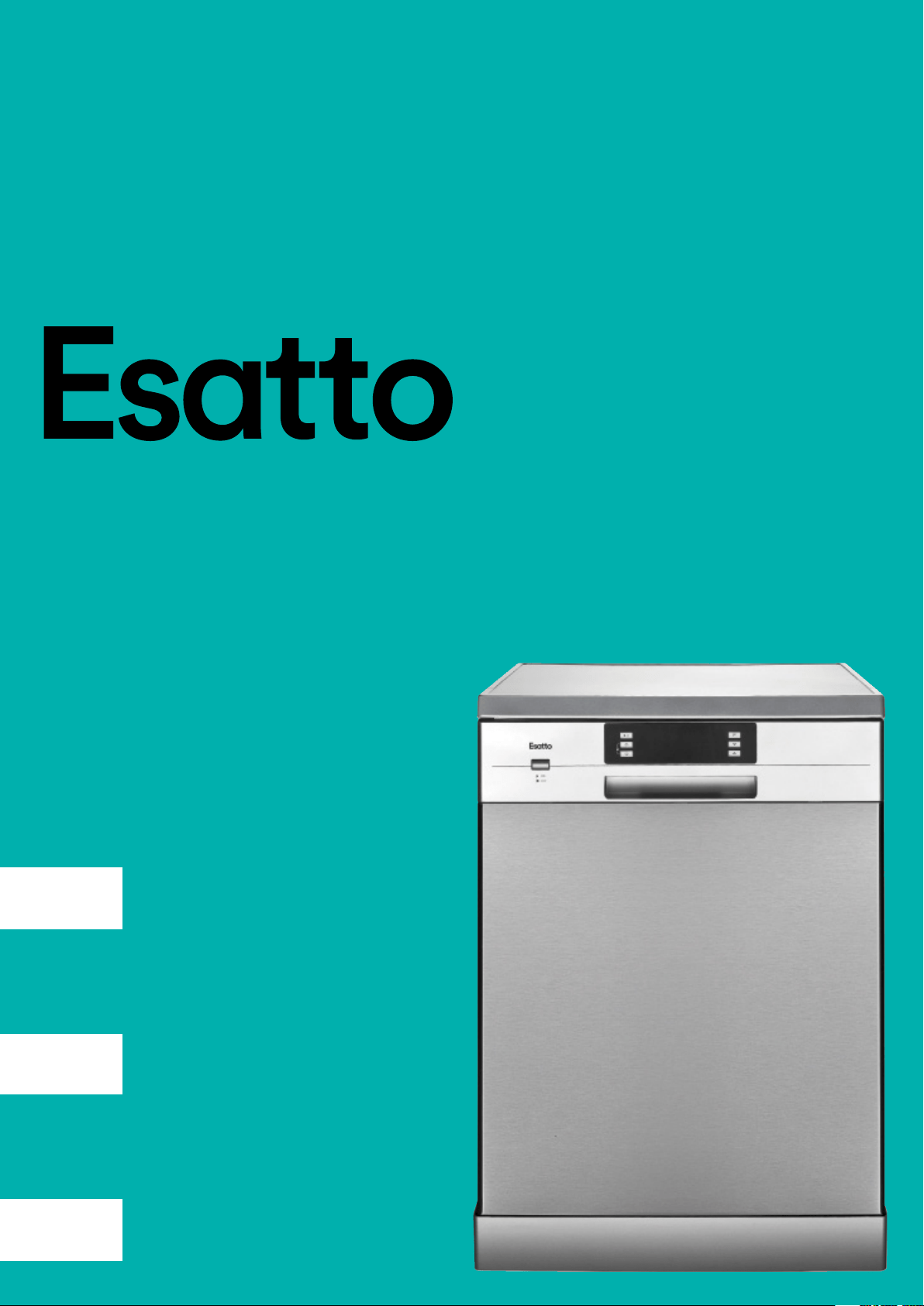
Model Code/s:
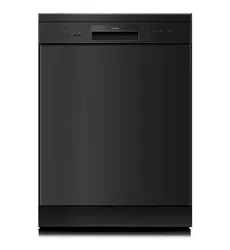
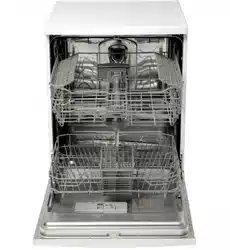
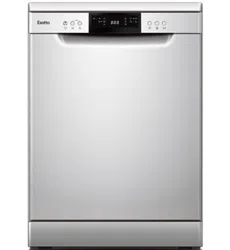
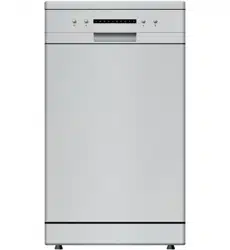
EDW6CS
Product:
Freestanding
Dishwasher
Document:
User Manual
Dear Customer, Congratulations on purchasing your dishwasher.
The Esatto brand is proudly distributed within
Australia by Residentia Group Pty Ltd.
Please refer to the warranty card at the rear of this
manual for information regarding your product’s
parts and labour warranty, or visit us online at
www.residentiagroup.com.au.
At Residentia Group, we are customer obsessed
and our Support Team are there to ensure you get
the most out of your appliance. Should you want
to learn more about the various dishwasher
functions, or even checking to ensure your crockery
is suitable for your dishwasher, our Support Team
are here to help.
You can use our online Support Centre at anytime
by visiting http://support.residentiagroup.com.au,
or you can contact us via phone by dialling:
1300 11 HELP (4357).
It is important that you read through the following
use and care manual thoroughly to familiarise
yourself with the installation and operation
requirements of your appliance to ensure optimum
performance.
Again, thank you for choosing an Esatto appliance
and we look forward to being of service to you.
Kind Regards,
The Residentia Team
T 1300 11 4357
E info@residentiagroup.com.au
W residentiagroup.com.au
ACN
600 546 656
Residentia Group
PO Box 581
Stanhope Gardens
NSW Australia 2768

Page:
3
User Manual:
Contents: Page:
Safety instructions 04
Your Dishwasher 06
Installation Instructions 07
Operating Your Dishwasher 11
Cleaning & Maintenance 18
Troubleshooting 21
Technical Data 21
Warranty Information 24
Purchase Details 26
Receipt 27

Page:
4
User Manual:
Safety Instructions
This dishwasher is intended to be used in domestic environments only, including:
→ household kitchen;
→ sta/oce kitchen;
→ hotel/motel kitchens; or
→ bed and breakfast type environments.
It has not been designed for use in commercial kitchen environments.
Warning Please ensure that you carefully read this user manual before installing
and using the dishwasher, as it will help you to use and maintain the
dishwasher properly.
→ Keep it as a reference for the future as it also contains your product warranty card.
→ Pass this user manual on to any subsequent owners of the appliance.
Important! The electricity supply to the dishwasher must be cut o before any
adjustments or maintenance work is undertaken.
→ This dishwasher must be grounded. In the event of a malfunction or product failure,
grounding will reduce the risk of an electric shock by providing a path of least resistance
of electric current.
→ The plug must be plugged into an appropriate outlet that is installed and grounded in
accordance with all local codes.
Warning Improper connection of the equipment-grounding conductor can result
in the risk of an electric shock. Check with a qualied electrician or
service representative if you are in doubt as to whether your dishwasher
is grounded properly. Never modify the plug supplied with the appliance.
If the plug doesn't t the outlet, have a licenced and suitably qualied
electrician install the correct outlet.
→ Do not abuse, sit on, or stand on the door or dish rack of the dishwasher.
→ Do not touch the heating element during or immediately after use. (This instruction is
only applicable to machines with a visual heating element.)
→ Do not operate your dishwasher unless all enclosure panels are properly in place. Open
the door very carefully if the dishwasher is operating, there is a risk of water squirting
out.
→ Do not place any heavy objects on or stand on the door when it is open. The appliance
could tip forward.
→ When loading items to be washed:
1) Locate sharp items so that they are not likely to damage the door seal;
2) Warning: Knives and other utensils with sharp points must be loaded in
the basket with their points down or placed in a horizontal position.
→ When using your dishwasher, you should prevent plastic items from coming into contact
with the heating element.(This instruction is only applicable to machines with a visual
heating element.)
→ Check that the detergent compartment is empty after completion of the wash cycle.
→ Do not wash plastic items unless they are marked dishwasher safe or the equivalent. For
plastic items not so marked, check the manufacturer's recommendations.
→ Use only detergent and rinse additives designed for an automatic dishwasher.
→ Never use soap, laundry detergent, or hand-washing detergent in your dishwasher. Keep
these products out of the reach of children.
→ Keep children away from detergent and rinse. Always be sure to keep the dishwasher
door closed with children around, as there may still be residual detergent inside.

Page:
5
User Manual:
→ This appliance is not intended for use by persons (including children with reduced
physical, sensory or mental capabilities, or lack of experience and knowledge, unless
they have been given supervision or instruction concerning use of the appliance by a
person responsible for their safety.)
→ Children should be supervised to ensure that they do not play with the appliance.
→ The door should not be left open, since this could increase the risk of tripping.
→ If the supply cord is damaged, it must be replaced by the manufacturer or its service
agent or a similarly qualied person in order to avoid a hazard.
→ Remove the door to the washing compartment when removing an old dishwasher from
service or discarding it.
→ During installation, the power supply must not be excessively or dangerously bent or
attened.
→ The appliance is to be connected to the water mains using new hose sets and that old
hose-sets should not be reused.
→ The maximum number of place settings to be washed is 14.
→ The maximum permissible inlet water pressure is 1Mpa.
→ The minimum permissible inlet water pressure is 0.04Mpa.
→ Never use an extension cord.
→ It's recommended to provide a separate circuit to serve your dishwasher alone and you
should use the required 10 amp fuse.
→ An extension hose can be used but should be no longer than 4 meters, otherwise the
performance of the dishwasher will be eected.
DECLARATION OF CONFORMITY
→ The manufacturer declares that the dishwasher is built using certied materials and
requires the appliance to be installed in accordance with the standards currently in force.
This appliance must be used by a trained person for domestic purposes only.
UNPACKING
→ During transportation, protective packaging was used to protect the appliance against
any damage. After unpacking, please dispose of all elements of packaging in a way
that will not cause damage to the environment. All materials used for packaging the
appliance are environmentally friendly; they are 100% recyclable and are marked with the
appropriate symbol.
→ During unpacking, the packaging materials (polythene bags, polystyrene pieces, etc.)
should be kept out of reach of children.
DISPOSAL OF THE APPLIANCE
→ Old appliances should not simply be disposed of with normal household waste, but
should be delivered to a collection and recycling centre for electric and electronic
equipment. A symbol shown on the product, the instruction manual or the packaging
shows that it is suitable for recycling.
→ Materials used inside the appliance are recyclable and are labelled with information
concerning this. By recycling materials or other parts from used devices you are making a
signicant contribution to the protection of our environment.
→ Information on appropriate disposal centres for used devices can be provided by your
local authority.
Page:
6
User Manual:
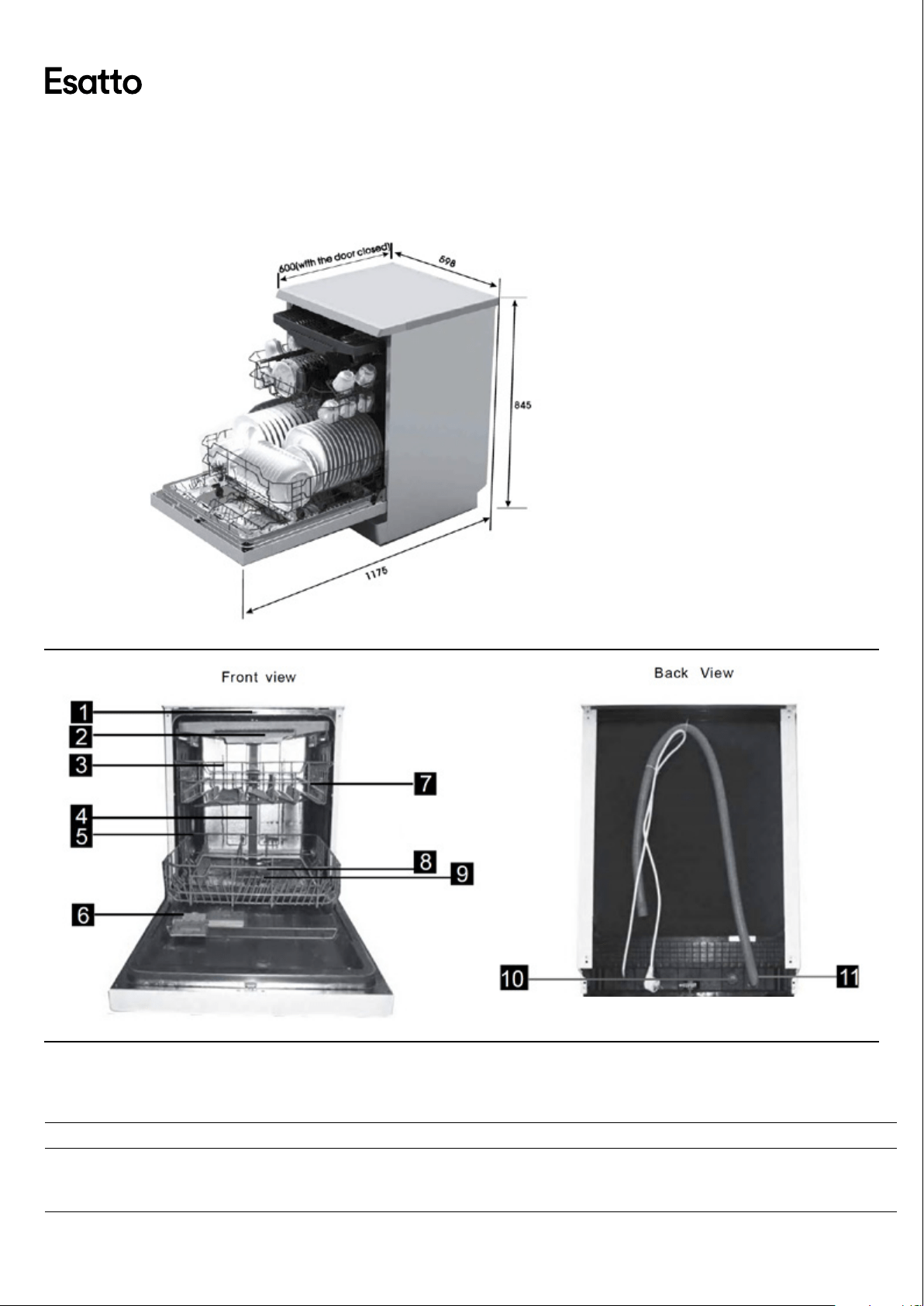
SPECIFICATIONS
1. Top Spray Arm 2. Cutlery Rack 3. Upper Basket 4. Inner Pipe
5. Lower Basket 6. Dispenser 7. Cup Shelf 8. Spray Arms
9. Filter assembly 10. Inlet pipe connector 11. Drain Pipe
MODEL PRODUCT DIMENSIONS (W×D×H) PRODUCT FEATURES
EDW6CS 598 × 600 × 845mm
● 14 Place setting capacity
● Upper slide-out cutlery tray
● Mark-free stainless steel door
Your Dishwasher
Page:
7
User Manual:
Installation Instructions
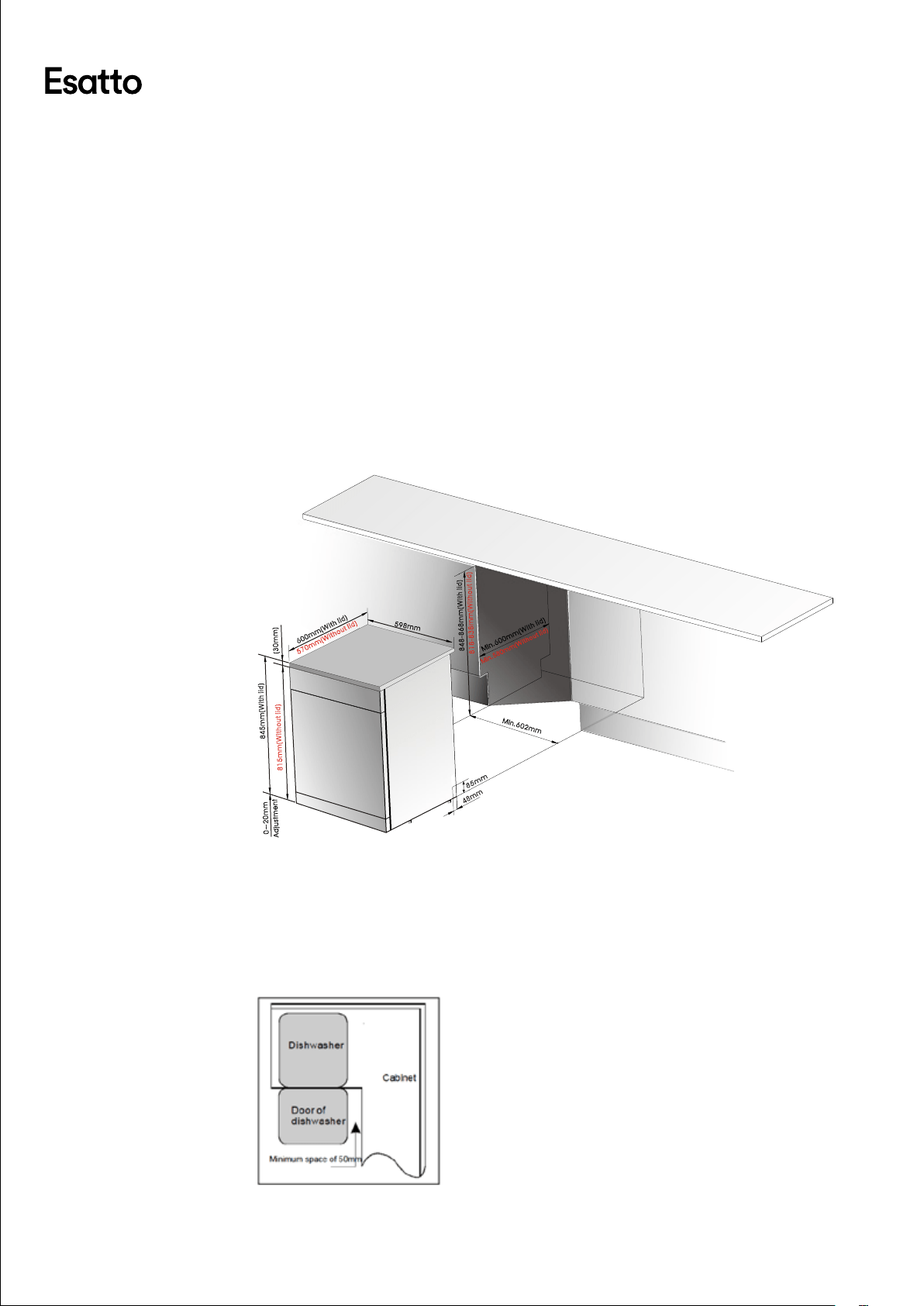
It’s important to carefully read the following installation instructions before beginning the installation of
your dishwasher.
Important! The installation of the pipes and electrical outlets should be completed by suitably
licensed and qualied persons.
POSITIONING
→ The installation position of the dishwasher should be near the existing inlet, drainage
wastepipe and power outlet.
→ Choose a position near your sink to facilitate the installation of inlet and drain hoses
(refer to gure one).
→ If the dishwasher is installed in the corner of your kitchen cabinetry, make sure an
allowance is made to ensure your dishwasher door can freely open without obstruction
from other cabinetry/door handles.
48mm
85mm
5 98mm
M in.602mm
600mm(With l i d)
570mm(With o ut lid)
845mm(With l i d )
815mm(With o ut lid)
0~20mm
A djustmen t
( 30mm)
848-868mm(W i th lid)
818-838mm(W i thout li d )
Min.580mm(W i thou t lid)
M in.600mm(With lid )
Figure 1\ Cabinet dimensions:
Less than 5mm between the top of dishwasher and cabinet and the outer
door aligned to cabinet.
Figure 2\ Minimum space when the door is opened.
1
2
Page:
8
User Manual:
COLD WATER CONNECTION
→ Connect the cold water supply hose to a threaded 3/4(inch) connector and make sure
that it is fastened tightly in place.
→ If the water pipes are new or have not been used for an extended period of time, let the
water run to make sure that the water is clear. This precaution is needed to avoid the risk
of the water inlet to be blocked and damage the appliance.
CONNECTION OF THE DRAIN HOSE
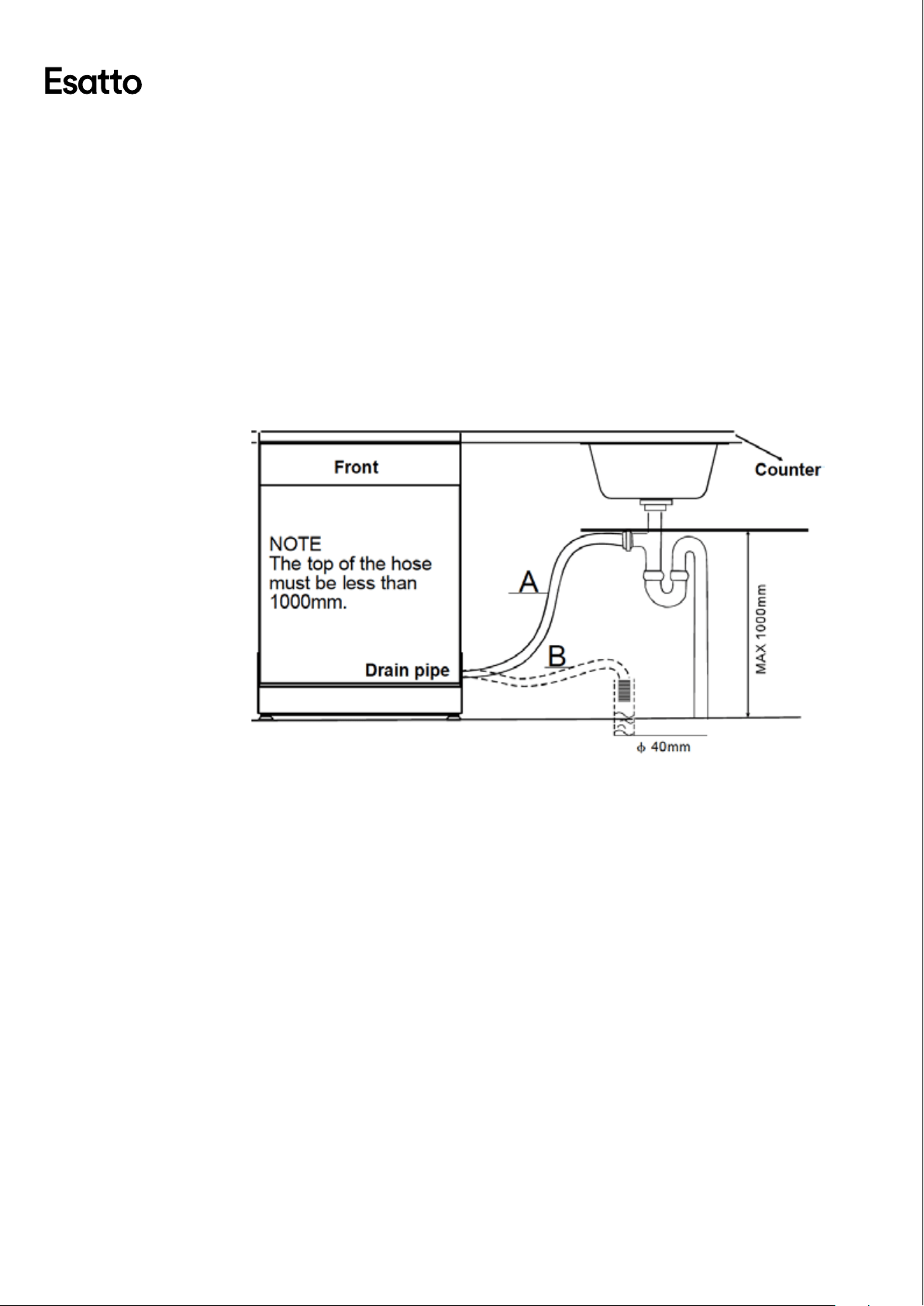
→ Insert the drain hose into a drain pipe with a minimum diarmeter of 40mm, or connect it
onto the trap of your sink where a dishwasher connection is present.
Important! The top of the hose must be less than 1000mm, as illustrated below.
Note: If you require a longer drain hose, make sure you use a similar drain hose.
It must be no longer than 4 metres; otherwise the performance of the
dishwasher will be eected.
Page:
9
User Manual:
Operating Your Dishwasher
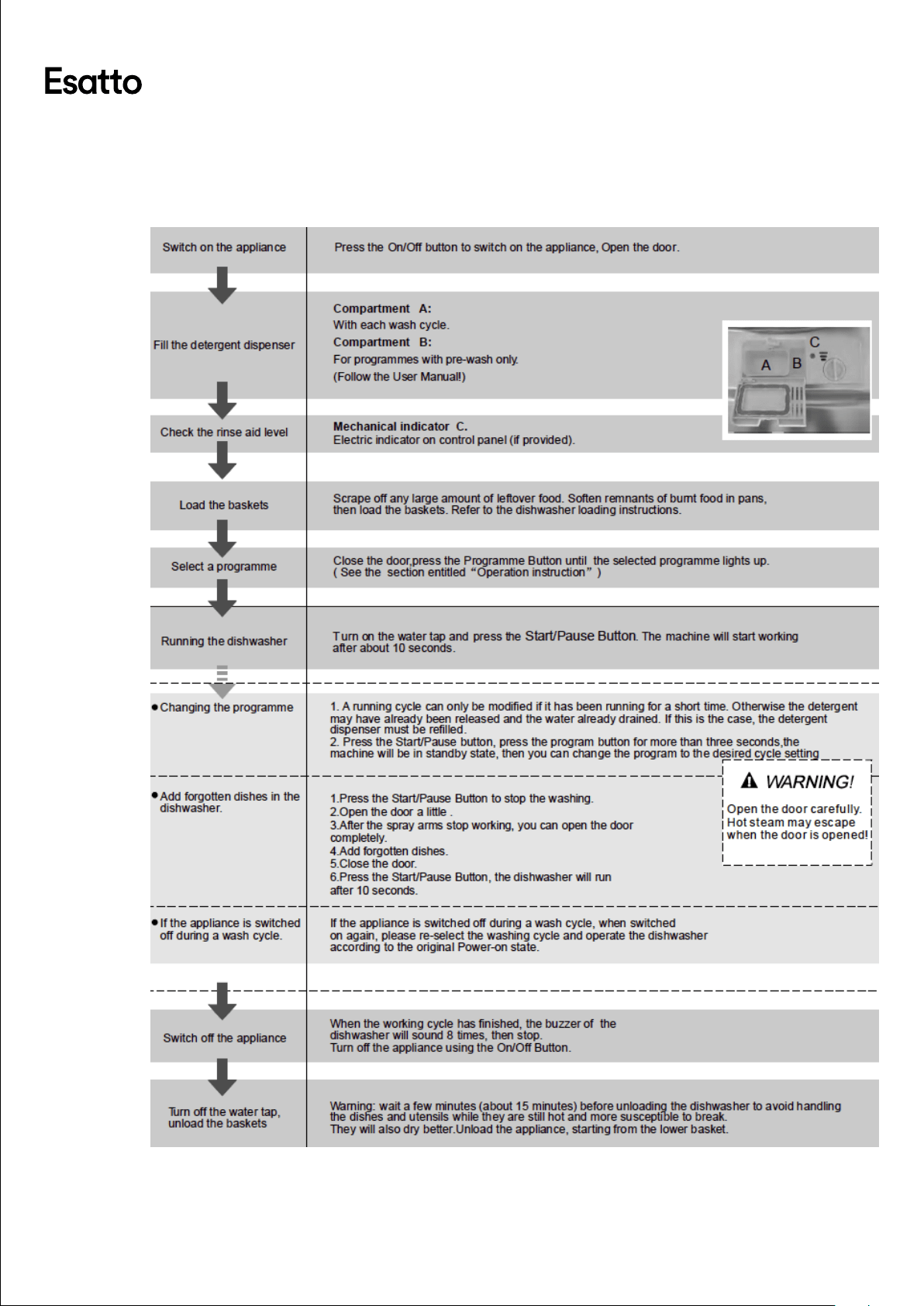
QUICK OPERATION GUIDE
Page:
10
User Manual:
CONTROL PANEL
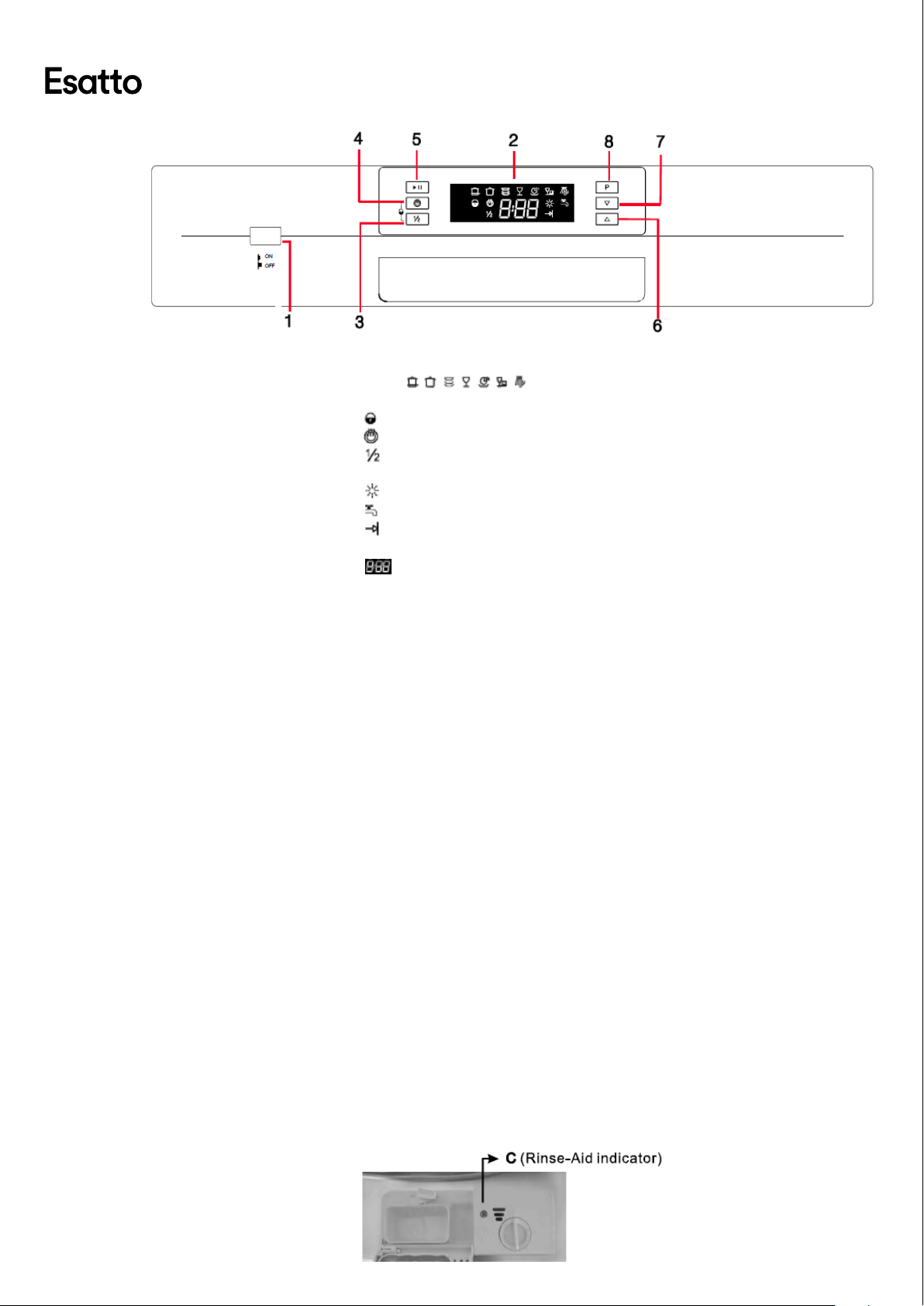
1. On/O Button: to switch On/O the appliance.
2. Display screen: to show the remaining time and the state (running state, delay time etc )
Program indicators :
→ To show the selected washing program.
→ Child Lock indicator : To show when Child Lock function is selected.
→ Extra Dry indicator : To show when Extra dry function is selected.
→ Half Load function indicator: To show when half load function is
selected.
→ Rinse aid indicator : To show when the rinse aid need to be relled.
→ Faucet indicator : To show when the faucet forget to open.
→ Washing cycle nished indicator : To show when the washing cycle is
nished.
→ To show the delay time, remain time and error code.
3. Half load function Button: To select Half load function. When Half load function is
selected, both sprayers will be running and all baskets could be loaded.
4. Extra Drying function select Button:To selcet Extra Drying function. An increased
temperature during the nal rinse to increase drying well.There is a slight increase in the
energy consumption.
5. Start /Pause button: To start the selected washing program or pause the washing
program when the machine is working.
6. Delay Button : Press the button to add the delay time.
7. Delay Button : Press the button to decrease the delay time.
8. Program Button : To Press the button to select appropriate Program.
Attention: Child lock function: press the Extra dry button and the Half load button
simultaneously to lock the operation, the same way to unlock.
FILLING THE RINSE AID DISPENSER
The rinse aid is released during the nal rinse to prevent water from forming droplets on
your dishes, which can leave spots and streaks. It also improves drying by allowing water
to roll o the dishes. Your dishwasher is designed to use liquid rinse aids. The rinse aid
dispenser is located inside the door next to the detergent dispenser. To ll the dispenser,
open the cap and pour the rinse aid into the dispenser until the level indicator turns
completely black. The volume of the rinse aid container is about 110ml.
Warning! Only use specic "Rinse Aid" branded products and never ll the rinse aid
dispenser with other substances and they may damage the dishwasher.
→ If there is no rinse-aid warning light in the control panel, you can judge
the amount of rinse-aid by the color of the optical level indicator "C"
located next to the cap. When the rinse-aid container is full, the whole
indicator will be dark. As the rinse-aid diminishes, the size of the dark dot
decreases. You should never let the rinse aid get below 1/4 full.
Page:
11
User Manual:
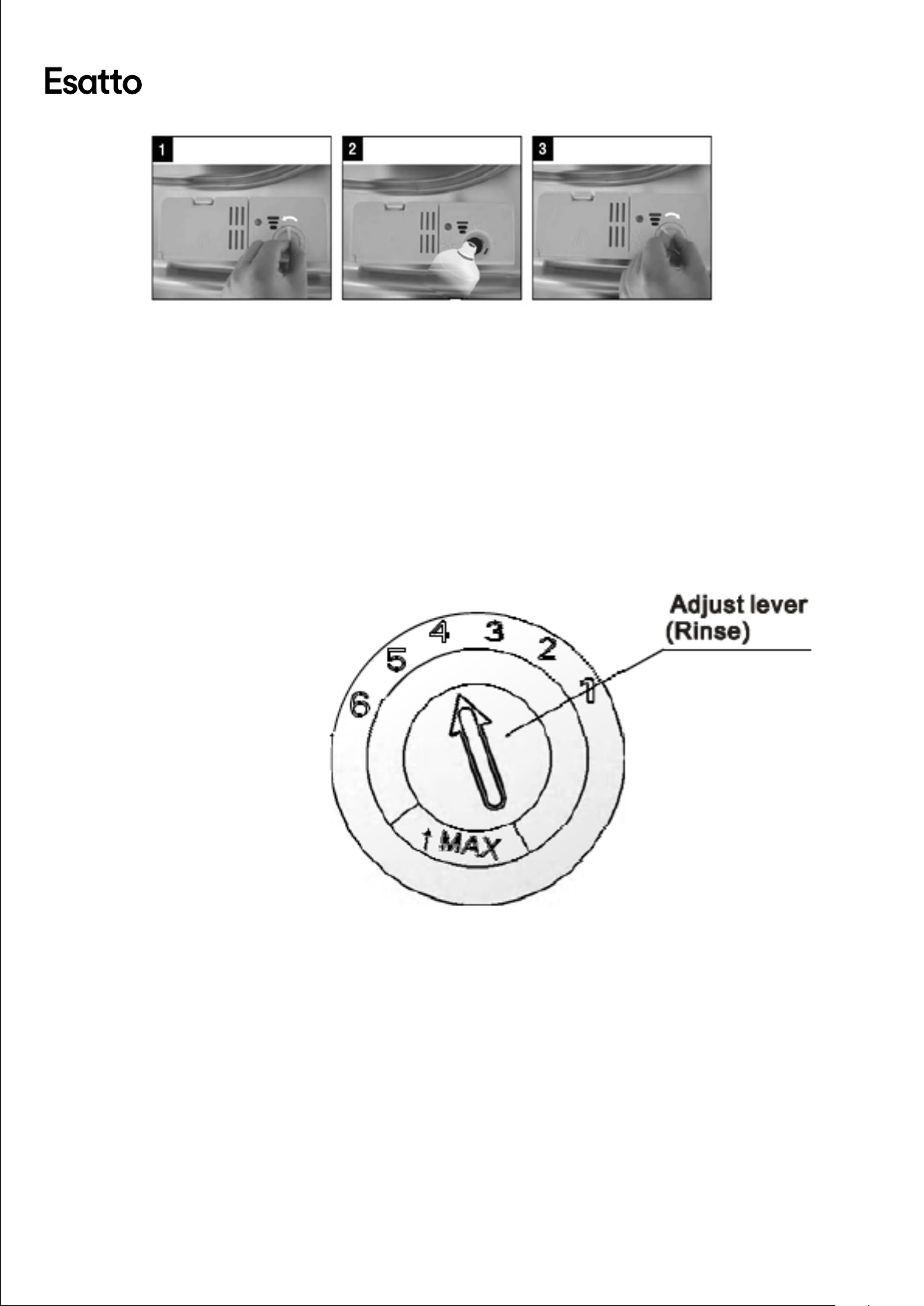
→ To open the dispenser, turn the cap to the "open" arrow, anti-clockwise, and lift out. (1)
→ Pour the rinse aid into the dispenser, being careful not to overll. (2)
→ Replace the cap by inserting it aligned with the "open" arrow and turn clockwise. (3)
Warning! Be careful not to overll the dispenser and wipe up any excess spilt with
a damp cloth. Any residual rinse aid can cause excess foaming during the
next wash.
ADJUSTING THE RINSE AID DISPENSER
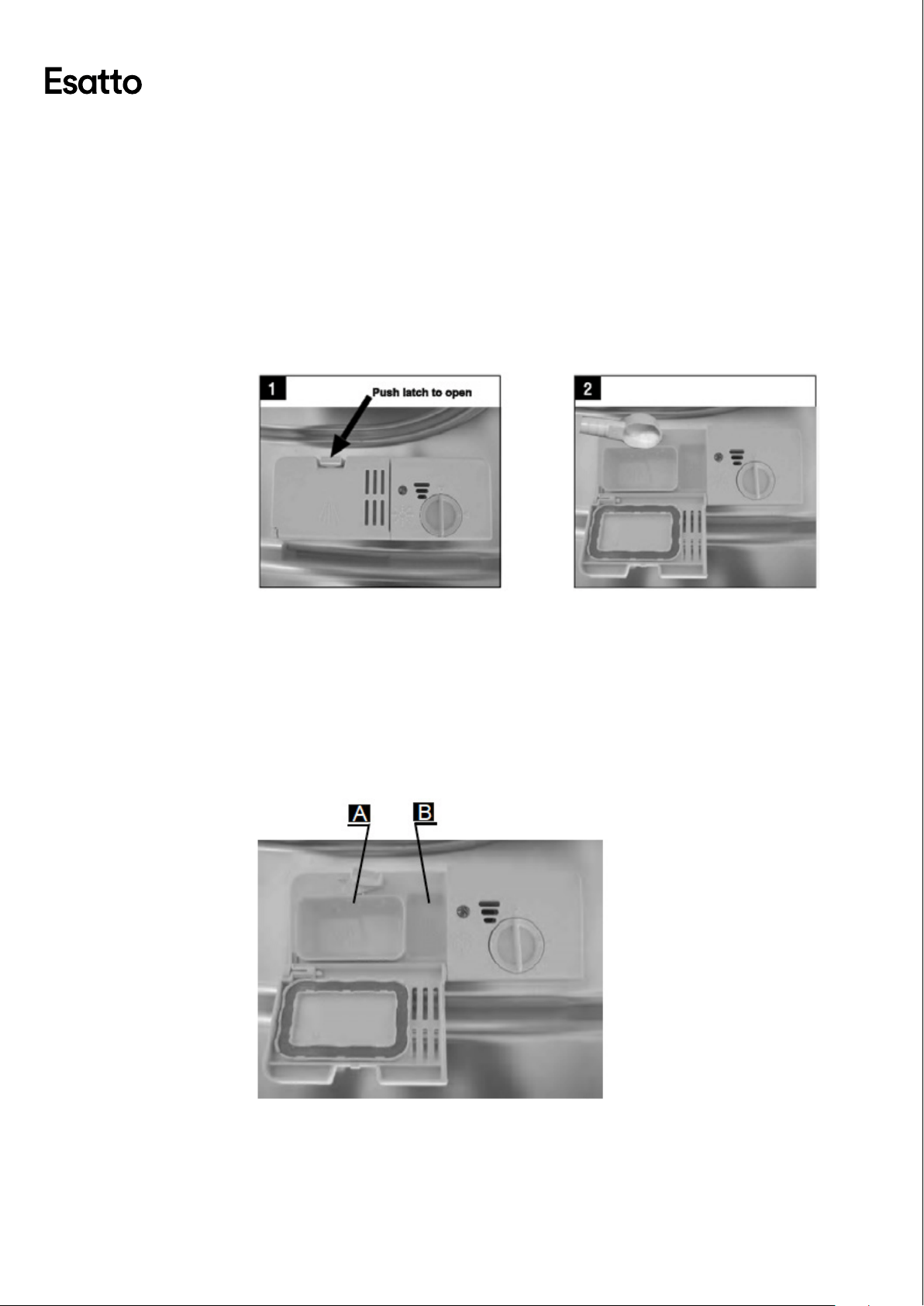
→ The rinse aid dispenser has six or four settings. Always start with the dispenser set on
"4". If spots and poor drying are a problem, increase the amount of rinse aid dispensed
by removing the dispenser lid and rotating the dial to "5". If the dishes are still not drying
properly or are showing spots, adjust the dial to the next higher lever until your dishes
are spot-free. The recommended setting is "4". (Factory value is "4".)
→ Increase the dose of rinse aid if there are drops of water or lime spots on the dishes
after washing. Reduce it if there are sticky whitish stains on your dishes or a lm on your
glassware or cutlery.
Page:
12
User Manual:
DETERGENTS
→ Detergents with its chemical ingredients are necessary to remove dirt, crush dirt and
transport it out of the dishwasher. Most of the commercial quality detergents are suitable
for this purpose.
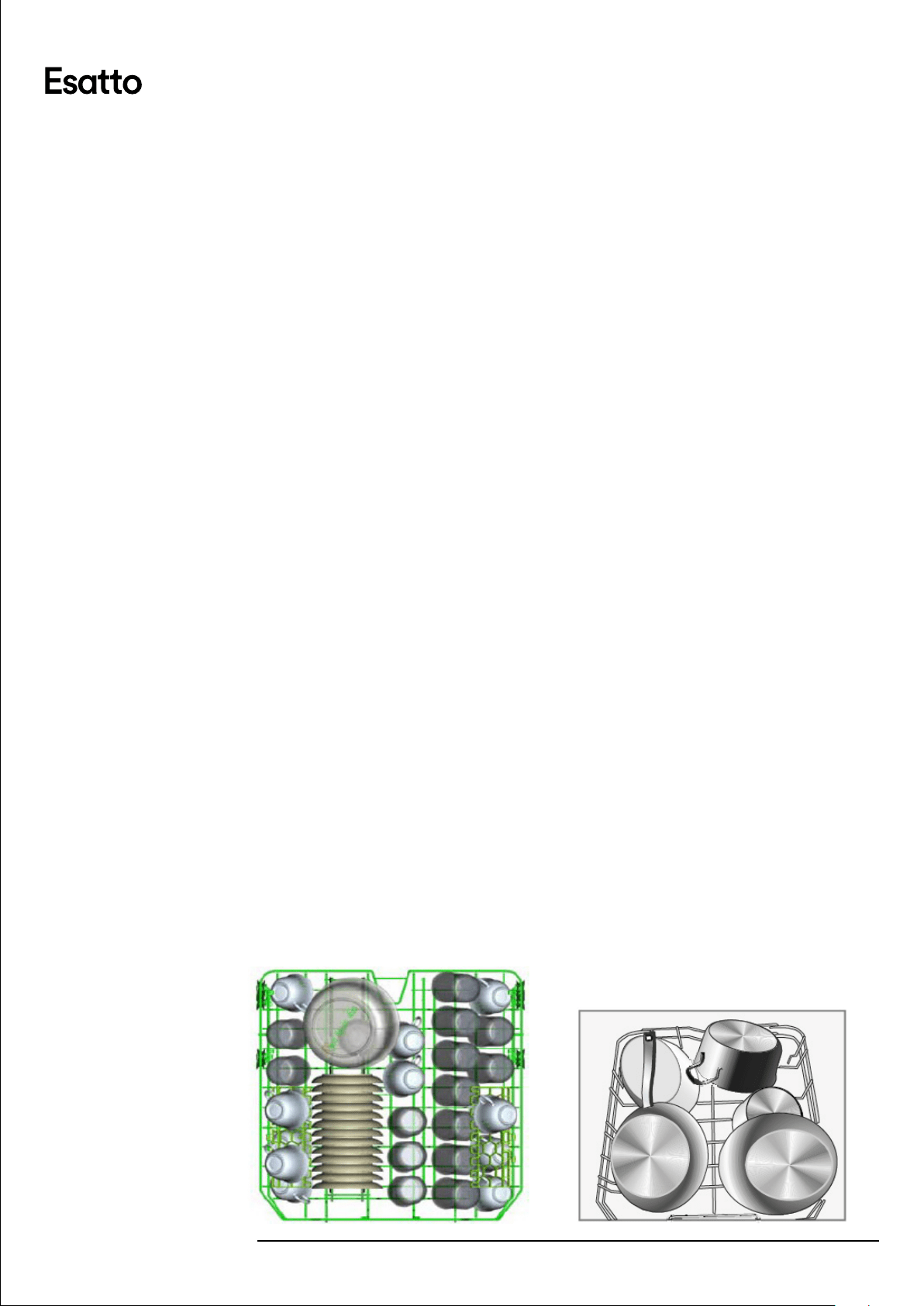
→ If the lid is closed, press the release button and the lid will spring open.
→ Always add the detergent just before starting each wash cycle.
→ Only use branded detergent and rinse aid with your dishwasher.
Warning! Dishwasher detergent is corrosive! Take care to keep it out of reach of
children.
FILLING YOUR DETERGENT DISPENSER
→ Compartment A (below) is for the main wash cycle detergent.
→ Compartment B is for the pre-wash cycle detergent. This can be used for
heavily soiled dishes.
→ In regards to dosage, follow the instructions of the detergent
manufacturer.
→ Close the lid by pressing until it locks into place.
Page:
13
User Manual:
LOADING THE DISHWASHER
Only use utensils and dishes that are identied as dishwasher safe or proof.
→ To prevent damage to your dishes and glassware, do not remove them
from the dishwasher immediately after the program has ended.
Items that are not suitable for the dishwasher:
→ Cutlery with wooden, china, or mother of pearl handles
→ Plastic items that are not heat resistant
→ Older cutlery with glued parts
→ Pewter or copper items
→ Crystal glass
→ Steek items that are subject to rusting
→ Wooden platters
→ Items made from synthetic bres
Items that are of limited suitability for the dishwasher:
→ Some types of glassware can become dull after a large number of washes
→ Silver and aluminium parts have a tendency to discolour during washing
→ Glazed patterns may fade after a large number of washes
→ Scrape o any residual food and soften remnants of burnt food in pans,
before placing in your dishwasher.
→ Whilst it is not necessary to rinse the dishes under running water, heavily
soiled dishes are recommended to be rinsed rst.
→ Items such as cups, glasses, pots/pans etc are faced downwards.
→ Curved items, or ones with recesses, should be loaded on an angle so that
water can run o.
→ Ensure that no dishes interfere in the operation of the spray arms, and
that they can freely rotate during washing.
Warning! Very small items should never be washed in the
dishwasher as they could easily fall out of the baskets/
racks.
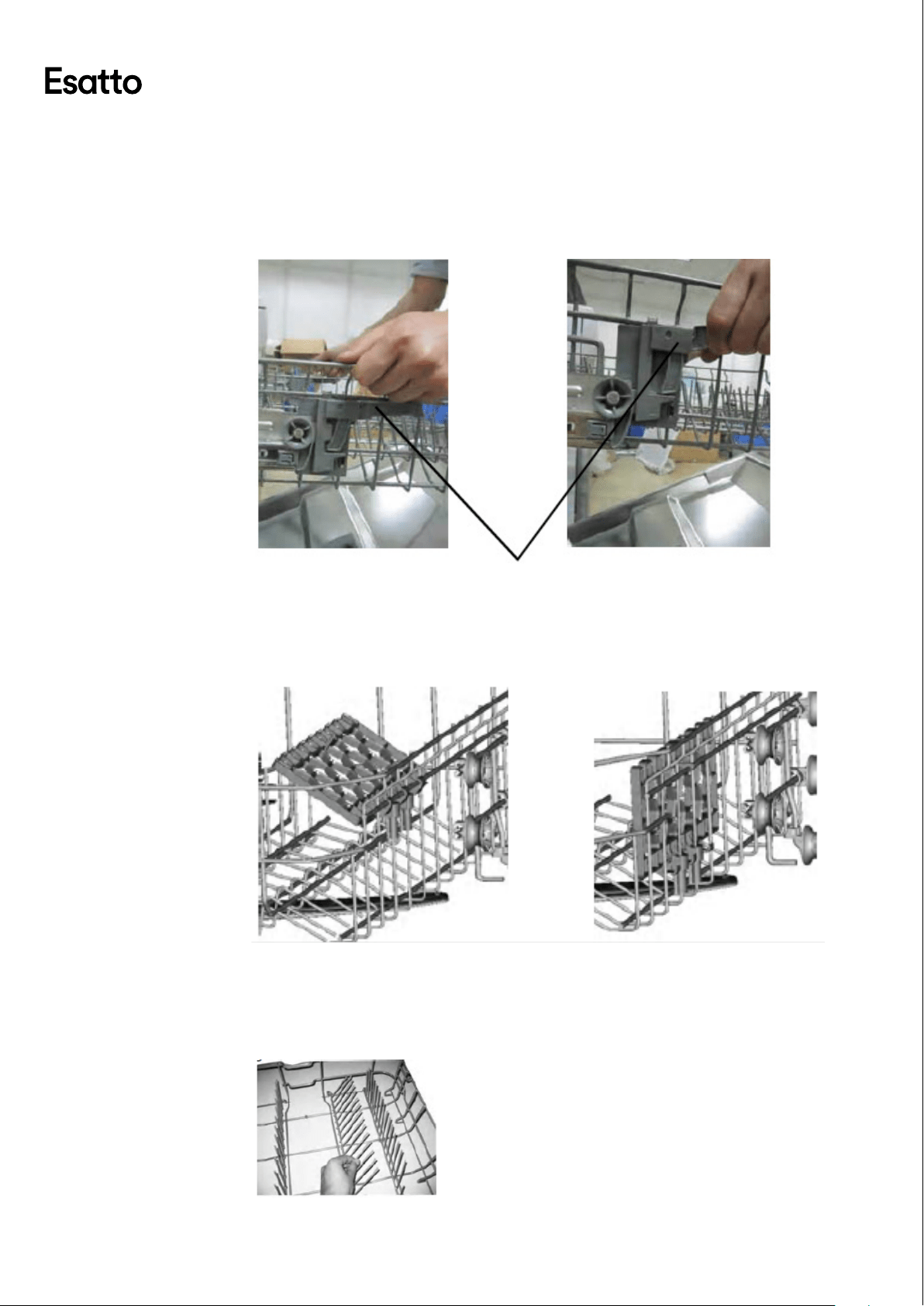
→ Place large items which are most dicult to clean, in the bottom rack.
→ Place delicate and lighter dishwasher (such as glasses, mugs, etc) into the
upper rack.
→ Ensure that glasses are not touching to prevent damage.
Upper Rack Example Lower Rack Example
Page:
14
User Manual:
ADJUSTING THE UPPER BASKET
The height of the upper basket can be adjusted in order to create more space for large
dishes both for the upper and lower basket racks. The height of the upper basket rack
can be adjusted by lifting up the basket for the upper position, and lifting up the handle
to lower the upper basket, see the picture below:
FOLDING BACK THE CUP SHELVES
For better stacking of pots and pans, the spikes can be folded down as shown in the
picture below.
FOLDING SPIKES OF LOWER BASKET
For improved stacking of pots or pans, the spikes can be folded down as shown in the
picture below.
Lift the basket for upper position
Lift up the handle to lower the basket
Adjust the Handle
Page:
15
User Manual:
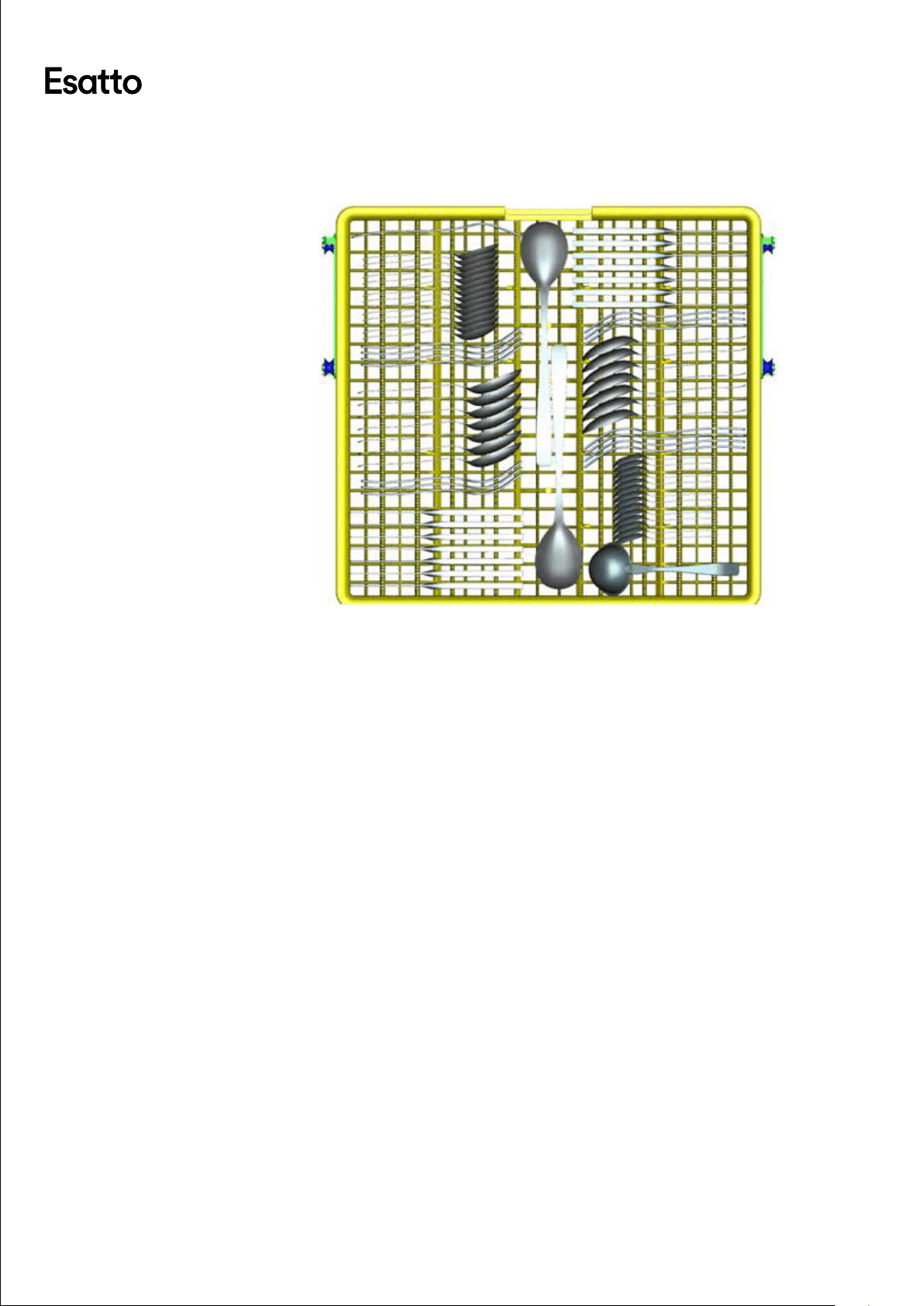
CUTLERY BASKET
Cutlery should be placed in the cutlery rack separately from each other in the
appropriate positions, and do make sure the utensils do not nest together.
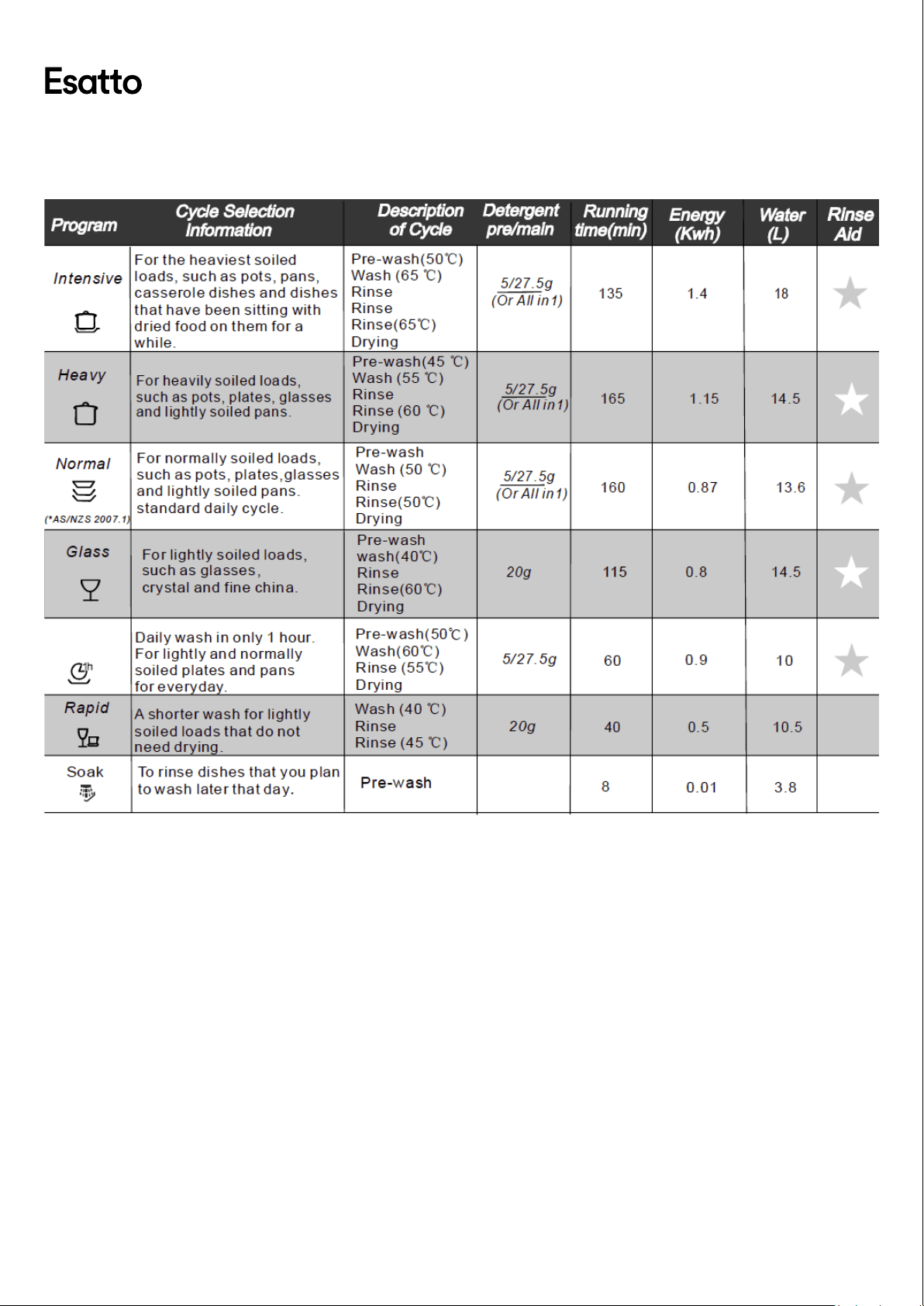
STARTING A WASH CYCLE
→ Load the cutlery and dish basket racks.
→ Add your detergent and rinse aid if required.
→ With the dishwasher door open, press the Power Button and the Power
Indicator light will turn on.
→ Press the Program Button and the Wash Program indicator will rotate
between Intensive, Heavy, Normal, Glass, 1 Hour, Rapid.
→ Select any additional Options, such as Half Load or Extra Dry if desired.
→ Once your desired wash program is selected, close the door and the
dishwasher will start it's cycle.
Note: A cycle that is underway can only be modied if it has
only been running for a short time. To enter standby mode
during a cycle, open the door and hold the Program button
for 3 or more seconds. If the door is opened during a
cycle, the dishwasher will pause momentarily and a buzzer
will sound every minute until you close the door. Once
closed, the dishwasher will begin to operate again after 10
seconds.
AT THE COMPLETION OF A WASH CYCLE
Once the dishwasher cycle has nished, the dishwasher willl make an audible tone for 8
seconds, before stopping.
→ Turn o the dishwasher using the Power Button.
→ Open the dishwasher door and wait a few minutes before unloading the
dishwasher. This will allow the dishes to climatise and return to a cool
state for handling.
Page:
16
User Manual:
STARTING A WASHING PROGRAM
1 Hour
Page:
17
User Manual:
Cleaning & Maintenance\
FILTERING SYSTEM
The lter prevents larger remnants of food or other objects from getting inside the pump.
The residues may block the lter, in this case they must be removed.
The lter system consists of a coarse lter, a at (main lter) and a microlter (ne lter).
→ Main Filter (1): Food and soil particles trapped in this lter are pulverised
by a special jet on the lower spray arm and washed down to the drain.
→ Coarse Filter (2): Larger items, such as pieces of bones or broken glass
that could block the drain are trapped in the coarse lter. To remove the
items caught by the lter, gently squeeze the tap on the top of this lter
and lift out.
→ Fine Filter (3): This lter holds soil and food resideues in the sump area
and prevents it from being redeposited on to the dishes during the wash
cycle.
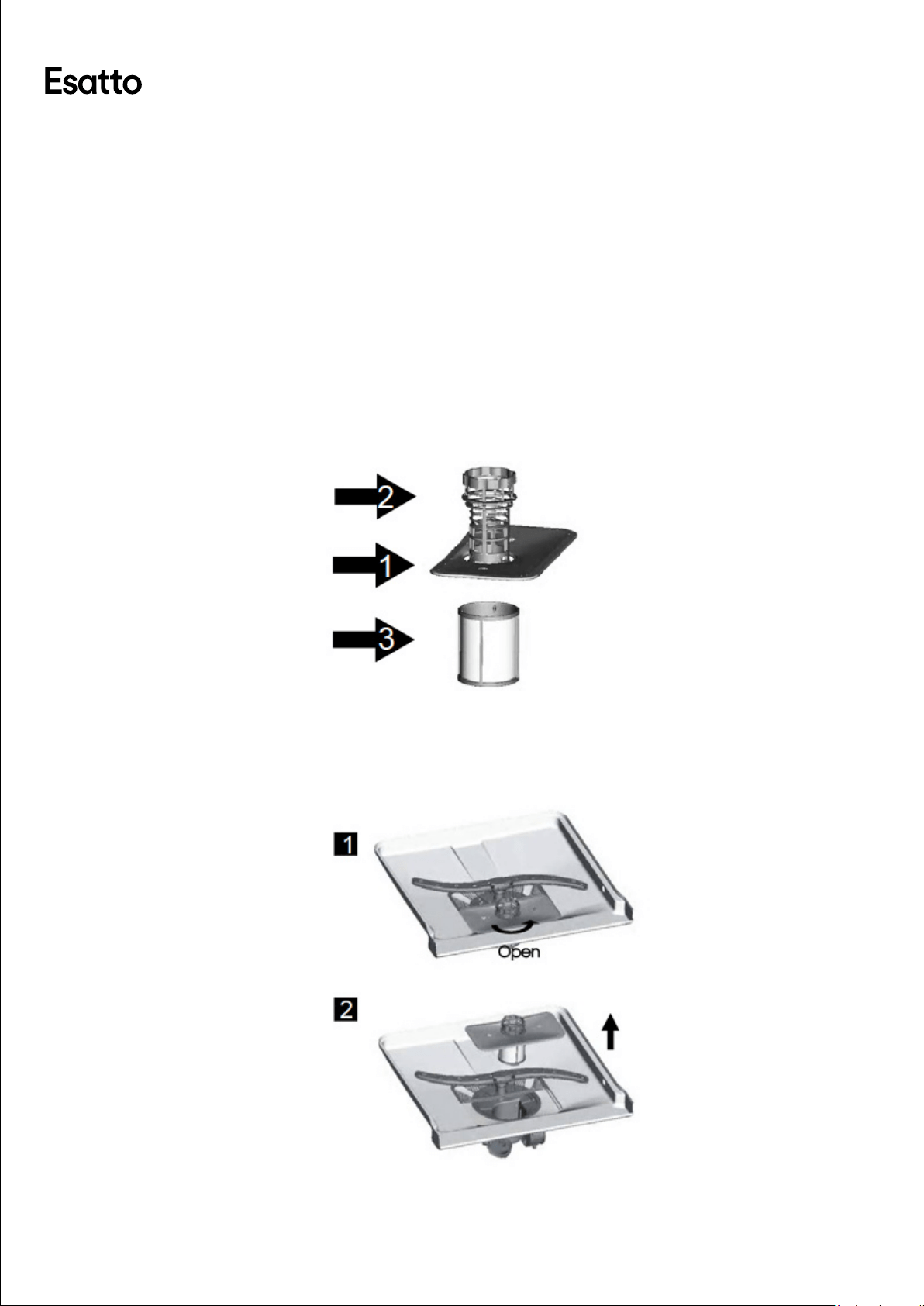
FILTER ASSEMBLY
Important! The dishwasher must never be used without the lters. Improper
replacement of the lter may reduce the performance of the dishwasher
and could damage dishes and utensils.
→ Inspect the lter assembly after each use of the dishwasher, for any
blocks. Remove the lter system and clean the lters under running
water, removing any food remnants.
Step 1.
Turn the lter in
anti-clockwise direction
Step 2.
Lift the lter assembly up
Page:
18
User Manual:
CARING FOR THE DISHWASHER
→ The control panel of the dishwasher can be cleaned using a slightly
dampened cloth. After cleaning, ensure it is dryed thoroughly.
→ To clean the internal edge of the door, you should only use a soft, damp
cloth with warm water. Avoid using any spray cleaners as these can
penetrate into the door lock and electrical components.
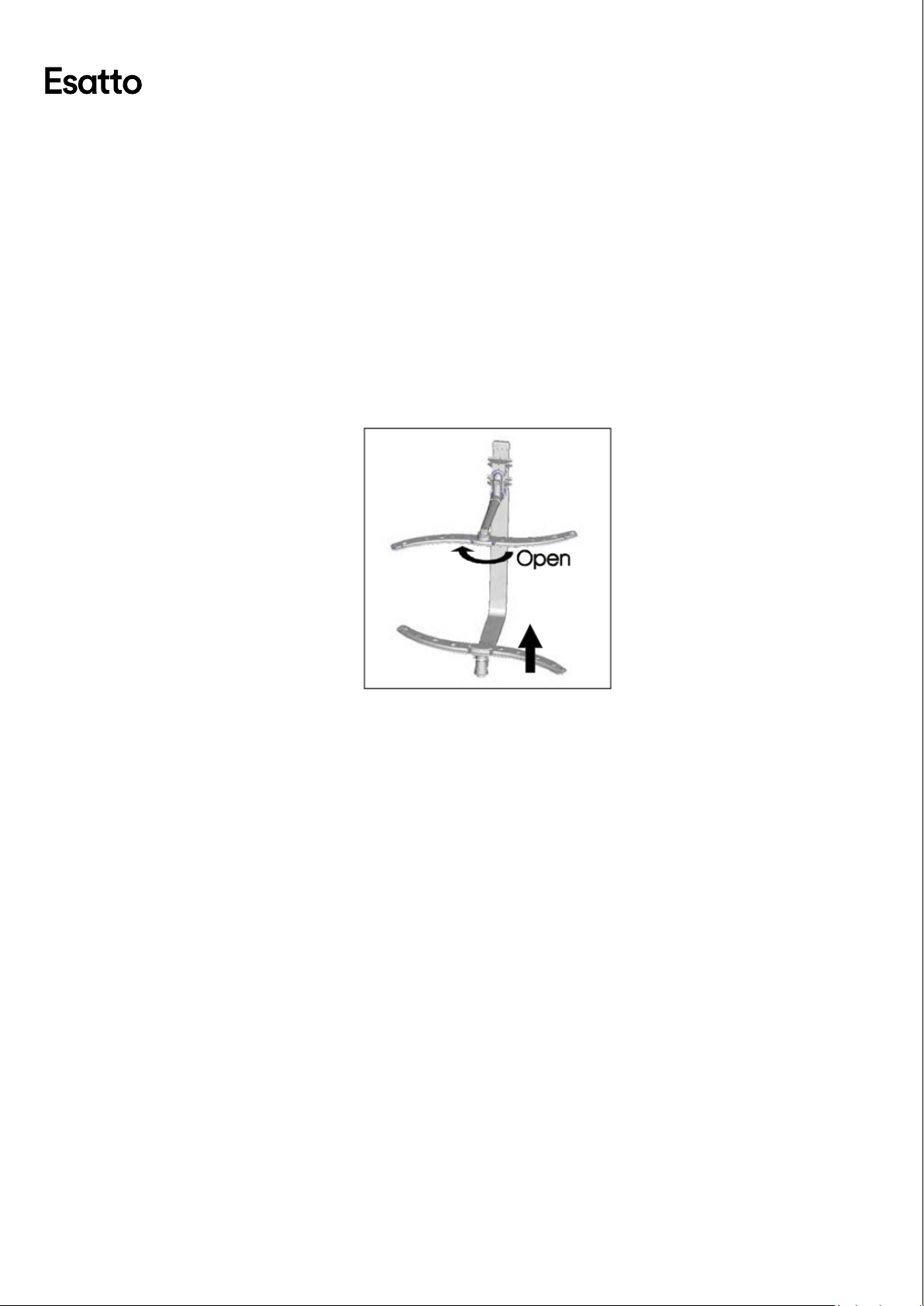
CLEANING THE SPRAY ARMS
→ It is necessary to clean the spray arms regularly for hard water chemicals
will clog the spray arm jets and bearings.
→ To remove the upper spray arm, hold the nut and rotate the arm
clockwise to remove.
→ To remove the lower spray arm, pull the spray arm upwards (as per the
diagram below).
→ Wash the arms in warm soapy water and use a brush to clean the jets.
Replace the spray arms after rinsing thoroughly.
GENERAL CARE INSTRUCTIONS FOR YOUR DISHWASHER
→ After every wash, leave the door slightly open so that moisture and
odours are not trapped inside.
→ Before performing maintenance or cleaning, always switch o at the
power outlet and remove the plug.
→ To clean the exterior and rubber door seals of the dishwasher, never use
solvents or abrasive cleaning products. Warm soapy water should always
be sucient, or for stubborn stains only use specialty cleaning products
specically made for dishwashers.
→ When your dishwasher won't be used for a long period of time, it is
recommended that you run a wash cycle with the dishwasher empty and
then leave the dishwasher door slightly open. Also unplug the dishwasher
from the power socket.
→ When moving the appliance, always try to ensure it is kept in the vertical
position. If absolutely necessary, it can be positioned on it's back.
→ One of the factors that can cause odours to form is residual food that
remains trapped in the seals. Periodic cleaning with a soft damp cloth (as
described above) will prevent this from occuring
Page:
19
User Manual:
Troubleshooting & Technical Data
OPERATION IN CASE OF EMERGENCY
Important! If your dishwasher appears to be operating incorrectly, then you should
disconnect it from the power outlet and then contact the Residentia
Group Support team on 1300 11 HELP (4357).
In the event of an emergency you should:
→ Switch o the dishwasher at the controls.
→ Switch o the dishwasher at the power outlet and remove the plug.
→ Isolate the water supply from the dishwasher.
→ Call the Residentia Support Team on 1300 11 HELP (4357).
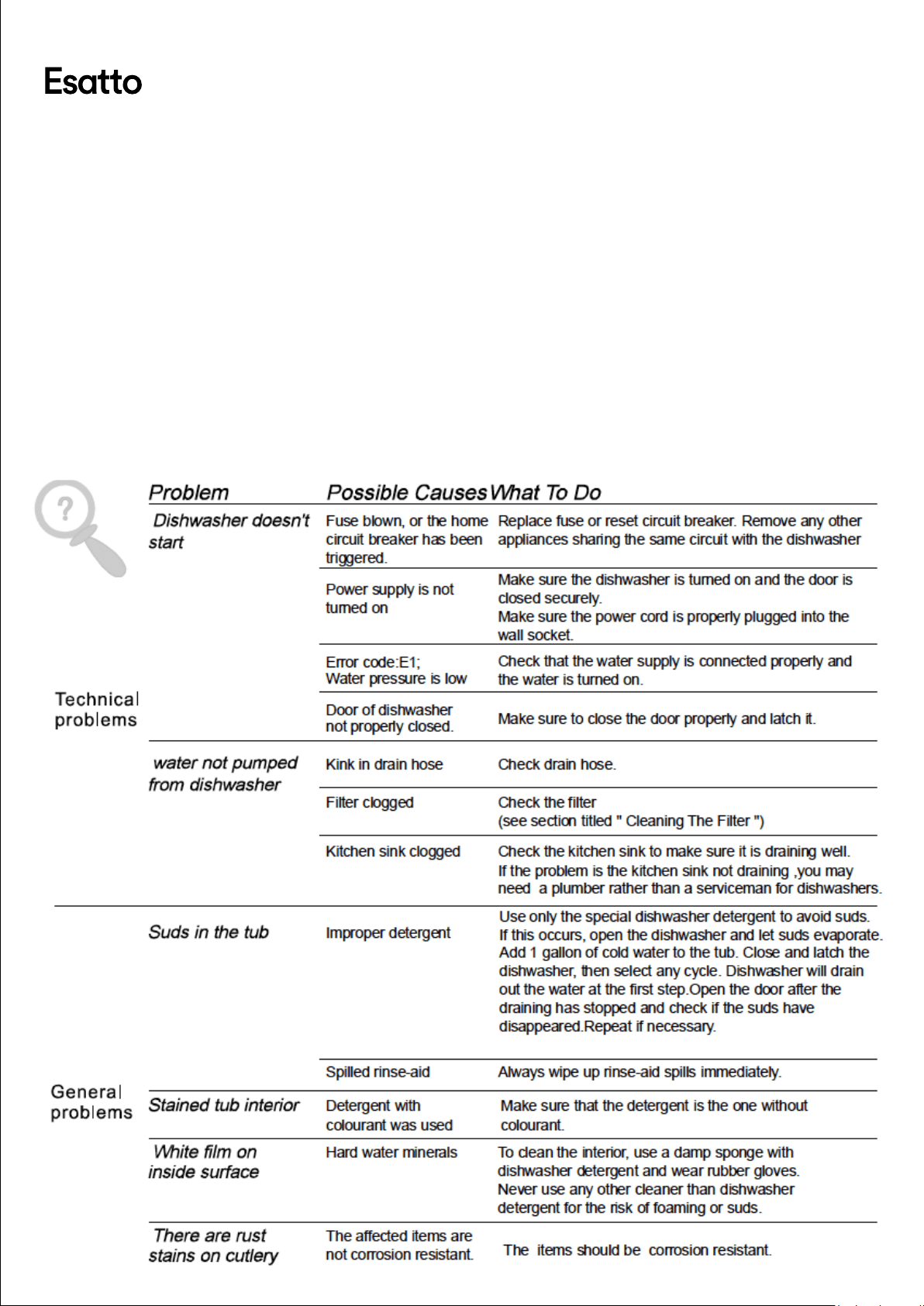
Troubleshooting Some minor faults can be xed by referring to the
instructions given below. There is also a self-help section
online at http://www.residentiagroup.com.au.
Page:
20
User Manual:
Page:
21
User Manual:
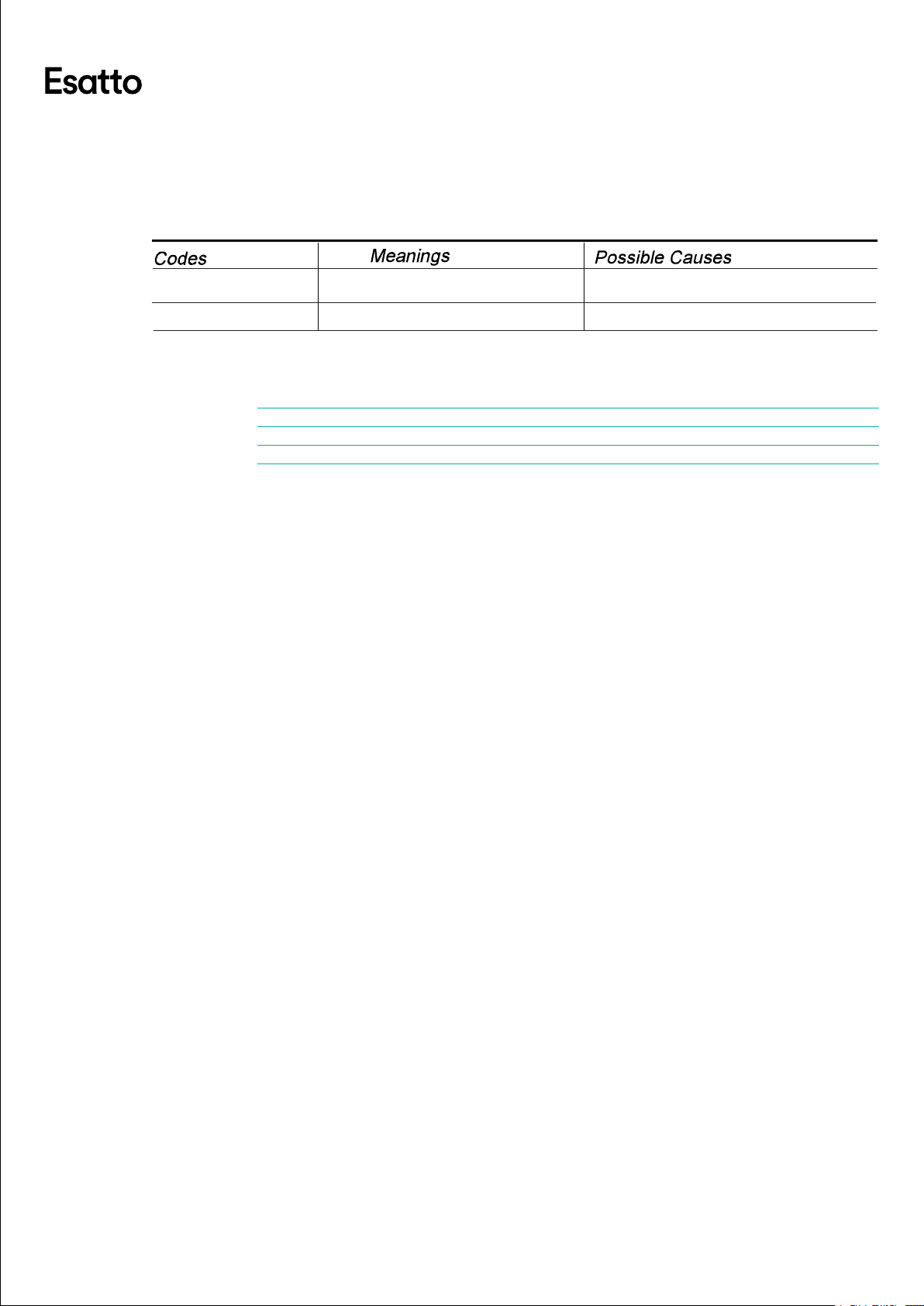
ERROR CODES
When some malfunctions occur, the dishwasher may display some error codes to warn
you of an issue.
TECHNICAL DATA
Electrical details Rated Voltage: 220 - 240 Volts, 50 Hz
Capacity: 14 Place Settings
Water Pressure: 0.04-1.0 MPa
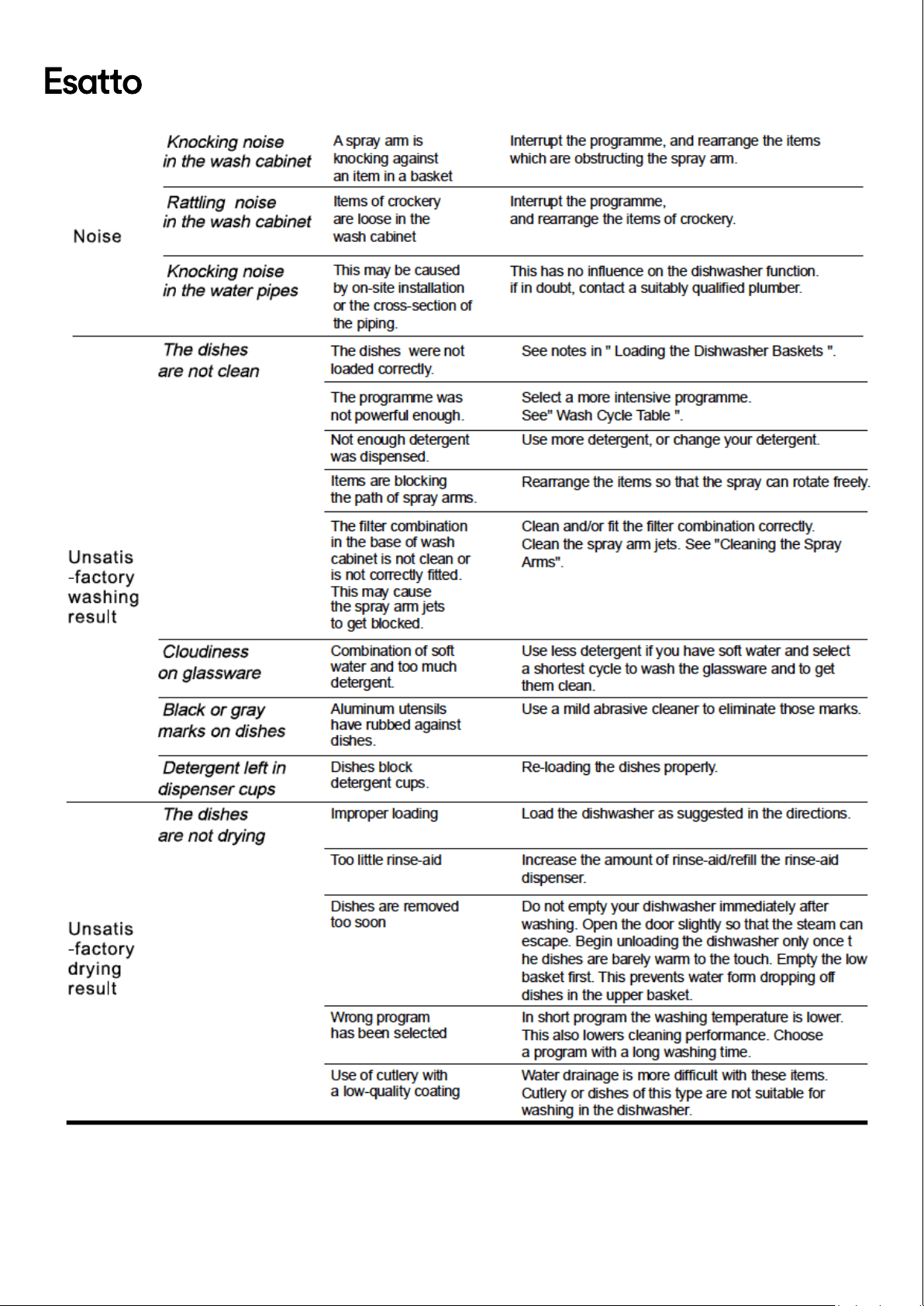
The dishes were not
loaded correctly.
See notes in " Loading the Dishwasher Baskets ".
Select a more intensive programme.
See" Wash Cycle Table ."
Use more detergent, or change your detergent.
Rearrange the items so that the sp ay can rotate freely.r
Clean and/or fit the filter combination correctly.
Clean the sp ay arm jets. See "Cleaning the Spray
Arms".
r
Use less detergent if you have soft water and select
a shortest cycle to wash the glassware and to get
them clean.
Use a mild abrasive cleaner to eliminate those marks.
Re-loading the dishes properly.
Load the dishwasher as suggested in the directions.
Increase the amount of rinse-aid/refill the rinse-aid
dispenser.
Do not empty your dishwasher immediately after
washing. Open the door slightly so that the steam can
escape. Begin unloading the dishwasher only once t
he dishes are barely warm to the touch. Empty the low
basket first. This prevents water form dropping off
dishes in t he upper basket.
In short program the washing temperature is lower.
This also lowers cleaning performance. Choose
a program with a long washing time.
Water drainage is more difficult with these items.
Cutlery or dishes of this type are not suitable for
washing in the dishwasher.
The programme was
not powerful enough.
Not enough deter gent
was dispensed.
Items are blocking
the path of sp ay arms.r
The filter combination
in the base of wash
cabinet is not clean or
is not correctly fitted.
This may cause
the sp ay arm jets
to get blocked.
r
Combination of soft
water and too much
detergent.
Aluminum utensils
have rubbed against
dishes.
Dishes block
detergent cups.
Improper loading
Too little rinse-aid
Dishes are removed
too soon
Wrong program
has been selected
Use of cutlery with
a low-quality coating
Ov erflow.
When some malfunctions come on, the appliance will display error codes to warn you:
Longer inlet time.
Faucets is not opened, or water intake is
res tricted,or water pressure is too low.
Some element of dishwasher leaks .
E1
E4

Page:
22
User Manual:
Warranty
WARRANTY TERMS & CONDITIONS
DISHWASHERS FREESTANDING, INTEGRATED
→ This document sets out the terms and conditions of the product warranties for Residentia
Group Appliances. It is an important document. Please keep it with your proof of
purchase documents in a safe place for future reference should you require service for
your Appliance.
1. In this warranty
(a) ‘ acceptable quality’ as referred to in clause 10 of this warranty has the same meaning
referred to in the ACL;
(b) ‘ ACL’ means Trade Practices Amendment (Australian Consumer Law) Act (No.2)
2010;
(c) ‘ Appliance’ means any Residentia Group product purchased by you accompanied by
this document;
(d) ‘ ASR’ means Residentia Group authorised service representative;
(e) ‘ Residentia Group’ means Residentia Group Pty Ltd of 20 Yaltara Avenue, Bundoora
Victoria 3083, ACN 600 546 656 in respect of Appliances purchased in Australia;
(f) ‘ major failure’ as referred to in clause 10 of this warranty has the same meaning
referred to in the ACL and includes a situation when an Appliance cannot be
repaired or it is uneconomic for Residentia Group, at its discretion, to repair an
Appliance during the Warranty Period;
(g) ‘Warranty Period’ means:
(i) where the Appliance is used for personal, domestic or household use
(i.e. normal single family use) as set out in the instruction manual, the
Appliance is warranted against manufacturing defects in Australia for 24
months following the date of original purchase of the Appliance;
(h) ‘ you’ means the purchaser of the Appliance not having purchased the Appliance for
re-sale, and ‘your’ has a corresponding meaning.
2. This warranty only applies to Appliances purchased and used in Australia and is in addition to (and does
not exclude, restrict, or modify in any way) any non-excludable statutory warranties in Australia.
3. During the Warranty Period Residentia Group or its ASR will, at no extra charge if your Appliance is
readily accessible for service, without special equipment and subject to these terms and conditions,
repair or replace any parts which it considers to be defective. Residentia Group or its ASR may use
remanufactured parts to repair your Appliance. You agree that any replaced Appliances or parts become
the property of Residentia Group. This warranty does not apply to light globes, batteries, lters or
similar perishable parts.
4. Parts and Appliances not supplied by Residentia Group are not covered by this warranty.
5. You will bear the cost of transportation, travel and delivery of the Appliance to and from Residentia
Group or its ASR. If you reside outside of the service area, you will bear the cost of:
(a) travel of an authorised representative;
(b) transportation and delivery of the Appliance to and from Residentia Group or its
ASR, in all instances, unless the Appliance is transported by Residentia Group or its
ASR, the Appliance is transported at the owner’s cost and risk while in transit to and
from Residentia Group or its ASR.
6. Proof of purchase is required before you can make a claim under this warranty.
Continued over page →

Page:
23
User Manual:
Warranty continued
7. You may not make a claim under this warranty unless the defect claimed is due to faulty or defective parts
or workmanship. Residentia Group is not liable in the following situations (which are not exhaustive):
(a) the Appliance is damaged by:
(i) accident
(ii) misuse or abuse, including failure to properly maintain or service
(iii) normal wear and tear
(iv) power surges, electrical storm damage or incorrect power supply
(v) incomplete or improper installation
(vi) incorrect, improper or inappropriate operation
(vii) insect or vermin infestation
(viii) failure to comply with any additional instructions supplied with the
Appliance;
(b) the Appliance is modied without authority from Residentia Group in writing;
(c) the Appliance’s serial number or warranty seal has been removed or defaced;
(d) the Appliance was serviced or repaired by anyone other than Residentia Group, an
authorised repairer or ASR.
8. This warranty, the contract to which it relates and the relationship between you and Residentia Group are
governed by the law applicable where the Appliance was purchased.
9. To the extent permitted by law, Residentia Group excludes all warranties and liabilities (other than as
contained in this document) including liability for any loss or damage whether direct or indirect arising
from your purchase, use or non use of the Appliance.
10. For Appliances and services provided by Residentia Group in Australia, the Appliances come with a
guarantee by Residentia Group that cannot be excluded under the Australian Consumer Law. You are
entitled to a replacement or refund for a major failure and for compensation for any other reasonably
foreseeable loss or damage. You are also entitled to have the Appliance repaired or replaced if the
Appliance fails to be of acceptable quality and the failure does not amount to a major failure. The benets
to you given by this warranty are in addition to your other rights and remedies under a law in relation to
the Appliances or services to which the warranty relates.
11. At all times during the Warranty Period, Residentia Group shall, at its discretion, determine whether
repair, replacement or refund will apply if an Appliance has a valid warranty claim applicable to it.
12. To enquire about claiming under this warranty, please follow these steps:
(a) carefully check the operating instructions, user manual and the terms of this
warranty;
(b) have the model and serial number of the Appliance available;
(c) have the proof of purchase (e.g. an invoice) available;
(d) telephone the numbers shown below.
13. You accept that if you make a warranty claim, Residentia Group and its ASR may
exchange information in relation to you to enable Residentia Group to meet its
obligations under this warranty.
IMPORTANT Before calling for service, please ensure that the steps in point 12 have been followed.
Service: Please call 1300 11 HELP (4357)
Spare Parts: Please call 1300 11 SPARE (7727)
Our goods come with guarantees that cannot be excluded under the Australian Consumer Law. You are entitled
to a replacement or refund for a major failure and for compensation for any other reasonably foreseeable loss or
damage. You are also entitled to have the goods repaired or replaced if the goods fail to be of acceptable quality
and the failure does not amount to a major failure.
The Australian Consumer
Law requires the inclusion
of the following statement
with this warranty:

Page:
24
User Manual:Model Code/s:
EDW6CS