1
English
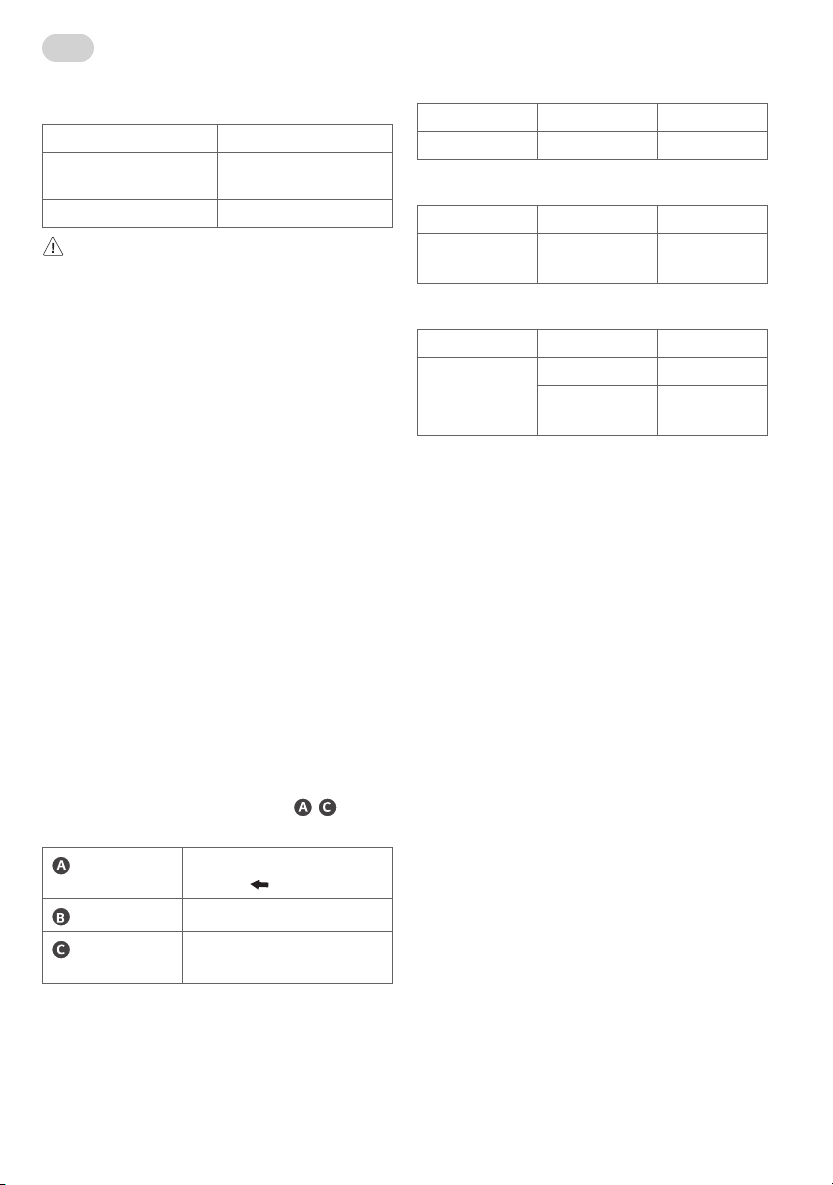
Product Specifications
Model Name FS22GA
Width x Depth x Height (mm)
(Max.)
715 x 426 x 947
Weight (kg) 6.7
CAUTION
• This stand is designed exclusively for TVs manufactured by LG
Electronics Inc. For compatible TV series, please refer to the below
table.
• Using it with other equipment may render it unstable and cause
injury.
Precautions before Installation
• The floor stand does not include a power strip. To power the TV and
use connected devices with the floor stand, buy and use a power
strip of an appropriate length (2.5 m or longer is recommended).
• The maximum weight that can be placed on the rear bracket of the
floor stand is 1.5 kg.
• If you place a wireless router on the rear bracket of the floor stand,
the TV’s artificial intelligence remote control may not operate
properly due to frequency interference that occurs when the
wireless antenna inside the TV and the wireless router are close to
each other.
• If you place a set-top box on the rear bracket of the floor stand,
it can block the remote control reception unit of the set-top box,
making it difficult to receive remote control signals. (If this remote
control operation problem continues, you can use an IR repeater
extender (remote control signal extension cable) to solve the
problem.)
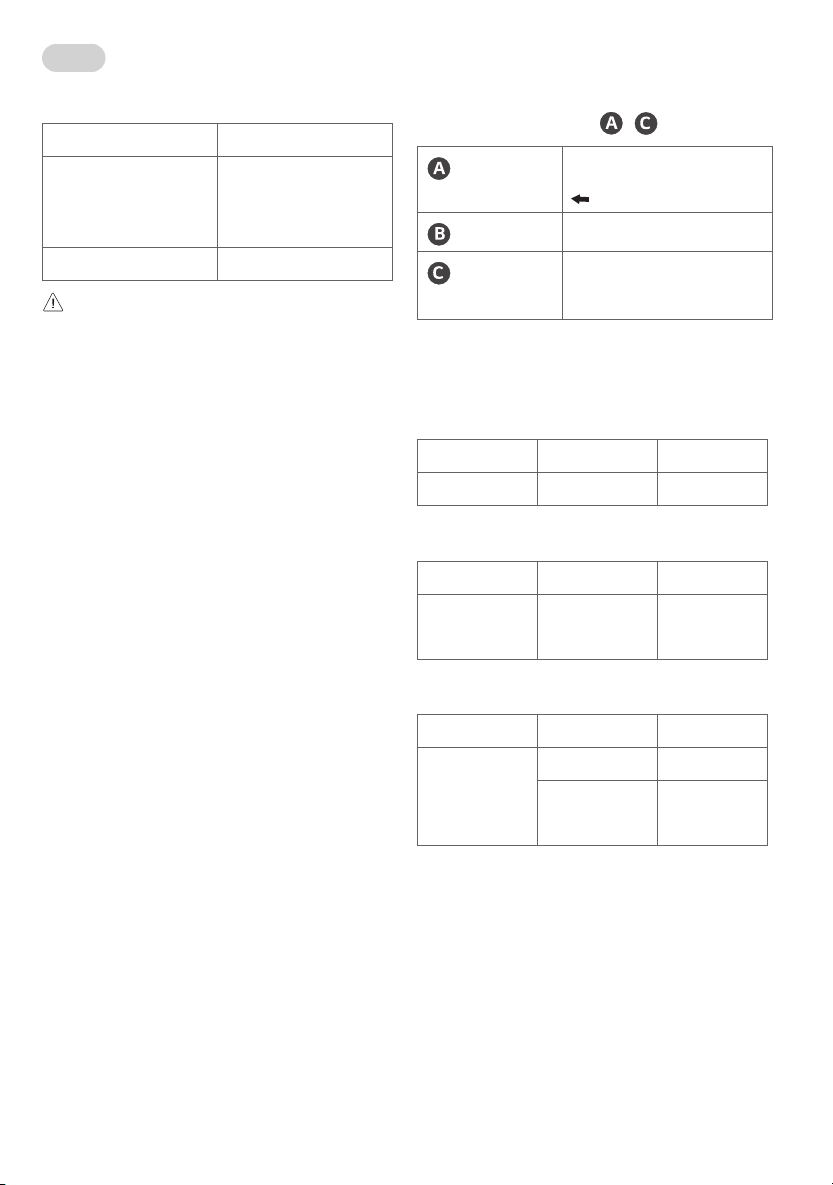
IR Repeater Mounting Guide
•For the positions of installation, please refer to - of
Figure 10 in the installation manual.
Reception unit
Lower part
Attach with
facing forwards.
Transmission unit
Reception unit of the set-top box
Power connection
unit
USB terminal of the TV or the set-top
box
Models Compatible with the Floor Stand
Compatible Model Released in 2020
Product Group Inches Series
OLED 48 CX
Compatible Model Released in 2021
Product Group Inches Series
OLED 48 A1
C1
Compatible Model Released in 2022
Product Group Inches Series
OLED 42 C2
48 A2
C2
*MBM674843312203rev01*

2
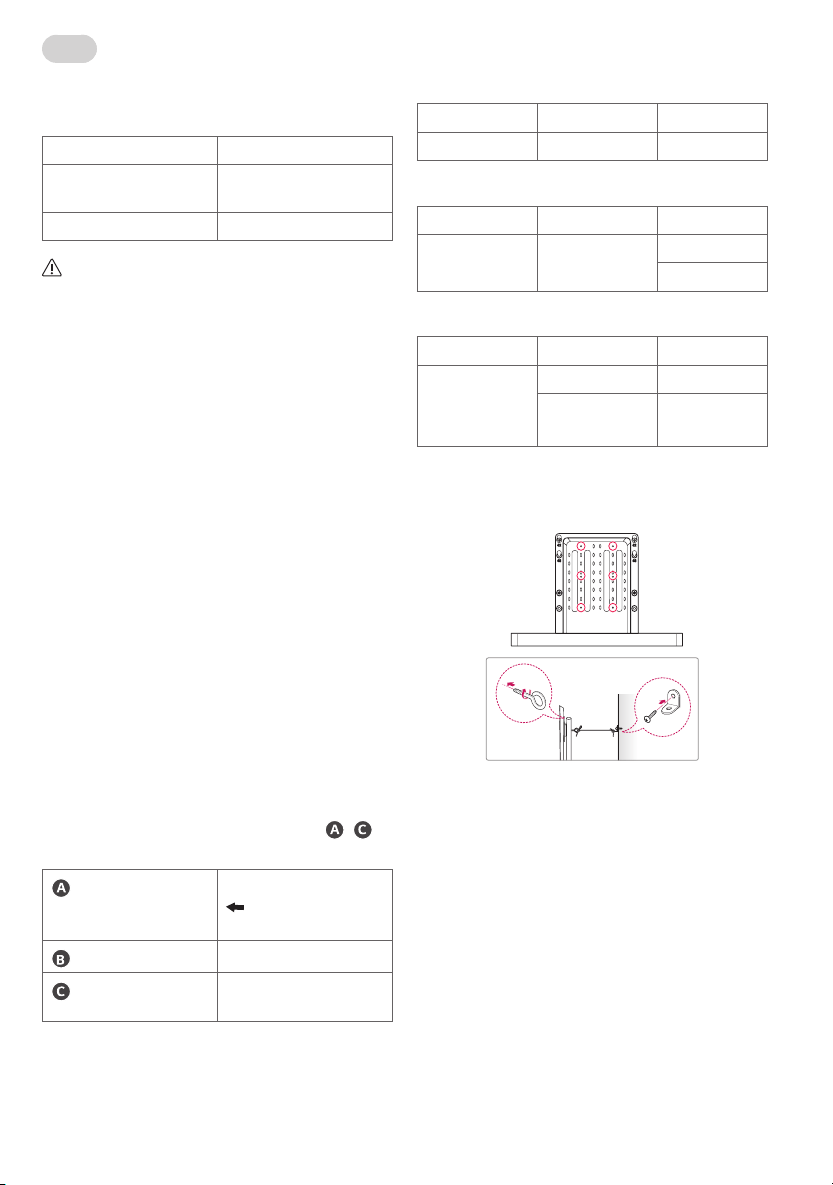
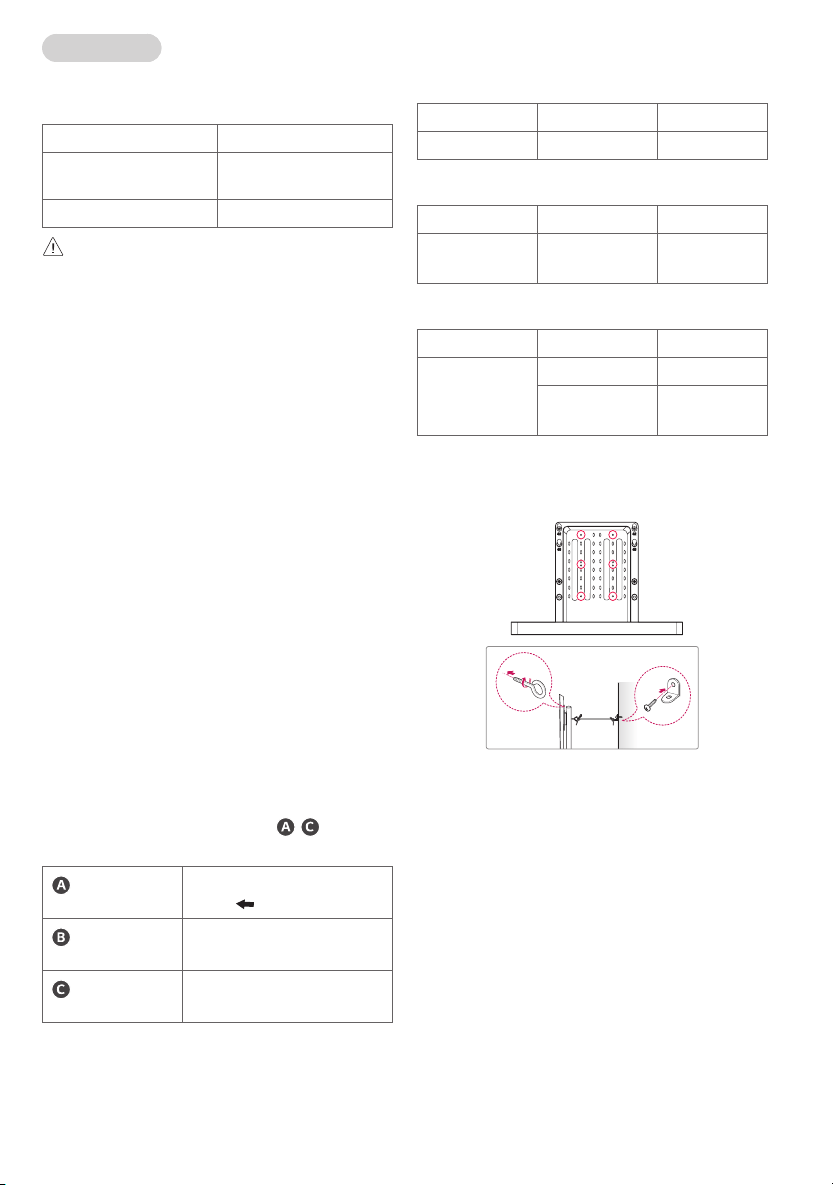
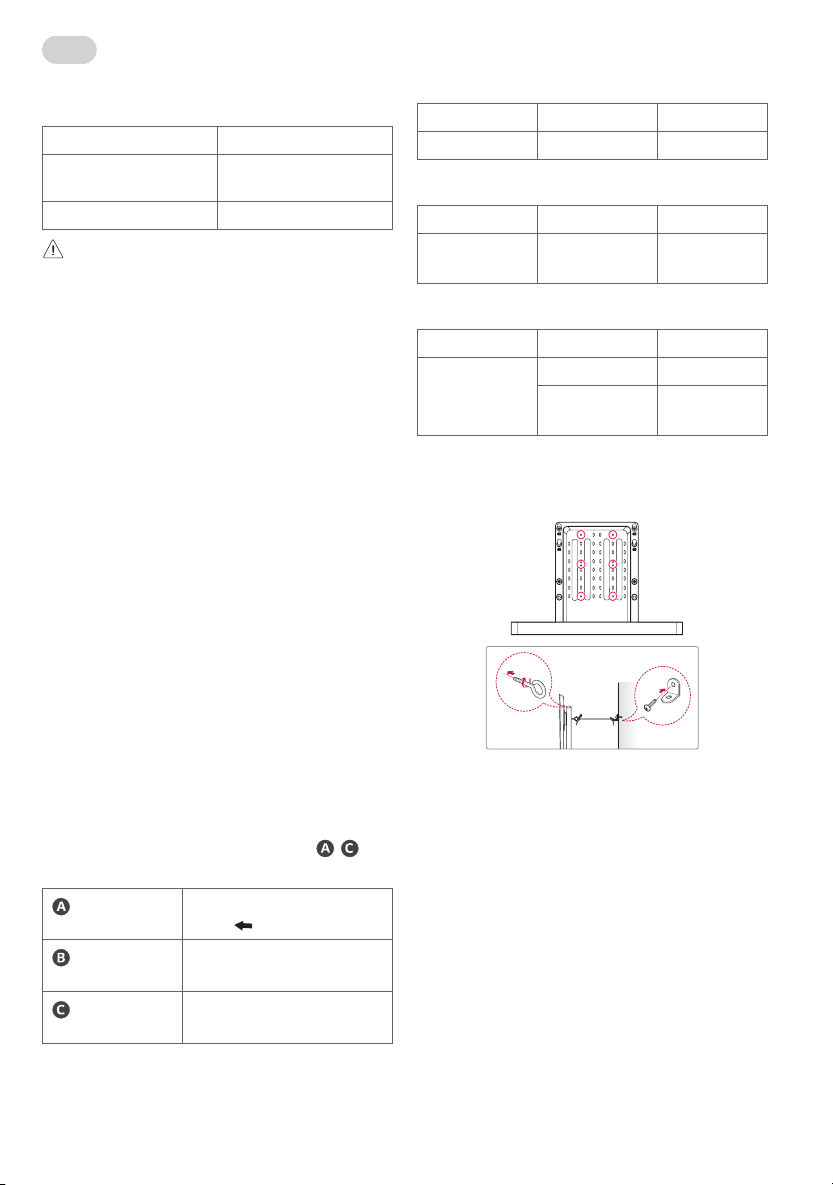
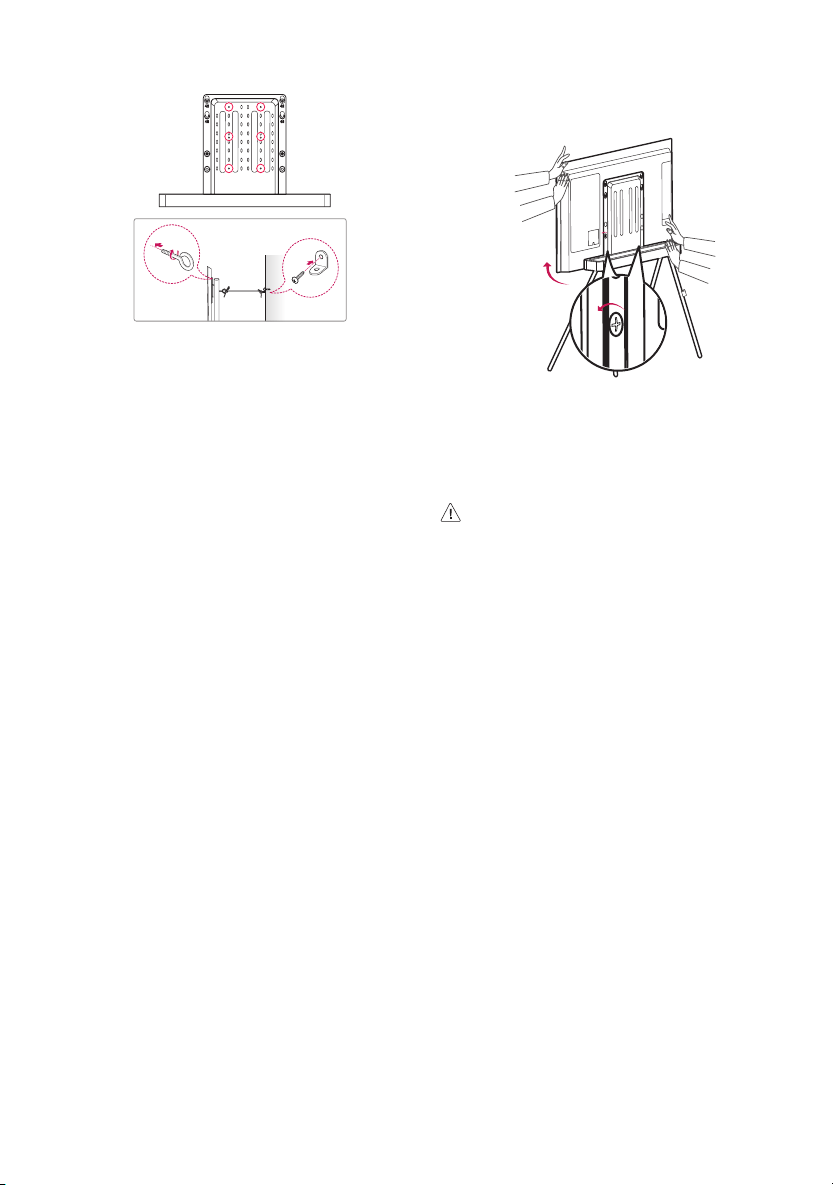
How to Prevent TV from Falling
1 Fix the brackets on the rear part of the product and on the wall as
shown in the picture. Secure the product brackets and wall brackets
at the same height.
2 Verify that the product brackets and wall brackets are firmly
fastened.
3 Using a strong cord, tie and connect the product brackets to the wall
brackets. When moving a product installed in this way, please untie
the cord first.
• Install the TV in the horizontal position only.
• It is safe to install the product according to the installation method
to prevent the damage to the product or personal injury even if the
product is pulled forward.
• Install the TV near a wall to prevent falls when pushed.
• The brackets, screws, and cords must be purchased separately as
they are not provided with the product.
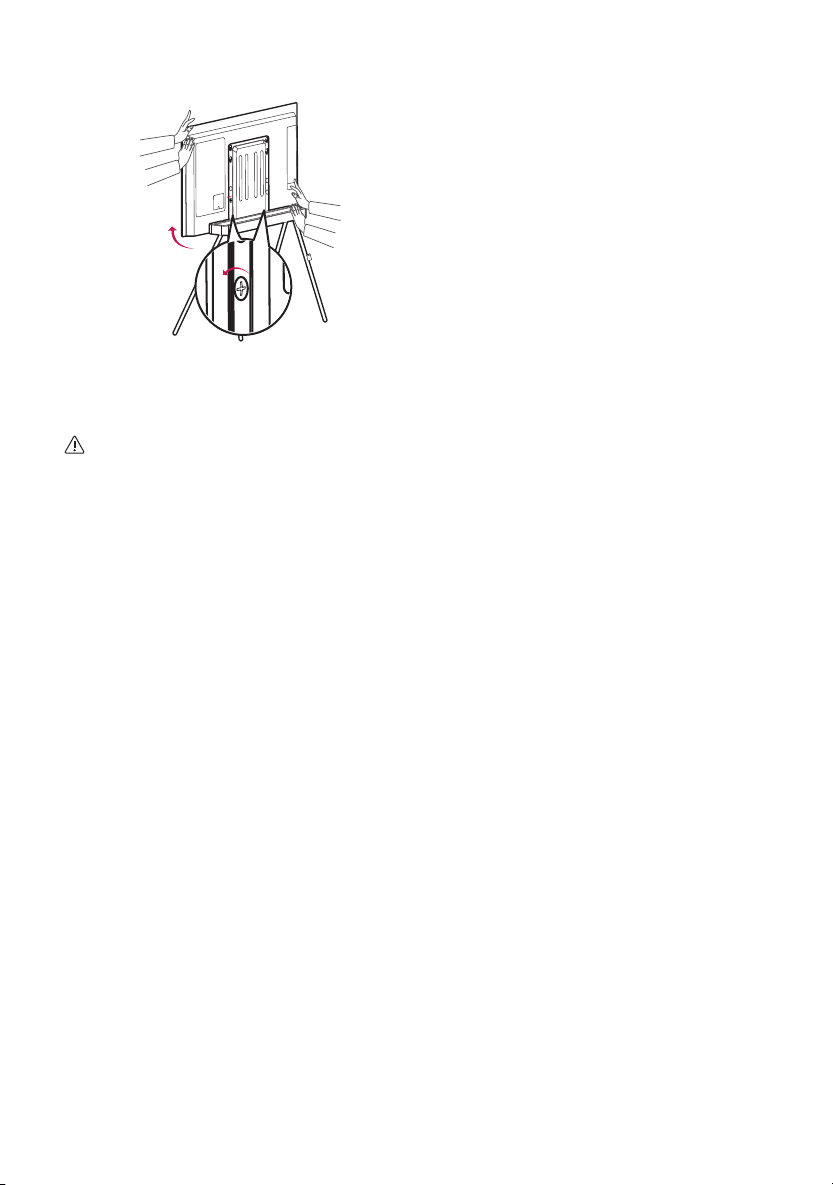
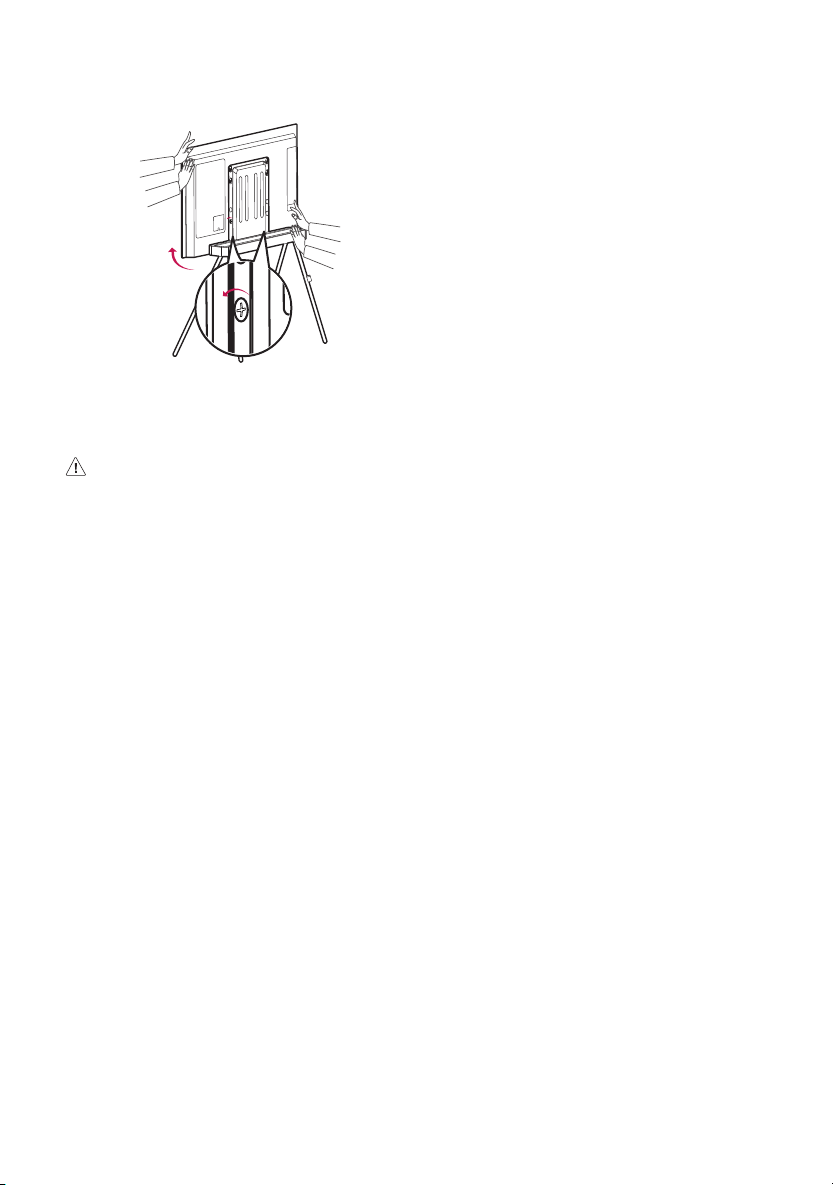
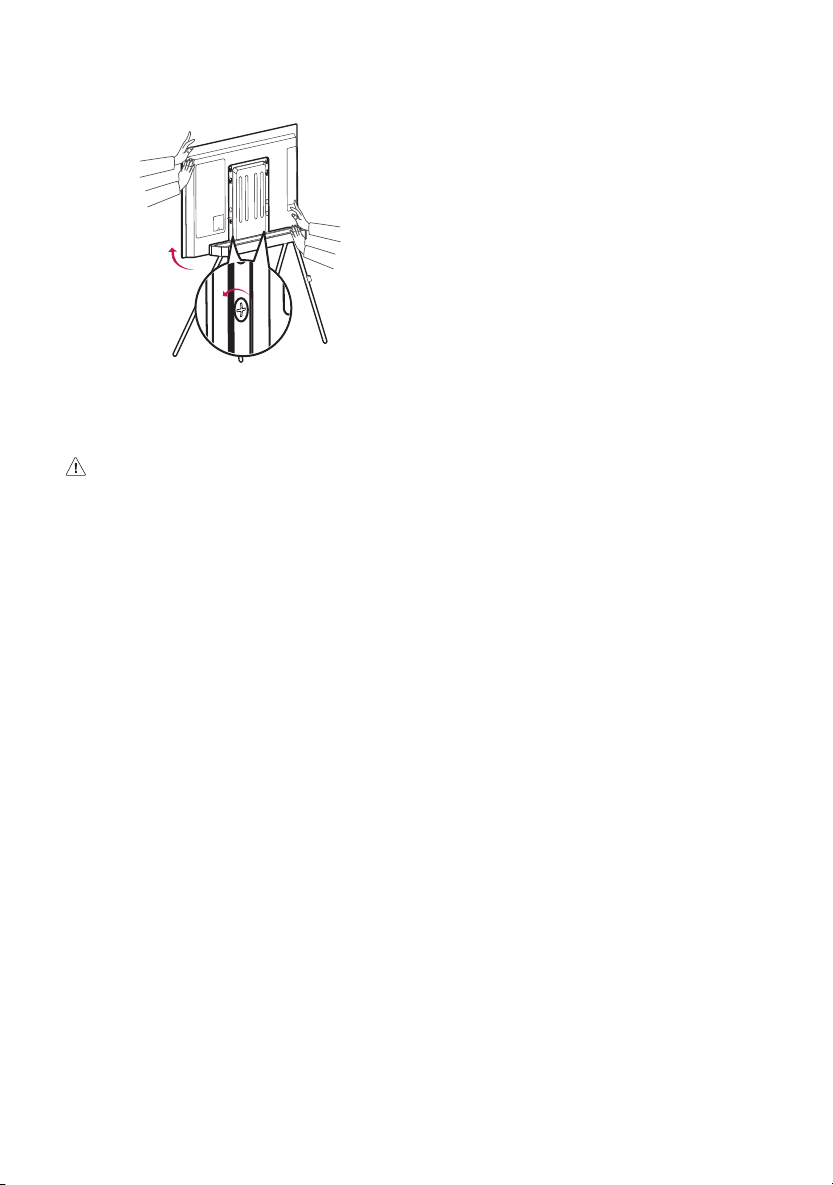
How to Adjust the Height on Both Sides of the TV on
Floor Stand
• Loosen the screw halfway by using a Phillips screwdriver, adjust
the height on both sides of the TV as illustrated, and tighten the
screw.
CAUTION
• Do not place an object or step on the floor stand.
• Do not pull or push the floor stand.
3
한국어
제품규격
모델명 FS22GA
폭 x 깊이 x 높이 (mm)
(최대)
715 x 426 x 947
무게 (kg) 6.7
주의
• 이 스탠드는 LG Electronics Inc. TV 전용입니다.
사용 가능한 TV 시리즈는 아래 표를 참조하세요.
• 다른 장비와 함께 사용하면 불안정하여 부상을 입을
수 있습니다.
설치 전 주의사항
• 플로어 스탠드에는 멀티탭이 포함되어 있지
않습니다. 플로어 스탠드에 TV 전원 및 연결 기기
사용을 위해서는 적당한 길이(2.5미터 이상 권장)의
멀티탭을 구매하여 사용하세요.
• 플로어 스탠드 후면 브래킷에 거치 가능한 최대
무게는 1.5 kg입니다.
• 플로어 스탠드 후면 브래킷에 무선 공유기를
거치하는 경우, TV 내부 무선 안테나와 무선
공유기가 서로 근접하며 발생하는 주파수 간섭으로
인해 TV 인공지능 리모컨이 정상적으로 동작하지
않을 수 있습니다.
• 플로어 스탠드 후면 브래킷에 셋탑박스를 거치하는
경우, 셋탑박스의 리모컨 수신부가 가려져 셋탑박스
리모컨 수신이 원활하지 않을 수 있습니다.
(리모컨 동작에 지속적으로 문제가 발생한다면
장입된 IR 리피터 (리모컨 신호 연장 케이블)를
사용하시면 문제를 해결할 수 있습니다.)
IR 리피터 장착 가이드
•설치 위치는 설치 설명서의 10번 이미지
~
부분을 참조해 주세요.
수신부
하단
표시를 전면
방향으로 부착
송신부
셋탑박스 수신부
전원 연결부
TV 또는 셋탑박스 USB
단자
플로어 스탠드 적용 모델
2020년 출시 호환 모델
제품군 인치 시리즈
OLED 48 CX
2021년 출시 호환 모델
제품군 인치 시리즈
OLED 48 A1
C1
2022년 출시 호환 모델
제품군 인치 시리즈
OLED 42 C2
48 A2
C2
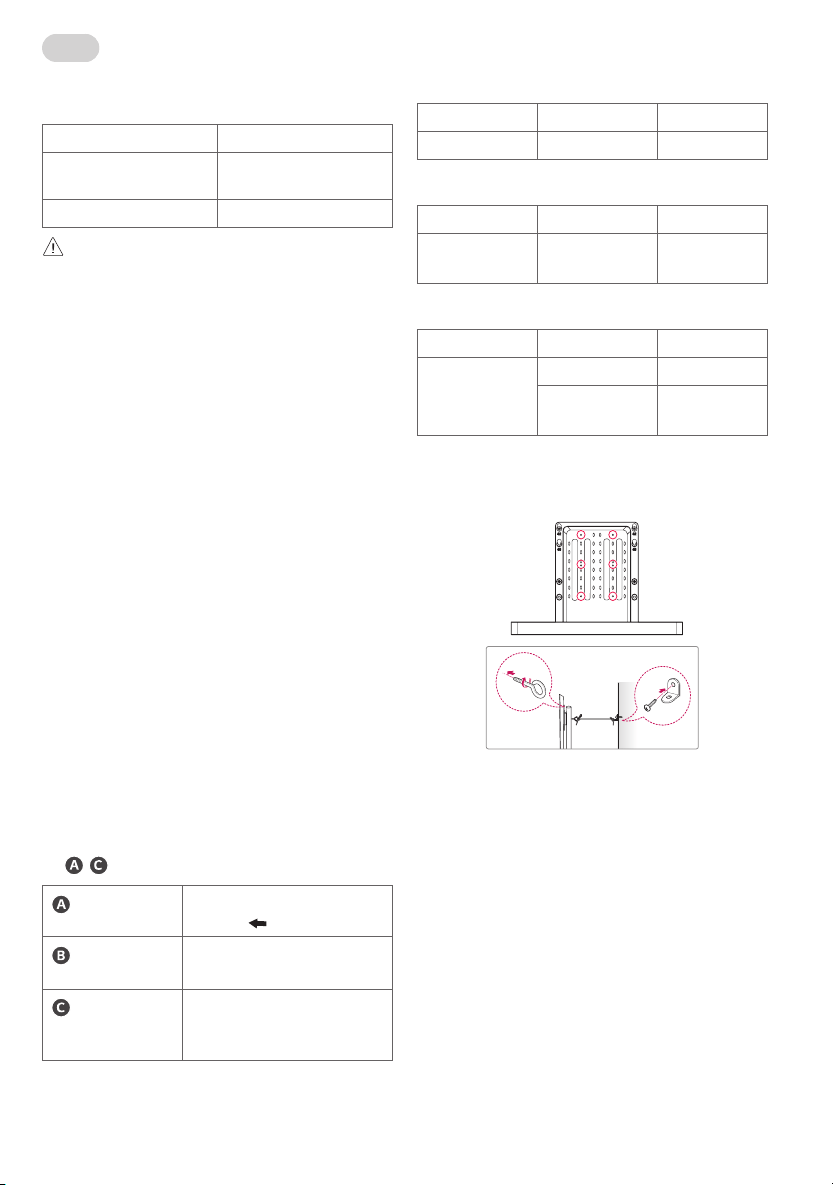
TV 전도를 방지하려면
1 그림과 같이 브래킷을 제품 뒷면과 벽에 고정하세요.
이때, 제품용 브래킷과 벽면용 브래킷을 같은 높이로
고정합니다.
2 제품용 브래킷과 벽면용 브래킷이 단단하게
고정되었는지 확인하세요.
3 튼튼한 끈을 이용하여 벽면용 브래킷을 묶어
연결하세요. 이와 같은 방법으로 설치된 제품을
이동하실 경우 먼저 끈을 풀어주세요.
• TV는 반드시 수평으로 설치하세요.
• 앞으로 잡아당겨도 제품이 넘어져 파손되거나
사람이 상해를 입지 않도록 설치 방법대로 제품을
설치하는 것이 안전합니다.
• TV를 밀 경우 뒤로 넘어지지 않을 정도로 벽면
가까이 설치하세요.
• 브래킷과 나사, 끈은 부속품이 아니므로 별도로
구매하세요.
4
플로어 스탠드 TV 좌 우 높이 조정
• 십자드라이버를 이용하여 나사를 반 바퀴 풀고,
그림과 같이 TV의 좌우 높이를 조정한 후, 나사를
다시 체결하세요.
주의
• 플로어 스탠드 위에 무선 공유기 등의 물건을
놓거나 밟고 올라가지 마세요.
• 플로어 스탠드를 당기거나 밀지 마세요.
5
Français
Spécifications du produit
Nom du modèle FS22GA
Largeur x Profondeur x Hauteur
(mm) (Max.)
715 x 426 x 947
Poids (kg) 6,7
MISE EN GARDE
• Cette fixation est conçue exclusivement pour les téléviseurs
fabriqués par LGElectronicsInc. Pour voir la liste des téléviseurs
compatibles, veuillez vous reporter au tableau ci-dessous.
• Son utilisation avec d'autres équipements peut le rendre instable
et provoquer des blessures.
Précautions avant l'installation
• Le support n'inclut pas de multiprise. Pour alimenter le téléviseur
et utiliser des appareils connectés avec le support, utilisez une
multiprise d'une longueur appropriée (2,5m ou plus).
• Le poids maximum pouvant être placé sur la fixation arrière du
support est de 1,5kg.
• Si vous placez un routeur sans fil sur la fixation arrière du support,
la télécommande à intelligence artificielle du téléviseur peut
ne pas fonctionner correctement en raison des interférences de
fréquence qui se produisent lorsque l'antenne sans fil à l'intérieur
du téléviseur et le routeur sans fil se trouvent à proximité l'un de
l'autre.
• Si vous placez un décodeur sur la fixation arrière du support,
l'unité de réception de la télécommande du décodeur peut être
bloquée, entraînant des problèmes de réception des signaux
de la télécommande. (Si ce problème de fonctionnement de
la télécommande persiste, vous pouvez utiliser une rallonge
de répéteur infrarouge (câble d'extension de signal de la
télécommande) pour résoudre le problème.)
Guide de montage du répéteur infrarouge
•Pour les positions d'installation, veuillez vous reporter aux points
- de la figure 10 du manuel d'installation.
Unité de réception
Partie inférieure
À fixer avec
orienté vers l'avant.
Unité de
transmission
Unité de réception du décodeur
Unité de
raccordement
électrique
Port USB du téléviseur ou du décodeur
Modèles compatibles avec le support
Modèle compatible sorti en 2020
Groupe de produits Pouces Série
OLED 48 CX
Modèle compatible sorti en 2021
Groupe de produits Pouces Série
OLED 48 A1
C1
Modèle compatible sorti en 2022
Groupe de produits Pouces Série
OLED 42 C2
48 A2
C2
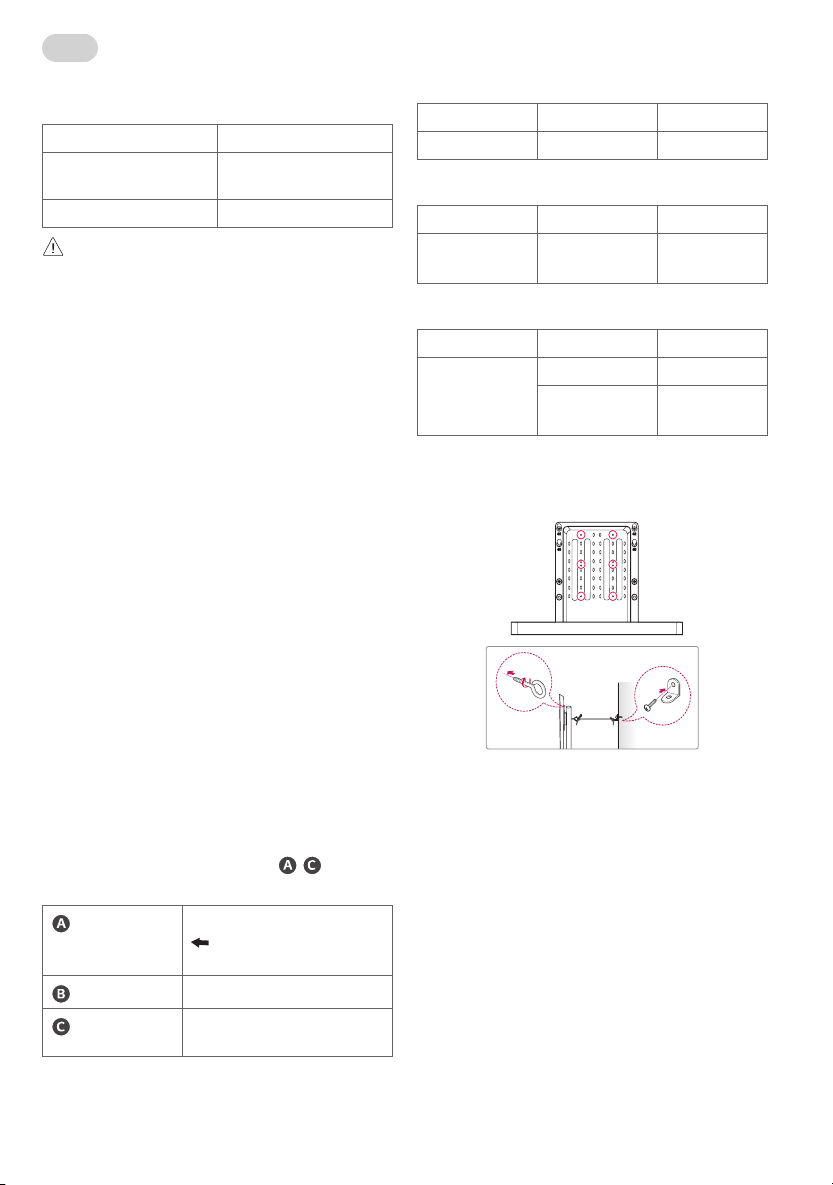
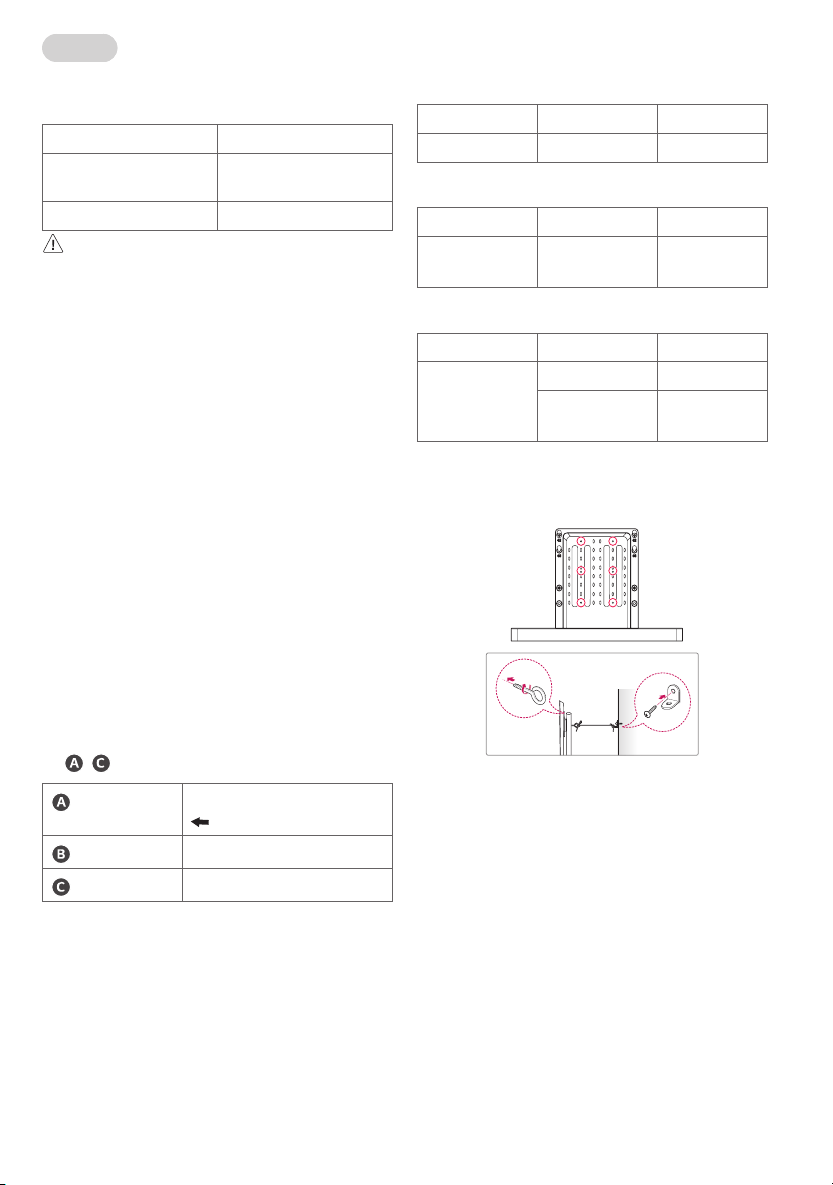
Comment prévenir la chute du téléviseur
1 Montez les fixations sur la partie arrière du produit et sur le mur
comme indiqué sur l'image. Montez les fixations du produit et les
fixations murales à la même hauteur.
2 Vérifiez que les fixations du produit et les fixations murales sont
fermement accrochées.
3 À l'aide d'un cordon solide, attachez et connectez les fixations du
produit aux fixations murales. Lorsque vous déplacez un produit
installé de cette manière, veuillez d'abord détacher le cordon.
• Installez le téléviseur en position horizontale uniquement.
• La méthode d'installation permet d'installer le produit en toute
sécurité pour éviter de l'endommager ou de se blesser, même s'il
est tiré vers l'avant.
• Installez le téléviseur près d'un mur pour éviter les chutes lorsqu'il
est poussé.
• Les fixations, vis et cordons doivent être achetés séparément car ils
ne sont pas fournis avec le produit.
6
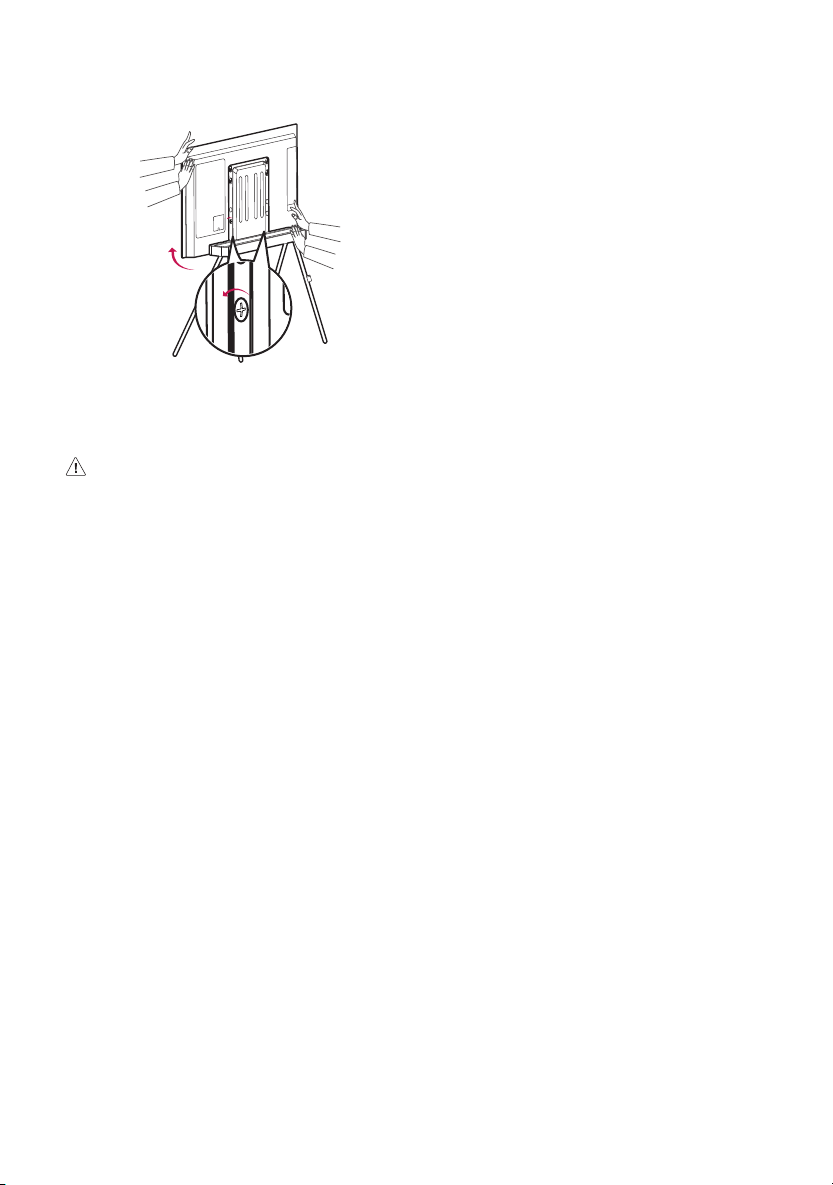
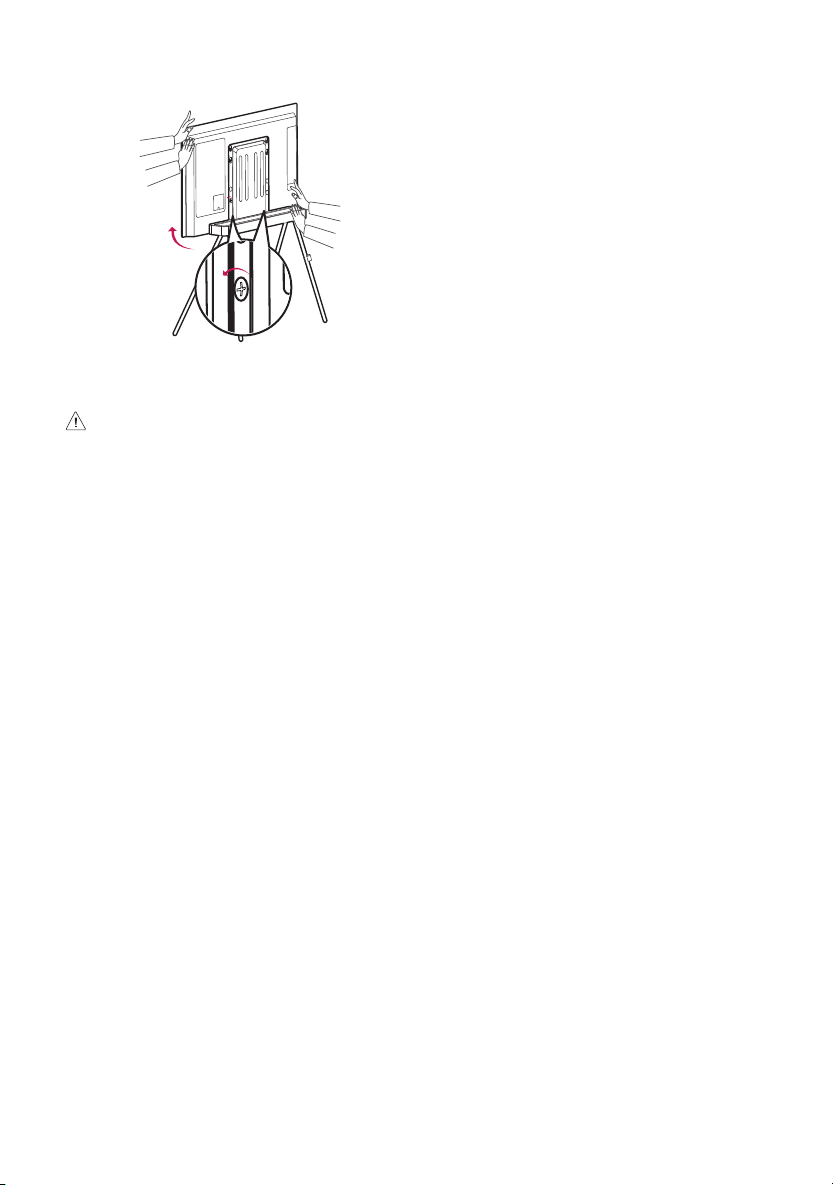
Comment régler la hauteur des deux côtés du téléviseur
sur le support
• Desserrez la vis à moitié à l'aide d'un tournevis cruciforme, ajustez
la hauteur des deux côtés du téléviseur comme illustré et serrez
la vis.
MISE EN GARDE
• Ne placez pas d'objet et/ou ne marchez pas sur le support.
• Ne tirez pas et/ou ne poussez pas le support lorsque le téléviseur
y est installé.
7
Deutsch
Produktspezifikationen
Modellname FS22GA
Breite x Tiefe x Höhe (mm)
(Max)
715 x 426 x 947
Gewicht (kg) 6,7
VORSICHT
• Dieser Ständer wurde ausschließlich für Fernseher von
LGElectronics Inc. entwickelt. Die kompatiblen Fernsehermodelle
entnehmen Sie bitte den folgenden Tabellen.
• Wenn Sie den Ständer mit anderen Geräten verwenden, kann
dieser instabil werden, was zu Verletzungen führen kann.
Vorkehrungen vor der Installation
• Beim Bodenständer ist im Lieferumfang kein Netzkabel
enthalten. Um den Fernseher mit Strom zu versorgen und die
angeschlossenen Geräte mit dem Bodenständer zu verwenden,
kaufen und verwenden Sie ein Netzkabel geeigneter Länge
(2,5Meter oder länger wird empfohlen).
• Das maximale Gewicht auf der hinteren Klammer des
Bodenständers beträgt 1,5 kg.
• Wenn Sie einen Wireless-Router auf die hintere Klammer des
Bodenständers stellen, kann es sein, dass die Fernbedienung des
Fernsehers nicht richtig funktioniert, weil die Frequenz mit der
Wireless-Antenne im Fernseher interferiert und der Wireless-
Router und der Fernseher zu nah aneinander stehen.
• Wenn Sie eine Set-Top-Box auf die hintere Klammer des
Bodenständers stellen, kann diese den Empfänger der Set-Top-Box
verstellen, so dass die Steuersignale nicht mehr richtig empfangen
werden können. (Wenn dieses Problem mit der Fernbedienung
bestehen bleibt, können Sie einen IR Repeater Extender
verwenden, um das Problem zu lösen (ein Verlängerungskabel für
Fernbedienungen)).
Installationsanweisung für IR Repeater
•Die Installationspositionen finden Sie unter - in Abbildung
10 im Installationshandbuch.
Empfänger
Unterer Teil
muss bei der Befestigung nach
vorne zeigen.
Transmitter
Empfänger der Set-Top-Box
Stromanschluss
USB-Anschluss des Fernsehers oder der
Set-Top-Box
Modelle, die mit dem Bodenständer kompatibel sind
Kompatible Modelle, die 2020 veröffentlicht wurden
Produktgruppe Zoll Serie
OLED 48 CX
Kompatible Modelle, die 2021 veröffentlicht wurden
Produktgruppe Zoll Serie
OLED 48 A1
C1
Kompatible Modelle, die 2022 veröffentlicht wurden
Produktgruppe Zoll Serie
OLED 42 C2
48 A2
C2
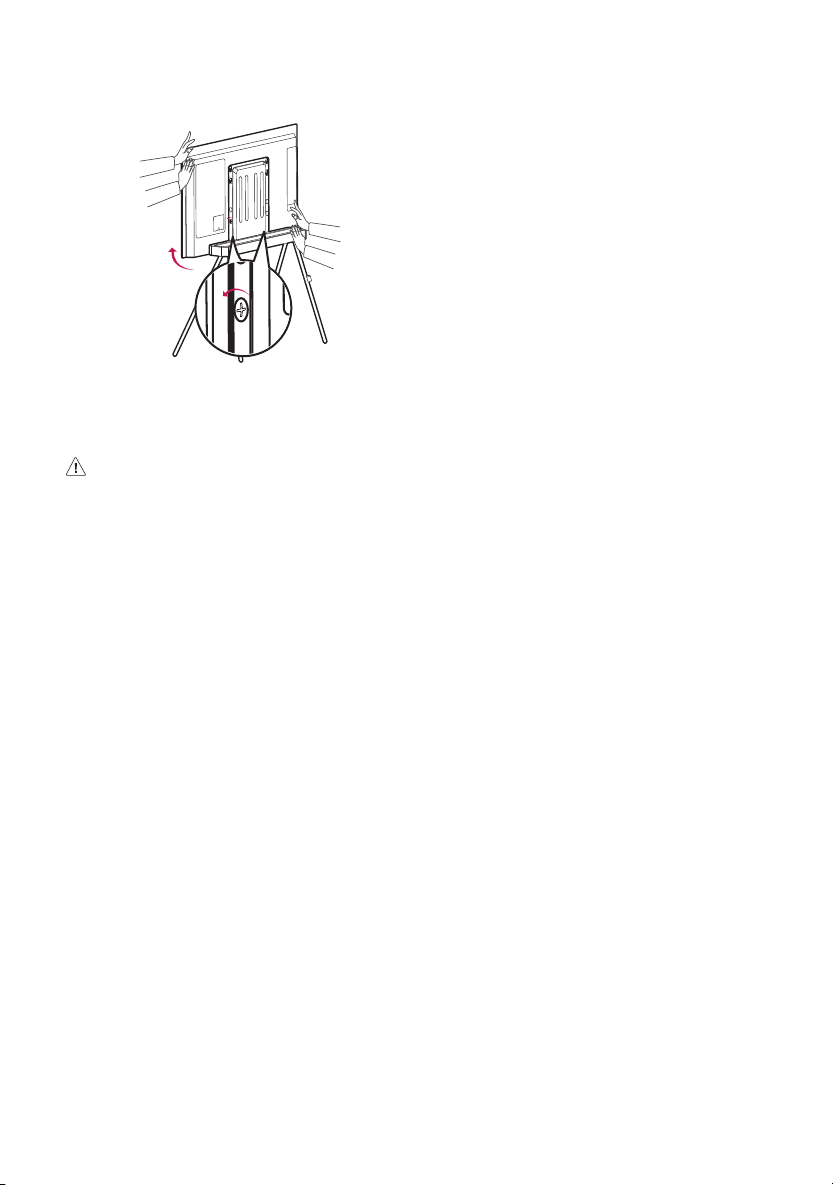
Verhindern des Umstürzens des Fernsehers
1 Befestigen Sie die Halterung an der Rückseite des Produkts
und an der Wand, wie auf dem Bild dargestellt. Sichern Sie die
Produkthalterung und die Wandhalterung in der selben Höhe.
2 Überprüfen Sie, ob die Produkthalterungen und Wandhalterungen
fest sitzen.
3 Befestigen Sie die Produkthalterung mit einem starken Riemen
an der Wandhalterung. Wenn Sie ein auf diese Weise befestigtes
Produkt bewegen, müssen Sie zuerst den Riemen lösen.
• Installieren Sie den Fernseher ausschließlich in horizontaler
Position.
• Wenn Sie das Produkt gemäß der Installationsanweisung
montieren, stellen Sie sicher, dass Schäden am Produkt oder
Verletzungen vermieden werden, selbst wenn das Produkt nach
vorne gezogen wird.
• Montieren Sie den Fernseher in der Nähe einer Wand, um zu
verhindern, dass er herunterfällt, wenn er gestoßen wird.
• Halterungen, Schrauben und Befestigungsriemen sind nicht im
Lieferumfang erhalten und müssen separat erworben werden.
8
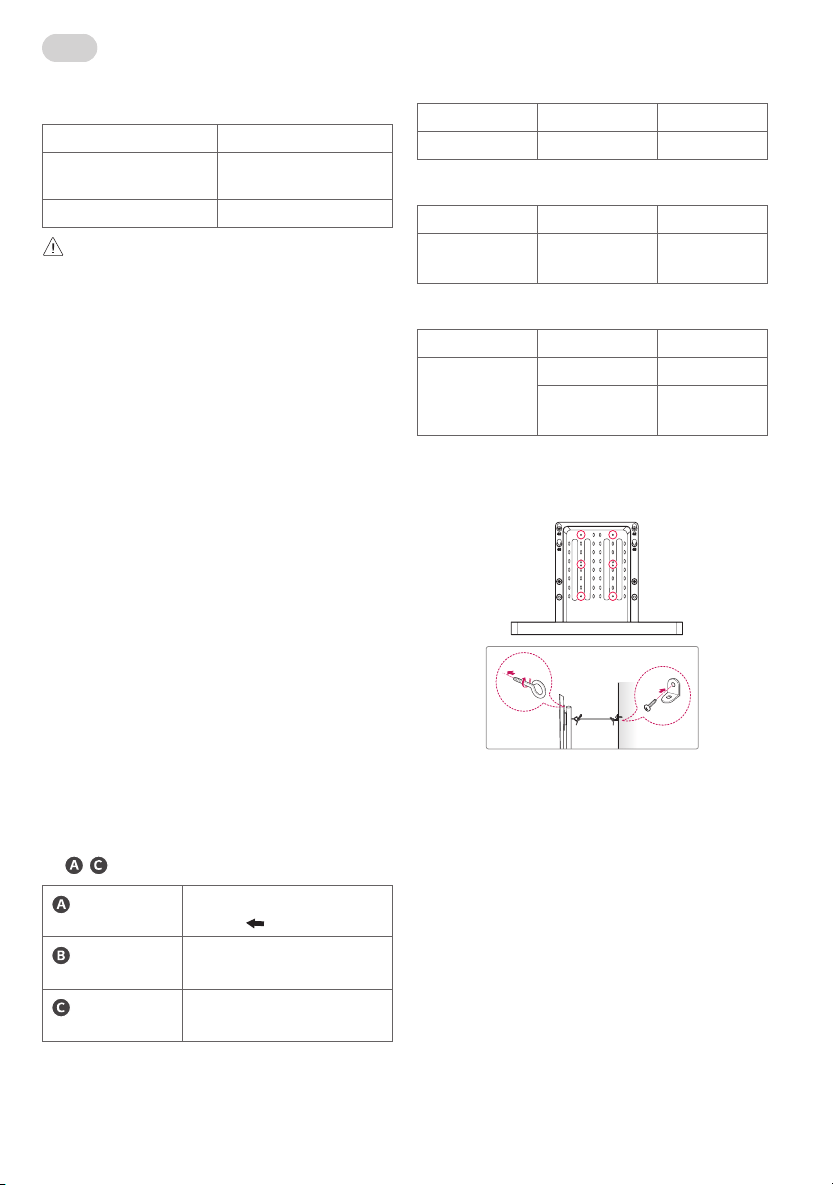
Einstellung der Höhe beider Seiten des Fernsehers auf
dem Bodenständer
• Lockern Sie die Schraube mit einem Kreuzschlitz Schraubendreher,
stellen Sie die Höhe auf beiden Seiten des Fernsehers gemäß der
Abbildung ein und ziehen Sie die Schraube wieder fest.
VORSICHT
• Keine schweren Objekte auf den TV-Ständer stellen oder auf den
TV-Ständer steigen.
• Den TV-Ständer nicht ziehen oder schieben.
9
Italiano
Specifiche del prodotto
Nome modello FS22GA
Larghezza x Profondità x Altezza
(mm) (Max)
715 x 426 x 947
Peso (kg) 6,7
ATTENZIONE
• Questo piedistallo è stato progettato esclusivamente per TV
prodotte da LG Elettronics Inc. Per conoscere le serie di TV
compatibili, consultare la tabella di seguito.
• Utilizzarlo con altre apparecchiature potrebbe renderlo instabile e
causare lesioni.
Precauzioni prima dell'installazione
• Il piedistallo non include una presa multipla. Per alimentare il
TV e usufruire dei dispositivi collegati al piedistallo, acquistare
e utilizzare una presa multipla di lunghezza adeguata (sono
consigliabili almeno 2,5 m).
• Il peso massimo che può essere posizionato sulle staffe posteriori
del piedistallo è 1,5 kg.
• Se si posiziona un router wireless sulle staffe posteriori del
piedistallo, il telecomando ad intelligenza artificiale del TV
potrebbe non funzionare correttamente a causa di interferenze
nella frequenza che si verificano quando l'antenna wireless
integrata nel TV e il router wireless si trovano a distanza
ravvicinata.
• Nel caso in cui venga posizionato un set-top box sulle staffe
posteriori del piedistallo, l'unità di ricezione del telecomando posta
sul set-top box potrebbe smettere di funzionare e causare problemi
alla ricezione dei segnali del telecomando (se il problema persiste,
è possibile utilizzare una prolunga del ripetitore IR, ovvero il cavo di
estensione del segnale del telecomando).
Guida per il montaggio del ripetitore IR
•Per il posizionamento dei vari componenti, fare riferimento ai punti
- della Figura 10 nel manuale di installazione.
Unità di ricezione
Parte inferiore
Fissare con
rivolta in avanti.
Unità di
trasmissione
Unità di ricezione del decoder
Unità di
alimentazione
Terminale USB della TV o del decoder
Modelli compatibili con il piedistallo
Modelli compatibili usciti nel 2020
Gruppo prodotto Pollici Serie
OLED 48 CX
Modelli compatibili usciti nel 2021
Gruppo prodotto Pollici Serie
OLED 48 A1
C1
Modelli compatibili usciti nel 2022
Gruppo prodotto Pollici Serie
OLED 42 C2
48 A2
C2
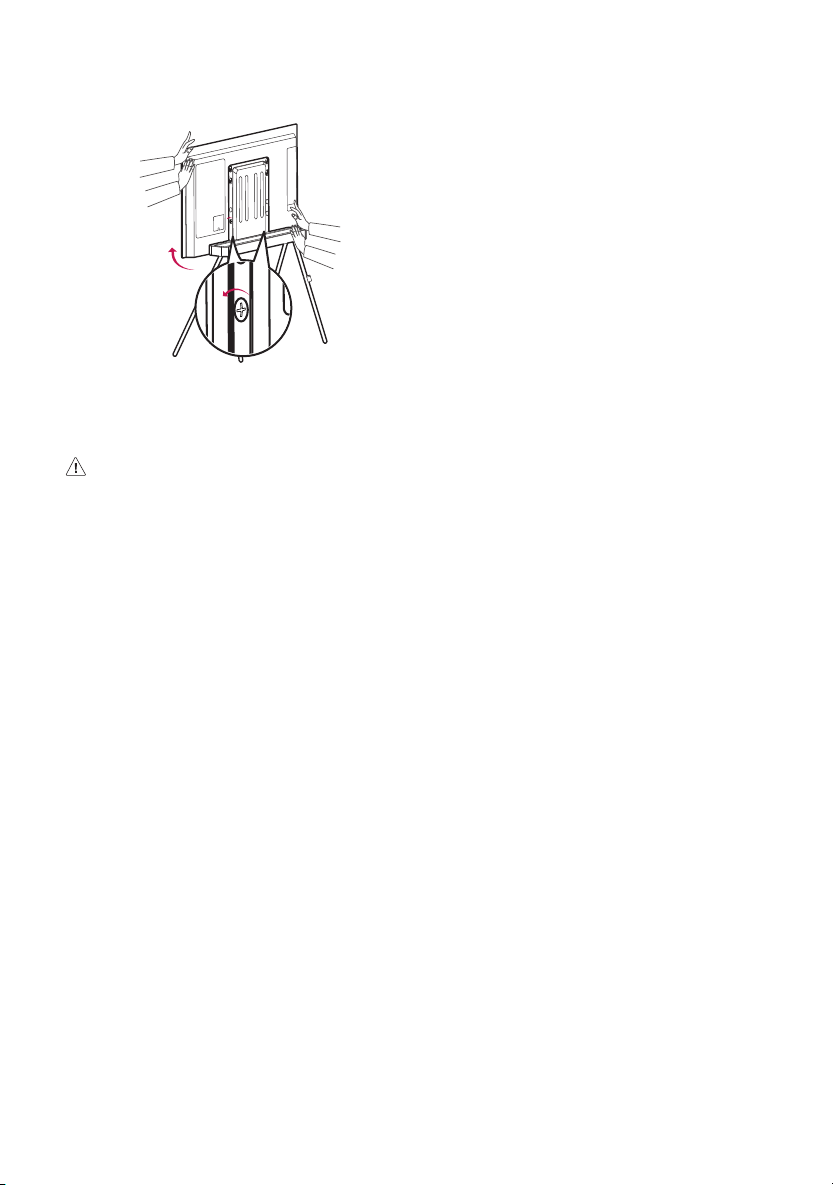
Come prevenire eventuali cadute della TV
1 Fissare le staffe sulla parte posteriore del prodotto e sulla parete
come mostrato in figura. Fissare le staffe del prodotto e quelle a
parete alla stessa altezza.
2 Accertarsi che le staffe del prodotto e quelle a parete siano fissate
saldamente.
3 Con l'aiuto di un cavo resistente, legare e collegare le staffe del
prodotto a quelle a parete. Prima di spostare un prodotto installato
in questo modo, slegare il cavo.
• Installare la TV posizionandola soltanto in orizzontale.
• Per sicurezza, installare il prodotto seguendo le indicazioni,
inmodo da evitare danni al prodotto stesso o lesioni personali,
qualora questo fosse tirato in avanti.
• Installare la TV accanto a un muro per prevenire eventuali cadute
nel caso in cui venga spinta.
• Le staffe, le viti ed eventuali cavi devono essere acquistati
separatamente poichè non vengono forniti con il prodotto.
10
Regolazione dell'altezza di entrambi i lati del TV sul
piedistallo
• Allentare leggermente la vite utilizzando un cacciavite Phillips,
regolare l'altezza da entrambi i lati della TV come in figura e
stringere nuovamente la vite.
ATTENZIONE
• Non appoggiare oggetti o camminare sullo stand.
• Non tirare o spingere lo stand.
11
Português do Brasil
Especificações do produto
Nome do modelo FS22GA
Largura x Profundidade x Altura
(mm) (Máx.)
715 x 426 x 947
Peso (kg) 6,7
CUIDADO
• Este suporte foi desenvolvido exclusivamente para TVs fabricadas
pela LG Electronics Inc. Para séries de TV compatíveis, consulte a
tabela abaixo.
• O uso com outro equipamento pode torná-la instável e causar
ferimentos.
Precauções antes da instalação
• O suporte de chão não inclui um filtro de linha. Para ligar a TV e
usar os dispositivos conectados com o suporte de chão, compre e
use um filtro de linha de comprimento apropriado (recomendamos
2,5 metros ou maior).
• O peso máximo que pode ser colocado na base traseira do suporte
de chão é 1,5 kg.
• Se você colocar um roteador sem fio na base traseira do suporte de
chão, o controle remoto de inteligência artificial da TV poderá não
funcionar corretamente devido à interferência na frequência que
ocorre quando a antena sem fio interna da TV e o roteador sem fio
estão próximos um do outro.
• Se você colocar um conversor na base traseira do suporte de chão,
ele poderá bloquear a unidade de recepção do controle remoto do
conversor, dificultando a recepção de sinais do controle remoto.
(Seeste problema de funcionamento do controle remoto persistir,
você pode usar um extensor repetidor IR (cabo de extensão de sinal
do controle remoto) para solucionar o problema.)
Guia de montagem do repetidor IR
•Para ver as posições de instalação, consulte - da Figura 10
no manual de instalação.
Unidade de
recepção
Parte inferior
Fixe com
voltado para frente.
Unidade de
transmissão
Unidade de recepção do conversor
Unidade de conexão
de alimentação
Terminal USB da TV ou do conversor
Modelos compatíveis com o suporte de chão
Modelo compatível lançado em 2020
Grupo de produto Polegadas Série
OLED 48 CX
Modelo compatível lançado em 2021
Grupo de produto Polegadas Série
OLED 48 A1
C1
Modelo compatível lançado em 2022
Grupo de produto Polegadas Série
OLED 42 C2
48 A2
C2
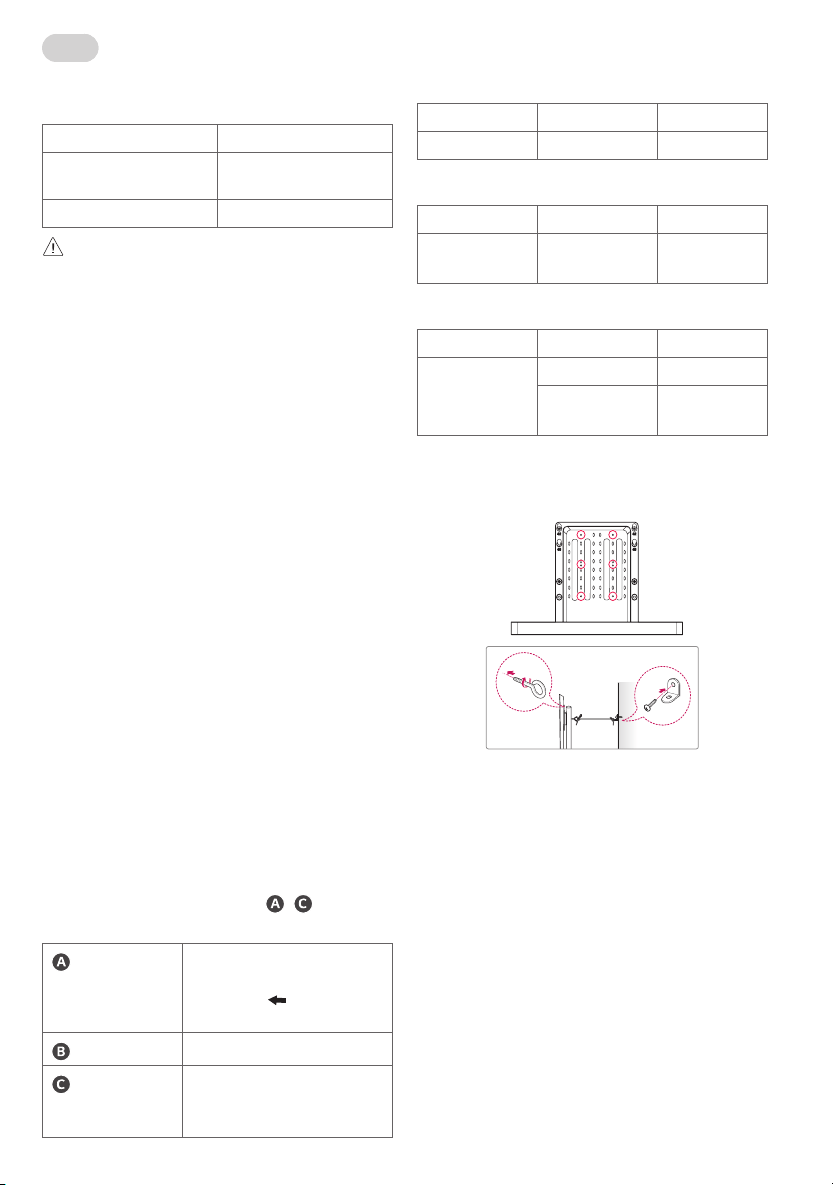
Como evitar que a TV caia
1 Fixe os suportes na parte traseira do produto e na parede conforme
mostrado na imagem. Fixe os suportes do produto e os suportes de
parede na mesma altura.
2 Verifique se os suportes do produto e os suportes de parede estão
presos com firmeza.
3 Usando um cabo forte, amarre e conecte os suportes do produto aos
suportes de parede. Ao mover um produto instalado desta forma,
desamarre o cabo primeiro.
• Instale a TV apenas na posição horizontal.
• É seguro instalar o produto de acordo com o método de instalação
para evitar danos ou ferimentos pessoais, mesmo se o produto for
puxado para frente.
• Instale a TV perto de uma parede para evitar quedas quando ela
for empurrada.
• Os suportes, parafusos e cordas devem ser comprados
separadamente, pois eles não são fornecidos com o produto.
12
Como ajustar a altura dos dois lados da TV no suporte
de chão
• Afrouxe o parafuso até a metade usando uma chave de fenda
Phillips, ajuste a altura dos dois lados da TV conforme ilustrado e
aperte o parafuso.
CUIDADO
• Não coloque nenhum objeto ou pise no suporte de chão.
• Não puxe ou empurre o suporte de chão.
13
Русский
Технические характеристики
Название модели FS22GA
Ширинаx глубинаx высота
(мм) (макс.)
715 x 426 x 947
Вес (кг) 6,7
ВНИМАНИЕ!
• Эта подставка предназначена исключительно для
использования с телевизорами производства LGElectronicsInc.
В таблице ниже указаны серии совместимых телевизоров.
• Использование ее с другим оборудованием может привести к
нарушению устойчивости и травмам.
Меры предосторожности перед установкой
• Напольная подставка поставляется без удлинителя.
Для включения питания телевизора и использования
подключенных устройств, которые устанавливаются на
напольную подставку, необходимо приобрести удлинитель
соответствующей длины (рекомендованная длина— 2,5м
или более).
• Максимально допустимый вес для размещения на заднем
кронштейне напольной подставки составляет 1,5кг.
• При установке беспроводного маршрутизатора на заднем
кронштейне напольной подставки пульт ДУ от телевизора с
применением искусственного интеллекта может работать
ненадлежащим образом из-за радиочастотных помех,
создаваемых в результате размещения беспроводной
антенны, находящейся внутри телевизора, и беспроводного
маршрутизатора в непосредственной близости друг к другу.
• Если установить цифровую приставку на заднем кронштейне
напольной подставки, модуль приема цифровой приставки
может оказаться заблокированным, что затруднит прием
сигнала пульта ДУ. (Если данная проблема при работе пульта
ДУ возникнет снова, воспользуйтесь усилителем ИК-
ретранслятора (удлинитель сигнала пульта ДУ по кабелю).)
Руководство по установке ИК-ретранслятора
•Положения установки указаны на поз. –
рис.10 в руководстве по установке.
Модуль приема
Нижняя часть устройства
Устройство следует прикрепить так,
чтобы стрелка
была обращена
вперед.
Модуль передачи
Модуль приема цифровой приставки
Модуль
подключения
питания
USB-разъем телевизора или
цифровой приставки
Модели, совместимые с напольной подставкой
Совместимые модели 2020года выпуска
Группа изделий Дюймы Серии
OLED 48 CX
Совместимые модели 2021года выпуска
Группа изделий Дюймы Серии
OLED 48 A1
C1
Совместимые модели 2022года выпуска
Группа изделий Дюймы Серии
OLED 42 C2
48 A2
C2
Как предотвратить падение телевизора
1 Зафиксируйте кронштейны на задней панели изделия и стене,
как показано на рисунке. Закрепите кронштейны изделия и
настенные кронштейны на одинаковой высоте.
2 Убедитесь, что кронштейны изделия и настенные кронштейны
надежно зафиксированы.
3 С помощью прочного шнура стяните кронштейны изделия
с настенными кронштейнами и соедините их. Если изделие,
установленное таким образом, понадобится переместить,
вначале ослабьте шнур.
• Устанавливайте телевизор только в горизонтальном
положении.
• Из соображений безопасности конструкцию следует
установить таким образом, чтобы она не повредилась и не
представляла опасности, даже если кто-то потянет ее на себя.
• Установите телевизор рядом со стеной, чтобы он не упал, если
его толкнут.
• Кронштейны, винты и шнуры необходимо приобретать
отдельно, так как они не поставляются с продуктом.
14
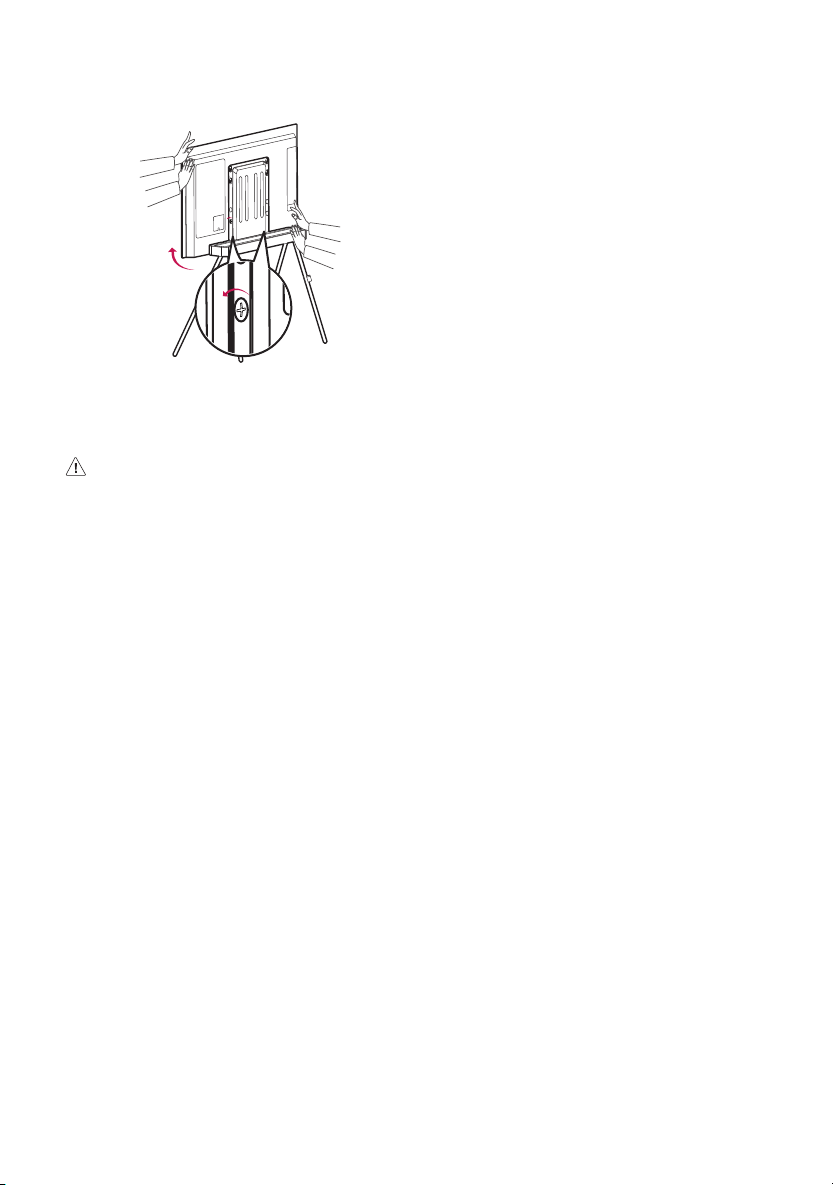
Регулировка высоты установки телевизора на
напольной подставке с обеих сторон
• Ослабьте наполовину винт крестообразной отверткой,
отрегулируйте высоту с обеих сторон телевизора, как показано
на рисунке, и затяните винт.
ВНИМАНИЕ!
• Не ставьте предметы и не наступайте на напольную подставку.
• Не тяните и не толкайте напольную подставку.
Декларация ЕАЭС N RU Д-KR.PA02.B.41390/22
15
Español
Especificaciones del producto
Nombre del modelo FS22GA
Ancho x profundo x alto (mm)
(Máx.)
715 x 426 x 947
Peso (kg) 6,7
PRECAUCIÓN
• Este soporte está diseñado exclusivamente para TV fabricadas por
LG Electronics Inc. Para consultar las series de TV compatibles, vea
la tabla a continuación.
• Usarlo con otros equipos puede hacer que sean inestables y
provocar lesiones.
Precauciones antes de la instalación
• El soporte de suelo no incluye regleta de conexión. Para encender
la TV y utilizar los dispositivos conectados con el soporte de suelo,
compre y utilice una regleta de conexión de una longitud adecuada
(se recomienda una longitud de 2,5m o más).
• El peso máximo que puede colocarse sobre el soporte trasero del
soporte de suelo es de 1,5kg.
• Si coloca un router inalámbrico en el soporte trasero del soporte
de suelo, el mando a distancia de inteligencia artificial de la TV
podría no funcionar correctamente debido a las interferencias
de frecuencia que se producen cuando la antena inalámbrica del
interior de la TV y la del router inalámbrico se encuentran a poca
distancia.
• Si coloca un Set-top box en el soporte trasero del soporte de suelo,
podría obstruir la unidad de recepción del mando a distancia del
Set-top-box y dificultar la recepción de señales de control. (Si este
problema de funcionamiento del mando a distancia continua,
puede usar un extensor del repetidor de IR (cable de extensión de
la señal del mando a distancia)para resolver el problema).
Guía de montaje del repetidor de IR
•Para conocer las posiciones de instalación, consulte
- de la
Figura 10 en el manual de instalación.
Unidad de recepción
Parte inferior
Fijar con
mirando hacia delante.
Unidad de
transmisión
Unidad de recepción del receptor
digital
Unidad de conexión
de alimentación
Terminal USB de la TV o del receptor
digital
Modelos compatibles con el soporte de suelo
Modelo compatible lanzado en 2020
Grupo de productos Pulgadas Serie
OLED 48 CX
Modelo compatible lanzado en 2021
Grupo de productos Pulgadas Serie
OLED 48 A1
C1
Modelo compatible lanzado en 2022
Grupo de productos Pulgadas Serie
OLED 42 C2
48 A2
C2
Cómo evitar que caiga la TV
1 Fije los soportes en la parte trasera del producto y en la pared
según se muestra en la imagen. Fije los soportes del producto y los
soportes de la pared a la misma altura.
2 Verifique que los soportes del producto y los soportes de la pared
estén apretados firmemente.
3 Usando un cable resistente, una y apriete los soportes del producto
con los soportes de la pared. Cuando vaya a trasladar un producto
instalado así, primero desate el cable.
• Instale la TV solo en posición horizontal.
• Es seguro instalar el producto según el método de instalación para
evitar daños en el producto o lesiones personales aunque se tire
del producto hacia delante.
• Instale la TV cerca de una pared para evitar caídas al empujarla.
• Los soportes, tornillos y cables deben comprarse por separado ya
que no se proporcionan con el producto.
16
Cómo ajustar la altura en ambos lados de la TV en el
soporte de suelo
• Afloje el tornillo hasta la mitad con un destornillador Phillips,
ajuste la altura a ambos lados de la TV según la ilustración y vuelva
a apretar el tornillo.
PRECAUCIÓN
• No coloque ningún objeto ni pise el soporte de suelo.
• No tire ni empuje del soporte de suelo.
17
繁體中文
產品規格
機型名稱 FS22GA
寬 x 深 x 高 (公釐)
(最大值)
715 x 426 x 947
重量 (公斤) 6.7
警示
• 本支架 是專為 LG Electronics Inc. 製造的電視
而設計。關於相容的電視系列,請參閱下表。
• 與其他設備搭配使用可能使其不穩定並導致
受傷。
安裝前的注意事項
• 落地架不含延長線。若要為電視供電並將連接
的裝置與落地架搭配使用,請購買並使用長度
合適 (建議 2.5 公尺以上) 的延長線。
• 可放置在落地架後托架上的最大重量為 1.5 公
斤。
• 如果將無線路由器放在落地架後托架上,電視
的智慧遙控器可能會因電視內部的無線天線與
無線路由器彼此靠近時產生的頻率干擾而無法
正常運作。
• 如果將機上盒放在落地架後托架上,可能會擋
住機上盒的遙控器接收單元,導致難以接收遙
控器訊號。(如果此遙控操作問題持續存在,
您可以使用 IR 中繼器延伸器 (遙控器訊號延長
線) 解決問題。)
IR 中繼器安裝指南
• 關於安裝位置,請參考安裝手冊圖 10 的
- 。
接收單元
下部
朝前安裝。
發射單元
機上盒的接收單元
電源連接單元
電視或機上盒的 USB 端子
與落地架相容的型號
2020 年推出的相容型號
產品群 吋 系列
OLED 48 CX
2021 年推出的相容型號
產品群 吋 系列
OLED 48 A1
C1
2022 年推出的相容型號
產品群 吋 系列
OLED 42 C2
48 A2
C2
如何防止電視掉落
1 如圖所示,將支架配件固定在產品後部和牆
上。將產品支架和牆面配件固定在相同高度。
2 確認產品支架和牆面配件已牢牢固定。
3 使用堅韌的繩子,將產品支架綑綁並連接至牆
面配件。移動以此方式安裝的產品時,請先解
開繩子。
• 僅可將電視水平安裝。
• 依照安裝方法安裝產品是安全的,即使將產品
向前拉,也可防止產品損壞或人員受傷。
• 將電視安裝在牆壁附近,以防止推動時掉落。
• 支架配件、螺絲和繩子都必須另外購買,因為
產品並未提供。
18
如何在落地架上調整電視兩側的高度
• 使用十字螺絲起子將螺絲鬆開一半,如圖所示
調整電視兩側的高度,然後鎖緊螺絲。
警示
• 請勿在落地架上放置物體或踩踏。
• 請勿拉或推落地架。
19
中文
产品规格
型号名称 FS22GA
宽度 x 深度 x
高度(毫米)
(最大)
715 x 426 x 947
重量(千克) 6.7
注意
• 该型号的支架 是专为
LG Electronics Inc. 生产的电视
而设计。有关兼容的电视系
列,请参阅下表。
• 将该支架用于其他设备可能
会出现不稳定的情况而造成伤
害。
安装前的注意事项
• 落地支架不含接线板。
为了给电视供电并使用采用落
地支架的连接设备,请购买并
使用长度适当的接线板(建议
选择 2.5 米或更长)。
• 落地支架的后托架最大承重为
1.5 千克。
• 如果将无线路由器置于落地支
架的后托架上,电视的人工智
能遥控器可能会因为电视内部
的无线天线和无线路由器靠近
时产生的频率干扰而无法正常
工作。
• 如果将机顶盒置于落地支架的
后托架上,它可能会挡住机顶
盒的遥控接收单元,从而难以
接收遥控信号。(如果此遥控
器操作问题仍然存在,您可以
使用 IR 中继器延长器(遥控信
号延长线)来解决问题。)
IR 中继器安装指南
• 关于安装位置,请参阅安装手
册中图 10 中的
- 步骤。
接收装置
下半部分
朝前安装。
传输装置
机顶盒的接收装置
电源连接
装置
电视或机顶盒的
USB 终端
与落地支架兼容的型号
2020 年发布的兼容型号
产品组 英寸 系列
OLED 48 CX
2021 年发布的兼容型号
产品组 英寸 系列
OLED 48 A1
C1
2022 年发布的兼容型号
产品组 英寸 系列
OLED 42 C2
48 A2
C2
20
如何防止电视掉落
1 如图所示,将支架分别固定在
产品后部和墙上。将产品支架
和壁挂支架固定在同一高度。
2 确保产品支架和壁挂支架足够
牢固。
3 用一根结实的缆线将产品支架
与壁挂支架紧固在一起。如果
要移动以此方式安装的产品,
请先解开绳子。
• 仅将电视安装在水平位置。
• 遵照安装方法安装产品是安全
可靠的,即使向前拉动产品,
也可以防止产品损坏或人员受
伤。
• 将电视安装在靠近墙壁的地
方,以防推动时跌落。
• 支架、螺钉和线须单独购买,
因为它们没有与产品一起提
供。
如何调整安装在落地支架上的
电视两边的高度
• 用十字螺丝刀将螺钉拧松一
半,按图示调整电视两边的高
度,然后拧紧螺钉。
注意
• 请勿将物品或脚放在地板支架
上。
• 请勿拉动或推地板支架。