TABLE OF CONTENTS
A 「
9
Pump (for Pump function model only)
This feature pumps water horizontally or
vertically. Pump water to a drain, out a window
or anywhere you think suitable.
■ If the drain hose is not correctly connected to the
unit or is bent, the pump light will flash and the
pump system will not work. See “Trouble shooting”
for direction.
IMPORTANT:
You must connect the drain hose to the unit
before pressing the Pump button, or the
pump will not operate. See “Pump drain” for
connecting instructions.
1. Press PUMP to activate the pump system for
active drainage.
2. Once the pump button is pressed, the pump light
will switch on.
NOTE:
■ If the pump light flashes, it means that the pump is not
functioning properly.
P
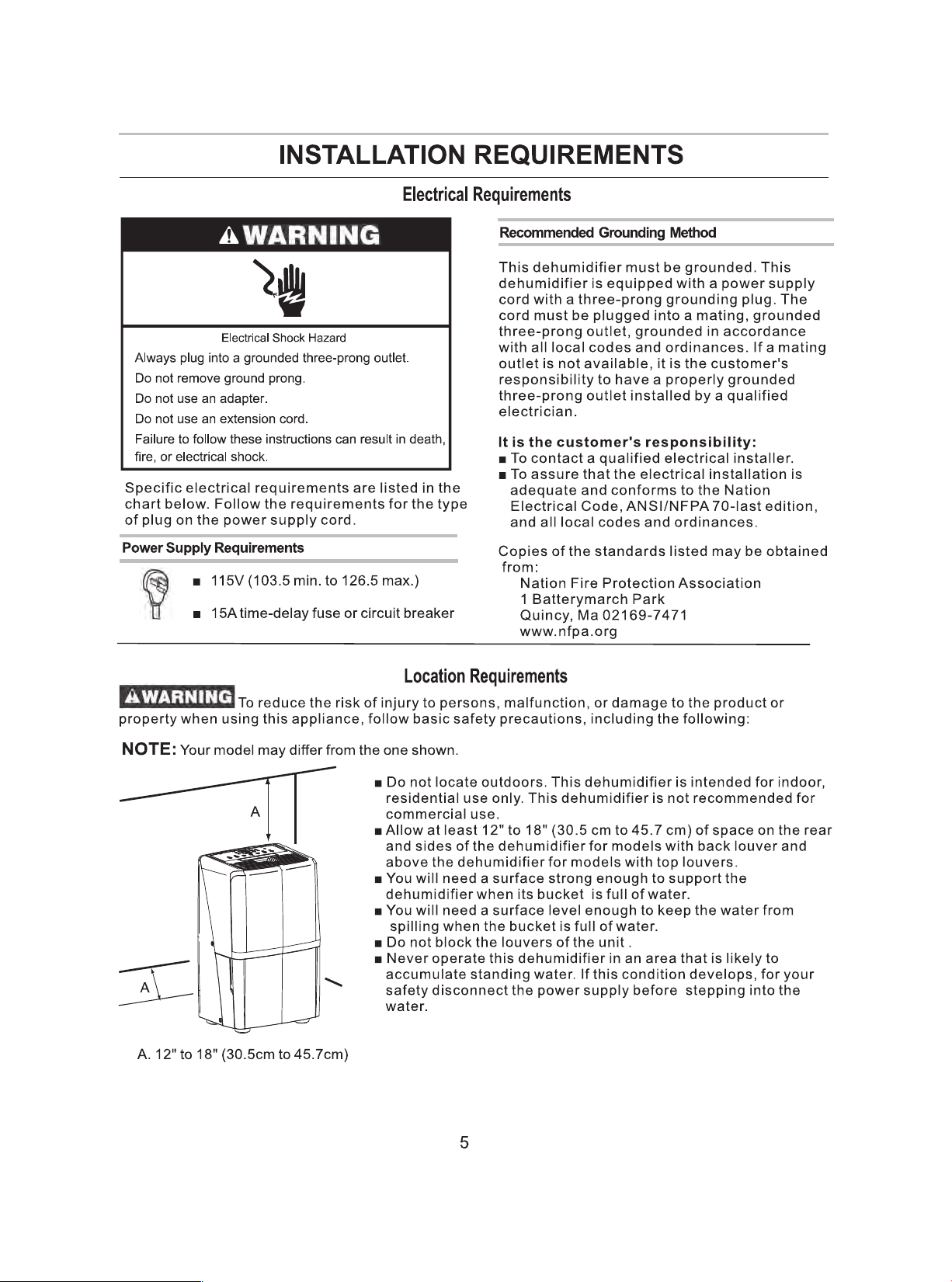
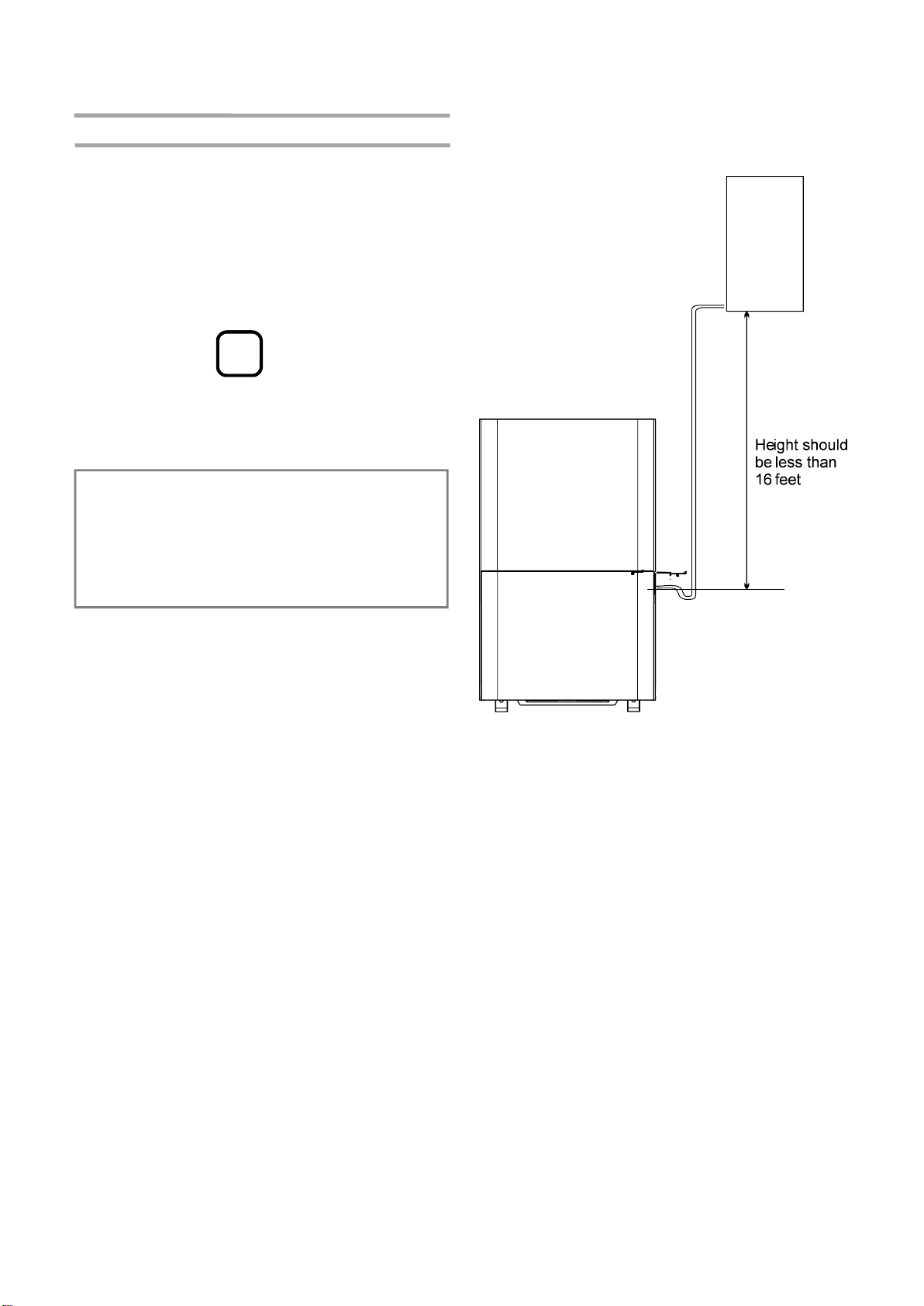
Site for installing hose for pump function:
Hose length is
16 feet Max.
Dehumidifier
Water
Container
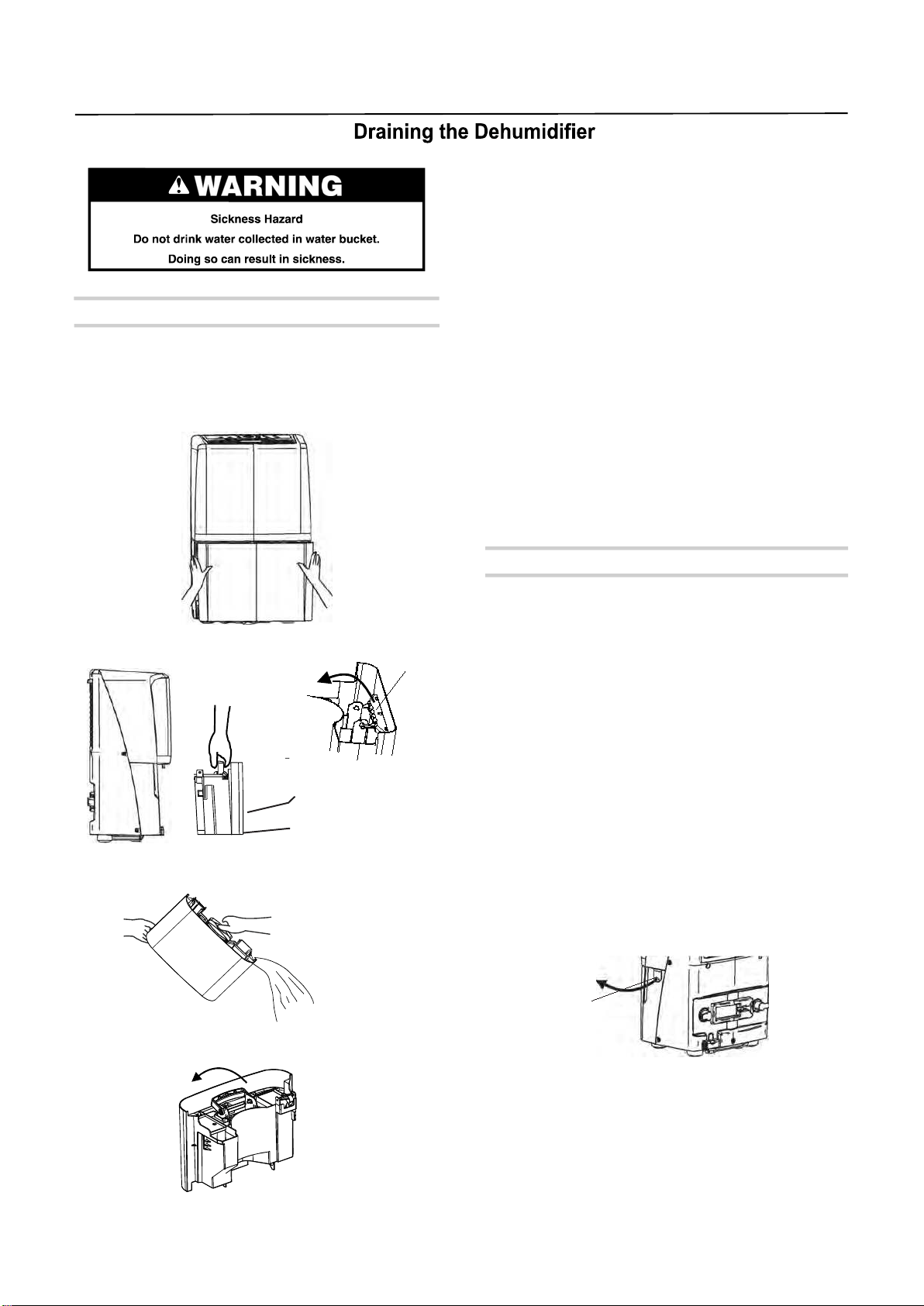
2. Lift the bucket up by the handle.
3. Pour water into a sink or tub.
If a floor drain is not available, or you do not plan
to run your dehumidifier continuously, you may
want to simply empty the bucket.
1. Grasp the bucket sides to slide out bucket.
4. Fold down the handle and reinstall the bucket.
IMPORTANT:
If the Empty Bucket light comes on, the
dehumidifier will not operate. The bucket may
need to be emptied or re-installed.
NOTE:
■ If the water bucket is removed immediately
after turning off the dehumidifier, the water
remaining in the heat exchanger may drip
inside the water bucket storage area.
Remove the water with a soft cloth.
■ While cleaning, do not touch the water level
float.
■ Clean the water bucket once a week during
use.
■ If the ambient temperature is low, there is
less moisture in the air for the product to
remove.
■ Unplug the product before removing the water
bucket. If the bucket is removed while the
product is operating, the compressor will stop.
Option 1 Bucket Draining
10
Handle
Op ti o n 2 G r av i t y D r ai n in g
1. Turn off the dehumidifier and unplug the power
supply cord.
2. Uncover the connector cover on the side of the
unit.
If you plan to run your dehumidifier continuously,
you can choose direct draining by attaching a
garden hose to the unit.
NOTE:
■ The garden hose sold separately.
■
And the drain hose inner diameter should
greater than 1/2”.
■ The connector is designed for North American
garden hoses only.
IMPORTANT:
In North America the garden hose connectors are
3/4” diameter straight (non-tapered) thread with a
pitch of 11.5 threads per inch(male part has an
outer diameter of 1 1/16 inches (26.99mm).
For models without pump:
Connector
cover
3. Remove bucket.
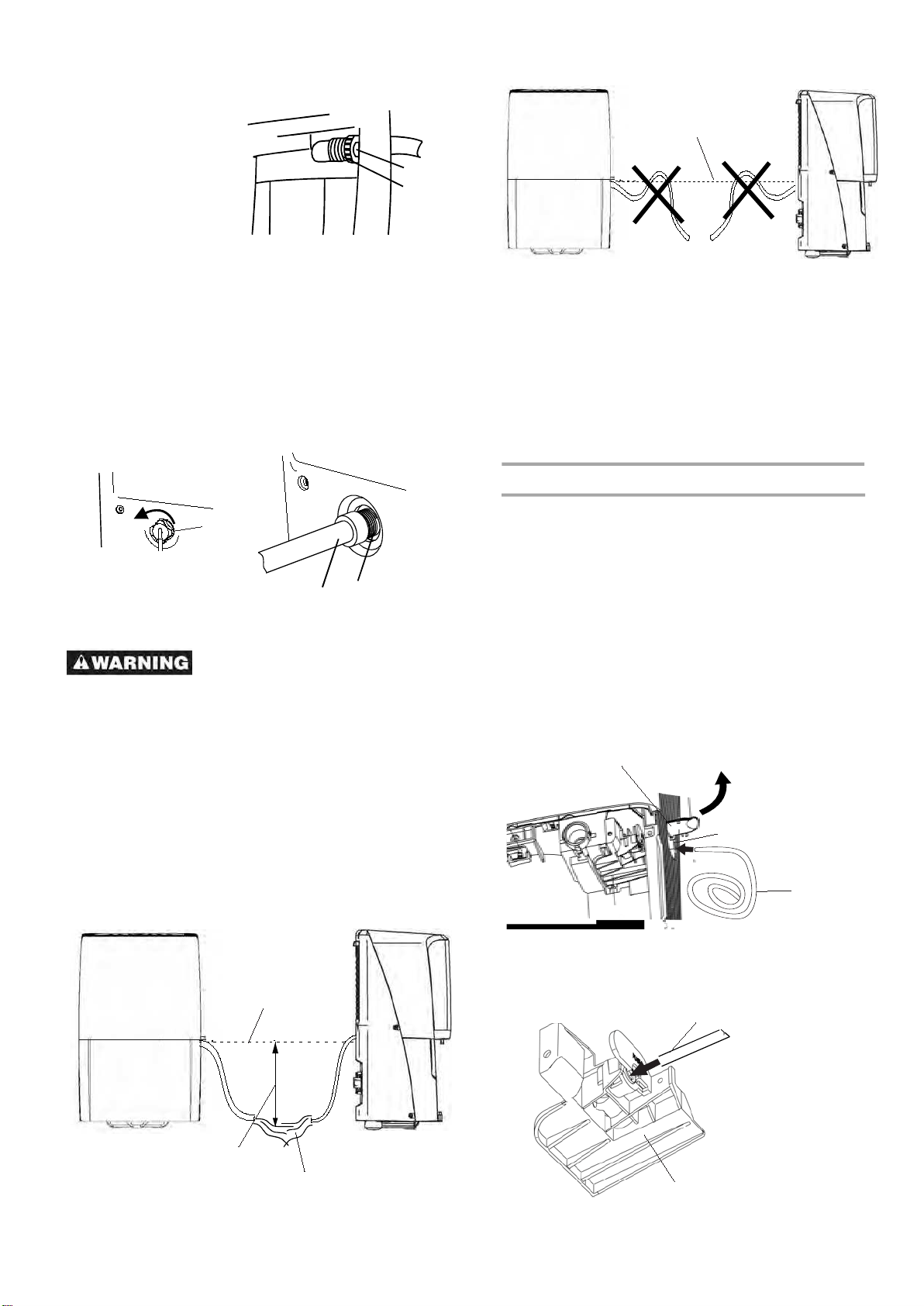
4. Attach a garden hose to the drain hose
connector on the inside of the dehumidifier.
Securely attach the hose to be sure there is no
water leak.
11
A. Garden hose
B. Drain hose connector
A
B
the unit.
3. Attach a garden hose to the drain hose
connector on the back of the dehumidifier.
Securely attach the hose ensure there is no
water leak.
5. Reinstall bucket.
For models with pump :
1. Turn off the dehumidifier and unplug the power
supply cord.
2. Uncover the connector cover on the back of
A
B
A. Garden hose
B. Drain hose connector
C. Connector cover
C
should at lest .
The hose should not be kinked or pinched.
5.5" lower than the hose connector
outlet of the hose
Connector
level
More than 5.5"
Without Pump
function model
With Pump
function model
Option 3 PUMP-Drain (for models with pump only)
NOTE:
You must connect the drain hose to drain
hose connector before pressing Pump button.
If the pump does not function properly, see
“Trouble shooting” for direction.
1. To connect the drain hose to the unit,uncover
This feature can help to pump water horizontally
or vertically with a 16 feet (487.68cm) hose
included. You can also pump water to a floor drain,
out a window or anywhere you think suitable.
NOTE:
■ To use the bucket without the garden hose,
simply remove the garden hose,
ump ,you may also cover the
connector cover
■ The bucket must be installed and properly
aligned for the dehumidifier to operate .
then reinstall
bucket.
■ For models with p
after remove the garden hose.
Drain hose
Side hole
2. Insert the drain hose into the Drain hose
connector and ensure the hose is plugged to
the bottom of the connector.
Connector level
-
the connector cover on the side of the unit,and
pass the hose through the side hole.
Connector cover
Drain hose connector
Drain hose
Take care not to injure hands
while connecting the hose.
NOTE:
Place the other end of garden hose into a floor
drain. Check to see that the hose lies flat and is
in the drain. Make sure all the parts of the hose
is on a lower level than the hose connector on
the dehumidifier.Also ,the outlet of the hose
-
12
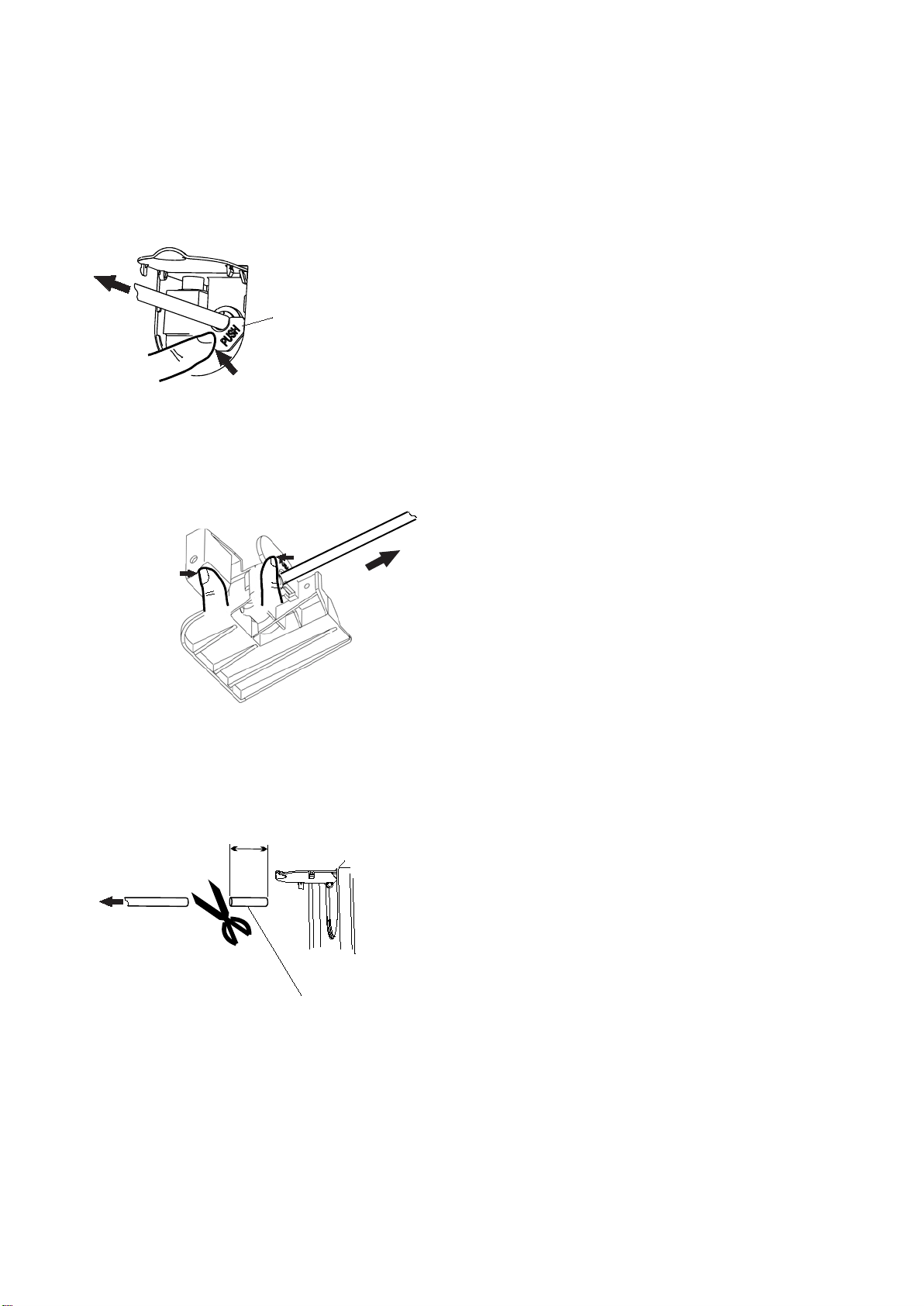
2.To disconnect the drain hose.
Method 1:push the “PUSH”button on the connector
through the side hole (Do not release) , in the
meantime pull the Drain hose out,and cover the
connector cover.
“PUSH ” button
Pull
Push
“PUSH”
as following
picture shows, in the meantime pull the drain
Method 2:Slide out the bucket ,pinch the
reinstall hose out,cover the connector cover and
the bucket.
button by the finger(Do not release)
Pull
NOTE:
■ T
o make sure no leakage,it is recommended a 1"
short piece of the drain hose should be cut off after 3
times
disconnection.
Pull
at least 1"
abandon