WASHERS
SAFETY INFORMATION ...........3
USING THE WASHER
Getting Started ...................... 5
WiFi Connect ........................14
Loading .............................15
CARE AND CLEANING ........... 16
INSTALLATION
INSTRUCTIONS
.....................18
Reversing The Door Swing (Optional) .....23
TROUBLESHOOTING TIPS ......27
LIMITED WARRANTY ............31
CONSUMER SUPPORT .......... 32
GFW850
GFW650
GFW550
GFW510
OWNER’S MANUAL &
INSTALLATION
INSTRUCTIONS
Write the model and serial
numbers here:
Model # _________________
Serial # _________________
You can find them on a label
inside the washer door.
ENGLISH/FRANÇAIS/
ESPAÑOL
GE is a trademark of the General Electric Company. Manufactured under trademark license.
0020508637A 49-3000217 Rev 2 10-19 GEA
2 49-3000217 Rev 2
THANK YOU FOR MAKING GE APPLIANCES A PART OF YOUR HOME.
Whether you grew up with GE Appliances, or this is your first, we’re happy to have you in the family.
We take pride in the craftsmanship, innovation and design that goes into every GE Appliances
product, and we think you will too. Among other things, registration of your appliance ensures that we
can deliver important product information and warranty details when you need them.
Register your GE appliance now online. Helpful websites and phone numbers are available in the
Consumer Support section of this Owner’s Manual. You may also mail in the pre-printed registration
card included in the packing material.
49-3000217 Rev 2 3
IMPORTANT SAFETY INFORMATION
READ ALL INSTRUCTIONS BEFORE USING THE APPLIANCE
SAFETY INFORMATION
READ AND SAVE THESE INSTRUCTIONS
To reduce the risk of death, fire, explosion, electric shock, or injury to persons when using
your appliance, follow basic precautions, including the following:
Ŷ
Read all instructions before using the appliance.
Ŷ
Follow all fabric care instructions and warnings to prevent melting of garments or damage to the appliance.
Ŷ
DO NOT wash or dry articles that have been previously cleaned in, washed in, soaked in or spotted with
gasoline, dry-cleaning solvents, or other flammable or explosive substances, as they give off vapors that could
ignite or explode.
Ŷ
DO NOT add gasoline, dry-cleaning solvents, or other flammable or explosive substances to the wash water.
These substances give off vapors that could ignite or explode.
Ŷ
Under certain conditions, hydrogen gas may be produced in a hot-water system that has not been used for
2 weeks or more. HYDROGEN GAS IS EXPLOSIVE. If the hot water system has not been used for such a
period, before using a washing machine, turn on all hot-water faucets and let the water flow from each for
several minutes. This will release any accumulated hydrogen gas. As the gas is flammable, DO NOT smoke
or use an open flame during this time.
Ŷ
DO NOT allow children to play on or in this appliance. Close supervision of children is necessary when this
appliance is used near children. Before the washer is removed from service or discarded, remove the door or
lid. Failure to follow these instructions may result in death or injury to persons.
Ŷ
DO NOT reach into the appliance if the tub or agitator is moving to prevent accidental entanglement.
Ŷ
DO NOT install or store this appliance where it will be exposed to the weather.
Ŷ
DO NOT tamper with controls, repair or replace any part of this appliance or attempt any servicing unless
specifically recommended in the user maintenance instructions or in published user repair instructions that you
understand and have the skills to carry out.
Ŷ
DO NOT climb or stand on this unit.
Ŷ
DO NOT operate this appliance if it is damaged, malfunctioning, partially disassembled, or has missing or
broken parts including a damaged cord or plug.
Ŷ
Unplug the appliance or turn off the circuit breaker before servicing. Pressing the Power pad DOES NOT
disconnect power.
Ŷ
See “ELECTRICAL REQUIREMENTS” located in the Installation Instructions for grounding instructions.
WARNING
4 49-3000217 Rev 2
SAFETY INFORMATION
READ AND SAVE THESE INSTRUCTIONS
PROPER INSTALLATION
This washer must be properly installed and located in accordance with the Installation Instructions before it is used.
Ŷ
Ensure that the hot water hose is connected to the “H” valve and the cold water hose is connected to the “C”
valve.
Ŷ
Install or store where it will not be exposed to temperatures below freezing or exposed to the weather, which
could cause permanent damage and invalidate the warranty.
Ŷ
Properly ground washer to conform with all governing codes and ordinances. Follow details in the Installation
Instructions.
Ŷ
Ensure washer is properly leveled and washer legs are adjusted such that unit is stable.
Ŷ
Optional drain hose extension recommended for discharging heights from 60” - 96”.
Ŷ
GE Appliances strongly recommends the use of factory specified parts. A list of factory hoses available for
purchase are listed. These hoses are manufactured and tested to meet GE Appliances specifications.
Ŷ
GE Appliances strongly recommends the use of new water supply hoses. Hoses degrade over time and need
to be replaced every 5 years to reduce the risk of hose failures and water damage.
IMPORTANT SAFETY INFORMATION
READ ALL INSTRUCTIONS BEFORE USING THE APPLIANCE
PARTS AND ACCESSORIES
Order on-line at GEApplianceparts.com today,
24 hours a day or by phone at 877.959.8688 during
normal business hours. In Canada, visit your local
GE Appliances parts distributor or call 800.661.1616
or
GEAppliances.ca/en/products/parts-filters-accessories.
Part Number Accessory
WX14X10011 6 ft stainless steel washer hoses with
90° elbows; 2-pack
WH49X316 Washer drain hose extension kit
WX10X10011 Tide
®
Washing Machine Cleaner*
PM7X2 Universal low profile washer floor tray
GFA28KITN Stack Bracket Kit (to stack dryer on top)
GFP1528S 28” width Pedestal with drawer – White
GFP1528P 28” width Pedestal with drawer – Colors
*Tide
®
is a registered trademark of Procter & Gamble
WHEN NOT IN USE
Ŷ
Turn off water faucets to minimize leakage if a break or rupture should occur. Check the condition of the fill
hoses; GE Appliances recommends changing the hoses every 5 years.
49-3000217 Rev 2 5
USING THE WASHER
Throughout this manual, features and appearance may vary from your model.
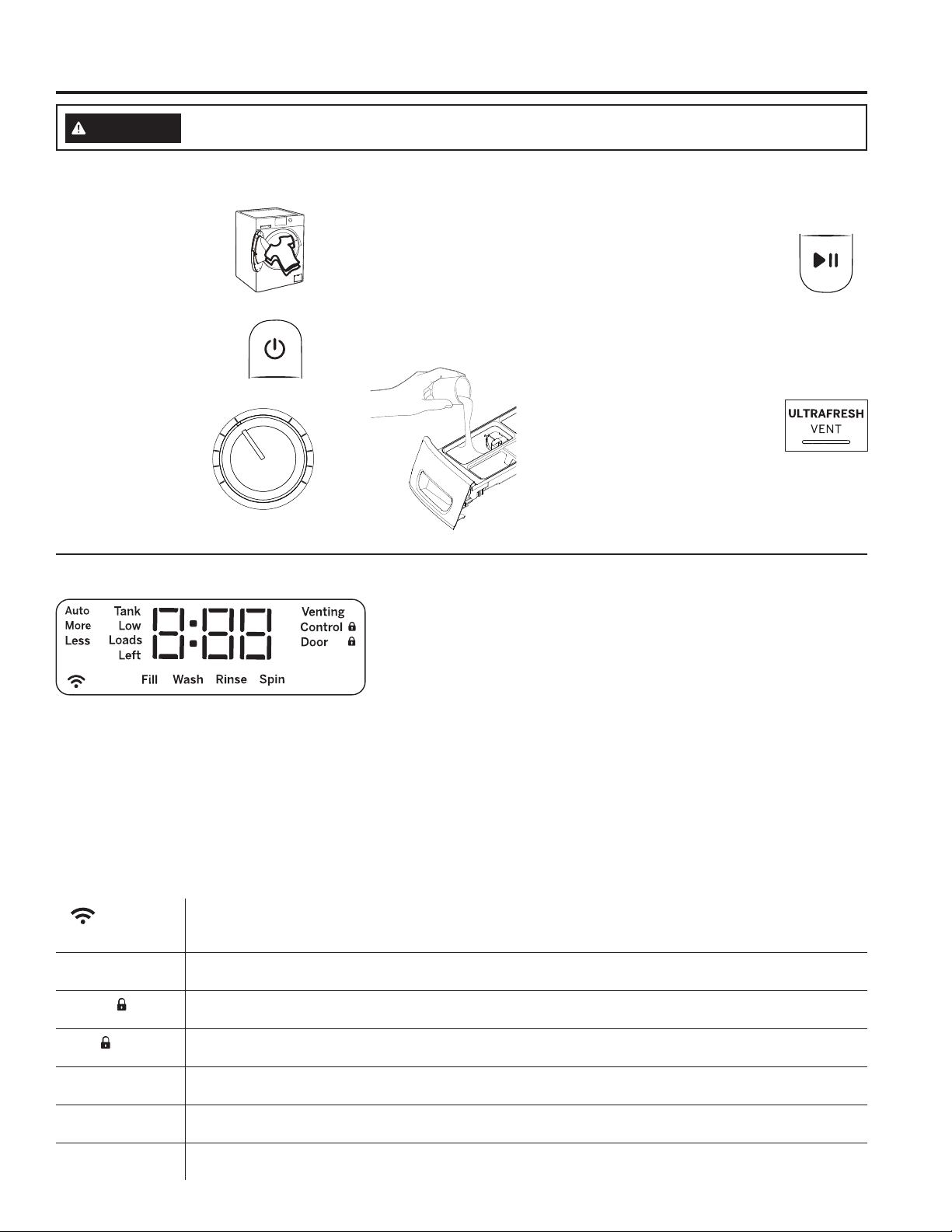
Step 4 Step 5Step 1
To reduce the risk of fire, electric shock, or injury to persons, read the IMPORTANT SAFETY
INFORMATION before operating this appliance.
WARNING
(cycle options
vary by model)
Load clothes into your
washer and close the
door.
If the screen is dark,
press the Power pad or
turn the knob to “wake
up” the display.
Turn the knob to
select the desired
cycle.
Open the dispenser and add
detergent, bleach and fabric
softener, as desired. Models
with SmartDispense™ only
require that you select the
SmartDispense pad once the
tank has been filled.
Press Start to begin the
wash cycle. The machine
will weigh your clothes and
add the proper amount of
water. When the wash cycle
is finished, the door will
unlock.
Step 2
Step 3
Quick Start:
Display and Status Lights (Features and appearance will vary)
The display shows the approximate time remaining until the end of the cycle and the washer cycle status (Fill, Wash,
Rinse and Spin).
NOTE: The cycle time is affected by how long it takes the washer to fill. This depends on the water pressure in your
home. The “smart” timer “learns” the amount of time it takes to fill your washer and adjusts the total time accordingly.
If an out-of-balance condition is detected by the washer, the Spin light will blink during the remaining portion of the
cycle and will stay illuminated for a short time after cycle completion. When this occurs, the washer is taking actions
to correct the out-of-balance condition and complete the cycle normally. In some cases, the washer may not be able
to balance the load and spin up to full speed. If you notice the load is more wet than usual at the end of the cycle,
redistribute the load evenly in the wash tub and run a Rinse & Spin cycle.
In addition, the display will show:
(WiFi)
Will allow your appliance to communicate with your smartphone for remote appliance monitoring,
control and notifications. It stays lit whenever the washer is on and is connected. It will blink during the
commissioning process or if it loses connection to the network.
Venting Venting will blink to indicate that you can select the ULTRAFRESH VENT feature at the end of the cycle. It
then stays illuminated once selected until venting is complete.
Control
The controls on the washer are locked when this icon is illuminated. You must press and hold the Control
Lock pad to unlock the controls.
Door
This icon will illuminate while the door is locked and will blink while the washer is in the process of pausing
and then unlocking.
Auto, More, Less
(on some models)
The SmartDispense will automatically dose detergent according to the weight and soil level of the clothes. You
can adjust this feature to dose 40% MORE or40% LESS detergent or turn it OFF to manually dose detergent.
Tank Low
(on some models)
Will display when the SmartDispense tank needs to be re-filled. Typically, this first lights up when there are
approximately 8 - 10 loads of detergent remaining.
Loads Left
(on some models)
Displays the estimated number of wash loads left for the amount of detergent in the SmartDispense tank.
Getting started
Step 6
After the wash cycle
is completed and the
clothes unloaded, select
ULTRAFRESH VENT™ to
help eliminate the excess
moisture in your washer so
you can close the door.
6 49-3000217 Rev 2
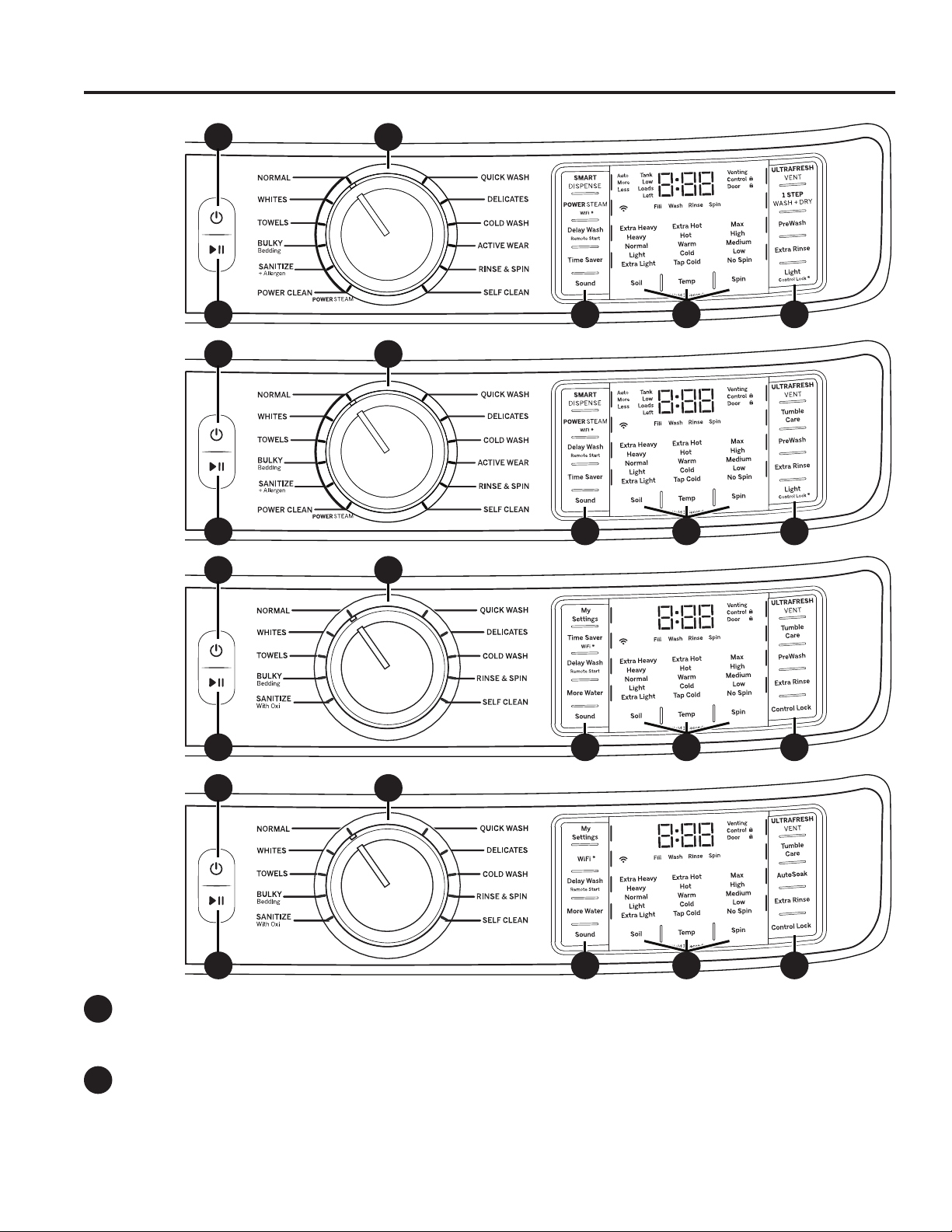
A
B
Power
Press to “wake up” the display. If the display is active, press to put the washer into standby “OFF” mode.
NOTE: Pressing Power does not disconnect the appliance from the power supply.
Start and Pause
Press to start a wash cycle. If the washer is running, pressing it once will pause the washer and unlock the door.
It will take a few seconds for the door to unlock after pressing Pause. Press again to restart the wash cycle.
NOTE: If washer is paused and cycle is not restarted within 15 minutes, the current wash cycle will be cancelled.
NOTE: The washer performs automatic system checks after pressing the Start pad. Water will flow in 45
seconds or less. You may hear the door lock and unlock and the pump activate before water flows.
Getting started
USING THE WASHER
Features and appearance will vary.
CA
B E ED
Models:
GFW850
CA
B E ED
Models:
GFW650
CA
B E ED
Models:
GFW550
CA
B E ED
Models:
GFW510
49-3000217 Rev 2 7
C
USING THE WASHER
Getting started
Wash Cycles
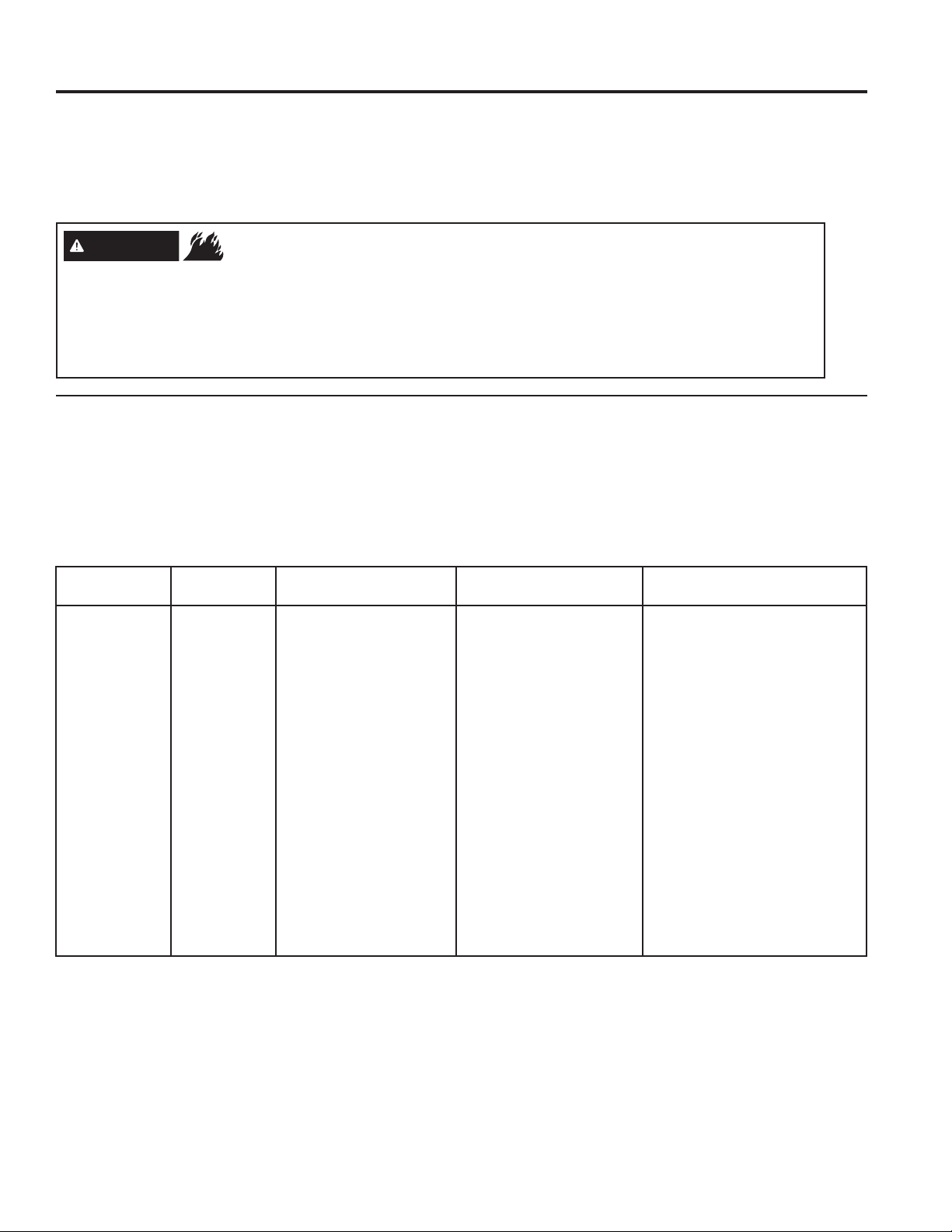
The wash cycles are optimized for specific types of wash loads. The chart below will help you match the items
to be washed with the best wash cycle settings. For optimal performance, select the cycle that most closely
matches the items being washed. Selections and options shown in bold are the suggested settings for that cycle.
Delay Wash/Remote Start is available on all cycles.
Wash
Cycle
Items to Wash Soil Level
Wash
Temp
Spin
Selection
Options Available
Normal Cycle for normal,
regular, or typical use
for washing up to a full
load of normally soiled
cotton clothing.
Extra Heavy
Heavy
Normal
Light
Extra Light
Extra Hot
Hot
Warm
Cold
Tap Cold
Max
High
Medium
Prewash* or Autosoak*
Power Steam*
Time Saver*
Extra Rinse
Tumble Care* or 1 Step Wash + Dry*
Whites Whites and household
linens.
Extra Heavy
Heavy
Normal
Light
Extra Light
Extra Hot
Hot
Warm
Cold
Tap Cold
Max
High
Medium
Low
Prewash* or Autosoak*
Power Steam*
Time Saver*
More Water*
Extra Rinse
Tumble Care* or 1 Step Wash + Dry*
Towels Towels, sheets,
pillowcases and dish
rags.
Extra Heavy
Heavy
Normal
Light
Extra Light
Hot
Warm
Cold
Tap Cold
Max
High
Medium
Low
Prewash* or Autosoak*
Power Steam*
Time Saver*
More Water*
Extra Rinse
Tumble Care* or 1 Step Wash + Dry*
Bulky
Bedding
Large coats, bed
spreads, mattress
covers, sleeping bags,
and similar large bulky
items.
Extra Heavy
Heavy
Normal
Light
Extra Light
Hot
Warm
Cold
Tap Cold
Max
High
Medium
Low
Prewash* or Autosoak*
Power Steam*
Time Saver*
More Water*
Extra Rinse
Tumble Care* or 1 Step Wash + Dry*
Sanitize+
Allergen*
Heavily soiled colorfast
items with the need for
sanitization.
Extra Heavy
Heavy
Extra Hot Max
High
Medium
Low
Prewash
Power Steam*
Extra Rinse
Tumble Care* or 1 Step Wash + Dry*
Sanitize
With Oxi*
Heavily soiled colorfast
items with the need for
sanitization.
Extra Heavy
Heavy
Extra Hot Max
High
Medium
Low
Prewash* or Autosoak*
Extra Rinse
Tumble Care
*Some cycles and options may not be available on some models.
NOTE:
The SANITIZE + Allergen cycle’s water temperatures CANNOT be changed. This cycle utilizes elevated water
temperature and a longer wash cycle to kill dust mites and reduce 99% of common bacteria from fabrics. A pump
purge and extended rinse is incorporated for the purpose of removing contaminants and allergens, such as pet
dander.
The SANITIZE With Oxi cycle’s water temperatures CANNOT be changed. This cycle, when using an Oxi additive
along with your detergent, is designed to remove 99% of bacteria found in home laundry. Measure the detergent and
the Oxi products carefully. Using the amounts appropriate for a large heavily soiled load in a front load washer, follow
the detergent and the Oxi product label instructions. The washer hot water supply connection must provide a minimum
of 120°F to ensure the effectiveness of this cycle.
Only the SANITIZE + Allergen and SANITIZE With Oxi cycles have been designed to meet the requirements of
sanitizing effectiveness.
8 49-3000217 Rev 2
Getting started
USING THE WASHER
C
Wash Cycles - Continued
The wash cycles are optimized for specific types of wash loads. The chart below will help you match the items
to be washed with the best wash cycle settings. For optimal performance, select the cycle that most closely
matches the items being washed. Selections and options shown in bold are the suggested settings for that cycle.
Delay Wash/Remote Start is available on all cycles.
Wash
Cycle
Items to Wash Soil Level
Wash
Temp
Spin
Selection
Options Available
Power
Clean*
For heavily soiled items
which require extra
cleaning power.
Extra Heavy
Heavy
Normal
Extra Hot
Hot
Warm
Cold
Tap Cold
Max
High
Medium
Low
Prewash
Power Steam
Extra Rinse
Tumble Care* or 1 Step Wash + Dry*
Quick
Wash
Small loads of lightly
soiled items that are
needed in a hurry.
Normal
Light
Extra Light
Hot
Warm
Cold
Tap Cold
Max
High
Medium
Low
More Water*
Extra Rinse
Tumble Care* or 1 Step Wash + Dry*
Delicates Lingerie and special
care fabrics with light
soil.
Normal
Light
Extra Light
Warm
Cold
Tap Cold
Medium
Low
No Spin
Prewash* or Autosoak*
Time Saver*
More Water*
Extra Rinse
Tumble Care* or 1 Step Wash + Dry*
Cold
Wash
Cycle for normal,
regular, or typical use
for washing up to a full
load of normally soiled
cotton clothing using
only cold water.
Extra Heavy
Heavy
Normal
Light
Extra Light
Cold
Tap Cold
Max
High
Medium
Low
Prewash* or Autosoak*
More Water*
Extra Rinse
Tumble Care* or 1 Step Wash + Dry*
Active
Wear*
Medium to lightly soiled
athletic wear items of
technical or synthetic
fabrics.
Extra Heavy
Heavy
Normal
Light
Extra Light
Warm
Cold
Tap Cold
Medium
Low
No Spin
Prewash
Time Saver
Extra Rinse
Tumble Care* or 1 Step Wash + Dry*
Rinse &
Spin
For items that need
only to be rinsed, use
this cycle.
Max
High
Medium
Low
No Spin
More Water*
Extra Rinse
Tumble Care* or 1 Step Wash + Dry*
Self
Clean
Cleaning the basket of
residue and odor. No
clothes to be washed
using this cycle.
Medium
*Some cycles and options may not be available on some models.

49-3000217 Rev 2 9
USING THE WASHER
Getting started
D
Settings
Individual settings for soil level (Level), water temperature (Temp) and spin speed (Spin) can be set from the
minimum to maximum. In general, the higher up the column, the more energy will be used.
Soil
Changing the Soil level increases or decreases the wash time to remove different amounts of soil.
To change the Soil level, press the Soil level pad until you have reached the desired setting. You can choose
between Extra Light, Light, Normal, Heavy or Extra Heavy soil levels on most cycles.
Temp
Adjust to select the proper water temperature for the wash cycle. The AutoSoak and PreWash rinse water is
always cold to help reduce energy usage and reduce setting of stains and wrinkles.
Follow the fabric manufacturer’s care label when selecting the wash temperature.
To change the wash temperature, press the Temp pad until you have reached the desired setting. You can
choose between Tap Cold, Cold, Warm, Hot or Extra Hot on most cycles. By design, to protect fabrics, not all
wash temperatures are available for certain wash cycles. Extra Hot temperatures are enabled by the internal
heater on models equipped with Steam capabilities.
NOTE: The first 10 seconds of the wash fill is always cold. This feature assists in conditioning the fabric and
preventing stains from setting on garments.
Spin
Adjusting the Spin speed changes the final spin speed of the cycles. Always follow the garment manufacturer’s
care label when changing the Spin speed.
To change the Spin speed, press the Spin speed pad until you have reached the desired setting. You can
choose between No Spin, Low, Medium, High or Max. Higher spin speeds are not available on certain cycles,
such as DELICATES and ACTIVE WEAR.
Higher spin speeds remove more water from the clothes and will help reduce dry time, but may also increase
the possibility of setting wrinkles on some fabrics.
NOTE: This washer features a dBT™ (Dynamic Balancing Technology) system. This patented onboard sensing
technology enables real-time balancing of the spin cycle for each load, saving time and providing a quiet wash. This
should lead to more consistent wash times and an overall reduction in noise and vibration. If the washer should
experience any excessive noise, vibration or shaking, simply Pause the washer, open the door, and manually
redistribute the load before restarting the cycle.
E
Options
SMARTDISPENSE™ (on some models)
When selected, this feature will automatically add detergent to the wash, eliminating the need to add detergent
for each load. See the SmartDispense section for details.
MY SETTINGS (on some models)
To save your favorite settings, set the desired settings for wash cycle, soil level, spin speed and wash temp settings
and hold down the My Settings pad for 3 seconds. A beep will sound to indicate the cycle has been saved.
To use your custom settings, press the My Settings pad before washing a load.
To change the saved settings, set the desired settings and hold down the My Settings pad for 3 seconds.
POWER STEAM (on some models)
Power Steam adds steam into the washer before the wash cycle begins to assist with loosening stains on the
NORMAL, WHITES, TOWELS, BULKY Bedding, SANITIZE+Allergen and POWER CLEAN cycles.
To use:
1. Press the Power pad to “wake up” the washer and select a wash cycle.
2. Press the POWER STEAM pad to activate steam.
3. Press the Start/Pause pad.
WiFi (may be a shared pad with other options)
Press and hold the WiFi* pad for 3 seconds to activate. See the WiFi Connect section for details on how to
get stated with WiFi connection.
10 49-3000217 Rev 2
Getting started
USING THE WASHER
E
Options
Delay Wash/Remote Start
You can delay the start of a wash cycle for up to 24 hours or remote start the washer by using the Delay Wash/
Remote Start feature. Press to step by hours or hold to scroll the Delay Wash pad to set the amount of time
you want to delay the start of the wash cycle. If you have connected your washer to WiFi, the first selection,
“APP”, can be selected to enable remote starting of your washer from the GE Appliance Smartphone app. Or,
if you select a delay time in hours, the machine will count down and start automatically following this period.
Press the Start pad once you have configured the Delay Wash to the proper setting to enable this feature. To
cancel this option, simply power off and power on the controls.
NOTE: If you forget to fully close the door, a reminder signal will beep reminding you to do so.
NOTE: If you open the door when the delay is counting down, the machine will enter the pause state. You must
close the door and press Start again in order to restart the countdown.
Time Saver (on some models)
This option reduces the overall washer cycle time by optimizing the wash, rinse and spin actions and/or
gently raising the wash temperature to get clothes cleaned faster. Option is available on NORMAL, WHITES,
TOWELS, DELICATES, BULKY Bedding and ACTIVE WEAR cycles. Total wash time will vary based on
cycle chosen and options selected.
To use:
1. Turn power on and select a wash cycle which has Time Saver as an option.
2. Press the Time Saver pad to reduce the overall wash time.
3. Press the Start/Pause pad.
More Water (on some models)
This option adds approximately 3 gallons to the wash and rinse portions of the cycle. If the option is selected
before the cycle starts, the water will be added from the beginning of the wash cycle and later to the rinse. If
the option is selected during the wash portion, more water will be added at this point and later to the rinse.
Likewise, if the More Water option is selected after the wash portion has completed, the washer will add more
water to the rinse only. If wash and rinse have completed, the More Water pad will no longer be active.
ULTRAFRESH VENT System with ODORBLOCK™
The ULTRAFRESH VENT System with OdorBlock was designed to eliminate excess moisture in the washer
following a wash cycle to help prevent odors from developing. This washer was designed to drain water at the
end of the cycle more effectively. Following the wash cycle, the user can then choose to leave the door open
or select the ULTRAFRESH VENT feature to assist with drying out the gasket and other areas of the washer.
The OdorBlock system features multiple components which are manufactured with Microban
®
antimicrobial
technology.* Microban is a safe and effective antimicrobial technology that will last the life of your washer. For
more information, please visit www.microban.com/geappliances.
ULTRAFRESH VENT is available after the wash cycle is complete and you have removed your cleaned
laundry. Once the door is closed, a notification tune will play and the ULTRAFRESH VENT pad LED will blink.
Upon pressing the pad, ULTRAFRESH VENT will begin.
To select ULTRAFRESH VENT at any other point, power on the washer, ensure a cycle is
not actively running, and remove any garments from the basket, then press and release the
ULTRAFRESH VENT pad so that the notification tune plays and the ULTRAFRESH VENT pad
LED begins to blink. Then press the ULTRAFRESH VENT pad again to start the feature.
During the operation of ULTRAFRESH VENT the door will remain locked and the washer will intermittently spin
at low speeds for up to 8 hours.
If garments are detected in the basket during ULTRAFRESH VENT, the washer will instead run TUMBLE
CARE or 1 STEP WASH + DRY, based on option availability for your model.
The ULTRAFRESH VENT feature may be cancelled at any time by pressing the POWER pad, turning the cycle
knob, or pressing the ULTRAFRESH VENT pad.
*Microban
®
is a registered trademark of Microban International, Ltd.

49-3000217 Rev 2 11
USING THE WASHER
Getting started
E
Options
1 STEP WASH + DRY (on some models)
This option is available on all cycles except Self Clean.
The 1 STEP WASH + DRY is intended for small loads only. Use when clothes need to be washed, dried and
ready to wear or finished the next morning. This feature will tumble clothes and introduce a constant stream of
air into the washer compartment upon completion of select wash cycles. Although the drying portion is set to 8
hours, the clothes can be removed at any time by pressing Pause or Power to cancel the cycle.
Tumble Care (on some models)
Freshly tumbles your garments periodically for up to 8 hours after the wash cycle is complete to lessen the
setting of wrinkles and creases when you are not able to move clothing to the dryer right away.
At the end of the cycle, the display will scroll “END” and after ten minutes the Tumble Care will begin. It can be
stopped at any time by pressing the Power pad.
PreWash (on some models)
Prewash is an extra wash before the main wash. Use it for heavily soiled clothes or for clothes with a care label
that recommends prewashing before washing. Be sure to add liquid or powder high-efficiency detergent, or the
proper wash additive to the prewash dispenser. Washers equipped with SmartDispense will automatically add
the proper amount of detergent for prewash based on the load size.
PreWash must be selected prior to pressing Start.
The PreWash feature will fill the washer (adding the prewash detergent), tumble the clothes, drain and spin.
Then the washer will run the selected wash cycle.
NOTE: In some special cycles, the prewash is selected automatically as the default. You can modify this
selection at any time.
AutoSoak (on some models)
For soaking your garments prior to the wash cycle. This option begins with a brief tumble and then proceeds to
soak the clothes with water and detergent for a specified period of time. Once complete, the cycle will continue
automatically. AutoSoak must be selected prior to pressing the start pad. The AutoSoak time will add an
additional 15 minutes, 30 minutes, 1 hour or 2 hours to the overall wash time. High-efficiency detergent from the
main wash compartment in the dispenser is used for the AutoSoak period and main wash cycle.
Extra Rinse
This option allows for an extra rinse during a cycle to remove excess dirt and detergent from soiled loads.
Press the Extra Rinse pad to select.
NOTE: On Rinse & Spin cycle, a drain and spin cycle can be achieved by pressing the Extra Rinse pad until the
LED is no longer illuminated.
Light (on some models)
The basket light will turn on and remain on for 5 minutes when the door opens, Start/Pause pad is pressed, or
by pressing the Light pad.
The basket light can be turned off by pressing and holding the Light pad.
Sound
To change the loudness of the end of cycle signal and the press pad volume, press the Sound pad as many
times as needed to reach the desired volume. There are four sound levels including off.
Control Lock (Light-Control Lock pad) (depending on model)
You can lock the controls to prevent any selections from being made. Or you can lock or unlock the controls
after you have started a cycle.
Children cannot accidentally start the washer by touching pads with this option selected.
To lock/unlock the washer, press and hold the Control Lock/Light-Control Lock pad for 3 seconds. A sound
is made to indicate the lock/unlock status. The control lock icon on the display will light up when it is on.
NOTE: The Power pad can still be used when the machine is locked.
12 49-3000217 Rev 2
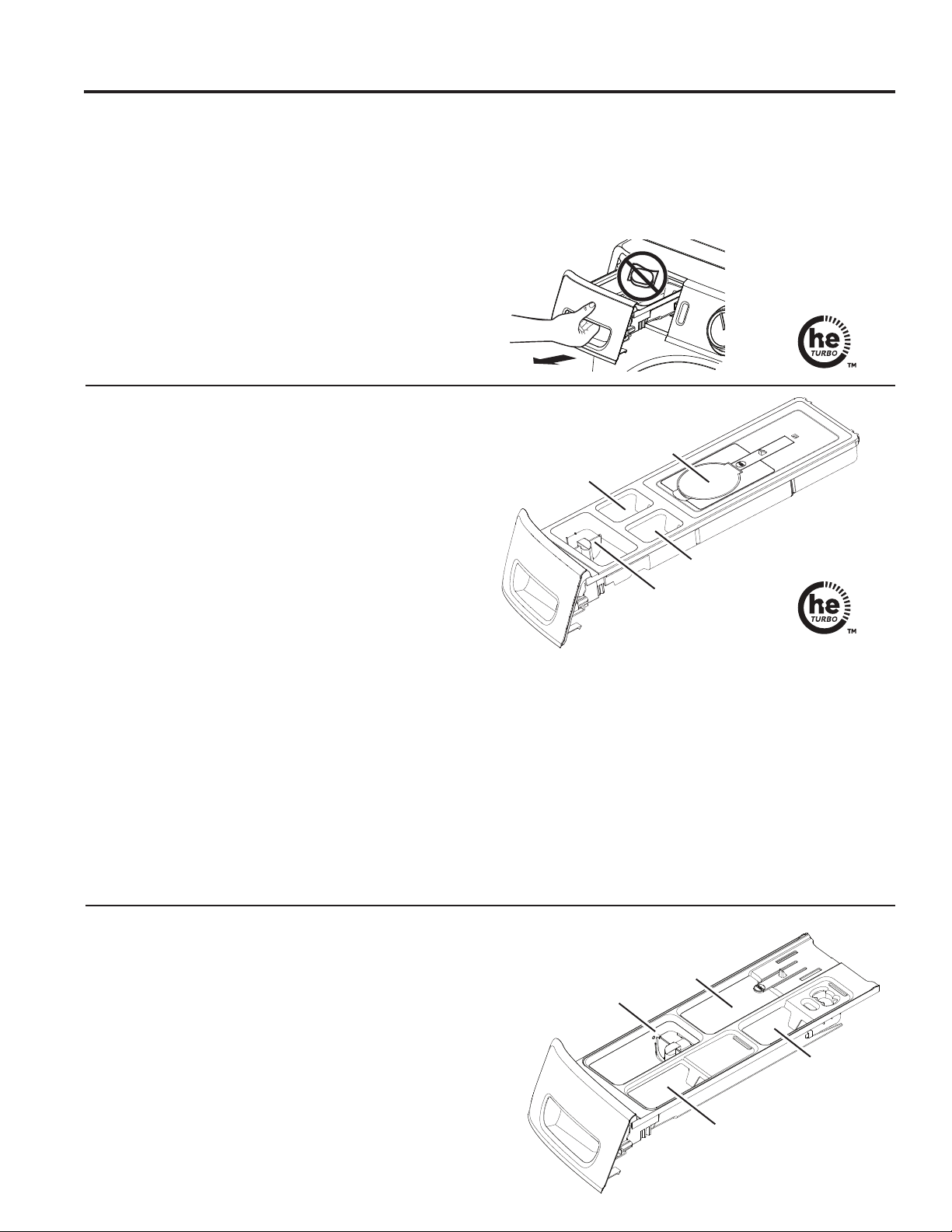
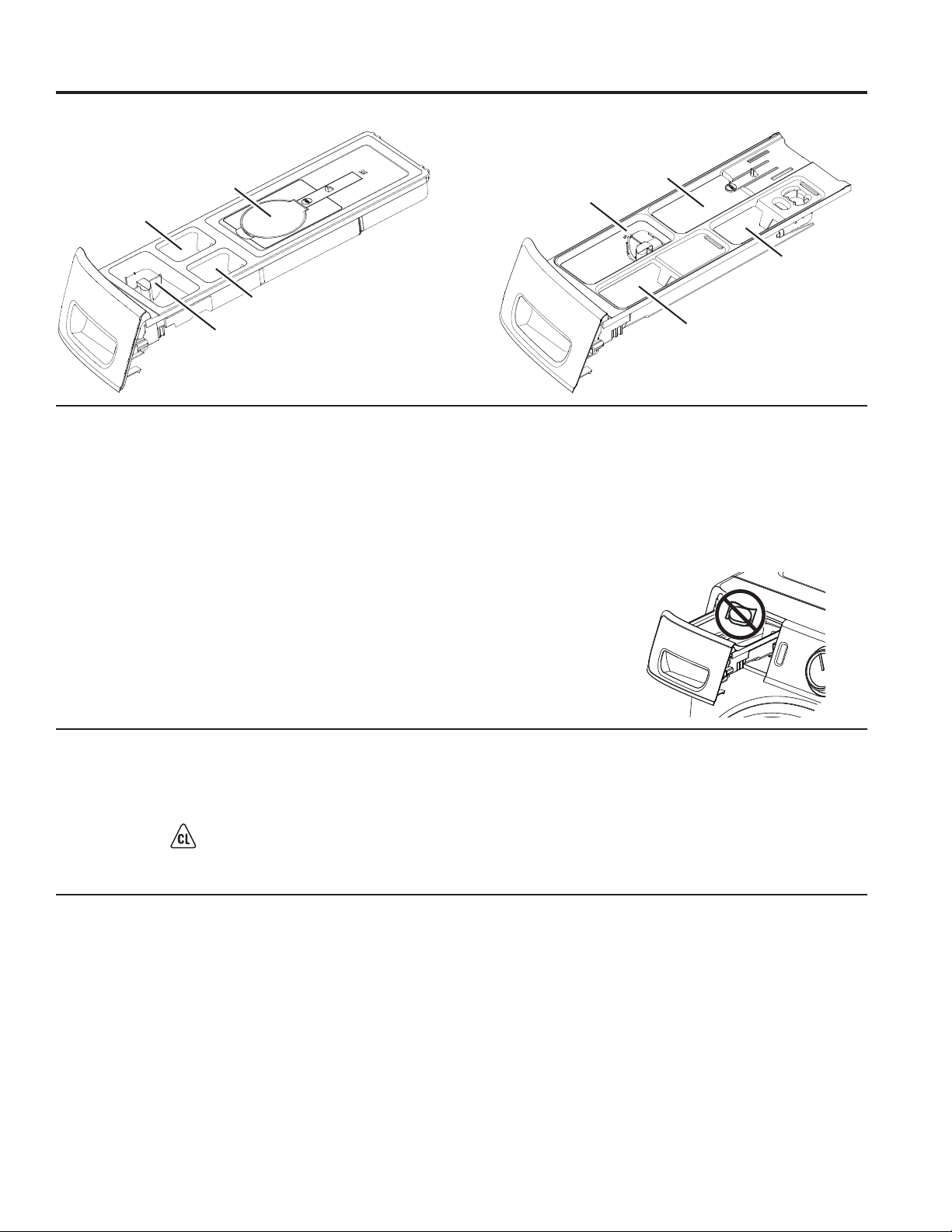
Dispenser Drawer
Slowly open the dispenser drawer by pulling it out until
it stops. After adding laundry products, slowly close the
dispenser drawer. Closing the drawer too quickly could
result in early dispensing of the bleach, fabric softener or
detergent.
You may see water in the detergent, bleach and fabric
softener compartments at the end of the cycle. This is a
result of the flushing/siphoning action and is part of the
normal operation of the washer.
Do NOT put detergent packets in the dispenser drawer.
NOTE: Use only liquid or powder HE detergents and
additives in the dispenser drawer. Laundry detergent
packets should only be added directly to the wash
basket following the manufacturer’s directions.
Getting started
USING THE WASHER
Use only HE
High-Efficiency
detergent
SmartDispense™ (on some models)
When selected, this feature will automatically add
detergent to the wash, eliminating the need to add
detergent for each load.
The detergent amount selection on the control
panel will default to AUTO when first powering up
the washing machine. When AUTO is selected, the
amount of detergent needed for each laundry load will
automatically be determined based on the size of the
load the machine senses.
For AUTO, the washer will dispense approximately 1.5 oz
of detergent for an 8 lb normal load. For other loads,
it will adjust proportionally based on the size of load
and garment type. If you select LESS, the amount of
detergent will be reduced by 40%. This may be desired
for higher concentrate detergents or if you have very soft
water. For heavily soiled loads, you may want to select
MORE to add 40% more detergent than the AUTO level.
NOTE: Not all cycles will allow the use of the
SmartDispense feature. If the light is not illuminated
and pressing the SMART DISPENSE pad results in a
beeping tone, then SmartDispense is not allowed for the
cycle that has been selected. Detergent will need to be
added directly to the detergent compartment for these
cycles.
If it is desired to manually select the amount of
detergent for a given load, this can be done by
pressing the SMART DISPENSE pad on the control
panel to select detergent for a Small or Large load.
Small will provide less detergent than average and
Large will provide more detergent than average.
NOTE: If it is desired to manually add detergent for a
load, that detergent will need to be added directly to
the basket, and the SMART DISPENSE set to off for
that particular load.
The smart dispense feature can be disabled by pressing
the SMART DISPENSE pad until off is selected.
Use only HE
High-Efficiency
detergent
Softener
Detergent
Flap Selector
Bleach
SmartDispense
Prewash Compartment (on some models)
Only use the prewash compartment if you are selecting
the PreWash or AutoSoak cycle for heavily soiled clothes.
Add measured detergent or prewash additive to the back
left prewash compartment of the dispenser drawer.
• Detergent or prewash additive is flushed from the
dispenser in the PreWash or AutoSoak cycle (if
selected).
• Detergent usage may need to be adjusted for water
temperature, water hardness, size and soil level of the
load. Avoid using too much detergent in your washer
as it can lead to over sudsing and detergent residue
being left on the clothes.
Softener
Detergent
Flap Selector
Bleach
Add PreWash to
this compartment
49-3000217 Rev 2 13
USING THE WASHER
Getting started
Detergent Compartment
Only use high-efficiency detergent in this washer.
Do NOT fill high-efficiency detergent over the MAX
line. Use detergent manufacturer’s recommended
amount.
• Powder Detergent – Lift the flap up for powder
detergent. This must be done to dissolve and flush
detergent properly. Follow the detergent manufacturer’s
instructions when measuring the amount of powder
detergent to use.
• Liquid Detergent – Keep the flap down for liquid
detergent. This retains the liquid detergent until it
automatically flushes at the start of the wash cycle.
Follow the detergent manufacturer’s instructions when
measuring the amount of liquid detergent to use.
Detergent usage may need to be adjusted for water
temperature, water hardness, size and soil level of the
load. Avoid using too much detergent in your washer as
it can lead to oversudsing, detergent residue being left
on the clothes, and could extend wash times.
Do not put clumped detergent in the dispenser. Clumped
detergent can cause a leak.
Do NOT put detergent
packets in the dispenser
drawer.
Softener
Detergent
Flap Selector
Bleach
SmartDispense
Softener
Detergent
Flap Selector
Bleach
Add PreWash to
this compartment
On models with SmartDispense: On models without SmartDispense:
Liquid Bleach Compartment
If desired, measure out the recommended amount of
liquid bleach, not to exceed 1/3 cup (80 ml) and pour into
the compartment labeled “LIQUID BLEACH” marked
with this symbol .
It is recommended to use High-Efficiency (HE) bleach in
this front-load washer.
Do not exceed the maximum fill line. Overfilling can
cause early dispensing of the bleach which could result
in damaged clothes.
NOTE: Do not use powdered bleach or laundry
detergent/additive packets in the dispenser.
Fabric Softener Compartment
If desired, pour the recommended amount of liquid
fabric softener into the compartment labeled “FABRIC
SOFTENER”.
Use only liquid fabric softener in the dispenser.
Dilute with water to the maximum fill line.
Do not exceed the maximum fill line. Overfilling can
cause early dispensing of the fabric softener, which
could stain clothes.
NOTE: Do not pour fabric softener directly on the wash
load.
14 49-3000217 Rev 2
Getting started
USING THE WASHER
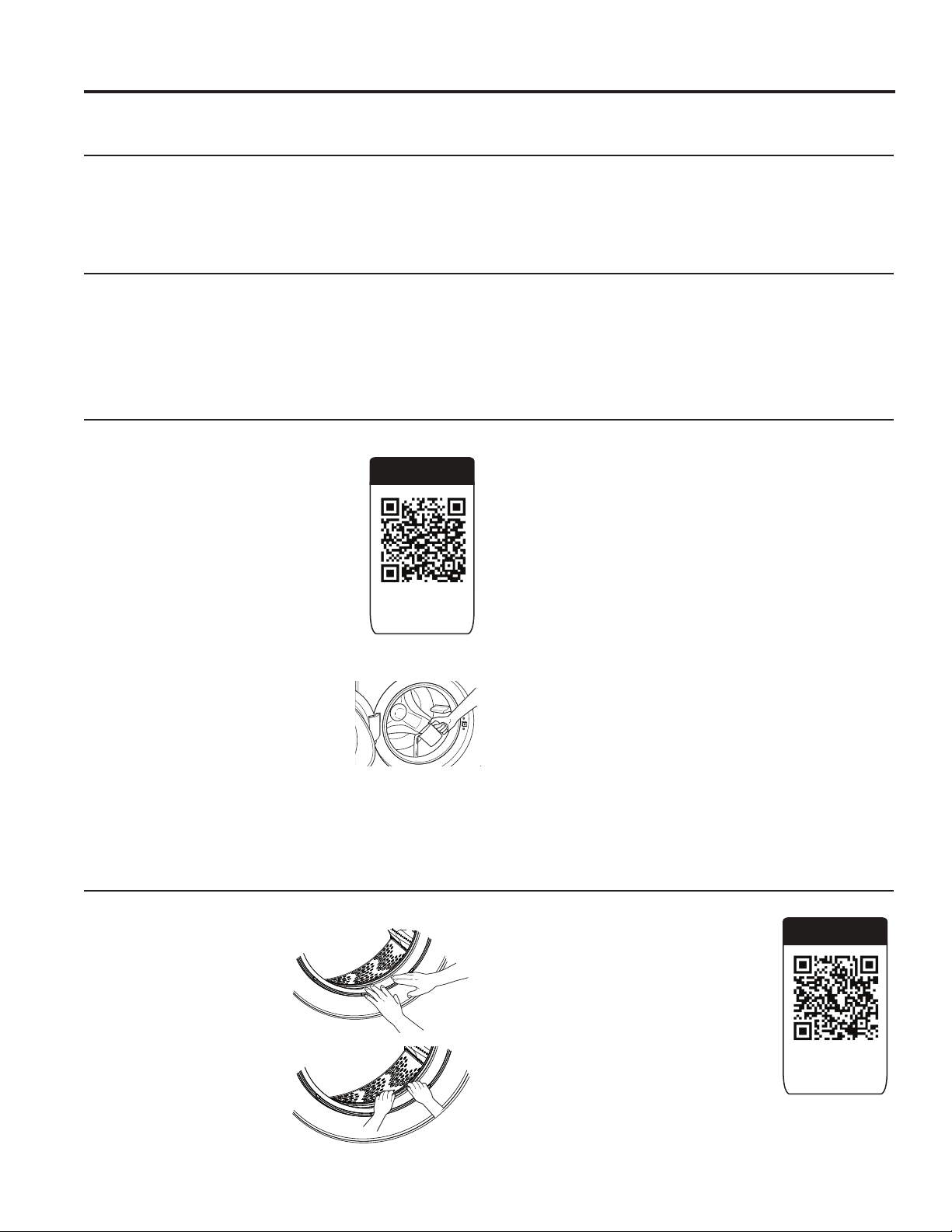
WiFi Label Location
WiFi Connect (For customers in the United States only - on some models)
Your washer is GE Appliances WiFi Connect enabled.
Visit geappliances.com/connect and enter your model number to
show you the proper steps to connect your appliance.
Please visit GEAppliances.com/connect to learn more about
connected appliance features, to learn what connected appliance
app’s will work with your smartphone.
WiFi Connectivity: For assistance with the appliance or the
ConnectPlus network connectivity, please call GE Appliances at
800.GE.CARES.
49-3000217 Rev 2 15
USING THE WASHER
Loading
Always follow fabric manufacturer’s care label when laundering.
DO NOT wash fabrics soiled with flammable liquids or cleaning solvents.
No washer can completely remove oil.
DO NOT wash or dry anything that has been soaked in or spotted with any type of oil (including cooking oils).
DO NOT reach into the washer until all moving parts have stopped.
Doing so can result in death, explosion, fire or amputation.
Sorting Wash Loads
Sort by color (whites, lights, colors), soil level, fabric type (sturdy cottons, easy care, delicates) and whether the
fabric produces lint (terry cloth, chenille) or collects lint (velveteen, corduroy). Wash lint producers such as cotton
towels and socks separate from lint collectors including synthetic garments and dress pants.
Loading the Washer
The wash drum may be fully loaded with loosely added items.
To add items after the washer has started, press Start/Pause and wait until the door is unlatched. The washer may
take up to 30 seconds to unlock the door after pressing Start/Pause, depending on the machine conditions. Do not
try to force open the door when it is locked. After the door unlocks, open gently. Add items, close the door and press
Start/Pause to restart.
WARNING
- Fire Hazard
Loading Examples
WORKWEAR LINENS MIXED LOAD DELICATES* QUICK WASH
(2–3 GARMENTS)
4 Jeans
5 Work Wear
Shirts
3 Work Wear
Pants
2 Bath
Sheets
10 Bath
Towels/
12
Washcloths
7 Hand
Towels/
2 Terrycloth
Bath Mats
OR
2 Flat
Queen-Sized
Sheets
2 Fitted
Queen-Sized
Sheets
4
Pillowcases
4 Pillowcases
2 Hand Towels
2 Flat Sheets/
2 Fitted Sheets
2 Bath Towels/
4 Washcloths
OR
6 Shirts (Men’s or
Women’s)
4 Pair Pants (Khakis or
Twills)
5 T-shirts
7 Pairs of Boxers
4 Pairs of Shorts
OR
6 T-shirts
4 Pairs of Sweatpants
4 Sweatshirts
2 Hoodies
7 Pairs of Socks
7 Bras
7 panties
3 Slips
2 Camisole
4 Nightgowns
* Using a nylon mesh
bag for small items is
recommended.
2 Casual Wear Work Shirts
1 Pair Casual Wear Work Pants
OR
3 Soccer Uniforms
16 49-3000217 Rev 2
Care and cleaning
CARE AND CLEANING
Self Clean
To clean the interior of the washer, select
the SELF CLEAN feature on the control
panel. This Self Clean cycle should
be performed, at a minimum, once
per month or about every 30-40 wash
cycles. This cycle will use more water,
in addition to bleach, to control the
rate at which soils and detergents may
accumulate in your washer.
NOTE: Read the instructions below
completely before starting Self Clean cycle.
1. Remove any garments or objects from the washer and
ensure the washer basket is empty.
2. Open the washer door and pour
one cup or 250 ml of liquid bleach
or other washing machine cleaner
into the basket.
3. Close the door and select the SELF CLEAN cycle.
Push the Start pad.
4. When the Self Clean cycle is working, the display will
show the estimated cycle time remaining. The cycle
will complete in about 90 minutes. Do not interrupt the
cycle.
5. After the cycle is complete, the washer will automatically
start an ULTRAFRESH VENT operation so that the door
can remain closed until the next time you use the washer.
If for any reason the cycle needs to be interrupted, the
door will not open immediately. Forcing open the door at
this stage may cause water to flood. The door will open
after the water is drained to a level where it would not
flood the floor.
Self Clean may be interrupted by pressing the Start pad
in between cycles. A power outage in the house might
also interrupt the cycle. When the power supply is back,
the Self Clean cycle resumes where it had stopped.
When interrupted, be sure to run a complete Self Clean
cycle before using the washer. If the Power pad is
pressed during Self Clean, the cycle will be lost.
IMPORTANT:
• Run Self Clean with 1 Cup (250 ml) of bleach once a
month.
• After the completion of a Self Clean cycle, the interior
of your washer may have a bleach smell.
• It is recommended to run a RINSE & SPIN or a light
color load after the Self Clean cycle.
Exterior
Immediately wipe off any spills. Wipe with damp cloth. Wipe or dust spills or washing compounds with a damp cloth.
Washer control panel and finishes may be damaged by some laundry pretreatment and stain remover products.
Apply these products away from the washer. The fabric may then be washed and dried normally. Damage to your
washer caused by these products is not covered by your warranty. Do not hit surface with sharp objects.
Interior
Dry around the washer door opening, flexible gasket (including attached hoses) and door glass. These areas should
always be clean to ensure a watertight seal. You will notice if you regularly use the ULTRAFRESH VENT System that
this will not be required as often. It is recommended to rinse the washer at least once per month with 1 cup of bleach
(or other commercially available product manufactured for this purpose, such as Tide
®
Washing Machine Cleaner)
poured directly into the basket without clothes and using the Self Clean Cycle.
Water Supply Hoses
Hoses connecting washer to faucet should be replaced every 5 years.
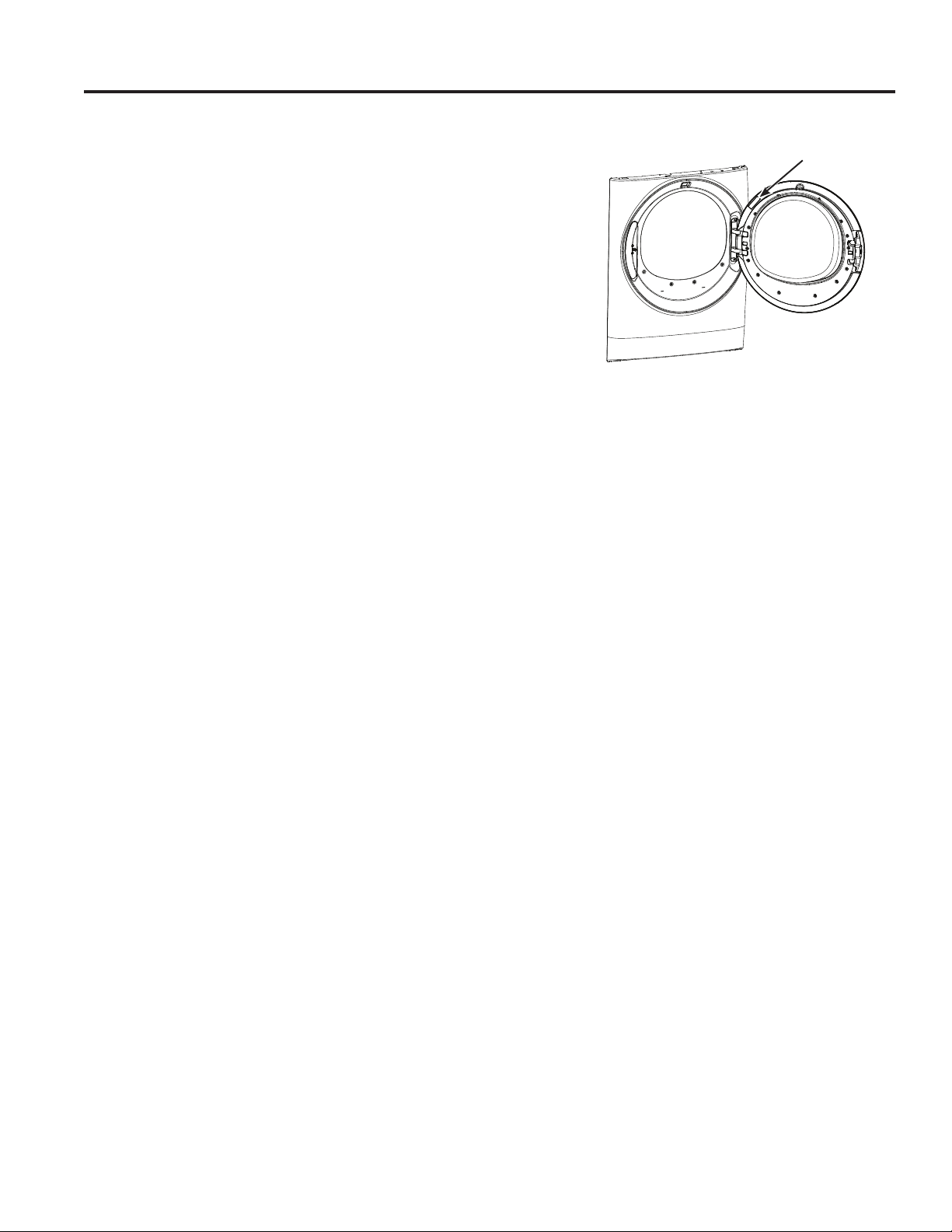
Door Gasket
Open the washer door.
Using both hands, press
down the door gasket.
Remove any foreign objects
if found trapped inside the
gasket. Make sure there is
nothing blocking the holes
behind the gasket.
While holding down the door
gasket, inspect the interior
of the gasket by pulling
it down with your fingers.
Remove any foreign objects if found
trapped inside this gasket. Make sure
there is nothing blocking the holes
behind the gasket.
When you are finished cleaning the
door gasket, release it and the gasket
will return to the operating position.
Video
Scan this code
to watch a video
on this topic.
Video
Scan this code
to watch a video
on this topic.
49-3000217 Rev 2 17
CARE AND CLEANING
Care and cleaning
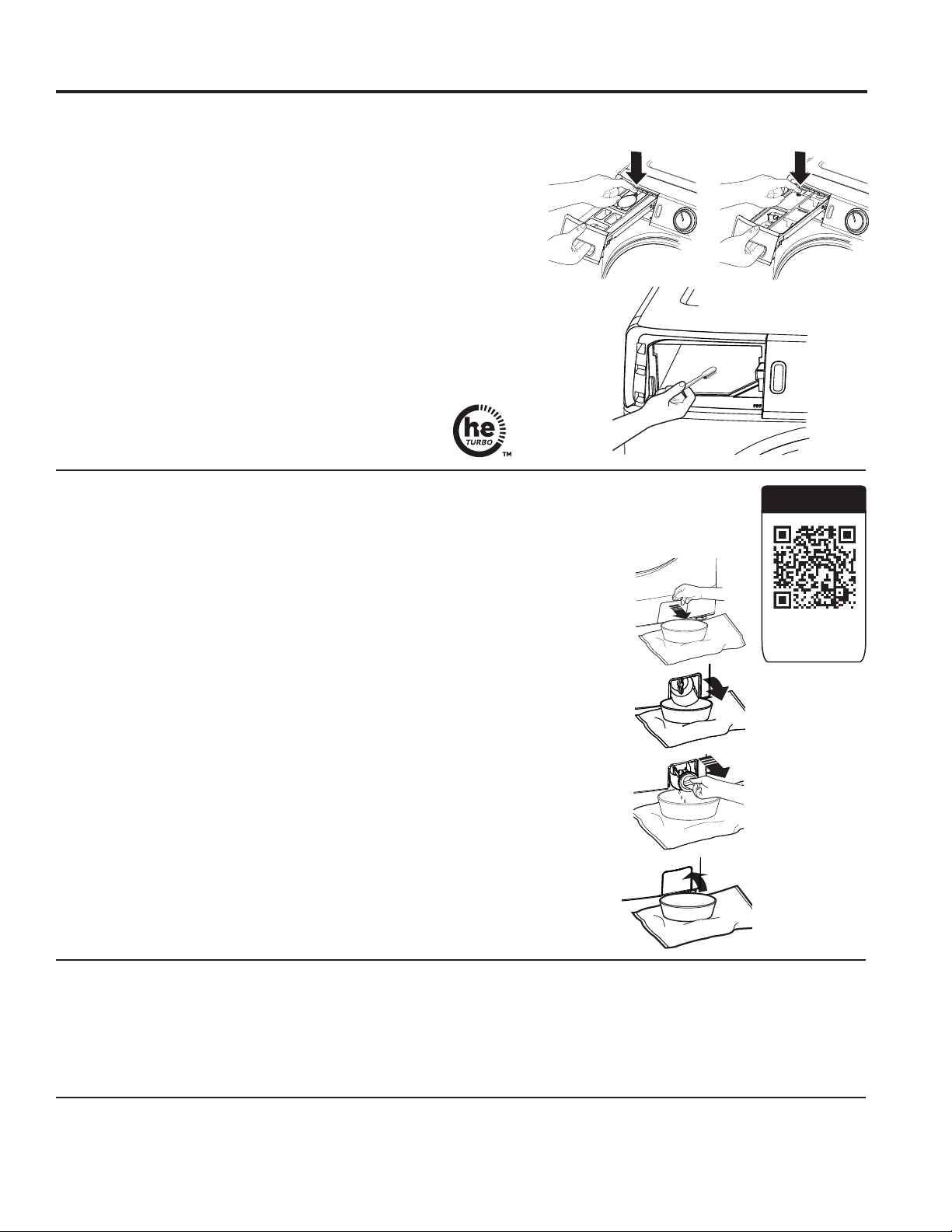
Dispenser Drawer Area
Detergent and fabric softener may build up in the dispenser drawer.
Residue should be removed once or twice a month.
• Remove the drawer by first pulling it out until it stops. Then reach
back into the rear of the drawer cavity and press down firmly on the
lock tab, pulling out the drawer.
• Rinse the drawer with hot water to remove traces of accumulated
laundry products.
• To clean the drawer opening, use a small brush to clean the recess.
Remove all residue from the upper and lower parts of the recess.
• Replace the dispenser drawer.
• To reduce buildup in the Dispenser Drawer area:
Moving and Storage
Ask the service technician to remove water from drain pump and hoses. Do not store the washer where it will be exposed
to the weather. When moving the washer, the tub should be kept stationary by using the shipping bolts removed during
installation. See Installation Instructions in this manual. If these parts are not available, they can be ordered by visiting
our Website at GEApplianceparts.com or by calling GE Appliances at 877.959.8688. In Canada, visit your local
GE Appliances parts distributor or call 800.661.1616 or GEAppliances.ca/en/products/parts-filters-accessories.
Long Vacations
Be sure water supply is shut off at faucets. Drain all water from hoses and water filter pump area if weather will be
below freezing.
On models with
SmartDispense:
On models without
SmartDispense:
Use only HE
High-Efficiency
detergent
1. Using a small flathead screwdriver or coin, open the access door.
2. Place a shallow pan or dish under the pump access door and towels on the
floor in front of the washer to protect the floor. It is normal to catch about a cup
of water when the filter is removed.
3. Pull down the pour spout.
4. Turn the pump filter counterclockwise and remove the filter slowly, controlling
the flow of the draining water.
5. Remove the filter and clean the debris from the filter.
6. Replace the filter and turn clockwise. Tighten securely.
7. Flip up the pour spout.
8. Close the access door by hooking the bottom tabs first, then rotating the
access door shut.
Video
Scan this code
to watch a video
on this topic.
Pump Filter
Due to the nature of the front-load washer, it is sometimes possible for small articles to pass to the
pump. The washer has a filter to capture lost items so they are not dumped to the drain. To retrieve
lost items, clean out the pump filter.
18 49-3000217 Rev 2
Installation
Washer
Instructions
If you have any questions, call GE Appliances at 800.GE.CARES (800.432.2737) or visit our
Website at: GEAppliances.com
In Canada, call 800.561.3344 or visit GEAppliances.ca
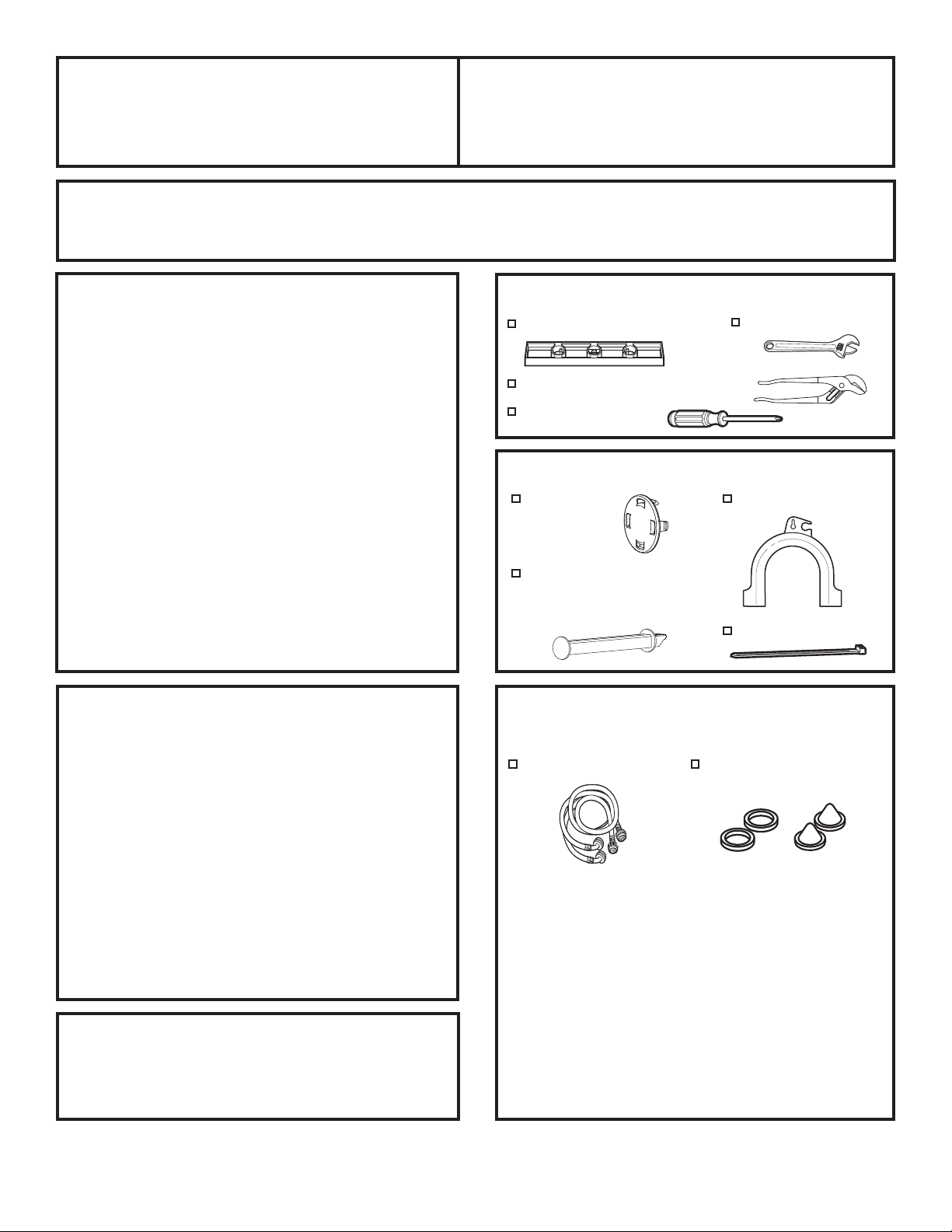
TOOLS REQUIRED
Level
Adjustable wrench
Channel-lock adjustable pliers
Phillips screwdriver
PARTS SUPPLIED
BEFORE YOU BEGIN
Read these instructions completely and carefully.
• IMPORTANT – Save these
instructions for local inspector’s use.
• IMPORTANT – Observe all
governing codes and ordinances.
• Note to Installer – Be sure to leave these
instructions with the Consumer.
• Note to Consumer – Keep these
instructions for future reference.
• Skill level – Installation of this appliance requires
basic mechanical and electrical skills.
• Completion time – 1-3 hours
• Proper installation is the responsibility of the
installer.
• Product failure due to improper installation is not
covered under the Warranty.
Shipping
Bolt Covers
Drain Hose Guide
DO NOT Install the Washer:
1. In an area exposed to dripping water or outside weather
conditions. The ambient temperature should never be
below 60°F (15.6°C) for proper washer operation.
2. In an area where it will come in contact with curtains
or drapes.
3. On carpet. The floor MUST be a hard surface with
DPD[LPXPVORSHRIƎSHUIRRWFPSHU
cm). To make sure the washer does not vibrate or
move, you may have to reinforce the floor.
NOTE:,IIORRULVLQSRRUFRQGLWLRQXVHƎLPSUHJQDWHG
plywood sheet solidly attached to existing floor
covering.
LOCATION OF YOUR WASHER
MOBILE HOME INSTALLATION:
Installation must conform to Standard for Mobile Homes,
ANSI A119.1 and National Mobile Home Construction
and Safety Standards Act of 1974 (PL93-383).
Lock Bar (Retain for
Reversing the Door
Swing option)
Cable Tie
PARTS REQUIRED (Sold separately
or included with the GFW510 model)
Water Hoses (2)
Rubber Washers (2) and
Strainer Screens (2)
GE Appliances Parts and Accessories
Order on-line at GEApplianceparts.com today,
24 hours a day or by phone at 877.959.8688 during
normal business hours. In Canada, visit your local
GE Appliances parts distributor or call 800.661.1616
or GEAppliances.ca/en/products/parts-filters-
accessories.
Part Number Accessory
WX14X10011 6 ft stainless steel washer hoses with
90° elbows; 2-pack
WH1X2267 Rubber Washer (1) and Screen (1)
49-3000217 Rev 2 19
ACCESSORIES:
Order on-line at GEApplianceparts.com, 24 hours a day or
by phone at 877.959.8688 during normal business hours.
Follow the Installation Instructions included in the Kit for all
clearances and installation requirements.
Installation Instructions
WASHER
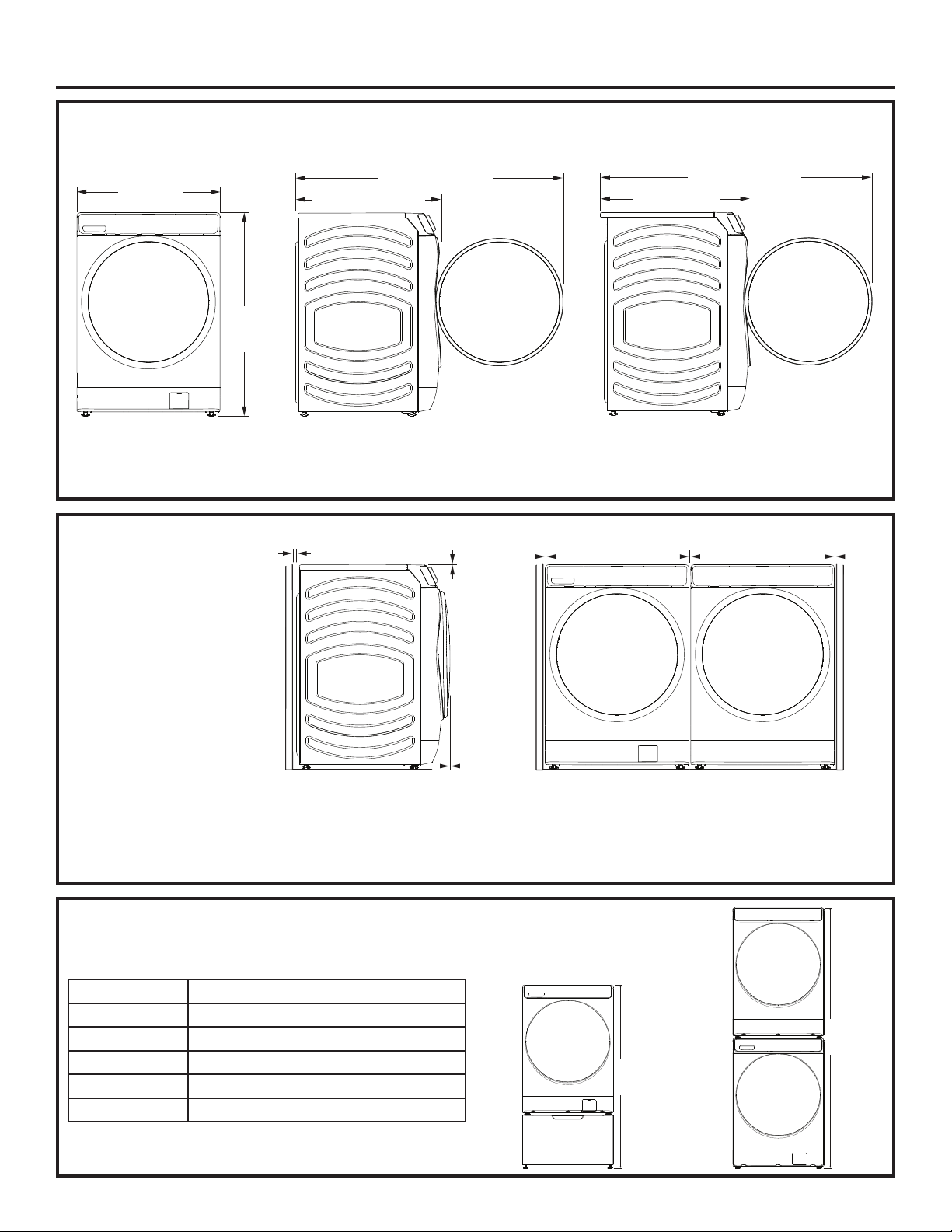
DIMENSIONS
Side View
32” (81.3 cm)
54-1/2” (138.4 cm)
Models - GFW650, GFW550, GFW510:
Side View
34” (86.4 cm)
56-1/2” (143.8 cm)
Model - GFW850:
28”
(71.2 cm)
*39-3/4”
(101 cm)
Front View
NOTE:
With leveling legs retracted: 39-3/4 (101 cm).
With leveling legs fully extended: 40-5/8 (103.1 cm).
MINIMUM
CLEARANCES
0”
0”
0”
Alcove or Closet
• Rear = 0”*
• Sides = 0”
• 7RS Ǝ
• )URQW Ǝ
0”0”0”
Part Number Accessory
GFP1528SNWW
White Pedestal
GFP1528PNSN
Satin Nickel Pedestal
GFP1528PNRS Royal Sapphire Pedestal
GFP1528PNDG Diamond Gray Pedestal
GFA28KITN Stacking Kit for Dryer over Washer
Stacked:
79-1/2”*
(202 cm)
Pedestal:
55-7/8”*
(141.8 cm)
• Consideration must be given to provide adequate clearance for installation and service.
• Closet doors must be louvered or otherwise ventilated and have at least 60 square inches (387.1 cm
2
) of open area. If the
closet contains both a washer and a dryer, doors must contain a minimum of 120 square inches (774.2 cm
2
) of open area.
* To enable 0” clearance on the back of the washer, you must use 90° elbow hoses. Otherwise you may require some
additional clearance to avoid rubbing of the hoses against the back wall.
20 49-3000217 Rev 2
Installation Instructions
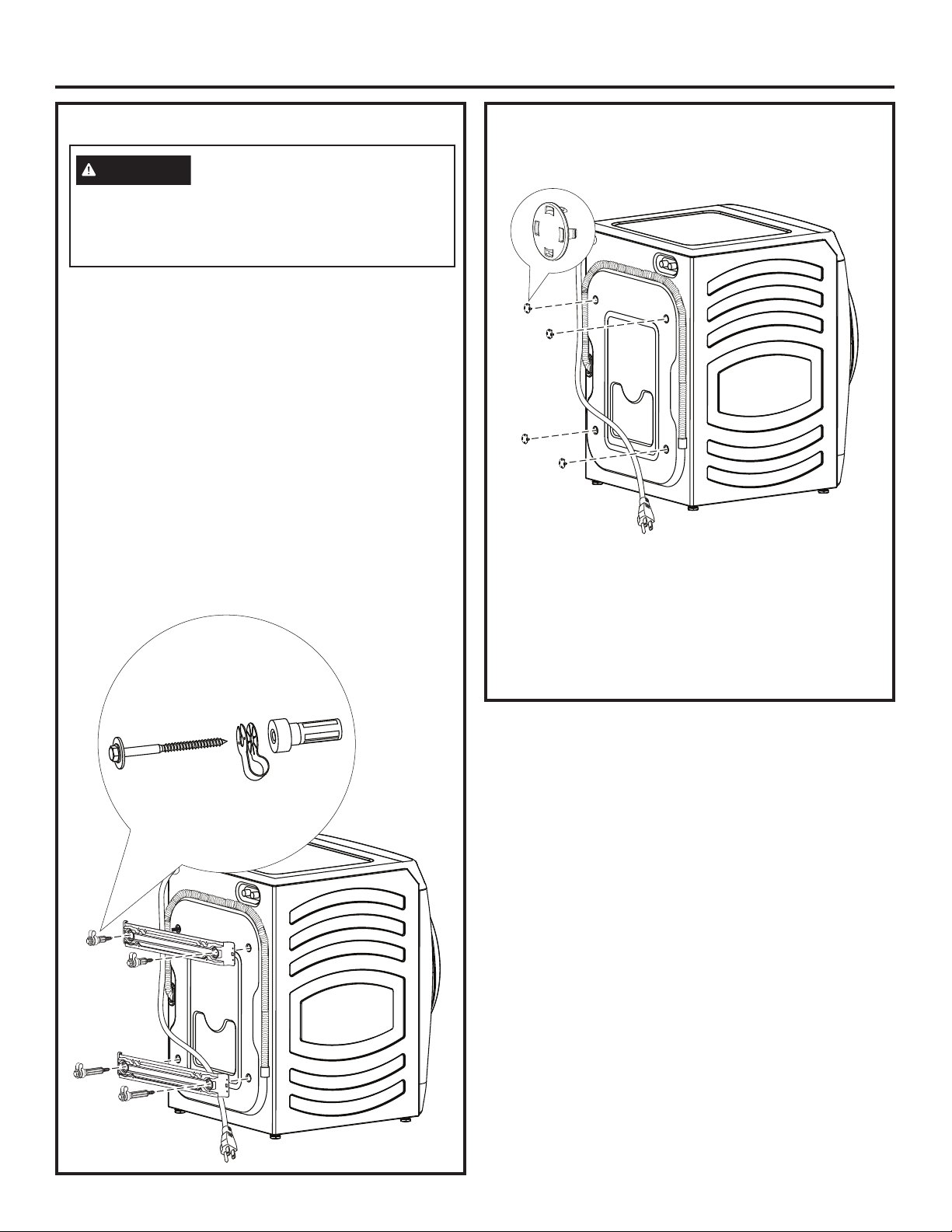
1. Cut and remove all packaging straps.
2. While it is in the carton, carefully lay the washer on its
side. DO NOT lay the washer on its front or back.
3. Turn down the bottom flaps. Remove all base packaging
including the styrofoam base.
4. Carefully return the washer to an upright position and
remove the carton by lifting it upward.
5. Carefully move the washer to within 4 feet (122 cm)
of the final location.
6. Remove the following from the back side of the washer:
4 bolts
4 plastic spacers (including power cord retainers and
rubber grommets)
2 brackets
NOTE: Do NOT remove the screw or clip holding the
hose.
UNPACKING THE WASHER UNPACKING THE WASHER (cont.)
7. Insert shipping bolt hole covers into shipping bolt
holes.
Recycle or destroy the carton and
plastic bags after the washer is
unpacked. Make materials inaccessible to children.
Children might use them for play. Cartons covered
with rugs, bedspreads or plastic sheets can become
airtight chambers causing suffocation.
WARNING
NOTES:
• Failure to remove the shipping braces can cause
the washer to become severely unbalanced.
• IMPORTANT: Save all bolts for future use.
If you must transport the washer at a later date,
you must reinstall the shipping support hardware to
prevent shipping damage. Keep the hardware in the
plastic bag provided.
49-3000217 Rev 2 21
Installation Instructions
ELECTRICAL REQUIREMENTS
CIRCUIT – Individual, properly polarized and grounded
15 or 20 amp circuit breaker or time-delay fuse.
POWER SUPPLY – 2 wire plus ground, 120 Volt, single
phase, 60 Hz, alternating current.
Outlet Receptacle – Properly
grounded 3-prong receptacle to
be located so the power cord is
accessible when the washer is in
an installed position. If a 2-prong
receptacle is present, it is the
owner’s responsibility to have a
licensed electrician replace it with
a properly grounded 3-prong grounding type receptacle.
Washer must be electrically grounded in accordance with
local codes and ordinances, or in the absence of local
codes, with latest edition of the NATIONAL ELECTRICAL
CODE, ANSI/NFPA NO. 70 or CANADIAN ELECTRICAL
CODE, CSA C22.1. Check with a licensed electrician if you
are not sure that the washer is properly grounded.
Ensure proper
ground exists
before use.
Plug into a grounded 3-prong outlet.
DO NOT remove ground prong.
DO NOT use an adapter.
DO NOT use an extension cord.
Failure to follow these instructions can result in death,
fire or electrical shock.
- Electrical Shock Hazard
WARNING
If required by local codes, an external 18 gauge or larger
copper ground wire (not provided) may be added. Attach
to washer cabinet with a #10-16 x
1/2
” sheet metal screw
(available at any hardware store) to rear of washer.
GROUNDING INSTRUCTIONS
This appliance must be grounded. In the event of
malfunction or breakdown, grounding will reduce the risk
of electric shock by providing a path of least resistance
for electric current. This appliance is equipped with a
cord having an equipment- grounding conductor and
a grounding plug. The plug must be plugged into an
appropriate outlet that is properly installed and grounded
in accordance with all local codes and ordinances.
Improper connection of the equipment-
grounding conductor can result in a
risk of electrical shock. Check with a qualified electrician,
or service representative or personnel, if you are in
doubt as to whether the appliance is properly grounded.
DO NOT modify the plug on the power supply cord. If it
will not fit the outlet, have a proper outlet installed by a
qualified electrician.
WARNING
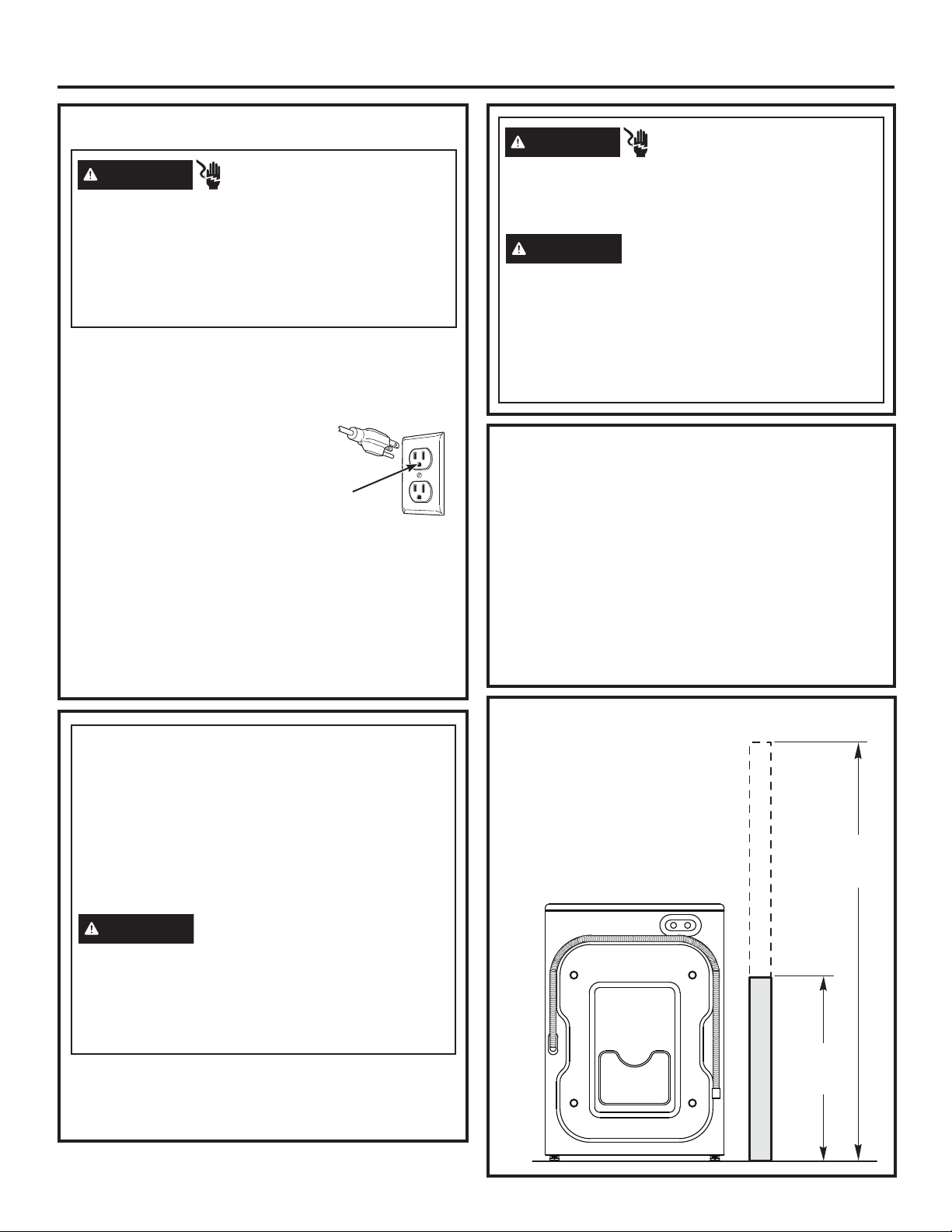
1. Drain capable of eliminating 10
gallons (38 L) per minute.
2. A standpipe diameter of 1-1/4”
(3.18 cm) minimum.
3. The standpipe height above the
floor should be:
Minimum height: 24” (61 cm)
Maximum height: 96” (244 cm)
DRAIN REQUIREMENTS
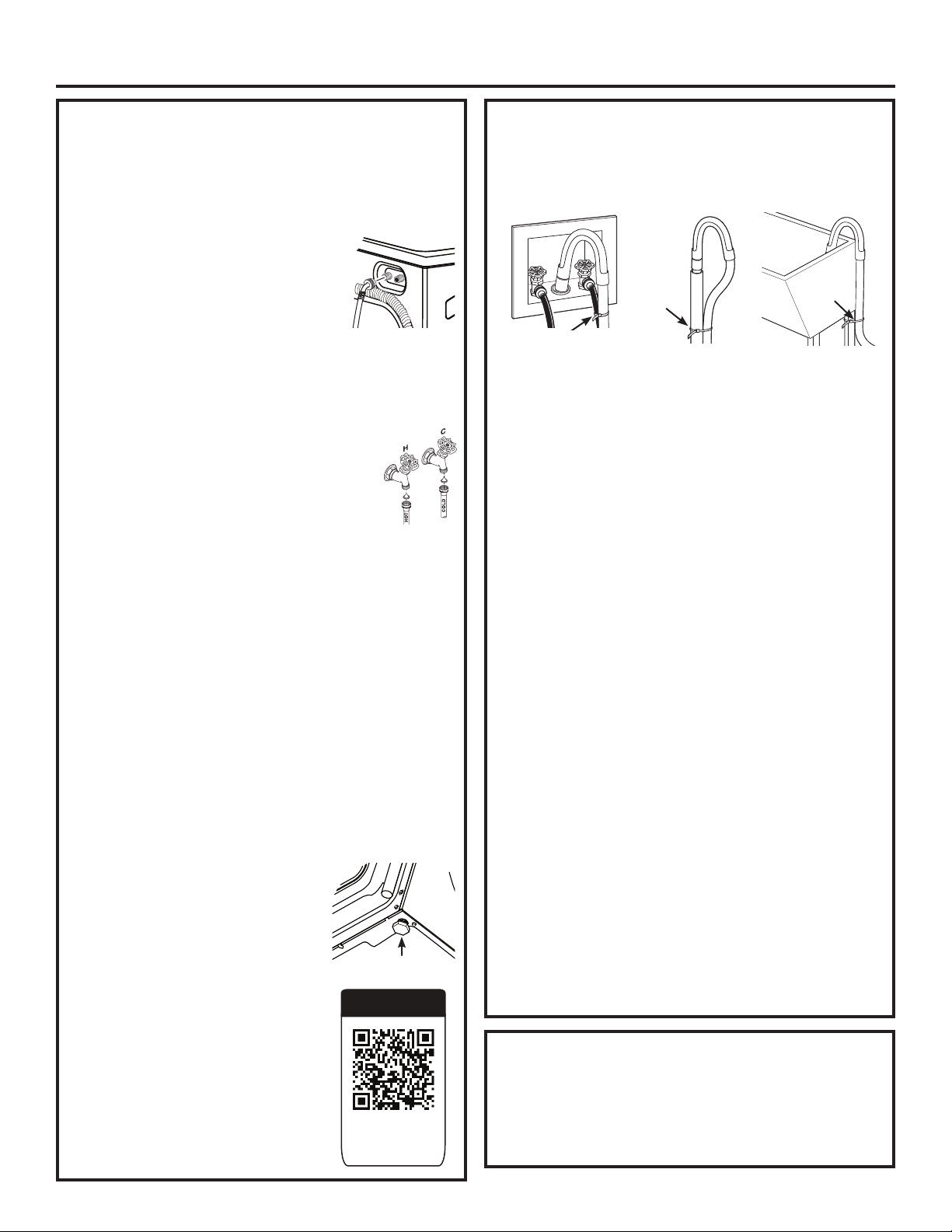
Hot and cold water faucets MUST be installed within
42 inches (107 cm) of your washer’s water inlet. The
faucets MUST be 3/4” (1.9 cm) garden hose-type so
inlet hoses can be connected. Water pressure MUST be
between 10 and 120 pounds per square inch. Your water
department can advise you of your water pressure. The
hot water temperature should be set to deliver water at
120° to 140°F (48°–60°C) to provide proper Automatic
Temperature Control (ATC) performance.
NOTE: A water softener is recommended to reduce
buildup of scale inside the steam generator if the home
water supply is very hard.
WATER SUPPLY REQUIREMENTS
Disconnect power supply before servicing.
Replace all parts and panels before operating.
Failure to do so can result in death or electrical shock.
WARNING
- Shock Hazard
Certain internal parts are intentionally not grounded
and may present a risk of electric shock only during
servicing.
Service personnel – DO NOT contact the following
parts while the appliance is energized: water valve,
drain pump, NTC, heater, door lock, inverter board,
motor and MC board.
- Electrical Shock Hazard
WARNING
96”
(244 cm)
Max.
24”
(61 cm)
Min.
BACK
22 49-3000217 Rev 2
Installation Instructions
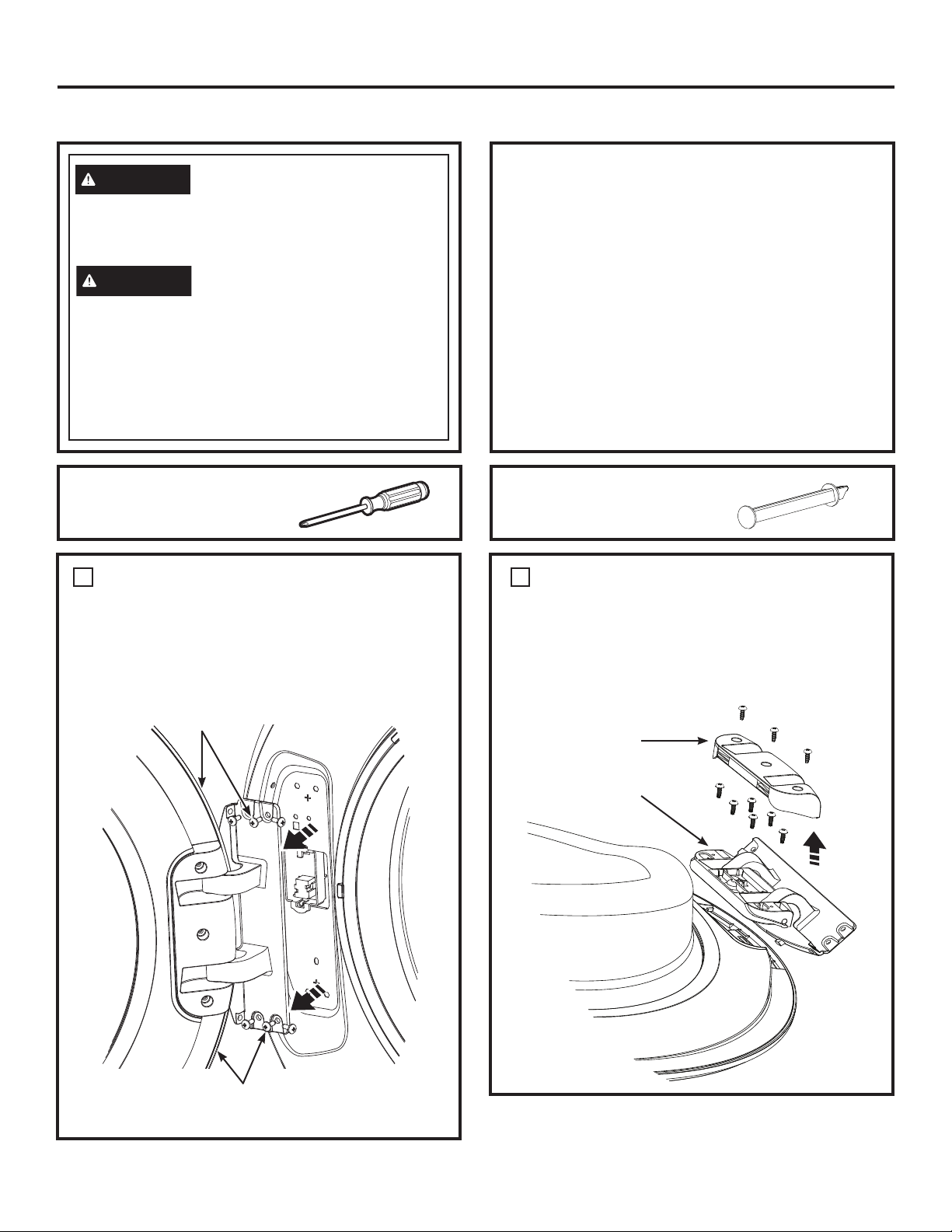
1. Run some water from the hot and cold faucets to
flush the water lines and remove particles that might
clog the inlet hose and water valve screens.
2. Remove the inlet hoses from the packaging (whether
supplied with the washer or sold separately).
3.
(90° elbow end) Ensure there is a
rubber washer in the 90° elbow end of
the HOT and COLD hoses. Reinstall
the rubber washer into the hose fitting
if it has fallen out during shipment.
Carefully connect the inlet hose
marked HOT to the outside “H” outlet of the water valve.
Tighten by hand, then tighten another 2/3 turn with pliers.
Carefully connect the other inlet hose to the inside “C”
outlet of the water valve. Tighten by hand; then tighten
another 2/3 turn with pliers. Do not crossthread or
over-tighten these connections.
4. If inlet hose screen washers are not
already inserted into the inlet hoses,
install them by inserting into the free
ends of the HOT and COLD inlet hoses
with protruded side facing the faucet.
5. Connect the inlet hose ends to the HOT and COLD
water faucets tightly by hand, then tighten another 2/3
turn with pliers. Turn the water on and check for leaks.
6. Carefully move the washer to its final location.
Gently rock the washer into position. It is important
not to damage the rubber leveling legs when moving
your washer to its final location. Damaged legs
can increase washer vibration. It may be helpful to
spray window cleaner on the floor to help move your
washer into its final position.
NOTE: To reduce vibration, ensure that all four rubber
leveling legs are firmly touching the floor. Push and pull
on the back right and then back left of your washer.
NOTE: Do not use the dispenser drawer or door to
lift the washer.
NOTE: If you are installing into a drain pan, you can
use a 24-inch long 2x4 to lever the washer into place.
7. With the washer in its final position,
place a level on top of the washer
(if the washer is installed under
a counter, the washer should not
be able to rock). Adjust the front
leveling legs up or down to ensure
the washer is resting solidly. Turn
the lock nuts on each leg up toward
the base of the washer and snug
with a wrench.
NOTE: Keep the leg extension at
a minimum to prevent excessive
vibration. The farther out the
legs are extended, the more the
washer will vibrate.
If the floor is not level or is damaged,
you may have to extend the rear
leveling legs.
INSTALLING THE WASHER
8. Attach U-shaped hose guide to the end of the drain
hose. Place the hose in a laundry tub or standpipe
and secure it with the cable tie provided in the
enclosure package.
NOTE: Placing the drain hose too far down the drain
pipe can cause a siphoning action. No more than
7 inches of hose should be in the drain pipe. There
must be an air gap around the drain hose. A snug fit
can cause a siphoning action.
9. Plug the power cord into a grounded outlet.
NOTE: Check to be sure the power is off at the
circuit breaker/fuse box before plugging the power
cord into an outlet.
10. Turn on the power at the circuit breaker/fuse box.
11. Read the rest of this Owner’s Manual. It contains
valuable and helpful information that will save you
time and money.
12. Before starting the washer, check to make sure:
Main power is turned on.
The washer is plugged in.
The water faucets are turned on.
The unit is level and all four leveling legs are firmly
on the floor.
The shipping support hardware is removed
and saved.
The drain hose is properly tied up.
There are no leaks at the faucet, drain line
or washer.
13. Run the washer through a complete cycle.
Check for water leaks and proper operation.
14. If your washer does not operate, please review
the Before You Call For Service section before
calling for service.
15. Place these instructions in a location near the
washer for future reference.
INSTALLING THE WASHER (cont.)
If replacement parts are needed for your washer, they can
be ordered in the United States by visiting our Website
at GEApplianceparts.com or by calling GE Appliances
at 877.959.8688. In Canada, visit GEAppliances.ca/en/
products/parts-filters-accessories or call 800.661.1616.
REPLACEMENT PARTS
Video
Scan this code
to watch a video
on Step 7.
Leveling Leg
Cable
Tie
Cable
Tie
Cable Tie
49-3000217 Rev 2 23
Installation Instructions
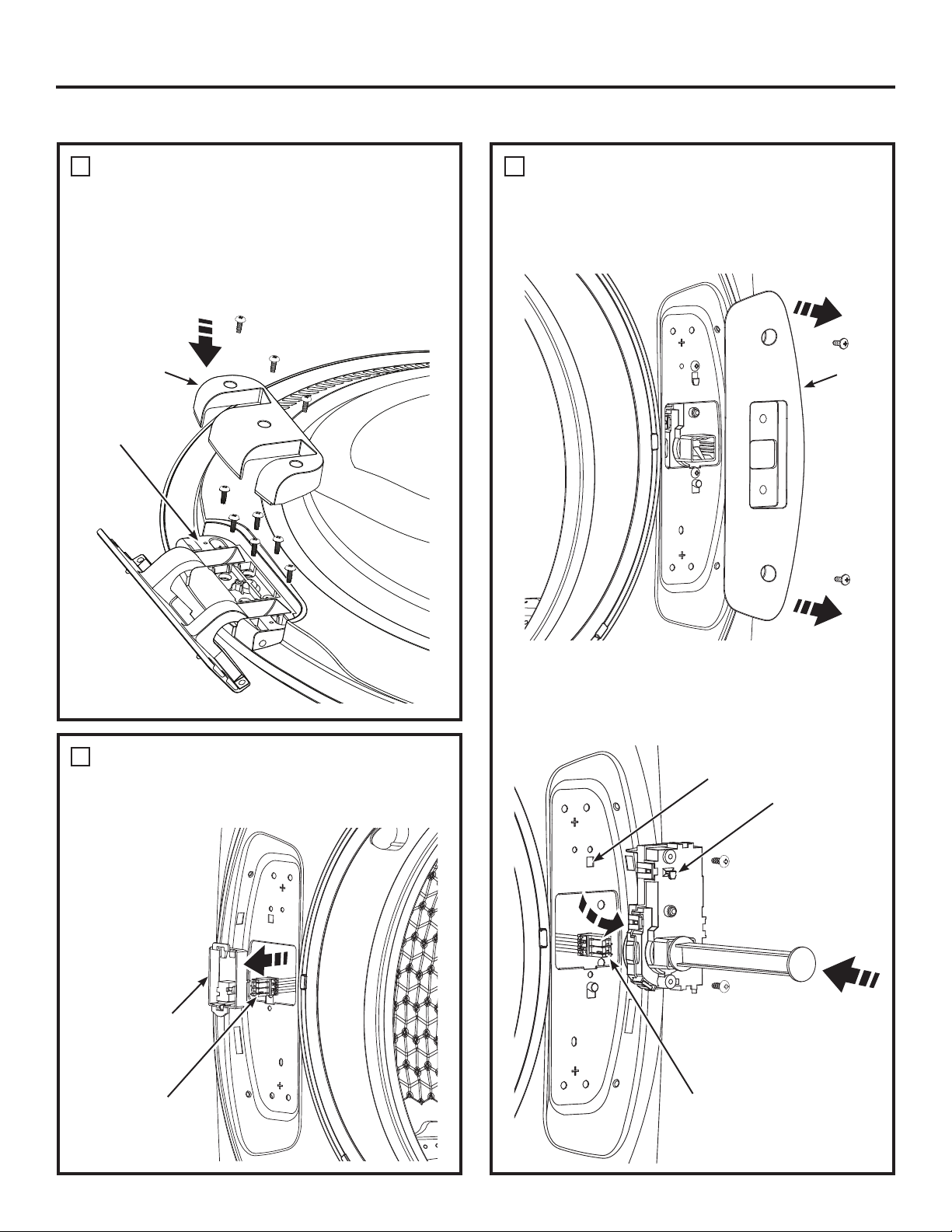
REVERSING THE DOOR SWING (Optional)
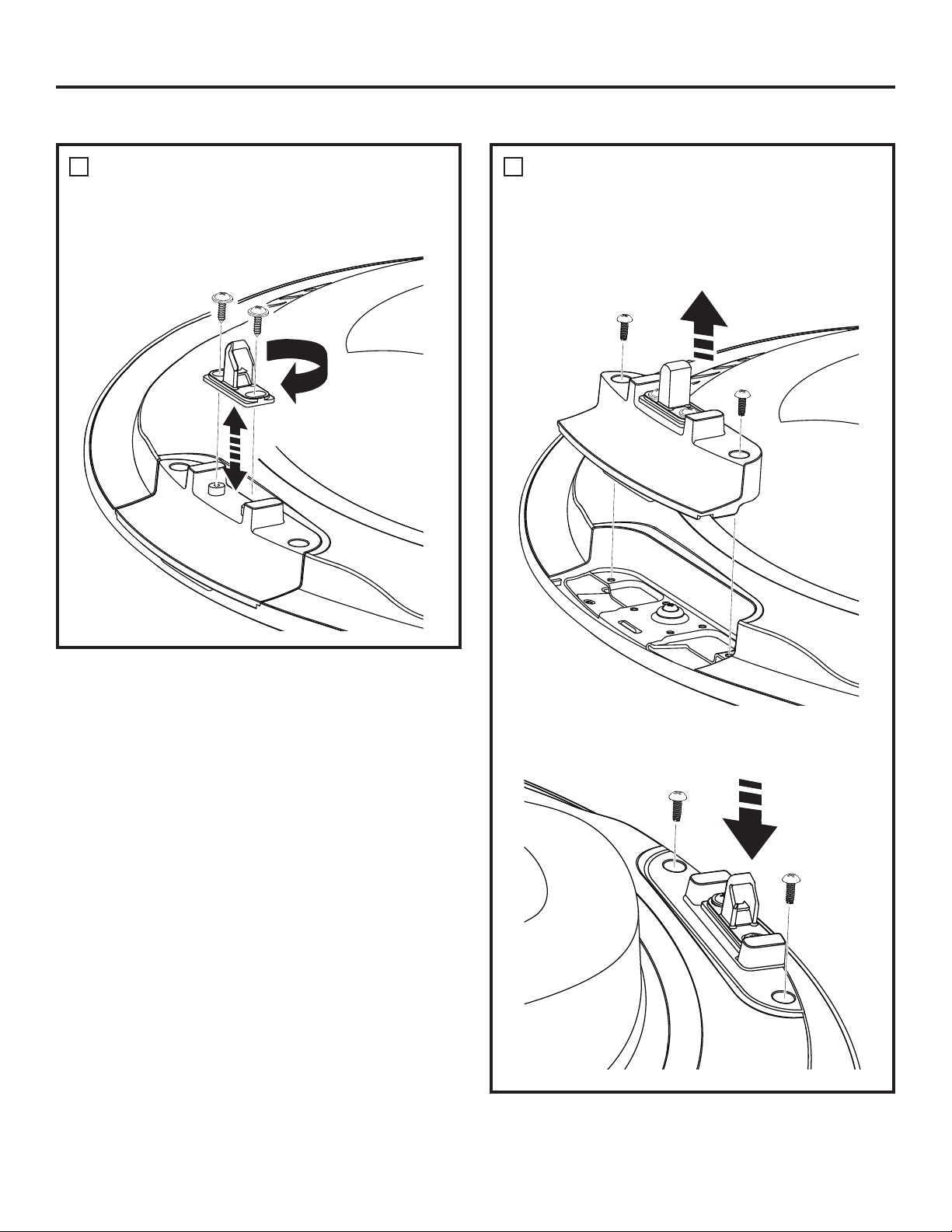
REMOVE THE DOOR HINGE
COVER AND THE DOOR HINGE
• Remove the 3 screws from the hinge cover and
remove the cover.
• Remove the 6 screws from the hinge and remove
the hinge from the door.
2
Hinge Cover
Hinge
Unplug the appliance or turn off the circuit breaker
before servicing. Pressing the Power pad DOES
NOT disconnect power.
WARNING
- Shock Hazard
Certain internal parts are intentionally not grounded
and may present a risk of electric shock only during
servicing.
Service personnel – DO NOT contact the following
parts while the appliance is energized: water valve,
drain pump, NTC, heater, door lock, inverter board,
motor and MC board.
WARNING
REMOVE THE DOOR ASSEMBLY
• Open the washer door.
• While supporting the door, remove the 6 screws
from the hinge in the washer face.
• Lift the door assembly to remove it from the washer
face and set it on a protective surface.
1
Hold the Door and
Remove Hinge Screws
from the Washer
Door and Hinge
Assembly
Phillips-head screwdriver
TOOL YOU WILL NEED
PART SUPPLIED
Lock Bar
IMPORTANT NOTES
• Handle parts carefully to avoid scratching paint.
• Provide a non-scratching work surface for the
door.
• Set screws down by their related parts to avoid
using them in the wrong places.
• Once you begin, do not move the cabinet until
door-swing reversal is completed.
• These instructions are for changing the hinges
from the left side to the right side—if you ever
want to switch them back to the right side, follow
these same instructions and reverse all references
to the left and right.
24 49-3000217 Rev 2
Installation Instructions
REVERSING THE DOOR SWING (Optional)
REMOVE, REVERSE AND
REPLACE THE DOOR STRIKER
• Remove the 2 screws from the striker. Rotate the
striker 180° and reinstall the striker with its screws.
3
REMOVE THE DOOR STRIKER
ASSEMBLY AND REPLACE ON
THE OPPOSITE SIDE
4
• Remove the 2 screws from the striker assembly and
remove the assembly by pulling it toward the center,
pushing it up and pulling it out.
• Rotate the striker assembly and replace it on the
opposite side with its screws.
49-3000217 Rev 2 25
Installation Instructions
REVERSING THE DOOR SWING (Optional)
REPLACE THE DOOR HINGE
AND THE DOOR HINGE COVER
ON THE OPPOSITE SIDE
• Rotate the door hinge and replace it on the opposite
side with its screws.
• Rotate the door hinge cover and replace it on the
opposite side with its screws.
5
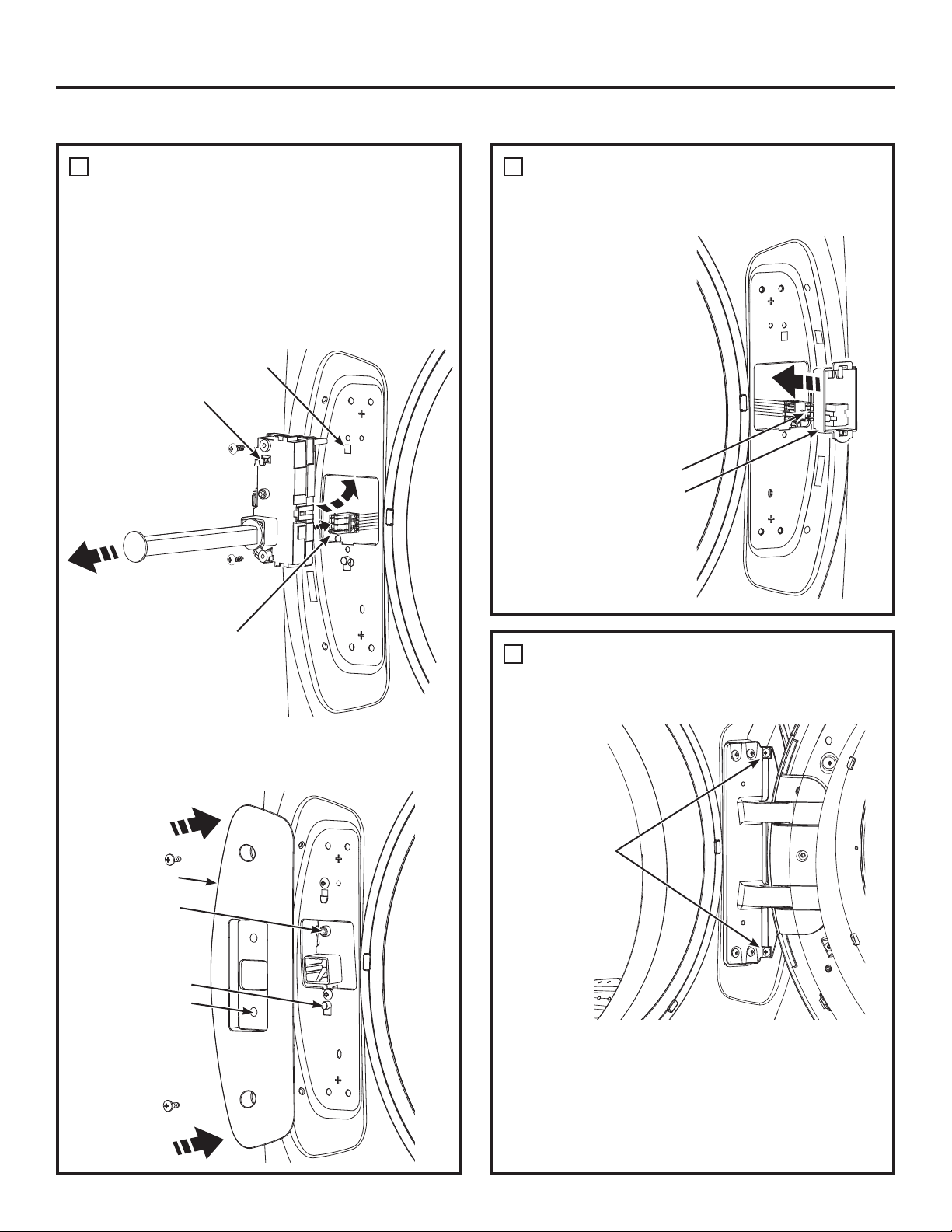
REMOVE LOCK ASSEMBLY AND
INSTALL ON OPPOSITE SIDE OF
WASHER
• Remove the 2 screws from the lock cover and
remove it from the washer face.
7
REMOVE THE TERMINAL
HOLDER AND DISCONNECT THE
PIN CONNECTOR FROM WASHER
• Using your
fingers, pry the
terminal holder
from the washer
face.
• Disconnect the
pin connector.
6
Hinge Cover
Hinge
Terminal Holder
Pin Connector
• Insert the provided lock bar into the lock mechanism
in the washer face. Remove the lock assembly by
removing its two screws, using the lock bar to lift it
up to unhook, tilting and pulling it out of the washer
face. Disconnect its pin connector by unsnapping its
locks.
Insert Lock Bar
Remove
Assembly
Pin Connector
Lock
Cover
Hook Window
Hook
26 49-3000217 Rev 2
Installation Instructions
REVERSING THE DOOR SWING (Optional)
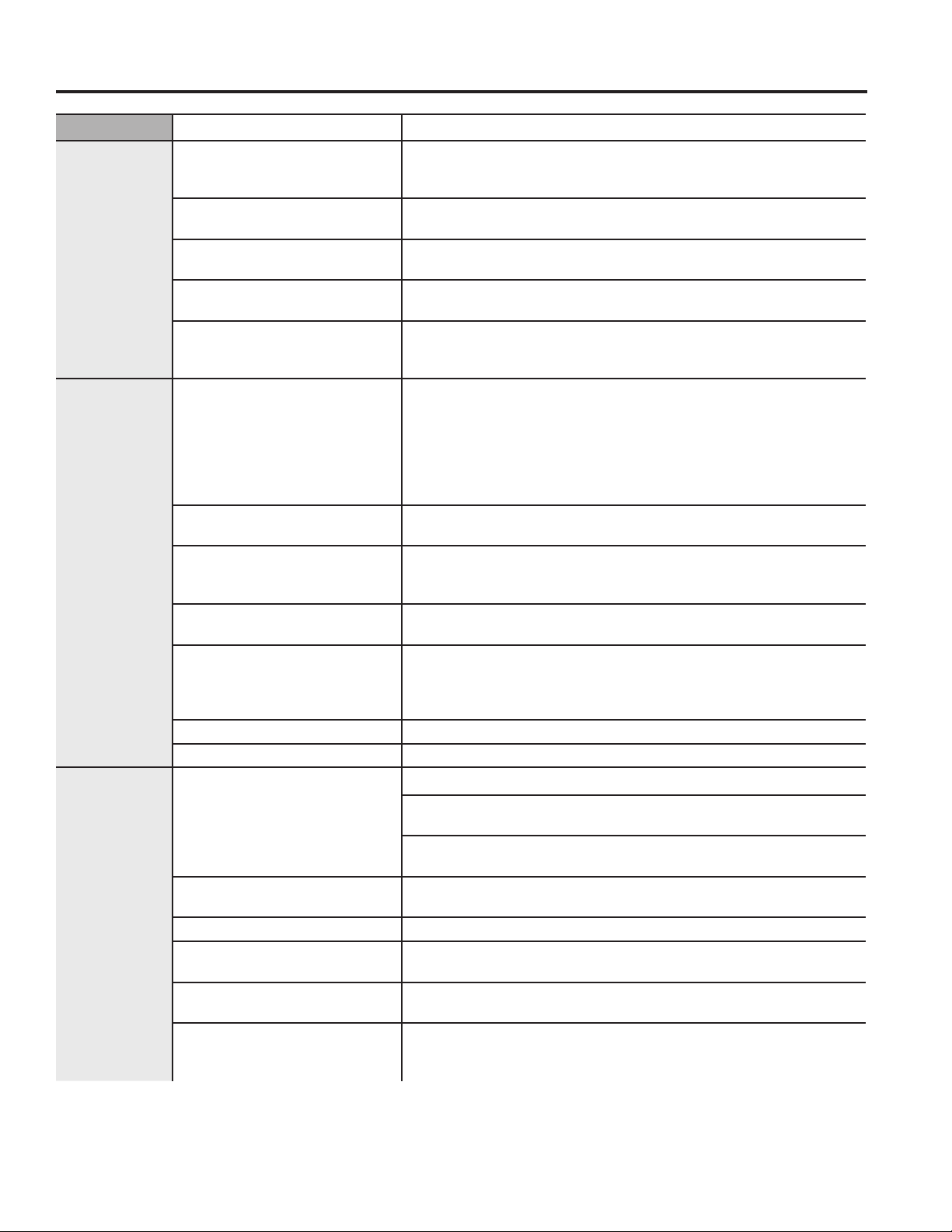
REMOVE LOCK ASSEMBLY AND
INSTALL ON OPPOSITE SIDE OF
WASHER (CONTINUED)
• Do NOT rotate lock assembly. Move it to the opposite
side of the washer and connect the pin connector making
sure it is fully snap locked together. Tilt and insert
the lock assembly into the washer face, lift it up and
latch its hook into its window. Replace its screws.
Remove the lock bar from the assembly and retain
for future use.
7
RECONNECT
PIN CONNECTOR
FROM THE WASHER AND REPLACE
THE TERMINAL HOLDER
8
• Reconnect the
pin connector and
press the terminal
holder back into
the washer face on
the opposite side.
Remove lock bar
Replace
Assembly
Pin Connector
• Install the lock cover over the lock assembly, making
sure the locating post fits into the locating hole and
that the lock switch operates freely. Replace its screws.
Pin Connector
Terminal Holder
REPLACE THE DOOR ASSEMBLY
9
• Lift the door assembly into place and secure it onto
the washer face with its 6 screws.
Replace 6 screws
into the hinge and
secure into the
washer face
• Close the washer door.
NOTE: Make sure the door opens and closes
correctly. If not, repeat all steps making sure all
parts and screws are securely seated.
• Connect power cord and turn on the breaker.
• Run the washer through a complete cycle to verify
proper operation.
Hook Window
Hook
Locating Post
Lock Cover
Locating Hole
Lock Switch
49-3000217 Rev 2 27
Troubleshooting Tips... Before you call for service
TROUBLESHOOTING TIPS
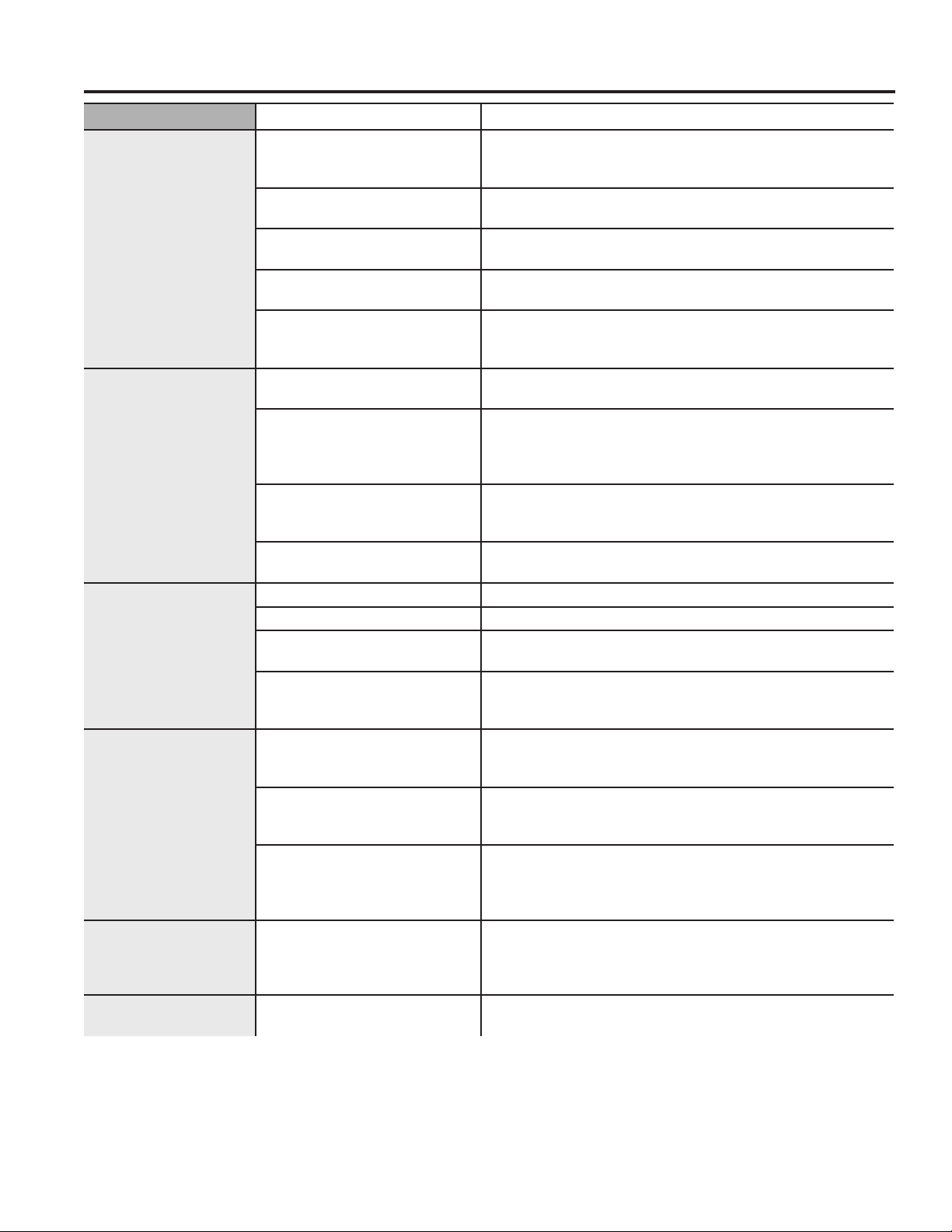
Problem Possible Cause What To Do
Not draining
Not spinning
Not tumbling
Load is out of balance Redistribute clothes and run Rinse & Spin.
Increase load size if washing small load containing heavy and
light items.
Pump filter may be clogged See the Care and Cleaning section on how to clean the Pump
Filter.
Drain hose is kinked or
improperly connected
Straighten drain hose and make sure washer is not sitting on it.
Household drain may be
clogged
Check household plumbing. You may need to call a plumber.
Drain hose siphoning; drain
hose pushed too far down
the drain
Ensure there is an air gap between hose and drain.
Leaking water Door gasket is damaged Check to see if gasket is seated and not torn. Objects left in
pockets may cause damage to the washer (nails, screws, pens,
pencils)
Water may drip from the door when the door is opened. This is a
normal operation.
Carefully wipe off rubber door seal. Sometimes dirt or clothing is
left in this seal and can cause a small leak
Check back left of washer
for water
If this area is wet, you have oversudsing condition. Use less
detergent.
Fill hoses or drain hose is
improperly connected
Make sure hose connections are tight at washer and faucets and
make sure end of drain hose is correctly inserted in and secured
to drain facility.
Household drain may be
clogged
Check household plumbing. You may need to call a plumber.
Dispenser clogged Powder soap may cause clogs inside the dispenser and cause
water to leak out the front of the dispenser. Remove drawer and
clean both drawer and inside of dispenser box. Please refer to
Care and Cleaning section.
Incorrect use of detergent Use only HE and correct amount of detergent.
Dispenser box cracked If new installation, check for crack on inside of dispenser box.
Clothes too
wet
Load is out of balance Redistribute clothes and run Rinse & Spin.
Increase load size if washing small load containing heavy and
light items.
The machine will slow the spin speed down to 410 rpm if it has a
hard time balancing the load. This speed is normal.
Pump filter may be clogged See the Care and Cleaning section on how to clean the Pump
Filter.
Overloading The dry weight of the load should be less then 16 lbs.
Drain hose is kinked or
improperly connected
Straighten drain hose and make sure washer is not sitting on it.
Household drain may be
clogged
Check household plumbing. You may need to call a plumber.
Drain hose siphoning; drain
hose pushed too far down
the drain
Ensure there is an air gap between hose and drain.
28 49-3000217 Rev 2
TROUBLESHOOTING TIPS
Troubleshooting Tips... Before you call for service
Problem Possible Cause What To Do
Incomplete cycle or
timer not advancing
Automatic load
redistribution
Timer adds 3 minutes to cycle for each rebalance. 11 or
15 rebalances may be done. This is normal operation.
Do nothing; the machine will finish the wash cycle.
Pump filter may be clogged See the Care and Cleaning section on how to clean the
Pump Filter.
Drain hose is kinked or
improperly connected
Straighten drain hose and make sure washer is not sitting
on it.
Household drain may be
clogged
Check household plumbing. You may need to call a
plumber.
Drain hose siphoning; drain
hose pushed too far down
the drain
Ensure there is an air gap between hose and drain.
Loud or unusual
noise; vibration or
shaking
Cabinet moving Washer is designed to move 1/4” to reduce forces
transmitted to the floor. This movement is normal.
All rubber leveling legs are
not firmly touching the floor
Push and pull on the back right and then back left of your
washer to check if it is level. If the washer is uneven,
adjust the rubber leveling legs so they are all firmly
touching the floor and locked in place.
Unbalanced load Pause unit, open door and manually redistribute load. To
check machine, run rinse and spin with no load. If normal,
unbalance was caused by load.
Pump filter may be clogged See the Care and Cleaning section on how to clean the
Pump Filter.
No power/washer not
working or dead
Washer is unplugged Make sure cord is plugged securely into a working outlet.
Water supply is turned off Turn both hot and cold faucets fully on.
Circuit breaker/fuse is
tripped/blown
Check house circuit breakers/fuses. Replace fuses or
reset breaker. Washer should have separate outlet.
Automatic self system
checks
First time the washer is plugged in, automatic checks
occur. It may take up to 20 seconds before you can use
your washer. This is normal operation.
Snags, holes, tears,
rips or excessive
wear
Overloaded Do not exceed maximum recommended load sizes.
See recommended maximum load sizes in the Loading
section.
Pens, pencils, nails, screws
or other objects left in
pockets
Remove loose items from pockets.
Pins, snaps, hooks, sharp
buttons, belt buckles, zippers
and sharp objects left in
pockets
Fasten snaps, hooks, buttons and zippers.
Control time wrong
or changes
This is normal During spin the washer may need to rebalance the load
sometimes to reduce vibrations. When this happens, the
estimated time is increased causing time left to increase
or jump.
Not enough water This is normal Horizontal washers do not require the tub to fill with water
like top-load washers.
49-3000217 Rev 2 29
Troubleshooting Tips... Before you call for service
TROUBLESHOOTING TIPS
Problem Possible Cause What To Do
Washer pauses
or has to be
restarted, or
washer door is
locked and will
not open
Pump filter may be clogged See the Care and Cleaning section on how to clean the
Pump Filter.
Door unlocks
or press Start
and machine
doesn’t operate
This is normal
Front-load washers start up differently than top-load washers, and
it takes several seconds to check the system. The door will lock
and unlock.
Incorrect operation Simply open and close the door firmly; then press Start.
Water does not
enter washer or
enters slowly
Automatic self system
checks
After Start is pressed, the washer does several system
checks. Water will flow
several
seconds after Start is pressed.
Water valve screens are
stopped up
Turn off the water source and remove the water connection
hoses from the upper back of the washer. Use a brush or
toothpick to clean the screens in the machine. Reconnect the
hoses and turn the water back on.
Inlet hose screen washers
are stopped up
Turn off the water source and remove the inlet hoses from
the wall faucets. Use a brush or toothpick to clean the screen
washers in the end of the hoses. Reconnect the hoses and
turn the water back on.
Pump filter may be clogged See the Care and Cleaning section on how to clean the
Pump Filter.
Fill hoses may be kinked Check that fill hoses are not kinked or clogged.
Water supply is turned off Turn on both hot and cold faucets fully.
Energy efficiency This is an energy-efficient washer. As a result, the temperature
settings for this washer may be different than for a non-energy-
efficient washer.
Insufficient water supply Make sure that the water supply is turned on. Make sure that
the water faucets are turned to their completely open position.
The washer door is open The washer door must be closed for all washer cycle
operations. If the door is opened during the washer operation,
all functions will stop, including water filling.
Incorrect fill hose connection Make sure that the fill hoses connect the hot water supply to
the hot inlet on the washer and the cold water supply to the
cold inlet on the washer (hot to hot, cold to cold).
Wrinkling Improper sorting Avoid mixing heavy items (like work clothes) with light items
(like blouses).
Overloading Load your washer so clothes have enough room to move
freely.
Incorrect wash cycle Match cycle selection to the type of fabric you are washing
(especially for easy care loads).
Repeated washing in water
that is too hot
Wash in warm or cold water.
30 49-3000217 Rev 2
TROUBLESHOOTING TIPS
Troubleshooting Tips... Before you call for service
Problem Possible Cause What To Do
Grayed or
yellowed
clothes
Not enough detergent Use correct amount of detergent.
Not using HE (high
efficiency) detergent
Use only HE detergent.
Hard water Use hottest water safe for fabric.
Use a water conditioner like Calgon brand or install a water
softener.
Water is not hot enough Make sure water heater is delivering water at 120°–140°F
(48°–60°C).
Detergent is not dissolving Try a liquid HE detergent.
Dye transfer Sort clothes by color. If fabric label states wash separately,
unstable dyes may be indicated.
Colored spots Incorrect use of fabric
softener
Check fabric softener package for instructions and follow
directions for using dispenser.
Dye transfer Sort whites or lightly colored items from dark colors.
Promptly remove wash load from washer.
Water
temperature
is incorrect
Water supply is improperly
connected
Make sure hoses are connected to correct faucets.
House water heater is not set
properly
Make sure house water heater is delivering water at 120°–
140°F (48°–60°C).
Bad odor inside
your Washer
Washer unused for a
long time, not using
recommended quality of HE
detergent or used too much
detergent
Regularly use ULTRAFRESH VENT between uses.
In case of strong odor, you may need to run the Self Clean
cycle more than once.
Use only the amount of detergent recommended or adjust
SmartDispense to LOW.
Use only HE (high efficiency) detergent.
Always remove wet items from the washer promptly after it
stops running or use 1 Step Wash + Dry or Tumble Care.
If you choose to not use the ULTRAFRESH VENT System,
leave the door slightly open for the washer to air dry. Close
supervision is necessary if this appliance is used by or near
children. Do not allow children to play on or in this appliance.
Detergent leak This is normal It is normal operation to see detergent leak on door gasket
about 20 seconds after filling the dispenser.
Improper
dispensing
of softener
or bleach
Dispenser clogged Monthly clean the dispenser drawer to remove buildup of
chemicals.
Softener or bleach is filled
above the max line
Make sure to have the correct amount of softener.
Dispenser
drawer not
dispensing
properly
Laundry detergent packet
placed in dispenser drawer
Laundry detergent packets should not be used in the
dispenser. They should only be added directly to the wash tub
following the manufacturer's directions.
Pump running
while washer is
not in use
Clog in sump drain This is normal. Drain sump is detecting an undesired water
fill level from a potential open faucet. Shut off water valve and
inspect water valve for blockage.
49-3000217 Rev 2 31
LIMITED WARRANTY
GE Appliances Washer Limited Warranty
Staple your receipt here. Proof of the original purchase
date is needed to obtain service under the warranty.
GEAppliances.com
All warranty service is provided by our Factory Service Centers, or an authorized Customer Care
®
technician. To schedule
service online, visit us at GEAppliances.com/service, or call GE Appliances at 800.GE.CARES (800.432.2737). Please
have your serial number and your model number available when calling for service.
Servicing your appliance may require the use of the onboard data port for diagnostics. This gives a GE Appliances factory
service technician the ability to quickly diagnose any issues with your appliance and helps GE Appliances improve its
products by providing GE Appliances with information on your appliance. If you do not want your appliance data to be
sent to GE Appliances, please advise your technician not to submit the data to GE Appliances at the time of service.
Extended Warranties: Purchase a GE Appliances extended warranty and learn about special discounts that are
available while your warranty is still in effect. You can purchase it online anytime at
GEAppliances.com/extended-warranty
or call 800.626.2224 during normal business hours. GE Appliances Service will still be there after your warranty expires.
In the United States:
This limited warranty is extended to the original purchaser and any succeeding owner for products purchased for home use
within the USA. If the product is located in an area where service by a GE Appliances Authorized Servicer is not available,
you may be responsible for a trip charge or you may be required to bring the product to an Authorized GE Appliances
Service location for service. In Alaska, the limited warranty excludes the cost of shipping or service calls to your home.
Some states do not allow the exclusion or limitation of incidental or consequential damages. This limited warranty
gives you specific legal rights, and you may also have other rights which vary from state to state. To know what your
legal rights are, consult your local or state consumer affairs office or your state’s Attorney General.
Warrantor: GE Appliances, a Haier Company, Louisville, KY 40225
EXCLUSION OF IMPLIED WARRANTIES
Your sole and exclusive remedy is product repair as provided in this Limited Warranty. Any implied warranties,
including the implied warranties of merchantability or fitness for a particular purpose, are limited to one year or the
shortest period allowed by law.
In Canada:
This limited warranty is extended to the original purchaser and any succeeding owner for products purchased in Canada
for home use within Canada. If the product is located in an area where service by a GE Appliances Authorized Servicer is
not available, you may be responsible for a trip charge or you may be required to bring the product to an Authorized
GE Appliances Service location.
Some provinces do not allow the exclusion or limitation of incidental or consequential damages. This limited warranty
gives you specific legal rights, and you may also have other rights which vary from province to province. To know what
your legal rights are, consult your local or provincial consumer affairs office.
Warrantor: MC Commercial Inc., Burlington, ON, L7R 5B6
For the period of: We will replace:
One year
From the date of the
original purchase
Any part of the washer which fails due to a defect in materials or workmanship.
During this limited one-year warranty, we will also provide, free of charge, all labor
and related service to replace the defective part.
Ten years
From the date of the
original purchase
The motor, if it should fail due to a defect in materials or workmanship. During this
additional nine-year limited warranty, you will be responsible for any labor and
related service costs.
What is not covered:
Ŷ
Service trips to your home to teach you how to use
the product.
Ŷ
Improper installation, delivery or maintenance.
Ŷ
Failure of the product if it is abused, misused, or used for
other than the intended purpose or used commercially.
Ŷ
Replacement of house fuses or resetting of circuit
breakers.
Ŷ
Products which are not defective or broken, or which
are working as described in the Owner’s Manual.
Ŷ
Damage to the product caused by accident, fire,
floods or acts of God.
Ŷ
Incidental or consequential damage caused by
possible defects with this appliance.
Ŷ
Defects or damage due to operation in freezing
temperatures.
Ŷ
Damage caused after delivery.
Ŷ
Product not accessible to provide required service.
32 49-3000217 Rev 2
CONSUMER SUPPORT
Consumer Support
GE Appliances Website
Have a question or need assistance with your appliance? Try the GE Appliances Website 24 hours a day, any day
of the year! You can also shop for more great GE Appliances products and take advantage of all our on-line support
services designed for your convenience. In the US: GEAppliances.com.
In Canada: GEAppliances.ca.
Register Your Appliance
Register your new appliance on-line at your convenience! Timely product registration will allow for enhanced
communication and prompt service under the terms of your warranty, should the need arise. You may also mail in the
pre-printed registration card included in the packing material. In the US: GEAppliances.com/register.
In Canada: Prodsupport.mabe.ca/crm/Products/ProductRegistration.aspx.
Schedule Service
Expert GE Appliances repair service is only one step away from your door. Get on-line and schedule your service at
your convenience any day of the year. In the US: GEAppliances.com/service or call 800.432.2737 during normal
business hours.
In Canada: GEAppliances.ca/en/support/service-request or call 800.561.3344.
Extended Warranties
Purchase a GE Appliances extended warranty and learn about special discounts that are available while your
warranty is still in effect. You can purchase it on-line anytime. GE Appliances Services will still be there after your
warranty expires. In the US: GEAppliances.com/extended-warranty or call 800.626.2224 during normal business
hours.
In Canada: GEAppliances.ca/en/support/purchase-extended-warranty or call 866.277.9842.
Remote Connectivity
For assistance with wireless network connectivity (for models with remote enable), in the US visit our website at
GEAppliances.com/connected-home-smart-appliances/ or call 800.220.6899.
In Canada: http://www.geappliances.ca/en/news-and-promotions/what-is-hot/wifi-connect/.
Parts and Accessories
Individuals qualified to service their own appliances can have parts or accessories sent directly to their homes
(VISA, MasterCard and Discover cards are accepted). Order on-line today 24 hours every day.
In the US: GEApplianceparts.com or by phone at 877.959.8688 during normal business hours.
In Canada: GEAppliances.ca/en/products/parts-filters-accessories or call 800.661.1616.
Instructions contained in this manual cover procedures to be performed by any user. Other servicing
generally should be referred to qualified service personnel. Caution must be exercised, since improper
servicing may cause unsafe operation.
Contact Us
If you are not satisfied with the service you receive from GE Appliances, contact us on our Website with all the
details including your phone number, or write to:
In the US: General Manager, Customer Relations | GE Appliances, Appliance Park | Louisville, KY 40225
GEAppliances.com/contact.
In Canada: Director, Consumer Relations, MC COMMERCIAL INC. | Suite 310, 1 Factory Lane | Moncton, N.B. E1C 9M3
GEAppliances.ca/en/contact-us.
Printed in China