

2
Dear Customer,
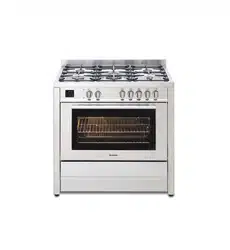
Thank you for buying a BLANCO Freestanding Cooker.
Before we continue telling you about this oven, we cordially invite you to become
part of the Blanco family by subscribing online. Please visit our website where
you can easily register for product/cooking demonstrations, and request Blanco’s
gourmet recipes. Go to www.blanco-australia.com and fill in the subscription
details in the contact us/showrooms section.
You will find that the clean lines and modern look of your Blanco Freestanding
Cooker blends in perfectly with your kitchen décor. It is easy to use and performs to
a high standard.
Blanco also makes a range of products that will enhance your kitchen such as
ovens, cooktops, rangehoods, dishwashers, microwaves, sinks and taps. There are
models to complement your new Blanco Freestanding Cooker.
Of course, we make every effort to ensure that our products meet all your
requirements, and our Customer Relations department is at your disposal, to answer
all your questions and to listen to all your suggestions.
Please complete the warranty card and keep your receipt as proof of purchase.
Retain all documents relating to the purchase of this product.
Blanco is committed to providing increasingly efficient products that are easy to use.
Downloaded from www.ManualsFile.com manuals search engine
3
READ THE INSTRUCTION BOOKLET BEFORE INSTALLING AND USING THE APPLIANCE.
It is important that you retain these instructions, proof of purchase as well as
other important documents about this product for future reference.
The manufacturer will not be responsible for any damage to property or to persons caused by
incorrect installation or improper use of the appliance.
Due to continual product development, Blanco reserves the right to alter specifications or
appearances without notice.
DO NOT OPERATE THIS APPLIANCE BEFORE READING THE
INSTRUCTION BOOK
DO NOT PLACE ARTICLES ON OR AGAINST THIS APPLIANCE
DO NOT STORE CHEMICALS OR FLAMMABLE MATERIALS OR
SPRAY AEROSOLS NEAR THIS APPLIANCE
DISPOSAL INFORMATION
• Most of the packing materials are recyclable. Please dispose of those materials
through your local recycling depot or by placing them in appropriate collection
containers.
• If you wish to discard this product, please contact your local authorities and ask for the
correct method of disposal.
Downloaded from www.ManualsFile.com manuals search engine

4
CONTENTS
PRODUCT DESCRIPTION
5
INSTALLER TECHNICAL INFORMATION
6
Installing the cooker 6
Room ventilation 8
Appliance gas connection 9
Support legs 12
Anti-tilt system 13
Kick plate installation 15
Adaption to different types of gas 16
Appliance electric connection 18
Appliance Maintenance 20
Replacing parts 21
USE AND MAINTENANCE INFORMATION
22
Gas burner information 22
Control panel description 22
Using burners 23
Using the oven function knob 25
- Oven functions 25
- Using the pre – heating function 27
- Using the pizza function 27
- Using the traditional function 27
- Using the fan assisted function 29
- Using the fan forced function 30
- Using the grill function 31
- Using the fan grill function 31
Cooling fan operation 31
Using the minute minder 31
3 key electronic programmer 32
Other functions 34
Cleaning the appliance 35
- Catalytic self - cleaning liners – rear and sides 35
- Removing oven door 36
- Removing of inside glass 36
- Removing of roof tray 37
Troubleshooting 38
Downloaded from www.ManualsFile.com manuals search engine

5
PRODUCT DESCRIPTION
The following is a brief overview of all features that are evident in this product.
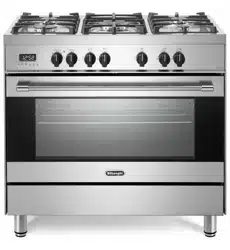
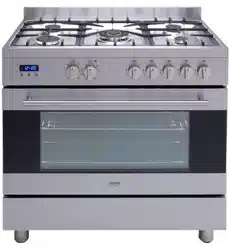
- Square stainless steel design
- 6 burner configuration including Dual Control triple ring wok burner:
• 1 x auxiliary burner(4.2 Mj/h ULPG / 4 Mj/h NG)
• 3 x semi rapid burners(7.6 Mj/h ULPG / 6.7 Mj/h NG)
• 1 x rapid burner (12.9 Mj/h ULPG /11.5 Mj/h NG)
• 1 x dual wok burner(17.7 Mj/h ULPG / 17.5 Mj/h NG)
- Flame failure device fitted to each burner
- Dual Control Wok burner – the inner burner can work independently to the outer burner –
power details within manual
- Fully programmable touch control timer
- Single welded energy efficient cavity
- Triple glazed thermo-reflective door
- Removable inner glass and door
- Partially extendable telescopic runners x 2
- Catalytic self-cleaning liners – rear and sides
- 11 functions: Pre- heating, Top and bottom elements, Bottom element only, Top element only,
Full grill, Full grill with fan, Fan assisted, Fan forced, Bottom element with fan, Light, Defrost
- Full stainless steel kick plate
- 4 shelves/rack levels
- Removable oven roof
- Storage compartment
- Height adjustable feet
- Included accessories:
• 2 x safety anti tip shelves
• 1 x baking tray
• 1 x grill insert
• Conversion kit
• Splashback
•
Stainless steel kick plate
Downloaded from www.ManualsFile.com manuals search engine

6
INSTALLER TECHNICAL INFORMATION
Installation measurements
The product dimensions of this freestanding cooker are as follows:
895 W/L x 870- 940 H x 600 D mm
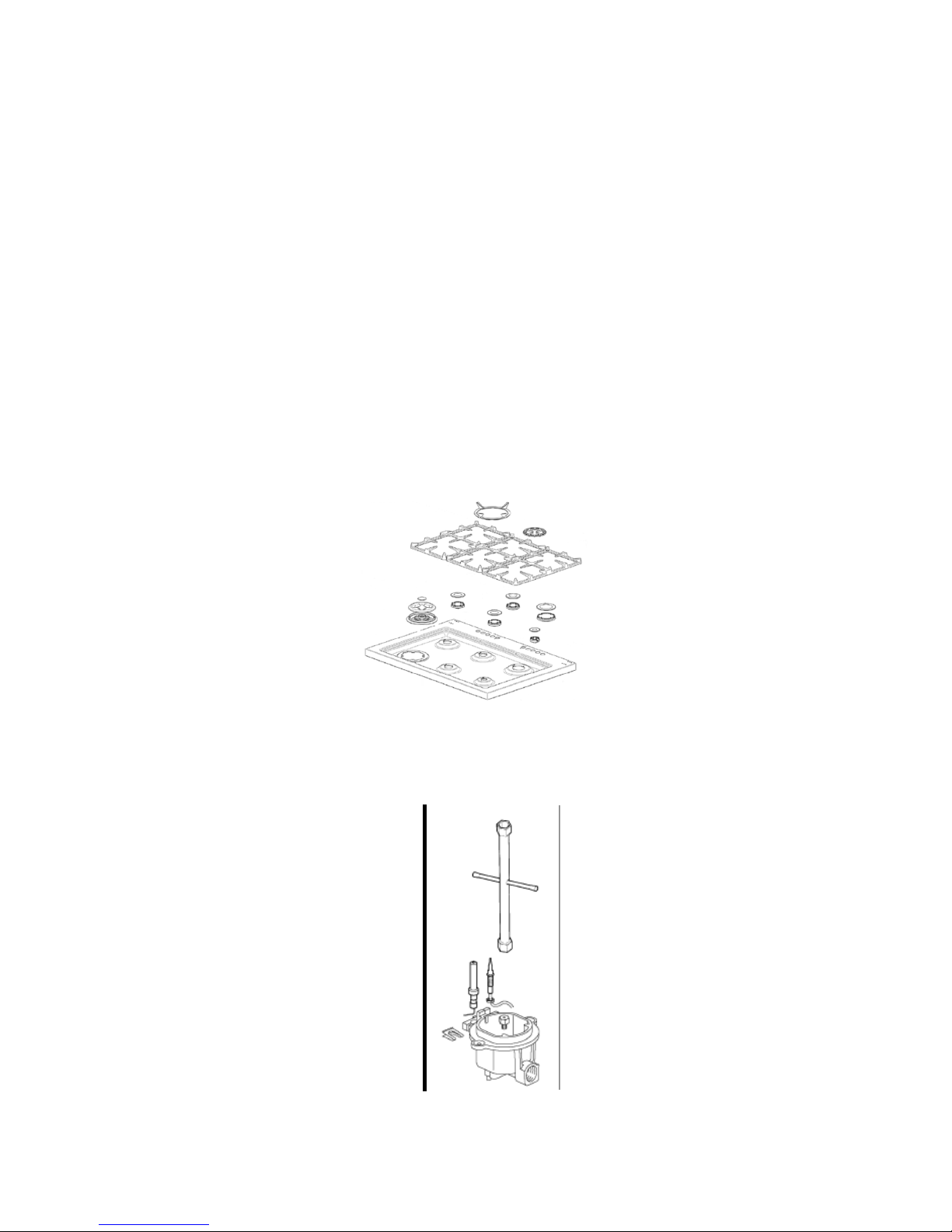
Please note that the stainless steel legs are adjustable from a height of 150 mm to 185 mm.
If the kick plate is placed on the freestanding cooker the product will require being at a height of 895
mm. This is the only way the kick plate will fit.
Please read this entire section to ensure that the cooker is installed safely and correctly and please
measure the actual product before cutting out for installation.
WARNING: TO BE INSTALLED BY AN AUTHORISED PERSON
WARNING: THIS APPLIANCE HAS BEEN DESIGNED FOR DOMESTIC USE ONLY
LOCAL AUTHORITY REQUIREMENTS
Check gas type and specifications plate placed on the bottom face of the unit. All gas fitting work,
service and repairs can only be performed by an authorized person and to local gas regulations.
Failure to comply with this condition will render the warranty invalid. Always unplug the appliance
before carrying out any maintenance operations or repairs. The walls of the units must not be higher
than work top and must be capable of resisting temperatures of 75’C above room temperature. Do
not install the appliance near flammable materials (e.g. curtains). The final act of any installation or
gas type conversion must be the full testing of this appliance, which includes leak testing, ignition of
each burner and the functionality of the burners separately and together.
WARNING: Keep all the dangerous packing parts (polystyrene foam, bags, cardboard, staples,
etc.) away from children.
WARNING: Young children should be supervised to ensure that they do not play with the
appliance.
INSTALLING THE APPLIANCE
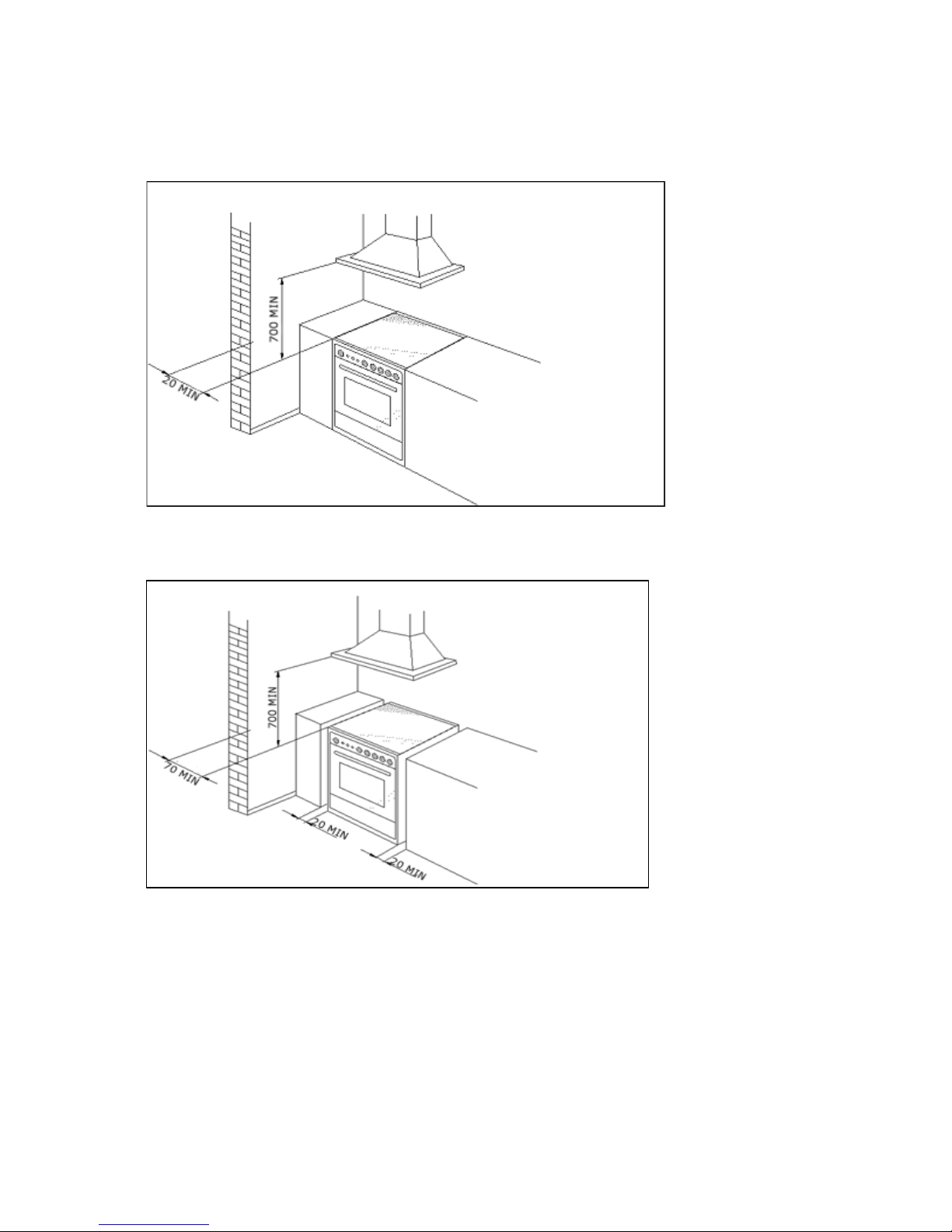
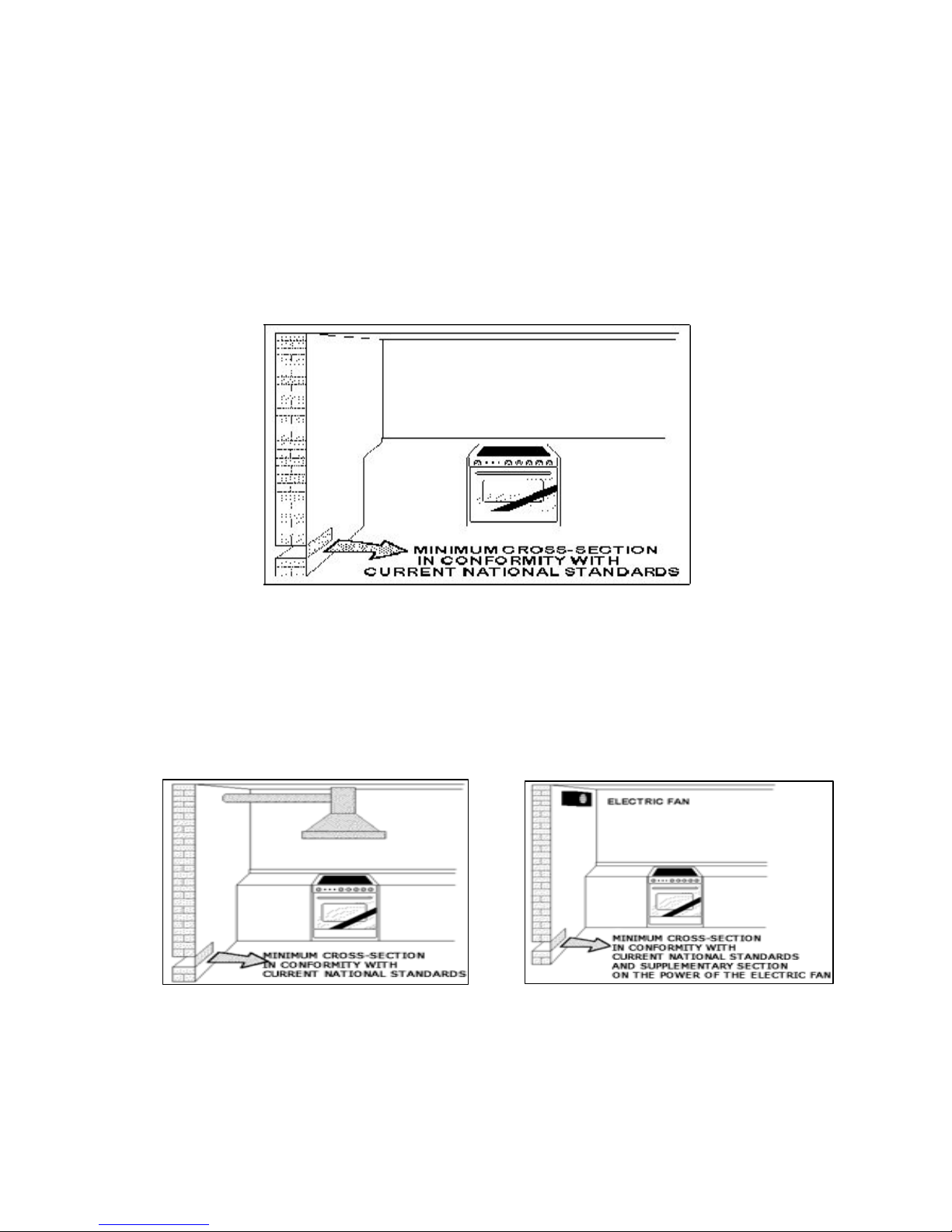
The appliance can be installed as a freestanding unit, next to a wall at a distance of no less than
20mm (Fig.2, Class 1 Installation) or inserted between two walls (Fig.1, Class 2 Subclass 1
Installation). A single sidewall that exceeds the height of the work surface is possible. This must be
at a minimum distance of 70 mm from the edge of the cooker (Fig.2, Class 1 Installation).
WARNING: Where this appliance is installed in a Marine craft or in Caravans, it shall NOT
be
used as a space heater.
WARNING: In order to prevent accidental tipping of the appliance, for example by a child
climbing on to the oven door, the stabilizing means must be installed according to these
instructions.
WARNING: DO NOT MODIFY THIS APPLIANCE.
WARNING: The appliance is not intended for use by persons (including children) with reduced
physical, sensory or mental capabilities, or lack of experience and knowledge, unless they
have been given supervision or instruction concerning use of the appliance by a responsible
person for their safety.
Downloaded from www.ManualsFile.com manuals search engine
8
ROOM VENTILATION
To ensure that the appliance operates correctly, the room where it is installed must be continuously
ventilated. The room volume should not be less than 25m³ and the quantity of air needed should be
based on the regular combustion of gas and on the ventilation of the room. Natural air will flow
through permanent openings in the walls of the room to be ventilated. These openings will be
connected with the outside environment and should have a minimum cross-section defined by the
current national standards regarding room ventilation (Fig. 3).
These openings should be built so that they cannot be clogged.
Indirect ventilation is also permitted by taking air from the rooms adjacent to the one to be ventilated.
Fig.3
LOCATION AND AERATION
Gas cooking appliances must always evacuate the combustion products by means of hoods
connected to chimneys, flues or directly outside (Fig. 4). If a hood cannot be installed, it is possible
to use a fan installed on a window or directly facing outdoors, to be operated together with the
appliance (Fig. 5), provided that there is strict compliance with the ventilation regulations.
Fig. 4 Fig. 5
Downloaded from www.ManualsFile.com manuals search engine
9
APPLIANCE GAS CONNECTION
IMPORTANT: This appliance must be installed by an authorized person.
WARNING: The appliance utilizes a threaded 1/2" gas cylindrical male fitting according to UNI-
ISO 228-1.
To connect the appliance to the gas network with a flexible rubber hose, a supplemental hose
nipple fitting is needed (Fig. 6) which is supplied with the appliance.
This flexible connection can be bought at a hardware store.
If using a fixed copper pipe connection
Gas connection
The cooker must be connected to the gas supply with upstream connection of an isolation valve in
accordance with the respective valid regulations. We recommend that the isolation valve be
fitted prior to the cooker to enable isolation of the cooker from the gas supply. The valve must be
easily accessible at all times.
To find out the factory set gas type, see label at rear of cooker.
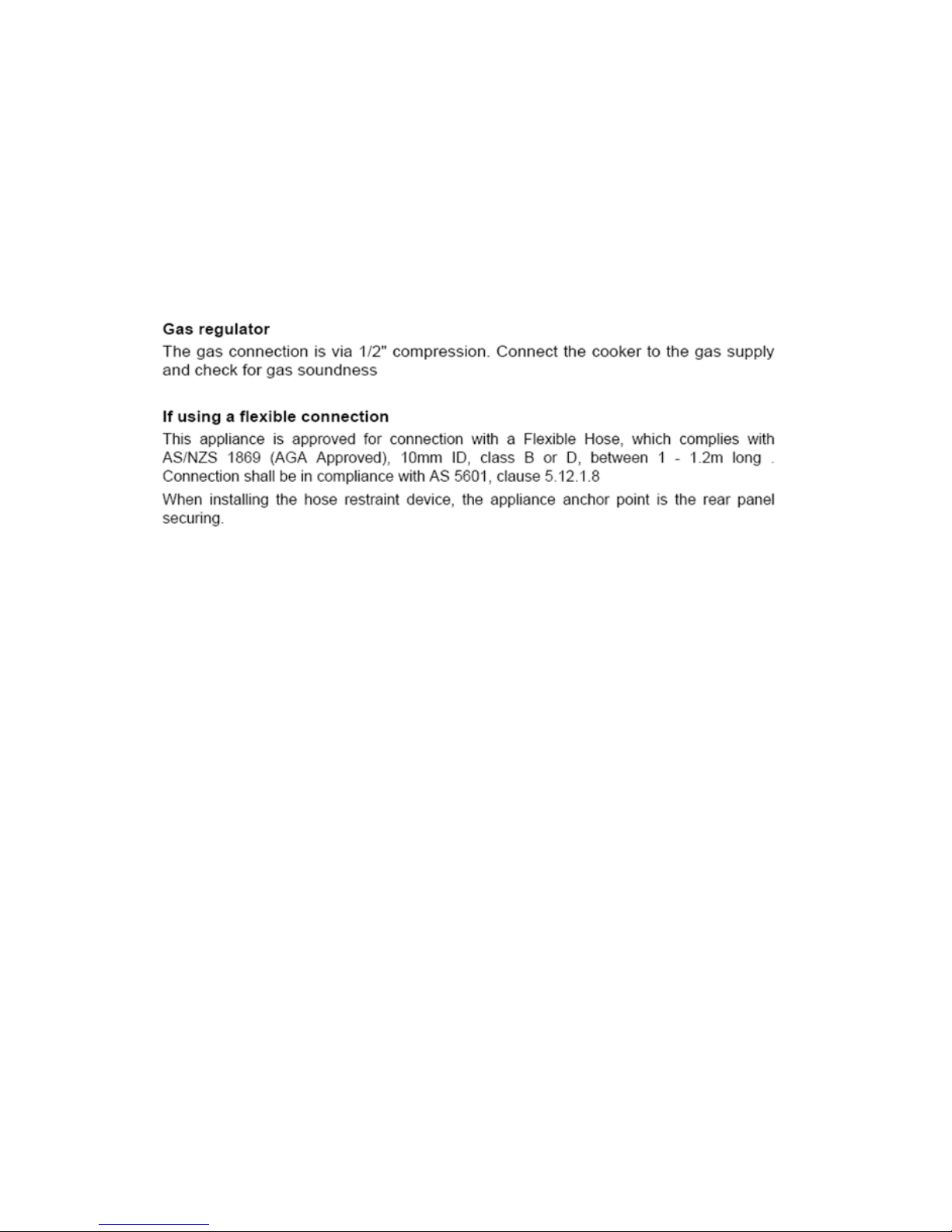
The gas connection is via 1/2" compression. Connect the cooker to the gas supply and check for
gas soundness. NEVER use a naked flame to check for gas leaks.
Downloaded from www.ManualsFile.com manuals search engine
10
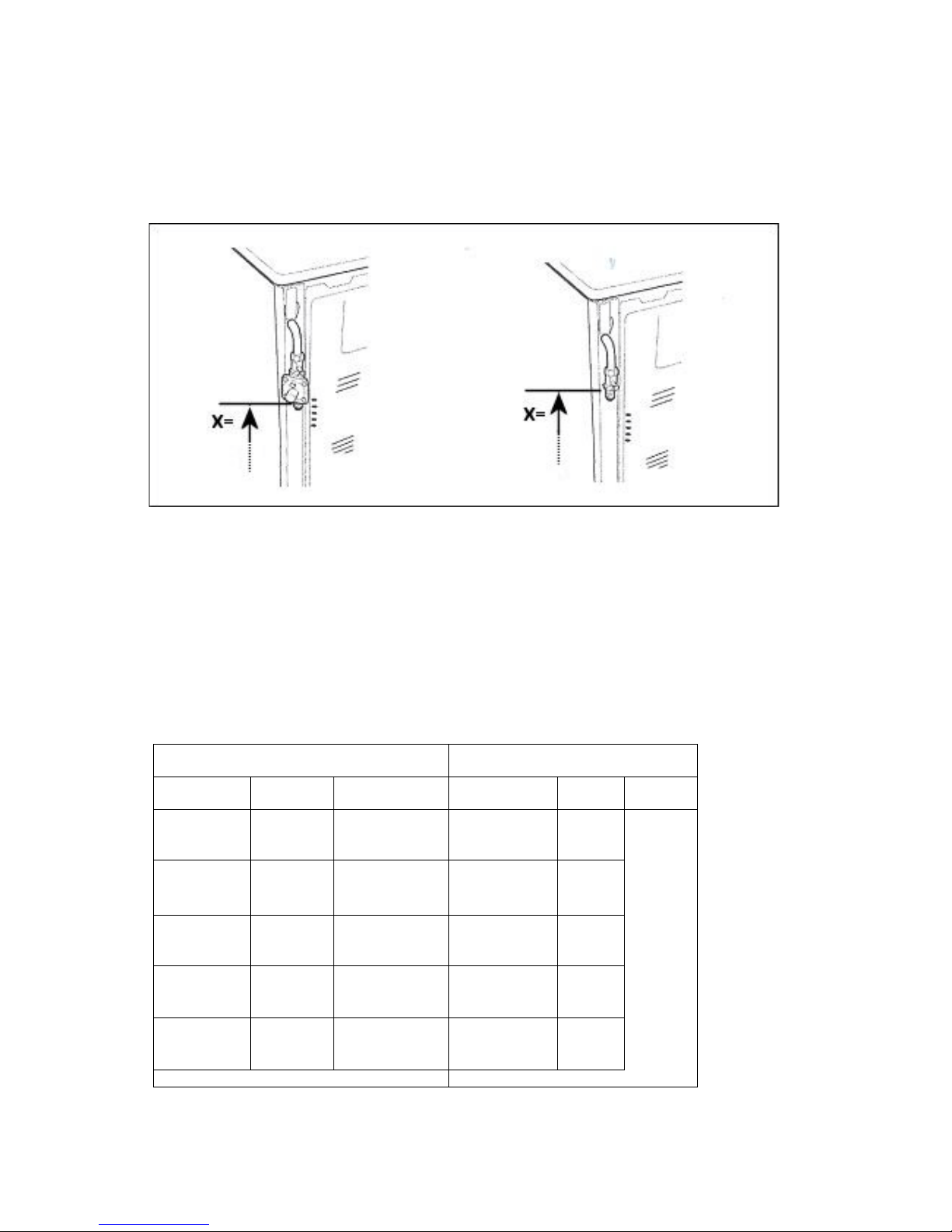
Gas inlet (mm)- Nat gas Gas inlet (mm)- LPG
From RH rear side: 35 mm From RH rear side: 35mm
Up from floor: 590 mm Up from floor: 675 mm
Fig. 6
Gas inlet with different leg heights –
X quote in Fig 6 above from the floor in mm.
Min
NG: 560
LP: 645
Ref NG: 590 LP: 675
Max NG: 595 LP: 680
TABLE NO. 1
Energy consumption
FD906WX
Burners Gas type
Pressure (kPa)
Injector (mm) Mj/hr Watts
Small(
Auxiliary)
Natural
U-LPG
1.0
2.75
0.92
0.56
4.00
4.2
30
00 W
Medium (semi
rapid)
Natural
U-LPG
1.0
2.75
1.17
0.73
6.7
7.6
Large( Rapid)
Natural
U-LPG
1.0
2.75
1.55
0.98
11.5
12.9
*
Wok Inner Natural
U-LPG
1.0
2.75
0.80
0.50
3.1
3.2
*
Wok Outer Natural
U-LPG
1.0
2.75
1.30
0.73
14.4
14.5
Downloaded from www.ManualsFile.com manuals search engine
12
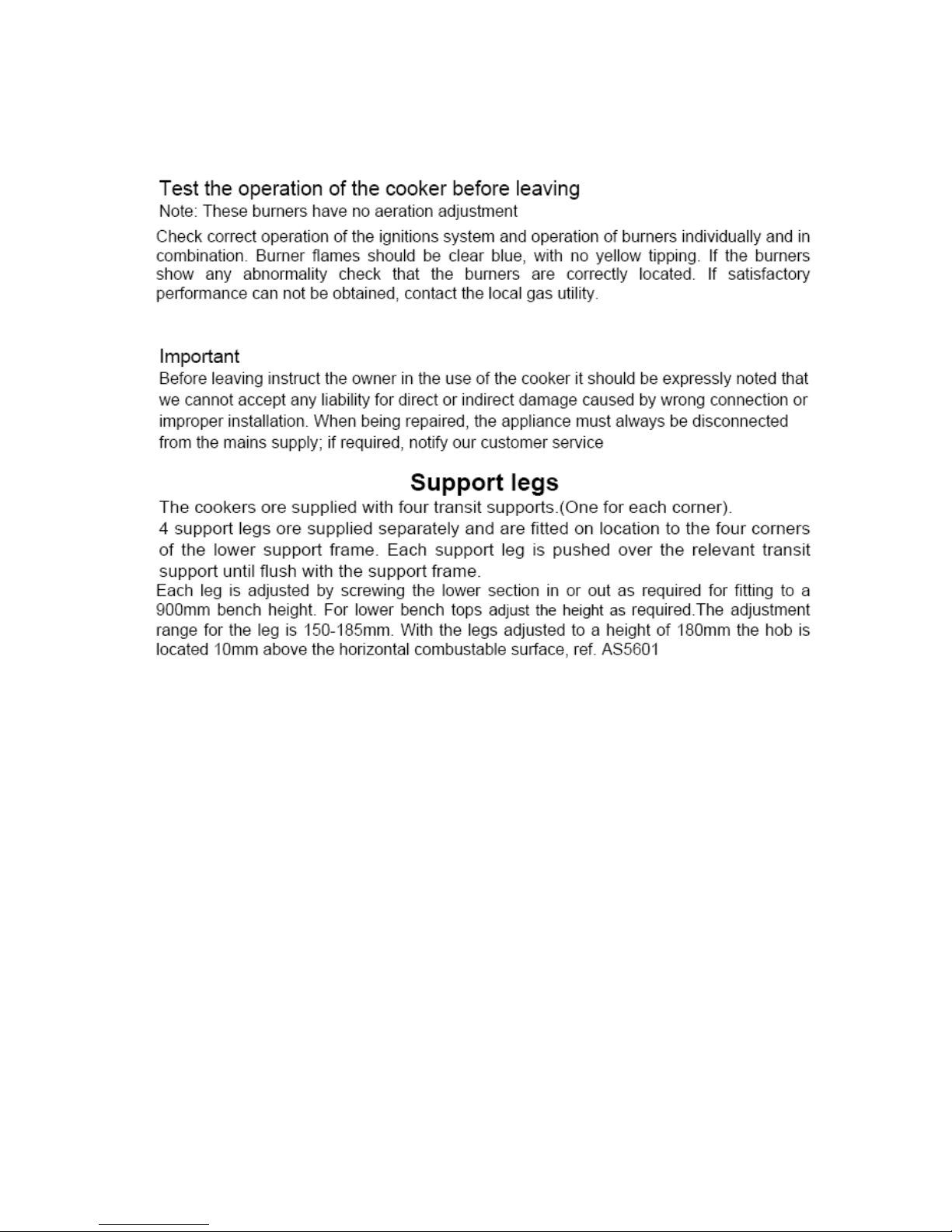
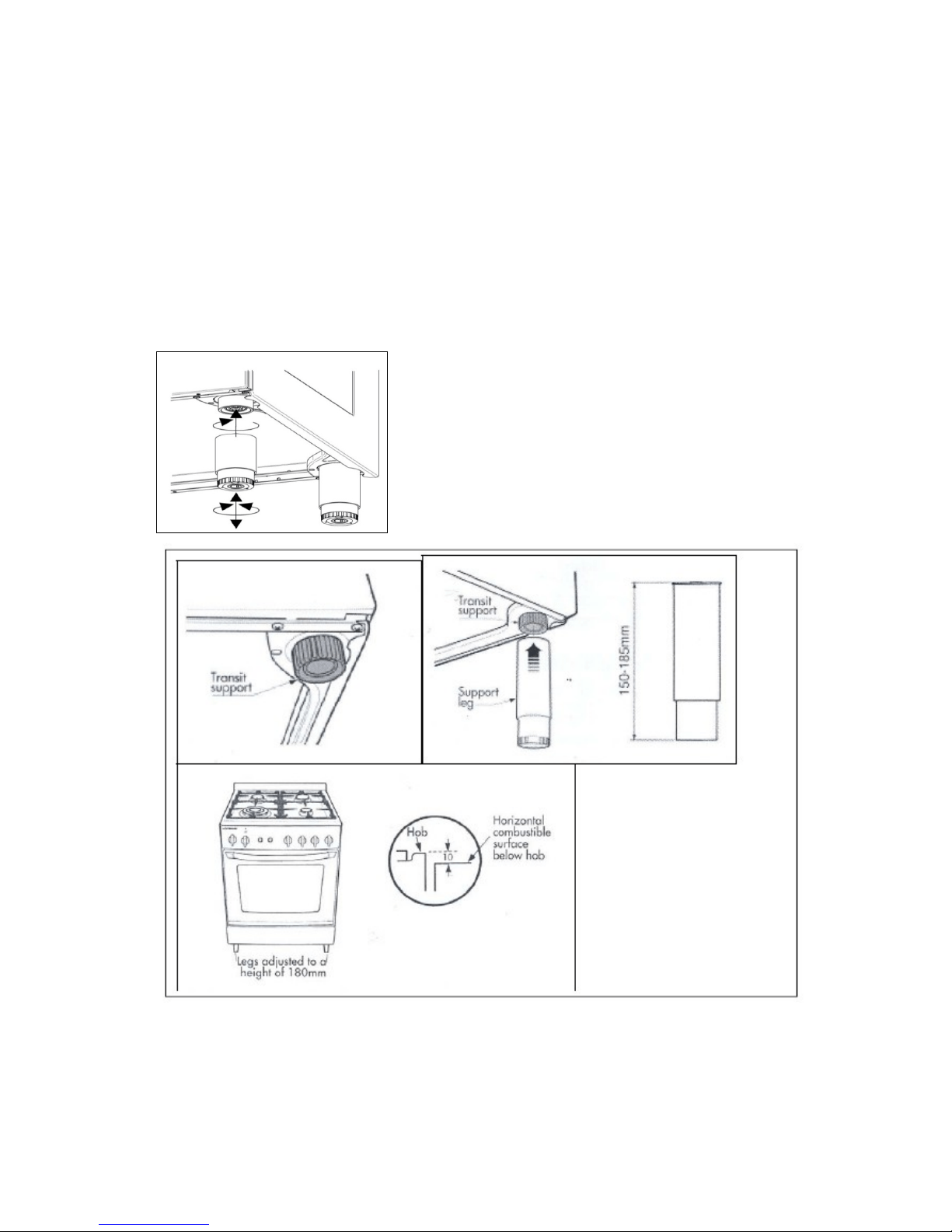
HEIGHT ADJUSTABLE LEGS
Legs are packed in the top box. Please read the above piece which also relates to the legs.
Legs should be installed with the appliance being near the location of final installation, they are not
secure for long transport. After unpacking the range, raise it about a foot to insert the legs in their
bases assembled on the lower part of the cooker and lower the range gently to keep any undue strain
from legs and mounting hardware. It is recommended to use a pallet or lift jack instead of tilting the
unit. Tilting the unit or dragging may easily break the legs.
If the legs are not used and the
cooker
i
s
mounted onto a
plinth
,
fit
t
ran
s
i
t
l
egs
to
all
ow
fo
r
c
learance
.
Once l
egs
are
adjusted
to a
nomina
l
cooker
he
i
gh
t
of 910
mm
,
fit the
ant
i-
tilt
r
estr
a
i
n
t
bracke
ts.
Downloaded from www.ManualsFile.com manuals search engine
13
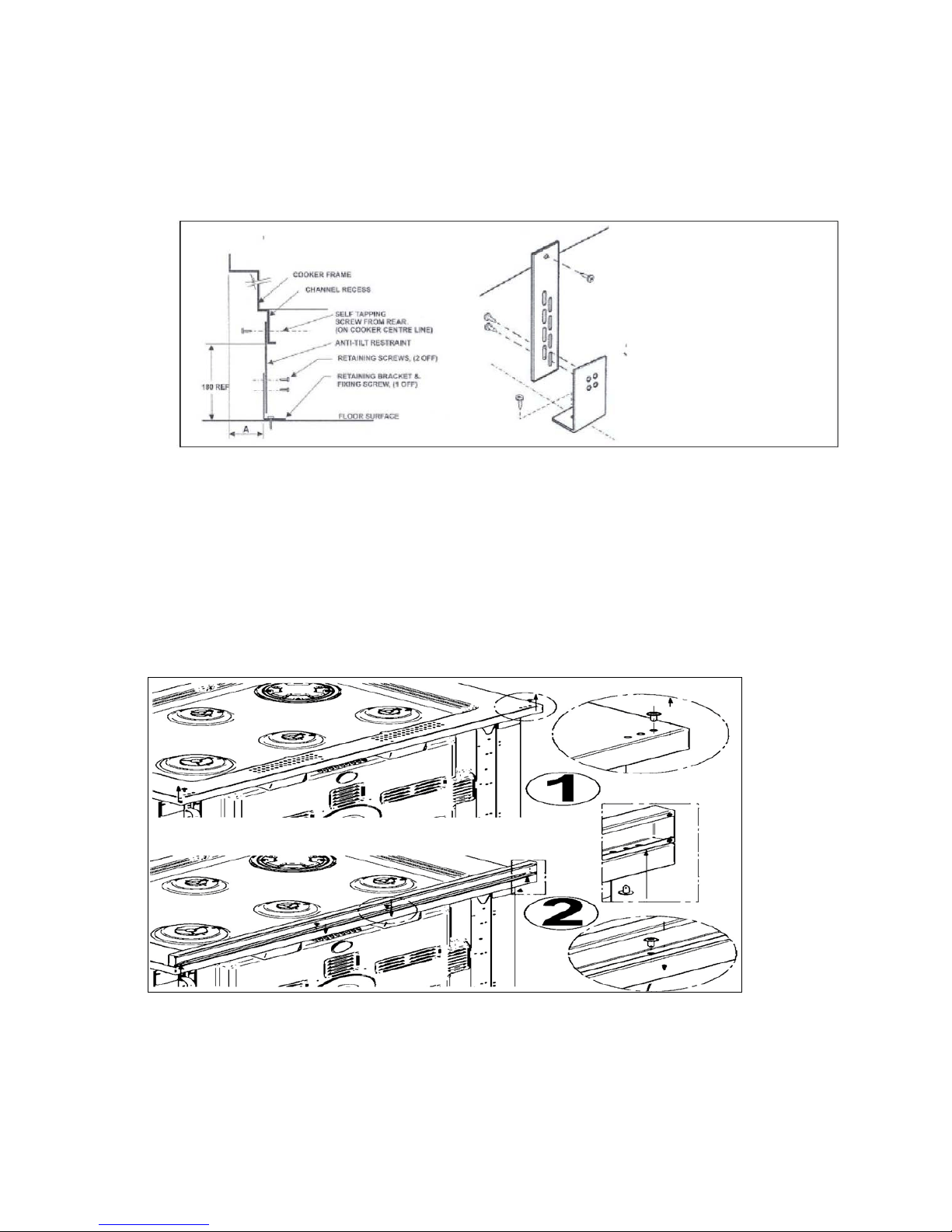
ANTI TILT SYSTEM
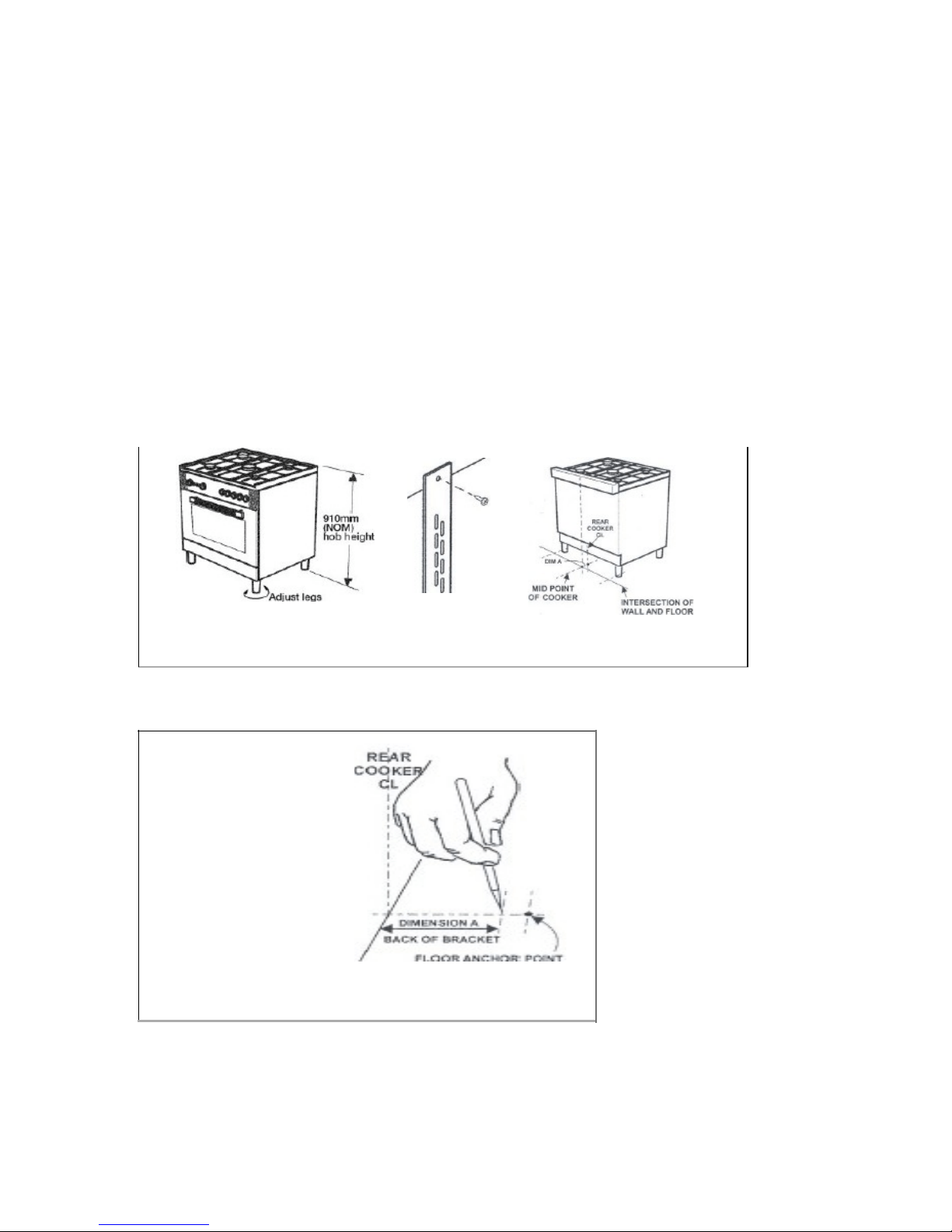
The appliance must be installed using the anti-tipping system provided.
1.
F
i
t
flat strap to rear of cooker at the
center p
o
i
n
t
on l
ower
edge using
suppl
i
ed
screws.
2.
Mark
center
position of the cooker
i
ns
t
alle
d
pos
i
t
i
on
on
f
l
oor.
I
NTERSEC
TIO
N
OF
WAL
L
F'LO
O
R
Downloaded from www.ManualsFile.com manuals search engine
14
3.
Measure from rear most
point
hob to mount
point
of
strap.
(
Dimens
i
on
A)
,
then
us
i
ng
D
i
men
s
i
on
A mark back edge of the bracket on cen
te
r
l
in
e
.
Use bracket to mark
fix
in
g
po
i
n
t.
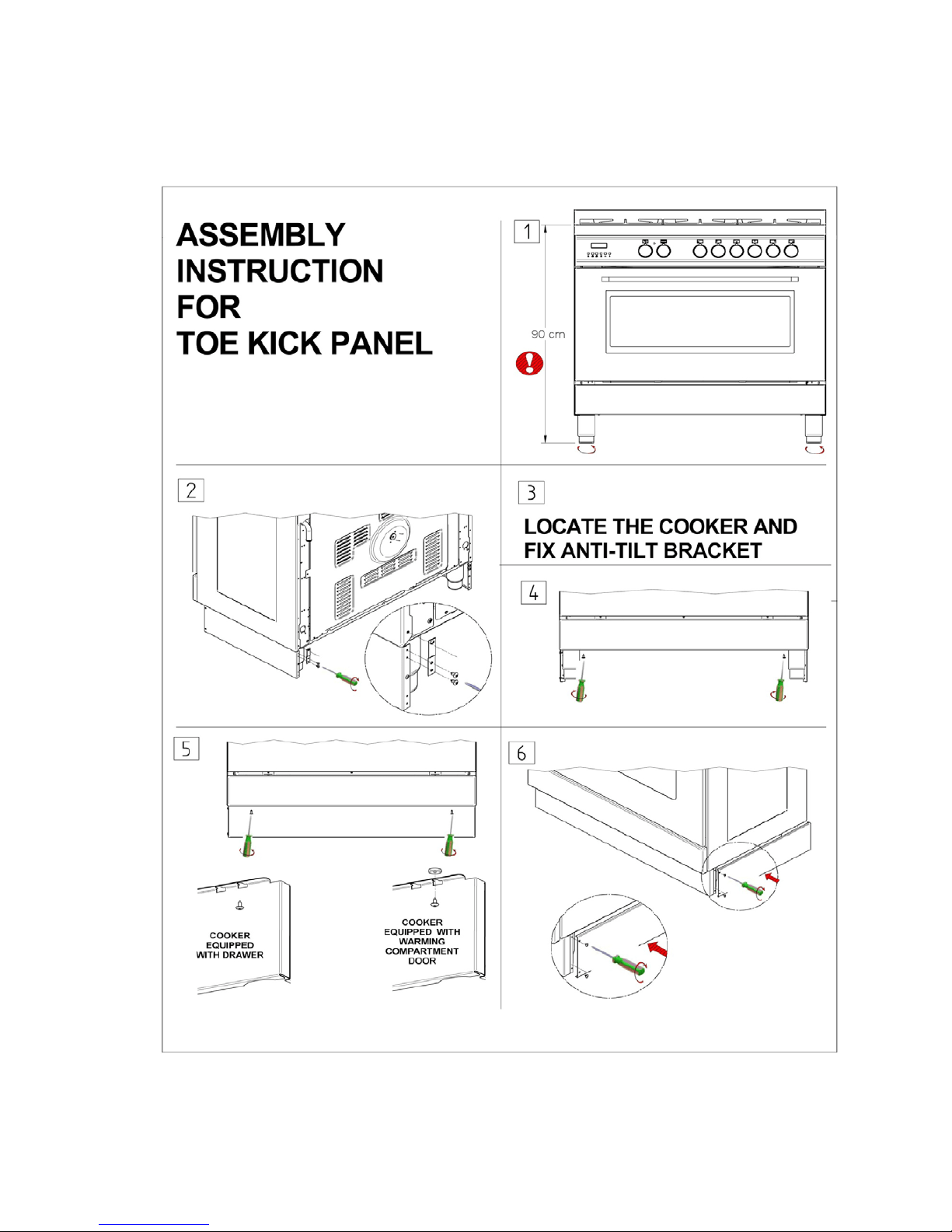
BACKGUARD INSTALLATION INSTRUCTION
Remove the 2 screws that secure the work plan at the rear as shown in below drawing. Arrange the
backsplash and secure it to the bottom side with two screws removed. Further secure the Central up
stand with the screws supplied with the kit.
Downloaded from www.ManualsFile.com manuals search engine
16
ADAPTATION TO DIFFERENT TYPES OF GAS
WARNING: Please note that the images below may not be fully correct but are a good guideline
as to how the cooktop works.
WARNING: Before performing any maintenance operation, disconnect the appliance from
the gas supply and electricity network.
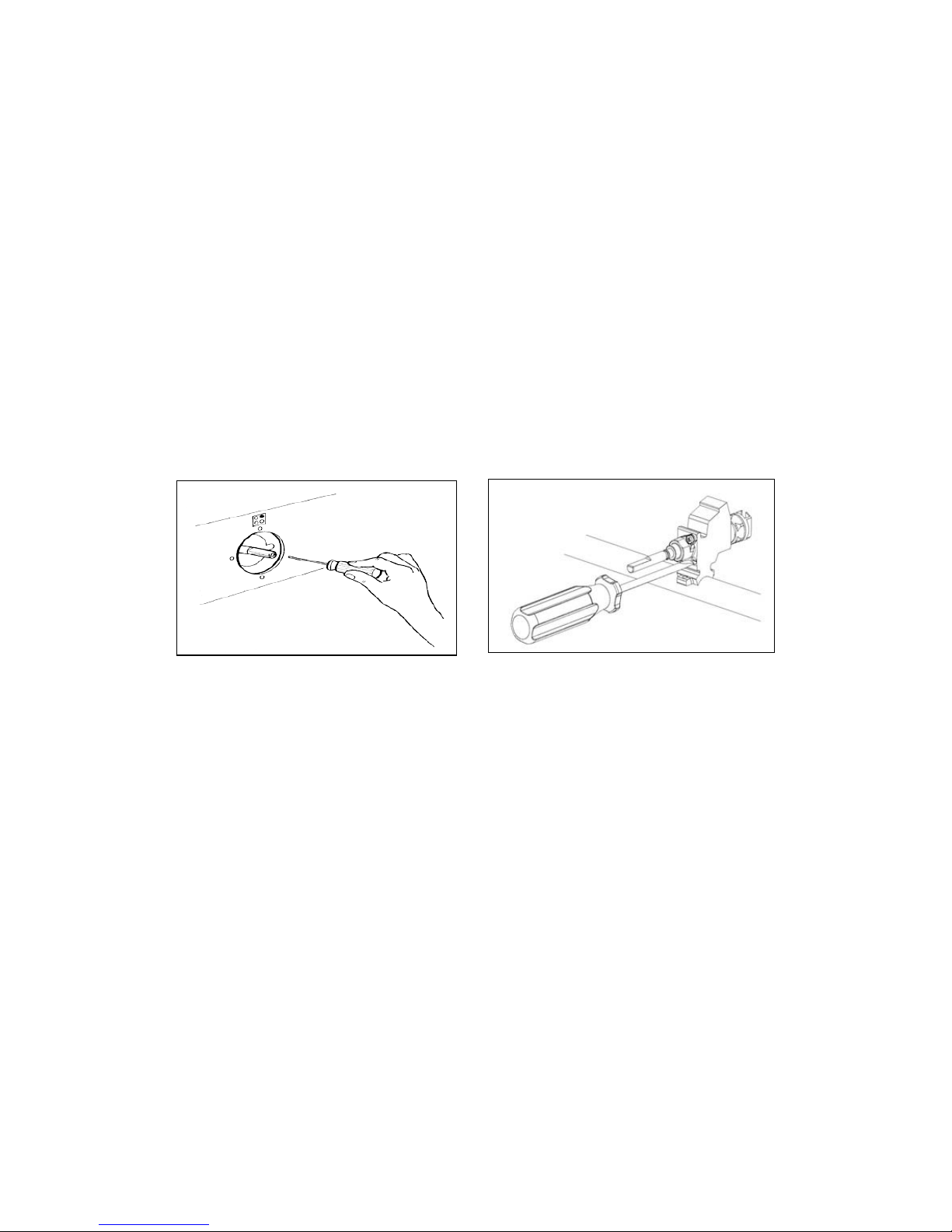
REPLACING THE NOZZLES TO OPERATE WITH ANOTHER TYPE OF GAS
BURNER ADJUSTMENT
Follow the instructions below to change the burner nozzles on the work surface:
1) Pull out the plug from the electric outlet to avoid any type of electric contact.
2) Remove the grids from the work surface (Fig. 7).
3) Remove the burners (Fig. 7).
Fig.7
4) Unscrew the nozzles using a 7 mm spanner, and replace them (Fig.8) with those needed
for the new type of gas according to what is indicated in Table 1
.
Fig. 8
Downloaded from www.ManualsFile.com manuals search engine
17
Burner "MINIMUM" adjustment:
Work surface burner adjustment: follow the instructions below to adjust the work surface burner
minimum:
1) Light the burner and set the knob to the MINIMUM position (small flame).
2) Remove the knob of the valve that is press fit on the rod of that valve.
3) If the cooker is not equipped with safety valves on the surface burners, insert a small slotted
screwdriver into the hole on the valve rod (Fig. 9) and turn the choke screw to the right or left until
the burner flame is adjusted to minimum. If the cooker is equipped with safety valves, the choke
valve is not located in the rod hole but on the valve body (Fig. 10).
4) Ensure that the flame does not go out when switching quickly from the MAXIMUM to the
MINIMUM position.
Fig. 9 Fig. 10
Downloaded from www.ManualsFile.com manuals search engine
18
APPLIANCE ELECTRICAL CONNECTION
The electric connection must comply with the current legal standards and regulations.
Before making the connection, check that:
• The system electrical rating and the current outlets are adequate for the
maximum power output of the appliance (see the label applied to the bottom of
the casing).
• The outlet or the system is equipped with an efficient ground connection in
accordance with the current legal standards and regulations. The manufacturer
will not be responsible for the non-compliance with these instructions.
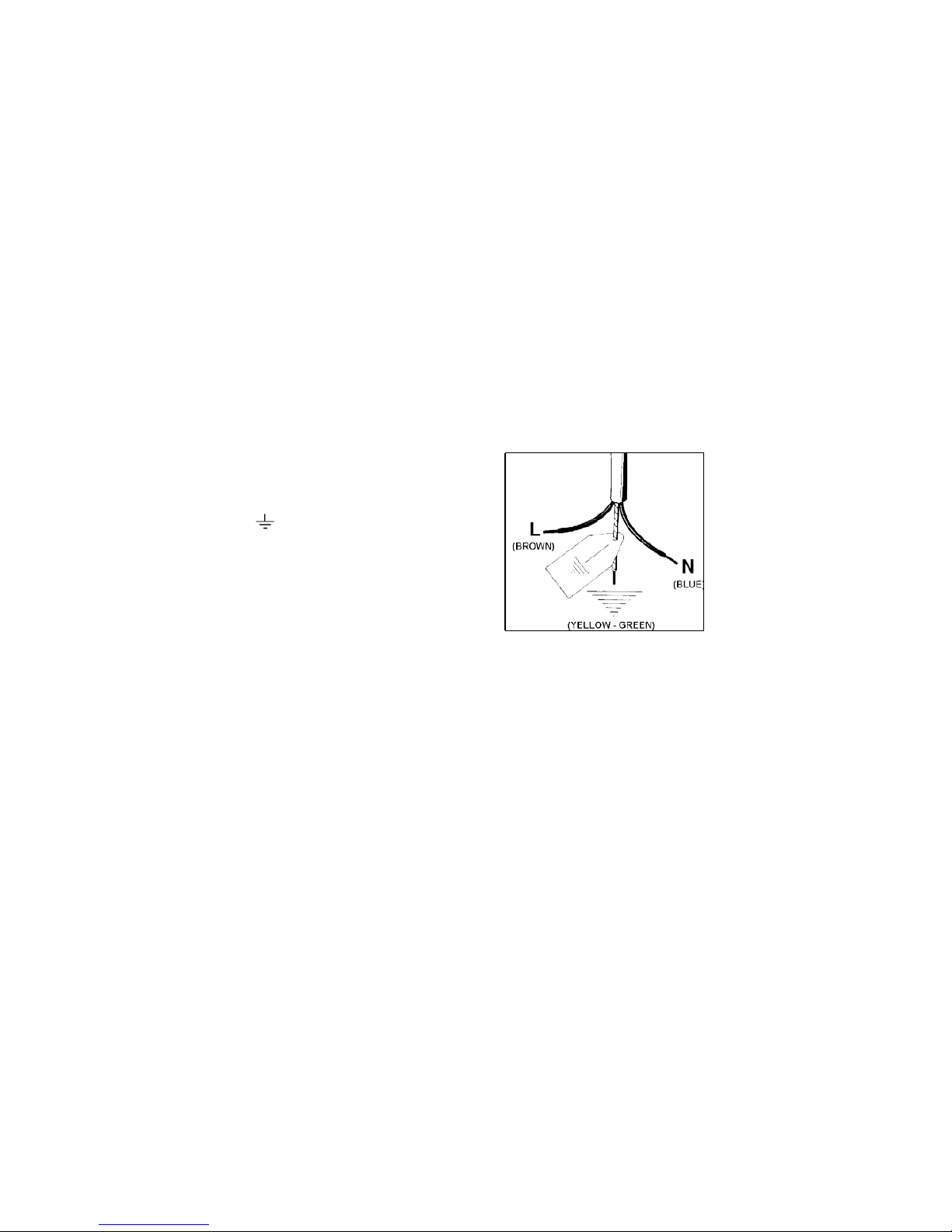
Letter L (phase) = brown wire;
Letter N (neutral) = blue wire;
Ground symbol
= green-yellow wire;
Fig. 11
• The power cord must be positioned so that a temperature of 75°C will not be reached at any
point.
• Do not use reductions, adapters or splitters since they might cause false contacts and
lead to dangerous overheating.
When the connection is made directly to the electric network:
• Use a device that ensures disconnection from the mains in which the contacts are
opened to a distance that permits complete disconnection according to the conditions for
over-voltage category III.
• Remember that the ground wire must not be interrupted by the circuit-breaker.
• As an alternative, the electric connection can also be protected by a high-sensitivity
residual current circuit- breaker but this may be subject to nuisance tripping due to
residual humidity in heating elements.
• It is highly recommended to attach the special green-yellow ground wire to an efficient
ground system.
WARNING: If the power cord is replaced, the ground wire (yellow-green) connected to the
terminal, should be longer than the other wires by about 2 cm.
WARNING: If the supply cord is damaged, it must be replaced by the
manufacturer
or
its service agent or a similarly qualified person in order to avoid
a hazard.
Downloaded from www.ManualsFile.com manuals search engine
19
TABLE NO. 2: TYPES OF POWER CORDS
Work
surface
Oper
at-
ion
Ove
n
oper
a-
tion
Cross section
230V ~
230V 3~
400V 2N~
400V 3N~
Only gas burner
Gas oven / Gas grill
3 x 0.75mm²
-
-
-
Gas oven / Electric grill
3 x 1mm²
-
-
-
Electric Oven
3 x1mm² (MH)
3x1,5mm² (MX M9)
-
-
-
Ventilated Electric Oven
3 x 1,5mm²
-
-
-
Gas burner
+ 1 hot
plate
Gas oven / Gas grill
3 x 1mm²
-
-
-
Gas oven / Electric grill
3 x1,5mm² (MH)
3x2,5mm² (MX /M9)
-
-
-
Electric Oven
3x1,5mm² (MH)
3x2,5mm² (MX /M9)
-
-
-
Ventilated Electric Oven
3x2,5mm²
-
-
-
Gas burner + 2 hot
plate
Electric Oven
3x2,5mm²
4x1,5mm²
4x1,5mm²
5x1,5mm²
Ventilated Electric Oven
3x2,5mm²
4x1,5mm²
4x1,5mm²
5x1,5mm²
4 hot plate
Electric Oven
3x2,5mm²
4x1,5mm²
4x1,5mm²
5x1,5mm²
Ventilated Electric Oven
3x2,5mm²
4x1,5mm²
4x1,5mm²
5x1,5mm²
Ceran
Electric Oven
3x2,5mm²
4x1,5mm²
4x1,5mm²
5x1,5mm²
Ventilated Electric Oven
3x4mm²
4x1,5mm²
4x1,5mm²
5x1,5mm²
ATTENTION: The appliance conforms with the regulations AS4551 regarding gas
appliances for domestic use and AS/NZS 60335.2.6 regarding electrical safety and
CISPR14 regarding electromagnetic compatibility.
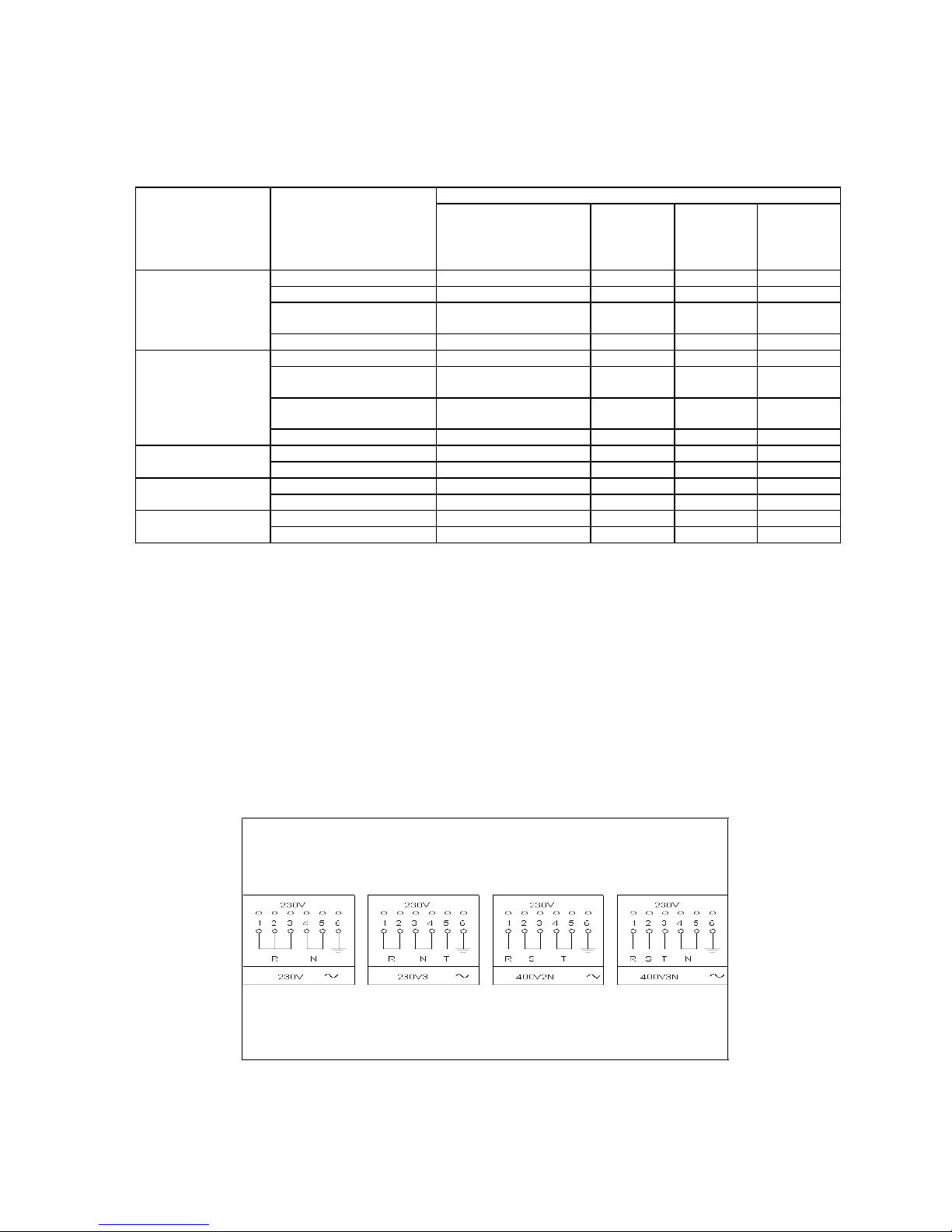
THREE-PHASE ELECTRIC CONNECTION
The cookers can also be connected to three-phase systems but normally are factory built for the
single-phase 230V connection, and are supplied with a power cord. Based on the connection system
used, install the power cord type indicated in table No.2.
To use the selected connection system change the jumpers on the terminal strip as indicated in the
diagram below. (Fig.12)
Fig. 12
Downloaded from www.ManualsFile.com manuals search engine

20
APPLIANCE MAINTENANCE
ATTENTION: IMPORTANT WARNINGS
• For cookers resting on a base
ATTENTION: If the cooker rests on a base, take the measures necessary to prevent
the cooker from sliding along the support base.
• For cookers with electric ovens
ATTENTION: The unit becomes hot during use. Do not touch the heating elements
inside the oven.
• For cookers with electric ovens
ATTENTION: The accessible parts can become hot during use. Keep children away
from the appliance.
• For the food warmer compartment (or drop leaf in our case)
ATTENTION: The internal parts of the food warmer can become hot during use.
• For glass doors
ATTENTION: Do not use harsh abrasive cleaning products or metal spatulas with
sharp edges to clean the oven door’s glass since this could scratch the surface and the
glass could break.
WARNING: Do not use steam cleaners to clean the appliance.
WARNING: DO NOT MODIFY THIS APPLIANCE
Downloaded from www.ManualsFile.com manuals search engine
21
REPLACING PARTS
Before performing any maintenance operations, disconnect the appliance from the gas supply
and electricity network.
To replace parts such as knobs and burners, just remove them from the seats without
disassembling any part of the cooker.
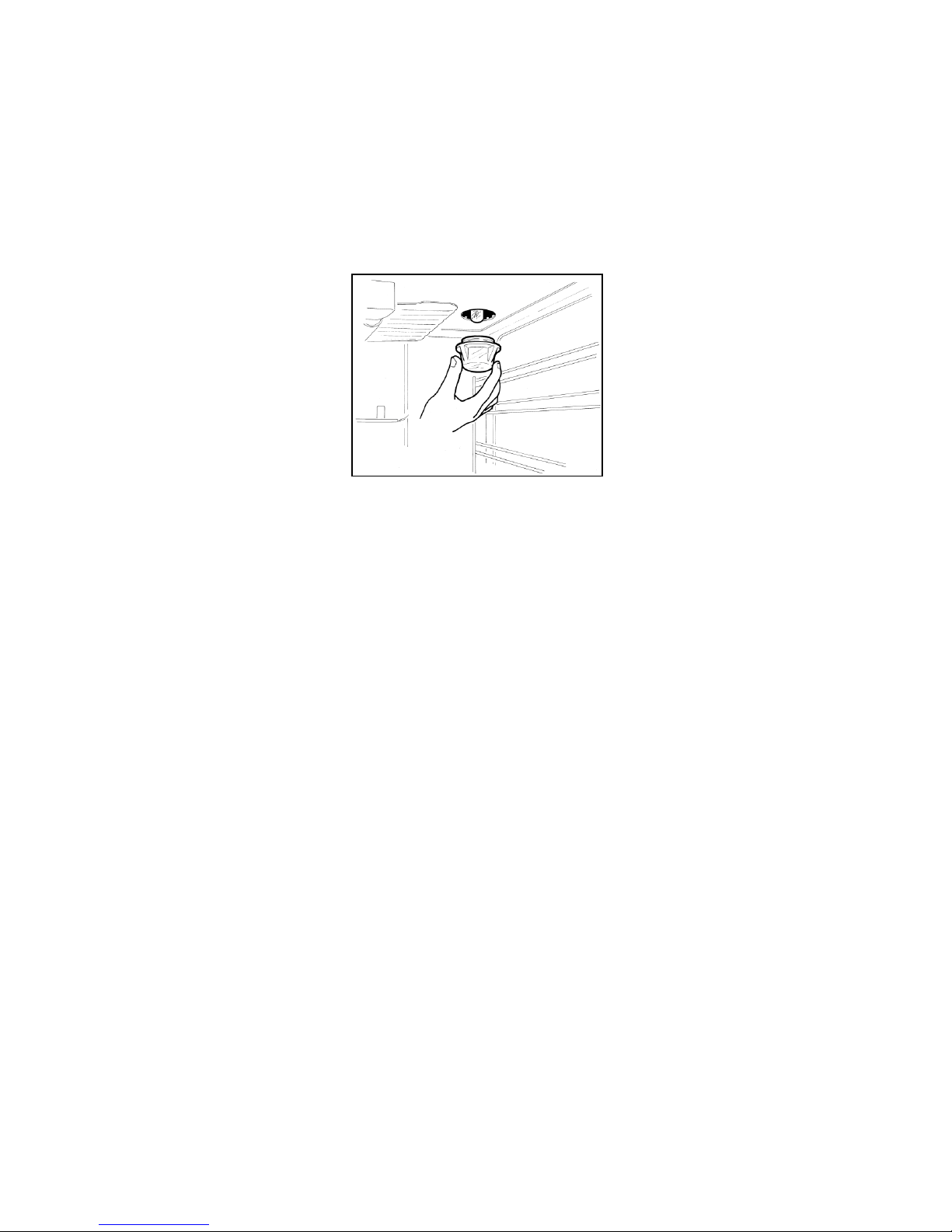
To replace the oven bulb, just unscrew the protection cap that projects out inside
the oven. (Fig.13)
Fig. 13
WARNING: Before replacing the bulb, disconnect the appliance from the electric
power supply.
WARNING: The power cord supplied with the appliance is connected to the appliance with an
X type connection (in compliance with standards AS/NZS 60335-1, AS/NZS 60335-2-6 and
subsequent amendments) for which it can be installed without the use of special tools, with
the same type of cord as the one installed.
If the power cord becomes worn or damaged, replace it based on the
information reported in table 2.
WARNING: If the power cord is replaced, the installer shall ensure that the ground cable is
longer than the phase cables and also should comply with the warnings regarding the electric
connection.
Downloaded from www.ManualsFile.com manuals search engine
22
USE AND MAINTENANCE INFORMATION
GAS BURNER INFORMATION
DIMENSIONS
Burner
Dimension (mm)
Auxiliary
Ø 50
Semi-rapid
Ø 70
Rapid
Ø 95
Wok
55x230
CONTROL PANEL DESCRIPTION
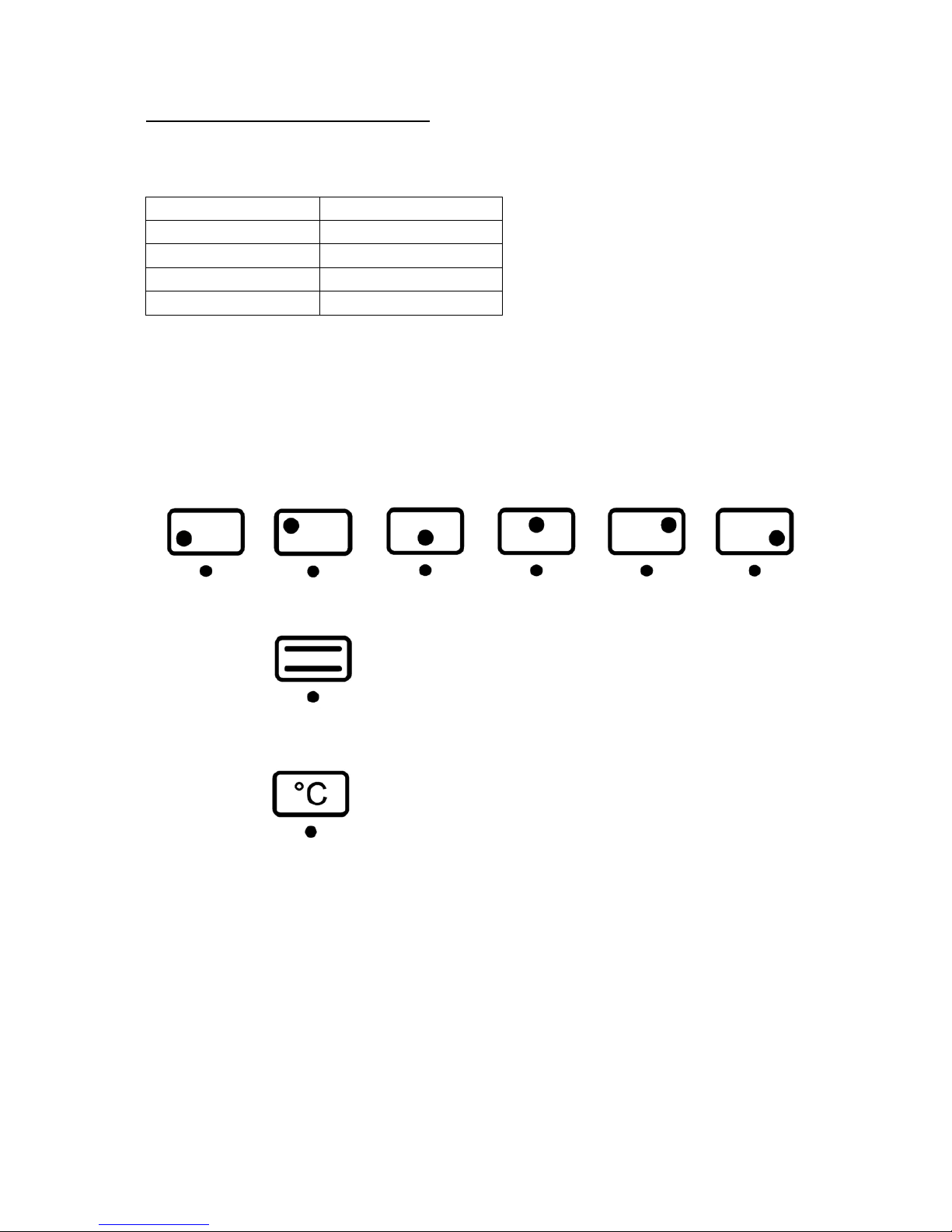
On the control panel, small symbols show the function of each knob or key. Please note that the
below control panel drawings are similar to what is placed on your product and that they
may not be identical. The operation and below meaning is sufficient to work with and
understand your freestanding cooker.
Here are the several controls that a cooker can have:
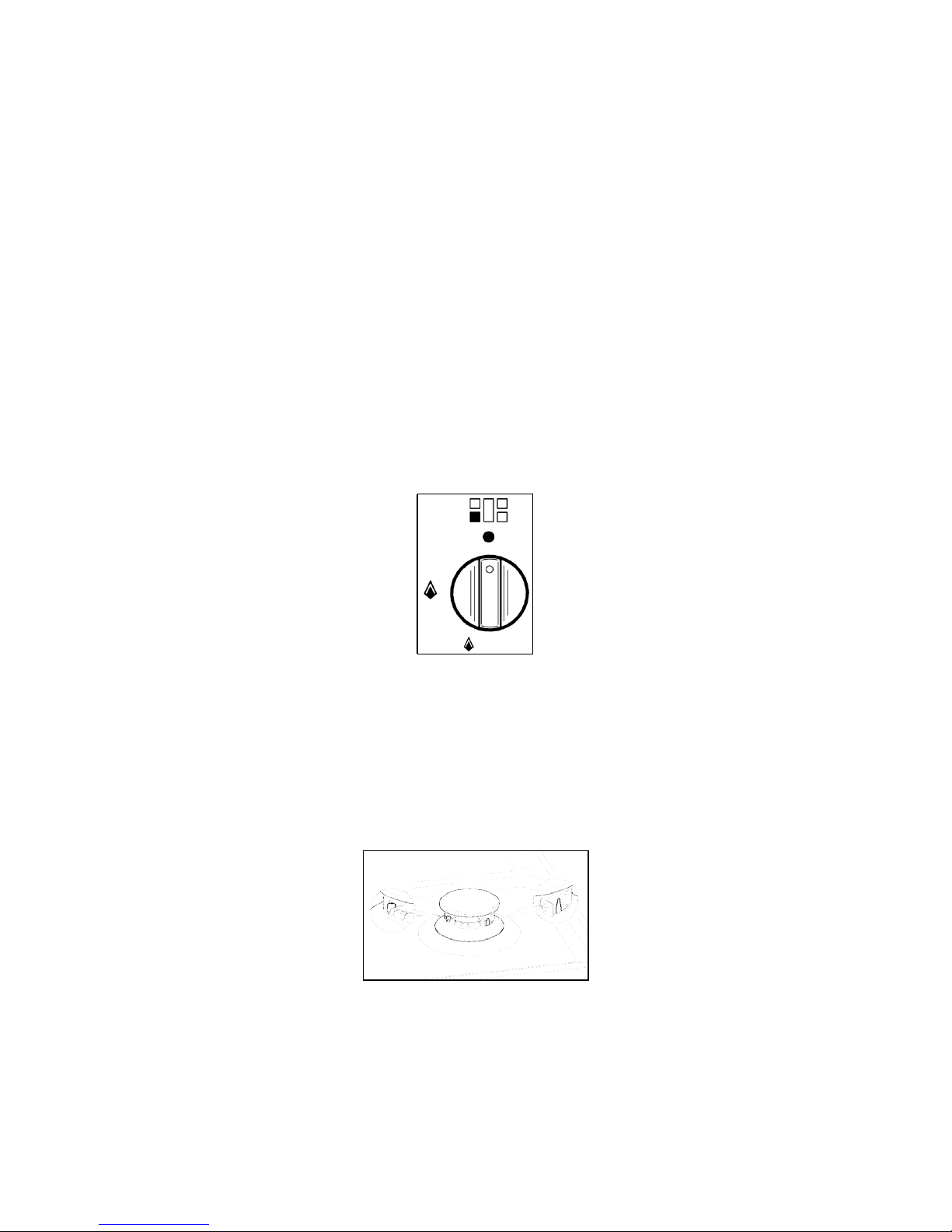
Shows the position of burners on the worktop, the full dot identifies the burner in object.
Shows the running of any oven (Conventional static oven, 9 position switch).
Shows the electric thermostat for the electric fan oven.
WARNING: If the power is cut off, the burners can be lit with matches. When cooking
foods with oil and fat, which are very flammable, the user should not leave the appliance
unattended. Do not use sprays near the appliance when it is being used. When using the
burners, make sure that the handles of the pots are correctly positioned. Keep children
away from the appliance.
NOTE: The use of a gas cooking appliance produces heat and humidity in the room
where it is installed. Therefore, proper aeration in the room is needed while ensuring that
natural ventilation openings remain unobstructed (Fig.3) and activating the mechanical
Downloaded from www.ManualsFile.com manuals search engine
23
aeration device/exhaust hood or electric fan (Fig. 4 and Fig.5). Intensive and continuous
use of the appliance may require additional aeration, for example by opening a window, or
more efficient aeration by increasing the power of the mechanical exhauster, if installed.
USING BURNERS
A diagram is etched on the control panel above each knob which indicates which burner
corresponds to that knob. The burners can be ignited in different ways depending on the type of
appliance and its specific characteristics.
• Manual lighting (it is always possible even when the power is cut off): Turn the
knob anticlockwise that corresponds to the burner selected, setting it to the
MAXIMUM position at the etched star (large flame Fig.14) and hold a lit match to
the burner.
• Electric ignition: Turn the knob counterclockwise that corresponds to the burner
selected, setting it to the MAXIMUM position (large flame Fig.14) and keep on
pressing the knob in correspondence with the ignition symbol marked with a star (for
cookers equipped with ignition through knob) or press the ignition button
marked with a
star and release it as soon as the burner has ignited.
Fig. 14
• Burner ignition equipped with safety device (thermocouple) (Fig. 15):
Turn the knob anticlockwise that corresponds to the burner selected, setting it to the
MAXIMUM position at the etched star (large flame) Press the knob and activate one of
the above-mentioned ignition devices. Once ignited, keep pressing the knob for about
10 seconds to allow the flame to heat the thermocouple. If the burner goes out after
releasing the knob, repeat the entire operation.
Note: It is recommended not to try to ignite a burner if the relative flame cap is not in the
correct position.
Fig. 15
Downloaded from www.ManualsFile.com manuals search engine
24
Dual Control Wok Burner
The centre burner of the dual wok burner can be used independently of the outer burner to give
further flexibility as follows:
- To light the central burner, press in the control knob and turn it anti-clockwise to bold single
ring position.
- Continue to hold the knob in until the burner lights. Adjust the flame as required. The minimum
setting is the lighter single ring position.
- To light the outer burner as well as the central burner, turn the knob to the bold double ring.
Adjust the flame as required. The minimum setting for the central and outer burner is the
lighter double ring position.
Tips for using burners correctly:
•
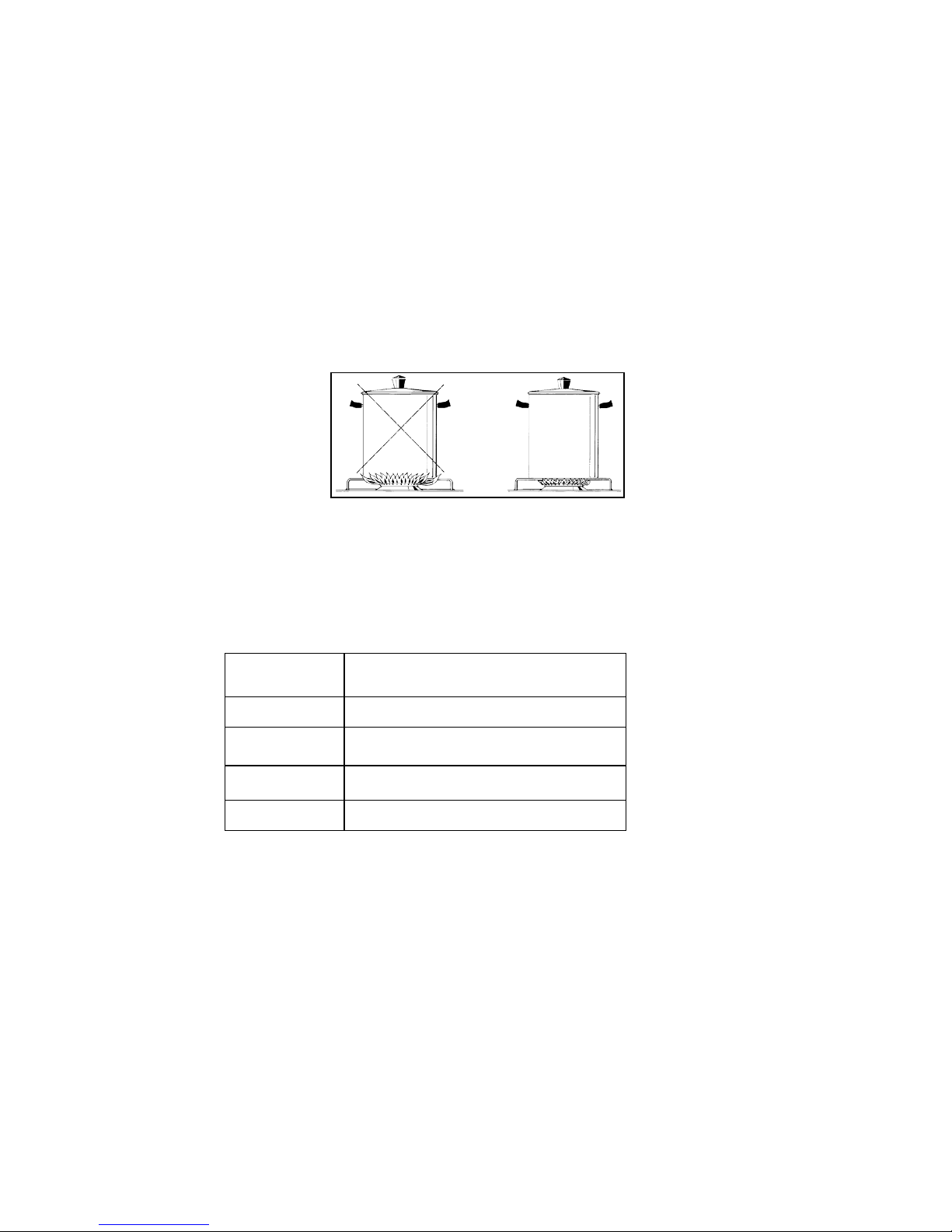
Use suitable pots for each burner (see tab. 3 and Fig. 16).
Fig. 16
• When the liquid is boiling, turn the knob to the MINIMUM position (small flame)
• Always use pots with a cover.
TABLE NO. 3
BURNER
PAN DIAMETER recommended
(cm)
Auxiliary
12 - 14
Semi-rapid
14-26
Rapid
18-26
Wok
22-26
ATTENTION: Use pots with a flat bottom (this does not apply to the wok burner)
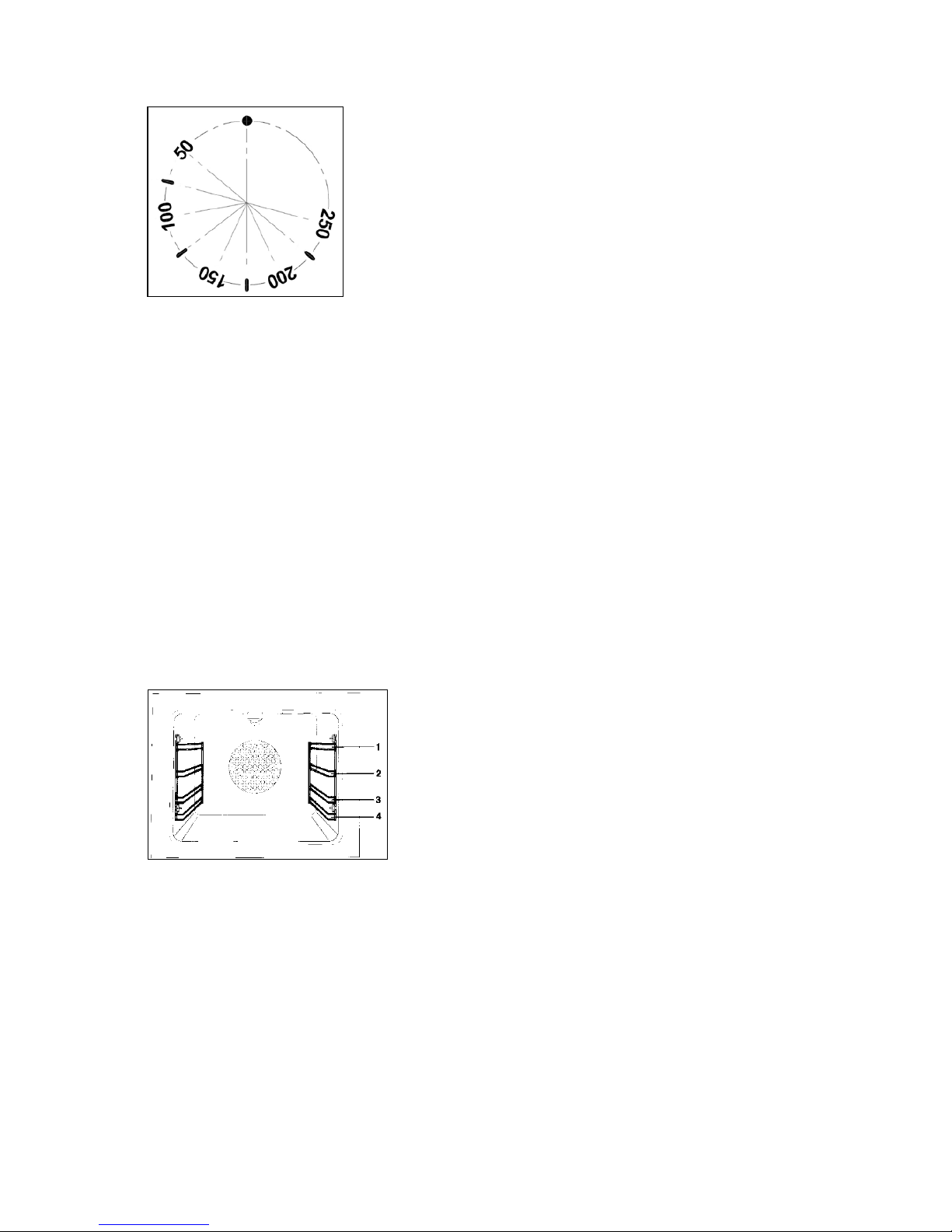
USING THE ELECTRIC THERMOSTAT
The thermostat supplied with the relative models maintains a constant temperature inside the oven at
a specific temperature setting ranging from 50°C to 250°C. Please see below image to explain its
working.
Downloaded from www.ManualsFile.com manuals search engine
25
Turn the knob clockwise and align the selected temperature indicated on the ring with the index
etched on the control panel. Thermostat operation is indicated by an orange light which will turn off
when the temperature inside the oven is 10°C greater than the temperature setting, and will turn on
when the oven is 10°C less than the temperature setting. The thermostat can control the oven
elements only if the relative switch is in one of the possible oven element operating modes: if the
switch is in position 0, the thermostat has not effect on the oven elements, which remain off.
USING THE OVEN FUNCTION KNOB
OVEN FUNCTIONS
Please note that the below images may be different to what is supplied on your freestanding
cooker model. However the explanation on how it functions is correct.
This oven has 11 functions as you will see explained below.
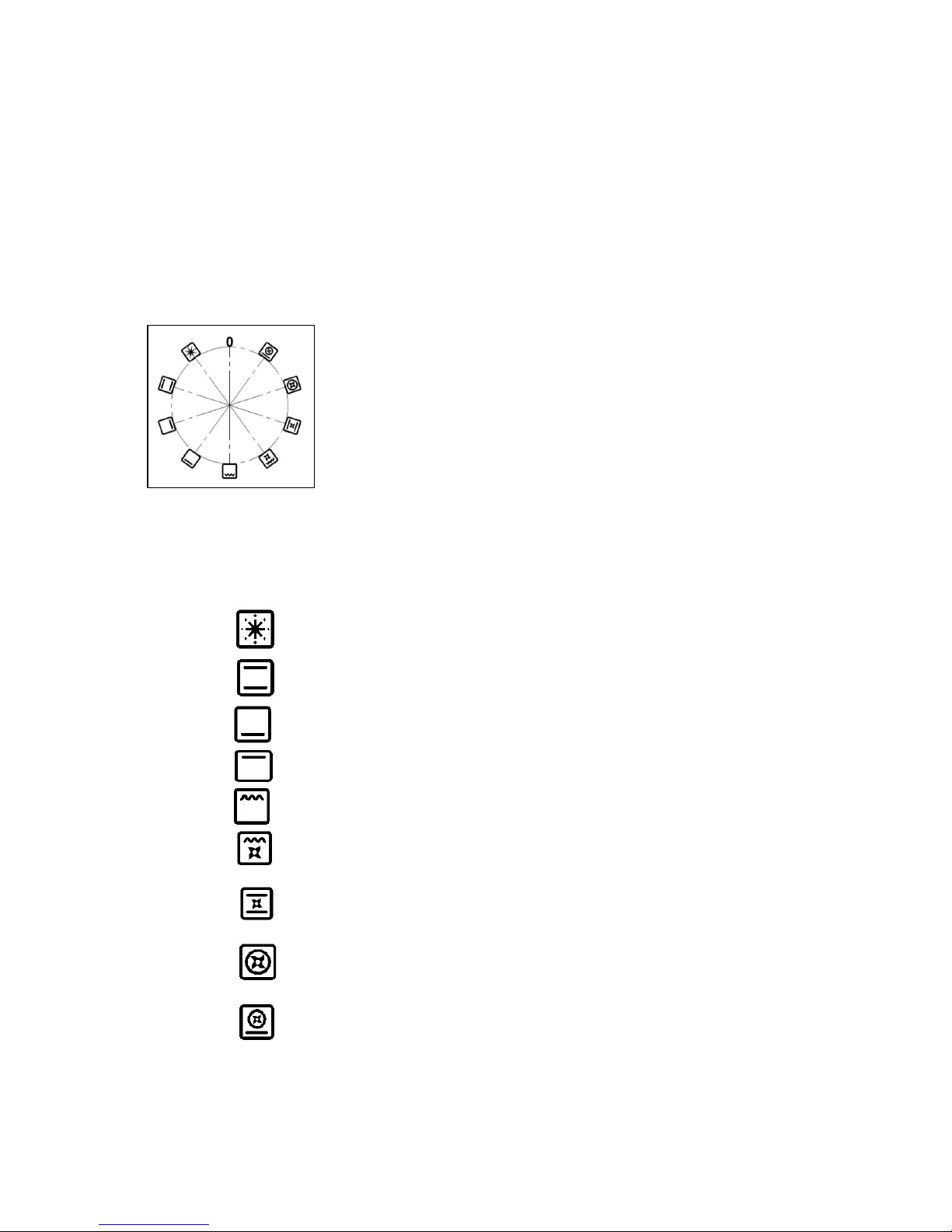
There are 4 levels in this oven as per the below diagram. (Fig. 17)
Fig. 17
Also there are 2 partially extendable telescopic runners in this model whereby they can be easily
glided out for safe use. These extendable racks are not evident in the above picture. Please see
your cooker.
The knob on the cooker has 9 functions on it as you can see below (Fig. 18). The ‘9 switch’ installed
in the multifunction oven models is used, along with the thermostat, to control the electric fan and the
oven elements since they can be turned on by turning the ‘9 switch’ knob and the thermostat knob.
Turning just one of the two knobs will not have any effect on the oven except to turn on the oven light
or the electric fan when inserted. The electric oven is heated by 4 elements: one on the bottom, two
on the top, one circular; turning the switch knob turns on the element relative to the symbol indicated
Downloaded from www.ManualsFile.com manuals search engine
26
on the ring but to be activated the thermostat knob must be turned until the orange light turns on
indicating that the element has been turned on. Placing the switch knob on any of the nine operating
modes turns on the oven light, together with the relative element. Once the temperature and the
elements to be used have been set, the oven elements are turned on and off by the thermostat;
therefore, it is normal for the orange light to turn on and off while the oven is working.
To turn off the electric oven set the switch knob to position 0 to prevent the thermostat from controlling
the elements. Setting the thermostat knob to position 0 turns off the elements but it is still possible,
using the switch, to turn on the electric fan and the oven light.
Fig. 18
The switch has 9 different fixed positions corresponding to 9 different types of oven operation:
- the symbol indicates that all the elements and fan have been turned on (pre-heating);
- the symbol indicates the top and bottom elements have been turned on( traditional);
- the symbol indicates that only the bottom element has been turned on;
- the symbol indicates that only the top element have been turned on;
- the symbol indicates that only the grill element has been turned on;
- the symbol indicates that the top external element, the grill element and the electric fan
have been turned on ( fan grill);
- the symbol indicates that the top and bottom elements and the electric fan have been
turned on(fan assisted);
- the symbol indicates that the circular element and the electric fan have been turned on(
fan forced/ convection);
- the symbol indicates that the bottom element, the circular element and the electric fan
have been turned on (pizza function/ fan forced with bottom element)
Downloaded from www.ManualsFile.com manuals search engine

27
When the knob is set to one of these nine positions, the oven light is always on, thus indicating that
the oven is being energised.
There are also 2 other functions present in these models which do not have an icon but which can be
activated as follows:
• Oven Light only: choose a function with the knob, without activating the thermostat.
• Defrost: choose the ‘convection’ function with the knob, without activating the thermostat.
USING THE PRE HEATING FUNCTION
Pre heating function allow one to reach the preset oven temperature as quickly as possible.
Once it reaches the set temperature, the orange light will go out, select the type of cooking through
the switch functions and place the food in to cook.
Note: the preheating function should not be used for cooking but just to preheat the oven.
USING THE PIZZA FUNCTION (FAN FORCED WITH BOTTOM ELEMENT)
When using the oven for the first time it should be operated for a maximum of 30 minutes at a
temperature of about 250°C to eliminate any odours generated by the internal insulation.
Before you start cooking, preheat the oven. After preheating, set the Pizza function, this function
ensures homogeneous cooking. Ideal not only for pizzas but also for biscuits and cakes
For cooking the pizza it is recommended that you set the thermostat at the maximum and place the
baking try or the grid in positions 3 or 4.
USING THE TRADITIONAL ELEMENT (TOP AND BOTOM ELEMENT)
When using the oven for the first time it should be operated for a maximum of 30 minutes at a
temperature of about 250°C to eliminate any odours generated by the internal insulation. During
normal oven use, select the desired cooking temperature using the thermostat knob and wait until the
orange light turns off before putting in any food. The oven is equipped with 4 guides at different
heights which can be used to insert shelves or the tray. To keep the oven as clean as possible it is
recommended to cook meat on the tray or on the shelf that has been inserted inside the tray. Table
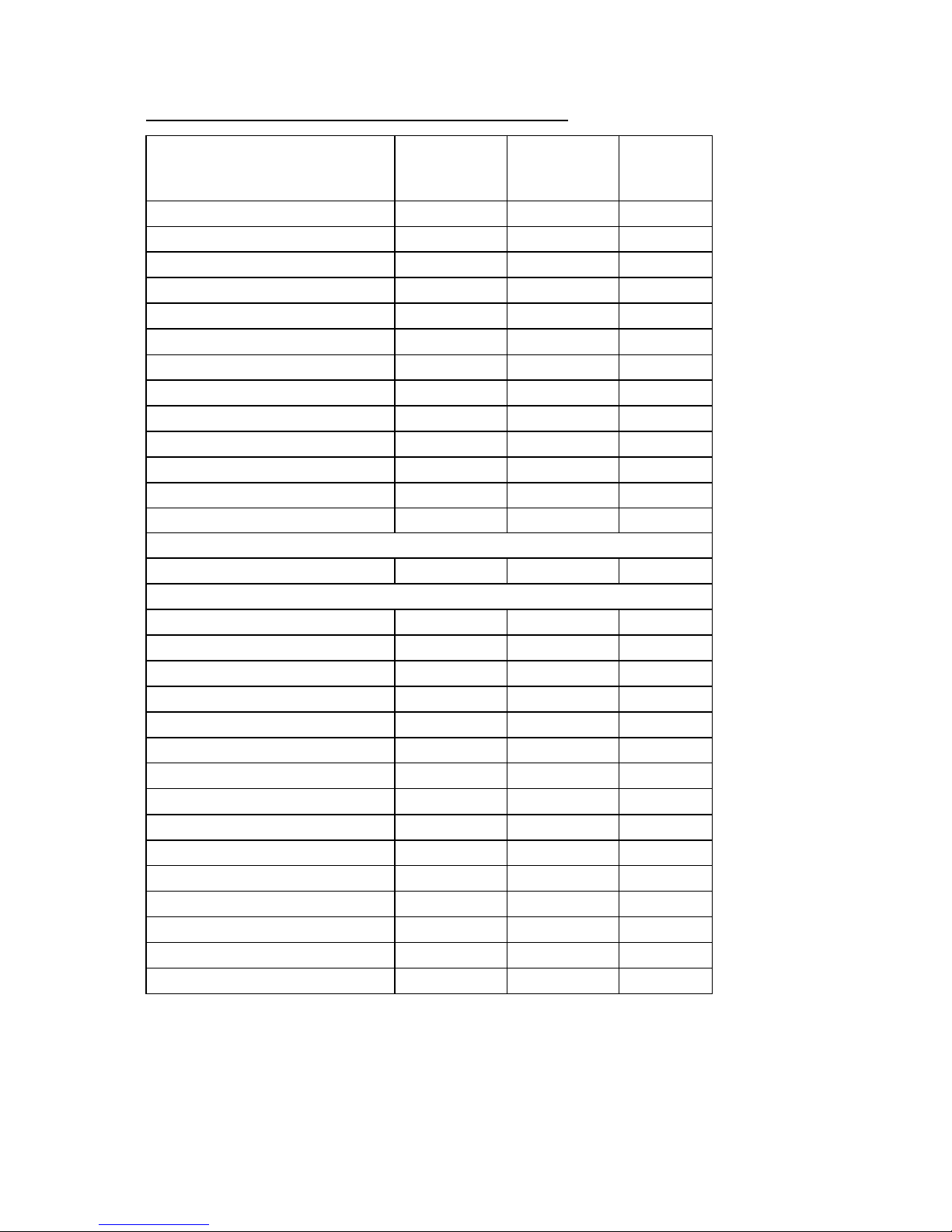
No. 4 below lists the cooking times and the position of the tray for different types of foods. Personal
experience will help to determine any variations in the values reported in the table. In any case, the
below table is only a guideline to assist you with your cooking.
Downloaded from www.ManualsFile.com manuals search engine
28
TABLE NO. 4: TRADITIONAL FUNCTION - COOKING TABLE
Temp ‘C
Height
– shelf
level
MINUTES
MEAT
PORK ROAST
225
4/5
60-80
BEEF ROAST (YOUNG STEER)
225
4/5
60-80
BEEF ROAST
250
4/5
50-60
VEAL ROAST
225
4/5
60-80
LAMB ROAST
225
4
40-50
ROAST BEEF
230
4/5
50-60
ROAST HARE
250
4/5
40-50
ROAST RABBIT
250
4
60-80
ROAST TURKEY
250
4
50-60
ROAST GOOSE
225
4
60-70
ROAST DUCK
250
4/5
45-60
ROAST CHICKEN
250
4/5
40-45
FISH
200-225
3
15-25
PASTRY
FRUIT PIE
225
3
35-40
TEA CAKE
175-200
3
50-55
BRIOCHES
175-200
3
25-30
SPONGE CAKE
220-250
3
20-30
RING CAKE
180-200
3
30-40
SWEET PUFF PASTRIES
200-220
3
15-20
RAISIN LOAF
250
3
25-35
STRUDEL
180
3
20-30
SAVOIA COOKIES
180-200
3
40-50
APPLE FRITTERS
200-220
3
15-20
SAZOIARDI SANDWICH
200-220
3
20-30
TOAST SANDWICH
250
4
5
BREAD
220
4
30
PIZZA
220
3
20
Downloaded from www.ManualsFile.com manuals search engine
29
USING THE FAN ASSISTED FUNCTION
When using the oven for the first time it should be operated for a maximum of 30 minutes at a
temperature of about 250°C to eliminate any odours generated by the internal insulation.
Before cooking, allow the oven to reach the desired temperature setting waiting for the orange light to
turn off. This type of oven is equipped with a fan that creates forced-air circulation in the horizontal
direction so that the heat generated by the top and bottom elements is uniformly distributed. Thanks
to this type of operation, the oven can be used for different types of cooking at the same time, without
changing the taste of each food.
Hot-air circulation guarantees a uniform distribution of heat. Pre-heating the oven is not necessary,
but for very delicate pastries, it is recommended to heat the oven before inserting the trays.
The system partially changes the various notions about traditional cooking. Meat no longer needs to
be turned while it is cooking and the rotisserie is no longer needed to cook a roast on the spit. Just put
the meat directly on the shelf.
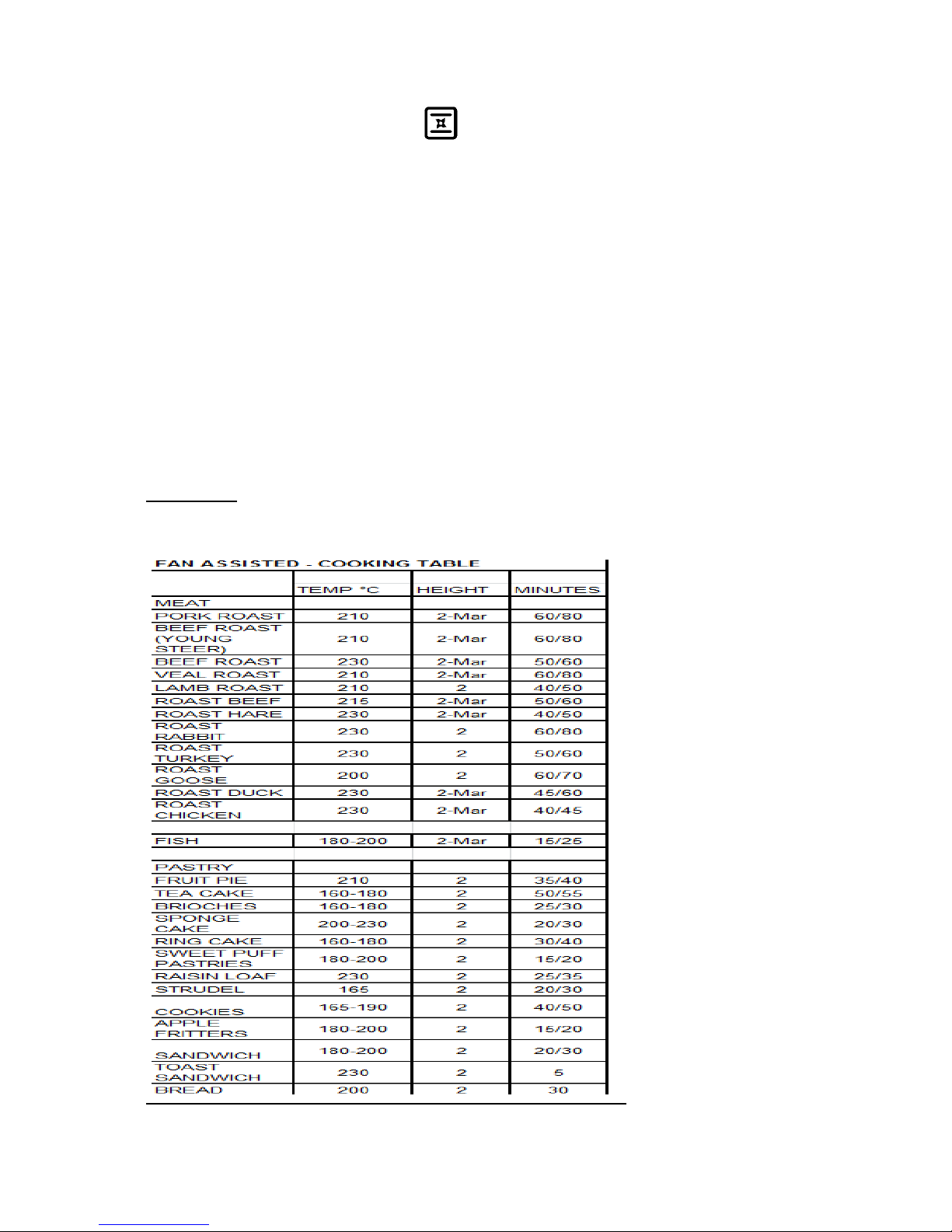
TABLE NO. 5
Please note that ‘Mar’ in the below table refers to the shelf level in the oven
Downloaded from www.ManualsFile.com manuals search engine
30
USING THE FAN FORCED FUNCTION
When using the oven for the first time it should be operated for a maximum of 30 minutes at a
temperature of about 250°C to eliminate any odours generated by the internal insulation.
Before cooking, allow the oven to reach the desired temperature setting waiting for the orange light to
turn off. This type of oven is equipped with a circular element around which a fan has been installed
that creates forced-air circulation in the horizontal direction. Thanks to this type of operation, the fan
forced oven can be used for different types of cooking at the same time, without changing the taste of
each food. Hot-air circulation guarantees a uniform distribution of heat. Pre-heating the oven is not
necessary, but for very delicate pastries, it is recommended to heat the oven before inserting the
trays.
The fan forced system partially changes the various notions about traditional cooking. Meat no longer
needs to be turned while it is cooking and the rotisserie is no longer needed to cook a roast on the
spit. Just put the meat directly on the shelf.
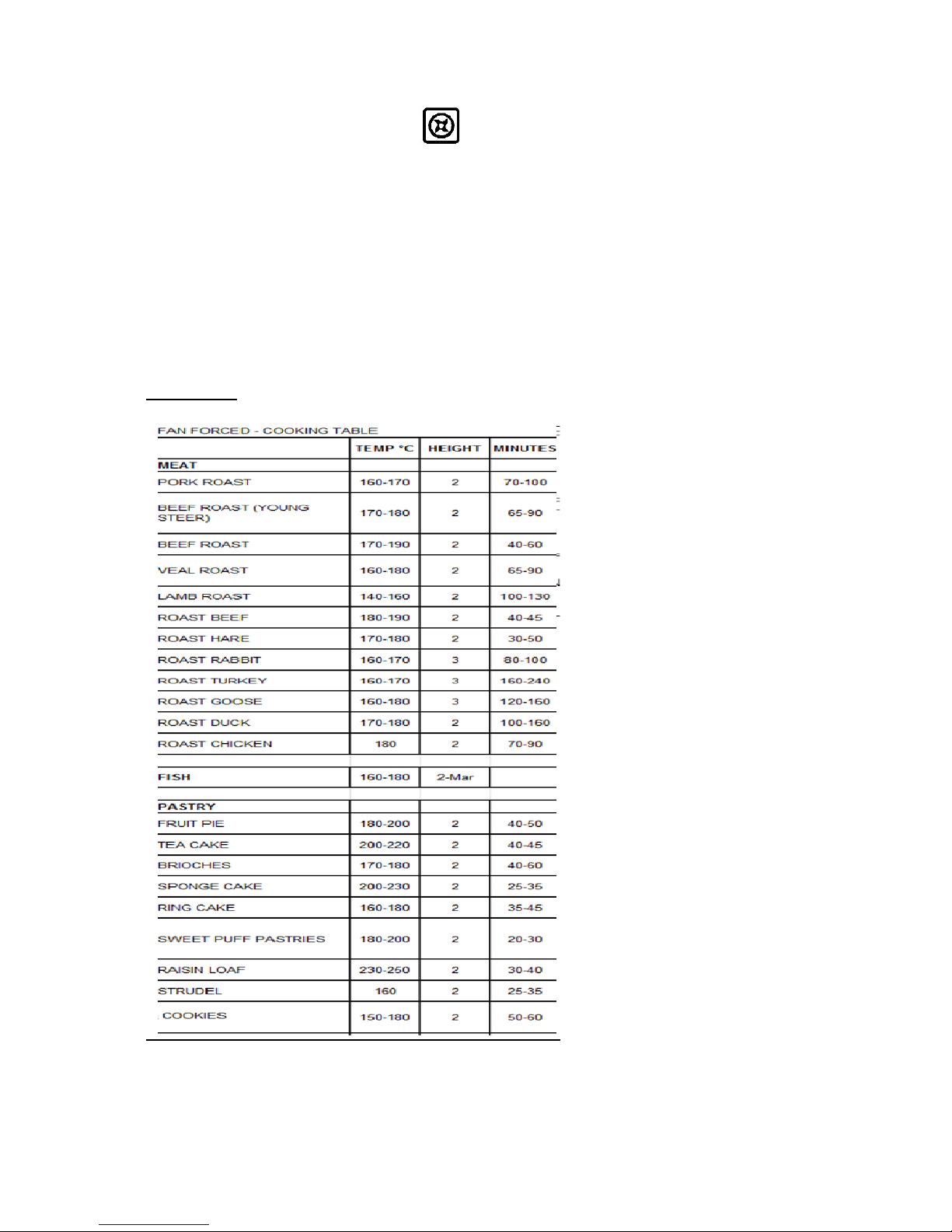
TABLE NO. 6
Downloaded from www.ManualsFile.com manuals search engine
31
USING THE GRILL FUNCTION
The grill is controlled using the oven’s temperature knob, so set switch knob to the relative grill
position. The electric grill can be used for grilling on the oven’s grill.
The static electric grill must be used with the door closed. The temperature set on the thermostat
(when present) must not exceed 150°C.
Grilling on the shelf: In this case, the shelf supplied is placed on level 1 or 2 and the foods to be grilled
are placed on top, while the tray is inserted on the lower levels to collect the cooking juices. Then turn
on the grill element switching the thermostat to the relative position (electric oven version).
WARNING: the accessible parts may become very hot while grilling. Keep children away from
the appliance while cooking.
USING THE FAN GRILL FUNCTION
The fan assisted electric grill is a special function equipped only on the multifunction oven. Set the
function knob switch to the relative position to activate the grill element and the electric fan. Generally,
to ensure excellent grilling, place the oven shelf in the middle position while the oven tray should be
inserted at the bottom.
IMPORTANT: When using the grill, set the thermostat knob no higher than 175 °C, which is
between the 150 °C and 200 °C setting, to avoid overheating the front of the appliance. In fact,
fan assisted grilling must be carried out with the door closed.
COOLING FAN OPERATION
The cooker is equipped with the cooling fan that starts operation each time a specific temperature of
cooker was reached and will stop when the temperature decreases. The fan circulates the air
between the control panel and the oven door and also allows the control panel and the oven door stay
at a warm temperature during the appliance operation in any condition.
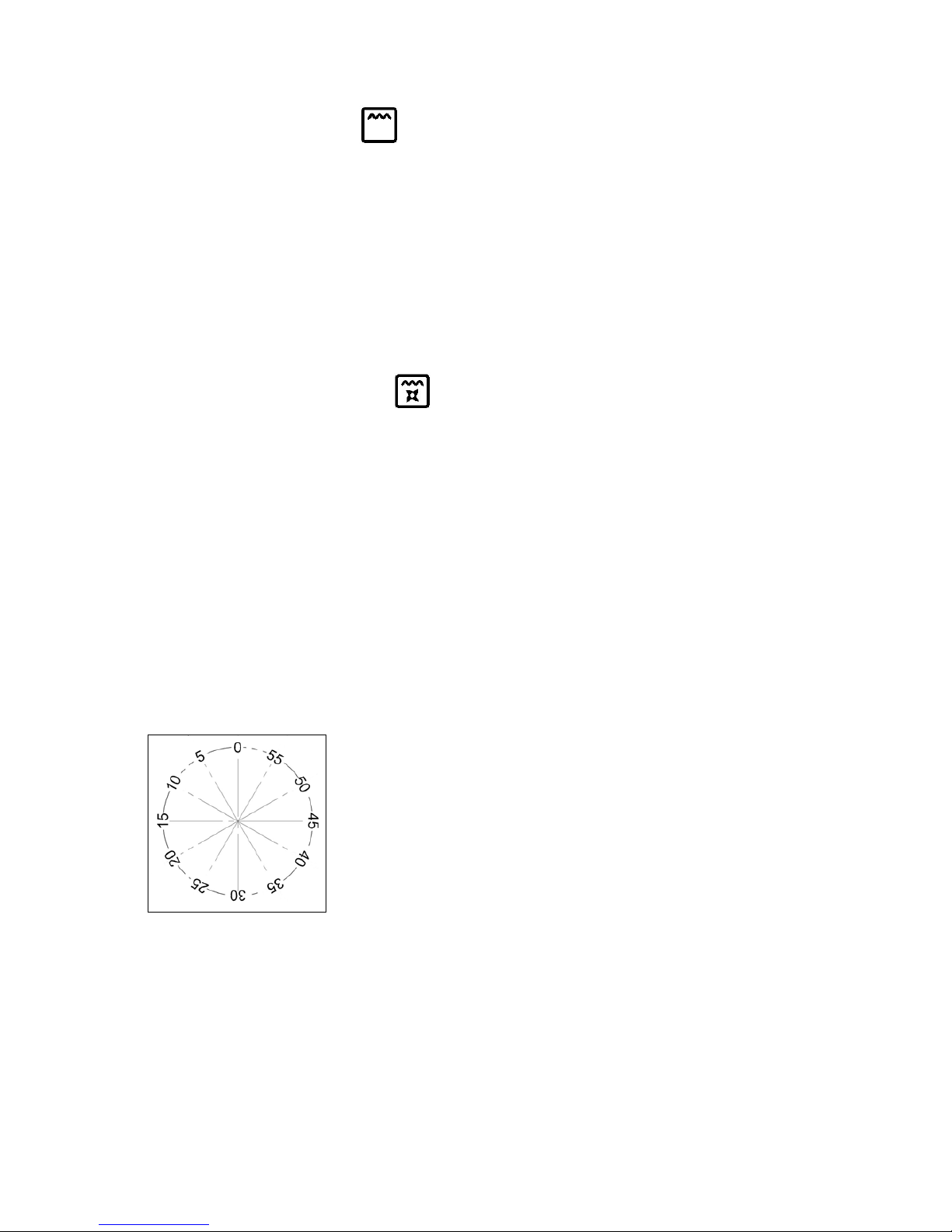
USING THE MINUTE-MINDER
The minute-minder advises the user, with an acoustic signal, when food has been cooked, after a
certain time period has elapsed. To use the device, wind the minute-minder by turning the knob
clockwise one complete turn. Then turn the knob counterclockwise so that the indicator corresponds
with the selected cooking time.
Downloaded from www.ManualsFile.com manuals search engine
32
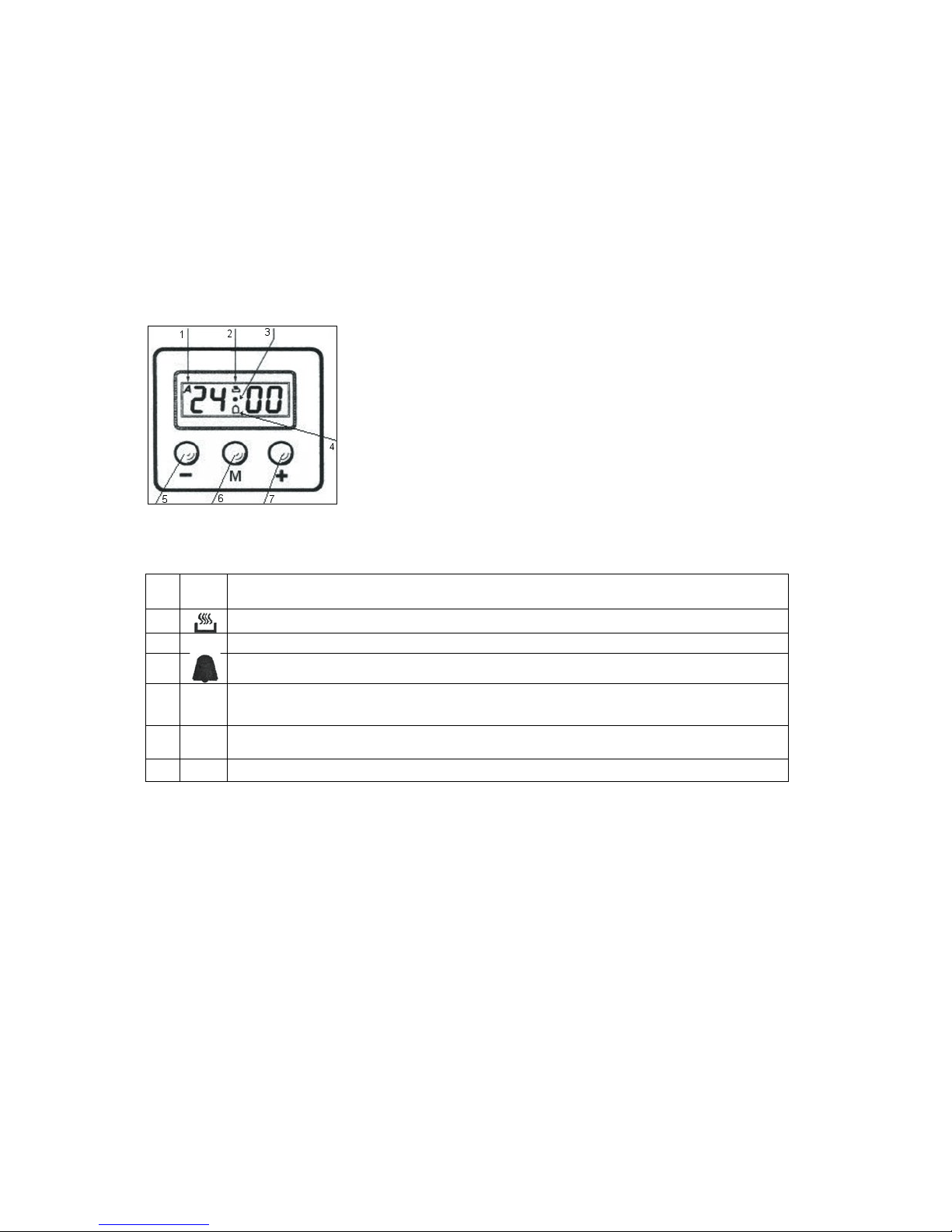
3 KEYS - ELECTRONIC PROGRAMMER
The first start up
The numbers and the A letter on the display are blinking when the oven is switched on for
the first time, or after a power cut: the appliance cannot be operated in this condition.
To set the hour and/or to enable the appliance to operate press the M key for at least 2
seconds: the A letter turns off and the numbers now are steady on the display.
The dot (3) starts blinking: press the - or
+
key to set the hour.
The hour is accepted by the programmer just a few seconds after having released the key.
N.B. the appliance can be correctly used for cooking only when you will see on the display
the symbol (2).
The symbols on the display:
1
A
*
Automatic programme is working.
(* in some models there is the writinq 'Auto' instead of A).
2
The appliance is ready for manual use (not automatic).
3
•
When blinking, the programmer is in setting hour mode.
4
Timer set.
5
-
Decreasing numbers when setting the timer.
Also for choosing your desired sound level ( 3 levels available).
6
M
"Mode" key to access the programming options of the programme.
7
+
Increasing numbers when setting the timer.
Timer
The purpose of the timer is a sound signal, which can be set for a max time of 23h59min.
once elapsed the set time, the (4) symbol turns off and a sound signal is heard; this sound
set off automatically in 7min, or you can stop it by pressing any key of the programmer. To
set the timer press the M key for 2 seconds, or to see the (4) symbol blinking. Set the timer
by using the
+
or - keys. Release the
+
or - key when you have matched your desired time. In
a few seconds the current time appears on the display together with the
(4)
symbol. The
countdown starts immediately from now on.
Semi-automatic cooking
Cooking time: Once having selected a cooking function and set the desired temperature,
press the M key for a 2 seconds time to access the programming mode. The (4) symbol
appears. Release and press again the M key. On the display, the A symbol starts blinking
and the " dur " writing appears on the display, then it changes to O' 00. Set the cooking time
with the - or
+
keys. (max available time: 10h). The selected time is automatically processed
Downloaded from www.ManualsFile.com manuals search engine

33
by the programmer in a few seconds, or you can also touch the M key many times just to see
again the current time.
The A and (2) symbols will be on the display. Once the set cooking time is finished, a sound
will be heard and the oven automatically switches off. Please see the following paragraphs
about how to disable the sound alarm and restarting the oven.
End of cooking
Once having selected a cooking function and set the desired temperature, touch the M key to
access the programming mode for at least 2 sec. the (4) symbol switches on. Release and
touch again the M key.
On the display the A symbol starts blinking and the writing "dur" appears. Touch again the M
key. On the display the writing "End" appears. The last one changes few seconds after with
the symbol 0· 00.
Set the end of cooking time with the keys - or
+.
(maximum available time: 10hOOm).
The selected time is automatically processed by the programmer in a few seconds, or you
can also touch the M key many times just to see again the current time.
The cooking immediately starts, while on the programmer display the current time is shown
again in a few seconds.
The A and (2) symbols will be on the display.
Once the set end of cooking time is finished, a sound will be heard and the oven
automatically switches off. Please see the following paragraphs about how to disable the
sound alarm and restarting the oven.
Automatic cooking
Set a cooking time following the instructions on the cooking time paragraph, then set the end
of cooking time following the instructions on the previous paragraph. (Max available end of
cooking time 10h). The oven automatically switches on at a determined time which is the
difference between the end of cooking time and the cooking time.
During the waiting time before cooking, which goes from the oven start to the heating, on the
display appears the A symbol to show that an automatic program is on and the current time.
The oven on is marked by the (2) symbol. Once the set end of cooking time is
finished, a
sound will be heard and the oven automatically switches off.
Please see the following paragraphs about how to disable the alarm and restarting the oven.
How to disable the sound alarm: To disable the sound just touch one of the keys.
Operating again the
oven
Once a semi-automatic or automatic cooking has expired, on the display appear the current
time and the blinking A symbol. In this condition, the heating elements and the light bulb of
the oven are disabled. To enable again the oven, just touch and keep the M key up to see the
symbol (2) on the display and the A symbol disappears.
Downloaded from www.ManualsFile.com manuals search engine

34
OTHER FUNCTIONS
How to delete a cooking time
(Semi-automatic or Automatic)
To delete a semi-automatic or automatic cooking program, with the A symbol on, touch
together the - and
+
keys for at least 2 seconds or anyway up to see the (2) and the disabling
of A symbol.
How to delete the countdown timer
To delete the counting of the timer, which symbol is (4)
touch the M key for at least 2
seconds or anyway up to see the (4 ) symbol blinking. Touch together the - and
+
keys.
Checking the function settings
The set the remaining time of every cooking function of the programmer can be recalled to
the display by entering in program mode with the M key. Touch and keep the M key for
almost 2 seconds or anyway up to see the (4) symbol. The remaining time appears on the
display, or a series of zero numbers if the timer is disabled. Touch again the M key. On the
display appears the "dur" writing, then alternately the remaining time or a series of zero
number (disable timer).
By touching again the M key, the end of cooking time appears together with the "End" writing.
How to change the current time or the sound level
With the programmer in standard mode, the (2) symbol is on, touch together the - and
+
keys
for at least 2 seconds or anyway up to see the dot (3) blinking.
To update the hour on the display:
touch the
+
or - keys.
To change the sound level:
touch the M key. On the display appears the writing:
Ton..followed by a number. Select with the - key your favorite sound level.
Note: number 1 is referred to the highest sound level. The available levels are 3.
Attention:
Power cut causes the loss of any program, even the clock; that means the
programmer will have to be set again.
Downloaded from www.ManualsFile.com manuals search engine

35
CLEANING THE APPLIANCE
CATALYTIC SELF - CLEANING LINERS
The self-cleaning oven differs from the standard one in the fact that its internal surfaces are
enamelled with a special microporous material which absorbs and eliminates the greasy particles
during the cooking. In case of spillage of greasy liquids, the self-cleaning action becomes not efficient;
therefore it will be necessary to clean the oven properly. Proceed in the following way: (a) wipe a
humid sponge on the grease stains; (b) heat up the oven to the maximum temperature; (c) wait 5
minutes and then switch off the oven; (d) wait until the oven gets cool again; (e) wipe again the humid
sponge on all the surface. Do not use detergent in any case.
WARNING: Before cleaning the appliance, it should be disconnected from the power
supply and turn off the main gas feeder valve.
Cleaning the work surface
Periodically clean the burner heads, the enamelled steel grids, the enamelled covers and the flame
caps using warm soapy water. Then those parts should be rinsed and thoroughly dried.
Any liquid that overflows from pots must always be removed using a rag.
If it becomes difficult to open or close a valve, do not force it, but immediately request the
assistance of the technical service personnel.
Cleaning the enamelled parts
To maintain the original features of the enamelled parts they should be cleaned frequently with
soapy water. Never use abrasive powders. Do not leave acidic or alkaline substances on the
enamelled parts (vinegar, lemon juice, salt, tomato sauce, etc.) and do not wash the enamelled parts
while they are still hot.
Cleaning the STAINLESS steel parts
Clean the parts with soapy water and then dry them with a soft cloth. The shine is maintained
by periodically using special products that generally are found in the market. Never use abrasive
powders.
Cleaning the burner flame caps
Since the flame caps are resting on the burner, to clean them just remove them from their seat
and wash them with soapy water. After they have been thoroughly dried and having checked that
the holes are not clogged, they can be replaced in their proper position.
Downloaded from www.ManualsFile.com manuals search engine
36
How to remove the door
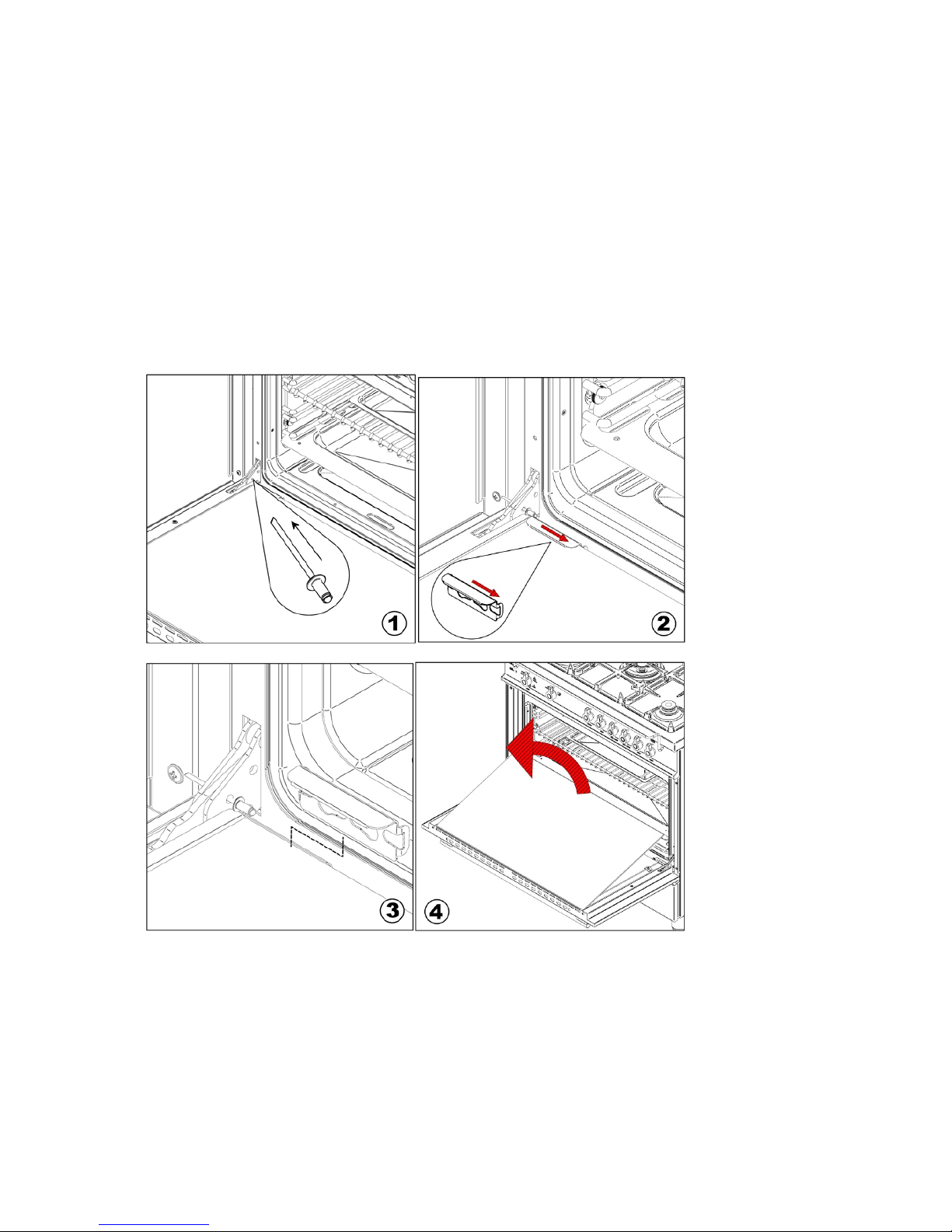
To thoroughly clean the inside of the oven, it is recommended to disassemble the door by carefully
following the instructions described below (Fig. 1 and 3). Insert the hook into the hinged sector. Put
the door in a semi-open position and using both hands pull it towards you until it is released from the
attachment. To replace the door, do the opposite making sure to insert the two sectors correctly. In
addition, the side racks can be removed very easily, by loosening the lock rings that attach them to
the oven.
Removing inside glass for cleaning
To remove inside glass door for cleaning follow below fig. 2-3 and 4 and after cleaning the glass
reinstall it operating in the reverse way. Use fig. 4-3 and 2.
Downloaded from www.ManualsFile.com manuals search engine
37
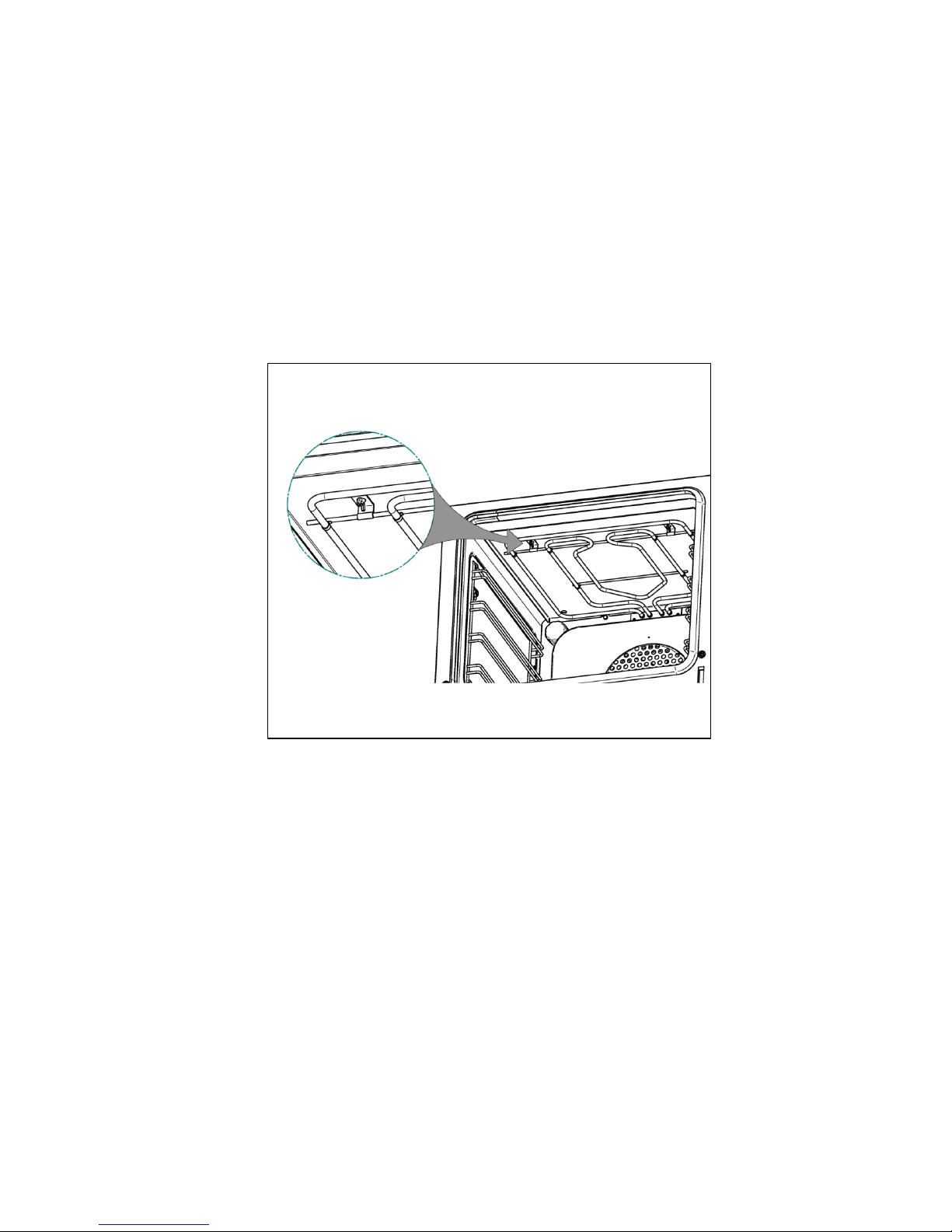
Removal of roof tray
The roof tray above the grill element can be removed for cleaning.
- Support the grill element with one hand while removing the 2 wing nuts that hold the element
in place.
- The element position will drop slightly allowing removal of the top liner.
- Once cleaned and dried, the top liner can be placed back into position, above element, and
re-secured with the two wing nuts.
- The liner will only fit into one position so care must be taken to locate it the rear lugs and the
front large lip must be facing downwards.
- Do not use the oven unless the liner is fitted and the element has been re-secured with the
wing nuts.
Downloaded from www.ManualsFile.com manuals search engine

38
TROUBLE SHOOTING
If you have a problem with your appliance check the following before you ring service.
Pr
oblem
What
to
do
Oven or hob
not
working
Check the electricity
is
turned
on
Check your fuses. If the fuse continues to fail please contact service person
Check the circuit
breaker
Ensure correct knob
is
tur
ned
Dry
or clean ignition electrodes
Make sure flame ports and ignition areas are clean and dry
Check gas main is
on
Ensure
cap/crown
correctly
fitted.
Replace
or
tighten light globes
Heating up problems
Oven not pre-heated – Pre-heat oven for 30 minutes
Check oven
door is
closed
properly
Remove
foil or
trays from bottom
of oven
Change set oven
temperature
Preheat your
oven
before you put the
food in to be cooked
Unit smoking/
odours
Turn the
oven on high to
remove protective
oils
Persistent
gas
smell
– do not operate the oven
. Contact service person.
Condensation
Note:
some condensation
is
normal
and is to be
expected during
cooking
Reduce the amount
of
water used
for cooking
Leave the
door open
after cooking
if food
remains
in
cooker
for warming
Oven shelves are tight
Remove oven shelf and re-insert, check correct alignment on runners
Recommended maintenance schedule for this appliance is 24 months
Downloaded from www.ManualsFile.com manuals search engine