I es
the possibili'i
Thank you for purchasing your Samsung product.
To receive more complete service,
please register your product at
www,samsung,com/global/register
KEY FEATURES OF YOUR NEW REFRIGERATOR
Your Samsung French Door Refrigerator comes equipped with various innovative storage and energy-efficient
features.
o Twin Cooling System
The Refrigerator and Freezer have separate evaporators. Due to this independent cooling system,
the Freezer and Refrigerator cool more efficiently.
Additionally, this separate air flow system prevents food odor of one compartment from seeping into
other compartments.
o Cool Select Pantry TM (RF267)
The Cool Select pantry TM is a full-width drawer with adjustable temperature control.
o Bigger & Wider Space
The wide shelf area and pantry provide enough space for larger items like a pizza box, etc.
The wide freezer drawer also provides enough space for 2-3 turkeys.
o Secure Auto Close
The Secure Auto Close feature will automatically close a door that is slightly open.
,, Compact Ice Maker
The Ice maker can dispense cubed or crushed ice.
o Digital Display and Temperature Control
o Water Filtration System
o Door Alarm
A helpful beeper alerts you if door is ajar.
o Tilting Pocket
The Tilting pocket can be used to store up to a 16" pizza.
o Auto Pull Out Drawer
The upper drawer in the freezer comes out automatically as you just open the freezer door.
o Easy Handle
Freezer door can be opened with less effort.
o Energy Star
Energy star labeled this product could save your energy costs.
For easy future reference, write the model and
serial number down which can be found on the left
side of the refrigerator.
Model #
Serial #
2 Features

SAFETY INFORMATION
Before using your new Samsung French Door Refrigerator, please read this manual thoroughly
to ensure that you know how to safely and efficiently operate the features and functions that your
new appliance offers.
Because the following instruction covers various models, the characteristics of your Refrigerator
may differ slightly from the Refrigerator described in this manual. Ifyou have any question, contact
us at 1-800-SAMSUNG or find help and information online at www.samsung.com.
What the icons and signs in this user manual mean '
A Hazards or unsafe practices that may result in severe personal injury or death.
WARNING
A Hazards or unsafe practices that may result in minor personal injury or property
CAUTION damage.
,/_ To reduce the risk of fire, explosion, electric shock, or personal injury when using your
CAUTION refrigerator, follow these basic safety precautions:
Do NOT attempt.
Do NOT disassemble.
_} Do NOT touch.
Follow directions explicitly.
Unplug the power plug from the wall socket.
Make sure the machine is grounded to prevent electric shock.
Call the service center for help.
These warning signs are here to prevent injury to you and others.
Please follow them explicitly
Keep this manual in a safe place for future reference.
SEVERE WARNING SIGNS
Do not plug several appliances into the same power receptacle.
• Large appliances draw a lot of power. Powering more than one appliance or machine from a single power source
could cause overheating and cause a fire.
Make sure that the power plug is not kinked or damaged by the back of the Refrigerator.
A damaged power plug may overheat and cause a fire,
Do not spray water directly into or on the outside of the Refrigerator/Freezer drawer.
Water could get into the interior machine parts and cause electric shock,
Do not use aerosols near the Refrigerator.
Aerosols used near the Refrigerator may cause an explosion or fire,
Safety Inforrration 3
Do not put undue stress on the power cord or place heavy articles on it.
• Placing heavy articles on the power cord create the risk of explosion or fire.
Do not insert the power plug with wet hands.
It may cause electric shock.
Do not put a container filled with water on the Refrigerator.
If it spills, it may cause fire or electric shock.
Do not install the Refrigerator in a damp place or water closed places.
Wet and/or deteriorated insulation of the internal electrical parts may cause electric shock or fire.
Do not store volatile, flammable or high evaporating substances in the refrigerator.
Storing benzene, thinner, alcohol, ether, LP gas, dryice, and other such products may cause explosions.
@
Do not disassemble or repair the Refrigerator by yourself.
You run the risk of fire, appliance malfunctions and/or personal injury. Call your nearest service center for
help from a qualified service technician.
Unplug the Refrigerator before changing the interior light.
Changing the light while the Refrigerator is plugged in may cause electric shock.
If you wish to dispose of the Refrigerator, remove the doors and seals before throwing
it away.
The doors(and their seals) can entrap a child if they climb into the Refrigerator.
Make sure that the doors are off, and ensure that no one is suffocated by being locked inside.
@
The Refrigerator must be safely grounded
Always make sure that you have grounded the Refrigerator before attempting to investigate or repair any
part of the appliance. Power leakages can cause severe electric shock.
Never use gas pipes, telephone lines or other potential lightning attractors as an
electrical ground.
Improper use of the grounding plug can result in a risk of electric shock. If it is necessary to use an
extension cord to power the Refrigerator, use only a 3-wire extension cord that has a 3-blade ground
plug and a 3-slot receptacle that will accept the plug on the appliance. The marked rating of the extention
cord should be AC 115V-120V, 10A, or more. Additionally, if a grounding adapter is used, make sure the
receptacle box is also fully grounded.
4 Safety inforrradon
CAUTION SIGNS
Use good judgment when filling the Refrigerator with food and drinks.
• In an overfull Refrigerator, heavy, fragile, bulky or breakable items may fall out and cause personal injury
and/or damage to surrounding objects.
Do not put bottles or glass containers in the Freezer drawer.
When the contents freeze and then expand, the glass may break and cause personal injury or leave
dangerous glass shards in the Freezer.
If the electrical wall socket is loose, do not insert the power plug.
There is a risk of electric shock or fire. Have the plug looked at by a licensed electrician.
Never unplug your Refrigerator by pulling on the power cord.
Always grip the power cord firmly and pull straight out from the outlet. Yanking or pulling on the power
cord may cause a short-circuit, fire and/or electric shock.
A damaged power cord must be replaced by the manufacturer, a certified service agent or qualified
service personnel.
Do not store articles on the top of the appliance.
When you open or close the door, the articles may fall and cause personal injury and/or damage to
surrounding objects.
Do not store pharmaceutical products, scientific materials and temperature-sensitive
products in the refrigerator.
Products that require exact temperature controls should not be stored in the Refrigerator.
Z_ Do not allow children to climb, stand or hang on shelves and handles of the
cAunONRefrigerator.They could damage the Refrigerator and seriously injure themselves.
Do not sit on the freezer door. The door may break.
Do not allow children to climb into the freezer basket.
If you notice a chemical or burning plastic smell or see smoke, unplug the Refrigerator
immediately and contact your Samsung Electronics Service Center.
®
After your Refrigerator is in operation, do not touch the cold surfaces in the Freezer
compartment. Particularly when hands are damp or wet, skin may adhere to these
extremely cold surfaces.
Skin may stick to the surface and you may get frostbite.
Do not put your hands under the appliance.
• Any sharp edges may cause personal injury.
Safety Inforrration 5
form t
Never put fingers or other objects into the water dispenser hole or ice chute.
• It may cause personal injury and/or material damage.
If the Refrigerator will not be used for a long period of time (for example, over several
months), unplug the power from the wall.
Over time, deterioration in the power cord insulation may cause fire.
Do not use a wet or damp cloth when cleaning the plug.
Remove any dust or foreign matter from the power plug pins.
A Dirty power plug can increase the risk of fire.
If the Refrigerator is disconnected from the power supply, you should wait for at least
five minutes before plugging it back in.
Do not place the equipment directly in sunlight.
The appliance must be positioned for easy access to power source.
If the power cord is damaged, it must be replaced by the manufacturer, a certified
service agent or qualified service personnel.
If you have a long vacation planned, empty the Refrigerator and turn it off.
Wipe excess moisture from the inside and leave the doors open to keep odor and mold from developing.
Service Warranty and Modification
Any changes or modifications performed by a 3rd party on this finished appliance is not covered under
Samsung warranty service, nor can Samsung be responsible for safety issues that result from 3rd party
modifications.
A Children can get trapped inside Refrigerators.
cAuT_°NBeforeyou throw away your old Refrigerator or Freezer, make sure that you;
Take off the doors.
Leave all shelves in places so that children may not easily climb inside and shut the door while they are
inside.
Thisapplianceis not intendedfor use by smallchildren or infirmpersonswithout capable,adult
supervision.Smallchildrenshould be supervisedwhen usingthe appliance.
6 Safe,ty Inforrration
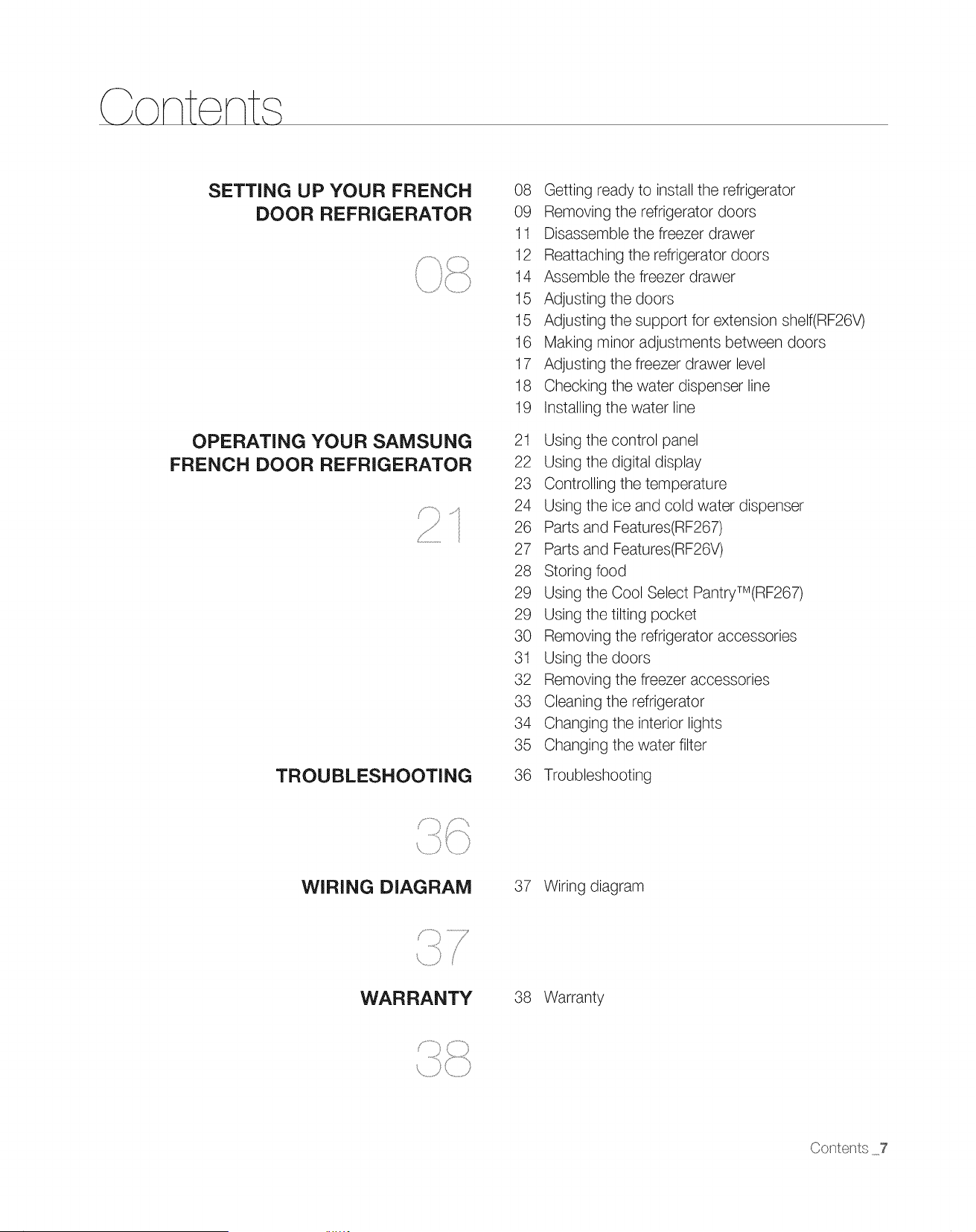
SETTING UP YOUR FRENCH
DOOR REFRIGERATOR
OPERATING YOUR SAMSUNG
FRENCH DOOR REFRIGERATOR
_f
TROUBLESHOOTING
08 Getting ready to install the refrigerator
09 Removing the refrigerator doors
11 Disassemble the freezer drawer
12 Reattaching the refrigerator doors
14 Assemble the freezer drawer
15 Adjusting the doors
15 Adjusting the support for extension shelf(RF26V)
16 Making minor adjustments between doors
17 Adjusting the freezer drawer level
18 Checking the water dispenser line
19 Installing the water line
21 Using the control panel
22 Using the digital display
23 Controlling the temperature
24 Using the ice and cold water dispenser
26 Parts and Features(RF267)
27 Parts and Features(RF26V)
28 Storing food
29 Using the Cool Select PantryTM(RF267)
29 Using the tilting pocket
30 Removing the refrigerator accessories
31 Using the doors
32 Removing the freezer accessories
33 Cleaning the refrigerator
34 Changing the interior lights
35 Changing the water filter
36 Troubleshooting
WIRING DIAGRAM 37 Wiring diagram
WARRANTY 38 Warranty
Contents 7
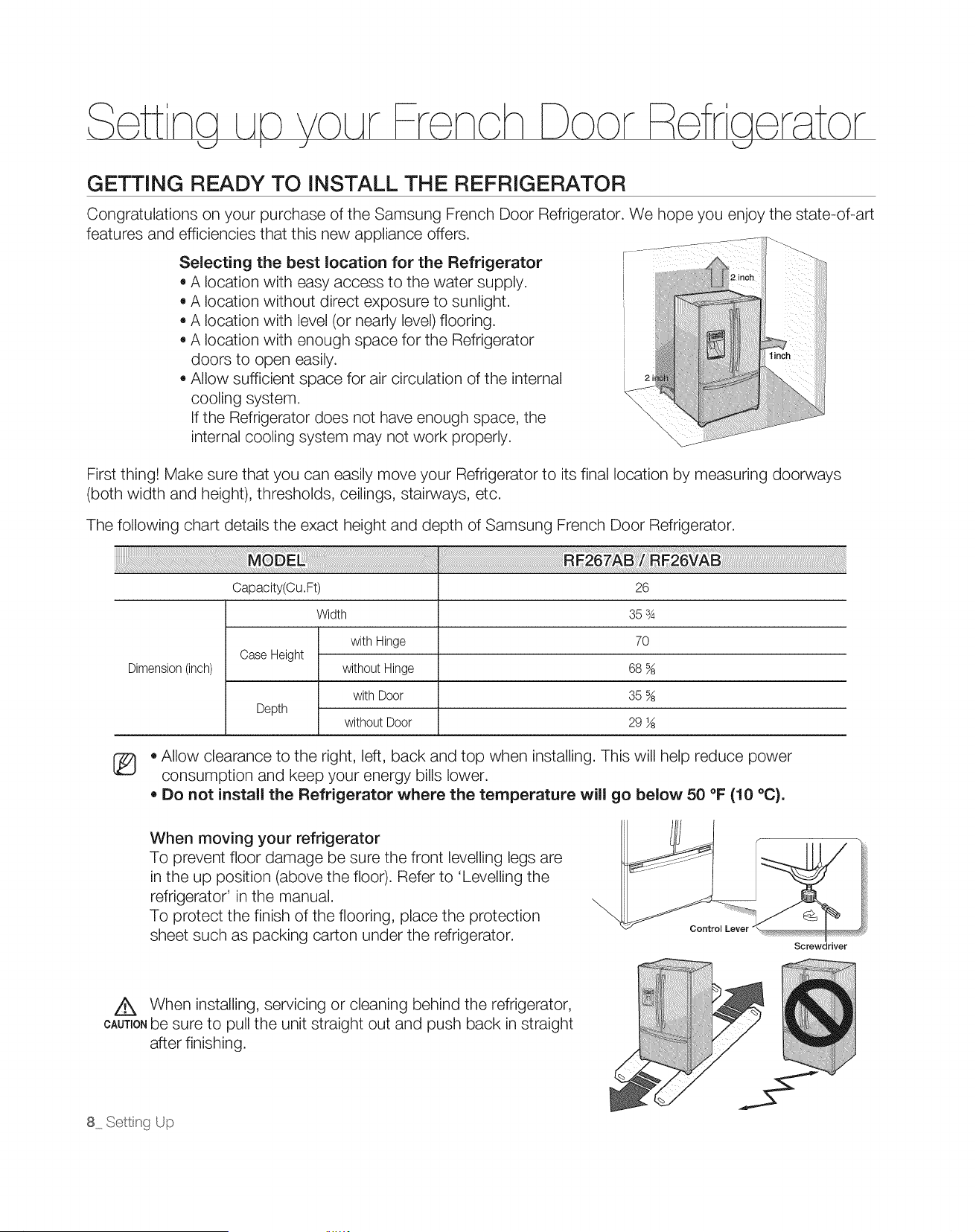
GETTING READY TO INSTALL THE REFRIGERATOR
Congratulations on your purchase of the Samsung French Door Refrigerator. We hope you enjoy the state-of-art
features and efficiencies that this new appliance offers.
Selecting the best location for the Refrigerator
• A location with easy access to the water supply.
• A location without direct exposure to sunlight.
A location with level (or nearly level) flooring.
A location with enough space for the Refrigerator
doors to open easily.
Allow sufficient space for air circulation of the internal
cooling system.
If the Refrigerator does not have enough space, the
internal cooling system may not work properly.
First thing! Make sure that you can easily move your Refrigerator to its final location by measuring doorways
(both width and height), thresholds, ceilings, stairways, etc.
The following chart details the exact height and depth of Samsung French Door Refrigerator.
Dimension (inch)
Capacity(Cu.Ft)
Case Height
Depth
Width
with Hinge
without Hinge
with Door
without Door
26
35 s4
70
68 %
35 %
29 ½
[_ • Allow clearance to the right, left, back and top when installing. This will help reduce power
consumption and keep your energy bills lower.
• Do not install the Refrigerator where the temperature wUl go below 50 °F (10 °C).
When moving your refrigerator
To prevent floor damage be sure the front levelling legs are
in the up position (above the floor). Refer to 'Levelling the
refrigerator' in the manual.
To protect the finish of the flooring, place the protection
sheet such as packing carton under the refrigerator.
Control Lever
Screwdriver
Z_ When installing, servicing or cleaning behind the refrigerator,
CAUTIONbe sure to pull the unit straight out and push back in straight
after finishing.
8 Sett_g Up
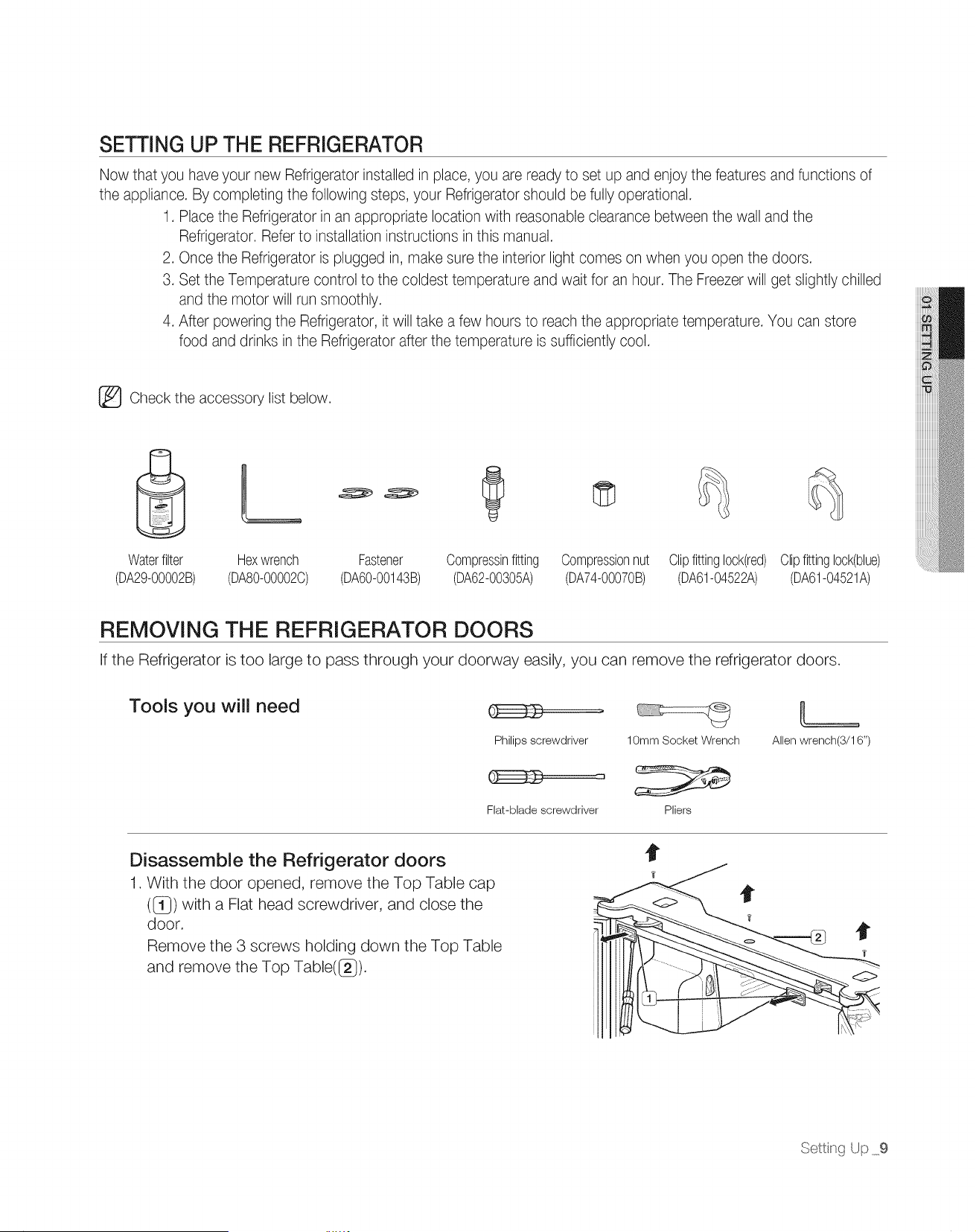
SETTING UP THE REFRIGERATOR
Now that you have your new Refrigerator installed in place, you are ready to set up and enjoy the features and functions of
the appliance. By completing the following steps, your Refrigerator should be fully operational.
1. Place the Refrigerator in an appropriate location with reasonable clearance between the wall and the
Refrigerator. Refer to installation instructions in this manual.
2. Once the Refrigerator is plugged in, make sure the interior light comes on when you open the doors.
3. Set the Temperature control to the coldest temperature and wait for an hour. The Freezer will get slightly chilled
and the motor will run smoothly.
4. After powering the Refrigerator, it will take a few hours to reach the appropriate temperature. You can store
food and drinks in the Refrigerator after the temperature is sufficiently cool.
_ Check the accessory list below.
Waterfilter Hexwrench Fastener
(DA29-00002B) (DA80-00002C) (DA60-00143B)
Compressinfitting
(DA62-00305A)
Compressionnut
(DA74-00070B)
Clipfittinglock(red)
(DR61-04522A)
Clipfittinglock(blue)
(DR61-04521A)
REMOVING THE REFRIGERATOR DOORS
If the Refrigerator is too large to pass through your doorway easily, you can remove the refrigerator doors.
Tools you will need
Philips screwdriver 10mm Socket Wrench
Flat-blade screwdriver Pliers
Allen wrench(3/16")
Disassemble the Refrigerator doors
1. With the door opened, remove the Top Table cap
({_}) with a Flat head screwdriver, and close the
door.
Remove the 3 screws holding down the Top Table
and remove the Top Table(G ).
?
?
Setting Up 9
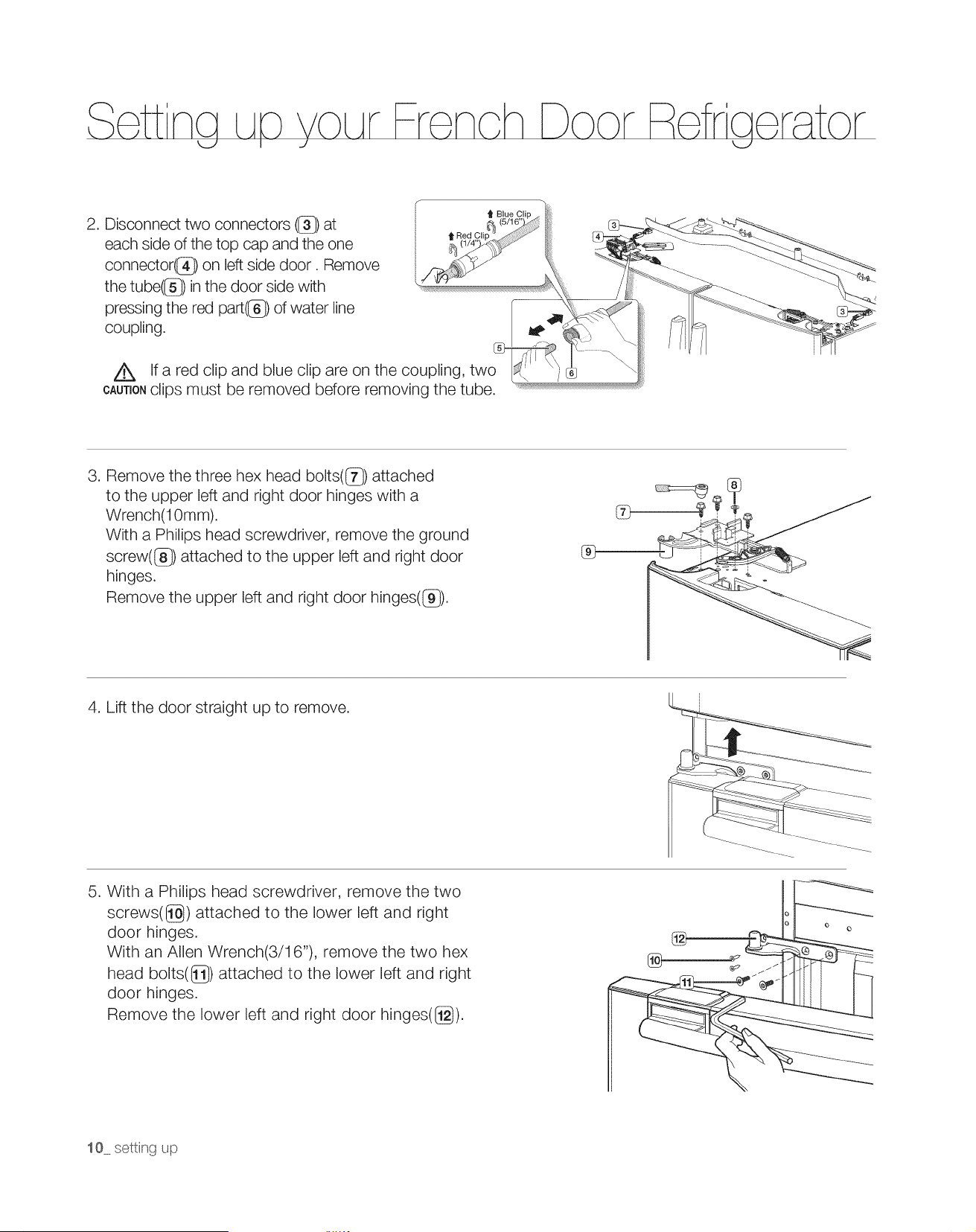
2. Disconnect two connectors (1_) at
each side of the top cap and the one
connector(@) on left side door. Remove
the tube(G ) in the door side with
pressing the red part((_) of water line
coupling.
Z_ If a red clip and blue clip are on the coupling, two
CAUTIONclips must be removed before removing the tube.
3. Remove the three hex head bolts(G ) attached
to the upper left and right door hinges with a
Wrench(10mm).
With a Philips head screwdriver, remove the ground
screw(_}) attached to the upper left and right door
hinges.
Remove the upper left and right door hinges(_}).
%
, i ,
4. Lift the door straight up to remove.
5. With a Philips head screwdriver, remove the two
screws([_) attached to the lower left and right
door hinges.
With an Allen Wrench(3/1 6"), remove the two hex
head bolts(G ) attached to the lower left and right
door hinges.
Remove the lower left and right door hinges([_}).
10 settng up
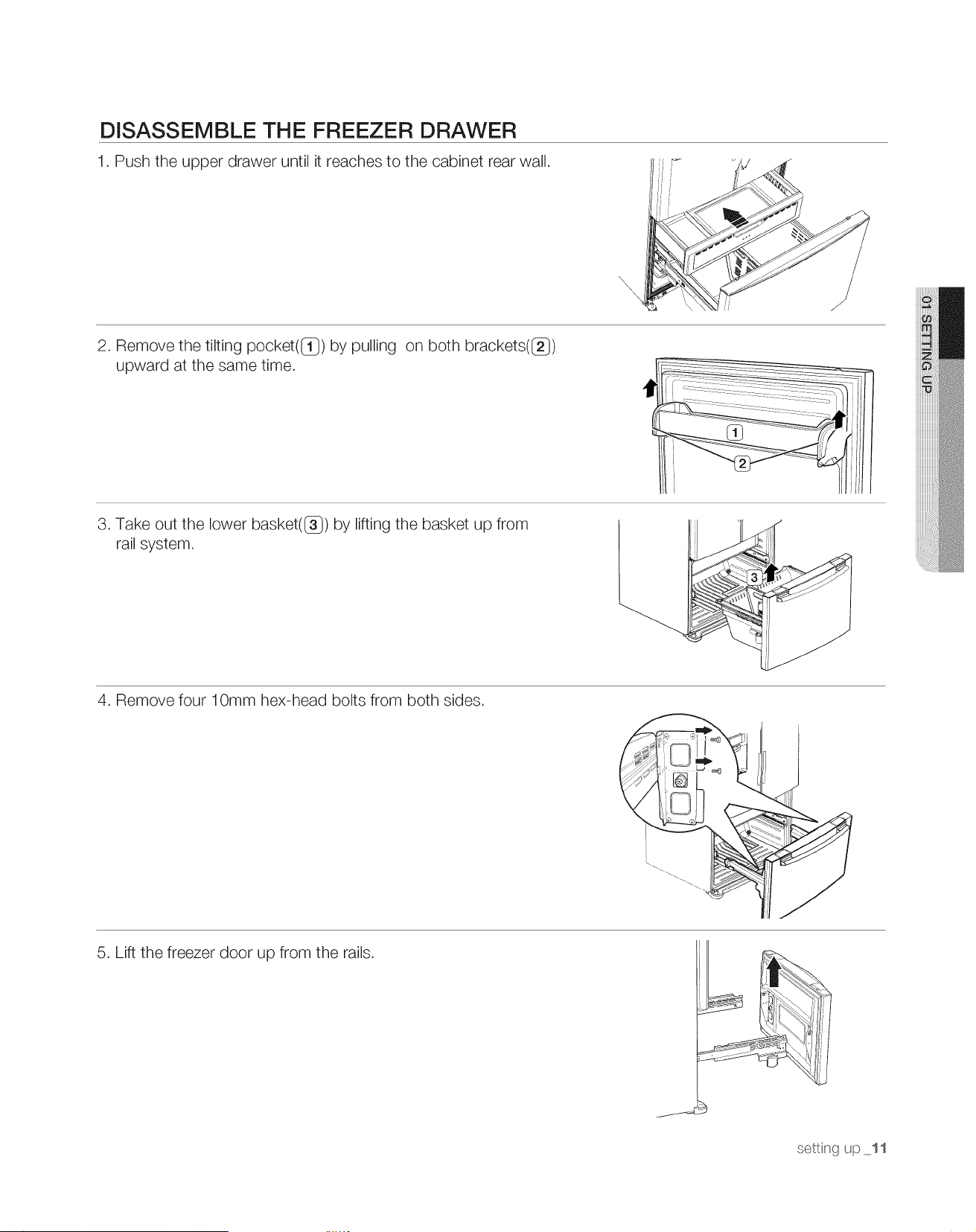
DISASSEMBLE THE FREEZER DRAWER
1. Push the upper drawer until it reaches to the cabinet rear wall.
2. Remove the tilting pocket(IT}) by pulling on both brackets(_})
upward at the same time.
3. Take out the lower basket(_}) by lifting the basket up from
rail system.
4. Remove four 10mm hex-head bolts from both sides.
5. Lift the freezer door up from the rails.
settng up 11
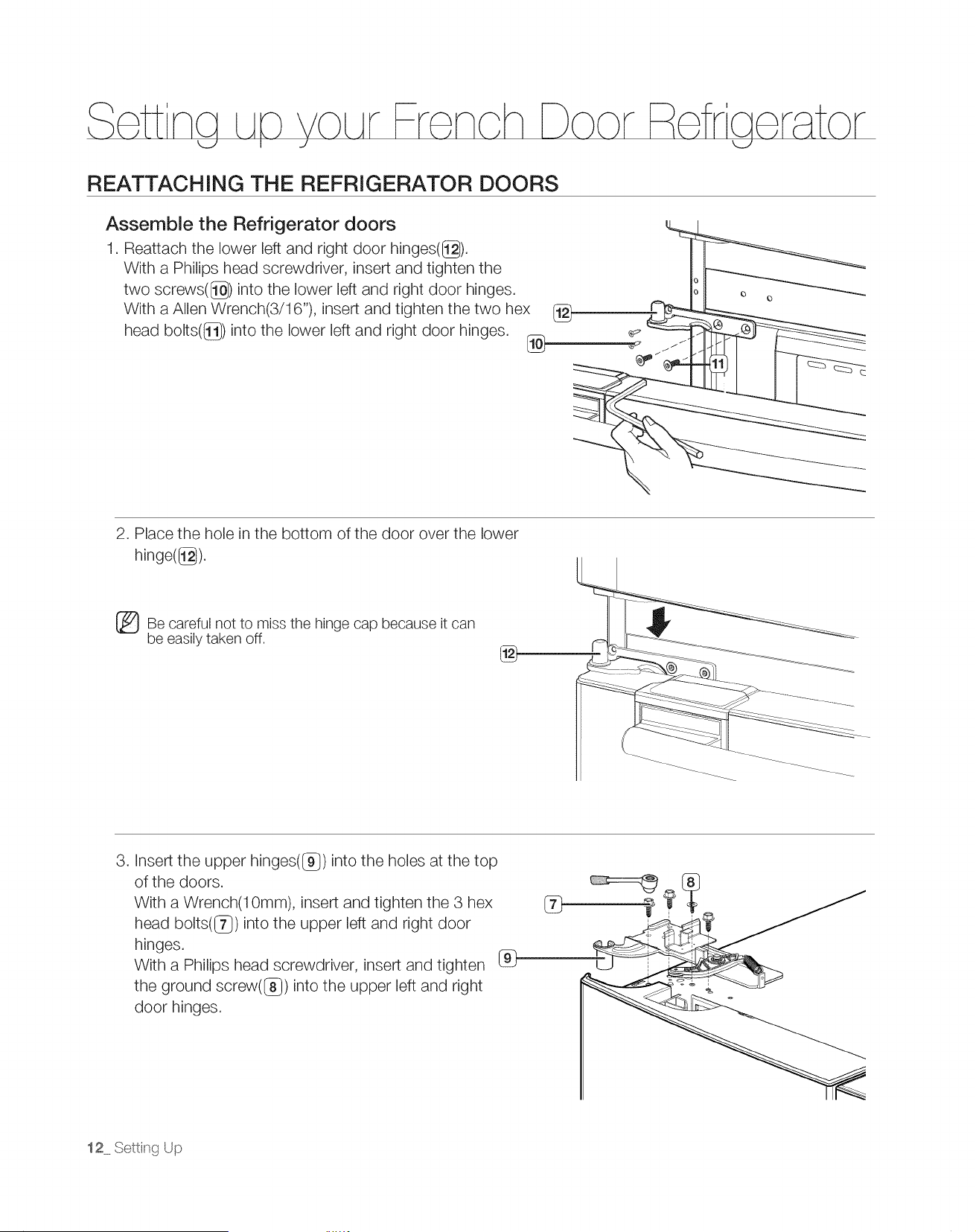
REATTACHING THE REFRIGERATOR DOORS
Assemble the Refrigerator doors
1. Reattach the lower left and right door hinges(@).
With a Philips head screwdriver, insert and tighten the
two screws((_) into the lower left and right door hinges.
With a Allen Wrench(3/16"), insert and tighten the two hex
head bolts((_) into the lower left and right door hinges.
2. Place the hole in the bottom of the door over the lower
hinge(@).
_Be careful not to miss the hinge cap because it can
be easily taken off.
®
3. Insert the upper hinges((_) into the holes at the top
of the doors.
With a Wrench(10mm), insert and tighten the 3 hex
head bolts((7_) into the upper left and right door
hinges.
With a Philips head screwdriver, insert and tighten
the ground screw((_) into the upper left and right
door hinges.
®
12 Setting Up
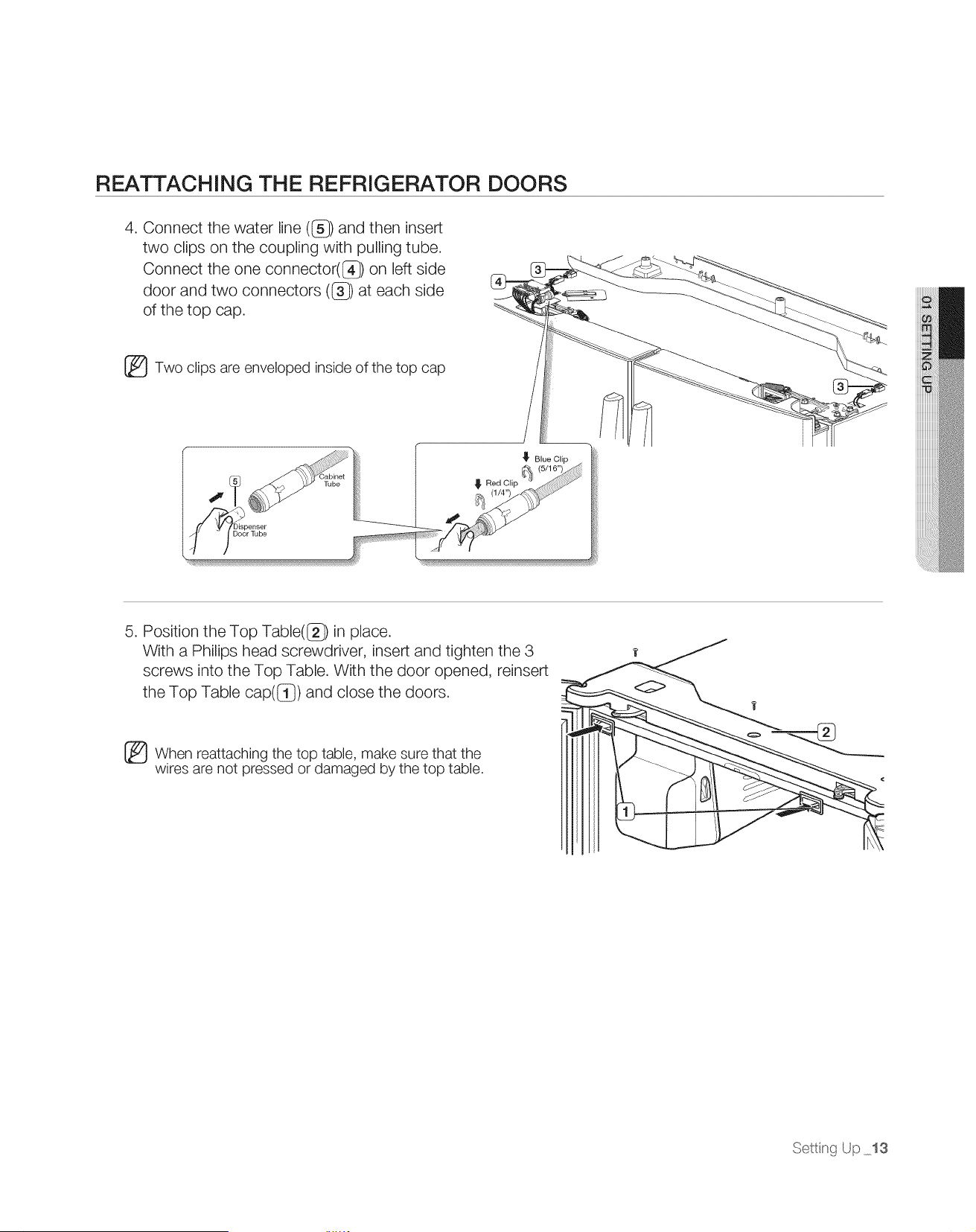
REATTACHING THE REFRIGERATOR DOORS
4. Connect the water line (I]_}) and then insert
two clips on the coupling with pulling tube.
Connect the one connector((_) on left side
door and two connectors (I]_}) at each side
of the top cap.
_Two clips are enveloped inside of the top cap
_' Blue Clip
4
bispenser
5. Position the Top Table(I]_}) in place.
With a Philips head screwdriver, insert and tighten the 3
screws into the Top Table. With the door opened, reinsert
the Top Table cap([_}) and close the doors.
_When reattaching the top table, make sure that the
wires are not pressed or damaged by the top table.
Setti_g Up 13
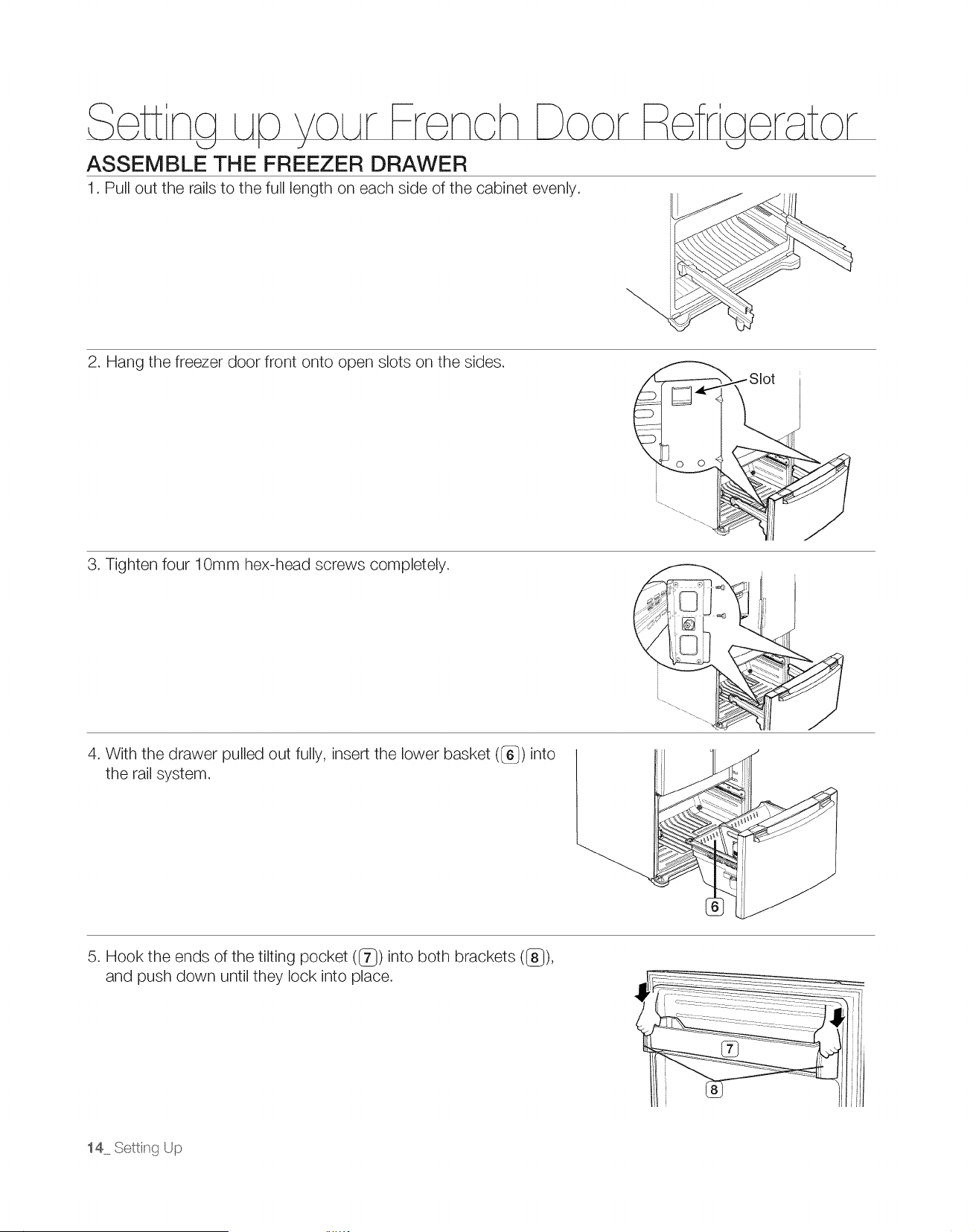
ASSEMBLE THE FREEZER DRAWER
1. Pull out the rails to the full length on each side of the cabinet evenly.
2. Hang the freezer door front onto open slots on the sides.
3. Tighten four 10mm hex-head screws completely.
4. With the drawer pulled out fully, insert the lower basket (_) into
the rail system.
5. Hook the ends of the tilting pocket (_) into both brackets (_}),
and push down until they lock into place.
14 Setting Up
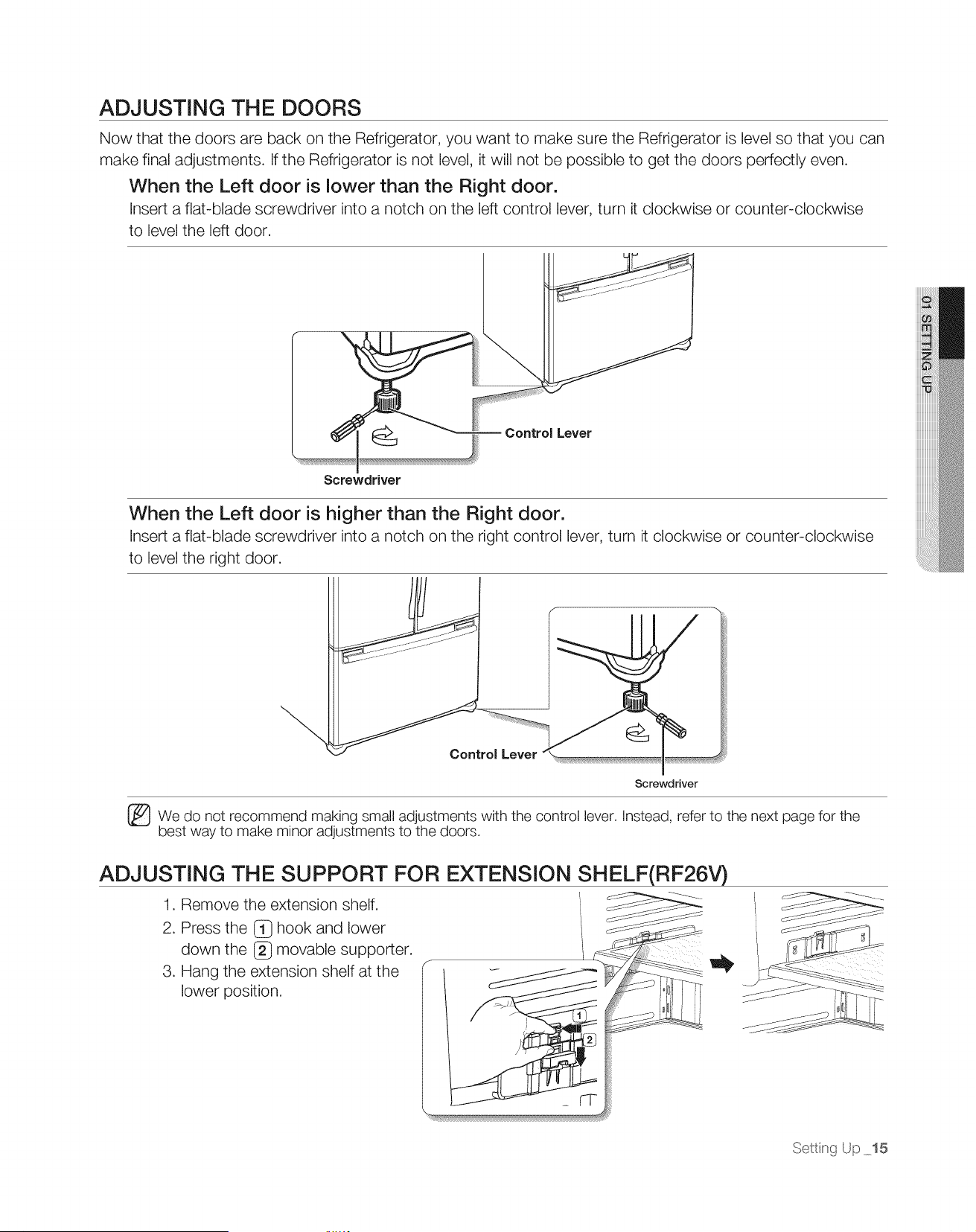
ADJUSTING THE DOORS
Now that the doors are back on the Refrigerator, you want to make sure the Refrigerator is level so that you can
make final adjustments. If the Refrigerator is not level, it will not be possible to get the doors perfectly even.
When the Left door is lower than the Right door.
Insert a flat-blade screwdriver into a notch on the left control lever, turn it clockwise or counter-clockwise
to level the left door.
Control Lever
Screwdriver
When the Left door is higher than the Right door.
Insert a flat-blade screwdriver into a notch on the right control lever, turn it clockwise or counter-clockwise
to level the right door.
Control Lever
Screwdriver
_We do not recommend making small adjustments with the control lever, Instead, refer to the next page for the
best way to make minor adjustments to the doors,
ADJUSTING THE SUPPORT FOR EXTENSION SHELF(RF26V)
1. Remove the extension shelf.
2. Press the (_ hook and lower
down the [_} movable supporter.
3. Hang the extension shelf at the
lower position.
Settisg Up 15
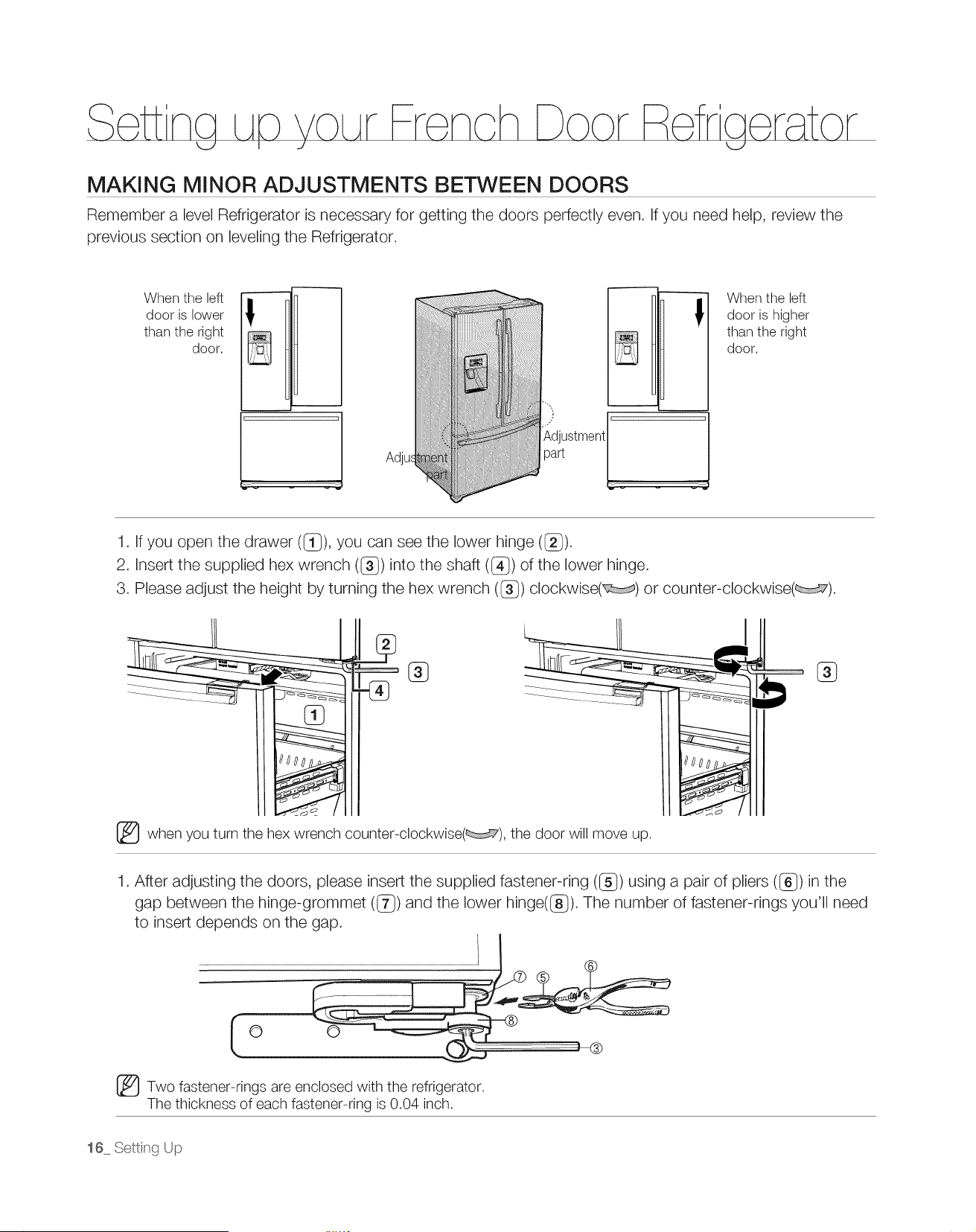
MAKING MINOR ADJUSTMENTS BETWEEN DOORS
Remember a level Refrigerator is necessary for getting the doors perfectly even. If you need help, review the
previous section on leveling the Refrigerator.
When the left
II
door is lower 8
than the right
door.
Adjus
}
Adjustment
!
-!
When the left
door is higher
than the right
door.
1. If you open the drawer ((_}), you can see the lower hinge (_).
2. Insert the supplied hex wrench (l_) into the shaft (@) of the lower hinge.
3. Please adjust the height by turning the hex wrench (_) clockwise( ) or counter-clockwise( ).
I
_when you turn the hex wrench counter-clockwise( ), the door will move up.
%
1. After adjusting the doors, please insert the supplied fastener-ring (l_) using a pair of pliers (_}) in the
gap between the hinge-grommet (l_) and the lower hinge(G ). The number of fastener-rings you'll need
to insert depends on the gap.
O
_Two fastener-rings are enclosed with the refrigerator.
The thickness of each fastener-ring is 0.04 inch.
16 Setting Up
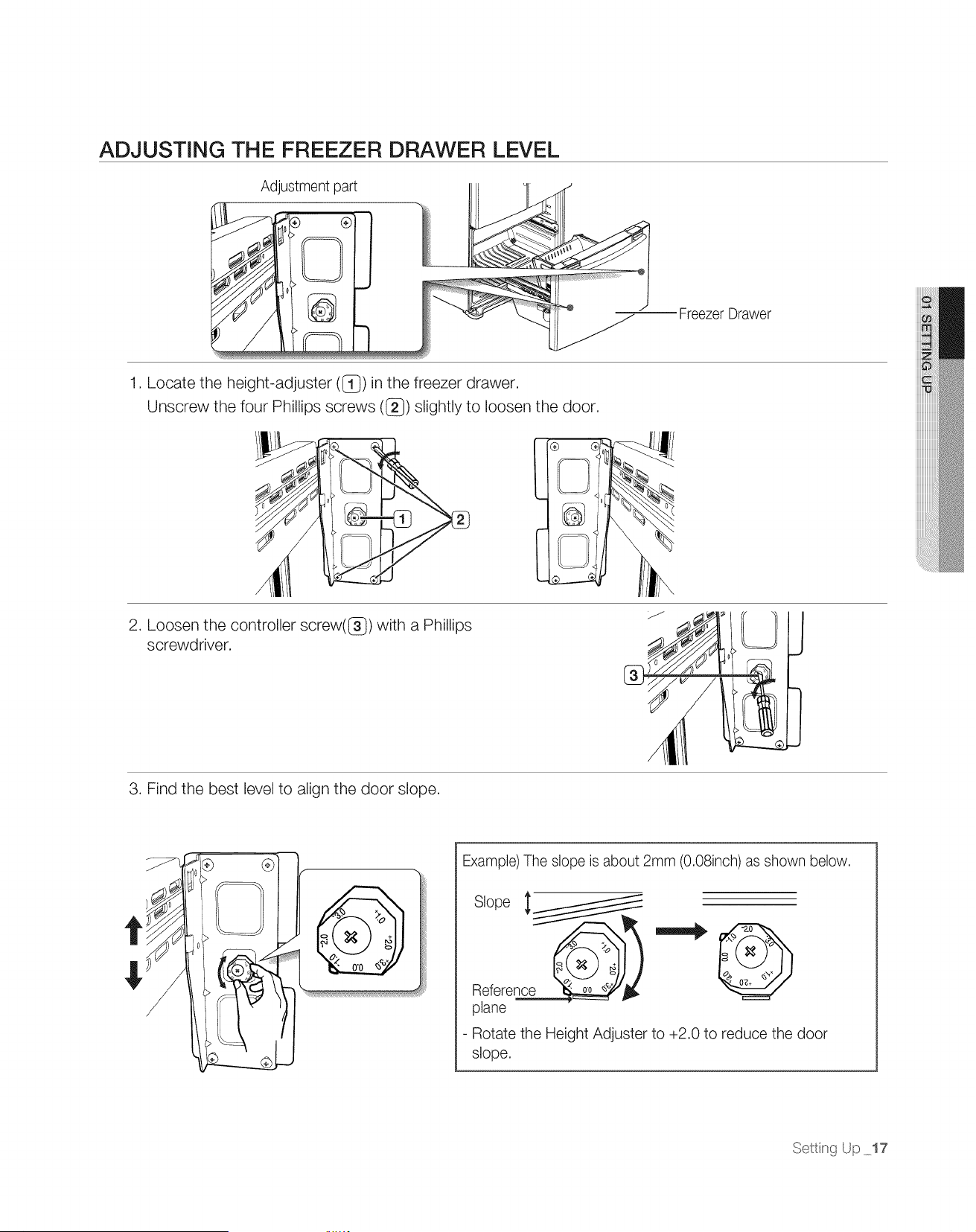
ADJUSTING THE FREEZER DRAWER LEVEL
Adjustment part
Freezer Drawer
1. Locate the height-adjuster (1_) in the freezer drawer.
Unscrew the four Phillips screws (_) slightly to loosen the door.
<
.J
2. Loosen the controller screw(G ) with a Phillips
screwdriver.
3. Find the best level to align the door slope.
@
Example) The slope is about 2mm (0.08inch) as shown below.
Slope __
Reference @)
plane
- Rotate the Height Adjuster to +2.0 to reduce the door
slope.
Setti_g Up 17
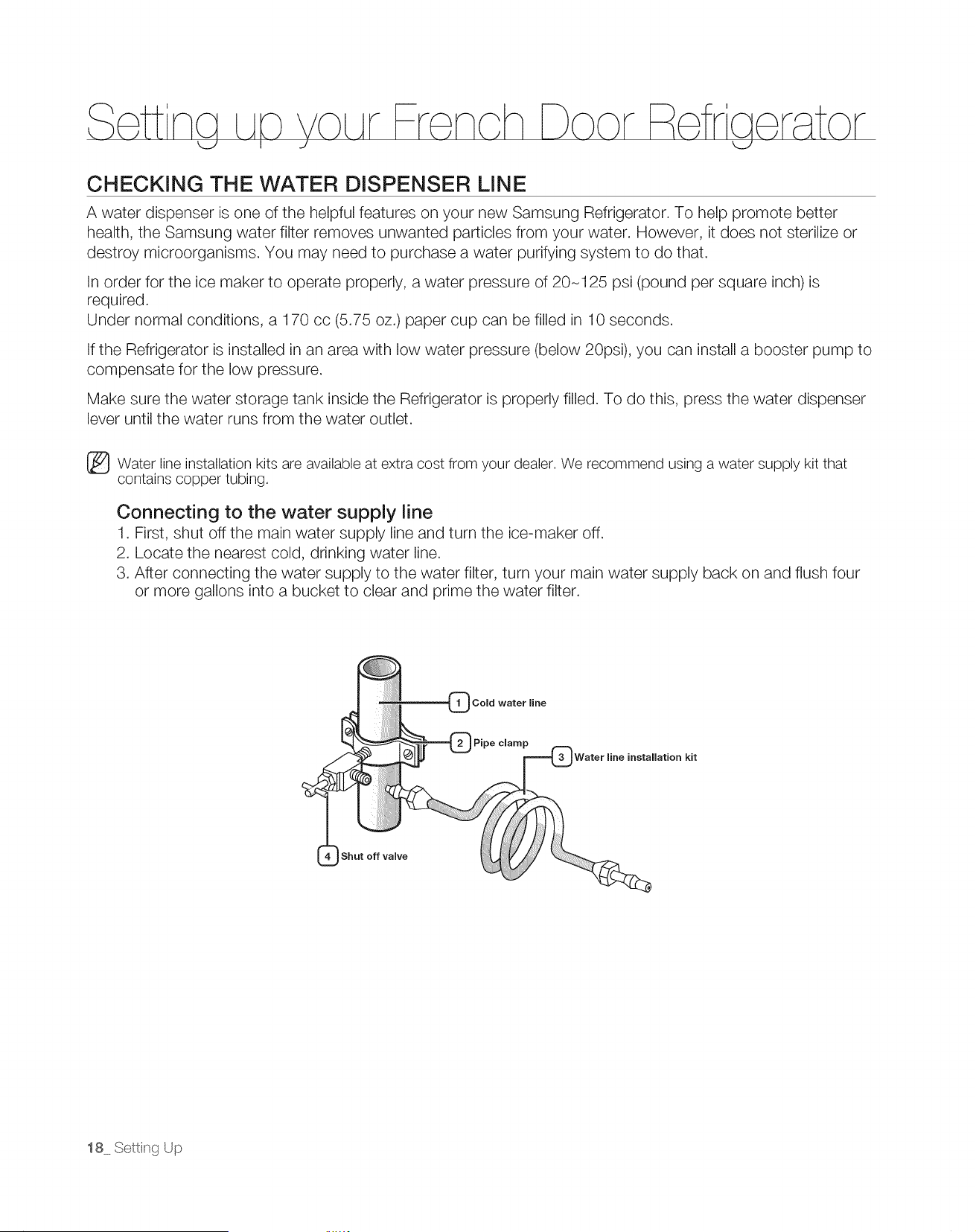
CHECKING THE WATER DISPENSER LiNE
A water dispenser is one of the helpful features on your new Samsung Refrigerator. To help promote better
health, the Samsung water filter removes unwanted particles from your water. However, it does not sterilize or
destroy microorganisms. You may need to purchase a water purifying system to do that.
In order for the ice maker to operate properly, a water pressure of 20-125 psi (pound per square inch) is
required.
Under normal conditions, a 170 cc (5.75 oz.) paper cup can be filled in 10 seconds.
If the Refrigerator is installed in an area with low water pressure (below 20psi), you can install a booster pump to
compensate for the low pressure.
Make sure the water storage tank inside the Refrigerator is properly filled. To do this, 9tess the water dispenser
lever until the water runs from the water outlet.
_ Water line installation kits are available at extra cost from your dealer. We recommend using a water supply kit that
contains copper tubing.
Connecting to the water supply line
1. First, shut off the main water supply line and turn the ice-maker off.
2. Locate the nearest cold, drinking water line.
3. After connecting the water supply to the water filter, turn your main water supply back on and flush four
or more gallons into a bucket to clear and prime the water filter.
Cold water line
Pipe clamp
Water line installation kit
Shut off valve
18 Setting Up
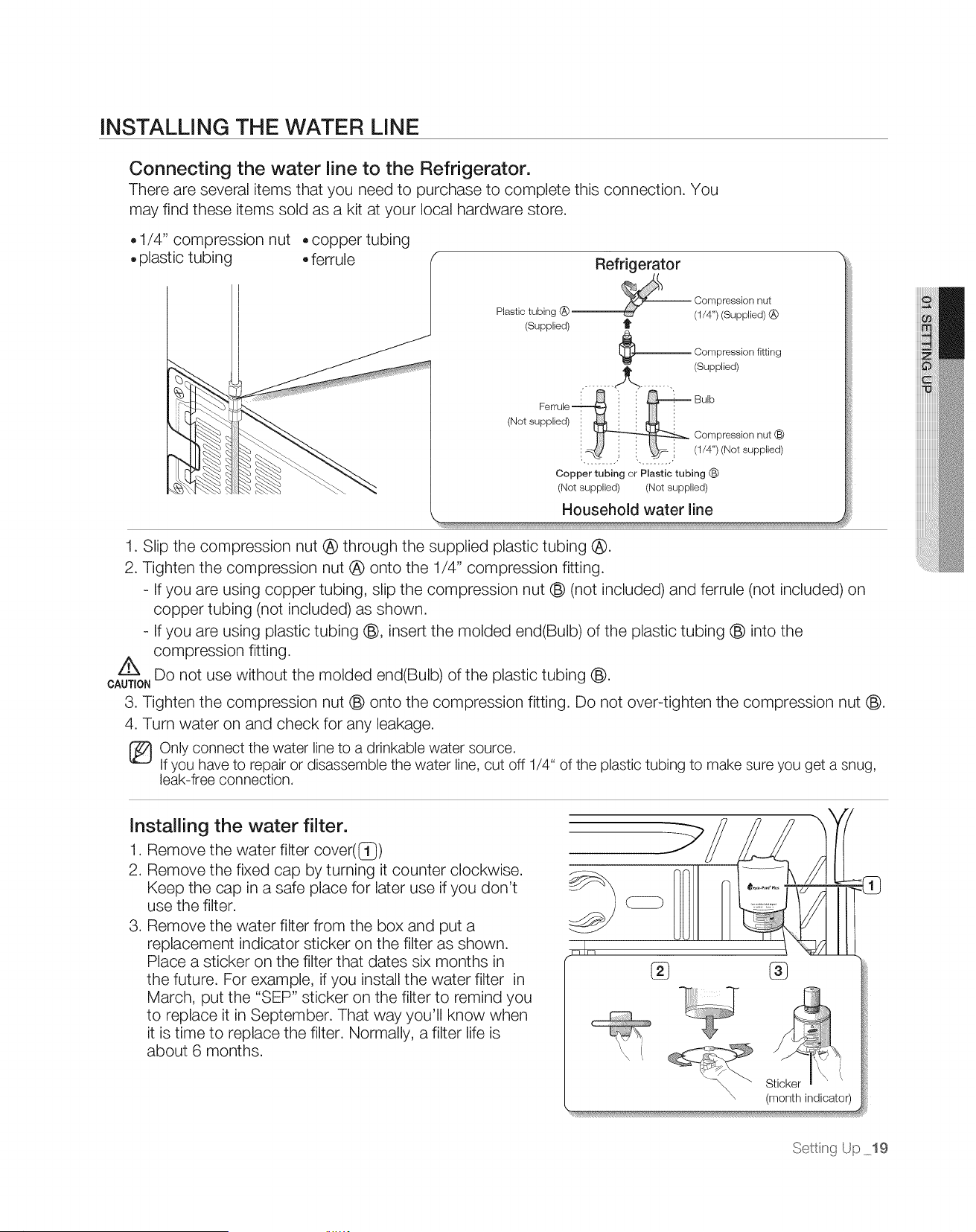
INSTALLING THE WATER LINE
Connecting the water line to the Refrigerator.
There are several items that you need to purchase to complete this connection. You
may find these items sold as a kit at your local hardware store.
• 1/4" compression nut
plastic tubing
copper tubing
ferrule
Refrigerator
Compression nut
Plastic tubing @ .......... (1/4") (Supplied) @
(Supplied) t
Compression fitting
(Supplied)
,-....... .,.Jr >........ .
Ferrule_ :: i Bulb
(Not supplied)"_, j._ Cornpression nut (_
.......................... (1/4") (Not supplied)
Copper tubing or Plastic tubing (_)
(Not supplied) (Not supplied)
Household water line
1. Slip the compression nut @ through the supplied plastic tubing @.
2. Tighten the compression nut @ onto the 1/4" compression fitting.
- If you are using copper tubing, slip the compression nut _ (not included) and ferrule (not included) on
copper tubing (not included) as shown.
- If you are using plastic tubing Q, insert the molded end(Bulb) of the plastic tubing Q into the
compression fitting.
Z_ Do not use without the molded end(Bulb) of the plastic tubing Q.
CAUTION
3. Tighten the compression nut (_ onto the compression fitting. Do not over-tighten the compression nut (_.
4. Turn water on and check for any leakage.
Only connect the water line to a drinkable water source.
Ifyou have to repair or disassemble the water line, cut off 1/4" of the plastic tubing to make sure you get a snug,
leak-free connection.
Installing the water filter.
1. Remove the water filter cover(I]})
2. Remove the fixed cap by turning it counter clockwise.
Keep the cap in a safe place for later use if you don't
use the filter.
3. Remove the water filter from the box and put a
replacement indicator sticker on the filter as shown.
Place a sticker on the filter that dates six months in
the future. For example, if you install the water filter in
March, put the "SEP" sticker on the filter to remind you
to replace it in September. That way you'll know when
it is time to replace the filter. Normally, a filter life is
about 6 months.
®
Sticker
\, (month indicator)
Settiqg Up 19
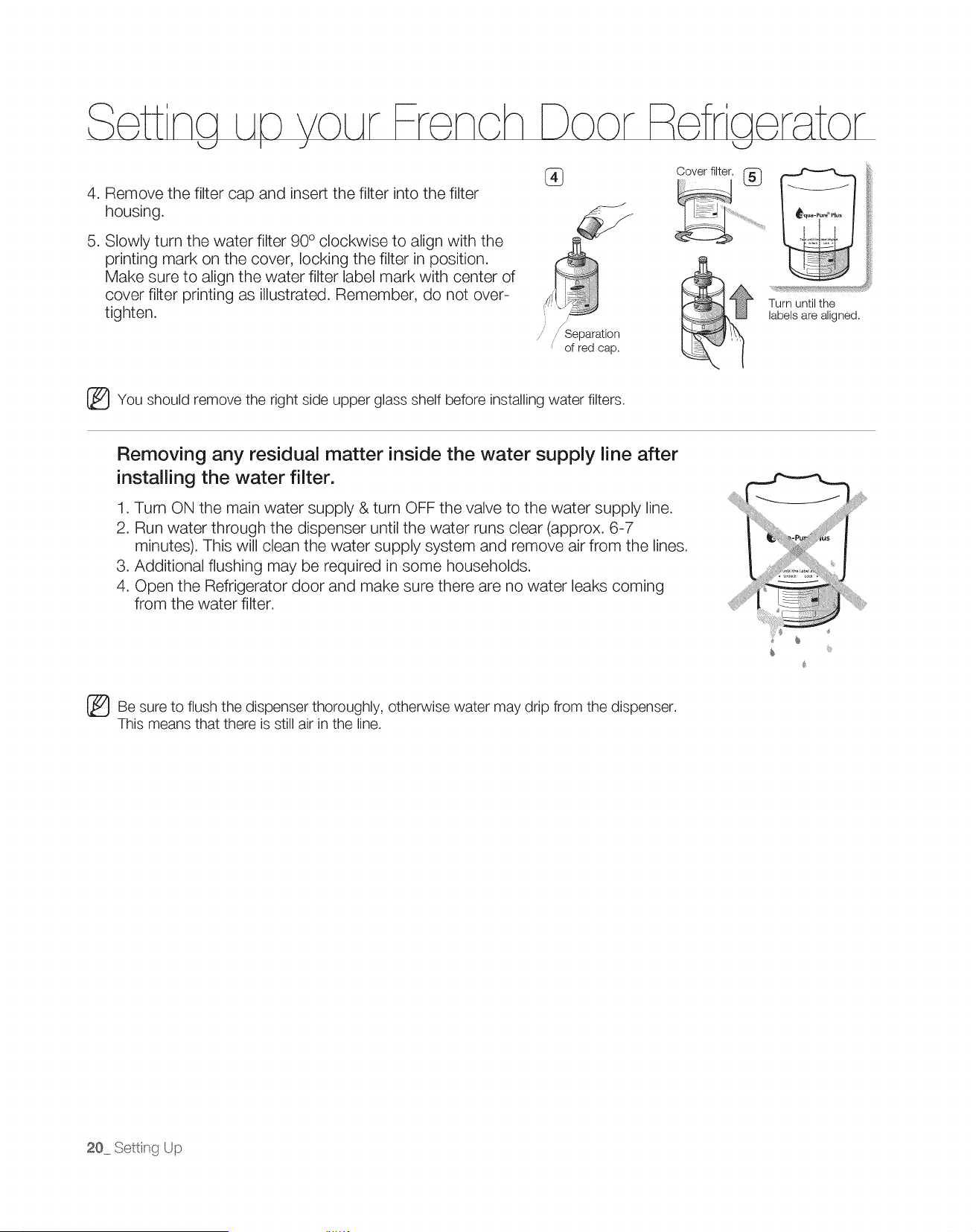
4. Remove the filter cap and insert the filter into the filter
housing.
5. Slowly turn the water filter 90 ° clockwise to align with the
printing mark on the cover, locking the filter in position.
Make sure to align the water filter label mark with center of
cover filter printing as illustrated. Remember, do not over-
tighten.
jJ
Separation
of red cap.
Cover filter,
®
_qua-Pu_Plus
E , E
+u_+,,,+i+.,+,i+_+
Turn until the
labels are aligned.
_You should remove the right side upper glass shelf before installing water filters.
Removing any residual matter inside the water supply line after
installing the water filter.
1. Turn ON the main water supply & turn OFF the valve to the water supply line.
2. Run water through the dispenser until the water runs clear (approx. 6-7
minutes). This will clean the water supply system and remove air from the lines.
3. Additional flushing may be required in some households.
4. Open the Refrigerator door and make sure there are no water leaks coming
from the water filter.
+
+
+
_iii+i,
_Be sure to flush the dispenser thoroughly, otherwise water may drip from the dispenser.
This means that there is still air in the line.
20 Setti+_gUp
Oper t ng ur
Refraerator
<.J
G French
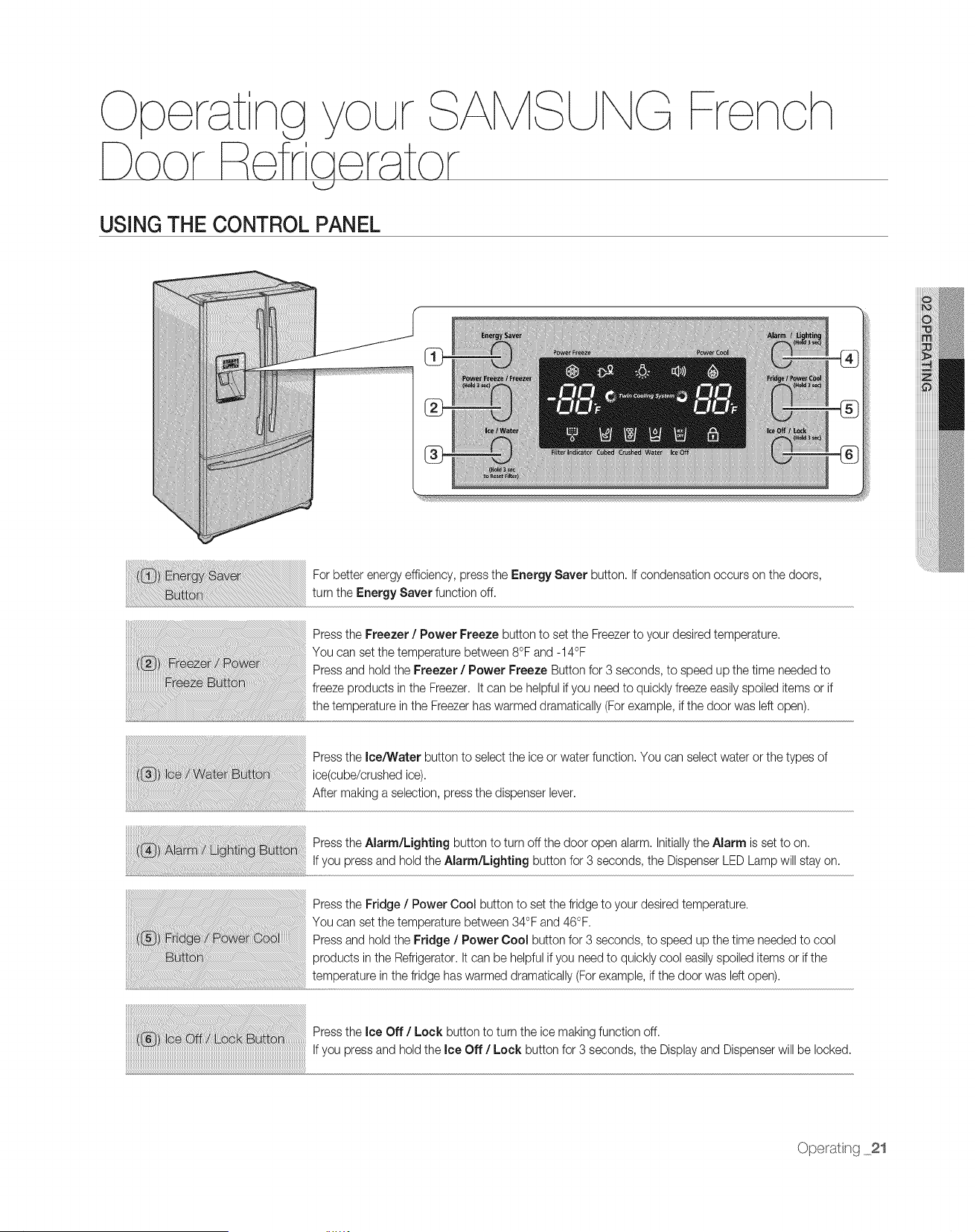
USING THE CONTROL PANEL
For better energy efficiency, press the Energy Saver button. If condensation occurs on the doors,
turn the Energy Saver function off.
Press the Freezer / Power Freeze button to set the Freezerto your desired temperature,
You can set the temperature between 8°F and -14°F
Press and hold the Freezer / Power Freeze Button for 3 seconds, to speed up the time needed to
freezeproducts in the Freezer, It can be helpful if you need to quickly freeze easilyspoiled itemsor if
the temperature in the Freezerhas warmed dramatically (For example, if the door was left open),
Press the Ice/Water button to select the ice or water function. You can select water or the types of
ice(cube/crushed ice),
After making a selection, press the dispenser lever.
Press the Alarm/Lighting button to turn off the door open alarm. Initiallythe Alarm is set to on.
If you press and hold the Alarm/Lighting button for 3 seconds, the Dispenser LED Lamp will stay on.
Press the Fridge / Power Cool button to set the fridgeto your desired temperature,
You can set the temperature between 34°F and 46°F,
Press and hold the Fridge / Power Cool button for 3 seconds, to speed up the time needed to cool
products inthe Refrigerator,It can be helpfulif you need to quickly cool easilyspoiled items or ifthe
temperature in the fridge has warmed dramatically (Forexample, if the door was left open).
Press the Ice Off / Lock button to turn the ice making function off,
If you press and hold the Ice Off / Lock button for 3 seconds, the Displayand Dispenserwill be locked.
Operat ]g 21
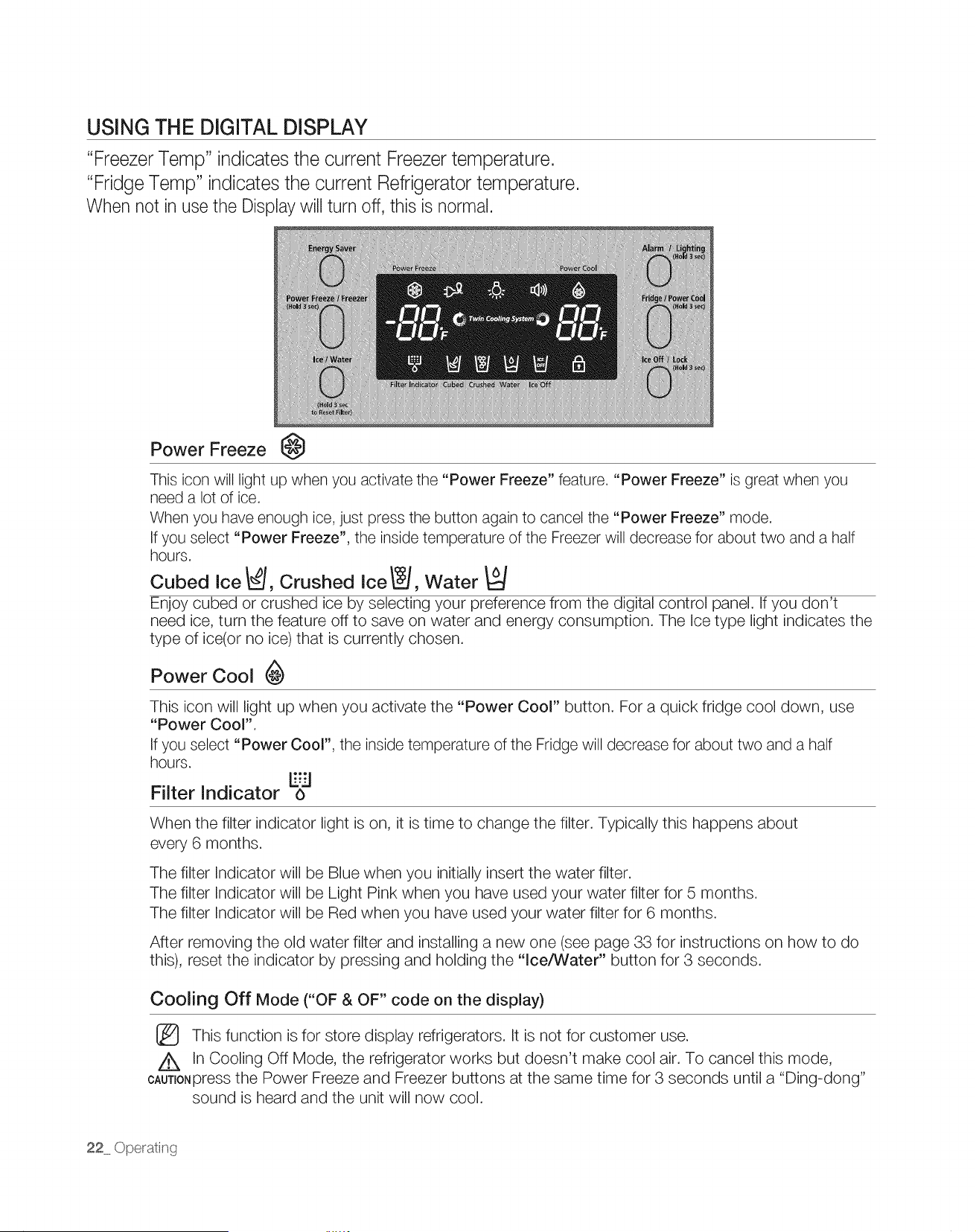
USING THE DIGITAL DISPLAY
"Freezer Temp" indicatesthe current Freezer temperature.
"Fridge Temp" indicatesthe current Refrigerator temperature.
When not in use the Displaywill turn off, this is normal.
Power Freeze @
This icon will light up when you activate the "Power Freeze" feature. "Power Freeze" is great when you
need a lot of ice.
When you have enough ice, just press the button again to cancel the "Power Freeze" mode.
If you select "Power Freeze", the inside temperature of the Freezer will decrease for about two and a half
hours.
Cubed ice _, Crushed ice _, Water
Enjoy cubed or crushed ice by selecting your preference from the digital control panel. If you don't
need ice, turn the feature off to save on water and energy consumption. The Ice type light indicates the
type of ice(or no ice) that is currently chosen.
Power Cool
This icon will light up when you activate the "Power Cool" button. For a quick fridge cool down, use
"Power Cool".
If you select "Power Cool", the inside temperature of the Fridge will decrease for about two and a half
hours.
E'.-'I
Filter Indicator o
When the filter indicator light is on, it is time to change the filter. Typically this happens about
every 6 months.
The filter Indicator will be Blue when you initially insert the water filter.
The filter Indicator will be Light Pink when you have used your water filter for 5 months.
The filter Indicator will be Red when you have used your water filter for 6 months.
After removing the old water filter and installing a new one (see page 33 for instructions on how to do
this), reset the indicator by pressing and holding the "Ice/Water" button for 3 seconds.
Cooling Off Mode ("OF & OF" code on the display)
This function is for store display refrigerators. It is not for customer use.
In Cooling Off Mode, the refrigerator works but doesn't make cool air. To cancel this mode,
CAUT_ONpressthe Power Freeze and Freezer buttons at the same time for 3 seconds until a "Ding-dong"
sound is heard and the unit will now cool.
22 Ope_ating
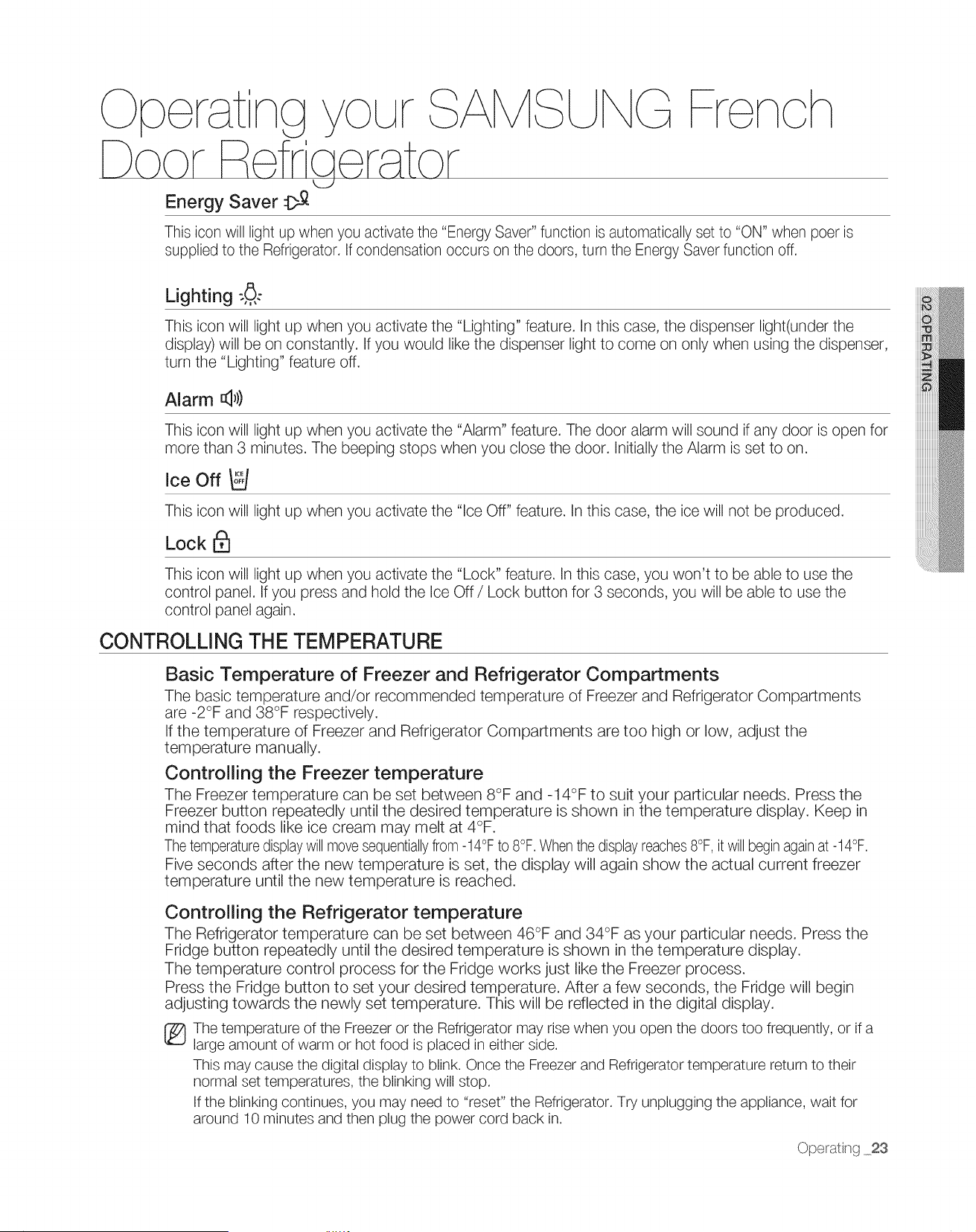
G Yron
This icon will light up when you activate the "Energy Saver" function is automatically set to "ON" when peer is
supplied to the Refrigerator. If condensation occurs on the doors, turn the Energy Saver function off.
Lighting :8.,,,
This icon will light up when you activate the "Lighting" feature. In this case, the dispenser light(under the
display) will be on constantly. If you would like the dispenser light to come on only when using the dispenser,
turn the "Lighting" feature off.
Alarm @)
This icon will light up when you activate the "Alarm" feature. The door alarm will sound if any door is open for
more than 3 minutes. The beeping stops when you close the door. Initially the Alarm is set to on.
Ice Off o_
This icon will light up when you activate the "Ice Off" feature. In this case, the ice will not be produced.
Lock I_
This icon will light up when you activate the "Lock" feature. In this case, you won't to be able to use the
control panel. If you press and hold the Ice Off / Lock button for 3 seconds, you will be able to use the
control panel again.
CONTROLLING THE TEMPERATURE
Basic Temperature of Freezer and Refrigerator Compartments
The basic temperature and/or recommended temperature of Freezer and Refrigerator Compartments
are -2°F and 38°F respectively.
If the temperature of Freezer and Refrigerator Compartments are too high or low, adjust the
temperature manually.
Controlling the Freezer temperature
The Freezer temperature can be set between 8°F and -14°F to suit your particular needs. Press the
Freezer button repeatedly until the desired temperature is shown in the temperature display. Keep in
mind that foods like ice cream may melt at 4°F.
The temperature displaywill move sequentiallyfrom-14°F to 8°F. When the displayreaches 8°F, it will beginagain at -14°F.
Five seconds after the new temperature is set, the display will again show the actual current freezer
temperature until the new temperature is reached.
Controlling the Refrigerator temperature
The Refrigerator temperature can be set between 46°F and 34°F as your particular needs. Press the
Fridge button repeatedly until the desired temperature is shown in the temperature display.
The temperature control process for the Fridge works just like the Freezer process.
Press the Fridge button to set your desired temperature. After a few seconds, the Fridge will begin
adjusting towards the newly set temperature. This will be reflected in the digital display.
_The temperature of the Freezer or the Refrigerator may rise when you open the doors too frequently, or if a
large amount of warm or hot food is placed in either side.
This may cause the digital display to blink. Once the Freezer and Refrigerator temperature return to their
normal set temperatures, the blinking will stop.
If the blinking continues, you may need to "reset" the Refrigerator. Try unplugging the appliance, wait for
around 10 minutes and then plug the power cord back in.
Ope_ating 23
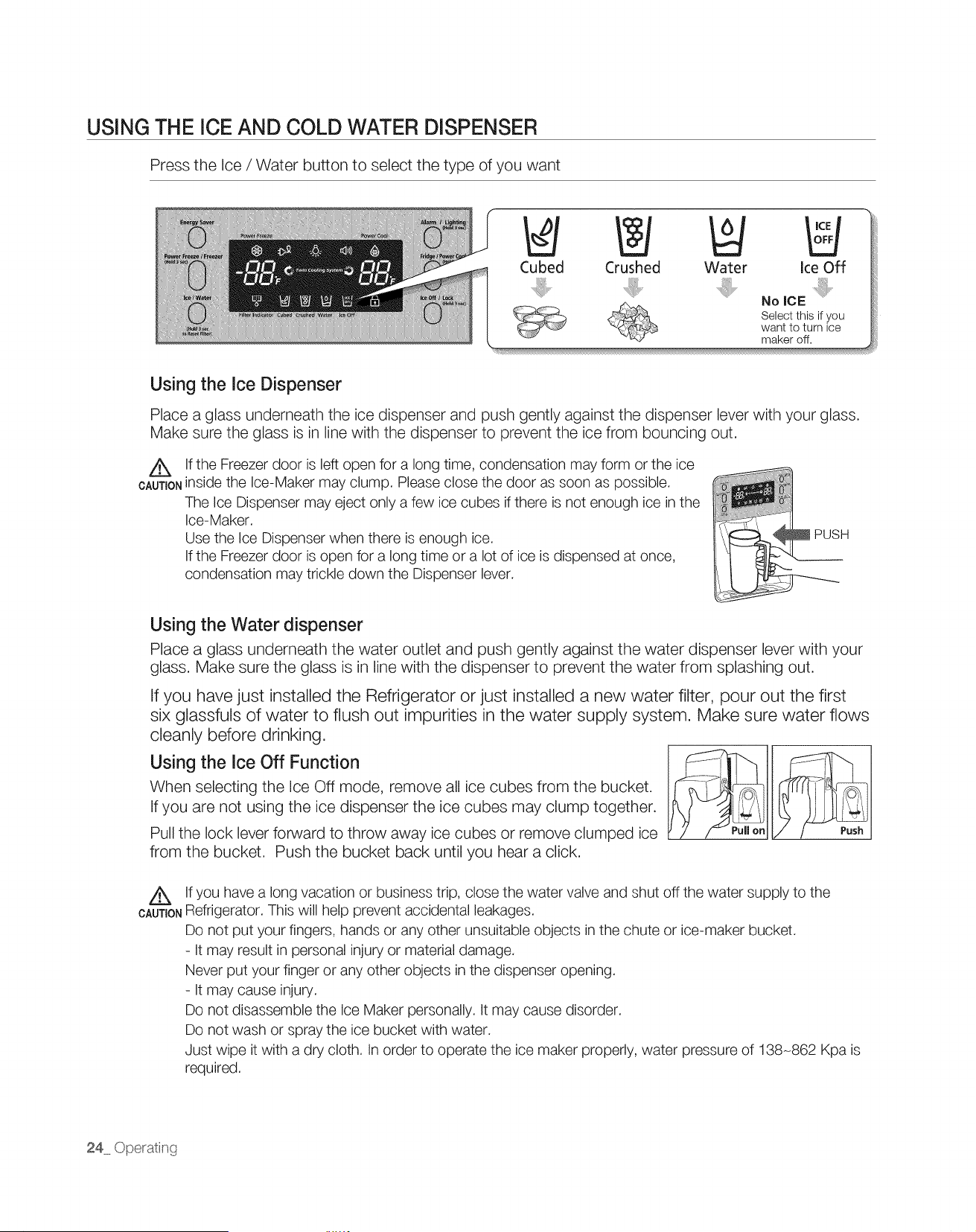
USING THE ICE AND COLD WATER DISPENSER
Press the Ice / Water button to select the type of you want
Cubed Crushed Water ice Off
No ICE
Select this if you
want to turn ice
maker off.
Using the Ice Dispenser
Place a glass underneath the ice dispenser and push gently against the dispenser lever with your glass.
Make sure the glass is in line with the dispenser to prevent the ice from bouncing out.
A if the Freezer door is left open for a long time, condensation may form or the ice
CAUTIONinside the Ice-Maker may clump. Please close the door as soon as possible.
The Ice Dispenser may eject only a few ice cubes if there is not enough ice in the
Ice-Maker.
Use the ice Dispenser when there is enough ice.
Ifthe Freezer door is open for a long time or a lot of ice is dispensed at once,
condensation may trickle down the Dispenser lever.
H
Using the Water dispenser
Place a glass underneath the water outlet and push gently against the water dispenser lever with your
glass. Make sure the glass is in line with the dispenser to prevent the water from splashing out.
If you have just installed the Refrigerator or just installed a new water filter, pour out the first
six glassfuls of water to flush out impurities in the water supply system. Make sure water flows
cleanly before drinking.
Using the Ice Off Function
When selecting the Ice Off mode, remove all ice cubes from the bucket.
If you are not using the ice dispenser the ice cubes may clump together.
Pull the lock lever forward to throw away ice cubes or remove clumped ice
from the bucket. Push the bucket back until you hear a click.
A
CAUTION
Ifyou have a long vacation or business trip, close the water valve and shut off the water supply to the
Refrigerator. This will help prevent accidental leakages.
Do not put your fingers, hands or any other unsuitable objects in the chute or ice-maker bucket.
- It may result in personal injury or material damage.
Never put your finger or any other objects in the dispenser opening.
- It may cause injury.
Do not disassemble the ice Maker personally. It may cause disorder.
Do not wash or spray the ice bucket with water.
Just wipe it with a dry cloth, in order to operate the ice maker properly, water pressure of 138-862 Kpa is
required.
24 Operati_g
Oherat ncj ur
F fra r .tor
G Fron
IGE PAODUGTION
Normal Use
To fill ice bucket to maximum capacity after installation, make sure to do the
following steps.
1, Allow your refrigerator to operate and cool down for 24 hours (or 1 full day).
2, Waiting 24 hours will allow your ice maker to cool properly.
3, Dispense 4 to 6 ice cubes into the glass,
4. After 8 and 16 hours, dispense a full glass of ice at each time.
Whenever all ice is used at one time, the above step 3 and 4 must be repeated (before dispense the
first 4 to 6 ice cubes, it needs waiting 8 hours). This will replenish the ice cubes and ensure maximum
ice production.
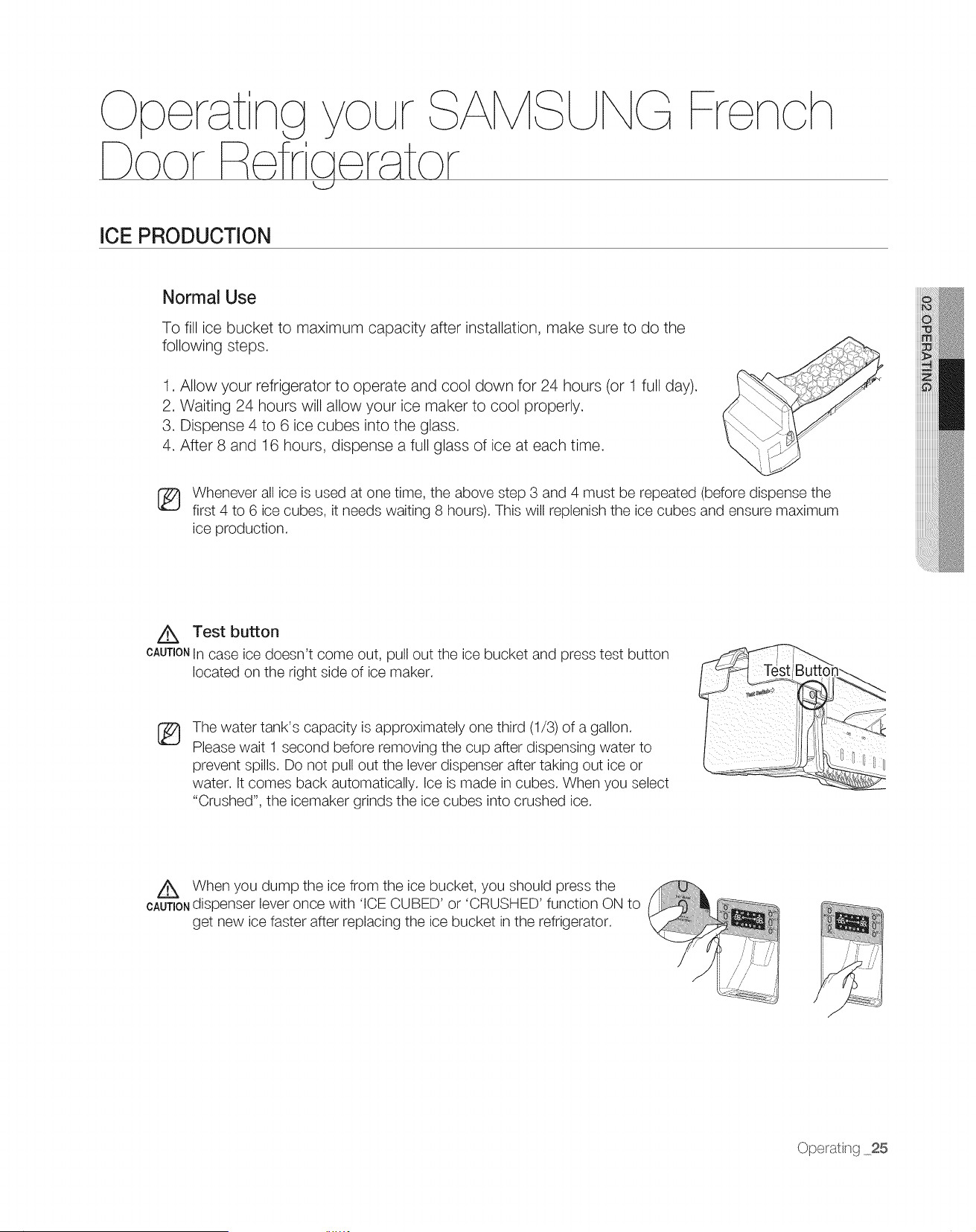
/_X Test button
CAUTIONIn case ice doesn't come out, pull out the ice bucket and press test button
located on the right side of ice maker.
®
The water tank's capacity is approximately one third (1/3) of a gallon.
Please wait 1 second before removing the cup after dispensing water to
prevent spills. Do not pull out the lever dispenser after taking out ice or
water. It comes back automatically. Ice is made in cubes. When you select
"Crushed", the icemaker grinds the ice cubes into crushed ice.
When you dump the ice from the ice bucket you should press the
CAUTioNd_spenserlever once w_th ICE CUBED or CRUSHED function ON to
get new ice faster after replacing the ice bucket in the refrigerator.
Ope_ating 25
Oporatng
SU F enchDoo
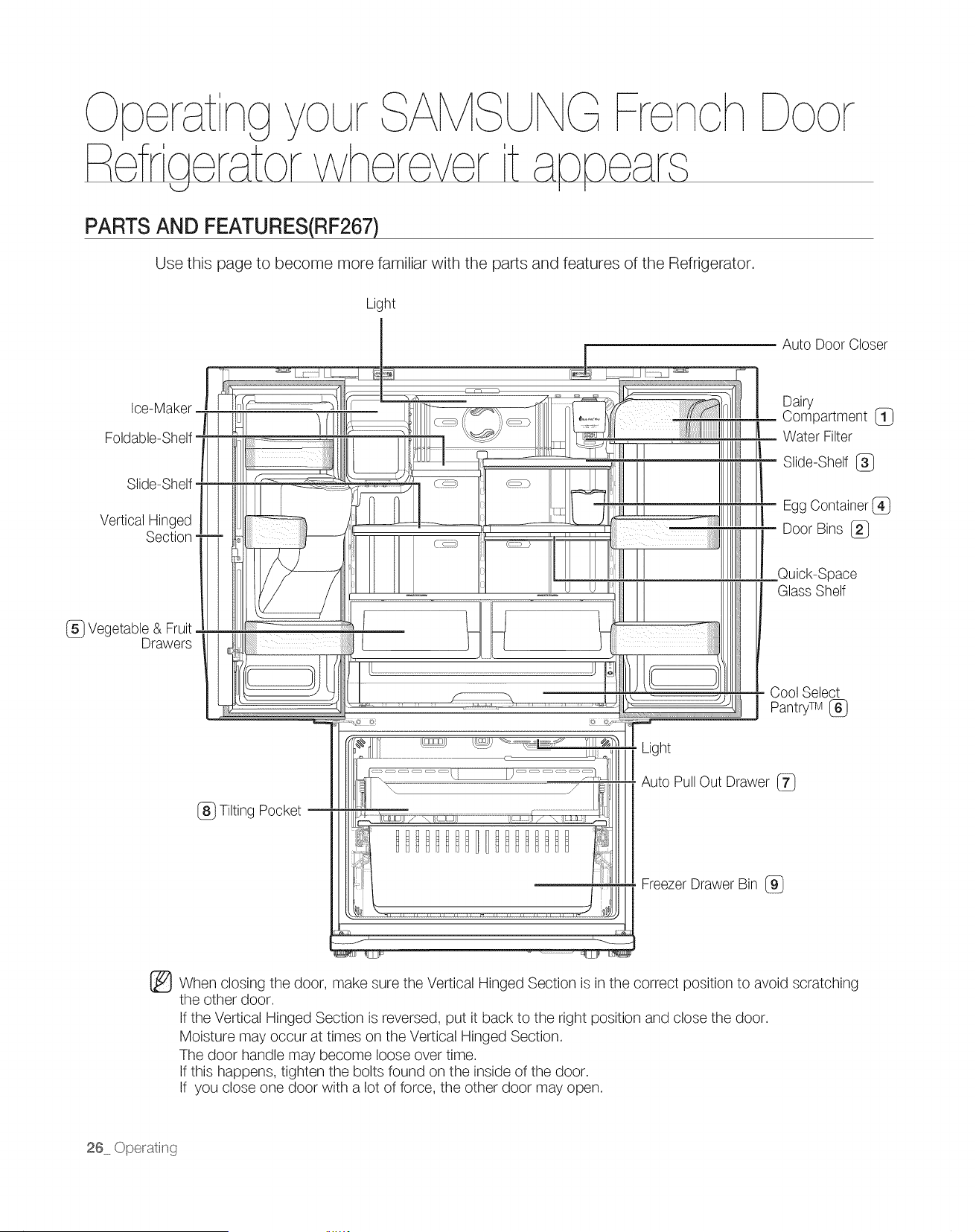
PARTS AND FEATURES(RF267)
Use this page to become more familiar with the parts and features of the Refrigerator.
Light
Ice-Maker
Foldable-Shelf
Slide-Shelf
Vertical Hinged
Section
_} Vegetable & Fruit
Drawers
@
Auto Door Closer
Dairy
Compartment {_}
Water Filter
When closing the door, make sure the Vertical Hinged Section is in the correct position to avoid scratching
the other door.
If the Vertical Hinged Section is reversed, put it back to the right position and close the door.
Moisture may occur at times on the Vertical Hinged Section.
The door handle may become loose over time.
If this happens, tighten the bolts found on the inside of the door.
If you close one door with a lot of force, the other door may open.
26 Operating
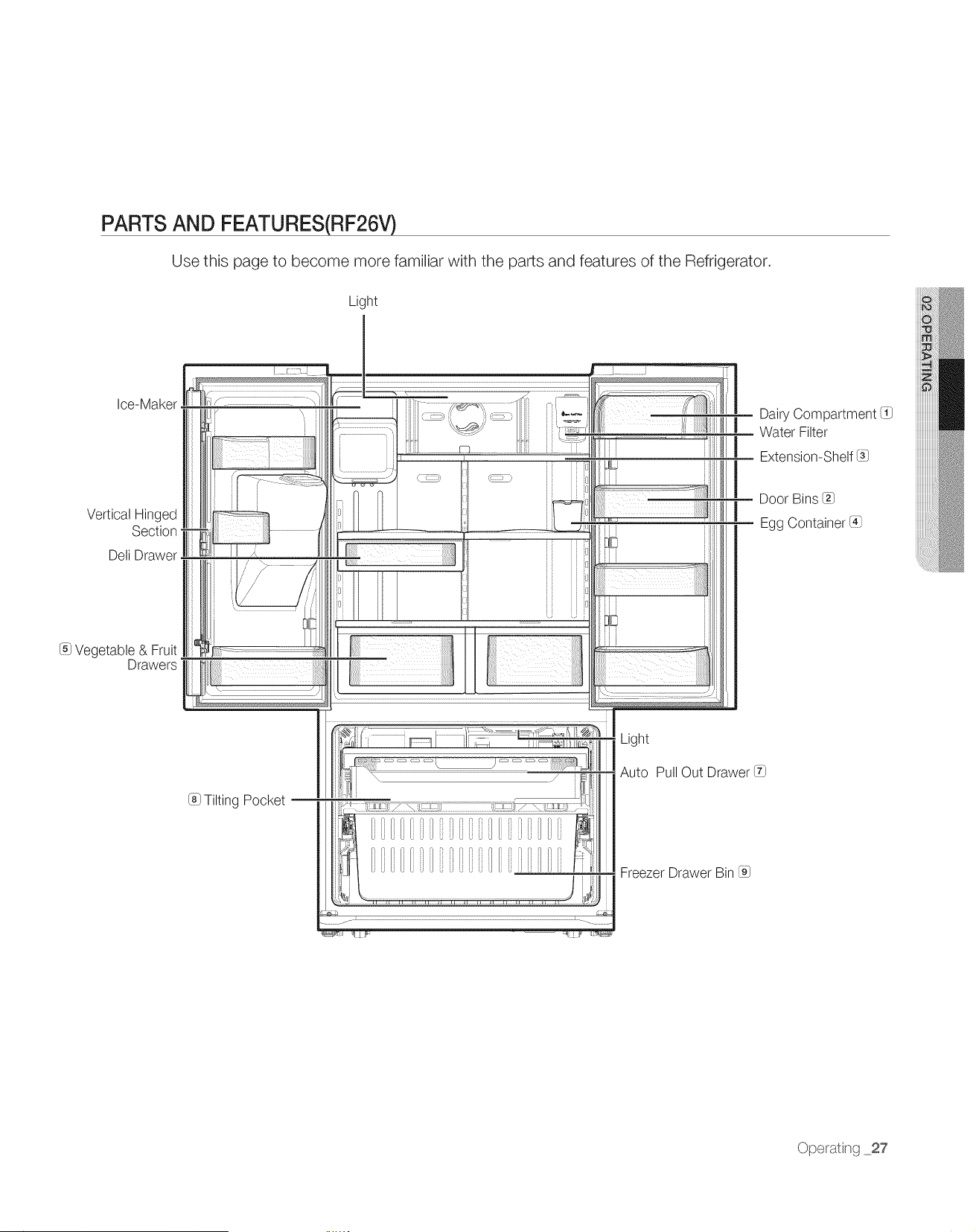
PARTS AND FEATURES(RF26V)
Use this page to become more familiar with the parts and features of the Refrigerator.
Light
Ice-Maker
Vertical Hinged
Section
Deli Drawer
I_ Vegetable & Fruit
Drawers
Light
Auto Pull Out Drawer (fl
(81Tilting Pocket
FreezerDrawer Bin @
Dairy Compartment I11
Water Filter
Extension-Shelf/3]
Door Bins _]
Egg Container li_l
Ope_ating 27
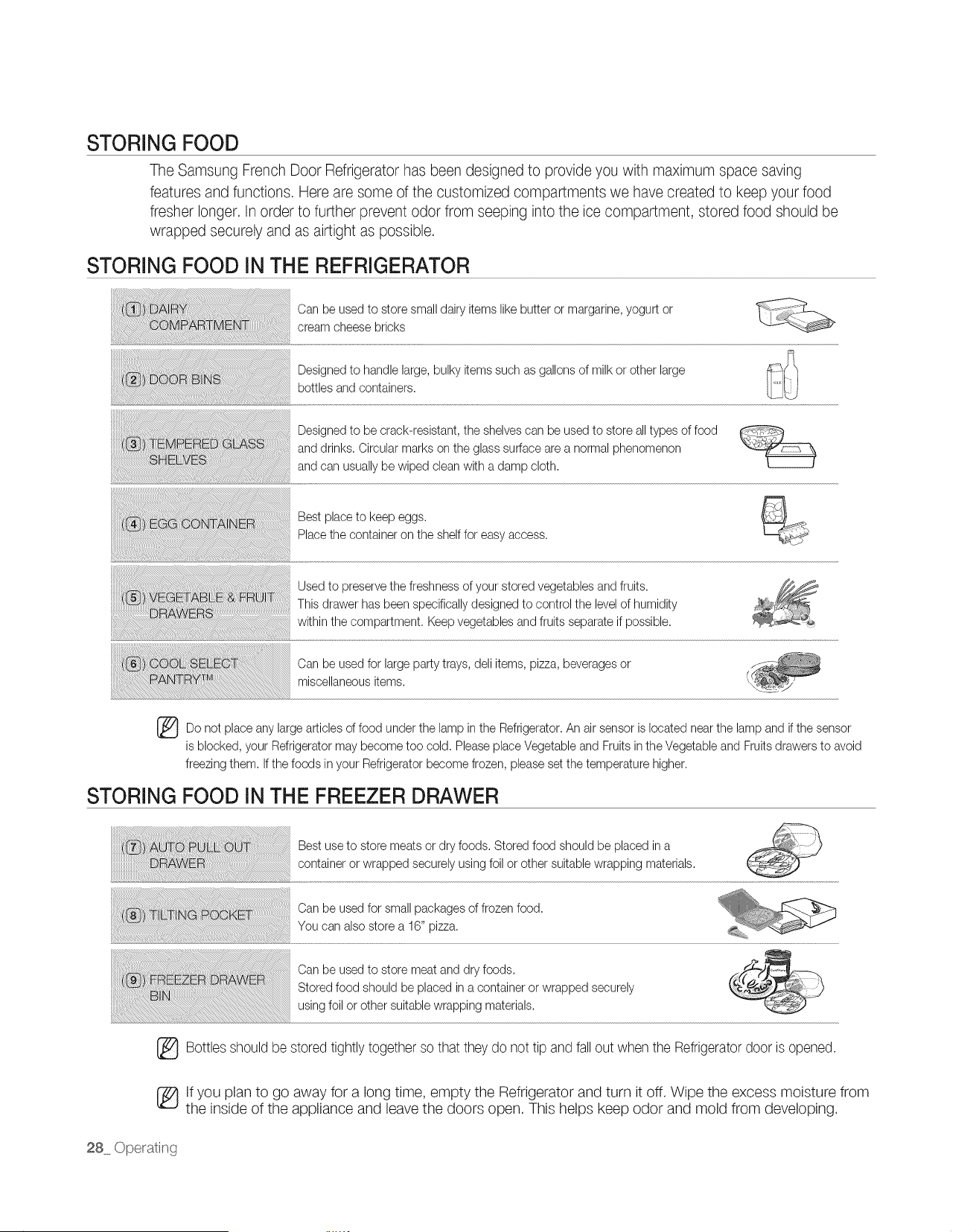
STORING FOOD
The Samsung French Door Refrigerator has been designed to provide you with maximum space saving
features and functions. Here are some of the customized compartments we have created to keep your food
fresher longer. In order to further prevent odor from seeping into the ice compartment, stored food should be
wrapped securely and as airtight as possible.
STORING FOOD IN THE REFRIGERATOR
Can be usedto store small dairy items likebutter or margarine,yogurt or
cream cheese bricks
Designedto handle large, bulky items such as gallons of milk or other large
bottles and containers.
Designedto be crack-resistant, the shelvescan be used to store all types of food
and drinks. Circular marks on the glass surface are a normal phenomenon
and can usuallybe wiped clean with a damp cloth.
Best place to keep eggs.
Place the container on the shelffor easy access.
Used to preservethe freshness of your stored vegetables and fruits.
This drawer has been specificallydesigned to control the levelof humidity
within the compartment. Keep vegetables and fruits separateif possible.
Can be usedfor large party trays, dell items, pizza, beveragesor
miscellaneousitems.
Do not place anylarge articles of food under the lamp in the Refrigerator.An airsensor is located nearthe lamp and if the sensor
is blocked, your Refrigeratormay become too cold. Pleaseplace Vegetable and Fruits inthe Vegetableand Fruits drawers to avoid
freezing them. Ifthe foods inyour Refrigeratorbecome frozen, please set the temperature higher.
STORING FOOD IN THE FREEZER DRAWER
Best useto store meats or dry foods. Stored food should be placed in a
container or wrapped securely using foil or other suitable wrapping materials.
Can be usedfor small packages of frozen food.
You can also store a 16" pizza.
Can be usedto store meat and dry foods.
Stored food should be placed in a container or wrapped securely
usingfoil or other suitable wrapping materials.
_ Bottles should be stored tightly together so that they do not tip and fall out when the Refrigeratordoor is opened.
[_lf you plan to go away for a long time, empty the Refrigerator and turn it off. Wipe the excess moisture from
the inside of the appliance and leave the doors open. This helps keep odor and mold from developing.
28 Ope_ating
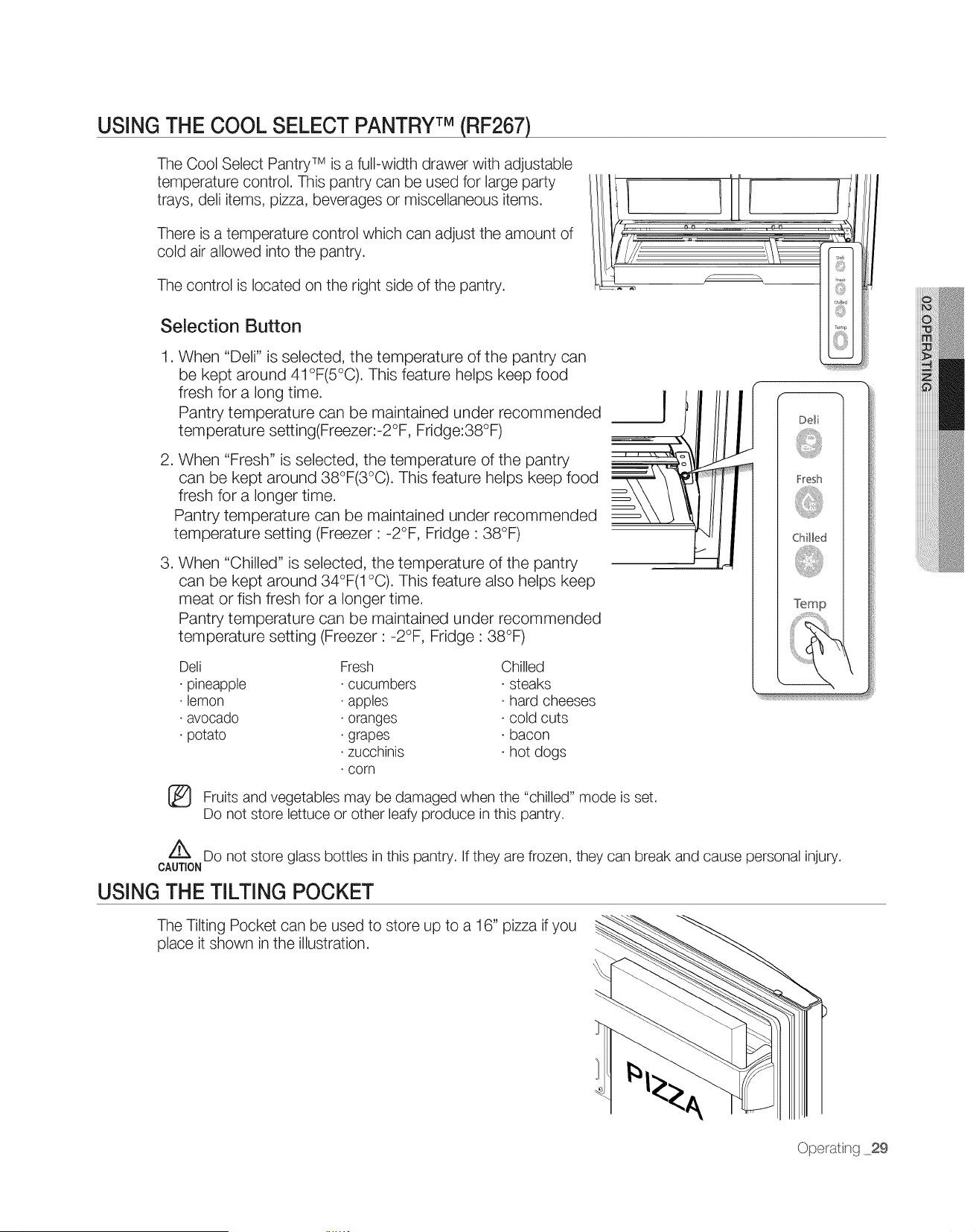
USING THE COOL SELECT PANTRYTM (RF267)
The Cool Select Pantry TM is a full-width drawer with adjustable
temperature control. This pantry can be used for large party
trays, deli items, pizza, beverages or miscellaneous items.
There is a temperature control which can adjust the amount of
cold air allowed into the pantry.
The control is located on the right side of the pantry.
Selection Button
,
.
When "Deli" is selected the temperature of the pantry can
be kept around 41°F(5°C). This feature helps keep food
fresh for a long time.
Pantry temperature can be maintained under recommended
temperature setting(Freezer:-2°F, Fridge:38°F)
When "Fresh" is selected, the temperature of the pantry
can be kept around 38°F(3°C). This feature helps keep food
fresh for a longer time.
Pantry temperature can be maintained under recommended
temperature setting (Freezer : -2°F, Fridge : 38°F)
.
When "Chilled" is selected, the temperature of the pantry
can be kept around 34°F(1 °C). This feature also helps keep
meat or fish fresh for a longer time.
Pantry temperature can be maintained under recommended
temperature setting (Freezer : -2°F, Fridge : 38°F)
Dell
• pineapple
• lemon
• avocado
• potato
®
Fresh Chilled
cucumbers • steaks
apples • hard cheeses
oranges • cold cuts
grapes • bacon
zucchinis • hot dogs
corn
Fruits and vegetables may be damaged when the "chilled" mode is set.
Do not store lettuce or other leafy produce in this pantry.
Z_ Do not store glass bottles in this pantry. If they are frozen, they can break and cause personal injury.
CAUTION
USING THE TILTING POCKET
The Tilting Pocket can be used to store up to a 16" pizza if you
place it shown in the illustration.
Operat ng 29
Oper tng r
F fra r tor
U rench
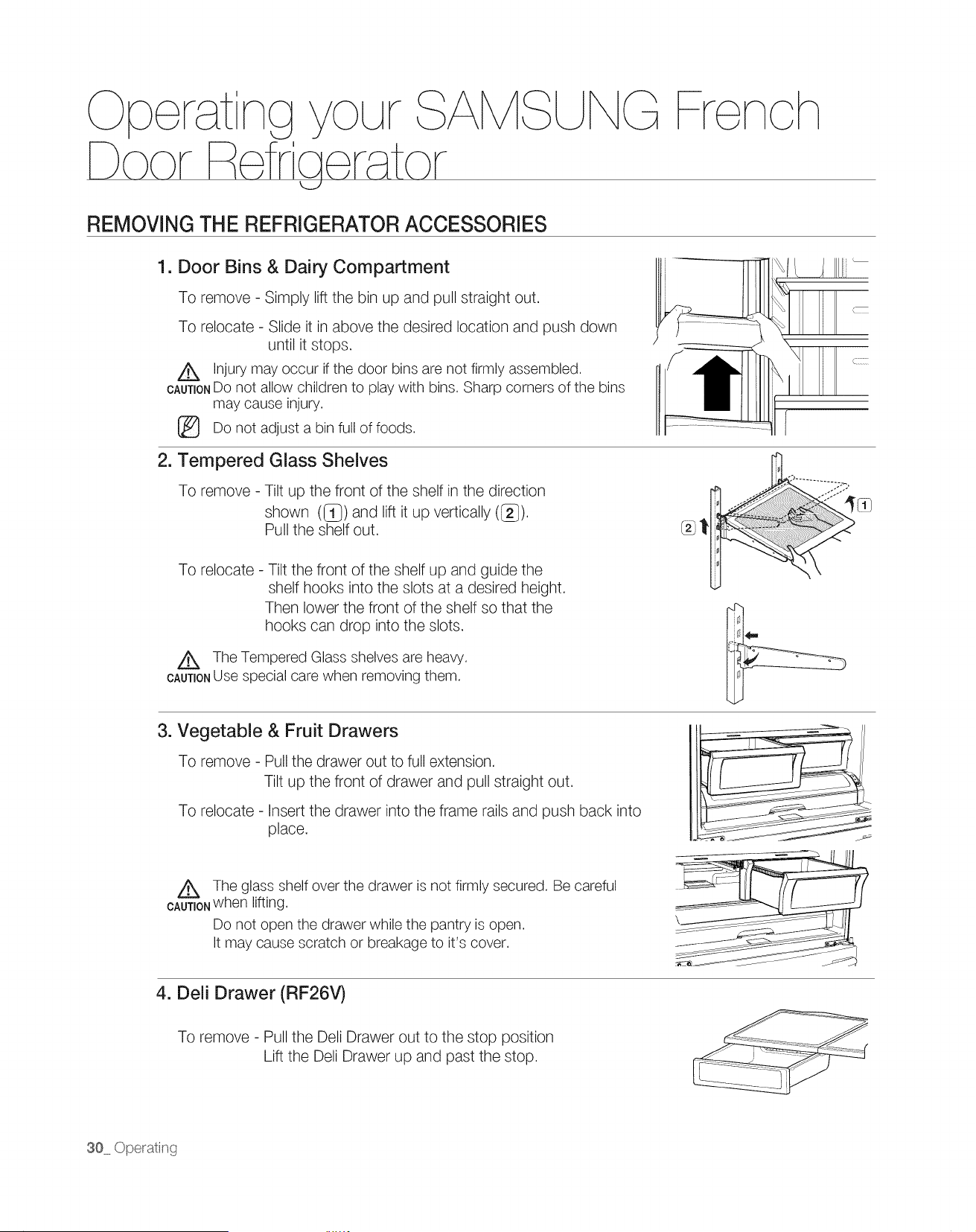
REMOVING THE REFRIGERATOR ACCESSORIES
1. Door Bins & Dairy Compartment
To remove - Simply lift the bin up and pull straight out.
To relocate - Slide it in above the desired location and push down
until it stops.
Z_ Injury may occur if the door bins are not firmly assembled.
CAUTIONDO not allow children to play with bins. Sharp corners of the bins
may cause injury.
Do not adjust a bin full of foods.
(
2. Tempered Glass Shelves
To remove - Tilt up the front of the shelf in the direction
shown (_) and lift it up vertically (_).
Pull the shelf out.
To relocate - Tilt the front of the shelf up and guide the
shelf hooks into the slots at a desired height.
Then lower the front of the shelf so that the
hooks can drop into the slots.
Z_ The Tempered Glass shelves are heaw.
CAUTIONUse special care when removing them.
3. Vegetable & Fruit Drawers
To remove - Pull the drawer out to full extension.
Tilt up the front of drawer and pull straight out.
To relocate - Insert the drawer into the frame rails and push back into
place.
Z_ The glass shelf over the drawer is not firmly secured. Be careful
CAUTIONwhen lifting.
Do not open the drawer while the pantry is open.
It may cause scratch or breakage to it's cover.
4. Deli Drawer (RF26V)
To remove - Pull the Dell Drawer out to the stop position
Lift the Dell Drawer up and past the stop.
30 Operating
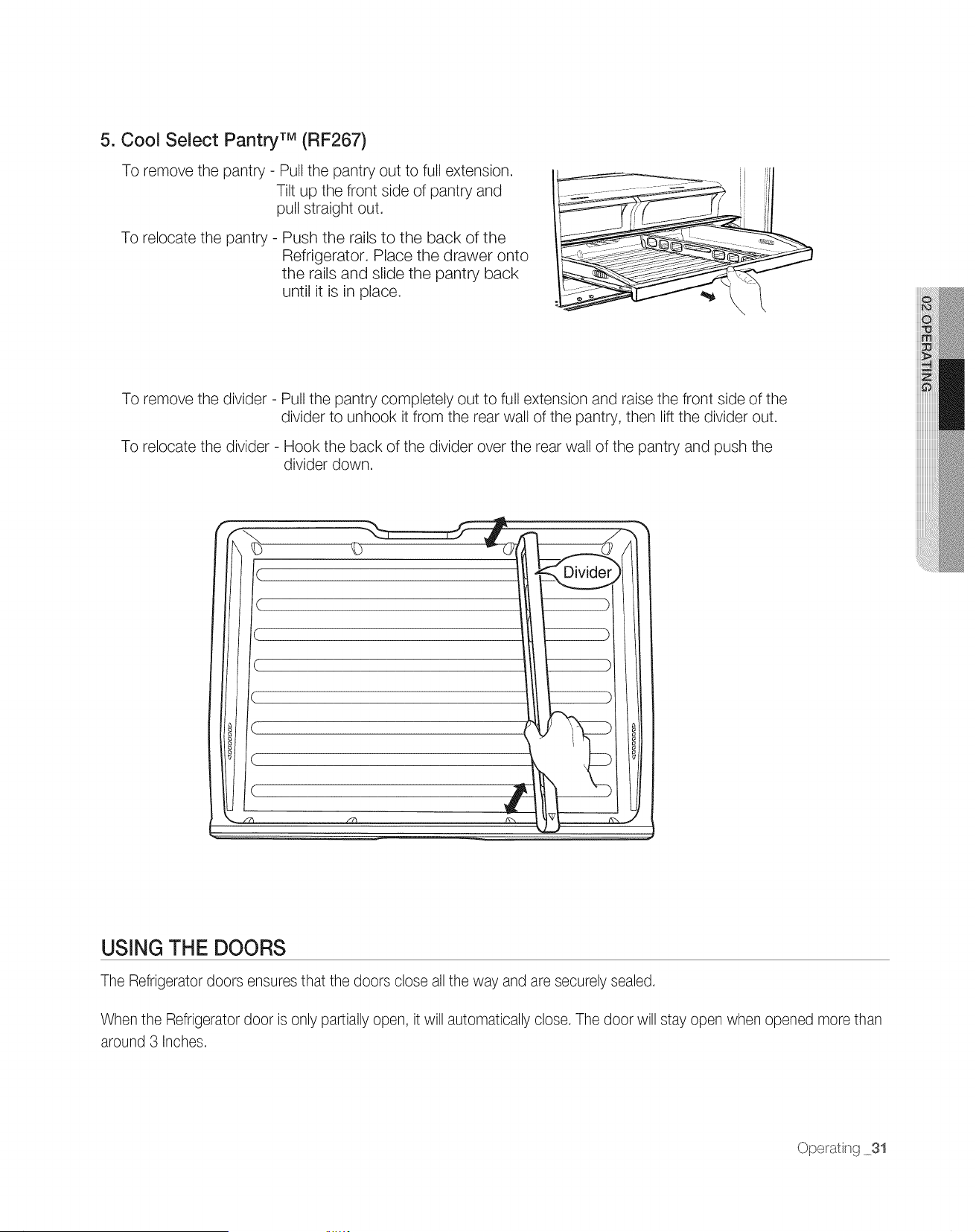
5. Cool Select Pantry TM (RF267)
To remove the pantry - Pull the pantry out to full extension.
Tilt up the front side of pantry and
pull straight out.
To relocate the pantry - Push the rails to the back of the
Refrigerator. Place the drawer onto
the rails and slide the pantry back
until it is in place.
To remove the divider - Pull the pantry completely out to full extension and raise the front side of the
divider to unhook it from the rear wall of the pantry, then lift the divider out.
To relocate the divider - Hook the back of the divider over the rear wall of the pantry and push the
divider down.
C
D
)
C
USING THE DOORS
The Refrigerator doors ensures that the doors close all the way and are securely sealed.
When the Refrigerator door is only partially open, it will automatically close. The door will stay open when opened more than
around 3 Inches.
Operating 31
Operatng r
Refreerator
U French
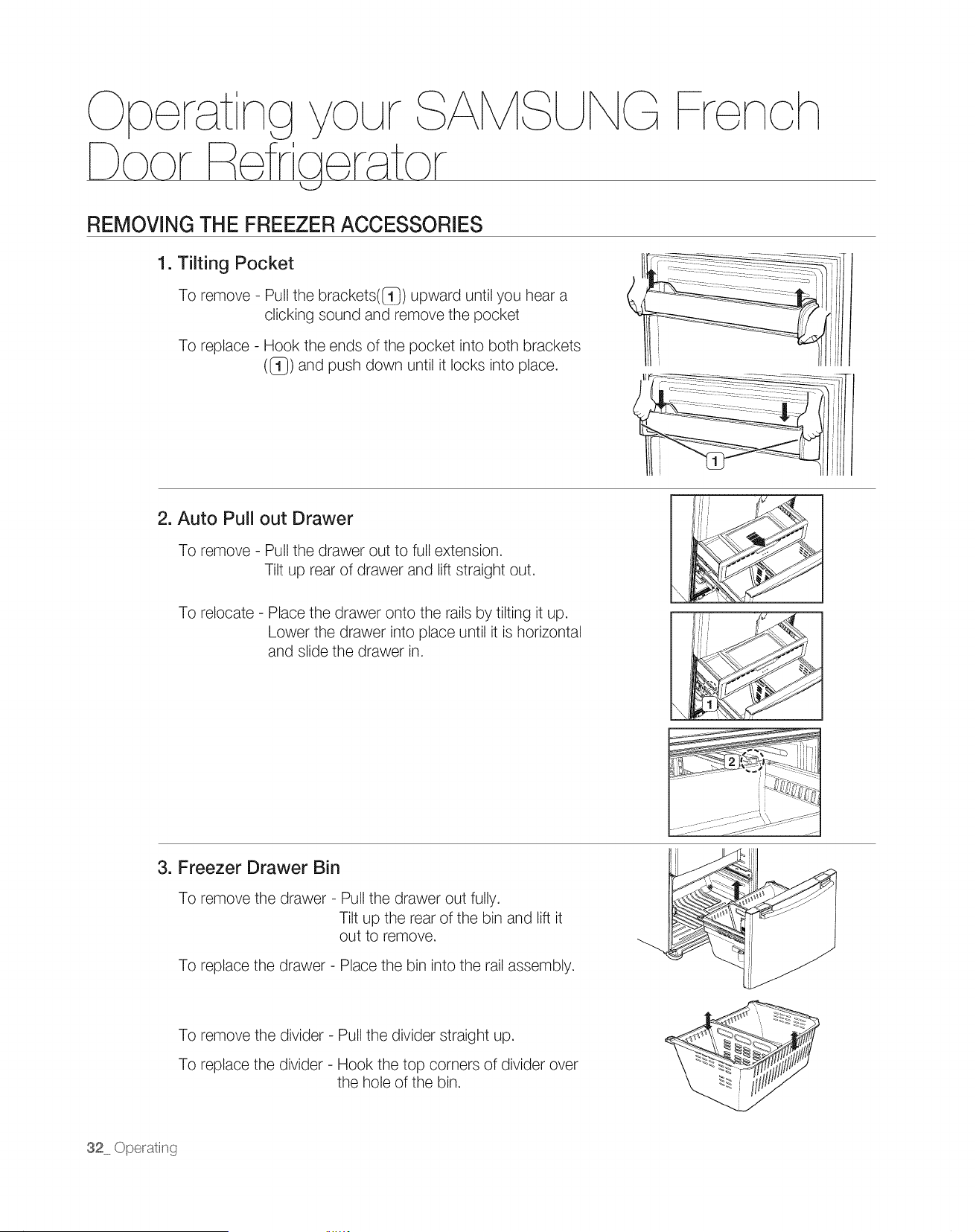
REMOVING THE FREEZER ACCESSORIES
1. Tilting Pocket
To remove - Pull the brackets([_}) upward until you hear a
clicking sound and remove the pocket
To replace - Hook the ends of the pocket into both brackets
((_) and push down until it locks into place.
}1
il _ -_11,III
2. Auto Pull out Drawer
To remove - Pull the drawer out to full extension.
Tilt up rear of drawer and lift straight out.
To relocate - Place the drawer onto the rails by tilting it up.
Lower the drawer into place until it is horizontal
and slide the drawer in.
y
! i "
,Ii ii i -
l .i,_ _
Jiii
3. Freezer Drawer Bin
To remove the drawer - Pull the drawer out fully.
Tilt up the rear of the bin and lift it
out to remove.
To replace the drawer - Place the bin into the rail assembly.
To remove the divider - Pull the divider straight up.
To replace the divider - Hook the top corners of divider over
the hole of the bin.
32 Opetating
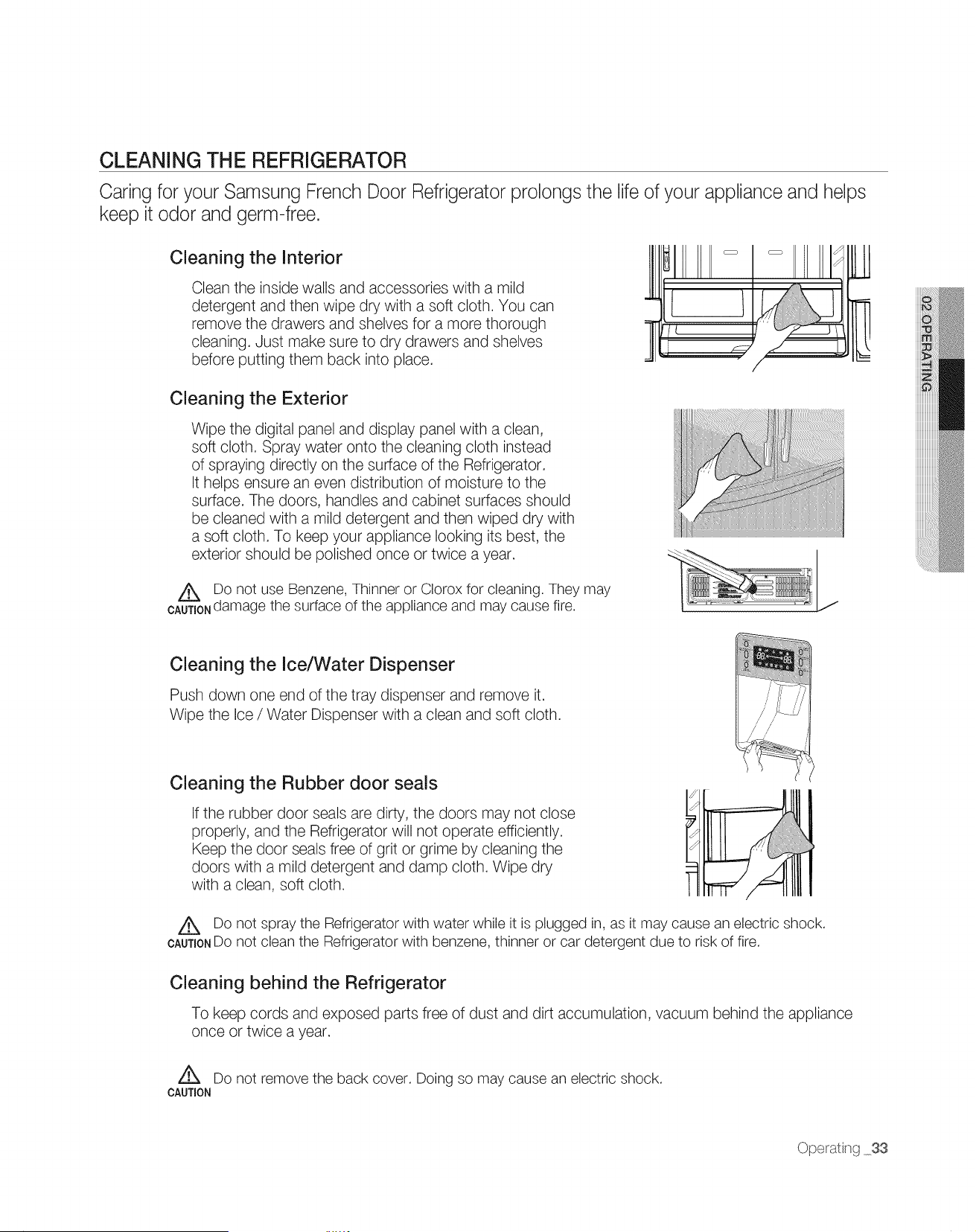
CLEANING THE REFRIGERATOR
Caring for your Samsung French Door Refrigerator prolongs the life of your appliance and helps
keep it odor and germ-free.
Cleaning the Interior
Clean the inside walls and accessories with a mild
detergent and then wipe dry with a soft cloth. You can
remove the drawers and shelves for a more thorough
cleaning. Just make sure to dry drawers and shelves
before putting them back into place.
Cleaning the Exterior
Wipe the digital panel and display panel with a clean,
soft cloth. Spray water onto the cleaning cloth instead
of spraying directly on the surface of the Refrigerator.
It helps ensure an even distribution of moisture to the
surface. The doors, handles and cabinet surfaces should
be cleaned with a mild detergent and then wiped dry with
a soft cloth. To keep your appliance looking its best, the
exterior should be polished once or twice a year.
Z_ Do not use Benzene, Thinner or Clorox for cleaning. They may
CAUTIONdamage the surface of the appliance and may cause fire.
Cleaning the Ice/Water Dispenser
Push down one end of the tray dispenser and remove it.
Wipe the Ice / Water Dispenser with a clean and soft cloth.
Cleaning the Rubber door seals
If the rubber door seals are dirty, the doors may not close
properly, and the Refrigerator will not operate efficiently.
Keep the door seals free of grit or grime by cleaning the
doors with a mild detergent and damp cloth. Wipe dry
with a clean, soft cloth.
Z_ Do not spray the Refrigerator with water while it is plugged in, as it may cause an electric shock.
CAUTIONDO not clean the Refrigerator with benzene, thinner or car detergent due to risk of fire.
Cleaning behind the Refrigerator
To keep cords and exposed parts free of dust and dirt accumulation, vacuum behind the appliance
once or twice a year.
A
Do not remove the back cover. Doing so may cause an electric shock.
CAUTION
Ope_ating 33
Oper tng r
F fra r tor
U rench
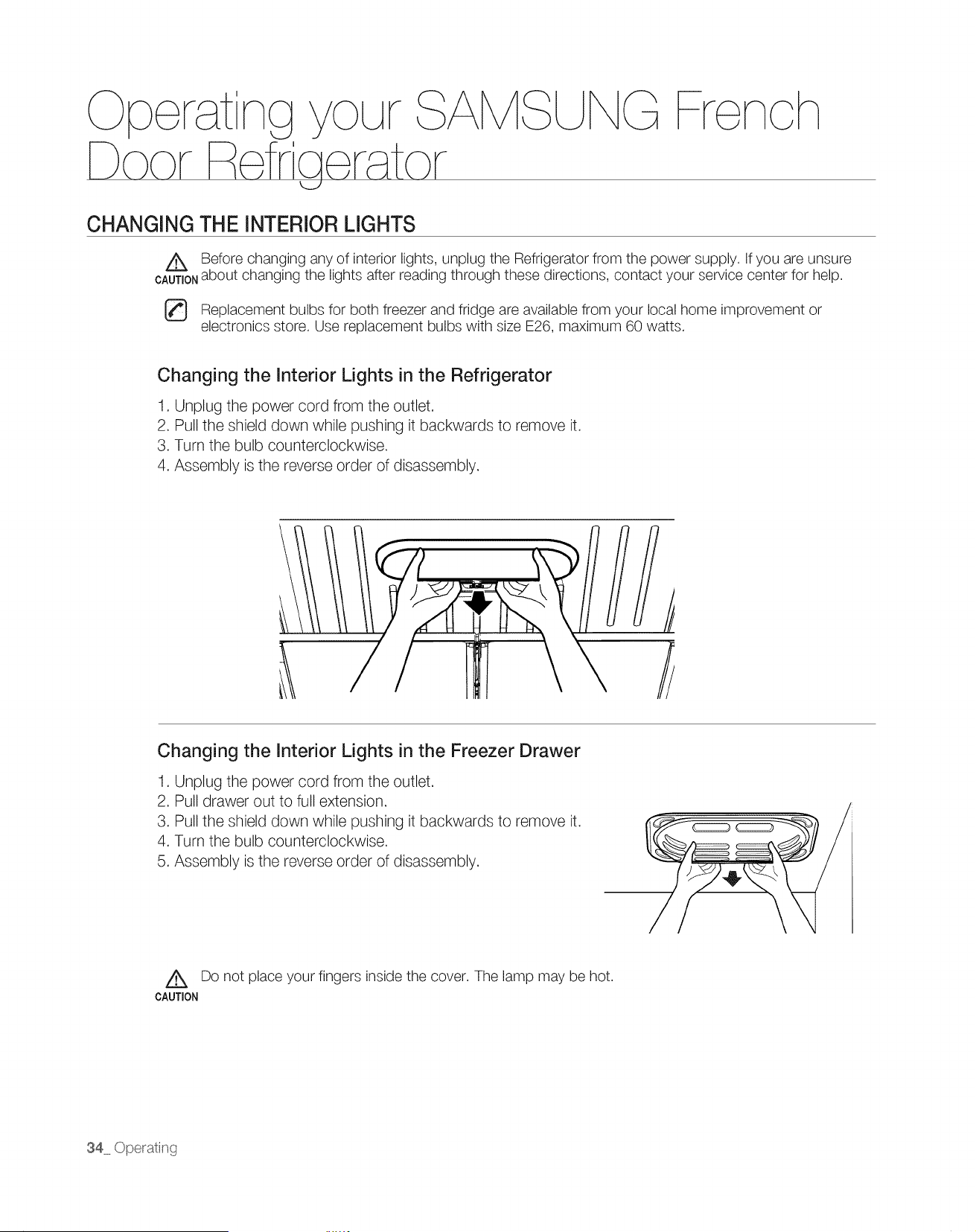
CHANGING THE INTERIOR LIGHTS
A Before changing any of interior lights, unplug the Refrigerator from the power supply. If you are unsure
CA=_T'ONabout changing the lights after reading through these directions, contact your service center for help.
Replacement bulbs for both freezer and fridge are available from your local home improvement or
electronics store. Use replacement bulbs with size E26, maximum 60 watts.
Changing the Interior Lights in the Refrigerator
1. Unplug the power cord from the outlet.
2. Pull the shield down while pushing it backwards to remove it.
3. Turn the bulb counterclockwise.
4. Assembly is the reverse order of disassembly.
Changing the Interior Lights in the Freezer Drawer
1. Unplug the power cord from the outlet.
2. Pull drawer out to full extension.
3. Pull the shield down while pushing it backwards to remove it.
4. Turn the bulb counterclockwise.
5. Assembly is the reverse order of disassembly.
A Do not place your fingers inside the cover. The lamp may be hot.
CAUTION
34 Operating
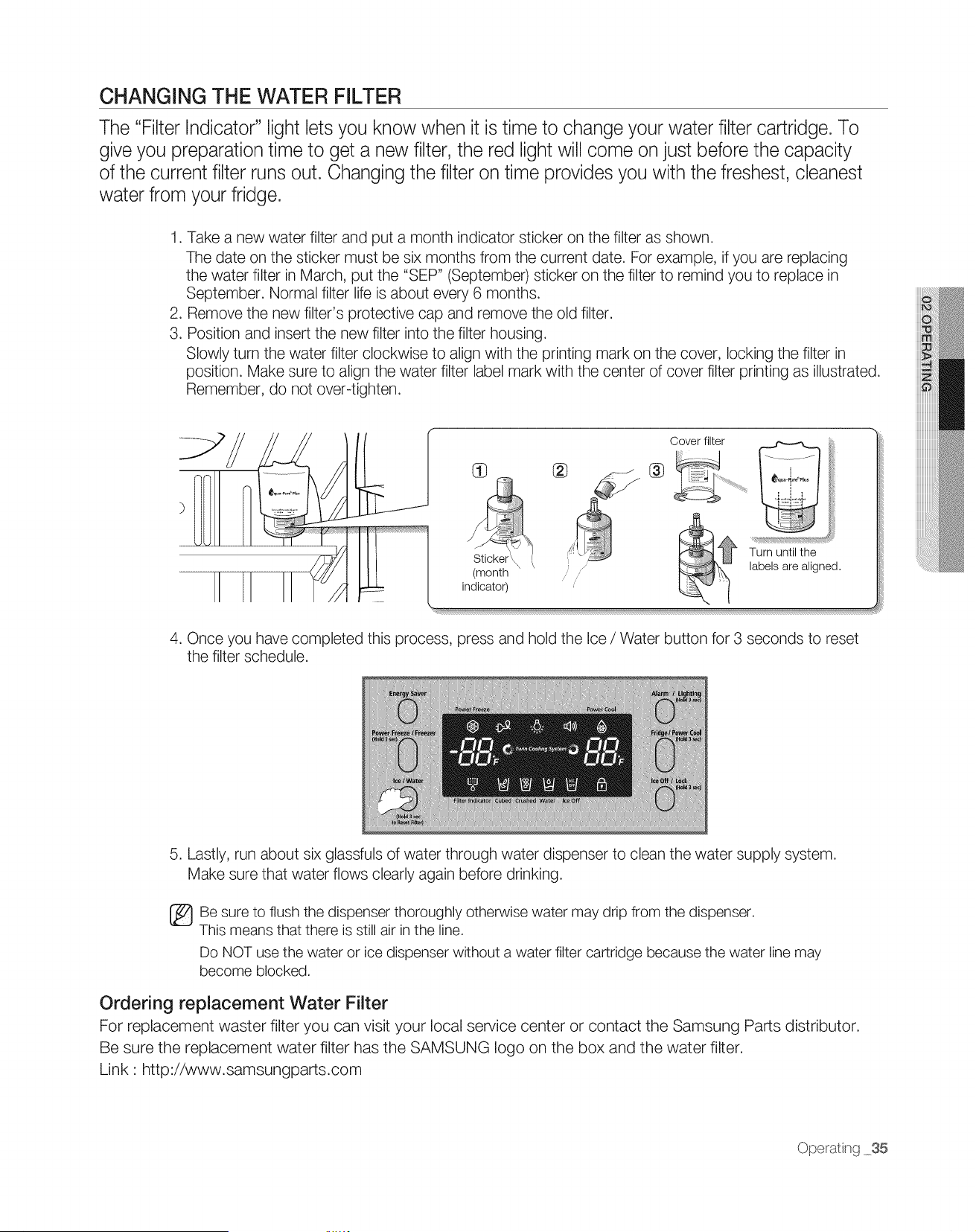
CHANGING THE WATER FILTER
The "Filter Indicator" light lets you know when it is time to change your water filter cartridge. To
give you preparation time to get a new filter, the red light will come on just before the capacity
of the current filter runs out. Changing the filter on time provides you with the freshest, cleanest
water from your fridge.
1. Take a new water filter and put a month indicator sticker on the filter as shown.
The date on the sticker must be six months from the current date. For example, if you are replacing
the water filter in March, put the "SEP" (September) sticker on the filter to remind you to replace in
September. Normal filter life is about every 6 months.
2. Remove the new filter's protective cap and remove the old filter.
3. Position and insert the new filter into the filter housing.
Slowly turn the water filter clockwise to align with the printing mark on the cover, locking the filter in
position. Make sure to align the water filter label mark with the center of cover filter printing as illustrated.
Remember, do not over-tighten.
J /J
(month
indicator)
Cover filter
® ®
Turn until the
labels are aligned.
4. Once you have completed this process, press and hold the Ice / Water button for 3 seconds to reset
the filter schedule.
5. Lastly, run about six glassfuls of water through water dispenser to clean the water supply system.
Make sure that water flows clearly again before drinking.
Be sure to flush the dispenser thoroughly otherwise water may drip from the dispenser.
This means that there is still air in the line.
Do NOT use the water or ice dispenser without a water filter cartridge because the water line may
become blocked.
Ordering replacement Water Filter
For replacement waster filter you can visit your local service center or contact the Samsung Parts distributor.
Be sure the replacement water filter has the SAMSUNG logo on the box and the water filter.
Link: http://www.samsungparts.com
Operat _g 35
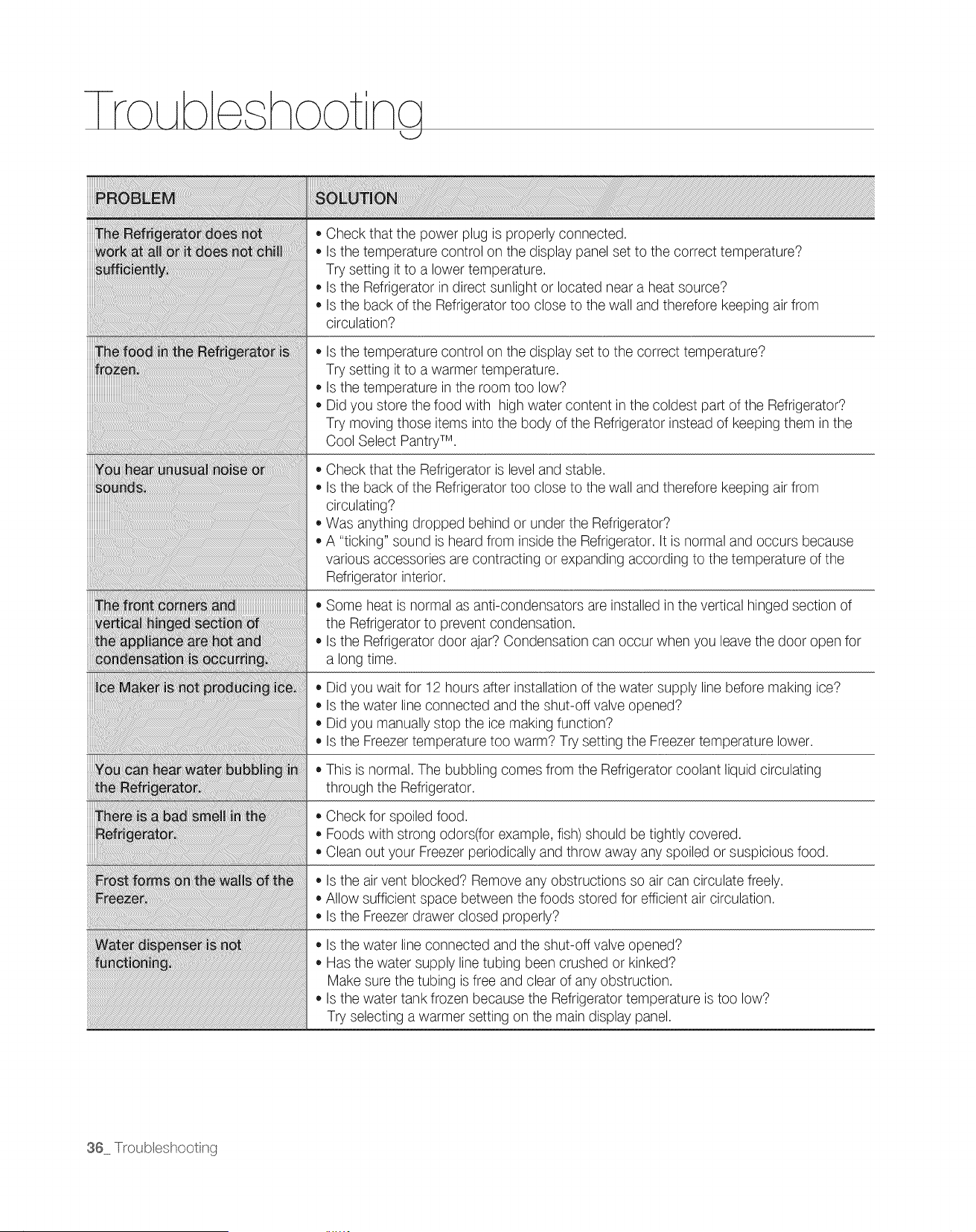
esho t ng
, Check that the power plug is properly connected.
, Is the temperature control on the display panel set to the correct temperature?
Try setting it to a lower temperature.
, Is the Refrigerator in direct sunlight or located near a heat source?
• Is the back of the Refrigerator too close to the wall and therefore keeping air from
circulation?
, Is the temperature control on the display set to the correct temperature?
Try setting it to a warmer temperature.
, Is the temperature in the room too low?
• Did you store the food with high water content in the coldest part of the Refrigerator?
Try moving those items into the body of the Refrigerator instead of keeping them in the
Cool Select PantryTM.
, Check that the Refrigerator is level and stable.
, Is the back of the Refrigerator too close to the wall and therefore keeping air from
circulating?
, Was anything dropped behind or under the Refrigerator?
• A "ticking" sound is heard from inside the Refrigerator. It is normal and occurs because
various accessories are contracting or expanding according to the temperature of the
Refrigerator interior.
• Some heat is normal as anti-condensators are installed in the vertical hinged section of
the Refrigerator to prevent condensation.
• Is the Refrigerator door ajar? Condensation can occur when you leave the door open for
a long time.
, Did you wait for 12 hours after installation of the water supply line before making ice?
, Is the water line connected and the shut-off valve opened?
• Did you manually stop the ice making function?
• Is the Freezer temperature too warm? Try setting the Freezer temperature lower.
This is normal. The bubbling comes from the Refrigerator coolant liquid circulating
through the Refrigerator.
, Check for spoiled food.
, Foods with strong odors(for example, fish) should be tightly covered.
• Clean out your Freezer periodically and throw away any spoiled or suspicious food.
, Is the air vent blocked? Remove any obstructions so air can circulate freely.
• Allow sufficient space between the foods stored for efficient air circulation.
• Is the Freezer drawer closed properly?
, Is the water line connected and the shut-off valve opened?
, Has the water supply line tubing been crushed or kinked?
Make sure the tubing is free and clear of any obstruction.
• Is the water tank frozen because the Refrigerator temperature is too low?
Try selecting a warmer setting on the main display panel.
36 T_oubleshooting
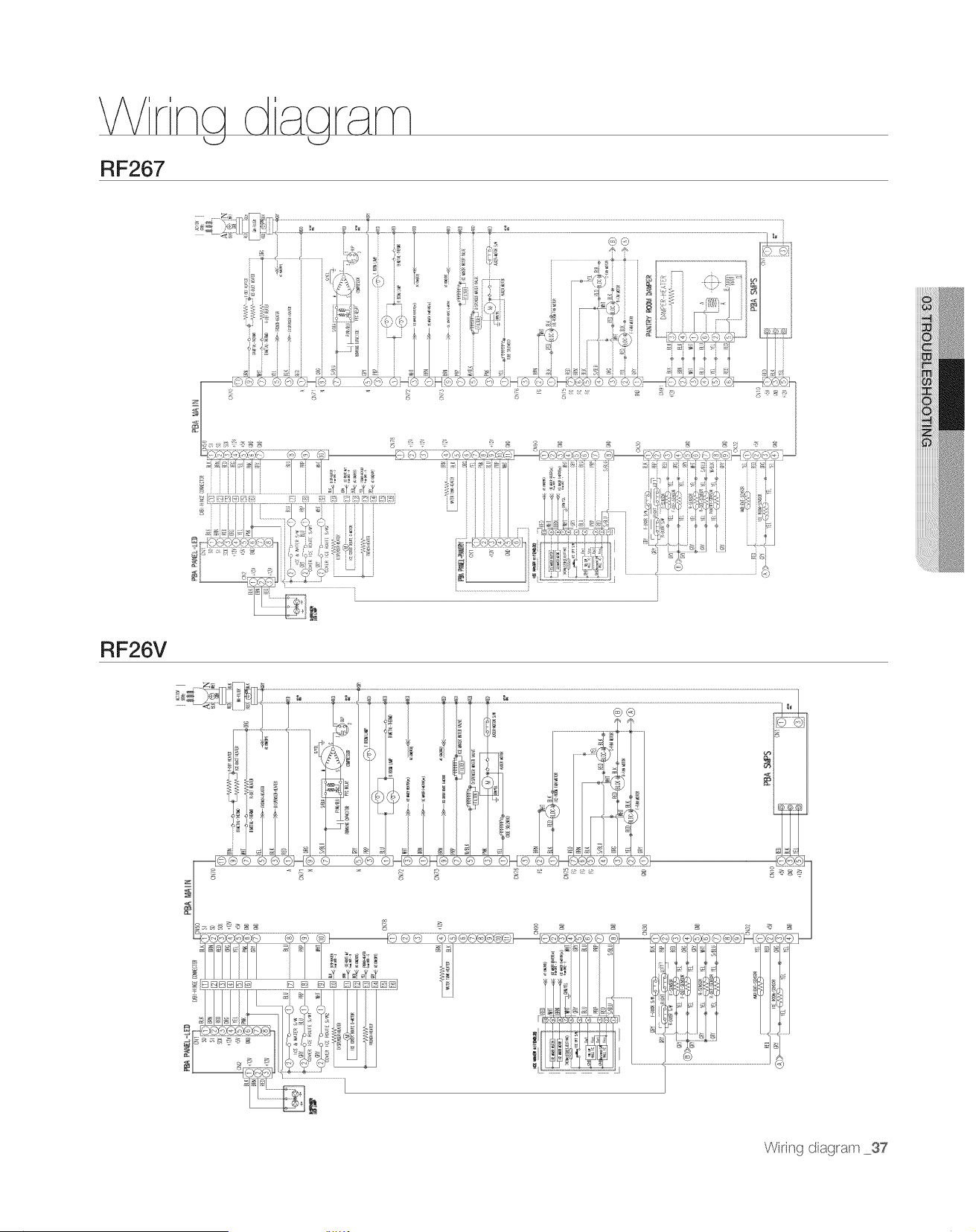
\
RF267
RF26V
Wiring diagrarr 37
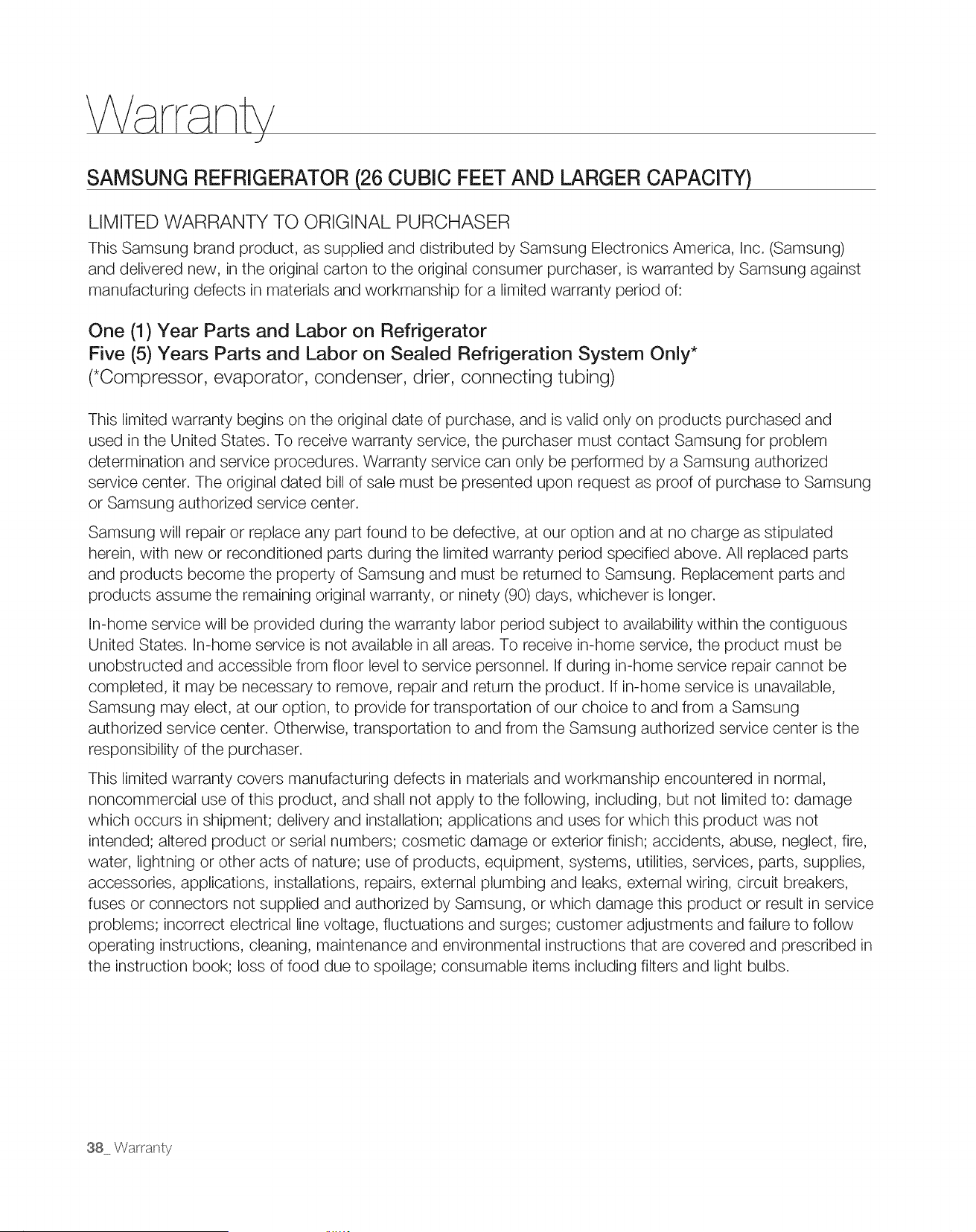
SAMSUNG REFRIGERATOR (26 CUBIC FEET AND LARGER CAPACITY)
LIMITED WARRANTY TO ORIGINAL PURCHASER
This Samsung brand product, as supplied and distributed by Samsung Electronics America, Inc. (Samsung)
and delivered new, in the original carton to the original consumer purchaser, is warranted by Samsung against
manufacturing defects in materials and workmanship for a limited warranty period of:
One (1) Year Parts and Labor on Refrigerator
Five (5) Years Parts and Labor on Sealed Refrigeration System Only*
(*Compressor, evaporator, condenser, drier, connecting tubing)
This limited warranty begins on the original date of purchase, and is valid only on products purchased and
used in the United States. To receive warranty service, the purchaser must contact Samsung for problem
determination and service procedures. Warranty service can only be performed by a Samsung authorized
service center. The original dated bill of sale must be presented upon request as proof of purchase to Samsung
or Samsung authorized service center.
Samsung will repair or replace any part found to be defective, at our option and at no charge as stipulated
herein, with new or reconditioned parts during the limited warranty period specified above. All replaced parts
and products become the property of Samsung and must be returned to Samsung. Replacement parts and
products assume the remaining original warranty, or ninety (90) days, whichever is longer.
In-home service will be provided during the warranty labor period subject to availability within the contiguous
United States. In-home service is not available in all areas. To receive in-home service, the product must be
unobstructed and accessible from floor level to service personnel. If during in-home service repair cannot be
completed, it may be necessary to remove, repair and return the product. If in-home service is unavailable,
Samsung may elect, at our option, to provide for transportation of our choice to and from a Samsung
authorized service center. Otherwise, transportation to and from the Samsung authorized service center is the
responsibility of the purchaser.
This limited warranty covers manufacturing defects in materials and workmanship encountered in normal,
noncommercial use of this product, and shall not apply to the following, including, but not limited to: damage
which occurs in shipment; delivery and installation; applications and uses for which this product was not
intended; altered product or serial numbers; cosmetic damage or exterior finish; accidents, abuse, neglect, fire,
water, lightning or other acts of nature; use of products, equipment, systems, utilities, services, parts, supplies,
accessories, applications, installations, repairs, external plumbing and leaks, external wiring, circuit breakers,
fuses or connectors not supplied and authorized by Samsung, or which damage this product or result in service
problems; incorrect electrical line voltage, fluctuations and surges; customer adjustments and failure to follow
operating instructions, cleaning, maintenance and environmental instructions that are covered and prescribed in
the instruction book; loss of food due to spoilage; consumable items including filters and light bulbs.
38 Wattan y

THERE ARE NO EXPRESS WARRANTIES OTHER THAN THOSE LISTED AND DESCRIBED ABOVE, AND
NO WARRANTIES WHETHER EXPRESS OR IMPLIED, INCLUDING, BUT NOT LIMITED TO, ANY IMPLIED
WARRANTIES OF MERCHANTABILITY OR FITNESS FOR A PARTICULAR PURPOSE, SHALL APPLY
AFTER THE EXPRESS WARRANTY PERIODS STATED ABOVE, AND NO OTHER EXPRESS WARRANTY
OR GUARANTY GIVEN BY ANY PERSON, FIRM OR CORPORATION WITH RESPECT TO THIS PRODUCT
SHALL BE BINDING ON SAMSUNG. SAMSUNG SHALL NOT BE LIABLE FOR LOSS OF REVENUE OR
PROFITS, FAILURE TO REALIZE SAVINGS OR OTHER BENEFITS, OR ANY OTHER SPECIAL, INCIDENTAL
OR CONSEQUENTIAL DAMAGES CAUSED BY THE USE, MISUSE OR INABILITY TO USE THIS PRODUCT,
REGARDLESS OF THE LEGAL THEORY ON WHICH THE CLAIM IS BASED, AND EVEN IF SAMSUNG
HAS BEEN ADVISED OF THE POSSIBILITY OF SUCH DAMAGES. NOR SHALL RECOVERY OF ANY KIND
AGAINST SAMSUNG BE GREATER IN AMOUNT THAN THE PURCHASE PRICE OF THE PRODUCT SOLD BY
SAMSUNG AND CAUSING THE ALLEGED DAMAGE. WITHOUT LIMITING THE FOREGOING, PURCHASER
ASSUMES ALL RISK AND LIABILITY FOR LOSS, DAMAGE OR INJURY TO PURCHASER AND PURCHASER'S
PROPERTY AND TO OTHERS AND THEIR PROPERTY ARISING OUT OF THE USE, MISUSE OR INABILITY TO
USE THIS PRODUCT SOLD BY SAMSUNG NOT CAUSED DIRECTLY BY THE NEGLIGENCE OF SAMSUNG.
THIS LIMITED WARRANTY SHALL NOT EXTEND TO ANYONE OTHER THAN THE ORIGINAL PURCHASER
OF THIS PRODUCT, IS NONTRANSFERABLE AND STATES YOUR EXCLUSIVE REMEDY.
Some states do not allow limitations on how long an implied warranty lasts, or the exclusion or limitation of
incidental or consequential damages, so the above limitations or exclusions may not apply to you. This warranty
gives you specific legal rights, and you may also have other rights, which vary from state to state.
To obtain warranty service, please contact Samsung at:
SAMSUNG CUSTOMER CARE CENTER
Samsung Electronics America, inc. 400 Valley Road Suite 201 Mt. Arlington, NJ 07956
1-800-SAMSUNG (1-800-726-7864) and www.samsung.com