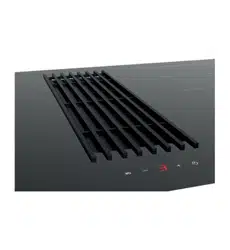

AID864DD
OPERATION MANUAL
APPLIANCES
FOR LIVING

Congratulations, you are now the proud owner of an ARTUSI cooking appliance. Thank you for purchasing ARTUSI
and welcome to the ARTUSI Family.
This instruction manual has been specially created to inform you of the full range of features your ARTUSI appliance
has to offer and serves as an introduction to getting the very best out of your ARTUSI appliance.
We present detailed information on each of the features your ARTUSI appliance consists of. Once you have read
this section you will be able to choose the most appropriate settings for your appliance when cooking different
types of food.
We ask you to read the instructions in this booklet very carefully as this will allow you to get the best results from
using your appliance. !""#$%&"$'()*+",%-%.(,$(/$%&.0$#1('*)%$/(1$/*%*1"$1"/"1",)"2
%($1"3.0%"1$4(*1$#1('*)%$5.%&$-1%*0.6$#7"-0"$/.77$(*%$%&"$5-11-,%4$)-1'$-%$%&"$",'$(/$
%&.0$8((!7"%$-,'$#(0%$.%$%(9$$$
REPLY PAID 83617
LEICHHARDT NSW 2040
Dear Artusi Customer, please read this user manual carefully before using the product and, keep it permanently at
your disposal.
Note: This user manual is prepared for more than one model. Some of the features specified in this Manual may not
be available on your appliance.
All our appliances are only for domestic use, not for commercial use. Products marked with (*) are optional.
“THIS APPLIANCE SHALL BE INSTALLED IN ACCORDANCE WITH THE REGULA TIONS FORCE AND ONLY USED
IN A WELL VENTILATED SPACE. READ THE INSTRUCTIONS BEFORE INSTALLING OR USING THIS APPLIANCE”
“Conforms with the WEEE Regulations.”

2
Safety Warnings
INDD94 & AID864DD
• The appliance is not intended for use by persons (including children) with reduced
physical, sensory or mental capabilities, or lack of experience and knowledge, unless
they have been given supervised or instruction concerning use of the appliance by a
responsible person for their safely.
• Young children should be supervised to ensure that they do not play with the
appliance.
• If the supply cord is damaged, it must be replaced by the manufacturer or its service
agent or a similarly qualified person in order to avoid a hazard.
• Do not use a steam cleaner to clean this appliance
• Metallic objects such as knives, forks, spoons and lids should not be placed on the
hotplate since they can get hot
• WARNING: If the surface is cracked, switch off the appliance to avoid the possibility
of an electric shock
• This appliance is not intended to be operated by means of external timer or separate
remote control system
• If the electrical supply is restricted, means of all-pole disconnection must be
accessible and incorporated in the fixed wiring in accordance with the wiring rules.
• Danger of fire – Do not store items on the cooking surface
• CAUTION – The cooking process has to be supervised. A short term cooking process
has to be supervised continuously.
• Warning
–
Unattended
cooking
on
a
hob
with
fat
or
oil
can
be dangerous and
may result in a fire
• Range Hoods and other cooking fume extractors may adversely affect the safe
operation of appliances burning gas or other fuels (including those in other rooms) due
to lack of back flow of combustible gases. These gases can potentially result in carbon
monoxide poisoning. After installation of a range hood or other cooking fume extractor,
the operation of flued gas appliances should be tested by a competent person to ensure
that back flow of combustion gases do not occur
• There is a risk of fire if cleaning is not carried out in accordance with the instructions.

3
• Caution: Accessible parts may become hot when used with a cooking appliance.
• Do not flambé under the range hood.
For Installation Instructions:
• The exhaust air must not be discharged into a flue which is used for exhausting
fumes from other appliances burning gas or other fuels. (Not applicable for appliances
which only discharge air back into the room)
• Regulations concerning the discharge of air have to be fulfilled.
• Warning: Failure to install the screws or fixing devices in accordance with the
instructions may result in an electrical hazard.
Note 1: The instructions must include details concerning cleaning instructions and frequency of
cleaning
Note 2: If the Instruction Manual for installation show any screws that are intended to penetrate the range
hood enclosure during installation or for any accessory attachments such as flue attachments, then
associated screws marked in the manual must be marked with the size of the intended screw used for
use. Usually these screws are provided with the appliance but the manual must indicate the screw size
intended to be used for these applications.

4
Chapters
I GENERAL ............................................................................................................................ 4
II WARNINGS .......................................................................................................................... 6
III INSTALLATION ..................................................................................................................... 9
III.1
PRELIMINARY INDICATIONS ...................................................................................................... 9
III.2
INSTALLATION .................................................................................................................. 11
III.2.a INDUCTION HOB INSTALLATION ........................................................................................ 14
III.2.b ASPIRATION INSTALLATION ............................................................................................. 17
III.3
ELECTRICAL CONNECTION .................................................................................................... 21
IV OPERATION ....................................................................................................................... 24
IV.1
DESCRIPTION OF THE INDUCTION HOB ...................................................................................... 24
IV.1.a TECHNICAL CHARACTERISTICS ......................................................................................... 24
IV.1.b BASIC CONTROL CHARACTERISTICS ................................................................................... 24
IV.2
USE OF THE INDUCTION HOB .................................................................................................. 25
IV.2.a AUTO-LOCK ............................................................................................................... 25
IV.2.b SWITCH ON/OFF THE COOKTOP ....................................................................................... 25
IV.2.c SWITCH ON A HEATER ZONE ............................................................................................ 26
IV.2.d SWITCH OFF A HEATER ZONE .......................................................................................... 27
IV.2.e SELECTION OF HEATER’S TIMER /WARM FUNCTION ................................................................ 27
IV.2.f INCREASE / DECREASE POWER LEVEL WITH SLIDER ................................................................. 27
IV.2.g BOOSTER FUNCTION ..................................................................................................... 28
IV.2.h BRIDGE FUNCTION ....................................................................................................... 28
IV.2.i HEAT-UP FUNCTION ...................................................................................................... 29
IV.2.l SECURITY .................................................................................................................. 30
IV.2.m SOFTWARE VERSION VISUALIZATION ................................................................................. 30
IV.2.n TIMER ...................................................................................................................... 31
IV.2.o AUTOMATIC SAFETY OFF ................................................................................................ 33
IV.2.p RESIDUAL HEAT INDICATION ............................................................................................ 33
IV.2.q POT DETECTION .......................................................................................................... 33
IV.2.r DISPLAYING SPECIAL STATUSES IN TOUCH CONTROL ............................................................... 34
IV.3
COOKIG ADVICES ............................................................................................................... 34
IV.3.a PAN QUALITY ............................................................................................................. 34
IV.3.b PAN DIMENSION .......................................................................................................... 35
IV.4
COOKER HOOD OPERATION ................................................................................................... 35
IV.4.a ASPIRATION TURN ON ................................................................................................... 37
IV.4.b ASPIRATION TURN OFF .................................................................................................. 37
IV.4.c CLEANING FUNCTION .................................................................................................... 37
IV.4.d ADJUSTABLE AND DELAYED SELF-SWITCHING OFF .................................................................. 37
IV.4.e ANTI GREASE FILTER CLEANING ALARM ............................................................................... 38
IV.4.f CHARCOAL FILTERS REPLACING ALARM ............................................................................... 38
IV.4.g PRESENCE OF LIQUIDS INSIDE THE DEVICE ........................................................................... 38
V CLEANING AND MAINTENANCE................................................................................................ 40
V.1
INDUCTION HOB CLEANING .................................................................................................... 40
V.2
COOKER HOOD CLEANING ...................................................................................................... 40
VI WHAT TO DO IN CASE OF A PROBLEM ....................................................................................... 41
VI.1
ERRORS / ALARMS .............................................................................................................. 42
VII DISCONTINUATION, DISASSEMBLY AND WASTE DISPOSAL ............................................................... 42
VII.1
DISCONTINUATION ............................................................................................................ 42
VII.2
DISASSEMBLY ................................................................................................................... 43
VII.3
ENVIRONMENT PRESERVATION ............................................................................................... 43
VII.4
WASTE DISPOSAL .............................................................................................................. 43
220-240V 50/60Hz

5
I GENERAL
This guide describes the appliance and its use. This guide is an integral part of the appliance
itself and has to be retained with the appliance and ALWAYS accompany it, even in case of
its assignment to another owner or user or in case the cooker hood is moved to another
installation plant.
The aspiration system is composed by three appliances:
Two induction hobs;
An integrated cooker hood.
The appliances are electrically and functionally independent.
The Manufacturer strives for continuous improvements.
For this reason, the text and illustrations in this guide may change without notice.
6
II WARNINGS
CAUTION: This appliance has not been designed for gas hobs.
• This appliance is manufactured according to the safety standards in force.
• The use of this appliance must not be other than the one it has been designed for; this
means as an induction hob for cooking in domestic kitchens with an integrated
aspiration for cooking fumes;
• The manufacturer does not accept any liability for damages caused by people, animals
or things, by installation and maintenance mistakes or by any illegitimate use.
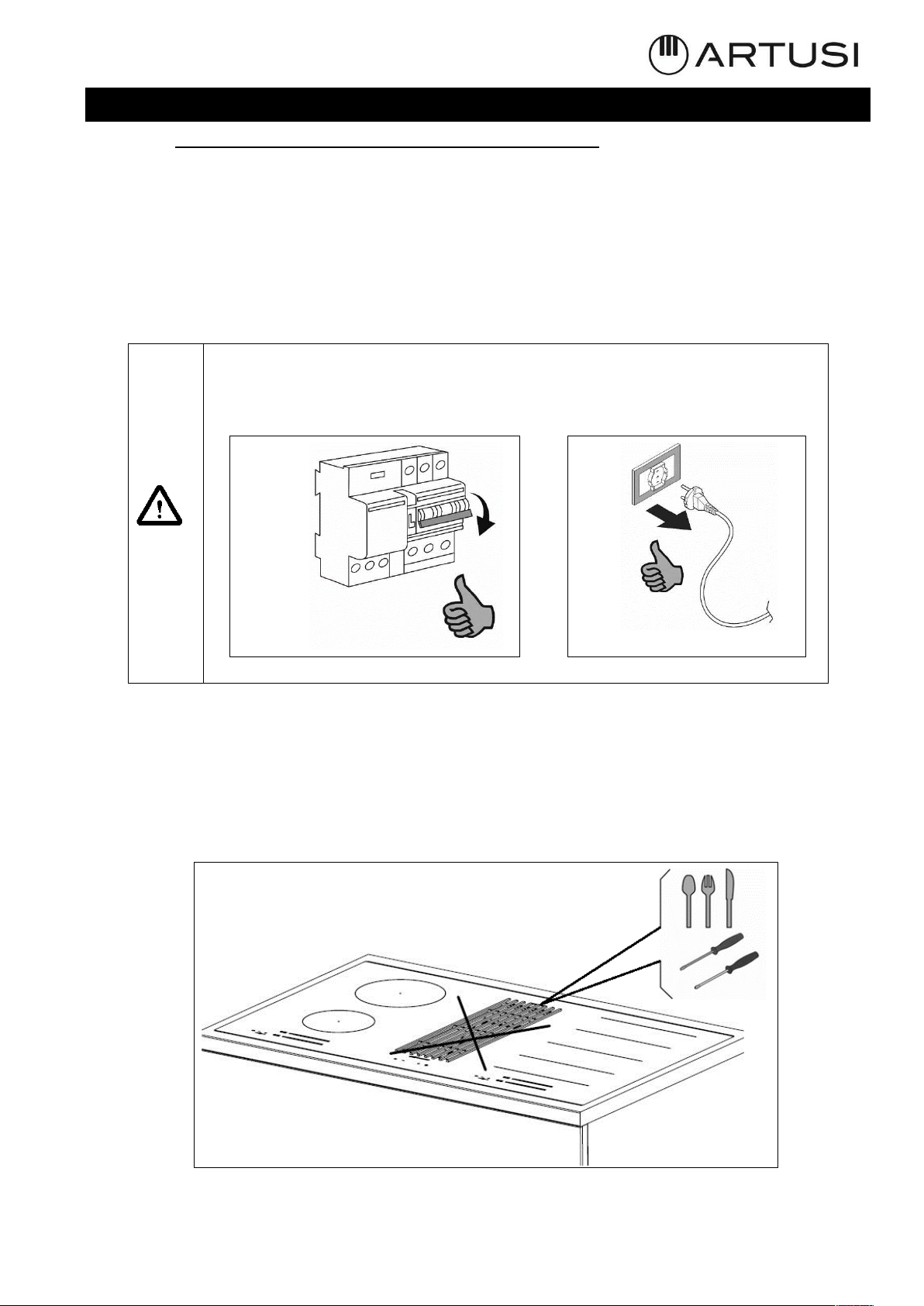
Caution! Before any cleaning or maintenance operation or in case of
storms, disconnect the appliance from the main power supply
(Fig.2.1) or disconnect the plug (Fig.2.2).
• While the induction hob is active, even the aspiration parts adjacent to the induction
hob may become hot.
• There is a possibility of fire if the cleaning operations are not carried out as indicated
in the instructions.
• Don’t use high-pressure steam cleaner or hot steam to clean the appliance;
• It is forbidden to introduce any object through the central grille (fig.2.3).
Fig. 2.1
Fig. 2.2
Fig. 2.3
7
• Do not use the appliance for room heating;
• If there is a wall power outlet located near the appliance and another appliance is
plugged into it, make sure the power cord does not come into contact with the hot
cooking zones;
• It is forbidden to pull, disconnect, twist the electrical wiring out of the appliance even
if it is disconnected from the power supply;
• Do not flambé.
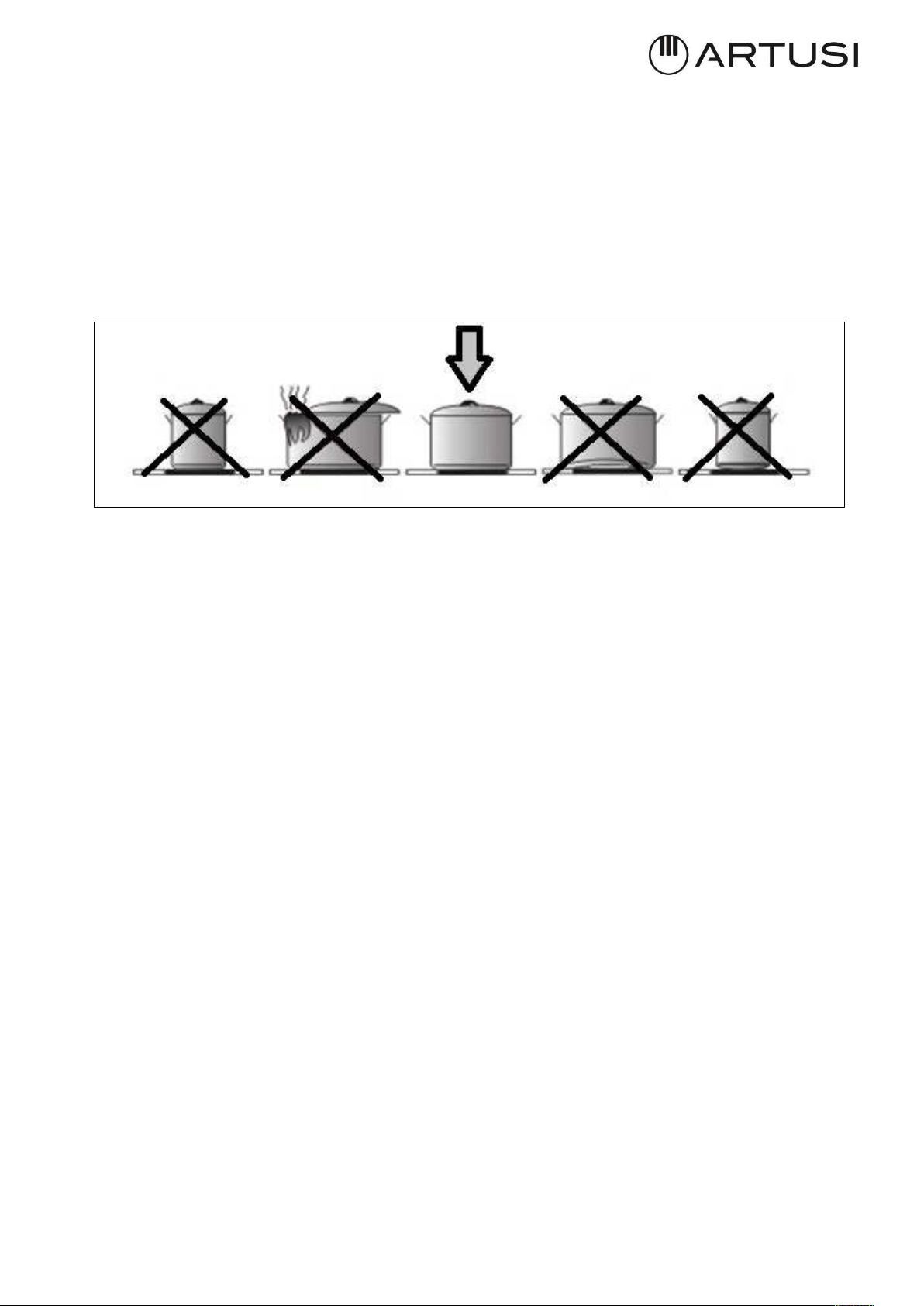
• In order to avoid any undesired disturbance on the touch control, place correct pots
inside the marked place of the glass ceramic surface.
Precautions before using
• Unpack all the materials.
• The installation and connecting of the appliance have to be done by approved
specialists. The manufacturer cannot be responsible for damage caused by building-in
or connecting errors.
• To be used, the appliance must be well-equipped and installed in a kitchen unit and an
adapted and approved work surface.
• This domestic appliance is exclusively for the cooking of food, to the exclusion of any
other domestic, commercial or industrial use.
• Remove all labels and self-adhesives from the ceramic glass.
• Do not change or alter the appliance.
• The cooking plate cannot be used as freestanding or as working surface.
• The appliance must be grounded and connected conforming to local standards.
• Do not use any extension cable to connect it.
• The appliance cannot be used above a dishwasher or a tumble-dryer: steam may
damage the electronic appliances.
• The appliance is not intended to be operated by means of external timer or separate
remote-control system.
Using the appliance
• Switch the heating zones off after using.
• Keep an eye on the cooking using grease or oils: that may quickly ignite.
• Be careful not to burn yourself while or after using the appliance.
• Make sure no cable of any fixed or moving appliance contacts with the glass or the hot
saucepan.
• Magnetically objects (credit cards, floppy disks, calculators) should not be placed near
to the engaged appliance.
• Metallic objects such as knives, forks, spoons and lids should not be placed on the hob
surface since they can get hot.

8
• In general, do not place any metallic object except heating containers on the glass
surface. In case of untimely engaging or residual heat, this one may heat, melt or even
burn.
• Never cover the appliance with a cloth or a protection sheet. This is supposed to
become very hot and catch fire.
• This appliance can be used by children aged from 8 years and above and persons with
reduced physical, sensory or mental capabilities or lack of experience and knowledge
if they have been given supervision or instruction concerning use of the appliance in a
safe way and understand the hazards involved.
• Children shall not play with the appliance.
• Cleaning and user maintenance shall not be made by children without supervision.
Precautions not to damage the appliance
• Raw pan bottoms or damaged saucepans (not enameled cast iron pots,) may damage
the ceramic glass.
• Sand or other abrasive materials may damage ceramic glass.
• Avoid dropping objects, even little ones, on the ceramic-glass.
• Do not hit the edges of the glass with saucepans.
• Make sure that the ventilation of the appliance works according to the manufacturer’s
instructions.
• Do not put or leave empty saucepans on the ceramic-glass hobs.
• Sugar, synthetic materials or aluminum sheets must not contact with the heating zones.
These may cause breaks or other alterations of the ceramic-glass glass by cooling:
switch on the appliance and take them immediately out of the hot heating zone (be
careful: do not burn yourself).
• WARNING: Unattended cooking on a hob with fat or oil can be dangerous and may result
in fire.
• CAUTION: The cooking process has to be supervised. A short-term cooking process has
to be supervised continuously.
• WARNING: Danger of fire: do not store items on the cooking surface.
• Never place any hot container over the control panel.
• It is necessary to ensure adequate ventilation on the front side of the base so that the air
can properly flow.
• If a drawer is situated under the embedded appliance, make sure the space between
the content of the drawer and the inferior part of the induction hob is large enough (30
mm). This is essential to guaranty a correct ventilation.
• Never put any inflammable object (ex. sprays) into the drawer situated under the
ceramic-glass hob. The eventual cutlery drawers must be resistant to heat.
Precautions in case of appliance failure
• If a defect is noticed, switch off the appliance and turn off the electrical supplying.
• If the ceramic glass is cracked or fissured, you must unplug the appliance and contact
the after sales service.
• Repairing has to be done by specialists. Do not open the appliance by yourself.
• WARNING: If the surface is cracked, switch off the appliance to avoid the possibility of
electric shock.
9
Other protections
• Note sure that the container pan is always centered on the cooking zone. The bottom
of the pan must have to cover as much as possible the cooking zone.
• For the users of pacemaker, the magnetic field could influence its operating. We
recommend getting information to the retailer or of the doctor.
• Do not to use aluminum or synthetic material containers: they could melt on still hot
cooking zones.
• NEVER try to extinguish a fire with water, but switch off the appliance and then cover
flame e.g. with a lid or a fire blanket.
THE USE OF EITHER POOR QUALITY POT OR ANY INDUCTION ADAPTOR PLATE
FOR NON-MAGNETIC COOKWARE RESULTS IN A WARRANTY BREACH. IN THIS
CASE, THE MANUFACTURER CANNOT BE HELD RESPONSIBLE FOR ANY DAMAGE
CAUSED TO THE HOB AND/OR ITS ENVIRONMENT.
III INSTALLATION
III.1 PRELIMINARY INDICATIONS
Carefully read the guide before installation and use of the appliances.
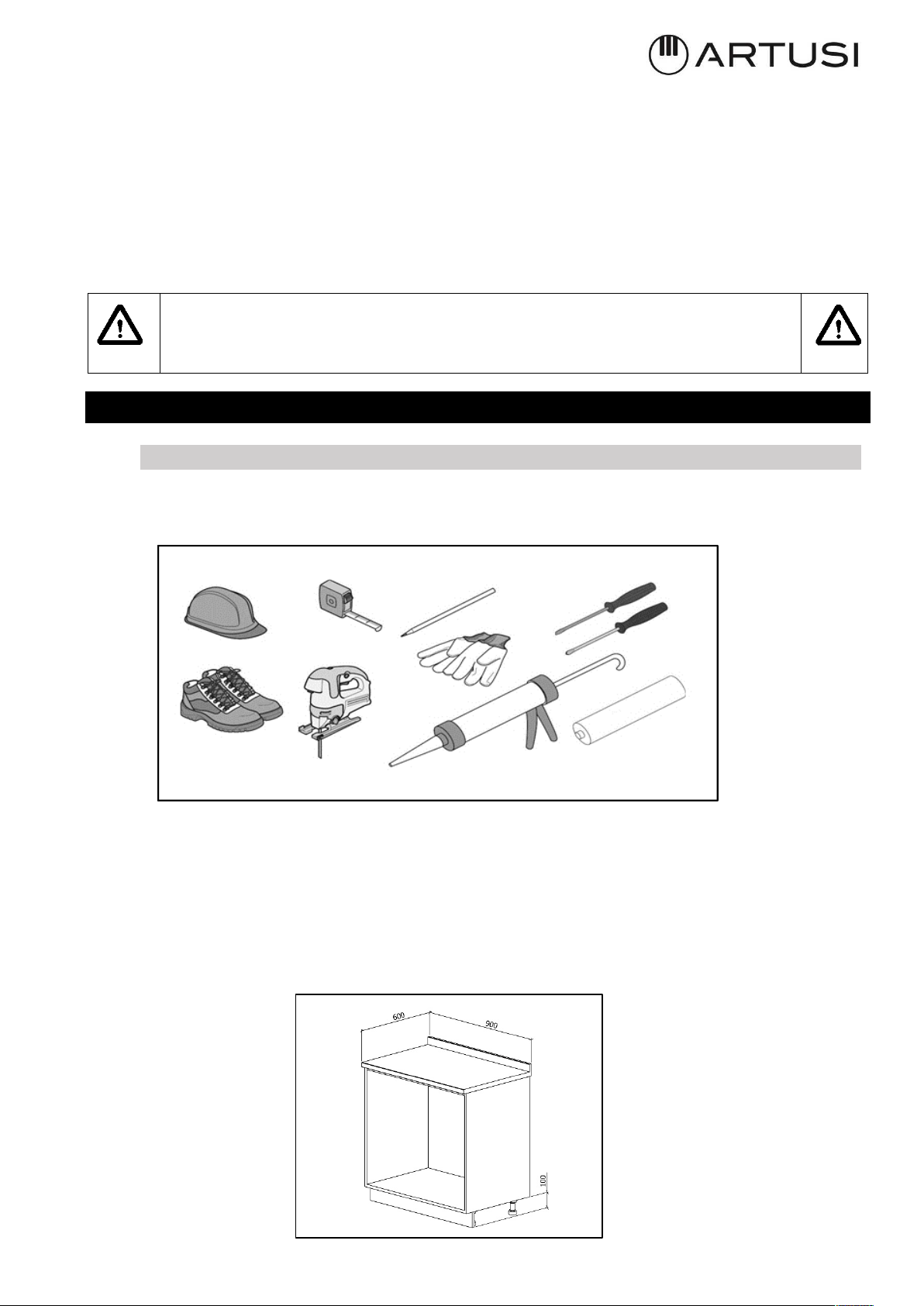
The installation requires safety equipment and a range of tools as per fig. 3.1.1
The aspiration hob is equipped with all the hardware needed for its installation and is suitable
for most furniture.
Important: eventually, more screws than necessary for installation have been provided so it
is normal to have some left at the end of the installation.
Check minimum dimensions of the base requested for installation (Fig. 3.1.2). Minimum
height of the kitchen plinth is very important (min. 100 mm) in order to allow the passage of
the air ducts below the base of the furniture. Upon request, it is possible to purchase a
special kit for kitchen plinth up to 60 mm height.
Fig. 3.1.1
Fig. 3.1.2
10
Fig. 3.1.3
The furniture finishing should be treated with heat resistant glue (100°C) otherwise its shape
and colour may change due to the inferior heat resistance.
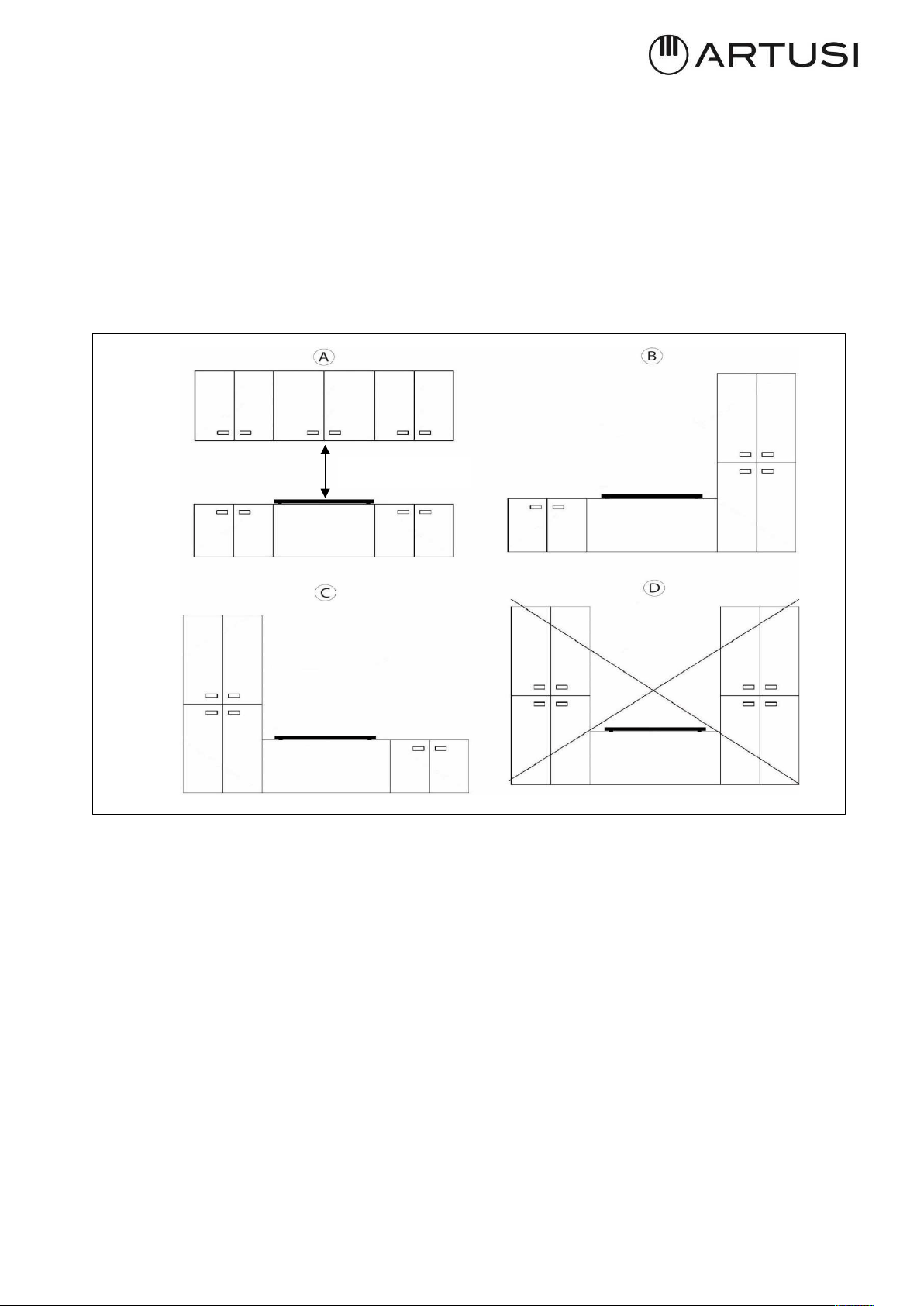
Ideally the appliance should be installed without any adjacent furniture or walls on both
sides (Fig.3.1.3-A). Furniture on only one side of the appliance is allowed (Fig.3.1.3-B and
Fig.3.1.3-C). To prevent fire hazard, it is strictly forbidden to install any furniture or walls
higher than the appliance on both sides (Fig.3.3-D).
Use of wood decoration plates or boards is not permitted.
It is recommended to install the appliance only after having installed the kitchen base cabinet
in order to avoid eventual damages to the glass hob.
The safety space between the hob and any furnishings positioned above it must respect a
minimum distance of 600 mm. (Fig. 3.1.3-A).
Min. 600mm
11
III.2 INSTALLATION
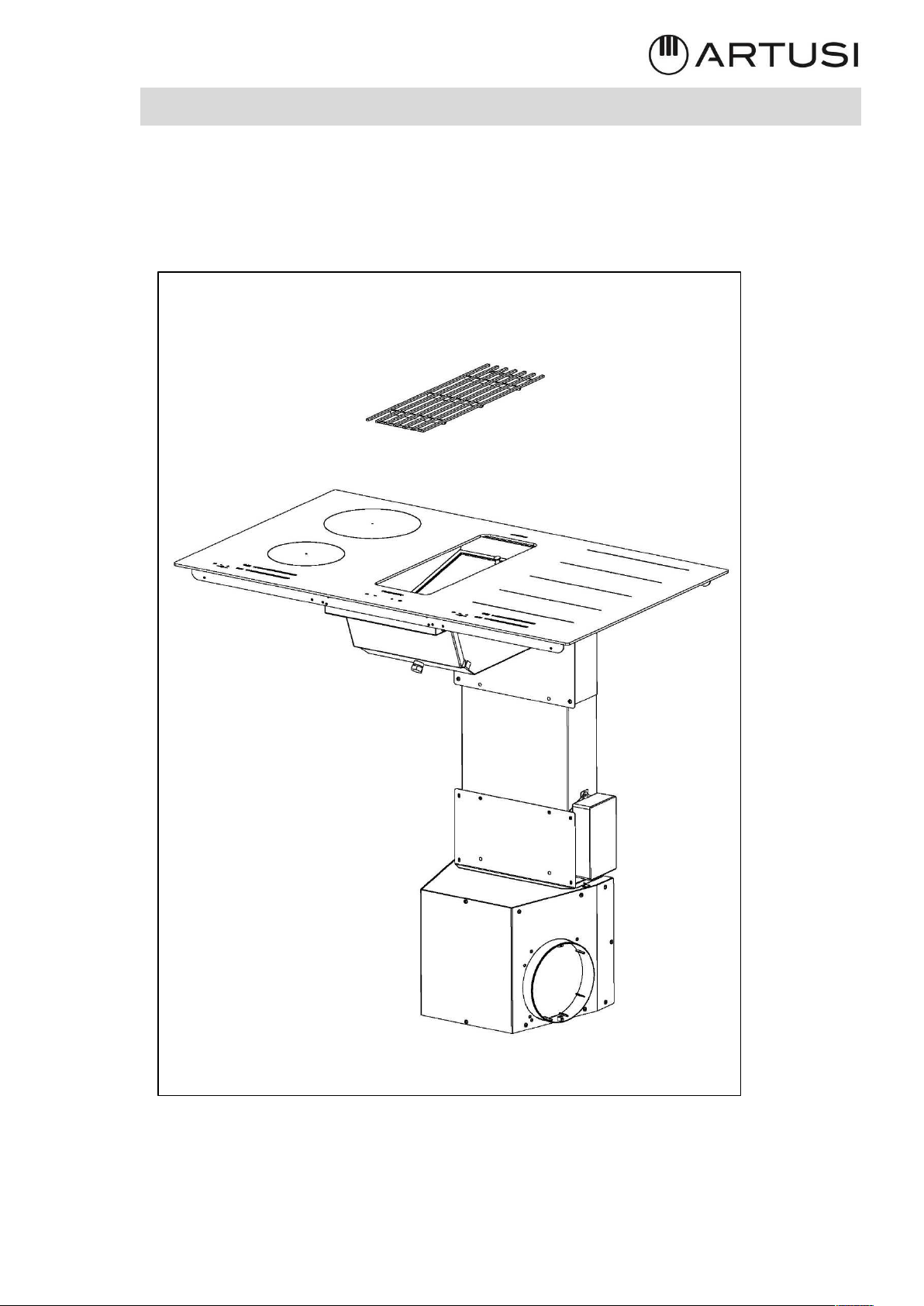
In the box the technician will find the elements shown on Fig. 3.2.1.
Elements must be mounted carefully following the procedure described in this guide.
Fig. 3.2.1
12
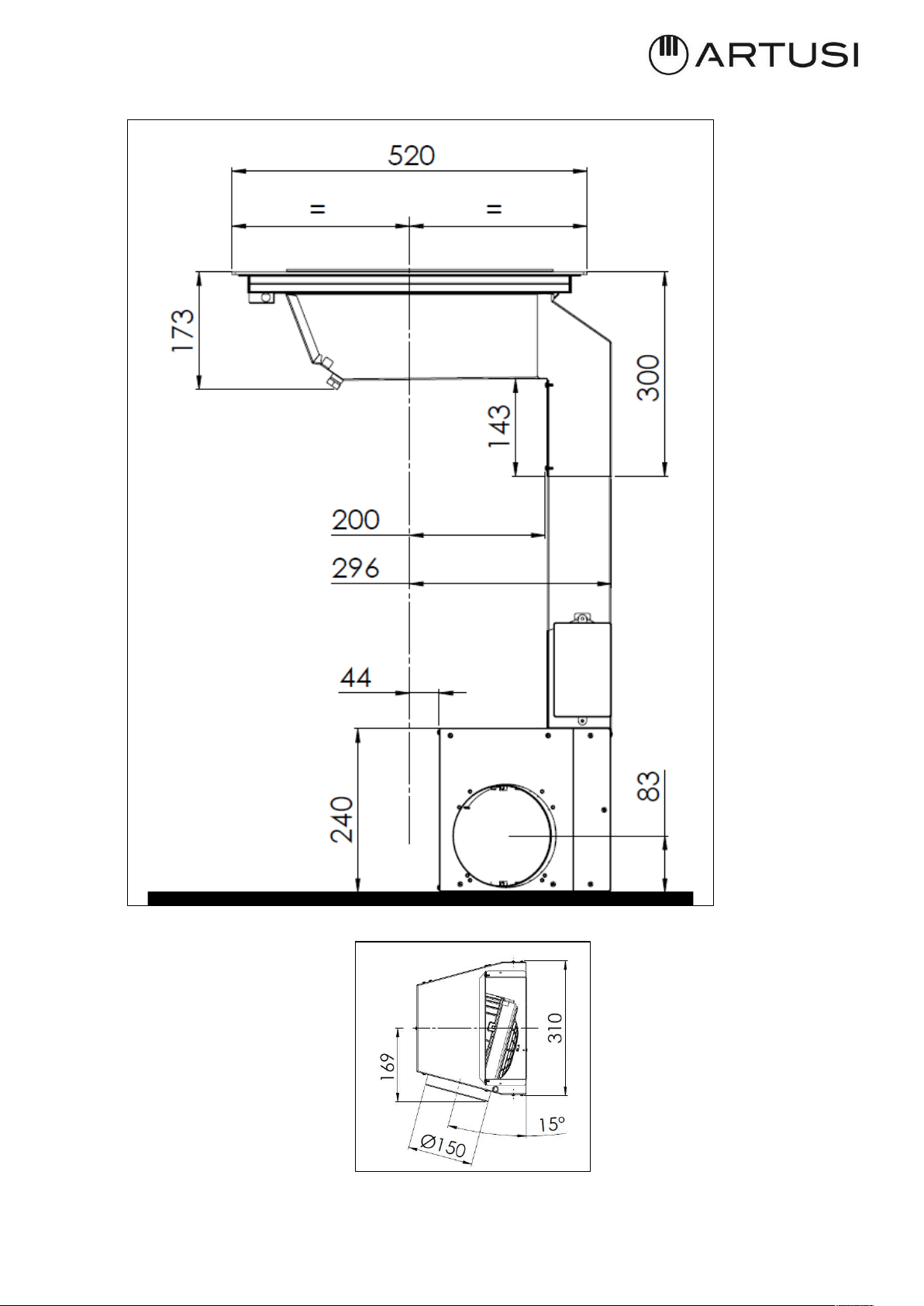
The dimensions of device are shown at Fig. 3.2.2, Fig. 3.2.3
Fig. 3.2.3
Fig. 3.2.2
13
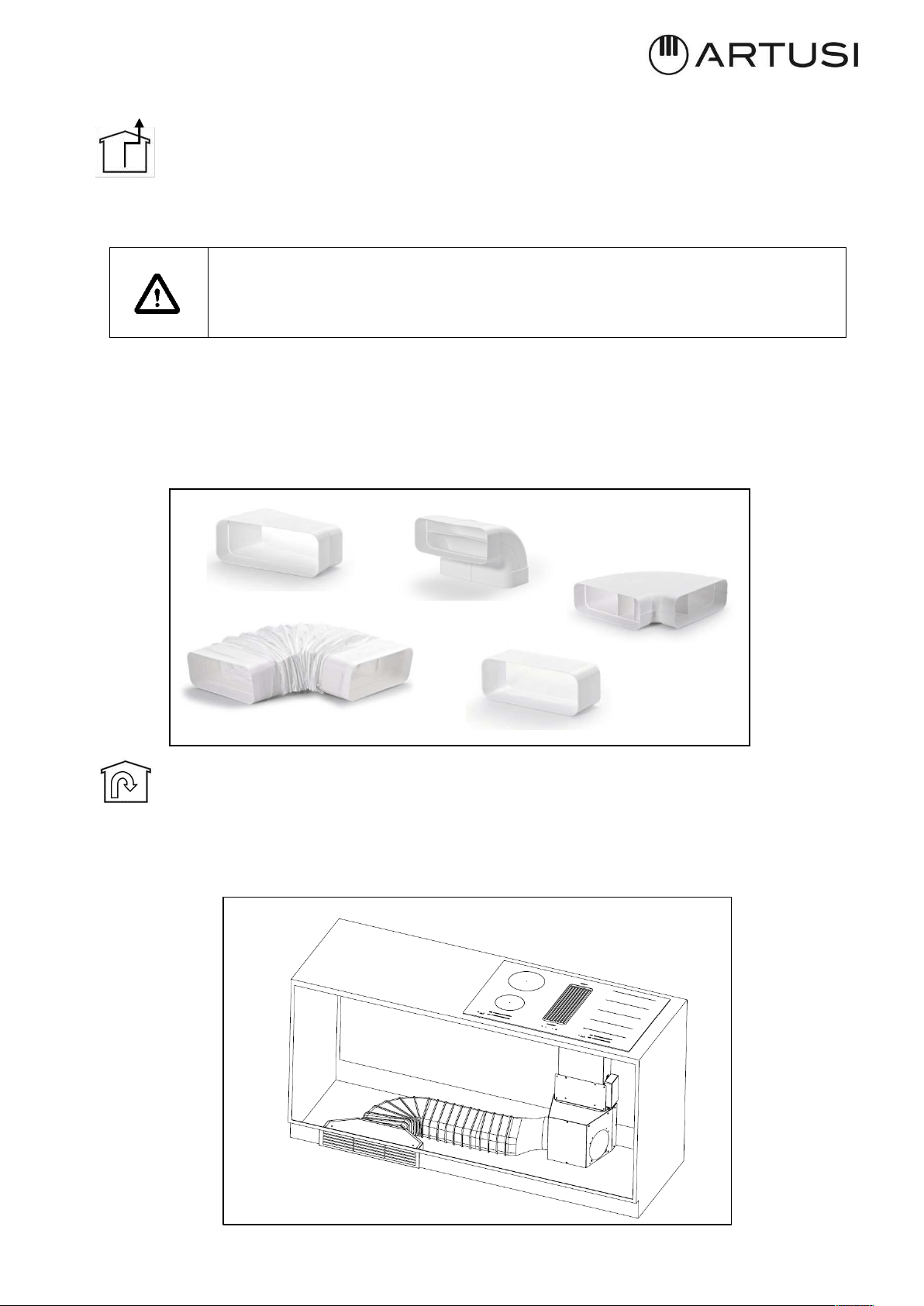
This cooker hood can be used as exhausting or filtering.
• Exhausting (external evacuation).
Don’t install any activated carbon filters. Kitchen smokes are driven outside through a flue
(not provided with the hood) joined to the exhaust pipe flue connector.
Warning! The piping must never be connected to combustion discharge
pipes (stoves, boilers, burners, etc.)
The use of pipes and holes on the wall with a smaller section than the output of the motor
will cause a decrease in suction performance and an increased of the noise level.
Use as short as possible tubes and with few curves, pipes with smooth internal surfaces are
recommended (Fig. 3.2.4)
• Filtering (inside recycling).
The fumes pass through activated carbon filters to be purified and recycled into the kitchen.
The filtering Kit (Fig.3.2.5) is available for the hood in two different high of plinth 6cm and
10cm.
Fig. 3.2.4
Fig. 3.2.5
14
III.2.a INDUCTION HOB INSTALLATION
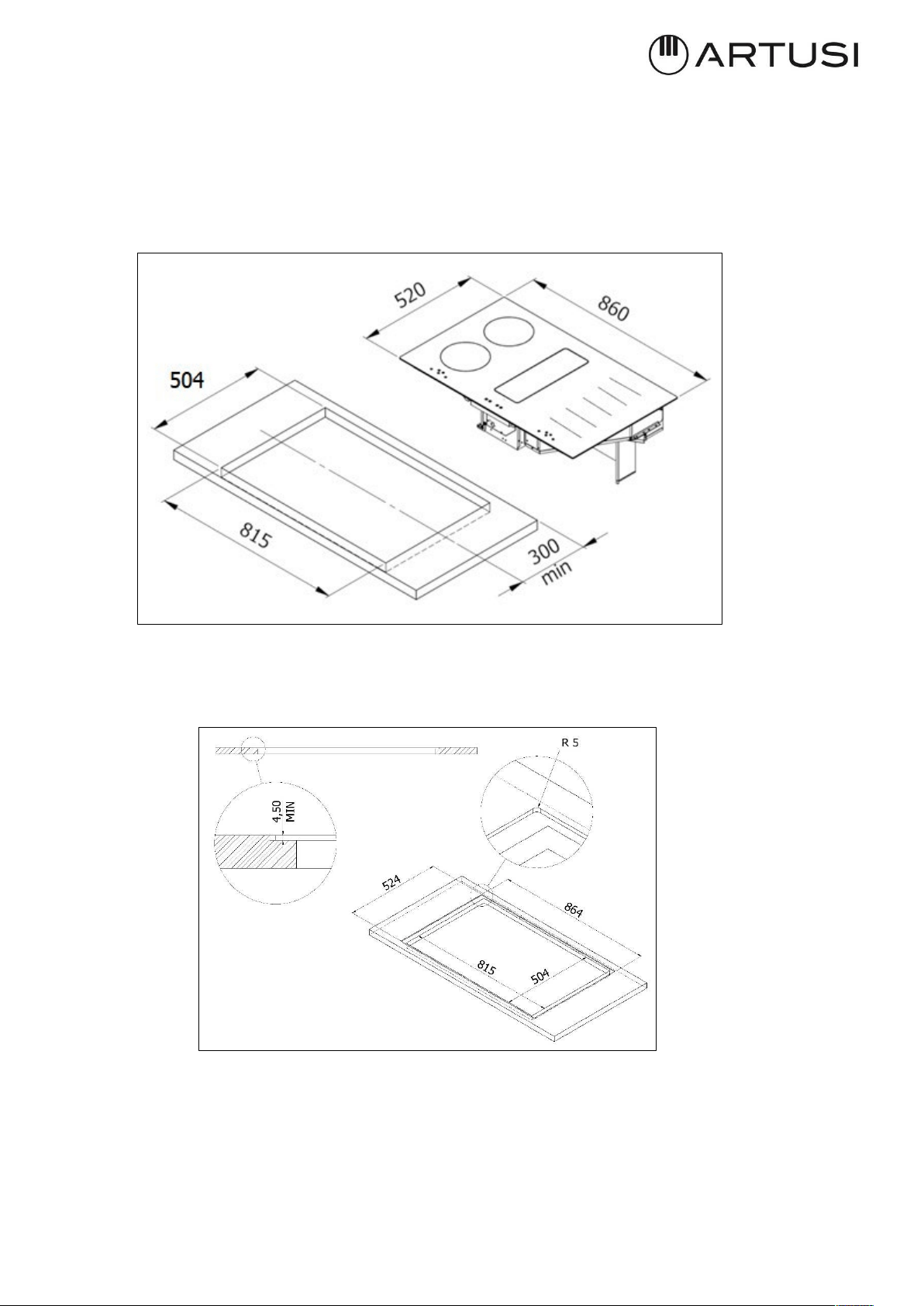
To leave the necessary space for the air pipes it is important to install the induction hob with
the centerline more than 300mm away from the wall on the back that may be present.
Installation of the induction hob may be flush or non-flush.
NON-FLUSH INSTALLATION: Prepare the hole in the worktop as shown on Fig. 3.2.a.1.
FLUSH INSTALLATION: Prepare the hole in the worktop, mill the worktop along the entire
edge of the hole. Be sure to comply with the dimensions indicated on Fig. 3.2.a.2.
The installation comes under the exclusive responsibility of specialists.
The installer is held to respect the legislation and the standards enforce in his home country.
Fig. 3.2.a.1
Fig. 3.2.a.2
15
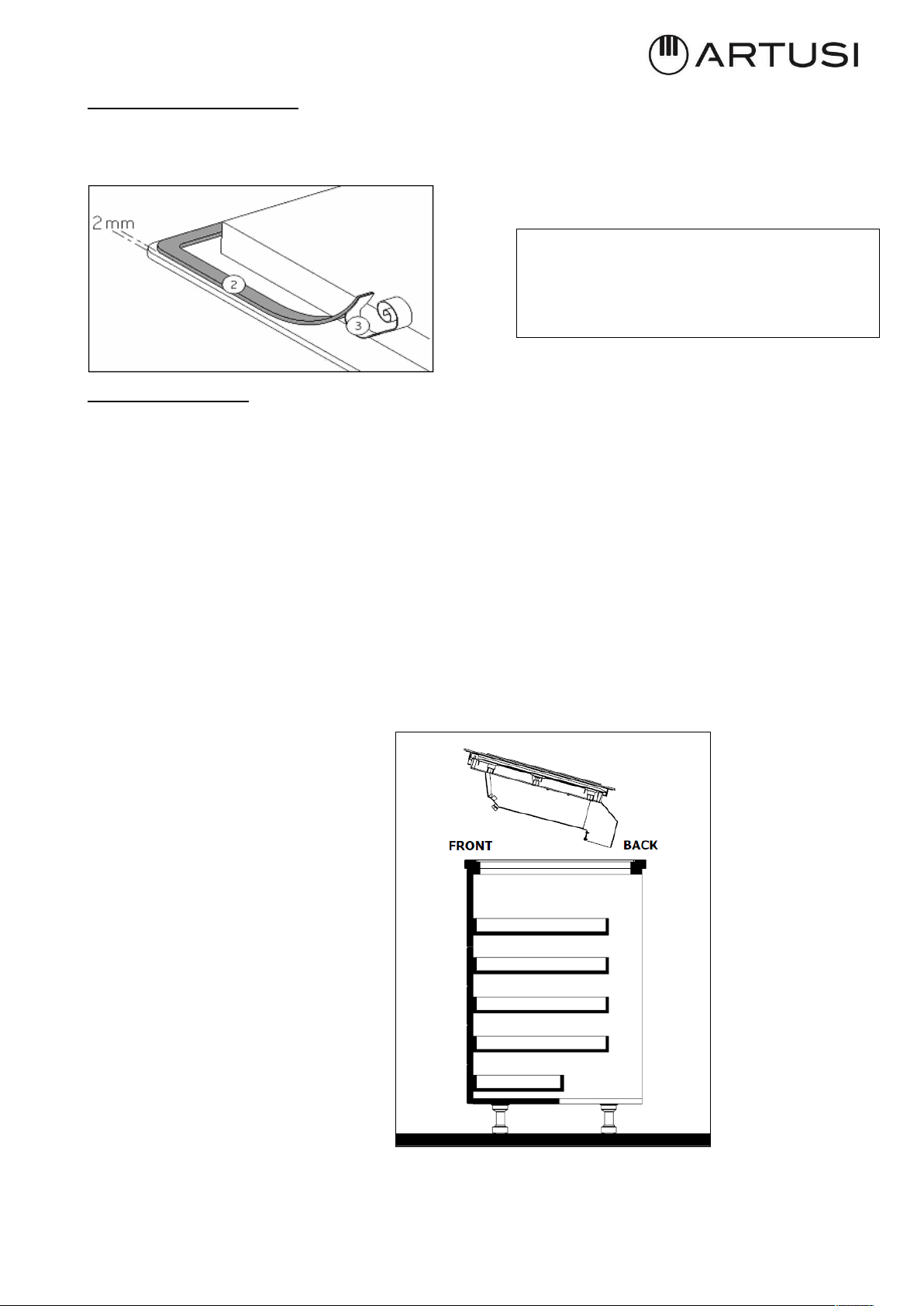
How to stick the gasket:
The gasket supplied with the hob avoids all infiltration of liquids in the cabinet.
His installation has to be done carefully, in conformity of the following drawing.
Stick the gasket (2) two millimeters
from the external edge of the glass,
after removing the protection sheet (3).
Fitting - installing:
· Ensure that there is a distance of 50 mm between the hob and the wall or sides.
· Ideally the hob should be installed with plenty of space on either side. There may be a wall
at the rear and tall units or a wall at one side. On the other side, however, no unit or divider
must stand higher than the hob.
· The piece of furniture or the support in which the hob is to be fitted, as well as the edges
of furniture, the laminate coatings and the glue used to fix them, must be able to resist
temperatures of up to 100 °C.
· The mural rods of edge must be heat-resisting.
· Not to install the hob to the top of a not ventilated oven or a dishwasher.
Place the hob on (Fig. 3.2.a.3)
Fig. 3.2.a.3
16
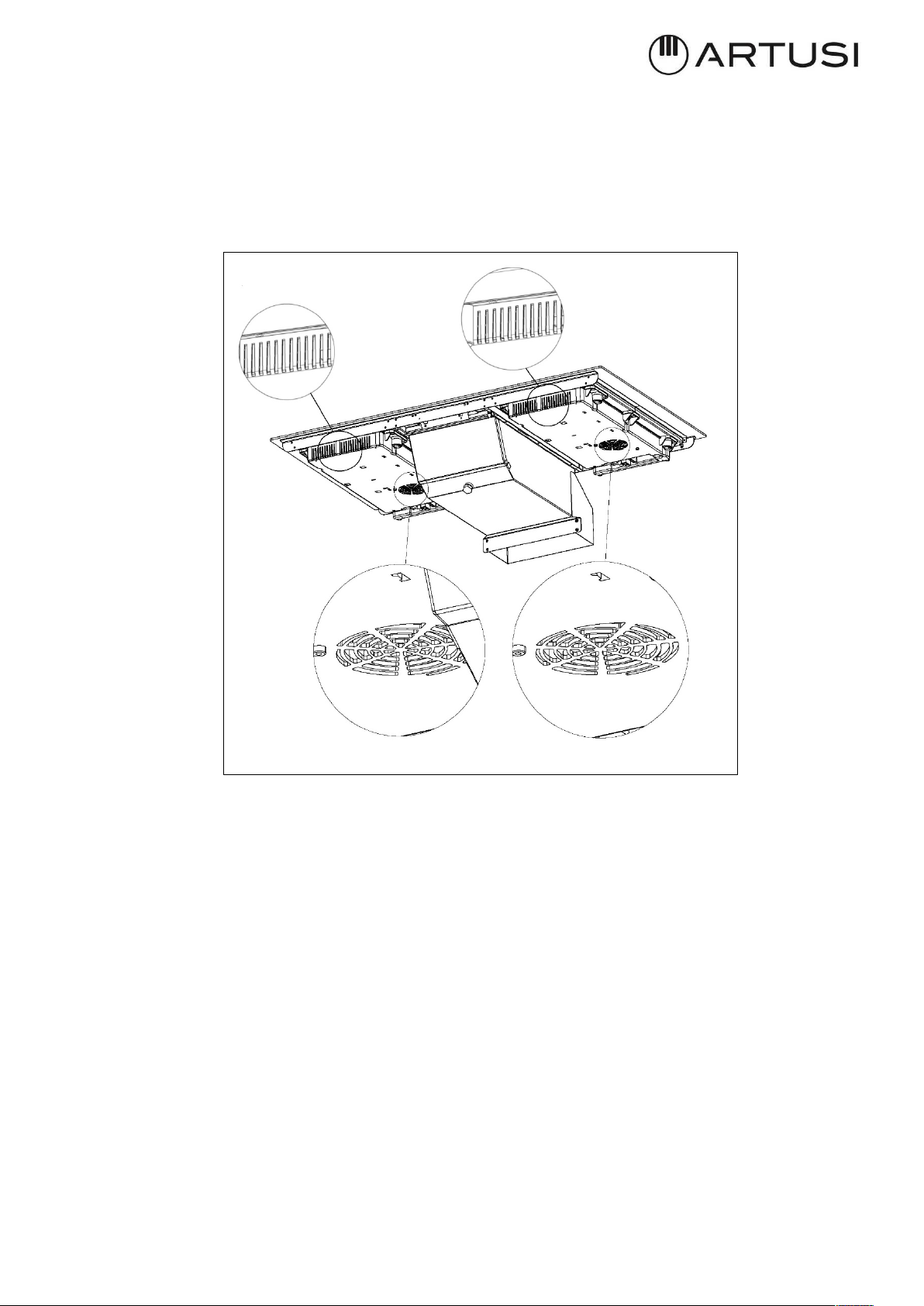
· It is necessary to ensure adequate ventilation on the front side of the base so that the air can
properly flow (Fig. 3.2.a.4).
· If a drawer is below the hob, to guarantee a good air circulation and good cooling system
of the induction hob, maintain a gap of 30 mm minimum between the ventilation of the lower
part of the hob and what is stowed inside the drawer (Fig. 3.2.a.4).
· If a drawer is placed under the work, avoid to put into this drawer flammable objects
(for example: sprays) or not heat-resistant objects.
· Materials which are often used to make worktops expand on contact with water. To protect
the cut-out edge, apply a coat of varnish or special sealant. Particular care must be given to
applying the adhesive joint supplied with the hob to prevent any leakage into the supporting
furniture. This gasket guaranties a correct seal when used in conjunction with smooth work
top surfaces.
· After installation, the connecting cable must not be subjected to any mechanical stress, for
example, because of a drawer.
· WARNING: Use only hob guards designed by the manufacturer of the cooking appliance
or indicated by the manufacturer of the appliance in the instructions for use as suitable or
hob guards incorporated in the appliance. The use of inappropriate guards can cause
accidents.
Fig. 3.2.a.4
17
III.2.b ASPIRATION INSTALLATION
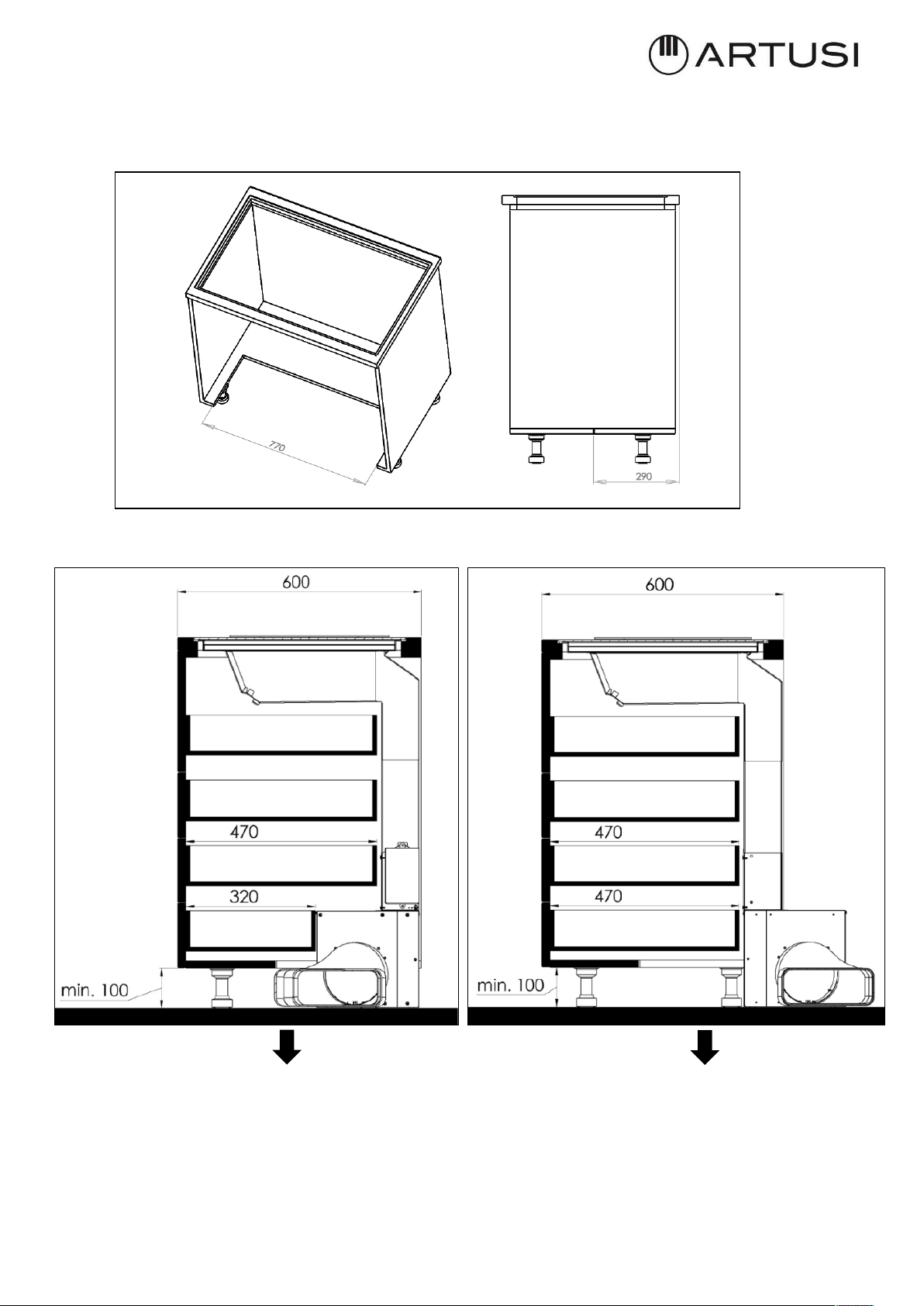
The base of the kitchen must be drilled as indicated in Fig. 3.2.b.1 if the space available to
house the hood is less than 560mm the back need to be removed.
The installation of the appliance implies a maximum length of the drawers that may be
mounted under the hob (Fig. 3.2.b.2-A; Fig. 3.2.b.2-B):
Upper drawers depth approximately 470mm Drawers depth approximately 470mm
Last drawer depth approximately 320mm
The depths of the drawers are approximate and generated by the project of a kitchen base unit
with standard dimensions.
Fig. 3.2.b.1
Fig. 3.2.b.2-A
Fig. 3.2.b.2-B
18
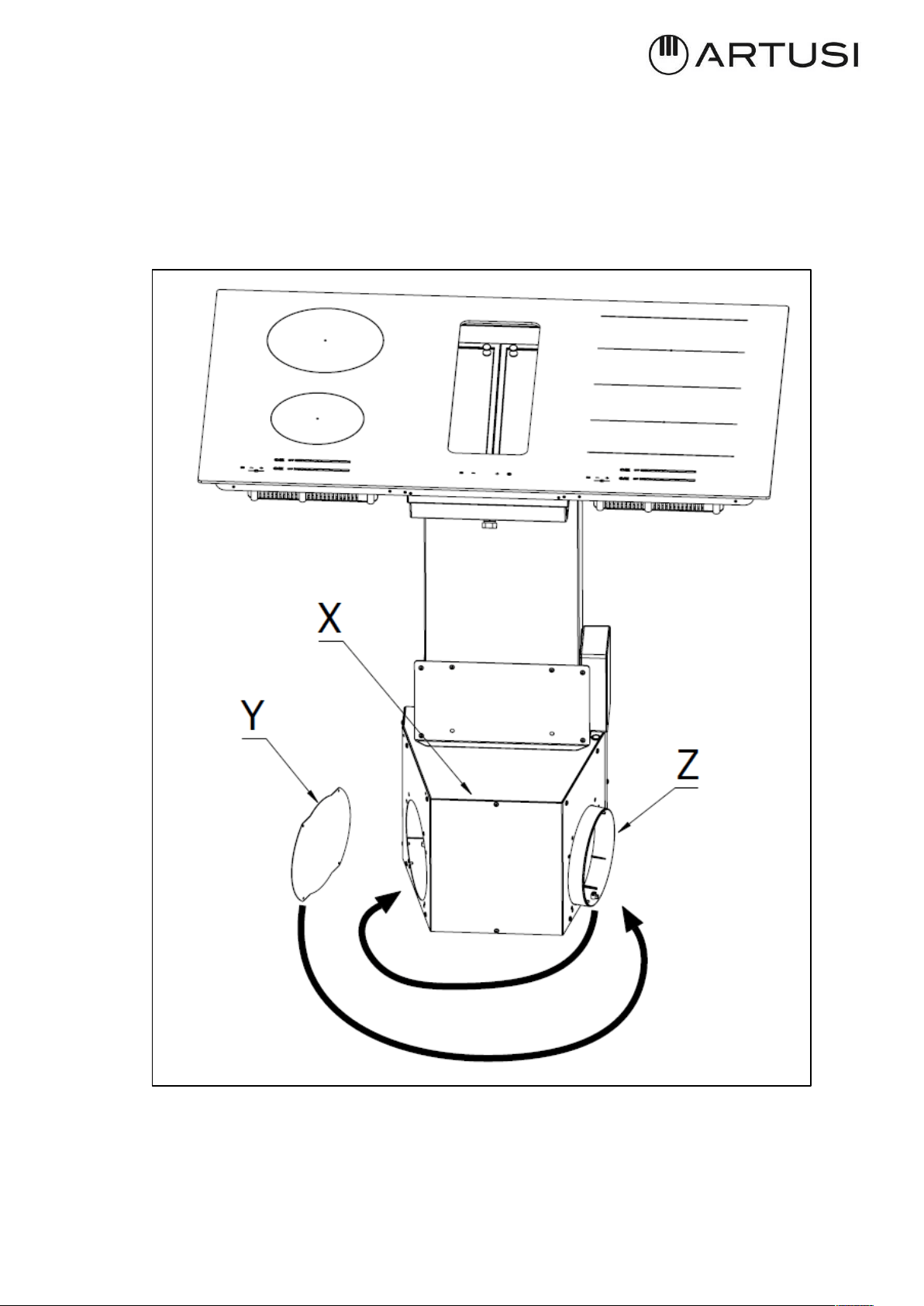
The next step is to determine the exit of the fumes according with the installation needs.
The air exit can be on the left or on the right of the kitchen base.
To do this, remove the screws, detach the cover (3.2.b.3 –X) and the cup (3.2.b.3–Y) invert
the aspirator outlet (3.2.b.3 –Z) and place the cup on the other side (Fig. 3.2.b.3). Then
replace the cover and secure it with the screws (Fig. 3.2.b.3).
Fig. 3.2.b.3

19
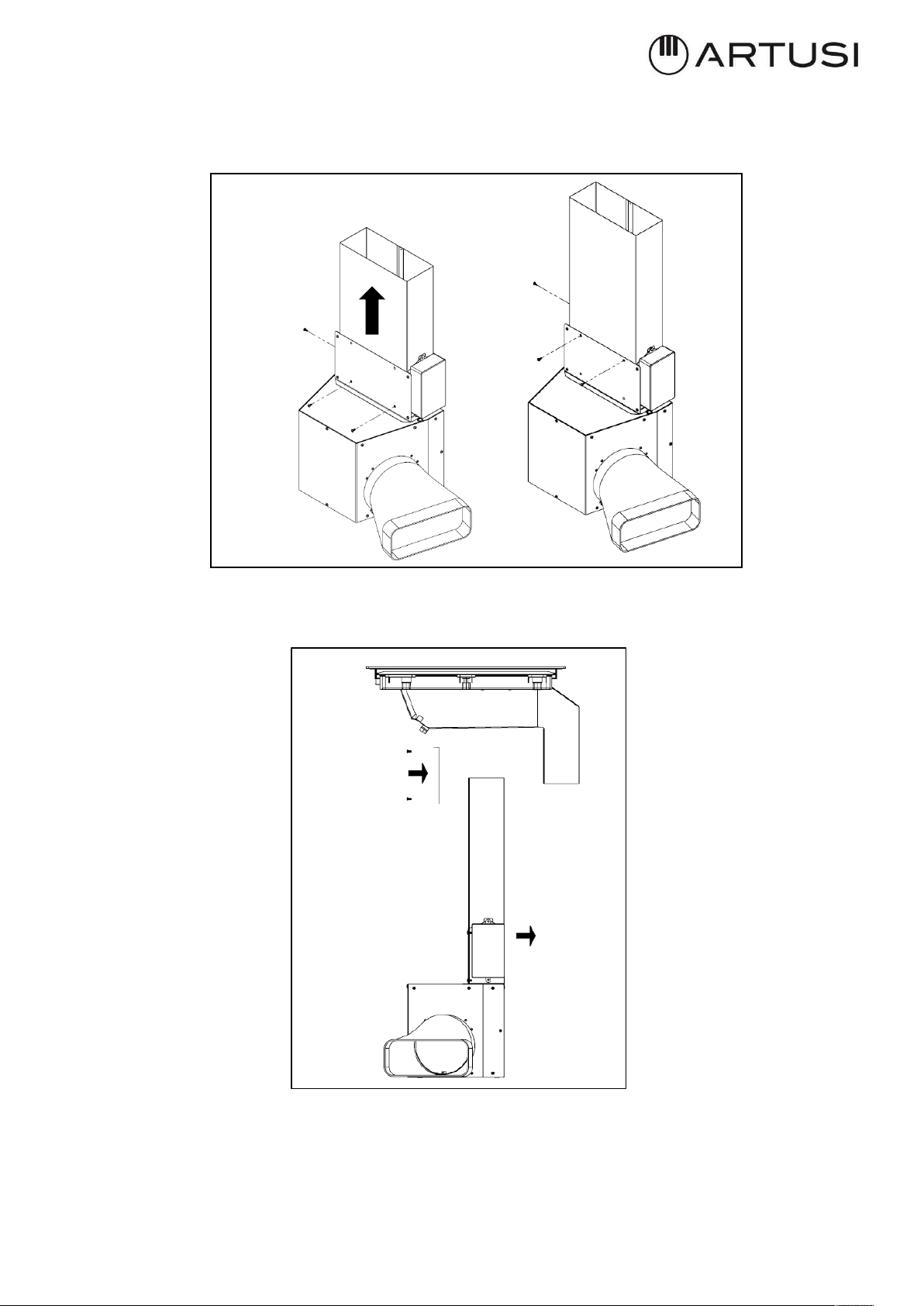
After installing the induction hob as paragraph III.2.a INDUCTION HOB INSTALLATION, align
the suction unit with the hob (Fig. 3.2.c.1) by positioning it inside the cut of the base of the
piece of furniture previously made (Fig. 3.2.b.1).
If the length of the metal pipe is not enough to reach the upper housing it can be increased
moving the pipe inside the motor box.
In order to do that it is needed to detach the front panel loosing the four screws without
completely remove the panel. (Fig.3.2.c.2)
Fig. 3.2.c.1
Fig. 3.2.c.2
20
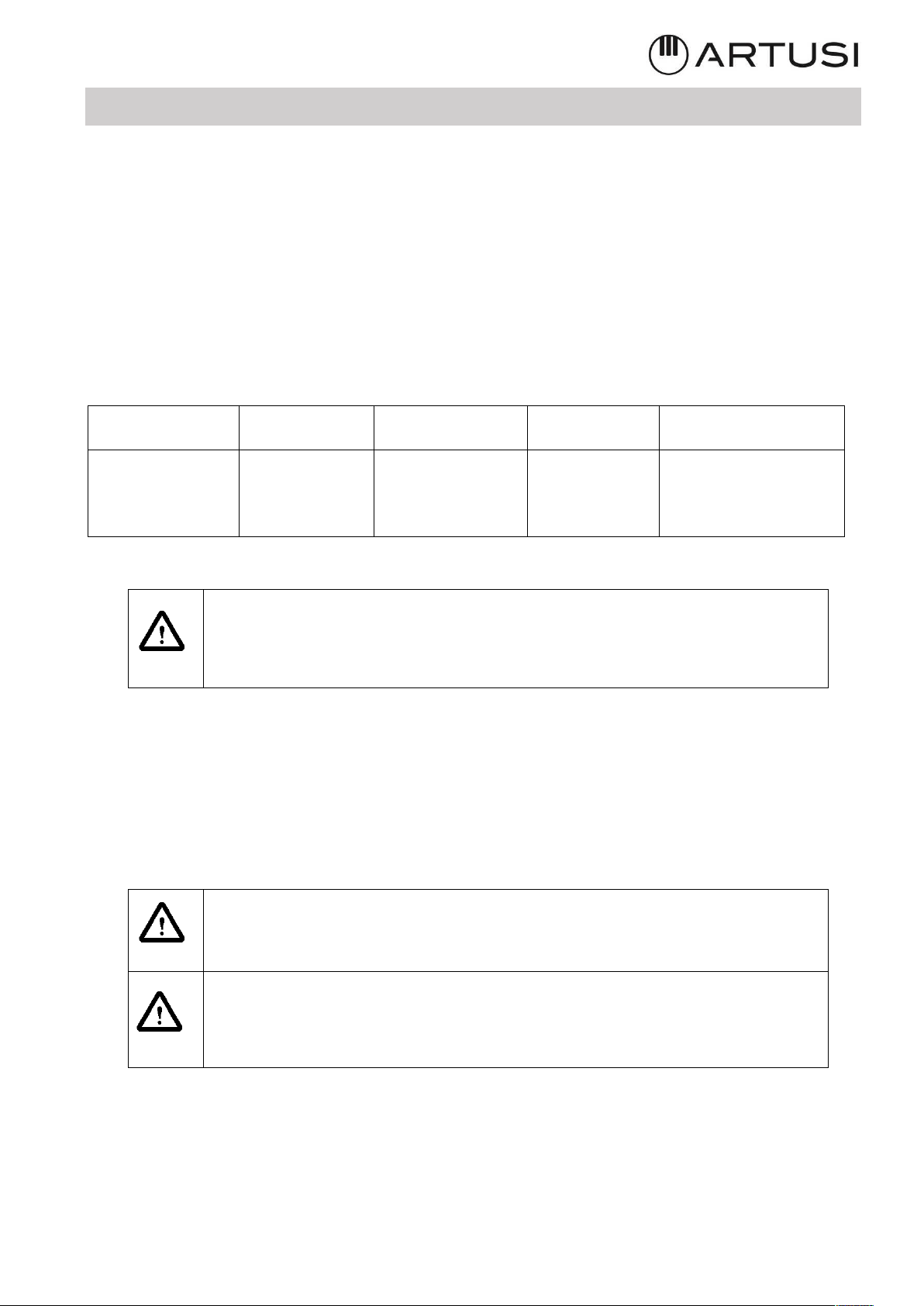
The front panel and the pipe are fixed together with 3 screws (Fig. 3.2.c.3) removing these,
the pipe can slide to the upper position and then it can be re–fix with the same screws.
The holes that now are empty can be cover with the cup supplied.
Now the motor box can be inserted in the housing and the panel mounted (Fig. 3.2.c.4)
To place the exhaust pipe in the desired position it is necessary to use pipe and connectors
to pass under the base of the piece of furniture, inside the lift of the kitchen plinth.
Fig. 3.2.c.4
Fig. 3.2.c.3
21
III.3 ELECTRICAL CONNECTION
The electrical connection must be carried out ONLY by qualified technicians.
The electrical protection of the electrical connection upstream of the equipment must
comply with the regulations in force.
The appliance is composed by three devices that must be separately connected to the
electricity: the serial plate stating the electricity supply needed is located on the suction
tray. Make sure that the power supply is enough to supply all the 3 devices.
Mains
Connection
Cable diameter
Cable
Electrical
Protection
220-240V
50/60Hz
1 Phase + N
3 x 1,5 mm2
H 05 VV - F
H 05 RR - F
16 A *
* calculated with the simultaneous factor following the standard EN 60 335-2-6
Caution! Make sure that the voltage (V) and frequency (Hz)
indicated on the serial number plate located on the appliances
correspond to those available at the installation site.
Any change to the electrical installation necessary to install the hood should only be
undertaken by qualified staff.
After installation, insulated parts and those carrying electricity must be protected from any
possible contact.
Caution! If the electrical connection is carried out incorrectly or not
meeting the regulations, it may damage part of the appliance and the
warranty will not be valid.
Caution! Before any intervention, disconnect the appliance from the
power mains (Fig. 2.1 – Fig. 2.2 WARNINGS chapter).
22
These appliances must be earthed.
Two types of connections to the network are possible:
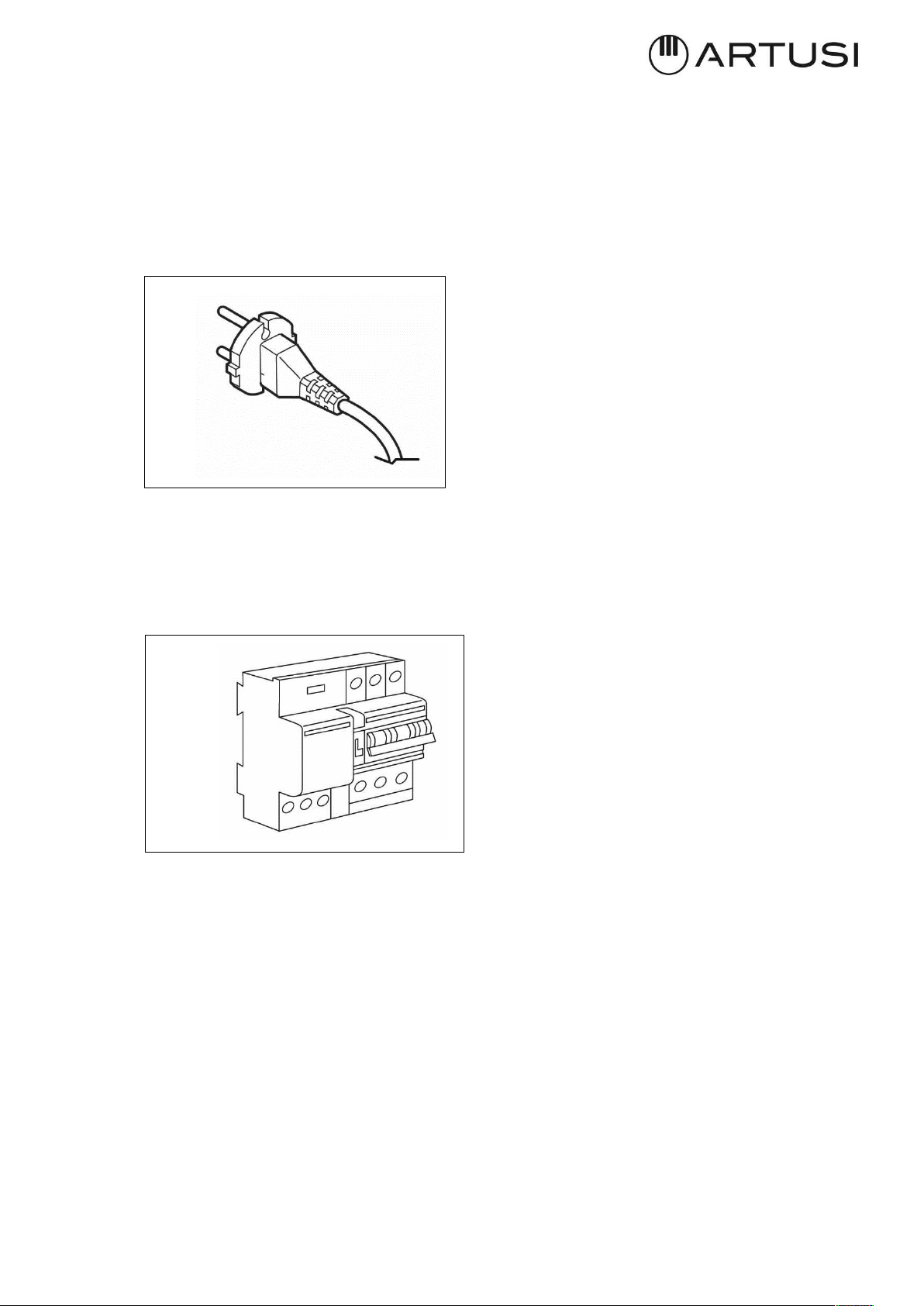
1. Using a standard plug connected (Fig. 3.3.1) to the power cord and inserted
into an accessible socket outlet (to be disconnected during service operations). Make
sure that the plug is accessible even after the complete installation of the appliance.
2. Stable connection to the network by interposing a bipolar switch to ensure disconnection
from the network, with a contact opening distance allowing complete disconnection under the
conditions of the overvoltage category III, in accordance with the installation rules (fig.3.3.2).
Earth connection (yellow-green wire) should not be interrupted.
If the power cord is damaged, it must be replaced by the manufacturer or its authorized
service center or by a qualified technician, in order to prevent any risk.
Caution!
Respect the connection diagram. Use the connecting cable that is attached to the hob.
The green / yellow wire corresponds to the earth wire, the blue wire correspond neutral wire
and the brown wire correspond to the phase.
Fig. 3.3.1
Fig. 3.3.2
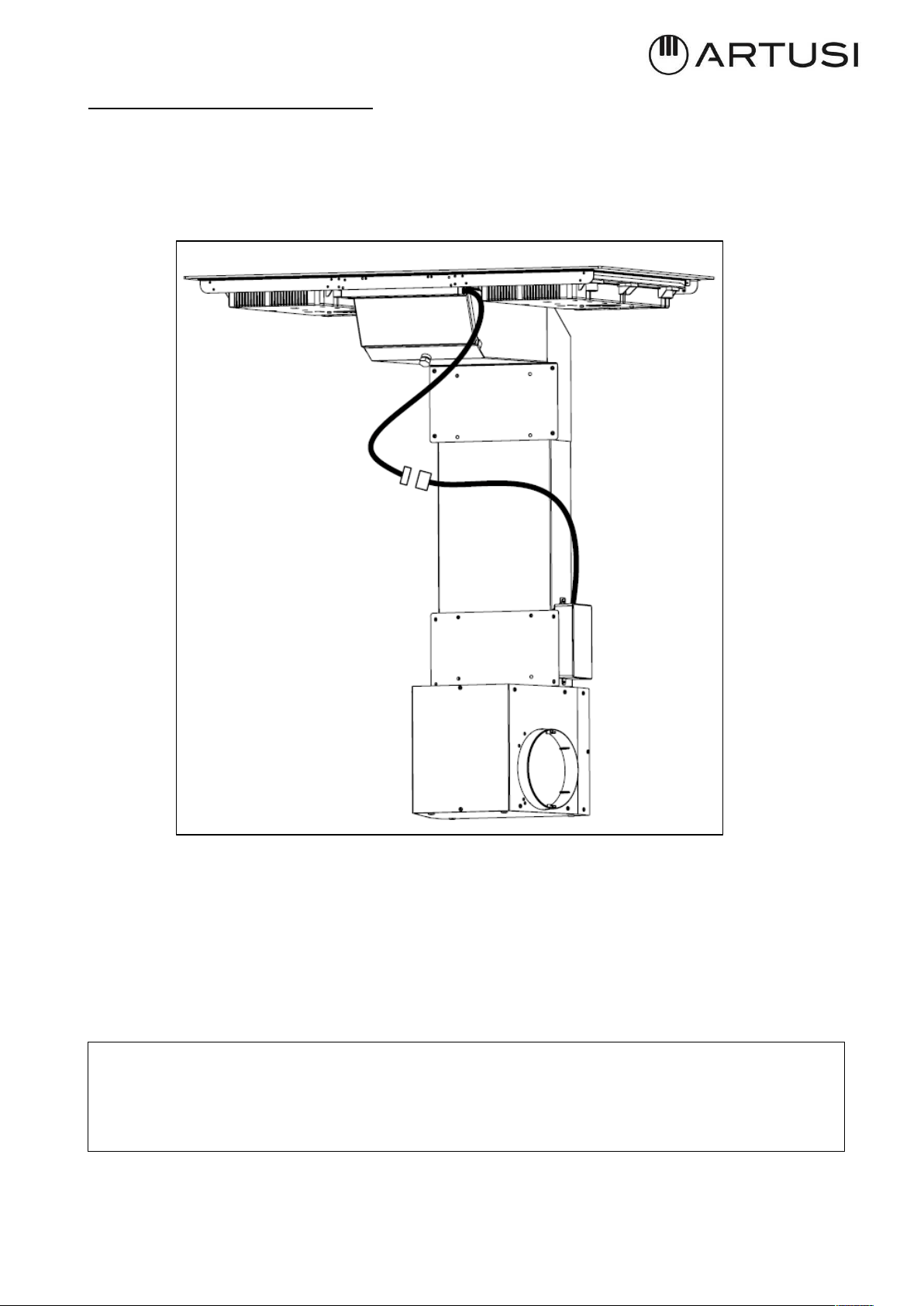
23
Aspirator connection procedure:
First of all, connect the motor box to the induction hob:
• Connect the flat connector (male-female) to the mainboard, with the control’s
connector dropping from the induction hob (Fig. 3.3.3).
· Protection against the parts under tension must be ensured after the building-in.
· The hob connection to the main must be made using an earthed plug or via an omnipolar
circuit breaking device with a contact opening of at least 3 mm.
· The power cord shall be positioned so as not to touch the hot parts of the hob or any other
part.
We cannot be held responsible for any incident resulting from incorrect connection
or which could arise from the use of an appliance which has not been earthed or has
been equipped with a faulty earth connection.
Fig. 3.3.3
24
IV OPERATION
IV.1 DESCRIPTION OF THE INDUCTION HOB
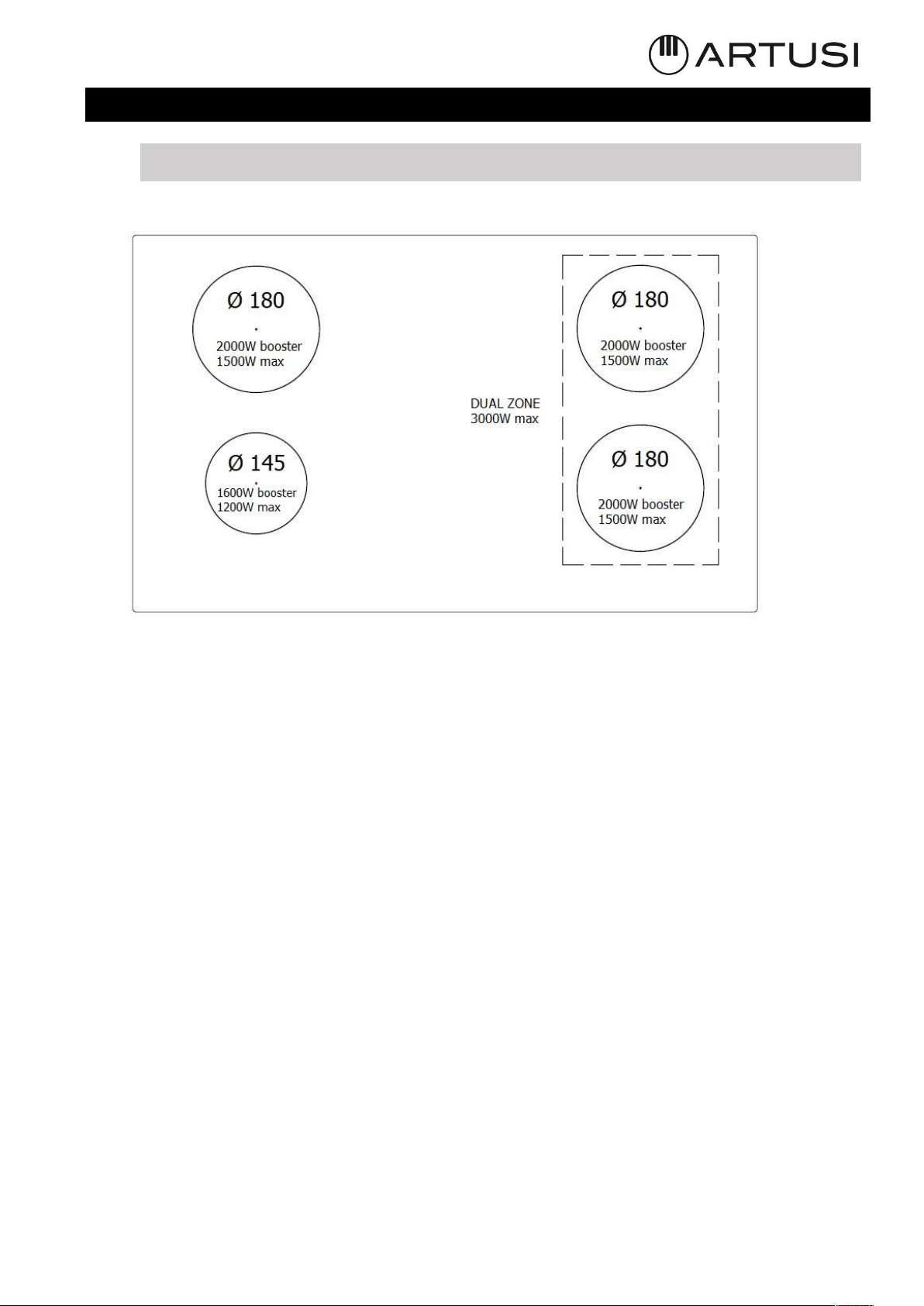
IV.1.a TECHNICAL CHARACTERISTICS
Power level detail:
Power limitation when Ø 180 heaters are working simultaneously (no bridge function):
Total Power 3600W
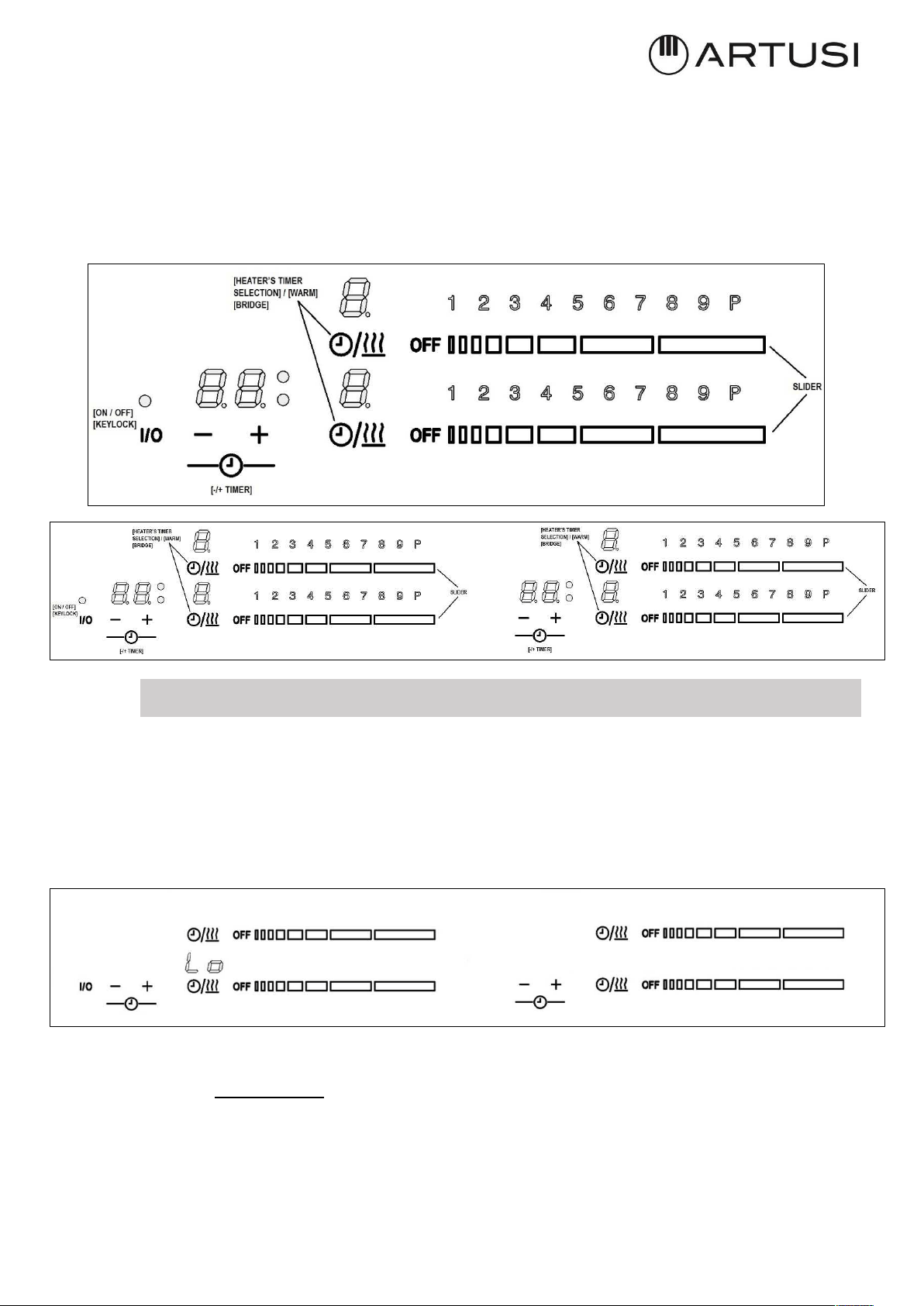
IV.1.b BASIC CONTROL CHARACTERISTICS
• Auto Lock function
• Fast Boil function
• Bridge function
• Selection of heater’s timer / Warm function
• Heat-Up function
• Independent timer for each heater.
• Indication of residual heat for each heater.
• Thermal control protection.
• Protection from accidental activation of keys:
- One or more keys activated for more than 10 sec. -> Switching off the touch
control. A warning beep sounds every 10 sec., while the key/s is/are activated.
- With all heaters at zero power during 10 sec. -> The Cooktop is switched off. If
the switching off is due to an accidental activation of keys, the touch control
actuates as above.
• Acoustic warning to attract the user’s attention.
• Pan detection for induction heaters; After 60 sec. with no pan, the heater switches
off.
25
GENERAL KEYS
- 1 key for switching On/Off the Cooktop [ON/OFF] and unlocking the keyboard.
- 2 keys to “time selection”.
HEATER KEYS
- 1 selection key for each heater’s timer [Heater_timer_selection] / Warm function
- 1 Slider for each heater to select cook set ((0)-1-2-….P)
BUZZER SOUNDS
IV.2 USE OF THE INDUCTION HOB
IV.2.a AUTO-LOCK
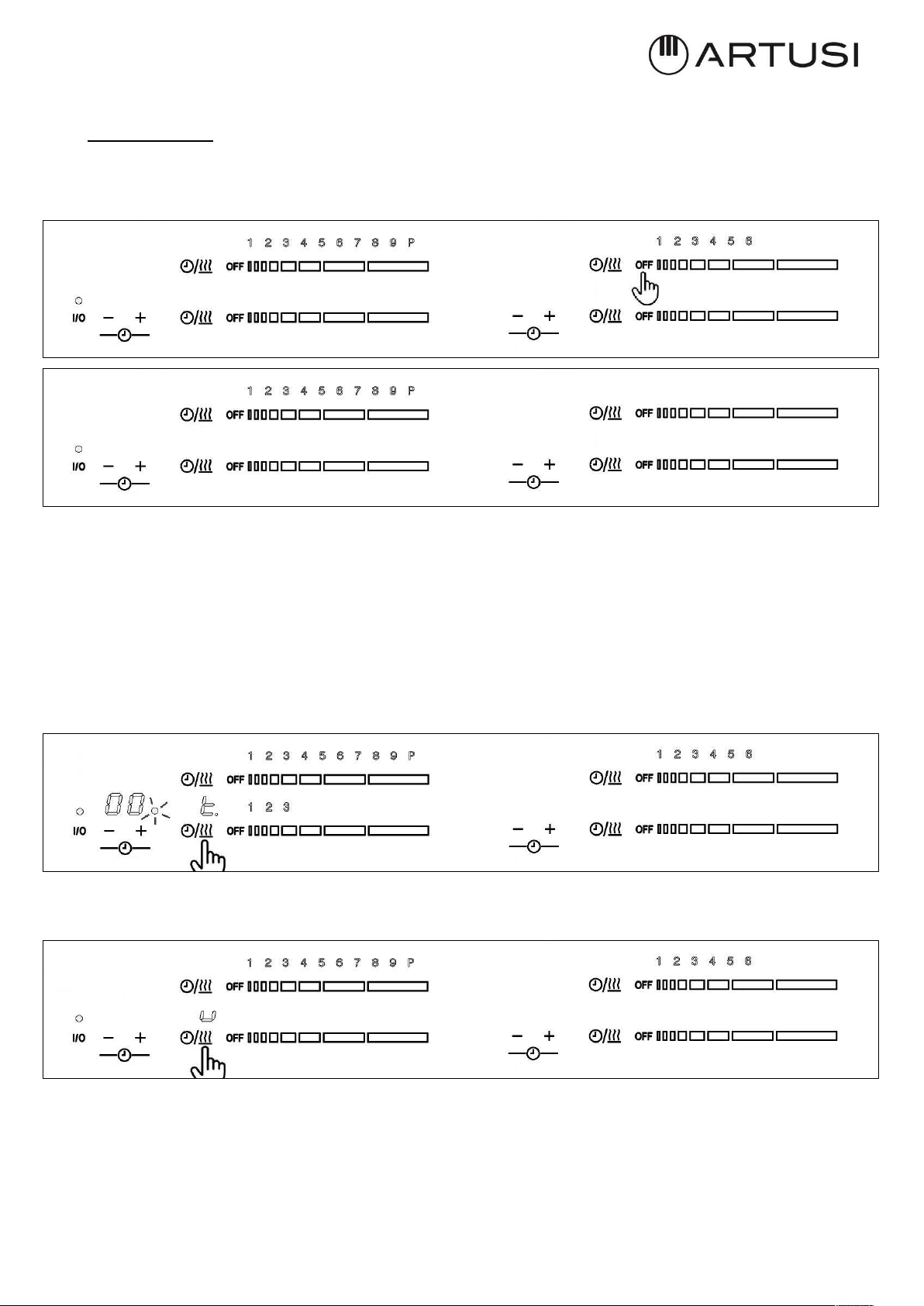
When a cooktop is switched off always is locked. So, on all 7-segment of heater1 cooking zone
display is shown “Lo” for 5 sec, and then disappear. Each time a key is touched from heater1,
7-segment cooking zone displays is blinked “Lo” to indicate that the hob is blocked. If a key
is touched from heater2, nothing happens.
IV.2.b SWITCH ON/OFF THE COOKTOP
The cooktop is switched ON by touching the [ON/OFF] key for 2 second, a double beep
sounds and the On/Off status LED is switched on. Heaters display may possibly be change in
case of residual heat or error status of the cooking zone.
26
¾ If the selection of a heater is not done in 10 seconds, the cooktop will be turned off
automatically.
The cooktop is switched Off by touching the [ON/OFF] key for 1 sec. A beep sounds and all
the heaters are switched Off.
IV.2.c SWITCH ON A HEATER ZONE
When a cooktop is on (On/Off status LED is on), a heater zone can be switched on pressing a
Heater’s slider.
In the “Slider’s bar graph” is displayed the selected power level.
27
IV.2.d SWITCH OFF A HEATER ZONE
To switch OFF a heater, the user must to press on the lowest part of the heater’s slider, a
beep is heard, and heater is OFF. Residual heat indication appears in the display if residual
heat exits.
"H" value will appear in target zone digit if residual heat exists.
If only one heater is active and it’s switched off, after 10 sg, a short beep will be heard
indicating that the cook top is off.
IV.2.e SELECTION OF HEATER’S TIMER /WARM FUNCTION
There are two function in the same key:
1. With a short press, the heater’s timer is selected, so user can visualize timer time or
change timer’s value, in case the that the timer is temporized.
2. And with a long press the warm function is activated, a “u” power level is showed in the
display and slider bar graph is off.
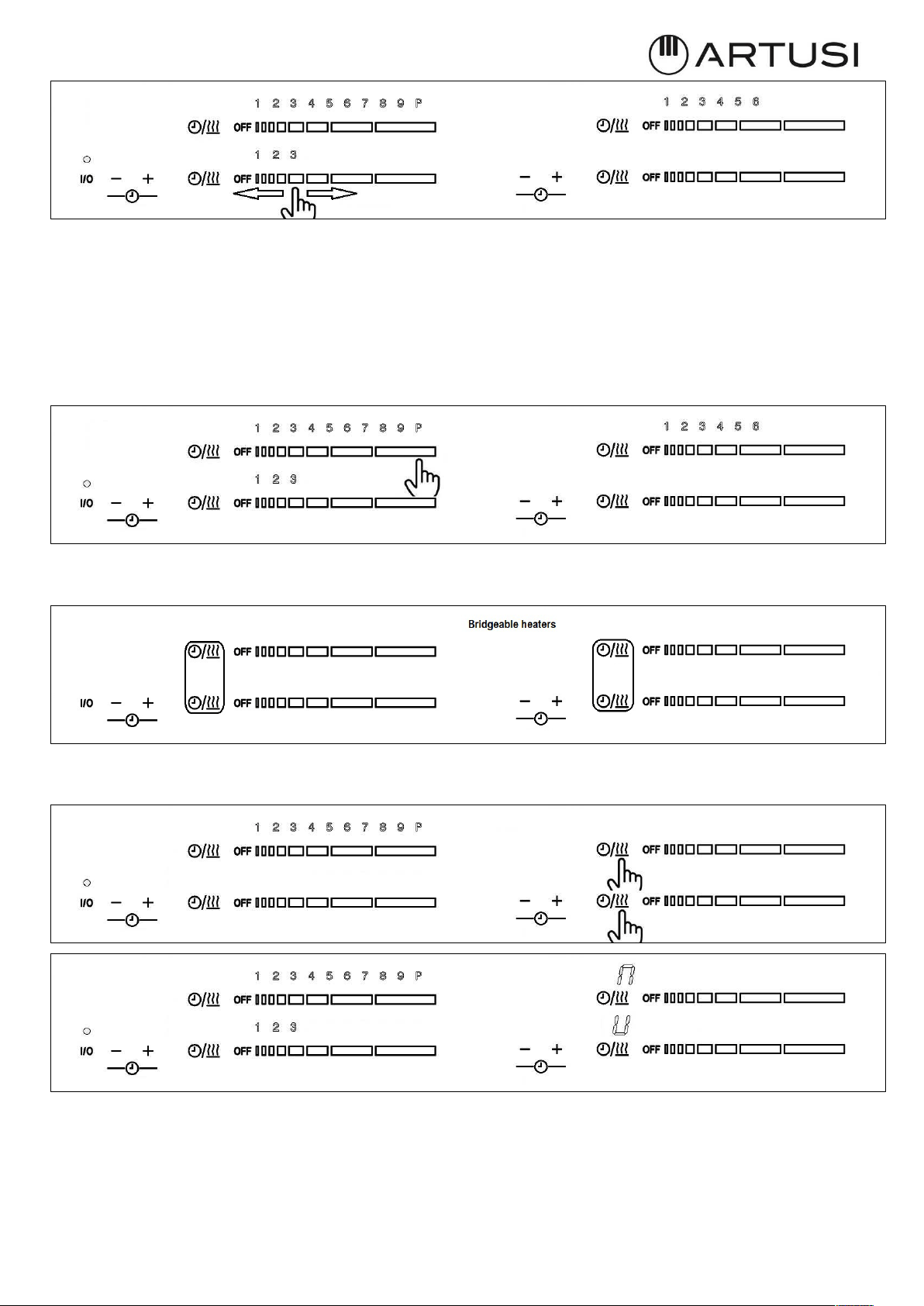
IV.2.f INCREASE / DECREASE POWER LEVEL WITH SLIDER
The power level can be changed with a short press on slider keys, increasing or decreasing
the power of the selected zones, and “Slider bar graph” visualizes the selected power than
goes from (0)-1-2-3...9- to Booster (P).
28
IV.2.g BOOSTER FUNCTION
With a short press on the highest level of slider keys, user can select the Booster Functions.
A beep sounds and the heater display shows “P” and the its corresponding slider bar graph
visualizes all the bar ON (P level).
The heater will work at maximum power level for 10 minutes. After these 10 minutes a beep
sounds and the heater will return to level “9”.
IV.2.h BRIDGE FUNCTION
Two heaters can be joined by the bridge function to heat longer pans and griddles.
To enable or disable the bridge function, user must to press a combination of keys (both
selection keys of the bridgeable heaters) and a beep sound.
In some case, user will be not be able to activated “Bridge keys combination”, so three shorts
beeps are heard. These cases are the following:
¾ If the heaters power level is greater than 0.
¾ If the key lock is activated (KEYLOCK LED on).
29
To set the power level of the bridge heater press any key of each sliders. Bridge heater power
level is shown in bar graphs.
When the heaters are operated as one bridge heater, the selectable power levels are from 1
to 9, it is not possible to select booster power level. When the heaters are operated
individually, the selectable power levels are from 1 to P.
When the heaters are operated as bridge heater and want to switch off to zero power level,
the user must to press on the lowest part of the heater’s slider, a beep is heard, and heater
is OFF.
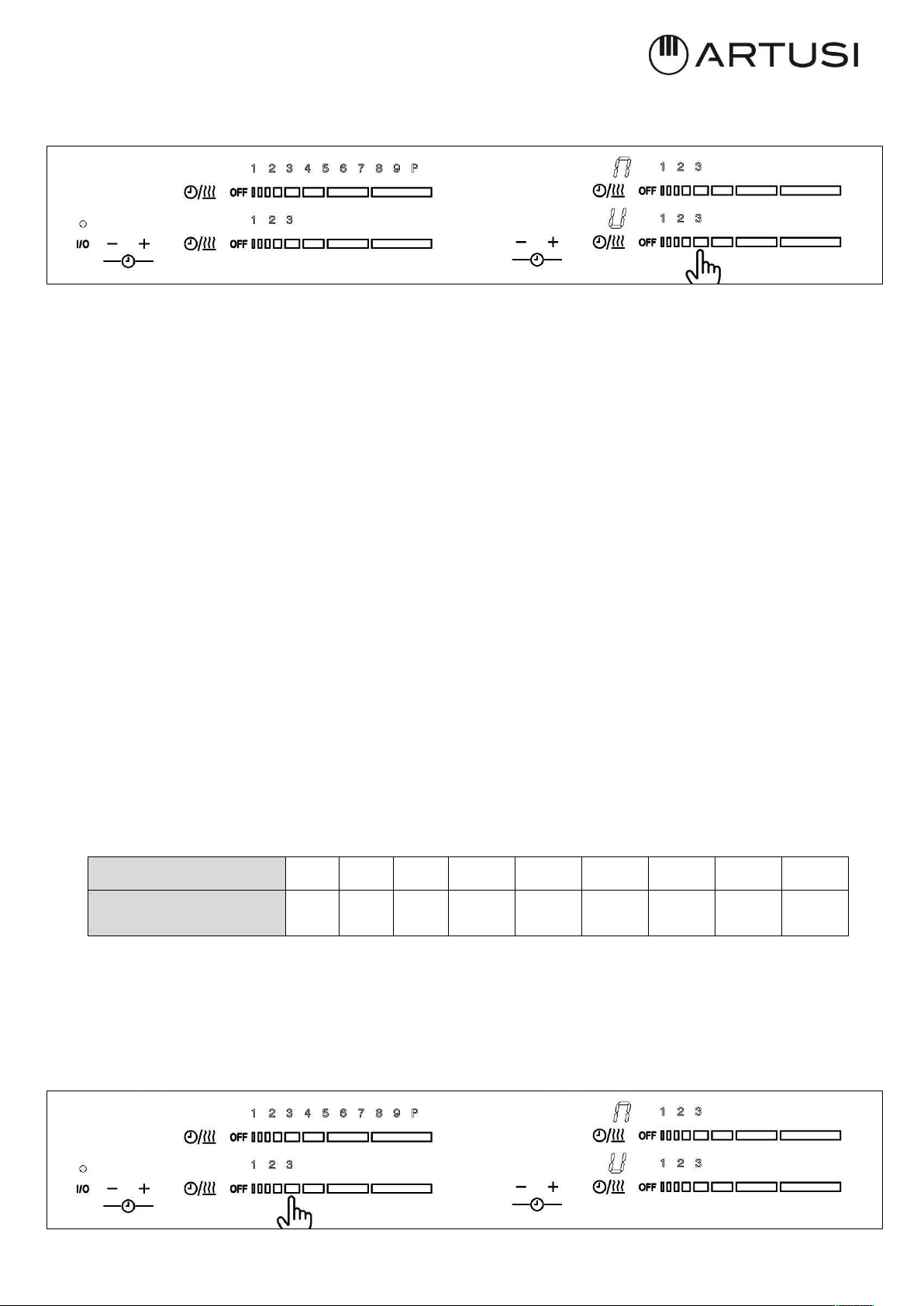
IV.2.i HEAT-UP FUNCTION
User activates the “heat-up” function by pressing for more than 3 second over the slider
when cooking zone is working a power level bigger than zero and it has been selected. It is
not possible to activate Heat-up function when the heater is working at warm, 9 or P power
level.
When Heat-up is activated, the heater operates on the highest power setting (level P) for
the duration of the heat-up time. After the heat-up time expired, the cooking zones
automatically return to the cooking stage set by the operator previously to the heat-up
selection.
The heat-up time is depending on the level of the set cooking stage.
The sequence is the following:
¾ Cooking zone must be at level different of 0, Warm, 9 or P on display.
¾ Then press for more than 3 second over the slider when cooking zone is working a
power level bigger than zero
Cooking level
0
1
2
3
4
5
6
7
8
Heat-up time (s) 0 40 70 120 180 260 430 120 195
30
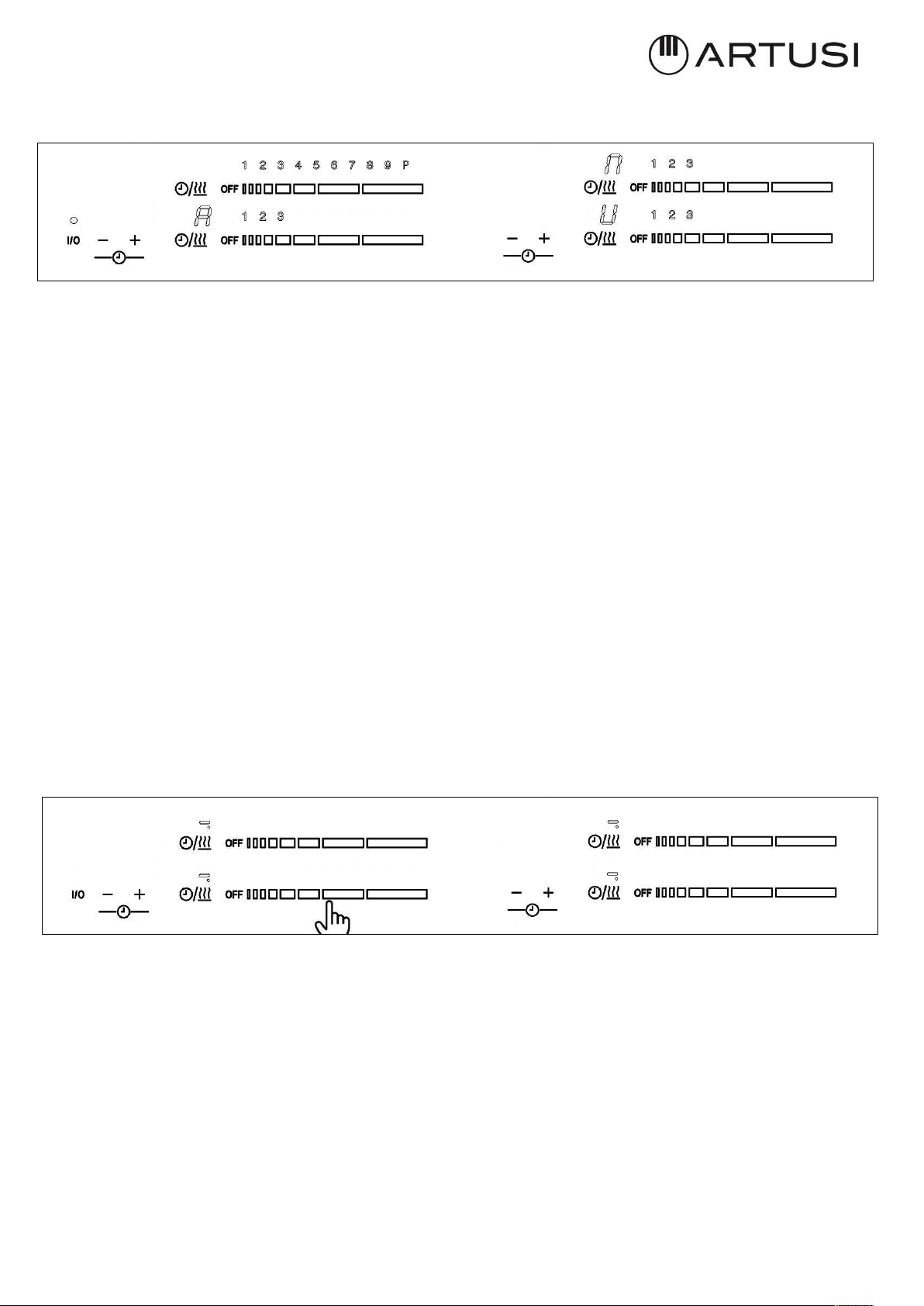
¾ The respective cooking zone display shows the symbol "A" for automatic heat-up
indication.
¾ If the heat-up boost is realized on a cooking zones with activated pan detection and
no pan is detected, an “A" will blink in alteration with the symbol for "no pan".
¾ If a higher cooking stage is selected with the slider, the heat-up function remains
active with the new cooking stage.
¾ When a lower cooking stage is selected any time during the automatic heat-up, heat-
up function will be deactivated.
¾ If the cooking zone is switched off during active heat-up function, the heat-up is also
deactivated.
¾ When the heat-up time has passed as planned, or the automatic heat-up is deactivated
by the above-mentioned operating steps, the bargraph shows the set cooking stage.
The “A” is deactivated.
IV.2.l SECURITY
Something (an object or a liquid) is pressing any key during more than 10s. 2 Short Beep + 1
Long beep every 30s while the key is pressed. Cook-top will turn Off. This symbol will
maintain blinking while the issue persists.
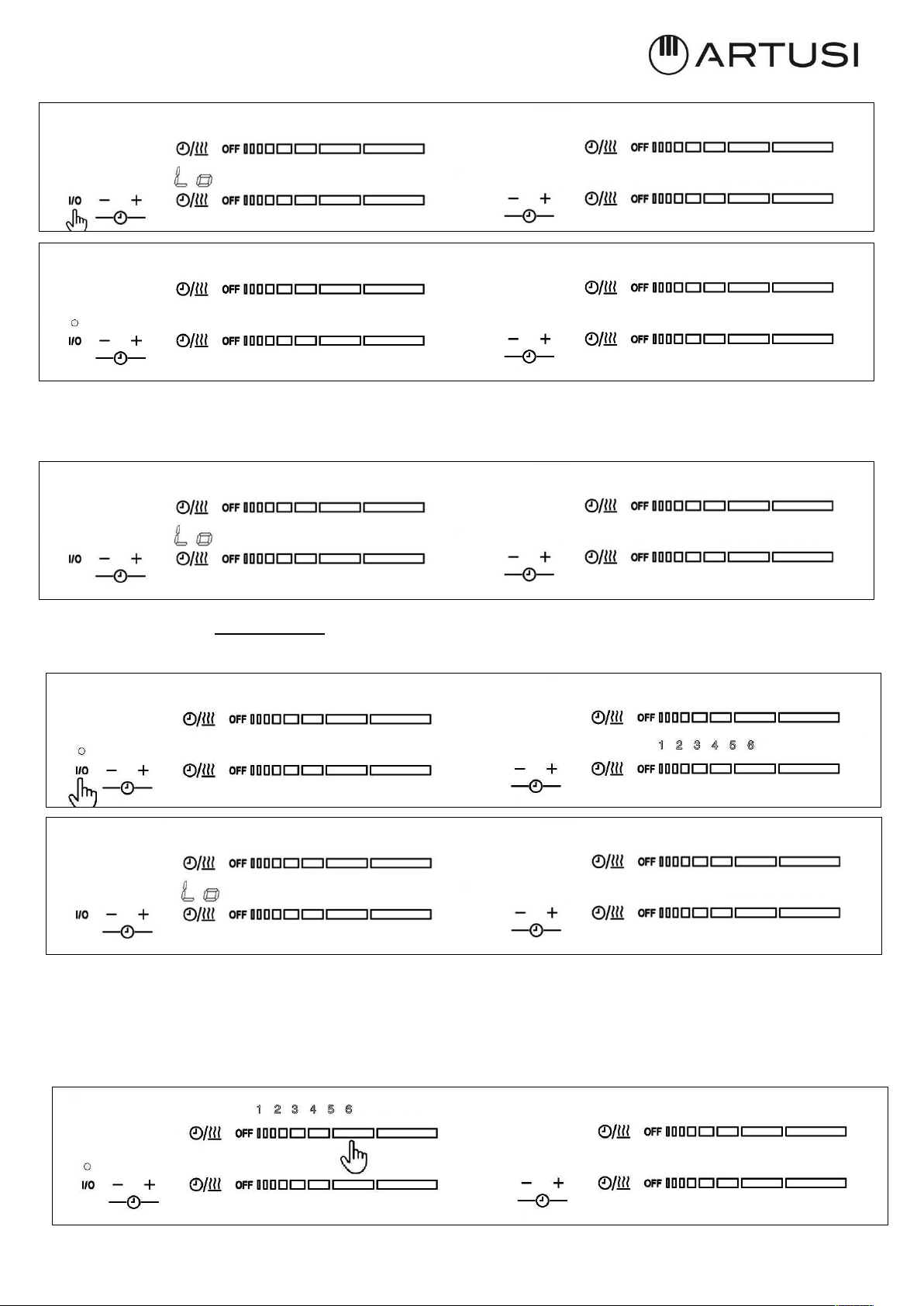
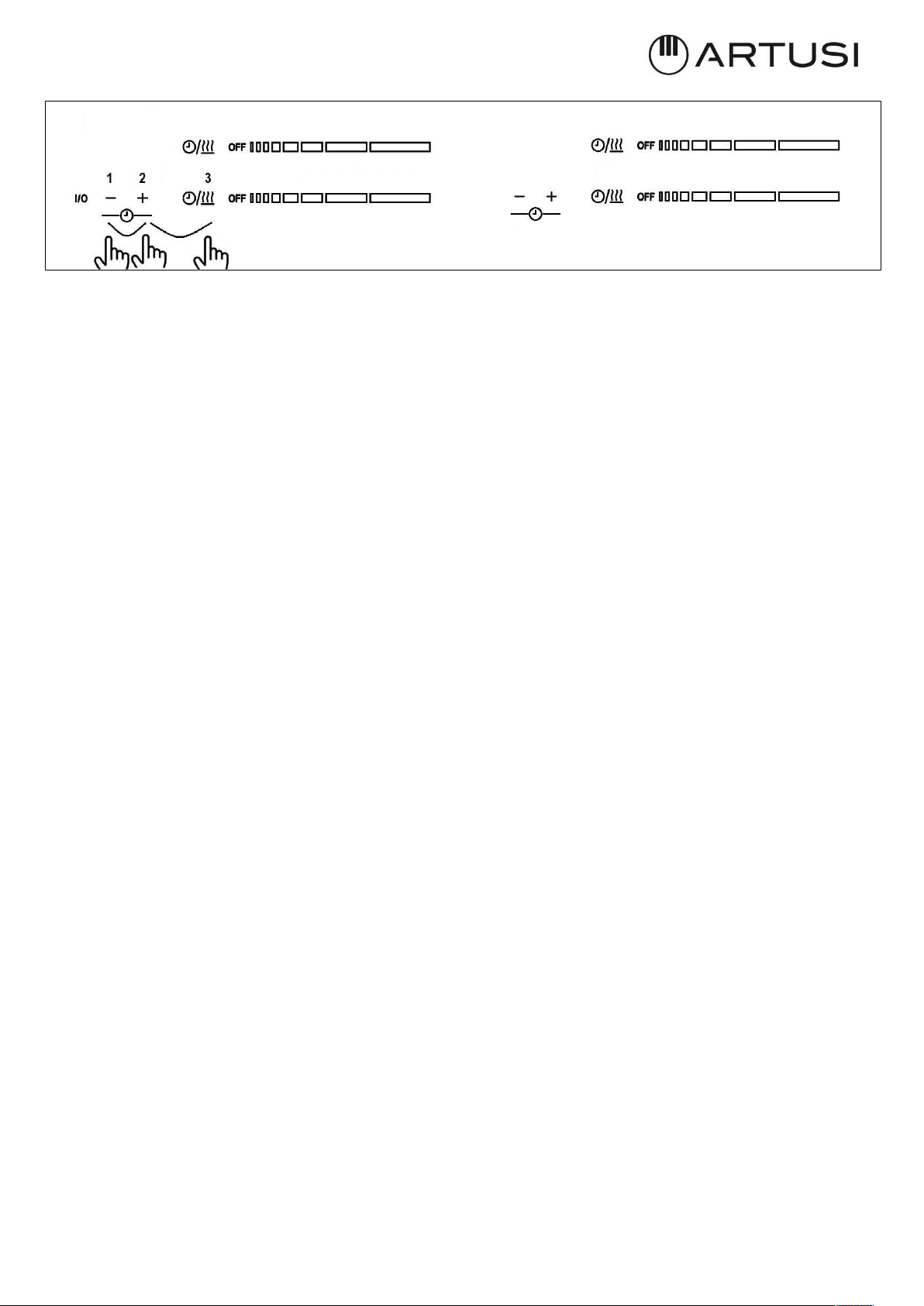
IV.2.m SOFTWARE VERSION VISUALIZATION
SW version only can be activated always when cook-top is off and only during the first 30
seconds after power up the cooktop:
1. Unplug and Plug the cooktop, and press the sequence (only during the first 30 seconds
after power up the cooktop).
2. First press “- timer”, (Step 1)
3. Without removing “- timer”, ‘then press “+ timer” key simultaneously. (Step2)
4. Without removing the finger of ‘- timer’, touch simultaneously ‘Front heater selection’
key (Step 3).
31
The display sequence is the following:
1. First Touch Sw Version is displayed during 10s in timer displays. First, “Functional
Software Version” is displayed without any dots and any timer LEDs on. Second, “Safety
Software version” is displayed with dots and timer LEDs on.
2. Then a short beep is heard and First Induction Generator Sw version is displayed. First,
“Functional Software version” is displayed without any dots and any timer LEDs on. Second,
Safety Software version” is displayed with dots and timer LEDs on.
3. Then another short beep is heard and Second Induction Generator Sw version is displayed.
First, “Functional Software version” is displayed without any dots and any timer LEDs on.
Second, “Safety Software version” is displayed with dots and timer LEDs on.
4. Then another short beep, and the display sequence is finished.
5. If a key is pressed during the Sw Display Sequence, the sequence finished and touch control
continued at normal operation.
IV.2.n TIMER
The timer function consists in activating different timers that are assigned to individual
cooking zones. "00" is displayed in the digits reserved for the timer. When heater timer is
elapsed, the heater is switched off.
¾ Timer function is activated when “heater’s timer selection/ /Warm key” is pressed,
and the heater’s power level is greater than 0.
¾ Timer LED is blinking indicating that the zone is being timed
¾ With "+Timer" or "-Timer" keys, timer time can be chosen. A Beeps sounds.
¾ Pressing simultaneously timer "+/-" keys the timer is cancelled (goes to 00), but the
heater has to be selected.
¾ If timer "+" or "-" keys is maintained pressed during TBD time, there is quick setting
timer time.
¾ When setting timer time, it is possible to go from "00" to "99" with "-" key, and from
"99" to "00" with "+" key.
¾ Maximum time is 99 minutes.

32
¾ When the time is elapsed and the hob is beeping, press any key and the alarm and
digit sequence will end.
¾ It is possible to adjust the timer time while the timer is previously running, pressing
with a short press on the “Heater’s timer selection / /Warm key”, and user can adjust
timer with "+/-" key.
¾ Power of timed zone can be modified without consequences on the timer
programming.
¾ Last minute will be displayed in seconds.
¾ Pressing the "+" or "-" keys without pressing heater’s timer selection key, not make
nothing.
¾ Remaining time is displayed in the digits reserved for the timer.
¾ If Heater 1 and Heater 2 are timed simultaneously (Touch Control of the left): The
smallest remaining time is displayed, and the corresponding timer LED is blinking. The
other LED is on continuously.
¾ If Heater 3 and Heater 4 are timed simultaneously (Touch Control of the right): The
smallest remaining time is displayed, and the corresponding timer LED is blinking. The
other LED is on continuously.
33
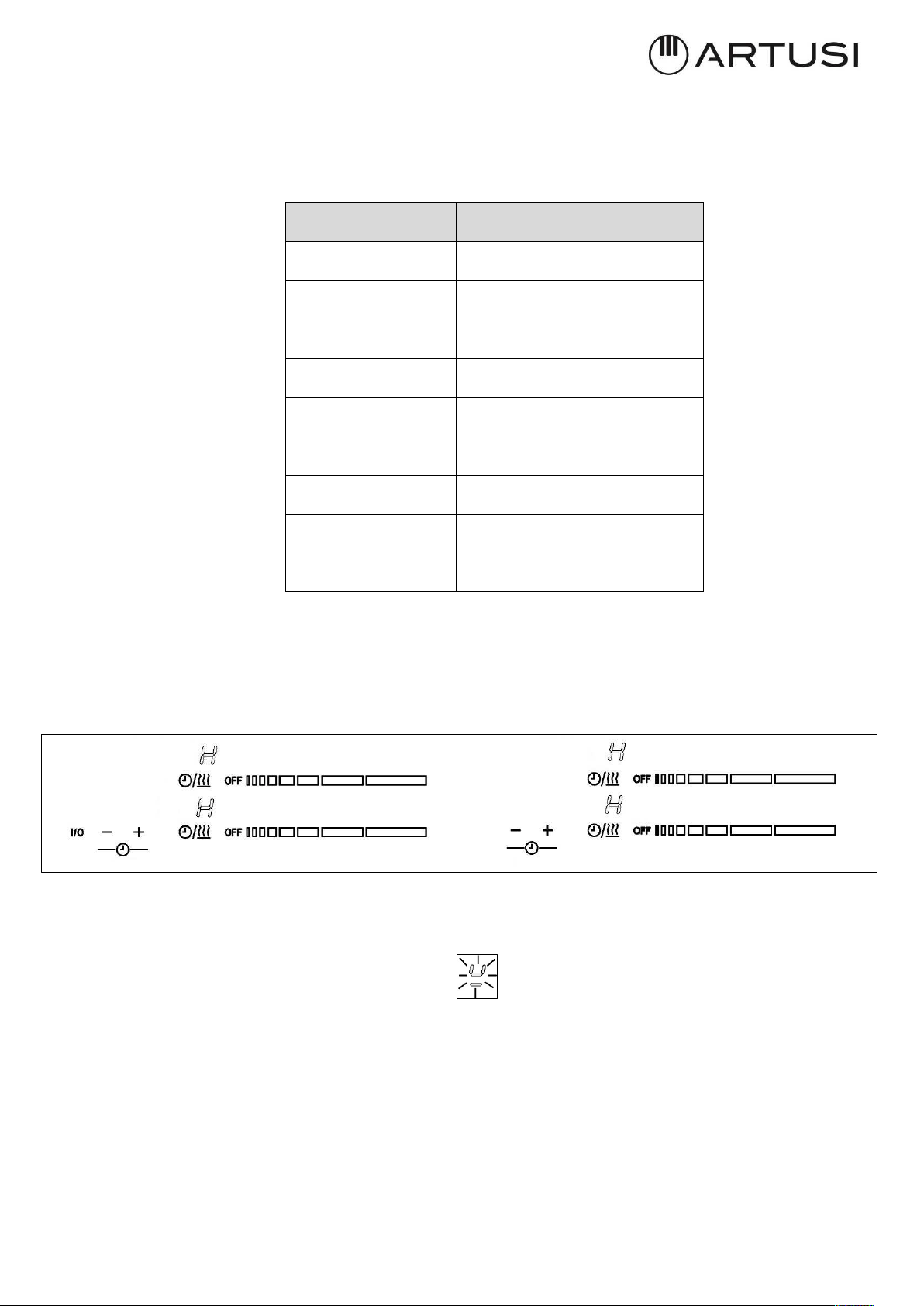
IV.2.o AUTOMATIC SAFETY OFF
If the power level is not changed during a preset time, the corresponding heater turns off
automatically. The maximum time a heater can stay on, depends on the selected cooking
level.
IV.2.p RESIDUAL HEAT INDICATION
After a zone has been switched off, an “H” will be displayed depending on the temperature
determined by the temperature sensor at cooking zone. The “H” will be displayed statically
and will not blink.
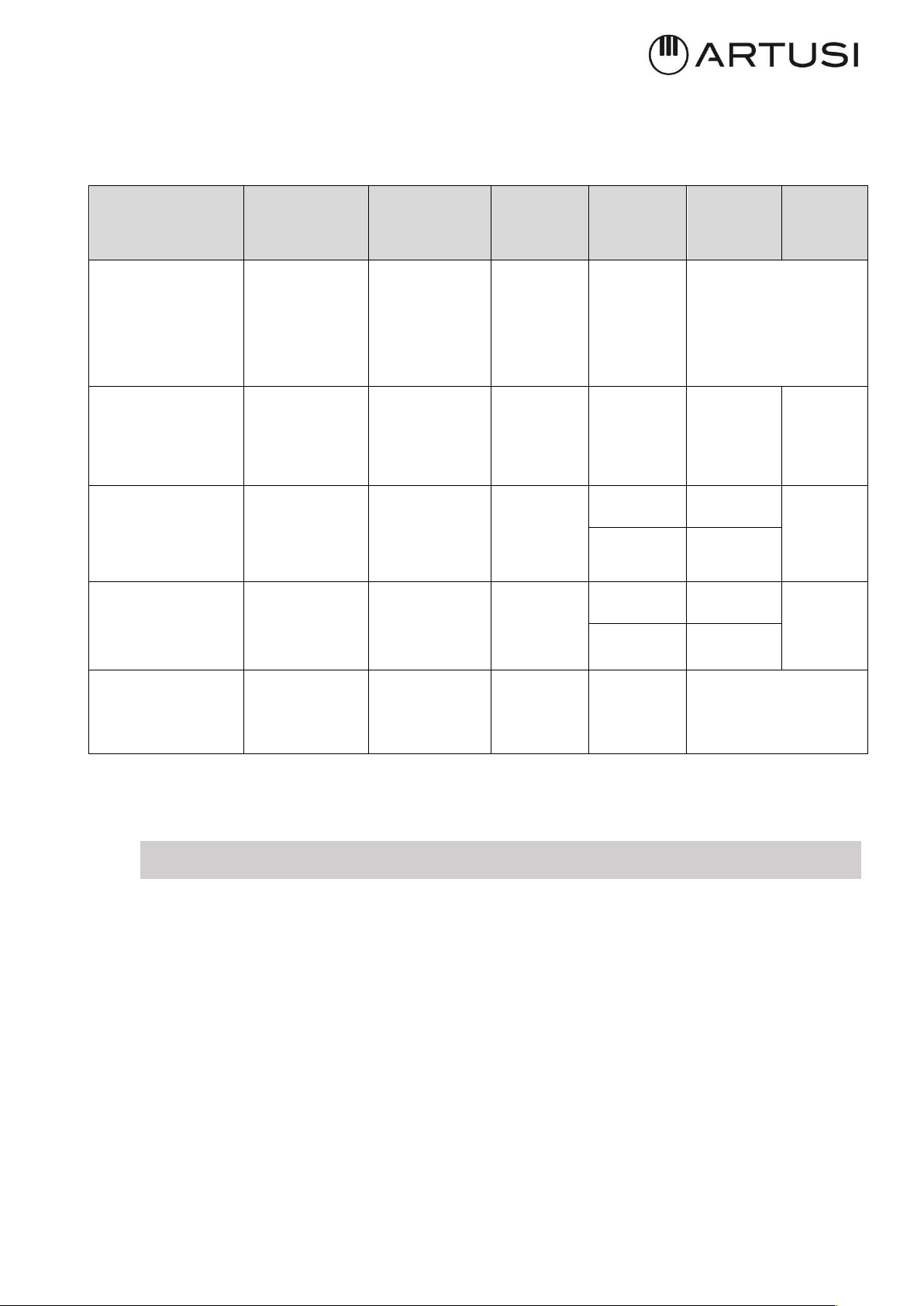
IV.2.q POT DETECTION
When no pot or when un-suitable pot is present after setting a power level, the chosen level
and symbol “-u” (small U with bottom line) will blink with rhythm 1 sec and no power
is added.
After 30 sec the zone will be switched off automatically. The timeout of 30 sec for pan
detection is not affected by pause mode.
In the touch control bar graph indicates the power level indication; there is no special
indication of the pot detection.
Power level
Max. time on (hours)
1
10
5
5
3
5
4
4
5
3
6
2
7
2
8
2
9
1
34
IV.2.r DISPLAYING SPECIAL STATUSES IN TOUCH CONTROL
The corresponding heater display alternates between two characters depending on the
status.
Special status
(Visualization
Priority
Order)
Start
conditions
End
conditions
Action
Heater
status
Heater
Display
fore
Heater
Display
back
Power increment not
allowed
(only for ECO
models)
Asked Cooktop
power
> Cooktop ECO
power
limit
2 sec
Power
increment
not
allowed
On/Off ‘r’
Heater without
suitable pan or
without pan
No pan or not
suitable
pan over the
heater
Suitable pan
over
the heater
After 1
minute
Heater off
On ‘Power’ ‘-u’
Induction heater
overtemperature
COIL
TEMPERATURE
> T1 (1)
COIL
TEMPERATURE
< T2 (1)
No power is
delivered to
the
heater
Off ‘ ‘ o ‘H’
‘C’
On ‘Power’
Induction generator
overtemperature
HEATSINK
TEMPERATURE
> T3 (1)
HEATSINK
TEMPERATURE
< T4 (1)
No power is
delivered to
the
heater
Off ‘ ‘ o ‘H’
‘c’
On ‘Power’
Hot glass over a
heater
(residual heat)
COIL
TEMPERATURE
> T5 (1)
COIL
TEMPERATURE
< T6 (1)
---------- Off ‘H’
(1) For T1, T2, T3, T4, T5 and T6 values see the corresponding drawing.
IV.3 COOKIG ADVICES
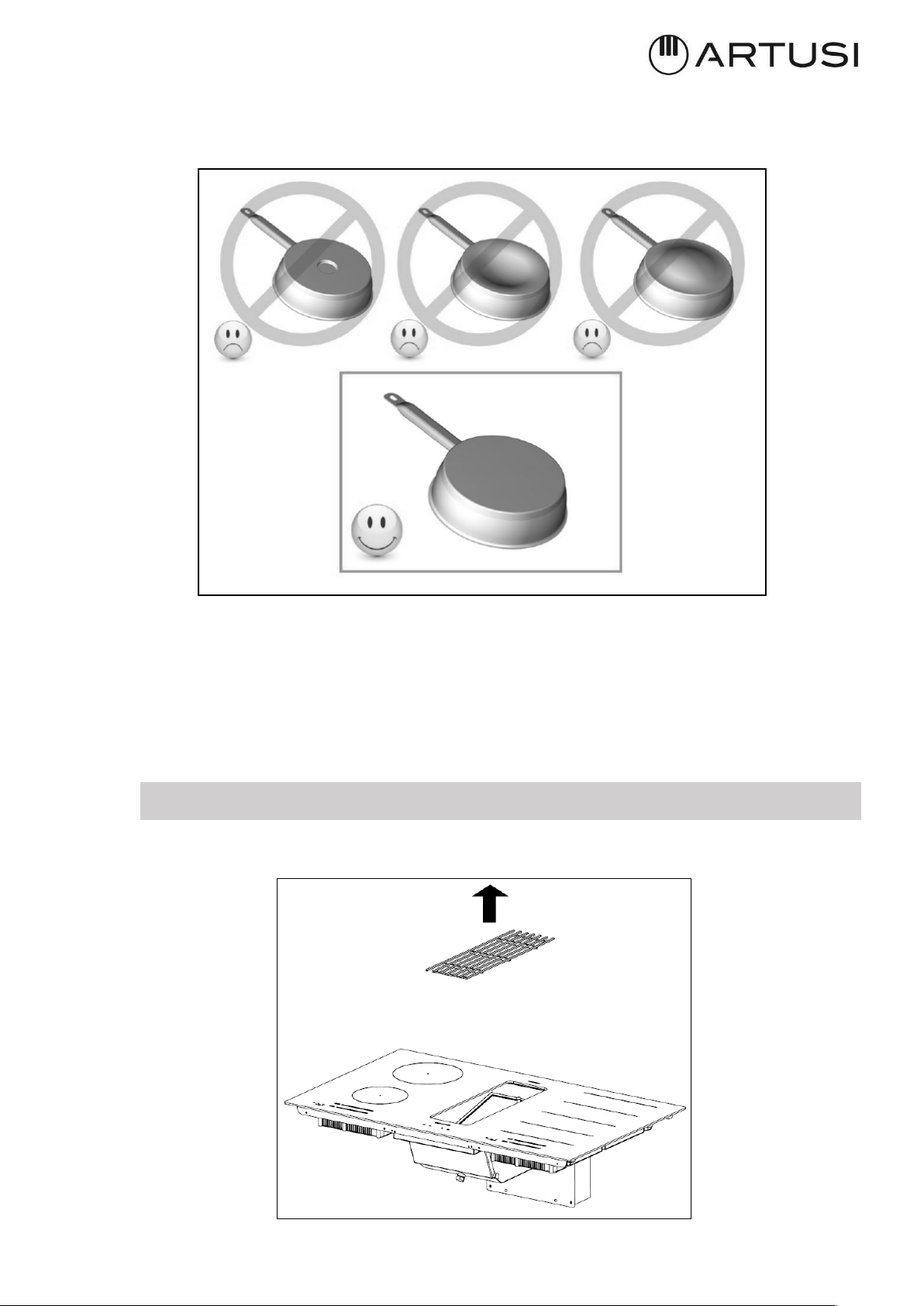
IV.3.a PAN QUALITY
Adapted materials: steel, enameled steel, cast iron, ferromagnetic stainless-steel, aluminum
with ferromagnetic bottom.
Not adapted materials: aluminum and stainless-steel without ferromagnetic bottom, cupper,
brass, glass, ceramic, porcelain.
The manufacturers specify if their products are compatible induction.
To check if pans are compatibles:
· Put a little water in a pan placed on an induction heating zone set at min. level.
This water must heat in a few seconds.
· A magnet sticks on the bottom of the pan.
35
Certain pans can make noise when they are placed on an induction cooking zone. This noise
doesn’t mean any failure on the appliance and doesn’t influence the cooking operating.
IV.3.b PAN DIMENSION
However, the bottom of this pan must have a minimum of diameter according to the
corresponding cooking zone.
To obtain the best efficiency of your hob, please place the pan well in the center of the
cooking Zone.
IV.4 COOKER HOOD OPERATION
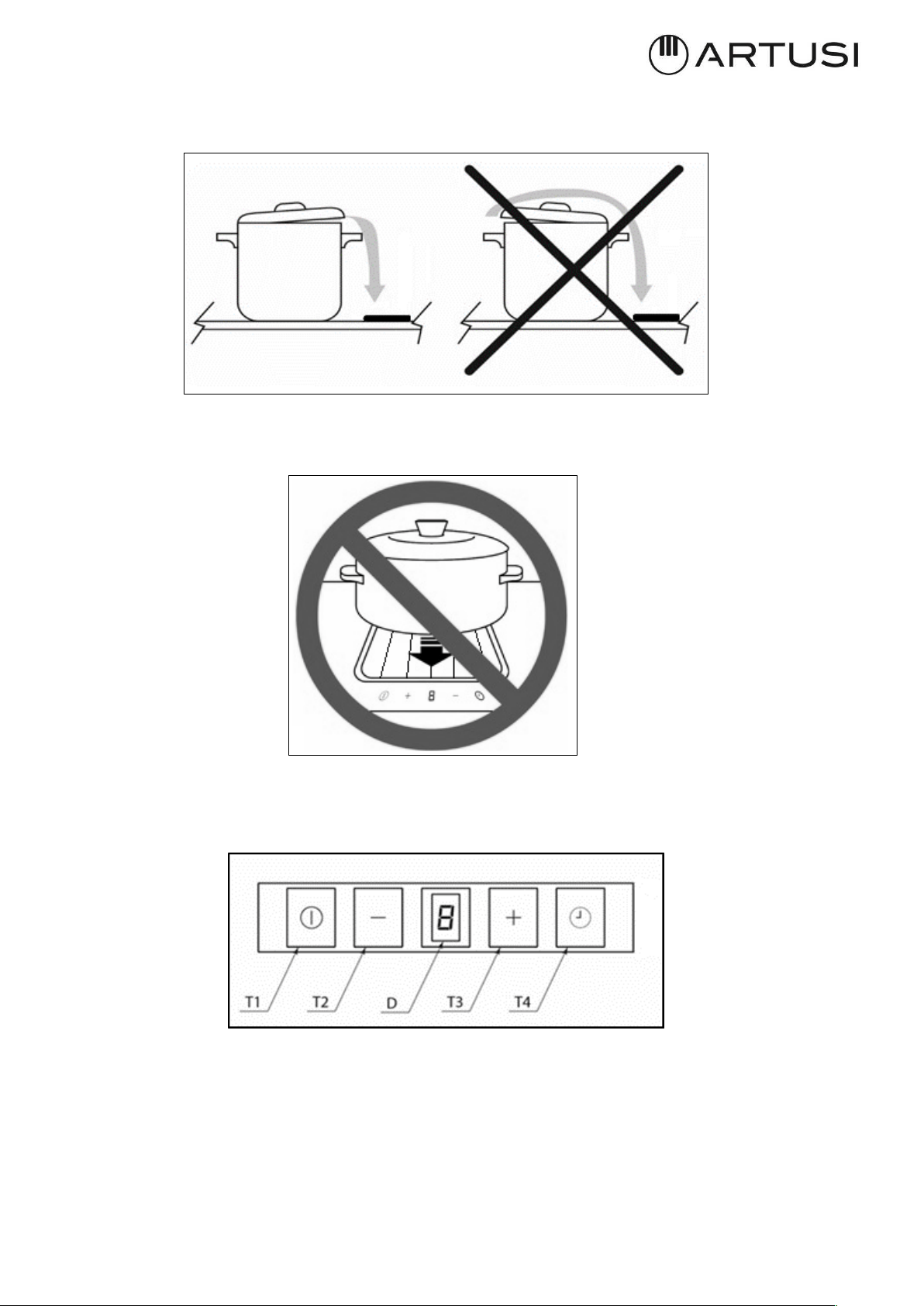
To remove the center grille, just lift it (fig. 4.4.1).
Fig. 4.4.1
36
To reach the maximum aspiration try to convert the cooking fumes on the closer side to the
aspiration (Fig. 4.4.2).
Do not place any object above the aesthetic frame and above the center grille of the hood
(Fig. 4.4.3).
The touch controls are located in front of the aspirator and consist of 4 buttons and a central
display (Fig. 4.4.4).
Fig. 4.4.4
Fig. 4.4.2
Fig.
443

37
IV.4.a ASPIRATION TURN ON
Touching T1 for 1sec the aspiration turns on at 1st speed.
To increase the speed (2nd – 3rd – 4th or booster) touch T3.
To decrease the speed touch T2 (4th or booster – 3rd – 2nd – 1st).
At the 4th speed (booster) the aspiration will work at the maximum speed for 5 minutes after
that it will automatically switch to 3rd speed. The display will blink “4” for the first 5 minutes
than “3” constantly.
IV.4.b ASPIRATION TURN OFF
To turn the hood off touch T1.
Switching off will be possible any speed the aspiration will be working at.
IV.4.c CLEANING FUNCTION
In order to allow the cleaning of the hob the cleaning function is inhibiting the touch controls.
The function is activated by pressing T2 key for 5sec. with the hood turned off.
For a minute, the touch control will be inhibited.
During this period the display will show "C". After one minute the device will normally work
IV.4.d ADJUSTABLE AND DELAYED SELF-SWITCHING OFF
By pressing T4 adjustable and delayed self-switching off of the aspiration can be activated.
The display shows “D”:
With the hood in operation, select the desired speed than press T4 to activate the delayed
self – switching off.
The display will show “1” blinking followed by a point, where the point stands for
programming phase.
By pressing T2 and T3 respectively the self-switching off time could be adjusted from 1 to 4:
1= 5 minutes
2= 10 minutes
3= 15 minutes
4= 20 minutes
Press again T4 to confirm the programming.
During self-switching off operation, you can change the set speed by using the T2 and T3 keys
and manually switch off the hood by pressing the T1 key.
You can also change the self-switching off time once set by pressing the T4 key again and
resetting the new time: the count will resume from 0.

38
With the self-switching off activated the display will show cyclically for 5 seconds the set
speed with fix light and for the following 5 seconds the self-switching off setting with blinking
light.
If you choose the intensive speed, after 5min the hood will go to the 3rd speed and the self-
timer will run at the 3rd speed.
With booster set the aspiration will automatically switch to the 3rd speed after 5 minutes,
self- switching off will take place at the 3rd speed.
IV.4.e ANTI GREASE FILTER CLEANING ALARM
Every 30 hours’ operation, when aspiration is switched off, letter “G” will light up on the
display for 30 seconds warning that anti grease filter cleaning is necessary.
To reset the timer press T3 for 5 seconds while aspiration is switched off, otherwise the
device will give the same warning the next time aspiration is switched off.
IV.4.f CHARCOAL FILTERS REPLACING ALARM
Every 120 hours’ operation, when the hood is switched off, the display will show “S” for 30
seconds reminding the washing or substitution of the charcoal filters (when installed). To
reset the timer, keep the T3 key pressed for 5 seconds with aspiration switched off,
otherwise the device will give the same warning the next time aspiration is switched off.
The warning will be reported even if the hood is not in filtering mode: in this case proceed
with the ordinary cleaning of the anti-grease filter and reset the warning.
IV.4.g PRESENCE OF LIQUIDS INSIDE THE DEVICE
The hood is equipped with a liquid collection tray.
Pay attention, periodically, to the presence of liquids in the tray and empty it by removing
the cap (Fig. 4.4.g.1).
It is recommended to position the container for collecting liquids under the cap.
CAUTION! Electrically disconnect the mains plug before any service
operation. (Fig. 2.1 – Fig. 2.2 WARNINGS chapter)

39
To optimize the intervention, we also recommend cleaning and drying the entire interior of
the hood. Then remove the center grille in support and remove the grease filter by lifting it
from the appropriate knob (Fig.4.4.g.2)
After doing these operations, you can clean and dry the inside of the tray from above. After
cleaning, reposition all the components and the grid by performing the above operations
(Fig. 4.4.g.2) in reverse order.
Fig. 4.4.g.1
Fig. 4.4.g.2

40
V CLEANING AND MAINTENANCE
V.1 INDUCTION HOB CLEANING
Switch-off the appliance before cleaning.
Do not clean the hob if the glass is too hot because they are risk of burn.
• Remove light marks with a damp cloth with washing up liquid diluted in a little water. Then
rinse with cold water and dry the surface thoroughly.
• Highly corrosive or abrasive detergents and cleaning equipment likely to cause scratches
must be absolutely avoided.
• Do not ever use any steam-driven or pressure appliance.
• Do not use any object that may scratch the ceramic glass.
• Ensure that the pan is dry and clean. Ensure that there are no grains of dust on your
ceramic hob or on the pan. Sliding rough saucepans will scratch the surface.
• Spillages of sugar, jam, jelly, etc. must be removed immediately. You will thus prevent the
surface being damaged.
V.2 COOKER HOOD CLEANING
The hood must be cleaned immediately after installing and removing the protective film in
order to remove any residual glue or impurities of any kind.
The hood must be cleaned frequently both internally and externally (at least once a month).
Do not allow dirt to accumulate on the outer and inner surfaces of the hood.
The central grille can be washed in the dishwasher.
Warning! Products that are NOT to be used are:
Products containing chlorides, especially those containing hydrochloric acid;
Halide based products;
Hydrogen peroxide products;
Hypochlorous acid-based bleaches;
Acid-containing aggressive products;
Detergents containing abrasive powder;
Silver cleaning products;
Detergents whose chemical composition is unknown;
Abrasive wipes, brushes or disc;
Coarse cloths or rough paper;
Tools that have previously cleaned other metals or alloys.
CAUTION! Before any service or cleaning operation disconnect the
device from the power supply (Fig.2.1–Fig.2.2 WARNINGS chapter).
41
Ordinary cleaning
Ordinary cleaning should be performed before excessive build-up of dirt can occur which can
cause abrasive phenomena.
Before performing the washing operations, any dust particles should be removed by air or
aspirated, so as to avoid rubbing on the surface.
Where water has been used as a means of cleaning or rinsing, especially in areas with
significant limestone, it is recommended to dry the surface to prevent staining.
To avoid contamination caused by iron particles, make sure that the tools selected for
cleaning have not previously been used on other metals or alloys.
Materials for cleaning stainless steel products must be exclusively reserved for this purpose.
Special attention should be paid to the grease filter, which has the function of retaining the
fat particles contained in the vapors, and the grease collector, which has the function of
collecting the fat that could fall from the grease filter. Both of these items should be washed
when the relevant warning appears or at least once a month in hot water and detergent
(even in dishwasher).
The filter may become discolored after washing. This is normal and does not mean it needs
to be replaced.
To carry out the maintenance of the grease filter, it is essential to remove them from the
hood.
To remove the metallic grease filter, proceed as indicated in the section IV.4.g PRESENCE OF
LIQUIDS INSIDE THE DEVICE).
The charcoal filter, if present, must be washed or replaced when the relevant warning
appears (see the section IV.4.f CHARCOAL FILTERS REPLACING ALARM).
Ask for the filter to the manufacturer.
To wash or replace the charcoal filter, check the instruction manual of the kit separately
purchased.
VI WHAT TO DO IN CASE OF A PROBLEM
WARNING! During the warranty period repairs can only be carried out by authorized service
staff.
Unauthorized repairs or services may cause electric shock or short circuit, so do not run
them. Leave these jobs to authorized personnel only.
In the case of minor disturbances, try to solve the problem by following the instructions
in the operating instructions.
Elimination of faults or complaints caused by improper use or installation of the
appliance will not be warranted. The repair costs will be borne by the user.
CAUTION!
Before any service or maintenance, disconnect the power supply of
the device (Fig.2.1 – Fig. 2.3 WARNINGS chapter)
42
VI.1 ERRORS / ALARMS
The corresponding heater display alternates between two characters depend on the Error.
Event Action Error on Display
ON-OFF Safety error Off (*) FA
Software Safety error Off (*) F0
Capacitive key sensitivity error Off (*) Fb
NTC Short-circuit error Off (*) FE
NTC open error Off (*) Ft
Extra temperature error Off (*) Fc
Eeprom memory error Off (*) FH
PWM digital frequency signal error Off (*) FC
PWM digital signal level error Off (*) Fd
ADCMux – keyboard error Off (*) FJ
ExtMUX keyboard error Off (*) FU
Relay Output Test error Off (*) Fr
Off (*) = All cooking zones are switched Off and locked
VII DISCONTINUATION, DISASSEMBLY AND WASTE DISPOSAL
VII.1 DISCONTINUATION
Discontinuation means the definitive stop of the operation and the disassembly or the
appliance.
After discontinuation the appliance can be installed on another furniture, privately
resold or disposed of.
CAUTION!
For discontinuation it is necessary to switch the appliance off and
disconnect the power (Fig. 2.1 – Fig. 2.2 WARNINGS chapter).
CAUTION!
Electrical disconnection and must be undertaken only by qualified service
staff.
43
VII.2 DISASSEMBLY
Disassembly requires that the appliance is accessible for disassembly and has been
disconnected from the power supply.
To do so, you need:
Loose screws and fixing brackets
Remove any silicone seals
Disconnect the motor and the channel from the hob
Take the top of the hob out.
VII.3 ENVIRONMENT PRESERVATION
· The materials of packing are ecological and recyclable.
· The electronic appliances are composed of recyclable, and sometimes harmful
materials for the environment, but necessary to the good running and the safety of
the appliance.
VII.4 WASTE DISPOSAL
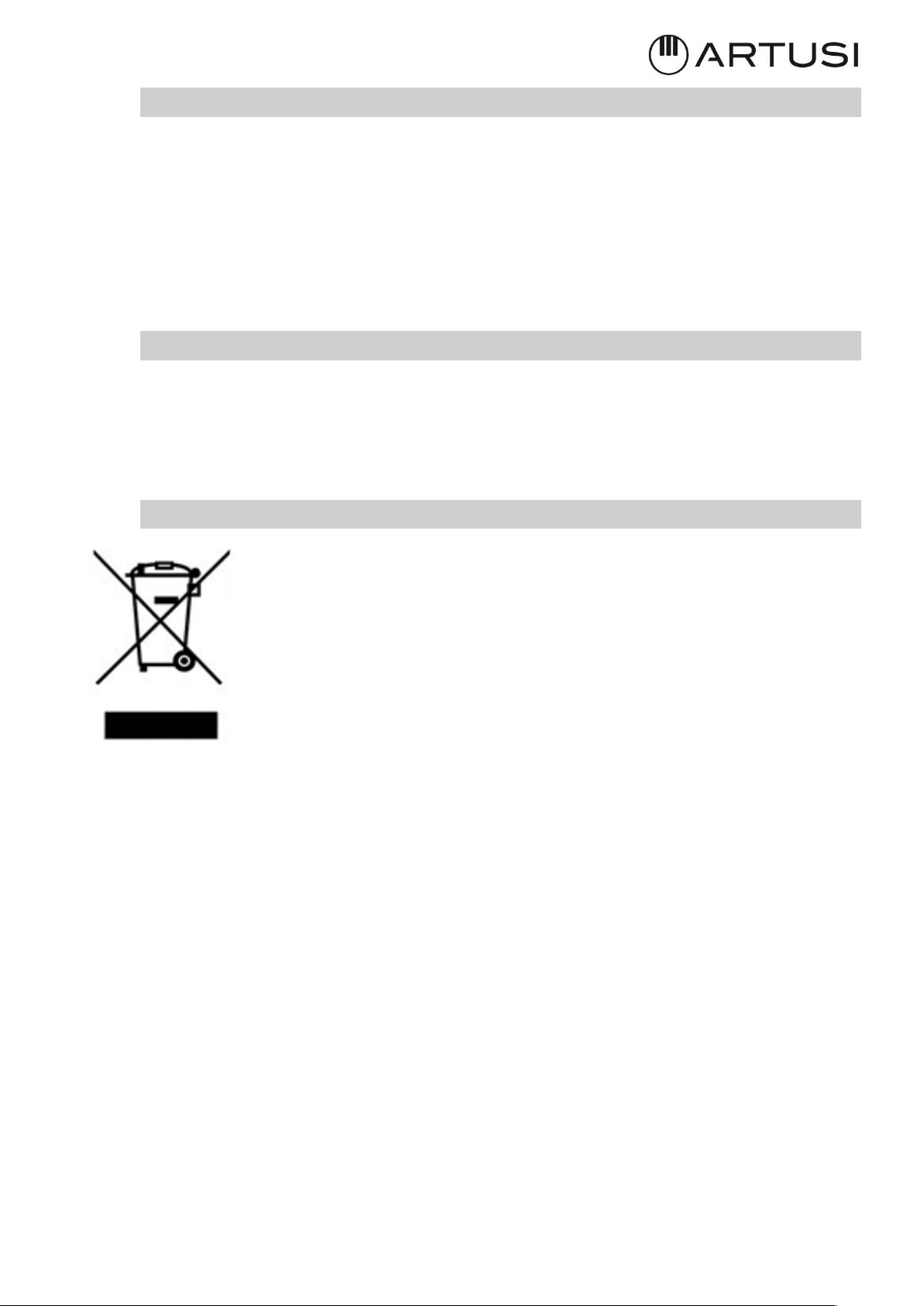
This appliance is marked in accordance with the European Directive
2012/19/EC,
Waste Electrical and Electronic Equipment (WEEE).
The symbol on the product or on the packaging indicates that the
product should not be considered as a normal household waste, but
must be taken to the appropriate collection point for the recycling of
electrical and electronic equipment.
By appropriately dispose of this product, it helps to avoid potential
negative consequences for the environment and health that may result
from inappropriate disposal of the product. For more detailed information on recycling
this product, contact your local office, local waste disposal service, or the shop where you
purchased the product.


Warranty Card
Worldwide Appliances Pty Limited
A.B.N. 45868077422
Distributed by Eurolinx pty Ltd
Oce:
48-50 Moore Street, Leichhardt N.S.W 2040
Post:
Locked Bag 3000, Annandale, N.S.W 2038
P: 1300 694 583
WARRANTY REGISTRATION
Your ongoing satisfaction with your artusi
product is important to us. We ask that you
complete the enclosed Warranty Registration
Card and return it to us so that we have a record
of the artusi product purchased by you.
PRIVACY
Worldwide Appliances respects your
privacy and is committed to handling your
personal information in accordance with the
National Privacy Principles and the Privacy
Act 1988 (Cth). A copy of the Worldwide
Appliances Privacy Policy is available at
www.artusi.com.au. Worldwide Appliances will
not disclose any personal information set out
in the Warranty Registration Card (“Personal
Information”) without your consent unless
required by:
1. law;
2. any Worldwide Appliances related company;
3. any service provider which provide services
to artusi or assist artusi in providing services
(including repair and warranty services) to
customers. Our purpose in collecting the
Personal Information is
to keep a record of the artusi product purchased
by you, in order to provide a better warranty
service to you in the unlikely event that there is
a problem with your artusi product. Worldwide
Appliances may contact you at any one or more
of the address, email address or telephone
numbers set out in the Warranty Registration
Card. Please contact artusi on 1300 694
583 should you not wish to be contacted by
Worldwide Appliances.
WARRANTY
1. Warranty
Worldwide Appliances warrants that each artusi
product will remain, for a period of either 12
months or 24 months of warranty. All Warranties
are valid from the original date of purchase, And
warranty claims must be accompanied by the
proof of purchase.
24 months warranty products:
All Built-in Appliances – Limited to Ovens,
Gas, Induction and Electric Cooktops, and All
Rangehoods. Freestanding Cookers - Gas and
Electric Models (900mm Width).
artusi.com.au
Dishwashers - Freestanding, Fully Integrated,
Semi Integrated and built-in. All Wine coolers. All
Dryers. Freestanding Cookers - Gas and Electric
Models in 50cm, 54cm and 60cm Widths
Portable Appliances* – Benchtop Models and
Portable Gas Models
2. What is not Covered by the Warranty.
The Warranty does not apply if an artusi product
is defective by a factor other than a defect arising
in the manufacture of the artusi product, including
but not limited to:
(a) damage through misuse (including failure
to maintain, service or use with proper care),
neglect, accident or ordinary wear and tear
(including deterioration of parts and accessories
and glass breakage);
(b) use for purpose for which the artusi product
was not sold or designed;
(c) use or installation which is not in accordance
with any specied instructions for use or
installation;
(d) use or operation after a defect has occurred or
been discovered;
(e) damage through freight, transportation or
handling in transit (other than when Worldwide
Appliances is responsible);
(f) damage through exposure to chemicals, dusts,
residues, excessive voltage, heat, atmospheric
conditions or other forces or environmental
factors outside the control or Worldwide
Appliances;
(g) repair, modication or tampering by the
purchaser or any person other than Worldwide
Appliances, an employee of Worldwide
Appliances or an authorised artusi service
contractor*;
(h) use of parts, components or accessories
which have not been supplied or specically
approved by artusi.
(i) damage to surface coatings caused by cleaning
or maintenance using products not recommended
in the artusi product handbook provided to the
purchaser upon purchase of the artusi product;
(j) damage to the base of an electric oven due to
items having been placed on the base of the oven
cavity or covering the base, such as aluminium
foil (this impedes the transfer of heat from the
element to the oven cavity and can result in
irreparable damage); or
(k) damages, dents or other cosmetic
imperfections not aecting the performance of the
artusi in respect of an artusi product purchased
as a “factory second” or from display
The Warranty does not extend to light globes
used in artusi products.
3. Domestic Use
Each artusi product is made for domestic use.
This Warranty may not extend to artusi products
used for commercial purposes.
Continued over...
4. Time for Claim under the Warranty
You must make any claim under this Warranty
within twenty eight (28) days after the occurrence
of an event which gives rise to a claim pursuant
to the Warranty, by booking a service call on the
telephone number below.
5. Proof of Purchase
Customers must retain proof of purchase in order
to be eligible to make a warranty claim in respect
of an artusi product.
6. Claiming under the Warranty
Customers will bear the cost of claiming under
this Warranty unless Worldwide Appliances
determines the expenses are reasonable, in which
case the customer must claim those expenses
by providing written evidence of each expense
to Worldwide Appliances at the address on the
Warranty Registration Card.
7. Statutory Rights
(a) These terms and conditions do not aect your
statutory rights.
(b) The limitations on the Warranty set out in this
document do not exclude or limit the application
of the consumer guarantees set out in the Act or
any other equivalent or corresponding legislation
in the relevant jurisdiction where to do so would:
(i) contravene the law of the relevant jurisdiction;
or
(ii) cause any part of the Warranty to be void.
(c) Worldwide Appliances excludes indirect or
consequential loss of any kind (including, without
limitation, loss of use of the artusi product) and
(other than expressly provided for in these terms
and conditions) subject to all terms,
conditions and warranties implied by custom, the
general law, the Act or other statute.
(d) The liability of Worldwide Appliances to you
for a breach of any express or non-excludable
implied term, condition or warranty is limited at
the option of Worldwide Appliances to:
(i) replacing or repairing the defective part of the
artusi product;
(ii) paying the cost of replacing or repairing the
defective part of the artusi product;
(iii) replacing the artusi product; or
(iv) paying the cost of replacing the artusi
product.
(e) Our goods come with guarantees that cannot
be excluded under the Australian Consumer
Law. You are entitled to a replacement or refund
for a major failure and for compensation for any
other reasonably foreseeable loss or damage.
You are also entitled to have the goods repaired
or replaced if the goods fail to be of acceptable
quality and the failure does not amount to a
major failure.
8. Defects
Any part of an artusi product deemed to be
defective and replaced by Worldwide Appliances
is the property of Worldwide Appliances.
Worldwide Appliances reserves the right to
inspect and test artusi products in order to
determine the extent of any defect and the
validity of a claim under the Warranty.
All warranty service calls must be booked via
the customer care department. The team can
be contacted on 1 300 85 64 11 option 1 or
[email protected]om.au
01082016
Warranty Card continued
artusi.com.au
2
Please complete and send to ARTUSI at: REPLY PAID 83617
LEICHHARDT NSW 2040
Last Name: First Name:
Address:
State: Postcode: Email:
Home Phone: Mobile:
Purchase Date: / /
(Please attach proof of purchase to validate warranty)
MODEL NUMBER
SERIAL NUMBER
(if you cannot locate the serial number please call ARTUSI on 1300 856 411)
1
2
3
4
WARRANTY REGISTRATION CARD
01052016
01082016
Warranty Card tear off

ARTUSI.COM.AUP: 1300 649 583
NSW & ACT (HEAD OFFICE)
48-50 MOORE STREET
LEICHHARDT
F 02 8569 4699
QLD
1/42 CAVENDISH ROAD
COORPAROO
F 07 3397 0850
VIC, TAS & SA
2R/131 CHURCH ST
HAWTHORN
WA & NT
UNIT 10/55 HOWE STREET
OSBORNE PARK
F 08 9201 9188
NZ
PO BOX 11.160
SOCKBURN CHRISTCHURCH
F 03 344 5906
ARTUSI OFFICES ARE OPEN DAILY FROM 9AM–5PM AND SATURDAYS 10AM–4PM
DISCLAIMER
Worldwide Appliances PTY LTD, trading as ARTUSI, is continually seeking ways to improve the design specifications, aesthetics and production
techniques of its products. As a result alterations to our products and designs take place continually. Whilst every effort is made to produce
information and literature that is up to date, this brochure should not be regarded as an infallible guide to the current specifications, nor does it
constitute an offer for the sale of any particular product. Product dimensions indicated in our literature is indicative only. Actual product only
should be used to define dimension cutouts. Distributors, and retailers are not agents of ARTUSI and are not authorised to bind ARTUSI by any
express or implied undertaking or representation.
