

DE’LONGHI
COOKING
INSTALLATION and SERVICE INSTRUCTIONS
USE and CARE INSTRUCTIONS
DEP909P
MULTIFUNCTION PYROLYTIC OVEN
distributed by
DeLonghi Australia Pty Ltd
DeLonghi New Zealand Ltd

2

3
Dear Customer,
Thank you for having purchased and given your preference
to our product.
The safety precautions and recommendations reported
below are for your own safety and that of others. They
will also provide a means by which to make full use of the
features offered by your appliance.
Please keep this booklet in a safe place. It may be useful
in future, either to yourself or to others in the event that
doubts should arise relating to its operation.
This appliance must be used only for the task it
has explicitly been designed for, that is for cooking
foodstuffs. Any other form of usage is to be considered
as inappropriate and therefore dangerous.
The manufacturer declines all responsibility in the
event of damage caused by improper, incorrect or
illogical use of the appliance or be faulty installation.
PRODUCT LABEL
This appliance has been designed and constructed in accordance with the following codes
and specications:
AS/NZS 60335.1 General Requirements for Domestic electrical appliances
AS/NZS 60335.2.6 Particular Requirements for Domestic electrical cooking appliances
AS/NZS CISPR 14.1 Electromagnetic Compatibility Requirements.

4
IMPORTANT SAFETY PRECAUTIONS AND RECOMMENDATIONS
IMPORTANT: This appliance is designed and manufactured
solely for the cooking of domestic (household) food and is
not suitable for any non domestic application and therefore
should not be used in a commercial environment.
The appliance guarantee will be void if the appliance is used
within a non domestic environment i.e. a semi commercial,
commercial or communal environment.
Read the instructions carefully before installing and using
the appliance.
• After having unpacked the appliance, check to ensure that it is
not damaged and that the oven door closes correctly.
In case of doubt, do not use it and consult your supplier or a
professionally qualied technician.
• Packing elements (i.e. plastic bags, polystyrene foam, nails,
packing straps, etc.) should not be left around within easy reach
of children, as these may cause serious injuries.
• Some appliances are supplied with a protective lm on steel and
aluminium parts. Thislmmustberemovedbeforeusingthe
appliance.
• IMPORTANT: The use of suitable protective clothing/gloves is
recommended when handling or cleaning this appliance.
• Do not attempt to modify the technical characteristics of
the appliance as this may become dangerous to use. The
manufacturer declines all responsibility for any inconvenience
resulting from the inobservance of this condition.
• Do not operate your appliance by means of an external timer or
separate remote-control system.
• Do not carry out cleaning or maintenance operations on the
appliance without having previously disconnected it from the
electric power supply.
• WARNING: Ensure that the appliance is switched off before
replacing the oven lamp to avoid the possibility of electric shock.

5
• Do not use a steam cleaner because the moisture can get into
the appliance therefore making it unsafe.
• Do not touch the appliance with wet or damp hands (or feet).
• Do not use the appliance whilst in bare feet.
• If you should decide not to use this appliance any longer (or
decide to substitute another model), before disposing of it, it
is recommended that it be made inoperative in an appropriate
manner in accordance to health and environmental protection
regulations, ensuring in particular that all potentially hazardous
parts be made harmless, especially in relation to children who
could play with unused appliances.
• The various components of the appliance are recyclable. Dispose
of them in accordance with the regulations in force in your country.
If the appliance is to be scrapped, remove the power cord.
• After use, ensure that the knobs are in the off position.
• Children less than 8 years of age shall be kept away unless
continuously supervised.
• This appliance can be used by children aged from 8 years and
above and persons with reduced physical, sensory or mental
capabilities or lack of experience and knowledge if they have
been given supervision or instruction concerning use of the
appliance in a safe way and understand the hazards involved.
Children shall not play with the appliance. Cleaning and user
maintenance shall not be made by children without supervision.
• The manufacturer declines all liability for injury to persons or
damage to property caused by incorrect or improper use of the
appliance.
• WARNING: During use the appliance and its accessible parts
become hot; they remain hot for some time after use.
– Care should be taken to avoid touching heating elements
inside the oven.
– The door is hot, use the handle.
– To avoid burns and scalds, young children should be kept
away.

6
• Make sure that electrical cables connecting other appliances in
the proximity of the oven cannot become entrapped in the oven
door.
• WARNING: When correctly installed, your product meets all
safety requirements laid down for this type of product category.
However special care should be taken around the rear or the
underneath of the appliance as these areas are not designed or
intended to be touched and may contain sharp or rough edges,
that may cause injury.
• FIRST USE OF THE OVEN - it is advised to follow these
instructions:
– Furnish the interior of the oven as described in the chapter
“CLEANING AND MAINTENANCE”.
– Switch on the empty oven on max to eliminate grease from the
heating elements.
– Disconnect the appliance from the electrical power supply, let
the oven cool down and clean the interior of the oven with a
cloth soaked in water and neutral detergent; then dry carefully.
• CAUTION: Do not use harsh abrasive cleaners or sharp metal
scrapers to clean the oven door glass since they can scratch the
surface, which may result in shattering of the glass.
• Do not line the oven walls with aluminium foil. Do not place baking
trays or the drip tray on the base of the oven chamber.
• FIRE RISK! Do not store ammable material in the oven.
• Always use oven gloves when removing the shelves and food
trays from the oven whilst hot.
• Do not hang towels, dishcloths or other items on the appliance or
its handle – as this could be a re hazard.
• Clean the oven regularly and do not allow fat or oils to build up in
the oven base or tray. Remove spillages as soon as they occur.
• Do not stand on the open oven door.
• Always stand back from the appliance when opening the oven
door to allow steam and hot air to escape before removing the
food.

7
• SAFE FOOD HANDLING: Leave food in the oven for as short
a time as possible before and after cooking. This is to avoid
contamination by organisms which may cause food poisoning.
Take particular care during warmer weather.
• WARNING: Take care NOT to lift the appliance by the door
handle.
• PYROLYTYC SELF-CLEANING OVEN:
– Remove oven shelves, side racks (models with side racks
only) and all other accessories, bakeware, and utensils. If
left in the oven, they will become permanently discoloured or
damaged; items made from combustible materials (eg wood,
fabric, plastic) may even catch re.
– Wipe up any spills; excess spillage must be removed before
starting the self-cleaning cycle.

8
INSTALLATION
CAUTION:
■ This appliance must be installed in accordance with these installation instructions.
■ This appliance shall only be serviced by authorised personnel.
■ This appliance is to be installed only by an authorised person in compliance
with the current electrical regulations and in observation of the instructions
supplied by the manufacturer.
Failure to comply with this condition will render the guarantee invalid.
■ Incorrect installation, for which the manufacturer accepts no responsibility, may
cause personal injury of damage.
■ Always disconnect the appliance from mains power supply before carrying out
any maintenance operations or repairs.
ELECTRICAL REQUIREMENTS
■ Connection to the mains must be carried out by qualied personnel in accordance with
current regulations.
■ The appliance must be connected to the mains checking that the voltage corresponds
to the value given in the rating plate and that the electrical cable sections can withstand
the load specied on the plate.
■ A suitable isolating switch providing full disconnection from the mains power supply
shall be incorporated in the permanent wiring, mounted and positioned to comply with
the local wiring rules and regulations. The isolating switch must be of an approved
type and provide a 3 mm air gap contact separation in all poles (or in all active [phase]
conductors if the local wiring rules allow for this variation of the requirements).
■ The isolating switch shall be easily accessible to the customer with the oven installed.
■ The power supply cable must not touch the hot parts and must be positioned so that it
does not exceed 75°C above ambient.
■ Once the appliance has been installed, the switch or socket must always be accessible.
■ If the supply cord is damaged it must be replaced by the manufacturer or it’s Service
Agent or a similarly qualied person in order to avoid a hazard.
N.B. The connection of the appliance to earth is mandatory.
For connection to the mains, do not use adapters, reducers or branching devices as
they can cause overheating and burning.
If the installation requires alterations to the domestic electrical system call a qualied
electrician. He should also check that the domestic electrical system is suitable for the
power drawn by the appliance.
Replacingthepowercordmustbedonebyaqualiedelectricianinaccordancewith
the instructions supplied by the manufacturer and in compliance with established
electrical regulations.

9
REPLACING THE POWER SUPPLY CABLE
Important! This appliance must be connected to the electricity supply only by an
authorised person.
To connect the supply cable:
■ Unhook the terminal board cover by inserting a screwdriver into the two hooks “A” (g. 2).
■ Open the cable gland by unscrewing screw “F” (g. 3), unscrew the terminal screws and
remove the cable.
■ The new supply cable, of suitable type and section, is connected to the terminal board
following the diagram of g. 1.
N.B. The earth conductor must be left about 3 cm longer than the others.
VOLTAGE AND POWER CONSUMPTION
220-240 V ac 4400 W (19.13 A)
FEEDER CABLE SECTION
TYPE H05RR-F
3 x 2,5 mm
2
(**)
(**) Connection with wall box connection.
A
E
N (L
2)
L
1
Figure 2
Figure 1
220 - 240 V ac
F
Figure 3

10
ELECTRIC DIAGRAM
Figure 4
llirG retuO
∞
T
P1
Thermal Fuse
ekab retuO
ekaB rennI
llirG rennI
tnemelE naF
Thermal Fuse
retuO ekaB
llir
G retuO
ekaB rennI
tnemelE
n
aF
2sniaM
llirG rennI
sthgiL
H naF looC
oL naF looC
naF ytivaC
kcoL
kcolnU
htraE
1 snia
M
E
wolleY/neerG
etihW
wolleY
yerG
elpruP
kcalB
eulB
kcalB
eulB
eulB
naf gnilooC
naF ytivaC
draoB kcolC
draoB noitcnuF
draoB erutarepmeT
kcoL
kcolnU
niaM
∞
T
88:88
Door
888
M
N
nworB
eulB
erutarepmeT
rosneS
yrailixuA
erutarepmeT
rosneS
kcalB
3 sniaM
eiressitoR
draoB rewoP
deR
M
M
pmaL
pmaL
Red
Purple

11
FITTING REQUIREMENTS
■ The oven can be tted in standard units, width 90 cm and depth 60 cm.
■ Installation requires a compartment as illustrated in gures 5 and 6.
■ On the lower side, the oven must lay on supports standing the oven weight.
■ Remember the housing should not be free standing but be secured to the wall and/or
adjacent ttings.
■ We would point out that the adhesive which bonds the plastic laminate to the
furniture must withstand temperatures not less than 150° C to avoid delamination.
■ The walls of the units must be capable of resisting temperatures of 75 °C above
room temperature.
■ Do not seal the oven into the cabinetry with silicone or glue; this makes future
servicingdifcult.Delonghiwillnotcoverthecostsofremovingtheoven,orof
damage caused by this removal.
■ The walls surrounding the oven must be made of heat-resistant material.
■ WARNING: Taking care NOT to lift the oven by the door handle.
WARNING
When correctly installed, your product meets all safety requirements laid down for
this type of product category.
However special care should be taken around the rear or the underneath of the
appliance as these areas are not designed or intended to be touched and may
contain sharp or rough edges, that may cause injury.
IMPORTANT
Some environmental factors and cooking habits can cause condensation in and
around the oven during use. To protect surrounding cabinetry from possible damage
causedbyfrequentorexcessive condensation,werecommendmoisture-proong
the oven cavity.
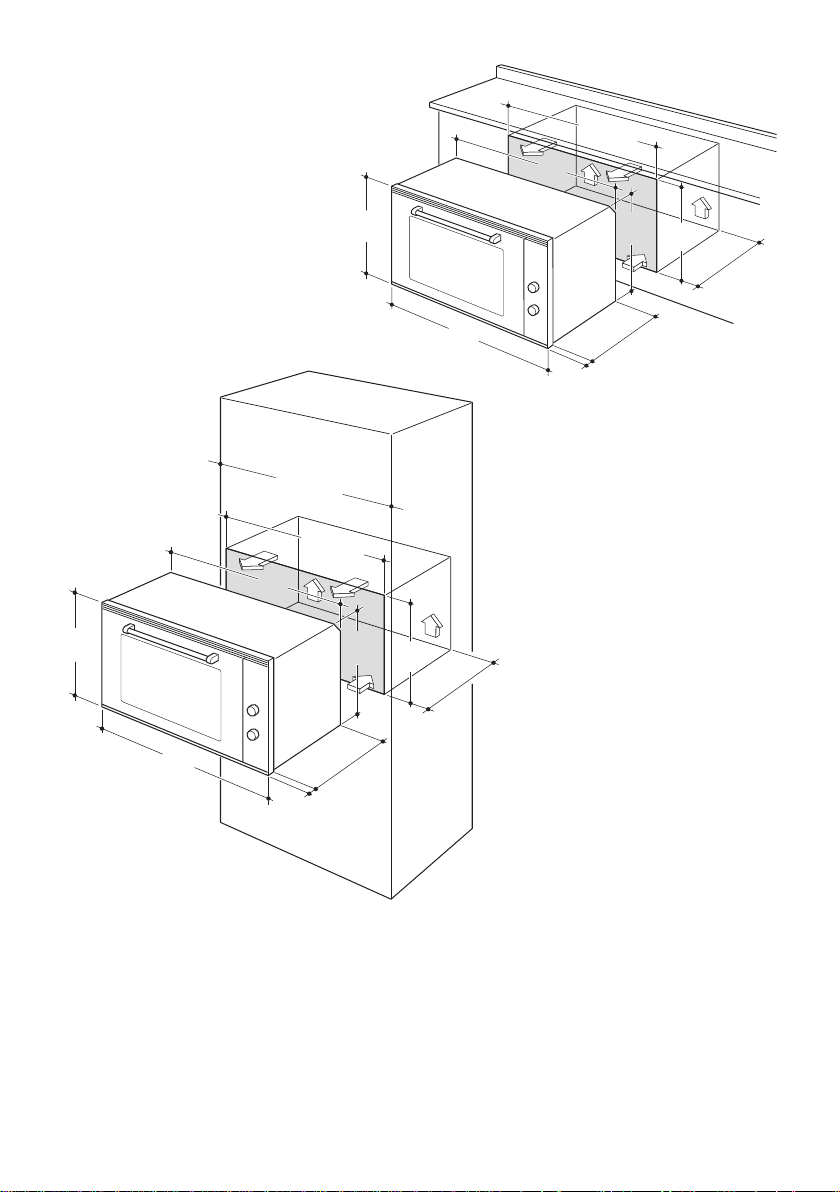
12
853
896
478
544
22
min. 550
480
467
min. 860
min. 900
853
896
478
544
22
min. 550
480
467
min. 860
Figure 5
Figure 6
WARNING, VERY IMPORTANT:
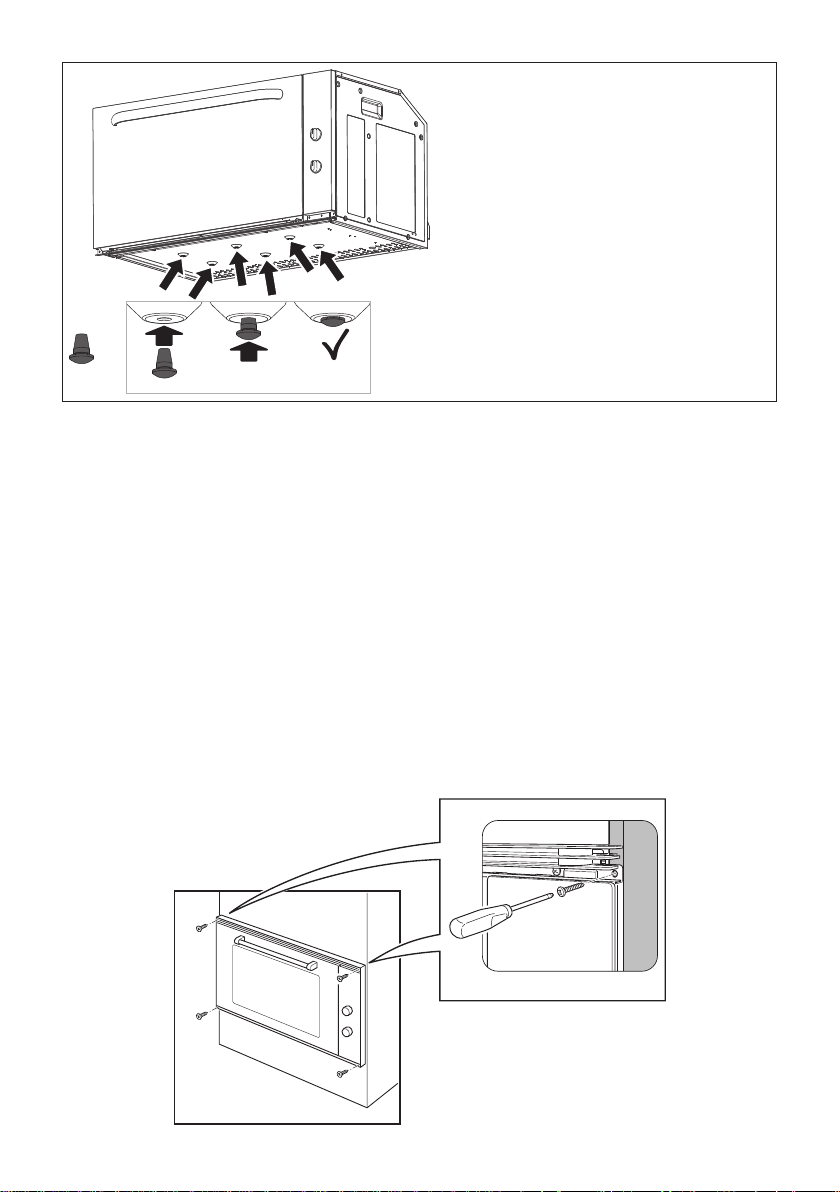
Theovenissuppliedwithno.6rubberspacersxedatthebottom.
DO NOT install the oven without these spacers correctly in place.
If one or more rubber spacers are missing, please use the ones contained in the
separatekitsuppliedwiththisapplianceandxthemtothebottomoftheovenas
indicatedinthegure7onthenextpage.
Should you require assistance please contact our Customer Service Centre for your
nearest Authorised Delonghi Service Agent.
13
FIXING THE OVEN
Introduce the oven into the furniture opening and x it with 4 screws (not supplied) as gure
8. It is essential that the oven rests on a surface which will support its weight, as the screw
xing is only complementary.
Note
It is essential that when installing your oven adequate air circulation is allowed for within
the installation. See gures 5 - 6.
Inadequate air circulation may greatly impair the performance of your oven and may effect
adjacent cabinets due to an increase in temperature.
Caution!
Do not lift this oven by the door handle.
Adjust the hinges of furniture doors adjacent to the oven to allow a 4-5 mm gap between
the furniture door and the oven frame.
x 6
Figure 7
Fixing the rubber spacers to the
base of the oven (if they are missing)
by using the ones contained in
the separate kit supplied with this
appliance.
Figure 8
14
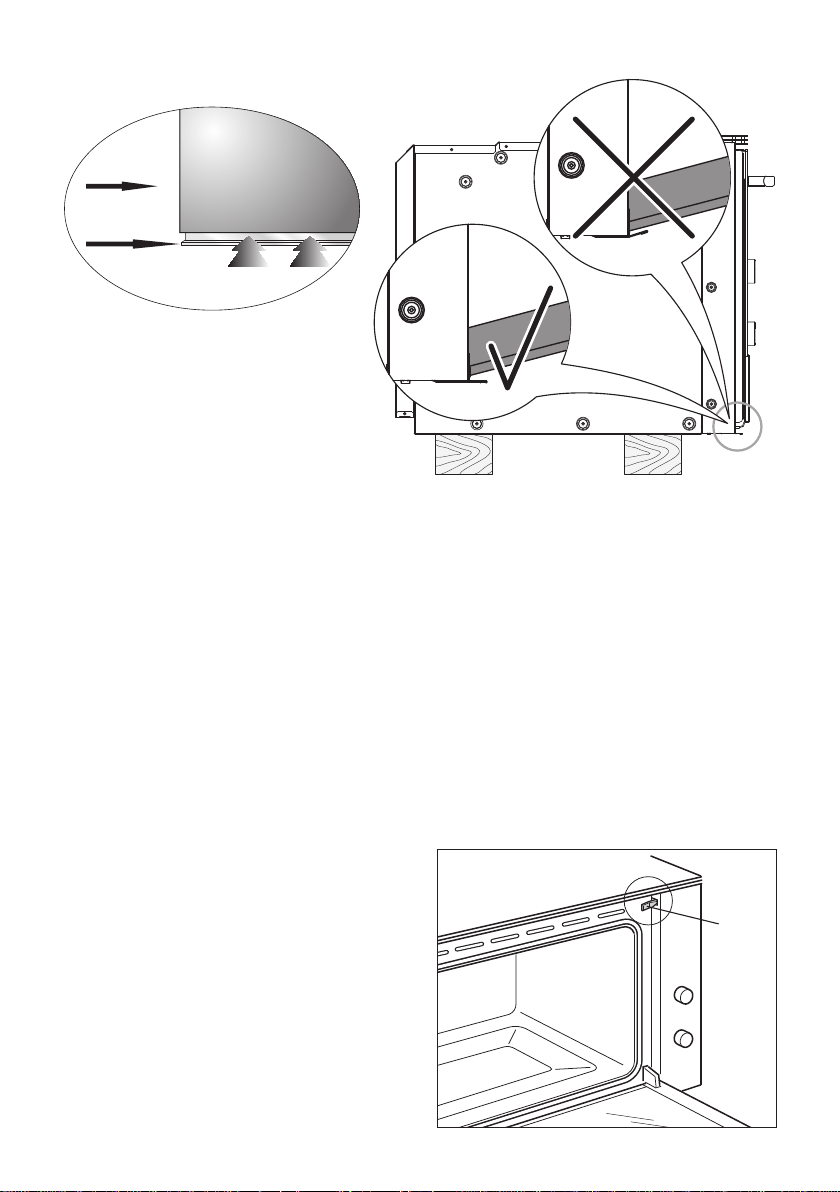
IMPORTANT:
Please take extra care not to damage the lower trim of the oven.
Ensure the oven sits on wooden blocks or similar supports when it is removed from the
carton as shown in above diagram. This will prevent any damage to the lower trim.
Should the lower trim become damaged, straighten the trim and ensure the oven door
opens fully without obstruction from the lower trim.
After installation check the lower trim is still undamaged.
The space between the bottom of the door & the lower trim is important to allow proper air
circulation into the oven.
The oven door should be opened slowly to it’s fully open position ensuring there is adequate
clearance between the bottom of the door and the lower trim.
The manufacturer does not accept responsibility for any damage to the oven
resulting from incorrect installation.
Figure 9
OVEN DOOR
LOWER TRIM
AIR FLOW
L
IMPORTANT:
When handling the oven, take care not
to damage the door sensor lever “L”
(near the top right corner of the oven
seal).
Figure 10
15
USE AND CARE
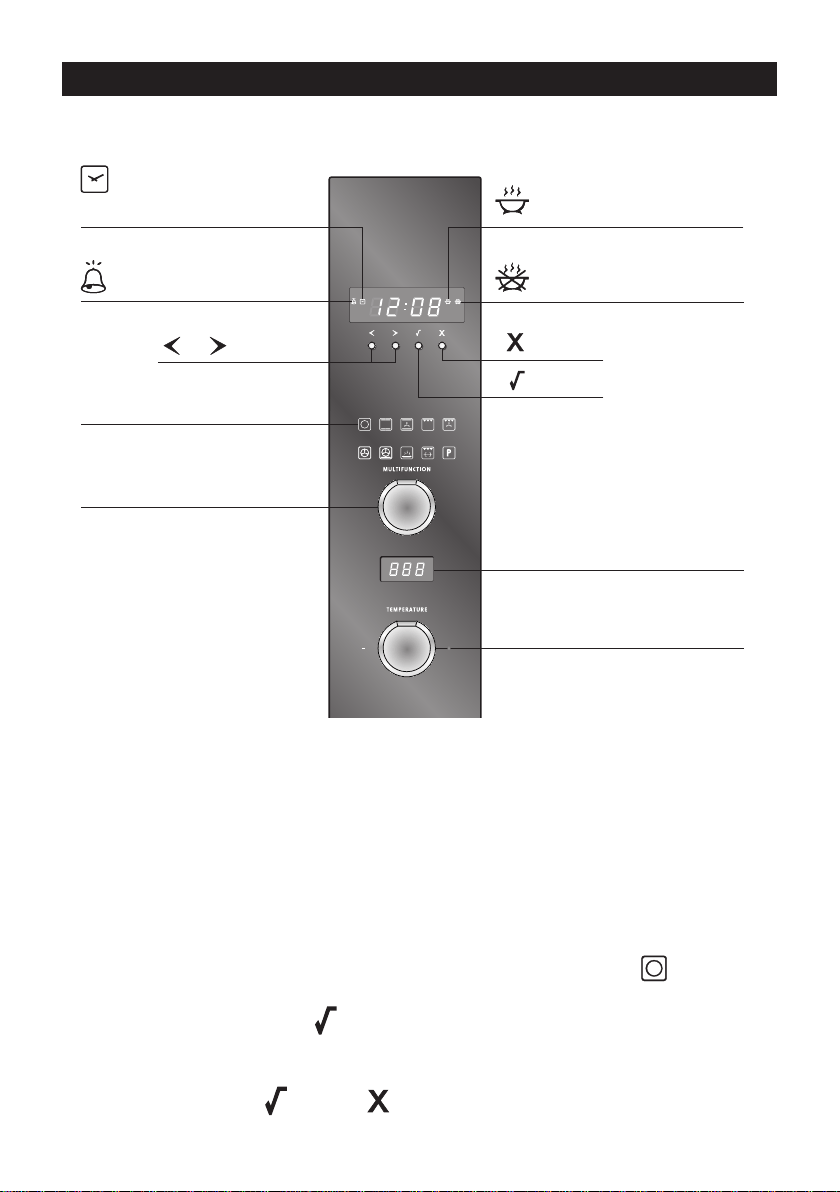
Timer indicator
(see ‘Using the timer’)
Clock indicator
(see ‘Setting the clock
and first use’)
Cooking time indicator
(see ‘Automatic cooking’)
Stop time indicator
(see ‘Automatic cooking’)
Scroll
Select
Cancel
Function indicators
(see ‘Oven functions’)
Function dial
(see ‘Using your oven’)
Temperature indicator
(see ‘Using your oven’)
Temperature dial
(see ‘Using your oven’)
Figure 11
THE CONTROL PANEL
Locking the control panel
You can lock the control panel to prevent unintended use (eg. children playing with the
oven).
Doing so will disable the dials and all the buttons.
To lock the control panel
1. Make sure the oven is not in use (the function dial is turned to Off ) and neither
automatic cooking nor the timer is set (no indicator is lit in the display).
2. Press and hold the select
button until you hear a beep and - - - appears in the
temperature indicator.
To unlock the control panel
Press and hold the select or cancel button until you hear a beep and the temperature
indicator becomes blank.

16
Figure 12
SETTING THE CLOCK
You will need to set the clock to make full use of your
oven.
1. Ensure the power supply to the oven is on.
2. Select the clock
by pressing the right scroll
button twice.
■ The clock
indicator will appear and the colon
will ash.
3. Press the select button to conrm.
■ The display will ash to indicate the clock is
ready to be set.
4. Set the time by pressing the scroll buttons.
Holding the buttons down will speed up the
scrolling.
5. Press the select
button to conrm.
■ The clock
indicator will soon disappear but
the clock is now set.
17
FIRST USE - Conditioning the oven
It is important to condition your oven before using it for cooking and baking.
Conditioning will burn off any manufacturing residues and ensure that you get the best
results right from the start.
1. Make sure you have set the clock.
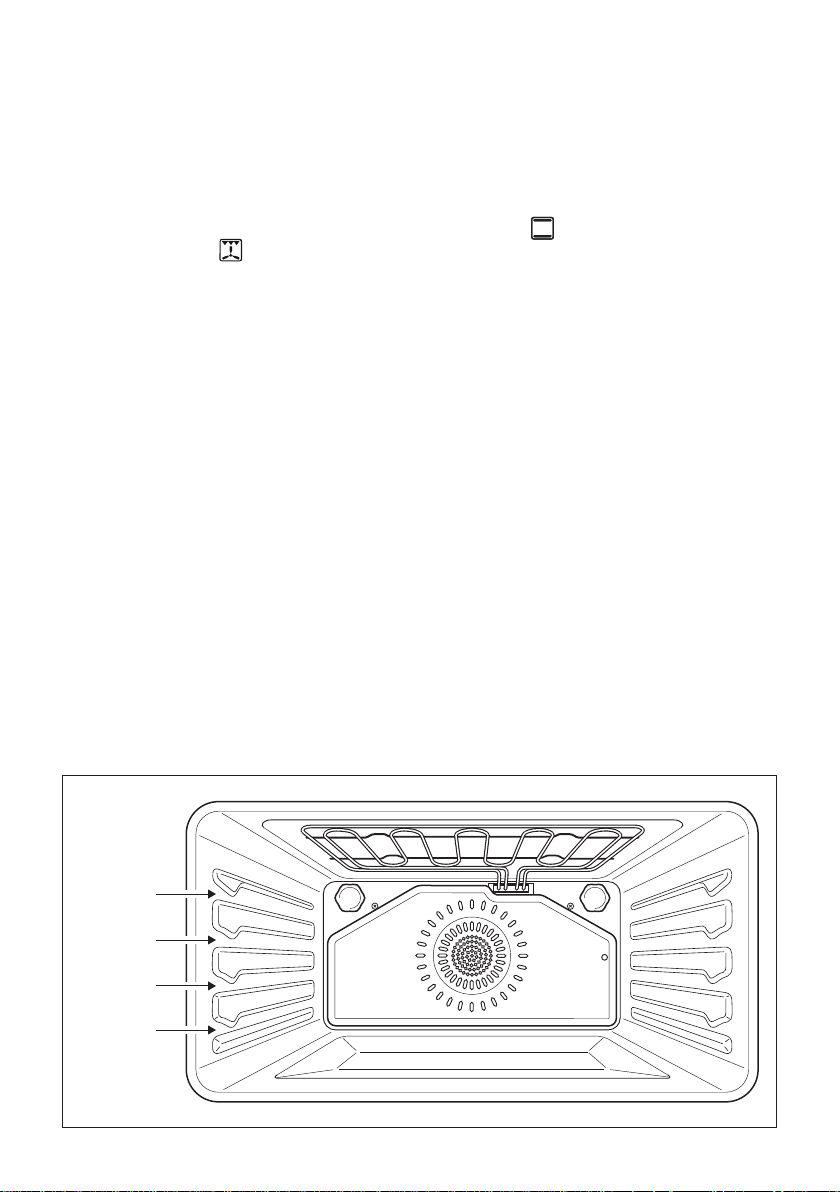
2. Slide in the shelves and the grill tray. See ‘Using your oven’ for instructions.
3. Heat the oven for: 30 minutes at 200 °C using Bake
then 15 minutes at 200 °C
using Fan Grill
.
■ There will be a distinctive smell while you are conditioning the oven. This is normal, but
make sure the kitchen is well ventilated during the conditioning.
4. Once cooled, wipe out the oven with a damp cloth and mild detergent, and dry
thoroughly.
SHELF
POSITIONS
4
3
2
1
Figure 13
18
USING YOUR OVEN
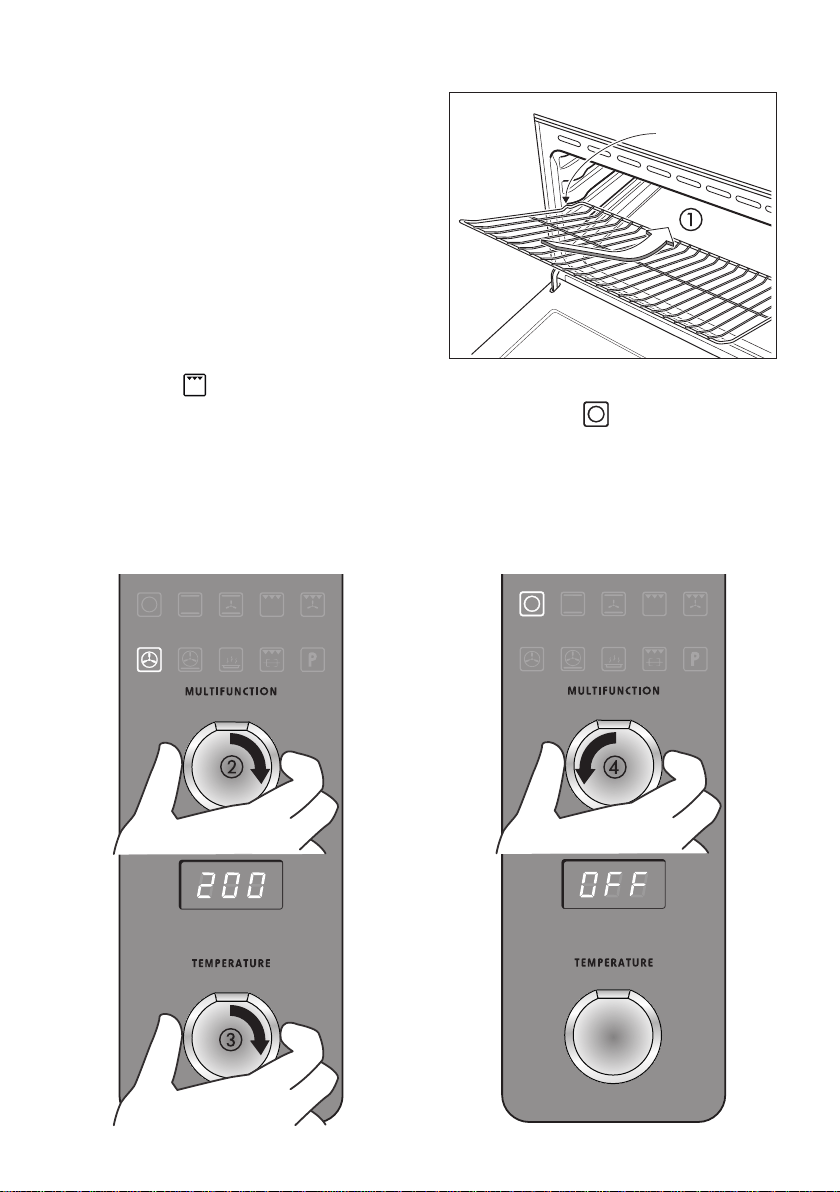
1. Slide in the shelf. The oven shelf is provided
with a security block to prevent accidental
extraction. It must be inserted operating
as per gure 14. The oven trays shall be
placed above the shelves.
2. Select a function (g. 15).
3. Set the temperature.
■ While the oven is heating up, the
temperature indicator will alternately show
the actual and set temperatures.
■ When the oven has reached set
temperature, a long tone will sound.
■ Note: Grill
provides instant radiant heat, so there will be no tone.
4. When you have nished cooking, turn the function dial to Off
(g. 16).
Safety catch
Figure 14
Figure 15 Figure 16

19
OVEN FUNCTIONS
OFF
Selecting this will turn the oven off.
BAKE
This is the traditional method of baking. It is best to bake on only one shelf at a time in this
function. Ideal for large cakes and dishes that bake for several hours.
FAN BAKE
Ideal for dishes like lasagne that need to brown on top and also single trays of small cakes
or biscuits that bake in less than an hour.
GRILL
Grill is the most suitable function for ‘nishing off’ many meals, for example browning the
top of potato gratin and frittata. Use Grill to toast bread or to grill your favourite chicken,
sh and steak.
Note: heat levels are from LO (50% power) to HI (100% power), with settings from 1 to 9
in between. Grill provides instant radiant heat.
FAN GRILL
Ideal for roasting tender cuts of meat and poultry. Use the lower shelf positions for larger
items eg a whole chicken.
FAN FORCED
Great for multi-shelf cooking. The consistent temperature ensures baking is well risen.
Cookies baked on Fan Forced are crisp on the outside and chewy in the middle.
PASTRY BAKE
Excellent for sweet and savoury pastry foods, for moist breads and brownies and cookies
that you want extra chewy.

20
WARM
Use this function to keep cooked food hot and to warm plates and serving dishes.
To reheat food from cold, use a cooking function at 150°C, then switch to Warm set between
70-90°C only when the food is piping hot. Note: this function is not for cooking food and the
temperature cannot be set higher than 90°C.
ROTISSERIE
Rotisserie is a delicious way to cook meat and poultry. The slowly rotating food is basted
continuously in its own juices, making it tender on the inside and well browned and full of
avour on the outside. See ‘Using the rotisserie’.
SELF CLEAN
The Self Clean cycle takes care of the mess and grime that is traditionally associated with
oven cleaning. See ‘Using the Self Clean function’ for details.
IMPORTANT NOTES:
The Self Clean is not a cooking function but is only used to clean the oven.
Before starting the Self Cleaning cycle:
■ Take all the accessories out of the oven (drip tray and shelves).
■ Cleananytracesofliquidwhichhaveoverowed.
■ Close the oven door and make sure that it is closed properly.
If there are cracks or aws on the oven door glass (inside/outside) or if the
oven gasket is ruined or worn or if the door does not close perfectly, unplug the
appliance and contact the After-Sales Service Centre.
Smells and fumes produced during pyrolysis are not a cause of alarm. Adequate
ventilation should however be provided in the room where the oven is installed,
e.g. by opening a window.
21
USING THE SELF CLEAN FUNCTION
■ This convenient pyrolytic Self Clean function takes care of the mess and grime that
is traditionally associated with oven cleaning. The extremely high temperature during
a Self Clean cycle burns off and breaks down stubborn soil and grease deposits. All
that remains is a clean oven cavity with a little grey ash which you can easily remove.
Important!
■ Do not use oven cleaners, any degreasing cleaners, or oven liners.
■ Make sure you remove the oven shelves and trays, rotisserie and all other bakeware
and utensils from the oven before starting a Self Clean cycle. If left in the oven, they
will become permanently discoloured or damaged; items made from combustible
materials (eg wood, fabric, plastic) may even catch re.
■ Do not use your oven to clean miscellaneous parts.
■ Make sure the room is well ventilated.
■ Before starting a Self Clean cycle, make sure you move any pet birds to another,
closed and wellventilated room. Some pet birds are extremely sensitive to the fumes
given off during a Self Clean cycle, and may die if left in the same room as the oven
during such a cycle.
■ During a Self Clean cycle, the oven reaches higher temperatures than it does for
cooking. Under such conditions, the surfaces may get hotter than usual and children
should be kept away.
■ The oven door will be locked during the Self Clean cycle.
■ If there are cracks or aws on any of the oven door glass panes, if the oven seal is
damaged or worn, or if the door does not close properly, do not start a Self Clean cycle.
Call your Authorised Repairer or Customer Care.
To start a Self Clean cycle
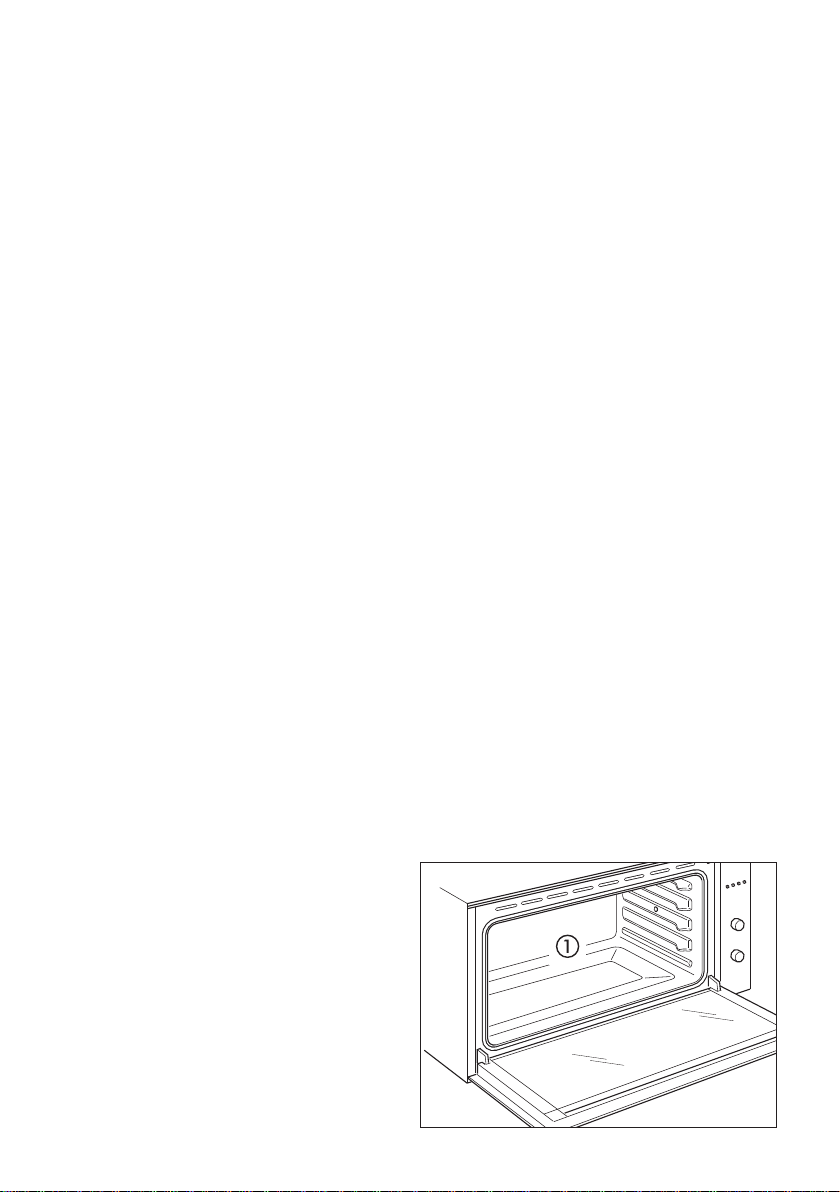
1a. Remove oven shelves and all other
accessories, bakeware, and utensils
(g. 17).
1b. Wipe up any spills. Failure to do so
may discolour the oven surfaces.
1c. Check the inner glass pane of the oven
door (D). If it has soiling on it (eg stains
from greasy splatter), you will need to
clean it manually before starting a Self
Clean cycle.
D
Figure 17
22
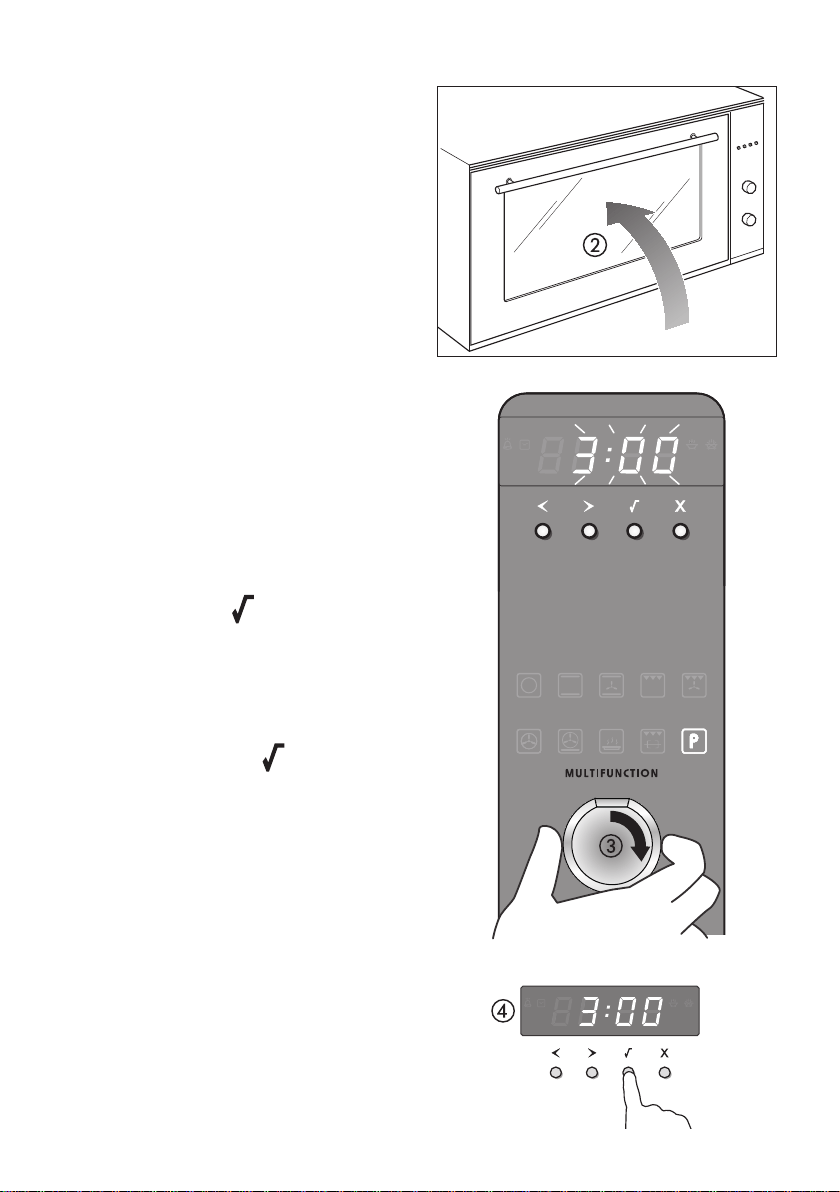
Figure 18
Figure 19
Figure 20
For instructions, see ‘Care and
cleaning’.
Important!
If soiling is left on the glass, it will
become burnt on during the Self
Cleancycle,makingitverydifcult
to remove.
2. Close the oven door rmly (g. 18).
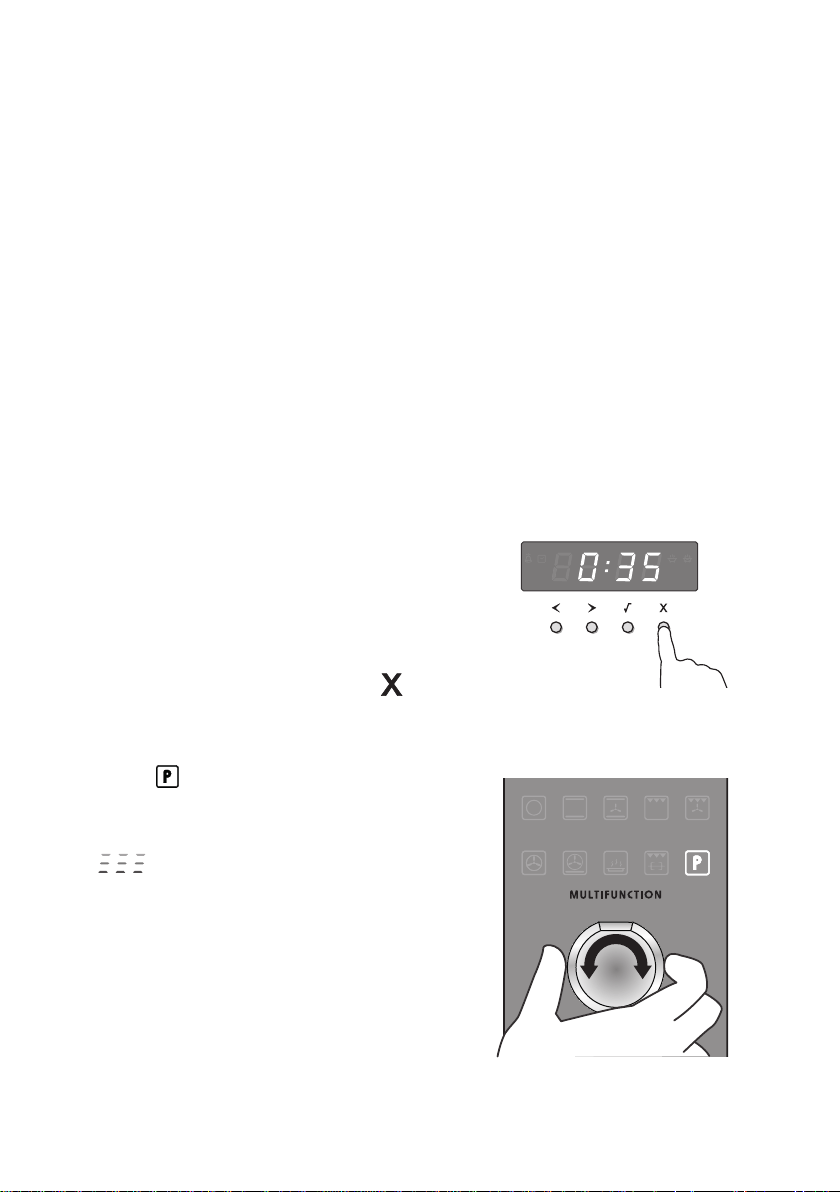
3. Select the Self Clean function (g. 19).
■ The display will ash
3:00, indicating
the duration of a Self Clean cycle (3
hours).
■ The temperature indicator will be
blank, as temperature cannot be
adjusted.
4. Once the display is ashing
3:00,
press the select
button to start the
Self Clean cycle (g. 20).
■ The time will start counting down.
■ For your safety, the oven door will
automatically lock and remain locked
during the cycle.
■ Note: if the select
button is not
pressed within 15 seconds, the oven
will automatically turn off.
Start from step 3 again.
23
Figure 21
Figure 22
WhenaSelfCleancyclehasnished
The oven will:
■ emit a long tone
■ automatically turn off
■ automatically unlock the door.
In a few seconds, the display will show the
time of day.
You need to:
1. wait for the oven to cool down
completely
2. remove the grey ash with a small
brush or damp cloth
3. wipe out the oven with a clean damp
cloth
4. dry with a clean lint-free cloth
5. replace the shelves.
To cancel a Self Clean cycle
IMPORTANT!
■ Do NOT turn off the mains power
supply to the oven (wall switch).
Turning off the power while the
oven is too hot may damage the
oven and its surrounding cabinetry.
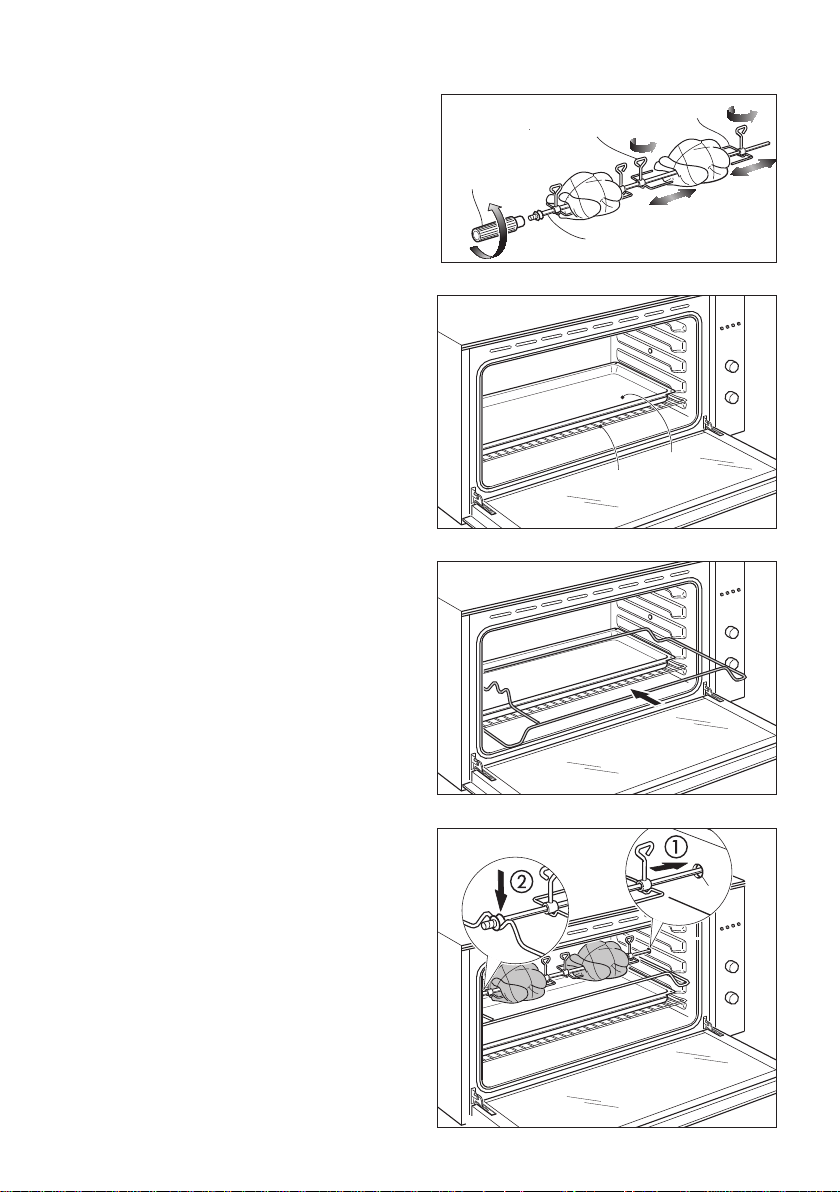
To cancel a Self Clean cycle, press the
cancel button (g. 21) or turn the function
dial in either direction (g. 22).
■ If the oven needs to cool down, the Self
Clean
function indicator will stay
lit, the display will show the remaining
cool-down time, the temperature
indicator will show cascading bars
and the door will remain locked.
■ When it has cooled down, the oven
will turn off, the door will unlock, a long
tone will sound and the display will
show the time of day.
■ We do not recommend cancelling a
Self Clean cycle and then immediately
starting one again.
OR
24
USING THE ROTISSERIE
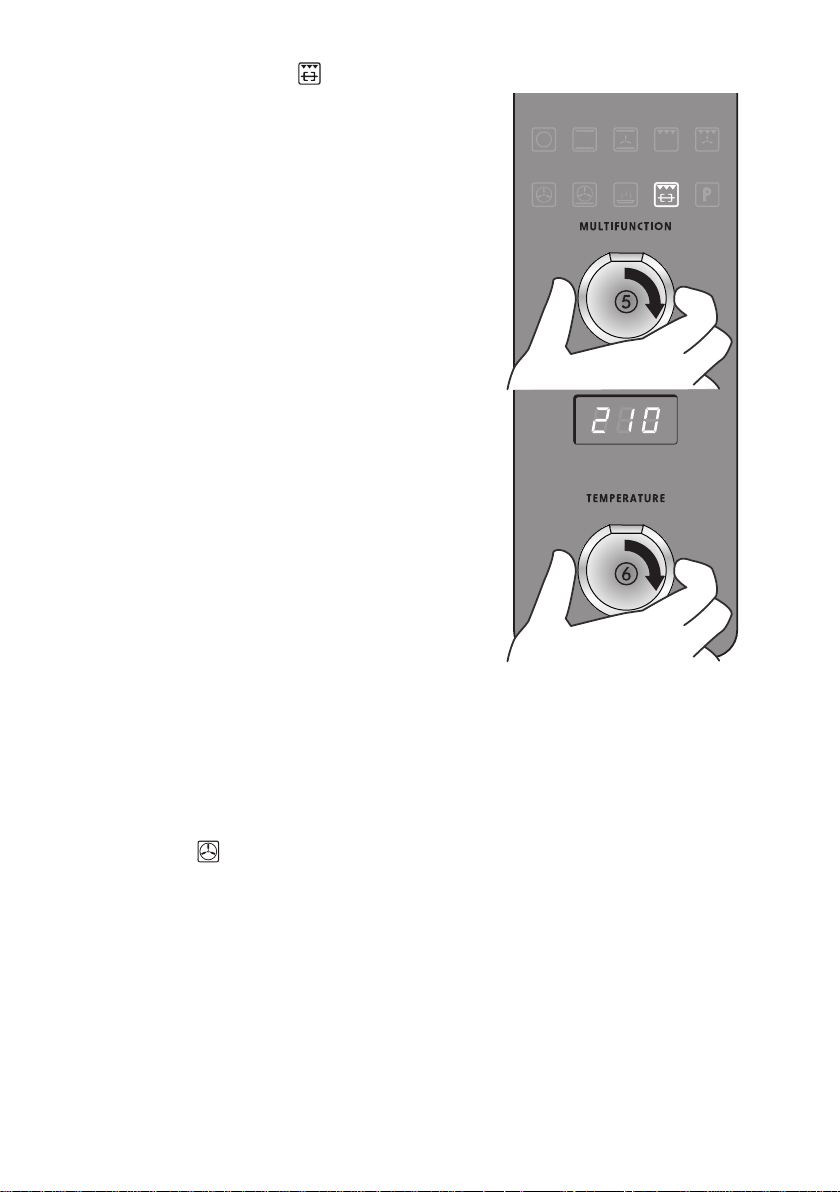
1. Secure the meat (g. 23).
Important!
Take care, the forks are sharp!
When securing the meat, ensure that:
■ the skewer goes through the centre
of the meat
■ the forks hold the meat rmly in
place
■ the fork screws are tightened
■ there are no loose or projecting
parts. Poultry should be trussed.
Note: the rotisserie can rotate up to 6
kg of meat.
2. Twist the handle off (g. 23).
3. Insert the shelf and the tray in the
oven (g. 24).
■ Insert the shelf in the lowest rack
holders (shelf position 1 - g. 13).
■ Place the oven tray above the
shelf.
4. Insert the rotisserie support (g.
25) in the second rack holders (shelf
position 2 - g. 14).
5. Insert the rotisserie in the oven (g.
26).
1. Push the skewer through the “G”
hole on the right-hand wall of the
oven, then insert it fully into the
rotisserie drive hole.
2. Place the skewer on the rotisserie
support.
Rotate the fork screws
to loosen and tighten
Handle
Fork
Skewer
Shelf
Tray
G
Figure 23
Figure 24
Figure 25
Figure 26
25
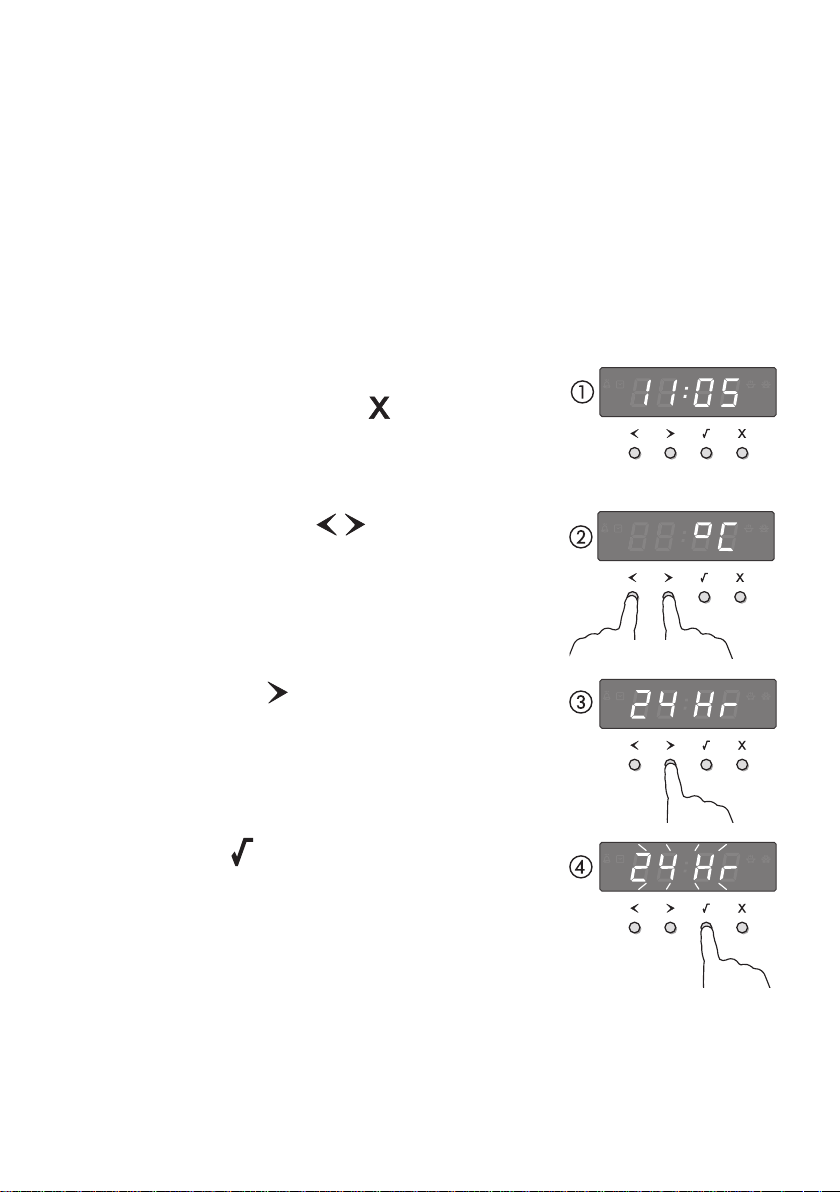
6. Select the Rotisserie
function
(g. 27).
■ The skewer will start rotating.
■ Check that the meat does not touch
the grill tray or the grill element at the
top of the oven.
7. Set the temperature (g. 27).
■ We recommend around 210 °C.
When you have nished using the
rotisserie
1. Turn the oven off.
2. Using oven mitts, carefully disengage
the right end of the skewer from the
rotisserie drive hole.
3. Slide out the grill tray and place it on a
heat-resistant surface.
4. Twist the handle onto the left end of
the skewer.
5. Lift the skewer off the supports by the
handle.
6. Loosen the fork screws and slide the
meat off the skewer.
Tips for using the rotisserie
■ For food safety reasons, we do not
recommend using the rotisserie with
stuffed meat.
■ If your meat is too big or heavy (over
6 kg) for the skewer, place it on top of
the grill rack in the grill tray, and use
Fan Forced
. This function will give
a result similar to a rotisserie.
■ Use a meat thermometer to ensure
that meat is cooked through to a safe
temperature.
■ See ‘Care and cleaning’ for advice on
cleaning the rotisserie parts.
Figure 27

26
USING THE TIMER
■ You can use the timer at any time, even if you are not using the oven.
■ If the time is more than an hour, the display will count down in minutes (hr:min).
If it is less than an hour, it will count down in seconds (min:sec).
■ You can set the timer for up to 23 hours 59 minutes.
Important! The timer does NOT turn the oven off.
1. Select the timer
by pressing the right scroll button
once (gures 27).
■ The timer
indicator will appear and the colon will ash.
2. Press the select
button to conrm.
■ The display will ash to indicate the timer is ready to be
set.
3. Set the time by pressing the scroll
buttons.
■ Holding the buttons down will speed up the scrolling.
4. Press the select
button to conrm.
■ The timer will then begin to count down.
5. If you want to check the time of day, you can toggle
between this and the timer countdown by pressing the
scroll
buttons.
To modify the timer setting
■ Make sure the display shows the remaining time counting
down.
■ Press the select
button.
■ Press the scroll
buttons to set a new time.
■ Press the select
button to conrm.
To cancel the timer setting
■ Make sure the display shows the remaining time counting
down.
■ Press the cancel
button until the display shows the
time of day and the timer
indicator disappears.
When the set time is up
■ The display will show
0:00 and a tone will sound every 15 seconds.
■ Press any button to stop the tone sounding. The display will revert to showing the time
of day.
Figure 28

27
AUTOMATIC COOKING
■ You can set the oven to automatically turn on later, cook for a preset time (cooking
time), then automatically turn off at a preset stop time. See the example and instructions
below (steps 1 to 7).
■ If you start cooking manually and only want the oven to turn off automatically after a set
cooking time: simply set the cooking time following steps 1 to 3 below.
The oven will automatically turn off when the cooking time is over.
IMPORTANT!
Safe food handling: leave food in the oven for as short a time as possible before
and after cooking or defrosting. This is to avoid contamination by organisms
which may cause food poisoning. Take particular care during warmer weather.
Example: It is 11:05 a.m. You want your food to cook for 1 hour, and you would like it
to be ready by lunchtime (12:30 p.m.)
Set the cooking time (gures 29)
1. Check the clock shows the correct
time of day.
2a. Press the right scroll
button three
times to scroll to the cooking time
indicator.
2b. Press the select
button to conrm.
3a. Press the right scroll
button to set
the cooking time. Make sure you allow
for preheat time in your calculation.
3b. Press the select
button to conrm.
2a
2b
3a
3b
Figure 29

28
Set the stop time (gures 30)
4a. Press the right scroll
button once
to scroll to the stop time
indicator.
4b. Press the select
button to conrm.
5a.
Press the right scroll button to
set the time you would like your
food to be ready by (ie the stop
time).
5b. Press the select button to
conrm.
Select function and temperature
(gure 31)
6. Select a function.
7. Set the temperature.
When automatic cooking is set
■ The oven and the lights will stay off,
the halos will be unlit, but your oven is
now set for automatic cooking. It will
automatically turn on at the required
time.
■ In a few seconds, the display will show
the time of day with the cooking time
and stop time indicators lit.
■ Note: you can modify the function and
temperature while the oven is waiting
to start cooking.
When the stop time is reached
The oven will automatically turn off and a
long tone will sound.
To check the set cooking time and stop
time
Use the scroll
buttons.
To cancel automatic cooking
Turn the function dial to Off
.
4a
4b
5a
5b
Figure 30
Figure 31

29
BAKING CHART
Please note:
■ The settings in the following chart are guidelines only. Follow the instructions in your
recipe or on food packaging and be prepared to adjust the oven settings and baking
times to achieve the best possible results for you.
■ Shelf positions are counted from the base up (1 is the lowest, 4 the highest).
■ Arrange oven shelves before you turn the oven on, then preheat the oven to the
required temperature. Place items in the oven only when the long tone has sounded.
■ Single shelf positions below use the at oven shelf; where a multi shelf arrangement is
recommended, the higher position uses the step-down shelf.
■ Due to the width of the oven, a single shelf can usually accommodate double the
standard recipe.
Food
Note on
arrangement
Shelf
position(s)
Best
function
Temperature
(°C)
Time
Small cakes
single shelf 2
180-190 13-17 mins
multi shelf 1 and 3
160-170 16-21 mins
Scones
single shelf 2
210-230 8-12 mins
single shelf 1 and 3
210-230 8-12 mins
Sponge
two small pans (20
cm),on single shelf
2 170-190 25-35 mins
one large pan
(26 cm)
2
175 30-40 mins
Light fruit
cake
two pans (21 cm)
on single shelf
2
155-165 1 hr 30 mins
Rich fruit
cake
exact baking time
will depend on size
2 130-150 3-6 hrs
Apple pie single shelf 1
185 35-45 mins
Custard tart single shelf 1
220
then 180**
10, then
20-30** mins
Quiche single shelf 1
180-200 30-40 mins
Meringues single shelf 1
100-120 1 hr
Bread rolls single shelf 1
210-230 15-20 mins
Mufns
2 x 12 mufn trays
on single shelf
3
or
190-200 10-15 mins
Pastry case
(baked
‘blind’)
one 21 cm an
tin
1
200
10 mins with
beans, then 10
mins without
* Note: the tone may occurs some time after the set temperature has been reached. This is because
—when heating up from cold—your oven is designed to initially heat to a temperature somewhat
higher than what you have set. This is to provide optimal baking conditions right from the start.
** This is a two-stage baking process: adjust the temperature after the rst stage.
30
Figure 32
USER PREFERENCE SETTINGS
You can set your oven to:
■ display the temperature in degrees Celsius or Fahrenheit
■ give audio feedback (tones and beeps) or operate quietly
■ display time as 12-hr or 24-hr
■ operate with the display off
■ have its lights on or off during cooking
■ operate in Sabbath setting (see ‘Sabbath setting’ following).
How to change preference settings
(gures 31-32)
1. Check the display shows the time of day.
■ If you’re unsure, press the cancel
button twice.
2. Press and hold the scroll
buttons together for 3
seconds to enter the user preference menu.
3. Press the right scroll
button to scroll to the setting you
want to change. Refer to the table following.
4. Press the select
button to select the particular setting.
■ The display will ash.
together
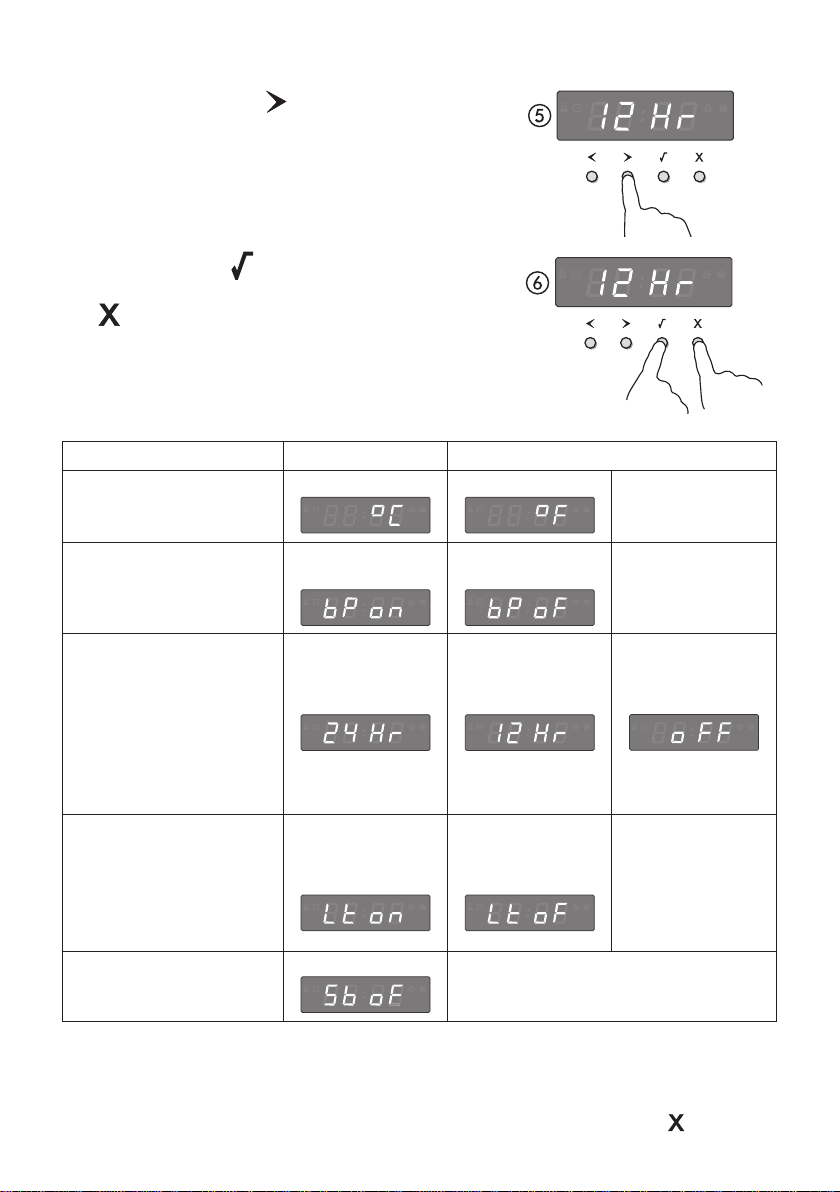
31
* The timer tone and alert beeps will sound even if you save the BEEPS/TONES OFF option.
** With this option saved, you can still use the oven but the display will be unlit and the buttons will be
unresponsive. To quit this option and enable the display, press and hold the cancel button.
Figure 33
5. Press the right scroll
button to scroll through the
options for that particular setting. Refer to the table
below.
6a. Press the select
button to save the new option.
6a. For all options except ‘Display off’: press the cancel
button to quit the user preference menu.
6a
6b
Setting Default option Alternative option(s)
TEMPERATURE SCALE
Select between degrees
Celsius or Fahrenheit.
CELSIUS
FAHRENHEIT
AUDIO FEEDBACK
Turn the beeps and
tones on or off.*
BEEPS/TONES
ON
BEEPS/TONES
OFF
TIME SCALE &
‘DISPLAY OFF’ OPTION
Select between 24-hr
or 12-hr clock display or
set ‘Display off’ option if
you only need the basic
functionalities of your
oven.
24 HR
12 HR
DISPLAY OFF **
OVEN LIGHTS
Have the light off during
cooking if you want to
save power or want the
food you cook to be a
surprise for others!
LIGHTS ON
DURING
COOKING
LIGHTS OFF
DURING
COOKING
SABBATH SETTING
SABBATH OFF
See ‘Sabbath setting’ for
instructions.

32
Figure 34
Figure 35
SABBATH SETTING
This setting is designed for religious faiths that observe a ‘no work’ requirement on the
Sabbath.
While your oven is in Sabbath setting
■ The display and indicators will be unlit, the buttons will
be unresponsive.
■ No tones or beeps will sound.
■ No alert codes or temperature changes will be
displayed.
■ The oven lights will stay on. If you want the oven lights
to be off during Sabbath setting, rst select the ‘Lights
off’ option as described in ‘User preference settings’,
and only then set Sabbath setting.
■ Bake
is the only function available in Sabbath
setting.
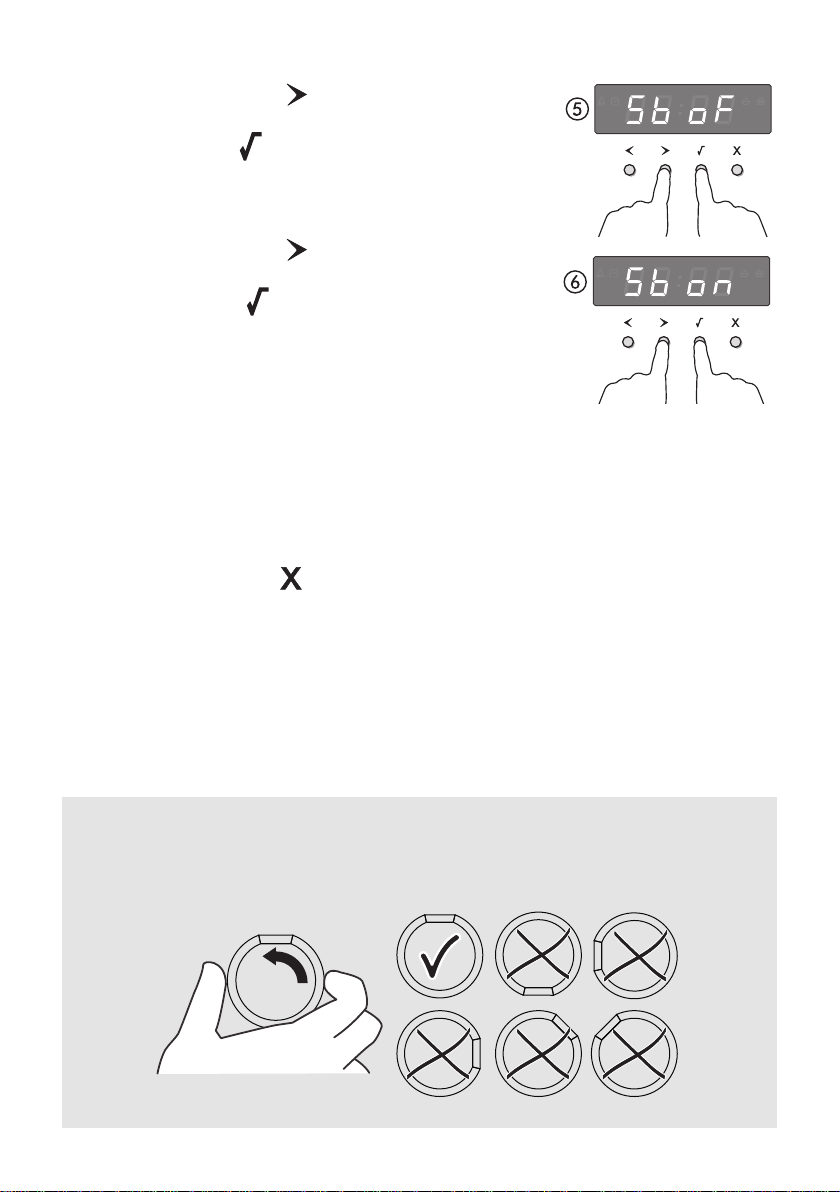
How to set Sabbath setting
1. Select the Bake
function (g. 34).
2. Set the desired temperature (g. 34).
3. Wait until the oven starts up.
4. Press and hold the scroll
buttons together for 3
seconds to enter the user preference menu (g. 35).
together
33
Figure 36
5a. Press the right scroll
button to scroll to the
Sabbath setting (gures 35).
5b. Press the select
button to select the Sabbath
setting. The default option is ‘Sabbath off’.
■ The display will ash.
6a. Press the right scroll
button to scroll to the
‘Sabbath on’ option.
6b. Press the select
button to activate the new
option.
The display, indicators and dial halos will be unlit and unresponsive, but the oven will bake
until you quit Sabbath setting.
To quit Sabbath setting
Press and hold the cancel
button until the time of day appears in the display and the
oven turns off.
5a
5b
6a
6b
AFTER USE,
TURN THE KNOBS COUNTERCLOCKWISE
TO HAVE THE FLAT SECTION AT THE TOP.

34
CLEANING AND MAINTENANCE
GENERAL ADVICE
■ Before you begin cleaning, you must ensure that the appliance is switched off
and disconnected from the electrical power supply.
■ It is advisable to clean when the appliance is cold and especially when cleaning the
enamelled parts.
■ Avoid leaving alkaline or acidic substances (lemon juice, vinegar, etc.) on the surfaces.
■ Avoid using cleaning products with a chlorine or acidic base.
■ Do not use a steam cleaner because the moisture can get into the appliance thus
make it unsafe.
■ Important:Theuseofsuitableprotectiveclothing/glovesisrecommendedwhen
handling or cleaning of this appliance.
■ Do not use harsh abrasive cleaners or sharp metal scrapers to clean the oven
door glass since they can scratch the surface, which may result in shattering of
the glass.
WARNING!
When correctly installed, your product meets all safety requirements laid down for
this type of product category. However special care should be taken around the rear
or the underneath of the appliance as these areas are not designed or intended to be
touched and may contain sharp or rough edges, that may cause injury.
ENAMELLED PARTS
All the enamelled parts must be cleaned with a sponge and soapy water or other non-
abrasive products.
Dry preferably with a microbre or soft cloth.
Acidic substances like lemon juice, tomato sauce, vinegar etc. can damage the enamel if
left too long.
STAINLESS STEEL, ALUMINIUM PARTS, PAINTED AND SILK-SCREEN
PRINTED SURFACES
Clean using an appropriate product.
Always dry thoroughly.
IMPORTANT: these parts must be cleaned very carefully to avoid scratching and abrasion.
You are advised to use a soft cloth and neutral soap.
CAUTION: Do not use abrasive substances or non-neutral detergents as these will
irreparably damage the surface.
GLASS CONTROL PANEL
Clean using an appropriate product. Always dry thoroughly.
Do not use harsh abrasive cleaners or sharp metal scrapers to clean the control panel
since they can scratch the surface, which may result in shattering of the glass.

35
INSIDE OF OVEN
The oven has a specic “PYROLYSIS FUNCTION” which can clean the cavity by pulverising
the residual cooking greases by high temperature.
Do not wait for the oven to be very greasy before performing this cleaning.
It should not be performed after every cooking, either, but only when the level of dirt justies
it (on average 1 – 2 times a month depending on oven use).
To use this function see the specic chapters.
Take the baking/grill tray and shelves out of the oven. They can be washed in the sink.
Manual cleaning of the oven:
■ The oven should always be cleaned after use when it has cooled down. Let the oven
cool down and pay special attention no to touch the hot heating elements inside
the oven cavity.
■ The cavity should be cleaned using a mild detergent solution and warm water.
■ Suitable proprietary chemical cleaners may be used after rst consulting with the
manufacturers recommendations and testing a small sample of the oven cavity.
■ Abrasive cleaning agents or scouring pads/cloths should not be used on the cavity
surface.
■ NOTE: The manufacturers of this appliance will accept no responsibility for damage
caused by chemical or abrasive cleaning.
Donotstoreammablematerialintheoven.
GRILL HEATING ELEMENT
■ The heating element is self-cleaning and does not require maintenance.
36
Figure 37
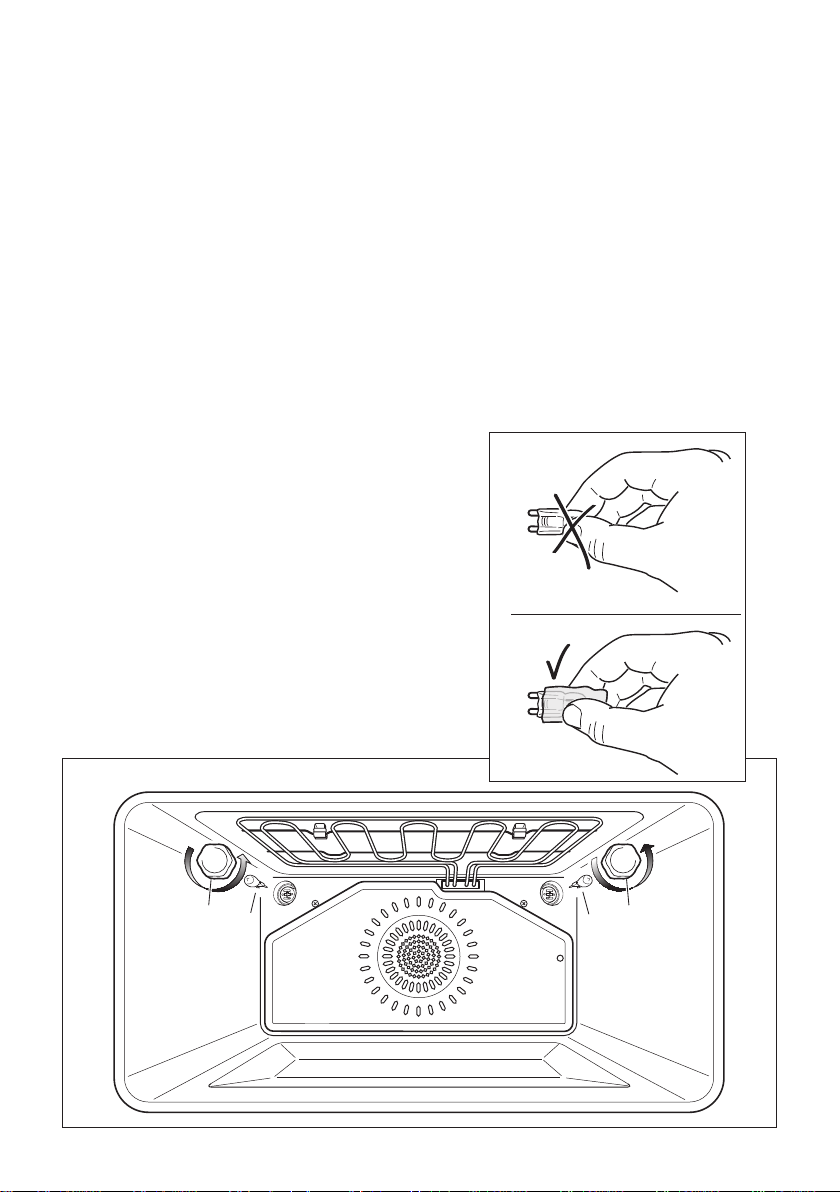
REPLACING THE OVEN LIGHTS
WARNING: Ensure the appliance is switched off before replacing the lamp to avoid
the possibility of electric shock.
■ Let the oven cavity and the heating elements to cool down.
■ Switch off the electrical supply.
■ Remove the protective cover “A” (g. 37).
■ Replace the halogen lamp “B” with a new one suitable for high temperatures having
the following specications 220-240V or 230-240V, 50Hz and same power (check watt
power as stamped in the bulb itself) of the replaced lamp.
IMPORTANT WARNING: Never replace the bulb with bare hands; contamination
fromyourngerscancauseprematurefailure.
Always use a clean cloth or gloves.
■ Ret the protective cover “A”.
NOTE: Oven bulb replacement is not covered by your guarantee.
B B
A
A
WRONG
CORRECT

37
REMOVING AND REPLACING THE INNER DOOR GLASS PANES FOR CLEANING
If you wish to clean inner panes of glass of the door, make sure you follow the precautions
and instructions very carefully.
Replacing the glass panes and the door incorrectly may result in damage to the oven and
may void your warranty.
IMPORTANT!
■ Take care, the oven door is heavy. If you have any doubts, do not attempt to remove
the door.
■ Make sure the oven and all its parts have cooled down. Do not attempt to handle the
parts of a hot oven.
■ Take extreme care when handling the glass panes. Avoid the edges of the glass
bumping against any surface. This may result in the glass shattering.
■ CAUTION:
Don’t use oven cleaners or any other harsh/abrasive cleaners, cloths, scouring pads,
steel wool or sharp metal scrapers to clean the glass surfaces. These scratch the glass
and may damage its special coating, which in turn could result in the glass cracking
or shattering.
■ If you notice any sign of damage on any of the glass panes (such as chipping, or
cracks), do not use the oven. Call your Authorised Service Centre or Customer Care.
■ Make sure you replace all the glass panes correctly. Do not use the oven without all
the glass panes correctly in place.
■ If the glass panes feel difcult to remove or replace, do not force them. Call your
Authorised Service Centre or Customer Care.
Note: service visits providing assistance with using or maintaining the oven are not
covered by your warranty.
38
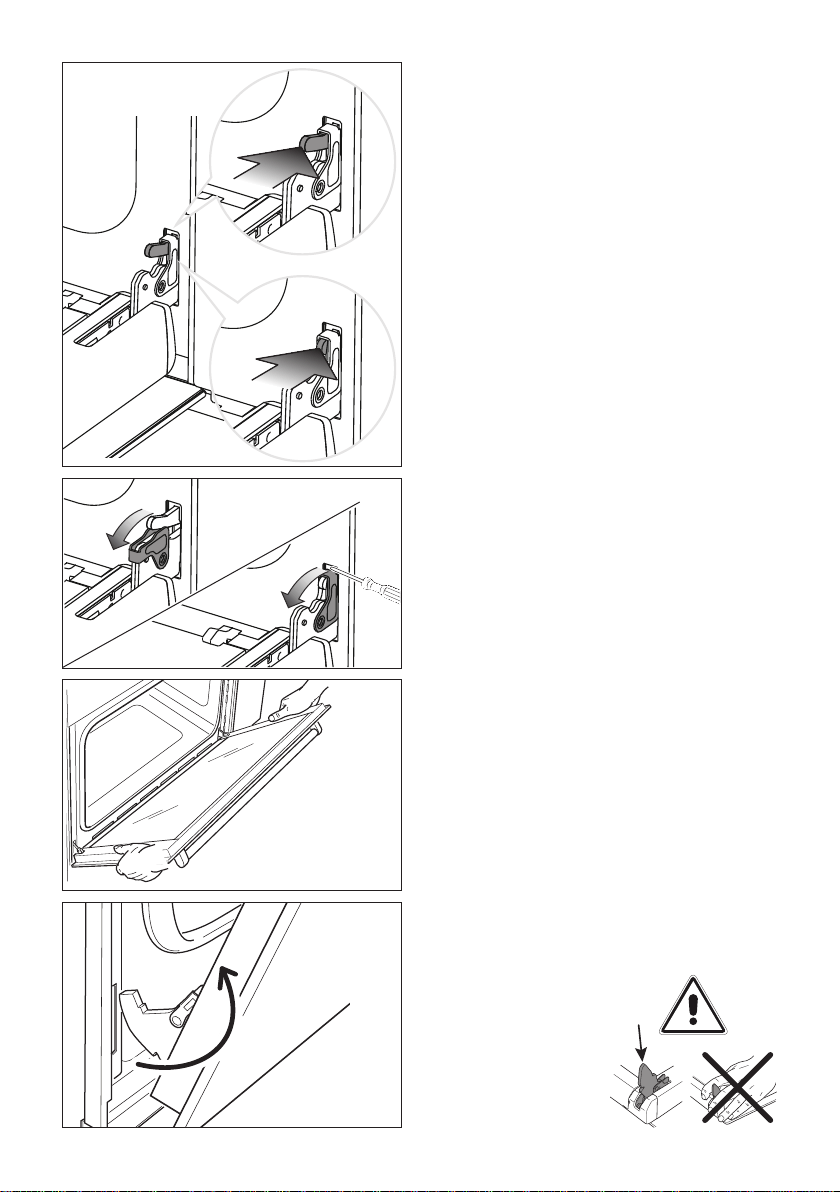
REMOVING THE OVEN DOOR
The oven door can easily be removed as
follows:
■ Open the door to the full extent (g. 38)
and check to see which side the damper
hinge is tted for the soft close feature as
shown in g. 38. This may be tted on left
or right of the door depending on exact
model.
■ Push the Damper Pin (arrow 1 in g. 38)
slowly, applying pressure until it moves in
towards the oven and becomes ush with
the hinge lever (arrow 2 in g. 38). The
Damper Pin does not react immediately
and is very slow to move as it necessary
to overcome the inertia of the soft close
mechanism. If the Damper Pin is difcult
to move, it may be necessary to use a
suitable tool to allow extra pressure to
be exerted, for example the back of a
teaspoon. Please pay special care whilst
pressing to avoid slipping and injury.
■ Keeping the Damper Pin ush with the
hinge lever (arrow 2 in g. 38), rotate the
hinge lever forward by using a small at
screw driver (arrow 3 in g. 39) ensuring
that you do not damage the enamel or
oven.
■ Rotate the hinge lever completely (arrow
4 in g. 39). Repeat this step for the other
hinge.
■ Hold the oven door by two hands and
close it until the hinge levers hook to the
oven door and the door no longer closes
easily. (g. 40)
■ Withdraw the hinge hooks from their
location following arrow “C” (g. 41).
■ Rest the door on a soft surface.
C
Important!
Always keep a safe distance from the door
hinges, paying special attention to the position
of your hands.
If the door hinges are
not correctly hooked,
they could unhook
and close suddenly
and unexpectedly
with risk of injury.
1
2
4
3
4
3
Figure 38
Figure 39
Figure 40
Figure 41

39
REMOVE THE INNER GLASS RETAINER
1. Remove the oven door and place it on a soft surface.
IMPORTANT: The door shall be placed horizontally as per gure 42.
2. Press down on both tabs to release the glass retainer.
3. Remove the glass retainer.
REMOVE THE INNER GLASS PANE
Lift and remove the inner pane (D) slightly, as shown in the gure 43.
1
2
1
2
D
D
Figure 42
Figure 43
2
1
2
1
2

40
REMOVE THE FIRST MIDDLE GLASS PANE
Lift and remove the rst middle pane (C) slightly, as shown in the gure 44.
REMOVE THE SECOND MIDDLE GLASS PANE
Lift and remove the second middle pane (B) slightly, as shown in the gure 45.
2
1
CC
2
1
2
1
BB
2
1
Figure 44
Figure 45

41
AFTER CLEANING, REPLACE THE GLASS PANES
When replacing the glass panes, makes sure that:
■ you replace all the three panes correctly, as shown. Each pane must be in the position
described below in order to t into the door and to ensure that the oven operates safely
and correctly
■ you take extra care not to bump the edges of the glass against any object or surface
■ you do not force any of the panes into place. If you are experiencing difculties
replacing the panes, remove them and start the process again from the beginning.
If this still does not help, call Customer Care.
REPLACE THE FIRTS MIDDLE GLASS PANE
Take either one of the middle panes (B or C) and hold it rmly. Insert it in the lowest pair
of grooves, push it slightly towards yourself (g. 46) and gently lower into place (g. 47).
Note: the two middle panes (B and C) are identical.
1
2
1
2
BB
BB
Figure 46
Figure 47

42
REPLACE THE SECOND MIDDLE GLASS PANE
Take the other middle pane and hold it rmly. Insert it in the next pair of grooves, push it
slightly towards yourself (g. 48) and gently lower into place (g. 49).
1
2
1
2
CC
CC
Figure 48
Figure 49
43
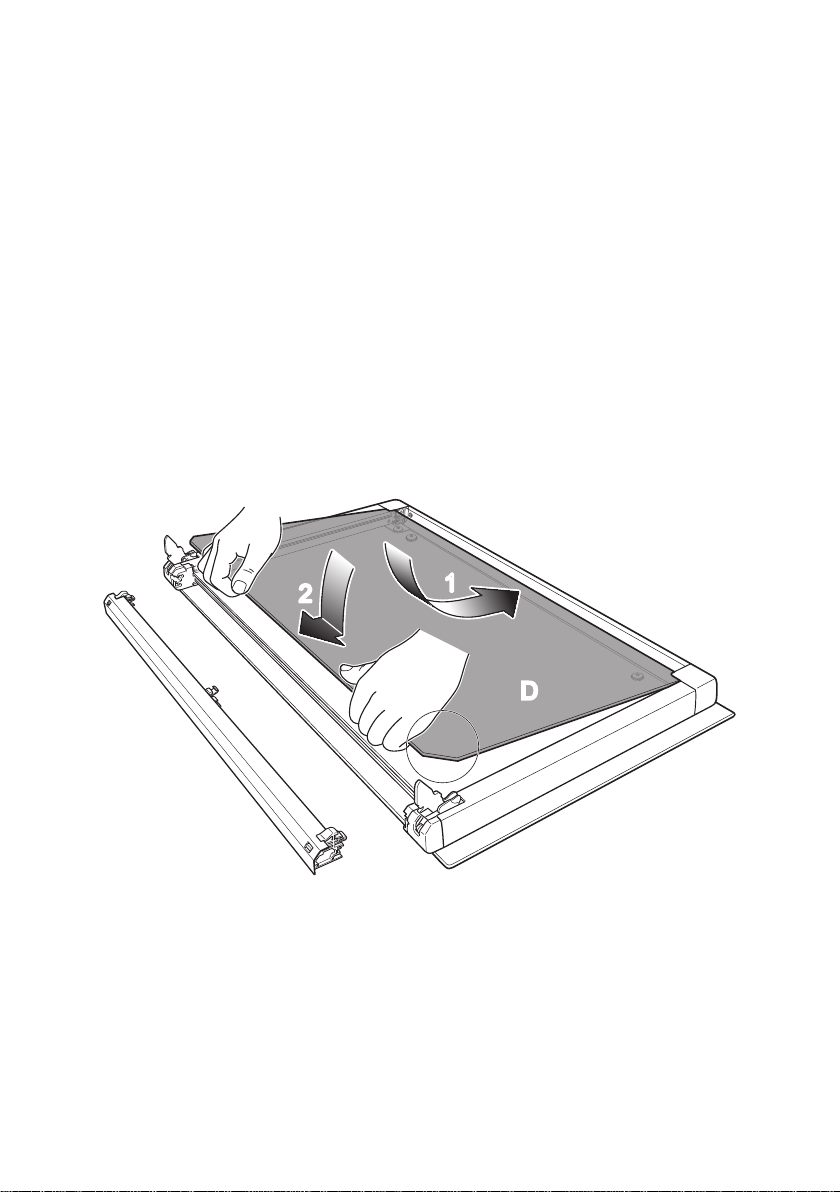
REPLACE THE INNER GLASS PANE
Take the inner pane, holding it with the angle-cut corner orientated as shown in gure 50.
Insert it in the uppermost pair of grooves, push it slightly towards yourself and gently lower
into place.
Important!
Make sure that the angle-cut corner of the inner pane is at the bottom of the oven
door, on the left-hand side. It has to be in this position for the door to function
correctly.
1
2
1
2
DD
Figure 50
44
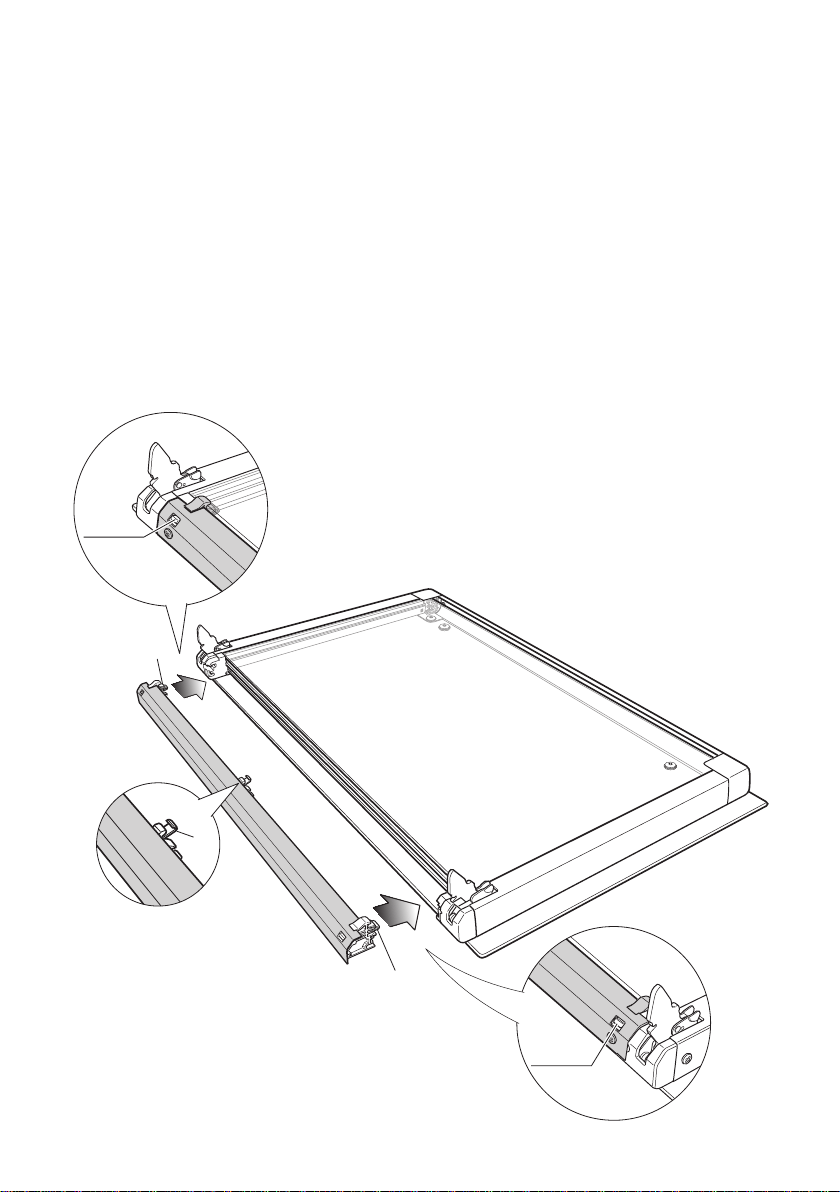
REPLACE THE GLASS RETAINER
1. Position the glass retainer, as shown in the gure 51. It should sit on the bottom edge
of the outer glass. Check that the clamps “M” of the glass retainer are not deformed
or damaged.
2. Gently push the glass retainer back into place. You should be able to hear the tabs on
both sides click as they lock the glass retainer in.
Important!
Makesuretheglassretaineriscorrectlyandrmlyinplaceandthattheglasspanes
are secure.
Figure 51
1
2
M
2
1
click
click
M
M
45
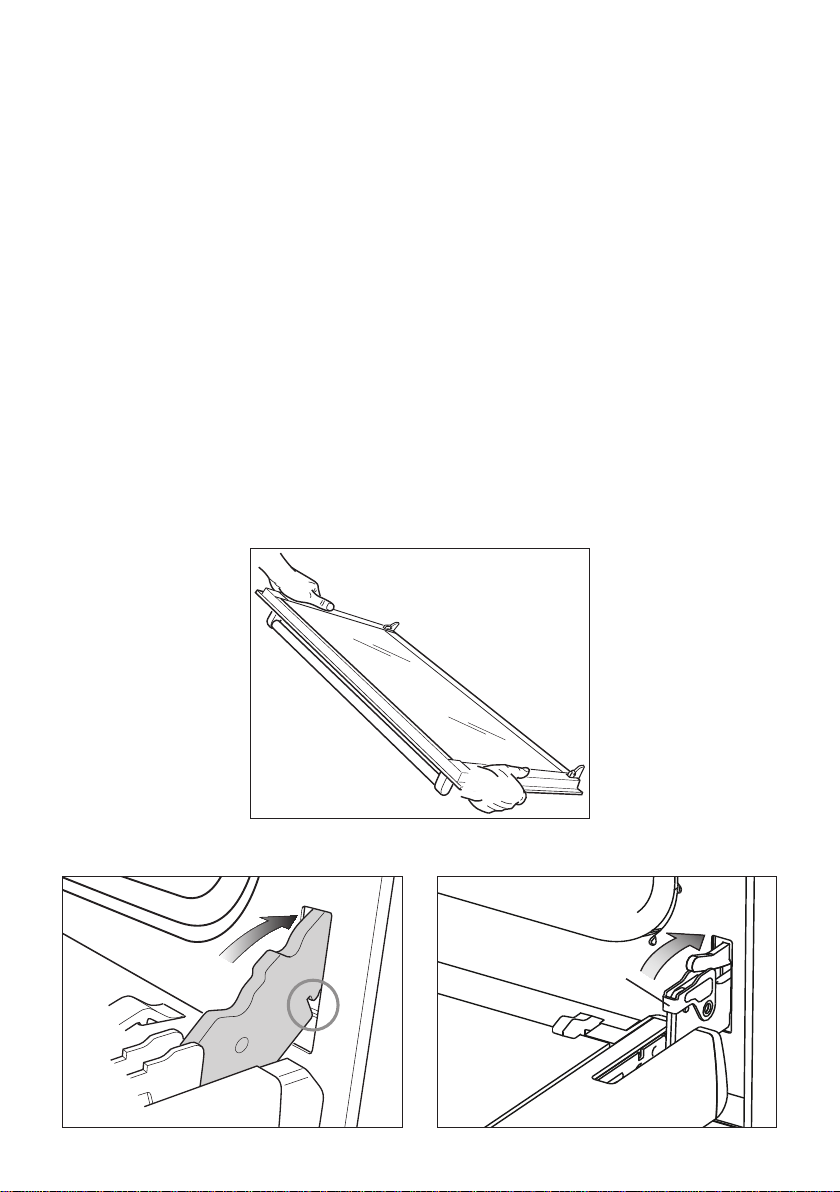
REFIT THE DOOR
1. Hold the door rmly (g. 52).
2. Insert the hinge tongues into the slots, making sure that the groove drops into place
as shown in the gure 53.
3. Open the door to its full extent.
4. Fully close the levers “A” on the left and right hinges, as shown in the gure 54.
IMPORTANT NOTE: For the hinge tted with the damper pin, push the hinge lever
towards the damper pin and keep depressed. The damper pin will move into the oven
chassis slowly, allowing the hinge lever to fully rotate.
5. Close the door, turn the power supply to the oven on at the wall, then check that the
door is properly in place:
• When you open the door, the lights in the oven should come on.
• When you close the door, the lights in the oven should turn off.
Figure 52
Figure 53 Figure 54
A
46
TROUBLESHOOTING
If there is a problem, check the chart below to see if you can x it. If the problem cannot be
xed or persists, call your Authorised Repairer or Customer Care.
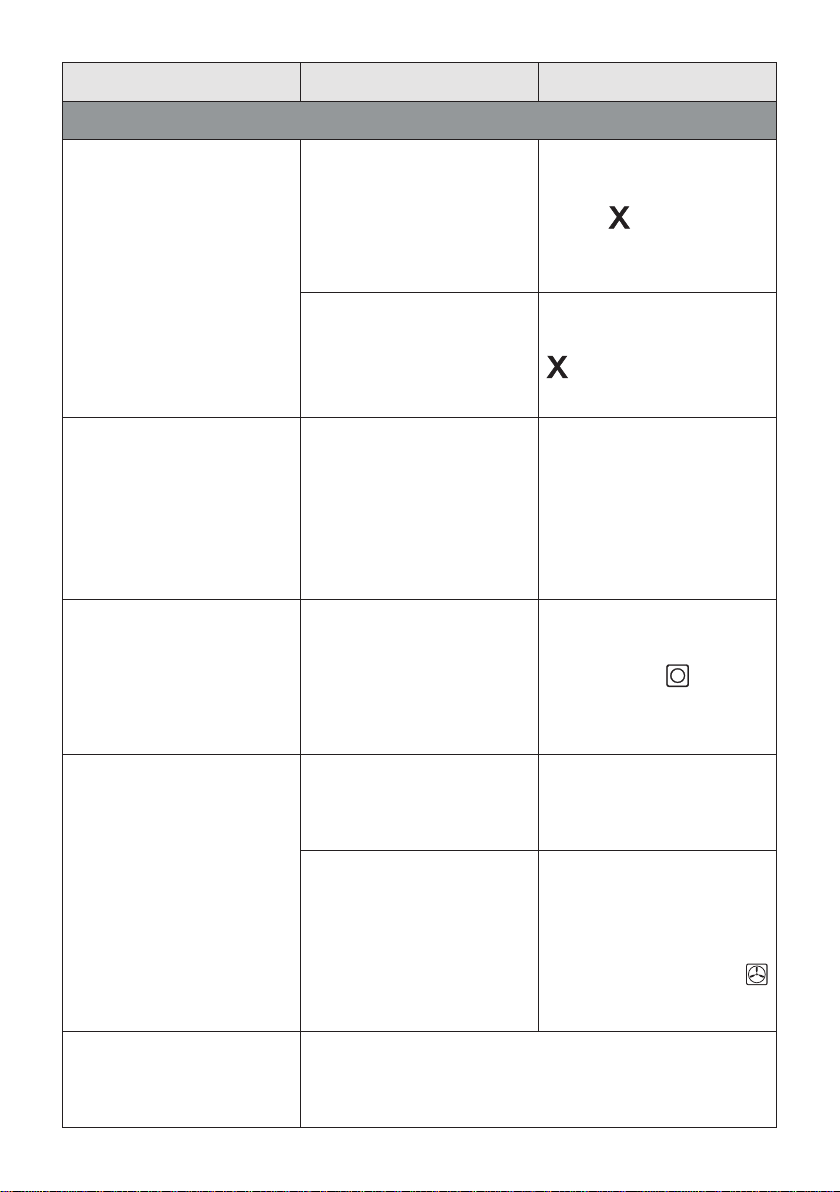
Problem Possible causes What to do
General
The oven does not work. No power.
Check that the mains power
supply (wall switch) is
turned on and there is no
power outage in your area.
The lights do not come
on when I open the oven
door.
The oven light bulb(s) have
blown.
Replace the light bulb(s).
See ‘Care and cleaning’ for
instructions.
The door is not correctly
tted.
See ‘Care and cleaning’ for
instructions on tting the
door correctly.
The oven is in Sabbath
setting and the ‘Light off’
option has been saved.
To quit Sabbath setting,
press and hold the cancel
button. See ‘User
preference settings’ for
instructions on changing the
‘Light off’ option.
The temperature indicator
shows - - - and the
dials and buttons are
unresponsive.
The control panel is locked.
Press and hold the select
or cancel button to
unlock the control panel.
The oven is not heating
The door is not properly
closed or it is opened too
frequently during cooking.
The heating elements are
disabled while the door is
open.
Make sure the door is
properly closed and avoid
opening it frequently during
cooking.
A glass pane in the
oven door has cracked,
chipped, or shattered.
Incorrect cleaning or the
edge of the glass hitting
against something.
You must NOT use the
oven.
Call your Authorised
Repairer or Customer Care.
47
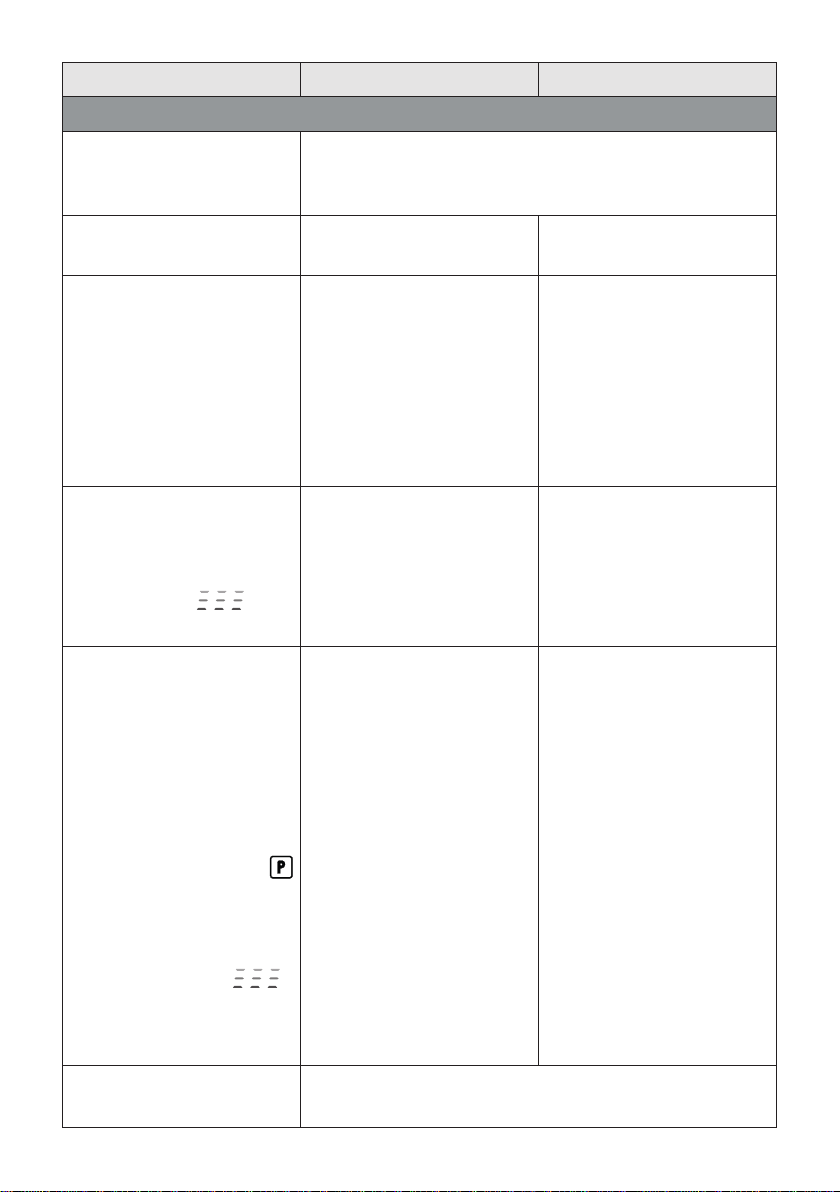
Problem Possible causes What to do
General
The oven is heating but
the display is dark.
The oven is set to ‘Display
off’ option.
To quit the ‘Display off’
option, press and hold the
cancel
button until the
display shows the time of
day.
The oven is in Sabbath
setting.
To quit Sabbath setting,
press and hold the cancel
button until the display
shows the time of day.
The oven cancels
automatic cooking when
I try to adjust the clock
setting.
The oven was set for
automatic cooking when
you were trying to adjust the
clock setting.
You can only adjust the
clock setting while the oven
is not set for automatic
cooking. See section
‘Setting the clock and rst
use’ for instructions.
The oven beeps when I try
to turn the temperature
dial OFF or below a
certain temperature.
This is normal: for food
safety reasons, the oven
functions have factory-
set minimum temperature
settings.
The temperature dial itself
cannot be ‘turned off’.
Selecting Off
with the
function dial will turn the
oven off.
The rotisserie skewer will
not rotate.
The skewer did not fully
engage in the rotisserie
drive.
Make sure the skewer
is pushed fully into the
rotisserie drive hole.
The meat is too heavy.
To get a nish similiar to a
rotisserie for pieces of meat
or poultry heavier than 6 kg,
use the grill tray and rack
and the Fan Forced
function.
The rotisserie skewer
stops rotating when I
open the door.
This is normal: the rotisserie drive is disabled while the
door is open.
48
Problem Possible causes What to do
Self Clean function
During a Self Clean cycle,
the oven is louder than
usual.
This is normal: the oven’s cooling fans operate at their
highest speed.
The display shows .
The door has not been
properly closed.
Make sure you close the
door properly.
The display shows
0:00 but
the oven door will not open.
The oven door is locked
because the oven is still too
hot to be used for cooking.
Wait until the Self Clean
cycle has nished. If you
cancelled a Self Clean
cycle which was already
underway, the oven still
needs to cool down before it
can be used. The oven door
will automatically unlock.
At a point during a Self Clean
cycle, the temperature
indicator starts displaying
cascading bars
.
This is normal: the oven is
in the last phase of the Self
Clean cycle, cooling down.
Wait until the Self Clean
cycle has nished. A long
tone will sound and the
oven door will automatically
unlock when the oven is
ready to use.
I have cancelled a Self
Clean cycle but cannot use
the oven:
■ the oven door will not
open
■ the display is still
counting down minutes
or showing
0:00
■ the Self Clean
function indicator is still
lit
■ the temperature
indicator shows
cascading bars
■ the dials and buttons
are unresponsive.
This is normal: the oven is
still too hot to be used for
cooking and needs to cool
down.
Wait until the cool-down
phase has nished. A long
tone will sound and the
oven door will automatically
unlock when the oven is
ready to use.
Note: depending on when
the Self Clean cycle was
cancelled, the cool-down
phase may take up to 45
minutes.
The oven is beeping and
the display shows
A2 or A3.
See section ‘Alert codes’ for instructions.

49
ALERT CODES
If there is a problem, the oven will:
■ automatically suspend all oven functions
■ beep ve times
■ display an alert code.
IMPORTANT!
Do not turn off the mains power supply to the oven (wall switch) if you get an alert
code,unlesstheinstructionsinthechartfollowingspecicallyinstructyouto.There
are cooling fans within the oven which are needed to cool the oven’s components.
Turning off the power while the oven is too hot may damage the oven and its
surrounding cabinetry.
What to do if an alert code is displayed
1. If the beeping hasn’t stopped already, press any button to stop it.
2. Make a note of the alert code displayed. You may need this information.
3. Check the chart following to see if you can x the problem yourself and follow the
instructions.
4. Ifyoucanxtheproblem and the alert code does not reappear, you can keep using
your oven.
OR
Ifyou can’txtheproblem yourself or the alert code reappears and the problem
persists: wait until the cooling fans have stopped and the oven has completely cooled
down, then turn the power to the oven off at the wall and call your Authorised Repairer
or Customer Care with the alert code information.

50
Alert code Possible causes What to do
A1
The oven has overheated.
1. Allow the oven to cool down.
2. If the door is locked, wait until it
automatically unlocks.
3. Once the oven has cooled down and
the door has unlocked, the alert code
will disappear. You can now use the
oven again.
A2
Door lock error: the door
cannot be locked after you
have started a Self Clean
cycle.
1. Turn the power to the oven off at the
wall and on again.
2. Wait approximately 10 seconds. This
is to allow the door lock to return to its
initial position.
3. Set the clock. See ‘Setting the clock
and rst use’ for instructions.
4. Try starting a Self Clean cycle again,
making sure that you close the door
rmly. See ‘Using the Self Clean
function’.
A3
Door lock error: the door
cannot be unlocked after
a Self Clean cycle has
nished.
1. Turn the power to the oven off at the
wall and on again.
2. Try pressing on the oven door to help
the door lock disengage.
3. If this doesn’t help and the alert
code reappears, call your Authorised
Repairer or Customer Care.
F + number
Technical fault.
1. Note down the alert code.
2. Wait until the cooling fans have
stopped and the oven has completely
cooled down.
3. Turn the power to the oven off at the
wall.
4. Call your Authorised Repairer or
Customer Care with the alert code
information.
Should you still require assistance please contact our Customer Service Centre for your
nearest Authorised Delonghi Service Agent.

51
SERVICE AND MAINTENANCE
SERVICING THE APPLIANCE
Service may be obtained by contacting our Customer Service Centre to locate the nearest
Authorised Delonghi Service Agent:
Servicing shall be carried out only by authorized personnel.
Theapplianceshallnotbemodied.
TROUBLESHOOTING
If you experience a problem with your oven, check the following points before calling our
Customer Service Centre for assistance.
1. The power is switched on.
2. The controls are switched on.
3. None semi-automatic or automatic cooking program has been selected.
4. Both the fuse and the mains fuse are intact.
Should you still require assistance please contact our Customer Service Centre for your
nearest Authorised Delonghi Service Agent.

www.delonghi.com.au
www.delonghi.co.nz
Cod. 1105203 - ß0
Descriptions and illustrations in this booklet are given as simply indicative.
The manufacturer reserves the right, considering the characteristics of the
models described here, at any time and without notice, to make eventual necessary
modifications for their construction or for commercial needs.
