
DE’LONGHI
COOKING
INSTALLATION and SERVICE INSTRUCTIONS
USE and CARE INSTRUCTIONS
DE908M
MULTIFUNCTION BUILT-IN OVEN
distributed by
DeLonghi Australia Pty Ltd
DeLonghi New Zealand Ltd

2
Dear Customer,
Thank you for having purchased and given your preferen-
ce to our product.
The safety precautions and recommendations reported
below are for your own safety and that of others. They will
also provide a means by which to make full use of the fea-
tures offered by your appliance.
Please keep this booklet in a safe place. It may be useful
in future, either to yourself or to others in the event that
doubts should arise relating to its operation.
This appliance must be used only for the task it has
explicitly been designed for, that is for cooking fo-
odstuffs. Any other form of usage is to be considered
as inappropriate and therefore dangerous.
The manufacturer declines all responsibility in the
event of damage caused by improper, incorrect or illo-
gical use of the appliance or be faulty installation.
PRODUCT LABEL
This appliance has been designed and constructed in accordance with the following codes
and specications:
AS/NZS 60335.1 General Requirements for Domestic electrical appliances
AS/NZS 60335.2.6 Particular Requirements for Domestic electrical cooking appliances
AS/NZS CISPR 14.1 Electromagnetic Compatibility Requirements.

3
Important:
This appliance is designed and manufactured solely for the cooking of domestic (hou-
sehold) food and is not suitable for any non domestic application and therefore should
not be used in a commercial environment.
The appliance guarantee will be void if the appliance is used within a non domestic en-
vironment i.e. a semi commercial, commercial or communal environment.
FIRST USE OF THE OVEN
It is advised to follow these instructions:
■ Furnish the interior of the oven as described at chapters “USE AND CARE” and
“CLEANING AND MAINTENANCE”.
■ Switch on the empty oven on max to eliminate grease from the heating elements.
■ Let the oven cool down and clean the interior of the oven with a cloth soaked in
water and neutral detergent, then dry carefully.
IMPORTANT PRECAUTIONS AND RECOMMENDATIONS FOR USE OF
ELECTRICAL APPLIANCES
Use of any electrical appliance implies the necessity to follow a series of fundamental rules.
In particular:
■ Never touch the appliance with wet hands or feet.
■ Do not operate the appliance barefooted.
■ The appliance is not intended for use by young children or inrm persons without
supervision.
■ Young children should be supervised to ensure they do not play with the appliance.
The manufacturer cannot be held responsible for any damages caused by improper, incor-
rect or illogical use of the appliance.

4
IMPORTANT PRECAUTIONS AND RECOMMENDATIONS
After having unpacked the appliance, check to ensure that it is not damaged and that the
oven door closes correctly. In case of doubt, do not use it and consult your supplier or a
professionally qualied technician.
Packing elements (i.e. plastic bags, polystyrene foam, nails, packing straps, etc.) should
not be left around within easy reach of children, as these may cause serious injuries.
■ Some appliances are supplied with a protective lm on steel and aluminium parts. This
lm must be removed before using the appliance.
■ Do not attempt to modify the technical characteristics of the appliance as this may
become dangerous to use.
■ Do not carry out cleaning or maintenance operations on the appliance without having
previously disconnected it from the electric power supply.
■ After use, ensure that the knobs are in the off position.
■ Keep children away from the appliance when it is in use.
■ WARNING: Accessible parts will become hot when in use. To avoid burns and scalds,
young children should be kept away.
■ Young children should be supervised to ensure that they do not play with the appliance.
■ Children, or persons with a disability which limits their ability to use the appliance,
should have a responsible person to instruct them in its use. The instructor should
be satised that they can use the appliance without danger to themselves or their
surroundings.
■ During and after use of the appliance, certain parts will become very hot. Do not touch
hot parts. Care should be taken to avoid touching heating elements inside the oven.
■ Make sure that electrical cables connecting other appliances in the proximity of the
oven cannot become entrapped in the oven door.
■ WARNING: When correctly installed, your product meets all safety requirements laid
down for this type of product category. However special care should be taken around
the rear or the underneath of the appliance as these areas are not designed or inten-
ded to be touched and may contain sharp or rough edges, that may cause injury.
■ Do not line the oven walls with aluminium foil. Do not place baking trays or the drip tray
on the base of the oven chamber.
■ Fire risk! Do not store ammable material in the oven.
■ Always use oven gloves when removing the shelves and food trays from the oven
whilst hot.
■ Do not hang towels, dishcloths or other items on the appliance or its handle – as this
could be a re hazard.
■ Clean the oven regularly and do not allow fat or oils to build up in the oven base or tray.
Remove spillages as soon as they occur.
■ Do not stand on the open oven door.
■ Always stand back from the appliance when opening the oven door to allow steam and
hot air to escape before removing the food.
■ Safe food handling: Leave food in the oven for as short a time as possible before
and after cooking. This is to avoid contamination by organisms which may cause food
poisoning. Take particular care during warmer weather.

5
■ The manufacturer declines all liability for injury to persons or damage to property cau-
sed by incorrect or improper use of the appliance.
■ WARNING: Taking care NOT to lift the oven by the door handle.
■ IMPORTANT NOTE: This appliance shall not be used as a space heater, especial-
ly if installed in marine craft or caravans.
■ Do not operate your appliance by means of an external timer or separate remote-
control system.
■ This appliance is for domestic use only.

6
INSTALLATION
CAUTION:
■ This appliance must be installed in accordance with these installation instructions.
■ This appliance shall only be serviced by authorised personnel.
■ This appliance is to be installed only by an authorised person in compliance
with the current electrical regulations and in observation of the instructions
supplied by the manufacturer.
Failure to comply with this condition will render the guarantee invalid.
■ Incorrect installation, for which the manufacturer accepts no responsibility, may
cause personal injury of damage.
■ Always disconnect the appliance from mains power supply before carrying out
any maintenance operations or repairs.
FITTING REQUIREMENTS
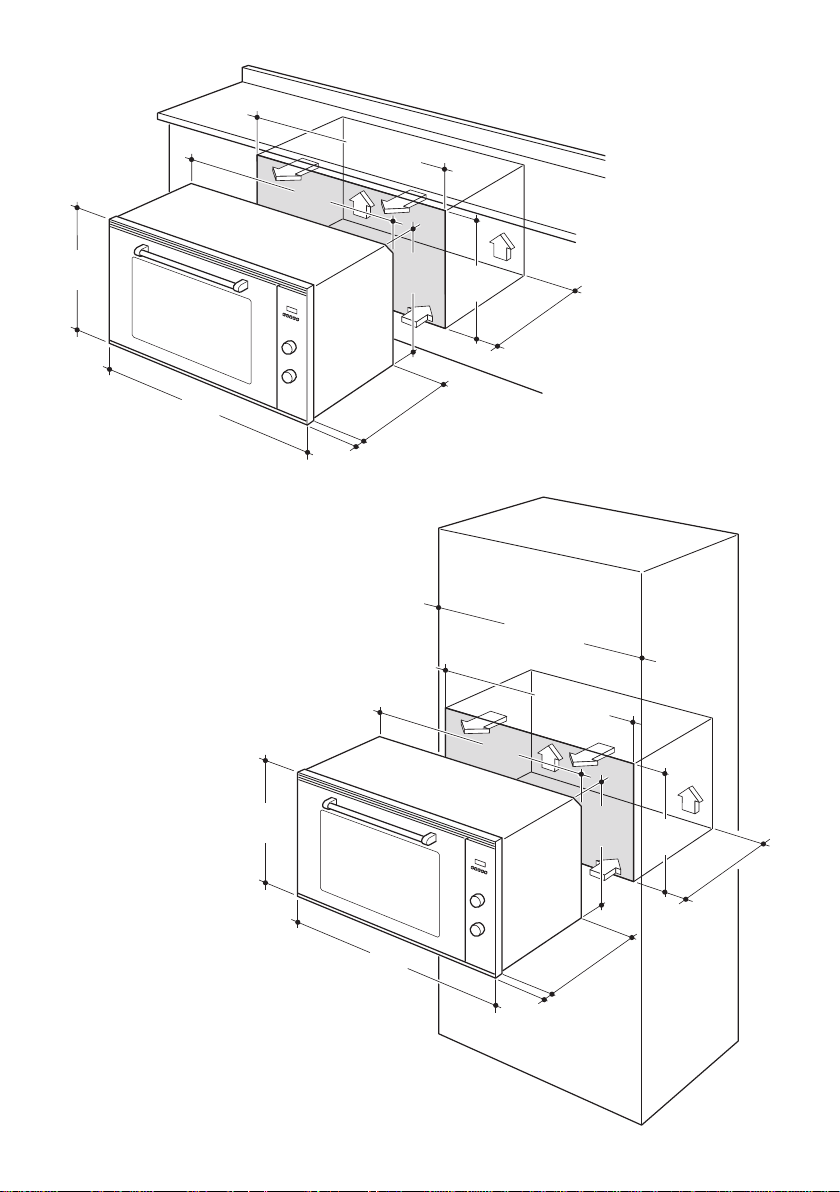
■ The oven can be tted in standard units, width 90 cm and depth 60 cm.
■ Installation requires a compartment as illustrated in gures 1 and 2.
■ On the lower side, the oven must lay on supports standing the oven weight.
■ Remember the housing should not be free standing but be secured to the wall and/or
adjacent ttings.
■ We would point out that the adhesive which bonds the plastic laminate to the fur-
niture must withstand temperatures not less than 150° C to avoid delamination.
■ The walls of the units must be capable of resisting temperatures of 75 °C above
room temperature.
■ Do not seal the oven into the cabinetry with silicone or glue; this makes future
servicing difcult. Delonghi will not cover the costs of removing the oven, or of
damage caused by this removal.
■ The walls surrounding the oven must be made of heat-resistant material.
■ WARNING: Taking care NOT to lift the oven by the door handle.
WARNING
When correctly installed, your product meets all safety requirements laid down for
this type of product category.
However special care should be taken around the rear or the underneath of the ap-
pliance as these areas are not designed or intended to be touched and may contain
sharp or rough edges, that may cause injury.
IMPORTANT
Some environmental factors and cooking habits can cause condensation in and
around the oven during use. To protect surrounding cabinetry from possible dama-
ge caused by frequent or excessive condensation, we recommend moisture-proo-
ng the oven cavity.
7
853
896
478
544
22
min. 550
480
467
min. 860
Figure 1
853
896
478
544
22
min. 550
480
467
min. 860
min. 900
Figure 2
8
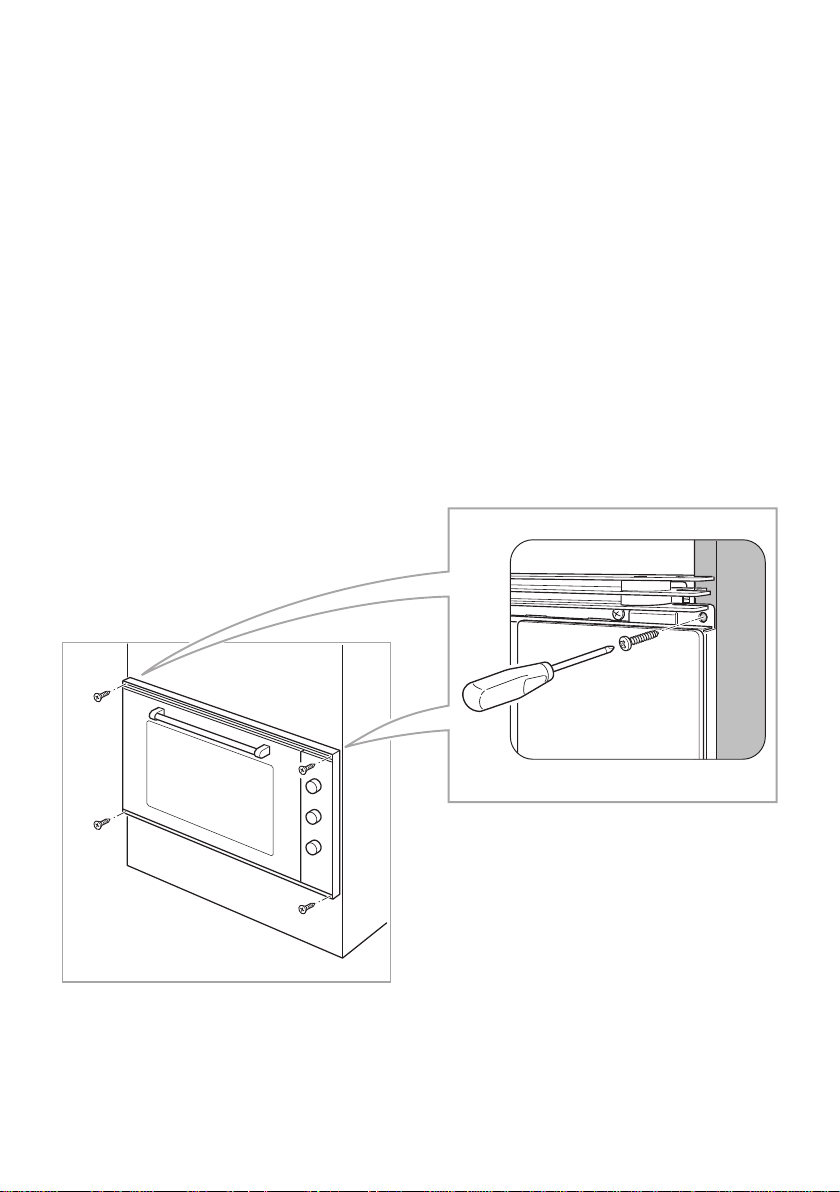
FIXING THE OVEN
Introduce the oven into the furniture opening and x it with 4 screws (not supplied) as gure
3. It is essential that the oven rests on a surface which will support its weight, as the screw
xing is only complementary.
Note
It is essential that when installing your oven adequate air circulation is allowed for within
the installation. See gures 1 - 2.
Inadequate air circulation may greatly impair the performance of your oven and may effect
adjacent cabinets due to an increase in temperature.
Caution
Do not lift this oven by the door handle.
Adjust the hinges of furniture doors adjacent to the oven to allow a 4-5 mm gap between
the furniture door and the oven frame.
Figure 3
9
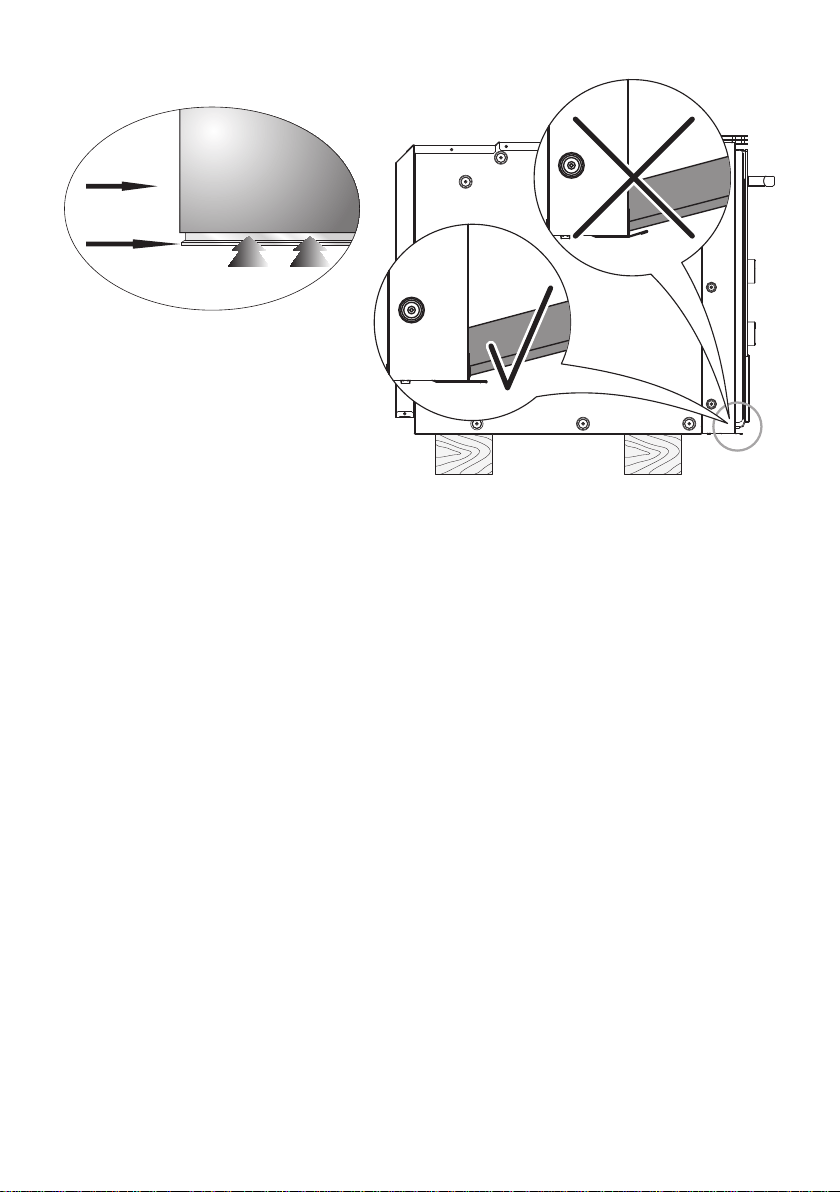
IMPORTANT:
Please take extra care not to damage the lower trim of the oven.
Ensure the oven sits on wooden blocks or similar supports when it is removed from the
carton as shown in above diagram. This will prevent any damage to the lower trim.
Should the lower trim become damaged, straighten the trim and ensure the oven door
opens fully without obstruction from the lower trim.
After installation check the lower trim is still undamaged.
The space between the bottom of the door & the lower trim is important to allow proper air
circulation into the oven.
The oven door should be opened slowly to it’s fully open position ensuring there is adequa-
te clearance between the bottom of the door and the lower trim.
The manufacturer does not accept responsibility for any damage to the oven resul-
ting from incorrect installation.
Figure 4
OVEN DOOR
LOWER TRIM
AIR FLOW

10
ELECTRICAL REQUIREMENTS
■ The appliance must be connected to the mains checking that the voltage correspon-
ds to the value given in the rating plate and that the electrical cable sections can
withstand the load specied on the plate.
■ A suitable isolating switch providing full disconnection from the mains power supply
shall be incorporated in the permanent wiring, mounted and positioned to comply with
the local wiring rules and regulations. The isolating switch must be of an approved
type and provide a 3 mm air gap contact separation in all poles (or in all active [phase]
conductors if the local wiring rules allow for this variation of the requirements).
■ The isolating switch shall be easily accessible to the customer with the oven installed.
■ The power supply cable must not touch the hot parts and must be positioned so that it
does not exceed 75°C above ambient.
■ The oven is supplied without a power supply plug and therefore if you are not con-
necting directly to the mains, a standardized plug suitable for the load must be tted.
■ The plug must be connected to an earthed socket in compliance with safety standards.
■ To connect the appliance to the mains electricity supply, do not use adapters, reducers
or branching devices as they can cause overheating and burning.
■ Once the appliance has been installed, the switch or socket must always be accessible.
■ If the supply cord is damaged it must be replaced by the manufacturer or it’s Service
Agent or a similarly qualied person in order to avoid a hazard.
N.B. The connection of the appliance to earth is mandatory.
If the installation requires alterations to the domestic electrical system call a qualied elec-
trician. He should also check that the domestic electrical system is suitable for the power
drawn by the appliance.
Replacing the power cord must be done by a qualied electrician in accordance with
the instructions supplied by the manufacturer and in compliance with established
electrical regulations.
11
REPLACING THE POWER SUPPLY CABLE
Important! This appliance must be connected to the electricity supply only by an
authorised person.
To connect the supply cable:
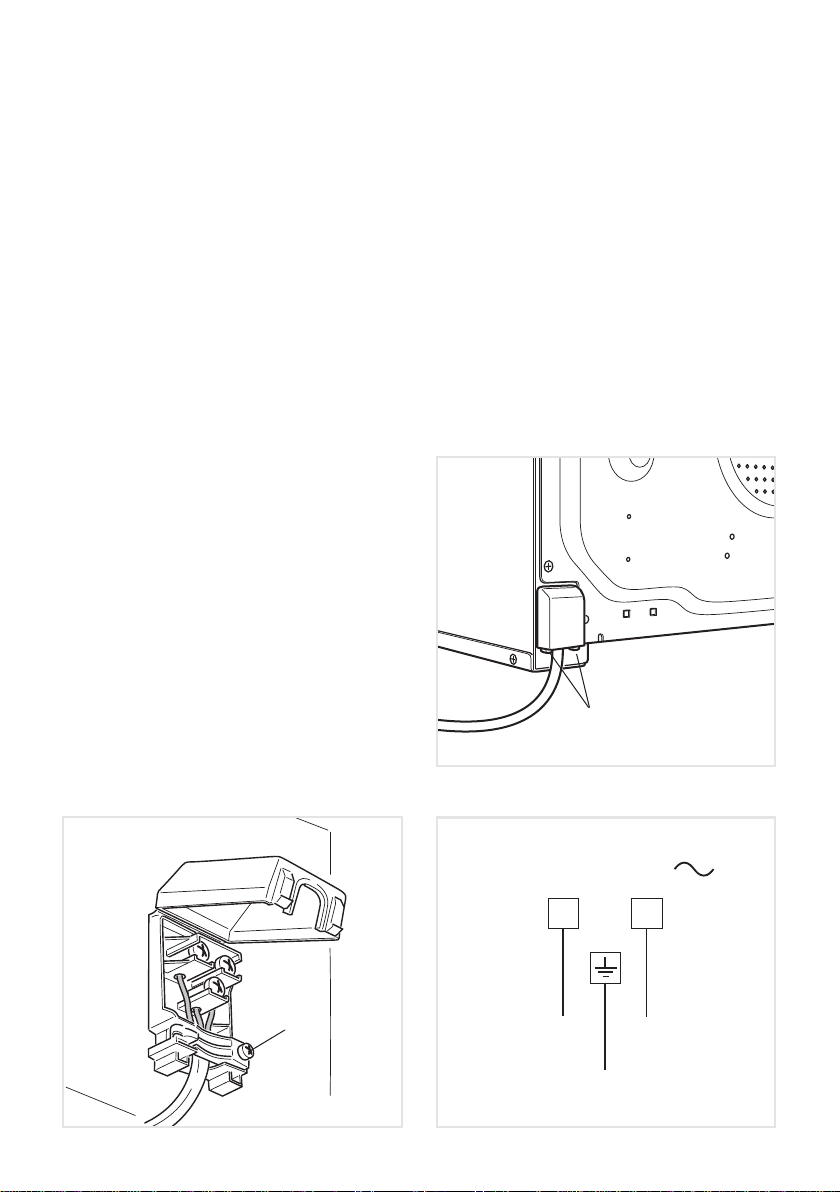
■ Unhook the terminal board cover by inserting a screwdriver into the two hooks “A” (g. 5).
■ Open the cable gland by unscrewing screw “F” (g. 6), unscrew the terminal screws
and remove the cable.
■ The new supply cable, of suitable type and section, is connected to the terminal board
following the diagram g. 7.
■ Close and hook again the terminal board cover.
N.B. The earth conductor must be left about 3 cm longer than the others.
VOLTAGE AND POWER CONSUMPTION
220-240 V ac 3050 W (13.26 A)
FEEDER CABLE SECTION
TYPE H05RR-F
3 x 1,5 mm
2
(*) (**)
(*) Connection possible with plug and outlet
(**) Connection with wall box connection.
F
A
E
N (L
2)
L
1
Figure 6
Figure 5
Figure 7
220 - 240 V
12
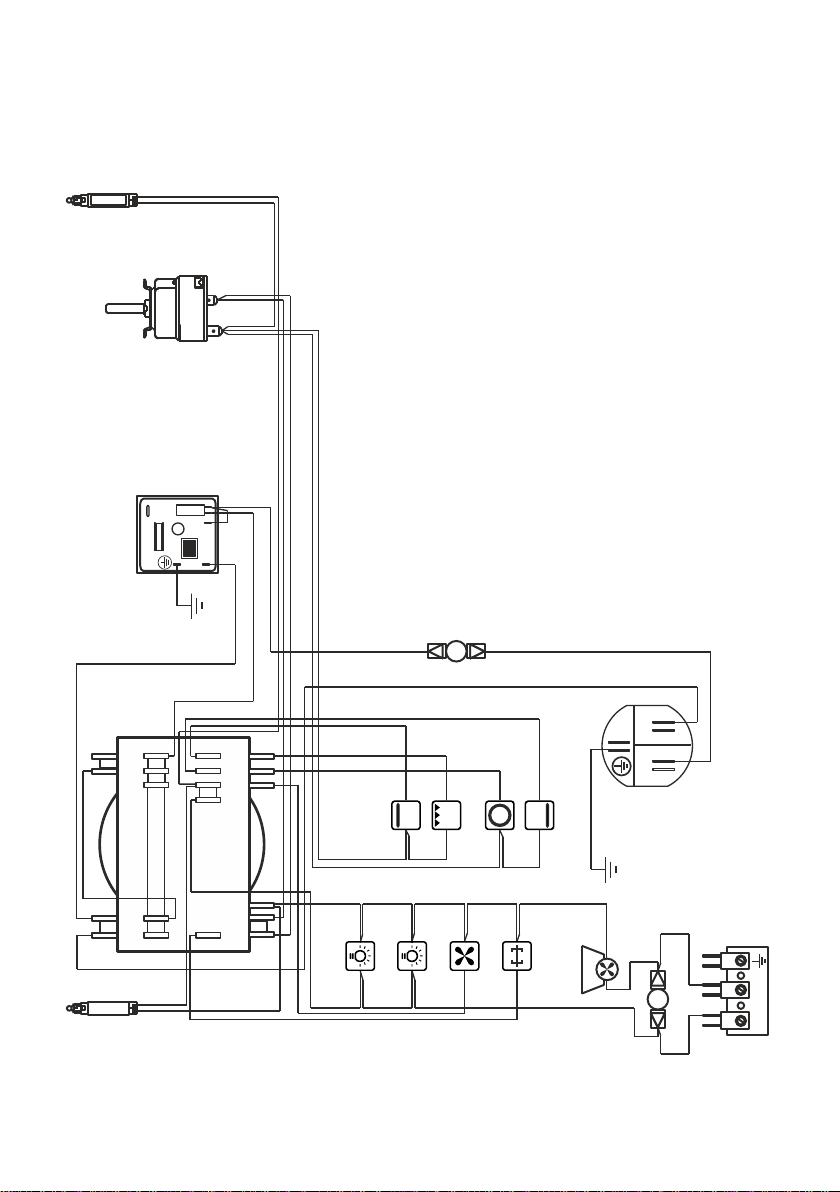
ELECTRIC DIAGRAM
Figure 8
S1S2
PR
TM
C
G
S
V
CIR
CF
LF
TL
T
N
L
M
GIR
F1
LF
MT
TL1
7
89
1011
12
12
36
abcef
ghjkl
L/N
L/8
L
N

13
ELECTRIC DIAGRAM KEY
F1 Oven switch
TM Oven thermostat
LF Oven lamps
PR Oven programmer
CF Cooling fan motor
GIR Rotisserie motor
V Oven fan motor
C Oven top element
G Oven grill element
S Oven bottom element
CIR Oven circular element
TL Thermal overload (normally closed)
TL1 Thermal overload (normally open)
S1 Thermostat pilot lamp
S2 Line pilot lamp
MT Testing block
M Terminal block
T Earth connection
14
USE AND CARE
Figure 9
CAUTION:
■ This appliance must be used only for the task it has explicitly been designed for, that
is for domestic cooking of foodstuffs. Any other form of usage is to be considered as
inappropriate and therefore dangerous.
■ Do NOT place combustible materials or products on this appliance at any time.
USING THE OVEN FOR THE FIRST TIME
Operate as follows:
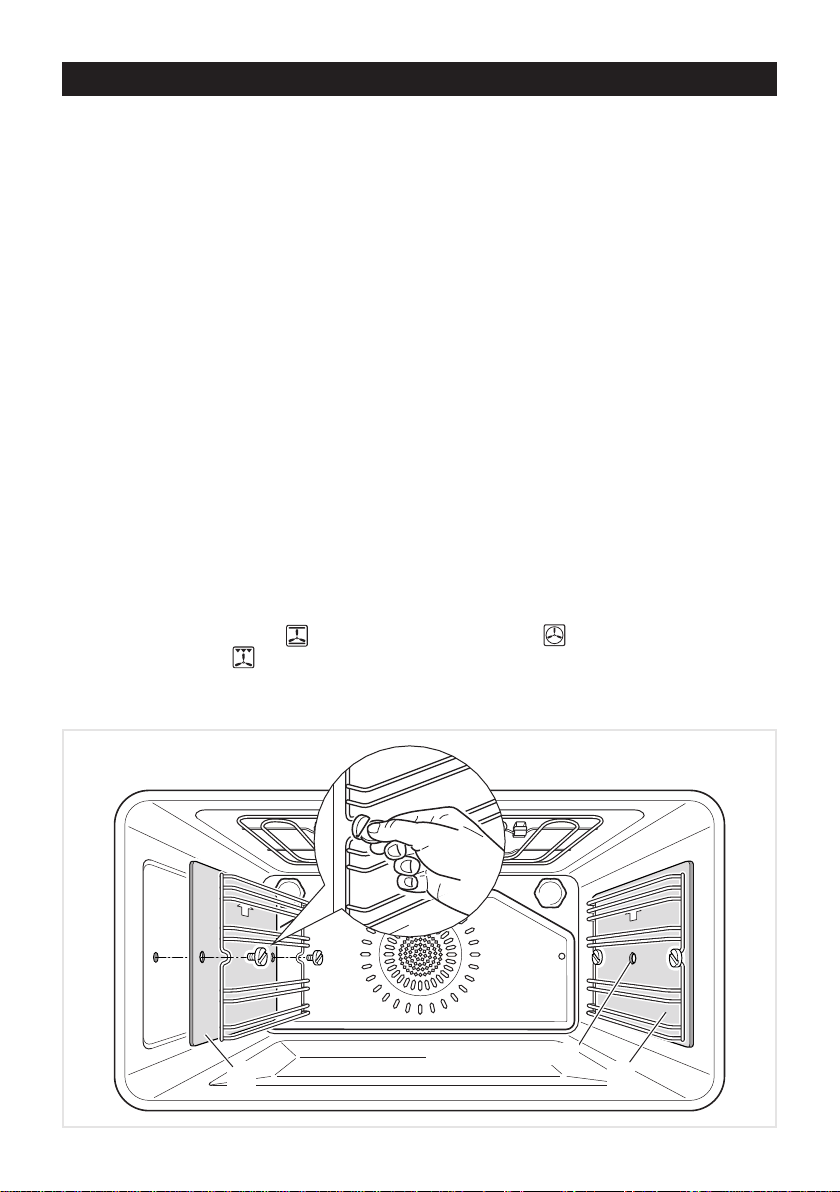
■ Assemble the wire racks on the oven walls using the 2 screws, interposing the catalytic
panels “A” with the arrow up (g. 9). The catalytic panel with the hole for the rotisserie
must be positioned on the right oven wall. DO NOT INTERPOSE THE CATALYTIC
PANEL WITHOUT THE HOLE ON THE RIGHT OVEN WALL.
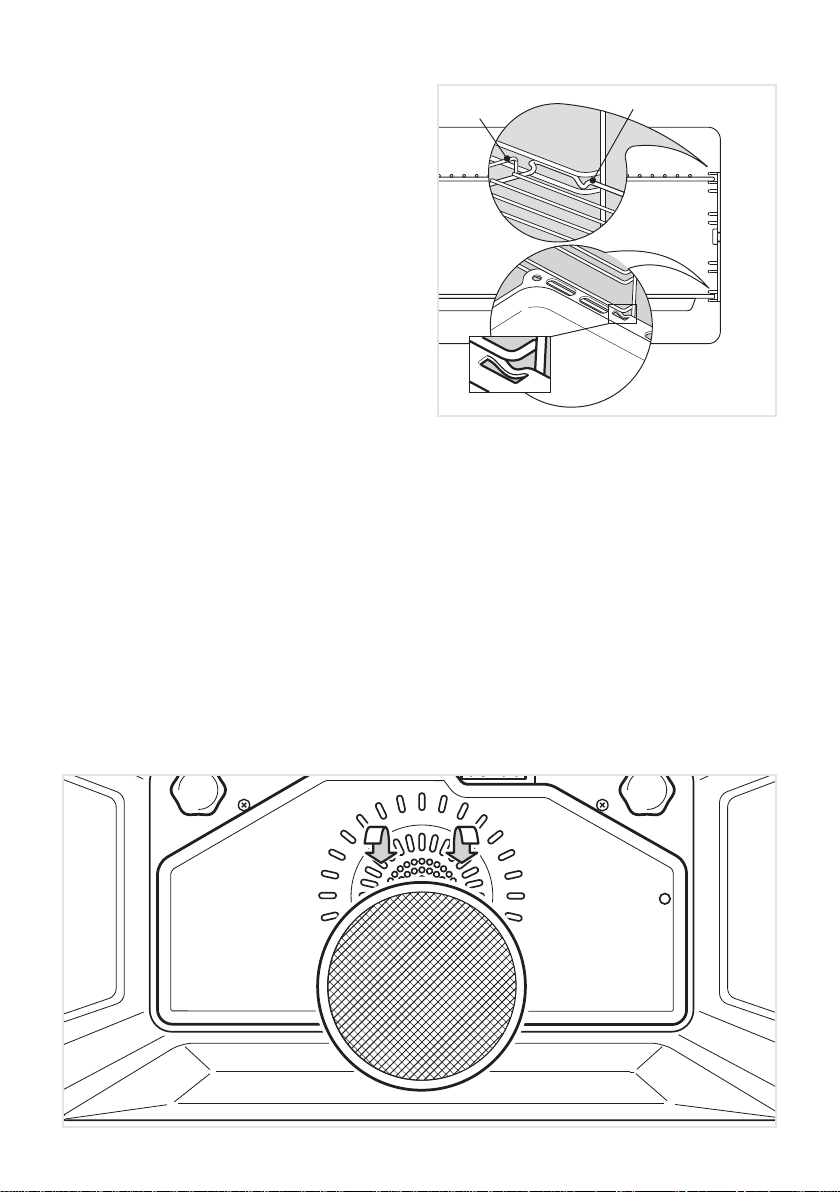
■ Slide in the grease lter on the back of the oven as in g. 11.
■ Slide in, on the guides, the shelf and the tray (g. 10).
The rack must be tted so that the safety notch, which stops it sliding out, faces the
inside of the oven; the guard rail shall be at the back.
The tray must be tted so that the safety notch, which stops it sliding out, faces the
inside of the oven.
■ To eliminate traces of grease in manufacture it is necessary to pre-heat the oven at the
maximum temperature:
• For 60 minutes in the position, for 30 minutes in the position and for another 15
minutes in the position.
A A
HOLE FOR ROTISSERIE
15
Figure 10
Figure 11
Stop notch
Stop notch
Guard rail
■ Unscrew the xing screws and slide off
the wire racks and the catalytic liners
to the oven wall as in g. 9.
The grill is secured to the rear wall of
the oven on a hinge system that allows
it to be lowered to allow proper access
when cleaning the oven ceiling (see
next chapter TILTING GRILL).
■ Let the oven cool down, switch off the
electrical supply, then clean the inside
of the oven with a cloth soaked in wa-
ter and neutral detergent and dry tho-
roughly.
GREASE FILTER
■ A special screen is provided at the back of the oven to catch grease particles, mainly
when meat is being roasted.
■ Clean the lter after any cooking! The grease lter can be removed for cleaning and
should be washed regularly in hot soapy water (g. 11).
■ Always dry the lter properly before tting it back into the oven.
CAUTION: When baking pastry etc. this lter should be removed.
16
TILTING GRILL
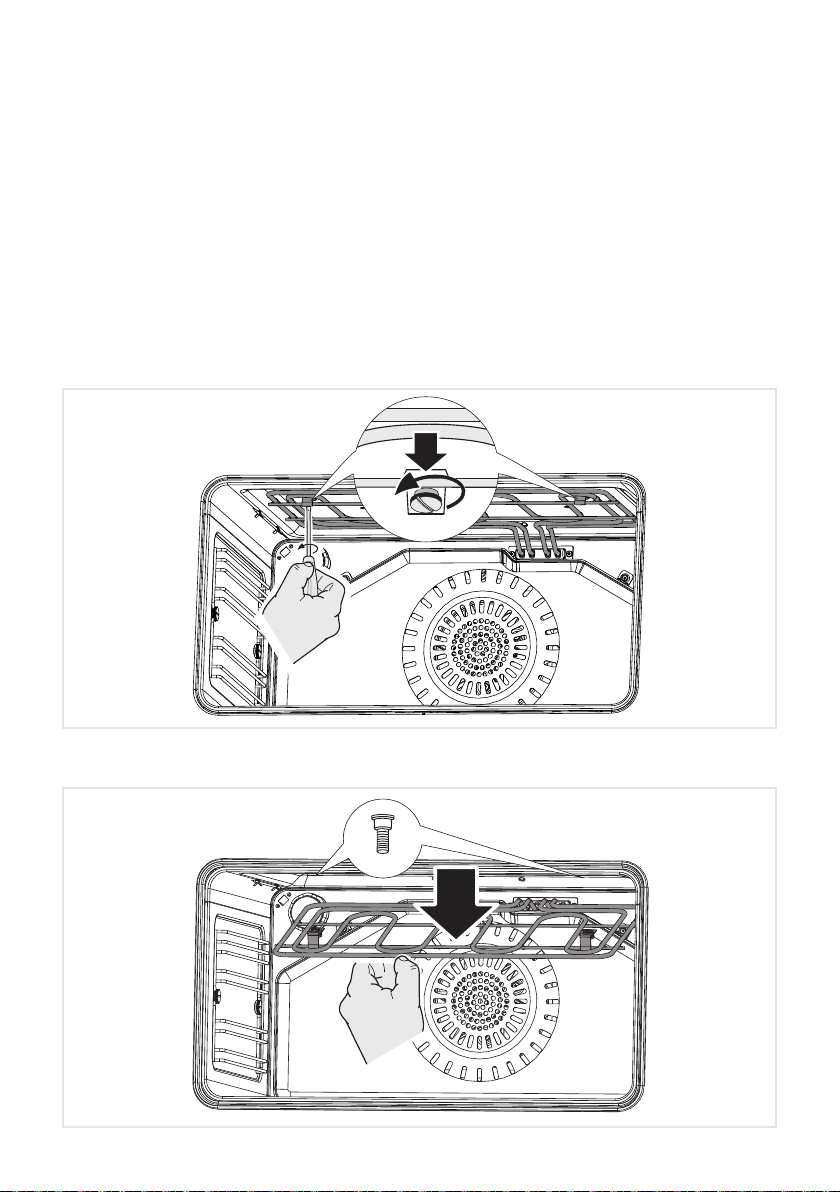
■ The grill is secured to the rear wall of the oven on a hinge system that allows it to be
lowered to allow proper access when cleaning the oven ceiling (g. 13).
■ To lower the grill element: use a at-head screwdriver or a small coin to loosen the
element xing screws g. (12).
■ When you have nished cleaning the oven ceiling, raise the grill element and screw
the element xing screws back onto the studs. Make sure that the xing screws are
tightened and the element is held securely in place.
■ The grill element itself is self-cleaning.
Figure 12
Figure 13
17
COOKING WITH MULTIFUNCTION OVEN
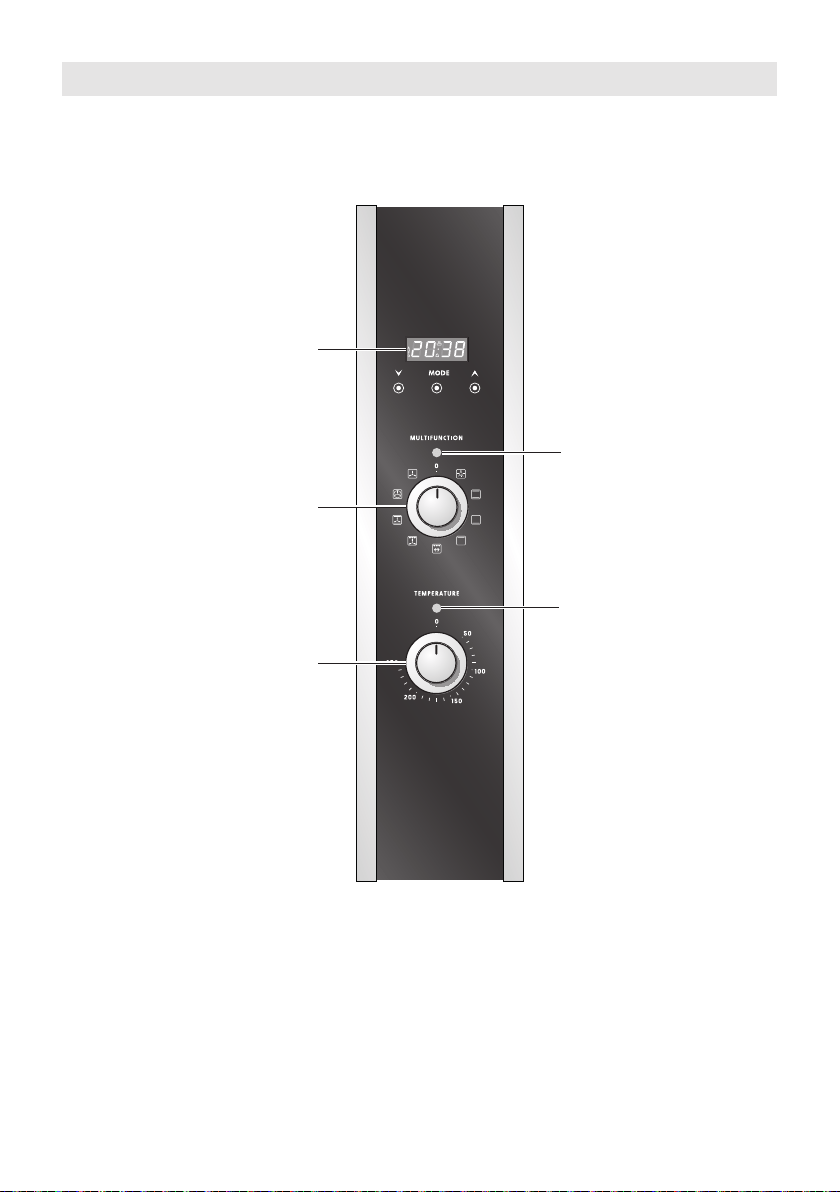
Clock and Timer with
“Touch-control” keys
Function selector
Thermostat
Power on light
Temperature light
Figure 14
Please note:
This appliance incorporates a safety cooling fan which you will hear operating whenever
the oven or grill are in use.
This fan may continue to run for several minutes after the appliance has been switched off.
This fan is to reduce the external temperature of the appliance and cool the internal com-
ponents.
18
Fig. A Fig. B Fig. C
Fig. D Fig. E Fig. F
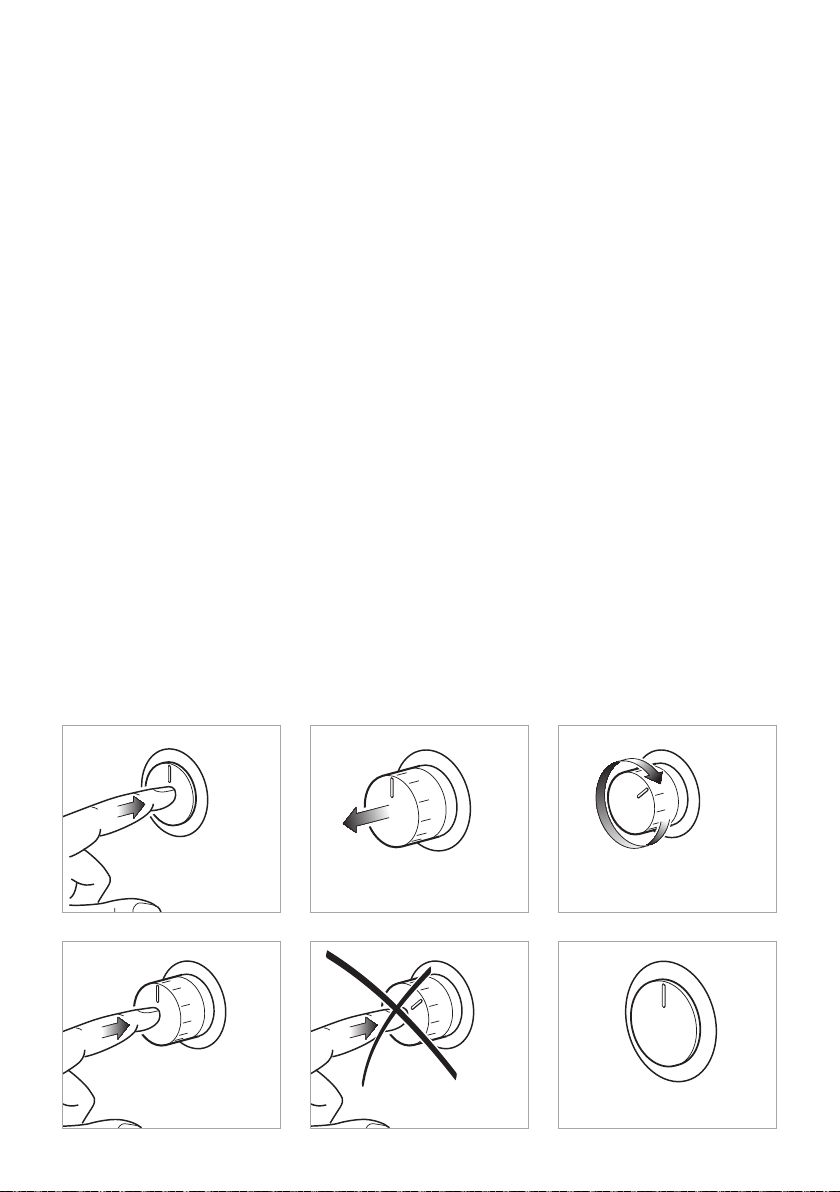
USING THE PRESS-AND-TURN CONTROL KNOBS
The control knobs are ush-mounted in the control panel.
Use them as follows:
a. Press lightly on the knob (gure 15-A);
b. The knob will extend outwards as illustrated in gure 15-B.
c. Turn the knob to the required position (gure 15-C).
d. When you have nished cooking, turn the knob back to the “0” (off) position and press
it (gure 15-D) so that it stays ush with the control panel again (gure 15-F).
IMPORTANT:
Never press down the knob when it is not in the “0” (off) position (gure 15-E).
Figure 15

19
Attention: The oven door becomes
very hot during operation.
Keep children away.
GENERAL FEATURES
As its name indicates, this is an oven that
presents particular features from an opera-
tional point of view.
In fact, it is possible to insert 8 different pro-
grams to satisfy every cooking need.
The 8 positions, thermostatically control-
led, are obtained by 4 heating elements
which are:
■ Bottom element 1750 W
■ Top element 1200 W
■ Grill element 2400 W
■ Circular element 2500 W
OPERATING PRINCIPLES
Heating and cooking in the MULTIFUN-
CTION oven are obtained in the following
ways:
a. by normal convection
The heat is produced by the upper and
lower heating elements.
b. by forced convection
A fan sucks in the air contained in the
oven mufe, which sends it through the
circular heating element and then sen-
ds it back through the mufe.
Before the hot air is sucked back again
by the fan to repeat the described cycle,
it envelops the food in the oven, provo-
king a complete and rapid cooking. It is
possible to cook several dishes simul-
taneously.
c. by semi-forced convection
The heat produced by the upper and
lower heating elements is distributed
throughout the oven by the fan.
d. by radiation
The heat is irradiated by the infra red
grill element.
e. by radiation and ventilation
The irradiated heat from the infra red
grill element is distributed throughout
the oven by the fan.
f. by ventilation
The food is defrosted by using the fan
only function without heat.
WARNING:
The door is hot, use the handle.
During use the appliance becomes
hot. Care should be taken to avoid
touching heating elements inside the
oven.
20
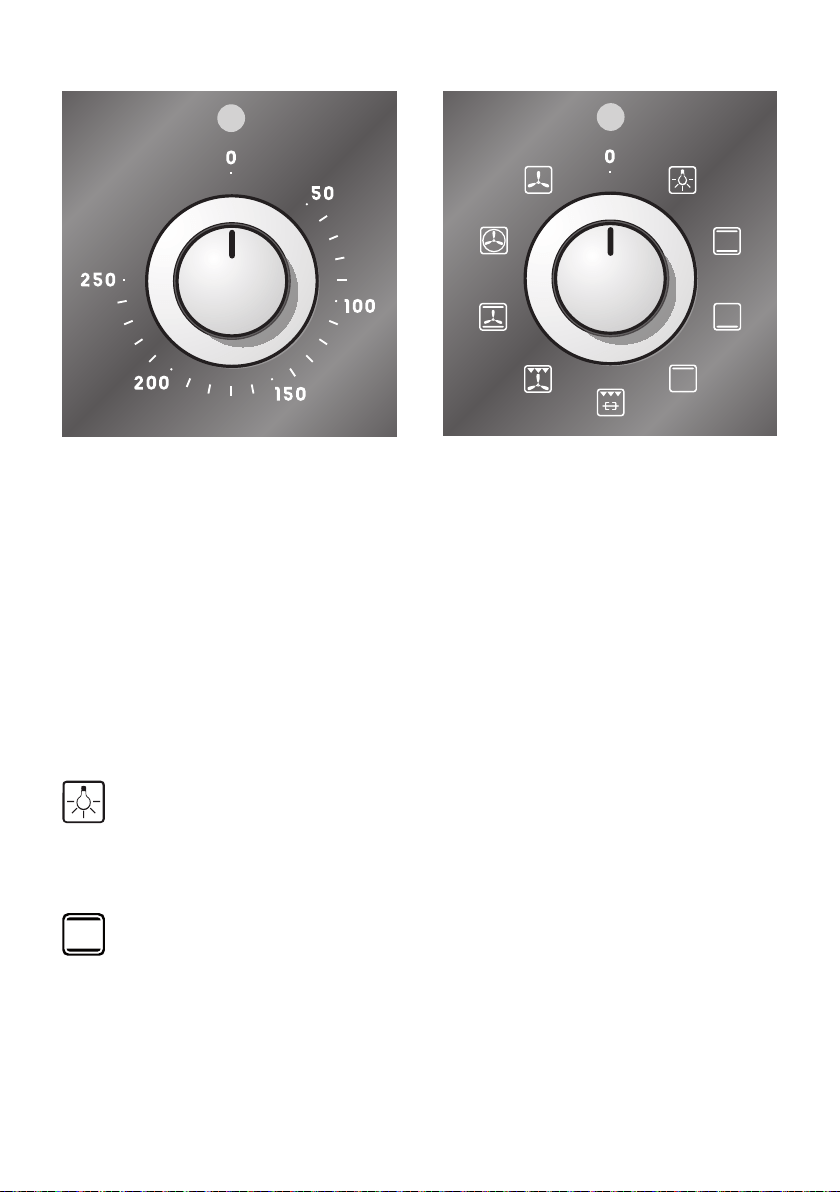
THERMOSTAT KNOB
To turn on the heating elements of the oven, set function selector knob to the required po-
sition and the thermostat knob to the desired temperature.
To set the temperature, turn the thermostat control knob indicator mark to the required
temperature.
The elements will turn on or off automatically which is determined by the thermostat.
The operation of the heating elements is signalled by a light placed above the knob.
FUNCTION SELECTOR KNOB
Rotate the knob clockwise to set the oven for one of the following functions:
OVEN LIGHT
By turning the knob onto this setting we light the oven cavity.
The oven remains alight while any of the functions is on.
TRADITIONAL CONVECTION COOKING
The upper and lower heating elements are switched on. The heat is diffused by natural con-
vection and the temperature must be regulated between 50°C and the maximum position
with the thermostat knob.
It is necessary to preheat the oven before introducing the foods to be cooked.
Recommended for:
For foods which require the same cooking temperature both internally and externally, i. e.
roasts, spare ribs, meringue, etc.
Figure 17Figure 16

21
LOWER HEATING ELEMENT
Only the lower element is switched on. Heat is distributed by natural convection.
The thermostat can be set between 50°C and the maximum position with the thermostat
knob.
Recommended for:
This mode is particularly suitable to complete cooking of dishes that require higher tempe-
rature at the bottom.
UPPER HEATING ELEMENT
Only the upper element is switched on. Heat is distributed by natural convection.
The thermostat can be set between 50°C and the maximum position with the thermostat
knob.
Recommended for:
This mode is particularly suitable to complete cooking of dishes that require higher tempe-
rature at the top.
GRILLING
The infrared grill element at the top of the oven and the rotisserie come on.
The heat is dispersed by radiation.
Use with the oven door closed and the temperature must be regulated between 50°C
and 225°C maximum with the thermostat knob.
For cooking hints, see the chapter “USE OF THE GRILL”.
For cooking with the rotisserie, see the chapter “USING THE ROTISSERIE”.
Always grill with the oven door closed.
Recommended for:
Intense grilling, browning, cooking au gratin and toasting, cooking with the rotisserie, etc.
VENTILATED GRILL COOKING
The infra-red grill and the fan are on. The heat is mainly diffused by radiation and the fan
then distributes it throughout the oven.
Use with the oven door closed and the temperature must be regulated between 50°C
and 225°C maximum with the thermostat knob.
It is necessary to preheat the oven for about 5 minutes.
For correct use see chapter “GRILLING AND COOKING AU GRATIN”.
Always grill with the oven door closed.
Recommended for:
For grill cooking when a fast outside browning is necessary to keep the juices in, i. e. veal
steak, steak, hamburger, etc.

22
CONVECTION COOKING WITH VENTILATION
The upper and lower heating elements and the fan turn on.
The heat coming from the top and bottom is diffused by forced convection.
The temperature must be regulated between 50°C and the maximum position with the
thermostat knob.
Recommended for:
For foods of large volume and quantity which require the same internal and external
degree of cooking; for ie: rolled roasts, turkey, legs, cakes, etc.
FAN FORCED
The circular element and the fan are on.
The heat is diffused by forced convection and the temperature must be regulated between
50°C and the maximum position with the thermostat knob.
It is not necessary to preheat the oven.
Recommended for:
For foods that must be well done on the outside and tender or rare on the inside, i.e. lasa-
gna, lamb, roast beef, whole sh, etc.
DEFROSTING FROZEN FOODS
Only the oven fan is on.
To be used with the thermostat knob on “
0” because the other positions have no effect.
The defrosting is done by simple ventilation without heat.
Recommended for:
To rapidly defrost frozen foods; 1 kilogram requires about one hour.
The defrosting times vary according to the quantity and type of foods to be defrosted.
23
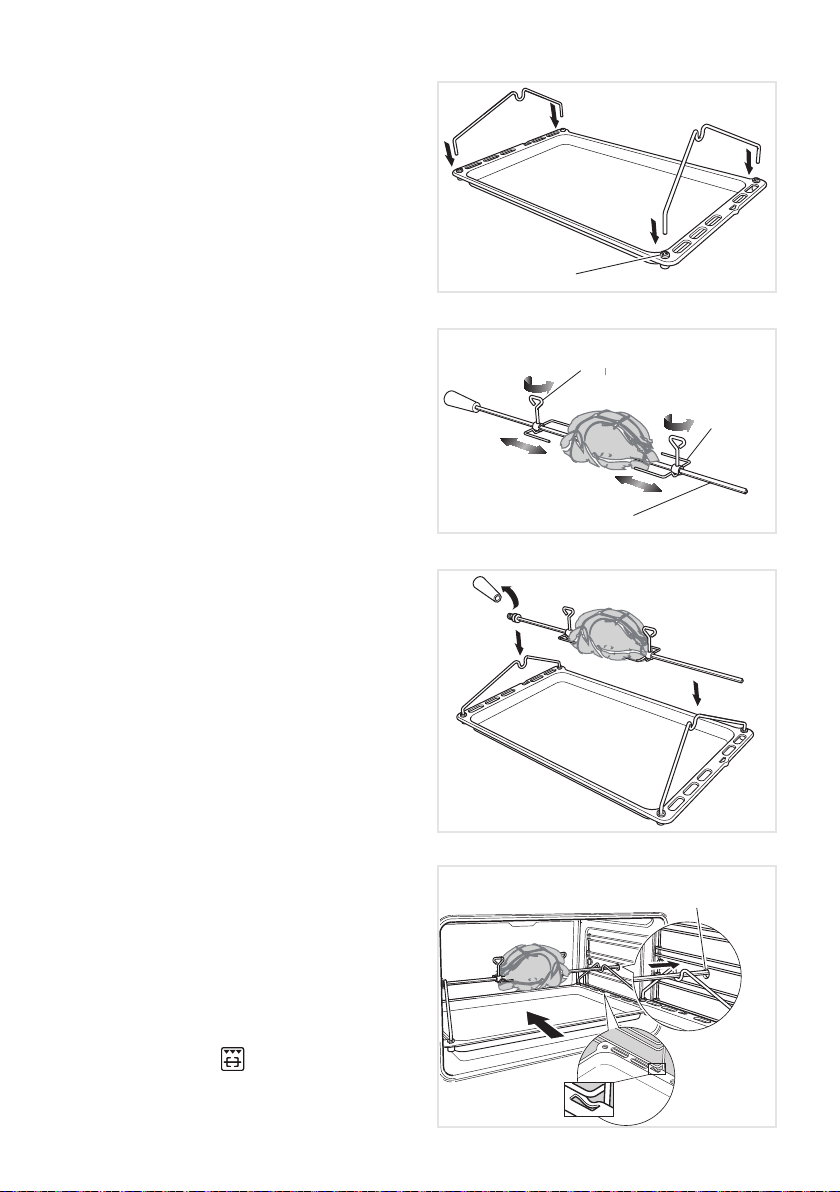
USING THE ROTISSERIE
1. Prepare the rotisserie support (g. 18).
■ Place the grill tray on the
benchtop.
■ Insert the supports into the lock
studs.
■ Push the supports all the way
down to lock them in rmly.
2. Secure the meat (g. 19).
Important!
Take care, the forks are sharp!
When securing the meat, ensure that:
■ the skewer goes through the cen-
tre of the meat;
■ the forks hold the meat rmly in
place;
■ the fork screws are tightened;
■ there are no loose or projecting
parts. Poultry should be trussed.
Note: the rotisserie can rotate up to 6
kg of meat.
3. Position the skewer on the support
(g. 20).
■ Place the skewer on the support,
and check that the meat does not
touch the grill tray.
■ Twist the handle off. It must not
be left in the oven.
4. Place the rotisserie assembly in the
oven (g. 21).
■ Slide the grill tray all the way to
the back on shelf position.
The tray must be tted so that the
safety notch, which stops it sliding
out, faces the inside of the oven.
IMPORTANT NOTE: DO NOT
place the grill tray on the sliding
shelf supports (if tted).
■ Push the skewer through the hole
cover on the right-hand wall of the
oven, then insert it fully into the
rotisserie drive hole.
5. Start the rotisserie
■ Check that the fat lter is in place.
■ Select the
function.
■ Set the temperature.
Lock stud
Skewer
Fork
Rotate the fork screws
to loosen and tighten
Rotisserie
drive hole
Stop
notch
Figure 21
Figure 18
Figure 20
Figure 19

24
COOKING ADVICE
The external parts of the appliance become hot during operation.
Keep children well out of reach.
OVEN COOKING
Before introducing the food, preheat the oven to the desired temperature.
For a correct preheating operation, it is advisable to remove the tray from the oven and
introduce it together with the food, when the oven has reached the desired temperature.
Check the cooking time and turn off the oven 5 minutes before the theoretical time to recu-
perate the stored heat.
STERILIZATION
Sterilization of foods to be conserved, in full and hermetically sealed jars, is done in the
following way:
a. Set the switch to position
.
b. Set the thermostat knob to position 185°C and preheat the oven.
c. Fill the dripping pan with hot water.
d. Set the jars onto the dripping pan making sure they do not touch each other and the
door and set the thermostat knob to position 135°C.
When sterilization has begun, that is, when the contents of the jars start to bubble, turn off
the oven and let cool.
REGENERATION
Set the switch to position and the thermostat knob to position 150°C.
Bread becomes fragrant again if wet with a few drops of water and put into the oven for
about 10 minutes at the highest temperature.
SIMULTANEOUS COOKING OF DIFFERENT FOODS
The MULTIFUNCTION oven set on position or gives simultaneous heterogeneous
cooking of different foods. Different foods such as sh, cake and meat can be cooked toge-
ther without mixing the smells and avours.
This is possible since the fats and vapors are oxidized while passing through the electrical
element and therefore are not deposited onto the foods.
The only precautions to follow are:
■ The cooking temperatures of the different foods must be as close to as possible, with
a maximum difference of 20- 25°C.
■ The introduction of the different dishes in the oven must be done at different times in
relation to the cooking times of each one.
The time and energy saved with this type of cooking is obvious.

25
ROASTING
To obtain classical roasting, it is necessary to remember:
■ that it is advisable to maintain a temperature between 180 and 200°C.
■ that the cooking time depends on the quantity and the type of foods.
USE OF THE GRILL
Preheat the oven for about 5 minutes.
Introduce the food to be cooked, positioning the rack as close to the grill as possible.
The dripping pan should be placed under the rack to catch the cooking juices and fats.
Grilling with the oven door closed.
Do not grill for longer than 30 minutes at any one time.
ATTENTION: the oven door becomes very hot during operation. Keep children away.
GRILLING AND COOKING “AU GRATIN”
Grilling may be done using the grill+fan setting , in this setting the hot air completely
surrounds the food that is to be cooked, to give a more even and rapid cooking process.
Set the temperature knob between 50°C and 225°C maximum, preheat the oven, then
simply place the food on the grid.
Close the door until grilling is complete.
Adding a few dabs of butter before the end of the cooking time gives the golden “au gratin”
effect.
Grilling with the oven door closed.
Do not grill for longer than 30 minutes at any one time.
ATTENTION: the oven door becomes very hot during operation. Keep children away.
26
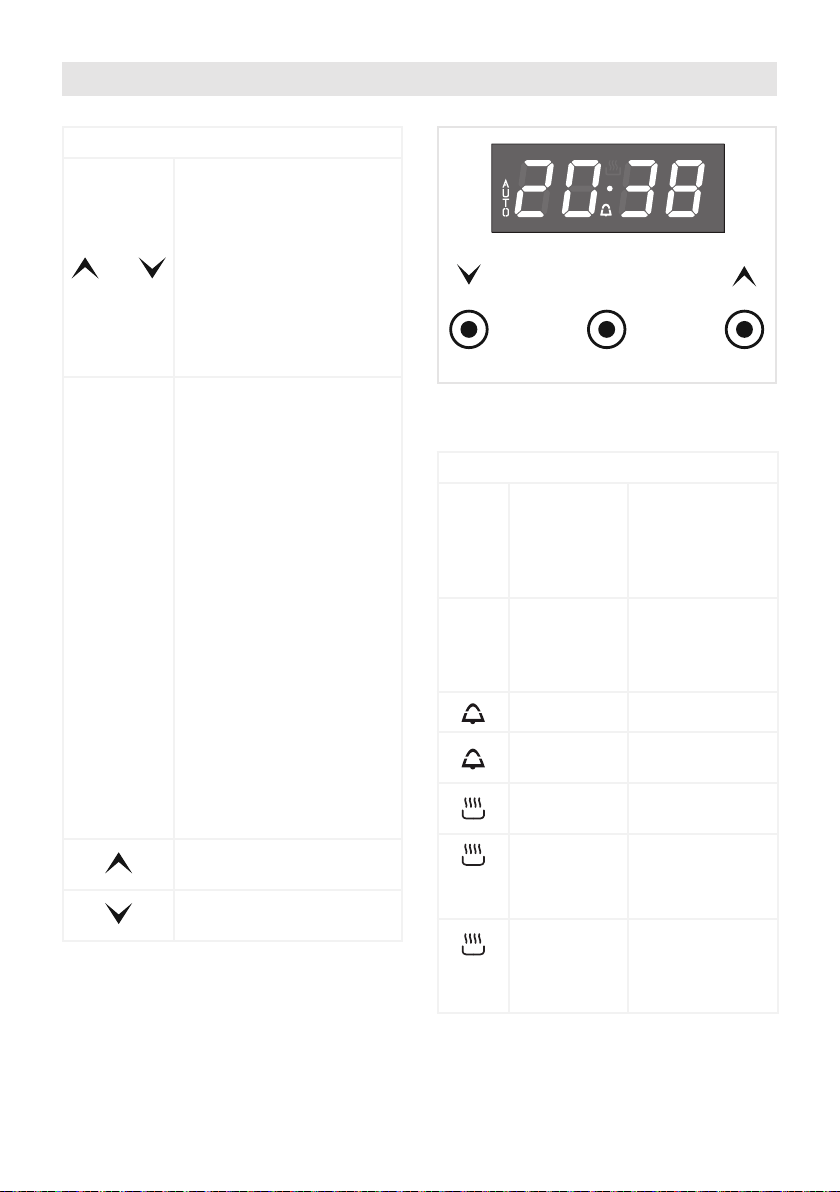
Illuminated symbols:
AUTO ashing
Automatic coo-
king completed,
oven in automa-
tic position but
not set
AUTO
steady
illumination
Oven set for au-
tomatic cooking,
cooking still not
taking place
ashing Timer being set
steady
illumination
Timer in opera-
tion
steady
illumination
Oven set for ma-
nual cooking
and
AUTO
AUTO
ashing
Automatic coo-
king being set
and
AUTO
steady
illumination
Oven set for au-
tomatic cooking,
cooking taking
place
Keys:
and
Touched simultaneously
(for more than 2 seconds):
■ setting the clock;
■ setting the timer vo-
lume (by touching
once, along with the
“MODE” key);
■ to cancel automatic
cooking at any time.
MODE
Function selection (tou-
ched for more than 2 se-
conds):
■ setting the clock (only
after rst connection
or after a power fai-
lure);
■ timer;
■ automatic cooking
“dur” (duration) - how
long the food will take
to cook (by touching
the “MODE” key
again);
■ automatic cooking
“End” - the time you
would like the oven
turns off (by touching
the “MODE” key two
more times).
Increases the number
shown on the display
Decreases the number
shown on the display
MODE
Figure 22
CLOCK AND TIMER WITH “TOUCH CONTROL” KEYS
27
“TOUCH-CONTROL” KEYS
The “touch-control” keys shall be operated by the ngers (just by touching the key).
When using touch controls it is best to use the ball of your nger rather than the tip.
The keys are automatically deactivated:
■ 8 seconds after the last selection; the deactivation is indicated by an acoustic signal
(“beep”).
To reactivate just touch the “ MODE ” key or the “
” and “ ” keys (simultaneously)
for more than 2 seconds.
SETTING THE CLOCK
When rst connected, or after a power failure, the digits and “ AUTO ” will shown on the
display.
To set the clock, touch the “ MODE ” key, for more than 2 seconds, and then the “
” or
“
” keys.
Important: the oven does not operate, in manual cooking, without rst having set the clock.
To set the clock, with the appliance already connected, touch the “
” and “ ” keys
simultaneously (for more than 2 seconds), then “
” or “ ” keys.
Important:
■ changing the time will delete any automatic program;
■ after setting the clock, the oven starts to operate in the selected function (manual co-
oking). The “
” symbol is steady illuminated.
USING THE TIMER
You can use the timer at any time, even when the oven is not in use.
The timer does not turn the oven off.
The timer can be set for up to 23 hours and 59 minutes.
■ To set the timer, touch the “ MODE ” key for more than 2 seconds (the “
” symbol
ashes), than the “
” or “ ” keys.
■ After about 8 seconds an acoustic signal (“beep”) will sound conrming the regulation
(“
” symbol steady illuminated).
■ To check the remaining time touch the “ MODE ” key for more than 2 seconds. If the
remaining time is more than a minute the display will show hours and minutes; if less
than a minute the display will show seconds.
■ When the time is up, the timer will beep. Touch the “ MODE ” key , for more then 2
seconds, to turn it off; or press the “
” or “ ” key to stop the beep and than the
“ MODE ” key, for more than 2 seconds, to deactivate the “
” symbol ashing on
the display.
■ Turn off the oven manually (function and thermostat knobs in the off position) if the
manual cooking has been completed.
28
SETTING THE TIMER VOLUME
You can select from three volume levels.
■ Touch the “
” and “ ” keys simultaneously for more than 2 seconds.
■ Touch the “ MODE ” key; you can read on the display the current timer volume (“ton1”,
“ton2” or “ton3”).
■ Touch the “
” key to listen or change the timer volume.
■ Timer volume activated: the last displayed.
■ After about 8 seconds an acoustic signal (“beep”) will sound conrming the volume
setting; then the time of day will be displayed.
AUTOMATIC COOKING
Use automatic cooking to automatically turn the oven on, cook, and then turn the oven off.
1. Check the clock shows the correct time.
2. Select the function and temperature (function and temperature knobs). The oven will
come on.
3. Decide how long the food will take to cook, allowing time for preheating if necessary.
4. Touch the “ MODE ” key for more than 2 seconds and then touch again. “dur” will show
(duration). Using the “
” and “ ” keys, set the cooking time.
5. Decide the time you would like the oven to turn off; touch the “ MODE ” key for more
than 2 seconds and then touch it two times again. “End” will show. Using the “
”
and “
” keys, set the cooking time.
Note: while “dur” is displayed you can change to “End” just by touching one time the “
MODE ” key (within 8 seconds from the last selection).
If there is time to wait before cooking starts, the current time of day and “AUTO” will show
in the clock display. The oven will switch off but is now set for automatic cooking.
If you are already at home to turn the oven on and only want the oven to turn off automa-
tically, start cooking as normal, then follow step 4 or step 5 to set a time to stop the oven.
When automatic cooking starts, “
” will be displayed and the oven will turn on.
■ To see the remaining cook time, follow step 4 up to display “dur” (duration).
■ To see the set stop time, follow step 5 up to display “End”.
■ To cancel automatic cooking at any time, touch the “
” and “ ” keys simulta-
neously (for more than 2 seconds) and turn the temperature and function knobs to the
off position.
When the stop time is reached, the oven will turn off, the timer will beep and “AUTO” will
ash:
■ Touch any key to stop the beeping.
■ Touch the “ MODE ” key, for more than 2 seconds, to return the oven to the manual
mode (“
” symbol steady illuminated on the display).
■ Turn the temperature and function knobs to the off position.
Attention: after a power failure any automatic program is deleted. Turn off the oven
manually.

29
CLEANING AND MAINTENANCE
GENERAL ADVICE
■ Before you begin cleaning, you must ensure that the appliance is switched off
and disconnected from the electrical power supply.
■ It is advisable to clean when the appliance is cold and especially when cleaning the
enamelled parts.
■ Avoid leaving alkaline or acidic substances (lemon juice, vinegar, etc.) on the surfaces.
■ Avoid using cleaning products with a chlorine or acidic base.
■ Do not use a steam cleaner because the moisture can get into the appliance thus
make it unsafe.
■ Important: The use of suitable protective clothing/gloves is recommended when
handling or cleaning of this appliance.
■ Do not use harsh abrasive cleaners or sharp metal scrapers to clean the oven
door glass since they can scratch the surface, which may result in shattering of
the glass.
WARNING!
When correctly installed, your product meets all safety requirements laid down for
this type of product category. However special care should be taken around the rear
or the underneath of the appliance as these areas are not designed or intended to be
touched and may contain sharp or rough edges, that may cause injury.
ENAMELLED PARTS
All the enamelled parts must be cleaned with a sponge and soapy water or other non-
abrasive products.
Dry preferably with a microbre or soft cloth.
Acidic substances like lemon juice, tomato sauce, vinegar etc. can damage the enamel if
left too long.
STAINLESS STEEL, ALUMINIUM PARTS, PAINTED AND SILK-SCREEN PRIN-
TED SURFACES
Clean using an appropriate product.
Always dry thoroughly.
IMPORTANT: these parts must be cleaned very carefully to avoid scratching and abrasion.
You are advised to use a soft cloth and neutral soap.
CAUTION: Do not use abrasive substances or non-neutral detergents as these will
irreparably damage the surface.
GLASS CONTROL PANEL
Clean using an appropriate product. Always dry thoroughly.
Do not use harsh abrasive cleaners or sharp metal scrapers to clean the control panel sin-
ce they can scratch the surface, which may result in shattering of the glass.

30
INSIDE OF OVEN
The oven should always be cleaned after use when it has cooled down.
The cavity should be cleaned using a mild detergent solution and warm water.
Suitable proprietary chemical cleaners may be used after rst consulting with the manufac-
turers recommendations and testing a small sample of the oven cavity.
Abrasive cleaning agents or scouring pads/cloths should not be used on the cavity surface.
NOTE: The manufacturers of this appliance will accept no responsibility for damage cau-
sed by chemical or abrasive cleaning.
Do not store ammable material in the oven.
Let the oven cool down and pay special attention no to touch the hot heating ele-
ments inside the oven cavity.
ADVICE FOR USE AND MAINTENANCE OF CATALYTIC PANELS
The catalytic panels are covered with special microporous enamel which absorbs and does
away with oil and fat splashes during normal baking over 200°C.
If, after cooking very fatty foods, the panels remain dirty, operate the oven “idling” on max
temperature for about 30 minutes.
These panels do not require to be cleaned, however it is advised to periodically remove
them from the oven (at least the side panels) and to wash them with tepid soapy water and
then wipe off with a soft cloth.
DO NOT CLEAN OR WASH THEM WITH ABRASIVE PRODUCTS OR WITH PRODUCTS
CONTAINING ACIDS OR ALKALIS.
The side panels are reversible and when the catalytic microporous enamel degrades, they
can be turned to the other side.
GRILL HEATING ELEMENT
■ The heating element is self-cleaning and does not require maintenance. The grill is
secured to the rear wall of the oven on a hinge system that allows it to be lowered to
allow proper access when cleaning the oven ceiling (gs. 12, 13 at page 16).
GREASE FILTER
■ Clean the lter after any cooking! The grease lter can be removed for cleaning and
should be washed regularly in hot soapy water (g. 11 at page 15).
■ Always dry the lter properly before tting it back into the oven.
31
Figure 23
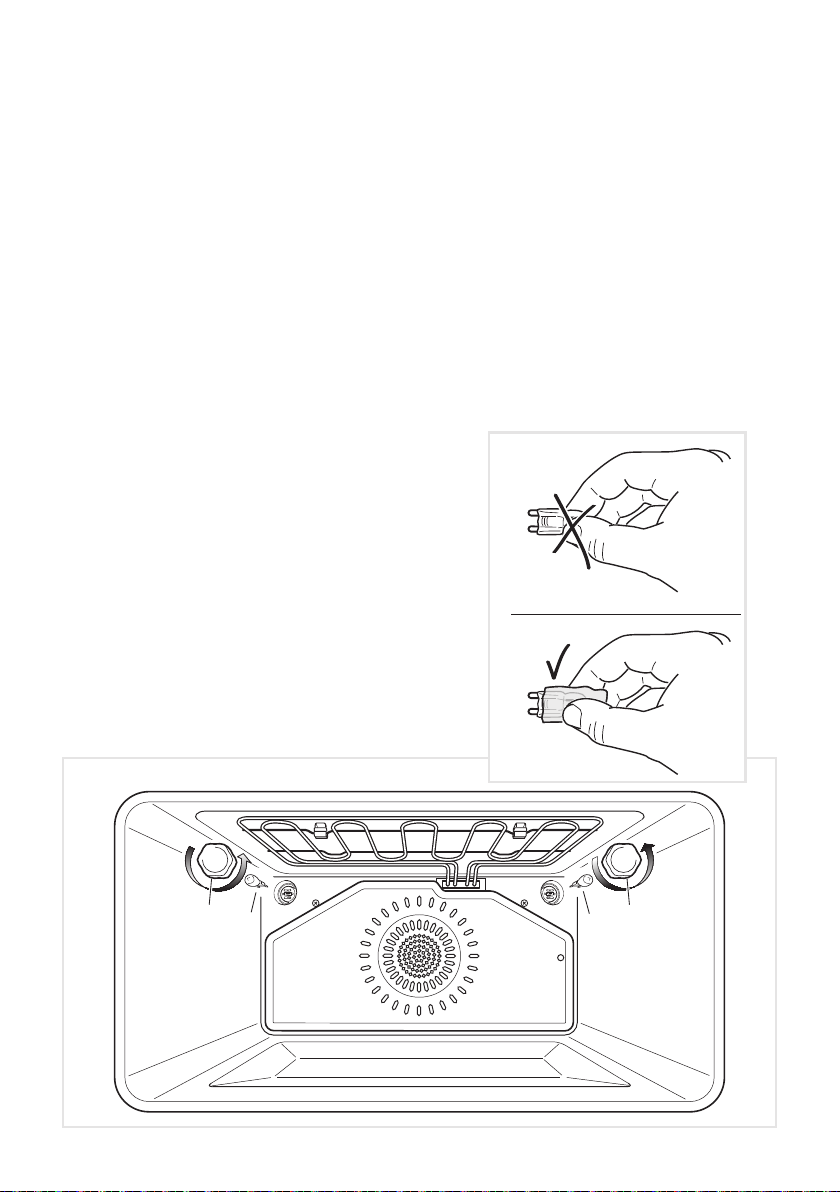
REPLACING THE OVEN LIGHTS
WARNING: Ensure the appliance is switched off before replacing the lamp to avoid
the possibility of electric shock.
■ Let the oven cavity and the heating elements to cool down.
■ Switch off the electrical supply.
■ Remove the protective cover “A” (g. 23).
■ Replace the halogen lamp “B” with a new one suitable for high temperatures having
the following specications 220-240V or 230-240V, 50Hz and same power (check watt
power as stamped in the bulb itself) of the replaced lamp.
IMPORTANT WARNING: Never replace the bulb with bare hands; contamination
from your ngers can cause premature failure.
Always use a clean cloth or gloves.
■ Ret the protective cover “A”.
NOTE: Oven bulb replacement is not covered by your guarantee.
B B
A
A
WRONG
CORRECT

32
REMOVING AND REPLACING THE INNER DOOR GLASS PANE FOR CLEANING
If you wish to clean the inner glass of the door, make sure you follow the precautions and
instructions very carefully.
Replacing the glass pane and the door incorrectly may result in damage to the appliance
and may void your warranty.
IMPORTANT!
■ Take care, the oven door is heavy. If you have any doubts, do not attempt to remove
the door.
■ Make sure the oven and all its parts have cooled down. Do not attempt to handle the
parts of a hot oven.
■ Take extreme care when handling the glass pane. Avoid the edges of the glass bum-
ping against any surface. This may result in the glass shattering.
■ CAUTION:
Do not use harsh abrasive cleaners or sharp metal scrapers to clean the oven door
glass since they can scratch the surface, which may result in shattering of the glass.
■ If you notice any sign of damage on any of the glass panes (such as chipping, or
cracks), do not use the oven. Call your Authorised Service Centre or Customer Care.
■ Make sure you replace the glass pane correctly. Do not use the oven without glass
pane correctly in place.
■ If the glass pane feels difcult to remove or replace, do not force it. Call your Authori-
sed Repairer or Customer Care for help.
Note: service visits providing assistance with using or maintaining the oven are not
covered by your warranty.
33
B
A
C
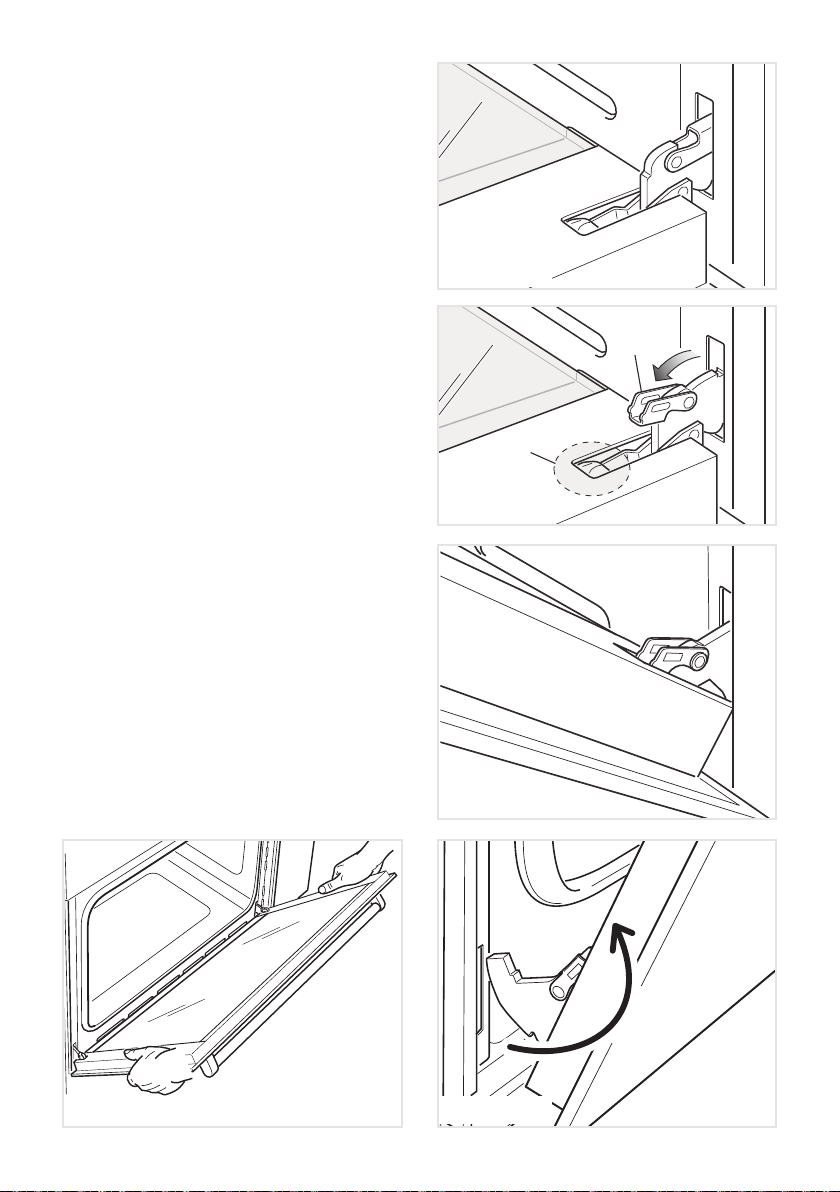
REMOVING THE OVEN DOOR
The oven door can easily be removed as
follows:
■ Open the door to the full extent (g.
25).
■ Open the lever “A” completely on the
left and right hinges (g. 26).
■ Hold the door as shown in g. 24.
■ Gently close the door until left and
right hinge levers “A” are hooked to
part “B” of the door (gs. 26, 27).
■ Withdraw the hinge hooks from their
location following arrow “C” (g. 28).
■ Rest the door on a soft surface.
■ To replace the door, repeat the above
steps in reverse order.
Figure 25
Figure 26
Figure 27
Figure 28Figure 24
34
REMOVING THE INNER PANE OF GLASS
The oven door is tted with no. 2 panes:
■ no. 1 outside;
■ no. 1 inner.
To clean all panes on both sides it is necessary to remove the inner pane as follows:
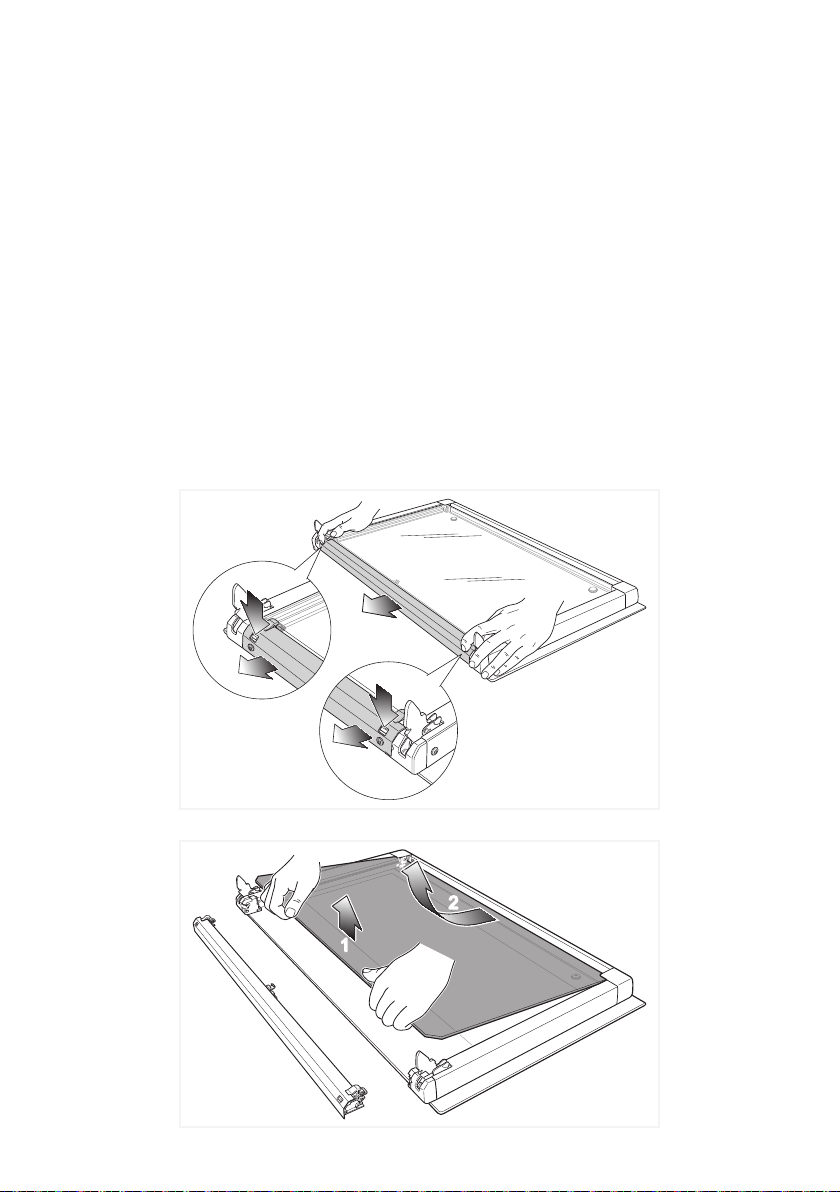
REMOVE THE INNER GLASS RETAINER
1. Remove the oven door and place it on a soft surface.
IMPORTANT: The door shall be placed horizontally as per gure 29.
2. Press down on both tabs to release the glass retainer.
3. Remove the glass retainer.
REMOVE THE INNER GLASS PANE
Lift and remove the inner pane slightly, as shown in the gure 30.
2
1
2
1
2
1
2
1
2
Figure 29
Figure 30
35
1
2
1
2
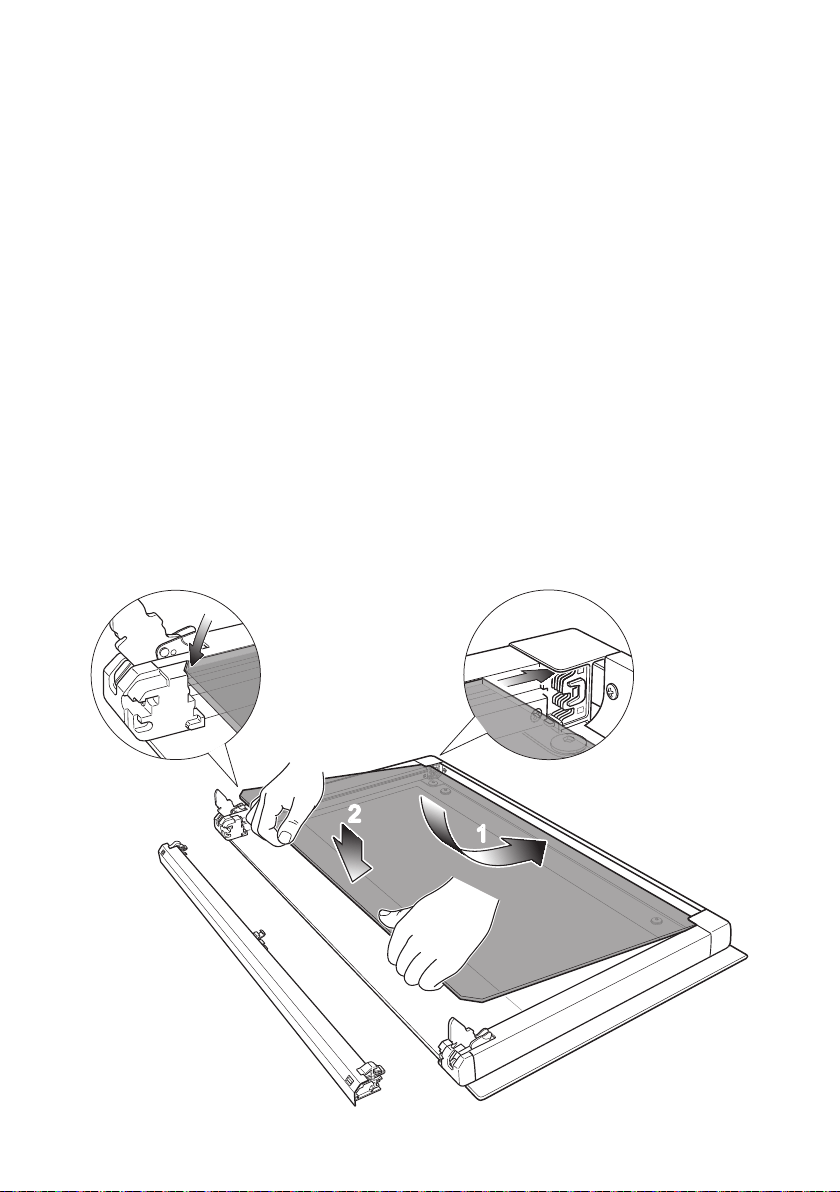
AFTER CLEANING, REPLACE THE INNER GLASS PANE
When replacing the inner glass pane, make sure that:
■ You replace the pane correctly, as shown. The pane must be in the position described
below in order to t into the door and to ensure that the oven operates safely and
correctly.
■ You take extra care not to bump the edges of the glass against any object or surface.
■ You do not force the pane into place. If you are experiencing difculties replacing the
pane, remove it and start the process again from the beginning. If this still does not
help, call Customer Care.
■ Check that you are holding the pane the correct way. You should be able to read the
wording on it as it faces you.
1. Insert the inner glass pane in the uppermost pair of grooves and push it slightly (arrow
1 in gure 31).
2. Gently lower into place (arrow 2 in gure 31).
Figure 31
36
1
2
M
M
M
2
1
click
click
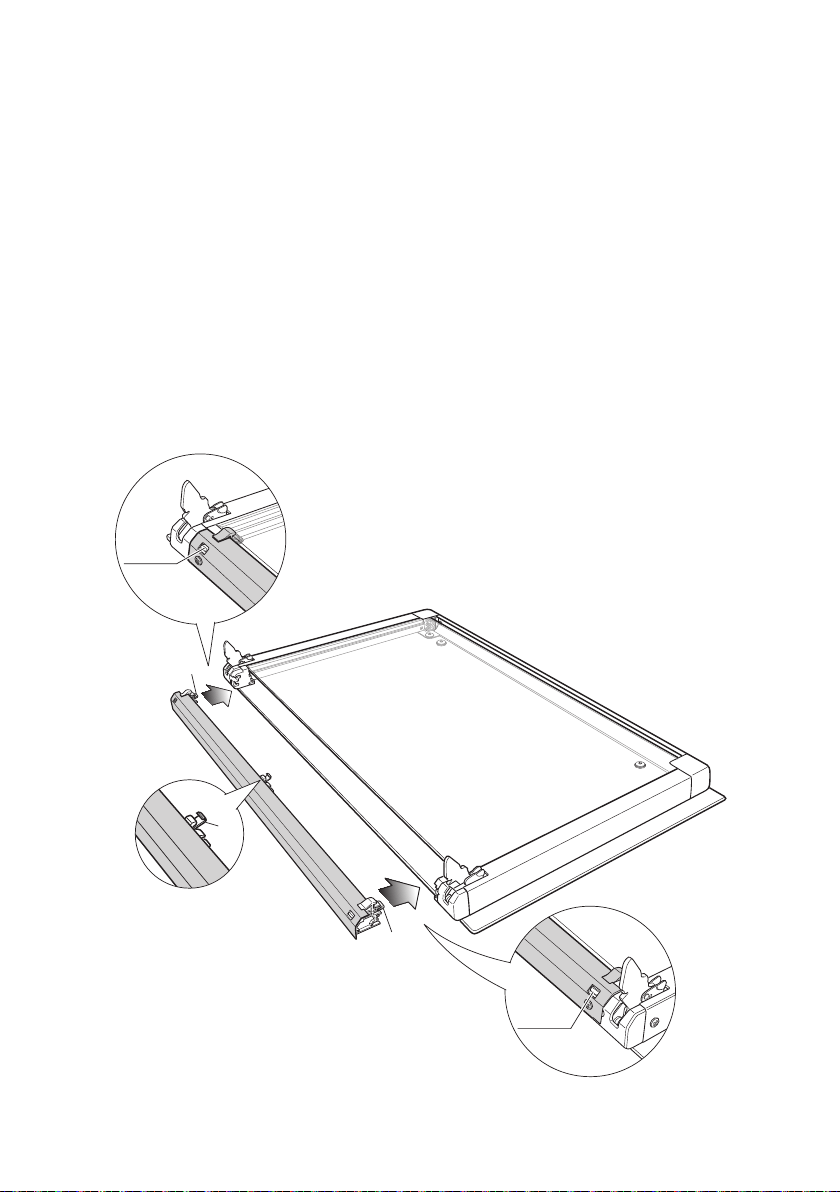
REPLACE THE GLASS RETAINER
1. Position the glass retainer, as shown in the gure 32. It should sit on the bottom edge
of the outer glass. Check that the clamps “M
”
are not deformed or damaged.
2. Gently push the glass retainer back into place. You should be able to hear the tabs on
both sides click as they lock the glass retainer in.
Important!
Make sure the glass retainer is correctly and rmly in place and that the glass pane
is secure.
Figure 32
37
A
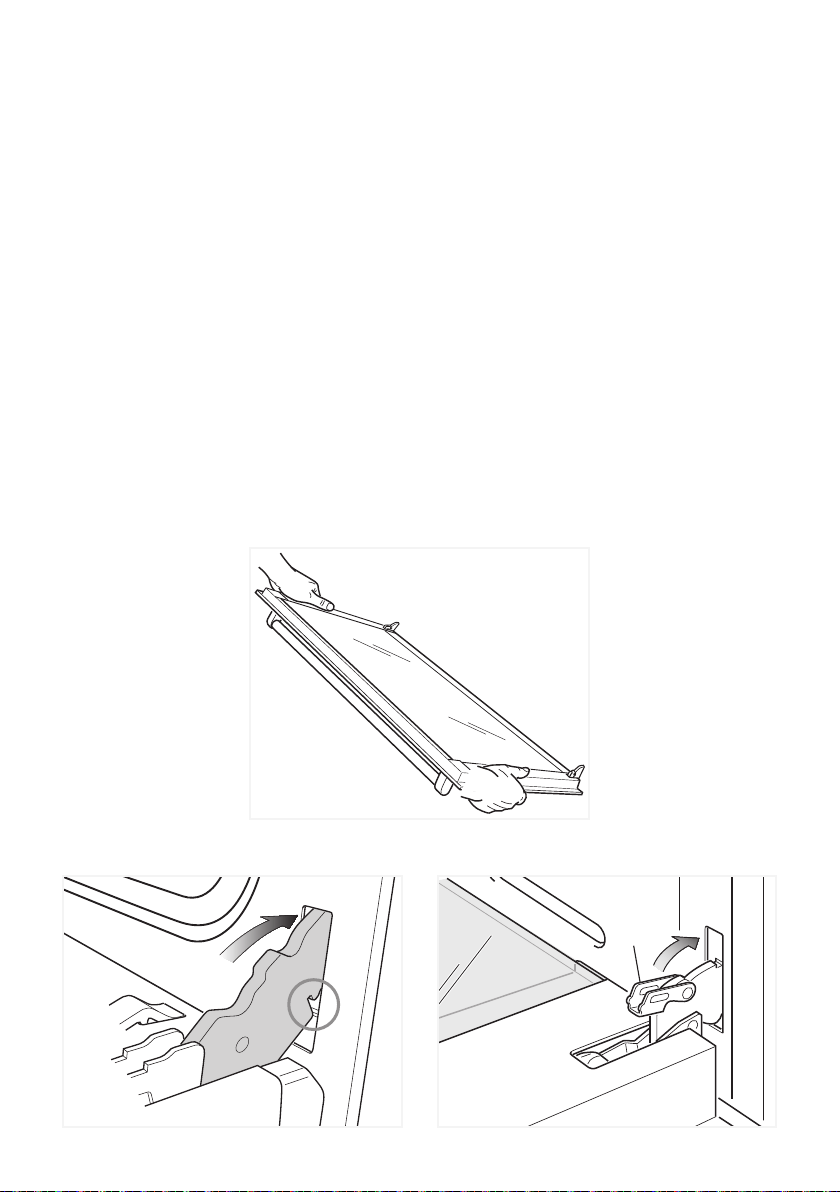
REFIT THE DOOR
1. Hold the door rmly (g. 33).
2. Insert the hinge tongues into the slots, making sure that the groove drops into place
as shown in the gure 34.
3. Open the door to its full extent.
4. Fully close the levers “A” on the left and right hinges, as shown in the gure 35.
5. Close the door and check that it is properly in place.
Figure 33
Figure 34 Figure 35

38
SERVICE AND MAINTENANCE
SERVICING THE APPLIANCE
Service may be obtained by contacting our Customer Service Centre to locate the nearest
Authorised Delonghi Service Agent:
Servicing shall be carried out only by authorized personnel.
The appliance shall not be modied.
TROUBLESHOOTING
If you experience a problem with your oven, check the following points before calling our
Customer Service Centre for assistance.
1. The power is switched on.
2. The controls are switched on.
3. None semi-automatic or automatic cooking program has been selected.
4. Both the fuse and the mains fuse are intact.
Should you still require assistance please contact our Customer Service Centre for your
nearest Authorised Delonghi Service Agent.

39

www.delonghi.com.au
www.delonghi.co.nz
Cod. 1104188 - ß1
Descriptions and illustrations in this booklet are given as simply indicative.
The manufacturer reserves the right, considering the characteristics of the
models described here, at any time and without notice, to make eventual necessary
modifications for their construction or for commercial needs.