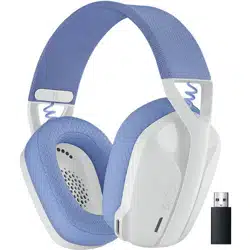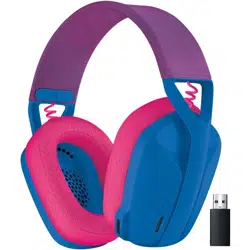
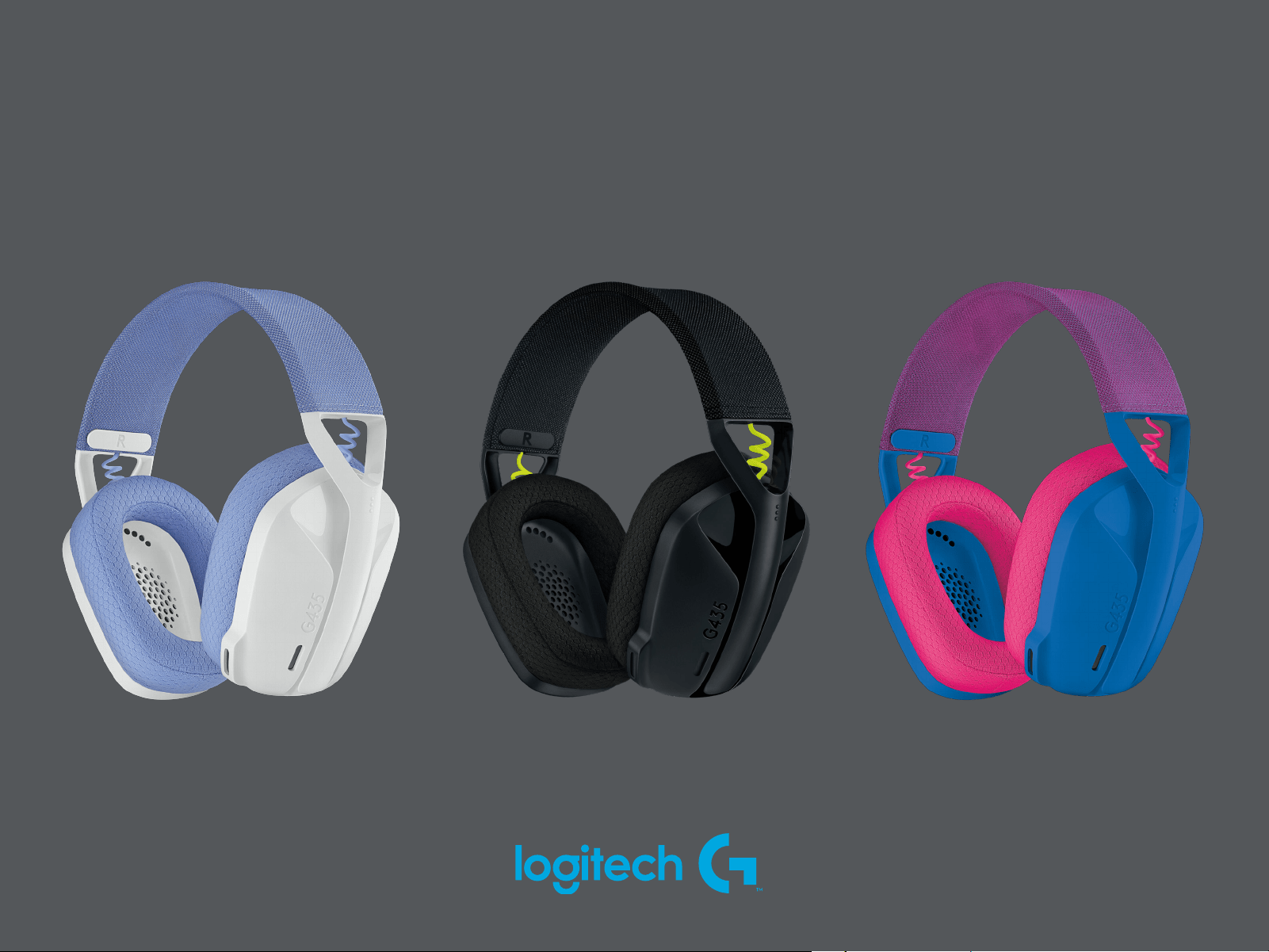
G435
SETUP GUIDE
|
GUIDE D’INSTALLATION

3 ENGLISH
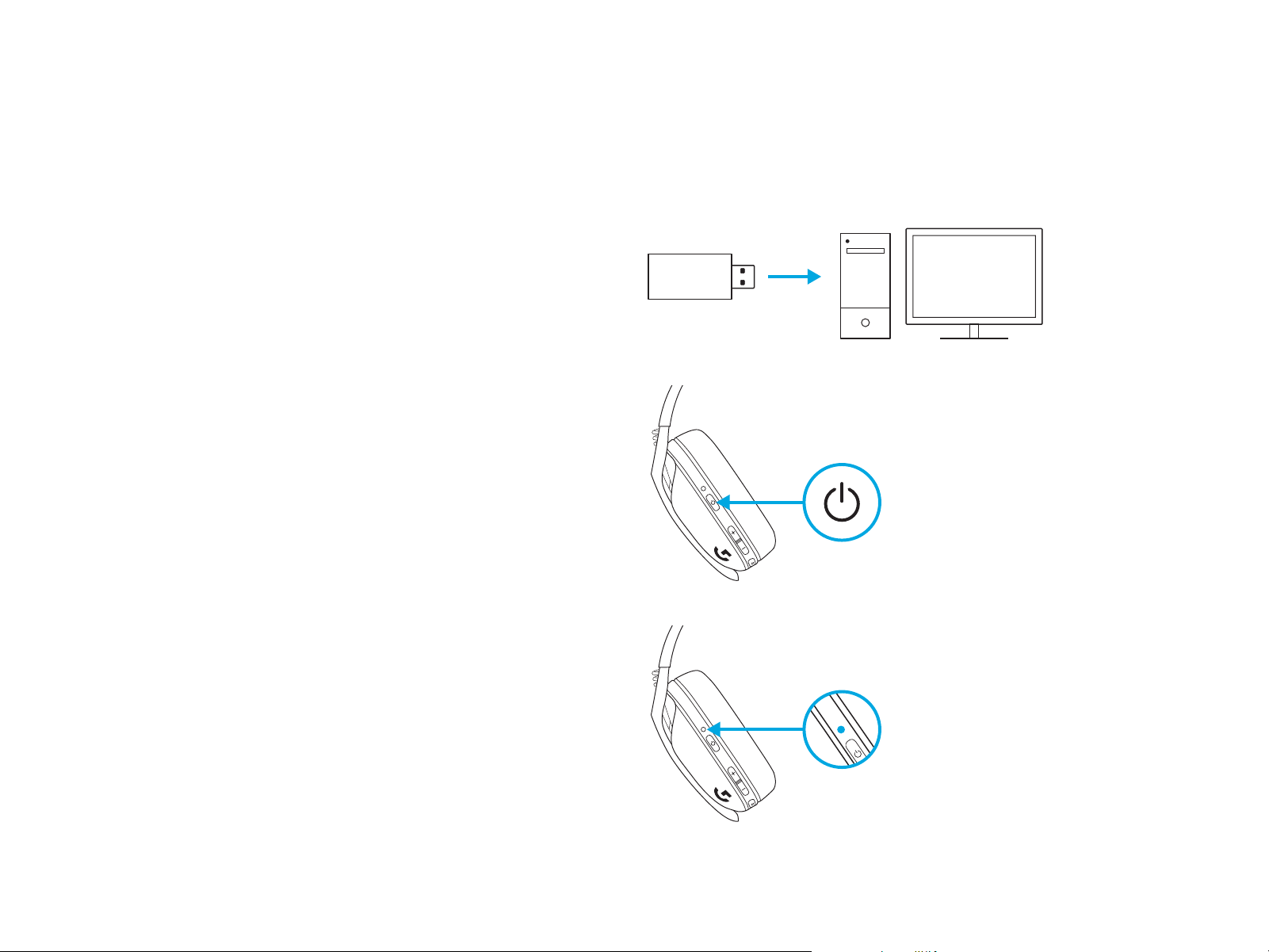
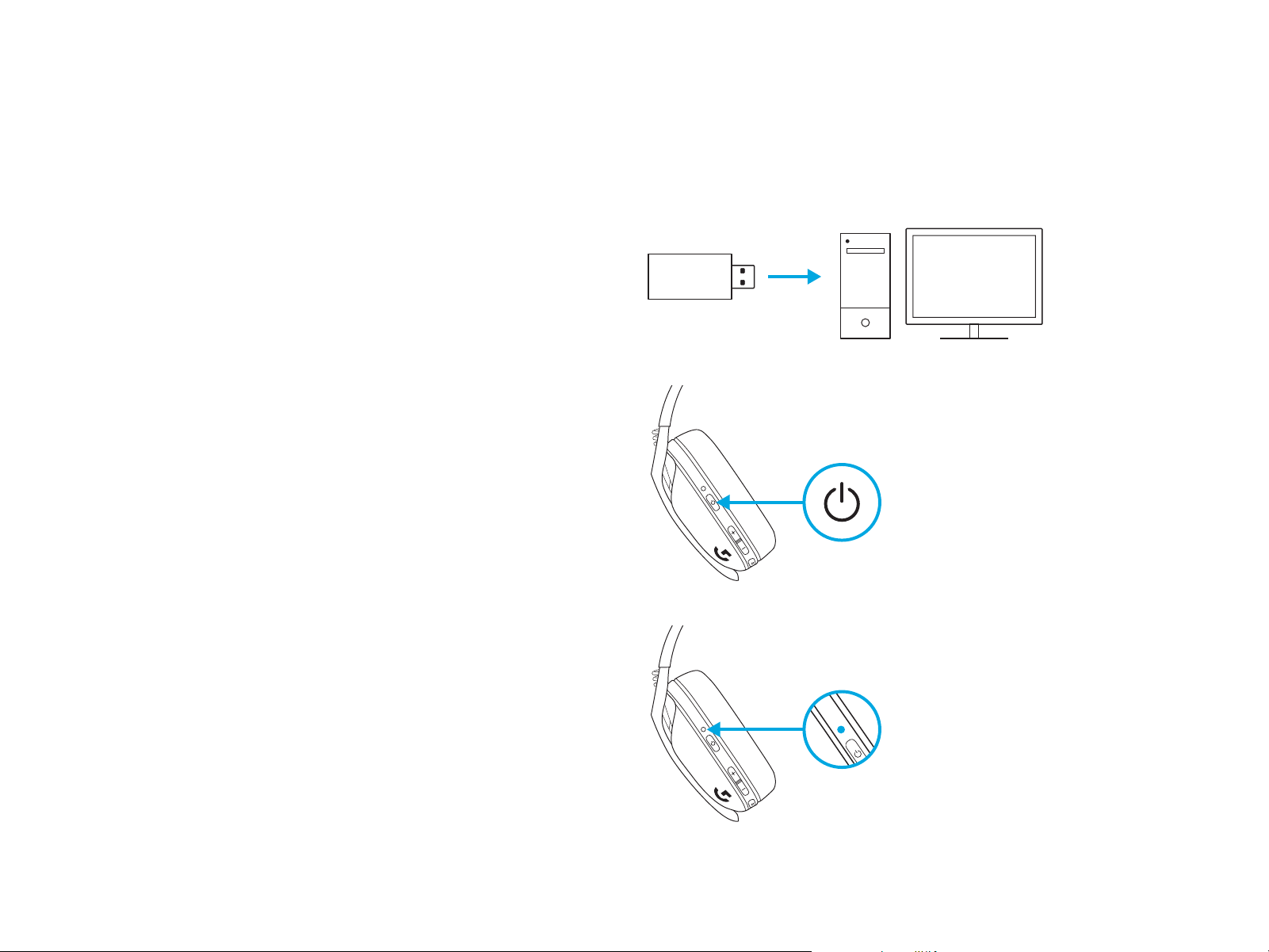
LIGHTSPEED CONNECTION
Connect to your PC, Mac, PlayStation 5 or 4 with
LIGHTSPEEDWireless Technology
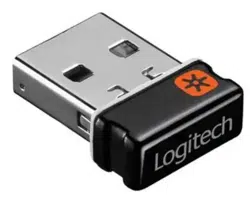
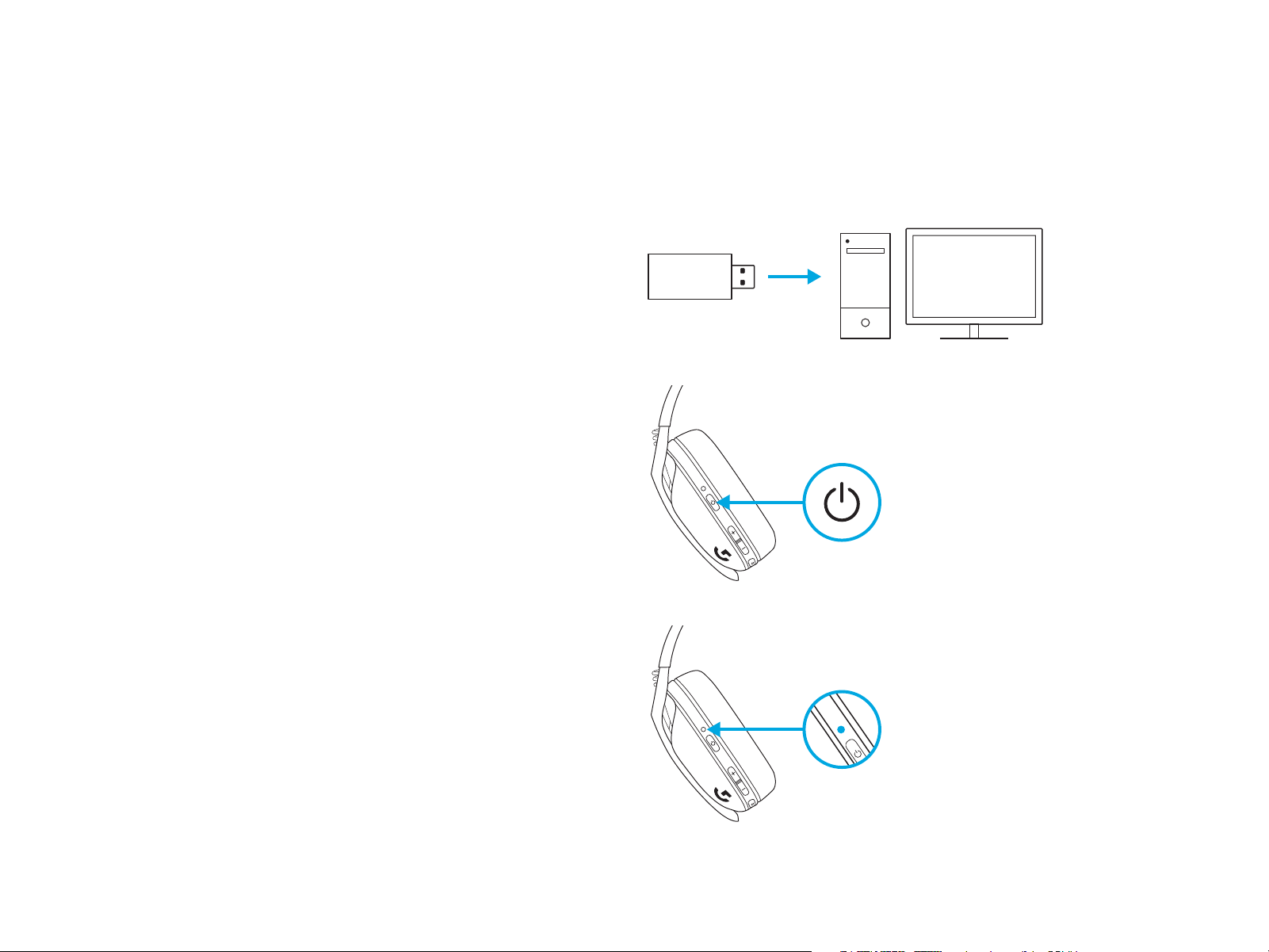
– Insert receiver into the USB port of your device.
– Press the Power button for minimum 1.5 sec.
– The LED turns cyan once connected.
1.5 sec.
4 ENGLISH
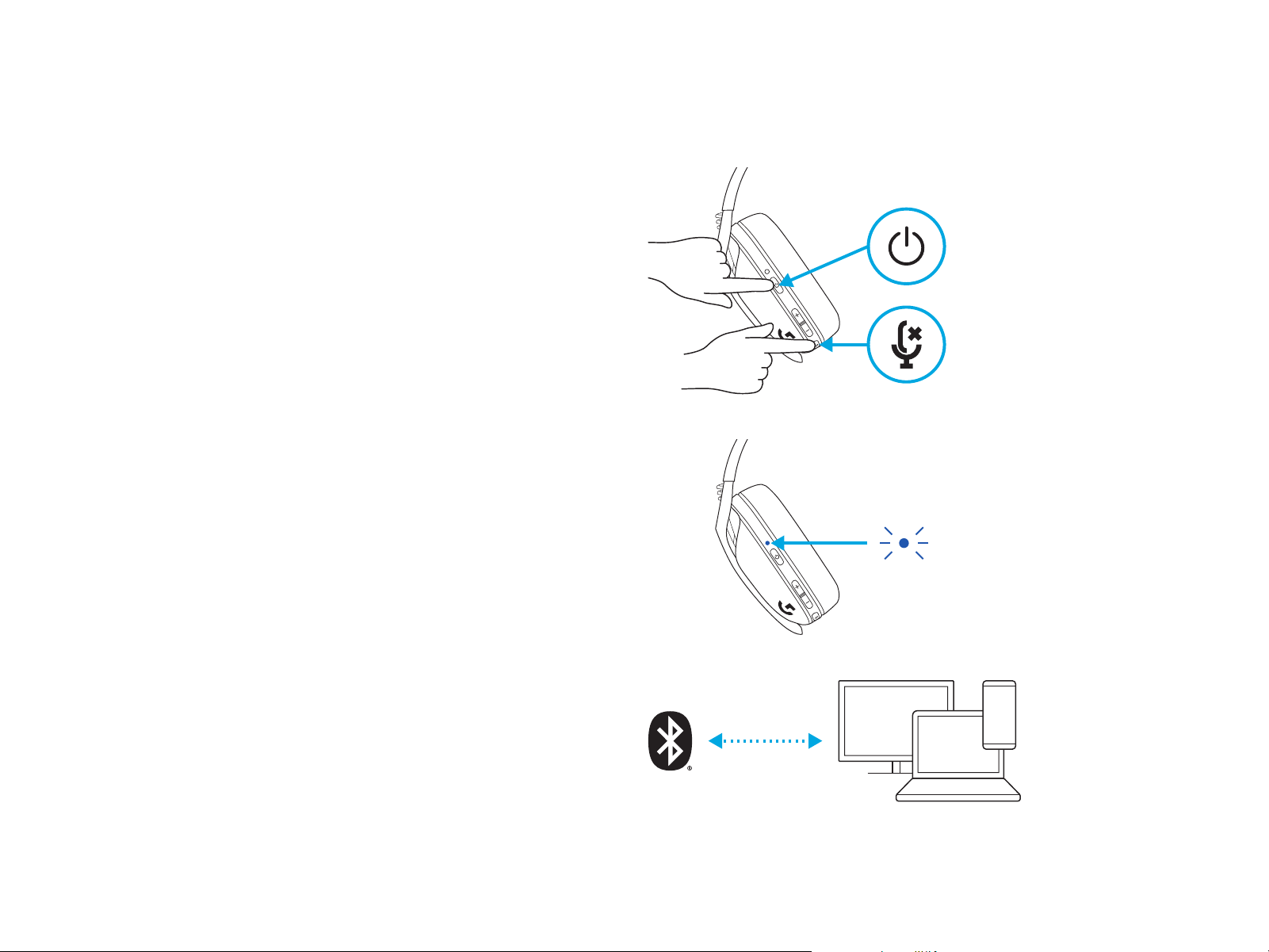
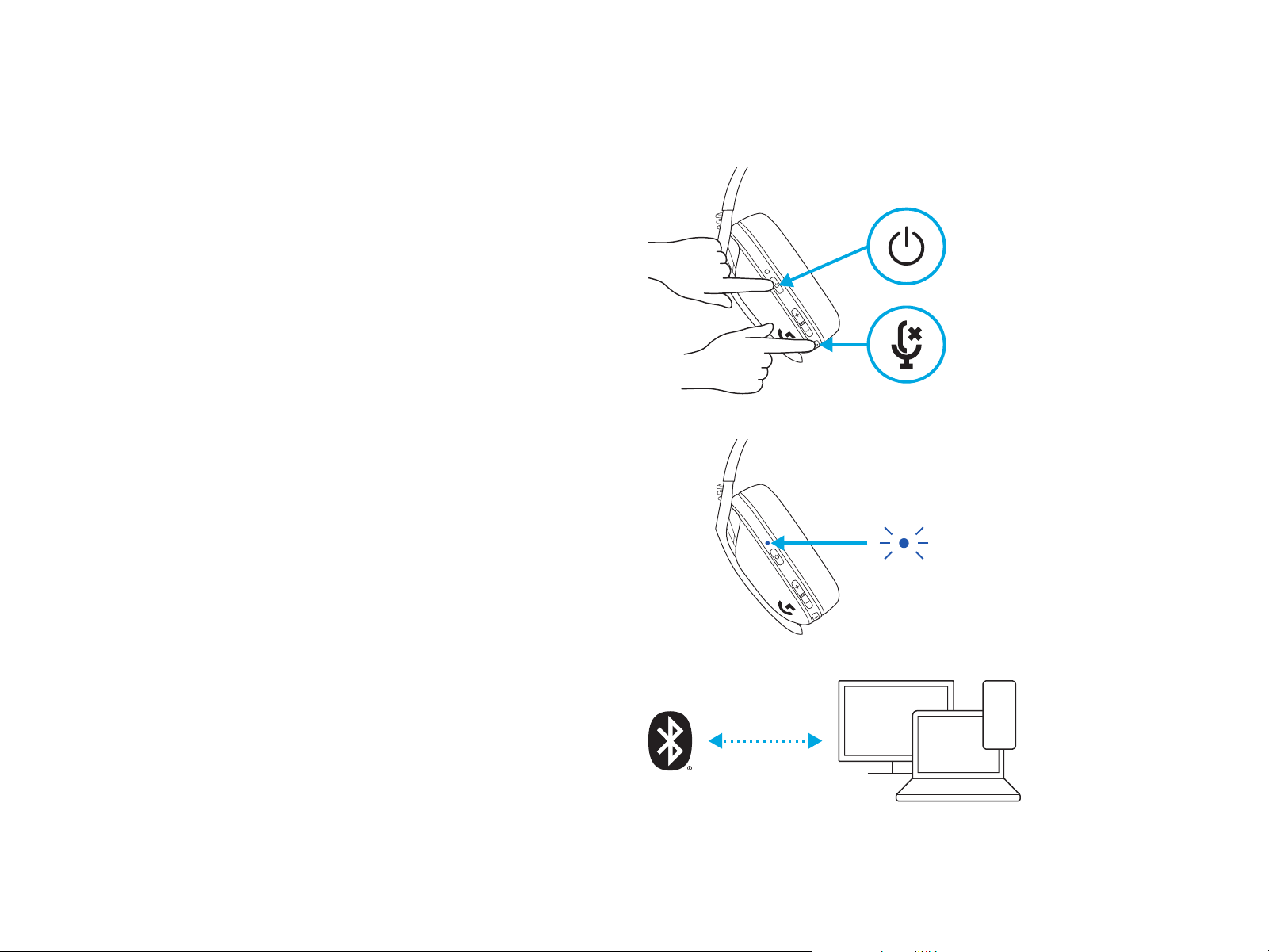
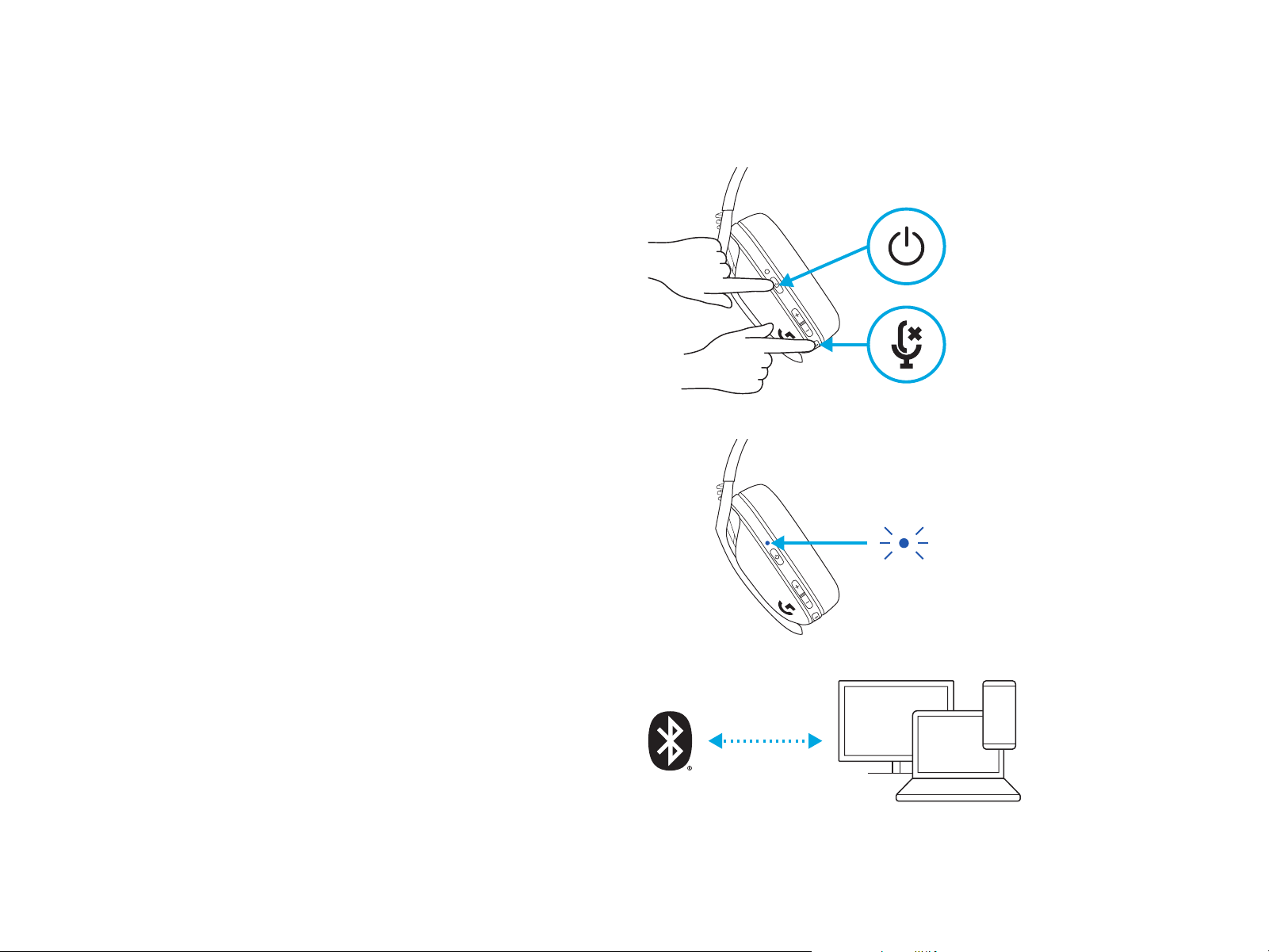
BLUETOOTH CONNECTION
– Press 3 seconds or longer of the Power
andMutebutton.
– LED will ash blue as it enters pairing mode.
3 sec.
– Connect to your preferred device.
– G435 can connect to a single bluetooth device
atatime.
5 ENGLISH
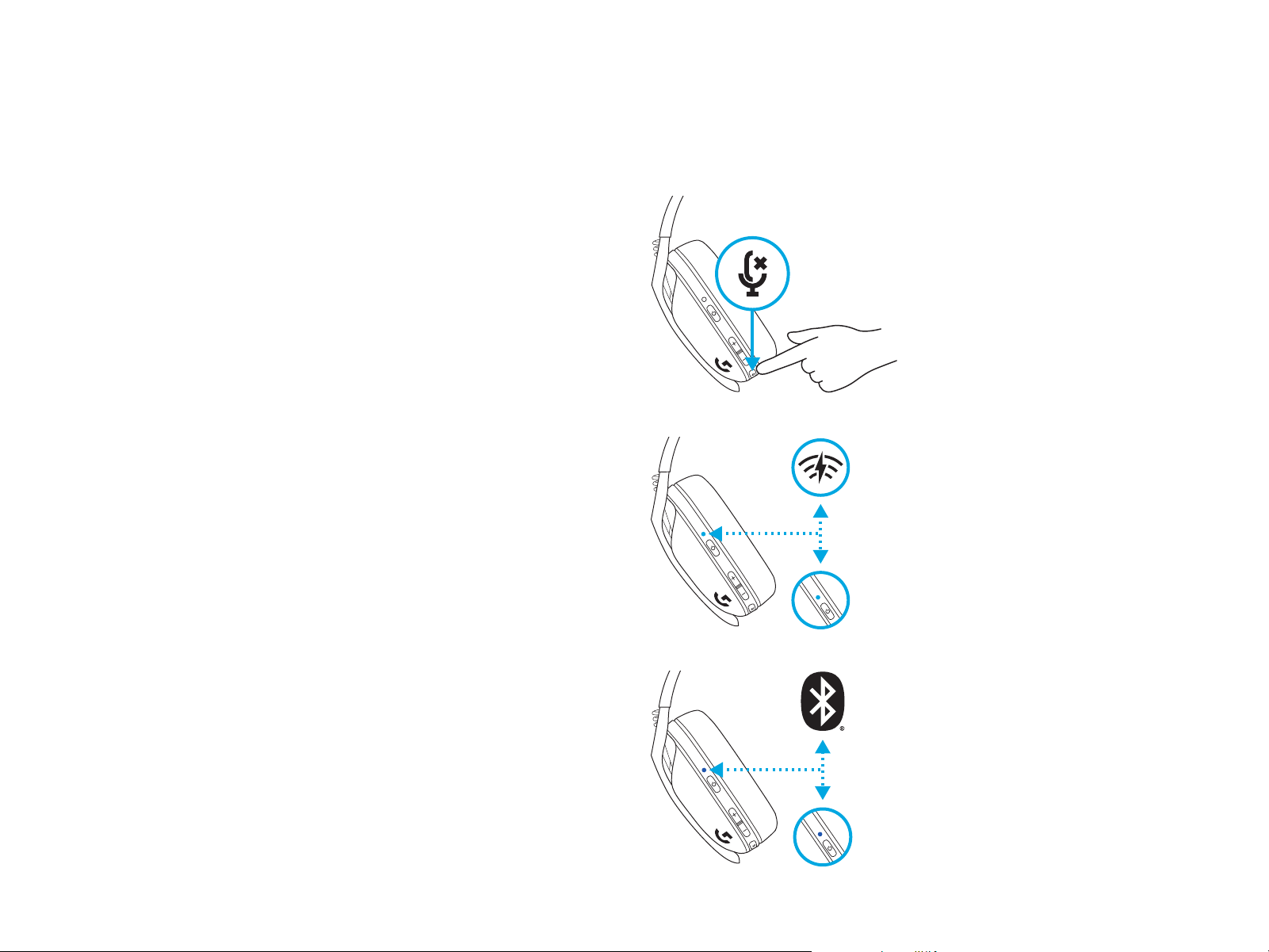
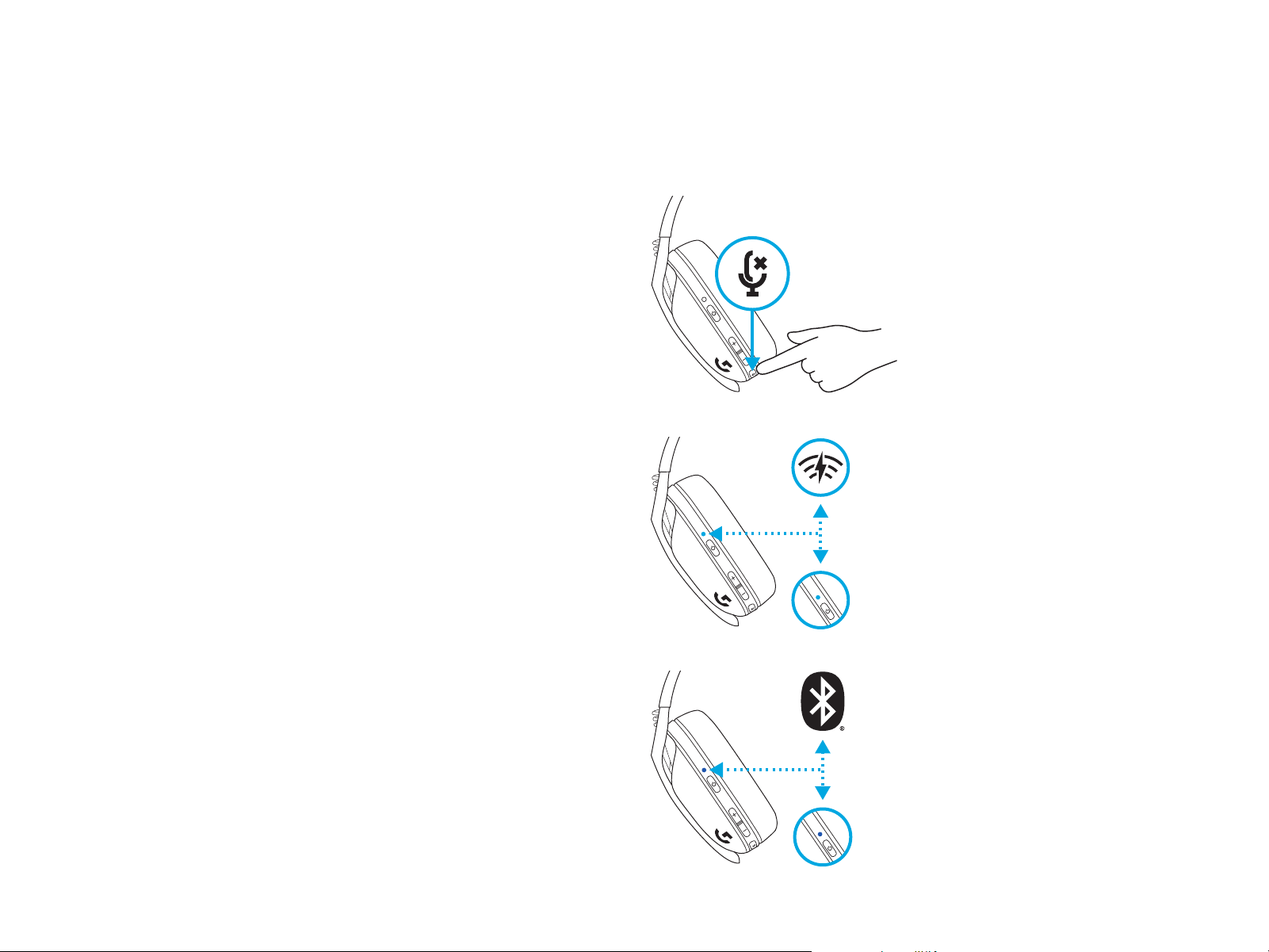
5 sec.
5 sec.
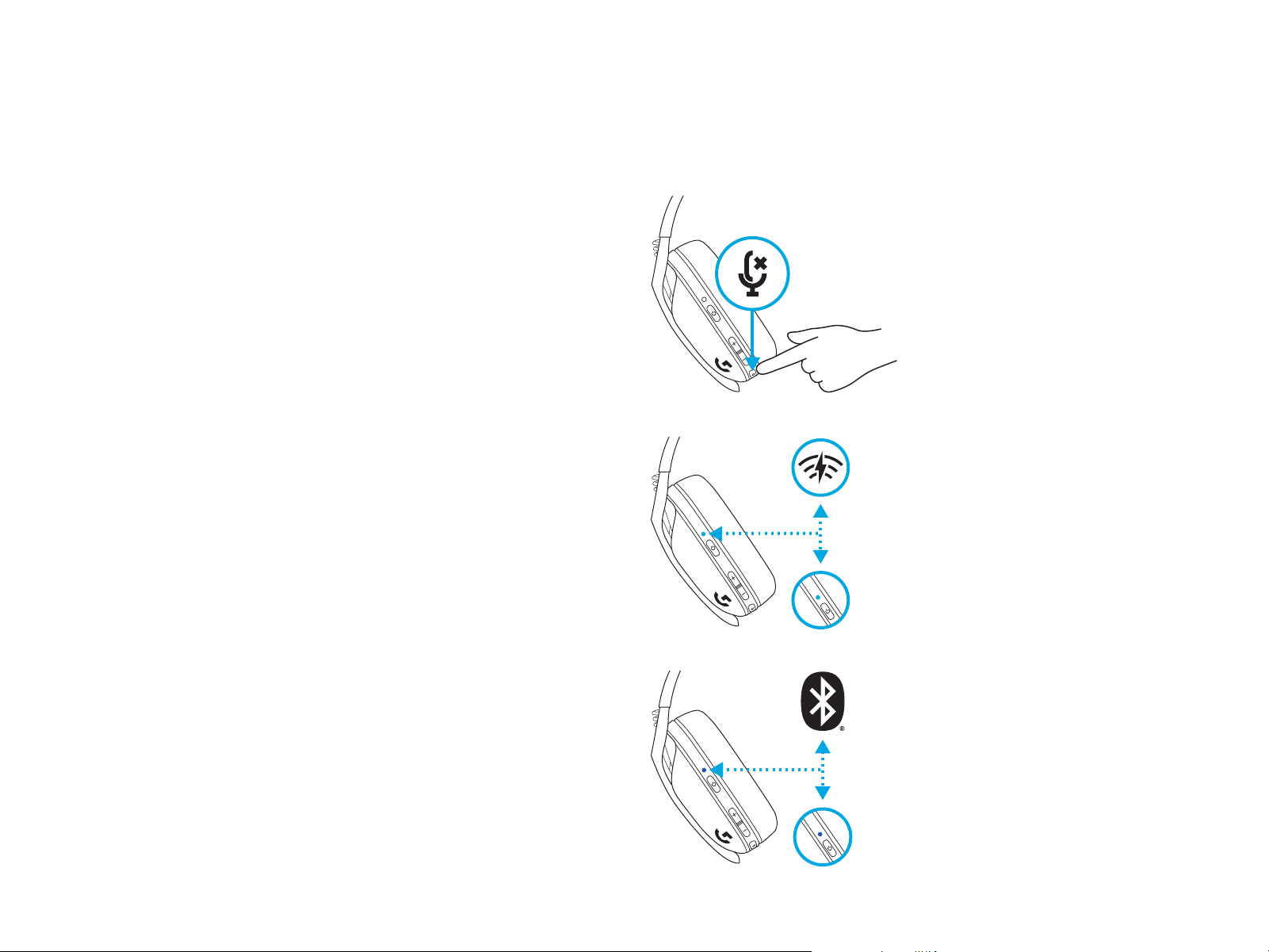
– Press 3 seconds or longer of the Mute button.
– Switch to LIGHTSPEED, LED will light cyan
for5seconds.
– Switch to Bluetooth, LED will light blue
for5seconds.
3 sec.
SWITCH BETWEEN LIGHTSPEED
ANDBLUETOOTH
6 ENGLISH
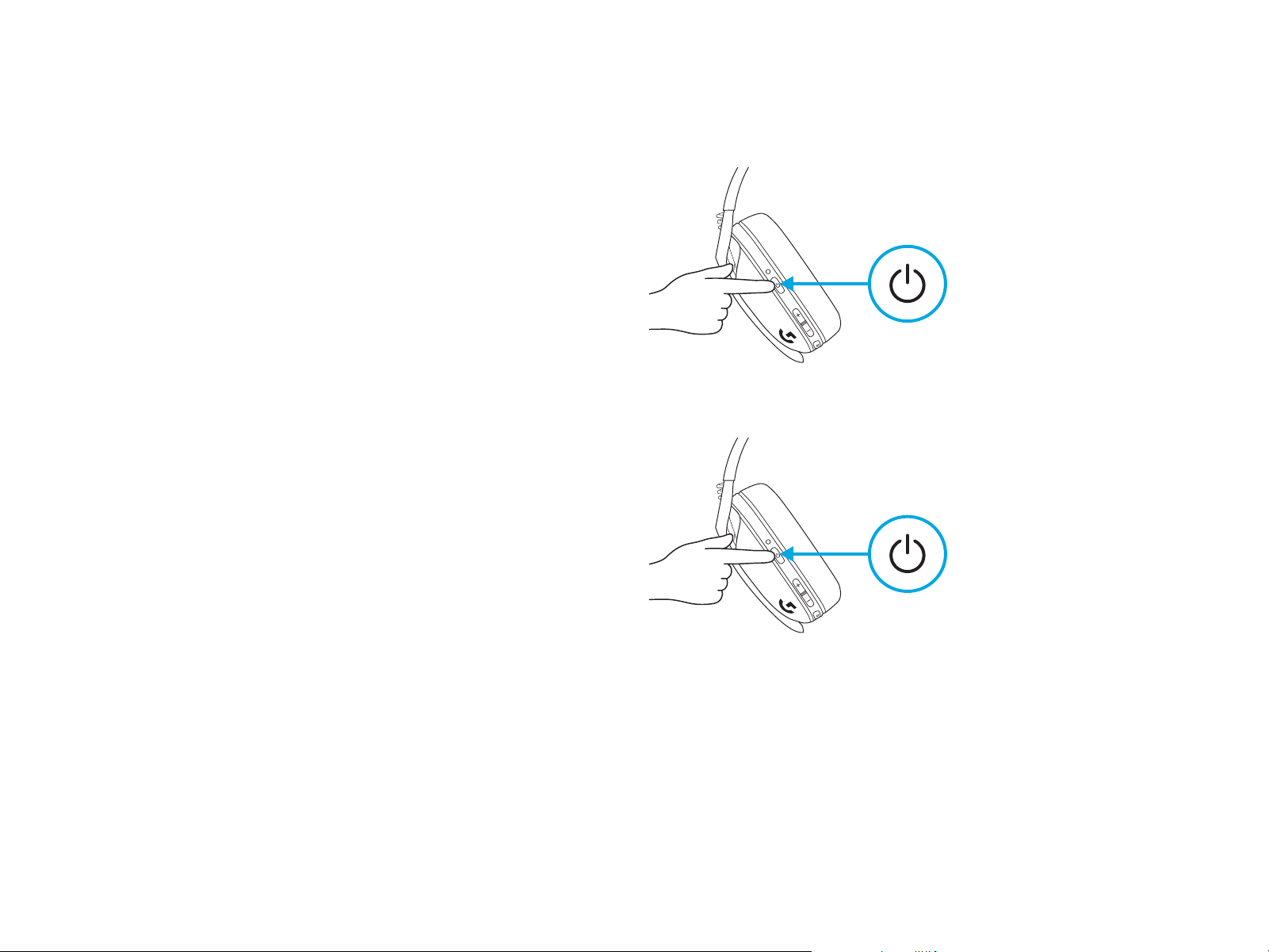
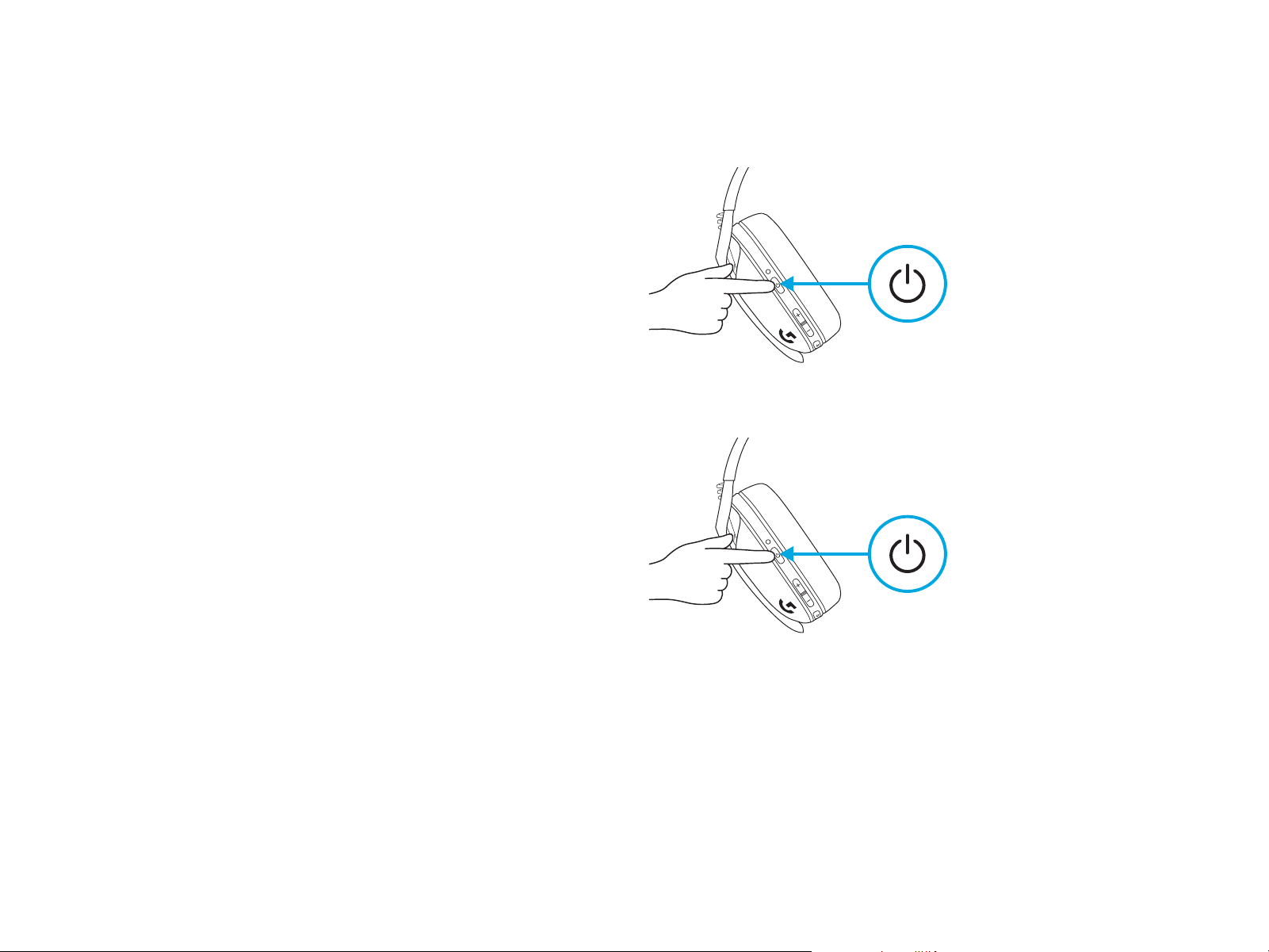
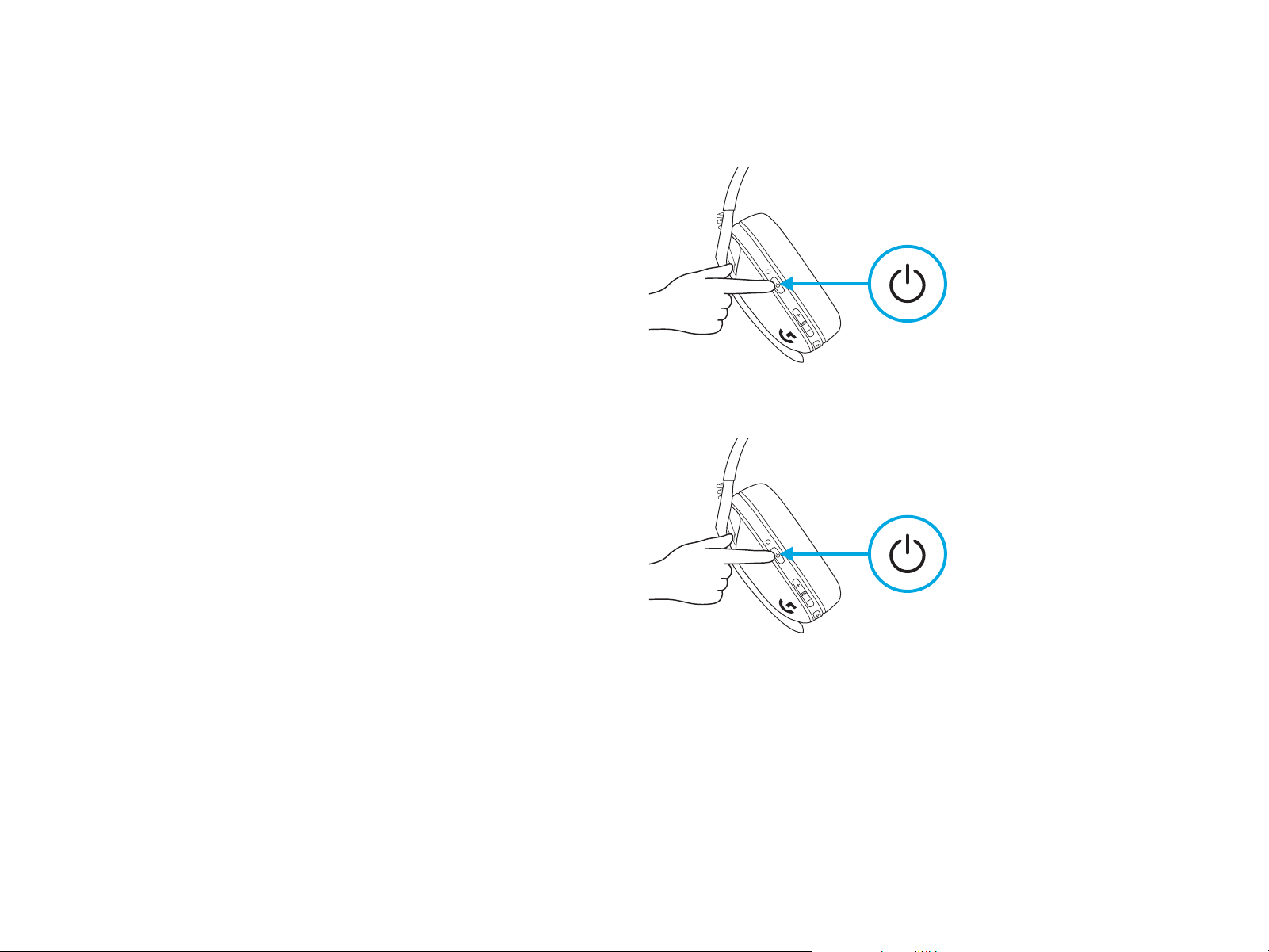
Power ON
– Press the Power button for 1.5 seconds
whentheheadset is OFF.
Power OFF
– Press the Power button for 3 seconds
whentheheadset is ON.
Auto Shuto
– After 30 minutes of inactivity.
1.5 sec.
3 sec.
POWER ON AND OFF
7 ENGLISH
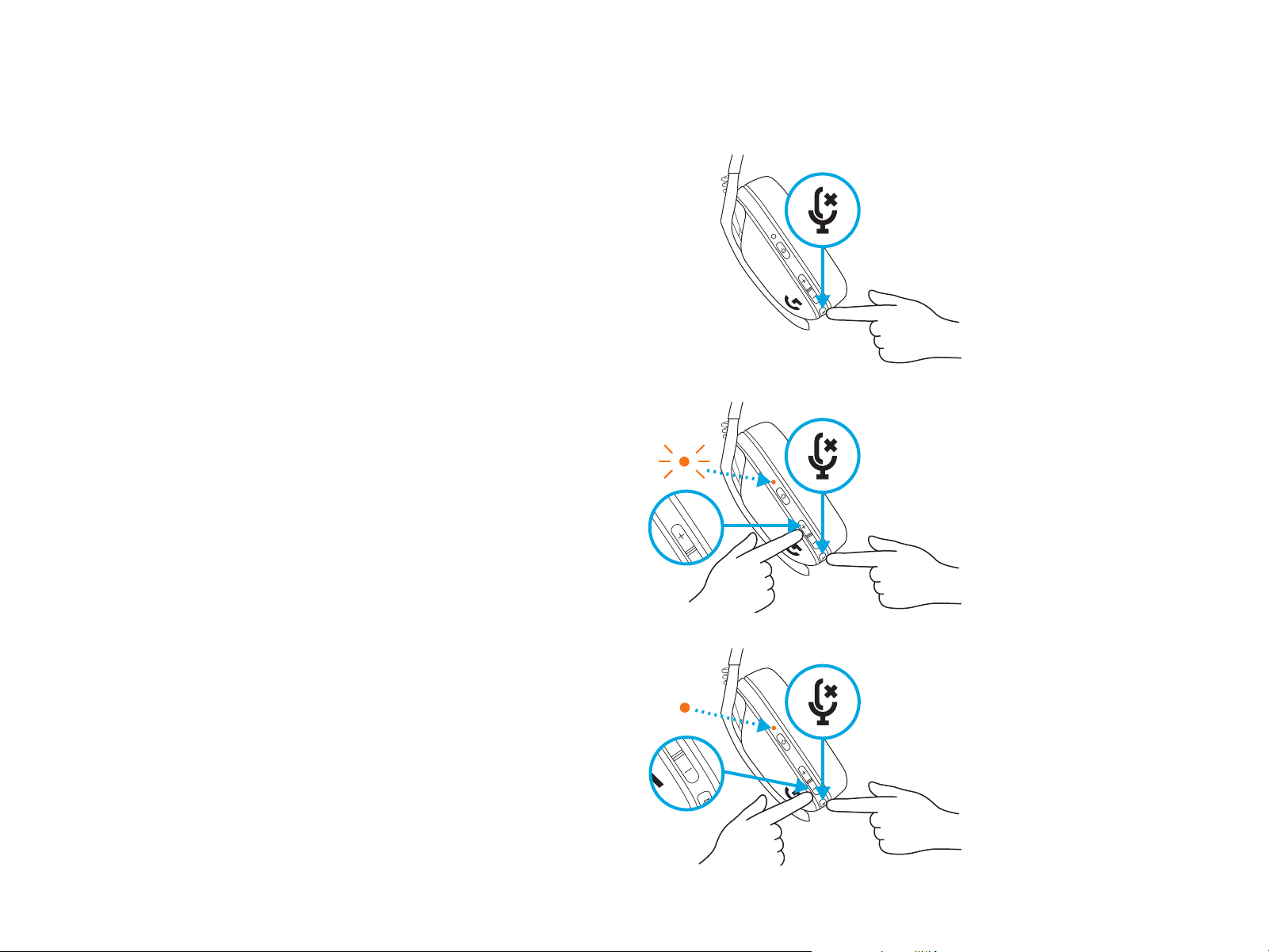
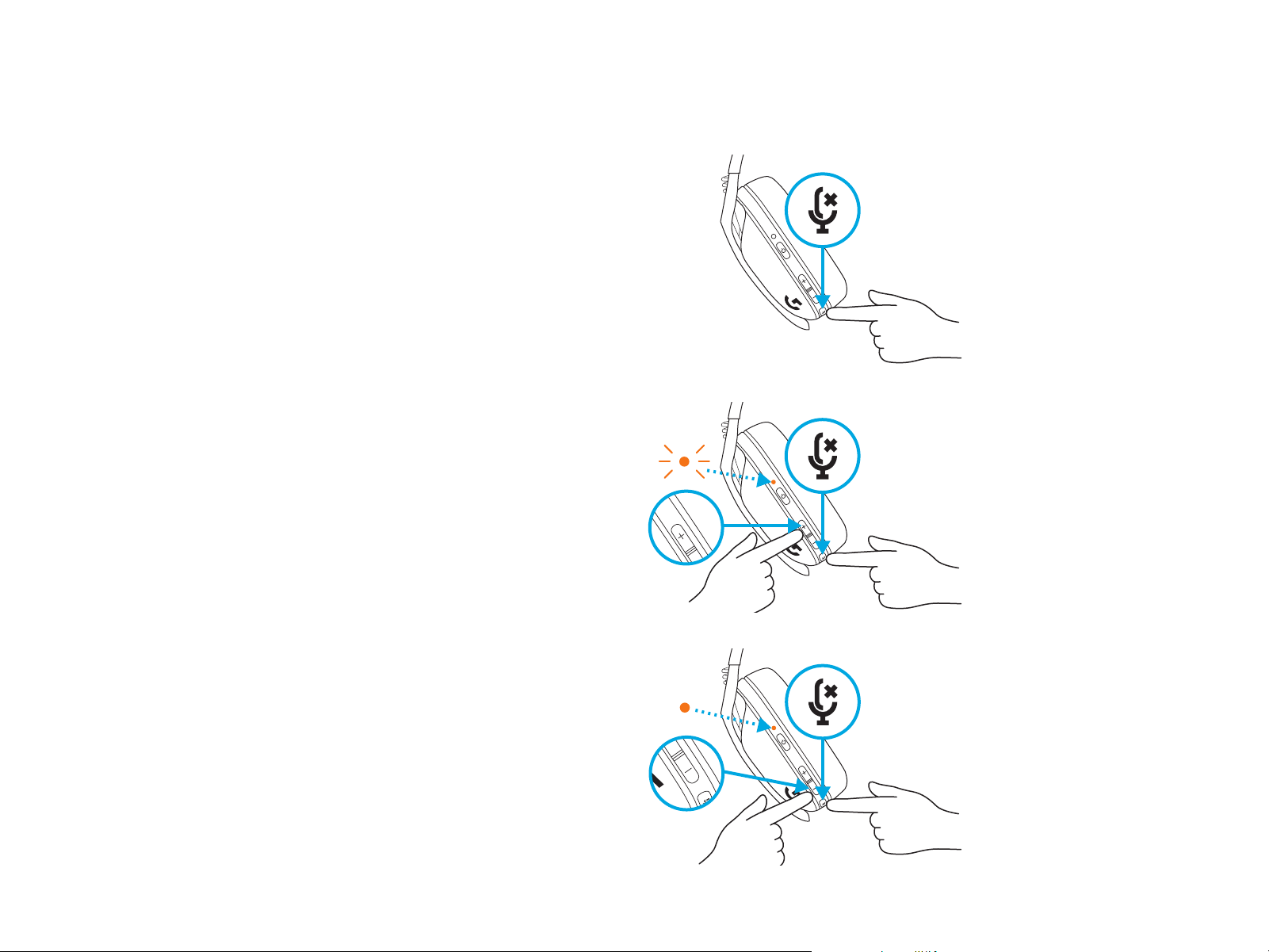
MUTE / UNMUTE microphone
– Short press on the Mute button.
Set Max Volume
– Set to 100 dB
– Press 3 seconds or longer Mute button
+VolumeUP.
– LED will ash orange 3 times.
– Set to 85 dB
– Press 3 seconds or longer Mute button
+VolumeDOWN.
– LED will turn solid orange for
5 seconds.
X3
5 sec.
3 sec.
3 sec.
MUTE / UNMUTE AND MAX VOLUME
8 ENGLISH
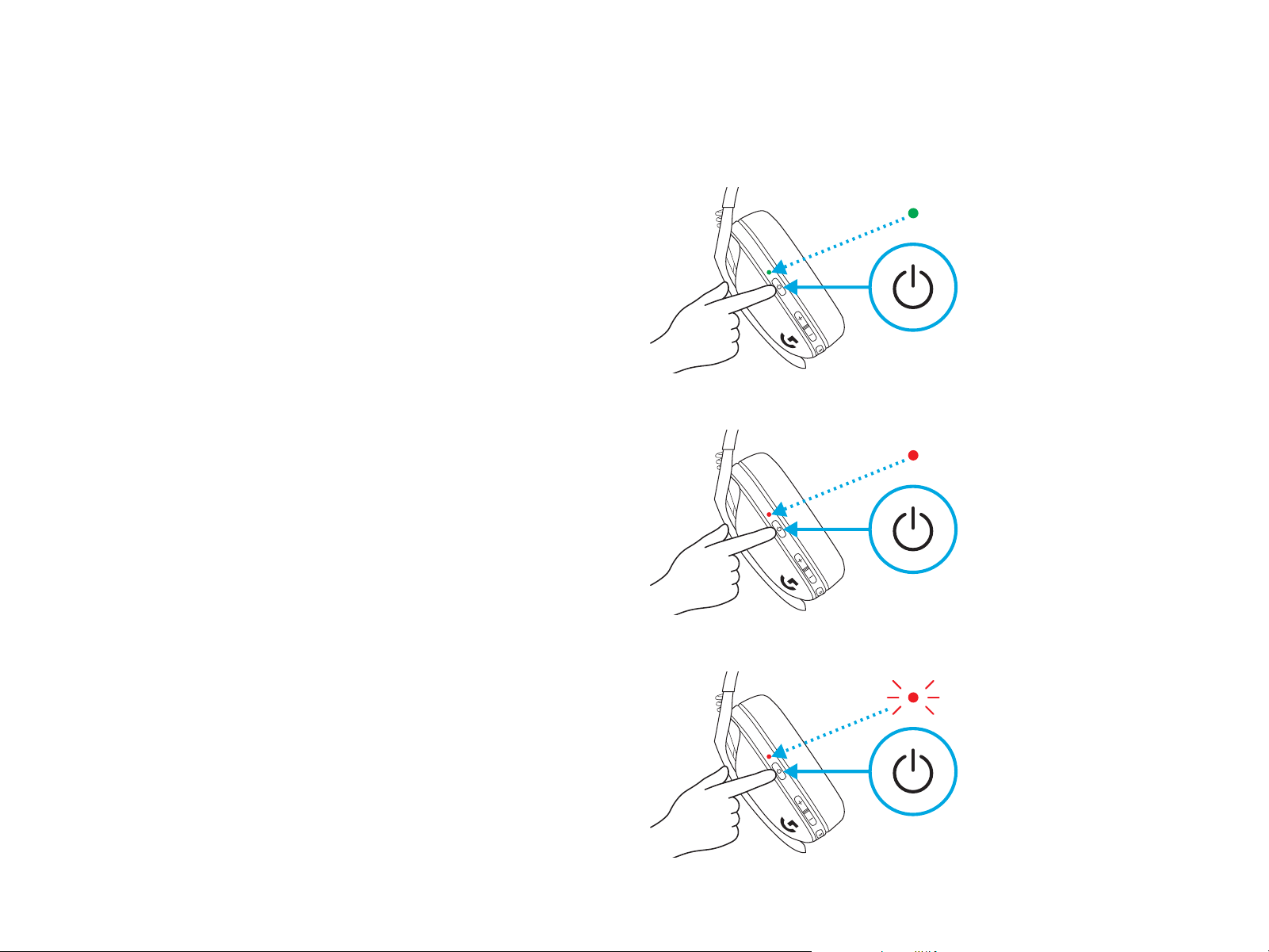
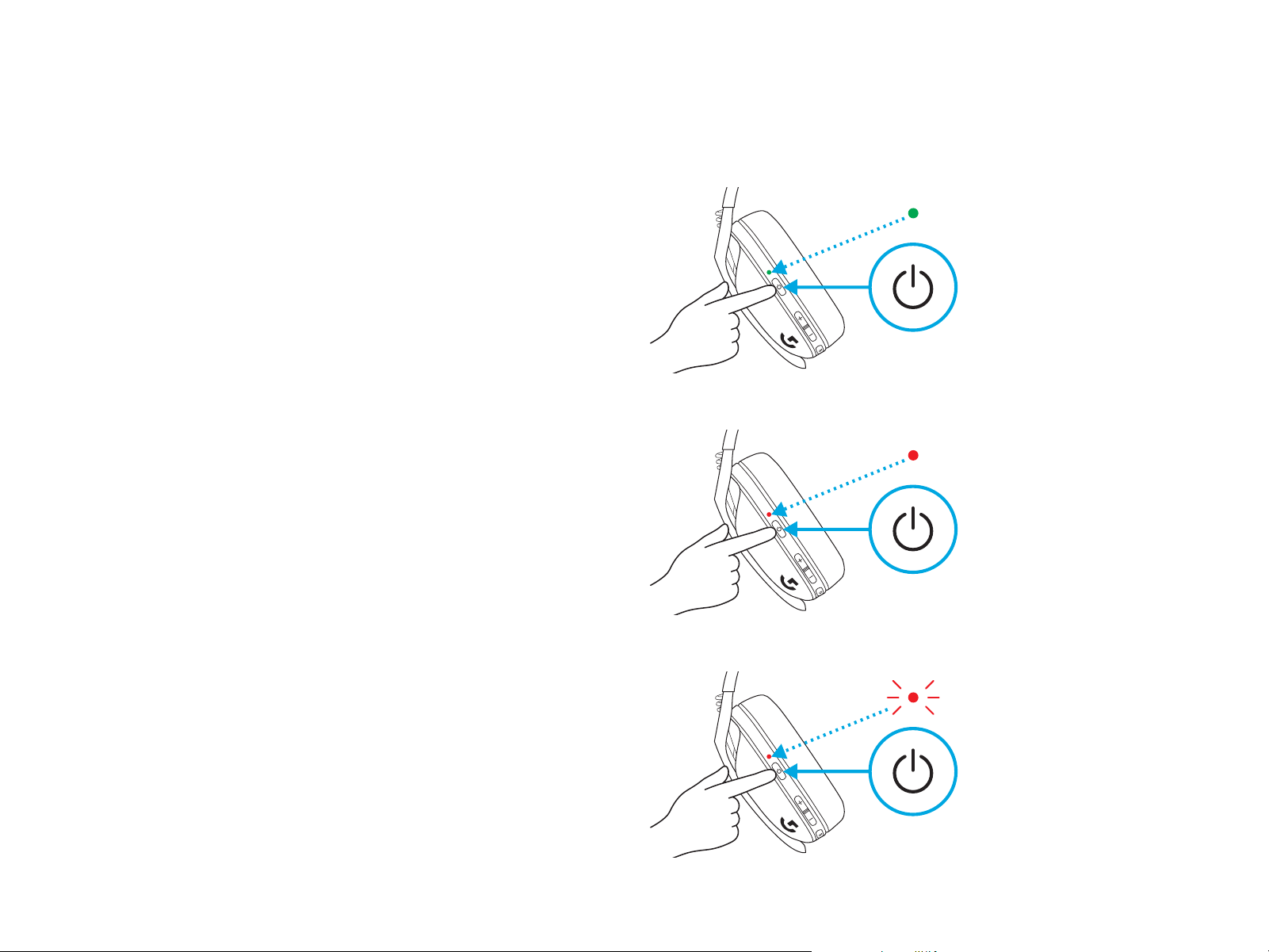
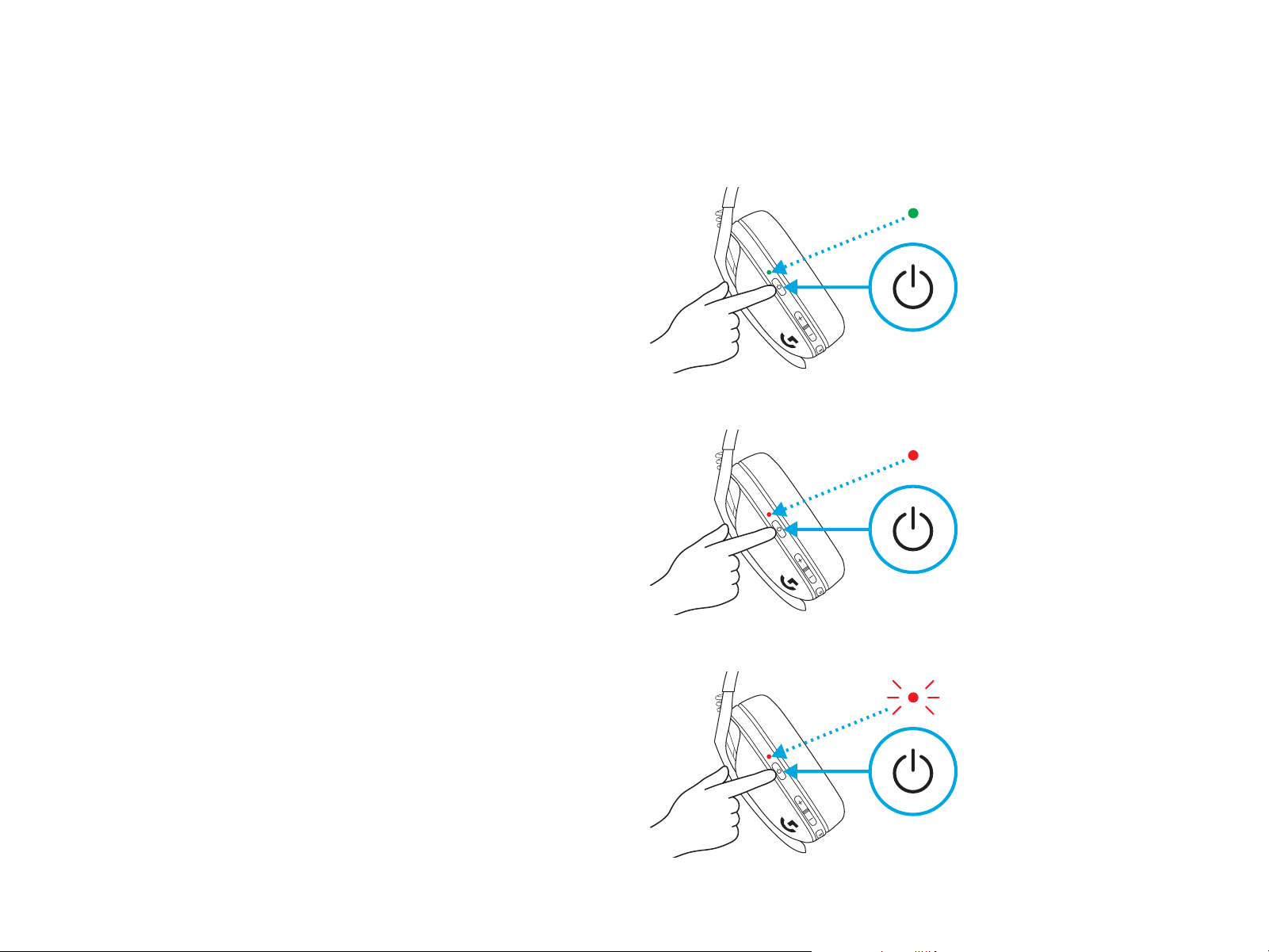
– Single press Power button, when headset is ON
– Battery 31% to 100% the LED will show green
for5 seconds.
BATTERY CHECK
– Battery 15% to 30% the LED will show red
for5seconds.
– Battery <15% the LED will ash red
for5seconds.
5 sec.
5 sec.
5 sec.
9 ENGLISH
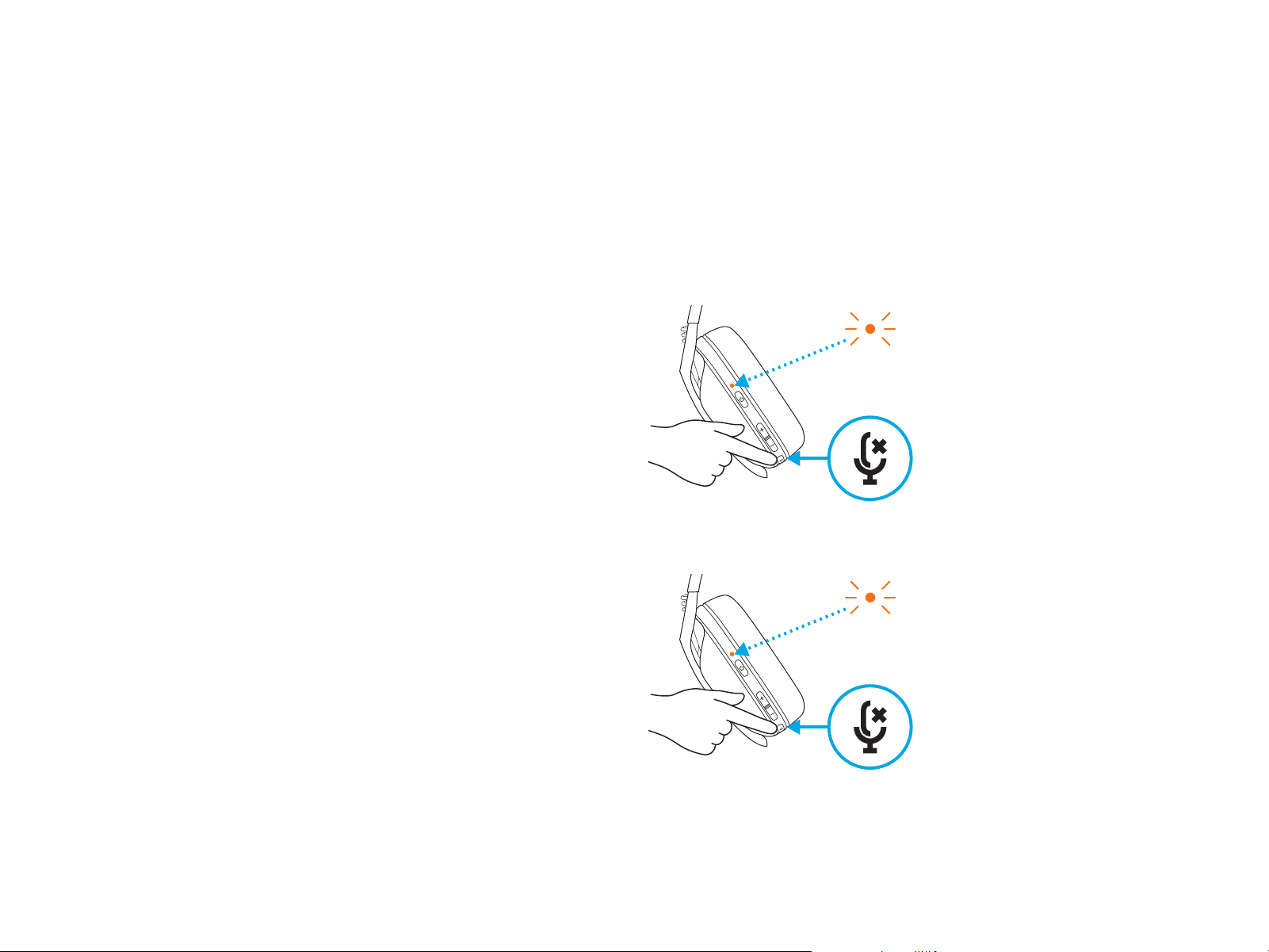
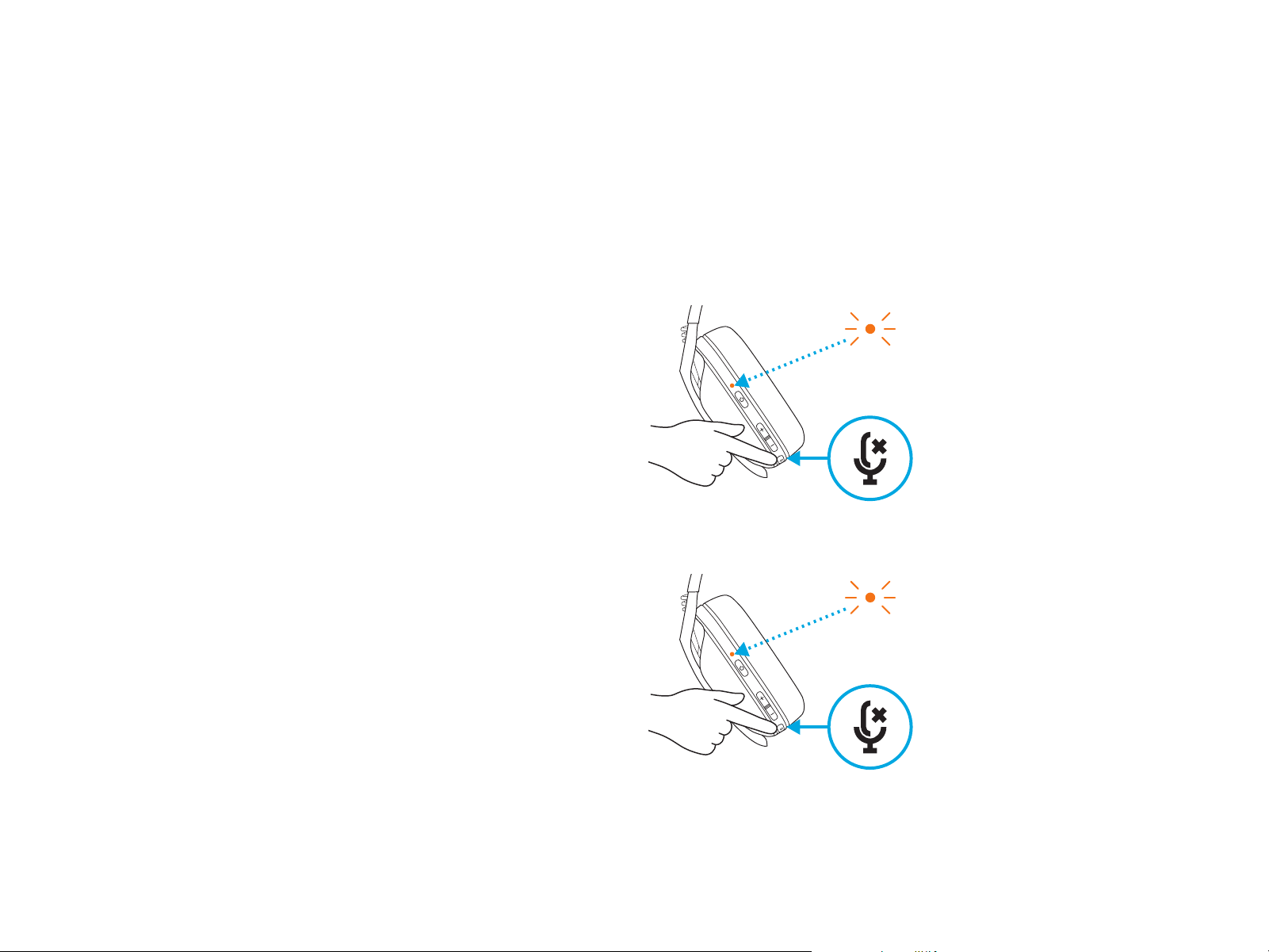
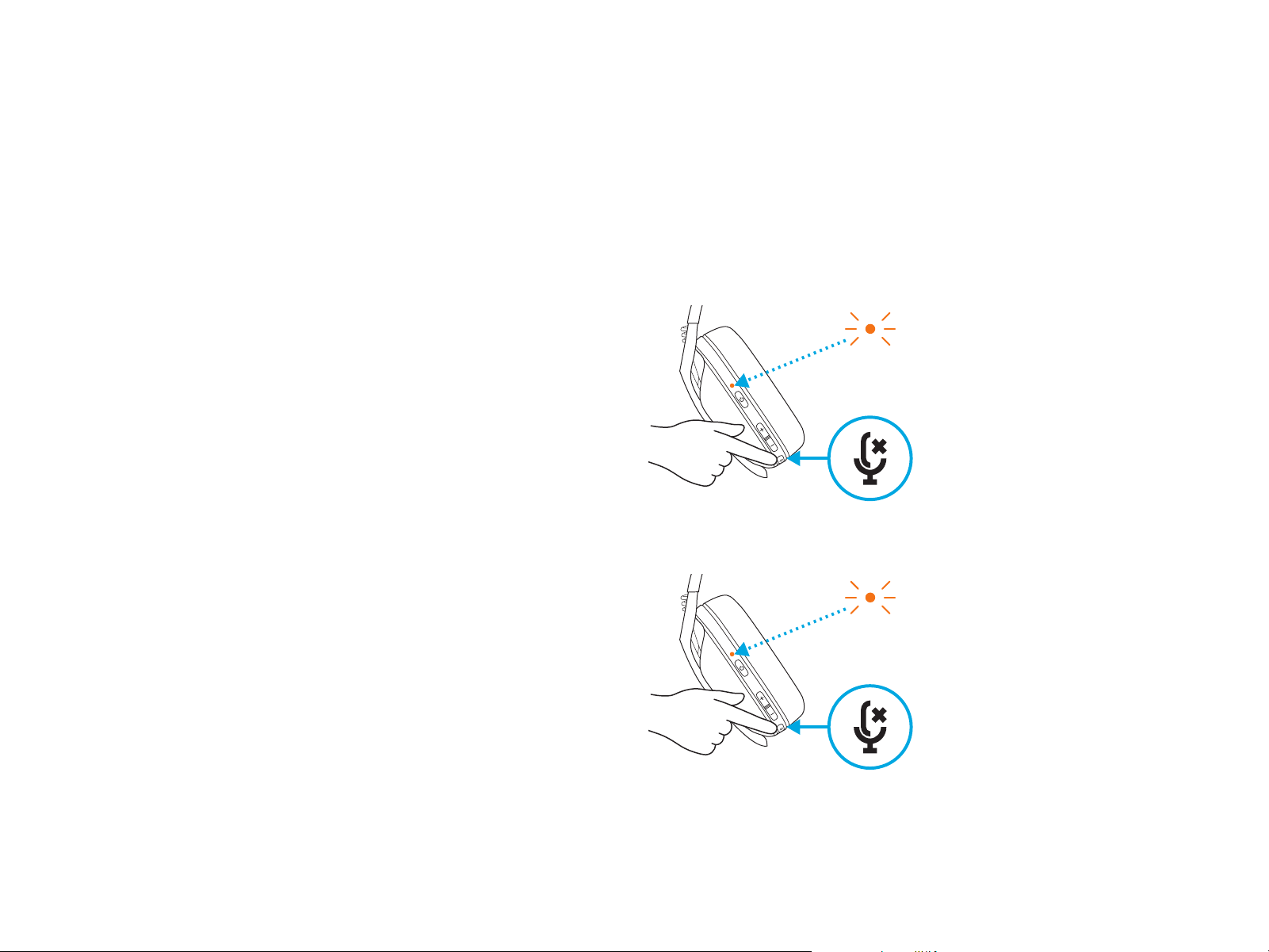
– Enable Sidetone
– Double press the Mute button and
theLEDwillash twice in orange.
Sidetone lets you hear your voice while communicating
with other people. It mirrors the experience of talking
on a phone and allows you to adjust your speaking
volume to a proper level.
SIDETONE
– Disable Sidetone
– Double press the Mute button and
theLEDwillash once in orange.
X2
X1
10 ENGLISH
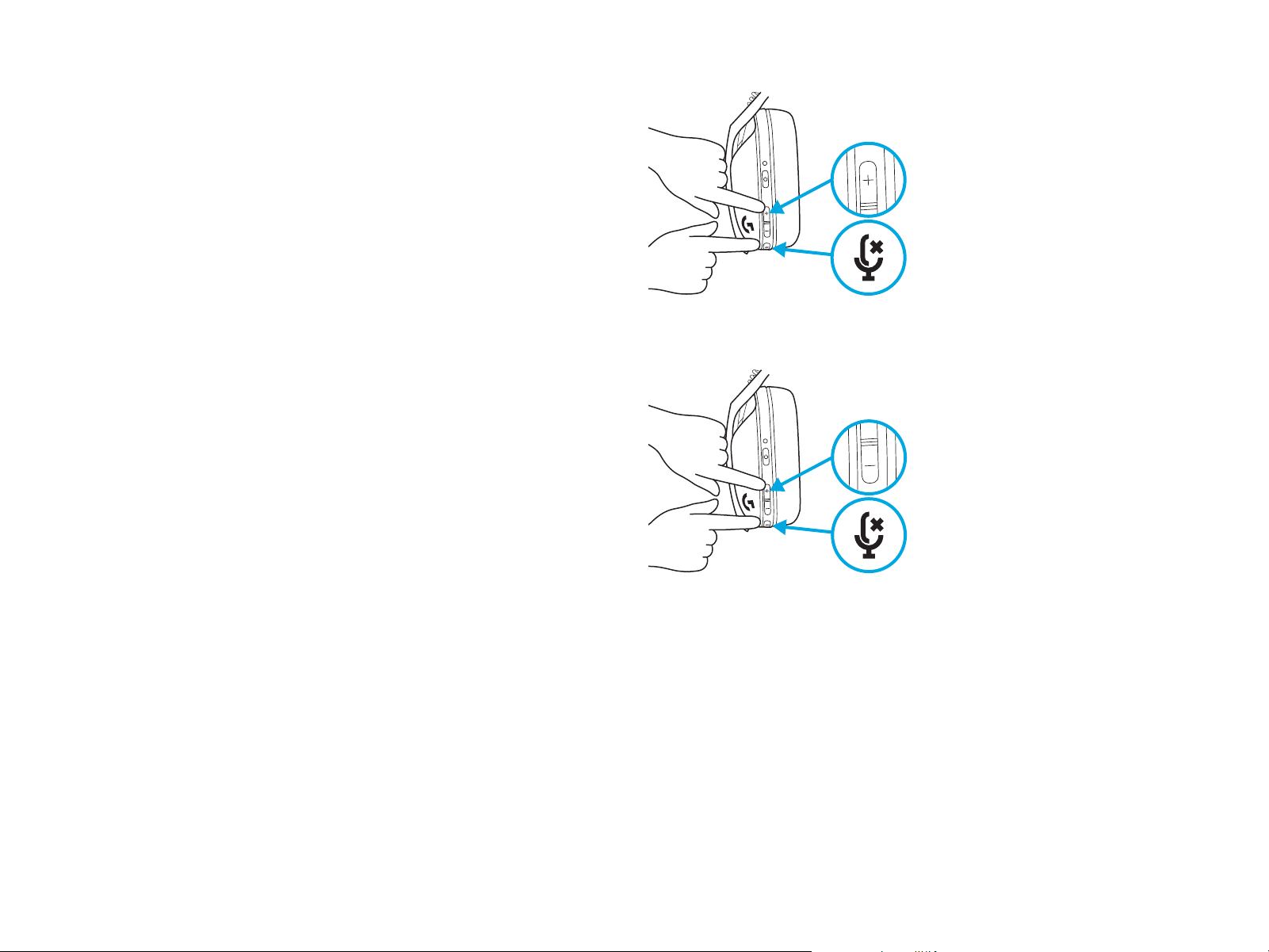
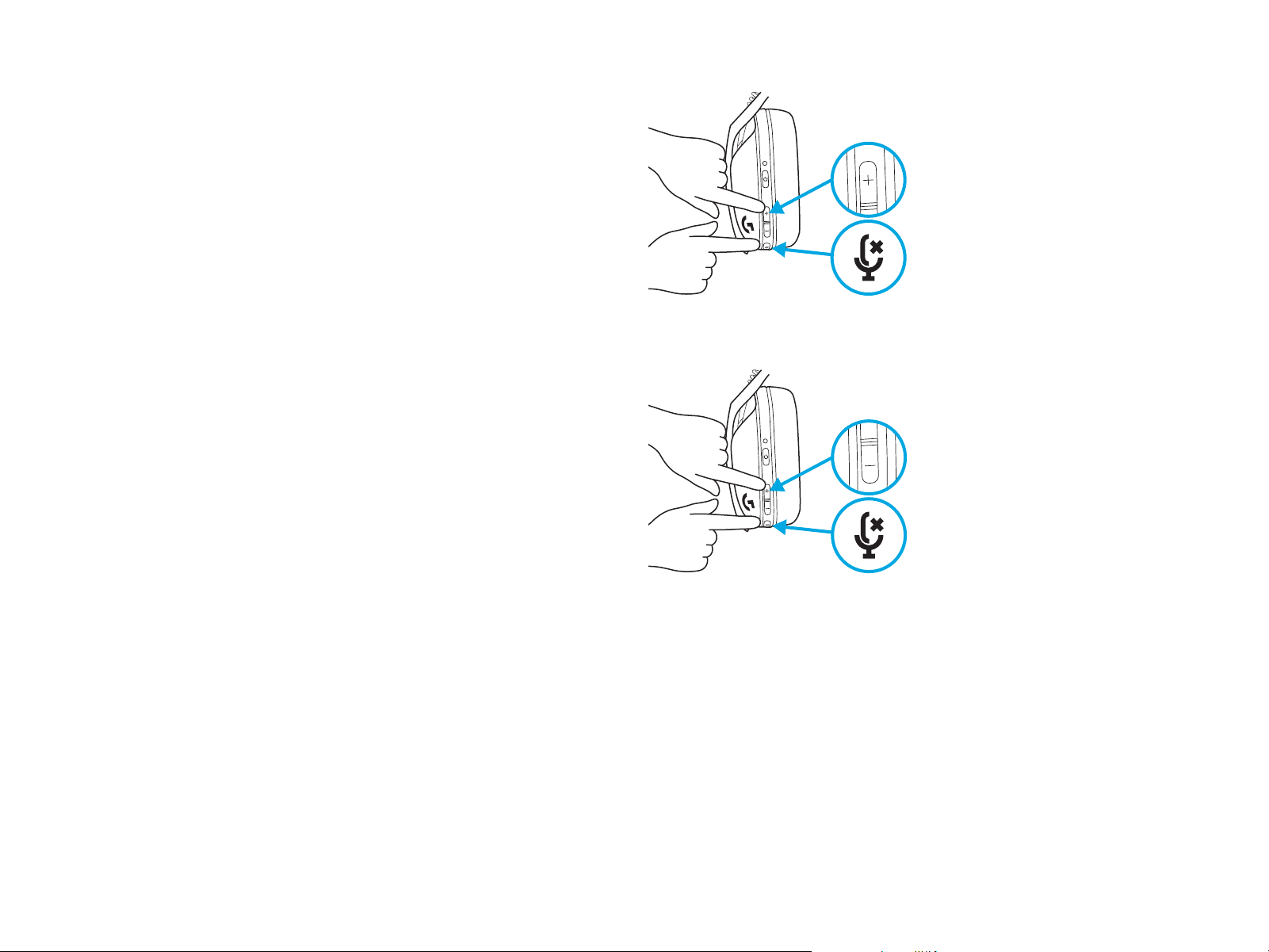
– Adjust Sidetone
– UP = Single press Mute button + Volume UP.
– DOWN = Single press Mute button + Volume DOWN.
11 ENGLISH
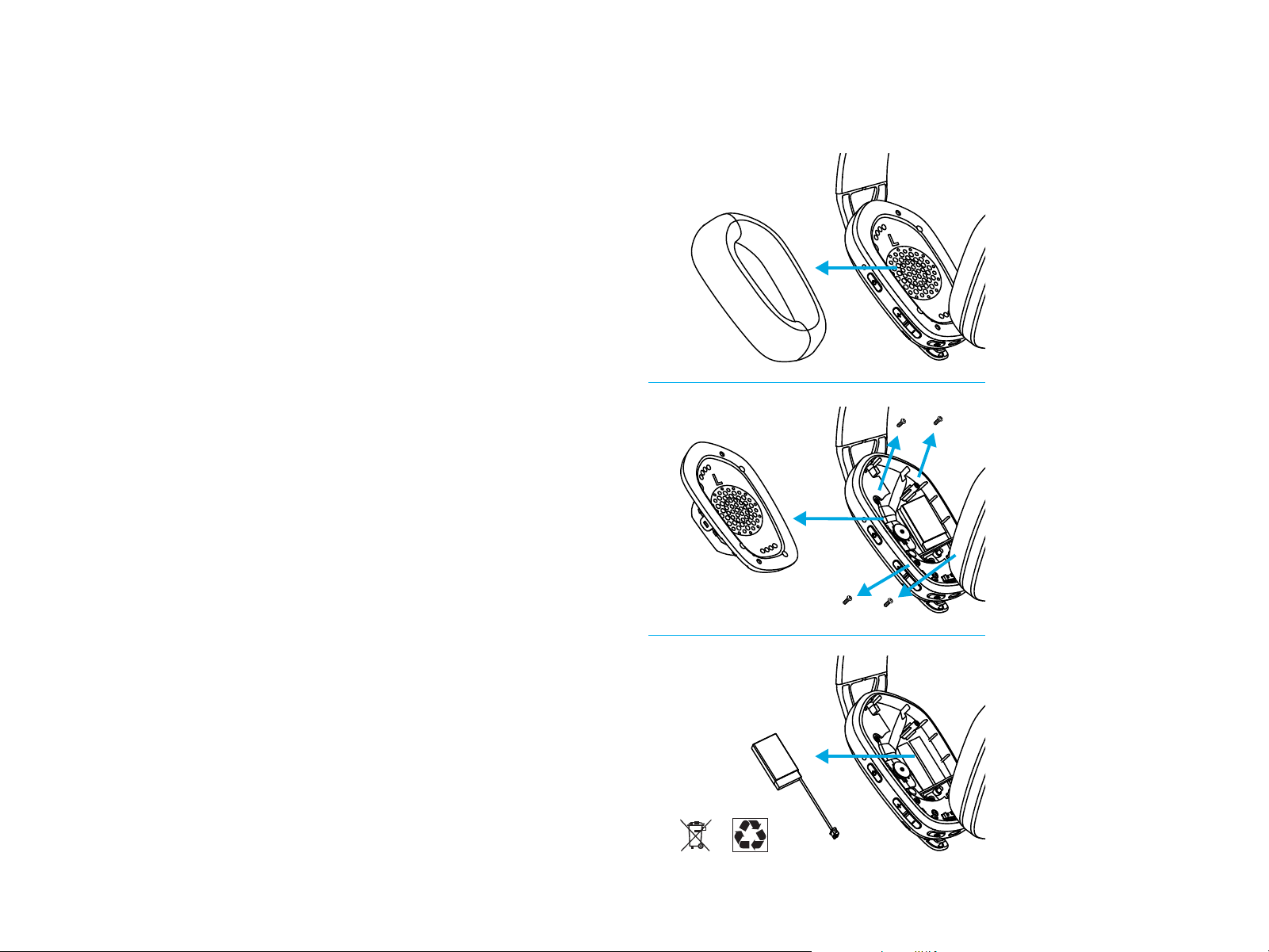
RECYCLING
We encourage you to resell or donate working products.
Otherwise, batteries, electronic and electrical equipment
should not be disposed of with household waste.
Whereverpossible, they should be segregated and
brought to an appropriate collection point to enable
recycling and avoid potential impacts on the environment
and human health. For more information, contact
your local authorities or place of purchase, or visit
www.logitech.com/recycling
SPARE PARTS
– Earpads
– Wireless USB Receiver
– Charging Cable
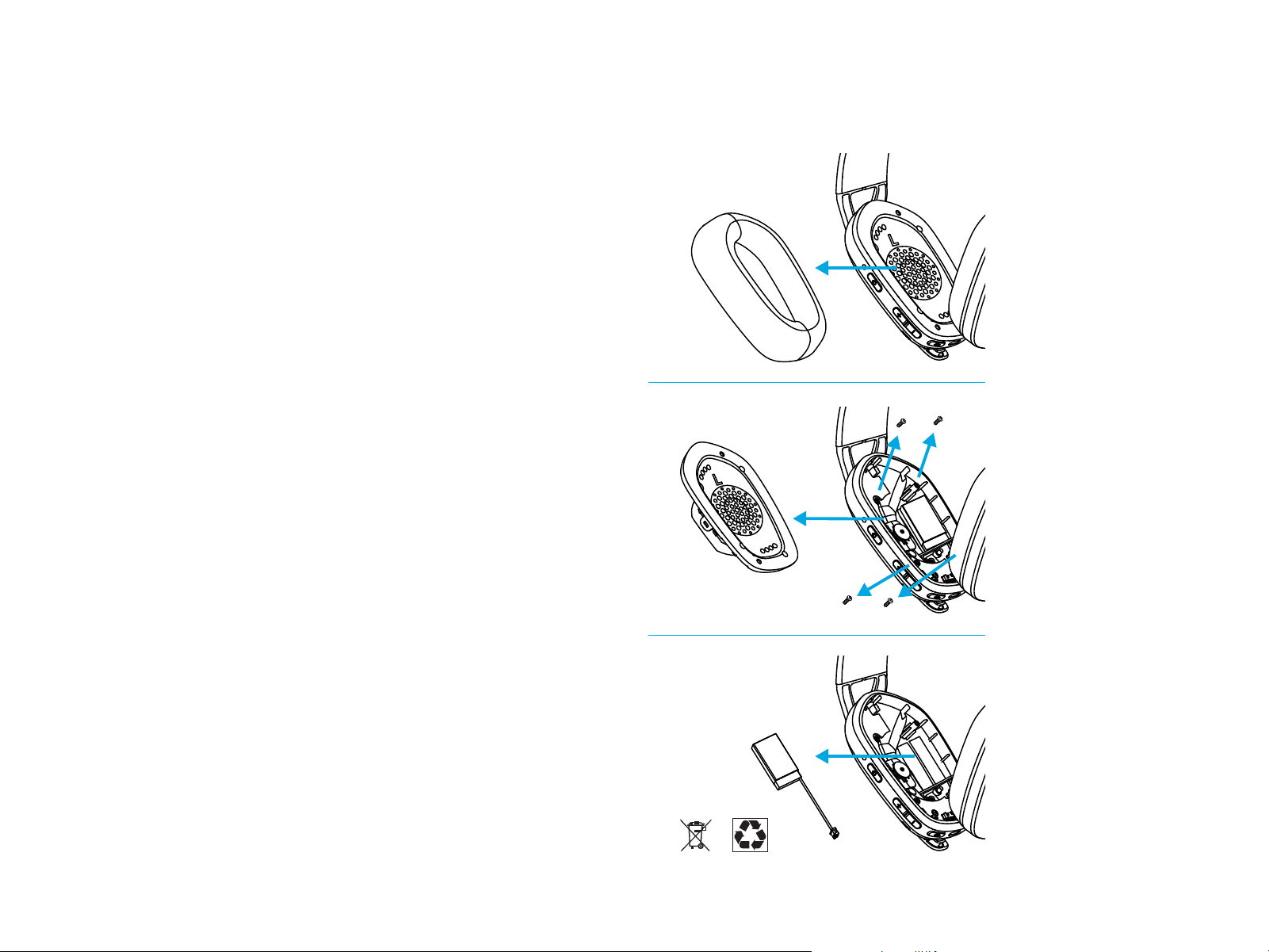
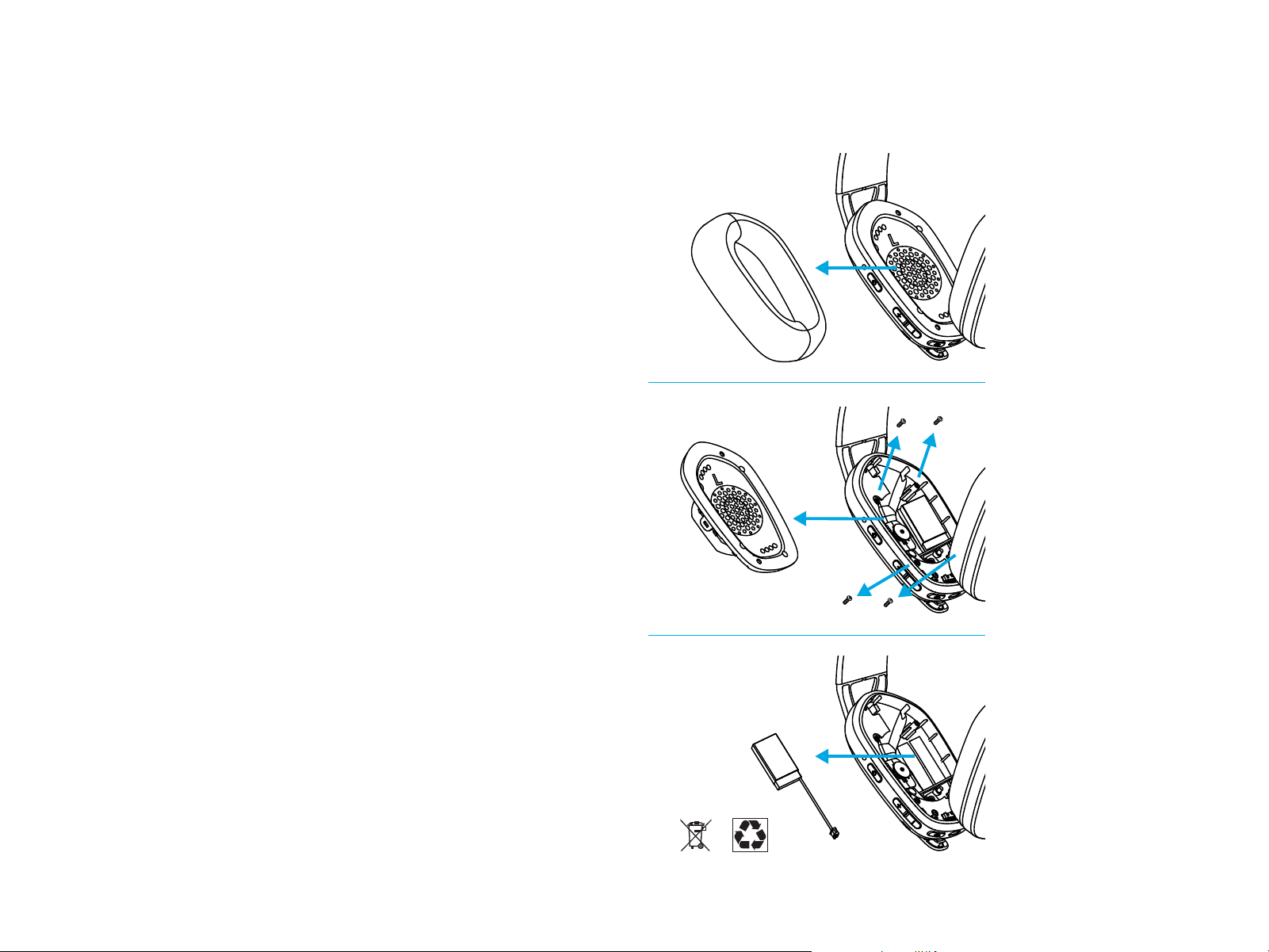
BATTERY REMOVAL
1
2
3
QUESTIONS?
logitechG.com/support/G435
12 FRANÇAIS
CONNEXION LIGHTSPEED
Connectez-vous à votre PC, Mac, PlayStation 5 ou 4 avec
latechnologie sans l LIGHTSPEED
– Insérez le récepteur dans le port USB de votre dispositif.
– Maintenez le bouton Marche/Arrêt enfoncé pendant au moins
1,5 seconde.
– Une fois la connexion eectuée, le témoin lumineux
devientcyan.
1.5 sec.
13 FRANÇAIS
CONNEXION BLUETOOTH
– Appuyez pendant au moins 3 secondes sur
lebouton Marche/Arrêt et Sourdine.
– Le témoin lumineux clignotera en bleu en entrant
en mode de couplage.
3 sec.
– Connectez-vous au dispositif de votre choix.
– G435 peut se connecter à un seul dispositif
Bluetooth à la fois.
14 FRANÇAIS
5 sec.
5 sec.
– Appuyez pendant au moins 3 secondes sur
lebouton Sourdine.
– En passant sur LIGHTSPEED, le voyant lumineux
s’allumera en cyan pendant 5 secondes.
– En passant sur Bluetooth, le témoin lumineux
s’allumera en bleu pendant 5 secondes.
3 sec.
BASCULEZ ENTRE LES TECHNOLOGIES
LIGHTSPEED ET BLUETOOTH
15 FRANÇAIS
Mise sous tension
– Appuyez sur le bouton Marche/Arrêt pendant
1,5seconde lorsque le casque est hors tension.
Mise hors tension
– Appuyez sur le bouton Marche/Arrêt pendant
3secondes lorsque le casque est sous tension.
Mise hors tension automatique
– Après 30 minutes d’inactivité.
1.5 sec.
3 sec.
MISE SOUS TENSION ET HORS
TENSION

16 FRANÇAIS
ACTIVER/DÉSACTIVER la sourdine du micro
– Appuyez brièvement sur le bouton Sourdine.
Dénir sur le volume maximum
– Dénir sur 100 dB
– Appuyez pendant au moins 3 secondes sur
lebouton Sourdine et Volume+.
– Le témoin lumineux clignotera en orange 3 fois.
– Dénir sur 85 dB
– Appuyez pendant au moins 3 secondes sur
lebouton Sourdine et Volume-.
– Le témoin lumineux s’allumera en orange
pendant5 secondes.
X3
5 sec.
3 sec.
3 sec.
ACTIVER/DÉSACTIVER LA SOURDINE
ETLEVOLUME MAXIMUM
17 FRANÇAIS
– Appuyez une fois sur le bouton Marche/Arrêt
lorsque le casque est sous tension.
– Si le niveau de la batterie se situe entre 31
et100%, le témoin lumineux s’allume en vert
pendant 5 secondes.
VÉRIFICATION DE LA BATTERIE
– Si le niveau de la batterie se situe entre 15
et30%, le témoin lumineux s’allume en rouge
pendant 5 secondes.
– Si le niveau de la batterie se situe en dessous
de 15%, le témoin lumineux clignote en rouge
pendant 5 secondes.
5 sec.
5 sec.
5 sec.
18 FRANÇAIS
– Activer l’eet local
– Appuyez deux fois sur le bouton Sourdine et
letémoin lumineux clignotera deux fois en orange.
L’eet local vous permet d’entendre votre voix pendantvos
communications avec d’autres personnes. Toutcommependant
une communication téléphonique, vouspouvez ajuster levolume
de votre voix à un niveau adéquat.
EFFET LOCAL
– Désactiver l’eet local
– Appuyez deux fois sur le bouton Sourdine et
letémoin lumineux clignotera une fois en orange.
X2
X1
19 FRANÇAIS
– Réglage de l’eet local
– PLUS = Appuyez une fois sur le bouton Sourdine
etVolume+.
– MOINS = Appuyez une fois sur le bouton Sourdine
etVolume-.
20 FRANÇAIS
RECYCLAGE
Nous vous encourageons à revendre ou à donner
lesproduits fonctionnels. Les piles ainsi que l'équipement
électronique et électrique ne doivent pas être jetés
avecles déchets ménagers. Dans la mesure du possible,
ilsdoivent être triés et déposés dans un centre de
collecte adéquat pour permettre leur recyclage et éviter
tout impact potentiel sur l'environnement et la santé
humaine. Pour en savoir plus, contactez les autorités
locales ou le point de vente, ou rendez-vous sur le site
www.logitech.com/recycling
PIÈCES DE RECHANGE
– Oreillettes
– Récepteur USB sans l
– Câble de charge
INSTRUCTIONS DE RETRAIT
1
2
3
DES QUESTIONS?
logitechG.com/support/G435
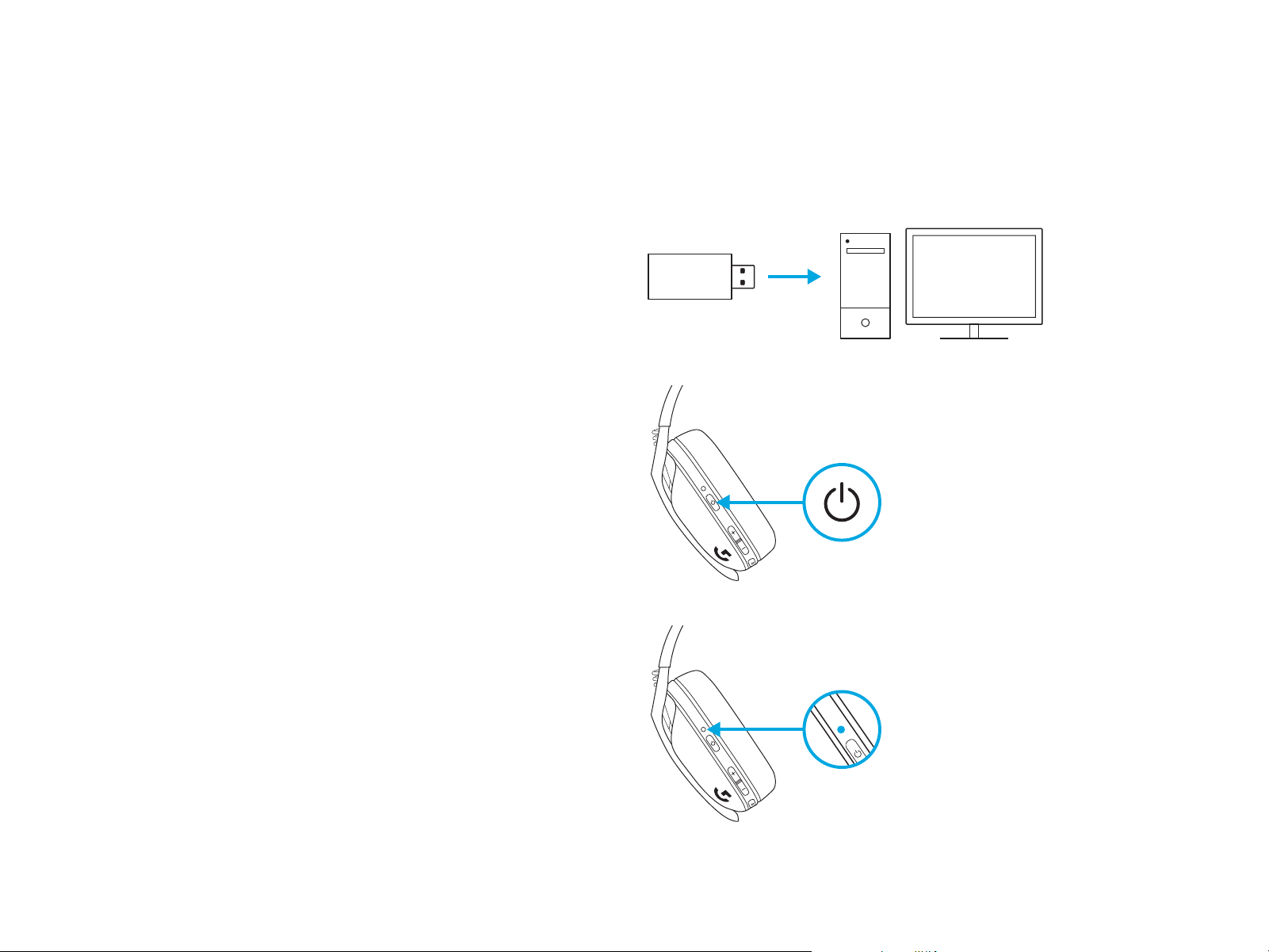
21 ESPAÑOL
CONEXIÓN LIGHTSPEED
Conecta a tu PC, Mac, PlayStation 5 o 4 con tecnología
inalámbrica LIGHTSPEED
– Inserta el receptor en el puerto USB de tu dispositivo.
– Mantén presionado el botón de encendido un mínimo
de1,5segundos.
– El LED se vuelve cian una vez conectado.
1,5 segundos
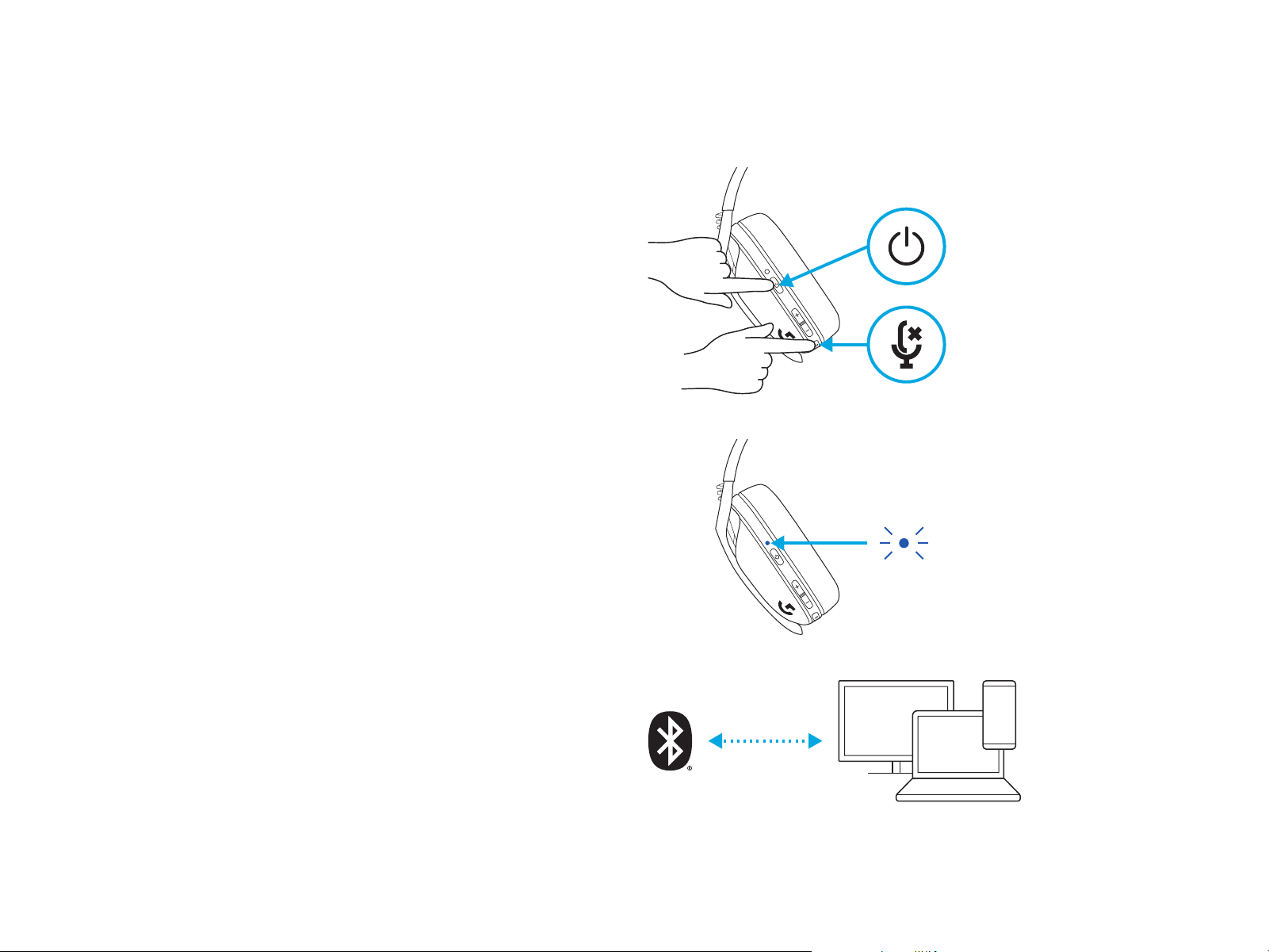
22 ESPAÑOL
CONEXIÓN BLUETOOTH
– Presiona 3 segundos o más el botón de encendido
yde silencio.
– El LED emitirá destellos azules al entrar en modo
deemparejamiento.
3 segundos
– Conecta a tu dispositivo preferido.
– Los audífonos G435 pueden conectarse a un único
dispositivo bluetooth a la vez.
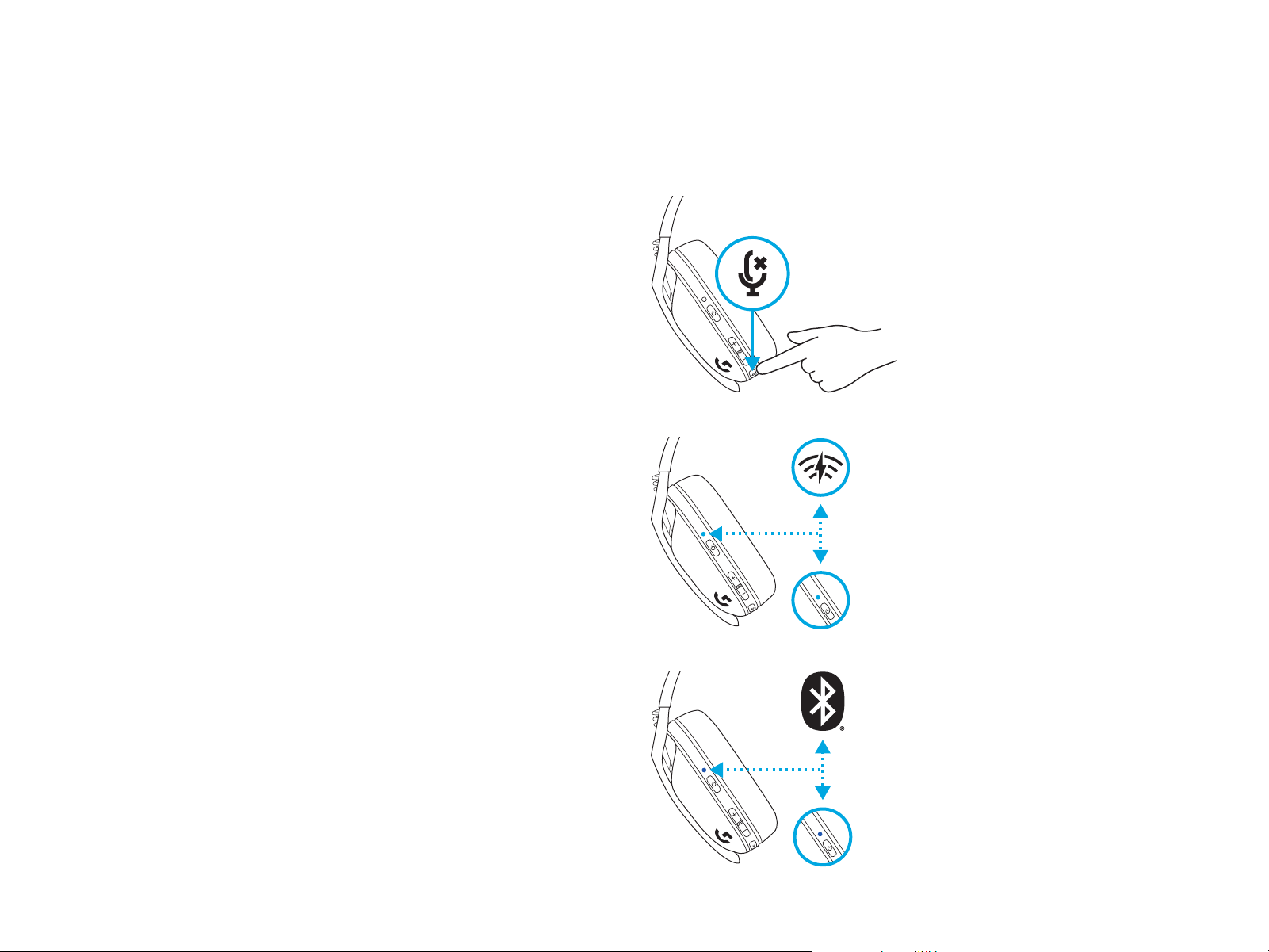
23 ESPAÑOL
5 segundos
5 segundos
– Presiona 3 segundos o más el botón de silencio.
– Cambia a LIGHTSPEED, el LED se iluminará en cian
por 5 segundos.
– Cambia a Bluetooth, el LED se iluminará en azul
por 5 segundos.
3 segundos
ALTERNA ENTRE LIGHTSPEED
YBLUETOOTH
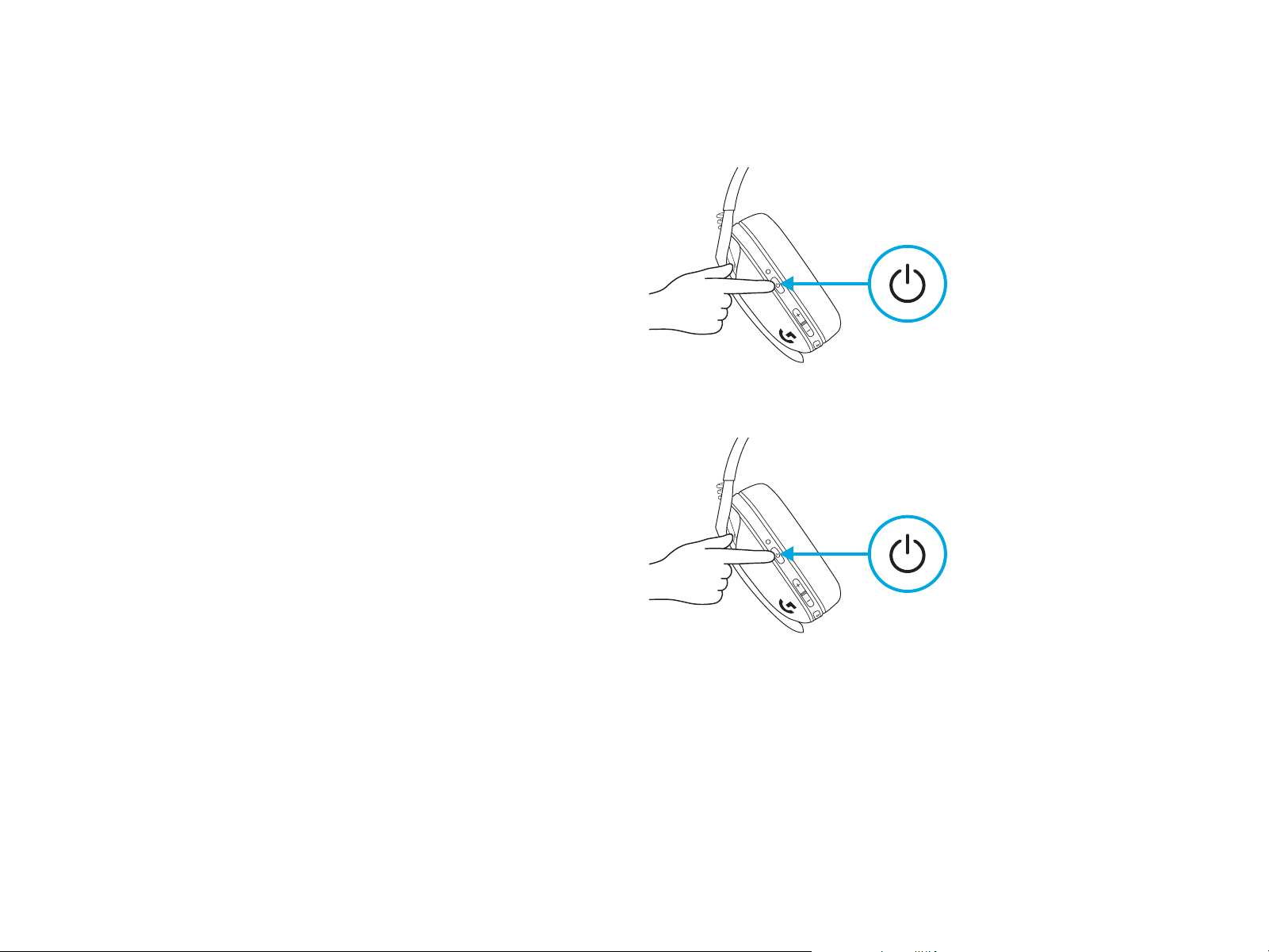
24 ESPAÑOL
ENCENDIDO
– Presiona el botón de encendido por 1,5 segundos
cuando los audífonos estén apagados.
APAGADO
– Presiona el botón de encendido por 3 segundos
cuando los audífonos estén encendidos.
Apagado automático
– Después de 30 minutos de inactividad.
1,5 segundos
3 segundos
ENCENDIDO Y APAGADO
25 ESPAÑOL
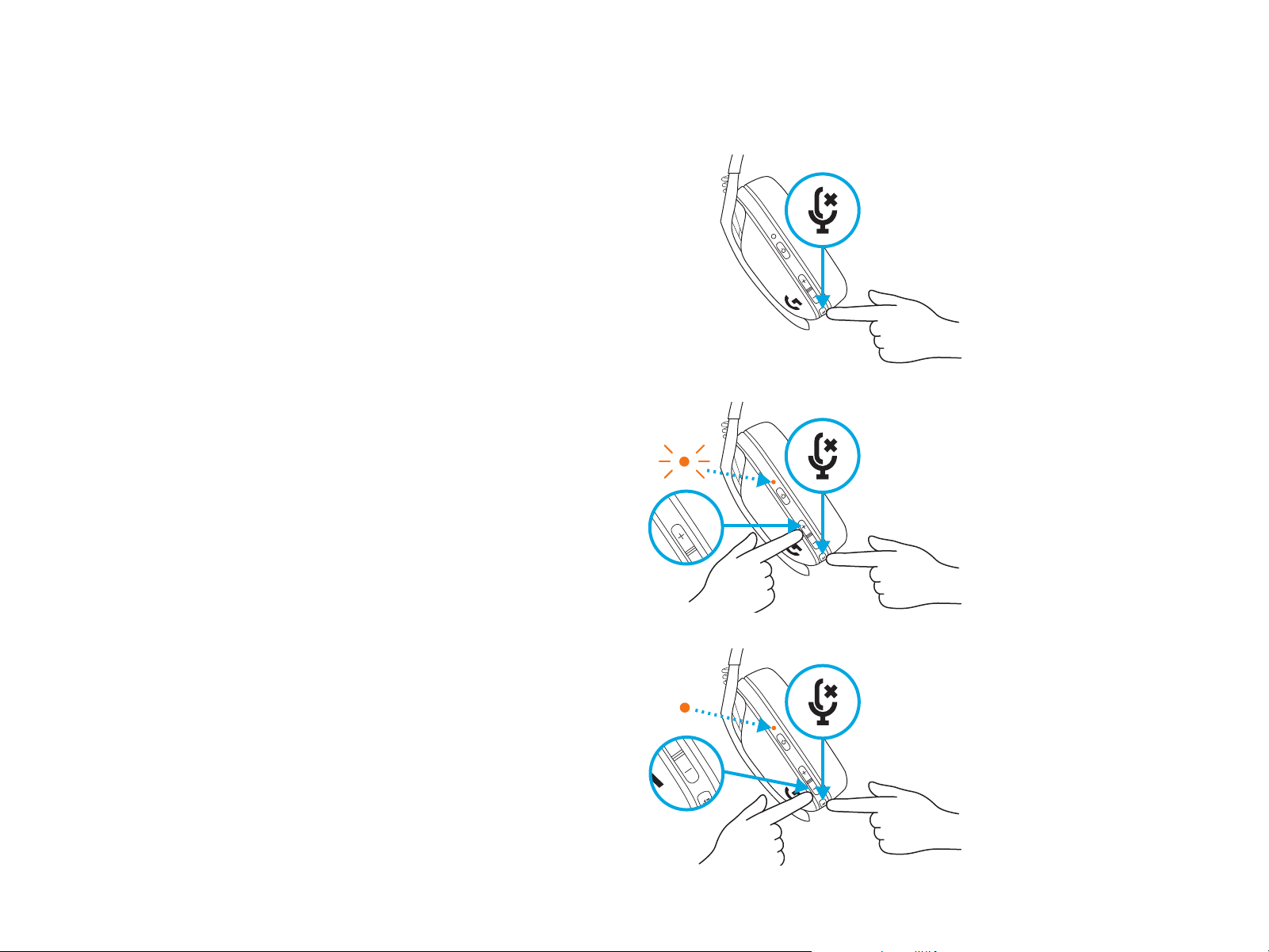
SILENCIAR/REACTIVAR micrófono
– Pulsación breve del botón de silencio.
Establecer volumen máximo
– Establecer a 100 dB
– Presiona 3 segundos o más el botón de silencio
+SUBIR volumen.
– El LED emitirá destellos naranja 3 veces.
– Establecer a 85 dB
– Presiona 3 segundos o más el botón de silencio
+BAJAR volumen.
– El LED se volverá naranja por
5 segundos.
X3
5 segundos
3 seg.
3 seg.
SILENCIAR/REACTIVAR SONIDO
YVOLUMEN MÁXIMO
26 ESPAÑOL
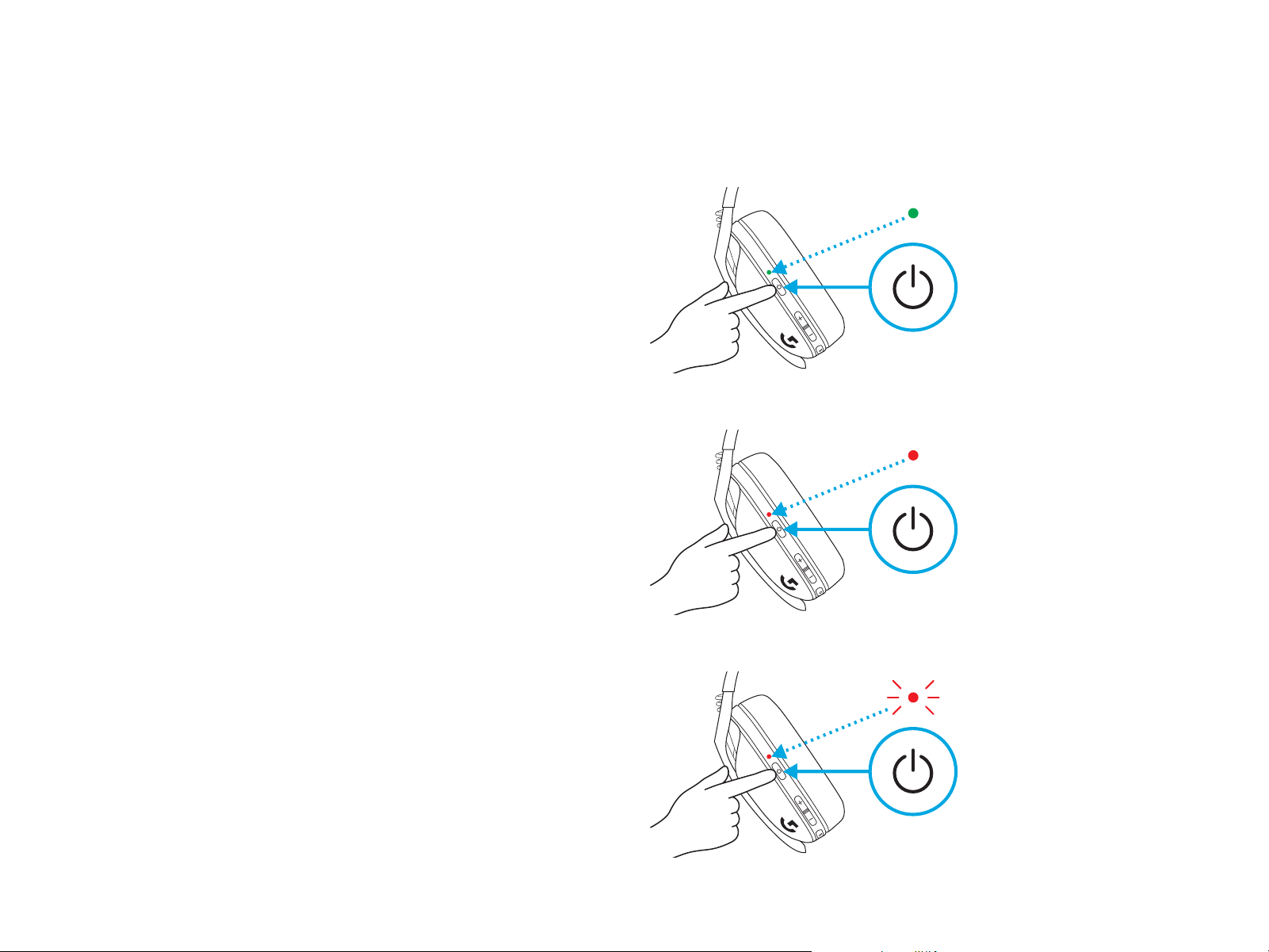
– Una sola pulsación del botón de encendido,
conlos audífonos encendidos
– Batería del 31% al 100% el LED se mostrará
verde por 5 segundos.
COMPROBACIÓN DE CARGA
– Batería del 15% al 30% el LED se mostrará rojo
por 5 segundos.
– Batería <15% el LED emitirá destellos rojos
por5segundos.
5 segundos
5 segundos
5 segundos
27 ESPAÑOL
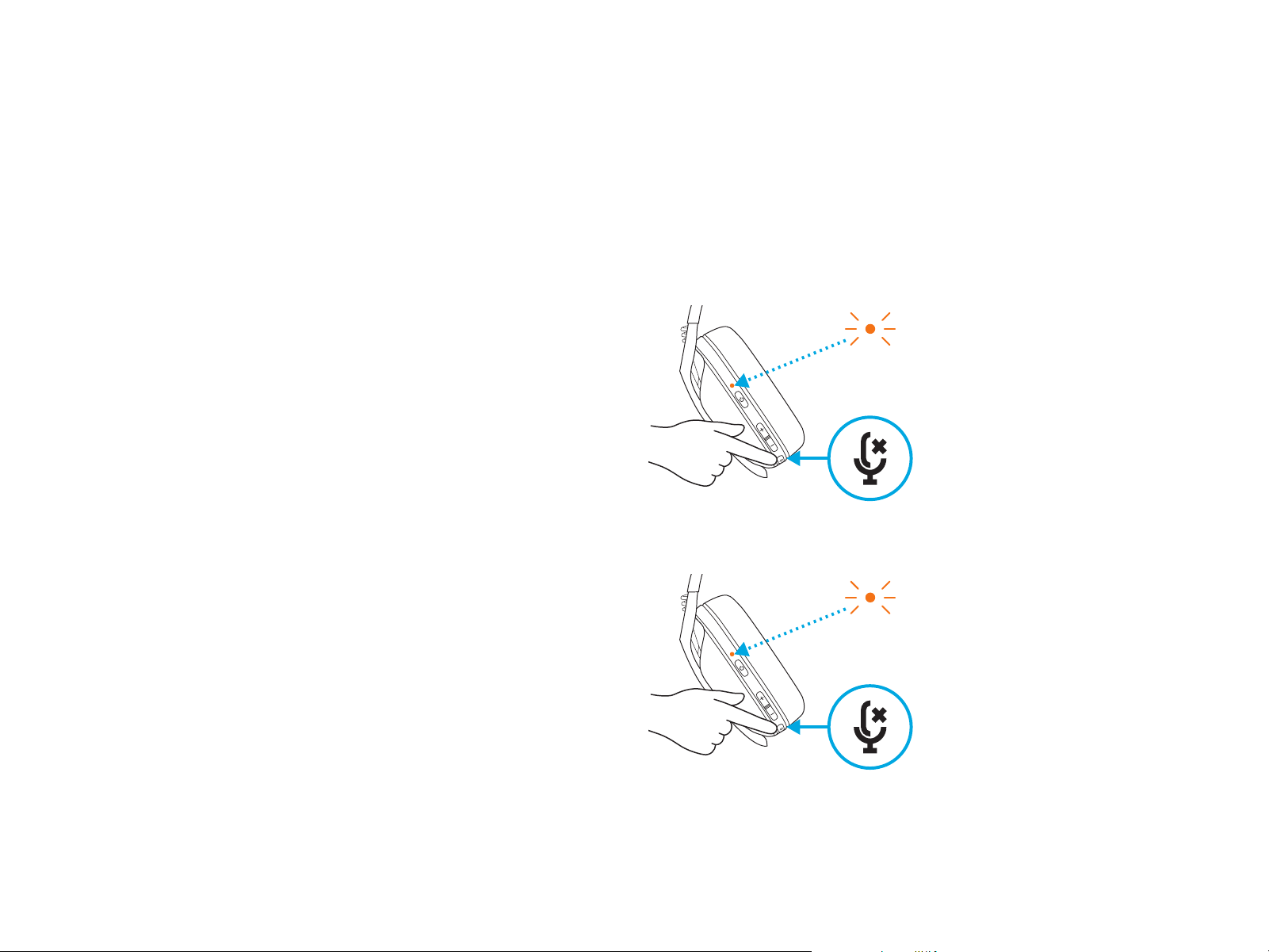
– Activar el tono lateral
– Presiona dos veces el botón de silencio y el LED
emitirá dos destellos en naranja.
El tono lateral te permite oír tu voz mientras te
comunicas con otras personas. Reeja la experiencia
de hablar por teléfono y te permite ajustar tu volumen
de habla a un nivel adecuado.
TONO LATERAL
– Desactivar el tono lateral
– Presiona dos veces el botón de silencio y el LED
emitirá un destello en naranja.
X2
X1
28 ESPAÑOL
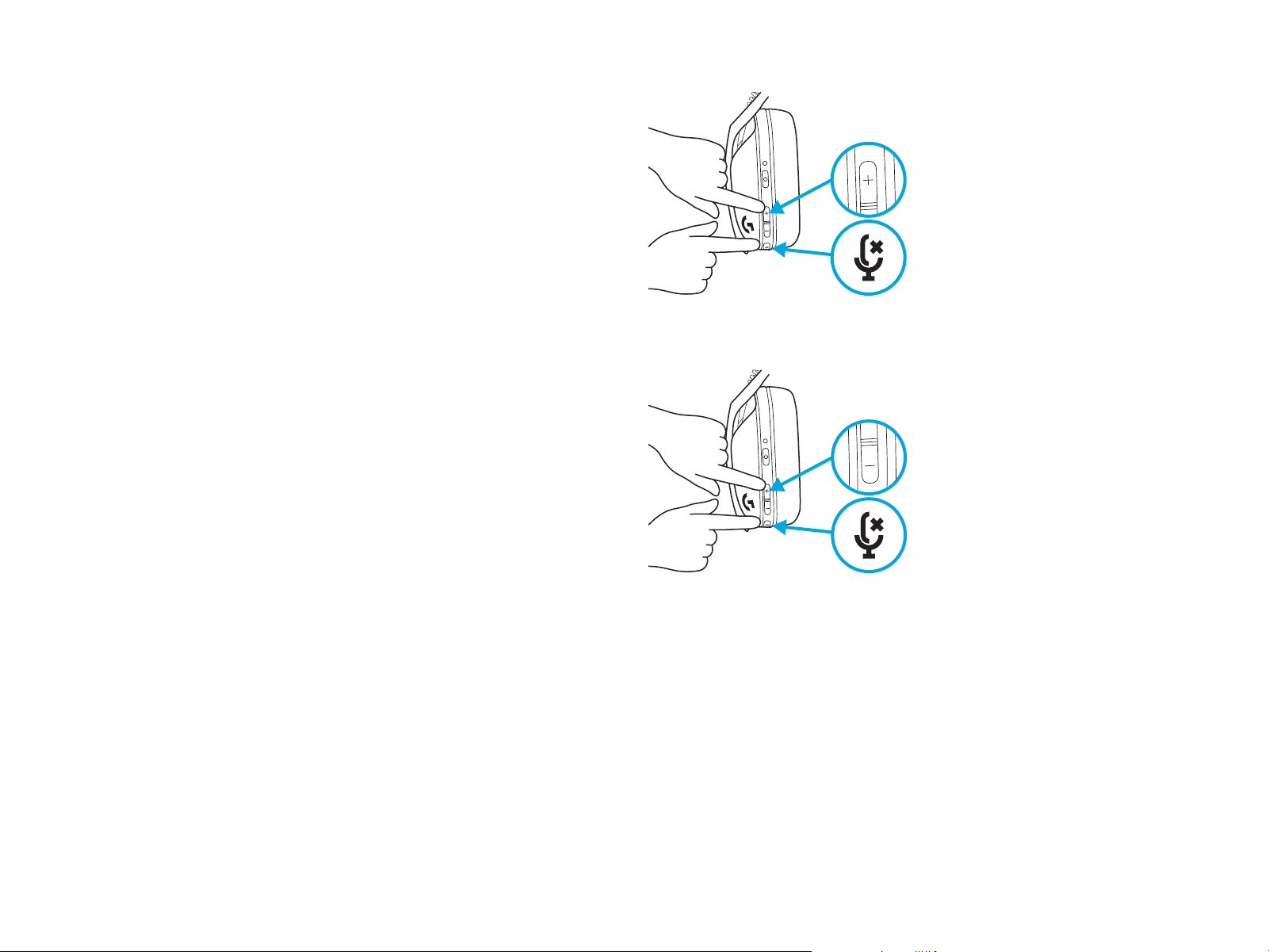
– Ajustar el tono lateral
– SUBIR = Una sola pulsación del botón de silencio
+SUBIR volumen.
– BAJAR = Una sola pulsación del botón de silencio
+BAJAR volumen.
29 ESPAÑOL
RECICLAJE
Aconsejamos encarecidamente la reventa o donación
deproductos que aún funcionen. En caso de desecharlos,
las baterías y los equipos eléctricos y electrónicos
no sedeben arrojar junto con la basura doméstica.
Siempreque sea posible, deben separarse y llevarse
aunpunto de recogida pertinente para permitir el reciclaje
y evitar posibles impactos en el medio ambiente y la salud
humana. Para obtener más información, póngase en
contacto con las autoridades locales o el lugar de compra,
o visite www.logitech.com/recycling
PIEZAS DE REPUESTO
– Almohadillas
– Receptor USB inalámbrico
– Cable de carga
EXTRACCIÓN DE LA BATERÍA
1
2
3
¿PREGUNTAS?
logitechG.com/support/G435
30 PORTUGUÊS
CONEXÃO DO LIGHTSPEED
Conecte ao seu PC, Mac, PlayStation 5 ou 4 com a tecnologia
sem o LIGHTSPEED
– Insira o receptor na porta USB do seu dispositivo.
– Pressione o botão liga/desliga por no mínimo 1.5 segundo.
– O LED se torna ciano uma vez conectado.
1.5 s
31 PORTUGUÊS
CONEXÃO BLUETOOTH
– Pressione os botões Liga/Desliga e Mudo
portrêssegundos ou mais.
– O LED piscará em azul ao entrar em modo
depareamento.
3 s
– Conecte-se ao dispositivo de sua preferência.
– G435 pode se conectar a um único dispositivo
Bluetooth de cada vez.
32 PORTUGUÊS
5 s
5 s
– Pressione o botão Mudo por três segundos
oumais.
– Alterne para LIGHTSPEED, o LED acenderá
emciano durante 5 segundos.
– Alterne para Bl uetooth, o LED acenderá azul
durante 5 segundos.
3 s
ALTERNE ENTRE LIGHTSPEED
EBLUETOOTH
33 PORTUGUÊS
LIGAR
– Pressione o botão Liga/desliga por 1,5 segundos
quando o fone de ouvido estiver DESLIGADO.
Desligar
– Pressione o botão Liga/desliga por 3 segundos
quando o headset estiver DESLIGADO.
Desligamento automático
– Após 30 minutos de inatividade.
1.5 s
3 s
LIGA E DESLIGA
34 PORTUGUÊS
SILENCIAR/ATIVAR som do microfone
– Pressione rapidamente o botão sem áudio
Denir Volume máximo
– Denir como 100 dB
– Pressione o botão Mudo por três segundos ou mais
+ Aumentar volume.
– O LED piscará em laranja 3 vezes.
– Denir como 85 dB
– Pressione o botão Mudo por três segundos ou mais
+ Diminuir volume.
– O LED cará sólido em laranja durante 5 segundos.
X3
5 s
3 s
3 s
ATIVAR/DESATIVAR SOM
EVOLUMEMÁXIMO
35 PORTUGUÊS
– Botão Liga/desliga, quando o fone de ouvido
estáligado
– Bateria de 31% a 100%, o LED cará verde
por5segundos.
VERIFICAÇÃO
DA BATERIA
– Bateria de 15% a 30%, o LED cará vermelho
por 5 segundos.
– Bateria com menos de 15%, o LED piscará
emvermelho por 5 segundos.
5 s
5 s
5 s
36 PORTUGUÊS
– Habilitar Sidetone
– Aperte duas vezes o botão Sem áudio e o LED
piscará duas vezes em laranja.
Sidetone permite que você ouça sua voz enquanto se
comunica com outras pessoas. Ele reete a experiência
de falar ao telefone e permite que você ajuste seu
volume de fala a um nível adequado.
SIDETONE
– Desabilitar Sidetone
– Aperte duas vezes o botão Sem áudio e o LED
piscará uma vez em laranja.
X2
X1
37 PORTUGUÊS
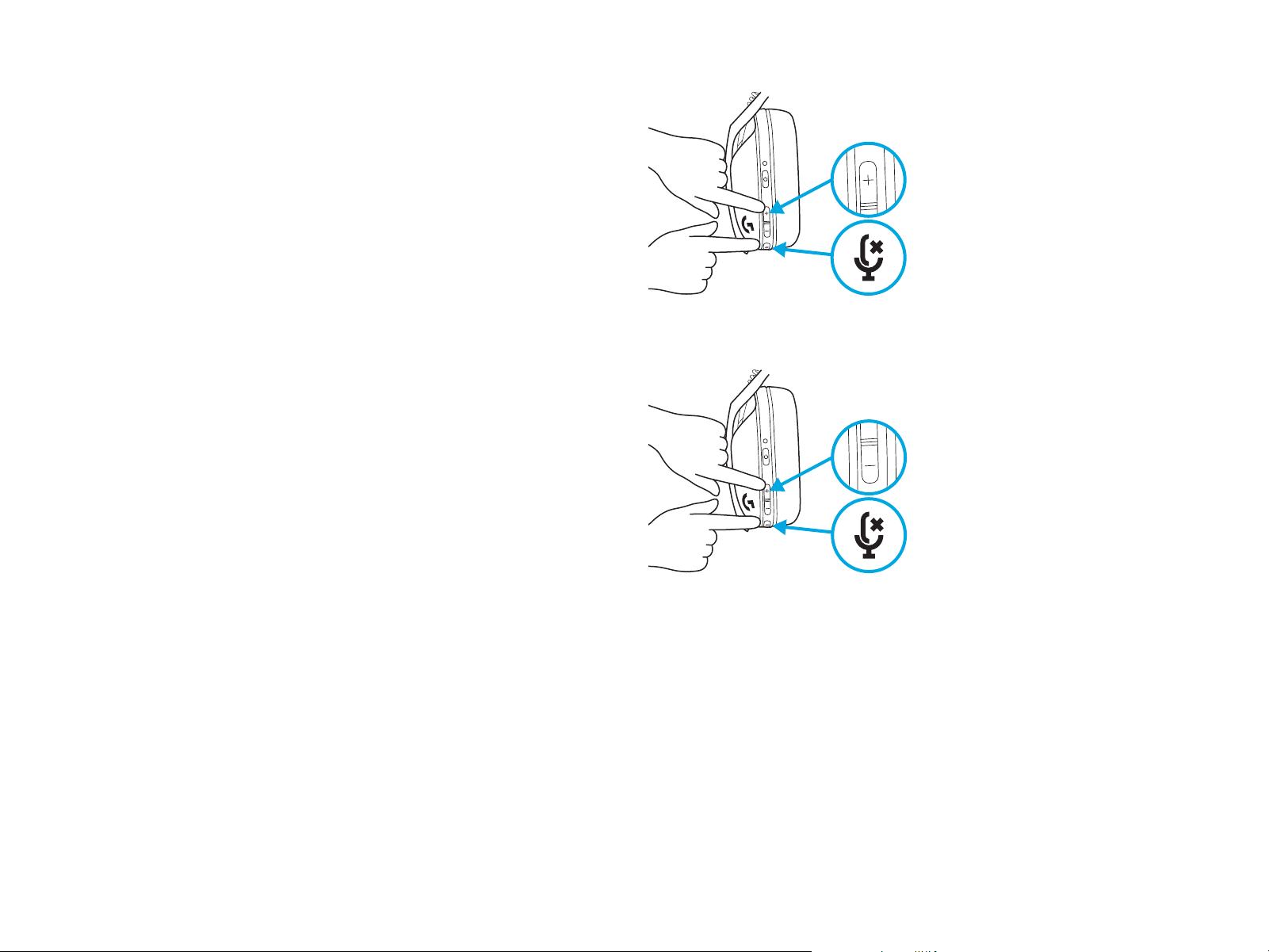
– Ajustar Sidetone
– Aumentar = Pressione uma vez o botão sem áudio
+Aumentar volume.
– Diminuir = Pressione uma vez o botão sem áudio
+Diminuir volume.
38 PORTUGUÊS
RECICLAGEM
Incentivamos você a revender ou doar produtos
detrabalho. Caso contrário, baterias, equipamentos
eletrônicos e elétricos não devem ser descartados
como lixo doméstico. Sempre que possível, elesdevem
ser separados e levados a um ponto de coleta
apropriado para permitir a reciclagem e evitar possíveis
impactos ao meio ambiente e à saúde humana.
Paraobter mais informações, entre em contato com
as autoridades locais ou o local de compra, ou visite
www.logitech.com/recycling
PEÇAS SOBRESSALENTES
– Fones acolchoados
– Receptor USB sem o
– Cabo de carregamento
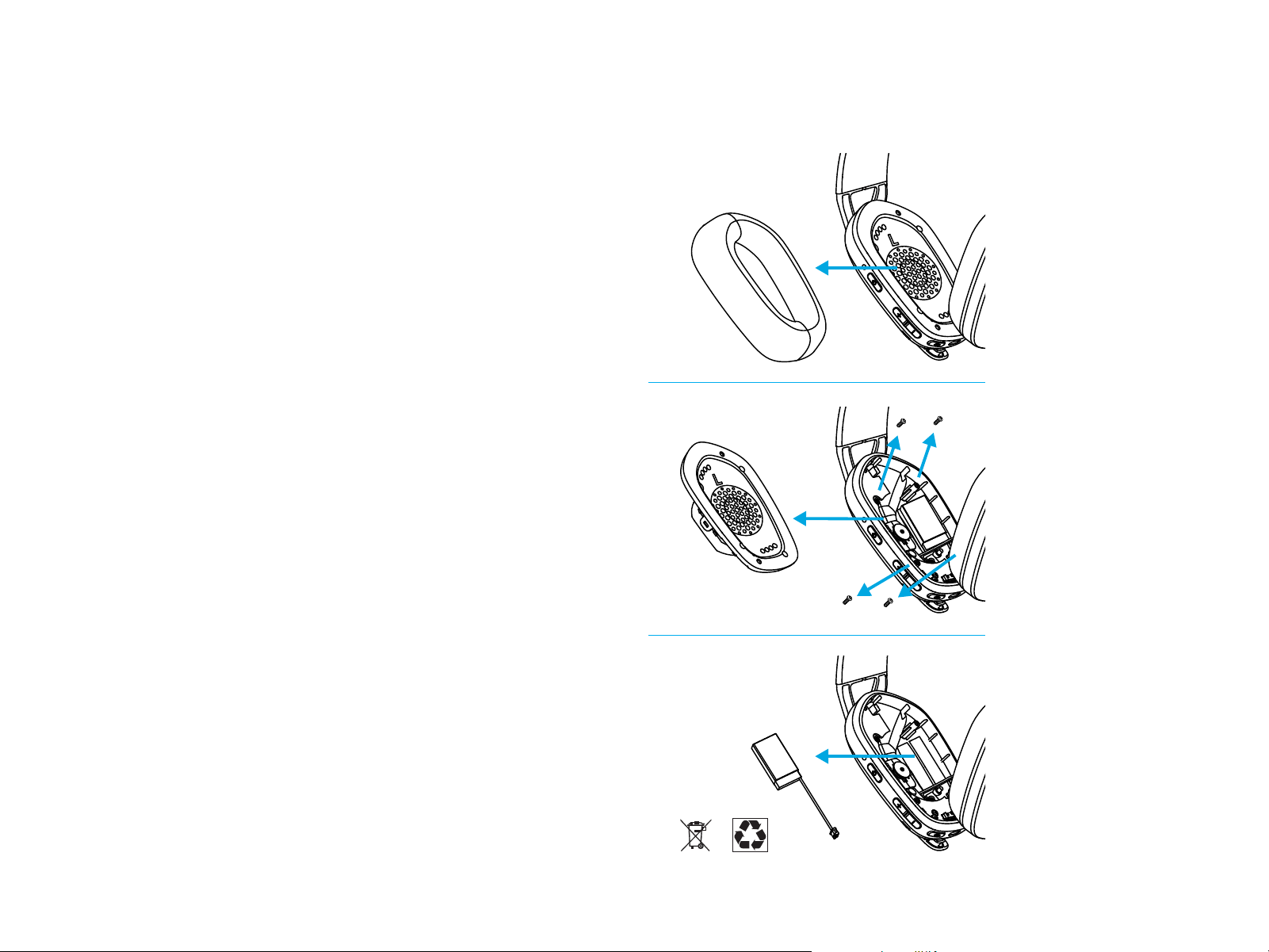
REMOÇÃO DA BATERIA
1
2
3
ALGUMA DÚVIDA?
logitechG.com/support/G435

©2021 Logitech. Logitech, Logitech G, Logi and their respective logos are trademarks or registered trademarks
of Logitech Europe S.A. and/or its aliates in the U.S. and other countries. All other trademarks are the property
of their respective owners. Logitech assumes no responsibility for any errors that may appear in this manual.
Information contained herein is subject to change without notice.
©2021 Logitech. Logitech, Logitech G, Logi et leurs logos respectifs sont des marques commerciales ou déposées de
Logitech Europe S.A. et/ou de ses sociétés aliées aux États-Unis et dans d’autres pays. Toutes les autres marques
sont la propriété exclusive de leurs détenteurs respectifs. Logitech décline toute responsabilité en cas d’erreurs
susceptibles de s’être glissées dans le présent manuel. Les informations énoncées dans ce document peuvent faire
l’objet de modications sans préavis.
WEB-621-002085.002