SENP/10
GT
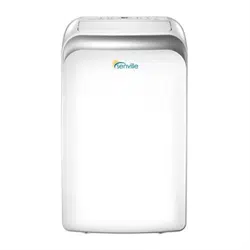
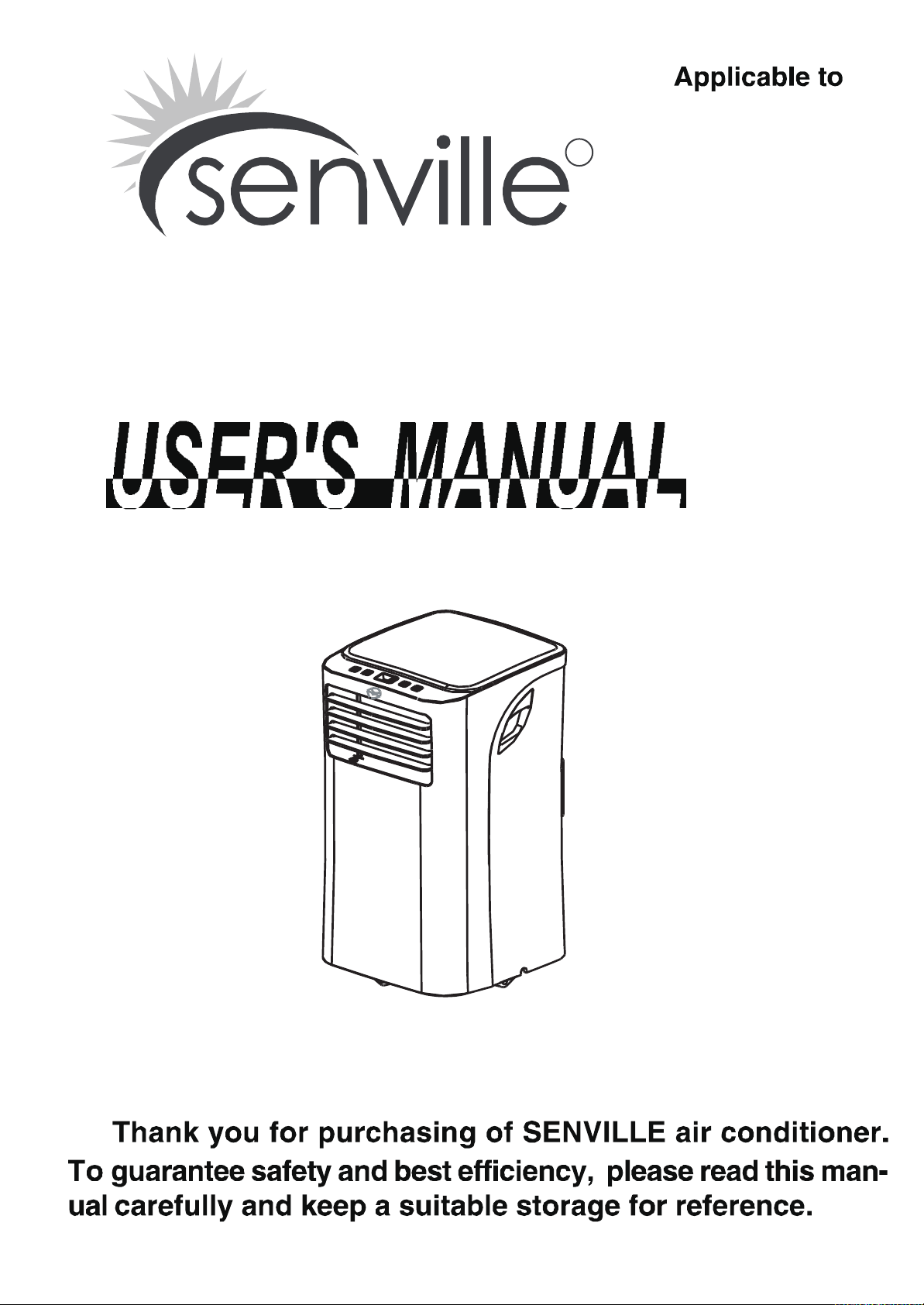
P O R TA B L E A I R C O N D I T I O N E R
R

Inside you will find many helpful hints on how to use and maintain your air conditioner
properly. Just a little preventive care on your part can save you a great deal of time
and money over the life of your air conditioner. You'll find many answers to common
problems in the chart of troubleshooting tips. If you review our chart of Troubleshooting
Tips first, you may not need to call for service at all.
Contact the authorised service technician for repair or maintenance of this unit.
The air conditioner is not intended for use by young children or infirm persons without
supervision.
Young children should be supervised to ensure that they do not play with the air
conditioner.
If the power cord is to be replaced, replacement work shall be performed by authorised
personnel only.
!
CAUTION
Read This Manual

Safety rules ......................................................................................................................................2
Operating conditions
..........................................................................................................................2Electrical information
........................................................................................................................3
Accessories .........................................................................................
.............................................3
Names of parts..................................................................................................................................4
Electronic control operating instructions ..........................................................................................5
Operating
instructions ................................................................................................................... ...6
Location ...........................................................................................................................................8
Window kit installation .....................................................................................................................8
Exhaust hose installation ................................................................................................................
Water drainage ........................................................................................................................
........ 12
.............................................................................................. 13
..........................................................1
11
4
...
.......
....................................
SAFETY PRECAUTIONS
IDENTIFICATION OF PARTS
AIR CONDITIONER FEATURES
OPERATING INSTRUCTIONS
INSTALLATION INSTRUCTIONS
CARE AND MAINTENANCE
...... ...
TROUBLESHOOTING TIPS
.........
TABLE OF CONTENTS
.
.
.
.
The rating data indicated on the rating label is based on the testing
condition of installing the un-extended air exhaust duct without adaptor
(The duct and the adaptor are listed in the accessories chart in this
Instruction Manual).
REMOTE CONTROL INSTRUCTIONS
..............................
...........................................................15
......
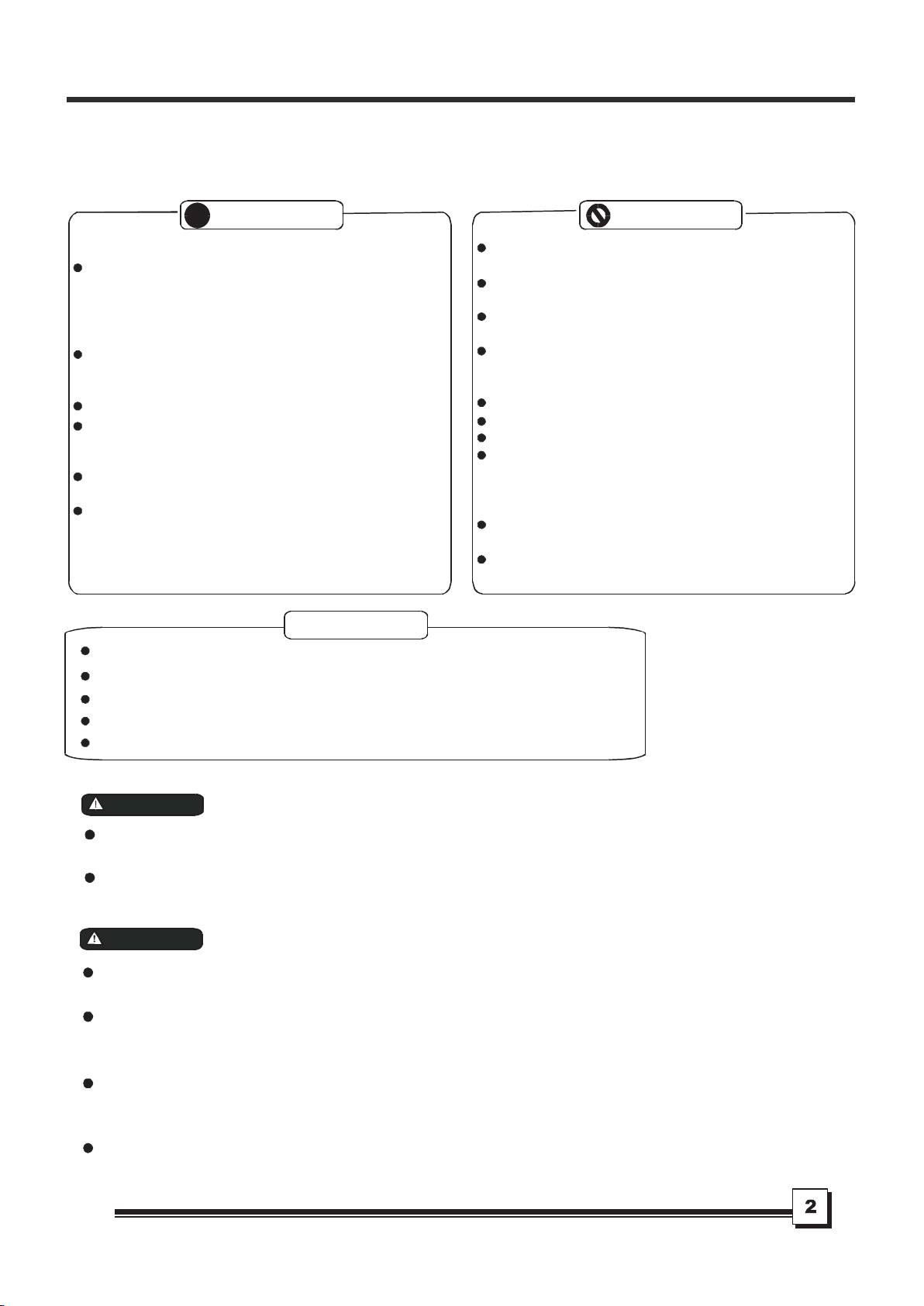
To prevent injury to the user or other people and property damage, these instructions must be followed.
Incorrect operation due to ignoring of instructions may cause harm or damage.
Your air conditioner should be protected fom
rmoisture,e.g. condensation, splashed water, etc.
Do not place or store your air conditioner where it
can fall or be pulled into water or any other liquid.
Unplug immediately.
Always transport your air conditioner in a vertical
position and stand on a stable, level surface during
use.
Turn off the product when not in use.
Always contact a qualified person to carry out
repairs. If the power supply cord is damaged it
must be repaired by a qualified technician.
Keep a free area of at least 1 ft (30 cm) all around the
unit from walls, furniture and curtains.
If the air conditioner is knocked over during use,
turn off th
e unit and unplug from the main power
supply immediately.
!
Always do this
Do not operate your air conditioner in a wet room
such as a bathroom or laundry room.
Do not touch the unit with wet or damp hands or
when barefoot.
Do not press the buttons on the control panel with
anything other than your fingers.
Do not remove any fixed covers. Never use this
appliance if it is not working properly, or if it has
been dropped or damaged.
Never use the plug to start and stop the unit.
Always use the switch on the control panel.
Do not cover or obsturct the inlet or outlet grilles.
Do not use hazardous chemicals to clean or to come
into contact with the unit. Do not use the unit in the
presence o
f flammable substances or vapours such
as alcohol, insecticides, petrol,etc.
Do not allow children to operate the unit
unsupervised.
Do not use this product for functions other than
those described in this instruction manual.
Never do this
Energy Saving Tips
Use the unit in the recommended room size.
Locate the unit where furniture cannot obstruct the air flow.
Keep blinds/curtains closed during the sunniest part of the day.
Keep the filters clean.
Keep doors and windows closed to keep cool air in and warm air out.
Safety rules
SAFETY PRECAUTIONS
Be sure the electrical service is adequate for the model you have chosen. This informationcan be found
on theserial plate, which is located onthe sideof the cabinet andbehind the grille.
Be sure the air conditioner is properly grounded. To minimize shock and fire hazards, proper grounding is
important. The power cord is equipped with a three-prong grounding plug for protection against shock
hazards.
Your air conditioner must be used in a properly grounded wall receptacle. If the
wall receptacle you intend
to useis not adequately grounded or protected by atime delay fuse or circuit breaker, have a qualified
electrician install a proper receptacle.
Ensure the receptacle is accessible after the unit is installed.
WARNI NG
For your safety
Do not store or use gasoline or other flammable vapours and liquids in the vicinity of this or any other
appliance.
Prevent fire hazard or electric shock. Do not use an extension cord or an adaptor plug. Do not remove
any prongs from the power cord.
WAR NI NG
Electrical Information
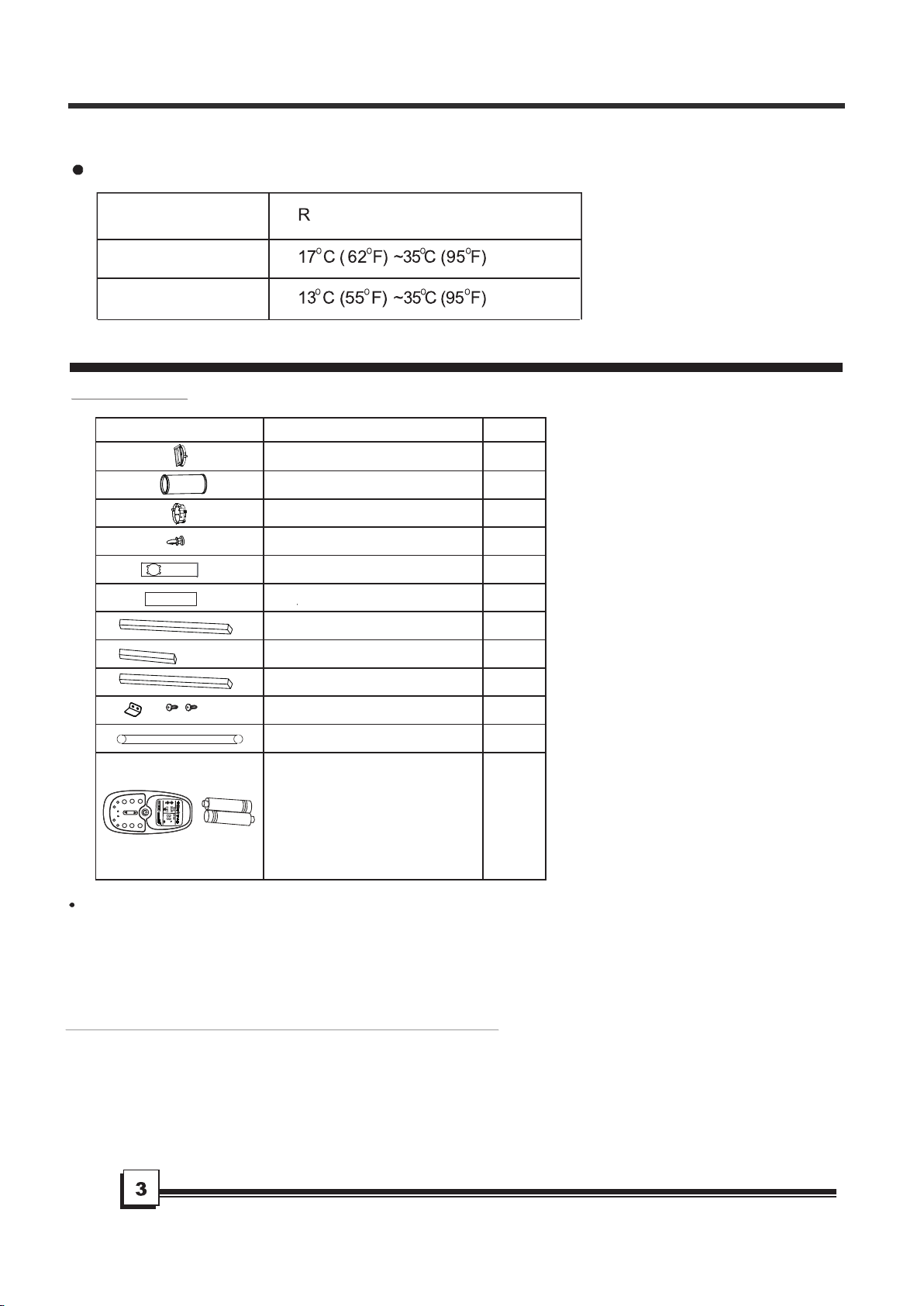
Accessories
Check that all the accessories are included in the package and please refer to the installation instructions
for their usage.
All illustrations in this manual are for explanation purposes only. Your air conditioner
may be slightly different. The actual unit shall prevail.
NOTE:
Suggested tools for window kit installation
1. Screwdriver(medium size Phillips)
2. Tape measure or ruler
3. Knife or scissors
4. Saw (In the event that the window kit needs to be cut down in size because
the window is too narrow for direct installation)
The air conditioner must be operated within the temperature range indicated below:
Operating conditions
MODE OOM TEMPERATURE
COOL
DRY
Note: Performance may be reduced outside of these operating temperatures.
IDENTIFICATION OF PARTS
Part
Description
1 pc
1 pc
1 pc
1 pc
1 pc
1 pc
1 pc
1 pc
2 pc
2 pc
1 set
1 set
Unit Adaptor
Window Slider Adaptor
Window Slider A
Window Slider B
Exhaust Hose
Bolt
Foam Seal A (Adhesive)
Foam Seal B (Adhesive)
Foam Seal C (Non-adhesive)
Security Bracket and 2 Screws
Drain Hose
Quantity
Remote Controller and Battery
(For remote control models only)
MOD
E
SLEE
P
LE
D
CLOC
K
CANCE
L
TIME
R
FAN
RESET
LOC
K
CLOCK
C
O
N
OF
F
SET
T
EMP
.
FAN
SP
EE
D
AUT
O
F
SWIN
G
TURB
O
F
O
L
L
O
W
M
E
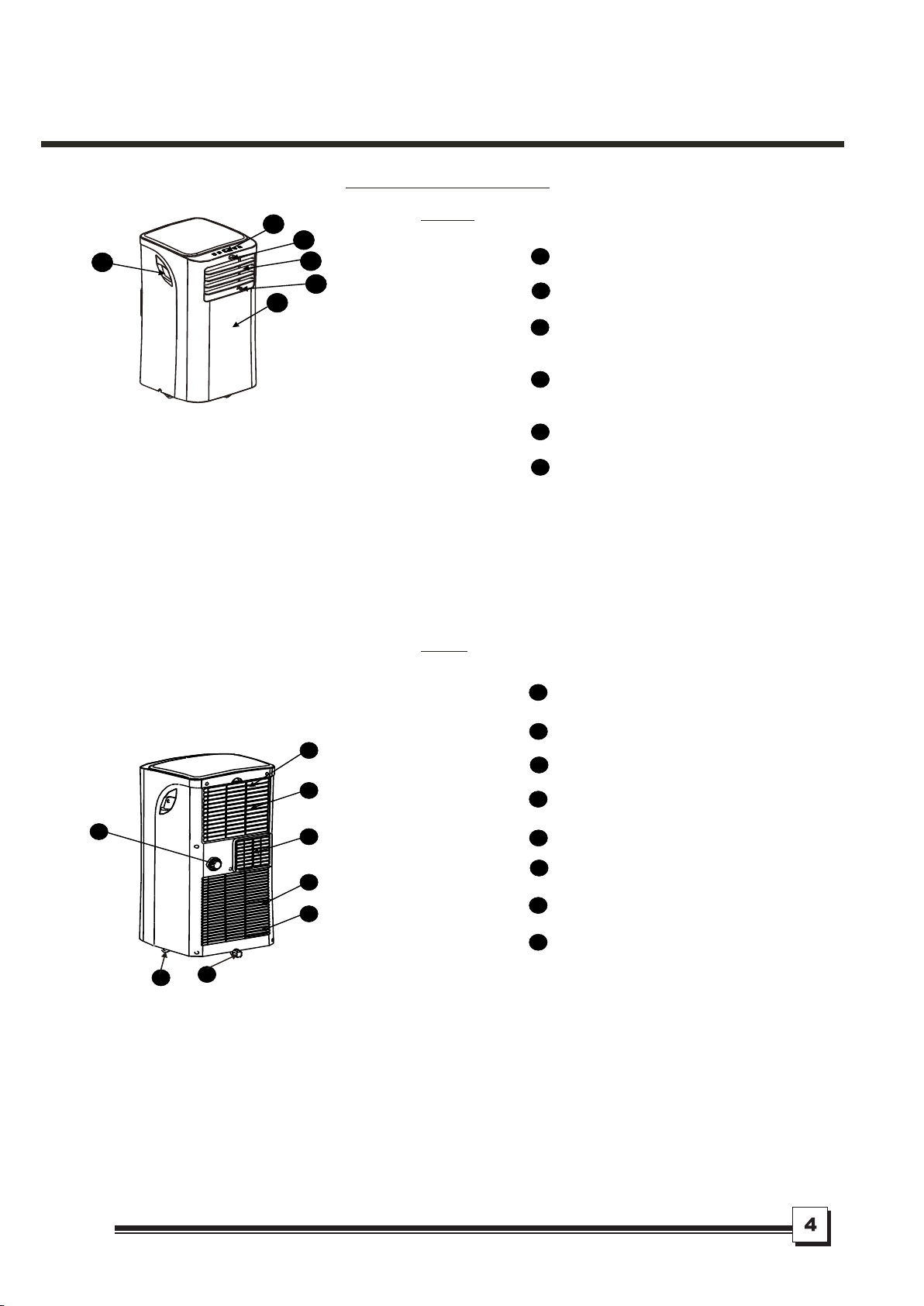
Operation Panel
Remote Signal Receptor
Horizontal Louver Control Lever
(adjust manually)
Vertical Louver Control Lever
(adjust manually)
Panel
Carrying Handle
(both sides)
1
2
3
Fig.1
Fig.2
8
9
12
13
Upper Air Filter
(Behind the grille)
Air Outlet
Lower Air Filter
(Behind the grille)
14
4
Bottom tray drain outlet
7
Air Intake
Air Intake
Drain Outlet
1
2
6
5
8
7
9
12
13
14
3
4
5
6
10
11
10
11
NAMES OF PARTS
Front
Rear
Casters
IDENTIFICATION OF PARTS
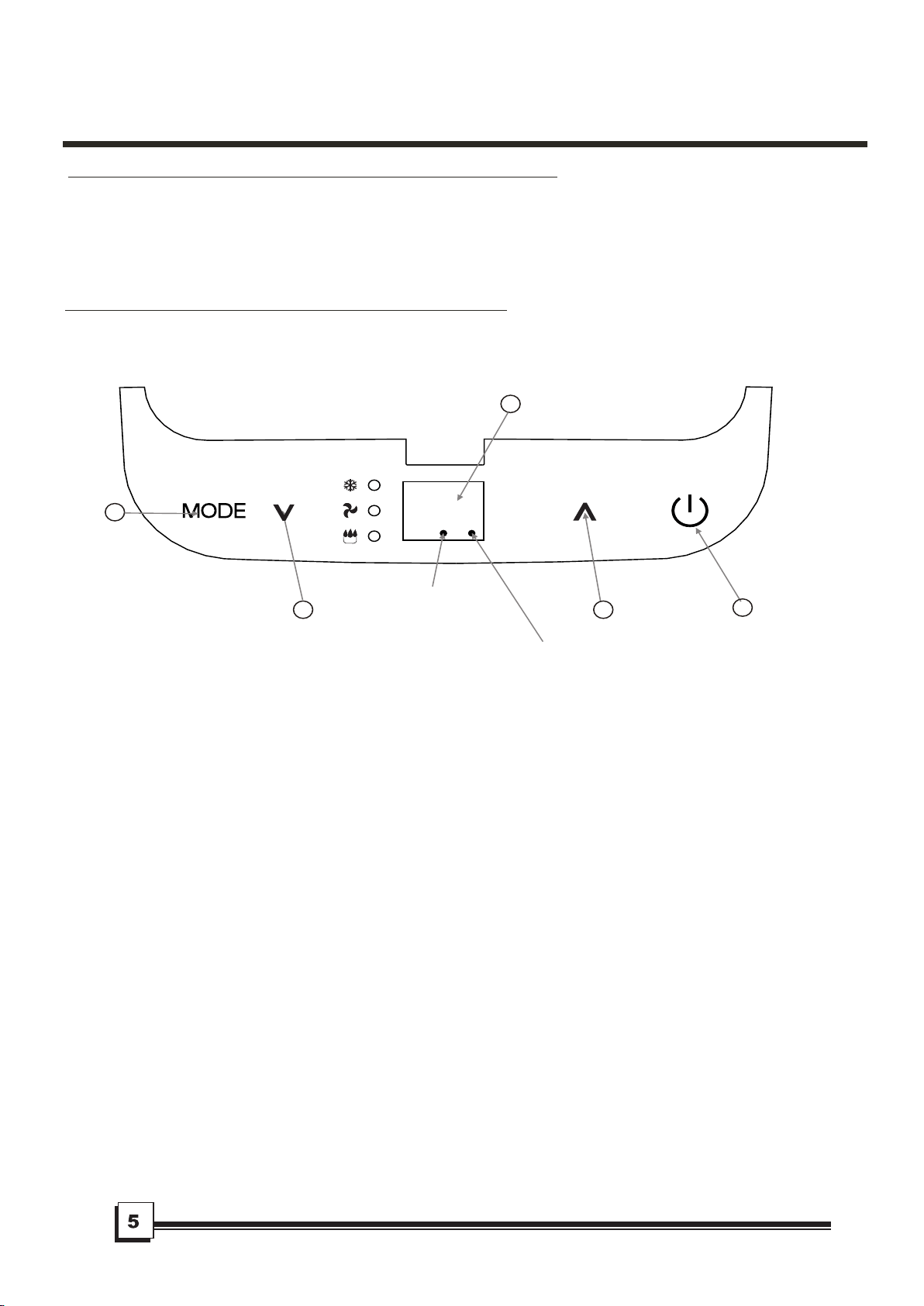
Fig.3
11
22
33
44
22
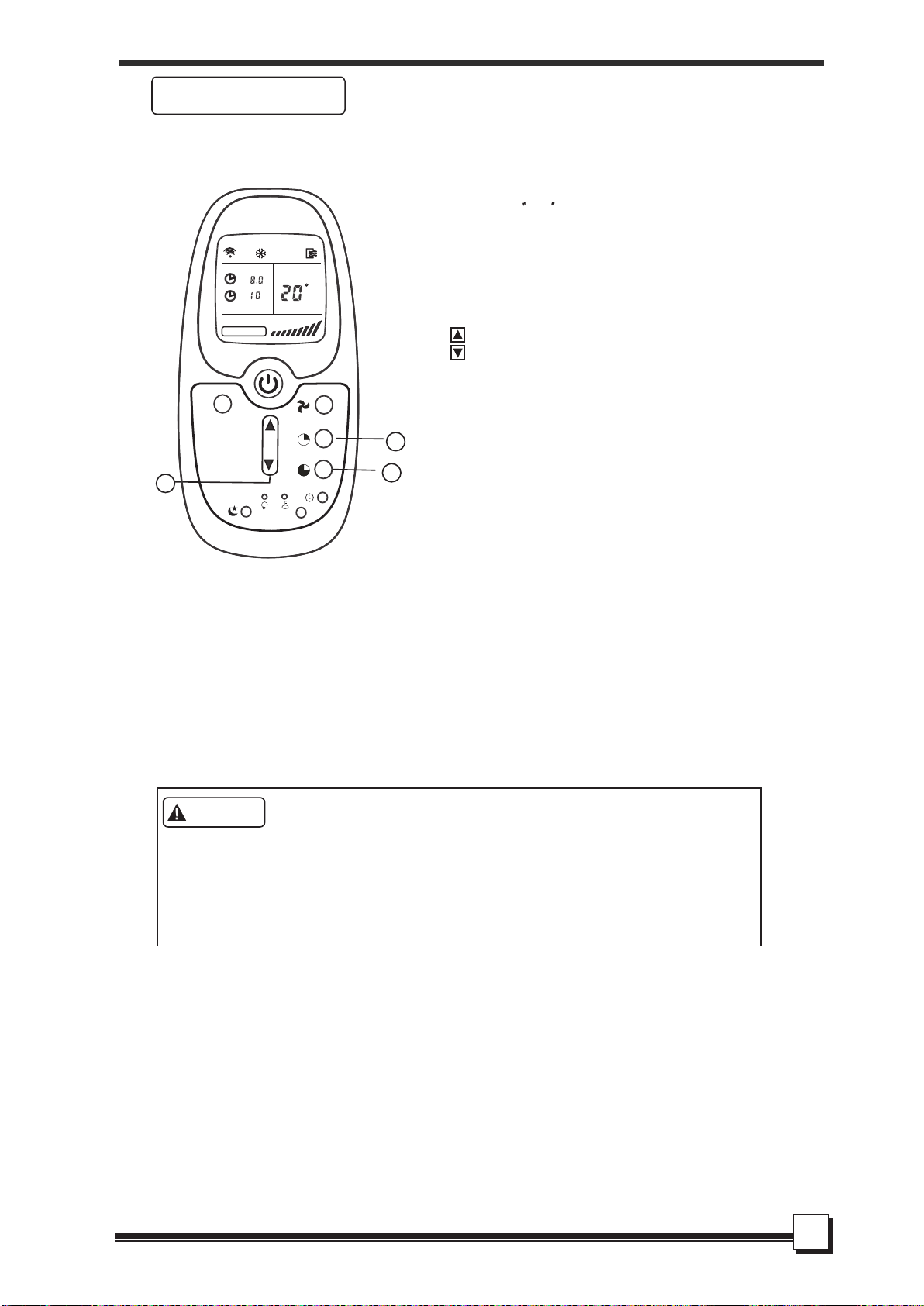
Power indicator
light
Timer mode indicator
light (set only by remote
AIR CONDITIONER FEATURES
ELECTRONIC CONTROL OPERATING INSTRUCTIONS
OPERATION PANEL OF THE AIR CONDITIONER
Before you begin, get fully familiar with the control panel and remote control and all their
functions, then follow the symbol for the functions desired.
The unit can be controlled by the unit control panel alone or with the remote control .
NOTE: For instructions on how to use the remote control, please see page 15 of this manual.
control)
While on DRY and FAN modes, it shows the room
temperature.
E2- Evaporator temperature sensor error-
Unplug the unit and plug it back in.
If error repeats, call for service.
E4- Display panel communication error-
Unplug the unit and plug it back in.
If error repeats, call for service.
Error codes:
E1- Room temperature sensor error-
Unplug the unit and plug it back in.
If error repeats, call for service.
Protection codes:
P1- Bottom tray is full - Connect the
drain hose and drain the collected
water away. If error repeats, call
for service.
- Press the "MODE" button until the "COOL"
indicator light comes on. The unit will operate
the auto fan speed automatically.
- Press the ADJUST buttons " " or " " to
select your desired room temperature. The
temperature can be set within a range of
OOOO O
17 C-30 C/62 F-88 F(or 86 F).
- Press the "FAN" button on the remote cotroller
- Press the "MODE" button until the "DRY"
indicator light comes on.
- Under this mode, you cannot select a fan
speed or adjust the temperature. The fan
- Keep windows and doors closed for the best
dehumidifying effect.
- Do not put the duct to window.
- Press the "MODE" button until the "FAN "
indicator light comes on. The unit will operate
the auto fan speed automatically. The
temperature cannot be adjusted on fan mode.
- Press the "FAN" b utton on the remote control
- Do not put the duct to window.
This feature can be activated from the
remote control ONLY.
NOTE: When more than one
error occurs,
the priority of the code display order is:
E4--E2--E1--P1.
motor operates at LOW speed.
Shows the set temperature in C
O
" "
" "
or
F and the Auto-timer settings.
O
UP( ) and DOWN( ) button
2
1
MODE select button
ON-OFF button
4
OPERATING
INSTRUCTIONS
Operating Instructions
COOL operation
DRY operation
FAN operation
SLEEP operation
3
LED Display
Selects the appropriate operating mode.
Each time you press the button, a mode
is selected in a sequence that alternates
between COOL, FAN and DRY. The mode
indicator light illuminates under the different
mode settings.
(Fig.3).
NOTE: On above modes, the unit operates the
auto fan speed automatically. You can set fan
speed only with the remote control, on COOL
and FAN modes.
to set the fan speed.
Used to adjust (increasing/decreasing)
O O
temperature s ettings in 1 C/2 F inc rements
O O O O
in a range of 17 C/62 F to 30 C/88 F.
NOTE: The control can display temperature
in degrees Fahrenheit or degrees Celsius.
To convert from one to the other, press and
hold the Up and Down buttons at the same
time, for 3 seconds.
to set the fan speed.
When the SLEEP feature is selected, the set
temperature
O O O
will increase by 1 C/2 F(or 1 F)
in 30 minutes.The set temperature will then
increase by
O O O
another 1 C/2 F(or 1 F) after an
additional 30 minutes. This new temperature
will be maintained for 7 hours before it returns
to the initial temperature. This ends the Sleep
mode and the unit will continue to operate as
originally programmed.
Used to turn thepower off or on.
DRY mode. The room temperature may increase
over 30 C under sleep mode.
O
NOTE: This feature is unavailable under FAN or
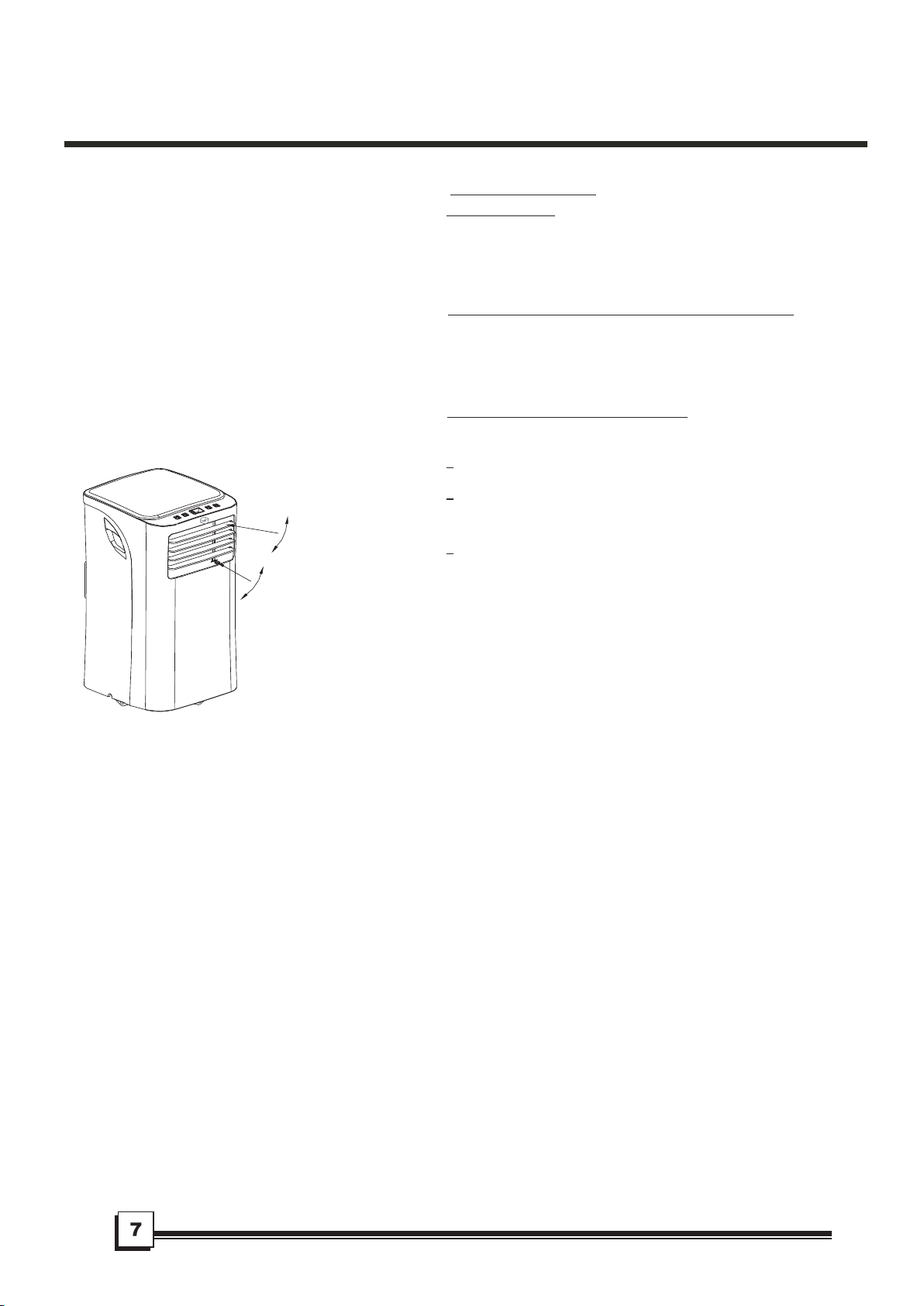
Fig.4
Adjust
manually
Adjust
manually
If the unit turns off unexpectedly due to a
power outage or interruption, it will restart
automatically with its previous settings when
the power resumes.
After the unit has stopped, it cannot be restarted
in the first 3 minutes. This is to protect the unit.
Operation will automatically start after3 minutes.
Adjust the air flow direction manually
(Fig.4):
The louvers can be set to the desired position
manually.
Do not place any heavy objects or other loads
on the louvers; doing so will cause damage to
the unit.
Keep the louvers fully opened during
operation.
Other features
Auto-Restart
Wait 3 minutes before resuming operation
Air flow direction adjustment
OPERATING INS TRUCTIONS
INSTALLATION INSTRUCTIONS (optional)
Window Installation Kit
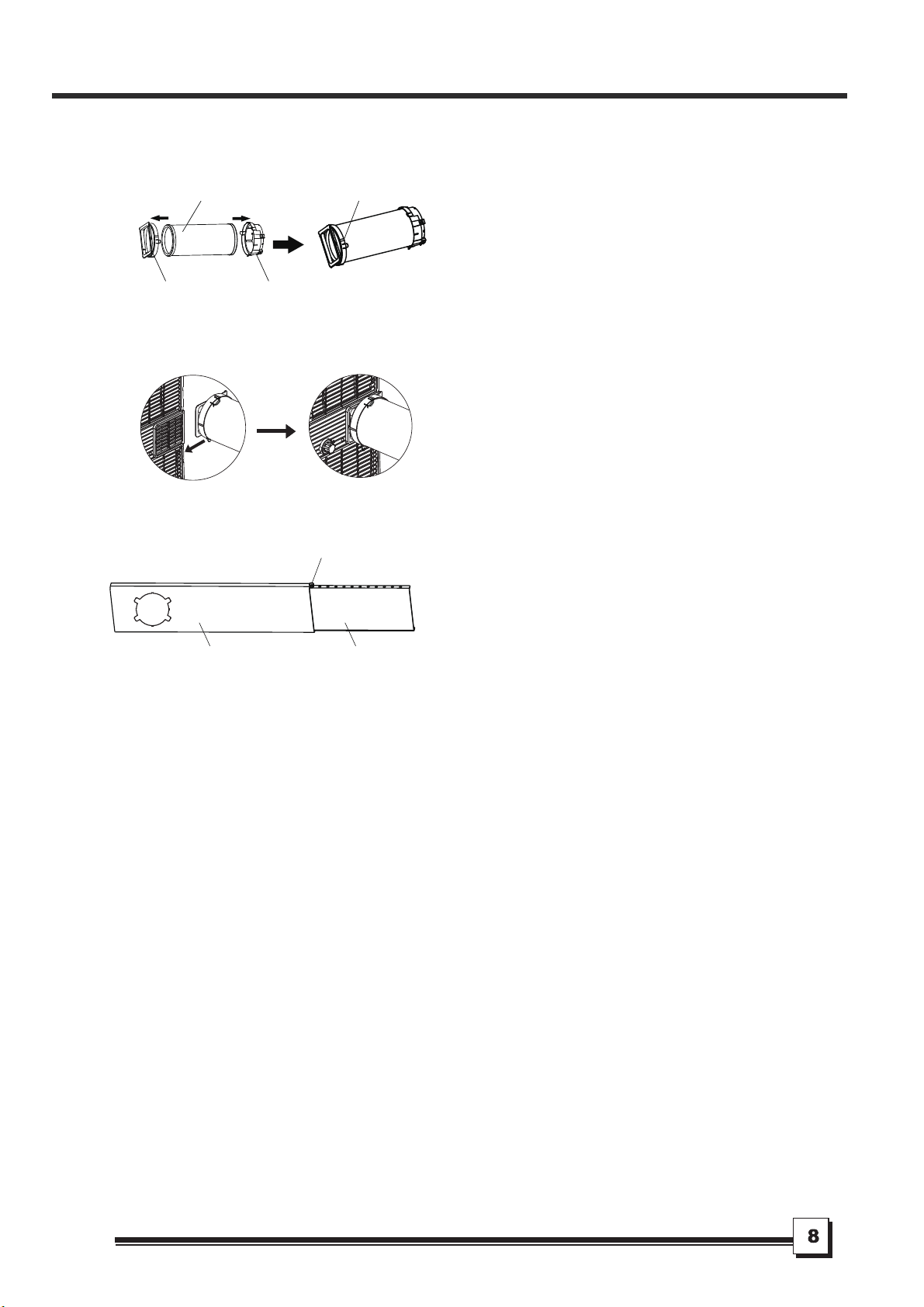
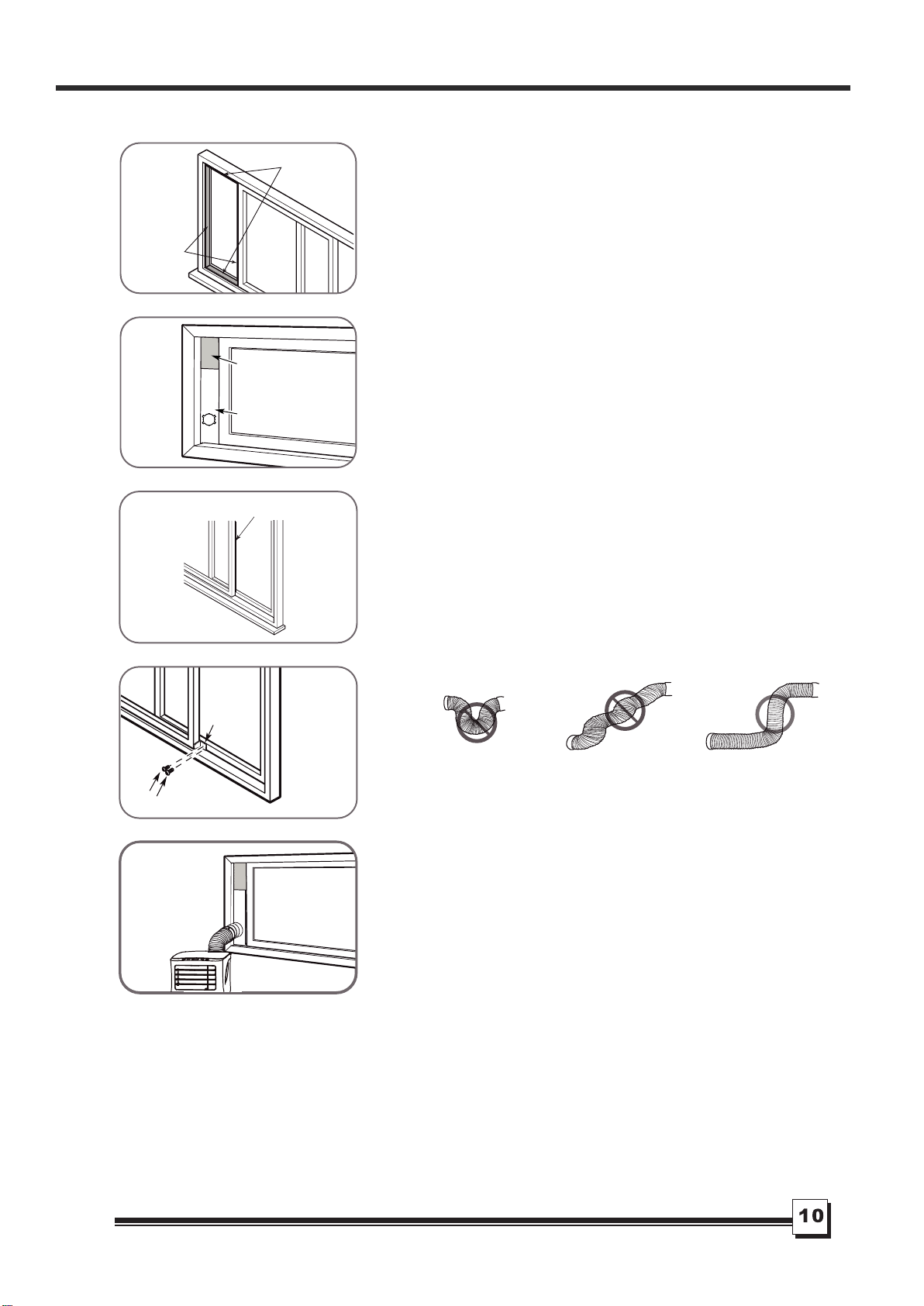
Press the exhaust hose into the window slider adaptor
and unit adaptor, clamp automatically by elastic buckles
of the adaptors.
Push the Exhaust hose into the airoutlet opening of the
unit along the arrow direction.
Step One: Preparing the Exhaust
Hose assembly
Step Two: Install the Exhaust hose
assembly to the unit
Unit adaptor Window slider
adaptor
Exhaust hose
Exhaust hose
assembly
Step Three: Preparing the Adjustable
Window Slider
1. Depending on the size of your window, adjust the size
of the window slider.
2. If the length of the window requires two window sliders,
use the bolt to fasten the window sliders once they are
adjusted to the proper length.
Note: Once the Exhaust Hose assembly and Adjustable
Window Slider are prepared, choose from one of the
following two installation methods.
Window slider A Window slider B
Bolt
INSTALLATION INSTRUCTIONS (optional)
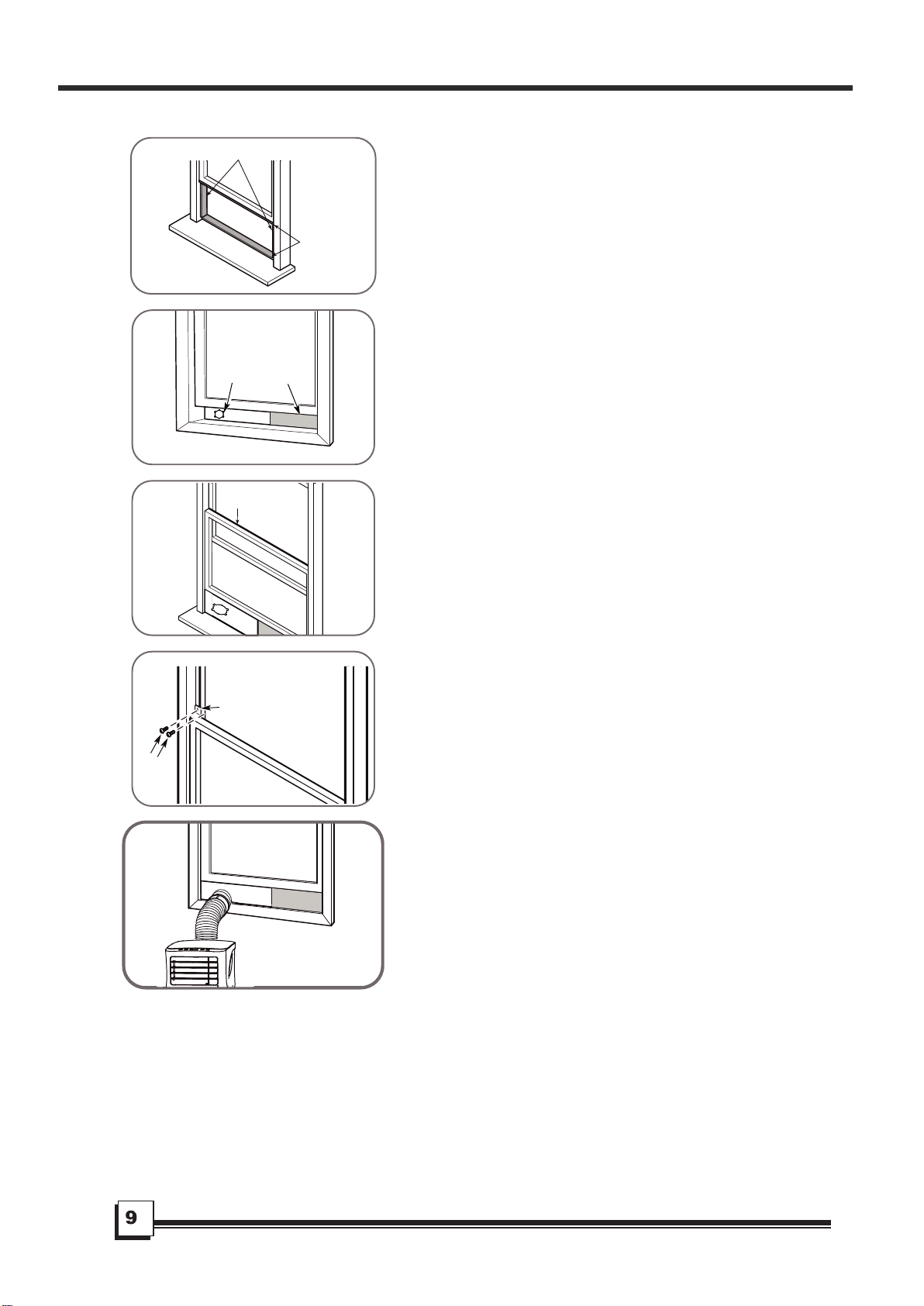
1. Cut the adhesive foam seal A and B strips to the proper
lengths, and attach them to the window sash and frame
as shown.
3. Cut the non-adhesive foam seal C strip to match the
width of the window. Insert the seal between the glass
and the window frame to prevent air and insects from
getting into the room.
4. If desired, install the security bracket with 2 screws as
shown.
5. Insert the window slider adaptor into the hole of the
window slider.
2. Insert the window slider assembly into the window
opening.
Type 1: Hung Window Installation
Foam seal B
(Adhesive type-shorter)
Foam seal A
(Adhesive type)
Window slider A
Window slider B
(if required)
Foam seal C
(Non-adhesive type)
2 Screws
Security Bracket
INSTALLATION INSTRUCTIONS (optional)
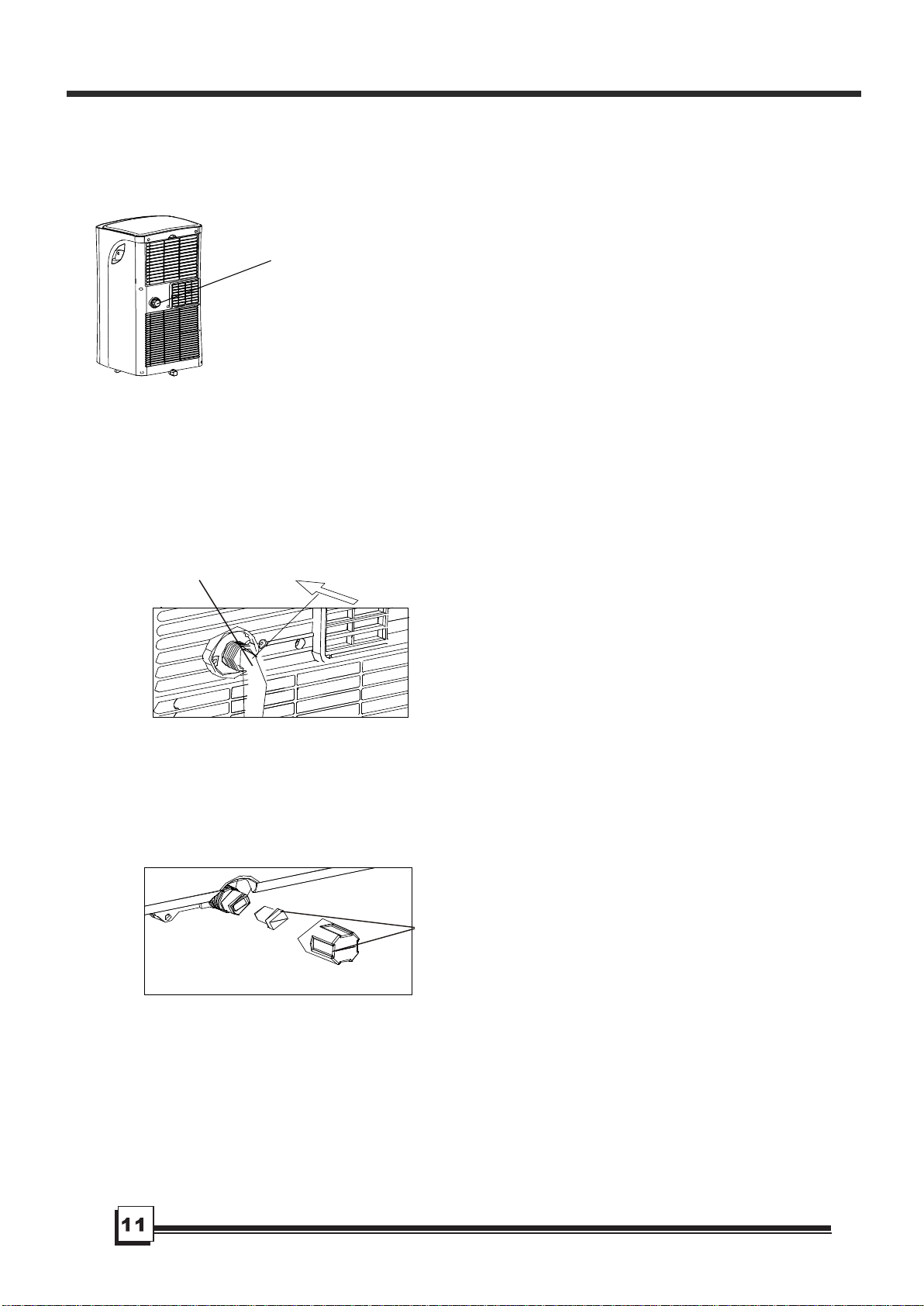
1. Cut the adhesive foam seal A and B strips to the
proper lengths, and attach them to the window sash
and frame as shown.
2. Insert the window slider assembly into the window
opening.
Type 2: Sliding Window Installation
Foam seal B
(Adhesive type-shorter)
Foam seal A
(Adhesive type)
Window slider A
Window slider B
(if required)
3. Cut the non-adhesive foam seal C strip to match the
window height. Insert the foam seal between the glass
and the window frame to prevent air and insects from
getting into the room.
4. If desired, install the security bracket with 2 screws
as shown.
5. Insert the window slider adaptor into the hole of the
window slider.
Note: To ensure proper function, DO NOT overextend
or bend the hose. Make sure that there is no obstacle
around the air outlet of the exhaust hose (in the range
of 500mm) in order to the exhaust system works properly.
All the illustrations in this manual are for explanation
purpose only. Your air conditioner may be slightly different.
The actual shape shall prevail.
Foam seal C
(Non-adhesive type)
2 Screws
Security
Bracket
-
When the water level
in
the bottom tray reaches
a predetermined level,
Carefully move the unit to a drain location,
remove the bottom drain plug and let the
water drain away (Fig.2
1
). Reinstall the bottom
drain plug and restart the machine until the P1
symb
ol disappears. If the error repeats, call for
service.
" "
the unit beeps 8 times and
the digital display area shows P1 . At this time
the air conditioning/dehumidification process will
immediately stop. However, the fan motor will
continue to operate (this is normal).
" "
Fig.19
Fig.20
Fig.21
INSTALLATION INSTRUCTIONS
Water drainage:
Remove the
drain plug
Continuous
drain hose
Bottom drain plug
-
plug from the back of the unit. You may also
connect a 3/4" (1.9cm) garden hose (sold
separately) onto the 5/8" (1.58cm) drain
connector on the unit. For models without a
drain connector, just attach the drain hose to
the hole. Place the open end of the hose directly
over the drain area in your basement floor.
Please refer to Fig.19 & 20.
I n dehumidifying mode,remove the drain
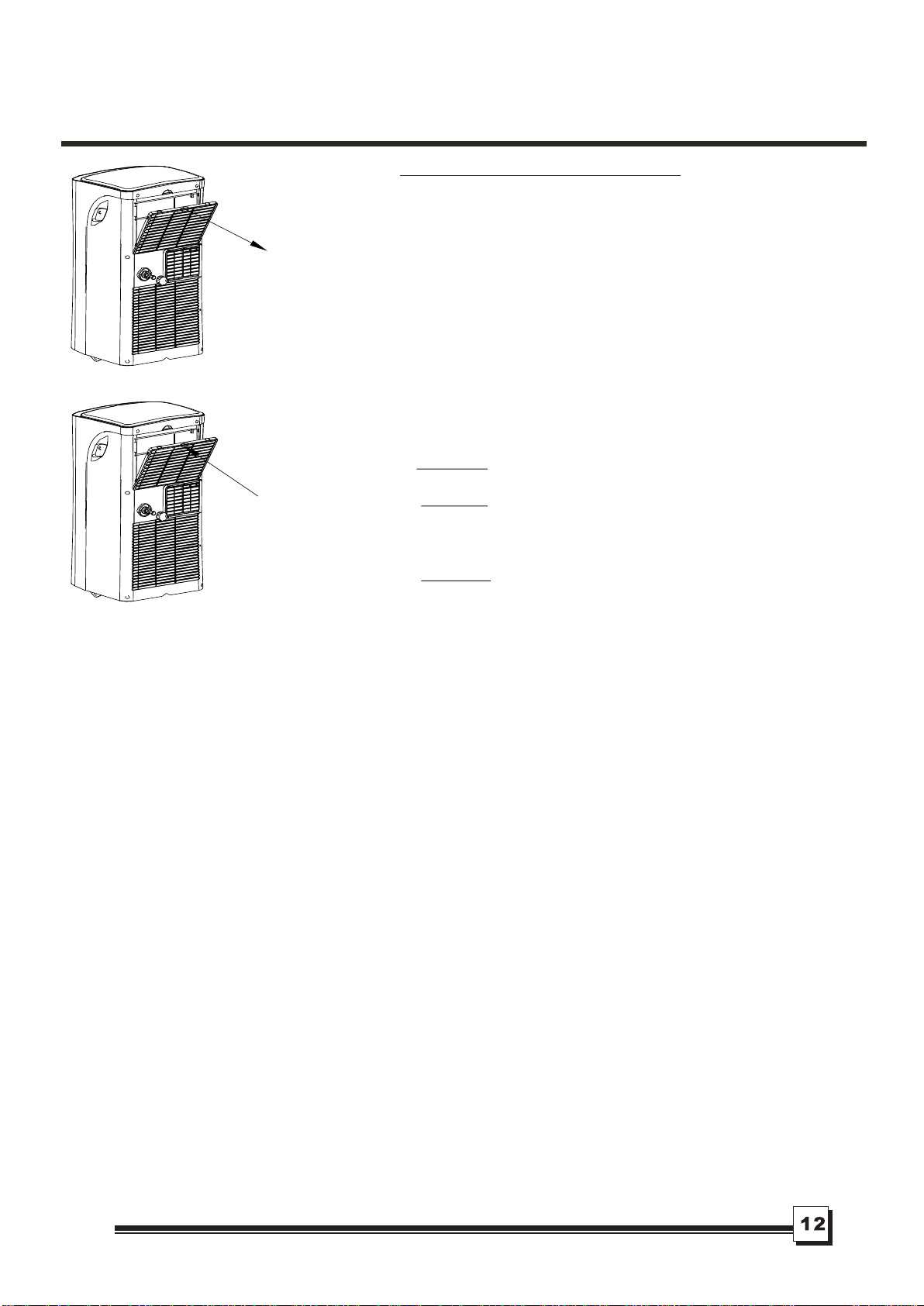
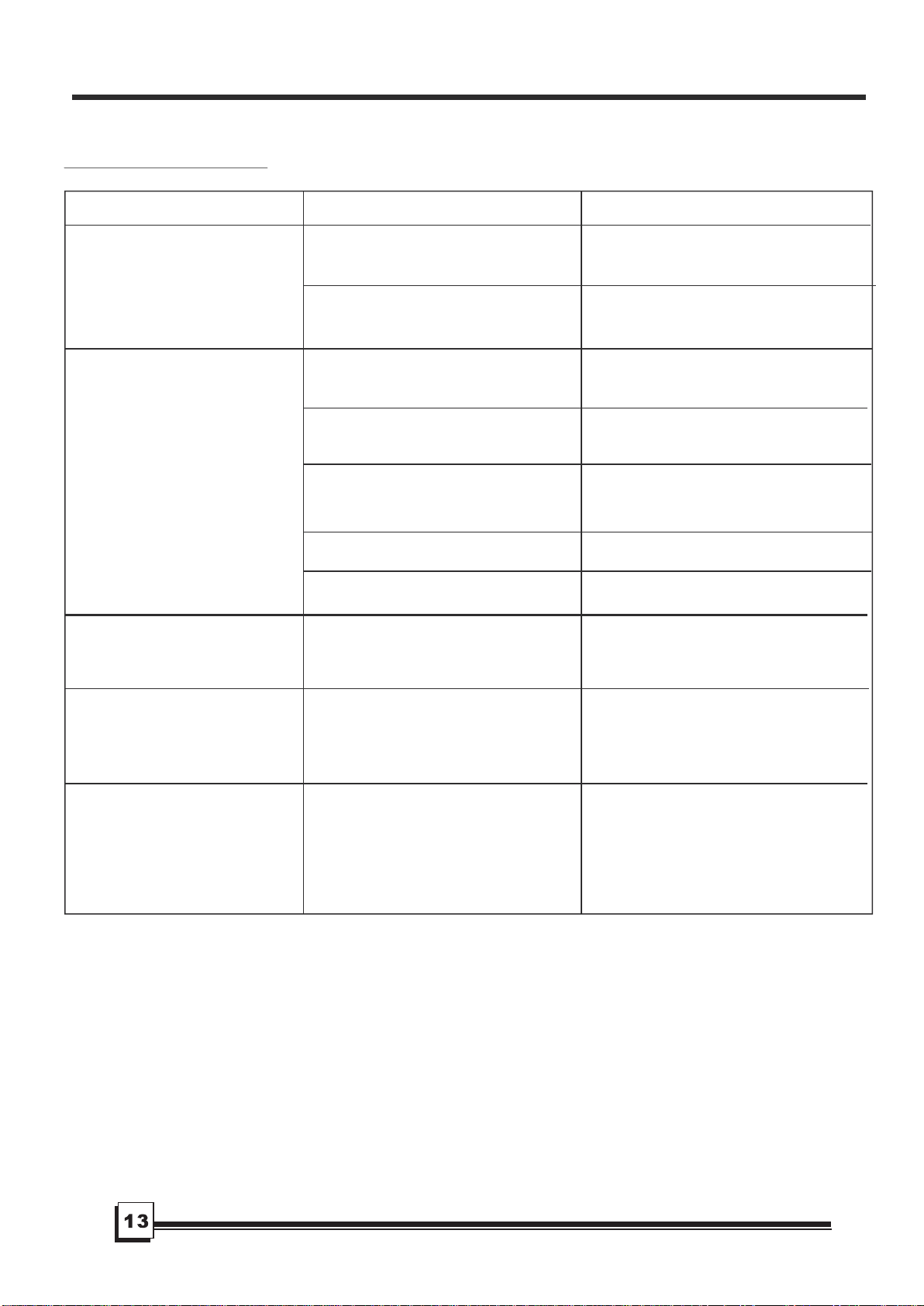
Fig.22
1) Be sure to unplug the unit before cleaning or servicing.
2) Do not use gasoline, thinner or other chemicals to clean
the unit.
IMPORTANT:
1. Air filter
- Clean the air filter at least once every two weeks to prevent
- Removal
Take the air filter out along the arrow direction (Fig.22).
- Cleaning
Wash the air filter by immersing it gently in warm water
OO
(about 40 C/104 F) with a neutral detergent. Rinse the filter
and dry it in a shady place.
- Mounting
Install the air filter after cleaning (see Fig.23).
2. Unit enclosure
- Remove the rubber plug at the back of the unit and attach
a hose to drain outlet. Place the open end of the hose
directly over the drain area in your basement floor
(See Fig.19 & 20).
- Remove the plug from the bottom drain outlet, all the water
in the bottom tray will drain out (See Fig.21).
- Keep the appliance running on FAN mode for half a day in
a warm room to dry the appliance inside and prevent mold.
- Stop the appliance and unplug it, wrap the cord and
bundle it with the tape. Remove batteries from
the remote control.
- Clean the air filter and reinstall it.
NOTE:
Fig.23
Air filter
(install)
Air filter
(take out)
CARE
AND
MAINTENANCE
CARE AND MAINTENANCE
3) Do not wash the unit directly under a tap or using a hose.
It may cause electrical shock.
4) If the power cord is damaged, it should be repaired/replaced
by the manufacturer or its authorized agent.
dust from affecting fan operation.
- Use a lint-free cloth soaked with neutral detergent to clean
the unit enclosure. Dry enclosure with a clean cloth.
3. If the unit will not be used for a long time
The grill and the air filter are connected but can be
separated.
TROUB L ESHOOTING
1. Unit does not
start when
pressing on/off
button
TROUBLES
POSSIBLE CAUSES
SUGGEST REMEDIES
Reset the temperature.
Make sure all the windows and
doors are closed.
Remove the heat sources if possible.
Connect the duct and make
sure it can function properly.
Decrease the set temperature.
Clean the air filter.
- Room temperature is lower than
the set temperature.(Cooling mode)
- The windows or doors in the room
are not closed.
- There are heat sources inside the
room.
- Exhaust air duct is not connected or
is blocked.
- Temperature setting is too high.
- Air filter is blocked by dust.
2. Air is not cool enough
Place the unit on a flat, level
floor if possible.
This sound is normal.
- The floor is not level or not flat
enough.
- The sound comes from the
refrigerant flowing inside the
air conditioner.
4. Noise or vibration
5. Gurgling sound
Switch on again after the unit
has cool down.
- Caused by the unit's overheating
protection function.
When the
temperature at the air outlet
exceeds 70 C/158 F,the unit
will stop.
O O
6. Power shut off in
heating mode
- P1 appears in the display window
Drain the water in the bottom tray.
TROUBLESHOOTING TIPS
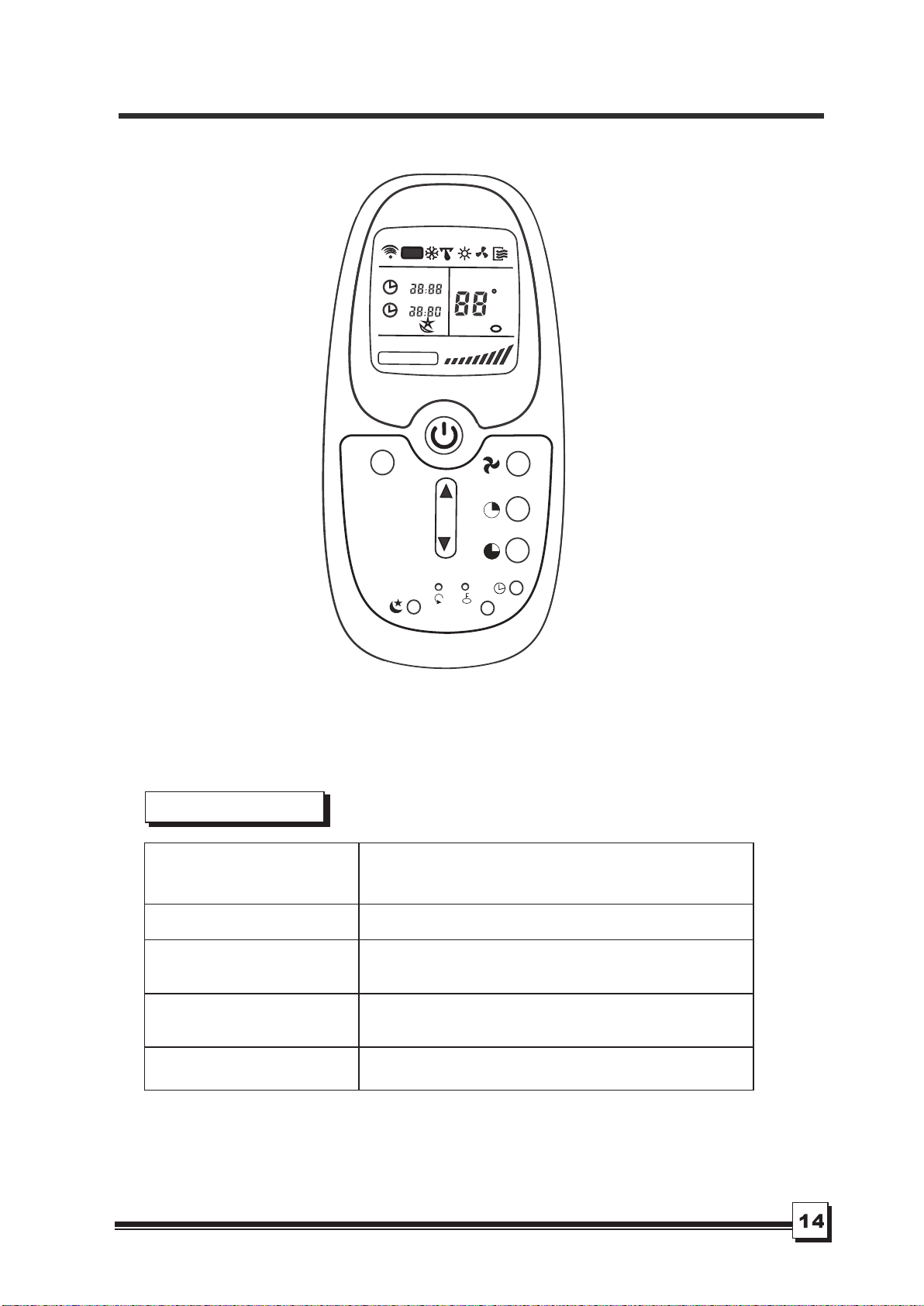
Model
Transmission Distance
Lowest Voltage of
CPU Emitting Signal
Rated Voltage
8m
2.0V
Environment
Specification
。 。
O O
-5 C 60 C( 23 F~140 F)
~
RG09E/BG
C
EU
1
3.0V(Dry batteries R03/LR03×2)
M
O
D
E
L
E
D
C
L
O
C
K
C
O
N
O
F
F
S
E
T T
E
M
P
.
F
A
N S
P
E
E
D
A
U
T
O
F
REMOTE CONTROL INSTRUCTIONS
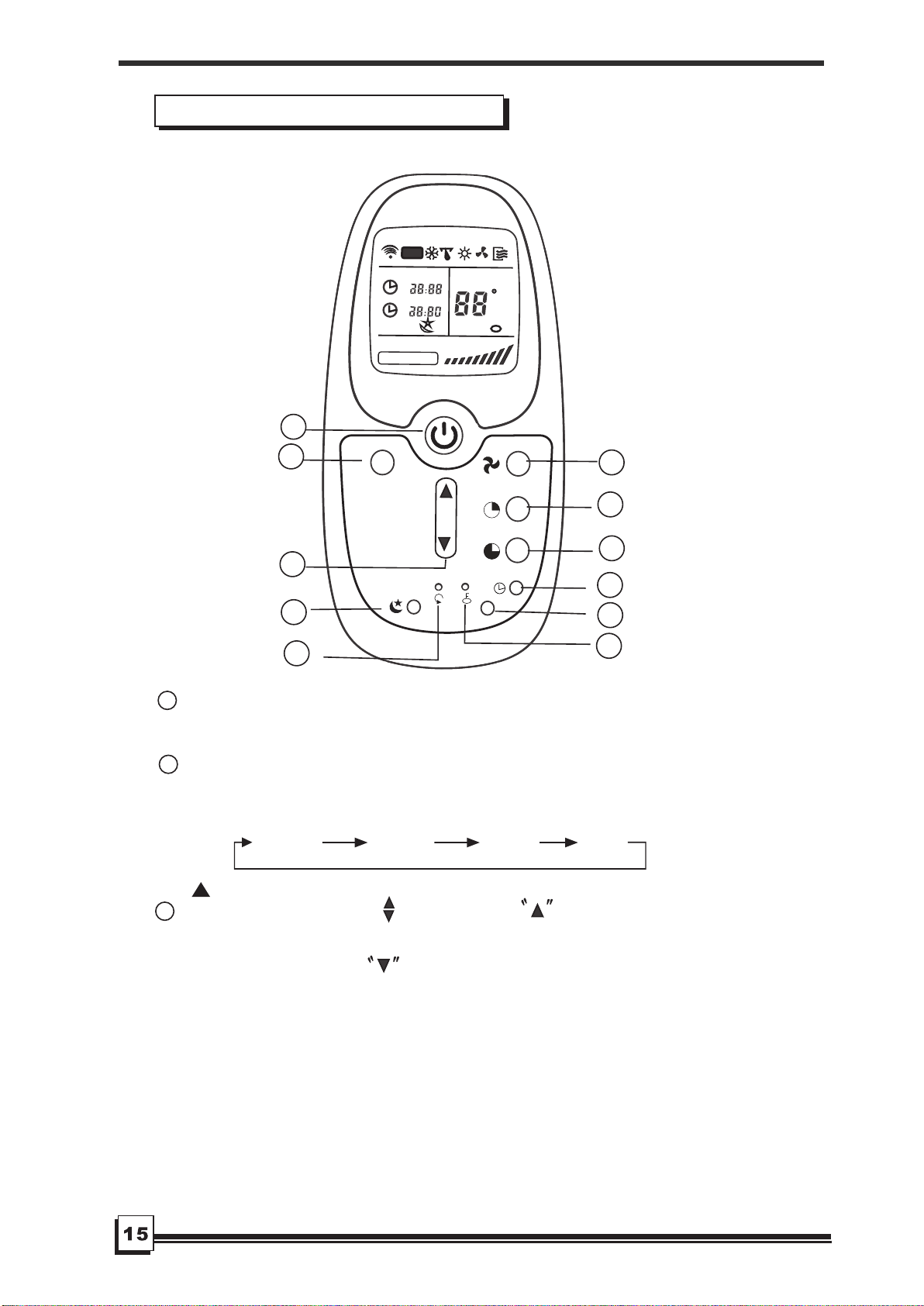
Features of remote control
1
ON/OFF Button: Push this button to start operation, push
the button again to stop operation.
2
MODE Select Button: Each time you push the button, a mode
is selected in a sequence that goes from AUTO, COOL,
DR
Y
and F
AN, as the following figure indicates:
AUTO
COOL
DRY
FAN
1
2
3
4
5
6
7
8
9
1
0
11
M
O
D
E
L
E
D
C
L
O
C
K
C
O
N
O
F
F
S
E
T T
E
M
P
.
F
A
N S
P
E
E
D
A
U
T
O
F
3
TEMP/TIME Button : Push the button to increase the
indoor temperature setting or to adjust the TIMER in a clockwise
direction. Push the button to decrease the indoor
REMOTE CONTROL INSTRUCTIO
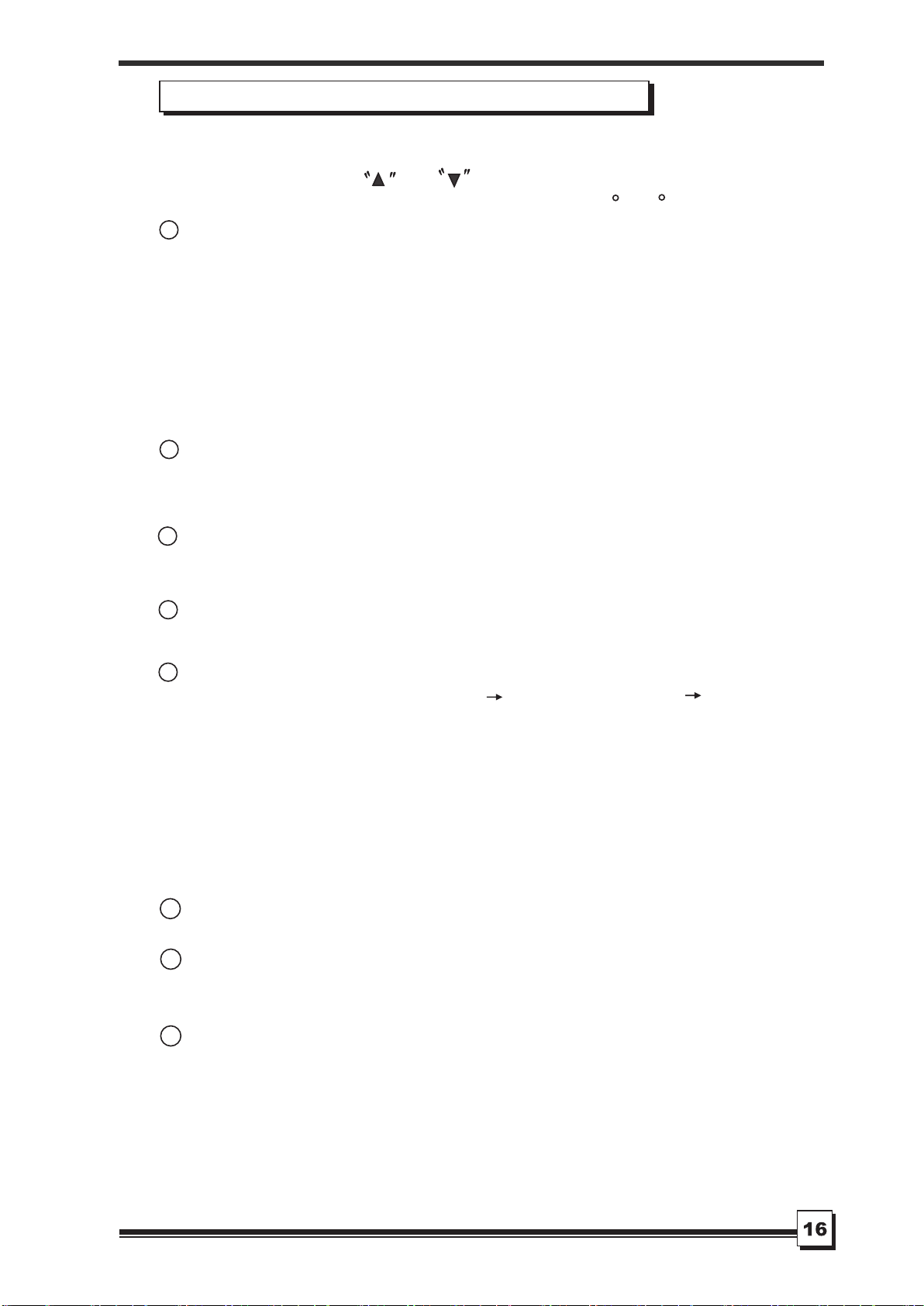
Features of remote control(continued)
RESET Button: When you press the recessed RESET button,
all current settings are cancelled and the control will return to
the initial settings.
6
FAN Button: Used to select the Fan Speed in four steps-
AUTO、LOW 、MED(some models without) or HIGH. Each
time the button is pressed, the fan speed mode is shifted.
5
7
temperature setting or to adjust the TIMER in a counter-clockwise
direction.
NOTE: Press and hold and buttons together for 3 seconds
will alternate the temperature display between the C & F scale.
TIMER Button: This button is used to preset the time ON
(start to operate) and the time OFF (turn off the operation).
9
LOCK Button: When you press the LOCK button, all current
settings are locked in and the remote controller does not accept
any operation except that of the LOCK. Press again to cancel
the LOCK mode.
8
10
CANCEL Button:
(a). If the TIMER ON, TIMER ON OFF or TIMER OFF ON
feature has been set, press the CANCEL button will override
the TIMER program and turn off the unit as well.
(b). If only set TIMER OFF feature, press the CANCEL button
will cancel the timer off setting and turn on the unit (when
the unit is off).
(c). If no TIMER feature has been set, press the CANCEL button,
and nothing will happen.
CLOCK Button: Use to set the time.
LED Button: Press this button to clear the digit display in the
air conditioner, press it again to activate it .
11
SLEEP Button: In SLEEP mode,
4
Active/Disable sleep function. It can maintain the most
comfortable temperature and save energy. This function is
available on COOL or AUTO mode only. For the detail,
see Sleep operation in USER S MANUAL.
,,,
NOTE:
be cancelled if MODE, FAN SPEED or ON/OFF button is
pressed.
While the unit is running under SLEEP mode, it would
,,,,
,,
REMOTE CONTROL INSTRUCTIO
CLOCK
C
ON
OFF
SET TEMP.
FAN SPEED
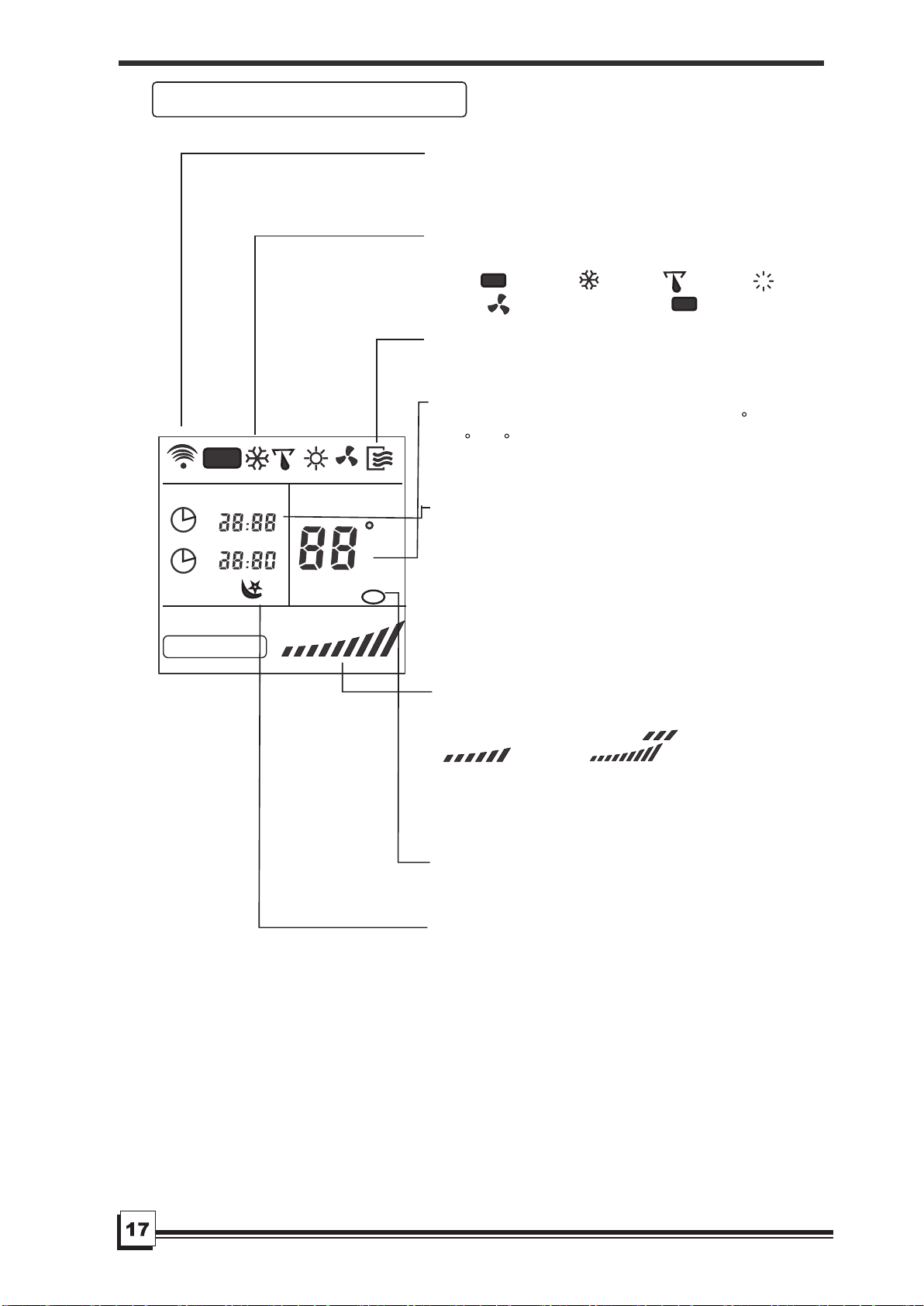
Indicators on remote controller
Transmission Indicator
Temp. display
Time display
Fan speed display
Sleep Display
Mode display
ON/OFF display
This transmission indicator lights when
remote controller transmits signals to the
indoor unit.
Displays the current operation mode. Including
AUTO( ), COOL( ), DRY( )
, F
AN
ONL
Y
( )and back to AUTO( ).
。
Displays the temperature setting (17 C/62 F
to 30 C/86 F)when you set the operating
mode to FAN ONLY, no temperature setting is
displayed.
Displayed by pressing the ON/OFF button.
Press the ON/OFF button again to remove.
The clock time is indicated only when no
AUTO-ON/OFF timer is set. When AUTO-
TIMER feature is operating, it displays the
AUTO-ON/OFF time. To check the current
time, press the CLOCK button, and the time
will display.
Indicate Timer on/off time(0 24 hours)
or clock time.
Displays the selected fan speed, AUTO
and three fan speed levels " " (LOW)
" " (MED) " " (HIGH)
can be indicated. Displays AUTO when the
operating mode is either AUTO or DRY.
Displayed by pressing the SLEEP button.
Press the SLEEP button again to remove.
Note:
All displays on the remote controller are
shown for illustration purposes only.
AUTO
F
AUTO
AUTO
Lock Display
Displayed by pressing the LOCK button.
Press the LOCK button again to remove.
~
Note: Some models have no MED Fan
speed selection.
REMOTE CONTROL INSTRUC
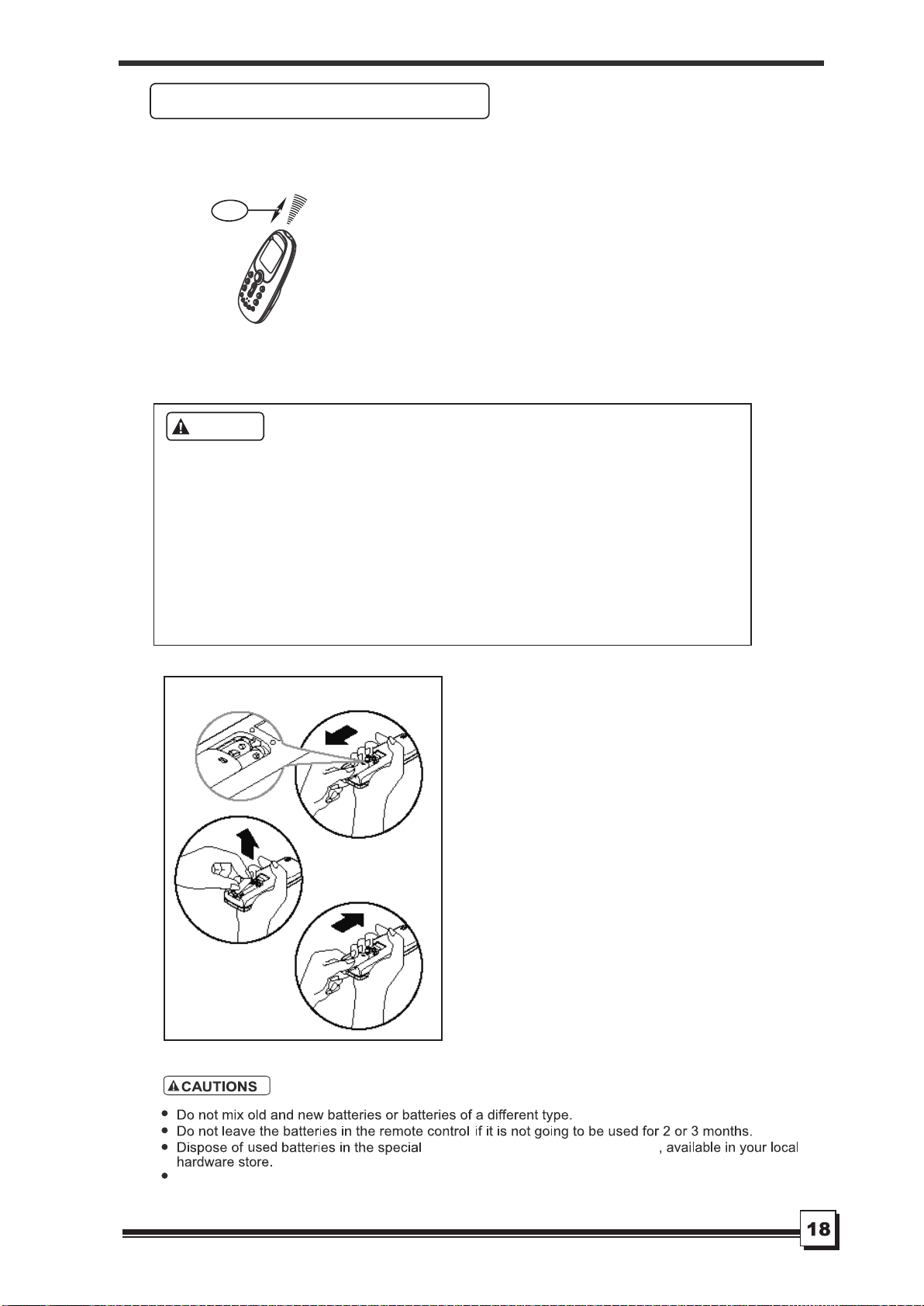
Keep the remote controller where its
signals can reach the receiver of the
unit (a distance of 8m is allowed).
When you select the timer operation, the
remote controller automatically transmits
a signal to the indoor unit at the specified
time.
If you keep the remote controller in a
position that hinders proper signal
transmission, a time lag of up to 15
minutes may occur.
Location of the remote controller.
.
.
8m
CAUTIONS
The air conditioner will not operate if curtains, doors or other materials
block the signals from the remote controller to the indoor unit.
Prevent any liquid from falling into the remote controller. Do not expose
the remote controller to direct sunlight or heat.
If the infrared signal receiver on the indoor unit is exposed to direct
sunlight, the air conditioner may not function properly. Use curtains to
prevent the sunlight from falling on the receiver.
If other electrical appliances react to the remote controller. either move
these appliances or consult your local dealer.
.
.
The remote controller uses two
dry batteries (R03/LR03X2)
(1) Slide the cover of the battery
compartment off according to the
arrow direction, then replace the
old batteries with new ones.
(2) Insert the new batteries making
sure that the(+) and (-) of battery
are installed correctly.
(3) Reattach the cover by sliding it
back into position.
After replacing batteries, set the
remote controller clock.
Replacing batteries
.
.
.
Handling the remote controller
Do not recharge batteries or dispose of them in fire.
protect the environment
containers to
REMOTE CONTROL INSTRUCTIO
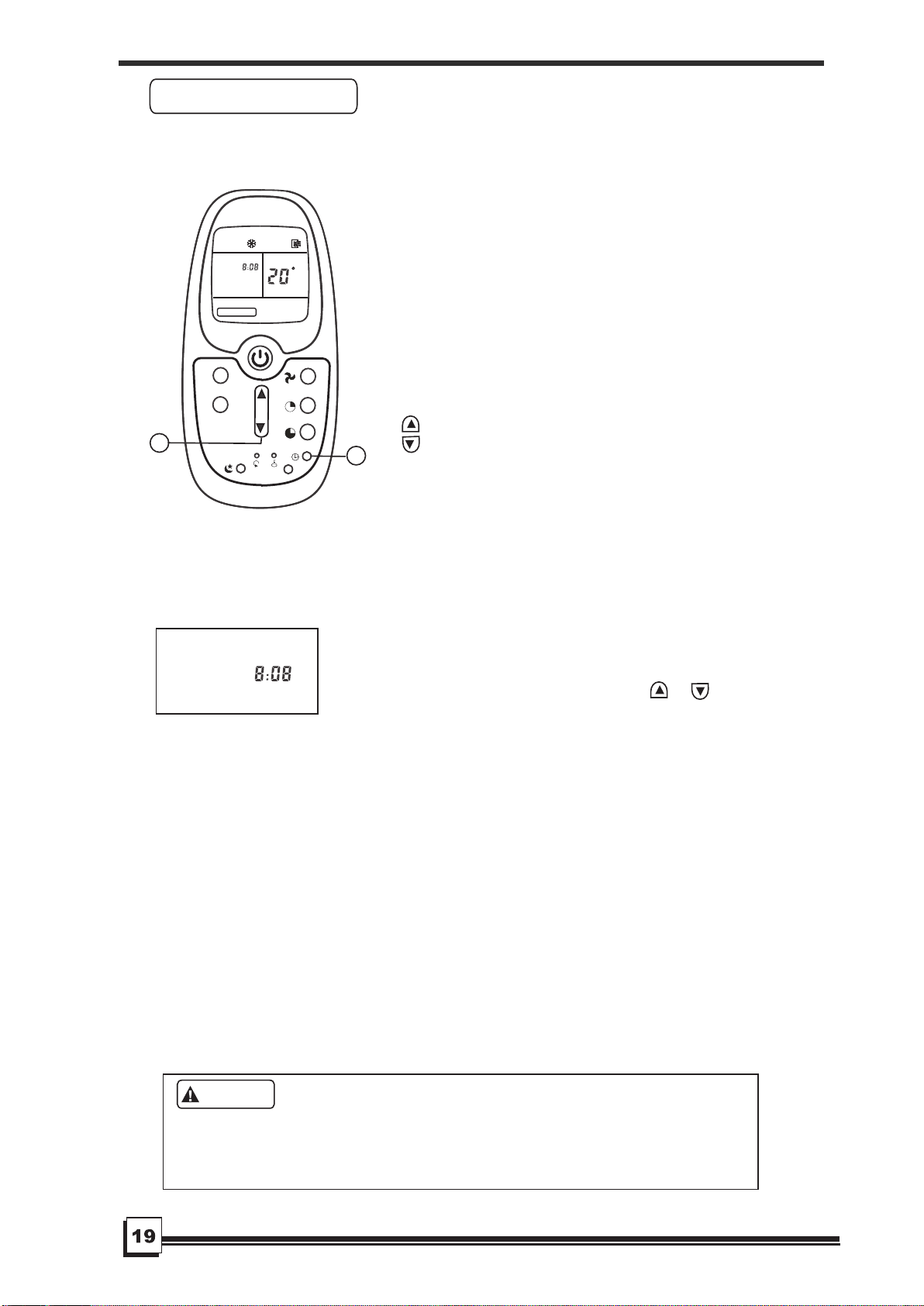
Before you start operating the air conditioner,
set the clock of the remote controller using
the procedures given in this section. The
clock panel on the remote controller will
display the time regardless of whether the
air conditioner is in use or not.
After batteries are inserted in the remote
controller, the clock panel will display "12:00".
Press and hold the CLOCK button for 3nds,
the time begin to flash.
1. TEMP/TIME adjust button
Press this button to set time.
Forward.
Backward.
Each time you press the button, the time
moves forward or backward by one minute
depending on which side you press.
The time alters as quickly as you push the
button.
Keep pressing the button without releasing,
the time moves forward or backward by 10
minutes depending on which side you press.
Initial Setting or the Clock
.
.
When the right time is achieved, press the
CLOCK button or release the or and
wait for 5 seconds, the clock time stops
flashing and the clock starts operating.
Press the CLOCK button on the remote
controller for about 3 seconds, the clock
display time will start to flash.
To set the new time, follow 1 and 2 of "Initial
Setting of the Clock".
Note: The time of the CLOCK must be set
before the AUTO-TIMER feature will operate.
If you readjust the time of the CLOCK after
setting the AUTO-ON/OFF timer, the remote
controller will send the readjusted timer
information to the unit.
* Clock accuracy is within 15 seconds per day.
2.
3.Readjusting the Clock
Static electricity or other factors (in case of extremely high voltage) can
cause remote controller clock initialize. If your remote controller is
initialized (flashing "12:00"), readjust the clock before you start operation.
CAUTIONS
.
CLOCK
CLOCK button
Setting the clock
1
CL OC K
SE T TE MP .
FA N SPE ED
AUTO
2
M
O
D
E
L
E
D
S
W
I
N
G
C
REMOTE CONTROL INSTRUCTIO
Automatic operation
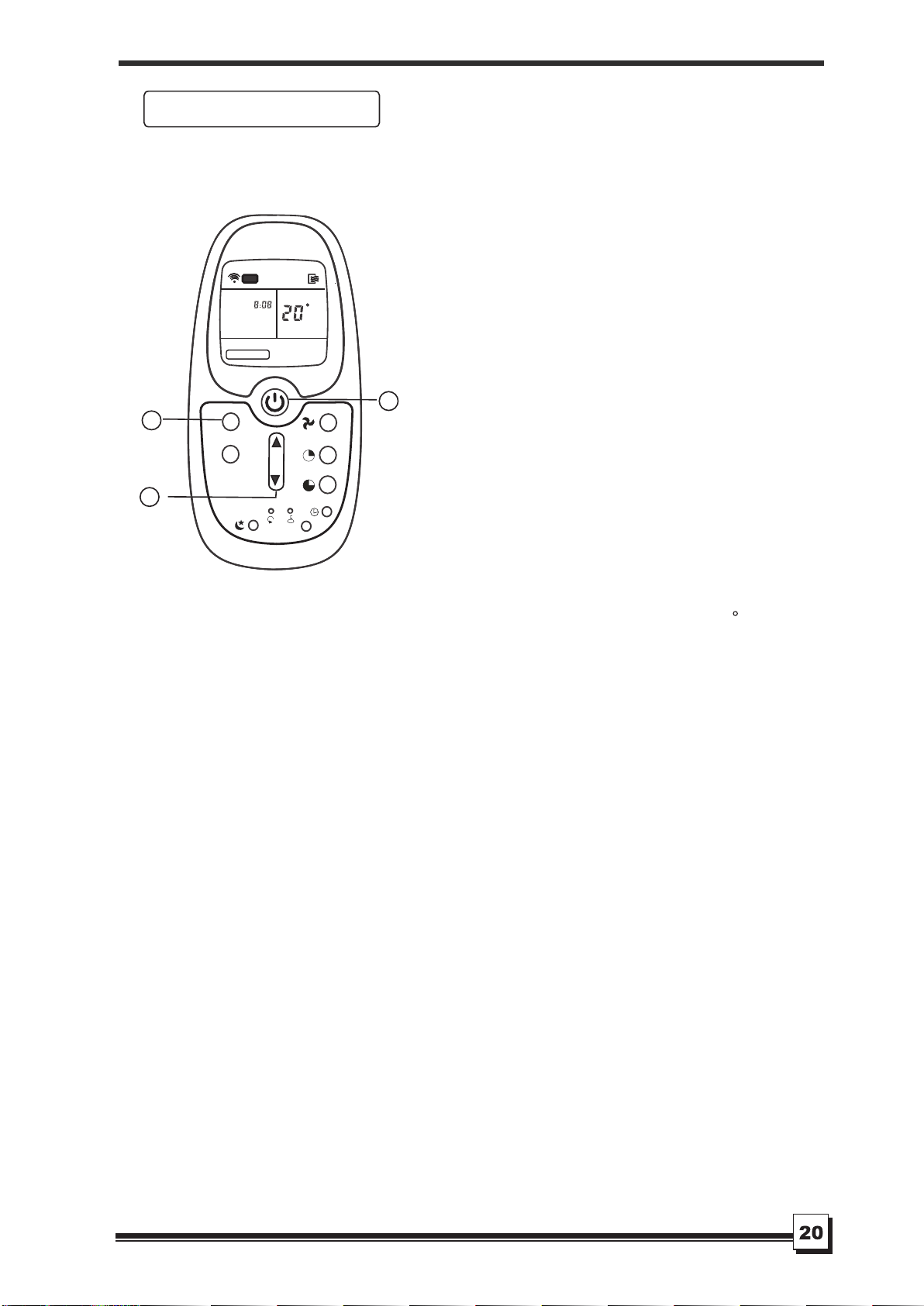
Ensure the unit is plugged in and power
is available. The OPERATION indicator
on the display panel of the indoor unit
starts flashing.
1. Mode select button (MODE)
Press to select AUTO.
2. TEMP/TIME button
Set the desired temperature. Normally,
。 。
set it between 21 C/ to 2 8 C/83 F.
3. ON/OFF button
When the remote controller is off,
push this button to start the air
conditioner.
O
70 F
ON/OFF button
Push this button again to stop the air
conditioner.
If the AUTO mode is uncomfortable, you
can select the desired conditions manually.
When you select the AUTO mode, you do
not have to set the fan speed. The fan
speed will be automatically controlled.
When you set the air conditioner in AUTO
mode, it will automatically select cooling,
or
fan only operation depending on what
temperature you have selected and the
room temperature.
Once you select the operating mode, the
operating conditions are saved in the
unit's microcomputer memory
.
Thereafter, the air conditioner will start
operating under the same conditions
when you simply push the ON/OFF
button of the remote controller
.
Start
Stop
1
2
CL OC K
SE T TE MP.
FAN SPEED
AUTO
3
M
O
D
E
L
E
D
S
W
I
N
G
C
REMOTE CONTROL INSTRUCTIO
DRYING OPERATION
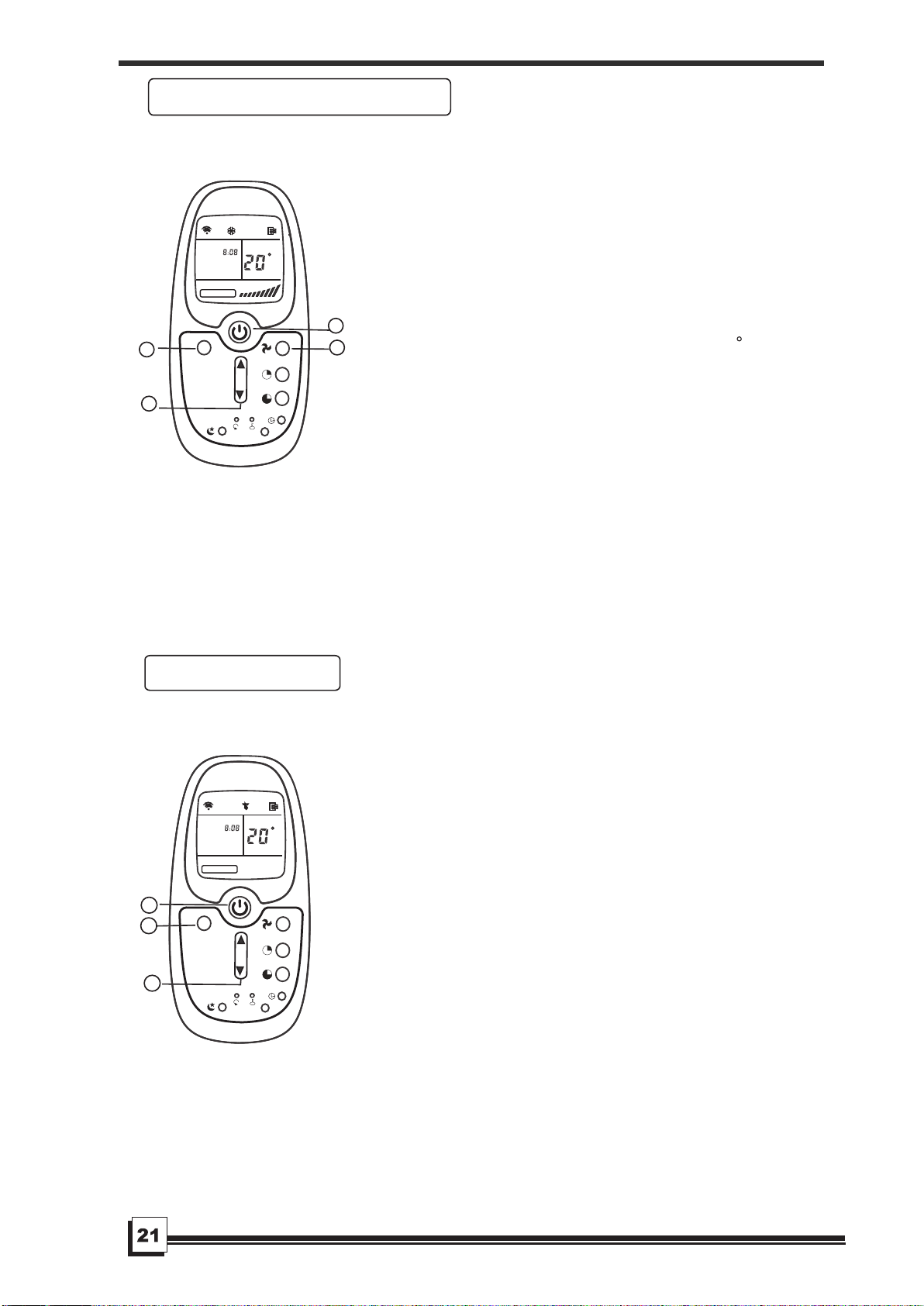
Ensure unit is plugged and power is available.
The OPERATION lamp on the display panel of
the indoor unit starts flashing.
1. Mode select button (MODE)
Press to select COOL,
FAN ONLY
ON/OFF button
Push this button again to stop the air conditioner.
The FAN ONLY mode does not control temperature.
Therefore, perform only steps 1,3, and 4 to select
this mode.
Ensure unit is plugged and power is available.
The OPERATION indicator on the display panel
of the indoor unit starts flashing.
1. Mode select button (MODE)
Press to select DRY.
2. TEMP/TIME button
Push the "TEMP/TIME" button to set the desired
。
O o O
temperature from 21 C/70 F to 28 C/83 F.
3. ON/OFF button
When the remote controller is off, push this
button to start the air conditioner.
ON/OFF button
Push this button again to stop the air conditioner.
2. TEMP/TIME button
Set the desired temperature, the most comfortable
。 O 。
temperature is between 21 C/70 F to 2 8 C/83 F.
3. Fan speed button (FAN SPEED)
Press to select "AUTO" "LOW", "MED" and "HIGH"
4. ON/OFF button
When the remote controller is off, push this
button to start the air conditioner.
Start
Stop
Start
Stop
Note: The fan speed cannot be adjusted when
the unit is in AUTO and DRY mode.
Cooling/Fan only operation
1
2
4
3
CL OC K
SE T TE MP.
FA N SPEED
M
O
D
E
L
E
D
1
2
3
CL OC K
SE T TE MP.
FA N SPEED
M
O
D
E
L
E
D
C
C
REMOTE CONTROL INSTRUCTIO
Timer operation
When you select the timer operation, the remote controller automatically
transmits the timer signal to the indoor unit at the specified time.
Therefore, keep the remote controller in a location from which it can
transmit the signal to the indoor unit properly.
The effective operation time set by remote controller is limited in 24 hours.
CAUTIONS
1. TIMER button
Press the TIMER button, the remote
displays 0.0 alongside either the TIMER
ON or TIMER OFF indicator, and will
flash.
2. TEMP/TIME button
Press to set the desired time.
Forward
Backward
Press or hold the forward or backward
button to change the Auto time by 0.5
hour increments, up to 10 hours, then
at 1 hour increments up to 24 hours.
The selected time will register in 3nds
after setting.
3. After setting the timer for TIMER ON and
TIMER OFF, check the TIMER indicator
on the display panel of the unit is
illuminated.
4. Cancel button(CANCEL)
Press the CANCEL button to cancel
the timer setting.
Preform steps 1, 2 and 3 to change the
settings.
.
.
Canceling
Changing
.
.
1
2
3
ON
OF F
SE T TEMP.
FAN SPEE D
M
O
D
E
L
ED
.
C
REMOTE CONTROL INSTRUCTIO
22
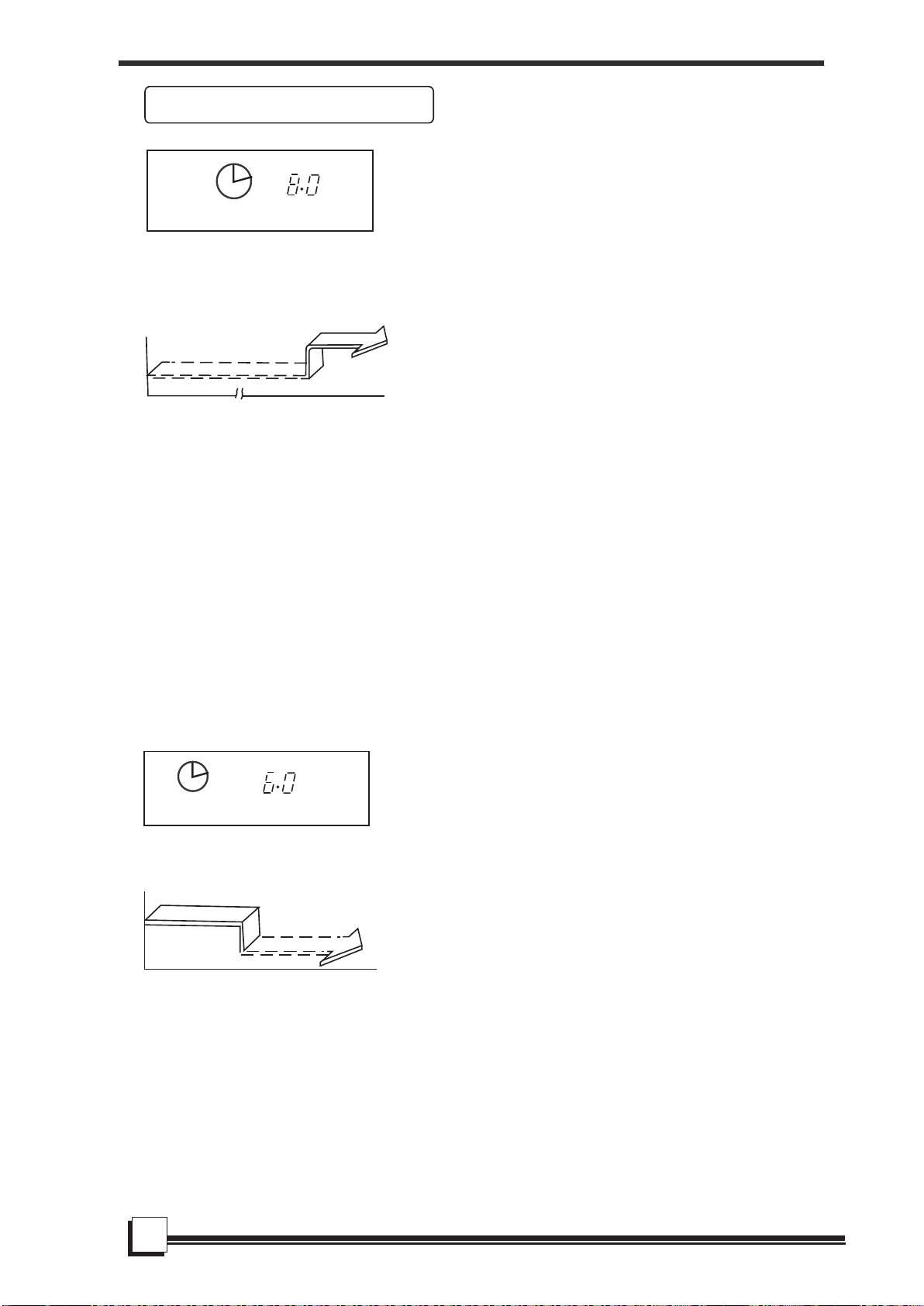
(Timer Stop Operation)
The TIMER OFF feature is useful
when you want the unit to turn off
automatically after you go to bed.
The air conditioner will stop auto-
matically at the set time.
To stop the air conditioner in 6 hours.
1. Press the TIMER button until the
TIMER OFF indicator is displayed
and the setting time beside is flashing.
2. Use the TEMP/TIME button to display
"6.0" beside the TIMER OFF display.
3. This function will be activated after 3
seconds you release the TEMP/TIME
button.
TIMER OFF
Example:
(Timer Start Operation)
The TIMER ON feature is useful when
you want the unit to turn on automatically
before say when you return home.
The air conditioner will automatically
start operating at the set time.
IMPORTANT: The time will be registered
within a 3 second period(after pressing
the TEMP/TIME button), so you should
continue pressing the button until the
desired time is established. Otherwise
you must repeat the steps again.
To start the air conditioner in 8 hours.
1. Press the TIMER button, the TIMER
ON indicator is displayed and the
setting time beside is flashing.
2. Use the TEMP/TIME button to display
"8.0" beside the TIMER ON display
of the remote control.
3. Wait for 3 seconds and the setting time
stops flashing and this function is
activated.
TIMER ON
Example:
Example of timer setting
ON
OFF
Start
Off
8 hours later
Set
Stop
On
Set 6 hours later
REMOTE CONTROL INSTRUCTIO
23
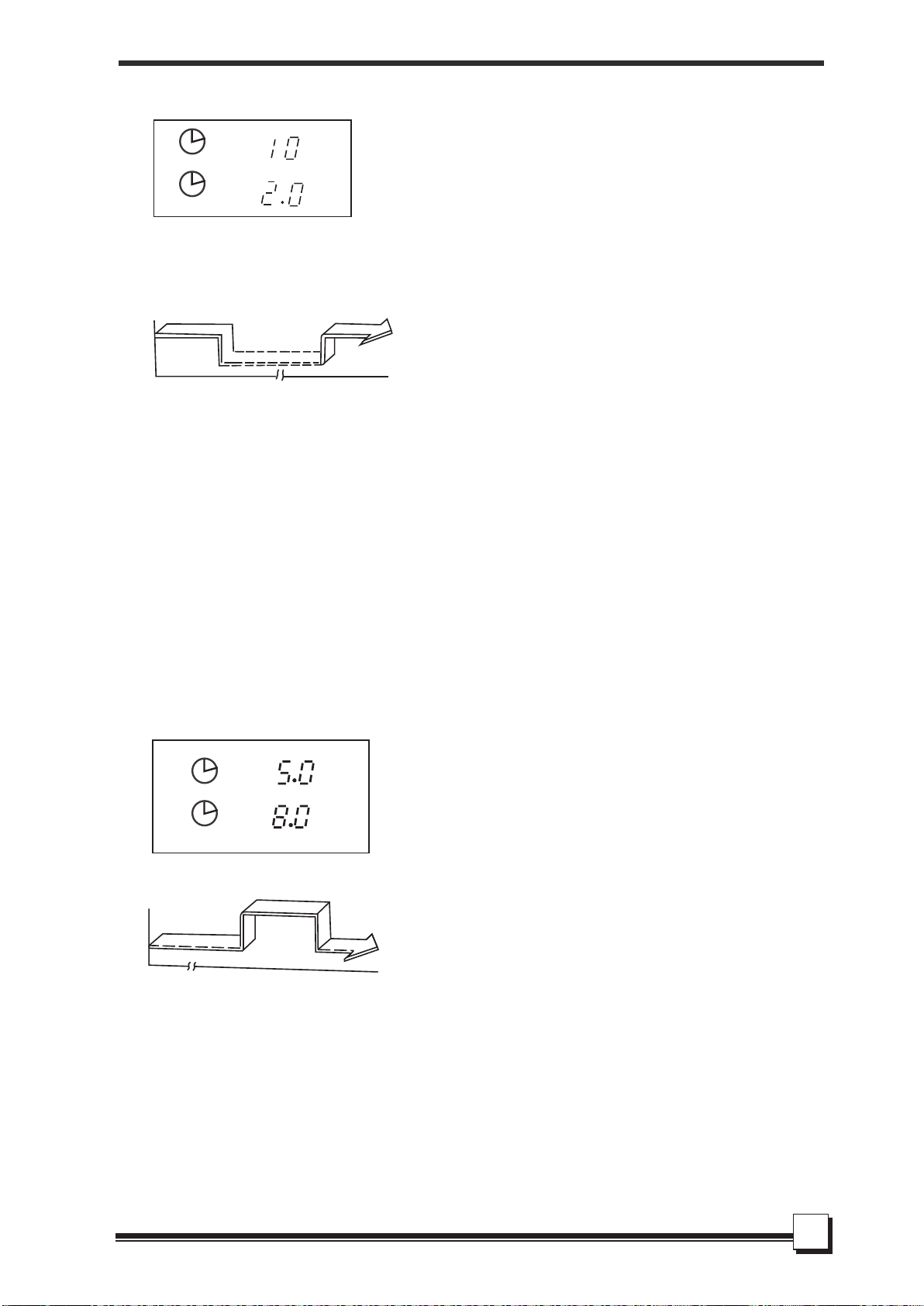
To stop the air conditioner 2 hours after
setting and start it again 10 hours after
setting.
1. Press the TIMER button until the TIMER
OFF indicator is displayed and time setting
is flashing.
2. Use the TEMP/TIME button to display
"2.0" beside the TIMER OFF display.
3. Press the TIMER button again to display
the TIMER ON .
4. Use the TEMP/TIME button to display
"10" beside the TIMER ON display.
5. Wait for 3 seconds until the TIMER ON
time stops flashing and this function
is activated.
TIMER OFF → TIMER ON
(On → Stop → Start operation)
This feature is useful when you want to
stop the air conditioner after you go to
bed, and start it again in the morning
when you wake up or when you return
home.
Example:
COMBINED TIMER
(S both ON and OFF
simultaneously)
etting timers
Example:
TIMER ON → TIMER OFF
(Off → Start → Stop operation)
This feature is useful when you want to start
the air conditioner before you wake up and
stop it after you leave the house.
To start the air conditioner 5 hours after
setting, and stop it 8 hours after setting.
1. Press the TIMER button, the TIMER ON
displays and the setting time flashes.
2. Use the TEMP/TIME button to display
"5.0" beside the TIMER ON display of the
remote controller.
3. Press the TIMER button again to display
the TIMER OFF and the setting time.
4. Use the TEMP/TIME button to display
"8.0" beside the TIMER OFF display.
5. Wait for 3 seconds until the TIMER OFF
time stops flashing and this function
is activated.
ON
OFF
ON
OFF
On
Stop
2 hours later
after setting
Set
Start
10 hours later
after setting
Off
Stop
Start
5 hours later
after setting
8 hours later
after setting
Set
REMOTE CONTROL INSTRUCTIO
24